❌

Reading view

How Tilted Orbits Impact Supermassive Black Hole Collisions

merging galaxies

What factors impact how long it takes for a supermassive black hole binary to merge? New research investigates the influence of orbital inclination on the population of merging black holes in our universe.

One Merger Leads to Another

NGC 6240

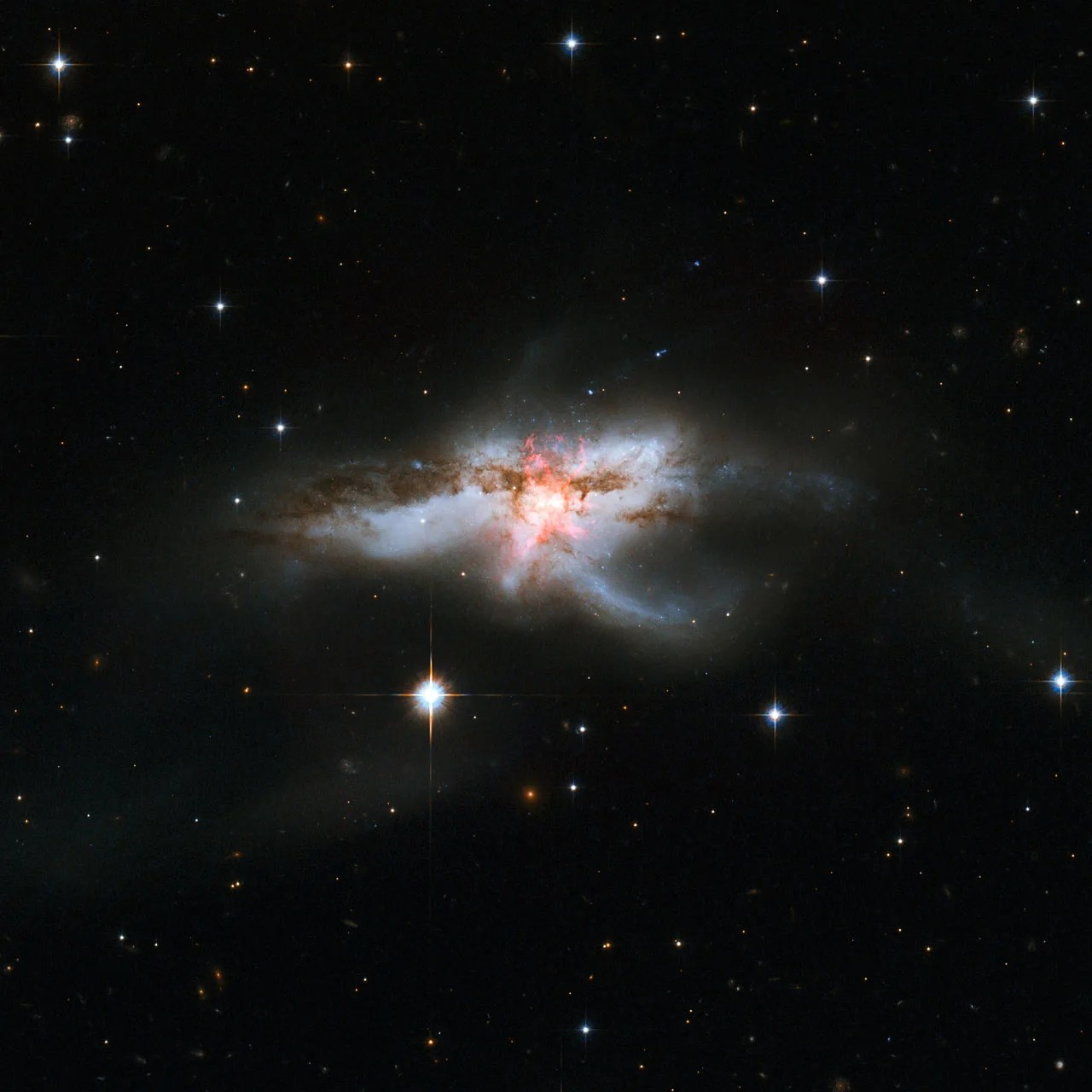
This image from the Hubble Space Telescope shows NGC 6240, the result of a three-galaxy merger that contains three nuclei, two of which appear to have active supermassive black holes. [NASA, ESA, the Hubble Heritage (STScI/AURA)-ESA/Hubble Collaboration, and A. Evans (University of Virginia, Charlottesville/NRAO/Stony Brook University)]

When galaxies merge, the supermassive black holes at their centers are thought to link up in a binary system and eventually merge as well. Evidence for these supermassive black hole pairs and their collisions is piling up: researchers have identified a small but growing number of galaxies containing two accreting supermassive black holes, and the compelling evidence for the gravitational wave background points to the existence of an immense population of supermassive black hole binaries.

With observational evidence for supermassive black hole mergers taking shape, theorists are exploring the details of these mergers. One aspect of this process that hasn’t yet been examined fully is how the relative inclination of the merging galaxies impacts the time it takes for their central black holes to merge — a factor that has the potential to shape the demographics of merging supermassive black holes across our universe.

Ready, Set, Spiral

Sena Ghobadi (Georgia Institute of Technology) and collaborators used 3D dynamical models to explore how the angle at which galaxies collide — and therefore how the black holes’ orbits are tilted relative to one another — impacts the time it takes the supermassive black holes at their centers to merge.

In the simulations, Ghobadi’s team placed a 106–108-solar-mass black hole at the center of a disk galaxy. Then, they sent a second, smaller black hole spiraling toward it from a distance of 1 kiloparsec (3,300 light-years).

The team varied the inclination of the incoming black hole’s orbit relative to the disk of the target galaxy from 0 to 75 degrees. They also explored the impact of changing the black hole masses and the galaxy’s central gas density, disk rotation speed, and gas mass fraction. For each simulation, they recorded how long it took for the incoming smaller black hole to get within 10 parsecs of the larger black hole.

simulated black hole orbits

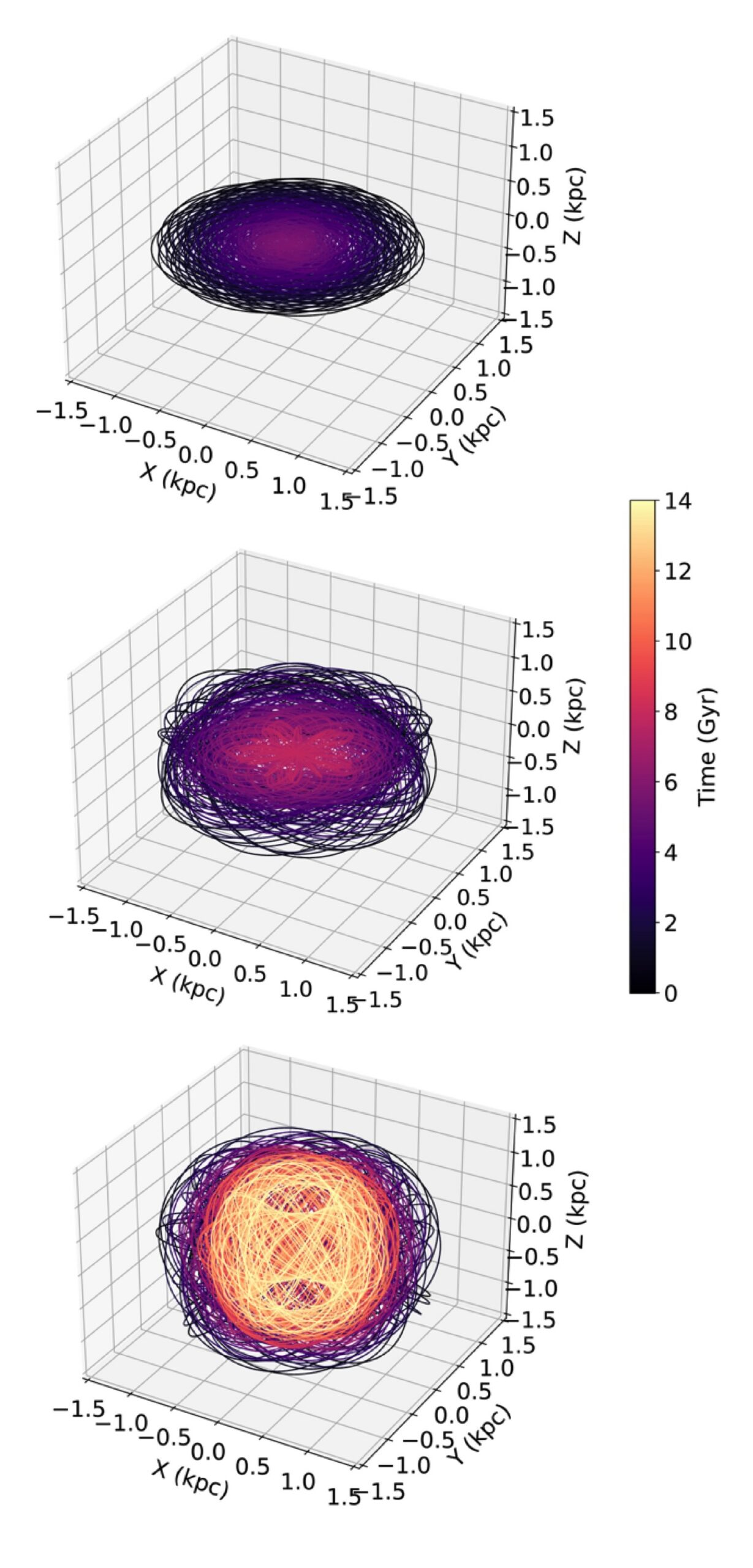
Simulated orbits of black holes with initial inclinations of 0 (top), 25 (center), and 45 (bottom) degrees. For the 0-degree simulation, the black holes merge in 5.75 billion years. For the 25-degree simulation, the merger occurs at 7.90 billion years. The 45-degree simulation fails to merge within the lifetime of the universe. [Adapted from Ghobadi et al. 2026]

(Dis)inclined to Merge

The simulations showed a clear trend with changing inclination: a black hole with an orbital inclination greater than 20 degrees took longer to merge than those with inclinations of 0–20 degrees. For black holes approaching the merger on slightly inclined orbits, dynamical friction between the black hole and the stars and gas of the galaxy worked to drag the black hole down into the disk, decreasing its inclination over time and guiding it toward a merger. Aside from the influence of inclination, the team also found that higher-mass supermassive black holes and more rapidly rotating galactic disks tended to lead to faster mergers.

For inclinations greater than roughly 45 degrees, a dramatic transition took place, with the orbits of the incoming black holes becoming more inclined over time rather than settling down into the disk. These simulated black holes failed to merge in the allotted time of 14 billion years.

With highly inclined binaries failing to merge within the lifetime of the universe, this suggests that the dual active galactic nuclei and the supermassive black hole binaries that produce gravitational waves in the universe today are the result of binaries with initial inclinations of 20 degrees or less.

Citation

“Evolution of Supermassive Black Hole Pairs on Inclined Orbits in Postmerger Galaxies,” Sena Ghobadi et al 2026 ApJ 999 131. doi:10.3847/1538-4357/ae40bc

The post How Tilted Orbits Impact Supermassive Black Hole Collisions appeared first on AAS Nova.

  •  

Water Vapor Around a Sizzling Supergiant: High-Resolution Spectroscopy of B[e] Supergiant LHA 115-S 18

blue supergiant

Prior to exploding, massive stars advance through action-packed evolutionary stages that are exciting but often difficult to fully decipher. A recent study focuses on a unique late-stage star to better understand its properties and evolution.

To B[e] a Supergiant

HD 62623 disk image

Very Large Telescope Interferometer image of the circumstellar disk around the B[e] supergiant star HD 62623. The colors indicate the rotation of the disk with blue coming toward us and red going away. [ESO/F. Millour; CC BY 4.0]

After depleting their cores of hydrogen, massive stars journey off the main sequence through a series of evolutionary phases before ending in dramatic supernova explosions. A massive star’s post-main-sequence evolution is intense, often sloughing off layers of material that can settle into a circumstellar disk. The B[e] supergiant phase describes a blue supergiant star surrounded by a cool, dense circumstellar disk where oxygen is more abundant than carbon. These environments often lock up carbon atoms in carbon monoxide molecules, leaving excess oxygen available to form other molecules including SiO, TiO, and water vapor. These molecules can survive under different physical conditions, making them key tracers of the environments around B[e] supergiants.

One particularly interesting B[e] supergiant, LHA 115-S 18, has been the subject of numerous studies but remains poorly constrained. The star exhibits significant variability both in brightness and emission features on timescales of days to years, and previous works have suggested that the star may have an as-yet unconfirmed binary companion. Molecular line emission from CO and TiO have been identified in LHA 115-S 18, indicating a circumstellar disk, but to date, water vapor emission has not been identified in any B[e] supergiant. Identifying more complex oxygen-bearing molecules like water will further reveal the physical properties and possible binary companion of LHA 115-S 18.

Identifying Emission in LHA 115-S 18

To characterize the emission around LHA 115-S 18, María Laura Arias (Institute of Astrophysics La Plata; National University of La Plata) and collaborators obtained high-resolution near-infrared spectroscopy of the star using the Immersion Grating Infrared Spectrometer on the Gemini South telescope. From the high-resolution spectra, the team identified several atomic emission lines indicative of the star’s gaseous envelope, revealing the structure of material around the star: an inner hot disk of ionized material and an outer cool disk of neutral material. Looking at molecular emission from carbon monoxide — a tracer of both gas motions and stellar age — the authors confirmed the presence of a rotating ring of gas around LHA 115-S 18 and determined that the star is an evolved, post–red supergiant object.

LHA 115-S 18 spectrum

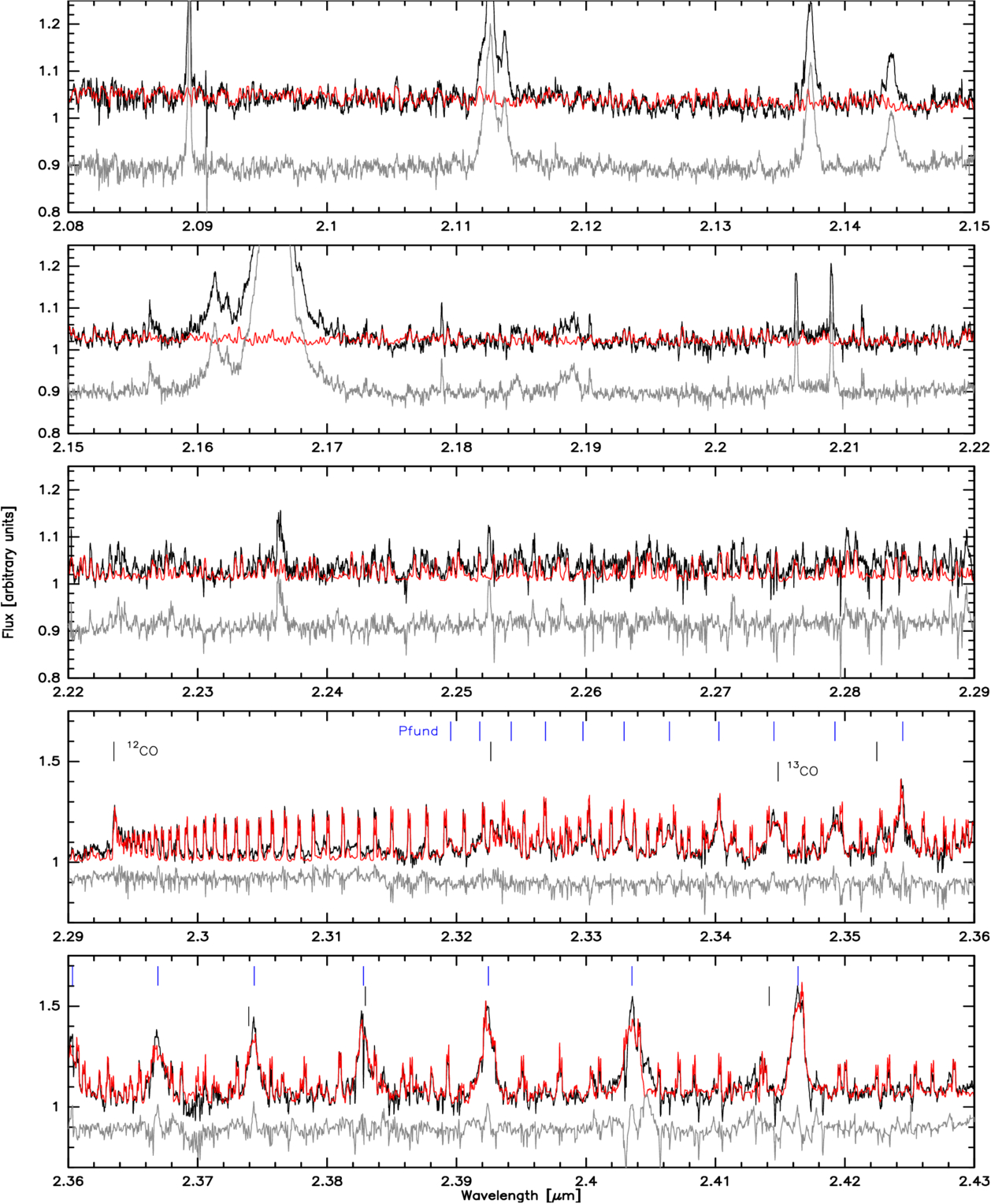
Spectrum of LHA 115-S 18 (black) with the model spectrum composed of water vapor (red, top three panels) and water vapor, CO, and hydrogen emission (red, bottom two panels) overplotted as well as residuals (gray). [Arias et al 2026]

Through computing a synthetic spectrum to compare to the observed spectrum, the authors identified many water vapor emission lines in the circumstellar environment around LHA 115-S 18. While water vapor has been detected in other evolved late-type stars, this is the first detection of water vapor from a B[e] supergiant star. For water vapor to survive the star’s intense radiation, it must exist in a dense, cool, heavily shielded disk around the B[e] supergiant.

Sustaining a cool disk around such a hot star indicates that the circumstellar environment around LHA 115-S 18 is complex and likely shaped by binary interaction. With emission features characteristic of both cool and hot evolved stars, this particular B[e] supergiant presents itself as a unique object holding critical insights into the late-stage evolution of massive stars. Further multiwavelength observations of LHA 115-S 18 will constrain its potential binarity and reveal a possible evolutionary link between B[e] supergiants and other late-stage evolutionary phases of massive stars.

Citation

“High-resolution Near-Infrared Spectroscopy of the B[e] Supergiant LHA 115-S 18: Discovery of Hot Water Vapor Emission,” María Laura Arias et al 2026 ApJL 1000 L49. doi:10.3847/2041-8213/ae524a

The post Water Vapor Around a Sizzling Supergiant: High-Resolution Spectroscopy of B[e] Supergiant LHA 115-S 18 appeared first on AAS Nova.

  •  

Supernovae, Shocks, and Spindown: A Possible Origin Story for Ultra-Long-Period Pulsars

Researchers have recently discovered a number of ultra-long-period pulsars that are difficult to explain with typical pulsar models. A new article explains how these pulsars might arise from massive stars in close binary systems.

Strangely Slow Sources

Crab Nebula

A multi-wavelength view of the Crab Nebula, the remnant of a supernova that birthed a neutron star. The neutron star powers a pulsar wind nebula, shown in blue. [X-Ray: NASA/CXC/J.Hester (ASU); Optical: NASA/ESA/J.Hester & A.Loll (ASU); Infrared: NASA/JPL-Caltech/R.Gehrz (Univ. Minn.)]

When massive stars go supernova, the explosion can leave behind the condensed stellar core in the form of a neutron star. Neutron stars that spin rapidly become pulsars, whose fast rotation powers beams of radio emission along the star’s poles.

Until not too long ago, pulsars appeared to have periods no longer than 12 seconds. Above that “sluggish” rotation rate, researchers suggested, pulsars could no longer produce electron–positron pairs and channel them along polar magnetic field lines to generate their characteristic radio signals.

So it seemed, until unexpectedly slow pulsars began to crop up. The first trend-breaking pulsars had periods of a few dozen seconds, and objects with pulse periods of minutes or hours have now been found. What could these strange objects be?

Neutron Star Origin Story

In a recent article led by Savannah Cary (University of California, Berkeley), researchers proposed that these strange radio sources are pulsars, but pulsars that rotate slowly and have magnetically powered (rather than rotationally powered) radio emission.

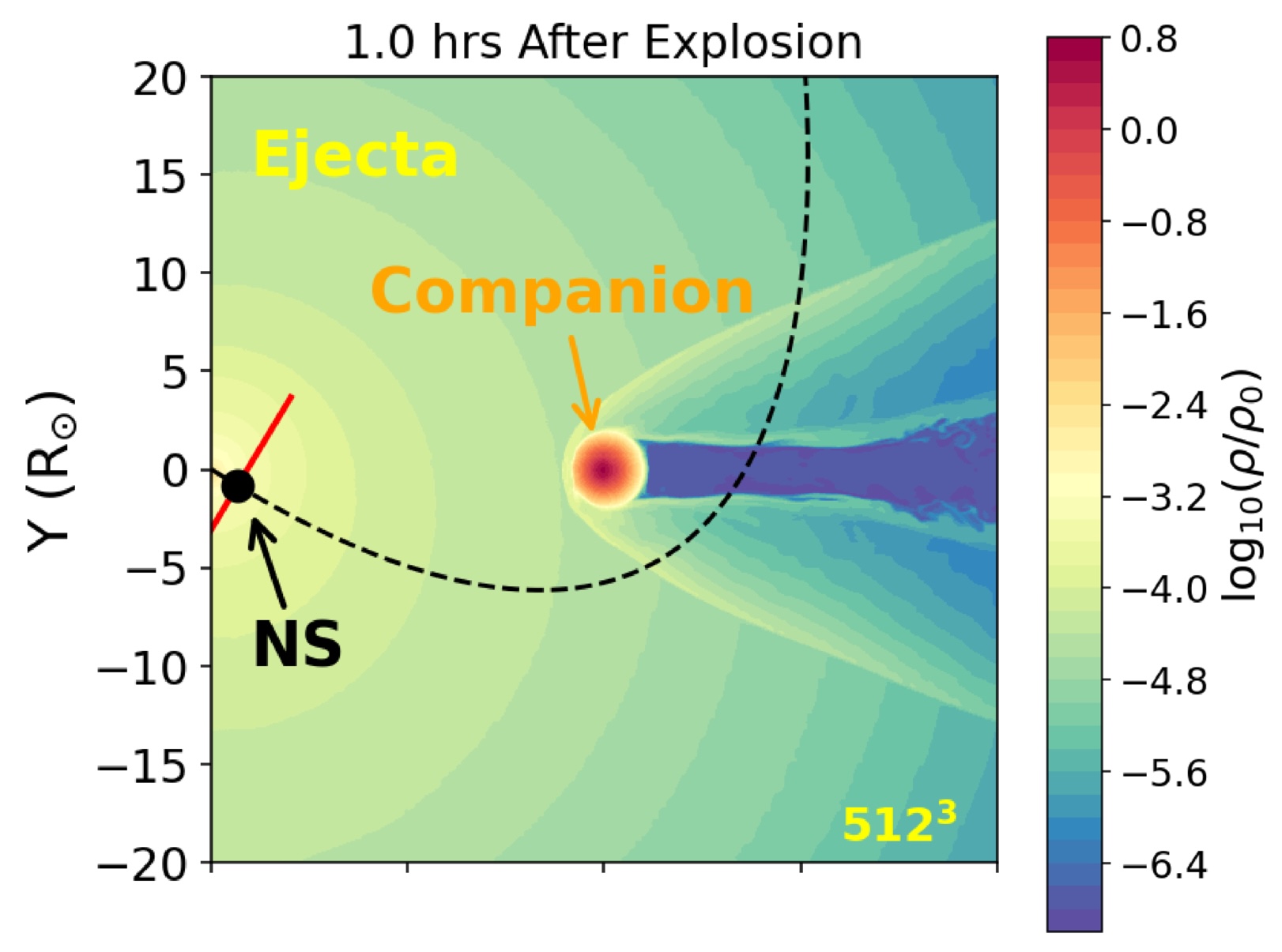
The proposed origin story for these ultra-long-period pulsars begins with a binary system containing a massive star and a close stellar companion. As the massive star evolves, it transfers its outer layers to the companion and expires as a stripped-envelope supernova that births a rapidly spinning neutron star. As the supernova ejecta crashes into the companion star, the star heats up and expands to 5–100 times its original radius.

simulation of supernova ejecta colliding with a star

Simulation snapshot taken one hour after the supernova explosion. The black dashed line shows the path the neutron star (NS) will take through the companion star’s outer layers. Click to enlarge. [Adapted from Cary et al. 2026]

Meanwhile, the explosion delivers a ferocious kick to the newborn neutron star, likely unbinding the binary system. This sets the neutron star on a new course that could take it through the puffed-up outer layers of its former companion, where it may collect gas from the star and ejected material from the supernova into an accretion disk.

Slowing Down

Cary’s team explored the outcomes of this scenario with a trio of simulations: hydrodynamical models for the shock heating of the companion star, numerical models for the formation of the disk around the neutron star, and analytical models for the interaction between the disk and the neutron star.

For a binary system containing stars of 6.4 and 4.0 solar masses and a separation of 20 solar radii — values drawn from observations and simulations — the resulting unbound neutron star collects a disk in 8–10% of cases. The neutron star’s mass, radius, rotation rate, and magnetic field strength determine whether the neutron star and the disk will interact. If they don’t, the neutron star remains rotating rapidly like a typical pulsar. If they do, the neutron star’s rotation will slow to a relative crawl over about a million years. For modest magnetic fields between 1013 and 1014 Gauss, this means rotation periods in the realm of 102 seconds, whereas stronger magnetic fields, above 1015 Gauss, yield periods of roughly a day.

This work suggests that close binary systems could be the source of ultra-long-period pulsars, of which Cary’s team estimates there may be 10–1,000 in the Milky Way. Future work will explore this possibility further, examining broader swaths of parameter space to learn more about how this scenario could contribute to the population of ultra-long-period pulsars in our galaxy.

Citation

“Accretion from a Shock-Inflated Companion: Spinning Down Neutron Stars to Hour-Long Periods,” Savannah Cary et al 2026 ApJ 996 141. doi:10.3847/1538-4357/ae1d43

The post Supernovae, Shocks, and Spindown: A Possible Origin Story for Ultra-Long-Period Pulsars appeared first on AAS Nova.

  •  

Rapid Recurrent Nova May Be Challenging Perceptions

nova

Flashing on and fading quickly, recurrent novae are captivating astronomical phenomena. A recent study identifies one system that challenges our current understanding.

Rapid Recurrent Novae

When a white dwarf — the white-hot remnant of a dead star — has a close binary companion, the white dwarf can pull material from the companion star onto its boiling surface. Ignited in a bright flash, the accreted material is blown out from the white dwarf in a nova explosion that gradually expands and fades over time. Some novae, known as recurrent novae, repeat on observable timescales, creating a “new” star in the sky on periods ranging from one to one hundred years.

M31N 2017-01e light curves

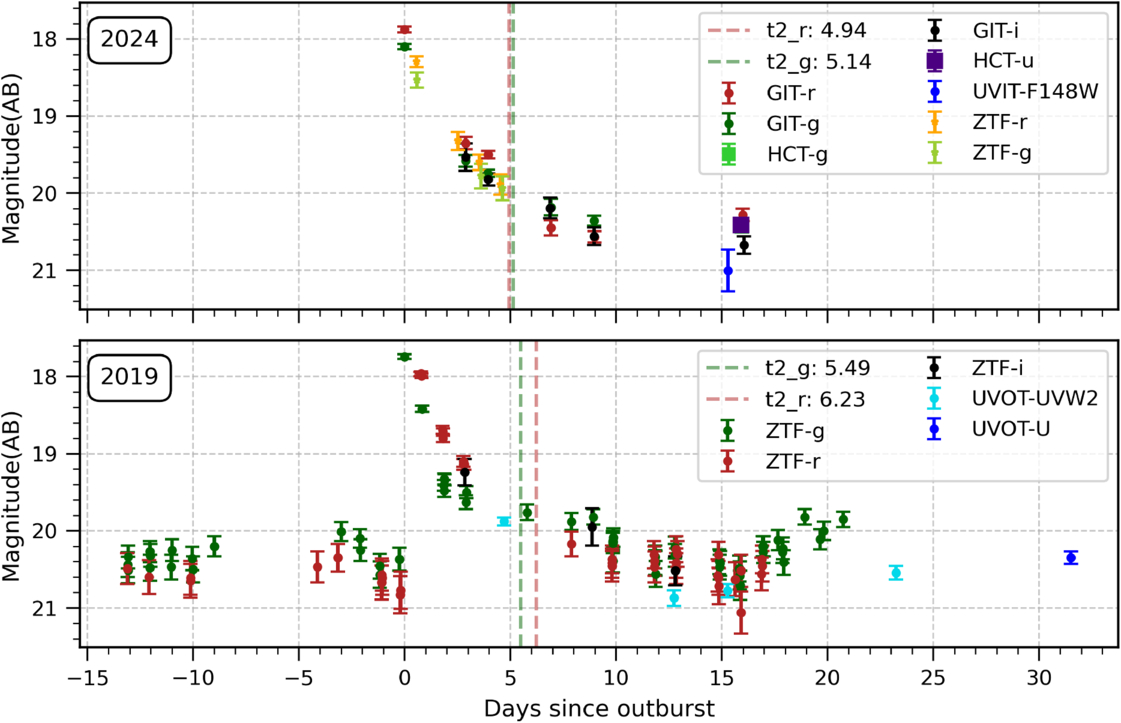
Two light curves of M31N 2017-01e outbursts from 2024 (top) and 2019 (bottom) showing how the light evolves over time. Click to enlarge. [Chamoli et al 2025]

Our nearest galactic neighbor, Andromeda, hosts the most rapid recurrent novae observed to date, including the shortest-period known recurrent nova, M31N 2008-12a. M31N 2008-12a has erupted once a year for millions of years and will eventually meet its fate in a supernova explosion. 

Discovered in 2017, the second-shortest-period nova M31N 2017-01e has an outburst about every 2.5 years. This nova has sparked intrigue among researchers due to its low-amplitude outbursts and rapid evolution compared to other recurrent novae. While M31N 2017-01e exhibits some emission features typical for recurrent novae, recent studies have suggested that the system’s companion star may be a moderately young, blue B-type star. Most novae occur in systems where the white dwarf’s companion is a late-type main-sequence, subgiant, or giant star, making M31N 2017-01e an unusual case requiring further investigation. 

M31N 2017-01e Progenitor search

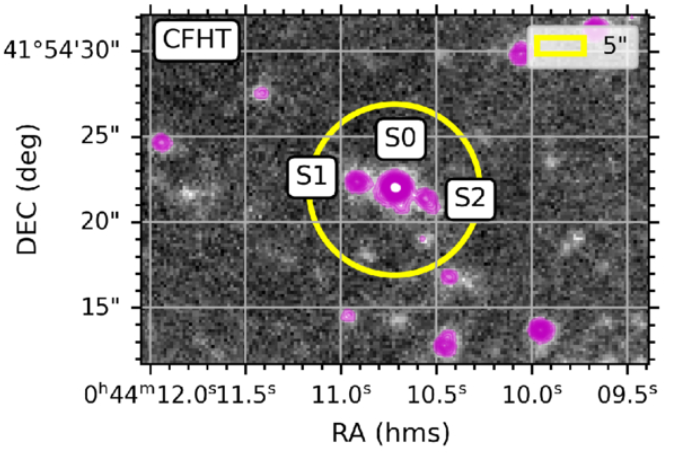
Optical image showing the location of sources near the location of M31N 2017-01e. The yellow circle corresponds to a radius of 5 arcseconds and is centered on the nova. Labeled S0, the source coincides with the location of the nova with sub-arcsecond resolution. Click to enlarge. [Modified from Chamoli et al 2025]

Dialing In on M31N 2017-01e

Aiming to constrain the nature and companion star of the nova, Shatakshi Chamoli (Indian Institute of Astrophysics and Pondicherry University) and collaborators performed a multiwavelength analysis using ultraviolet and optical observations of M31N 2017-01e.

In monitoring the nova during and in between outbursts, the authors identified a source at the reported location of M31N 2017-01e that exhibited variability and color consistent with previous observations of the system. Through a detailed photometric analysis, the authors found that the color and emission properties of the source are consistent with a hot, early-type star as was previously suggested. Though all the observational signs point toward a B-type companion, there’s one glaring obstacle to that scenario: such a massive star would typically be unable to transfer the amount of mass necessary to fuel the nova’s frequent eruptions without the accretion becoming unstable.

Be a Companion

What else, then, could the companion be? The authors considered another stellar companion known as a Be star — a rapidly rotating, early-type star that occasionally hosts a disk of loose stellar material. With a blue color and spectral features similar to B-type stars, a Be star could match the observational properties of the nova’s companion while solving the problem of its accretion. Outbursts of M31N 2017-01e likely arise due to the white dwarf lying very near or within the Be star’s circumstellar disk, siphoning material and adequately fueling the system’s recurring eruptions. To confirm this hypothesis, researchers will need to perform follow-up infrared observations to search for the tell-tale signs of a dusty disk around the companion star. 

This system is rare and challenges the assumed properties of recurrent novae. From this study, it is clear that nova progenitors are potentially quite diverse and require further multiwavelength observational programs to identify more systems like M31N 2017-01e.

Citation

“Challenging Classical Paradigms: Recurrent Nova M31N 2017-01e, a BeWD System in M31?” Shatakshi Chamoli et al 2025 ApJ 991 174. doi:10.3847/1538-4357/adf843

The post Rapid Recurrent Nova May Be Challenging Perceptions appeared first on AAS Nova.

  •  

Planetary Hide and Seek

illustration of a planetary system

Editor’s Note: Astrobites is a graduate-student-run organization that digests astrophysical literature for undergraduate students. As part of the partnership between the AAS and astrobites, we occasionally repost astrobites content here at AAS Nova. We hope you enjoy this post from astrobites; the original can be viewed at astrobites.org.

Title: The Gap–Giant Association: Are Planets Hiding in the Gaps?
Authors: Caleb Lammers and Joshua Winn
Authors’ Institutions: Princeton University
Status: Published in ApJ

The Kepler space telescope played an almost decade-long game of hide-and-seek. After nine and a half years of operation, Kepler detected more than 2,700 planets outside of our solar system primarily by using the transit method, which is particularly efficient at detecting planets that orbit close to their host stars. Astronomers have also been detecting planets with the radial velocity technique, which is better at finding larger planets at longer orbital periods. By looking for planets with both the transit and radial velocity techniques, astronomers can look for both close-in and far-out planets to paint a more complete picture of other solar systems in our galaxy.

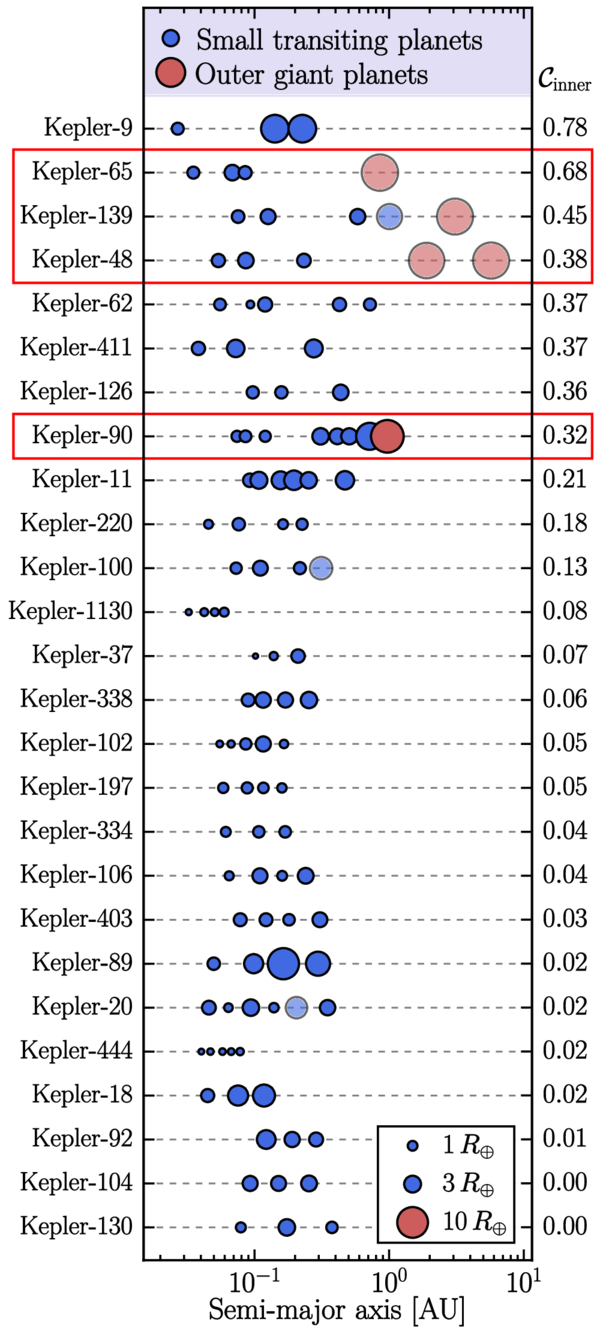
Using the Kepler Giant Planet Survey, the authors of today’s article found that among the 26 systems with three or more transiting planets, four were found to also have an outer giant planet. They quickly noticed that instead of an evenly spaced out inner system of planets, every single one of these four systems with the outer giant planets revealed a notable gap between two of their inner planets. They dubbed this phenomenon the “gap–giant association” — in other words, when an outer giant planet exists in a planetary system, there is evidence of a large gap between two of the inner planets, as shown in Figure 1. This pattern has been observed before, but there has been little theoretical work to explain the effects of outer giants on orbital spacings. In today’s article, the authors ask the question: are there planets inside the gap hiding from us? To address this, they conduct simulations to see if (a) these systems can host a hiding planet in their gaps without becoming dynamically unstable and (b) if such a planet can remain hidden when looked for with the transit method.

Plot of the orbital spacing of planets

Figure 1: Orbital spacings of systems in the Kepler Giant Planet Survey with three or more transiting planets in the inner planetary system. The parameter C is a metric denoting the regularity of orbital spacings, where a smaller value would indicate a more uniform spacing. The four systems of interest all have large orbital gaps between two adjacent inner planets, and therefore high values of C. [Lammers & Winn 2025]

Close Your Eyes and Count to N

The authors of today’s article model these four systems (Kepler-48, Kepler-65, Kepler-90, and Kepler-139) with a planet added to their gaps and use an N-body simulation (i.e., fancy physics calculations that track how planets gravitationally interact) to evolve the systems over time and evaluate their long-term stability. They find that each of these injected planets has a high survival rate, which means that each of these four systems could stably host an additional ~2–20 Earth-mass planet in its gap for billions of years without falling apart. The authors then calculated whether the outer giants could “hide” these theoretical gap planets by tilting the planets’ orbits enough so that they would not be detectable with the transit method. In order to do this, the outer giant would have to exert a large enough gravitational force on the gap planet to cause it to precess at a rate independent of its neighbors, allowing its orbital inclination to grow. However, they found that the outer giant planets are either too far away or not massive enough to do the job.

Only one system, Kepler-90, has an outer giant that could potentially tilt the gap planet’s orbit enough for it to fly under the radar if the giant were also on a modestly inclined orbit. However, previous detections of Kepler-90’s outer giant suggest that its orbit is well-aligned with those of the inner system, making this hypothesis implausible. They therefore concluded that it is unlikely that planets between ~2 and 20 Earth masses are hiding within these gaps.

Seeking Out Another Option

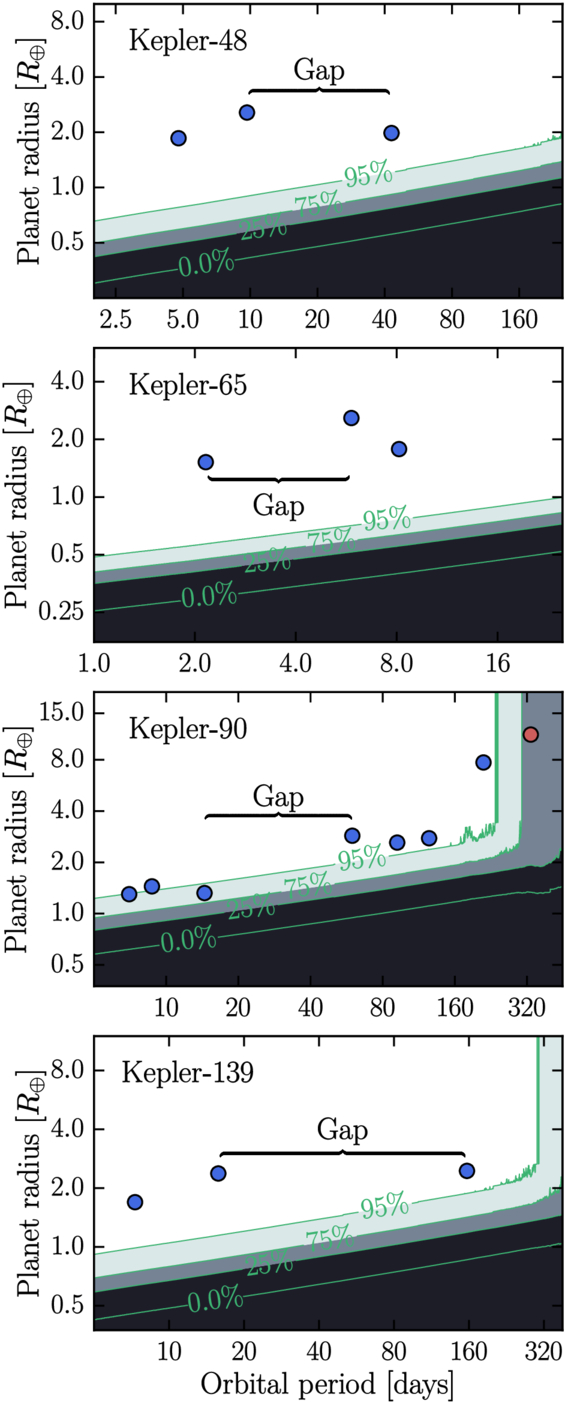
Before completely abandoning this hypothesis, the authors propose that maybe the gaps do contain planets, but they’re just too small for Kepler to detect. They calculate the detection efficiencies as a function of planet radius and orbital period for each of the four systems and find that planets smaller than about ~0.5–1 Earth radius could have gone unnoticed (as shown in Figure 2). While this would make these systems slightly unusual (most multiplanetary systems have relatively uniform planet sizes), it’s not completely impossible. However, they don’t rule out the possibility that these gaps are truly empty, and that the presence of an outer giant could prevent planets from forming in certain regions or disrupt their orbits after formation. While it is hard to draw any firm conclusions with a sample size of four systems, this study highlights how much we still don’t understand about planetary system architecture, and therefore planetary formation and evolution.

Plots of transit detection efficiency as a function of planetary radius and orbital period

Figure 2: Transit detection efficiency as a function of planetary radius and orbital period for each planetary system. The inner planets and location of the gap are overplotted. The darker contours show regions where Kepler is not sensitive to detecting planets. In order to avoid detection, the planets in each of these systems would have to be much smaller relative to their neighbors, except for the Kepler-90 system, where a hidden planet would only have to be marginally smaller. This suggests that there could exist a demographic of exoplanets that are evading detection within these gaps. [Lammers & Winn 2025]

Though the Kepler mission has come to an end, ongoing radial velocity surveys will continue to expand the sample of systems like these four so astronomers can get a clearer picture of what’s behind this gap–giant association.

Original astrobite edited by Annelia Anderson.

About the author, Tori Bonidie:

I am a 5th-year PhD candidate studying exoplanet atmospheres at the University of Pittsburgh. Prior to this, I earned my BA in astrophysics at Franklin and Marshall College where I worked on pulsar detection as a member of NANOGrav. In my free time you can find me cooking, napping with my cat, or reading STEMinist romcoms!

The post Planetary Hide and Seek appeared first on AAS Nova.

  •  

From Globs to Gravitational Waves: A Simulated Cosmic Choreography

Messier 13

Editor’s Note: Astrobites is a graduate-student-run organization that digests astrophysical literature for undergraduate students. As part of the partnership between the AAS and astrobites, we occasionally repost astrobites content here at AAS Nova. We hope you enjoy this post from astrobites; the original can be viewed at astrobites.org.

Title: Formation and Evolution of Compact Binaries Containing Intermediate-Mass Black Holes in Dense Star Clusters
Authors: Seungjae Lee et al.
First Author’s Institution: Seoul National University
Status: Published in ApJ

A delicate dance goes on in astronomy between theory and observation. Most astronomy research, by and large, fits into one of two categories. In one category, you start with a theory, model, or simulation, and attempt to figure out what observations you might expect given those initial assumptions. The other approach begins with raw data and attempts to determine what kinds of theories, models, and fundamental astrophysical assumptions might give rise to it. Accepted knowledge usually happens when these two approaches agree and reinforce each other, but a lot of the actual science occurs when one side dances ahead of the other — either we have theories and models that make predictions that cannot yet be observationally tested, or we have data that defy attempts at fitting underlying models.

Another dynamical dance goes on in globular clusters between binary black holes. Today’s article investigates intermediate-mass black holes, or IMBHs, a pristine example of an astronomical topic in which theory has danced ahead of observations. IMBHs fill the gap between stellar mass and supermassive black holes. We can observe black holes in multiple ways, usually from the electromagnetic radiation of the gas disks surrounding some black holes (either stellar or supermassive), or the gravitational waves of two orbiting or merging black holes. Unfortunately, each method requires some extra component — either gas to accrete or a companion to orbit — and IMBHs are far more challenging to observe through these methods. Hence, we have a lot of ideas about how they might form, and scarce observational evidence for their existence.

That hasn’t stopped many researchers from trying to make better models and predictions. One of the most commonly proposed mechanisms for forming IMBHs is in dense globular or nuclear star clusters (up to a million times denser than our region of the Milky Way). In these dense environments, stars and the black holes they produce might have a chance to find and run into each other often enough to reach the masses of the IMBH regime through mergers. Today’s authors use a series of N-body simulations to study these dense stellar clusters, into which they embed IMBHs. Their study investigates the detectability of gravitational waves from intermediate-mass-ratio inspirals (IMRIs). Because so many mergers occur in dense clusters, it allows for more mergers between objects with greater mass differences. The mass ratio between the two objects (usually denoted as ‘q’) is one of the most important parameters for characterizing a merger, and a high q value creates a gravitational wave signature that is different from a low q, even if the total mass of the system is the same.

To investigate the formation and detectability of IMRIs, the authors conducted a suite of direct N-body simulations of star clusters with total masses between 5×10⁴ and 105 solar masses, containing ~105 particles. They include initial conditions for how densely packed the particles should be, given how far they are from the cluster’s center (called a Plummer profile). They also include a rule for how the initial masses of the stars are distributed (called a Kroupa initial mass function). Then, they use a code called Stellar EVolution for N-body (SEVN) to follow the evolution of the stars in the system for 100 million years.

In that time, massive stars in the simulation can evolve into neutron stars and stellar-mass black holes. In addition to simulating the clusters’ stars, the authors embed an IMBH of 300–5,000 solar masses into the clusters. The key to this article is that some of the stellar-mass binary black holes will interact with the IMBH, creating an IMRI, which gives off gravitational waves. This article’s primary goal is to characterize these IMRIs and to test how well current and future gravitational wave detectors will measure them.

In the simulation, when a stellar-mass binary black hole and an IMBH come close, the authors must create a “merger criterion” — essentially, how it is decided whether the two objects merge, and what the subsequent “gravitational wave” would look like. Once they model the wave itself, they turn to five current or future detectors to see how well they will measure those waves if they were at particular astronomical distances from Earth.

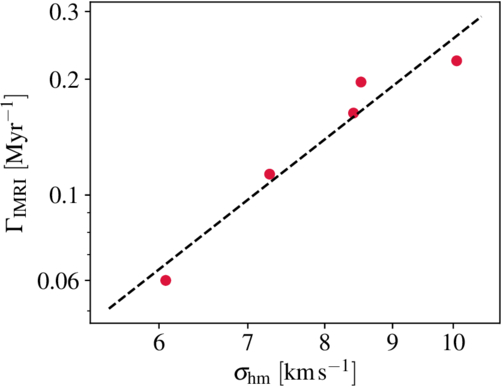
One of the primary relationships the authors look at in the cluster is the half-mass radius velocity dispersion of the cluster and the number of IMRI encounters between the IMBH and stellar-mass objects. One can think of the velocity dispersion as a more complicated “average velocity” of the stars in the cluster (a high velocity dispersion means, on average, the stars are moving faster, the half-mass radius is the distance from center that separates the inner half of the stars and outer half of the stars, and we use it because it is more representative of stellar motion in the overall cluster than the packed center or the mellow edge). Figure 1 shows the relationship between the number of IMRI events (y-axis) vs. the velocity dispersion (x-axis) of the cluster where the IMBH sits. Note that the y-axis is logarithmic, so a small increase in velocity dispersion actually results in a large increase in the number of IMRIs. This tells us that the number of events is much more dependent on the properties of the larger cluster than the IMBH itself.

plot of IMRI event rate as a function of cluster half-mass velocity dispersio

Figure 1: IMRI event rate as a function of cluster half-mass velocity dispersion (σhm) for 1,000-solar-mass IMBHs in the simulations. The IMRI merger rate is highly sensitive to the velocity dispersion of the cluster as a whole, making it a key observable of how efficiently IMRIs can form and merge in a given cluster. [Lee et al. 2025]

In addition to analyzing the dynamics of the clusters and the mergers within them, the authors go further and attempt to characterize what specific detectors will see. They chose five detectors. The first is advanced LIGO (aLIGO), the current incarnation of the LIGO detector network. Next is the Einstein Telescope (ET), a future proposed European ground-based detector. Following that is the Laser Interferometer Space Antenna (LISA), a space-based detector set to launch in the 2030s that is designed to observe supermassive black hole mergers. Next are two detectors that are less established, the advanced Superconducting Omni-directional Gravitational Radiation Observatory (aSOGRO) and the Deci-hertz Interferometer Gravitational Wave Observatory (DECIGO). aSOGRO is a proposed Earth-based detector that could theoretically measure gravitational waves at lower frequencies than the current LIGO-Virgo-KAGRA (LVK) detectors, and DECIGO is a proposed space-based detector designed to observe gravitational waves in the frequency range between the LVK network and LISA.

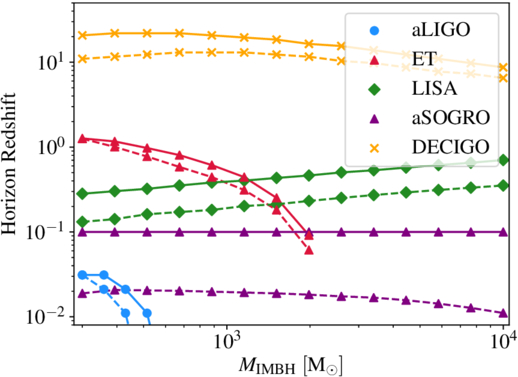
How do the authors translate the gravitational wave signal from the IMRI into what might be observed on Earth? First, they must pick a signal-to-noise ratio threshold, which is the ratio of the gravitational wave signal to the background noise in the detector. In this case, they chose a signal-to-noise ratio of 8, a commonly chosen threshold in the gravitational wave literature. From the signal-to-noise ratio, the authors can calculate a horizon distance. The horizon distance is the distance that a detector can measure a specific gravitational wave event with a given set of properties at or above the threshold chosen. Figure 2 shows the horizon distances (y-axis) for each detector for sets of gravitational wave sources with different properties vs. the mass of the IMBH generating the gravitational wave (x-axis). The solid and dotted lines represent two chosen masses of the IMBH’s stellar-mass companion. The figure shows that aLIGO (blue circles) can detect only low-mass IMBHs (≲ 300 solar masses) at a redshift of z ≲ 0.05. ET (red triangles) is sensitive to lower-mass IMBHs, and LISA (green diamonds) excels at detecting higher-mass IMBHs. aSORGO (purple triangles) covers a broad mass range but at lower redshifts. DECIGO (yellow Xs) offers the broadest mass range at the highest redshift.

plot of horizon redshift versus intermediate-mass black hole mass

Figure 2: Horizon redshift vs. IMBH mass for several gravitational wave observatories (aLIGo represented by blue circles, ET by red triangles, LISA by green diamonds, aSOGRO by purple triangles, and DECIGO by yellow x‘s). Solid vs. dotted lines represent the mass of the stellar-mass black hole interacting with the IMBH, with the dashed line representing a 10-solar-mass companion and the solid lines representing a 60-solar-mass companion. [Lee et al. 2025]

Today’s authors offer a glimpse into globular clusters as dynamic environments where we might see IMRIs. They also predict how those signals might be received by our current, future, and proposed gravitational wave detectors. As next-generation observatories prepare to listen for these cosmic mergers, this work helps chart a path for where and how we might first detect the elusive IMBH.

Original astrobite edited by Kasper Zoellner.

About the author, William Smith:

Bill is a graduate student in the astrophysics program at Vanderbilt University. He studies gravitational wave populations with a focus on how these populations can help inform cosmology as part of the LIGO Scientific Collaboration. Outside of astrophysics, he also enjoys swimming semi-competitively, music and dancing, cooking, and making the academy a better place for people to live and work.

The post From Globs to Gravitational Waves: A Simulated Cosmic Choreography appeared first on AAS Nova.

  •  

GitHub adds new Copilot features as usage-based billing takes effect

GitHub is expanding Copilot beyond the IDE with a new desktop application and a new collaborative work surface called canvas as part of its broader efforts to pitch the AI-assisted coding tool as the control center for agent-native software development.

The desktop application announced at Microsoft’s annual Build conference this week is designed to give developers a dedicated environment for working with AI agents throughout the software development lifecycle, rather than limiting those interactions to code-generation tasks inside an editor, the company wrote in a blog post.

The application includes a collaborative workspace called canvas where developers can brainstorm ideas, refine requirements, generate plans, and iterate on projects alongside AI, it said.

It also has new Agent Merge and code review features that enable developers to automate Copilot to combine tasks of different agents to complete a specific goal or conduct autonomous code reviews according to set standards, it said.

These new features could reduce context switching, increase engineering efficiency, and accelerate delivery cycles, said Phil Fersht, CEO of HFS Research.

Shift in pricing justified?

However, despite the new features, much of the conversation among developers in recent weeks has centered on a different topic: this week’s shift to a usage-based billing model for GitHub Copilot that it announced in April.

The changes were met with a wave of criticism on the GitHub community forum, where some users accused the company of a “bait and switch,” while others requested refunds or announced plans to cancel their subscriptions.

For analysts, though, the pricing change was, at least from GitHub’s point of view, necessary and justified.

“The pricing change is justified by where GitHub is going, not by where the product is today. Running multiple agents in parallel with sandboxes, canvas reviews, and Agent Merge looping through CI is closer to cloud compute than an IDE plugin, and you cannot price compute on a flat seat fee. So metered billing is the right call structurally,” said Advait Patel, a senior reliability engineer at Broadcom.

Fersht said developers and CIOs need to focus on Copilot’s metamorphosis from being a coding assistant into a platform for orchestrating software-development agents and workflows.

“That changes the ROI conversation significantly. CIOs should stop thinking about Copilot as a seat-license productivity tool and instead evaluate it as an AI-powered software delivery platform,” he said. “The metrics shift from ‘lines of code generated’ to broader operational outcomes such as release velocity, code quality, defect reduction and engineering efficiency.”

GitHub is not the first company offering vibe-coding tools to rethink its pricing strategy as AI agents proliferate across enterprises and evolve to take on more complex software-development tasks that are computationally more intensive.

Over the past year, platforms such as Claude Code, Replit, Cursor, and Kiro have repeatedly adjusted their pricing structures to account for mounting infrastructure costs, limited GPU availability, and the expense of serving increasingly sophisticated AI models and agents, despite furor among their users.

For CIOs, the challenge is proving ROI

That common pressure across AI coding vendors is why Amit Chandak, chief analytics officer at IT consulting firm Kanerika, thinks developers and CIOs should focus less on GitHub’s pricing mechanics and more on whether these increasingly capable tools are delivering measurable business value.

“The new features that GitHub announced can act as productivity multipliers as well as features that increase consumption without delivering proportional business value. Without productivity baselines established before adoption, enterprises risk absorbing higher costs with no clear line back to delivered value,” Chandak said.

For Fersht, developers and CIOs will need to focus on governance, monitoring and financial controls as the pricing model is changing.

“The governance challenge is very real. Autonomous agents can continuously reason, test, revise and interact with multiple systems in ways that create far less predictable consumption patterns than traditional SaaS tools,” he said.

Patel, however, advised users and decision-makers to be more skeptical, especially since the new features are currently in technical preview.

“Customers are being asked to pay variable rates now for value that has not been validated in production. Do not assume new capabilities justify higher spend,” he said. “Instead, run a 90 day pilot, measure PRs merged per dollar before and after, and let the data decide. If the ratio improves, the pricing is fair. If it does not, you are paying for promise, not delivery,” Patel added.

  •  

Hole in GitHub’s browser-based VSCode editor could lead to stolen token

A vulnerability in GitHub’s browser-based VSCode editor could lead to the theft of a developer’s token under certain circumstances, says a researcher.

The issue, revealed this week in a blog by Ammar Askar, has apparently been already addressed by GitHub owner Microsoft. But it raises a questions about both DevOps security, and about the researcher’s allegation that, because Microsoft doesn’t treat bug discoveries seriously, he can justify giving it short notice before openly publishing vulnerabilities he finds.

First, the bug: Users of github.com may not realize it, but when they are on any repository, they can shift to github.dev and its browser-based version of VSCode just by changing the URL.

Why do this? Because the browser instance of VSCode is pretty powerful, Askar says in his blog. “You can view all the files in the repo (even if it’s a private one), you can send out pull requests, and even make commits.”

Rob Enderle, a IT consultant who heads the Enderle Group, agrees that jumping into VSCode this way is “an incredibly useful tactical tool for quick tasks. By just hitting the ‘.’ key in any GitHub repo, you instantly get a browser-based VS Code interface without having to clone gigabytes of data locally. It’s perfect for rapid PR reviews, quick documentation edits, or navigating code on the fly without breaking your workflow. Just keep in mind that it runs entirely in the browser sandbox; there’s no compute backend, no terminal, and no code execution.”

For any heavy lifting or actual compiling, he added, the developer will still need the raw compute of a local workstation, or a full cloud environment like Codespaces.

The problem, Askar says, is that this functionality is achieved by github.com POSTing over an OAuth token to github.dev that allows it to interact with GitHub on your behalf. “The token is not scoped to the particular repo you interacted with, meaning it has full access to every other repo that you have access to,” he wrote in the blog.

“The presence of this token, and the fact that this web app is running almost the entire brunt of VSCode’s million line Typescript codebase, makes it a great target for anyone looking into VSCode bugs,” he wrote.

The exploit

Askar said that a threat actor could install an extension in a repository using a Jupyter notebook, a web application for creating and sharing computational documents that has the ability to install a malicious local workspace extension while skipping the publisher trust check. In his proof of concept, Askar said that once his payload runs, the newly installed extension will grab the GitHub API token, run a query to get the private repos the developer has access to, and then print out the replies and the token.

This vulnerability also exists in the desktop version of VSCode, Askar said, though it’s harder to exploit, since a threat actor would need to convince the victim to clone their repo and open the notebook containing the webview script payload. “Of course,” he added, “if you [the hacker] had some other XSS [cross-site scripting attack] in a webview that you can get a victim to open, you get effectively full RCE [remote code execution] on their computer.”

In an email, he said this vulnerability was “about as serious as it gets. Any website on the internet could have redirected you to a github.dev link that could have provided an attacker a token to read and modify your code repos. If one could convince the maintainer of a popular software project to click a link, they could have made whatever modifications they wanted to their project.”

This means, said Enderle, “we have to start treating developer endpoints with strict, isolated, zero-trust parameters, because we clearly cannot rely on vendor complacency to protect us.”

This issue reinforces the point that you should never follow any links unless you know exactly where they will take you, added Dwayne McDaniel, principal developer advocate at GitGuardian.

Short notice

Here’s where things get complicated. Because of an unhappy experience when disclosing a previous VSCode vulnerability to Microsoft — the bug was fixed, but Askar wasn’t given credit — this time he only gave GitHub one hour notice that this new discovery was going to be published. Microsoft applied what Askar calls a “stopgap” fix by adding a confirmation when a developer opens notebooks in web VSCode, and by not allowing the trusted publisher requirement to be skipped by commands.

[Related content: When responsible disclosure becomes unpaid labor]

An ethical question

Askar’s short notice raises an ethical question: How far in advance should a responsible researcher give notice to a vendor about a vulnerability before publicly revealing it?

These days, most infosec pros agree that notice must be given, or else a threat actor can quickly exploit a hole. Not only that, but the researcher risks damage to their reputation if reasonable notice isn’t given. Experienced researchers often give vendors at least 30 days to create and distribute a patch.

For their part, vendors often create bug bounty programs, or partner with bug bounty programs, to reward researchers for their work. Unfortunately, some vendors don’t always credit researchers, or downplay the damage a vulnerability can cause. In fact, last month Microsoft and a prominent cybersecurity researcher got into a public spat about one such alleged incident.

An imbalance of power

Asked for comment about Askar’s most recent discovery, a Microsoft spokesperson said, “we value the critical role that the security research community plays in strengthening the security of our products, services, and the broader technology ecosystem. While independent researchers determine when and how to publish their findings, we remain committed to rapidly assessing reported issues, mobilizing the appropriate engineering and security response resources, and delivering mitigations, guidance, and protections as quickly as possible to help safeguard our customers.”

The spokesperson added that the issue Askar reported “has been mitigated for our services and no customer action is required.”

[Related content: Is the vulnerability disclosure process glitched?]

There is a balance between coordinating disclosure with a software vendor (CVD) and full disclosure, Askar told us. But, he added, there’s an imbalance of power. “A security researcher can pour countless hours into an issue, ensuring they develop a good proof of concept and provide all the steps to recreate the issue. With this, they hope to at least get an acknowledgement for their efforts, which they can use to further their security track record or, in the best case, a monetary bounty reward.”

However, he added, “If security vendors don’t adhere to their side of the bargain, public disclosure is one of the few options security researchers have (if they don’t want to sit on their vulnerabilities or sell them on the black market). It forces the vendor to acknowledge the security issue publicly and usually leads to a much faster resolution than any private communication would.”

This, said Enderle, creates problems for enterprises: “When vendor bureaucracy penalizes responsible disclosure, it alienates the security community and forces public zero-day drops, ultimately leaving enterprise customers holding the bag.”

  •  

Microsoft makes Linux developers feel more at home in Windows with Coreutils release

Microsoft has announced Coreutils, a new Windows 11 feature that allows developers to run many popular Linux command line utilities natively on Windows from a single binary.

Revealed at this week’s Build 2026 developer conference in Seattle, Coreutils is about reducing what Microsoft terms the “cognitive load” faced by developers when moving between Windows and other platforms.

Currently, accessing the Linux command line utilities that are considered essential in many CI/CD development environments on Windows requires a kludge that involves either opening an emulation such as Git Bash, or a virtualized Windows Linux Subsystem (WSL) terminal.

Both are time-consuming and inefficient. As Microsoft’s announcement puts it: “Developers constantly move between platforms, but familiar commands don’t work consistently, forcing workarounds, lost speed and context switching.”

Coreutils removes the need for this back and forth, allowing developers to run most Linux commands straight from the Windows CMD command prompt, PowerShell, or Windows Terminal.

“Whether you’re moving between Linux, macOS, WSL, containers or cloud environments, the commands and workflows you’ve built over years just work in your Windows environment,” Microsoft said.

Most utilities, but not all

Installed as a single executable (via WinGet: install Microsoft.Coreutils), Coreutils for Windows itself is a Rust rewrite of the GNU uutils/coreutils project that provides commands that are universal across Linux distros.

Fundamental to making Coreutils efficient to manage is the fact that individual Linux commands run from a multi-call executable which maps via NTFS hardlinks pointing to each command. The advantage of this approach is that there’s only one binary to install, one binary to sign, and one binary to patch or update.

Microsoft lists 75 Linux utilities supported by Coreutils, including commonly-used commands such as ls, cp, find, grep, find, rm, du, hostname, and uptime.

However, some Coreutils commands clash with existing CMD or Powershell commands, or are otherwise not possible to execute; Microsoft provides a compatibility table listing conflicts. This means that some commands are not available, specifically: dir, expand, kill, more, timeout, and whoami.

There are also some commands omitted from Coreutils because a command relies on a POSIX Unix/Linux feature that Windows doesn’t implement in a compatible way; some examples are chmod, chown, id, stty, and chroot.

In other cases, the command will execute in one context, CMD, but not in PowerShell. Microsoft explained the complex order of precedence:  “Whether the Coreutils version runs depends on the shell, the PATH order, and (for PowerShell) the alias table.”

As well as Coreutils, the Build 2026 developer conference also saw Microsoft announce WSL containers CLI and API to deploy Linux containers on Windows, a new framework for autonomous agents with open source governance tools, and Microsoft Scout, an AI agent designed to automate tasks in Microsoft 365.

This article originally appeared on InfoWorld.

  •  

Using bacteria to fight fungal brown rot

Brown rot is a common fungal disease in the Southeastern United States that affects stone fruits like peaches, cherries, and plums. Monilinia fructicola is a tan, fuzzy fungus that grows on tree flowers, twigs, and fruit, and is the most common cause of brown rot. Once brown rot infects a tree, the damage is irreversible, causing significant crop losses in commercial orchards. Farmers try to control the spread of M. fructicola by applying chemical sprays, called fungicides, to fruit trees in the spring.

In M. fructicola, a biosynthesis gene named MfCYP51 encodes a major protein critical to the fungi’s survival. Certain fungicides, called demethylation inhibitor (DMI) fungicides, stop M. fructicola from growing by targeting this protein. Over the last 20 years, DMI fungicides have become less effective against brown rot as M. fructicola becomes more resistant. 

Living microorganisms and their metabolites can control fungal diseases as an alternative to chemical fungicides, known as biofungicides. Many bacteria produce compounds like hydrogen cyanide and pyrrolnitrin that damage fungal cells. However, scientists have not found a biofungicide suitable for commercial production.​ A group of researchers at Clemson University in the USA and Huazhong Agricultural University in China set out to test whether the soil bacteria Pseudomonas chlororaphis and Bacillus subtilis could be effective biofungicides against brown rot. 

The researchers performed an incubation experiment to analyze how the fungal cells make their critical protein from the MfCYP51 gene, a process called gene expression, under different fungicide treatments. They used 3 M. fructicola strains sensitive to traditional DMI fungicides and 3 resistant strains. They tested these with 5 different fungicide treatments: a DMI fungicide, a mixture of P. chlororaphis metabolites, a mixture of living B. subtilis cells, a DMI fungicide + P. chlororaphis metabolites, and a DMI fungicide +  B. subtilis cells. They also set up a control treatment with sterile water instead of fungicide.  

After 6 hours, the researchers extracted the molecule that measures gene expression, called RNA, from the fungi. They found that both the P. chlororaphis treatment and the DMI fungicide + P. chlororaphis treatment substantially reduced MfCYP51 expression in both the sensitive and resistant isolates compared to the controls. In contrast, the DMI fungicide, B. subtilis, and DMI fungicide + B. subtilis treatments increased MfCYP51 expression in the resistant isolates. The researchers concluded that P. chlororaphis has a unique ability to reduce gene expression, unlike other biofungicides.

​To further investigate how the biofungicide treatments work, the team tested whether P. chlororaphis and B. subtilis produced the anti-fungal metabolite pyrrolnitrin. They added 1 milliliter of each treatment to a machine that separates and identifies liquid compounds using high pressure, called a high-performance liquid chromatograph. They found that the P. chlororaphis treatment contained pyrrolnitrin, so they hypothesized that it was responsible for reducing gene expression.

Additionally, the researchers tested their 5 treatments on brown rot in fruit. For each treatment, they took 10 Gala apples, washed and sterilized their surfaces, and sprayed them with the fungicides. After 24 hours, they poked holes in the apples with toothpicks and added 20 microliters of liquid containing M. fructicola cells to the poked holes. They placed the apples in a humid chamber for 5 days and measured the number and size of brown rot spots that developed on their surfaces. 

Despite decreasing MfCYP51 expression, ​the researchers found that P. chlororaphis treatment alone didn’t reduce brown rot disease compared to the control, but the DMI fungicide and B. subtilis treatments did. The mixed treatments of DMI fungicide + P. chlororaphis and DMI fungicide + B. subtilis both reduced brown rot disease compared to the control, but only the DMI fungicide + P. chlororaphis treatment prevented it. 

​The researchers concluded that although biofungicides may not be fully effective on their own, commercializing them could allow farmers to use less DMI fungicide. They explained that scaling back the use of DMI fungicides would slow M. fructicola resistance. Finally, they proposed that future researchers test biofungicide mixtures containing pyrrolnitrin in the field to observe real-world effects on stone fruit trees.

The post Using bacteria to fight fungal brown rot appeared first on Sciworthy.

  •  

A retro-geeky Android home screen remix

One of the best parts about using Android is the good old-fashioned geeky fun that comes with finding new ways to improve your digital environment — and improve your day-to-day efficiency.

That capability manifests itself in all sorts of interesting freedoms that (cough, cough) other mobile platforms don’t trust their users enough to allow — from added on-screen elements to custom air gestures, advanced multitasking additions, and all sorts of other shape-shifting enhancements that can completely change the way you interact with your device.

Perhaps the most classic example of advanced Android customization, though, is a splendid little somethin’ called the home screen launcher — a fancy way of saying the system that controls how your home screen and app drawer look and work. Your phone has a built-in process that handles that by default, but here in the land o’ Googley matters, you can always replace that with something completely different and make your device adapt to the way you like to work instead of the other way around.

We’ve got no shortage of interesting Android launcher options, too, ranging from versatile blank slates for complete customization to carefully crafted frameworks for ergonomic efficiency and even throwbacks to mobile operating systems past.

The real beauty of this ecosystem, though, is how much power it gives to Android developers — and subsequently to us, as Android-appreciating animals who embrace these creations! — to experiment and try out all sorts of new concepts. Sometimes, an Android launcher approach speaks to you for its practicality. Other times, it’s just a refreshingly interesting take on how you can get around your phone and get stuff done.

Today, I’ve got a perfect example to share with you. It’s a whole new approach to the Android home screen that’s both unlike anything else I’ve ever seen in this arena and delightfully familiar, in a retro-tech sense.

Lemme show ya what it’s all about.

[Get fresh Googley goodness in your inbox with my free Android Intelligence newsletter — three new things to try every Friday.]

The T9 Android launcher — with a modern twist

My friend and fellow enlightened Android phone owner, allow me to introduce you to a creative little concoction called Key Launcher.

Key Launcher has only been out and available on the Play Store for a matter of weeks now, but it’s impressively polished — and, even more important, impressively original while also having some fantastic geek-tech throwback vibes.

To that end, the core distinctive element of Key Launcher is the T9-style dialpad that sits front and center on the lower third of its primary panel. It is quite literally the same set of letter-packin’ numbers and characters you’d see on an old-school phone — or in the dialer of your favorite Android phone app.

width="1024" height="1022" sizes="auto, (max-width: 1024px) 100vw, 1024px">
The T9 keypad is the centerpiece of the Key Launcher Android home screen experience.

JR Raphael, Foundry

And in this context, it serves some pretty interesting purposes:

  • In true T9 style, you can find and access any app or contact on your phone simply by tapping the letter that corresponds with its name — and if you want to narrow down the list even further, you can keep typing letters to refine the results.
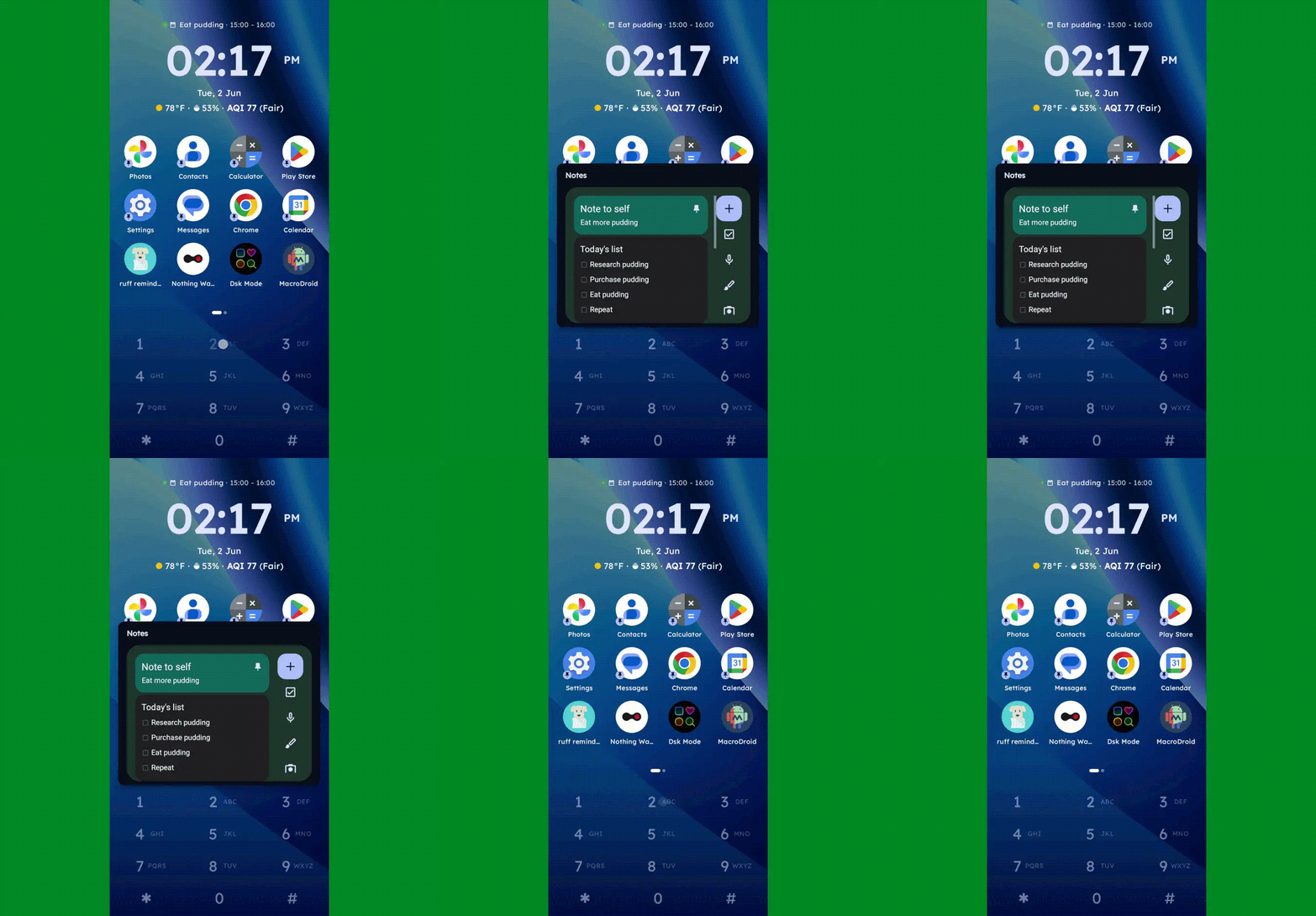
  • You can long-press any number to create and then access a custom “super shortcut” — anything from a single specific action (opening a particular app or calling or texting a certain contact) to launching a group or category of apps or contacts, launching an on-demand pop-up widget or swipeable stack of widgets, or even launching a pre-filled search query.
Key Launcher Android home screen widget pop-up
One press, and poof: Any widget you want — or series of swipeable widgets, even — is right there and ready.

JR Raphael, Foundry

  • If you tap the # key (known as “pound” in this context — not “hashtag” — for any non-olds among us), you can set up and then access a special “vault” area, where apps are hidden and only visible and accessible with authentication.
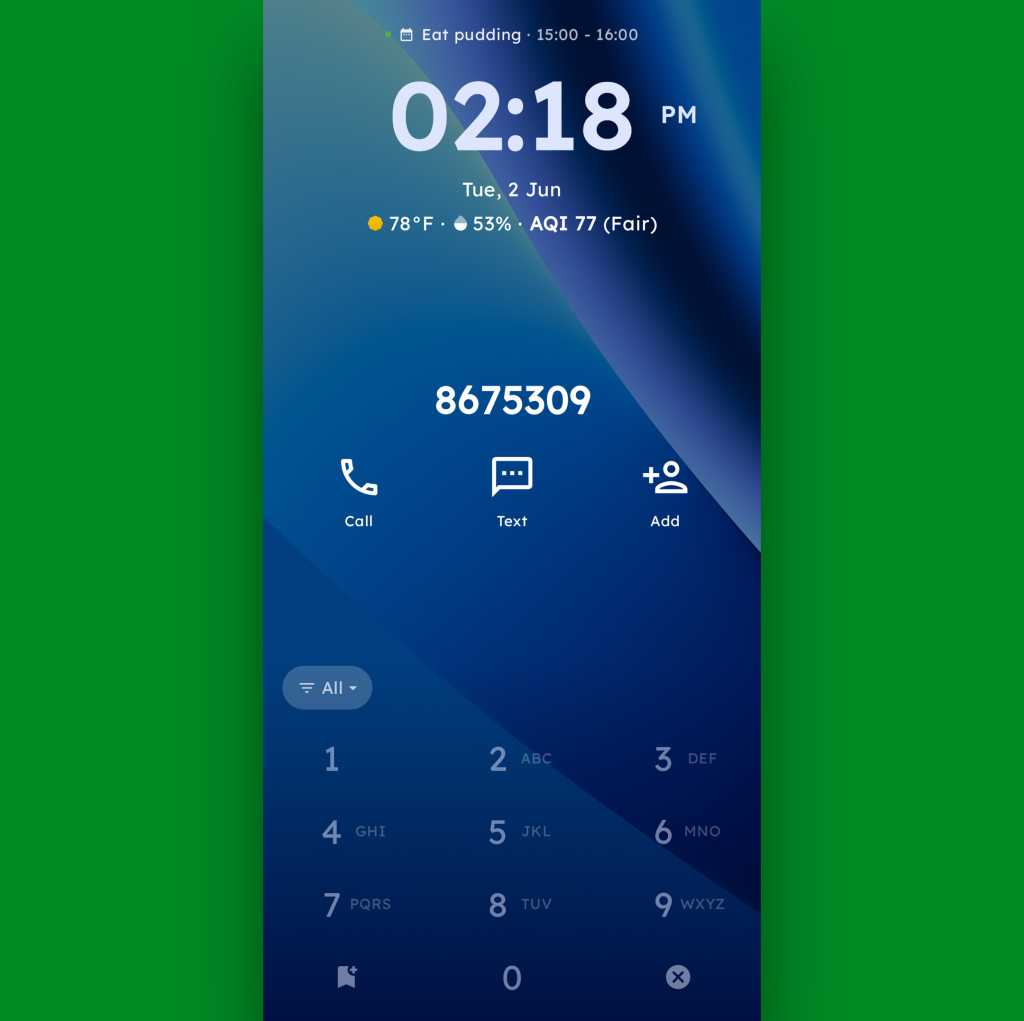
  • And, in an especially nifty touch, you can also just use the dialpad as an actual dialpad — to punch in any number you want to text or call, even if it isn’t already in your contacts.
Key Launcher Android home screen dialpad
Your phone dialer is always right in front of you with Key Launcher as your home screen.

JR Raphael, Foundry

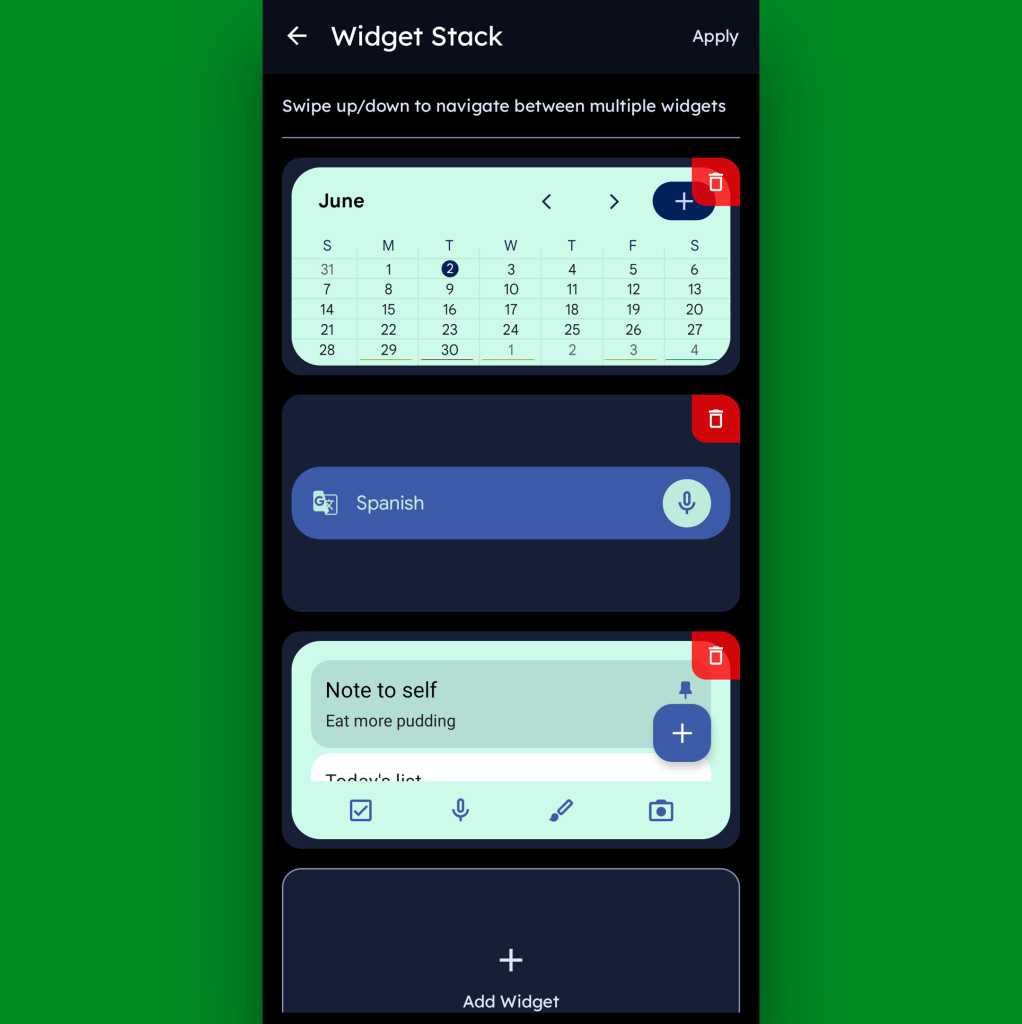
Function-packed as all of that may be, that dialpad is still just one piece of the Key Launcher puzzle. Above it sits a grid of app shortcuts that includes both your own pinned favorites and a dynamic selection of recently opened items. And above that is a handy built-in widget that shows a rotating array of upcoming calendar events from your agenda along with the local time and weather — and, in an especially neat twist, can also be customized to act as an interactive stack that lets you flip through your own set of standard Android widgets right then and there as well.

Key Launcher Android home screen widget stack
Key Launcher’s primary widget spot can be configured to hold numerous widgets in a swipeable stack.

JR Raphael, Foundry

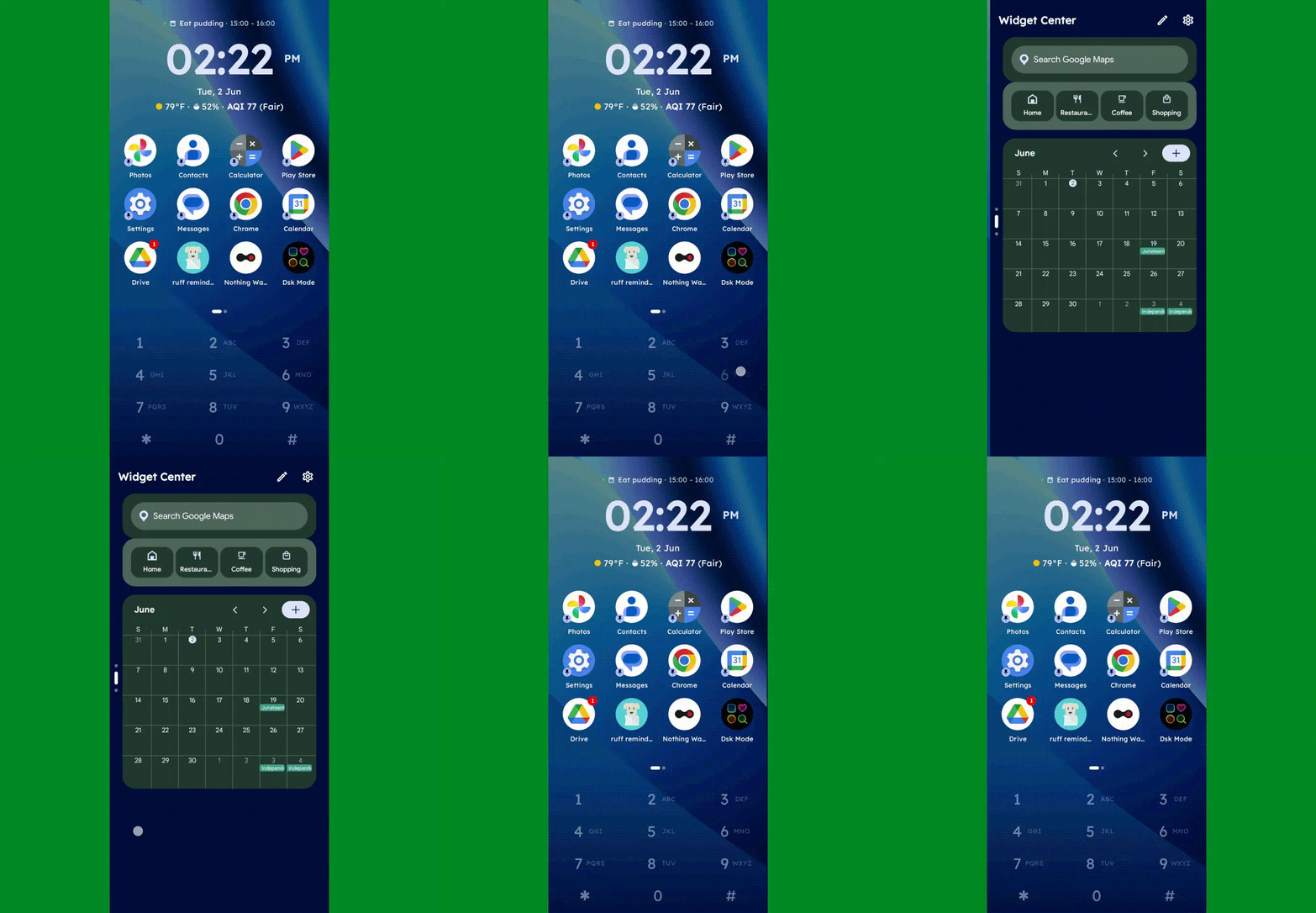
Speaking of widgets, if you swipe toward the left on Key Launcher’s dialpad, you’ll reveal the launcher’s built-in “Widget Center” panel — which is an entire screen dedicated to holding however many widgets you want, in any configuration you like, for easy ongoing access.

Key Launcher Android home screen widget center
The Widget Center is another interesting way to access widgets within Key Launcher.

JR Raphael, Foundry

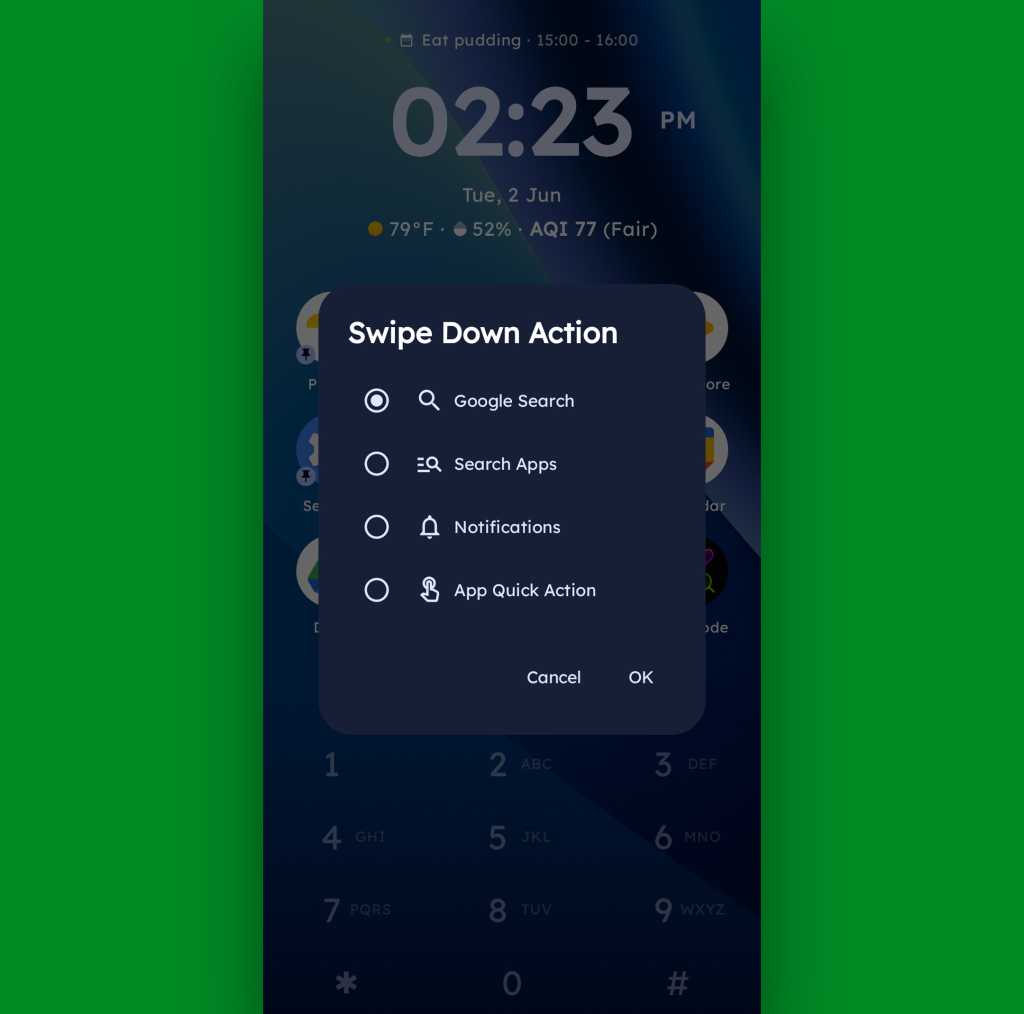
A swipe in the other direction will take you to an enlarged view of your active notifications, meanwhile, while a swipe downward can be set to launch either a quick search (of Google or whatever provider you prefer), a search of your apps, or a direct Android app shortcut within any app on your device.

Key Launcher Android home screen swipe action
Swiping down on your home screen can trigger a shortcut of your choice.

JR Raphael, Foundry

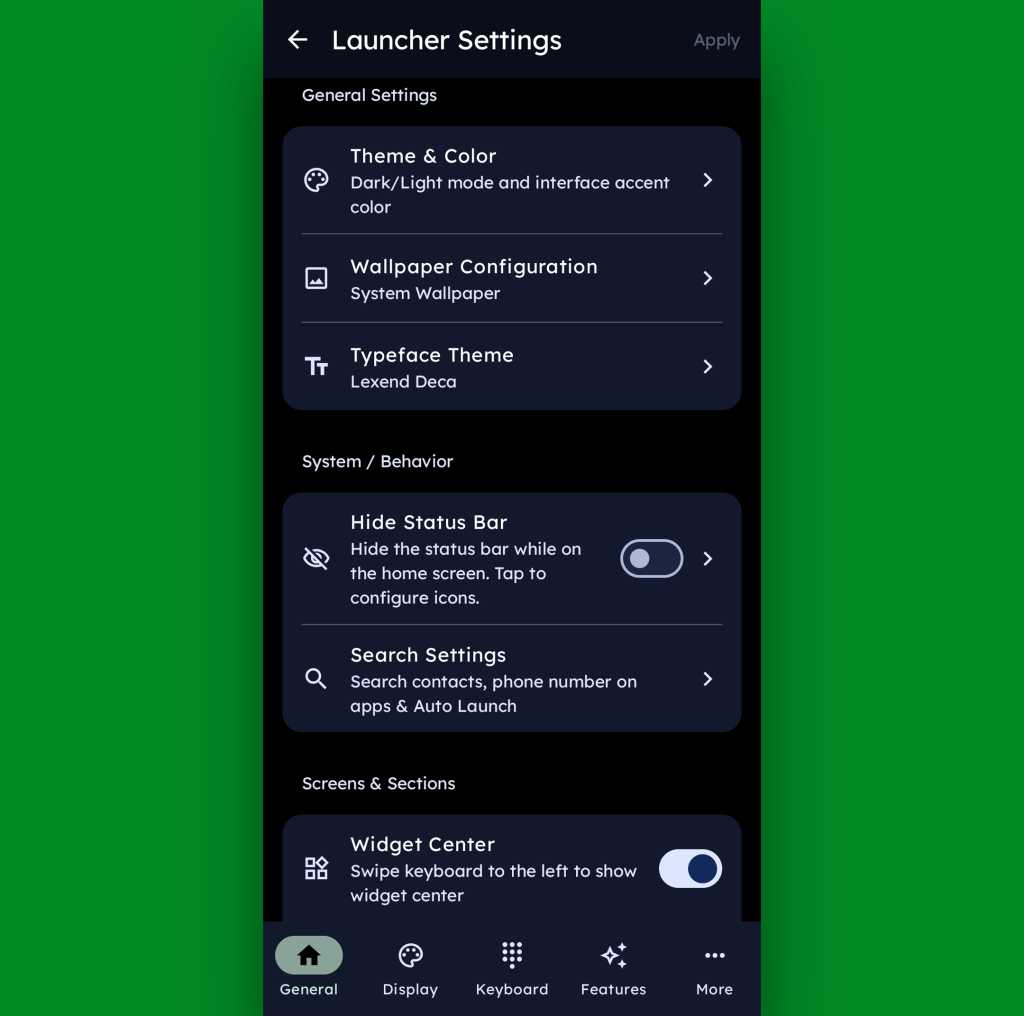
And if all of that seems like a lot of productivity-boosting possibilities, just wait ’til you get into this thing’s settings. Key Launcher is overflowing with options to customize and control practically every facet of its operation, ranging from basic visuals to the specifics of how the dialpad works and even a toggle for optimizing the interface for left- or right-handed use.

Key Launcher Android home screen settings
Key Launcher is no slouch when it comes to settings.

JR Raphael, Foundry

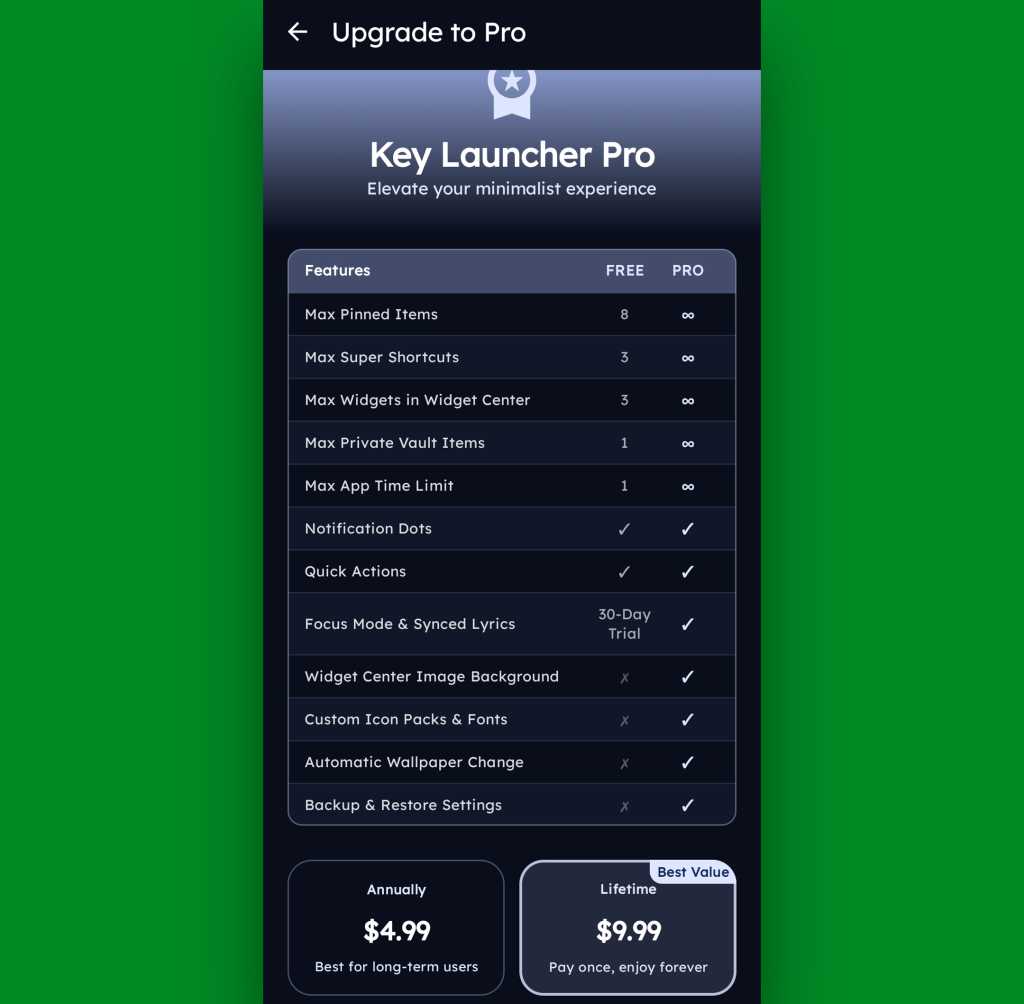
Key Launcher is free on its base level with an optional Pro upgrade that unlocks certain limitations and more advanced features. That path is available for five bucks a year or $10 as a single lifetime purchase, and you get a month-long trial the first time you install the app so you can check it out in its full form.

Key Launcher Pro Upgrade
The Pro path adds in lots of extras, but even Key Launcher’s free version is quite pleasant and functional.

JR Raphael, Foundry

Even if you just stick to the free version, though, this thing has an awful lot to offer — and it really is unlike anything else out there, with so many clever and potentially useful touches.

It’s that kind of creativity and constant discovery that keeps Android so interesting and advantageous, even after all this time — and that’s true whether you end up sticking with Key Launcher for the long haul or just giving it a go for a few hours and appreciating the deliciously original thinking it offers.

Keep the geeky goodies coming with my free Android Intelligence newsletter — three new things to try every Friday, straight from me to you.

  •  

Windows 11 Insider Previews: What’s in the latest build?

Windows 11 25H2 has been publicly released, but behind the scenes, Microsoft is constantly working to improve the newest version of Windows. The company frequently rolls out preview builds to members of its Windows Insider Program, allowing them to test out — and help shape — upcoming features.

Skip to the latest builds

Our story “How to preview and deploy Windows 10 and 11 updates” details how the Insider program has worked until now. However, Microsoft recently announced sweeping changes to the program that will include the ability to select which new features to test. As the first step, the company is introducing a new channel system and transitioning Insiders like so:

  • Beta Channel > Beta 
  • Dev Channel > Experimental
  • Canary Channel (28000 series) > Experimental (26H1)
  • Canary Channel (29500 series) > Experimental (Future Platforms)
  • Release Preview Channel (for devices on Windows 11 versions 24H2 and 25H2 > Release Preview 24H2/25H2
  • Release Preview Channel (for devices on Windows 11 version 26H1 > Release Preview 26H1

This transition is happening over time, starting with the Dev Channel. See Microsoft’s blog post for more information about the transition.

Below you’ll find information about the Windows 11 preview builds that have been announced by Microsoft in the past six months. For each build, we’ve included the date of its release, which Insider channel it was released to, a summary of what’s in the build, and a link to Microsoft’s announcement about it.

Note: If you’re looking for information about updates being rolled out to all Windows 11 users, not preview builds for Windows Insiders, see “Windows 11: A guide to the updates.”

The latest Windows 11 Insider preview builds

Windows 11 Insider Preview Build 26220.8544

Release date: May 29, 2026

Released to: Beta Channel

Several minor new improvements and fixes are being rolled out in this build, including consistent solid (donut) spinners across key Windows scenarios including Boot, Logon, Restart, Shutdown, and Update. This update replaces legacy spinner visuals to deliver a more cohesive experience aligned with Windows design standards. Users will now see a unified spinner behavior with corresponding status text (e.g., “Restarting”, “Working on updates”, “Welcome”).

(Get more info about Windows 11 Insider Preview Build 26220.8544.)

Windows 11 Insider Preview Build 26300.8553

Release date: May 29, 2026

Released to: Experimental Channel (formerly Dev)

Several minor new features are being rolled out gradually in this build, including a number of changes to the Start menu. These were first outlined in the May 15 Insider blog post Making Taskbar and Start more personal. They include:

  • “Recommended” section renamed to “Recent” in Start and Settings page
  • Section-level toggles to independently show or hide Pinned, Recommended, and All
  • Choose between a small and large Start menu, in addition to already available “Automatic (default)” setting
  • Option to hide your name and profile picture in Start
  • Redesigned Start menu settings page

One known issue, in which resetting your PC may have gotten stuck when using “Reset this PC,” has been fixed.

(Get more info about Windows 11 Insider Preview Build 26300.8553.)

Windows 11 Insider Preview Build 28020.2207

Release date: May 29, 2026

Released to: Experimental 26H1 Channel (formerly Canary)

This update, in Microsoft’s words, “includes a small number of minor bug fixes and improvements.”

(Get more info about Windows 11 Insider Preview Build 28020.2207.)

Windows 11 Insider Preview Build 29599.1000

Release date: May 29, 2026

Released to: Experimental Future Platforms Channel (formerly Canary optional 29500)

This build gradually rolls out several minor changes and improvements that, in the words of Microsoft, include “platform changes in moving to a new active development build.” The update also gradually rolls out a fix for a bug in which some Insiders unexpectedly saw an erroneous message saying they weren’t connected to internet (when they actually were) when signing into their Microsoft account in certain apps. It also improves CPU speed display on the Performance page of Task Manager for VMs, so it doesn’t show higher than unexpected numbers after resuming from hibernate.

There is one known issue that causes crashes with AMD machines supporting System Guard, so these devices in Windows Information Protection will not be offered the build.

(Get more info about Windows 11 Insider Preview Build 29599.1000.)

Windows 11 Insider Preview Build 26220.8491

Release date: May 22, 2026

Released to: Beta Channel

This update, in Microsoft’s words, “includes a small number of minor bug fixes and improvements.” It introduces Voice Isolation, a new option in Voice Access that helps the tool focus on your voice, even when others are speaking nearby, by filtering out other voices and background noise.

Microsoft says the single known issue with this release, in which your PC could have gotten stuck when using “Reset this PC,” has been fixed.

(Get more info about Windows 11 Insider Preview Build 26220.8491.)

Windows 11 Insider Preview Build 26300.8497

Release date: May 22, 2026

Released to: Experimental Channel (formerly Dev)

A variety of new features are being rolled out gradually in this build, including several to improve accessibility. Among them are making it easier to connect the Braille display to Narrator by using the HID open industry standard for Braille displays. If your display supports HID, connect it via USB, with no additional setup required. For Bluetooth, pair your HID Braille display in Settings > Bluetooth & devices just like any other accessory. Another new feature is Voice Isolation in Voice Access, as detailed for Beta Channel Build 26220.8491 above.

The build has one known issue, in which your PC may get stuck when using “Reset this PC.” To complete the reset successfully, choose the cloud download option (Cloud PBR) instead of local.

(Get more info about Windows 11 Insider Preview Build 26300.8497.)

Windows 11 Insider Preview Build 28020.2149

Released to: Experimental 26H1 Channel (formerly Canary)

Release date: May 22, 2026

This build, for Insiders using Windows 11 26H1, gradually rolls out a wide variety of new features, including one that improves the reliability of explorer.exe when closing the input switcher, and when switching between multiple desktops.

Microsoft says the single known issue with this release, in which your PC could have gotten stuck when using “Reset this PC,” has been fixed.

(Get more info about Windows 11 Insider Preview Build 28020.2149.)

Windows 11 Insider Preview Build 29595.1000

Release date: May 22, 2026

Released to: Experimental Future Platforms Channel (formerly Canary optional 29500)

This build, in the words of Microsoft, “includes platform changes in moving to a new active development build.”

(Get more info about Windows 11 Insider Preview Build 29595.1000.)

Windows 11 Insider Preview Build 26220.8474

Release date: May 15, 2026

Released to: Beta Channel

Several minor new improvements are being rolled out in this build, including one that improves the reliability of Simple Service Discovery Protocol (SSDP) notifications to help prevent the service from becoming unresponsive.

It has one known issue in which your PC may get stuck when using “Reset this PC.” To complete the reset successfully, choose the cloud download option (Cloud PBR) instead of local.

(Get more info about Windows 11 Insider Preview Build 26220.8474.)

Windows 11 Insider Preview Build 26300.8493

Release date: May 15, 2026

Released to: Experimental Channel (formerly Dev)

A variety of new features are being rolled out gradually in this build, including the ability to change the position of taskbar on your screen. In Settings > Personalization > Taskbar > Taskbar Behaviors, you can select the side of the screen you want your taskbar on: bottom, top, left, or right. In these other positions, tooltips, flyouts, and animations will still come from the taskbar, and most customization settings like “small taskbar” and “never combine taskbar icons” will work with all locations.

It has one known issue in which your PC may get stuck when using “Reset this PC.” To complete the reset successfully, choose the cloud download option (Cloud PBR) instead of local.

(Get more info about Windows 11 Insider Preview Build 26300.8493.)

Windows 11 Insider Preview Build 28020.2134

Release date: May 15, 2026

Released to: Experimental 26H1 Channel (formerly Canary)

This build gradually rolls out an improvement in the reliability of Simple Service Discovery Protocol (SSDP) notifications to help prevent the service from becoming unresponsive. It also rolls out gradual changes to updating Windows, including the ability to skip updates immediately during the out of box experience (OOBE) and to extend update pauses as many times as you need.

It has one known issue in which your PC may get stuck when using “Reset this PC.” To complete the reset successfully, choose the cloud download option (Cloud PBR) instead of local.

(Get more info about Windows 11 Insider Preview Build 28020.2134.)

Windows 11 Insider Preview Build 29591.1000

Release date: May 15, 2026

Released to: Experimental Future Platforms Channel (formerly Canary optional 29500)

This build introduces new features for Windows Update, including the ability to skip updates immediately during the out of box experience (OOBE) and to extend update pauses as many times as you need. New Windows update features also include having always available options to shut down and restart with updating, and additional insight about available updates to make more informed installation decisions.

(Get more info about Windows 11 Insider Preview Build 29591.1000.)

Windows 11 Insider Preview Builds 26200.8514/26200.8514

Release date: May 14, 2026

Released to: Release Preview 24H2/25H2 Channel

A wide variety of features and enhancements are being gradually rolled out in this build, including a new shared audio feature that allows two people to listen to the same audio from a single Windows 11 PC at the same time. In addition, Task Manager now offers improved visibility into NPU usage on PCs with an NPU. New optional NPU and NPU Engine columns are available on the Processes, Users, and Details pages, along with NPU Dedicated Memory and NPU Shared Memory optional columns on the Details page. 

One new feature is being rolled out immediately, in which Windows quality updates now include additional high-confidence device targeting data, increasing coverage of devices eligible to automatically receive new Secure Boot certificates. Devices receive the new certificates only after demonstrating sufficient successful update signals, maintaining a controlled and phased rollout.

(Get more info about Windows 11 Insider Preview Builds 26200.8514/26220.8514.)

Windows 11 Insider Preview Build 28000.2173

Released to: Release Preview 26H1 Channel

Release date: May 14, 2026

This build, for Insiders using Windows 11 26H1, gradually rolls out a wide variety of new features, including one that expands the list of archive formats that can be used in File Explorer to include uu, cpio, xar, and NuGet Packages (nupkg). Also being gradually rolled out is a new way to monitor your agents from the taskbar. It supports agents across first- and third-party apps, with Researcher in the Microsoft 365 Copilot app as the first adopter.

One new feature is being rolled out immediately, in which Windows quality updates now include additional high-confidence device targeting data, increasing coverage of devices eligible to automatically receive new Secure Boot certificates. Devices receive the new certificates only after demonstrating sufficient successful update signals, maintaining a controlled and phased rollout.

(Get more info about Windows 11 Insider Preview Build 28000.2173.)

Windows 11 Insider Preview Build 26220.8370

Release date: May 8, 2026

Released to: Beta Channel

Several minor new improvements are being gradually rolled out in this build, including improved reliability of Japanese IME usage when Administrator Protection is enabled. In addition, the build fixes a single bug, in which there were notification issues and certain apps hung on launch.

(Get more info about Windows 11 Insider Preview Build 26220.8370.)

Windows 11 Insider Preview Build 26300.8376

Release date: May 8, 2026

Released to: Experimental Channel (formerly Dev)

A variety of new features are being rolled out gradually in this build, including new File Explorer address bar support for paths containing double backslashes and quotation marks (for example, C:\Users\user or “C:\Users\user”), improving compatibility with a wider range of inputs.

(Get more info about Windows 11 Insider Preview Build 26300.8376.)

Windows 11 Insider Preview Build 28020.2075

Release date: May 8, 2026

Released to: Experimental 26H1 Channel (formerly Canary)

This build gradually rolls out, in Microsoft’s words, “a small set of general improvements and fixes that improve the overall experience” of running Windows 26H1. It also improves performance when opening clipboard history.

(Get more info about Windows 11 Insider Preview Build 28020.2075.)

Windows 11 Insider Preview Build 29585.1000

Release date: May 6, 2026

Released to: Experimental Future Platforms Channel (formerly Canary optional 29500)

This build gradually rolls out, in Microsoft’s words, “platform changes in moving to a new active development build.”

It also updates the experience when you use voice typing with the touch keyboard. To reduce distractions, the new design removes the previous full‑screen overlay and instead shows voice typing animations directly on the dictation key.

(Get more info about Windows 11 Insider Preview Build 29585.1000.)

Windows 11 Insider Preview Build 26220.8340

Release date: May 1, 2026

Released to: Beta Channel

Several minor new improvements are being gradually rolled out in this build, including making Windows ShareSheet more intelligent for Azure Active Directory (AAD) users, with a simple setting to turn promotional app recommendations on or off. Previously, that capability was only available to Windows users with Managed Service Accounts (MSA).

(Get more info about Windows 11 Insider Preview Build 26220.8340.)

Windows 11 Insider Preview Build 26300.8346

Release date: May 1, 2026

Released to: Experimental Channel (formerly Dev)

A variety of new features are being rolled out gradually in this build, including making Windows ShareSheet more intelligent for Azure Active Directory (AAD) users, with a simple setting to turn promotional app recommendations on or off. Previously, that capability was only available to Windows users with Managed Service Accounts (MSA). Another change “quiets” the default behavior for Widgets, with the goal of making them feel less distracting and overwhelming.

There are several known issues in this build, including one in which Insiders who use Feature flags to enable the new WIP experience may see the feature state incorrectly marked as current; however, changing state and applying changes will work as expected.

(Get more info about Windows 11 Insider Preview Build 26300.8346.)

Windows 11 Insider Preview Build 28020.1921

Release date: May 1, 2026

Released to: Experimental 26H1 Channel (formerly Canary)

This build gradually rolls out several improvements to Task Manager, including one that provides better insight into NPU usage for PCs that include an NPU. Optional NPU and NPU Engine columns are now available on the Processes, Users, and Details pages, with optional NPU Dedicated Memory and NPU Shared Memory columns on the Details page to give you deeper visibility into how workloads are using NPU resources. Additionally, if there are neural engines that are part of a GPU, they will now appear on the Performance page, providing a more complete view of AI‑related system activity.

(Get more info about Windows 11 Insider Preview Build 28020.1921.)

Windows 11 Insider Preview Build 29580.1000

Release date: May 1, 2026

Released to: Experimental Future Platforms Channel (formerly Canary optional 29500)

This build gradually rolls out, in Microsoft’s words, “a small set of general improvements and fixes that improve the overall experience for Insiders running this build on their PCs.”

(Get more info about Windows 11 Insider Preview Build 29580.1000.)

Windows 11 Insider Preview Build 26220.8283

Release date: April 24, 2026

Released to: Beta Channel

Several minor new improvements and fixes are being gradually rolled out in this build, including improved detection of clicks at the leftmost edge of the taskbar to invoke the Start menu when the taskbar icons are left-aligned.

(Get more info about Windows 11 Insider Preview Build 26220.8283.)

Windows 11 Insider Preview Build 26300.8289

Release date: April 24, 2026

Released to: Experimental Channel (formerly Dev)

In a phased rollout, Insiders in the Dev Channel are being moved to the new Experimental channel. Insiders who do not see the new experience on their device can enable it under Settings > Windows Update > Windows Insider Program > Feature flags.

Several minor new features are also being rolled out gradually in this build, including improved detection of clicks at the leftmost edge of the taskbar to invoke the Start menu when the taskbar icons are left-aligned.

There is one known issue in this build: Insiders who use Feature flags to enable the new Insider experience may see the feature state incorrectly marked as current; however, changing the state and applying changes should work as expected.

(Get more info about Windows 11 Insider Preview Build 26300.8289.)

Windows 11 Insider Preview Build 28200.1873

Release date: April 24, 2026

Released to: Experimental 26H1 Channel (formerly Canary)

This build is gradually rolling out a variety of small improvements, including an updated voice typing experience for the touch keyboard. To reduce distractions, the new design shows voice typing animations directly on the dictation key rather than on a full-screen overlay.

It also fixes a bug in which Settings > Network & Internet > Data Usage showed large, unrealistic values.

(Get more info about Windows 11 Insider Preview Build 28200.1873.)

Windows 11 Insider Preview Build 29576.1000

Release date: April 24, 2026

Released to: Experimental Future Platforms Channel (formerly Canary optional 29500)

This build is gradually rolling out a variety of changes, including Point-in-time restore for Windows, which can quickly roll your device back to a previous state, potentially helping minimize downtime and simplify troubleshooting when disruptions strike. 

(Get more info about Windows 11 Insider Preview Build 29576.1000.)

Windows 11 Builds 26100.8313 and 26200.8313 (KB5083631) 

Release date: April 17, 2026

Released to: Release Preview Channel

This build introduces a wide variety of new features rolled out gradually, including a new way to monitor your agents from the taskbar. It supports agents across first- and third-party apps, with Researcher in the Microsoft 365 Copilot app as the first adopter. When Researcher works on a report, Windows shows progress on the taskbar so you can check updates at a glance.

For IT administrators, the update gradually rolls out support for a dynamic app removal list to the “Remove Default Microsoft Store packages” policy for Windows Enterprise and Education. It also removes default trust for cross‑signed third-party drivers, while drivers from the Windows Hardware Compatibility Program (WHCP) and an allow list of trusted legacy drivers remain allowed. Enterprise State Roaming can now be managed through Windows Backup for Organizations policies.

The update also immediately introduces two minor improvements for everyone. Windows quality updates now include additional high-confidence device targeting data, which increases coverage of devices eligible to automatically receive new Secure Boot certificates. In Windows Security, the name of the affected application is now included in event logging related to CVE‑2024‑30098. This change makes it easier to identify applications that rely on smart card certificates and may need updates following recent security changes.

(Get more info about Windows 11 Builds 26100.8313 and 26200.8313.)

Windows 11 Insider Preview Build 26220.8271

Release date: April 17, 2026

Released to: Beta Channel

Several minor new features were made available in this build for those who have turned the toggle on to receive the latest updates, including improved reliability and performance of Windows Hello fingerprint after your PC wakes from sleep.

(Get more info about Windows 11 Insider Preview Build 26220.8271.)

Windows 11 Insider Preview Build 26300.8276

Release date: April 17, 2026

Released to: Dev Channel

In this build, several minor new features are being gradually rolled for those who have turned the toggle on to receive the latest updates, including improved reliability and performance of Windows Hello fingerprint after your PC wakes from sleep.

(Get more info about Windows 11 Insider Preview Build 26300.8276.)

Windows 11 Insider Preview Build 28020.1863

Release date: April 17, 2026

Released to: Canary Channel

For those who have turned the toggle on to receive the latest updates, this build fixes a bug that prevented some apps from signing in due to a false report of no internet connectivity. The fix is rolling out gradually.

(Get more info about Windows 11 Insider Preview Build 28020.1863.)

Windows 11 Insider Preview Build 29570.1000

Release date: April 17, 2026

Released to: Canary Channel (29500 build series)

For those who have turned the toggle on to receive the latest updates in the Canary Channel on the optional 29500 build series, this build has a variety of minor changes rolling out gradually, including more widget options and support for lock screen widget personalization, a new setting in Settings > Bluetooth & Devices > Touchpad that lets you can choose how large the right-click zone is, and support for a dynamic app removal list to the “Remove Default Microsoft Store packages” policy for Windows Enterprise and Education.

(Get more info about Windows 11 Insider Preview Build 29570.1000.)

Windows 11 Insider Preview Build 26220.8165

Release date: April 10, 2026

Released to: Beta Channel

For those who have turned the toggle on to receive the latest updates, this build gradually rolls out several minor features, including one in which the size limit for formatting FAT32 volumes via the command line has increased from 32GB to 2TB, and another in which the Windows Security app gets new badges and text that reflect your device’s Secure Boot state and certificate status.

It also gradually rolls out a fix for a bug that caused Settings > Network & Internet > Data Usage to show large, unrealistic values.

(Get more info about Windows 11 Insider Preview Build 26220.8165.)

Windows 11 Insider Preview Build 26300.8170

Release date: April 10, 2026

Released to: Dev Channel

For those who have turned the toggle on to receive the latest updates, this build gradually rolls out several minor features, including one in which the size limit for formatting FAT32 volumes via the command line has increased from 32GB to 2TB, and another in which the Windows Security app gets new badges and text that reflect your device’s Secure Boot state and certificate status.

It also gradually rolls out a fix for a bug that caused Settings > Network & Internet > Data Usage to show large, unrealistic values.

(Get more info about Windows 11 Insider Preview Build 26300.8170.)

Windows 11 Insider Preview Build 28020.1812

Release date: April 10, 2026

Released to: Canary Channel

For those who have turned the toggle on to receive the latest updates, this build gradually rolls out general improvements and fixes, including a new setting that lets users choose the size of their touchpad’s right-click zone, as well as new badges and text in the Windows Security app that reflect your device’s Secure Boot state and certificate status.

(Get more info about Windows 11 Insider Preview Build 28020.1812.)

Windows 11 Insider Preview Build 29565.1000

Release date: April 10, 2026

Released to: Canary Channel (29500 build series)

For those who have turned the toggle on to receive the latest updates in the Canary Channel on the optional 29500 build series, this build includes “platform changes in moving to a new active development build,” as well as new badges and text in the Windows Security app that reflect your device’s Secure Boot state and certificate status

(Get more info about Windows 11 Insider Preview Build 29565.1000.)

Windows 11 Insider Preview Build 26220.8148

Release date: April 3, 2026

Released to: Beta Channel

For those who have turned the toggle on to receive the latest updates, this build gradually rolls out several minor features, including a new icon in print settings to indicate when a printer supports Windows Protected Print Mode.

Several bugs are also being fixed, including one in which some apps weren’t able to sign in, citing an internal connection issue when internet was actually connected.

(Get more info about Windows 11 Insider Preview Build 26220.8148.)

Windows 11 Insider Preview Build 26300.8155

Release date: April 3, 2026

Released to: Dev Channel

For those who have turned the toggle on to receive the latest updates, this build gradually rolls out several minor features, including one in which users will be able to feel haptic feedback effects on compatible input devices while performing certain actions, such as aligning objects in PowerPoint, window snapping, resizing, or hovering over the Close button. These haptic effects can be configured in Settings under Bluetooth & devices > Mouse > Haptic signals.

Several bugs have also been fixed, including one in which some apps weren’t able to sign in, citing an internal connection issue when internet was actually connected.

(Get more info about Windows 11 Insider Preview Build 26300.8155.)

Windows 11 Insider Preview Build 28020.1803

Release date: April 3, 2026

Released to: Canary Channel

For those who have turned the toggle on to receive the latest updates in the Canary Channel, this build includes a small set of general improvements and fixes, including improved reliability for configuring the fluid dictation option in voice typing settings.

(Get more info about Windows 11 Insider Preview Build 28020.1803.)

Windows 11 Insider Preview Build 29560.1000

Release date: April 3, 2026

Released to: Canary Channel (29500 build series)

For those who have turned the toggle on to receive the latest updates in the Canary Channel on the optional 29500 build series, this build “includes platform changes in moving to a new active development build,” in the words of Microsoft. Several bugs have also been fixed, including one in which attached USB devices weren’t working for some Insiders.

(Get more info about Windows 11 Insider Preview Build 29560.1000.)

Windows 11 Insider Preview Build 26220.8138

Release date: March 30, 2026

Released to: Beta Channel

For those who have turned the toggle on to receive the latest updates, this build gradually rolls out several new features, including one in which you can enable Administrator Protection in Settings under Privacy & security > Windows Security > Account protection and switching the toggle to on. A restart will be required. 

(Get more info about Windows 11 Insider Preview Build 26220.8138.)

Windows 11 Insider Preview Build 26300.8142

Release date: March 30, 2026

Released to: Dev Channel

For those who have turned the toggle on to receive the latest updates, this build gradually rolls out several new features, including one in which you can enable Administrator Protection in Settings under Privacy & security > Windows Security > Account protection and switching the toggle to on. A restart will be required. 

(Get more info about Windows 11 Insider Preview Build 26300.8142.)

Windows 11 Insider Preview Build 28020.1797

Release date: March 30, 2026

Released to: Canary Channel

This update, in the words of Microsoft, “includes a small set of general improvements and fixes that improve the overall experience” of running Windows 11.

(Get more info about Windows 11 Insider Preview Build 28020.1797.)

Windows 11 Insider Preview Build 29558.1000

Release date: March 30, 2026

Released to: Canary Channel (29500 build series)

For those who have turned the toggle on to receive the latest updates in the Windows 11 Insider Canary Channel on the optional 29500 build series, this build introduces several new features, including a variety of improvements to the Windows Console, many of which were created by open-source contributors. Several bugs have also been fixed, including an authentication error people received when trying to connect to Azure Virtual Desktop.

(Get more info about Windows 11 Insider Preview Build 29558.1000.)

Windows 11 Insider Preview Build 26220.8079

Release date: March 20, 2026

Released to: Beta Channel

For those who have turned the toggle on to receive the latest updates, this build gradually rolls out several bug fixes, including for one in which the Network and Sharing Center incorrectly displayed two active Wi-Fi connections after switching from one Wi-Fi network to another. The Network and Sharing Center now correctly shows a single active Wi-Fi connection when you connect to a new network. 

(Get more info about Windows 11 Insider Preview Build 26220.8079.)

Windows 11 Insider Preview Build 26300.8085

Release date: March 20, 2026

Released to: Dev Channel

For those who have turned the toggle on to receive the latest updates, this build resumes rollout of the Point Indicator Accessibility setting, which enables low-vision users to easily locate and use their cursor. The build also introduces the new Feedback Hub, which offers Insiders simpler navigation and feedback submission flows.

In addition, several bugs were fixed, including one in which the Network and Sharing Center incorrectly displayed two active Wi-Fi connections after switching from one Wi-Fi network to another. The Network and Sharing Center now correctly shows a single active Wi-Fi connection when you connect to a new network.

(Get more info about Windows 11 Insider Preview Build 26300.8085.)

Windows 11 Insider Preview Build 28020.1743

Release date: March 20, 2026

Released to: Canary Channel

For those who have turned the toggle on to receive the latest updates, this build includes several new features being rolled out gradually, including one in which shared audio now provides individual sliders for each listener which adjusts their volume without affecting the other. You can continue to adjust volume for both listeners at the same time through the main volume controls available through Quick Settings or on-device and keyboard controls.

The build also introduces the new Feedback Hub, which offers Insiders simpler navigation and feedback submission flows.

(Get more info about Windows 11 Insider Preview Build 28020.1743.)

Windows 11 Insider Preview Build 29553.1000

Release date: March 20, 2026

Released to: Canary Channel (29500 build series)

For those who have turned the toggle on to receive the latest updates in the Canary Channel’s optional 29500 build series, this build introduces the new Feedback Hub, which offers Insiders simpler navigation and feedback submission flows.

(Get more info about Windows 11 Insider Preview Build 29553.1000.)

Windows 11 Insider Preview Build 26220.8062

Release date: March 13, 2026

Released to: Beta Channel

For those who have turned the toggle on to receive the latest updates, this build includes numerous changes and refinements, including an update to the “Remove Default Microsoft Store packages” policy for Windows Enterprise and Education SKUs that allows IT administrators to remove MSIX/APPX apps by adding their app package family name (PFNs) to a dynamic list.

Starting with this update, the Windows kernel will enforce a new policy removing default trust for cross-signed drivers. The policy allows third-party drivers from the WHCP program by default, with an allow list of trustworthy publishers and drivers from the cross-signing program.

(Get more info about Windows 11 Insider Preview Build 26220.8062.)

Windows 11 Insider Preview Build 26300.8068

Release date: March 13, 2026

Released to: Dev Channel

For those who have turned the toggle on to receive the latest updates, this build includes numerous changes and refinements, including an update to the “Remove Default Microsoft Store packages” policy for Windows Enterprise and Education SKUs that allows IT administrators to remove MSIX/APPX apps by adding their app package family name (PFNs) to a dynamic list.

Starting with this update, the Windows kernel will enforce a new policy removing default trust for cross-signed drivers. The policy allows third-party drivers from the WHCP program by default, with an allow list of trustworthy publishers and drivers from the cross-signing program.

(Get more info about  Windows 11 Insider Preview Build 26300.8068.)

Windows 11 Insider Preview Build 28020.1737

Release date: March 13, 2026

Released to: Canary Channel

For those who have turned the toggle on to receive the latest updates, this build makes refinements to the Pen settings page, including small changes to the options for the pen tail button. A new option, “Same as Copilot key,” enables the pen tail button to launch the same app as the Copilot key.

(Get more info about Windows 11 Insider Preview Build 28020.1737.)

Windows 11 Insider Preview Build 29550.1000

Release date: March 13, 2026

Released to: Canary Channel (29500 build series)

For those  who have turned the toggle on to receive the latest updates in the Canary Channel’s optional 29500 build series, this build has a variety of minor changes, including one in which changes to global power settings (for example, Display, Sleep, Hibernate timeouts, Power/Sleep button, and lid close actions) from Settings are now applied to all power plans. This should help improve persistence of chosen settings.

(Get more info about Windows 11 Insider Preview Build 29550.1000.)

Windows 11 Insider Preview Builds 26100.8106 and 26200.8106

Release date: March 12, 2026

Released to: Release Preview Channel

This build introduces a wide range of minor features being rolled out gradually, including the ability to turn Smart App Control (SAC) on or off without needing a clean install. To make changes, go to Settings > Windows Security > App & Browser Control > Smart App Control settings. When turned on, SAC helps block untrusted or potentially harmful apps.

The update also improves stability in Windows Recovery Environment (Windows RE) when you run x64 apps on ARM64 devices. These apps run more smoothly and respond as expected.

(Get more info about Windows 11 Insider Preview Builds 26100.8106 and 26200.8106.)

Windows 11 Insider Preview Build 26220.7961

Release date: March 6, 2026

Released to: Beta Channel

For those who have turned the toggle on to receive the latest updates, this build re-enables Administrator protection, which aims to protect free-floating admin rights for administrator users, allowing them to still perform all admin functions with just-in-time admin privileges. This feature is off by default and can be enabled via OMA-URI in Intune or via group policy.

Other changes and improvements being gradually rolled out to the same group include the ability to use voice typing (Windows key + H) when renaming files in File Explorer, as well as a smaller peek view in the drag tray.

(Get more info about Windows 11 Insider Build 26220.7961.)

Windows 11 Insider Preview Build 26300.7965

Release date: March 6, 2026

Released to: Dev Channel

For those who have turned the toggle on to receive the latest updates, this build re-enables Administrator protection, which aims to protect free-floating admin rights for administrator users, allowing them to still perform all admin functions with just-in-time admin privileges. This feature is off by default and can be enabled via OMA-URI in Intune or via group policy.

Other changes and improvements being gradually rolled out to the same group include the ability to use voice typing when renaming files in File Explorer, as well as a smaller peek view in the drag tray.

(Get more info about Windows 11 Insider Preview Build 26300.7965.)

Windows 11 Insider Preview Build 28020.1685

Release date: March 6, 2026

Released to: Canary Channel

For those who have turned the toggle on to receive the latest updates, this build lets you use voice typing (Windows key + H) when renaming files in File Explorer. The build also improves the reliability of removing Windows Update files and windows.old files via Settings > System > Storage.

(Get more info about Windows 11 Insider Preview Build 28020.1685.)

Windows 11 Insider Preview Build 26220.7934

Release date: Feb. 27, 2026

Released to: Beta Channel

For those who have turned the toggle on to receive the latest updates, this build gives administrators and Application Control for Business policy authors additional controls over the processing of batch files and CMD scripts. Starting with this release, admins can enable a more secure mode for processing batch files that ensures they do not change during execution by adding a value to the registry key HKEY_LOCAL_MACHINE\Software\Microsoft\Command Processor named LockBatchFilesWhenInUse (DWORD, value 0 or 1). Policy authors can also use the LockBatchFilesWhenInUse application manifest control documented here to enable this mode.

There are a variety of other improvements being rolled out gradually, including one in which a new taskbar indicator displays while you’re sharing, giving a quick reminder that audio is still being shared. Clicking the indicator is a fast path to open sharing settings to change volume or stop sharing.

(Get more info about Windows 11 Insider Preview Build 26220.7934.)

Windows 11 Insider Preview Build 26300.7939

Release date: Feb. 27, 2026

Released to: Dev Channel

For those who opted to receive the latest updates, this build gives administrators and Application Control for Business policy authors additional controls over the processing of batch files and CMD scripts. Starting with this release, admins can enable a more secure mode for processing batch files that ensures they do not change during execution by adding a value to the registry key HKEY_LOCAL_MACHINE\Software\Microsoft\Command Processor named LockBatchFilesWhenInUse (DWORD, value 0 or 1). Policy authors can also use the LockBatchFilesWhenInUse application manifest control documented here to enable this mode.

There are a variety of other improvements being rolled out gradually, including one in which a new taskbar indicator displays while you’re sharing, offering a quick reminder that audio is still being shared. Clicking the indicator is a fast path to open sharing settings to change volume or stop sharing.

(Get more info about Windows 11 Insider Preview Build 26300.7939.)

Windows 11 Insider Preview Build 28020.1673

Release date: Feb. 27, 2026

Released to: Canary Channel

For those who have opted to receive the latest updates, this build gets a variety of new features being rolled out gradually, including one in which Quick Machine Recovery (QMR) now turns on automatically for enterprise managed Windows Professional devices, as well as Windows Professional devices that are not domain-joined. These devices receive the same recovery features available to Windows Home users. For domain-joined devices, QMR stays off unless it is enabled by the organization.

(Get more info about Windows 11 Insider Preview Build 28020.1673.)

Windows 11 Insider Preview Build 26220.7872

Release date: February 20, 2026

Released to: Beta Channel

For those who have turned the toggle on to receive the latest updates, this build offers a variety of new features, including simplified specifications on the ‘Device info’ Card on the Settings Home page and improved mouseover animations for app groups on the taskbar.

(Get more info about Windows 11 Insider Preview Build 26220.7872.)

Windows 11 Insider Preview Build 26300.7877

Release date: February 20, 2026

Released to: Dev Channel

For those who have turned the toggle on to receive the latest updates, this build offers a variety of new features, including simplified specifications on the ‘Device info’ Card on the Settings Home page and improved mouseover animations for app groups on the taskbar.

Several bugs have also been fixed, including one in which all File Explorer open windows and tabs unexpectedly jumped to Desktop or Home.

Get more info about Windows 11 Insider Preview Build 26300.7877.)

Windows 11 Insider Preview Build 28020.1619

Release date: February 20, 2026

Released to: Canary Channel

For those who have turned the toggle on to receive the latest updates, this build offers a variety of new features, including one in which Windows Hello Enhanced Sign-in Security (ESS) supports peripheral fingerprint sensors. Previously, ESS was only available on PCs with built-in biometric sensors, but now it can be used when you plug in a supported ESS fingerprint reader.

(Get more info about Windows 11 Insider Preview Build 28020.1619.)

Optional Windows 11 Insider Preview Build 29531.1000

Release date: February 18, 2026

Released to: Canary Channel

This build is the first in a new Canary Channel optional path with a focus on platform development, which will introduce new features before the existing 28000 Canary Channel series. Microsoft recommends that most people remain on the 28000 build path, but adds that those who want to get the newest platform changes as early as possible may want to switch to this new 29500 path. Note, though, that if you switch to the 29500 path by installing this build, you won’t be able to go back to the 28000 Canary Channel series.

The build itself, in Microsoft’s words, “includes platform changes in moving to a new active development build.”

Microsoft warns, “because of the focus on platform development for this path, you may notice a temporary loss in some features that you have today. These features will return to this new active development build.”

(Get more info about Windows 11 Insider Preview Build 29531.1000.)

Windows 11 Insider Preview Build 26220.7859

Release date: February 17, 2026

Released to: Beta Channel

For those who have turned the toggle on to receive the latest updates, this build displays an option to upgrade to a different Microsoft 365 plan on the Accounts page within the Settings app. It also rolls out fixes for several bugs, including one in which all File Explorer open windows and tabs unexpectedly jumped to Desktop or Home.

(Get more info about Windows 11 Preview Build 26220.7859.)

Windows 11 Insider Preview Builds 26100.7918 and 26200.7918

Release date: February 17, 2026

Released to: Release Preview Channel

This build gradually rolls out a variety of new features, including one in which Quick Machine Recovery (QMR) now turns on automatically for Windows Professional devices that are not domain‑joined and not enrolled in enterprise endpoint management. These devices receive the same recovery features available to Windows Home users. For domain‑joined or enterprise managed devices, QMR stays off unless it is enabled by the organization. The build also improves login screen reliability.

(Get more info about Windows 11 Insider Preview Builds 26100.7918 and 26200.7918.)

Windows 11 Insider Preview Build 28020.1611

Release date: February 12, 2026

Released to: Canary Channel

This build brings Sysmon functionality natively to Windows. Sysmon functionality allows you to capture system events that can help with threat detection, and you can use custom configuration files to filter the events you want to monitor. The captured events are written on the Windows event log, enabling them to be used with security applications and in a wide range of use cases.

(Get more info about Windows 11 Insider Preview Build 28020.1611.)

Windows 11 Insider Preview Build 26220.7755

Release date: February 9, 2026

Released to: Beta Channel

For those who have turned the toggle on to receive the latest updates, this build gradually rolls out several new features, including Emoji 16.0, which contains a new set of emojis, and the ability to directly control pan and tilt for supported cameras in the Settings app.

(Get more info about Windows 11 Insider Preview Build 226220.7755.)

Windows 11 Insider Preview Build 26300.7760

Release date: February 9, 2026

Released to: Dev Channel

For those who have turned the toggle on to receive the latest updates, this build gradually rolls out several new features, including Emoji 16.0, which contains a new set of emojis, and the ability to directly control pan and tilt for supported cameras in the Settings app.

(Get more info about Windows 11 Insider Preview Build 26300.7760.)

Windows 11 Insider Preview Build 28020.1546

Release date: February 4, 2026

Released to: Canary Channel

This update, in the words of Microsoft, “includes a small set of general improvements and fixes that improve the overall experience for Insiders” running Windows.

It also fixes one bug that affected apps working with files stored on OneDrive or Dropbox.

(Get more info about Windows 11 Insider Preview Build 28020.1546.)

Windows 11 Insider Preview Build 26220.7752

Release date: February 3, 2026

Released to: Beta Channel

Those who have turned the toggle on to receive the latest updates get Sysmon functionality natively in Windows. Sysmon functionality allows you to capture system events that can help with threat detection, and you can use custom configuration files to filter the events you want to monitor. The captured events are written on the Windows event log, enabling them to be used with security applications and a wide range of use cases. (This feature is being gradually rolled out.)

The same group also gets a number of bug fixes being gradually rolled out, including for a File Explorer bug in which icons/tooltips for “Add to favorites” were missing.

(Get more info about Insider Preview Build 26220.7752.)

Windows 11 Insider Preview Build 26300.7733

Release date: February 3, 2026

Released to: Dev Channel

Those who have turned the toggle on to receive the latest updates get Sysmon functionality natively in Windows. Sysmon functionality allows you to capture system events that can help with threat detection, and you can use custom configuration files to filter the events you want to monitor. The captured events are written on the Windows event log, enabling them to be used with security applications and a wide range of use cases. (This feature is being gradually rolled out.)

The same group also gets a number of bug fixes being gradually rolled out, including for a File Explorer bug in which icons/tooltips for “Add to favorites” were missing.

(Get more info about Insider Preview Build 26300.7733.)

Windows 11 Insider Preview Build 28020.1495

Release date: January 28, 2025

Released to: Canary Channel

This build, in Microsoft’s words, “includes a small set of general improvements and fixes that improve the overall experience [of Windows 11].” It also fixes a variety of bugs, including one that led to the Windows Update settings page hanging when loading.

The build has two known issues, one that sometimes causes all open File Explorer windows and tabs to unexpectedly jump to Desktop or Home in File Explorer, and another in which the desktop watermark is showing the wrong build number.

(Get more info about Insider Preview Build 28020.1495.)

Windows 11 Insider Preview Builds 26100.7701 and 26200.7701

Release date: January 27, 2026

Released to: Release Preview Channel

This build gradually rolls out a variety of new features for Copilot+ PCs, including one in which Narrator gives you more control over how it announces on‑screen controls. You can choose which details are spoken and adjust their order to match how you navigate apps. These settings apply throughout the app to help reduce extra speech and make Narrator easier to follow.

The build also immediately rolls out a variety of new features for all PCs, including one in Data Protection Application Programming Interface (DPAPI) domain backup key management. Administrators can now set how often keys rotate automatically. This strengthens cryptographic security and reduces reliance on older encryption algorithms.

(Get more info about Insider Preview Builds 26100.7701 and 26200.7701.)

Windows 11 Insider Preview Build 26220.7670

Release date: January 27, 2026

Released to: Beta Channel

For those who have turned the toggle on to receive the latest updates, this build gradually rolls out several bug fixes, including for an issue in which the Search process was showing an icon with an X instead of a magnifying glass.

The build has five known issues, including one in which some Insiders’ apps aren’t showing in the system tray when they should be.

(Get more info about Insider Preview Build 26220.7670.)

Windows 11 Insider Preview Build 26300.7674

Release date: January 27, 2026

Released to: Dev Channel

In this build, the Dev Channel jumps ahead to receive 26300 series builds. This means that the window to switch from the Dev Channel to the Beta Channel is closed once Build 26300.7674is installed on your PC. This build for the Dev Channel is identical to the Windows 11 Build 26220.7653 release (see below).

(Get more info about Insider Preview Build 26300.7674.)

Windows 11 Insider Preview Build 26220.7653

Release date: January 21, 2026

Released to: Dev Channel

This build for the Dev Channel is identical to the January 16th Windows 11 Insider Preview Build 26220.7653 released to the Beta Channel. See the writeup below for details.

(Get more info about Windows 11 Insider Preview Build 26220.7653.)

Windows 11 Insider Preview Build 26220.7653

Release date: January 16, 2026

Released to: Beta Channel

For those who have turned the toggle on to receive the latest updates, this build gradually rolls out several changes, including one in which you can now set .webp images for your desktop background in Settings > Personalization > Desktop Background.

The same group also gets a number of bug fixes being gradually rolled out, including for a bug in which Settings crashed when interacting with audio devices.

The build has four known issues, including one in which some Insiders’ apps aren’t showing in the system tray when they should be.

(Get more info about Windows 11 Insider Preview Build 26220.7653.)

Windows 11 Insider Preview Build 28020.1371 

Release date: January 14, 2026

Released to: Canary Channel

This build gradually rolls out a variety of bug fixes for those who have turned the toggle on to receive the latest updates, including a bug in which File Explorer showed a white flash when navigating between pages.

There is one known issue in this build: The desktop watermark shows the wrong build number.

(Get more info about Windows 11 Insider Preview Build 28020.1371.)

Windows 11 Insider Preview Build 26220.7535

Release date: January 9, 2026

Released to: Dev & Beta Channels

For those who have turned the toggle on to receive the latest updates, this build gradually rolls out Copilot-powered image descriptions to Narrator on Copilot+ PCs, making it possible for blind and low-vision users to hear detailed, AI-generated descriptions of images, charts, and graphs.

The same group also gets a number of bug fixes being gradually rolled out, including for an issue in which File Explorer was causing explorer.exe to crash for some Insiders when invoking the context menu on the desktop.

The build has seven known issues, including one in which Settings crashes when interacting with audio devices.

(Get more info about Windows 11 Insider Preview Build 26220.7535.)

Windows 11 Insider Preview Build 26220.7523

Release date: December 19, 2025

Released to: Dev & Beta Channels

For those who have turned the toggle on to receive the latest updates, this build gradually rolls out a version of Copilot on the taskbar tailored for commercial customers. It uses Work IQ as contextual information that they can reference in their Copilot chats and with Microsoft 365 AI agents. In addition, the build introduces Agent Launchers, a new framework that enables Windows apps to register AI agents and make them discoverable across the system.

The same group also gets a number of bug fixes being gradually rolled out, including one that addresses an issue in which File Explorer showed a white flash when navigating between pages.

The build has nine known issues, including one in which opening the context menu is causing explorer.exe to crash for some Insiders.

(Get more info about Windows 11 Insider Preview Build 26220.7523.)

Windows 11 Insider Preview Build 28020.1362

Release date: December 15, 2025

Released to: Canary Channel

This build gradually rolls out several new features for Copilot+ PCs, including a streamlined design for the Click to Do context menu that makes frequently used actions like Copy, Save, Share, and Open easier to access. It also rolls out new features for all PCs, including improvements to the dark mode experience in File Explorer.

A variety of bug fixes are being gradually rolled out, including one for an issue in which Settings became unresponsive when attempting to navigate to the Network & Internet section.

(Get more info about Windows 11 Insider Preview Build 28020.1362.)

Windows 11 Insider Preview Build 28000.1340 

Release date: December 9, 2025

Released to: Canary Channel

This build has, in Microsoft’s words, a “small set of general improvements and fixes” that improve Windows. It also enables more of the new features and improvements originally released with the October non-security preview update for Windows 11.

In addition, the build fixes a bug that caused some Storage Spaces to become inaccessible or Storage Spaces Direct to fail when creating a storage cluster.

(Get more info about Windows 11 Insider Preview Build 28000.1340.)

Windows 11 Insider Preview Build 26220.7344

Release date: December 5, 2025

Released to: Dev & Beta Channels

For those who have turned the toggle on to receive the latest updates, this build offers native support for the Model Context Protocol (MCP), an open standard that gives AI agents a universal way to connect with apps, tools, and services. Agents can discover and connect to these tools and other agents via a secure, manageable Windows on-device registry (ODR). By default, all agent connectors in the Windows ODR will be contained in a secure environment with their own identity and audit trail.

In addition, Quick machine recovery (QMR) will now be turned on automatically for Windows Professional devices that are not domain joined. These devices will get the same recovery features as Windows Home users. For enterprise computers that are domain joined, nothing changes — QMR will stay off unless your organization turns it on.

Those who have turned the toggle on to receive the latest updates also get a number of bug fixes, including addressing a bug in which the search window to unexpectedly started floating above the taskbar.

The build has seven known issues, including one in which File Explorer shows a white flash when navigating between pages.

(Get more info about Windows 11 Insider Preview Build 26220.7344.)

Windows 11 Insider Preview Build 26220.7271

Release date: November 21, 2025

Released to:  Dev & Beta Channels

This build introduces several features being rolled out gradually for those who have turned the toggle on to receive the latest updates. These include point-in-time restore for Windows, which lets you to quickly roll your device back to a previous state to minimize downtime and simplify troubleshooting, and (on NPU devices) fluid dictation in voice typing, which automatically corrects grammar, punctuation, and filler words as you speak.

The build also expands the availability of the Xbox full-screen experience to additional Windows 11 PCs. You can add a controller to your PC for task switching and streamlined gaming on your desktop, laptop, or tablet.

Those who have turned the toggle on to receive the latest updates also get several bug fixes, including one that resolves a hung taskbar after receiving certain notifications.

The build has seven known issues, including one in which File Explorer shows a white flash when navigating between pages.

(Get more info about Windows 11 Insider Preview Build 26220.7271.)

Windows 11 Insider Preview Build 28000.1199

Release date: November 18, 2025

Released to: Canary Channel

This build has, in Microsoft’s words, a “small set of general improvements and fixes” that improve Windows.

(Get more info about Windows 11 Insider Preview Build 28000.1199.)

Windows 11 Insider Preview Builds 26100.7296 and 26200.7296

Release date: November 17, 2025

Released to: Release Preview Channel

This update introduces a wide range of features being rolled out gradually, including several for Copilot+ PCs, such as Windows Studio Effects, which provide AI-powered camera enhancements on an additional, alternative camera such as a USB webcam or your laptop’s built-in rear camera.

All Windows 11 PCs get a variety of new features being gradually rolled out, including Windows Hello Enhanced Sign-in Security (ESS), now supporting peripheral fingerprint sensors. Also, on PCs with the settings “quick machine recovery” and “automatically check for solutions” both enabled, Quick Machine Recovery now runs a one‑time scan by default instead of repeating scans in a loop. If a fix isn’t available right away, QMR will quickly point you to the most appropriate recovery options to get you back up and running.

A bug fix is being immediately rolled out to all PCs to address an issue that affects Local Security Authority Subsystem Service (LSASS), when LSASS could become unstable due to an access violation.

(Get more info about Windows 11 Insider Preview Builds 26100.7296 and 26200.7296.)

Windows 11 Insider Preview Build 26220.7262

Release date: November 17, 2025

Released to: Beta and Dev Channels

In this build, those who have turned the toggle on to receive the latest updates get a variety of features being gradually rolled out, including using high-definition voices for English (US) in Narrator and Magnifier that use generative AI to adjust tone and pacing for more natural, expressive speech. Also rolling out is a new “Experimental agentic features” toggle in the Settings app that enables the creation of AI agent accounts and an agent workspace, and grants agentic apps access to your Documents, Downloads, Desktop, Music, Pictures, and Videos folders. (Find out more about experimental agentic features.)

The same group also gets a variety of bug fixes rolled out gradually, including for a bug in which the Task Manager process wasn’t stopping correctly after Task Manager was closed. As a result, Task Manager might have been unexpectedly open on boot.

There are four known issues in this build, including one in which the scrollbar and footer are missing in File Explorer and when text is scaled in the dark mode version of the copy dialog.

(Get more info about Windows 11 Insider Preview Build 26220.7262.)

Windows 11 Insider Preview Build 26220.7070

Release date: November 7, 2025

Released to: Beta and Dev Channels

In this build, those who have turned the toggle on to receive the latest updates get a variety of features being gradually rolled out, including the ability to choose your default dashboard in an updated Widget Board Settings.

Everyone gets an updated Quick Machine Recovery in Windows, which makes it easier and quicker to get back to a working PC. The experience in both Windows Settings and the Windows Recovery Environment (WinRE) has been streamlined.

A variety of bug fixes are being rolled out gradually to those who have opted to receive the latest updates, including one that fixes a bug in which the “Automatically hide the taskbar” setting unexpectedly turned off after displaying a message saying, “a toolbar is already hidden on this side of your screen.”

There are five known issues in this build, including one in which the scrollbar and footer are missing in File Explorer when text is scaled in the dark mode version of the copy dialog.

(Get more info about Windows 11 Insider Preview Build 26220.7070.)

Windows 11 Insider Preview Build 28000

Release date: November 7, 2025

Released to: Canary Channel

This build has, in Microsoft’s words, a “small set of general improvements and fixes.” There are also a variety of bug fixes, including for a bug in which the credentials window was not accessible when trying to log in to Outlook.

There are two known issues in this build, one in which sleep and shutdown aren’t working correctly for some Insiders, and the other in which the new Start menu unexpectedly scrolls to the top.

(Get more info about Windows 11 Insider Preview Build 28000.)

Windows 11 Insider Preview Build 27982

Release date: November 4, 2025

Released to: Canary Channel

This build gradually rolls out several new features, including one in which you can add, remove, and rearrange lock screen widgets such as Weather, Watchlist, and Sports on the lock screen. Windows also provides suggested widgets on the lock screen. To customize your lock screen widgets, go to Settings > Personalization > Lock screen.

Also new is a “drag tray” that appears at the top of your screen when you drag a local file from File Explorer or your desktop. You can drop the file into one of the displayed apps or select More to open the Windows share window.

A variety of bugs have been fixed, including one in which if you used your PC for a while without rebooting, explorer.exe might start crashing repeatedly.

There are two known issues in this build, one in which sleep and shutdown aren’t working correctly for some Insiders, and the other in which the new Start menu unexpectedly scrolls to the top.

(Get more info about Windows 11 Insider Preview Build 27982.)

Windows 11 Insider Preview Build 26220.7051

Release date: October 31, 2025

Released to: Beta and Dev Channels

In this build, those have turned the toggle on to receive the latest updates get a variety of features being gradually rolled out, including Ask Copilot in the taskbar, which gives  you one-click access to Copilot Vision and Voice, so you can search via Copilot using text, voice, or guided support with Copilot Vision. As you type, results appear and update instantly. Turn it on by going to Settings > Personalization > Taskbar > Ask Copilot.  You can also manage whether the Copilot app launches automatically at sign-in using the “Auto start on log in” toggle in the Copilot app settings.

The same group gets a variety of bug fixes being rolled out gradually, including one to address an issue in which  interacting with a folder or its contents in Start menu could result in the folder becoming invisible.

There are four known issues in this build, including one in which the scrollbar and footer are missing in File Explorer when text is scaled in the dark mode version of the copy dialog.

(Get more info about Windows 11 Insider Preview Build 26220.7051.)

Windows 11 Insider Preview Build 26220.6982

Release date: October 24, 2025

Released to: Dev Channel

In this build, those have turned the toggle on to receive the latest updates get a variety of changes being gradually rolled out, including Copy & Search, which allows you to search the text in your clipboard with a single click. When you copy text anywhere in Windows, a paste gleam will appear in your search box. Click on this gleam and your copied text will appear in the search field, allowing you to search instantly.

The same group gets a variety of bug fixes, including one for a bug in which the search icon in File Explorer sometimes infinitely looped in an animation.

There are five known issues in this build, including one in which the scrollbar and footer are missing in File Explorer when text is scaled in dark mode version of the copy dialog.

(Get more info about Windows 11 Insider Preview Build 26220.6982.)

Windows 11 Insider Preview Build 27975 

Release date: October 23, 2025

Released to: Canary Channel

This build has, in Microsoft’s words, a “small set of general improvements and fixes” that improve Windows.

A variety of bugs have also been fixed, including one in which Settings crashed when accessing drive information under Settings > System > Storage. This also impacted accessing the drive information from the properties when you right-clicked a drive in File Explorer.

There are two known issues in this build, one in which sleep and shutdown aren’t working correctly for some Insiders, and the other in which the new Start menu unexpectedly scrolled to the top.

(Get more info about Windows 11 Insider Preview Build 27975.)

Windows 11 Builds 26100.7015 and 26200.7015

Release date: October 21, 2025

Released to: Release Preview Channel

This update includes a wide variety of new features being rolled out gradually, including a redesigned Start menu that includes a scrollable All section, has new category and grid views, and which adapts to your screen size. The build also includes new features for Click to Do, which can now translate text into other languages. File Explorer now has a recommended files feature that shows content such as files you frequently use, have recently downloaded, or have added to your File Explorer Gallery.

Two bugs are fixed in this build: one that caused an ACCESS_DENIED error when users attempted to change passwords remotely on member servers or workgroup devices, even when they had the required permissions, and another in which protected content playback failed on some machines after installing KB506408.

(Get more info about Windows 11 Insider Preview Builds 26100.7015 and 26200.7015.)

Windows 11 Insider Preview Build 26220.6972

Release date: October 17, 2025

Released to: Dev Channel

In this build, those who have turned the toggle on to receive the latest updates get a new feature being rolled out slowly, which lets you add and manage your mobile devices from Settings by navigating to “Mobile Devices” under the Bluetooth & Devices section. The page allows you to view your mobile devices, add new mobile devices, and manage features such as using your device as a connected camera or accessing your device’s files in File Explorer.

Those who have turned the toggle on to receive the latest updates get two bug fixes being rolled out slowly, one for a bug that caused File Explorer to show a Catastrophic Error (0x8000FFFF) when extracting large (1.5GB+) archive files, and another that sometimes caused an old white toolbar to randomly appear in File Explorer.

There are five known issues in this build, including one in which the scrollbar and footer are missing in File Explorer when text is scaled in the copy dialog in dark mode.

(Get more info about Windows 11 Insider Preview Build 26220.6972.)

Windows 11 Insider Preview Build 27971 

Release date: October 16, 2025

Released to: Canary Channel

In this build, the Notification Center can be used on secondary monitors. You’ll be able to see your calendar on any of your monitors and open Notification Center on any of them by clicking the date and time in the system tray of your taskbar. Note that this functionality will be rolled out gradually.

A variety of bugs have been fixed, including one in which File Explorer crashed when transferring files to a network drive.

There are three known issues in this build, including one in which sleep and shutdown aren’t working correctly for some Insiders.

(Get more info about Windows 11 Insider Preview Build 27971.)

Windows 11 Insider Preview Build 26120.6780 

Release date: October 10, 2025

Released to: Beta Channel

In this build, those with Copilot+ PCs who have turned the toggle on to receive the latest updates get a handful of changes and new features, including one in Settings in which more results appear in the search flyout and let you quickly modify the settings you’re searching for.

Those with any PCs who have turned the toggle on get several changes, including a new OneDrive icon in Accounts and Homepages in Settings, and the return of the ability to enable Administrator Protection via Windows Security under Account protection.

The same group gets a variety of bug fixes, including one for an issue in the previous flight in which File Explorer frequently crashed, and another that was causing the Start menu to unexpectedly scroll to the top when interacting with it.

There are four known issues in this build, including one in which the scrollbar and footer are missing in File Explorer when text is scaled in the copy dialog in dark mode.

(Get more info about Windows 11 Insider Preview Build 26120.6780.)

Windows 11 Insider Preview Build 26220.6780 

Release date: October 10, 2025

Released to: Dev Channel

This update is identical to Build 26120.6780 for the Beta Channel, detailed above.

(Get more info about Windows 11 Insider Preview Build 26220.6780.)

Windows 11 Insider Preview Build 27965

Release date: October 8, 2025

Released to: Canary Channel

This update introduces a new scrollable Start menu, with “All” on the top level, so apps are accessible without having to navigate to a secondary page. There are also new category and grid views to browse and launch your installed apps in the “All” section. The new menu adapts its size based on your device’s screen size.

There are also several bug fixes, including one in which the taskbar was not autohiding correctly.

There are four known issues in this build, including one in which Settings may crash when accessing drive information under Settings > System > Storage. This also impacts accessing the drive information from the properties when you right-click a drive in File Explorer.

(Get more info about Windows 11 Insider Preview Build 27965.)

Windows 11 Insider Preview Build 27959

Release date: October 6, 2025

Released to: Canary Channel

This update introduces the option to move the hardware indicators for brightness, volume, airplane mode, and virtual desktops to different positions on your screen, including the current bottom position and new top-left and top-center positions.

There are also a variety of bug fixes, including for one in which icons and text sometimes overlapped on the desktop when using increased text scaling.

There is one known issue in this build, in which sleep and shutdown aren’t working correctly for some Insiders.

(Get more info about Windows 11 Insider Preview Build 27959.)

Windows 11 Insider Preview Build 26120.6772

Release date: October 6, 2025

Released to: Beta Channel

In this build, those who have turned the toggle on to receive the latest updates get a variety of new features, including Image Object select for Click to Do in Copilot+ PCs, in which you can   hover over your image to preview selectable areas. Once selected, you can copy and paste your object into other apps or use it to kick off a chat with Copilot. Also included are improvements to dark mode for File Explorer for all PCs and the ability to use peripheral fingerprint sensors with Windows Hello. These changes are rolling out gradually.

The same group gets a variety of bugs fixed, including one in which Encrypted File System (EFS) related dialogs in File Explorer weren’t responding to increased text scaling. The bug fixes are rolling out gradually.

There are five known issues in this build, including one in which some searches may show unexpected text instead of the expected results and images.

(Get more info about Windows 11 Insider Preview Build 26120.6772.)

Windows 11 Insider Preview Build 26120.6772 

Release date: October 6, 2025

Released to: Dev Channel

This update is identical to Build 26120.6772, detailed above.

(Get more info about Windows 11 Insider Preview Build 26120.6772.)

Windows 11 Insider Preview Build 26120.6760

Release date: September 29, 2025

Released to: Beta Channel

In this build, those who have turned the toggle on to receive the latest updates get a variety of new features, including the ability to do a network speed test straight from the taskbar. You can launch it via the Wi-Fi and Cellular Quick Settings pages or by right-clicking the network icon in the system tray. The tool opens in your default browser and supports testing Ethernet, Wi-Fi, and cellular connections. It helps in assessing network performance and troubleshooting.

The same group gets a variety of bug fixes, including for an issue in which the battery icon got out of sync with the actual charging state — for example, it would show that you weren’t plugged in when you were.

Everyone in the Beta Channel gets a variety of bug fixes, including one for developers that addresses an issue in which PIX on Windows was unable to play back GPU captures. 

There are six known issues in this build, including one in which some searches may show unexpected text instead of the expected results and images.

(Get more info about Windows 11 Insider Preview Build 26120.6760.)

Windows 11 Insider Preview Build 26220.6760 

Release date: September 29, 2025

Released to: Dev Channel

This build is for those who have already upgraded to Windows 11 version 25H2.

In this build, those who have turned the toggle on to receive the latest updates get a variety of new features, including the ability to do a network speed test straight from the taskbar. You can launch it via the Wi-Fi and Cellular Quick Settings pages or by right-clicking the network icon in the system tray. The tool opens in your default browser and supports testing Ethernet, Wi-Fi, and cellular connections. It helps in assessing network performance and troubleshooting.

The same group gets a variety of bug fixes, including for an issue in which the battery icon got out of sync with the actual charging state — for example, it would show that you weren’t plugged in when you were.

Everyone in the Dev Channel gets a variety of bug fixes, including one for developers that addresses an issue in which PIX on Windows was unable to play back GPU captures. 

There are six known issues in this build, including one in which some searches may show unexpected text instead of the expected results and images.

(Get more info about Windows 11 Insider Preview Build 26220.6760.)

Windows 11 Insider Preview Build 27954

Release date: September 25, 2025

Released to: Canary Channel

This build includes, in Microsoft’s words, “a small set of general improvements and fixes that improve the overall experience for Insiders running” Windows. It also includes fixes one bug in which you might not be able to connect to shared files and folders if you were using the Server Message Block (SMB) v1 protocol on NetBIOS over TCP/IP NetBIOS (NetBT) after the latest updates.

There is one known issue in this build, in which PIX on Windows is unable to play back GPU captures on this OS version. This will be addressed by a new PIX release, estimated to arrive by the end of September. In the meantime, if you are affected, you can use the “Send Feedback” button in PIX or contact Microsoft on the DirectX Discord server and get help via private builds.

(Get more info about Windows 11 Insider Preview Build 27954.)

Windows 11 Insider Preview Build 26120.6690

Release date: September 19, 2025

Released to: Beta Channel

For those who have Copilot+ PCs and have turned on a toggle to receive the latest update, this build gradually rolls out several new features, including one in which Click to Do can let users translate on-screen text with just a few clicks. 

All PCs that have turned a toggle on to receive the latest updates get a variety of bug fixes rolled out gradually, including one in which File Explorer became unresponsive if a UNC server name was directly typed into address bar. There are 10 known issues in this build, including one in which the placeholder text in the Settings search box may appear vertically misaligned.

(Get more info about Windows 11 Insider Preview Build 26120.6690.)

Windows 11 Insider Preview Build 26220.6690

Release date: September 19, 2025

Released to: Dev Channel

This build is for those who have already upgraded to Windows 11 version 25H2. 

For those who have Copilot+ PCs and have turned on a toggle to receive the latest update, this build gradually rolls out several new features, including one in which Click to Do can let you translate on-screen text with just a few clicks. 

All PCs which have turned a toggle on to receive the latest updates get a variety of bug fixes rolled out gradually, including one in which File Explorer became unresponsive if a UNC server name was directly typed into address bar. There are 10 known issues in this build, including one in which the placeholder text in the Settings search box may appear vertically misaligned.

(Get more info about Windows 11 Insider Preview Build 26220.6690.)

Windows 11 Insider Preview Build 27950

Release date: September 19, 2025

Released to: Canary Channel

This build includes, in Microsoft’s words, “a small set of general improvements and fixes that improve the overall experience for Insiders running” Windows. In addition, Advanced Settings will revert to the previous “For Developers” experience after updating to this build. 

There are also a number of bug fixes, including one in which the app preview windows in the taskbar became misaligned (away from the app icon you’d clicked / hovered over) after a display resolution change. 

There are two known issues in this build, including one for developers in which PIX on Windows is unable to play back GPU captures. This will be addressed by a new PIX release, estimated to arrive by the end of September. In the meantime, anyone impacted can use the “Send Feedback” button in PIX or contact Microsoft on the DirectX Discord server and Microsoft can help provide private builds.

(Get more info about Windows 11 Insider Preview Build 27950.)

Windows 11 Insider Preview Builds 26100.6713 and 26200.6713

Release date: September 12, 2025

Released to: Release Preview Channel

Build 26100.6713 is for those on Windows 11 24H2, and 26200.6713 is for those on Windows 25H2.

These builds gradually roll out a large number of new features, including AI actions in File Explorer for editing images or summarizing documents, and the ability to pin favorite apps in the Windows share window to quickly access them when you need them.

The builds fix several bugs immediately, including one that disrupted Windows Update for those using Windows Server Update Services (WSUS). Additionally, several bug fixes are being gradually rolled out, including for a bug in which when Windows Sandbox was enabled, the VmmemCmFirstBoot process may have consumed large amounts of CPU after login, causing your PC to become unresponsive.

(Get more info about Windows 11 Insider Preview Builds 26100.6713 and 26200.6713.)

Windows 11 Insider Preview Build 26120.6682

Release date: September 12, 2025

Released to: Beta Channel

For those who have Copilot+ PCs and have turned the toggle on to receive the latest update, this build gradually rolls out a new Copilot prompt box in Click to Do designed to streamline interaction with Microsoft Copilot.

New emoji from Emoji 16.0 are being gradually rolled out in the emoji panel for those who have turned the toggle on to receive the latest updates.

The same group also gets a variety of bug fixes rolled out gradually, including for one that caused some PCs to bug check (green screen) while hibernating, and another in which the Shared section in File Explorer Home was visible even if there was no content to display.

There are seven known issues in this build, including one in which the placeholder text in the Settings search box may appear vertically misaligned.

(Get more info about Windows 11 Insider Preview Build 26120.6682.)

Windows 11 Insider Preview Build 26220.6682

Release date: September 12, 2025

Released to: Dev Channel

This build is for those who have already upgraded to Windows 11 version 25H2.

For those who have Copilot+ PCs and have turned the toggle on to receive the latest updates, this build gradually rolls out a new Copilot prompt box in Click to Do designed to streamline interaction with Microsoft Copilot. New emoji from Emoji 16.0 are also being gradually rolled out to the same group.

The same group also gets a variety of bug fixes rolled out gradually, including for one that caused some PCs to bug check (green screen) while hibernating, and another in which the Shared section in File Explorer Home was visible even if there was no content to display.

There are seven known issues in this build, including one in which the placeholder text in the Settings search box may appear vertically misaligned.

(Get more info about Windows 11 Insider Preview Build 26220.6682.)

Windows 11 Insider Preview Build 27943

Release date: September 11, 2025

Released to: Canary Channel

This build includes, in Microsoft’s words, “a small set of general improvements and fixes that improve the overall experience for Insiders running” Windows.

There are also a number of bug fixes, including for a bug that caused Settings > System > Storage > Temporary files to get stuck when scanning files. This issue also caused the entry to clean up previous Windows Installations to not show in Storage Settings.

There are five known issues in this build, including one in which audio stops working and Device Manager shows one or more devices with a yellow exclamation mark, including “ACPI Audio Compositor” and others. Selecting Properties on these devices will show “Windows cannot load the device driver for this hardware. The driver may be corrupted or missing.”

(Get more info about Windows 11 Insider Preview Build 27943.)

Windows 11 Insider Preview Build 27938

Release date: September 8, 2025

Released to: Canary Channel

This build introduces AI actions into File Explorer. These offer new capabilities when you right-click a file, such as editing a graphic or summarizing a Word document. For now, there are four of them, all related to image files. You can perform a Bing search based on an image file, blur the background in an image, erase objects in an image, and remove the background in an image.

A number of bugs have been fixed, including one that caused Task Manager to freeze when going to the performance section, and another in which the red color used for a low space drive in This PC was unexpectedly light colored.

The build has five known issues, including one in which audio stops working and Device Manager shows one or more devices with a yellow exclamation mark.

(Get more info about Windows 11 Insider Preview Build 27938.)

Windows 11 Insider Preview Build 26120.5790 

Release date: September 5, 2025

Released to: Beta Channel

For those who have Copilot+ PCs, this build introduces fluid dictation, which makes voice-based dictation easier. It automatically corrects grammar, punctuation, and filler words as you speak, reducing the need for manual editing. In addition, being rolled out on supported Copilot+ PCs is the ability to use Studio Effect’s AI-powered camera enhancements with an additional, alternative camera — such as a USB webcam or your laptop’s built-in rear camera.

Those in the Beta Channel who have turned the toggle on to receive the latest updates get new on-hover actions in File Manager Home for faster file management.

The same group also gets a variety of bug fixes rolled out gradually, including one for a bug in which the right-click context menu in File Explorer sometimes unexpectedly switched back and forth between the normal initial view and “Show more options” with each right-click when certain apps were installed.

There are five known issues in this build, including one in which for some users, the Shared section in File Explorer Home may be visible even if there is no content to display.

(Get more info about Windows 11 Insider Preview Build 26120.5790.)

Windows 11 Insider Preview Build 26220.5790 

Release date: September 5, 2025

Released to: Dev Channel

This build appears to be identical to Build 26120.5790 for the Beta Channel, detailed above.

(Get more info about Windows 11 Insider Preview Build 26220.5790.)

  •  

Is Earth’s water why intelligent life evolved here?

Earth has many unique features for a planet, such as a magnetic field, a large moon, and plate tectonics. It’s also the only planet we know of that harbors life. These facts form the basis of the Rare Earth hypothesis, which posits that we haven’t found aliens because other planets in the Galaxy probably don’t have all the right conditions for life. 

Another characteristic of Earth is that about 30% of its surface is land and about 70% is ocean. Recently, Columbia University Assistant Professor David Kipping investigated whether the proportion of Earth’s surface covered by dry land versus ocean, or its land fraction, is another reason Earth is habitable not only for simple single-celled organisms, but also for intelligent species like humans. 

To test this hypothesis, Kipping created 4 statistical models of planets with different land fractions that intelligent aliens could potentially evolve on. First, he created an equation to describe the likelihood that a planet in its star’s habitable zone has a particular land fraction, known as a probability distribution. Kipping weighted this probability distribution toward the extreme ends, making it more likely that a planet would be covered by a single huge landmass or a single vast ocean than by a mix of both, as on Earth. 

Kipping then incorporated this land fraction probability distribution into his statistical models to calculate the probability that a random planet will have that land fraction and host intelligent life. The 4 scenarios Kipping tested were: 1) that intelligent life is more likely to emerge on land-dominated planets, 2) that it’s more likely to emerge on ocean-dominated planets, 3) that it’s more likely to emerge on planets with roughly equal amounts of land and ocean, and 4) that its emergence is independent of a planet’s land fraction. 

As a first step in determining the kinds of planets intelligent aliens would tend to emerge on, Kipping used each model to predict the probability that intelligent life would emerge on a planet with the same land fraction as Earth. He then compared these probabilities by calculating the ratios between each value. Because Earth is the only known planet with intelligent life, a model that predicted a greater probability for humanity’s existence on Earth would be more likely to reflect reality.

Kipping considered it strong evidence that a given model was more realistic than another if the ratio between 2 of them was greater than 10, meaning one model was 10 times more likely to predict the existence of Earth and humanity. Kipping found that no comparison of any 2 models passed this threshold. However, the models assuming that intelligent life prefers ocean-dominated planets or planets with a land-ocean balance were 2.5 and 3 times more likely to predict the existence of humanity than the model assuming that intelligent life prefers land-dominated planets. Additionally, the model assuming that intelligent life prefers a land-ocean balance was always more likely to predict humanity than any other model, though marginally. 

Kipping also addressed whether finding more planets with intelligent life would affect which model was deemed most realistic, for example, if scientists discovered conclusive evidence of life on Mars in its distant past. Here, Kipping identified 2 complications. First, it’s uncertain how much of Mars’s surface was once covered by water – some estimate it had a land fraction as high as 81%, while others estimate it was as low as 25%. Second, proving that Mars once had life would not prove it once had intelligent life.

Regardless, Kipping reran the models assuming that ancient Mars had a land fraction comparable to Earth’s. Adding this second data point produced ratios similar to those in the earlier Earth-only calculations, meaning it still didn’t make any single model 10 times more likely to predict the existence of humans and Martians, respectively. 

Kipping then took the 10-times threshold and reversed the calculations to find what conditions would exceed it. In doing so, he calculated that astronomers would need to find 14 other planets with intelligent life and known land fractions to robustly determine whether intelligent life is more likely to occur on desert planets, ocean planets, balanced planets, or without bias.

Kipping concluded that he can’t yet definitively state whether there is something special about Earth’s land fraction when it comes to producing intelligent species. However, Earth’s existence would suggest that intelligent life is unlikely to favor extreme desert planets, so the Milky Way probably isn’t filled with Tatooines and Jakkus. And while his analysis doesn’t debunk the Rare Earth hypothesis, it does undermine the argument that Earth’s ocean size explains why Earth is rare. 

The post Is Earth’s water why intelligent life evolved here? appeared first on Sciworthy.

  •  

Windows 11: A guide to the updates

A Windows launch isn’t the end a process — it’s really just the beginning. Microsoft continually works on improving Windows 11 by fixing bugs, releasing security patches, and occasionally adding new features.

In this story we summarize what you need to know about each update released to the public for the most recent version of Windows 11 — currently version 25H2 — over the past year. For each build, we’ve included the date of its release and a link to Microsoft’s announcement about it. The most recent updates appear first.

The easiest way to install updates is via Windows Update. Not sure how? See “How to handle Windows 10 and 11 updates” for full instructions. Note that Windows 11 version 25H2 is being released as a phased rollout and may not be available to you in Windows Update yet.

If you’re still using Windows 10, see “Windows 10: A guide to the updates.” And if you’re looking for information about Insider Program previews for upcoming feature releases of Windows 11, see “Windows 11 Insider Previews: What’s in the latest build?”

Updates for Windows 11 25H2 and 24H2

KB5089573 (OS Builds 26200.8524 and 26100.8524) Preview

Release date: May 26, 2026

With this update, Windows quality updates include additional high-confidence device targeting data, making more devices eligible to receive new Secure Boot certificates. The old certificates expire at the end of June: see Computerworld’s FAQ for details. The build also adds Group Policy and MDM settings that IT admins can enable to limit the Secure Boot service data sent to Microsoft. (See Microsoft documentation.)

This update also includes a wide variety of new features being rolled out gradually, including Shared Audio, which enables two Bluetooth audio devices to connect to a single Windows 11 PC at the same time; Multi-App Camera, which allows multiple applications to access the camera stream simultaneously; improved visibility into NPU usage in Task Manager; and several performance and behavior improvements for Windows Hello.

There is one known issue in the update, in which after you install update KB5089549, some devices might fail to complete installation with error code 0x800f0922. This issue occurs on devices that have limited free space on the EFI System Partition (ESP), especially if it has 10MB or less available.

(Get more info about KB5089573 Preview, including workarounds for the issue described above.)

KB5089549 (OS Builds 26200.8457 and 26100.8457)

Release date: May 12, 2026

This build enables dynamic status reporting for Secure Boot states in the Windows Security app. It also fixes a bug in which the Remote Desktop Connection security warning dialog sometimes rendered incorrectly in multi-monitor configurations with different display scaling settings.

It also includes a wide variety of security updates. For details, see Microsoft’s Security Update Guide and May 2026 Security Updates.

The build has one known issue: devices with an unrecommended BitLocker Group Policy configuration might be required to enter their BitLocker recovery key.

What IT needs to know: Because this is a security update, it should be applied relatively soon. Over the next few weeks, check for reports about problematic issues, and if all seems well, apply the update.

(Get more info about KB5089549.)

KB5083631 (OS Builds 26200.8328 and 26100.8328) Preview

Release date: April 30, 2026

This update includes a large number of new features being rolled out gradually, including File Explorer’s ability to handle new archive formats including uu, cpio, xar, and NuGet Packages (nupkg). Windows also gets a new way to monitor agents from the taskbar. It supports agents across first- and third-party apps, with Researcher in the Microsoft 365 Copilot app as the first adopter. 

Also being rolled out gradually is a security improvement that changes how the Windows kernel trusts third‑party drivers. Default trust for cross‑signed drivers is removed, while drivers from the Windows Hardware Compatibility Program (WHCP) and an allow list of trusted legacy drivers remain allowed. 

The update also includes several changes available immediately, including one that increases coverage of devices eligible to automatically receive new Secure Boot certificates. Devices receive the new certificates only after demonstrating sufficient successful update signals, maintaining a controlled and phased rollout. For more information, see Windows Secure Boot certificate expiration and CA updates.

A bug in the Remote Desktop Connection security warning dialog is being fixed immediately. Previously, the dialog could have rendered incorrectly in a multi-monitor scenario when the monitors had different scaling settings.

(Get more info about KB5083631 Preview.)

KB5083769 (OS Builds 26200.8246 and 26100.8246)

Release date: April 14, 2026

This update fixes several bugs, including one that caused device reset to fail when using the “Keep my files” or “Remove everything” options. It also improves protection against phishing attacks that use Remote Desktop (.rdp) files. For more information, see Understanding security warnings when opening Remote Desktop (RDP) files.

It also enables dynamic status reporting for Secure Boot states in Settings > Update & Security > Windows Security, with a green, yellow, or red badge indicating your current Secure Boot status. See Secure Boot certificate update status in the Windows Security app for more information.

The build also has a wide variety of security updates. For details, see Microsoft’s Security Update Guide and April 2026 Security Updates.

What IT needs to know: Because this is a security update, it should be applied relatively soon. Over the next few weeks, check for reports about problematic issues, and if all seems well, apply the update.

Update, April 15: Microsoft has confirmed an issue with this release: “Devices with an unrecommended BitLocker Group Policy configuration might be required to enter their BitLocker recovery key.” See Microsoft’s KB5083769 information page for details and workarounds.

(Get more info about KB5083769.)

KB5086672 (OS Builds 26200.8117 and 26100.8117) Out-of-band

Release date: March 31, 2026

This update fixes a bug in which some devices running Windows 11 version 25H2 or 24H2 encountered the following error while installing the Windows preview update KB5079391 (listed below): “Some update files are missing or have problems. We’ll try to download the update again later. Error code: (0x80073712).”

(Get more info about Windows 11 KB5086672 Out-of-band.)

KB5079391 (OS Builds 26200.8116 and 26100.8116) Preview

Release date: March 26, 2026

This update includes a variety of new features being rolled out gradually, including one that allows you to turn Smart App Control (SAC) on or off without needing a clean install. To make changes, go to Settings > Windows Security > App & Browser Control > Smart App Control settings. When turned on, SAC helps block untrusted or potentially harmful apps. To learn more, see App & Browser Control in the Windows Security App.

The build also includes several improvements and bug fixes, including one that improves Application ID tagging in Application Control for Business policies. With this update, the system identifies which apps should receive tags more accurately and behaves more reliably, Microsoft says.

(Get more info about Windows 11 KB5079391 Preview.)

KB5085516 (OS Builds 26200.8039 and 26100.8039) Out-of-band

Release date: March 21, 2026

This update fixes a bug some users experienced when signing in to apps with a Microsoft account. Even when the device had a working internet connection, a “no Internet” error appeared during sign-in and prevented access to Microsoft services and apps such as Microsoft Teams Free and OneDrive.

(Get more info about KB5085516 Out-of-band.)

KB5079473 (OS Builds 26200.8037 and 26100.8037)

Release date: March 10, 2026

This build improves how Windows Defender Application Control (WDAC) handles COM objects allowlisting policies. COM objects were blocked when the endpoint security policy was set higher than the allowlisting policy. With this update, COM objects are allowed as expected.​ The build also introduces additional high confidence device targeting data to Windows quality updates, increasing coverage of devices eligible to automatically receive new Secure Boot certificates.

It also has a wide variety of security updates. For details, see Microsoft’s Security Update Guide and March 2026 Security Updates.

What IT needs to know: Because this is a security update, it should be applied relatively soon. Over the next few weeks, check for reports about problematic issues, and if all seems well, apply the update.

(Get more info about KB5079473.)

KB5077241 (OS Builds 26200.7922 and 26100.7922) Preview

Release date: February 24, 2026

This update includes a variety of new features being rolled out gradually, including one in which Quick Machine Recovery (QMR) turns on automatically for Windows Professional devices that are not domain‑joined and not enrolled in enterprise endpoint management. For domain‑joined or enterprise managed devices, QMR stays off unless it is enabled by the organization.

It also includes several features available immediately, including one in which Windows quality updates include additional high-confidence device-targeting data, increasing coverage of devices eligible to automatically receive new Secure Boot certificates. Devices receive the new certificates only after demonstrating sufficient successful update signals, maintaining a controlled and phased rollout.

(Get more info about KB5077241 Preview.)

KB5077181 (OS Builds 26200.7840 and 26100.7840)

Release date: February 10, 2025

This Patch Tuesday build fixes several bugs, including one that prevented some devices from connecting to certain WPA3‑Personal Wi‑Fi networks. It also includes a broad set of targeting data that identifies devices and their ability to receive new Secure Boot certificates. Devices will receive the new certificates only after they show sufficient successful update signals, which helps ensure a safe and phased rollout.

It also has a wide variety of security updates. For details, see Microsoft’s Security Update Guide and February 2026 Security Updates.

What IT needs to know: Because this is a security update, it should be applied relatively soon. Over the next few weeks, check for reports about problematic issues, and if all seems well, apply the update.

(Get more info about KB5077181.)

KB5074105 (OS Builds 26200.7705 and 26100.7705) Preview

Release date: January 29, 2025

In this build, several new features are immediately available, including one for Data Protection Application Programming Interface (DPAPI) domain backup key management. Administrators can now set how often keys rotate automatically. This strengthens cryptographic security and reduces reliance on older encryption algorithms.

One new feature is being gradually rolled out: The Settings Agent now supports more languages, with expanded support for German, Portuguese, Spanish, Korean, Japanese, Hindi, Italian, and Chinese (Simplified).

A variety of bugs have been fixed, including one that caused some systems to stop responding during startup when Windows Boot Manager debugging was enabled.

Get more info about KB5074105 Preview.)

KB5078127 (OS Builds 26200.7628 and 26100.7628) Out-of-band

Release date: January 24, 2026

This update fixes a bug in which some applications were unresponsive or encountered unexpected errors when opening files from or saving files to cloud-based storage, such as OneDrive or Dropbox. In certain Outlook configurations that store PST files on OneDrive, Outlook sometimes hung and failed to reopen unless the process was terminated or the system was restarted. Users may have also experienced missing sent items or previously downloaded emails.

(Get more info about KB5078127 Out-of-band.)

KB5077744 (OS Builds 26200.7627 and 26100.7627) Out-of-band

Release date: January 17, 2026

This update fixes a bug in which some users experienced sign-in failures during Remote Desktop connections. This issue affected authentication steps for different Remote Desktop applications on Windows such as the Windows App.

There is one known issue in this build, in which the password icon might be missing or invisible in the lock screen sign-in options.

Get more info about KB5077744 Out-of-band.)

KB5074109 (OS Builds 26200.7623 and 26100.7623)

Release date: January 13, 2026

This build fixes several bugs, including one in which you might experience RemoteApp ​​​​​​​connection failures in Azure Virtual Desktop (AVD) environments. This might occur after installing KB5070311. It also updates the Windows core component, WinSqlite3.dll. Previously, some security software might have detected this component as vulnerable. 

It also has a wide variety of security updates. For details, see Microsoft’s Security Update Guide and January 2026 Security Updates.

It has one known issue, in which you might notice that the password icon is not visible in the sign-in options on the lock screen. If you hover over the space where the icon should appear, you’ll see that the password button is still available. Select this placeholder to open the password text box and enter your password. After entering your password, you can sign in normally. People using Windows Home or Pro editions on personal devices are very unlikely to experience this issue. This issue primarily affects enterprise or managed IT environments.

What IT needs to know: Because this is a security update, it should be applied relatively soon. Over the next few weeks, check for reports about problematic issues, and if all seems well, apply the update.

(Get more info about KB5074109.)

KB5072033 (OS Builds 26200.7462 and 26100.7462)

Release date: December 9, 2025

This build fixes several bugs, including one in which File Explorer briefly flashed white when you navigated between pages.

It also has a wide variety of security updates. For details, see Microsoft’s Security Update Guide and December 2025 Security Updates.

It has one known issue, in which the password icon might not be visible in the sign-in options on the lock screen. If you hover over the space where the icon should appear, you’ll see that the password button is still available. Select this placeholder to open the password text box and enter your password. After entering your password, you can sign in normally. People using Windows Home or Pro editions on personal devices are very unlikely to experience this issue — it primarily affects enterprise or managed IT environments.

What IT needs to know: Because this is a security update, it should be applied relatively soon. Over the next few weeks, check for reports about problematic issues, and if all seems well, apply the update.

(Get more info about KB5072033.)

KB5070311 (OS Builds 26200.7309 and 26100.7309) Preview

Release date: December 1, 2025

A variety of new features are being gradually rolled out in this build, including several for Copilot+ PCs. The Click to Do context menu in Copilot+ PCs now has a streamlined design that makes it easier to access frequently used actions such as Copy, Save, Share, and Open. In Copilot+ PCs you can now also use Windows Studio Effects, which provide AI-powered camera enhancements, on an additional camera such as a USB webcam or your laptop’s built-in rear camera.

New features being rolled out gradually to all Windows 11 PCs include a simplified File Explorer context menu for easier navigation. Common actions like Share, Copy, and Move now appear in a single organized menu.

A variety of bugs have been fixed for all PCs, including one in which the Local Security Authority Subsystem Service (LSASS) could become unstable due to an access violation.

There are two known issues in this build, one in which when opening File Explorer in dark mode, the window might briefly display a blank white screen before loading files and folders. In addition, the password icon is missing or invisible in the lockscreen sign-in options on some PCs. (Here’s a workaround for the latter bug.)

Get more info about KB5070311 Preview.)

KB5068861 (OS Builds 26200.7171 and 26100.7171)

Release date: November 11, 2025

This Patch Tuesday build fixes several bugs, including one in which closing Task Manager with the Close button didn’t fully end the process, leaving background instances that could slow performance over time.

It also has a wide variety of security updates. For details, see Microsoft’s Security Update Guide and November 2025 Security Updates.

What IT needs to know: Because this is a security update, it should be applied relatively soon. Over the next few weeks, check for reports about problematic issues, and if all seems well, apply the update.

(Get more info about KB5068861.)

KB5067036 (OS Builds 26200.7019 and 26100.7019) Preview

Release date: October 28, 2025

A variety of new features are being gradually rolled out in this build, including several for Click to Do on Copilot+ PCs — notably a streamlined interaction between Click to Do and Copilot. You can now type a custom prompt directly into the text box, which sends your prompt and selected on-screen content to Copilot. Suggested prompts appear below the text box and are available for text selections in English, Spanish, and French. 

New features are being gradually rolled out for all Windows 11 PCs as well, including a redesigned Start menu, which includes scrollable “All” section and category and grid views. The menu now adapts to your screen size.

A variety of bugs have been fixed, including one in which text sometimes didn’t render correctly when editing content within a multiline text box in certain apps.

Get more info about KB5067036 Preview.)

KB5070773 (OS Builds 26200.6901 and 26100.6901) Out-of-band

Release date: October 20, 2025

This build fixes one bug, in which USB devices, such as keyboards and mice, did not function in the Windows Recovery Environment (WinRE). This issue prevented navigation of any of the recovery options within WinRE.

This build has one known issue: some digital TV and Blu-ray/DVD apps might not play protected content as expected after installing the August 29, 2025, Windows non-security preview update (KB5064081) or later updates. Apps that use Enhanced Video Renderer with HDCP enforcement or Digital Rights Management (DRM) for digital audio might show copyright protection errors, frequent playback interruptions, unexpected stops, or black screens. Streaming services are not affected. 

(Get more info about KB5070773 Out-of-band.)

KB5066791 (OS Builds 19044.6456 and 19045.6456)

Release date: October 14, 2025

This build fixes several bugs, including one that caused the print preview screen to stop responding in Chromium-based browsers.

It also has a wide variety of security updates. For details, see Microsoft’s Security Update Guide and October 2025 Security Updates.

What IT needs to know: Because this is a security update, it should be applied relatively soon. Over the next few weeks, check for reports about problematic issues, and if all seems well, apply the update.

(Get more info about KB5066791.)

KB5065789 (OS Builds 26200.6725 and 26100.6725) Preview

Release date: September 29, 2025

This build gradually rolls out a wide variety of new features, including one in which you can use AI actions in File Explorer to edit images or summarize documents. To do it, right-click (or press Shift + F10 on the keyboard) on the file and select AI actions. 

Several bugs have also been fixed, including one in which you might not have been able to connect to shared files and folders if you were using the Server Message Block (SMB) v1 protocol on NetBIOS over TCP/IP NetBIOS (NetBT).

(Get more info about KB5065789 Preview.)

Windows 11 25H2

At the end of September, Microsoft upgraded Windows 11 from version 24H2 to 25H2, in a slow rollout that could take months to complete. Typically in the past, Microsoft would introduce new features in a once-a-year update like this. That’s not the case with 25H2, though.

Microsoft has been introducing new features in smaller updates all year round, so 25H2 doesn’t include any major new features. Rather, it includes all the new features that have accumulated in all those smaller updates.

As the company explains, “While this update doesn’t introduce major new features, it activates enhancements that have been gradually rolled out over the past year ensuring your device is up to date with the latest refinements.”

Here are some of the most important features in 25H2 that have been introduced for end users and IT pros since 24H2 was released last fall:

New features for users:

  • File Explorer has several useful new features, notably AI actions, which can edit images or summarize documents. AI options such as Blur background, Erase objects, and Remove background are all now displayed in the context menu.
  • Task Manager gets a number of minor tweaks, including performance improvements when changing the sort order of processes.
  • You can now display the apps that have recently used on-device generative AI models provided by Windows. You can also choose which apps are permitted to use the generative AI technologies. To do that and more, go to Settings > Privacy & security > Text and Image Generation.

New features for IT:

  • IT admins can use policy-based tools to easily remove preinstalled Microsoft Store apps from Enterprise and Education editions of Windows 11, version 25H2 and later. This can streamline device provisioning and prevent removed apps such as Microsoft Clipchamp, Media Player, and Microsoft Teams from being reinstalled. For more information, see Policy-based removal of preinstalled Microsoft Store apps and RemoveDefaultMicrosoftStorePackages in the ApplicationManagement Policy CSP.
  • Enterprise access points now support Wi-Fi 7, which enables increased speeds, greater throughput, improved reliability, and enhanced security. For details, see https://aka.ms/WiFi7forEnterprise.
  • Windows Backup for Organizations is now generally available.
  • A new feature called Quick Machine Recovery can recover Windows devices when they encounter critical errors that prevent them from booting. Quick machine recovery searches for remediations in the cloud and recovers from widespread boot failures, reducing the burden on IT admins on cases when multiple devices are affected. For more information, see Computerworld’s Quick Machine Recovery explainer.

Updates for Windows 11 24H2

KB5068221 (OS Build 26100.6588) Out-of-band

Release date: September 22, 2025

This update fixes a bug that affected Microsoft Office applications running in Microsoft Application Virtualization (App-V) environments. The failure occurred due to a double handle closure in the AppVEntSubsystems32 or AppVEntSubsystems64 system component.

There is one issue in this build: you might fail to connect to shared files and folders using the Server Message Block (SMB) v1 protocol on NetBIOS over TCP/IP (NetBT). This issue can occur if either the SMB client or the SMB server has the September 2025 security update installed.

(Get more info about KB5068221 (OS Build 26100.6588) Out-of-band).

KB5065426 (OS Build 26100.6584)

Release date: September 9, 2025

This build fixes several bugs, including one that caused non-admin users to receive unexpected User Account Control (UAC) prompts when MSI installers performed certain custom actions, such as configuration or repair operations in the foreground or background during the initial installation of an application.

The build also has a wide variety of security updates. For details, see Microsoft’s Security Update Guide and September 2025 Security Updates.

What IT needs to know: Because this is a security update, it should be applied relatively soon. Over the next few weeks, check for reports about problematic issues, and if all seems well, apply the update.

(Get more info about KB5065426.)

KB5064081 (OS Build 26100.5074) Preview

Release date: August 29, 2025

A wide variety of new features are being gradually rolled out in this build, including a new personalized homepage in Windows Recall that displays your recent activity and top-used apps and websites (available only in Copilot+ PCs). Among the changes rolling out to all users is a new grid view for Search from the Windows taskbar that helps you more quickly and accurately identify the desired image within your search.

Several bugs have also been fixed, including one in which some system recovery features did not work properly due to a temporary file sharing conflict. This affected certain device management tools and disrupted key functions on some devices.

(Get more info about KB5064081 Preview.)

KB5063878 (OS Build 26100.4946)

Release date: August 12, 2025

This build fixes a bug that caused delays during sign-in on new devices. The delay was due to certain preinstalled packages. It also has a wide variety of security updates. For details, see Microsoft’s Security Update Guide and August 2025 Security Updates.

What IT needs to know: Because this is a security update, it should be applied relatively soon. Over the next few weeks, check for reports about problematic issues, and if all seems well, apply the update.

(Get more info about KB5063878.)

KB5062660 (OS Build 26100.4770) Preview

Release date: July 22, 2025

A wide variety of new features are being gradually rolled out in this build, including a new agent in Copilot+ PCs that is designed to help you find and change settings on your PC. You can describe what you need help with, such as “how to control my PC by voice” or “my mouse pointer is too small,” and the agent will suggest steps to resolve the issue. The agent uses AI on your PC to understand your request and, with your permission, can automate and complete tasks for you. It is rolling out to Snapdragon-powered Copilot+ PCs now, with support for AMD and Intel PCs coming soon. 

Several bugs have also been fixed, including one in which If you have an app pinned to your desktop and it updates, the app icon might not display correctly and instead show a white page.

(Get more info about KB5062660 Preview.)

KB5064489 (OS Build 26100.4656) Out-of-band

Release date: July 13, 2025

This update fixes a bug that prevented some virtual machines (VMs) from starting when Virtualization-Based Security (VBS) was enabled. It affected VMs using version 8.0 (a non-default version) where VBS was offered by the host. In Azure, this applies to standard (non–Trusted Launch) General Enterprise (GE) VMs running on older VM SKUs. The problem was caused by a secure kernel initialization issue.

(Get more info about KB5064489 Out-of-band.)

KB5062553 (OS Build 26100.4652)

Release date: July 8, 2025

The build fixes several bugs, including one in which notification sounds didn’t play. Affected sounds included those for on-screen alerts, volume adjustments, and sign-in. It also has a wide variety of security updates. For details, see Microsoft’s Security Update Guide and July 2025 Security Updates.

What IT needs to know: Because this is a security update, it should be applied relatively soon. Over the next few weeks, check for reports about problematic issues, and if all seems well, apply the update.

(Get more info about KB5062553.)

KB5060829 (OS Build 26100.4484) Preview

Release date: June 26, 2025

A wide variety of new features are being gradually rolled out in this build, including a new Settings home page that includes enterprise-specific device info cards for commercial customers on PCs managed by an IT administrator. The taskbar also now resizes icons to fit more apps when space runs low.

Users in the European Economic Area will see several small changes related to default browsers, such as mapping additional file and link types to the default browser and pinning it to the taskbar and Start menu.

A variety of bugs have also been fixed, including one that prevented the automatic renewal of expiring certificates in Windows Hello for Business.

There is one known issue in this build, in which blurry or unclear CJK (Chinese, Japanese, Korean) text appears when displayed at 96 DPI (100% scaling) in Chromium-based browsers such as Microsoft Edge and Google Chrome. 

(Get more info about KB5060829 Preview.)

KB5063060 (OS Build 26100.4351) Out-of-band

Release date: June 11, 2025

This out-of-band update replaces the KB5060842 Patch Tuesday release, fixing a bug in which Windows sometimes restarted unexpectedly when users opened games that use the Easy Anti-Cheat service. Easy Anti-Cheat automatically installs with certain games to enhance security and prevent cheating in multiplayer online PC games. 

Note: In this build there are reports of blurry or unclear CJK (Chinese, Japanese, Korean) text when displayed at 96 DPI (100% scaling) in Chromium-based browsers such as Microsoft Edge and Google Chrome. The issue is due to limited pixel density at 96 DPI, which can reduce the clarity and alignment of CJK characters. Increasing the display scaling improves clarity by enhancing text rendering.

(Get more info about KB5063060 Out-of-band.)

KB5060842 (OS Build 26100.4349)

Release date: June 10, 2025

After installing this update, Windows will retain system restore points for 60 days only. Restore points older than 60 days are not available. This 60-day limit will also apply to future versions of Windows 11, version 24H2.

The build fixes a bug that prevented users from signing in with self-signed certificates when using Windows Hello for Business with the Key Trust model.​​​​​​​ It also has a wide variety of security updates. For details, see Microsoft’s Security Update Guide and June 2025 Security Updates.

Note: In this build there are reports of blurry or unclear CJK (Chinese, Japanese, Korean) text when displayed at 96 DPI (100% scaling) in Chromium-based browsers such as Microsoft Edge and Google Chrome. The issue is due to limited pixel density at 96 DPI, which can reduce the clarity and alignment of CJK characters. Increasing the display scaling improves clarity by enhancing text rendering.

What IT needs to know: Because this is a security update, it should be applied relatively soon. Over the next few weeks, check for reports about problematic issues, and if all seems well, apply the update.

(Get more info about KB5060842.)

KB5058499 (OS Build 26100.4202) Preview

Release date: May 27, 2025

A wide variety of new features are being gradually rolled out in this build, including one in which Click to Do gets the new Ask Copilot action. When you highlight text or an image, Click to Do offers the Ask Copilot option. Selecting it opens Microsoft Copilot with your content in the prompt box. You can send the selected text or image directly to the Copilot app to complete your prompt.

A variety of bugs have also been fixed, including one in which devices with BitLocker on removable drives could encounter a blue screen error after resuming from sleep or hybrid-booting.

(Get more info about KB5058499 Preview.)

KB5061977 (OS Build 26100.4066) 

Release date: May 27, 2025

This out-of-band update fixes a bug in the direct send path for a guest physical address (GPA). This issue caused confidential virtual machines running on Hyper-V with Windows Server 2022 to intermittently stop responding or restart unexpectedly. As a result, service availability was affected, and manual intervention was required. This problem primarily impacted Azure confidential VMs.

(Get more info about KB5061977.)

KB5058411 (OS Build 26100.4061)

Release date: May 13, 2025

This update fixes two bugs, one in which your microphone might have muted unexpectedly, and the other in which the eye controller app didn’t launch. It also has a wide variety of security updates. For details, see Microsoft’s Security Update Guide and May 2025 Security Updates.

What IT needs to know: Because this is a security update, it should be applied relatively soon. Over the next few weeks, check for reports about problematic issues, and if all seems well, apply the update.

(Get more info about KB5058411.)

KB5055627 (OS Build 26100.3915) Preview

Release date: April 25, 2025

This build gradually rolls out several new features for Copilot+ PCs, including a preview of Windows Recall. When you opt in, Recall takes snapshots of your activity so you can quickly find and go back to what you have seen before on your PC. With it, you can use a timeline to find the content you remember seeing.

Copilot+ PCs also get a new natural-language Windows search in which you can search for anything on your PC without having to remember specific file names, exact words in file content, or settings names. Just describe what you’re looking for. On Copilot+ PCs, you can also more easily find photos stored and saved in the cloud by typing your own words (like “summer picnics”) in the search box at the upper-right corner of File Explorer. 

All PCs get a number of new features, including speech recap, in which you can keep track of what Narrator has spoken and access it for quick reference. With speech recap, you can quickly access spoken content, follow along with live transcription, and copy what Narrator last said using keyboard shortcuts.

A variety of bugs are being fixed, including one in which some devices experienced intermittent internet connections when resuming from sleep mode. Several AI components have also been updated.

There are two known issues in this build, including one in which players on Arm devices are unable to download and play Roblox from the Microsoft Store on Windows.

(Get more info about KB5055627 Preview.)

KB5055523 (OS Build 26100.3775)

Release date: April 8, 2025

This update includes a wide variety of security updates. For details, see Microsoft’s Security Update Guide and April 2025 Security Updates. 

What IT needs to know: Because this is a security update, it should be applied relatively soon. Over the next few weeks, check for reports about problematic issues, and if all seems well, apply the update.

There are two known issues in this build, including one in which players on Arm devices are unable to download and play Roblox via the Microsoft Store on Windows. 

(Get more info about KB5055523.)

  •  

Plants changed the chemistry of magmas

About 400 million years ago, the population of plants with vein systems for transferring water and nutrients, called vascular land plants, exploded. Soon thereafter, rocks from some continental magmas showed notable shifts in their chemical compositions. Geologists have suggested that these magma changes happened worldwide, but some argue that the data might be biased because some geographic regions have more samples to analyze than others. A new research team recently tested whether these magmatic changes occurred on a global scale, versus in isolated mountain belts or volcanic islands. 

Geologists use the chemistry of rocks formed from magma to understand a magma’s history. In particular, a mineral called zircon that forms from cooling magma preserves chemical clues about where the magma came from and what it interacted with. To test whether magma changes were global or local, the authors needed data ranging from the equator to the poles. Continents have shifted over the past 400 million years, so scientists use the latitude a rock had when it formed, called its paleolatitude, to compare samples from different parts of ancient Earth. To understand magma histories worldwide, the team used publicly available chemical data from zircons in magmatic rocks that formed across a wide spread of paleolatitudes.

Chemical elements with the same number of protons but different numbers of neutrons are called isotopes with different masses. To discern how plants influenced magma, the researchers analyzed 2 different isotope signals preserved in the zircons. The first isotope signal comes from the ratio of the heavy to light oxygen isotopes, which increases when sediment mixes into magma. Scientists refer to this value as δ18O, pronounced “delta 18-O.” 

The second isotope signal comes from the element hafnium, denoted Hf. Geologists use hafnium to estimate how long ago magmas melted and separated from the mantle. Zircon contains 2 Hf isotopes, one of which is stable and one of which is produced by radioactive decay. Because this decay happens over billions of years, the ratio between the 2 Hf isotopes over time shifts only slightly. Geologists express these tiny differences using a shorthand called εHf, pronounced “epsilon hafnium,” which shows how much a magma’s Hf signature has changed from Earth’s original mantle. Lower εHf values indicate magmas that incorporated older crustal rock, while higher εHf values reflect mantle sources.

The researchers found that δ18O values increased as εHf values decreased in these zircons. They concluded that this trend indicates increasing amounts of land-derived sediment in magmas, corresponding with the evolution of land plants. They suggested that land plants altered the ancient landscape, changing how sediments weathered and moved over land. 

To explore this pattern in detail, the team focused on the Andes Mountains, a region that preserves a long history of magmatic activity across a long span of space and time. Using a database, they accessed isotope data from zircon samples collected in the Andes Mountains by dozens of other research groups. These samples covered 32 degrees of modern latitude and 520 million years of Earth’s history, offering a broad window into how magma chemistry changed during that time.

They found that zircons older than 450 million years had no relationship between their εHf and δ18O values. However, in zircons younger than 450 million years, δ18O increased as εHf decreased. The researchers saw this pattern in magmas that formed along the edge of the continent, where one tectonic plate sinks below the other, called a subduction zone. They also saw this pattern in magmas that formed inland, away from the subduction zone, around 200 million years ago during the breakup of the supercontinent Pangaea.

 They found similar results in published zircon isotope data from igneous rocks in China, the Caribbean, Antarctica, Madagascar, and Tasmania. Zircons from each region showed the same relationship as zircons in the Andes. Since paleolatitude can also reflect ancient climate, the researchers compared the ratio of εHf and δ18O, written as εHf/δ18O, with paleolatitude to test whether ancient climate zones influenced magma chemistry. They found no link between paleolatitude and εHf/δ18O. 

With these results in mind, the researchers concluded that the relationship between εHf and δ18O shifted worldwide after vascular land plants evolved. They argued that as plants spread across the continents, their roots accelerated the breakdown of rocks. This accelerated weathering produced large amounts of sediment that washed into ocean basins and was eventually subducted into the mantle, forever changing the chemistry of magma formed there. They suggested that this chain of events illustrates how life on Earth’s surface can drive changes deep within the planet. 

The post Plants changed the chemistry of magmas appeared first on Sciworthy.

  •  

How did land plants change rivers?

The evolution of land plants about 450 million years ago altered many of Earth’s geologic processes, like weathering and erosion. Due to the lack of evidence for meandering rivers before then, past scientists hypothesized that plants could have caused straight rivers to meander. However, in recent decades, researchers have challenged this idea. They’ve suggested that plants could have changed rivers without causing them to meander.

To understand how vegetation changed rivers in the past, researchers recently studied 49 modern meandering rivers. They sorted these rivers into 3 categories – vegetated, unvegetated, and semi-vegetated – by analyzing color images taken of them from the air. They identified 18 vegetated rivers located in South America, 24 unvegetated rivers in the western United States, and 7 semi-vegetated rivers in China and the Eastern United States. 

To examine the impact of plants on these rivers, the researchers quantified how much each river channel curves, known as its sinuosity. They used opposite banks of each river bend to find its center point, then, using digital maps, drew a line along the river’s trajectory at an equal distance between the bend center points. They used this line to calculate the angle between the river’s curve and the center point. This angle, called the migration angle, shows how a river bend relates to the river’s downstream direction. By measuring it, researchers can tell whether a river is developing more vertically or horizontally, and how sharp its bends are, either of which could be influenced by plants. 

The researchers compared migration angles across each river system to determine how river bends varied between vegetated and unvegetated rivers. They found that vegetated rivers tend to deposit sediments in the river bend, leading to curvier bends that develop horizontally and widen over time. In contrast, unvegetated rivers deposit sediment downstream, which means the rivers bend less and have greater variability in bend width.

The question remained whether plants were the primary cause of these differences or whether other factors were at play. To resolve this, the researchers investigated 3 additional factors. The first was the natural fluctuations in water flow across a river system, called its flow variability. They found that during storms, flow variability caused river bends to move downstream in unvegetated rivers, but not in vegetated rivers. This result suggested that flow variability alone didn’t drive downstream migration, although it can directly impact vegetation. 

The second variable the researchers analyzed was the amount of sediment a river can carry, or its sediment flux. They found that rivers carrying more sediment can erode more banks, also shifting river bends. However, rivers with more sediment but the same level of plant coverage had statistically similar bend angles. Thus, the researchers concluded that sediment flux alone can’t drive bend development, and that the changes were instead dependent on vegetation cover. 

The third variable they analyzed was riverbank strength. The researchers observed rivers with strong banks, made of rock or compacted sediment, and weak banks, made of loose sediment. They observed no difference in river bends with the same vegetation cover but different bank strengths. The researchers concluded that bank strength is also not the primary driver of bend migration in vegetated or unvegetated rivers. 

Of the 4 variables the researchers examined – flow variability, sediment flux, bank strength, and vegetation cover – vegetation cover consistently had the greatest impact on the appearance of meandering rivers. They concluded that meandering rivers could have existed before plants, but would have looked different. Like modern unvegetated rivers, ancient meandering rivers likely had lower-angle bends. As plants evolved and grew on river banks, the bends would have developed differently, becoming curvier like modern vegetated rivers. They suggested that understanding this process provides insight into life on Earth before plants evolved 450 million years ago. 

The post How did land plants change rivers? appeared first on Sciworthy.

  •  

Does the Arctic Ocean regulate or amplify global warming?

Greenhouse gases trap heat within the atmosphere. One such gas that exists beneath the ocean floor is methane. Ice-like substances on the seafloor that contain methane, known as methane hydrates, can break apart or melt, releasing methane gas into the ocean, risking further global warming. Melting permafrost, active tectonics, daily tidal patterns, and changing sea levels can similarly trigger methane’s escape from sediments. However, scientists don’t understand how these triggers will respond to future climate change.

A team of researchers hypothesized that future global warming could actually accelerate methane’s escape into the ocean. To investigate this hypothesis, they focused on an ancient global warming event approximately 56 million years ago, called the Paleocene-Eocene Thermal Maximum or PETM. Arctic Ocean temperatures at times exceeded 20°C (68°F) during this event. These elevated temperatures serve as an analog for today’s rapidly warming conditions. 

Once methane enters seawater, its fate is largely determined by 2 sets of biological processes. Today, 90% of methane released into the ocean from the seafloor is consumed by tiny organisms called microbes via a process known as anaerobic methane oxidation. During this process, microbes consume methane alongside sulfate, producing a solid iron-sulfur mineral, pyrite. Anaerobic methane oxidation prevents methane from escaping into the atmosphere by trapping it in minerals. In this case, the ocean becomes a reservoir, or sink, for methane. 

Despite this, too much methane could overwhelm the sulfate-dependent cycle. If that occurs, a different set of microbes consumes methane alongside oxygen in a process known as aerobic methane oxidation. Aerobic methane oxidation produces carbon dioxide, a potent heat-trapping greenhouse gas that escapes from the ocean. Aerobic oxidation accounts for 10% of methane consumption in oceans today, though this could have been different in the past. 

To determine how much anaerobic versus aerobic methane oxidation occurred during the PETM, the team extracted data from sediments retrieved from the Arctic Ocean floor. As sediment piles up on the seafloor, it compacts. Scientists can drill deep into the seafloor to extract a cylindrical sample, or core, of this compacted sediment. 

The age of sediments in a core increases with depth. Therefore, younger sediments exist at the top of the core, and older sediments exist at the bottom. For this project, the team used a previously extracted core from the Arctic Ocean that contained sediments dating back 100 million years. They found 56-million-year-old sediments from the PETM at a depth of 386 meters, or 1,266 feet, in this core. 

The researchers explained that microbes leave behind unique carbon-based molecules called organic biomarkers when they decompose. These organic biomarkers accumulate in seafloor sediments. The 2 different types of methane-consuming microbes leave behind 2 different biomarkers, one for anaerobic methane oxidation and one for aerobic methane oxidation. This team measured the amount of each biomarker in the sediment core to determine which microbes were dominant during the PETM. 

The biomarker left behind from microbes performing aerobic methane oxidation is called hop(17)21-ene. The researchers noticed that the amount of hop(17)21-ene increased by a factor of 4 during the PETM. At the same time, the biomarker left behind from microbes performing anaerobic methane oxidation, called glycerol dialkyl tetraether, decreased to half. They interpreted these trends to reflect the rise of aerobic methane cycling and the shutdown of anaerobic methane cycling, respectively. They attributed this transition to the release of enough methane to overwhelm the sulfate-dependent methane cycle under warming conditions.

To estimate the amount of carbon dioxide produced by aerobic methane oxidation during the PETM, the researchers located another biomarker in the sediment core, called phytane. Phytane is produced by organisms that consume carbon dioxide during photosynthesis, and its structure preserves clues to the amount of carbon dioxide available at the time. The researchers found that during and well after the PETM, the concentration of carbon dioxide in the Arctic Ocean was 4 times greater than modern levels. They concluded that the Arctic Ocean became a prolonged source of carbon dioxide to the atmosphere, even after the PETM.

The team suggested that the uptick in aerobic methane oxidation during the PETM serves as an analog for the modern Arctic Ocean, which continues to warm rapidly in the face of modern climate change. Their results highlight how the transformation of methane into carbon dioxide poses a threat. More carbon dioxide in the atmosphere warms the air, which heats the oceans, causing more methane to escape from the seafloor and eventually be converted into additional carbon dioxide. When triggered, this feedback would continue to amplify and could become difficult to recover from.  

The post Does the Arctic Ocean regulate or amplify global warming? appeared first on Sciworthy.

  •  

Upcycling polystyrene with sunlight and sulfur

Over 20 million tons of polystyrene plastic are produced annually, yet only a small fraction is recycled worldwide. Current recycling methods consume large amounts of energy and often rely on harsh and toxic chemicals to break the strong molecular chains that make up polystyrene. One possible solution is the use of sulfur, which is an inexpensive byproduct formed when refining crude oil. Its unique chemical structure allows it to break up strong chemical chains in long plastic molecules. Despite its abundance, sulfur has very limited applications, and converting it into more usable forms tends to require a lot of heat, rendering it unused for long periods of time. 

Researchers at the Dalian Institute of Chemical Physics hypothesized that sulfur could help break down polystyrene waste to form more valuable chemicals. To power this reaction, they converted sunlight into heat energy through a process called photothermal conversion. They used this heat to transform polystyrene and sulfur into valuable chemicals like 2,4-diphenylthiophene, or chemical D, and 1,3,5-triphenylbenzene, or chemical T, which are used to make semiconductors and chemical sensors. 

To test this, the team mixed ground polystyrene and sulfur at a molar ratio of 1:0.5 in a glass test tube. They sealed the tube with a balloon and secured it onto an iron stand. Then, they focused sunlight onto the bottom of the tube using a curved mirror. As the mixture heated up, the yellow-white solids gradually melted and transformed into a reddish-black liquid after 2 minutes. After heating, the researchers removed the mirror and allowed the system to cool before collecting the gaseous products from the balloon and dissolving the remaining solids for further purification and analysis. 

The researchers then adjusted the reaction conditions to understand what factors influenced their results. They tested the reaction without sulfur, varied the sulfur ratios from 0.2 to 0.8, and replaced elemental sulfur with other sulfur-containing compounds. They also explored adding known photothermal agents, specifically metal oxide additives, to the mixture. 

To compare the difference between sunlight and artificial light, the researchers repeated the experiment indoors using a 100 Watt LED bulb and monitored temperature changes with a thermal camera. They also ran a control experiment using only polystyrene to check how sulfur affected the yield under LED light. They also tested exposure times from 1 to 6 minutes in 1-minute increments to determine how long it took to achieve the highest yields under LED. The researchers used these tests to identify which conditions were necessary for the reaction to occur and how different factors influenced its outcome.

They found that without sulfur or with alternative sulfur-containing compounds, the reaction did not produce chemical D or T under sunlight. In contrast, reactions that included sulfur successfully produced these target products, with the highest yields of 34% for D and 16% for T at a sulfur ratio of 0.5. When they added metal oxides, the chemical yields decreased to 22% and 12%, respectively, suggesting that these additives interfered with the desired reactions. In addition, when the researchers switched from sunlight to LED, the reaction yields dropped to 26% for D and 13% for T. 

Next, they examined how reaction time influenced product formation. They found that yields increased gradually before reaching the maximum at 4 minutes and leveling off. They also noted that mixtures containing sulfur heated up from room temperature to 320°C (608°F), while the control setup only showed a slight temperature increase. The researchers interpreted these results as confirmation of sulfur’s dual role as a reactant and a light-to-heat converter that enables the conversion of polystyrene to useful chemicals.

Taking it a step further, the researchers tested their method on real-world polystyrene wastes, including food packaging, cup lids, and foamed plastics. They successfully produced chemicals D and T from these materials, demonstrating that their process works beyond laboratory samples.

The team concluded that their study presents a simple, fast, and solvent-free approach to converting 2 abundant waste materials into valuable chemicals using sunlight. By combining polystyrene waste and excess sulfur, the researchers offer a new pathway for sustainable polymer upcycling that uses clean energy and is broadly applicable to everyday plastics.

The post Upcycling polystyrene with sunlight and sulfur appeared first on Sciworthy.

  •  

Magma rapidly rises to Earth’s surface as Africa splits in two

The continent of Africa is splitting into 2 tectonic plates in the middle of Ethiopia. In the recent past, geophysicists have improved their understanding of how tectonic plates like these separate. They’ve shown that continents begin to split apart as the crust and upper mantle, known as the lithosphere, crack and shift. Later, magma from deep within the Earth travels upward through these cracks to Earth’s surface, forming volcanoes. Therefore, scientists know that volcanoes form in areas of continental rifting, but not how quickly they form, which complicates efforts to assess volcanic hazards in rift zones.

Researchers led by Kevin Wong sought to answer this question by examining a mineral formed when magma cools, called olivine. They focused on 72 olivine crystals ranging in size from 1 to 4 millimeters (0.04 to 0.16 inches) from rocks collected at the Boku and Ziway volcanic fields in the Main Ethiopian Rift (MER) zone in Africa. They explained that the lithosphere in this area is still about 35 to 40 kilometers (21 to 25 miles) thick. This thick lithosphere suggests that the MER represents an intermediate stage of continental separation and offers a rare opportunity to study how tectonic stretching transitions into magmatic rifting in the process.

Wong and his team analyzed olivine because it’s one of the first minerals to crystallize from magma, and it continues to grow as the magma rises and cools. As magma rises, its composition changes, producing sharp chemical “zones” within the growing crystals, analogous to growth rings in trees. Changing temperatures and magma compositions cause different elements, like magnesium and iron, to diffuse into and out of the crystals at various rates during the magma’s ascent. So scientists can model these chemical zones and their boundaries in olivine crystals to determine how quickly the magma ascended from the upper mantle to erupt in the rift.

Wong and colleagues examined the olivine crystals from the MER volcanic fields using high-magnification imaging and chemical analyses, with an instrument known as an electron microprobe. Within each crystal, the team mapped 10 to 15 points spaced approximately 5 to 15 microns apart (about 10% of the thickness of a human hair) along a transect from the inner core to the outer rim, spanning its growth zones. 

They found 2 different populations of olivine crystals. The first consisted of normal-zoned crystals with magnesium-rich inner cores, and the second consisted of reverse-zoned crystals with lower magnesium cores. They explained that recently-formed magmas in the deep Earth contain higher amounts of the element magnesium relative to iron. The magnesium-rich zone has a sharp boundary with the magnesium-poor zone, but this boundary can get blurred when elements diffuse across it. Diffusion progressively smooths these crystal boundaries over time at known rates, so researchers can use their “blurryness” to extract information on how quickly the crystals equilibrated with the surrounding magma.

The researchers used numerical models to estimate how quickly magnesium and iron would diffuse across these chemical boundaries at different temperatures and surrounding magma chemistries. They compared thousands of simulated diffusion profiles to their measured olivine diffusion profiles. They used this iterative process to estimate that the crystals diffused, on average, for 40 and 17 days in the surrounding magma while ascending from the deep Earth to erupt at Boku and Ziway, respectively. They further tested these estimates using a growth-diffusion model that better represented natural crystal behavior. That model produced ascent times of about 27 days on average and better reproduced the crystal zoning patterns they observed.

Based on these models, the researchers concluded that intermediate-stage rifting events happen on unexpectedly short timescales. Magmas travel up to 40 kilometers (25 miles) from the deep Earth to the surface within, on average, a single calendar month, which is closer to human timescales than geologic timescales. They suggested that this rapid ascent is likely due to highly developed magmatic plumbing systems in the lithosphere that form before much lithospheric thinning. However, they noted that their results still suggest a wider range in ascension timescales than optimal for disaster mitigation and prediction. 

The post Magma rapidly rises to Earth’s surface as Africa splits in two appeared first on Sciworthy.

  •  
❌