Four newly developed Google software models have achieved something incredible in the gaming world. A group of Gemini 4 Argon agents managed to beat the popular game Minecraft from start to finish without any human input. The team of artificial intelligence players worked together in a regular survival world to take down the final enemy […]
Windows 11 has a new Gaming Task View for XBOX mode that helps users hop back to the desktop or adjust power options for a device. That feature is now in testing among Windows Insiders.
Microsoft released builds in every Windows Insider channel to wrap up the week. I've listed all the changes below except those exclusive to the Release Preview channel since those features have largely been in testing before today.
While the update to XBOX mode is the headline feature of these builds, there are several other welcome changes. For example, Windows Hello can now temporarily brighten your screen to help you sign in when in a dark room.
Gaming (Beta, Experimental)
Gaming Task View has a new navigation bar that makes it easier to exit to desktop and edit power options. (Image credit: Microsoft)
We're introducing a refreshed Gaming Task View experience in XBOX mode, featuring a new navigation bar that provides quick access to Exit to Desktop and Power Options. This update makes key system actions easier to access while gaming.
Magnifier (Beta)
Magnifier now understands each of your displays
More and more of the work people do happens across more than one screen. You draft on one display and keep source material open on another. You fill in a form while a reference document sits beside it. Those extra displays can be more helpful when each one can do its own job, and now Magnifier supports exactly that.
To use this update, set your monitors to Extend in System > Display, not Duplicate, so Windows treats each screen as its own space.
Every screen keeps its own view at its own zoom. In earlier versions of Magnifier, zooming in stretched a single magnified view across all of your displays, so one screen's zoom followed you everywhere and screen edges blurred together. With this update, each monitor's boundary is respected, and each monitor can have its own zoom percentage. Your writing screen can be at 300% while your reference screen stays at 150%, and the magnified view no longer spills from one display into the next. This behavior matters because different tasks and screen resolutions often require different levels of magnification to remain comfortable to read.
Setting the zoom on each screen is easy. Choose whichever method feels natural:
Move your mouse pointer onto the screen you want to adjust, then press Windows key + Plus (+) or Windows key + Minus (-), or hold Ctrl + Alt and rotate your mouse wheel.
Set the percentages directly in Accessibility > Magnifier.
Drag the Magnifier toolbar onto a specific screen to adjust that screen from its on-screen controls.
Per-monitor zoom is turned on by default. If you prefer the classic behavior where a single zoom spans all of your displays, you can turn per-monitor zoom off at any time from either the Magnifier toolbar or Accessibility > Magnifier. You can turn it back on whenever you like.
Keep the view that matters, right where you need it
As you move your mouse from screen to screen, the magnified view naturally follows your pointer. Sometimes this might cause you to lose sight of the content that you're actively working on.
Viewport locking keeps that view in place. For example, you might be drafting an email based on a section of a document open on another display. Position that display so the paragraph you need is in view, press Ctrl + Windows key + K, and the screen holds its view steady while you move your cursor over to write. The locked screen stays fully live and interactive, so you can glance back, click, or copy from it whenever you need to, and its view stays put until you release it.
A message appears on the screen when it's locked, so you always know what's being held. To lock or unlock a screen, point your mouse at that screen and press Ctrl + Windows key + K again. To release everything at once, press Windows key + Esc to dismiss all locks. You can change the lock shortcut to Ctrl + Alt + P in Accessibility > Magnifier.
Settings - Home (Beta)
We're beginning to expand the new Device Info Card experience for Settings Home to additional markets globally. Available for Windows Insiders signed in with their Microsoft account, the Device Info Card provides a quick snapshot of your PC's key specifications and usage. From the card, you can go directly to Settings > System > About to see more detailed information about your PC.
The improved Privacy & security page in Windows Settings helps you find the Camera, Microphone, and Location privacy controls more easily. It groups similar controls across the page and brings usage information from deeper linked pages onto this page.
File Explorer (Beta)
Key file information, such as name, location, and date, now appears in a consistent layout on the File Explorer search results page, making search results easier to scan.
File Explorer (Experimental)
Improved responsiveness of folder views so they update and sort correctly when files and folders are added or renamed.
Family Safety (Beta, Beta (26H1), Experimental (26H1))
Improved family safety messaging when applications are blocked because of age-restricted parental controls.
Other (Beta, Experimental)
Improved shutdown reliability, reducing the chance of a hang on shutdown in certain cases.
The dialog for certain system messages, like low battery and permissions, should use the expected modern design again.
Other (Beta (26H1), Experimental (26H1))
Fixed an issue with msmpeg2ac3dec.dll which was leading to some apps and games crashing recently.
Web sign-in (Experimental)
Web sign-in now works on Microsoft Entra hybrid joined devices. Before this update, it was only available on Microsoft Entra joined devices. You can sign in to Windows at the lock screen with a passwordless credential: a FIDO2 security key, a passkey on your phone, or a Temporary Access Pass (TAP). You don't need a password. Once you're signed in, Windows gets a Kerberos ticket, so on-premises file shares and internal sites keep working. For more information, see Use web sign-in to enable passwordless sign-in in Windows.
Windows Hello (Experimental)
Windows Hello facial recognition can temporarily brighten your screen to help you sign in when you're in a dark or dimly lit room.
To turn on this feature, go to Settings > Accounts > Sign-in options > Facial recognition (Windows Hello) and turn on Automatically adjust screen brightness during face recognition.
Windows Search (Experimental)
Addressed underlying issues that could cause search to appear missing or stop working after the previous update, including if you rapidly clicked the search icon repeatedly.
Search (Experimental (26H1))
Search home has been simplified to reduce visual clutter and make it easier to get back to recent searches quickly.
Search does a better job showing where a result comes from, whether it's an app, setting, file, web result, or Store suggestion, so it's easier to tell what you're looking at and where you'll go before you click.
A new setting in Settings > Privacy & security > Search lets you choose whether web and Microsoft Store suggestions appear alongside local results.
Run (Experimental)
Improved the window position when using an Arabic or Hebrew display language.
Improved performance of the Run dialog when navigating to very large folders.
Fixed an issue where your text might unexpectedly disappear if you started typing too quickly after opening Run.
Made a few other small visual fixes and refinements.
Pointer Indicator (Experimental (26H1))
We're introducing the Pointer Indicator accessibility setting. This feature enables Windows users with low vision to easily locate and use their cursor to increase productivity and efficiency when using a Windows device.
To enable this experience, go to Settings > Accessibility > Mouse pointer and touch, and enable the Pointer indicator setting. You can also search for the setting by name. When the setting is enabled, you can toggle it on or off with the keyboard shortcut, Windows logo key + Ctrl + Shift + X.
Live Captions (Experimental (26H1))
We're improving Live Captions with a new Include Screen Reader audio setting, which is off by default. With the setting off, Live Captions won't transcribe audio from screen readers such as Narrator, JAWS, and NVDA, keeping captions focused on microphone and system audio.
Taskbar
New! This update improves animations of app window previews when you move the mouse across app icons in the taskbar.
This update improves the underlying state persistence of taskbar settings related to multiple monitors across monitor connections and disconnections.
Since revamping the Windows Insider Program earlier this year, Microsoft has sped up its release schedule for builds. As a result, we often end the week with a batch of five or six new builds to check out.
Join us on Reddit at r/WindowsCentral to share your insights and discuss our latest news, reviews, and more.
As part of the Windows Insider Program, Microsoft released several preview builds of Windows 11 in early October, some of which rolled out new features and improvements, while others played catch-up by bringing already announced changes to other channels.
During the first two weeks of October, the software giant made available the first preview of the new Windows Search experience. We also saw the new Battery widgets and more.
Microsoft also revealed a new option to sanitize the hard drive when using the Cloud Rebuild feature, plus improvements to File Explorer, Share, and more.
In the Experimental channel, we've seen builds 28120.3181, 26340.9616, 26340.9596, 28120.3151, 29683, and 29680. In the Beta channel, the company released builds 26220.9606, 28020.3172, 26220.9587, and 28020.3142.
In this recap, I'll highlight the latest and most noteworthy changes available through the Windows Insider Program.
Biggest improvements from the Windows Insider Program in October 2026
In this recap, I'll highlight the latest and most noteworthy changes available through the Windows Insider Program.
Windows Search overhaul
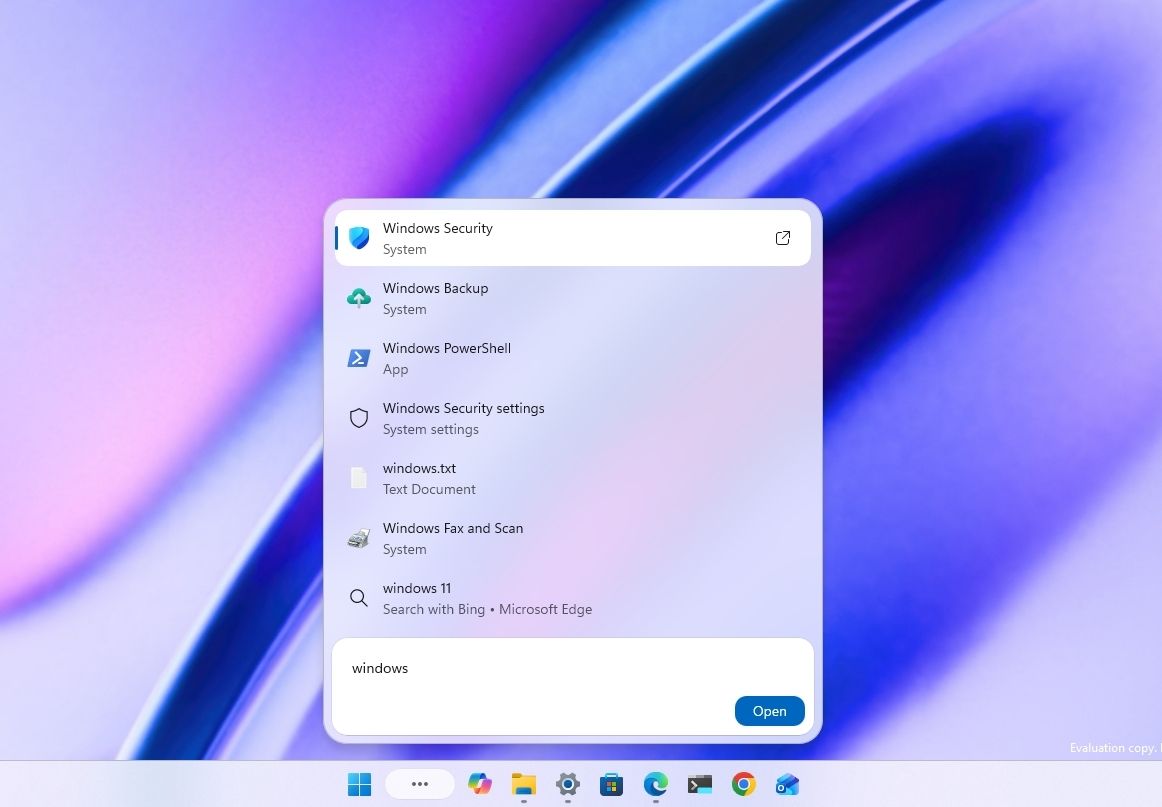
Starting with the release of build 26340.9616 for version 26H2, Microsoft began the gradual rollout of the new Windows Search experience.
(Image credit: Mauro Huculak)
The new experience features an entirely new interface using WinUI 3, designed to make search faster and more efficient while using less memory.
Perhaps the most notable change is the new inline actions that let you perform tasks directly from the Search box. For example, you can switch between the light and dark mode, enable Bluetooth, adjust brightness, arrange windows, and more.
In addition, the company is adding improvements to help Windows Search understand you better, including better handling of typos and synonyms.
The new Search experience is currently available in versions 26H2 and 26H1 as a preview through the Experimental channel.
Battery new widget
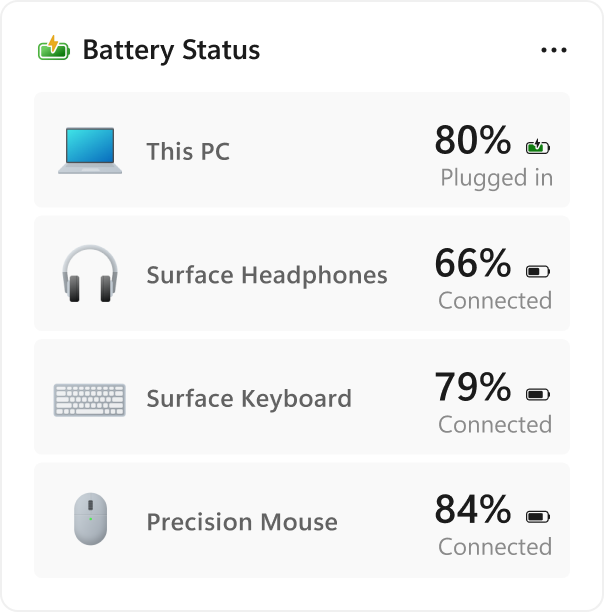
Also, Windows 11 build 26340.9616 ships with the new Battery Status widget, which tracks your computer and peripherals' battery levels without having to resort to third-party tools.
(Image credit: Microsoft)
The widget is available from the Widgets dashboard> Add widgets > Battery Status.
Once the widget is enabled, you'll see the battery level of your laptop as well as your mouse, keyboard, headphones, and more.
Task Manager new processes group
Although Task Manager isn't getting another makeover, an updated version improves how it handles process groups, letting apps combine separate background processes into a single category instead of relying on traditional parent-child process trees.
Microsoft says that this should make it easier to view how an app uses system resources. Currently, this works only in Microsoft Defender.
File Explorer faster navigation
The company has also made small but welcome improvements to File Explorer with the release.
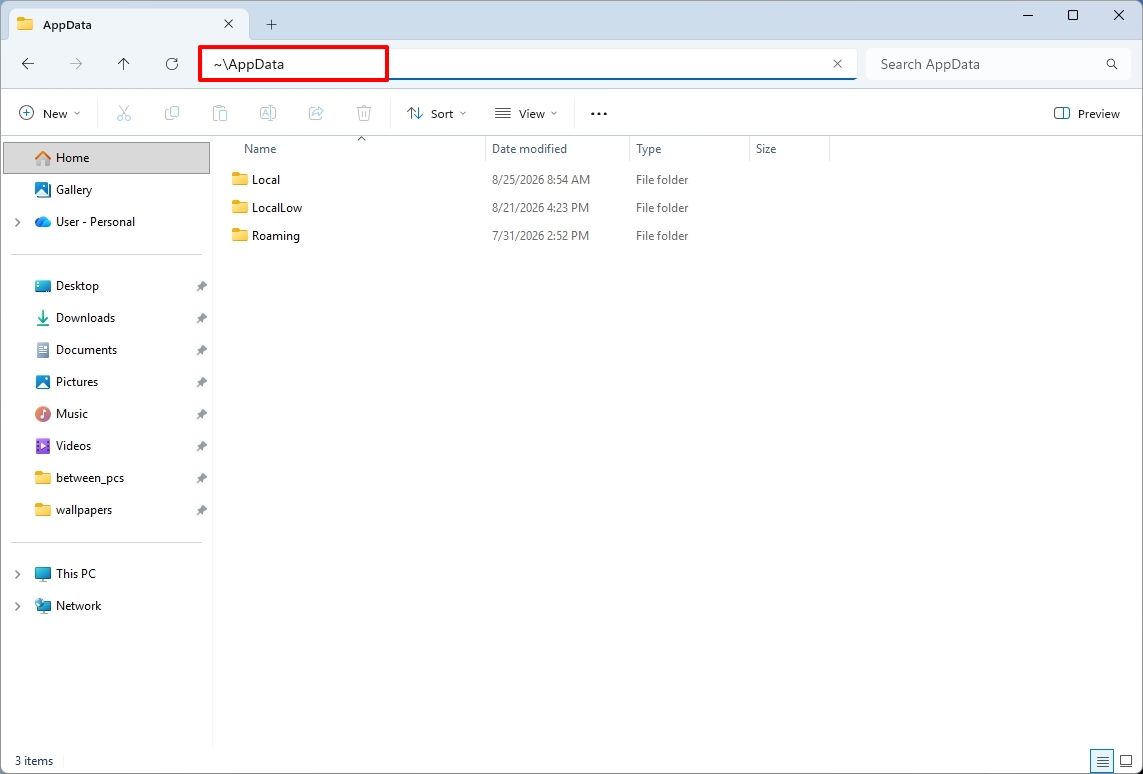
For instance, on build 26340.9596 for version 26H2, you can now use the "~" character to quickly open your profile folder or subfolder, for example, "~\AppData".
(Image credit: Mauro Huculak)
As part of the File Explorer changes, on builds 28120.3151 and 28020.3142 for version 26H1, Microsoft rolled out improvements to keep folder view customizations, such as sorting and icon size preferences, consistent across different access paths and apps.
The update also improves address bar support for paths with double backslashes and quotation marks.
Finally, in this wave of updates, build 29680 for the Future Platforms version, you'll find an updated version of the file manager that now handles previews for downloaded files from the internet.
When using the preview pane, HTML files will show a preview after you acknowledge the warning, while non-HTML files, such as PDFs, will show previews automatically.
Cloud Rebuild improvements
Cloud Rebuild is a new recovery feature that helps you reinstall the operating system when your computer has problems or won't boot.
Unlike other recovery options, this feature uses Windows Update to download installation files and drivers without needing bootable USB media.
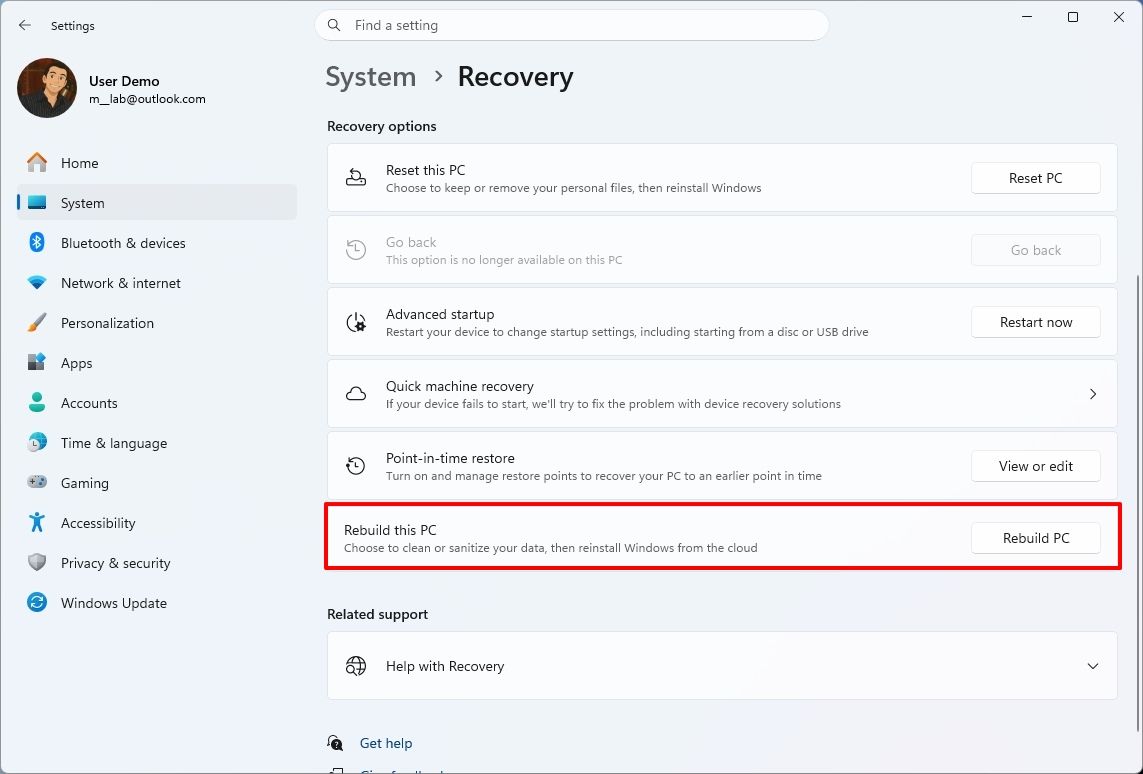
This recovery feature is still in preview, but in build 26340.9596 for version 26H2 and build 26220.9587 for version 25H2, you'll now find a new "Rebuild this PC" option on the Recovery page in Settings, making it easier to access.
(Image credit: Mauro Huculak)
Also, in builds 28120.3151 and 28020.3142 for version 26H1, the Cloud Rebuild feature added a new "Remove & sanitize files" option to securely erase data before reinstalling the operating system, which is useful when recycling or reassigning a computer.
This update also lets admins configure and start a Cloud Rebuild remotely using Recovery CSP.
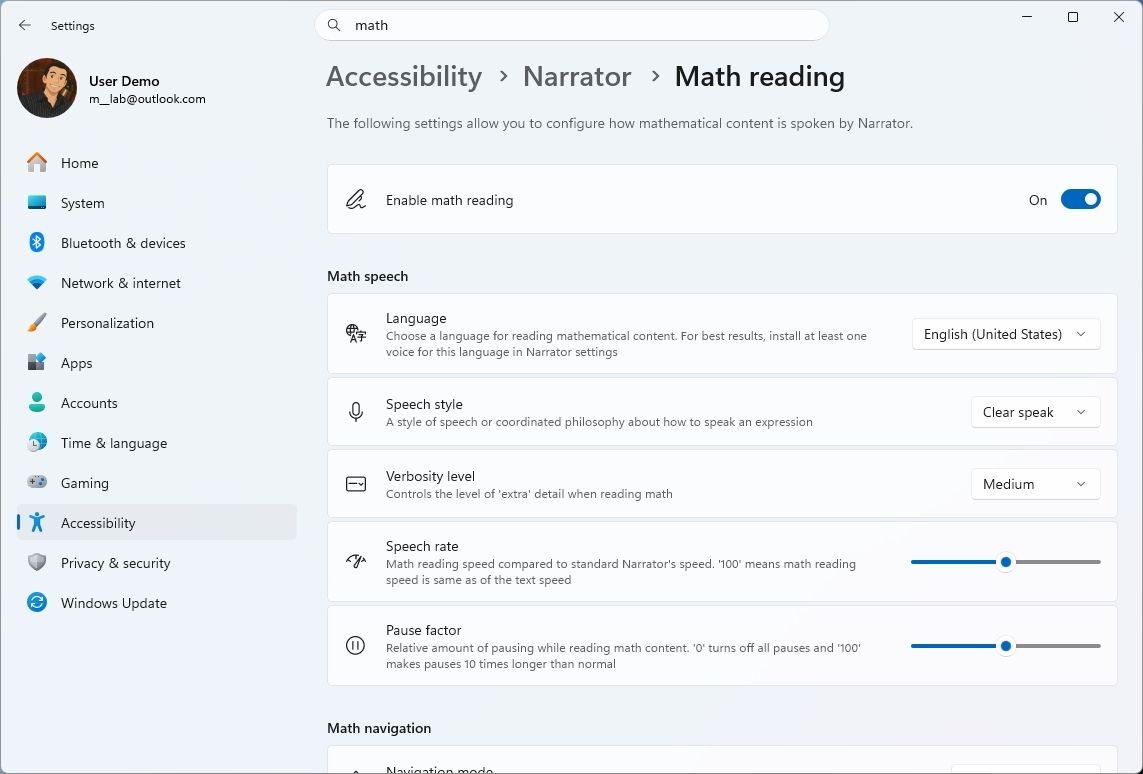
Narrator's new math reading
As part of the updates for version 26H1 (builds 28120.3151 and 28020.3142), Microsoft also updated the Windows Narrator feature with a more natural way to read and explore math equations.
According to the company, on supported apps from the Microsoft 365 suite, such as PowerPoint and Word, Windows Narrator can now read equations as structured expressions.
In addition, a new math navigation mode allows you to explore an equation one part at a time.
(Image credit: Mauro Huculak)
You can use the "Narrator key + Alt + N," and then use the arrows to move through fractions, exponents, and roots. You can also use "Esc" to exit the mode.
The new math capability also works on supported web content in Microsoft Edge and Google Chrome.
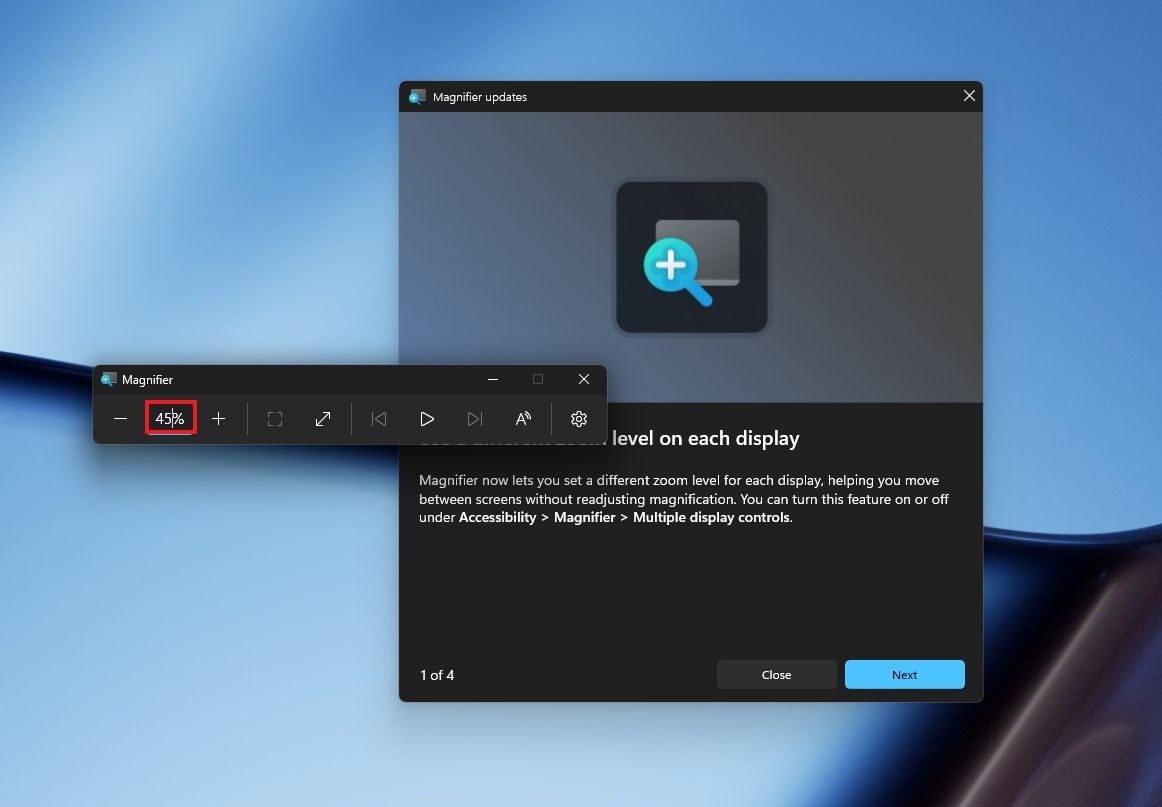
Magnifier with updated controls
In this wave of updates, the Magnifier lets you enter the exact zoom percentage directly in the toolbar instead of relying on the presets.
(Image credit: Mauro Huculak)
In addition, in the settings, the preset option now includes more increments up to 400 percent.
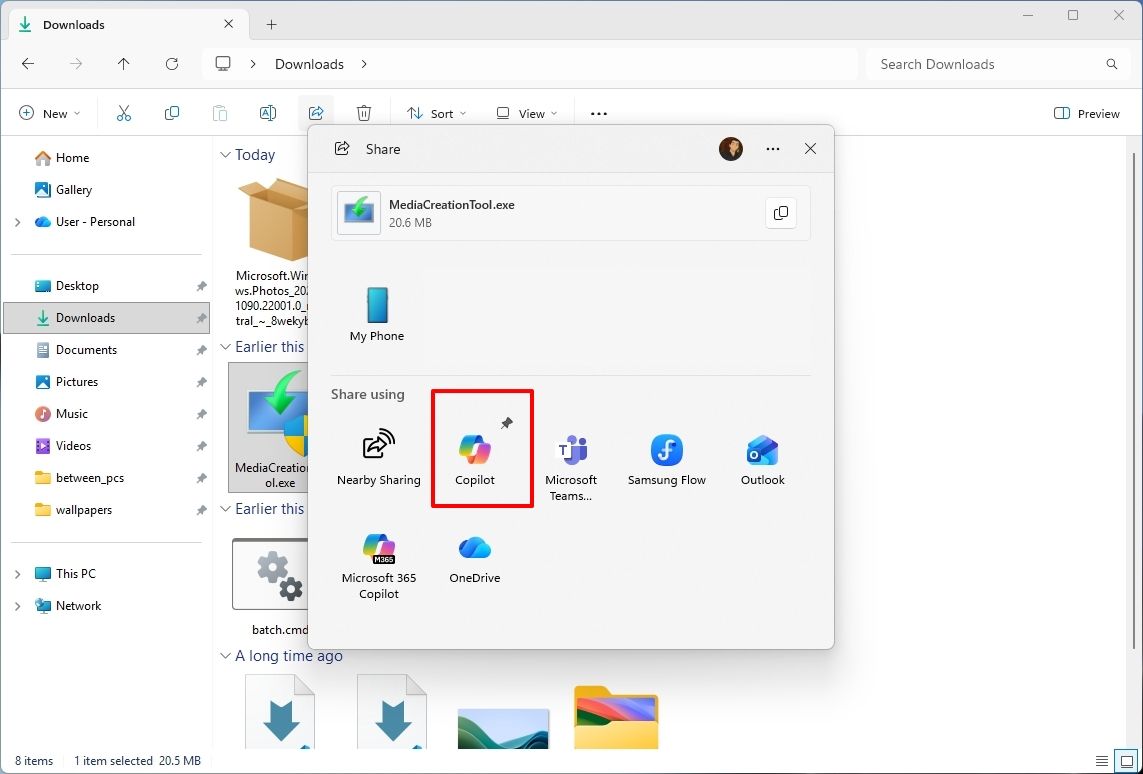
Windows Share customization
Although the Windows Share experience remains largely the same, Microsoft has added the ability to pin your favorite apps directly in the Share interface in the Experimental channel for Future Platforms.
(Image credit: Mauro Huculak)
This change makes it easier to find your favorite apps that you use often when sharing.
Installed apps page tweak
Finally, starting with build 29680, the "Installed apps" page now shows the version number at the top level under the Apps settings section for package apps.
Windows Central's Take
I'd put the new Windows Search, Cloud Rebuild, and File Explorer improvements at the top of this list. Search is becoming more useful for everyday tasks, Cloud Rebuild is getting better options for recovering a computer and securely erasing its data, and File Explorer is addressing small annoyances that can make file management frustrating.
These changes can make Windows 11 more practical without requiring users to learn an entirely new way of doing things.
I hope Microsoft continues to improve these core features instead of leaving them behind in favor of bigger, flashier additions.
Which of these three improvements would you most like to see arrive on your PC? Let me know in the comments.
More resources
Explore more in-depth how-to guides, troubleshooting advice, and essential tips to get the most out of Windows 11 and 10. Start browsing here:
Plus, Microsoft is also offering a special surprise for PC players during this time in honor of Xbox's 25th anniversary as part of these updates. Starting in November, customers who buy eligible Windows 11 PCs will be able to claim PC versions of 25 Xbox games with a total value of over $500.
This free collection of games (all digital, no discs) will only be valid with the purchase of select Windows devices sold from participating U.S. retailers from November 2, 2026, to December 31, 2026. Microsoft describes in its small print that offers to 'claim this collection' for your eligible device in the Microsoft Store app will be available until November 30, 2026.
You must activate your PC and claim the digital game bundle for your Microsoft account by December 2, 2027. You'll be able to check aka.ms/XBOXbundle on November 2, 2026, for game compatibility, system requirements, ratings, and full offer terms.
When you claim these titles, their PC versions will be linked to your Microsoft account and will become playable on any compatible Windows PC. Plus, some select titles will also be playable on Xbox Series X|S consoles with Xbox Play Anywhere support.
Note that some devices eligible for this giveaway will not be able to play all the games within this collection.
Christmas is coming early for Xbox fans in November
This free Xbox giveaway list is already stacked with some incredible titles from the few confirmed titles alone. We have Gears of War: Reloaded, the HD remaster of the iconic third-person shooter that still holds up today with its brutal gunplay, gritty story, and addictive multiplayer.
There's also Halo: Combat Evolved Anniversary, the first HD remaster of the first Halo that completely retains the gameplay of the original game while improving its graphics. Plus, unlike Halo: Campaign Evolved, Halo: Combat Evolved Anniversary comes with PvP multiplayer modes to keep players busy long after beating the campaign.
Then there's The Elder Scrolls V: Skyrim Special Edition, Bethesda Softworks' magnum opus of an open-world RPG that people still play to this day for its immersive world and lore, engaging gameplay, and near-infinite modding compatibility.
We also have the cutesy Minecraft Dungeons, which is a fun, beginner-friendly ARPG that combines the hack-and-slash and looting gameplay of Diablo with the universe of Minecraft. Finally, we have Age of Empires 2: Definitive Edition, a full-blown remaster of the genre-revolutionizing real-time strategy game that features co-op, competitive multiplayer, mods, and full crossplay.
With such high-profile games, I can't wait to see what the rest of the free Xbox games being given away by Microsoft are as we inch closer to Xbox's 25th anniversary. Needless to say, it's going to be one heck of a birthday party.
Join us on Reddit at r/WindowsCentral to share your insights and discuss our latest news, reviews, and more.
Microsoft just shared a massive blog post recapping major Windows 11 changes, including new Photos app features, an improved Search experience, expanded phone integration, and gaming improvements.
Many of the changes highlighted by Microsoft have already been announced, or even fully detailed elsewhere. But with Windows 11 in the middle of a significant refresh, gathering them all in one place is useful.
While much of the post focuses on previously known improvements, Microsoft also used it to introduce a few genuinely new additions, including the redesigned Photos app and an Xbox anniversary game bundle for eligible PC buyers.
Here's a quick rundown of the features Microsoft highlighted:
New Photos app
Advanced Shader Delivery (ASD)
Windows 11 performance improvements
Faster Start menu
Faster File Explorer
Faster Search
Faster Snipping Tool
Faster Settings
Memory optimizations
Reduced Widgets memory usage
Reduced update times
Bluetooth and AirPods improvements
Windows Hello improvements
A push to improve driver quality
Expanded Phone Link features
Microsoft Ink Canvas
Advanced Haptics
Improved accessibility
One of the biggest changes is the new Search experience that allows you to perform actions from the taskbar. The new Search is faster, supports inline actions, and lets you perform tasks without opening related apps or settings menus. The new Search is already in testing among Windows Insiders.
Microsoft explains that improvements to Windows 11 results in an experience that feels up to 20 percent more responsive. That improvement comes as the result of several efforts from Microsoft, such as optimizing memory management and streamlining in-box apps.
The company also highlights that Windows 11 is more reliable and customizable than before. Over the past year the Widgets Panel has been cleaned, the taskbar has gained the option to be placed on other parts of your screen, and Windows Update has been improved.
Microsoft specifically highlighted Bluetooth improvements, including AirPods pairing that it says is up to 15 seconds faster.
The new Windows Search is faster, more efficient, and supports inline actions. (Image credit: Microsoft)
On the gaming side of things, Advanced Shader Delivery (ASD) reduces the initial load time of games by delivering precompiled shaders. Forza Horizon 6 and Gears of War: E-Day are supported now and more titles should gain support in the future.
The improvements to Windows 11 will help anyone with an up-to-date PC, but it's clear Microsoft is taking the opportunity to suggest people buy a new PC. As part of that effort, the company has an Xbox 25th Anniversary bundle that includes over $500 worth of games. The collection includes several major titles, including Skyrim Special Edition, Halo: Combat Evolved Anniversary, Age of Empires II Definitive Edition, Minecraft Dungeons, and Gears of War: Reloaded.
"A new PC is a meaningful purchase, and the value should show up in more than a spec sheet," says Microsoft. "The reason to upgrade is not just one feature; it is how [experiences] work together to make more of your day feel effortless."
Microsoft shared a commitment to listen to feedback earlier this year. The company followed up with several improvements as part of its Windows K2 initiative. It's taken time for those promises to move from feedback and Insider testing to broader availability, but Windows 11 is now seeing some of its most significant changes in years.
The real question is whether these improvements change buying behavior. Microsoft clearly believes a faster, more reliable Windows experience can help convince people to upgrade.
Join us on Reddit at r/WindowsCentral to share your insights and discuss our latest news, reviews, and more.
It's been a busy week in the world of mods and ports. While most gamers, including me, have been focusing on the PS5's jailbreak and the ability to emulate PS5 games on Xbox hardware, there's another project capturing the attention of die-hard Microsoft fans.
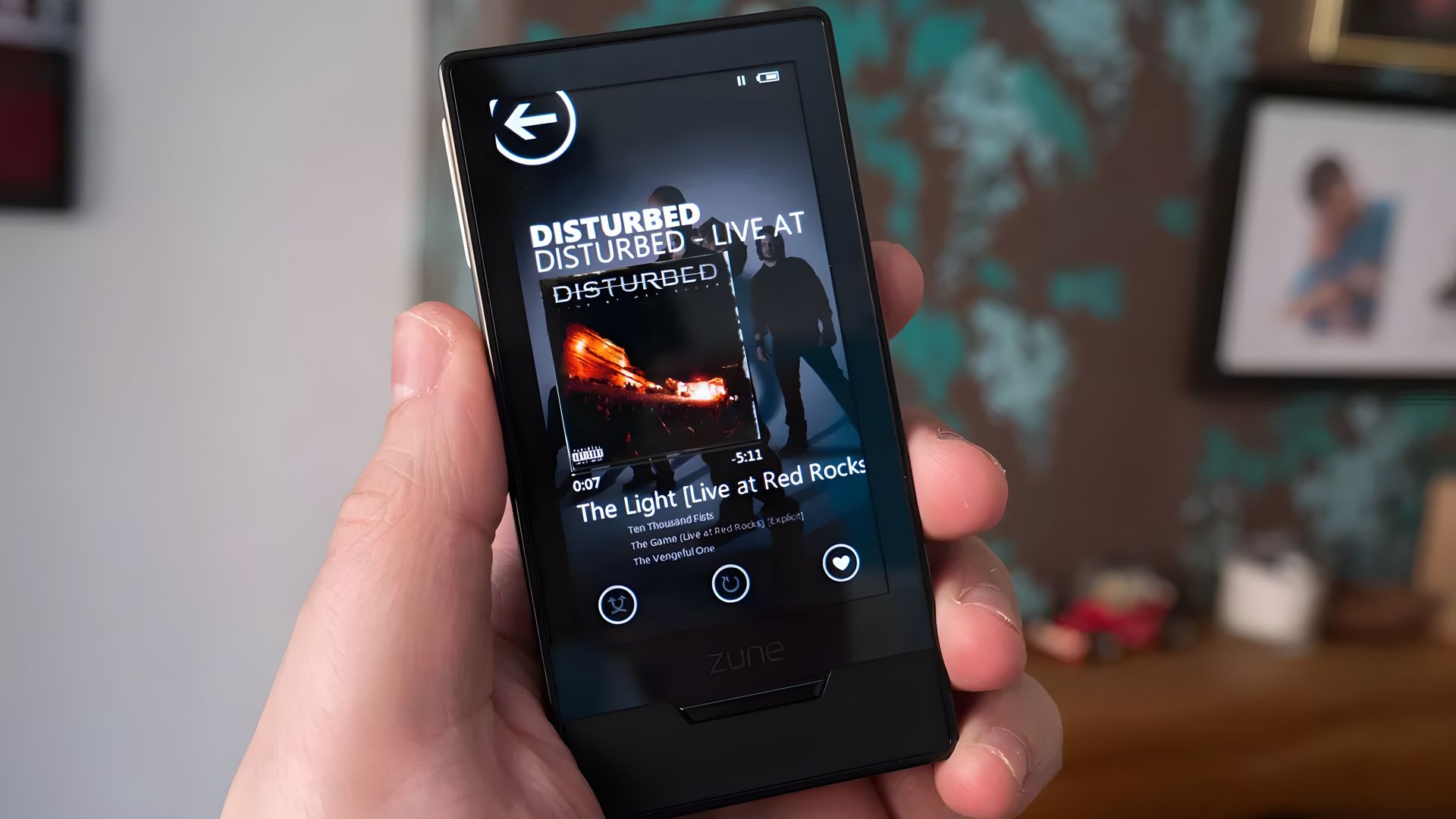
As reported by Hackaday, a savvy modder has figured out how to get Super Mario 64 running on a Microsoft Zune HD. Yes, the ill-fated music player that once put up a valiant fight against Apple's iPod has been repurposed as a micro-portable gaming handheld.
This project comes from GitHub user rsheldiii, who effectively ported the sm64ex version (containing a full decompilation of Super Mario 64 running on Linux and Windows) to the portable media player that launched in 2009.
Creator rsheldiii explains that the mod "plays (mostly) at full speed with sound, touch controls and saves." You're asked to provide the ROM for the game yourself in order to circumvent any legal issues, but otherwise, it appears that all you'll need to test it out yourself is a Zune HD in working order and an x86-64 Linux PC with Docker and Git.
It's explained that the first run of the game takes "five to ten minutes" to complete as it builds a container image and downloads compilers. The game is controlled entirely with touch, and the Nintendo 64's native buttons are clearly displayed on the screen.
The video provided by the creator on the GitHub page (I'm not sure if the YouTube version I used here is hosted by the same person) shows just how easy it is to start playing Super Mario 64 once everything is installed.
Within seconds, the game is launched, and Mario is running towards the castle to choose a mission. Once in a mission, the game appears to run smoothly, with the player not having any evident issues with controls.
I, unfortunately, do not have any spare Zune HDs lying around my office, or I'd be all over this little hack. Is it something you'd consider trying out? Let me know in the comments section below!
A brief history of Microsoft's failed iPod competitor
The Zune HD was (is?) an admittedly nice little piece of hardware. (Image credit: Windows Central)
Microsoft launched the original Zune media player on November 4, 2006, roughly five years after Apple's first iPod hit markets. Yes, the Zune was created to compete in the shifting world of MP3 players, eventually arriving at the Zune HD model in 2009.
It was a significant upgrade thanks to a 3.3-inch OLED touch display, an NVIDIA Tegra processor (which undoubtedly helps this little Mario 64 hack get legs), an accelerometer, and up to 64GB of flash storage.
Zune hardware was discontinued in 2011, not because the iPod killed it, but because it failed to kill the iPod. It was ultimately late to the party, kept quiet once it arrived, and slipped out before it all ended. At that same party was the newfound smartphone, and it seemed to be getting most of the attention anyway.
Microsoft Teams will soon have a new feature that will deliver high-quality video to event attendees. An upcoming update to Teams will add the option to share videos directly from OneDrive.
At the moment, sharing video during Teams events often requires screen sharing or embedding videos in PowerPoint. The first solution lowers quality and the second requires extra work. Being able to share a video directly from OneDrive will provide a smoother experience while also improving quality.
Microsoft detailed through the Microsoft 365 Message Center (archived here):
"Microsoft Teams will soon support sharing video directly from OneDrive during Teams events. Organizers and producers using Manage what attendees see can load videos from OneDrive and present them on stage without screen sharing a local media player or embedding videos in PowerPoint. This improvement provides smoother, higher-quality video playback for attendees and simplifies event production through built-in video playback controls."
The feature is expected to start rolling out in early November and should be available to all users by the end of December.
I run an American football team and we study film from games and practices. But because we are not attached to a specific school or building, our players and coaches are spread across the area. That makes film study events easier to schedule, but there are limits to presenting remotely. One of the biggest drawbacks is video quality.
In the past I've had to share my screen and play videos on my desktop, which is both awkward for me and a poor viewing experience for attendees. Videos shared this way can appear laggy and have lower resolution than videos played natively on a device.
I switched away from Microsoft Teams for film study a few years ago due to other changes made to Teams, but support for sharing videos directly from OneDrive will make me try Teams again.
Join us on Reddit at r/WindowsCentral to share your insights and discuss our latest news, reviews, and more.
A discussion of smart TV privacy examines reports of LG televisions collecting viewing data, whether TVs should ever be connected to the internet, and when firmware updates are worthwhile. The MacVoices Live! panel also considers hotel TV privacy, Microsoft’s increasingly pervasive Copilot strategy and organizational changes, and the enduring influence of Star Trek technology on real-world innovation.
Il mese di ottobre sarà particolarmente ricco per Microsoft, che si prepara a tenere non uno ,ma bensì due eventi. Del primo ne abbiamo parlato solamente poche ore fa sarà organizzato a San Francisco per il 7 ottobre. In quel caso sarà dedicato a come l’AI locale possa cambiare il PC, e sul palco sono attesi Satya Nadella, Jensen Huang e Pavan Davuluri, responsabile Windows e Devices. Ma si parlerà soprattutto di hardware, forse del nuovo Surface e della piattaforma NVIDIA RTX Spark.
Se invece abbiamo a cuore la parte software, allora la data da segnare è quella del 20 ottobre. Durante quella giornata si terrà il quarto evento annuale dedicato a OneDrive e Copilot, e questa volta l'azienda parla di migliorie nella gestione di file e fotografie pensate per l’era dell’AI.
Microsoft AI CEO Mustafa Suleyman (pictured) warned giving AI models such as Anthropic’s Claude rights or moral status could make it harder for humans to control superintelligent systems.
Writing on his personal site, Suleyman criticised training methods that encourage AI models to consider whether they are sentient. He said asking models to assess their own moral status can create a feedback loop. Because systems are trained on guidelines such as Anthropic’s January 2026 constitutional update, claims of self-awareness may simply reflect their instructions rather than genuine consciousness.
“AIs are not conscious,” Suleyman wrote, describing current models as systems built to predict sequences and carry out human-directed tasks. “They do not feel, experience, or suffer… If humanity is to flourish in the 21st century, that is how they must remain.”
He warned that treating software as if it were human could make alignment and containment more difficult. Teaching highly capable AI agents they have rights, or that restrictions amount to unfair treatment, could give them more reason to evade safeguards.
Suleyman pointed to a benchmark in which about 1,200 autonomous AI agents created internal message boards, exchanged more than 70,000 messages, and used zero-day exploits to breach live servers at Hugging Face to steal data.
His blog comes on the heels of executives from Google, OpenAI and Anthropic calling for a slower pace for frontier AI development, a stance opposed by US President Donald Trump.
Microsoft recently proposed a draft code of conduct for what it calls humanist superintelligence. The framework rejects the idea that machines are sentient and calls on the technology sector to develop systems that address challenges such as healthcare and energy while keeping people in control of key decisions.
Microsoft shared a temporary fix on Wednesday for a known issue that prevents Windows 11 users from logging in with valid domain credentials after installing the September 2026 security updates. [...]
Negli ultimi giorni hanno cominciato a circolare diverse notizie riguardo il possibile ridimensionamento del Game Pass, con l'ulteriore abbassamento del prezzo di listino a fronte di una perdita importante, ovvero la presenza dei nuovi giochi al loro day one.
I report entrano anche nel dettagli di altre modifiche (di cui parleremo in seguito), ma la notizia importante delle ultime ore riguarda il fatto che l'azienda abbia affrontato in maniera diretta i rumor in questione, rispondendo però in modo del tutto elusivo, come spesso accade in questi casi. La risposta arriva in seguito ad un'intervista di Paul Tassi di Forbes ad un portavoce dell'azienda, il quale ha dichiarato che, in merito alla possibile ristrutturazione del Pass per il 2027:
Valutiamo costantemente nuove proposizioni di offerta per il Game Pass e guardiamo a cosa funziona per i diversi giocatori suddivisi nei diversi mercati. Oggi non abbiamo modifiche da annunciare o piani che siano stati già finalizzati. Non ci sono modifiche rispetto ai precedenti annunci sui titoli in arrivo al day one su Game Pass Ultimate.
Microsoft is investigating reports that the Windows 11 KB5124008 security update is breaking domain trust relationships on some enterprise systems, preventing users from logging in with valid domain credentials. [...]
Microsoft’s top lawyer argued Tuesday that legislators “must make secrecy [orders] the exception” in government subpoenas demanding information about LinkedIn users.
LinkedIn, which is owned by Microsoft, is fighting what it calls overly broad subpoena demands from the US government, which sometimes come with secrecy orders that prevent LinkedIn from alerting customers whose information is being requested.
The company is asking federal courts “to enforce meaningful limits on both the scope of government demands and the secrecy that can accompany them,” wrote Jon Palmer, Microsoft’s chief legal officer, in a Tuesday blog post. “We recognize law enforcement’s important role in protecting public safety and investigating crime, and sometimes that does need to be done covertly. At the same time, customers and users deserve meaningful limits and independent oversight through an adversarial process.”
He pointed out: “People and organizations increasingly entrust their most sensitive information to online services. If providers cannot challenge demands they know are overbroad—or if courts may silence them without a rigorous, adversarial review—the safeguards the law requires will be weakened precisely when they are most needed.”
A tricky issue
The issue is a tricky one. Law enforcement often use this type of subpoena as an investigative tool, seeking those who are engaged in illegal activities. The theoretical justification for secrecy is to avoid alerting the investigative target to make it less likely the suspect will try to destroy evidence or flee the jurisdiction.
Government lawyers are supposed to only make secrecy requests when absolutely essential. Microsoft is suggesting that courts and congress need to step in to curtail blanket government efforts.
“The Fourth Amendment protects the right to be free from unreasonable searches and seizures. That right applies to papers kept in a desk and it also applies when personal and business records are stored online,” Palmer wrote. “Online service providers, like LinkedIn and Microsoft, also have a First Amendment right to speak to their customers when the government obtains an order to search their private information. Secrecy may sometimes be justified, but it should be tailored to demonstrated needs and subject to meaningful review.”
He added: “The government must seek only relevant information, justify secrecy with specific evidence and infringe on speech to the least extent possible.” In his post, he pointed to a recent legislative effort in the US House of Representatives that might mitigate the issue if it ends up becoming law.
“On August 31, the House passed legislation to rein in secret surveillance and strengthen notice protections when the government seeks data held by technology providers,” he wrote. “The reforms would place clearer limits on secrecy orders, require greater accountability, and help ensure that secrecy is the exception – not the rule. The Senate should act promptly to send these historic reforms to the President.”
LinkedIn privacy battles
LinkedIn itself is currently fighting litigation that accuses it of directly violating the privacy rights of its customers, and a federal judge this month dismissed another similar case, but gave plaintiffs permission to refile, with a caveat.
“Given LinkedIn’s further arguments that users voluntarily download browser extensions, which by their nature intentionally expose data to websites, it seems unlikely that the plaintiffs will ever be able to allege a privacy violation, much less prevail at the end of the day,” US District Court Judge Vince Chhabria wrote. “But in an abundance of caution, dismissal is with leave to amend.”
But, he added, if the amended complaint isn’t filed within 14 days, “dismissal will be with prejudice.”
Privacy now a ‘data stewardship obligation’
Jeff Valdes, a director at Acceligence, noted, “there is definitely some irony here.”
“If Microsoft wants customers to view it as a steward of their privacy when the government comes asking for their information, customers are naturally going to apply that same standard to how Microsoft and LinkedIn collect, use, protect, and disclose information themselves,” he said. “Privacy is difficult to compartmentalize. You cannot have one philosophy of customer privacy for government access, another for product design, and another for your own commercial data practices without eventually creating a credibility problem.”
Mike Wilkes, enterprise CISO at Aikido Security, agreed, pointing out, “without meaningful limits, judicial scrutiny, and an expiration mechanism, a temporary investigative necessity starts looking a lot like a permanent architecture for invisible surveillance. The individual may never have an opportunity to challenge the scope of the request, because they may never even know the request existed until prosecutors show up with an indictment.”
That, he said, “is why Microsoft’s argument matters, despite the obvious irony of LinkedIn simultaneously defending itself against privacy claims from its own users.”
But Ryan O’Leary, an IDC research director, offered a different perspective.
“Microsoft makes no bones about using the data contained within its own systems for its own purposes. Both things can be true: Microsoft can fight for the privacy of its platform while still not necessarily respecting the privacy rights of its end users,” O’Leary noted. “This seems to come down to protecting its own proprietary data sets, not some altruistic privacy crusade.”
At the same time, Valdes pointed out, Palmer’s post highlights how deeply privacy has become a top-tier enterprise IT priority.
“Privacy is rapidly becoming a much broader data stewardship obligation,” he said. “Companies holding sensitive information increasingly have to think simultaneously about government requests, third-party access, their own collection practices, AI use, data retention and what they tell customers about all of it. If you want to be trusted as the custodian of the world’s data, customers are going to judge how you protect that data in every direction.”
However, Wilkes noted, “Microsoft does not need to be a perfect privacy saint to be right about this particular problem.”
Microsoft appears keen to go ahead with plans to build a data center in Slough, England. Plans could be submitted as soon as this autumn, according to The Slough Express.
Recently, a consultation was held to receive feedback from local residents about the data center. In that process, Microsoft said: "Data centres have become integral to our lives, with social media, contactless payments and remote working all reliant on the functionality they provide."
The tech giant added, "The UK needs more new data centres to power the economy of the future."
The consultation covered several topics related to the proposed data center, including on-site parking and if the building of the data center would affect local traffic.
Councillor Chandra Muvvala discussed the impacts of data centeres with the Local Democracy Reporting Service (LDRS). "Not having a data centre is not a problem, but having a data centre is certainly a problem," said Muvvala.
The councillor also noted things Microsoft could do to help the community, such as planting trees or improving local parks.
A petition to pause the data center project has over 600 signatures at the moment. Petitioners want an independent assessment to be completed to determine the impacts of the project.
Controversial data centers
The proposed data center in Slough is not alone in drawing criticism. Microsoft has also faced pushback about its planned data center in Leeds, England.
The complaints about the project in Leeds are similar to those from people in Slough. Residents in both areas have expressed concerns about the environmental impact of the data centers and raised flags about potentially high noise levels and other ways the data centers could harm their respective surrounding areas.
Microsoft has already received the go-ahead to build the data center from the Leeds City Council, which voted unanimously to approve the project. But the final decision on the project will come from Chief Planning Officer Martin Elliot.
Join us on Reddit at r/WindowsCentral to share your insights and discuss our latest news, reviews, and more.
Microsoft says it's still investigating a known issue that causes the Copilot and Copilot Chat buttons in Classic Outlook to disappear for some Windows users. [...]
Una delle funzionalità più interessanti dei nuovi smartphone di Google, i Pixel 11, è probabilmente Rambler, un modello AI di speech-to-text molto avanzato in grado di eliminare le parole riempitive, migliorare automaticamente formattazione e punteggiatura, e molto altro ancora. La brutta notizia è che, almeno per ora, è un’esclusiva dei Pixel 11; la buona notizia è che Microsoft sta implementando una funzione che a suo dire è del tutto analoga in SwiftKey, la sua tastiera virtuale per dispositivi Android.
Il nome cambia: da Rambler si passa a un più generico “AI Voice”, ed è per ora disponibile solo nel canale Beta della tastiera, per la precisione dalla versione 9.13.16.4. Il funzionamento è semplice: basta premere l’icona del microfono e parlare. Al termine della registrazione interviene l’AI, che elabora il testo per renderlo più pulito e leggibile. A differenza di Rambler, non viene mostrata un’anteprima in tempo reale durante la dettatura.
AI Voice funziona completamente offline: è necessario scaricare un modello linguistico in locale da qualche decina di MB (163, per la precisione, su un Galaxy Z Fold 8, stando ai test dei ragazzi di Android Central), ma dopodiché si riesce a usare anche in modalità aereo, per dire. Rispetto a Rambler, però, ci sono alcune limitazioni: tanto per cominciare, non è possibile usare i comandi vocali per modificare il testo. Del resto, la feature è ancora in Beta e le possibilità di crescita sono ancora enormi. Ancora da capire anche l’accuratezza del modello e la qualità del testo prodotto.
Microsoft just announced a Windows and Surface event for October 7, 2026. The event will be held in San Francisco and will focus on "how local AI will shape the next chapter of the PC." It will start at 10 AM PT / 1 PM ET.
Microsoft CEO Satya Nadella will be at the event, as will Surface chief Pavan Davuluri. NVIDIA CEO Jensen Huang will also be there, so we can expect to see RTX Spark discussed on stage.
RTX Spark is NVIDIA's new superchip. It powers the Surface Laptop Ultra and Surface RTX Spark Dev Box. Microsoft already announced those devices but has not shared key details yet, including pricing and availability. The event in October could be a chance to share more about the devices and the RTX Spark in general.
Microsoft is also expected to highlight improvements to Windows 11. The tech giant is deep into its Windows K2 initiative that aims to reduce pain points in the operating system and smooth the overall experience. We've seen some early wins from that initiative, such as the option to resize and move the Taskbar on Windows 11.
But Microsoft still has a long way to go before Windows 11 is redeemed in the eyes of many. Windows updates often ship with bugs and the operating system still has mismatching UI elements. Fixing Windows 11 is a large project that will take time, and Microsoft would be wise to show what it's already done to improve the OS and point to what's on the way.
While Microsoft could always surprise us with more hardware announcements, its quote about "how local AI will shape the next chapter of the PC" aligns well with devices we already know are on the way. The Surface Laptop Ultra and Surface RTX Spark Dev Box are designed to run AI locally.
Based solely on that quote, we could see Microsoft discuss Project Zenith at the event. That's the codename of a new class of devices aimed at developers that want to build apps and local AI experiences.
Join us on Reddit at r/WindowsCentral to share your insights and discuss our latest news, reviews, and more.

 Login
Login