Chinese scientists have developed a new kind of “living cement” that could, in theory, be used to build structures on far-away planets like Mars. According to reports, it works using just a few ingredients, including “domestic” soil/regolith, gelatin, and genetically engineered yeast.
If able to scale, this technique could be used to build shelters and other structures for future long-term human missions to the planet. What’s more, the process is relatively cheap and could be combined with on-site 3D printers.
The researchers managed to engineer a special strain of Saccharomyces cerevisiae yeast that produces extremely adhesive proteins. One of these proteins is similar to those produced by mussels that enable them to stick to surfaces like rocks.
The idea is that these proteins could be used as a kind of cement to bind soil or regolith, effectively making a kind of biological cement. The yeast cells therefore behave a bit like millions of microscopic sticky particles inside the binder.
Building Martian structures using yeast
The gelatin component forms a hydrogel around everything, while the soil/regolith provides the bulk of the material. Initially gloopy in texture, this paste can be extruded through 3D-printer nozzles to form complex structures.
As for “curing” the mixture, the researchers believe it is best to work with the conditions on Mars rather than fight them. Mars has a very thin atmosphere (about 0.6 percent of that on Earth) and is much colder on average than Earth (about -63.4°F/−53°C).
Under these conditions, liquid water will freeze and sublimate, meaning it never really stays in liquid form for very long. That is essentially freeze-drying. What’s left behind is a lightweight porous network in which the gelatin, yeast-derived adhesive proteins, and mineral grains are locked together.
You can liken that to something akin to a mixture of freeze-dried sponge and concrete. What’s more, this new material is actually pretty strong, with 12 MPa compressive strength and 6 MPa flexural strength.
That’s about on par with low-strength and lightweight concrete here on Earth. Promising indeed, and if it can save shipping thousands of tons of material for construction, that would clearly be enormously beneficial.
Instead, in theory, you’d just need to send the biological starter material, some processing equipment, and a big robot printer. Interestingly, the material is also recyclable, meaning its constituent parts can be broken down and reused.
All well and good, but before this could be seriously considered for applications outside the lab, some important things need to be refined.
More work to do
The first is that the tested material used sand as a substitute for Martian regolith. Actual Martian regolith has different particle characteristics and contains things such as perchlorates. How the gelatin-yeast mix reacts to this is yet to be tested.
Another issue is that the gelatin is porcine, meaning that it would need to be “shipped in” to a building site. The team also tested a gelatin-free formulation, although its performance was lower, and the researchers say stronger fully biological binders will be needed.
Yet another major issue is enabling the material to build pressurized structures to protect people from Mars’s harsh environment. The team proposes a ready-made pressure-retaining membrane enveloped by a shell and shielding built using this new living concrete.
Overall, it is a promising proof-of-concept showing that Martian regolith might one day be turned into printable construction material using engineered biology, while exploiting Mars’s cold and near-vacuum conditions as part of the manufacturing process rather than treating them purely as obstacles.
A discussion of smart TV privacy examines reports of LG televisions collecting viewing data, whether TVs should ever be connected to the internet, and when firmware updates are worthwhile. The MacVoices Live! panel also considers hotel TV privacy, Microsoft’s increasingly pervasive Copilot strategy and organizational changes, and the enduring influence of Star Trek technology on real-world innovation.
Tenzing shifts one of mountaineering’s most famous stories toward the Himalayan climber whose name has long shared a place in history with Edmund Hillary. Apple Original Films has released the trailer for the upcoming adventure drama, with Genden Phuntsok playing Tenzing Norgay and Tom Hiddleston portraying Hillary during the 1953 expedition that reached the summit of Mount Everest.
Directed by Jennifer Peedom, the film reaches select theaters on October 9 before streaming globally on Apple TV on October 16. The cast also includes Willem Dafoe, Caitríona Balfe, Thinley Lhamo, and Tenzin Dalha.
Rather than presenting the expedition simply as a survival story about reaching the world’s highest point, the film approaches the ascent through Tenzing’s position within the British-led team, his relationship with the mountain, and the social divisions surrounding the expedition.
That perspective gives the familiar Everest story a different dramatic center.
Tenzing puts the Himalayan climber at the front of the story
Tenzing Norgay and Edmund Hillary reached the summit of Everest on May 29, 1953, during an expedition led by Colonel John Hunt. Their ascent became one of the defining achievements in mountaineering history, but the new film is explicitly structured around Tenzing rather than treating the two climbers as interchangeable figures.
Phuntsok plays Tenzing as an experienced Himalayan climber who has already spent years pursuing the possibility of reaching the summit. The story follows his attempt to secure a meaningful place on the climbing team instead of being viewed primarily as someone there to support Western expedition members.
Hiddleston’s Hillary enters that story as another outsider within the expedition hierarchy. Apple describes the relationship between the two men as one built gradually through mutual respect and trust as the dangers and pressures of the ascent increase.
Dafoe plays Hunt, the expedition leader, while Balfe portrays expedition secretary Jill Henderson, who becomes an ally to Tenzing. Thinley Lhamo plays Dawa, Tenzing’s wife, whose support forms another part of the film’s emotional foundation.
The Apple TV listing also identifies Johnny Flynn as George Mallory and Tenzin Dalha as a younger Tenzing.
The 125-minute film therefore has room to explore more than the final climb itself. Its central conflict begins before Tenzing and Hillary ever approach the summit.
Image Credit: Apple Inc.
The Everest story looks beyond conquest
One of the distinctions emphasized in Apple’s description of Tenzing is the different meaning the mountain holds for its characters.
The film contrasts the Western climbers’ view of Everest as something to be conquered with Tenzing’s reverence for Chomolungma as the sacred mother goddess.
That contrast gives director Jennifer Peedom a way to examine the expedition through competing cultural perspectives rather than framing the mountain solely as an obstacle.
The trailer also points toward tensions involving class, hierarchy, nationality, and the legacy of empire. Tenzing must establish that he belongs among the expedition’s climbers instead of accepting a supporting position defined by others.
Historical accounts from the Royal Geographical Society record that Hillary and Tenzing left their final camp on the morning of May 29, 1953, using supplemental oxygen. They reached the summit at approximately 11:30 a.m. after negotiating the steep section of rock and ice that became known as the Hillary Step.
The achievement has been recounted in books, documentaries, photographs, and films for decades. Tenzing approaches the material by asking how the same expedition looks when the Himalayan climber occupies the center of the frame.
Peedom shares story credit with Luke Davies, who wrote the screenplay.
The project is a natural fit for Peedom, whose filmmaking career has repeatedly engaged with mountains, extreme environments, and the people drawn to them. Here, however, the physical scale of Everest serves a character story built as much around identity and recognition as technical climbing.
Genden Phuntsok leads an established ensemble
Casting Tenzing Norgay was particularly consequential because the film surrounds its lead with several internationally recognizable performers.
Hiddleston arrives as Hillary with a career spanning major franchise work and dramatic television. Dafoe brings a more imposing presence to Hunt, while Balfe plays Henderson as one of the figures willing to challenge the assumptions surrounding Tenzing’s role.
Phuntsok nevertheless remains the narrative anchor.
Apple’s synopsis describes the climber’s journey as both a lifelong ambition and a spiritual calling. That gives the performance two demands: convincing audiences of Tenzing’s physical capability at extreme altitude while conveying why reaching Chomolungma carries meaning beyond becoming part of the first confirmed ascent of Everest.
Lhamo’s Dawa is also positioned as more than background to the expedition. Apple specifically identifies her encouragement as part of what drives Tenzing toward the opportunity, adding a personal relationship to a story otherwise dominated by expedition politics and physical risk.
Behind the camera, Davies joins Peedom as a producer. Desray Armstrong also produces, alongside Liz Watts, Iain Canning, and Emile Sherman of See-Saw Films.
See-Saw has an established relationship with Davies, whose previous screenwriting credits for the company include Lion. Norbu Tenzing, Simon Gillis, and David Michôd serve as executive producers.
Image Credit: Apple Inc.
Tenzing gets a theatrical window before Apple TV
Apple is giving Tenzing a short theatrical run before bringing the film to its streaming service.
Select theaters will begin showing the movie on October 9, with the global Apple TV premiere following one week later on October 16. The Apple TV listing categorizes the film as a drama and adventure title and gives it a PG rating in the U.S. for thematic elements, language, smoking, and some peril.
The release continues Apple Original Films’ practice of using theatrical distribution selectively before making features available to subscribers.
For Tenzing, the cinema component has an obvious creative advantage. A film built around Everest, dangerous climbing conditions, and the physical scale of the Himalayas has material suited to a large screen, even as its narrative emphasis remains on the people inside that landscape.
The trailer arrives with less than a month remaining before the theatrical debut, giving Apple a relatively concentrated promotional window.
It also introduces Phuntsok to a much wider international audience alongside performers including Hiddleston, Dafoe, and Balfe without letting the better-known names displace the person identified in the title.
Tenzing will begin its theatrical run on October 9, followed by its Apple TV release on October 16. Its 1953 destination is already known; the new question is how the film reconstructs the journey by placing Tenzing Norgay’s perspective, relationships, and understanding of Chomolungma at the center of the ascent.
AirPods 5 bring Active Noise Cancellation to Apple’s most affordable current AirPods while pushing the open-ear design closer to capabilities previously associated with more expensive models. The new generation starts at $129 and uses redesigned acoustics and computational audio to remove up to 50% more external noise than AirPods 4 with Active Noise Cancellation.
Apple is also splitting the range into two versions. The standard $129 AirPods 5 include ANC and USB-C charging, while a $149 model adds a Wireless Charging Case, longer battery life, a case speaker for Find My, and volume adjustment directly from the stems.
Both models are available for preorder ahead of their September 18 release in the U.S. and more than 65 other countries and regions.
The changes make the distinction between Apple’s entry-level AirPods and its more advanced headphones less dependent on headline software features. Adaptive Audio, Transparency, Conversation Awareness, Personalized Spatial Audio, Live Translation, and Siri AI are all part of the AirPods 5 experience.
Image Credit: Apple Inc.
AirPods 5 push open-ear ANC further
Active Noise Cancellation is particularly difficult to implement in an open-ear earbud because there is no silicone tip forming a physical seal inside the ear canal.
Apple has approached that limitation with a new multiport acoustic architecture, revised computational audio algorithms, and the H2 headphone chip. The company says AirPods 5 can cancel up to 50% more noise than AirPods 4 with ANC.
That improvement does not turn the design into an AirPods Pro-style sealed earbud. AirPods 5 remain open-ear headphones, retaining the fit preferred by people who dislike the pressure or isolation associated with in-ear tips.
The acoustic system has also been redesigned around a wider variety of ear shapes. Next-generation Adaptive EQ continuously adjusts sound based on how each earbud sits, while Apple says the revised architecture produces richer and more detailed playback.
Transparency mode has been updated to reproduce voices and environmental sounds more naturally. Adaptive Audio can move between Transparency and noise cancellation according to surrounding conditions, while Conversation Awareness automatically reduces media volume when the wearer begins speaking to someone nearby.
Personalized Spatial Audio with dynamic head tracking remains supported for compatible music, movies, and other content.
AirPods 5 are rated IP57 for dust, sweat, and water resistance, making them better suited to workouts and changing weather conditions, although they are not waterproof.
Two AirPods 5 models create a meaningful $20 decision
Apple’s pricing makes the $149 Wireless Charging Case version more than a different charging option.
Standard AirPods 5 provide up to four hours of listening on one charge with ANC enabled and up to 20 hours when the USB-C case is included.
AirPods 5 with Wireless Charging Case increase those figures to five hours from the earbuds and up to 22 hours with the case while ANC is active.
The upgraded case can charge through USB-C, an Apple Watch charger, or a Qi-certified wireless charger. It also contains a speaker that can assist with locating the case through Find My.
The more expensive model introduces another difference directly on the earbuds. Users can swipe up or down on a stem to adjust volume, bringing a control familiar from AirPods Pro to Apple’s open-ear form factor.
That leaves buyers with a relatively straightforward tradeoff. The $129 version provides the central audio experience, including ANC, without requiring a step up for the main listening features. Spending another $20 adds more convenient charging, slightly longer battery life, Find My assistance from the case speaker, and physical volume adjustment.
Placing either AirPods 5 model in its charging case for five minutes provides about one additional hour of listening.
Image Credit: Apple Inc.
Siri AI and Live Translation extend the earbuds beyond music
AirPods 5 arrive as Apple makes voice interaction a larger part of the AirPods experience.
When paired with a compatible iPhone, Siri AI can be accessed hands-free. The assistant can work with personal context from information such as messages, emails, and photos, respond to open-ended questions, and perform supported actions in apps.
Head gestures remain part of the experience. Users can nod to accept certain Siri prompts or shake their head to decline them, allowing calls and notifications to be handled without speaking or touching the earbuds.
Live Translation provides another use for the microphones and ANC system.
After compatible languages are downloaded and the feature is configured through Apple’s Translate app, a user can hear another person’s speech translated through AirPods. Translation can be started through Siri, the iPhone Action button, the Translate app, or by pressing and holding both AirPods stems simultaneously.
When two people are each using compatible AirPods and supported iPhones, both participants can hear translated versions of the conversation in their chosen languages.
Live Translation requires an Apple Intelligence-enabled iPhone 15 Pro or later, compatible AirPods, current software, and the latest AirPods firmware, with availability varying by language and region. Apple also notes that generated translations can contain errors, making verification appropriate when accuracy is especially significant.
AirPods 5 narrow the gap within the lineup
The fifth-generation model represents a different kind of upgrade from simply adding another listening mode.
ANC is now standard across both AirPods 5 configurations, instead of requiring buyers to choose a separate ANC version as they did with AirPods 4. Apple has then moved the pricing distinction toward charging, battery endurance, Find My hardware, and physical controls.
The earbuds continue to use Bluetooth 5.3 and the H2 chip, with dual beamforming microphones, an inward-facing microphone, optical in-ear detection, motion and speech accelerometers, and force sensors built into the stems.
Each earbud weighs 4.3 grams, preserving the lightweight character of the open-ear line despite the additional capabilities.
The new acoustic architecture may be the more consequential change over time. Open-ear earbuds cannot rely on a tight seal to block surrounding sound, so gains in ANC depend heavily on microphone placement, acoustic design, fit, and real-time processing. Apple’s claim of up to 50% more noise removal over the previous generation represents a substantial step for that format rather than simply matching the behavior of sealed earbuds.
AirPods 5 start at $129, while AirPods 5 with Wireless Charging Case cost $149. Both reach stores on September 18, giving the open-ear AirPods line a standard feature set that now includes noise cancellation without pushing buyers to a higher-priced model to get it.
The iPhone Duo status icon introduces a new approach to information that has occupied the top edge of the iPhone display for nearly two decades. Instead of treating Wi-Fi, cellular signal, battery status, and other indicators as a conventional horizontal row, Apple has created a flexible circular system that sits in the corner of the foldable iPhone’s display.
Apple officially describes the feature as a “circular, flexible system” within the status bar rather than one fixed icon containing every piece of information at all times. The distinction is useful: the area can adapt according to context while consolidating status information into a smaller visual region.
It is part of a much larger rethink of iOS 27 specifically for iPhone Duo. The foldable device changes the proportions available to software, particularly when its 7.6-inch inner display is open, forcing Apple to reconsider interface elements that have traditionally stretched horizontally across an iPhone screen.
The status system is one of the smallest changes visually, but it illustrates how extensively Apple has adapted iOS around the new hardware.
Image Credit: Apple Inc.
iPhone Duo status icon replaces the traditional horizontal approach
Conventional iPhones distribute system information across the upper portion of the display. Cellular strength, network type, Wi-Fi connectivity, and battery status typically occupy space around the camera hardware and Dynamic Island.
iPhone Duo approaches that area differently.
Apple says its circular status system nestles into the corner of the screen and presents relevant information including Wi-Fi, cellular strength, battery status, and more. Rather than requiring a long horizontal strip, those indicators can occupy a compact area that works with the device’s unusual screen geometry.
The change is closely connected to the way iPhone Duo handles controls throughout iOS 27.
Apple has moved several interface elements to the side of the display. App navigation, toolbars, the Home Screen Dock, and some Lock Screen controls can use vertical space instead of occupying the familiar horizontal regions found on other iPhones.
The status system therefore becomes part of a vertical interface column rather than an isolated redesign.
This arrangement lets content use more of the display’s height while keeping frequently referenced system information visible. It also creates a consistent location for status details as users change how they hold or fold the device.
A flexible status system suits a foldable iPhone
A foldable phone presents an interface problem that a traditional slab-shaped iPhone does not have.
iPhone Duo can operate through its 5.4-inch outer display or its substantially larger 7.6-inch inner screen. The device can be opened completely, partially folded, rotated, or positioned like a small book.
A static status bar designed around one screen size and orientation would be less effective across those configurations.
Apple instead built iOS 27 so that interface elements can move as the physical device changes. Content reacts to folding, controls relocate, and layouts adjust around the hinge and available screen area.
Apple’s developer guidance provides additional detail about this philosophy. On iPhone Duo, navigation and toolbar controls share vertical space with system elements such as the status bar and Live Activities. When available room becomes limited, application controls can collapse into an overflow menu.
That makes the circular status area part of an adaptive system rather than a cosmetic flourish.
Developers do not need to manually reproduce the status treatment inside their apps. Apple’s standard interface frameworks handle much of the adaptation, especially when applications use native navigation, toolbar, and tab-bar components.
Image Credit: Apple Inc.
Dynamic Island also moves to the side
The status area is not the only familiar piece of iPhone interface that changes position on iPhone Duo.
Apple has redesigned Dynamic Island so that it can sit vertically along the side of both the outer and inner displays. It can expand from that position to present alerts and Live Activities.
The relationship between Dynamic Island and the new circular status system is particularly interesting because Apple now has two dynamic interface areas operating along the same side of the screen.
One communicates persistent device information such as network and battery status. The other handles temporary activity, alerts, and live information.
Apple’s developer documentation refers to this section as shared vertical space. Application controls may also occupy it, meaning iOS has to continuously decide how much room is available and which elements deserve priority.
That is a major departure from the long-standing assumption that the upper corners of an iPhone screen simply contain a predictable row of small status symbols.
On Duo, those regions have become active parts of the interface layout.
Wi-Fi, cellular, and battery remain immediately recognizable
Consolidating status information creates a design challenge: efficiency cannot come at the expense of readability.
Users have spent years learning the meanings of Apple’s individual status symbols. Cellular bars indicate signal strength, the Wi-Fi symbol communicates wireless connectivity, and the battery icon provides an immediate indication of remaining power.
Apple has not discarded those familiar concepts.
Instead, the circular system changes how and where information is presented. The familiar status categories remain present while the container around them becomes more adaptable.
This is particularly useful on a device with two displays. Users should not need to relearn the meaning of basic connectivity information when moving from the outer screen to the inner display.
The same reasoning applies when iPhone Duo changes orientation. Apple can reorganize the status area without changing the fundamental visual vocabulary behind Wi-Fi, cellular, or battery information.
Image Credit: Apple Inc.
iPhone Duo pushes the status bar beyond a fixed strip
The new design suggests a different direction for one of the oldest pieces of smartphone interface.
Status bars traditionally behave like reserved strips of screen space. Applications work around them, and their icons occupy predictable positions regardless of what is happening elsewhere.
iPhone Duo turns that space into something more fluid.
The circular system can coexist with a vertical Dynamic Island, changing application controls, Live Activities, and layouts that respond to the physical position of the foldable display. It becomes another component that iOS can arrange rather than a fixed row placed permanently along an edge.
There is no indication that Apple plans to bring the same circular status treatment unchanged to conventional iPhones. Its current implementation is specifically tied to iPhone Duo and the interface requirements created by the foldable hardware.
Still, the design provides a glimpse at how Apple can rethink even deeply established iPhone conventions when the shape of the device changes. When iPhone Duo reaches customers on October 23, the small circular area in the corner will be one of the most immediately visible examples: cellular strength, Wi-Fi, battery information, and other system details occupying a shared adaptive space instead of stretching across the display.
Screen Time has received one of its most substantial parental-control updates with iOS 27, iPadOS 27, and macOS 27, adding new ways for parents to manage how long children use categories of apps, which websites they can visit, and what content reaches them through Messages and FaceTime.
The features were previewed at WWDC in June and are now available as part of Apple’s latest operating-system releases. Rather than relying only on fixed app limits, the redesigned Screen Time gives parents a more flexible set of controls that can change throughout the day and adapt as a child gains access to more apps and services.
Among the additions are Time Allowances, Ask to Browse, a simpler child-device setup process, expanded Communication Safety protections, and faster controls for temporarily pausing or extending access.
Apple is also working with the American Academy of Pediatrics to adapt the organization’s Family Media Plan into guidance parents can reference when setting up devices and Screen Time.
Screen Time introduces Time Allowances by app category
Time Allowances give parents a daily amount of time that can apply across categories including Entertainment, Games, and Social Media.
That differs from managing each application individually. Parents can set time allowances for categories such as Entertainment, Games, and Social Media, then adjust those settings based on the needs of their household.
Apple provides suggested starting points based on a child’s age and guidance informed by clinical and child-development research. Those recommendations are optional, with parents able to change them based on their own household and the individual child.
The updated Screen Time also supports schedules that control which apps remain available at different periods of the day. Parents can therefore create separate access patterns around school, homework, evenings, and weekends rather than relying on one universal daily restriction.
Temporary adjustments have been made easier as well. Parents can quickly limit access to apps and the web during periods such as meals, then restore access without rebuilding their existing restrictions. When a child reaches a limit, they can request additional time from a parent to complete an activity or finish a conversation.
The redesigned interface puts device usage and the most frequently used applications closer to the front, reducing the amount of navigation required to understand how a child is spending time on a device.
Image Credit: Apple Inc.
Ask to Browse extends parental approval into Safari
Ask to Browse brings a permission model already familiar from app downloads to the web.
When the feature is active, a child who attempts to visit a new website in Safari can be required to request permission first. The parent receives the request through Messages and can review it before allowing access.
The feature is available across iPhone, iPad, and Mac and works alongside existing web-content restrictions.
It complements Ask to Buy, which requires children to obtain permission before downloading or purchasing an app or making an in-app purchase. Apple has also expanded the initial setup process so a parent configuring a personal device for a child can choose which apps are available from the beginning.
Setup Assistant offers the option to provide only essential apps, use a recommended group, or manually choose which ones are permitted. More applications can then be introduced later as the parent decides the child is ready for them.
The approach gives parents a way to begin with a comparatively limited device instead of configuring a full standard account and removing unwanted access afterward.
Communication Safety expands beyond detected nudity
Communication Safety now intervenes when it detects gore or violent imagery in shared photos and videos, expanding protections that previously centered on nudity.
Apple says the feature works with content shared through areas including Messages and FaceTime, with the new protection also extending to live FaceTime calls.
Communication Safety is designed to intervene before a child views or shares detected sensitive material. Apple has previously built these protections around on-device analysis, allowing the system to identify content without requiring Apple to receive the underlying images.
Parents can also continue controlling who children communicate with. Contact-management settings can require approval before a child adds someone new and then communicates through Phone, Messages, or FaceTime.
Child Accounts remain the foundation for these controls. Apple generally requires Child Accounts for children under 13, although the applicable age can vary by state, country, or region. Child Accounts remain available for family members up to age 18.
The accounts automatically activate age-based safeguards and connect parental controls through Family Sharing.
Image Credit: Apple Inc.
iOS 27 requires the family’s devices to stay in sync
The new Screen Time controls arrive with one practical requirement: devices participating in the same Family Sharing setup need current software.
Apple says all devices in the Family Sharing group must be updated to the corresponding 27-generation releases — iOS 27, iPadOS 27, macOS 27, watchOS 27, and visionOS 27 — before the updated Screen Time controls can be used consistently across the family.
The family organizer, parent, or guardian must also update the parental-control configuration after the software upgrades.
That requirement is worth checking before troubleshooting a missing setting on one child’s device. If every device in the group cannot be updated, Apple says the family can continue using the previous version of Screen Time and its parental controls, but the new controls will not be available consistently across the group.
The features themselves also vary by platform. Ask to Browse and Time Allowances are available on iPhone, iPad, and Mac, while some Family Sharing and communication features extend to other devices.
Apple has launched a dedicated Child Safety site alongside the software release, collecting setup instructions, explanations of Child Accounts, Screen Time controls, communication protections, App Store age tools, Find My, and Apple Watch options for families.
The updated Screen Time controls are available now with iOS 27, iPadOS 27, and macOS 27, although individual features can vary by region, language, and hardware. For families upgrading several devices at once, checking every device in the Family Sharing group for its corresponding version 27 update is the most useful place to start.
Passion Meets Precision at NASA’s Flight Research Lab
Derek Abramson, Dale Reed Subscale Flight Research Laboratory chief engineer, left, communicates with the Edwards Air Force Base air traffic control tower for approval to fly the Alta-X drone near NASA’s Armstrong Flight Research Center in Edwards, California, on Thursday, Aug. 27, 2026. Justin Link, small uncrewed aircraft pilot, second from left, and laboratory chief pilot Justin Hall await flight clearance. Researchers at NASA’s Johnson Space Center in Houston developed the advanced guidance and navigation system known as the Safe and Precise Landing – Integrated Capabilities Evolution (SPLICE) experiment, which is installed on the Alta-X. SPLICE will help spacecraft land precisely and detect and avoid potential hazards, which is critical for NASA missions to the Moon and to Mars.
NASA/Ryan Kline
Long before they helped shape NASA’s future aerospace breakthroughs, Derek Abramson, Justin Hall, and Justin Link were in their garages and homes building radio‑controlled aircraft, testing new ideas, and flying their creations at hobby events. That early passion now fuels the work of NASA’s Dale Reed Subscale Flight Research Laboratory at the agency’s Armstrong Flight Research Center in Edwards, California.
At NASA Armstrong’s subscale flight lab, the team turns that lifelong enthusiasm into mission-focused innovation. The laboratory supports research that ranges from advanced navigation systems for future landings on the Moon and Mars to emerging aeronautics concepts that need quick, low-cost evaluation. NASA’s small, remotely piloted and autonomous aircraft allow engineers to explore ideas that could be difficult, risky or expensive to test at full scale.
Skilled team
Abramson, Hall, and Link play key roles in that work. Abramson serves as the laboratory’s chief engineer. Hall is the chief pilot. Link is a drone pilot. Together, they integrate emerging aerospace technologies with the lab’s subscale aircraft fleet and, when needed, design and build aircraft or flight experiments to evaluate new concepts.
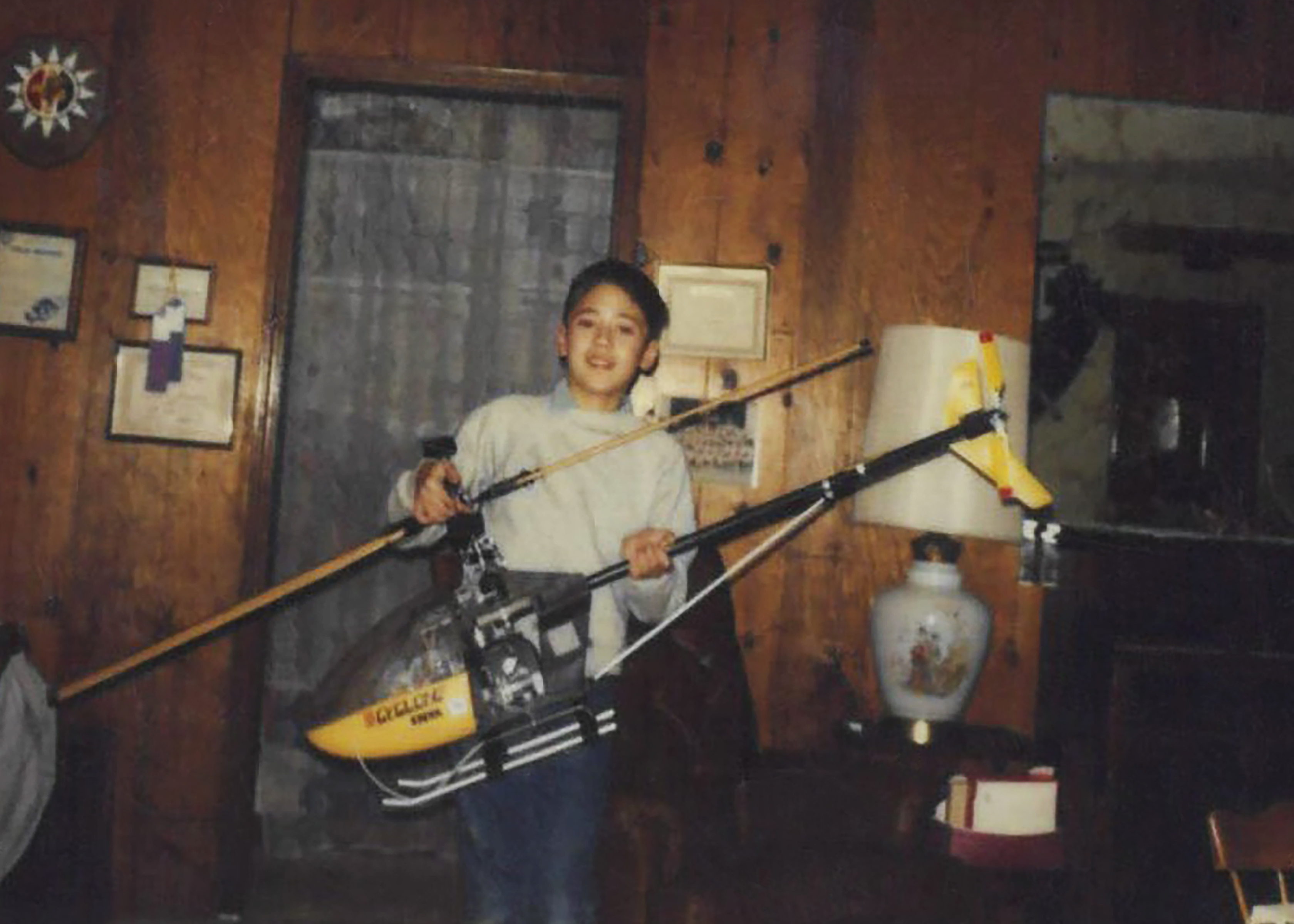
Derek Abramson, chief engineer at the Dale Reed Subscale Flight Research Laboratory at NASA’s Armstrong Flight Research Center in Edwards, California, is shown with his Kalt Cyclone radio-controlled helicopter in the mid-1980s. Abramson loved flying this aircraft as a child, and he has been an aviation enthusiast for as long as he can remember.
Derek Abramson
Abramson’s expertise, built through service in the U.S. Navy and the aerospace industry, centers on technical oversight, management, and system design. Hall is known for creative approaches to problem solving and uses practical methods to address technical challenges and maintain flight safety. Link specializes in designing and fabricating research vehicles and draws on extensive hands-on experience to understand what works, and what does not, in flight.
On weekends, the team often tinkers in their garages or hangars building radio-control aircraft, researching hobby trends, or exploring new technologies. You might see them flying their creations at hobby events or attending trade shows. Their passion for flight brought Abramson, Hall, and Link together years before they one-by-one joined NASA more than a decade ago, though each discovered that spark in a different way.
Early influences
Abramson’s interest began as a child with rubber-band powered stick and tissue aircraft and radio-controlled models. His early aviation pursuits led to his first solo flight while in high school and a pilot’s license. In the Navy, he worked on multiple aircraft, including EA-6B and the F-18, as an avionics technician. As an engineer, he supported the B-1 and CV-22 Osprey aircraft flight tests. As an intern at NASA Armstrong, he used his operational and engineering experience on remotely piloted and autonomous aircraft.
Hall’s interest grew after seeing historic aircraft including the Mach 3 SR-71 fly over his elementary school playground and watching Space Shuttle Challenger land from above his dad’s shoulders. He has built and flown model and remotely piloted aircraft for as long as he can remember. His reputation flying radio-controlled hobby aircraft at fly-ins and trade events led to an offer to fly subscale aircraft at NASA.
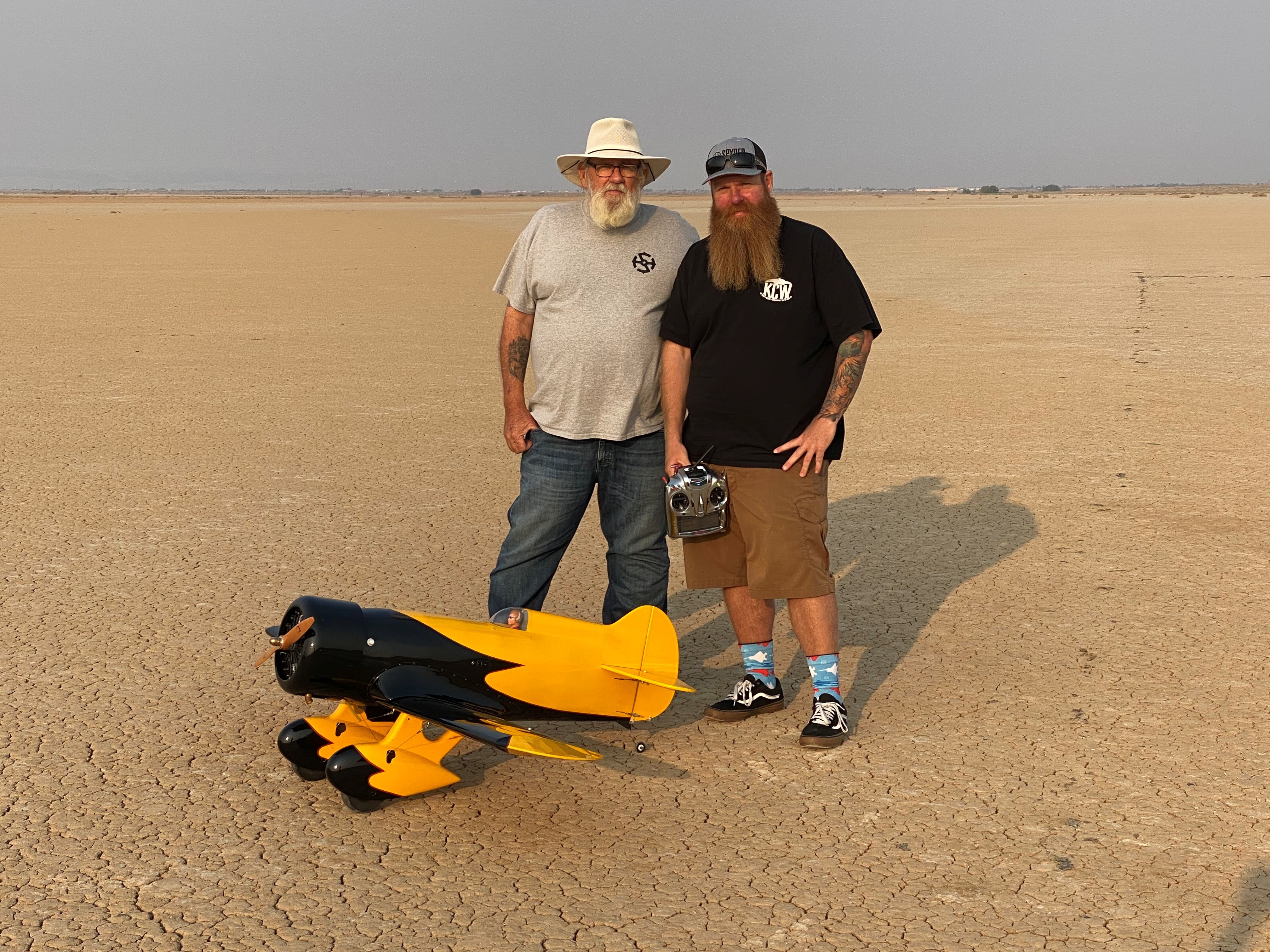
Justin Hall, chief pilot at the Dale Reed Subscale Flight Research Laboratory at NASA’s Armstrong Flight Research Center in Edwards, California, stands in front of a radio-controlled aircraft with his dad, David Hall, in August 2020. David Hall built the Gee Bee aircraft years earlier but was unable to fly it due to his health. He asked his son to fly the aircraft so he could see it in the air, which Justin did the day of this photo. Shortly afterward, David Hall passed away.
Justin Hall
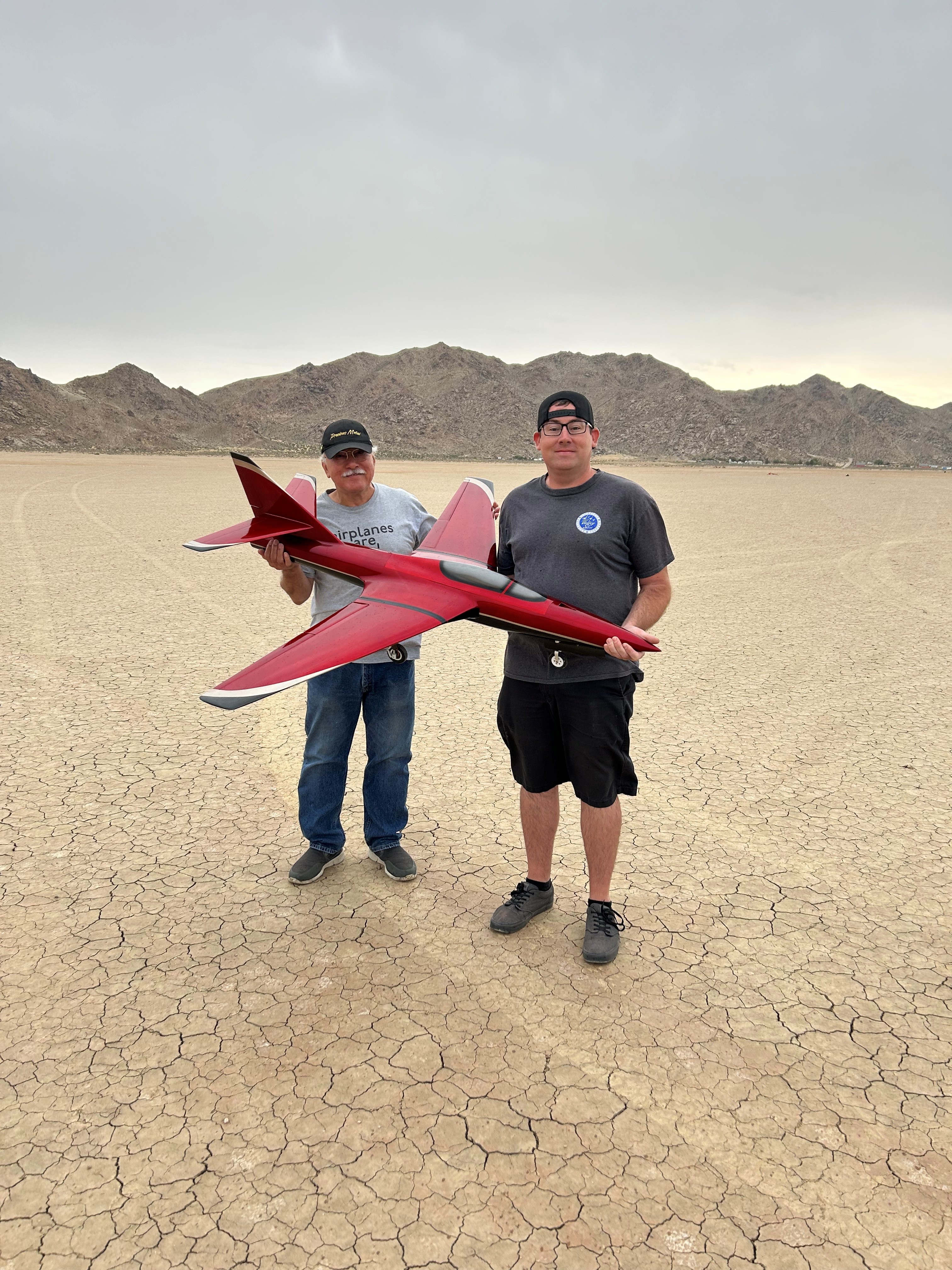
Justin link, drone pilot at the Dale Reed Subscale Flight Research Laboratory at NASA’s Armstrong Flight Research Center in Edwards, California, and his dad, Don Link, hold a Firebird radio-controlled aircraft on the day of its first flight in September 2023. It was a project they worked on together. Don Link reduced the dimensions of the original larger-scale model aircraft and drew the plans, while Justin Link manufactured composite molds and built the aircraft from scratch.
Justin Link
Link was five years old when he built balsa-wood aircraft with his dad and flew them in a field near their home. As he grew older, his hobby expanded to include radio-controlled cars, boats, helicopters, and aircraft. Aviation runs deep in Link’s family. His great grandfather served in the U.S. Army Air Corps, his grandfathers served in the U.S. Air Force, and his dad was an Air Force avionics technician. Link raced sailplanes, competed with scaled warbird aircraft, and was encouraged by family and friends to pursue an aviation profession. He has worked with large drones for more than 11 years, focusing on research and development, composite materials, and specialized fabrication methods.
Together, the team applies its experience and knowledge in rapid design, fabrication, integration and flight testing to bring new ideas to flight. Their work continues to support NASA’s missions across aeronautics, science, and exploration.
Preparations for Next Moonwalk Simulations Underway (and Underwater)
Derek Abramson, Dale Reed Subscale Flight Research Laboratory chief engineer, left, communicates with the Edwards Air Force Base air traffic control tower for approval to fly the Alta-X drone near NASA’s Armstrong Flight Research Center in Edwards, California, on Thursday, Aug. 27, 2026. Justin Link, small uncrewed aircraft pilot, second from left, and laboratory chief pilot Justin Hall await flight clearance. Researchers at NASA’s Johnson Space Center in Houston developed the advanced guidance and navigation system known as the Safe and Precise Landing – Integrated Capabilities Evolution (SPLICE) experiment, which is installed on the Alta-X. SPLICE will help spacecraft land precisely and detect and avoid potential hazards, which is critical for NASA missions to the Moon and to Mars.
NASA/Ryan Kline
Long before they helped shape NASA’s future aerospace breakthroughs, Derek Abramson, Justin Hall, and Justin Link were in their garages and homes building radio‑controlled aircraft, testing new ideas, and flying their creations at hobby events. That early passion now fuels the work of NASA’s Dale Reed Subscale Flight Research Laboratory at the agency’s Armstrong Flight Research Center in Edwards, California.
At NASA Armstrong’s subscale flight lab, the team turns that lifelong enthusiasm into mission-focused innovation. The laboratory supports research that ranges from advanced navigation systems for future landings on the Moon and Mars to emerging aeronautics concepts that need quick, low-cost evaluation. NASA’s small, remotely piloted and autonomous aircraft allow engineers to explore ideas that could be difficult, risky or expensive to test at full scale.
Skilled team
Abramson, Hall, and Link play key roles in that work. Abramson serves as the laboratory’s chief engineer. Hall is the chief pilot. Link is a drone pilot. Together, they integrate emerging aerospace technologies with the lab’s subscale aircraft fleet and, when needed, design and build aircraft or flight experiments to evaluate new concepts.
Derek Abramson, chief engineer at the Dale Reed Subscale Flight Research Laboratory at NASA’s Armstrong Flight Research Center in Edwards, California, is shown with his Kalt Cyclone radio-controlled helicopter in the mid-1980s. Abramson loved flying this aircraft as a child, and he has been an aviation enthusiast for as long as he can remember.
Derek Abramson
Abramson’s expertise, built through service in the U.S. Navy and the aerospace industry, centers on technical oversight, management, and system design. Hall is known for creative approaches to problem solving and uses practical methods to address technical challenges and maintain flight safety. Link specializes in designing and fabricating research vehicles and draws on extensive hands-on experience to understand what works, and what does not, in flight.
On weekends, the team often tinkers in their garages or hangars building radio-control aircraft, researching hobby trends, or exploring new technologies. You might see them flying their creations at hobby events or attending trade shows. Their passion for flight brought Abramson, Hall, and Link together years before they one-by-one joined NASA more than a decade ago, though each discovered that spark in a different way.
Early influences
Abramson’s interest began as a child with rubber-band powered stick and tissue aircraft and radio-controlled models. His early aviation pursuits led to his first solo flight while in high school and a pilot’s license. In the Navy, he worked on multiple aircraft, including EA-6B and the F-18, as an avionics technician. As an engineer, he supported the B-1 and CV-22 Osprey aircraft flight tests. As an intern at NASA Armstrong, he used his operational and engineering experience on remotely piloted and autonomous aircraft.
Hall’s interest grew after seeing historic aircraft including the Mach 3 SR-71 fly over his elementary school playground and watching Space Shuttle Challenger land from above his dad’s shoulders. He has built and flown model and remotely piloted aircraft for as long as he can remember. His reputation flying radio-controlled hobby aircraft at fly-ins and trade events led to an offer to fly subscale aircraft at NASA.
Justin Hall, chief pilot at the Dale Reed Subscale Flight Research Laboratory at NASA’s Armstrong Flight Research Center in Edwards, California, stands in front of a radio-controlled aircraft with his dad, David Hall, in August 2020. David Hall built the Gee Bee aircraft years earlier but was unable to fly it due to his health. He asked his son to fly the aircraft so he could see it in the air, which Justin did the day of this photo. Shortly afterward, David Hall passed away.
Justin Hall
Justin link, drone pilot at the Dale Reed Subscale Flight Research Laboratory at NASA’s Armstrong Flight Research Center in Edwards, California, and his dad, Don Link, hold a Firebird radio-controlled aircraft on the day of its first flight in September 2023. It was a project they worked on together. Don Link reduced the dimensions of the original larger-scale model aircraft and drew the plans, while Justin Link manufactured composite molds and built the aircraft from scratch.
Justin Link
Link was five years old when he built balsa-wood aircraft with his dad and flew them in a field near their home. As he grew older, his hobby expanded to include radio-controlled cars, boats, helicopters, and aircraft. Aviation runs deep in Link’s family. His great grandfather served in the U.S. Army Air Corps, his grandfathers served in the U.S. Air Force, and his dad was an Air Force avionics technician. Link raced sailplanes, competed with scaled warbird aircraft, and was encouraged by family and friends to pursue an aviation profession. He has worked with large drones for more than 11 years, focusing on research and development, composite materials, and specialized fabrication methods.
Together, the team applies its experience and knowledge in rapid design, fabrication, integration and flight testing to bring new ideas to flight. Their work continues to support NASA’s missions across aeronautics, science, and exploration.
iPhone 18 Pro is at the center of What Holds Us, a new photography exhibition built around three very different approaches to image-making. Alex Prager, Jack Davison, and Jimmy Chin shot the entire project on Apple’s latest Pro iPhone, using the device in environments ranging from a Los Angeles soundstage to a London warehouse and the high-altitude terrain of British Columbia.
Curated by Kathy Ryan, the former longtime director of photography for The New York Times Magazine, the exhibition examines connection through touch, shared experience, physical environments, and human relationships.
It also gives Apple a more ambitious showcase for the iPhone 18 Pro camera than a conventional product demonstration. Rather than presenting standardized comparisons or individual sample images. What Holds Us asks three established photographers to work within their own visual languages while using the phone as their sole camera.
The exhibition opens in New York City on September 18 and runs through September 20 before traveling to London and Shanghai in the coming months.
Image Credit: Apple Inc.
iPhone 18 Pro takes three very different photographic approaches
The project works partly because the three photographers have little stylistically in common.
Jimmy Chin took iPhone 18 Pro into the Bugaboo Mountains of southeastern British Columbia, working around snow, ice, steep climbing terrain, and winds reaching as high as 70 miles per hour.
His series focuses on trust and connection within climbing, with veteran mountaineer Conrad Anker appearing throughout the photographs. Some images place Anker as a small figure against vast mountain landscapes, while others move much closer to rock, snow, and glacial textures.
Chin used both the 48MP Fusion Ultra Wide and Telephoto cameras to shift between those extremes. The practical appeal was also straightforward: carrying a phone instead of a full conventional camera setup reduced the equipment required in an environment where weight and mobility affect every decision.
Jack Davison took almost the opposite approach. Shooting inside a former sugar warehouse in London, he created intimate portraits built around people interacting with clay and chalk.
Davison is known for high-contrast black-and-white imagery, and his contribution emphasizes texture, shadows, highlights, skin, and physical contact with the material. Some subjects appear partly covered in clay, while others manipulate it directly, leaving fingerprints and marks across the compositions.
For Davison, the smaller camera changed the relationship between photographer and subject. Without a large camera constantly positioned in front of his face, he could maintain more eye contact and work at closer range.
His use of slower shutter speeds, RAW capture, and multiple lenses also illustrates how Apple increasingly wants the Pro iPhone camera to function as a configurable photographic tool rather than simply a computational point-and-shoot system.
Alex Prager pushes the phone into large-scale production
Alex Prager’s section places iPhone 18 Pro inside a much more elaborate production environment.
Working on a Los Angeles soundstage, Prager created color-heavy scenes filled with crowds, confetti, staged city elements, costumes, and loosely choreographed movement. Some images use high viewpoints to turn groups of people into a continuous visual pattern, while tighter photographs isolate individual figures within the same constructed world.
The visual approach resembles film production more than spontaneous mobile photography, which gives the project another test for the phone. The camera has to preserve detail across numerous faces, costumes, props, highlights, and areas of movement while operating within scenes deliberately designed for large-format presentation.
Prager also treated the camera’s immediacy as part of the creative process rather than simply a convenience. The ease of moving between perspectives and capturing repeated moments allowed the scenes to evolve through improvisation instead of being locked into a single carefully prepared frame.
That approach aligns with a recurring theme across the exhibition: the phone becomes less intrusive without requiring the photographers to abandon their existing visual standards.
For Apple, it is a useful distinction. Professional photography campaigns built around smartphones can easily become exercises in technical proof, where the central question is whether a phone can imitate equipment already available to photographers. What Holds Us is more interested in how a smaller camera changes the way an artist works.
Image Credit: Apple Inc.
Variable aperture gives the project a new technical foundation
The exhibition arrives alongside one of Apple’s most significant physical camera changes in years.
iPhone 18 Pro introduces variable aperture on its 48MP Fusion Main camera. The lens can operate at ƒ/1.48, ƒ/1.8, ƒ/2.8, or ƒ/4.0, changing both light intake and depth of field.
A wider ƒ/1.48 aperture is designed for stronger low-light performance, while narrower settings can retain more detail across different planes of an image. Apple also lets photographers select aperture settings manually through new Pro controls in the Camera app.
Those controls extend to shutter speed and white balance, with a histogram available for monitoring exposure. ProRAW remains available for photographers who want greater flexibility during post-production.
The rear camera system also includes 48MP Fusion Ultra Wide and 48MP Fusion Telephoto cameras, providing focal lengths from 13mm at the wide end through an optical-quality 8x option.
What Holds Us does not reduce the exhibition to those specifications, but the technical changes help explain why Apple chose photography, rather than video, for this particular campaign. Variable aperture affects choices that photographers traditionally make during capture, especially around available light and how much of a scene remains in focus.
What Holds Us extends the Shot on iPhone idea
Apple has spent years using Shot on iPhone campaigns to demonstrate camera quality through finished work rather than charts and controlled tests. What Holds Us pushes that format closer to a conventional curated exhibition.
Ryan connects the three bodies of work through the idea of human presence, but each artist interprets it differently. Chin finds it through dependence between climbers in hostile landscapes. Davison uses physical contact between people and clay. Prager builds populated fictional environments in which individual expressions emerge from larger crowds.
The images therefore function as an exhibition first and a hardware showcase second, even though the production is closely tied to the launch of iPhone 18 Pro.
That balance may be the most effective part of the campaign. Apple does not need to demonstrate that a modern iPhone can produce a technically competent photograph. The more interesting challenge is showing where its smaller size, computational processing, lens flexibility, RAW workflow, and new manual controls can alter the photographer’s decisions.
New York visitors will get the first opportunity to see how those images hold up away from a phone or computer display when What Holds Us opens September 18. After its three-day New York run, Apple says the exhibition will continue to London and Shanghai, giving the iPhone 18 Pro photography project a physical life beyond the launch campaign.
The animals may help reveal the causes of brain disease in people and point the way to treatments. But researchers already are calling for new ethical guidelines.
Widow’s Bay has turned its first season into one of the most decorated comedy debuts in Emmy history, collecting 14 awards at the 78th Primetime Emmy Awards and giving Apple TV its biggest awards performance for a single series this year.
The comedy-horror series won Outstanding Comedy Series alongside major acting, writing, directing, casting, cinematography, music, production design, and sound honors. Its 14 victories also set a record for the most Emmy wins by a comedy series in a single season, surpassing the benchmark established by The Studio a year earlier.
The sweep came after Widow’s Bay entered the awards cycle with 19 nominations. Apple finished the 2026 Emmys with 29 awards overall, with Widow’s Bay accounting for nearly half of the total.
Image Credit: Apple Inc.
Widow’s Bay dominates the major Emmy categories
Matthew Rhys won Outstanding Lead Actor in a Comedy Series for his performance as Mayor Tom Loftis, the well-intentioned but frequently overwhelmed leader of a remote New England island community.
Kate O’Flynn won Outstanding Supporting Actress in a Comedy Series, while Stephen Root took Outstanding Supporting Actor. Betty Gilpin had already secured Outstanding Guest Actress during the Creative Arts Emmys.
Creator Katie Dippold won Outstanding Writing for a Comedy Series for the premiere episode, while Hiro Murai received Outstanding Directing for a Comedy Series. The Television Academy also recognized Murai as the first Asian director to win the comedy directing category.
Those awards gave the show victories across nearly every major creative discipline involved in building the series. Widow’s Bay also received Emmys for production design, casting, cinematography, original dramatic score, music supervision, sound editing, and sound mixing.
The breadth of the wins is notable because the show was not carried solely by one high-profile performance or writing prize. Acting, directing, writing, visual design, music, and technical execution all received separate recognition.
Apple says Widow’s Bay also earned more performance awards than any other series at the 2026 Emmys.
Widow’s Bay found a distinctive balance between horror and comedy
Created by Dippold, Widow’s Bay follows Tom Loftis as he tries to transform an isolated island town into a viable tourist destination despite warnings from residents that the community is cursed.
The premise initially plays on civic frustration and small-town politics. The island has unreliable connectivity, a skeptical population, and a mayor determined to prove that local superstition is holding economic development back. As visitors begin to arrive, the supernatural stories that Loftis has dismissed start becoming harder to explain away.
That structure allows the series to operate as both a character comedy and a genuine horror story rather than treating supernatural events simply as setups for jokes.
Dippold, whose earlier work includes The Heat and Ghostbusters, serves as creator, showrunner, writer, and executive producer. Murai, known for visually distinctive television work including Atlanta, directs and executive produces.
The executive-producing team also includes Carver Karaszewski, Claudia Shin, and Rhys.
Apple and Television Academy records list Apple Studios and Chum Films among the production companies behind the series. The directing roster extends beyond Murai to Ti West, Sam Donovan, and Andrew DeYoung.
The main cast includes Rhys, O’Flynn, Root, Kingston Rumi Southwick, Kevin Carroll, and Dale Dickey.
Image Credit: Apple Inc.
A debut season becomes an awards benchmark
Widow’s Bay premiered globally on Apple TV on April 29, 2026. The first two episodes were released together before the remaining episodes arrived weekly.
Its Emmy performance places the series alongside a growing run of Apple comedies that have performed strongly with Television Academy voters.
Ted Lasso previously won Outstanding Comedy Series, followed by The Studio in 2025. Widow’s Bay gives Apple consecutive wins in the category and its fourth Outstanding Comedy Series victory across the past six Emmy ceremonies.
Apple also became the most awarded network at the 2026 Emmys with 29 wins. Pluribus contributed six, including awards for Rhea Seehorn and creator Vince Gilligan, while Margo’s Got Money Troubles and Palm Royale each received three.
Slow Horses won for directing, and Mr. Scorsese received Outstanding Documentary or Nonfiction Series.
For Widow’s Bay itself, the 14-win total is especially significant because this is the show’s freshman season. The Television Academy confirmed six of those awards during the main September 14 telecast, while eight had already been announced during the Creative Arts ceremonies.
The combination took Widow’s Bay beyond The Studio’s previous record for a debut comedy and established a new single-season high for the category.
Matthew Rhys adds another unusual Emmy milestone
Rhys had an especially unusual night beyond his Widow’s Bay victory.
In addition to winning Lead Actor in a Comedy Series, he received another lead-actor Emmy for Netflix’s The Beast in Me in the limited or anthology series or movie category, making him the first performer to win two lead acting awards in different categories during the same Emmy year.
His Widow’s Bay performance is deliberately restrained compared with the increasingly strange circumstances surrounding Loftis. Rather than treating the island’s supernatural events as an invitation to broaden the comedy, Rhys largely plays the mayor as someone trying to maintain a rational civic response while the situation deteriorates.
That tonal approach runs through the rest of the production. Root and O’Flynn’s supporting performances received individual recognition, while Murai’s directing and Dippold’s writing awards reinforced how closely the series depends on maintaining tension without losing its comic rhythm.
All 10 episodes of the first season are currently available to stream on Apple TV. With the Emmy campaign complete, the show now carries a benchmark that future comedy debuts will be measured against: 14 awards from 19 nominations, capped by Outstanding Comedy Series and wins across nearly every part of the production.
Since 1665, scholarly journals have served as written records of scientific advancement—static words on a page, references written by people for other people to read. That's about to change.
Xanadu and AMD launched Backline, an open platform they say lets standard AMD CPUs handle quantum-classical control work once thought to need custom chips.
A newly developed CT scanner small enough to hold in one hand can now produce detailed 3D images of tiny fossils and archaeological relics. Researchers built the Xtomo-Cube, a device roughly the size of a desktop speaker. It weighs just 6 kilograms (13.2 pounds), earning it a nickname that undersells just how compact it really is.
Liu Baodong, a senior engineer at the Chinese Academy of Sciences and general manager of the company behind the device, described the machine’s standing plainly. It holds the title of world’s smallest and lightest CT system, earning it the nickname “palm-sized CT scanner.”
The device carries a spatial resolution of 80 micrometers, roughly the width of a human hair. That precision lets it analyze objects ranging from snail shells to medicine capsules.
Squeezed into four liters
The machine draws only about 200 watts of power, low enough to run off an ordinary portable power bank during fieldwork. Liu said every key component, including the X-ray source, rotating platform, and detector, was developed and manufactured domestically.
The previous record holder for smallest CT machine was a German-developed device weighing 19 kilograms, more than three times the new scanner’s weight. Liu described the central engineering challenge as squeezing an X-ray source, detector, and rotating platform into a four-liter package while still maintaining fine imaging detail.
From 3 meters to handheld
CT scanning uses X-rays captured from multiple angles to build a detailed 3D model of an object’s internal structure. The first clinical CT scanner appeared in London in 1971, built by British engineer Godfrey Hounsfield. That original machine measured 3 meters (9.8 feet) long, could only scan a patient’s head, and took roughly five minutes to generate just two 2D images.
Hospitals today rely on CT scanners routinely to spot tumors, internal bleeding, and other injuries. Researchers also use similar machines to examine fossils, archaeological finds, and industrial components without causing damage. Despite those expanding applications, CT scanners have remained large and heavy. A typical hospital scanner stands roughly 2 meters tall and wide and weighs around 2 metric tons, while some industrial systems grow even larger.
Liu compared the range of CT scanners to vehicles, from sports cars to trucks, describing the new device as the compact car of the category. He said the goal was never to scan everything, but specifically to look inside small objects that existing large machines handle poorly.
The scanner’s compact size and relatively low-energy X-rays could also suit university classrooms and research labs. Unlike many commercial CT systems, its settings and raw imaging data remain open to users. That openness lets students and researchers experiment directly with how CT images are collected, reconstructed, and improved.
Aerial mapping crews have long faced an awkward tradeoff: fly low enough to resolve a power line, and a single mission barely covers a fraction of the corridor. Fly high enough to cover ground efficiently, and thin objects that matter most start disappearing into the noise. Ouster says its Rev8 OS1 Max native color lidar sensor eliminates that compromise, delivering twice the precision and accuracy of its previous generation for drone-based mapping.
The company announced surging customer momentum for the sensor. Payload integrators and drone manufacturers across the aerial mapping market are selecting it for utility corridor inspection, infrastructure management, and defense applications. Powered by Ouster’s L4 Max chip, the sensor pairs 256 channels of survey-grade 3D range data with native 48-bit color. That combination lets operators maintain fine detail even at high survey altitudes.
Twice the prior precision
The Rev8 OS1 Max produces low-noise point clouds with thin surface walls. It reaches plus-or-minus 0.25 centimeters of precision and plus-or-minus 1.25 centimeters of accuracy, twice the precision and accuracy of the previous Rev7 generation. Every sensor undergoes calibration across range, reflectivity, temperature, and beam angle before shipping, keeping results consistent from one unit to the next.
Tighter beam collimation gives the sensor a spot size up to 50 percent smaller than Rev7. That keeps power lines, wires, branches, and canopy gaps cleanly resolved rather than blurring into surrounding surfaces. With 200 meters of range at 10 percent reflectivity, that detail holds at the altitudes mapping teams typically fly, roughly 80 to 120 meters above ground. That range lets operators fly wider swaths and cover corridors in fewer passes.
Color at the sensor
Unlike conventional systems that align a separate camera with lidar data afterward, the Rev8 OS1 Max assigns RGB color values directly at the detector. Because color and geometry are captured by the same sensor at the silicon level, there’s no parallax between them and no separate calibration step. That design shortens the colorization work that normally sits between flight and finished deliverable.
Ouster’s Rev8 OS digital lidar sensors are designed and developed in the US. They comply with supply chain security standards under Section 164 of the FY2025 National Defense Authorization Act. The company also offers Build America, Buy America Act-certified sensors for government, utility, and enterprise operators with domestic sourcing requirements.
Built for harsh conditions
The sensor carries IP68 and IP69K ingress protection, 100 G shock resistance, and an operating range of minus 40 to plus 85 degrees Celsius. It’s built to handle extreme weather across multirotor and fixed-wing drone platforms. Stuart Landesberg, CEO of drone mapping company Seneca, said the durability rating has proven invaluable for fire agency partners operating in unforgiving heat and cold. It lets crews fly in conditions that would ground other platforms.
Frank Darmayan, CEO of GeoCue, said pairing the company’s TrueView payloads with the Rev8 OS1 Max lets it offer a compliant, high-performance option for customers monitoring critical infrastructure. Beyond aerial surveying, Flyability is evaluating Ouster’s Rev8 OS0 lidar for its collision-tolerant Elios 3 drone, aiming to bring native color 3D mapping into hazardous, GPS-denied industrial environments. Ouster is showcasing the Rev8 OS1 Max at INTERGEO in Munich this week, running September 15 through 17.
“Recursive self-improvement” is the idea that artificial intelligence could learn to build and train itself, creating exponential new progress — and risk.
Siri AI is beginning its public rollout as Apple transforms its familiar assistant into a substantially more conversational system built around personal context, onscreen awareness, web knowledge, and the ability to perform actions across apps.
The beta is available first in English on compatible devices running iOS 27, iPadOS 27, macOS 27, watchOS 27, and visionOS 27. French, Japanese, Korean, Portuguese, and Spanish support is scheduled for October. Availability remains more limited in some regions, with Siri AI initially unavailable on iPhone, iPad, and Apple Watch in the European Union and unavailable in China while Apple addresses regulatory requirements.
The release follows several years of gradual Apple Intelligence expansion, but Siri AI represents a more fundamental change. Instead of handling each request largely as an isolated command, the assistant can maintain conversations, find relevant personal information, understand what is displayed on a device, and combine those capabilities to complete multistep tasks.
Image Credit: Apple Inc.
Siri AI can connect personal context with app actions
The system can search across a user’s messages, email, photos, notes, and other information when responding to a request. Apple offers an example in which someone asks what a family member suggested doing during an upcoming visit. Siri can locate the relevant conversation, find a recipe previously sent by email, and then place the ingredients into a Reminders grocery list.
That combination of retrieval and action is central to the new design. Siri AI can draft an email, edit and share photos, create calendar events, manage reminders, control media, and perform other supported actions without requiring users to manually move information between applications.
Third-party apps can participate through Apple’s App Intents architecture. Existing integrations include tasks such as messaging through WhatsApp or playing an audiobook in Audible, with Apple also previewing deeper capabilities in applications including Microsoft Outlook, Notability, and Tripsy.
Onscreen awareness adds another layer. Siri can identify information currently visible on a device and act on it. Someone viewing a sports website, for example, can ask Siri to identify upcoming home games and add them to Calendar without manually copying dates.
Apple has also expanded Siri beyond voice. On iPhone, users can invoke the assistant with the side button, voice command, or by swiping down from Dynamic Island. On iPad and Mac, Siri AI is integrated into Spotlight, while systemwide context menus can send selected files, images, or text directly to the assistant.
Image Credit: Apple Inc.
Siri AI gets its own app and conversation history
Siri AI is no longer confined to a temporary interface that disappears once a request is complete.
Apple has introduced a dedicated Siri app where users can begin new conversations or revisit previous ones. Conversation history can sync privately through iCloud across iPhone, iPad, Mac, Apple Watch, and Apple Vision Pro, allowing a discussion started on one device to continue on another.
Follow-up questions can retain the context of an earlier answer, giving Siri a more conventional conversational interface for longer exchanges.
The assistant also has access to broad web knowledge for questions that cannot be answered through personal information or local device data. Apple says Siri can retrieve current information for topics ranging from sports results to travel planning and nearby businesses.
Visual Intelligence expands alongside the assistant. On iPhone, a dedicated Siri mode inside Camera can identify and respond to objects or information in front of the user. A concert poster, for example, can become the starting point for questions about performance times followed by the creation of Calendar events.
On iPad, Visual Intelligence is integrated with screenshots. Mac users can select content on their displays through a keyboard shortcut, while Vision Pro users can ask Siri about app windows or physical objects simply by looking at them.
Writing Tools are similarly integrated across the system. Siri can generate drafts, revise existing text from natural-language instructions, and provide writing suggestions. In Mail and Messages, Apple says it can take a user’s typical communication style with a particular recipient into account, including tone and punctuation patterns.
Image Credit: Apple Inc.
Siri AI runs across on-device and private cloud models
Siri AI is powered by a new generation of Apple Foundation Models developed in collaboration with Google using Gemini technology, marking a notable shift in Apple’s AI infrastructure.
The architecture divides processing between models running directly on the device and larger models operating through Private Cloud Compute. Apple says requests sent to Private Cloud Compute are processed without personal data being stored or made accessible to the company.
Core resources such as the Spotlight index and Apple’s App Toolbox can remain on-device, allowing Siri to retrieve local information and perform supported actions without sending every request to a remote server.
More capable devices can also use AFM Core Advanced, Apple’s highest-performance on-device model. It powers improvements including more expressive Siri voices and advanced systemwide dictation that automatically handles capitalization, punctuation, and formatting.
Compatibility varies by feature. Apple Intelligence supports iPhone 16 models and later, iPhone 15 Pro and Pro Max, M1 or later iPads and Macs, iPad mini with A17 Pro, Apple Vision Pro, and supported Apple Watch models when paired with a nearby Apple Intelligence-enabled iPhone.
AFM Core Advanced requires newer hardware, including iPhone Duo, the iPhone 18 Pro line, iPhone Air, iPhone 17 Pro models, qualifying M4 or later iPads with at least 12GB of unified memory, M3 or later Macs with at least 12GB, and Apple Vision Pro with M5.
Image Credit: Apple Inc.
Siri AI arrives with limits as Apple expands access
The initial Siri AI release remains explicitly labeled beta, and some of the surrounding Apple Intelligence features are scheduled for later updates.
Apple also confirms that features relying on server-side models can be subject to daily usage limits. That includes Siri AI, cloud-based photo editing, Image Playground, and AFM 3 Cloud models used through Shortcuts. Limits can vary depending on the feature, request complexity, system demand, and other factors.
Apple says expanded access to server-dependent features will eventually be available for a fee, introducing a future paid layer to parts of Apple Intelligence even as the core system remains integrated into supported devices.
Apple will also expand its intelligence capabilities on Apple Watch later in 2026. Planned Audio Intelligence features on Apple Watch Series 12 and Ultra 4 include Live Rewind, which can display text representing the previous 15 seconds of a conversation, and Siri Recap, which generates high-level summaries that can be reviewed later in the Siri app.
Those functions are designed around a hardware-isolated Secure Exclave on the S11 chip, with Apple saying raw audio is processed in isolation and immediately deleted rather than stored as recordings. Live Rewind and Siri Recap are scheduled to enter beta later in 2026, making the current Siri AI launch the beginning of a staged expansion rather than the final form of Apple’s new assistant.
Apple software updates for 2026 are now reaching supported devices, bringing iOS 27, iPadOS 27, macOS 27, watchOS 27, visionOS 27, and tvOS 27 out of preview and into everyday use. The releases place Siri AI and the next generation of Apple Intelligence at the center, but many of the changes extend well beyond generative AI.
The updates began rolling out September 14. Alongside new intelligence features, Apple has made measurable performance changes to iPhone and iPad, overhauled several parental controls, refined the Liquid Glass interface introduced across its platforms, improved search, and added smaller changes to services including iCloud Shared Albums, Maps, AirPods, and Health.
Siri AI is initially rolling out as a beta in English. Apple says French, Japanese, Korean, Portuguese, and Spanish support is scheduled for October, making some of the headline functionality a staggered release rather than something every user receives immediately after installing the new operating systems.
Apple software updates make Siri AI a cross-device feature
Siri AI is built around personal context, onscreen awareness, expanded app actions, and access to current information from the web. The assistant can draw on material stored in areas such as Messages, Mail, and Photos when responding to requests, while Visual Intelligence allows users to ask about content currently displayed on their screen.
On iPhone, Siri mode is integrated directly into the Camera app. A user can point the camera at something and ask questions or perform supported actions based on what appears in front of them.
The assistant also gains a dedicated Siri app that synchronizes conversation history privately through iCloud. A conversation started on an iPhone can therefore be continued on an iPad, Mac, Apple Watch, or Apple Vision Pro.
Write with Siri expands the assistant into text creation and editing. Users can describe the material they need drafted or ask Siri to refine existing writing without moving to a separate application.
Apple Intelligence is also adding more specialized features outside Siri. Photos receives Spatial Reframing, Extend, and an updated Clean Up tool. Image Playground can generate images in a wider selection of styles, including photorealistic output, with metadata designed to identify AI-created material and planned support for the SynthID standard.
Safari can automatically organize tabs by topic and monitor webpages for changes, such as a product returning to stock or a price dropping. Apple is also introducing tools that can create custom extensions from a description.
Image Credit: Apple Inc.
iOS 27 and iPadOS 27 put more emphasis on speed
Some of the less visible changes could be among the most frequently experienced.
Apple says apps can launch up to 30% faster on iPhone and iPad after installing the new software. Photos can load an image up to 70% faster immediately after it is taken, while AirDrop transfers can be up to 80% faster.
iPadOS 27 receives additional work around file handling and multitasking. Apple says browsing files and transferring them to an external USB drive can be as much as five times faster, accompanied by smoother window closing, switching, and dragging.
Connectivity behavior has also been adjusted. Transitions between cellular connections and Wi-Fi are designed to happen more seamlessly, while Messages no longer needs to hold subsequent texts behind a large photo or video being uploaded over a slow connection.
Search across Spotlight, Photos, and Mail has been revised on iPhone, iPad, and Mac. Mail gains a new ranking system for Top Hits, while Apple describes search across the three platforms as more stable and comprehensive.
Liquid Glass has received another round of refinements after becoming the common visual language across Apple’s software. A new Settings slider allows users to adjust the interface from an ultraclear appearance toward a more heavily tinted version, and app icons have been sharpened.
Screen Time and child safety controls get a substantial redesign
Apple has also expanded the controls available to families rather than limiting this software cycle to interface and AI work.
The setup process for child accounts now allows parents to specify which apps a child can access from the beginning, with additional apps added later if appropriate. Ask to Browse extends approval controls to Safari, letting parents require permission before a child opens a new website.
Communication Safety has been expanded beyond sexually explicit material to detect and intervene when gore or violent content appears in shared images and videos.
Screen Time presents average device usage and frequently used apps more prominently. Parents can establish daily time allowances across categories such as Entertainment, Games, and Social Media, while Schedules can change which apps remain available at different points during a weekday or weekend.
These changes are particularly notable because they work at the account and platform level rather than requiring parents to configure separate controls inside every individual app.
Image Credit: Apple Inc.
watchOS 27, visionOS 27, and tvOS 27 add targeted upgrades
The smaller platforms receive their own additions rather than simply inheriting features from iPhone and Mac.
watchOS 27 introduces a dedicated Siri app, a dynamic app grid, expanded Smart Stack suggestions, and a new single-handed tap gesture for opening widgets. Workout Buddy can now operate without the paired iPhone nearby, while Cycle Tracking in Health adds support related to perimenopause and menopause.
visionOS 27 brings Siri AI and Visual Intelligence into Apple Vision Pro, where the assistant can respond to objects a user is physically looking at. Panoramas can be converted into spatial scenes and used as personal Environments, while Mac users can bring compatible 3D models into their physical space to preview and edit them.
Apple says Vision Pro can now start up and connect to Wi-Fi up to three times faster. New curved windows, Control Center changes, eye-controlled notification expansion, and improvements to Dwell Control further adjust the spatial interface.
tvOS 27 takes a narrower approach. Apple Music gains high-resolution lossless audio support, Apple Podcasts has been redesigned, and additional text-size accessibility options have been introduced. Apple TV 4K owners can install the release on supported second- and third-generation models.
Other changes stretch across device categories. iCloud Shared Albums can now retain full-resolution photos and videos while making participation easier from Android and Windows devices. AirPods gain custom EQ settings, Maps expands Flyover with AI-assisted aerial detail, and Missed-message notifications and unread counts now synchronize more quickly and reliably across Apple devices.
With the September 14 releases now public, the software cycle shifts from preview demonstrations to staggered feature delivery. Siri AI language expansion begins in October, while some Apple Intelligence capabilities and individual app features will continue arriving through later updates rather than being tied exclusively to the initial 27.0 releases.
iPhone 18 Pro arrives with Apple concentrating its biggest changes in three areas: camera control, sustained performance, and battery life. The new Pro models retain familiar 6.3-inch and 6.9-inch display sizes, but introduce a variable-aperture main camera, the 2-nanometer A20 Pro chip, redesigned thermal hardware, and a smaller Dynamic Island.
The lineup consists of iPhone 18 Pro and iPhone 18 Pro Max, starting at $1,199 and $1,299 in the U.S., respectively. Both begin with 256GB of storage and are available in black, silver, glacier, and a new burgundy finish. Preorders opened September 12, with retail availability beginning September 18 in more than 65 countries and regions.
Rather than treating the Pro models as a cosmetic update, Apple has focused on changes that become more noticeable during demanding use, particularly photography, video work, gaming, AI processing, and long sessions away from a charger.
iPhone 18 Pro brings variable aperture to the main camera
The centerpiece is a new 48MP Fusion Main camera with a physical variable aperture, a first for the iPhone.
Six laser-cut aperture blades can adjust the amount of light reaching the sensor while also changing depth of field. The camera supports four aperture settings: ƒ/1.48, ƒ/1.8, ƒ/2.8, and ƒ/4.0.
At the wider end, the camera can gather more light in darker scenes. A narrower aperture can keep more people or background detail in focus, giving photographers another tool beyond computational depth effects and Portrait mode.
Apple also gives users direct access to those settings through new Pro controls in the Camera app. Aperture, shutter speed, and white balance can be adjusted manually, while a histogram provides a more conventional way to monitor exposure.
The feature is paired with a new main-camera sensor and updated computational imaging pipeline. Apple says the combination improves low-light performance and detail, while Photographic Styles gain texture and grain controls for additional control over an image’s appearance.
Video receives several additions as well. Cinematic effects can now be applied after recording to footage captured at up to 60 frames per second, while Time-lapse can record in 4K with Dolby Vision HDR. Audio Mix has also been updated with improved voice processing and the ability to isolate music.
For photographers who want more evidence of how an image originated, Apple is introducing Apple Reference Image. In Reference mode, the main camera signs sensor data, which Private Cloud Compute uses to create an unalterable reference version that can be compared with an edited image in Photos. Apple is also preparing support for the SynthID standard as another way of identifying AI-generated or altered content.
Image Credit: Apple Inc.
iPhone 18 Pro uses A20 Pro and a redesigned vapor chamber
A20 Pro is built using a 2-nanometer manufacturing process and contains a six-core CPU, seven-core GPU, and dual 16-core Neural Engine.
Apple says memory bandwidth is 50% higher than on A19 Pro, while GPU performance can be up to 40% faster. The Neural Engine provides 32 cores in total, doubling the AI processing capability of the previous Pro chip.
The silicon change is closely tied to a redesigned cooling system. Apple has rearranged the chip package so that the silicon die sits beside the memory rather than beneath it in the thermal path, allowing A20 Pro to connect more directly to a next-generation vapor chamber.
That vapor chamber has three times the surface area of the previous generation and uses new materials to move heat away from the processor more effectively. Apple claims the design can deliver up to a 40% gain in sustained performance compared with iPhone 17 Pro.
That distinction is more relevant than peak benchmark numbers for workloads such as extended gaming sessions, video editing, computational photography, and local AI models, where heat can force a phone to reduce performance over time.
Connectivity has also moved further toward Apple-designed silicon. The N1 wireless chip supports Wi-Fi 7, Bluetooth 6, and Thread, while the new C2 modem succeeds C1X. Apple says C2 uses 15% less energy while offering faster uploads and adds mmWave support in the U.S.
Image Credit: Apple Inc.
iPhone 18 Pro Max reaches 45 hours of video playback
Battery improvements are another major part of the new hardware.
Apple rates eSIM-only versions of iPhone 18 Pro for up to 36 hours of video playback, while iPhone 18 Pro Max reaches as much as 45 hours. Apple says Pro Max receives the largest battery-life increase ever delivered in an iPhone.
Some of that gain comes from using the space previously occupied by a physical SIM tray. In markets receiving eSIM-only models, including the U.S., Canada, Japan, Mexico, Saudi Arabia, and the UAE, the larger internal battery provides an additional two hours of rated video playback.
Charging has accelerated as well. iPhone 18 Pro can reach 50% charge in approximately 15 minutes using a supported wired setup, while wireless charging reaches 50% in around 30 minutes. Apple says five minutes of wired charging on iPhone 18 Pro Max can provide roughly seven hours of video playback.
Both devices use aluminum unibody construction with Ceramic Shield 2 on the front and Ceramic Shield on the back. Storage options run from 256GB through 2TB.
The iPhone 18 Pro weighs 211 grams, while iPhone 18 Pro Max weighs 249 grams. Display sizes remain 6.3 inches and 6.9 inches, respectively.
Image Credit: Apple Inc.
iOS 27 brings Siri AI and new Apple Intelligence tools
The hardware launches alongside iOS 27, which places Apple Intelligence and the new Siri AI more prominently across the system.
Siri AI can use personal context from information stored across apps, respond to onscreen content, perform actions in supported apps, and handle more open-ended questions. A new Siri mode in Camera lets users ask questions and take action based on objects or information visible through the viewfinder.
Photo tools include Spatial Reframing, Extend, and an upgraded Clean Up feature, while Safari can monitor selected webpages for changes such as a product restock or price adjustment.
The Dynamic Island has also been physically reduced and redesigned. It can display up to three Live Activities simultaneously while continuing to support Face ID.
Apple released iOS 27 on September 14, while Siri AI is rolling out initially as a beta in English, with additional language support planned. iPhone 18 Pro and iPhone 18 Pro Max reach stores September 18, giving Apple a Pro lineup whose most substantial additions are less about a new exterior shape and more about physical camera control, heat management, and how long the hardware can sustain demanding workloads.

 Login
Login