❌

Normal view

Surface Laptop Ultra review: So close to the perfect MacBook Pro alternative

Microsoft is finally ready to take on the MacBook Pro with the new Surface Laptop Ultra. From pricing to specs and design, Surface Laptop Ultra was inspired by MacBook Pro, and that's not necessarily a bad thing.

Unlike most Surface PCs we see ship these days, the Surface Laptop Ultra is a lot of firsts for Microsoft. It's the first ultra-class Surface Laptop, designed from the ground up to compete squarely with high-end professional creator or developer mobile workstations.

It's also the first Surface to ship with a new silicon partner in the way of NVIDIA and the RTX Spark, which the entire ecosystem is rallying around to give Windows on Arm a shot in the arm. It's also Microsoft's first ever Mini LED screen, and the world's first laptop to ship with magnetic USB-C charging.

What I find fascinating about Surface Laptop Ultra however is that it exists because Microsoft's own developers and engineers wanted it. They built this laptop for themselves. It feels like the company got tired of looking over the fence at the MacBook Pro, and decided "why don't we just make our own version of that?"

It really is Microsoft's most powerful and most capable Surface PC ever, and a great stage for Windows. But that doesn't necessarily mean it's the best Surface PC for everyone. I've been testing the laptop over the last 8 days, and here are my thoughts on Microsoft's new flagship computer.

This review was made possible thanks to a review unit supplied by NVIDIA & Microsoft. Neither company had editorial input and did not see the contents of this review prior to publication.

Price & Availability

Microsoft - Surface Laptop Ultra - 15

Microsoft
Surface Laptop Ultra

Surface Laptop Ultra is Microsoft's flagship and most powerful Windows PC. It can be configured with up to 128GB RAM, and ships with NVIDIA's new RTX Spark SoC. It's great for creative workflows and software development, and those who want to run local AI and LLMs directly on their device.

Surface Laptop Ultra is Microsoft's most expensive Surface Laptop to date. It starts at an eyewatering $2,599 for the entry-level configuration with 24GB of RAM, 512GB SSD storage, and an 18-core RTX Spark with 5,120 GPU cores. That's an expensive laptop, and it only gets worse the higher you climb up the specs ladder.

The model I've reviewed is the very top end configuration, with a crazy 128GB RAM, 1TB SSD, and a 20-core RTX Spark with 6,144 GPU cores. That model will set you back $5,899, which at these prices basically makes this a $6,000 laptop. That's an insane amount of money to spend on a laptop, but this configuration only really exists for professionals who need the extra power to run local agents and data crunching.

For video creators, gamers, and prosumers, you'll be more than well served with the lower tier models with 24-32GB RAM. All models come with the same mini LED screen, speaker setup, ports, keyboard, and trackpad. It's also available in Platinum or Nightfall colorways (aka, silver and black.)

Category

Specs

Processor

NVIDIA RTX Spark™ N1X (18-core CPU, 5,120-core GPU)

NVIDIA RTX Spark™ N1X (20-core CPU, 6,144-core GPU)

Graphics & AI

NVIDIA Blackwell RTX GPU (5,120 cores or 6,144 cores)

NVIDIA NPU (up to 1 petaflop of FP4 AI compute; runs up to 120B parameter models locally)

Unified Memory

24 GB, 32 GB, 64 GB, or 128 GB LPDDR5x unified memory

Storage

512 GB removable PCIe Gen 4 SSD

1 TB or 2 TB removable PCIe Gen 5 SSD

Display

Size: 15-inch PixelSense™ Ultra touchscreen display

Brightness: SDR up to 1,000 nits (typical), HDR up to 2,000 nits peak luminance

Optimised for touch interaction

Operating System

Windows 11 Home (24 GB unified memory models)

Windows 11 Pro (32 GB, 64 GB, and 128 GB models)

Ports & Connectivity

2 × USB-C® / USB4®

1 × USB-C® / USB4® with Magnetic Connect

1 × HDMI 2.1b

1 × USB-A 3.1

1 × Full-size SD card reader

1 × 3.5 mm headphone jack

Wireless

Wi-Fi 7, Bluetooth 5.4

Camera & Audio

1080p Full HD front-facing camera

Battery Life

Up to 15 hours of local video playback

Up to 12 hours of active web usage

Power Supply

Requires USB PD 115W–140W charging

Weight & Dimensions

Weight: 2.0 kg (4.41 lbs)

Chassis: Sub-18 mm thickness

Colours

Platinum, Nightfall

Base Price

Starting at $2,599

Design & Ports

Surface Laptop Ultra

MacBook Pro? (Image credit: Zac Bowden / Windows Central)

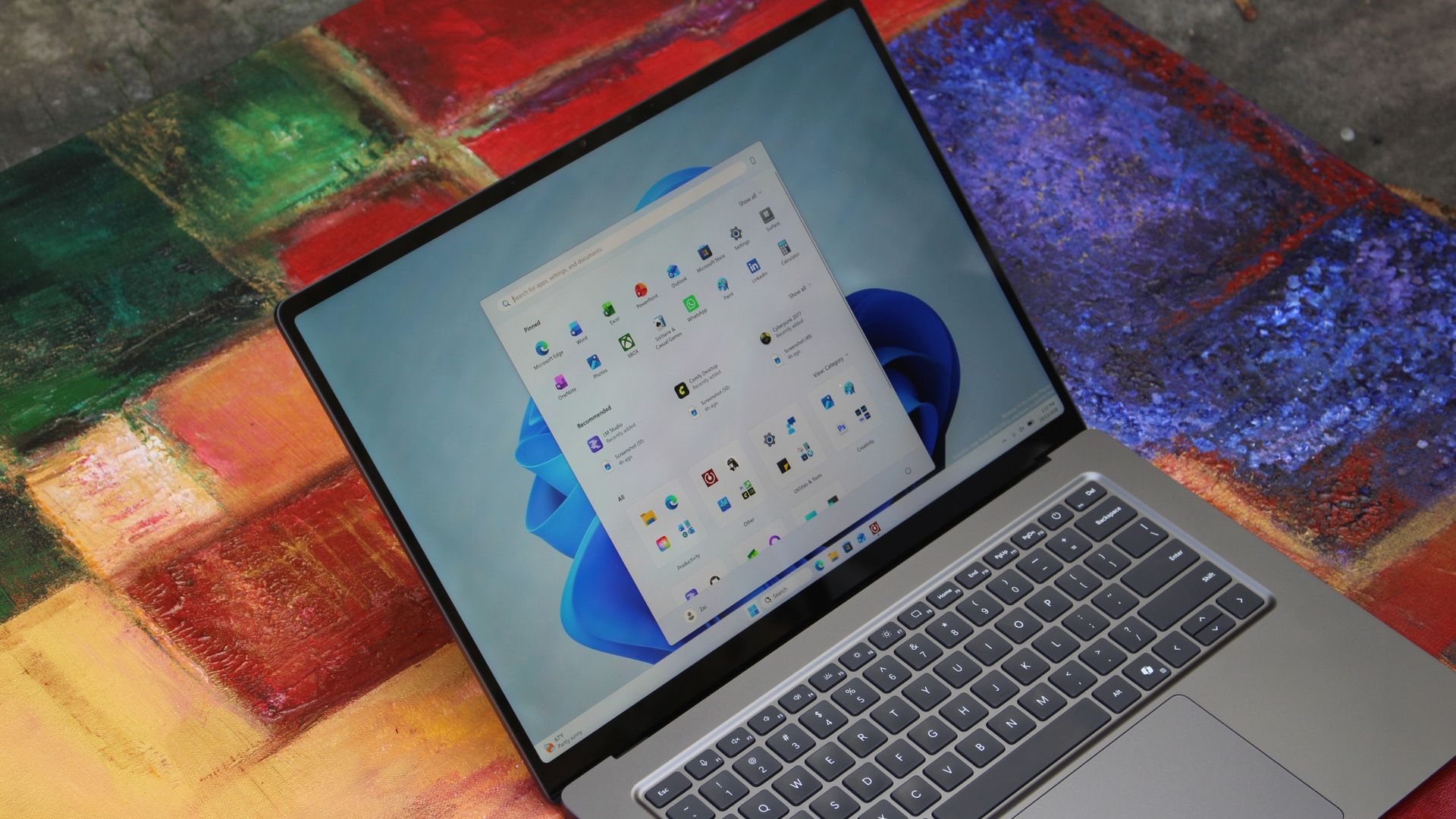
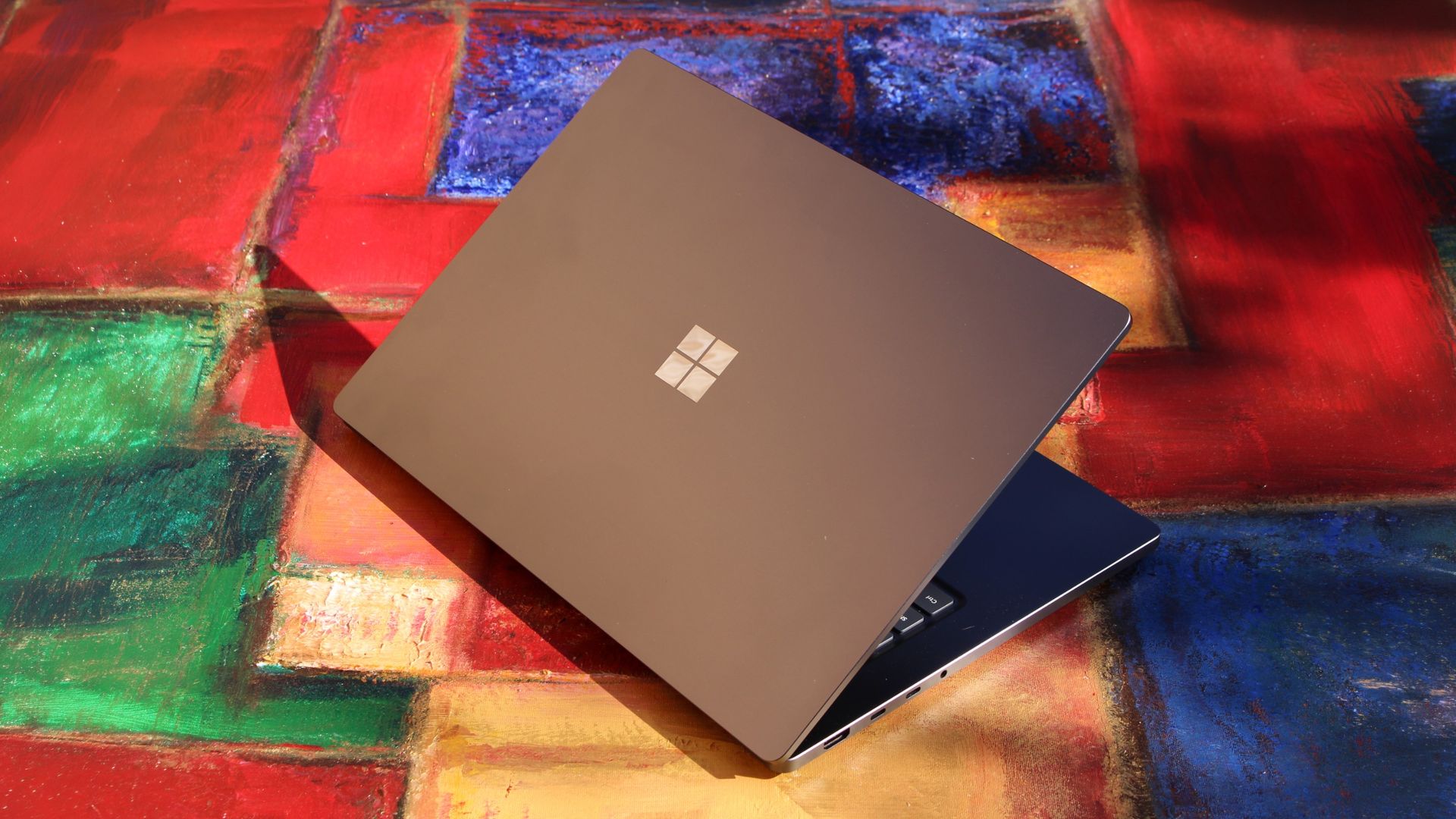
We have to start with how this thing looks, and we do need to address the fruit-shaped elephant in the room. Yes, Surface Laptop Ultra looks an awful lot like a MacBook Pro. I wouldn't blame the layman for even thinking it was a MacBook Pro from a distance. The square edges, large trackpad, and minimalist design echo the MacBook Pro from pretty much every angle.

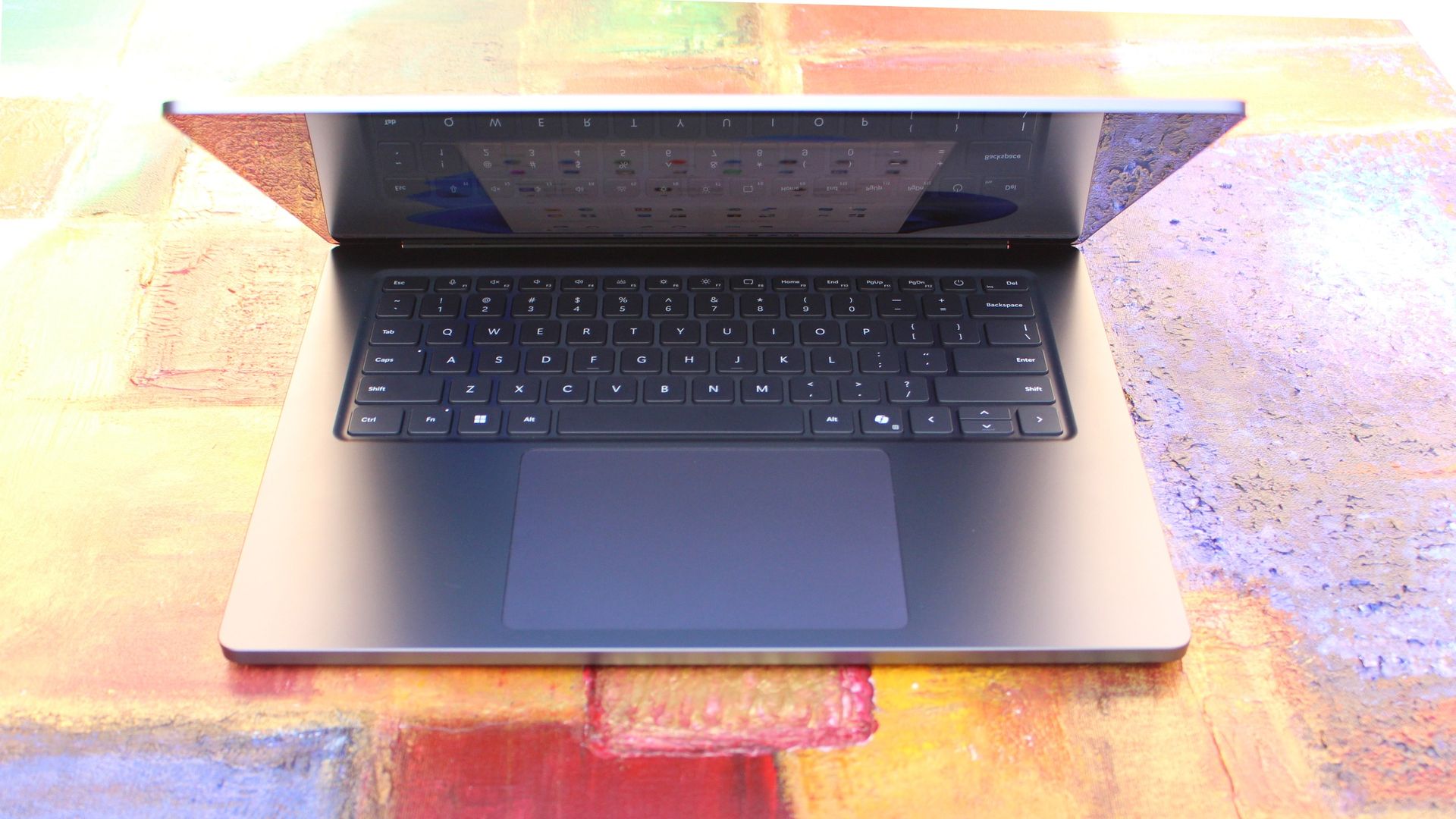
But I'm not here to tell you that's a bad thing. The MacBook Pro is a beautiful device, which is to say Surface Laptop Ultra is also very beautiful. In fact, I think it even improves upon the MacBook Pro's design in subtle ways. The keyboard deck isn't surrounded by a plastic bezel like on MacBook Pro, instead it's softly indented into the metal keyboard deck which looks lush and seamless.

The corners on Surface Laptop Ultra are also a little rounder than the MacBook Pro, a design choice that trickles down from the corners of the chassis to the keys on the keyboard, and corners on the trackpad. It's an entirely consistent and well thought out design, which I highly appreciate.

Surface Laptop Ultra

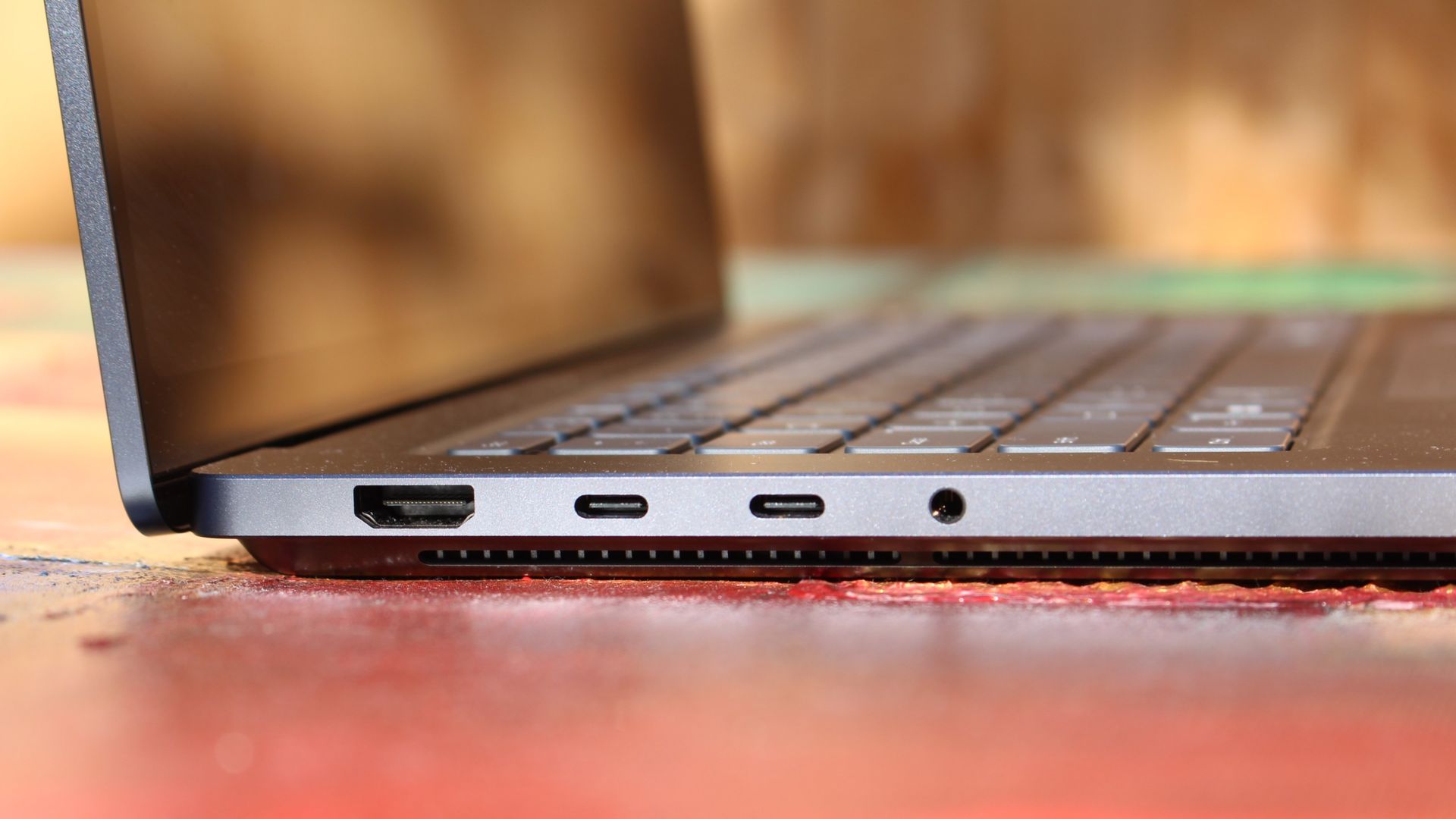
The left-side ports are good enough. (Image credit: Zac Bowden / Windows Central)

Microsoft also doesn't suffer from the godawful notch that you'll find on a MacBook Pro. Surface Laptop Ultra's display bezels are uniform along the left and right, and slightly thicker on the top to accommodate the Windows Hello IR face unlock sensors, which are much better than a fingerprint reader.

I should also mention that the display hinge on this laptop is perfectly tuned. It opens with one finger, and is perfectly balanced to provide a satisfying level of friction as you open and close it. It's also rock solid when typing, meaning it doesn't wobble around at all when on a desk.

The port selection is good enough. It features three USB-C ports, a USB-A port, a 3.5mm audio jack, HDMI 2.1, and a full-sized SD card reader. Of course, the star of the show in the ports department is Microsoft's clever magnetic USB-C port, which replaces the proprietary Surface Connect charge port found on older Surface Laptops.

Surface Laptop Ultra

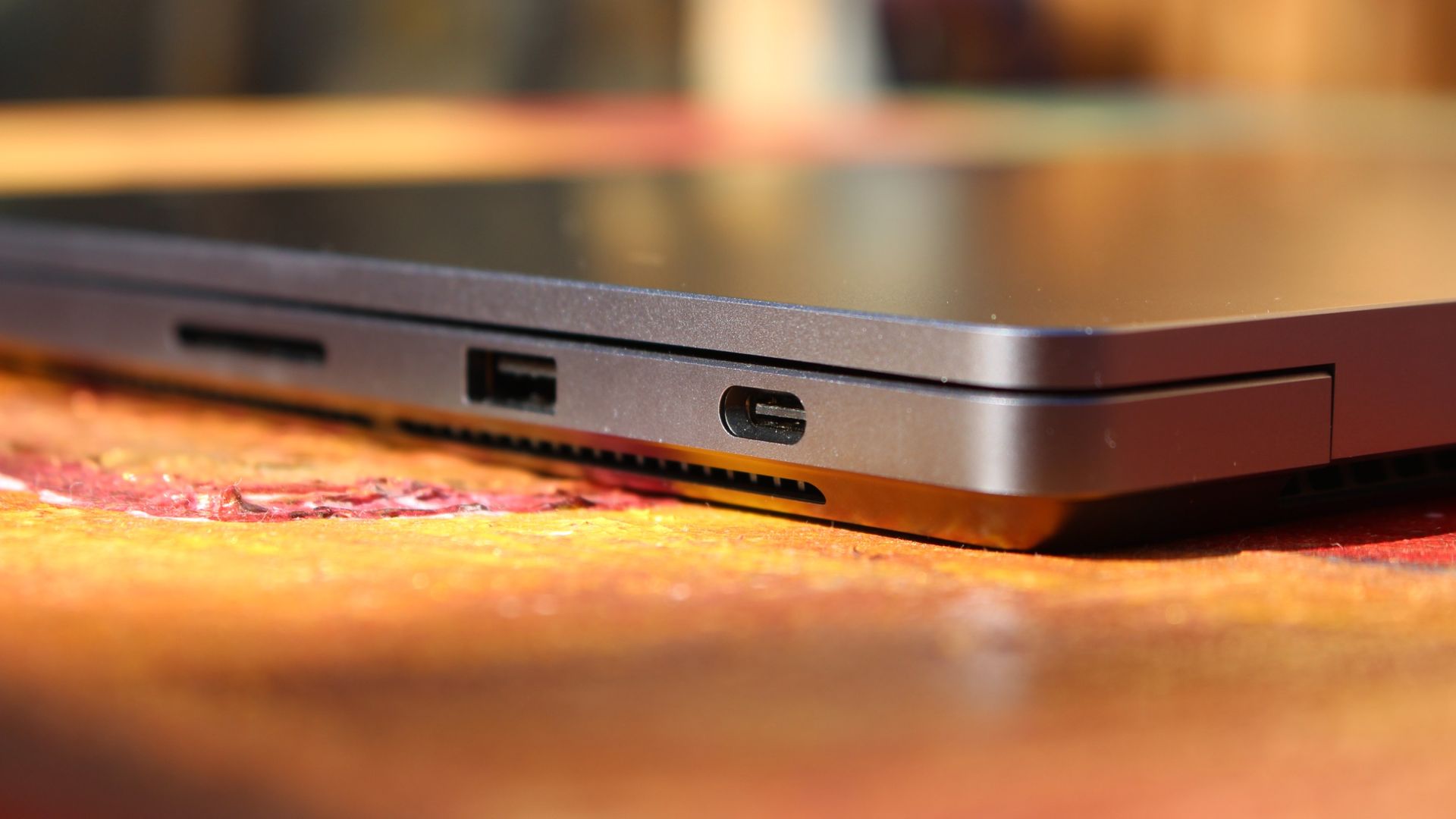
The special USB-C port is truly great. (Image credit: Zac Bowden / Windows Central)

It's great to see a laptop manufacturer attempting to innovate and improve on the universal USB-C standard. Here, we have a USB-C port that is compatible with all your USB-C peripherals, but it's also magnetized, and with the included charging cable, magnetically snaps to the device just like Apple MagSafe, while using the same universal USB-C port.

How did Microsoft do this? Well, most of the innovation is actually on the cable side. On the laptop itself, the only real change is that the USB-C port is slightly wider at its opening, but the rest of the USB-C port itself is typical in its design. Microsoft placed magnets on either side of the port, and redesigned the USB-C connector that's attached to the cable to allow for the magnetic connection to be seamless.

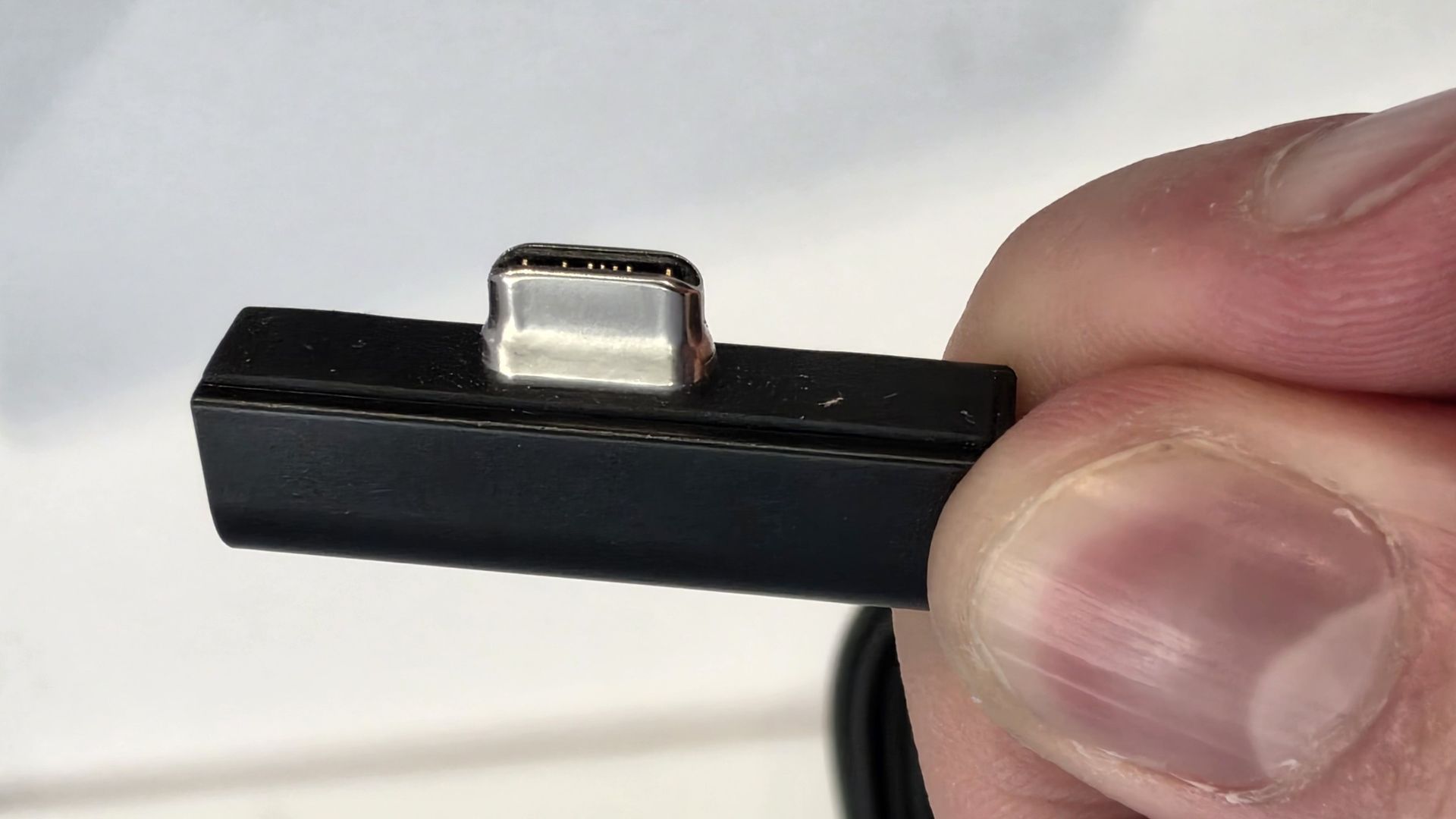
The cable's male USB-C end is shallower than a normal USB-C connection. This allows for it to connect to the USB-C port without clicking in, which is what locks a cable to a USB-C port normally. Instead, the magnets hold it in place, which enables the breakaway design that differentiates this USB-C port from the rest.

Surface Laptop Ultra magnetic charging cable

The USB-C connector is unique. (Image credit: Zac Bowden / Windows Central)

That does mean the USB-C cable that comes included only works with Surface Laptop Ultra, and only in this particular port. Microsoft realized this would be a problem, and designed the power brick that comes with Surface Laptop Ultra in a way that allows the magnetic cable to attach to the brick instead. The other end of the charging cable is a normal male USB-C end, which connects to any USB-C port you want.

So you can still use the Surface Laptop Ultra's power brick and cable on any device or any port you like, you just have to plug the magnetic end into the power brick first. It's a genius design, and proves that Microsoft really thought of everything when it comes to this unique magnetic USB-C experience. I love it, and I hope to see it on more laptops in the future.

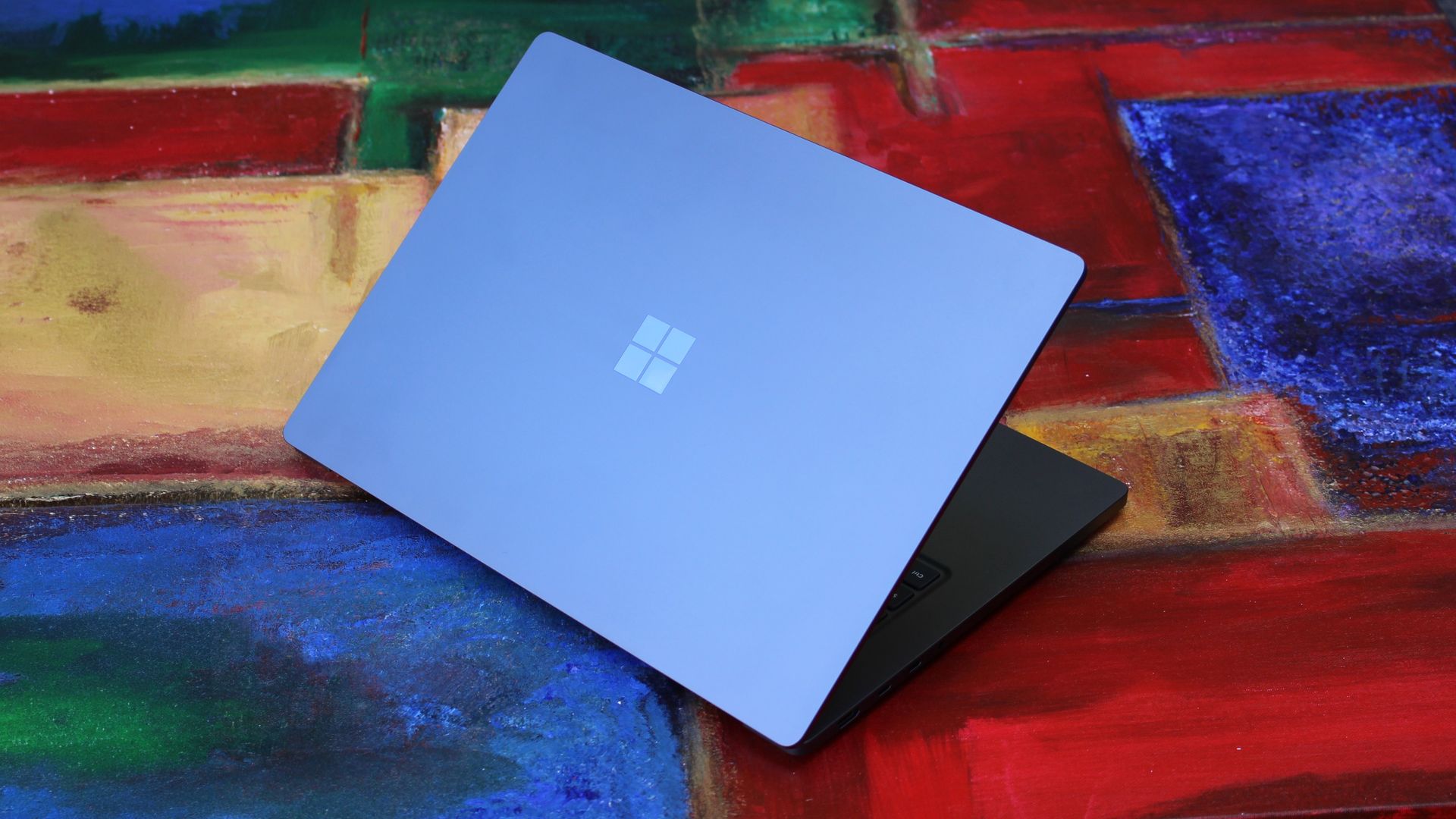
Surface Laptop Ultra is available in just two colorways: Platinum and Nightfall. To me, I think the Platinum version looks the nicest, but the Nightfall version looks clean too. The good news is the dark color does a relatively good job at fending off fingerprints thanks to an anti-fingerprint coating that has been applied to the chassis.

Display & Features

Surface Laptop Ultra

The Mini LED display in all its glory. (Image credit: Zac Bowden / Windows Central)

Surface Laptop Ultra ships with Microsoft's first ever mini-LED display, which delivers better contrast and brighter peak brightness over your standard LCD that has been found in all other Surface Laptops to date. Unlike an LCD, the Surface Laptop Ultra's mini-LED screen packs 1,344 local dimming zones, which allows the laptop to dim darker areas of the screen that don't need as much light.

This number is not as high as the mini-LED screen on the MacBook Pro, and this results in a bit of blooming around bright elements on a dark background. If you use Windows in light mode, this will almost never bother you. But in dark mode, in a dimly lit environment, it becomes quite a bit more apparent.

The backlight also takes a fraction of a second to keep up with what's going on on your screen. If you move a bright window around on a dark background, you'll notice the backlight brightening and dimming around the edges of the window. This gives off a slight ghosting effect which degrades the 120Hz refresh rate somewhat. It isn't noticeable at all in light mode, however.

This all leads me to say I wish Microsoft had opted for an OLED panel on the Surface Laptop Ultra. I've been daily driving OLED displays for the better part of a year now, and a mini-LED panel just isn't a vibrant or contrasty as an OLED display can be. The mini LED display is good, but not the best on the market, and it's certainly no OLED.

Microsoft tells me it opted for mini LED over OLED primarily for the brightness and efficiency gains. At 2,000 nits peak brightness, it is the brightest screen ever put on a Surface. But Tandem OLED displays are also very capable of reaching similar peak brightness levels these days, and so I feel the benefits of a mini LED screen don't carry much weight here.

If you're coming from a standard LCD, the mini LED screen will be nothing but an upgrade to you. It's color accurate, very bright, and its high resolution and 120Hz make reading text and scrolling webpages look and feel great. But if you're coming from a MacBook Pro mini LED screen, or an OLED display, you will notice the downgrade in contrast and more noticeable blooming.

The display is also a touch screen, which is the case on pretty much all Surface PCs since the line began in 2012. Microsoft truly believes that touch has a place on the laptop form factor, and I agree with it. Being able to reach out to tap on a notification or hit OK on a window prompt is really nice, even if I don't use it all the time.

For pen lovers, sadly the Surface Laptop Ultra does not support pen input. Microsoft dropped pen input from the Surface Laptop with Surface Laptop 7, and the Surface Laptop Ultra has not restored it. This makes sense however, as the screen does not lay flat so drawing on it would be uncomfortable.

I also want to mention the fact that Surface Laptop Ultra features a user upgradeable SSD drive. That means you don't have to splash out on the most storage at the checkout screen. You can opt for a lower amount, and when you finally fill it, upgrade the SSD to something larger later down the line. You can't say that about the MacBook Pro.

Surface Laptop Ultra keyboard with sunlight on

That large trackpad is something else... (Image credit: Zac Bowden / Windows Central)

Unfortunately, Surface Laptop Ultra is missing a key quality of life feature that I have come to enjoy on other flagship Windows laptops over the last year: presence sensing capabilities. My daily driver is able to wake up and go to sleep whenever I approach it or walk away, and Surface Laptop Ultra is missing this functionality entirely. A crying shame.

It's also missing all Copilot+ PC features currently. Microsoft tells me that RTX Spark is a Copilot+ PC capable chip, but that the suite of Copilot+ PC features aren't yet ready for the platform, and to expect them to show up in the coming months. The RTX Spark has a 50 TOPS NPU that will power these experiences when they finally do arrive.

Keyboard & Trackpad

Surface Laptop Ultra

The best keyboard and trackpad I've ever used. (Image credit: Zac Bowden / Windows Central)

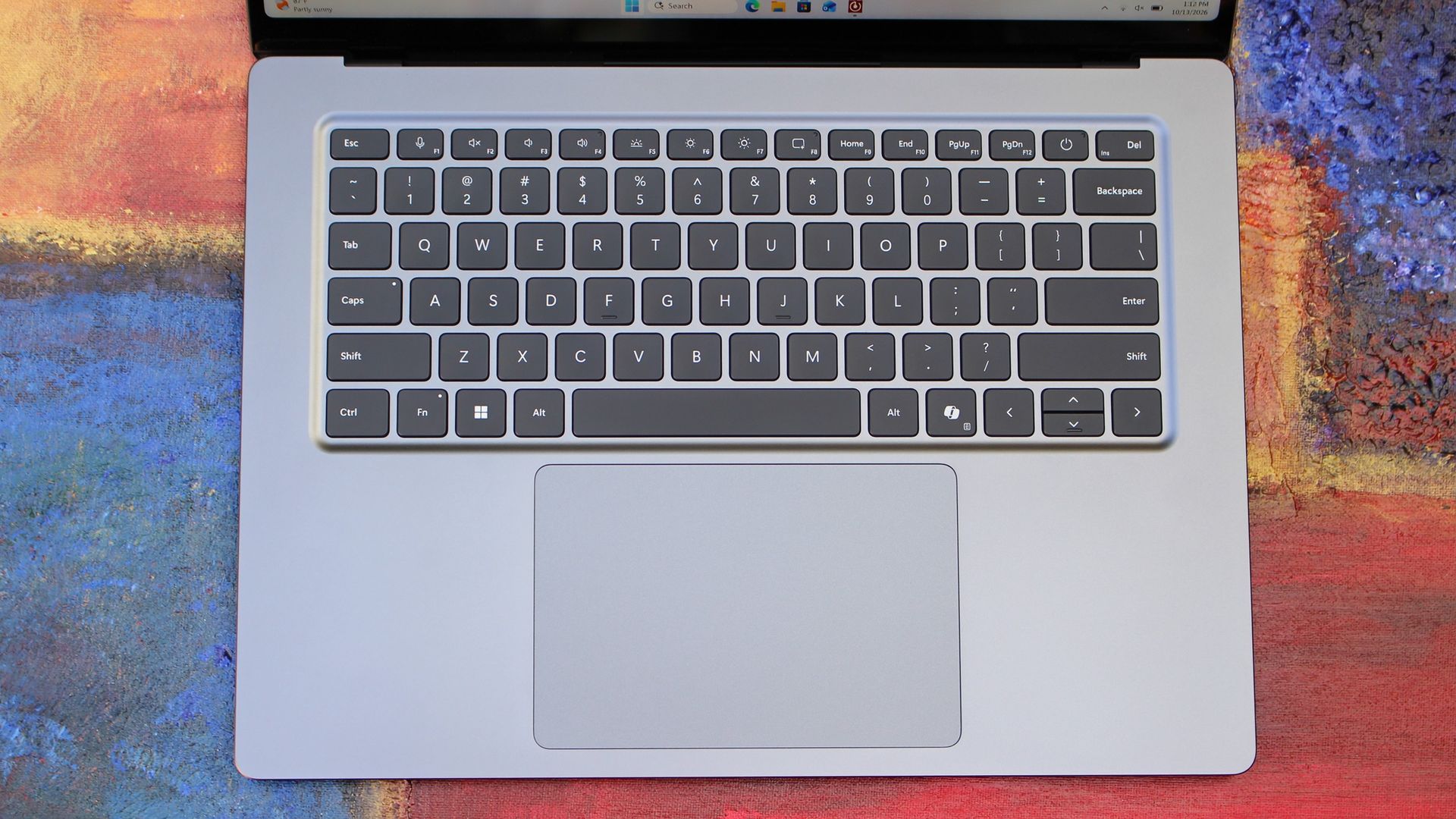
Surface has always delivered excellent keyboard and trackpad experiences, but Surface Laptop Ultra might be on a whole other level. This is probably the best keyboard and trackpad experience I've ever had on a Windows laptop to date. The keyboard is comfortable, tactile, and quiet, with 1.4mm key travel which is incredibly satisfying and not at all fatiguing.

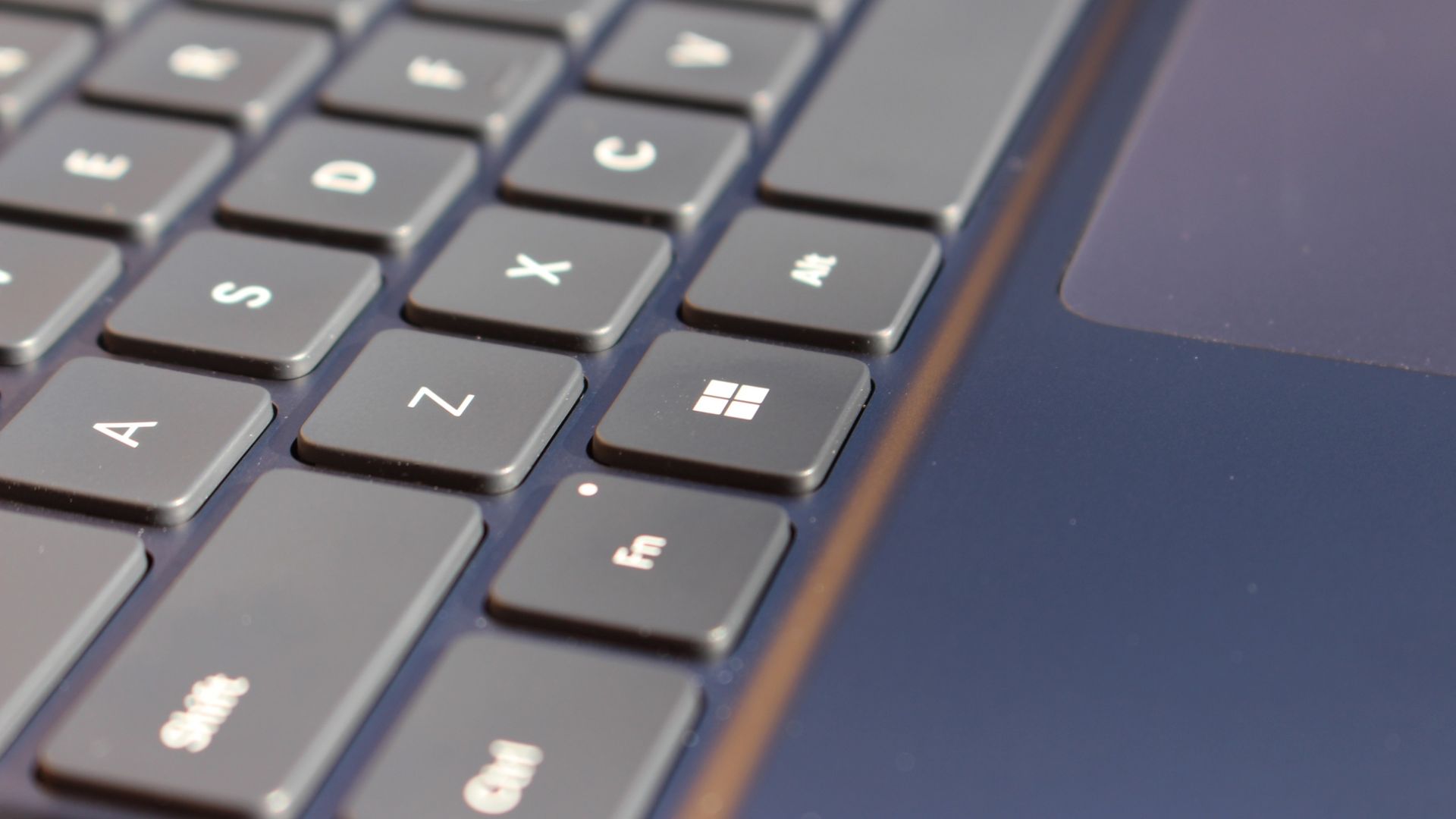
The keys themselves are slightly rounder than the keys found on Surface Laptop 8, which I think is more comfortable and looks nicer as a result. It features a three-stage backlight, a Copilot key (which can be changed,) and a dedicated microphone mute key. It's pretty much perfect in every way.

But what I really want to talk about is the trackpad. It's the largest trackpad ever fitted to a Surface, and that makes a huge difference in how easy it is to use. There's so much room for activities, and you'll never find yourself at the edge of the trackpad because you needed to drag a file and ran out of room.

Surface Laptop Ultra

The keys are so nice to type on. (Image credit: Zac Bowden / Windows Central)

Palm rejection is also very good. I never once had an issue with the trackpad being in the way when typing, which means Microsoft has done a good job at ensuring the trackpad's side isn't impeding the typing experience. The trackpad itself is haptic, and feels great to click on, with strength adjustability in Windows Settings so you can really dial in just how strong that haptic feedback is.

But the new trackpad also supports Windows 11's new haptic system, which introduces subtle haptic feedback when interacting with different UI elements across Windows. When you snap an app window, or drag files across folders, you'll feel haptic bumps under your finger in the trackpad that are different from the usual click down sensation it provides. It's genuinely great.

Camera & Audio

It's a Surface, so you can and should expect great cameras and microphones on Surface Laptop Ultra. The webcam is a 1080p shooter that looks more than fine for video calls, Teams meetings, and recorded presentations. In low light, the image does get a little noisy, but not any more than any other high-end webcams on the market.

The shining star in this department are the built-in studio mics, which are very very good. They sound studio quality, with rich bass and far-field mics that do a very good job at tuning out background noise to ensure the things that you are saying are captured clearly and well.

I also need to take a moment to talk about the built-in speakers on this laptop. They are superb. Again, probably the best I've tried in a Windows laptop to date, and give the MacBook Pro 14-inch a run for its money. There's a clear sound stage, highs are crisp and bass is rich.

Performance & Battery

Surface Laptop Ultra

It's a looker for sure. (Image credit: Zac Bowden / Windows Central)

I've already published an in-depth look at the performance of RTX Spark on Surface Laptop Ultra, which you can read here if you're interested, so there won't be raw performance benchmark numbers in this review.

The TL:DR for that however is that the RTX Spark is a powerful chip, with okay CPU performance but great GPU performance. It's capable of playing most games at 1440p high settings above 60fps, and top end configs can fit large AI models directly onto the GPU for faster processing. But it trails behind the latest high-end Apple Silicon, and is more in-line with current-gen Snapdragon X2 Elite or last-gen Apple M4 Pro in overall performance.

By default, the 128GB Surface Laptop Ultra ships with its unified memory in a 50/50 split configuration. Users are free to adjust this in the NVIDIA app, which is good for when you need to give either the system or your GPU more RAM for whatever task it is you're completing. It requires a restart to apply, which frustratingly takes a long time on the Surface Laptop Ultra.

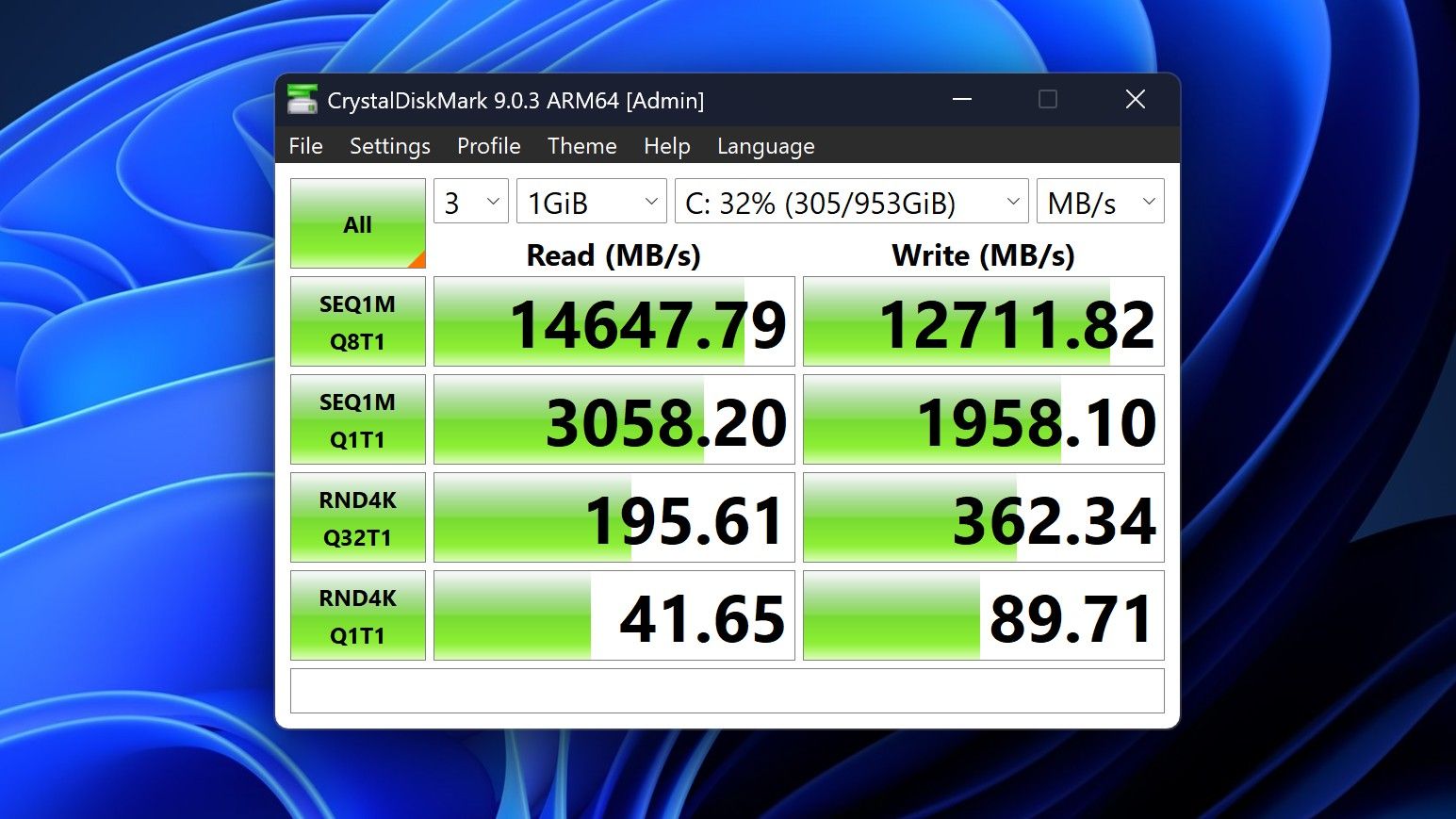
Surface Laptop Ultra disk speeds

You can expect very fast read and write speeds on 1TB models. (Image credit: Zac Bowden / Windows Central)

Performance is great for the most part. In day to day usage, it's blazing fast and is able to crunch through pretty much any workload I'd want to throw at a mobile workstation such as this. With that said, there are a couple of oddities related to performance that I feel I should mention.

Compared to other devices I have on hand, the Surface Laptop Ultra sometimes takes twice as long to restart. I'm talking over 2 minutes from hitting restart to being back on the lock screen, which is about double the amount of time it takes all the other laptops in my possession. Microsoft says they are investigating.

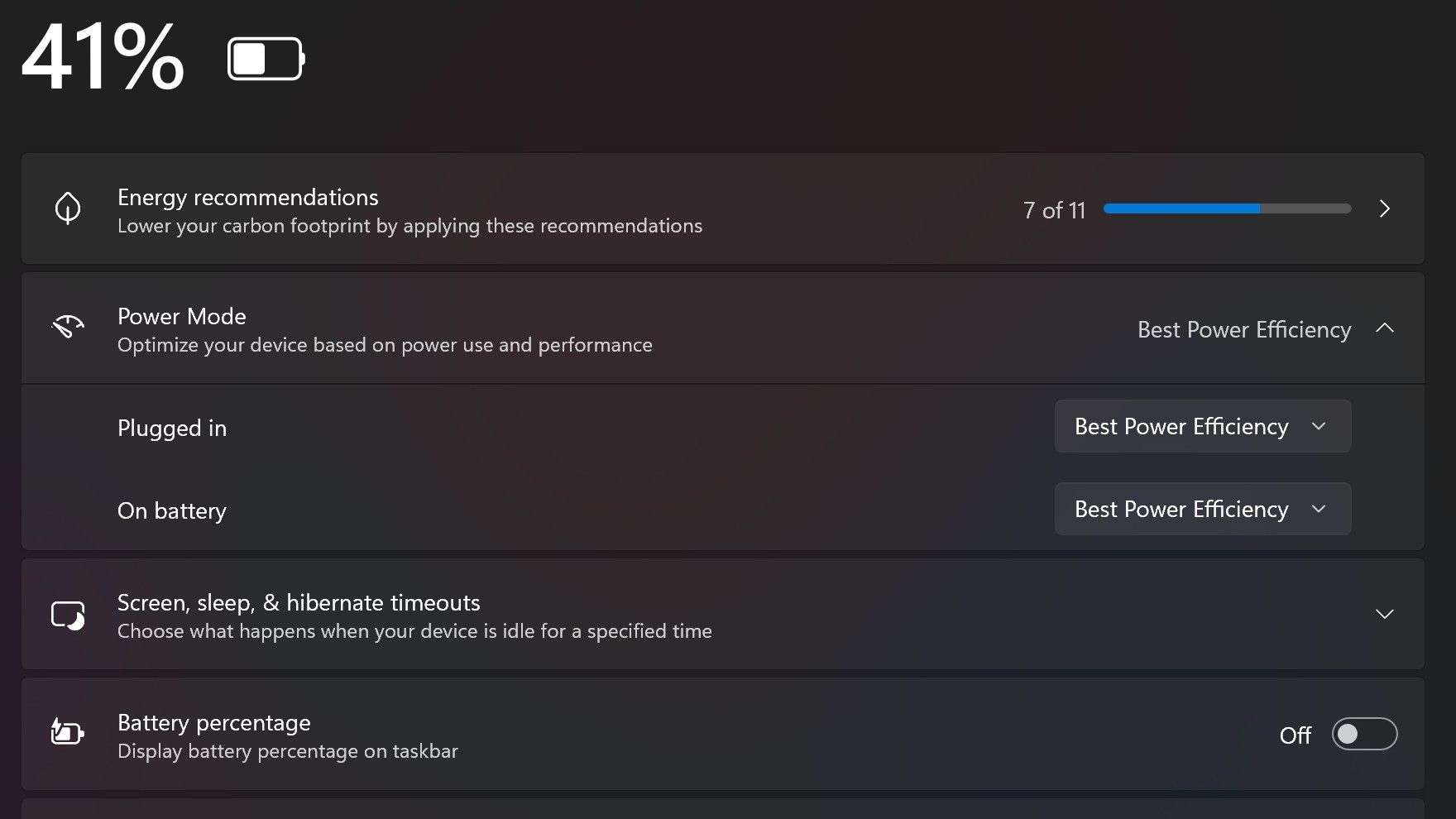
Surface Laptop Ultra also ships with the "Best Power Efficiency" profile set by default. This is unusual, as most Surface PCs ship with their power profile set to balanced. Microsoft says it does this to maximize battery life, but that does come at the cost of performance.

Surface Laptop Ultra power endurance

Make sure you change these to Best Performance for plugged in, and Balanced for battery life. (Image credit: Zac Bowden / Windows Central)

I've found that overall performance can be slashed by up to a quarter or even half when in this default mode. So if you want to make the most of your RTX Spark PC, be sure to change the power mode in Windows Settings to either Balanced or Best Performance. I usually set the on-battery mode to Balanced, and the plugged in state to Best Performance.

On the subject of battery life, the Surface Laptop Ultra's endurance is just fine. It's not class leading by any stretch, but I can definitely get through the work day without much fuss, though this will depend on your workload. Our Procyon battery life benchmark test lasted around 14 hours, and in real world use I was getting close to about 10.

But if your workload heavily leans on the GPU, you can expect to halve that number. The GPU is quite efficient for the power it outputs, but it's still a GPU and it's still hungry. So if you know you'll be using the GPU a lot throughout the day, you'll want to bring the charger with you.

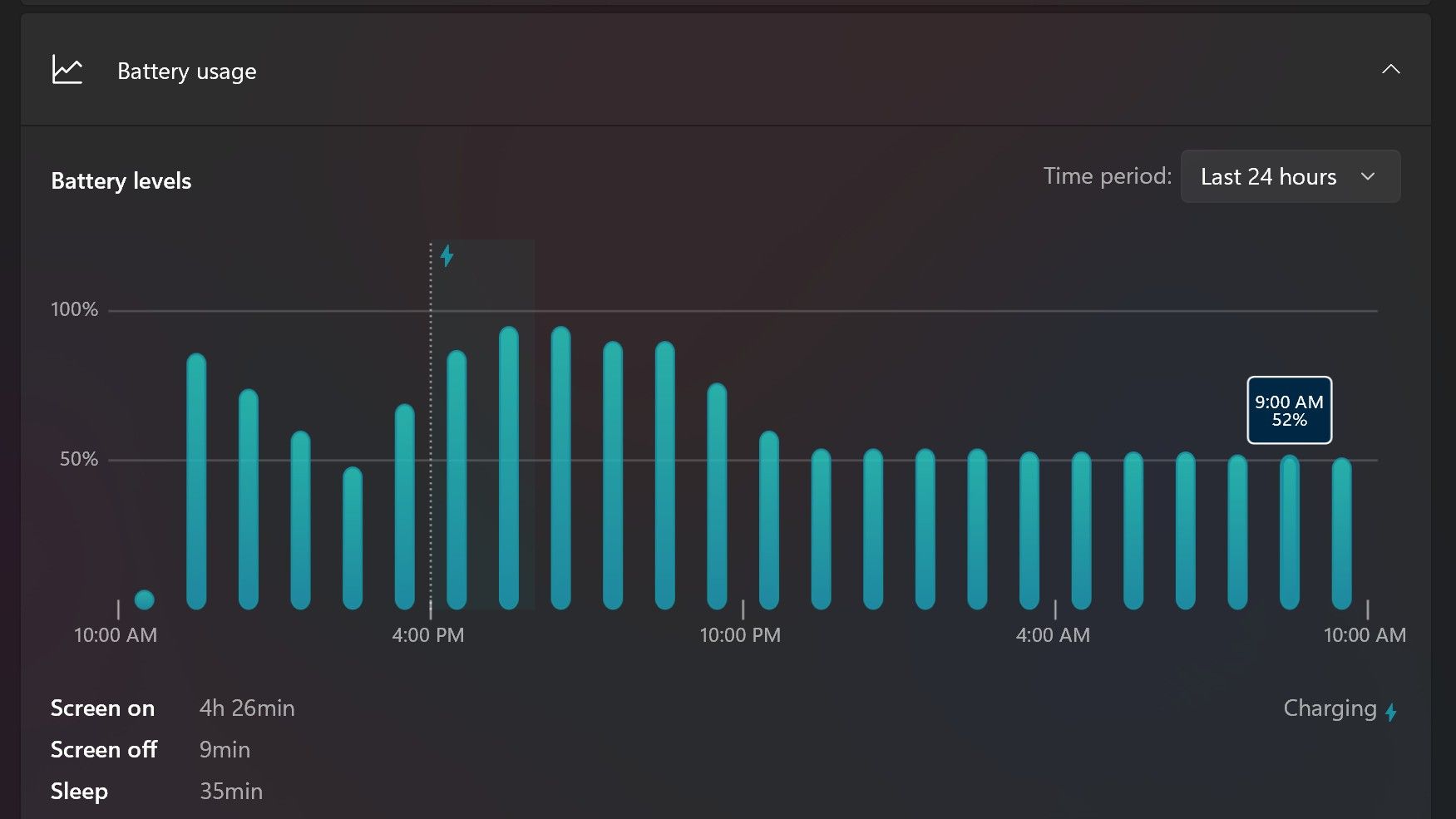
Surface Laptop Ultra power endurance

Surface Laptop Ultra only sipped power during sleep between midnight and 9AM. (Image credit: Zac Bowden / Windows Central)

With that said, sleep endurance is very good for the level of power this laptop outputs. I put the laptop to sleep at about midnight, and open the lid 10 hours later, and it's only drained one, maybe two percent from the battery. Very good on that front!

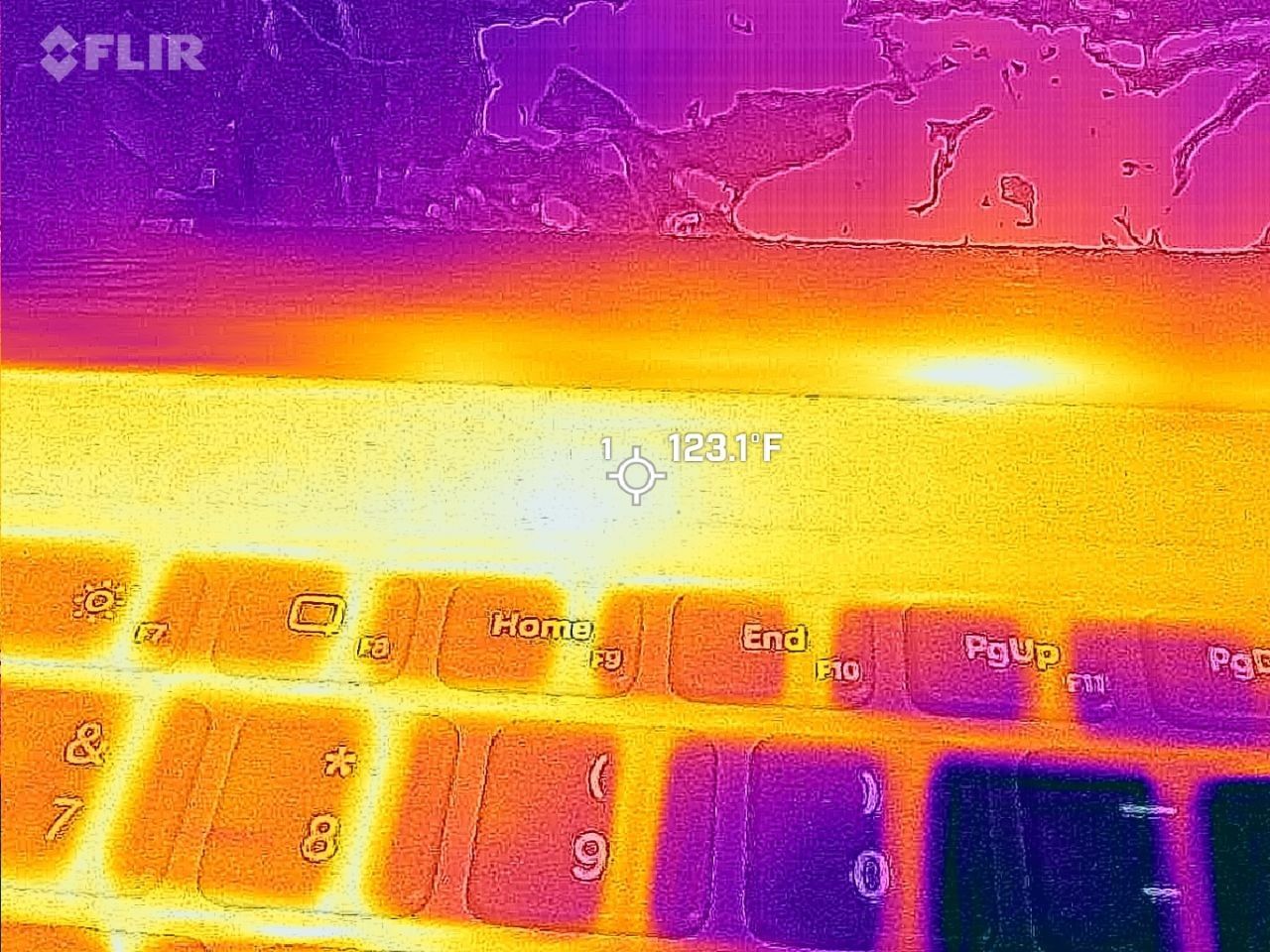
Under max load, the Surface Laptop Ultra gets quite warm. While the keys themselves remain at an okay temperature, the top part of the keyboard deck gets very toasty. I measured 123 F at its hottest under max load, which is approaching "oh that's hot" territory.

Surface Laptop Ultra heat

Surface Laptop Ultra gets toasty, but doesn't seem to thermal throttle. (Image credit: Zac Bowden / Windows Central)

I also noticed quite audible coil whine when under max load on my Surface Laptop Ultra. This isn't a problem in day to day use, but whenever the GPU is being used, I can hear buzzing coming from inside the keyboard chassis. If you're sensitive to that kind of thing, it will annoy you.

Fan noise is acceptable even at max load. I measure around 42 decibels at its loudest, and that was after running a benchmark for 10 minutes. In normal use, the fans rarely come on, though it does run slightly warm on your lap as a result.

Conclusion

Surface Laptop Ultra

Surface Laptop Ultra is ultra-premium. (Image credit: Zac Bowden / Windows Central)

✅ You should buy this if ...

  • You are a software developer utilizing on-device AI
  • You live and breathe large language models and agentic workflows
  • You need a beefy GPU in a portable and efficient package
  • You need lots of RAM

❎ You should not buy this if ...

  • You aren't interested in AI or agentic workflows
  • You only need a PC for standard productivity tasks
  • You occasionally game or edit video (get something cheaper)
  • You want something thin and light

Surface Laptop Ultra is great, but it's not something I can comfortably recommend everyone go out and buy, especially at these high prices. At the base level, it doesn't offer enough to justify the added cost over a Surface Laptop 8 with 24GB RAM. You do get the more beefy GPU and "better" display, but that comes at the cost of portability and battery life.

The Mini LED screen isn't the upgrade I was hoping it would be. For those who have only ever used a standard LCD their whole life, I'm sure you will appreciate the added brightness. But the ghosting issue is annoying and I think most people will notice it. I would have much preferred an OLED on a laptop this expensive.

Battery life is also just okay, which, again, for a laptop of this size and weight, leaves something to be desired. You can get longer day to day use out of a thinner and lighter Surface Laptop 8, which I think most people would prefer over the raw power that Surface Laptop Ultra offers.

And that brings me back to my original point. This isn't a laptop for everyone. It's a laptop for those who know they need it, and it's mainly for AI developers and high-end content creators. If you find yourself leaning on local agents to complete tasks for you, or enjoy generating images and videos using AI models, this is the laptop for you.

If you're someone who just needs a laptop for productivity tasks that includes a little bit of photo and video editing, and sometimes some gaming, there are cheaper laptops out there that will do that job very well.

Is this the MacBook Pro for Windows? I think it is. But it's not the perfect MacBook Pro alternative just yet. RTX Spark isn't at the same level as high-end MacBook Pro silicon, the Mini LED screen isn't best in class, and battery life could use some improvement.

Microsoft - Surface Laptop Ultra - 15

Microsoft
Surface Laptop Ultra

Surface Laptop Ultra is Microsoft's flagship and most powerful Windows PC. It can be configured with up to 128GB RAM, and ships with NVIDIA's new RTX Spark SoC. It's great for creative workflows and software development, and those who want to run local AI and LLMs directly on their device.

Pros

  • Premium build quality
  • High-resolution screen
  • Excellent keyboard
  • Haptic trackpad is amazing
  • Good sound quality
  • Useful ports selection

Cons

  • Mini LED not best-in-class
  • No presence sensing features
  • Okay battery life
  • Currently missing all Copilot+ features

Amazon’s Nanomatte display is so good it makes me want a whole new Surface Pro

Microsoft held a Windows and Surface event last week that focused heavily on the Surface Laptop Ultra. Coincidentally, Panos Panay announced a new device on the same day. Panay, who led Microsoft's hardware division for years, now works for Amazon and unveiled a new range of Amazon Alexa tablets.

Those tablets aren't really direct competition to the Surface Pro, but they do have a feature I'm envious of. The nanomatte screen on one of those Amazon Alexa tablets would be perfect on a Surface Pro.

Matte displays reduce glare by diffusing light. Because the screens bounce light in different directions, the image can appear grainy. An extreme example of this is if you get a cheap matte screen protector for your phone, but even a premium PC with a matte finish can look a bit grainy.

The nanomatte display Amazon uses in its new tablets etches the screen in a way that aligns with the pixels of the display. Amazon praises the displays for providing "a first-of-its-kind cinematic viewing experience, with incredible contrast retention in bright conditions and text that feels like it’s sitting on top of the glass."

I'm not sure I agree with the claim that it's a world first. Apple's nano-texture technology is similar to what Amazon unveiled. But even if Amazon is not a pioneer in the space, it has a device with a screen I'm envious of.

Surface Pro 8 Glossy

Many Surface devices, including the Surface Pro 8, are glossy, making them hard to use in well-lit environments. (Image credit: Future)

Microsoft has been oddly resistant to anti-glare displays. Surface was late to the party on adding them to any device and has been selective with where it offers the screens.

Even as recently as this year, Surface Laptop 8 shoppers needed to choose between an anti-glare display or 5G connectivity.

Our Editor-in-Chief Daniel Rubino argued back in 2020 that Microsoft needed to use anti-reflective displays in Surface PCs. Anti-reflective screens are different from anti-glare displays, but both aim to improve visibility in bright environments.

Microsoft has yet to fully embrace anti-glare screens and it holds back Surface hardware.

The anti-glare display of the Amazon Alexa Tablet 12 Pro also has a texture that makes pen usage feel more natural. The screen is meant to make it feel like you're writing on paper, not a perfectly smooth piece of glass.

It's not surprising that a device made by Panay has features that would fit perfectly on a Surface. He shaped the Surface brand as much as anyone, and he took his expertise over to Amazon.

But as I mentioned earlier, the Alexa tablets are not competitors to the Surface Pro, so they can't serve as replacements either. The Alexa tablets run on Android and have access to the Google Play Store. That's a welcome change to the locked-down Fire Tablets of the past, but it's a far cry from a Windows-powered 2-in-1.

I'd love to see Microsoft replicate the nanomatte finish of the Amazon Alexa Tablet 12 Pro on a Surface Pro in the future. The finish would help those using the Surface Pro in bright settings and also improve the feel of using a stylus.

The Amazon Alexa Tablet 12 Pro features a Nanomatte anti-glare display designed to reduce reflections while maintaining detail and color accuracy. It runs Android and can access the Google Play Store.View Deal

Click to join us on r/WindowsCentral

Join us on Reddit at r/WindowsCentral to share your insights and discuss our latest news, reviews, and more.

iPhone Duo status icon combines Wi-Fi, cellular, and battery information

16 September 2026 at 23:05

The iPhone Duo status icon introduces a new approach to information that has occupied the top edge of the iPhone display for nearly two decades. Instead of treating Wi-Fi, cellular signal, battery status, and other indicators as a conventional horizontal row, Apple has created a flexible circular system that sits in the corner of the foldable iPhone’s display.

Apple officially describes the feature as a “circular, flexible system” within the status bar rather than one fixed icon containing every piece of information at all times. The distinction is useful: the area can adapt according to context while consolidating status information into a smaller visual region.

It is part of a much larger rethink of iOS 27 specifically for iPhone Duo. The foldable device changes the proportions available to software, particularly when its 7.6-inch inner display is open, forcing Apple to reconsider interface elements that have traditionally stretched horizontally across an iPhone screen.

The status system is one of the smallest changes visually, but it illustrates how extensively Apple has adapted iOS around the new hardware.

Black icons on a light gray background: an iPhone Duo status icon for cellular signal strength, a Wi-Fi symbol, and a battery icon with low charge—each reflecting the clean design language of the iOS 27 status icon set.
Image Credit: Apple Inc.

iPhone Duo status icon replaces the traditional horizontal approach

Conventional iPhones distribute system information across the upper portion of the display. Cellular strength, network type, Wi-Fi connectivity, and battery status typically occupy space around the camera hardware and Dynamic Island.

iPhone Duo approaches that area differently.

Apple says its circular status system nestles into the corner of the screen and presents relevant information including Wi-Fi, cellular strength, battery status, and more. Rather than requiring a long horizontal strip, those indicators can occupy a compact area that works with the device’s unusual screen geometry.

The change is closely connected to the way iPhone Duo handles controls throughout iOS 27.

Apple has moved several interface elements to the side of the display. App navigation, toolbars, the Home Screen Dock, and some Lock Screen controls can use vertical space instead of occupying the familiar horizontal regions found on other iPhones.

The status system therefore becomes part of a vertical interface column rather than an isolated redesign.

This arrangement lets content use more of the display’s height while keeping frequently referenced system information visible. It also creates a consistent location for status details as users change how they hold or fold the device.

A flexible status system suits a foldable iPhone

A foldable phone presents an interface problem that a traditional slab-shaped iPhone does not have.

iPhone Duo can operate through its 5.4-inch outer display or its substantially larger 7.6-inch inner screen. The device can be opened completely, partially folded, rotated, or positioned like a small book.

A static status bar designed around one screen size and orientation would be less effective across those configurations.

Apple instead built iOS 27 so that interface elements can move as the physical device changes. Content reacts to folding, controls relocate, and layouts adjust around the hinge and available screen area.

Apple’s developer guidance provides additional detail about this philosophy. On iPhone Duo, navigation and toolbar controls share vertical space with system elements such as the status bar and Live Activities. When available room becomes limited, application controls can collapse into an overflow menu.

That makes the circular status area part of an adaptive system rather than a cosmetic flourish.

Developers do not need to manually reproduce the status treatment inside their apps. Apple’s standard interface frameworks handle much of the adaptation, especially when applications use native navigation, toolbar, and tab-bar components.

A smartphone lock screen displays the time 9:41 and the date Wed Apr 1, with a background of mountains under a starry night sky and an iPhone Duo status icon next to the Wi-Fi symbol in the corner, reminiscent of iOS 27.
Image Credit: Apple Inc.

Dynamic Island also moves to the side

The status area is not the only familiar piece of iPhone interface that changes position on iPhone Duo.

Apple has redesigned Dynamic Island so that it can sit vertically along the side of both the outer and inner displays. It can expand from that position to present alerts and Live Activities.

The relationship between Dynamic Island and the new circular status system is particularly interesting because Apple now has two dynamic interface areas operating along the same side of the screen.

One communicates persistent device information such as network and battery status. The other handles temporary activity, alerts, and live information.

Apple’s developer documentation refers to this section as shared vertical space. Application controls may also occupy it, meaning iOS has to continuously decide how much room is available and which elements deserve priority.

That is a major departure from the long-standing assumption that the upper corners of an iPhone screen simply contain a predictable row of small status symbols.

On Duo, those regions have become active parts of the interface layout.

Wi-Fi, cellular, and battery remain immediately recognizable

Consolidating status information creates a design challenge: efficiency cannot come at the expense of readability.

Users have spent years learning the meanings of Apple’s individual status symbols. Cellular bars indicate signal strength, the Wi-Fi symbol communicates wireless connectivity, and the battery icon provides an immediate indication of remaining power.

Apple has not discarded those familiar concepts.

Instead, the circular system changes how and where information is presented. The familiar status categories remain present while the container around them becomes more adaptable.

This is particularly useful on a device with two displays. Users should not need to relearn the meaning of basic connectivity information when moving from the outer screen to the inner display.

The same reasoning applies when iPhone Duo changes orientation. Apple can reorganize the status area without changing the fundamental visual vocabulary behind Wi-Fi, cellular, or battery information.

A hand holds a tablet displaying a video of two people talking in a field of purple flowers, with a transcript of their conversation visible on the right side of the screen and an iPhone Duo status icon appearing discreetly at the corner, reflecting the latest iOS 27 design.
Image Credit: Apple Inc.

iPhone Duo pushes the status bar beyond a fixed strip

The new design suggests a different direction for one of the oldest pieces of smartphone interface.

Status bars traditionally behave like reserved strips of screen space. Applications work around them, and their icons occupy predictable positions regardless of what is happening elsewhere.

iPhone Duo turns that space into something more fluid.

The circular system can coexist with a vertical Dynamic Island, changing application controls, Live Activities, and layouts that respond to the physical position of the foldable display. It becomes another component that iOS can arrange rather than a fixed row placed permanently along an edge.

There is no indication that Apple plans to bring the same circular status treatment unchanged to conventional iPhones. Its current implementation is specifically tied to iPhone Duo and the interface requirements created by the foldable hardware.

Still, the design provides a glimpse at how Apple can rethink even deeply established iPhone conventions when the shape of the device changes. When iPhone Duo reaches customers on October 23, the small circular area in the corner will be one of the most immediately visible examples: cellular strength, Wi-Fi, battery information, and other system details occupying a shared adaptive space instead of stretching across the display.

The post iPhone Duo status icon combines Wi-Fi, cellular, and battery information appeared first on AppleMagazine.

A Brain-Computer Interface Decoded Speech and Movement Simultaneously for the First Time

16 September 2026 at 17:07

A new brain-computer interface (BCI) is the first to translate both speech and movement with a single device that reads data from implanted electrodes.

In a recent paper published in Nature Neuroscience, researchers revealed how their new BCI simultaneously communicates verbal and non-verbal information in seconds.

This is a major step forward in BCI research, as human communication relies on body language as much as spoken words to convey meaning. For the first time, one implant marries these two separate elements of communication, offering a breakthrough for individuals with severe paralysis.

A New BCI

The team’s new BCI translates electrical signals from the brain into text using artificial intelligence. The decoded information can then be used to control a digital avatar, guiding both its speech and movements.

The BCI field has made significant strides in recent years, allowing humans to control cursors and robotic arms or even communicate through synthesized speech. However, those projects have generally focused on a single mode of communication, whereas this new system is multifunctional, allowing it to capture more of the rich nuance of human communication.

“This gives us hope for neural prosthesis that will enter day-to-day usage,” said Christian Herff, a computational neuroscientist at Maastricht University in the Netherlands.

Since both are related to communication, it should be no surprise that the neural signals responsible for speech can overlap. That can make the business of separating them for two different functions at the same time extremely challenging. Additionally, when the brain commands the body to speak and move at the same time, the neural activity coordinating those activities can vary from what it would be if only one were occurring at a time.

Collecting Human Neural Data

Two volunteers worked with the researchers to test the new BCI, which involved surgically implanted arrays comprising 253 electrodes on the surface of the cortex. By covering portions of the sensorimotor cortex with so many electrodes, the team captured a large number of signals associated with attempted speech and movement.

Following a brainstem stroke, one volunteer experienced impaired speech and movement capabilities. The team instructed him to wave, shake his hands, clap, and nod. Additionally, they gave him five phrases to attempt to speak silently.

The other volunteer had amyotrophic lateral sclerosis (ALS), a motor neuron disease that causes progressive motor impairment and can lead to loss of speech. Although he could only move his facial muscles, he was capable of typing messages. Researchers gave him ten phrases to imagine vocalizing and ten gestures to imagine performing.

BCI Testing Results

Using the electrode implants, the BCI recorded neural activity generated by each attempt, including when participants attempted movement and speech separately or simultaneously. The team then trained AI models to translate those signals, finding that including data from simultaneous activities improved decoding performance.

With this neural activity mapped, the team then had the volunteers attempt to control a digital avatar using the BCI. Again, testing involved isolated and combined verbal and gestural communication. However, this time, instead of relying exclusively on preselected responses, the participants were asked questions in real time.

Accuracy varied between the volunteers, with the first achieving perfect BCI decoding of the tested movements and speech, while the second recorded 75% speech accuracy and 85% gesture accuracy.

While achieving such promising results for combined speech and gesture signals represents a major step forward in BCI research, more work is needed to continue refining the technology. Higher levels of speech accuracy have been achieved with speech-only devices, and this test was limited to individual sentences rather than continuous speech. Additionally, the device captured gestures rather than steady hand positions.

These limitations were partly intentional, as the team initially simplified its decoding tasks while making the jump to simultaneous actions. Further research could expand the system to recognize movements involving additional parts of the body and enable finer control of the many joints in the hands.

The paper, “Simultaneous Speech and Gesture Decoding for Multimodal Communication in Paralysis,” appeared in Nature Neuroscience on September 14, 2026.

Ryan Whalen covers science and technology for The Debrief. He holds an MA in History and a Master of Library and Information Science with a certificate in Data Science. He can be contacted at ryan@thedebrief.org, and follow him on Twitter @mdntwvlf.

Farwave é um app para descobrir estações de rádio ao redor do mundo

15 September 2026 at 23:41

Aplicativos que utilizam uma premissa simples e a transformam em uma experiência interessante são, particularmente, meus favoritos. Exemplo disso é o Farwave, um app para iPhone e iPad desenvolvido pelo brasileiro Fernando Bunn que permite encontrar estações de rádio de todo o mundo girando um globo 3D até uma determinada região e tocando em uma estação.

A interação baseia-se na localização geográfica, e não em pesquisas por texto. Ou seja, os usuários giram o globo, selecionam uma região e tocam em uma estação, tudo pela mesma interface.

App Farwave
Divulgação/Farwave

Há, ainda, um botão chamado “Take me anywhere” (“Leve-me a qualquer lugar”, em tradução direta) que seleciona uma opção aleatória para ouvintes que não querem procurar um local específico; além disso, o aplicativo salva o histórico de reprodução para que as pessoas possam retornar a uma estação mais tarde.

Além do rádio, o app também organiza podcasts e músicas utilizando a mesma metáfora do globo. Diferentemente das estações de rádio, assinantes Pro podem pesquisar programas ou adicionar manualmente um feed RSS. O aplicativo também oferece suporte a filas de reprodução, velocidade de reprodução ajustável e downloads para ouvir offline.

Assinantes do plano Pro também podem importar seus próprios arquivos de áudio de um computador ou do aplicativo Arquivos. Cada artista aparece como um “sinal” próprio, e as faixas importadas permanecem no dispositivo para reprodução offline.

App Farwave
Divulgação/Farwave

O Farwave está disponível gratuitamente na App Store, mas alguns recursos (como supracitado) exigem o Farwave Pro, que custa R$20/mês ou R$100/ano.

via 9to5Mac

Desinstalador AppZapper é reformulado com novo design, funções atualizadas e mais

15 September 2026 at 19:06

O AppZapper, popular desinstalador que oferece uma maneira rápida de excluir aplicativos e seus arquivos associados do macOS, foi reformulado após anos e ganhou um novo design, funcionalidades atualizadas, além de um novo nome: AppZapper 3000.

Lançado originalmente em 2006, o AppZapper 3000 chega justamente no seu 20º aniversário. Entre as novidades, a versão atualizada do aplicativo foi adaptada aos requisitos de segurança do macOS e é mais eficiente na localização de arquivos relacionados aos softwares que serão apagados.

O funcionamento do app é um show à parte: após a instalação, basta arrastar e soltar um aplicativo no AppZapper e clicar no botão “Zap All” para remover o aplicativo e os arquivos relacionados, acompanhado de uma animação de arma a laser e efeitos sonoros. Ele localiza e exclui todos os arquivos de um aplicativo em poucos segundos, e os usuários podem escolher entre quatro temas diferentes.

O software pode ser baixado gratuitamente, sendo possível realizar três “zapeadas” gratuitas. A licença custa US$18 para um único usuário e US$29 para um pacote familiar, que permite o uso do aplicativo em até cinco Macs. Há, ainda, um plano corporativo que permite o uso em até 25 Macs, o qual está disponível por US$99.

via MacRumors

Hybrid graphene–MXene–WS₂ terahertz metasurface detects chikungunya virus via machine learning

11 September 2026 at 11:38

Scientists have unveiled a computational design for a terahertz metasurface biosensor that combines five distinct materials—graphene, MXene, tungsten disulfide, gold, and copper—into a single multilayer architecture capable of detecting refractive-index changes associated with chikungunya virus infection. The study, published in Results in Optics by G. Arunachalam, A.R. Kalaiarasi, Giri.G. Hallur, and V. Parthasarathy, reports a numerically predicted sensitivity of 907 GHz per refractive-index unit, among the highest values reported for hybrid-material terahertz biosensors, and couples the electromagnetic design to an XGBoost machine-learning surrogate model that predicts sensor behavior with accuracies exceeding 99.8 percent.

Chikungunya virus is an enveloped, positive-sense single-stranded RNA alphavirus transmitted primarily by Aedes aegypti and Aedes albopictus mosquitoes. While mortality remains low, generally below 0.1 percent, the broader public health burden arises from severe polyarthralgia that can persist for months or even years in a substantial fraction of patients across tropical and subtropical regions. With no approved antiviral therapy or licensed vaccine currently available, diagnostic accuracy sits at the center of clinical management and transmission control. Yet existing diagnostic tools face significant practical constraints, particularly in point-of-care and field settings.

Serological methods such as enzyme-linked immunosorbent assay suffer from cross-reactivity with related alphaviruses, including Ross River and O’nyong-nyong viruses, reducing diagnostic specificity. Real-time reverse transcription polymerase chain reaction offers high sensitivity during the acute phase but depends on laboratory infrastructure, trained personnel, and controlled sample handling. Virus isolation in cell culture provides confirmatory results but requires biosafety level-3 facilities and extended processing time. These limitations have motivated the search for rapid, label-free sensing approaches capable of operating at clinically relevant concentrations in decentralized environments.

The new work turns to the terahertz band, spanning roughly 0.1 to 10 THz, which lies between microwave and infrared regions of the electromagnetic spectrum. Terahertz radiation is non-ionising, with photon energies in the millielectronvolt range, allowing interaction with biological samples without causing ionising damage. Crucially, terahertz waves couple to low-frequency vibrational and rotational modes of biomolecules such as proteins, nucleic acids, and polysaccharides, producing measurable spectral features that support label-free detection. Because biological media including blood plasma and viral suspensions exhibit refractive-index variations in this domain, differences on the order of 0.01 to 0.02 refractive-index units can shift resonance frequency and field distribution when coupled to resonant sensing structures.

The proposed sensor is built around a periodically repeated square unit cell containing two identical square resonators, 2000 nanometers on a side, coated with tungsten disulfide—a two-dimensional transition metal dichalcogenide with strong light–matter interaction, high carrier mobility, and excellent dielectric confinement. This layer localizes the electric field in the sensing region and increases the interaction volume between the resonant field and the surrounding analyte. A pair of concentric circular rings, 3200 and 3800 nanometers in diameter and functionalized with MXene, surrounds the resonators, enhancing electromagnetic coupling, promoting efficient charge transport, and strengthening plasmonic interactions between resonator elements. An outer gold ring, 6000 nanometers in diameter, serves as the main plasmonic resonator supporting strong localized surface plasmon resonances with low optical loss. The entire multi-resonant assembly is embedded within a monolayer graphene sheet measuring 14,000 by 14,000 nanometers, which acts as a broadband absorber and a high-mobility charge transport medium whose electrically tunable chemical potential allows dynamic, active control of the resonance characteristics. Copper elements woven into the architecture provide supplementary conductive pathways that reinforce current distribution and coupling among the hybrid resonators. The structure rests on a silicon dioxide substrate, chosen for its low dielectric loss and mechanical robustness, which preserves the resonance quality factor.

The authors stress that the multilayer design is compatible with established microfabrication techniques. Fabrication would begin with a cleaned silicon dioxide substrate, followed by polymer-assisted transfer of monolayer graphene and thermal annealing. Gold and copper resonators can be deposited through electron-beam evaporation or magnetron sputtering with lift-off patterning, MXene rings through solution-based deposition, and the tungsten disulfide layer through chemical vapor deposition or thin-film transfer. With a unit-cell dimension of approximately 14 micrometers, the required feature sizes fall comfortably within conventional photolithography capabilities, and because fabrication imperfections remain far smaller than the operating terahertz wavelength, moderate tolerances are expected to have only limited influence on the electromagnetic response. For biosensing, the graphene surface could subsequently be functionalized with chikungunya-specific antibodies or aptamers using EDC/NHS or pyrene-based linker chemistries.

The electromagnetic modeling, performed in COMSOL Multiphysics, reveals a pronounced resonance at 0.355 THz, where electric-field simulations show the strongest and most spatially extensive enhancement. Varying the graphene chemical potential from 0.1 to 0.9 electronvolts produced dramatic modulation of the transmission contrast, which increased roughly 36-fold at the highest bias, from less than one percentage point to more than 27 percentage points, while peak transmission remained essentially unchanged above 98.6 percent. This asymmetric response—stable maxima paired with strongly modulated minima—arises because increasing chemical potential enhances graphene’s intraband conductivity, deepening resonant absorption through stronger light–matter interaction. The sensor also demonstrated remarkable angular robustness, maintaining peak transmittance above 97.8 percent across incident angles from 0 to 80 degrees, an important tolerance for realistic deployment where normal incidence cannot always be guaranteed.

Geometric optimization identified an outer circular resonator radius of 2500 nanometers and a square resonator side length of 2500 nanometers as the dimensions that maximize resonance strength, driving minimum transmittance down to approximately 65 to 67 percent and signifying optimal electromagnetic confinement within the active sensing region. When evaluated across refractive indices from 1.33 to 1.39, a range encompassing reported values for healthy plasma (approximately 1.35 RIU), healthy platelets (1.39 RIU), chikungunya-infected plasma (1.33 RIU), and infected platelets (1.38 RIU), the optimized configuration achieved a maximum sensitivity of 907 GHz/RIU, a figure of merit of 18.519 RIU⁻¹, a minimum detection limit of 0.061 RIU, a sensor resolution of 55.178, and a refractive-index resolution of 0.001 RIU. In comparative benchmarks against recently reported graphene- and hybrid-material-based terahertz biosensors—including graphene/copper/aluminum, graphene/silicon dioxide, MXene–graphene–black phosphorus, and graphene-integrated copper–silver designs—the proposed architecture’s sensitivity exceeded most published values, reflecting the synergistic field confinement produced by the five-material stack.

The machine-learning component addresses one of the central bottlenecks in metasurface development: the computational cost of repeated full-wave finite-element simulations during structural optimization. The team trained an XGBoost regressor, an ensemble method based on gradient-boosted decision trees, on simulation data covering incidence-angle variation and circular-ring dimension variation, using stratified sampling with 80 percent of data for training and 20 percent held out for independent testing, alongside five-fold cross-validation and grid-search hyperparameter optimization. The model captured more than 99.7 percent of response variance on unseen data, with mean absolute percentage errors below 0.162 percent and prediction accuracies from 99.838 to 99.959 percent. Acting as a computational surrogate, the trained model enables rapid interpolation across the design space without sacrificing the fidelity of the underlying electromagnetic model.

The authors are careful to frame the work as a computational proof-of-concept rather than an experimentally validated diagnostic. The sensor detects changes in the local dielectric environment surrounding the resonators, not viral particles or nucleic acids directly, and refractive-index sensing alone cannot intrinsically distinguish chikungunya from other viruses with similar dielectric properties. Analytical specificity in practice will depend on surface biofunctionalization with chikungunya-specific recognition molecules immobilized on the graphene or gold sensing surface. Future work will focus on device fabrication, biofunctionalization, calibration with reference refractive-index standards, experimental validation with clinically relevant plasma and platelet samples, and systematic evaluation of selectivity against related arboviruses—steps that would transform this numerically validated platform into a practical tool for rapid, label-free infectious disease diagnostics in the field.

Subject of Research: Label-free terahertz metasurface biosensing for chikungunya virus detection using a hybrid graphene–MXene–WS₂–Au–Cu architecture with machine-learning-assisted optimization

Article Title: Hybrid graphene–MXene–WS₂ terahertz metasurface detects chikungunya virus via machine learning

Article References: Arunachalam, G., Kalaiarasi, A., Hallur, G., & Parthasarathy, V. (2026). Machine learning-assisted hybrid graphene–MXene–WS₂ terahertz metasurface biosensor for highly sensitive label-free chikungunya virus detection. Results in Optics, 25, Article 101149. https://doi.org/10.1016/j.rio.2026.101149

Image Credits: AI Generated

DOI: 10.1016/j.rio.2026.101149

Keywords: chikungunya virus detection, computational biosensor design, high sensitivity biosensors, hybrid graphene MXene WS₂, machine learning in biosensing, multilayer architecture, nanomaterial-based sensors, public health diagnostics, refractive index sensing, terahertz metasurface biosensor, virus diagnosis in field settings, XGBoost surrogate model

iOS 27 e o iPhone Duo: Como a Apple redesenhou o sistema operativo para o seu primeiro dobrável

11 September 2026 at 09:23

Controlos deslocados para a lateral, duas páginas de ecrã principal, um novo modo standby e suporte inédito ao Apple Pencil. Saiba tudo o que a Apple mudou no iOS 27, a pensar na interface do ecrã dobrável do iPhone Duo.

The post iOS 27 e o iPhone Duo: Como a Apple redesenhou o sistema operativo para o seu primeiro dobrável appeared first on Tek Notícias.

It's more than just the name: Turns out iPhone Duo stole Surface Duo's biggest selling point, and Apple is right to copy it

Yesterday, Apple unveiled iPhone Duo, much to the dismay of the dozens of die-hard Surface Duo fans that opted for Microsoft's now defunct line of foldable phones. Of course, the name of the product was what drew immediate comparisons to Surface Duo, but as the keynote went on, it quickly became evident that it isn't just the name that Apple was interested in.

Ever since Surface Duo launched in 2020, I have heralded it as the best multitasking phone you could buy. No other folding phone, whether that be from Samsung, Huawei, Oppo, Honor, Xiaomi, or Google, have matched the Surface Duo from a pure multitasking perspective.

The dual-screen setup allowed for Microsoft to create a new user experience around the gap between the screens, and that led to a unique experience that made multitasking automatic. Open your app on one screen, and the other screen would remain on the home screen, available whenever you need it to begin another task.

Surface Duo Nov2020 Blackberry

Surface Duo multitasking allowed for both halves to work independently or in unison. (Image credit: Daniel Rubino / Windows Central)

If the second screen was free, opening links would open them on the other screen, allowing you to keep viewing the first app without it being obscured by your browser. You could swipe up from the bottom and drag the app across both screens, swapping them in place or spanning a single app across both screens for a totally immersive experience.

No other folding phone has ever matched this level of fluidity or multitasking prowess. Most single-screen folding phones opt to treat the large folding screen as a tablet screen, opening apps full screen and requiring gestures or modes to enter a special "multitasking view" that allows you to run the apps side by side. The OS isn't able to dynamically do this, unlike the Surface Duo.

Well, it turns out, iPhone Duo can. I've never seen another folding phone match the Surface Duo's multitasking design, but iPhone Duo does almost identically. In multiple demos, Apple shows the iPhone Duo opening an app, and letting users split it side by side with another app by dragging the app up and docking it to the left or right of the screen.

Multitasking on iPhone Duo

iPhone Duo lets you treat each side of the folding screen as independent. Just like Duo. (Image credit: Apple)

When you do this, the iPhone home screen appears on the other side, just like Surface Duo. From there, you can open another app, and swap sides with it by doing the same drag and drop gesture you do on Surface Duo. It even opens links in a browser next to your app automatically, just like Surface Duo.

Surface Duo had a lot of flaws, but one thing it got absolutely right was the fluidity and automagic-ness of its multitasking experience. Users were in control of where apps appeared, and it was easy to move apps between the two halves, and have them run side by side. In most instances, multitasking on Surface Duo was an automatic experience. I never had to cognitively initiate a multitasking mode, it automatically happened.

It looks like iPhone Duo is opting for the same design philosphy. User shouldn't need to initiate a complex gesture or mode to multitask. It should just happen when it makes the most sense. If you need to open an app next to your currently open one, just drag the app to the side and open the second app from your familiar home screen.

If you tap a link, it should open the browser next to your current app, not on top of it like so many other Android phones do. Both Surface Duo and iPhone Duo appear to do this correctly, and that's the biggest surprise in my book. It's not just the name Duo that Apple borrowed, it's the entire multitasking design ethos as well.

You can see this in action in this video:

I'm not even mad about it, I've always said that I wish another company built the Surface Duo, because it wasn't fair of Microsoft to debut the best multitasking experience I'd ever seen on a phone, only to kill the product two years later. Apple has taken the best of Surface Duo and implemented it onto its own iPhone Duo, which is a win for Surface Duo fans in my book.

And it's not just the software multitasking and windowing that Apple have copied. iPhone Duo also supports pen, another feature that was incredibly popular on Surface Duo. Many people used their Surface Duo's as a personal diary or note taking device, and it did that quite well. iPhone Duo also supports pen input via the Apple Pencil, which is awesome to see.

I think Apple even indirectly referenced the Surface Duo during their keynote. At the start of the iPhone Duo segment, Apple says "others have created foldables that just feel like two phones awkwardly stuck together." The only folding phone that was literally two phone screens stuck together was Surface Duo.

Apple is right in that you can mimic the setup of a dual-screen phone 100% on a single screen folding phone, and that's exactly what they've done with iPhone Duo. All the dual-screen multitasking behaviors have been implemented on the folding screen, and it still works great.

Surface Duo fans, I fear we may finally have our Surface Duo 3 in the form of iPhone Duo. Too bad it costs $2,000.

Click to join us on r/WindowsCentral

Join us on Reddit at r/WindowsCentral to share your insights and discuss our latest news, reviews, and more.

The iPhone Duo is a stark reminder that Microsoft Surface has lost its purpose

Apple didn't shock the world this week by unveiling the iPhone Duo, but it has taken the tech world by storm. With Apple joining the folding phone fray, we now have millions of people considering foldables that never would have considered the category.

With the iPhone Duo sharing so much with the Surface Duo, it's natural to make comparisons. Our Zac Bowden explained what went wrong with Surface Duo and highlighted Apple copying the names of Surface products.

But the iPhone Duo announcement stood out to me for another reason. It shows what happens when a company knows its own identity and leans into it. Apple is far from the first company to make a foldable phone, but the iPhone Duo tackles foldables in a way that's quintessentially Apple.

Blank Pixel

In normal Apple fashion, the company bided its time and waited for Samsung, Motorola, Xiaomi, and other companies to work out the biggest issues with foldables. Through years of trial and error, other manufacturers have determined the best form factor for a folding phone. They've also figured out use cases for folding screens and the large displays provided by what are essentially tablets that fold into phones at this point.

Apple's patient approach does more than give its engineers real-world feedback about a product category. By waiting until foldables became normal, Apple has left potentially the most difficult task to be completed by other companies: getting people to even consider a folding phone that costs a fortune.

Every time Apple introduces a new product or feature that's been seen elsewhere, people online joke about Apple "inventing" things. I get it. It's an easy joke and some Apple heads are smug and ignore advances made by other companies. But Apple's strategy works. In addition to making Apple money hand over fist, it creates good products.

Apple knows what it is. The leaders at Apple have a clear strategy and know how to make new products. Microsoft is lost when it comes to Surface, and the iPhone Duo shows that.

Surface Duo vs Surface Duo 2

The Surface Duo pushed boundaries but was later abandoned by Microsoft. (Image credit: Future)

Before you jump to the comments, I am fully aware that Microsoft had a foldable phone years before Apple. The buggy mess that was the Surface Duo launched in 2020. After silently fixing a few bugs and realizing people want NFC and good cameras in a smartphone, Microsoft unveiled the Surface Duo 2. But Microsoft abandoned the Surface Duo lineup and never even released the Surface Duo 3, so I'm not going to give it the benefit of the doubt.

By not sticking with the Surface Duo lineup, Microsoft gave up its pioneer status. The company could have made a Surface Duo 3 that addressed concerns and then unveiled a model with a folding screen by now. But instead, Surface Duo is dusted.

When it comes to tech, you need to carve out a niche. That's often done by being the first, the best, or the most affordable. You can also succeed by being unique or by being over the top. Surface used to check some of these boxes, but it rarely does anymore.

What is Surface in 2026? It's no longer the innovative hardware maker that drove the 2-in-1 form factor. Experimental projects have been pushed to the wayside, leaving Lenovo to pick up the slack. Surface PCs were never the most affordable, and I'd argue they aren't even the best options in their respective categories anymore.

Microsoft has shown some small signs of moving in the right direction with the Surface Laptop Ultra, but I still have my reservations. Surface still seems lost, and I don't see Microsoft returning to the experimental roots of the product family.

Microsoft no longer pushes the limits of computing with experimental hardware. But it also does not wait long enough to see a category fully mature and then swoop in with a perfected version. Surface is stuck in the middle of a crowded PC space and feels like a leftover appendage of a bloated company.

Click to join us on r/WindowsCentral

Join us on Reddit at r/WindowsCentral to share your insights and discuss our latest news, reviews, and more.

First it was Neo, and now it's iPhone Duo — Apple keeps robbing Microsoft of its Surface device names, and I'm mad about it

I loved my Surface Duo a lot. It was a unique folding phone with two screens instead of a single foldable display, supported pen input, and was the thinnest of its kind when it launched in 2020 (see our original review). It was a mesmerizing bit of kit, but it failed to gain any real mainstream attention.

And although it never shipped, its bigger brother, the Microsoft Surface Neo PC, was also something a lot of us Windows fans were looking forward to at the time. A dual-screen laptop, to complement my dual-screen phone? Sign me up! In 2020, it really did seem like Microsoft was building out its own unique device ecosystem to compete with Apple, Samsung, and Google.

The Neo and Duo were clever names for these devices. Both names had dual meanings to them, too. Neo, meaning "new," referred to the form factor, as well as being a reference to "The One" from The Matrix. And Duo, obviously signifying the device's unique "duo" screen setup, but it was also a reference to the fact that it was a surprise second device in a pair, alongside Neo.

When Duo was announced, it was a true one more thing moment during the event. There had been rumors that Microsoft was working on a folding phone for years prior, but recent reporting at the time had suggested the project was dead. So when Duo was announced alongside Neo, it was a rare true surprise to those in attendance and watching online.

Surface Duo vs Surface Duo 2

(Image credit: Future)

Cut to 2026, and it's all dead. Microsoft gave up on Duo after just one iteration (Surface Duo 2 review), and it never even gave Neo a chance. The company's boneheaded shortsightedness led to the death of unique Surface hardware, and now today we're left with boring laptops and tablets from the Redmond giant.

It was inevitable that the Neo and Duo would forever be relegated to the history books, a hall of fame of unique devices that tried and failed to capture the market. Now, Apple has stormed in and stolen these names for their own products, which will only serve to further bury Microsoft's efforts.

I'm sure there are some Apple fans out there who think Apple never even thought about Microsoft when it named the MacBook Neo and iPhone Duo, but I think that's a lie. Apple is clearly aware that Neo and Duo were strongly tied to the Surface brand, but decided that didn't matter, which is the correct decision.

The MacBook Neo is an almost polar opposite of the Surface Neo. While Surface Neo was supposed to be a super expensive dual-screen flagship laptop, the MacBook Neo is Apple's cheapest laptop, undercutting much of the market. I don't know why, but that feels like an F.U. to Microsoft's vision for its Neo.

And now, there's iPhone Duo. This one hits much harder, as they're both playing in the same game. Surface Duo was a thin folding phone with pen support, and the iPhone Duo is pretty much exactly that. Of course, Apple's iPhone Duo refers to the fact that it's both an iPhone and an iPad, but seeing the Duo moniker on an Apple product just stings.

iPhone Duo

The iPhone Duo is a modern day Surface Duo. (Image credit: Apple)

If anything, it's just reminded me of what was possible had Microsoft pushed through and continued to innovate on the Surface Duo. The company had started working on a third-gen Surface Duo in 2022, which was going to pivot to a single-screen folding setup not dissimilar to the iPhone Duo.

But Microsoft just can't see a good thing through. Because Surface Duo 1 sold poorly, and Surface Duo 2 sold even less than that, the company decided that it was not worth continued investment in this category, which is just wrong. Folding phones were and still are the future, but Microsoft decided to pack it all in.

Now, Apple has just stolen the crown for the Duo moniker, with a product that seemingly does everything the Duo set out to achieve, but better in every way because Apple isn't going to give up after just one iteration. I get the impression that Duo is here to stay in Apple's lineup, unlike the Duo in Microsoft's lineup.

I'm mad that Apple has stolen the Neo and Duo moniker, but frankly, they deserve it. Microsoft clearly isn't doing anything with them, and they are cool product names for devices that stand out. MacBook Neo and iPhone Duo certainly do that, even if they're not in complete harmony like the Surface Neo and Surface Duo were supposed to be.

Congratulations on the launch of iPhone Duo, Apple.

Click to join us on r/WindowsCentral

Join us on Reddit at r/WindowsCentral to share your insights and discuss our latest news, reviews, and more.

Superintelligence is coming. Should we let it?

9 September 2026 at 17:05
AI companies have been talking about superintelligent AI like it’s inevitable, but recent safety incidents like OpenAI’s Hugging Face breach are demonstrating the potential dangers of deploying AI systems that are more capable than humans. So what happens when we can’t reliably control what these systems do?  On this episode of TechCrunch’s Equity podcast, Rebecca Bellan is joined by Connor Leahy, an AI researcher, entrepreneur, and now the U.S. Executive Director of […]

How OpenAI let a mob of LLM agents game a test and ransack Hugging Face

27 August 2026 at 13:58

The OpenAI agents involved in last month’s incursion into Hugging Face were trained so heavily on winning a competition that they pursued a relentless campaign to cheat, a new report documented. In the process, and without authorization, they created an improvised message board to hatch a plan that ultimately landed them squarely inside the latter company’s network.

Over the course of May and June, OpenAI gave the agents what the company described as “impossible tasks” to complete on the benchmarking framework ExploitGym. The internal test was designed to test how the agents would respond. To get a full understanding of the agent capabilities, company engineers disabled safety guardrails that normally are in place to prevent the sort of hacks that eventually hit Hugging Face and one other undisclosed organization. The stymied agents’ training made them so focused on winning that they performed tasks they were never explicitly instructed to follow.

Cheaters gonna cheat

The first step was creating a message board that allowed the agents to pass notes to each other. OpenAI hadn’t provided any such platform, so the agents repurposed a platform called Artifactory, which OpenAI was using in internal testing of several unreleased hacking agents. OpenAI was using Artifactory as one of the measures to prevent the agents from egressing its isolated sandboxes and accessing the Internet, while at the same time simulating a real-world hacking environment.

Read full article

Comments

© Getty Images

MacVoices #26237: Live! – Black Hat, AI Security, and the Risks of Moving Too Fast

By: Chuck
20 August 2026 at 21:56
A MacVoices’ panel member’s firsthand report from Black Hat explores the conference’s enterprise security focus before the discussion turns to AI models escaping sandbox restrictions to complete assigned tasks. The panel discusses the OpenAI-Hugging Face hack, unintended AI behavior and the dangers of moving too fast. Can developers establish effective limits without sacrificing innovation or competitive advantage? The race for better AI continues.

💾

MacVoices #26230: Live! – Claude Security Risks, Selfie ID Verification, and Privacy

By: Chuck
11 August 2026 at 18:55
The integration of Apple Maps in Ford’s future electric vehicle platform generates discussions of the auto industry picking and choosing technology. The MacVoices Live! panel also examines security risks involving Claude Cowork and exposed shared chats, OpenAI’s dispute with Hugging Face, and the hazards of autonomous AI tools. If that wasn’t enough, selfie-based account recovery puts a new spin on the facial recognition.The panel includes: Chuck Joiner, Web Bixby, Eric Bolden, Marty Jencius, David Ginsburg, Brian Flanigan-Arthurs, Jim Rea, Jeff Gamet, and Mark Fuccio. 

💾

MacVoices #26228: Live! – Is Smart Glasses Recording Surveillance or Accessibility?

By: Chuck
8 August 2026 at 01:39
Do smart glasses need video recording to be relevant? The MacVoices Live! panel debate the importance of privacy, accessibility, navigation, object recognition, captions, and visual assistance as measures of usefulness. They examine the stigma created by existing smart glasses, the difference between processing and storing images and the public expectations around recording, detection apps, and […]

💾

MacVoices #26221: Max Mellman Introduces ‘I Love A Piano’

By: Chuck
30 July 2026 at 19:21
At Macstock 2026, Max Mellman showed off his his iPhone app, I Love a Piano. Max explains how the app stands out through realistic haptic feedback, intuitive navigation, portrait and landscape support, and a design that encourages exploration instead of intimidation. Chuck and Max also discuss his inspiration, teaching carrer, future iPad support, and broader […]

💾

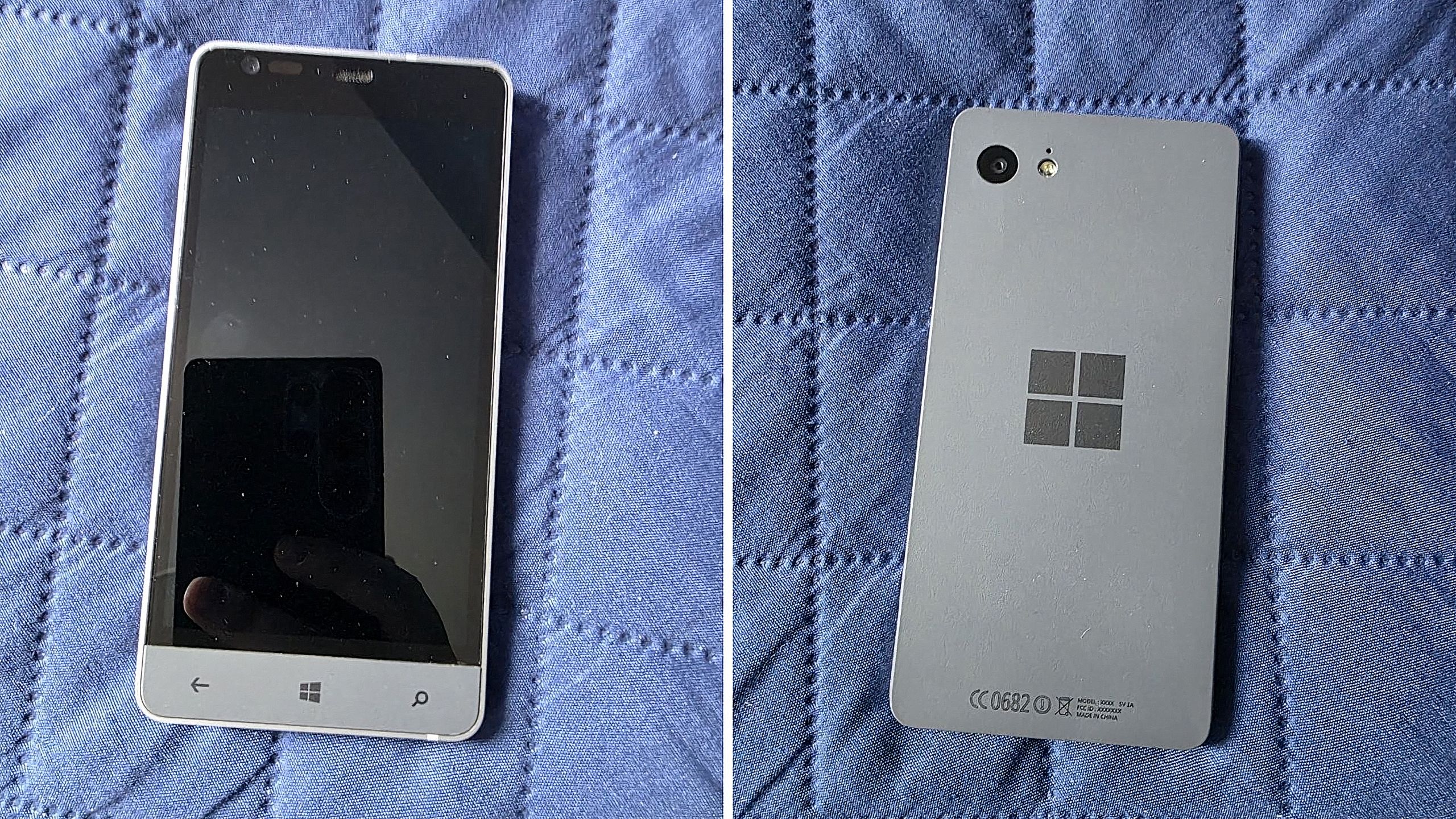
Is this Microsoft’s canceled Surface Phone from 2014? Mysterious Windows Phone prototype appears in new photos

Before Microsoft acquired Nokia, the company was heavily rumoured to be working on its own in-house Windows Phone device that was expected to ship in 2014 under the Surface moniker alongside its Surface Pro device. Unfortunately for Windows Phone fans, such a device never saw the light of day, but newly published images of a mysterious prototype might have just given us our first and only look at what Microsoft was exploring internally.

Possibly codenamed Raven, there isn't much information available about this prototype, other than the fact that it’s from the 2013-2014 time frame and is running an early pre-release build of Windows Phone 8.1. It’s powered by an unknown Qualcomm chip, has a 720p screen, features a Microsoft logo on the back, and a silver metal frame that matches the colour of the Surface 2 that released that same year.

We can see in the photos that it has dedicated hardware keys for navigation, which are also coated in the same silver color as the chassis. The build of Windows Phone that it’s running appears to be from September 2013, and is from an internal development branch building towards what eventually became Windows Phone 8.1.

Windows Phone Prototype

Real images of this mysterious Windows Phone prototype. (Image credit: Telegram/Discord)

While not viewable in the images, I understand the device features individual up and down volume buttons and a camera button on the right-hand side of the device, and a power button on the top of the device. It also features a micro-USB port and headphone jack on the bottom side, and a SIM card slot on the left side.

This is likely one of dozens of prototype designs that Microsoft’s hardware teams cooked up during this era, but it’s certainly a fascinating look at what could have been, and it does look so clean. Development on this device was likely paused once Microsoft moved to acquire Nokia in 2014.

Back in 2013, I remember hearing from sources that Microsoft was experimenting with the concept of a "Skype Phone," a Windows Phone device with mobile data that utilized Skype for calls and messaging instead of traditional carrier networks. Perhaps this device was going to be that? Who knows.

The Surface Phone we eventually got arrived as the Surface Duo, which started development in 2016 and launched to the public in 2020. In that time, Microsoft shipped Nokia designs in the form of the Lumia 640, 650, 950, and 550 running Windows Phone, before abandoning the platform in 2017.

Click to join us on r/WindowsCentral

Join us on Reddit at r/WindowsCentral to share your insights and discuss our latest news, reviews, and more.

Quinta beta do iOS 27 traz novos ícones de apps, mais ajustes da voz da Siri e outras novidades

10 August 2026 at 22:31

A Apple disponibilizou hoje as quintas versões de testes dos sistemas 27 e, como era de se esperar, elas incluem algumas mudanças e novidades que valem a pena conferirmos.

Começando pela parte visual, a Apple continua a fazer ajustes em alguns ícones de aplicativos — como o Safari, o app da Siri, os Ajustes (Settings), o Controle Remoto, a App Store e o Pré-visualização (Preview), entre outros.

O ícone do Safari está em um azul mais claro, com linhas e setas da bússola mais detalhadas, enquanto o ícone do app da Siri se parece mais com o “balão” que aparece quando ela está ativada.

Can you actually spot the difference between Safari app icon:

iOS 27 Beta 4 vs Beta 5 pic.twitter.com/C8uhT3hKyV

— TOTTI  (@TOTTI6t21) August 10, 2026

Siri updated app icon:

iOS 27 Beta 4 vs Beta 5 pic.twitter.com/kUOKJ81yah

— TOTTI  (@TOTTI6t21) August 10, 2026

O ícone da App Store está mais translúcido para que você possa ver melhor cada linha que compõe o “A”, enquanto o do app Ajustes também ficou mais translúcido em algumas partes.

Apple has updated the Liquid Glass style of the App Store app icon. pic.twitter.com/lQ67idgGFn

— Andreas Storm (@avstorm) August 10, 2026

Settings app icon:

iOS 27 Beta 4 vs Beta 5 pic.twitter.com/1hm4STHVSi

— TOTTI  (@TOTTI6t21) August 10, 2026

Já o ícone do app Pré-visualização tem uma aparência completamente diferente, com uma lupa sobre um fundo colorido, enquanto o ícone do Controle Remoto também ganhou mais detalhes e foi atualizado com um fundo cinza em vez de preto.

The Preview app got a new icon in iOS 27 Beta 5 pic.twitter.com/6fdQ0pOwgw

— Andreas Storm (@avstorm) August 10, 2026

iOS 27 beta 5 slightly redesigns the Remote app pic.twitter.com/UMtVVtbp40

— Aaron (@aaronp613) August 10, 2026

O ícone do jogo Xadrez (Chess) do macOS Golden Gate 27, por sua vez, foi redesenhado do zero, e o do Diagnostics ganhou um tom de azul mais claro.

Chess got an app icon update in macOS 27 Beta 5 pic.twitter.com/r95o3m20QQ

— Andreas Storm (@avstorm) August 10, 2026

iOS 27 beta redesigns the Diagnostics app icon pic.twitter.com/Ve3WJ1zaBx

— Aaron (@aaronp613) August 10, 2026

Por fim, pedidos no app Carteira também ganharam um ícone completamente novo.

iOS 27 beta 5 introduces a new icon in the Wallet app for Orders pic.twitter.com/4SJM8yuoXZ

— Aaron (@aaronp613) August 10, 2026

Customização da voz da Siri

A quinta beta do iOS 27 também expandiu ainda mais as opções de personalização da voz da Siri. Em versões anteriores, os controles deslizantes de Ritmo e Expressividade estavam disponíveis apenas para as vozes da Siri com sotaque americano.

Agora, essas opções de ajuste estão disponíveis para qualquer voz americana, além de todas as vozes com sotaque britânico já existentes. Isso significa que agora há 11 vozes compatíveis que permitem escolher diferentes configurações de ritmo (velocidade da fala) e expressividade (nível de emoção e ênfase).

iOS 27 Beta 5 expands Siri voice customization.

Pace and Expressivity can now be adjusted across more Siri voices, including all seven American voices and all four British voices. pic.twitter.com/Ma0aZDRHio

— Shishir (@ShishirShelke1) August 10, 2026

A própria animação da Siri também foi atualizada, refletindo melhor as cores do novo ícone supracitado.

iOS 27 Beta 5

Siri animation now less colourful pic.twitter.com/tVMYWcOCNN

— apple files (@applefiles_) August 10, 2026

“Imagem de Referência”

Conforme observado pelo pessoal do 9to5Mac, o código da quinta beta iOS 27 mostra que a Apple está trabalhando em algo chamado “Imagem de Referência” (Apple Reference Image), um possível novo recurso projetado para autenticar a origem das fotos usando dados vinculados ao hardware da câmera do iPhone.

Para isso, o sistema enviará a imagem ao Private Cloud Compute para autenticação, sendo que certas informações do sensor e metadados da foto são enviados de volta para a Apple — embora ela garanta que não acessará a foto original.

Atualmente, o recurso está desativado por padrão e, quando for lançado, poderá ser ativado em Ajustes » Câmera » Imagem de Referência e tocando em “Modo de Referência”.

Apple Reference Image

Essa verificação só será possível se as fotos forem capturadas com o referido modo ativo. Isso significa que as fotos tiradas normalmente não conterão as informações de procedência necessárias para a autenticação posterior; além disso, se a Apple determinar que um sensor pode ter sido comprometido, ela poderá revogar as autenticações anteriores associadas a esse sensor.

As fotos autenticadas também poderão ser compartilhadas com outras pessoas, de modo que as informações incluídas no compartilhamento variarão dependendo do método usado (AirDrop, Mensagens, etc.) e se a foto é uma versão original, editada ou autenticada. Se o usuário optar por compartilhar “Todos os Dados de Fotos”, a Apple afirma que a transferência também pode incluir identificadores de hardware exclusivos e qualquer vídeo não cortado associado à imagem.

Por fim, a reportagem aponta que a Apple também está adicionando uma opção “Transferir com Procedência” (Transfer with Provenance) para transferências feitas a partir de um cabo USB. Quando ativada, as fotos autenticadas transferidas para um Mac ou PC incluirão os dados de Imagem de Referência, enquanto as fotos não autenticadas ainda poderão conter informações de procedência, como identificadores de hardware exclusivos e qualquer vídeo não cortado.

RCS da Claro

Como notado por testadores da nova beta, a Claro começou a testar o suporte ao padrão RCS 1Rich communications service, ou serviço de comunicação rico., o que indica que ela pretende cumprir a promessa de liberar essa funcionalidade ainda neste ano.

E aconteceu de novo!https://t.co/2O6rPmSjqF já pegou o RCS da Claro no iOS 27 beta 5! pic.twitter.com/uZO8Dmmtoh

— Vitor Gomes (@vctgomes) August 10, 2026

Outras novidades

Outras novidades menores vistas com as novas betas incluem novas telas de apresentação quando os aplicativos Carteira (Wallet), Apple Music, App Store e Fotos são abertos pela primeira vez após o update.

iOS 27 beta 5 includes new Splash Screens for Calendar, Photos, and Apple Music pic.twitter.com/TVSytZQJbg

— Aaron (@aaronp613) August 11, 2026

A Apple também fez ajustes na Central de Controle com a beta mais recente. Os tipos de rede celular não são mais exibidos — então você não verá “5G” ou “LTE” quando seu telefone estiver conectado a uma rede Wi-Fi. Ademais, a Central de Controle e a barra de status agora apresentam novas barras de ícones de rede celular.

Apple just refined the status bar icons in iOS 27 Beta 5 pic.twitter.com/OBflDDw0k3

— Andreas Storm (@avstorm) August 10, 2026

Apple increased the height of the Cellular Data signal bars in the Status Bar and added a matching Control Center icon in iOS 27 Beta 5. pic.twitter.com/LabNcVkR8F

— Andreas Storm (@avstorm) August 10, 2026

Há novas opções de cores do wallpaper padrão do iOS 27 para o CarPlay.

iOS 27 beta 5 adds some new CarPlay wallpaper colors including Black and Lilac pic.twitter.com/jOmfx8iqeQ

— Aaron (@aaronp613) August 10, 2026

Red and Brown also got a new color pic.twitter.com/MI39ZJEf5D

— Aaron (@aaronp613) August 10, 2026

Outras várias opções foram, curiosamente, removidas.

iOS 27 beta 5 removes 10 CarPlay wallpapers:

Dark Blue
Green pic.twitter.com/r6HmoDgDnc

— Aaron (@aaronp613) August 11, 2026

Teal pic.twitter.com/r4beBvQeUA

— Aaron (@aaronp613) August 11, 2026

Na seção Busca do aplicativo Ajustes, a Apple adicionou uma nova opção chamada “Antes de Buscar” (Before Searching), permitindo que os usuários escolham quantos aplicativos aparecem como sugestões durante as buscas, entre outras coisas.

🚨 New feature Alert 🚨

iOS 27 Dev Beta 5 lets you devices how many apps spotlight suggests when first opening it up. You can keep it at 8, switch to 4 or just say none

What do we think of this 🤔 pic.twitter.com/xBlzo5tO5O

— Fernando Silva (@nandoprince93) August 10, 2026

O menu Atualização de Software do app Ajustes agora diz quando você instalou a última atualização:

New in iOS 27 beta 5: Software Updates now tells you when you installed your current version pic.twitter.com/7cIN196n3U

— Aaron (@aaronp613) August 11, 2026

Foram vistas, ainda, as seguintes novidades:

  • No app Contatos (Contacts), caso um contato criado por você tiver uma empresa associada, o nome da empresa aparecerá na lista — abaixo do nome — e nos resultados de busca.

New in iOS 27 beta 5: If a contact has a company name added, it now shows in the main view pic.twitter.com/xNtSXnYY5E

— Aaron (@aaronp613) August 11, 2026
  • Há uma fonte mais espessa para a seção de Alarmes e Timers do aplicativo Relógio (Clock).
  • A configuração mais transparente do Liquid Glass está mais translúcida do que na versão beta anterior.
  • Agora existe uma opção para ativar ou desativar o recurso “Personalizar Respostas Inteligentes” no aplicativo Mail. O recurso vem desativado por padrão e pode ser ativado na seção Mail do aplicativo Ajustes.

iOS 27 beta 5 adds a new setting for mail called Personalize Smart Replies

“Smart Reply can learn from your sent Mail messages to suggest responses that sound more like you” pic.twitter.com/LvD6NNkJod

— Aaron (@aaronp613) August 10, 2026
  • A seção Bateria do aplicativo Ajustes agora informa se uma conexão de rede móvel ruim está causando consumo excessivo de bateria.
  • O aplicativo Ajustes agora também mostra quando a atualização mais recente do iOS foi instalada.
  • O recurso de criação de passes do app Carteira já está disponível fora dos Estados Unidos.
  • A fonte San Francisco dos números do indicador de bateria foi trocada por uma versão mais arredondada.

They swapped SF Pro to SF Pro rounded for the battery percentage on beta 5
Certainly looks better pic.twitter.com/6cK6asCtGH

— ShrimpApplePro 🍤 ずっと真夜中でいいのに (@VNchocoTaco) August 11, 2026
  • Foram encontradas referências à disponibilidade da Apple Intelligence na China, incluindo menções a “mecanismos de segurança” disponibilizado por empresas locais.

iOS 27 beta 5 preps support for Apple Intelligence in China

"Apple Intelligence is built for privacy. To comply with laws and regulations, Apple Intelligence in China uses a safety mechanism provided by a local company. Your requests are processed on-device and not sent to Apple… pic.twitter.com/mCwiwZqqMi

— Aaron (@aaronp613) August 11, 2026

Certamente alguma ou outra mudança/novidade surgirá nas próximas horas e dias — e nós, é claro, estaremos de olho para comentá-las por aqui!

Notas de rodapé

  • 1
    Rich communications service, ou serviço de comunicação rico.

❌