In Episode 95 of the Sceptic: Reform's record-breaking donations row, Eugyppius on the AfD's breakthrough in Germany and David Turver on the £483 billion climate damage claim over North Sea oil and gas.
A Amazon lançou no Brasil uma oferta de quatro meses grátis para novos usuários do Amazon Music Unlimited, seu serviço de streaming musical completo que oferece acesso a mais de 100 milhões de músicas em alta qualidade, offline e sem anúncios.
Com o Music Unlimited, você tem acesso a milhões de faixas em qualidade Ultra HD e em Áudio Espacial com Dolby Atmos, além de poder desfrutar de uma integração perfeita com dispositivos e plataformas da Amazon (como a Alexa, os alto-falantes Echo e o Fire TV).
Mas ele também se integra a dispositivos e plataformas de terceiros (inclusive com os da Apple), como tablets, computadores, smart TVs e alto-falantes inteligentes (para além dos da Amazon), com direito a sincronização entre dispositivos e opção para ouvir offline.
Com algoritmos avançados que aprendem o gosto musical do usuário para sugerir playlists, artistas, músicas e estações de rádio temáticas, o serviço conta ainda com um catálogo enorme de podcasts sem custo adicional — ideal para quem não quer usar dois apps!
O Unlimited também tem letras sincronizadas em tempo real, além de conteúdos e experiências especiais para assinantes (como acesso a lançamentos antecipados, conteúdos exclusivos de artistas parceiros e shows/eventos transmitidos ao vivo pela plataforma).
O Amazon Music Unlimited não requer uma assinatura Prime (embora assinantes tenham desconto) e pode ser contratado com opções de assinaturas Individual (R$25,90/mês), Familiar (até seis contas, por R$44,90/mês) e para um dispositivo Echo ou Fire TV (R$13,90/mês).
NOTA DE TRANSPARÊNCIA: Este é um artigo fruto de um acordo comercial com um anunciante, que não influenciou a nossa opinião. O MacMagazine recebe uma pequena comissão sobre vendas concluídas por meio de links deste post, mas você, como consumidor, não paga nada mais pelos produtos comprando pelos nossos links de afiliado.
If a show you follow in Podcasts seems to be missing older episodes, check the filter first. Apple’s iOS 27 guide says a followed show is filtered to Unplayed episodes by default, so anything you’ve finished drops out of the list until you remove that filter or search for it. The same guide explains how […]
Aplicativos que utilizam uma premissa simples e a transformam em uma experiência interessante são, particularmente, meus favoritos. Exemplo disso é o Farwave, um app para iPhone e iPad desenvolvido pelo brasileiro Fernando Bunn que permite encontrar estações de rádio de todo o mundo girando um globo 3D até uma determinada região e tocando em uma estação.
A interação baseia-se na localização geográfica, e não em pesquisas por texto. Ou seja, os usuários giram o globo, selecionam uma região e tocam em uma estação, tudo pela mesma interface.
Divulgação/Farwave
Há, ainda, um botão chamado “Take me anywhere” (“Leve-me a qualquer lugar”, em tradução direta) que seleciona uma opção aleatória para ouvintes que não querem procurar um local específico; além disso, o aplicativo salva o histórico de reprodução para que as pessoas possam retornar a uma estação mais tarde.
Além do rádio, o app também organiza podcasts e músicas utilizando a mesma metáfora do globo. Diferentemente das estações de rádio, assinantes Pro podem pesquisar programas ou adicionar manualmente um feed RSS. O aplicativo também oferece suporte a filas de reprodução, velocidade de reprodução ajustável e downloads para ouvir offline.
Assinantes do plano Pro também podem importar seus próprios arquivos de áudio de um computador ou do aplicativo Arquivos. Cada artista aparece como um “sinal” próprio, e as faixas importadas permanecem no dispositivo para reprodução offline.
Two years ago, social psychologist Jonathan Haidt released his New York Times bestseller The Anxious Generation. The book posits that the rise of social media and smartphone use is largely to blame for the prominent decline in teen mental health since 2010. It quickly became a central rallying cry of the social media backlash. Haidt has been credited with helping inspire Australia's nationwide teen social media ban. He has joined forces with bereaved parents who are fighting tech companies in court. His name comes up unprompted in conversations with people in power who say his book opened their eyes to an online crisis.
In Episode 95 of the Sceptic: David Betz on the significance of the Dover protests, Brooks Newmark on the escalating Ukraine war and William M Briggs on what the numbers really tell us about Britain's latest heatwaves.
It's the hot new thing in tech, and it's where all the jobs are. Students who don't learn to use it fall behind. And to help them catch up in time, its creators are graciously providing the resources and curriculum for learning it, often pro bono.
That's the narrative AI companies are pitching schools on right now, but according to New York Times education technology reporter Natasha Singer, it's also how the tech industry has built its influence in classrooms for the past 15 years.
In a new book, Coding Kids,Singer details how tech companies took a central role in promoting computers and coding skills in education, promising computer sci …
Independent podcast apps are not growing as a category. This is not a particular secret, but perhaps you haven’t seen it stated explicitly. It’s the sort of thing that has to be inferred, but there’s plenty of available data if you look for it. While the podcasting sector has seen growth, this has occurred almost entirely on platforms like YouTube, and the independent podcast app userbase has mostly just stood still.
[…]
I’m sure somewhere out there a 21-year-old just downloaded Castro or Pocket Casts for the first time and thinks RSS feeds are awesome (if you are this person, please email me). But every number I can see indicates the userbase is both static and aging. Every new customer I talk to has used some combination of Apple Podcasts, Overcast, Pocket Casts, or Castro for at least the last 5 years if not the last 10.
[…]
Perhaps there are healthy businesses that get very few new users but instead gracefully age with the ones they have. Ferrari maybe? Buddy, smartphone apps are not one of those businesses.
[…]
I would rather work on flashy features to capture new users, but, reality being what it is, I have to think about things in terms of both the health of the ecosystem and what will actually help retain existing podcast app users.
Anil Dash wrote, in 2014, that the simple phrase wherever you get your podcasts is a “radical statement”:
[…] Because what it represents is the triumph of exactly the kind of technology that’s supposed to be impossible: open, empowering tech that’s not owned by any one company, that can’t be controlled by any one company, and that allows people to have ownership over their work and their relationship with their audience.
Video podcasting changes that. In its simplest form, it is just a YouTube channel, which means it is siloed and controlled by Google. Spotify also supports video but only in its app.
So Marco described a problem. What if someone manually asks to download an episode when they already have three downloaded? You can’t just immediately delete it to keep things tidy. So what do you do? Marco added a special hidden “episode downloaded manually” flag to the database, so those episodes would not count towards the limit.
This is one more example of how even the most seemingly trivial features require thinking through and accounting for different cases that may not be obvious at first glance. Every user interface designer and product designer should collect and absorb examples like this.
[…]
Finally, Marco’s wife Tiff suggests a solution to all the problems: just don’t let users download more episodes, she said, and show them a message, roughly: “Your episode limit is three, but this would be the fourth, denied”.
Marco liked the solution. I didn’t. Sure, it solves Marco’s problems, but not the user’s.
Birman presents this as “Let me click,” but I wanted to offer two alternative/complementary principles that helped me before:
Let me do things in any order. Here’s Google Home app, where I can change the temperature and the time for holding – but if I change the time first, it frustratingly resets when I subsequently change the temperature. It forces one specific order in an interface that suggests any order is okay[…]
The current action has the most momentum. The user is right there, active, tapping on things, wanting to get stuff done. If Overcast indeed throws a “your episode limit is three” message, then it forces the user to remember how to get to the settings and change it. The momentum is lost. The decisions of past me should not be as important as the decisions of present me.
I’ve needed to evolve my expectations for what my role in Overcast is.
After building up a large, passionate userbase over a very long time, it’s not really entirely mine anymore. I can’t just do whatever I want with it.
And the growth era of open/RSS/indie/whatever podcast apps is over. The business is now about serving and retaining my existing customers for as long as possible.
So I can add things here and there, very carefully, but I can’t really change anything significant.
Several tech stories kick off this session, including RAID software compatibility warnings, Bending Spoons’ IPO, foreign influence campaigns around data centers, and Fox’s reported Roku purchase. Chuck Joiner, David Ginsburg, Jim Rea, Marty Jencius, Web Bixby, Jeff Gamet, and Eric Bolden focus heavily on streaming control, smart TV data collection, Apple TV’s future, Spotify’s removal of fake drug-related podcasts, and the rapid growth of AI majors in higher education.
At NAB in Las Vegas, Alex Mavlios of Epidemic Sound explains how the company licenses music by acquiring full rights from artists, then offering secure usage across podcasts, video, social media, broadcast, and film. He addresses copyright risks, monetized content, artist royalties, pricing from creator plans to enterprise licenses, and why perpetual licensing helps creators avoid future rights disputes.
Rivian’s rejection of CarPlay and physical buttons in favor of voice and AI control sees to question safety, convenience, data control, and long-term car software support. Chuck Joiner, David Ginsburg, Jeff Gamet, Guy Serle, Web Bixby, Eric Bolden, Marty Jencius, and Jim Rea question whether Rivian has other motives, and then dive into Tesla updates, AI voice recreation of Stan Lee, Spider-Man ticket promotions, Dashlane concerns, and Andy Ihnatko’s new site.
The MacVoices Live! panel examines Spotify adopting Apple-backed video podcast technology, Instagram’s disappearing posts and why anyone would want them, and Microsoft expanding Copilot everywhere, whether it is a good idea or not. Chuck Joiner, David Ginsburg, Jeff Gamet, Guy Serle, Web Bixby, Eric Bolden, Marty Jencius, and Jim Rea also look at the risks of putting AI mini data centers in homes, and Plex’s major lifetime Pass price hike.
In Episode 92 of the Sceptic: Mike Graham lifts the lid on Britain's increasingly cosy media establishment and Prof Roger Pielke Jr challenges some of the simplistic claims surrounding Europe's heatwaves.
Proteja sua vida digital com a NordVPN, a VPN mais rápida e confiável do mercado. Navegue com segurança em redes Wi-Fi públicas, mantenha sua privacidade online e acesse conteúdos de qualquer lugar do mundo sem restrições. Assine agora a NordVPN e descubra por que milhões de usuários — incluindo nós, do MacMagazine — confiam nela para uma internet mais livre e segura. Aproveite a oferta exclusiva com mais de 70% de desconto e 4 meses grátis!
O Dia dos Pais está chegando e a Insider preparou uma seleção de kits de presentes para diferentes estilos de pais, com opções como atleta, treino, moderno, essencial, casual, tech e outros! São combinações de peças pensadas para o dia a dia de cada perfil, tornando a escolha do presente muito mais fácil. Comprando até o dia 8 de agosto, você ainda ganha frete grátis e brindes cumulativos (meias, cueca/calcinha ou boné/sutiã, a depender do valor da compra). E, como sempre, o cupom MACMAGAZINE acumula com os descontos já oferecidos pela Insider. O nosso link já leva você para a loja com o cupom aplicado; ao comprar por ele, você também ajuda o MacMagazine!
O tvOS 27 chegará neste ano com uma leva de novidades para a Apple TV 4K que, embora discretas se comparadas às de outros sistemas da Maçã, trazem melhorias bem-vindas ao dia a dia de quem usa o aparelho — do app Podcasts redesenhado a ajustes de performance por todo o sistema.
Preparamos um vídeo reunindo e demonstrando as principais mudanças da atualização. Confira abaixo:
Entre os destaques está o novo app Podcasts, que ganhou redesenho completo com suporte a programas em vídeo, alinhando a Apple TV às demais plataformas da empresa. O Apple Music também recebeu atenção: agora conta com suporte a áudio Hi-Res Lossless e com o recurso AutoMix, que cria transições automáticas entre as faixas.
Outras novidades incluem ajuste de tamanho de texto, verificação do status do AppleCare diretamente nos Ajustes (Settings) e atualização remota da Apple TV pelo app Casa (Home). O sistema também trará suporte a legendas geradas por IA on-device e melhorias no HomeKit Secure Video, agora com suporte à resolução 4K.
No quesito performance, a Central de Controle ficará mais responsiva, o AirPlay estará mais rápido, as animações ficarão mais suaves em todo o sistema e segundo a Apple os apps abrirão até 30% mais rápido, além de o sistema vir com diversas correções de bugs.
Vale lembrar que o tvOS 27 não é mais compatível com as Apple TVs HD e 4K de primeira geração, funcionando apenas nos modelos 4K de segunda e terceira gerações.
Proteja sua vida digital com a NordVPN, a VPN mais rápida e confiável do mercado. Navegue com segurança em redes Wi-Fi públicas, mantenha sua privacidade online e acesse conteúdos de qualquer lugar do mundo sem restrições. Assine agora a NordVPN e descubra por que milhões de usuários — incluindo nós, do MacMagazine — confiam nela para uma internet mais livre e segura. Aproveite a oferta exclusiva com mais de 70% de desconto e 4 meses grátis!
Apple TV 4K (3ª geração)
Armazenamento: 64GB ou 128GB Conectividade: Wi-Fi ou Wi-Fi + Ethernet
NOTA DE TRANSPARÊNCIA: O MacMagazine recebe uma pequena comissão sobre vendas concluídas por meio de links deste post, mas você, como consumidor, não paga nada mais pelos produtos/serviços usando os nossos links de afiliado.
Apple Podcasts runs within CarPlay, Apple’s in-car software platform for accessing compatible iPhone apps through a vehicle’s display and controls. CarPlay provides the driving environment, while Podcasts supplies the programs, episodes, library and playback features available inside it.
That combination suits a part of the day that often feels wasted. A commute may be too fragmented for reading or watching something, but it can provide enough uninterrupted time for a news briefing, interview, documentary series or comedy show.
Podcasts also give each journey a different character. The morning drive can offer information before work, while the return trip can provide lighter entertainment or continue a longer story. Drivers are free to choose whether the time should be useful, relaxing or simply less repetitive.
Apple Podcasts Fits Naturally Inside CarPlay
Apple Podcasts appears alongside other compatible audio apps when an iPhone connects to CarPlay. The vehicle display offers access to available episodes and essential controls without reproducing the complete iPhone interface on the dashboard.
The distinction is simple: Apple Podcasts does not create or power CarPlay. It is an audio app designed to operate within the wider CarPlay experience, which also handles navigation, calls, messages and other supported services.
CarPlay reduces podcast playback to the functions most appropriate in a vehicle. Drivers can use the Now Playing screen, CarPlay Dashboard, steering-wheel controls or buttons provided by the vehicle. Available commands can include playing, pausing, jumping back 15 seconds, moving forward 30 seconds and changing playback speed.
Siri provides another way to manage audio while keeping attention on the road. A driver can request a followed show, pause the current episode or continue listening without searching through the display. Support varies according to the vehicle and its controls, but the app remains connected to the iPhone rather than operating as a separate system installed by the automaker.
The interface is especially suitable for spoken audio. Songs can often continue without intervention, while a podcast listener may want to replay an explanation, skip part of an episode or resume a program interrupted earlier. CarPlay keeps those common controls accessible without placing the full Podcasts app in front of the driver.
Image Credit: Apple Inc.
The Commute Becomes a Listening Window
A regular route creates a predictable amount of listening time. Someone with a 15-minute drive may prefer concise news, business updates or language lessons. A 40-minute journey provides room for detailed interviews, investigative reporting or serialized fiction.
Apple Podcasts includes programs covering education, technology, culture, history, sports, health and entertainment. The variety allows listeners to build different routines around the same drive rather than depending on one radio schedule or repeatedly hearing familiar music.
A morning episode can provide context for events likely to shape the working day. On the way home, comedy and conversational programs can create distance from work before the listener reaches the front door. Neither choice requires treating every available minute as a productivity exercise.
The format can also make traffic less frustrating. A delayed journey remains inconvenient, but an episode gives the driver something continuous to follow as the arrival time changes. Spoken stories can hold attention without asking the driver to look away from navigation or the road.
Apple Podcasts keeps longer programs useful even when they do not fit into one trip. Listening progress can synchronize across compatible devices using the same Apple Account, allowing an episode started at home to continue in the car or resume later on another device.
Preparation Makes CarPlay Listening Better
The safest podcast decision is usually the one made before the car starts moving. Apple Podcasts allows listeners to follow shows, download episodes and arrange a queue on the iPhone in advance. CarPlay can then concentrate on playback instead of discovery.
A prepared queue is useful when several episodes are planned for one journey. The next selection can begin automatically after the current program ends, removing the temptation to search through categories while driving. Listeners can combine a short briefing with a longer interview or place lighter material after a demanding program.
Downloads make the experience more reliable. Saved episodes can continue playing through areas with weak cellular coverage, including rural roads, tunnels and underground parking structures. Downloading through Wi-Fi can also prevent a long daily routine from consuming unnecessary mobile data.
Automatic downloads can keep recent episodes from followed shows ready for the next drive. Storage still requires attention, especially when subscriptions publish frequently, but played downloads can be removed automatically according to the selected Podcasts settings.
Playback speed provides another form of control. Faster playback can help a listener finish a familiar news format within a shorter trip, while normal or slower speeds may suit technical discussions, unfamiliar accents or narrative programs where delivery forms part of the experience.
Listening Continues After the Car Stops
CarPlay does not create a separate podcast library inside the vehicle. It extends the listening activity already connected to the iPhone, preserving followed shows, saved programs and playback position when the drive ends.
That continuity prevents commute listening from becoming isolated. A listener can discover and prepare episodes on an iPhone, hear part of one through CarPlay and continue later on a Mac or another compatible device. Downloads remain stored on the device that received them, while supported library information and progress can synchronize through the Apple Account.
Commute length can eventually shape a personal programming schedule. A 12-minute daily news show may fit the morning route almost exactly, while a 45-minute interview can cover both directions with the remaining section ready for the following day. The queue can change with the calendar, leaving shorter episodes for busy mornings and deeper programs for the roads that provide enough time to hear them properly.
A cada atualização anual do macOS, uma escolha da Apple em particular gera quase tanta curiosidade quanto as mudanças e os novos recursos do seu sistema operacional: o nome que acompanhará o update.
Hoje, faremos uma breve recapitulação das principais escolhas da Maçã sobre os nomes de cada versão do sistema operacional dos seus computadores, passando por décadas de codinomes felinos e, mais recentemente, paisagens californianas.
As (várias) mudanças do passado
Antes disso — no período do Mac OS Classic, que abrange os sistemas dos Macintoshes lançados entre 1984 e 2001 —, os nomes dos sistemas da Apple eram usados quase exclusivamente de forma interna. Publicamente, as versões recebiam denominações bastante protocolares, mas, nos bastidores, praticamente todas carregavam codinomes.
O System 6, por exemplo, teve versões conhecidas internamente como Antares (6.04), Big Deal (6.05), SixPack (6.06) e Terminator (6.08). Já o System 7 passou por uma verdadeira coleção de nomes, incluindo Blue, Beta Cheese, Cube-E, I Tripoli, Jirocho, Mozart, Capone, Danook, Thag e Marconi, entre outros. Também houve casos específicos, como Road Warrior, utilizado nos primeiros PowerBooks, além de Unity, Buster, Son of Buster, Harmony e Ides of Buster, empregados em versões posteriores do sistema.
A partir do Mac OS 8, os nomes foram predominantemente relacionados à teoria musical — é o caso do codinome Tempo no Mac OS 8, Allegro no Mac OS 8.5 e Sonata no Mac OS 8.7 (versão de desenvolvimento do que viria a ser o Mac OS 9). As exceções são o Mac OS 8.1 (intitulado Bride of Buster) e o Mac OS 8.6 (Veronica).
Essa só se tornou uma tradição marqueteira a partir do Mac OS X 10.2, quando Steve Jobs apresentou a nova versão do sistema operacional como Mac OS X Jaguar, levando um codinome ao público pela primeira vez — antes do Jaguar, a Apple utilizou os codinomes Kodiak para a versão beta, Cheetah para a 10.0 e Puma para a 10.1 —, inaugurando a era de nomes de grandes felinos.
Os animais ditaram os sistemas dos Macs por cerca de dez anos (de 2002 até 2012): foi o caso do Mac OS X 10.3 Panther, Mac OS X 10.4 Tiger, Mac OS X 10.5 Leopard, Mac OS X 10.6 Snow Leopard, Mac OS X 10.7 Lion e, por fim, OS X Mountain Lion 10.8 — que abandonou (temporariamente) o prefixo “Mac”.
OS X Mavericks 10.9: a alteração de rota rumo à Califórnia
A partir da décima versão do macOS (então OS X), a Apple adotou publicamente nomes com as regiões da Califórnia, tendência que segue em vigor até os dias de hoje.
A troca, aliás, andou em paralelo a uma mudança paradigmática do sistema: foi somente com o OS X Mavericks 10.9 que a Maçã deixou de cobrar pela atualização dos seus sistemas operacionais, permitindo que os seus usuários, a partir do Snow Leopard (na compilação 10.6.8), atualizassem as suas máquinas sem custos adicionais — uma realidade que permanece até os dias de hoje.
O primeiro destino geográfico escolhido pela Apple remete a uma região litorânea conhecida pelas altas ondas, propícias para a cena local do surfe. O papel de parede do OS X 10.9 dava destaque à curvatura de uma grande onda em tons de azul e turquesa, com clara inspiração na localização que deu nome ao update.
Em matéria de software, o OS X Mavericks ficou marcado pelo aprimoramento na gestão de performance, bateria e memória, aproveitando melhor o hardware dos computadores da Apple. Quanto aos recursos, o sistema trouxe os links compartilhados no Safari, respostas embutidas em notificações, abas e tags no Finder, melhor suporte ao uso de múltiplos monitores, além da introdução de novos aplicativos, como o Mapas e iBooks.
OS X Yosemite 10.10
Pouco mais de quatro horas adiante (ou 314km, para ser mais exato), encontramos o Parque Nacional de Yosemite. A área já era considerada tão importante para a preservação ambiental que Abraham Lincoln autorizou sua proteção e uso público em 1864, anos antes da criação de Yellowstone, reconhecido como o primeiro parque nacional do mundo. Outro grande entusiasta de Yosemite foi Theodore Roosevelt, que ajudou a consolidar a sua importância dentro do sistema de parques americanos.
Um dos maiores símbolos do parque — e também o destaque do wallpaper oficial do sistema — é o Half Dome, um monólito de granito com impressionantes 2.696 metros de altitude. Localizada no coração de Yosemite, a formação foi considerada inescalável por alguns geólogos do século XIX, até que George G. Anderson realizou a façanha em 1875, escalando-a descalço. Muito possivelmente, a foto usada pela Apple foi registrada com uma lente teleobjetiva nas proximidades da Ahwahnee Meadow.
O OS X Yosemite 10.10 foi um marco importante na trajetória do macOS. Muito lembrado pelas mudanças de design na interface — com elementos translúcidos e ícones de formas planas que definiriam a identidade visual do sistema por várias gerações —, ele também deixou como legado a introdução dos recursos de Continuidade (Continuity) entre o OS X e o iOS.
Inicialmente, a novidade englobava apenas o AirDrop, as chamadas telefônicas, o app Mensagens, o Handoff e o Instant Hotspot. Ainda assim, ela inaugurou um nível de interoperabilidade que ajudou a redefinir a forma como o mercado de tecnologia passou a enxergar ecossistemas compostos por diferentes produtos de uma mesma marca.
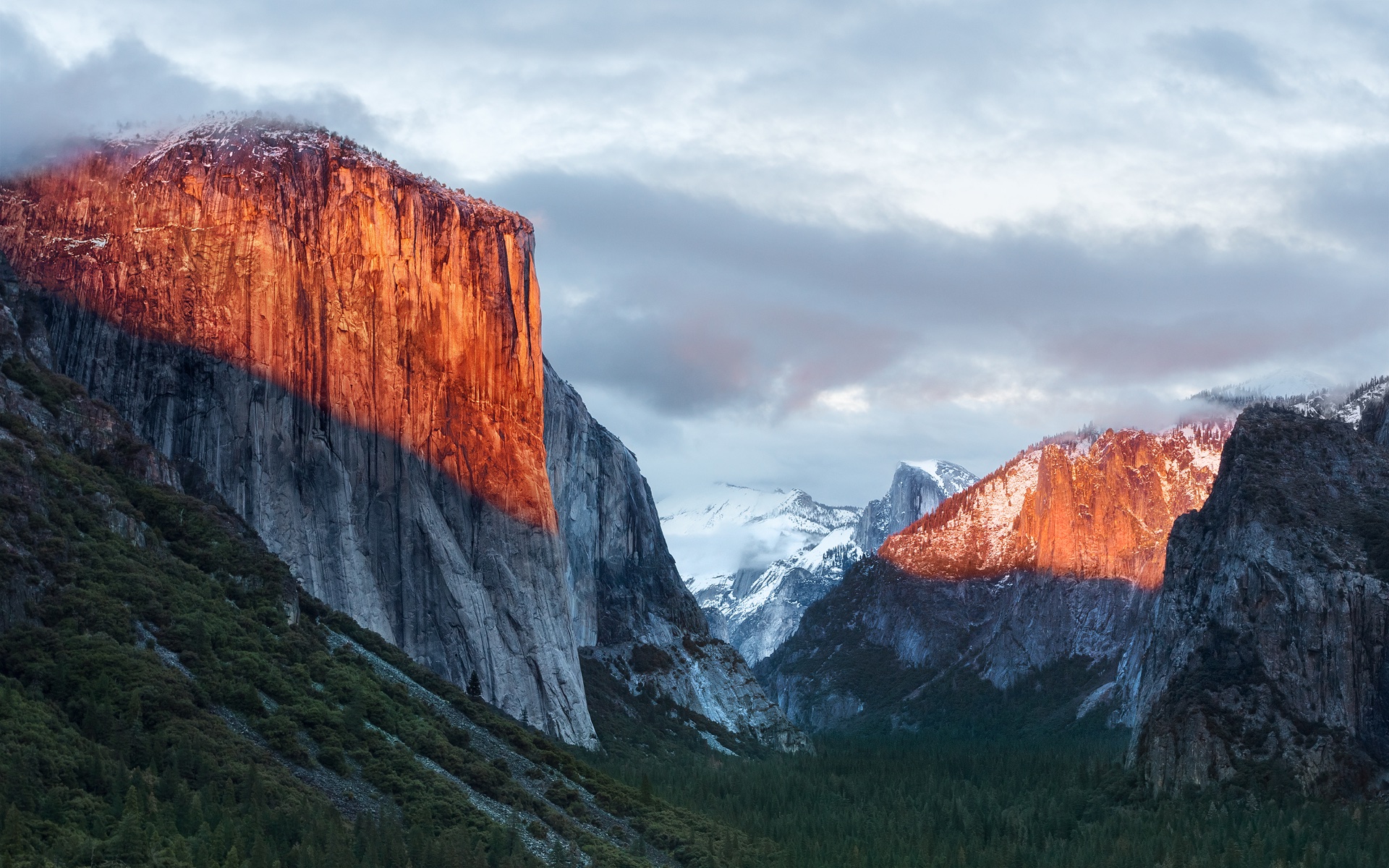
OS X El Capitan 10.11
A apenas 20 minutos de distância do Ahwahnee Meadow, a próxima parada do Mac é outra atração turística presente dentro do Parque Nacional de Yosemite: o El Capitan é um monólito de granito de quase 900 metros que se ergue acima do vale do parque.
O papel de parede provavelmente foi fotografado a partir do mirante Tunnel View, de onde é possível avistar o El Capitan à esquerda do vale. Ao fundo, surge o Half Dome — um enquadramento que parece refletir o espírito da atualização. Diferentemente de Yosemite, o OS X El Capitan 10.11 deu menos ênfase à introdução de novos recursos e concentrou seus esforços em correções de bugs, otimizações de desempenho e refinamentos da experiência de uso. Entre as principais novidades, estavam um Spotlight aprimorado, a adição do Split View e diversas melhorias nos aplicativos nativos da Apple.
macOS Sierra 10.12
Cerca de 338km depois (aproximadamente quatro horas e meia) de Yosemite, passando pela cordilheira de Sierra Nevada (situada no leste da Califórnia, a oeste do Mount Whitney), temos o Lone Pine Peak, cenário da montanha que aparece no wallpaper do sistema.
Além da mudança de nomenclatura de OS X para macOS (colado e com o “m” minúsculo, como segue até os dias de hoje), a atualização é particularmente lembrada pela inclusão da Siri no Mac, o Desbloqueio Automático (Auto Unlock) com o Apple Watch e a Área de Transferência Universal (Universal Clipboard) entre Macs, iPhones e iPads.
macOS High Sierra 10.13
Uma rápida viagem de 80 minutos (129km) é capaz de nos levar ao próximo destino fotografado pela Apple: North Lake, localizada na pequena cidade de Bishop, entre as montanhas da cordilheira de Sierra Nevada. Ali, muito possivelmente em meio ao outono, o registro eternizado no papel de parede do sistema foi feito.
Quando falamos do sistema, aos moldes do próprio El Capitan e do Snow Leopard, o macOS High Sierra 10.13 focou muito mais no aprimoramento interno do macOS do que em novos recursos, mas vale mencionar a inclusão do novo sistema de arquivos da Maçã (o Apple File System, ou APFS), do suporte aos formatos audiovisuais HEVC e HEIF, bem como a chegada da segunda geração da tecnologia de desempenho gráfico Metal.
macOS Mojave 10.14
Depois das montanhas, que peculiarmente ficam na margem do wallpaper, vieram as dunas. Com uma distância de 253km (ou três horas de carro), o próximo destino é o Parque Nacional do Vale da Morte, o ponto mais quente do continente americano — onde se registrou a maior temperatura da história (56,7°C) em julho de 1913, e onde a foto do papel de parede do macOS Mojave 10.14 foi feita.
Já sobre as novidades do sistema, essa versão do macOS é particularmente conhecida pela introdução do Modo Escuro, a inclusão dos Conjuntos (Stacks) na Mesa (Desktop), além da estreia de apps já conhecidos dos usuários de iOS, como o Apple News, o Bolsa (Stocks), o Gravador de Voz (Voice Memo) e o Casa (Home).
macOS Catalina 10.15
A 428km adiante do Deserto de Mojave (cerca de cinco horas e meia de carro), nós temos a Ilha de Santa Catalina, destino paradisíaco — e remoto — da costa sul da Califórnia que deu nome à versão do macOS lançada em 2019. Pela posição da foto, o que se especula é que o registro oficial da Apple tenha sido feito com o auxílio de um drone ou helicóptero, sobrevoando as águas para capturar Catalina sob diferentes períodos e iluminações para fornecer o tema dinâmico disponível no sistema.
Essa atualização marcou o fim do iTunes, que foi segmentado em um catálogo de aplicativos separados (Apple TV, Música, Apple Podcasts), mas sua adição mais relevante muito possivelmente foi o recurso Sidecar, que possibilita o uso do iPad como um monitor externo do Mac.
macOS Big Sur 11
Com uma distância de 524km da Ilha de Catalina, a próxima parada é na Ponte Bixby Creek (inaugurada em 1932 e particularmente conhecida por suas estradas com curvas), localizada na costa central de Big Sur, que dá nome a essa versão do macOS — o papel de parede retrata também a parte litorânea do local.
Sobre o sistema, a versão marcou a transição dos processadores da Intel para o Apple Silicon com o lançamento do M1, trazendo novos ícones, materiais translúcidos, um novo Dock, Central de Controle e de Notificações.
Esta versão também foi um marco para o sistema operacional, pois, pela primeira vez em muitos anos, a Apple abandonou as sub-versões 10.x e passou para o número 11 — o que se manteve nos anos subsequentes.
macOS Monterey 12
Ainda na costa de Big Sur, o macOS Monterey 12 marcou a quebra de uma tradição: pela primeira vez em anos, a Apple optou por não incluir um registro fotográfico como possível papel de parede ou tela de descanso, mantendo apenas temas dinâmicos para ilustrar o sistema dos Macs naquela ocasião.
O Condado de Monterey, que inspirou o nome do sistema, é particularmente lembrado por ter abrigado a primeira capital da Califórnia, quando a região ainda era de domínio dos governos da Espanha e do México.
Em relação ao sistema, o grande destaque foi a introdução do Controle Universal (Universal Control), permitindo que um único conjunto de periféricos (como teclados e mouses) seja utilizado simultaneamente no Mac e no iPad.
macOS Ventura 13
Por volta de 450km de distância (quatro horas e meia de trajeto) depois, temos o Condado de Ventura, que inspirou essa versão do macOS. Emancipado do Condado de Santa Bárbara em 1873, ele abriga o píer mais antigo do estado da Califórnia. Mais uma vez, a Apple optou por não incluir um papel de parede fotográfico.
Quanto aos seus recursos, o macOS Ventura 13 se destacou pela adição do recurso Organizador Visual (Stage Manager) e melhorias no Spotlight, Safari, entre outros aplicativos nativos do sistema que ganharam reformulações.
macOS Sonoma 14
Do Condado de Ventura até Sonoma, são 748km (pouco mais de sete horas de trajeto) até a região norte de San Francisco, conhecida por abrigar centenas de vinícolas. O registro da Apple foi feito na vinícola Mazzocco Sonoma, no rancho de Warm Springs.
Depois de dois anos, a Apple enfim retornou com os papéis de parede fotográficos no macOS, funcionando também como protetores de tela (screensavers) dinâmicos que lentamente se tornam um wallpaper estático após o login.
A maior novidade do sistema foi a implementação dos widgets interativos na Mesa (Desktop), além de reformulações no modo Jogo, na relação do sistema com acessos remotos e no compartilhamento de conteúdos em videochamadas, com novidades também no Safari, na Siri e nos recursos de acessibilidade.
macOS Sequoia 15
Saindo de Sonoma, nosso próximo destino está localizado a quase sete horas de distância (mais ao sul da Califórnia, a exatos 547km de distância); trata-se do Parque Nacional da Sequoia, que abriga algumas das maiores árvores do planeta em termos de volume.
O registro do papel de parede é remoto o suficiente para não termos uma dimensão exata da sua localização geográfica (até porque a Apple nunca divulgou essa informação), mas é seguro afirmar que as imagens foram capturadas em algum dos bosques de sequoias da Sierra Nevada.
Além da estreia controversa dos recursos da Apple Intelligence devido à discrepância entre o que foi apresentado e as funcionalidades entregues, o macOS Sequoia 15 introduziu o Espelhamento do iPhone (iPhone Mirroring), a organização de janelas em mosaico e o aplicativo Senhas (Passwords).
macOS Tahoe 26
Do Parque Nacional de Sequoia, partimos rumo ao norte, até a fronteira entre a Califórnia e o estado do Nevada (uma distância de 330km, ou três horas e meia de trajeto). O próximo destino é o Lago Tahoe, também presente na cordilheira de Sierra Nevada. Ele é particularmente conhecido por ser o maior lago alpino da América do Norte em termos de altitude.
Conhecido por suas águas cristalinas, o lago é um destino frequente para esqui. O papel de parede do macOS Tahoe 26 exibe um ângulo baixo sobre o lago, com as rochas em primeiro plano, enquanto os pinheiros e as montanhas de Sierra Nevada aparecem ao fundo.
Quanto ao sistema, além da unificação da numeração com todo o ecossistema (iOS, iPadOS, watchOS, tvOS e visionOS) da Apple, essa versão foi especialmente marcada pelo redesign de interface com a estreia do Liquid Glass. Outras novidades incluem a adição das Atividades Ao Vivo (Live Activities) ao recurso Continuidade, além de revisões do Spotlight, Central de Controle e os recursos da Apple Intelligence.
macOS Golden Gate 27
E, enfim, chegamos à versão mais recente do macOS! Com uma distância de 330km (trajeto com cerca de três horas e meia), nosso próximo destino é o cartão postal da cidade de San Francisco: a Ponte Golden Gate.
Ela foi, até 1964, a maior ponte suspensa do mundo — caso seus cabos de sustentação fossem esticados, teriam tamanho o suficiente para dar três voltas no planeta.
Enquanto sistema, assim como o Snow Leopard ou o High Sierra, o macOS Golden Gate 27 é marcado por sua abordagem de priorização dos refinamentos, tanto relacionados ao visual Liquid Glass quanto aos recursos da Apple Intelligence e da Siri, que agora se torna Siri AI.
E você aí, usa o macOS desde que versão? Alguma, em especial, lhe marcou? Ou você (ainda) não é usuário de Mac, mas gostou de todas essas curiosidades? 😊
For the last 22 years, one of the most bizarre true crime stories ever to grace the program Unsolved Mysteries has confounded amateur investigators and spawned hundreds of pages of online speculation. Who was behind the decade-long torment of Bill and Dorthy Wacker in the 80s and 90s, which included allegations of stalking, robberies, and even assaults?
While any internet true crime enthusiast knows Unsolved Mysteries frequently left out interesting details that can create a rabbit hole of alternative explanations, in this case, the show has been the sole source of information, with no other known period news coverage of the harassment.
That is, until recently, when this author acquired the original police records, spanning almost 100 pages of material, while researching for my podcast, Cease to Exist. The records reveal a wealth of new information, including potential leads on suspects, and answers to questions true crime fans have speculated about for years.
The Wackers claimed to be victims of a long-term harassment campaign. Credit: Film Rise/Unsolved Mysteries
Unsolved Mysteries
In the Unsolved Mysteries season 6 two-hour finale, airing in the spring of 1994, the public met Bill and Dorthy Wacker, an elderly couple from Massillon, Ohio, who claimed to be victims of a bizarre string of harassment stretching back years. Since then, their story has been the subject of considerable speculation, with some believing the whole affair was so unbelievable that the Wackers must have been making it up. On the other hand, Dorothy herself did seem to bear injuries consistent with the couple’s claims. Without any further information, true crime fans dissected every available scrap of evidence, including the accuracy of the reenactments, for possible clues.
“The Wackers are quiet, unassuming people who tend to mind their own business. Hardly the type to draw the wrath of an unseen enemy,” Unsolved Mysteries host Robert Stack said at the beginning of the segment.
The scene then opens with the couple returning to find their home ransacked on January 16, 1985. This was the third claimed incident, but according to the program, the first that was reported.
“After nearly 10 years, Dorothy and Bill Wacker still wonder who and why,” Stock intoned.
The Wacker’s Story
In interview footage with the couple, Bill speculates that someone may be attempting to force the couple to move, although why that would be was unclear, and refers to the perpetrator as “a kook,” which becomes a bit of a meme in online discourse about the case.
Six months after the previous break-in, Dorothy was home alone recovering from heart surgery when she heard a knock at the door. She found a young man who claimed his car had broken down and that he needed to use her telephone. Although she didn’t see a car anywhere, she let the polite stranger in. He made a call, thanked her, and appeared to leave.
Before she knew what had happened, Dorothy awoke tied up on her kitchen floor after having been struck in the head. A neighbor heard her cries through an open window and came to her aid. Although Dorothy’s injury was not serious, there were two strange elements to the crime. First was the graffiti “cheaper, but will do,” shown in the reenactment as having been left on the kitchen wall. Second was the variety of items stolen from the home, including a gun and radio receiver, which were later returned to the Wackers’ porch. Police were baffled by the return of a stolen gun and distributed fliers featuring a sketch of the suspect, but no identification was ever made.
Harassment continued with a series of threatening phone calls that persisted even after the family changed their number, according to Dorothy and her daughter Peggy Hoover. Additionally, nocturnal banging on the outside of the house began, which led the couple to install lights. The only result was a strange note on the front porch reading “your lights are a laugh,” and subsequent notes such as “you scum I’ll get even,” with a backside reading “this time ha ha.” The police never found any fingerprints on the notes and suggested they may have been made by someone using their opposite hand to disguise their handwriting.
The graffiti written on the Wackers’ wall in the Unsolved Mysteries Reenactment (Credit: Filme Rise/Unsolved Mysteries)
Second Attack and Stake Out
The most dramatic events yet occurred in the fall of 1993. Dorothy was walking her dog outside of their home on October 27th when she was attacked again. The segment claimed she suffered “skull lacerations” and was taken to the hospital, but there were no witnesses to the event.
Notably, Sheriff Bruce W Umpleby says that after interviewing neighbors, no one had any information that led them to believe there was a person there. He continued that most crimes have simple motives and there has never been one identified for the strange periodic flurries of activity around the Wackers.
Things reached a climax when the family conducted a stakeout, hoping to finally capture the stalker one November evening. Bill hid inside a trailer in the driveway, while Dorothy and their daughter Cathy stayed inside the home. Across the street, their sons-in-law Dan and Clay sat in a vehicle in a neighbor’s driveway. After almost four hours, they decided to end the stakeout around 10:30 p.m., when they heard a loud bump on the porch. Incredibly, the stalker had apparently evaded the surveillance and thrown a rock onto the Wackers’ front porch with a note reading “get the message.”
At the conclusion of the segment, Bill says he hopes whoever is responsible is caught soon because, if the Wackers were no longer the targets, he feared the individual would simply target someone else.
Unsolved Mysteries Online Speculation
Besides noting that the sheriff’s department had asked Dorothy after the second attack whether Bill could have been the attacker, the series plays the events fairly straight, without directly questioning the couple’s story. The eerie music and Stack’s gravelly voice convey a feeling of serious menace. True crime fans are more divided, with some arguing that the events were too implausible to be real, while others find it unlikely that an elderly couple would fabricate such a wild tale. Notably, another popular Unsolved Mysteries segment, involving the stalking of Cindy James, is also widely believed to have involved a hoax.
Unfortunately, Newspapers.com’s archive of the local paper, The Massillon Independent, has a large gap between the early 1970s and the 2020s. The only other known media appearance by Bill Wacker before his death was in an unrelated citizen-reaction piece about Connie Chung interviewing Newt Gingrich’s mother in the Akron Beacon Journal, although he is wearing an Unsolved Mysteries hat in the picture. The only other items recovered were obituaries stating that Bill had died in 1999 at age 79 and Dorothy in 2020 at age 83. This left armchair sleuths to rely primarily on what appeared in the episode itself, which does raise questions.
One notable detail is that, in the reenactment, Dorothy’s dog doesn’t bark to alert her to the intruder, which seemed uncharacteristic of a small dog. People debated whether this was merely a quirk of the reenactment or reflected how the event actually occurred, with some questioning whether this provided evidence that Bill was behind the assault. Additionally, some found it odd that the stakeout was called off at the relatively early hour of 10:30 p.m. and found the return of stolen items completely unbelievable. Another oddity was the wording of the letters, with phrases like “you scum” and “no junk,” which sounded to some like older adults attempting to mimic the speech of teenagers while using outdated phraseology.
Among those who believe the Wackers, suspicion has frequently fallen on the daughters, who would presumably inherit the home and were not mentioned as suspects in the episode. Particular suspicion has fallen on Peggy, who was not present for the stakeout. Some have also pointed to the phone calls continuing after the Wackers changed their number as possible evidence of an inside job.
One Redditor, sovietbabyy, claimed to be a relative of the Wackers who stumbled upon the case, although they were too young to have ever met Bill and Dorothy themselves. They claimed Bill and his siblings were all dead but asked other family members for more information and were told that the extended family believed the story and that Bill was usually secluded but would help anyone in need. Five years later, a poster using the screen name goawaycommies followed up, claiming to be the same person. In these new posts, the author claimed that Stark County was a high-crime area and that the police were known to be ineffective; therefore, it shouldn’t be surprising that no one was caught.
While it could be debated whether these two posters are actually the same person, the goawaycommies post provided one essential detail that led to a major breakthrough: the Wackers’ address.
Finding the Wackers
In late December, I wrote to the Massillon County Sheriff requesting any files they had on the Wackers. They granted my request in early January, providing 94 pages of documents. Follow-up requests to the North Lawrence Fire Department, who responded to the assaults, as well as inquiries to two of the responding officers and Ricky Lee Pegido, were fruitless. The Sheriff’s office maintains that these documents are all that were found in the file, despite some appearing to be missing, such as a cover sheet without a report and references to a “phone trap” that is not followed up on.
While the officers may not have wanted to talk about these events, what was contained inside was fascinating, providing the names of suspects, neighbors’ opinions on the Wackers, incidents that were not included in the Unsolved Mysteries segment, and another 90s-era “classic” addition: records involving consultation with a psychic about the crimes.
The Wacker home today. Credit: Google Street View
The Reports
Right from the beginning, the documents tell a slightly different story from the television segment. Instead of waiting until the third event, in January 1985, to call police, there was a report concerning the initial August 1984 break-in. This one was different from the others, with gold and diamond jewelry stolen that was not returned and police noting that a credit card may have been used to force the lock.
The police report for the January 1985 break-in contained two notable details: the method of entry and the first-named suspect. Despite having their locked home broken into previously, the Wackers had left a side door unlocked, allowing the burglar to gain entry. Additionally, the report lists a “Randy” as a possible suspect, a young man whose aunt had previously cared for Mrs. Wacker’s elderly mother in the home.
Next, the first assault report appears, which is similar to what was shown in the episode, except that “CHEAPER, BUT WILL DO” was written in a bathroom instead of the kitchen. Additionally, a basement window was cut, through which the perpetrator may have escaped. The man who came to her aid is named here as Jim Pedigo, who says he and his brother had been working in their backyard all morning without seeing or hearing a thing until Dorothy’s cries became evident. In this report, the name is given as “Pedigl,” and it switches back and forth between that and “Pedigo” in the reports (the name “Pedigo” appears in print as a family name in the area in obituaries). When Bill returned, he found items that appeared to have been staged to be taken later from the robbery around the perimeter of the house.
Following this, there is a series of minor reports of items being stolen and returned—oddly, with the Wackers still not locking their doors, despite the first report indicating that had been their former habit.
The Second Assault
The report of the second assault does closely match the program, even down to the controversial dog not barking when the assailant came after Dorothy. Although the Wackers claimed the dog normally ignored its surroundings as it relieved itself, the officer noted on a follow-up visit to the residence that the dog barked when he arrived, which he found suspicious. In the report, Dorothy claimed she had to crawl to the back door to get help from Bill after the attacker fled, which was supported by dirt and scratch marks on her forearms noted by the officer. The officer gave Bill some suggestions, such as installing a light on that side of the house and trimming some trees to remove hiding places.
A lengthy segment of the report regarding the Sheriff’s canvassing of the neighborhood provides some interesting insight into the Wackers’ relationship with their neighbors. This portion notes that:
The neighbors collectively agreed that none of them have had any type of problems. Nor, have they seen or heard any form of disturbance in the area. In fact, several of the neighbors stated that they don’t even lock their doors. Further stated by the neighboring community, most of the neighbors stay to themselves, however, ‘the Wackers bring most of their problems on themselves.’ Apparently the Wackers aren’t the most congenial of persons in the neighborhood, especially with the Shillings and Maddox’s.
The Maddox family is the same household as the Pedigo family, a notable change of relations since Jim Pedigo aided Dorothy. On the other hand, another couple in the neighborhood stated that they regularly played cards with the Wackers, providing a nuanced image of them as people who got along with some but not others.
Suspects Not Named on Unsolved Mysteries
Following this event, both of the daughters began continually contacting the Stark County Sheriff’s office, demanding more attention be paid to their parents’ harassment. One of the items introduced here, but oddly never followed up on, is a “phone trap” put on the Wackers’ phone by their telephone company, Ameritech, to monitor all incoming calls. Although the reports say this is activated, there is no information on whether any claims of harassing calls were ever compared against the phone trap.
There appears to be a missing report explaining where the tip originates from, but officers speak with the son residing at the Maddox/Pedigo residence, Ricky Lee Pedigo, about whether he is aware of an individual by the name of “Shriner” on his mother’s side of the family, which he was not. When they later return to speak with his mother, Barbara Maddox, she claims she is not related to anyone by that name and flippantly remarks that the composite of the suspect in the first attack on Dorothy looks like a young dick Van Dyke, but no one she’s ever seen before.
Next, officers follow up on a tip from daughter Peggy Hoover that a woman named Debbie Shriver’s (not Shriner) ex-husband may be the suspect. After tracing this woman through a former landlord and then her own father, Debbie, now going by Debbie Pedigo, agrees to speak with the Stark County Sheriff’s. She says the composite bears no resemblance to her ex-husband, James Shriver.
Peggy then returns with another tip that a psychic told her the suspect lives within a twelve-mile radius of the Wacker home.
Finally, Peggy provides one last suspect: Barbara Maddox’s stepson, Johnny Lee, whom she says may be because her parents didn’t pay enough attention to him as a boy. At this point, Barbara Maddox has had enough, saying that her stepson hasn’t been to visit in years, and she is going to put up a privacy fence to keep away from the Wackers.
The suspect sketch from the Dorothy Wacker assault. Credit: Film Rise /Unsolved Mysteries
Final Events
From this point on, the banging and rocks being thrown at the home continued. At one point, the Wackers claimed someone had tried to gain entrance to their locked home, but the police report casts suspicion on this. The appraisal was that it appeared as though someone was attempting to make it look like the house was being broken into without causing too much damage, and it was inconsistent with typical burglary techniques.
The final report is from October 1997, when Dorothy heard a loud banging on the house while seated in the living room. An officer responded but could find no damage.
All the reports are bizarre. The daughters appear to be very invested in the case, yet Peggy ultimately seems to be throwing around claims that don’t add up to anything. Was she letting her imagination run away with her, using the events as a cover to harass people she had personal grievances against, or was she really on to something? The “Shriner/Shriver” discrepancy speaks to a minor issue prevalent in the police’s investigations: not confirming the spelling of names, which also occurs with “Pedigl/Pedigo.” Does this indicate the sheriff’s department is generally performing sloppy work, as the Reddit poster implied? While there is room to speculate here, the constantly changing accusations may have undermined Peggy’s credibility with law enforcement.
One possible conclusion is that the very earliest break-in was real, since the stolen items were not returned and the report is consistent with a typical forced entry. Perhaps after that, the Wackers developed a taste for the excitement and attention and hoaxed the rest of it. This would explain the incongruities of items being returned, no one ever seeing anything, their continuing to leave their doors unlocked, and the strange attempt to create the appearance of a forced entry without damaging the home.
But then again, officers reported witnessing injuries to Dorothy after both assaults. Could she have been willing to take things that far? Could the couple have truly been victims? Could one of the children be behind it? Was Bill assaulting her?
None of these questions can clearly be answered from the available evidence; and so, decades after the strange story of the Wackers first came to public attention, the case rests—and another relic of the 1990s remains an unsolved mystery.
Ryan Whalen covers science and technology for The Debrief. He holds an MA in History and a Master of Library and Information Science with a certificate in Data Science. He can be contacted at ryan@thedebrief.org, and follow him on Twitter @mdntwvlf.

 Login
Login