Canon announced its 3D image generation 'Dual Pixel 3D' tech
It uses depth data from a single shot via Dual Pixel CMOS AF, through a free Windows-only app coming in October
The EOS R10 and most models up to the EOS R5 series are compatible
Canon introduced a new Dual Pixel CMOS-type sensor and autofocus system in the EOS R5 back in 2020, and a string of cameras have since inherited this tech, most recently the EOS R8 Mark II announced today. And it's these cameras that just got a free upgrade that can add another dimension to photos: Dual Pixel 3D.
The new software leverages "depth and phase-detection data captured in a single shot via Dual Pixel CMOS AF", says Canon, using "an exclusive algorithm to convert your photos into highly realistic 3D imagery", plus 3D models in OBJ or GLB formats, or as an MP4 video, "complete with rich photographic textures."
This depth-adding tech will come in the (free) Dual Pixel 3D Converter software, which will be available for Windows only (Windows 11 64-bit 24H2 or later), from October 3.
So what exactly can users expect from the software, and which cameras are compatible? Let's take a look.
An extra dimension
Billed as 'simple 3D image generation technology', Dual Pixel 3D enables users to create immersive three-dimensional images and models from a single RAW photo, without needing specialized equipment or viewing devices. Canon also says the technology works with JPEGs captured by the new EOS R8 Mark II.
These files contain depth information from slightly different views, captured by each pixel's two photodiodes, which are then converted into 3D shape data.
Users will be able to fine-tune the degree of depth in the new software, for a more pronounced 3D effect or a subtler appearance. The depth information in Dual Pixel CMOS-captured photos also simplifies background removal, should users want to output a subject onto a plain background as a 3D model, or as a stereographic photo.
Can has shared tips for how to take photos designed to be converted for 3D on its YouTube channel (see below).
Photographers working in product and still life photography stand to benefit from the creative possibilities in particular. We'll be sure to try out the new software when it's released on October 3, and share our experience of making 3D imagery with it.
Compatible Canon cameras and lenses
Here's every Canon mirrorless camera that features Dual Pixel CMOS AF and can, therefore, enjoy the new Dual Pixel 3D feature, provided images are captured with a compatible lens:
New camera-free smart glasses from Meta are rumored
The wearable could be unveiled as early as next week
A new glasses-detecting app is proving popular with users
It's fair to say that the various iterations of Meta's smart glasses had been quite well received by users — as you'll see from our own reviews — but over time, the general public has become less and less comfortable with the idea of being secretly spied on through the cameras embedded in these wearables.
That might explain Meta's plans to release some spectacles with cameras on board, as reported by The Information. According to the outlet's sources, the glasses have the codename Luna, and will be available in two styles called Clubmaster and Burbank.
With no camera, the focus will be on the audio capabilities of the glasses, which will let you have conversations with Meta's own AI chatbot. The report says we could get a grand unveiling at the Meta Connect event next week, on September 23 and 24.
While Meta's smart specs have always been fitted with LED lights that show when they're recording, modders were finding ways around this, enabling more covert video and photo capture. While those mods have since been disabled and prevented by software updates, it's still left people with a general sense of unease.
The backlash continues
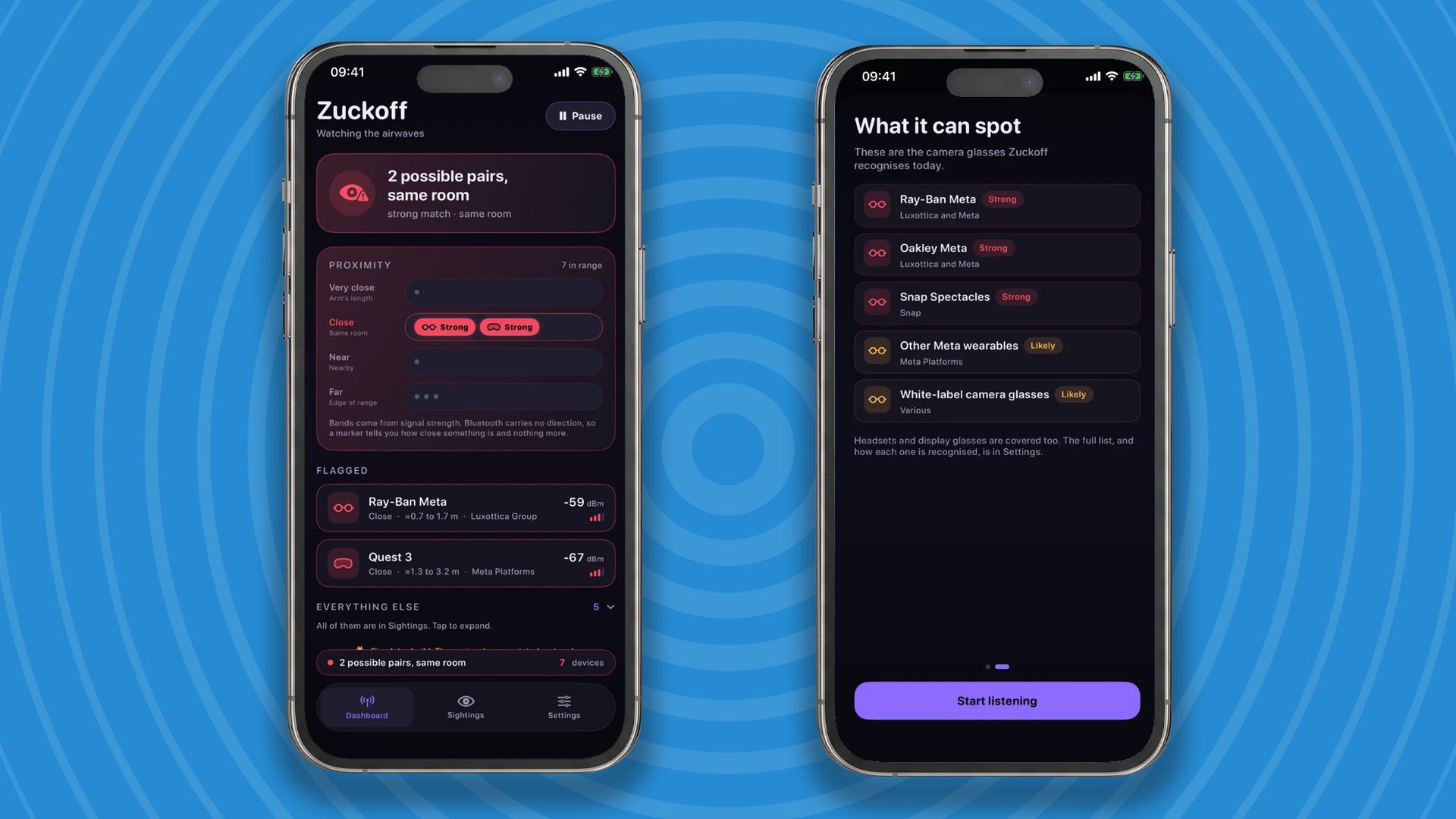
The ZuckOff app on iOS (Image credit: ZuckOff)
As Meta apparently preps its next pair of smart glasses, Wired reports on the ZuckOff app that takes a swing at the Meta CEO in its name, and alerts users when they might be in the presence of someone wearing Meta glasses. The app uses Bluetooth to scan the surrounding area for these wearables.
With several thousand downloads on both Android and iOS, the app is clearly proving popular. It's free to download and use in its basic form, with a pro version available for $9.99 / £9.99 / AU$14.99 a year that scans continuously and gives you scan histories.
It's not your only option either: if you're on Android, Nearby Glasses is open source and free to use, and does a similar sort of job as ZuckOff without the provocative name. That app has now racked up more than 100,000 downloads.
There's definitely been a shift in perception when it comes to glasses that can record, warning light or no warning light — even though these specs have been around for years. There's even talk of bans and government regulation coming in at some point, which Meta might be trying to get ahead of with its next pair of glasses.
O WhatsApp está avaliando (na versão beta 26.37.10.15) a implementação do suporte ao acesso de até três contas simultâneas no mesmo dispositivo.
A opção de adicionar uma terceira conta é bem semelhante ao que já foi implementado pela Meta ao adicionar o suporte a uma segunda conta no mensageiro, exibindo a foto de perfil e o número de telefone para facilitar a identificação na hora de alternar entre os perfis.
Outro recurso que a Meta avalia implementar (na versão beta 26.37.10.16) é a possibilidade de sincronizar para todos os participantes da conversa determinadas informações, como o papel de parede (ou os temas oferecidos pelo próprio WhatsApp) importado a partir da biblioteca de fotos do aparelho, além da cor dos balões de conversa.
A definição dessa configuração para todos os participantes da conversa permite que todos os usuários visualizem as interações de um jeito semelhante, tanto para conversas individuais do WhatsApp quanto para conversas em grupo (os usuários são alertados caso qualquer alteração nesse sentido seja feita).
A sincronização desses elementos também conta com a criptografia de ponta a ponta oferecida em outros recursos do aplicativo.
No momento, ambos os recursos estão sendo testados pelo WhatsApp e estão indisponíveis inclusive para quem utiliza a versão beta do app via TestFlight.
A Amazon lançou no Brasil uma oferta de quatro meses grátis para novos usuários do Amazon Music Unlimited, seu serviço de streaming musical completo que oferece acesso a mais de 100 milhões de músicas em alta qualidade, offline e sem anúncios.
Com o Music Unlimited, você tem acesso a milhões de faixas em qualidade Ultra HD e em Áudio Espacial com Dolby Atmos, além de poder desfrutar de uma integração perfeita com dispositivos e plataformas da Amazon (como a Alexa, os alto-falantes Echo e o Fire TV).
Mas ele também se integra a dispositivos e plataformas de terceiros (inclusive com os da Apple), como tablets, computadores, smart TVs e alto-falantes inteligentes (para além dos da Amazon), com direito a sincronização entre dispositivos e opção para ouvir offline.
Com algoritmos avançados que aprendem o gosto musical do usuário para sugerir playlists, artistas, músicas e estações de rádio temáticas, o serviço conta ainda com um catálogo enorme de podcasts sem custo adicional — ideal para quem não quer usar dois apps!
O Unlimited também tem letras sincronizadas em tempo real, além de conteúdos e experiências especiais para assinantes (como acesso a lançamentos antecipados, conteúdos exclusivos de artistas parceiros e shows/eventos transmitidos ao vivo pela plataforma).
O Amazon Music Unlimited não requer uma assinatura Prime (embora assinantes tenham desconto) e pode ser contratado com opções de assinaturas Individual (R$25,90/mês), Familiar (até seis contas, por R$44,90/mês) e para um dispositivo Echo ou Fire TV (R$13,90/mês).
NOTA DE TRANSPARÊNCIA: Este é um artigo fruto de um acordo comercial com um anunciante, que não influenciou a nossa opinião. O MacMagazine recebe uma pequena comissão sobre vendas concluídas por meio de links deste post, mas você, como consumidor, não paga nada mais pelos produtos comprando pelos nossos links de afiliado.
Open source software underpins much of the modern digital world, from mobile phones and automobiles to cloud computing and artificial intelligence. Now, the rapid adoption of AI is creating new opportunities to improve that software while placing growing pressure on the people responsible for maintaining and securing it, according to a new TechBrief from the Association for Computing Machinery's Technology Policy Council (TPC).
AI is advancing rapidly. One of the major shifts in the field is that, instead of single chatbots performing individual tasks, teams of autonomous agents work together by communicating with each other, sharing tools and accessing shared knowledge libraries.
O Gemini Live permite que os usuários do aplicativo do Gemini para iPhones e iPads tenham uma conversa contínua e mais natural com a inteligência artificial — podendo inclusive interrompê-la quando precisar, bastando começar a falar enquanto ela responde em voz alta.
Porém, você pode simplesmente desativar esse comportamento, impedindo que o Gemini seja interrompido quando você fala algo em voz alta.
O Mac se tornou um importante aliado de quem usa a máquina para rodar modelos de inteligência artificial locais — não é à toa que os Macs mini estão sendo muito visados nesse período de boom no mercado.
Caso use o Gemini (um dos principais nomes de chatbots, ao lado do ChatGPT e do Claude), é possível habilitar um ajuste que mantém o computador ativo enquanto o app do Gemini estiver aberto, impedindo que ele entre em repouso.
Brace yourself: The way you get around the web on Android is about to get a whole lot better.
This week, the excellent Vivaldi Android browser is rolling out an update that adds in support for the entire collection of Chrome Web Store browser extensions. That means you can enhance and adjust your mobile web experience with all sorts of interesting — and potentially shape-shifting — new improvements.
Now, with complete Chrome extension support added into the mix on Android, the advantage is growing even greater.
I’ll be honest, though: When I first saw that Vivaldi was adding in Chrome extension support for Android, I wasn’t sure what to make of it. Most of the extensions I use in my desktop browser just wouldn’t make sense on the mobile front and wouldn’t add much of meaningful value in that environment.
But then I put on my thinking cap. I did some deep digging and careful considering. And I found some Chrome extensions that actually work incredibly well in the Android arena and add a lot of interesting value into the mobile web adventure.
This is the first of a two-part collection. Today, we’ll look at five Chrome extensions that you can add into Vivaldi to save yourself steps and bring a welcome efficiency boost to your Android web work. Later this week, we’ll round out the list with another set of extensions that’ll improve the internet itself in some truly intriguing ways.
Ready to reinvent how you experience the web on your phone?
A quick primer on Android Chrome extension installation
Real quick, before we get into the good stuff: When you’re ready to try out an extension, you’ll need to have the latest version of the Vivaldi Android app on your device (obviously, right?) — then either tap the puzzle-shaped extensions icon in the toolbar at the top of the screen, if you see it, or tap the “V”-shaped main menu icon in the upper-right corner and select “Extensions” from there.
Either way you go, you’ll see an option to “Discover more extensions.” That’ll take you to the Chrome Web Store, where you can search or browse through all the available extensions and install anything with a couple quick taps.
I’ll also provide direct links to each extension I’m recommending below, so you can tap it to open it in Vivaldi on your phone and then install it directly from there.
Note, too, that that same Vivaldi Extensions menu is where you can access and manage any installed extensions moving forward. You’ll see every extension you’ve installed there, and you can deactivate or uninstall anything as well as opt to have its icon pinned into your browser toolbar for easy ongoing access.
Chrome Android extension #1: The cookie request crumbler
Our first Android Chrome extension worth considering is one that you won’t ever open or actively think about once you install it and set it up. It’s a tool that works silently in the background to automatically handle those irksome cookie preference prompts that pop up around the web — so they’ll always get answered in the way you prefer, but you’ll never actually have to see or deal with ’em (and have ’em blocking half your view, in a mobile web scenario!) again.
It’s called Consent-o-Matic, and the way it works is simple: You install it, open its options page once to tell it which cookies you do and don’t want to allow around the web — and that’s pretty much it. From there on out, it’ll just click on all those prompts that pop up for you, based on your preferences, and they won’t interfere with your work or irritate you anymore.
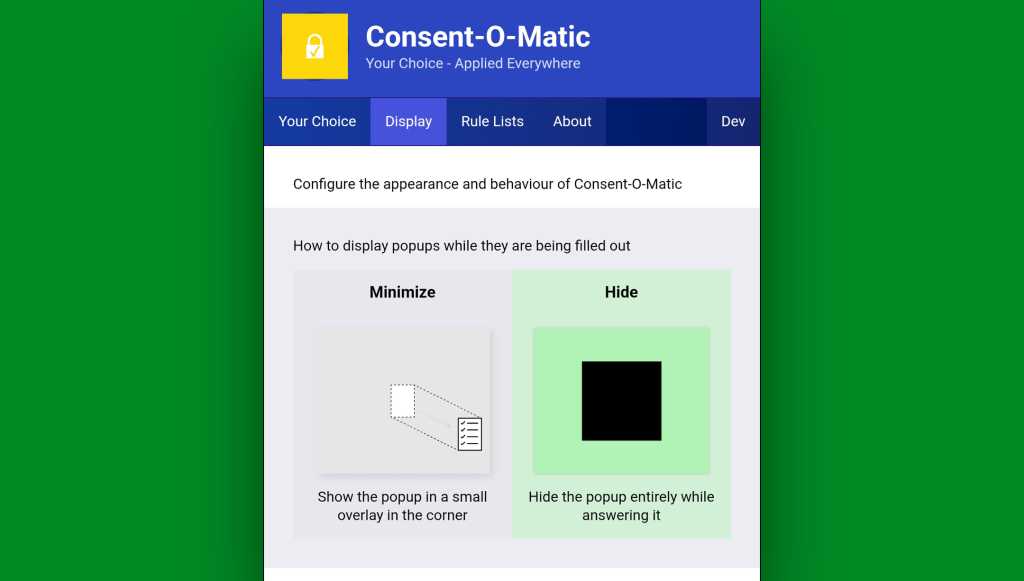
Consent-o-Matic remembers your cookie preferences and then applies them for you automatically all over the web.
JR Raphael, Foundry
One option to look at while you’re in that initial setup area is in the “Display” tab at the top of the screen. By default, Consent-O-Matic will show any pop-ups it’s handling in a small overlay in the corner of the screen — but you can eliminate that entirely and make the process completely out of sight and invisible, if you want.
You can make Consent-o-Matic completely invisible so you never so much as see another cookie prompt again.
JR Raphael, Foundry
Yes, please — and thank you.
Chrome Android extension #2: 404 no more
Next is another quietly useful addition, and that’s the official Chrome extension for the Wayback Machineat the Internet Archive.
With the Wayback Machine extension active in your Android web browser, anytime you land on a page that for whatever reason isn’t online anymore or just isn’t available at that particular moment, you’ll see an offer to go to the page’s most recent cached version.
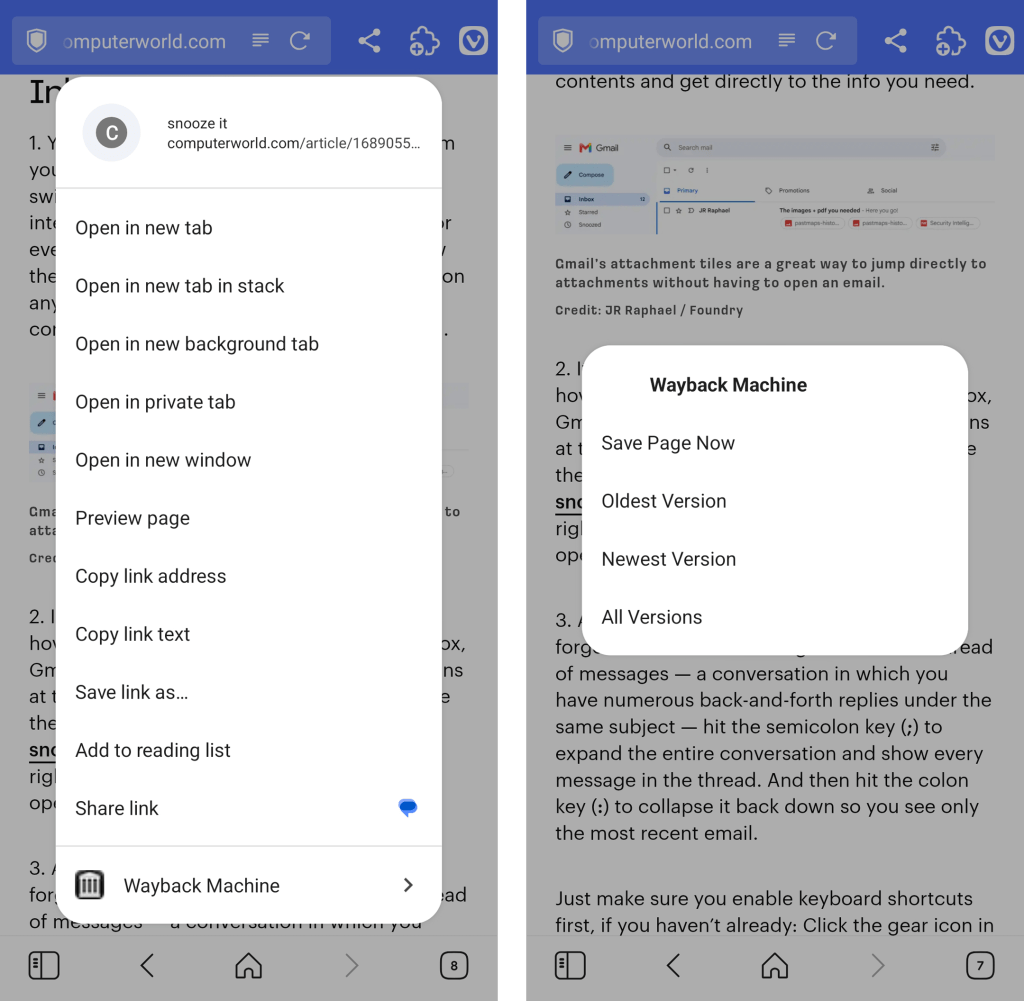
You can also call the extension up on demand to search for older saved versions of any pages by either pinning its icon to your Vivaldi toolbar or long-pressing a link within any page you’re viewing to reveal its menu of options.
The Wayback Machine Chrome extension integrates seamlessly into Vivaldi’s long-press link menu.
JR Raphael, Foundry
Chrome Android extension #3: A background open shortcut
I don’t know about you, but when I’m wading my way around the web, I find myself opening links a lot — often with the intent to look at ’em later.
Typically, that requires long-pressing on the link and then finding the option to open it in a background tab. But with a handy extension called DoubleClicker, that same action can be easier than ever.
Install DoubleClicker into your Android Vivaldi browser, and that’s it: From that moment forward, you can simply double-tap your finger on any link within any page, and it’ll open instantly as a background tab — waiting and ready for when you want it and without any waiting, poking around, or other interruptions to your workflow.
This might just be my favorite addition of all.
Chrome Android extension #4: Hands-free scrolling
The next time you’re reading something on your phone, keep a little somethin’ called Auto Scroll Extension in mind.
As its name suggests, the extension lets you set any speed you like and then simply tap its icon (which works best if you pin it to your toolbar) to automatically scroll the page for you — so you can keep reading without having to do a thing.
Look, ma: No hands! Auto Scroll in action in Vivaldi on Android.
Yes, it’s redundant with having the standalone app installed and set as your system-wide password management service. But it often ends up being faster and easier to have a sign-in handled directly within the browser instead of having to rely on the system-level integration.
And having the browser-based option present doesn’t prevent you from using the other route, either. You’ve just got options, and you can pick whichever feels fastest and easiest to you at any given moment.
Try it out for yourself and see whatcha think. And stay tuned for the second set of worthwhile Android Chrome extensions soon!
TL;DR:Microsoft Office 2024 Professional Plus for Windows runs inside Parallels Desktop, VMware Fusion, or Boot Camp on a Mac without a second Microsoft 365 subscription, and a lifetime license is on sale for $54.99 (reg. $249.99).
There’s a cheap way to get Microsoft Office running on the Windows side of a Mac, and it doesn’t involve paying for a second Microsoft 365 subscription on top of whatever the Mac already runs. Microsoft Office 2024 Professional Plus for Windows installs once inside Parallels Desktop, VMware Fusion, or a Boot Camp partition, and a lifetime license for one PC, virtual or physical, is on sale for $54.99 (reg. $249.99).
Running Windows through Parallels or Boot Camp already means keeping two operating systems working side by side, and adding a subscription-based Office on top of that turns one Mac into two ongoing software bills.
A one-time license keeps the cost fixed no matter how long the Windows partition stays in use, which matters for anyone who only opens Windows a few times a month for a specific app or workflow.
What’s included with the Windows license
Word, Excel, PowerPoint, Outlook, OneNote, and Access all activate with the license and run natively within the Windows installation, just as they would on a Windows-native machine.
Dark mode carries over from the subscription version of Office.
Excel and Access include the same data analysis and database management tools found in Microsoft 365, useful for budgets or spreadsheets built on the Windows side of the Mac.
Licensing is tied to the Windows PC or VM itself rather than to a Microsoft account, so the license stays in place after a macOS update, a Parallels upgrade, or a fresh Boot Camp partition.
Redemption happens within 7 days of purchase, with the license key and download link arriving by email.
Security patches continue for as long as Microsoft supports the release.
Fato é que alguns outros apps também receberam atualizações com essa mesma proposta — além, é claro, de incluir outras novidades. Vamos conferi-los a seguir.
Tripsy
Além de suporte ao iOS 27, o Tripsy — que apareceu na keynote da Apple, diga-se — foi atualizado com algumas outras novidades e melhorias que estão disponíveis como parte dos recursos do Tripsy Pro, entre elas:
Smart Import: importe atividades, locais e reservas de qualquer URL ou documento usando o analisador baseado em IA.
Smart Insights: utilizando os Apple Foundation Models, o aplicativo analisa e compreende o conteúdo de documentos, anexos e emails relacionados às atividades, extraindo apenas as informações relevantes e úteis para apresentá-las aos usuários.
Falando de melhorias, agora é possível encontrar todos os hotéis da sua viagem nas sugestões de localização e dispensar sugestões de partida de aeroportos de que não precisa mais. Ademais, foram aprimoradas as estatísticas de viagem, a estabilidade do mapa e os layouts de importação no Mac.
Por fim, também foi adicionado suporte ao widget extragrande no iPhone para uma melhor visualização do itinerário.
Loop
O player de podcasts Loop ganhou, na sua atualização mais recente, suporte à Siri e aos Atalhos, bem como ao recurso gestos de cabeça dos AirPods compatíveis para pular capítulos de episódios mesmo com o app em segundo plano.
Personalidades do Loop: nas configurações (em “Sobre mim”), agora é possível definir as personalidades que o Loop usará ao gerar o texto da seção “Para você”.
Métricas e estatísticas de escuta: três anéis para você acompanhar seus objetivos de escuta diários e mensais, acompanhando quantos episódios foram finalizados no mês, tempo de escuta diário e variedade de podcasts escutados.
Novos widgets: agora é possível ver o texto da seção “Para você” na Tela de Início em dois tamanhos de widgets (pequeno e médio) além de também ser possível ver seus anéis das métricas de escuta nas Telas de Início e Bloqueada.
O que ouvir em seguida: seção onde novos episódios dos podcasts que você marcou como favoritos e fixados são mostrados para fácil acesso.
O app também recebeu diversas melhorias em áreas como reprodutor de podcasts, busca e episódios baixados, além de uma melhor performance com o app em segundo plano, consumindo muito menos processamento e bateria.
FitWoody
Mais do que o suporte à Siri AI, que possibilita registrar dados por voz com ajuda da assistente, o app de saúde FitWoody agora também permite encontrar informações facilmente com o Spotlight e conta com suporte ampliado ao Handoff. O app também ganhou uma versão nativa para o macOS.
Divulgação/FitWoody
Quanto às melhorias, agora o FitWoody abre diretamente na própria tela, bem como sua pontuação do sono responde a cada noite à medida que ela acontece, de modo que a tela inicial já está completa logo pela manhã.
Steady
O aplicativo de treino Steady chegou à versão 3.0, que tem como destaque o recurso Importação Mágica — de modo que uma foto da ficha da academia, um PDF ou uma mensagem vira um programa de treino editável. Esse recurso usa os novos modelos de IA da Apple em iPhones compatíveis com Apple Intelligence e iOS 27, sem exigir o Steady Pro.
Além disso, o app ganhou planejamento de programas mais inteligente, navegador de programas, recuperação do treino, entre outros recursos.
Divulgação/Steady
A atualização também traz drop sets e deixa o app do Apple Watch mais completo, com lista de exercícios, registro de esforço pela Digital Crown e resumo do treino, reduzindo a necessidade de pegar o iPhone enquanto ele permanece por perto.
Ulysses
Já o popular aplicativo de escrita Ulysses ganhou, graças às capacidades da Siri AI, reconhecimento de contexto na tela e um botão dedicado na barra de ferramentas do macOS que abre a nova interface da assistente para escrever, reescrever, revisar e realizar outras tarefas com texto.
Ainda com relação à barra de ferramentas do aplicativo, agora é possível que os usuários a personalizem totalmente com botões de navegação, blocos, espaços, sugestões e muito mais.
We just released a very nice update across all platforms. The new version is ready for OS 27, features support for Siri AI, and introduces a fully customizable toolbar on macOS.
The update is available now. You can find the release notes on our website.https://t.co/TO7PFbVjGt
A atualização também inclui novos ícones de grupo com pictogramas e aprimora o suporte à acessibilidade “ao editar condições de filtro e ícones de grupo”. Por fim, o app recebeu ajustes visuais para melhor alinhar ao visual do iOS 27 e do macOS Golden Gate 27.
Algo que não passou despercebido durante a apresentação do iPhone Duo, primeiro smartphone dobrável da Apple, foi a animação ao abrir e fechar o aparelho — uma cortesia da versão adaptada do iOS especialmente para o modelo.
Como quase nada é impossível no mundo dos desenvolvedores, essa animação já foi transportada para o macOS graças ao DuoHinge, que adiciona uma ilusão de ótica interativa de dobra à tela física do seu MacBook.
Ao acessar diretamente o sensor de ângulo da tampa integrado ao Apple Silicon, o DuoHinge projeta sua área de trabalho em tempo real em um plano 3D virtual vertical, aplicando perspectiva realista via raycasting, dispersão gaussiana de vidro em duas passagens e dispersão cromática nas bordas conforme você fecha a tela.
An iPhone Duo–style hinge animation, but on a MacBook. Sometimes it’s fun to build things just because. pic.twitter.com/grYKra4X91
Uma animação de dobradiça no estilo do iPhone Duo, mas em um MacBook. Às vezes, é divertido criar coisas simplesmente pelo prazer de fazê-lo.
O processamento da área de trabalho ocorre localmente no dispositivo, utilizando a taxa de atualização da tela integrada (até 120Hz em telas compatíveis) por meio do ScreenCaptureKit e shaders Metal personalizados, tudo encapsulado em uma camada transparente que permite cliques através dela, sem interromper seu fluxo de trabalho.
O aplicativo lê o sensor de ângulo da tampa e suaviza o movimento de acordo com a cadência de renderização. Um ícone vetorial do MacBook, no estilo da Apple, gira e espelha o ângulo real da sua tela nas barras de menu do macOS (no modo claro ou escuro).
O DuoHinge é gratuito, não contém assinaturas, nem rastreia quantas vezes você abre o seu MacBook. Ele exige pelo menos o macOS Sonoma 14 e pode ser baixado diretamente pela página no GitHub — ao iniciar o aplicativo pela primeira vez, abra-o na barra de menus e conceda permissão de Gravação de Tela e Áudio do Sistema quando o macOS solicitar.
Aplicativos que utilizam uma premissa simples e a transformam em uma experiência interessante são, particularmente, meus favoritos. Exemplo disso é o Farwave, um app para iPhone e iPad desenvolvido pelo brasileiro Fernando Bunn que permite encontrar estações de rádio de todo o mundo girando um globo 3D até uma determinada região e tocando em uma estação.
A interação baseia-se na localização geográfica, e não em pesquisas por texto. Ou seja, os usuários giram o globo, selecionam uma região e tocam em uma estação, tudo pela mesma interface.
Divulgação/Farwave
Há, ainda, um botão chamado “Take me anywhere” (“Leve-me a qualquer lugar”, em tradução direta) que seleciona uma opção aleatória para ouvintes que não querem procurar um local específico; além disso, o aplicativo salva o histórico de reprodução para que as pessoas possam retornar a uma estação mais tarde.
Além do rádio, o app também organiza podcasts e músicas utilizando a mesma metáfora do globo. Diferentemente das estações de rádio, assinantes Pro podem pesquisar programas ou adicionar manualmente um feed RSS. O aplicativo também oferece suporte a filas de reprodução, velocidade de reprodução ajustável e downloads para ouvir offline.
Assinantes do plano Pro também podem importar seus próprios arquivos de áudio de um computador ou do aplicativo Arquivos. Cada artista aparece como um “sinal” próprio, e as faixas importadas permanecem no dispositivo para reprodução offline.
Salvar uma página da web pode ter diversas finalidades — seja para lembrar de algum detalhe textual ou visual, guardar informações de uma certa data ou apenas manter um registro cronológico de algum endereço. Há vezes, porém, que não dá para depender totalmente de bases de arquivos públicos, seja porque o conteúdo pode ter sido alterado ou não é exibido corretamente, entre outros motivos.
Para evitar possíveis problemas do tipo, vale a pena conferir o WebsiteArchiver, um utilitário para macOS que salva e arquiva páginas da web completas, sendo possível separá-las em pastas e categorias. Segundo o desenvolvedor, uma versão para iPhone/iPad será lançada em breve.
Com ele, as páginas da web são salvas localmente como arquivos HTML — com exportação em .html, .warc, .webarchive, .pdf e Markdown — disponíveis permanentemente e independentes de serviços externos.
O app exibe as páginas salvas de três formas diferentes: a opção “Salvo” mostra a cópia offline, enquanto “Leitor” exibe apenas o texto sem distrações e o modo “Ao vivo” mostra a página atual na web. É possível alternar entre eles quando quiser.
Além disso, a captura usa um motor que possibilita que páginas cheias de JavaScript sejam registradas exatamente como aparecem na tela. Também é possível remover imagens inteiras de páginas.
O WebsiteArchiver está disponível gratuitamente na Mac App Store, sendo possível salvar até dez páginas sem custo. Para desbloquear a versão completa, sem limites de registros, é necessário obter a licença vitalícia, disponível por R$120.
Leitores do MacMagazine, porém, podem aproveitar uma oferta especial para adquirir a versão completa diretamente pelo site do WebsiteArchiver: basta digitar MACMAGAZINE30 na área de código promocional para obter 30% de desconto! Saiba, porém, que o cupom é válido somente para os 50 primeiros usos.
Apple software updates for 2026 are now reaching supported devices, bringing iOS 27, iPadOS 27, macOS 27, watchOS 27, visionOS 27, and tvOS 27 out of preview and into everyday use. The releases place Siri AI and the next generation of Apple Intelligence at the center, but many of the changes extend well beyond generative AI.
The updates began rolling out September 14. Alongside new intelligence features, Apple has made measurable performance changes to iPhone and iPad, overhauled several parental controls, refined the Liquid Glass interface introduced across its platforms, improved search, and added smaller changes to services including iCloud Shared Albums, Maps, AirPods, and Health.
Siri AI is initially rolling out as a beta in English. Apple says French, Japanese, Korean, Portuguese, and Spanish support is scheduled for October, making some of the headline functionality a staggered release rather than something every user receives immediately after installing the new operating systems.
Apple software updates make Siri AI a cross-device feature
Siri AI is built around personal context, onscreen awareness, expanded app actions, and access to current information from the web. The assistant can draw on material stored in areas such as Messages, Mail, and Photos when responding to requests, while Visual Intelligence allows users to ask about content currently displayed on their screen.
On iPhone, Siri mode is integrated directly into the Camera app. A user can point the camera at something and ask questions or perform supported actions based on what appears in front of them.
The assistant also gains a dedicated Siri app that synchronizes conversation history privately through iCloud. A conversation started on an iPhone can therefore be continued on an iPad, Mac, Apple Watch, or Apple Vision Pro.
Write with Siri expands the assistant into text creation and editing. Users can describe the material they need drafted or ask Siri to refine existing writing without moving to a separate application.
Apple Intelligence is also adding more specialized features outside Siri. Photos receives Spatial Reframing, Extend, and an updated Clean Up tool. Image Playground can generate images in a wider selection of styles, including photorealistic output, with metadata designed to identify AI-created material and planned support for the SynthID standard.
Safari can automatically organize tabs by topic and monitor webpages for changes, such as a product returning to stock or a price dropping. Apple is also introducing tools that can create custom extensions from a description.
Image Credit: Apple Inc.
iOS 27 and iPadOS 27 put more emphasis on speed
Some of the less visible changes could be among the most frequently experienced.
Apple says apps can launch up to 30% faster on iPhone and iPad after installing the new software. Photos can load an image up to 70% faster immediately after it is taken, while AirDrop transfers can be up to 80% faster.
iPadOS 27 receives additional work around file handling and multitasking. Apple says browsing files and transferring them to an external USB drive can be as much as five times faster, accompanied by smoother window closing, switching, and dragging.
Connectivity behavior has also been adjusted. Transitions between cellular connections and Wi-Fi are designed to happen more seamlessly, while Messages no longer needs to hold subsequent texts behind a large photo or video being uploaded over a slow connection.
Search across Spotlight, Photos, and Mail has been revised on iPhone, iPad, and Mac. Mail gains a new ranking system for Top Hits, while Apple describes search across the three platforms as more stable and comprehensive.
Liquid Glass has received another round of refinements after becoming the common visual language across Apple’s software. A new Settings slider allows users to adjust the interface from an ultraclear appearance toward a more heavily tinted version, and app icons have been sharpened.
Screen Time and child safety controls get a substantial redesign
Apple has also expanded the controls available to families rather than limiting this software cycle to interface and AI work.
The setup process for child accounts now allows parents to specify which apps a child can access from the beginning, with additional apps added later if appropriate. Ask to Browse extends approval controls to Safari, letting parents require permission before a child opens a new website.
Communication Safety has been expanded beyond sexually explicit material to detect and intervene when gore or violent content appears in shared images and videos.
Screen Time presents average device usage and frequently used apps more prominently. Parents can establish daily time allowances across categories such as Entertainment, Games, and Social Media, while Schedules can change which apps remain available at different points during a weekday or weekend.
These changes are particularly notable because they work at the account and platform level rather than requiring parents to configure separate controls inside every individual app.
Image Credit: Apple Inc.
watchOS 27, visionOS 27, and tvOS 27 add targeted upgrades
The smaller platforms receive their own additions rather than simply inheriting features from iPhone and Mac.
watchOS 27 introduces a dedicated Siri app, a dynamic app grid, expanded Smart Stack suggestions, and a new single-handed tap gesture for opening widgets. Workout Buddy can now operate without the paired iPhone nearby, while Cycle Tracking in Health adds support related to perimenopause and menopause.
visionOS 27 brings Siri AI and Visual Intelligence into Apple Vision Pro, where the assistant can respond to objects a user is physically looking at. Panoramas can be converted into spatial scenes and used as personal Environments, while Mac users can bring compatible 3D models into their physical space to preview and edit them.
Apple says Vision Pro can now start up and connect to Wi-Fi up to three times faster. New curved windows, Control Center changes, eye-controlled notification expansion, and improvements to Dwell Control further adjust the spatial interface.
tvOS 27 takes a narrower approach. Apple Music gains high-resolution lossless audio support, Apple Podcasts has been redesigned, and additional text-size accessibility options have been introduced. Apple TV 4K owners can install the release on supported second- and third-generation models.
Other changes stretch across device categories. iCloud Shared Albums can now retain full-resolution photos and videos while making participation easier from Android and Windows devices. AirPods gain custom EQ settings, Maps expands Flyover with AI-assisted aerial detail, and Missed-message notifications and unread counts now synchronize more quickly and reliably across Apple devices.
With the September 14 releases now public, the software cycle shifts from preview demonstrations to staggered feature delivery. Siri AI language expansion begins in October, while some Apple Intelligence capabilities and individual app features will continue arriving through later updates rather than being tied exclusively to the initial 27.0 releases.
Meta One subscription plans were announced for individual, AI power users, creators, and businesses.
Each plan is tailored for what that specific user might need, such as an enhanced profile for creators/businesses, highlighting their website, locations, and more.
Meta One subscriptions plans are available today (Sept. 15), beginning at $14.99 for creators/businesses and $7.99 for the Core plan (individual users).
We knew it was coming ever since Meta's original announcement back in May. Today (Sept. 15), Meta's latest subscription plans for its slew of apps are here.
In the company's press release, it states the Meta One subscription plans intend to "bring more value to the apps and experiences billions of people already use..." Meta One features plans intended for individuals, AI power users, creators, and businesses. The level of "expression" will depend on which subscription plan works best for you.
Meta builds on past announcements with the Core and Premium plans. It states these plans will bring more "compute-intensive AI capabilities." The Core and Premium plans are focused on assisting users with more "creative freedom" while using its AI services. More media generation is possible with Meta AI through the Core and Premium plans, as well as the availability of in-app AI features, like Restyle (on Instagram).
Here's the breakdown of the Core and Premium plans for individual and AI power users:
Core ($7.99/mo): Restyle more Stories on Instagram, use voice effects and creative tools more often, and generate more images and videos with Meta AI. Plus, express yourself in more ways with our individual app features (Instagram Plus, WhatsApp Plus, Facebook Plus)
Premium ($19.99/mo): Everything in Core, with the most room to create content with Meta AI and across our family of apps
MetaMeta
Users starting their small businesses, or even creators looking to grow, might opt for one of Meta One's other four plans.
The company says its creator and business plans place the tools users will need to grow and expand their reach directly in-app. These features include professional tools and AI that's integrated with your account. Meta says this removes the necessity of creating an entirely new account to manage your business.
These plans will also provide users with an "enhanced profile." This profile will place everything important to your business or creator scope front and center. Your website and location (business locations) were mentioned. However, Meta One will send follow invitations to people who interact with your content and feature a "bold follow button" on your Reels.
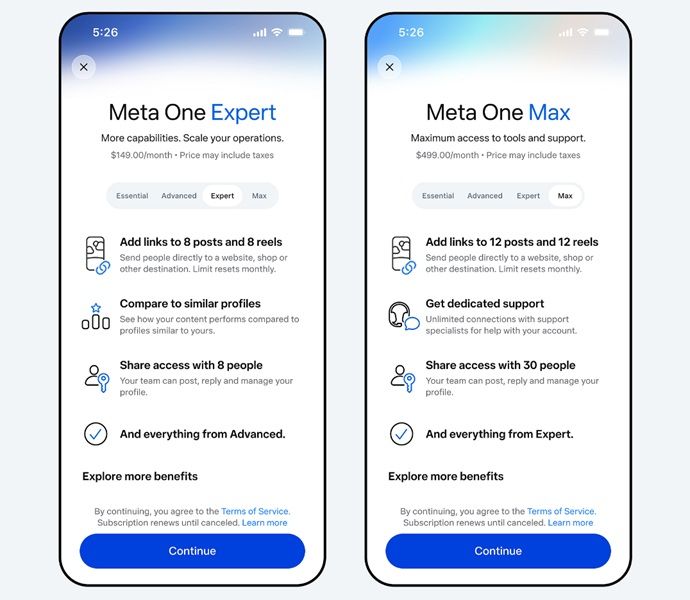
Meta One's subscription plans for businesses and creators begin at $14.99 a month. While you'll receive a verified badge, a verified business channel on WhatsApp, and impersonation protection, Meta One adds access to the Meta Business Agent. This agent is available through WhatsApp and is available 24/7. You can check the remaining plans' details in the gallery above.
Meta's app subscriptions
(Image credit: Alex Dobie / Android Central)
Android Central's Take
This is certainly an interesting approach from Meta. I feel like these kinds of subscription plans only make sense for creators and businesses. If you're not doing something like that, is $4 worth it for a few animations? I'm sure we can express ourselves for free just fine. That's just me, though. It's your choice if you feel something like this is worth it.
We knew "Meta One" was coming since May. At that time, the company revealed a slew of app subscriptions for Facebook Plus, Instagram Plus, and WhatsApp Plus. Naomi Gleit, Meta's head of product, detailed everything we needed to know, stating that these plans would give users more ways to "express and connect." WhatsApp Plus is the cheapest option at $2.99. Facebook and Instagram users would have to cough up a dollar more at $3.99 for Plus additions.
For Instagram Plus, more vibrant and expressive animations were highlighted early on. These animations would play when liking someone's Story, such as "Super Heart." Subscribers could also "spotlight" a Story once a week to reach for extra views.

 Login
Login