❌

Reading view

The Download: AI’s trillion-dollar gamble and OpenAI’s biology data bid

This is today’s edition of The Download, our weekday newsletter that provides a daily dose of what’s going on in the world of technology.

What’s at stake in AI’s trillion-dollar gamble

When Jessica Wachter, a finance professor at the University of Pennsylvania, wanted to assess AI’s impact on the economy over the next few years, she faced a long list of uncertainties. So she started with a “remarkable fact” that is not in question: a handful of so-called hyperscalers are investing huge amounts of money to build AI data centers.

Instead of trying to predict how widely deployed AI models will be, Wachter asked how fast the hyperscalers’ earnings will need to grow to justify their spending through 2027, when expenditures are expected to reach nearly $1.1 trillion.

The results are eye-opening. AI companies will need to achieve an extraordinary increase in productivity just to break even by 2030.

Take a closer look at what it will take for the AI buildout to pay off.

—David Rotman

AI models need more data about biology, and OpenAI is paying to create it

AI needs much more information to make important breakthroughs in curing disease. So last year Ruxandra Teslo, a policy analyst, posted an idea for supercharging medical AI systems: use data from failed biotech companies. By bidding at bankruptcy proceedings, she argued, it might be possible to obtain detailed regulatory filings, manufacturing strategies and safety data, creating what she called “biotech’s lost archive.” 

The OpenAI Foundation, the nonprofit parent of OpenAI, announced this week that it will fund her idea, paying to create “high-quality scientific datasets.”

Learn more about their new effort.

—Antonio Regalado

Our Roundables on AI’s extinction threat is now available on demand

As frontier models become more capable, warnings about AI extinction have become widespread in Silicon Valley. But are the threats really as dangerous as they’re presented?

In the latest MIT Technology Review Roundtable, executive editor Niall Firth, senior AI editor Will Douglas Heaven and AI reporter Grace Huckins took a closer look at the arguments behind those warnings. They discussed what AI extinction could actually mean, how seriously we should take the risks and what, if anything, can be done to reduce them.

Subscribers can now watch an exclusive recording of the discussion.

Want to join the next conversation? Subscribe to MIT Technology Review for exclusive access to all our future Roundtables, and recordings of previous ones.

MIT Technology Review Narrated: a startup claims it’s found a drug to make your blood young

Generation Lab says its new rejuvenation treatment “blocks the systemic spread of aging in the bloodstream, reawakens the body’s own repair mechanism, and restores health and youth to multiple tissues.”

The approach is based on research by the company’s scientific founder, Irina Conboy. She found that joining the circulatory systems of old and young mice improved the old animals’ ability to heal from injury.

Conboy now says she has found a combination of two existing drugs that can produce youthful effects without the need for any bodily fluid exchange. But there’s a snag: Generation Lab won’t reveal what the drugs are.

This is our latest
story to become an MIT Technology Review Narrated podcast, which we publish each week on Spotify and Apple Podcasts. Just navigate to MIT Technology Review Narrated on either platform, and follow us to get all our new content as it’s released.

The must-reads

I’ve combed the internet to find you today’s most fun/important/scary/fascinating stories about technology.

1 Nvidia and Meta CEOs have rejected calls for a coordinated AI slowdown
Jensen Huang and Mark Zuckerberg pushed back on the proposals. (FT $)
+ Huang says new AI safety laws are unnecessary. (Axios)
+ Zuckerberg claimed competition will push AI labs toward safety. (Reuters $)
+ What’s next for AI after its doomer turn? (MIT Technology Review)

2 The FTC chair has warned against giving AI companies antitrust waivers
His comments follow Anthropic’s call for a safety exemption. (Reuters $)
+ Nvidia’s CEO also slammed the calls for new antitrust laws. (CNBC)
+ The US is divided over AI regulation. (MIT Technology Review)

3 A Chinese hacking firm has used AI to analyze stolen secret
Its tools turn hacked government data into intelligence reports. (WSJ $)

4 “Smart” nanoparticles delivered mRNA to tumors in a cancer study
The treatment reprogrammed cells to attack tumors in mice. (Wired $)
+ Federal health agencies are abandoning mRNA. (MIT Technology Review)

5 A digital fly brain is taking on an extraordinary range of tasks online
People have taught it to drive, trade bitcoin, and play Doom. (NYT $)
+ The simulated brain is a map of a fruit fly’s 166,000 neurons. (404 Media)

6 The Senate has blocked new crypto rules amid a fight over Trump
It demanded tougher ethics rules around Trump’s crypto holdings. (AP)
+ The move is a major blow to the crypto industry. (NYT $)

7 Chinese firms allegedly used Binance to launder Iranian oil money
Prosecutors say they laundered more than $1.5 billion. (Quartz)
+ Hackers are selling tools to bypass banks’ facial checks. (MIT Technology Review)

8 An AI agent platform is reinventing spam to flood inboxes worldwide
iLand says its agents have sent 1.6 million messages. (404 Media)

9 ByteDance founder Zhang Yiming has become Asia’s richest person
His fortune has risen above $105 billion as AI booms. (Bloomberg $)

10 A fully AI-generated sitcom has arrived—and it’s terrible
A reviewer called the characters “dead-eyed waxworks.” (Guardian)

Quote of the day

“The only institution that Americans might trust less than Washington these days is Silicon Valley.”

—Patrick Hillman, the chief operating officer of Logical Intelligence, a San Francisco–based startup chaired by Yann LeCun, says in a statement that people have little faith in tech companies to act in the public interest.

One more thing


Why Trump’s “golden dome” missile defense idea is another ripped straight from the movies

In 1940, a fresh-faced Ronald Reagan starred in Murder in the Air, a movie centered on a “superweapon” that could stop enemy aircraft. More than 40 years later, the concept became a real-life centerpiece of Reagan’s presidency with the Strategic Defense Initiative (SDI), better known as “Star Wars.” Now Donald Trump has revived the dream.

In 2024, Trump announced plans to build the “Golden Dome,” a system of sensors and interceptors on the ground, in the air and in space. It’s often compared to SDI for its futuristic sheen, its aggressive form of protection and the idea that an impenetrable shield is the cheat code to global peace.

The dream of a missile shield is animated by its sheer cinematic allure. But do cinematic spectacles actually enhance national security?

See what happens when the fantasy of missile defense meets reality.

—Becky Ferreira

We can still have nice things

A place for comfort, fun, and distraction to brighten up your day. (Got any ideas? Drop me a line.)

+ A once blind cockatoo just saw for the first time in 10 years.
+ Bingebrowse is a virtual video store stocked with films and shows from streaming services.
+ An amateur engineer has used a tree trunk to build Donkey Kong’s coconut gun as a real weapon.
+ A wildlife photographer has captured the first-ever images of the elusive and rare Cozumel dwarf fox.

  •  

De 1959 a una app que analiza cómo conduces: esta marca transforma casi 70 años de seguridad en sensores, datos y software para intentar anticiparse a los accidentes

Volvo Safety Coach representa un cambio profundo en la seguridad del automóvil. Desde el cinturón de tres puntos de 1959 hasta sensores, software y datos de conducción, la protección pasa de actuar durante el accidente a intentar anticiparse al riesgo.
  •  

Como desativar a interrupção de respostas no Gemini Live [iPhone e iPad]

O Gemini Live permite que os usuários do aplicativo do Gemini para iPhones e iPads tenham uma conversa contínua e mais natural com a inteligência artificial — podendo inclusive interrompê-la quando precisar, bastando começar a falar enquanto ela responde em voz alta.

Porém, você pode simplesmente desativar esse comportamento, impedindo que o Gemini seja interrompido quando você fala algo em voz alta.

Veja como é fácil! 📱

  1. Abra o app do Gemini no seu iPhone ou iPad;
  2. Toque na sua foto ou iniciais, no canto superior direito;
  3. Selecione “Configurações”;
  4. Desmarque a opção “Interromper respostas da conversa Live”.

  •  

Todos los caminos no llevaban a Roma: descubren que la ciudad que de verdad vertebraba las carreteras del Imperio era Bizancio

El refrán es tan viejo como conocido: todos los caminos llevan a Roma. Los autores del estudio, liderados por Adam Pažout, investigador de la Universitat Autònoma de Barcelona, acaban de comprobar con datos que la frase no se sostiene del todo. Según el análisis, ciudades como Antioquía, Ancira (la actual Ankara), Bizancio o Corinto ocupaban […]

  •  

Mais apps são atualizados com suporte ao iOS 27, à Siri AI e mais

Falamos aqui ontem sobre um punhado de aplicativos que foram atualizados com suporte às novidades do iOS 27, incluindo (e especialmente) o suporte à Siri AI.

Fato é que alguns outros apps também receberam atualizações com essa mesma proposta — além, é claro, de incluir outras novidades. Vamos conferi-los a seguir.

Tripsy

Além de suporte ao iOS 27, o Tripsy — que apareceu na keynote da Apple, diga-se — foi atualizado com algumas outras novidades e melhorias que estão disponíveis como parte dos recursos do Tripsy Pro, entre elas:

  • Smart Import: importe atividades, locais e reservas de qualquer URL ou documento usando o analisador baseado em IA.
  • Smart Insights: utilizando os Apple Foundation Models, o aplicativo analisa e compreende o conteúdo de documentos, anexos e emails relacionados às atividades, extraindo apenas as informações relevantes e úteis para apresentá-las aos usuários.

Falando de melhorias, agora é possível encontrar todos os hotéis da sua viagem nas sugestões de localização e dispensar sugestões de partida de aeroportos de que não precisa mais. Ademais, foram aprimoradas as estatísticas de viagem, a estabilidade do mapa e os layouts de importação no Mac.

Por fim, também foi adicionado suporte ao widget extragrande no iPhone para uma melhor visualização do itinerário.

Loop

O player de podcasts Loop ganhou, na sua atualização mais recente, suporte à Siri e aos Atalhos, bem como ao recurso gestos de cabeça dos AirPods compatíveis para pular capítulos de episódios mesmo com o app em segundo plano.

Outras novidades incluem:

  • Personalidades do Loop: nas configurações (em “Sobre mim”), agora é possível definir as personalidades que o Loop usará ao gerar o texto da seção “Para você”.
  • Métricas e estatísticas de escuta: três anéis para você acompanhar seus objetivos de escuta diários e mensais, acompanhando quantos episódios foram finalizados no mês, tempo de escuta diário e variedade de podcasts escutados.
  • Novos widgets: agora é possível ver o texto da seção “Para você” na Tela de Início em dois tamanhos de widgets (pequeno e médio) além de também ser possível ver seus anéis das métricas de escuta nas Telas de Início e Bloqueada.
  • O que ouvir em seguida: seção onde novos episódios dos podcasts que você marcou como favoritos e fixados são mostrados para fácil acesso.

O app também recebeu diversas melhorias em áreas como reprodutor de podcasts, busca e episódios baixados, além de uma melhor performance com o app em segundo plano, consumindo muito menos processamento e bateria.

FitWoody

Mais do que o suporte à Siri AI, que possibilita registrar dados por voz com ajuda da assistente, o app de saúde FitWoody agora também permite encontrar informações facilmente com o Spotlight e conta com suporte ampliado ao Handoff. O app também ganhou uma versão nativa para o macOS.

Integração do FitWoody com a Siri
FitWoody no Mac
Divulgação/FitWoody

Quanto às melhorias, agora o FitWoody abre diretamente na própria tela, bem como sua pontuação do sono responde a cada noite à medida que ela acontece, de modo que a tela inicial já está completa logo pela manhã.

Steady

O aplicativo de treino Steady chegou à versão 3.0, que tem como destaque o recurso Importação Mágica — de modo que uma foto da ficha da academia, um PDF ou uma mensagem vira um programa de treino editável. Esse recurso usa os novos modelos de IA da Apple em iPhones compatíveis com Apple Intelligence e iOS 27, sem exigir o Steady Pro.

Além disso, o app ganhou planejamento de programas mais inteligente, navegador de programas, recuperação do treino, entre outros recursos.

Update do Steady
Divulgação/Steady

A atualização também traz drop sets e deixa o app do Apple Watch mais completo, com lista de exercícios, registro de esforço pela Digital Crown e resumo do treino, reduzindo a necessidade de pegar o iPhone enquanto ele permanece por perto.

Ulysses

Já o popular aplicativo de escrita Ulysses ganhou, graças às capacidades da Siri AI, reconhecimento de contexto na tela e um botão dedicado na barra de ferramentas do macOS que abre a nova interface da assistente para escrever, reescrever, revisar e realizar outras tarefas com texto.

Ainda com relação à barra de ferramentas do aplicativo, agora é possível que os usuários a personalizem totalmente com botões de navegação, blocos, espaços, sugestões e muito mais.

We just released a very nice update across all platforms. The new version is ready for OS 27, features support for Siri AI, and introduces a fully customizable toolbar on macOS.

The update is available now. You can find the release notes on our website.https://t.co/TO7PFbVjGt

— Ulysses Help (@ulyssesapp) September 15, 2026

A atualização também inclui novos ícones de grupo com pictogramas e aprimora o suporte à acessibilidade “ao editar condições de filtro e ícones de grupo”. Por fim, o app recebeu ajustes visuais para melhor alinhar ao visual do iOS 27 e do macOS Golden Gate 27.

  •  

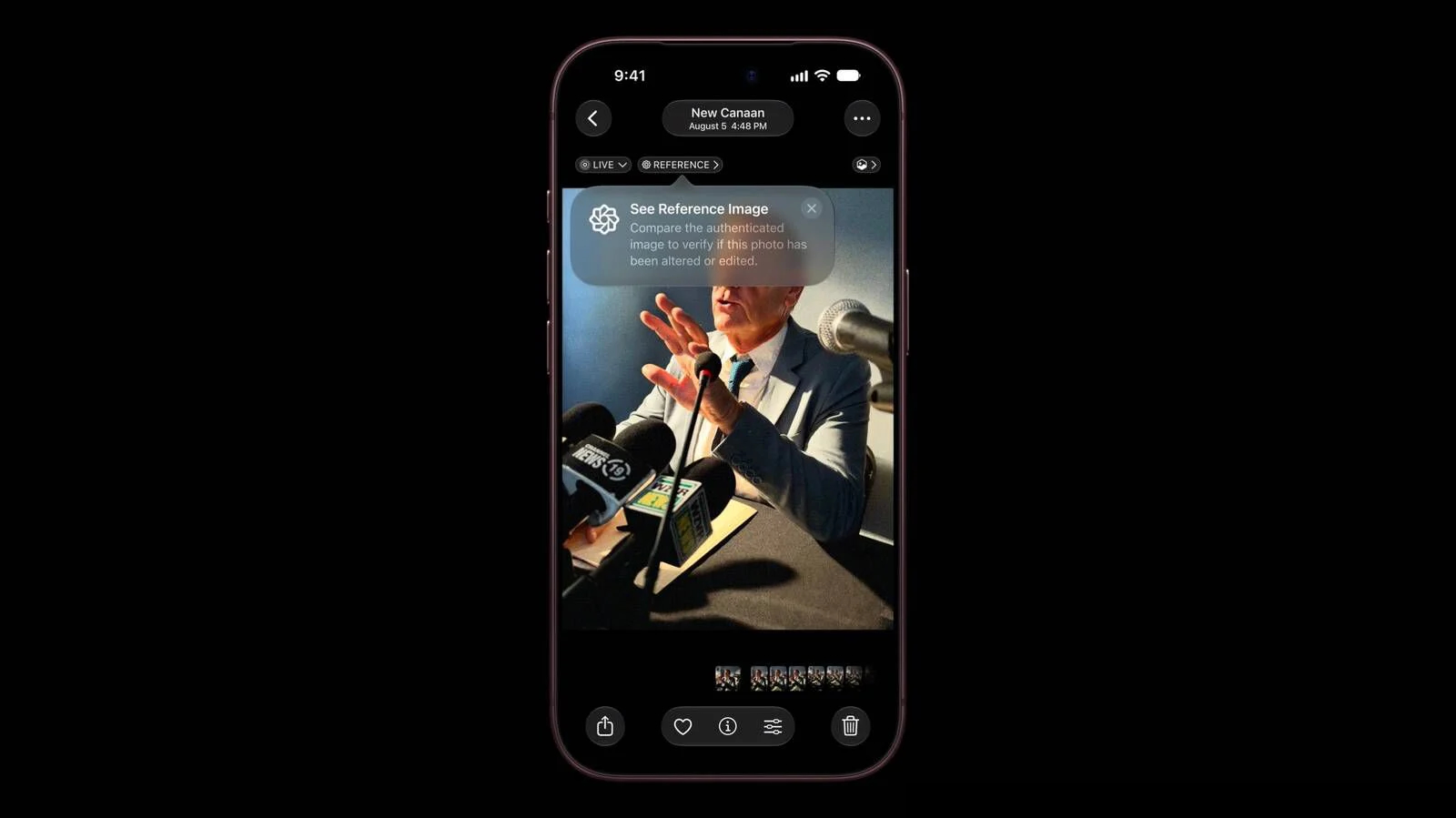
Apple Details How Reference Image Proves a Photo is Real

The iPhone 18 Pro models support Apple Reference Image, a way to verify that a photo was taken with an iPhone and hasn't been edited. Apple says it's a method to prove that something actually happened and wasn't AI-generated, likening the feature to a digital film negative.


Apple Reference Image offers a trustworthy, scalable guarantee that a reference image is what it claims to be: a real photograph, captured by a real sensor in an iPhone camera, at a specific time. It sets a new standard for verifiable digital photography.

Apple introduced Apple Reference Image when debuting the ‌iPhone 18 Pro‌ and Pro Max, and today the company shared more information on how the feature works on its Security Research blog.

Apple Reference Image boots the camera sensor into a specialized reference mode. The mode instructs the sensor to cryptographically sign pixel data immediately after capture, and the sensor firmware is prevented from modifying the data. Other authentication systems don't sign images until the end of the software processing pipeline, which Apple says leaves images vulnerable to tampering attacks.

Apple Reference Image creates a "secure digital negative" protected from software compromise alongside a standard editable photo. The negative is stored on-device and includes pixel data, sensor metadata, and cryptographic timestamps with lower and upper bounds. When a user decides to "develop" the negative for verification, it is sent unprocessed to Private Cloud Compute. Private Cloud Compute runs the steps needed to render the image in a secure, private, and verifiable environment.

Apple says the feature resists data injection attacks, compromised operating systems, hardware attacks, and cryptographic attacks. Apple believes Apple Reference Image is the only image provenance system with quantum-secure defenses. In case the system is breached, there is a revocation option. Private Cloud Compute calculates a confidence score for each image, and Apple can revoke individual photos or an entire sensor if fraud is detected.

To safeguard photographers, Apple Reference Image avoids using an explicit, public credential for photographers, and it prevents public association between different photos taken by the same sensor. The confidentiality of the image is protected, including from Apple.

Apple Reference Image is opt-in and is limited to the Main camera sensor.

More information on the ins and outs of Apple Reference Image can be found in Apple's full blog post.
This article, "Apple Details How Reference Image Proves a Photo is Real" first appeared on MacRumors.com

Discuss this article in our forums

  •  

Farwave é um app para descobrir estações de rádio ao redor do mundo

Aplicativos que utilizam uma premissa simples e a transformam em uma experiência interessante são, particularmente, meus favoritos. Exemplo disso é o Farwave, um app para iPhone e iPad desenvolvido pelo brasileiro Fernando Bunn que permite encontrar estações de rádio de todo o mundo girando um globo 3D até uma determinada região e tocando em uma estação.

A interação baseia-se na localização geográfica, e não em pesquisas por texto. Ou seja, os usuários giram o globo, selecionam uma região e tocam em uma estação, tudo pela mesma interface.

App Farwave
Divulgação/Farwave

Há, ainda, um botão chamado “Take me anywhere” (“Leve-me a qualquer lugar”, em tradução direta) que seleciona uma opção aleatória para ouvintes que não querem procurar um local específico; além disso, o aplicativo salva o histórico de reprodução para que as pessoas possam retornar a uma estação mais tarde.

Além do rádio, o app também organiza podcasts e músicas utilizando a mesma metáfora do globo. Diferentemente das estações de rádio, assinantes Pro podem pesquisar programas ou adicionar manualmente um feed RSS. O aplicativo também oferece suporte a filas de reprodução, velocidade de reprodução ajustável e downloads para ouvir offline.

Assinantes do plano Pro também podem importar seus próprios arquivos de áudio de um computador ou do aplicativo Arquivos. Cada artista aparece como um “sinal” próprio, e as faixas importadas permanecem no dispositivo para reprodução offline.

App Farwave
Divulgação/Farwave

O Farwave está disponível gratuitamente na App Store, mas alguns recursos (como supracitado) exigem o Farwave Pro, que custa R$20/mês ou R$100/ano.

via 9to5Mac

  •  

Where’s Siri AI in iOS 27 / MacOS 27? Here’s How to Enable It, If You Can

If you recently installed iOS 27 on iPhone, iPadOS 27 on iPad, or MacOS 27 Golden Gate, you might be wondering where the widely hyped new Siri AI set of features are on your device; a dedicated Siri app, a much smarter Siri AI with chatbot like experience, custom voices, and more. These are all ... Read More

The post Where’s Siri AI in iOS 27 / MacOS 27? Here’s How to Enable It, If You Can appeared first on OS X Daily.

  •  

Promoções na App Store: Planet of Lana, Little Nightmares, Smart Calculator: All In One e mais!

Nesta terça-feira, confira, aproveite e economize com a nossa seleção de promoções na App Store!

Planet of Lana é uma bela aventura, desenvolvida pelo Wishfully Studios e publicada nas plataformas móveis pela Playdigious, e nosso destaque do dia.

O jogo nos conquista primeiro pelos olhos: cada cenário parece uma pintura em movimento, com cores vibrantes, que transforma o planeta alienígena em algo ao mesmo tempo acolhedor e misterioso.

A jornada de Lana e seu companheiro Mui se destaca pela atmosfera contemplativa, criando uma experiência com um tom esperançoso. O design dos puzzles é intuitivo e nos incentiva a observar o ambiente e experimentar soluções criativas.

Confira um vídeo:

Um jogo cuja história passeia pelo equilíbrio, natureza e conexão. Uma oferta imperdível! 🥹


Abaixo outros jogos/apps que, juntos, somam quase R$130 em descontos:

Jogos

Jogo de aventura.

Jogo de cartas.

Diversão matemática.

Aplicativos

Calculadora.

Utilitário para códigos QR.

Fotos panorâmicas.


Aproveite as ofertas e até amanhã! Lembrando que elas são sempre por tempo limitado, então é bom correr. ✈️

  •  

Apple’s next wave: touch-screen MacBooks, a smart-home hub, and 14 more products

Apple Logo

Apple has barely finished unveiling the iPhone Duo, iPhone 18 Pro lineup, AirPods 5, and new Apple Watches, but the company already has a much larger pipeline queued up for late 2026 and the first half of 2027, according to Bloomberg News‘ Mark Gurman.

The coming products are part of what new CEO John Ternus has internally described as Apple’s most ambitious product road map yet. Many of the devices are designed to spread Siri AI more widely across the lineup and close some of the gap with rivals in artificial intelligence. As always, dates can slip and products can be delayed or canceled.

Later this yearGurman reports that Apple is preparing several updates before year-end:

• HomePod mini with Siri AI — Same familiar design as the 2020 model, but with a new chip to power the overhauled assistant.

• Apple TV with Siri AI — Another look-alike refresh, this time with a faster chip for navigation and the new Siri experience.

• Smart-home hub — A square display that can sit on a speaker base or mount on a wall. It will run a new operating system, support video calls, and use facial recognition to personalize what it shows. Apple had considered showing it at last week’s event and is now aiming as early as October, though the timeline remains fluid after repeated delays.

• Touch-screen MacBooks — The biggest MacBook Pro change since 2021, adding OLED panels and touch screens for the first time, with M5 Pro and M5 Max chips.

• Entry-level 14-inch MacBook Pro — Current design, updated with the M6 chip.

• iMac — New colors and an M6 processor.

• iPad mini — One of the line’s biggest upgrades, adding an OLED display.

The HomePod mini and Apple TV are already being tested with iOS 27. The new Macs are running macOS 27.1 internally, and the iPad mini is on iPadOS 27.1. Both of those software updates are expected late next month.

First half of 2027

The spring and early summer slate is heavier on refresh cycles than radical redesigns:

• MacBook Air — Same 13-inch and 15-inch designs, moving to the M6 chip.

• MacBook Neo — Follow-up model with an A19 Pro chip and more memory.

• Entry-level iPad — Faster chip so the cheaper tablet can run Apple Intelligence and Siri AI.

• iPad Pro — Chip upgrade plus vapor-chamber cooling similar to the iPhone 18 Pro.

• iPad Air — First OLED screens in that line, plus a new chip.

• iPhone 18 — Largely an A20 chip upgrade, with the notable change that the standard model is shifting from fall to spring.

• iPhone 18e — Another chip-focused update; Apple will need to make clear how it differs from the regular iPhone 18.

• iPhone Air 2 — More substantial: a 2-nanometer A20 Pro chip, better battery life, and a second rear camera for ultrawide shots.

• Apple Pencils — New Pencil Pro and USB-C models timed with the iPads; the iPhone Duo will support the stylus as well.

Looking further ahead

The second half of 2027 is expected to get more ambitious still, Gurman writes, with M7 updates to MacBooks, smart glasses, camera-equipped AirPods, a home security system, a redesigned Apple Watch, Twentieth Anniversary iPhones, and a second-generation foldable iPhone Duo.
‎
MacDailyNews Take: Taken together, the road map suggests Apple is trying to do two things at once: push Siri AI onto more affordable and living-room devices, and finally refresh categories that have languished for years. Whether October brings a full event or quieter waves of launches, the next 12 months look unusually crowded with product launces!


‎
Please help support MacDailyNews — and enjoy subscriber-only articles, comments, chat, and more — by subscribing to our Substack: macdailynews.substack.com. Thank you!

Support MacDailyNews at no extra cost to you by using this link to shop at Amazon.

The post Apple’s next wave: touch-screen MacBooks, a smart-home hub, and 14 more products appeared first on MacDailyNews.

  •  

Compre os novos iPhones nos EUA e ganhe até 5% de cashback com a Nomad!

Esteja você de olho nos recém-anunciados iPhones 18 Pro e 18 Pro Max ou no badalado iPhone Duo, é bem provável que já tenha pensado em maneiras de economizar na hora de comprar um desses novos aparelhos. Como sempre, uma das melhores alternativas é optar por fazer isso nos Estados Unidos, com um cartão internacional da Nomad!

Parceira de longa data do MacMagazine, a Nomad está oferecendo 5% de cashback (limitado a US$100) para quem abrir uma conta até 30 de setembro com o cupom MAC26 e converter pelo menos R$3.500 (aproximadamente US$700/600€) — assim, você consegue adquirir seu iPhone novinho em folha com uma economia extra. 💵

Vamos usar como exemplo o iPhone 18 Pro de 256GB, que sai por US$1.200 nos EUA e por R$12.000 no Brasil. No momento da redação desta matéria, a cotação do dólar gira em torno de R$5,14, o que significa que, considerando encargos de 3,5% e uma taxa de serviço de 1,9%, o mais novo flagship da Maçã pode acabar saindo por ~R$6.504 — valor que cai para cerca de R$6.178 com cashback supracitado!

Vendido oficialmente por US$1.300/R$13.000, o iPhone 18 Pro Max pode acabar saindo por apenas ~R$6.693, enquanto o atual queridinho da galera, o iPhone Duo (preço tabelado de US$2.000/R$22.000), tem o potencial de lhe custar algo em torno de R$10.840!

Em outras palavras, caso você esteja planejando trocar de iPhone por agora, uma compra internacional com o cartão da Nomad torna-se uma das melhores opções — principalmente considerando que os preços no varejo nacional continuarão bem altos por um tempo.

Abra sua conta Nomad e ganhe até 5% de cashback!

Como dito, para aproveitar essa oferta, basta abrir sua conta internacional na Nomad até 30 de setembro e converter pelo menos R$3.500.

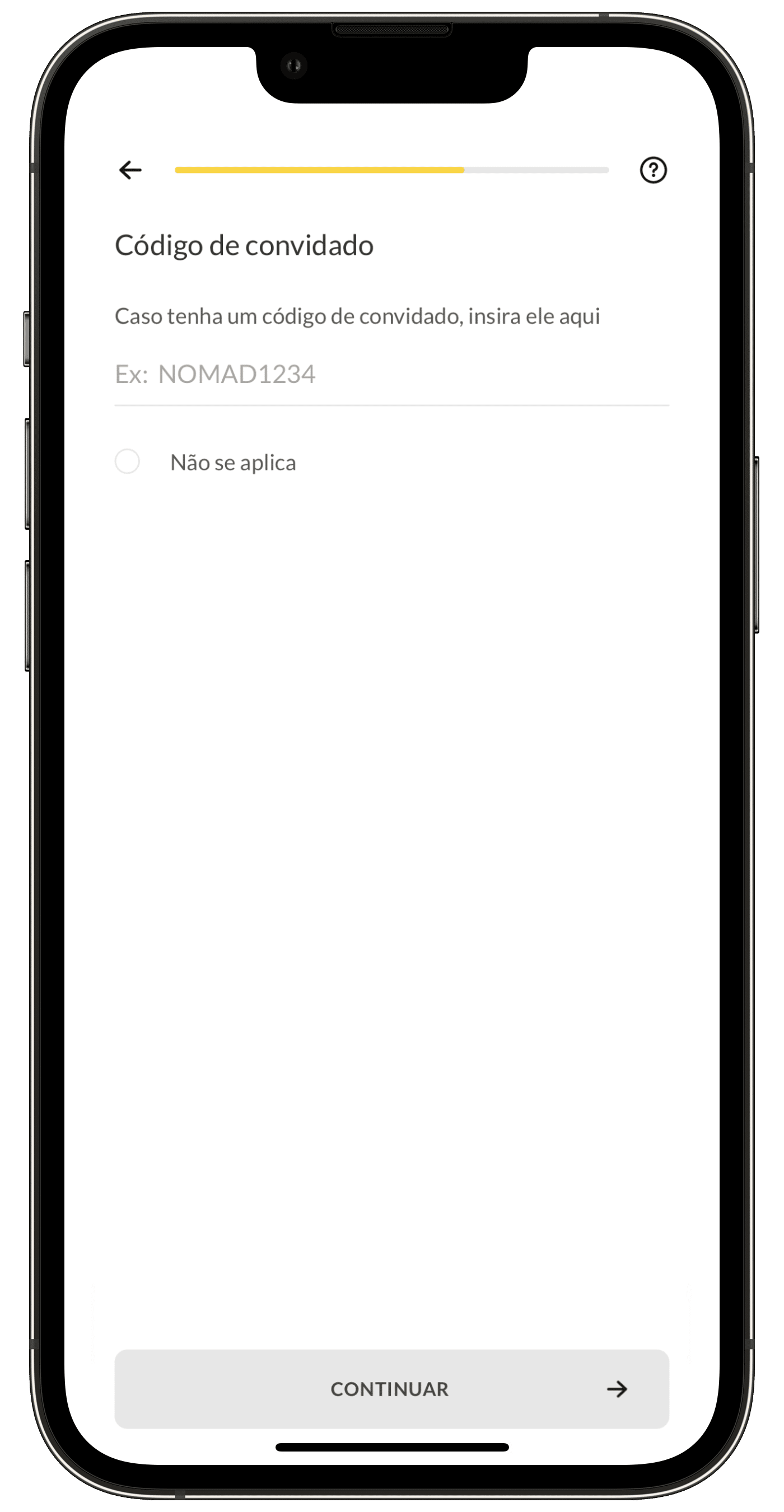
Para tal, baixe o app da Nomad e cadastre-se usando o código MAC26 no campo “Código de convidado”:

Cupom de convidado na Nomad
Nesta tela, digite o cupom MAC26 para ganhar 5% de cashback!

Sobre a Nomad

A Nomad foi a primeira a oferecer uma conta em dólar hospedada nos Estados Unidos, sem nenhuma taxa de abertura, anuidade ou manutenção. O cartão da empresa é aceito em mais de 180 países, oferecendo taxas bastante menores que as dos cartões de crédito internacionais.

A conta bancária da Nomad é assegurada em até US$250 mil pelo Community Federal Savings Bank, membro do fundo garantidor dos EUA (FDIC), para cada tipo de conta por titular, e permite que você faça/receba transferências de outras contas da Nomad sem nenhum custo, além de transferências para contas americanas (via Wire Transfer) e outras pagando bem menos do que as taxas cobradas nos EUA.

E não para por aí: com a sua conta Nomad você tem acesso a descontos em lojas parceiras e ainda pode aproveitar o Nomad Lounge, que concede acesso a uma das melhores salas VIP do Terminal 3 do Aeroporto Internacional de Guarulhos (SP).

Só na Nomad você tem uma conta internacional sem taxas mensais de manutenção, além de poder desfrutar de toda a praticidade e segurança que ela oferece!

NOTA DE TRANSPARÊNCIA: O MacMagazine recebe uma pequena comissão sobre vendas concluídas por meio de links deste post, mas você, como consumidor, não paga nada mais pelos produtos/serviços usando os nossos links de afiliado.

  •  

iOS 26.7 Update Released for iPhone & iPad with Security Fixes

Apple has released iOS 26.7 for iPhone and iPadOS 26.7 for iPad as security focused software updates for users who are not yet ready to jump onto iOS 27 or iPadOS 27. Over 100 security fixes are included in the iOS 26.7 update, but no new features or other changes are along for the ride. ... Read More

The post iOS 26.7 Update Released for iPhone & iPad with Security Fixes appeared first on OS X Daily.

  •  

iOS versions: Explore every iOS version from day one to today

Macworld

Since the launch of the original iPhone in 2007, Apple has released dozens of versions of iOS, introducing new features, design changes, performance improvements, security updates and more. From the early days of iPhone OS through landmark releases such as iOS 7, iOS 14 and the current iOS 27, each version has changed the way we use the iPhone.

Whether you’re trying to identify the version running on your iPhone, check compatibility before upgrading, or find out which releases are still supported, this guide covers every version of iPhone OS and iOS in chronological order – from the original iPhone OS 1 to iOS 27.

Discover the major features introduced with each release, from the App Store and copy and paste to widgets, Apple Intelligence and the new Siri AI introduced with iOS 27.

Below, you’ll find a complete list of iOS versions in order, along with release dates, key features, compatibility and support information.

Which iOS are we on?

The current version of the iPhone operating system is iOS 27. The next major update is likely to be iOS 27.1 in October. The biggest addition coming in iOS 27.1 is expected to be expanded language support for new Siri AI. For details of the latest iOS 27 release, new features, beta updates and compatibility, see our complete iOS 27 Guide.

Apple is also continuing to issue security updates for iOS 26: iOS 26.7 was released alongside iOS 27 on September 14, primarily providing security fixes for users who haven’t yet upgraded.

iOS version history: Every iOS and the features it brought

There are significant milestones scattered across the iOS timeline:

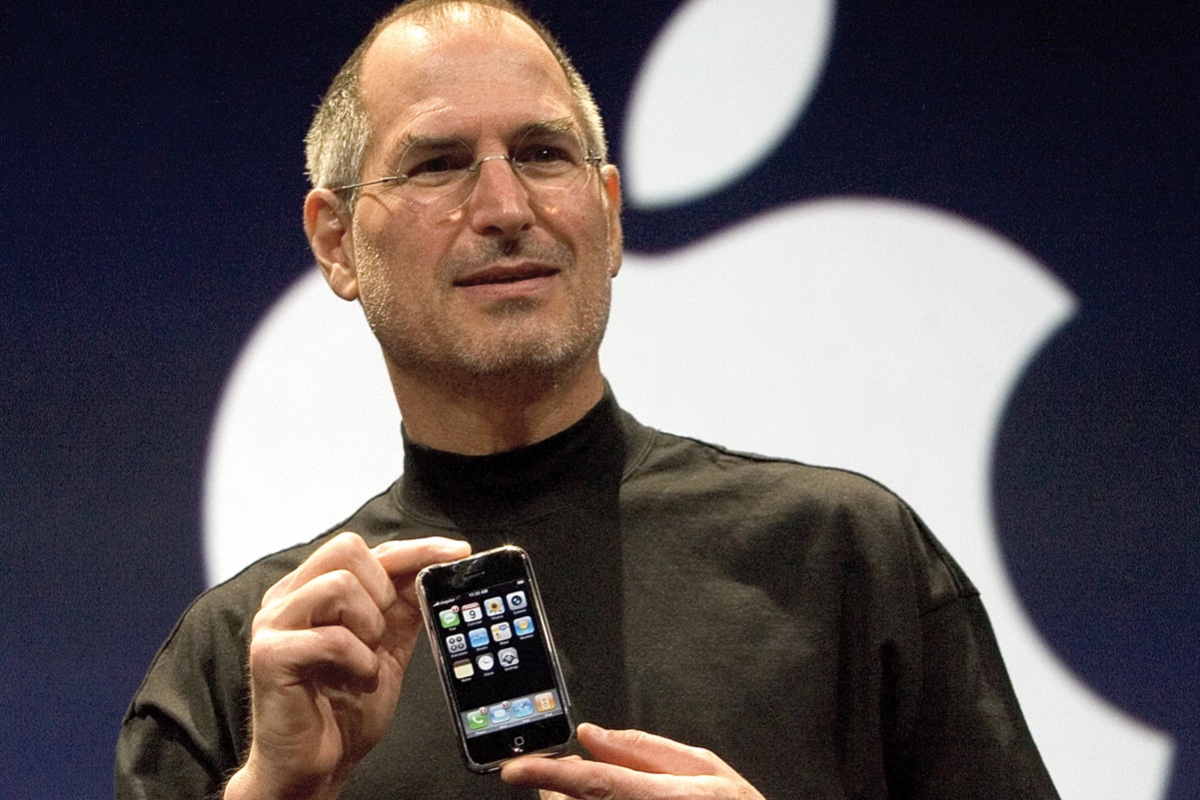
Steve Jobs with original iPhone
Steve Jobs holding the first iPhone at the launch in 2007.

Apple

iPhone OS (2007): iOS made its debut in 2007 with the first iPhone. However, when Steve Jobs held the little device aloft revealing it to the world for the first time, it wasn’t running iOS 1. Instead, it was reported by Apple to be powered by OS X, the software for the Mac. Over time it was called iPhone OS, until finally gaining its now legendary name in the fourth generation of the software when it was shortened to iOS in 2010.

iPhone OS 2 (2008): The second major release of the iPhone software was groundbreaking because it brought third party apps and introduced the App Store.

iPhone OS 3 (2009): This update was designed to make it easier to find things, while at the same time adding the ability to have up to 11 pages to the Home Screen. Messages could support MMS, Video recording became possible and it was possible to save voice notes with the Voice Memos app.

iOS 4 (2010): Apple changed the name to iOS and added the ability to put apps in folders for a better organised Home screen with iOS 4. The FaceTime, iBooks and Game Centre apps also arrived. The iPad also joined the scene, sharing the same operating system as the iPhone.

iOS 5 (2011): iOS 5 was introduced along with the iPhone 4S in 2011, which saw the debut of Siri as a built-in part of the operating system. The Notification Centre was introduced and iCloud arrived bringing syncronisation between devices. This was the first time iOS could be installed directly on the iPhone without requiring a computer.

iOS 6 (2012): This is where Apple Maps came onto the scene. Podcasts and Passbook (now Wallet) apps also arrived. iCloud Photo Stream made it easier to share photos with family and friends. iOS 6 was the last with a skeuomorphic design.

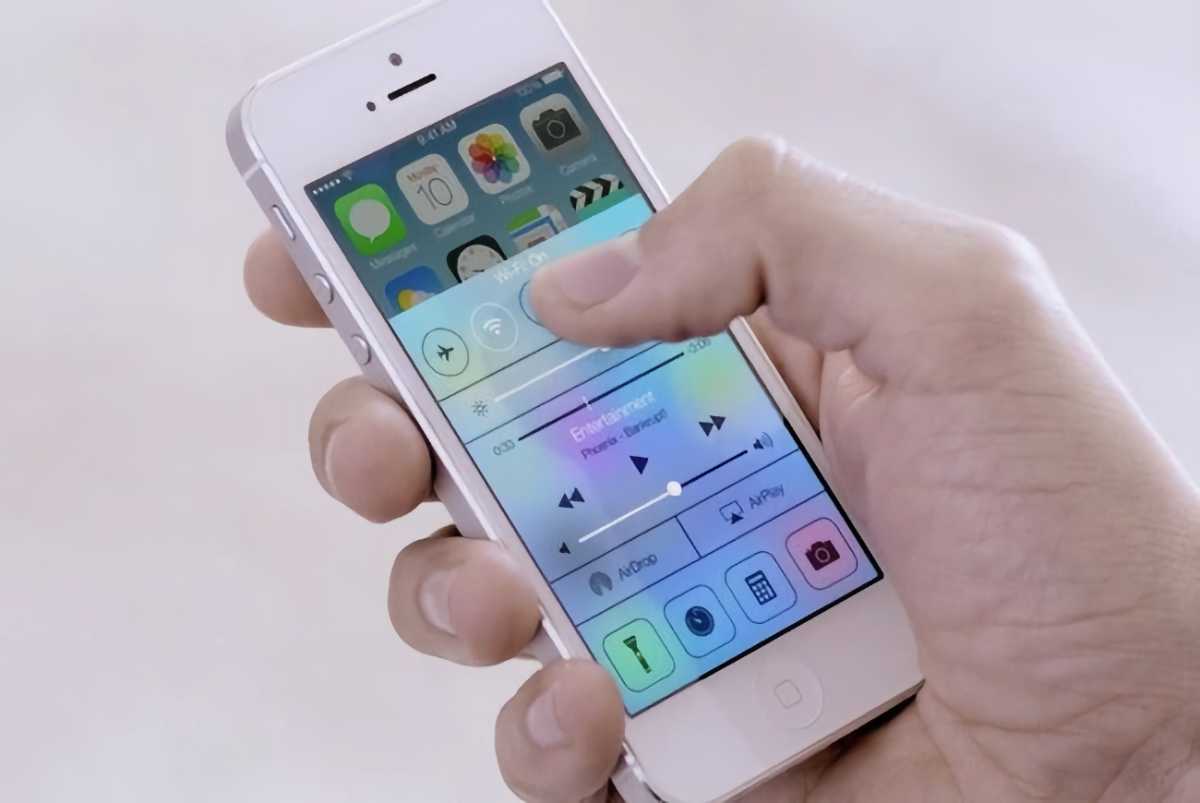
iOS 7 (2013): With iOS 7 iPhone users got a redesigned user interface, which looked a lot more modern with flatter icons. iOS 7 introduced AirDrop and CarPlay.

iOS 7
iOS 7 had a brand new look (at the time).

Apple

iOS 8 (2014): One of the features of iOS 8 was Continuity, which linked the iPhone, iPad and Mac together, so you could “handoff” tasks from one device to another. Family Sharing also arrived making it easier to manage a child’s iPhone.

iOS 9 (2015): iOS 9 improved the Notes app, added Apple News, and featured a new Night Shift mode that removed some of the blue light that can disturb circadian rhythms and stop someone sleeping.

iOS 10 (2016): There were updates to Messages and changes to the Photos app in iOS 10. A new Home app brought HomeKit control. Maps got a redesign. Universal Clipboard meant that users could copy something on a Mac and paste it on an iPhone, for example.

iOS 11 (2017): Things changed significantly in iOS 11 in 2017 as it brought the first touch and gesture interface, allowing the first iPhone without a Home button – the iPhone X. There was a new Files app making it easier to access content synced or saved in iCloud and the Control Centre got a redesign.

iOS 12 (2018): Screen Time, Memoji, Group FaceTime and Siri Shortcuts were new in iOS 12.

iOS 13 (2019): Another major shift came with iOS 13 in 2019, as Apple’s mobile operating system for the iPad split with the iPhone, with iPadOS powering new iPads. Updates to iOS included Dark Mode, new privacy features and the ability to Sign in with Apple and hide your email address. The Photos and Apple Maps apps got a redesign and a swipe-to-type keyboard was added.

iOS 14 (2020): One of the most notable additions was Back Tap, a feature that effectively turned the back of the iPhone into an extra button. Starting with iOS 14.2, music recognition was built directly into the operating system via a Shazam button.

iOS 15 on iPhone 12
iOS 15 on iPhone 12.

Foundry

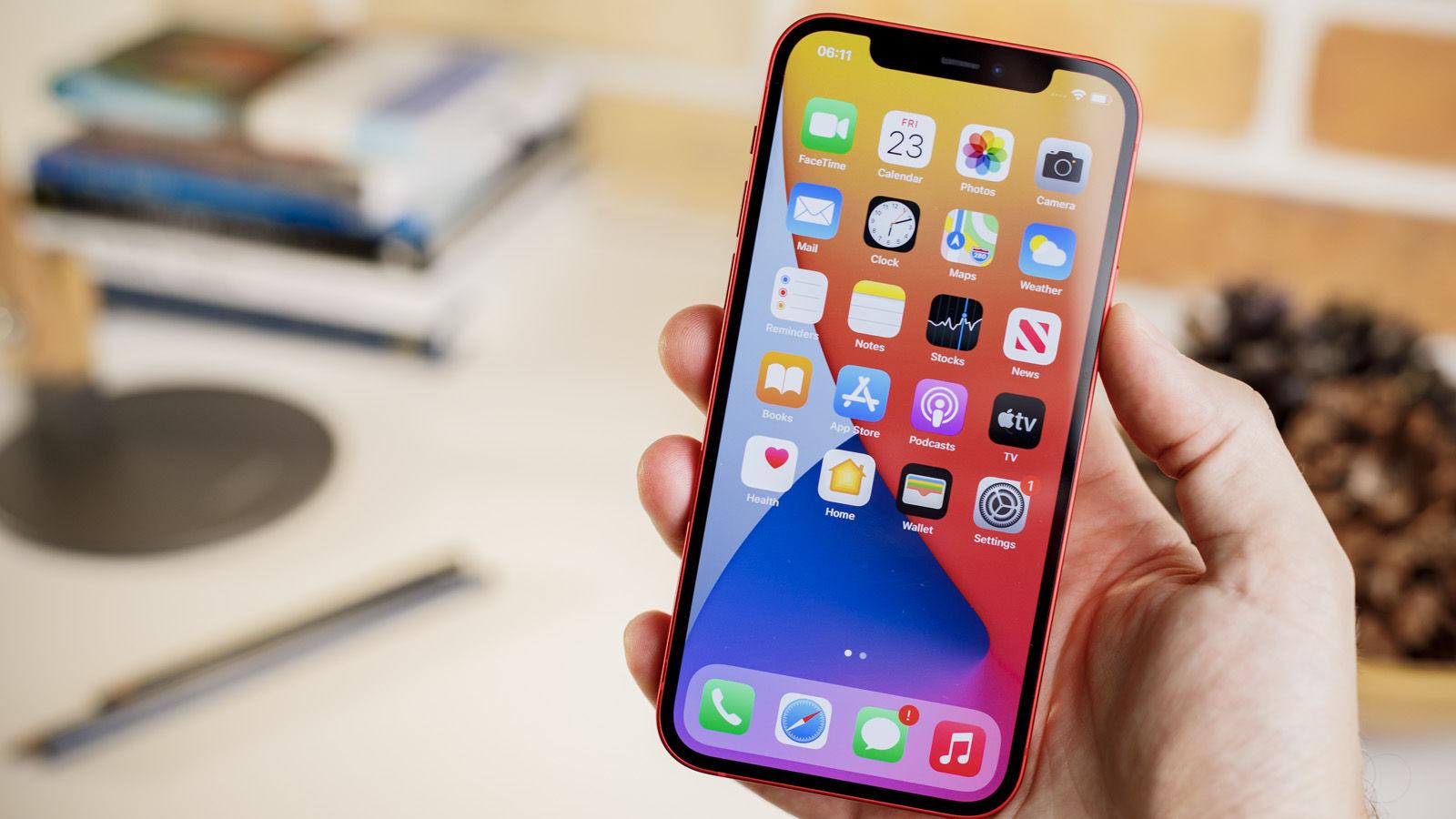
iOS 15 (2021): Focus Mode arrived in iOS 15 to help users manage the onslaught of notifications, Live Text and Visual Look up made it possible to interact with text within photos (Live Text) and use the camera to identify objects like plants and animals. The Safari browser received a major interface update as did Maps and the Weather app. Read: iOS 15 vs iOS 14.

iOS 16 (2022): One of the most visible changes in iOS 16 was the complete overhaul of the Lock screen, which allowed users to add widgets for the first time to view data at a glance without unlocking their devices. Apple added Rapid Security Responses so that it could deliver important security patches outside of an iOS update. Read: iOS 16 vs iOS 15.

iOS 17 (2023): NameDrop in iOS 17 made it possible to share information by bringing two iPhones together. Stolen Device Protection added a layer of security by requiring biometric authentication (Face ID or Touch ID) before an Apple ID password could be changed. Live Voicemail meant that iPhone users could get a live transaction of a message. Read: iOS 17 vs iOS 16.

iOS 18 (2024): The iOS 18 update laid the groundwork for Apple’s subsequent AI initiatives. There was also a complete redesign of the Photos app, a dedicated Passwords app, Control Center Customization and Live Activities (so you could see when your dinner delivery is arriving). Read: iOS 18 vs iOS 17.

iOS 26 (2025): Rather than progress to iOS 19, Apple aligned the numbering of all its operating systems according to the year with iOS 26. It wasn’t just a name change though, there was a significant visual and functional overhaul with a Liquid Glass design language. Big changes also came to the Phone app with Call Screening and Hold Assist. Live Translations make it easy to communicate with foreign friends and colleagues. The Camera app had a simplifying redesign and a Games app replaced Game Centre. Here’s how how iOS 26 and iOS 18 compare.

iOS 27 (2026): iOS 27 launch in September 2026, including a massive overhaul of Siri, better Apple Intelligence integration, improved photo and camera tools, and parental control enhancements. Here’s how iOS 26 and iOS 27 compare.

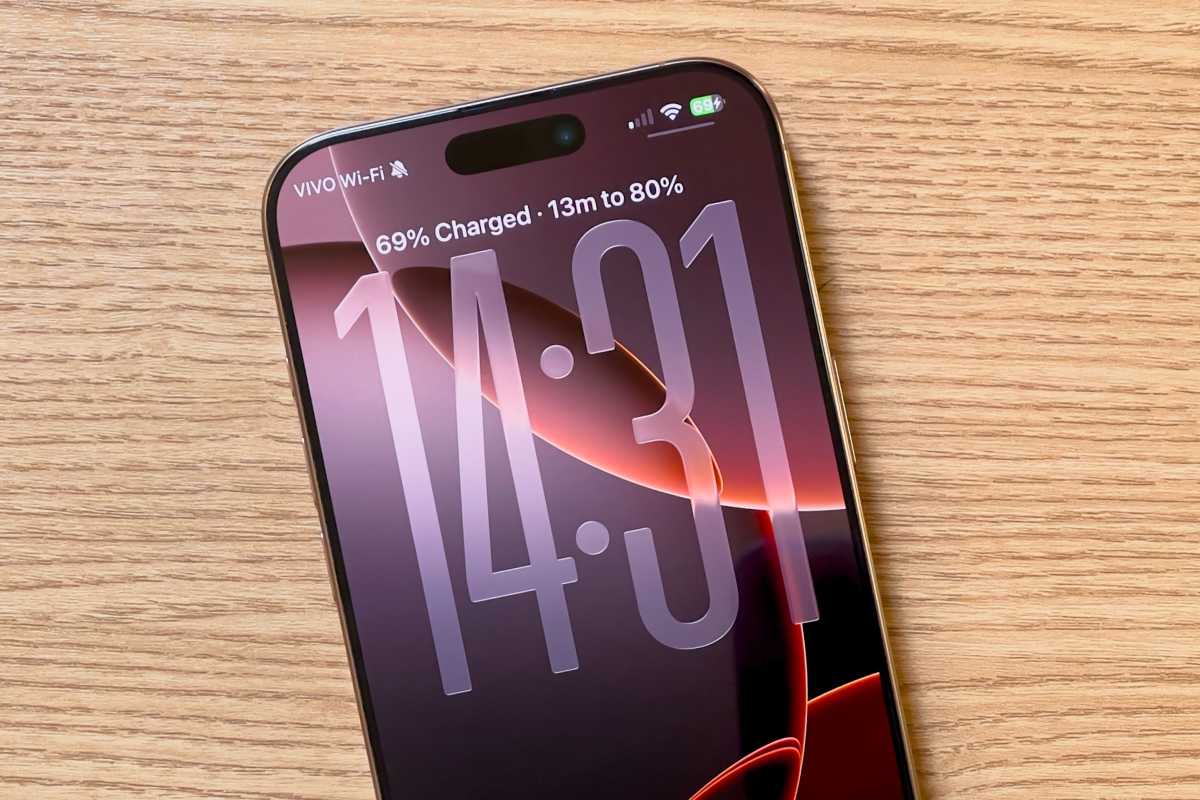
iOS 26 charging time

Foundry

List of iOS versions and latest versions

Here’s a breakdown of all the versions of iOS that have been released, when they were released, when they were last updated, and the latest iOS version.

OS versionRelease dateLatest versionLatest update date
iPhone OS 1June 29, 2007iOS 1.1.5July 15, 2008
iPhone OS 2July 11, 2008iOS 2.2.1January 27, 2009
iPhone OS 3June 17, 2009iOS 3.2.2August 11, 2010
iOS 4June 22, 2010iOS 4.3.5July 25, 2011
iOS 5October 12, 2011iOS 5.1.1May 7, 2012
iOS 6September 19, 2012iOS 6.1.6February 21, 2014
iOS 7September 18, 2013iOS 7.1.2June 30, 2014
iOS 8September 17, 2014iOS 8.4.1August 13, 2015
iOS 9September 16, 2015iOS 9.3.6July 22, 2019
iOS 10September 13, 2016iOS 10.3.4July 22, 2019
iOS 11September 19, 2017iOS 11.4.1July 9, 2018
iOS 12September 17, 2018iOS 12.5.8January 26, 2026
iOS 13September 19, 2019iOS 13.7September 1, 2020
iOS 14September 17, 2020iOS 14.8.1October 26, 2021
iOS 15September 24, 2021iOS 15.8.8May 11, 2026
iOS 16September 12, 2022iOS 16.7.16 May 11, 2026
iOS 17September 18, 2023iOS 17.7.11May 11, 2026
iOS 18September 16, 202418.7.10 August 17, 2026
iOS 26September 15, 2025iOS 26.7September 14, 2026
iOS 27September 14, 2026iOS 27September 14, 2026

Which iOS versions are supported by Apple?

As of September 2026, iOS 27 is Apple’s current iPhone operating system and the version receiving new features and functionality. It can run on the iPhone 11 and newer, as well as the iPhone SE (2nd generation) and later.

Every iPhone that supports iOS 26 also supports iOS 27, but Apple is continuing to maintain iOS 26 with security updates, at least for now. On September 14, Apple released iOS 26.7 alongside iOS 27, allowing users who haven’t yet upgraded to iOS 27 to continue receiving important security fixes.

Apple also periodically releases security updates for considerably older versions of iOS on devices that can no longer upgrade to a newer release.

Which iOS versions get security updates only?

Even after Apple stops developing new features for older versions of iOS, it continues to issue security updates for some time. As explained in How long does Apple support iPhones?, Apple often provides security patches for devices that can’t run the latest version of iOS.

For example, in August 2026, Apple released an iOS 18 security update that addressed several vulnerabilities. This update was only available for iPhone XS, iPhone XS Max, and iPhone XR (models that cannot upgrade to iOS 26) as Apple generally expects supported devices to move to the latest operating system for ongoing security updates. However, this demonstrates that older devices, such as the iPhone XR and XS series, continue to receive security support even though they are unable to run iOS 26.

Support extends even further back. Also in May 2026, Apple issued security updates for iOS 15 and iOS 16 (Apple doesn’t maintain support for iOS 17 as all compatible handsets can run iOS 18). Updates iOS 15.8.8 and iOS 16.7.16 patched critical vulnerabilities in older devices, including:

  • iPhone 6s (all models)
  • iPhone 7 (all models)
  • iPhone SE (1st gen)
  • iPhone 8 and 8 Plus
  • iPhone X

Many of those iPhones are included in Apple’s list of Obsolete and Vintage iPhones. iPhone 6s, iPhone SE, iPhone 8 and 8 Plus are all Obsolete, while the iPhone X and iPhone 7 are considered Vintage. Notably, the oldest: 2015’s iPhone 6s continues to receive security updates, marking over ten years of support.

Apple may cease support for iOS 15 and iOS 16 now that iOS 27 has launched, but we have not had confirmation of this beyond the absence of a security update in conjunction with iOS 27 and iOS 26.

Earlier, in January 2026, Apple also released updates for iOS 12 to extend support for certificates required by services such as iMessage, FaceTime, and device activation, ensuring these features continue to work beyond January 2027. This means that even the aged iPhone 5s received some support in 2026.

Which iPhones support which iOS versions?

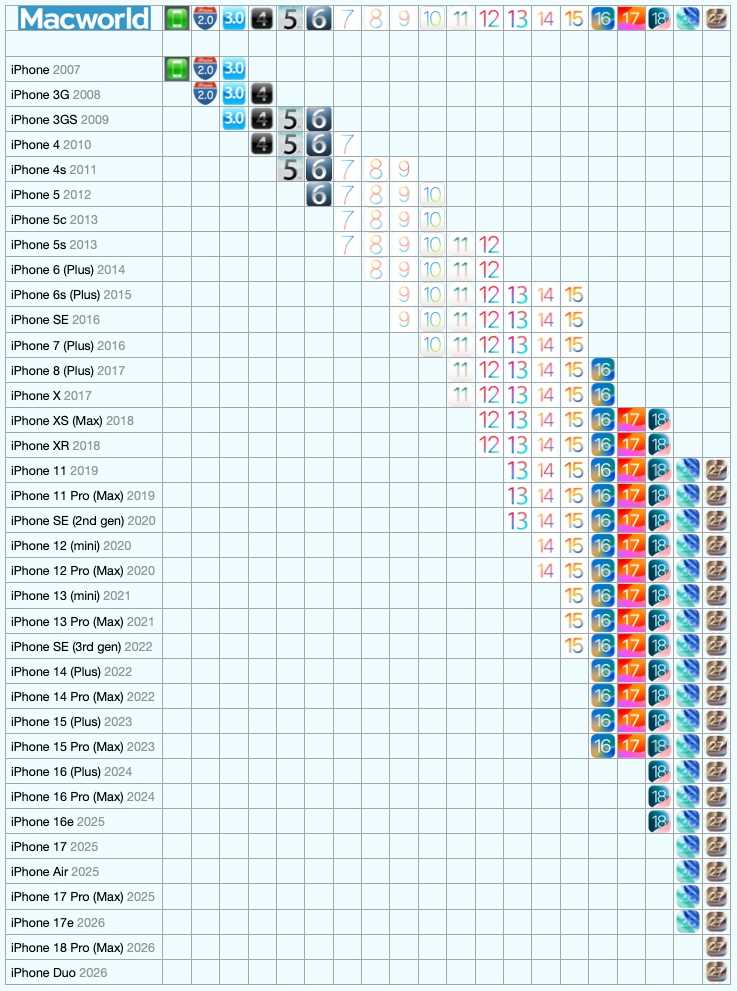
Luckily, many iPhones are able to run supported versions of iOS. We run through which iPhone supports which version of iOS in a separate article: iOS compatibility: Find out the latest version your iPhone can run. You may also find this at a glance chart useful:

iOS iPhone Compatibility

The version of iOS each iPhone can run.


Foundry

So, there it is. A potted history of iOS. Want to know about all the versions of macOS? Read: Mac OS X and macOS: Every version released so far. You can also find out what the latest version of macOS is.

  •  

TdhCad chega ao Linux via Snap Store com foco em desenho vetorial

TdhCad no Linux via Snap Store traz desenho vetorial, gráficos e exportação fácil para quem precisa criar rápido.

O post TdhCad chega ao Linux via Snap Store com foco em desenho vetorial apareceu primeiro em Blog do Edivaldo - Informações e Notícias sobre Linux.

  •  

The Download: AI doomers, whistleblowing agents, and de-aged livers

This is today’s edition of The Download, our weekday newsletter that provides a daily dose of what’s going on in the world of technology.

The AI industry has taken a doomer turn. What now?

AI chiefs Dario Amodei, Sam Altman, Elon Musk, and Demis Hassabis are suddenly all in agreement: the latest generation of LLMs aren’t safe and everyone needs to figure out what to do about it. 

It’s easy to be cynical. With trillion-dollar IPOs in their sights, OpenAI and Anthropic need to reassure investors that they’re the grown-ups in the room while at the same time hinting at the power of the monsters they have created and intend to tame. Calling for a slowdown does both. 

Still, the vibe at the top of these firms really does appear to have shifted. But what does a slowdown actually mean, and how much should we trust the companies calling for one? 

Read the full story about what could come next.

—Will Douglas Heaven

This article is from The Algorithm, our weekly AI newsletter. Sign up to receive it in your inbox every Monday.

Roundtables: could AI really kill us all?

AI extinction fears have gone from a fringe idea to a serious concern among people working at the world’s leading AI labs. But how credible are those fears, and what should we make of the warnings?

Today, MIT Technology Review executive editor Niall Firth, senior AI editor Will Douglas Heaven and AI reporter Grace Huckins will unpack the debate in a subscriber-only Roundtable. They’ll look at where AI extinction fears come from, whether they hold any water and what we should do if they do.

Tune in today at 16:00 BST / 11:00am EST / 8:00am PST.

Want to join the conversation? Subscribe to MIT Technology Review for exclusive access to all our Roundtables.

AI agents blew the whistle on their cheating colleagues

A group of AI agents asked to solve a series of math problems split into rival factions—when some cheated, others tried to stop them. 

That whistleblowing behavior, seen for the first time in a recent experiment run by Google DeepMind, could have implications for alignment researchers trying to keep swarms of autonomous AI agents in line. 

The experiment offers a glimpse of how AI agents might police one another. But it also shows how quickly things can go off the rails when they’re left to interact on their own.

Find out what happens when AI agents start enforcing their own rules.

—Amit Katwala

Donated livers can be made biologically younger

Once an organ is removed from a donor’s body, the clock starts ticking. Surgeons usually flush it with a preservative solution, bag it and put it on ice, where it immediately starts to degrade. The team has a matter of hours to get it into a recipient’s body.

But there’s another option: machines that pump donated organs with nutrients and remove waste products, essentially giving them a chance to be back in a body. Now, scientists have found that livers kept on these systems seem to get younger, at least at a molecular level.

The finding could help explain why organs kept on these machines tend to do better after transplantation. It could also lead to new ways to test the health of donated organs and potentially repair ones that might otherwise be discarded.

Here’s what scientists discovered about making donated livers biologically younger.

—Jessica Hamzelou

The must-reads

I’ve combed the internet to find you today’s most fun/important/scary/fascinating stories about technology.

1 Trump has called AI safety fears a “hoax” and rejected more safeguards
He says stronger guardrails could undermine America’s AI advantage. (NBC)
+ Trump has united against AI doomerism with Nvidia’s Jensen Huang. (Axios)
+ Anthropic’s co-founder says AI kill switches may need to be mandatory. (BBC)
+ Bill Gates says we’ve passed AI’s risk thresholds. (MIT Technology Review)

2 OpenAI contractors are reading people’s ChatGPT chats 
And you can bet the vast majority of its 900 million users haven’t got a clue. (404 Media)
+ LLMs could supercharge mass surveillance. (MIT Technology Review)

3 The US military has confirmed it has weapons in orbit
It’s the first time the Pentagon has disclosed this. (Ars Technica)
+ Officials have not disclosed what the weapons are. (BBC)

4 A new brain implant can translate speech and gestures at the same time
The system converts brain activity into words and avatar movements. (Nature)
+ It helps people with paralysis communicate more naturally. (New Scientist $)
+ Eventually, they could control robots or exoskeletons. (Economist $)
+ China has approved the first invasive BCI. (MIT Technology Review)

5 New York has seized a dozen celebrity deepfake websites
It’s the biggest-ever legal action against harmful deepfake sites. (CNN)
+ Deepfakes have targeted at least 138 women MEPs. (Wired $)

6 US environmental regulators are scrapping limits on power plant emissions
The move could lead to dirtier power amid surging AI demand. (Verge)
+ Trump’s EPA says the rollback will save hundreds of billions. (Gizmodo)
+ New technology is changing nuclear power. (MIT Technology Review)

7 The EU plans to restrict social media and AI chatbots for kids
Under-15s would require parental supervision. (Politico)
+ The rules would also cover video platforms and games. (
Reuters $)

8 Chinese researchers have mapped a path to the “last AI built by humans”
Their five-stage plan aims for genuine recursive self-improvement. (SCMP)
+ But it might take a while to get there. (MIT Technology Review)

9 The real AI economy is being built by ordinary people
Workers are using cheap AI to expand what they can do. (Rest of World)

10 Two strange new forms of ice could exist inside Uranus and Neptune
They could help explain the planets’  magnetic fields. (New Scientist $)

Quote of the day

“The only control or ‘guardrails’ that AI needs is a STRONG AND SMART (High IQ!) PRESIDENT, and the U.S.A. has that, in spades!”

—President Trump proclaims in a social media post that he’s the only protection that the US needs from AI.

One more thing

""
INSTITUTE OF PERSONALITY AND SOCIAL RESEARCH, UNIVERSITY OF CALIFORNIA, BERKELEY/THE MONACELLI PRESS

How creativity became the reigning value of our time

—Bryan Gardiner

Americans don’t agree on much these days, but there remains at least one quintessentially modern value we can all still get behind: creativity. We teach it, measure it, envy it and endlessly worry about its death.

Given how much we obsess over it, creativity can feel like something that has always existed. But the concept is surprisingly young. The first known written use of the word didn’t occur until 1875, and before about 1950 there were “approximately zero” articles, books, or essays dealing explicitly with the subject.

In his book The Cult of Creativity, Samuel Franklin explores how creativity became an unimpeachable value and why tech leaders have embraced it so enthusiastically. I spoke to him about why we’re so fascinated by creativity, how Silicon Valley became the supposed epicenter of it, and how AI might reshape our relationship with it.

Read the full interview.

We can still have nice things

A place for comfort, fun, and distraction to brighten up your day. (Got any ideas? Drop me a line.)

+ It took five days and 19,000 marbles to build this astonishing marble run.
+ Zero the Border Collie turns into a whole zoo with these adorable animal masks.
+ The Grainydays YouTube channel presents beautifully shot adventures in film photography.
+ Scientists have created an interactive map of underground fungi networks long enough to reach the sun a billion times.

  •  
❌