NVIDIA's RTX Spark has arrived, and tons of laptops are quickly equipping themselves with this superchip to take advantage of its NVIDIA AI, RTX graphics, and unified memory to improve their productivity and gaming performance.
Antonline is getting in on the launch-day action by offering Microsoft Surface and Lenovo laptops packed with the RTX Spark, and we've rounded up Antonline's available RTX Spark offers for your perusal.
Do note that some of Antonline's RTX Spark laptop offers are only up for pre-order, while others are not in stock yet, so check back on its website frequently for stock updates.
This 15-inch PixelSense Touchscreen laptop comes with an NVIDIA RTX Spark N1X with a 5120-core GPU and 18-core CPU, an NVIDIA Blackwell RTX 5120-core Graphics card, 32GB of Unified Memory, and 1TB Storage.View Deal
This advanced Lenovo Pro 9n Notebook features a 15.3 WQXGA Touchscreen, 64GB RAM, 2TB Storage, and an NVIDIA RTX Spark N1X with a 6144-core GPU and 20-core CPU for improved productivity and gaming.View Deal
This configuration of the Lenovo Pro 9n laptop features its display with an OLED Touchscreen, 32GB RAM, 1TB Storage, and an NVIDIA RTX Spark with a 5120-core CPU and 18-Core CPU to help you master its Copilot+ features when conducting research, meetings, or content creation.View Deal
What is the RTX Spark?
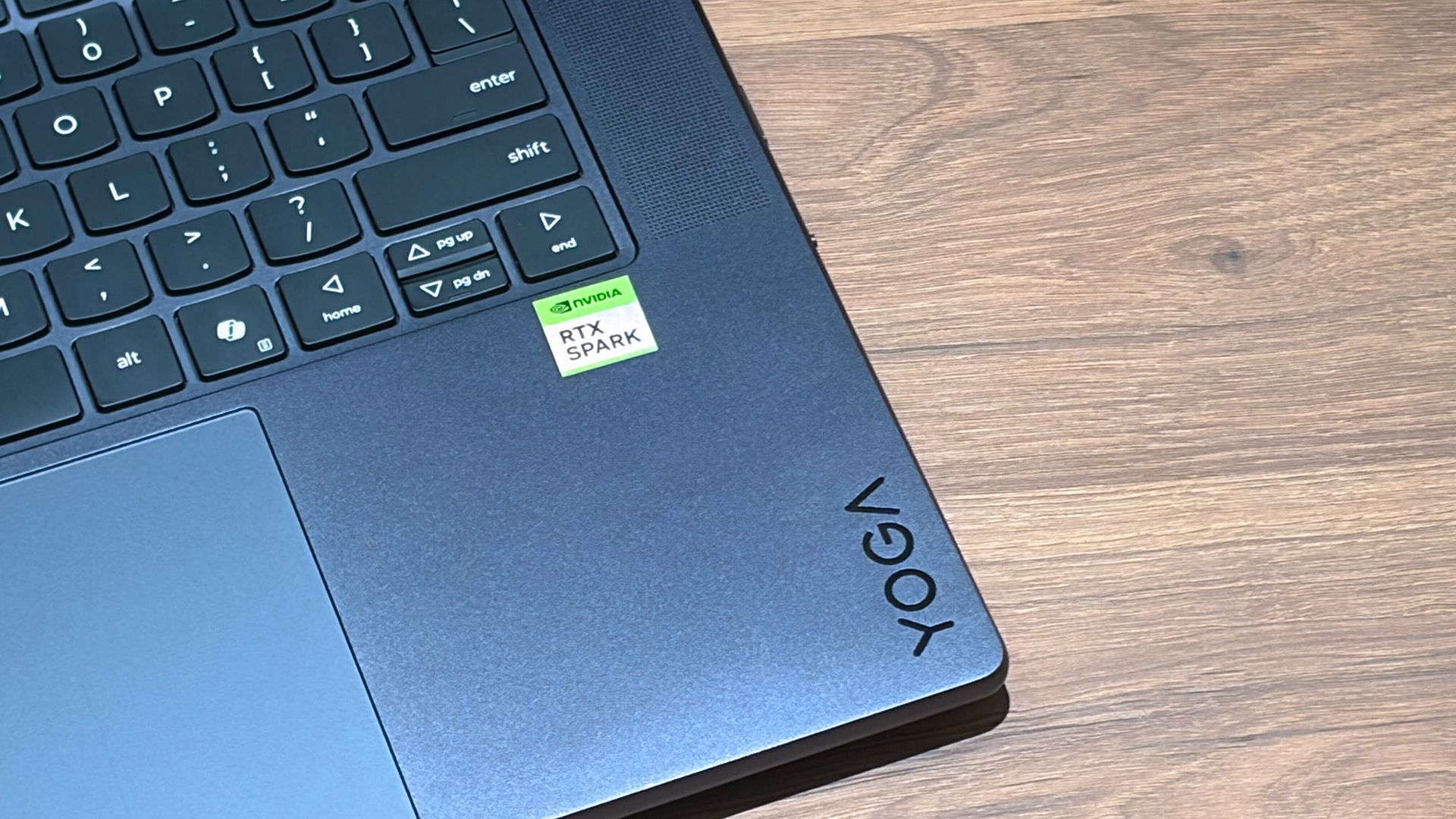
A Lenovo Yoga laptop equipped with the RTX Spark chip. (Image credit: Cale Hunt | Windows Central)
The RTX Spark is a brand-new ARM-based superchip platform designed by NVIDIA to make a PC more efficient when running high-end PC games and local AI-workflow tasks securely without compromising its performance.
The RTX Spark has an NVIDIA Grace CPU that can support up to 20 cores for boosted performance efficiency, and its Blackwell-generation RTX GPU has gaming performance rates on par with the RTX 5070 graphics card,
Additionally, the RTX Spark can support up to 128GB of unified RAM between its CPU and GPU, and it can generate up to 1,000 TOPS to boost its power when running local AI workflows.
RTX Spark selling points. (Image credit: NVIDIA)
One of our tech experts, Zac Bowden, recently benchmark-tested the RTX Spark and concluded that, and I quote, "RTX Spark is a super interesting chipset. It's forward leaning in a lot of ways, built on the Arm64 architecture that delivers serious performance and great efficiency. While its N1X CPU is just okay, its Blackwell RTX GPU really shines.
This is the first time we've seen RTX 4070-5070 level performance in an SoC that is this small and efficient. It's optimized for AI workloads, which is its strongest workflow by far. Quantized AI models run great, and with up to 128GB of unified memory, most mainstream models will fit entirely on the GPU without a hitch."
Zac also mentions that while it's great for content creators and gamers, the RTX Spark is best recommended for workers who run AI models locally all day, develop software, crunch complex data, and manage source code using thin laptops.
So, If you're one of those hard-working data crunchers in need of a powerful productivity laptop, then laptops built with the RTX Spark are for you.
Join us on Reddit at r/WindowsCentral to share your insights and discuss our latest news, reviews, and more.
Counterfeiters are getting better at replicating brands' marks and passing off dupes, known as "superfakes," as genuine items. A startup called Veritas wants to tackle the problem with its own chip that verifies goods.
Microsoft is finally ready to take on the MacBook Pro with the new Surface Laptop Ultra. From pricing to specs and design, Surface Laptop Ultra was inspired by MacBook Pro, and that's not necessarily a bad thing.
Unlike most Surface PCs we see ship these days, the Surface Laptop Ultra is a lot of firsts for Microsoft. It's the first ultra-class Surface Laptop, designed from the ground up to compete squarely with high-end professional creator or developer mobile workstations.
What I find fascinating about Surface Laptop Ultra however is that it exists because Microsoft's own developers and engineers wanted it. They built this laptop for themselves. It feels like the company got tired of looking over the fence at the MacBook Pro, and decided "why don't we just make our own version of that?"
It really is Microsoft's most powerful and most capable Surface PC ever, and a great stage for Windows. But that doesn't necessarily mean it's the best Surface PC for everyone. I've been testing the laptop over the last 8 days, and here are my thoughts on Microsoft's new flagship computer.
This review was made possible thanks to a review unit supplied by NVIDIA & Microsoft. Neither company had editorial input and did not see the contents of this review prior to publication.
Price & Availability
Microsoft
Surface Laptop Ultra
Surface Laptop Ultra is Microsoft's flagship and most powerful Windows PC. It can be configured with up to 128GB RAM, and ships with NVIDIA's new RTX Spark SoC. It's great for creative workflows and software development, and those who want to run local AI and LLMs directly on their device.
Surface Laptop Ultra is Microsoft's most expensive Surface Laptop to date. It starts at an eyewatering $2,599 for the entry-level configuration with 24GB of RAM, 512GB SSD storage, and an 18-core RTX Spark with 5,120 GPU cores. That's an expensive laptop, and it only gets worse the higher you climb up the specs ladder.
The model I've reviewed is the very top end configuration, with a crazy 128GB RAM, 1TB SSD, and a 20-core RTX Spark with 6,144 GPU cores. That model will set you back $5,899, which at these prices basically makes this a $6,000 laptop. That's an insane amount of money to spend on a laptop, but this configuration only really exists for professionals who need the extra power to run local agents and data crunching.
For video creators, gamers, and prosumers, you'll be more than well served with the lower tier models with 24-32GB RAM. All models come with the same mini LED screen, speaker setup, ports, keyboard, and trackpad. It's also available in Platinum or Nightfall colorways (aka, silver and black.)
Brightness: SDR up to 1,000 nits (typical), HDR up to 2,000 nits peak luminance
Optimised for touch interaction
Operating System
Windows 11 Home (24 GB unified memory models)
Windows 11 Pro (32 GB, 64 GB, and 128 GB models)
Ports & Connectivity
2 × USB-C® / USB4®
1 × USB-C® / USB4® with Magnetic Connect
1 × HDMI 2.1b
1 × USB-A 3.1
1 × Full-size SD card reader
1 × 3.5 mm headphone jack
Wireless
Wi-Fi 7, Bluetooth 5.4
Camera & Audio
1080p Full HD front-facing camera
Battery Life
Up to 15 hours of local video playback
Up to 12 hours of active web usage
Power Supply
Requires USB PD 115W–140W charging
Weight & Dimensions
Weight: 2.0 kg (4.41 lbs)
Chassis: Sub-18 mm thickness
Colours
Platinum, Nightfall
Base Price
Starting at $2,599
Design & Ports
MacBook Pro? (Image credit: Zac Bowden / Windows Central)
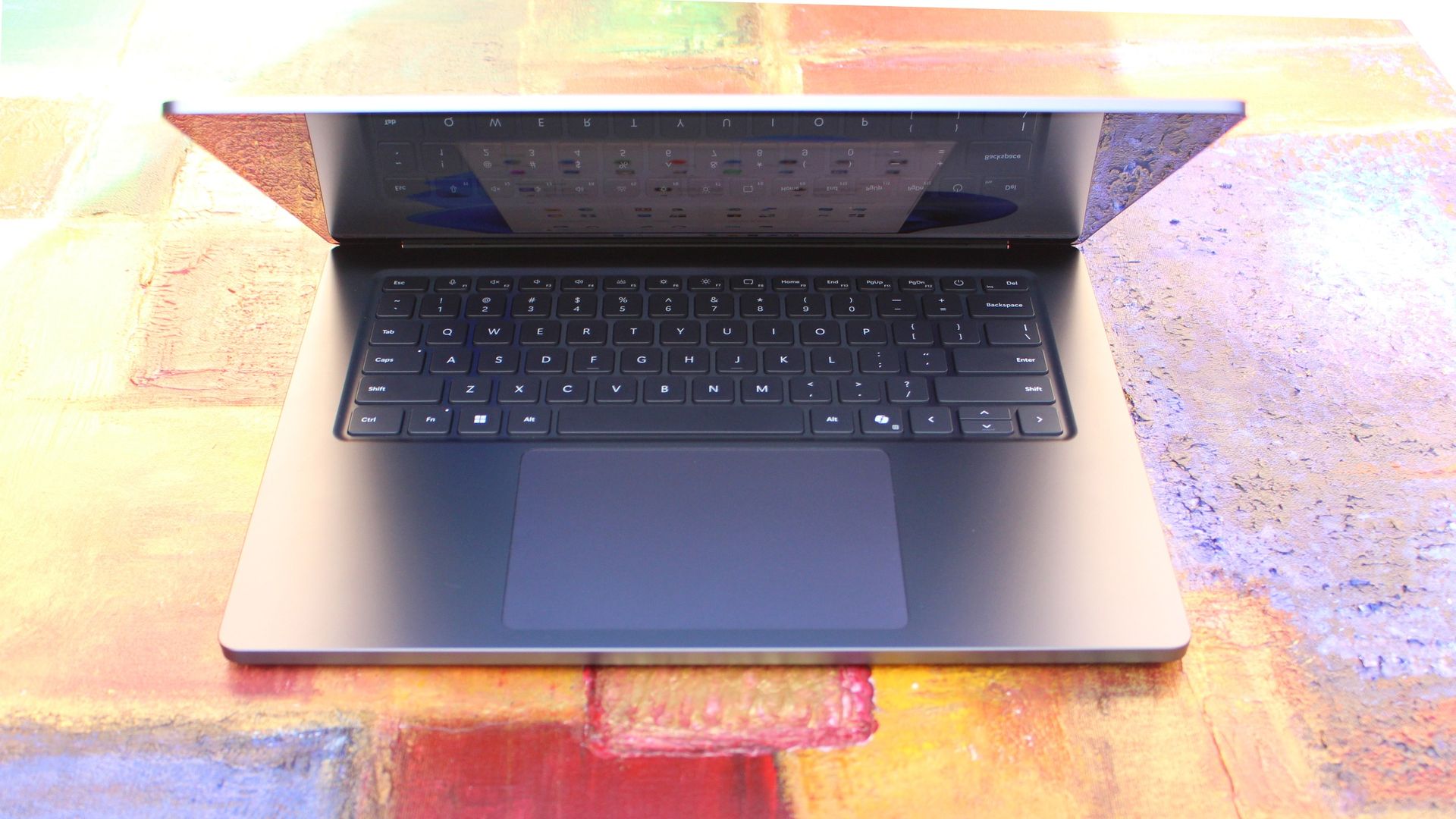
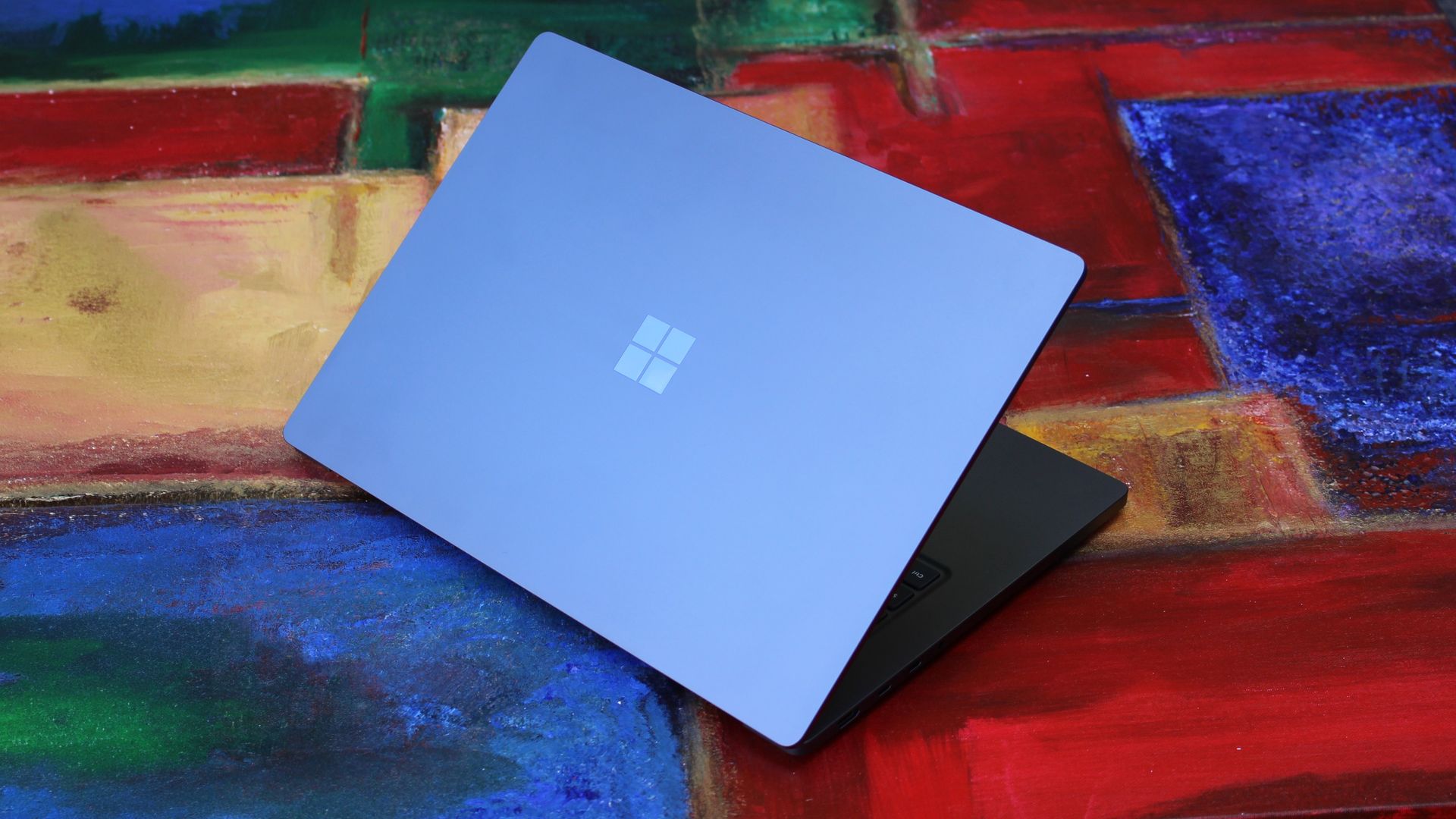
We have to start with how this thing looks, and we do need to address the fruit-shaped elephant in the room. Yes, Surface Laptop Ultra looks an awful lot like a MacBook Pro. I wouldn't blame the layman for even thinking it was a MacBook Pro from a distance. The square edges, large trackpad, and minimalist design echo the MacBook Pro from pretty much every angle.
But I'm not here to tell you that's a bad thing. The MacBook Pro is a beautiful device, which is to say Surface Laptop Ultra is also very beautiful. In fact, I think it even improves upon the MacBook Pro's design in subtle ways. The keyboard deck isn't surrounded by a plastic bezel like on MacBook Pro, instead it's softly indented into the metal keyboard deck which looks lush and seamless.
The corners on Surface Laptop Ultra are also a little rounder than the MacBook Pro, a design choice that trickles down from the corners of the chassis to the keys on the keyboard, and corners on the trackpad. It's an entirely consistent and well thought out design, which I highly appreciate.
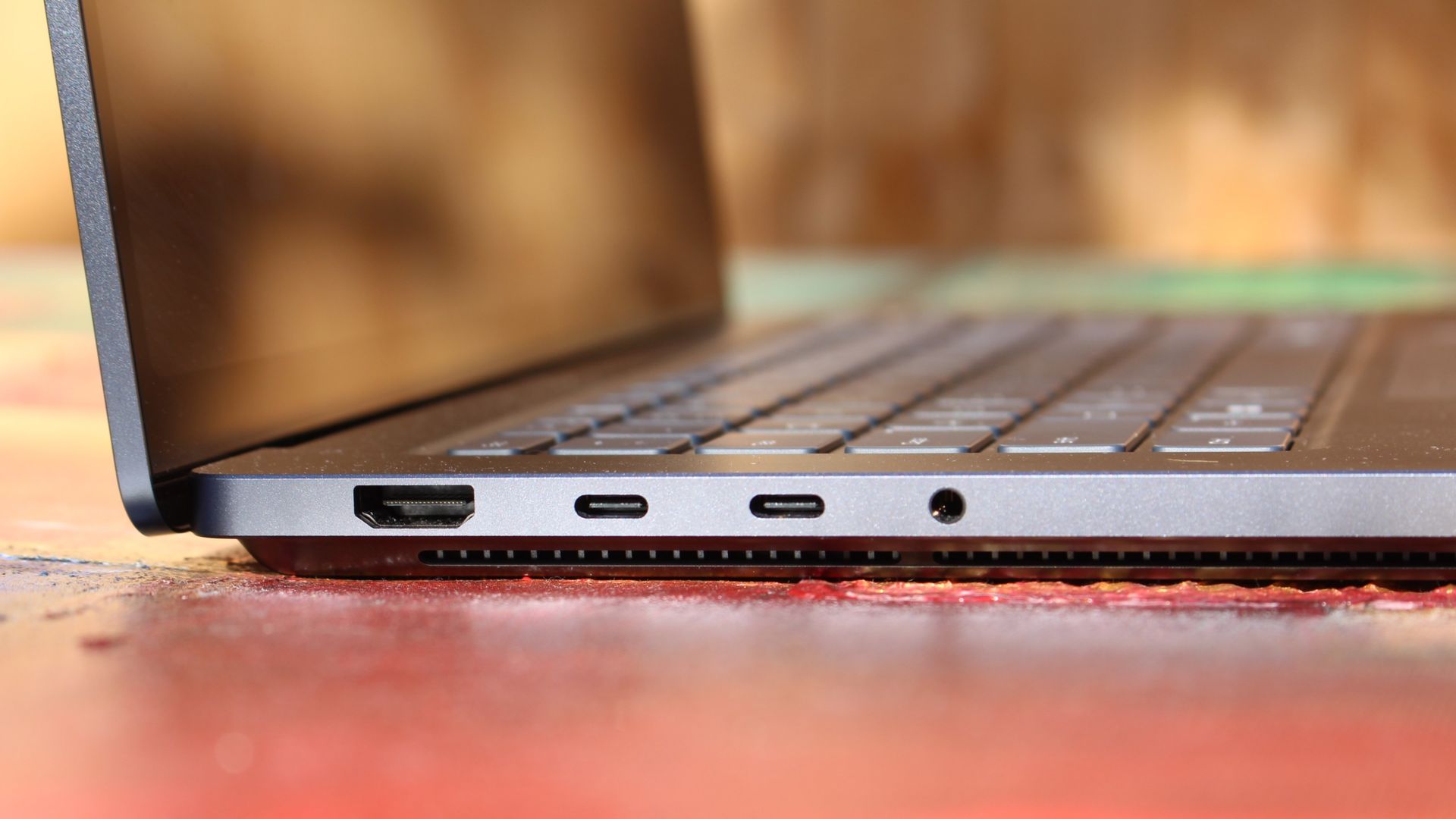
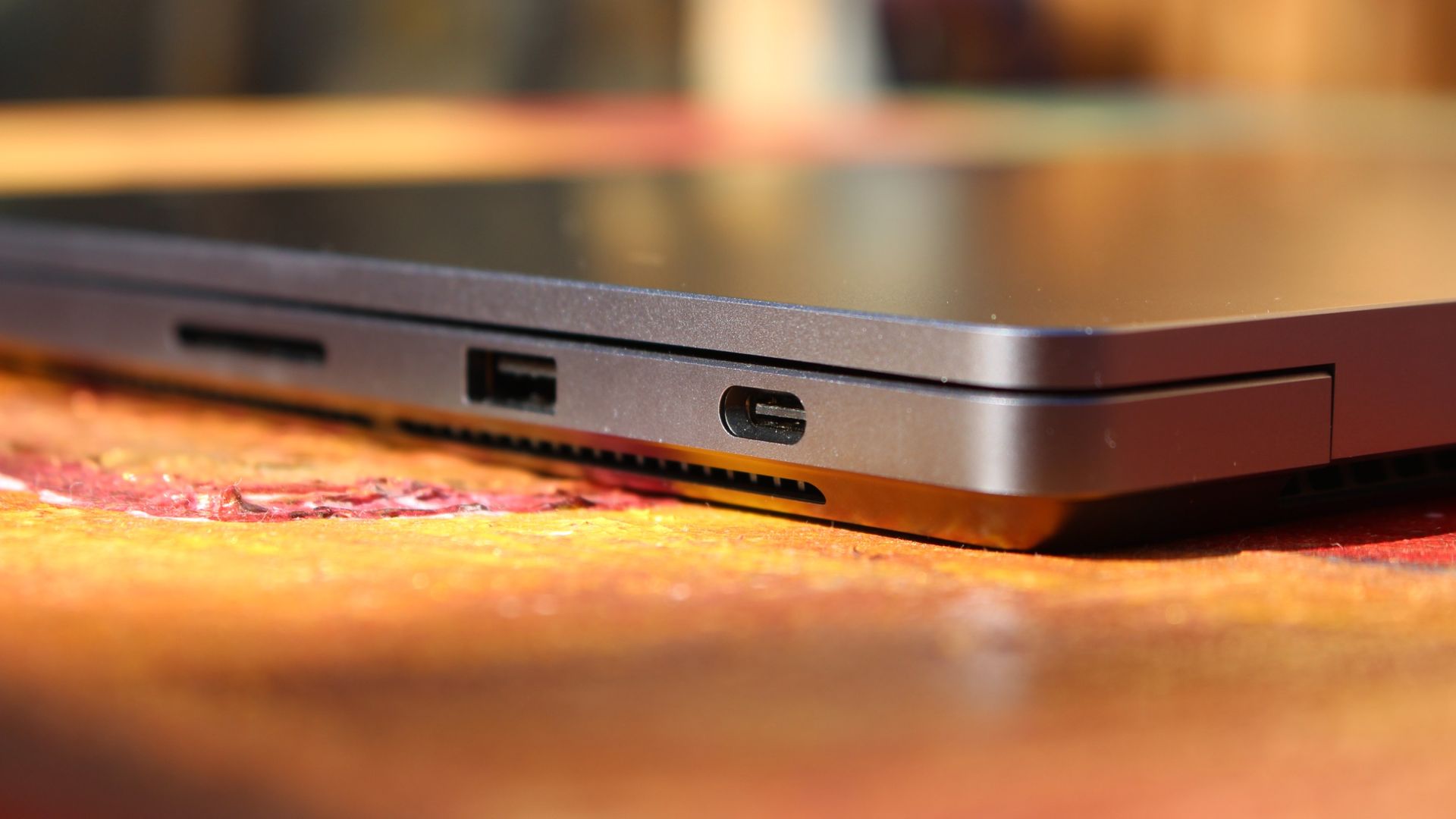
The left-side ports are good enough. (Image credit: Zac Bowden / Windows Central)
Microsoft also doesn't suffer from the godawful notch that you'll find on a MacBook Pro. Surface Laptop Ultra's display bezels are uniform along the left and right, and slightly thicker on the top to accommodate the Windows Hello IR face unlock sensors, which are much better than a fingerprint reader.
I should also mention that the display hinge on this laptop is perfectly tuned. It opens with one finger, and is perfectly balanced to provide a satisfying level of friction as you open and close it. It's also rock solid when typing, meaning it doesn't wobble around at all when on a desk.
The port selection is good enough. It features three USB-C ports, a USB-A port, a 3.5mm audio jack, HDMI 2.1, and a full-sized SD card reader. Of course, the star of the show in the ports department is Microsoft's clever magnetic USB-C port, which replaces the proprietary Surface Connect charge port found on older Surface Laptops.
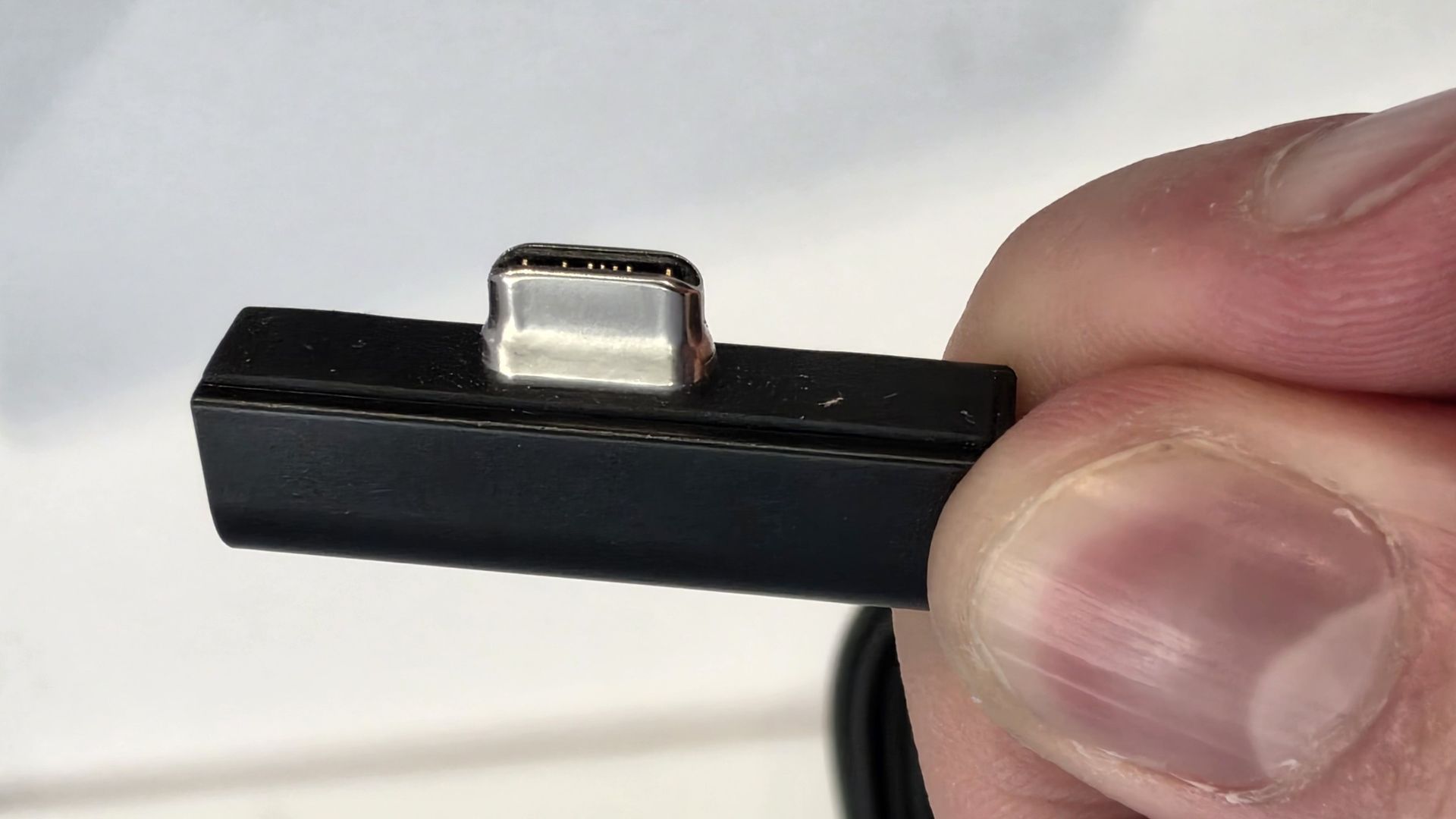
The special USB-C port is truly great. (Image credit: Zac Bowden / Windows Central)
It's great to see a laptop manufacturer attempting to innovate and improve on the universal USB-C standard. Here, we have a USB-C port that is compatible with all your USB-C peripherals, but it's also magnetized, and with the included charging cable, magnetically snaps to the device just like Apple MagSafe, while using the same universal USB-C port.
How did Microsoft do this? Well, most of the innovation is actually on the cable side. On the laptop itself, the only real change is that the USB-C port is slightly wider at its opening, but the rest of the USB-C port itself is typical in its design. Microsoft placed magnets on either side of the port, and redesigned the USB-C connector that's attached to the cable to allow for the magnetic connection to be seamless.
The cable's male USB-C end is shallower than a normal USB-C connection. This allows for it to connect to the USB-C port without clicking in, which is what locks a cable to a USB-C port normally. Instead, the magnets hold it in place, which enables the breakaway design that differentiates this USB-C port from the rest.
The USB-C connector is unique. (Image credit: Zac Bowden / Windows Central)
That does mean the USB-C cable that comes included only works with Surface Laptop Ultra, and only in this particular port. Microsoft realized this would be a problem, and designed the power brick that comes with Surface Laptop Ultra in a way that allows the magnetic cable to attach to the brick instead. The other end of the charging cable is a normal male USB-C end, which connects to any USB-C port you want.
So you can still use the Surface Laptop Ultra's power brick and cable on any device or any port you like, you just have to plug the magnetic end into the power brick first. It's a genius design, and proves that Microsoft really thought of everything when it comes to this unique magnetic USB-C experience. I love it, and I hope to see it on more laptops in the future.
Surface Laptop Ultra is available in just two colorways: Platinum and Nightfall. To me, I think the Platinum version looks the nicest, but the Nightfall version looks clean too. The good news is the dark color does a relatively good job at fending off fingerprints thanks to an anti-fingerprint coating that has been applied to the chassis.
Display & Features
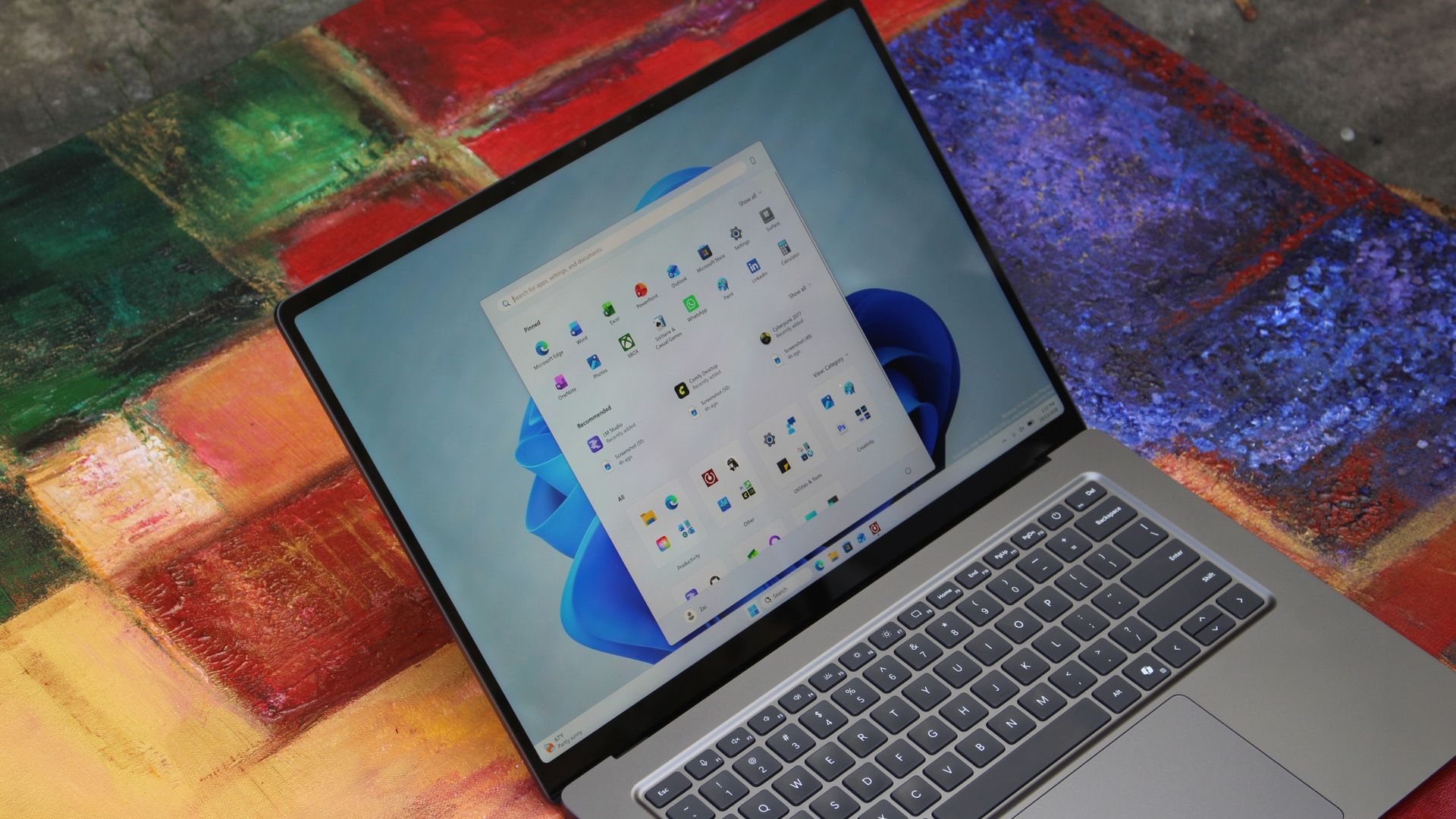
The Mini LED display in all its glory. (Image credit: Zac Bowden / Windows Central)
Surface Laptop Ultra ships with Microsoft's first ever mini-LED display, which delivers better contrast and brighter peak brightness over your standard LCD that has been found in all other Surface Laptops to date. Unlike an LCD, the Surface Laptop Ultra's mini-LED screen packs 1,344 local dimming zones, which allows the laptop to dim darker areas of the screen that don't need as much light.
This number is not as high as the mini-LED screen on the MacBook Pro, and this results in a bit of blooming around bright elements on a dark background. If you use Windows in light mode, this will almost never bother you. But in dark mode, in a dimly lit environment, it becomes quite a bit more apparent.
The backlight also takes a fraction of a second to keep up with what's going on on your screen. If you move a bright window around on a dark background, you'll notice the backlight brightening and dimming around the edges of the window. This gives off a slight ghosting effect which degrades the 120Hz refresh rate somewhat. It isn't noticeable at all in light mode, however.
This all leads me to say I wish Microsoft had opted for an OLED panel on the Surface Laptop Ultra. I've been daily driving OLED displays for the better part of a year now, and a mini-LED panel just isn't a vibrant or contrasty as an OLED display can be. The mini LED display is good, but not the best on the market, and it's certainly no OLED.
Microsoft tells me it opted for mini LED over OLED primarily for the brightness and efficiency gains. At 2,000 nits peak brightness, it is the brightest screen ever put on a Surface. But Tandem OLED displays are also very capable of reaching similar peak brightness levels these days, and so I feel the benefits of a mini LED screen don't carry much weight here.
If you're coming from a standard LCD, the mini LED screen will be nothing but an upgrade to you. It's color accurate, very bright, and its high resolution and 120Hz make reading text and scrolling webpages look and feel great. But if you're coming from a MacBook Pro mini LED screen, or an OLED display, you will notice the downgrade in contrast and more noticeable blooming.
The display is also a touch screen, which is the case on pretty much all Surface PCs since the line began in 2012. Microsoft truly believes that touch has a place on the laptop form factor, and I agree with it. Being able to reach out to tap on a notification or hit OK on a window prompt is really nice, even if I don't use it all the time.
For pen lovers, sadly the Surface Laptop Ultra does not support pen input. Microsoft dropped pen input from the Surface Laptop with Surface Laptop 7, and the Surface Laptop Ultra has not restored it. This makes sense however, as the screen does not lay flat so drawing on it would be uncomfortable.
I also want to mention the fact that Surface Laptop Ultra features a user upgradeable SSD drive. That means you don't have to splash out on the most storage at the checkout screen. You can opt for a lower amount, and when you finally fill it, upgrade the SSD to something larger later down the line. You can't say that about the MacBook Pro.
That large trackpad is something else... (Image credit: Zac Bowden / Windows Central)
Unfortunately, Surface Laptop Ultra is missing a key quality of life feature that I have come to enjoy on other flagship Windows laptops over the last year: presence sensing capabilities. My daily driver is able to wake up and go to sleep whenever I approach it or walk away, and Surface Laptop Ultra is missing this functionality entirely. A crying shame.
It's also missing all Copilot+ PC features currently. Microsoft tells me that RTX Spark is a Copilot+ PC capable chip, but that the suite of Copilot+ PC features aren't yet ready for the platform, and to expect them to show up in the coming months. The RTX Spark has a 50 TOPS NPU that will power these experiences when they finally do arrive.
Keyboard & Trackpad
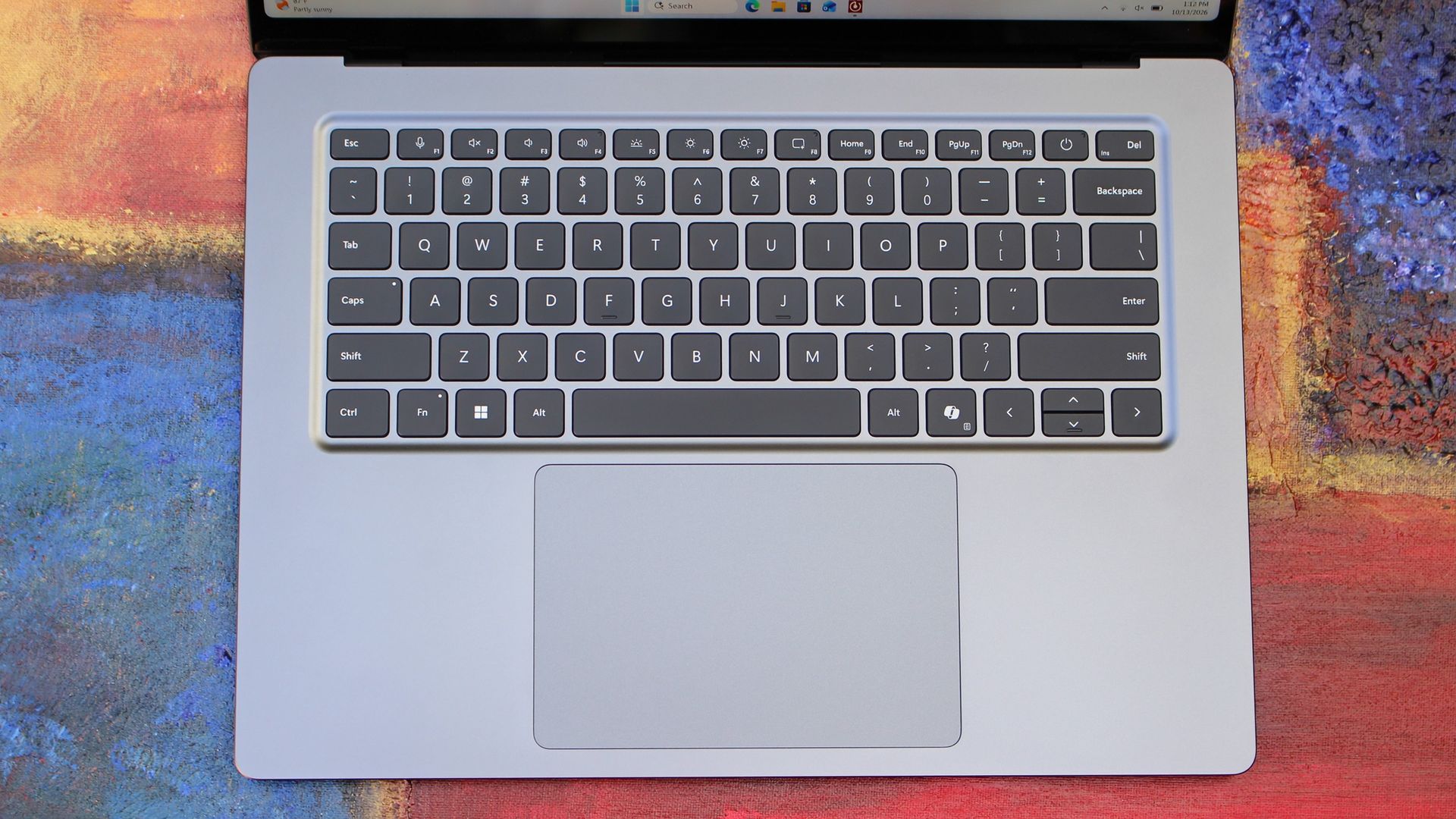
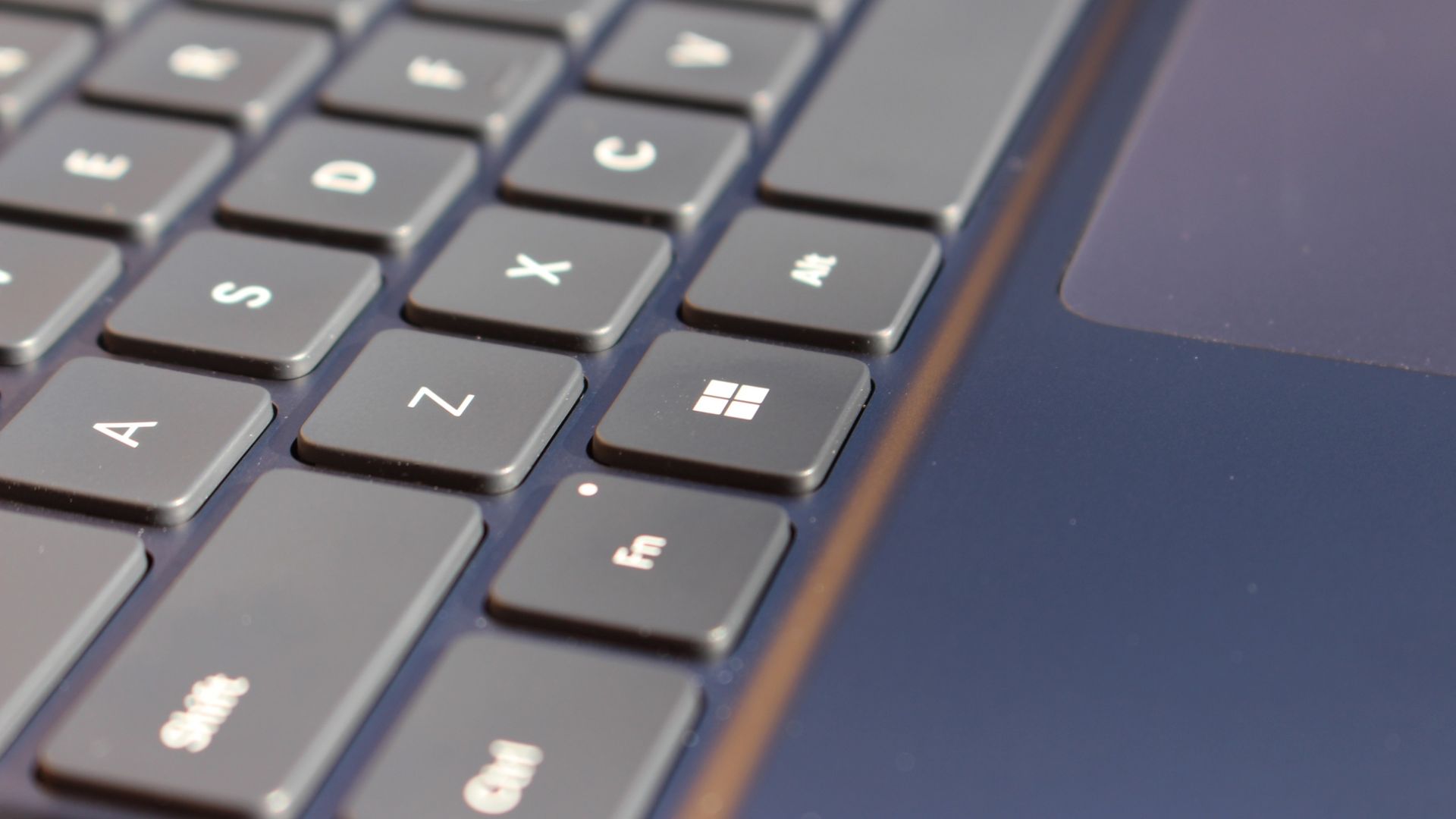
The best keyboard and trackpad I've ever used. (Image credit: Zac Bowden / Windows Central)
Surface has always delivered excellent keyboard and trackpad experiences, but Surface Laptop Ultra might be on a whole other level. This is probably the best keyboard and trackpad experience I've ever had on a Windows laptop to date. The keyboard is comfortable, tactile, and quiet, with 1.4mm key travel which is incredibly satisfying and not at all fatiguing.
The keys themselves are slightly rounder than the keys found on Surface Laptop 8, which I think is more comfortable and looks nicer as a result. It features a three-stage backlight, a Copilot key (which can be changed,) and a dedicated microphone mute key. It's pretty much perfect in every way.
But what I really want to talk about is the trackpad. It's the largest trackpad ever fitted to a Surface, and that makes a huge difference in how easy it is to use. There's so much room for activities, and you'll never find yourself at the edge of the trackpad because you needed to drag a file and ran out of room.
The keys are so nice to type on. (Image credit: Zac Bowden / Windows Central)
Palm rejection is also very good. I never once had an issue with the trackpad being in the way when typing, which means Microsoft has done a good job at ensuring the trackpad's side isn't impeding the typing experience. The trackpad itself is haptic, and feels great to click on, with strength adjustability in Windows Settings so you can really dial in just how strong that haptic feedback is.
But the new trackpad also supports Windows 11's new haptic system, which introduces subtle haptic feedback when interacting with different UI elements across Windows. When you snap an app window, or drag files across folders, you'll feel haptic bumps under your finger in the trackpad that are different from the usual click down sensation it provides. It's genuinely great.
Camera & Audio
It's a Surface, so you can and should expect great cameras and microphones on Surface Laptop Ultra. The webcam is a 1080p shooter that looks more than fine for video calls, Teams meetings, and recorded presentations. In low light, the image does get a little noisy, but not any more than any other high-end webcams on the market.
The shining star in this department are the built-in studio mics, which are very very good. They sound studio quality, with rich bass and far-field mics that do a very good job at tuning out background noise to ensure the things that you are saying are captured clearly and well.
I also need to take a moment to talk about the built-in speakers on this laptop. They are superb. Again, probably the best I've tried in a Windows laptop to date, and give the MacBook Pro 14-inch a run for its money. There's a clear sound stage, highs are crisp and bass is rich.
Performance & Battery
It's a looker for sure. (Image credit: Zac Bowden / Windows Central)
I've already published an in-depth look at the performance of RTX Spark on Surface Laptop Ultra, which you can read here if you're interested, so there won't be raw performance benchmark numbers in this review.
The TL:DR for that however is that the RTX Spark is a powerful chip, with okay CPU performance but great GPU performance. It's capable of playing most games at 1440p high settings above 60fps, and top end configs can fit large AI models directly onto the GPU for faster processing. But it trails behind the latest high-end Apple Silicon, and is more in-line with current-gen Snapdragon X2 Elite or last-gen Apple M4 Pro in overall performance.
By default, the 128GB Surface Laptop Ultra ships with its unified memory in a 50/50 split configuration. Users are free to adjust this in the NVIDIA app, which is good for when you need to give either the system or your GPU more RAM for whatever task it is you're completing. It requires a restart to apply, which frustratingly takes a long time on the Surface Laptop Ultra.
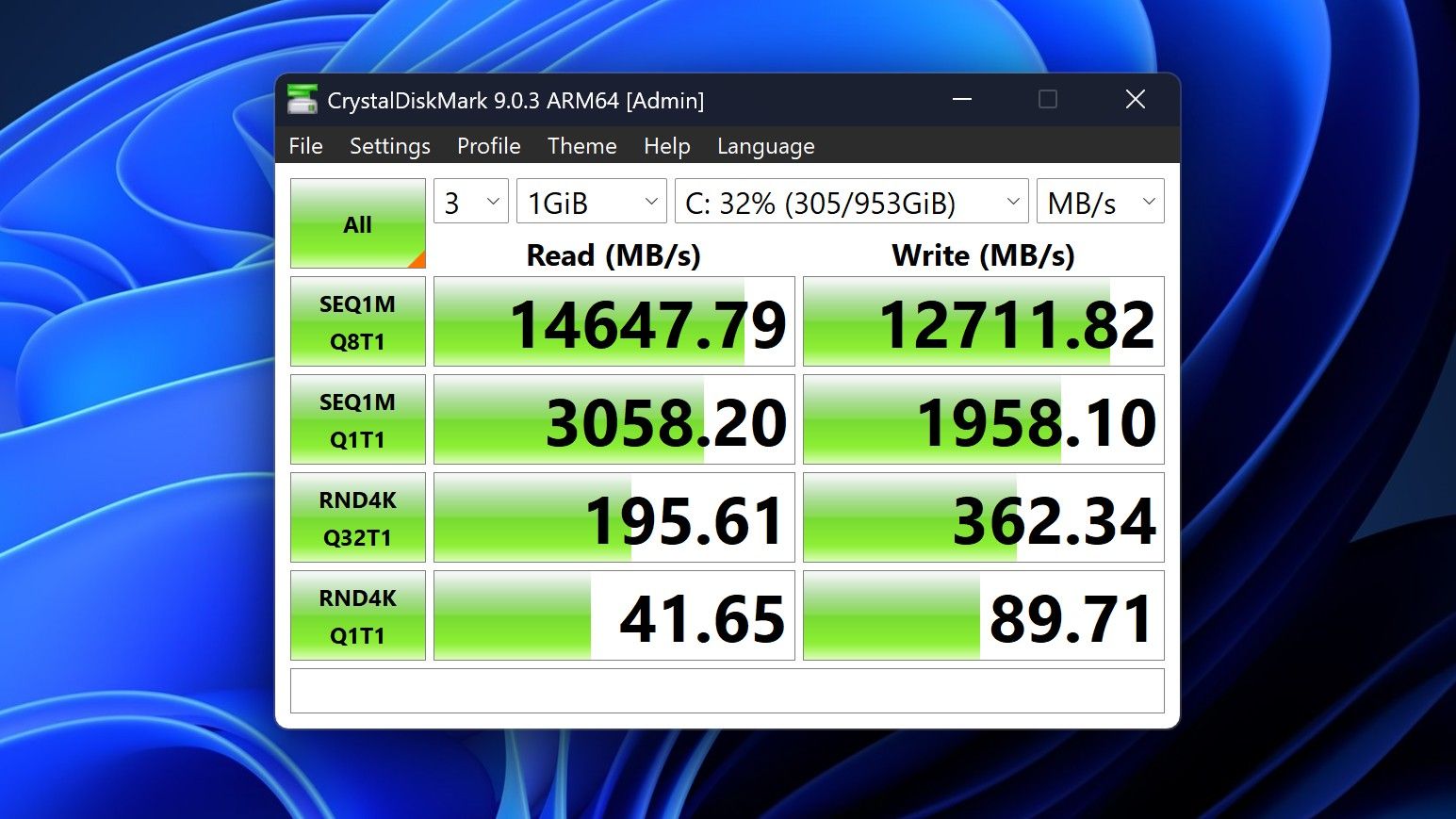
You can expect very fast read and write speeds on 1TB models. (Image credit: Zac Bowden / Windows Central)
Performance is great for the most part. In day to day usage, it's blazing fast and is able to crunch through pretty much any workload I'd want to throw at a mobile workstation such as this. With that said, there are a couple of oddities related to performance that I feel I should mention.
Compared to other devices I have on hand, the Surface Laptop Ultra sometimes takes twice as long to restart. I'm talking over 2 minutes from hitting restart to being back on the lock screen, which is about double the amount of time it takes all the other laptops in my possession. Microsoft says they are investigating.
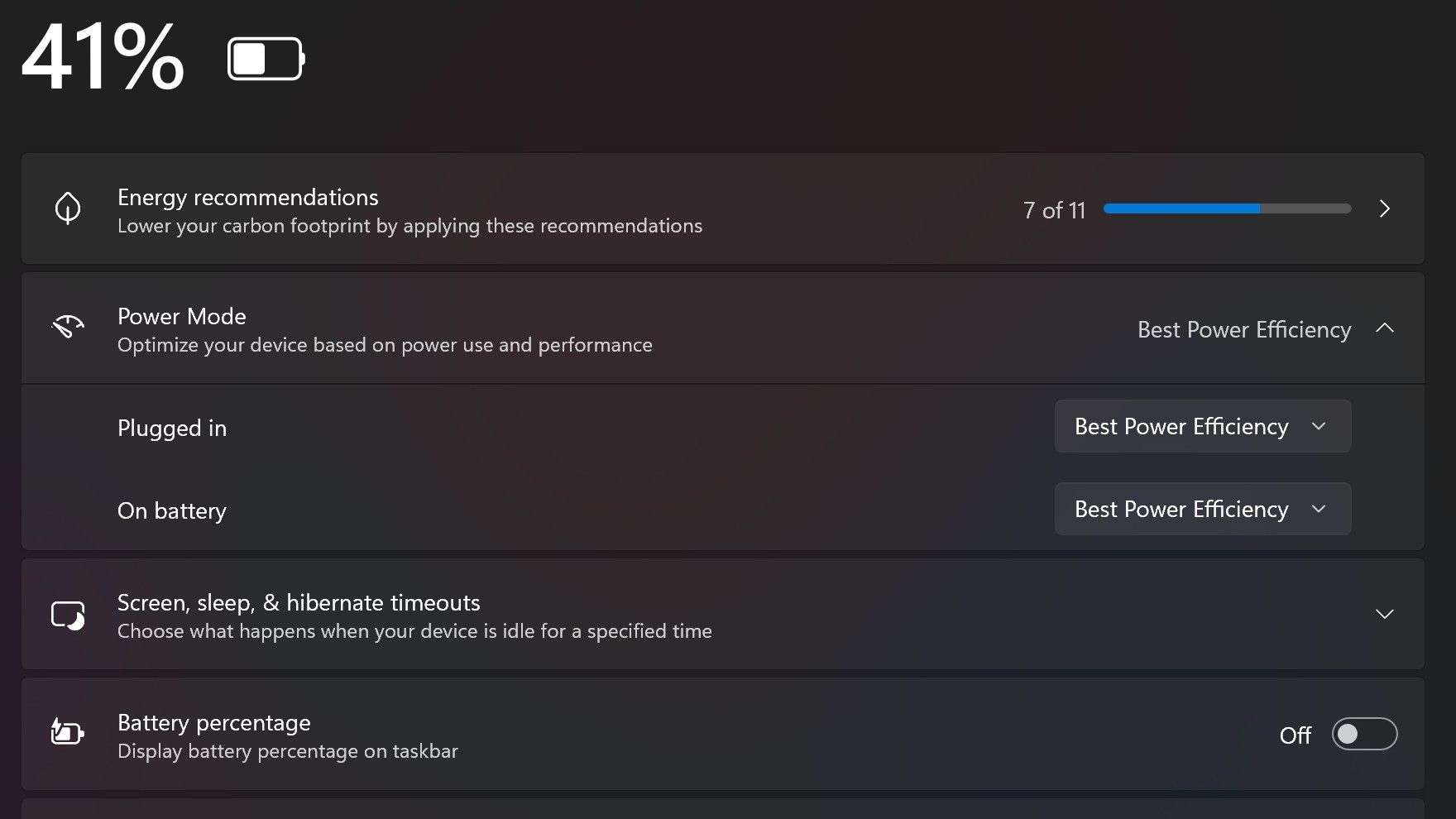
Surface Laptop Ultra also ships with the "Best Power Efficiency" profile set by default. This is unusual, as most Surface PCs ship with their power profile set to balanced. Microsoft says it does this to maximize battery life, but that does come at the cost of performance.
Make sure you change these to Best Performance for plugged in, and Balanced for battery life. (Image credit: Zac Bowden / Windows Central)
I've found that overall performance can be slashed by up to a quarter or even half when in this default mode. So if you want to make the most of your RTX Spark PC, be sure to change the power mode in Windows Settings to either Balanced or Best Performance. I usually set the on-battery mode to Balanced, and the plugged in state to Best Performance.
On the subject of battery life, the Surface Laptop Ultra's endurance is just fine. It's not class leading by any stretch, but I can definitely get through the work day without much fuss, though this will depend on your workload. Our Procyon battery life benchmark test lasted around 14 hours, and in real world use I was getting close to about 10.
But if your workload heavily leans on the GPU, you can expect to halve that number. The GPU is quite efficient for the power it outputs, but it's still a GPU and it's still hungry. So if you know you'll be using the GPU a lot throughout the day, you'll want to bring the charger with you.
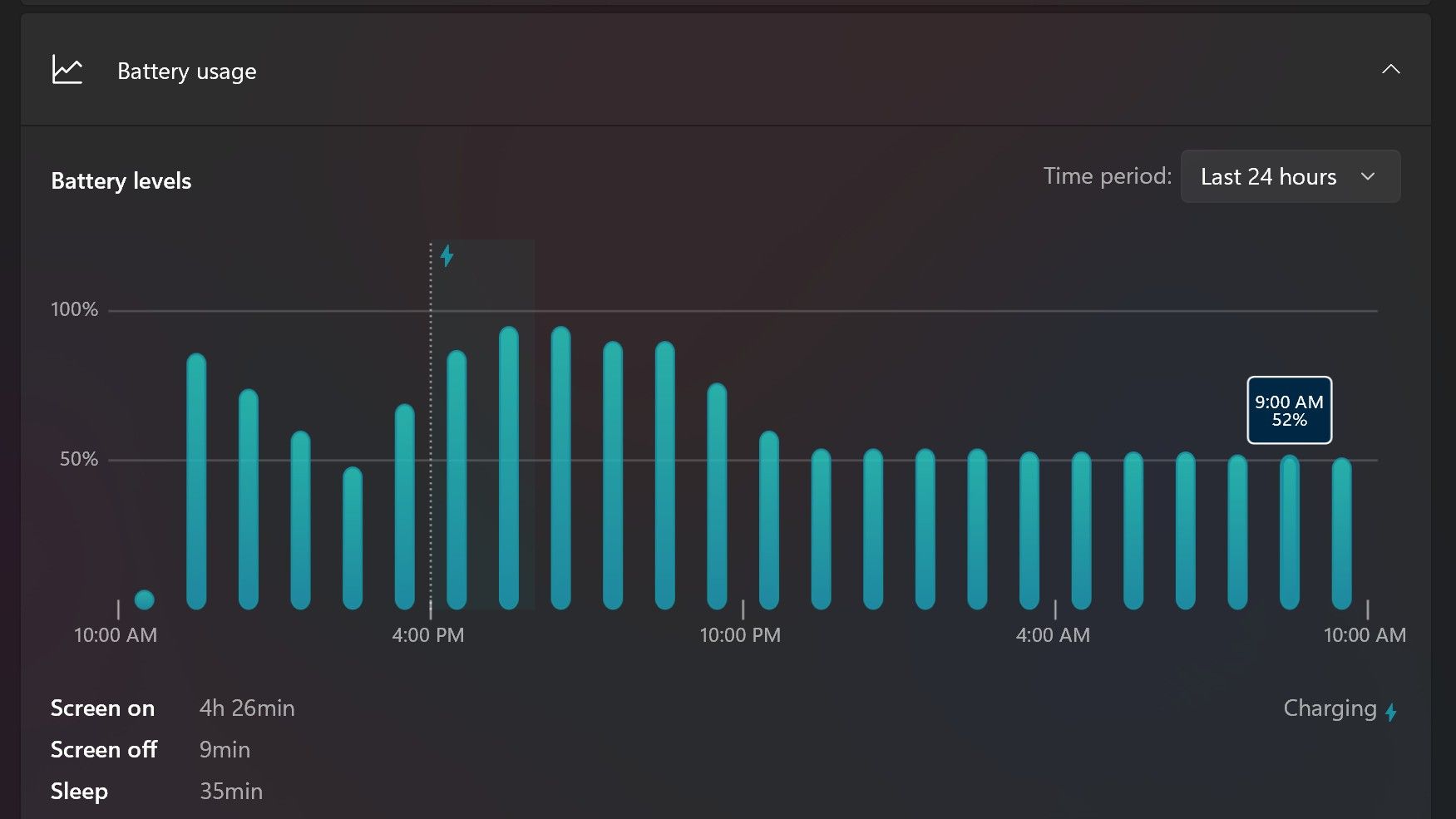
Surface Laptop Ultra only sipped power during sleep between midnight and 9AM. (Image credit: Zac Bowden / Windows Central)
With that said, sleep endurance is very good for the level of power this laptop outputs. I put the laptop to sleep at about midnight, and open the lid 10 hours later, and it's only drained one, maybe two percent from the battery. Very good on that front!
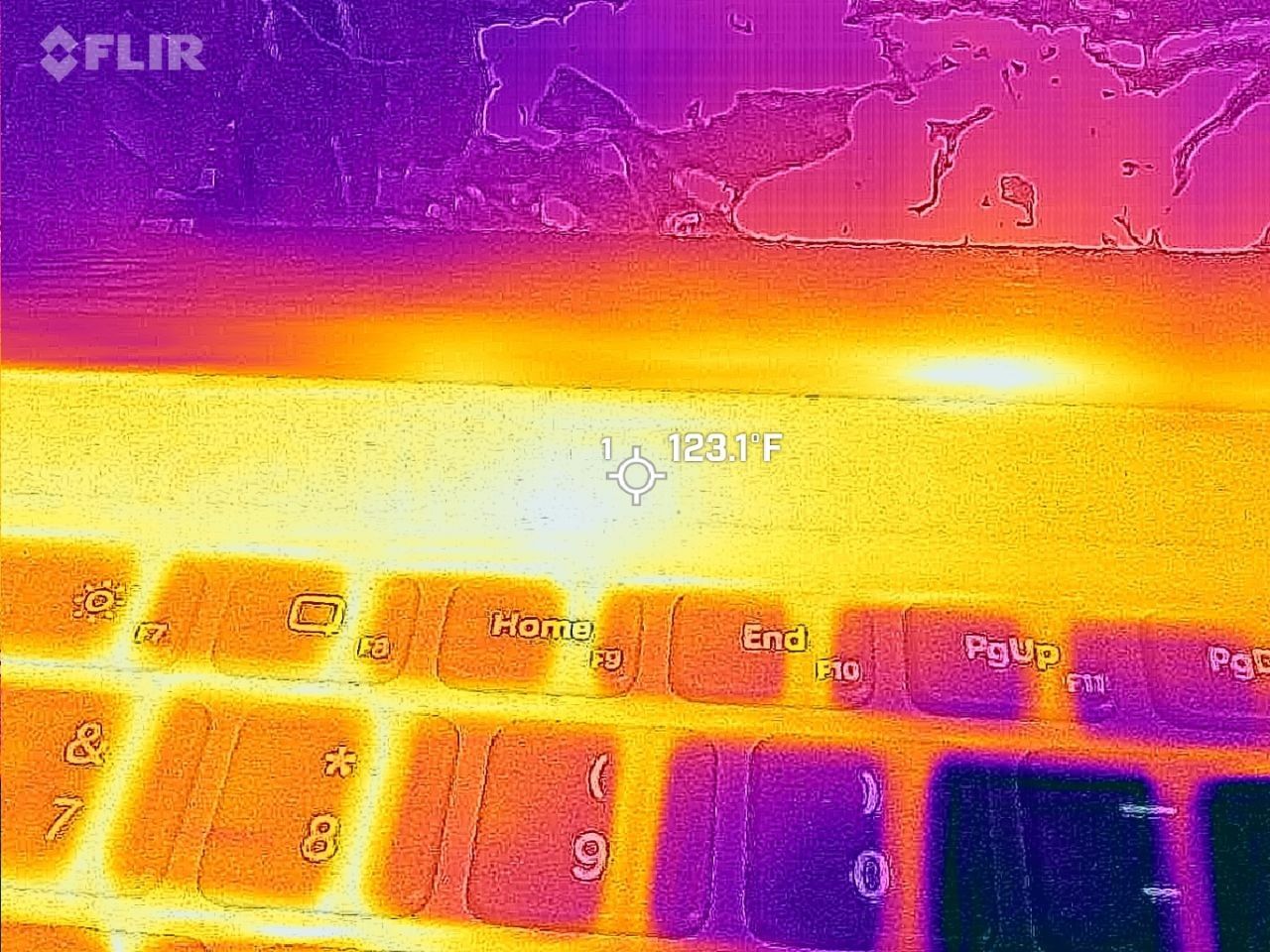
Under max load, the Surface Laptop Ultra gets quite warm. While the keys themselves remain at an okay temperature, the top part of the keyboard deck gets very toasty. I measured 123 F at its hottest under max load, which is approaching "oh that's hot" territory.
Surface Laptop Ultra gets toasty, but doesn't seem to thermal throttle. (Image credit: Zac Bowden / Windows Central)
I also noticed quite audible coil whine when under max load on my Surface Laptop Ultra. This isn't a problem in day to day use, but whenever the GPU is being used, I can hear buzzing coming from inside the keyboard chassis. If you're sensitive to that kind of thing, it will annoy you.
Fan noise is acceptable even at max load. I measure around 42 decibels at its loudest, and that was after running a benchmark for 10 minutes. In normal use, the fans rarely come on, though it does run slightly warm on your lap as a result.
Conclusion
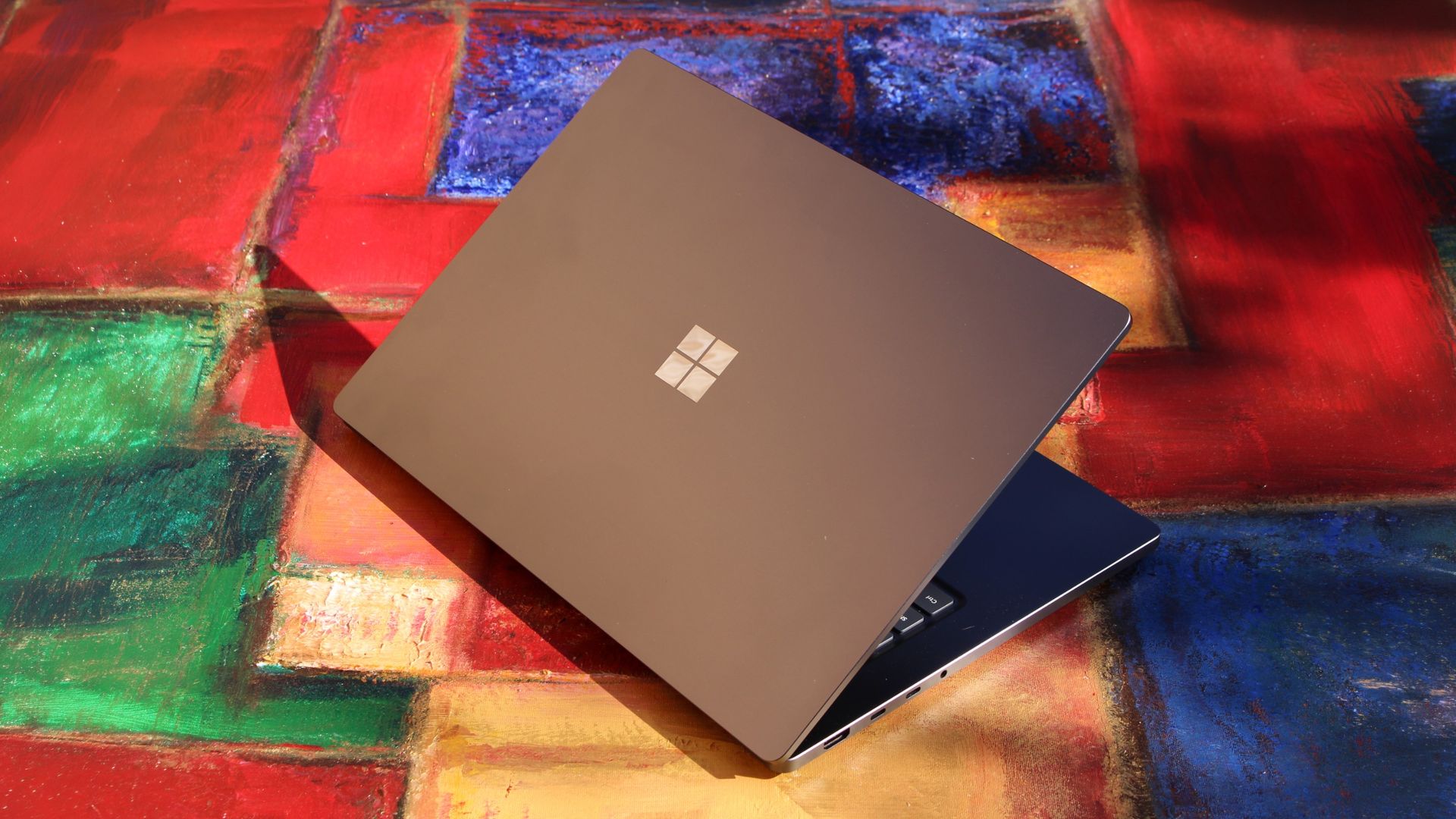
Surface Laptop Ultra is ultra-premium. (Image credit: Zac Bowden / Windows Central)
✅ You should buy this if ...
You are a software developer utilizing on-device AI
You live and breathe large language models and agentic workflows
You need a beefy GPU in a portable and efficient package
You need lots of RAM
❎ You should not buy this if ...
You aren't interested in AI or agentic workflows
You only need a PC for standard productivity tasks
You occasionally game or edit video (get something cheaper)
You want something thin and light
Surface Laptop Ultra is great, but it's not something I can comfortably recommend everyone go out and buy, especially at these high prices. At the base level, it doesn't offer enough to justify the added cost over a Surface Laptop 8 with 24GB RAM. You do get the more beefy GPU and "better" display, but that comes at the cost of portability and battery life.
The Mini LED screen isn't the upgrade I was hoping it would be. For those who have only ever used a standard LCD their whole life, I'm sure you will appreciate the added brightness. But the ghosting issue is annoying and I think most people will notice it. I would have much preferred an OLED on a laptop this expensive.
Battery life is also just okay, which, again, for a laptop of this size and weight, leaves something to be desired. You can get longer day to day use out of a thinner and lighter Surface Laptop 8, which I think most people would prefer over the raw power that Surface Laptop Ultra offers.
And that brings me back to my original point. This isn't a laptop for everyone. It's a laptop for those who know they need it, and it's mainly for AI developers and high-end content creators. If you find yourself leaning on local agents to complete tasks for you, or enjoy generating images and videos using AI models, this is the laptop for you.
If you're someone who just needs a laptop for productivity tasks that includes a little bit of photo and video editing, and sometimes some gaming, there are cheaper laptops out there that will do that job very well.
Is this the MacBook Pro for Windows? I think it is. But it's not the perfect MacBook Pro alternative just yet. RTX Spark isn't at the same level as high-end MacBook Pro silicon, the Mini LED screen isn't best in class, and battery life could use some improvement.
Microsoft
Surface Laptop Ultra
Surface Laptop Ultra is Microsoft's flagship and most powerful Windows PC. It can be configured with up to 128GB RAM, and ships with NVIDIA's new RTX Spark SoC. It's great for creative workflows and software development, and those who want to run local AI and LLMs directly on their device.
NVIDIA's RTX Spark is almost here. Laptops powered by the chip launch on October 16, 2026, but reviews of the chip are already out.
Reviews of the first wave of RTX Spark laptops work a bit differently than some other product launches. Today, those who were given access to RTX Spark laptops can share their experience with the chip itself, but thoughts on specific RTX Spark laptops cannot be shared until October 16, 2026.
While that is different than what we normally see, it's not that surprising. RTX Spark is not just a new chip akin to a new processor from AMD, Intel, or Qualcomm. It is a new platform for NVIDIA, a major addition to Windows on Arm computing, and the mark of a new silicon partner for Windows.
Note that reviewers of the RTX Spark were limited to sharing details about the performance and benchmarks of the processor. Dedicated GPU performance varies based on the laptop it's paired with, so some reviewer experiences may differ depending on the hardware used to test RTX Spark.
RTX Spark: Reviews
Windows Central: "The RTX Spark GPU is very performant and is capable of pretty much handling anything you'd want to throw at it on a mobile workstation. Where it really shines, however, is running local AI models directly on it. It's the reason NVIDIA built this platform to begin with, and it does this very well."
Tom's Hardware:"Still, for a first-generation mobile platform that joins complex silicon IP from multiple design teams onto one chip and relies on several OEM partners to bring it to life in highly integrated notebook form factors, the maturity of the RTX Spark platform is an impressive achievement. (Take it from someone who has seen a couple of rough product launches from the inside.)"
Tom's Guide:"Judging RTX Spark purely by its single-core CPU speeds is like judging a Ferrari by its cup holders. And after a week of stress-testing the Microsoft Surface Laptop Ultra with Spark — running every synthetic and real-world test we can throw at it — it's clear that this is so much more."
HotHardware:"In its most potent form, which is what we’ve tested here, the RTX Spark N1X is a powerful SoC that offers competitive multi-threaded CPU performance versus today’s top mobile platforms, with class-leading GPU performance. The RTX Spark N1X’s AI performance and capabilities are also unmatched, not only because of the powerful hardware on tap and unified memory architecture, but because NVIDIA’s AI software stack is so pervasive and mature."
Lowyat:"For NVIDIA? They basically took multiple pages out of Qualcomm’s book of trial and errors, added their gaming DNA, made damn sure that the majority of compatibility issues between the x86 and ARM architectures were resolved, and what you have is something I’d never thought I’d see: playing AAA titles on an SoC, along with all the accoutrements that comes with an NVIDIA chipset."
NVIDIA RTX Spark shows promise, but you have to understand who it is for
Early impressions of RTX Spark are largely positive. Across multiple reviews, experts praised the processor's strong GPU performance, AI capabilities, and surprisingly polished first-generation experience.
At the same time, several reviewers cautioned against viewing RTX Spark through the lens of traditional gaming benchmarks, reminding readers that the platform is designed for AI workloads, creators, and developers.
The RTX Spark is not meant to power gaming laptops. It is aimed at developers and high-end creators. The processor is especially focused on local AI performance, an area many expect to be the next major shift in personal computing.
That being said, the RTX Spark is capable of gaming. It may show the future of Windows on Arm gaming, but that's yet to be seen. Over the coming weeks I am sure we will see countless reviewers test games on RTX Spark laptops. I think they'll be surprised by how well the processor does, but gaming-focused reviews still won't be the best way to judge those PCs.
The first wave of RTX Spark laptops are already available for preorder and hit shelves tomorrow. Our Cale Hunt rounded up all the RTX Spark laptops you can buy, which you can also find below.
Built around the NVIDIA RTX Spark platform with an N1X CPU, RTX GPU, and up to 128GB of unified memory, the Surface Laptop Ultra hits new performance heights for power users. It's all contained in a gorgeous chassis with a mini-LED display and tons of ports. Prices start at $2,599.99, and units will begin shipping on October 16, 2026.
The new ASUS ProArt P14 and P16 duo gives users more size options while retaining the same great RTX Spark performance. The P14 is the lightest ProArt laptop ever, while the P16 is the way to go for a larger OLED display. Prices start at $2,599.99 for the P14 and $2,799.99 for the P16. They're expected to begin shipping on October 16, 2026.
Dell's new XPS 16 with RTX Spark features a 3.2K OLED display, lattice-free keyboard, and the usual premium XPS styling. Prices start at $3,799.99 and units are expected to begin shipping on October 16, 2026.
The OmniBook X 14 is the smaller of the two new PCs, but it features the same RTX Spark options for maximum performance. Models start at $2,999.99 and are expected to ship beginning November 4, 2026.
The larger of the two new HP RTX Spark laptops delivers a gorgeous 16-inch OLED display with 3K resolution and, of course, your choice of RTX Spark chips. Prices start at $3,199.99, and shipments are expected to begin on November 4, 2026.
Lenovo's Yoga 9n should be the right choice for those who value a versatile convertible design and premium build quality. Prices start at $3,099.99, and models are expected to begin shipping on October 16, 2026.
MSI's Prestige N16 Flip AI+ is another versatile convertible featuring the RTX Spark platform and a Tandem OLED display. It appears that preorders might kick off on October 8 for this laptop, with prices starting at $3,299.99.
Speaking at TechCrunch Disrupt, Amazon devices chief Panos Panay described a future where ambient AI devices work in the background, anticipating users' needs instead of waiting for commands.
Well, apparently it looks like an enormous, heavy-duty Pelican case that feels like it should contain either extremely expensive gaming hardware or something you've been tasked with delivering to a secret government facility.
Inside is the new ROG Xbox Ally X20 (now available at Best Buy), ASUS' limited-edition handheld celebrating 20 years of its Republic of Gamers brand, along with the new ROG XREAL R1 Edition 20 AR glasses, a custom dbrand Killswitch and skin, and all the accompanying accessories.
There's even an empty cutout where you can add your own Xbox controller, which is objectively kind of fun (as it implies I'm going to show up randomly to public places carrying this kit, which is certainly a baller move).
And yes, I unboxed the whole ridiculous thing (see video below):
Let's talk about this Pelican case
Front view of the closed black Pelican Protector Case with red latches and a gold 20th Anniversary ROG badge. (Image credit: Daniel Rubino)
The first thing you'll notice is that ASUS didn't exactly go for subtlety.
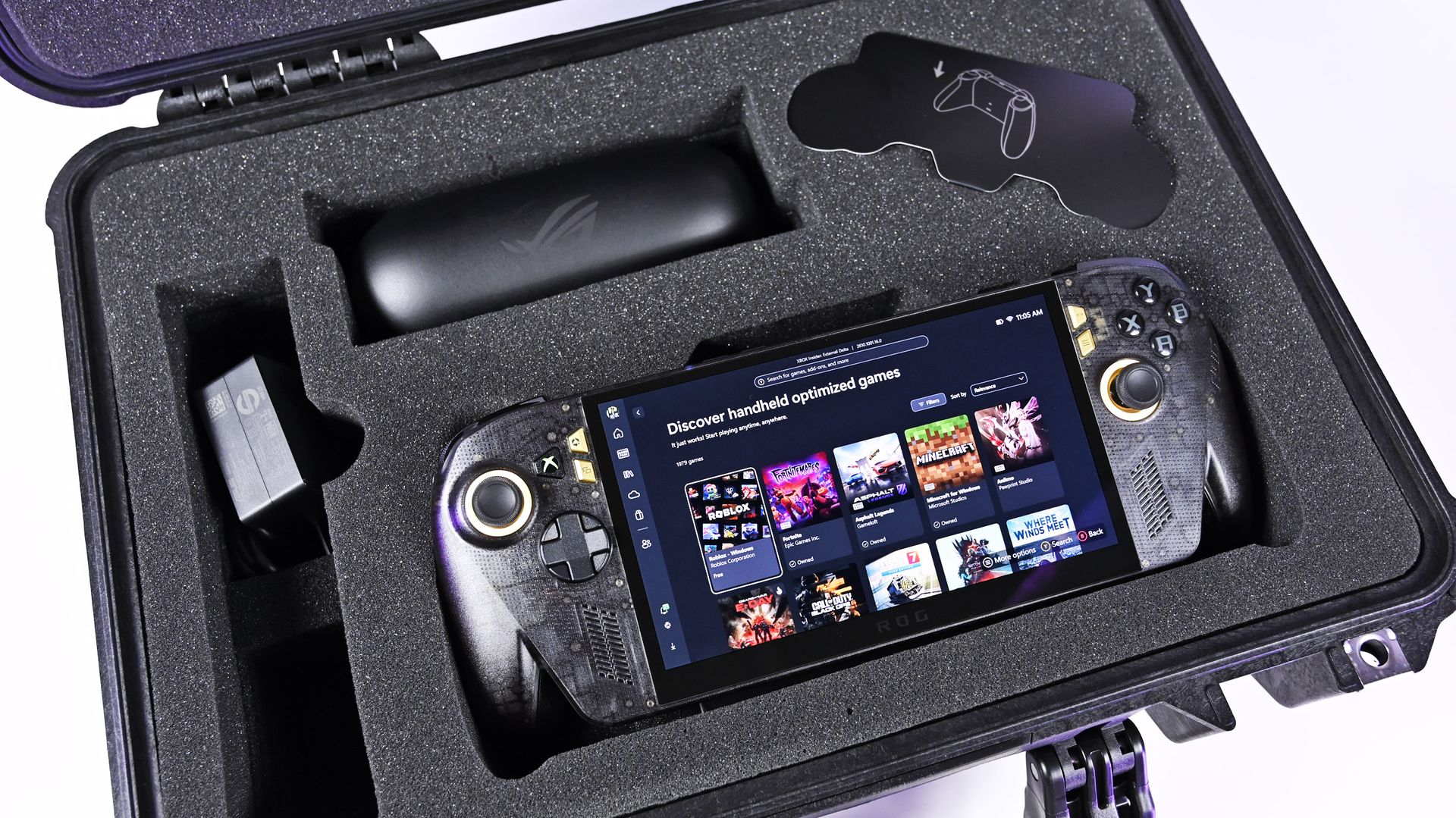
The X20 bundle arrives inside a custom Pelican Protector Case, with everything nestled into its own section. And having now handled the thing, I can confirm two things: it's incredibly substantial, and it has some of the most satisfying, snappy latches I've ever used on a case (with holes for padlocks, natch!).
Opening it feels like an event.
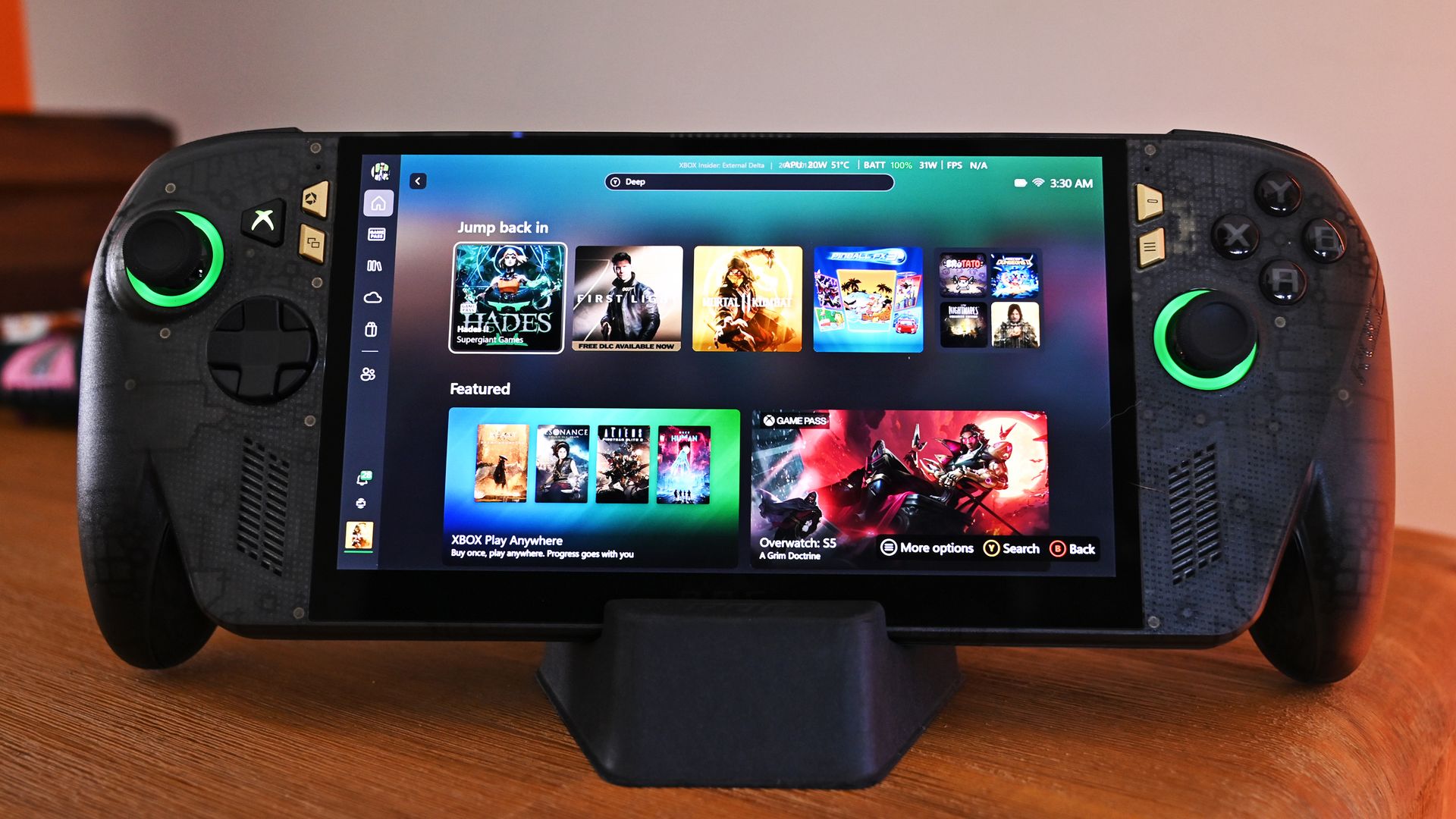
That's appropriate because the hardware inside isn't exactly normal either. The X20 uses a translucent black chassis with gold accents underneath, giving it a distinct throwback look that fits the 20th-anniversary theme without making the handheld look like a toy.
Even the Xbox logo/button now glows green (and you can set it to static, pulsing, or fading), which is really sharp-looking and reminds you this is XBOX FIRST.
More importantly, I've now spent some actual time using the X20, and I'm warming up to this thing considerably.
That OLED display really does make a difference
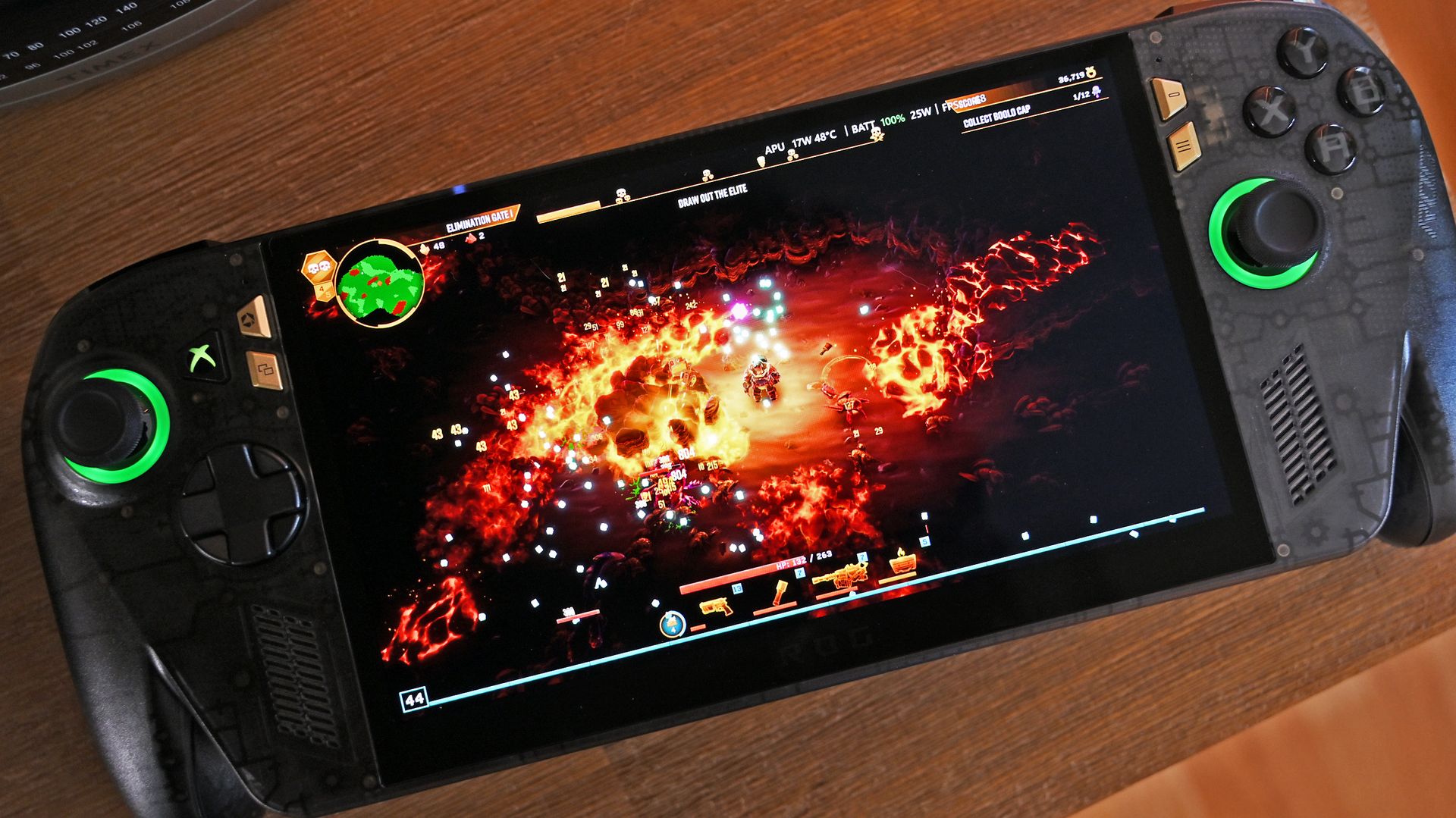
ASUS' new 7.4-inch ROG Nebula HDR OLED display (120Hz VRR) is a huge selling point and upgrade over the current Ally X's LCD panel (7-inch, IPS). (Image credit: Daniel Rubino)
The centerpiece is ASUS' new 7.4-inch ROG Nebula HDR OLED display, a 1080p panel capable of 120Hz with FreeSync Premium Pro and VRR support from 30Hz to 120Hz. It can also reach a claimed 1,400-nit peak brightness.
And yeah, it's good.
The OLED panel is one of those upgrades that becomes immediately obvious when you put the X20 in front of you. It's a significant improvement over the display on the existing ROG Xbox Ally X and gives ASUS' latest handheld some real visual punch.
Playing Deep Rock Galactic: Survivor on the X20's OLED display is a dream. (Image credit: Daniel Rubino)
They're absurdly loud. In fact, they're the loudest speakers I've heard on a gaming handheld so far, and between the audio and that OLED screen, the X20 makes a surprisingly strong first impression before you even start digging into performance.
Underneath all of that is AMD's Ryzen AI Z2 Extreme, paired with 24GB of LPDDR5X memory, a 1TB M.2 2280 SSD and an 80Wh battery. ASUS has also redesigned the cooling system, while TMR joysticks, a transforming D-pad, and rubberized grips round out some of the hardware changes.
Then ASUS throws a 171-inch virtual display into the box
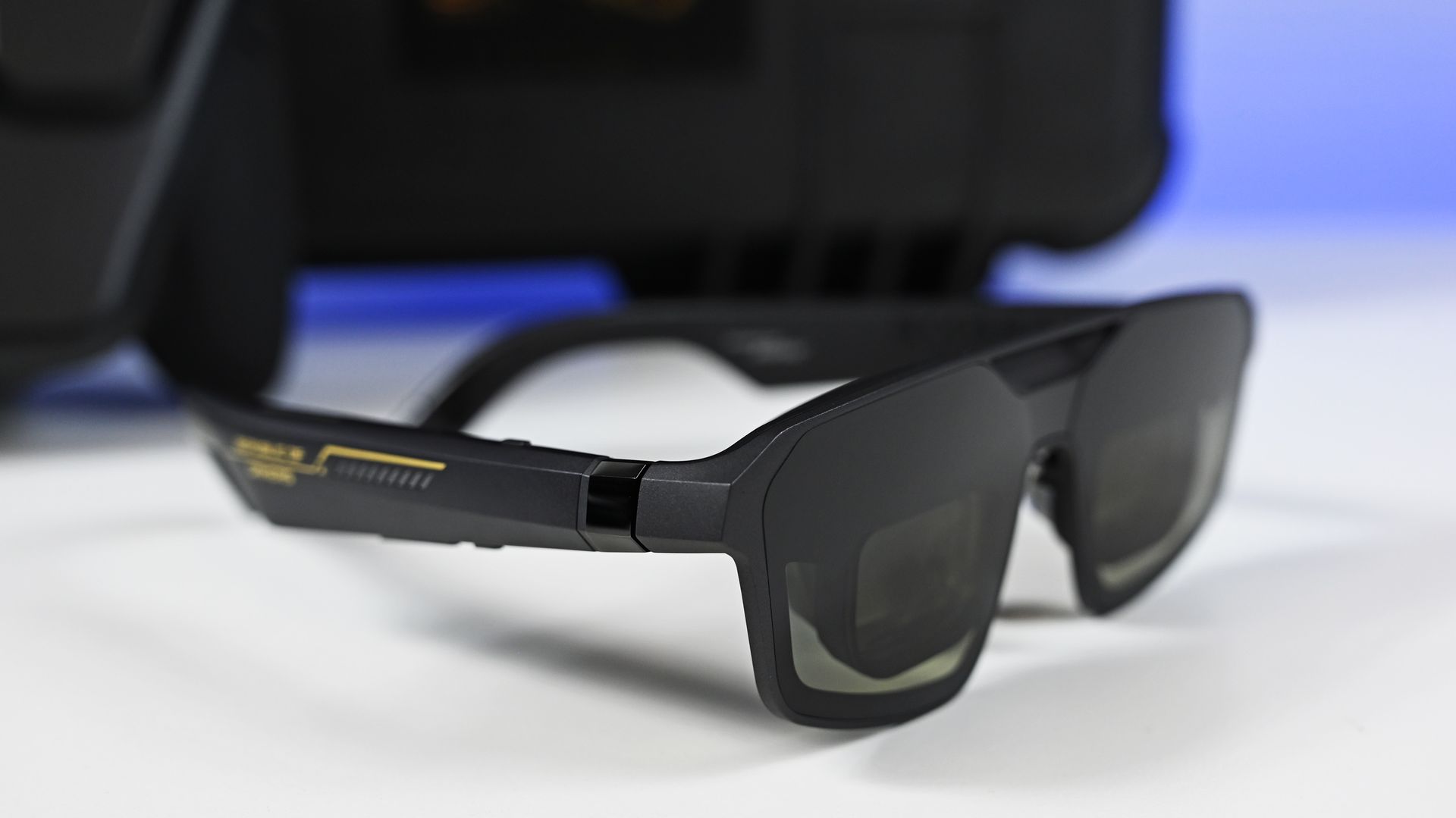
The ROG XREAL R1 Edition 20 AR smart glasses with 240Hz refresh and OLED internal displays. (Image credit: Daniel Rubino)
Because apparently a $2,499 bundle needs more toys.
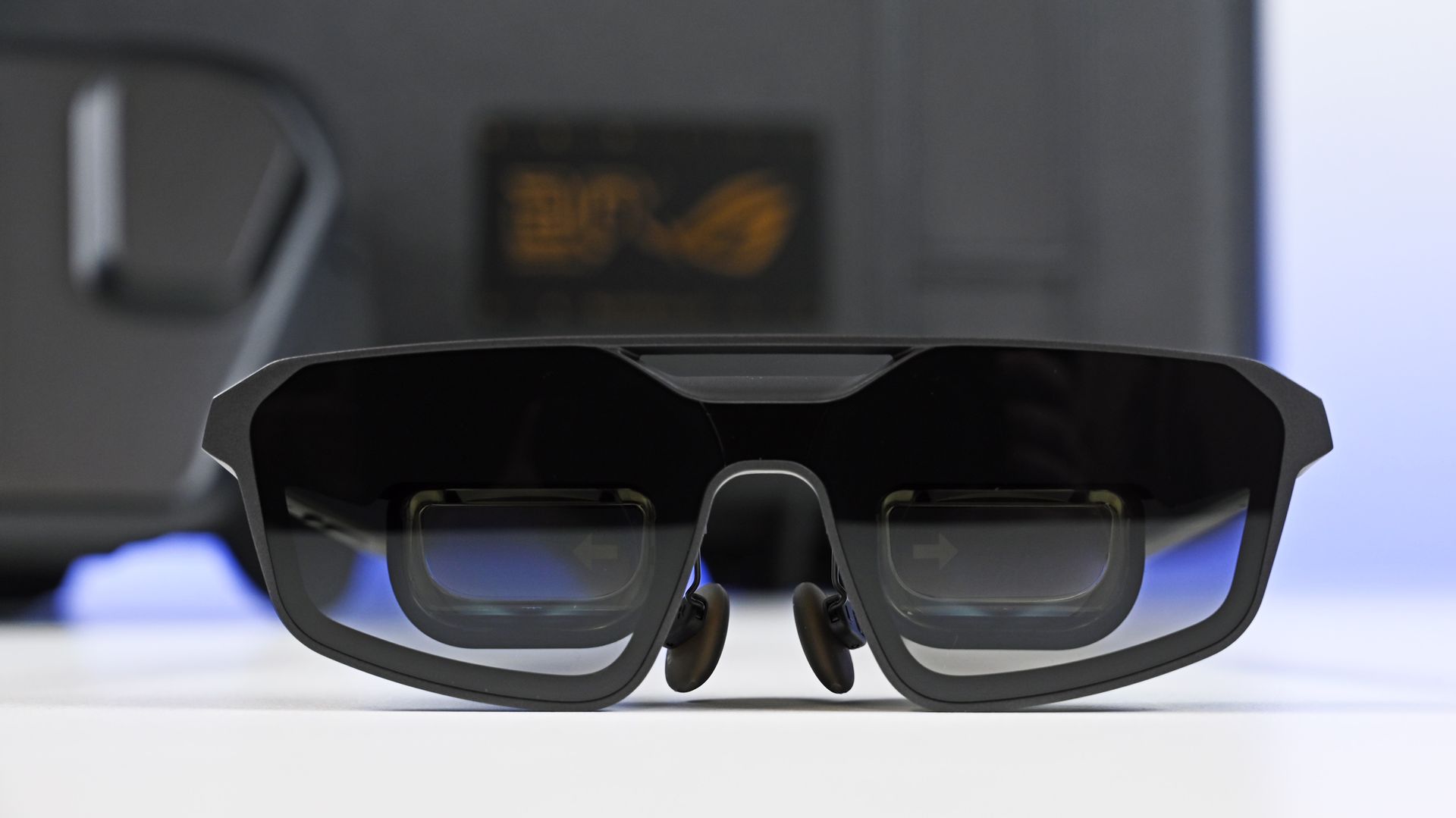
The ROG XREAL R1 Edition 20 Gaming AR Glasses (MSRP: $849) can create a virtual display of up to 171 inches viewed from roughly 13 feet away. They use Micro-OLED panels and support up to a 240Hz refresh rate, along with native 3DoF tracking and an Anchor Mode that can keep the virtual screen fixed in position while you move your head.
Front view of the matte black ROG XREAL R1 Edition 20 AR glasses, with tinted lenses and dual display prisms. (Image credit: Daniel Rubino)
You also get a custom dbrand Killswitch (see our review) designed for the X20, complete with an exclusive skin and stick caps. I'm torn about using it. On one side, it's an excellent case with a cover, making it perfect for tossing in the bag. On the other, you're now covering 80% of the translucent case, which seems kinda sacrilegious.
There's a 68W charger in the package too, along with the various accessories for the glasses.
It's basically the "give me everything" configuration.
$2,499 is bonkers, but thankfully you don't need to spend that much
The Pelican case with custom foam holding the powered-on ROG Ally X20 handheld, 68W charger, and AR glasses case. (Image credit: Daniel Rubino)
Let's be realistic: $2,499 for a gaming handheld bundle is an enormous amount of money.
This isn't the mainstream X20 package. It's a collector's bundle for the hardcore ROG enthusiast who wants the limited-edition machine, AR glasses, custom accessories, and a Pelican case capable of making the whole setup feel like precious cargo.
The good news is that ASUS isn't forcing you to buy all of that.
Daniel RubinoDaniel RubinoDaniel RubinoDaniel RubinoDaniel Rubino
And after spending more time with it, that's the version I'm increasingly interested in.
At $1,299, the X20 certainly isn't cheap either. But the combination of its excellent OLED display, booming speakers, unique translucent design and other hardware improvements is making it feel like a much more substantial upgrade over the current Ally X than I initially expected.
I'll have a lot more to say about that very soon.
Stay tuned to Windows Central for my full ROG Xbox Ally X20 review in the coming week, where I'll answer the question that really matters: is ASUS' new $1,299 handheld actually worth it?
Now available
ASUS
ROG Xbox Ally X20 Bundle
Twenty years of ROG innovation, marked by the limited ROG Edition 20 lineup in an exclusive colorway. The ROG XBOX Ally X20 Bundle carries that celebration forward, pairing the handheld with the ROG XREAL R1 Edition 20 Gaming AR glasses to create a complete gaming setup that travels with you.
Join us on Reddit at r/WindowsCentral to share your insights and discuss our latest news, reviews, and more.
XREAL just announced a refresh to the best AR glasses on the market. The newly announced XREAL 1 Pro+ is brighter than last year's model and features enhancements to improve image quality.
XREAL carved a niche in the wearable space with its glasses that let you enjoy content on a massive digital screen that you can take anywhere. We've covered XREAL products for years, including the XREAL Air 2 Pro, XREAL One Pro, and XREAL Beam Pro, which enhances XREAL AR glasses by adding support for Android apps.
The XREAL 1 Pro+ builds on the XREAL One Pro, retaining a 57-degree field of view and support for 3DoF (three degrees of freedom) spatial viewing. The new AR glasses are much brighter than their predecessor.
The biggest upgrade on paper is the jump from 700 nits to 1,200 nits of brightness. We've found display quality to be one of the most important factors when evaluating AR glasses.
In our XREAL One Pro review, we said you should buy a pair if you want a "bright, beautiful, and private display for all your devices." We'll have to test the XREAL 1 Pro+ but the official specifications suggest it's brighter and more beautiful than its predecessor.
XREAL added support for AI HDR to improve perceived image quality, though that feature is limited to certain types of content.
The 2D-to-3D conversion of the glasses, which adds depth to normal 2D content, has had its refresh rate improved from 30Hz to 60Hz.
The XREAL 1 Pro+ also has a new ergonomic nose pad that is supposed to make the glasses more comfortable during extended sessions.
You can order the XREAL 1 Pro+ starting today for $599. The launch is through XREAL's website, but XREAL glasses have become available through Amazon and Best Buy in the past, so it's reasonable to expect the XREAL 1 Pro+ to appear at other retailers.
At the time of publication, the XREAL 1 Pro+ glasses had not appeared on the XREAL website. I will update this piece once they are available for purchase.
Join us on Reddit at r/WindowsCentral to share your insights and discuss our latest news, reviews, and more.
RTX Spark is finally here. After years of rumors, NVIDIA has re-entered the Windows silicon game with the MediaTek N1X, a tailor-made 18/20-core SoC with 5,120 or 6,144 GPU cores, up to 128GB of unified memory, and a heck of a lot of power for apps, games, and AI experiences under the hood.
It's not every day that Windows gains a new silicon partner, which is why everyone seems to be involved with ensuring this launch goes as smoothly as possible. Microsoft has worked closely with NVIDIA on optimizing the Windows platform, especially for RTX Spark, and third-party app vendors like Adobe, Blender, anti-cheat software, and more have mobilized to optimize their products and frameworks for the new chipset.
But the big play with RTX Spark is on-device AI. LLMs and agentic workflows have become all the craze over the last year, and NVIDIA believes the RTX Spark is the first chipset for Windows that has been designed from the ground up for running local AI experiences locally and securely, without sacrificing performance.
NVIDIA has 6 hardware partners lined up to ship RTX Spark hardware starting this week, and all of them are aimed at the high-end content creator or developer crowd. NVIDIA has set its sights on competing head-to-head with the MacBook Pro, and is eager to win over AI developers who flocked to that platform thanks to Apple Silicon.
I've been testing out the top configuration of RTX Spark over the last week on a Surface Laptop Ultra, and here's what I discovered it's good at, and what it's not so good at. FYI, today's embargo only allows us to detail the RTX Spark's performance and benchmarks, not the Surface Laptop Ultra itself. So battery life, thermal performance, and laptop-specific variables are not included in this piece. That information will be shared in the full laptop review, coming soon.
NVIDIA RTX Spark Overview
(Image credit: NVIDIA)
If you're looking for a quick rundown of what RTX Spark is and how it compares, here's what you need to know:
RTX Spark is a powerful SoC with good CPU performance and great GPU performance. Its CPU is comparable to the Apple M4 Pro and Qualcomm's Snapdragon X2 Elite, with multi-thread performance being its stronger asset in the CPU department, though it trails behind the Apple M4 Max and Snapdragon X2 Elite Extreme.
The GPU is the star of the show, with great performance thanks to its 6,144 GPU cores that deliver smooth framerates (with help from DLSS and framegen), faster rendering times, and very capable AI performance. Its quantized INT8 tensor execution, unified memory sharing, and computer vision acceleration easily leapfrog mobile discrete GPUs in its power class for AI workflows, which it excels at.
I don't believe RTX Spark is for everyone. It's very good at key things, and shines primarily for those who are knee-deep in local AI workflows and experiences. If you're not a mobile content creator, software developer, or utilize local LLMs often, RTX Spark probably isn't for you.
Mobile efficiency varies depending on power profile. The GPU is hungry and will drain power fast when at full pelt, but in day-to-day usage that only occasionally leans on the GPU, it should last the workday. The good news is, you should see the same performance regardless of plugged-in state.
Compared with most integrated Snapdragon, Intel, and AMD systems, RTX Spark is substantially faster in AI image generation and local inference, while matching or approaching dedicated RTX 4070/5060/5070 class GPU performance in most workloads outside of AI.
The latest generation of high-end Apple Silicon retains an advantage in peak single-thread CPU performance, but RTX Spark’s strength is its GPU, with TensorRT execution and high-speed memory providing advantages in diffusion, quantized models, and sequential data access.
RTX Spark configurations
Specification
RTX Spark N1X (5120-core GPU)
RTX Spark N1X (6144-core GPU)
CPU Configuration
18 cores (9x Cortex-X925 + 9x Cortex-A725)
20 cores (10x Cortex-X925 + 10x Cortex-A725)
Max Performance Core Clock
3.9 GHz
4.0–4.1 GHz
Max Efficiency Core Clock
2.8 GHz
2.8 GHz
GPU Architecture
Blackwell RTX
Blackwell RTX
CUDA Cores
5,120
6,144
Streaming Multiprocessors (SMs)
40
48
RT Cores
4th Generation
4th Generation
Tensor Cores
5th Generation
5th Generation
Unified Memory Type
LPDDR5X
LPDDR5X
Memory Interface
256-bit / 16-channel
256-bit / 16-channel
Memory Speed
Up to 9,400 Mbps
Up to 9,400 Mbps
Peak Memory Bandwidth
Up to 300 GB/s
Up to 300 GB/s
NVLink-C2C Bandwidth
600 GB/s bidirectional
600 GB/s bidirectional
Display Support
HDMI 2.1a, DisplayPort 2.0 over USB4
HDMI 2.1a, DisplayPort 2.0 over USB4
Process Technology
TSMC 3nm (CPU & GPU dies)
TSMC 3nm (CPU & GPU dies)
Configurable SoC TDP
45–80W
45–140W
NVIDIA RTX Spark CPU Performance
(Image credit: NVIDIA)
The RTX Spark CPU was co-designed by NVIDIA and MediaTek. The N1X, as it's known, comes in either 18- or 20-core configurations and is relatively efficient while delivering good performance. With that said, it's not leading in its class, leaving something to be desired when it comes to raw benchmarks.
In Cinebench 2026, the 20-core N1X achieved a single-core score of 558 and a multi-core score of 6,885. To put that into perspective, its single-core score beats the first-gen Snapdragon X Elite X1E-80-100 at 519, but falls short compared to Qualcomm's Snapdragon X2 Elite Extreme, which achieves a score of 662 for single-core. Multi-core fares better, with a score of 6,885, which is only just behind the X2 Elite Extreme and Apple M4 Max.
Cinebench Scores (Best Performance)
Cinebench 2026 Test
Plugged In Result
Unplugged Result
CPU (Multi Core)
6,885 pts
6,844 pts
CPU (Single Core)
558 pts
554 pts
MP Ratio
12.33 x
12.35 x
These scores do place it ahead of Intel's and AMD's latest flagship mobile workstation chips, but the chipset simply doesn't compete with Apple's latest Max chips, consistently trailing behind the Apple M4 Max and the M3 Ultra. This is a little disappointing given that the RTX Spark is directly targeting Apple Silicon.
It's a similar story with our Geekbench 7 results, achieving a single-core score of 2,718 and a multi-core score of 23,571. It's clear that multi-core performance is the N1X's stronger asset, competing with the likes of the Apple M4 Pro or Intel Core Ultra 9 285K, and is well ahead of the last-gen Snapdragon X Elite and Intel Lunar Lake, as it should be.
Geekbench Scores (Best Performance)
Geekbench 7.1
Plugged In Result
Unplugged Result
CPU (Multi Core)
23,571
23,879
CPU (Single Core)
2,710
2024
Outside of benchmarks, in day-to-day use the N1X feels fine. This isn't a slow CPU by any means, and will chew through even complex workflows with no sweat. Most day-to -day apps are Arm native these days, but for the few that do require Microsoft's Prism emulation layer, you won't even notice it. RTX Spark makes it so emulated apps feel just like native ones.
All our benchmarks were run with the Best Performance setting enabled, and in our tests we ran them a number of times in both plugged-in and unplugged states to see if there's any performance drop when away from a wall outlet. The good news is the RTX Spark delivers pretty much the same power regardless of plugged-in state, which mimics Apple Silicon.
NVIDIA RTX Spark GPU Performance
Gears of War E-Day running on RTX Spark (Image credit: Zac Bowden / Windows Central)
The star of the show with RTX Spark is the Blackwell RTX GPU with either 5,120 or 6,144 cores. We benchmarked the top-end, 6,144-core configuration for these benchmarks, and it does impress, outputting performance in workflows like video editing, model rendering, and gaming similar to an RTX 4070 or 5060, but in an efficient package with all-day battery life.
For what is essentially an integrated GPU, it outputs dedicated GPU performance in pretty much all workflows. But it really excels at AI workflows, especially when optimized for tensor and CUDA.
The 128GB configuration is set to split that memory evenly between system RAM and the GPU, meaning in our default configuration and for how we ran most of our benchmarks, the GPU had 64GB of video RAM to make use of. In this configuration, it's more than capable for most tasks, with the only exception being running AI models that surpass this size. In that situation, you can allocate more memory to the GPU so that it will fit.
In our 3DMark tests, we found that the RTX Spark performs similarly to an RTX 4070. It's very capable at 1440p gaming with high settings in most titles, though more demanding games will need to lean on DLSS and frame generation for smooth 60+ FPS gaming. In most titles we benchmarked, games ran without a hitch and looked great.
Benchmark
Target Resolution & API
Overall Score
Graphics Score
CPU Score
Test Framerates
3DMark Time Spy
1440p (DirectX 12)
12,771
12,368
15,669
GT1: 81.68 FPS, GT2: 70.11 FPS, CPU: 52.64 FPS
3DMark Time Spy Extreme
4K UHD (DirectX 12)
5,857
5,972
5,281
GT1: 37.77 FPS, GT2: 35.19 FPS, CPU: 66.30 FPS
3DMark Steel Nomad
4K UHD (DirectX 12 Heavy)
3,064
3,064
N/A
Graphics Test: 30.65 FPS
3DMark Speed Way (Run 1)
1440p (DirectX 12 Ultimate / DXR)
3,011
3,011
N/A
Graphics Test: 30.12 FPS
3DMark Speed Way (Run 2)
1440p (DirectX 12 Ultimate / DXR)
2,985
2,985
N/A
Graphics Test: 29.85 FPS
Gaming is not the main reason to buy an RTX Spark laptop, but it is an additional benefit. It's the first Windows on Arm platform that does gaming relatively well, supporting the usual breadth of gaming technologies and frameworks such as:
Ray tracing
DLSS 5
Multi Frame Generation
Neural Rendering
Reflex
G-SYNC
RTX Remix
Most games run under emulation on RTX Spark, as the platform is Arm64, and most games are compiled for x86. However, in most titles, this isn't a problem. Most mainstream anti-cheat software is now compatible with Windows on Arm, and the Prism emulation layer has been tuned specifically for RTX Spark to ensure most games run without a hitch, though there are exceptions.
Some games, such as Red Dead Redemption 2, will require you to change settings to get them to run successfully. For example, by default Red Dead Redemption 2 was set to run with Vulkan, which caused it to crash at launch. Switching it to DirectX12 fixed this for me. Most games run without needing to change any settings first, however.
Zac Bowden / Windows CentralZac Bowden / Windows CentralZac Bowden / Windows CentralZac Bowden / Windows Central
I tried Cyberpunk 2077, which runs pretty well right out of the box. The game analyzed my system and decided that Ray Traced Ultra settings were a perfect fit for the RTX Spark. Running at 1440p with frame gen enabled, the game was easily able to maintain 60fps while looking good doing it with these graphics settings enabled.
Shadow of the Tomb Raider also works great, but it takes quite a while to actually load up. But once the game is running and you're in-game, it looks great and runs well above 60fps at high settings at 1440p. Marvel's Spider-Man 2 and The Witcher 3 Remastered ran without a hitch, reaching close to 90fps in high settings at 1440p.
For content creators, RTX Spark is a great choice. Whether you are editing photos or rendering videos using apps like Adobe Photoshop and Premiere Pro, or rendering 3D environments in Blender, the RTX Spark is well suited for those tasks.
Photoshop supports on-device AI models on RTX Spark (Image credit: Zac Bowden / Windows Central)
Adobe and NVIDIA say the Adobe Creative Cloud Suite has been optimized specifically for RTX Spark. These optimizations include:
Photoshop on-device AI object removal
Premiere Pro TensorRT acceleration
Blender support for DLSS 4.5 Ray Reconstruction
When it comes to video rendering times, the RTX Spark trails the current-gen RTX 50 series GPUs. We benchmarked it against three other laptops with an RTX 5060, 5070 Ti, and 5080, in which it trailed the RTX 5060 in video rendering performance, finishing a few seconds later in most instances. In this benchmark, we ran Premiere Pro Beta, as that version includes necessary optimizations for RTX Spark.
Premiere Pro Export Times
Export Profile (Seconds ↓)
Surface Laptop Ultra (RTX Spark)
Lenovo Yoga Pro 9 (RTX 5060 8GB)
ASUS Zephyrus G14 (RTX 5070 Ti 12GB)
Lenovo LEGION 9 (RTX 5080 16GB)
H.264 Export (1 GPU)
42.002 s
32.111 s
39.403 s
20.218 s
H.264 Export (Pass 2)
34.415 s
26.003 s
33.532 s
18.401 s
H.264 UHD Export (1 GPU)
81.419 s
64.140 s
71.918 s
40.235 s
H.264 UHD Export (Pass 2)
66.496 s
52.301 s
59.536 s
34.253 s
Dedicated GPU performance can vary depending on laptop chassis size, cooling solution, and thermal envelope, which is why the 5070 Ti frequently trailed the 5060 in our testing.
The RTX Spark GPU is very performant and is capable of pretty much handling anything you'd want to throw at it on a mobile workstation. Where it really shines, however, is running local AI models directly on it. It's the reason NVIDIA built this platform to begin with, and it does this very well.
We ran several Procyon AI benchmarks to see how well the GPU performs when running on-device AI workflows. Text generation LLMs ran very fast, with Spark delivering responsive time-to-first-token results, including 0.27 seconds on Phi and 0.39 seconds on LLaMA3, but its sustained decoding rates trail higher-wattage discrete GPUs.
On-device text generation benchmarks
Model
Overall Score
Tokens / Second
Time to First Token (s)
Model Load Time (s)
Phi-3.5-mini
2,615
72.21
0.27
0.66
Mistral 7B
2,276
53.07]
0.47
0.96
Llama 3.1 8B
2,251
49.44
0.40
1.50
Llama 2 13B
2,108
27.44
0.84
1.69
But quantized AI performance is where RTX Spark truly leads. In Stable Diffusion 1.5 INT8, the RTX Spark scored 11,294 and generated images in 2.77 seconds, substantially outperforming the tested RTX 5080, RTX 5070 Ti, and RTX 5060, on which we ran the same tests.
Stable Diffusion Benchmarks
Model Profile & Metric
Surface Laptop Ultra (RTX Spark)
Lenovo Yoga Pro 9 (RTX 5060 8GB)
ASUS Zephyrus G14 (RTX 5070 Ti 12GB)
Lenovo LEGION 9 (RTX 5080 16GB)
SD 1.5 FP16 - Total Duration
67.55 s
69.70 s
107.73 s
44.59 s
SD 1.5 FP16 - Speed
4.222 img/s
4.356 img/s
6.733 img/s
2.787 img/s
SD 1.5 FP16 - Average UNet
23.986 it/s
23.265 it/s
15.070 it/s
36.426 it/s
SD 1.5 INT8 - Total Duration
22.14 s
138.74 s
101.83 s
440.19 s
SD 1.5 INT8 - Speed
2.767 img/s
17.342 s/img
12.729 img/s
55.024 s/img
SD 1.5 INT8 - Average UNet
19.158 it/s
2.949 it/s
4.043 it/s
0.927 it/s
SDXL FP16 - Total Duration
400.82 s
499.37 s
735.47 s
303.68 s
SDXL FP16 - Speed
25.051 s/img
31.211 s/img
45.967 s/img
18.980 s/img
SDXL FP16 - Average UNet
4.028 it/s
3.331 it/s
2.196 it/s
5.321 it/s
AI Workflows
The GPU is best suited for running large on-device AI models such as Qwen 3.8 27B, Gemma 4 31B, or even 120B-parameter models such as Nemotron or GPT-OSS.
NVIDIA is touting local agentic capabilities with this GPU, leaning on apps like Hermes Agent and OpenClaw to achieve this. We tested Hermes Agent, as OpenClaw failed to connect to the gateway once setup was complete.
The selling point of running LLMs and agents locally is that you are no longer constrained by usage limits or the amount of tokens you have available. When the AI runs locally, it's yours. You can run it for as long and as hard as you like.
120B parameter models can fit entirely on the RTX Spark's GPU, significantly speeding up LLM performance. (Image credit: Zac Bowden / Windows Central)
It's also good for security and privacy reasons. You may have confidential documents, audio recordings, intellectual property that you need summarized or explained to you, and feeding that data to a cloud-based LLM or agent is giving that data away to the host.
With RTX Spark, you can feed whatever data or task you want to your local AI running off the GPU, and that data will never leave the device. You can build up your own personal agent that is capable of managing your local files, creating documents, making edits, and in some cases even controlling your PC.
Hermes Agent is a great tool for beginners, as it offers local AI compute experiences and makes setting it up a breeze. You open the app, choose to run AI locally, and it recommends the best model for the specs you have. Once downloaded, you're good to start chatting with your own AI locally.
Instead of using up tokens in the cloud, local AI leans on the GPU for processing. Unlimited power! (Image credit: Zac Bowden / Windows Central)
Hermes Agent is particularly good at automating tasks. The first thing I did was tell it to clean up and organize my large, cluttered downloads folder. It moved images to my photos library, deleting any old executables, and organizing and categorizing PDFs and Word documents appropriately. It did all this without sending any of my data to the cloud, all processed by the GPU.
I also asked it to build me a basic website that included all my benchmark results so that I could refer back to them more easily. It ran that process entirely off my GPU, and came up with a pretty nice looking webpage design in the process. Zero cloud-based tokens used:
The webpage that the Qwen 3.8 27B parameter model created using Hermes Agent. (Image credit: Zac Bowden / Windows Central)
NVIDIA has even built MCP support into NVIDIA Broadcast and NVIDIA Control Panel, allowing you to hook it up to your local LLM and issue commands that allow it to configure your NVIDIA PC's settings.
Windows and RTX Spark
The Get Started app on RTX Spark includes a step to automate installing agent apps. (Image credit: Microsoft)
In addition to raw CPU and GPU performance, Microsoft has worked closely with NVIDIA to optimize RTX Spark for Windows 11. This partnership runs deep, and there are a lot of things going on behind the scenes that will aid the performance of Windows and support for apps on RTX Spark over the coming months and years.
For those unboxing a new RTX Spark laptop this fall, the Get Started app on Windows 11 will present a step that makes downloading and installing apps that can handle AI agents super easy. Hermes Agent will even go a step further and recommend a suitable model to download once up and running, meaning the user has to do zero research to get started.
With that said, I still find these recommended apps quite complex and convoluted. Many beginners will feel overwhelmed by these apps, especially OpenClaw, which I could not get working properly after it failed to open a gateway to allow the AI model to communicate with the OpenClaw chat interface.
Hermes Agent does automate setting up your first local agent. (Image credit: Zac Bowden / Windows Central)
Microsoft has optimized the system scheduler specifically for RTX Spark to squeeze out as much performance across Windows, menu flyouts, app launches, and more as possible. It has also made changes and enhancements to how Windows handles unified memory so that it's faster and more reliable at feeding that memory to where you need it.
TensorRT is now supported by Windows ML, and DirectX 12 has neural rendering support. The Prism emulation layer has also been tuned for RTX Spark, which results in emulated apps that simply do not feel like they are being emulated.
Microsoft is also keen to position Windows as the platform for local AI and agentic workflows. It has built safeguards and security into the Windows platform to ensure the local agents you run on Windows aren't capable of making severe changes or causing damage to your files, apps, and more.
This is a direct attempt at combating the sudden rise in local AI developers flocking to the Mac. Apple has made little optimizations to macOS to adopt and safeguard local AI and agentic workflows on that platform, whereas Microsoft is moving to make agents a native extension of the Windows platform.
RTX Spark is a Copilot+ PC certified chip, but you won't find any Copilot+ PC features at launch. Microsoft says it's working with NVIDIA to bring features like Windows Recall, Click To Do, and on-device Semantic Search to the RTX Spark platform in the coming months, which will run off the RTX Spark's 50 TOPS NPU.
Conclusion
(Image credit: NVIDIA)
RTX Spark is a super interesting chipset. It's forward leaning in a lot of ways, built on the Arm64 architecture that delivers serious performance and great efficiency. While its N1X CPU is just okay, its Blackwell RTX GPU really shines.
This is the first time we've seen RTX 4070-5070 level performance in an SoC that is this small and efficient. It's optimized for AI workloads, which is its strongest workflow by far. Quantized AI models run great, and with up to 128GB of unified memory, most mainstream models will fit entirely on the GPU without a hitch.
It's also great for content creators, and is very capable at gaming also. But at the prices that these devices are launching at, I think most people would be better served getting an Intel or AMD laptop with a dedicated NVIDIA GPU instead, as these often cost less than the cheapest RTX Spark laptops right now.
But if your workflow involves running AI models locally all day, software development, or complex data crunching and source code management, the RTX Spark is one of the better choices in the Windows space right now, especially for laptops that are thin-ish and (relatively) lightweight.
These RTX Spark laptops are more efficient and portable than typical laptops with a dedicated NVIDIA GPU, which is one of the key benefits of an SoC like this. The power this GPU outputs, for what is essentially integrated graphics, should not be understated.
Of course, just how efficient RTX Spark is will depend entirely on the hardware you choose to buy, as OEMs are free to feed the GPU more or less power depending on the chassis and thermal envelope. Keep that in mind.
Benchmarks
All benchmarks ran on RTX Spark 20-core CPU configuration with 128GB RAM and 6,144 GPU cores. All tests ran connected to power with Best Performance profile enabled, unless stated otherwise. We are still running benchmarks and new tests, and will update accordingly.
Those tablets aren't really direct competition to the Surface Pro, but they do have a feature I'm envious of. The nanomatte screen on one of those Amazon Alexa tablets would be perfect on a Surface Pro.
Matte displays reduce glare by diffusing light. Because the screens bounce light in different directions, the image can appear grainy. An extreme example of this is if you get a cheap matte screen protector for your phone, but even a premium PC with a matte finish can look a bit grainy.
The nanomatte display Amazon uses in its new tablets etches the screen in a way that aligns with the pixels of the display. Amazon praises the displays for providing "a first-of-its-kind cinematic viewing experience, with incredible contrast retention in bright conditions and text that feels like it’s sitting on top of the glass."
I'm not sure I agree with the claim that it's a world first. Apple's nano-texture technology is similar to what Amazon unveiled. But even if Amazon is not a pioneer in the space, it has a device with a screen I'm envious of.
Many Surface devices, including the Surface Pro 8, are glossy, making them hard to use in well-lit environments. (Image credit: Future)
Microsoft has been oddly resistant to anti-glare displays. Surface was late to the party on adding them to any device and has been selective with where it offers the screens.
Microsoft has yet to fully embrace anti-glare screens and it holds back Surface hardware.
The anti-glare display of the Amazon Alexa Tablet 12 Pro also has a texture that makes pen usage feel more natural. The screen is meant to make it feel like you're writing on paper, not a perfectly smooth piece of glass.
It's not surprising that a device made by Panay has features that would fit perfectly on a Surface. He shaped the Surface brand as much as anyone, and he took his expertise over to Amazon.
But as I mentioned earlier, the Alexa tablets are not competitors to the Surface Pro, so they can't serve as replacements either. The Alexa tablets run on Android and have access to the Google Play Store. That's a welcome change to the locked-down Fire Tablets of the past, but it's a far cry from a Windows-powered 2-in-1.
I'd love to see Microsoft replicate the nanomatte finish of the Amazon Alexa Tablet 12 Pro on a Surface Pro in the future. The finish would help those using the Surface Pro in bright settings and also improve the feel of using a stylus.
The Amazon Alexa Tablet 12 Pro features a Nanomatte anti-glare display designed to reduce reflections while maintaining detail and color accuracy. It runs Android and can access the Google Play Store.View Deal
Join us on Reddit at r/WindowsCentral to share your insights and discuss our latest news, reviews, and more.
Modern data centers, high-precision measurement systems and high-resolution radar sensors rely on extremely broadband amplifier chips that combine low noise with high output power. Researchers at the Fraunhofer Institute for Applied Solid State Physics IAF have developed a monolithic microwave integrated circuit (MMIC) with strong performance in these areas.
Apple is working on an AI server that would use Apple’s high-performance M-series Ultra chips found in Mac desktops. The potential product’s expected release in 2029 would mark the first Apple server to hit the market in nearly two decades—and could capitalize on the surging popularity of Apple hardware among AI developers.
The enterprise server would come in two configurations that include either two or four of Apple’s future M8 Ultra chips, according to The Information. The project reportedly received support from new Apple CEO John Ternus when it began a year ago, back when Ternus led Apple’s hardware engineering efforts.
This revelation coincides with booming sales for Apple’s Mac mini and Mac Studio as AI developers and companies snap up the Mac computers to run AI workloads. The popularity of such computing devices that rely on Apple’s M-series Ultra chips has undoubtedly encouraged Apple’s pursuit of an enterprise server using the same chips.
Ao contrário dos discos rígidos tradicionais, os SSD podem ser prejudicados pela desfragmentação. Veja porquê e o que deve fazer para manter o seu armazenamento rápido e saudável durante mais tempo.
Xanadu and AMD launched Backline, an open platform they say lets standard AMD CPUs handle quantum-classical control work once thought to need custom chips.
Solid-state drives (SSDs), which store data in computers and servers, are critical to data center reliability. When they fail, they can contribute to service disruptions, data loss and high maintenance costs, making early failure prediction important.
Previstos para serem lançados na semana que vem (pelo menos nos Estados Unidos e em Portugal), os novos Mac mini e Mac Studio são alimentados com os chips M6 e M5 Ultra, respectivamente — lembrando que o mini pode ser configurado também com o M5 Pro, enquanto que o Studio de entrada vem com o chip M5 Max.
Pois os primeiros resultados de benchmarks dos dois novos processadores apresentados recentemente pela Apple surgiramhoje no banco de dados do Geekbench 7, oferecendo uma visão dos ganhos de desempenho de cada um deles.
Em ambos os casos, os resultados vistos até agora tratam apenas dos testes de CPU 1Central processing unit, ou unidade central de processamento. — os de GPU 2Graphics processing unit, ou unidade de processamento gráfico. ainda não foram divulgados.
Confira abaixo a pontuação do chip M6 e as pontuações médias do chip M5 para efeito de comparação:
Benchmark de CPU
M6
M5
Single-core
4.071 pontos
3.641 pontos
Multi-core
22.783 pontos
17.948 pontos
Se o resultado acima for preciso, o chip M6 apresenta um desempenho single-core cerca de 12% mais rápido e uma performance multi-core cerca de 27% mais rápida em comparação com o chip M5. Vale notar que o chip M6 está no novo Mac mini, enquanto as pontuações do chip M5 baseiam-se no MacBook Pro de 14 polegadas — mas o desempenho deve ser semelhante.
Na tabela abaixo está a pontuação do chip M5 Ultra de ponta, com CPU de 36 núcleos, bem como as pontuações médias do chip M3 Ultra de ponta, com CPU de 32 núcleos (já que a Apple nunca lançou um chip “M4 Ultra”).
Benchmark de CPU
M5 Ultra
M3 Ultra
Single-core
3.774 pontos
2.920 pontos
Multi-core
52.516 pontos
39.059 pontos
Se os resultados acima procederem, o chip M5 Ultra oferece um desempenho de CPU single-core cerca de 30% mais rápido e um desempenho multi-core cerca de 35% mais rápido em comparação com o M3 Ultra.
Nada mau, hein!
Mac Studio
Chip: M4 Max ou M3 Ultra Memória: 36GB, 48GB, 64GB, 96GB, 128GB, 256GB ou 512GB Armazenamento: 512GB, 1TB, 2TB, 4TB, 8TB ou 16TB
NOTA DE TRANSPARÊNCIA: O MacMagazine recebe uma pequena comissão sobre vendas concluídas por meio de links deste post, mas você, como consumidor, não paga nada mais pelos produtos/serviços usando os nossos links de afiliado.
Esteja você de olho nos recém-anunciados iPhones 18 Pro e 18 Pro Max ou no badalado iPhone Duo, é bem provável que já tenha pensado em maneiras de economizar na hora de comprar um desses novos aparelhos. Como sempre, uma das melhores alternativas é optar por fazer isso nos Estados Unidos, com um cartão internacional da Nomad!
Parceira de longa data do MacMagazine, a Nomad está oferecendo 5% de cashback (limitado a US$100) para quem abrir uma conta até 30 de setembro com o cupom MAC26 e converter pelo menos R$3.500 (aproximadamente US$700/600€) — assim, você consegue adquirir seu iPhone novinho em folha com uma economia extra. 💵
Vamos usar como exemplo o iPhone 18 Pro de 256GB, que sai por US$1.200 nos EUA e por R$12.000 no Brasil. No momento da redação desta matéria, a cotação do dólar gira em torno de R$5,14, o que significa que, considerando encargos de 3,5% e uma taxa de serviço de 1,9%, o mais novo flagship da Maçã pode acabar saindo por ~R$6.504 — valor que cai para cerca de R$6.178 com cashback supracitado!
Vendido oficialmente por US$1.300/R$13.000, o iPhone 18 Pro Max pode acabar saindo por apenas ~R$6.693, enquanto o atual queridinho da galera, o iPhone Duo (preço tabelado de US$2.000/R$22.000), tem o potencial de lhe custar algo em torno de R$10.840!
Em outras palavras, caso você esteja planejando trocar de iPhone por agora, uma compra internacional com o cartão da Nomad torna-se uma das melhores opções — principalmente considerando que os preços no varejo nacional continuarão bem altos por um tempo.
Abra sua conta Nomad e ganhe até 5% de cashback!
Como dito, para aproveitar essa oferta, basta abrir sua conta internacional na Nomad até 30 de setembro e converter pelo menos R$3.500.
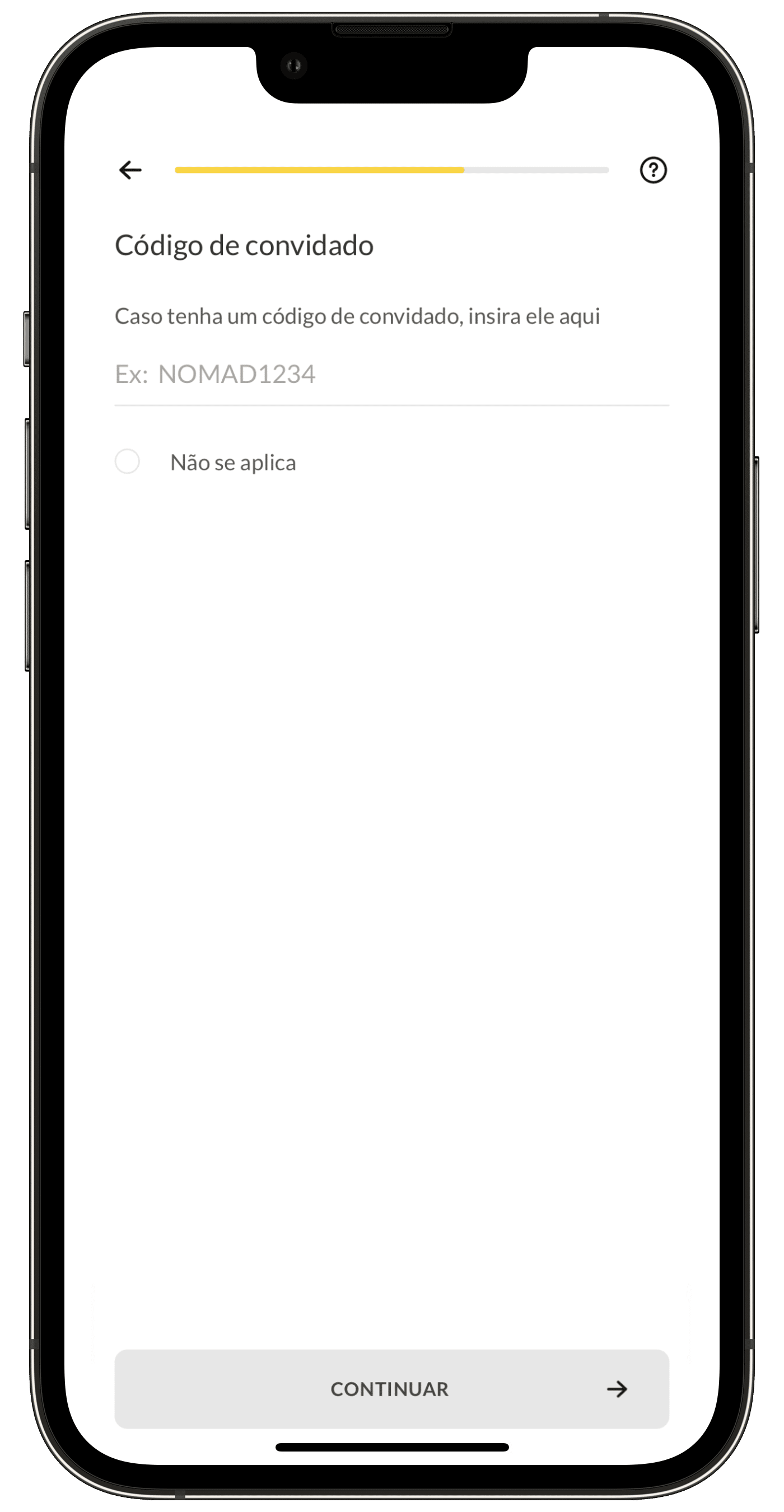
Para tal, baixe o app da Nomad e cadastre-se usando o código MAC26 no campo “Código de convidado”:
Nesta tela, digite o cupom MAC26 para ganhar 5% de cashback!
Sobre a Nomad
A Nomad foi a primeira a oferecer uma conta em dólar hospedada nos Estados Unidos, sem nenhuma taxa de abertura, anuidade ou manutenção. O cartão da empresa é aceito em mais de 180 países, oferecendo taxas bastante menores que as dos cartões de crédito internacionais.
A conta bancária da Nomad é assegurada em até US$250 mil pelo Community Federal Savings Bank, membro do fundo garantidor dos EUA (FDIC), para cada tipo de conta por titular, e permite que você faça/receba transferências de outras contas da Nomad sem nenhum custo, além de transferências para contas americanas (via Wire Transfer) e outras pagando bem menos do que as taxas cobradas nos EUA.
E não para por aí: com a sua conta Nomad você tem acesso a descontos em lojas parceiras e ainda pode aproveitar o Nomad Lounge, que concede acesso a uma das melhores salas VIP do Terminal 3 do Aeroporto Internacional de Guarulhos (SP).
Só na Nomad você tem uma conta internacional sem taxas mensais de manutenção, além de poder desfrutar de toda a praticidade e segurança que ela oferece!
NOTA DE TRANSPARÊNCIA: O MacMagazine recebe uma pequena comissão sobre vendas concluídas por meio de links deste post, mas você, como consumidor, não paga nada mais pelos produtos/serviços usando os nossos links de afiliado.

 Login
Login