A nova ferramenta Muse Image, da Meta, vem ativada por defeito em todos os perfis públicos de adultos no Instagram, e qualquer pessoa pode usar as suas fotos para gerar imagens com inteligência artificial sem que seja avisado. Eis como travar isto em menos de um minuto.
CATL has signed a memorandum of understanding with Dutch energy company Alfen to deploy 5 GWh of its Tener Sodium energy storage systems across Europe, one of the largest sodium-ion commitments the region has seen.
The batteries are rated for 15,000 cycles and a 25-to-30-year service life — the pitch that sodium-ion’s longevity, not its energy density, is what wins grid storage.
A white spot on iPad screen can appear as a bright patch that remains visible while browsing, watching videos or using apps. It may be small and easy to ignore at first, then become distracting whenever the screen shows a white, gray or lightly colored background.
The spot may come from a temporary software problem, but a fixed bright area is more commonly connected to the display hardware. Pressure inside the iPad, a damaged backlight layer, display separation or an impact can create uneven illumination that no setting can remove.
Before arranging a repair, a few simple checks can reveal whether the spot belongs to the image being displayed or to the physical screen itself.
What Causes a White Spot on iPad Screen?
A white spot on iPad screen is often described as a bright spot, pressure mark or backlight patch. On iPads with LCD displays, light passes through several internal layers before reaching the glass. When one of those layers becomes damaged, separated or compressed, light can concentrate in one area.
The mark may be more visible against pale backgrounds and almost disappear when the screen displays black or dark content. This is different from a dead pixel, which usually appears as a tiny fixed dot rather than a larger cloudy patch.
Pressure is one possible cause. Carrying an iPad in an overloaded bag, placing heavy objects on it or using a tight case can place stress on the display. A drop may also disturb the internal screen layers without cracking the front glass.
Battery swelling can create similar pressure from inside the device. If the screen is lifting from the frame, the iPad feels unusually warm or the body appears bent, stop using it and seek service. A swollen battery should not be pressed back into place or handled as an ordinary screen defect.
The problem can also appear after a display replacement involving a poorly fitted or lower-quality part. Apple notes that nongenuine displays may produce inconsistent brightness, color or touch behavior.
Image Credit:
Check Whether the Spot Is Really on the Display
Begin by opening several different apps. Look at the spot over a white webpage, a gray Settings screen, a dark photo and a full-screen video. A hardware-related mark normally stays in the same physical location regardless of what appears underneath it.
Rotate the iPad. If the content changes orientation but the bright patch remains in the same part of the glass, the display is the likely cause.
Taking a screenshot provides another useful test. A physical screen defect will not normally become part of the screenshot file.
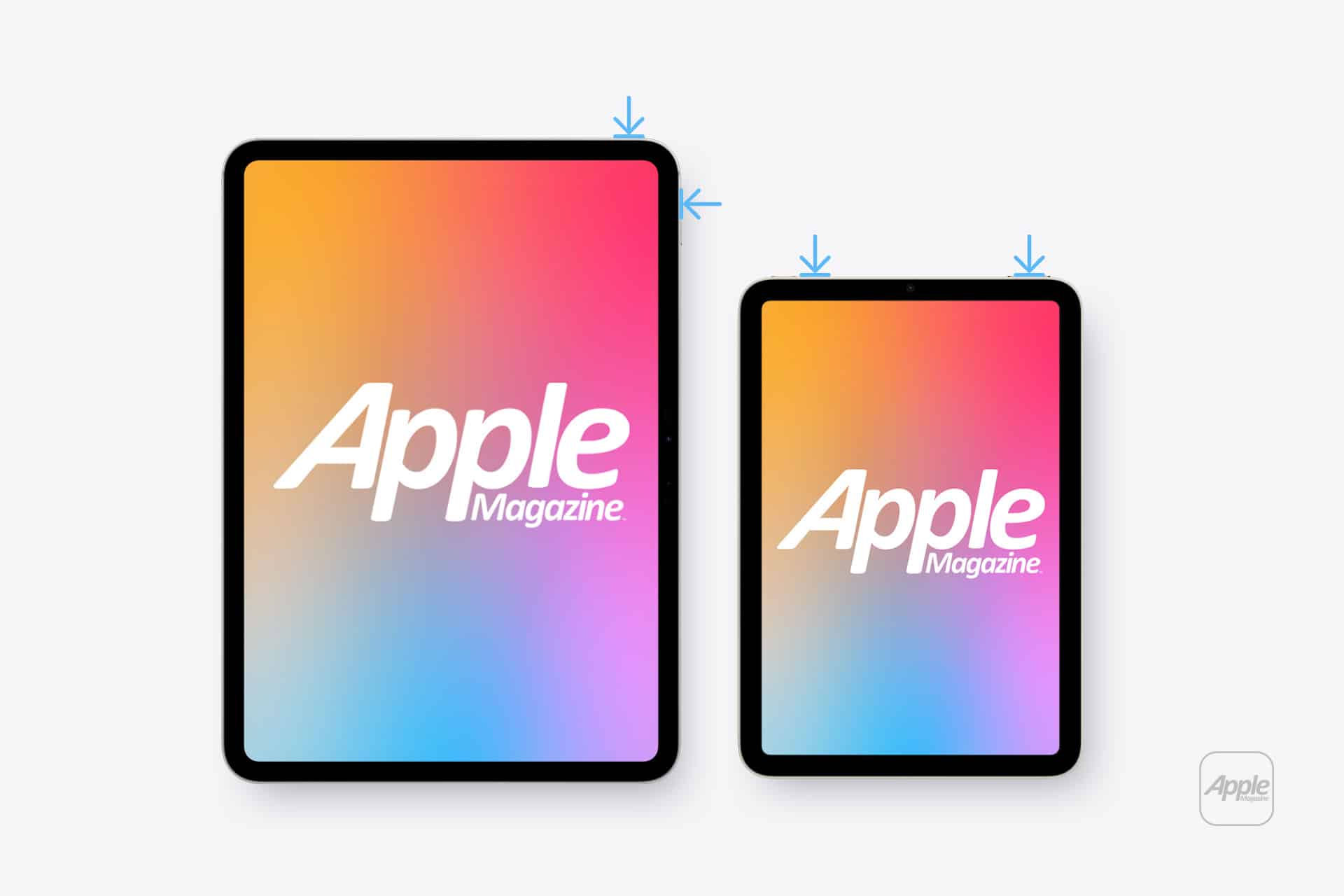
To take a screenshot on an iPad without a Home button:
Top button + either volume button
To take a screenshot on an iPad with a Home button:
Top button + Home button
Open the screenshot on another device or send it to a trusted computer. If the white spot does not appear there, the image generated by iPadOS is normal and the problem is probably inside the display assembly.
If the mark appears in the screenshot, it may belong to an app, image, accessibility setting or software effect rather than the panel.
Restart Before Assuming Hardware Failure
A restart is worth trying because it clears temporary display and system behavior without affecting personal files. It is unlikely to repair physical backlight damage, but it can eliminate a short-lived graphical problem.
To restart an iPad without a Home button:
Press and hold the top button and either volume button > Drag the power slider > Wait approximately 30 seconds > Hold the top button until the Apple logo appears
To restart an iPad with a Home button:
Press and hold the top button > Drag the power slider > Wait approximately 30 seconds > Hold the top button until the Apple logo appears
After restarting, return to the same pale background and check the area again. A spot that remains fixed is unlikely to be caused by a temporary iPadOS issue.
Image Credit: AppleMagazine
Brightness Can Make the Problem More Visible
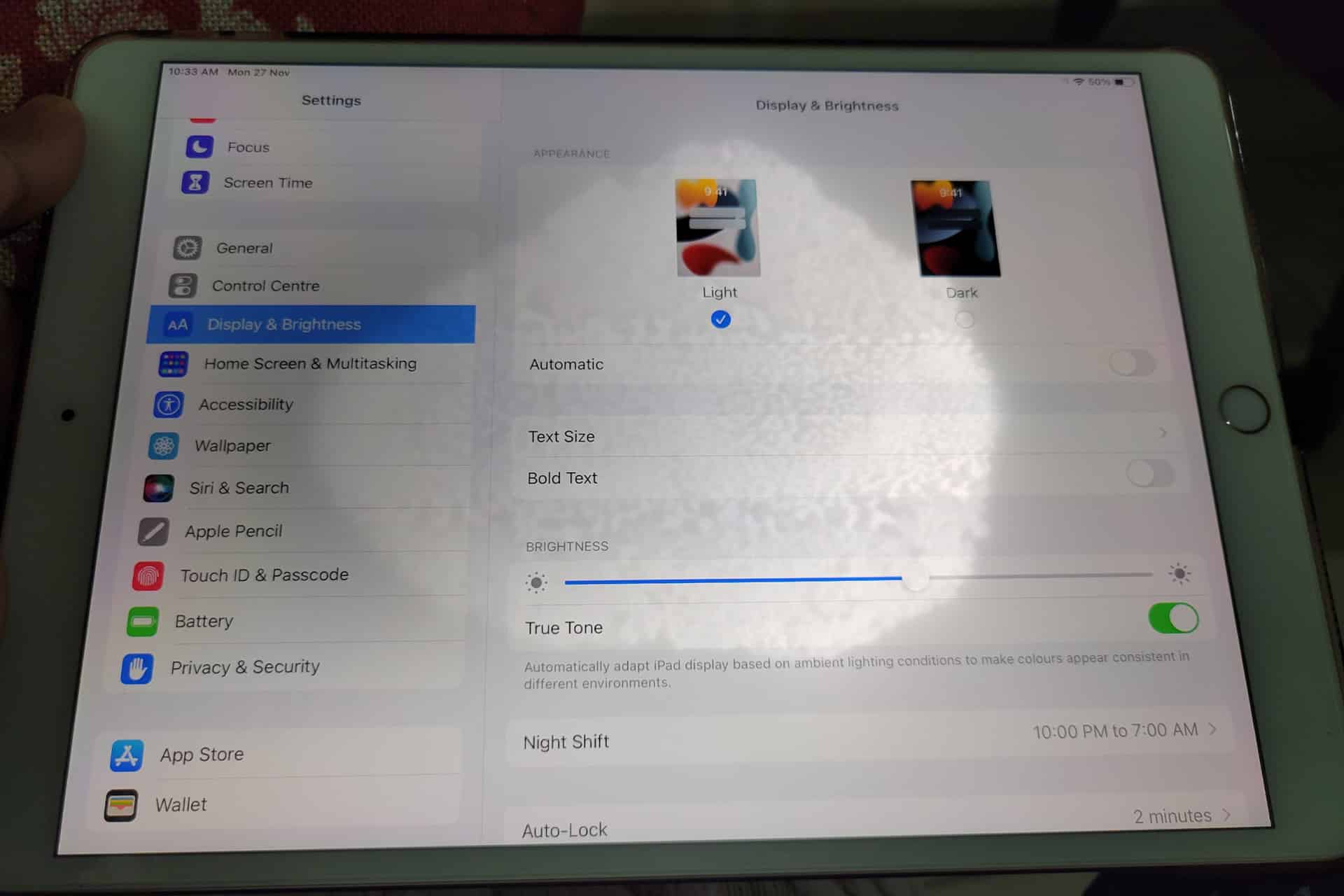
Lowering brightness may make a bright patch less distracting, but it does not repair the underlying display. The same applies to Dark Mode, Night Shift and Reduce White Point. These settings can change how noticeable the mark becomes without removing it.
To adjust screen brightness:
Settings > Display & Brightness > Brightness
Test the iPad at several brightness levels. A backlight-related spot may become easier to see as brightness increases. Photographing the screen against a plain background at medium and high brightness can also help document the defect before requesting service.
Avoid pressing or rubbing the affected area. Pressure may temporarily change the appearance, but it can damage the display further. Internet advice suggesting that users massage bright spots out of a panel should be ignored.
Check the Case and Screen Protector
Remove any rigid case that appears unusually tight or has been damaged. A poorly fitted case can place uneven pressure around the frame, particularly if the iPad has been dropped while inside it.
A screen protector normally cannot create a true illuminated patch beneath the display. It can, however, produce bubbles, trapped moisture or reflective marks that resemble a screen defect. Examine the iPad with the display turned off. If the mark is visible on the surface even when the screen is black, the protector or glass may be involved.
Do not remove a properly installed protector solely as an experiment unless the mark clearly appears close to its surface. A bright patch visible only while the display is illuminated usually comes from deeper inside the screen.
When the iPad Needs Repair
A persistent white spot generally requires display service when it remains after restarting and does not appear in screenshots. There is no iPadOS setting that can realign a damaged diffuser, remove internal pressure or repair separated display layers.
Back up the iPad before service so photos, documents and app data remain protected.
To create an iCloud backup:
Settings > your name > iCloud > iCloud Backup > Back Up Now
Apple can inspect the device and determine whether the defect qualifies for warranty coverage, AppleCare service or paid repair. Coverage depends on the device, purchase date, condition and whether the problem resulted from accidental damage.
To check coverage:
Settings > General > AppleCare & Warranty
Apple or an Apple Authorized Service Provider may replace the display assembly or the iPad, depending on the model and available service process. The final repair estimate normally requires inspection.
Image Credit: AppleMagazine
Do Not Ignore Physical Changes
A stable white spot that has not changed for months may remain only a visual annoyance. A spot that is expanding, accompanied by screen lifting or followed by unusual heat needs faster attention.
Stop using the device if the display separates from the enclosure, the iPad becomes visibly swollen or pressure marks spread across the panel. Do not puncture the device, force the display closed or continue charging it unattended.
For an ordinary fixed bright patch, the practical path is simpler: confirm it does not appear in screenshots, restart the iPad, remove any case applying pressure and arrange display service if the mark remains.
A white spot on iPad screen rarely affects the information stored on the device, but it can indicate physical damage that software cannot correct. A brief check can rule out the easy causes. After that, repair is usually more effective than repeatedly changing display settings and hoping the light disappears.
Siri Wolfram helped define the original promise of Apple’s voice assistant. When Siri debuted on the iPhone 4S in 2011, it could answer factual and computational questions without sending users through a list of search results. Ask about a mathematical calculation, scientific quantity, historical statistic or unit conversion, and Wolfram Alpha could provide a structured answer.
That partnership gave early Siri something many modern AI assistants still struggle to guarantee: a source designed to compute answers rather than produce plausible sentences. Wolfram Alpha was not a chatbot. It was a computational knowledge engine built around curated data, symbolic mathematics and algorithms.
Siri AI enters a far more ambitious era. Apple now wants its assistant to hold natural conversations, understand personal context, interpret images, find information across apps and complete actions. Yet the old Siri Wolfram relationship remains useful for understanding what Apple gained, what was lost as assistants became more conversational and why verified computation may become even more valuable in the generative AI age.
Siri Wolfram Was Built Around Answers
The original Siri Wolfram integration reflected a straightforward idea: users wanted direct answers without manually searching, opening websites and comparing sources.
Wolfram Alpha was particularly effective for questions with a computable result. It could solve equations, compare financial data, convert measurements, retrieve astronomical information, calculate dates and present structured scientific facts. Siri provided the voice interface, while Wolfram supplied the knowledge engine behind selected responses.
A user could ask how many days remained until a date, calculate a percentage, compare populations or request information about a mathematical concept. Siri translated the spoken request and delivered the result in a format suitable for the iPhone.
The experience was narrow compared with modern generative AI, but it had a valuable discipline. Wolfram Alpha attempted to determine an answer from structured information. It did not need to improvise an explanation every time.
That made Siri Wolfram especially useful for mathematics, science, education and quick factual calculations. The assistant could sound intelligent because it was connected to a system built to compute.
Image Source: Google
What Siri Wolfram Alpha Could Do Well
Siri Wolfram Alpha worked best when the request had a definable structure. Arithmetic, percentages, conversions, equations and statistics were natural categories. The system could also retrieve information about weather history, geography, nutrition, astronomy, transportation and other data-rich subjects.
The integration helped make Siri feel different from ordinary web search. Instead of showing several links, the assistant could present one answer with supporting figures or charts.
That approach had limitations. Wolfram Alpha could only respond effectively when it understood the request and had the relevant data or computational method. It was not designed for open-ended conversation, personal writing, emotional nuance or the countless informal questions users ask assistants.
Siri also relied on several external services, with Wolfram Alpha handling only certain knowledge categories. The experience could therefore feel inconsistent. One request produced a polished computational response, while another returned a web search or a limited canned answer.
Still, the partnership demonstrated a principle Apple has never fully abandoned: the best assistant does not need to create every answer itself. It needs to route each request to the system most qualified to handle it.
Generative AI Changed the Definition of an Assistant
Modern AI assistants are expected to do far more than retrieve facts. Users want them to explain ideas, write messages, summarize documents, analyze images, brainstorm projects and remember the direction of a conversation.
Siri AI is Apple’s response to that expanded expectation. Powered by Apple Intelligence and Apple Foundation Models, the new assistant can handle open-ended requests and continue natural conversations. It can use personal context from supported apps, understand onscreen content and connect requests with app actions.
This is a dramatic expansion from the Siri Wolfram era. The old model was largely transactional: ask a question, receive an answer. Siri AI is intended to interpret intent, understand relationships between information and help complete a larger task.
A user may ask Siri AI to find a restaurant recommendation buried in Messages, locate a hotel confirmation in Mail and add the details to a travel note. That request involves personal context and several system services rather than one public factual answer.
The assistant becomes less like a talking search box and more like an operating-system layer.
Image Credit: Apple Inc.
Conversation Creates a Reliability Problem
Generative AI makes assistants more flexible, but it also introduces uncertainty. A language model can produce an elegant response even when the underlying information is incomplete or wrong. The same fluency that makes the assistant enjoyable can make an inaccurate answer sound convincing.
The old Siri Wolfram model avoided much of that risk within its strongest categories. A mathematical calculation came from a computational engine. A unit conversion followed a defined relationship. A data query could be tied to structured information.
Siri AI needs both capabilities. It needs conversational intelligence for requests that cannot be reduced to a formula, while retaining access to reliable tools for tasks that demand precision.
Apple can use specialized systems for calculations, calendars, maps, weather, app actions and personal information rather than asking one generative model to invent every result. Foundation models can understand the request, then direct the work to an appropriate source.
That structure would preserve the strongest lesson from Siri Wolfram: intelligence also means knowing when not to guess.
Personal Context Is the New Knowledge Engine
Wolfram Alpha gave Siri access to public computational knowledge. Siri AI adds a second knowledge source: the user’s own information.
Apple says Siri AI can understand personal context across messages, emails, photos, notes and other supported content. It can help retrieve a detail without requiring the user to remember which app contains it.
This changes the assistant’s value. Wolfram Alpha could explain the distance between two cities. Siri AI could find the hotel reservation, identify the arrival time and retrieve the message where a friend recommended a nearby restaurant.
That personal layer also requires stricter privacy. Apple uses on-device processing for many requests and Private Cloud Compute when more processing power is required. The company has designed the system so personal data does not become part of an ordinary cloud AI profile.
Siri Wolfram answered questions about the world. Siri AI is being designed to answer questions about the user’s place within it.
Image Credit: Apple Inc.
Apps Complete the Transition
Siri AI also moves beyond knowledge by connecting directly with apps through App Intents. Developers can expose content and actions so the assistant can help users complete tasks instead of only describing how to do them.
That could include editing a photo, retrieving a document, starting a workout, updating a task or sending information through a supported app. Onscreen awareness adds another route, allowing users to ask about content already visible without explaining every detail again.
Wolfram Alpha remains valuable because some questions require specialized computation. App Intents extend the same routing philosophy into actions. Siri does not need to contain every capability internally. It needs to understand the request and connect it with the correct tool.
This may become the defining structure of Siri AI: one conversational interface backed by models, apps, services, personal context and specialized knowledge engines.
The Old Siri Still Has a Lesson for the New One
Siri Wolfram belonged to a more limited assistant era, but its underlying approach was disciplined. The system used a specialized source for questions that demanded structured knowledge and computation.
Siri AI has a wider assignment. It must converse naturally, interpret images, understand personal information and complete actions across Apple devices. That breadth can make Siri far more useful, but only if Apple preserves dependable pathways for calculations and factual tasks.
The future assistant should not choose between Wolfram-style precision and generative flexibility. It should combine them. A conversational model can understand what the user wants. A computational engine can provide the numerical answer. Personal context can supply relevant details. App Intents can complete the task.
The old Siri Wolfram integration showed that a voice assistant could make expert knowledge accessible through one spoken request. Siri AI now aims to place conversation, personal context and action around that foundation.
The assistant has become larger, more personal and more capable. Its credibility will still depend on something the 2011 version understood well: when a question has a correct answer, intelligence should calculate before it speaks
AppleCare+ pricing has gone up for new Mac and iPad customers, adding another small cost increase to the Apple ownership equation. According to Bloomberg, Apple has raised monthly and annual AppleCare+ rates for new Mac and iPad plans, with the change applying to new coverage rather than existing plans already active on customer devices.
The increase is modest on paper. Reports indicate Apple has raised monthly AppleCare+ rates by 50 cents and annual plans by $5 for affected Mac and iPad products. For example, AppleCare+ for the 13-inch MacBook Air is now listed at $7.99 per month or $79.99 per year, up from $7.49 per month and $74.99 per year. The Mac mini now starts at $4.49 per month or $44.99 per year, while the 16-inch MacBook Pro costs $15.99 per month or $159.99 per year.
The numbers are not dramatic alone. The context is harder for buyers. Mac and iPad prices have already been under pressure from component costs, financing changes and longer upgrade cycles. AppleCare+ is optional, but for many customers buying expensive laptops and tablets, it is part of the real purchase price.
AppleCare+ Pricing Adds to the Ownership Cost
AppleCare+ pricing is one of those costs many buyers do not fully consider until checkout. The device price gets attention first. Then come storage upgrades, cellular connectivity, keyboard accessories, Apple Pencil, taxes, financing, software subscriptions and protection coverage.
For a MacBook Air, an extra 50 cents per month may not change the decision. For a MacBook Pro, iPad Pro or a family buying multiple devices, the increases add up over time. Annual plans rising by $5 also signal that Apple is comfortable nudging protection costs higher even when the change is small enough to avoid a major backlash.
AppleCare+ remains valuable for users who carry devices daily or depend on them for work. Macs and iPads are portable, expensive and often used in places where accidents happen: classrooms, coffee shops, airports, offices, studios, kitchens and family rooms. A cracked iPad screen or damaged MacBook display can be expensive without coverage.
Apple’s pitch is convenience as much as insurance. AppleCare+ includes priority support, battery service when capacity drops below Apple’s threshold, and reduced service fees for accidental damage. For iPad, AppleCare+ can also cover Apple-branded keyboard accessories and Apple Pencil damage under service-fee terms.
That makes the plan attractive. It also makes the higher price easier for Apple to defend.
Image Credit: Apple Inc.
New Customers Feel the Change First
The latest increase applies to new Mac and iPad AppleCare+ customers. Existing customers with active plans are not the immediate target of the reported change. That distinction helps Apple avoid angering subscribers who already signed up at previous rates, while still lifting revenue from new device buyers.
This approach fits Apple’s broader shift toward recurring coverage. Apple has been moving AppleCare+ further into monthly and annual subscription-style plans, with AppleCare One offering a bundled option for multiple products. The protection plan is no longer only a one-time add-on at purchase. It is increasingly part of Apple’s services layer.
That matters because Apple’s services business depends on recurring payments. AppleCare+ may not get the same attention as iCloud, Apple Music or Apple TV, but it is another way Apple extends the customer relationship beyond the hardware sale. A Mac or iPad purchase becomes not only a device transaction, but also a support and repair subscription.
The price increase strengthens that pattern. A small rise across a large base of new buyers can support services revenue without changing the product lineup.
Mac Buyers Should Compare Plans
Mac buyers now have more reason to compare AppleCare+ options before adding coverage. Apple’s Mac plans vary by model because repair risk and device cost vary. A Mac mini plan starts lower because the device is stationary and less likely to face drops or screen damage. A 16-inch MacBook Pro costs more because it is a high-value portable machine with expensive components.
For a buyer choosing a MacBook Air, AppleCare+ may be easier to justify if the laptop travels daily. Students, journalists, consultants, photographers, editors and business travelers are more exposed to accidental damage than someone who leaves a Mac mini on a desk.
For MacBook Pro buyers, the decision often depends on work dependency. If the Mac is the primary income tool, AppleCare+ can be less about repair math and more about reducing downtime. Access to Apple support and lower repair costs can be worth the subscription if the device is central to daily work.
Still, users should compare the plan cost with their own risk. A careful desktop Mac user may not need the same coverage as a frequent traveler. AppleCare+ is useful, but it should not be automatic for every buyer.
iPad Buyers Face a Different Calculation
iPad AppleCare+ has its own logic because iPads are more physically exposed than Macs in many homes. They are passed between family members, used by children, carried around the house, taken to school, placed in bags and paired with accessories that raise the total cost of ownership.
For iPad Pro and iPad Air buyers, AppleCare+ can make sense because screen repairs and accessory damage can be costly. Apple’s current AppleCare+ terms for iPad include service fees for screen damage, other accidental damage and covered accessories. That can make the plan appealing for users who buy Magic Keyboard, Apple Pencil Pro or a high-end iPad Pro.
The decision becomes more complicated for entry-level iPad buyers. A lower-cost iPad may not justify years of coverage for every user, especially if it stays mostly at home. Families, however, may see the protection differently. An iPad used by children faces more risk than a laptop used carefully by one adult.
The new pricing does not change the core question. It makes the answer slightly more expensive.
AppleCare Products | Warranty Check
AppleCare One Becomes More Relevant
AppleCare One gives Apple another way to soften individual plan increases. The bundle starts at $19.99 per month for up to three eligible products, with additional devices available for $5.99 per month each. It includes AppleCare+ benefits and adds theft and loss coverage for eligible iPhone, iPad and Apple Watch products.
For users with only one Mac or one iPad, AppleCare One may not be the best fit. For users with multiple devices, it can become more attractive as individual plans rise. A person with an iPhone, iPad and Mac may compare three separate AppleCare+ plans against the bundle and find the monthly difference easier to justify.
That is likely part of the strategy. Apple can raise individual plan prices modestly while giving heavier ecosystem users a bundled option. The company has used similar logic across services with Apple One, where the value increases as users subscribe to more Apple products.
The same principle now applies to protection. The deeper a customer is inside Apple’s hardware ecosystem, the easier it becomes to turn support coverage into a monthly bundle.
Small Increase, Larger Signal
AppleCare+ pricing increases may be small, but they arrive during a period when Apple is asking customers to absorb more costs across the ecosystem. Device prices, component pressure, cellular financing, AI hardware demands and service subscriptions all affect the total ownership picture.
The AppleCare+ change fits that pattern. Apple is not dramatically changing the service. It is raising the price slightly while keeping the value proposition intact: lower repair costs, battery service, accidental damage coverage and Apple support.
For buyers, the best response is not panic. It is math. Compare the plan price with the device cost, repair risk, usage pattern and whether multiple Apple products would make AppleCare One more efficient. Someone buying a MacBook Pro for travel may want the protection. Someone buying a Mac mini for a desk may not. A family iPad may be a stronger candidate than a carefully handled personal tablet.
AppleCare+ remains a useful safety net. It is just a slightly more expensive one for new Mac and iPad buyers, and that makes the real cost of the device a little higher than the number on the product page.
Bacterial cellulose—nature’s own polymer scaffold—is gaining attention as a renewable feedstock for supercapacitor electrodes. With modern devices demanding fast charge, high power bursts, and long cycle life, researchers are searching for electrode materials that combine performance with sustainability.
A new systematic literature review led by Prof. Dahlang Tahir at Hasanuddin University, Indonesia, maps how bacterial cellulose-derived carbon (BCC) is turned into energy-storage electrodes—and why some fabrication paths outperform others. The study synthesizes evidence from the scientific record to clarify which processing choices control electrochemical behavior.
The review focuses on BCC as a precursor to porous carbon. Bacterial cellulose forms a naturally pure, interconnected network of nanoscale fibers, and heat treatment can convert that architecture into carbon structures with tunable porosity—critical for charge storage. The authors emphasize that electrical performance is not just a matter of “making carbon,” but of preserving and engineering the fiber network before carbonization.
Across 49 Scopus-indexed journal articles, the team compares major strategies including direct carbonization, chemical activation to enlarge pore systems, heteroatom doping to modify surface chemistry, and composite fabrication with materials that can add rapid redox (pseudocapacitive) contributions.
A recurring message is the importance of pre-carbonization drying. Freeze-drying appears as the most commonly used approach because it limits collapse of the wet nanofiber structure during water removal. Since pore architecture governs ion access and charge transport, maintaining nanoscale structure can translate into higher effective capacitance.
The review also distinguishes test formats. Three-electrode measurements are frequently reported, but two-electrode devices better represent real supercapacitor operation, where electrode–electrode interactions shape performance.
When processing is optimized, the results point toward a pathway for BCC-based electrodes to rival or surpass commercial activated carbon under comparable conditions. Activation and heteroatom doping generally increase accessible surface area and create additional active sites, while composites often achieve the strongest capacitance by combining electrical double-layer effects with fast surface reactions.
Yet the authors warn that progress is constrained by inconsistent experimental reporting, uneven protocols, and limited mechanistic understanding. To move beyond laboratory demonstrations, they call for predictive design, data-driven structure–performance models, scalable carbonization methods, and robust flexible devices resistant to deformation and humidity.
Subject of Research: Supercapacitor electrodes using bacterial cellulose-derived carbon Article Title: Bacterial cellulose-derived carbon electrodes for supercapacitors: Fabrication strategies, electrochemical performance, and mechanical properties — A review News Publication Date: 9 June 2026 Web References: https://doi.org/10.1016/j.est.2026.123044 References: 10.1016/j.est.2026.123044 Image Credits: Lightenoughtotravel from Wikimedia Commons
Keywords
bacterial cellulose; supercapacitors; porous carbon; freeze-drying; chemical activation; heteroatom doping; electrode materials; two-electrode testing; pseudocapacitance; sustainable energy storage
Le piment est-il un allié santé ou un ennemi silencieux ? Une vaste étude révèle que les plus gros consommateurs présentent un risque non négligeable de cancer gastro-intestinal, avec une association particulièrement forte pour un cancer grave. Pourtant, d’autres études prêtent à cette épice des...
Antarctica’s first ice sheet may have begun with a geological head start hidden deep beneath the continent. Millions of years before thick ice spread across the Northern Hemisphere, forces inside Earth lifted East Antarctica into a vast region of mountains and plateaus. The higher terrain became cold enough to preserve snow even when the planet [...]
Se você gostava do reprodutor de mídia Winamp e quer usá-lo no sistema do pinguim, veja como instalar o player Webamp on desktop no Linux via AppImage.
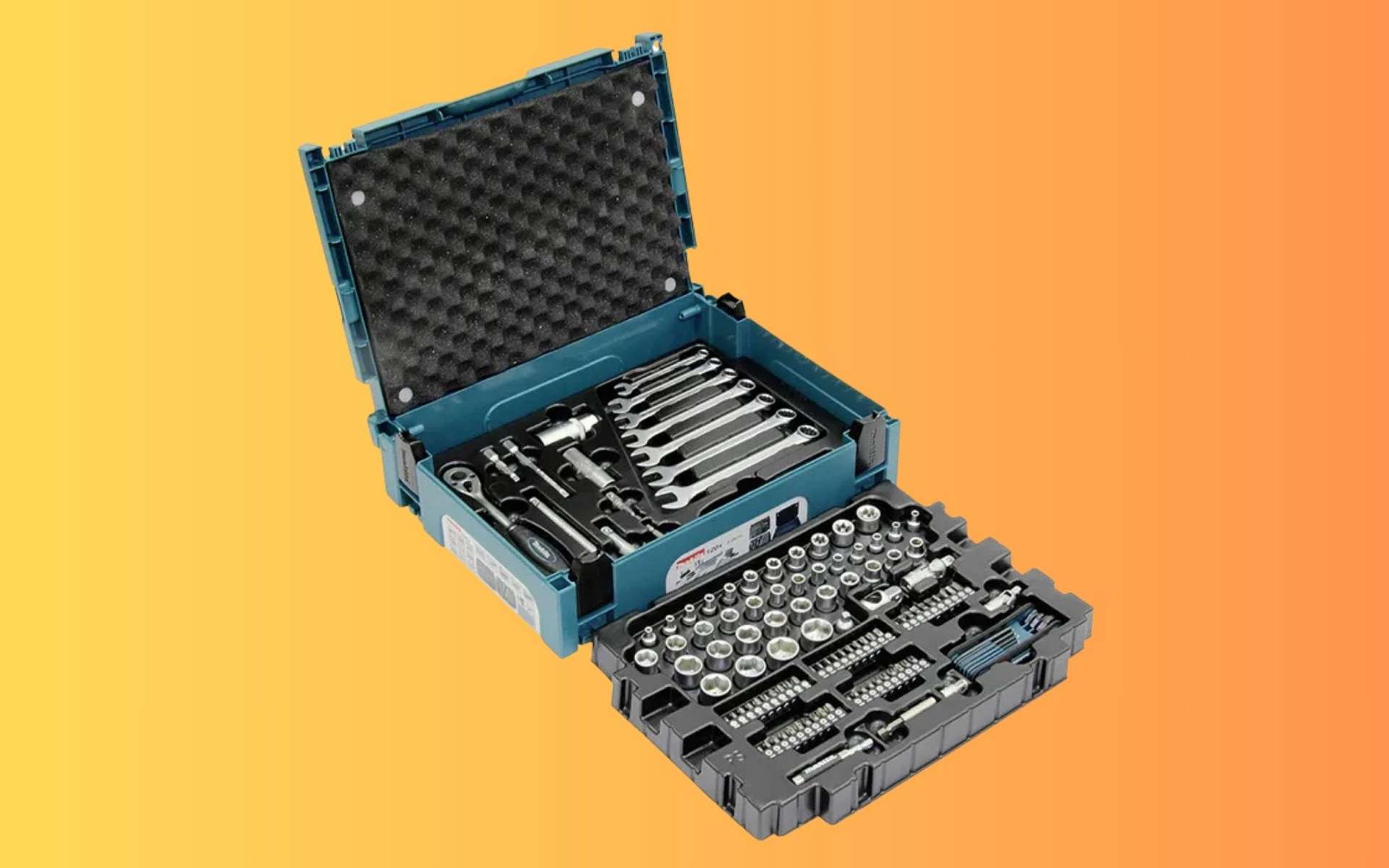
Impossible de bricoler efficacement sans un équipement digne de ce nom. Si vous cherchez une mallette à outils complète à prix réduit, Cdiscount a peut-être le bon plan qu'il vous faut. Le coffret Makita E-08713, qui réunit 120 outils indispensables dans une mallette robuste et facile à...
Vous venez de nettoyer vos vitres, puis une averse éclate. Et les voilà couvertes de traces. Faut-il en conclure que la pluie est responsable ? En réalité, le phénomène est bien plus subtil et révèle ce qui se cache dans l'air que nous respirons.
Whistleblower suggests internal security services deployed spyware from 2017 against key domestic and foreign targets
A former member of Morocco’s domestic intelligence service has helped to provide an unprecedented insight into how the north African state used hacking software – including Pegasus spyware – to target journalists, human rights defenders, French politicians and Spanish cabinet ministers and police officers.
Pegasus, which is manufactured by the Israel-based NSO Group, allows its operator to access everything on a target’s mobile phone, including emails, text messages and photographs. It can also activate the phone’s recorder and camera, turning it into a listening device.
Les orages vont se multiplier ces prochaines heures, et ces prochains jours, en France. La vague orageuse qui mettra fin à la canicule va traverser la majorité du pays, et certains départements risquent d'être confrontés à des phénomènes violents, voire destructeurs.
Vous connaissez sans doute votre groupe A, B, AB ou O, et votre rhésus. Mais le sang humain est bien plus complexe. Après un demi-siècle d'énigme, des chercheurs viennent d'identifier un tout nouveau système de groupe sanguin, caché dans l'ADN d'une poignée de personnes à travers le monde.
À quelques kilomètres de Saint-Malo, les rochers de Rothéneuf abritent plus de 300 visages, monstres et corsaires figés dans le granit. Œuvre monumentale de l’abbé Fouéré, ce site sculpté à même la falaise intrigue autant qu’il fascine, entre légende locale et énigme artistique. Un lieu unique...

 Login
Login