Archaeologists rarely identify a settlement from one object. They combine buildings, hearths, tools, food remains, activity areas, and patterns of rebuilding to understand a site.
Nearly 1,000 bones and teeth from three Granada caves show that Neolithic cannibalism was not one practice or one event. The dates and traces point to different stories.
Un purificateur d'air domestique pour faire baisser la tension artérielle : l'idée peut sembler surprenante. Pourtant, une étude publiée en août 2025 dans le Journal of the American College of Cardiology apporte des preuves sérieuses : 3 mmHg de moins sur la pression systolique. C'est modeste,...
Get up to 55% off and free meal boxes using a HelloFresh coupon code in September 2026. Discover our best codes and discounts to let you save time and money.
Discover the best ways to save on Noom subscriptions, including free trials, limited-time offers for GLP-1Rx Plus, and essential tips for redeeming your Noom discount.
Whether you are heading to a sold-out concert or a championship game, use a Vivid Seats discount code to secure your seats for less this September 2026.
Whether you are heading to a sold-out concert or a championship game, use a Vivid Seats discount code to secure your seats for less this September 2026.
The Nyrius Phoenix Home is a new wireless HDMI adapter with 500ft line-of-sight range, 75ft through walls or floors
Delivers 4K resolution with Dolby Atmos, DTS and 7.1-channel surround support
Launches for $199.99 for the basic transmitter and receiver
The Nyrius Phoenix Home is a true 4K wireless streamer that takes an HDMI source such as your games console, Apple TV 4K or Blu-ray player (or any combination through an AV receiver) and sends it to your TV, projector or desktop monitor.
It's designed to be simple, so there's one HDMI input on the transmitter and one HDMI output on the receiver — and it promises a 500-foot range in plain air, or 75 feet through walls and floors.
This means it could be used as part of a home theater setup, beaming video from your source to your projector or TV across the room without cables, or it could be used as an alternative to running and HDMI cable through your walls so you can send video to other parts of the house.
This isn't the first such streamer by any means, but it's very aggressively priced for a 4K wireless HDMI adapter and delivers an impressive specification for its relatively low price.
(Image credit: Nyrius)
Nyrius Phoenix Home: key features and specifications
With the Phoenix Home's 500-foot line-of-sight range, I'm thinking it could be good for movies or sporting events with friends outdoors with a projector or outdoor TV.
Transmitting up to 75 feet through walls and floors means you can use it to stream from a computer in one room to a TV in another, provided the computer has an HDMI output or an HDMI adapter: the Phoenix Home only supports HDMI input.
The Phoenix Home also features USB-C that you can use to remotely control a computer by connecting it to the transmitter and using a keyboard and mouse with the receiver. There's also an IR extender for remote controllers.
The Phoenix Home transmits up to 4K resolution at up to 60fps, and it supports DTS, Dolby Atmos and 7.1-channel surround.
I think there are multiple applications for this kind of device at home as well as in business or educational spaces: it's a good solution for renters who can't start drilling cable runs everywhere, and for rooms that weren't made with AV systems in mind.
A few TV companies have been thinking about rooms where you want to mount the TV above the fireplace or another feature and have your AV receiver, consoles or other home theater gear somewhere else. If you saw Samsung's Wireless One Connect Box or LG's Zero Connect and wished you too could have a wire-free TV, you don't need to splash your cash on one of this year's best TVs to cut the cables: this will provide a similar option for $199.
Our one worry would be what the latency is like for gaming, which we'd have to test to be sure about. But if you're looking to cut the cables for making it easy to move movies around the home, this looks like a very affordable and effective way to do it, and is available now.
Thinking of buying a new TV?
Try our TV size and model finder! You tell it how far you sit from your TV, we'll tell you what size to buy based on viewing angle advice from image quality experts, and we'll recommend our three top TVs at that size for different prices.
Panasonic launches new DMR-4X10¹⁰ 4K Blu-ray player in Japan
Also includes 4K tuners, 10TB of local storage for recordings, Blu-ray recording, and support for cloud storage
About $2,800 / £2,080 / AU$3,930
Blu-ray fans should be feeling blessed this month: with new players decidedly thin on the ground, September has brought us news of not one but two 4K Blu-ray players — though neither is really aimed at the average movie enthusiast.
The new Panasonic DMR-4X10¹⁰ is a flagship 4K player with a bunch of other neat tricks up its sleeve, and while it's likely to stay as a Japan-only release, we're still happy to see new players being made.
A 434,500 yen, which works out at about $2,800 / £2,080 / AU$3,930, it's a fair bit cheaper than this month's other new Blu-ray player, the Magnetar Ultima: that costs a cool $12,000 (about £8,895 / AU$16,687).
(Image credit: Panasonic)
Panasonic DMR-4X10¹⁰: key features
The Panasonic DMR-4X10¹⁰ not plays 4K Blu-rays, regular Blu-rays and DVDs, it also features 4K broadcast tuners and includes a giant 10TB hard drive for recording shows and movies. There's also the option of cloud recording of up to 10TB via Google Drive or Microsoft OneDrive, so you can access recordings on your phone or store Blu-ray disc images in the cloud.
It even records to BD-R/RE discs of up to 100GB, if you prefer. Recording from live broadcast isn't that popular worldwide, but evidently it's popular enough in Japan to make this the ultimate 'own your copies' machine.
The player uses an AVC encoder for high-definition recording, and Panasonic says the encoder can compress 24Mbps signals to around 1.6Mbps to maximize recording space… though, again, it does come with 10 terabytes.
The DMR-4X10¹⁰ also works with Panasonic's AI Viera system, which can automatically adjust the picture quality to fit the scene — so bright and vivid if you're watching sports, and richer contrast if you're watching a noir movie. AI can also adjust the audio to make it more immersive.
The new player launches through authorized dealers on October 22, 2026, and exclusively to the Japanese market.
But the release of this model and the Magnetar show that companies aren't blind to the desire for new options — I just hope we might get something more affordable and mainstream than these at some point.
The iPhone Duo status icon introduces a new approach to information that has occupied the top edge of the iPhone display for nearly two decades. Instead of treating Wi-Fi, cellular signal, battery status, and other indicators as a conventional horizontal row, Apple has created a flexible circular system that sits in the corner of the foldable iPhone’s display.
Apple officially describes the feature as a “circular, flexible system” within the status bar rather than one fixed icon containing every piece of information at all times. The distinction is useful: the area can adapt according to context while consolidating status information into a smaller visual region.
It is part of a much larger rethink of iOS 27 specifically for iPhone Duo. The foldable device changes the proportions available to software, particularly when its 7.6-inch inner display is open, forcing Apple to reconsider interface elements that have traditionally stretched horizontally across an iPhone screen.
The status system is one of the smallest changes visually, but it illustrates how extensively Apple has adapted iOS around the new hardware.
Image Credit: Apple Inc.
iPhone Duo status icon replaces the traditional horizontal approach
Conventional iPhones distribute system information across the upper portion of the display. Cellular strength, network type, Wi-Fi connectivity, and battery status typically occupy space around the camera hardware and Dynamic Island.
iPhone Duo approaches that area differently.
Apple says its circular status system nestles into the corner of the screen and presents relevant information including Wi-Fi, cellular strength, battery status, and more. Rather than requiring a long horizontal strip, those indicators can occupy a compact area that works with the device’s unusual screen geometry.
The change is closely connected to the way iPhone Duo handles controls throughout iOS 27.
Apple has moved several interface elements to the side of the display. App navigation, toolbars, the Home Screen Dock, and some Lock Screen controls can use vertical space instead of occupying the familiar horizontal regions found on other iPhones.
The status system therefore becomes part of a vertical interface column rather than an isolated redesign.
This arrangement lets content use more of the display’s height while keeping frequently referenced system information visible. It also creates a consistent location for status details as users change how they hold or fold the device.
A flexible status system suits a foldable iPhone
A foldable phone presents an interface problem that a traditional slab-shaped iPhone does not have.
iPhone Duo can operate through its 5.4-inch outer display or its substantially larger 7.6-inch inner screen. The device can be opened completely, partially folded, rotated, or positioned like a small book.
A static status bar designed around one screen size and orientation would be less effective across those configurations.
Apple instead built iOS 27 so that interface elements can move as the physical device changes. Content reacts to folding, controls relocate, and layouts adjust around the hinge and available screen area.
Apple’s developer guidance provides additional detail about this philosophy. On iPhone Duo, navigation and toolbar controls share vertical space with system elements such as the status bar and Live Activities. When available room becomes limited, application controls can collapse into an overflow menu.
That makes the circular status area part of an adaptive system rather than a cosmetic flourish.
Developers do not need to manually reproduce the status treatment inside their apps. Apple’s standard interface frameworks handle much of the adaptation, especially when applications use native navigation, toolbar, and tab-bar components.
Image Credit: Apple Inc.
Dynamic Island also moves to the side
The status area is not the only familiar piece of iPhone interface that changes position on iPhone Duo.
Apple has redesigned Dynamic Island so that it can sit vertically along the side of both the outer and inner displays. It can expand from that position to present alerts and Live Activities.
The relationship between Dynamic Island and the new circular status system is particularly interesting because Apple now has two dynamic interface areas operating along the same side of the screen.
One communicates persistent device information such as network and battery status. The other handles temporary activity, alerts, and live information.
Apple’s developer documentation refers to this section as shared vertical space. Application controls may also occupy it, meaning iOS has to continuously decide how much room is available and which elements deserve priority.
That is a major departure from the long-standing assumption that the upper corners of an iPhone screen simply contain a predictable row of small status symbols.
On Duo, those regions have become active parts of the interface layout.
Wi-Fi, cellular, and battery remain immediately recognizable
Consolidating status information creates a design challenge: efficiency cannot come at the expense of readability.
Users have spent years learning the meanings of Apple’s individual status symbols. Cellular bars indicate signal strength, the Wi-Fi symbol communicates wireless connectivity, and the battery icon provides an immediate indication of remaining power.
Apple has not discarded those familiar concepts.
Instead, the circular system changes how and where information is presented. The familiar status categories remain present while the container around them becomes more adaptable.
This is particularly useful on a device with two displays. Users should not need to relearn the meaning of basic connectivity information when moving from the outer screen to the inner display.
The same reasoning applies when iPhone Duo changes orientation. Apple can reorganize the status area without changing the fundamental visual vocabulary behind Wi-Fi, cellular, or battery information.
Image Credit: Apple Inc.
iPhone Duo pushes the status bar beyond a fixed strip
The new design suggests a different direction for one of the oldest pieces of smartphone interface.
Status bars traditionally behave like reserved strips of screen space. Applications work around them, and their icons occupy predictable positions regardless of what is happening elsewhere.
iPhone Duo turns that space into something more fluid.
The circular system can coexist with a vertical Dynamic Island, changing application controls, Live Activities, and layouts that respond to the physical position of the foldable display. It becomes another component that iOS can arrange rather than a fixed row placed permanently along an edge.
There is no indication that Apple plans to bring the same circular status treatment unchanged to conventional iPhones. Its current implementation is specifically tied to iPhone Duo and the interface requirements created by the foldable hardware.
Still, the design provides a glimpse at how Apple can rethink even deeply established iPhone conventions when the shape of the device changes. When iPhone Duo reaches customers on October 23, the small circular area in the corner will be one of the most immediately visible examples: cellular strength, Wi-Fi, battery information, and other system details occupying a shared adaptive space instead of stretching across the display.
Screen Time has received one of its most substantial parental-control updates with iOS 27, iPadOS 27, and macOS 27, adding new ways for parents to manage how long children use categories of apps, which websites they can visit, and what content reaches them through Messages and FaceTime.
The features were previewed at WWDC in June and are now available as part of Apple’s latest operating-system releases. Rather than relying only on fixed app limits, the redesigned Screen Time gives parents a more flexible set of controls that can change throughout the day and adapt as a child gains access to more apps and services.
Among the additions are Time Allowances, Ask to Browse, a simpler child-device setup process, expanded Communication Safety protections, and faster controls for temporarily pausing or extending access.
Apple is also working with the American Academy of Pediatrics to adapt the organization’s Family Media Plan into guidance parents can reference when setting up devices and Screen Time.
Screen Time introduces Time Allowances by app category
Time Allowances give parents a daily amount of time that can apply across categories including Entertainment, Games, and Social Media.
That differs from managing each application individually. Parents can set time allowances for categories such as Entertainment, Games, and Social Media, then adjust those settings based on the needs of their household.
Apple provides suggested starting points based on a child’s age and guidance informed by clinical and child-development research. Those recommendations are optional, with parents able to change them based on their own household and the individual child.
The updated Screen Time also supports schedules that control which apps remain available at different periods of the day. Parents can therefore create separate access patterns around school, homework, evenings, and weekends rather than relying on one universal daily restriction.
Temporary adjustments have been made easier as well. Parents can quickly limit access to apps and the web during periods such as meals, then restore access without rebuilding their existing restrictions. When a child reaches a limit, they can request additional time from a parent to complete an activity or finish a conversation.
The redesigned interface puts device usage and the most frequently used applications closer to the front, reducing the amount of navigation required to understand how a child is spending time on a device.
Image Credit: Apple Inc.
Ask to Browse extends parental approval into Safari
Ask to Browse brings a permission model already familiar from app downloads to the web.
When the feature is active, a child who attempts to visit a new website in Safari can be required to request permission first. The parent receives the request through Messages and can review it before allowing access.
The feature is available across iPhone, iPad, and Mac and works alongside existing web-content restrictions.
It complements Ask to Buy, which requires children to obtain permission before downloading or purchasing an app or making an in-app purchase. Apple has also expanded the initial setup process so a parent configuring a personal device for a child can choose which apps are available from the beginning.
Setup Assistant offers the option to provide only essential apps, use a recommended group, or manually choose which ones are permitted. More applications can then be introduced later as the parent decides the child is ready for them.
The approach gives parents a way to begin with a comparatively limited device instead of configuring a full standard account and removing unwanted access afterward.
Communication Safety expands beyond detected nudity
Communication Safety now intervenes when it detects gore or violent imagery in shared photos and videos, expanding protections that previously centered on nudity.
Apple says the feature works with content shared through areas including Messages and FaceTime, with the new protection also extending to live FaceTime calls.
Communication Safety is designed to intervene before a child views or shares detected sensitive material. Apple has previously built these protections around on-device analysis, allowing the system to identify content without requiring Apple to receive the underlying images.
Parents can also continue controlling who children communicate with. Contact-management settings can require approval before a child adds someone new and then communicates through Phone, Messages, or FaceTime.
Child Accounts remain the foundation for these controls. Apple generally requires Child Accounts for children under 13, although the applicable age can vary by state, country, or region. Child Accounts remain available for family members up to age 18.
The accounts automatically activate age-based safeguards and connect parental controls through Family Sharing.
Image Credit: Apple Inc.
iOS 27 requires the family’s devices to stay in sync
The new Screen Time controls arrive with one practical requirement: devices participating in the same Family Sharing setup need current software.
Apple says all devices in the Family Sharing group must be updated to the corresponding 27-generation releases — iOS 27, iPadOS 27, macOS 27, watchOS 27, and visionOS 27 — before the updated Screen Time controls can be used consistently across the family.
The family organizer, parent, or guardian must also update the parental-control configuration after the software upgrades.
That requirement is worth checking before troubleshooting a missing setting on one child’s device. If every device in the group cannot be updated, Apple says the family can continue using the previous version of Screen Time and its parental controls, but the new controls will not be available consistently across the group.
The features themselves also vary by platform. Ask to Browse and Time Allowances are available on iPhone, iPad, and Mac, while some Family Sharing and communication features extend to other devices.
Apple has launched a dedicated Child Safety site alongside the software release, collecting setup instructions, explanations of Child Accounts, Screen Time controls, communication protections, App Store age tools, Find My, and Apple Watch options for families.
The updated Screen Time controls are available now with iOS 27, iPadOS 27, and macOS 27, although individual features can vary by region, language, and hardware. For families upgrading several devices at once, checking every device in the Family Sharing group for its corresponding version 27 update is the most useful place to start.
Amazon has announced the dates for its second Prime Day sale, taking place on October 6 and 7 this year, and the retailer has also released early deals, including some of our top-rated models.
While tech prices have risen this past year because of the global RAM and component crises, TVs haven't been affected yet. That means you can find record-low prices on a range of best-selling models from brands like Samsung, LG, TCL, and Hisense.
Shop more of Amazon's early Prime Day TV deals below and keep in mind that unlike Prime Day, today's discounts are for everyone - no Prime membership required.
Amazon's 9 best early Prime Day TV deals
40-inch 2-Series HD Fire TV: was $249.99 now $209.99 If you're looking for a cheap set for an extra bedroom, Amazon's best-selling 40-inch 2-Series HD smart TV is $209.99. While the Amazon 2-Series TV lacks 4K resolution, it offers smart capabilities through the Fire TV experience and Amazon Alexa, providing hands-free control.View Deal
50-inch F50 Series HD 4K Smart Fire TV: was $299.99 now $179.99 If you're looking for a budget TV, this 50-inch Insignia display is an incredible deal at just $179.99. The Insignia F50 Series TV features 4K HD resolution, DTS Studio Sound, smart capabilities with the Fire TV operating system, and a voice remote with hands-free Alexa, so you can use your voice to control your TV.View Deal
55-inch Select Series 4K QLED Smart TV: was $499.99 now $378 Amazon has Roku's best-selling 55-inch 4K QLED smart TV for $378. For that price, you get an impressive picture thanks to its 4K resolution and QLED display, plus an enhanced voice remote and Roku's excellent smart TV interface.View Deal
55-inch S90H OLED TV: was $1997.99 now $1497.99 The S90H is Samsung's mid-range OLED TV in its 2026 lineup. It supports 165Hz and features advanced AI upscaling, but it uses a slightly lower-end WRGB OLED panel. During our hands-on testing, we praised this model's anti-glare technology and overall picture quality. If you're looking for a strong alternative to the LG C6, this is a solid competitor. View Deal
65-inch C6 OLED TV: was $2699.99 now $1599.99 The LG C6 is the successor to our best-rated TV, LG's C5 OLED, and the 65-inch model is on sale for $1,599.99, thanks to a whopping $1,100 discount. The 2026 OLED TV delivers more accurate, brighter colors than the C5 with powerful contrast thanks to its new Alpha 11 AI processor. The C6 also includes impressive gaming features and LG's intuitive smart TV platform.
65-inch U7 Mini-LED QLED TV: was $1499.99 now $847.99 This Hisense U7 Series delivers top TV tech for the money in a reasonably sized display, including a bright, vibrant QLED panel with excellent contrast and a high 165Hz refresh rate for smooth images. It will excel as a TV for watching sports, streaming all your favorite shows and movies, and playing the latest games.View Deal
75-inch Omni QLED 4K Fire TV: was $1199.99 now $1049.99 The latest Amazon Omni QLED is a brilliant budget TV that delivers solid picture quality and strong gaming features, including 4K 60Hz, Dolby Vision, and HDR10+, at an affordable price. This early Prime Day discount brings the 75-inch model to $1,049.99, which is an incredible price for a QLED display of this size.View Deal
65-inch QM6K Series Mini LED QLED TV: was $799.99 now $664.79 Here is an Amazon exclusive deal on a massive display. You can get TCL's 85-inch QM6K Series for $1,056.68, which is an incredible price for a TV of this size. A truly great budget mini-LED TV, the TCL QM6K delivers vibrant picture quality and solid gaming features for a price that won't break the bank.View Deal
In this teacher’s magnetism activity guide, “Exploring Magnetism,” students are given the opportunity to act as scientists discovering magnetic fields and electromagnetism through inquiry and measurement.
Included at the beginning of each session is a summary of the session, a list of national education standards that the session covers, and a list of materials required for the session. Each session is broken into several activities, with each activity outlined for the teacher. In the Background Material section, you can find science background for the lessons. A glossary can be found after the background section, and at the very end we recommend different resources finding materials to purchase and for learning more about magnetism.
The activities in this guide are meant as primers for supplementary guides that allow students to learn about the importance of magnetic fields in space science, which are studied by NASA scientists. For example, in Exploring Magnetism in the Solar Wind, students learn about the stream of charged particles emanating from the Sun—called the Solar Wind— and how NASA scientists are designing a mission called STEREO to study it and its magnetic field. The other guides, Exploring Magnetism in Solar Flares and Exploring Magnetism in the Aurorae, allow students to learn about magnetism in the Sun-Earth System with more hands-on lessons.
A zoomed-in view of the Moon made from images from NASA’s Lunar Reconnaissance Orbiter Camera. (More information at the bottom of article.)
Credits: NASA Goddard/Intuitive Machines/Robert Wagner
It started as a routine data-quality check. But as Robert Wagner, a scientist with NASA’s Lunar Reconnaissance Orbiter (LRO), scanned a giant Moon map on his computer screen, an unusually large bright spot circled by a dark halo caught his eye, as it implied that surface material in that area had been shaken up.
“I just stopped, dropped everything, and started looking into what that spot was,” said Wagner, an image-processing specialist from Intuitive Machines who works with data from the Lunar Reconnaissance Orbiter Camera (LROC) system.
By comparing before and after images of the Moon, Wagner realized he had discovered the largest, newly formed crater ever found in the solar system, as scientists reported Wednesday in Science Advances. This discovery highlights the value of NASA’s Moon orbiter data in studying a dynamic landscape as the agency advances a sustained human presence and expanded scientific and commercial activity on the Moon.
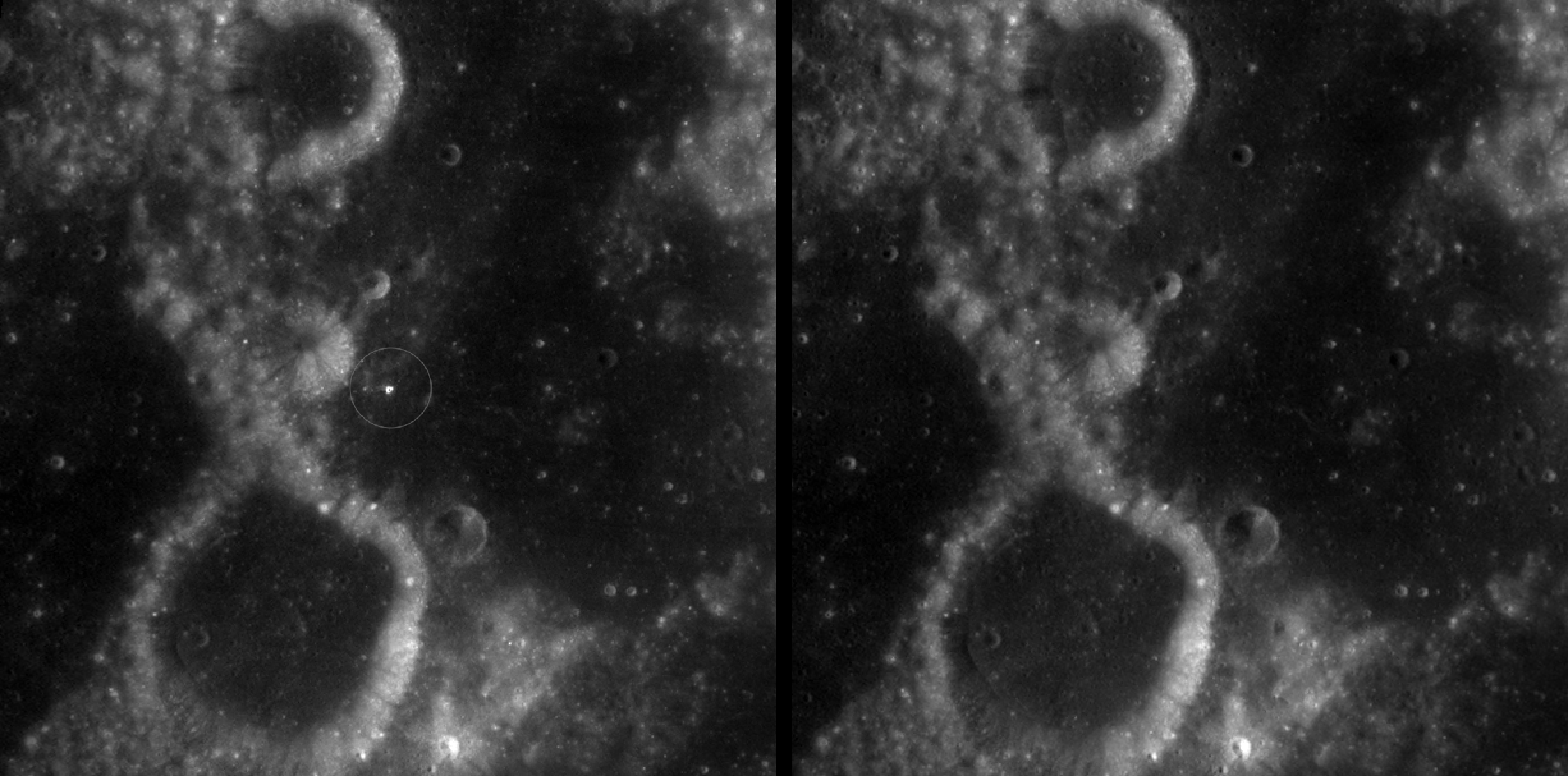
A zoomed-in view of McGetchin crater, circled on the left, next to a “before” image on the right. The panel on the left is made from images captured by NASA’s Lunar Reconnaissance Orbiter Wide-Angle Camera in summer 2025; the right panel was made from images taken in spring 2011. The white spot is not the crater itself, but rather material flung out of the crater, which formed when a rock, possibly this size of a three- to six‑story building, crashed into the Moon between April 11 and May 22, 2024 – a once-in-a-century event, as scientists reported on Sept. 15, 2026, in a pair of papers in Science Advances. The area shown in the images is 38 miles wide.
NASA Goddard/Intuitive Machines/Robert Wagner
Officially named McGetchin after pioneering lunar scientist Tom McGetchin, the crater formed on the Moon’s eastern edge sometime between April 11 and May 22, 2024, after a comet or asteroid the size of a three- to six-story building hit the surface.
The crash left a crater, 728 feet wide, that spans the length of two football fields. And at 141 feet deep, the crater could fit three vertically stacked yellow school buses.
Scientists estimate that an impact of this magnitude happens on the Moon about once in a century or even longer.
Moon takes some hits
For more than 17 years, LRO has been circling the Moon and using its seven instruments to map the topography, surface composition, temperature, and radiation environment there. The spacecraft’s team has identified at least 1,000 new impact craters throughout the mission and flagged 100,000 more surface changes from an object smashing into the Moon or from the debris that flung out after.
With no atmosphere to slow them or burn them up, space rocks and other objects easily reach the lunar surface. Most are much smaller compared to the object that carved out McGetchin crater. The smallest craters scientists can distinguish from LRO images are about 30 feet wide, the length of a three-story building laid on its side, made by rocks about 43 inches wide, the size of a monster-truck tire. Scientists estimate that impacts of this scale produce about 140 new craters across the Moon each year. But most new ones are made by microscopic projectiles that leave holes too small to identify in orbital images.
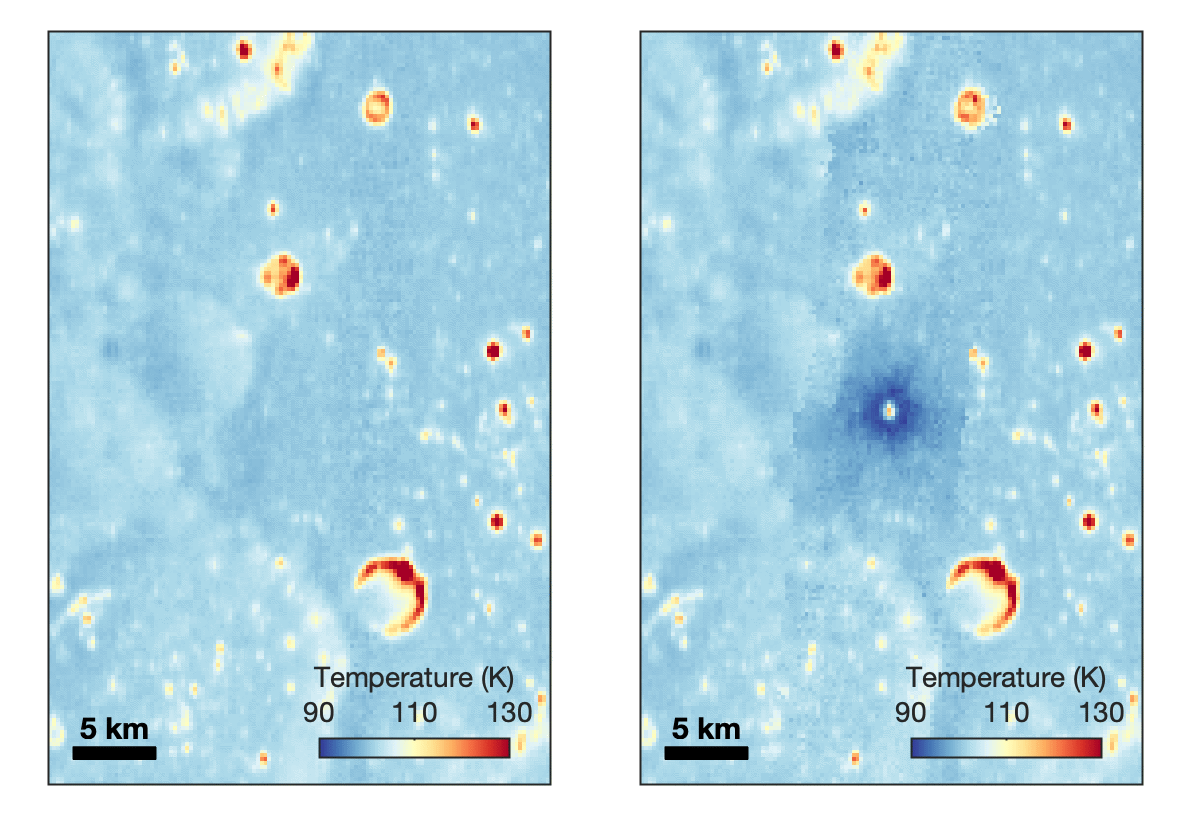
With its numerous instruments, the spacecraft can observe changes to the lunar surface that aren’t apparent in the LROC images alone. After the crater was discovered, scientists working with LRO’s thermal instrument, Diviner, made follow-up observations of the site. They found a 4-mile-wide area around the crater that is about 16 degrees Fahrenheit cooler at night than its surroundings.
This animated image set shows an area on the eastern limb of the Moon before and after McGetchin crater formed there sometime between April 11 and May 22, 2024. The post-impact image was constructed using data taken by NASA’s Lunar Reconnaissance Orbiter (LRO) thermal instrument, Diviner, between Nov. 15, 2025, and Feb. 18, 2026, after scientists discovered the crater in visible-light images taken by LRO’s Wide-Angle Camera. Pre-impact temperatures are from the Diviner Global High-Resolution Mosaics (GHRM). The crater formed on the Moon after a comet or asteroid, possibly the size of a six-story building, hit the surface in a rare, once-in-a-century collision. The dark blue strip that flashes into view reveals a 4-mile-wide “cold spot” around the crater that is about 16 degrees Fahrenheit cooler at night than its surroundings. This cooling happens because an impact fluffs up regolith around a crater, making it less dense and therefore less able to retain heat. Scientists on the Diviner team reported this finding in a paper published on Sept. 16, 2026, in Science Advances. The red and yellow spots indicate areas typically associated with rocks excavated by long-ago impacts which, though still at cryogenic temperatures like their surroundings, remain slightly warmer at night.
NASA Goddard/UCLA/JHU APL
Reporting in a second paper Wednesday in the same journal, researchers say that the cooling happens because the impact fluffs up the regolith around the crater, making it less dense and therefore less able to retain heat.
The large extent of this “cold spot” is striking, scientists say, because it shows that impacts can modify the Moon’s surface far beyond the crater itself. These physical changes could affect how rover wheels interact with the surface, for instance.
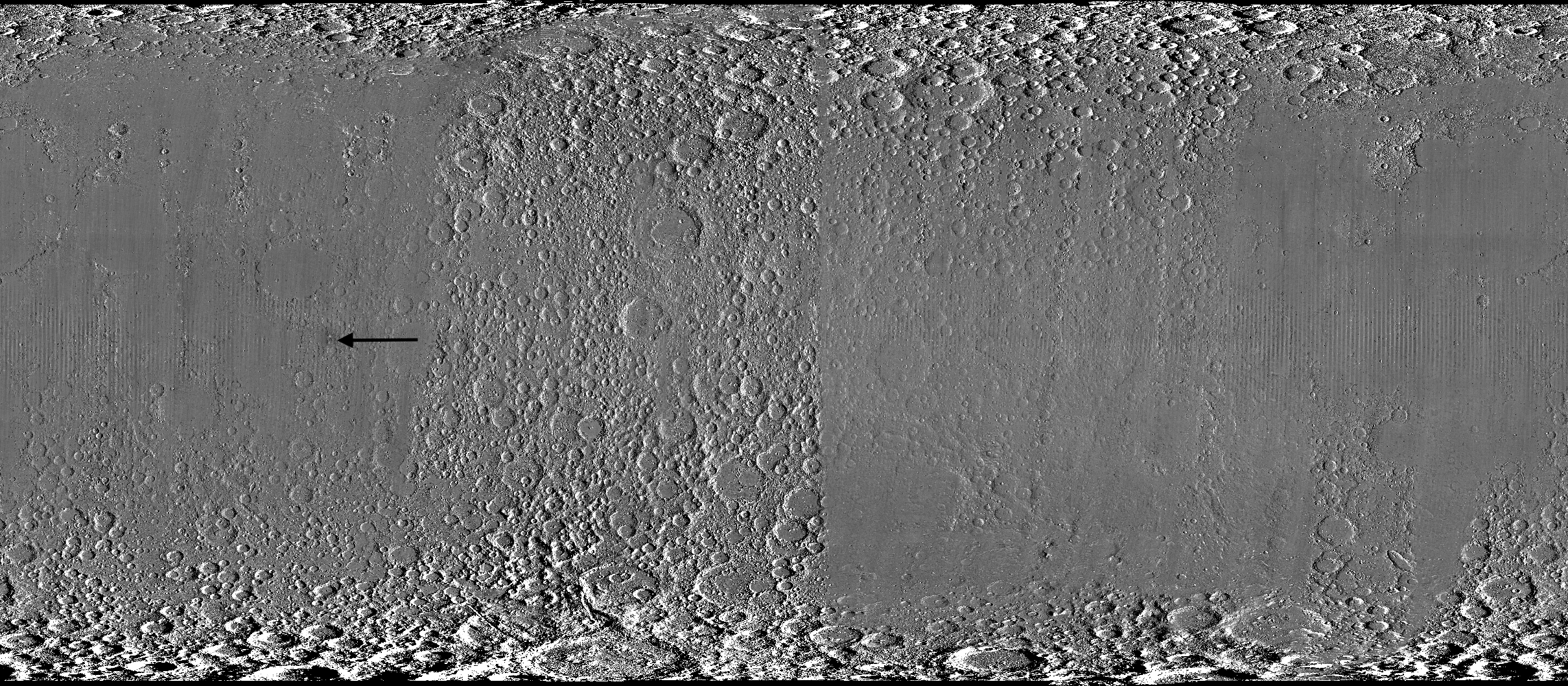
A global view of the Moon made by stitching together hundreds of images from the Wide-Angle Camera aboard NASA’s Lunar Reconnaissance Orbiter (LRO). Robert Wagner, image processing specialist for LRO, made this map using two sets of mages taken several years apart. He used a software designed to highlight any changes between the two sets. Anything that stayed the same turned gray; anything different showed up as bright or dark patches. A black arrow just left of center points to McGetchin crater.
NASA Goddard/Intuitive Machines/Robert Wagner
Road to discovery
The LROC system collects images from about 60 miles above the Moon as LRO loops from pole to pole. The system includes two cameras that capture high‑resolution black‑and‑white images and one camera for moderate‑resolution multispectral images. Over the years and thousands of passes, scientists have built maps detailed enough to spot not only new craters, but also landslides, landers, seismic faults, and even hints of lava tubes.
LROC scientists regularly analyze close-up images of small portions of the Moon’s surface taken by the Narrow-Angle Camera. Using these images, they look for changes that are typically less than 30 feet across. But every few years the team searches for large (wider than 150 feet) features by creating global Moon maps and comparing them to older versions.
An overhead, close-up view of McGetchin crater that was taken on Dec. 5, 2025, by NASA’s Lunar Reconnaissance Orbiter (LRO) Narrow-Angle Camera (NAC). After the crater was discovered on Oct. 24, 2025, in global images from LRO’s Wide-Angle Camera, which captures broad views with pixels the size of American football fields, scientists turned to the NAC, which takes much sharper views at about 3 feet per pixel. The NAC images, taken as LRO flew over the impact site again, revealed the crater size, shape, and how the surrounding terrain was affected by the impact that carved McGetchin. The image covers an area that’s ¾ mile wide.
NASA Goddard/Intuitive Machines
This view from the side (55° away from straight down) towards the east, covers an area of the Moon that’s about 1.5 miles wide. It was taken by NASA’s Lunar Reconnaissance Orbiter Narrow-Angle Camera on March 3, 2026.
NASA Goddard/Intuitive Machines
That’s what Wagner was doing on Oct. 24, 2025, when he came across McGetchin. Using images from LROC’s Wide-Angle Camera, which captures broad views with pixels the size of football fields, he stacked hundreds of “before” and “after” frames with software designed to highlight change. Anything that stayed the same turned gray while anything different showed up as bright or dark patches.
While the process sounds straightforward, spotting real craters requires a lot of manual work. The software flags every tiny shift in lighting or shadow, generating hundreds of false alarms. For this reason, Wagner typically verifies the software, looking for small fuzzy halos around pixel‑wide bright points, which indicate splashes of regolith around a new crater.
Spanning hundreds of pixels, McGetchin stood out immediately. “It was by far the most obvious impact debris pattern I’ve ever seen in one of these images,” Wagner said.
After his discovery, scientists turned to the Narrow-Angle Camera, which takes much sharper views at about 3 feet per pixel. This camera’s close-up images, taken as LRO flew over the impact site again, revealed the crater size, shape, and how the surrounding terrain was affected. These images also helped researchers estimate the size and force of the rock fragment that formed the new crater, details that are expected to appear in a future paper.
Banner image caption: A zoomed-in view of the Moon, with debris around McGetchin crater visible as a white spot circled by a dark halo just right of center of the image (marked with black arrows). This is the view that Robert Wagner saw on Oct. 24, 2025, during a routine data-quality check. Wagner is an image processing specialist for NASA’s Lunar Reconnaissance Orbiter Camera, a system of three cameras. Using images from the Wide-Angle Camera (WAC), which captures broad views with pixels the size of American football fields, he stacked hundreds of images captured by WAC over the last several years with software designed to highlight change. Anything that stayed the same is gray; anything that changed showed up as bright or dark patches. The stripes in the image are due to slight changes in lighting between the older and newer images. This image composite shows an area of the Moon approximately 900 miles across.
About the Author
Lonnie Shekhtman
Senior Science Writer
Shekhtman helps communicate NASA planetary science to the world through news and feature stories on NASA.gov, videos for NASA+ and YouTube, and by working with the media. She reports on lunar and Mars science and exploration; NASA's search for life; missions to Venus, Titan, and Jupiter's Trojan asteroids; and many other topics related to NASA's exploration of our solar system and beyond.
Scientists discovered a crater on the Moon that formed sometime between April 11 and May 22, 2024, after a comet or asteroid the size of a three- to six-story building hit the surface.
The crash left a crater, 728 feet wide, that spans the length of two football fields. And at 141 feet deep, the crater could fit three vertically stacked yellow school buses.
A zoomed-in view of the Moon made from images from NASA’s Lunar Reconnaissance Orbiter Camera. (More information at the bottom of article.)
Credits: NASA Goddard/Intuitive Machines/Robert Wagner
It started as a routine data-quality check. But as Robert Wagner, a scientist with NASA’s Lunar Reconnaissance Orbiter (LRO), scanned a giant Moon map on his computer screen, an unusually large bright spot circled by a dark halo caught his eye, as it implied that surface material in that area had been shaken up.
“I just stopped, dropped everything, and started looking into what that spot was,” said Wagner, an image-processing specialist from Intuitive Machines who works with data from the Lunar Reconnaissance Orbiter Camera (LROC) system.
By comparing before and after images of the Moon, Wagner realized he had discovered the largest, newly formed crater ever found in the solar system, as scientists reported Wednesday in Science Advances. This discovery highlights the value of NASA’s Moon orbiter data in studying a dynamic landscape as the agency advances a sustained human presence and expanded scientific and commercial activity on the Moon.
A zoomed-in view of McGetchin crater, circled on the left, next to a “before” image on the right. The panel on the left is made from images captured by NASA’s Lunar Reconnaissance Orbiter Wide-Angle Camera in summer 2025; the right panel was made from images taken in spring 2011. The white spot is not the crater itself, but rather material flung out of the crater, which formed when a rock, possibly this size of a three- to six‑story building, crashed into the Moon between April 11 and May 22, 2024 – a once-in-a-century event, as scientists reported on Sept. 15, 2026, in a pair of papers in Science Advances. The area shown in the images is 38 miles wide.
NASA Goddard/Intuitive Machines/Robert Wagner
Officially named McGetchin after pioneering lunar scientist Tom McGetchin, the crater formed on the Moon’s eastern edge sometime between April 11 and May 22, 2024, after a comet or asteroid the size of a three- to six-story building hit the surface.
The crash left a crater, 728 feet wide, that spans the length of two football fields. And at 141 feet deep, the crater could fit three vertically stacked yellow school buses.
Scientists estimate that an impact of this magnitude happens on the Moon about once in a century or even longer.
Moon takes some hits
For more than 17 years, LRO has been circling the Moon and using its seven instruments to map the topography, surface composition, temperature, and radiation environment there. The spacecraft’s team has identified at least 1,000 new impact craters throughout the mission and flagged 100,000 more surface changes from an object smashing into the Moon or from the debris that flung out after.
With no atmosphere to slow them or burn them up, space rocks and other objects easily reach the lunar surface. Most are much smaller compared to the object that carved out McGetchin crater. The smallest craters scientists can distinguish from LRO images are about 30 feet wide, the length of a three-story building laid on its side, made by rocks about 43 inches wide, the size of a monster-truck tire. Scientists estimate that impacts of this scale produce about 140 new craters across the Moon each year. But most new ones are made by microscopic projectiles that leave holes too small to identify in orbital images.
With its numerous instruments, the spacecraft can observe changes to the lunar surface that aren’t apparent in the LROC images alone. After the crater was discovered, scientists working with LRO’s thermal instrument, Diviner, made follow-up observations of the site. They found a 4-mile-wide area around the crater that is about 16 degrees Fahrenheit cooler at night than its surroundings.
This animated image set shows an area on the eastern limb of the Moon before and after McGetchin crater formed there sometime between April 11 and May 22, 2024. The post-impact image was constructed using data taken by NASA’s Lunar Reconnaissance Orbiter (LRO) thermal instrument, Diviner, between Nov. 15, 2025, and Feb. 18, 2026, after scientists discovered the crater in visible-light images taken by LRO’s Wide-Angle Camera. Pre-impact temperatures are from the Diviner Global High-Resolution Mosaics (GHRM). The crater formed on the Moon after a comet or asteroid, possibly the size of a six-story building, hit the surface in a rare, once-in-a-century collision. The dark blue strip that flashes into view reveals a 4-mile-wide “cold spot” around the crater that is about 16 degrees Fahrenheit cooler at night than its surroundings. This cooling happens because an impact fluffs up regolith around a crater, making it less dense and therefore less able to retain heat. Scientists on the Diviner team reported this finding in a paper published on Sept. 16, 2026, in Science Advances. The red and yellow spots indicate areas typically associated with rocks excavated by long-ago impacts which, though still at cryogenic temperatures like their surroundings, remain slightly warmer at night.
NASA Goddard/UCLA/JHU APL
Reporting in a second paper Wednesday in the same journal, researchers say that the cooling happens because the impact fluffs up the regolith around the crater, making it less dense and therefore less able to retain heat.
The large extent of this “cold spot” is striking, scientists say, because it shows that impacts can modify the Moon’s surface far beyond the crater itself. These physical changes could affect how rover wheels interact with the surface, for instance.
A global view of the Moon made by stitching together hundreds of images from the Wide-Angle Camera aboard NASA’s Lunar Reconnaissance Orbiter (LRO). Robert Wagner, image processing specialist for LRO, made this map using two sets of mages taken several years apart. He used a software designed to highlight any changes between the two sets. Anything that stayed the same turned gray; anything different showed up as bright or dark patches. A black arrow just left of center points to McGetchin crater.
NASA Goddard/Intuitive Machines/Robert Wagner
Road to discovery
The LROC system collects images from about 60 miles above the Moon as LRO loops from pole to pole. The system includes two cameras that capture high‑resolution black‑and‑white images and one camera for moderate‑resolution multispectral images. Over the years and thousands of passes, scientists have built maps detailed enough to spot not only new craters, but also landslides, landers, seismic faults, and even hints of lava tubes.
LROC scientists regularly analyze close-up images of small portions of the Moon’s surface taken by the Narrow-Angle Camera. Using these images, they look for changes that are typically less than 30 feet across. But every few years the team searches for large (wider than 150 feet) features by creating global Moon maps and comparing them to older versions.
An overhead, close-up view of McGetchin crater that was taken on Dec. 5, 2025, by NASA’s Lunar Reconnaissance Orbiter (LRO) Narrow-Angle Camera (NAC). After the crater was discovered on Oct. 24, 2025, in global images from LRO’s Wide-Angle Camera, which captures broad views with pixels the size of American football fields, scientists turned to the NAC, which takes much sharper views at about 3 feet per pixel. The NAC images, taken as LRO flew over the impact site again, revealed the crater size, shape, and how the surrounding terrain was affected by the impact that carved McGetchin. The image covers an area that’s ¾ mile wide.
NASA Goddard/Intuitive Machines
This view from the side (55° away from straight down) towards the east, covers an area of the Moon that’s about 1.5 miles wide. It was taken by NASA’s Lunar Reconnaissance Orbiter Narrow-Angle Camera on March 3, 2026.
NASA Goddard/Intuitive Machines
That’s what Wagner was doing on Oct. 24, 2025, when he came across McGetchin. Using images from LROC’s Wide-Angle Camera, which captures broad views with pixels the size of football fields, he stacked hundreds of “before” and “after” frames with software designed to highlight change. Anything that stayed the same turned gray while anything different showed up as bright or dark patches.
While the process sounds straightforward, spotting real craters requires a lot of manual work. The software flags every tiny shift in lighting or shadow, generating hundreds of false alarms. For this reason, Wagner typically verifies the software, looking for small fuzzy halos around pixel‑wide bright points, which indicate splashes of regolith around a new crater.
Spanning hundreds of pixels, McGetchin stood out immediately. “It was by far the most obvious impact debris pattern I’ve ever seen in one of these images,” Wagner said.
After his discovery, scientists turned to the Narrow-Angle Camera, which takes much sharper views at about 3 feet per pixel. This camera’s close-up images, taken as LRO flew over the impact site again, revealed the crater size, shape, and how the surrounding terrain was affected. These images also helped researchers estimate the size and force of the rock fragment that formed the new crater, details that are expected to appear in a future paper.
Banner image caption: A zoomed-in view of the Moon, with debris around McGetchin crater visible as a white spot circled by a dark halo just right of center of the image (marked with black arrows). This is the view that Robert Wagner saw on Oct. 24, 2025, during a routine data-quality check. Wagner is an image processing specialist for NASA’s Lunar Reconnaissance Orbiter Camera, a system of three cameras. Using images from the Wide-Angle Camera (WAC), which captures broad views with pixels the size of American football fields, he stacked hundreds of images captured by WAC over the last several years with software designed to highlight change. Anything that stayed the same is gray; anything that changed showed up as bright or dark patches. The stripes in the image are due to slight changes in lighting between the older and newer images. This image composite shows an area of the Moon approximately 900 miles across.
About the Author
Lonnie Shekhtman
Senior Science Writer
Shekhtman helps communicate NASA planetary science to the world through news and feature stories on NASA.gov, videos for NASA+ and YouTube, and by working with the media. She reports on lunar and Mars science and exploration; NASA’s search for life; missions to Venus, Titan, and Jupiter’s Trojan asteroids; and many other topics related to NASA’s exploration of our solar system and beyond.
Scientists discovered a crater on the Moon that formed sometime between April 11 and May 22, 2024, after a comet or asteroid the size of a three- to six-story building hit the surface.
The crash left a crater, 728 feet wide, that spans the length of two football fields. And at 141 feet deep, the crater could fit three vertically stacked yellow school buses.

 Login
Login