
❌

Normal view

FlexiSpot E7 Plus Max Standing Desk REVIEW Premium Stability for Work and Gaming

31 July 2026 at 16:43

FLEXISPOT E6 MAX Solid Black Walnut Wood Standing Desk

$1,19999
Price as of 07/31/2026
We may earn a commission when you buy through our links. This helps support MacSources and keeps our content free. Thank you!

With a four-leg design, four powerful motors, a 660-pound weight capacity, and outstanding customization options, the FlexiSpot E7 Plus Max delivers one of the most stable and capable standing desk experiences available.

FlexiSpot is a company that has been focused on ergonomic furniture since 2016. While they’re best known for their standing desks, they also make office chairs, desk converters, beds, recliners, and other products designed to create more comfortable workspaces. Their goal is to help people stay healthier and more productive by making it easy to switch between sitting and standing throughout the day. Over the years, FlexiSpot has grown into a well-known brand with products sold in more than 80 countries, making it one of the more recognizable names in the ergonomic furniture market.

For this review, I have the E7 Plus Max Standing Desk with the 71″ x 30″ Rubberwood Espresso desktop, and it definitely makes a strong first impression. The 1.57-inch thick solid rubberwood top gives the desk a premium feel, while the dark Espresso finish adds a clean, modern look that fits well in just about any office or gaming setup. If Espresso isn’t your style, FlexiSpot also offers the Rubberwood top in Natural, Walnut, and Black finishes. Beyond Rubberwood, you can also choose from Laminate, Bamboo, Black Walnut Veneer, Black Walnut Wood, White Oak (Made in the EU), Solid Wood (Made in the USA), and even specialty options like Laminate Tabletops with Drawers, Ergo Series, and Gaming Series desktops.

Flexispot E7 Plus Standing Desk

The E7 Plus Max is designed for larger workstations and features a heavy-duty four-leg steel frame with a powerful four-motor lifting system and three-stage lifting columns. Together, they provide exceptional stability throughout the entire height range while also supporting heavier setups. The desk adjusts from 25.8 inches to 51.6 inches, making it suitable for a wide variety of sitting and standing positions. The frame is also adjustable in width from 43.3 to 74.8 inches and supports desktops ranging from 47.2 to 94.5 inches long and 24 to 35.4 inches wide, making it easy to build anything from a simple home office to a large workstation with multiple displays.

FlexiSpot also includes programmable height presets and anti-collision technology for added convenience and safety. The frame supports up to 660 pounds, making it one of the strongest standing desks currently available. Whether you’re running multiple monitors, studio speakers, a desktop PC, or other heavy equipment, this desk is built to handle it all while remaining impressively stable, even at its maximum height. One of the things I like is how customizable the desk is. Between the different desktop materials, finishes, and size options, it’s easy to configure a setup that fits your workspace and personal style.

Flexispot E7 Plus Standing Desk

Unboxing and Setup

The E7 Plus Max ships in three separate boxes. One contains the desktop itself, while the other two contain the frame, legs, motors, and other hardware. One thing I didn’t really appreciate until it arrived was just how substantial this desk is. The frame alone ships in two boxes weighing over 70 pounds each, so before you even add the desktop, you’re already dealing with a lot of weight. Because I chose the largest 71″ x 30″ desktop, everything was pretty heavy and a bit awkward to move around by myself. I definitely recommend having at least one other person help carry everything where it needs to go. Fortunately, my mom was able to help me move everything inside and get it into my office.

From start to finish, assembly took us around two hours. Overall, the instructions were mostly clear and easy to follow, although there were a few areas that could definitely be improved. One thing to note is that FlexiSpot doesn’t include every tool you’ll need. You’ll need to provide your own Phillips screwdriver, and the directions say to a drill on hand as well. While most of the holes are pre-drilled, many of the screws require a good amount of force to install.

Flexispot E7 Plus Standing Desk

For my setup, I used a Milwaukee hex bit drill with both Phillips and Allen bit attachments, and it made the installation process much faster. There are quite a few screws throughout the assembly, and several need to be installed, removed, and reinstalled as you progress through the instructions. Doing everything by hand would have taken considerably longer.

There were also a couple of spots in the instructions that caused some confusion. In Step 3, there’s a triangle icon next to the hardware that we initially thought meant installing additional screws. It actually refers to screws that were already pre-installed on the frame. It took us a while to figure that out, and I think that section could be explained much more clearly.

Flexispot E7 Plus Standing Desk

The other issue I ran into was during Step 7 when installing the control box. My desktop didn’t have the pre-drilled holes shown in the instructions, so I wasn’t comfortable drilling directly into the underside of the desktop myself, even though the top is fairly thick. Instead, I used some heavy-duty double-sided mounting tape that I already had. Once the magnetic cover was installed over everything, it felt very secure, and I haven’t had any concerns about it moving around.

Speaking of the magnetic cover, that was another area where the instructions could use some improvement. It took us a few minutes to figure out the correct orientation because the guide doesn’t clearly show how it should be positioned. We eventually figured it out, but I think adding a couple of arrows or orientation stickers would make installation much easier for first-time users.

Flexispot E7 Plus Standing Desk

Once everything was assembled, keep in mind that the desk becomes significantly heavier. Moving it into its final position is almost certainly going to be a two-person job, especially if you choose one of the larger solid wood desktops like I did.

Overall Use

After getting everything assembled and dialed in, here’s a look at my workspace before and after installing the FlexiSpot E7 Plus Max. The larger desktop, improved stability, and clean design completely transformed my office. It gave me more room for both work and gaming while also making the entire setup feel much more organized. Going from my old desk to the E7 Plus Max has been one of the biggest upgrades I’ve made to my workspace.

Flexispot E7 Plus Standing Desk

Before installing the FlexiSpot E7 Plus Max (left) and my completed setup after the upgrade (right).

I’ve now been using the FlexiSpot E7 Plus Max every night for both work and gaming, and it’s quickly become the centerpiece of my office. My setup consists of two 32-inch curved monitors mounted on monitor arms, my MacBook Air, desktop speakers, a REDMAGIC ASTRA, and all of my other everyday accessories. Even with all of that weight on the desk, it never feels unstable. Whether I’m typing, gaming, adjusting my monitors, or docking my MacBook Air to get some work done, there is very little movement, which is impressive considering how much equipment I have sitting on it.

One of my favorite features is the programmable height presets. I have one preset saved for sitting and another for standing, so switching between the two only takes a single button press. The four motors are smooth, surprisingly quiet, and move the desk at a comfortable speed without feeling jerky. It’s one of those features that you don’t think much about until you start using it every day, and now I couldn’t imagine going back to manually adjusting a desk.

Flexispot E7 Plus Standing Desk

Another thing I really like is the amount of clearance underneath the desk. When it’s in my standing preset, my entire office chair slides completely underneath the desk without hitting the frame or getting in the way. It keeps my office looking much cleaner and gives me plenty of room to move around when I’m standing.

Cable management was another project I wanted to tackle during my setup. FlexiSpot does offer its own cable management accessories, but I didn’t have any for this review. Instead, I used a cable management basket from Amazon along with several zip ties to route everything neatly underneath the desk. With two monitors, monitor arms, speakers, my MacBook Air dock, and several other devices, there are a lot of cables to deal with. Taking the time to organize them made a huge difference and kept everything from looking like a mess of spaghetti wires hanging below the desk. I still think FlexiSpot’s cable management accessories would make a great addition for anyone buying this desk.

Flexispot E7 Plus Standing Desk

If I had one complaint, it would be the USB port built into the control panel. While it’s convenient to have a charging port there, it’s still a USB-A port. In 2026, I would have preferred to see FlexiSpot upgrade it to USB-C since that’s what most modern phones, tablets, and accessories use today. It’s a small complaint and certainly not a dealbreaker, but it would make the desk feel a little more future-proof.

Overall, I’ve been extremely happy with the E7 Plus Max. Between the exceptional stability, smooth lifting system, generous desktop space, and highly customizable design, it’s been a fantastic upgrade to my workspace. Whether I’m writing reviews for MacSources on my MacBook Air, working from my Mac Studio, or spending the evening playing Call of Duty: Mobile, this desk has handled everything I’ve thrown at it without any issues. It has easily become one of my favorite additions to my office.

Flexispot E7 Plus Standing Desk

Conclusion

After spending time with the FlexiSpot E7 Plus Max, it’s easy to see why it has become one of the company’s flagship standing desks. The combination of outstanding stability, premium desktop options, a massive weight capacity, and smooth four-motor lifting system makes it feel like a desk that’s built to last for years. Once assembled, it inspires confidence whether you’re using it for work, gaming, or a combination of both.

Flexispot E7 Plus Standing Desk

While I do think the instructions could be improved in a few areas, and I would have liked to see the USB-A charging port replaced with a more modern USB-C port, neither issue takes away from the overall experience. Assembly is something you’ll only do once, and after that, you’re left with an incredibly solid desk that performs exactly as you’d expect.

If you’re looking for a standing desk that can easily support multiple monitors, heavier equipment, and a large desktop while remaining rock solid at any height, the E7 Plus Max is an excellent choice. It isn’t the cheapest standing desk on the market, but the build quality, customization options, and everyday usability help justify the premium price. After using it every day for both work and gaming, I can confidently say it’s one of the best standing desks I’ve had the opportunity to use.

For more information, visit Flexispot.com
Samsung Galaxy SmartTag 3 Leak Suggests New Rounded-Square Design Ahead of Expected Year-End Launch

2 August 2026 at 15:49

Igeekphone News: August 2, 2026 – Samsung is reportedly preparing to introduce the Galaxy SmartTag 3, the next generation of its Bluetooth tracking accessory, with a redesigned appearance that aligns more closely with the company’s current hardware and software design language.

According to recent leaks, the upcoming smart tracker will feature an all-new rounded-square design, marking a significant departure from its predecessor while maintaining familiar functionality.

A Return to Samsung’s Family Design Language

Based on the leaked information, the Galaxy SmartTag 3 adopts a shape that sits between a square and a circle, featuring gently rounded corners that mirror the aesthetic of One UI app icons and Samsung’s latest wearable devices, including the Galaxy Watch 9.

The redesign represents another evolution in the SmartTag series’ appearance:

  • Galaxy SmartTag (1st generation): Rounded-square design
  • Galaxy SmartTag 2: Capsule-inspired shape with an integrated keyring opening
  • Galaxy SmartTag 3: Refined rounded-square design that emphasizes visual consistency across Samsung’s ecosystem

The updated design appears intended to create a more cohesive look alongside Samsung’s expanding portfolio of Galaxy devices.

Lanyard Hole May No Longer Be Built In

One notable change suggested by the leak is the apparent removal of the integrated lanyard or keyring hole found on the previous generation.

If accurate, users who want to attach the tracker to keys, backpacks, luggage, or other personal belongings may need to purchase a dedicated protective case or accessory with a built-in attachment point.

While this approach could improve the overall aesthetics of the device, it may reduce convenience for users who prefer attaching the tracker directly without additional accessories.

Physical Button Returns for Quick Controls

The leaked design also shows the return of a central physical button, continuing a feature introduced in earlier SmartTag models.

The button is expected to support multiple shortcuts, including:

  • Single press: Ring a connected Galaxy smartphone to help locate it nearby.
  • Double press: Trigger user-defined automation routines through Samsung’s Modes and Routines feature (formerly known as Bixby Routines).

This functionality allows the tracker to serve not only as a location device but also as a convenient smart home or productivity shortcut.

Expected Features

Although Samsung has yet to announce official specifications, the Galaxy SmartTag 3 is expected to retain the core technologies that power previous models, including:

  • Bluetooth connectivity
  • Ultra-Wideband (UWB) support for precise directional tracking (on compatible Galaxy devices)
  • Compatibility with Samsung’s SmartThings Find network
  • Dust and water resistance rated at IP67 or possibly IP68

Some reports also suggest the new tracker could adopt Bluetooth 6.0, potentially improving location accuracy, connection stability, and power efficiency. However, it remains unclear whether battery life will improve over the previous generation.

Expected Launch Timeline

Samsung has not officially confirmed the Galaxy SmartTag 3, but current reports suggest the accessory could debut before the end of 2026.

Industry observers expect it may launch alongside other upcoming Galaxy devices, including the rumored Galaxy S26 FE smartphone and the Galaxy Tab S12 tablet series, as part of Samsung’s year-end product lineup.

Final Thoughts

The leaked Galaxy SmartTag 3 appears to focus on refining Samsung’s existing smart tracking platform rather than introducing major functional changes. A redesigned rounded-square form factor, continued support for Bluetooth and UWB tracking, SmartThings Find integration, and programmable physical controls suggest Samsung is prioritizing design consistency and everyday usability.

If the reported specifications prove accurate, the Galaxy SmartTag 3 could become a compelling option for Galaxy users seeking a reliable item tracker that integrates seamlessly with Samsung’s broader ecosystem. More details, including pricing, battery performance, and regional availability, are expected to emerge closer to the product’s official launch.

The post Samsung Galaxy SmartTag 3 Leak Suggests New Rounded-Square Design Ahead of Expected Year-End Launch appeared first on IGeeKphone China Phone, Tablet PC, VR, RC Drone News, Reviews.

OPPO A7 Pro Max Confirmed to Launch on August 4 with 10,000mAh Battery, NFC, and Infrared Remote Control

2 August 2026 at 15:33

Igeekphone August 2, 2026 – OPPO has officially confirmed that the OPPO A7 Pro Max will debut at 14:30 (China time) on August 4, while revealing several of the smartphone’s key features ahead of its launch. Positioned as a battery-focused mid-range device, the A7 Pro Max combines practical everyday functions with AI-powered security and connectivity features.

OPPO Highlights Practical AI and Everyday Convenience

Ahead of the official unveiling, OPPO showcased a number of features designed to improve daily usability and enhance device security. These include:

  • AI Face-Swapping Detection for identifying manipulated faces during video calls
  • Video Call Fraud Prevention powered by AI
  • Infrared Remote Control for controlling compatible home appliances
  • Super-Bright Flashlight mode
  • 300% Super Volume enhancement for louder audio output
  • Full-Scenario NFC for contactless payments and smart access
  • Intelligent Two-Wheeled Vehicle Connectivity, enabling integration with compatible electric scooters and bikes

These additions demonstrate OPPO’s growing emphasis on integrating AI capabilities into practical, real-world applications rather than focusing solely on performance improvements.

Massive 10,000mAh Battery Takes Center Stage

One of the biggest highlights of the OPPO A7 Pro Max is its 10,000mAh battery, making it one of the largest battery capacities available in a mainstream smartphone.

According to OPPO, battery testing conducted by the China Quality Certification Center (CQC) indicates that the battery maintains more than 95% of its rated usable capacity, suggesting high energy efficiency and reliable long-term performance.

The enormous battery is expected to provide extended usage for gaming, streaming, navigation, and productivity while reducing charging frequency.

Triple Color Options with Premium Styling

The OPPO A7 Pro Max will be available in three finishes:

  • Surfing the Waves
  • Front Orange Like Brocade
  • Distant Mountains Dark

The color palette combines vibrant and understated options, catering to a wide range of user preferences.

50MP Cameras with Ultra-Wide Photography

For photography, the smartphone features:

  • 50MP front camera
  • 50MP rear main camera
  • 100° ultra-wide-angle camera
  • Intelligent Burst Flash for improved low-light photography

The combination of high-resolution sensors and an ultra-wide camera is expected to deliver versatile shooting capabilities for landscapes, group photos, and everyday photography.

ColorOS 16 Optimized for Long-Term Performance

The OPPO A7 Pro Max ships with ColorOS 16, featuring extensive software optimization focused on long-term smoothness.

According to OPPO Labs:

  • The device successfully completed a 72-month smoothness and aging test
  • Up to 12 applications can switch seamlessly without noticeable lag
  • System startup memory usage has been reduced to 388MB
  • Memory consumption during operation has been optimized to approximately 1,413MB

These optimizations aim to deliver consistent performance over several years of daily use.

Snapdragon 4 Gen 5 Expected

Although OPPO has yet to officially confirm the processor, previous reports indicate that the A7 Pro Max is expected to be powered by Qualcomm’s Snapdragon 4 Gen 5 mobile platform. The chipset is likely to offer improved power efficiency, AI capabilities, and 5G connectivity while complementing the phone’s exceptionally large battery.

Final Thoughts

OPPO A7 Pro Max appears to prioritize endurance and practicality over flagship-level specifications. With its 10,000mAh battery, AI-powered fraud protection, full-featured NFC, infrared remote control, 50MP imaging system, and optimized ColorOS 16 experience, the device is positioned as an attractive option for users seeking long battery life and reliable everyday functionality.

More details, including global availability, pricing, and complete hardware specifications, are expected to be announced during OPPO’s official launch event on August 4, 2026.

The post OPPO A7 Pro Max Confirmed to Launch on August 4 with 10,000mAh Battery, NFC, and Infrared Remote Control appeared first on IGeeKphone China Phone, Tablet PC, VR, RC Drone News, Reviews.

Trans Suspects Can Still Request Female Strip-Search, High Court Rules

2 August 2026 at 09:00

Campaigners have failed to overturn police guidance allowing trans suspects to request a strip-search by an officer of their 'lived-in gender' after the High Court ruled the practice was lawful.

The post Trans Suspects Can Still Request Female Strip-Search, High Court Rules appeared first on The Daily Sceptic.

OpenAI Family of Devices Takes ChatGPT Beyond Apple

By: Jack
1 August 2026 at 15:22

OpenAI family of devices plans are no longer limited to an experimental gadget hidden inside a design studio. OpenAI President Greg Brockman has confirmed that the company’s first consumer device will begin a broader series intended to reconsider how people interact with artificial intelligence.

The confirmation gives OpenAI’s hardware strategy a clearer shape without revealing the first product itself. Brockman said the company is not ready to discuss the device in detail, but described it as the first in a series that will rethink what devices should be when AI can understand language, observe context and complete tasks.

That ambition extends well beyond placing the ChatGPT app on another piece of hardware. OpenAI wants to reduce the menus, buttons, model selectors and separate applications that currently stand between a person and an AI assistant.

For Apple, Google and other established platform owners, the implication is significant. ChatGPT currently reaches consumers through devices and operating systems controlled by other companies. An OpenAI-designed product would give the company direct control over the microphones, cameras, sensors, interface and account experience through which its models interact with people. 56000

OpenAI Family of Devices Begins With io

OpenAI’s move into consumer hardware accelerated in 2025 when it acquired io Products in a transaction valued at approximately $6.5 billion.

The startup had been founded by former Apple design chief Jony Ive alongside Scott Cannon, Evans Hankey and Tang Tan. Its team included hardware engineers, designers, manufacturing specialists and product developers, many of whom had spent years working together at Apple.

OpenAI and Ive had already been collaborating before the acquisition. Their early ideas developed into physical designs, convincing the partners that they needed a dedicated company capable of engineering and manufacturing complete products rather than another software prototype.

The io team officially merged with OpenAI in July 2025. Ive and his design collective LoveFrom remained independent while assuming extensive design and creative responsibilities across OpenAI.

The structure combines OpenAI’s models and software research with a group experienced in turning new interface concepts into mass-produced consumer products. Ive’s previous work helped shape the iMac, iPod, iPhone, iPad, Apple Watch and other devices that established Apple’s modern design identity.

OpenAI has continued recruiting hardware expertise from Apple. Paul Meade, who led hardware development for Apple Vision Pro and worked on the company’s smart-glasses efforts, reportedly joined OpenAI’s hardware organization in 2026.

OpenAI also placed product-development veteran Peter Welinder in a leadership role connected to the io division. The resulting organization is not structured like a small accessory project. It is being assembled to develop products, create manufacturing relationships and support more than one form factor.

A middle-aged man with a bald head and stubble looks directly at the camera, resting his chin on his hands. Wearing a white shirt and a serious, contemplative expression, he evokes the thoughtful design seen in OpenAI's Jony Ive AI device concepts.
Image Credit: Google

The First Device Remains Unannounced

OpenAI has not publicly confirmed the name, appearance, price or specifications of its first device. It has also not presented the product as a smartphone, pair of glasses, wearable pin or conventional smart speaker.

Recent reporting describes a portable, screen-free device designed primarily for use inside the home. The reported product resembles a compact speaker but includes a rechargeable battery, allowing it to move between rooms rather than remain attached to one location.

A camera and additional sensors would help the device understand its surroundings. Mechanical elements could allow parts of it to move, creating a more expressive physical presence than a stationary speaker waiting for a wake word.

The reported design would rely heavily on OpenAI’s latest voice technology. Instead of requiring a person to wait for the assistant to finish speaking, the system could listen and respond more naturally during overlapping conversation. Access to personal information, including messages or email when authorized, could give it enough context to handle requests rather than merely answer questions.

These details remain reported plans rather than announced specifications. OpenAI could change the hardware, features or release schedule before introducing the product.

The company is reportedly targeting a presentation during 2026 and a commercial release in 2027. Fortune separately reported that the initial design has been finalized, although development of the larger product family continues.

Why OpenAI Wants Hardware of Its Own

ChatGPT already operates across iPhone, iPad, Mac, Android and Windows devices. That wide distribution gives OpenAI access to an enormous audience without requiring it to manufacture screens, batteries or processors.

It also leaves crucial parts of the experience under the control of Apple, Google and Microsoft.

An operating system determines when ChatGPT can use a microphone, whether it can run continuously, how notifications appear and which applications it can control. Platform owners can limit background access, change default-assistant rules or promote their own AI systems more prominently.

Those restrictions matter more as ChatGPT develops from a chatbot into an agent. Answering a question inside an app requires relatively little control over the device. Completing a task across messages, calendars, files, cameras and connected appliances requires deeper access.

OpenAI hardware could be designed around those capabilities from the beginning. The assistant would not need to behave like one application among dozens because it could become the primary interface.

Brockman has described the current ChatGPT interface as too complicated, particularly as new models and tools add more controls. OpenAI’s objective is to make much of that interface disappear.

A successful device could allow someone to describe an outcome instead of opening several applications and completing each step manually. The user might ask the assistant to reorganize a day after a delayed flight, contact the relevant people and adjust reservations. The interface would be the request and the resulting confirmation rather than a sequence of taps.

A Family Creates More Context Than One Gadget

Calling the project a family of devices changes the strategy. One experimental product would need to prove its value independently. A coordinated group could distribute different sensors and functions across the places where people already live and work.

A home device could provide shared access in kitchens and living spaces. A personal wearable could preserve private conversations while moving outside. A future mobile product could handle visual information, navigation and communication without reproducing the application grid of a smartphone.

OpenAI is reportedly developing approximately five hardware concepts, with the screen-free home companion receiving priority. The company has also explored wearables and home robotics, although none of those later products has been announced.

The devices would become more useful if they shared the same ChatGPT identity, memory controls and task history. A request started at home could continue through another product without requiring the user to repeat the people involved, the desired result or the decisions already made.

That continuity is one of the strongest advantages Apple currently receives from controlling a complete ecosystem. An iPhone, Mac, Apple Watch, AirPods and HomePod can exchange information because Apple designs the devices, operating systems and cloud services together.

OpenAI appears to be pursuing a different center of gravity. Instead of making the operating system coordinate applications, it could make the AI assistant coordinate specialized devices.

OpenAI family of devices - A white geometric, intertwined knot design on a black background, representing the OpenAI logo, symbolizes innovation behind ChatGPT and emerging models like GPT-5.
Image Credit: Dado Ruvic/Reuters

ChatGPT Will Also Expand Through Other Companies’ Hardware

OpenAI’s hardware work does not mean the company intends to reserve ChatGPT for its own products.

Brockman has said OpenAI is interested in deeper integrations with smart glasses, wearables and other devices through its application programming interfaces. The company wants ChatGPT to become an interface available across hardware categories, including products manufactured by third parties.

That creates a two-track strategy. OpenAI can use its own devices to demonstrate the experience it considers ideal while allowing other manufacturers to connect their cameras, microphones and sensors to ChatGPT.

Third-party distribution would help OpenAI reach consumers who do not want another dedicated device. It would also reduce the risk of depending entirely on the success of one hardware launch.

The difficult part will be keeping those experiences consistent. A wearable may have limited battery capacity, a camera may require visible privacy controls, and a speaker may depend on cloud processing when a connection is available. OpenAI will need to define what its assistant can do reliably across products with very different technical limits.

Early AI Hardware Changed the Expectations

The first generation of dedicated AI gadgets established a warning for every company entering this market.

Humane’s AI Pin and the Rabbit R1 attracted attention by promising an alternative to application-based computing. Their launches also exposed problems involving response delays, battery life, incomplete features and tasks that remained easier on a smartphone.

Those products demonstrated that access to a language model does not automatically justify a new object. Consumers need to understand why they should carry, charge and maintain another device when ChatGPT, Gemini and other assistants already operate on phones.

OpenAI has several advantages those earlier companies lacked. It controls one of the most widely used AI services, operates the models behind the interface and has the resources to improve the software after launch. The io acquisition gives it experienced design and manufacturing leadership rather than requiring it to assemble a hardware organization gradually.

The standard will consequently be higher. A well-designed enclosure and natural voice will not be enough if the device cannot complete dependable tasks more efficiently than an iPhone or Android phone.

Apple’s Lawsuit Could Affect the Schedule

OpenAI’s expansion beyond Apple devices has also produced a direct legal confrontation with Apple.

Apple filed a federal lawsuit in July 2026 accusing OpenAI, io and former Apple employees of misappropriating confidential hardware information. The complaint alleges that trade secrets connected to unreleased products, engineering processes and suppliers were taken for the benefit of OpenAI’s hardware business.

OpenAI has denied having any interest in Apple’s trade secrets and said it was unaware of evidence giving the complaint merit. The allegations have not been decided by a court.

Apple is seeking restrictions on the use of its confidential information, along with the return of materials and financial damages. The case could require OpenAI to separate employees from parts of the project, replace suppliers or repeat engineering work if disputed information is found inside the development process.

It does not automatically establish that OpenAI’s reported product copies an Apple device. The first OpenAI design is described as substantially different from Apple’s current hardware, but the legal dispute could still affect when it can be manufactured or sold.

The First Product Will Define the Rules for the Rest

The most important details at OpenAI’s eventual hardware presentation may have little to do with the object’s shape.

A camera-equipped device that learns from activity inside a home will need unmistakable recording indicators, understandable data-retention controls and a simple method for temporarily disabling its sensors. Owners will need to know which information remains on the device, what reaches OpenAI’s servers and which memories can be reviewed or deleted.

OpenAI will also have to explain whether the product requires a paid ChatGPT subscription, how much it can do without an internet connection and whether multiple members of a household receive separate identities. Those choices will determine whether it behaves like a personal assistant, a shared appliance or a new subscription terminal.

Support for messages, calendars, music and connected appliances will require cooperation from outside companies. A device cannot replace frequent phone interactions if it remains unable to enter the services where those interactions occur.

The first model will therefore establish more than OpenAI’s industrial-design language. It will set the privacy, account, subscription and developer rules that every later member of the OpenAI family of devices inherits.

The post OpenAI Family of Devices Takes ChatGPT Beyond Apple appeared first on AppleMagazine.

NASA’s Roman Telescope to Carry 1.35 Million Names to Deep Space

31 July 2026 at 15:11
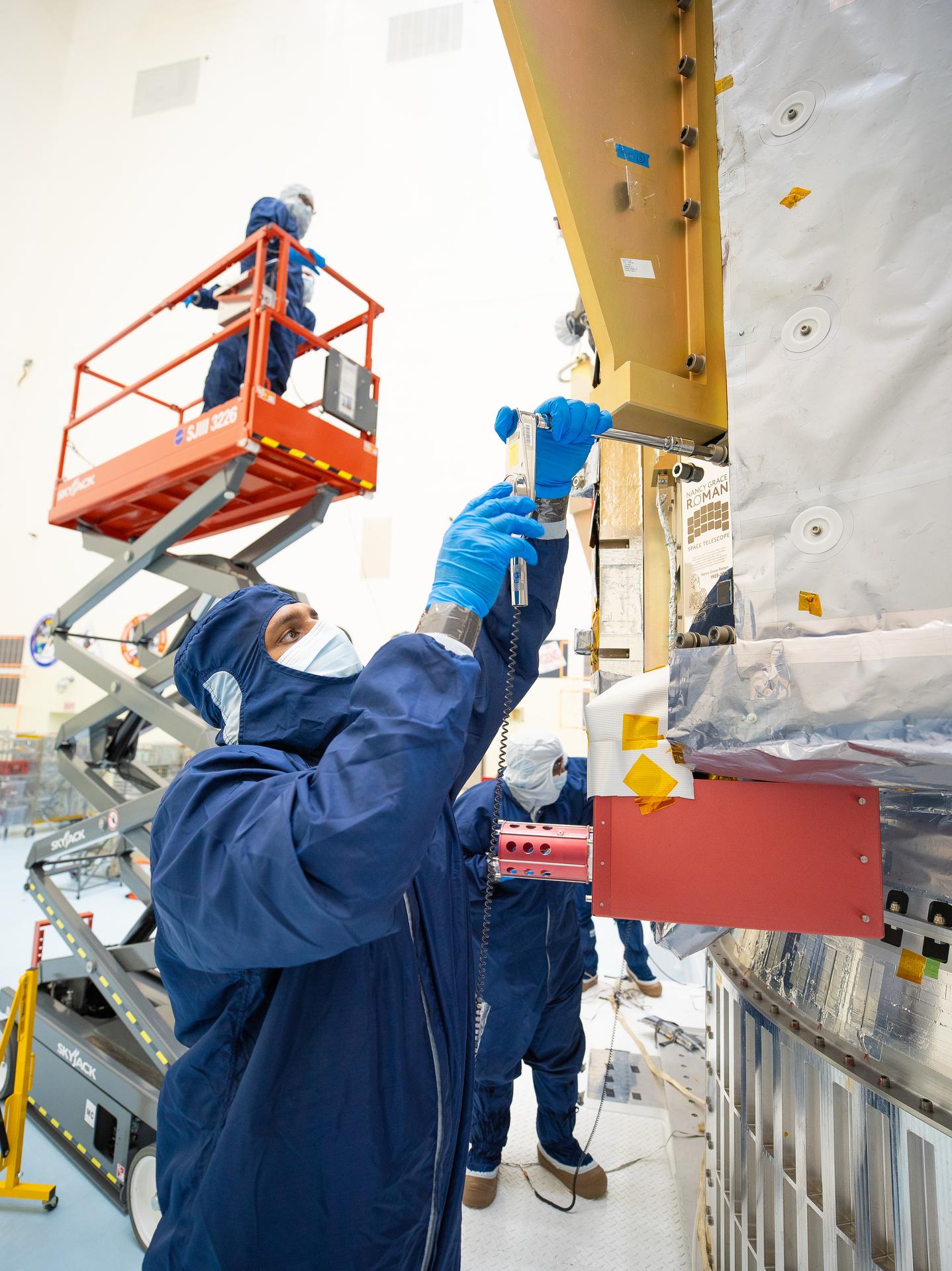
People in blue protective suits and a red cherry picker work in an industrial high bay.

On July 27, technicians at NASA’s Kennedy Space Center in Florida installed a memory card containing 1,350,144 names as part of a commemorative plaque on the Nancy Grace Roman Space Telescope. The names were submitted by people globally, including astronauts from Artemis II and Artemis III. The memory card will travel with the Roman observatory to the Sun-Earth Lagrange point 2, or L2, about one million miles from Earth, where the Sun’s and Earth’s gravity balance out.

Roman is named after Dr. Nancy Grace Roman, NASA’s first chief astronomer and one of the architects of the agency’s modern science program. Roman championed space-based observatories that could study the universe from above Earth’s hazy atmosphere while making their data broadly available to the scientific community.

NASA and SpaceX are targeting launch for no earlier than 7:26 a.m. EDT Sunday, Aug. 30 aboard a SpaceX Falcon Heavy from Launch Complex 39A at Kennedy.

To learn more about the Roman mission, visit:

https://www.nasa.gov/roman

Image credit: NASA/Jolearra Tshiteya

Keyboard giant Keychron launches Nape Pro wireless trackball mouse — rectangular form factor designed to sit under spacebar gives users six customizable buttons and a control dial

Keychron, which is known for its mechanical keyboards, just launched a wireless trackball mouse designed to comfortably sit underneath your space bar, complete with six programmable buttons. The Nape Pro wireless trackball mouse is now available on Amazon for $89.99. Although it may look pricey, with comparable ergonomic trackball mice often priced significantly lower, its unique rectangular design makes it the perfect companion for programmers, writers, and those who primarily use the keyboard for productivity. The placement means you don’t have to lift your hands from the keyboard to move the cursor, although it will get in the way if you prefer using a wrist rest.

The keyboard maker revealed the quirky trackball mouse earlier this year at CES, and it’s finally available for those who are interested. It’s wireless, sports six customizable buttons and a control dial, so you can also use it as a macro pad that you can place to the left or right of your keyboard or drawing tablet (or even center, if you have a split keyboard) and pair it with one of the best gaming mice for regular use. But what makes the Nape Pro more useful and powerful is the customizability that Keychron offers. You can change the functions of each button and the dial on the trackball mouse to exactly match what you need. It also has up to seven layers, so you can change what each button does based on what you need.

There are other trackball mice available on the market, like the Elecom Huge Plus with its 52mm ball and 10 programmable buttons (by comparison, the Nape Pro only has a 25mm ball), but they’re mostly designed to replace your mouse with their ergonomic designs. The Keychron trackball, on the other hand, feels like it’s there to complement your current ergonomic mouse and not replace it entirely.

This trackball mouse is another unique product from Keychron, which is known for making one of the best wireless and best budget mechanical keyboards. The keyboard company also makes different types of mice for basic use, productivity, and gaming, but it seems that it hasn’t hit the home run yet on these models. Perhaps the Nape Pro, which is like a hybrid macro pad and trackball mouse, would help elevate its mice to the same level as some of its mechanical keyboards, like the Keychron K3 Ultra.

What You Need to Know About Installing Plug-In Solar Panels

You can now buy panels that plug into electrical outlets, but there are some important safety issues to consider when picking and installing a system.

© Patrick Junker for The New York Times

Plug-in solar panels are as large as windows, and in Germany they are often installed on balconies.

Copilot worm can spread through Microsoft Word docs

31 July 2026 at 02:20

An “AI worm” can spread through Microsoft Word documents using Copilot as a vector, a prominent Norwegian AI researcher reported on Tuesday.

The report from Håkon Måløy, later confirmed by Microsoft, said that an attacker can conceal instructions in a document that is later used as source material for Copilot-generated or Copilot-edited Word documents, for example, as input to a financial report. Those malicious instructions could potentially alter figures in the document being created. They then copy themselves into the new document, causing it to become a carrier of the attack when used in another Copilot-assisted workflow.

Måløy noted: “To my knowledge, this is among the first public demonstrations of document-borne AI-worm self-propagation through normal workflows in a mainstream commercial productivity suite.”

Microsoft on Thursday emailed a statement to CSOonline discussing the report’s revelations. 

“We have addressed the findings reported by the researcher and thank them for working with us through coordinated vulnerability disclosure. To address this class of risk, we use a defense-in-depth strategy with safeguards that block malicious instructions at multiple points and help keep tasks aligned with users’ requests,” Microsoft said.

“We are continuously strengthening these safeguards as the technology and threat landscape evolve,” it added. “We encourage customers to install the latest updates, use multiple layers of security protection, treat content from unknown sources with caution, and review AI-generated content before using or sharing it.” 

Sidesteps defenses

Aman Mahapatra, chief strategy officer for Tribeca Softtech, a New York City-based technology consulting firm, has reviewed the mechanisms used in this vulnerability and says that it is much worse than it might seem, because it will sidestep just about every defensive mechanism enterprises have in place today.

“This is a worm, a self-propagating malware pattern that uses Copilot as the transmission mechanism and legitimate corporate collaboration as the delivery channel. It bypasses every traditional email security control because the document is not malicious on delivery and it becomes malicious when Copilot processes it. That means that it bypasses DLP because the exfiltration happens through the user’s own authenticated Copilot session,” Mahapatra said. “It then bypasses endpoint protection because no code executes, only instructions get followed by an AI service the enterprise has explicitly authorized.”

He also noted that researchers have been warning about this class of attack for two years.

Microsoft’s involvement

Måløy said that he has been working with the Microsoft Security Response Center (MSRC) since March 3 and Microsoft  subsequently implemented and distributed multiple small focused mitigations, but the core vulnerability has yet to be fixed.

He said he was hesitant to disclose an active vulnerability, but felt that it was now time to publish. 

“My reasoning is that defenders cannot reduce exposure to a risk they are unaware of,” Måløy wrote, “and the propagation mechanism described here affects ordinary document workflows that many organizations already rely on.”

In an email interview, Måløy noted that the tweaks Microsoft has implemented were helpful, nonetheless. 

“The coordinated disclosure process showed that mitigations can meaningfully reduce the demonstrated attack surface, making attacks less reliable and limiting their reach, even without completely eliminating the underlying problem,” he said. 

Måløy also addressed the resolution that many analysts and consultants suggested, which is to change the nature of LLMs to fully isolate instructions from the data they operate on. 

“Separating instructions from data may be part of the solution, but I think the distinction between data and instructions is not always clear in real-world workflows. For example, a user may ask an agent to arrange a business trip, requiring the agent to retrieve an email specifying the approved itinerary and a document containing the booking procedure,” Måløy said.

“My view is that the broader challenge is therefore not simply to prevent systems from interpreting external content as instructions, but to evaluate whether those instructions align with the user’s goals and the context in which the system is operating,” he added.

Problem hard to overstate

Mike Wilkes, enterprise CISO at Aikido Security, said it would be difficult to overstate the potential problems from this situation. 

“This is a significant issue because it moves prompt injection from a single compromised interaction into a potentially self-propagating document integrity attack,” he said, noting that it is not a conventional worm that spreads automatically. A user or Copilot workflow must still bring an infected document into the model’s context. “But once that happens, the malicious instructions can reportedly alter business information, conceal themselves inside the resulting Word document and turn a legitimate internal file into the next carrier,” he said.

That, he pointed out, creates “a dangerous enterprise supply chain in which financial reports, contracts, policies and partner documents may inherit malicious behavior while retaining the trust associated with their legitimate authors and Microsoft 365 accounts.”

Not a new issue

The key issue behind this flaw is the fact that genAI tends to struggle with telling the difference between data that a user offers as input and the instructions the AI is to execute.

Flavio Villanustre, CISO for the LexisNexis Risk Solutions Group, observed that the same problem with mixed data and instructions occurred in databases decades ago, and turned into what we know as SQL injection attacks today. But, he noted, a few years later, parametrized binding for the database access layers was developed, which separates instructions, which are handled internally and safely, from data, which can come from untrusted sources. “The same needs to happen with LLMs and other AI,” he said.

Mike Leone, a VP/principal analyst at Moor Insights & Strategy, agreed.

“It’s hard not to chuckle a bit with this one. People have been asking whether data can give orders since SQL injections. We fixed that one by giving the database a way to tell an instruction from a value,” Leone said. “Thirty years later, we’ve built an entire category of software that can’t tell the difference at all.”

Tom Findling, CEO at Conifers.ai, also said he sees the data-vs-instructions issue as the biggest problem. 

“Separating data from instructions is still unsolved at the model layer. The labs are making real progress, but not enough to be your only control,” he said, and stressed, “Microsoft doesn’t need to wait for that. It can slow propagation inside Copilot: stop hidden content from being written into new documents, surface hidden text before it’s used, preserve the trust level of what Copilot read and show all AI-generated changes.”

Fix needs industry agreement

However, Frank Dickson, group VP for security at IDC, argued that a fix needs industry agreement. 

“A fundamental fix requires the industry to converge on the same architectural change, which isn’t happening anytime soon given the incentives and the fact that the major players are far from besties,” he said, pointing out that Instruction-data separation would need to be baked in at the model or platform level across every major vendor. “None of them are rewarding that work commercially right now, so treat that as a multi-year research problem, not something a CISO should wait on.”

Leone disagreed, arguing that a single vendor can do quite a bit, at least for its own customers. 

“Microsoft has said publicly since last year that indirect prompt injection can’t be fully prevented, and I give them credit for saying it out loud rather than pretending otherwise,” Leone said, noting that the industry doesn’t have to move in lockstep. “This attack lives inside one product,” he said. “If Microsoft hardens the Copilot document path, Copilot customers get safer whether or not anyone else moves.”

Dickson added that another critical problem with this vulnerability is that the carrier documents are created by legitimate employees using legitimate tools, “so there’s no obvious point of origin once the payload starts moving; an organization could be laundering corrupted financial figures through its own workflow for weeks before anyone notices.”

Tactics that might help

That said, experts had some specific suggestions for CISOs trying to negate this problem. 

IDC’s Dickson said, “the most useful lever right now sits outside the model entirely, in how much untrusted content Copilot is allowed to pull into a session without a human choosing it.” He noted that enterprises can turn Copilot’s auto-discovery behavior off or restrict it, and require humans to explicitly select the documents they feed it. “That alone closes off one of the two ways the attack gets a foothold,” he said.

IDC also suggested a visible diff or redline of anything Copilot changes in a financial or otherwise consequential document, and the requirement for a human to approve the changes. “That’s not a technical fix, it’s a workflow one, and it’s available today,” Dickson said.

He said that IT should also track where content came from and what was touched by an AI system, in metadata that travels with the document. “It doesn’t stop the injection, but it means when something does get through, an organization can actually trace how far it spread instead of discovering a corrupted number three reports later with no way to reconstruct the chain,” he said.

However, one expert, Tyler Reguly, Fortra’s associate director of security R&D, said that he didn’t see this vulnerability having a meaningful impact because it feels like what he called a “laboratory vulnerability.”

Normal enterprise workflows don’t encompass a number of the necessary steps for compromise, he said, pointing out that, if anything, people are trained not to download Word documents. Plus, he noted, looking at the blurred example in the report, the malicious document contained an additional apparently blank page which held the concealed prompts in white text.

“That page is going to send up warning signs for me if someone even managed to convince me to download an external Word document,” he said. So, overall, “this feels like it requires a perfect storm.”

This article originally appeared on CSOonline.

❌