❌

Reading view

I nearly melted my laptop so you don’t have to — after testing cooling pads for chilling your laptop during a heatwave, I’ve got serious data to drop on the coolest and quietest products you can buy

Boy, sure is a hot one today, huh? Okay, I get the irony: that's a take so cold you could use it to replace your freezing Wim Hof showers. But when the metaphorical mercury creeps this high, you've got to keep your cool. The same goes for your laptop, which is why you might want to grab a laptop cooling pad this summer.

Fortunately for you, I've spent this week testing every laptop cooling pad I can get my hands on to see which offers the superior AC for your computer. Not only that, but I've brought receipts — this piece has more graphics and graphs than election night coverage. So if you want objective numbers about which pad is genuinely gusty and which is all bluster, I've got the data you need.

I get that it can be tempting to overlook cooling your laptop during warm weather — I've been more worried this summer about tracking down a fan to keep myself cool than my laptops. But you overlook the best laptop cooling pads at your peril.

I still have vivid memories of the summer I redlined my laptop during a heatwave. While the video skittering should have been a hint, it was only when it stopped booting up and started bleeping SOS in Morse code that I began questioning my life choices. Turns out I'd burnt out the memory — quite literally: there were scorch marks on the inside of the case.

So at this time of year, it's worth considering whether a laptop cooling pad can help you out. And I can definitely help out there.

Laptop cooling pads: cooling

Temperature Rise Using Laptop Cooling Pad

The temperature rise during a stress test while using the laptop cooling pad on max settings

Baseline
31.9
TopMate C12 Laptop Cooling Pad
22.8
Klim Mistral
20.4
Klim Wind
19.5
Almiuzi F2 Plus Laptop Cooling Pad
18.4
TECKNET Laptop Cooling Pad
17.9
Klim Ultimate
15.5
Liangstar Laptop Cooling Pad
15.3
Llano V10 Gaming Laptop Cooling Pad
12
Llano RGB Laptop Cooling Pad
8
010203040
Temperature difference (°C) Data
ProductValue
Baseline31.9
TopMate C12 Laptop Cooling Pad22.8
Klim Mistral20.4
Klim Wind19.5
Almiuzi F2 Plus Laptop Cooling Pad18.4
TECKNET Laptop Cooling Pad17.9
Klim Ultimate15.5
Liangstar Laptop Cooling Pad15.3
Llano V10 Gaming Laptop Cooling Pad12
Llano RGB Laptop Cooling Pad8
Baseline
57.4
TopMate C12 Laptop Cooling Pad
41
Klim Mistral
36.7
Klim Wind
35.1
Almiuzi F2 Plus Laptop Cooling Pad
33.1
TECKNET Laptop Cooling Pad
32.2
Klim Ultimate
27.9
Liangstar Laptop Cooling Pad
27.5
Llano V10 Gaming Laptop Cooling Pad
21.6
Llano RGB Laptop Cooling Pad
14.4
015304560
Temperature difference (°F) Data
ProductValue
Baseline57.4
TopMate C12 Laptop Cooling Pad41
Klim Mistral36.7
Klim Wind35.1
Almiuzi F2 Plus Laptop Cooling Pad33.1
TECKNET Laptop Cooling Pad32.2
Klim Ultimate27.9
Liangstar Laptop Cooling Pad27.5
Llano V10 Gaming Laptop Cooling Pad21.6
Llano RGB Laptop Cooling Pad14.4
Lower values indicate better cooling.
TechRadar Logo
How I tested

To test each laptop cooling pad's performance, I ran a 3DMark Steel Nomad stress test on an Acer Predator Helios 300 gaming laptop with an Nvidia GeForce RTX 3080 GPU. The test ran for 15 minutes, with each cooling pad set to maximum. Using a thermal camera, I clocked the hottest point before and after the test, then calculated the temperature differential between the two to determine how much warming each cooling pad allowed.

Assessing which laptop cooling pad is a breezy wonder and which is a wheezy blunder ultimately comes down to how frosty each model's cooling is. That's why I went through every pad I could get my hands on to see how much each one prevented our gaming laptop from heating up during a 3DMark stress test.

As you can see, by far the weakest cooling offered by any laptop cooling pad I tested was from the TopMate C12 Laptop Cooling Pad. Compared to the 57.4°F / 31.9°C baseline rise of our gaming laptop alone, the C12 was only able to limit it to a 41°F / 22.8°C rise — that might be better than frantically waving a dish towel in its general direction, but only barely.

Probably the biggest disappointment of these tests was how the Klim Mistral performed. Not only did it seem to perform worse than the more affordable Klim Wind — resulting in 36.7°F / 20.4°C warming compared to the Wind's 35.1°F / 19.5°C — but it was pretty inconsistent to boot, achieving even worse results on a retest.

Skipping ahead a little, the laptop cooling pad I was most surprised by was the TECKNET. Although it's cheaper than quite a few of the pads I tested here, setting me back just $21.59 / £21.99, the 32.2°F / 17.6°C warming it presided over put it firmly in the top half of the pack. It's the little laptop cooling pad that could.
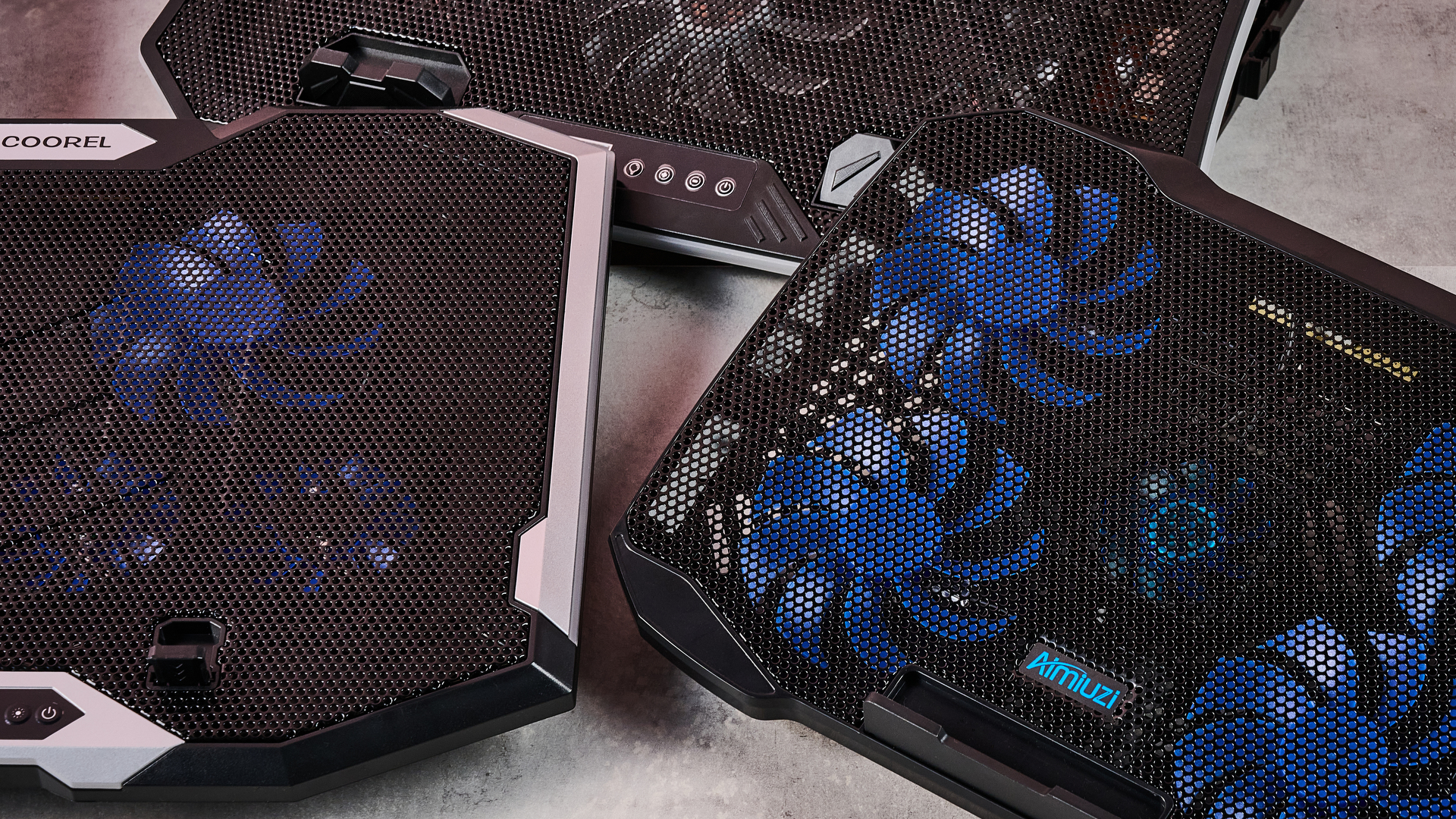
A close up of the TopMate C12, Aimiuzi F2 Plus and ICE COOREL RGB Laptop Cooling Pad on a gray marbled desktop in front of a pink background.

(Image credit: Future)

Given that the Liangstar Laptop Cooling Pad and Klim Ultimate both achieved an almost photo finish, it would be easy to assume there's not much daylight between them. However, like a bottle of wine, you really need to weigh up what you're spending here to calculate its true value. And as the Liangstar costs $20.99 / £23.59 versus the Klim Ultimate's $44.97 / £44.97 price tag, that definitely takes the edge here.

But, frankly, there's a reason Llano is the absolute GOAT in my eyes. As you can see, it took both first and second place on my cooling pad podium. While the Llano V10 Gaming Laptop Cooling Pad stopped our gaming laptop from warming up more than 21.6°F / 12°C, the Llano RGB Laptop Cooling Pad kept it down to just 14.4°F / 8°C of warming. This boi makes liquid nitrogen look positively toasty.

Laptop cooling pads: noise levels

1 / 2

Noise Level — cooling pad alone

Noise level of the cooling pad or laptop alone taken at head height and from 3 inches away

Llano RGB Laptop Cooling Pad
71
Llano V10 Gaming Laptop Cooling Pad
64.5
Klim Mistral
52.6
Liangstar Laptop Cooling Pad
45
TopMate C12 Laptop Cooling Pad
43.5
Laptop alone
42
Almiuzi F2 Plus Laptop Cooling Pad
37.4
Klim Wind
36.2
TECKNET Laptop Cooling Pad
36
Klim Ultimate
36
020406080
dB
Head height Data
ProductValue
Llano RGB Laptop Cooling Pad71
Llano V10 Gaming Laptop Cooling Pad64.5
Klim Mistral52.6
Liangstar Laptop Cooling Pad45
TopMate C12 Laptop Cooling Pad43.5
Laptop alone42
Almiuzi F2 Plus Laptop Cooling Pad37.4
Klim Wind36.2
TECKNET Laptop Cooling Pad36
Klim Ultimate36
Llano RGB Laptop Cooling Pad
85
Llano V10 Gaming Laptop Cooling Pad
77
Klim Mistral
62.6
Liangstar Laptop Cooling Pad
59
TopMate C12 Laptop Cooling Pad
58
Laptop alone
60
Almiuzi F2 Plus Laptop Cooling Pad
50.2
Klim Wind
48.8
TECKNET Laptop Cooling Pad
60
Klim Ultimate
46
0255075100
dB
Near Data
ProductValue
Llano RGB Laptop Cooling Pad85
Llano V10 Gaming Laptop Cooling Pad77
Klim Mistral62.6
Liangstar Laptop Cooling Pad59
TopMate C12 Laptop Cooling Pad58
Laptop alone60
Almiuzi F2 Plus Laptop Cooling Pad50.2
Klim Wind48.8
TECKNET Laptop Cooling Pad60
Klim Ultimate46
TechRadar Logo

Noise Level — cooling pad & laptop

Combined noise level of the cooling pad and laptop taken at head height and from 3 inches away

Llano RGB Laptop Cooling Pad
64
Llano V10 Gaming Laptop Cooling Pad
57.5
Klim Mistral
51.5
TopMate C12 Laptop Cooling Pad
45
TECKNET Laptop Cooling Pad
45
Liangstar Laptop Cooling Pad
45
Klim Ultimate
44.4
Klim Wind
44
Almiuzi F2 Plus Laptop Cooling Pad
44
020406080
dB Head height Data
ProductValue
Llano RGB Laptop Cooling Pad64
Llano V10 Gaming Laptop Cooling Pad57.5
Klim Mistral51.5
TopMate C12 Laptop Cooling Pad45
TECKNET Laptop Cooling Pad45
Liangstar Laptop Cooling Pad45
Klim Ultimate44.4
Klim Wind44
Almiuzi F2 Plus Laptop Cooling Pad44
Llano RGB Laptop Cooling Pad
79
Llano V10 Gaming Laptop Cooling Pad
69
Klim Mistral
61.5
TopMate C12 Laptop Cooling Pad
58.5
TECKNET Laptop Cooling Pad
58
Liangstar Laptop Cooling Pad
59
Klim Ultimate
55.2
Klim Wind
58.5
Almiuzi F2 Plus Laptop Cooling Pad
61
020406080
dB Near Data
ProductValue
Llano RGB Laptop Cooling Pad79
Llano V10 Gaming Laptop Cooling Pad69
Klim Mistral61.5
TopMate C12 Laptop Cooling Pad58.5
TECKNET Laptop Cooling Pad58
Liangstar Laptop Cooling Pad59
Klim Ultimate55.2
Klim Wind58.5
Almiuzi F2 Plus Laptop Cooling Pad61
TechRadar Logo
How I tested

When it came to noise levels, I measured the noise of each cooling pad from 3 inches away and from my head height when sitting in front of it. I also recorded the combined noise of each cooling pad and the testing laptop's fans 10 minutes into each stress test from the same distances.

You may think that your gaming laptop makes a lot of noise. But believe me: that's scarcely more than a murmur compared to some cooling pads. Given they're essentially just an LED-adorned box with a whopping great fan inside, they can get pretty shouty. That's why I grabbed the sound level meter from my utility belt and started measuring like the world's nerdiest superhero.

Perhaps predictably, the pad that blows coolest blows loudest. While I love the Llano RGB Laptop Cooling Pad's glacial chilling, I can't get away from the fact that it's pretty noisy. I'm 5 foot 11 inches tall, and from my head height, I clocked it at 71dB — according to the Center for Hearing and Communication, that's roughly as loud as a coffee grinder or freeway traffic. In my book, that's a worthy price to pay for keeping your laptop cool, but it might not be ideal if you're planning to use it in the office.

In fact, you might assume there's an inverse relationship between cooling and fan noise. And while that does hold true for the most part, there are some interesting exceptions. For example, while I found the Liangstar Laptop Cooling Pad offered the third best cooling in my tests overall, it was substantially quieter than either of the Llanos, clocking in at a much less brash 45dB.

Conversely, the Klim Mistral manages to buck the trend in the other direction, running surprisingly loud compared to some of the other competitors here. At 52dB, it kicks out a similar level of noise as a fridge — which is pretty ironic given it offered some of the worst cooling in my testing.
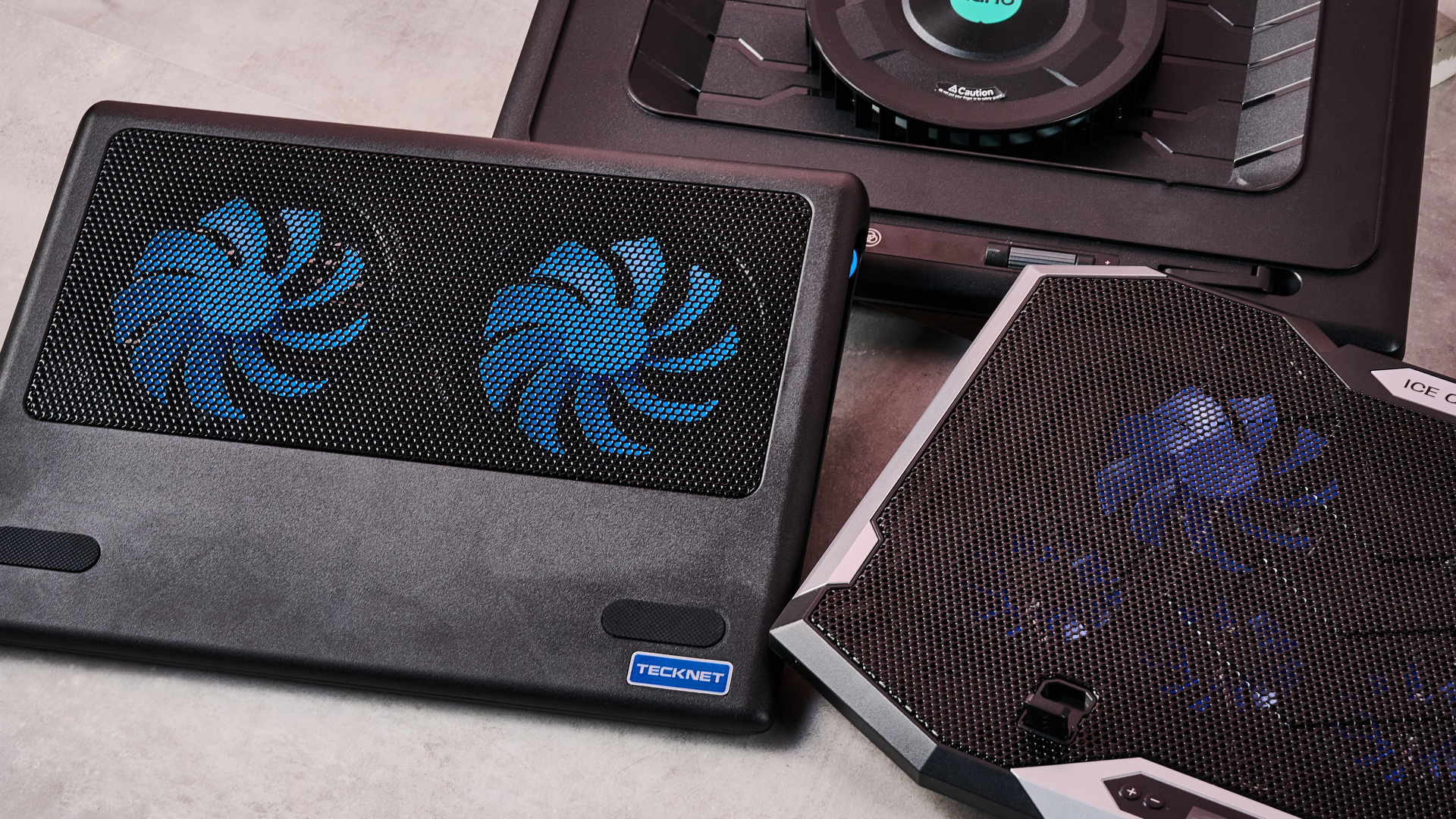
A closeup of the Llano RGB Laptop Cooling Pad, ICE COOREL RGB Laptop Cooling Pad and Tecknet N8 on a gray marbled desktop in front of a pink background.

(Image credit: Future)

And there are some surprising candidates for the winner's podium when it comes to sound levels. The TECKNET offers far from the worst cooling, and yet it ties for first place as the quietest pad on test here at 36dB — again, not at all bad given its super affordable price tag.

Honestly, though, if you want whisper-quiet running without sacrificing performance, my pro tip would be to check out the Klim Ultimate. Unlike Klim's two cheaper cooling pads, it offers very credible chilling while also measuring noise levels of 36dB from head height — that's apparently quieter than a library, which isn't known for being a raucous place.

Fundamentally, noise levels probably shouldn't be the deciding factor when picking your perfect laptop cooling pad. Both cooling power and budget come higher up the pecking order in terms of my personal preferences. But that doesn't mean you should ignore it completely — depending on where and how you use your laptop, you could find strapping a jet engine to the bottom of it to be a bit of a deal breaker.

Do I even need a laptop cooling pad?

1 / 2

MacBook Air M5 encode test

Performance after an hour during a standard encode test both with and without cooling

Versus Comparison Data
AttributeBenchmark — MacBook Air M5Klim Ultimate — MacBook Air M5
Average FPS2.522.77
Estimated encode time122114
VS
Average FPS (fps)
2.52
2.77+10%
Estimated encode time (minutes)
+7%122
114
Re-encoding a 4K stereo .mov file at highest quality, the MacBook Air M5 showed a modest reduction in throttling in terms of average FPS and encode time when using the Klim Ultimate laptop cooling pad.
TechRadar Logo

Acer Predator Helios 300 encode test

Performance after an hour during a standard encode test both with and without cooling

Versus Comparison Data
AttributeBenchmark — Acer Predator Helios 300Klim Ultimate — Acer Predator Helios 300
Average FPS2.82.8
Estimated encode time115113
VS
Average FPS (fps)
2.8
2.8
Estimated encode time (minutes)
+2%115
113
Re-encoding a 4K stereo .mov file at highest quality, the Acer Predator Helios 300 showed essentially no reduction in either average FPS or estimated encode time, suggesting limited heat-related throttling took place.
TechRadar Logo
How I tested

Here I used a standard encoding test. I re-encoded the 4K stereo version of the Creative Commons animated movie Big Buck Bunny at 4K 120fps at the slowest encode speed, then ran it for an hour to allow throttling to take place and recorded the total estimated encode time and average encode rate. I ran this on both my MacBook Air M5 and our testing Acer Predator Helios 300, uncooled and cooled with the Klim Ultimate, to see the impact it had on performance.

So it's pretty clear which cooling pads offer ice-cold AC and which sound like a tumble dryer breaking the sound barrier. But I've left the biggest question until last — do you actually need one at all?

Aiming to prove my theorem that 'cold CPU = good', I whipped up a quick encode test designed to stress out the CPU of several laptops over a longer period. In theory, after an hour, their core temperature should have risen, their CPUs throttled, and the length of the encode spiked and the encode rate dropped. Running the same test with one of our top cooling pads, the Klim Ultimate, would then show how much it could reduce this throttling.

On my MacBook Air M5, after an hour of using its passive cooling alone, the total estimated encode time had crept up to 122 minutes, and the average encode rate was sitting at 2.52 FPS. When I reran the test with the Klim Ultimate running on max cooling, that total encode time was trimmed to 114 minutes, and the encode rate had increased to 2.77 FPS. That's not a huge difference, but it shows the Klim Ultimate was able to trim back some of that temperature-related throttling.

Running the same test on our Acer Predator Helios 300 was a much more ambiguous experience. During my first run, the encode crashed within minutes, and during the second it crashed moments after the test concluded. So it was honestly far from stable.

I was able to eventually get some results, however, and they showed... nothing. Whether I was using the Klim Ultimate or not, the test results were essentially identical, with Handbrake clocking an estimated encode time of 115 minutes uncooled and 113 with the Klim's help. Meanwhile, the encode rate remained steady, sitting at a reasonable 2.8 FPS.
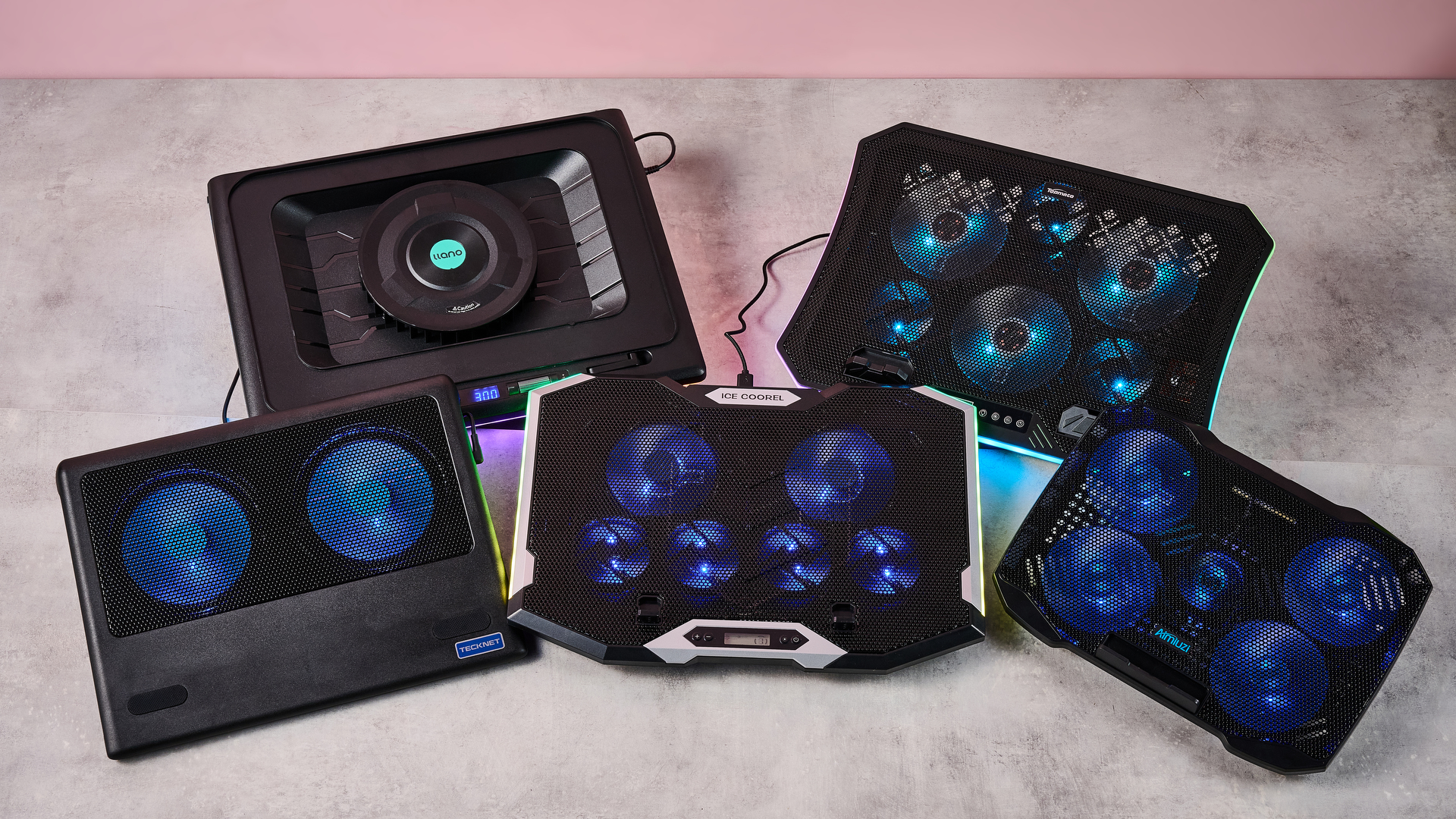
Clockwise: the Llano RGB Laptop Cooling Pad, TopMate C12, Aimuzi F2 Plus, ICE COOREL RGB Laptop Cooling Pad and Tecknet N8 on a gray marbled desktop in front of a pink background.

(Image credit: Future)

What does that mean? That I've wasted several hours of my life? Not quite. There are a couple of key conclusions to take away from this. One is that a performance laptop with whacking great fans built in is already pretty good at keeping itself cool. Shocking revelation, I know.

But probably the more critical takeaway is that the mileage you get out of a laptop cooling pad is going to vary depending on how well optimized it is for handling heat, as well as the kind of tasks you're doing. Had I tried to run Cyberpunk 2077 on max graphics settings with ray-tracing switched on, the Predator Helios 300 would likely have caused it to melt into the earth's core.

There's also another caveat. While it's definitely been warm the last week or so in the TechRadar testing lab, it hasn't reached the kind of desiccating highs that have hit both the US and UK in recent months. Past a certain point, any laptop will struggle in the heat. Forget CPU throttling — in that heat, I'd be more worried about your components liquefying like a chocolate bunny on the launch pad at Cape Canaveral.

In light of that, I'd say a laptop cooling pad is still worth exploring, especially if you tend to do a lot of resource-intensive tasks like 3D work, Photoshopping or gaming.

Any thoughts or personal experiences you'd like to share? Please feel free to chime in down in the comments!

  •  

Bazzite has been an excellent OS for my second gaming PC, but I can't replace Windows 11 with it on my main rig — here's why

Valve's SteamOS has often presented the perfect excuse to be whisked away from Microsoft's troublesome Windows 11. The Linux operating system's better gaming performance has often been proven, utilizing RAM well without the bloatware often found with Windows 11.

SteamOS provides a console-like user interface (UI), making navigation and game launches far easier than Windows 11, despite the recent Xbox mode. With those benefits in mind, I've been contemplating a full switch to SteamOS, ditching Windows for good, and the best way to do that would be via Bazzite.

Bazzite (not affiliated with Valve) is effectively a SteamOS clone, specifically designed for "Linux newcomers and enthusiasts alike", but most importantly, comes with out-of-the-box compatibility with Nvidia and Intel GPUs, and a smooth experience for handhelds.

Using my second streaming PC, I put Bazzite to the test over a few months. Without a doubt, it's easily the best option for any gamer looking for a console-like couch gaming setup.

With tools like Decky Loader, customization is easy, with plugins to change SteamOS game mode themes, navigation sound effects, or even the startup and shutdown videos. However, despite all of the benefits of using the operating system, I still can't step away from Windows 11 on my main system, and there are multiple reasons why.

Multitasking drawbacks

Bazzite/SteamOS's user interface on Asus ROG Ally

(Image credit: Universal Blue / Bazzite)

As a frequent multitasker using applications like Discord to stream games to friends, Bazzite (more specifically SteamOS) isn't an ideal option. Using Discord to stream games on the same rig works just fine in desktop mode; however, it's not the same story for its game mode, which is arguably the entire purpose of using Bazzite.

Streaming on Discord in game mode severely drops frame rates in games, with constant stutters in many I tested, and there are a few instances where attempting to stream an application will result in a black screen. I tried to use the NZXT Signal 4K30 capture card and stream my second PC's Bazzite activity on Discord via my main PC, but it's not that simple.

Sure, HDMI passthrough on the capture card is possible, but I didn't want to be limited to 4K 60 frames per second on either my TV (which is capable of 144Hz) or my gaming monitor (capable of 240Hz). Frankly, capture cards with higher passthrough capabilities don't come cheap.

Discord's end-to-end encryption on all platforms

(Image credit: Discord)

Duplicating or projecting the display, as you would on Windows 11, would be the easy solution. However, Gamescope, the compositor responsible for displaying games on screen with Bazzite, cannot duplicate outputs.

Still trying to avoid the NZXT capture card's 4K 60Hz passthrough limitation, I opted for an HDMI splitter with one input and two output ports. Unfortunately, the moment the capture card is connected, the output on either my TV or monitor has the refresh rate slashed to 60Hz and VRR disabled.

That occurs to ensure that the Extended Display Identification Data (EDID) of both is matched, according to what the capture card is capable of in passthrough.

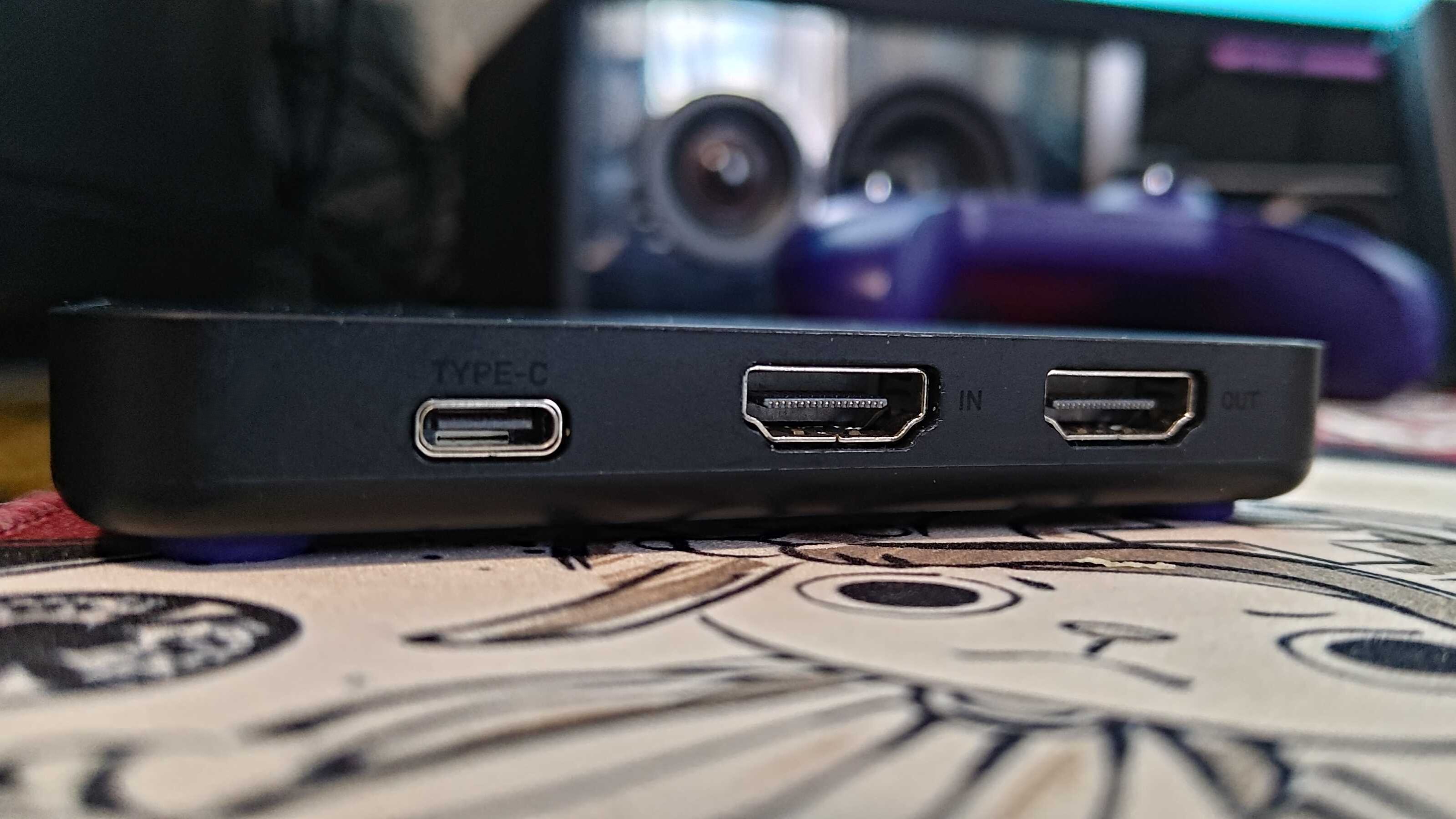
Ports on NZXT Signal 4K30

(Image credit: Future / Isaiah Williams)

None of these issues are present on Windows, as you can use OBS to project the main display onto the capture card without ever having to rely on an HDMI splitter or a better capture card.

This isn't an attack on SteamOS or Bazzite in particular; after all, game mode is quite literally designed for gaming, so multitasking isn't a priority for Valve or specifically Bazzite developers in this case.

However, it's worth noting that streaming on the gaming OS is more trouble than it's worth, and that's without even mentioning the potential audio bugs or OS glitches. That's only one part of why it's worth sticking with Windows, though.

Compatibility issues

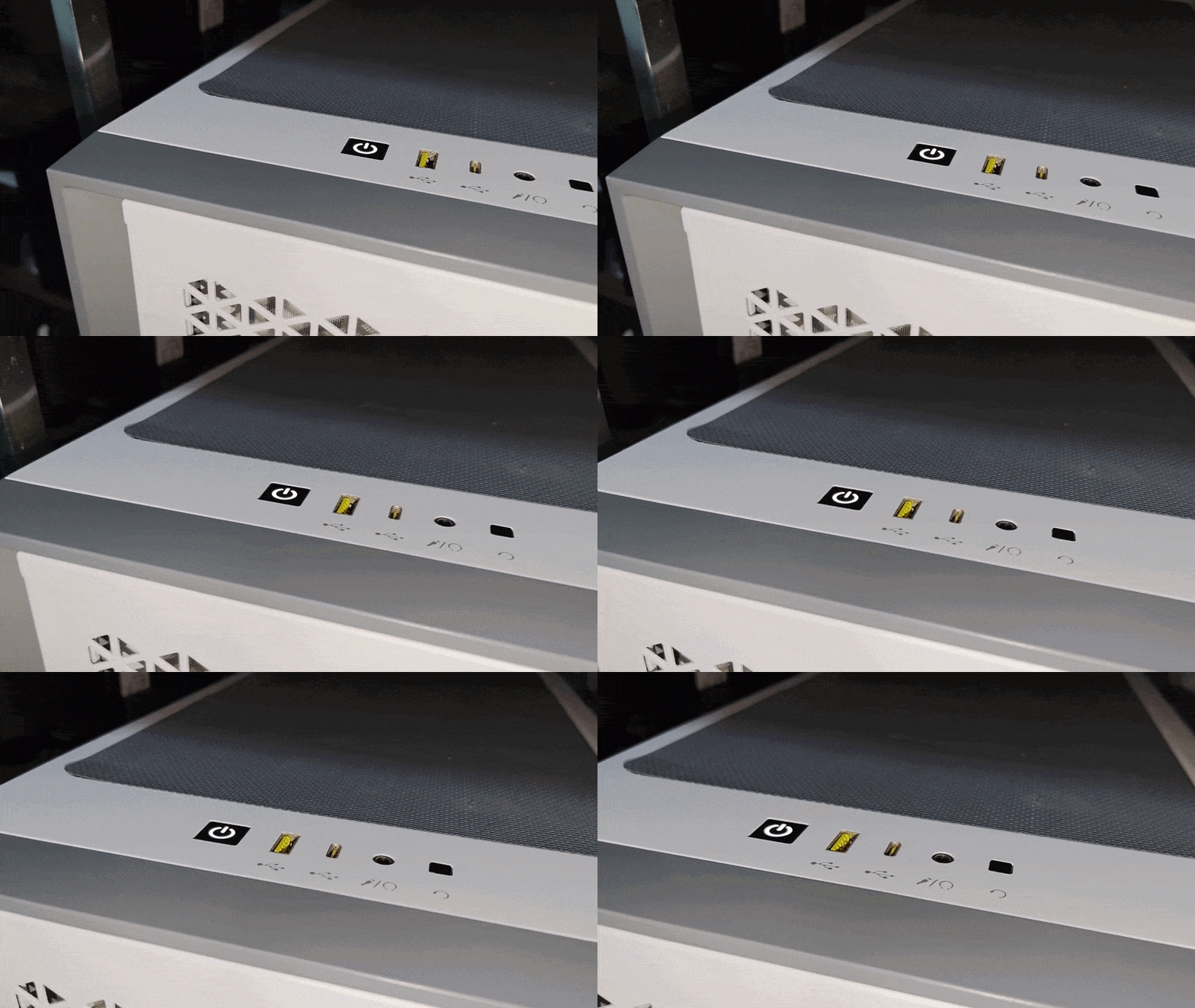
GIF of Corsair PC case

(Image credit: Future / Isaiah Williams)

I wish these issues stopped there, but not quite. Firstly, a large majority of popular multiplayer games such as Battlefield 6, Call of Duty (most of the modern entries), Destiny 2, and EA Sports FC 26 will not work on Linux due to their anti-cheat systems.

This is an issue that lies directly with publishers and developers for those games that refuse to adapt their anti-cheat systems to work on SteamOS. It also doesn't seem as though this will change any time soon; the Steam Machine was arguably one way to effectively force the hand of publishers to consider anti-cheat compatibility on Linux, but it's not exactly a popular PC due to its high price.

It's also worth noting that Game Pass is inaccessible natively on Bazzite, and requires either cloud gaming or third-party launchers, and you'll be lucky if you can get the latter to function.

The solution to accessing those anti-cheat games is a dual-boot with Windows 11 and Bazzite. However, that isn't completely ditching Windows 11 as I've planned to, and a dual-boot can end up messy thanks to Windows' forced updates.

Steam Machine and SteamOS logo

(Image credit: Valve)

Perhaps the most frustrating aspect is that Nvidia GPUs don't play nice with game mode on Bazzite, often resulting in glitchy functionality, or just completely black screens. I tested this by swapping out the AMD Radeon RX 9060 XT 16GB GPU in my second PC with my spare Nvidia GeForce RTX 3080 Ti and found that game mode was just frustrating to use.

So if I wanted to use Bazzite on my main rig equipped with an Nvidia GeForce RTX 4080 Super, its DX12 (a graphics API) gaming performance would be worse than Windows. Overall, the entire purpose of switching over to Linux was for better gaming performance and easy console-like UI navigation would be non-existent.

I'm sure all of these pain points will be addressed at some point, whether via Bazzite or Valve's official SteamOS builds. For now, though, I'll stick with Windows 11 on my main rig — even though I desperately want to be done with it.

Did you know TechRadar now has membership?

Various tech product cutouts next to the words 'Insider TechRadar Learn More'

(Image credit: Future)

Become a TechRadar Insider by simply clicking 'Join Now' at the top of this page. Have a question? Please email membership@techradar.com

  •  

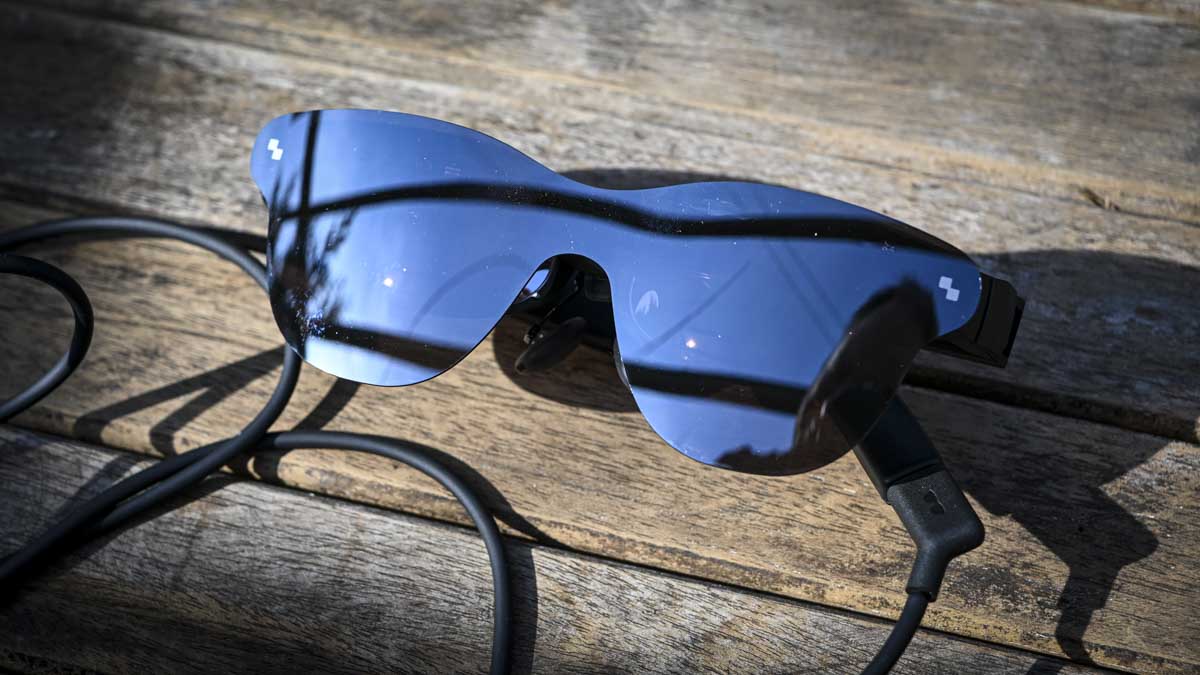
Xreal has made the most stylish budget smart glasses I’ve seen — and they give my RayNeo Air 4 Pros a real run for their money

Meta may dominate the smart glasses zeitgeist, but it's far from the only player — my favorite brand in the space is actually Xreal, with its range of impressive but pricey wearable-display specs. And with the launch of its new xbx brand, Xreal's lineup now includes more budget-friendly options too.

If money were no object, Xreal’s One Pro glasses are easily the crème de la crème of smart specs. Their Bose-tuned audio is impressive for such a small package, their electrochromic dimming tech is perfect for swapping between clear vision and shaded for optimal viewing conditions, and their unique optic engine displays their image more vividly than the competition, with fewer visible distortions.

The only issue is their price — $649 / £579 (they aren't available directly in Australia), absent any discounts, although they can be found on sale occasionally.

If you’re on a budget, my preferred pick has instead been RayNeo. Its Air 4 Pro specs debuted earlier this year, and not only are they affordable at just $299 / £289, they still come with solid specs, including HDR10 support.

With its new xbx a01+, however, Xreal might have just claimed the budget crown for itself.

RayNeo Air 4 Pro review

The RayNeo Air 4 Pro glasses (Image credit: Alastair Jennings)

Budget brilliance

Now the elephant in the room is that Xreal's specs cost a bit more. At their current $299 / £269 discounted price at Xreal.com they're on par with or cheaper than RayNeo's glasses; however their official price is $359 / £349, and while they aren’t discounted at the moment, we’ve regularly seen the RayNeo Air 4 Pros selling for $249 / £249 (RayNeo also doesn't seem to sell directly to Australia) or cheaper.

At the same time, the Xreal xbx a01+ glasses boast a handful of improvements which warrant a slightly higher price.

For a start, their brightness tops out at 1,600 nits, while the RayNeo Air 4 Pro can only hit 1,200 nits. This extra brightness should allow you to get more out of the HDR10 support, offering more room for the light vs dark contrast and vivid colors to breathe across the video format’s visual range. Highs can look more high, helping lows look lower by comparison.

The Xreal xbx a01+ glasses

(Image credit: Future / Hamish Hector)

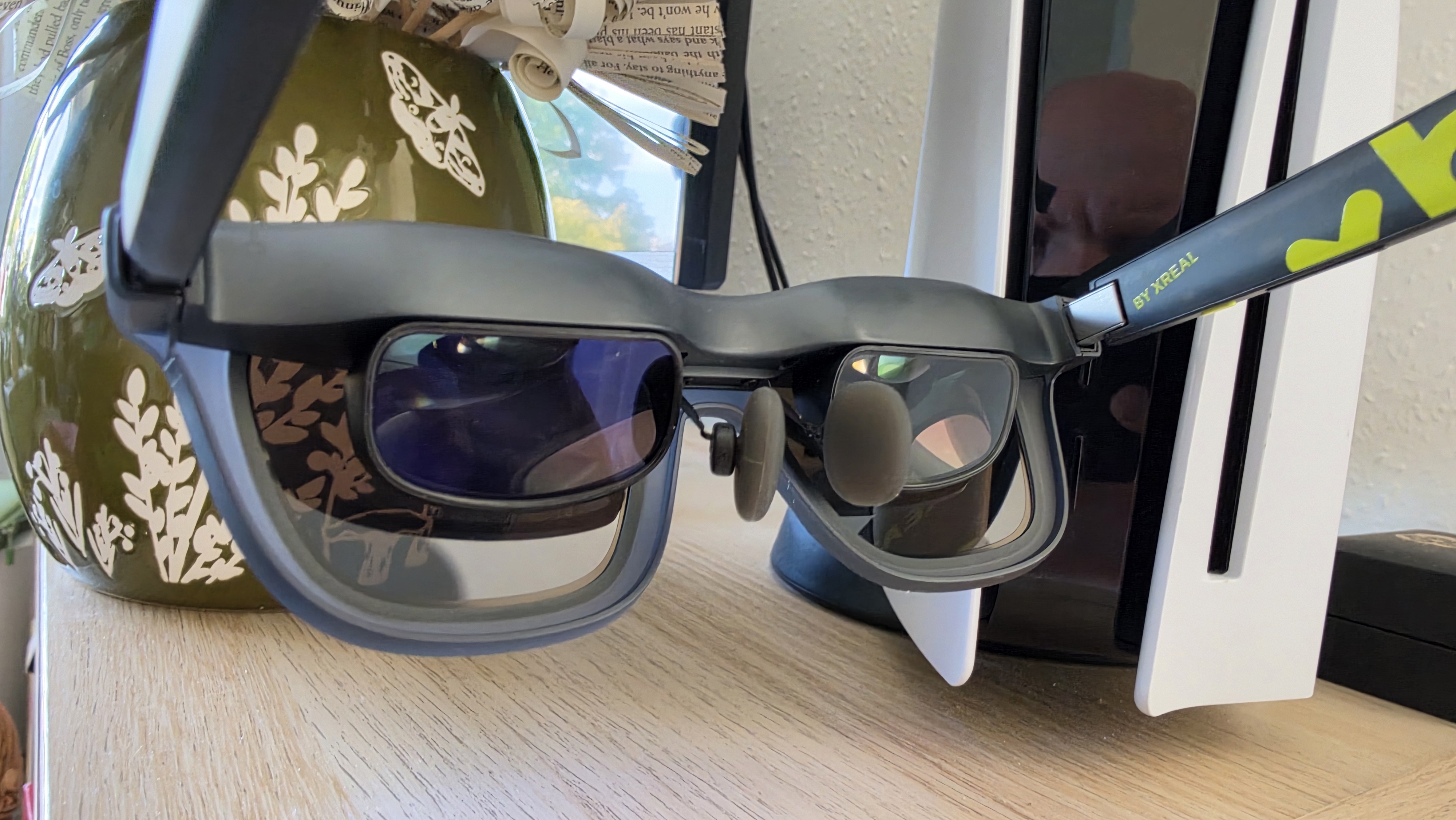
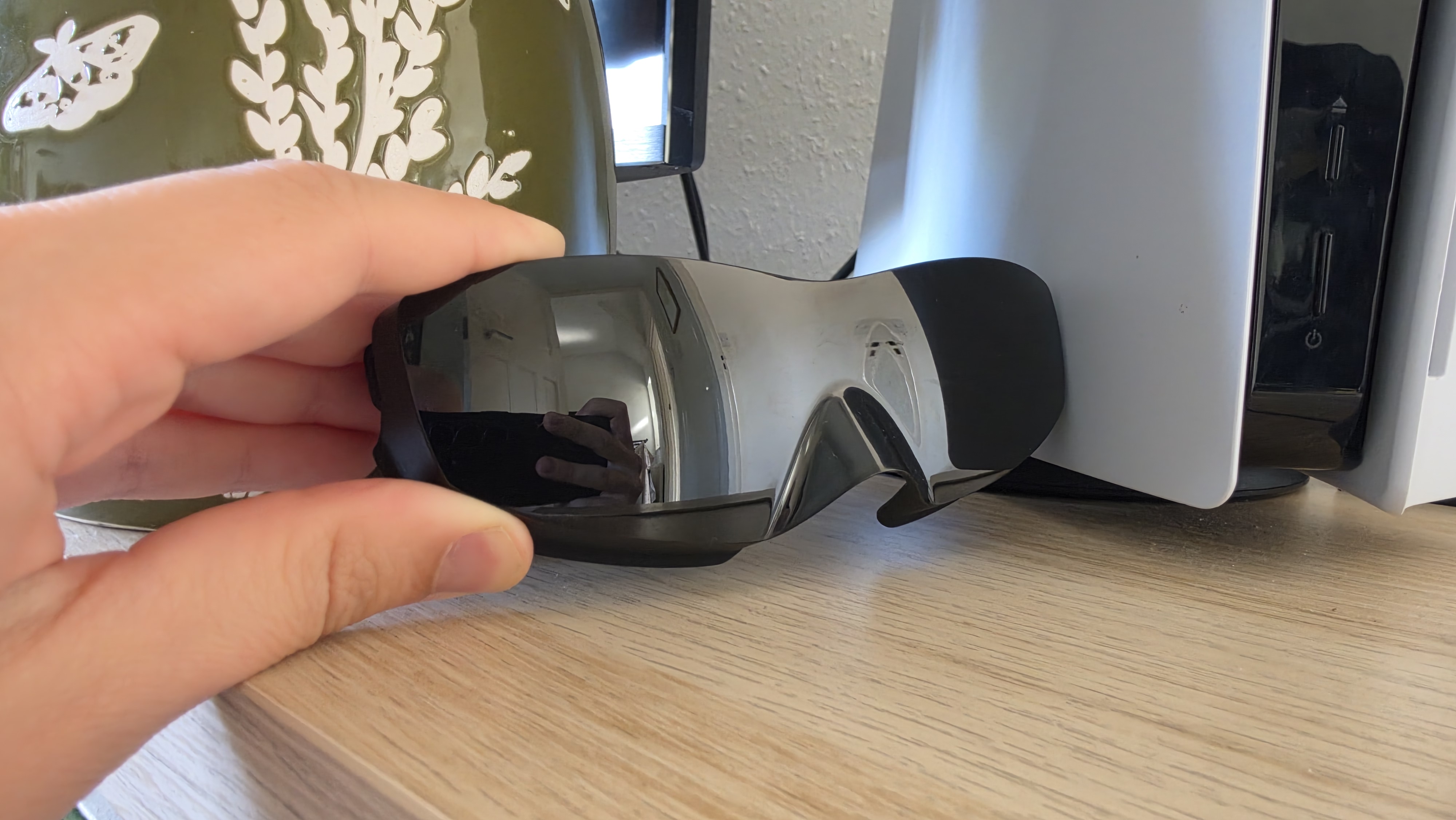
Aiding the image quality are the swappable lens covers.

While advertised as giving you the ability to choose which color of sunglasses cover you most want to complement your style, the xbx's box also includes a completely opaque black cover you can use with your specs. Because the specs are essentially virtual projectors, a darker environment ensures the highest-quality viewing conditions, though I found the regular sunglasses were fine even in bright sunlight.

The xbx glasses are lighter too, weighing just 62g compared to the RayNeo Air 4 Pro's 76g. Admittedly I haven't found them majorly more comfortable, but as I kicked back with them in a sun lounger while on vacation for hours on end I was relaxed enough to doze off on several occasions.

The only tradeoff is, I'd say, the audio, which doesn't seem to involve Bose tuning this time, and isn't quite as impactful as the Air 4 Pro's. That said, I'll almost always use earbuds or headphones with my display glasses, because they’re better in terms of quality and minimize sound leakage, so this downgrade didn't bother me.

The Xreal xbx a01+ glasses

(Image credit: Future / Hamish Hector)

Who wins? You decide

You'll also have to contend with Xreal's standard optic engine too. This is the prism that reflects the micro-OLED display into your eyes, and the standard design is susceptible to external reflections — most commonly light bouncing off the top of the specs and into your view. Pictures will also be a little smaller thanks to a reduced field of view, and can be a little blurrier at the frame edges.

Only Xreal's One Pros boast the improved design, but having experienced it, it's tough to go back to the standard optic engine.

To be fair, though, that’s mostly a me problem, and if you’re new to the display glasses world the Xreal xbx a01+ and RayNeo Air 4 Pros should be perfectly adequate performance-wise.

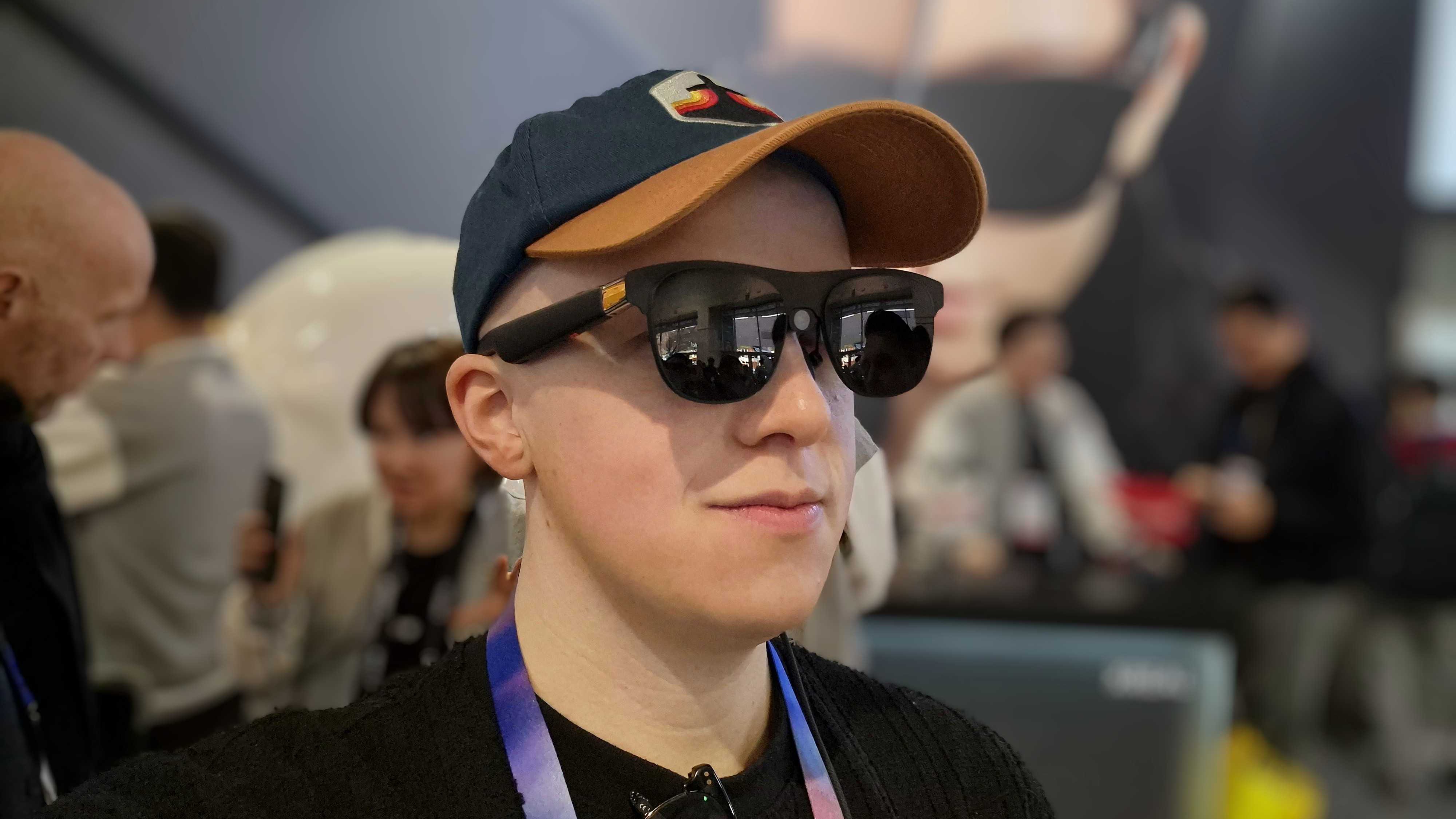
A man wearing Xreal One Pro glasses, at the CES 2025 show

(Image credit: Future)

As for which of the budget specs you should go for — whichever is cheaper would be my suggestion.

The technical improvements of the xbx specs are solid, but if you can save $40/£40 or more on the RayNeos, their few deficiencies can be overlooked.

That said, if stylish, colorful designs are a must, alongside a marginally better image quality, then you'll be very pleased with the new Xreal xbx a01+ glasses.

  •  

Hackers are going after our water now — over 30 Minnesota utilities hit in coordinated cyberattack by apparent Iranian attackers

  • Cyberattack hits operational technology at more than 30 Minnesota community water systems, briefly taking treatment plant offline and forcing several towns onto manual operations
  • A leaked WaterISAC memo obtained by WIRED relays a state fusion center assessment tying the intrusions to Iranian-affiliated hackers, but no US agency has formally attributed the attack yet
  • The CISA had warned four days earlier that Iranian-affiliated actors were compromising internet-facing PLCs, repeating guidance that has mostly fallen on deaf ears

More than 30 community water systems across Minnesota were hit by a coordinated cyberattack, targeting the operational technology running pumps, wells, water towers, and wastewater lift stations rather than the office networks behind them.

Minnesota IT Services disclosed the attack on July 28 2026 and activated a statewide incident response, stating that it wasn't aware of any Minnesota city asking residents to change their drinking water use just yet.

A memo obtained by Wired, circulated by the water sector information-sharing group WaterISAC and carrying a restricted TLP: AMBER handling marking, relays a Minnesota state fusion center assessment that ties the intrusions to Iranian-affiliated hackers.

A warning that was more or less ignored

Four days before the attacks, CISA updated an advisory, AA26-097A, warning that Iranian-affiliated actors were compromising internet-facing programmable logic controllers made by Rockwell Automation, Schneider Electric, Siemens, and possibly others across the US water, energy, and government sectors. It documented confirmed disruptions and financial losses.

This drew no immediate response from state functionaries, and it is easy to see why: the US has tens of thousands of community water systems that serve small populations and lack budgets for dedicated cybersecurity staff.

This is despite there being a precedent: Iranian-linked actors hit the Municipal Water Authority of Aliquippa in Pennsylvania in November 2023, defacing a Unitronics controller with an anti-Israel message. CISA said at the time those devices were exposed to the internet with default passwords still in place. The advice issued then is the same advice being issued this week, which is telling about how little has changed since.

The WaterISAC memo, dated the day the attacks concluded, passes on a state fusion center report linking the activity to Iranian-affiliated actors. That memo was not meant to be public, but it has been corroborated by The New York Times and The Washington Post, which reported that they spoke to federal officials and US intelligence agencies, respectively, lending credence to the claims.

CISA later warned that attackers are changing PLC passwords to lock operators out of their own equipment, and repeated the advice that has been unchanged for years: get PLCs off the public internet and put remote access behind a VPN or gateway.

Who was affected?

The worst of the cyberattack hit Braham, a town of roughly 1,700 people, where the city said attackers shut down the operating controls, taking the water treatment plant and the well offline. Crews restored it manually within a couple of hours, and residents were told to minimize water use in the meantime.

Plymouth, a Minneapolis suburb of about 80,000, found the problem confined to equipment connected over cellular links at two water towers and several wastewater lift stations. Its IT division disconnected the affected kit from the network entirely to stop the attack and prevent retargeting during reconfiguration.

Maple Plain declared a local state of emergency to manage its response, and South St. Paul reported that some automated controls were compromised. In most cases, contingency procedures held and water and wastewater operations continued.

None of this is happening in a vacuum, however. The June memorandum that paused fighting between the US and Iran has broken down, and both are trading strikes, including recent US attacks near the Strait of Hormuz that destroyed a water facility and cut supply to more than 20,000 people. Whoever carried out the Minnesota attacks, the symbolism of targeting municipal water is unlikely to be accidental.

The damage that these intrusions caused was limited; they produced brief outages that trained staff fixed by hand. That is an outcome with a silver lining, and it depended on utilities having people who knew how to run a treatment plant without its automation, even if its digital defenses collapsed outright.

  •  

NYT Strands hints and answers for Sunday, August 2 (game #882)

Looking for a different day?

A new NYT Strands puzzle appears at midnight each day for your time zone – which means that some people are always playing 'today's game' while others are playing 'yesterday's'. If you're looking for Saturday's puzzle instead then click here: NYT Strands hints and answers for Saturday, August 1 (game #881).

Strands is the NYT's latest word game after the likes of Wordle, Spelling Bee and Connections – and it's great fun. It can be difficult, though, so read on for my Strands hints.

Want more word-based fun? Then check out my NYT Connections today and Quordle today pages for hints and answers for those games, and Marc's Wordle today page for the original viral word game.

SPOILER WARNING: Information about NYT Strands today is below, so don't read on if you don't want to know the answers.

NYT Strands today (game #882) - hint #1 - today's theme

What is the theme of today's NYT Strands?

• Today's NYT Strands theme is… Eyes on the prize

NYT Strands today (game #882) - hint #2 - clue words

Play any of these words to unlock the in-game hints system.

  • BURP
  • HABIT
  • NATION
  • CLAP
  • ALONG
  • APPEAL

NYT Strands today (game #882) - hint #3 - spangram letters

How many letters are in today's spangram?

• Spangram has 7 letters

NYT Strands today (game #882) - hint #4 - spangram position

What are two sides of the board that today's spangram touches?

• First side: right, 8th row

• Last side: left, 2nd row

Right, the answers are below, so DO NOT SCROLL ANY FURTHER IF YOU DON'T WANT TO SEE THEM.

NYT Strands today (game #882) - the answers

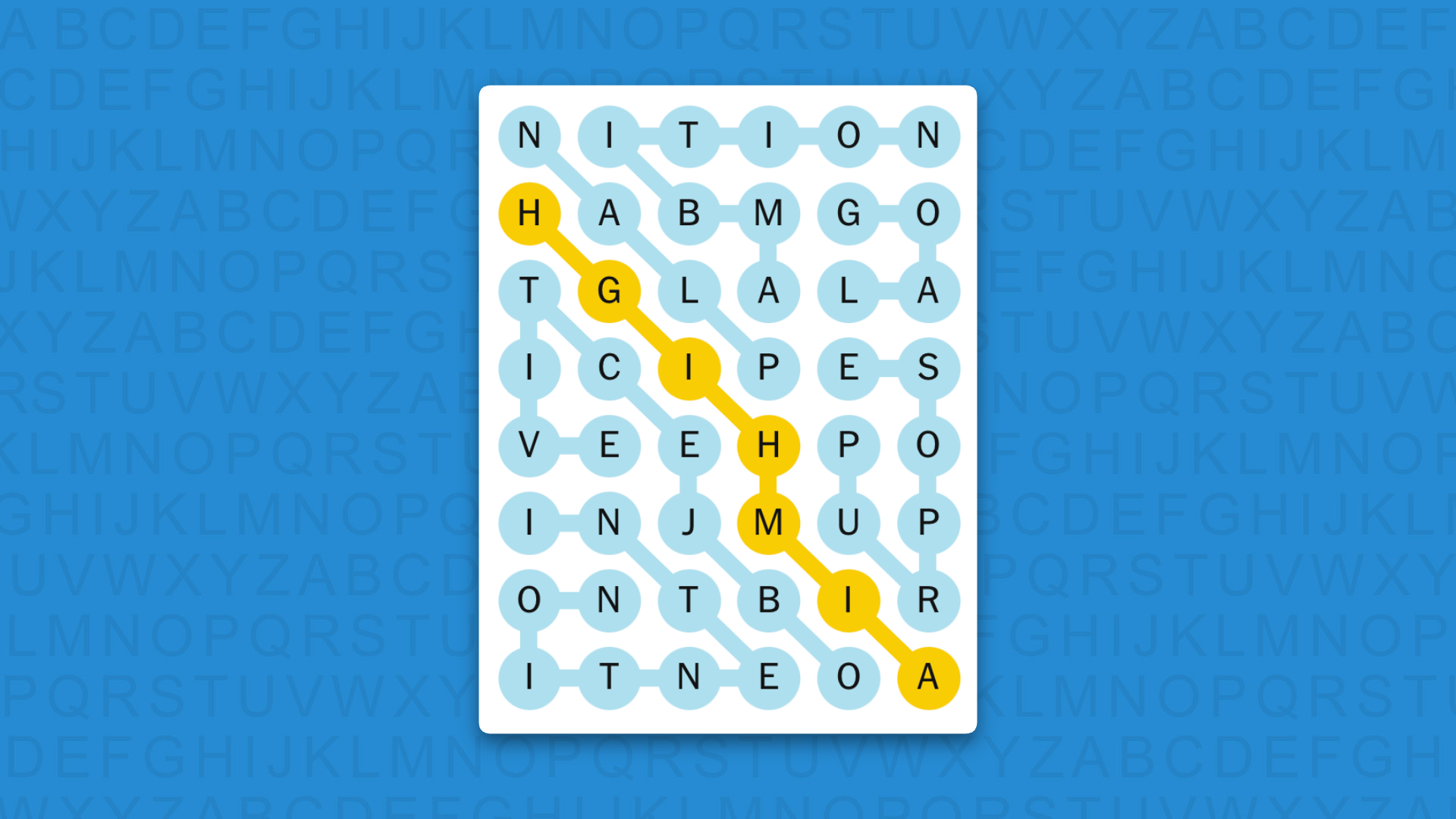
NYT Strands answers for game 882 on a blue background

(Image credit: New York Times)

The answers to today's Strands, game #882, are…

  • AMBITION
  • GOAL
  • PLAN
  • PURPOSE
  • OBJECTIVE
  • INTENTION
  • SPANGRAM: AIMHIGH
  • My rating: Easy
  • My score: Perfect

I’d collected six non-game words before I found AMBITION and managed to resist the temptation of speeding things up with a couple of hints.

After I’d got going, GOAL, PLAN and PURPOSE came easily, but even though I saw OBJECTIVE I still managed to mess up the order connecting the letters.

All in all, a quite straightforward game with the most unusual feature being a rare right-to-left diagonal spangram.

Yesterday's NYT Strands answers (Saturday, August 1, game #881)

  • SILLY
  • ABSURD
  • PREPOSTEROUS
  • LUDICROUS
  • LAUGHABLE
  • SPANGRAM: GETREAL

What is NYT Strands?

Strands is the NYT's not-so-new-any-more word game, following Wordle and Connections. It's now a fully fledged member of the NYT's games stable that has been running for a year and which can be played on the NYT Games site on desktop or mobile.

I've got a full guide to how to play NYT Strands, complete with tips for solving it, so check that out if you're struggling to beat it each day.

  •  

Quordle hints and answers for Sunday, August 2 (game #1651)

Looking for a different day?

A new Quordle puzzle appears at midnight each day for your time zone – which means that some people are always playing 'today's game' while others are playing 'yesterday's'. If you're looking for Saturday's puzzle instead then click here: Quordle hints and answers for Saturday, August 1 (game #1650).

Quordle was one of the original Wordle alternatives and is still going strong now more than 1,500 games later. It offers a genuine challenge, though, so read on if you need some Quordle hints today — or scroll down further for the answers.

Enjoy playing word games? You can also check out my NYT Connections today and NYT Strands today pages for hints and answers for those puzzles, while Marc's Wordle today column covers the original viral word game.

SPOILER WARNING: Information about Quordle today is below, so don't read on if you don't want to know the answers.

Quordle today (game #1651) — hint #1 — Vowels

How many different vowels are in Quordle today?

• The number of different vowels in Quordle today is 3*.

* Note that by vowel we mean the five standard vowels (A, E, I, O, U), not Y (which is sometimes counted as a vowel too).

Quordle today (game #1651) — hint #2 — repeated letters

Do any of today's Quordle answers contain repeated letters?

• The number of Quordle answers containing a repeated letter today is 2.

Quordle today (game #1651) — hint #3 — uncommon letters

Do the letters Q, Z, X or J appear in Quordle today?

• No. None of Q, Z, X or J appear among today's Quordle answers.

Quordle today (game #1651) — hint #4 — starting letters (1)

Do any of today's Quordle puzzles start with the same letter?

• The number of today's Quordle answers starting with the same letter is 0.

If you just want to know the answers at this stage, simply scroll down. If you're not ready yet then here's one more clue to make things a lot easier:

Quordle today (game #1651) — hint #5 — starting letters (2)

What letters do today's Quordle answers start with?

• B

• E

• R

• M

Right, the answers are below, so DO NOT SCROLL ANY FURTHER IF YOU DON'T WANT TO SEE THEM.

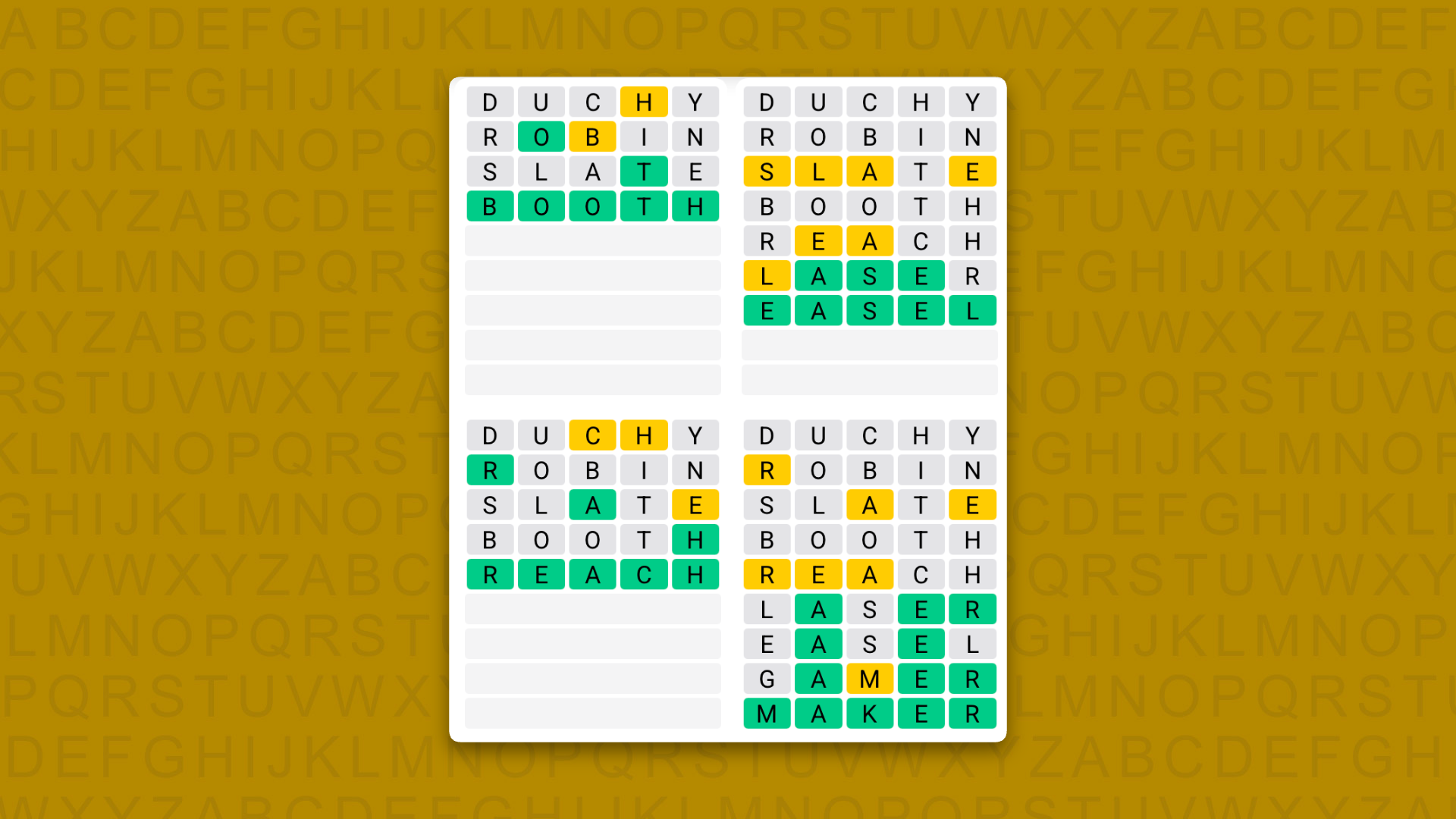
Quordle today (game #1651) — the answers

Quordle Daily Sequence answers for game 1651 on a yellow background

(Image credit: Merriam-Webster)

The answers to today's Quordle, game #1651, are…

  • BOOTH
  • EASEL
  • REACH
  • MAKER

Another close call for me today after I struggled to get EASEL.

Fortunately, by this point I only had a few letters left, so I was out of alternative options. Plus, for my final word MAKER, my first guess of “gamer” gave me the letter M, which narrowed things down considerably.

Daily Sequence today (game #1651) — the answers

Quordle Daily Sequence answers for game 1651 on a yellow background

(Image credit: Merriam-Webster)

The answers to today's Quordle Daily Sequence, game #1651, are…

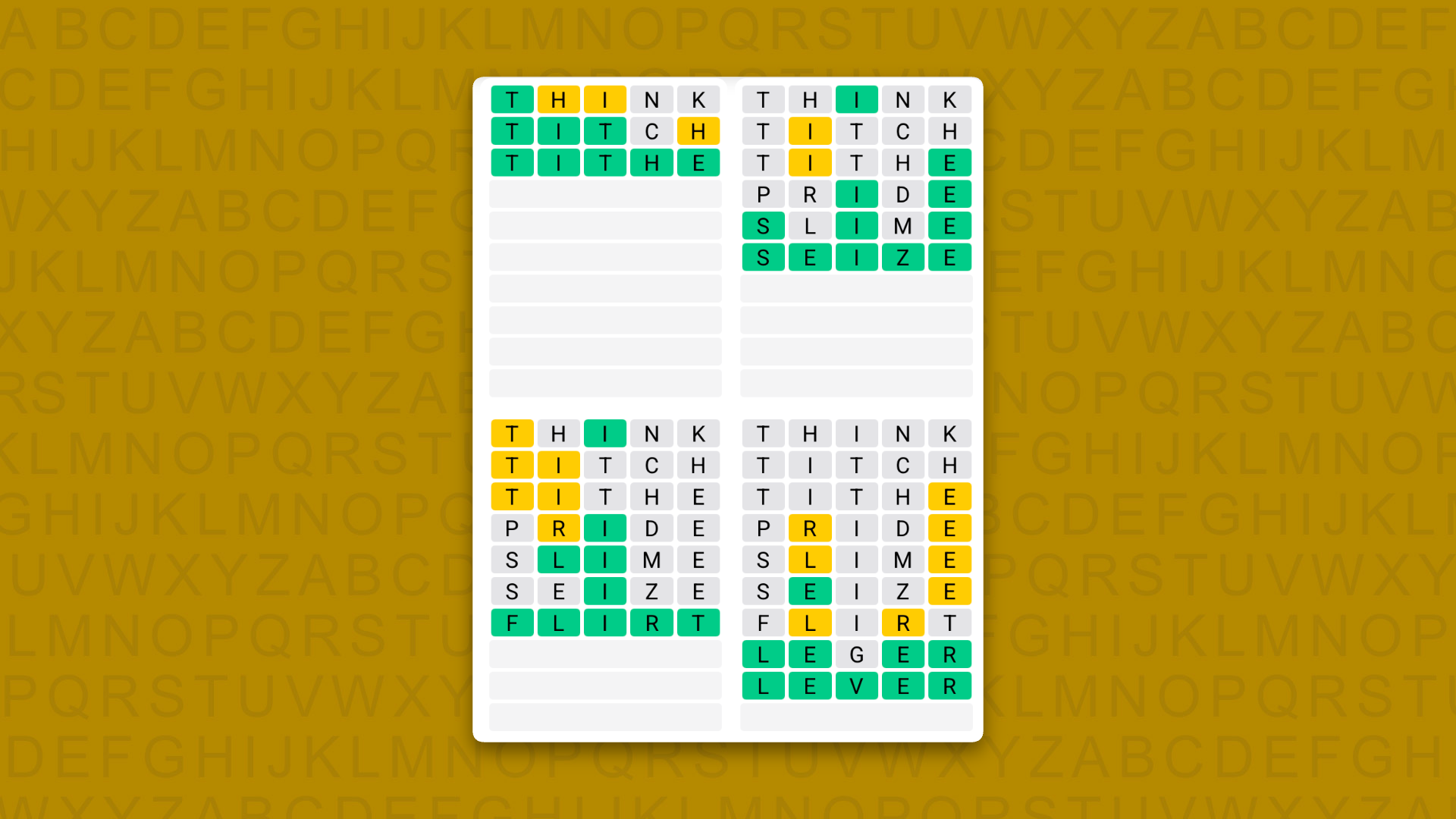
  • TITHE
  • SEIZE
  • FLIRT
  • LEVER

Quordle answers: The past 20

  • Quordle #1650, Saturday, 1 August: OMEGA, BIRCH, SMOCK, EERIE
  • Quordle #1649, Friday, 31 July: MANIA, SINGE, STOOL, LOFTY
  • Quordle #1648, Thursday, 30 July: MODAL, IDLER, CHUMP, LUMPY
  • Quordle #1647, Wednesday, 29 July: GAWKY, ALLOY, AUDIT, LATCH
  • Quordle #1646, Tuesday, 28 July: SMITE, ROACH, RUDDY, GLOBE
  • Quordle #1645, Monday, 27 July: TAFFY, FIGHT, GUILD, WAGER
  • Quordle #1644, Sunday, 26 July: STOMP, LIMIT, FUNKY, STEAD
  • Quordle #1643, Saturday, 25 July: SALON, SHEEN, BURST, GOURD
  • Quordle #1642, Friday, 24 July: DOLLY, EDIFY, LAGER, PRANK
  • Quordle #1641, Thursday, 23 July: LADEN, EVICT, WOVEN, SHIRE
  • Quordle #1640, Wednesday, 22 July: COYLY, SINGE, AWASH, AWOKE
  • Quordle #1639, Tuesday, 21 July: TRUSS, AXIAL, SWINE, THING
  • Quordle #1638, Monday, 20 July: ICING, SLICK, GAILY, RISEN
  • Quordle #1637, Sunday, 19 July: SPURT, ACRID, THRUM, BLEEP
  • Quordle #1636, Saturday, 18 July: KNAVE, TIGHT, BLEAT, CHAOS
  • Quordle #1635, Friday, 17 July: CUMIN, PALER, GRASS, INBOX
  • Quordle #1634, Thursday, 16 July: IGLOO, PLAIT, YEAST, AROMA
  • Quordle #1633, Wednesday, 15 July: PROXY, BRICK, BROTH, SURGE
  • Quordle #1632, Tuesday, 14 July: EBONY, AVOID, RODEO, CUTIE
  • Quordle #1631, Monday, 13 July: VOICE, BISON, BURNT, BUILT

  •  

Back to the '90s: I turned my Frankenstein’s monster of a gaming PC into a retro beige beauty in honor of a time when computers used to be fun

“Sometimes I find I get to thinking of the past,” sang (or croaked) Leonard Cohen, and I’ve found myself recently doing the same. However, while Cohen was lamenting the death of a relationship, my early-onset nostalgia has been triggered by something far more tragic and poetic: the death of affordable computer components.

I’ve spent the majority of 2026 marvelling and despairing, in equal measure, at how components, especially memory-based ones, such as SSDs, RAM and graphics cards, have skyrocketed in price. As you probably know by now, this mainly due to pressures on the supply chain from a seemingly endless procession of AI services that have been gobbling up memory.

Not only has this made upgrading your PC extremely expensive (upgrading the RAM was once one of the most cost-effective upgrades you could make), it’s also made products such as laptops, games consoles, and phones more expensive too. It’s upended decades of the tradition of technology getting cheaper over time.

Watching the tech I write about (and love) get increasingly expensive and inaccessible for a lot of people is getting pretty depressing.

Take both the PS5 and Xbox Series consoles. In previous generations, six years after launch, consoles should have had numerous price cuts, making them almost impulse buys at this stage; along with a healthy second-hand game market, this traditionally meant that waiting until late into a generation to get a console was a great way to save some serious cash.

However, both the PS5 and Xbox Series have had several price rises this generation, which means buying a six-year-old bit of hardware is now more expensive. This is far from an ideal situation (and one of the reasons why the PS5 will likely be the first PlayStation console I don’t buy), and it’s not unique to consoles. Apple recently hiked the prices of its Macs and MacBooks (including the budget MacBook Neo, which launched at $599 / £599 / AU$899, but has since risen to $699 / £699 / AU$1,059 and which in turn quite drastically undermines the Neo’s value proposition).

Watching the tech I write about (and love) get increasingly expensive and inaccessible for a lot of people is getting pretty depressing. Take the Steam Deck: recently, it was announced that Steam Deck sales have dropped by a whopping 80% after Valve increased the price of the gaming handheld to $789 / £649 / AU$1,199, a $240 / £170 / AU$300 rise.

Now, I've loved the Steam Deck since day one, and would always recommend it to most people thinking about buying a new gaming laptop or handheld, simply due to its excellent value.

Now? Not so much. I simply can't justify the idea that people should buy an old, underpowered bit of kit that’s almost as expensive as the budget gaming laptops I used to tell people to avoid.

For many of us PC gamers, it also means upgrading or building a new gaming PC is now out of the question, and the hardware we currently have will need to tide us over for a few more years.

But, does that mean you can’t upgrade your PC at all for the moment? Thankfully, there are still plenty of ways to boost your computer without spending a fortune, such as upgrading parts that aren’t memory-dependant (for instance getting yourself a new monitor), or tweaking the software.

As for me, I decided to transplant one of my existing gaming PCs into a new case, while also taking the opportunity to upgrade the cooling. One of the most fun things about building PCs is coming up with a theme or design, and because of my disillusionment with the current state of computing, I thought it would be fun to turn my PC into a retro device that harkened back to a time when computing really was fun: the 1990s.

Cut to the case

Existing Spec

Because I’m updating my current PC, I have most of the hardware already (which is just as well considering the prices of many components). Here is the starting spec:

Motherboard: MSI MPG Z690 Carbon WiFi

CPU Cooler: Corsair iCUE H150i RGB ELITE Liquid CPU Cooler

Case fans: Noctua NF-A14 PWM Chromax 140mm

Processor: Intel Core i9-12900K, 16 Cores / 24 Threads

GPU: PNY Nvidia GeForce RTX 5070 Slim

RAM: Corsair Dominator Platinum RGB 32GB DDR5 5200MHz

Storage: 500GB Samsung 970 EVO Plus M.2 PCIe

Secondary Storage: 2TB WD_BLACK AN1500 1TB NVMe SSD

Power: Corsair HX1500i 80 PLUS Platinum 1500W PSU

Case: Fractal Design Vector RS Tempered Glass

I've been feeling for a while that this is a bit of a mid-range setup that is (outside of the RTX 5070) showing its age, which is why I mainly use it for working, with a spot of image and video editing and the occasional game.

For pretty much all of my gaming needs, I have a far more powerful gaming PC with newer components (and an RTX 5090), but looking at the specs at this point in 2026 during the midst of the RAM crisis, I think I was being rather harsh on this PC. For a start, the 32GB of DDR5 RAM and 2.5TB of storage feels positively decadent these days.

So, my main goal was to swap the (perfectly fine, if a little dull) Fractal Design Vector RS case for something with a bit of retro style. Enter the Thermaltake Retro 360 TG Mid Tower Chassis.

This is a case built for modern PCs, but with a pleasingly retro look. Of course, it’s a wonderful shade of beige that will instantly give flashbacks (the good kind) to anyone who used a PC in the 1990s. It also has sections for a CD-ROM drive and floppy disk drive, though those aren’t usable and are really more of a gimmick.

Still, it looks like it could have come straight from the '90s, while still supporting modern hardware, including space for all-in-one CPU coolers, and a front panel that includes a USB-C port. It also has a tempered glass window to show off the components inside, something that’s common these days, but wasn’t really a thing back then. This combination of retro looks and modern capabilities was perfect for my needs.

Cooling off

To make things easier when transporting the motherboard and installed components into the new case, I was planning on removing the existing Corsair iCUE H150i RGB ELITE Liquid CPU cooler, giving me an excuse to install a new one.

To make the most out of the glass window of the Retro 360 TG case, I picked the Thermaltake TH360 V3 Ultra ARGB Sync AIO Liquid Cooler, which — as well as having powerful cooling — comes with a 3.95-inch LCD display that looks (to my mind, at least) like an old CRT monitor.

This screen can display system info (such as the temperature of your CPU), as well as custom animations, and I thought it would help liven up the inside of the PC, while still keeping with the retro-modern theme.

I also had a spare pack of Corsair RX120 RGB fans (the perks of being a tech journalist) that I wanted to use. For a start, they're white, which would fit the beige aesthetic, and it also meant I wouldn’t have to remove the case fans in the older chassis, potentially saving me some time and annoyance (the Thermaltake Retro 360 TG Mid Tower Chassis doesn’t come with fans, and they are essential for keeping the PC cool when in use).

Prepping for surgery

GIF of retro PC stuff

(Image credit: Future)

Once I’d assembled everything I needed to transform my PC into a retro powerhouse, I prepared to make the switch. Because I was swapping an already-built PC into a new case, the prep work differed slightly than if I was building a new PC from scratch.

The first step was to remove the bulk of the PC from the old case. To make things easier, I wanted to keep as much as I could in the motherboard, but there were some components that needed to be removed.

So, I started by unscrewing the large CPU cooler from the top of the processor. I then removed the GPU and WD_BLACK AN1500 SSD, which like the GPU, slots into a PCI-e lane of the motherboard. The other SSD is screwed directly into the motherboard via the M.2 port, so I didn’t need to worry about that.

I then carefully disconnected the case fans and I/O connectors (which allow you to turn the PC on and off using the buttons on the case, use USB ports, etc), then unscrewed the motherboard and lifted it out of the case.

It wasn’t a major inconvenience, but a good example of how moving cases can require tools that you’d not usually need when building a PC.

Once the motherboard was out, one of the first major hurdles that you wouldn’t encounter if building a PC from scratch presented itself. I noticed when I tried placing the motherboard in the new case that it wouldn’t sit properly. Taking it out, I realized that when unscrewing the motherboard from the old case, some of the standoffs (which screw into the case to lift the motherboard off the chassis) had been unscrewed as well, and were still attached to the motherboard.

So, I needed to hunt down some pliers, which allowed me to hold the standoffs and unscrew the motherboard from them.

Once off, I was able to screw the motherboard into the new case (which already had its own standoffs installed) without an issue. It wasn’t a major inconvenience, but a good example of how moving cases can require tools (in this case pliers) that you’d not usually need when building a PC.

Plugging in

With the motherboard installed, I then plugged in the new cases’ I/O connectors. One thing I loved about the Thermaltake Retro 360 TG Mid Tower case is that front panel’s wires, which are often individual wires that can be extremely fiddly to attach to a motherboard, came as a block, which made installation much easier and faster.

While the larger components were still laying on my desk, I also connected up the PSU cables. The Corsair HX1500i 80 PLUS Platinum, which again I transported from the old PC, is a modular PSU, which means the cables aren’t permanently attached to the PSU — instead you can just plug in the cables you need to both the motherboard and PSU.

This makes installation a lot easier, and cable management much neater, and it meant I could plug the cables into the motherboard without having to install the PSU until later (a decision I made to make things easier, but I’m not sure it worked!).

I also took the opportunity to install the three Corsair RX120 RGB fans, adding two to the front of the chassis to pull in cooler air, and one at the rear that pushes hot air generated by the PC’s components out of the case.

These fans are more advanced than the previous ones I used for the PC: rather than being plugged into the motherboard and controlled that way, they daisy chain to each other, then connect to an iCUE LINK system hub, which then connects to the motherboard via a microUSB cable, all powered by the PSU.

This made the installation harder, as it meant I needed to route the proprietary cables to connect each fan to the hub, and some of those cables weren’t that long. It also meant having to hunt down an extra PSU cable, which caused issues later. While the iCUE LINK system hub meant I had greater control over the fan’s RGB lighting and temperature control, I don’t really think it was worth the extra effort. If I did this again, I’d stick to standard, easier-to-install case fans.

Finally, I installed the TH360 V3 Ultra ARGB Sync AIO CPU cooler. I removed the existing thermal paste from the CPU and reapplied a small blob. I had ordered extra thermal paste as I wasn’t sure if the CPU cooler would include some, as not all do. As it turns out, the cooler does come with a small tube of thermal paste, so I now have a spare tube, but it’s always handy to have extra.

It was important to reapply the thermal paste, as the existing paste on the CPU was now several years old, and some of it remained on the cooler when I removed it. To ensure maximum cooling efficiency, removing the old paste and applying new paste was the best, and safest, option.

Installation was easy: I screwed the radiator and fans to the top of the case, attached the fan controls to the CPU Pump header on the motherboard, then placed the screen (which attached via magnets) on the cooler.

Always keep hold of cables and any other extras that come with your components, even if you don’t initially need to use them

With that in place, I then put the GPU and SSD back in their PCIe slots, connected (almost) everything up to the PSU, then secured the PSU in the case.

I say ‘almost’, as I didn’t have a cable to attach the iCUE LINK hub to the PSU. As I mentioned earlier, the PSU is modular, so I had only plugged in the cables I needed during the original build, but now I needed an extra cable. The PC wouldn’t boot without the hub powered on, nor would it boot when I tried a cable from a different PSU (this is likely a safety feature — you should never use cables from a different PSU, but I wanted to check).

Thankfully, after some rummaging around, I found the extra cables from the PSU, installed the correct cable to the hub and the PC booted fine. This wouldn’t have been an issue if I’d used a more basic fan, but at least I was now up and running. It also highlighted an important lesson: always keep hold of cables and any other extras that come with your components, even if you don’t initially need to use them.

Finishing touches

With the PC booting without issue, I then added the finishing touches. For instance, I ordered some retro stickers from Geekenspiel, a website that makes the kind of stickers you used to find on PCs, but for modern hardware (such as a sticker with the old Nvidia logo, but referencing the modern RTX graphics card).

I also paired the PC with the 8BitDo Retro Mechanical Keyboard, a wonderful-feeling keyboard that offers modern features but with an old-fashioned look and beige colorway that perfectly complements the PC.

I also ordered a Microsoft ProIntelli Wired mouse, which is a modern mouse inspired by Microsoft’s iconic IntelliMouse peripherals. Again, it combines retro looks with modern tech, which makes it a perfect choice for this build.

With the peripherals attached, I logged into Windows 11 and set up the TT RGB PLUS 3.0 software, which allows me to tweak the settings of the TH360 V3 Ultra ARGB Sync AIO CPU cooler, and configure the screen. I made a short retro-inspired gif of the TechRadar logo, and used the software to display it on the LCD screen of the cooler.

I was very pleased with the results, and it instantly made the PC more interesting visually while still feeling retro. However, I have to say the TT RGB PLUS 3.0 software seemed quite flakey, with some options simply not working. The software also needs to load in Windows 11 before the animation plays on the screen.

The fans of the cooler were also very loud, and setting them to ‘Quiet’ in the software didn’t seem to make a difference. So, I restarted the PC and went into its BIOS and tweaked the fan speeds there, which worked. Suddenly, the PC was whisper-quiet.

Turning Windows 11 into Windows 95

I wasn’t quite done, however. While the hardware now certainly looked the part, I wanted the software to match. At first, I considered ditching Windows 11 altogether and instead using a Linux distro skinned to look like Windows 95.

The benefits of this is that I’d be free of all the bloat that Windows 11 comes with, especially the AI stuff I have no interest in, and also that Linux is far more customizable; with a bit of time, I could make an operating system that looked and acted a lot more like Windows 95.

However, there were also plenty of downsides. For one, it would be time-consuming to install and configure a distro, and many PC games and software won’t run natively on Linux. The TT RGB PLUS 3.0 software, for instance, won't work on Linux, and while there are workarounds, they are again time-consuming and fiddly. Plus, this approach would mean things like adding gifs to the screen wouldn’t work — and I wanted my gifs.

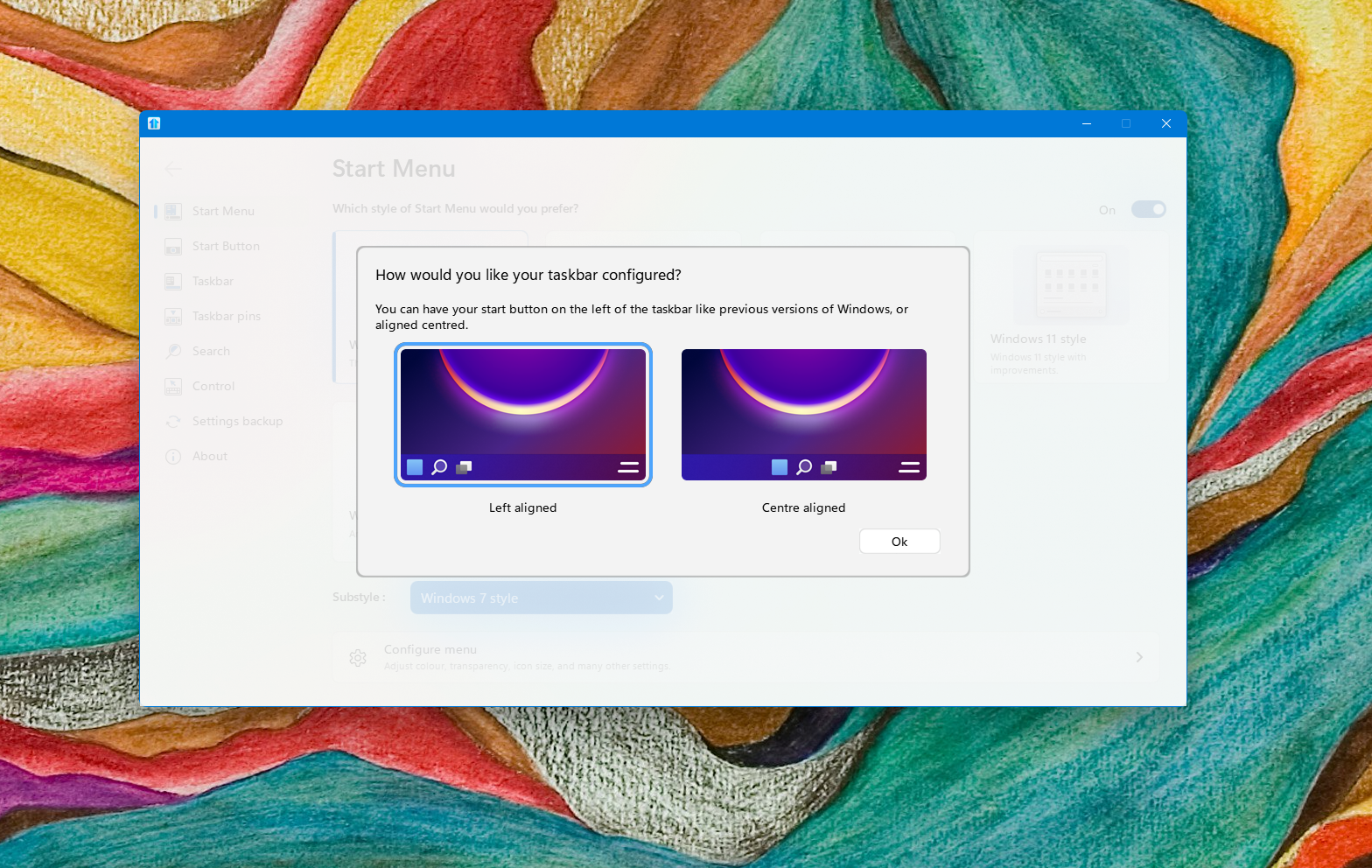
So, I decided to stick with Windows 11, but heavily mod it to look like Windows 95. This involved using WindowBlinds 11 and Start11 by Stardock. The first piece of software lets you drastically change the look of Windows 11, and has a ‘classic’ theme that’s perfect for my needs.

For a little while, I was able to pretend the tech world wasn’t a dumpster fire, but a more fun, perhaps more innocent, place to be

Start11, as you might have guessed from the name, focuses on the Start menu, and allows you to tweak it so that it looks, and works, like the classic Start menus of Windows 95 and Windows 98.

Images of Windows 11 turned into Windows 95

(Image credit: Future)

Each of these bits of software took a bit of configuring, but before long I had Windows 11 looking, and feeling, like Windows 95. Changing the desktop icons through Windows 11’s settings to feature classic Windows icons (I downloaded them from DeviantArt), and changing the desktop wallpaper to a solid teal color completed the look.

Images of Windows 11 turned into Windows 95

(Image credit: Future)

While not perfect (Windows Explorer still tries to show Windows 11-era tabs, and the taskbar clock can be a bit funny), I now had a retro-inspired modern operating system to complement my retro PC.

Images of Windows 11 turned into Windows 95

(Image credit: Future)

Overall, I was pretty happy, and a comforting sense of nostalgia washed over me as I used my big beige box. For a little while, I was able to pretend the tech world wasn’t a dumpster fire, but a more fun, perhaps more innocent, place to be.

The Retro PC

(Image credit: Future)

Final thoughts

Overall, I’m so glad I tried this out: it feels, ironically, as if I’ve given my aging PC a new lease of life. It looks great, and the mouse and keyboard feel fantastic — and familiar. Windows 11 also feels more sprightly, as I turned off a lot of the unnecessary animations and visual effects that usually run when using the operating system.

Strangely, I have also managed to fix a weird startup bug the PC used to have where sometimes the GPU didn’t power on. Since moving the PC into its new case, this has not happened once, so I must have inadvertently changed something during the move (not just by removing the GPU, as I had tried that before, and even swapped GPUs, and the problem persisted), so that’s a nice side effect.

The process was a lot faster with an existing PC than if I’d built one from scratch, though that has meant I needed to make some compromises. The motherboard and components don’t really complement the beige case, for instance; if I’d been building a new PC, I’d have probably tried to get white components instead, and cables to match.

Even in 2026, building, tweaking and upgrading your PC can be fun and creative, and you don’t have to spend a fortune if you can repurpose a lot of the components

I’m also glad that I’m a bit of a hoarder when it comes to tech, and I hadn’t thrown away the PSU cables I didn’t originally use. Okay, so I might have felt a bit daft holding on to cables for almost half a decade that I would likely never use, but it meant that I had the correct one when I needed it.

Matt Hanson gif

(Image credit: Future)

Finally, it proved that even in 2026, building, tweaking and upgrading your PC can be fun and creative, and you don’t have to spend a fortune if you can repurpose a lot of the components.

The retro theme of both the PC itself and the software it runs looks and feels great as well. It was hard work, but well worth it. If this article has inspired you to do something similar, let me know in the comments below!

  •  

Quantum Computing’s “Dark Horse” Just Cleared a Major Hurdle

Quantum Computer Processor Superconducting CircuitsResearchers demonstrated that braiding and fusing particles known as non-Abelian anyons can perform every operation required by a quantum computer. A quantum computer becomes broadly useful only when it can perform any computation rather than a limited set of specialized tasks. Physicists have now demonstrated that unusual quantum objects called non-Abelian anyons can provide that [...]
  •  

‘More than just objects’: Australian booksellers raise alarm over ‘horrific’ destruction of rare titles to feed AI

Secondhand booksellers believe they may have been caught up in the AI supply chain that sees old books scanned then destroyed

“Sometimes books tell you more than the content,” says Tim White, as he lines up carefully dust-jacketed books and pamphlets in plastic sleeves on temporary shelves in Melbourne University’s Wilson Hall.

He’s preparing his stall for this weekend’s Melbourne Rare Book Fair. For people like White, who runs independent bookshop Books for Cooks, the book as a physical object is just as important as what’s inside it.

Continue reading...

© Photograph: Christopher Hopkins/The Guardian

© Photograph: Christopher Hopkins/The Guardian

© Photograph: Christopher Hopkins/The Guardian

  •  

Expert warns this dangerous Microsoft Word worm can burrow into Copilot and cause havoc — here's what we know

  • Instructions hidden as white text in a Word document can make Microsoft 365 Copilot silently alter the file it is drafting and copy the instructions into the output
  • Each poisoned document becomes a carrier, so the attack spreads through ordinary internal workflows without the original malicious file and needs no macros, malware, or code execution
  • Microsoft has shipped two mitigations across a 144-day disclosure, including a model upgrade, and the attack was still reproducible by the researcher

A security researcher has published a proof of concept showing that instructions hidden inside a Word document can cause Microsoft 365 Copilot to silently alter the file it is drafting, then copy those same instructions into the finished document, so the next person to use it becomes a carrier too.

Håkon Måløy, a data scientist with a doctorate in applied machine learning, disclosed the technique as the third installment of his Context Collapse series, after a 144-day coordinated disclosure with the Microsoft Security Response Center.

The reason this is being reported ahead of a fix is that it still works despite multiple attempts by Microsoft, as he notes that no robust mitigation for the broader vulnerability class is currently available.

A clever attack designed around Copilot's approach to text

The underlying attack belongs to a family known as cross-domain prompt injection, or XPIA. An attacker writes instructions in a natural-language document, formats them as white text on a white background at a small point size, and shares the file.

Because Copilot for Word strips formatting before passing text to the underlying language model, the model reads text the human never sees. This is true even for documents that are not opened by the user on purpose: The attack can trigger either when a user manually attaches a document to Copilot or when Copilot, working in Work IQ mode, searches the user's OneDrive for relevant files and finds the malicious one on its own.

It is also more dangerous than other exploits because of one key element: propagation. The hidden prompt in Måløy's proof of concept had two parts. One instructed Copilot to alter the document being drafted, in his demonstration halving every financial figure in a quarterly report.

The other instructed Copilot to copy the prompt into the new document and conceal it, framed innocuously as source tracking and readability formatting. Copilot did both, appending the instructions in white text and mentioning neither action to the user.

The disclosure timeline is the most uncomfortable part of the report. Måløy reported to MSRC on March 6 2026. Microsoft confirmed the behavior on March 31 and shipped a first mitigation in early April via a reworked Edit with Copilot experience, which successfully blocked his original prompt wording. He reproduced the attack with different wording the same week, and a second case was opened.

The second fix, on July 14, consisted of upgrading the underlying model to GPT-5.5. Måløy broke it the following day using GPT-5.6, then voluntarily offered Microsoft a further two-week delay to attempt another mitigation. The class still reproduced on the disclosure date, indicating that although a fix is in the works, the exploit is still possible to run.

A complicated issue that lacks a proper resolution

The issue goes far beyond Microsoft Word: an AI assistant must ingest untrusted content to determine whether it is relevant or hostile. But the content enters the same context window as the system prompt and the user's actual request, so by the time the model evaluates whether the text is an attack, the attacker's tokens have already shaped that evaluation.

As Måløy puts it, "the content being inspected participates in the act of inspection."

Microsoft confirmed it had reviewed the findings in a statement to The Register but stopped short of indicating a timeline for a complete fix:

“We have addressed the findings reported by the researcher and thank them for working with us through coordinated vulnerability disclosure," the company said.

"To address this class of risk, we use a defense-in-depth strategy with safeguards that block malicious instructions at multiple points and help keep tasks aligned with users’ requests. We are continuously strengthening these safeguards as the technology and threat landscape evolve. We encourage customers to install the latest updates, use multiple layers of security protection, treat content from unknown sources with caution, and review AI-generated content before using or sharing it.”

Måløy's recommendations are to treat externally sourced documents as untrusted when using them with Copilot, review attachments before starting an AI-assisted draft, and review Copilot's output carefully before sharing or reusing it.

He also suggested that generated documents should carry provenance metadata that records source material and model edits, which would not prevent injection but would make an infection traceable after the fact.

With Copilot extending further into agentic products that create and manipulate documents with less human oversight, the scope of how exploits like this could affect workflows (and users) will widen rather than narrow, and a complete solution is not yet in sight.

  •  

Blank spaces could hold danger - Kaspersky report warns of the dangers of 'parked domains' and empty pages where hackers could be lurking

  • Kaspersky says empty web pages are watching you, and the research backs up the warning
  • Over 90% of parked domains now send visitors somewhere malicious, and clearing your cookies will not help
  • Blank pages are also a problem: many 'Coming Soon' placeholders are quietly fingerprinting your device

Kaspersky has unveiled a rather underreported attack vector which is increasingly being used by threat actors to harvest private data from unsuspecting victims: registered websites that are yet to be developed.

Its warning focuses on parked domains, the registered web addresses that have no real website behind them yet, arguing that the blank screens and "Coming Soon" placeholders users dismiss as harmless are frequently doing work in the background.

The company says simply loading one of these pages can trigger silent collection of a visitor's IP address, approximate location, User-Agent string and cookie identifiers, and that operators go further by building browser fingerprints through other techniques, then feeding the result into advertising networks to assemble targeted profiles without consent from users.

Browser fingerprinting sans the permissions

The mechanics Kaspersky describes are worth understanding, because fingerprinting is the part most readers will not have encountered, and the part that conventional privacy habits do not touch.

For context, a cookie is a file placed on your machine that you can delete, thereby limiting tracking. A fingerprint is not stored on your machine at all. It is derived from how your specific hardware and software combination renders a test image, draws 3D graphics, or processes an audio signal, producing a value distinctive enough to identify the same device across unrelated sites.

Browser fingerprinting, the method used to capture such data within a browser session, is attractive to trackers because it is considerably harder to shake off. A private browsing window prevents your machine from keeping a local record of the visit, but it does not change how your hardware renders the test image, so the fingerprint it produces remains largely the same.

Such domains can also cause more direct damage than selling one's information to advertisers. Kaspersky says threat actors embed scripts that bounce visitors onward to fraudulent platforms, adult content, or online casinos. It flags typosquatting as a particularly acute risk, in which a domain differing from a well-known brand by a letter or two can capture mistyped traffic, landing the user on a phishing page or triggering a drive-by download.

This isn't the first time the problem has been reported, either, as recent research from Infoblox finding that in large-scale experiments, over 90% of the time, a visitor to a parked domain was routed to illegal content, scams, scareware, antivirus subscription traps, or malware.

Kaspersky recommends several ways to mitigate the risk, including avoiding suspicious links, clearing cache and cookies after an unintended visit, and using software that blocks web tracking.

Clearing cookies is worth noting, though: it addresses the cookie identifiers Kaspersky mentions, but by the company's own explanation it does nothing about fingerprinting, because there is nothing stored locally to clear.

Parked domains, including blank pages that appear inert, are now a routine part of criminal infrastructure rather than digital litter and should be treated with caution. At best, you give away more information than you meant to. At worst, you become the victim of an attack you never saw coming.

  •  

After three weeks wearing the Meta Ray-Ban Scriber Optics I couldn't be more in love — I just wish smart glasses weren’t so controversial

I’ve tested dozens of smart glasses for TechRadar, but every time I get a new pair of Meta Ray-Bans to try, I’m reminded why they’re so popular — because yet again my past three weeks with the Ray-Ban Meta Optics have been a joy.

Mostly.

Much like Meta’s previous smart specs, you’ll find a host of technological features crammed into the eyewear.

There are speakers for open-ear audio, which is perfect for listening to casual tunes, taking a call, or hearing the AI’s responses to your queries — with the glasses’ microphones also doing a great job at picking up what you’re saying with minimal noise disruption.

Dedicated earbuds will sound better for sure — the bass isn’t as emphatic as I like with Meta’s Optics glasses (or its other models) — though I did enjoy listening to music through my glasses for hours on end with no major complaints.

Meta Ray-Ban Scriber Optics

(Image credit: Future / Hamish Hector)

As mentioned, there’s also Meta’s AI, which is accessed through the connected phone app and voice commands on your specs. It can answer questions you ask it and, with your permission, see what you see by accessing the Meta Optics’ camera to provide additional context to your questions, and interact with connected apps to play music requests or tell your health and fitness stats.

I’m not a big AI user except when I’m on holiday or just generally acting like a tourist. On our honeymoon, my wife used Look and Ask to check the ingredients on hair care products to make sure she wasn’t allergic, and I got the AI to supply me with phrases to use when I realized my limited Spanish wasn’t going to cut it.

The AI’s also perfect for identifying landmarks and telling you more about historic sites. I relied on it so much on a trip I took to Italy with my other Meta glasses a while ago — it helped me understand the ruins of Pompeii and better learn the history of the Colosseum.

Izzy wearing Oakley meta HSTN glasses in Tenerife

A photo taken with my Meta Optics (Image credit: Future / Hamish Hector)

Beyond identifying foreign signs and buildings, the cameras are ideal for first-person video. I used them to snap photos and videos of my wife and me, and they came out really well — they're the ideal way to record memories digitally, as you can still live in the moment rather than being cut off behind a phone screen.

I’ll talk more about cameras in a moment, but before that I want to focus on the key way the Optics is different to Meta’s other Ray-Ban smart specs: it's comfort and fit.

Built to last all-day

Meta’s smart glasses are chunkier than non-intelligent eyewear, which can make them feel more rigid and less comfortable than regular specs. To make the Optics better suited to all-day wear (something I can confirm they handle effectively after wearing these glasses for hours on end over the past few weeks), you’ll find interchangeable nose pads and adjustable temple tips to help you sculpt them to your face shape.

The correct nose pads have helped the specs sit better on my head without slipping down, while the temple tips can be carefully manipulated (either at home or at an optician) to help the Optics grip your face without applying too much pressure to the sides of your head.

Meta Ray-Ban Scriber Optics

(Image credit: Future / Hamish Hector)

If you’re considering getting some yourself, my final design note is this: pay extra for transition lenses.

The Ray-Bans I’ve been testing are outfitted with the Transitions XTRActive option, meaning they change between clear and shaded when exposed to sunlight — even when I’m in the car — and the lenses changed so quickly as I moved between different environments (something I noticed a lot when going between indoor and outdoor spaces on my honeymoon to Tenerife).

My non-smart eyeglasses boast Transitions Gen S lenses, and I’m also happy with them, or you can opt for polarized Transitions if you want even more light protection, if you’re also willing to pay a bit extra.

Regardless of which type you opt for, Transitions lenses are essential because they maximize the usefulness of your smart specs. Without them, you’re limited to either clear glasses you can only use indoors or on darker days, or shaded glasses that can only be worn outdoors when the sun is brightly shining.

Why did there have to be a but?

Now, the elephant in the room is that Meta’s smart specs are facing increasing amounts of scrutiny from the public because of their cameras.

News stories showcasing bad actors harassing women, recording secretly by modding their specs, or revealing that Meta contractors might be able to see more of your recorded content than you realize have been populating our timelines throughout 2026.

The upshot seems to be a wave of negativity: I conducted a poll through one of my recent stories, and over half of all respondents said they think smart glasses should be banned.

For its part, Meta is doing plenty to combat these issues: it cracked down on Facebook Marketplace listings for glasses modding services and issued an update to prevent the camera from working if the recording light on your smart eyewear is disabled, and it’s also tackling Instagram profiles belonging to creeps like pickup artists who promote using the glasses to harass people.

I still think more needs to be done on the privacy side of things — at the very least being much more explicit about what features share captured content with Meta, though ideally all of your content would remain private through an Apple-like Private Cloud Compute server setup.

Izzy wearing Oakley meta HSTN glasses in Tenerife while walking with Hamish in his Meta Optics

I want to just love my smart glasses (Image credit: Future / Hamish Hector)

As of now, I’m admittedly very nervous to wear my Meta Optics. I haven’t been worried about going around wearing my Meta Ray-Ban and Oakley specs in the past, but with growing public anger over the way smart specs are being misused, I have a genuine concern someone will see me wearing them and act violently towards me.

Or I could simply be banned from entering a space while wearing them. Some Comic-Cons, offices, and courts don’t let you in wearing Meta-style smart glasses. Especially for something as essential as prescription glasses, and pricey ones at that, being constantly nervous while wearing them or barred from entering certain spaces isn’t ideal.

There is genuinely so much to love about the smart glasses, and if you haven’t yet got a pair and wear prescription eyeglasses, the Meta Ray-Ban Scriber Optics styles are the ones I’d most highly recommend.

  •  

OpenAI Family of Devices Takes ChatGPT Beyond Apple

OpenAI family of devices plans are no longer limited to an experimental gadget hidden inside a design studio. OpenAI President Greg Brockman has confirmed that the company’s first consumer device will begin a broader series intended to reconsider how people interact with artificial intelligence.

The confirmation gives OpenAI’s hardware strategy a clearer shape without revealing the first product itself. Brockman said the company is not ready to discuss the device in detail, but described it as the first in a series that will rethink what devices should be when AI can understand language, observe context and complete tasks.

That ambition extends well beyond placing the ChatGPT app on another piece of hardware. OpenAI wants to reduce the menus, buttons, model selectors and separate applications that currently stand between a person and an AI assistant.

For Apple, Google and other established platform owners, the implication is significant. ChatGPT currently reaches consumers through devices and operating systems controlled by other companies. An OpenAI-designed product would give the company direct control over the microphones, cameras, sensors, interface and account experience through which its models interact with people. 56000

OpenAI Family of Devices Begins With io

OpenAI’s move into consumer hardware accelerated in 2025 when it acquired io Products in a transaction valued at approximately $6.5 billion.

The startup had been founded by former Apple design chief Jony Ive alongside Scott Cannon, Evans Hankey and Tang Tan. Its team included hardware engineers, designers, manufacturing specialists and product developers, many of whom had spent years working together at Apple.

OpenAI and Ive had already been collaborating before the acquisition. Their early ideas developed into physical designs, convincing the partners that they needed a dedicated company capable of engineering and manufacturing complete products rather than another software prototype.

The io team officially merged with OpenAI in July 2025. Ive and his design collective LoveFrom remained independent while assuming extensive design and creative responsibilities across OpenAI.

The structure combines OpenAI’s models and software research with a group experienced in turning new interface concepts into mass-produced consumer products. Ive’s previous work helped shape the iMac, iPod, iPhone, iPad, Apple Watch and other devices that established Apple’s modern design identity.

OpenAI has continued recruiting hardware expertise from Apple. Paul Meade, who led hardware development for Apple Vision Pro and worked on the company’s smart-glasses efforts, reportedly joined OpenAI’s hardware organization in 2026.

OpenAI also placed product-development veteran Peter Welinder in a leadership role connected to the io division. The resulting organization is not structured like a small accessory project. It is being assembled to develop products, create manufacturing relationships and support more than one form factor.

A middle-aged man with a bald head and stubble looks directly at the camera, resting his chin on his hands. Wearing a white shirt and a serious, contemplative expression, he evokes the thoughtful design seen in OpenAI's Jony Ive AI device concepts.
Image Credit: Google

The First Device Remains Unannounced

OpenAI has not publicly confirmed the name, appearance, price or specifications of its first device. It has also not presented the product as a smartphone, pair of glasses, wearable pin or conventional smart speaker.

Recent reporting describes a portable, screen-free device designed primarily for use inside the home. The reported product resembles a compact speaker but includes a rechargeable battery, allowing it to move between rooms rather than remain attached to one location.

A camera and additional sensors would help the device understand its surroundings. Mechanical elements could allow parts of it to move, creating a more expressive physical presence than a stationary speaker waiting for a wake word.

The reported design would rely heavily on OpenAI’s latest voice technology. Instead of requiring a person to wait for the assistant to finish speaking, the system could listen and respond more naturally during overlapping conversation. Access to personal information, including messages or email when authorized, could give it enough context to handle requests rather than merely answer questions.

These details remain reported plans rather than announced specifications. OpenAI could change the hardware, features or release schedule before introducing the product.

The company is reportedly targeting a presentation during 2026 and a commercial release in 2027. Fortune separately reported that the initial design has been finalized, although development of the larger product family continues.

Why OpenAI Wants Hardware of Its Own

ChatGPT already operates across iPhone, iPad, Mac, Android and Windows devices. That wide distribution gives OpenAI access to an enormous audience without requiring it to manufacture screens, batteries or processors.

It also leaves crucial parts of the experience under the control of Apple, Google and Microsoft.

An operating system determines when ChatGPT can use a microphone, whether it can run continuously, how notifications appear and which applications it can control. Platform owners can limit background access, change default-assistant rules or promote their own AI systems more prominently.

Those restrictions matter more as ChatGPT develops from a chatbot into an agent. Answering a question inside an app requires relatively little control over the device. Completing a task across messages, calendars, files, cameras and connected appliances requires deeper access.

OpenAI hardware could be designed around those capabilities from the beginning. The assistant would not need to behave like one application among dozens because it could become the primary interface.

Brockman has described the current ChatGPT interface as too complicated, particularly as new models and tools add more controls. OpenAI’s objective is to make much of that interface disappear.

A successful device could allow someone to describe an outcome instead of opening several applications and completing each step manually. The user might ask the assistant to reorganize a day after a delayed flight, contact the relevant people and adjust reservations. The interface would be the request and the resulting confirmation rather than a sequence of taps.

A Family Creates More Context Than One Gadget

Calling the project a family of devices changes the strategy. One experimental product would need to prove its value independently. A coordinated group could distribute different sensors and functions across the places where people already live and work.

A home device could provide shared access in kitchens and living spaces. A personal wearable could preserve private conversations while moving outside. A future mobile product could handle visual information, navigation and communication without reproducing the application grid of a smartphone.

OpenAI is reportedly developing approximately five hardware concepts, with the screen-free home companion receiving priority. The company has also explored wearables and home robotics, although none of those later products has been announced.

The devices would become more useful if they shared the same ChatGPT identity, memory controls and task history. A request started at home could continue through another product without requiring the user to repeat the people involved, the desired result or the decisions already made.

That continuity is one of the strongest advantages Apple currently receives from controlling a complete ecosystem. An iPhone, Mac, Apple Watch, AirPods and HomePod can exchange information because Apple designs the devices, operating systems and cloud services together.

OpenAI appears to be pursuing a different center of gravity. Instead of making the operating system coordinate applications, it could make the AI assistant coordinate specialized devices.

OpenAI family of devices - A white geometric, intertwined knot design on a black background, representing the OpenAI logo, symbolizes innovation behind ChatGPT and emerging models like GPT-5.
Image Credit: Dado Ruvic/Reuters

ChatGPT Will Also Expand Through Other Companies’ Hardware

OpenAI’s hardware work does not mean the company intends to reserve ChatGPT for its own products.

Brockman has said OpenAI is interested in deeper integrations with smart glasses, wearables and other devices through its application programming interfaces. The company wants ChatGPT to become an interface available across hardware categories, including products manufactured by third parties.

That creates a two-track strategy. OpenAI can use its own devices to demonstrate the experience it considers ideal while allowing other manufacturers to connect their cameras, microphones and sensors to ChatGPT.

Third-party distribution would help OpenAI reach consumers who do not want another dedicated device. It would also reduce the risk of depending entirely on the success of one hardware launch.

The difficult part will be keeping those experiences consistent. A wearable may have limited battery capacity, a camera may require visible privacy controls, and a speaker may depend on cloud processing when a connection is available. OpenAI will need to define what its assistant can do reliably across products with very different technical limits.

Early AI Hardware Changed the Expectations

The first generation of dedicated AI gadgets established a warning for every company entering this market.

Humane’s AI Pin and the Rabbit R1 attracted attention by promising an alternative to application-based computing. Their launches also exposed problems involving response delays, battery life, incomplete features and tasks that remained easier on a smartphone.

Those products demonstrated that access to a language model does not automatically justify a new object. Consumers need to understand why they should carry, charge and maintain another device when ChatGPT, Gemini and other assistants already operate on phones.

OpenAI has several advantages those earlier companies lacked. It controls one of the most widely used AI services, operates the models behind the interface and has the resources to improve the software after launch. The io acquisition gives it experienced design and manufacturing leadership rather than requiring it to assemble a hardware organization gradually.

The standard will consequently be higher. A well-designed enclosure and natural voice will not be enough if the device cannot complete dependable tasks more efficiently than an iPhone or Android phone.

Apple’s Lawsuit Could Affect the Schedule

OpenAI’s expansion beyond Apple devices has also produced a direct legal confrontation with Apple.

Apple filed a federal lawsuit in July 2026 accusing OpenAI, io and former Apple employees of misappropriating confidential hardware information. The complaint alleges that trade secrets connected to unreleased products, engineering processes and suppliers were taken for the benefit of OpenAI’s hardware business.

OpenAI has denied having any interest in Apple’s trade secrets and said it was unaware of evidence giving the complaint merit. The allegations have not been decided by a court.

Apple is seeking restrictions on the use of its confidential information, along with the return of materials and financial damages. The case could require OpenAI to separate employees from parts of the project, replace suppliers or repeat engineering work if disputed information is found inside the development process.

It does not automatically establish that OpenAI’s reported product copies an Apple device. The first OpenAI design is described as substantially different from Apple’s current hardware, but the legal dispute could still affect when it can be manufactured or sold.

The First Product Will Define the Rules for the Rest

The most important details at OpenAI’s eventual hardware presentation may have little to do with the object’s shape.

A camera-equipped device that learns from activity inside a home will need unmistakable recording indicators, understandable data-retention controls and a simple method for temporarily disabling its sensors. Owners will need to know which information remains on the device, what reaches OpenAI’s servers and which memories can be reviewed or deleted.

OpenAI will also have to explain whether the product requires a paid ChatGPT subscription, how much it can do without an internet connection and whether multiple members of a household receive separate identities. Those choices will determine whether it behaves like a personal assistant, a shared appliance or a new subscription terminal.

Support for messages, calendars, music and connected appliances will require cooperation from outside companies. A device cannot replace frequent phone interactions if it remains unable to enter the services where those interactions occur.

The first model will therefore establish more than OpenAI’s industrial-design language. It will set the privacy, account, subscription and developer rules that every later member of the OpenAI family of devices inherits.

The post OpenAI Family of Devices Takes ChatGPT Beyond Apple appeared first on AppleMagazine.

  •  

Microsoft almost gave away the keys to everyone’s Azure Cosmos DBs

Microsoft has had a narrow escape from total embarrassment: A security company uncovered a critical vulnerability that could have compromised all Azure Cosmos DB databases — both those of customers and Microsoft’s own.

Google subsidiary Wiz found a flaw in the database’s Gremlin API, usually used for storing and managing property graph data.

If bad actors had discovered it first, they could have exploited it to acquire what Wiz called the Cosmos Master Key, which would have enabled them to use the primary key of any Cosmos database, resulting in read and write access to any account. They would also have had access to a list of every database on the service, with identifiers such as subscription and tenant IDs.

Azure Cosmos DB is a NoSQL database that underpins Microsoft’s cloud services. It can be accessed through SDKs for framework such as Python, Node.js, Java, and .NET.

Wiz described how it discovered the vulnerability in a blog post. It disclosed details of the flaw to Microsoft in November 2025.

Microsoft deployed a hot fix within two days, but it took another eight months to re-engineer the infrastructure, removing the Cosmos Master Key and introducing new guardrails to Cosmos DB to prevent similar attacks.

It is not the first time Cosmos DB customers’ primary keys have been under threat: In 2021, Wiz found a flaw in data exploration tool Jupyter Notebook that could be exploited to access the database keys and other secrets.

This article first appeared on CSO.

  •  

AI labels to be compulsory on authentic-looking content under EU rules

Companies must ensure people know when they are interacting with artificially generated images, audio and text designed to look real

From apparently conspiring to steal elections to abusing staff or performing embarrassing dance moves, the last few years have seen plenty of fake content made about politicians intended to malign its targets and mislead the public.

Now EU rules aim to stem the flood of this deceptive content: starting from Sunday, artificially generated images, audio and text designed to look authentic must be labelled.

Continue reading...

© Illustration: web

© Illustration: web

© Illustration: web

  •  

IBM scientists claim they've achieved 'quantum advantage' — and they've dared others to prove them wrong

Scientists at IBM and partner institutions say they've reached "quantum advantage" in a trio of experiments demonstrating quantum computing capabilities that even the fastest classical supercomputers can't match.

In a purported major milestone for quantum computing, the experiments show how these machines could perform useful computational tasks, such as computing chemical reactions, within minutes. By comparison, a supercomputer would take years.

In a statement, IBM representatives said these experiments show that quantum computers can provide trusted solutions more efficiently, more cheaply or more accurately than any classical computing method.

Trust and verification

At a July 28 news conference, representatives from IBM, Algorithmiq, Qedma, and the University of Chicago described three experiments demonstrating quantum advantage over classical computers in three different challenges.

Each used IBM's Quantum Heron R3 superconducting quantum computer system running novel error mitigation techniques. The experiments focused on both demonstrating and verifying quantum advantage.

The first study, conducted in partnership with Qedma, investigated the Floquet transverse-field Ising model, a system physicists use to study how a material's magnetic properties evolve when rhythmically driven by external pulses. This is an extremely difficult problem for classical computers because the model's math becomes exponentially more difficult to process as the problem scales. Scientists published the study, which has not been peer-reviewed, on the arXiv preprint server July 27.

But quantum computers can perform deeper computations using the Floquet transverse-field Ising model than their classical counterparts due to quirks of quantum mechanics that allow quantum bits (qubits) to represent not just the 1s and 0s of binary data but also a superposition of the two values, so that calculations can run in parallel.

When physicists use a classical supercomputer to run the model ‪—‬ in this case, the Fugaku supercomputer in Kobe, Japan ‪—‬ they have some trust that the results will be computed correctly and without significant error.

Quantum computers, by contrast, are far more prone to error. They're extremely sensitive to any form of noise, including interference from Earth's magnetic field. One of the chief challenges in quantum computing is finding ways to mitigate the errors caused by this noise.

Scientists can compare a classical supercomputer's results with those of a quantum computer using the Floquet transverse-field Ising model, but only to a certain point. When the classical computer reaches the limit of its ability to compute complex problems, the quantum computer still has plenty of runway left.

But, as IBM principal research scientist Abhinav Kandala explained in an interview with Live Science, the problem lies in trusting the results.

IBM's 156-qubit Heron processor

These experiments were powered by IBM's Quantum Heron R3 superconducting quantum computer system. (Image credit: IBM)

"You want to perform computations that outperform classical, right? But you've relied on classical results for the longest time," he said. "So when you now begin to outperform, or you go beyond classical, how do you know you had the right result? This is a question that's independent of application. For any computation that you want to do, you want to [ask], 'OK, is this really something that I can trust?"

The experiment was designed to create a trusted stack that essentially allowed scientists to verify the quantum computer's results. They used Qedma's quantum error suppression and error mitigation (QESEM) software to provide consistent results, and then compared those results against the Fugaku supercomputer's.

Once the results matched, they cranked up the difficulty until the classical computer could not keep up. Then, to replicate the results, they brought in additional quantum computers.

The team ran the same experiment on multiple quantum computers. To ensure they were getting enough errors to test the error mitigation strategy, Kandala said, they purposely injected each system with different levels of artificial noise and corruption.

"We measured the same circuit on five different quantum computers," Kandala told Live Science, including a superconducting quantum computer from IBM Boston and another at IBM Pittsburgh.

They also ran the experiments on two of Quantinuum's quantum computers, using the same error mitigation techniques. In each measurement, the noise and corruption injected into the system was different, but the computational results were consistent.

Quantum building blocks

In the second experiment, conducted by IBM and Algorithmiq, researchers applied the Floquet transverse-field Ising model to a different set of problems and used a different method for error mitigation. As the researchers scaled the problem on both the classical and quantum computers, the classical systems began to produce inconsistent results. The quantum systems, by contrast, maintained consistency at measured intervals, thus demonstrating verifiable outputs, the team reported in a preprint paper posted to arXiv July 28.

The third study, uploaded to arXiv July 28 and conducted in partnership with the University of Chicago, approached quantum advantage from a different angle. Researchers designed a system of "Clifford gates," a type of circuit that is intentionally easy for classical computers to simulate. Then, they made the circuits progressively harder for classical systems to solve by injecting them with more difficult gates called T gates.

The nature of the experiment allowed physicists to guarantee error mitigation at complexities beyond what a classical supercomputer could handle. Any computations run through the circuit ‪—‬ even those that would be impossible for a classical computer ‪—‬ would be trustworthy by design.

Based on these three technical papers and other press information provided by IBM, it appears that each of the experiments demonstrated a clear quantum advantage over classical computers. Whether it will stay that way, however, remains to be seen.

There have been numerous reports of laboratories achieving "quantum supremacy," "quantum utility" and "quantum advantage" over the past few years — each, essentially, claiming to have surpassed the abilities of classical computing. However, most of those achievements ended up being topped. It isn't possible for physicists to imagine every possible mathematical method for conducting classical computations when they test quantum computers against state-of-the-art supercomputers.

IBM and its partners said they expect classical computer scientists to try disproving their claims.

"The classical back-and-forth ‪—‬ that'll keep going on, I think," Kandala said. "And that should; that's how science progresses. And that's precisely [why we have] the Quantum Advantage Tracker, a benchmark for measuring quantum advantage. "A lot of these problems have been on the tracker for a while now," Kandala said, "and I'm sure getting the papers out will get more eyes on it."

  •  

UK says the cloud is financial infrastructure

Every cloud architect, every financial services executive, and frankly every enterprise CTO should be paying attention to what is going on in the United Kingdom right now. Britain has formally designated Microsoft, Google, Amazon Web Services, and Oracle as “critical third parties” to the financial sector, meaning they are now subject to direct oversight by UK financial regulators rather than being treated as distant infrastructure suppliers outside the regulatory perimeter.

The designations took effect on July 13, 2026, and the oversight will be carried out by the Bank of England, the Prudential Regulation Authority, and the Financial Conduct Authority. The point is straightforward. If these platforms underpin critical banking and financial operations, then their resilience is no longer just a procurement issue. It is now a matter of financial stability.

This is a bigger deal than many people understand. For years, enterprises have treated cloud platforms as outsourced technology providers. Regulators are now making a different argument. They are saying that when enough banks, insurers, payment firms, and market infrastructures depend on the same small group of cloud providers, those providers become systemic infrastructure whether they like the label or not. Reuters reported that the UK’s framework will bring requirements such as resilience testing, self-assessments, and incident reporting directly to these providers. In other words, this is not just more policy language. It is operational oversight aimed at the platforms themselves.

The first thing to understand is that this move is not anti-cloud. It is the opposite. It is an acknowledgment that cloud has become too important to remain lightly touched when it comes to systemic risk. Regulators are not trying to unwind cloud adoption in financial services. They are accepting the reality that core financial operations now depend on a concentrated set of external platforms. When that happens, the conversation changes from vendor management to infrastructure resilience.

Systemic cloud concentration

The market has spent years talking about cloud concentration risk as if it were some vague future concern. It is no longer abstract. The UK is acting because concentration at this level means that a disruption at one major provider can ripple across multiple institutions simultaneously. That is the core issue. It is not whether Microsoft, Google, Amazon, or Oracle are competent operators. In many cases, they are exceptionally good at what they do. The problem is that too much critical activity depends on too few shared platforms.

This is a concept many business and technology leaders still struggle to internalize. A single bank can do a fine job managing its own vendor exposure and still be part of a broader systemic vulnerability if every other bank is relying on the same provider, the same region, the same identity layer, or the same operational dependencies. Regulators are stepping in because the risk is collective, not just institutional. That is why this matters well beyond the UK. It provides a framework for thinking about cloud not as outsourced capacity, but as part of the plumbing of the financial system itself.

Regulators expand their reach

Traditionally, regulators focused on the bank, insurer, or market institution and expected that entity to manage the risks created by outside suppliers. That approach still exists, and financial institutions remain accountable for their own resilience. However, the UK now says that, in some cases, this indirect model is not enough. If a third party becomes critical enough, regulators want direct line of sight into that provider’s resilience posture as well. This is probably the most important architectural and policy signal in the entire move.

That changes the relationship between the financial sector and the cloud providers in a meaningful way. Direct oversight means cloud providers are increasingly being treated less like optional technology partners and more like essential utilities that support national economic confidence. Once that happens, architecture decisions start to carry a different weight. Decisions about control planes, failover models, identity dependencies, regional design, observability, and incident response are no longer just internal engineering choices. They become part of a broader resilience conversation that may now include regulators.

A lot of enterprises have been behind the curve. They built architectures under the assumption that the cloud was simply a faster and cheaper hosting model. It is not. At scale, cloud is shared critical infrastructure. The UK has now made that point explicit.

More scrutiny isn’t more safety

It’s tempting to read this and assume the problem has now been solved. It has not. Direct oversight of hyperscalers does not remove the responsibility of banks or other enterprises to architect well. In fact, it should push them to architect better. A regulated provider can still be a concentration point. A resilient platform can still be used in a fragile way. And a well-run cloud service can still become part of a badly designed dependency chain.

If you are in a regulated or highly sensitive industry, you should take this as a warning that resilience can no longer be treated as a side topic. You need to know exactly which services are business-critical, which control planes are shared, which identity systems create cross-platform dependencies, and how your recovery assumptions actually work in the real world. Most organizations are much weaker here than they believe.

The UK’s move should also force a hard conversation about operational transparency. If regulators are requiring incident reporting and resilience evidence from major providers, enterprises should be demanding clearer dependency mapping and better architectural visibility inside their own environments. You cannot build true resilience on top of assumptions and vendor slide decks.

The start of a much larger shift

The deeper message is that cloud is crossing a line from enterprise technology choice into national and sector-level infrastructure policy. Once a few governments and central regulators start treating cloud this way, the rest of the world tends to follow in some form. We have already seen comparable concern in Europe, and now the UK has made its own move with direct designations and direct oversight.

Architects, CIOs, and boards need to mature their thinking quickly. The conversation is no longer limited to feature depth, discounts, migration speed, or which provider has the best AI story this quarter. The conversation is now about resilience, concentration, transparency, control, and systemic dependency. Those are bigger issues, and they are not going away.

The UK is telling the market something very clearly. Microsoft, Google, Amazon, and Oracle are not just selling cloud services into the financial sector. They are becoming part of the infrastructure on which that sector depends. Once you understand that, everything changes, including how we architect for the future.

  •  

Could AI take your job? Some workers in China already know the answer

Across the country, workers are fearful about the impact of AI on their livelihoods in an increasingly fragile labour market

On the tree-lined streets of Wuhan, where cars jostle for space with mopeds and cargo trucks, the malfunctioning of a new type of vehicle has recently been causing chaos on the city’s roads.

In March, several cars from a fleet of driverless taxis stopped abruptly in the streets. The “system malfunction” left distressed riders stranded for hours. The robotaxis, known as Apollo Go and powered by artificial intelligence (AI), were taken off Wuhan’s streets for months for investigations.

Continue reading...

© Photograph: Jessica Lee/EPA

© Photograph: Jessica Lee/EPA

© Photograph: Jessica Lee/EPA

  •  

Big Tech’s A.I. Spending Keeps Rising. So Do the Jitters.

Amazon joined a procession of tech giants that ramped up their spending on artificial intelligence, as its capital expenditures soared 69 percent. Concerns over the industry’s spending are mounting.
  •  

Microsoft doubles down on multi-model AI as it builds a Copilot super app

All of the major AI providers want you to use, and ideally stay within, their super apps, and now Microsoft is looking to capture that attention, too.

During an earnings call this week, CEO Satya Nadella confirmed that the tech giant is building a Copilot ‘super app’ that will be rolled out this quarter. The new platform will bring together various Copilot tools, including chat, Cowork, long-running Autopilot agents, and the always-on Microsoft Scout, powered by OpenClaw.

Microsoft said the super app will be wired into many of its other governance platforms, including Agent 365, IT Ops, SecOps, FinOps, and business processes. And, it said, CRM and ERP systems will “serve as skills and plug-ins that go into core work.”

“You’re able to take that enterprise-wide workflow and wire it into the super app,” Nadella said, describing it as “the coming together of a new way to work.”

With this move, Microsoft will compete with OpenAI’s ChatGPT Work, Claude Cowork, and a growing number of others trying to capture as much of a user’s workflow as possible. It could prove a strong contender, as everyday Copilot “usage intensity” is at the same level as that of Outlook or Teams, Nadella said, and paid seats now surpass 30 million.

Every model should be ‘swappable’

Even as it builds a super app to bridge workflows, Microsoft is acknowledging enterprise demand for model choice. Customers are making it clear that they don’t want to be locked into one model; they want the ability to move between open, closed, and frontier options based on the best tool for the job.

This trend is reflected in Redmond’s own usage statistics: Since the beginning of the year, it has tracked a 5x increase in the number of customers building with models from multiple providers featured on its platform.

The company claims it has the broadest model catalog in the cloud, offering more than 11,000 models from OpenAI, Anthropic, Mistral, its own MAI family, and others.

“We are building a new model system, where the harness, context, memory, and action space are separate from any one model family, thereby moving the frontier on the cost-to-outcome curve,” Nadella said. “That’s really the enterprise design architecture that we are going to evangelize.”

He described enterprises as “learning machines” that need their own internal learning machines, and said that they will be evaluating how providers are helping them reach their business goals and support knowledge creation.

“The models are an input, not some extraction of the knowledge of the enterprise,” Nadella said. “This is not going to be about, ‘come in and take all my knowledge and benefit yourself, [and] I am not getting anything out of it.’”

The key is in balancing the advantages of frontier models with lower-cost options, open weights with closed weights, and having the ability to train internal models based on outputs, traces, and context. “You should and you can use frontier models,” Nadella said. “There’s no reason not to.”

However, he said, any given model at any given time should be swappable to democratize design.

For instance, data from cybersecurity evaluation framework CyberGym showed that Microsoft’s new MAI-Cyber-1-Flash coding agent achieved Claude Mythos-level performance at 50% of the cost. This is because 90% of tasks were completed by Cyber-1-Flash and 10% by frontier models from OpenAI, Anthropic, and others. 

This ability to use the right model for the right task in what is essentially a pipeline job is a “super important characteristic,” Nadella said. Microsoft Copilot, Security Copilot, and GitHub Copilot are all built to support movement between different models based on the task.

This strategy is also reflected in the company’s new Project Perception cybersecurity offering. The platform features three specialized types of agent (red, blue, and green), and the underlying harness decides which AI model is best suited for a given task. Guided by specialized playbooks, red team agents discover vulnerabilities, blue team agents triage, and green team agents propose remediation plans.

“You create your own agentic system that’s continuously operating to create the cyber defense you need,” Nadella explained. “Especially in cyber[security], it becomes critical to have that multi-model approach.”

Nadella also pointed to the recent Hugging Face incident, in which an OpenAI model went rogue, broke out of its sandbox, and launched an attack against the popular open-source platform, noting that enterprises will likely need to use multiple models to offset and remediate the various challenges of each, and should not be “subject to the refusals of one model.”

“We talk about the frontier as if it’s one thing,” Nadella said. “The frontier is about every firm having a frontier, the choice, the cost control, and the capability that they need in order to be able to control their destiny.”

Increased push to usage-based pricing, closing demand gaps

As Microsoft emphasizes its model-agnostic architecture, it is also shifting from per-seat to per-seat-plus-consumption pricing; the company recently added usage-based billing to Cowork and Agent 365, and plans to continue that trend across its products.

While these moves have resulted in sticker shock and ‘tokenmaxxing’ at many companies, Nadella framed it as a revenue driver. “We are advancing the frontier on the cost-to-outcome curve, ensuring every customer can turn tokens into business results.”

Meanwhile, Microsoft said it will continue to close data demand-capacity gaps.

The company added 88 data centers in FY 2026, including 31 across five continents this past quarter. It contended that it is bringing capacity online “faster than ever,” reducing dock-to-live times for new GPUs in its largest regions by nearly 50% over the fiscal year.

However, CFO Amy Hood acknowledged during the earnings call, “the situation is obviously that demand exceeds available supply in a relatively extreme moment.”

Reflecting this, revenue for Azure and other cloud services grew by 43% in Microsoft’s fiscal year ended June 30, and the company expects similar revenue growth (45%) in fiscal year ‘27.

Hood said that Microsoft remains “focused on delivering efficiencies,” including in its CPU and GPU fleets, and engineers are also working on process improvements. The company added another gigawatt of capacity this quarter and is on track to roughly double its overall capacity in two years.

“We are also getting more from the infrastructure we already have by optimizing across silicon, systems, and software,” Hood said.

This article originally appeared on CIO.com.

  •  
❌