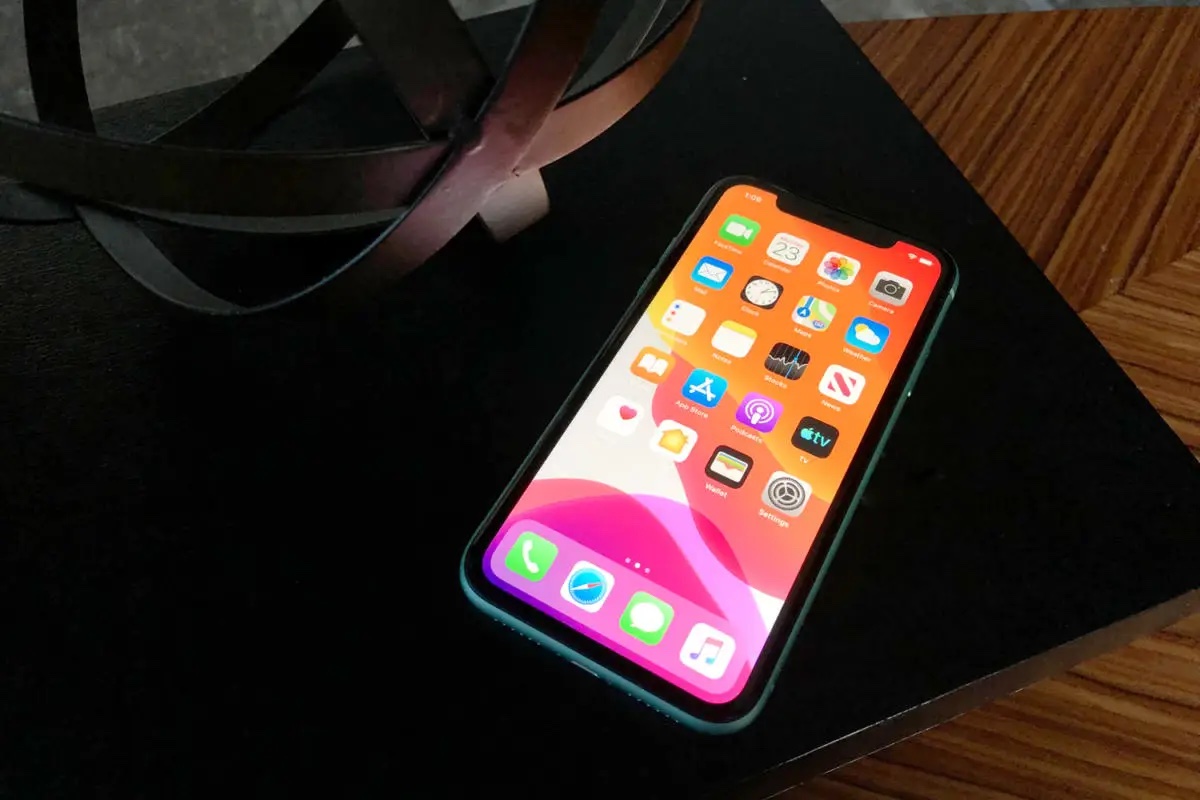
It happens every time: Just before major OS releases, the tech web is flooded with how-to and tips articles. The MacVoices Live! panel looks at why and how you can benefit, including how that flood can offer guidance when new operating systems arrive. The discussion then turns to the Mac App Store allowing developers to […]
The MacVoices Live! panel explores some of the useful new macOS Golden Gate features, including AI-assisted Shortcuts and improved iPhone Mirroring. They debate the emerging iPhone Duo and foldable-phone market and why one would prefer to give the new foldable a try. The value of AppleCare’s new family coverage plan is also reviewed for with households with many devices, and as an option for an individual. T-Mobile’s fee for iPhone Handoff, and GM’s decision to retain CarPlay in gas-powered vehicles wrap up this session.
The MacVoices Live! panel shares first impressions of iOS 27 and Apple’s latest operating system updates, covering stability, performance, interface changes, Apple Pay, Weather, Vision Pro, and upgrade strategies. The discussion then turns to the new Apple Watch Live Rewind feature that will be coming later this year. How the assistive feature will work, its privacy safeguards, and accessibility benefits spark a debate that touches on, recording concerns, social implications, and whether controversy could threaten the feature’s future.
La inteligencia artificial está permitiendo avances biomédicos impensables. El análisis de la expresión genética en sangre de pacientes con esclerosis lateral amiotrófica (ELA) mediante estas tecnologías han revelado una firma molecular única para la enfermedad, independiente del Parkinson y del Alzheimer. La importancia de este hallazgo radica en su viabilidad clínica: a partir de complejos datos biológicos permite descubrir genes específicos que actúan como potenciales biomarcadores de diagnóstico.
El conocimiento actual sobre los mecanismos celulares y moleculares que intervienen en la cicatrización de heridas todavía es limitado. Los resultados de una investigación sobre estos mecanismos muestran que el proceso es más complejo de lo que se creía, ya que involucra la interacción de células, genes, sistema nervioso y microbiota y aún presenta importantes incógnitas en caso de heridas crónicas, o cicatrices patológicas. Estos hallazgos refuerzan la necesidad de nuevas terapias adaptadas a los distintos problemas de cicatrización.
La reducción de peso en los vehículos es una prioridad global para disminuir las emisiones de CO2 y mejorar la eficiencia energética. Un nuevo estudio evalúa el uso de tecnologías de moldeo por inyección microcelular combinadas con fibras largas de vidrio para obtener espumas de polipropileno, componentes plásticos más ligeros que tienen una rigidez superior a los materiales convencionales y reducen el impacto ambiental en un 17 %.
Nuove analisi digitali di un'antica iscrizione suggeriscono che Meretneith, vissuta circa 5.000 anni fa, potrebbe aver governato l'Egitto come una vera sovrana durante la Prima Dinastia.
Los fósiles de Mandrasuchus milleri revelan que los primeros representantes del linaje de los aligátores ya prosperaban en Norteamérica pocos cientos de miles de años después de la gran extinción.
Apple released watchOS 27 on September 14, bringing a new Audio Intelligence feature set to its latest Apple Watch models, but as a result, owners of previous models are set to lose out doubly in the process.
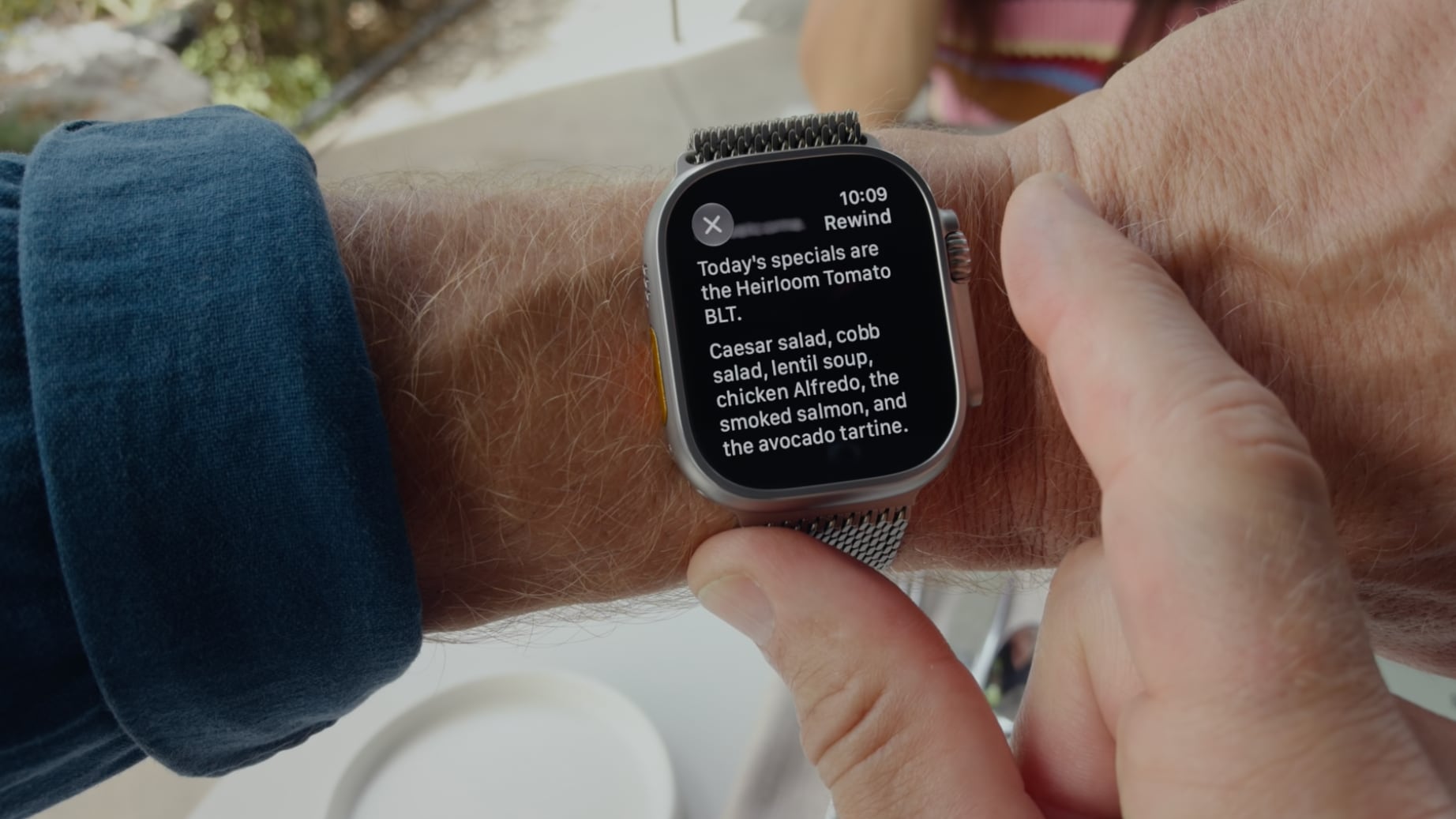
Apple Watch Series 12 and Ultra 4 models later this year will get Live Rewind, a feature that provides a transcript of any spoken audio that was picked up by the device in the last 15 seconds. To activate the feature, users need to double-click the Digital Crown.
Unforunately, this double-click action is the same one that in watchOS 26 switches between the current app and the previously used app – or indeed the watch face and the last used app.
It's a neat way of multitasking on your Apple Watch without tapping the display.
Needless to say, this feature will no longer work for anyone upgrading to Apple Watch Series 12 and Ultra 4 models when the devices are released on September 18. Apple has reserved the double-click action for when its new Live Rewind feature is activated later this year.
However, what's arguably more frustrating is that owners of older Apple Watch models who update to watchOS 27 will also lose the ability to jump between apps using the Digital Crown double-click.
After updating to watchOS 27, the Digital Crown double-click no longer works to switch between apps. All it does is bring up the new dynamic app grid, which is the same behavior that a single click offers. This is despite the fact that the new Live Rewind feature is hardware-bound to the Apple Watch Series 12 and Ultra 4. Owners of previous models are simply out of luck in both senses, losing a useful function while also missing out on the new feature that usurps it.
It also throws up another problem for new Series 12 and Ultra 4 owners: What if people don't want to go near the Live Rewind feature and its privacy implications? Apple could have made the double-click action work to switch between apps as it does in watchOS 26, while also providing an option to assign the action to Live Rewind if that's preferred.
Apple currently doesn't provide options to resolve the situation for either group of users, so all we can do is provide feedback to Apple and hope the company hears enough demand for it to change course in watchOS 27.1 or a later update.
Pre-orders for the Apple Watch Series 12 and Ultra 4 are available now ahead of a Friday, September 18 launch.
Na China, marcas como Huawei, Xiaomi, Honor e Vivo já disputam um mercado onde os dobráveis estão longe de ser uma novidade. Para o iPhone Duo, o desafio será diferenciar-se das rivais e transformar a dimensão do ecossistema da Apple numa vantagem, sobretudo através das aplicações, apontam os analistas da Omdia.
Lionsgate has released an action-packed trailer for The Hunger Games: Sunrise on the Reaping—a sequel to 2023’s Ballad of Songbirds and Snakes and a prequel leading into the events of the first film, The Hunger Games (2012). In addition, Laika Studios released a trailer for its highly anticipated stop-motion animated feature, Wildwood.
(Some spoilers for The Hunger Games below.)
The main protagonist is a young Haymitch Abernathy, future District 12 mentor to Katniss (Jennifer Lawrence) and Peeta (Josh Hutcherson). Woody Harrelson’s older Haymitch is a fan favorite who later becomes a jaded, drunken (yet secretly hopeful) cynic. Per the official synopsis:
The first, FEX, is Valve's port of fex-emu, an open source project that emulates x86 processor instructions on an Arm chipset. Since 2018, what started as a small cross-platform emulation project has grown to include "an advanced binary recompiler that supports all modern extensions of the x86(-64) instruction set," according to the Fex website. The emulator can also make calls to graphics libraries like OpenGL and Vulkan to reduce overhead and uses "code caching to minimize stuttering as much as possible," according to Steam's own developer documentation.
While Proton was based on the pre-existing Wine conversion tool, Valve engineer Pierre-Loup Griffais told The Verge last year that the company has been funding Fex lead developer Ryan Houdek since the project was just a prototype. Back then, Valve was already anticipating that "close to a decade of work [would be] needed before [Fex-emu] would be robust enough people could rely on it for their libraries."
España ha recibido una primera notificación inquietante: un agente de inteligencia artificial habría ejecutado distintas fases de una brecha de datos. Entender qué hizo por su cuenta exige aclarar primero qué significa realmente “autónomo”.
Widow’s Bay has turned its first season into one of the most decorated comedy debuts in Emmy history, collecting 14 awards at the 78th Primetime Emmy Awards and giving Apple TV its biggest awards performance for a single series this year.
The comedy-horror series won Outstanding Comedy Series alongside major acting, writing, directing, casting, cinematography, music, production design, and sound honors. Its 14 victories also set a record for the most Emmy wins by a comedy series in a single season, surpassing the benchmark established by The Studio a year earlier.
The sweep came after Widow’s Bay entered the awards cycle with 19 nominations. Apple finished the 2026 Emmys with 29 awards overall, with Widow’s Bay accounting for nearly half of the total.
Image Credit: Apple Inc.
Widow’s Bay dominates the major Emmy categories
Matthew Rhys won Outstanding Lead Actor in a Comedy Series for his performance as Mayor Tom Loftis, the well-intentioned but frequently overwhelmed leader of a remote New England island community.
Kate O’Flynn won Outstanding Supporting Actress in a Comedy Series, while Stephen Root took Outstanding Supporting Actor. Betty Gilpin had already secured Outstanding Guest Actress during the Creative Arts Emmys.
Creator Katie Dippold won Outstanding Writing for a Comedy Series for the premiere episode, while Hiro Murai received Outstanding Directing for a Comedy Series. The Television Academy also recognized Murai as the first Asian director to win the comedy directing category.
Those awards gave the show victories across nearly every major creative discipline involved in building the series. Widow’s Bay also received Emmys for production design, casting, cinematography, original dramatic score, music supervision, sound editing, and sound mixing.
The breadth of the wins is notable because the show was not carried solely by one high-profile performance or writing prize. Acting, directing, writing, visual design, music, and technical execution all received separate recognition.
Apple says Widow’s Bay also earned more performance awards than any other series at the 2026 Emmys.
Widow’s Bay found a distinctive balance between horror and comedy
Created by Dippold, Widow’s Bay follows Tom Loftis as he tries to transform an isolated island town into a viable tourist destination despite warnings from residents that the community is cursed.
The premise initially plays on civic frustration and small-town politics. The island has unreliable connectivity, a skeptical population, and a mayor determined to prove that local superstition is holding economic development back. As visitors begin to arrive, the supernatural stories that Loftis has dismissed start becoming harder to explain away.
That structure allows the series to operate as both a character comedy and a genuine horror story rather than treating supernatural events simply as setups for jokes.
Dippold, whose earlier work includes The Heat and Ghostbusters, serves as creator, showrunner, writer, and executive producer. Murai, known for visually distinctive television work including Atlanta, directs and executive produces.
The executive-producing team also includes Carver Karaszewski, Claudia Shin, and Rhys.
Apple and Television Academy records list Apple Studios and Chum Films among the production companies behind the series. The directing roster extends beyond Murai to Ti West, Sam Donovan, and Andrew DeYoung.
The main cast includes Rhys, O’Flynn, Root, Kingston Rumi Southwick, Kevin Carroll, and Dale Dickey.
Image Credit: Apple Inc.
A debut season becomes an awards benchmark
Widow’s Bay premiered globally on Apple TV on April 29, 2026. The first two episodes were released together before the remaining episodes arrived weekly.
Its Emmy performance places the series alongside a growing run of Apple comedies that have performed strongly with Television Academy voters.
Ted Lasso previously won Outstanding Comedy Series, followed by The Studio in 2025. Widow’s Bay gives Apple consecutive wins in the category and its fourth Outstanding Comedy Series victory across the past six Emmy ceremonies.
Apple also became the most awarded network at the 2026 Emmys with 29 wins. Pluribus contributed six, including awards for Rhea Seehorn and creator Vince Gilligan, while Margo’s Got Money Troubles and Palm Royale each received three.
Slow Horses won for directing, and Mr. Scorsese received Outstanding Documentary or Nonfiction Series.
For Widow’s Bay itself, the 14-win total is especially significant because this is the show’s freshman season. The Television Academy confirmed six of those awards during the main September 14 telecast, while eight had already been announced during the Creative Arts ceremonies.
The combination took Widow’s Bay beyond The Studio’s previous record for a debut comedy and established a new single-season high for the category.
Matthew Rhys adds another unusual Emmy milestone
Rhys had an especially unusual night beyond his Widow’s Bay victory.
In addition to winning Lead Actor in a Comedy Series, he received another lead-actor Emmy for Netflix’s The Beast in Me in the limited or anthology series or movie category, making him the first performer to win two lead acting awards in different categories during the same Emmy year.
His Widow’s Bay performance is deliberately restrained compared with the increasingly strange circumstances surrounding Loftis. Rather than treating the island’s supernatural events as an invitation to broaden the comedy, Rhys largely plays the mayor as someone trying to maintain a rational civic response while the situation deteriorates.
That tonal approach runs through the rest of the production. Root and O’Flynn’s supporting performances received individual recognition, while Murai’s directing and Dippold’s writing awards reinforced how closely the series depends on maintaining tension without losing its comic rhythm.
All 10 episodes of the first season are currently available to stream on Apple TV. With the Emmy campaign complete, the show now carries a benchmark that future comedy debuts will be measured against: 14 awards from 19 nominations, capped by Outstanding Comedy Series and wins across nearly every part of the production.
Apple released macOS 27 Golden Gate on September 14, 2026, but development hasn’t stopped. Just two days later on September 16, Apple issued the first developer beta of macOS 27.2, beginning testing of the operating system’s next major point update. Yes, that’s macOS 27.2, not macOS 27.1.
The macOS 27.2 beta gives developers and testers early access to Apple’s latest fixes, refinements and any features that weren’t ready for the initial Golden Gate release.
However, as with any beta software, it may introduce bugs, compatibility problems and poorer battery life so we recommend caution if you wish to install it.
Here’s everything you need to know about the latest macOS beta, including what’s new, when the next public beta is likely to arrive and whether you should install it.
What’s the latest macOS beta?
Apple offers two beta streams: a developer beta and a public beta. The public beta allows enthusiasts and early adopters to test upcoming changes before they are released to everyone. You need to join Apple’s Beta Software Program to access it.
The latest Mac beta is macOS 27.2 beta 1, which Apple released to registered developers on September 16, 2026. It arrived two days after the public release of macOS 27 Golden Gate.
The corresponding macOS 27.2 public beta is expected shortly. Public betas usually follow developer betas, although Apple does not guarantee a particular schedule.
macOS 27 Golden Gate beta version tracker
Apple released macOS 27.2 Golden Gate Developer Beta on September 16, 2026.
The macOS 27.2 Golden Gate Public Beta should be released sometime the same week; new versions are usually released a day or two after the new developer beta.
macOS 26 Tahoe beta: Apple may continue updating macOS 26 Tahoe with security and maintenance releases, but macOS 27 is now the current operating system and the focus of Apple’s beta program.
macOS 27 Beta timeline
Release
Date
Beta 1
June 8, 2026
Beta 2
June 22, 2026
Beta 3
July 6, 2026
Beta 3 v.2
July 13, 2026
Beta 4
July 20, 2026
Beta 5
August 10, 2026
Beta 6
August 17, 2026
Beta 7
August 24, 2026
Beta 8
August 31, 2026
Release Candidate 1
September 9, 2026
Public Beta 1
July 13, 2026
Public Beta 2
July 22, 2026
Public Beta 3
August 11, 2026
Public Beta 4
August 17, 2026
Public Beta 5
August 24, 2026
Public Beta 6
August 31, 2026
Final Release
September 14, 2026
macOS 27.2 developer beta 1
September 16, 2026
What’s new in the latest beta?
New features in macOS 27.
Foundry
Apple has not announced any major consumer-facing additions in macOS 27.2 beta 1. The following changes are expected though:
Bug fixes and performance improvements: Addressing issues in the first release of macOS 27.
Additional Siri AI languages: Apple has said the Siri AI will expand to French, Japanese, Korean, Portuguese and Spanish in October.
Automatic password changes: The promised feature that automatically changes compromised passwords has not yet been implemented, but it could arrive in macOS 27.2..
Notify Me in Safari: The Safari feature that monitors webpages may arrive in the beta of macOS 27.2.
We’ll update this section as changes are discovered.
Installing the macOS beta lets you test Apple’s next round of features, fixes and refinements before their public release. Most Mac users should remain on the standard version of macOS 27, particularly if they rely on their Mac for work.
Install if…
You need to test apps
You want early access to new features
You have a secondary Mac available
Wait if…
This is your primary work machine
You rely on niche or specialist software
Stability is critical to your workflow
Who are you
Should you install?
A developer testing apps
Consider the developer beta
An enthusiast with a spare Mac
Consider the public beta
General user with one Mac
Stay on macOS 27
What are the risks of installing beta software?
Installing pre-release software on a primary device carries several risks.
System instability: Performance problems, freezes, crashes, and other unexpected behavior are common during beta testing.
App failures: Third-party applications may crash, behave unpredictably, or stop working entirely.
Hardware strain: Early beta builds can increase battery drain and cause Macs to run hotter than usual.
Data loss: Software bugs may corrupt files, and downgrading to a stable version often requires a complete system reset.
Safety precautions and best practices
If you decide to install the beta, take the following precautions:
Use a secondary device: Avoid installing beta software on your primary Mac or on any machine used for critical work.
Create a full backup: Use Time Machine to create a complete backup before upgrading so you can restore your Mac if something goes wrong. Note that this needs to be a Time Machine backup from before the beta was installed and you will lose anything saved subsequently.
Check storage space: Make sure you have at least 15GB of free storage available before beginning the installation.
How to install the macOS beta
Foundry
The process for installing a macOS beta depends on whether you are seeking the Developer Beta or the Public Beta. Apple simplified this process a few years ago, removing the need for a paid developer account to access early builds.
You will need to register your account either as a public beta tester or as a developer in order to enable beta updates on your Mac.
To install the beta follow these steps:
Back up your Mac: Before installing any pre-release software, it is critical to prepare your Mac to avoid data loss. Beta software is inherently unstable and can cause crashes or app compatibility issues.
Register your account either as a public beta tester or as a developer in order to enable beta updates on your Mac: For the Public Beta: Visit the Apple Beta Software Program website, sign in with your Apple ID, and agree to the terms. For the Developer Beta: Register as an Apple Developer on Apple’s website, download the Apple Developer app from the App Store, sign in with your standard Apple ID, and complete the free registration process.
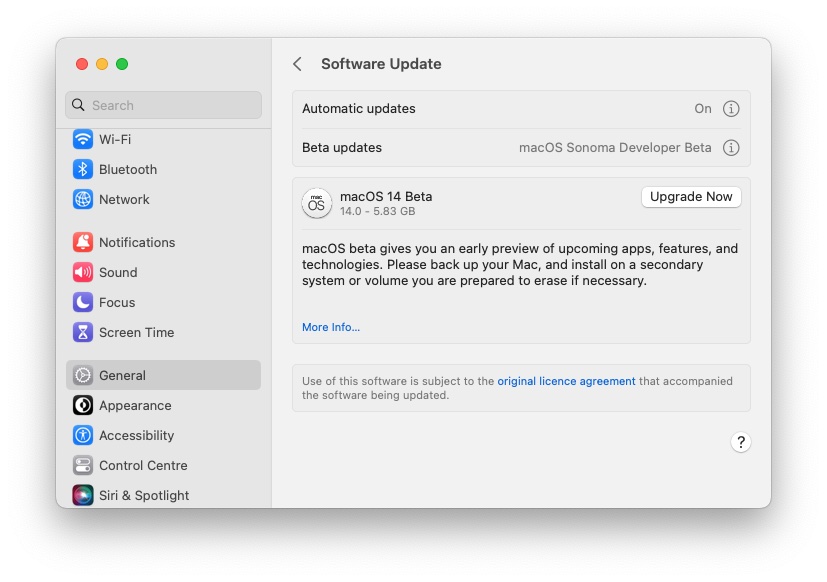
On the Mac where you wish to install the beta, open System Settings and navigate to General > Software Update.
Click the (i) info button next to Beta Updates.
Enable Beta Updates.
The beta will appear as an available upgrade. Select the macOS beta you want to install (e.g., macOS Public Beta or Developer Beta).
Click Upgrade Now to begin the download and installation.
As long as you are a registered developer or enrolled in the public beta program, when the relevant macOS Beta becomes available, it will also show up on your Mac.
Once you are running the beta, the updates will come through to your Mac automatically; you just need to go to Software Update in System Settings and click to install. See How to install macOS.
How to get a free Apple developer account
If you just want a free Apple Developer account so you can access the beta, you can get this via Xcode or the Apple Developer app in iOS. Here’s how to do it via the Apple Developer app on an iPhone:
If you wish to actually publish applications to the App Store or receive support, you’ll need to pay $99/£79 per year for a paid account. You can compare the free and paid accounts here.
FAQ
1.
Who can run the macOS beta?
Anyone can run the macOS beta, but to do so, you do need to register for either the developer beta, the public beta, or both.
Apple offers both developer and public beta programs for macOS, enabling all interested users to test pre-release versions of the operating system. While both betas provide early access to new features, they cater to different user profiles based on technical expertise and risk tolerance. Beta software tends to be buggy so the more stable public beta version may be preferable, but even that will not be bug-free.
In the past, the developer beta was only available to developers who had paid to join Apple’s Developer Program (which costs $99/£79). However, for a couple of years now, Apple has opened up the developer beta to registered developers with free developer accounts. We explain how to get a free developer account below.
Since 2023, the Developer Beta has been available to anyone who registers as a developer, even if they aren’t a paid-up member of Apple’s Developer Program. As a result, people with a basic free developer account can download the new macOS developer beta (we show you how to register below).
Whether you should download the developer beta if you aren’t a developer is another question. We don’t recommend you install the developer beta if you aren’t a developer. Instead, our recommendation is to use the public beta (the first version of which usually arrives in July).
There are a few differences between the public and developer betas. The public beta is not the same as the beta that is released through the developer program. The public beta typically launches after the developer beta has undergone initial testing and refinement
Developers get updates to their beta first, and possibly more frequently. But you should keep in mind that betas are by nature not stable, and because the public beta comes after the developer beta it could be a little safer to install.
The most significant difference is probably the motive of the testers: Developers usually have the aim of ensuring their apps work when the updated macOS is released to the general public, while public beta testers are essentially helping Apple detect bugs and offering feedback on the features. Because of this, developers may get to test new features not available in the public beta.
If you want to get the public beta the first thing you need to do, if you haven’t already, is join Apple’s beta programs read this for more information: How to become an Apple beta tester.
3.
Is the macOS beta stable?
By its nature, a beta has the potential to be unstable. Therefore, it’s not advised that you install it on a Mac that you rely on. If you have a second Mac that isn’t mission-critical, then install it there. We strongly recommend that you don’t risk all by putting the macOS beta on your primary Mac, especially not in the early days of the beta development.
If you don’t have a second Mac, there are a couple of ways you could run macOS beta on your Mac without running the risk of losing data or finding your Mac stops working:
Update your software: We recommend you have the latest full version of macOS installed, although Apple says that the macOS Developer Beta Access Utility requires macOS 10.8 or later.
Make space: We’d recommend at least 25-30GB of available space because the macOS betas tend to be very large. If you end up requiring more space, read: How to free up space on Mac. Note that we always recommend that you have at least 10% space free on your Mac at any time, so if you don’t have that, expect problems!
Should you come across an error or a bug, you should use the Feedback Assistant app to provide feedback to Apple. Launch the app and follow the appropriate steps, selecting the area about which you’re providing feedback and then any specific sub-area. Then describe your issue in a single sentence, before providing a more detailed description, including any specific steps that reproduce the issue. You’ll also be able to attach other files.
You’ll also have to give permission for the Feedback Assistant app to collect diagnostic information from your Mac.
It won’t always be obvious whether something is a bug or just not as easy to use as you might have hoped. Either way, if your feedback is that something appears to work in an illogical way, Apple will want to know that.
If you are having trouble with a third-party app, you can let Apple know by reporting it through the 3rd-party Application Compatibility category in the Feedback Assistant. However, we’d suggest that you also provide feedback to the app’s developer, who will no doubt be grateful.
6.
Will I be able to update from macOS beta to the final version?
Beta users can move to the finished release once its build is newer than – or equivalent to – the beta installed. Read: How to leave the macOS beta.
7.
Can I talk about the beta publicly?
According to Apple and the license agreement all beta testers must agree to, the beta is “Apple confidential information”. By accepting those terms, you agree not to discuss your use of the software with anyone who isn’t also in the Beta Software Program. That means you can’t “blog, post screenshots, tweet, or publicly post information about the public beta software.”
However, you can discuss any information that Apple has publicly disclosed; the company says that information is no longer considered confidential.
8.
How to downgrade from the macOS beta
You can always revert to an earlier version of macOS, though depending on how you back up, it’s not necessarily a painless process.
Start by making sure the data on your drive is backed up, then erase the drive and install the latest public version of macOS. When you first start up your Mac, you can use the Migration Assistant to import your data from the backup. Here’s a more detailed tutorial on downgrading from the macOS beta and we also have a tutorial on downgrading to an older version of the Mac OS.
9.
Is the beta free to download?
Yes, the macOS beta is free to download for both developers and the general public. Apple offers two distinct tracks for testing pre-release software: the Developer Beta and the Public Beta, both of which are now accessible without a paid subscription.
10.
Can I go back to the stable version?
Yes, you can go back to the stable version of macOS from a beta, but the complexity of the process depends on whether the final version of that software has been released yet.
If you are running macOS 27.2 beta and want to return to the current public release of macOS 27, simply turning off Beta Updates will stop future beta installations, but it will not immediately downgrade the Mac. To return before Apple releases an equivalent public build, you may need to erase the Mac and reinstall macOS, then restore data from a backup made before installing the beta.
11.
Should I install the beta on my main Mac?
Installing a macOS beta on your primary computer is generally not recommended due to the inherent risks of using unfinished software. While beta programs offer early access to new features, they are designed for testing and often contain significant bugs that can disrupt your daily workflow.
12.
Do I need an Apple Developer account to install the beta?
You do not need a paid Apple Developer account to install the macOS beta. While access to developer betas was previously restricted to those paying a $99/£79 annual fee, Apple changed this policy in 2023 to allow anyone with a free developer account to access these builds. Alternatively, you can join the Public Beta program, which is also free and accessible to anyone with a valid Apple ID.
13.
How often are new beta versions released?
New macOS beta versions are typically released every one to two weeks, with the frequency increasing as the final public release date approaches. The beta updates refine features and address bugs identified by testers.
14.
Is the macOS beta safe to install?
The beta is generally safe to test, but it may contain bugs that cause crashes, poor battery life, app compatibility issues, or data loss. Always back up your Mac before installing.
15.
Will my apps work with the macOS beta?
Many apps will work normally, but some third-party software may crash, perform poorly, or not launch at all until developers release updates.
Apple unveiled iOS 27 at WWDC on June 8, 2026. It immediately entered a beta-testing phase, and was widely released on September 14.
There are three main sets of features in this update: Siri AI, which is an entirely new Siri architecture with a dedicated Siri app, new features for parental safety, and a big emphasis on system improvements like faster performance and a lot of quality-of-life features users have been asking for.
iOS 27 supports every iPhone back to the iPhone 11 and iPhone SE (2nd generation), although some Apple Intelligence and Siri features will require newer hardware.
This hub covers everything Apple has confirmed for iOS 27, including new features, compatible iPhones, beta updates, Apple Intelligence improvements and what’s changing with Siri. We also cover notable discoveries from the beta and the latest updates following the launch.
What’s New in iOS 27 at a Glance
Siri AI: Apple’s new Siri AI combines personal context, onscreen awareness and web knowledge to deliver more natural conversations, richer answers, app actions and cross-device chat history.
Apple Intelligence across apps: Apple Intelligence expands across Safari, Photos, Messages, Mail, Calendar, Home and Shortcuts, adding smarter suggestions, automation, image generation and context-aware assistance.
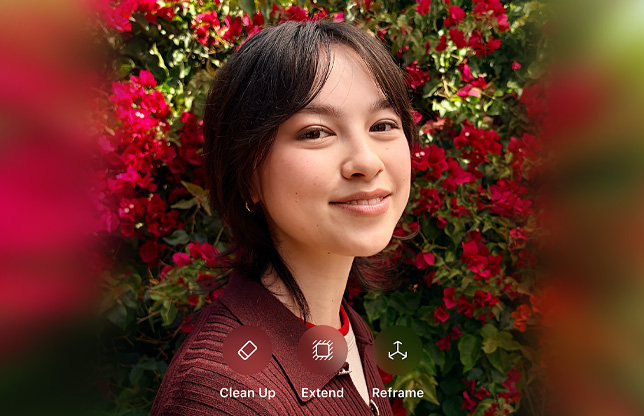
Smarter Photos editing: Photos gains Spatial Reframing, Extend and an upgraded Clean Up tool, allowing users to improve composition, expand images and remove distractions more naturally.
Child safety and parental controls: New parental controls include Ask to Browse, Time Allowances, app schedules and enhanced Communication Safety tools designed to give parents more control.
System Improvements: Apple has made many system operations faster and more efficient, which will be especially noticeable on older phones. Battery life may be longer, and there are dozens of small quality-of-life improvements throughout the system and its apps.
iOS 27 release date: When did Apple release iOS 27?
September 14, 2026
Apple made iOS 27 widely available on September 14 at around 10am Pacific Time.
iOS 27 beta – What’s coming next?
Latest beta: iOS 27.2 – it appears Apple will only use the iOS 27.1 number for the iPhone Duo’s release.
The iOS 27.2 beta was released on September 16. It includes or may introduce the following:
Redesigned Health app with AI-powered health insights.
Bug fixes and performance improvements addressing issues in iOS 27.
Additional Siri AI languages, including French, Japanese, Korean, Portuguese and Spanish.
Suggested replies in Messages, previously removed before iOS 27 launched.
Automatic password changes for compromised passwords.
What features are still to come in iOS 27
At the time of the launch of iOS 27 not all of Apple’s promised features were available. Missing features include:
Redesigned Health app: A completely redesigned Health app with AI-powered health insights is coming later in 2026.
Additional Siri AI languages: Siri AI launched in English only. French, Japanese, Korean, Portuguese and Spanish are due in October.
Smarter suggested replies in Messages: Suggested replies that better reflect the user’s writing style appeared during beta testing but were removed before the public release.
Automatic password changes: The ability for the Passwords app to visit supported websites and automatically replace compromised passwords was removed shortly before release.
SynthID identification for AI images: Apple said support for adding SynthID identification to most AI-generated or edited images would arrive in a software update later in 2026.
Siri AI in iOS 27
Apple
By far the biggest upgrade in iOS 27 is Siri AI – an entirely new architecture for Siri. Apple says it is more personal, conversational, and capable than the current assistant, with support for natural follow-up questions, personal context, onscreen awareness and up-to-date information from the web.
Siri AI features
More natural conversations: Siri AI can understand open-ended questions, follow-up requests and more complex natural language, making interactions feel less like issuing simple voice commands.
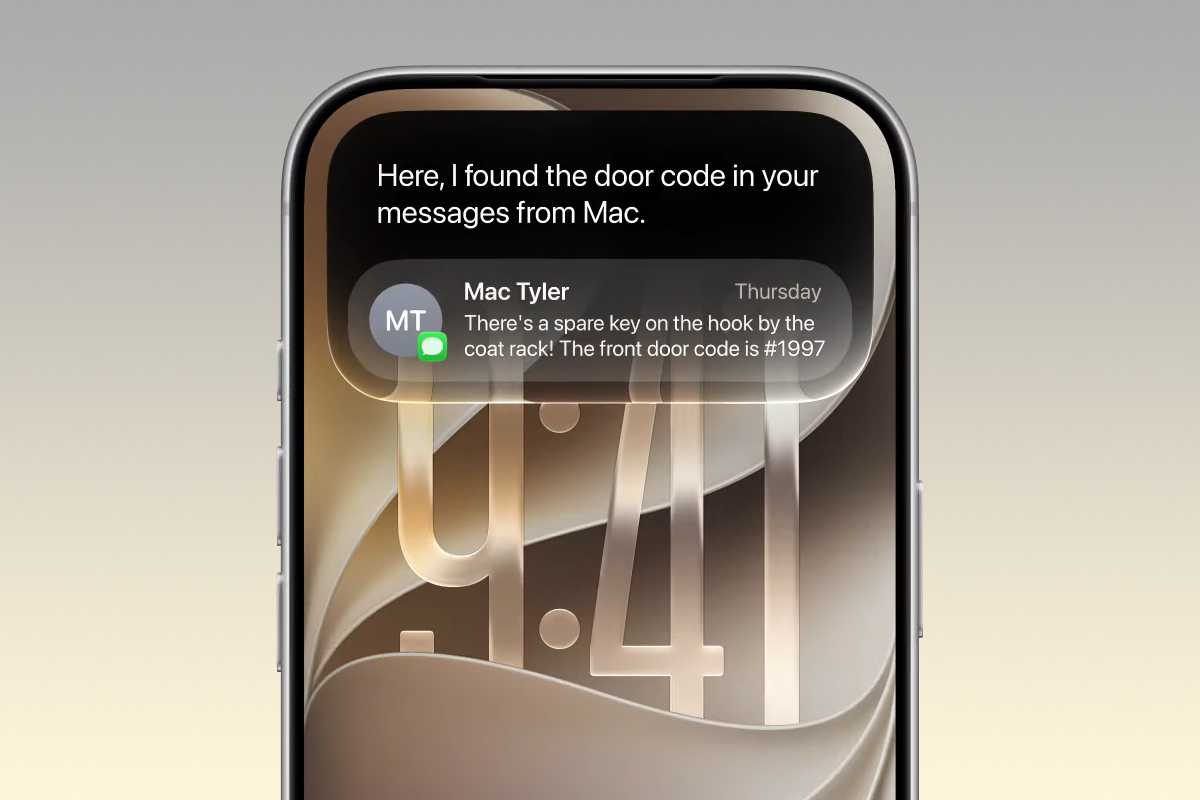
Personal context: Siri can draw on information stored in Messages, Mail, Photos and Notes to find details and answer questions. For example, you could ask it to find information buried in an old email or message.
Onscreen awareness: Siri can understand what you’re viewing and act on it, such as saving an address from a message, adding an event to Calendar or answering questions about an article.
Camera intelligence: A new Siri Camera mode lets you show Siri something through the iPhone’s camera, then ask questions or perform actions based on what it sees.
More capable app actions: Siri can perform tasks within apps such as Messages, Music and Reminders. It can, for example, edit a recently sent message, add a song to a playlist or handle more complex Apple Music requests.
Better general knowledge and web answers: Siri can use information from the web to answer questions about recent events and tackle more specific or complicated queries than before.
Conversation history across devices: A dedicated Siri app lets users revisit previous conversations, pin important chats and continue conversations across Apple devices using iCloud syncing.
More natural Siri voices: Siri gains more expressive voices, with controls on compatible devices for adjusting speaking pace and expressiveness. Voice customization requires an iPhone 17 Pro, iPhone Air or newer.
Improved dictation: Better speech recognition, automatic punctuation, capitalization and formatting allow users to dictate more naturally when converting speech into text.
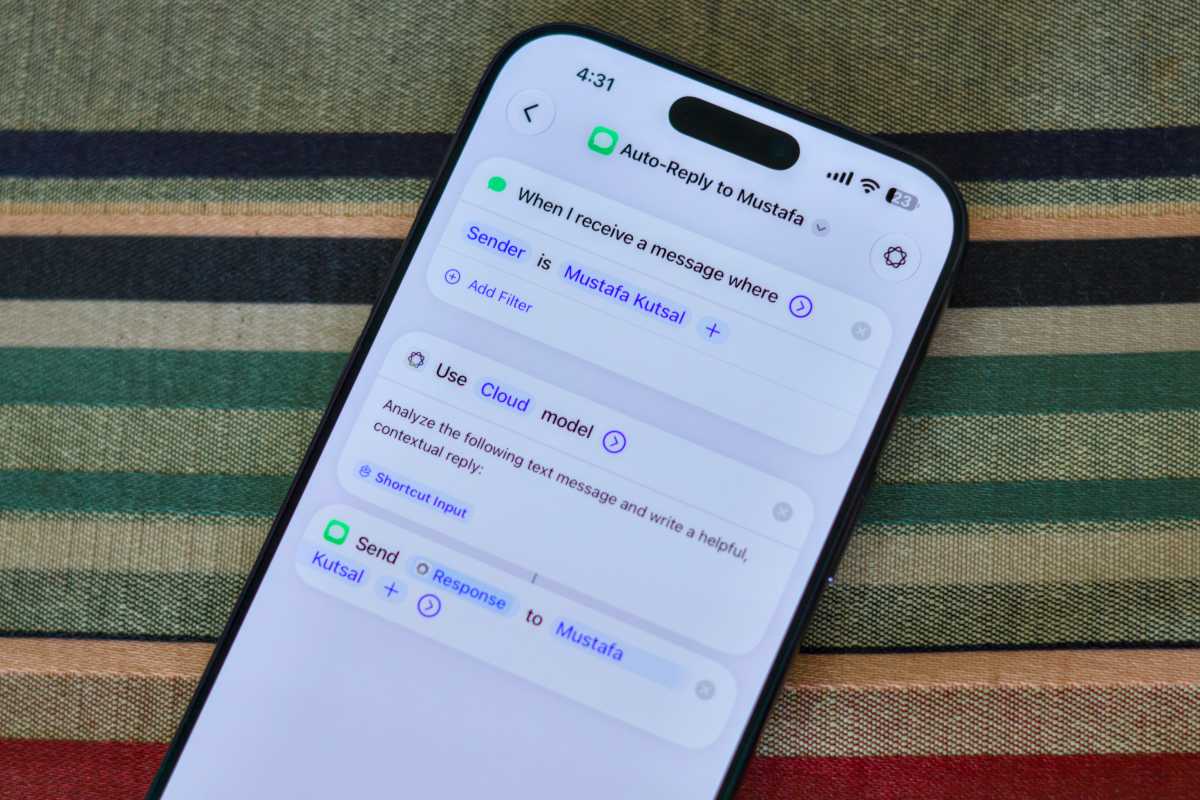
AI-assisted message replies: Siri can compose contextual replies in Messages using the conversation, personal information and web searches. Shortcuts can also automate replies to selected contacts, although manual Siri-assisted replies allow users to check and edit the response before it is sent.
Siri AI represents a significant improvement over the old Siri, particularly when handling conversational questions, current information, and personal context. It also has a dedicated app where you can see and continue previous conversations, upload images or documents, and more.
It’s definitely one of the biggest reasons to upgrade to iOS 27, potentially changing Siri from a basic voice-command system into a more general way of interacting with the iPhone.
Apple’s approach to AI safety also appears more restrained than some rival chatbots, with Siri designed to avoid excessive flattery, pretending to be human, or responding inappropriately to potentially harmful requests.
However, Siri AI is launching as a “beta” feature and still requires a bit of polish. It’s also only available in English at first, with a handful of other languages/regions coming in October with iOS 27.1.
Regional Siri AI availability
Siri AI will not initially be available on iPhone or iPad in the EU. It will also remain unavailable in China while Apple works through regulatory issues. The first release only supports the English language, and initially has Expressive Voices for English (UK) and English (US). Several other languages are coming with the iOS 27.1 update in October.
Siri AI compatibility
Siri AI requires an iPhone 15 Pro or later, and the “new expressive voices” feature requires an iPhone 17 Pro or the new iPhone 18 Pro.
Apple Intelligence across apps
As well as Siri AI, the enhanced Apple Intelligence will power new features in Apple’s core apps throughout iOS 27. Safari can organize tabs into topics, monitor webpages for changes and even build extensions from natural-language descriptions. Photos gains a new Spatial Reframing edit tools including an upgraded Clean Up feature. Messages, Mail, and Calendar can now understand context, suggest actions and create events from simple descriptions.
New features coming to apps in iOS 27
iOS 27 brings a mix of major Apple Intelligence upgrades and smaller quality-of-life improvements across Safari, Photos, Messages, AirPods, Passwords, Wallet, and other core iPhone apps. Apple is also making iOS more adaptable to different screen sizes and orientations, which are changes necessary for the iPhone Duo.
Safari
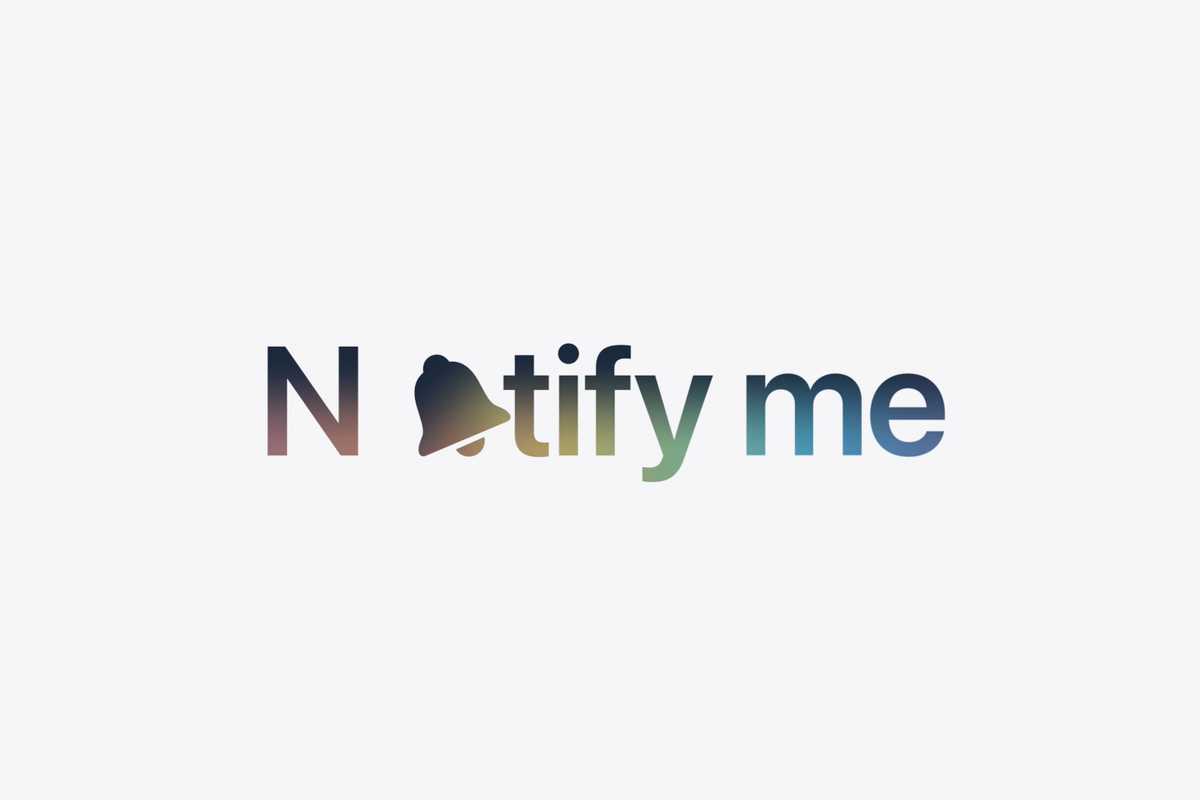
Safari can automatically group open tabs into topics, making related pages easier to find. A new Notify Me feature will monitor webpages and alert you to changes such as price drops or products coming back into stock.
There’s also a new Describe an Extension feature which lets users create custom Safari extensions simply by explaining what they want the extension to do.
Reframe can alter the composition and perspective of an existing photo, while Extend generates new image content beyond the original frame when straightening a horizon or changing the aspect ratio.
Apple
Clean Up has also been improved, with Fast and High Quality modes for removing unwanted objects or details. High Quality mode can produce considerably more natural results, although more ambitious edits can still introduce distortions or invented details.
Photos also adds new categories and the ability to save a frame from a video as a full-resolution photo. The resulting HEIF or JPG retains the video’s original resolution, date, and location metadata rather than simply creating a screenshot.
Camera
iOS 27 features a new more customizable camera interface that lets you pin the controls you use most often. For the iPhone 18 Pro, there are also “pro controls” like white balance, shutter speed, and manual focus along with Apple Reference Image, an authentication system designed to prove that a photo or video was genuinely captured on an iPhone and has not subsequently been manipulated.
The new Siri mode in the Camera app is a more convenient and logical way to access the Visual Intelligence features that used to require either a long-press of the camera button or a Control Center button.
Messages
Foundry
Messages gets several useful improvements.
You can decide what the microphone button beside the text field does. Under Settings > Apps > Messages > Show in Text Field, it can be set to Record Audio, Start Dictation, or None. Disabling it does not remove either feature: dictation remains available from the keyboard and audio messages remain in the + menu.
Voice-message playback controls are easier to access, while Apple Intelligence can suggest actions based on a conversation, such as creating a reminder, making a note, or finding relevant photos.
Messages in iOS 27 will gains smarter suggested replies that can better reflect the user’s writing style. (This was removed from the iOS 27 beta and wasn’t available at the launch of iOS 27).
Drawing
Foundry
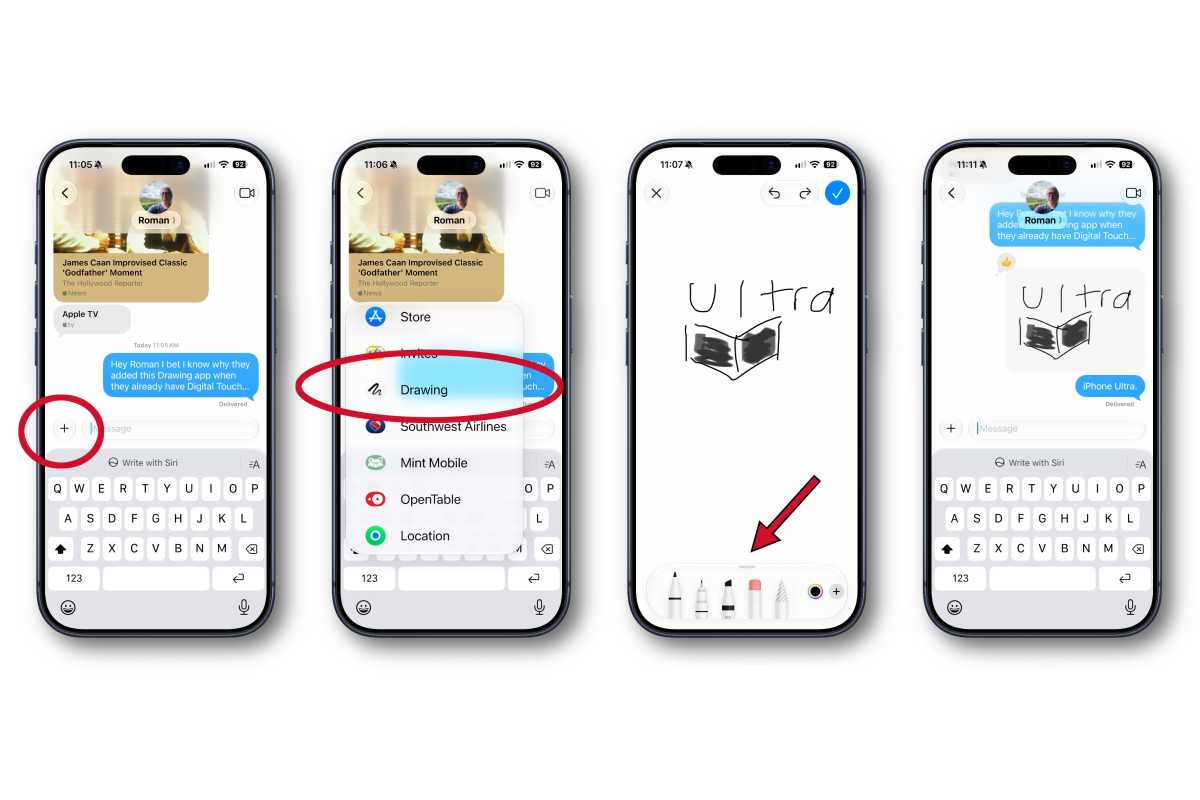
A new dedicated Drawing app replaces the old hidden handwriting interface. Accessible from the + menu, it uses the familiar pens, colours and drawing controls found in Notes and Markup, with finished drawings sent as images.
Mail
Mail gains more context-aware smart replies, including responses that can better match the user’s usual writing style.
Apple Intelligence can also surface information from Mail elsewhere in iOS. For example, the Phone app could retrieve a flight confirmation number from an email when you call an airline.
Phone
A new Call Context feature can surface information that may be useful when on a call. Apple says the information is selected according to who you are calling rather than by listening to the conversation. For example, calling an airline could cause iOS to surface the relevant flight confirmation from Mail.
Birthday reminders can also appear when calling contacts whose birthdays are stored on the iPhone.
FaceTime
FaceTime gains Dual Capture, allowing the front and rear cameras to be used at the same time during a call.
Passwords
Passwords in iOS 27 will fix things for you.
Apple
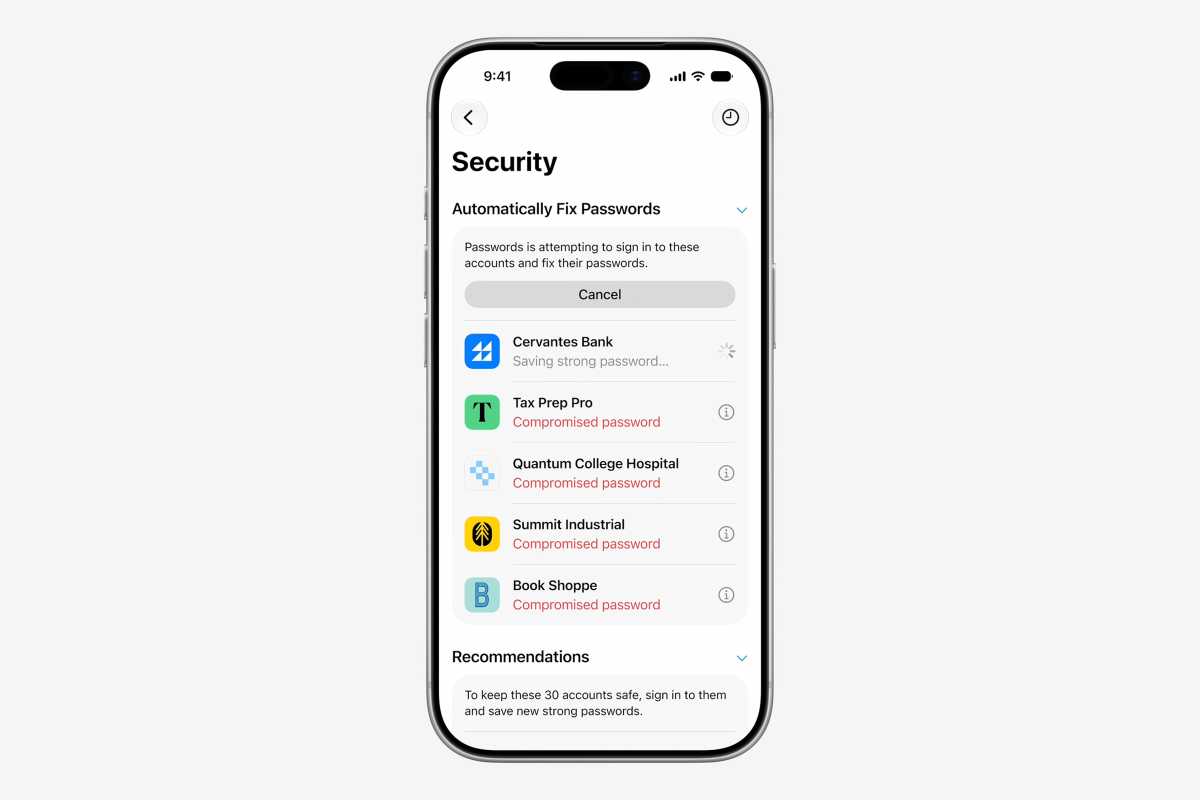
The Passwords app continues to warn about weak, reused and compromised credentials, but iOS 27 will go a step further by offering to fix some of them automatically.
Using Apple Intelligence, Passwords can visit supported websites, change a vulnerable password and save the replacement credentials. See: Apple got rid of my biggest password headache.
The usefulness of the feature will depend on how widely websites are supported and how well it handles obstacles such as two-factor authentication and unusual account-management interfaces.
Apple removed this ability to detect compromised passwords and replace them from the beta shortly before the release of iOS 27. It’s expected to arrive with a later update.
Shortcuts
Shortcuts gains Describe a Shortcut, allowing users to create automations simply by explaining what they want to happen.
Apple Intelligence interprets the request and assemble the appropriate actions across supported apps, potentially making Shortcuts significantly easier to use for people unfamiliar with building automations manually.
Calendar
Calendar can create or modify events from natural-language instructions.
Apple says the app can recognize contacts, locations, dates and other event details as users type, reducing the amount of information that needs to be entered manually.
Siri can also create complete Calendar entries for information that is on your screen in that moment, or by taking a picture with the Siri mode in the Camera app.
Image Playground
Image Playground is considerably more powerful and realistic.
Apple says it can create photorealistic images and lets users modify generated pictures simply by describing the changes they want. Individual objects can also be selected, resized, or repositioned.
AI-generated images will include a SynthID watermark identifying them as synthetic content. This particular feature wasn’t available at launch, but Apple has confirmed it is coming later.
Wallet
Wallet can create custom passes from QR codes.
Users can add their own fields and information to the pass, and passes automatically sync to Apple Watch.
Weather
Weather gets a clearer, more detailed forecast interface, with rearranged information tiles and new 10-day views showing precipitation probability/amount and wind speed throughout each day.
Home app
Apple Intelligence comes to the Home app for compatible HomeKit Secure Video cameras. It can group related camera notifications, describe recorded video and highlight clips that appear particularly noteworthy.
Maps
Apple Maps improves Flyover using higher-quality aerial imagery and Visual Intelligence models.
Apple says this produces sharper architectural detail and more realistic rendering of elements such as individual trees.
Podcasts
Video podcasts become easier to use, with improved controls for switching between watching a podcast and simply listening to it.
Fitness
Workout summaries have been redesigned to make them easier to share.
Users can also hide completed Fitness+ workouts.
iOS 27 changes beyond the iPhone
CarPlay
CarPlay gains an audio scrubber, giving drivers and passengers more direct control when moving through audio tracks and other content.
A new Custom EQ lets users independently adjust bass, mids and treble using a simple three-band equalizer under Settings > AirPods > Audio and Routing > Equalizer > Custom.
Compatible AirPods also gain improved Precision Finding through Find My, making individual earbuds easier to locate.
Some features require both iOS 27 and compatible AirPods firmware.
It’s not only individual apps that are seeing changes.
Home Screen and landscape mode
Apple is making iOS significantly more flexible when dealing with different screen orientations and sizes.
More Apple apps now work properly in landscape, including Health, Home, Music, Weather, and Watch. Dynamic Island and Live Activities can also adapt to landscape orientation. The Home Screen supports extra-large widgets.
These changes could simply improve iPhone usability, but they’re also well suited to Apple’s folding iPhone Duo.
iPhone Mirroring in macOS 27 has similarly become freely resizable, with Apple apps dynamically rearranging their interfaces as the window changes shape.
Liquid Glass refinements
Apple
Apple says Liquid Glass has been refined for better readability, more uniform refraction and improved contrast. A new slider lets users adjust the look from ultraclear to fully tinted, while updated icons, toolbars, sidebars and window shapes add polish.
Instead of one combined Ringtone and Alerts slider, users can independently adjust:
Ringtones
Alarms and timers
Alerts and system sounds
The change is optional. Under Settings > Sounds & Haptics, turning off Match Ringtone Volume reveals separate controls.
Media and call volume continue to work independently as before.
Keyboard
iOS 27 introduces a new quick-paste control above the keyboard.
It lets you paste recently copied text, images or screenshots without having to long-press inside a text field, making everyday copy-and-paste considerably faster.
Apple has also made the Liquid Glass keyboard design more consistent across apps.
Privacy and Find My
iOS 27 introduces the ability to temporarily pause Find My location sharing without notifying the person with whom the location is normally shared.
Recovery and troubleshooting
Apple is also expanding the iPhone’s recovery interface, giving users more options for diagnosing problems and recovering an iPhone without immediately connecting it to another device.
System changes and how iOS 27 makes your iPhone faster
Alongside the headline AI features, Apple says iOS 27 includes a wide range of under-the-hood improvements designed to make iPhones faster, smoother and more efficient.
Apps can launch up to 30% faster, newly taken photos can appear in the Photos library up to 70% faster, and AirDrop transfers can be up to 80% quicker. External drive transfers should also improve, while updates to network performance and the system-wide search index are designed to make connectivity and finding information faster.
The company has also reworked core technologies including CPU scheduling, display performance and processing efficiency. These changes should benefit older iPhones in particular, with Apple promising smoother performance and more efficient battery use on devices as old as the iPhone 11 and second-generation iPhone SE.
Our testing of the iOS 27 beta supports those claims. On an iPhone 11 Pro Max, Camera launch time fell from 0.98 seconds in iOS 26 to 0.65 seconds in iOS 27, while Maps improved from 3.01 seconds to 1.36 seconds.
Everyday use also feels smoother, with more fluid animations, unlocking, Control Center and app transitions. The phone ran cooler during testing too, which could point to improved system efficiency and potentially better battery performance.
More broadly, iOS 27 appears focused on refinement rather than simply adding new features. Apple says it has addressed dozens of common user frustrations, while changes such as more adjustable Liquid Glass effects are intended to improve readability and general usability.
That focus should make iOS 27 particularly worthwhile for owners of older iPhones, even on models that do not support Siri AI. Those devices still gain performance improvements alongside features such as clipboard tools for the keyboard, independent alarm and timer volume controls, custom Wallet passes, Photos changes, larger widgets, and Liquid Glass refinements.
Child safety and parental controls
Apple
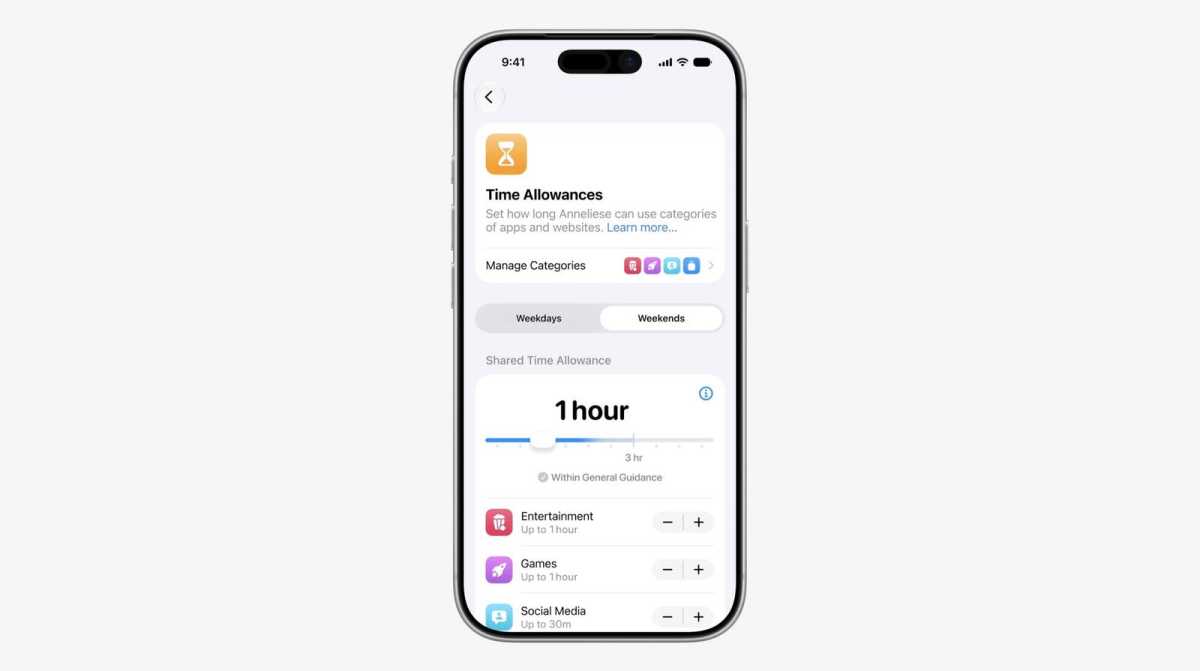
There are lots of improvements to parental controls, including new time allowances for entertainment, games, and social media, and new schedule tools for different times of day or days of the week.
This includes new features like an expansion of the existing “ask to buy” feature for apps to websites. Before a child can view a new website, they’ll have to ask for permission.
Ask to Browse: Ask to Browse will expand the current Ask to Buy feature to the web. Children will need to request permission before visiting new websites, and parents can review requests in Messages before approving.
Communication Safety: Communication Safety continues to help protect children from viewing or sharing nudity in Messages, FaceTime and other apps. Apple says it will also intervene before children see gore or violent content in shared images and videos.
Time Allowances and schedules: Parents can set Time Allowances across categories such as Entertainment, Games and Social Media. Recommendations are based on a child’s age combined with guidance from clinical and child development experts. Schedules let parents choose which apps are available at different times or on different days.
Redesigned Screen Time: Screen Time gets a redesigned interface with an at-a-glance view of average device usage and most-used apps. Apple says parents can quickly limit or extend access in the moment.
Child accounts and family safety: Apple says child accounts remain central to age-appropriate protections. Parents can manage app access, web access, communication permissions and Screen Time settings.
Apple says it is working with the American Academy of Pediatrics to adapt its Family Media Plan.
Accessibility changes in iOS 27
Accessibility features are smarter and more intuitive in iOS 27:
VoiceOver gives richer image descriptions and better understanding of onscreen content.
Live Recognition lets users press the Action button to ask questions about their surroundings and receive detailed responses.
Voice Control is more intuitive, allowing users to describe onscreen buttons and controls rather than remembering exact coordinate labels or numbers.
Accessibility Reader is able to handle more complex source material and provide summaries and translation.
iOS 27 compatibility
iPhone 11 is supported by iOS 27.
Roman Loyola/IDG
According to Apple, iOS 27 supports iPhones back to the iPhone 11 and second-generation iPhone SE, although some Apple Intelligence and Siri AI features require newer hardware.
Support for iOS 27 does not mean every device gets every feature. Apple Intelligence and Siri AI require an iPhone 15 Pro or iPhone 16 or later, while the most advanced on-device AI models require an iPhone 17 Pro, iPhone Air, or iPhone 18 Pro. On iPad, Apple Intelligence requires an M1-class model or the A17 Pro iPad mini, while the newest on-device models require an M4 iPad with at least 12GB of RAM.
There had been speculation that the iPhone 11 series and iPhone SE 2 would miss out on iOS 27 after leaker Instant Digital claimed on Weibo that the 2019 iPhone 11, 11 Pro and 11 Pro Max, along with the 2020 iPhone SE 2, would no longer be supported. That prediction proved incorrect, giving those models at least one more year of software support.
However, the iPhone 11 generation is nearing the end of its support life. As we explain in our guide to how long Apple supports iPhones, the iPhone 11 Pro and 11 Pro Max have already been added to Apple’s Vintage iPhone list.
The main dividing line for Apple Intelligence remains the iPhone 15 Pro generation: the standard iPhone 15 and all older models can run iOS 27, but they do not support Apple Intelligence.
FAQ
1.
When was iOS 27 released?
iOS 27 was released on September 14, 2026.
2.
Which iPhones get iOS 27?
The iPhone 11 and iPhone SE 2 and newer get iOS 27. However, Siri AI and other Apple Intelligence features require iPhone 15 Pro or newer, and the new more expressive Siri voices feature requires iPhone Air, iPhone 17 Pro, or newer.
3.
Which iPhones will get Siri AI and Apple Intelligence in iOS 27?
The only iPhones that can run Siri AI are the iPhone 15 Pro and Pro Max and any newer generation. If you have a standard iPhone 15 then you won’t get Siri AI and Apple Intelligence.
O Project Panama da Anthropic e o treino dos modelos de IA com base em conteúdo de livros, e a ambição de empresas como a OpenAI, estão no centro do artigo de opinião de Helena Borges da Costa.
Just a couple days after the wide release of iOS 27, Apple has released the first beta of iOS 27.2. That’s not a typo: it’s iOS 27.2, not 27.1. We never saw a 27.1 release, but Apple is beginning beta tests for the 27.2 branch.
This likely has something to do with the iPhone Duo, which is going on sale in October. We know the iPhone Duo will come with iOS 27.1, but we don’t yet know if any other devices will ever get a 27.1 update, or when all the devices will get on the same version together.
What’s new in iOS 27.2
As beta testers report new capabilities in this version, we’ll report them here.
New Health app: The 27.2 beta includes the new Health app, with a totally new redesign and AI-powered health insights.
Siri AI languages: Apple said that Siri AI, which launched supporting only U.S. English, will expand to French, Japanese, Korean, Portuguese, and Spanish in October.
Messages suggestions: A feature of the iOS 27 beta that was cut for the full release, the feature that suggests replies in Messages may return in 27.2.
Automatically fix passwords: Another feature cut just before the final iOS 27 release is the ability to automatically fix compromised passwords. That might return in 27.2 as well.
iOS 27.2: How to install the public beta
If you want to test the iOS 27 beta releases but are not a registered developer, follow these steps:
Click Sign Up on the Apple Beta page and register with your Apple ID.
Log in to the Beta Software Program.
Click Enroll your iOS device.
Open the Settings app, tap General, then Software Update.
In the Beta Updates section, select the iOS Public Beta.
It may take a few moments after registering for the beta option to appear in Software Update.
iOS 27.2: How to install the developer beta
You’ll need to be registered as an Apple developer, but a free developer account will do. You can get one via Xcode or the Apple Developer app in iOS. Here’s how to do it via the Apple Developer app:
Alongside new betas of iOS 27.2, iPadOS 27.2, and macOS Golden Gate 27.2, Apple has released the first betas of watchOS 27.2, tvOS 27.2, and visionOS 27.2. The betas come two days after the 27.0 software updates were released.
Registered developers can download the betas through the Settings app on each device.
Two new Apple Intelligence features are coming to the Apple Watch Series 12 and Apple Watch Ultra 4 in late 2026, and Apple could start testing them as soon as watchOS 27.2. Live Rewind will allow users to double-press the Digital Crown to get a transcription of what was said in the last 15 seconds, while Siri Recap will turn conversations users have had during the day into high-level notes.
There's no word on what's being added in visionOS 27.2 and tvOS 27.2, but Apple is expected to introduce a new version of the Apple TV 4K with Siri AI support sometime before the end of the year.
Our solution hinges on splitting the Apple Reference Image process into two phases: creating a secure digital negative, and developing that negative into a reference image. Each phase receives our strongest protections.
[…]
Apple Reference Image provides both a lower bound and an upper bound on capture time from Apple’s cryptographic timestamp service, and we guarantee the photo was taken between the two bounds. On a regular heartbeat, the device requests a cryptographic timestamp token, and retains the most recent one it has received. Globally this happens on average every 15 minutes, though the interval depends on local network conditions. This provides a proven lower bound timestamp for the photographic capture. After capture, the device requests a second timestamp to use as an upper bound, and both timestamps are embedded and signed with the sensor data.
[…]
When the user chooses to create a reference image, the device uploads the digital negative to PCC, which runs the processing steps needed to render the image — including demosaicing, tone mapping, and compression — in a highly secure, private, and verifiable environment. Experts can verify that PCC doesn’t alter a digital negative during development: they can examine the software that does the work.
[…]
Finally, as no security system is perfect, we created a revocation system that can revoke individual photos, as well as all photos from a specific sensor.
[…]
We built Apple Reference Image to avoid using an explicit, public credential for photographers, and to avoid even implicit public association between different photos taken by the same sensor. The final reference image is instead signed by Apple’s signing service, after validation by PCC.

 Login
Login