❌

Reading view

Goodram PX700 2TB SSD Review: High-end punch on a budget core

The Goodram PX700 is a budget PCIe 4.0 drive that delivers everything you need: good performance, great power efficiency, and all in a single-sided package that runs cool. Sometimes it really is as simple as picking one drive to meet whatever your storage needs are at the moment. It’s not the first model that comes to mind for this segment, but in our testing it performed better than expected as a good drive that may otherwise run under the radar.

Goodram is not a new or no-name company, even if the “good RAM” moniker seems a little too on the nose. Instead, it’s a memory assembler in the EU with quite some history. This, in fact, makes it more approachable in comparison to a lot of the new names we have seen on AliExpress and increasingly on Amazon. We expect reliability or at least good support from the company, and the TBW on this one seems to reflect that this isn’t an ultra-budget drive.

On the contrary, performance was not just what we expected – considering we’ve reviewed many drives in this segment, many with the same or comparable hardware – but above. Sometimes only by a small amount, but the gaps are real. Anywhere performance mattered, it delivered. One expects trade-offs for that, but in fact the PX700 is very power-efficient, and the drive provides an excellent storage experience. The only downsides are sustained write performance – which is of little importance in most cases – and, unfortunately, the price. At the right price point, this would be a great pick for any device.

Goodram PX700 Specifications

Product

1TB

2TB

4TB

Pricing

$348.00

$613.00

N/A

Form Factor

M.2 2280 (Single-sided)

M.2 2280 (Single-sided)

M.2 2280 (Single-sided)

Interface / Protocol

PCIe 4.0 x4 / NVMe 2.0

PCIe 4.0 x4 / NVMe 2.0

PCIe 4.0 x4 / NVMe 2.0

Controller

Maxio MAP1602

Maxio MAP1602

Maxio MAP1602

DRAM

N/A (HMB)

N/A (HMB)

N/A (HMB)

Memory

232-Layer NAND Flash

232-Layer NAND Flash

232-Layer NAND Flash

Sequential Read

7,400 MB/s

7,400 MB/s

7,400 MB/s

Sequential Write

6,500 MB/s

6,500 MB/s

6,500 MB/s

Random Read

1,000K IOPS

1,000K IOPS

1,000K IOPS

Random Write

820K IOPS

820K IOPS

1,000K IOPS

Endurance

600TBW

1,200TBW

2,400TBW

Part Number

SSDPR-PX700-01T-80

SSDPR-PX700-02T-80

SSDPR-PX700-04T-80

Warranty

5-year

5-year

5-year

The Goodram PX700 covers the most popular capacities of 1TB, 2TB, and 4TB. Smaller drives can be popular for upgrades and basic boot usage, especially with how prices are now, but modern flash scales best at 1TB and up. 8TB drives are great as a larger storage solution but require a significant investment. The PX700 sticks to what will sell, predominantly 1TB and 2TB. At the time of review, these are priced at $346 and $418, respectively. These prices are high and probably point to a lack of stock more than anything else. While the 1TB price is double what it should be, at 2TB a drive of this type should be closer to $300. Naturally, one has to take into account the pricing volatility in an SSD market besieged by a NAND shortage, but we recommend looking in that range for this drive or one comparable to it with similar or the same hardware.

The drive is full-fledged Gen 4 with performance up to 7,400 / 6,500 MB/s for sequential reads and writes and up to 1 million random read and write IOPS at 4TB with only 820K write at 1TB/2TB. This is standard for the class and is more than enough performance for everyday tasks, gaming, productivity workflows, and more. The drive has the standard five-year warranty with up to 600TB of writes for every TB. The last part of that is worth a second glance because it indicates this drive can come with TLC rather than QLC flash, since TLC, aside from being faster, has better endurance than QLC. However, we have reasons to believe our sample has QLC, which we will point out where the evidence supports that reasoning. We want to emphasize that you should not assume what flash a drive uses based on TBW alone.

Goodram PX700 Software and Accessories

Goodram does not offer any specialized or custom software for its SSDs. You will have to rely on third-party solutions. Software for SSDs essentially falls into three categories: health management, performance, and data backup. SSD toolbox applications from manufacturers will usually cover the first two, with, typically, an OEM version of Acronis True Image for the last. For free alternatives, we recommend CrystalDiskInfo for health information, CrystalDiskMark for basic benchmarking, and MultiDrive for data backup and imaging. MultiDrive is made for Windows and has a bootable WinPE image, so for other operating systems you can opt to use Clonezilla instead.

Goodram PX700: A Closer Look
Goodram PX700 2TB SSD
Tom's Hardware
Goodram PX700 2TB SSD
Tom's Hardware

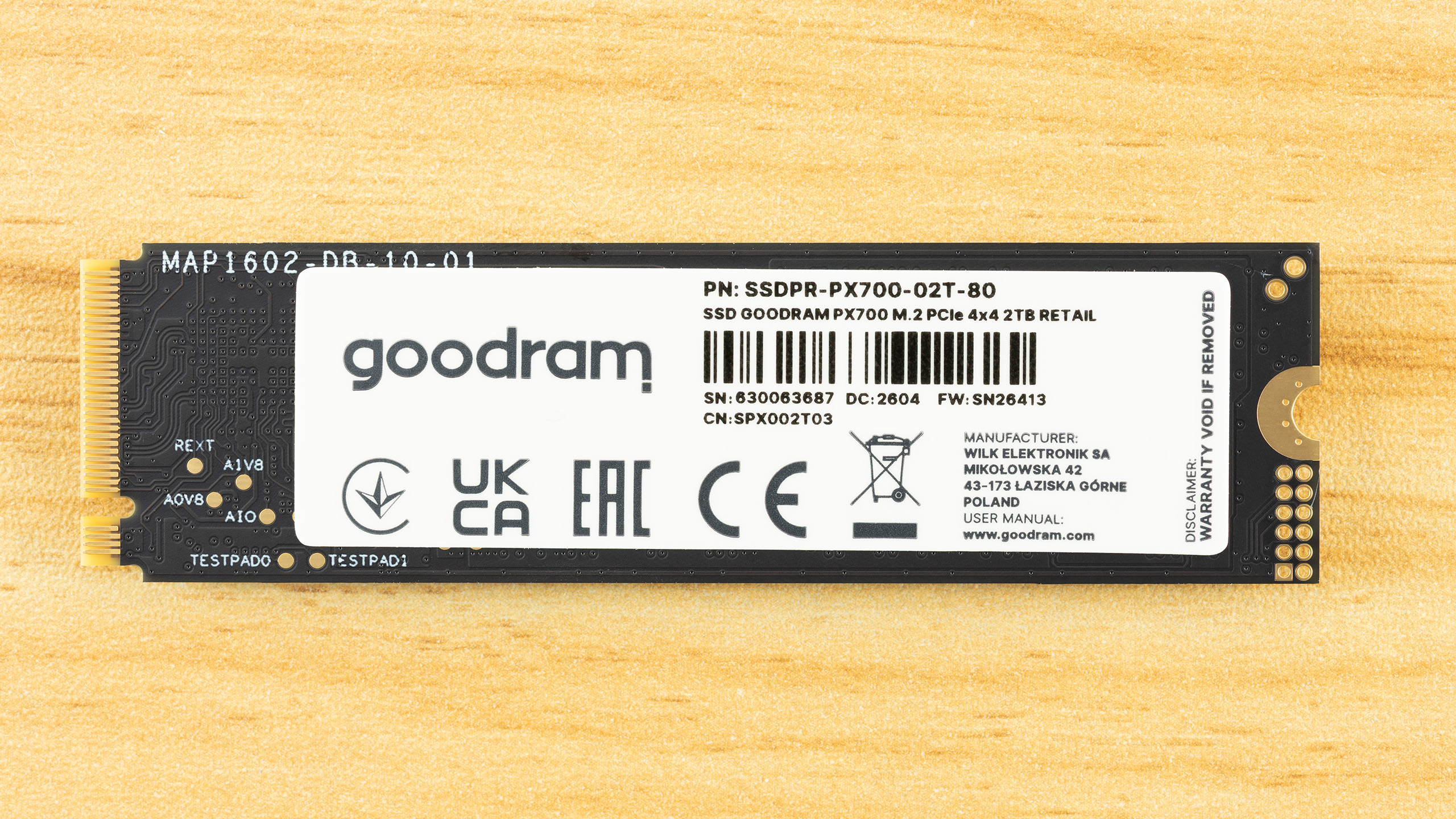
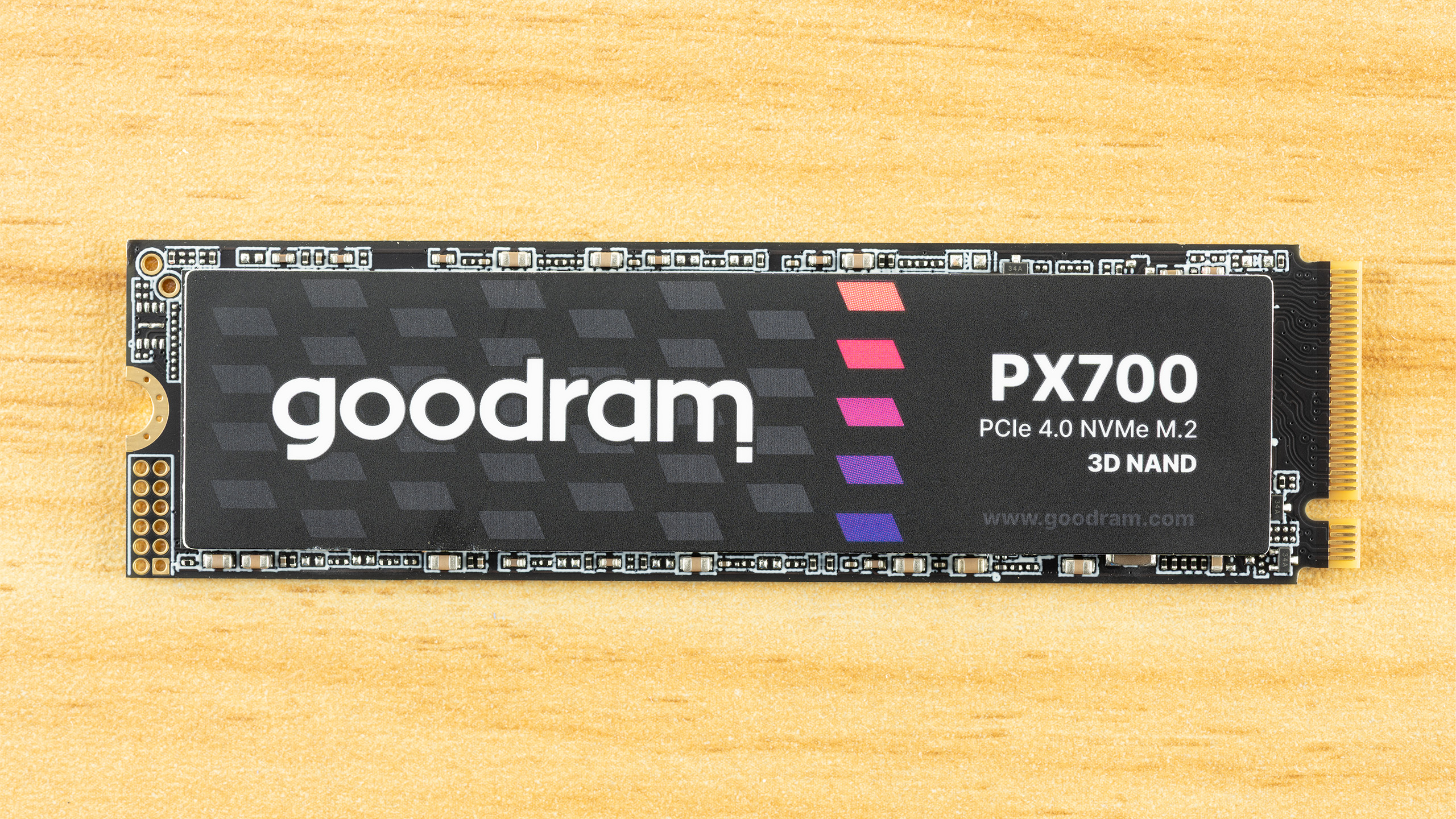
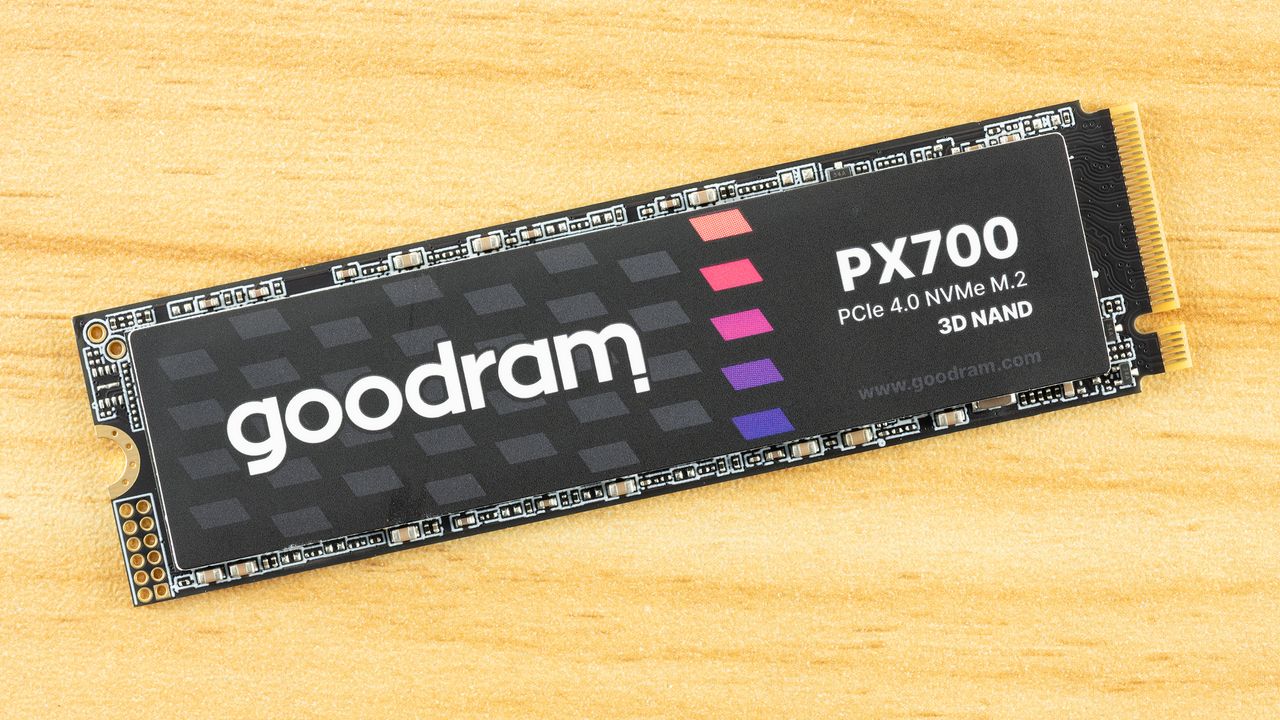
The PX700 is a single-sided drive at all capacity points. This makes it compatible with a wider range of systems and, if you need to cool the drive, it’s easier to tackle just one side of components. As it turns out, the drive runs cool enough that you probably don’t have to worry about this – check the Power Consumption and Temperature section below – but it’s still worth pointing out. The data on the rear label is standard, but we do want to say a little bit more about the listed manufacturer.

Wilk Elektronik is a Poland-based memory company, which makes this interesting, as that means the PX700 is a European-assembled SSD. Goodram covers the mainstream parts and IRDM enthusiast, although this is the first SSD from them that we’ve reviewed. As we are going to dig into the hardware in this section, we will say that the drive's silicon is sourced from Asia, as with virtually every SSD. If we say a drive is made in Poland, this means the drive is assembled, tested, and covered by warranty in Poland with an EU anchor. For some, that might be a positive factor in any purchasing decision.
Goodram PX700 2TB SSD
Tom's Hardware
Goodram PX700 2TB SSD
Tom's Hardware
Goodram PX700 2TB SSD
Tom's Hardware

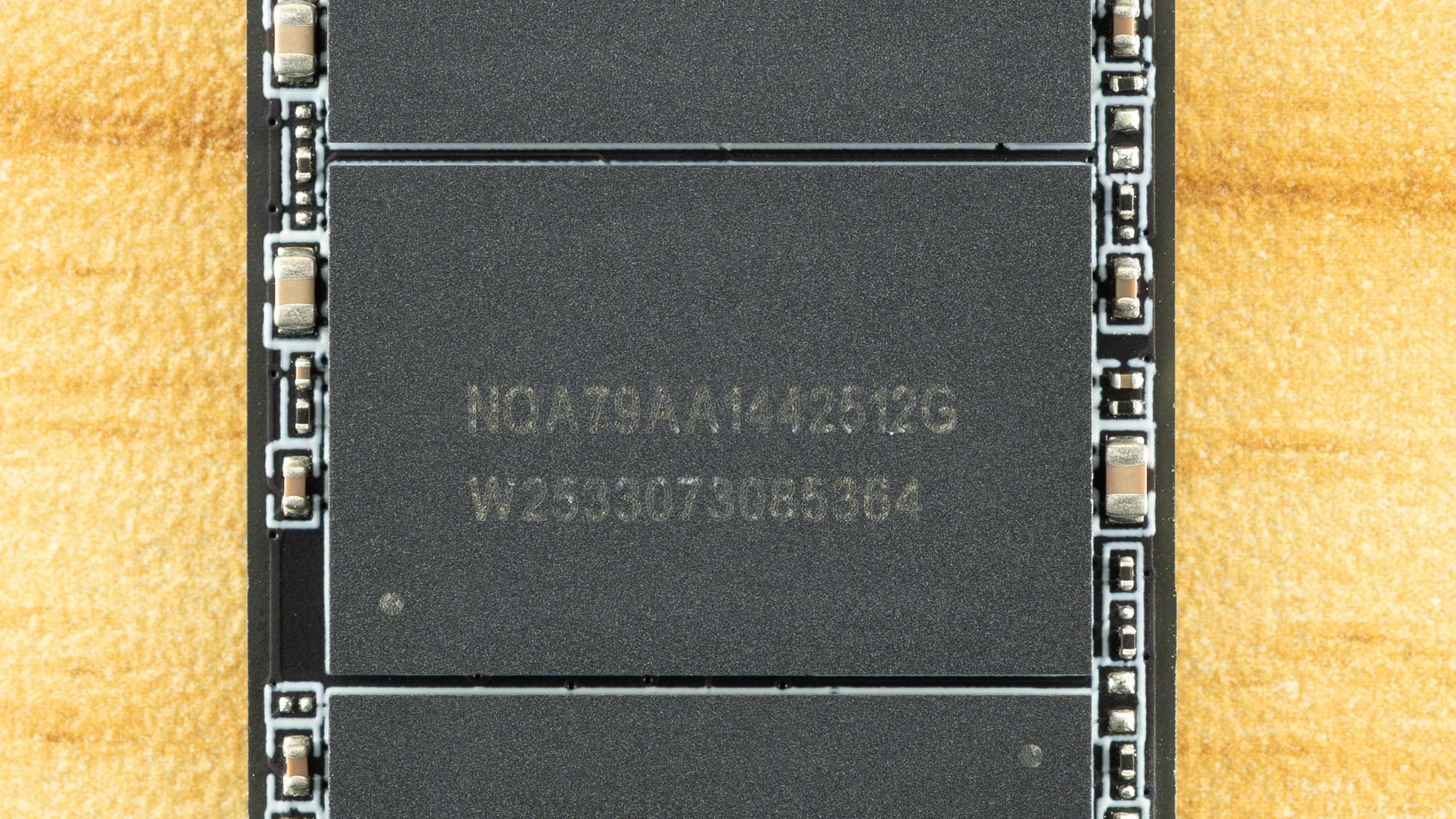
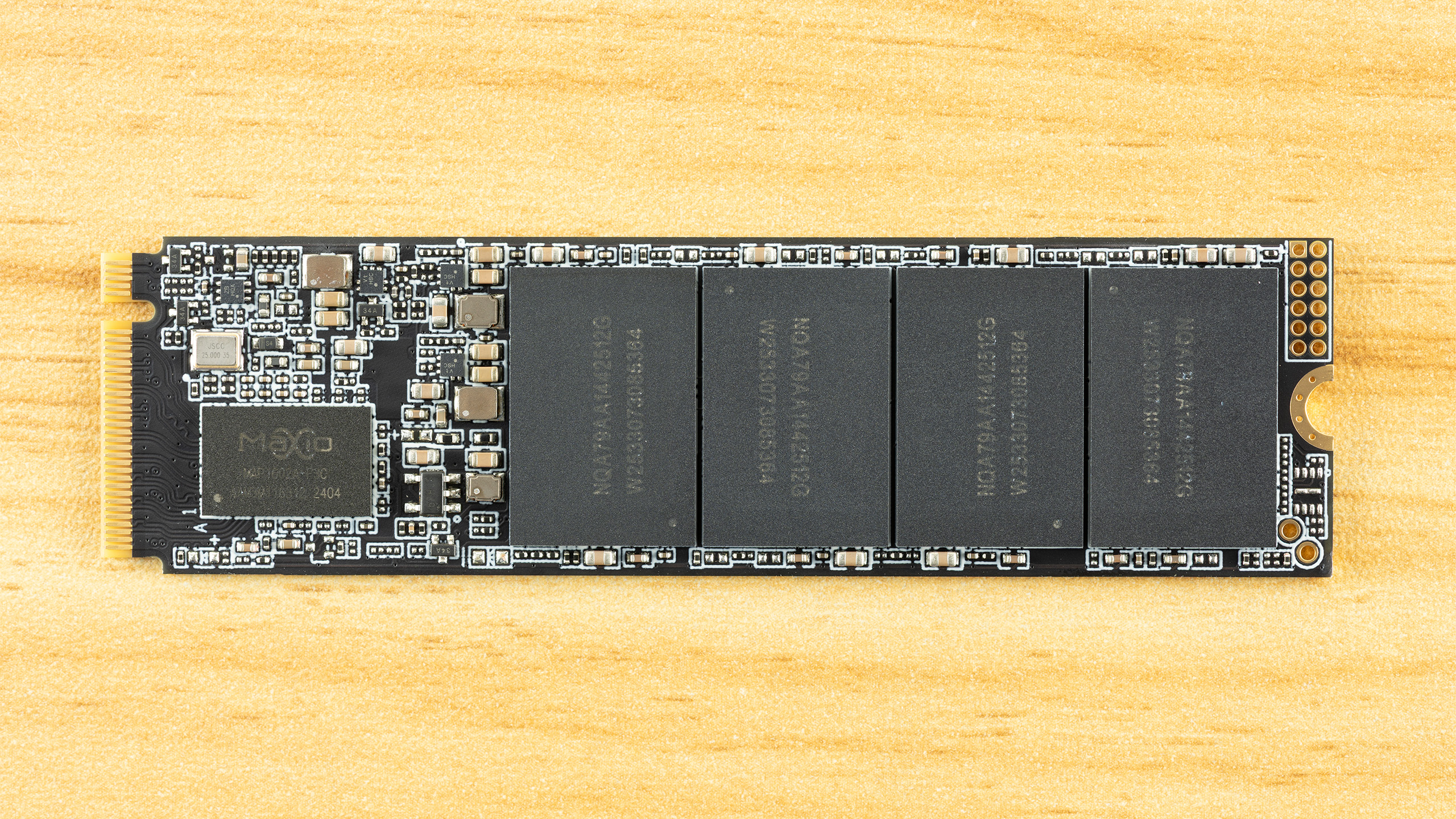
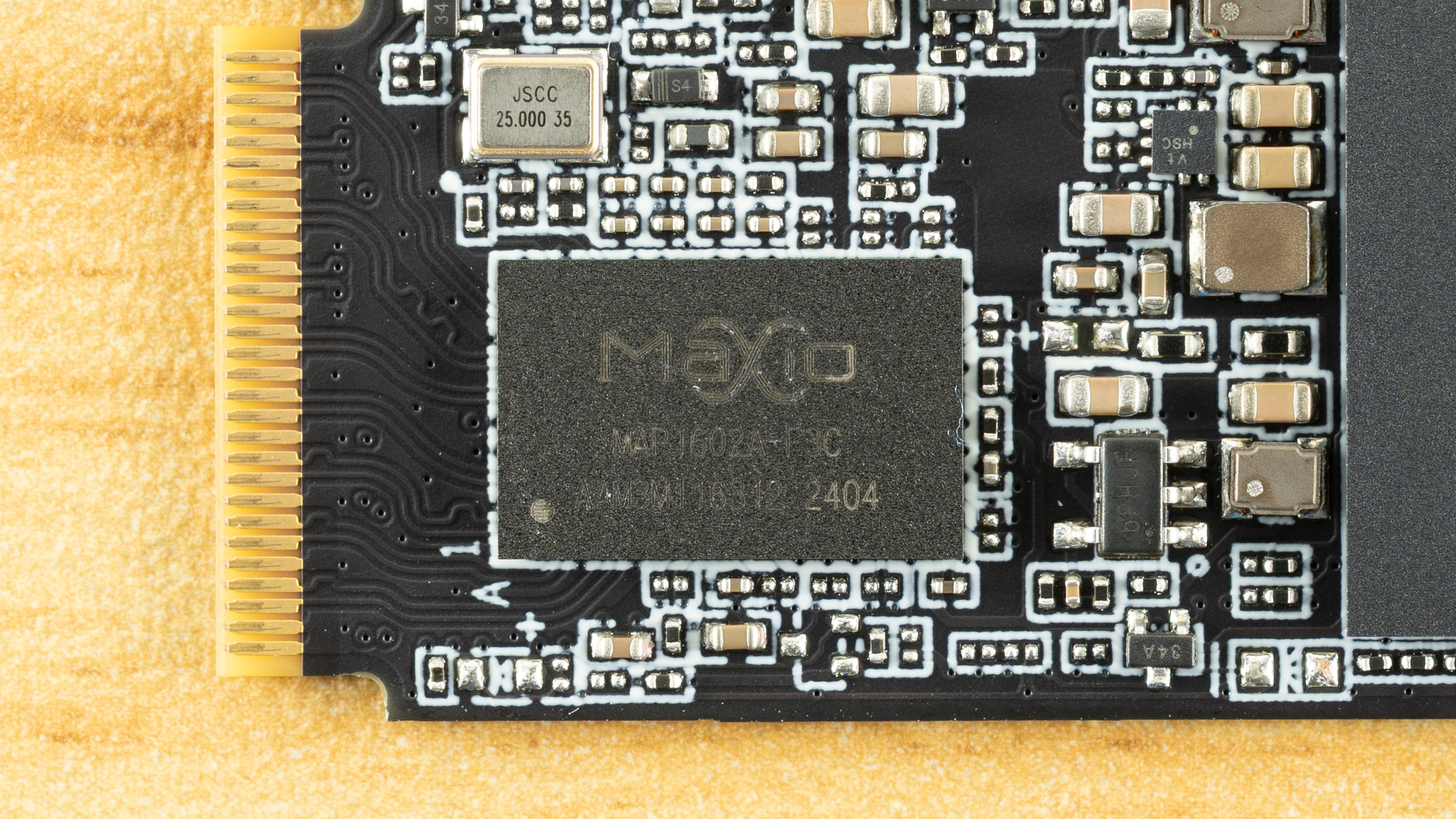
Identifying the hardware here is half simple and half challenging. The controller is clearly the Maxio MAP1602, a four-channel, DRAM-less part that’s been a budget champion for quite some time. There is not much mystery there aside from maybe this being a later revision, typically used for higher capacities.

The flash is more difficult. We can ascertain that these are 512GB NAND flash packages from the “512G” – given modern flash is 1Tb or 128GB, four dies per package for a total of sixteen dies. That’s perfect for maximizing performance out of this controller. The “W2533” is likely the manufacture date of week 33, year 2025. All this indicates is that this is, at least, not older flash, although we already know it has to be 2,400 MT/s at a minimum to hit the specified performance.

It makes a lot of sense for the PX700 to use TLC flash, though, given the TBW and the fact that we’ve been seeing this controller with 232-Layer Micron TLC more frequently lately. The Biwin Black Opal NV7400 comes to mind. However, Goodram has access to YMTC flash, and that includes QLC. YMTC rather than Micron QLC is more likely, given the latter is in high demand in enterprise. Normally, you could use certain utilities to identify the flash, but firmware for this controller is often encrypted to avoid revealing the flash ID. It’s still possible to get around this with leaked MP tools, but otherwise the best way to identify it is simply to look at the performance. We’ll be doing that in this review with comparison drives to help back up the investigation.

MORE: Best SSDs

MORE: Best External SSDs

MORE: Best SSD for the Steam Deck

Comparison Products

The Goodram PX700 is in a tight spot with ample competition in today’s market. This has been true for some years now, but some more recent releases have turned up the heat. These would include the Sandisk WD Blue SN5100 with its fantastic random read latency, the Crucial P310 with surprisingly good all-around performance, and even the Samsung 990, which was a very late arrival. Existing drives with comparable hardware to the PX700 include the Acer FA200 with QLC flash plus the Biwin Black Opal NV7400, Addlink A93, and Inland TN470 with TLC. The last of these also uses a Phison controller rather than the more common Maxio MAP1602. Lastly, we have the budget-minded Kingston NV3, which is always looming in the background.

Trace Testing — 3DMark Storage Benchmark

Built for gamers, 3DMark’s Storage Benchmark focuses on real-world gaming performance. Each round in this benchmark stresses storage based on gaming activities including loading games, saving progress, installing game files, and recording gameplay video streams. Future gaming benchmarks will be DirectStorage-inclusive and an evaluation for future-proofing is included where applicable.
Goodram PX700 2TB SSD
Tom's Hardware
Goodram PX700 2TB SSD
Tom's Hardware
Goodram PX700 2TB SSD
Tom's Hardware

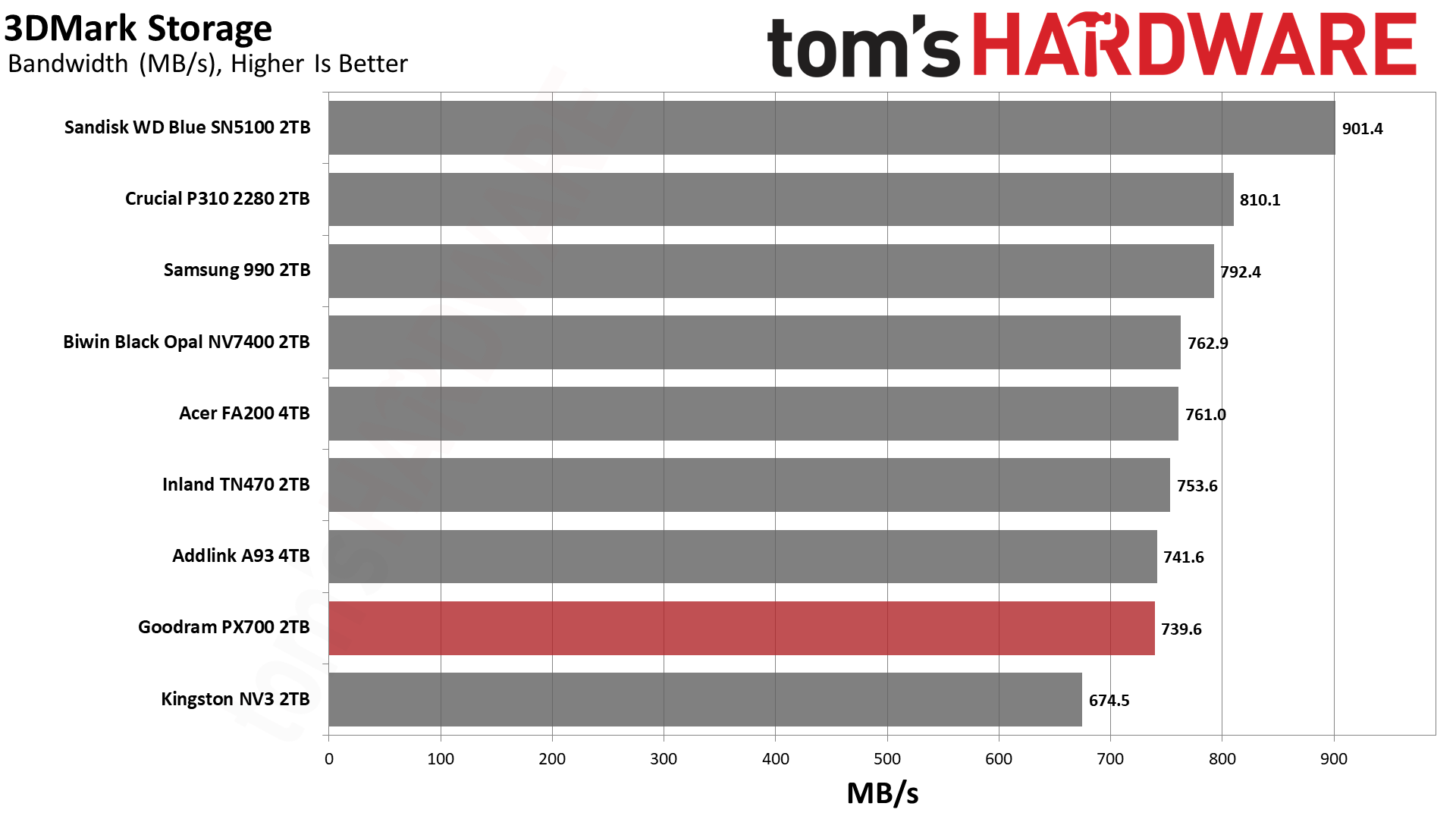
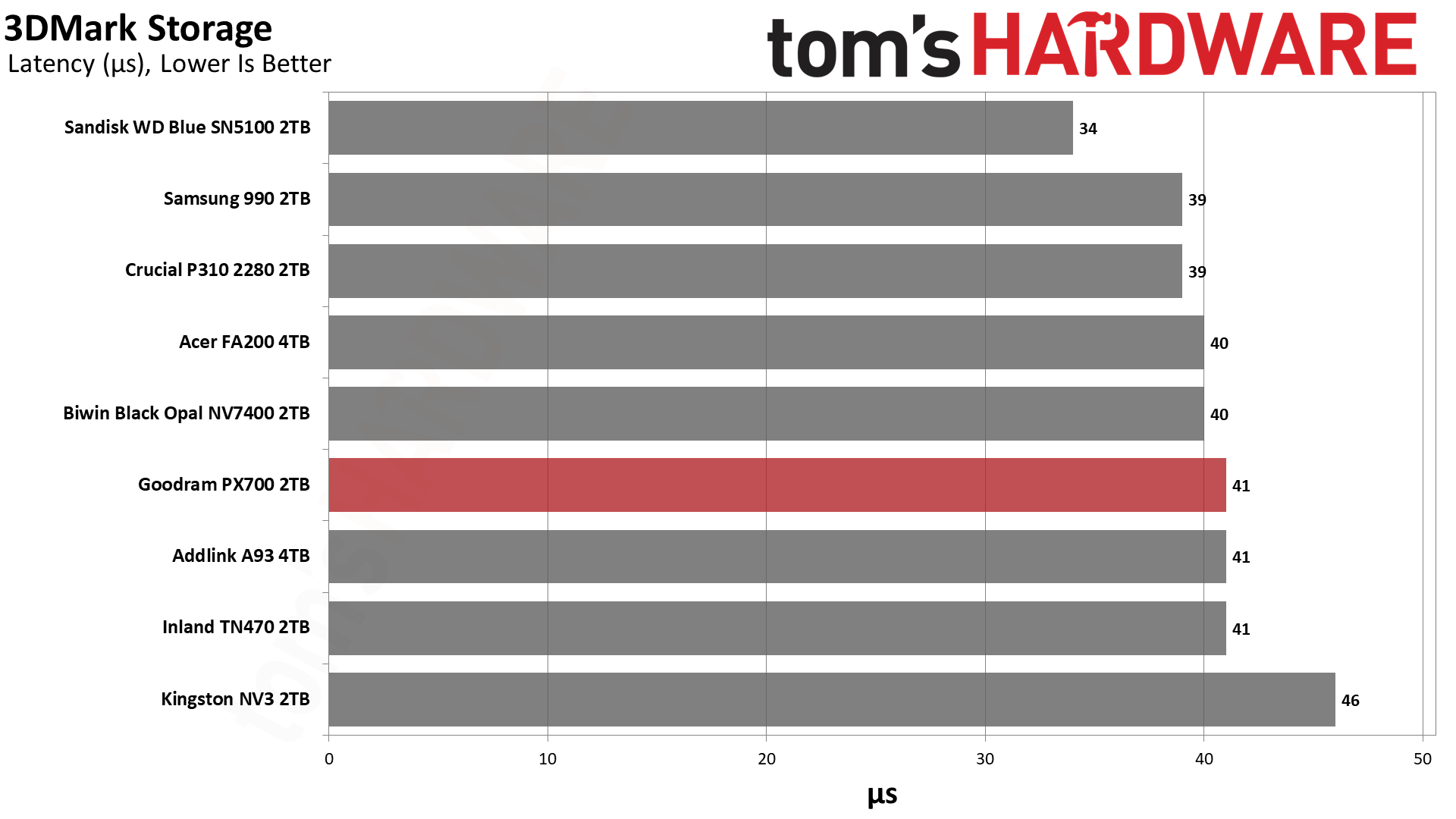
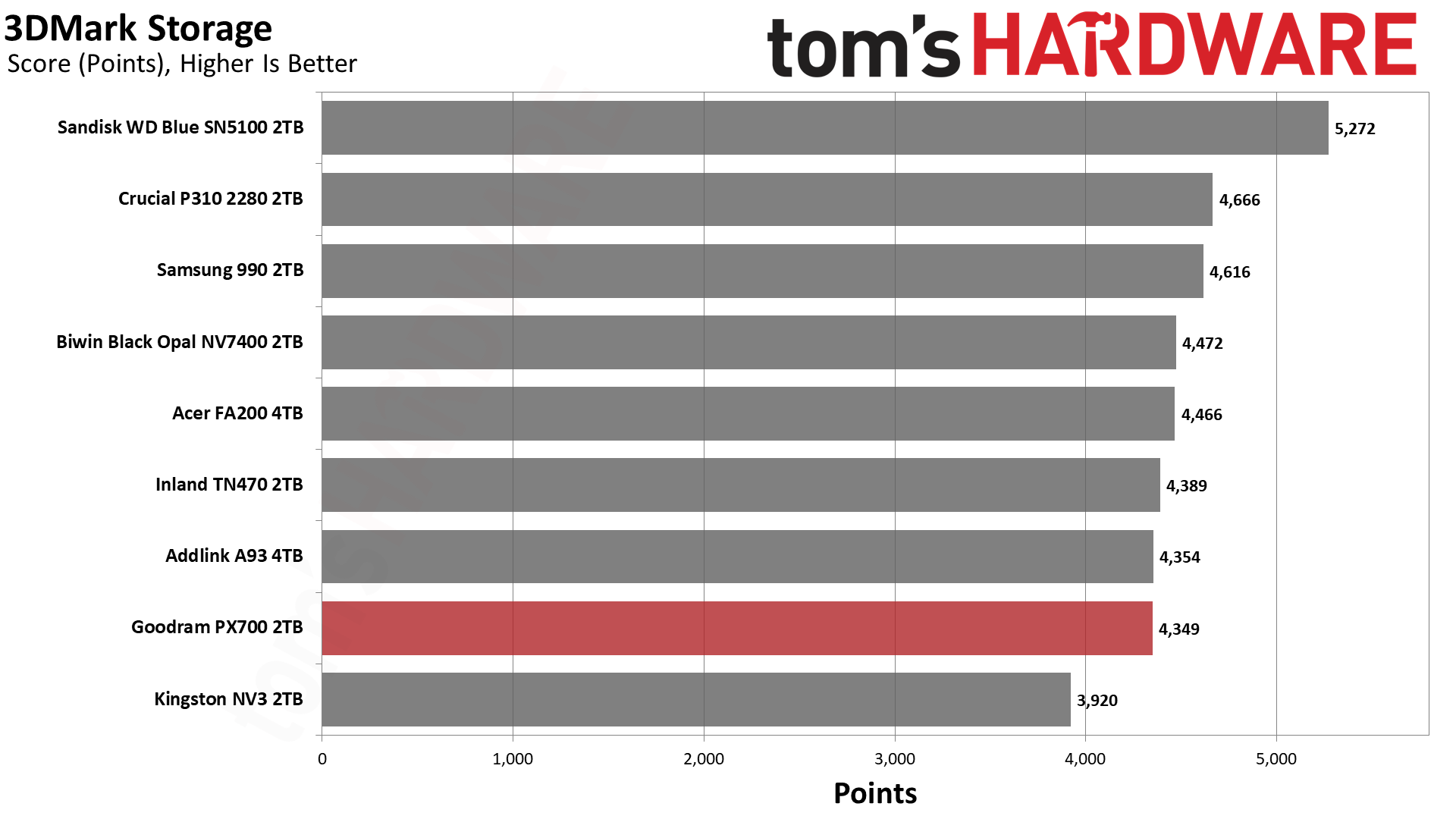
The PX700’s 3DMark results are spot-on for a drive of this caliber, hanging out at around 40µs for latency with bandwidth over 700 MB/s. This level of performance is excellent for gaming, and the only drive that wouldn’t fall into that category is the NV3. The NV3 is still fast enough for a games drive and remains a good budget choice, but there are faster options like the PX700. We want to emphasize that the PX700 is better than it looks in this lineup because it’s effectively within range of all drives but one, the WD Blue SN5100.

Among the QLC-based drives, the WD Blue SN5100, 990, and P310 all notably score near the top. The BiCS flash in the first drive is known for its responsiveness and, yes, it will give you a small edge with game load times. However, the 990 is right up there with the P310, which means there is no shortage of viable options. Most slower drives, from a gamer’s perspective, will be last-generation or slower PCIe 4.0, which means it’s not hard to find drives that are very fast for games. This means that the deciding factor might lie outside of 3DMark performance, such as drive reliability.

Trace Testing — PCMark 10 Storage Benchmark

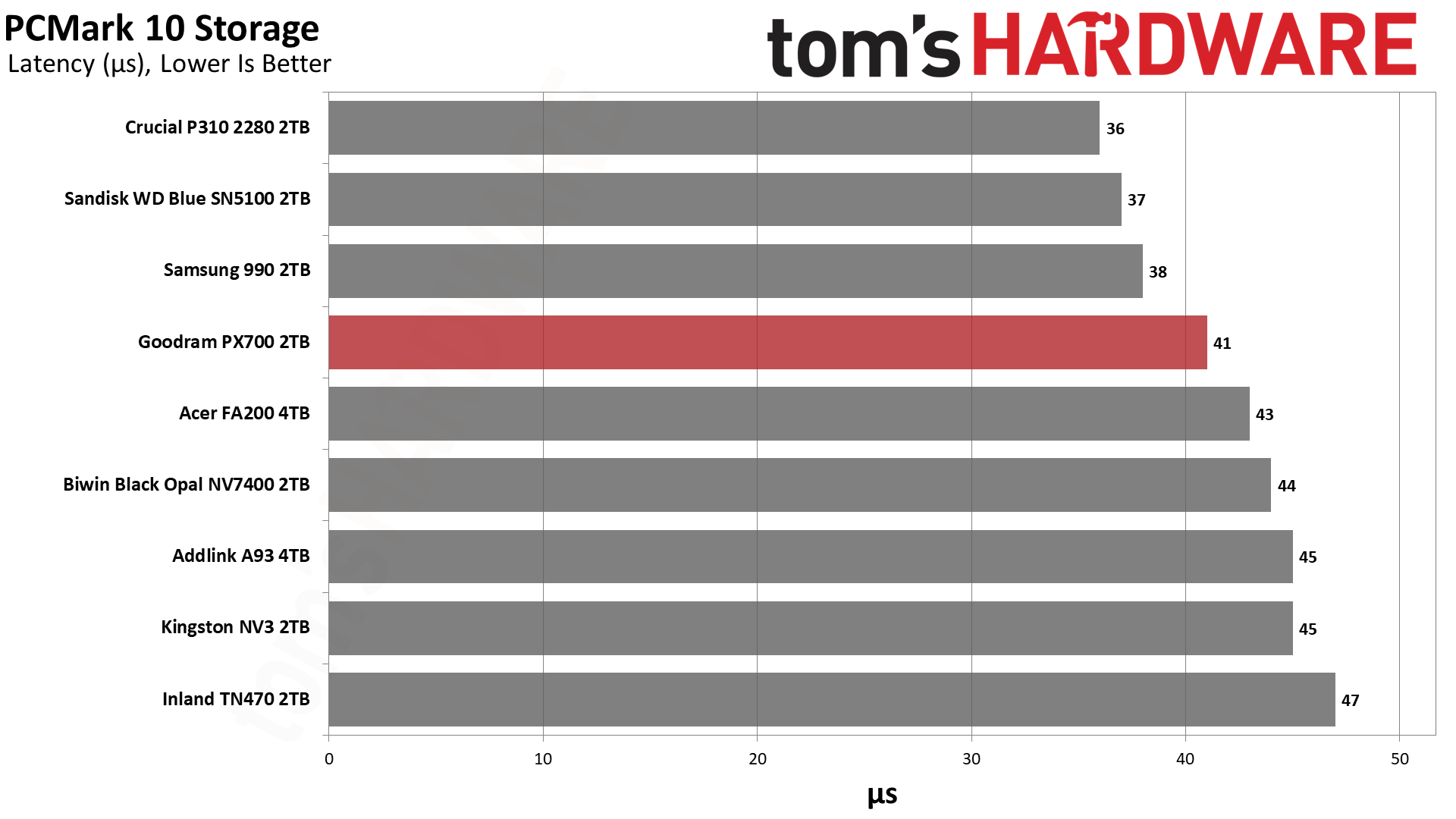
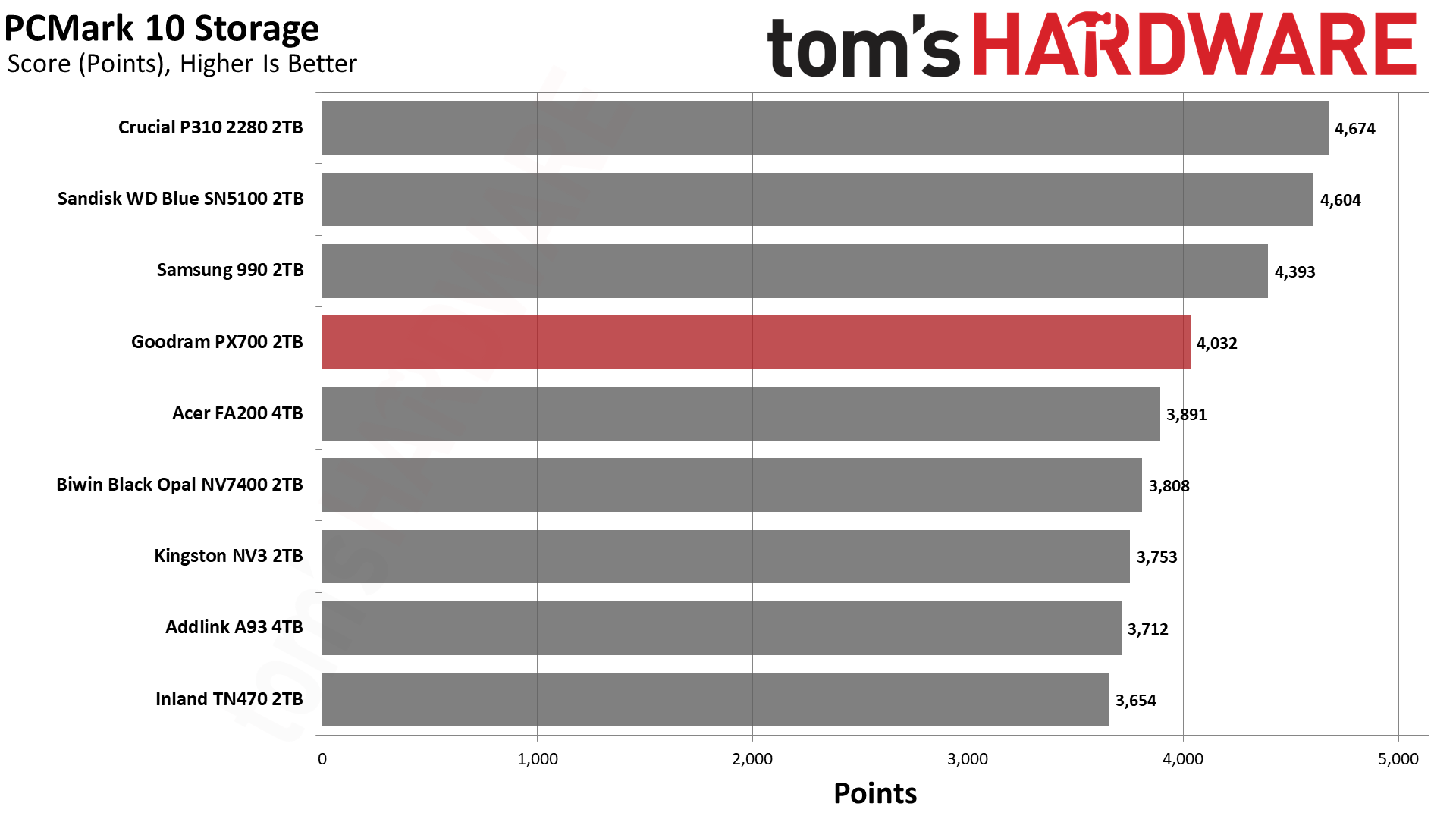
PCMark 10 is an industry standard trace-based benchmark that uses a wide-ranging set of real-world traces from popular applications and everyday tasks to measure the performance of storage devices. The results are particularly useful when analyzing drives for their use as primary/boot storage devices and in work environments.
Goodram PX700 2TB SSD
Tom's Hardware
Goodram PX700 2TB SSD
Tom's Hardware
Goodram PX700 2TB SSD
Tom's Hardware

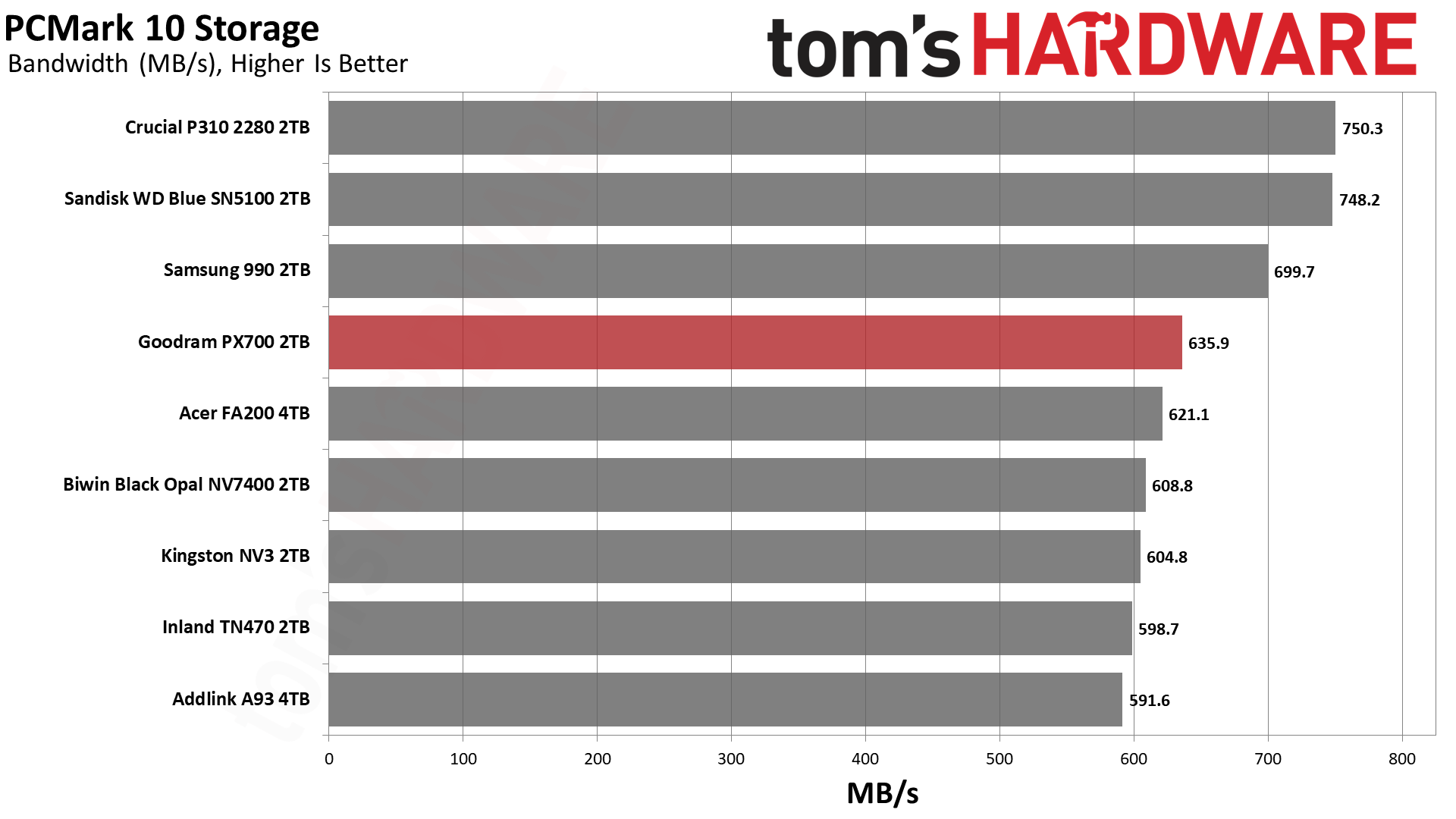
While the PX700 is merely mediocre against the competition in 3DMark – its absolute performance is quite good, though – its showing in PCMark 10 is better. This is again a scenario where the drives with TLC flash, including the TN470 with Phison’s controller, are underwhelming. This can be confusing to buyers who have relied on the mantra that TLC is better than QLC. There are reasons for the surprise here, although the general idea that benchmarking is often looking at ideal scenarios is perhaps the easiest answer.

These drives, whether TLC or QLC, rely on pSLC cache as much as possible to give you the best performance. This pSLC mode is not equivalent to native pSLC and is generally the same speed regardless of the flash type. QLC, however, tends to lead TLC in some ways and follow it in others. For example, QLC gets larger benefits from optimizations, so it may see advanced techniques first. This includes improvements to 4K latency. On the other hand, QLC has four planes when TLC has advanced to six. As we’ve seen with BiCS flash, which is four-plane against six-plane TLC from Micron and YMTC, fewer planes can lead to lower effective latency. The advantage of a higher plane count is in bandwidth but does not come without costs and drawbacks.

The PX700 is also faster than a QLC-based drive with the same controller, like the FA200. In that case, the FA200 uses twice as many dies – thirty-two – which puts more load on the controller. This can increase latency. In general, the idea has been that bigger drives are faster, which is certainly true in many cases. Larger drives will have more bandwidth and can reach higher IOPS due to improved parallelization. However, past four dies for each channel – this is where the PX700 falls, and the FA200 exceeds – you are increasing power consumption and overhead. So, the PX700 is in a sweet spot for how this benchmark tests.

We would go on to say that the P310, WD Blue SN5100, and 990 all beat the PX700. These are all QLC-based drives with a range of controllers. We’ve already explained the BiCS factor. Samsung’s newer QLC is also very good. The P310 has always been a bit of an outlier, as on paper its hardware shouldn’t perform as well as it does. Considering Crucial used to rely at least partially on proprietary controllers, we think this is a situation where they did a lot of optimization. WD and Sandisk also did this with the Black SN8100/Optimus Pro GX 8100 so there’s some “special sauce” at play. The PX700 being the best of the rest is a point in its favor, as those are the drives it’s competing with in the real market.

Console Testing — PlayStation 5 Transfers

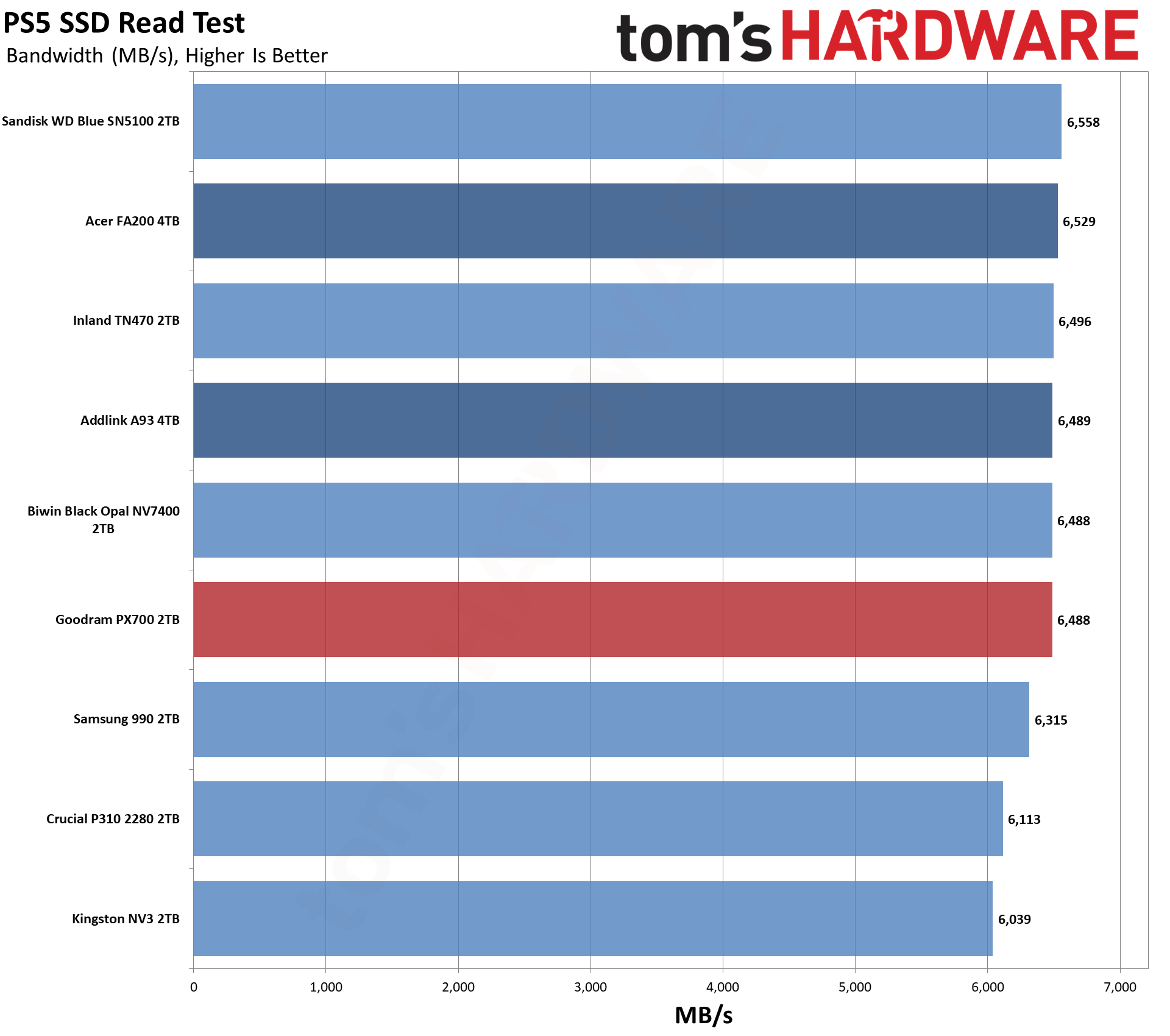
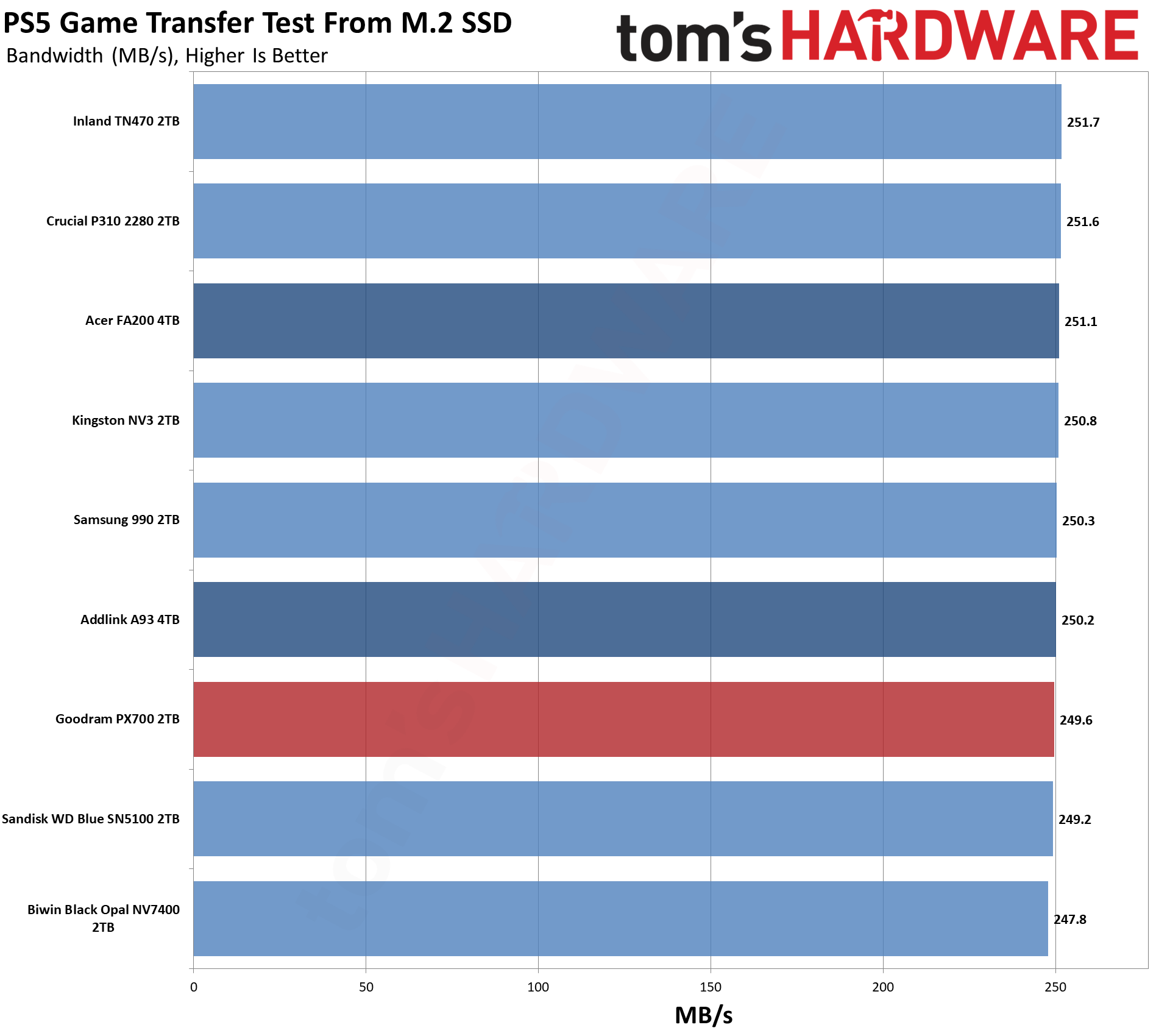
The PlayStation 5 is capable of taking one additional PCIe 4.0 or faster SSD for extra game storage. While any 4.0 drive will technically work, Sony recommends drives that can deliver at least 5,500 MB/s of sequential read bandwidth for optimal performance. Based on our extensive testing, PCIe 5.0 SSDs don’t bring much to the table and generally shouldn’t be used in the PS5, especially as they may require additional cooling. Check our Best PS5 SSDs article for more information.

Our testing utilizes the PS5’s internal storage test and manual read/write tests with over 192GB of data both from and to the internal storage. Throttling is prevented where possible to see how each drive operates under ideal conditions. While game load times should not deviate much from drive to drive, our results can indicate which drives may be more responsive in long-term use.
Goodram PX700 2TB SSD
Tom's Hardware
Goodram PX700 2TB SSD
Tom's Hardware
Goodram PX700 2TB SSD
Tom's Hardware

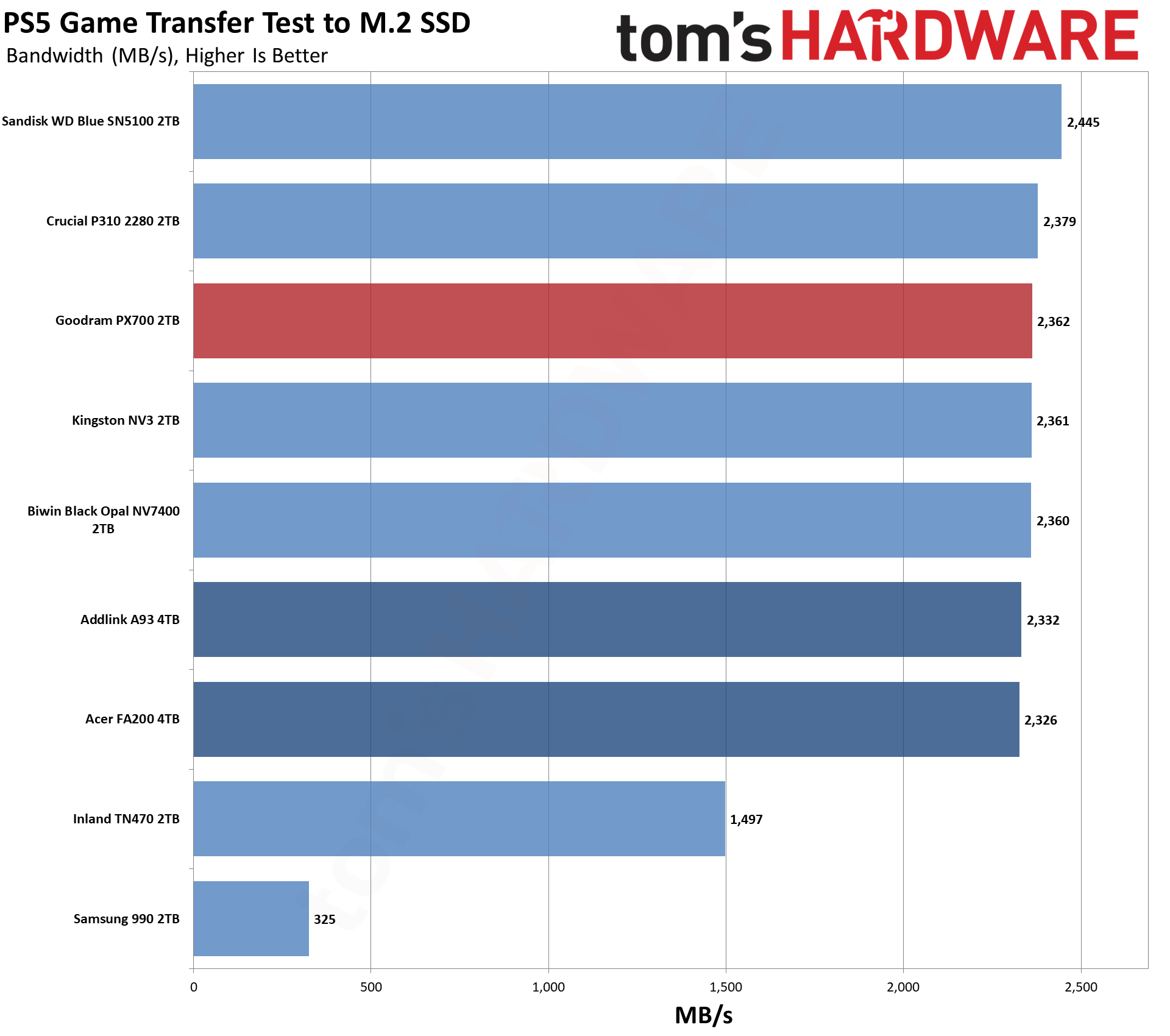
For the PS5, we can recommend almost any drive if it meets the PS5’s minimum requirements in any real way. The PX700 significantly exceeds that, so the question is more about value. What does this drive offer that others don’t? For this category, this often means leaning towards drives with heatsinks and/or higher reliability. Reliability is a difficult quality to measure, although a warranty gives some peace of mind. As for heatsinks, you can always add your own. So drawing lines here becomes more difficult.

We would point to our Power Consumption and Temperature section below for some additional support. The PX700, as we will see, runs coolly, which is a big positive for the PS5. Performance-wise, it’s right up there with the other drives and only really behind the Blue SN5100. You don’t have to go with a big brand to get good results here, and the PX700 will serve you well.

Transfer Rates — DiskBench

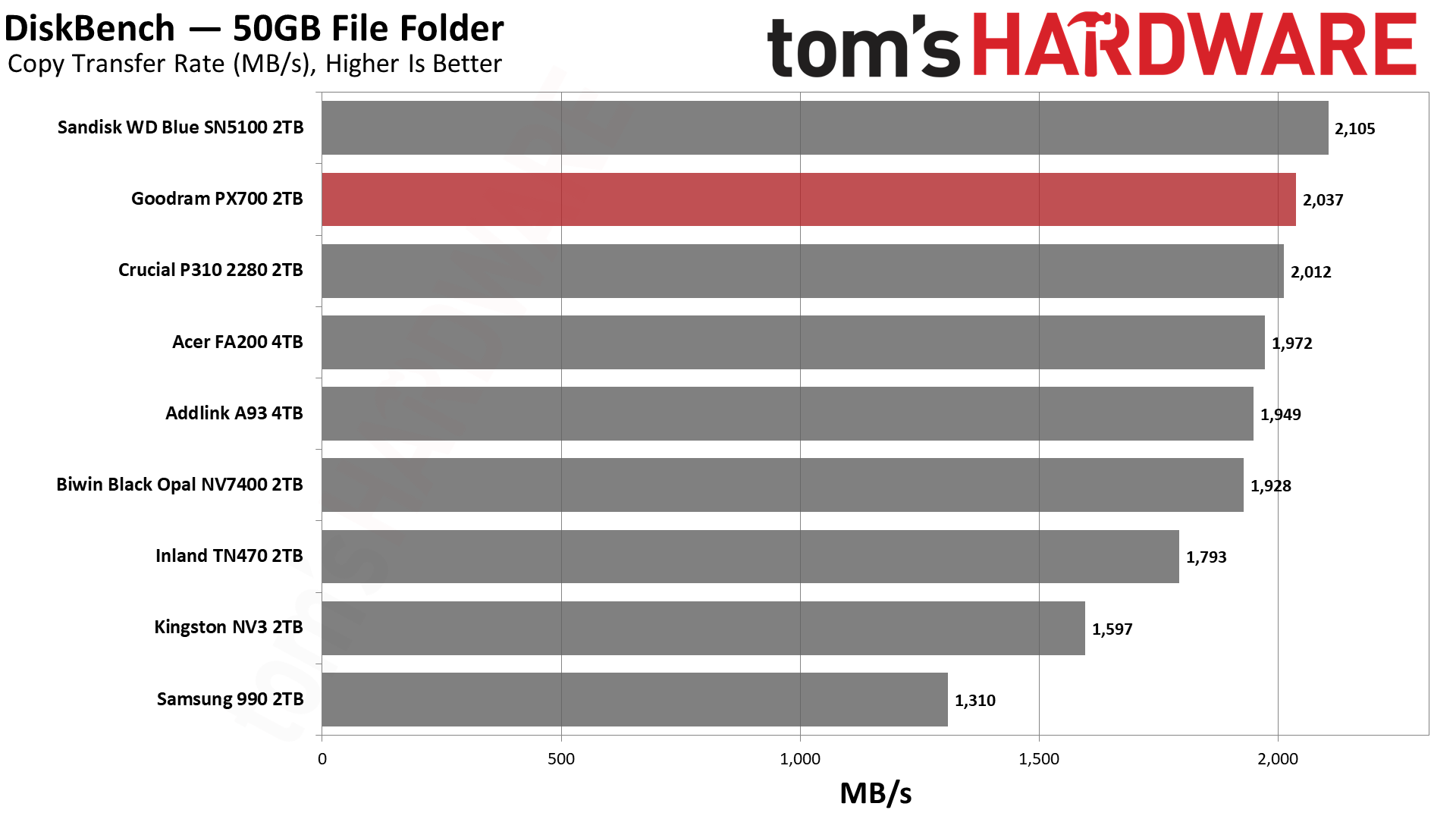
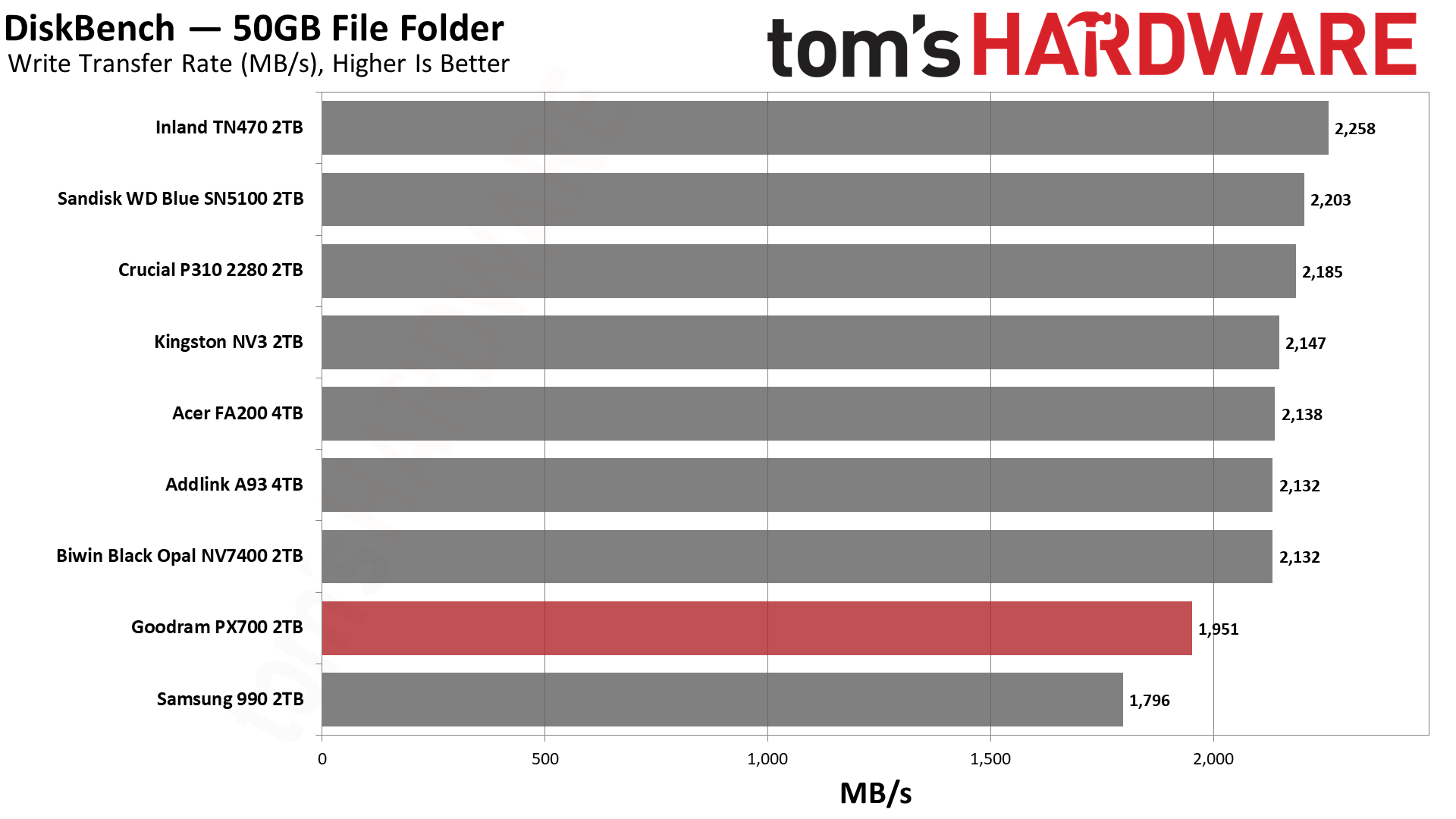
We use the DiskBench storage benchmarking tool to test file transfer performance with a custom 50GB dataset. We write 31,227 files of various types, such as pictures, PDFs, and videos to the test drive, then make a copy of that data to a new folder, and follow up with a reading test of a newly written 6.5GB zip file. This is a real-world type workload that fits into the cache of most drives.
Goodram PX700 2TB SSD
Tom's Hardware
Goodram PX700 2TB SSD
Tom's Hardware
Goodram PX700 2TB SSD
Tom's Hardware

The PX700 does very well here, and we wanted to give some background on this test and what it means to put that into perspective. Whether you’re copying between drives or copying to and from the same drive, there are some universal principles. One is that there will be a bottleneck, and usually this will be on the write side of things, as drives write slower than they read. Flash memory, in particular, has to erase cells before they can be written again, which leads to some curious behavior under certain workloads. More generally, though, a write has higher latency – with flash again, this is due to the technology and how multi-bit cells usually need multiple write passes – and writes must be acknowledged, while reads just come from usually static media.

If you have drives that are of different classes – NVMe and SATA, or PCIe 4.0 and PCIe 3.0 – then you would expect the slower class of drive to be the bottleneck even if it’s on the read side. This is also universal, going back to the days when HDDs got faster as they got bigger. SSDs also generally get faster with capacity, but flash is so fast that these rules are no longer absolute. This is complicated by other facets of the technology like pSLC caching and TLC versus QLC flash, where with sustained writes you can have dramatic changes in performance. This is a problem because many people buy drives thinking mostly about transfer performance, and when they hit a low that’s nowhere near the box-rated speed, they panic.

Our DiskBench testing takes all of this into account as it’s closer to a real-world workload, including using different file sizes. Transferring a bunch of large files is fast. Copying lots of small files – and any veteran of hard drives will know this from backing up Windows or documents manually – can be very slow, even on SSDs. So we do a mix. Moreover, we’re doing an on-drive copy, which helps rule out external factors. Much of what you do on your system can be cached in system memory, which can give misleading metrics depending on what you’re doing.

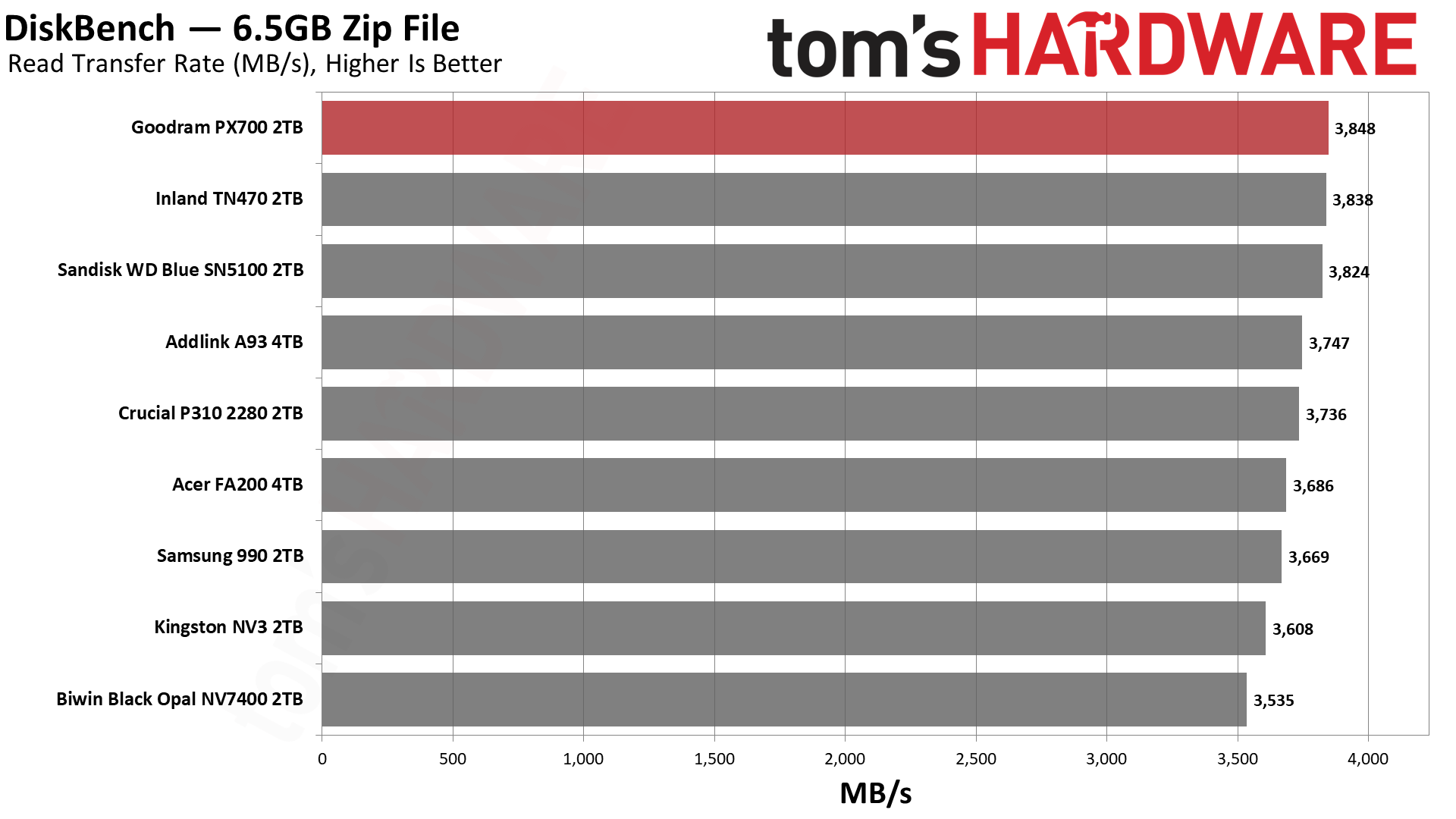
What we’re leading up to here is that the PX700 is the fastest drive on the list for reads and not far off first place for copying. Considering it’s up against some of the best budget drives out there, that’s no mean feat. This is, again, a real-world workload and probably more meaningful than something like 3DMark is for game load times.

Yes, the difference between the best and the worst drive for reads is under 10%, but nobody wants to buy a drive and feel bad about how fast it feels. The PX700 feels like a premium drive – the weaker write performance here is real, but most of what you’re doing will be read-heavy – and if you’re building a PC for someone with it over, say, the Samsung 990, they won’t know the difference. That is a common refrain regardless, but it helps underline the value of reliability. People buy Samsung and WD/Sandisk for a reason. Given Goodram’s European basis, there is some reason to celebrate the performance here while also acknowledging it’s not a no-name brand from AliExpress.

Synthetic Testing — ATTO / CrystalDiskMark

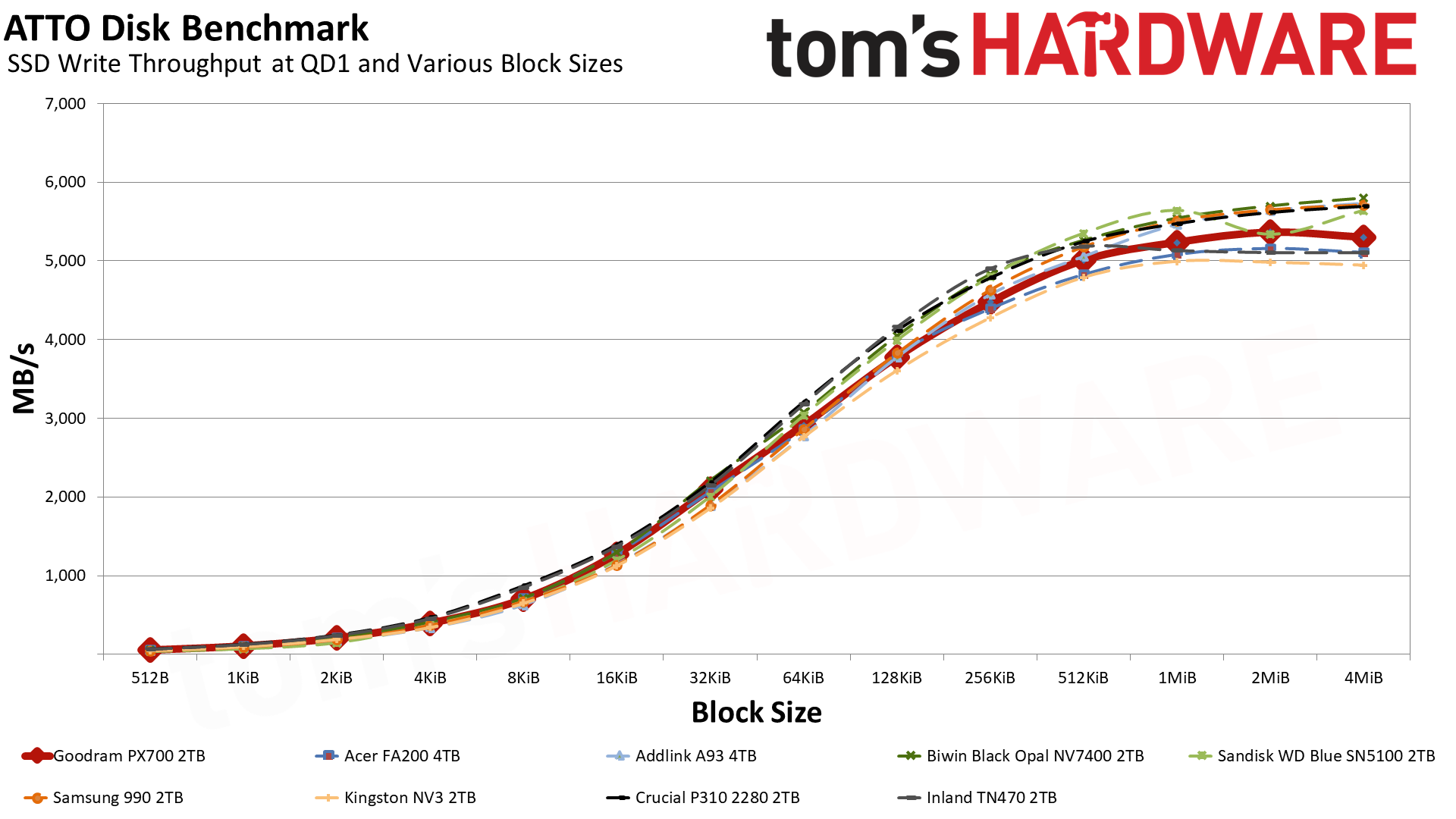
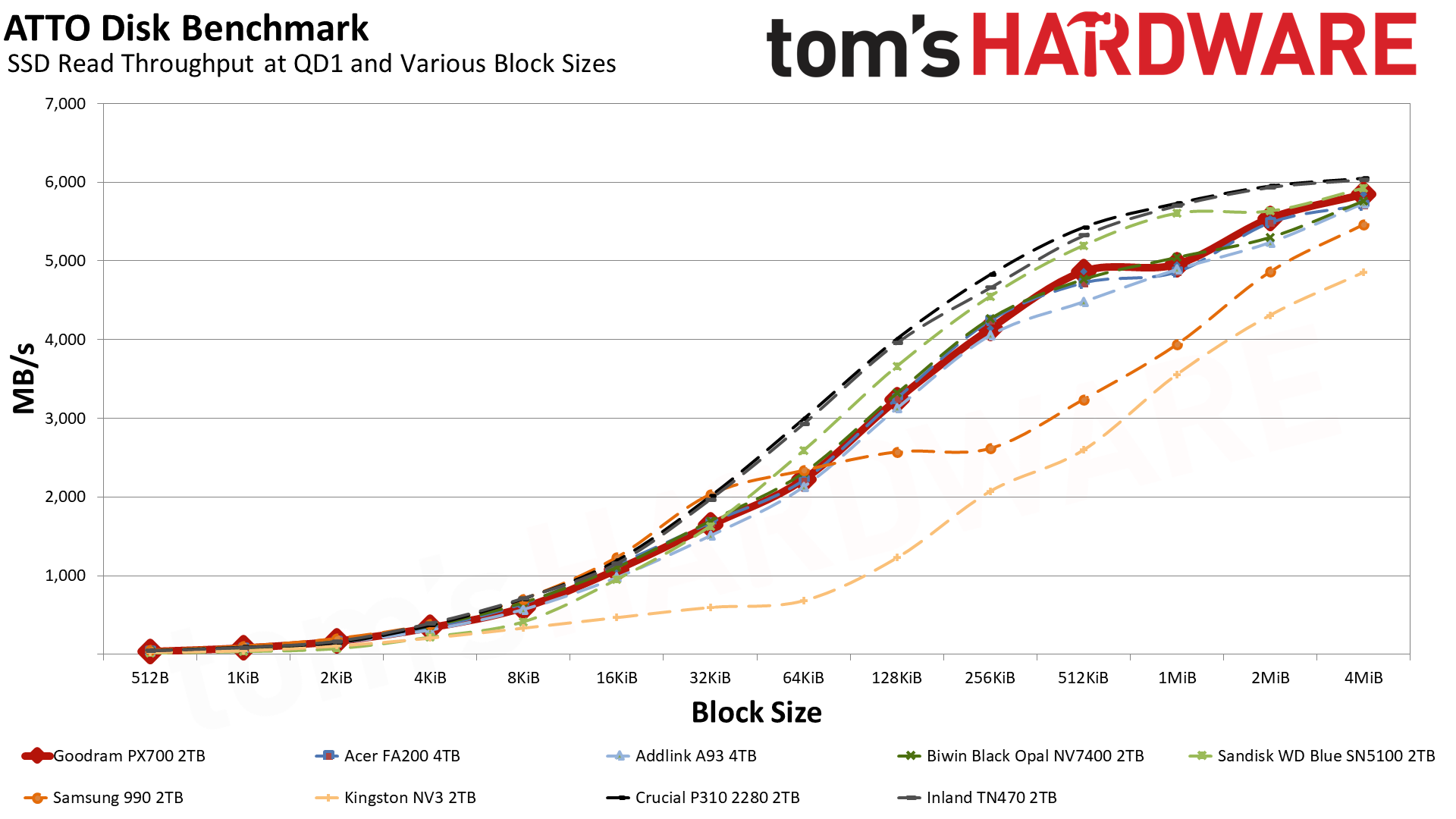
ATTO and CrystalDiskMark (CDM) are free and easy-to-use storage benchmarking tools that SSD vendors commonly use to assign performance specifications to their products. Both of these tools give us insight into how each device handles different file sizes and at different queue depths for both sequential and random workloads.
Goodram PX700 2TB SSD
Tom's Hardware
Goodram PX700 2TB SSD
Tom's Hardware
Goodram PX700 2TB SSD
Tom's Hardware
Goodram PX700 2TB SSD
Tom's Hardware
Goodram PX700 2TB SSD
Tom's Hardware
Goodram PX700 2TB SSD
Tom's Hardware
Goodram PX700 2TB SSD
Tom's Hardware
Goodram PX700 2TB SSD
Tom's Hardware
Goodram PX700 2TB SSD
Tom's Hardware
Goodram PX700 2TB SSD
Tom's Hardware
Goodram PX700 2TB SSD
Tom's Hardware
Goodram PX700 2TB SSD
Tom's Hardware
Goodram PX700 2TB SSD
Tom's Hardware
Goodram PX700 2TB SSD
Tom's Hardware

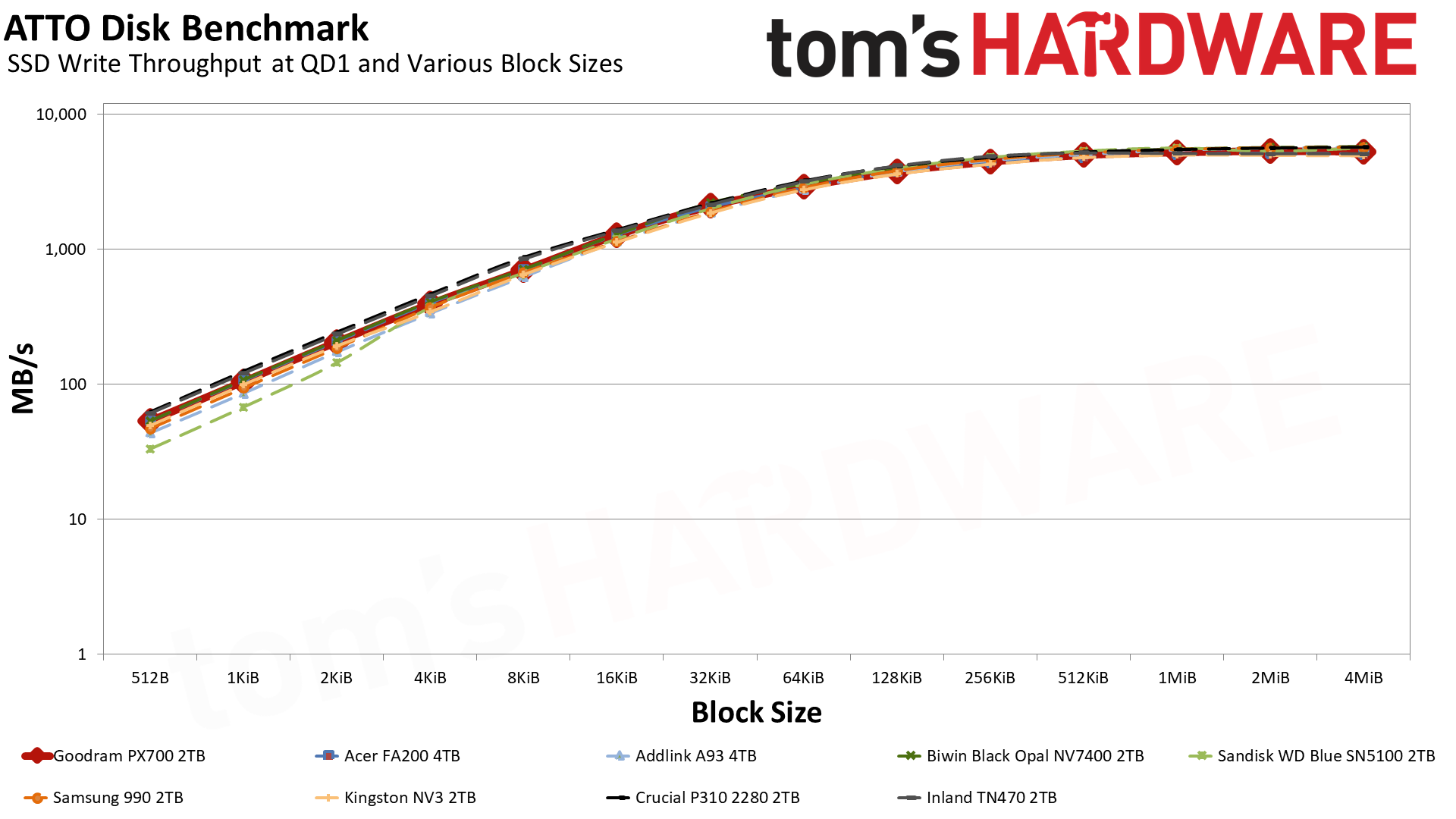
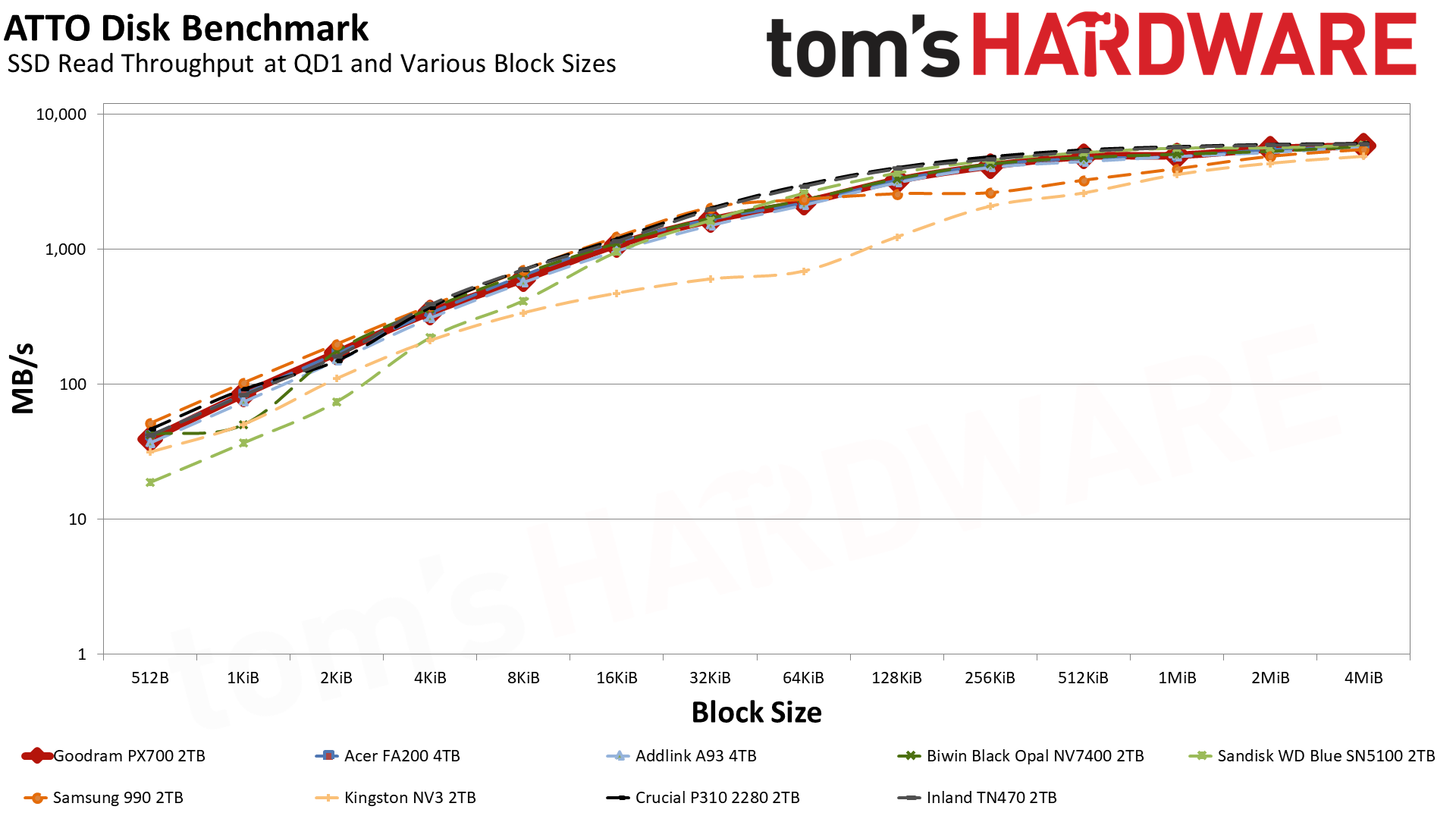
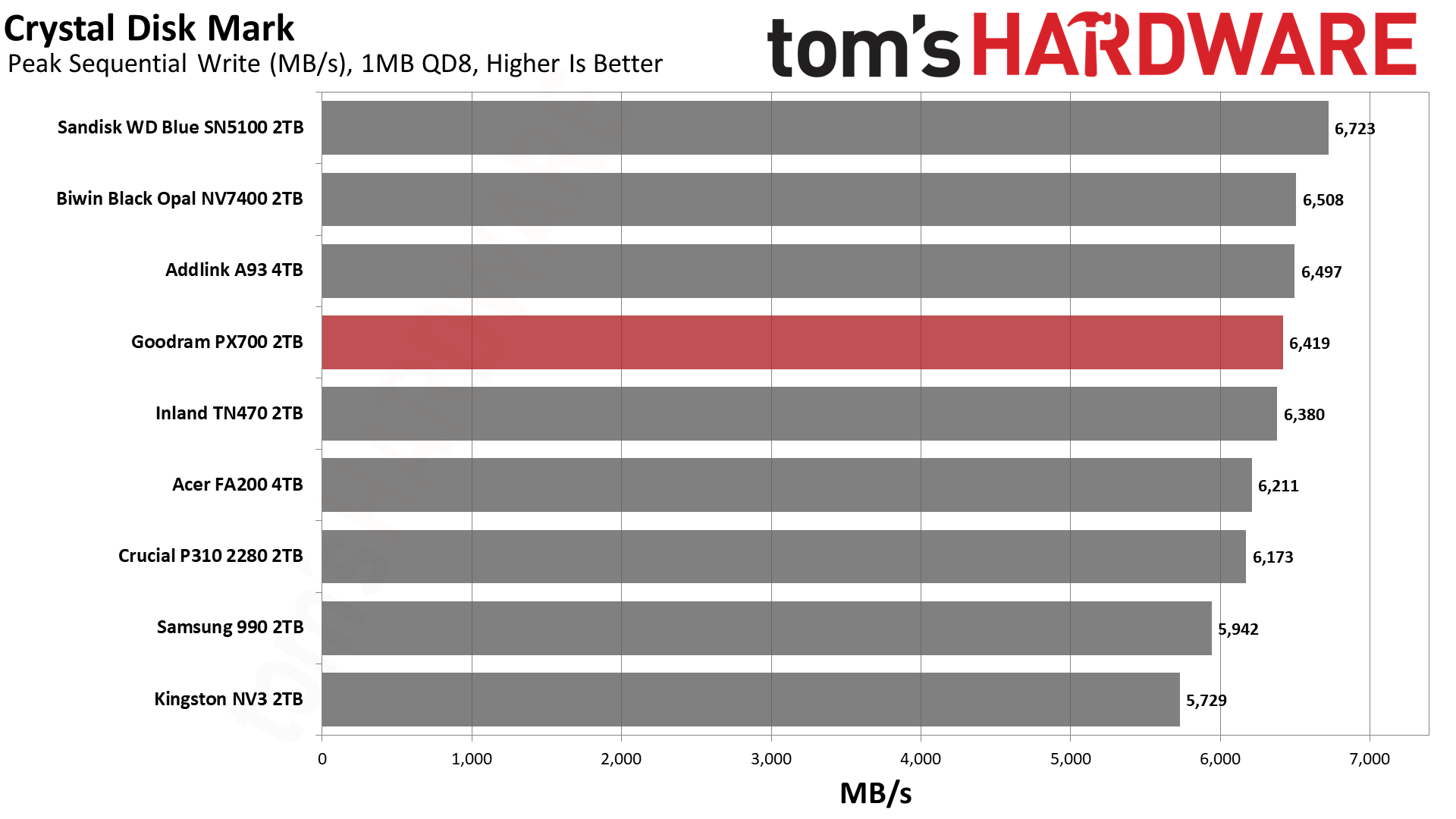
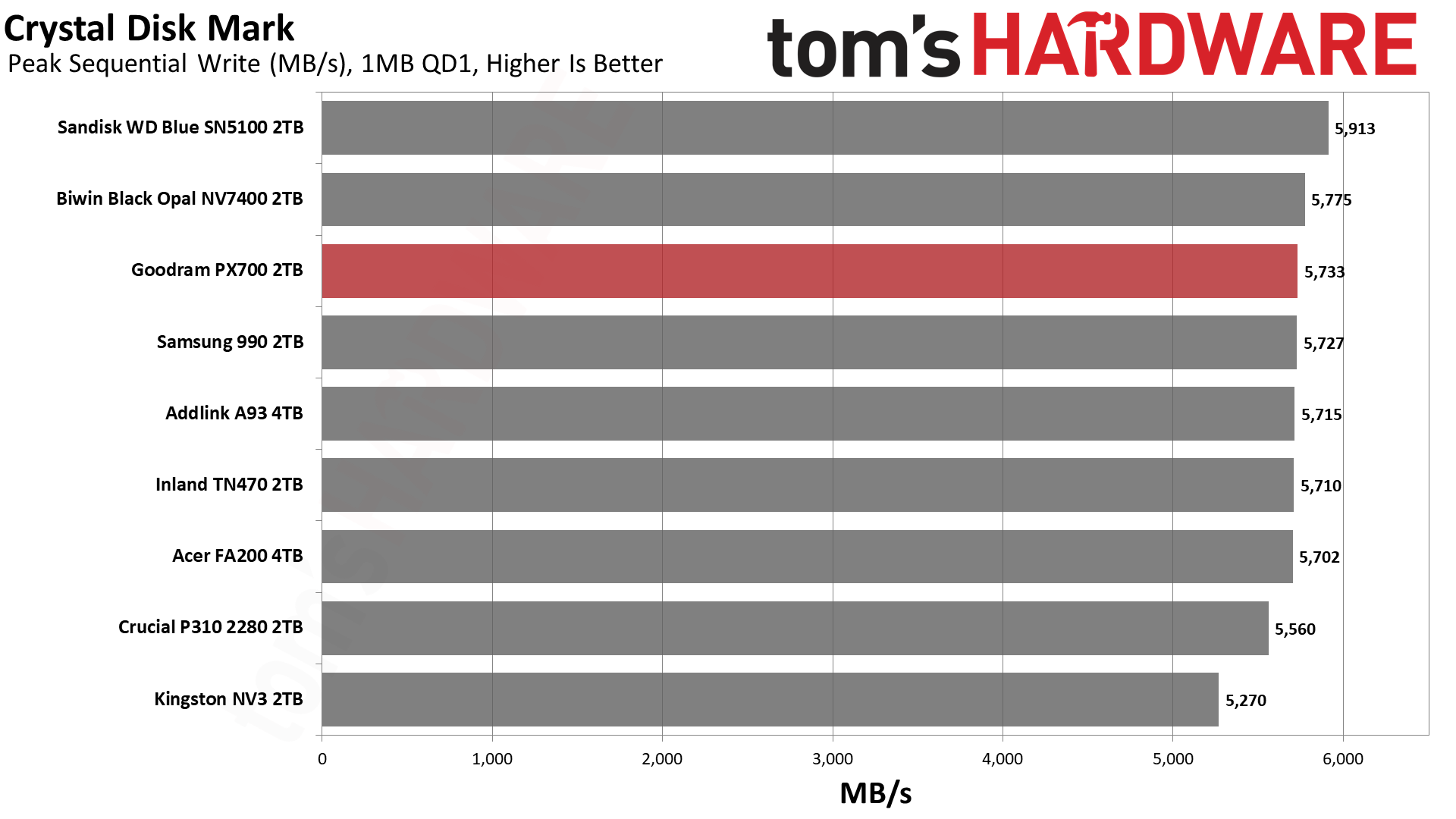
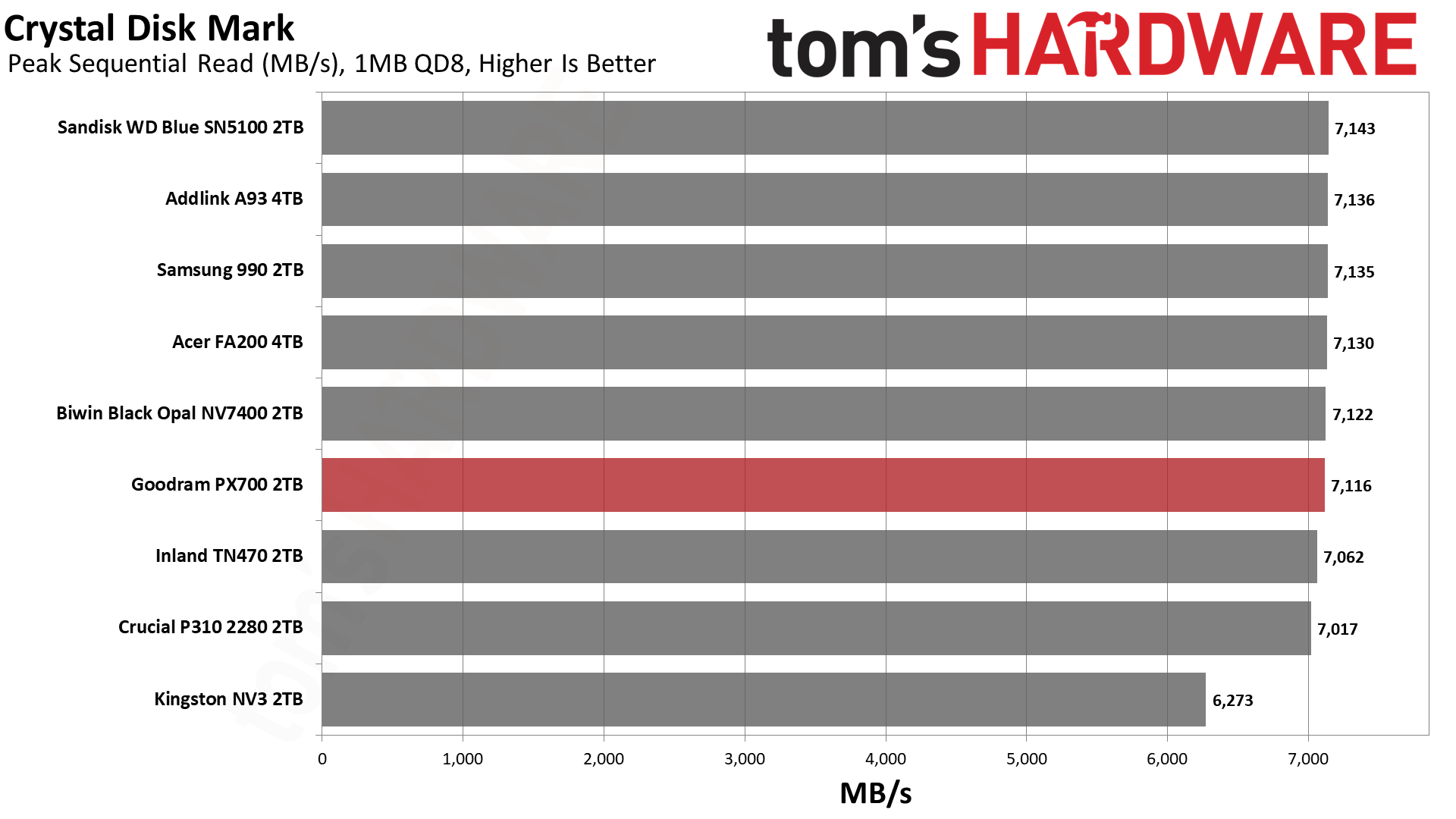
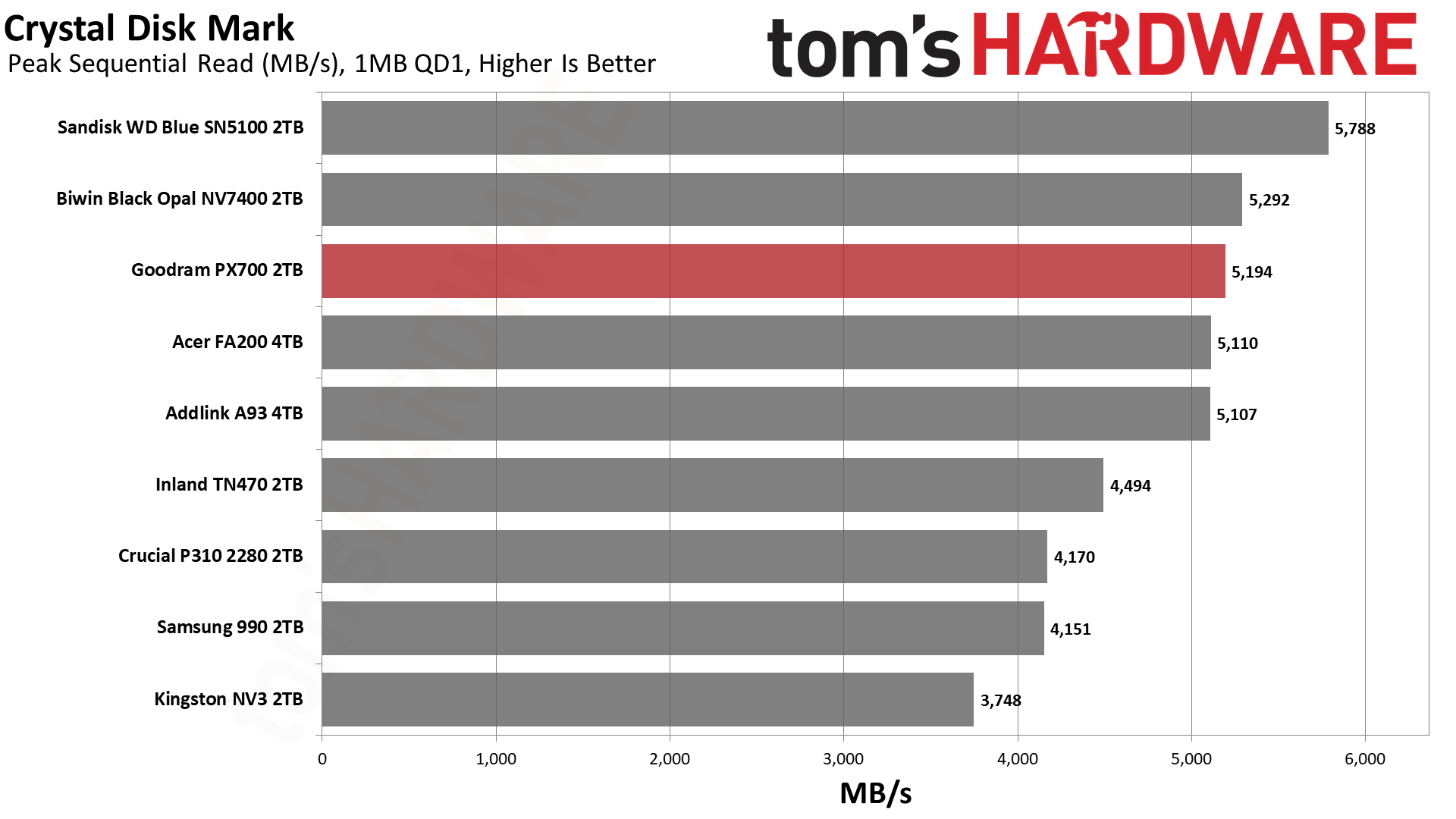
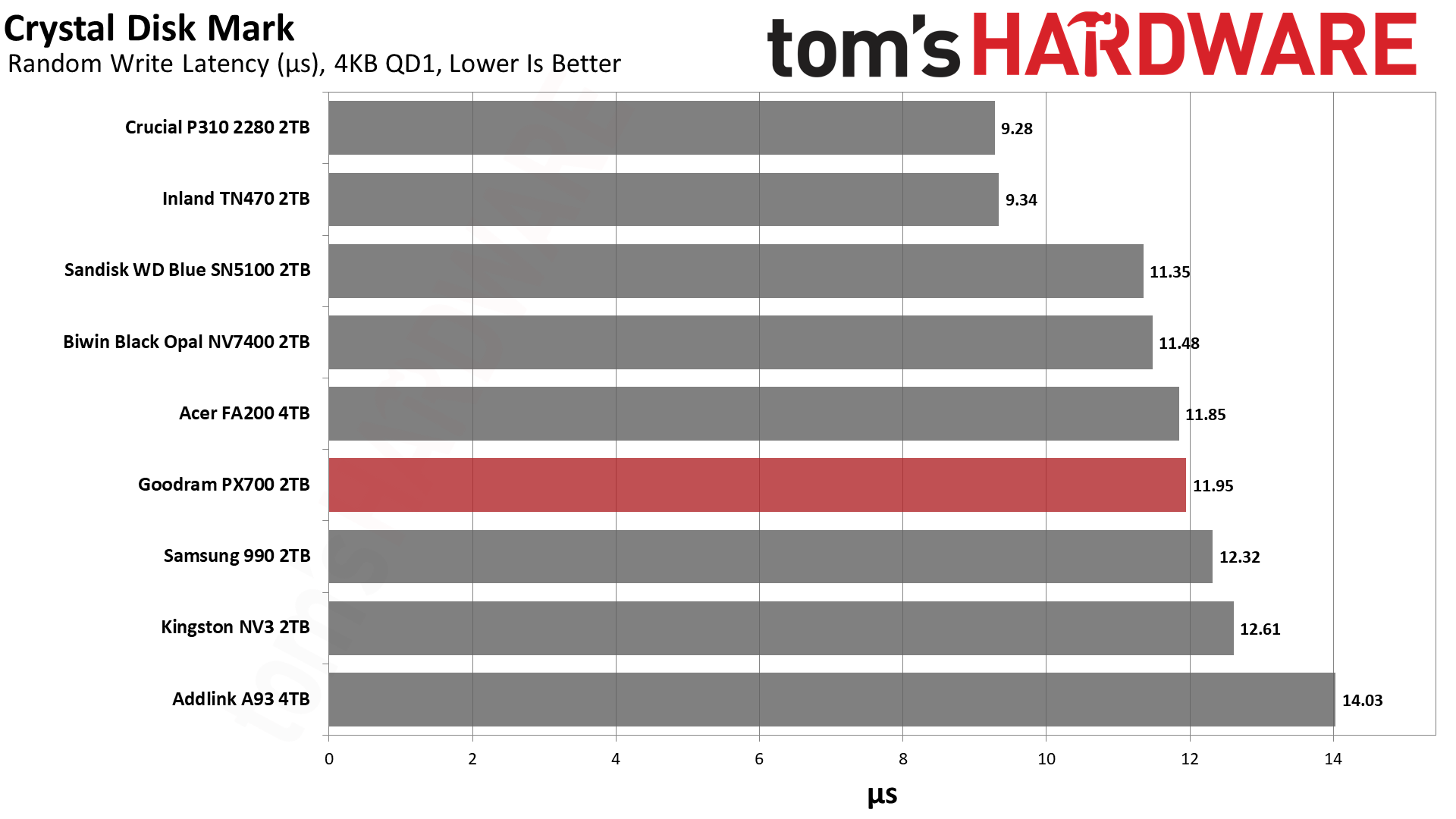
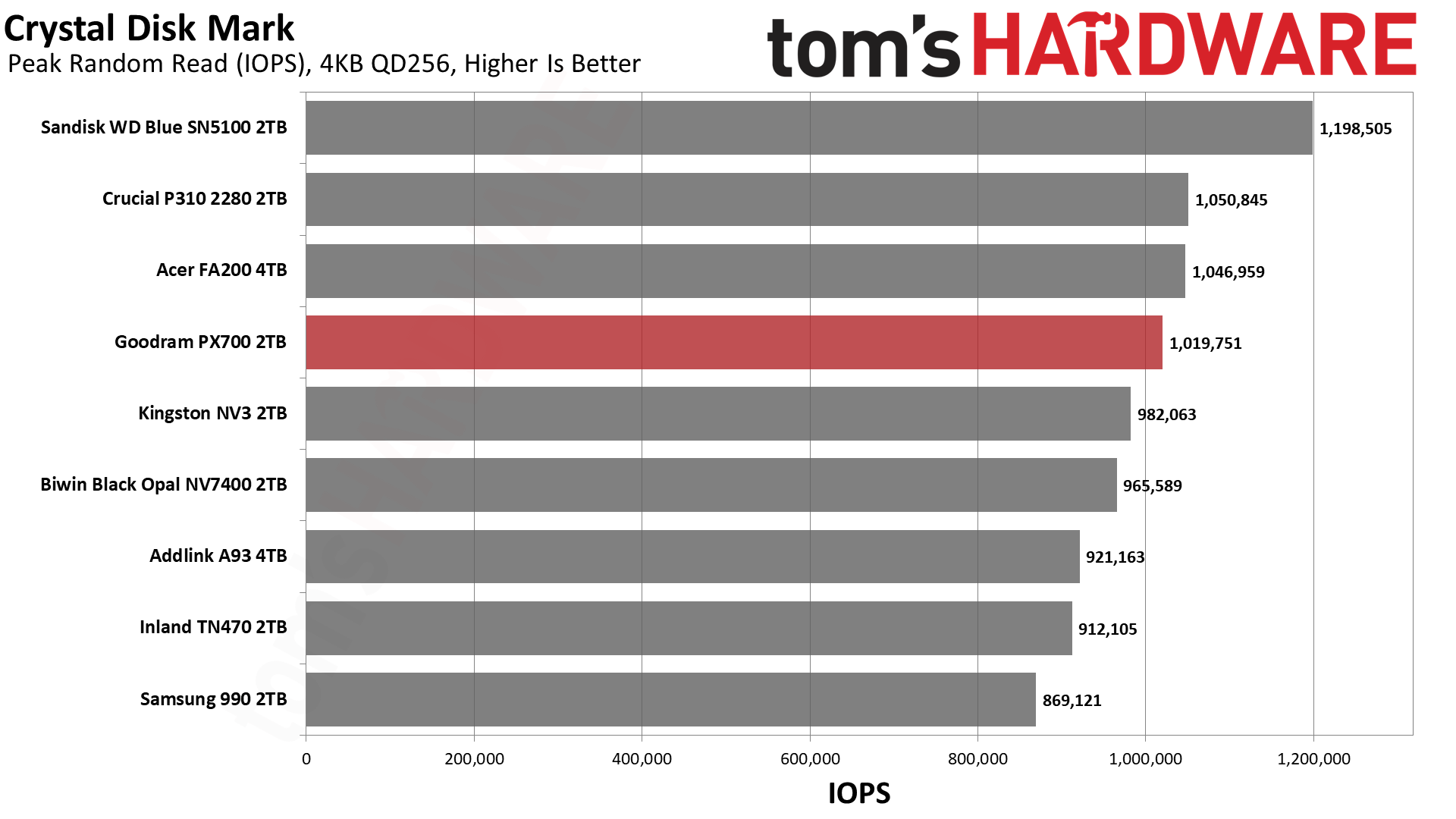
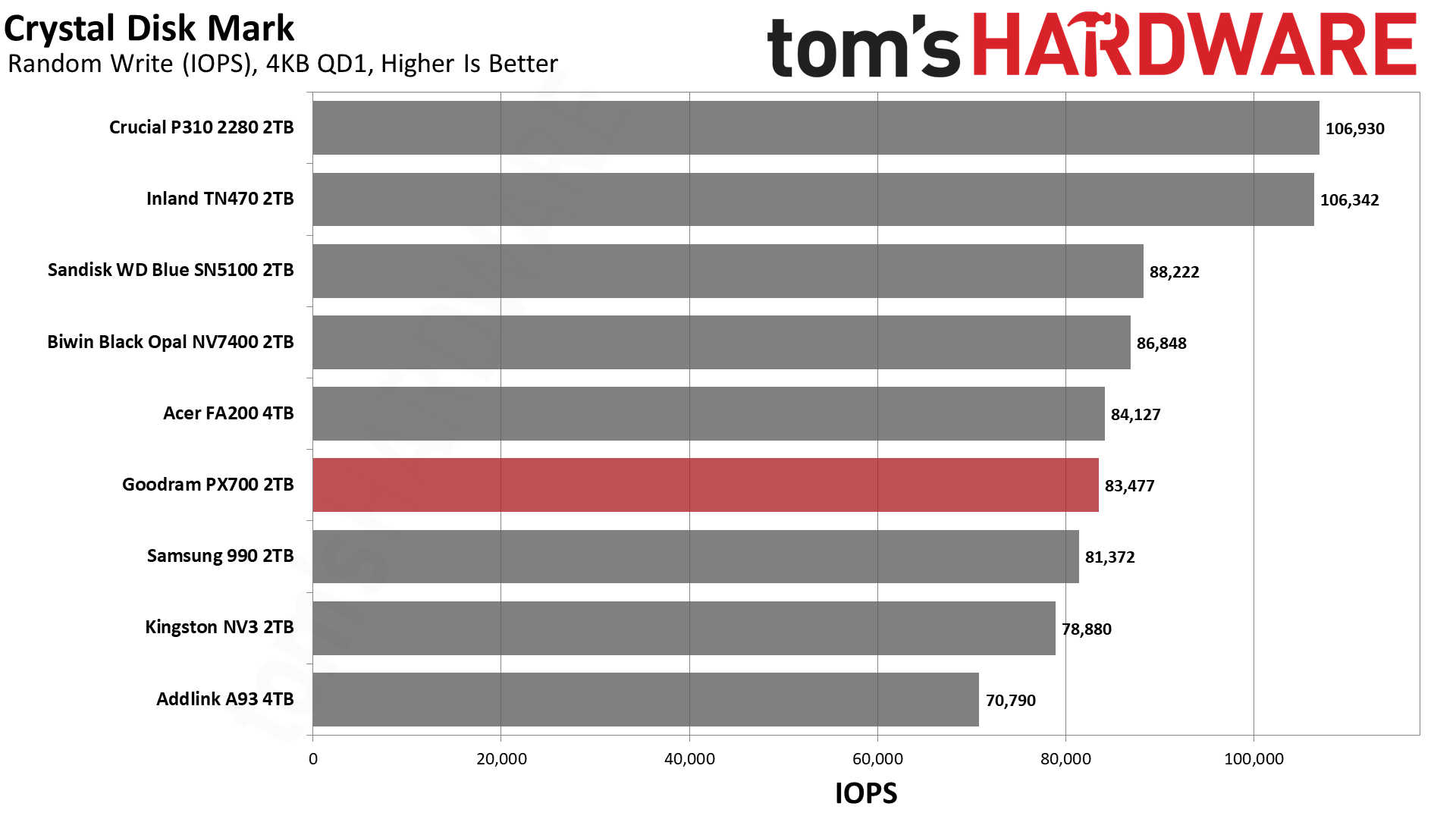
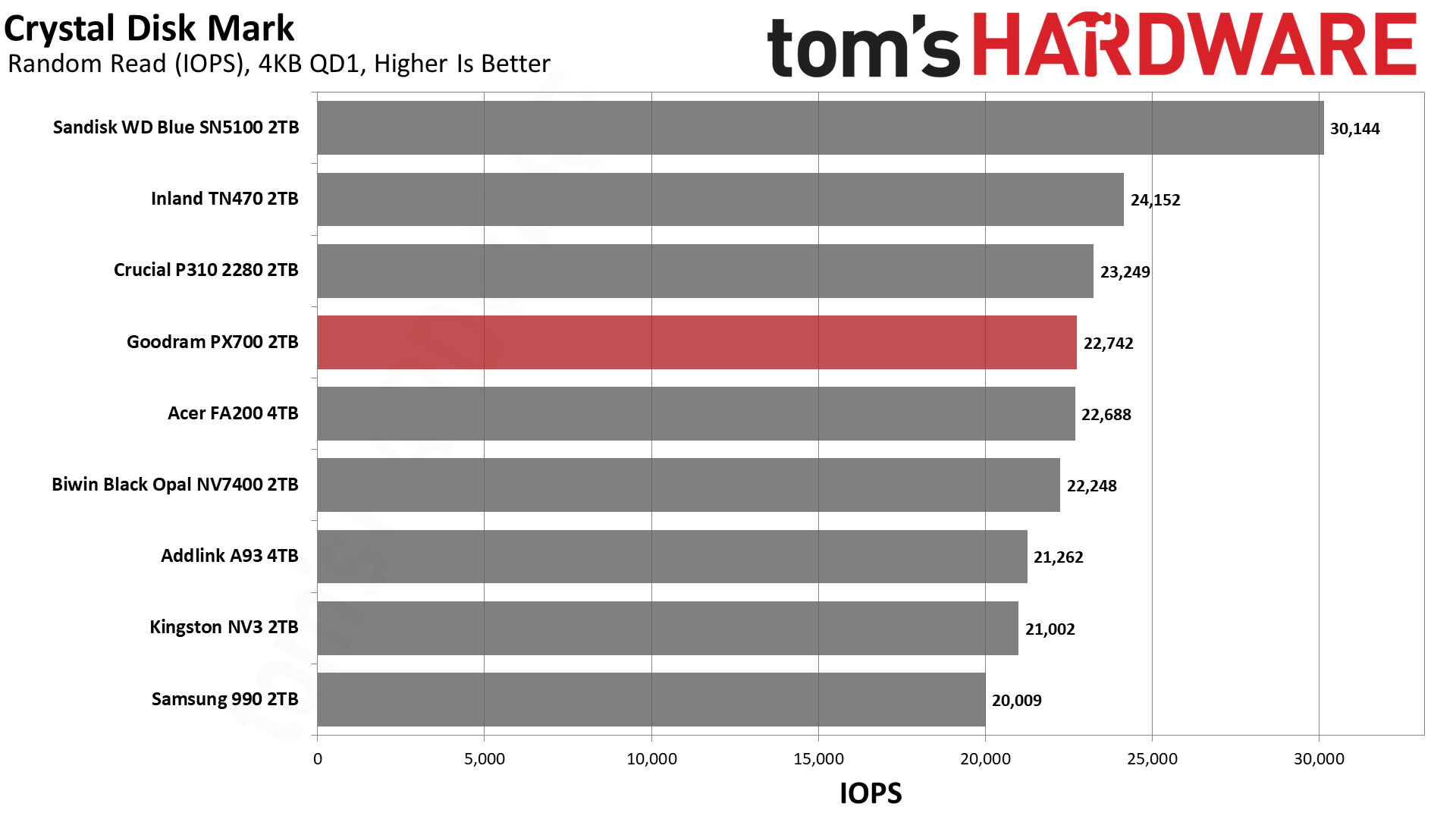
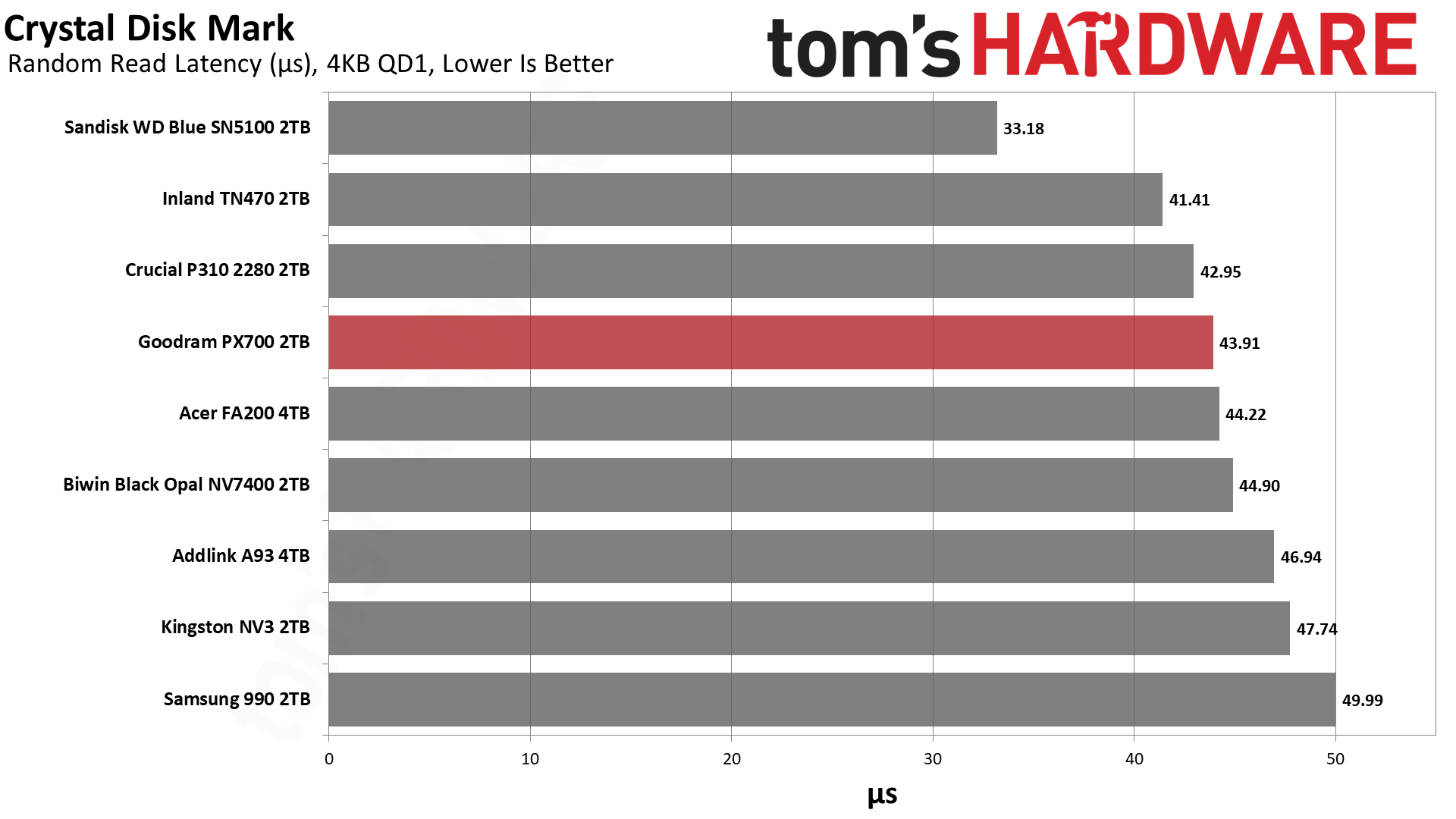
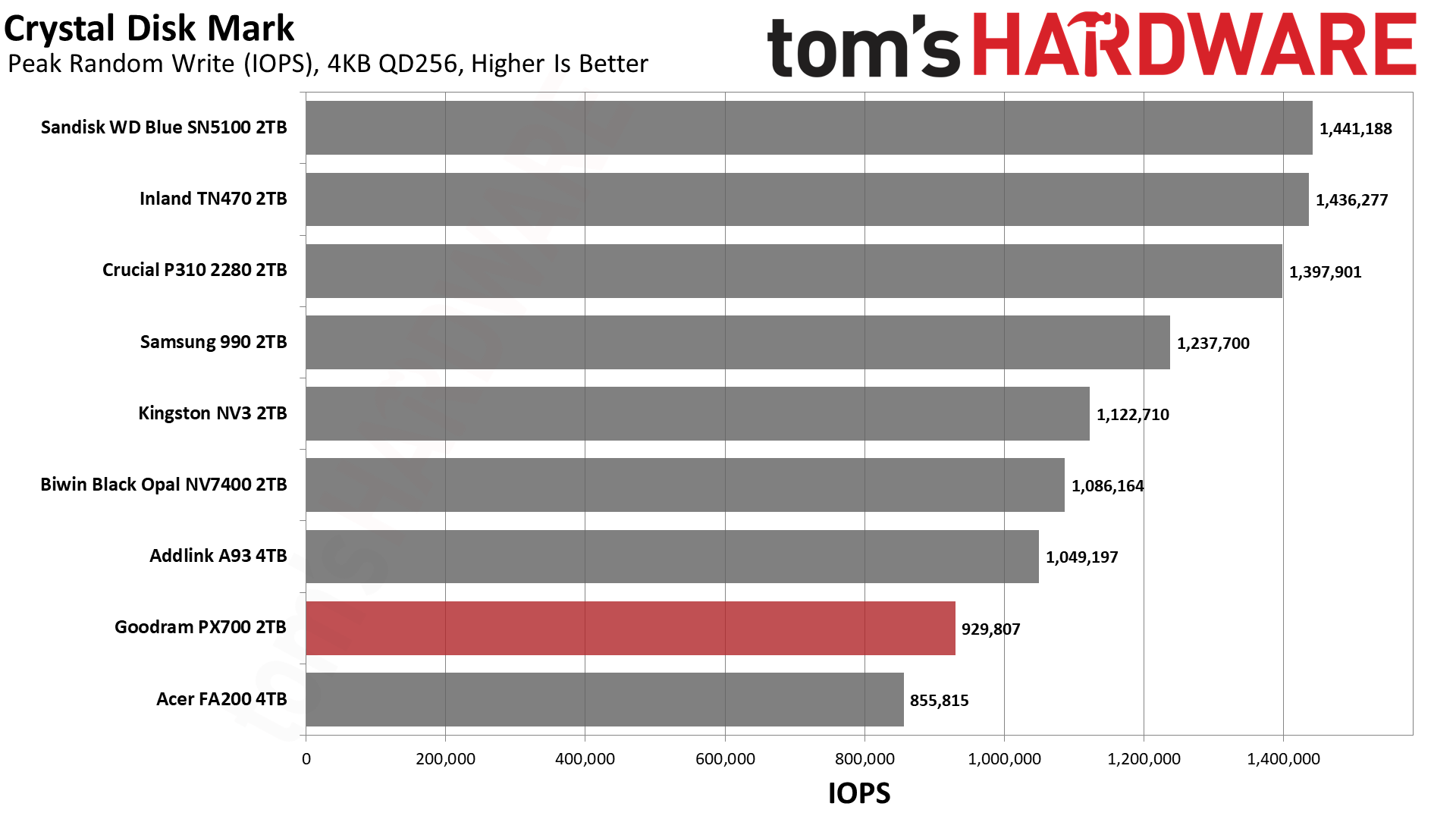
The PX700 has very steady performance in ATTO. We have no real complaints there. If we turn to sequential performance in CDM, we see more of the same. We would mostly look at QD1 reads for that, being a real-world metric, and it’s roughly on par with the NV7400 there. If we turn to random 4KB read performance at QD1, it’s a little bit further down the list but still hangs with excellent drives like the P310. Anything below about 45µs here is solid in our book. This drive should be quite responsive. If we were forced to be critical, we would point out that high QD 4KB write performance is low. Luckily, this is not a real-world workload for a drive of this type.

Sustained Write Performance and Cache Recovery

Official write specifications are only part of the performance picture. Most SSDs implement a write cache, which is a fast area of pseudo-SLC (single-bit) programmed flash that absorbs incoming data. Sustained write speeds can suffer tremendously once the workload spills outside of the cache and into the "native" TLC (three-bit) or QLC (four-bit) flash. Performance can suffer even more if the drive is forced to fold, the process of migrating data out of the cache in order to free up space for further incoming data.

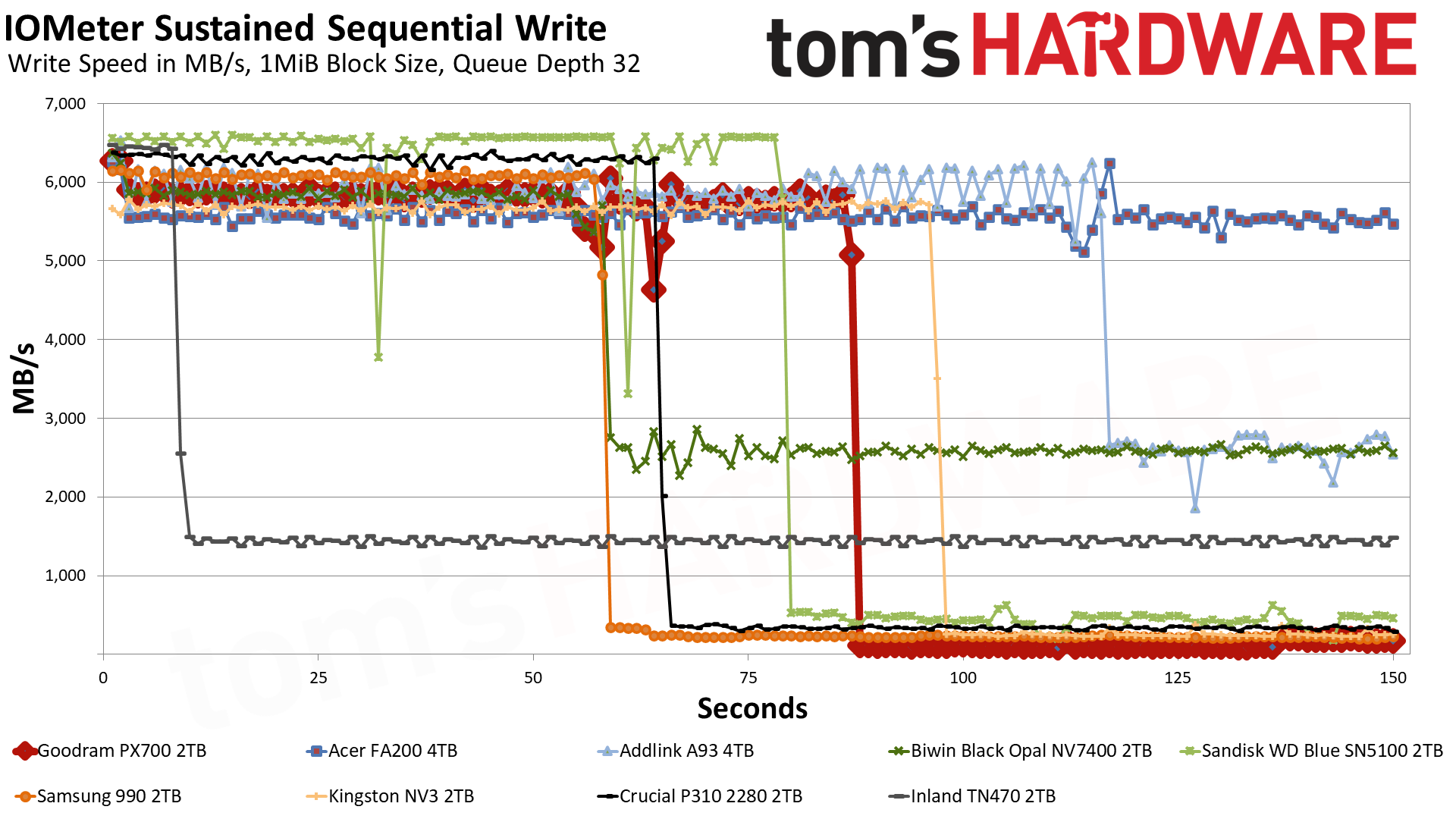
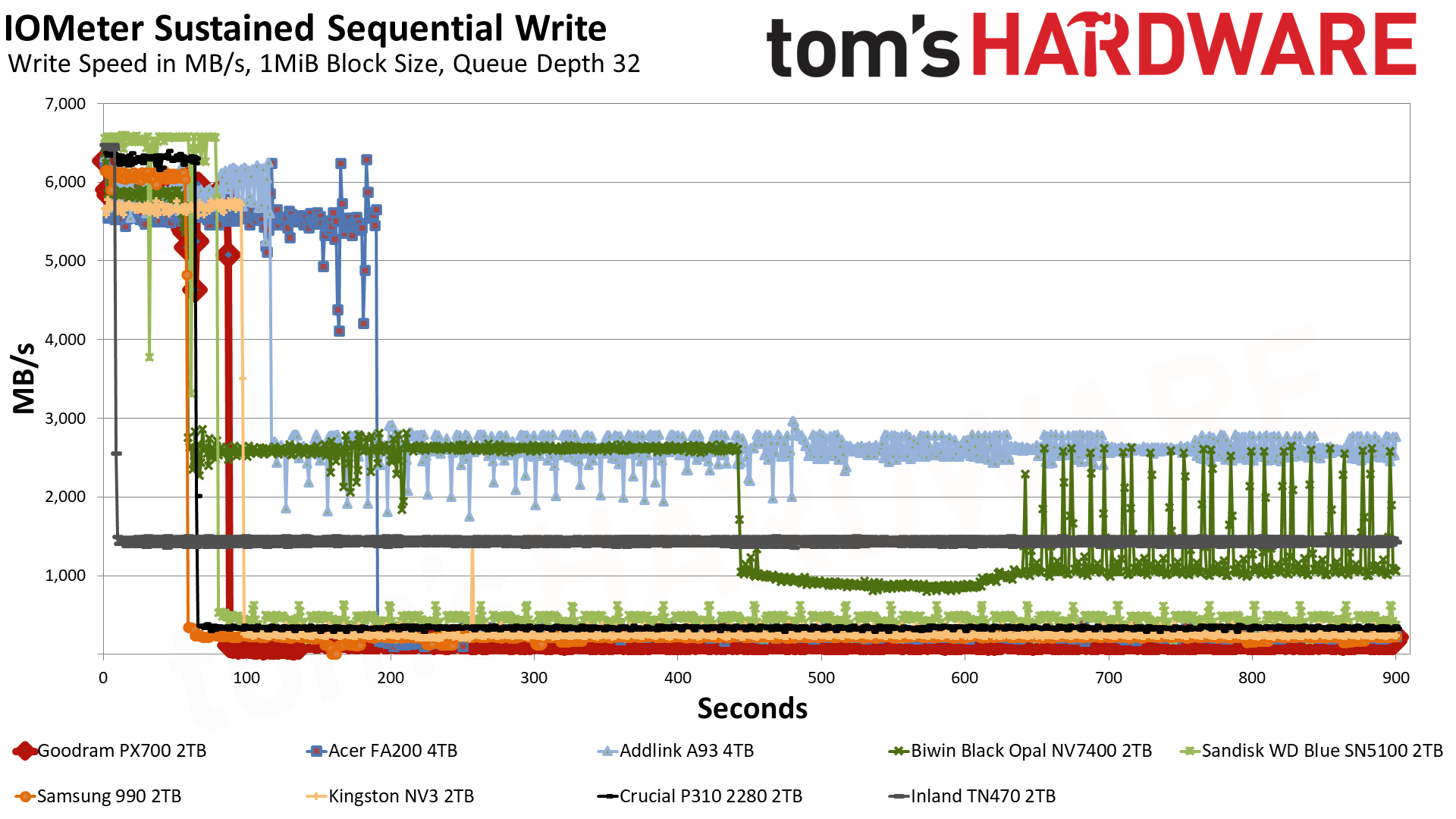
We use Iometer to hammer the SSD with sequential writes for 15 minutes to measure both the size of the write cache and performance after the cache is saturated. We also monitor cache recovery via multiple idle rounds. This process shows the performance of the drive in various states, including the steady-state write performance.
Goodram PX700 2TB SSD
Tom's Hardware
Goodram PX700 2TB SSD
Tom's Hardware
Goodram PX700 2TB SSD
Tom's Hardware

The PX700 starts off in the pSLC cache mode, writing at 5.8 GB/s for over 86 seconds. Speeds are slightly higher for the first two seconds, something we have seen before with this controller, but ultimately we’re looking at a 500GB cache. This is Exhibit A of why we would identify the flash as QLC. 4-bit QLC flash operating in a 1-bit pSLC mode is trading four times the capacity for performance, which means a 2TB drive will generally have a 500GB cache at most. A 3-bit TLC drive could have a larger cache, although there is nothing precluding it from having 500GB, even if this seems hard to be coincidental.

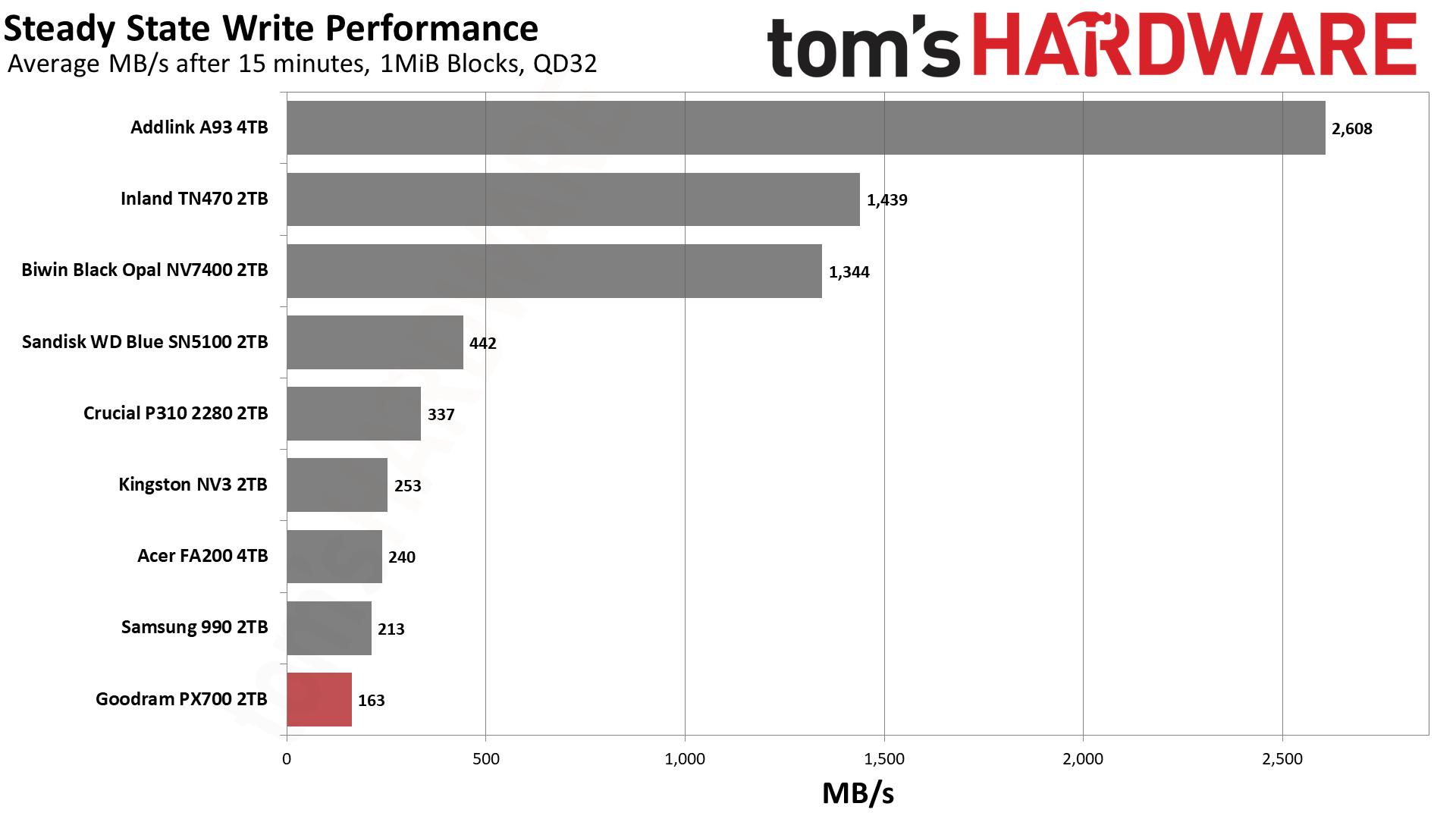
A TLC drive with a smaller-than-maximum-sized cache would probably be able to maintain some speed, though. The PX700 immediately falls into a folding mode – it’s waiting for data to be moved from pSLC to the native flash – with an average speed of 163 MB/s. TLC flash can at times be this slow, but it’s less likely, and especially less likely if it has space to spare. Even the FA200, with the same hardware, is faster. The FA200 does have twice the flash, of course, but the controller is essentially saturated. Rather, the FA200’s cache speed of 5.54 GB/s is slower than the PX700’s – and this could be from having more flash – which means the post-cache speed will be higher. This reinforces the position that the drive is using QLC. Of course, we could have thrown the 2TB HP FX700 into the mix to further prove this point, but we think comparing a 4TB drive is a more valuable approach.

It goes without saying that this is the first real failing of the PX700 in our review. However, it’s expected of a QLC SSD with a massive cache. We don’t consider it disqualifying. You are not buying a budget SSD to hammer it with writes. On the other hand, the 600TBW per TB warranty makes you assume you could do that to some extent. Also, the lower performance here could creep up in a fuller-drive experience. We also can’t exclude the fact that some PX700s come with TLC flash. Which means, taken as a whole, you should assume QLC will perform like the TLC competition 99% of the time.

Power Consumption and Temperature

We use the Quarch HD Programmable Power Module to gain a deeper understanding of power characteristics. Idle power consumption is an important aspect to consider, especially if you're looking for a laptop upgrade as even the best ultrabooks can have mediocre stock storage in terms of capacity and performance. Desktops are often more performance-oriented with less support for power-saving features so we show the worst-case for idle.

Some SSDs can consume watts of power at idle while better-suited ones sip just milliwatts. Average workload power consumption and max consumption are two other aspects of power consumption but performance-per-watt, or efficiency, is more important. A drive might consume more power during any given workload but accomplishing a task faster allows the drive to drop into an idle state more quickly, ultimately saving energy.

For temperature recording we currently poll the drive’s primary composite sensor during testing with a ~22°C ambient. Our testing is rigorous enough to heat the drive to a realistic ceiling temperature but real-world temperatures will vary due to the environment and workload factors.
Goodram PX700 2TB SSD
Tom's Hardware
Goodram PX700 2TB SSD
Tom's Hardware
Goodram PX700 2TB SSD
Tom's Hardware
Goodram PX700 2TB SSD
Tom's Hardware

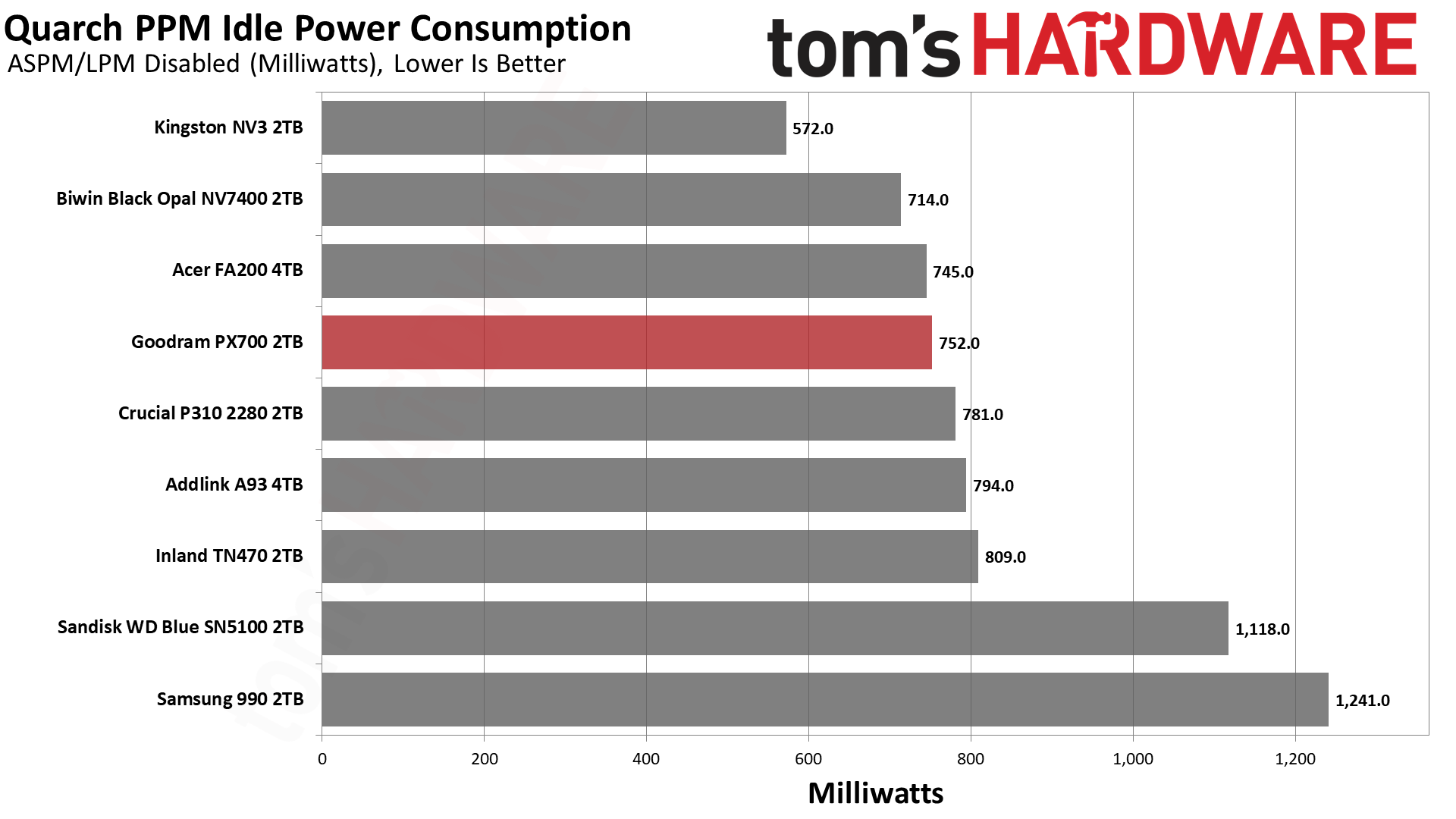
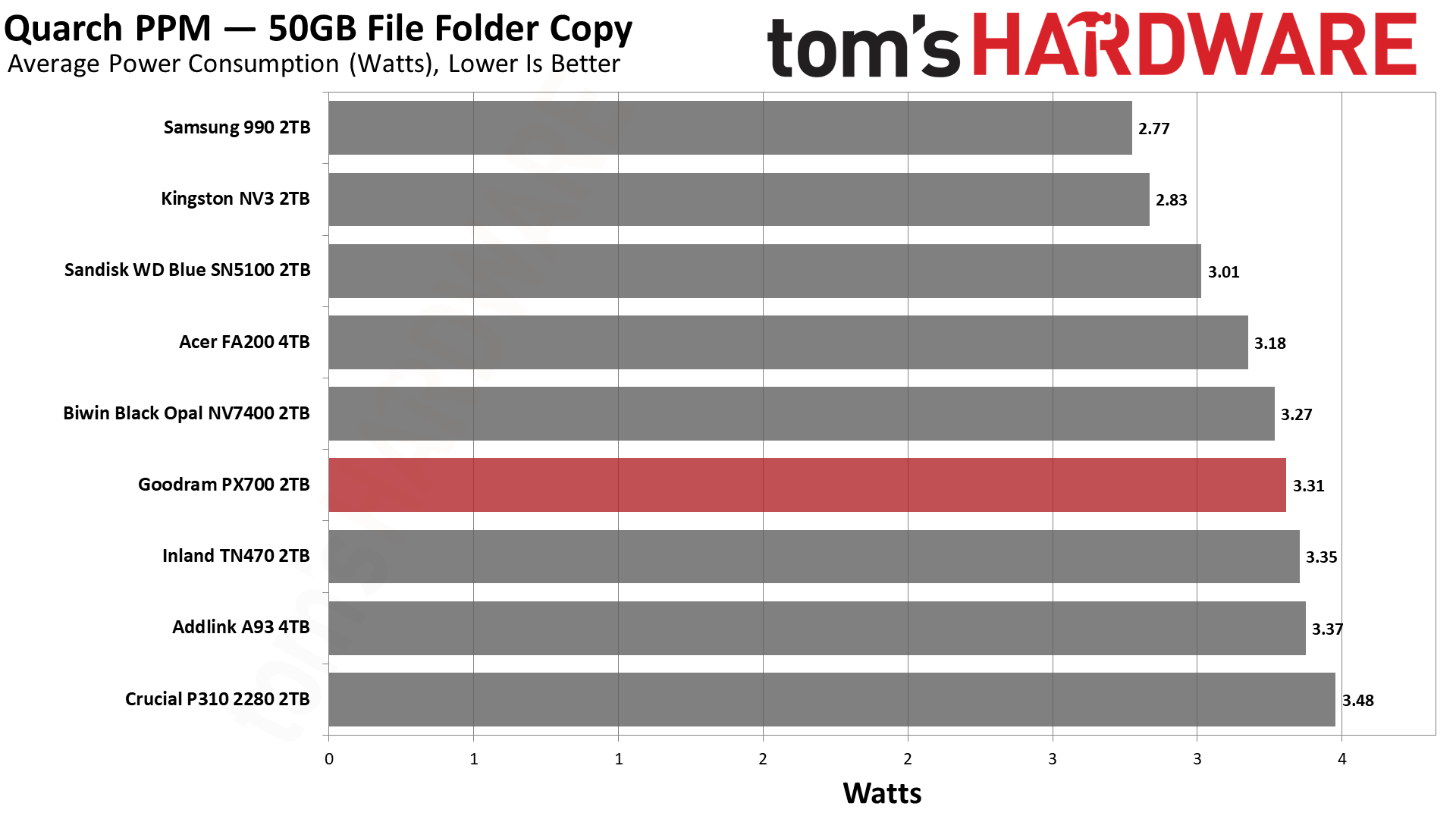
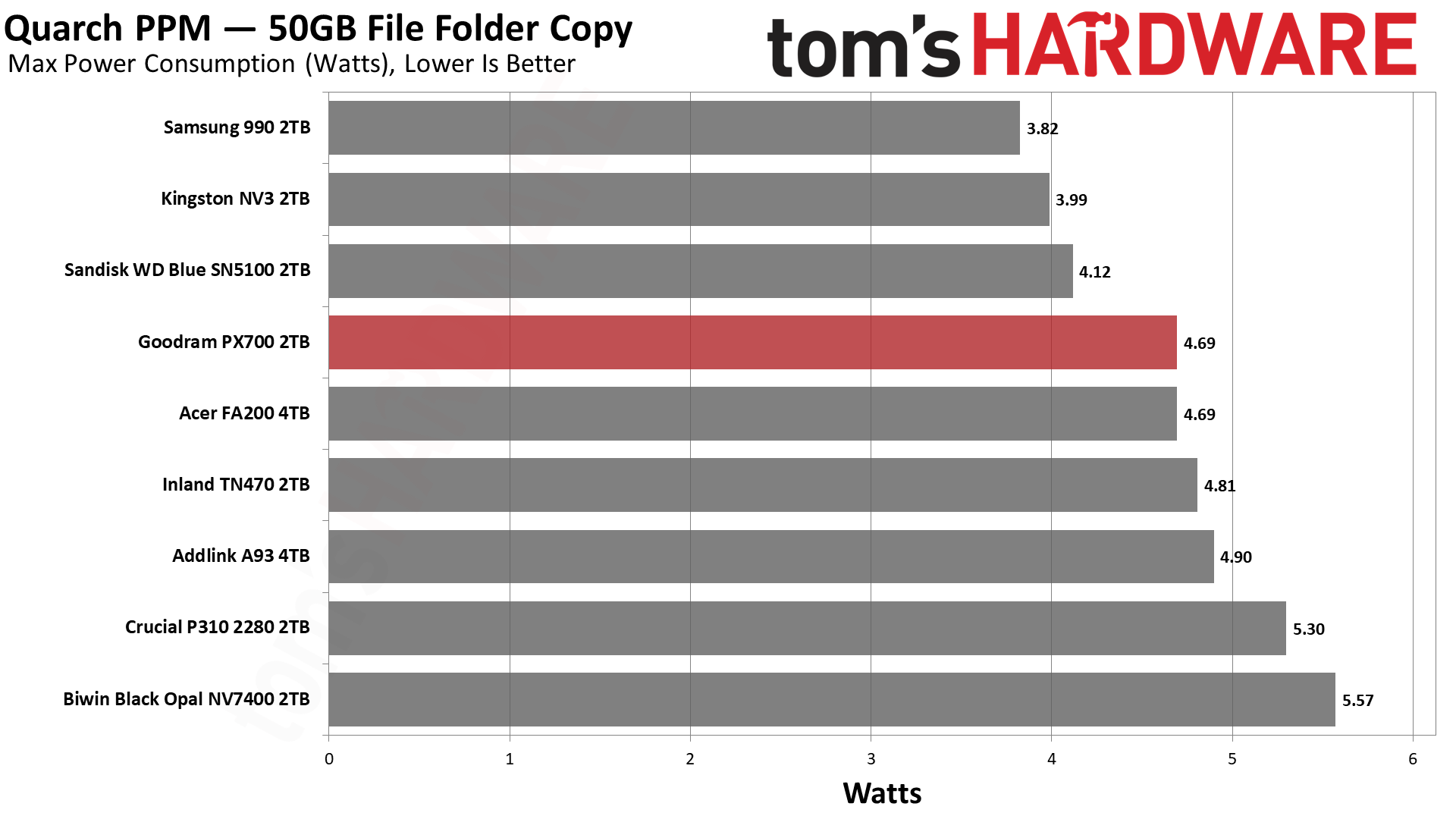
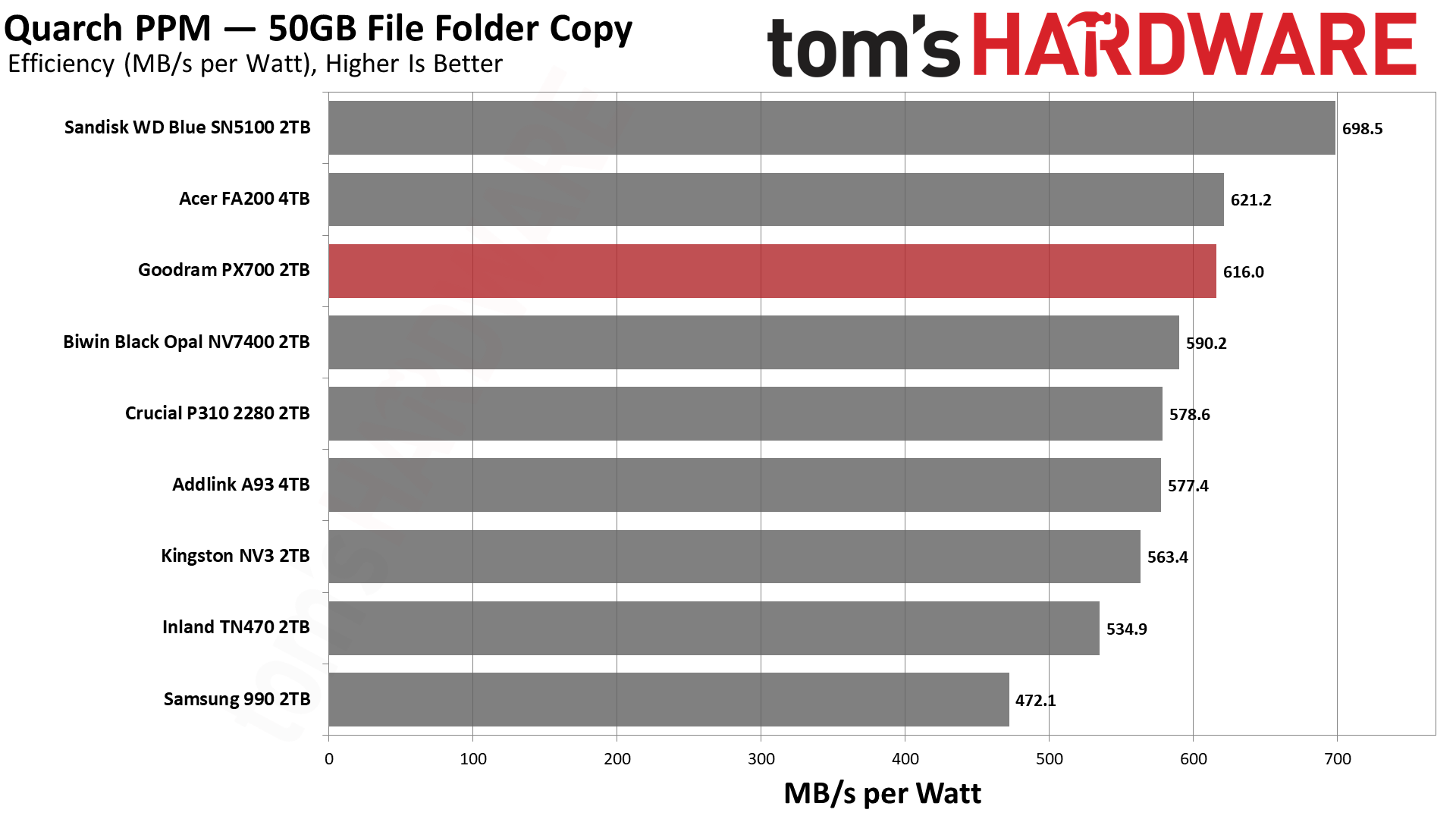
The PX700 comes back into our good graces with very good results in our power testing. It’s essentially tied for second with the FA200, which is hardly surprising given the hardware similarity. Only the BiCS8-based WD Blue SN5100 pulls away from the pack. We would consider every drive on this list to be sufficiently power-efficient for laptop use, although the 990 is closer to the lower end of that range. Certainly 550 MB/s per watt or higher is an excellent result and indicates a drive that can be run without a heatsink most comfortably. As for idle pull – we test under desktop conditions, which can also match poorly-optimized power settings – the PX700 is not unusually power-hungry and, in fact, better than the WD Blue SN5100. That’s a bonus.

Temperature-wise, we have good news. Goodram touts the graphene label on this drive, which, in our experience, does actually help with cooling, especially on a drive with four flash packages. The PX700 in our testing peaked at 61°C, nearly 30°C below the initial throttling point, well beyond the 20°C of headroom we like to see. The MAP1602 does tend to be a hotspot more than alternatives like the Phison E27T on the P310 and TN470, but a heat-spreading label does help. In our estimation, this is a cool-running drive that would be great anywhere.

Test Bench and Testing Notes

We use an Alder Lake platform with most background applications such as indexing, Windows updates, and antivirus disabled in the OS to reduce run-to-run variability. Each SSD is prefilled to 50% capacity and tested as a secondary device. Unless noted, we use active cooling for all SSDs.

Goodram PX700 Bottom Line

The Goodram PX700 is a model budget PCIe 4.0 SSD. It matches or exceeds all of the expected performance points; it's power-efficient, and it uses a simple single-sided design without a heatsink. The only problem is that a “budget” drive has to be affordable. Current prices in the U.S. for this drive leave something to be desired. However, if it can match or beat the prices of other drives in this class, it’s probably one of the better choices available. In part, this is because we’d be liable to trust Goodram over non-names – the TBW alone shows it means business – and, on the other hand, the drive actually outperformed our expectations. Aside from the sustained write performance, this drive really feels premium. You don’t need a Samsung, WD, Sandisk, or even Crucial drive to feel like you have next-gen storage.

Goodram PX700 2TB SSD

(Image credit: Tom's Hardware)

Let’s look at what we mean by that for your use. Game and app loading times are heavily reliant on random and sequential reads at low QD. The PX700 does well there. You also may be transferring files a lot, and the DiskBench results are mighty. For your laptop or HTPC, you might want something that’s power-efficient and, if space is a concern, something that stays cool without a heatsink, and this applies to PS5 use as well. The PX700 ran cool in our test with just the graphene label and was very efficient. You’re not getting a shorter warranty with lower TBW, as with Samsung’s 990 or some QLC-based drives, and we know where this drive is assembled. It’s hard to look at this combination and not feel like it’s a stellar drive if you can find it at a normal price.

Aside from price, our only complaint would be sustained write performance. It’s pretty dissapointing, although we should point out that it’s also expected. The drive also has trade-offs here. Namely, its standard pSLC write performance is better than the 4TB FA200, and in the 2TB HP FX700’s ballpark, so you’re not getting nothing for that later drop. The PX700, in fact, is faster folding than the FX700, too. In the grand scheme of things, this isn’t a big deal, as you should never hit that state – this drive should effectively be fast enough for a 1GbE network, if that’s a bottleneck – and having a bit faster peak performance does translate to better marks on some of our benchmarks. The drive could take a hit in some cases, such as when it's very full, in which case getting a drive with DRAM and guaranteed TLC flash could assuage your fears.

For most use cases, though, the PX700 is more than good enough and, in fact, punches above its weight in our opinion. It would be a good option for just about any type of machine. PS5, laptop, HTPC, desktop, you name it. Primary or secondary drive, just fine. You don’t even need a heatsink. The capacity range is solid – you’re not going to find 8TB on a drive like this – and you can bring your own software. Performance is good enough to overlook any QLC flash use, so our main problem remains the price. Get it down to the same ballpark as the other drives in our list, and you have a contender. We hesitate to put an exact dollar amount for that because SSD prices are volatile, to say the least, so compare it to comparable drives such as the ones we matched it against today.

MORE: Best SSDs

MORE: Best External SSDs
MORE: Best SSD for the Steam Deck

  •  

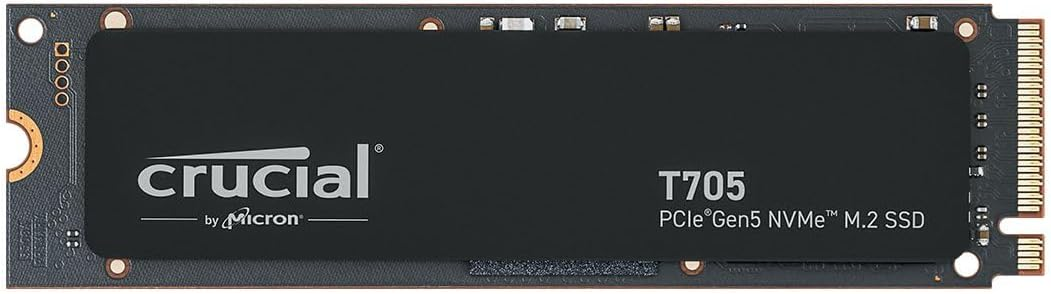
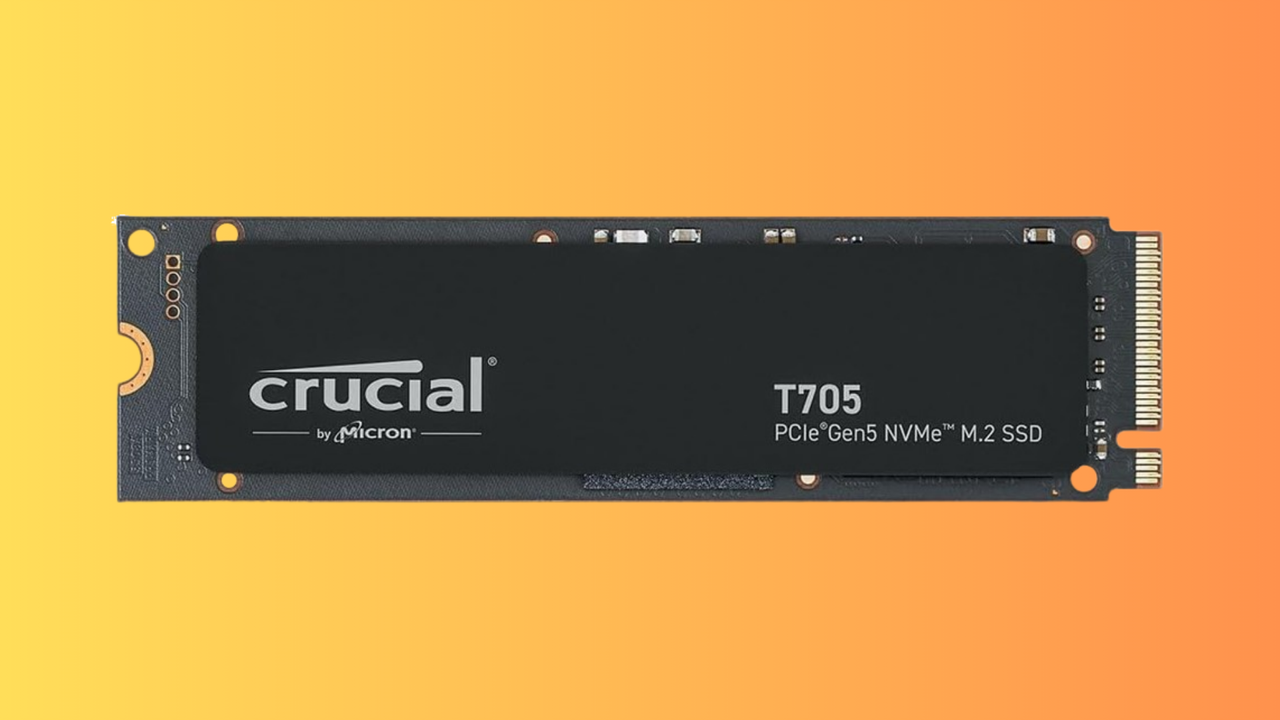
This $502 4TB Crucial T705 is the cheapest Gen 5 SSD you can buy right now for just 12.5 cents per GB — ultra-fast storage upgrade with unreal 14,500 MB/s speeds is $181 less than a month ago, hitting its lowest price since February

We've seen huge price rises this year for PC hardware, but RAM and SSDs have been especially affected. The global DRAM shortage, mostly caused by AI data center demands hoovering up all of the available stock, has caused prices to skyrocket. That's why this 4TB Crucial T705 SSD, down to $502.51, is a good deal in the current market, especially given its high capacity.

● Check out this deal at Amazon

Looking at Camelcamelcamel's price data, we can see that this drive was hitting almost $700 just a few weeks ago. Several price drops since have meant that the 4TB Crucial T705 is now almost below $500 for the first time in February. Along with a decent price drop, this Crucial drive is now the cheapest Gen 5 SSD you can pick up, with the next-cheapest model, the Samsung 990 Evo Plus, $60 more expensive at the moment.

It's not even a fair comparison, too, as the entry-level 990 Evo Plus only supports PCIe 5.0 over two lanes, not four, meaning you're only getting Gen 4-equivalent speeds. The Crucial T705 is a high-performance drive that's much faster, and right now, much cheaper.

This Crucial T705 4TB SSD is the cheapest Gen 5 SSD on the market right now. It offers read and write speeds of up to 14,500 MB/s and 12,700 MB/s apiece.View Deal

SSDs that offer Gen 5 speeds are a real step up over their slower Gen 4 counterparts. The T705 will offer you sequential read and write speeds of 14,500 MB/s and 12,700 MB/s, which is significantly faster than the fastest Gen 4 SSD on the market, the Samsung 990 Pro, which taps out at 7,450 MB/s. The T705 ships with 232-Layer Micro TLC memory modules and uses the Phison E26 controller.

It's also one of the fastest you can buy, period, rivalling the WD_Black SN8100, which hits speeds of 15,000 MB/s. That drive will set you back $659.99 right now, too, a significant increase compared to the deal on offer here. The Crucial T705 drive scored an Editor's Choice award for its sustained read/write performance at high speed, along with 4.5 stars in our review.

While we wished that SSD prices were back down to what we saw 18 months ago, it's good to see that high-performance drives like this one can still drop in price. The $502.51 sale price for this Crucial T705 4TB SSD is a seriously good one in the current market, and you won't be able to beat it for speed or price. Grab it at this price while you can.

  •  

Modeling framework reveals grid battery aging effects

Energy storage is becoming critical to grid resilience and electricity affordability because battery systems can help balance supply

💾

Auf YouTube findest du die angesagtesten Videos und Tracks. Außerdem kannst du eigene Inhalte hochladen und mit Freunden oder gleich der ganzen Welt teilen.
  •  

HPE makes its “unified storage” claim real as B10000 R6 hits GA

Storage vendors have been calling things “unified” for years. Sometimes that means one architecture. Sometimes it means several products sharing a management screen and a marketing budget. The term has accumulated enough baggage that a little skepticism is warranted. HPE Alletra Storage MP B10000 Release 6, announced in May, is now generally available. It brings block and file onto the same disaggregated scale-out architecture and OS code base, with independent scaling of performance and capacity and native ransomware detection across both. That’s important because enterprise storage is becoming less of an array decision and more of an architectural one. HPE was recently named a Leader in the 2026 Gartner® Magic Quadrant™ for Enterprise Storage Platforms, which provides useful context, but a quadrant is still a snapshot. GA code is where the architecture has to prove itself. Unified, but not universal The B10000 is not intended to become the answer for every file workload in the data center. Massive-scale, performance-oriented unstructured workloads such as AI, analytics, EDA and media remain better suited to HPE Alletra Storage MP X10000. The aim with the B10000 is narrower and, arguably, more useful: consolidating block and adjacent file workloads onto a common architecture without forcing customers to scale controllers and capacity together. That distinction matters. Vendors have offered “unified” storage before, but the harder question is what is actually shared underneath: protocols, scaling model, software stack and operational experience, or simply the management layer. The architecture is the product The B10000 separates compute from capacity with a “shared-everything” architecture, allowing each to scale independently rather than requiring customers to buy fixed controller-and-media increments. Release 6 extends that model across block and file while retaining a common operating environment and management plane. The interesting part is therefore not simply the addition of file protocols. It is whether customers can consolidate block and the file workloads that naturally sit alongside them without recreating the infrastructure silos they were trying to remove. Disaggregation also changes the economics. If performance and capacity requirements grow at different rates, the infrastructure can follow those curves separately rather than making one drive the other. AI moves closer to operations Release 6 also extends HPE’s AI-driven operations model. Within HPE Data Services Cloud Console, autonomous health assessments can evaluate areas such as capacity and performance, while Storage Copilot provides natural-language interaction, recommendations and the ability to take actions. Agentic Support Automation pushes that model further. Unlike legacy support approaches that depend on known issue signatures, predefined rules or thresholds, it is signature-less: AI agents continuously analyze operational behavior to detect emerging anomalies, investigate likely causes and help drive remediation—even when the specific issue has not been seen before. Capacity exhaustion is a useful example. Total system capacity can appear stable and generate no alert while a single service begins consuming capacity at an unusual rate. Traditional monitoring may not react until a threshold is crossed; agentic support automation can recognize the behavioral shift earlier, connect it to the underlying operating condition and help initiate corrective action before the change becomes a disruption. That is probably the more useful test of the increasingly fashionable word “agentic.” The question is not whether AI appears in the interface, but whether the software can move from describing an infrastructure problem toward helping resolve it. Cyber resilience becomes layered Ransomware defense follows much the same architectural logic. The B10000 now provides native real-time detection across block and file, while Zerto adds protection at the application layer and StoreOnce provides integrated data protection and recovery. No single feature solves ransomware. The more interesting model is multiple detection and recovery mechanisms operating at different points in the stack. Storage competition moves beyond the array None of this means the array is dead. Someone still has to store the bits. But the competitive unit is getting larger. Controllers, media and IOPS still matter. Increasingly, so do the operating model, cyber-resilience architecture, scaling economics and the ability to support multiple data types without multiplying infrastructure silos. The term “unified storage” has been stretched pretty far over the years. What matters now is whether the unification extends below the management layer and into the architecture itself. For more information, visit HPE Alletra Storage MP B10000 web page. Contributed by HPE

  •  

DRAM contract prices forecast to grow only 13-18% in Q3

The relentless rise in memory prices may finally be losing steam, as PC and smartphone buyers reach the limits of what their budgets will allow them to pay. Taiwanese market watcher Trend Force estimates that rising DRAM contract prices drove a 59.5 percent quarter-on-quarter jump in industry revenue to $154.73 billion in calendar Q2. The analyst now expects conventional DRAM contract price growth to "moderate" to 13 to 18 percent quarter-on-quarter in Q3. That reflects a shift in demand away from high-capacity RDIMMs toward lower-capacity products, as well as "the limited ability of PC and smartphone customers to absorb further price increases." That 13 to 18 percent is still a punishing increase by any normal standard. Supplier inventories remain at historic lows, TrendForce warns, and total bit shipments are expected to grow modestly. In other words, prices are climbing more slowly and supplies are likely to remain tight for the forseeable future. The forecast follows a warning from market intelligence biz Context that European PC shipments are set to decline even more sharply as rising component costs push up system prices. Context forecasts a year-on-year decline in laptop shipments of 6.4 percent in Q3, followed by a 20 percent fall in Q4. The outlook is even worse for desktops, with shipments expected to decline around 20 percent in Q3 and almost 30 percent in Q4. Despite declining shipments, PC makers have continued to bring home the bacon, as higher prices have so far more than compensated for the fall in volumes. Earlier this year, The Register reported how Lenovo boasted it had sidestepped the fallout from the memory crisis by shifting its focus to premium devices. Context says corporate buyers are extending refresh cycles where possible and acquiring new PCs only when upgrades are unavoidable. "The PC refresh cycle has not disappeared, but the economics around it have changed," said Context senior analyst Marie-Christine Pygott. "For the channel, the opportunity is increasingly about helping customers prioritize where refreshes are essential, where devices can remain in service for longer and where investment in newer, more capable systems makes commercial sense." As for the AI PCs that manufacturers hoped would trigger a mass upgrade wave, Context says the end of Windows 10 support was the principal driver of recent buying activity, as The Register noted at the start of this year. While AI-capable PCs account for an increasing share of systems entering the European supply chain, this is mostly because AI functionality is becoming standard in newer devices. TrendForce notes that the three major memory makers continue to focus on high-end products for the AI market. Samsung benefited from its early move into HBM4 mass production, while SK hynix had the highest proportion of HBM in its total bit shipments among the three leading suppliers. Micron is prioritizing higher-priced server DRAM. That has left second-tier manufacturers such as Nanya, Winbond, and PSMC to meet demand for mature-process products such as DDR4 and DDR3. ®

  •  

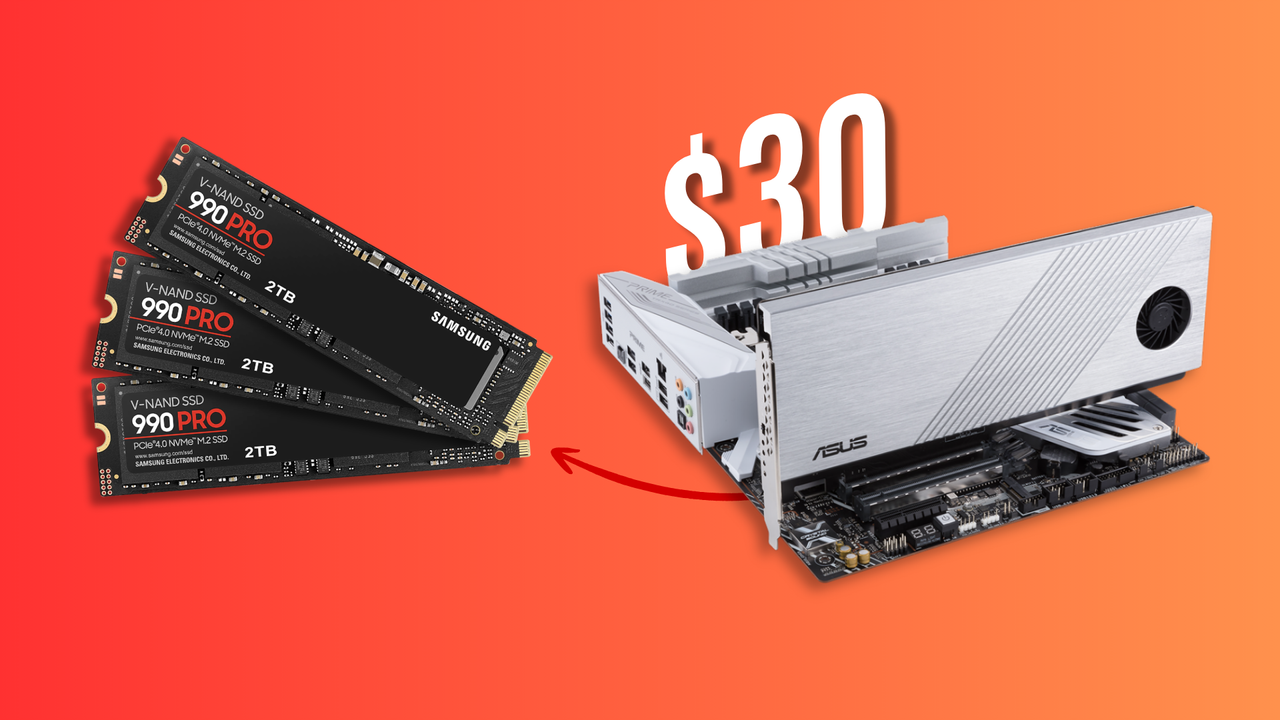
Flea market shopper uncovers $1,500 worth of Samsung SSDs inside a $30 expansion card — Three 2TB 980 Pro drives were hidden beneath an Asus Hyper M.2 heatsink

Storage has gotten exponentially more expensive in the past year thanks to the ongoing component crisis. During times like these, scoring a deal feels extra special, especially when it's as bountiful as what @whateversunnyfinds (Sunny) stumbled upon in a local flea market. He hunted down a seemingly menial PCIe expansion card from Asus for $30, only to open it and find three Samsung 980 Pro 2TB SSDs already slotted inside.

Each of those drives is worth at least $400 today, if not more. We found the 980 Pro 2TB listed for $444 on Amazon and $499 on Newegg, which makes three of them worth between $1,300 and $1,500 together. The expansion card holding them is an Asus Hyper M.2 x16 Gen 4 that retails for $79, so even if there were no SSDs inside, this would be a solid find. The card looks worn down but not quite beat up, while the drives honestly appear mint.

An expansion card like this allows you to install extra M.2 drives in your system by using an x16 slot usually meant for GPUs. Just three of the four slots on the card were populated, so there's a chance someone took out one SSD and threw this thing in the trash. If the original owner only ever installed three, they could've forgotten to check since the heatsink covers the drives underneath.

As for the thrifter, Sunny is from Kuwait City, and he frequents the largest flea market in the region called "Souq-al-Juma" — Arabic for "Friday Market." These open-air buildouts are common in Asian and Middle Eastern countries, but not all of them carry electronics. You usually have to visit the biggest venue on a designated day, since multiple flea markets are often propped up on the same day, to get the best, most relevant deals possible.

If you're lucky enough to score something similar, the NANDpocalypse might just feel a little less crushing. We don't know the exact internal condition or health of these 980 Pros, but 6TB for $30 is such an incredible find that you wouldn't even mind if they were roughed up. It's also the exact same capacity as another person found last year while dumpster diving, so technically they got a better deal, but those were 850 Pro SATA SSDs.

  •  

iPhone Prices Leak: U.S. Estimates for Ultra, Pro and Pro Max

iPhone prices are drawing attention ahead of Wednesday’s launch, with U.S. estimates placing the iPhone 18 Pro around $1,250 to $1,300, the Pro Max around $1,350 to $1,400, and the foldable Ultra above $2,000. Those expectations build on reports of a new premium price tier for the foldable iPhone, but the figures circulating under Vodafone’s name need closer examination.

Vodafone Egypt has denied that the alleged pricing leak came from its operation. In a September 4 correction, PhoneArena reported the carrier’s response and acknowledged that it could not verify the material.

The American price estimates and the overseas carrier claims come from different sources. Apple has not announced U.S. retail prices for any of these devices.

U.S. iPhone Prices Could Rise Across the Pro Lineup

For American buyers, the most useful figures are the estimates expressed directly in U.S. dollars. Current reporting on the projected Pro prices places the iPhone 18 Pro between $1,249 and $1,299 and the iPhone 18 Pro Max between $1,349 and $1,399.

Those ranges reflect expectations built around TrendForce’s pricing outlook. They are possible starting prices before applicable sales tax, rather than authenticated carrier listings or amounts Apple has approved publicly.

The foldable has a wider potential spread. In its September 3 forecast, TrendForce estimated a starting price between $2,099 and $2,299, with the highest configurations potentially exceeding $3,000.

The firm expects price increases of roughly 10% to 20% for the new models as rising memory costs put pressure on production expenses. It also expects Apple to absorb some of those costs to protect demand.

An increase in component spending does not translate directly into the same increase at checkout. Apple can accept a smaller margin, negotiate elsewhere in the supply chain, or distribute the increase differently across models and storage configurations.

The exact starting capacities will therefore deserve attention alongside the prices. A more expensive entry model that includes additional storage presents a different comparison from an unchanged configuration carrying a higher charge.

A person is holding a red iPhone Ultra (mockup) with dual cameras, partially pulled out of their pocket, as if ready for a special event. The Apple logo is visible, and the background is a blue sky.
Image Credit: AppleMagazine

Australian Ultra Claim Converts to About $2,700

The separate Australian claim would put the entry iPhone Ultra at approximately $2,700 when converted into U.S. dollars. The original amount is AU$3,699 for a purported 256GB model.

As reproduced in Tom’s Guide’s report on the Australian pricing claim, X user @ev_downunder attributed the information to Vodafone Australia.

The same claim lists a 512GB version at roughly $3,000 in converted value, with an original price of AU$4,199. The alleged 1TB model approaches $3,400, corresponding to AU$4,699. These rounded equivalents provide context for the overseas figures; they are not predicted American retail prices.

The post also names September 12 as the preorder date. Neither that date nor the claimed Australian pricing has been authenticated through a public carrier announcement.

The proposed storage structure adds about $360 in converted value at each step, or AU$500 locally. If accurate, that would make storage selection a substantial part of the purchase rather than a minor addition to the headline price.

A buyer planning to record large amounts of video or carry a substantial offline library could quickly move into a more expensive configuration. Comparing an entry Pro with a fully equipped Ultra would then combine two separate premiums: the folding hardware and the extra capacity.

The Egyptian Figures Are Disputed

The alleged Egyptian listing translates to approximately $1,930 for the iPhone 18 Pro, $2,070 for the Pro Max, and a little over $3,000 for the Ultra, using the conversions reported when the claim circulated.

The original figures were EGP 98,000, EGP 105,000, and EGP 155,750, respectively. Vodafone Egypt’s denial means these amounts cannot be presented as prices confirmed or leaked by the carrier.

A recognizable logo and local currency can make a screenshot appear convincing. They do not establish that a company published it, that its contents are authentic, or that the amounts represent final retail pricing.

For U.S. buyers, this material offers no dependable basis for changing an upgrade budget. Its main relevance is explaining where some of the unusually high numbers appearing online originated.

Four iPhones in blue, red, black, and silver are displayed side by side, showcasing their iPhone 18 Pro colors and triple camera setups against a black background with a small Apple logo in the corner.
Image Credit: AppleMagazine

Currency Conversions Can Exaggerate U.S. Expectations

An overseas price converted into dollars answers what that amount of foreign currency is worth. It does not reveal what the same product will cost in an American store.

Tax treatment contributes to the difference. Australian consumer prices generally include GST, while U.S. advertised prices typically exclude sales tax. Regional pricing also reflects currency planning, distribution expenses, and commercial decisions.

Removing tax and applying an exchange rate still would not produce an official American price. Companies set regional prices for a selling period, rather than adjusting them continuously to match daily currency movements.

The same limitation applies when comparing percentage differences with an older phone. Assuming that the Ultra will carry an identical premium over the Pro in Australia, Egypt, and the United States introduces another unverified step.

That is why the direct U.S. estimates deserve priority when considering a purchase here. The international claims can provide additional context, but they should not replace an American price forecast or be mixed into it as supporting confirmation.

The Ultra Premium Creates a Different Buying Decision

If the projected U.S. ranges hold, the foldable could cost roughly $700 to $950 more than the Pro Max at entry level. That is a substantial amount to spend on a different form factor.

The larger internal display would need to earn its place in everyday use. Reading documents, comparing information, reviewing photographs, and working with more content on screen could make the extra space valuable. Someone primarily interested in photography, messaging, and navigation may find fewer reasons to make the jump.

The most expensive device also will not automatically be the best choice in every category. Camera versatility, battery endurance, weight, and comfort can favor different designs. Those comparisons will become more useful once Apple publishes complete specifications.

For a first-generation foldable, repair pricing deserves particular attention. An attractive monthly device payment can look different once accidental-damage protection and display service costs enter the ownership budget.

Carrier Offers Will Need Their Own Comparison

Apple’s September 9 event announcement confirms a presentation at 10 a.m. Pacific Time. Product pricing, availability, and ordering details remain separate from that confirmed schedule.

When American carrier offers appear, the monthly figure should be read together with the requirements attached to it. A promotion may depend on an eligible trade-in, a particular service plan, or credits distributed across an extended agreement.

A household already using the required plan might receive substantial value. Someone moving to a more expensive plan solely to obtain a phone discount could spend more over the full term.

The final comparison should use the same storage capacity and include the upfront payment, service cost, financing charges, and any credits lost by leaving early. A smaller payment on the device line of the bill does not necessarily produce a smaller total bill.

iPhone Ultra are displayed side by side (mockup) in white, gray, and red—a striking representation of the new iPhone Ultra Color lineup. All show the time 9:41 on their screens, with the Apple logo visible on the back. Set against a sleek, silver gradient background featuring an Apple logo at the bottom right, this arrangement evokes a sense of anticipation often seen at a special event.

The post iPhone Prices Leak: U.S. Estimates for Ultra, Pro and Pro Max appeared first on AppleMagazine.

  •  

The world's thinnest portable SSD is just as impractical as you think

I like portable SSDs a lot, and I have one always on hand in my EDC tech bag. I look for two things in a portable drive: fast transfers, and long-term durability. I don't really think about the size or weight, as SSDs tend to be smaller and lighter than mechanical drives anyway.

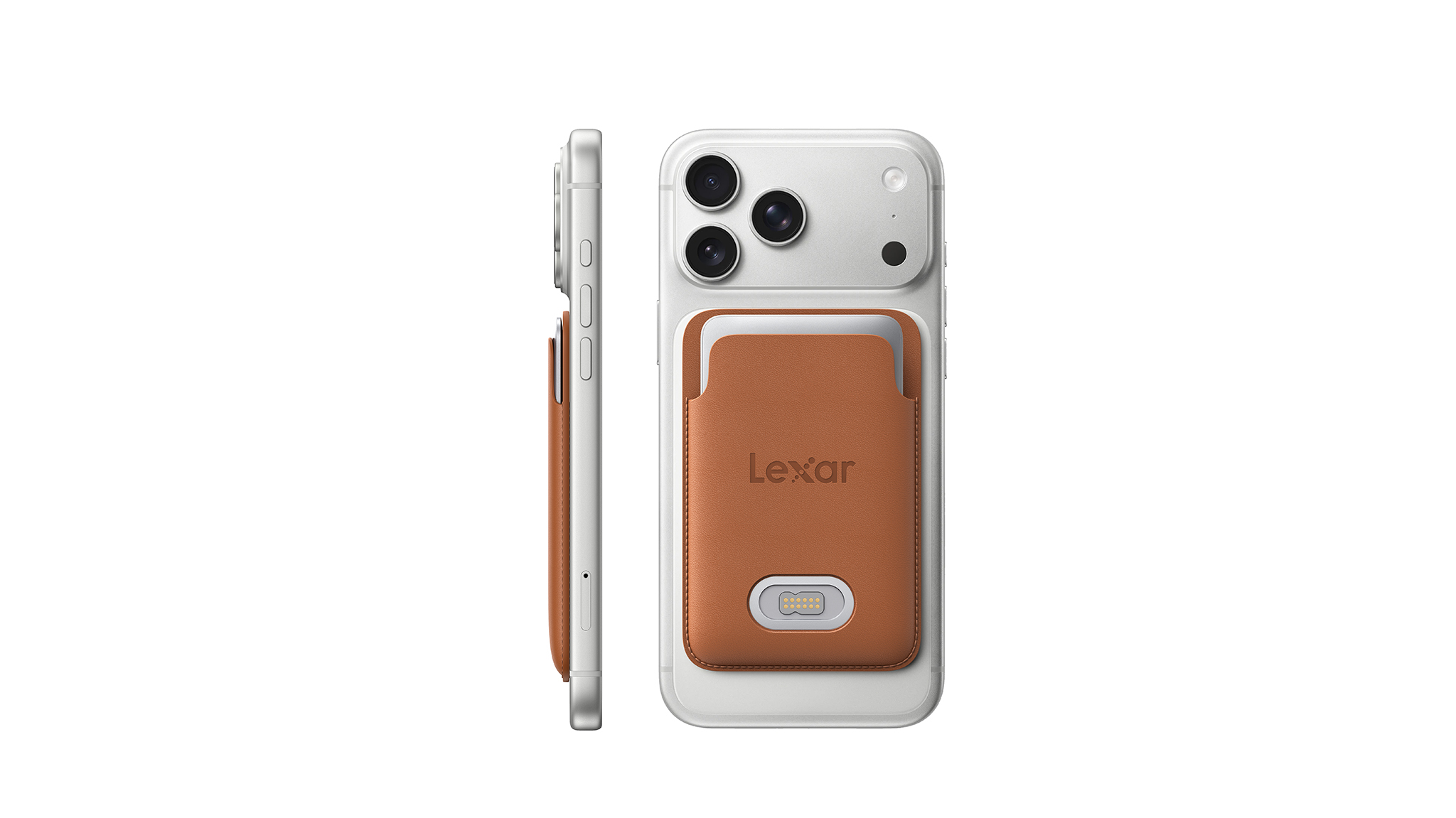
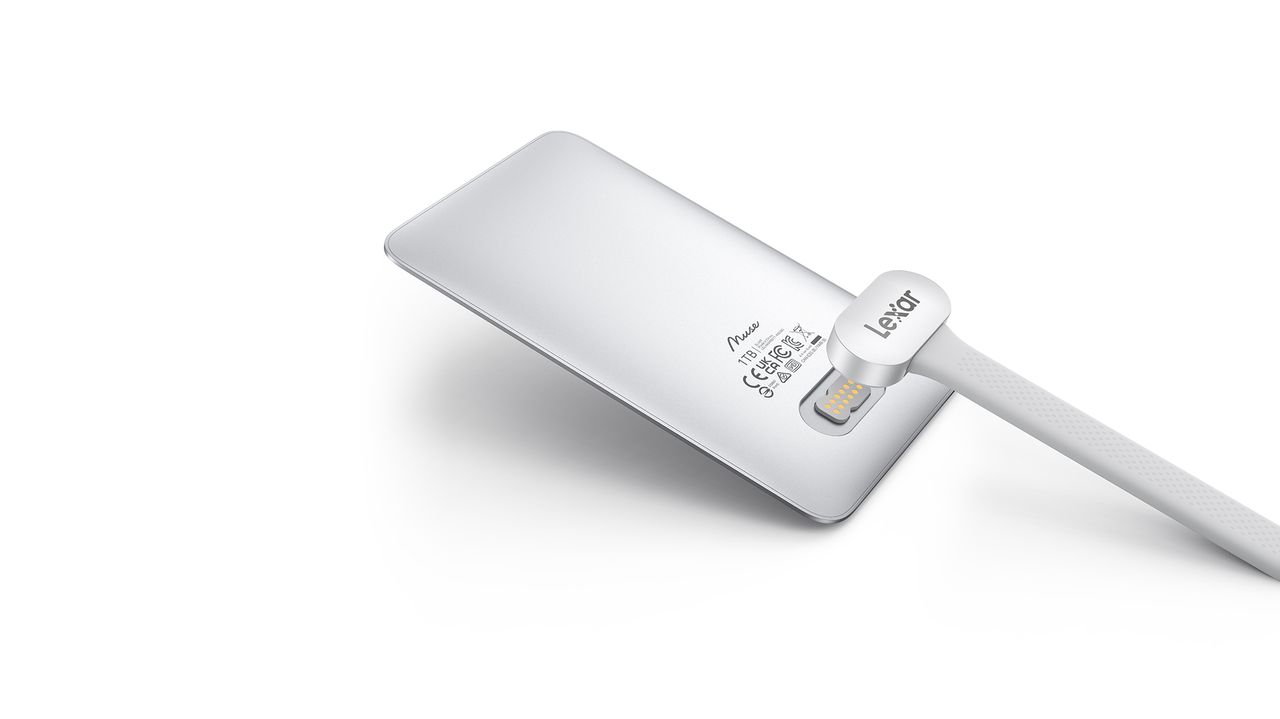
But Lexar clearly felt like this was an area to focus on for its next SSD, the Muse. Dubbed the world's thinnest SSD, the Muse is 3.8mm at its thickest point, going down to just 1mm at the edges. Lexar says it used an "ultra-thin PCB architecture, high-density NAND stacking, and an integrated internal structure" to maximize the internal space.

Lexar Muse portable SSD
Lexar
Lexar Muse portable SSD
Lexar

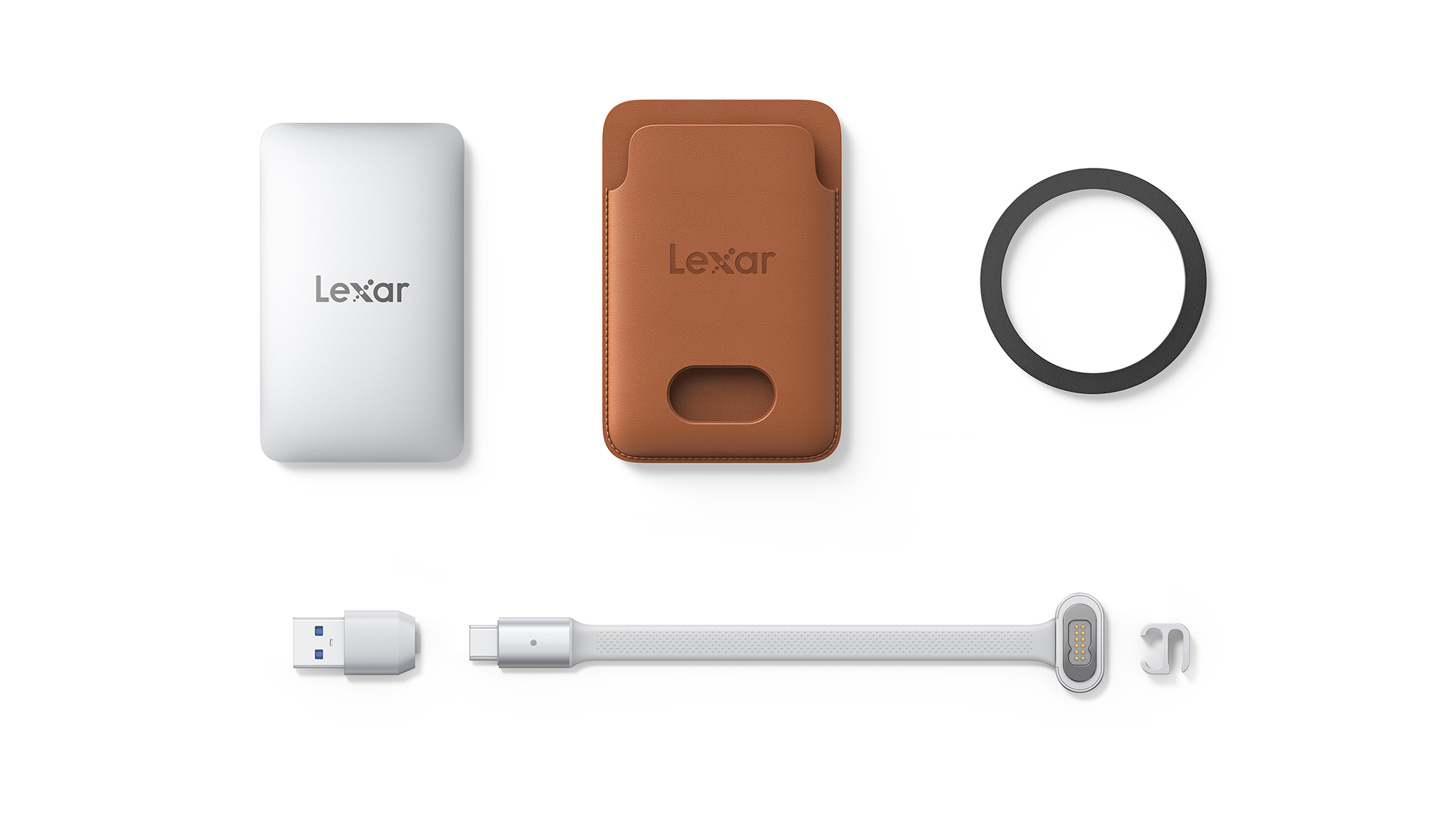
The Muse has 1,050MB/s read and 1,000MB/s writes and can handle ProRes content at 4K120, which is in line with most portable SSDs. What isn't usual is the connector; instead of a regular USB-C port like every other SSD, the Muse uses a proprietary PogoPin magnetic connection, and you'll need to use the bundled cable in the box to connect the drive to your phone.

Oh, and it doesn't have the requisite magnets built-in (obviously), so you'll need to put it in a magnetic carry sleeve to attach it to a phone. Lexar notes portable SSDs can add "bulk and cable clutter," so it created the Muse to deliver a more "considered approach." It doesn't quite feel that way when you consider that you have three things to manage when using the Muse: the SSD itself, the magnetic sleeve, and the proprietary cable, which will inevitably get left behind when you're out and about.

Lexar Muse portable SSD

(Image credit: Lexar)

I just don't get the need to tech industry's obsession to make products thinner. A regular-sized portable SSD doesn't have these limitations, and if anything, I like using drives like the LaCie Rugged SSD4, which are chunky but can take an absolute beating. The Muse adds a layer of complexity you don't need in a storage device, and that's before you factor in overheating. With such a small size and a sealed chassis, where does the heat go? There doesn't seem to be any room to manage the heat that builds up in a drive, so it will likely get quite hot when moving data.

Anyway, the Muse is coming out in Q4 2026, and it will be sold in 512GB and 1TB variants. Lexar didn't share pricing details, but it is bound to be on the higher side. Don't want to wait that long to get a magnetic SSD? This is the one I use.

  •  

Indie Podcast Apps Not Growing

Dustin Bluck:

Independent podcast apps are not growing as a category. This is not a particular secret, but perhaps you haven’t seen it stated explicitly. It’s the sort of thing that has to be inferred, but there’s plenty of available data if you look for it. While the podcasting sector has seen growth, this has occurred almost entirely on platforms like YouTube, and the independent podcast app userbase has mostly just stood still.

[…]

I’m sure somewhere out there a 21-year-old just downloaded Castro or Pocket Casts for the first time and thinks RSS feeds are awesome (if you are this person, please email me). But every number I can see indicates the userbase is both static and aging. Every new customer I talk to has used some combination of Apple Podcasts, Overcast, Pocket Casts, or Castro for at least the last 5 years if not the last 10.

[…]

Perhaps there are healthy businesses that get very few new users but instead gracefully age with the ones they have. Ferrari maybe? Buddy, smartphone apps are not one of those businesses.

[…]

I would rather work on flashy features to capture new users, but, reality being what it is, I have to think about things in terms of both the health of the ecosystem and what will actually help retain existing podcast app users.

Nick Heer:

Anil Dash wrote, in 2014, that the simple phrase wherever you get your podcasts is a “radical statement”:

[…] Because what it represents is the triumph of exactly the kind of technology that’s supposed to be impossible: open, empowering tech that’s not owned by any one company, that can’t be controlled by any one company, and that allows people to have ownership over their work and their relationship with their audience.

Video podcasting changes that. In its simplest form, it is just a YouTube channel, which means it is siloed and controlled by Google. Spotify also supports video but only in its app.

Ilya Birman:

So Marco described a problem. What if someone manually asks to download an episode when they already have three downloaded? You can’t just immediately delete it to keep things tidy. So what do you do? Marco added a special hidden “episode downloaded manually” flag to the database, so those episodes would not count towards the limit.

This is one more example of how even the most seemingly trivial features require thinking through and accounting for different cases that may not be obvious at first glance. Every user interface designer and product designer should collect and absorb examples like this.

[…]

Finally, Marco’s wife Tiff suggests a solution to all the problems: just don’t let users download more episodes, she said, and show them a message, roughly: “Your episode limit is three, but this would be the fourth, denied”.

Marco liked the solution. I didn’t. Sure, it solves Marco’s problems, but not the user’s.

Marcin Wichary:

Birman presents this as “Let me click,” but I wanted to offer two alternative/​complementary principles that helped me before:

  • Let me do things in any order. Here’s Google Home app, where I can change the temperature and the time for holding – but if I change the time first, it frustratingly resets when I subsequently change the temperature. It forces one specific order in an interface that suggests any order is okay[…]
  • The current action has the most momentum. The user is right there, active, tapping on things, wanting to get stuff done. If Overcast indeed throws a “your episode limit is three” message, then it forces the user to remember how to get to the settings and change it. The momentum is lost. The decisions of past me should not be as important as the decisions of present me.

Marco Arment:

FWIW, the entire strict-limit feature is gone in the pending update (awaiting App Store review). EVERYONE hated it.

Now I’m just displaying the added-manually status in the UI and allowing it to be toggled manually in the “…” menu.

Marco Arment:

I’ve needed to evolve my expectations for what my role in Overcast is.

After building up a large, passionate userbase over a very long time, it’s not really entirely mine anymore. I can’t just do whatever I want with it.

And the growth era of open/RSS/indie/whatever podcast apps is over. The business is now about serving and retaining my existing customers for as long as possible.

So I can add things here and there, very carefully, but I can’t really change anything significant.

Previously:

  •  

Aren’t Snapshots Purgeable?

Howard Oakley:

Since High Sierra and APFS snapshots, accounting for purgeable space has been inconsistent and often misleading. I first reported this over eight years ago in Sierra 10.12.6 and High Sierra 10.13.3, and most recently three years ago in Ventura 13.3.1. This article looks at how this is handled now in Tahoe 26.6.2.

[…]

There is disappointingly little documentation on space management in macOS, and the closest Apple comes to defining purgeable space is in Disk Utility’s Help pages, where it’s stated to be “space that macOS can free up when needed by removing files from your computer (you can’t manually remove the files that are designated purgeable, but macOS removes them as space is required)”.

On the face of it, that includes cache files but not snapshots, as they can be manually removed in Disk Utility, as I’ve discussed in detail here. This is contradicted when using tmutil localsnapshot to make Time Machine snapshots, which reports that “local snapshots are considered purgeable and may be removed at any time by deleted(8)”, as deleted is the purgeable space and cache management service in macOS.

APFS snapshots can also be created by third-party apps that have the appropriate restricted entitlement. Apple doesn’t explain whether those too can be purged by macOS when additional free space is required.

Howard Oakley:

Before macOS will start copying a file to a volume, it checks whether there’s sufficient free space available. I believe this is normally performed by the FileCoordinator API in Foundation, and appears in the log with the subsystem com.apple.foundation.filecoordination.

If there isn’t sufficient free space to accommodate the file to be copied, deleted in the subsystem com.apple.cache_delete checks whether enough space can be freed by purging items known to be purgeable in the destination volume. deleted has a fixed set of services that can be called on to purge items, listed in /System/Library/CacheDelete.

[…]

Space-based purging of Time Machine local snapshots is unreliable. The reason for this is that Time Machine CacheDelete fails to report purgeable space when it’s available. Even when it does work, it can take nearly half an hour for Time Machine CacheDelete to recognise the appearance of purgeable space.

Sometimes you need to do it yourself with Disk Utility.

Previously:

Update (2026-09-03): Howard Oakley:

  • When purgeable space is required, deleted (subsystem com.apple.cache_delete) first discovers purgeable space for each caching service, to determine whether it’s sufficient.
  • If it is, and the decision is taken to purge caches, caching services are called on to free up space by purging their caches as required.
  • Purging may then take place in phases until sufficient space has been freed.
  • Purging is frequent during installation of macOS updates, even when there’s ample free space available.

Update (2026-09-08): Howard Oakley:

In the event that you’re caught out by circumstances, such as the combination of recent large snapshots and exceptionally large caches, macOS does try to manage as well as possible even when there’s just a few GB free. But once free space falls to around 1 GB you should see a warning notification.

[…]

From then on, most file operations, even creating a new folder, will fail. That applies to all apps, regardless of whether they handle those failures gracefully and warn you of the error. Actions like taking a screenshot start normally, but after their image has floated across the display, they just vanish and can’t be saved.

[…]

The worst combination of problems occurs when a Mac runs out of free disk space and physical memory at the same time. macOS memory management then wants to allocate space in the VM volume as its backing store for virtual memory, but in the absence of free space to do so, that fails and should propagate as a memory allocation error.

Update (2026-09-09): See also: Accidental Tech Podcast.

  •  

Scientists Used Lasers and Citizen Scientists to Find a “Lost World” of Giant Trees

After ten years of fieldwork in Taiwan’s remote mountain regions, researchers have identified an 84.1-meter (276-foot) Taiwania fir, now recognized as the tallest tree documented in East Asia. The team also found dense forests containing dozens of giant Taiwania firs, suggesting that other giant trees may remain hidden in Taiwan’s rugged interior.

The study, published in Frontiers in Forests and Global Change, was conducted by a team led by Rebecca Chia-Chun Hsu of the Institute of Taiwan Forestry Research, in collaboration with researchers Chi-Kuei Wang and Chung-Cheng Lee of National Cheng Kung University. Starting in 2014, the group, known as the Taiwan tree seekers, located and measured trees that had previously gone unrecorded by combining traditional field surveys with laser-based mapping and the help of citizen scientists.

The researchers found that the giant trees generally grow at elevations of about 2,087 meters and on slopes with an average inclination of 40 degrees. This combination of elevation and rugged terrain makes conventional tree surveys extremely difficult.

A Decade of Ground-Truthing

In August 2014, a systematic search began when scientists from the Taiwan Forestry Research Institute visited the Cilan conservation area to measure the ‘Chilan Three Sisters’, a group of Taiwania firs known locally but not formally recorded. The tallest tree was 69.3 meters high and had a trunk almost three meters wide. The Tree Project, a group of professional climbers from Australia, photographed the trees in 2017 and helped draw greater attention to Taiwan’s giant forests.

During a subsequent expedition near Mt. Benya and Great Ghost Lake, the team hiked for four days with their equipment to reach the study area. This experience showed how difficult it is to estimate the height of giant trees from the ground, since visual estimates can be unreliable in densely wooded, multi-layered old-growth forests. Although the team measured one tree at 71.7 meters, they concluded that ground-based surveys alone would not be sufficient for such a large and complex landscape.

LiDAR and a Problem With the Landscape

To improve their search, Hsu’s team collaborated with Wang and Lee’s remote sensing group at National Cheng Kung University and adopted LiDAR technology. LiDAR uses laser pulses from aircraft to create three-dimensional models of the forest, including estimates of tree height. However, Taiwan’s rugged topography caused the automated software to misinterpret cliffs and abrupt elevation changes as extremely tall trees.

Human reviewers proved more effective than the automated software at identifying these geological false positives. In 2020, hundreds of citizen scientists began examining the LiDAR profile images manually to distinguish real cases from artifacts. By the end of 2022, the Taiwan Giant Tree Map had identified 941 trees taller than 65 meters.

The researchers concluded that combining airborne laser scanning with crowdsourced image reviews and expert analysis can greatly reduce terrain-related errors in estimating tree heights.

Finding the “Heaven Sword”

In 2023, the mapping project led the team to a candidate for Taiwan’s tallest tree, which could be reached after traveling 20 kilometers down a river and then spending two days climbing. A direct measurement established the tree’s height at 84.1 meters, making it the tallest tree ever documented in Taiwan and East Asia. The team called it the ‘Heaven Sword of the Da’an River’. The Indigenous Rukai people have a name for trees of this kind and describe them as ones that ‘hit the moon’. By early 2026, researchers had documented 10 Taiwania firs taller than 70 meters, including two that exceeded 80 meters.

The mapping effort also brought the team back to the Great Ghost Lake region, nearly ten years after their initial visit. There, they identified about 30 large Taiwania firs growing together in an ancient stand, which the team began calling ‘temples of giants.’ In a hectare of forest near Mt. Benya, they recorded 11 individual trees exceeding 65 meters in height.

What the Giants Are Storing

The importance of these forests goes beyond their height. In 2024, Hsu’s team, in collaboration with 15 citizen scientists, surveyed Tao Tree Valley, home to Taiwan’s third-tallest tree, to determine how much carbon the forest stores. They found a carbon density of 1,384.5 megagrams per hectare, without including the root systems. The estimate is comparable to carbon-storage densities reported for some of the world’s most carbon-rich forests, including giant eucalypt forests in Tasmania. The researchers noted that their estimate did not include root systems and may have underestimated the forest’s true carbon storage.

The researchers still do not know how many other giant trees remain hidden in Taiwan’s mountains. However, the combination of LiDAR mapping, citizen science, and field verification gives them a way to search terrain that would otherwise be nearly impossible to survey systematically.

Austin Burgess is a writer and researcher with a background in sales, marketing, and data analytics. He holds an MBA, a Bachelor of Science in Business Administration, and a data analytics certification. His work focuses on breaking scientific developments, with an emphasis on emerging biology, cognitive neuroscience, and archaeological discoveries.

  •  

Huge RTCReporting Logs and Dropbox

One of our Macs kept filling up its SSD even though there isn’t supposed to be anything more stored on it. Photos is set to optimize its storage, and Messages is set to only keep messages for a year. It should be pretty much in a steady state, but we kept getting alerts from Mail that it couldn’t launch because there wasn’t enough free space. It’s an M4 MacBook Air used mostly for Web stuff, but somehow it felt as slow as the Intel one it had replaced.

I deleted unused apps and offloaded photos. Restarting sometimes helped, so I thought maybe it was an issue with Time Machine snapshots not being reclaimed promptly, which has been an issue before. But what data would even be changing so much to create large snapshots?

The problem kept getting worse, so I broke out OmniDiskSweeper. It didn’t find anything unusual, except it showed that the totals for the main folders added up to about 90 GB less than was reportedly used on SSD. Disk Utility showed that there were no snapshots taking up space. There must be real files but not ones that the app could see.

I relaunched OmniDiskSweeper using sudo, and it found a huge amount of stuff hidden in the root account: /private/var/root.

I had thought that wasn’t really used except when running Terminal from macOS Recovery. But apparently various daemons store all kinds of stuff there now. The /private/var/root/Library/Logs folder alone was using 74 GB, and there were also several multi-GB cache folders.

The logs were almost entirely from RTCReporting, and I’m not the only one to run into this.

I deleted the files using OmniDiskSweeper, but that didn’t help. It turns out that by default it moves files to the trash, and I guess since it was running under sudo this meant the invisible trash folder for the root account. It’s better to hold down the Option key to Delete Immediately.

After deleting the files and restarting the Mac, the free space looked right at first but then steadily dropped. Pretty soon there were again 5 GB of RTCReporting logs with the Mac just sitting there. I started using sudo du -h -d 2 /private/var/root/ to track how the sizes were changing. Within a day it was back up to 27 GB.

Activity Monitor showed that rtcreportingd and fileproviderd were each using almost 100% CPU constantly. I immediately suspected Dropbox because it had been working poorly on this Mac for a year or so. It wouldn’t keep files offline and constantly seemed to be syncing even when files weren’t changing. Sure enough, turning off Dropbox stopped the CPU use and the ballooning log files.

This was our last Mac still using Dropbox, so it seemed time to migrate it to iCloud Drive. The syncing problems ended up not being limited to keeping files offline. It couldn’t even reliably download most of them from the cloud to move them out of the Dropbox folder, instead reporting I/O errors for most files. And the files that I did move to the Documents folder never synced that deletion up to the cloud. I ended up just downloading the whole folder from the Web interface. iCloud Drive uploaded everything quickly and then settled into a state of no CPU use.

Previously:

  •  

MacVoices #26213: Live – Apple, OpenAI, and the Fight Over AI Secrets

Apple’s lawsuit accusing OpenAI of obtaining trade secrets through former employees raises questions about corporate ethics, recruitment practices, confidentiality agreements, and OpenAI’s hardware ambitions. The panel considers the potential legal and financial consequences before examining Apple’s plan to end support for encrypted HFS+ volumes and what users should do with older drives.Panel members include: Chuck Joiner, David Ginsburg, Marty Jencius, Eric Bolden, Brian Flanigan-Arthurs, Jim Rea, Web Bixby, Jeff Gamet, and Mark Fuccio.

💾

  •  

MacVoices #26206: Live! – Debating Apple’s Price Increase Strategy

The MacVoices Live! panel dives deep into Apple’s across-the-board price increases, weighing rising RAM, storage, inflation, shareholder obligations, and product value. Chuck Joiner, David Ginsburg, Brian Flanigan-Arthurs, Ben Roethig, Eric Bolden, Marty Jencius, Jeff Gamet, Norbert Frassa, Jim Rea, and Web Bixby debate whether higher prices are a short-term reset or the new normal, how buyers may react, why the MacBook Neo increase stings, and whether refurbished or education pricing may become more important. 

💾

  •  

MacVoices #26170: Live! – AI Security Tools, Teams Weirdness, Safer Logins, and ‘Bugmageddon’

AI is taking on a growing role in cybersecurity (whether we like it or not), from vulnerability discovery to faster exploit development. Chuck Joiner, David Ginsburg, Eric Bolden, Web Bixby, Jim Rea, Brian Flanigan-Arthurs, Jeff Gamet, and Marty Jencius look at both sides oof the issue and  push back on “Bugmageddon” hype. The discussion also covers X post limits, Microsoft Teams retiring the misguided Together Mode, safer login practices, AI-run radio chaos, Google’s Apple-like naming choices, and free storage tied to phone numbers. 

💾

  •  

MacVoices #26166: NAB – OWC Brings Thunderbolt 5 Speed and DIY Storage

At NAB 2026, Larry O’Connor of Other World Computing discusses the new Express 4M2 Ultra, a Thunderbolt 5-certified, four-blade M.2 DIY storage solution built for speed, quiet operation, and thermal control. The conversation also covers OWC’s dual 10G dock, StudioStack, Helios 5S PCIe chassis, and the company’s focus on reliable, accessible technology for creators, prosumers, […]

💾

  •  

Le jour où deux orages de grêles se sont rencontrés au pire endroit possible et provoqué 1 milliard de dollars de dégâts

Un désastre exceptionnel s'est produit dans l'une des plus grandes villes du Canada il y a quelques années. Un orage de grêle géante a tout pulvérisé sur son passage, à tel point que le coût des dégâts a atteint un niveau impensable.

  •  

PBS station fears losing 50TB of data after being ghosted by cloud storage provider

After its cloud storage provider went defunct, a PBS affiliate decided to sue a data center provider to regain access to 50TB of TV shows, videos, and other data dating back 70 years.

As reported this week by Current, a trade newspaper covering public broadcasting, St. Louis affiliate Nine PBS filed a lawsuit against Iron Mountain Data Centers on July 28, seeking access to the data. In the litigation filed in Denver District Court, Nine PBS says that its cloud storage provider, Open Source Storage (OSS), used one of Iron Mountain’s Denver data centers to store the channel’s data. However, OSS is being unresponsive, and Nine PBS says Iron Mountain has refused to release its data.

The data in question includes the station’s coverage of the COVID-19 pandemic, East St. Louis’ history, The Great Flood of 1993, and over 11,000 files, The Denver Post reported in July. The lawsuit claims that “most” of the data is “unique and irreplaceable,” according to the Post.

Read full article

Comments

© Getty

  •  
❌