Com o Threads, é possível conversar com os milhões de usuários que utilizam a rede social diariamente para falar sobre os mais diversos assuntos.
A Meta introduziu, há um tempo, uma função dedicada para quem curte escrever bastante: a possibilidade de realizar uma publicação com até 10.000 caracteres — inclusive com ferramentas de formatação de texto, como negrito, itálico e tachado, por exemplo.
Abra o app ou o site do Threads e toque/clique no ícone de “+” ou “Nova thread“.
Selecione o ícone representado por uma folha de papel (no iPhone, é preciso tocar primeiramente no botão com três pontinhos para que ele apareça).
Digite ou anexe o texto desejado no campo e use as ferramentas de formatação (negrito, itálico, sublinhado, tachado e destaque com cor) na parte inferior, se assim desejar.
Quando quiser publicar o texto, toque/clique em “Concluir”.
O WhatsAppanunciou hoje três novos recursos para as conversas em grupo, incluindo a menção a todos os membros, melhorias nas enquetes e a possibilidade de criar um novo grupo a partir dos membros de um grupo existente.
Em teste desde o ano passado, a disponibilidade da menção para todos os membros do grupo via mensagem — bastando digitar “@” e selecionar a opção “@todos” para mencionar todos os integrantes de uma determinada conversa — está sendo agora ampliada pelo mensageiro da Meta.
We’re introducing new updates to @WhatsApp group chats, including improvements to polls, (@)all mentions to get the whole chat’s attention, and more.https://t.co/N4gq3uduSo
Nós estamos introduzindo novas atualizações para as conversas em grupo no @WhatsApp, incluindo melhorias nas enquetes, menções a (@)todos para ganhar integralmente a atenção do grupo e mais.
Sobre as enquetes, o WhatsApp agora possibilita definir um horário de encerramento para as votações, além de permitir ocultar a visibilidade da escolha dos votantes para o restante dos membros do grupo, bem como editar as perguntas da enquete por até 15 minutos.
Por fim, mas não menos importante, agora é possível criar novos grupos com uma lista de integrantes importada de um grupo já existente. O WhatsApp exemplifica a praticidade do recurso como uma alternativa para “planejar uma festa surpresa, coordenar os detalhes de um evento ou conversar sobre um assunto específico sem lotar o bate-papo principal”.
Todas essas funcionalidades estão disponíveis para conversas em grupo no WhatsApp no iOS e no Android. Caso algum dos recursos mencionados não esteja disponível para você, vale checar se não há nenhuma atualização do aplicativo disponível na App Store.
O iPhone 17e é o atual smartphone de entrada da Apple. Lançado no início do ano, ele traz várias funções interessantes para quem quer um iPhone, mas não pode/deseja investir em modelos mais caros (como o iPhone 17, 17 Pro, etc.).
Entre as suas características, temos uma tela de 6,1 polegadas, uma câmera 2-em-1 Fusion de 48 megapixels, além do processador A19 e o botão de Ação (Action button). Ele também suporta o MagSafe e é plenamente compatível com a Apple Intelligence.
Se levarmos em conta que o preço tabelado desse modelo aqui no Brasil é de R$5.799, estamos diante de um desconto de 25%! Esse valor pode ser parcelado em até 10x no cartão de crédito, se preferir.
Para chegar a esses valores, aplique o cupom AMODESCONTO no carrinho.
Todos os descontos de promoções divulgadas pelo MacMagazine são calculados com base nos preços sugeridos pela Apple ou por outras fabricantes. Pode ser que um determinado produto seja comumente encontrado por valores inferiores em redes varejistas, mas a nossa base de comparação é sempre em cima das tabelas oficiais.
Se você não é louco, é claro que gosta de economizar. E, para isso, o MacMagazine tem diversas opções para ajudar você a conseguir comprar o seu produto Apple pagando menos!
NOTA DE TRANSPARÊNCIA: O MacMagazine recebe uma pequena comissão sobre vendas concluídas por meio de links deste post, mas você, como consumidor, não paga nada mais pelos produtos/serviços usando os nossos links de afiliado.
Na mais recente versão beta do WhatsApp para o macOS, a Meta implementou uma novidade que facilitará a escolha, pelos usuários, de qual versão do aplicativo instalar em seu computador — basicamente uma “central de atualizações”.
De acordo com o WABetaInfo, esse novo recurso estará disponível em uma nova seção denominada “App updates” (“Atualizações do app”), nas configurações do aplicativo — que servirá também como um local para visualizar rapidamente a versão instalada.
Ao todo, a seção disponibilizará para os usuários dois canais de atualização: a “última versão” e a “versão estável da semana” — ambas com “correções de bugs e melhorias de estabilidade”, conforme indica a legenda exibida em cada uma delas.
A última versão disponível é lançada com correções e melhorias diariamente — o que pode resultar em bugs em algumas ocasiões, já que trata-se de um trabalho em desenvolvimento. A outra, cujos updates são semanais, geralmente é um pouco mais estável.
Ambas as opções oferecem os mesmos recursos principais, mas os tempos de lançamento são diferentes. A opção “versão mais recente” pode ocasionalmente oferecer novos recursos antes da compilação semanal. Como resultado, as atualizações diárias às vezes podem incluir funcionalidades que a versão semanal ainda não inclui. No entanto, a “versão semanal estável” é a escolha mais segura para a maioria dos usuários.
Cabe destacar que o WhatsApp também disponibiliza uma versão beta para o macOS. Embora ela não esteja mais disponível no TestFlight, é possível baixá-la manualmente dos servidores da Meta pelo link que é disponibilizado periodicamente pelo WABetaInfo.
Os stories do Instagram sempre foram publicações temporárias. Depois de 24 horas, eles desaparecem completamente do seu perfil e ficam disponíveis só para você, em um arquivo privado.
Mas, com o lançamento do Instagram Plus, a Meta está permitindo estender o tempo que o seu story fica no ar — mais precisamente, por mais 24 horas (totalizando, então, 48 horas).
Com uma assinatura ativa do Instagram Plus, usuários de iPhones e iPads podem usufruir de diversos benefícios exclusivos que tornam a sua experiência com a rede social da Meta ainda melhor.
Um deles é a prévia de stories. Como o nome deixa claro, ela permite pré-visualizar o story de uma pessoa que você segue, sem que essa pessoa veja o seu nome na lista de visualizadores.
Apesar de ter perdido um pouco do hype inicial, os Instants seguem sendo uma excelente maneira de compartilhar fotos e vídeos rapidamente com os seus seguidores do Instagram.
Caso queira, é possível consultar facilmente um arquivo de todas as publicações feitas, usando três métodos diferentes — como mostraremos a seguir.
Com o app do Instagram aberto, toque na aba das suas mensagens diretas e no ícone do Instants (no canto inferior direito).
Vá até os quadradinhos (no canto superior direito) para conferir o seu histórico.
Segundo método
A segunda maneira de fazer isso é praticamente a mesma coisa que o método anterior, com a diferença de que isso pode ser feito diretamente pelo aplicativo dedicado do Instants.
Terceiro método
No Instagram, toque na aba do seu perfil (no canto inferior direito), vá até os três risquinhos (no canto superior direito) e entre em “Itens Arquivados”.
Use o menu suspenso da parte superior para selecionar “Arquivo de instants”.
Muita gente não sabe, mas o Instagram possui um navegador embutido dentro do aplicativo para iPhones e iPads.
Além de fazer alguns ajustes (como limpar os dados), você também pode ativar ou desativar a chamada navegação aprimorada.
Com ela, as informações dos sites em que você navega podem ser utilizadas para exibir o histórico de links, recomendações de compras e outros dados. É possível ativar ou desativar esse recurso facilmente, em alguns passos simples.
Na bio do seu perfil do Instagram, é possível colocar informações básicas sobre você, como sua profissão, idade ou qualquer outra coisa que julgue útil para quem for visitá-lo.
Para assinantes do Instagram Plus, a Meta oferece uma forma de escolher entre diferentes tipos de fontes para usar na bio. Veja como alterar isso! 📱
Se você é um usuário assíduo do Instagram, uma boa ideia talvez seja assinar o plano de assinatura Instagram Plus, que abre um leque de recursos extras as quais melhoram a sua experiência na rede.
Dentre as funções disponibilizadas com ela, está a possibilidade de pré-visualizar o conteúdo das mensagens que tiver recebido na área de conversas privadas do mensageiro, sem que elas sejam marcadas como lidas ou a outra pessoa saiba que você já leu.
Outra possibilidade é, em uma conversa, usar fontes personalizadas exclusivas de quem assina o Instagram Plus.
Mesmo num eclipse total, a tecnologia ajuda a que ninguém fique de fora. Chama-se LightSound e é um pequeno dispositivo capaz de transformar a luz do Sol em notas musicais, permitindo que pessoas cegas ou com deficiência visual "ouçam" a passagem da Lua em frente ao astro-rei.
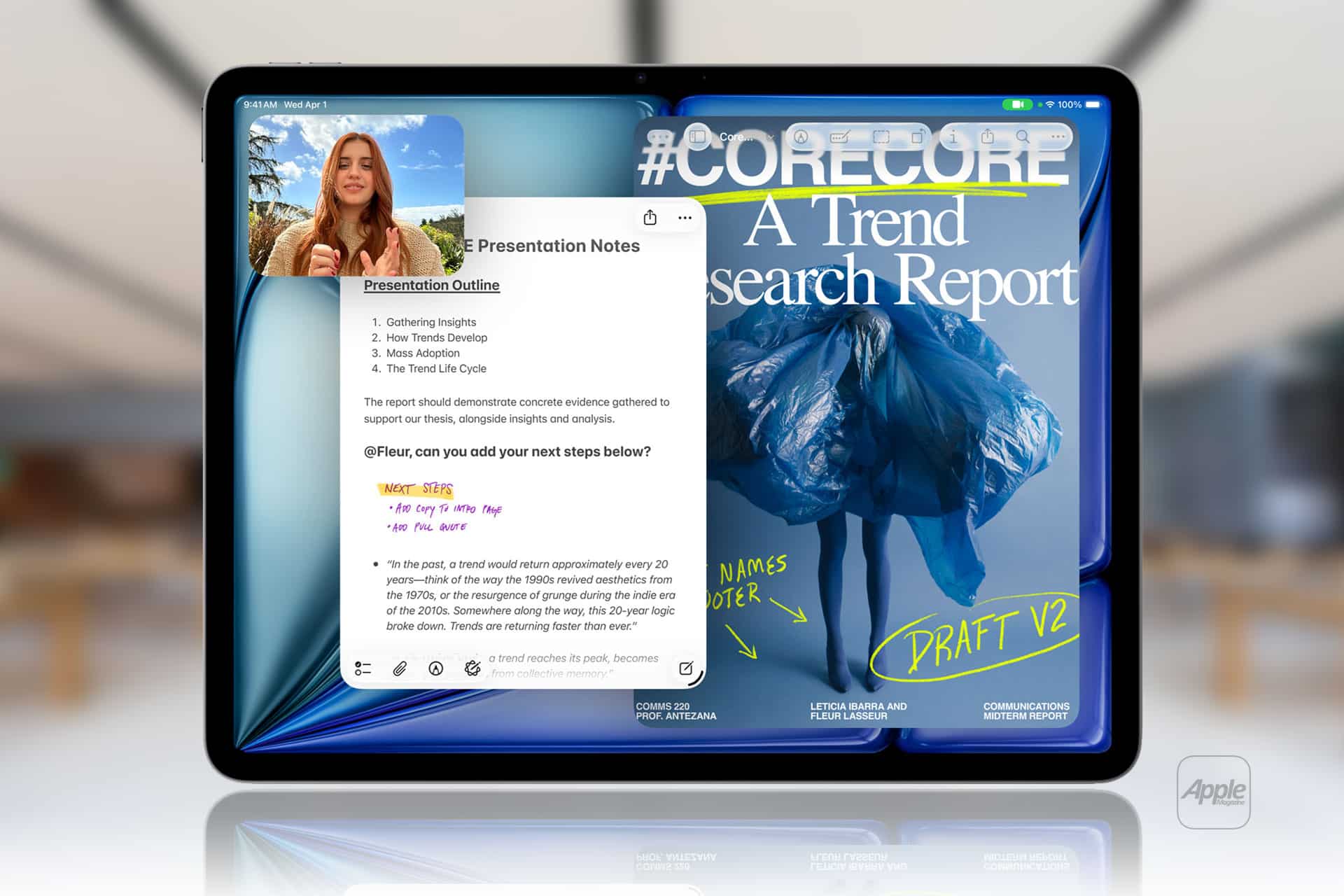
Apple Notes in iOS 27 receives a focused collection of upgrades designed to make long documents easier to navigate and information simpler to move between apps.
Section links allow users to jump directly to headings inside a note. Divider lines create clearer visual boundaries, while expanded Markdown support improves workflows involving websites, writing tools and plain-text editors.
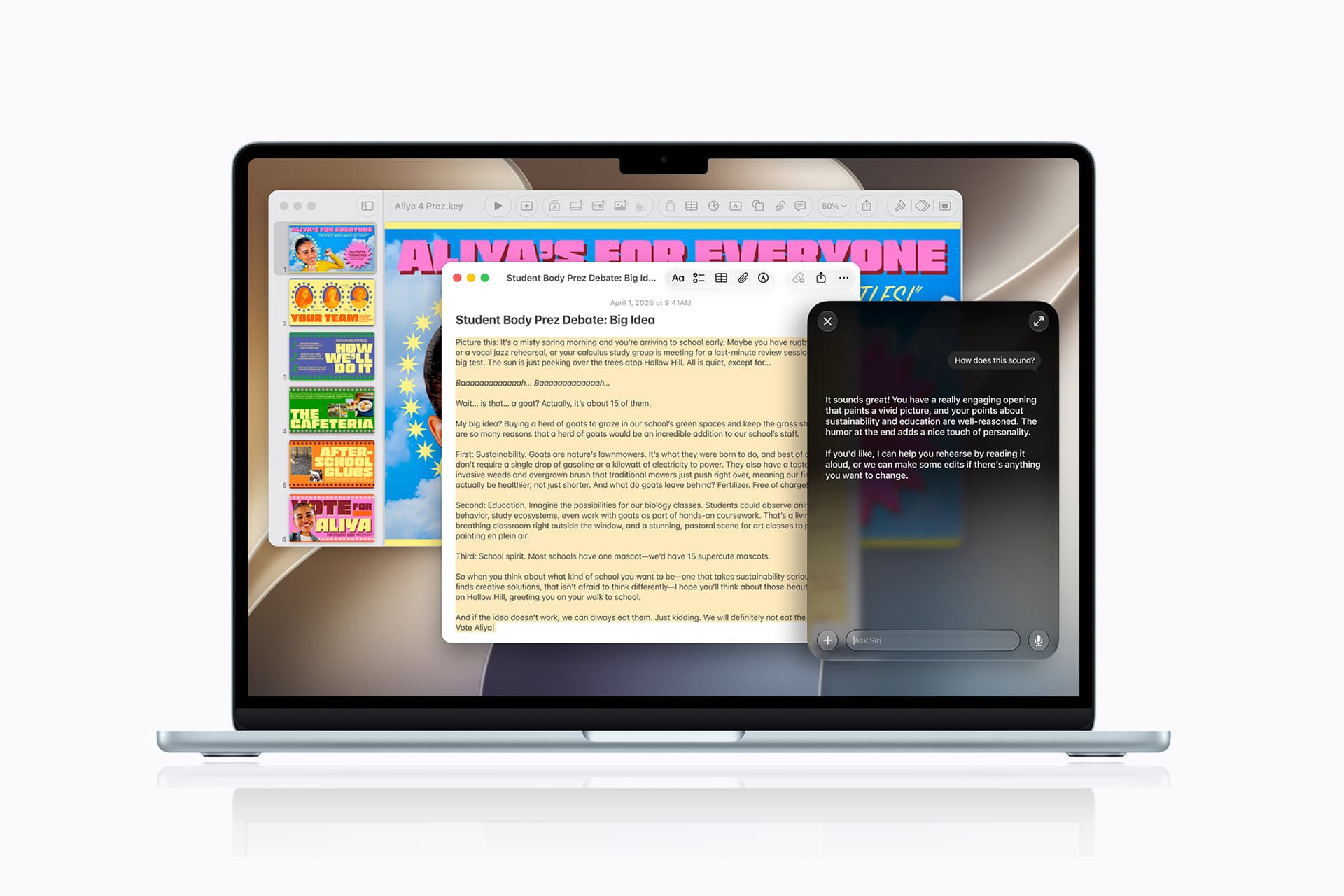
Siri AI introduces the most ambitious addition by creating notes, adding information to existing documents and transferring answers from a Siri conversation without requiring manual copying.
Image Playground also becomes more capable inside Notes, gaining additional visual styles and photorealistic image generation through Apple’s new cloud-based model.
Not every feature requires Apple Intelligence. Divider lines, section links, Markdown tools and the updated interface work on every iPhone compatible with iOS 27. Siri AI and advanced Image Playground capabilities need newer hardware and may have additional language or regional restrictions.
Image Credit: Apple Inc.
Apple Notes iOS 27 Adds Section Links
Section links solve one of the largest problems affecting long notes: reaching information located several screens below the beginning.
A user can now select text, choose Add Link and connect it to any heading or subheading inside the current note. Tapping that linked text immediately moves the reader to the selected section.
The feature can turn the opening of a document into a manual table of contents. A project note might contain links to its schedule, budget, participants, research and outstanding tasks without requiring separate documents.
To create a section link:
Select text > Add Link > Link to Section > Choose a heading
Notes displays the headings and subheadings already present in the document. Regular body paragraphs do not appear as destinations, so the note must use Apple’s title or heading formats before links can be created.
To format a destination:
Select the section title > Formatting > Heading or Subheading
The visible link text does not need to match the destination heading. A phrase such as “View the current budget” can link to a section titled “Financial Information.”
Section links differ from the existing ability to connect separate notes. Apple Notes already allows users to create internal links leading from one document to another. The new control moves within the same document instead.
That distinction is useful for meeting records, research files, travel plans and study material that become too long for ordinary scrolling but do not need to be divided into several notes.
Links should continue working when the document is shared through iCloud because they point to structural elements inside the note rather than fixed screen positions.
Renaming or deleting a destination heading may affect its link. Users maintaining complex documents should test their navigation after reorganizing major sections.
Divider Lines Improve Visual Structure
Apple Notes in iOS 27 adds horizontal divider lines as a native formatting element.
The line creates a visible separation across the document without requiring users to type repeated hyphens, underscores or other characters.
To add one:
Place the cursor > Open the edit menu > Insert Divider Line
The divider is inserted at the cursor position and moves with the surrounding content as the note changes.
A horizontal line can separate meeting notes by date, distinguish reference material from personal comments or divide a recipe into ingredients, preparation and serving information.
It also provides structure without making every section a heading. Headings define the hierarchy used by section links, while dividers create a visual break that does not become another navigation destination.
Typing a row of hyphens previously produced an inconsistent substitute. The characters could wrap on a narrow screen, change length after editing or become difficult to select. The native element maintains its appearance as the document moves among iPhone, iPad and Mac.
Divider lines should be used selectively. Adding one between every short paragraph can make the note look more fragmented rather than organized.
The strongest layout combines headings for major subjects, subheadings for smaller divisions and divider lines where one type of content clearly ends before another begins.
Markdown Moves More Easily Into Apple Notes
Apple Notes gained the ability to import and export Markdown files with iOS 26. The iOS 27 upgrade removes additional steps from copying content between Notes and Markdown-based tools.
Markdown uses plain-text characters to represent formatting. A hash symbol can identify a heading, pairs of asterisks can create bold text and square brackets can define a link.
The format is widely used by writers, developers, documentation systems and publishing platforms because it remains readable without requiring a proprietary editor.
When Markdown-formatted text is pasted into Apple Notes in iOS 27, the app automatically converts the syntax into rich text. Headings become formatted headings, links become clickable and emphasis appears as bold or italic text.
A pasted line such as Project Schedule appears as a formatted heading rather than displaying the two hash symbols.
Moving content in the opposite direction is also easier. Apple has added a Copy as Markdown command that converts selected rich text into Markdown syntax before placing it on the clipboard.
To use it:
Select the text > Open the edit menu > Copy as Markdown
The result can be pasted into a content-management system, code editor, Markdown document or another writing application while preserving supported formatting.
Copy as Markdown does not transform Apple Notes into a complete Markdown editor. Users continue writing through the familiar rich-text interface rather than viewing raw syntax throughout the document.
Complex attachments may not translate perfectly. Scanned documents, drawings, audio recordings, embedded files and some tables do not have universal Markdown equivalents.
Basic elements such as headings, links, emphasis and lists provide the most dependable transfer. Users preparing an important publication should review the pasted result before assuming every element survived the conversion.
Image Credit: AppleMagazine
Siri AI Can Create and Update Notes
Siri AI gives Apple Notes in iOS 27 a more direct connection with information generated or located through the assistant.
A user can ask Siri a question, refine the answer through conversation and save the result into a new note. The transfer happens without selecting the response, copying it and leaving Siri to open Notes manually.
A request could take the following form:
“Create a note called Kyoto Trip and add this itinerary.”
Siri can also target an existing document when the user identifies it clearly:
“Add these restaurant suggestions to my Kyoto Trip note.”
The integration extends beyond saving complete answers. Siri AI can reorganize poorly formatted information, convert text into a clearer structure and place the revised version inside Notes.
Someone collecting an unorganized group of tasks could ask Siri to separate them by priority before saving the result. A block of research could be converted into headings and shorter paragraphs.
Siri’s personal-context capabilities can help locate an existing note when the precise title is forgotten. The assistant is designed to search information across apps and understand requests using details connected to the user.
These actions remain subject to permissions. Siri should not silently place information into a document without recognizing the requested destination and action.
Users should review AI-generated material before treating it as authoritative. Reformatting supplied text carries less factual risk than asking Siri to generate research, dates, quotations or instructions from general knowledge.
Siri AI Requires Newer iPhone Hardware
The main Apple Notes iOS 27 update runs on iPhone 11 and later, as well as the second-generation iPhone SE and newer models.
Siri AI has a narrower hardware requirement. Apple lists iPhone 15 Pro, iPhone 15 Pro Max and every iPhone 16 or later model as compatible with the new Apple Intelligence architecture.
An iPhone 15, iPhone 15 Plus, iPhone 14 or iPhone 11 can receive section links, dividers, Markdown support and the redesigned Notes interface. Those devices cannot use the Siri AI note-writing actions.
This separation means two iPhones running the same operating system can display different Notes capabilities.
Siri AI is scheduled to reach users as a beta later in 2026, beginning in English. Apple plans to expand language availability, but individual capabilities may not arrive simultaneously in every supported language.
The assistant will not initially be available on iPhone or iPad in the European Union. Apple has also said its new Apple Intelligence features will remain unavailable in China while the company works through regulatory requirements.
Ordinary Siri controls may continue to perform basic actions on unsupported devices, such as creating a simple dictated note. They should not be confused with the new ability to hold a conversation, reorganize information and add the result to a chosen document.
Image Playground Expands Inside Notes
Image Playground remains integrated with Apple Notes in iOS 27 and receives a substantially more capable generation model.
The upgraded system can produce higher-quality images in a wider range of visual styles, including photorealistic results. Earlier Image Playground versions concentrated on illustration, animation and sketch-like appearances.
Users can describe an image and insert the generated result into the current note. A travel plan might receive a destination image, while a creative project could use generated concept art beside written ideas.
Photorealistic generation runs through Private Cloud Compute rather than entirely on the iPhone. Apple says requests processed through this architecture are not stored or made accessible to the company.
Generated images automatically include a hidden SynthID watermark identifying them as AI-created. The watermark does not appear as a visible label across the picture, but it provides a technical signal that compatible systems can detect.
Image generation may have daily usage limits because it depends on powerful server models. Apple says most iCloud+ plans will provide increased access, although the exact allowance can depend on the subscription and service conditions available at release.
The complete Image Playground experience may not appear in every early iOS 27 beta. Apple can activate or adjust cloud-dependent features separately while testing the operating system.
New Icons Clarify Shared Notes and Folders
Apple Notes adopts the wider iOS 27 design changes through refreshed buttons, menus and Liquid Glass interface elements.
The Notes app icon has been updated while preserving the familiar yellow-and-white paper design. The change keeps the app recognizable without leaving it visually disconnected from the new system icons.
Shared material receives clearer identification. The shared folder displayed near the top of the folder list now uses a blue icon, separating it more clearly from private iCloud and local folders.
Individual shared notes and folders also receive revised symbols. These indicators make it easier to understand whether another person can view or edit material before sensitive information is added.
The distinction matters because a collaborative note can look almost identical to a private document once it is open. A clearer icon in the list provides another warning before the user begins editing.
Liquid Glass changes the appearance of controls and menus but does not alter the underlying note format. Existing notes, scans, checklists, attachments and locked documents remain available after the update.
People using accessibility settings such as increased contrast, reduced transparency or reduced motion may see a modified version of the visual design.
Existing Notes Features Remain Available
The iOS 27 changes build on a much larger set of capabilities introduced during earlier releases.
Apple Notes can already scan documents, attach PDFs, record audio, generate transcripts, solve mathematical expressions, create checklists and collaborate through iCloud.
Users can link one note to another, place notes inside folders, apply tags and create Smart Folders that collect documents according to selected rules.
Locked notes can use a device passcode or separate password, while Face ID provides faster access on supported iPhones.
The app can also identify handwriting, search text inside scanned documents and recognize information contained in images.
None of those existing tools has been replaced by Siri AI or Markdown. The new version concentrates on moving through large notes and transferring information with less manual work.
Section links are particularly effective when combined with audio transcripts or lengthy scanned research. A user can create headings above important material and place navigation links at the beginning of the document.
Markdown support addresses another gap by making Notes more practical as the first stage of a publishing workflow rather than a closed destination for text.
Image Credit: Apple Inc.
What to Check Before Installing the iOS 27 Beta
Apple Notes in iOS 27 is available for testing through prerelease software, with the complete operating-system release scheduled for the fall.
Beta software can contain synchronization failures, interface problems and changes that Apple has not finished documenting. Notes is especially sensitive because its content may synchronize immediately across every device using the same Apple Account.
Before installing a beta on a primary iPhone, users should confirm that important notes have finished syncing and that another copy of critical information exists outside the beta device.
A Mac, iPad or iCloud.com can be used to verify whether recent documents have reached the server. Exporting especially important notes as PDFs or Markdown files provides an additional copy that does not depend on the Notes database.
Collaborative notes require more caution. People using older operating systems may not see every new formatting element exactly as intended, particularly while iOS 27 remains in testing.
The public release should resolve many compatibility issues, but Siri AI will follow its own beta schedule and regional limitations. Installing iOS 27 alone will not guarantee that every intelligent Notes action appears immediately.
Apple can still modify menu locations, visual elements and cloud-based features before the final version arrives. The safest time to reorganize a large Notes library around section links will be after every frequently used Apple device can install its corresponding fall update.
If you’re among the 2.6 million active users of the popular telehealth apps Hims and Hers to obtain medication for erectile dysfunction, hair loss, and a cavalcade of other intimate issues, there’s probably a very short list of people you want to know about it — and Mark Zuckerberg probably isn’t one of them.
On Wednesday, the US Federal Trade Commission filed a major lawsuit against Hims and Hers, over allegations the firm was sharing user’s health information with third party companies, Gizmodo reported. Chief among those third-parties apps was Zuckerberg’s Meta, as well as Snap, two social media companies with horribletrackrecords on protecting sensitive information.
Though Hims and Hers advertises its app-based health services as “100 percent online, private, and secure,” the FTC suit alleges “those assurances were false or misleading.”
“Instead of honoring its privacy promises,” the filing says, “Hims opted to grow the company and increase its revenue streams… with advertising platforms such as Meta and Snap.”
The suit doesn’t blame Meta directly, but argues that Hims and Hers used two “automated tracking technologies offered by Meta” to surveil users’ actions on the telehealth app. “These two tools automatically tracked and disclosed certain Events [user actions] to Meta,” the lawsuit reads.
Hims sells all kinds of men’s health meds, but most people know it for one thing: erectile dysfunction pills. While any leak of patient data would be an outrage, the thought that Hims could be sharing this particular kind of medical information is especially horrifying.
In a statement, Hims and Hers argued that the FTC’s case “is not enforcement grounded in consumer protection,” but rather “an effort to generate headlines at our expense.”
The lawsuit comes on the back of a three-year investigation by the FTC, and is currently in the very early stages — meaning it could be years before a final verdict is reached.
Se colocou uma música menos conseguida num post antigo do Instagram ou se o áudio foi removido por direitos de autor, já não precisa de apagar a publicação. Saiba como trocar a banda sonora mantendo os gostos e os comentários.
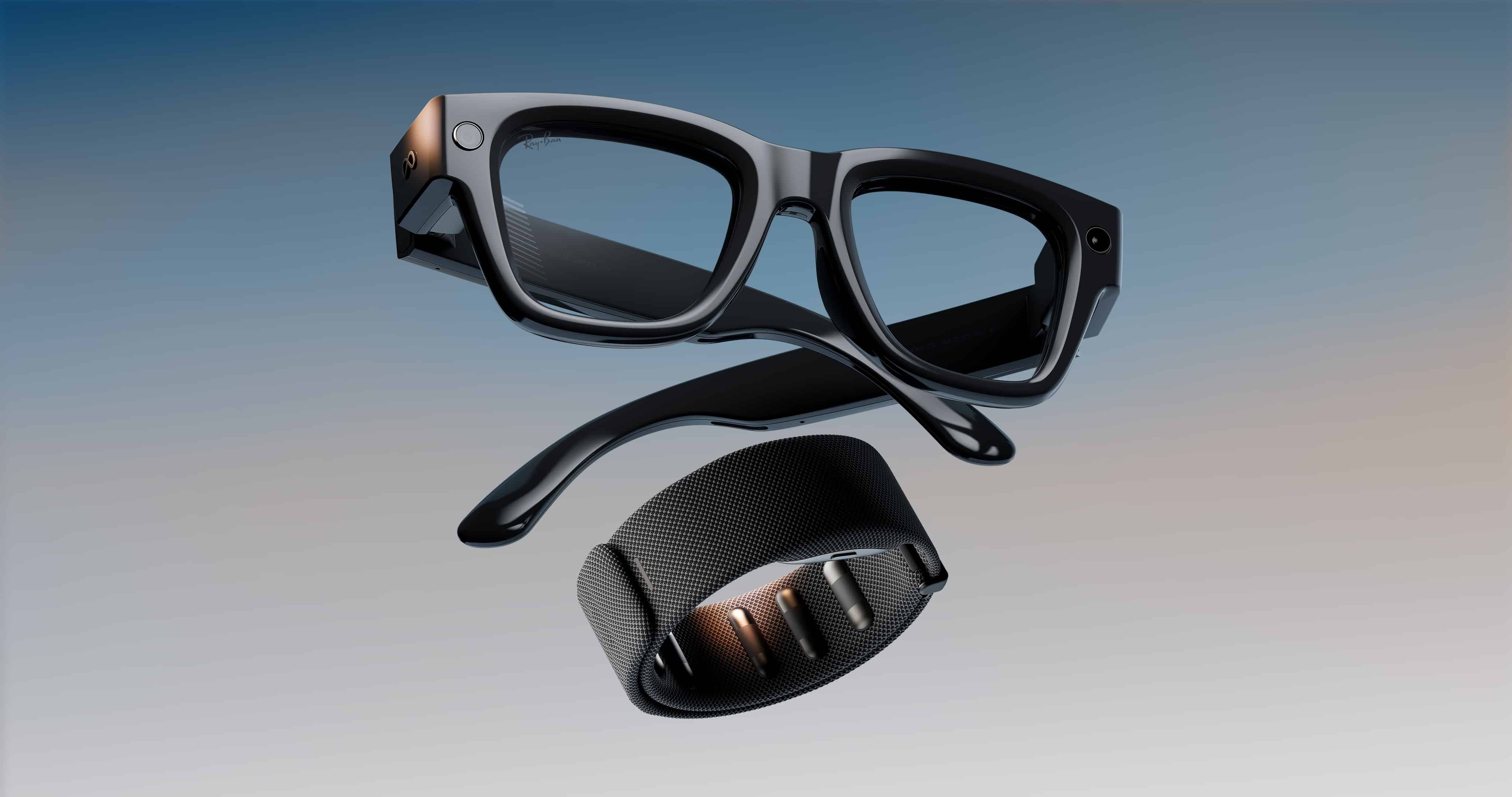
Os óculos inteligentes da Meta podem parecer relativamente distantes da realidade brasileira no momento, mas já são um fenômeno (e tanto) lá fora, a tal ponto que o atual terceiro aplicativo pago mais baixado na App Store americana tem como proposta detectá-los; refiro-me ao Antizuck Smart Glasses Scanner.
O interessante é que nem mesmo a procedência desconhecida do utilitário foi capaz de conter a curiosidade dos usuários, interessados em descobrir se ele realmente funciona como anunciado.
A promessa do desenvolvedor Albert Pariente Cohen é de que a detecção ocorre por meio de sinais Bluetooth emitidos pelos óculos, sendo compatível com os Meta Glasses, Ray-Ban Meta, Snap Spectacles, Amazon Echo Frames e o RayNeo. Supostamente, o app também é capaz de estimar a proximidade dos óculos em relação ao iPhone/iPad.
Teoricamente, óculos inteligentes como os da Meta contam com um LED 1Light emitting diode, ou diodo emissor de luz. não removível na lateral, que permitiria às pessoas ao redor alguma ciência de que estão sendo gravadas. Já existem no mercado, no entanto, alternativas para coibir o funcionamento desse mecanismo, como tampas de plástico ou adesivos que inibem a visibilidade da luz de gravação. Varejistas como a Amazon ou a própria Meta trabalham para tirar esse tipo de produto de circulação, mas ainda é possível encontrá-los à venda.
A categoria de produtos levanta constantes debates sobre ética, visto que os casos de gravações não consentidas se tornam cada vez mais frequentes. Na semana passada, o diretor do Instagram, Adam Mosseri, declarou que vídeos contendo gravações de assédio com estranhos em lugares públicos — frequentemente gravados com o hardware da Meta — terão como consequência o banimento na rede social:
Se você está postando conteúdo que tira vantagem de pessoas e assedia elas, como muitos desse tipo de vídeo de cantadas que costumamos ver e ouvir falar, então nós vamos derrubar o conteúdo. […] Nós não queremos que pessoas sorrateiramente gravem vídeos de outras pessoas e as assediem e então postem na nossa plataforma. Então nós estamos tentando lutar de todo o jeito que conseguimos.
Despite having almost nothing to show from his enormous spending on AI, Meta CEO Mark Zuckerberg is doubling down.
Earlier this week, the social media company announced during its second quarter earnings call that it was raising capital expenditures from $125 billion to at least $130 billion, a clear sign that it’s not taking its foot off the pedal.
Yet amid renewed concerns that the tech industry may be nearing the edge of a cliff thanks to its obsession with building out enormously expensive data centers without a clear path to profitability, investors sent back a clear signal in return. Meta’s shares nosedived following its announcement, plummeting over 11 percent over the last five days alone.
According to Zuckerberg, all that extra AI spending was “accelerating every part of our core business.” He also claimed that some of the tech would be sold off to other businesses.
But whether the company will have anything compelling to offer them remains dubious at best. Meta has been burning through its funds at an alarming rate. Even strong revenue numbers — a 28 percent increase this latest quarter compared to the same period last year — couldn’t stem the bleeding, with free cash flow sinking to the lowest level in at least five years thanks to AI spending.
Despite committing well over $100 billion to the tech, Meta has been practically absent from the frontier AI model race. Its so-called Superintelligence Lab has turned into a “soul-crushing gulag” plagued with rock-bottom morale — and most importantly, it’s not getting results.
Its efforts to develop an in-house frontier model, dubbed Muse Spark, have been mired by setbacks, with Meta continuously shifting back the timeline of its release to developers. On July 11, the company released version 1.1 of its AI to little fanfare, with Axios noting that it’s still easily outdone in most tasks by competing models from OpenAI, Anthropic, and Google.
At the same time, Meta released an image-generation model called Muse Image, which felt like an afterthought and a too-little-too-late attempt to catch up with its competitors.
The latest news has given some analysts a feeling of déjà vu. Zuckerberg has garnered a reputation for making major strategic missteps since long before AI. Case in point was the company’s heavily criticized pivot to the “metaverse,” an ill-fated attempt to sell customers on the idea of spending their workday inside a hollow and cartoonish virtual reality world, which feels like the perfect precursor to Meta’s current pains.
“There’s a bit of similarity to Meta’s metaverse missteps in that Meta is once again spending ahead of proven product demand,” Forrester analyst Mike Proulx told the BBC.
Meanwhile, Meta’s platforms have descended into a practically unrecognizable ocean of clickbait and AI slop, something the company has yet to meaningfully address as user numbers and engagement continue to slide.
For his part, Zuckerberg remains infatuated by the concept of AI agents “that can work 24/7 on your behalf,” as he told investors this week, and growing its Muse Spark model into a “large business for large businesses.”
But considering Meta is entering a game with much bigger players who’ve seen far more success in attracting customers and growing AI revenue so far, the company’s long-term success is anything but guaranteed.
And investors who’ve already shaken their heads after both Amazon and Google’s parent company Alphabet announced major spikes in AI spending this month haven’t taken kindly to Zuckerberg’s lofty vision. Judging by how little the billionaire has to show, who can blame them?
À medida que os incêndios florestais continuam a afetar várias regiões da Europa, um nova ferramenta, que usa dados dos satélites Copernicus, permite acompanhar, em tempo real, a evolução dos fogos, a propagação do fumo e as emissões de carbono.
Meta Platforms revealed a dramatic acceleration in its infrastructure commitments, disclosing in a regulatory filing it has secured $279 billion in off-balance sheet lease obligations primarily dedicated to expanding its AI capabilities.
The future costs, which exist on top of its active leases, comprise short- and long-term agreements covering data centres, co-location facilities and certain network infrastructure.
The total for uncommenced lease commitments as of the quarter ended 30 June represents a 53% surge from the $183 billion reported in the previous period.
The social media giant is showing no signs of slowing its aggressive AI buildout, adding an extra $68 billion in commitments during July alone, with those leases slated to commence in 2027 and 2028.
The disclosure comes alongside mounting investor pressure on CEO Mark Zuckerberg. Meta’s stock fell today (30 July) following a disappointing Q3 revenue forecast yesterday which heightened investor scrutiny over the company’s massive capital expenditures on AI.
During the Q2 earnings call, Zuckerberg said Meta could sell compute directly to large enterprises but stated the social media giant believes there will be a “significantly higher margin on selling [super]intelligence rather than selling compute directly”.
Meta knows its AI-powered camera equipped spectacles are widely seen as “pervert glasses.” And though it professes to be cracking down on creeps using them to record people without their consent, whatever measures it’s taking clearly aren’t working.
After Meta announced this month that it would ban users using the glasses to film themselves harassing strangers, a recent investigation by Oligarch Watch still found hundreds of these videos on its platforms. Many of them are from sleazy “pickup artists” who approach women in public, making sexual or degrading comments and recording their buttocks or breasts.
In one viral video on Instagram, a pick-up artist who goes by “_mypointofvue” films himself approaching an underaged girl in a shopping mall.
“I’m 17,” the girl says, seemingly unaware that she’s being recorded, when he asks her age.
“That’s crazy. I can’t do nothing with you, baby,” he replies, grumbling that he “can’t believe that ho was 17.” He then pulls out his phone on camera to do an ad for a crypto-based online casino.
In another Instagram video, a man who goes by Justin uses his Meta glasses to zoom in on a woman’s buttocks as she orders coffee, before repeatedly asking for her contact information and being shut down each time. “Shawty had the gyat,” he wrote in the caption. The user, according to Oligarch Watch, has posted dozens of similar videos since Meta announced the crackdown.
Another popular pickup artist who goes by “moreno.rizz” recently shared a video of himself approaching a woman by saying, “Excuse me, have we f*cked before? I’m just kidding. I just thought you were really pretty.”
The harassment can sometimes be even more blatant. Another pick-up artist called “dkdanny” boasts over half a million followers, and in some of his most popular videos that rack up millions of views, he wears Meta glasses while insulting the weight of random women on the street.
“You don’t get to talk, OK,” he tells one woman. “You already look big enough. Don’t talk big, too.”
The clear privacy risks posed by Meta’s glasses have been a heated topic since the devices debuted. The company has used big-name celebrity endorsements and run heavy marketing campaigns to improve how they’re perceived, but it’s not winning everyone over. Earlier this month, Instagram head Adam Mosseri addressed the harassment being carried out using the smart glasses, vowing to crackdown on it “every way we can.”
Some of the accounts that Oligarch Watch referenced in its reporting seemed to have been taken down after it was published, but that’s only a drop in the ocean — and one of the world’s largest tech companies relying on random journalists to police abhorrent content on its platforms clearly isn’t a serious strategy.
Meta told the publication in a statement that its glasses that it “built privacy into the camera for the glasses from the ground up,” including an LED that lights up when the glasses are recording. It did not, however, address the fact that there are many workarounds to this small deterrent.
Meta Platforms CEO Mark Zuckerberg (pictured) outlined his high-stakes vision for AI across consumer and enterprise markets during a Q2 investor call, casting the technological transition as a massive commercial opportunity despite heavy infrastructure outlays and operational charges weighing on profitability.
Zuckerberg detailed three primary expansion pillars driving Meta’s long-term strategy. He noted AI investments are actively boosting performance across the main portfolio by improving user experiences, optimising return on investment for advertisers and enabling internal product teams to ship software faster.
Looking ahead, Zuckerberg stated that Meta is “developing new personal agents that will be the foundation for our next wave of products and revenue lines in the months and years ahead”.
Expanding beyond consumer applications, he highlighted a growing commercial footprint, pointing to “a large enterprise opportunity to sell to businesses, including APIs, business agents, potentially selling compute directly, and other services that we’re building for large customers”.
Q2 financial performance Meta delivered strong Q2 top-line performance, driven by continuous gains across its AI-enhanced advertising suite, though rapid infrastructure spending and operational charges squeezed overall profitability below Wall Street expectations.
Meta generated $60.8 billion in revenue, representing a 28% increase compared to $47.5 billion in the same period last year. However, net income dropped 14% to $15.8 billion.
Advertising revenue accounted for $59.8 billion of total sales, up 28% year-over-year. This growth was supported by high adoption of AI automated ad features, with ad impressions growing 14% year-over-year across its Family of Apps and the average price per ad climbing 12%.
Family Daily Active People reached an average of 3.6 billion in June, reflecting a 3% increase year-over-year.
Total costs and expenses surged 55% to $42 billion, heavily weighed down by $2.4 billion in legal proceeding charges as well as $1.2 billion in severance expenses following restructuring in May.
Driven by the aggressive capex ramp and operational charges, free cash flow dropped 91% year-over-year to $784 million, compared to $8.5 billion in the prior-year period.
Capital expenditures jumped to $31 billion from $17 billion, including principal payments on finance leases, as Meta continued to scale its computing infrastructure, servers, and data centres to expand generative AI capabilities.
Looking ahead, the social media giant issued a Q3 revenue forecast of $61 billion to $64 billion.
For the full year, Meta maintained its capital expenditure guidance at $130 billion to $145 billion and anticipates total expenses between $165 billion and $169 billion, while reiterating full-year operating income is expected to exceed prior-year levels.
Highlighting engagement growth across its app suite, Zuckerberg noted Threads crossed 500 million monthly active users, “making it the fastest-growing conversation app ever,” while Facebook reached more than 2 billion daily active users a while ago.
“WhatsApp just hit an all-time messaging record, peaking at 30 million messages sent per second during the World Cup final,” he said.
Meta’s Reality Labs division, which houses the company’s VR and AR hardware efforts including Quest headsets and smart glasses, continued to weigh on overall profitability.
The unit posted an operating loss of $4.6 billion, widening slightly from a year earlier, on revenue of just $431 million, up from $370 million in the same period last year.

 Login
Login