Com o Threads, é possível conversar com os milhões de usuários que utilizam a rede social diariamente para falar sobre os mais diversos assuntos.
A Meta introduziu, há um tempo, uma função dedicada para quem curte escrever bastante: a possibilidade de realizar uma publicação com até 10.000 caracteres — inclusive com ferramentas de formatação de texto, como negrito, itálico e tachado, por exemplo.
Abra o app ou o site do Threads e toque/clique no ícone de “+” ou “Nova thread“.
Selecione o ícone representado por uma folha de papel (no iPhone, é preciso tocar primeiramente no botão com três pontinhos para que ele apareça).
Digite ou anexe o texto desejado no campo e use as ferramentas de formatação (negrito, itálico, sublinhado, tachado e destaque com cor) na parte inferior, se assim desejar.
Quando quiser publicar o texto, toque/clique em “Concluir”.
Usuários do Telegram notaram ontem que o aplicativo do mensageiro para iOS ficou indisponível na App Store por um breve período, o que deixou muita gente confusa.
Contatada pela Reuters, a Apple explicou que tirou o mensageiro do ar após um usuário ter reportado a presença de “material de abuso sexual infantil” na plataforma, o que obviamente vai contra as regras da sua loja.
Ainda segundo a gigante de Cupertino, a página do Telegram foi restaurada depois que a equipe do mensageiro removeu o conteúdo supracitado e baniu o usuário responsável pela publicação.
Em resposta, o mensageiro disse que possui uma política de “tolerância zero” contra esse tipo de conteúdo, além de ter bloqueado mais de 338.000 grupos e canais com material ilegal ao longo do último ano.
Ainda assim, a equipe do app ironizou a decisão da Apple nas redes sociais, dando a entender que a companhia não aplica o mesmo tratamento a outros apps. Ela também aproveitou a situação para divulgar uma página com dados sobre a moderação de conteúdo na plataforma:
I'm sure this stance will be applied equally to all other apps in the store, in the future right? @Apple
Outra pessoa a ir às redes sociais para comentar esse pequeno imbróglio foi o CEO 1Chief executive officer, ou diretor executivo. da Epic Games, Tim Sweeney, que criticou a falta de transparência na tomada de decisão da Apple, além de classificá-la como “arbitrária”. Em guerra com a fabricante do iPhone há alguns anos por conta das regras da App Store, ele aproveitou a situação para dizer que a loja da Maçã “precisa desesperadamente de concorrência”:
Such arbitrary policy enforcement, by a monopoly gatekeeper, creates a perfect storm of fear and acquiescence by developers who are victims of Apple’s monopoly. Speak up and criticize their gatekeeping and maybe they’ll enforce the rules one way rather than the other way.
A App Store da Apple precisa desesperadamente de concorrência global. A Apple remove arbitrariamente uma ferramenta vital de comunicação e privacidade, tornando-a inacessível a bilhões de usuários, e infelizmente isso é considerado normal.
A Apple declarou que removeu o aplicativo para um bilhão de pessoas porque um usuário do Telegram publicou algo horrível e ilegal. A empresa não explicou como, se esse é o padrão para remoção de aplicativos, qualquer aplicativo de comunicação, incluindo o iMessage, poderia operar em larga escala.
Essa aplicação arbitrária de políticas, por parte de um monopólio, cria a tempestade perfeita de medo e aquiescência por parte dos desenvolvedores, que são vítimas do monopólio da Apple. Manifeste-se e critique essa postura de controle, e talvez eles passem a aplicar as regras de uma forma, em vez de outra.
Questionada sobre os comentários de Sweeney, a Apple preferiu não emitir uma resposta.
Segundo ele, todo esse imbróglio foi provocado por um único usuário mal intencionado, que plantou conteúdo impróprio modificado por inteligência artificial (IA) em um grupo público na plataforma. Para tal, essa pessoa editou uma mensagem antiga na conversa, o que acabou fazendo com que ela passasse despercebida pelos administradores do grupo.
Ainda de acordo com Durov, esse usuário era um extorsionista — ou seja, uma pessoa que usa “contas automatizadas para plantar conteúdo ilegal em grupos públicos e depois denunciá-lo diretamente à Apple, tentando provocar a remoção de comunidades legítimas” cujos donos se recusaram a pagar o resgate.
O executivo também garantiu que a presença de conteúdo desse tipo na plataforma não representa um problema sistêmico e que sua equipe de moderação é efetiva, além de ter criticado a Apple por ter removido o app de sua loja sem contatar o Telegram primeiro. “Se um aplicativo usado por mais de 1 bilhão de pessoas pode ser removido da App Store sem aviso prévio, qualquer aplicativo pode ser”, comentou.
Inicialmente, a limitação da disponibilidade era restrita ao Mac mini e ao Mac Studio, mas agora ela já afeta os notebooks mais populares da Maçã. Segundo as fontes de Gurman ligadas ao varejo, percebe-se uma maior dificuldade por parte da Apple em manter o estoque previsto, e também mais limitação no fornecimento de novas unidades.
Also in Power On: Major shortages hit the MacBook Air amid the memory and silicon crunch, with many new orders now not arriving until September. Apple appears to be prioritizing sales now of the entry level MacBook Pro. https://t.co/3aouZVsmsg
Também na “Power On”: grande escassez atinge o MacBook Air em meio à crise de memórias e silício, com muitos novos pedidos agora não chegando até setembro. A Apple parece estar priorizando agora as vendas do MacBook Pro de entrada.
A hipótese não parece difícil de atestar: para quem opta por adquirir os notebooks agora, seja em uma Apple Store física ou online, o prazo de entrega para novos modelos pode se estender até setembro em casos de personalização (cor, tela e memória) ou até o final de agosto para configurações básicas.
Ele afirmou que isso se deve em parte à priorização da aquisição de novas memórias para o MacBook Pro de entrada (modelo de 14 polegadas), que poderá ganhar em breve uma atualização com o chip “M6” durante o outono do hemisfério norte (nossa primavera — isto é, entre setembro e dezembro).
Por fim, o jornalista observou que, tanto em seus sites quanto nas lojas físicas, o MacBook Pro básico ganhou mais destaque do que os MacBooks Air, um feito possivelmente inédito. Em alguns casos, a Apple chega a incluir um aviso de que a linha Air está sujeita à disponibilidade de estoque.
MacBook Pro de 16″
Cores: preto-espacial ou prateado Tela: padrão ou nano-texture Chips: M5 Pro ou M5 Max Memória: 24GB, 36GB, 48GB, 64GB ou 128GB Armazenamento: 1TB, 2TB, 4TB ou 8TB
Cores: preto-espacial ou prateado Tela: padrão ou nano-texture Chips: M5, M5 Pro ou M5 Max Memória: 24GB, 36GB, 48GB, 64GB ou 128GB Armazenamento: 1TB, 2TB, 4TB ou 8TB Adaptador de energia: USB-C de 70W ou 96W
Cores: azul-céu, prateado, estelar ou meia-noite Chip: M5 Memória: 16GB, 24GB ou 32GB Armazenamento: 512GB, 1TB, 2TB ou 4TB Adaptador de energia: USB‑C de 30W, 35W com duas portas ou 70W
Cores: azul-céu, prateado, estelar ou meia-noite Chip: M5 Memória: 16GB, 24GB ou 32GB Armazenamento: 512GB, 1TB, 2TB ou 4TB Adaptador de energia: USB‑C de 30W, 35W com duas portas ou 70W
NOTA DE TRANSPARÊNCIA: O MacMagazine recebe uma pequena comissão sobre vendas concluídas por meio de links deste post, mas você, como consumidor, não paga nada mais pelos produtos/serviços usando os nossos links de afiliado.
Os stories do Instagram sempre foram publicações temporárias. Depois de 24 horas, eles desaparecem completamente do seu perfil e ficam disponíveis só para você, em um arquivo privado.
Mas, com o lançamento do Instagram Plus, a Meta está permitindo estender o tempo que o seu story fica no ar — mais precisamente, por mais 24 horas (totalizando, então, 48 horas).
Com uma assinatura ativa do Instagram Plus, usuários de iPhones e iPads podem usufruir de diversos benefícios exclusivos que tornam a sua experiência com a rede social da Meta ainda melhor.
Um deles é a prévia de stories. Como o nome deixa claro, ela permite pré-visualizar o story de uma pessoa que você segue, sem que essa pessoa veja o seu nome na lista de visualizadores.
Apesar de ter perdido um pouco do hype inicial, os Instants seguem sendo uma excelente maneira de compartilhar fotos e vídeos rapidamente com os seus seguidores do Instagram.
Caso queira, é possível consultar facilmente um arquivo de todas as publicações feitas, usando três métodos diferentes — como mostraremos a seguir.
Com o app do Instagram aberto, toque na aba das suas mensagens diretas e no ícone do Instants (no canto inferior direito).
Vá até os quadradinhos (no canto superior direito) para conferir o seu histórico.
Segundo método
A segunda maneira de fazer isso é praticamente a mesma coisa que o método anterior, com a diferença de que isso pode ser feito diretamente pelo aplicativo dedicado do Instants.
Terceiro método
No Instagram, toque na aba do seu perfil (no canto inferior direito), vá até os três risquinhos (no canto superior direito) e entre em “Itens Arquivados”.
Use o menu suspenso da parte superior para selecionar “Arquivo de instants”.
Muita gente não sabe, mas o Instagram possui um navegador embutido dentro do aplicativo para iPhones e iPads.
Além de fazer alguns ajustes (como limpar os dados), você também pode ativar ou desativar a chamada navegação aprimorada.
Com ela, as informações dos sites em que você navega podem ser utilizadas para exibir o histórico de links, recomendações de compras e outros dados. É possível ativar ou desativar esse recurso facilmente, em alguns passos simples.
Na bio do seu perfil do Instagram, é possível colocar informações básicas sobre você, como sua profissão, idade ou qualquer outra coisa que julgue útil para quem for visitá-lo.
Para assinantes do Instagram Plus, a Meta oferece uma forma de escolher entre diferentes tipos de fontes para usar na bio. Veja como alterar isso! 📱
Se você é um usuário assíduo do Instagram, uma boa ideia talvez seja assinar o plano de assinatura Instagram Plus, que abre um leque de recursos extras as quais melhoram a sua experiência na rede.
Dentre as funções disponibilizadas com ela, está a possibilidade de pré-visualizar o conteúdo das mensagens que tiver recebido na área de conversas privadas do mensageiro, sem que elas sejam marcadas como lidas ou a outra pessoa saiba que você já leu.
Outra possibilidade é, em uma conversa, usar fontes personalizadas exclusivas de quem assina o Instagram Plus.
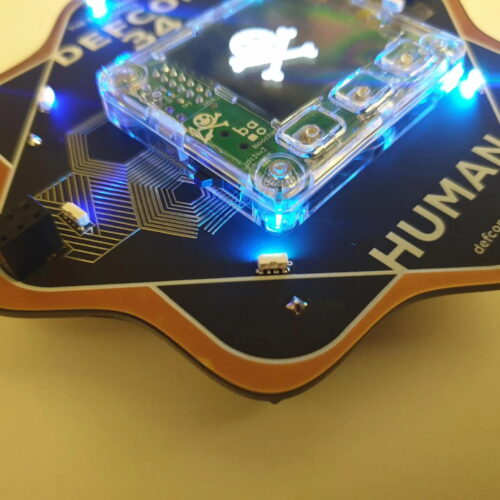
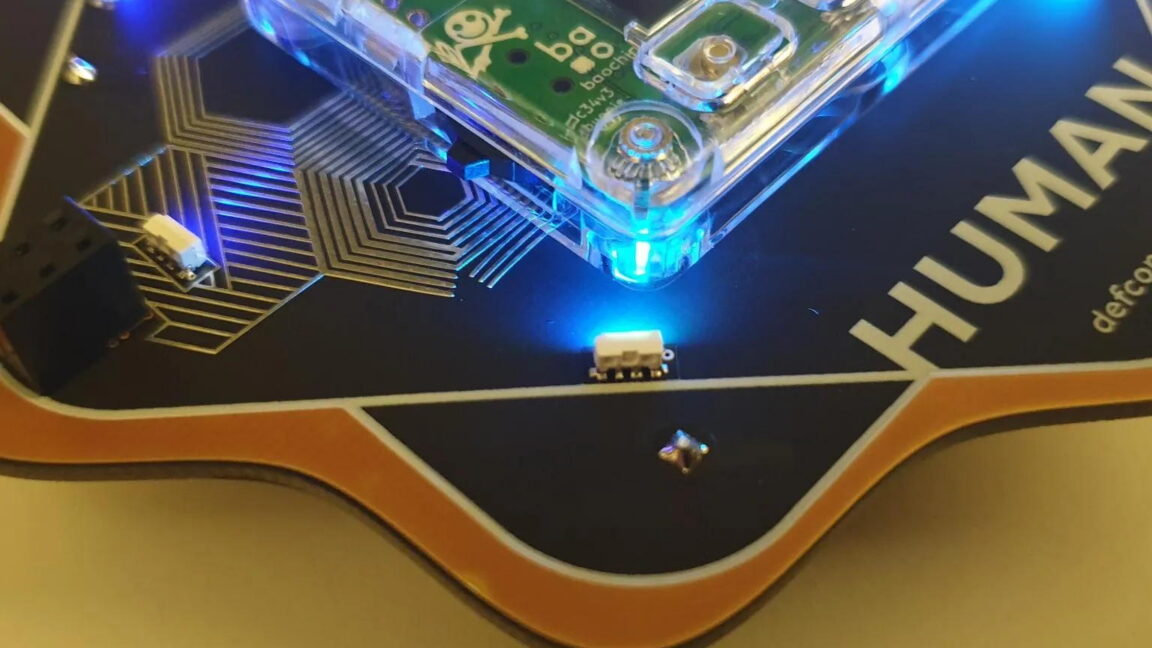
It’s been a longtime feature of the annual Defcon hacker conference that attendees come away not only with knowledge of new software vulnerabilities and hacking techniques but also an elaborately designed conference badge—often electronic masterpieces embedded with intricate puzzles, complex crypto challenges, hidden Easter eggs, and even the mechanical gear trains of a watch.
Each year’s badge creator endeavors to top previous designs and blow the minds of hard-to-impress hackers. But this year’s badges take a different tack. Instead of the badge designs being the star, it’s what is inside the hardware that will really stand out.
This year, Defcon asked legendary hardware hacker Andrew “bunnie” Huang to create the badges—revealed here for the first time—and they include an innovative open source chip that Huang designed and that aims to do no less than advance the state of security, transparency, and trustworthiness in computing.
NASA, SpaceX Advance Wind Tunnel Tests for Starship Rocket
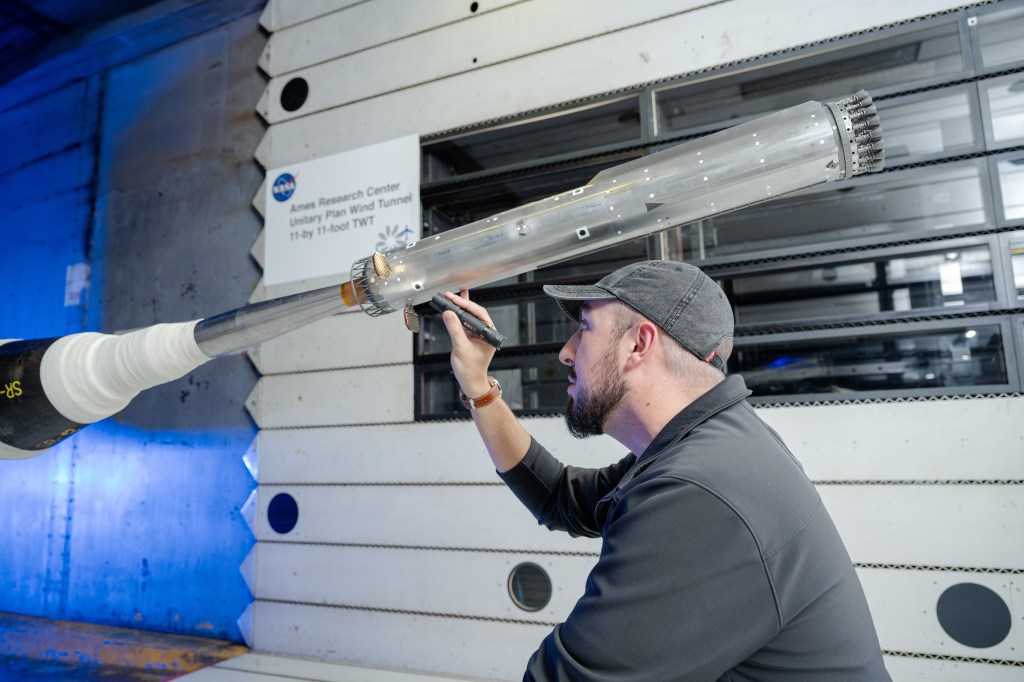
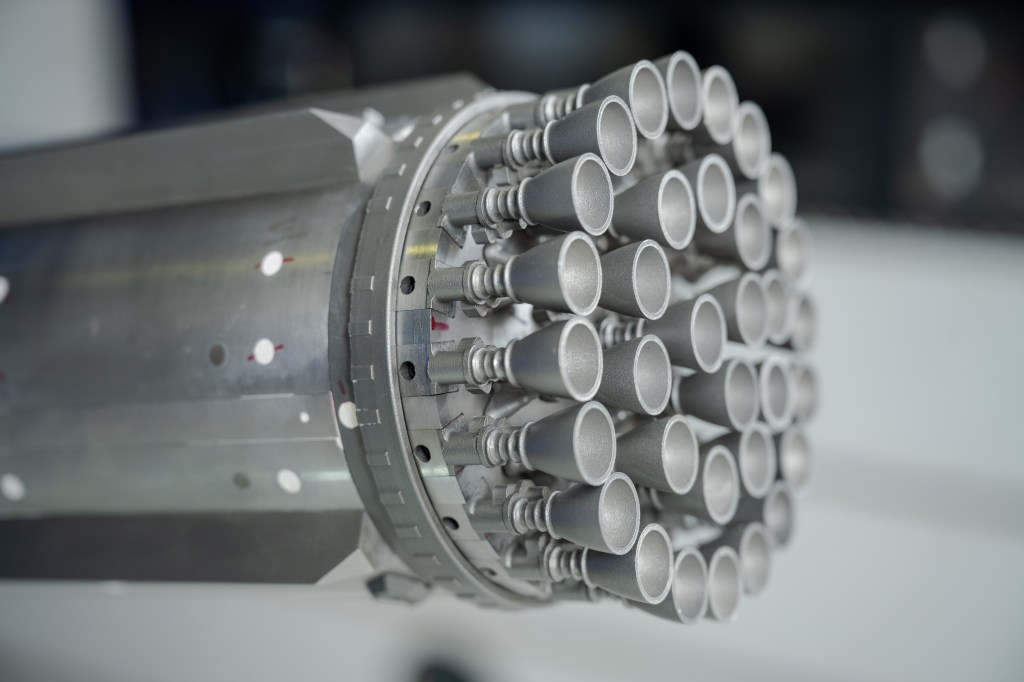
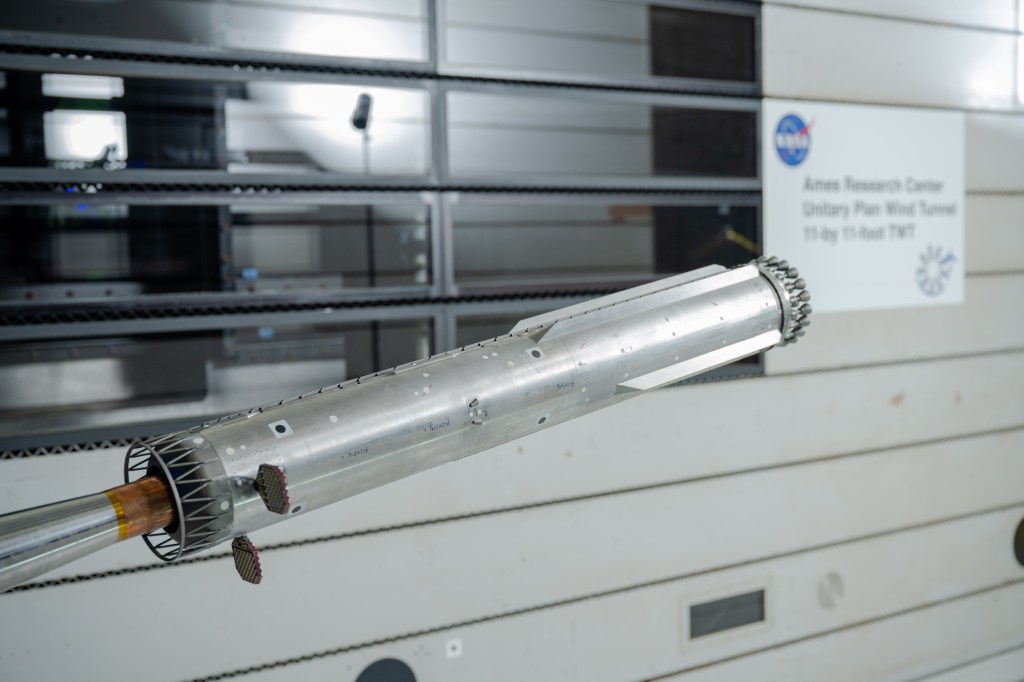
Engineers at NASA Ames conduct transonic and supersonic wind testing on a 1.2% scale model of the Super Heavy Version 3 rocket that will launch the Starship human landing system.
Credits: NASA
NASA and its industry partners are preparing for next year’s Artemis III demonstration mission by completing new wind tunnel tests on SpaceX’s Super Heavy Version 3 rocket booster. The tests, conducted at NASA’s Ames Research Center in California’s Silicon Valley, focused on better understanding the extreme aerodynamic forces the rocket can experience during re-entry. The recent test series builds on previous testing completed at NASA Ames in 2024.
NASA is working with SpaceX to develop the company’s Starship Human Landing System (HLS) to safely carry astronauts from lunar orbit to the Moon’s surface and back. The upgraded Super Heavy rocket booster is part of SpaceX’s Starship launch system. Version 3 of Starship and Super Heavy is expected to be the basis for the Starship HLS for Artemis III in 2027 and a later crewed lunar landing in 2028.
Engineers at NASA Ames conduct transonic and supersonic wind testing on a 1.2% scale model of the Super Heavy Version 3 rocket that will launch the Starship human landing system.
NASA
Engineers at NASA Ames conduct transonic and supersonic wind testing on a 1.2% scale model of the Super Heavy Version 3 rocket that will launch the Starship human landing system.
NASA
Engineers at NASA Ames conduct transonic and supersonic wind testing on a 1.2% scale model of the Super Heavy Version 3 rocket that will launch the Starship human landing system.
NASA
Engineers at NASA Ames conduct transonic and supersonic wind testing on a 1.2% scale model of the Super Heavy Version 3 rocket that will launch the Starship human landing system.
NASA
Although Starship HLS is a lunar lander designed and built by SpaceX, NASA collaborates with commercial companies to provide access to specialized testing facilities, like the wind tunnels at NASA Ames, and technical expertise, such as the team that set up the wind tunnel testing and helped analyze the results.
“NASA has a lot of experience with unsteady aerodynamics,” said Manish Mehta, discipline lead engineer for the HLS Plume and Aero Environments team, NASA’s Marshall Space Flight Center in Huntsville, Alabama. “We used the agency’s broad experience base of conducting wind tunnel tests for the space shuttle, the SLS (Space Launch System) rocket, and Orion spacecraft to efficiently set up and analyze the wind tunnel testing for the Super Heavy Version 3. In fact, similar testing at the Ames Unitary Plan Wind Tunnel resulted in adding strakes to SLS for Artemis II, so what we learned for Artemis II is helping us get to Artemis III and beyond.”
Testing
SpaceX’s Starship consists of a 33-engine first-stage Super Heavy rocket, or booster, and the second-stage Starship. Version 3 of Super Heavy incorporates many new and upgraded systems, including:
New propulsion systems and new Raptor 3 rocket engines
No engine section skirt, individual engine shrouds, or integrated large-scale base heat shield
Three gridfins on the Super Heavy booster instead of four, with each fin now 50% larger
An integrated hot stage replacing the previous single-use protective interstage
With significant changes to Super Heavy, NASA and SpaceX engineers wanted more information about the steady and unsteady aerodynamic forces the rocket will experience during atmospheric re-entry as it returns to the launch site for refurbishment and re-use.
“When a rocket, or an airplane, flies through air at high speed, it’s subjected to steady aerodynamic forces and moments, and unsteady aerodynamic forces and moments,” explained Jayanta Panda, unsteady aerodynamics subject matter expert at NASA Ames and part of the Human Landing System Plume and Aero Environments team. “An example of a steady aerodynamic force would be when air smoothly flows over the surface of the rocket as it ascends. An unsteady aerodynamic force would be air ‘buffeting,’ or hitting, certain areas the rocket at less predictable times and potentially causing vibrations.”
Wind tunnels
NASA and SpaceX used a 1.2% scale model of the Super Heavy Version 3 in the transonic wind tunnel and the supersonic wind tunnel at NASA Ames for testing. The transonic tunnel blasts scale models of rockets or aircraft with air at speeds ranging from Mach 0.2 to Mach 1.4 (Mach 1 is the speed of sound, or about 761 miles per hour). The smaller supersonic tunnel fires winds at higher speeds, from Mach 1.55 to Mach 2.5. The wind tunnel tests on Super Heavy Version 3, conducted in late 2025, used both tunnels to measure steady and unsteady air flows on the surfaces of Super Heavy.
“Resulting wind tunnel data on steady forces and moments helps predict how the rocket will react to forces in the atmosphere during re-entry so the flight software can effectively guide the rocket during flight,” Mehta said. “The unsteady pressure data helps engineers understand the environment around the rocket as it re-enters Earth’s atmosphere. Engineers use that information as one input into software that analyzes loads on the rocket.”
Through the Artemis program, NASA is returning humans to the Moon for scientific discovery, economic opportunity, to establish an enduring human presence on the lunar surface, and build the foundation for the first crewed missions to Mars – for the benefit of all.
The Company posted quarterly revenue of $109.4 billion, up 16 percent year over year.
[…]
“Today, Apple is proud to report our strongest June quarter ever, with double-digit revenue growth across iPhone, Mac and Services, and in every geographic segment,” said Tim Cook, Apple’s CEO.
You can’t argue with the strong iPhone and Mac sales figures, and Apple specifically called out the MacBook Pro and the MacBook Neo, which Cook said “has been especially popular” and suggested that the company is still struggling to make them fast enough.
It’s admirable (and sensible) that Cook isn’t pointing fingers at anyone but customers who want Apple products, but the key phrase in his statement is “the supply chain just has less flexibility in it than normal.” This is an acknowledgement that while in the past, Apple might have been able to boost chip production from its partners, today the chip industry is maxed out thanks to the wild building of chips for AI applications.
[…]
As an aside, Cook also alluded to reports that Apple has tried to get the U.S. government to authorize purchase of RAM from some forbidden Chinese chipmakers, which has aroused political ire.
Se colocou uma música menos conseguida num post antigo do Instagram ou se o áudio foi removido por direitos de autor, já não precisa de apagar a publicação. Saiba como trocar a banda sonora mantendo os gostos e os comentários.
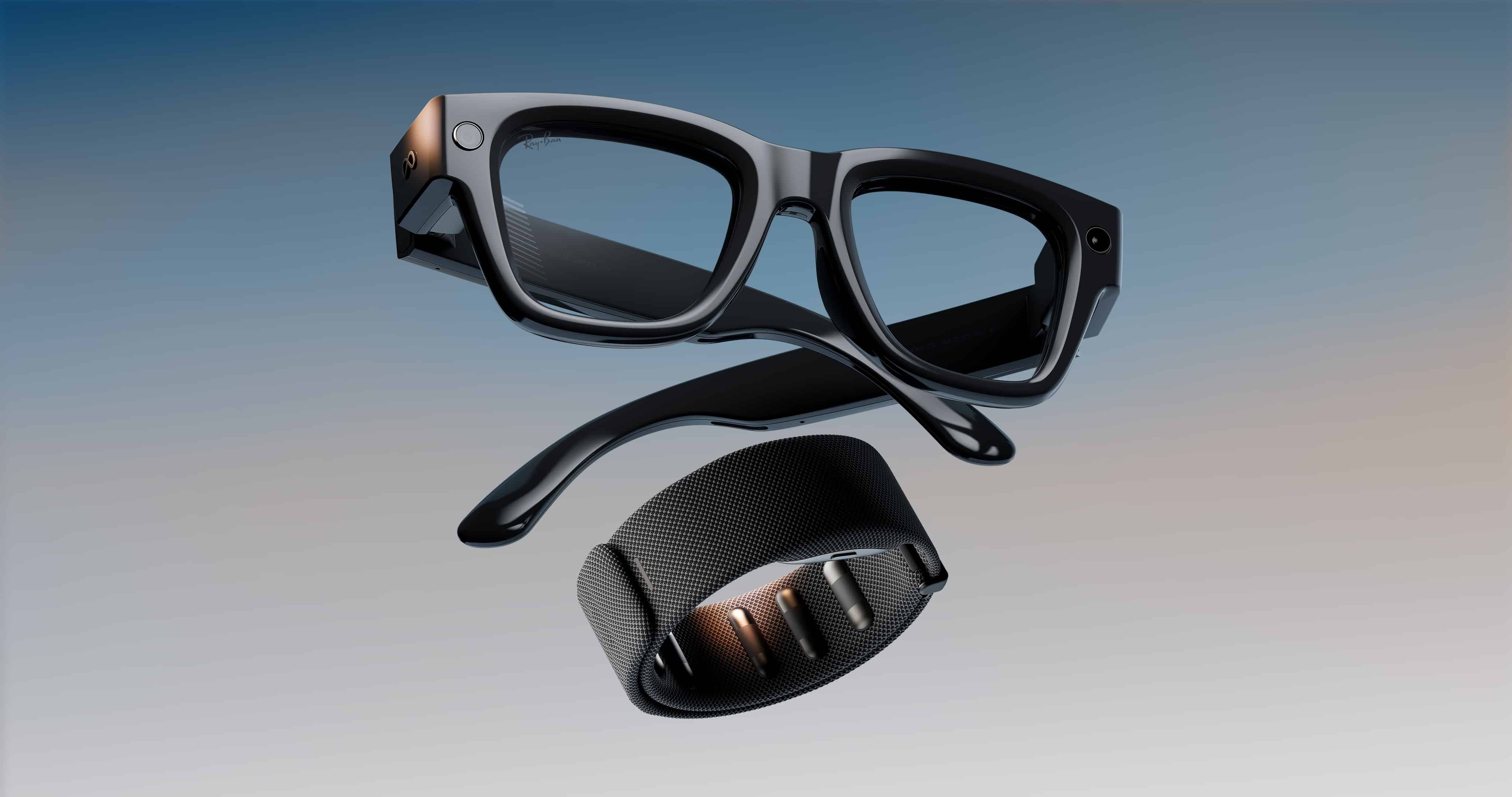
Os óculos inteligentes da Meta podem parecer relativamente distantes da realidade brasileira no momento, mas já são um fenômeno (e tanto) lá fora, a tal ponto que o atual terceiro aplicativo pago mais baixado na App Store americana tem como proposta detectá-los; refiro-me ao Antizuck Smart Glasses Scanner.
O interessante é que nem mesmo a procedência desconhecida do utilitário foi capaz de conter a curiosidade dos usuários, interessados em descobrir se ele realmente funciona como anunciado.
A promessa do desenvolvedor Albert Pariente Cohen é de que a detecção ocorre por meio de sinais Bluetooth emitidos pelos óculos, sendo compatível com os Meta Glasses, Ray-Ban Meta, Snap Spectacles, Amazon Echo Frames e o RayNeo. Supostamente, o app também é capaz de estimar a proximidade dos óculos em relação ao iPhone/iPad.
Teoricamente, óculos inteligentes como os da Meta contam com um LED 1Light emitting diode, ou diodo emissor de luz. não removível na lateral, que permitiria às pessoas ao redor alguma ciência de que estão sendo gravadas. Já existem no mercado, no entanto, alternativas para coibir o funcionamento desse mecanismo, como tampas de plástico ou adesivos que inibem a visibilidade da luz de gravação. Varejistas como a Amazon ou a própria Meta trabalham para tirar esse tipo de produto de circulação, mas ainda é possível encontrá-los à venda.
A categoria de produtos levanta constantes debates sobre ética, visto que os casos de gravações não consentidas se tornam cada vez mais frequentes. Na semana passada, o diretor do Instagram, Adam Mosseri, declarou que vídeos contendo gravações de assédio com estranhos em lugares públicos — frequentemente gravados com o hardware da Meta — terão como consequência o banimento na rede social:
Se você está postando conteúdo que tira vantagem de pessoas e assedia elas, como muitos desse tipo de vídeo de cantadas que costumamos ver e ouvir falar, então nós vamos derrubar o conteúdo. […] Nós não queremos que pessoas sorrateiramente gravem vídeos de outras pessoas e as assediem e então postem na nossa plataforma. Então nós estamos tentando lutar de todo o jeito que conseguimos.
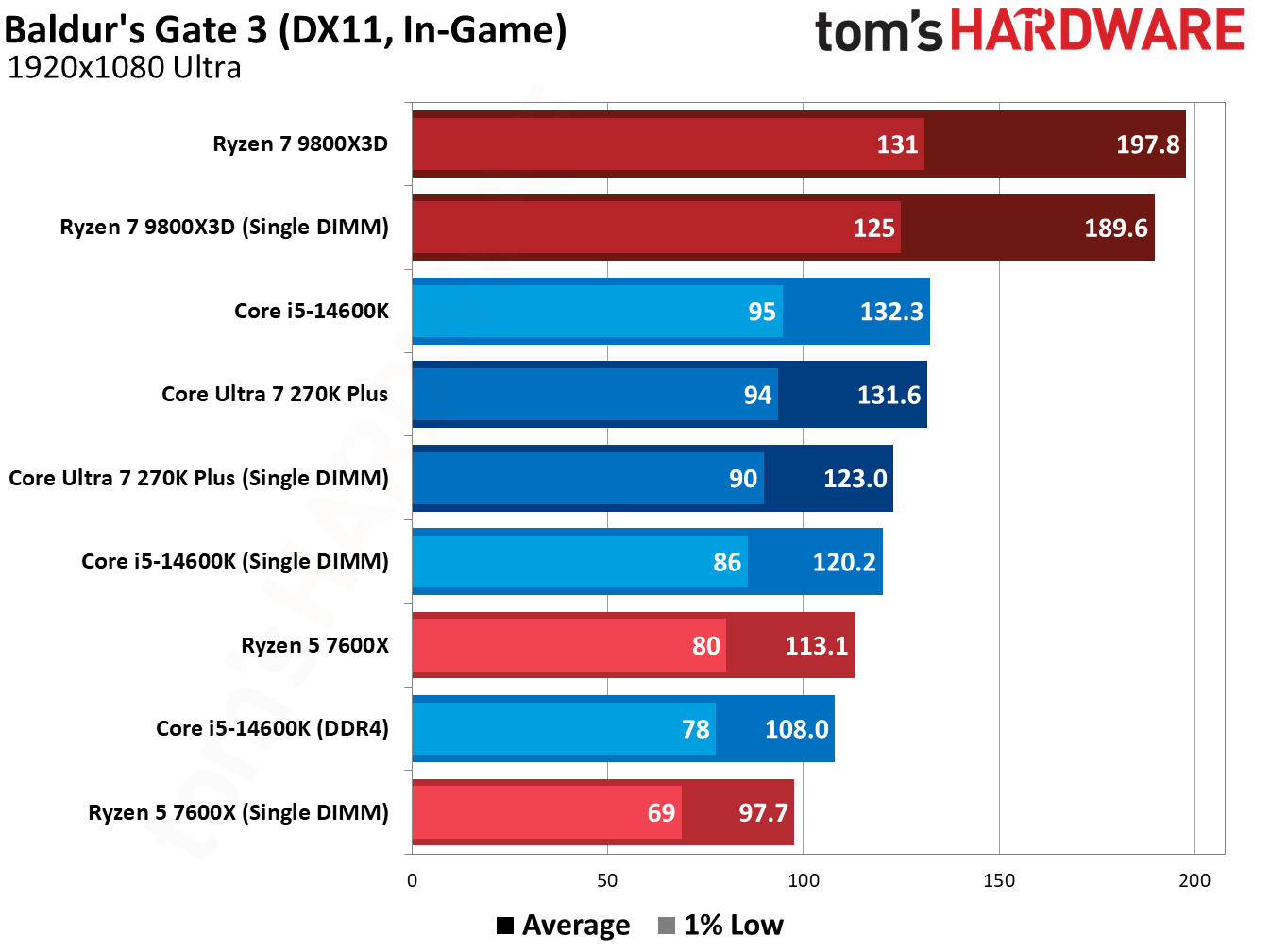
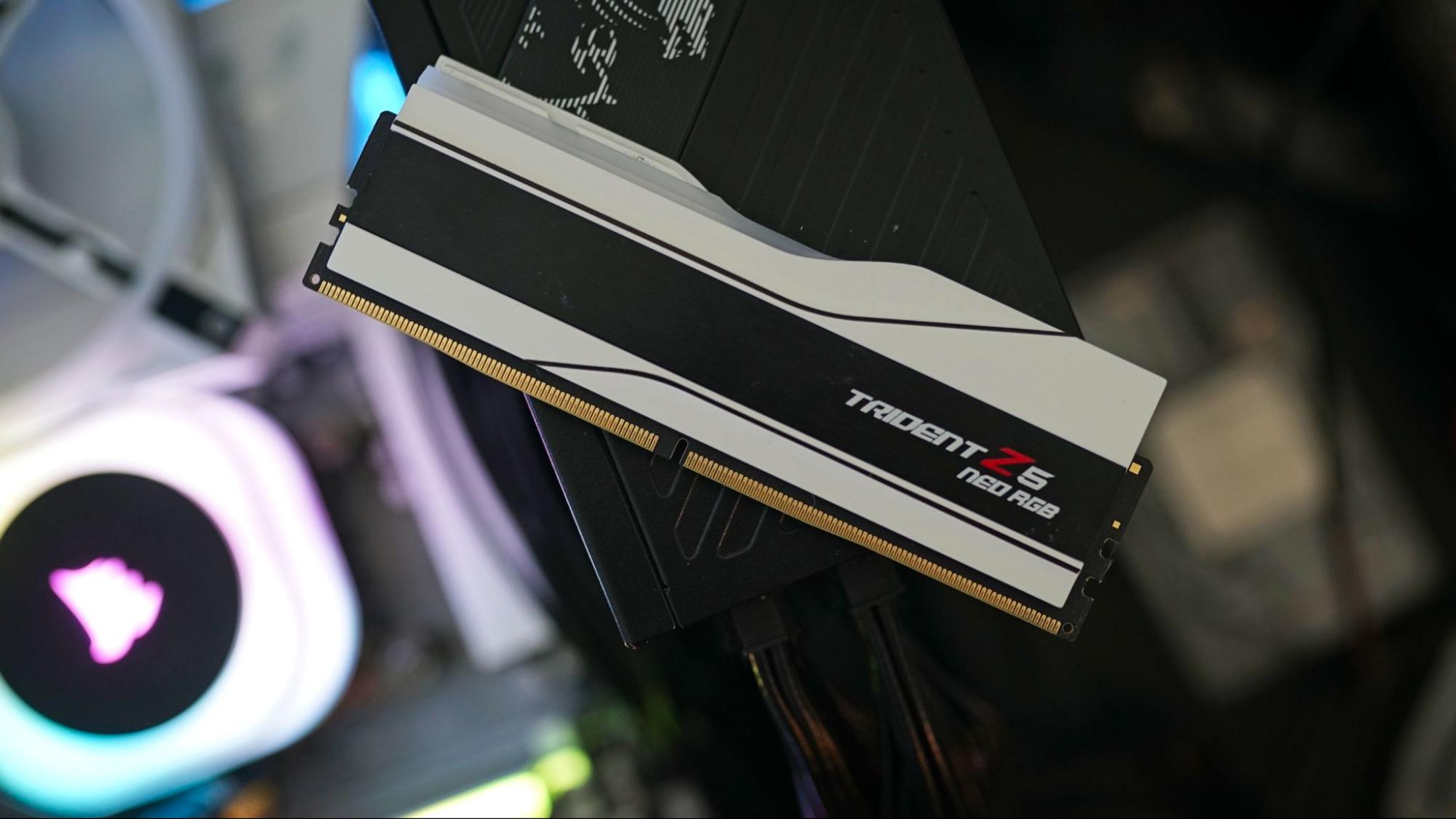
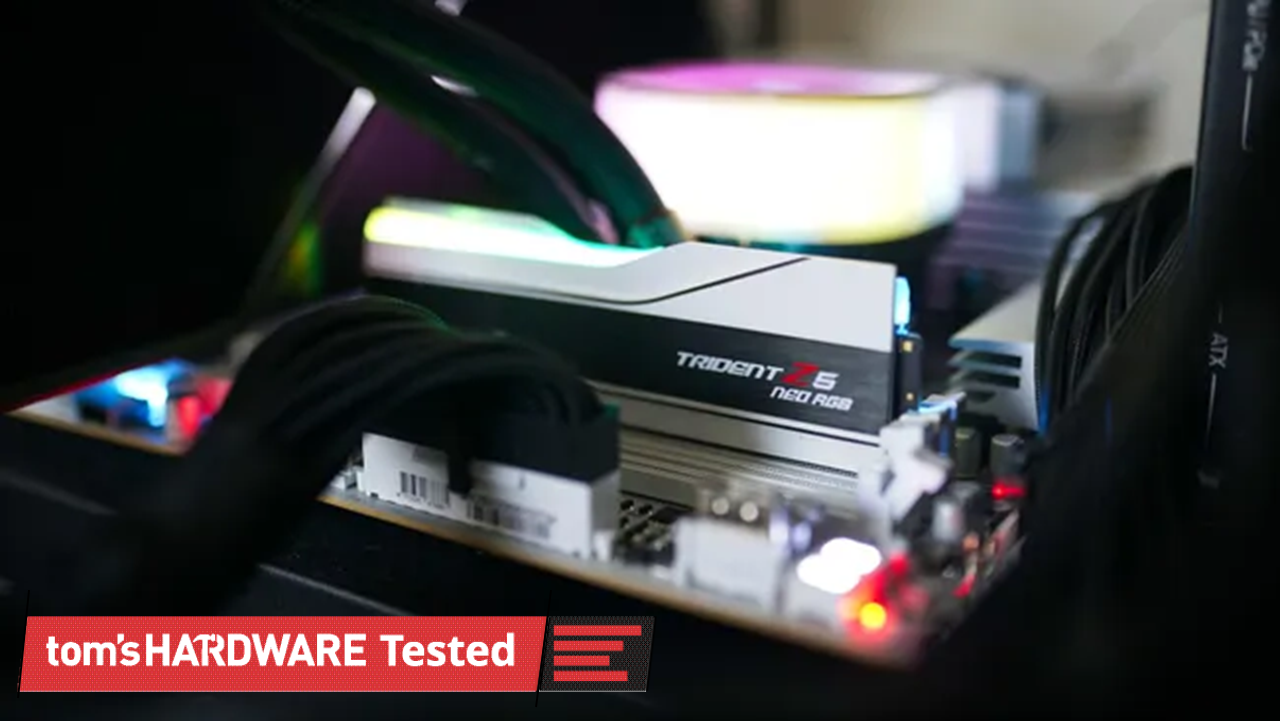
There’s been a shift toward using a single DIMM of DDR5 to skirt the worst of the RAM pricing crisis. AMD has suggested to us previously, at least, that it’s an option PC builders are exploring, and it’s a wrinkle that’s shown up in dozens of prebuilts; one that we’ve been careful to avoid when recommending products, particularly during peak shopping events. But just how much gaming performance are you giving up with a single DIMM when using one of the best CPUs for gaming?
The conventional wisdom is that you’re giving up quite a bit of performance, resting on the ideas of previous DDR generations, where going down a single stick will cut your bandwidth in half. The same is true with DDR5, but things are a bit messier, which we’ll dig into later.
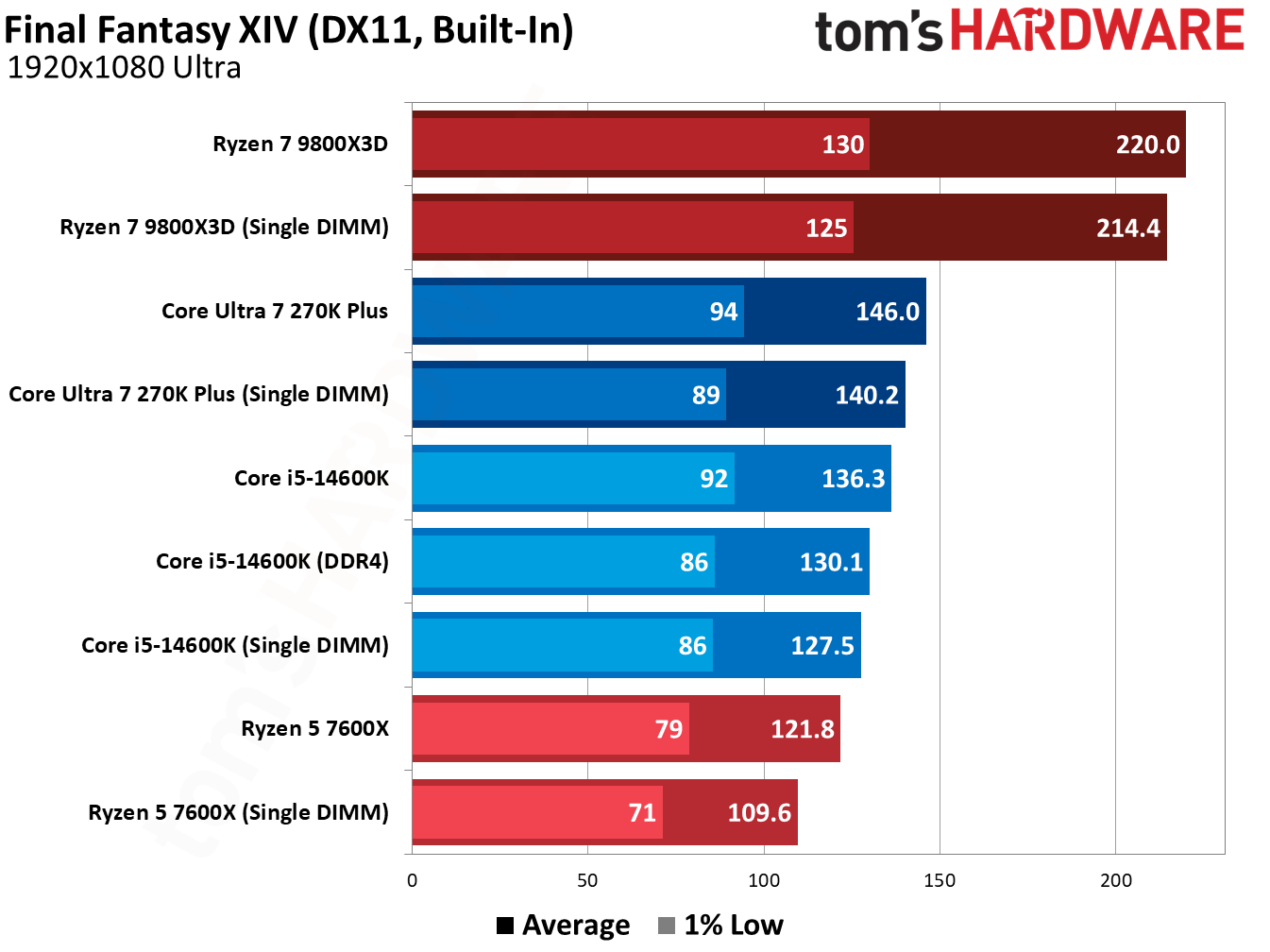
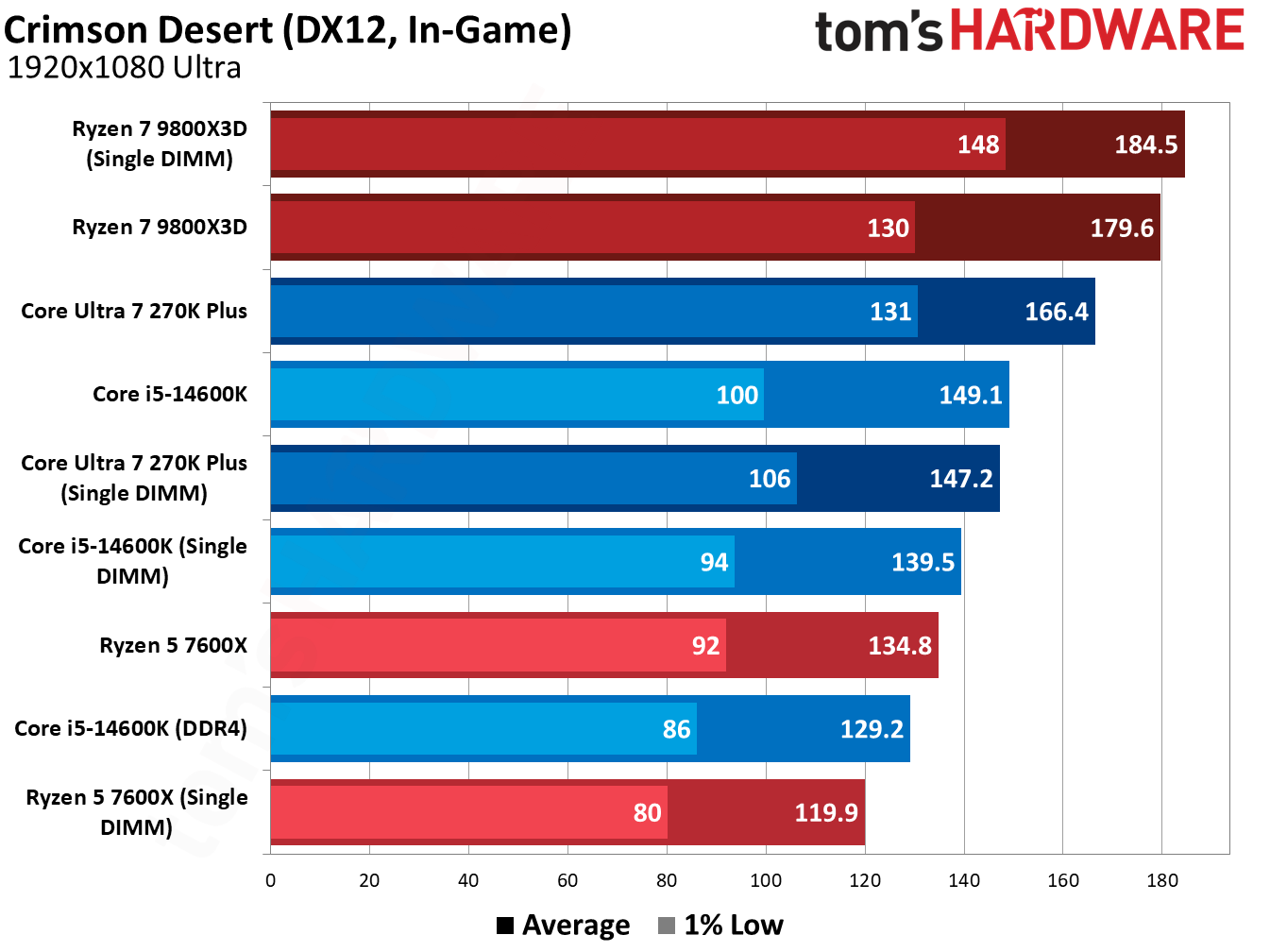
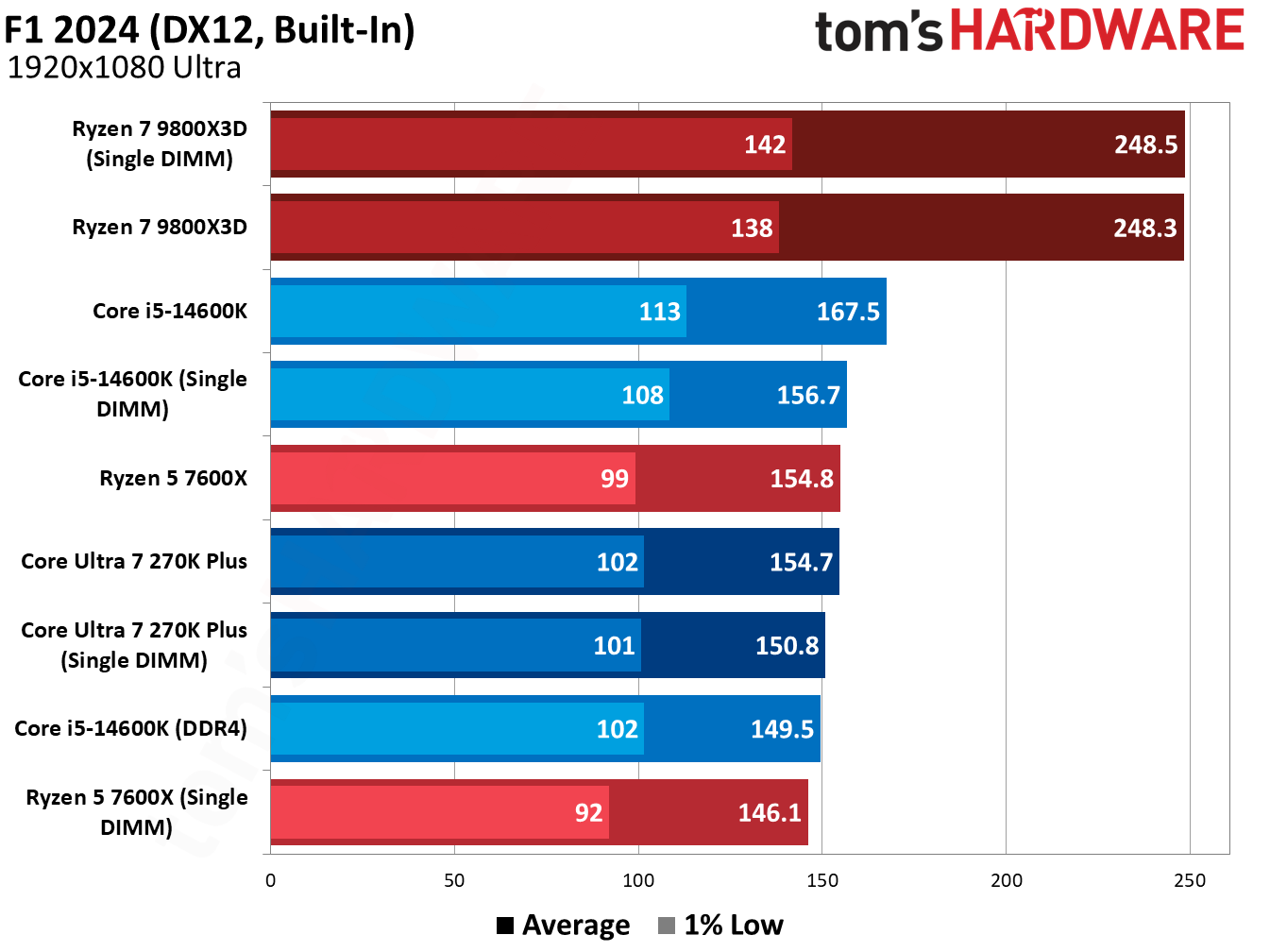
At a high level, using a single DDR5 DIMM doesn’t compromise gaming performance by nearly as much as you might expect. We saw drops of around 8% to 10% across Intel and AMD CPUs, and less than a 5% difference with AMD’s Ryzen 7 9800X3D.
A proper dual-channel configuration is still the way to go for optimal performance. However, our testing shows that even a single DDR5 DIMM offers superior performance to dual-channel DDR4 on CPUs that support both memory generations.
Using a single DIMM isn’t ideal, and it brings up compatibility issues if you plan on adding another DIMM down the line (another area we’ll touch more on in-depth later). But as a stopgap measure amid surging DRAM prices, a single DIMM of DDR5 holds up surprisingly well in gaming scenarios, and it represents a nice on-ramp into a DDR5 platform while prices are out of control.
Testing single-DIMM DDR5 in games
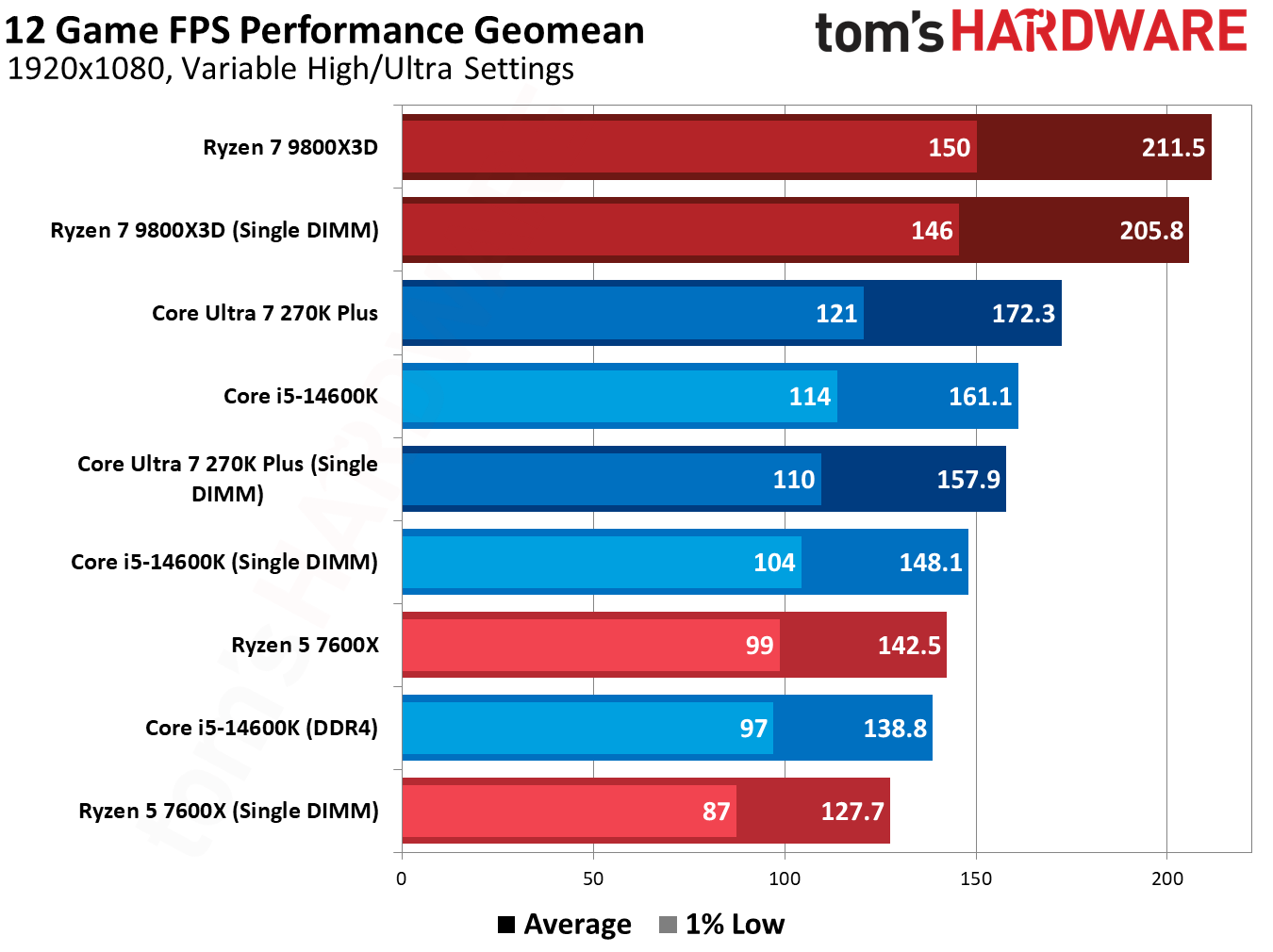
The geomean below speaks for itself. Moving down to a single DIMM drops some performance, but it’s not nearly as stark as I expected. There are some important notes about how we tested before dissecting the results, however.
As usual, we tested at 1080p with a mixture of High and Ultra settings, using Nvidia’s RTX 5090 Founder’s Edition to minimize the influence of the GPU. That’s even more important here, as we’re not evaluating CPUs but the memory that feeds the CPU. We're looking at a separate GPU and CPU here, as well; dual-channel memory is vital if you're using an iGPU.
We also wanted to create a realistic testing scenario. Assuming you’re going for a 2x16GB configuration, that means starting with a single 16GB DIMM, not a 32GB one. That’s what we did here. Our single-DIMM configurations run with just 16GB of memory, while dual-DIMM configurations run with 32GB. Capacity isn’t a major limitation for our testing here, though it will pose performance issues if you’re running several applications alongside your game.
(Image credit: Tom's Hardware)
The Ryzen 5 7600X was our biggest loser, dropping 10.9% of its average performance across our 13-game geomean with a single 16GB DIMM. The Core Ultra 7 270K Plus, meanwhile, dropped 8.7% of its average performance, while the Core i5-14600K similarly dropped 8.3% of its performance. The 1% lows are especially notable here, scaling with average performance rather than falling off a cliff.
Unsurprisingly, the Ryzen 7 9800X3D fared the best, dropping just 2.8% of its performance on average. As you’ll see through our individual game tests, the Ryzen 7 9800X3D shows identical performance with two DIMMs and a single DIMM in multiple games. The large and speedy L3 minimizes the impact of using a single DIMM, giving AMD’s 3D V-Cache CPUs another notch in their belt (as if they needed another).
Tom's HardwareTom's HardwareTom's Hardware
Our other geomeans don’t say much. A single-DIMM configuration consumes a few watts less, leading to slightly lower efficiency when balanced against the lowered performance.
(Image credit: Tom's Hardware)
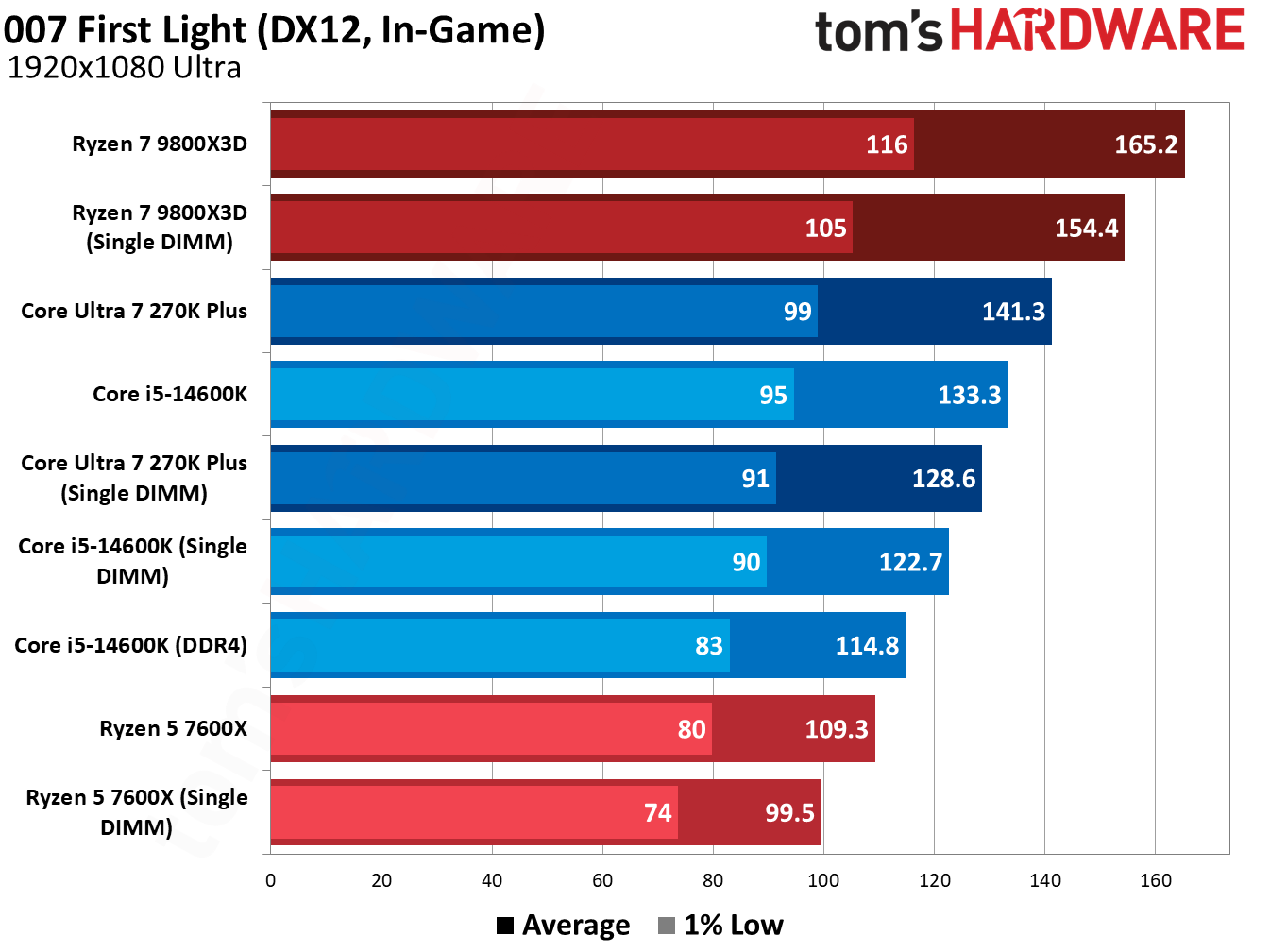
007 First Light, the newest game in our test suite, shows good scaling across our test pool, so it’s a good place to start. The Core Ultra 7 270K Plus dropped 8.9% of its performance with a single DIMM, while the 9800X3D dropped 6.5%. The 14600K is worth highlighting here. A single DIMM lost us 7.9%, but that’s still better than dual-channel DDR4, and by a decent 6.8% margin.
(Image credit: Tom's Hardware)
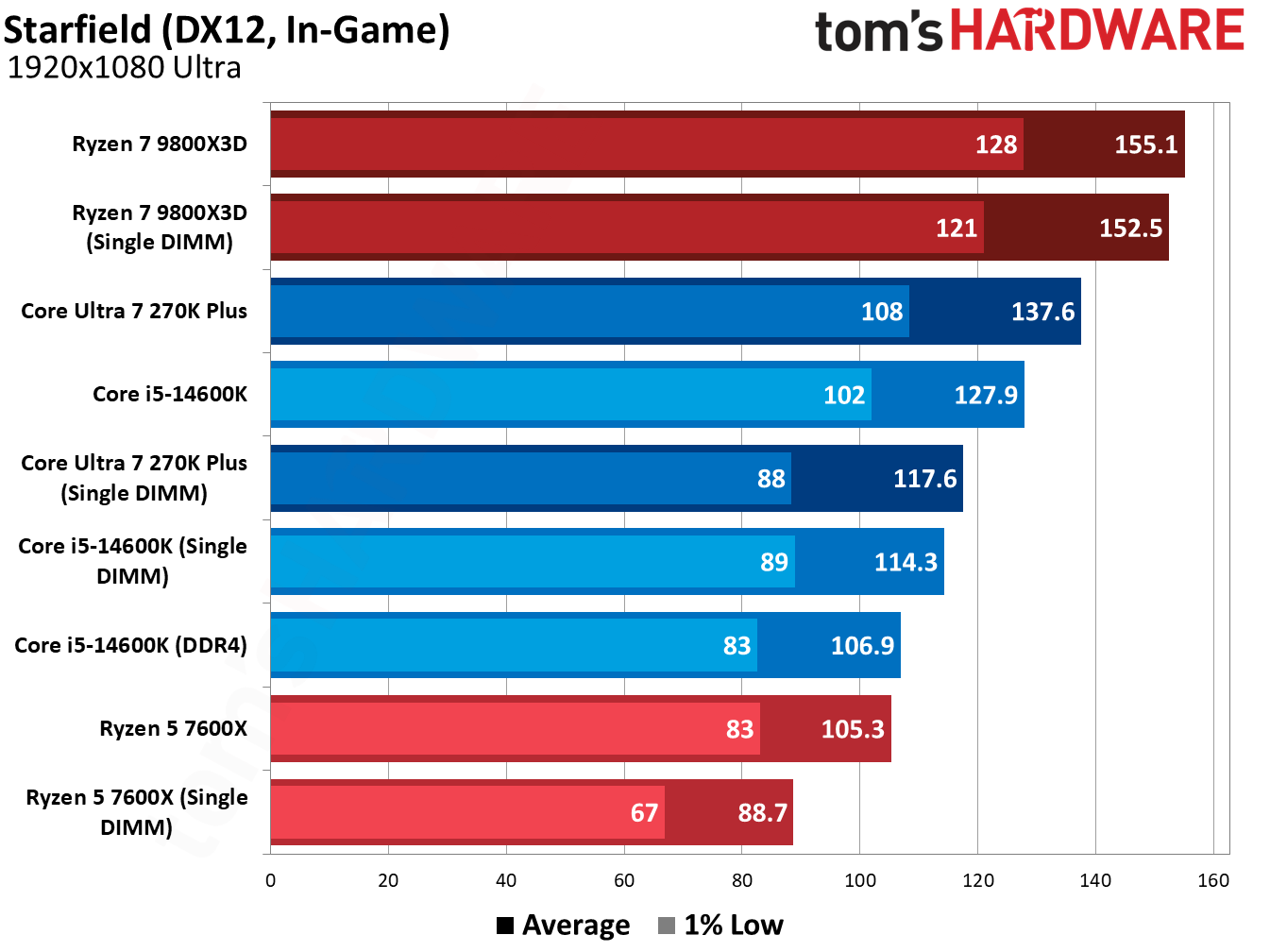
This trend is fairly consistent, too. Starfield is punishing for single-DIMM configurations, with the 14600K losing 10.6% of its average performance. Even then, a single DDR5 DIMM is 6.9% faster than dual-channel DDR4. Intel platforms can scale up to high data rates, and we use 7,200 MT/s for Intel chips. With slower speeds, the performance will equalize. Still, I’d strongly consider a single DDR5 DIMM if you’ve been eyeing an LGA 1700 platform with DDR4, assuming you’re primarily focused on gaming.
Starfield shows the benefits of 3D V-Cache in this single-DIMM configuration clearly. While the performance losses with other CPUs are brutal in this title, the 9800X3D dropped just a few frames, a 1.6% decrease in average performance.
(Image credit: Tom's Hardware)
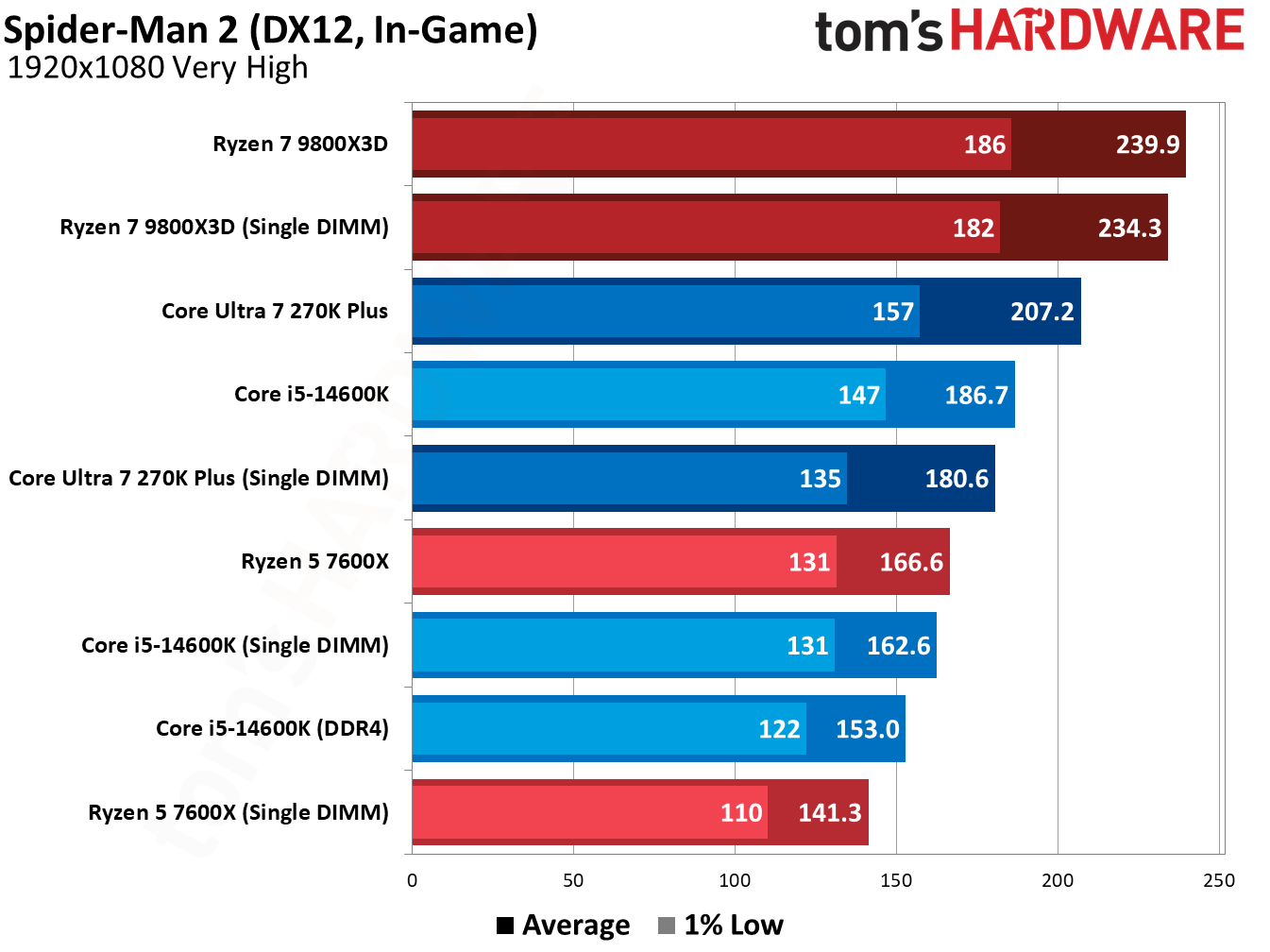
Doom: The Dark Ages is similarly harsh on single-DIMM configurations. The Ryzen 5 7600X dropped 17.3% of its average performance, and the 270K Plus fell by 14%. The 9800X3D holds up well, however, with just a 4.2% average performance loss. Marvel’s Spider-Man 2 (in the gallery below) shows a similar dynamic.
(Image credit: Tom's Hardware)
However, the addition of 3D V-Cache mainly helps in these games where we see bigger losses with other CPUs. There are several games in our suite where the performance loss between a single DIMM and dual-channel configuration was minor, particularly in GPU-heavy titles. The Last of Us Part One shows that in action.
(Image credit: Tom's Hardware)
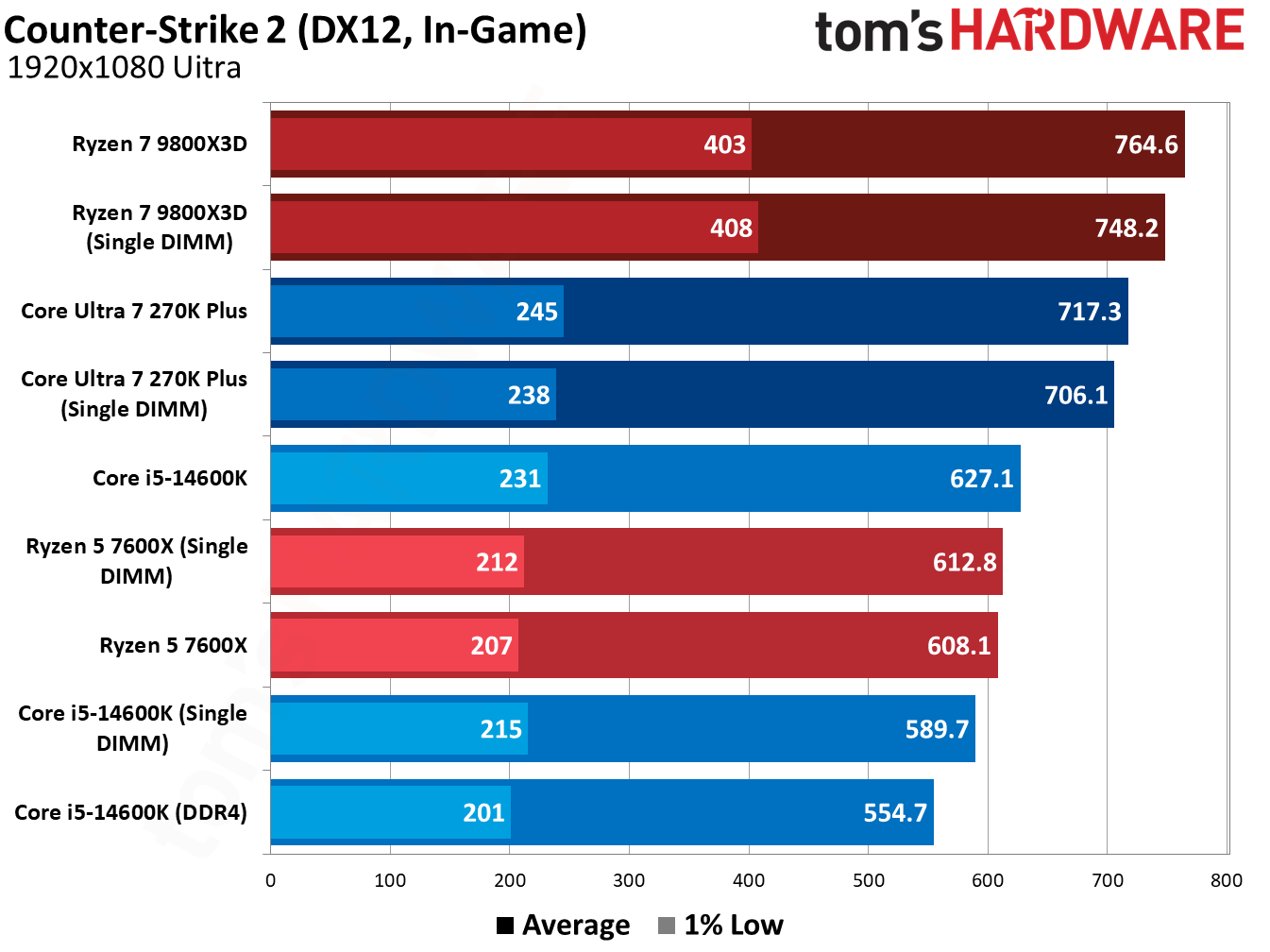
Similarly, the performance loss is minor in Counter-Strike 2, just a handful of frames even north of 600 FPS. Even the Core i5-14600K, which was hit the hardest by far, dropped just 5.9% of its average performance (and it’s still faster than a dual-channel DDR4 configuration).
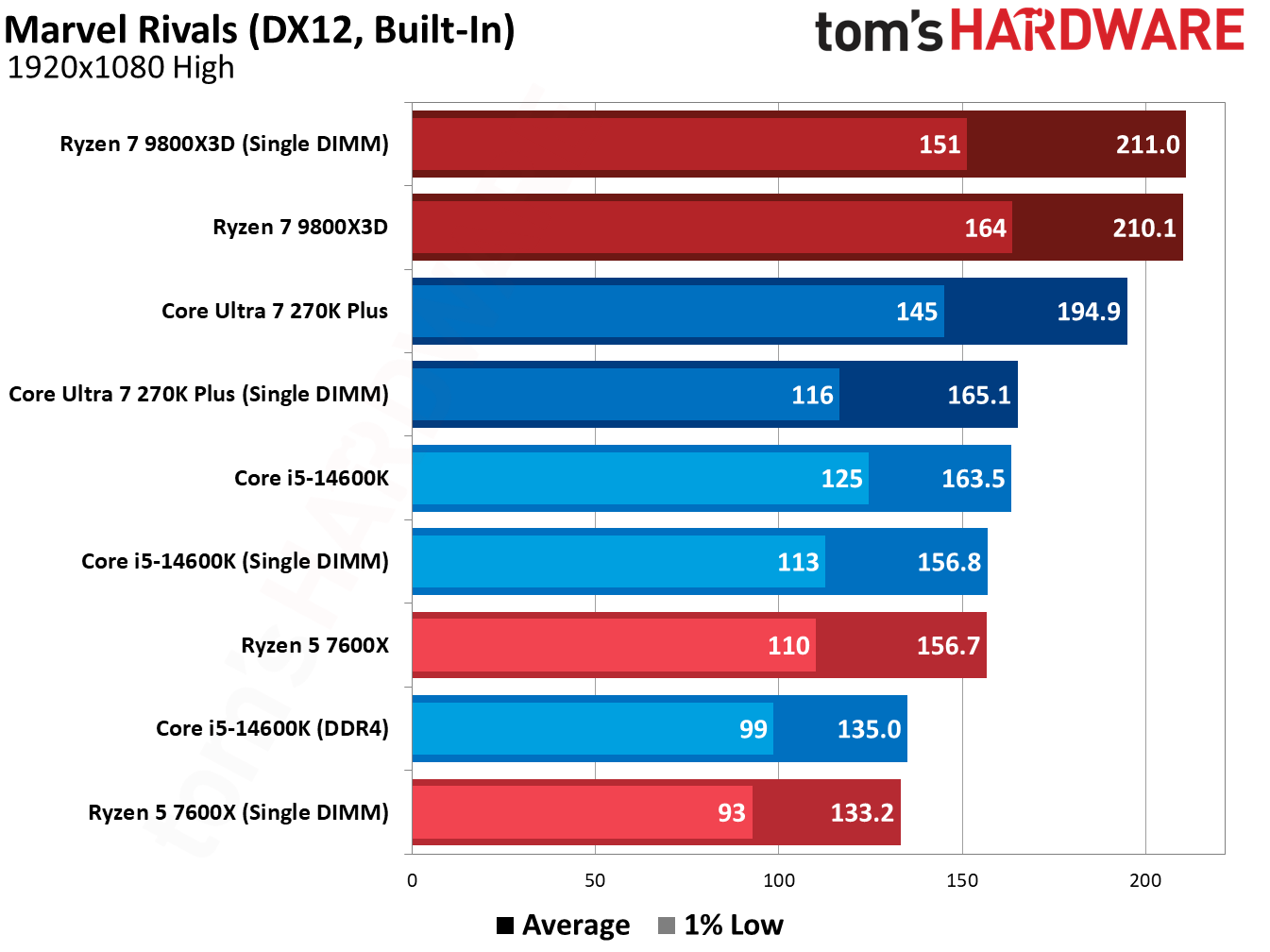
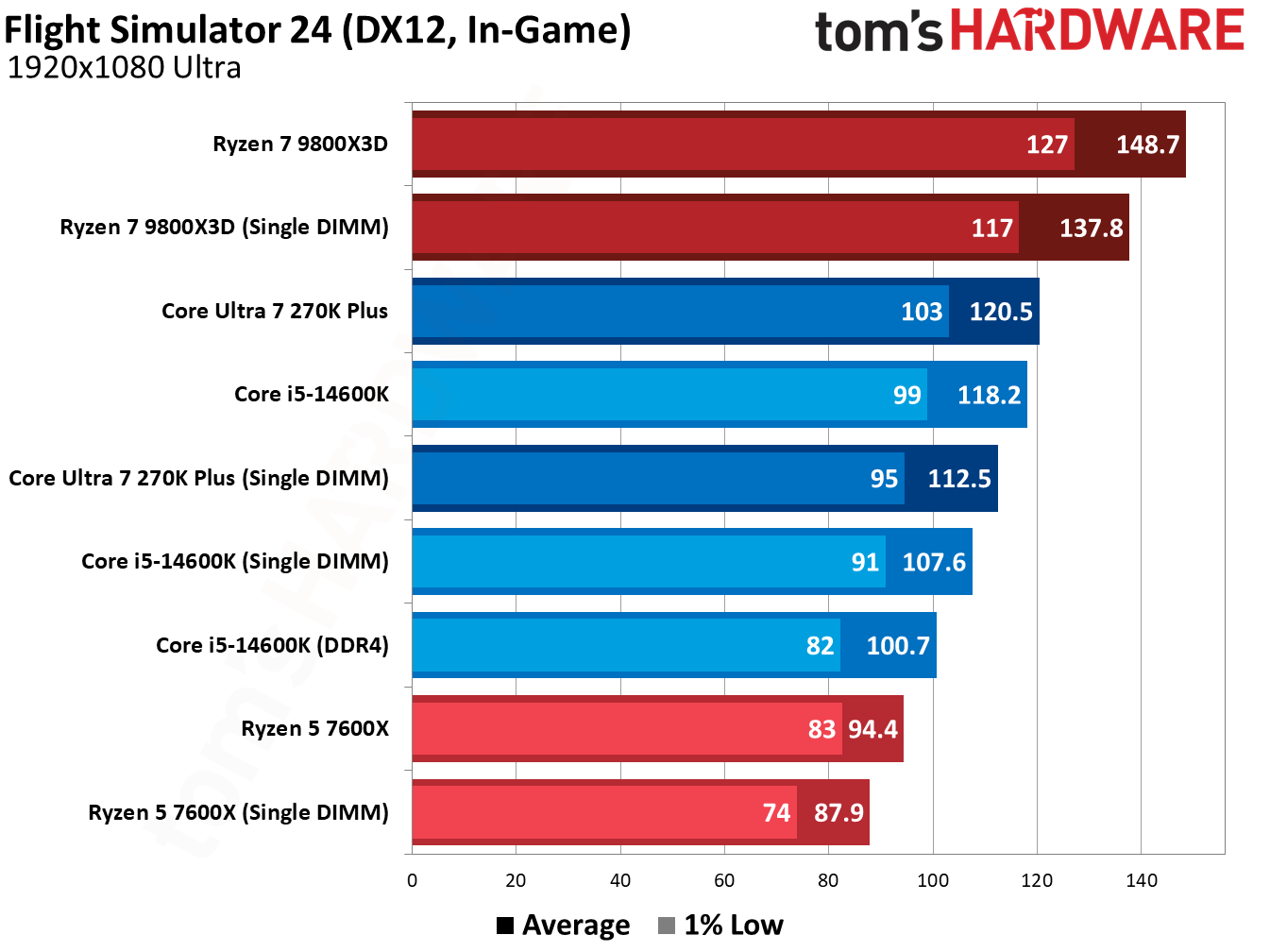
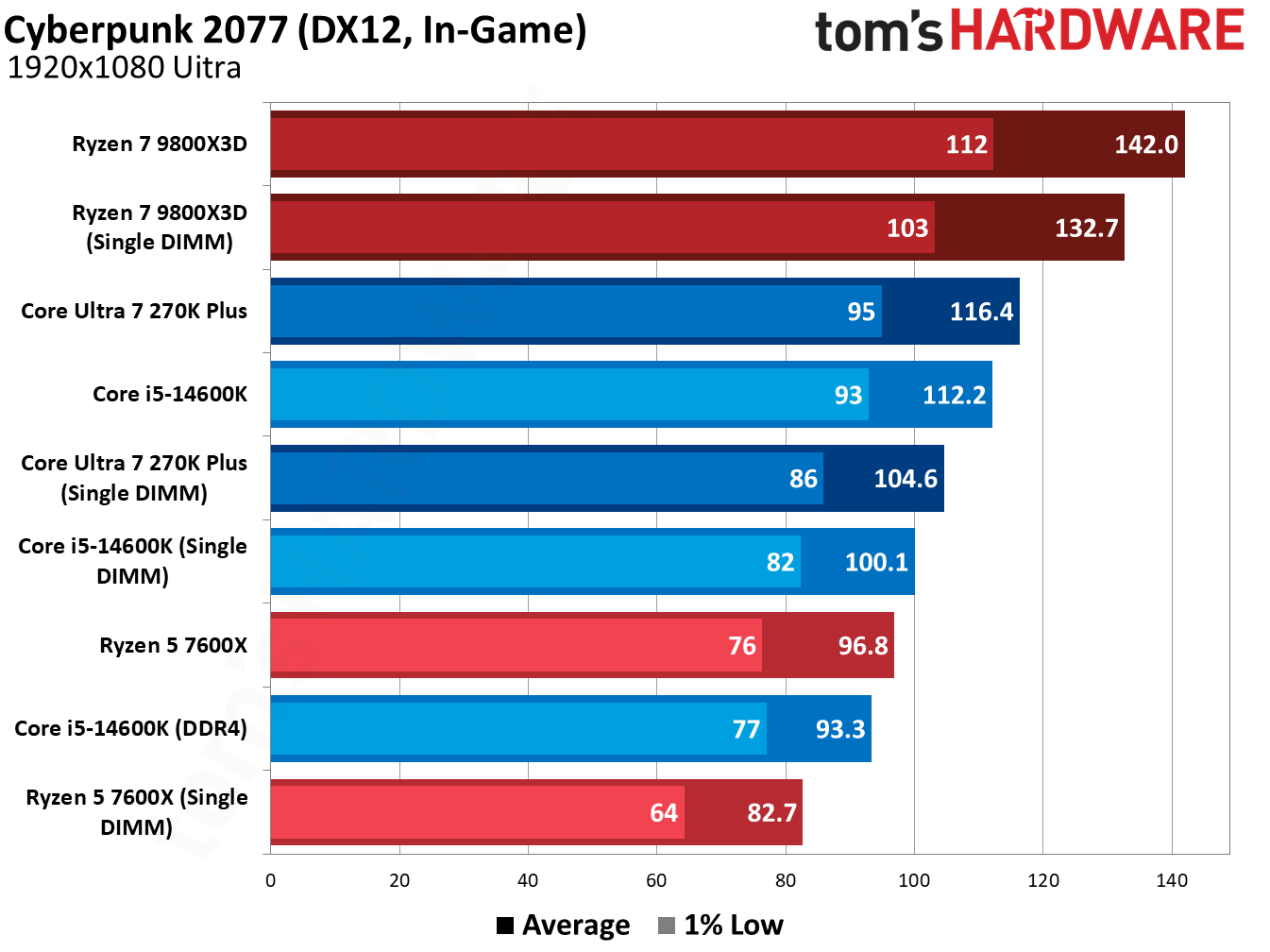
You can browse the results of the other games we tested in the gallery above, though they tell much the same story as the titles we highlighted. The two biggest learnings from this testing are that a single, fast DDR5 DIMM often outpaces dual-channel DDR4, and that AMD’s 3D V-Cache can smooth over the rough edges of using a single DIMM, particularly in those memory-sensitive titles.
How we tested
We tested on our normal test bed that we use for CPU reviews, with the only difference being dropping one of our DIMMs. As usual, we enabled XMP/EXPO for testing, both on single- and dual-DIMM configurations, opting for higher speeds on Intel platforms. AMD’s sweet spot is around 6,000 MT/s.
The data rate is noteworthy for the DDR4 comparison, in particular. With slower DDR5, we expect the delta between dual-channel DDR4 and single-DIMM DDR5 to decrease.
In addition to enabling XMP/EXPO, we disable Virtualization-Based Security (VBS), enable Resizeable BAR, and disable any automatic overclocking features that aren’t covered by warranty, including AMD’s Precision Boost Overdrive and Intel’s Extreme performance profile.
DDR5 has much higher data rates compared to DDR4 (2x or more), and that’s the result of significantly more complexity on DDR5 DIMMs compared to DDR4. Notably for this testing are the two 32-bit subchannels of DDR5, as well as enlarged prefetch and bank groups. You are getting half the total bandwidth with a single DDR5 DIMM, absolutely, but it’s a little more nuanced than simply running your memory in a single-channel configuration.
DDR4 uses a single 72-bit channel, and 64 of those bits transfer data (the additional 8 are for ECC). With DDR5, you get two 40-bit subchannels, 32 of which are used for data transfer. Critically, these subchannels have their own Command/Address (CA) interface, allowing them to operate independently of each other.
In addition, DDR5 doubles the prefetch size to 16N, doubles the number of banks and bank groups, and increases burst length from 8 bytes to 16 bytes. The math here is straightforward enough. With DDR4, you can transfer 64 bits of data over the interface at a burst of 8 bytes, giving you 64 bytes of data and aligning with cache line sizes. Each of the subchannels in DDR5 can transfer 64 bytes of data, as well, with a 32-bit width and burst length of 16 bytes.
It’s pseudo-dual-channel memory on a single DIMM. There are two independent memory operations that can happen each cycle, both of which transfer 64 bytes of data. That is a big reason why even a single DDR5 DIMM (particularly one with a higher data rate) can outpace even a proper dual-channel DDR4 configuration.
The common wisdom about using a single DIMM comes mainly from previous DDR generations, where you can only get that single 64-byte transfer each cycle, necessitating a second DIMM to have two independent operations.
Let me be clear: two DDR5 DIMMs are still better. Instead of two operations per cycle, you can perform four. The main difference is that, for modern CPUs and games, just those two operations give you the vast majority of your performance, and you don’t run into a massive performance bottleneck as you do with just a single operation via DDR4. After all, there are still a lot of DDR4 systems out there.
On the issue of compatibility
The elephant in the room with upgrading to a DDR5 platform with a single DIMM is compatibility. If you get a single DDR5 DIMM now, you should plan to add another in the future. Unfortunately, there aren’t a lot of easy answers when it comes to combining two DIMMs that aren’t in a kit together. It should work, but mixing and matching can lead to stability issues and/or lowered performance.
Generally, combining two DIMMs of the same spec should work. For instance, if you bought this Patriot Viper Venom DDR5-6000 CL30 DIMM to start your new build, and then bought a second one later, it should work. “Should” carries a lot of weight on its shoulders, however. Maybe Patriot sources DRAM from multiple places, or your second DIMM’s timings don’t completely align with your first. That could cause stability or performance issues.
There have been some attempts to get past this hurdle, such as the ROG Certified program with select Asus motherboards, but it’s impossible to know for sure if two separate DIMMs will work together or not without testing. The best you can do is to make sure you buy the same brand of memory, with the same spec, if you add a second DIMM. Make sure to keep your receipt handy in the event you need to return it, as well.
Once you have your second DIMM, make sure to test it first at stock JEDEC speeds/timings (no XMP/EXPO). Run games or applications you normally run, and then use a utility like MemTest64 to check for stability. I’d recommend keeping your PC running in this state for a few days to see if any BSODs, application crashes, or poor performance issues pop up. After that’s done, repeat the process with XMP/EXPO enabled, assuming you’re using matching DIMMs (incompatible XMP/EXPO profiles won’t work together).
Assuming DRAM prices continue at an elevated rate before you upgrade, you may want to consider investing in a dual-channel kit down the line and selling your single DIMM. Even kits can run into compatibility issues, though the likelihood is far, far lower.
As ferramentas de inteligência artificial estão mudando a forma como criamos e compartilhamos conteúdos de viagem. Hoje, uma simples fotografia pode se transformar num vídeo dinâmico, com movimentos, efeitos e uma narrativa mais envolvente.
Com plataformas como o AIReel, é possível converter fotos de viagem em vídeo de forma rápida, criando memórias digitais mais vivas sem precisar de experiência em edição profissional.
Por que cada vez mais pessoas estão transformando fotos de viagem em vídeos com IA
Durante anos, as fotografias foram a principal forma de guardar momentos de viagem. No entanto, à medida que o consumo de vídeo continua a crescer, muitas pessoas começaram a procurar formas mais dinâmicas de reviver e compartilhar essas experiências.
A inteligência artificial está tornando este processo mais simples. Em vez de depender de programas complexos de edição, usuários podem transformar fotografias estáticas em pequenos vídeos com movimento, transições e efeitos visuais em poucos minutos.
Ferramentas como o AIReel permitem fazer esta transformação de forma acessível, ajudando qualquer pessoa a converter imagens de viagem em vídeos mais envolventes sem precisar de conhecimentos avançados de edição.
Como a IA está transformando fotos de viagem em memórias digitais vivas
Uma fotografia consegue guardar um momento, mas um vídeo consegue transmitir melhor a sensação desse momento. É aqui que a inteligência artificial começa a mudar a forma como as pessoas preservam as suas memórias de viagem.
Transformar imagens estáticas em histórias animadas
Com a tecnologia atual, uma fotografia de uma paisagem, cidade ou momento especial pode ganhar movimento natural. A IA consegue criar transições, pequenos movimentos de câmera e efeitos que tornam a experiência mais próxima de um vídeo real.
Criar vídeos personalizados a partir de fotografias
Cada viagem tem uma história diferente, e as ferramentas de IA permitem transformar várias fotografias numa sequência com ritmo e estilo próprios. Recursos de conversão de imagem em vídeo com IA ajudam usuários a criar vídeos únicos, combinando fotografias, animações e estilos visuais sem processos complicados.
Recuperar e valorizar momentos antigos
Muitas pessoas têm centenas ou até milhares de fotografias guardadas no telefone ou no computador que raramente voltam a ver. Transformar algumas dessas imagens em vídeos pode ser uma forma simples de recuperar memórias esquecidas e dar-lhes um novo significado.
Criar conteúdos de viagem mais envolventes
Em vez de publicar apenas uma fotografia, os viajantes podem criar pequenas histórias em vídeo. Ferramentas como o AIReel, uma solução de imagem para vídeo IA, permitem converter imagens estáticas em vídeos com movimento, ajudando criadores a produzir conteúdos mais atrativos e dinâmicos.
Como criar vídeos de viagem mais envolventes a partir das suas fotografias
Muitas pessoas gostam de fotografar durante as viagens para guardar os melhores momentos, mas transformar essas imagens em vídeos interessantes pode ser um processo demorado e complicado. Com as ferramentas de IA, criar vídeos de viagem personalizados a partir de fotografias tornou-se uma tarefa muito mais simples e acessível.
Escolha as fotografias que melhor representam a viagem
Antes de criar um vídeo, selecione imagens que contem uma história. Uma boa combinação de paisagens, pessoas e pequenos detalhes da viagem ajuda a criar um resultado mais emocional e envolvente.
Organize as imagens e defina o estilo do vídeo
Pense no tipo de experiência que pretende transmitir. Pode optar por um estilo mais cinematográfico, descontraído ou focado nas redes sociais, dependendo do objetivo final do vídeo.
Use uma ferramenta de IA para transformar imagens em vídeo
Com ferramentas como o AIReel, o processo de criação torna-se mais rápido. Basta carregar as fotografias, adicionar um prompt com a descrição do movimento ou estilo pretendido, e a plataforma gera rapidamente um vídeo de viagem mais dinâmico e atrativo a partir das imagens.
Ajuste o resultado antes de compartilhar
Depois de gerar o vídeo, pequenos ajustes podem melhorar a experiência final. Escolher a duração adequada, adicionar música ou adaptar o formato para plataformas como Instagram, TikTok ou YouTube Shorts pode tornar o conteúdo mais apelativo.
O futuro das memórias digitais criadas com IA
A forma como guardamos as nossas viagens está mudando. As fotografias continuam sendo importantes, mas os vídeos oferecem uma maneira mais próxima de reviver sons, movimentos e emoções associadas a cada momento.
Com ferramentas de inteligência artificial cada vez mais acessíveis, transformar uma coleção de fotografias numa história visual deixará de ser algo reservado a profissionais de edição. Para muitos viajantes, será simplesmente uma nova forma de contar as suas próprias experiências.
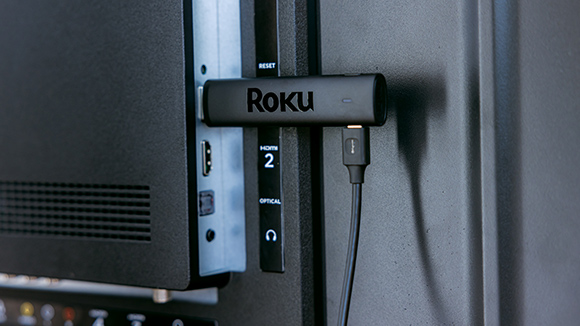
Roku is raising the prices for its streaming sticks and boxes by up to 60 percent.
Roku has updated its website with the new prices. Currently, it is still selling its streaming players at their old MSRPs but lists those prices as sale prices. The new prices are:
Roku Streaming Stick: $40 (formerly $30)
Roku Streaming Stick Plus: $60 (formerly $40)
Roku Streaming Stick 4K: $80 (formerly $50)
Roku Ultra: $150 (formerly $100)
Roku Streambar SE: $150 (formerly $100)
Roku is even upping the price for a bundle that includes a Streaming Stick Plus and a one-month subscription to Fox One. As recently as July 20, Roku listed the bundle at $60 with a sale price of $25, according to the Internet Archive’s Wayback Machine. Now, the bundle carries an $80 MSRP and $45 sale price.

 Login
Login