Usuários do Telegram notaram ontem que o aplicativo do mensageiro para iOS ficou indisponível na App Store por um breve período, o que deixou muita gente confusa.
Contatada pela Reuters, a Apple explicou que tirou o mensageiro do ar após um usuário ter reportado a presença de “material de abuso sexual infantil” na plataforma, o que obviamente vai contra as regras da sua loja.
Ainda segundo a gigante de Cupertino, a página do Telegram foi restaurada depois que a equipe do mensageiro removeu o conteúdo supracitado e baniu o usuário responsável pela publicação.
Em resposta, o mensageiro disse que possui uma política de “tolerância zero” contra esse tipo de conteúdo, além de ter bloqueado mais de 338.000 grupos e canais com material ilegal ao longo do último ano.
Ainda assim, a equipe do app ironizou a decisão da Apple nas redes sociais, dando a entender que a companhia não aplica o mesmo tratamento a outros apps. Ela também aproveitou a situação para divulgar uma página com dados sobre a moderação de conteúdo na plataforma:
I'm sure this stance will be applied equally to all other apps in the store, in the future right? @Apple
Outra pessoa a ir às redes sociais para comentar esse pequeno imbróglio foi o CEO 1Chief executive officer, ou diretor executivo. da Epic Games, Tim Sweeney, que criticou a falta de transparência na tomada de decisão da Apple, além de classificá-la como “arbitrária”. Em guerra com a fabricante do iPhone há alguns anos por conta das regras da App Store, ele aproveitou a situação para dizer que a loja da Maçã “precisa desesperadamente de concorrência”:
Such arbitrary policy enforcement, by a monopoly gatekeeper, creates a perfect storm of fear and acquiescence by developers who are victims of Apple’s monopoly. Speak up and criticize their gatekeeping and maybe they’ll enforce the rules one way rather than the other way.
A App Store da Apple precisa desesperadamente de concorrência global. A Apple remove arbitrariamente uma ferramenta vital de comunicação e privacidade, tornando-a inacessível a bilhões de usuários, e infelizmente isso é considerado normal.
A Apple declarou que removeu o aplicativo para um bilhão de pessoas porque um usuário do Telegram publicou algo horrível e ilegal. A empresa não explicou como, se esse é o padrão para remoção de aplicativos, qualquer aplicativo de comunicação, incluindo o iMessage, poderia operar em larga escala.
Essa aplicação arbitrária de políticas, por parte de um monopólio, cria a tempestade perfeita de medo e aquiescência por parte dos desenvolvedores, que são vítimas do monopólio da Apple. Manifeste-se e critique essa postura de controle, e talvez eles passem a aplicar as regras de uma forma, em vez de outra.
Questionada sobre os comentários de Sweeney, a Apple preferiu não emitir uma resposta.
Segundo ele, todo esse imbróglio foi provocado por um único usuário mal intencionado, que plantou conteúdo impróprio modificado por inteligência artificial (IA) em um grupo público na plataforma. Para tal, essa pessoa editou uma mensagem antiga na conversa, o que acabou fazendo com que ela passasse despercebida pelos administradores do grupo.
Ainda de acordo com Durov, esse usuário era um extorsionista — ou seja, uma pessoa que usa “contas automatizadas para plantar conteúdo ilegal em grupos públicos e depois denunciá-lo diretamente à Apple, tentando provocar a remoção de comunidades legítimas” cujos donos se recusaram a pagar o resgate.
O executivo também garantiu que a presença de conteúdo desse tipo na plataforma não representa um problema sistêmico e que sua equipe de moderação é efetiva, além de ter criticado a Apple por ter removido o app de sua loja sem contatar o Telegram primeiro. “Se um aplicativo usado por mais de 1 bilhão de pessoas pode ser removido da App Store sem aviso prévio, qualquer aplicativo pode ser”, comentou.
O popular jogo Wolfenstein 3D (um dos primeiros games de tiro em primeira pessoa do mercado) foi reconstruído do zero como parte de um novo projeto para modernizá-lo.
O objetivo dessa empreitada, denominada Wolfenshine, foi superar as limitações técnicas da época em que o jogo foi lançado e que o impediam de ter coisas como sombras, luzes coloridas, neblinas e outros efeitos.
O novo projeto, por sua vez, faz uso dos arquivos de mapas, inimigos, armas, sons e gráficos do jogo original — que não são distribuídos junto do Wolfenshine, mas lidos a partir de uma cópia própria do usuário (seja a versão shareware gratuita ou a completa, com as seis fases) — e acrescenta uma camada de efeitos modernos por cima, levando um pouco da tecnologia atual para o game.
Com isso, salas que teoricamente deveriam ser iluminadas por uma lâmpada passam a realmente contar com iluminação, corredores passam a exibir a luz originada por uma porta aberta, dentre outras coisas bem legais.
A jogabilidade, cabe destacar, continua exatamente a mesma. Como o game usa os mesmos arquivos da versão original, basta apertar F2 no teclado para alternar entre o visual clássico e o do Wolfenshine, num passe de mágica.
O Wolfenshine é um projeto de código aberto. O código-fonte e todos os detalhes técnicos (incluindo o passo a passo para a sua instalação) estão disponíveis no repositório oficial no GitHub, onde ele pode ser baixado em versões para macOS, Windows e Linux.
ⓘWe may earn a commission when you buy through our links. This helps support MacSources and keeps our content free. Thank you!
Classic 90’s morning cartoon nostalgia with frustrating Controls
Weirdly, time seems to become more valuable as we age. Especially when you consider that each second, minute, hour, week, month, and year has the same duration and cadence. As a youth, it seemed that this currency was limitless. I could play what I wanted, when I wanted, and do nearly anything I wanted. Now, as a married father of four kids, each with their own sports, work/study, hobbies, interests, and a full-time job, I have to be more selective about my activities. Since my free time is worth more than when I was a child, I have to ration it and divert my energy between only a few activities.
I have enjoyed playing video games since approximately 1988 when my parents bought a Nintendo NES. With time I progressed through the NES, Super Nintendo, N64, GameCube, Wii, Nintendo Switch, Nintendo Switch 2, the GameBoy family (Game Boy, Color, Advance, DS, 3DS/XL), Sega Genesis, Sega CD, GameGear, PlayStation 2/3, PSP, XBOX 360, XBOX One and XBOX Series X. I played a variety of game types to include platformers, first person shooters, RPG, JRPG, racing games, quest/puzzle style games, etc. In my later years of high school and into college, my father and I played the online role-playing game (MMORPG) Dark Age of Camelot. Now, I am left with a Nintendo Switch 2, an Xbox Series X, and one to two hours per week of playtime. One hour is used to play Diablo 4 with my Dad, and one hour is used for Switch 2 time.
I read about the Nickelodeon Splat Pack, a $14.99 Nintendo Switch eShop game, and immediately fell in love with the nostalgia of morning cartoons and the art style of Rocko’s Modern Life, Real Monsters, and the gameshow Nickelodeon GUTS. I had the privilege of reviewing the title thanks to the publisher. With a quick trip to the eShop and a download time of ~7 minutes (1032-1039 am), the game found its way onto my E-storage. I fired up the game and noticed a virtual card insertion animation, photosensitivity warning, and then the fun, slimy, Nickelodeon image. Many adults will remember the orange/yellow slime splat, purple lettering, and crayon-like purple feel of Nickelodeon. I think that feeling is part of why Splatoon felt so fun to play and why Slime remains one of my kids’ favorite pastimes. We had Gak; now they have every iteration of texture and smell you can imagine in slime form.
The game compilation had several modes/games within the main collection: Rocko’s Modern Life: Spunky’s Dangerous Day, Nickelodeon Guts, and AAAHH!!! Real Monsters (Sega/NES versions). The main Nickelodeon splat screen will transition into the second screen with Real Monsters 16-bit Mega at the top left, Rocko’s Modern Life: Spunky’s Dangerous Day along the left, Museum, and Credits. Along the right side of the screen, you will find Real Monsters 16-bit Super, GUTS, and a music player. Along the bottom, you have change selection with the L drumstick, Y for languages (French, English, Italian, German, Spanish), B for back, and A to confirm.
I remembered the kids’ TV game shows like Double Dare, GUTS, Legends of the Hidden Temple, and wanted to start with the GUTS game. Unlike the cartoony feel of the other games, the GUTS game lacked color and pizazz and felt more pixelated and outdated than retro. The game’s opening sequence provided several black-and-white photographs of the GUTS game show. You can adjust the screen size between full, 4:3 ratio, and stretch. You can change the filter from CRT to off and adjust the borders: 1. Off, which is all black. 2. Colored Backgrounds: A yellow, orange-shaped background, purple, yellow, green background, and a green slime background. You can open up the game manual and walk through the different games and try to navigate/memorize the manual for each game subtype.
Instead of using the A button to start the game, the GUTS game required you to press the “+” button to start a game. You can choose between single player vs. two player, change between beginner and advanced, and turn the music on and off. You can choose GUTS Show or single event. Select your desired color (blue, red, and purple), and then pick your character. There are eight options to select from, and each one has a different weight, height, and favorite sport. I am not certain that these differences mattered much in the actual game. From Lacrosse V Attack to track to elastic ball slam dunk, and then to the Aggro Crag, the game was very difficult to play. The controls were not easy to remember; each mode had its own sequence of button combinations and timing patterns. Timing the basketball slam, trying to get back onto the ledge, rope grabbing, ball throwing/aiming all created more frustration than enjoyment. At times, it felt like the athletic character would fall or jump before I even pushed a button. Again, quite frustrating. Even though it was one of the first games I played, I did not return to the game and have since not played it again.
Rocko’s Modern Life: Spunky’s Dangerous Day did a great job at capturing the artistic, visual feel of the 16-bit era. In this game, you will assume the role of the Wallaby Rocko, and you must guide your dog Spunky through various maps, hazards, and transitions. The gameplay felt clunky, and the Spunky Mechanic was incredibly frustrating. I have played many games that required specific timing (Aladdin carpet level, Turbo Tunnel level on Battletoads, Solomon’s Key, Mike Tyson, numerous platform jumps). Still, the escort mechanic, combined with the mapped controls and inability to adjust the controls, made the game quite frustrating. Despite the frustration, I think it was the best of the collection. The platformer feel combined with some puzzle-like activities required you to move things/open up pathways for the dog. If you did not open them in time, the dog would turn 180 degrees and go backward. Thus, you had to open/close levels/shells/gates to keep the dog from trying to die. Curiosity, in this case, killed the dog!.
The AAAAH!!! Real Monsters games had a fun character swap mechanic. You will need to change your leader by pressing the L/R buttons based on the situation, as Ickis, Oblina, and Krumm each possess their own special ability. Control your characters with the D pad or Thumbstick, press down to squat, press up to ascend a ladder, Y to throw a monster, B to jump, A to scare, and X for triple monster moves with the other two. There are a total of three options depending on your leader. Ickis, the pink-eared monster, has a frightening fling long jump. Krumm has an EERE Eye ejector to search for hidden rooms. Finally, Oblina the taller monster, can reach higher places with a high jump. All three will stack up. You can throw monsters, and will need to use their individual powers to search for trash. Navigate through schools, sewers, streets, look for character upgrades, and try to get to the end. Several of the stages reminded me of Metroid, where you could not access certain areas. At times, I wanted to move the jump button to A, and I would have liked to move the monster-throw button to a trigger button. Alas, the game did not allow for button mapping or modification. The button combinations for the Switch controller felt weird and made several of the levels feel more difficult than they needed to be. The rewind function was a great update for the game. However, it did not provide enough of a victory to pull the review up from ~6/10.
Despite the difficult-to-navigate/learn button combinations, the Splat Pack did provide a few modern quality-of-life upgrades. No, you cannot button map. If that were possible, this review would be at least an 7.5/10. However, like with many modern ports, you gain the ability to save progress, and you can rewind/reverse time to try again. Let me be clear, these games will not walk you through and give you a trophy at the end. Games from the 80’s and 90’s did not do this; Elden Ring does not do this, and games like Call of Duty won’t do this either. You will have to practice the controls, remember the sequence, and die/restart a lot. The 90’s versions were frustrating! Guess what, the current ports are frustrating! Some may find this alluring and a challenge worthy of a quest, while others may want to throw the controller and move on to other games. With valuable time as a resource, we must choose what games to play.
I liked the Museum and Music Player feature within the main menu. One of my favorite memories about gaming was the box art, included instruction manual, and sometimes map (thank you Zelda Overworld Map). The included Museum and Music Player features will let you listen to soundtracks, while the museum feature will show you the box art and scans of the manual. I would love for other Switch games to include the original box art and scans.
Summary:
You will need to determine if you want to scratch your nostalgia itch and reignite your love/hate feeling for retro games. Think Battletoads Turbo Tunnel bike level, Ninja Turtles water level, Ghosts N’ Goblins, Ninja Gaiden, Eco the Dolphin, and so many more without a Game Genie. I have grown fond of Limited Run games but feel that this title would benefit from some additional love. Despite the nostalgia of the Nickelodeon era and memories of Skip-bo, Gak, Pizza Hut family time, and morning cartoons, the constellation of games did not hold up well to time. Despite the minor upgrades to the graphics and color schemes, they still held their original appeal. The games felt dusted and cleaned up, with some very superficial upgrades in the ability to rewind, pause, and save (single-game save). The 16-bit retro sound and music library provided the best upgrade/“nostalgia” feel. I liked the original tracks, and the fun cartoony backgrounds. As far as replayability, I would give the game pack a mid-range of ~6/10. With so many other games available, I would rather have a Nintendo Switch Online subscription, or pick up a used copy of Disney Classic Games from Game X-Change to remember how mad I got at The Lion King and Aladdin.
I would have liked a bit more polish and better button mapping/upgrades, so I could enjoy and complete the games. The price is not unfair for what you get but I missed a few other titles like Ren and Stimpy Games, or possibly Rugrats. Will I play them again? Probably. Will I play them frequently? Likely not.
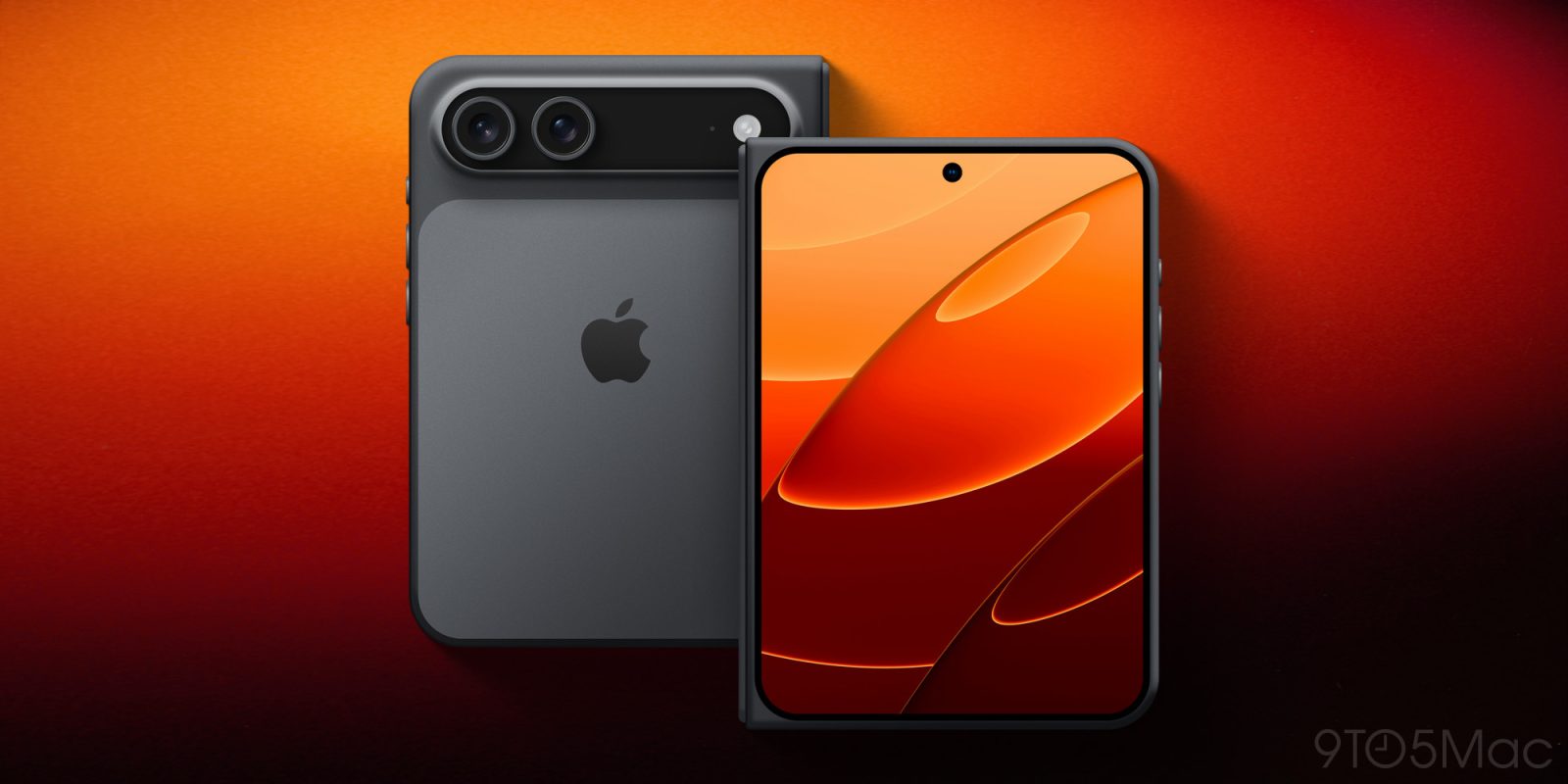
This month, Apple will be unveiling its first foldable iPhone – rumored to be called iPhone Ultra. It’s going to feature a 5.5-inch outer display and 7.6-inch inner display. In July, Samsung introduced the new Galaxy Z Fold 8 – and it comes with those same screen sizes.
Whether or not you believe Samsung only made this phone to preempt the iPhone Ultra is a different story – but one way or another, seeing the Galaxy Z Fold 8 gives us a great early idea of what iPhone Ultra will feel like in the real world.
During my years as a TechRadar Homes Editor, I tested an awful lot of vacuums. But the one that's been my constant companion throughout has been the Dyson V15 Detect. It's not a review sample — my partner bought it, and it's the vacuum we've been using at home for the past 21-plus months. It's been used to clean hard tile floors, carpets, lots of stairs, and a whole heap of dog hair.
The V15 is not the newest Dyson vacuum. It came out in 2021 and there are now two newer flagship models: the Gen5detect (launched 2022) and the V16 Piston Animal (2025). However, despite not being the latest-and-greatest, it's still the model that sits atop our best Dyson vacuum guide.
So after nearly two years of regular cleaning with the V15, would I still recommend it? How does it match up against the rest of the best cordless vacuums on the market — and specifically, the newest models from Dyson's great competitor, Shark? Here's my long-term review.
Smooth mover
Let's start with what I love about our Dyson dust-sucker. The suction is excellent, and the Auto mode (where the suction will increase or decrease depending on how much dirt is detected on the floor) is a very welcome addition. I use this mode almost exclusively, and it can be relied upon to do a thorough job of clearing whatever debris has gathered on the floor. I haven't noticed a drop in cleaning performance over our two years of use.
The V15 is also extremely easy to maneuver. Our home has lots of stairs, and plenty of nooks and crannies where dust and hair like to collect and lurk, and the V15 Detect does a great job of getting into all of them. I love how easily and smoothly the head pivots, and the fact it can lie completely flat to the ground for cleaning under beds.
Many of the newest Shark vacuums have a hinge on the vacuum wand, which enables it to bend forwards for cleaning under furniture. It works well, but adds bulk to the wand, and the whole thing is slightly unwieldy in its folded state. For my home, the Dyson setup works perfectly well, but if you're lacking in maneuvering room, perhaps Shark's 'MultiFlex' / 'Flexology' solution would be a better fit.
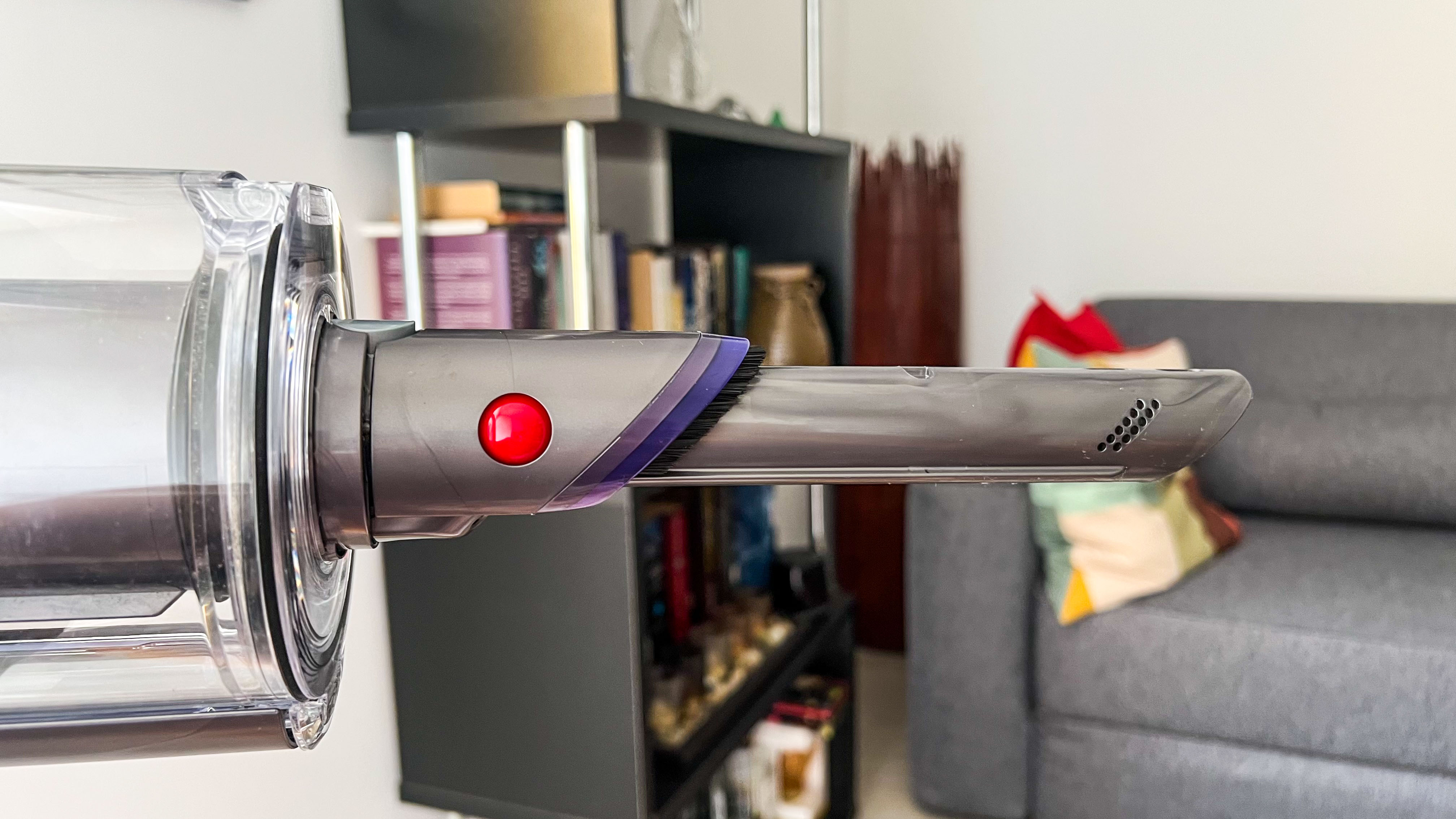
The hidden crevice tool is a lifesaver in my tall home (Image credit: TechRadar / Sharmishta Sarkar)
I'm also a huge fan of the Dyson V15's secret crevice tool. It's hidden in the wand, so I'm never without it. Our house is tall and thin, with four floors, and this built-in tool means that if I spot a dusty corner at the top of the house, I don't have to traipse all the way down to the utility room to fetch a detail tool to deal with it. As far as I'm aware, this feature is exclusive to Dyson at the moment.
Having tested a number of vacuums from Dyson and various other brands, I'm always struck by how consistently high quality and well-built the Dyson vacs feel. There's a strong attention to detail in the design, and they feel sturdy and reliable. That's still true of the V15 after nearly two years of use.
Lasers and data
Now on to a couple of features that have divided opinion within my household. The V15 comes with a couple of different floorheads: the Digital motorbar head, which has bristles and is designed for use on any floor type, and the Fluffy optic head, which is entirely soft and built for use on hard flooring. The latter is equipped with a green light to illuminate dust.
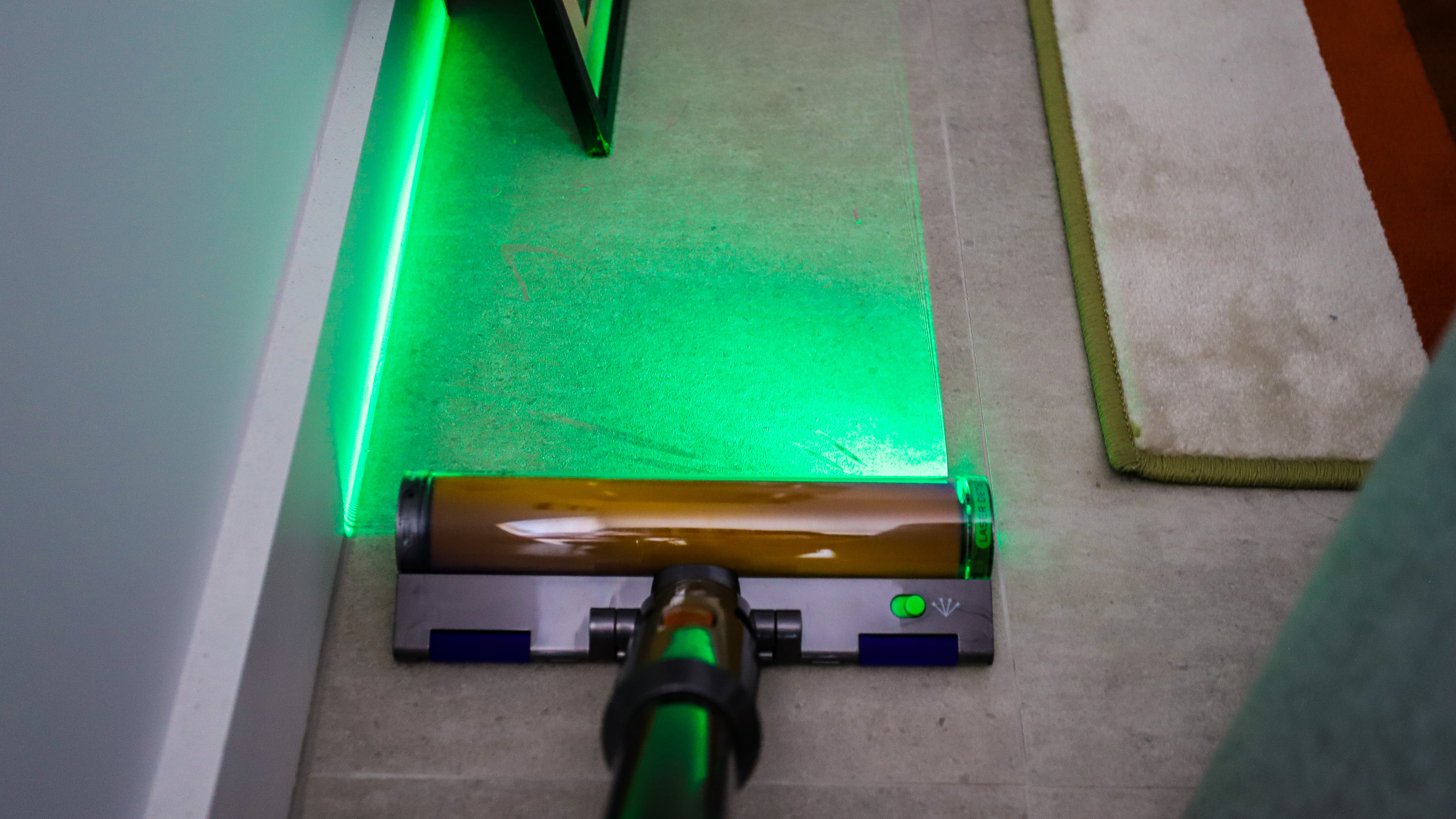
I love using the light on the soft floorhead to chase down dust bunnies (Image credit: Future)
I'm very on board with the Fluffy floorhead. I love that it feels gentle on our tiled kitchen floor (and doesn't clatter over it as most vacuum cleaner heads will), and I appreciate the way the light draws attention to dust and hair lurking in dingy corners. I find it very satisfying to then whisk that dust away, and always feel I'm getting a far more thorough clean than I would without this feature.
However, my partner is not so enamored with the Fluffy floorhead. He feels the Digital motorbar floorhead works perfectly well on hard floors, and it's not worth the hassle of swapping the heads over.
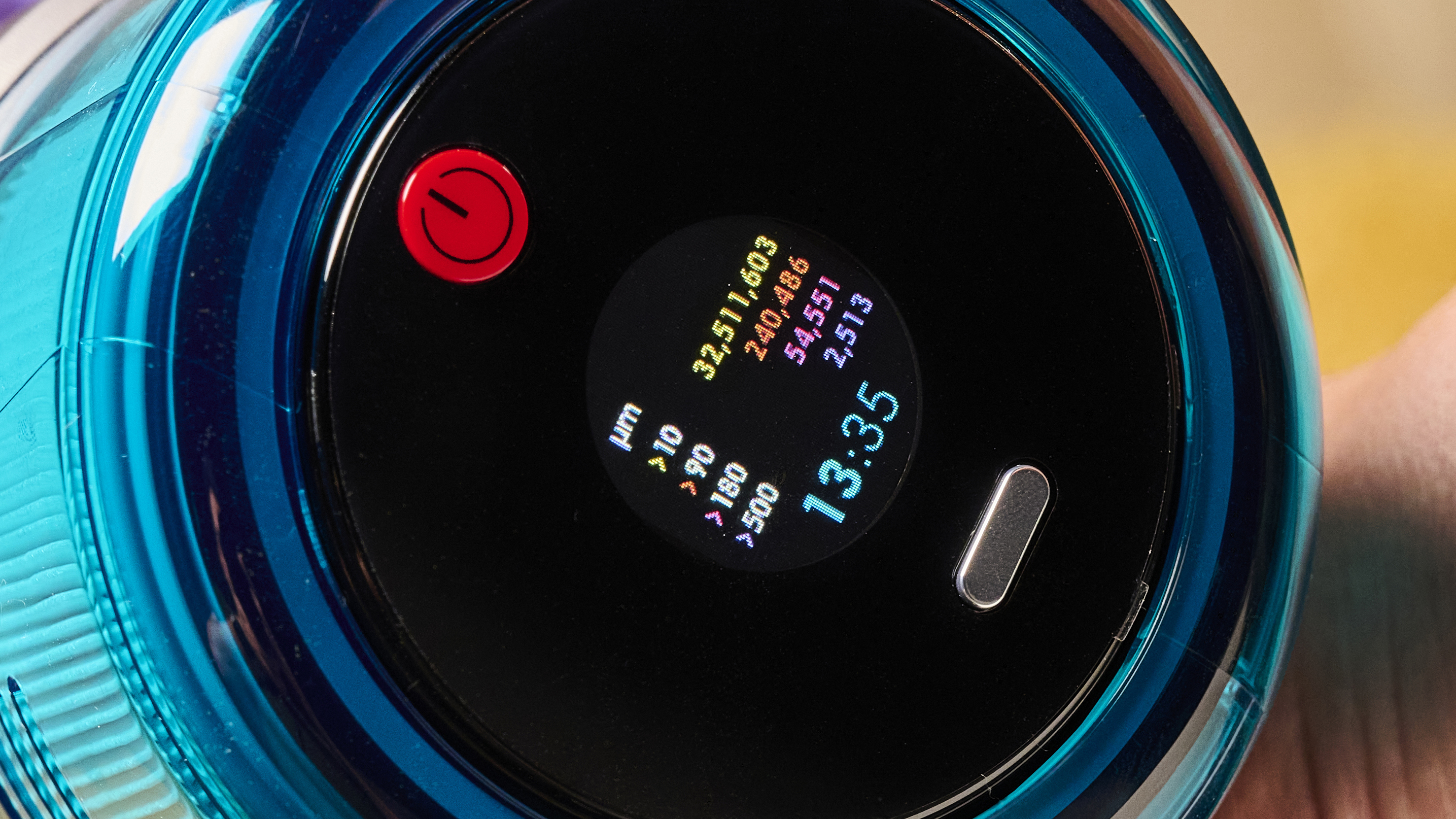
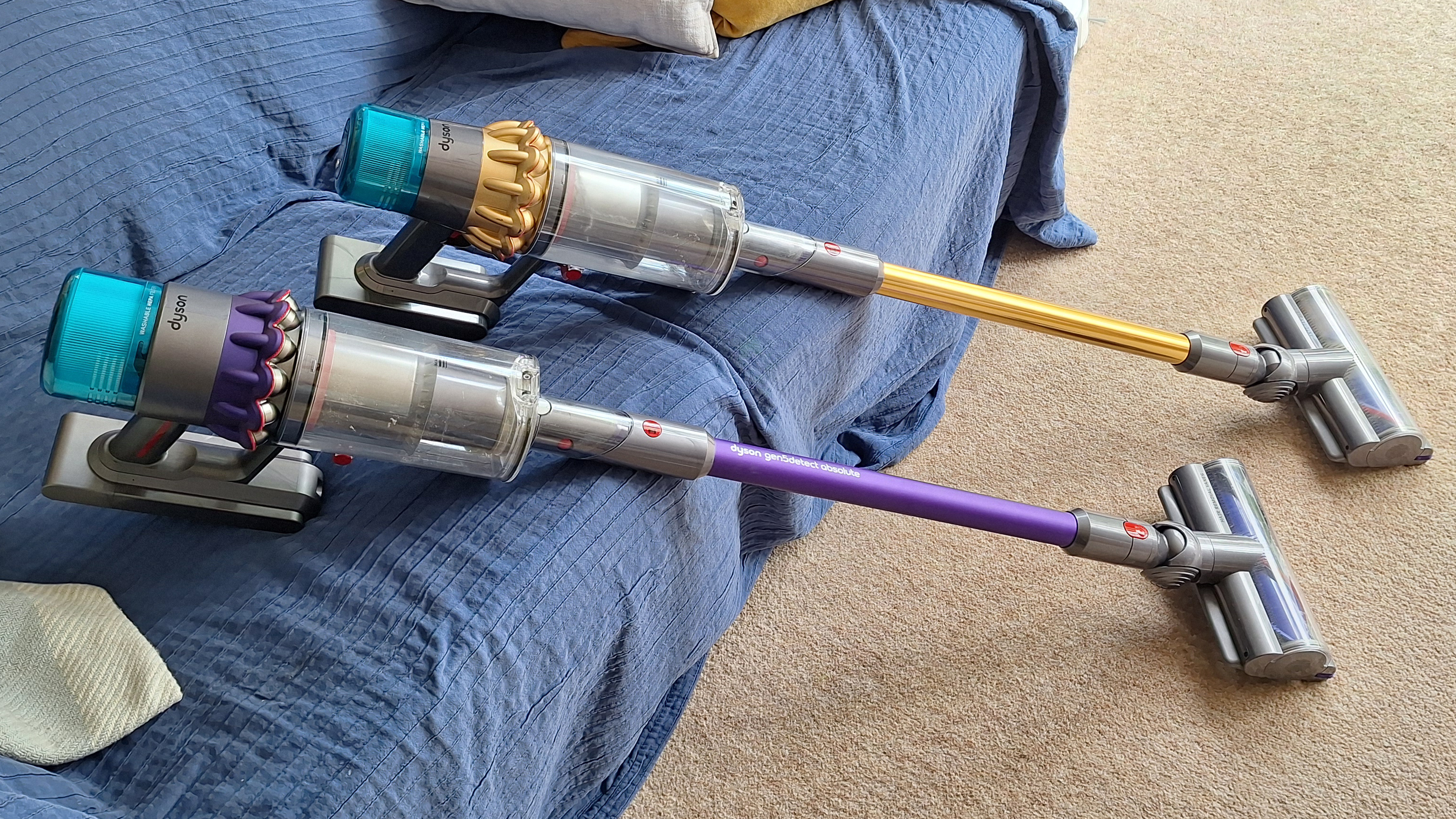
Both the V15 and the Gen5detect (pictured) have real-time dust reports (Image credit: Future)
Then there are the real-time dust reports on the screen. I find these endlessly fascinating, and I enjoy seeing the dust hotspots causing the bar graphs to spike. However, when I asked my partner for his thoughts, it became clear that not only was he not paying them any attention, but he didn't really know what they were. Is is possible the general public is just not as invested in the intricacies of vacuum cleaning as I am? Maybe.
Bulking up
Moving on to the down-sides of the V15. The most significant complaint I have with it is that V15 Detect is that it's pretty heavy. Further to that, the weight is concentrated in the main motor section, which itself is rather elongated in shape. That makes it rather unwieldy, and especially when used in handheld mode.
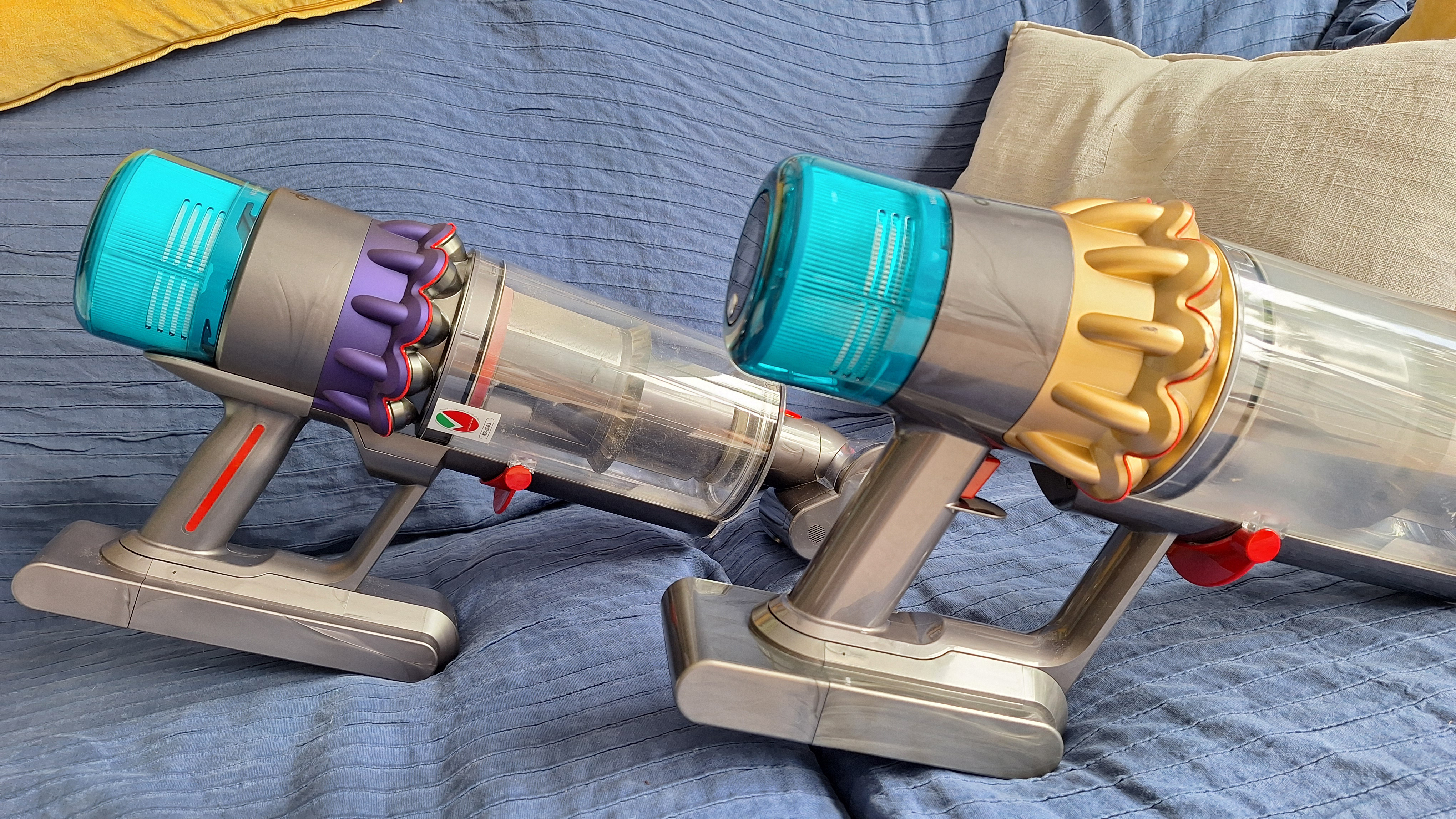
The V15 (background) and newer Dyson vacuums have a rather heavy, elongated motor section, which can make them a little awkward to use (Image credit: Future)
All of Dyson's newer vacuums (I'd say from this model onwards — so the V15, the Gen5detect and the V16 Piston Animal) suffer from this weight distribution issue.
Looking to Shark's range, the fancier models, such as the PowerDetect Cordless, are actually heavier overall. However, the motor/handle section is more squat in shape, and there's more weight through the wand and into the floorhead. That means more even weight distribution, which can make for a more comfortable vacuuming experience.
A triggering issue
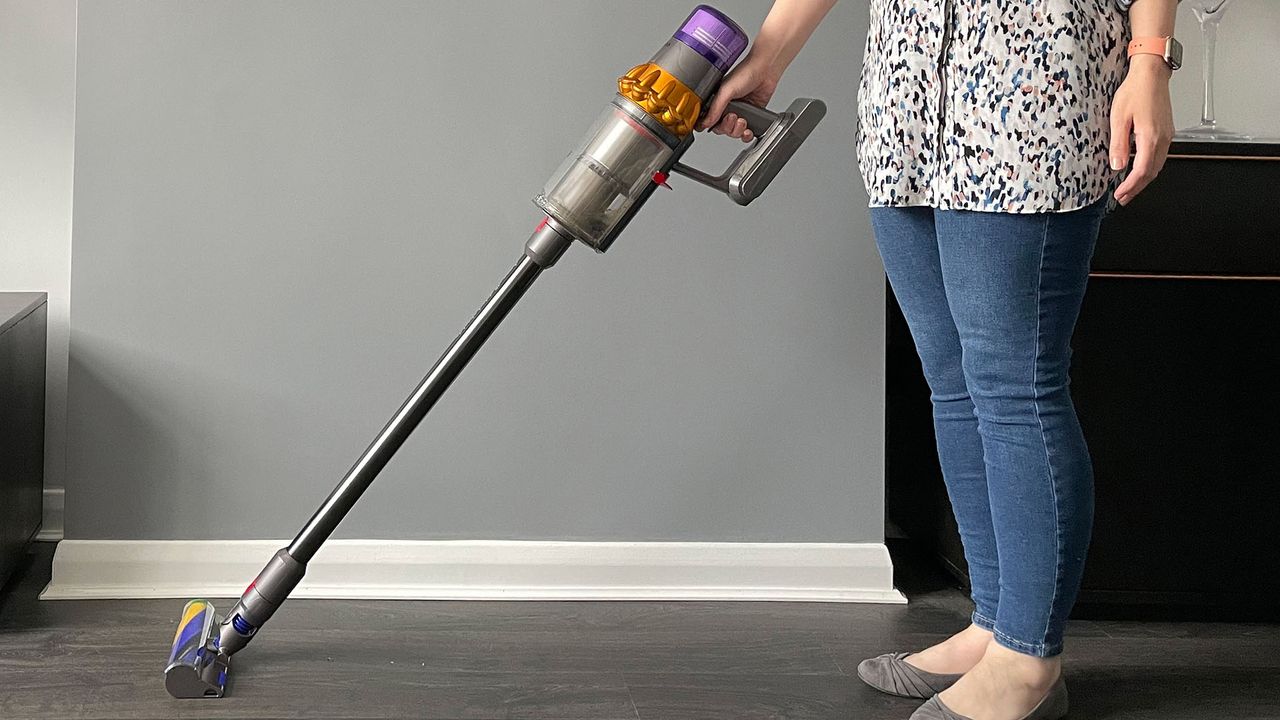
Another big complaint I have with the V15 is that it's trigger-operated, with no option to lock it for continual running. I find that irritating when I'm using the vacuum for long periods, or trying to get into awkward corners while keeping the trigger compressed.
I prefer the setup on Dyson's newer models, where there's a one-press power button. However, that's still not perfect — it requires you to have a hand free to turn the machine on and off, because the power button is not reachable from your holding hand.
Most modern Shark models use button operation, and just like the Dyson designs, you can't reach the button from your holding hand. My ideal design is one where the vacuum is trigger-operated but with a lock for continual running. No Dyson vacuum has this setup, and neither do any of Shark's newest stick vacs, although that brand's range is so sprawling you might find a trigger-plus-lock design somewhere.
The V15 (foreground) switches on and off with a trigger on the handle — which can be frustrating when using it for longer cleaning sessions (Image credit: Future)
One comment that I hear sometimes about Dyson stick vacuums is that they don't always last as long as customers expect. Our V15 is still going strong after just under two years (which is actually at the lower end of how long cordless vacuums are meant to last, although most people would probably hope for longer).
Prior to that, my partner had a Dyson Cyclone V10, which lasted over five years. At that point the battery conked out, and replacing it only fixed the issue for a few months. I think that's a decent lifespan for a vacuum, but your mileage may vary.
Is it worth it?
After two years using my Dyson V15, I'd still recommend it. Its cleaning powers are excellent with no signs of fading, its special features genuinely useful, and I love how maneuverable it is.
I personally also prefer it to Shark's newest models. I cover my main thoughts on this in my Shark vs Dyson article, but as a short overview, it's special features feel superior — Dyson's laser lights are far more effective than Shark's headlamps, and its Auto mode feels more precise. The Dyson also pivots more smoothly and the overall design feels sleeker and more high-end.
However, it's not a clear-cut decision. The Shark PowerDetect Cordless offers the best outright cleaning performance of any vacuum I've used, including all the Dyson models. Shark's models also arguably deliver better value for money — although its higher-spec models still sit in the premium price tier.
The bottom line? After using the V15 for a couple of years, and testing multiple other vacs from different brands including Shark, I'm still something of a Dyson fan-girl. When our at-home vac finally bites the dust, we'll probably end up buying another Dyson, although I will still be checking out what Shark has to offer...
Today's Leeds vs Liverpool live streams sees the two Premier League clubs play the final game of their US tour at Soldier Field in Chicago, with new Reds manager Andoni Iraola hunting a third win in three matches.
After a 3-2 defeat by Championship side Wrexham and a clash with Premier League rivals Sunderland, Leeds will aim to finish their US tour on a high. Fans got their first glimpse of Harry Wilson in Leeds colours after the summer signing came on as a second-half substitute against Wrexham and the Welshman could feature against Liverpool, where he came through the academy. Fellow new boy Tarik Muharemovic could also be in line for his debut. Daniel Farke's side have just three pre-season friendlies left after this game, with a home fixture against German side RB Leipzig next up on Saturday.
Iraola is eyeing a clean sweep in America after making it two wins out of two as Liverpool boss with a 1-0 victory over Wrexham, thanks to Rio Ngumoha's second-half strike. Stand-in captain Dominik Szoboszlai started at centre back in that game, underlining the Reds' lack of options in the heart of defence, but Jeremy Jacquet could make his debut following his £60m move from French club Rennes. Alexander Isak, Florian Wirtz and Ryan Gravenberch could also feature for the first time under Iraola after joining the tour late following the World Cup. After this clash, Liverpool will fly home before facing Monaco and Como at Anfield on the next two Sundays.
Read on to find out how to stream Leeds vs Liverpool live and from anywhere in the world.
How to watch Leeds vs Liverpool live streams for FREE
Good news!All Red Video - Liverpool's official streaming platform comes with a 14-day free trial, enabling you to stream Leeds vs Liverpool and the rest of the Reds' pre-season friendlies for free.
Abroad for Leeds vs Liverpool? UseNordVPN to unlock your stream from anywhere in the world.
Use a VPN to watch Leeds vs Liverpool from anywhere
A VPN is a handy piece of software that can make your device appear as if it's back in your home country, thereby letting you unlock your usual streaming service. The best VPN right now? We recommend NordVPN – it does everything and comes with a 75% discount.
Not having a VPN is like leaving your front door wide open in a busy city – anyone can walk right in and take a peek.
TechRadar regularly reviews all the biggest and best VPN providers and NordVPN is our #1 choice.
✅ Up to 75% Off Today ✅ 3 Extra Months Free ✅ Unlocks Stan Sport
Get NordVPN and stream Leeds vs Liverpool from anywhere.View Deal
It's really straightforward to use a VPN to watch Leeds vs Liverpool.
1. Install the VPN of your choice. As we've said, NordVPN is our favorite.
2. Choose the location you wish to connect to in the VPN app. For example, if you want to watch the Stan Sport stream, select 'Australia' from the listed countries.
3. Sit back and enjoy the action. Head to Stan Sport and tune into Leeds vs Liverpool.
How to watch Leeds vs Liverpool live streams in the US
Viewers in the United States can stream Leeds vs Liverpool on the ESPN Deportes channel and viaESPN Select ($12.99).
Stan Sport carries most of the football across the 2026/27 season, including the Premier League, Champions League and FA Cup.
Missing the game because you're outside Australia?Use a VPN to login to your Stan Sport or beIN SPORTS Connect account.
What is the Leeds vs Liverpool start time?
Leeds vs Liverpool kicks off at 9pm BST / 4pm ET / 1pm PT on Sunday, August 2. That's 6am AEST on Monday, August 3 in Australia.
We test and review VPN services in the context of legal recreational uses. For example:1. Accessing a service from another country (subject to the terms and conditions of that service).2. Protecting your online security and strengthening your online privacy when abroad.We do not support or condone the illegal or malicious use of VPN services. Consuming pirated content that is paid-for is neither endorsed nor approved by Future Publishing.
Boy, sure is a hot one today, huh? Okay, I get the irony: that's a take so cold you could use it to replace your freezing Wim Hof showers. But when the metaphorical mercury creeps this high, you've got to keep your cool. The same goes for your laptop, which is why you might want to grab a laptop cooling pad this summer.
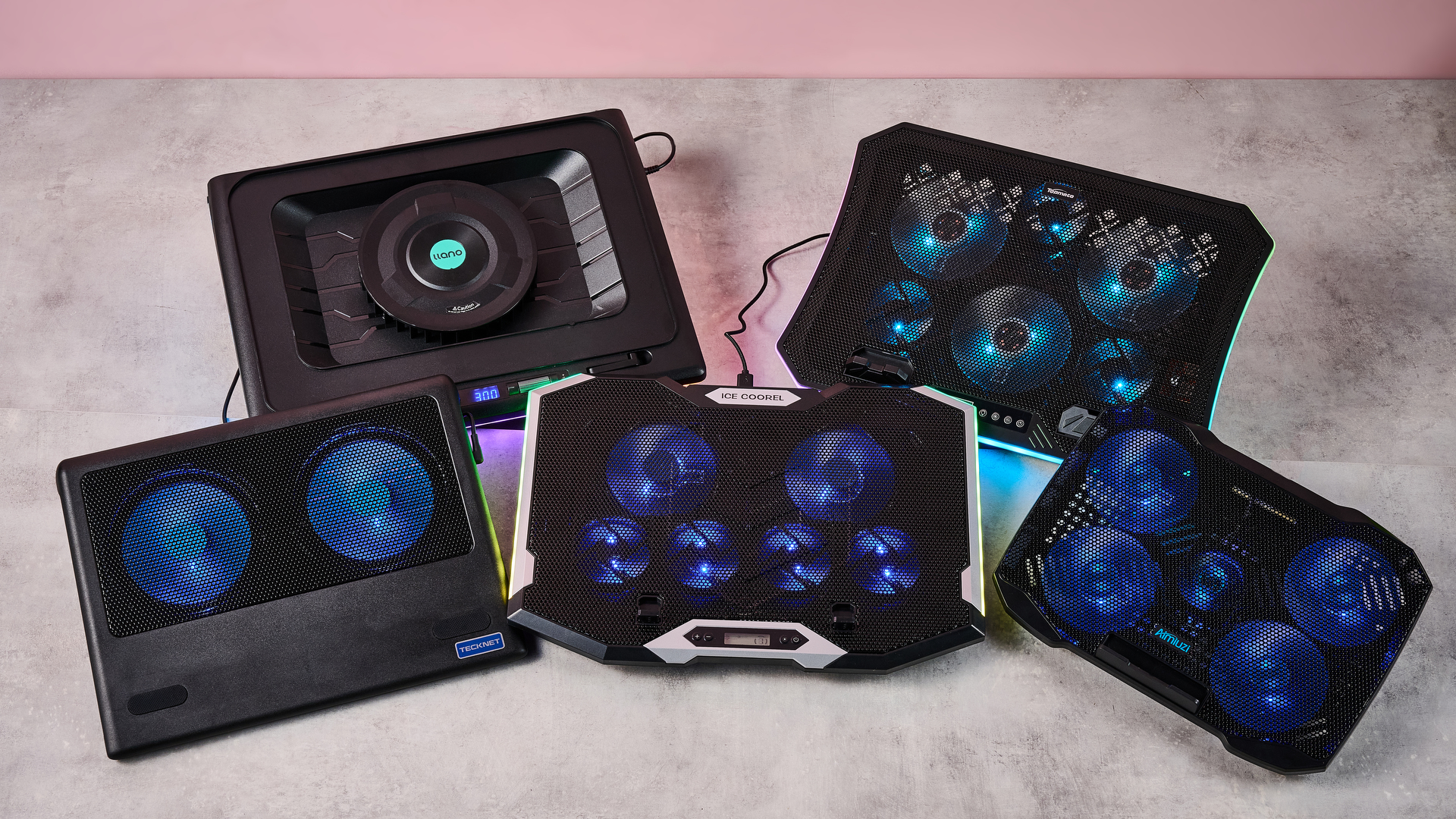
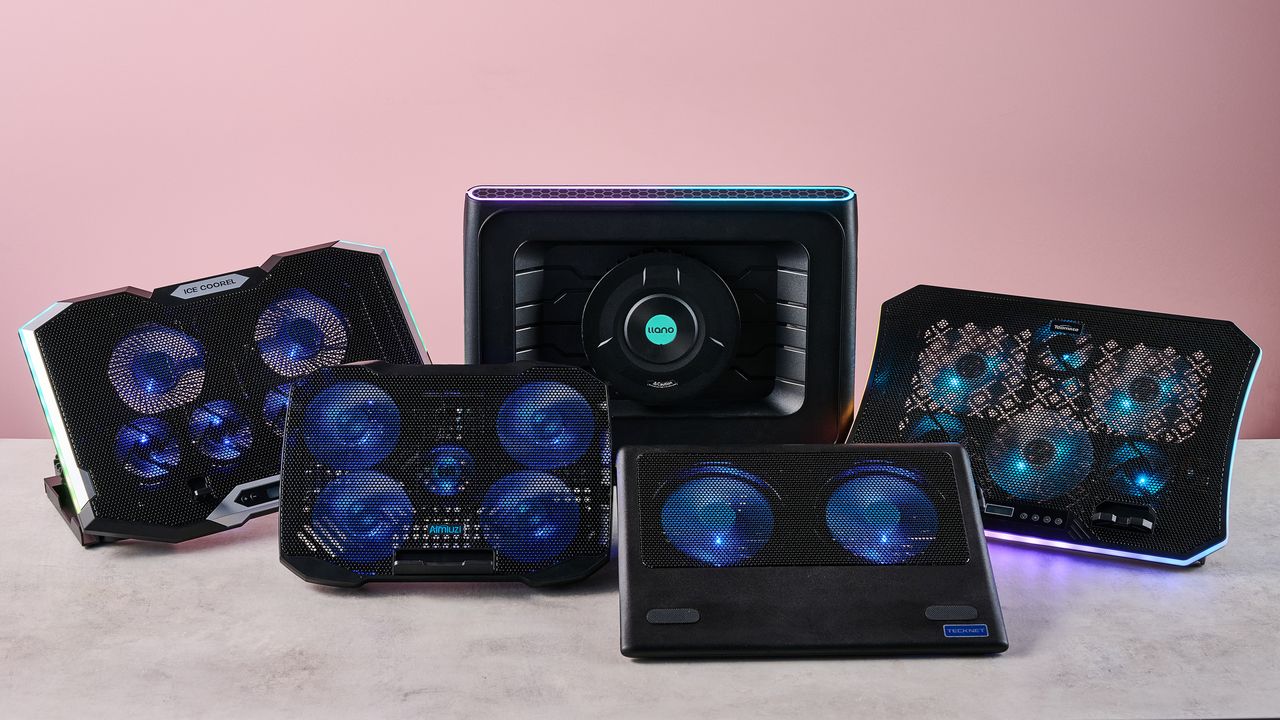
Fortunately for you, I've spent this week testing every laptop cooling pad I can get my hands on to see which offers the superior AC for your computer. Not only that, but I've brought receipts — this piece has more graphics and graphs than election night coverage. So if you want objective numbers about which pad is genuinely gusty and which is all bluster, I've got the data you need.
I get that it can be tempting to overlook cooling your laptop during warm weather — I've been more worried this summer about tracking down a fan to keep myself cool than my laptops. But you overlook the best laptop cooling pads at your peril.
I still have vivid memories of the summer I redlined my laptop during a heatwave. While the video skittering should have been a hint, it was only when it stopped booting up and started bleeping SOS in Morse code that I began questioning my life choices. Turns out I'd burnt out the memory — quite literally: there were scorch marks on the inside of the case.
So at this time of year, it's worth considering whether a laptop cooling pad can help you out. And I can definitely help out there.
Laptop cooling pads: cooling
Temperature Rise Using Laptop Cooling Pad
The temperature rise during a stress test while using the laptop cooling pad on max settings
Baseline
31.9
TopMate C12 Laptop Cooling Pad
22.8
Klim Mistral
20.4
Klim Wind
19.5
Almiuzi F2 Plus Laptop Cooling Pad
18.4
TECKNET Laptop Cooling Pad
17.9
Klim Ultimate
15.5
Liangstar Laptop Cooling Pad
15.3
Llano V10 Gaming Laptop Cooling Pad
12
Llano RGB Laptop Cooling Pad
8
010203040
Temperature difference (°C) Data
Product
Value
Baseline
31.9
TopMate C12 Laptop Cooling Pad
22.8
Klim Mistral
20.4
Klim Wind
19.5
Almiuzi F2 Plus Laptop Cooling Pad
18.4
TECKNET Laptop Cooling Pad
17.9
Klim Ultimate
15.5
Liangstar Laptop Cooling Pad
15.3
Llano V10 Gaming Laptop Cooling Pad
12
Llano RGB Laptop Cooling Pad
8
Baseline
57.4
TopMate C12 Laptop Cooling Pad
41
Klim Mistral
36.7
Klim Wind
35.1
Almiuzi F2 Plus Laptop Cooling Pad
33.1
TECKNET Laptop Cooling Pad
32.2
Klim Ultimate
27.9
Liangstar Laptop Cooling Pad
27.5
Llano V10 Gaming Laptop Cooling Pad
21.6
Llano RGB Laptop Cooling Pad
14.4
015304560
Temperature difference (°F) Data
Product
Value
Baseline
57.4
TopMate C12 Laptop Cooling Pad
41
Klim Mistral
36.7
Klim Wind
35.1
Almiuzi F2 Plus Laptop Cooling Pad
33.1
TECKNET Laptop Cooling Pad
32.2
Klim Ultimate
27.9
Liangstar Laptop Cooling Pad
27.5
Llano V10 Gaming Laptop Cooling Pad
21.6
Llano RGB Laptop Cooling Pad
14.4
Lower values indicate better cooling.
How I tested
To test each laptop cooling pad's performance, I ran a 3DMark Steel Nomad stress test on an Acer Predator Helios 300 gaming laptop with an Nvidia GeForce RTX 3080 GPU. The test ran for 15 minutes, with each cooling pad set to maximum. Using a thermal camera, I clocked the hottest point before and after the test, then calculated the temperature differential between the two to determine how much warming each cooling pad allowed.
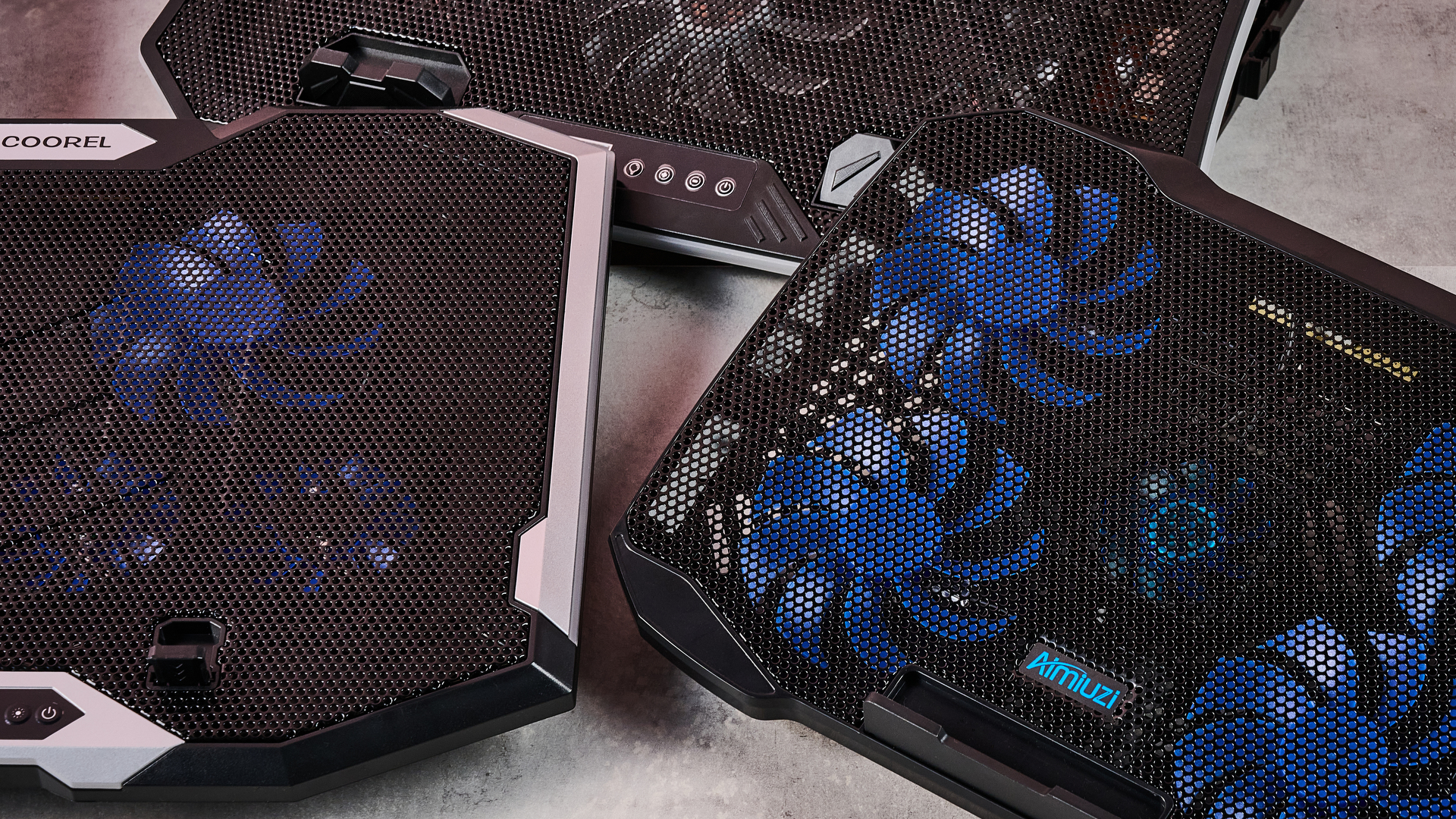
Assessing which laptop cooling pad is a breezy wonder and which is a wheezy blunder ultimately comes down to how frosty each model's cooling is. That's why I went through every pad I could get my hands on to see how much each one prevented our gaming laptop from heating up during a 3DMark stress test.
As you can see, by far the weakest cooling offered by any laptop cooling pad I tested was from the TopMate C12 Laptop Cooling Pad. Compared to the 57.4°F / 31.9°C baseline rise of our gaming laptop alone, the C12 was only able to limit it to a 41°F / 22.8°C rise — that might be better than frantically waving a dish towel in its general direction, but only barely.
Probably the biggest disappointment of these tests was how the Klim Mistral performed. Not only did it seem to perform worse than the more affordable Klim Wind — resulting in 36.7°F / 20.4°C warming compared to the Wind's 35.1°F / 19.5°C — but it was pretty inconsistent to boot, achieving even worse results on a retest.
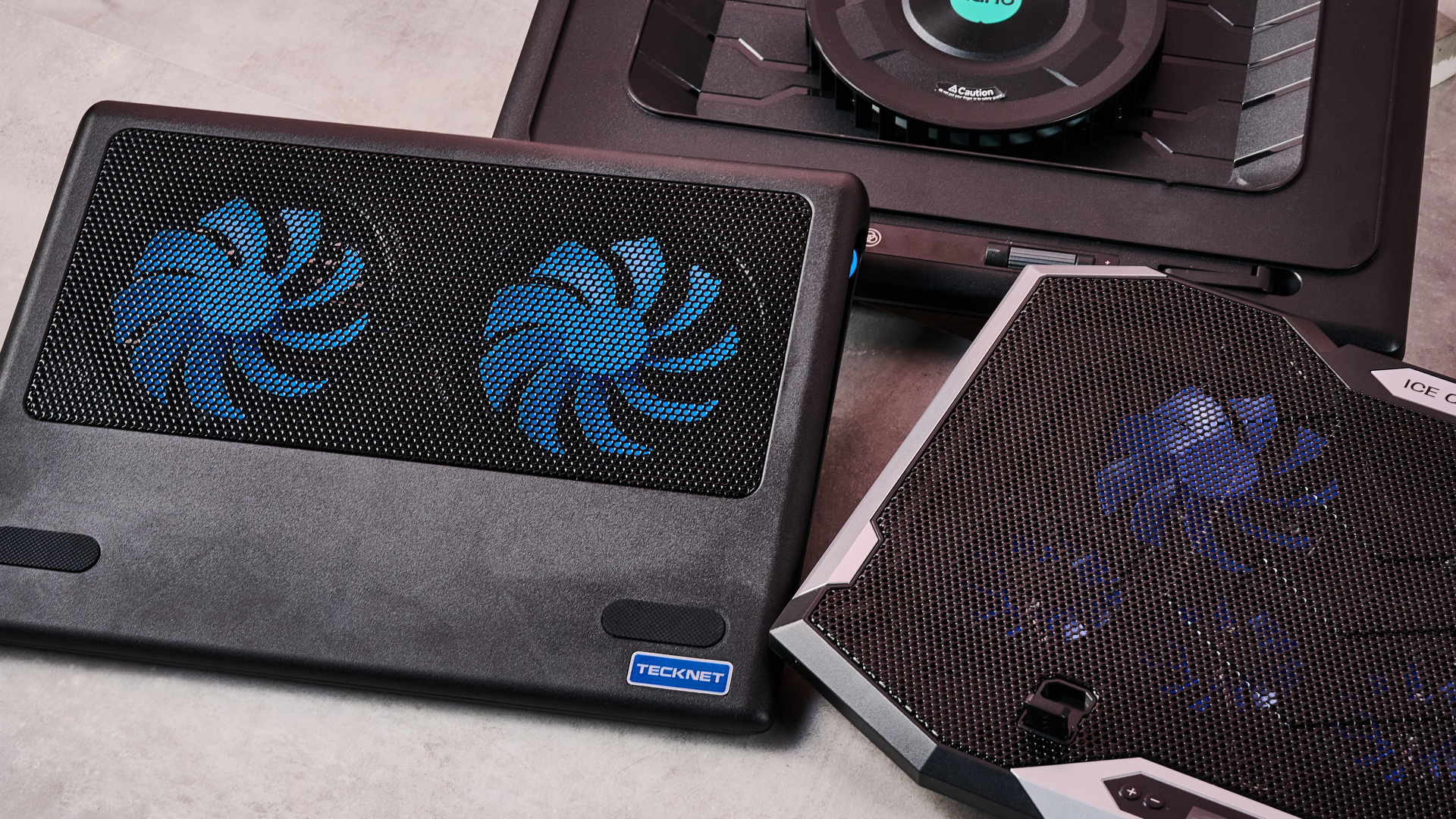
Skipping ahead a little, the laptop cooling pad I was most surprised by was the TECKNET. Although it's cheaper than quite a few of the pads I tested here, setting me back just $21.59 / £21.99, the 32.2°F / 17.6°C warming it presided over put it firmly in the top half of the pack. It's the little laptop cooling pad that could.
(Image credit: Future)
Given that the Liangstar Laptop Cooling Pad and Klim Ultimate both achieved an almost photo finish, it would be easy to assume there's not much daylight between them. However, like a bottle of wine, you really need to weigh up what you're spending here to calculate its true value. And as the Liangstar costs $20.99 / £23.59 versus the Klim Ultimate's $44.97 / £44.97 price tag, that definitely takes the edge here.
But, frankly, there's a reason Llano is the absolute GOAT in my eyes. As you can see, it took both first and second place on my cooling pad podium. While the Llano V10 Gaming Laptop Cooling Pad stopped our gaming laptop from warming up more than 21.6°F / 12°C, the Llano RGB Laptop Cooling Pad kept it down to just 14.4°F / 8°C of warming. This boi makes liquid nitrogen look positively toasty.
Laptop cooling pads: noise levels
1 / 2
Noise Level — cooling pad alone
Noise level of the cooling pad or laptop alone taken at head height and from 3 inches away
Llano RGB Laptop Cooling Pad
71
Llano V10 Gaming Laptop Cooling Pad
64.5
Klim Mistral
52.6
Liangstar Laptop Cooling Pad
45
TopMate C12 Laptop Cooling Pad
43.5
Laptop alone
42
Almiuzi F2 Plus Laptop Cooling Pad
37.4
Klim Wind
36.2
TECKNET Laptop Cooling Pad
36
Klim Ultimate
36
020406080
dB
Head height Data
Product
Value
Llano RGB Laptop Cooling Pad
71
Llano V10 Gaming Laptop Cooling Pad
64.5
Klim Mistral
52.6
Liangstar Laptop Cooling Pad
45
TopMate C12 Laptop Cooling Pad
43.5
Laptop alone
42
Almiuzi F2 Plus Laptop Cooling Pad
37.4
Klim Wind
36.2
TECKNET Laptop Cooling Pad
36
Klim Ultimate
36
Llano RGB Laptop Cooling Pad
85
Llano V10 Gaming Laptop Cooling Pad
77
Klim Mistral
62.6
Liangstar Laptop Cooling Pad
59
TopMate C12 Laptop Cooling Pad
58
Laptop alone
60
Almiuzi F2 Plus Laptop Cooling Pad
50.2
Klim Wind
48.8
TECKNET Laptop Cooling Pad
60
Klim Ultimate
46
0255075100
dB
Near Data
Product
Value
Llano RGB Laptop Cooling Pad
85
Llano V10 Gaming Laptop Cooling Pad
77
Klim Mistral
62.6
Liangstar Laptop Cooling Pad
59
TopMate C12 Laptop Cooling Pad
58
Laptop alone
60
Almiuzi F2 Plus Laptop Cooling Pad
50.2
Klim Wind
48.8
TECKNET Laptop Cooling Pad
60
Klim Ultimate
46
Noise Level — cooling pad & laptop
Combined noise level of the cooling pad and laptop taken at head height and from 3 inches away
Llano RGB Laptop Cooling Pad
64
Llano V10 Gaming Laptop Cooling Pad
57.5
Klim Mistral
51.5
TopMate C12 Laptop Cooling Pad
45
TECKNET Laptop Cooling Pad
45
Liangstar Laptop Cooling Pad
45
Klim Ultimate
44.4
Klim Wind
44
Almiuzi F2 Plus Laptop Cooling Pad
44
020406080
dB Head height Data
Product
Value
Llano RGB Laptop Cooling Pad
64
Llano V10 Gaming Laptop Cooling Pad
57.5
Klim Mistral
51.5
TopMate C12 Laptop Cooling Pad
45
TECKNET Laptop Cooling Pad
45
Liangstar Laptop Cooling Pad
45
Klim Ultimate
44.4
Klim Wind
44
Almiuzi F2 Plus Laptop Cooling Pad
44
Llano RGB Laptop Cooling Pad
79
Llano V10 Gaming Laptop Cooling Pad
69
Klim Mistral
61.5
TopMate C12 Laptop Cooling Pad
58.5
TECKNET Laptop Cooling Pad
58
Liangstar Laptop Cooling Pad
59
Klim Ultimate
55.2
Klim Wind
58.5
Almiuzi F2 Plus Laptop Cooling Pad
61
020406080
dB Near Data
Product
Value
Llano RGB Laptop Cooling Pad
79
Llano V10 Gaming Laptop Cooling Pad
69
Klim Mistral
61.5
TopMate C12 Laptop Cooling Pad
58.5
TECKNET Laptop Cooling Pad
58
Liangstar Laptop Cooling Pad
59
Klim Ultimate
55.2
Klim Wind
58.5
Almiuzi F2 Plus Laptop Cooling Pad
61
How I tested
When it came to noise levels, I measured the noise of each cooling pad from 3 inches away and from my head height when sitting in front of it. I also recorded the combined noise of each cooling pad and the testing laptop's fans 10 minutes into each stress test from the same distances.
You may think that your gaming laptop makes a lot of noise. But believe me: that's scarcely more than a murmur compared to some cooling pads. Given they're essentially just an LED-adorned box with a whopping great fan inside, they can get pretty shouty. That's why I grabbed the sound level meter from my utility belt and started measuring like the world's nerdiest superhero.
Perhaps predictably, the pad that blows coolest blows loudest. While I love the Llano RGB Laptop Cooling Pad's glacial chilling, I can't get away from the fact that it's pretty noisy. I'm 5 foot 11 inches tall, and from my head height, I clocked it at 71dB — according to the Center for Hearing and Communication, that's roughly as loud as a coffee grinder or freeway traffic. In my book, that's a worthy price to pay for keeping your laptop cool, but it might not be ideal if you're planning to use it in the office.
In fact, you might assume there's an inverse relationship between cooling and fan noise. And while that does hold true for the most part, there are some interesting exceptions. For example, while I found the Liangstar Laptop Cooling Pad offered the third best cooling in my tests overall, it was substantially quieter than either of the Llanos, clocking in at a much less brash 45dB.
Conversely, the Klim Mistral manages to buck the trend in the other direction, running surprisingly loud compared to some of the other competitors here. At 52dB, it kicks out a similar level of noise as a fridge — which is pretty ironic given it offered some of the worst cooling in my testing.
(Image credit: Future)
And there are some surprising candidates for the winner's podium when it comes to sound levels. The TECKNET offers far from the worst cooling, and yet it ties for first place as the quietest pad on test here at 36dB — again, not at all bad given its super affordable price tag.
Honestly, though, if you want whisper-quiet running without sacrificing performance, my pro tip would be to check out the Klim Ultimate. Unlike Klim's two cheaper cooling pads, it offers very credible chilling while also measuring noise levels of 36dB from head height — that's apparently quieter than a library, which isn't known for being a raucous place.
Fundamentally, noise levels probably shouldn't be the deciding factor when picking your perfect laptop cooling pad. Both cooling power and budget come higher up the pecking order in terms of my personal preferences. But that doesn't mean you should ignore it completely — depending on where and how you use your laptop, you could find strapping a jet engine to the bottom of it to be a bit of a deal breaker.
Do I even need a laptop cooling pad?
1 / 2
MacBook Air M5 encode test
Performance after an hour during a standard encode test both with and without cooling
Versus Comparison Data
Attribute
Benchmark — MacBook Air M5
Klim Ultimate — MacBook Air M5
Average FPS
2.52
2.77
Estimated encode time
122
114
VS
Average FPS (fps)
2.52
2.77+10%
Estimated encode time (minutes)
+7%122
114
Re-encoding a 4K stereo .mov file at highest quality, the MacBook Air M5 showed a modest reduction in throttling in terms of average FPS and encode time when using the Klim Ultimate laptop cooling pad.
Acer Predator Helios 300 encode test
Performance after an hour during a standard encode test both with and without cooling
Versus Comparison Data
Attribute
Benchmark — Acer Predator Helios 300
Klim Ultimate — Acer Predator Helios 300
Average FPS
2.8
2.8
Estimated encode time
115
113
VS
Average FPS (fps)
2.8
2.8
Estimated encode time (minutes)
+2%115
113
Re-encoding a 4K stereo .mov file at highest quality, the Acer Predator Helios 300 showed essentially no reduction in either average FPS or estimated encode time, suggesting limited heat-related throttling took place.
How I tested
Here I used a standard encoding test. I re-encoded the 4K stereo version of the Creative Commons animated movie Big Buck Bunny at 4K 120fps at the slowest encode speed, then ran it for an hour to allow throttling to take place and recorded the total estimated encode time and average encode rate. I ran this on both my MacBook Air M5 and our testing Acer Predator Helios 300, uncooled and cooled with the Klim Ultimate, to see the impact it had on performance.
So it's pretty clear which cooling pads offer ice-cold AC and which sound like a tumble dryer breaking the sound barrier. But I've left the biggest question until last — do you actually need one at all?
Aiming to prove my theorem that 'cold CPU = good', I whipped up a quick encode test designed to stress out the CPU of several laptops over a longer period. In theory, after an hour, their core temperature should have risen, their CPUs throttled, and the length of the encode spiked and the encode rate dropped. Running the same test with one of our top cooling pads, the Klim Ultimate, would then show how much it could reduce this throttling.
On my MacBook Air M5, after an hour of using its passive cooling alone, the total estimated encode time had crept up to 122 minutes, and the average encode rate was sitting at 2.52 FPS. When I reran the test with the Klim Ultimate running on max cooling, that total encode time was trimmed to 114 minutes, and the encode rate had increased to 2.77 FPS. That's not a huge difference, but it shows the Klim Ultimate was able to trim back some of that temperature-related throttling.
Running the same test on our Acer Predator Helios 300 was a much more ambiguous experience. During my first run, the encode crashed within minutes, and during the second it crashed moments after the test concluded. So it was honestly far from stable.
I was able to eventually get some results, however, and they showed... nothing. Whether I was using the Klim Ultimate or not, the test results were essentially identical, with Handbrake clocking an estimated encode time of 115 minutes uncooled and 113 with the Klim's help. Meanwhile, the encode rate remained steady, sitting at a reasonable 2.8 FPS.
(Image credit: Future)
What does that mean? That I've wasted several hours of my life? Not quite. There are a couple of key conclusions to take away from this. One is that a performance laptop with whacking great fans built in is already pretty good at keeping itself cool. Shocking revelation, I know.
But probably the more critical takeaway is that the mileage you get out of a laptop cooling pad is going to vary depending on how well optimized it is for handling heat, as well as the kind of tasks you're doing. Had I tried to run Cyberpunk 2077 on max graphics settings with ray-tracing switched on, the Predator Helios 300 would likely have caused it to melt into the earth's core.
There's also another caveat. While it's definitely been warm the last week or so in the TechRadar testing lab, it hasn't reached the kind of desiccating highs that have hit both the US and UK in recent months. Past a certain point, any laptop will struggle in the heat. Forget CPU throttling — in that heat, I'd be more worried about your components liquefying like a chocolate bunny on the launch pad at Cape Canaveral.
In light of that, I'd say a laptop cooling pad is still worth exploring, especially if you tend to do a lot of resource-intensive tasks like 3D work, Photoshopping or gaming.
Any thoughts or personal experiences you'd like to share? Please feel free to chime in down in the comments!
Valve's SteamOS has often presented the perfect excuse to be whisked away from Microsoft's troublesome Windows 11. The Linux operating system's better gaming performance has often been proven, utilizing RAM well without the bloatware often found with Windows 11.
SteamOS provides a console-like user interface (UI), making navigation and game launches far easier than Windows 11, despite the recent Xbox mode. With those benefits in mind, I've been contemplating a full switch to SteamOS, ditching Windows for good, and the best way to do that would be via Bazzite.
Bazzite (not affiliated with Valve) is effectively a SteamOS clone, specifically designed for "Linux newcomers and enthusiasts alike", but most importantly, comes with out-of-the-box compatibility with Nvidia and Intel GPUs, and a smooth experience for handhelds.
Using my second streaming PC, I put Bazzite to the test over a few months. Without a doubt, it's easily the best option for any gamer looking for a console-like couch gaming setup.
With tools like Decky Loader, customization is easy, with plugins to change SteamOS game mode themes, navigation sound effects, or even the startup and shutdown videos. However, despite all of the benefits of using the operating system, I still can't step away from Windows 11 on my main system, and there are multiple reasons why.
Multitasking drawbacks
(Image credit: Universal Blue / Bazzite)
As a frequent multitasker using applications like Discord to stream games to friends, Bazzite (more specifically SteamOS) isn't an ideal option. Using Discord to stream games on the same rig works just fine in desktop mode; however, it's not the same story for its game mode, which is arguably the entire purpose of using Bazzite.
Streaming on Discord in game mode severely drops frame rates in games, with constant stutters in many I tested, and there are a few instances where attempting to stream an application will result in a black screen. I tried to use the NZXT Signal 4K30 capture card and stream my second PC's Bazzite activity on Discord via my main PC, but it's not that simple.
Sure, HDMI passthrough on the capture card is possible, but I didn't want to be limited to 4K 60 frames per second on either my TV (which is capable of 144Hz) or my gaming monitor (capable of 240Hz). Frankly, capture cards with higher passthrough capabilities don't come cheap.
(Image credit: Discord)
Duplicating or projecting the display, as you would on Windows 11, would be the easy solution. However, Gamescope, the compositor responsible for displaying games on screen with Bazzite, cannot duplicate outputs.
Still trying to avoid the NZXT capture card's 4K 60Hz passthrough limitation, I opted for an HDMI splitter with one input and two output ports. Unfortunately, the moment the capture card is connected, the output on either my TV or monitor has the refresh rate slashed to 60Hz and VRR disabled.
That occurs to ensure that the Extended Display Identification Data (EDID) of both is matched, according to what the capture card is capable of in passthrough.
(Image credit: Future / Isaiah Williams)
None of these issues are present on Windows, as you can use OBS to project the main display onto the capture card without ever having to rely on an HDMI splitter or a better capture card.
This isn't an attack on SteamOS or Bazzite in particular; after all, game mode is quite literally designed for gaming, so multitasking isn't a priority for Valve or specifically Bazzite developers in this case.
However, it's worth noting that streaming on the gaming OS is more trouble than it's worth, and that's without even mentioning the potential audio bugs or OS glitches. That's only one part of why it's worth sticking with Windows, though.
Compatibility issues
(Image credit: Future / Isaiah Williams)
I wish these issues stopped there, but not quite. Firstly, a large majority of popular multiplayer games such as Battlefield 6, Call of Duty (most of the modern entries), Destiny 2, and EA Sports FC 26 will not work on Linux due to their anti-cheat systems.
This is an issue that lies directly with publishers and developers for those games that refuse to adapt their anti-cheat systems to work on SteamOS. It also doesn't seem as though this will change any time soon; the Steam Machine was arguably one way to effectively force the hand of publishers to consider anti-cheat compatibility on Linux, but it's not exactly a popular PC due to its high price.
It's also worth noting that Game Pass is inaccessible natively on Bazzite, and requires either cloud gaming or third-party launchers, and you'll be lucky if you can get the latter to function.
The solution to accessing those anti-cheat games is a dual-boot with Windows 11 and Bazzite. However, that isn't completely ditching Windows 11 as I've planned to, and a dual-boot can end up messy thanks to Windows' forced updates.
(Image credit: Valve)
Perhaps the most frustrating aspect is that Nvidia GPUs don't play nice with game mode on Bazzite, often resulting in glitchy functionality, or just completely black screens. I tested this by swapping out the AMD Radeon RX 9060 XT 16GB GPU in my second PC with my spare Nvidia GeForce RTX 3080 Ti and found that game mode was just frustrating to use.
So if I wanted to use Bazzite on my main rig equipped with an Nvidia GeForce RTX 4080 Super, its DX12 (a graphics API) gaming performance would be worse than Windows. Overall, the entire purpose of switching over to Linux was for better gaming performance and easy console-like UI navigation would be non-existent.
I'm sure all of these pain points will be addressed at some point, whether via Bazzite or Valve's official SteamOS builds. For now, though, I'll stick with Windows 11 on my main rig — even though I desperately want to be done with it.
Did you know TechRadar now has membership?
(Image credit: Future)
Become a TechRadar Insider by simply clicking 'Join Now' at the top of this page. Have a question? Please email membership@techradar.com
Hacían poco más de 7 grados en Pamplona cuando, el 12 de enero de 2026, cientos de personas se reunieron en la Sala Principal de Baluarte, el Palacio de Congresos y Auditorio de Navarra, para hablar del eclipse solar total. Faltaban siete meses para la cita, pero la comunidad ya había dado el pistoletazo de salida a lo que muchos consideran el acontecimiento astronómico del siglo.
Aquel encuentro sirvió para recordar cómo se vivió el eclipse de 1905 y, en los siguientes días 12 de cada mes, las distintas conferencias abordaron también la relación de este fenómeno con el arte, el cine, el periodismo o el mundo animal. En total, más de 13.000 personas participaron de las actividades.
“Hemos construido mes a mes una mirada compartida de un acontecimiento que en Navarra no se va a volver a vivir hasta el 2180. Se trata de algo realmente extraordinario, histórico. Hay gente que piensa que cuando se habla de ciencia es algo elevado, pero también hemos visto cómo jóvenes acudían a las conferencias y el interés era tan grande al punto de que se agotaron absolutamente las entradas todos los meses”, cuenta Paula Noya, directora de Infraestructuras Culturales de NICDO, a National Geographic. Esta sociedad pública del Gobierno de Navarra integra, entre otros equipamientos, el Planetario de Pamplona.
La expectativa por el eclipse solar total
Bajo el nombre de Proyecto Eklipse, se diseñó una programación de actividades y talleres concebida como un gran ejercicio de divulgación científica para mantener vivo el interés del público durante todo el año. Uno de sus principales atractivos ha sido el simulador virtual del eclipse. En Navarra, además, se jactan de haber sido los primeros en sacar a licitación pública la adquisición de gafas homologadas para garantizar una observación segura en los puntos oficiales.
La red de 20 espacios habilitados para seguir el eclipse cuenta con capacidad para unas 50.000 personas. Las entradas, desde 6 euros, incluyen aparcamiento y gafas certificadas. Entre los lugares más singulares figuran las Bardenas Reales y el parque de naturaleza y ocio Senda Viva, que ofrecerá 22 actividades complementarias relacionadas con el eclipse, desde exposiciones científicas y talleres hasta espectáculos de magia, circo, clown, cuentacuentos y música. Además, permanecerá abierto hasta la una de la madrugada para que los visitantes puedan disfrutar también de la lluvia de estrellas de las Perseidas.
La enorme expectación que despierta el fenómeno no impide que existan preocupaciones.
“A pesar de que hemos estado trabajando muchísimo en la concienciación, todavía te cruzas con amigos o familiares que te preguntan ‘¿puedo ver el sol con gafas normales?’ Por eso seguimos repitiendo siempre el consejo de utilizar gafas homologadas”, señala Noya.
Las principales inquietudes para el 12 de agosto
Otra de las inquietudes está relacionada con el riesgo de incendios al ser en pleno mes de agosto y ante la llegada masiva de visitantes a entornos rurales. Entre las recomendaciones difundidas por las autoridades figuran no aparcar sobre vegetación seca, ya que el calor del motor puede provocar su ignición; evitar hogueras, barbacoas y cualquier uso recreativo del fuego; no utilizar gas en zonas de camping; apagar correctamente las colillas; recoger los residuos y no dejar botellas de cristal expuestas al sol.
El gran desafío para Navarra será, sin embargo, la gestión de la movilidad y la logística. Noya explica:
“Sabemos que desde hace meses hay puntos en el sur que ya tienen el cartel colgado de ocupación al 100%, pero queda alguna habitación disponible en otras partes. Si tú sabes que desde tu municipio, tu pueblo o tu casita lo vas a poder ver, la recomendación es que no te muevas para verlo desde otro sitio”.
Como una ironía del destino, los habitantes de Pamplona tendrán que desplazarse para contemplar el eclipse total, ya que la capital quedó situada en la franja de parcialidad. Tampoco habrían podido seguirlo desde su emblemático planetario, cerrado por obras desde enero de 2025, cuando un incendio causó graves daños en las instalaciones. Desde entonces, el centro permanece cerrado mientras se somete a una remodelación.
“Con el incendio hemos convertido una catástrofe en una oportunidad, pues tenía 30 años y el proyecto de rehabilitación integral venía desde antes porque era el momento de reflexionar sobre su futuro para que siga siendo un centro de referencia. Vienen momentos muy ilusionantes”, concluye Noya. Tan ilusionantes como los que se esperan para el próximo 12 de agosto y como los que Navarra comenzó a vivir desde aquel frío día de enero.
Il mercato delle cuffie circumaurali con ANC oggi è popolato da un numero decisamente elevato di alternative; un'offerta completa che è in grado di soddisfare le esigenze di un po' tutti gli utenti. Le soluzioni più economiche, restando ovviamente in un range di prodotti con prestazioni accettabili, partono da circa 50-60 euro ma, salendo con le prestazioni, il numero funzioni e la qualità dei materiali e della costruzione, si può facilmente arrivare a sfiorare il migliaio di euro. Ecco che quindi, come per ogni categoria di prodotto, la fascia più economica e quella intermedia vivono di compromessi. Proprio per questo, al momento dell'acquisto, è più che mai necessario mettere sul piatto le proprie esigenze e le caratteristiche del prodotto a cui si è interessati.
Oggi analizziamo un paio di cuffie che si colloca nella fascia che va tra i 100 e i 200 euro ma che, molto probabilmente, non tarderanno a riposizionarsi leggermente sotto i 100 euro. Sto parlando delle Soundcore Space 2, evoluzione di uno dei prodotti più apprezzati nella propria fascia di prezzo, ovvero, per l'appunto, le Soundcore Space One. I punti forti del primo modello erano: una buona cancellazione del rumore, una qualità del suono discreta e il supporto LDAC. Tutte caratteristiche che, per un paio di cuffie da meno di 100 euro, non sono assolutamente trascurabili. Con il nuovo modello, che sto provando ormai da qualche settimana, Anker (proprietaria del brand Soundcore), alza di 30 euro l'asticella del prezzo; sarà un aumento giustificato da miglioramenti nelle prestazioni o nella costruzione? Siamo qui proprio per scoprirlo.
Today's Connections: Sports Edition will be easier if you've ever watched football.
As we've shared in previous hints stories, this is a version of the popular New York Times word game that seeks to test the knowledge of sports fans.
Like the original Connections, the game is all about finding the "common threads between words." And just like Wordle, Connections resets after midnight, and each new set of words gets trickier and trickier — so we've served up some hints and tips to get you over the hurdle.
If you just want to be told today's puzzle, you can jump to the end of this article for the latest Connections solution. But if you'd rather solve it yourself, keep reading for some clues, tips, and strategies to assist you.
The NYT's latest daily word game has launched in association with The Athletic, the New York Times property that provides the publication's sports coverage. The sports Connections can be played on both web browsers and mobile devices and require players to group four words that share something in common.
Each puzzle features 16 words, and each grouping of words is split into four categories. These sets could comprise anything from book titles, software, country names, etc. Even though multiple words will seem like they fit together, there's only one correct answer.
If a player gets all four words in a set correct, those words are removed from the board. Guess wrong and it counts as a mistake — players get up to four mistakes before the game ends.
Players can also rearrange and shuffle the board to make spotting connections easier. Additionally, each group is color-coded with yellow being the easiest, followed by green, blue, and purple. Like Wordle, you can share the results with your friends on social media.
Ready for the answers? This is your last chance to turn back and solve today's puzzle before we reveal the solutions.
Drumroll, please!
The solution to today's Connections: Sports Edition #678 is...
What is the answer to Connections: Sports Edition today?
Things with Wheels: BICYCLE, RACE CAR, SKATEBOARD, ZAMBONI
Atlanta Teams: ATLANTA UNITED, DREAM, FALCONS, HAWKS
Associated with Sam Darnold: JETS, SEAHAWKS, SUPER BOWL LX, TROJANS
Ends in a Part of the Face: BOURNEMOUTH, DIAGNOSE, HAWKEYES, KICKFLIP
Don't feel down if you didn't manage to guess it this time. There will be new sports Connections for you to stretch your brain with tomorrow, and we'll be back again to guide you with more helpful hints.
Atlas Energy Solutions Inc. (Atlas) has announced that it intends to expand its autonomous truck operations in the US Permian Basin from 28 to 100 by mid-2027. The company will work with Kodiak AI, Inc. (Kodiak) to make this ambition a reality using its physical artificial intelligence (AI)-powered autonomous driving technology.
What that means in practice is retrofitting or upfitting trucks with a package of sensors, controls, cameras, and other hardware to enable them to be operated autonomously using an AI “driver.”
According to Atlas, the new trucks will be used to expand operations at its second load-out point along its 42-mile (68 km) “Dune Express” sand conveyor system. This system will help Atlas become more responsive to customer needs for the transport and supply of proppant in the region.
Proppant, in case you are unaware, is a special grade of sand used by oil and gas companies during hydraulic fracturing. The sand is pumped underground to keep the cavities created by fracturing open, allowing oil and gas to flow freely.
Delivering sand without drivers
As you can appreciate, that requires enormous quantities of the stuff. What’s more, transporting it from mines or storage sites to drilling locations involves thousands of repetitive truck journeys, often on remote, dusty and relatively predictable routes.
The load-out points refer to strategic locations along the so-called “Dune Express” where this sand is loaded onto trucks. At present, Atlas explains, autonomous trucks have been used from one load-out point at a time.
The addition of another (one in Texas and one in New Mexico) will enable them to cover a wider area and improve customer order fulfillment. According to Atlas, since incorporating driverless trucks into its operations, they have carried approximately 7,000 loads totaling around 450,000 tons of sand over 23,500 “driverless hours.”
As for the trucks in question, they are entirely driverless but with an important distinction. To date, these trucks have tended to operate on controlled oilfield logistics networks, or private roads, not public highways or lanes.
That is considerably easier from an AI-training perspective than allowing autonomous trucks to travel freely through ordinary cities or mixed public traffic. The next major step is therefore operating on public roads, which Atlas and Kodiak say they expect to begin by early 2027, subject to regulatory and operational approval.
Fleet to increase to 100 by mid-2027
That would greatly expand where the trucks can deliver. “This partnership with Kodiak is a critical part of the Atlas strategy to transform oilfield sand logistics through innovation,” said John Turner, CEO and President of Atlas Energy Solutions, in a press release.
“Our mission is to seek critical energy infrastructure with inefficiencies, then engineer solutions that improve efficiency, reduce risk and enhance our customers’ operational success,” he added.
“Together, Atlas and Kodiak have deployed the world’s largest fleet of driverless big-rig trucks,” said Don Burnette, Founder and CEO, Kodiak.
“We’ve demonstrated that autonomous trucking is delivering meaningful results today. Our expanding partnership, which now covers two unique locations, is creating a blueprint for how autonomy can transform logistics by improving efficiency, increasing productivity, and delivering lasting value for customers at commercial scale,” he added.
Il celebre tuner tedesco <strong>Brabus</strong>, che recentemente ha presentato il suo <a href="https://www.hdmotori.it/brabus-bodo-gran-turismo-indipendente/">primo modello indipendente</a>, trasferisce la propria filosofia ad alte prestazioni nel settore nautico presentando la <strong>Brabus Ultima 55</strong>, un catamarano di lusso lungo 55 piedi (circa 17 metri) realizzato in collaborazione con <strong>Sunreef Yachts</strong>.<h2>1.450 cv e tecnologia idrofoil</h2><img class="alignnone size-full wp-image-280619" src="https://www.hdmotori.it/app/uploads/2026/08/876932-16x9-lg.jpg" alt="" width="1920" height="1080" />L'imbarcazione è spinta da due propulsori a sei cilindri da 533 kW (725 CV ciascuno), capaci di erogare una potenza complessiva di <strong>1.450 CV</strong> e di spingere il catamarano oltre i <strong>40 nodi</strong> di velocità massima. Il vero punto di forza è rappresentato dall'adozione di un avanzato sistema <strong>idrofoil</strong>: queste appendici idrodinamiche sommerse sollevano parzialmente lo scafo dall'acqua, riducendo la resistenza all'avanzamento e garantendo maggiore stabilità, efficienza e comfort di navigazione.<h2>Stile Brabus</h2><blockquote class="instagram-media" style="background: #FFF; border: 0; border-radius: 3px; box-shadow: 0 0 1px 0 rgba(0,0,0,0.5),0 1px 10px 0 rgba(0,0,0,0.15); margin: 1px; max-width: 540px; min-width: 326px; padding: 0; width: calc(100% - 2px);" data-instgrm-captioned="" data-instgrm-permalink="https://www.instagram.com/reel/DbaPgJEvPFK/?utm_source=ig_embed&utm_campaign=loading" data-instgrm-version="14"><div style="padding: 16px;"> <div style="display: flex; flex-direction: row; align-items: center;"><div style="background-color: #f4f4f4; border-radius: 50%; flex-grow: 0; height: 40px; margin-right: 14px; width: 40px;"></div><div style="display: flex; flex-direction: column; flex-grow: 1; justify-content: center;"><div style="background-color: #f4f4f4; border-radius: 4px; flex-grow: 0; height: 14px; margin-bottom: 6px; width: 100px;"></div><div style="background-color: #f4f4f4; border-radius: 4px; flex-grow: 0; height: 14px; width: 60px;"></div></div></div><div style="padding: 19% 0;"></div><div style="display: block; height: 50px; margin: 0 auto 12px; width: 50px;"></div><div style="padding-top: 8px;"><div style="color: #3897f0; font-family: Arial,sans-serif; font-size: 14px; font-style: normal; font-weight: 550; line-height: 18px;">Visualizza questo post su Instagram</div></div><div style="padding: 12.5% 0;"></div><div style="display: flex; flex-direction: row; margin-bottom: 14px; align-items: center;"><div><div style="background-color: #f4f4f4; border-radius: 50%; height: 12.5px; width: 12.5px; transform: translateX(0px) translateY(7px);"></div><div style="background-color: #f4f4f4; height: 12.5px; transform: rotate(-45deg) translateX(3px) translateY(1px); width: 12.5px; flex-grow: 0; margin-right: 14px; margin-left: 2px;"></div><div style="background-color: #f4f4f4; border-radius: 50%; height: 12.5px; width: 12.5px; transform: translateX(9px) translateY(-18px);"></div></div><div style="margin-left: 8px;"><div style="background-color: #f4f4f4; border-radius: 50%; flex-grow: 0; height: 20px; width: 20px;"></div><div style="width: 0; height: 0; border-top: 2px solid transparent; border-left: 6px solid #f4f4f4; border-bottom: 2px solid transparent; transform: translateX(16px) translateY(-4px) rotate(30deg);"></div></div><div style="margin-left: auto;"><div style="width: 0px; border-top: 8px solid #F4F4F4; border-right: 8px solid transparent; transform: translateY(16px);"></div><div style="background-color: #f4f4f4; flex-grow: 0; height: 12px; width: 16px; transform: translateY(-4px);"></div><div style="width: 0; height: 0; border-top: 8px solid #F4F4F4; border-left: 8px solid transparent; transform: translateY(-4px) translateX(8px);"></div></div></div><div style="display: flex; flex-direction: column; flex-grow: 1; justify-content: center; margin-bottom: 24px;"><div style="background-color: #f4f4f4; border-radius: 4px; flex-grow: 0; height: 14px; margin-bottom: 6px; width: 224px;"></div><div style="background-color: #f4f4f4; border-radius: 4px; flex-grow: 0; height: 14px; width: 144px;"></div></div> <p style="color: #c9c8cd; font-family: Arial,sans-serif; font-size: 14px; line-height: 17px; margin-bottom: 0; margin-top: 8px; overflow: hidden; padding: 8px 0 7px; text-align: center; text-overflow: ellipsis; white-space: nowrap;"><a style="color: #c9c8cd; font-family: Arial,sans-serif; font-size: 14px; font-style: normal; font-weight: normal; line-height: 17px; text-decoration: none;" href="https://www.instagram.com/reel/DbaPgJEvPFK/?utm_source=ig_embed&utm_campaign=loading" target="_blank" rel="noopener">Un post condiviso da YachtBuyer ™ (@yachtbuyer_)</a></p></div></blockquote><script async src="//www.instagram.com/embed.js"></script>L'estetica richiama in modo evidente il mondo delle supercar di Brabus attraverso l'ampio uso della <strong>fibra di carbonio a vista</strong> su ali, montanti e prese d'aria, con livree disponibili nelle tonalità <em>Graphite Black</em> o <em>Phantom Gray</em>. Gli <strong>spazi esterni</strong> sono modulari: le piattaforme laterali pieghevoli permettono di estendere la larghezza di poppa da 5,6 a circa 7,6 metri. Negli <strong>interni</strong> spiccano i rivestimenti in pelle <em>Moonstone</em>, il soffitto in Alcantara, inserti in alluminio e una plancia di comando digitale con interfaccia personalizzata.<h2>Prezzo</h2><img class="alignnone size-full wp-image-280620" src="https://www.hdmotori.it/app/uploads/2026/08/876933-16x9-lg.jpg" alt="" width="1920" height="1080" />Proposta in configurazioni che accolgono da quattro a sei ospiti (più l'equipaggio), la Brabus Ultima 55 ha un prezzo di partenza fissato a circa <strong>3,4 milioni di euro</strong>.
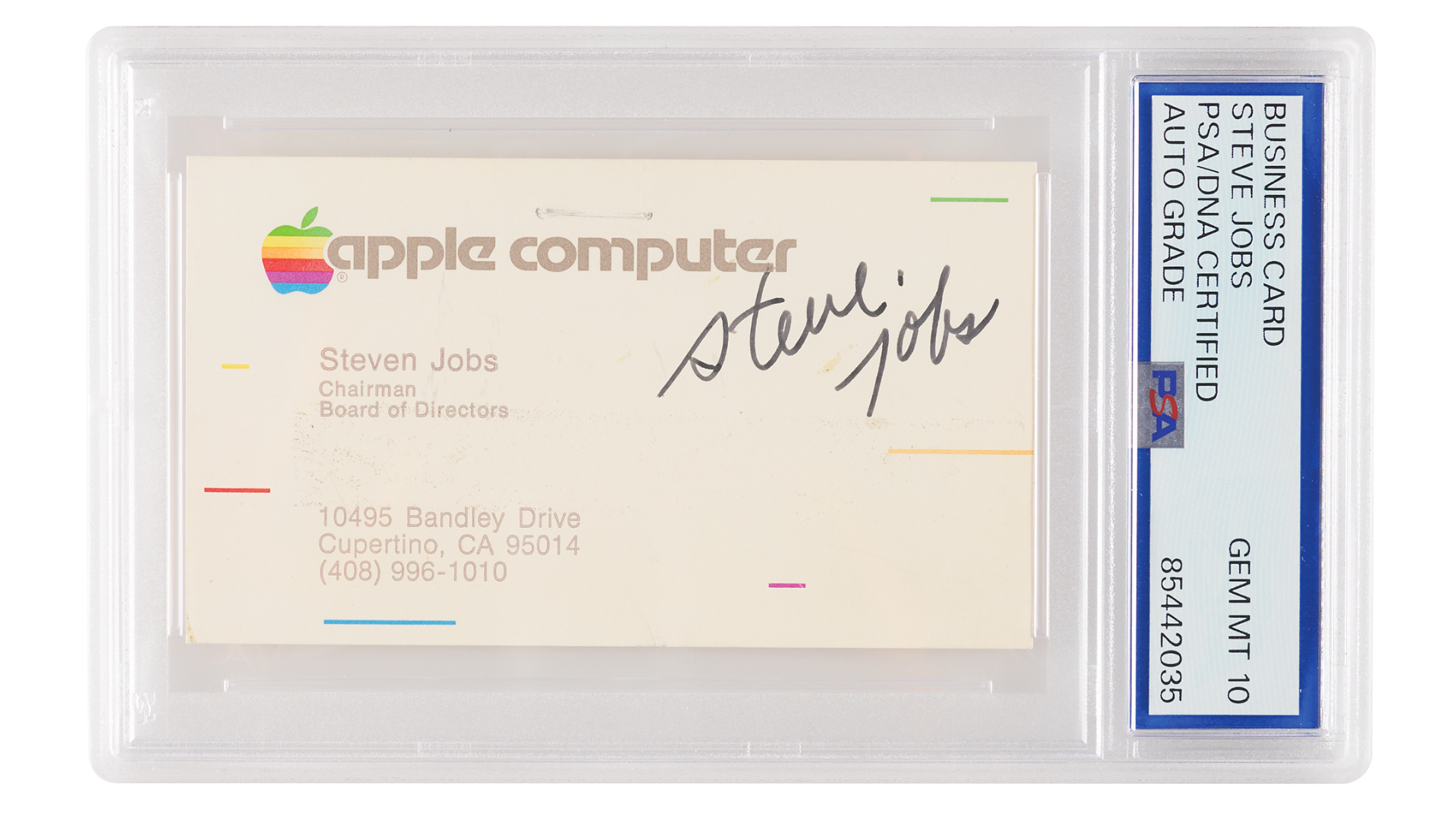
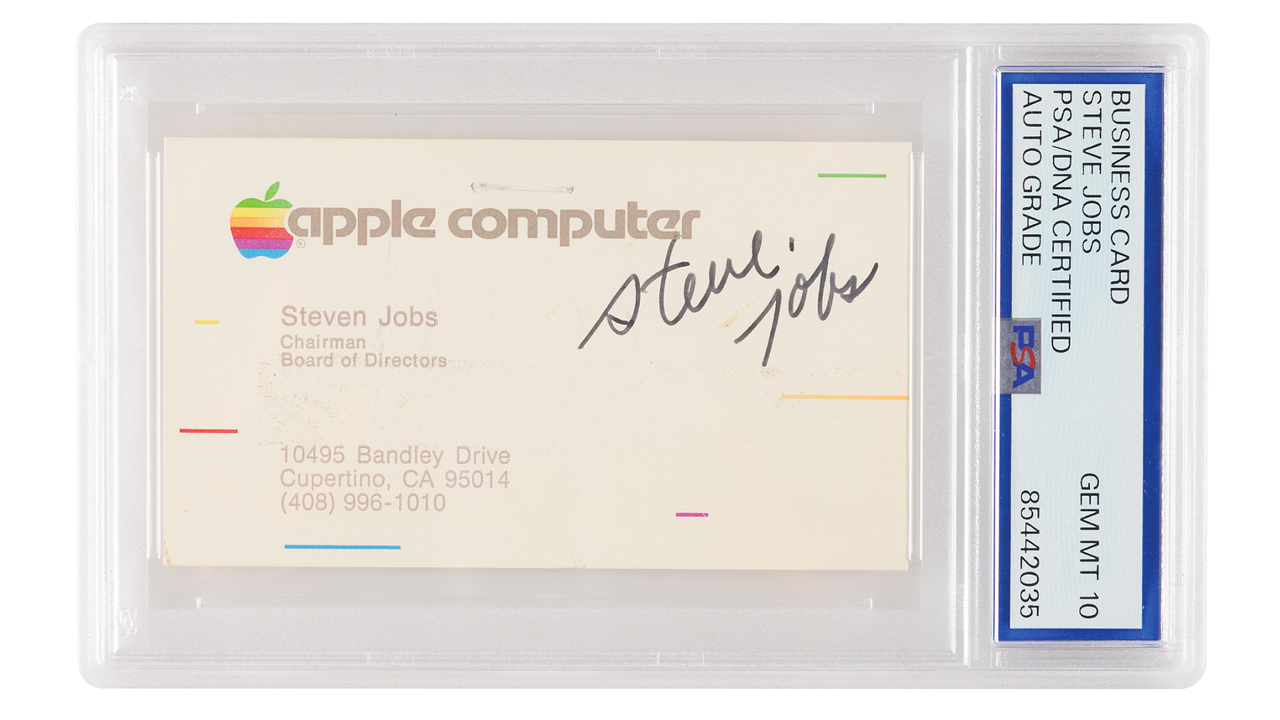
Tech enthusiasts are a passionate bunch, and the rich ones among them are willing to put their money where their mouth is. This is exactly what we see with a signed Steve Jobs business card from 1983, which is posted on RR Auction and is going for $70,741 at the time of writing. What made this relic special is that Job’s business cards from 1983 are a rare commodity and remain in high demand from collectors. It also received a Gem Mint 10 grade — the highest possible rating from PSA/DNA and is certified to be authentic.
RR AuctionRR Auction
RR Auction says that it has auctioned off 15 Steve Jobs business cards in its history, but only four of those come from 1983. This is also only the second one to bear the signature of Apple’s founder, which was put on the auction block in 2024 and fetched an eye-watering $180,000. The card on auction right now isn’t exactly perfect, with the website describing it as “In fine condition, with light soiling and staple holes to the upper section, none of which affect the bold signature.” Still, there’s at least 16 bids on the item, and the next bid is currently listed at $77, 816.
This isn’t the first time that an item related to an iconic founder has fetched thousands of dollars on the auction block. Just last month, Sotheby’s estimated that Nvidia CEO Jensen Huang’s iconic Tom Ford leather jacket, which costs $9,000 if you buy it new, would get up to $60,000. However, when the hammer finally closed the auction, the winning bid hit $960,000, which, we believe, is driven by Jensanity.
Unfortunately, if you’re not into the personal effects of CEOs and want something more substantial, you’ll probably have to fork out a lot more money. One example we have is the Apple-1 ‘Prototype Board #0,’ which sold for $2,750,000. Aside from costing a lot of money, these are rare finds, and you’ll have to wait years, if not decades, to get a chance at owning something so exceptional. But if you have a hole burning in your pocket and want to start a tech-related collection, but find the Steve Jobs business card a bit above your budget, an unreleased batch of 97 Duck Hunt and Super Mario Bros. NES cartridges has recently been discovered at a retro shop, most of which are graded 9.6 or higher by PSA. Three examples are about to enter auction on August 12, and they’re estimated to start at four figures, which might make it more “attainable” to fledgling collections.
In an era where technological advancements are reshaping industries across the board, healthcare is no exception. One of the transformative technologies making waves in the healthcare sector is electronic faxing or e-faxing. E-faxing has emerged as a game-changer, streamlining communication, enhancing data security, and improving overall efficiency in the healthcare ecosystem.
The Evolution of Fax in Healthcare
Traditional fax machines have been a fixture in healthcare settings for decades. However, their use has posed various challenges, including the need for physical documents, paper jams, busy signals, and the inconvenience of maintaining multiple fax lines. Moreover, traditional faxing is susceptible to security breaches, as printed documents can be misplaced or accessed by unauthorized individuals.
Today, healthcare e-faxing addresses these challenges by digitizing the entire faxing process. It allows healthcare professionals to send and receive faxes electronically, eliminating the need for physical documents and providing a secure, efficient, and cost-effective solution.
Key Benefits of E-Faxing in Healthcare
There are numerous benefits associated with using e-faxing for any healthcare business. Some of those include the following.
Enhanced Security: E-faxing platforms are equipped with robust security measures, including encryption, access controls, and audit trails. This significantly reduces the risk of data breaches, ensuring that sensitive patient information remains confidential and compliant with healthcare regulations like HIPAA.
Improved Efficiency: E-faxing streamlines the transmission of medical records, prescriptions, referrals, and other documents between healthcare providers, pharmacies, insurers, and patients. This not only reduces the time and effort required for administrative tasks but also enhances the speed of healthcare delivery.
Cost Savings: E-faxing eliminates the need for physical fax machines, dedicated phone lines, paper, and ink. It also reduces labor costs associated with manual faxing processes. Healthcare organizations can realize significant cost savings by adopting e-faxing solutions.
Accessibility: E-faxed documents can be accessed from anywhere with an internet connection. This flexibility allows healthcare professionals to securely send and receive documents while working remotely or on the go, improving accessibility and convenience.
Digital Documentation: E-faxing promotes the creation of digital documents, which are easier to manage, organize, and store. Digital records also facilitate seamless integration with Electronic Health Record (EHR) systems, contributing to a more comprehensive and efficient patient record-keeping process.
Faster Communication: Traditional fax machines often face delays due to busy lines or paper-related issues. E-faxing platforms offer real-time transmission, ensuring that critical medical information reaches its destination promptly.
Environmentally Friendly: E-faxing reduces the consumption of paper and other resources associated with traditional faxing. This eco-friendly approach aligns with the growing sustainability efforts in the healthcare industry.
Patient Engagement: E-faxing enables healthcare providers to easily share test results, treatment plans, and educational materials with patients electronically. Patients can access their health information conveniently, fostering greater engagement and understanding of their care.
Streamlined Workflows: E-faxing integrates seamlessly with existing healthcare workflows. It simplifies tasks such as prescription renewal requests, referral coordination, and insurance claims processing, leading to more efficient healthcare operations.
Scalability: E-faxing solutions can scale to meet the evolving needs of healthcare organizations, accommodating growing patient volumes and expanding networks of providers and facilities.
Challenges and Considerations
While e-faxing offers numerous benefits, healthcare organizations should be mindful of certain challenges and considerations.
Data Security: E-faxing platforms must adhere to strict data security standards. Ensuring compliance with regulations like HIPAA is essential to protect patient privacy.
User Training: Healthcare professionals and staff may require training to effectively use e-faxing software and understand security protocols.
Interoperability: E-faxing solutions should be compatible with other healthcare systems and technologies, including EHRs, to facilitate data exchange.
Integration: Integration with existing workflows and systems should be seamless to minimize disruption.
Vendor Selection: Choosing a reputable e-faxing service provider is crucial to ensure reliability, security, and support.
E-faxing is revolutionizing healthcare by addressing longstanding challenges associated with traditional faxing methods. As healthcare organizations increasingly embrace digital transformation, e-faxing has emerged as a vital tool in the quest to provide high-quality, secure, and efficient patient care.
In a brand new twist on the franchise, 12 all-star survivalists are dropped into the ocean in the dead of night and left to fend for themselves on a remote Philippine island — all while completely starkers. Read on for how to watch Naked and Afraid: Shipwrecked onlinefrom anywhere with a VPN — a potentially for FREE.
Initially told they are on their way to a standard Naked & Afraid group challenge, the survivalists are instead left to grab what they can before being set adrift off a remote island in the pitch black night. After making it ashore, the contestants are divided into four groups and left to survive on the island in an area dubbed “Southeast Asia’s Bermuda Triangle.”
The jungle offers the most fruitful bounty, including essential equipment left behind from those who have come before, but it’s also high risk, with unforgiving terrain and deadly wildlife. The shark-infested ocean doesn't offer much more solace, as alongside the toothsome terrors, there’s also stingrays, sea snakes and box jellyfish to contend with.
With no food, fresh water or clothing, the teams must quickly form a plan, and work together, relying on their skills as a unit, not as individuals. Whatsmore, with each team only receiving one piece of the challenge map, they must track down the others in order to combine intelligence and secure rescue by Day 35.
Shipwrecked sounds like a thrilling take on the franchise, combining the classic N&A survivalist ethos with the desert island drama of the likes of Castway and Lost. Find out how to watch Naked and Afraid: Shipwrecked online and from anywhere.
Can I watch Naked and Afraid: Shipwrecked for free?
Naked and Afraid: Shipwrecked isn't streaming on any free services, however viewers in the UK and Canada could potentially make use of Discovery Plus' 7-day FREE trial.
Use a VPN to access you usual streaming services from abroad – more details below.
How to watch Naked and Afraid: Shipwrecked from abroad
For those away from home looking to watch Naked and Afraid: Shipwrecked, you’ll be unable to watch the show as normal if you're outside the US due to regional restrictions. Luckily, there’s an easy solution.
Downloading a VPN allows you to stream geo-blocked services online, no matter where you are. It's a simple bit of software that changes your IP address, meaning that you can access on-demand content or live TV just as if you were at home. Our favorite is NordVPN – it's one of the best VPNs on the market.
Use a VPN to watch Naked and Afraid: Shipwrecked from anywhere:
Not having a VPN is like leaving your front door wide open in a busy city — anyone can walk right in and take a peek.
TechRadar regularly reviews all the biggest and best VPN providers and NordVPN is our #1 choice.
✅ 70% Off Today ✅ 3 Months Extra Free ✅ Unlocks HBO Max
Get NordVPN and stream Naked and Afraid: Shipwrecked.VIEW DEAL ON
How to watch Naked and Afraid: Shipwrecked in the US
Naked and Afraid: Shipwrecked premieres in the US on Discovery at 8pm ET / PT on Sunday, August 2. New episodes will go out in the same slot weekly.
Cord cutters can access Discovery via an OTT service such Sling TV or YouTube TV.
Episodes will also be available to stream every Monday, on HBO Max, with subscriptions starting from $10.99 a month.
Have one of these subscriptions but away when Naked and Afraid is on? You can still access your usual streaming services from anywhere by using a VPN.
How to watch Naked and Afraid: Shipwrecked in Canada
New episodes from Naked and Afraid: Shipwrecked stream on Discovery Plus in Canada, dropping every Monday.
Discover Plus costs CA$5.99 per month for Canadian subscribers.
US viewer in Canada? If you’re away from home, you can access your usual services easily with NordVPN.
Can I watch Naked and Afraid: Shipwrecked online in Australia?
New episodes of Naked and Afraid usually stream via Foxtel Now in Australia, however there's no set release date for the Shipwrecked spin-off.
When it does arrive, you'll also likely find episodes over on HBO Max.
US viewer travelling Down Under? Try using a VPN to access your usual stream – we recommend NordVPN.
Can I watch Naked and Afraid: Shipwrecked online in the UK?
Like all other iterations of the franchise, Naked and Afraid: Shipwrecked will stream on Discovery Plus in the UK, however a firm release date is TBC.
Brits can subscribe to Discovery Plus from £3.99, although many Sky users can access the service for free as part of their package.
Brit abroad? You can still watch the show as you usually would by using a VPN.
What you need to know about Naked and Afraid: Shipwrecked
What is the Naked and Afraid: Shipwrecked release date?
Naked and Afraid: Shipwrecked premieres on Sunday, August 2 in the US, with episodes streaming in the US and Canada the following day. UK and Australia release dates are TBC.
Naked and Afraid: Shipwrecked episode schedule
Seasons of Naked and Afraid usually last around 8-10 episodes, meaning Shipwrecked would go out on the following schedule:
Episode 1: Sunday, August 2
Episode 2: Sunday, August 9
Episode 3: Sunday, August 16
Episode 4: Sunday, August 23
Episode 5: Sunday, August 30
Episode 6: Sunday, September 6
Episode 7: Sunday, September 13
Episode 8: Sunday, September 20
Episode 9: Sunday, September 27
Episode 10: Sunday, October 4
Naked and Afraid: Shipwrecked all-star cast
Adam Kavanaugh – 61 Days Survived
Ally Frueh – 21 Days Survived
Ana Lis Pitter – 21 Days Survived
Dani Beauchemin – 114 Days Survived
Darrin Reay – 115 Days Survived
Jamie Frizzell – 55 Days Survived
Jarrell Banks – 21 Days Survived
Jonny Yates – 21 Days Survived
Malu Beyonce – 17 Days Survived
Mandy Bublitz – 35 Days Survived
Patrick French – 110 Days Survived
Shawn Bretschneider – 21 Days Survived
We test and review VPN services in the context of legal recreational uses. For example:1. Accessing a service from another country (subject to the terms and conditions of that service).2. Protecting your online security and strengthening your online privacy when abroad.We do not support or condone the illegal or malicious use of VPN services. Consuming pirated content that is paid-for is neither endorsed nor approved by Future Publishing.
Discover the cosmos! Each day a different image or photograph of our fascinating universe is featured, along with a brief explanation written by a professional astronomer.
Discover the cosmos! Each day a different image or photograph of our fascinating universe is featured, along with a brief explanation written by a professional astronomer.
The Moon is still in its waning gibbous phase following the Full Moon. Here's what you can see on its surface tonight.
What is today’s Moon phase?
As of Sunday, Aug. 2, NASA's Daily Moon Guide tracker tells us the Moon phase is in Waning Gibbous phase, with 87% of its surface visible.
You don't need to have lots of visual equipment to see features on the Moon's surface. In fact, with just your naked eye you can spot the Oceanus Procellarum, Kepler Crater, and Mare Vaporum tonight. However, visual aids do make the experience more advanced, so if you have a pair of binoculars, this will help you see the Alphonsus Crater, Mare Humorum, and the Mare Frigoris. Pull out your telescope (if you have one) to see see all clearer, plus the Apollo 15 landing spot, the Rima Ariadaeus, and the Schiller Crater.
When is the next Full Moon?
The next Full Moon will take place on August 28.
What are Moon phases?
According to NASA, the Moon goes through a complete cycle of eight phases roughly every 29.5 days. As it travels around Earth, the angle between the Sun, Earth and Moon constantly changes, meaning we see different amounts of the Moon's sunlit side. This is what causes the familiar progression from a thin crescent to a half Moon, then a Full Moon, before the cycle repeats.
The eight phases are:
New Moon - The Moon is between Earth and the sun, so the side we see is dark (in other words, it's invisible to the eye).
Waxing Crescent - A small sliver of light appears on the right side (Northern Hemisphere).
First Quarter - Half of the Moon is lit on the right side. It looks like a half-Moon.
Waxing Gibbous - More than half is lit up, but it’s not quite full yet.
Full Moon - The whole face of the Moon is illuminated and fully visible.
Waning Gibbous - The Moon starts losing light on the right side. (Northern Hemisphere)
Third Quarter (or Last Quarter) - Another half-Moon, but now the left side is lit.
Waning Crescent - A thin sliver of light remains on the left side before going dark again.
The NYT Connections puzzle today is not too difficult if you're a frequent flyer.
Connections is the one of the most popular New York Times word games that's captured the public's attention. The game is all about finding the "common threads between words." And just like Wordle, Connections resets after midnight and each new set of words gets trickier and trickier—so we've served up some hints and tips to get you over the hurdle.
If you just want to be told today's puzzle, you can jump to the end of this article for today's Connections solution. But if you'd rather solve it yourself, keep reading for some clues, tips, and strategies to assist you.
The NYT's latest daily word game has become a social media hit. The Times credits associate puzzle editor Wyna Liu with helping to create the new word game and bringing it to the publications' Games section. Connections can be played on both web browsers and mobile devices and require players to group four words that share something in common.
Each puzzle features 16 words and each grouping of words is split into four categories. These sets could comprise of anything from book titles, software, country names, etc. Even though multiple words will seem like they fit together, there's only one correct answer.
If a player gets all four words in a set correct, those words are removed from the board. Guess wrong and it counts as a mistake—players get up to four mistakes until the game ends.
Players can also rearrange and shuffle the board to make spotting connections easier. Additionally, each group is color-coded with yellow being the easiest, followed by green, blue, and purple. Like Wordle, you can share the results with your friends on social media.

 Login
Login