Your beloved PCs deserve a regular clean as part of their maintenance schedule. If you miss a seasonal clean or two it is easy for dust to build up and transform from a slight blemish on the system's appearance to something that actually hinders cooling and performance. For all your dusty electronics cleaning tasks, a capable air duster can save the day, and we've spotted a limited-time deal on the powerful Wolfbox MF60 Compressed Air Duster. It is at one of its best prices ever, reduced by 39% from $49.99 to $30.39, for a limited time on Amazon.
No matter how clean you keep your home, electrical equipment always attracts dust. With PC airflow cases pulling in air from outside to keep components cool, there's always a fresh intake of detritus every time it is used. Laptop fans can be an even worse dust magnet if they are regularly carried around in bags, rested on soft furnishings - an issue exacerbated by the small fans and vents on portables.
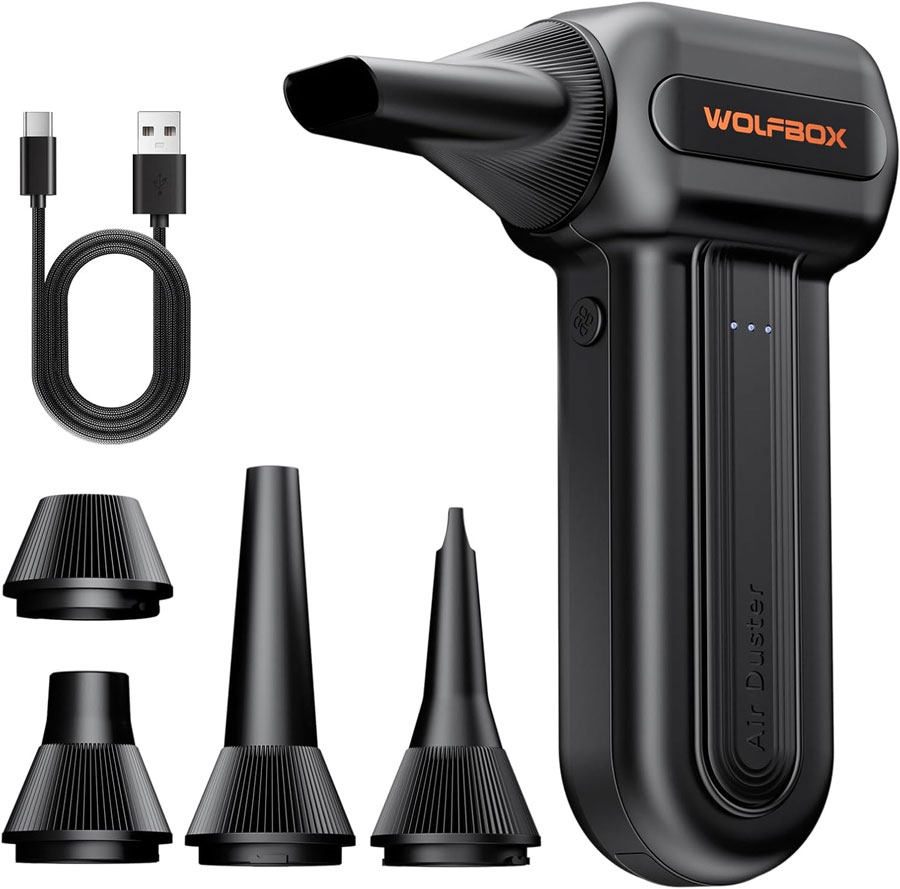
This is where a capable dust buster can be useful. It can make maintenance effortless and convenient. The Wolfbox MF60 Compressed Air Duster, for example, is a cordless rechargeable device weighing just half a pound. Users can select one of its three fan speeds, and its brushless motor will kick in to deliver up to 72.4 m/s wind speed using its 110,000 RPM fan.
All-time low price
The Wolfbox MF60 Compressed Air Duster is a cordless rechargeable device weighing just half a pound. It offers three fan speeds, and its brushless motor will kick in to deliver up to 72.4 m/s wind speed blasts using its 110,000 RPM fan setting. It can air dust for up to 240 minutes between charges.View Deal
For less strenuous dust busting work, or on more delicate items, users can dial in the fan at 25K RPM, or 60K RPM. On the lowest setting you'll get up to 240 minutes of air dusting from a single charge. Charging up from empty to full will take 3.5 hours. A USB charging cable is supplied in the box.
Another attraction of the Wolfbox MF60 Compressed Air Duster is the nozzle selection in the box. These include a flat nozzle for blowing dust off PC cases and desks, a long nozzle for deep cleaning computer keyboards and car vents, a round all-purpose nozzle, and there's a swim ring/air mattress nozzle for outdoor inflation and camping.
We've seen a keyboard with a built-in macro pad, and a keyboard with a touchscreen and a separate, add-on numberpad, but what if you want a keyboard with a numberpad and a built-in macropad without having to spend an extra $100?
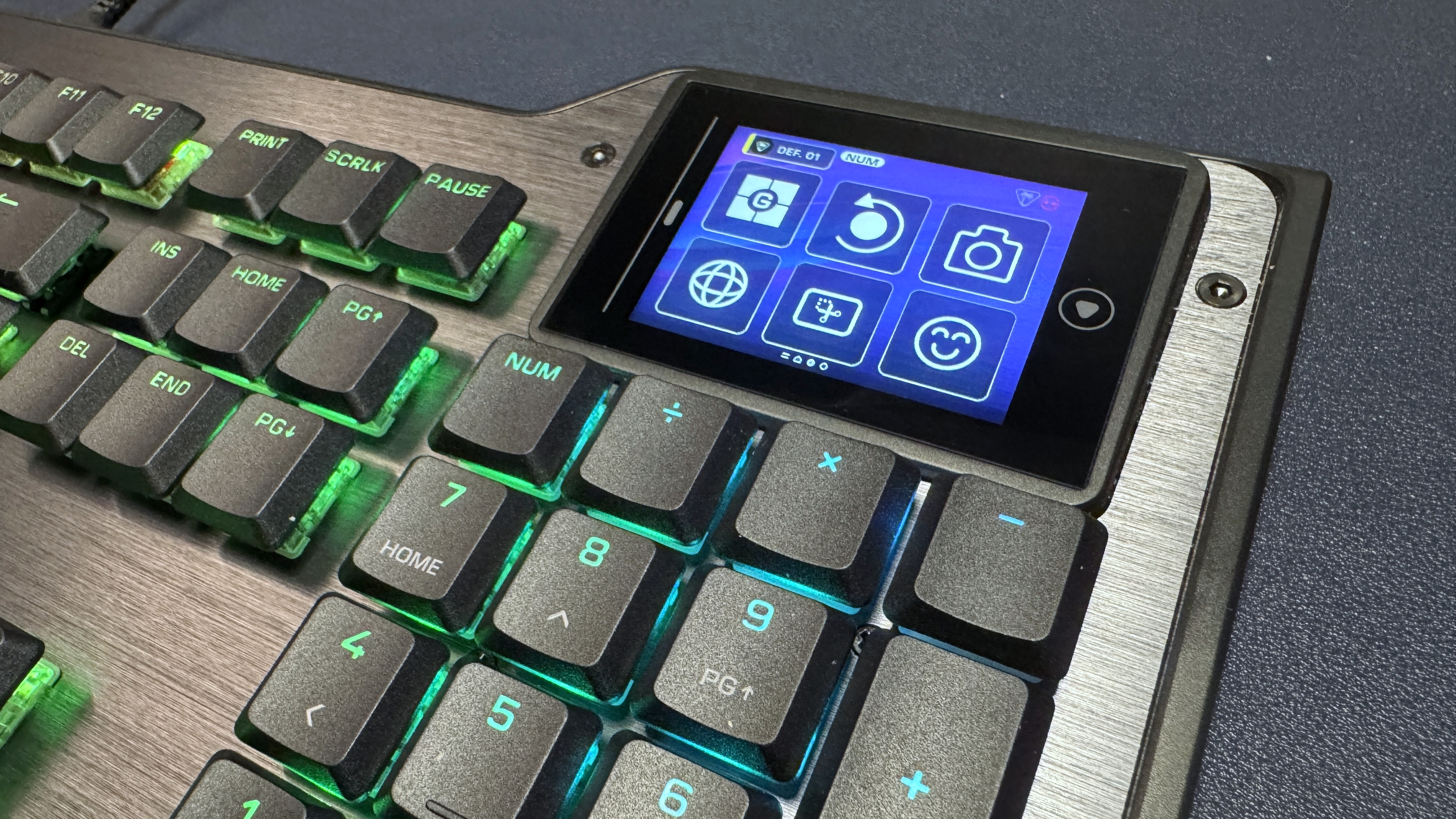
I guess that's why there's the Turtle Beach KB5 — a full-size, wired mechanical keyboard with low-profile switches, an 8,000 Hz polling rate, and a built-in 2.4-inch touchscreen that functions as a mini macro pad (with six buttons). It's got the built-in numberpad, unlike the Corsair Galleon 100 SD and the Turtle Beach KB7, as well as the touchscreen / macro pad, though its version is about half the size. Still, maybe that's all you really need. The KB5 is also significantly cheaper than both of those keyboards, which retail for $300 and $200, respectively.
The Turtle Beach KB5 is available now, in black, for $149.99.
Design and Construction of the KB5
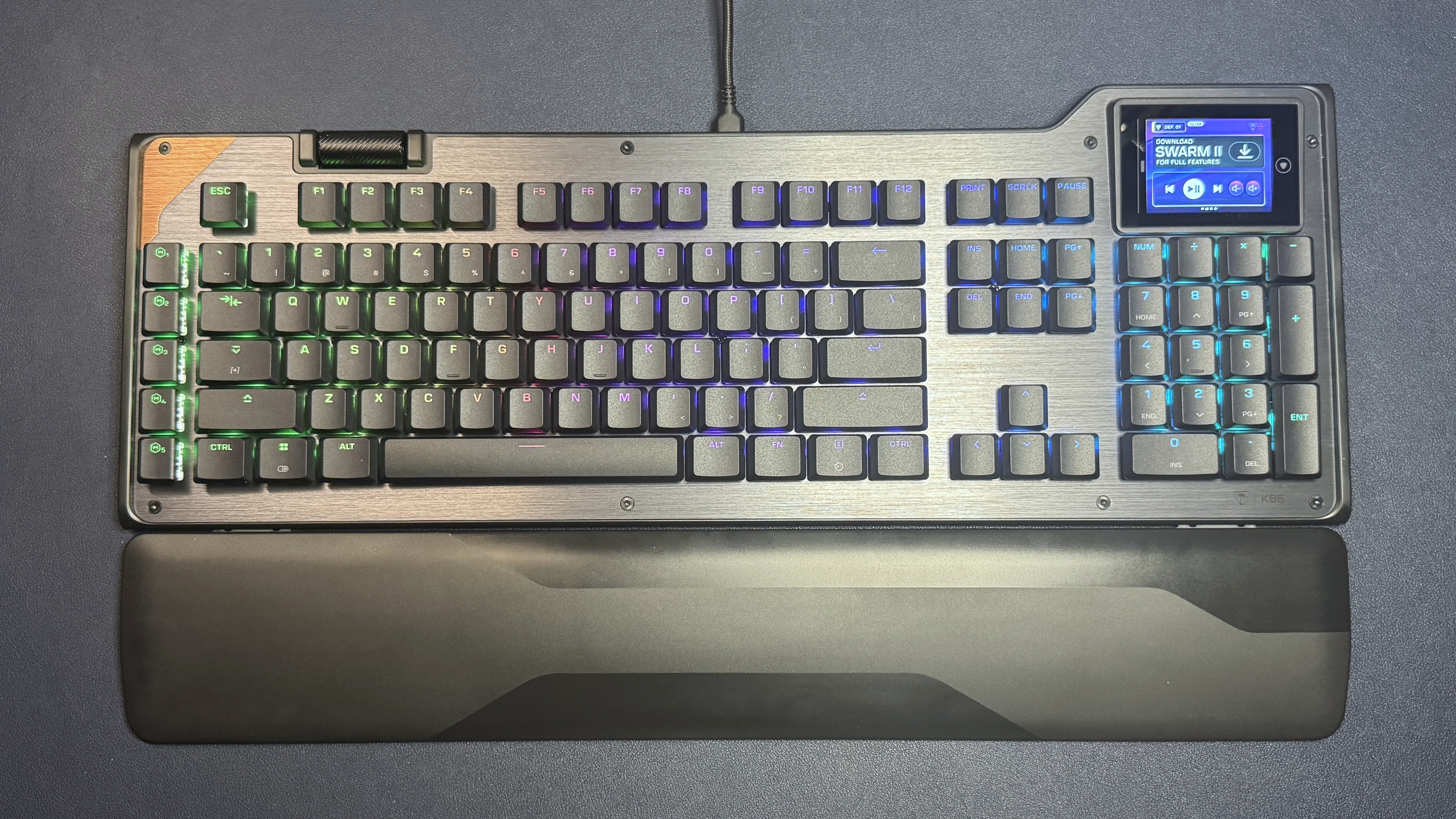
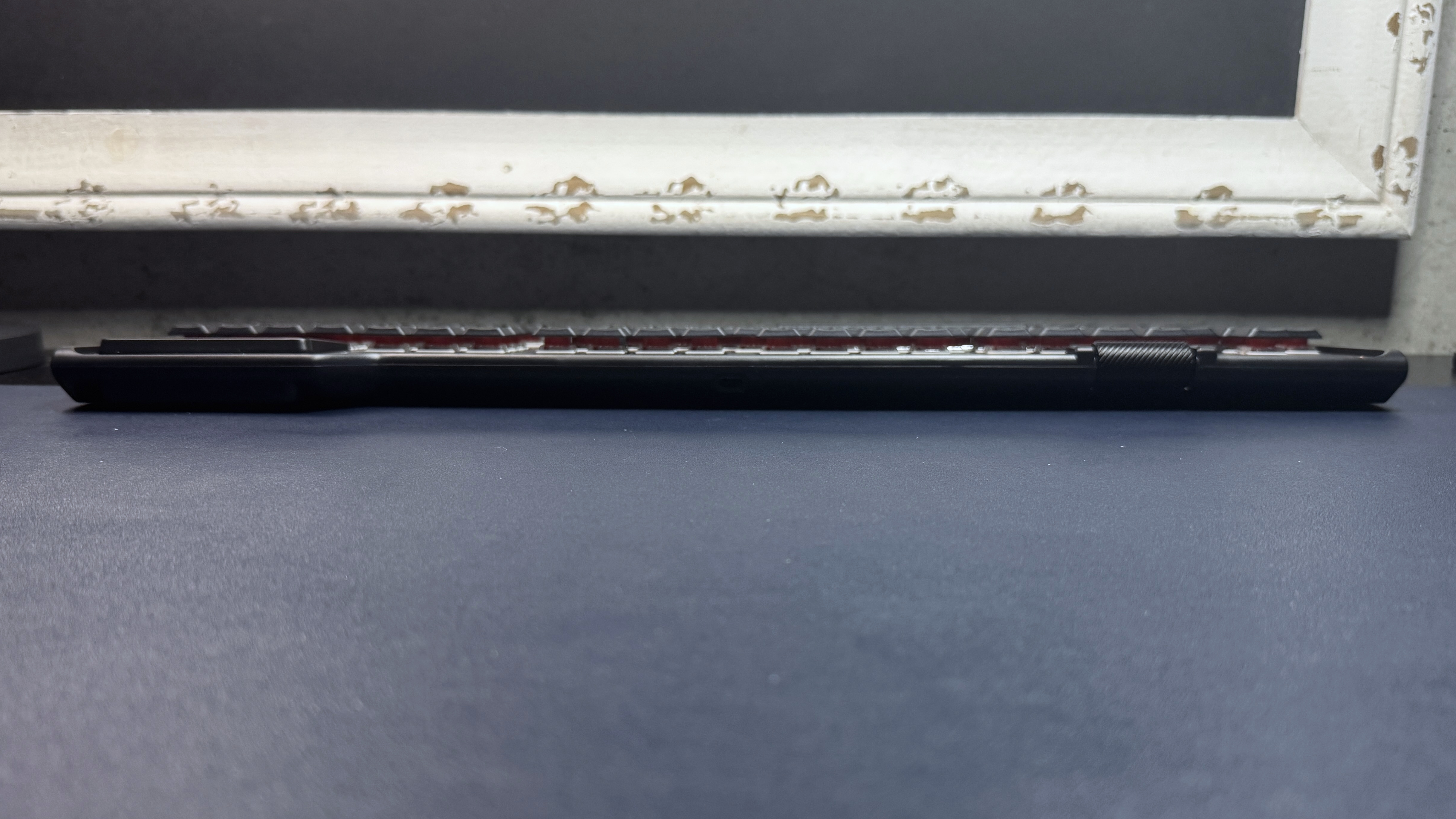
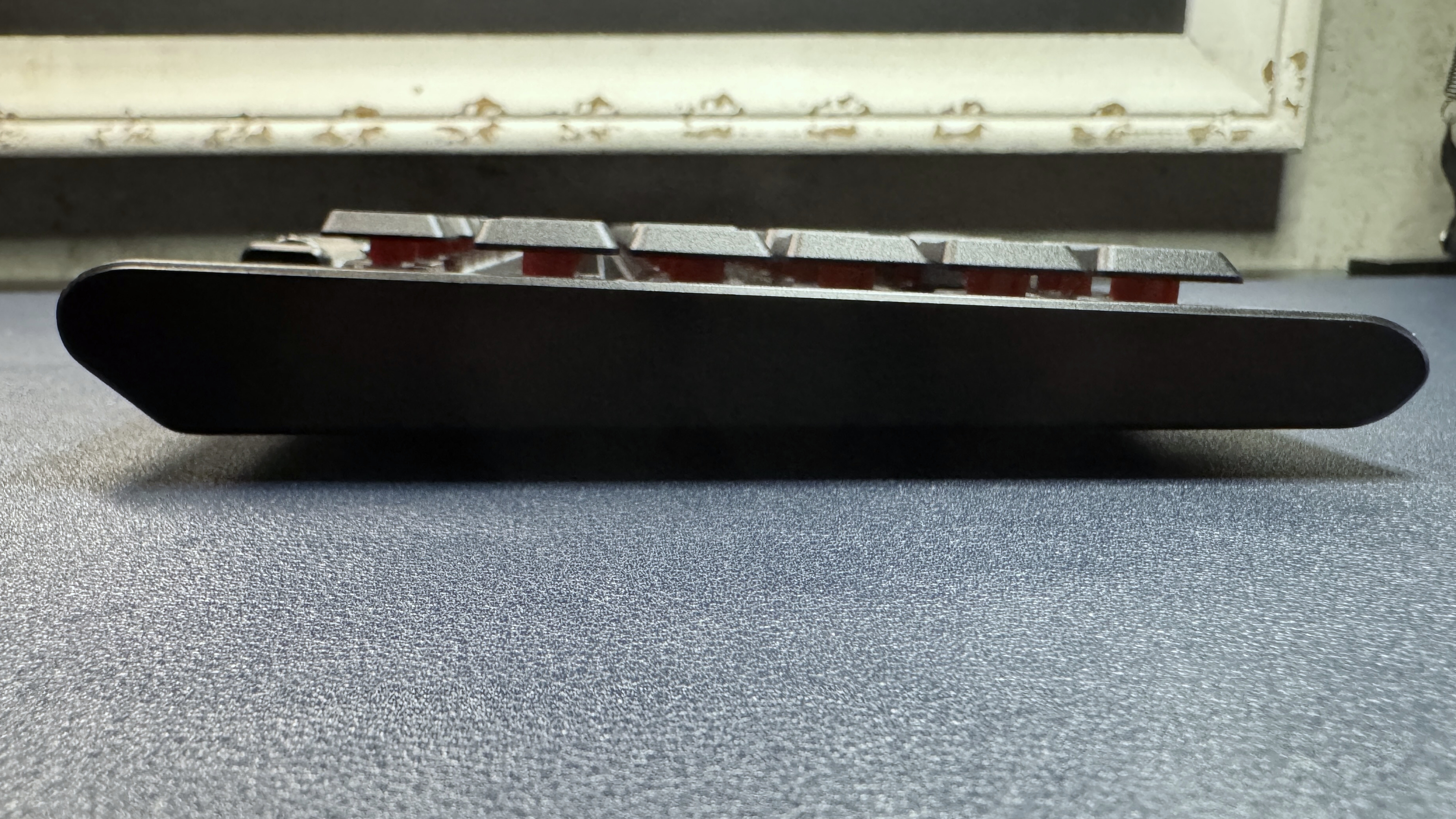
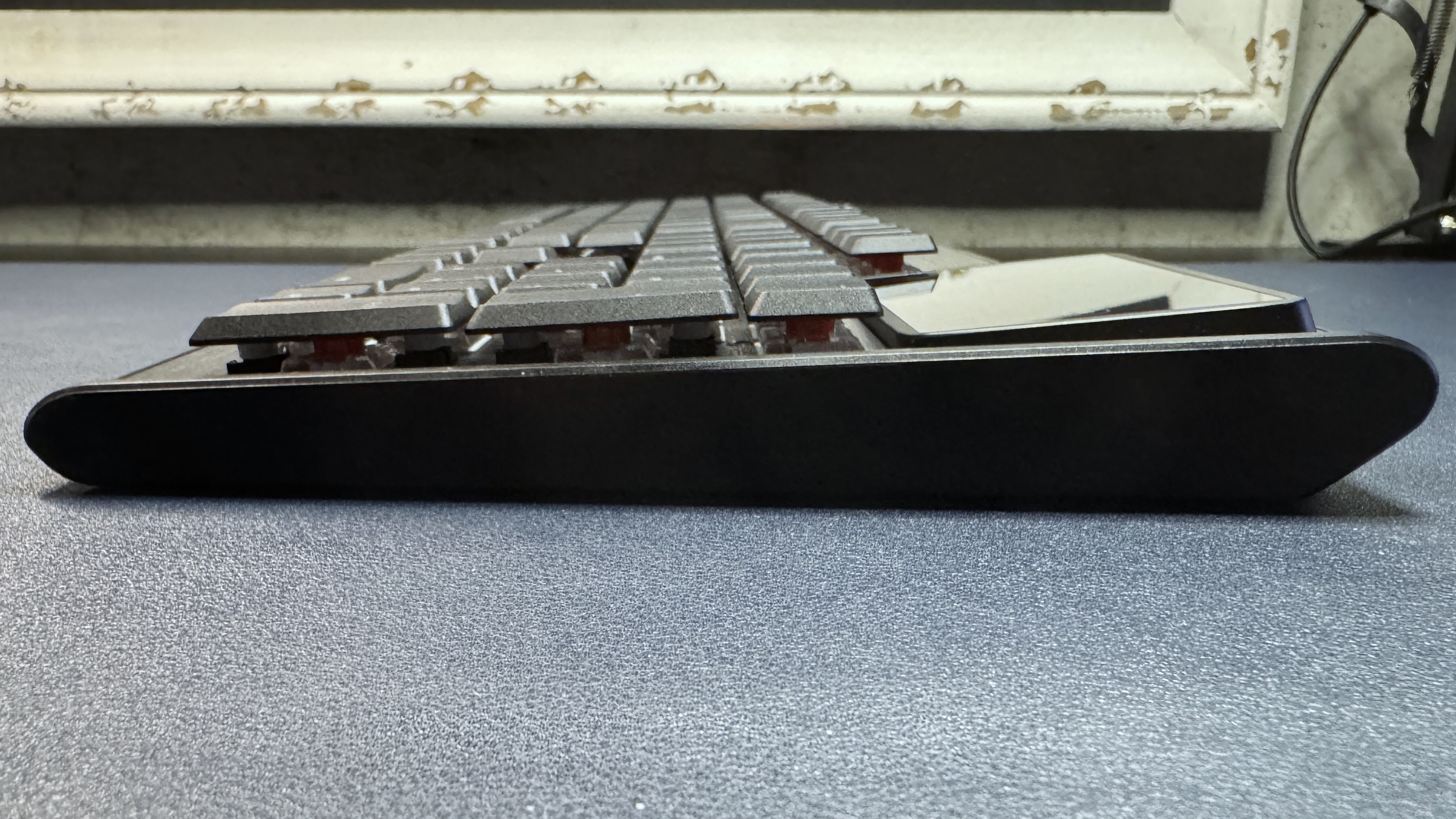
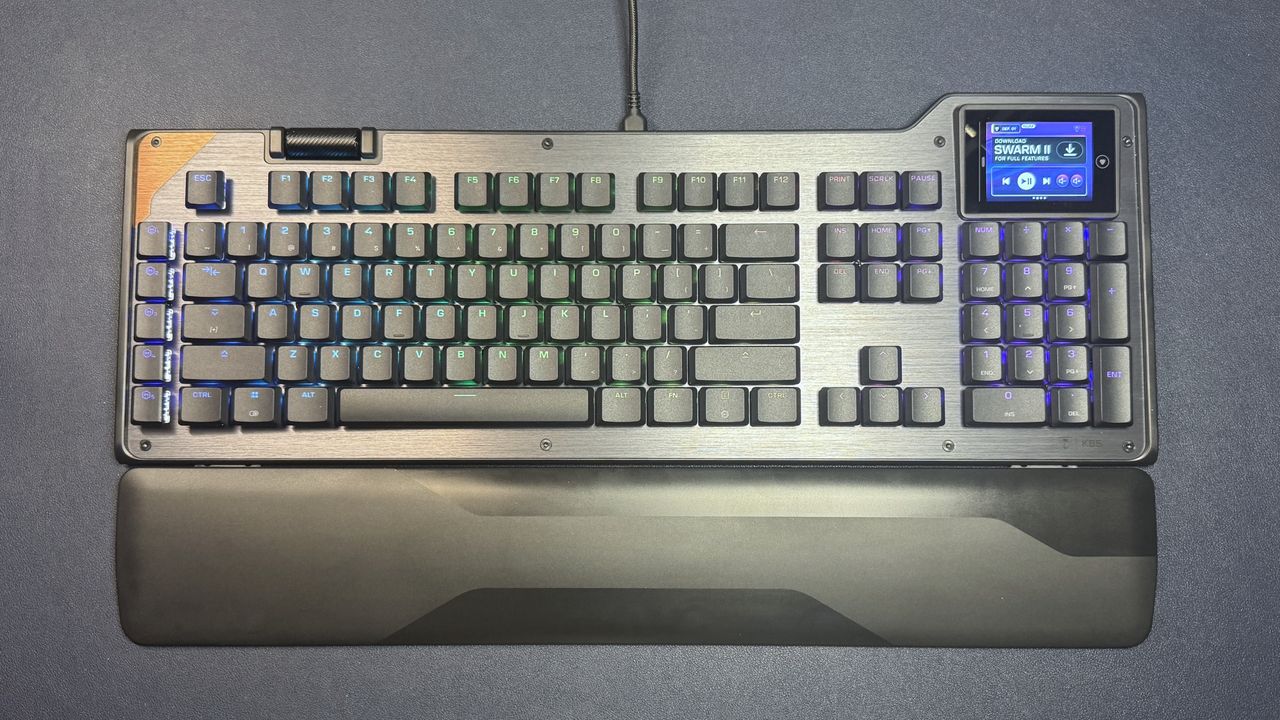
The KB5 is a full-size low-profile wired mechanical gaming keyboard with extra macro keys, a volume roller, and a full-color 2.4-inch touchscreen in the upper-right corner (above the 10-key numberpad). It has a roomy layout and is slightly larger than the average full-size keyboard, measuring approximately 18.78 inches (477 mm) wide by 6.89 inches (175 mm) deep. It's 1.06 inches (27mm) thick at its thickest point, including the keycaps.
(Image credit: Tom's Hardware)
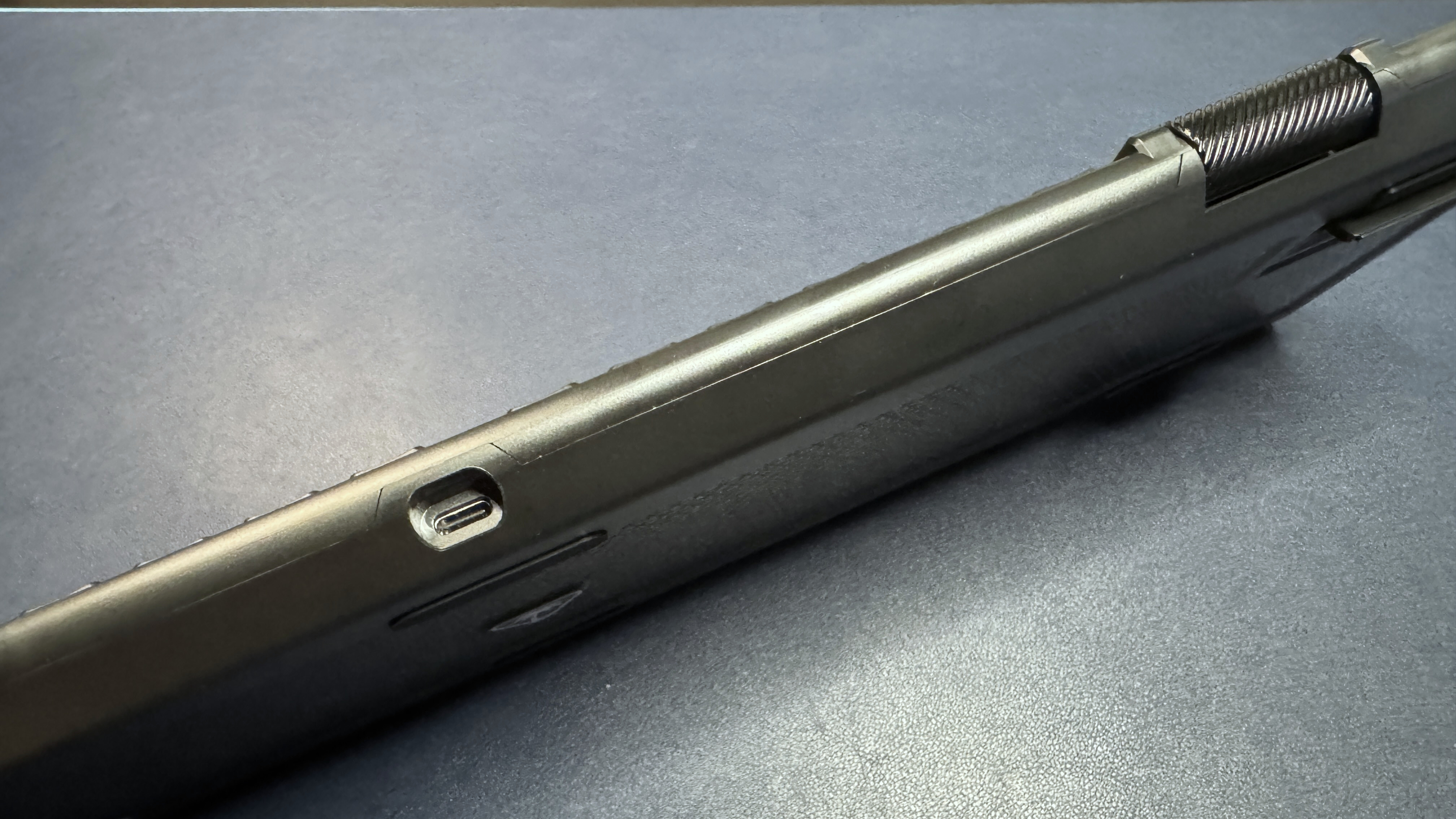
The KB5 has a silver brushed-aluminum top plate with a coppery accent in the upper-left corner. It has a sturdy metal roller bar on the top toward the left side — though it's not really close enough to the left side to be in the corner, and I found it a bit awkward to have to reach over my function row to use the roller. I would have preferred it in a corner or even on the side, like the volume roller on the NZXT Function 2. It's a nicely-built roller, however — thick, metal, clickable, and with etched diagonal lines for grip.
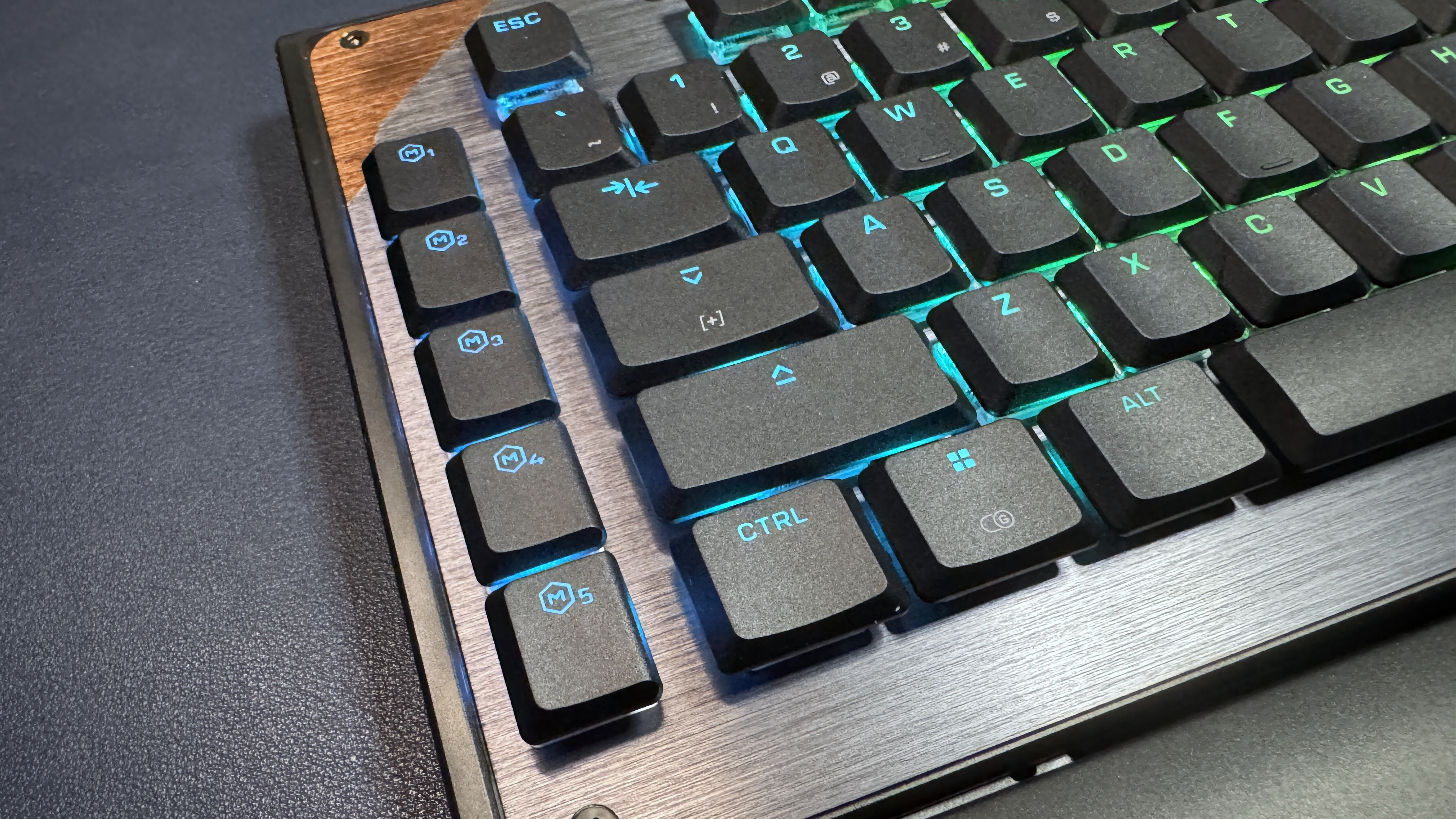
The keyboard also has a row of five macro keys on the left side, as well as a 2.5-inch color touchscreen in the upper-right corner, above the 10-key numberpad. The touchscreen bumps up past the rest of the keyboard — the touchscreen side is just under 7 inches deep, while the other side is about 6.25 inches deep — so it doesn't cut into your keys. The KB5 has a full function row, a full 3x2 navigation cluster, arrow keys, and a full 10-key numberpad, along with the standard alphanumeric keys.
Tom's HardwareTom's Hardware
The KB5 features Turtle Beach's (formerly Roccat's) signature aesthetic — an open board with flat, shallow keycaps that leave the switch exposed, which makes for both easy cleaning and brighter, more visible RGB lighting. The keycaps are low-profile double-shot PBT, with shine-through legends; the board comes with four textured keycaps that you can use to replace the W/A/S/D keys (or, I guess, any four keys) for better recognition.
Tom's HardwareTom's HardwareTom's Hardware
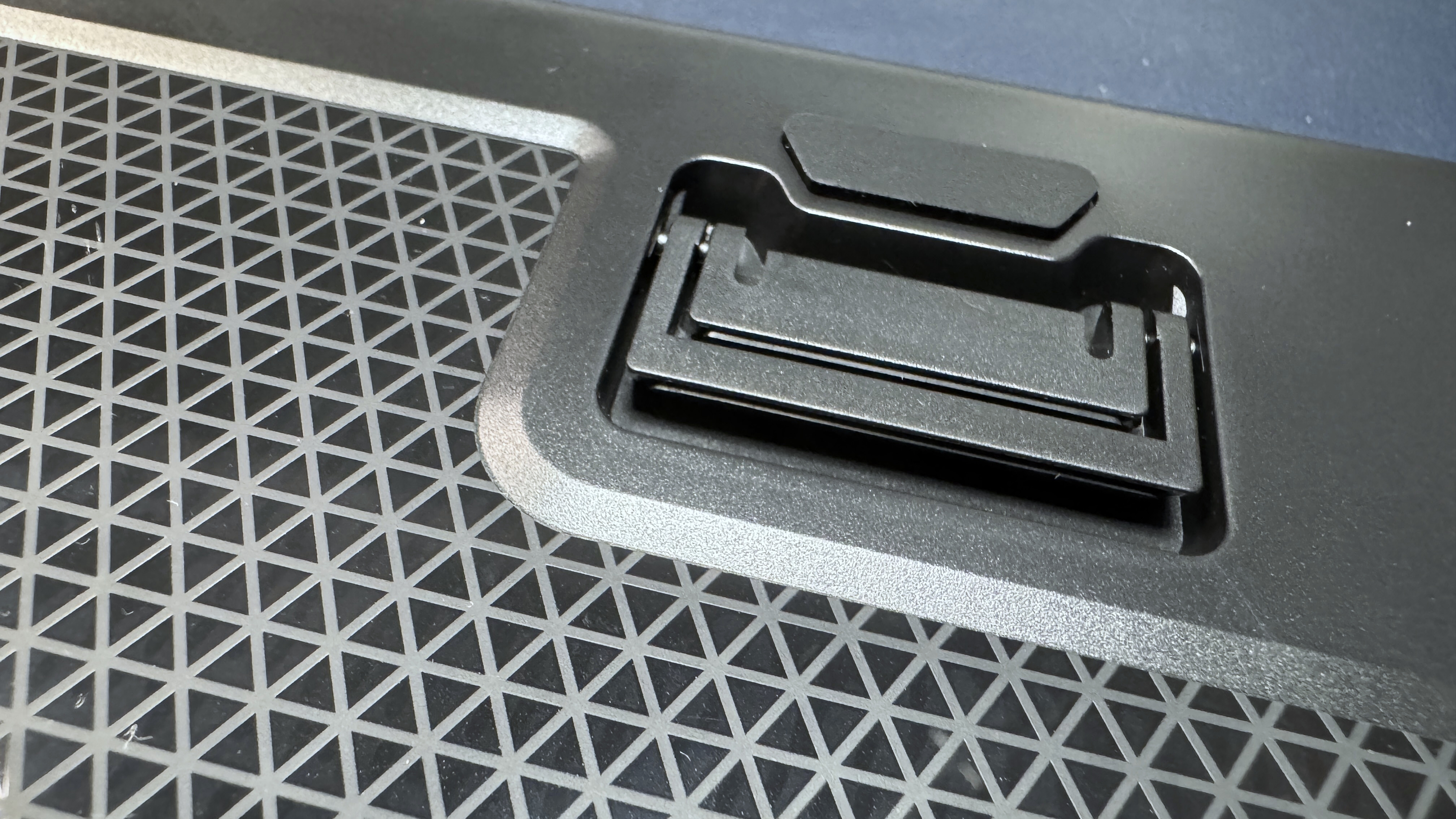
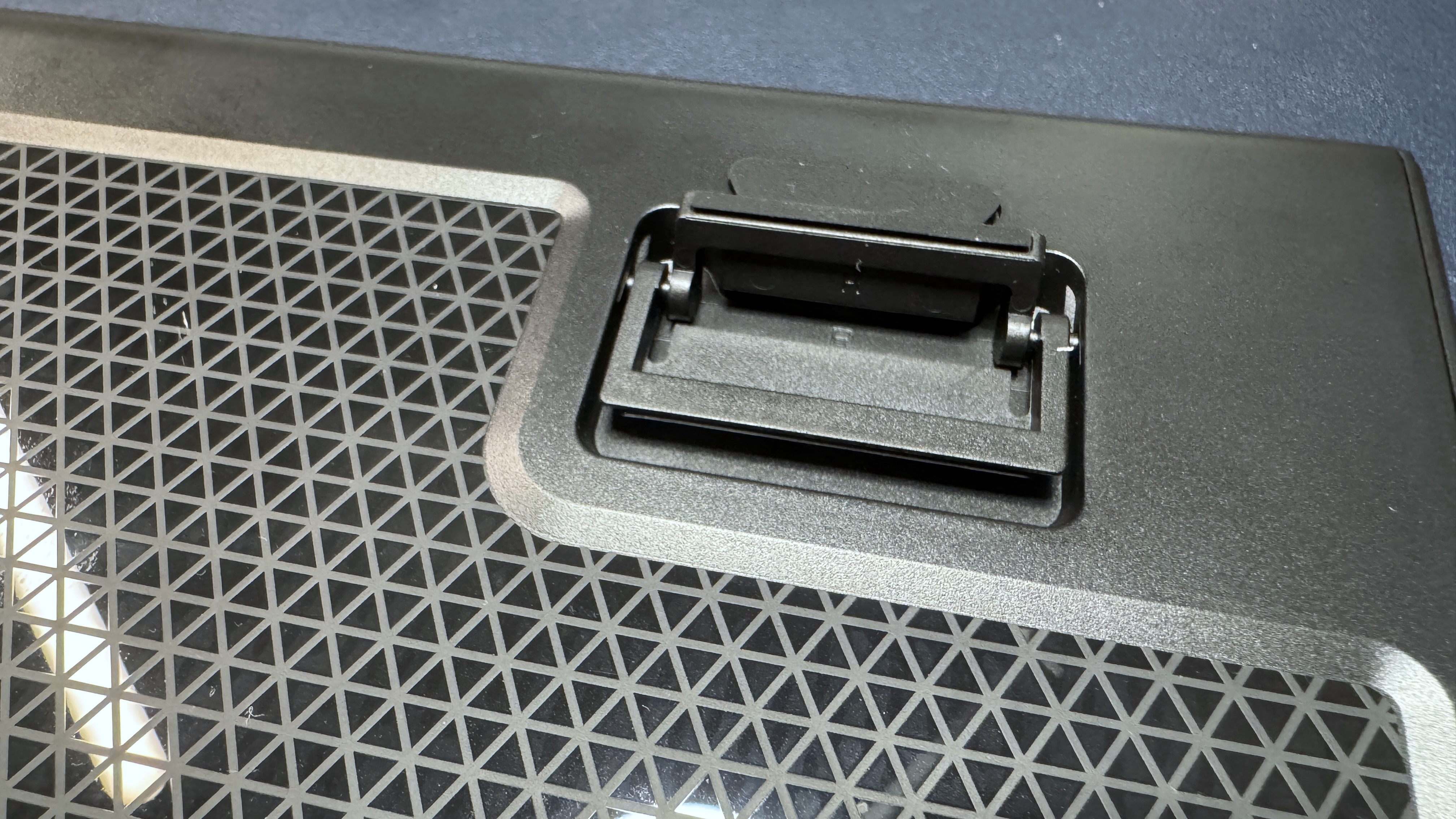
The bottom of the board is plastic, with six rubber anti-slip pads and two sets of plastic flip-out feet for angling the keyboard toward you. It's a fairly lightweight keyboard, weighing just under 2 pounds (1.96lbs / 887g), not including the wrist rest (which weighs an additional 7.5 ounces / 213g). This is about the same as the Logitech G515 Lightspeed, though the G515 is a TKL while the KB5 is full-size (plus a touchscreen and macro keys).
(Image credit: Tom's Hardware)
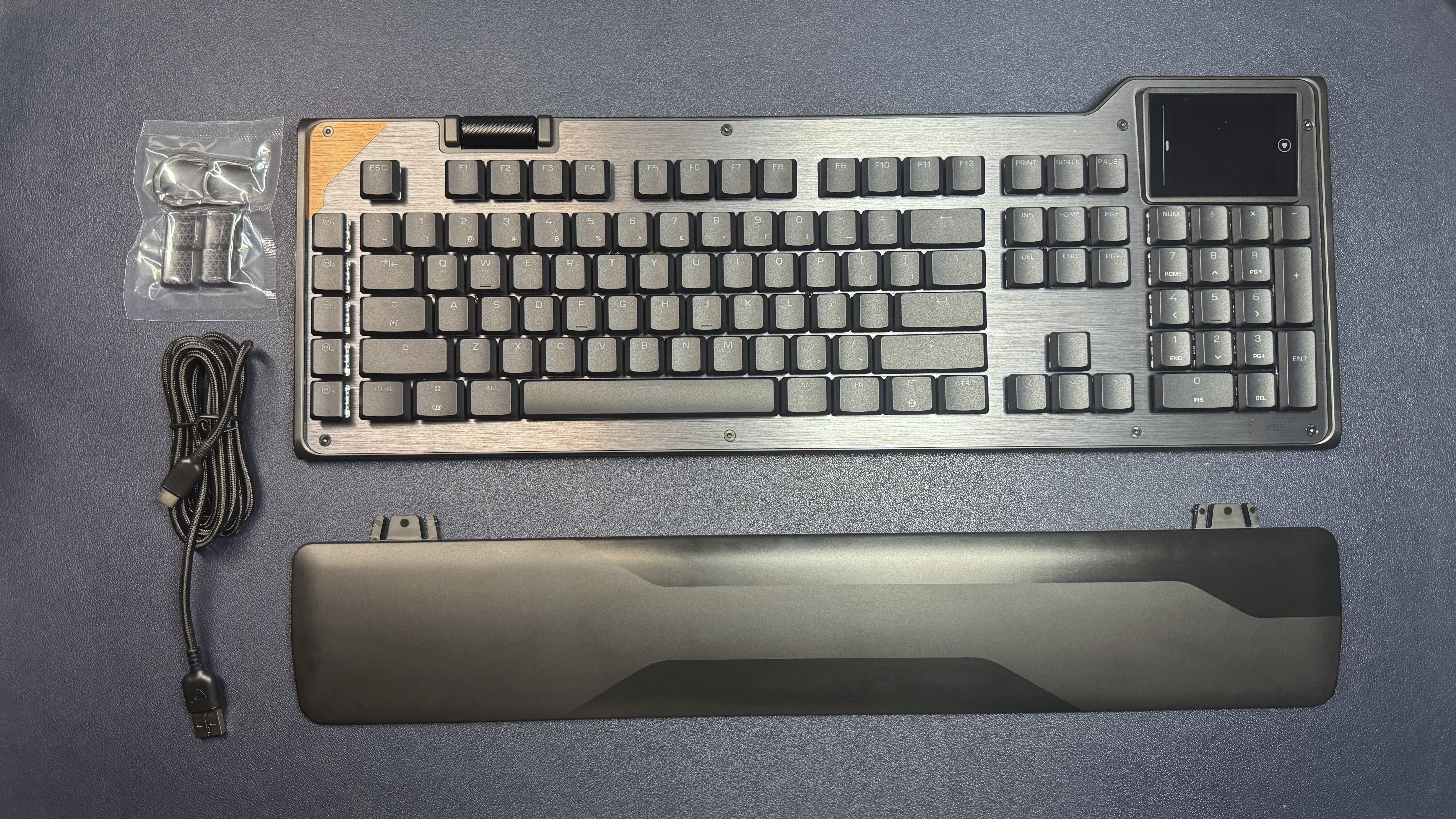
In the box, the KB5 comes with a plastic wrist rest, a 5.9-foot (1.8m) USB-C to USB-A cable, four textured keycaps for replacing the W / A / S / D keys, and a keycap puller.
Specs
Size
Full-size
Number of keys
109
Switches
Titan Low-Profile (linear)
Backlighting
Yes
Onboard Storage
Yes
Dedicated Media Keys
Yes (volume roller, touchscreen)
Game Mode
Yes
Additional Ports
0
Connectivity
Wired (USB-C)
Cable
5.9ft / 1.8m USB-C to USB-A
Keycaps
ABS
Construction
Plastic chassis Aluminum top plate
Software
Swarm II
Dimensions (LxWxH)
18.78 x 6.89 x 1.06 inches / 477 x 175 x 27 mm
Weight
1.94lbs / 880g
MSRP
$149.99
Release Date
May 2026
Typing and Gaming Experience on the KB5
The KB5 comes with Turtle Beach's Titan low-profile linear switches, which are rated for up to 50 million keypresses and have an actuation point of 1.2mm and a force of 42gf. These are traditional low-profile mechanical switches — not magnetic Hall Effect switches like you'll find on the KB7 (and KP7). They're linear, which means a smooth keypress with no audible or tactile bump, and they're pre-lubed so they're pretty smooth.
While I'm not a huge fan of linear switches, the KB5's are quick and stable, and you get a decent little 'thunk' when you bottom out on the keyboard's aluminum top plate. The typing experience is very similar to that of the KB7, which is to say that it's very pleasant for a mainstream gaming keyboard with low-profile linear switches.
The keyboard has flat, shallow keycaps made of double-shot PBT. They have a slightly matte texture and should resist shine better than ABS keycaps, but I'm not fully convinced that'll be the case (maybe they just feel cheaper because they're thinner, overall, than regular keycaps, though). The keycaps are wide, with slightly curved tops, and the keyboard is roomy — I didn't have any problem getting used to the layout for the most part, though the extra row of macro keys on the left did throw me off a few times (this happens whenever there's an extra row of macro keys).
Tom's HardwareTom's Hardware
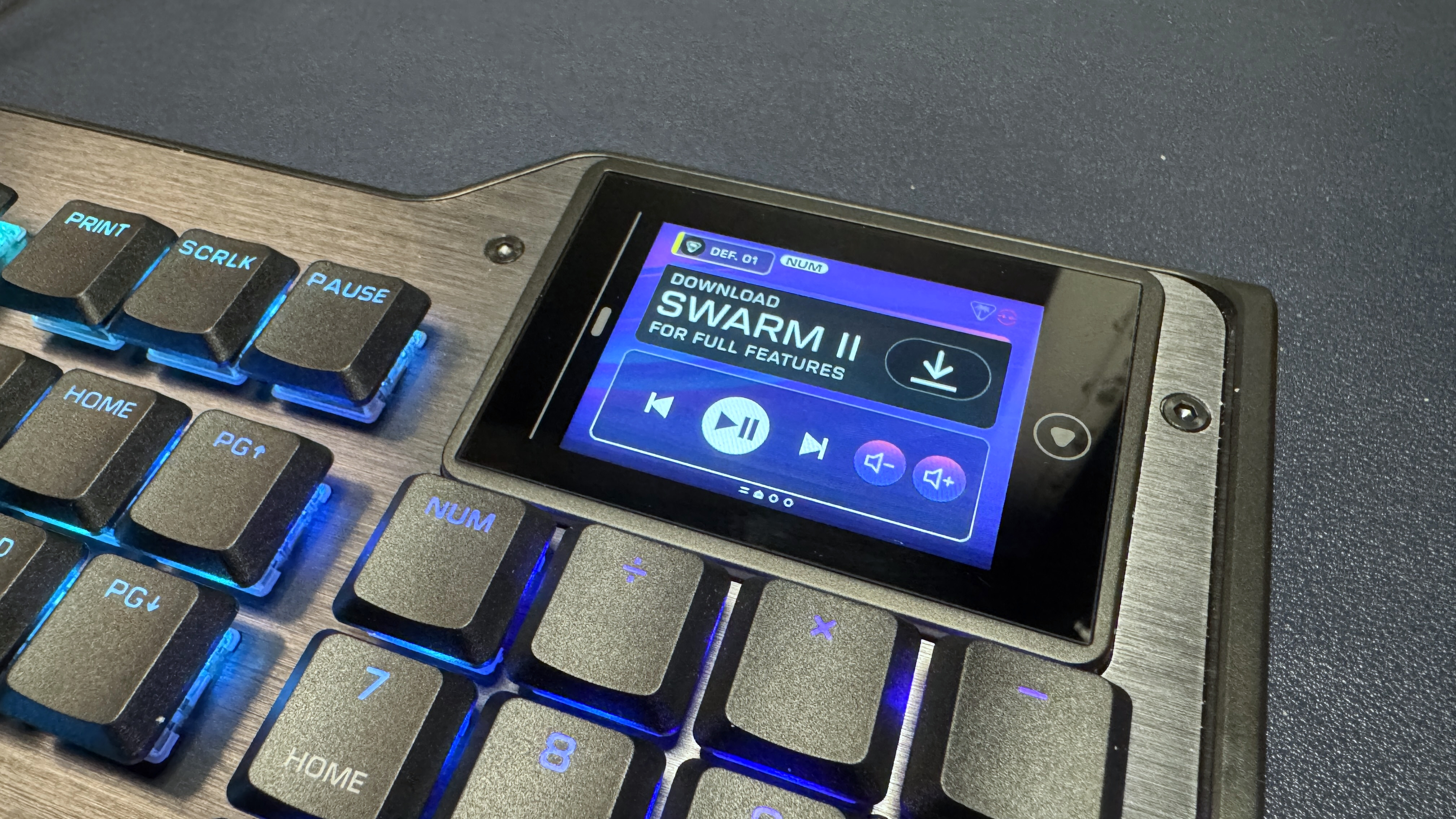
The touchscreen is located above the numberpad, and is fairly responsive. It responds to both taps and swipes (you can swipe through "pages" of controls / buttons), and I found the 2 x 3 layout a little more intuitive to navigate than the KB7's much larger layout — though still not as intuitive as it would be with tactile buttons, like the Corsair Galleon 100 SD has. In addition to the six customizable "buttons" on the touchscreen, there's also some other info displayed at the top — your current profile (you can switch between profiles by tapping this) and some keyboard info (e.g. numlock, caps lock, scroll lock).
The KB5 is also a solid keyboard for gaming, thanks to its quick, responsive linear switches and 8K polling rate. While it doesn't have magnetic switches like its pricier sibling, it does implement Turtle Beach's ReacTap, which is a software solution similar to simultaneous opposing cardinal directions (SOCD).
Features and Software of the KB5
Like all Turtle Beach products, the KB5 ships with firmware from 2001 (or at least it feels like it) and requires at least 16 mandatory updates before it can be used with the brand's Swarm II software. I'm exaggerating, of course — but not much.
Tom's HardwareTom's Hardware
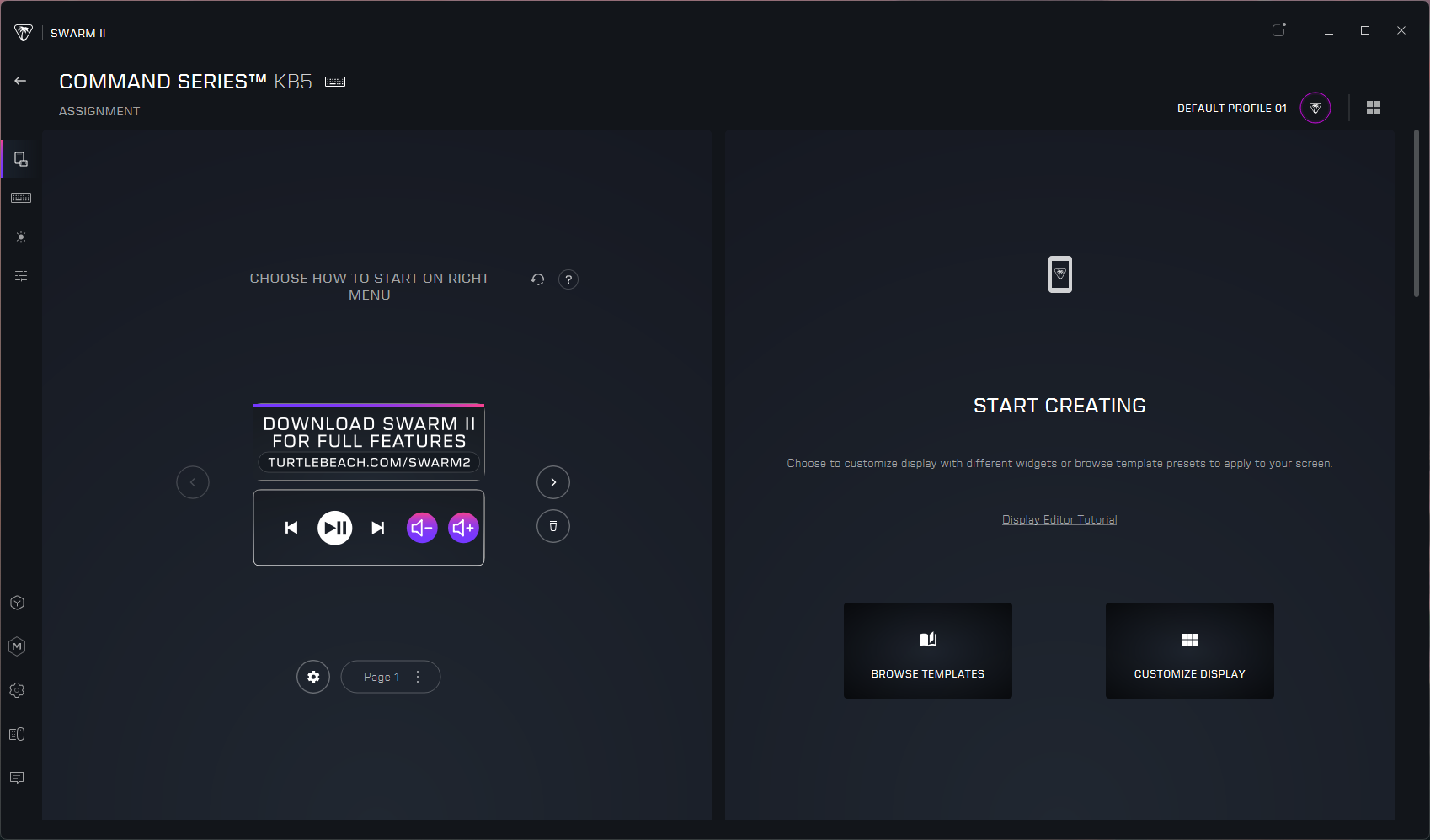
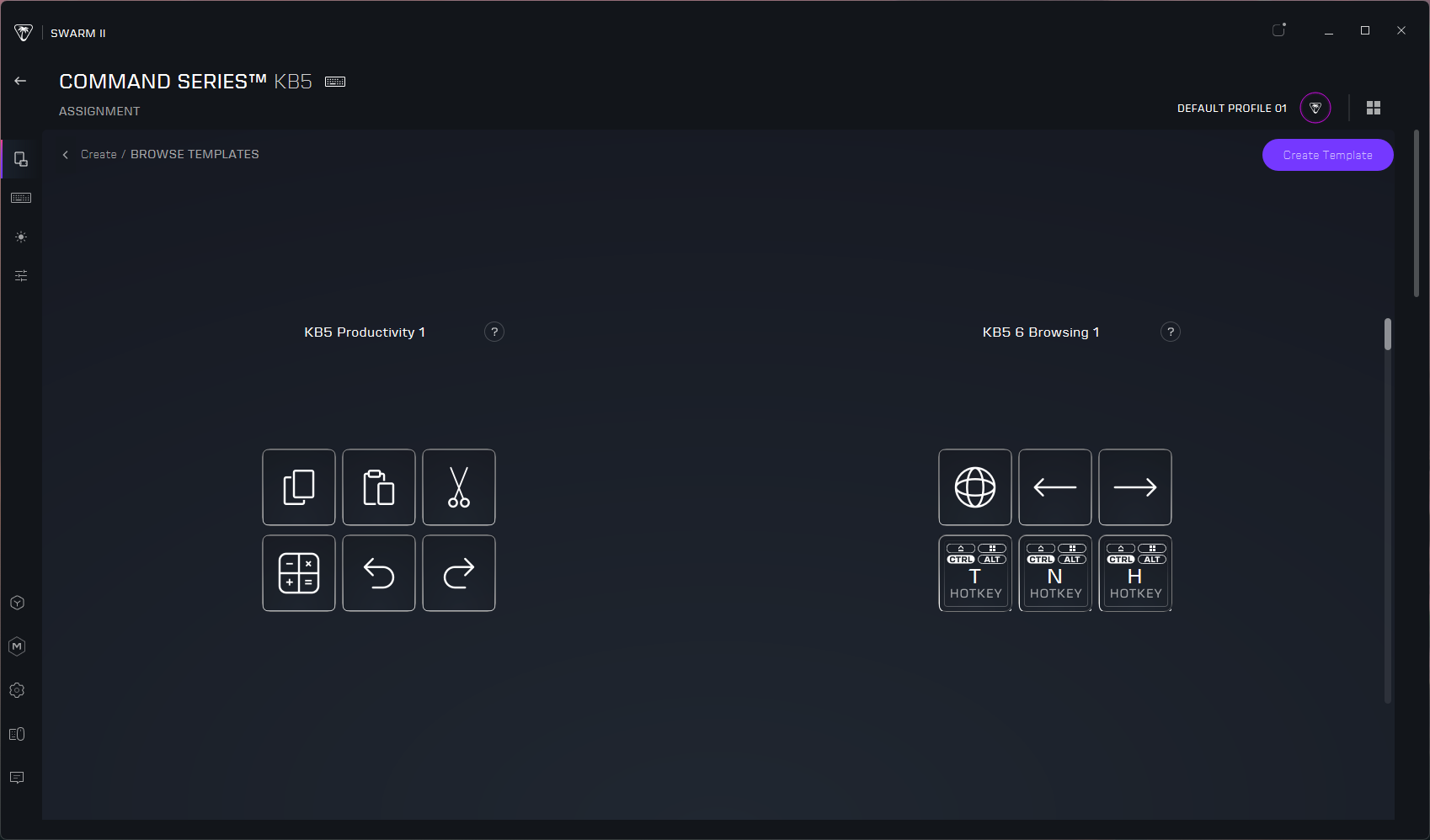
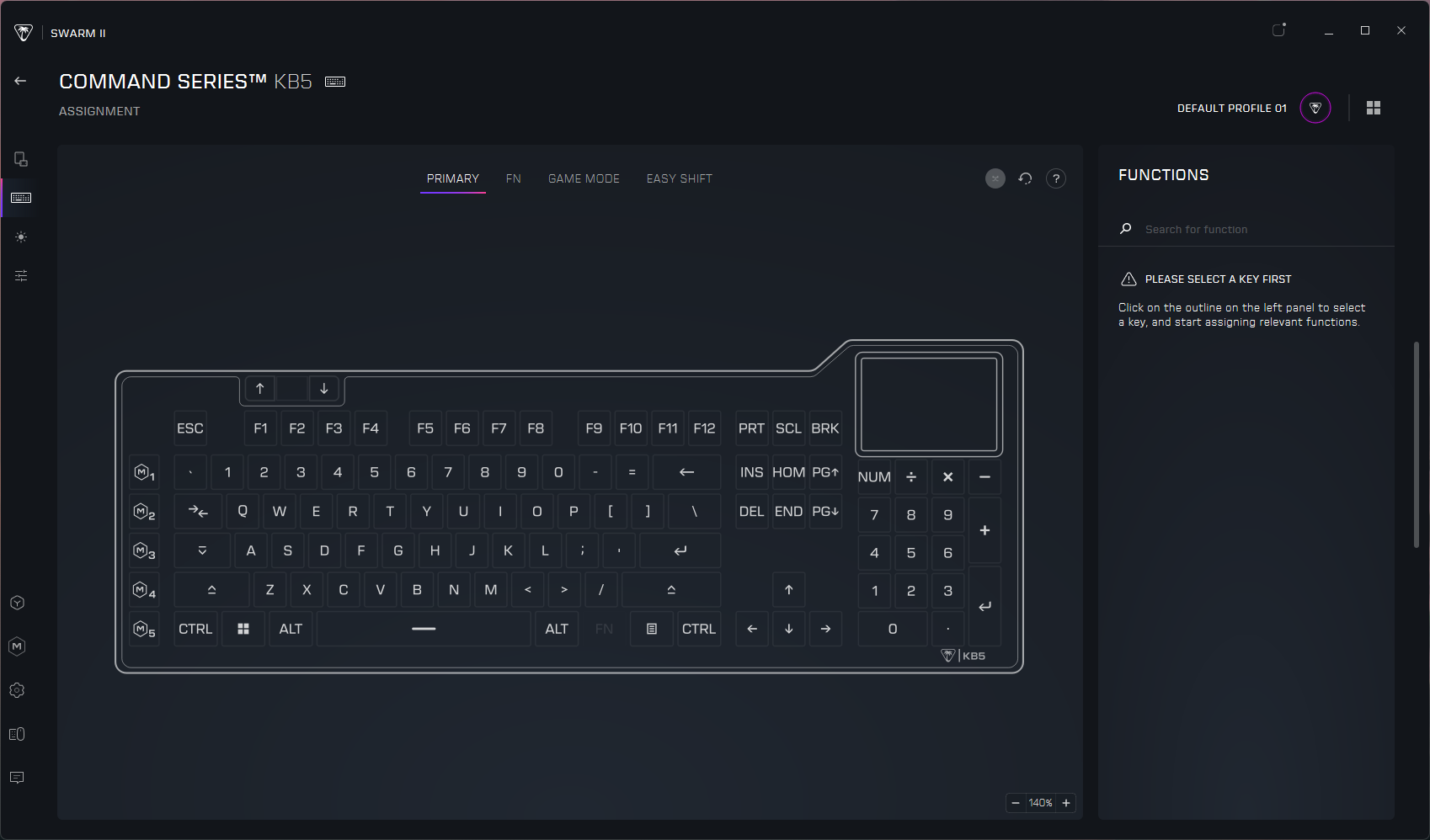
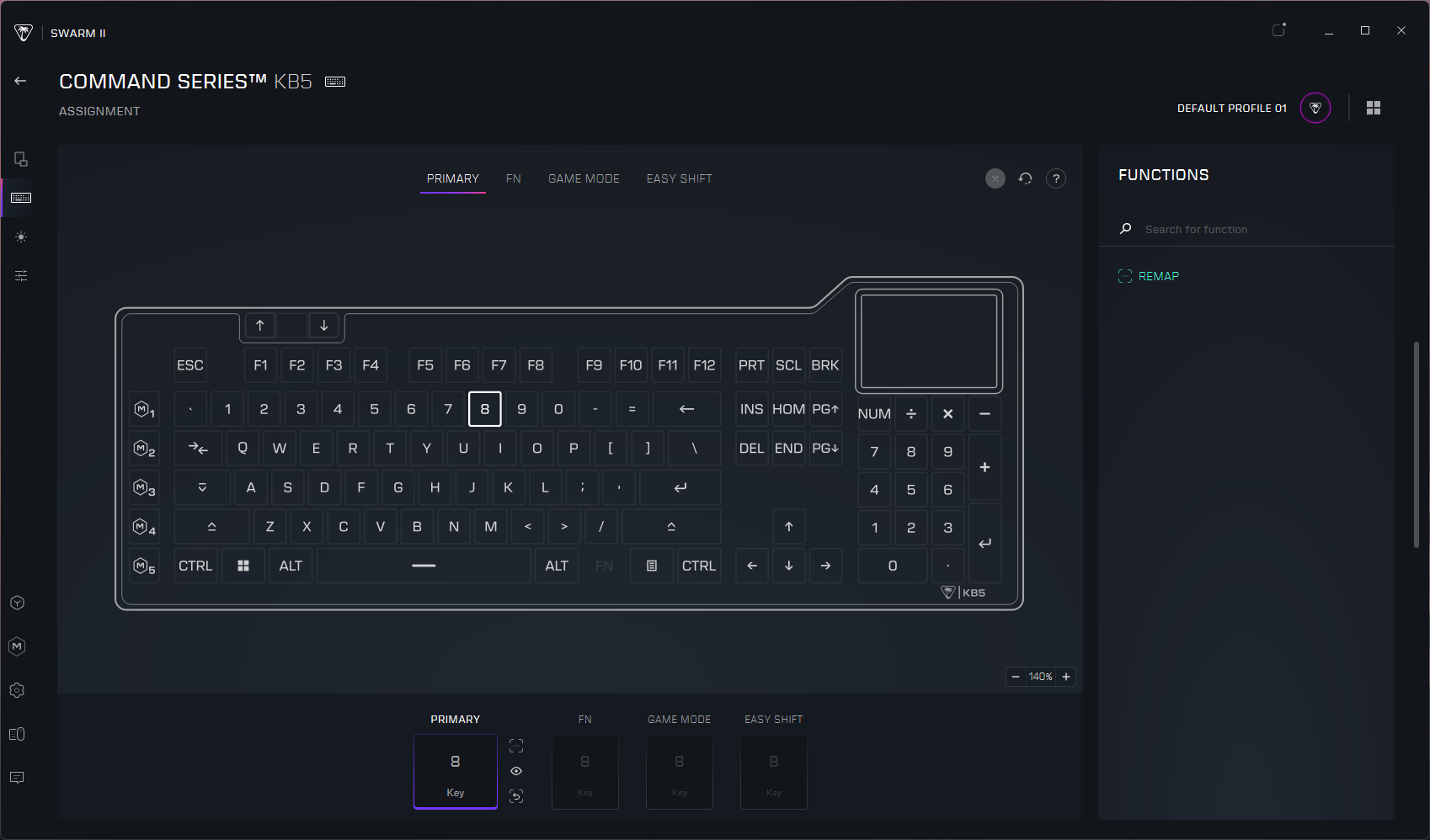
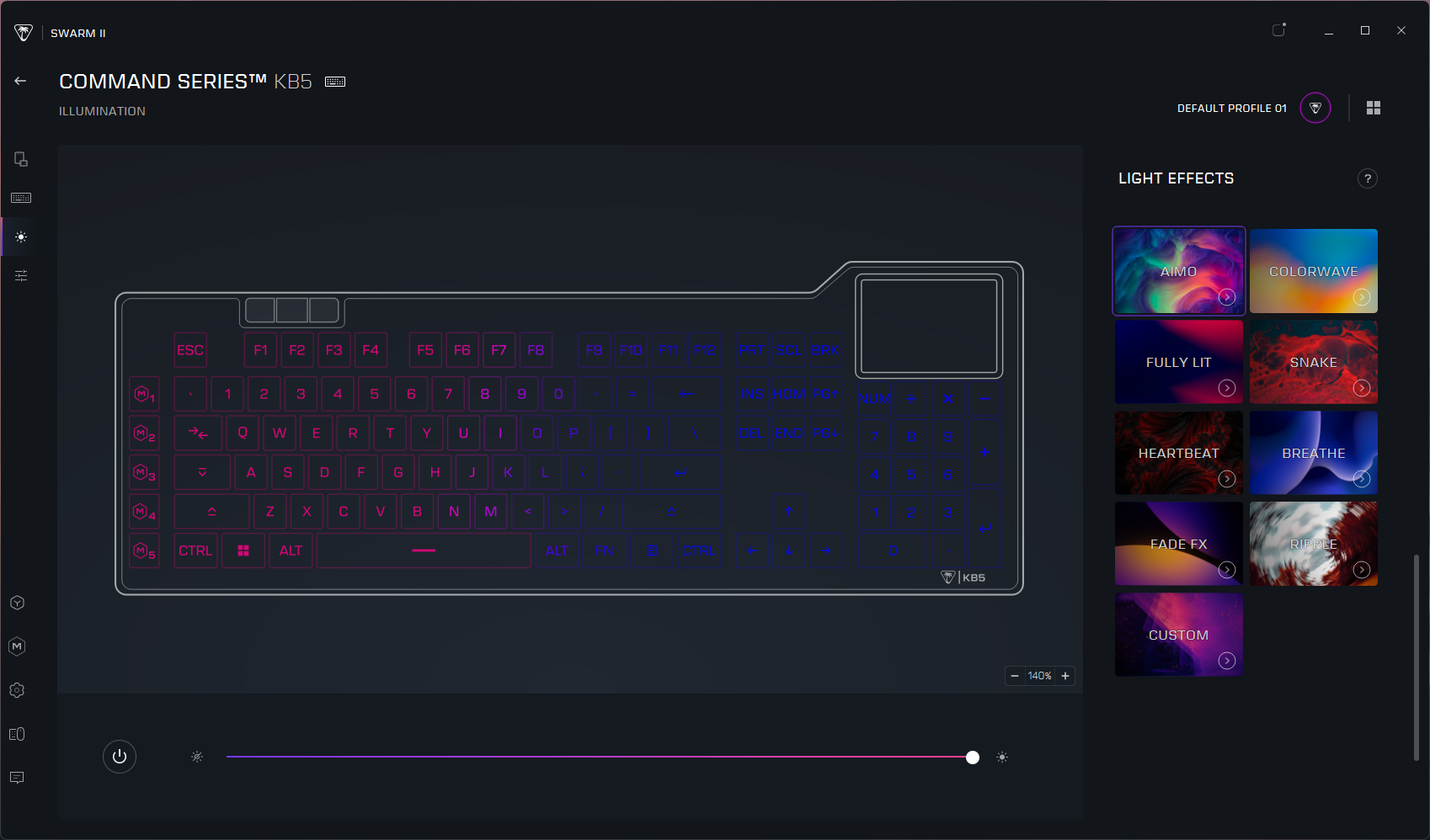
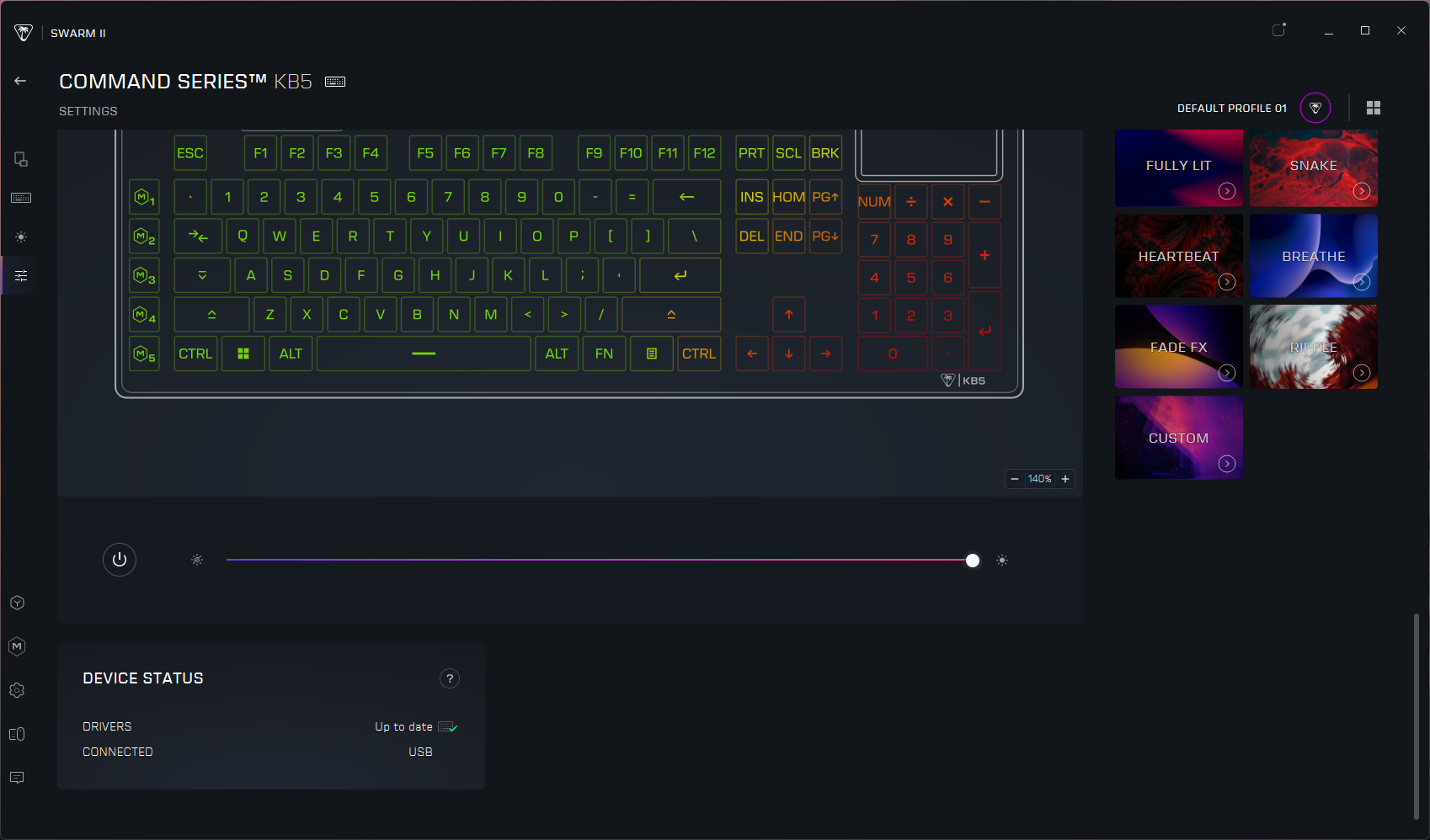
Once I managed to get the KB5 up to date on firmware (and Swarm II up to date on software), I was able to customize the touchscreen, keyboard, and lighting. Swarm II is kind of mandatory for this keyboard, as you can't really customize the touchscreen without it — and the touchscreen is a large part of the selling point here. There's not a ton you can do with the touchscreen that you can't do with regular keys, at the moment. There are options for keyboard / Windows / multimedia functions, opening apps and websites, and assigning macros. And there are a couple of "dynamic" options such as a timer setting and performance monitoring, but it's not a robust ecosystem like that of Elgato or Loupedeck. Still, it's probably enough to get you started, and the Swarm II app includes a handful of templates in case you're out of ideas.
Keymapping is pretty straightforward, and you can map keys to do most of what you can map the touchscreen to do (save for visual things, such as performance monitoring, obviously). You can record and save macros in the app and configure ReacTap. You can also customize the lighting from a handful of presets (or per-key, if you so desire). The keyboard can save up to five onboard profiles, which you can switch between by tapping the profile number in the upper-left corner of the touchscreen.
The Bottom Line
The KB5 is actually a pretty nice compromise, and I like it better than the pricier (and fancier) Turtle Beach KB7. I love having a built-in numberpad that doesn't cost an extra $100 to snap onto the side of the board, and the smaller touchscreen is actually more manageable to use quickly and without (really) looking. The KB5 may not have magnetic Hall Effect switches, but its low-profile linear switches feel and sound pretty good for a mainstream gaming keyboard. And at $150, it's basically half the price of the combined KB7 keyboard and KP7 numberpad.
Of course, if you're really dedicated to making your keyboard a streaming deck substitute, the Corsair Galleon 100 SD is the only real option. Not only does it have physical buttons, it also has knobs — and it's supported by Elgato's Stream Deck software, which is still the real differentiating factor for macropad and touchscreen devices these days.
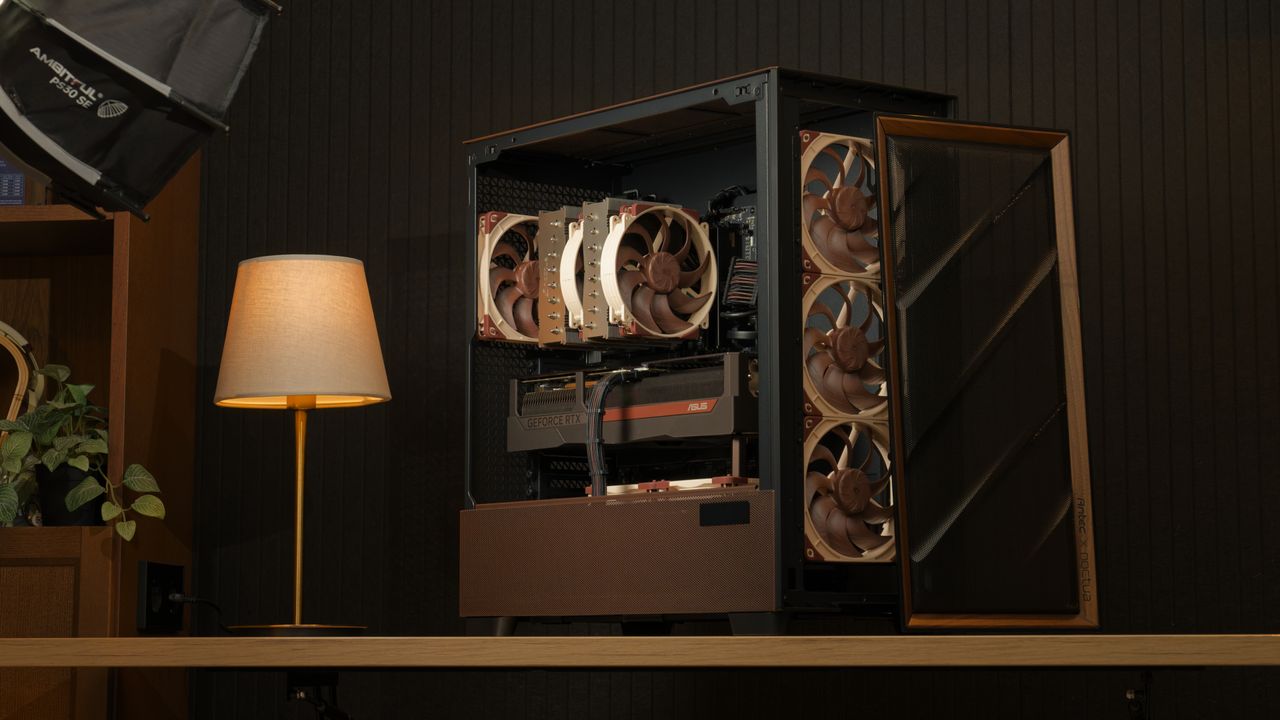
Noctua is known for making high-end, high-quality fans and air coolers, which it has been doing for over 20 years, recently expanding into AIOs. However, it appears that there were a few questions regarding its PC case compatibility database, which some PC DIYers say don’t match the data from the manufacturer’s website. The company cleared this up in a blog post, saying that it has undertaken its own measurements and it has determined that 56 of the more than 100 cases it has tested showed significant deviation from the details officially listed online.
The company gave two diverging situations of inaccurate official measurements. The first one is when the case is larger than what is actually written, which would allow PC builders to attach a larger cooler. Noctua said that the deviations aren’t minor, either. For example, the NZXT H2 Flow case is listed as being compatible with a maximum 75mm CPU cooler height, but the actual case can accommodate an air cooler up to 79mm. There’s also the Thermaltake TR100, which is 2.7mm larger than what the Thermaltake website says, and the Corsair Frame 4000D, which gives you 10mm of extra clearance.
This is a good thing, as any cooler you bought based on their website’s measurement means that it will definitely fit, but Noctua said that this is a missed opportunity. That’s because you could’ve bought a larger cooler that delivered more performance in the same case.
On the flip side, the company warned that there were also some cases that were actually smaller versus the numbers in their specifications. It cited two examples — the Asus Prime AP201 and the Lian Li B4-mATX. The former is 1.7mm shorter while the latter is 3.5mm shorter than what’s listed on their specific product pages.
This could to be a major issue, especially if you bought items that fitted the available space exactly, based on the manufacturer’s measurements. It would mean that these parts would either be touching the case panels, or worse, not allow them to close at all. If that’s the case, you’ll have to spend extra effort to return either the part or the case and get something that fits better.
The safest solution to this is for you to buy the PC case before you shop for the remaining parts of your build. This is especially true if you’re looking at the best mini-ITX cases, as the tight tolerances mean that you don’t have much margin if the numbers aren’t accurate. But by having the case physically available and measuring it yourself, you’re at least confident that what you’re buying will fit. Alternatively, you can check out Noctua’s compatibility search page, with the clearances of the cases in its database verified by its team.
This compatibility tool will give you peace of mind when shopping for the best cooler and is useful for confirming measurements even if you end up buying from another brand. But this begs the question — are the variations between official and actual measurements limited to the air coolers? Or are the numbers for other components, like the GPU, PSU, and other key components also inaccurate? Noctua’s website only covers coolers, so you’ll have to rely on other pages (or your own measurements) if you want some confirmation of a case’s specifications and clearances for other parts like GPUs and PSUs.
The fearless TrashBench has been testing direct die water cooling of graphics cards. The inevitable twist here is that they removed the metal waterblock from the equation. Despite initial leaky results and much concern of water damage to the expensive parts thrown into the mix, some of the end results are eyebrow-raising in a good way.
“In my pursuit of the perfect water block, I realized, why do we need metal at all?” queried the antipodean host of the punk-rock GPU death lab. “Why can't we just pump water directly over the bare silicon? Makes sense to me.”
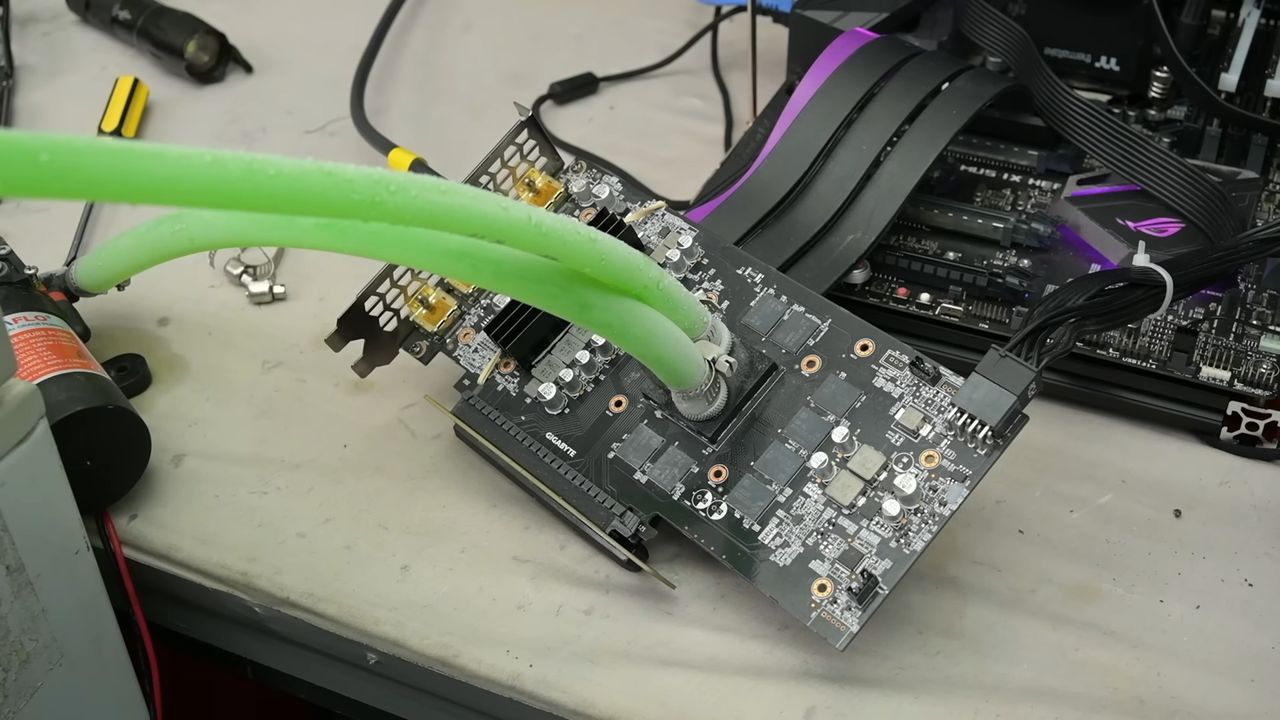
TrashBench began this project well aware that leaks might be a problem. Thus, a non-working GeForce RTX 3060 was chosen for the initial feasibility tests. It was measured up for a 3D printed water block which would direct the coolant directly over the GPU die. Our hardware adventurer covered any surface-mount components beside the GPU with nail polish to prevent water damage/shorting.
Some tried and trusted plumbing measures were then applied, with the design incorporating washers, gaskets, and hose clamps (worm-screw equipped jubilee clips). Water pipe fittings were melted into the block, which was fastened using the retaining clamp mechanism that the air cooler had previously used.
This initial test sprang a leak, or two, so TrashBench decided to add epoxy adhesive to secure and seal the 3D printed block to the GPU. This worked, but then some water was spotted oozing from the tube fittings, so they got a dose of epoxy too. At last, we had the first non-leaky prototype…
After some live runs using a powered-up GTX 980 were successful, it was time for the main event with fitting, testing, and benchmarking using an RTX 2060 Super. On the way, it was noticed that the choice of 3D print material used on TrashBench’s Bambu Lab 3D printer wasn’t trivial. Some materials leaked from the edges, and others were actually slightly porous. During live power tests, the TechTuber wisely used a PCIe riser cable so any leaks wouldn’t immediately drip onto the motherboard.
Was it worth it?
If you like to live dangerously, it could be argued that the TrashBench results show some value in this cooling methodology. The headlining technique was compared against the stock cooler and a clamped-on AiO cooling solution.
Going by the numbers above, you can see that direct water cooling could be interesting, as long as you can ensure long-term confidence about leakage. In the video, you can also see some interesting extras, like running this system using -28°C coolant. The same trick is also tested using an Intel i5-7600K CPU. That was chosen as “it’s not a particularly hot CPU, but if it dies, I don’t care.”
The eventual conclusion was that chamber size matters (most clearly illustrated by the CPU cooling test), but pumping water directly over silicon can work.
Most megafactories usually take years to go from conceptualization to construction, but a recent drone flyover of the Terafab showed that progress has already started on the ground less than five months after Musk unveiled it. However, the video doesn’t do justice to the true scale of its footprint, so X user Nic Cruz Patane created a visualization to help us understand how large the chip manufacturing facility is.
Terafab approximate size comparison between Giga Texas, the Pentagon, Apple Park, and the Mall of America.There has never been a building this large. Elon Musk says it will be the most valuable building by far. pic.twitter.com/GCmpfeduJnAugust 6, 2026
The site will reportedly have a floor space of at least 100 million square feet, making it larger than Giga Texas (10 million sq. ft), the Pentagon (6.6 million sq. ft), Apple Park (2.82 million sq. ft), and the Mall of America (5.6 million sq. ft), combined. This also makes it significantly larger than New Century Global Center in Chengdu, China, with has an interior space of “just” 18.9 million sq. ft.
While this might seem like an absurd amount of space for chip manufacturing, it appears that the Terafab will need it because it’s going to be more than just a chip fab making AI processors — instead, it will be an all-in-one facility that will produce logic and memory chips, as well as have lithography, packaging, and testing under one roof.
Elon Musk started talking about building his own chip manufacturing facility in late 2025 and officially announced the project in March of this year. The reasoning behind this project is that both SpaceX and Tesla will require at least 1TW of compute, which is more than ten times that current global chip supply.
Nvidia CEO Jensen Huang warned that a project like this will be an “extremely hard” challenge, but it appears that Musk is willing to put his massive resources on the line for this. Intel CEO Lip-Bu Tan even said that he can “think of no better partner than Elon Musk” to explore “unconventional” ways of chip manufacturing.
Musk is no stranger to both leading and funding projects that otherwise seemed impossible. Although he did not found Tesla, his investment and leadership in the company led it to become an industry trailblazer in EVs. He fundamentally changed commercial space travel with SpaceX; something that used to be the purview of NASA and other national governments, and he also broke a record when he set up 100,000 Nvidia H200 GPUs in just 19 days back in 2024 — a process which Huang said usually takes four years.
It seems that Terafab is Musk’s biggest project to date, which is estimated to require up to $119 billion in investments. But even though it seems that this project already has a secure customer base in SpaceX and Tesla, the former acknowledges that there’s a risk that this ambitious megafactory may not be successful.
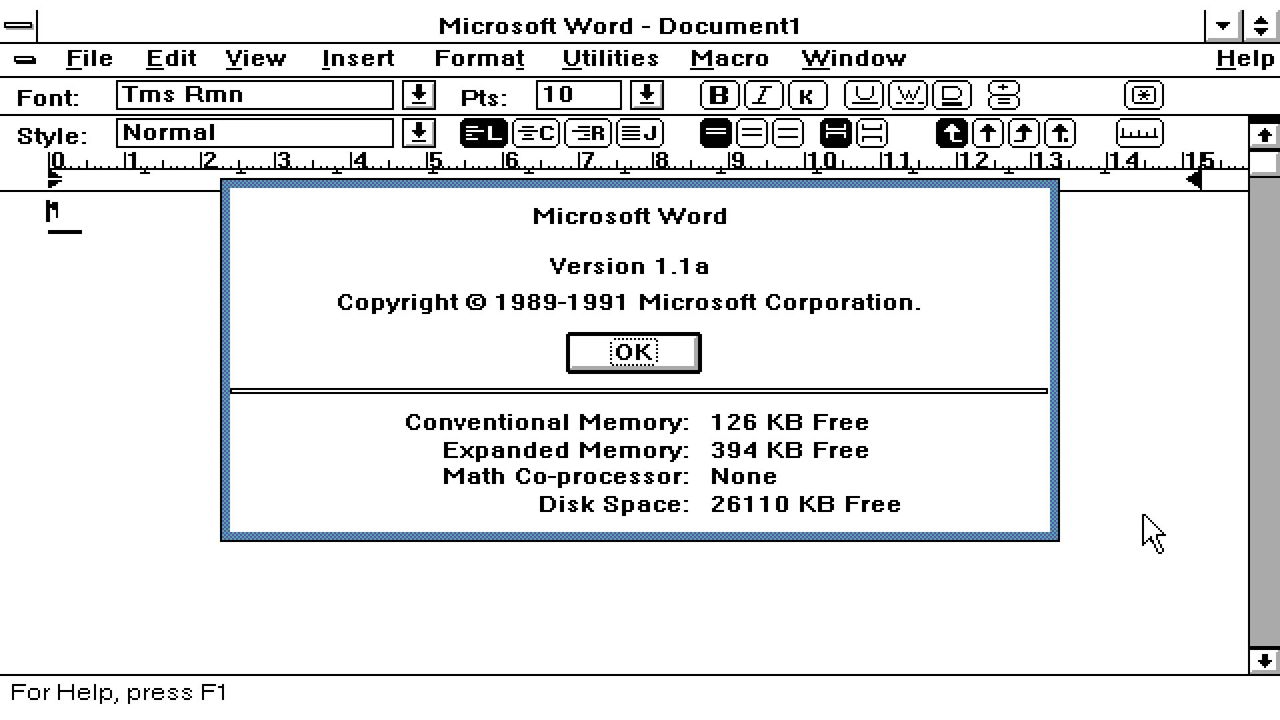
A developer has ported Microsoft Word for Windows 1.1a to x64 so it can now run natively on Windows 11 PC systems. JMarshall23 on GitHub stresses that this is a fully working native Windows x64 port using “original Word source and resources together with modern replacements for the 16-bit assembly, segmented-memory, and Win16 platform boundaries.” It also includes some extra features for “research purposes.” Microsoft Word for Windows 1.1a was originally released over a quarter of a century ago.
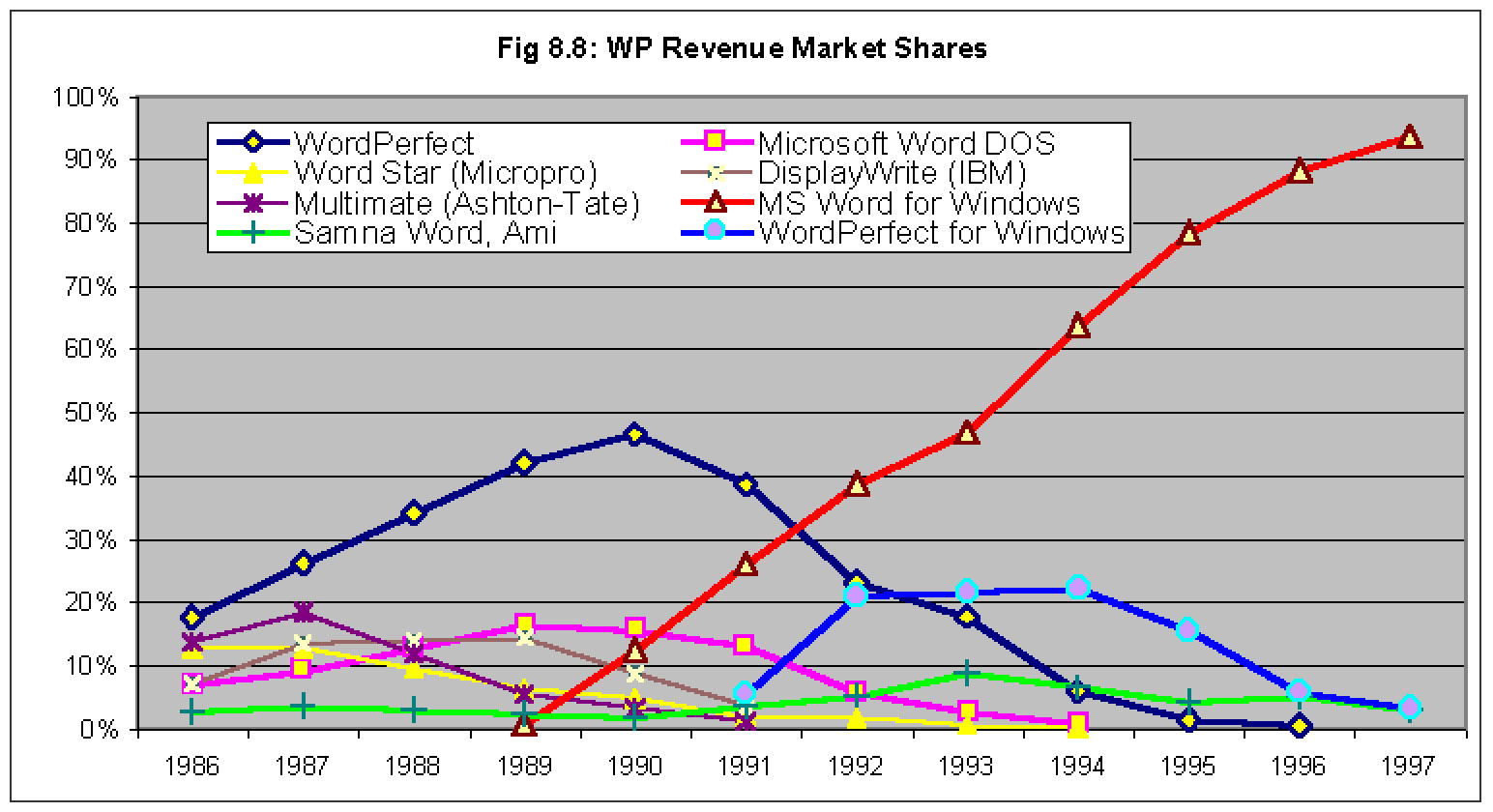
This release of Word marked a milestone in the word processing market, as it pioneered genuinely useful feature additions like WYSIWYG editing, graphics, and table insertion on Windows. It would spearhead the momentum in shifting users from DOS productivity monsters like WordPerfect to complete dominance in Windows-land. Word for Windows 1.1a added all its frills while remaining very efficient, running on systems with CPUs that ran in single-figure MHz speeds, and with as little as 1MB of RAM.
Another notable feature of this version of Word for Windows is that Microsoft permitted its source code to be released in full. You can still grab that code via the Computer History Museum (CHM). There you will find a 7MB bundle of C source, x86 assembly, build tools, and documentation. These 1,021 files in 33 folders are what JMarshall23 started with.
GitHub doesn’t have Windows x64 binaries ready for the casually curious on the lookout for a free, lightweight word processor to download and use. Instead, you’ll need access to Visual Studio 2022 with Desktop development with C++, a Windows 10 or Windows 11 SDK installed through Visual Studio, CMake 3.25 or newer, and PowerShell, notes Marshall. Then simply follow the GitHub instructions to build and run Word1.
It will be interesting to see if more comes from this x64 port, but Microsoft’s Word for Windows 1.1a code release carries a license that “permits only non-commercial use and does not give you the right to license it to third parties by posting copies elsewhere on the web,” says the CHM.
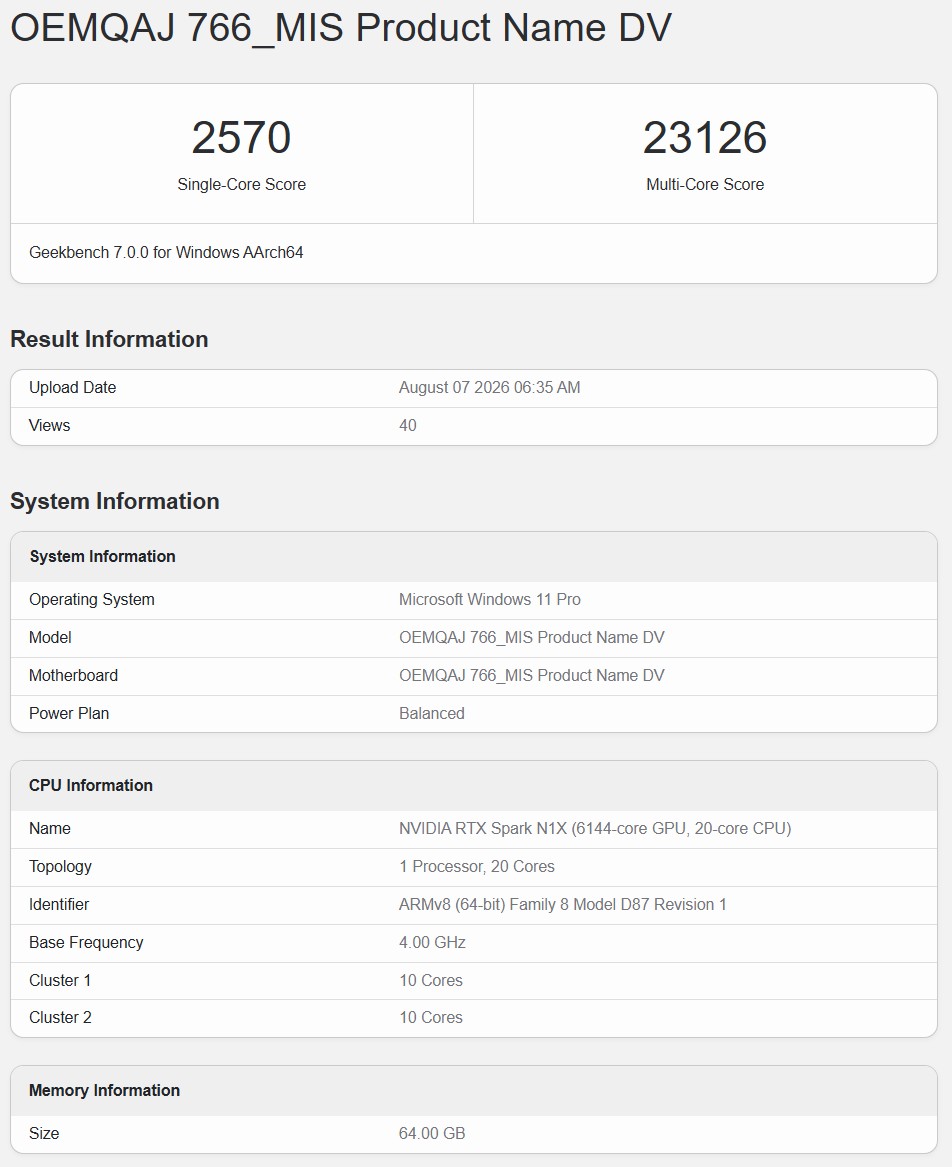
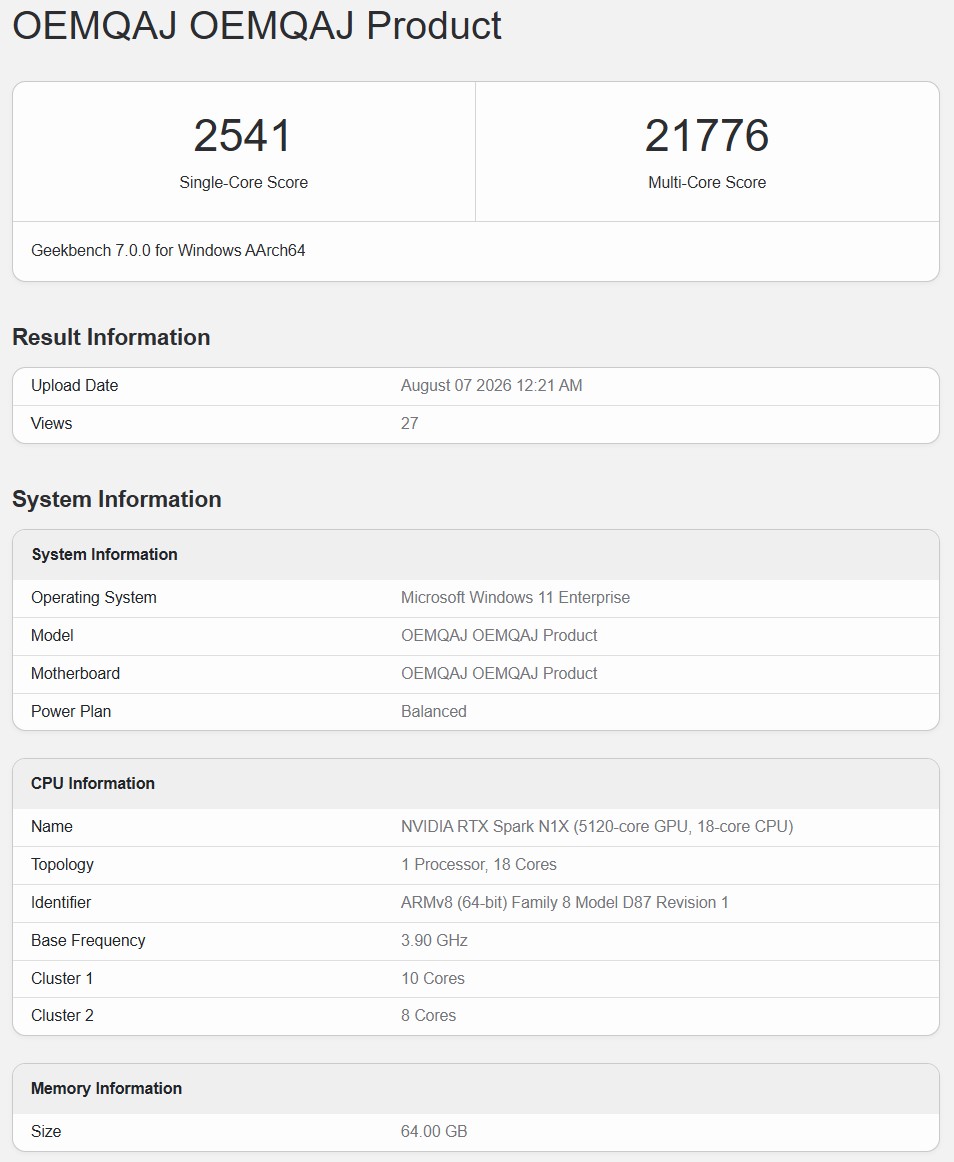
Two new Geekbench listings for Nvidia's upcoming RTX Spark laptop superchip have surfaced, confirming a second, cut-down SKU exists with 18 CPU cores, at least in the testing phases. Both parts score remarkably close to each other, posting impressive multi-core numbers, but their single-core performance isn't special. Still, these are preliminary results on unreleased hardware, so take these numbers with a grain of salt.
The model name for the 20-core (10+10) SKU was shown as "OEMQAJ 766_MIS Product Name DV" with its clocks reported at 4.0 GHz. This chip scored 2,570 points in the single-core test and 23,126 points in the multi-core test. The second listing showed up as "OEMQAJ OEMQAJ Product" with this SKU's 18 cores divided across 10+8 core clusters, clocked at 3.9 GHz. It scored 2,541 points in the single-core test, so within 1% of the 20-core part, while the multi-core was 21,776 points, which is about 6% faster than the full-fat chip.
20-core SKUWccftech18-core SKUWccftech
When you compare these numbers to other Windows-running SoCs on the Geekbench database, these multi-core numbers are among the best. The Snapdragon X2 Elite Extreme currently holds the record for the highest multi-core score with 25,075 points, so both SKUs of the RTX Spark lose to it. But when we switch to the AMD AI Max+ 395, which scores 20,609 on average in the same test, even the 18-core Nvidia chip is 5.6% faster here, and the 20-core variant is about 12% faster.
Compared to Apple's lineup, the 20-core RTX Spark is 3.3% faster than the 14-core variant of the M3 Max, which scores 22,385 points in the multi-core bench. Considering that this is pre-release hardware with unoptimized drivers, we can expect it to even beat the maxed-out M4 Pro and the base M4 Max (which hover around 25,000 points) when it officially launches. Moreover, the 18-core SKU's 21,776 points are equal to, if not more than, the base M4 Pro, which also nets around 21,700 points in the multi-core test.
Multi-core peformance
SKU
Score
Difference
20-core RTX Spark
23,126
Baseline
18-core RTX Spark
21,776
-5.84%
Snapdragon X2 Elite (Extreme X2E-94-100)
25,075
+8.43%
Intel Core Ultra 9 275HX
20,783
-10.13%
AMD AI Max+ 395
20,609
-10.88%
Apple M3 Max (14-core)
22,385
-3.20%
Apple M4 Pro (14-core)
24,901
+7.68%
That being said, the swan song falls apart when we bring up the single-core numbers. Every Apple Silicon chip from the base M3 onwards beats the 2,570 points the 20-core RTX Spark achieved in this run. Only the M2 Max with its 2,477 points is bested by the Nvidia offering, and that too by just 3.75%. Apple's current-gen base M5 is a whopping 41% faster here. On the Windows side, the Snapdragon X2 Elite and X2 Elite Extreme score roughly 3,000 points, but AMD and Intel's top-end models take a beating.
The Ryzen AI Max+ 395 only achieves 2,429 points in the single-core test, making the 20-core RTX Spark 5.8% faster, and the 18-core variant 4.6% faster. The same goes for the Ryzen AI 9 HX 370 because its 2,432 points are within the margin of error of the Strix Halo chip. Intel's highest single-core score is achieved by the Core Ultra 9 275HX at 2,467 points, making it 3% slower than the 18-core RTX Spark and 4.2% slower than the 20-core SKU. However, Intel's actual fastest chip, the Core Ultra X9 388H, scores 2,767 points, making it about 7% faster than even the 20-core RTX Spark.
Single-core performance
SKU
Score
Difference
Apple M4 Pro (14-core)
3,315
+28.99%
Snapdragon X2 Elite (Extreme X2E-94-100)
3,051
+18.72%
Apple M3 Max (14-core)
2,841
+10.54%
20-core RTX Spark
2,570
Baseline
18-core RTX Spark
2,541
-1.13%
Intel Core Ultra 9 275HX
2,467
-4.01%
AMD AI Max+ 395
2,429
-5.49%
All in all, this is a much better showing for Nvidia's upcoming laptop Superchip than previous leaks. It's clear that driver optimization is slowly unlocking the full potential of the silicon, and by the time RTX Spark is in the hands of reviewers, we expect it to compete fiercely with every Windows machine. Nvidia is working hard to ensure a proper launch with a commitment to making DRM and anti-cheat work on day one.
The Federal Communications Commission (FCC) is moving to ban drones with LiDAR obstacle-avoidance features, a move that would remove a number of popular consumer drones from US shelves. In a public notice published in the Federal Register on August 3 (DA 26-758), the agency proposed retroactively banning the import and sale of any foreign-made drone on its Covered List that “contains or integrates” a LiDAR sensor, categorizing the technology under a broad “military-grade” umbrella.
The proposal builds on a ban the FCC set in motion late last year. On December 22, 2025, the agency added all foreign-made drones and their critical components to its Covered List — a roster of communications equipment that a U.S. national-security authority has determined poses an unacceptable risk. The listing blocked any new foreign drone model from receiving the FCC authorization it needed to be sold in the U.S., effectively banning sales of new models.
However, models that had already cleared authorization before the listing could continue to be imported and sold. The new DA 26-758 proposal seeks to retroactively strip sales clearance from previously approved drone models that ”escaped” the initial ban, starting with those it deems military-grade. The proposal is open for public comment until September 2, 2026, and if adopted as written, the ban on imports and sales would take effect roughly 180 days after publication.
LiDAR (Light Detection and Ranging) is a remote sensing technology that uses laser pulses to measure exact distances and build precise 3D maps of objects and environments. Drones, delivery bots, and self-driving cars all rely on it for obstacle avoidance. A ban would mean that popular consumer models such as DJI's Air 3S and Mini 5 Pro — both of which use LiDAR for obstacle detection — would no longer be available for sale in the US. The proposal would not affect existing owners, who could keep flying the drones they already have, but as DJI has warned, those owners could find official spare parts increasingly hard, or eventually impossible, to source over time.
Under the FCC's broad ”military-grade” classification, the ban would also reach drones that carry thermal imaging sensors, can dispense agricultural sprays (”economic poison” in the notice's language), weigh 55 pounds or more, include docking stations, integrate a defense article, or operate in coordinated swarms — a category the FCC defines widely enough to include synchronized drone light shows. U.S.-made drones and other drones not on the Covered List are not touched by the ban, regardless of whether they carry any of these features.
The FCC frames the move purely as a national security issue, leaning on an executive-branch determination that foreign-made drones pose an “unacceptable risk.” It tentatively concludes that the economic hit would be minor, as military-grade models are a small minority in a market dominated by recreational fliers. Conversely, the notice also details the billions that domestic drone makers like Skydio, which has committed $3.5 billion to US manufacturing, have raised since the original ban.
DJI, one of the manufacturers affected by the ban, has argued that the “military-grade” label is a category error, sweeping in civilian tools that first responders, farmers, and hobbyists rely on. Its core objection lands on the LiDAR clause, specifically arguing that the technology is a safety feature, not a weapon. DJI had earlier sued the FCC to overturn the December ban, claiming the agency exceeded its statutory authority.
A new Amazon data center is set to become the single largest source of environmental pollution in the U.S., according to a New York Times report on August 8. The tech giant — which already operates the most data centers worldwide — is reportedly building a natural gas power plant in Pecos County, Texas, to power its new data center at the same site. According to project permits, the plant would generate up to 7.65 gigawatts of power using 35 natural gas turbines. The new plant — which burns natural gas to generate electricity — has been authorized to release 33 million tons of CO₂ annually, more planet-warming gases than any other power plant in the country, says the NY Times report.
Conversely, Amazon had pledged to achieve net-zero carbon emissions across all its global business operations by 2040. The company made the promise in 2019 when it initiated and co-founded The Climate Pledge — a voluntary coalition of over 700 companies and partners — aimed at addressing its own corporate footprint and rallying global supply chains. However, the company has seen its emissions rise each year for the past several years, something analysts attribute to a spike in data centers to support the AI boom. The company is currently building several additional AI data centers globally, including the one that the new gas plant would power in Texas.
Amazon has acknowledged the impact of its intense AI ambitions on its earlier climate pledges but insisted the company remained committed to them, despite obvious struggles. “The world looks different now than when we co-founded the climate pledge,” said Margaret Callahan, an Amazon spokeswoman. Still, “our commitment hasn’t changed,” she said, echoing similar statements by Microsoft, which is struggling to fulfill its 2030 sustainability promise amid carbon-heavy AI expansion, but insists it remains committed to it.
As detailed in our data center power roadmap, an increasing number of hyperscalers and data center operators are switching from grid connections to dedicated on-site power generation. The “behind-the-meter” moves are being triggered mainly by the long timelines required to set up new power infrastructure to connect new power-hungry data centers to the grid, but also by growing anti-data center sentiments over irreversible hikes in the electricity bills of nearby communities.
While many companies are also pursuing nuclear and renewable energy options — examples being Microsoft’s Three Mile Island nuclear deal and Meta’s agreement to secure up to 1GW of orbital solar energy capacity — gas appears to be the leading preference due to its scalability and speed of availability. The Trump administration has thrown its weight behind such projects for data centers, promoting oil, natural gas, and coal over renewable energy sources.
The city council of Emporia, Kansas, the same council that had a teacher arrested for clapping in support of the opposition, announced that it will move its meetings online after its members received death threats. According to 404 Media, Emporia announced this move two days before the meeting set for August 5, 2026, and will also affect the one set on August 19, 2026.
“In the interest of public safety, the Emporia City Commission meetings scheduled for Wednesday, August 5, 2026, and Wednesday, August 19, 2026, will be conducted virtually. No public comment period will be provided during either meeting,” the city said on its Facebook page.
“The City remains committed to conducting the public’s business in an open and transparent manner while taking reasonable measures to protect the safety of elected officials, City staff, and members of the public. The City appreciates the public's understanding and cooperation as it implements these temporary measures while ensuring the continuity of City business.”
The move to a virtual meeting is an understandable move given the death threats on some of the city leaders. However, it also canceled public comments and instead directed citizens to an email address and phone number where they can air their concerns privately. This led to some citizens airing their complaints in a protest outside the Emporia municipal auditorium.
“While I don't doubt that there are credible threats, my big question is on how many there are and from where they are coming. Mayor Smith did mention in yesterday's meeting that the threats don't seem to really be coming from locals but ‘it only takes one’ to ruin a meeting so they went virtual. I feel like we're being punished for the actions of outsiders,” Lux Claridge, the person arrested in the previous council meeting, told 404 Media.
“I'm not so upset about going virtual, it makes sense, but back it up with examples of these threats. I'm more upset that they opted to close public comment and I don't understand why.”
One of the things that the council considered during the meeting was the petition to put a data center ban on the ballot, with the members voting unanimously to send it for judicial review. The council claimed that doing otherwise could open the city to a lawsuit from either side, although it did not elaborate on the reason why this would happen.
While we haven’t heard of a local jurisdiction getting sued for passing a data center ban, one Texas senator warned a county in the state that it cannot legally impose this. So, the commissioners are likely being careful to avoid legal issues, even if they’re in another state.
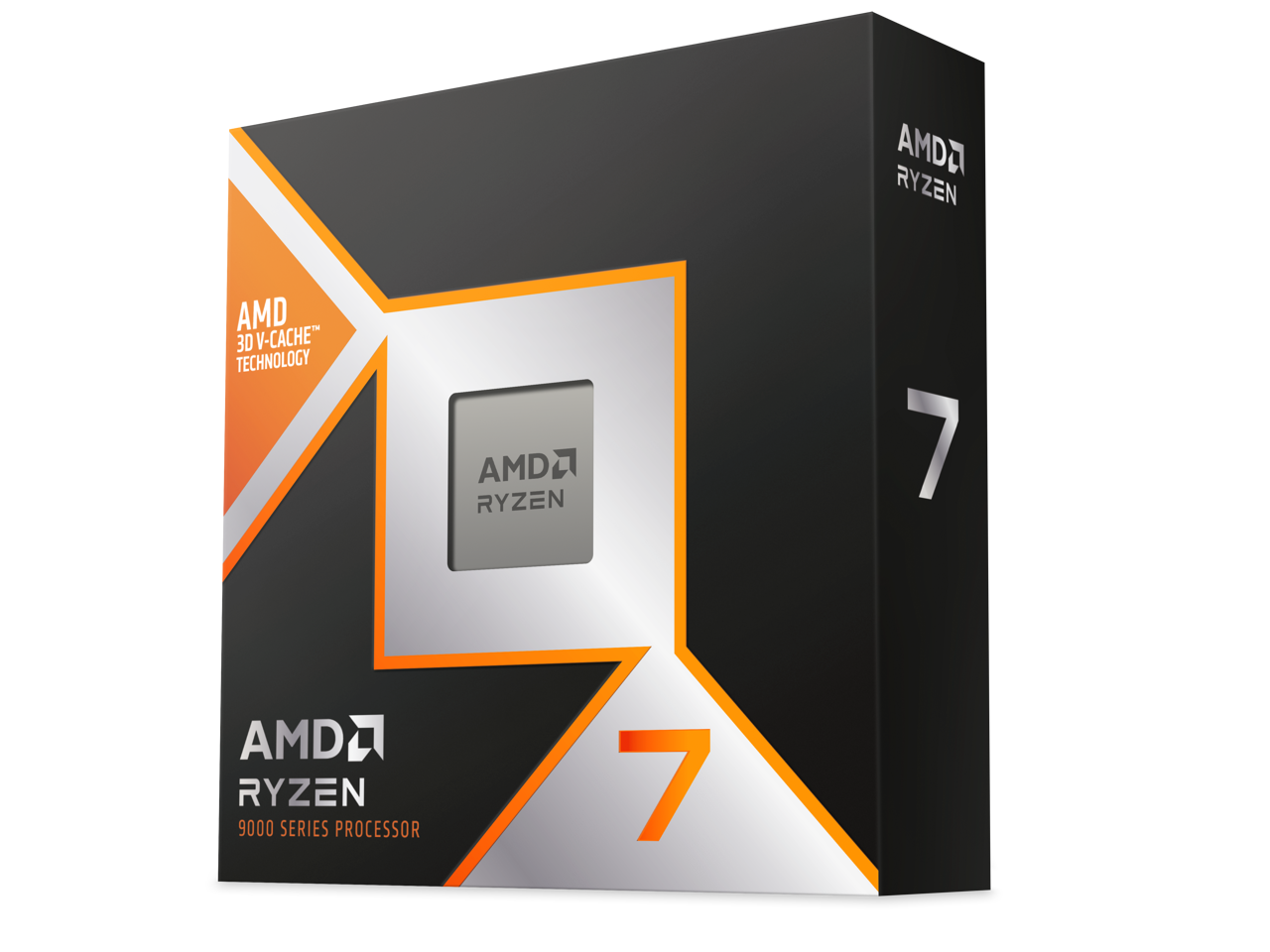
The mid-range CPU segment has become more competitive than ever, with both Intel and AMD refreshing their lineups and pushing aggressive pricing. In one corner, we have the Intel Core Ultra 7 270K Plus, an important reset for Intel that prioritizes class-leading productivity performance over efficiency, while also offering solid value. In the other corner is AMD's newly launched Ryzen 7 7700X3D, a more affordable, slightly lower-clocked alternative to the 7800X3D.
This faceoff is particularly interesting because the two chips take very different approaches despite costing about the same price. The Core Ultra 7 270K Plus packs 24 cores and excels in productivity workloads, while also delivering Intel's strongest gaming performance in years. The Ryzen 7 7700X3D, meanwhile, relies on AMD's proven 3D V-Cache technology to deliver gaming performance within 5% of the 7800X3D, although it trails significantly in single- and multi-threaded workloads.
While the Ryzen 7 7700X3D is aimed at gamers looking for X3D performance at a lower price, it faces stiff competition from Intel's aggressively -priced Core Ultra 7 270K Plus, as well as its own sibling, the Ryzen 7 7800X3D, which is often available for only a little more.
So, is AMD's gaming-focused approach enough to beat Intel's well-rounded Arrow Lake Refresh processor, or has Intel finally found the right balance of price and performance to reclaim the mid-range crown? In this six-round faceoff, we compare these two sub-$350 CPUs to find out which one comes out on top.
Features and Specifications: Intel Core Ultra 7 270K Plus vs AMD Ryzen 7 7700X3D
Intel Core Ultra 7 270K Plus vs AMD Ryzen 7 7700X3D — Pricing and Specifications
CPU
Street (MSRP)
Arch
Cores / Threads (P+E)
P-Core Base / Boost Clock (GHz)
E-Core Base / Boost Clock (GHz)
Cache (L2/L3)
TDP / PBP or MTP
Memory
Core Ultra 7 270K Plus
$320 ($300)
Arrow Lake Refresh
24 / 24 (8+16)
3.7 / 5.4
3.2 / 4.7
76MB (40+36)
125W / 250W
DDR5-7200
Ryzen 7 7700X3D
$330
Zen 4
8 / 16
4.0 / 4.5
N/A
104MB (8+96)
120W / 161W
DDR5-5200
Taking a look at the technical specifications, it's clear that each chip adopts a distinct strategy for the mid-range market. While Intel has optimized its architecture for a higher core and thread count along with improved interconnect speeds, AMD continues to leverage its stacked cache to maintain gaming dominance on a long-lived platform.
The Intel Core Ultra 7 270K Plus is based on the original Arrow Lake-S family, utilizing the same microarchitecture that we saw on the 265K, built using TSMC’s 3nm process. It matches the flagship 285K with a 24-core configuration (8 Lion Cove P-cores and 16 Skymont E-cores) and operates with a 125W TDP. The chip can scale to a 250W Maximum Turbo Power (MTP), which is the maximum power limit that this CPU can consume for short periods when running at maximum turbo boost frequencies
Intel has also standardized several enthusiast-level performance tweaks for Arrow Lake Refresh, most notably a 900 MHz increase in die-to-die frequency and a 400 MHz fabric speed boost. It also officially supports faster DDR5-7200, along with 20 lanes of PCIe Gen 5 and 76MB of total cache. Possibly the only major concern with the Core Ultra 7 270K Plus is the LGA 1851 platform. With Intel's next-generation Nova Lake processors expected to launch later this year, the current platform will have a relatively short lifespan, restricting any future upgrade options.
The AMD Ryzen 7 7700X3D serves as a more affordable, lower-clocked variant of the 7800X3D, featuring the same eight Zen 4 cores with a peak boost clock of 4.5 GHz. Its primary architectural strength is its 104MB of total cache including 64MB of vertically stacked L3, which is specifically tuned to eliminate memory latency bottlenecks.
The chip is rated at a 120W TDP with a 162W Package Power Tracking (PPT) limit, though it frequently operates well below these levels during gaming. A major selling point for Team Red is motherboard flexibility as the 7700X3D can be used with existing AM5 motherboards (600 and 800-series chipsets), and AMD has committed to supporting the socket through at least 2029.
⭐ Winner: Intel Core Ultra 7 270K Plus
While AMD offers a more stable platform and superior gaming efficiency thanks to its large cache size, Intel’s hardware package is more comprehensive for the price. The 270K Plus offers triple the core count, significantly higher frequencies, and faster memory support.
Gaming Benchmarks and Performance: Intel Core Ultra 7 270K Plus vs Ryzen 7 9700X
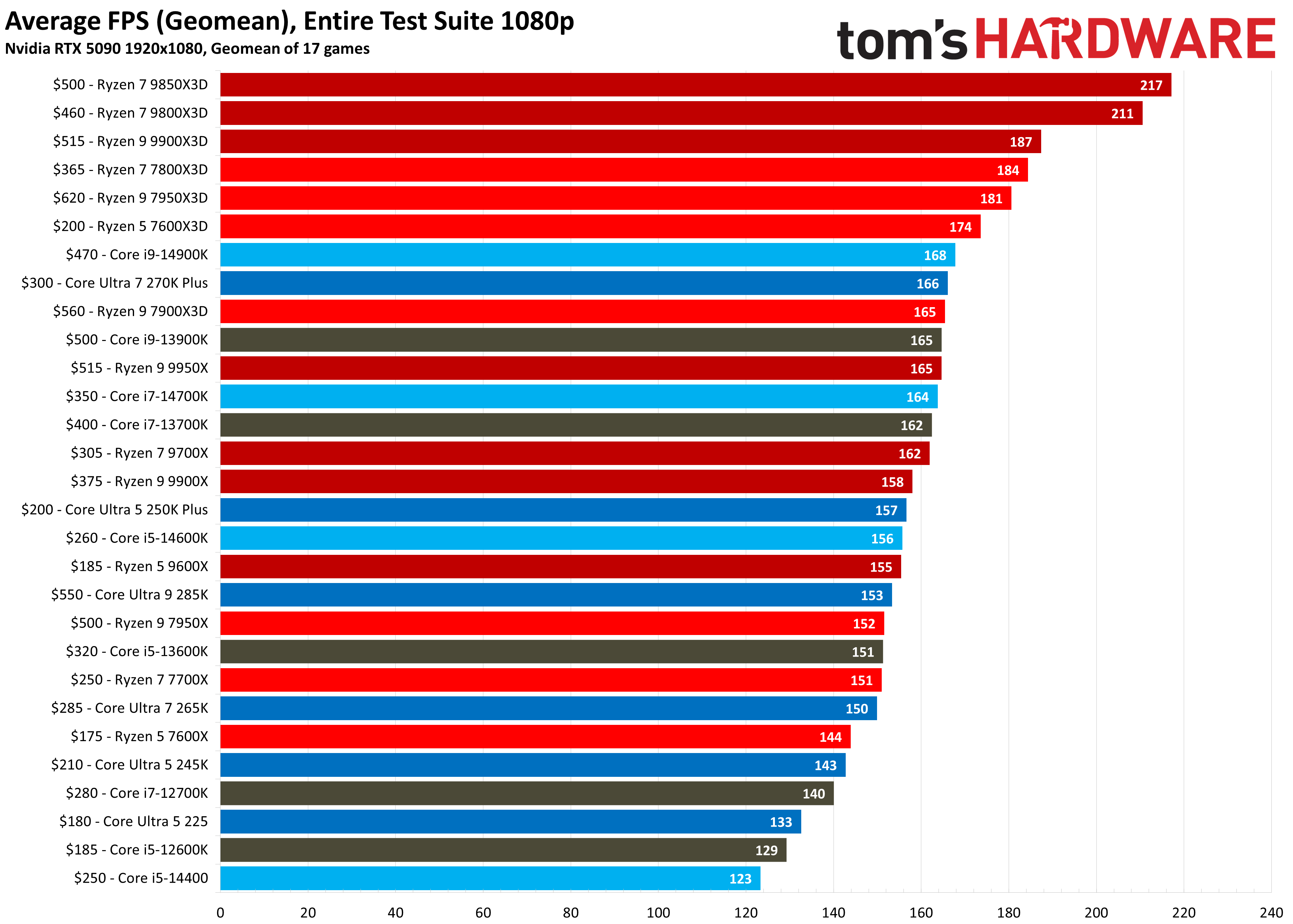
To evaluate the gaming performance of these two chips, we conducted our testing at 1080p resolution using an Nvidia GeForce RTX 5090. We used this setup to prevent the GPU from becoming the bottleneck, allowing each CPU's gaming performance to shine through. By removing the graphics card as a limiting factor, we can see exactly how the 7700X3D’s 3D V-Cache stacks up against the higher core count and clock speeds of the 270K Plus.
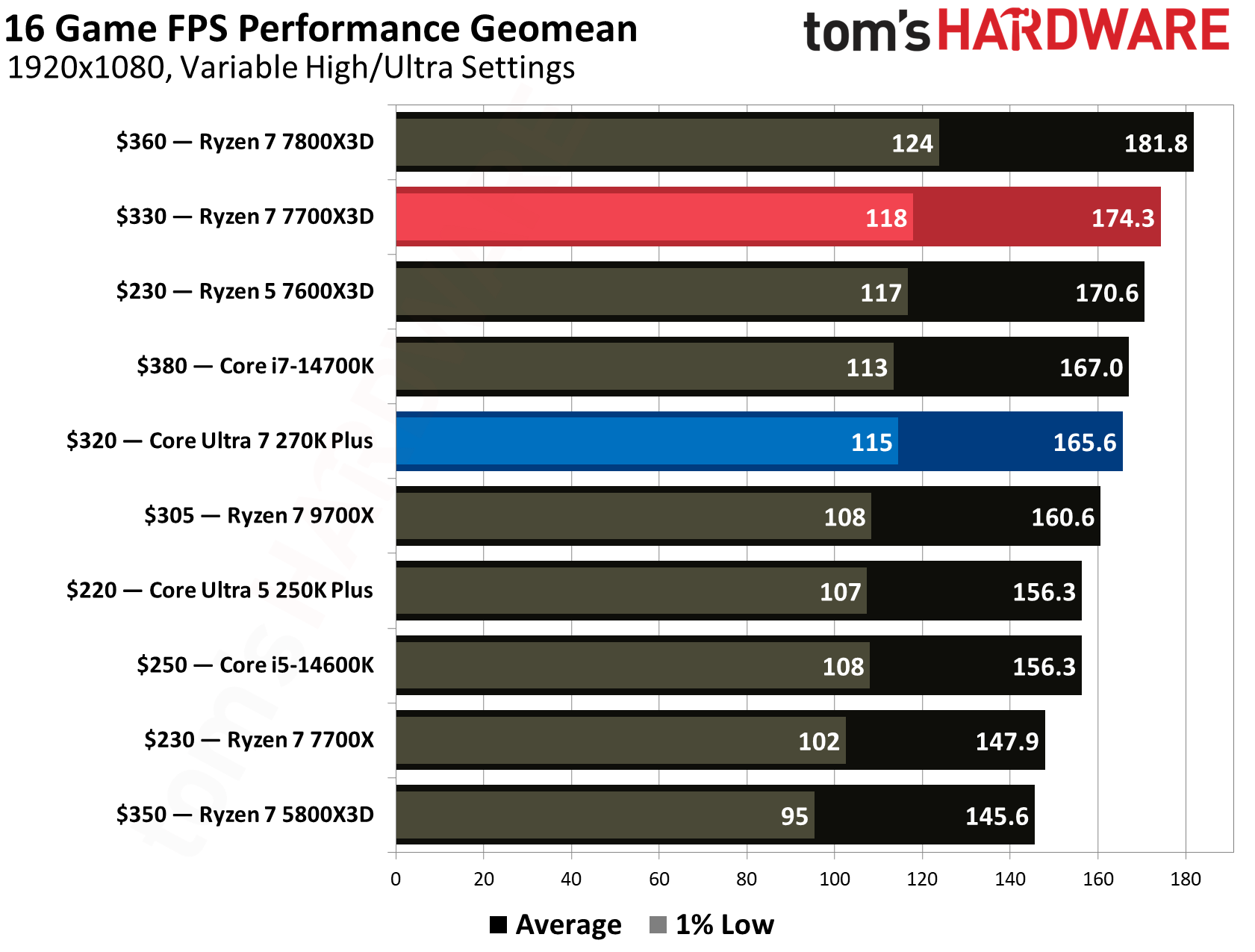
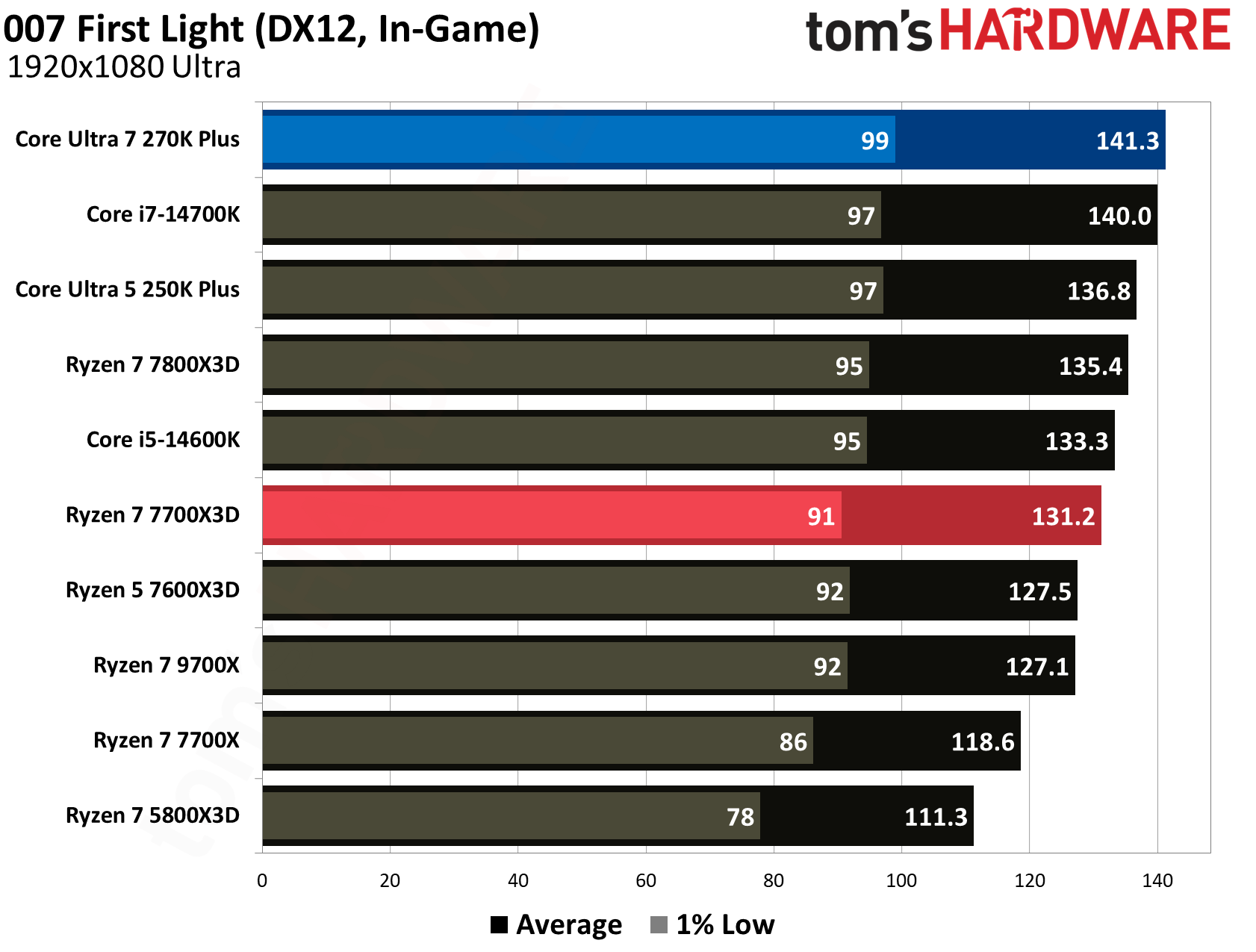
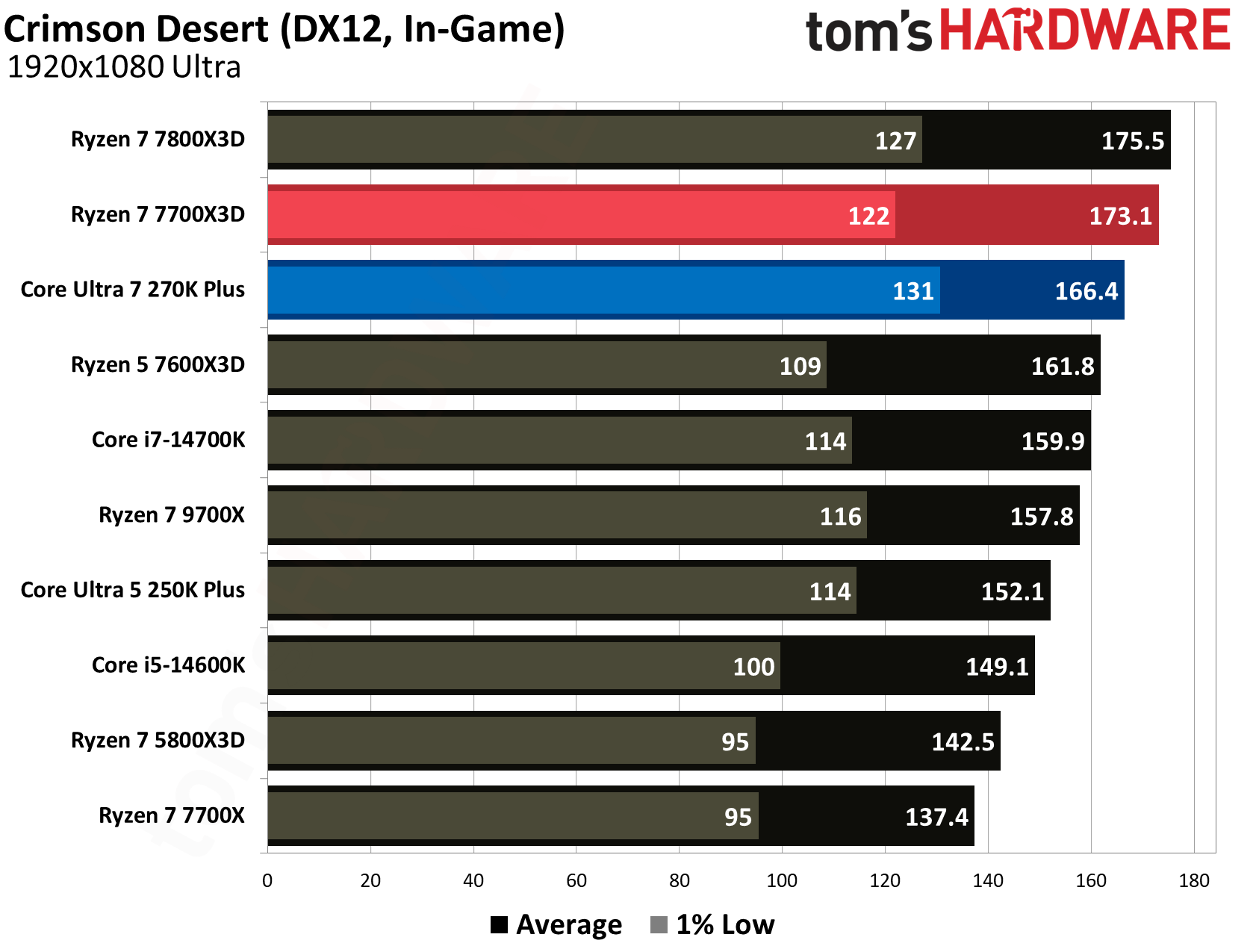
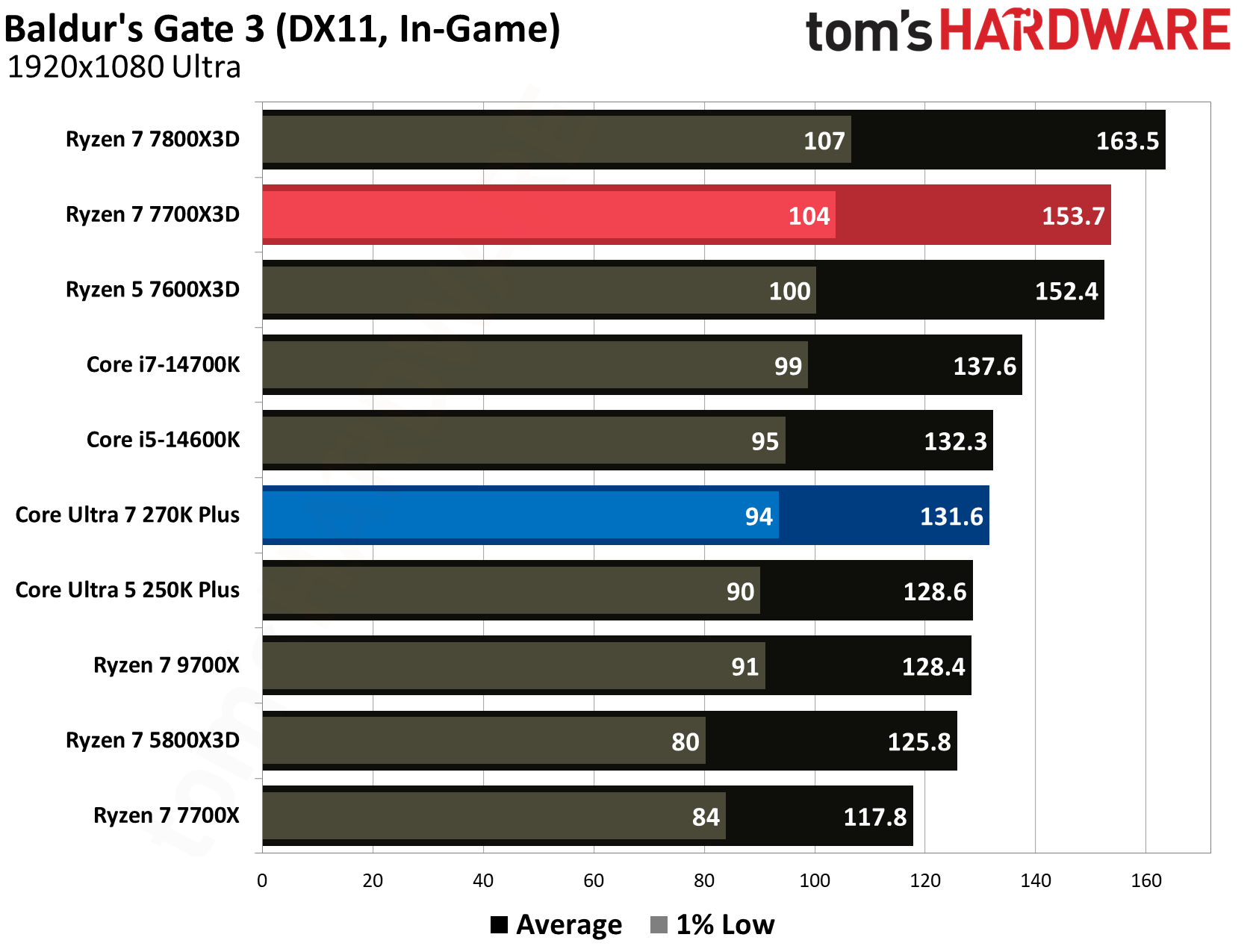
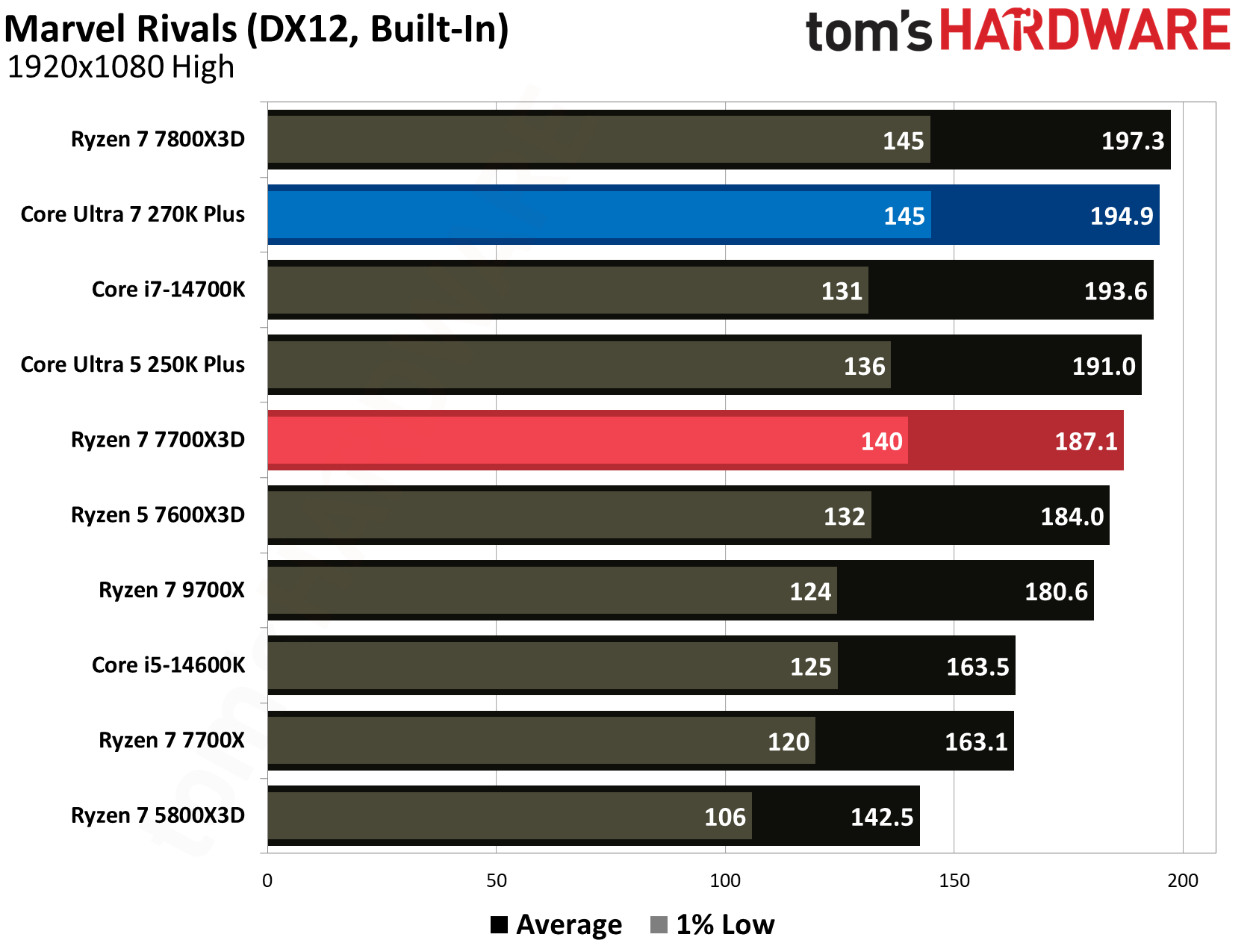
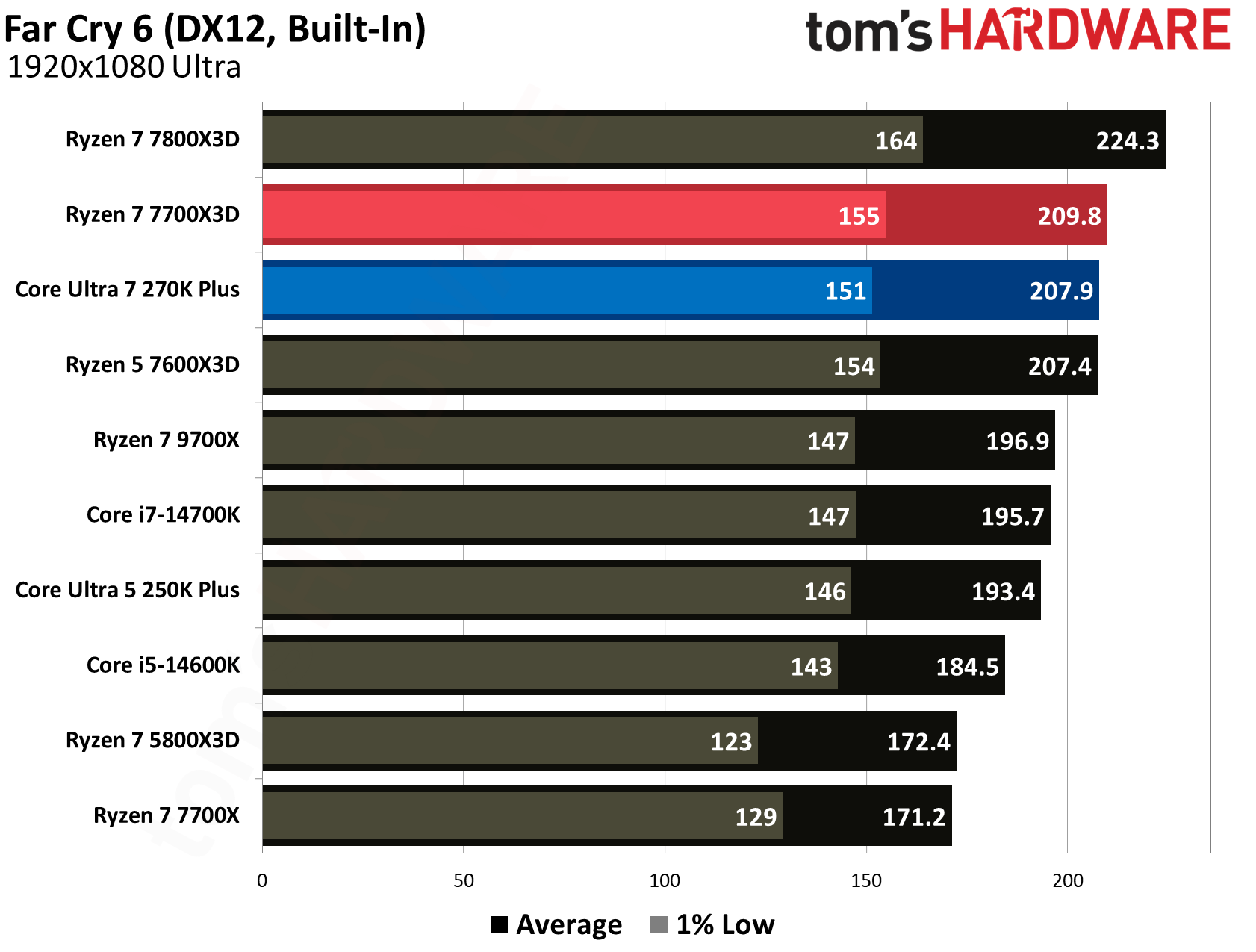
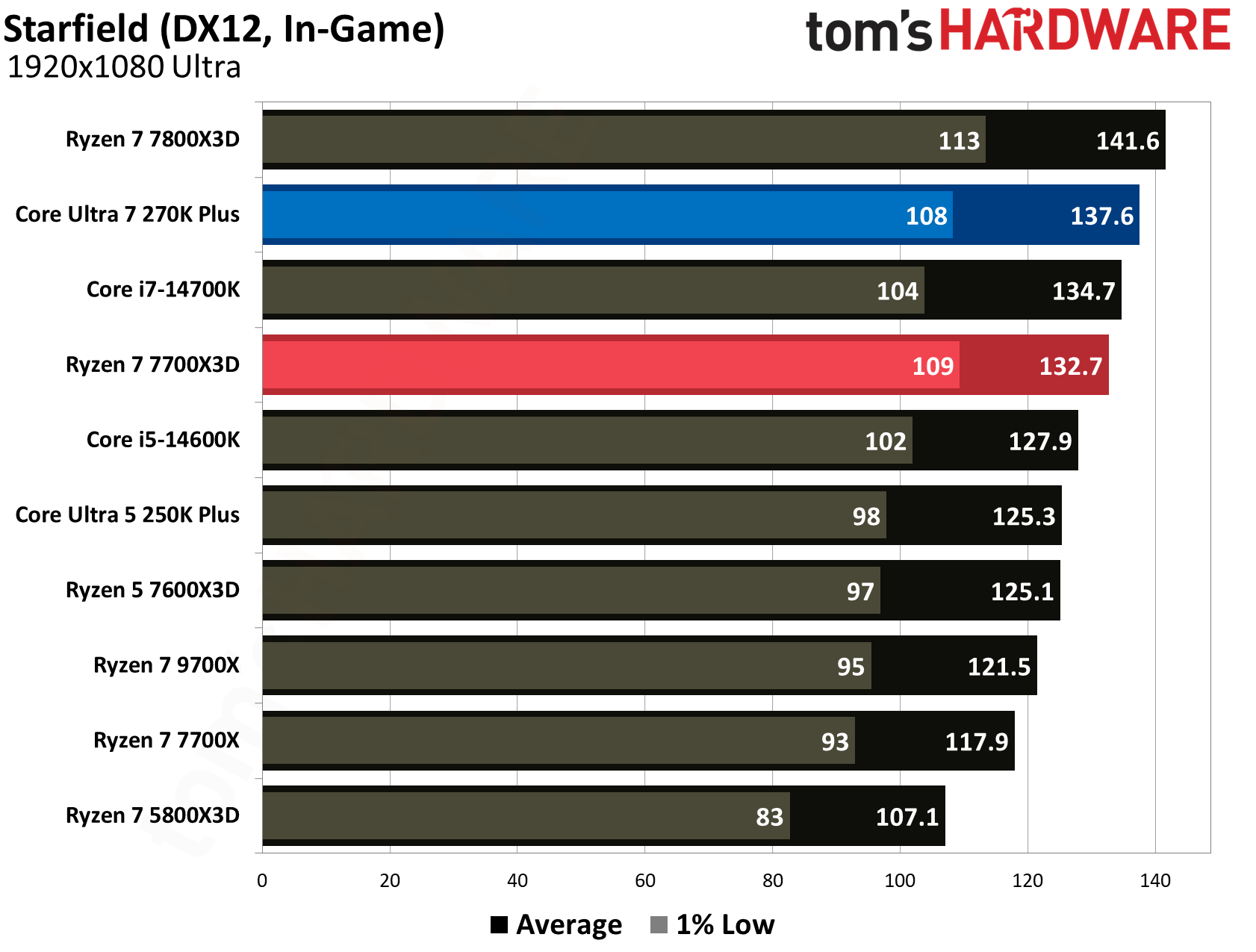
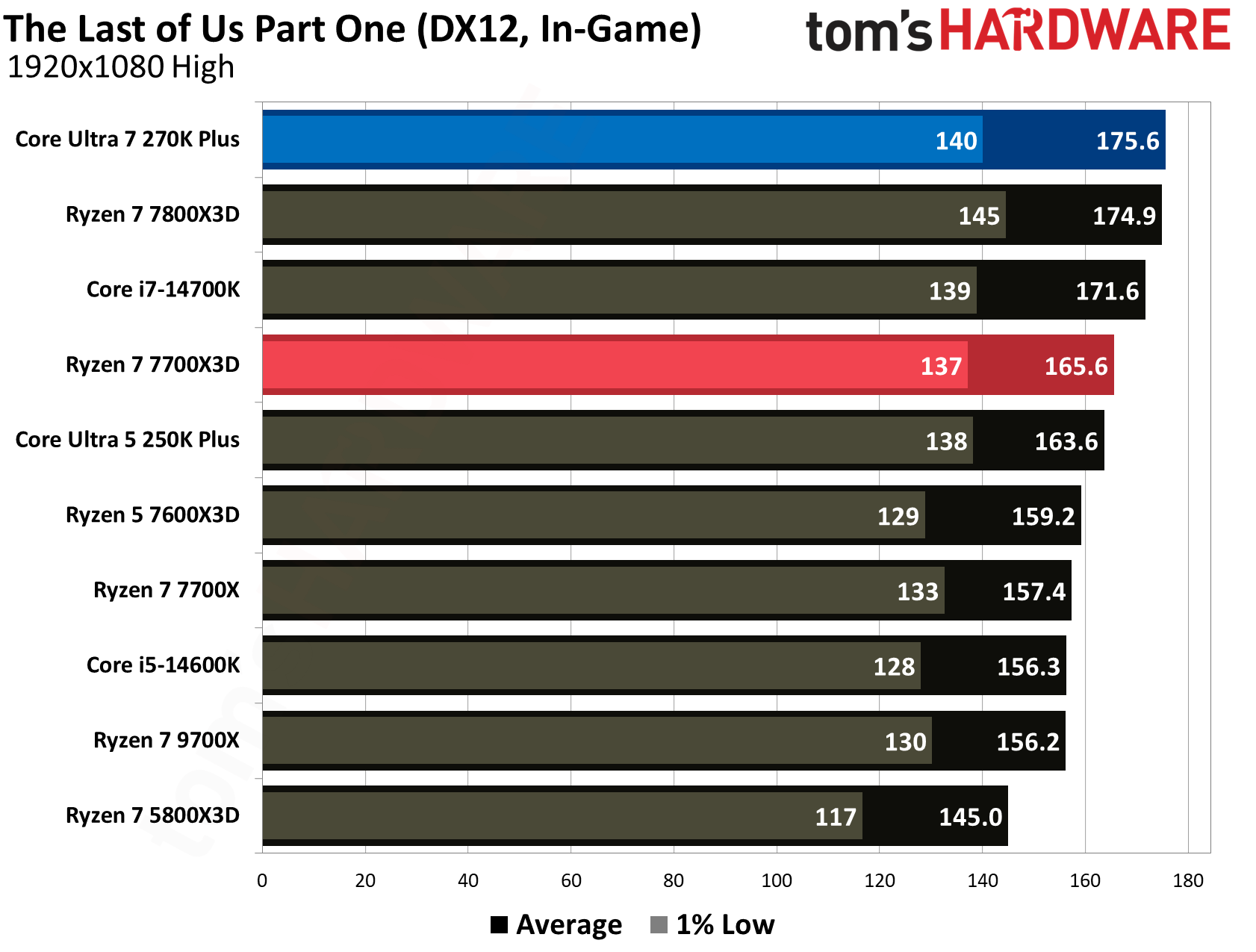
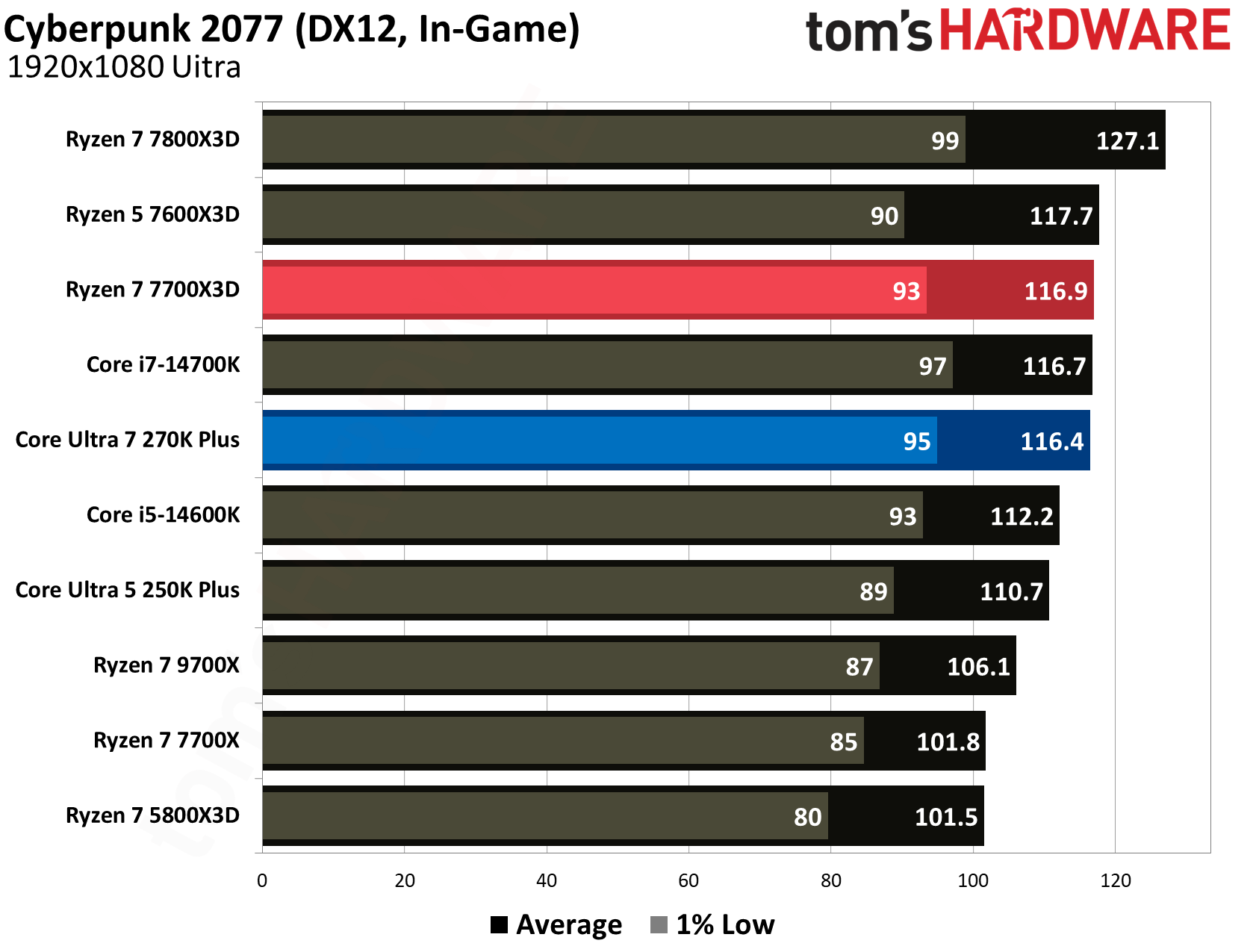
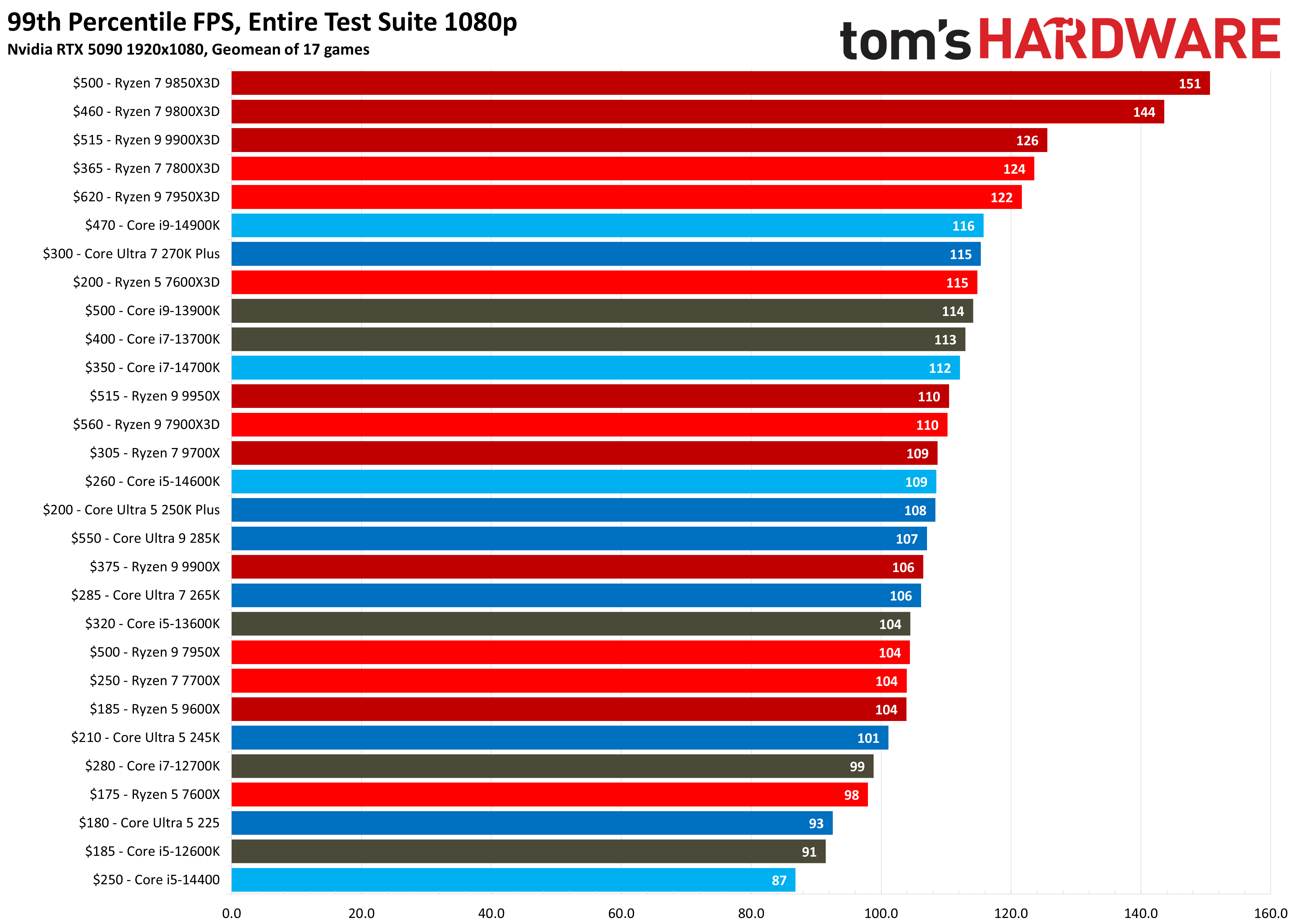
Across a comprehensive 16-game geomean, the AMD Ryzen 7 7700X3D holds its position as the superior gaming chip, delivering a 174.3 FPS average. This represents a 5.3% performance lead over the 270K Plus, which produced a 165.6 FPS average. While Intel's latest flagship has significantly narrowed the gap compared to the original Arrow Lake silicon, AMD’s 3D V-cache architecture continues to provide a higher performance in the majority of tested titles.
Even when examining the 1% low frame rates, which is the perceived smoothness while gaming, the 7700X3D maintains a slight edge with a 118 FPS average compared to the 115 FPS from the 270K Plus.
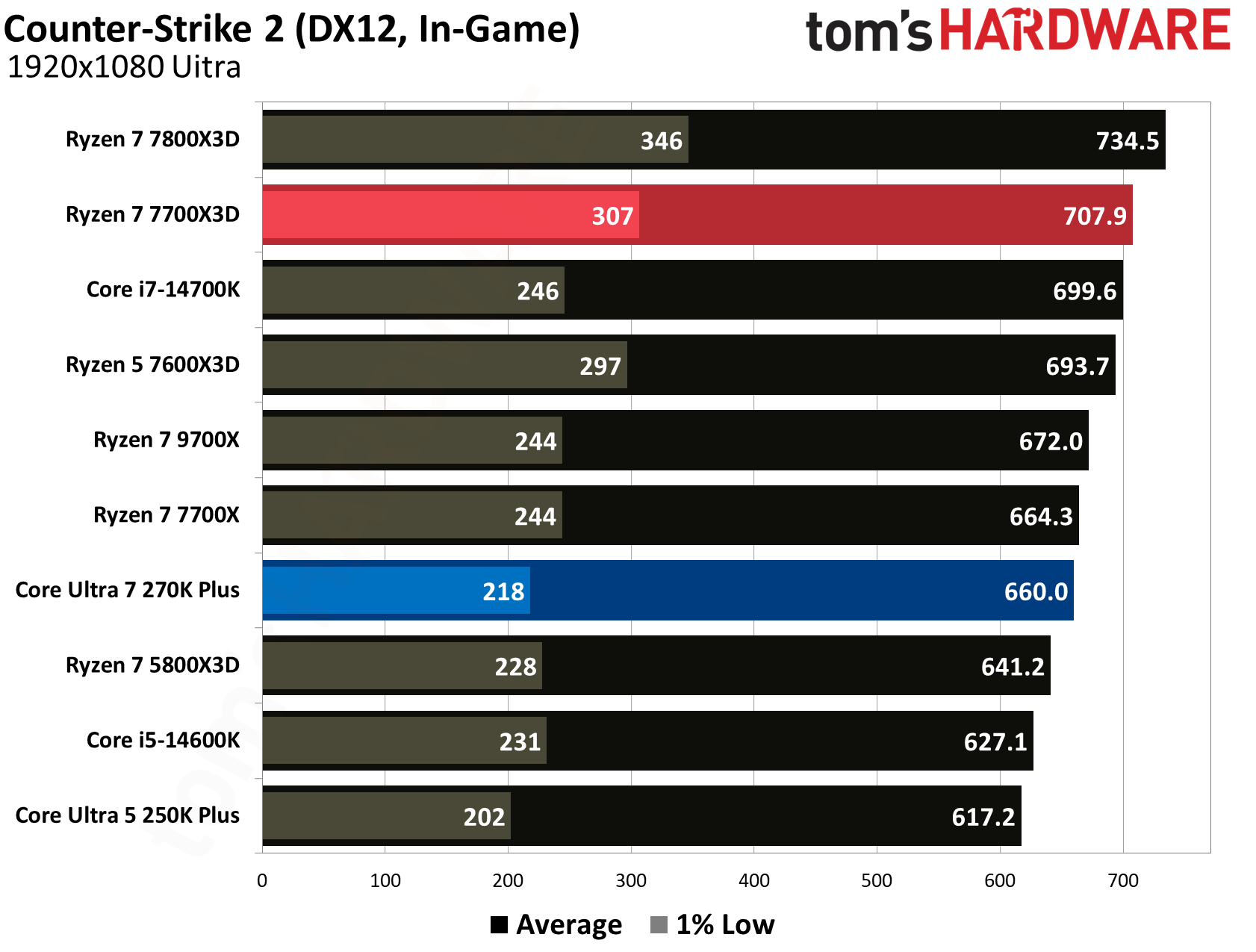
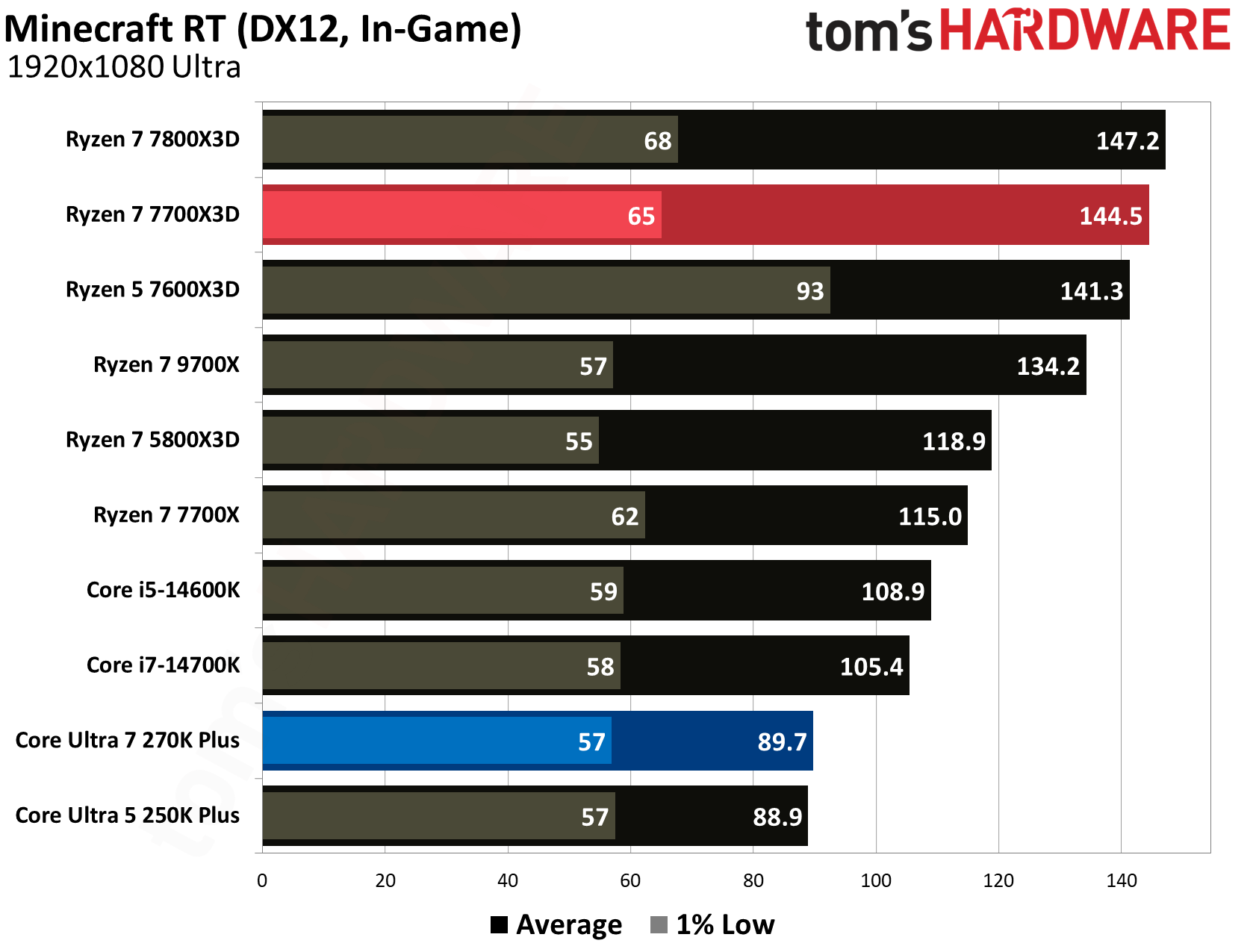
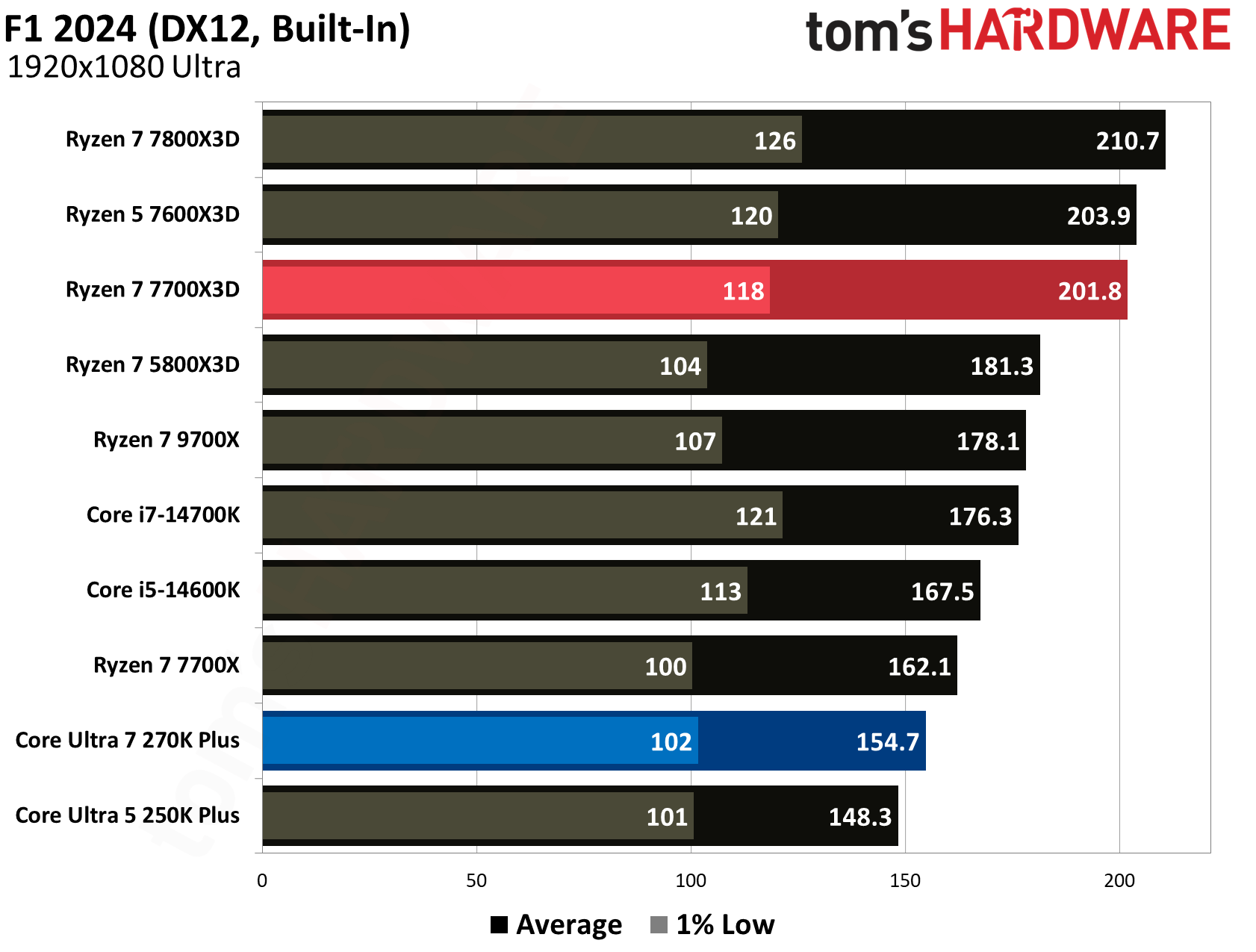
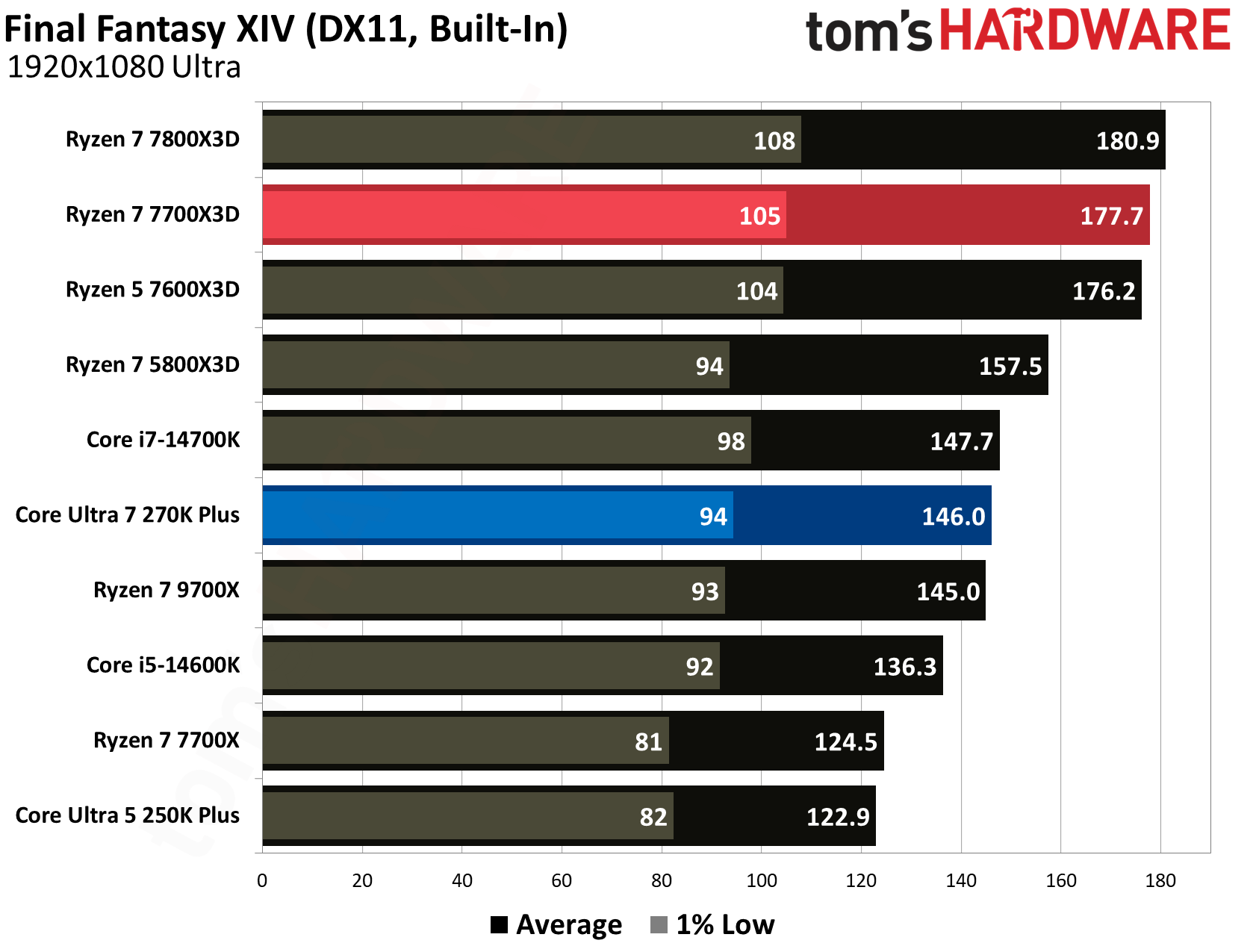
AMD's stacked cache gives the 7700X3D a clear edge in games that are sensitive to memory latency. For instance, in Minecraft RT, the 7700X3D delivered 144.5 FPS average, dwarfing the 89.7 FPS produced by the 270K Plus for a massive 61.1% performance advantage. We see similarly dominant leads for AMD in F1 2024, where it leads by 30.4% (201.8 vs. 154.7 FPS), and in Final Fantasy XIV, where it holds a 21.7% lead (177.7 vs. 146.0 FPS). Even in esports titles like Counter-Strike 2, the 7700X3D maintains a comfortable 7.3% lead with 707.9 FPS over Intel’s 660.0 FPS.
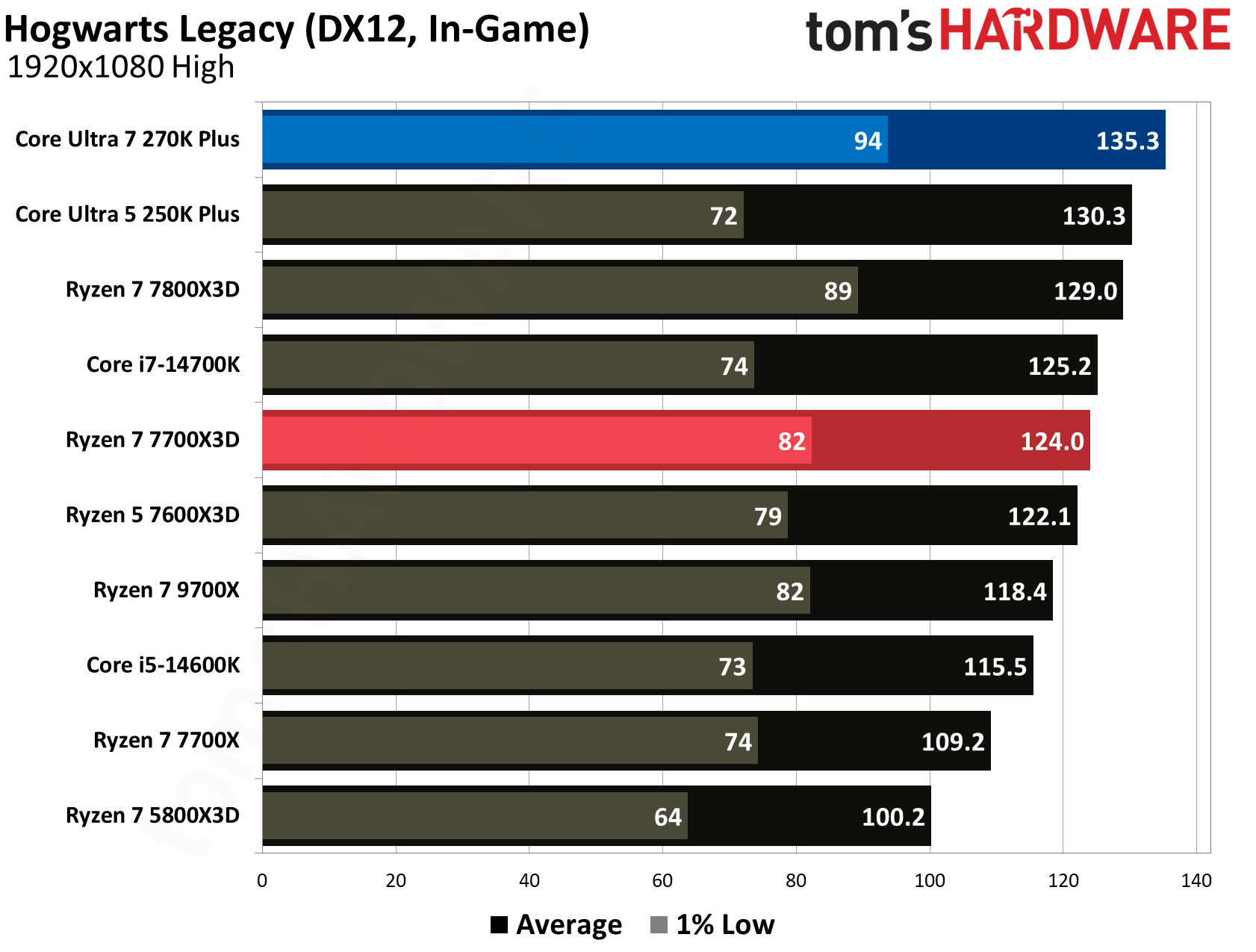
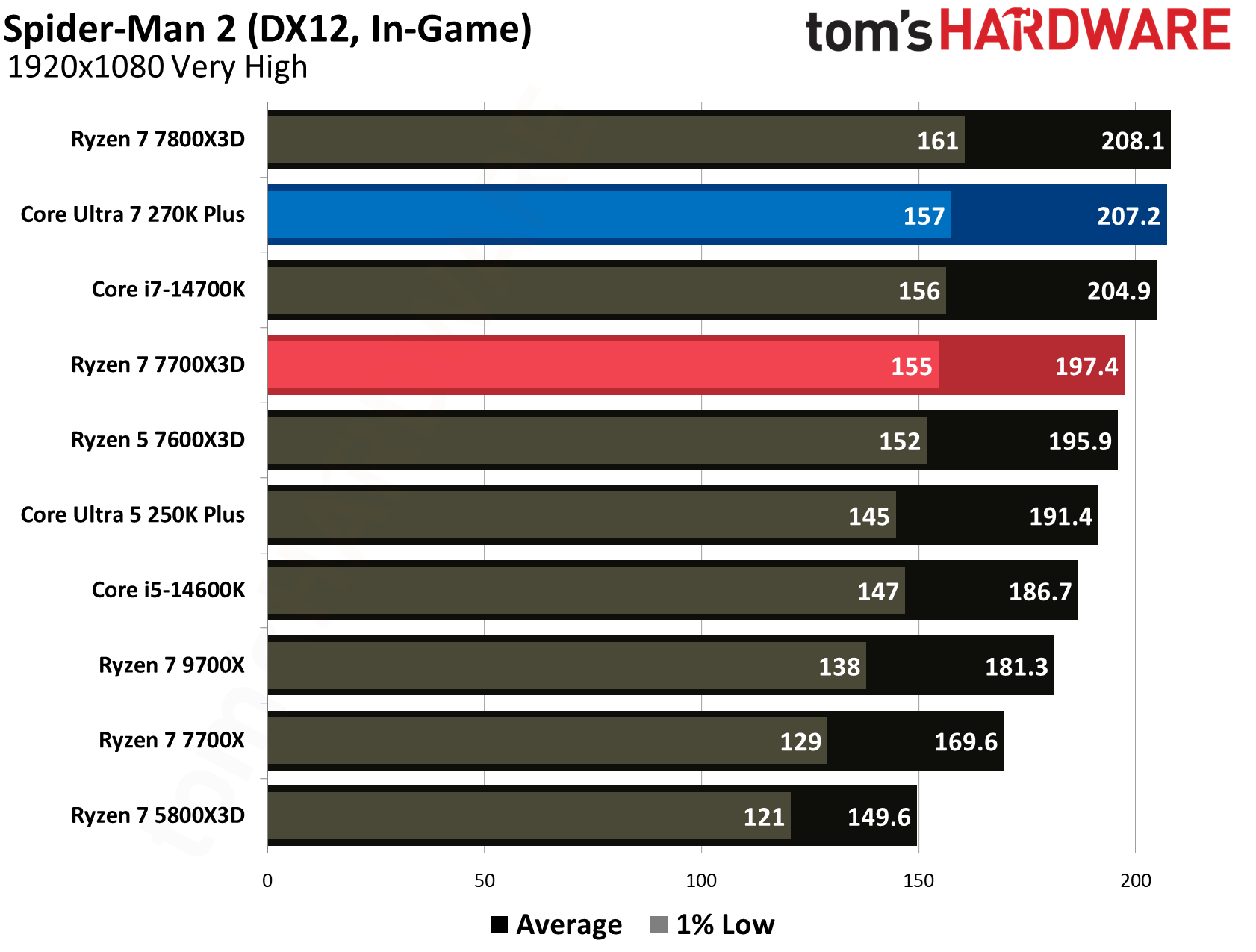
Intel’s Core Ultra 7 270K Plus is no slouch, however, as it leverages its higher boost frequencies and the new iBOT runtime translation layer to take the lead in several games. Intel manages a win in Hogwarts Legacy, producing 135.3 FPS for a 9.1% advantage over AMD’s 124.0 FPS, a result directly attributed to iBOT. Team Blue also edges out victories in The Last of Us Part 1 with 175.6 FPS (6% lead) and Spider-Man 2 with 207.2 FPS (5% lead).
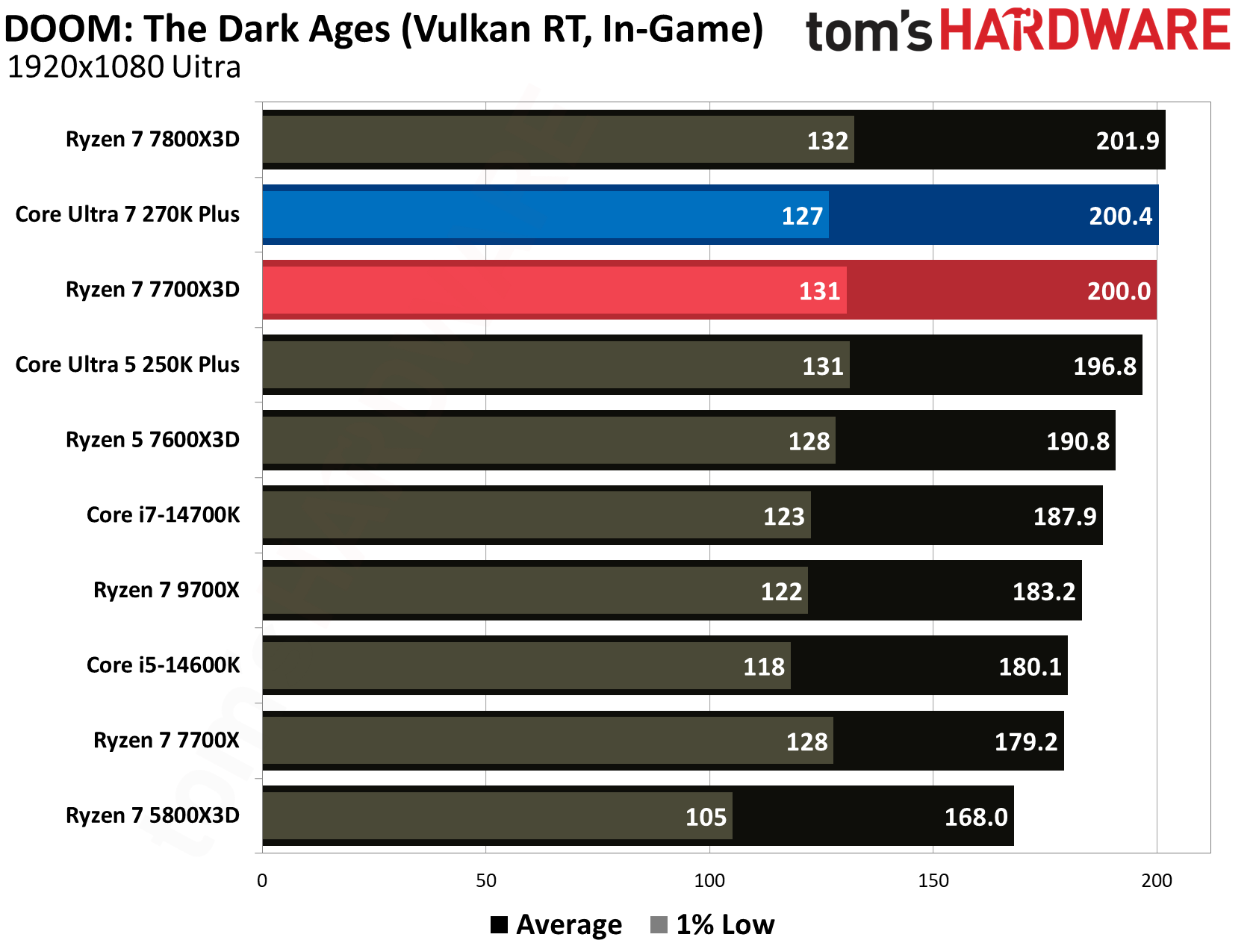
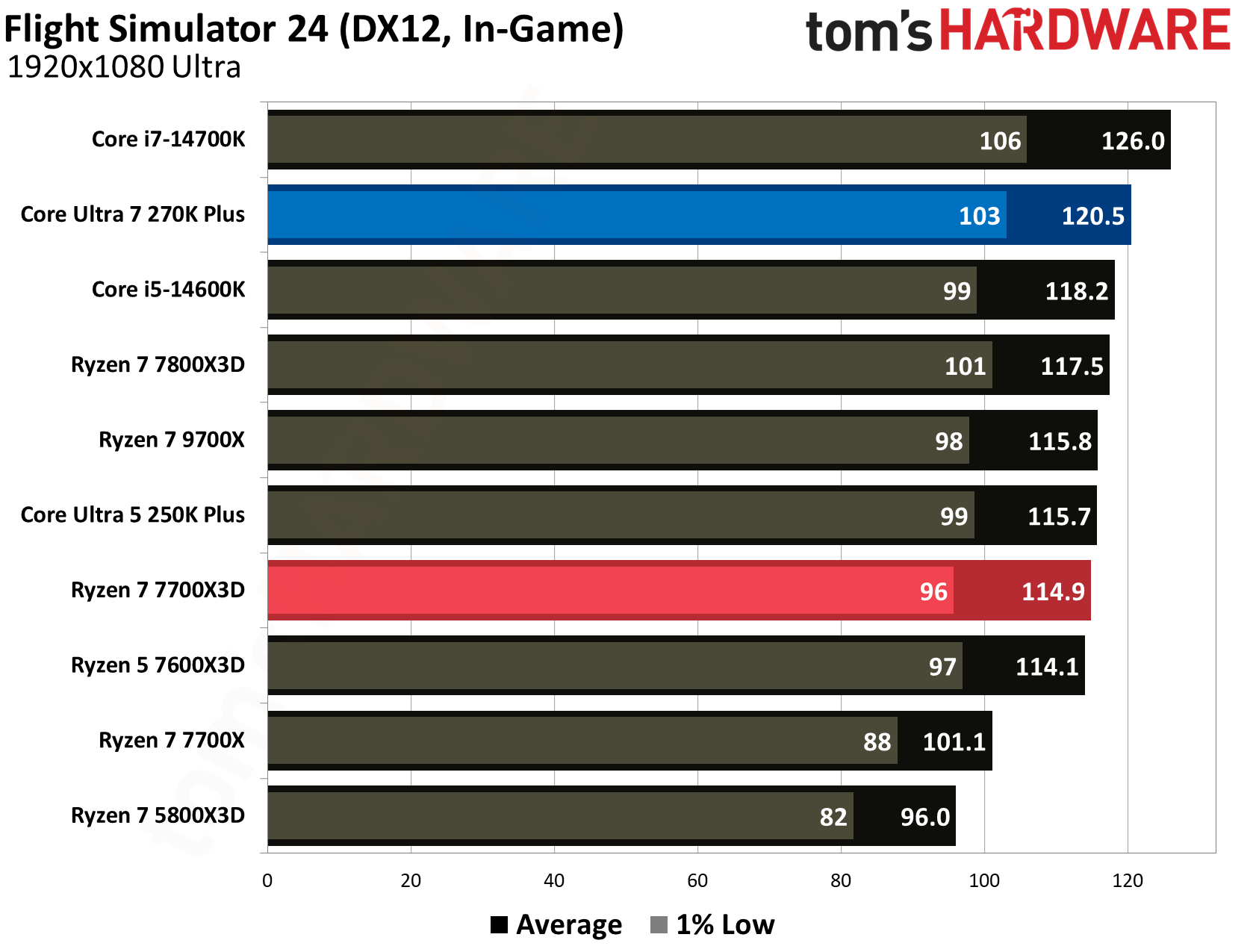
In many other modern titles, the two processors are essentially locked in a dead heat. For example, in DOOM: The Dark Ages, the 270K Plus delivers 200.4 FPS while the 7700X3D is right beside it at 200.0 FPS. The story is similar in Flight Simulator 24, where Intel's 120.5 FPS and AMD's 114.9 FPS result in a negligible difference during actual gameplay. These results indicate that while the 7700X3D is the more consistent gaming choice, especially in cache-heavy titles, the 270K Plus is a highly competitive gaming chip that delivers impressive results for its $300 price tag.
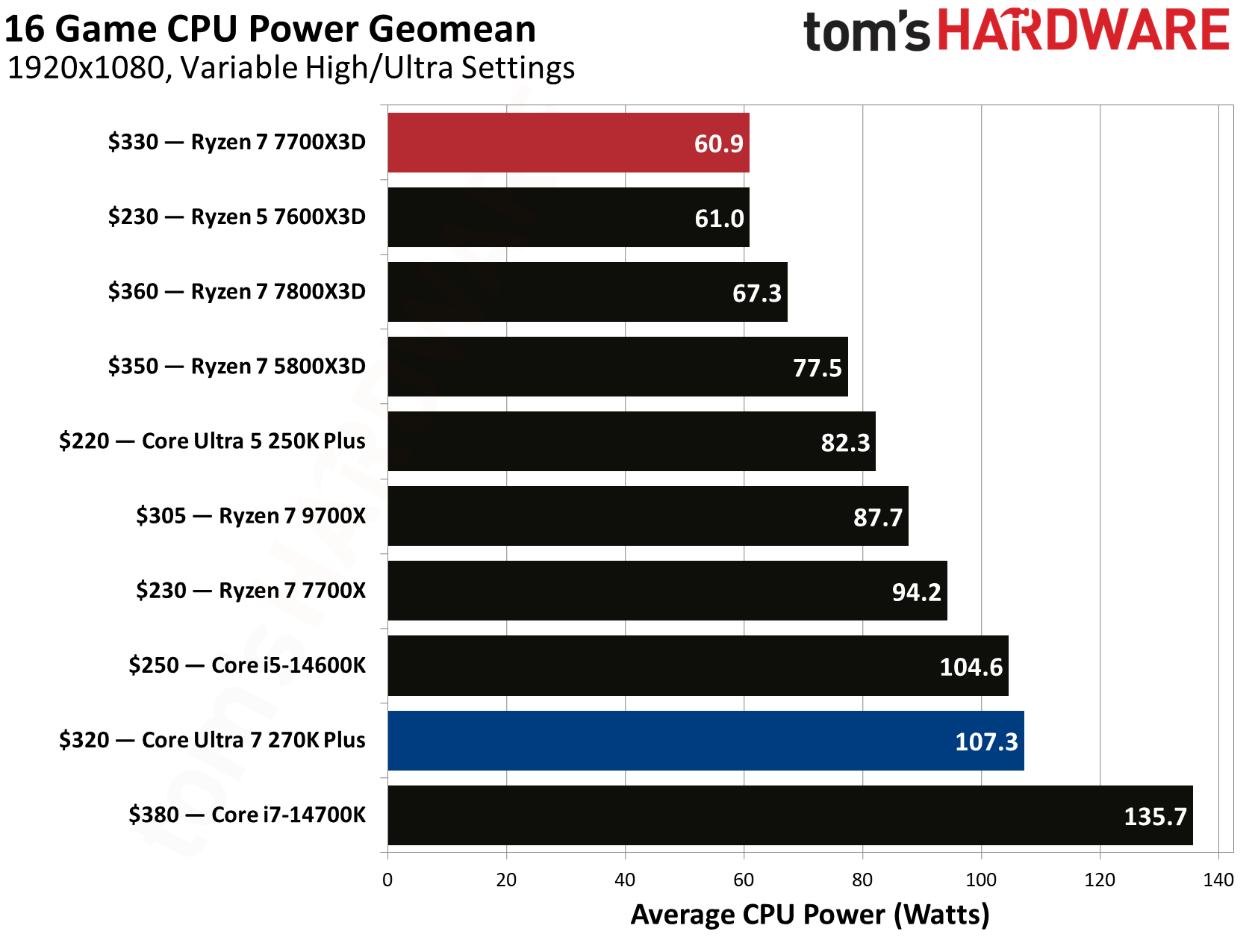
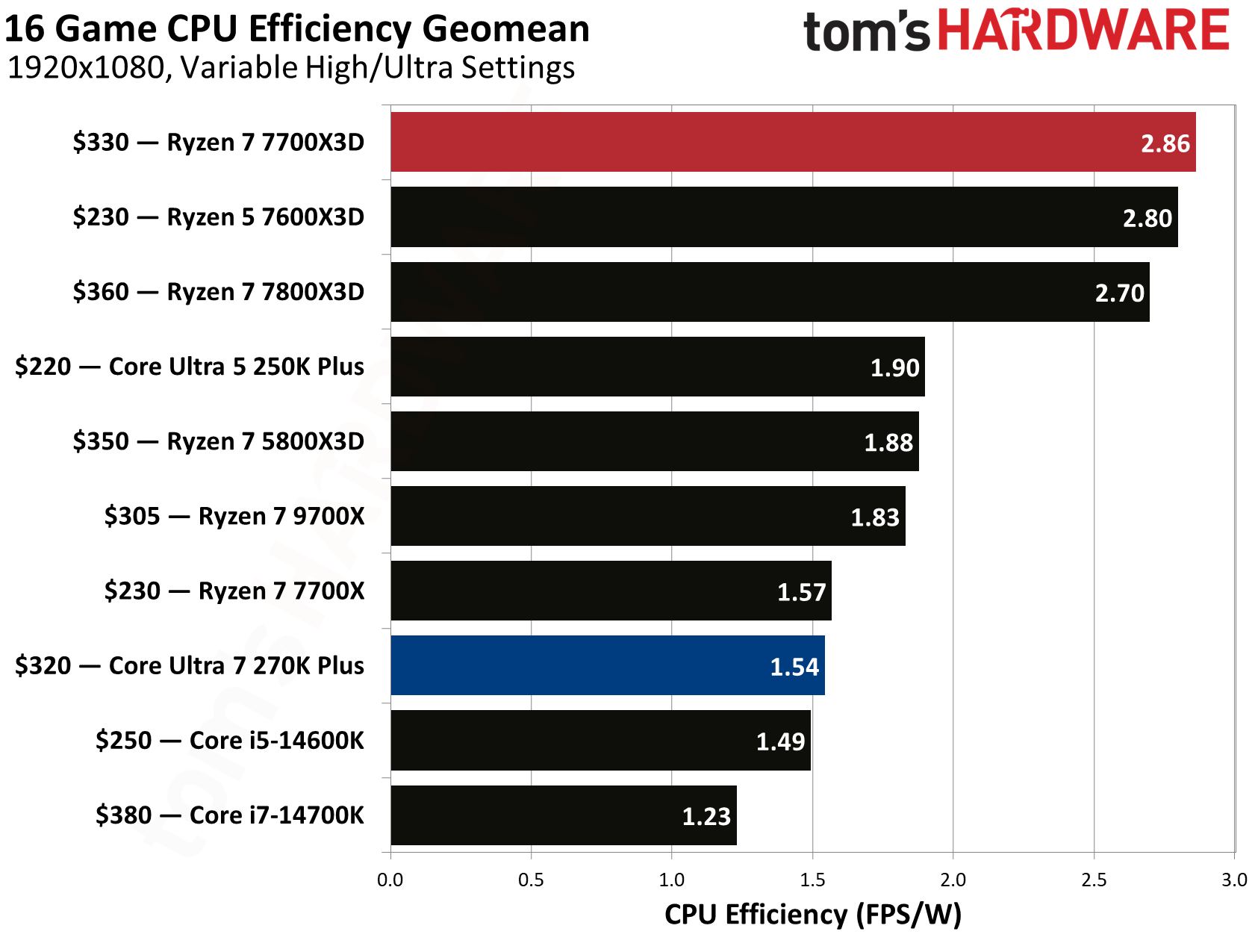
The biggest difference between these two architectures is noticeable when analyzing power consumption and efficiency metrics. Based on our 16-game CPU power geomean, the 7700X3D is clearly way more efficient, drawing an average of just 60.9 watts while gaming. In comparison, the 270K Plus consumed 107.3 watts on average, which is a significant 76.2% increase in power. This results in a massive gap in gaming efficiency where the 7700X3D delivers 2.86 FPS per watt, making it roughly 85.7% more efficient than the 270K Plus, which trails at 1.54 FPS per watt.
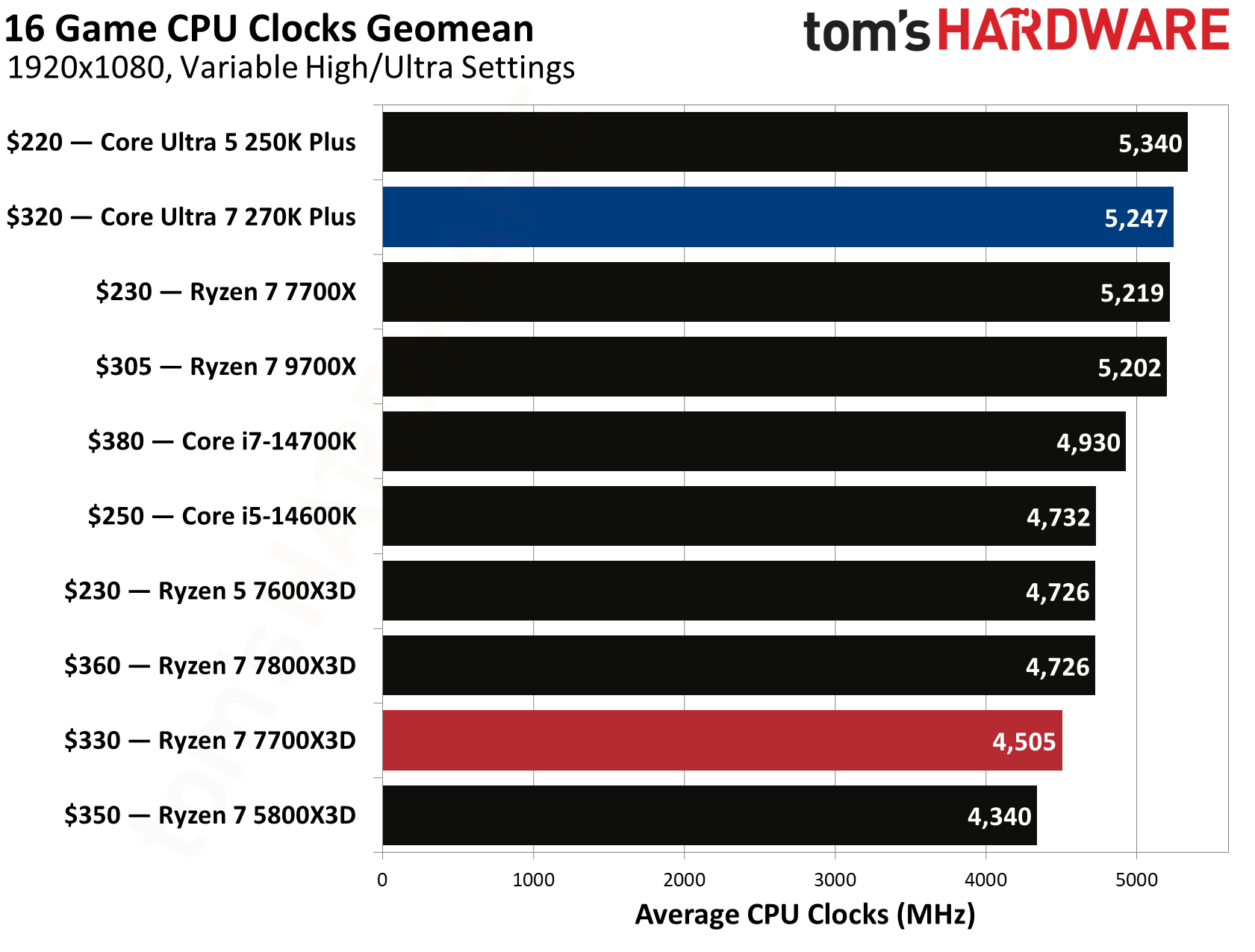
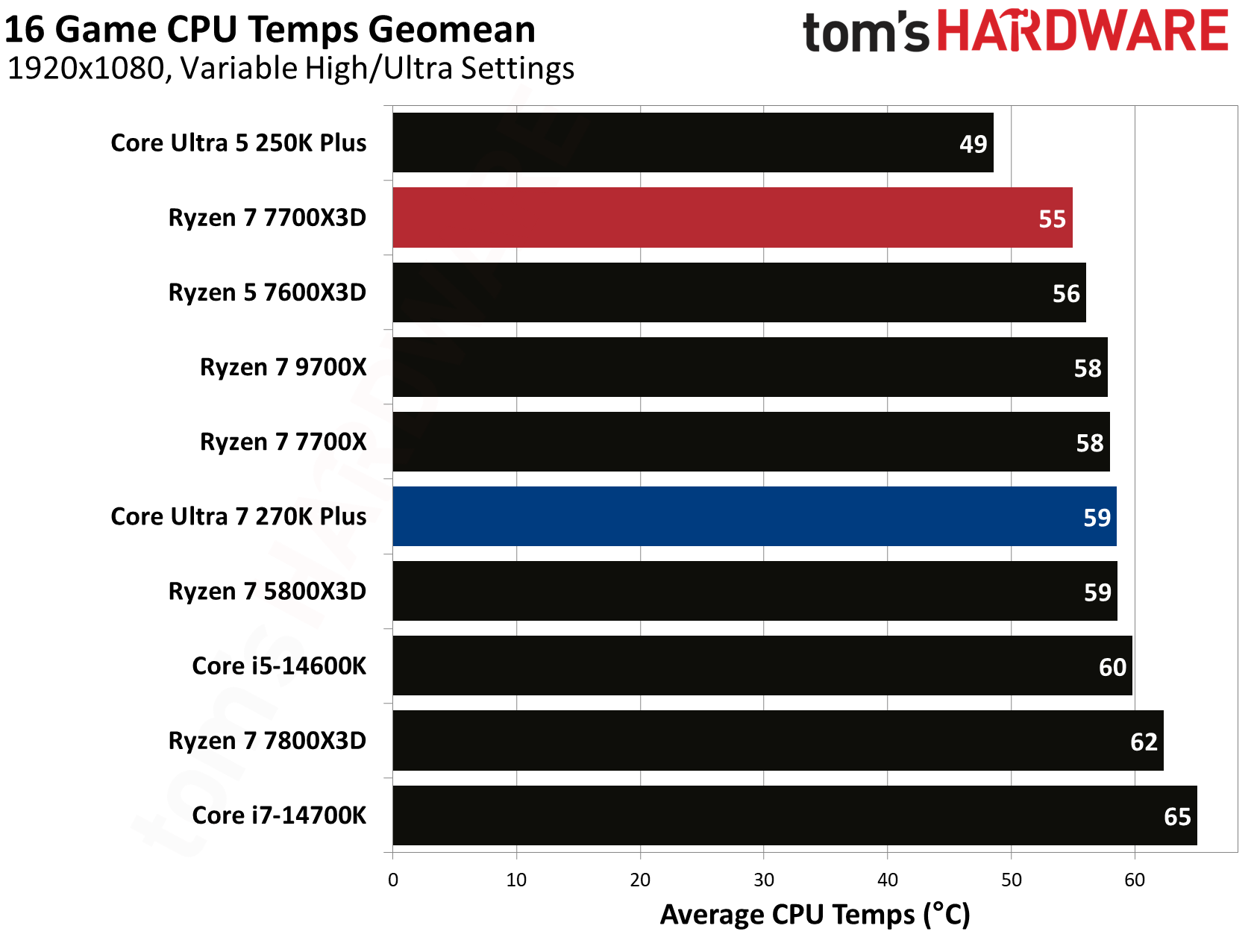
Intel does take the lead when it comes to raw frequency, with the 270K Plus maintaining an impressive 5,247 MHz average clock speed across our gaming suite. This is over 700 MHz faster than the 7700X3D, which averaged 4,505 MHz. Despite the much higher clocks and power draw of the Intel chip, its thermal management remains surprisingly competitive when paired with the right cooling solution. The 270K Plus averaged 59°C during gaming, though it still runs warmer than the 7700X3D, which stays at a cooler 55°C average.
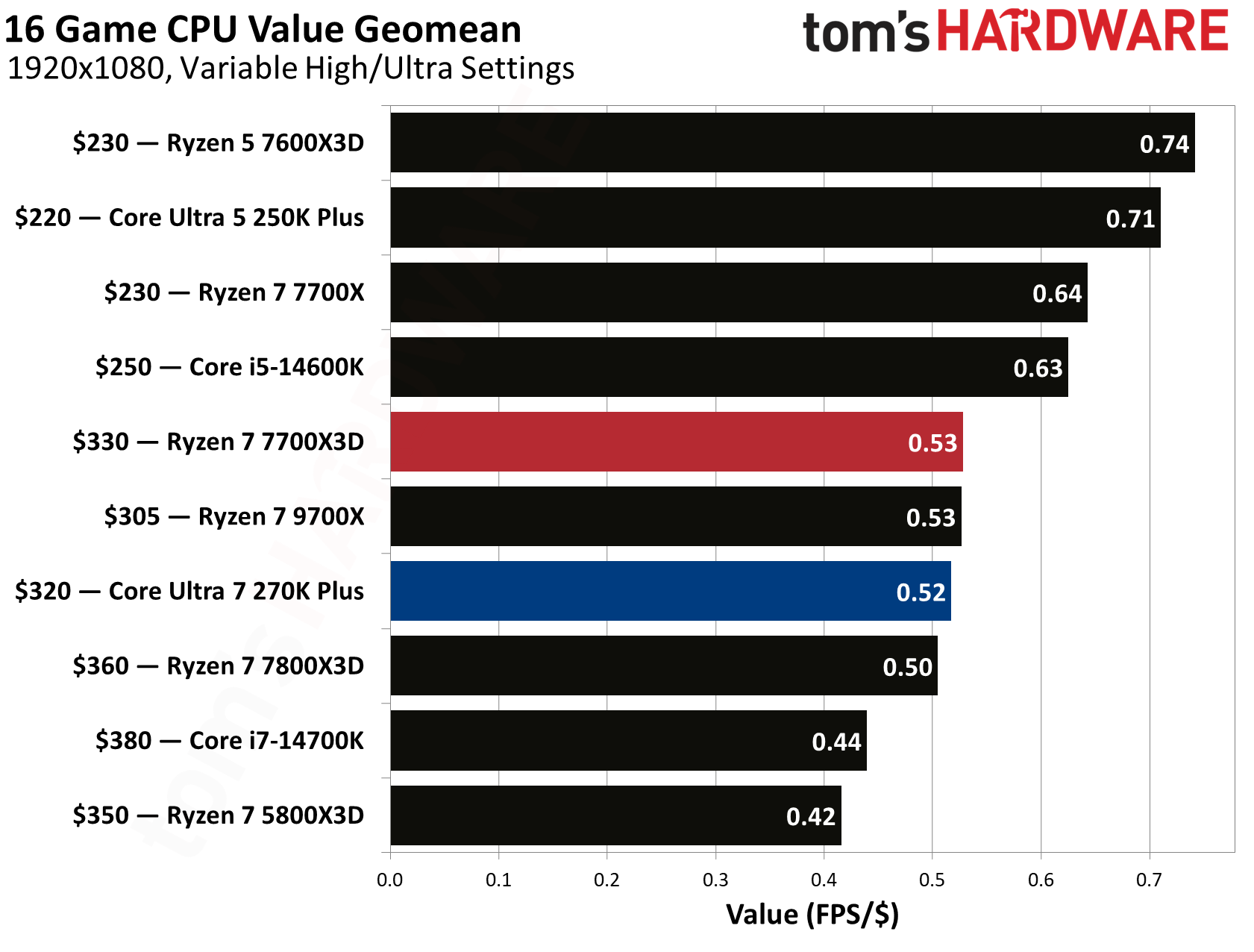
When factoring in the cost of the silicon, the competition for the best bang for your buck is incredibly tight. The Ryzen 7 7700X3D provides a value of 0.53 FPS per dollar, narrowly edging out the Core Ultra 7 270K Plus, which sits at 0.52 FPS per dollar.
⭐Winner: AMD Ryzen 7 7700X3D
The 7700X3D’s overall higher average frame rates and excellent efficiency makes it the more attractive option for a dedicated gaming build. Since raw gaming performance, efficiency, and thermals all favor Team Red in this category, the Ryzen 7 7700X3D takes the win for this round.
Productivity Performance: Intel Core Ultra 7 270K Plus vs AMD Ryzen 7 7700X3D
AMD's X3D processors are widely known for their gaming prowess. However, they have historically struggled to maintain the same level of dominance in productivity performance. The Ryzen 7 7700X3D is no exception, as its cache-focused architecture and lower clock speeds result in relatively weak single- and multi-threaded results.
In contrast, Intel has managed to maintain its standing in the productivity segment even when its gaming performance faced challenges. The 270K Plus is a productivity workhorse that is capable of delivering excellent productivity performance making it a standout choice for users who need a balanced system for both work and play.
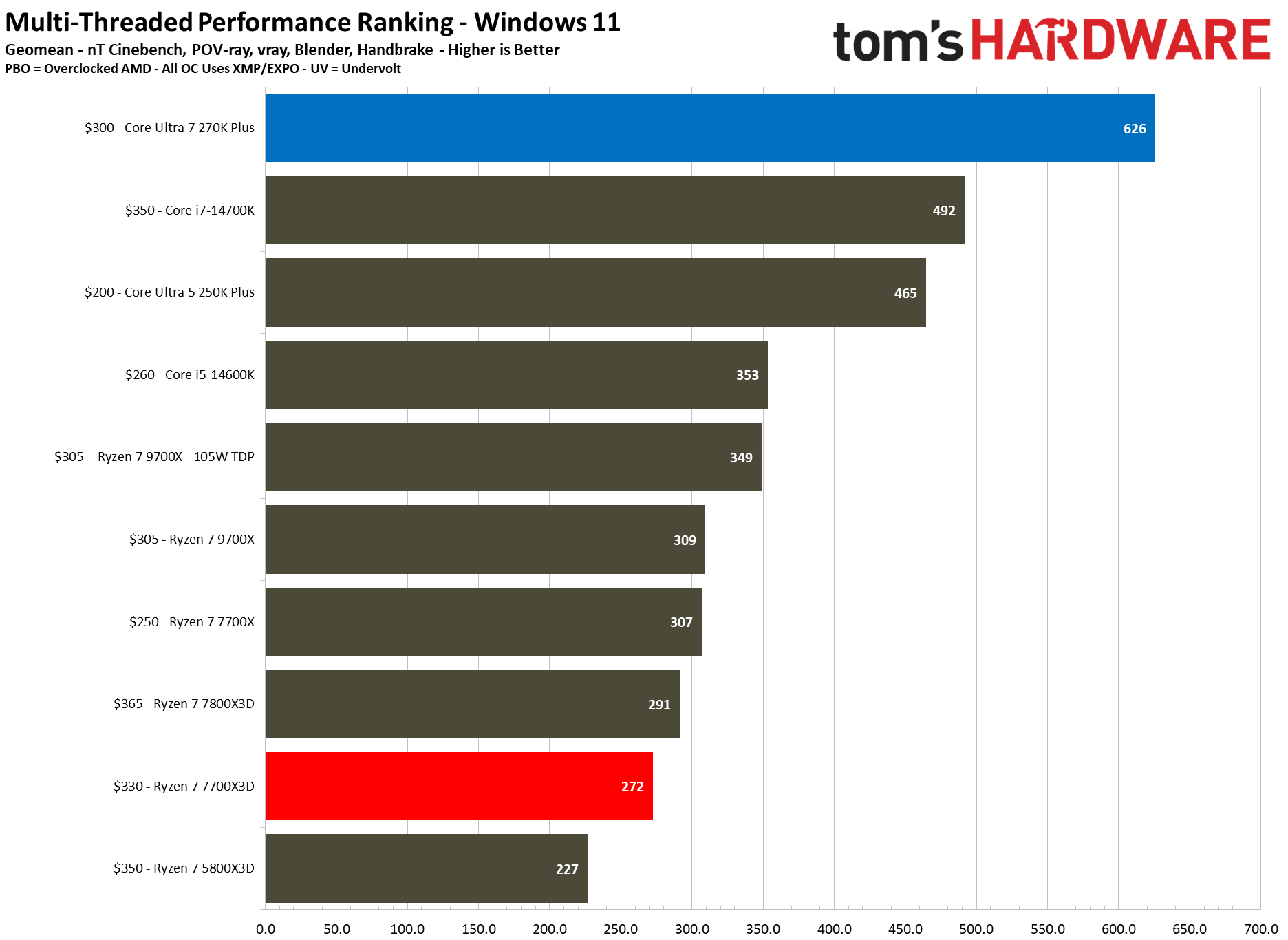
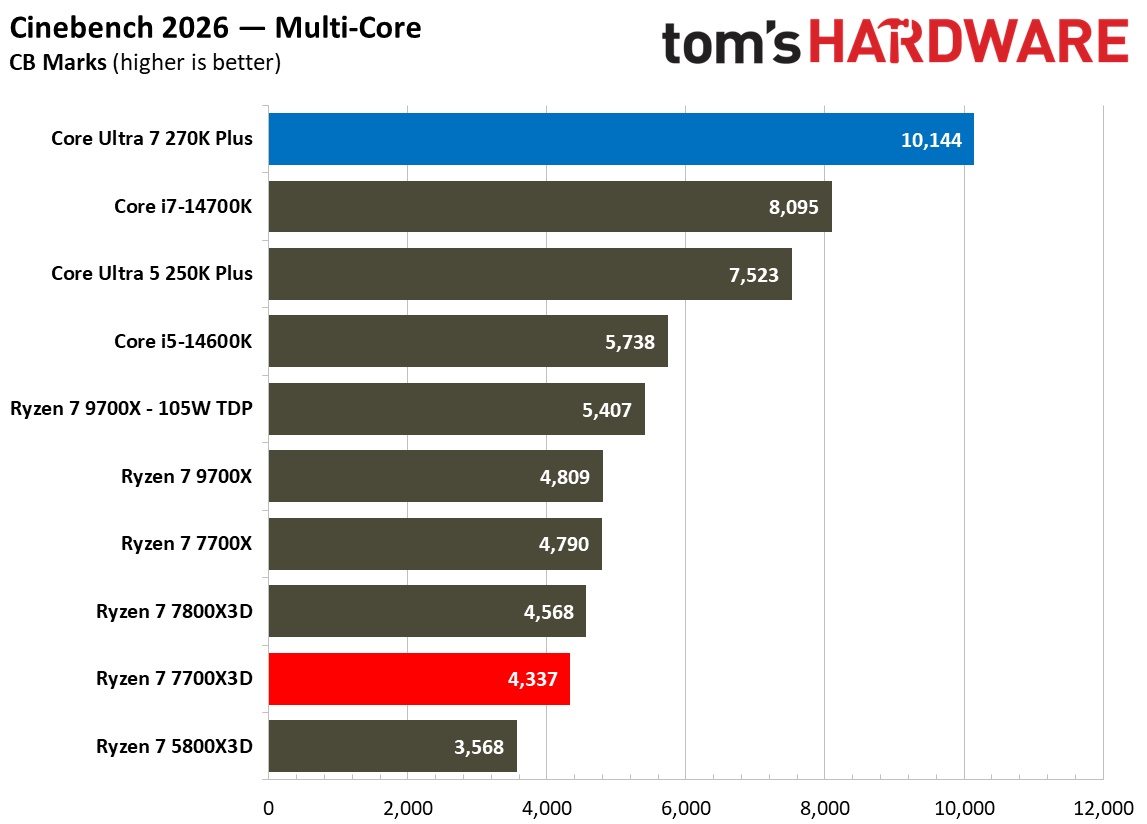
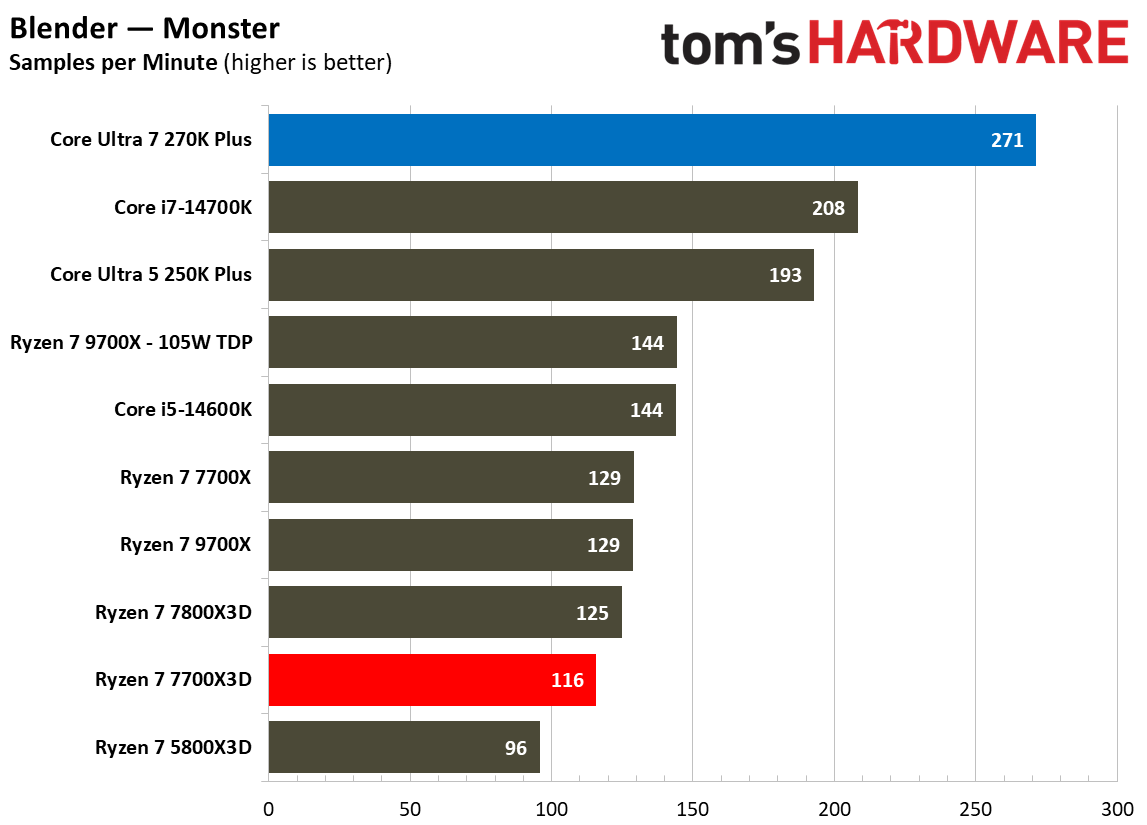
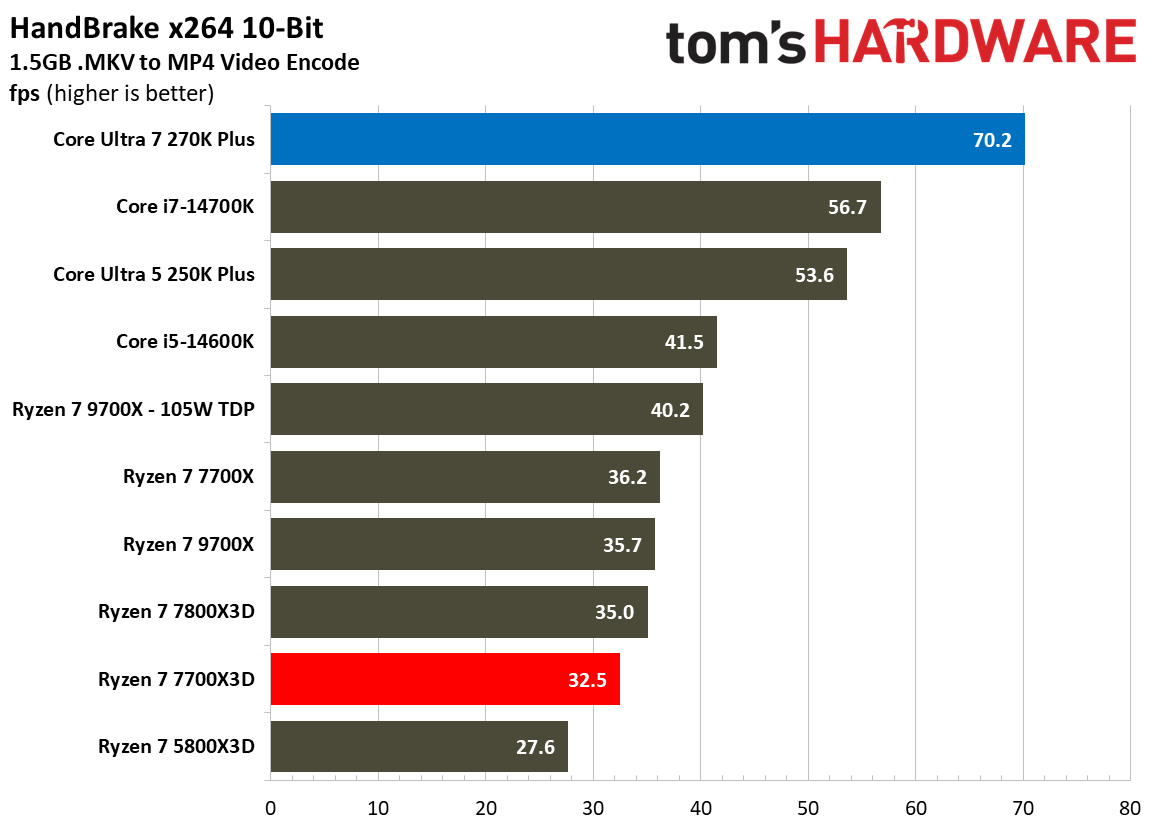
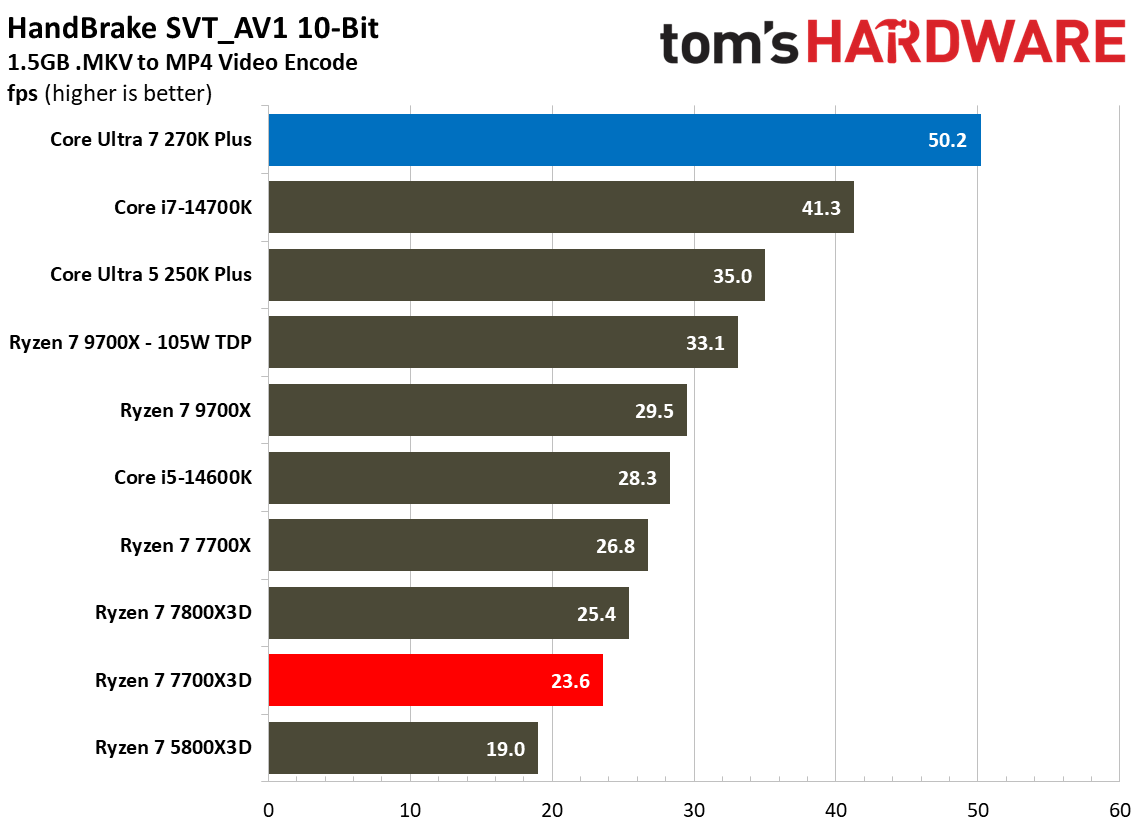
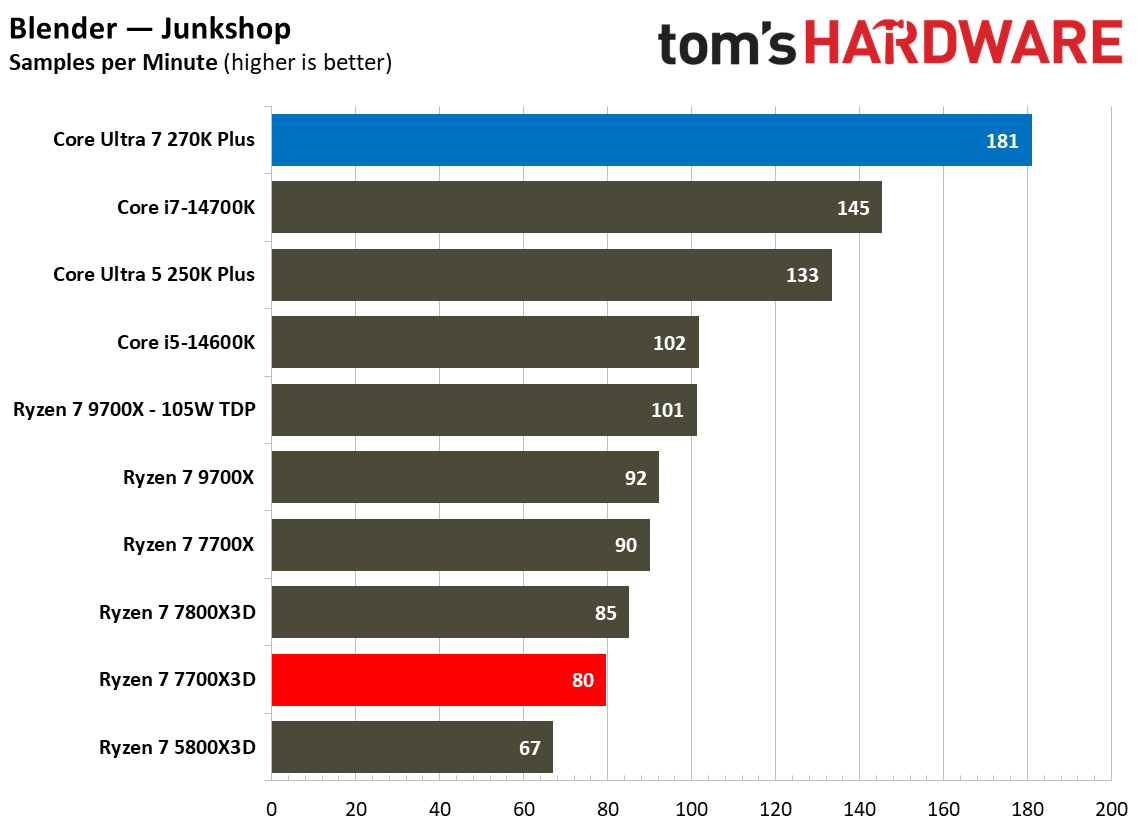
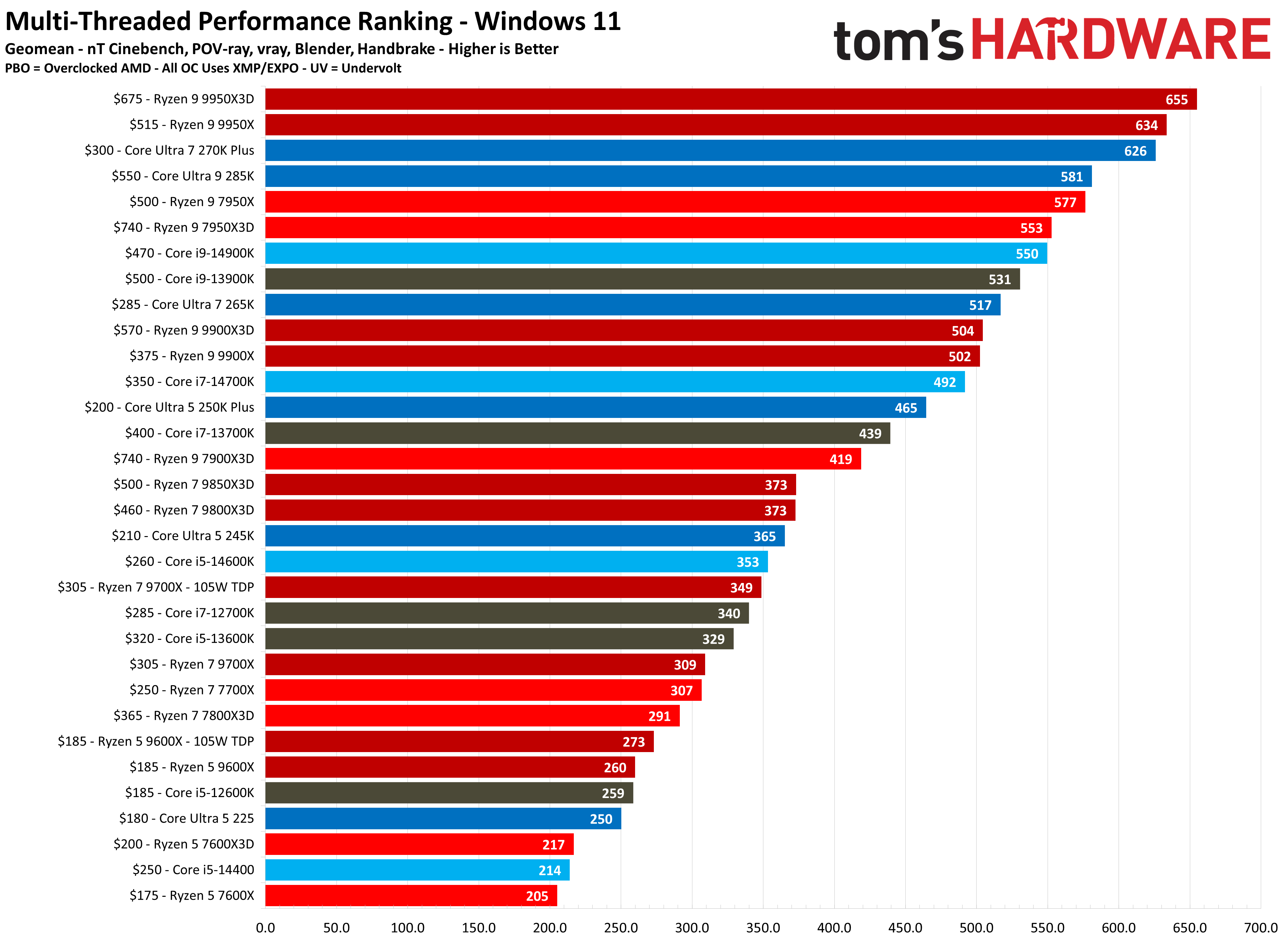
In multi-threaded workloads, the performance gap between these two processors is pretty massive, primarily driven by Intel's higher core count advantage. Across our multi-threaded performance ranking geomean, the Intel chip delivers a score of 626 compared to the 272 produced by the 7700X3D, representing a staggering 130% performance lead for Team Blue. This level of parallel processing power places the 270K Plus in a completely different performance tier, making it more comparable to much more expensive flagship processors.
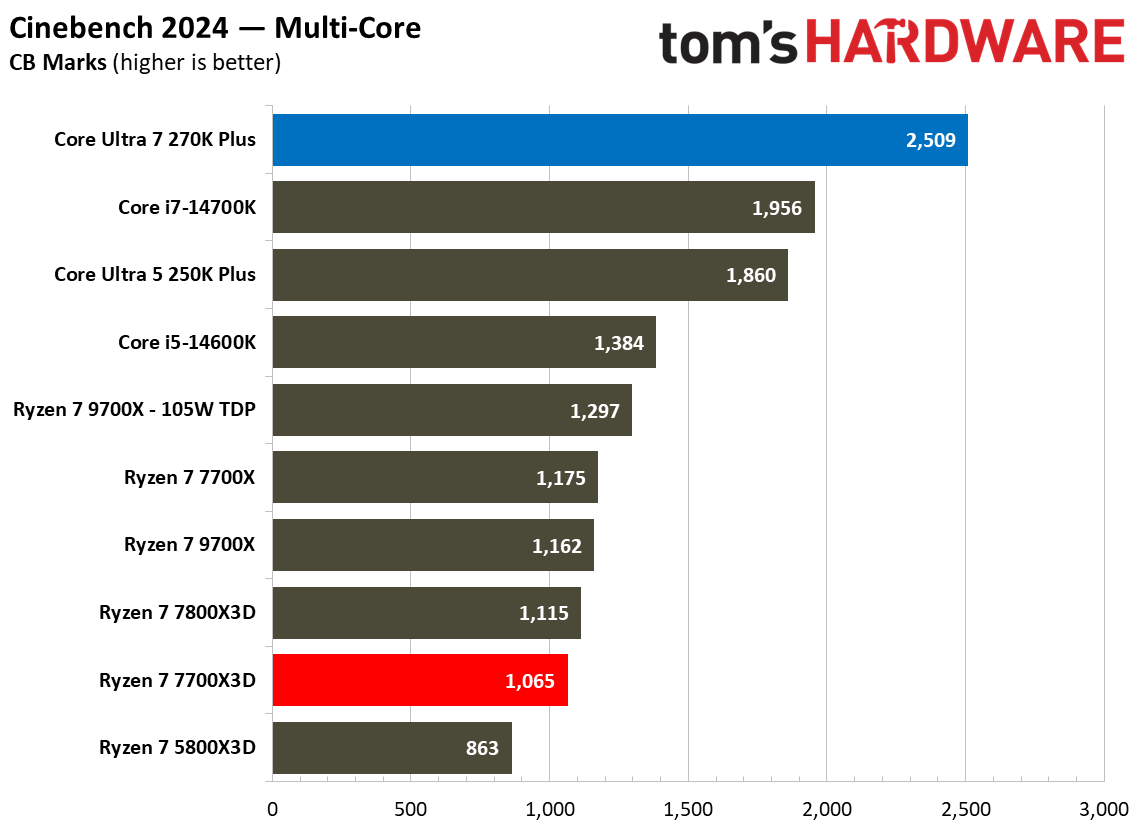
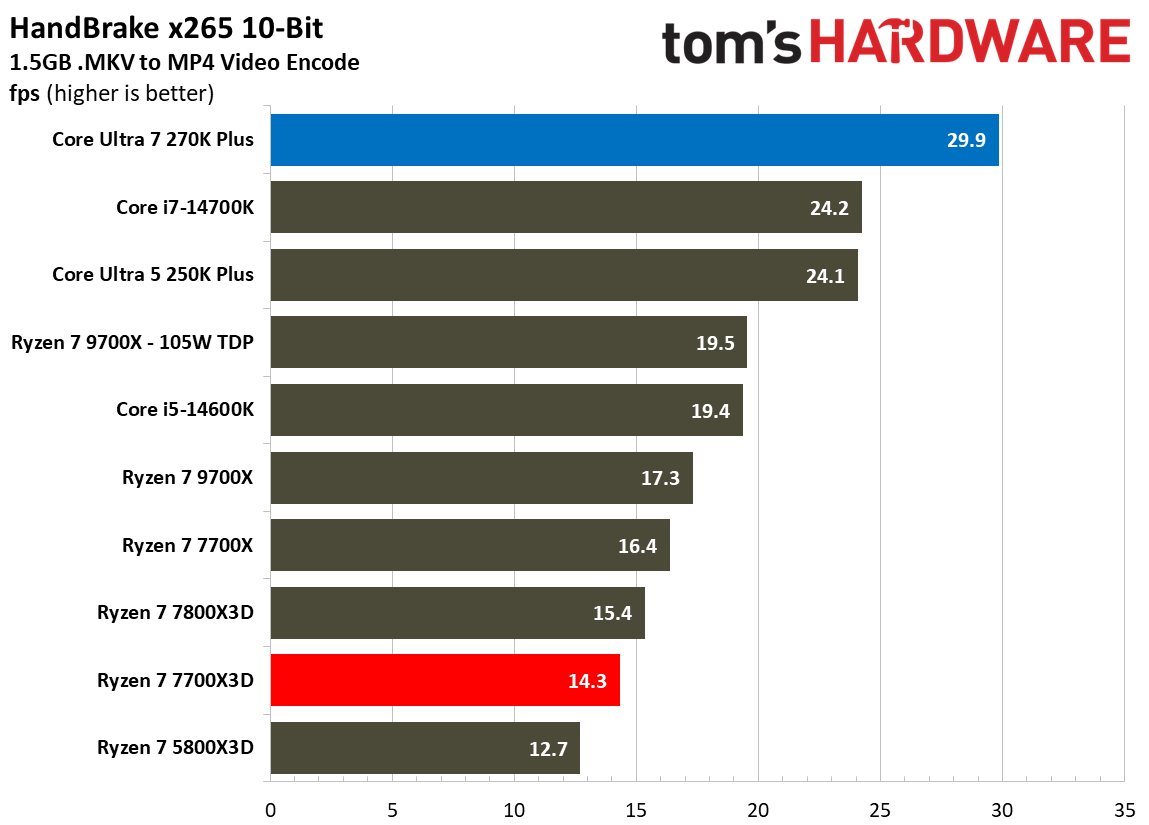
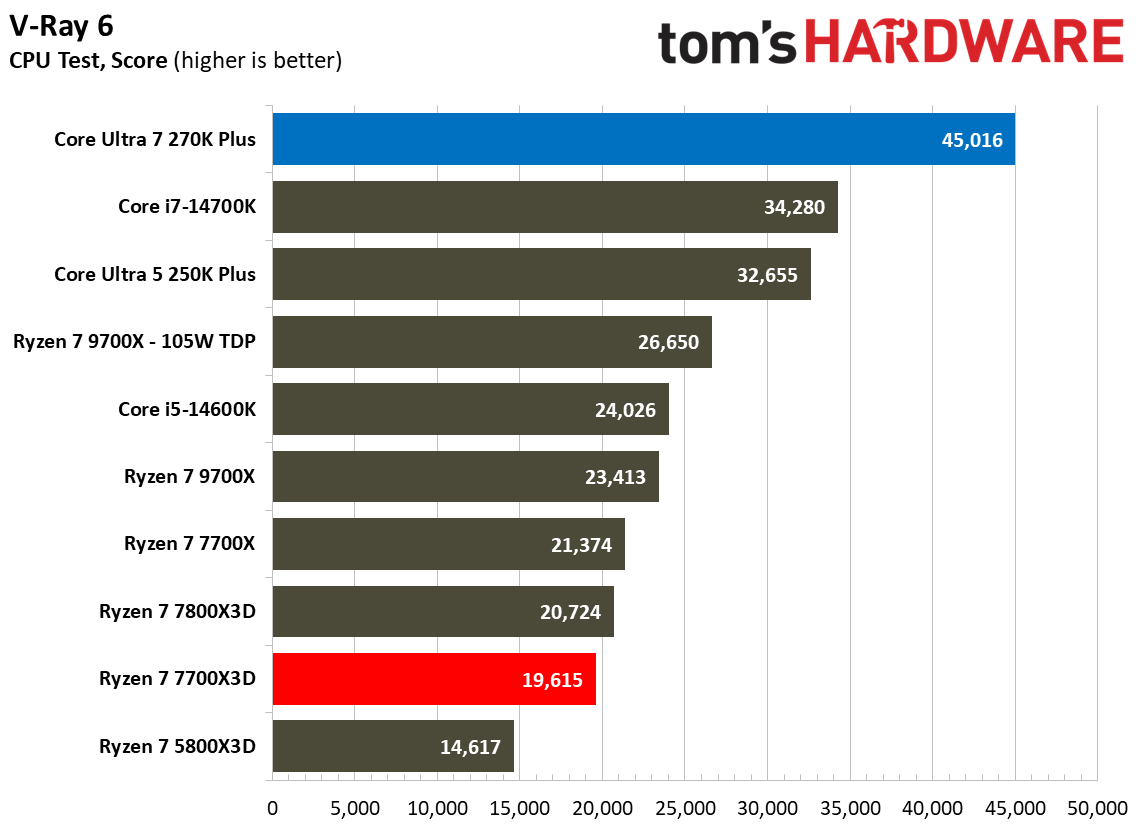
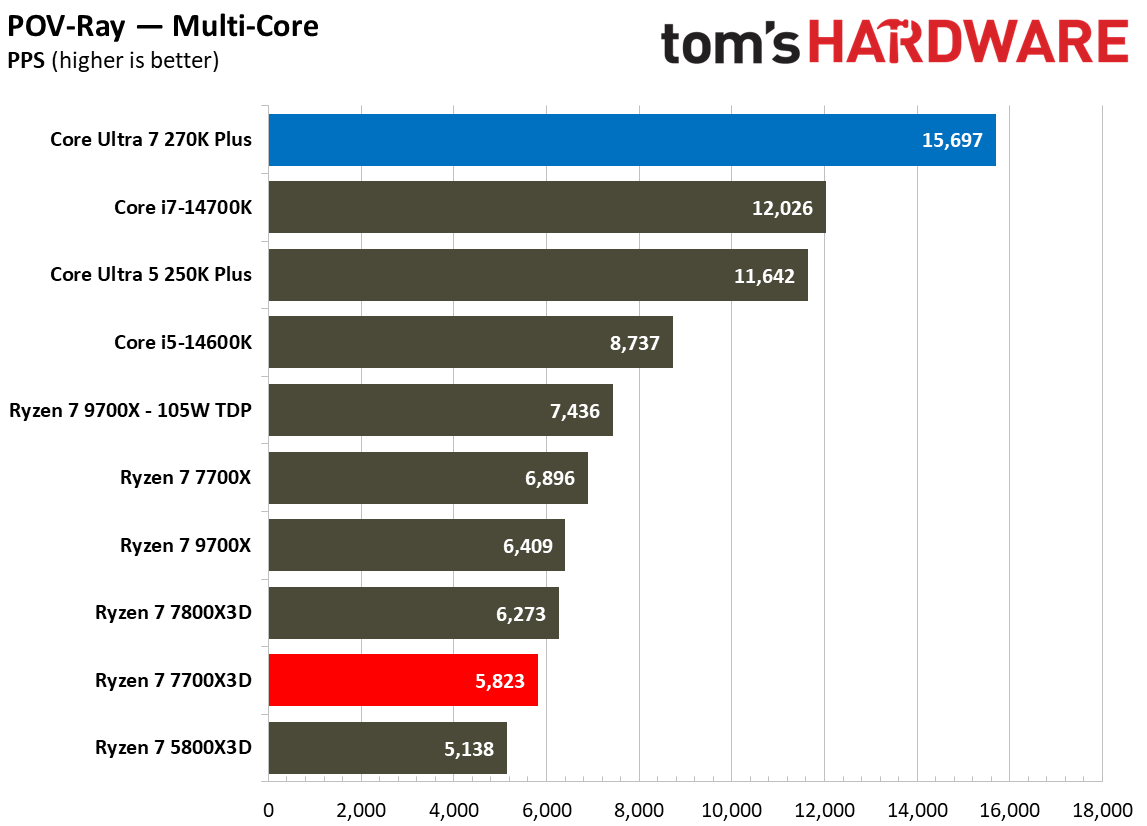
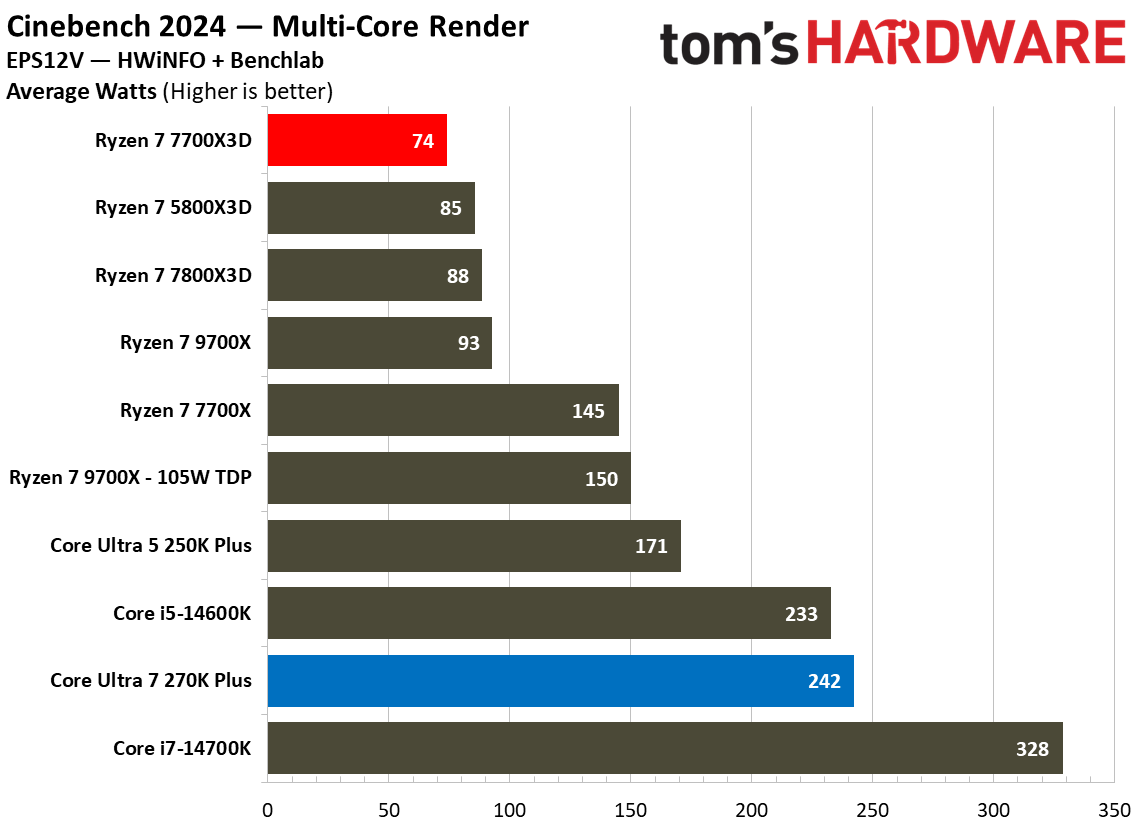
Individual benchmarks further highlight this lopsided victory for Intel across various professional tasks. In Cinebench 2024’s multi-core test, the 270K Plus scores 2,509 points, which is roughly 135.6% faster than the 1,065 points achieved by the 7700X3D. This trend continues in POV-Ray, where Intel leads by approximately 169.5% (15,697 vs. 5,823 PPS), and in V-Ray 6, where it maintains a massive 129.5% advantage (45,016 vs. 19,615). Even in intensive video encoding tasks via HandBrake x265, the Intel chip more than doubles the performance of its AMD rival, delivering 29.9 FPS compared to just 14.3 FPS for the 7700X3D. These results demonstrate that for heavy rendering or data-crunching workloads, Intel is the undisputed leader in this price bracket.
FutureFutureFutureFutureFutureFuture
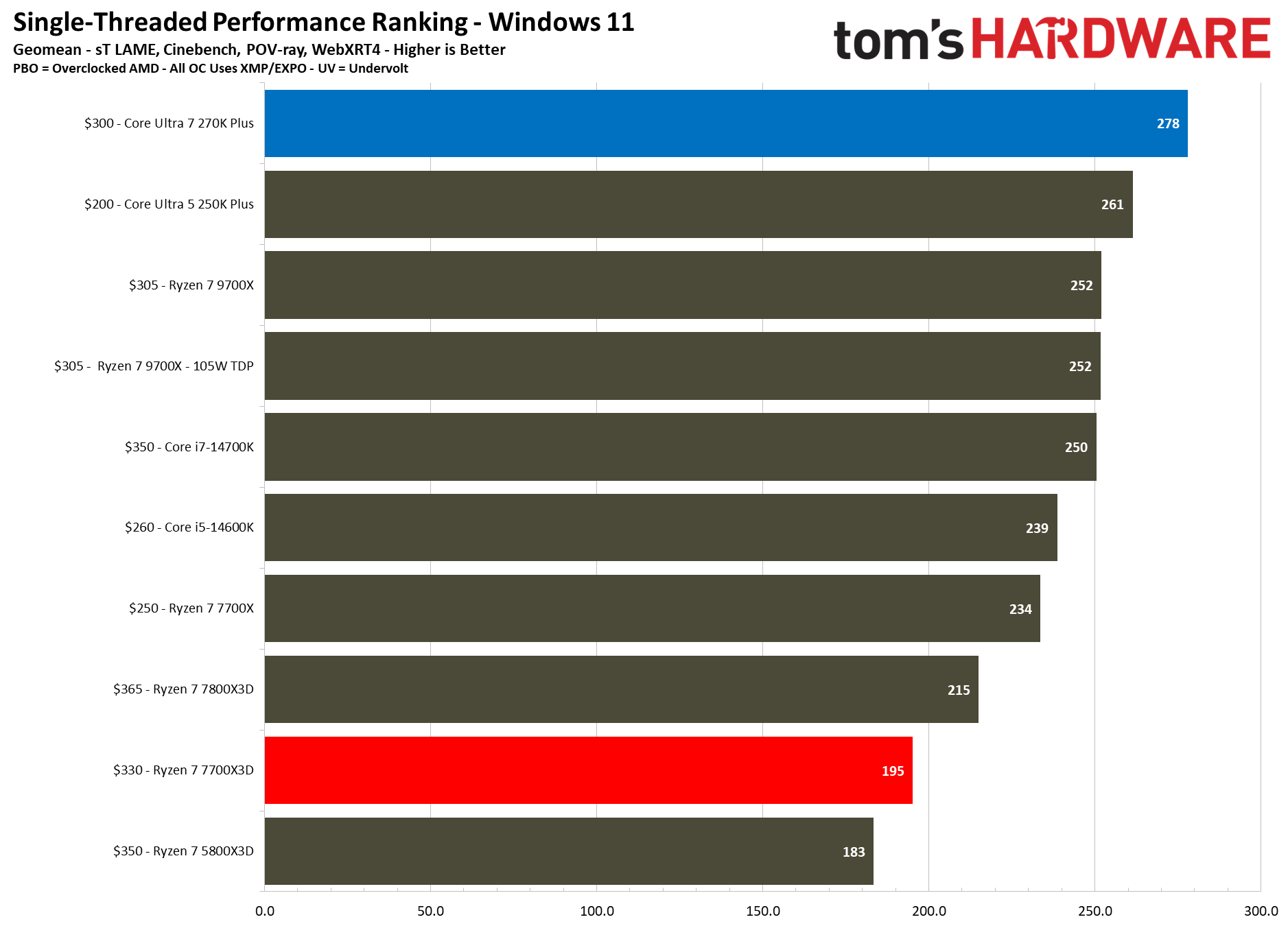
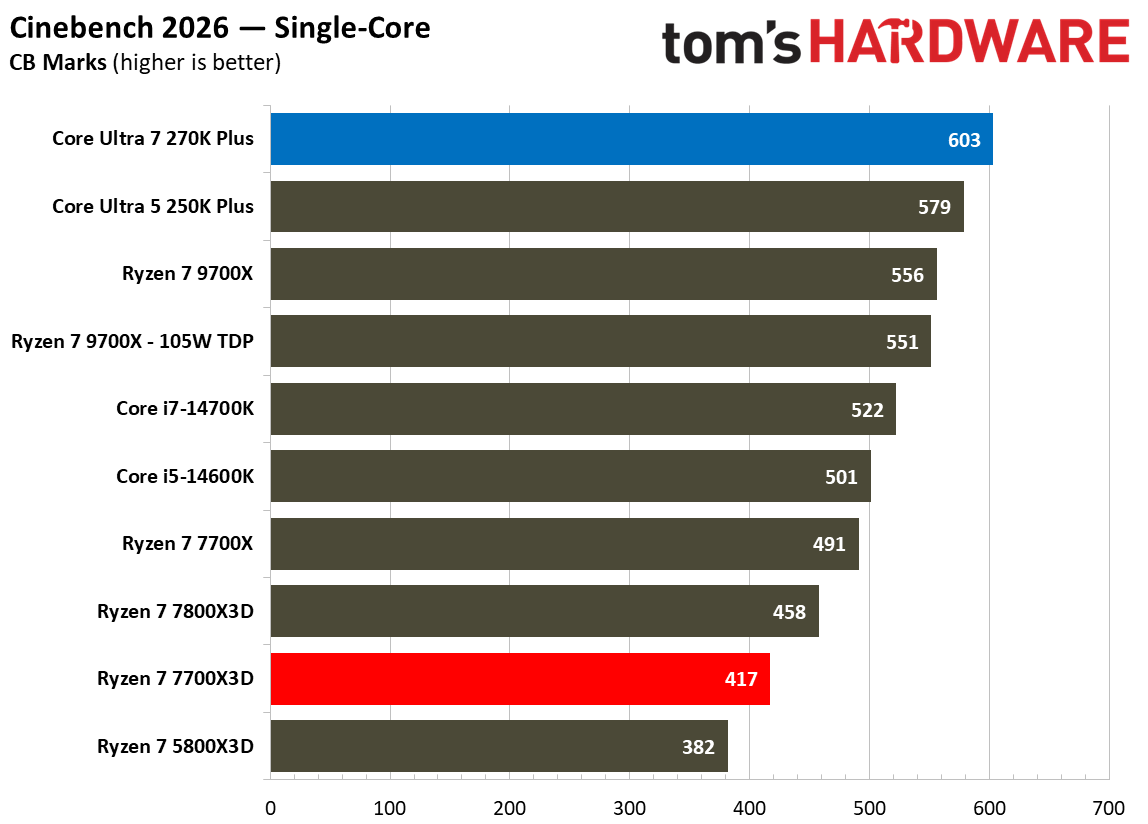
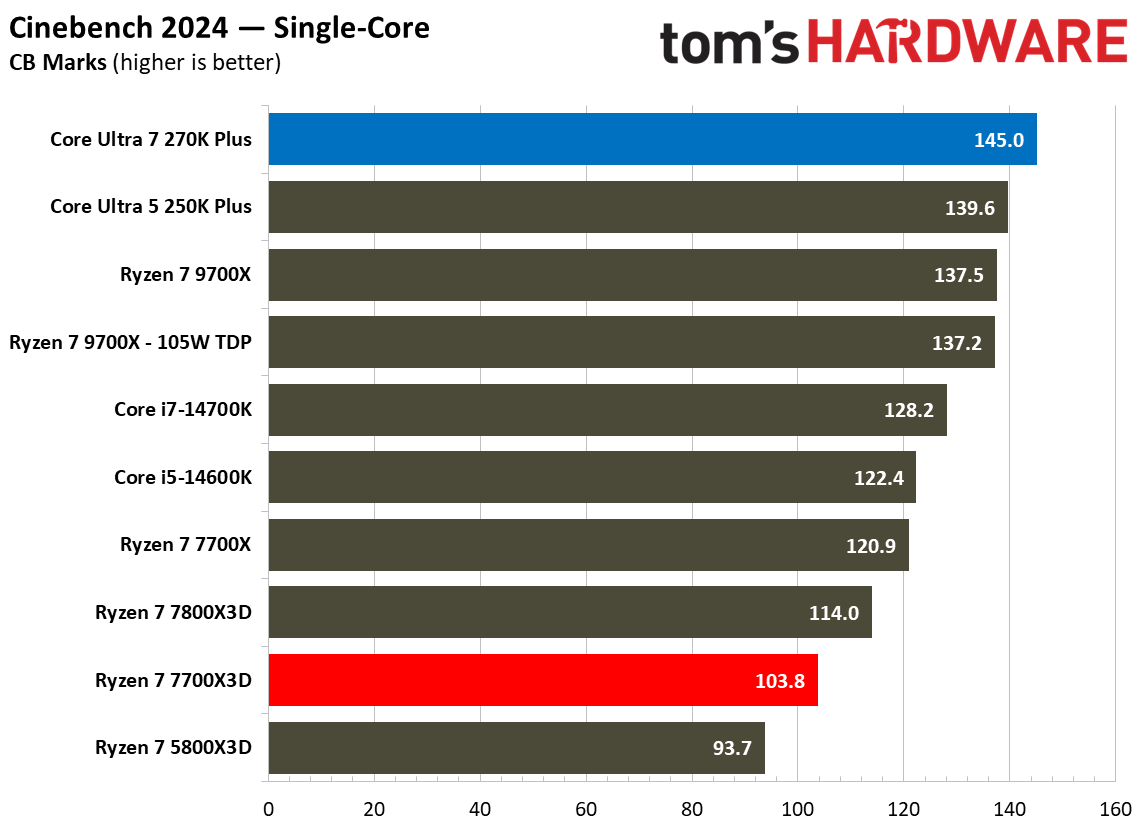
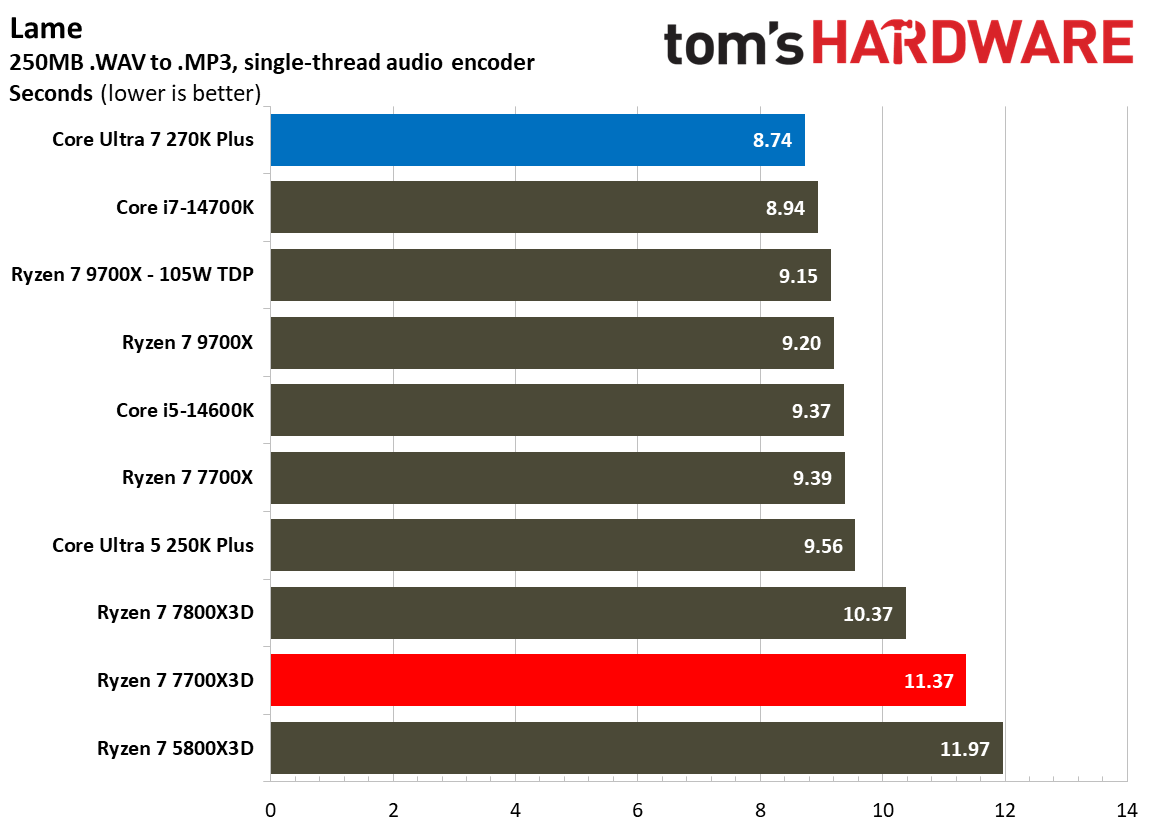
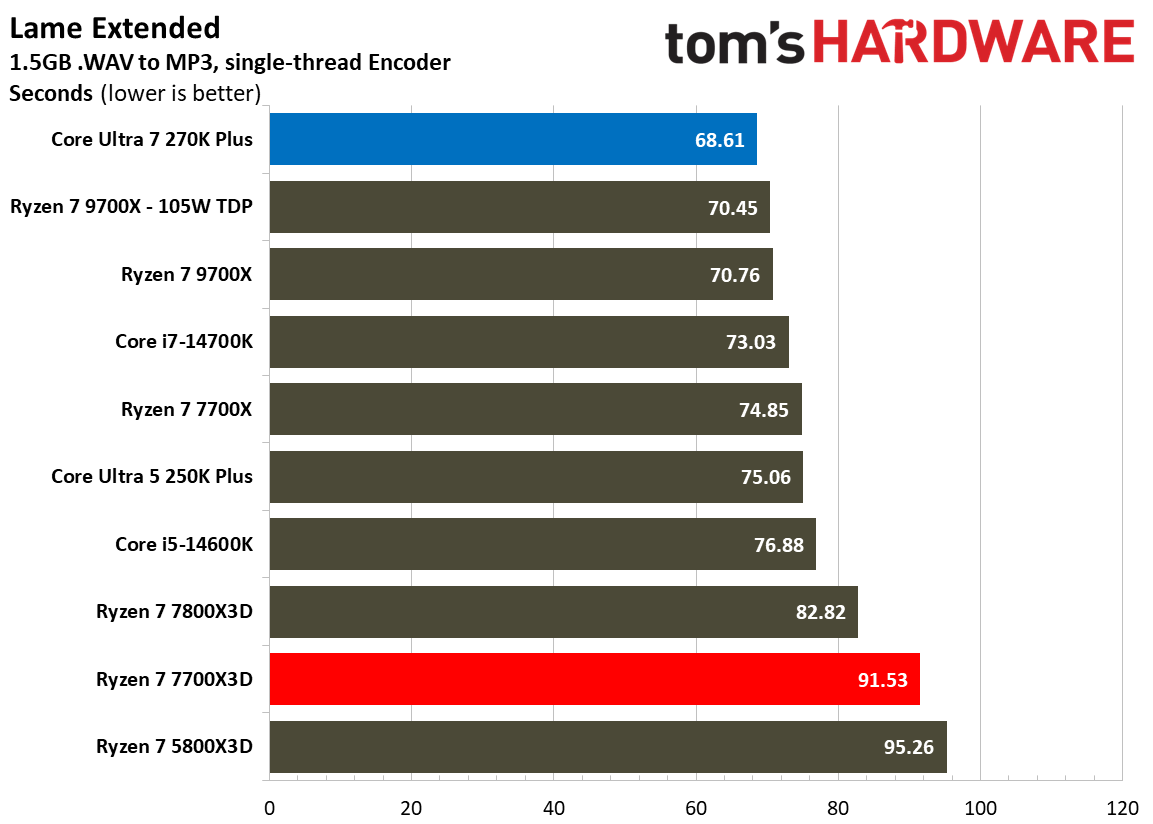
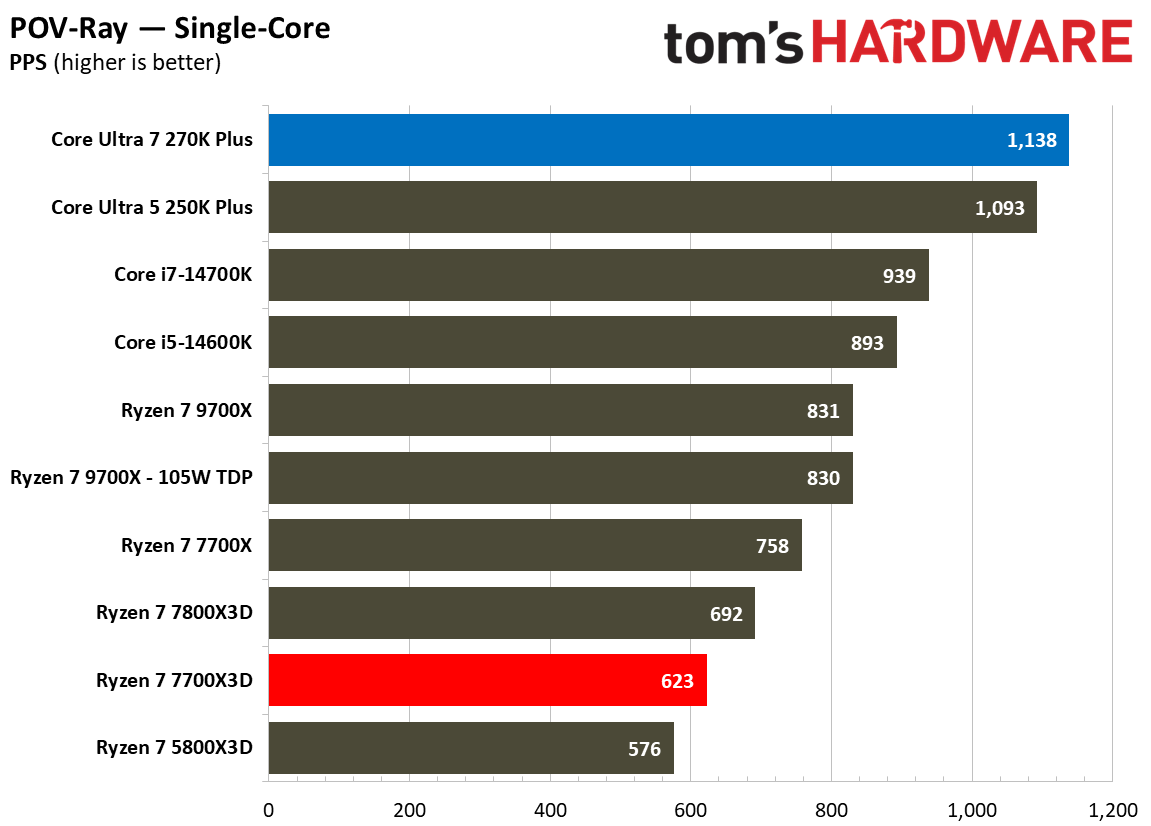
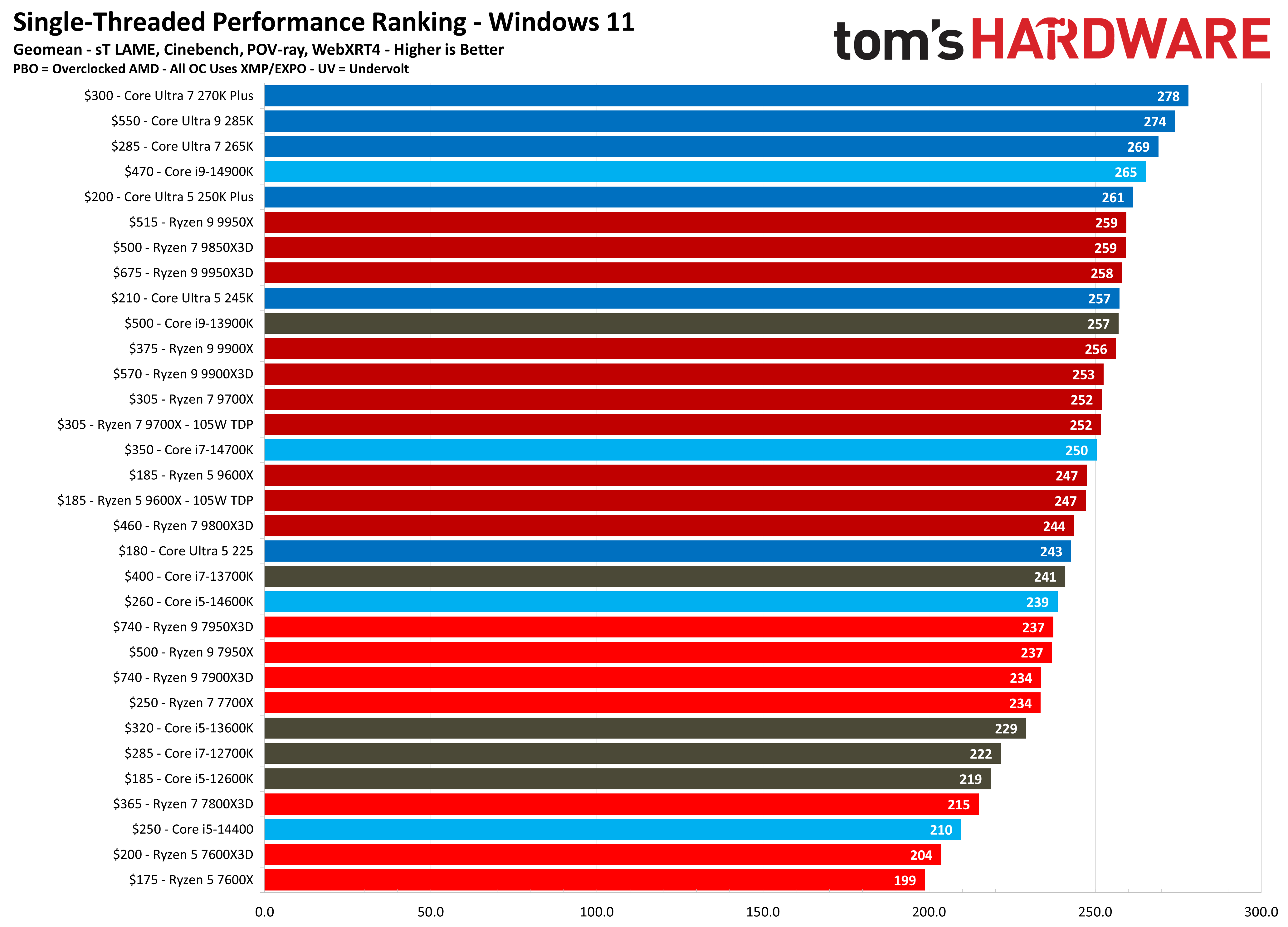
A similar trend can be seen when examining single-threaded performance, a crucial metric for general system responsiveness and applications that do not scale across multiple cores. In our single-threaded geomean, the 270K Plus scores 278 points, which is 42.5% faster than the 195 achieved by the 7700X3D. Specific tests like Cinebench 2024’s single-core benchmark show the 270K Plus maintaining a 39.7% lead over the 7700X3D (145 vs. 103.8 points), while the lead grows to a staggering 82.6% in POV-Ray’s single-core test (1,138 vs. 623 PPS). Even in audio encoding, the Intel chip finishes the Lame Extended task in 68.61 seconds, whereas the 7700X3D trails at 91.53 seconds.
⭐Winner: Intel Core Ultra 7 270K Plus
Ultimately, the 270K Plus simply blows the competition out of the water when it comes to productivity. While the 7700X3D is a highly efficient and specialized CPU for gaming, it cannot match the raw horsepower that Intel offers. For any user whose daily routine involves video editing, 3D rendering, or heavy multitasking, the 270K Plus is the obvious choice and should be the clear favorite for a multi-purpose system.
Overclocking: Intel Core Ultra 7 270K Plus vs AMD Ryzen 7 7700X3D
While both manufacturers provide tools to squeeze extra performance from their silicon, the Intel Core Ultra 7 270K Plus is built as an enthusiast-friendly, fully unlocked processor. The AMD Ryzen 7 7700X3D, on the other hand, is a more restricted processor designed primarily for out-of-the-box gaming efficiency.
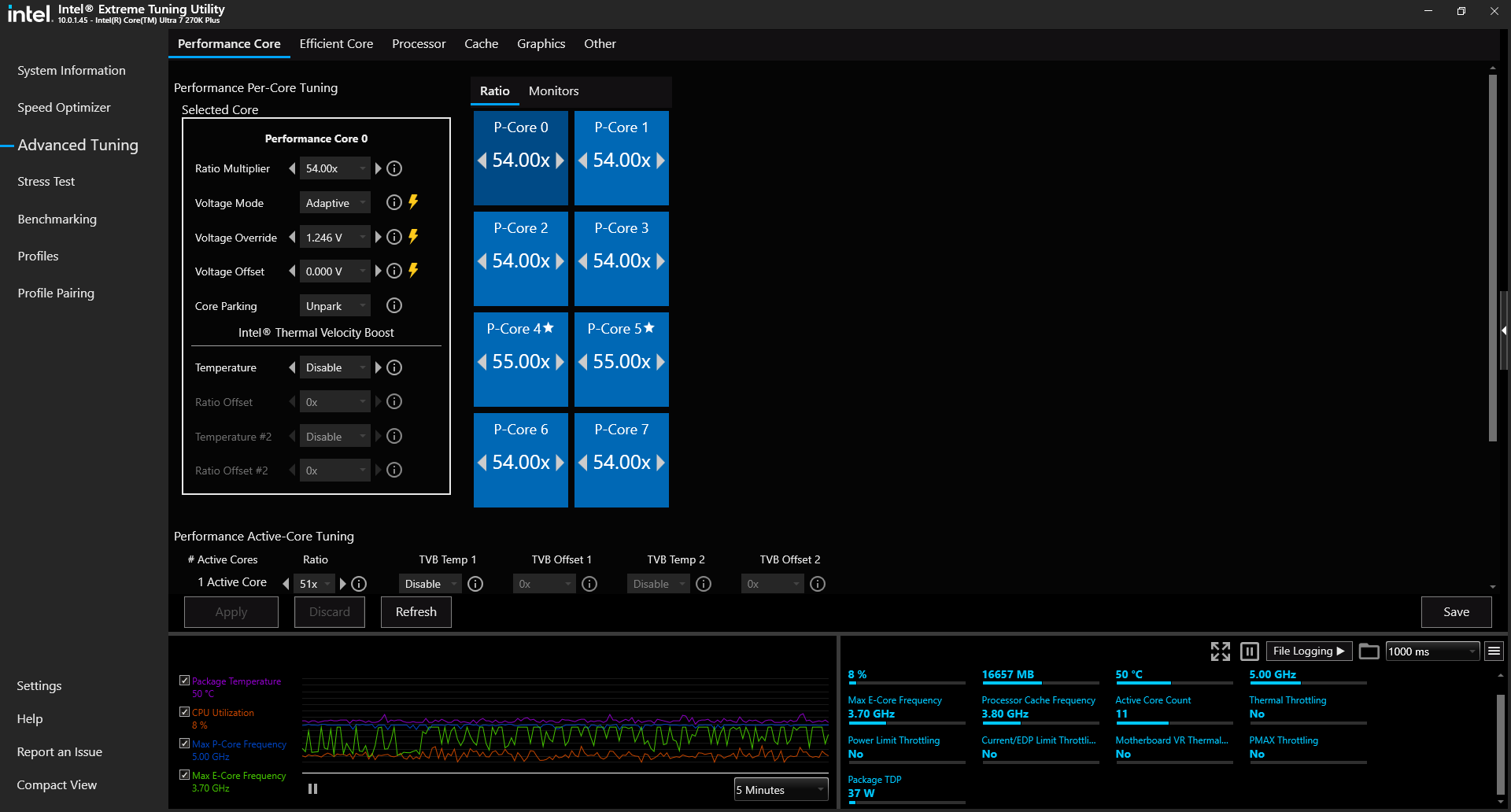
For the Intel Core Ultra 7 270K Plus, overclocking is a centerpiece of the experience. As a fully unlocked K-series SKU, it offers users granular control over per-core voltages, power limits, and clock speeds via an unlocked multiplier. While these changes can be done by entering the BIOS, one can also download the Intel XTU (Extreme Tuning Utility) software to fine tune the CPU.
The Intel Extreme Tuning Utility (Image credit: Future)
One of the most significant changes seen on Arrow Lake Refresh is that Intel has standardized several high-end performance tweaks including the 900MHz die-to-die frequency bump and the 400MHz fabric speed increase. This means users receive enthusiast-level interconnect performance without necessarily needing a premium Z-series motherboard. That said, Z890 boards are still necessary as they offer sophisticated tools for manual tuning and pushing the CPU to its limits.
In contrast, the AMD Ryzen 7 7700X3D follows the same path as previous Zen 4 X3D processors including a locked multiplier, which prevents traditional manual overclocking. Users are instead limited to automated and semi-automated features like Precision Boost Overdrive 2 (PBO2) and Curve Optimizer. PBO2 allows the CPU to dynamically adjust its frequencies based on available power and thermal headroom, while Curve Optimizer enables more advanced fine-tune voltage offsets for each of the eight Zen 4 cores.
While these tools can lead to sustained higher boost clocks, the sensitive nature of the 3D V-Cache stack leads to thermal challenges that limit frequency headroom. Thus, overclocking gains on the 7700X3D are often minimal compared to the flexibility offered by the Intel chip.
⭐Winner: Intel Core Ultra 7 270K Plus
The 270K Plus is a far more overclocking-friendly product. It offers a vast suite of features that AMD simply cannot match due to its architectural restrictions and locked multiplier.
Power Consumption, Efficiency, and Cooling: Intel Core Ultra 7 270K Plus vs AMD Ryzen 7 7700X3D
This is a crucial section of the faceoff as it highlights the most significant architectural divide between these two processors. While the 270K Plus prioritizes raw performance throughput, the 7700X3D focuses on extreme efficiency. This is immediately evident in their official power ratings where Intel specifies a 125W TDP with a massive 250W Maximum Turbo Power (MTP), while AMD utilizes a 120W TDP with a 162W Package Power Tracking (PPT) limit.
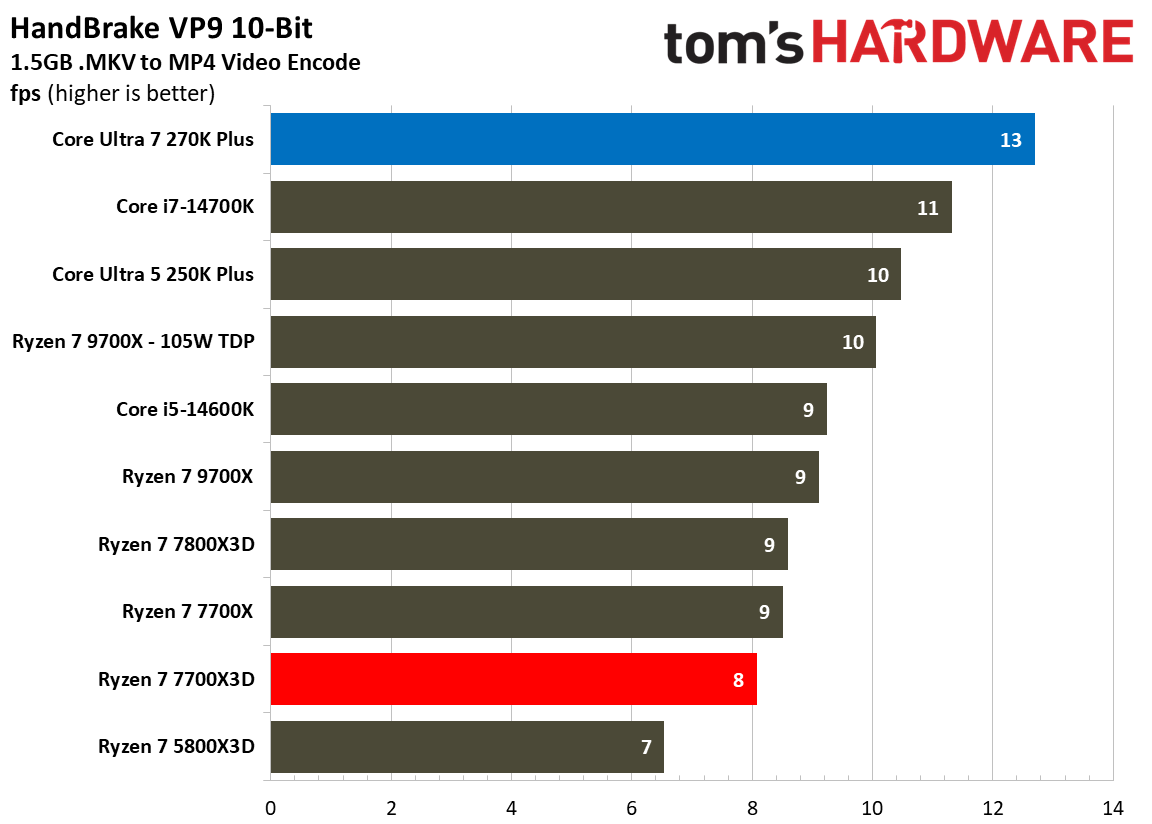
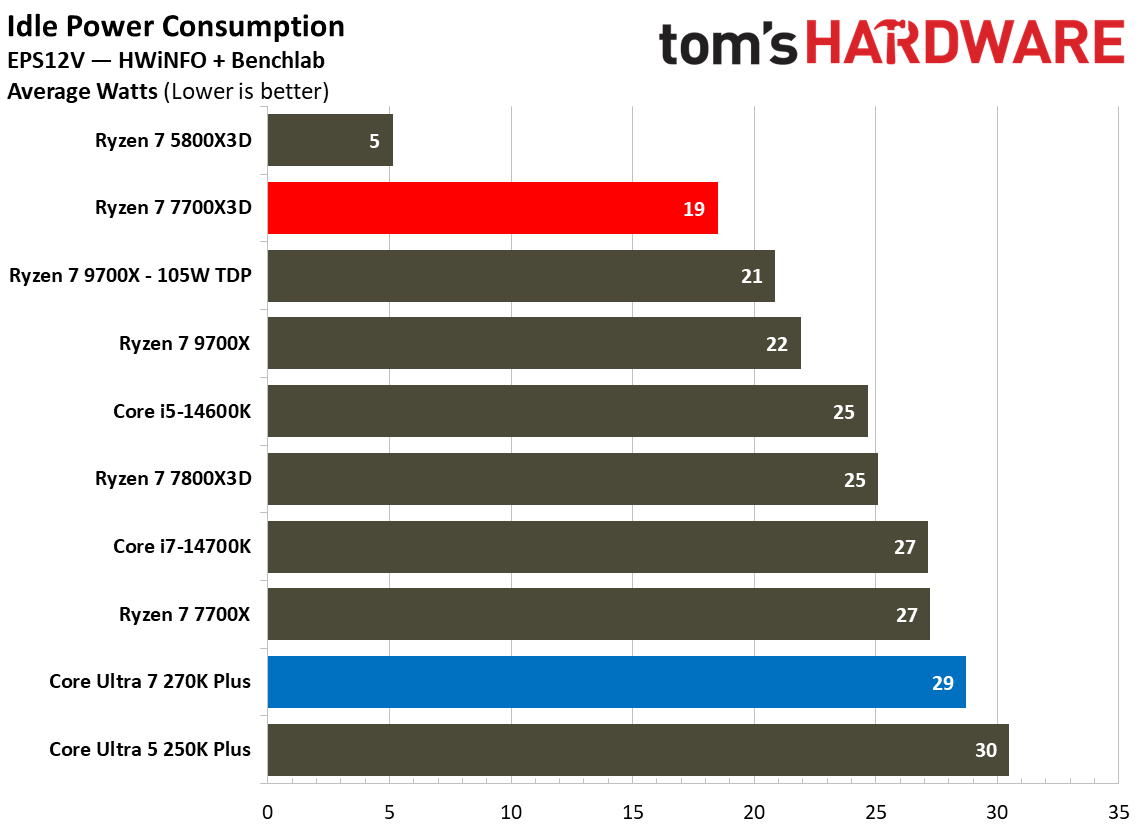
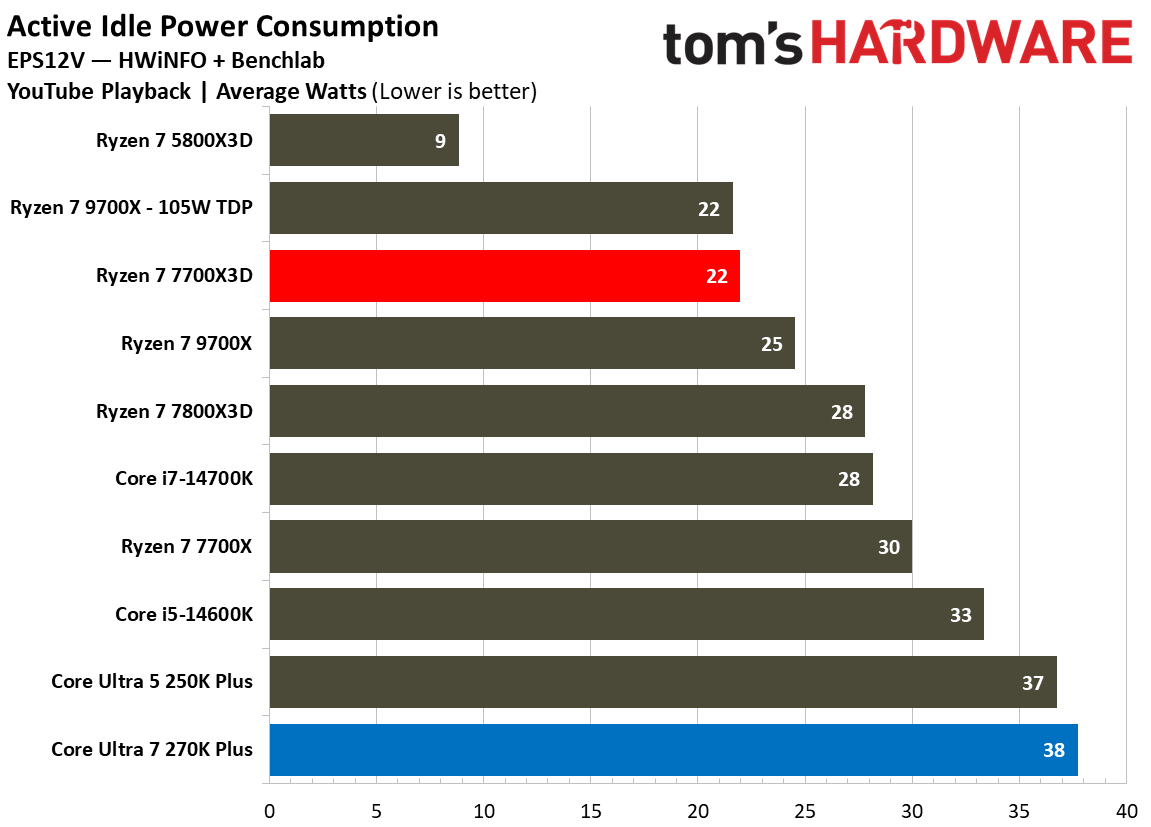
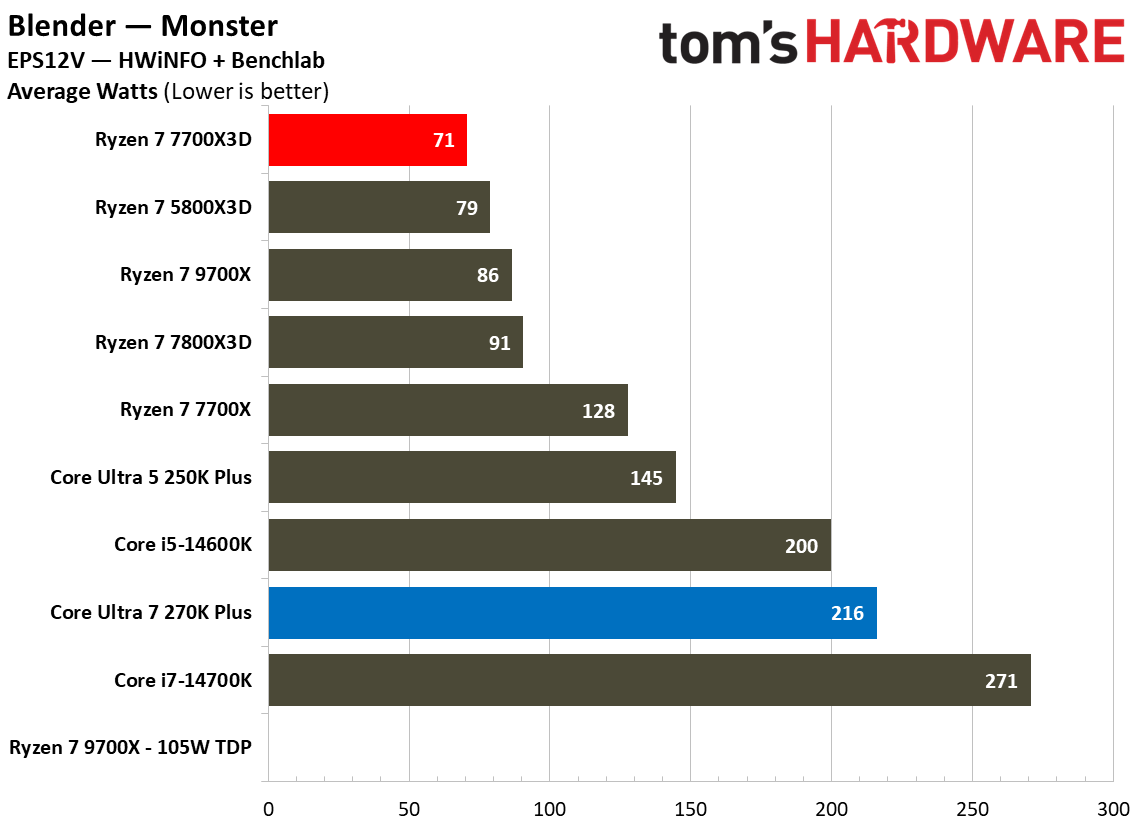
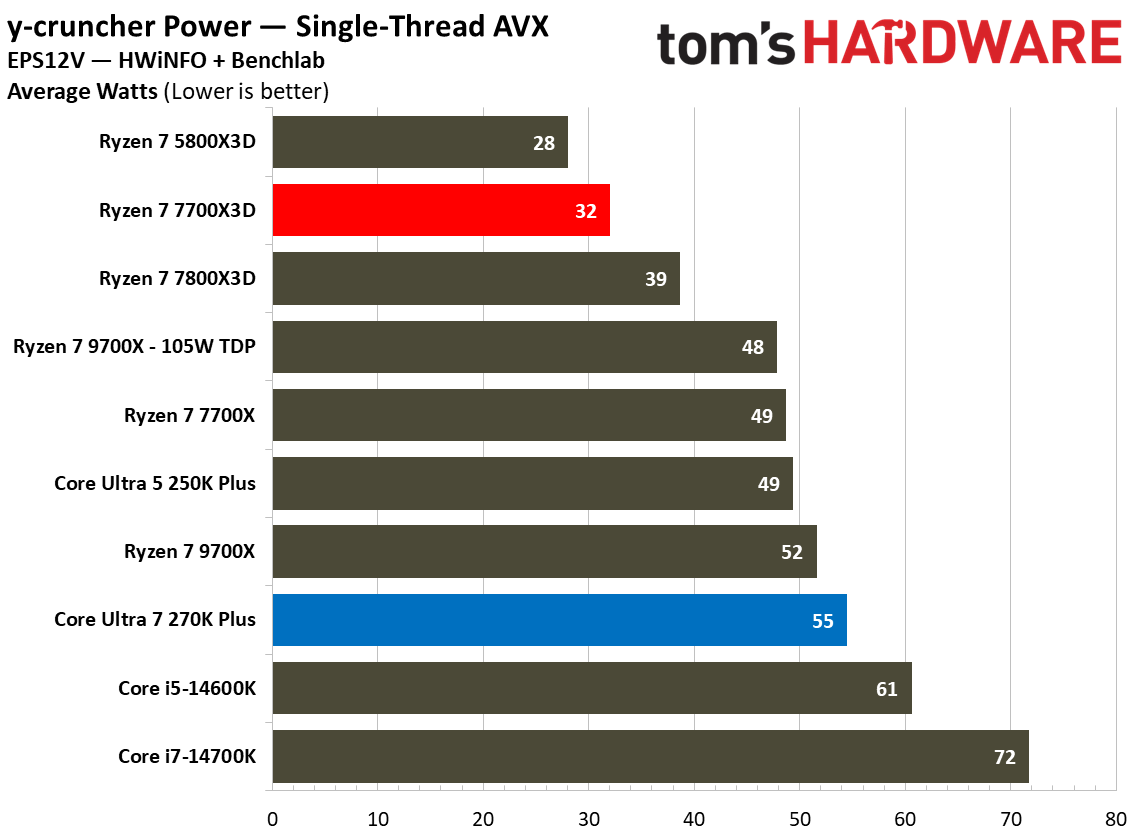
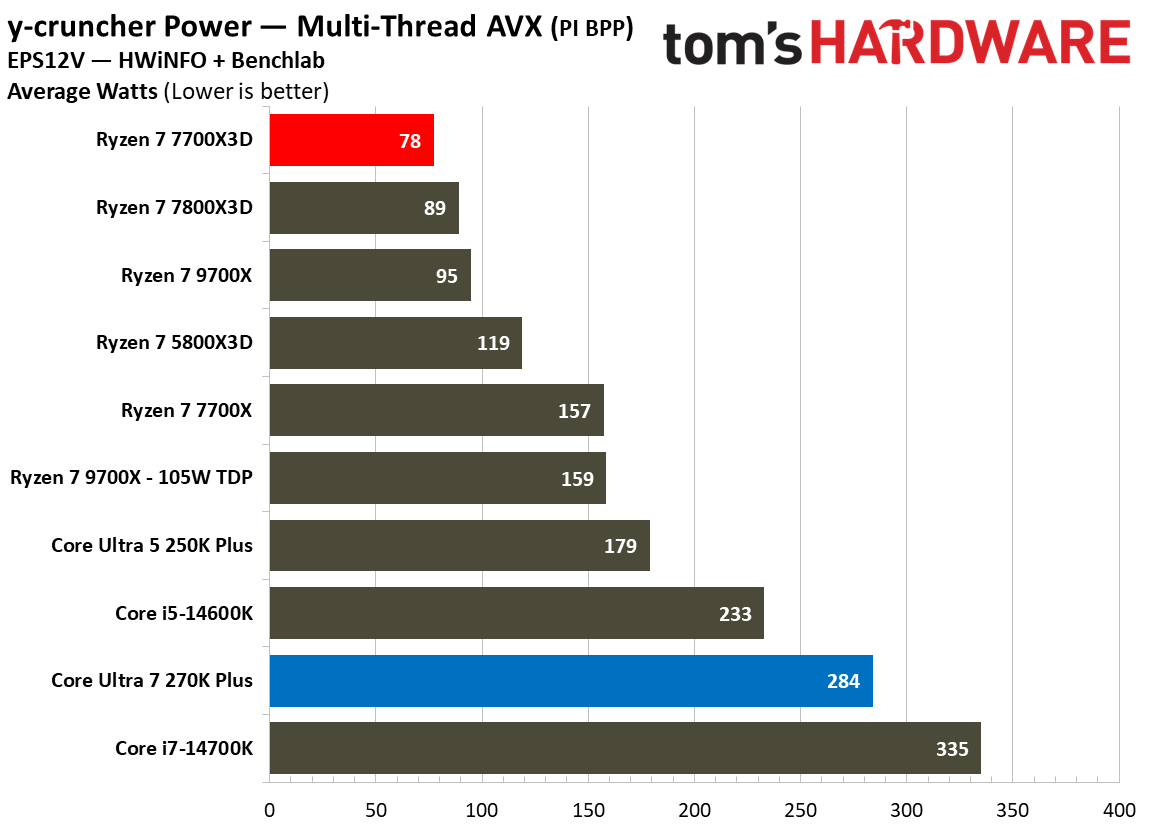
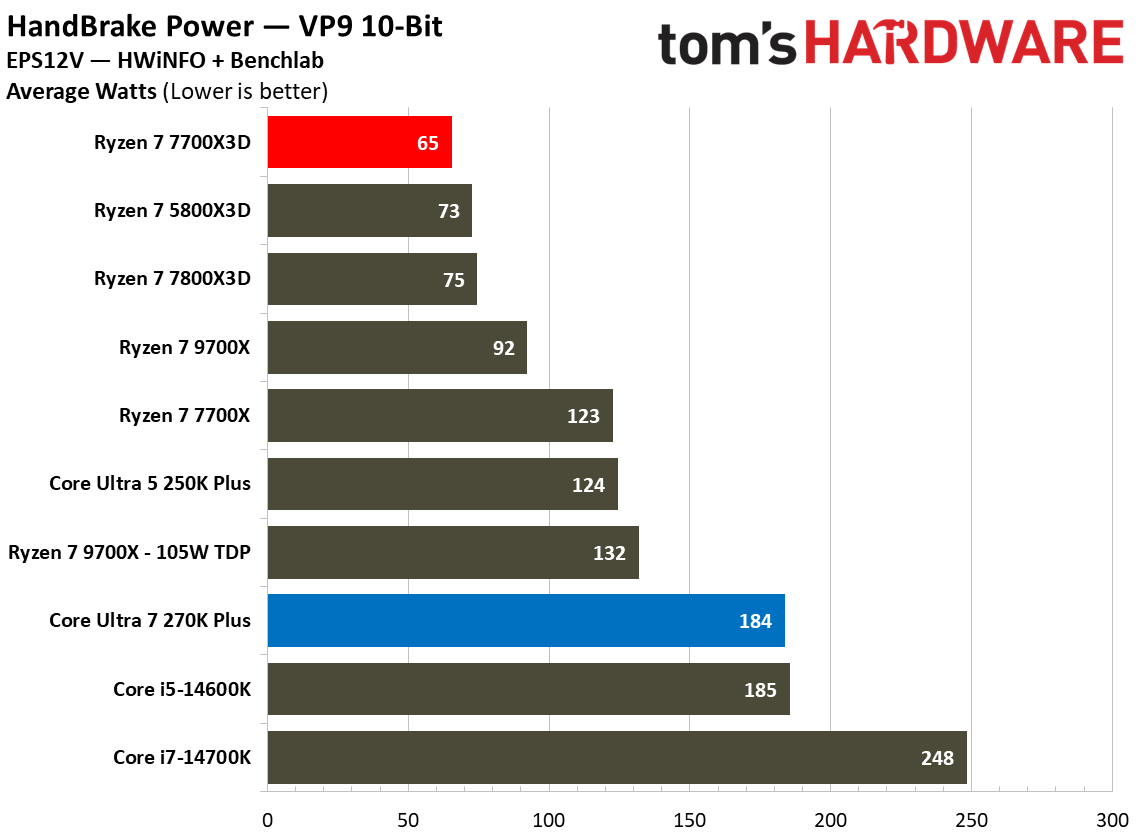
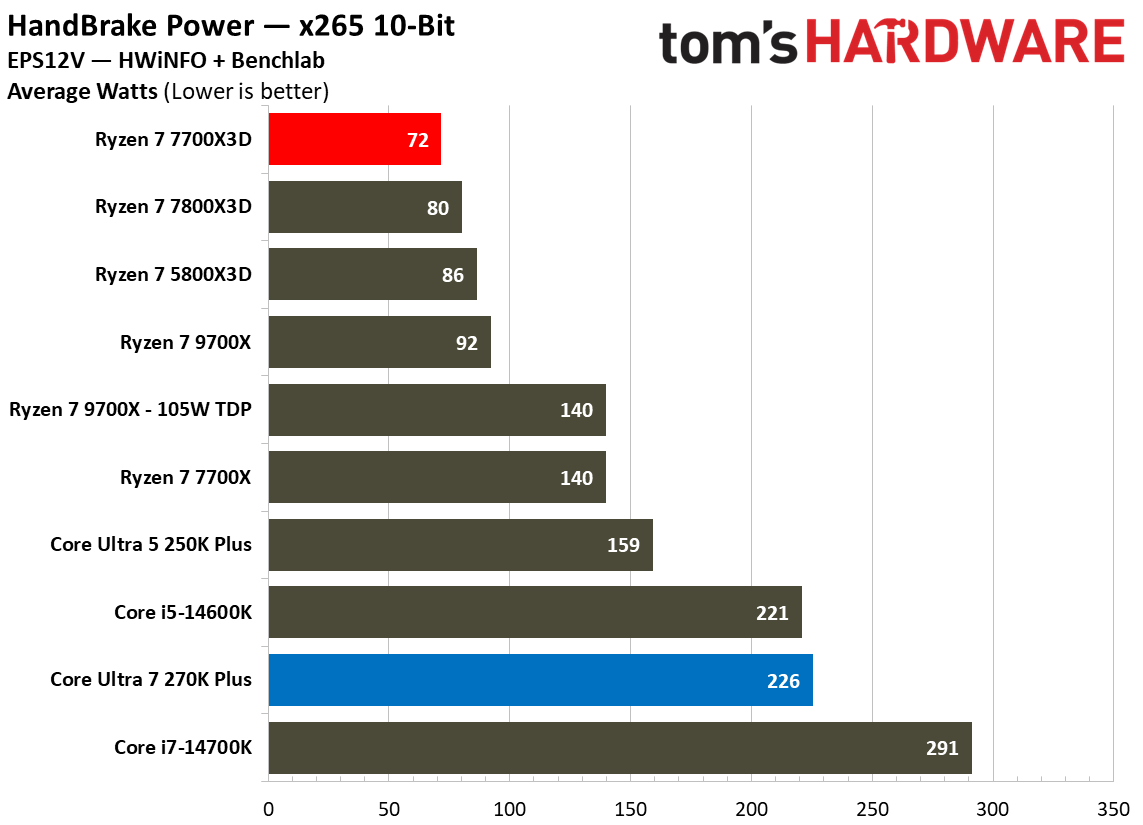
In synthethic multi-threaded workloads, the difference is quite evident. While running HandBrake x265 10-bit encode, the 270K Plus consumes an average of 226W, which is more than triple the 72W required by the Ryzen 7 7700X3D. A similar trend appears in VP9 encoding, where Intel draws 184W compared to AMD’s efficient 65W. Even in lighter tasks like single-threaded y-cruncher AVX workloads, the Intel chip requires 55W while the AMD chip stays at a modest 32W. Idle power consumption also favors Team Red where the 7700X3D idles at 19W and draws 22W during YouTube playback, whereas the 270K Plus sits higher at 29W and 38W, respectively.
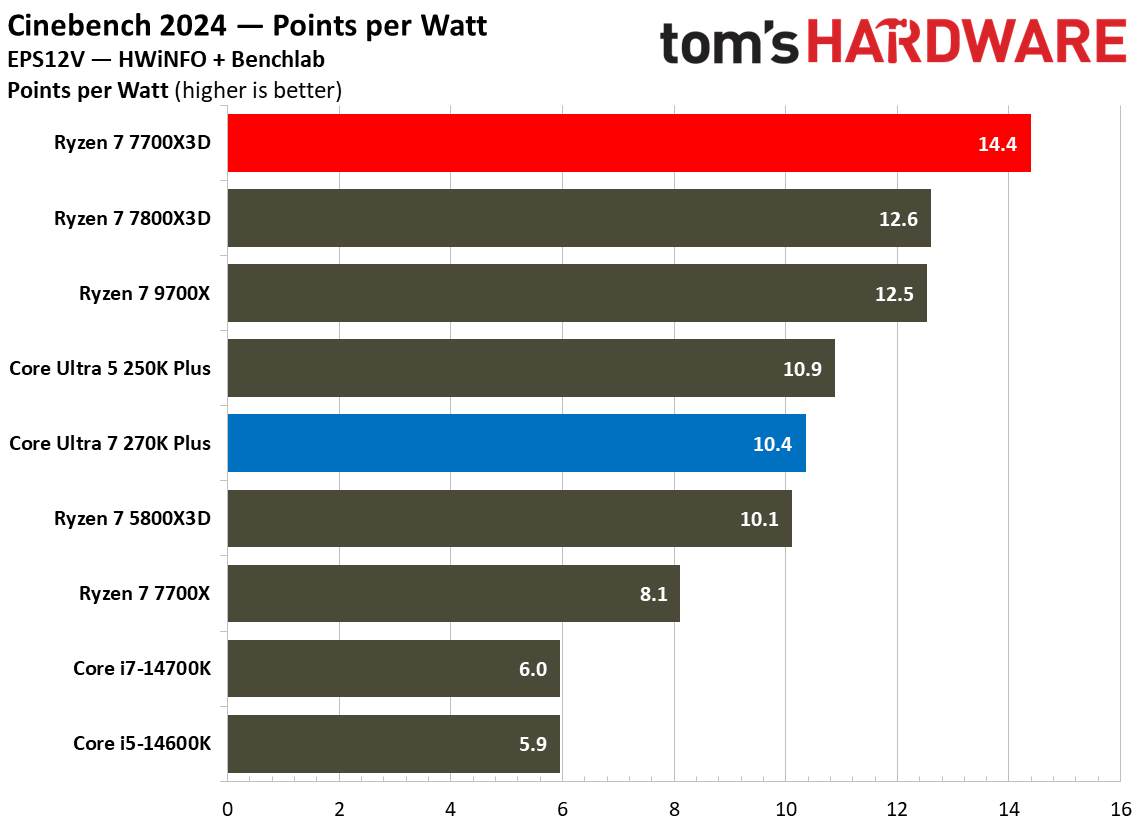
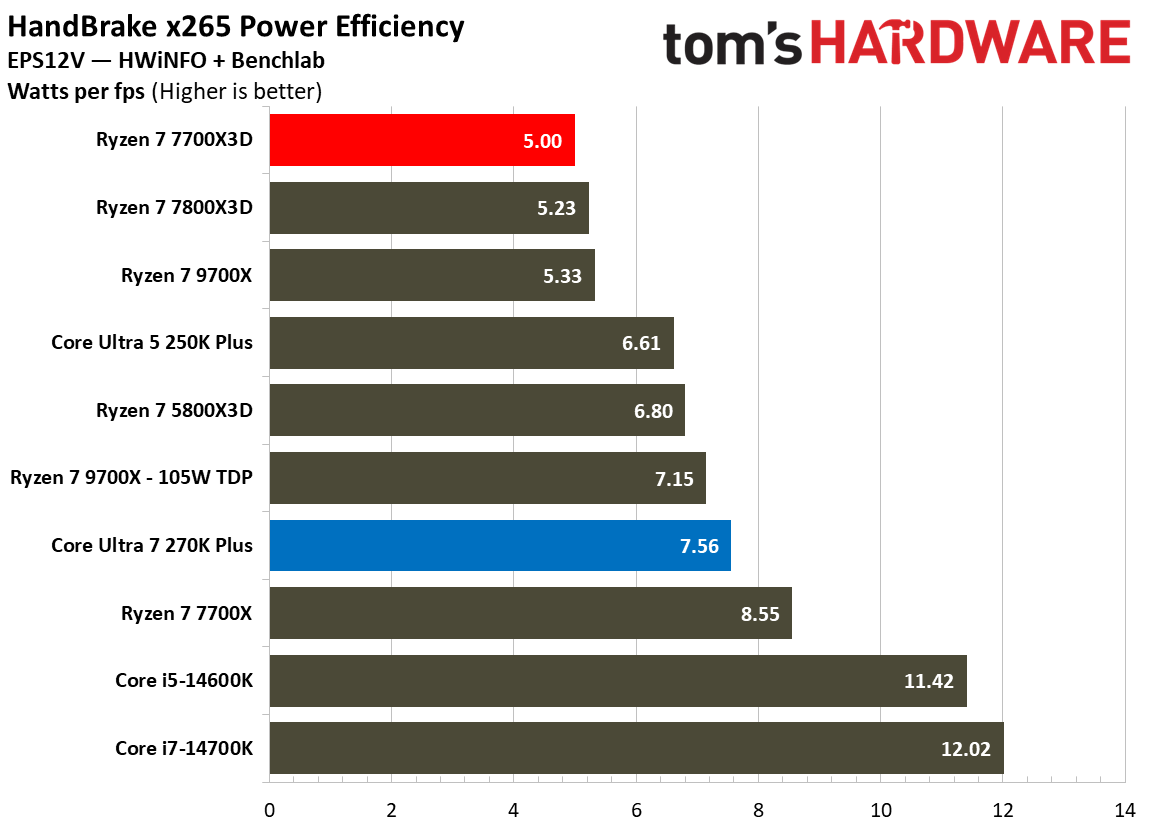
When we translate these power figures into efficiency metrics, AMD’s lead tends to stay ahead in most traditional benchmarks. In Cinebench 2024, the 7700X3D produces 14.4 points per watt, significantly outperforming the 10.4 points per watt from the 270K Plus. In HandBrake x265, AMD achieves a superior efficiency rating of 5W per FPS , while Intel trails at 7.56W per FPS.
FutureFutureFuture
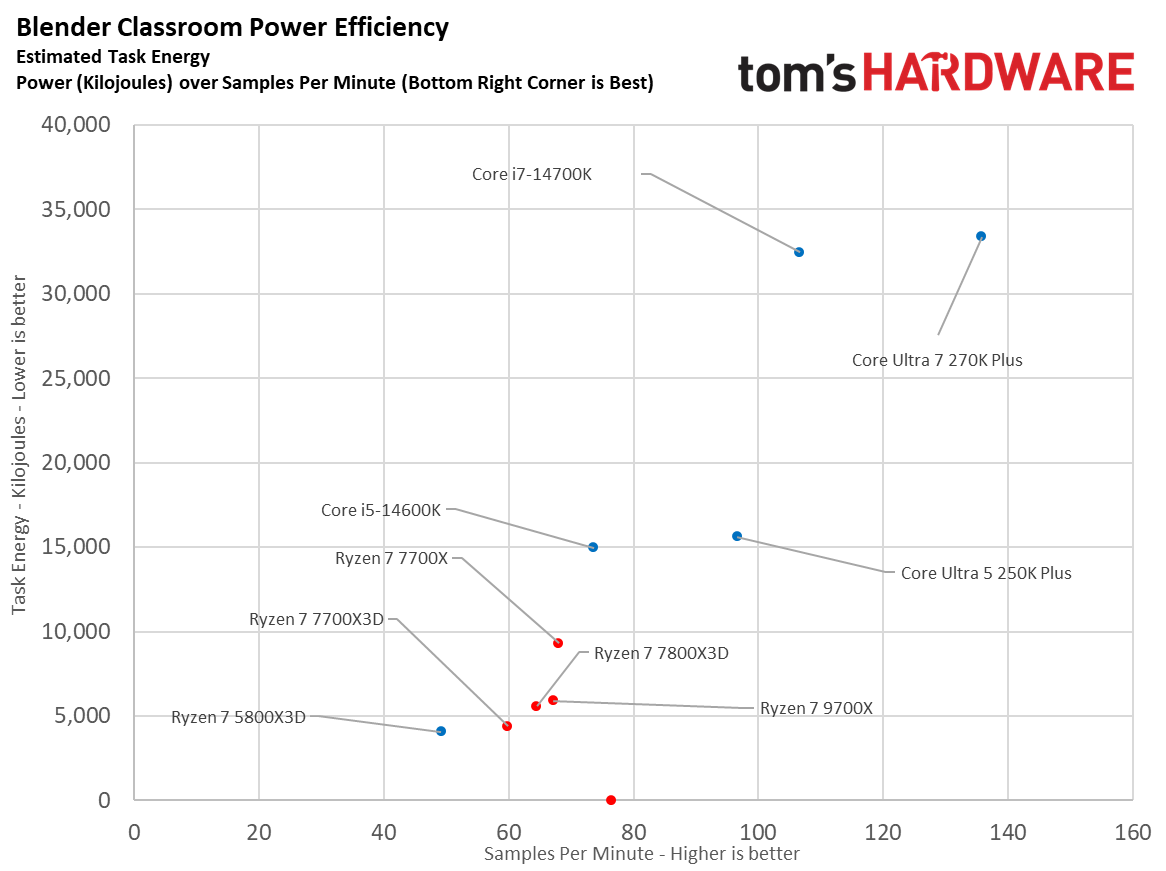
However, the efficiency scatter plots provide a more nuanced look at how performance scaling impacts total energy consumption. In the Blender Classroom scatterplot, the 270K Plus delivers a much higher performance of roughly 135 samples per minute, but it consumes over 33,000 kJ of task energy. In contrast, the 7700X3D finishes with only around 60 samples per minute but uses significantly less total energy at roughly 4,500 kJ.
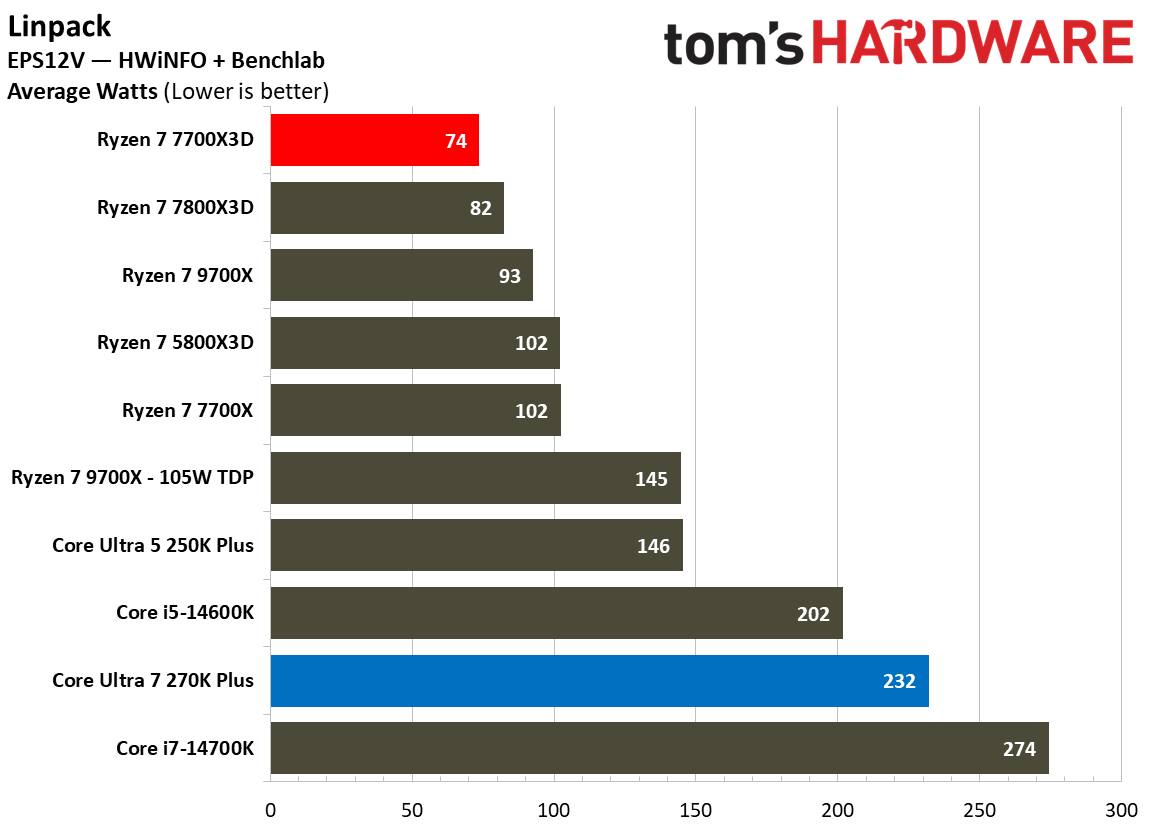
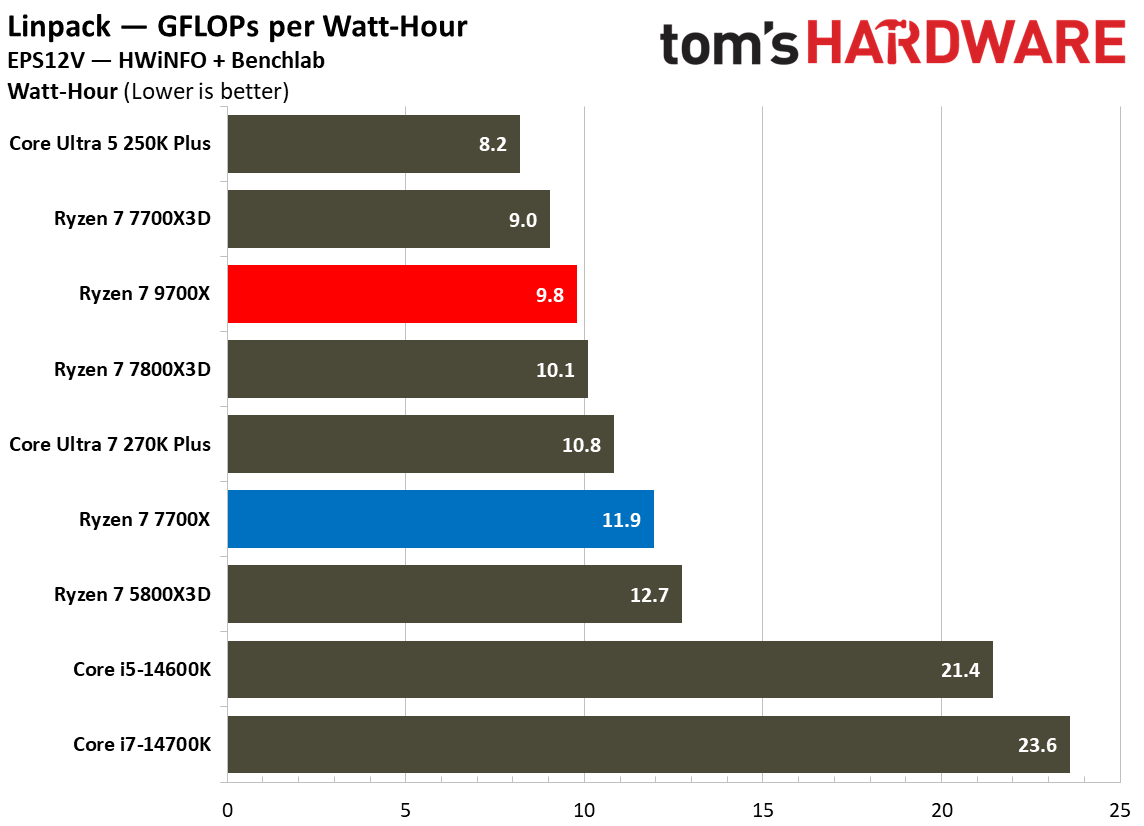
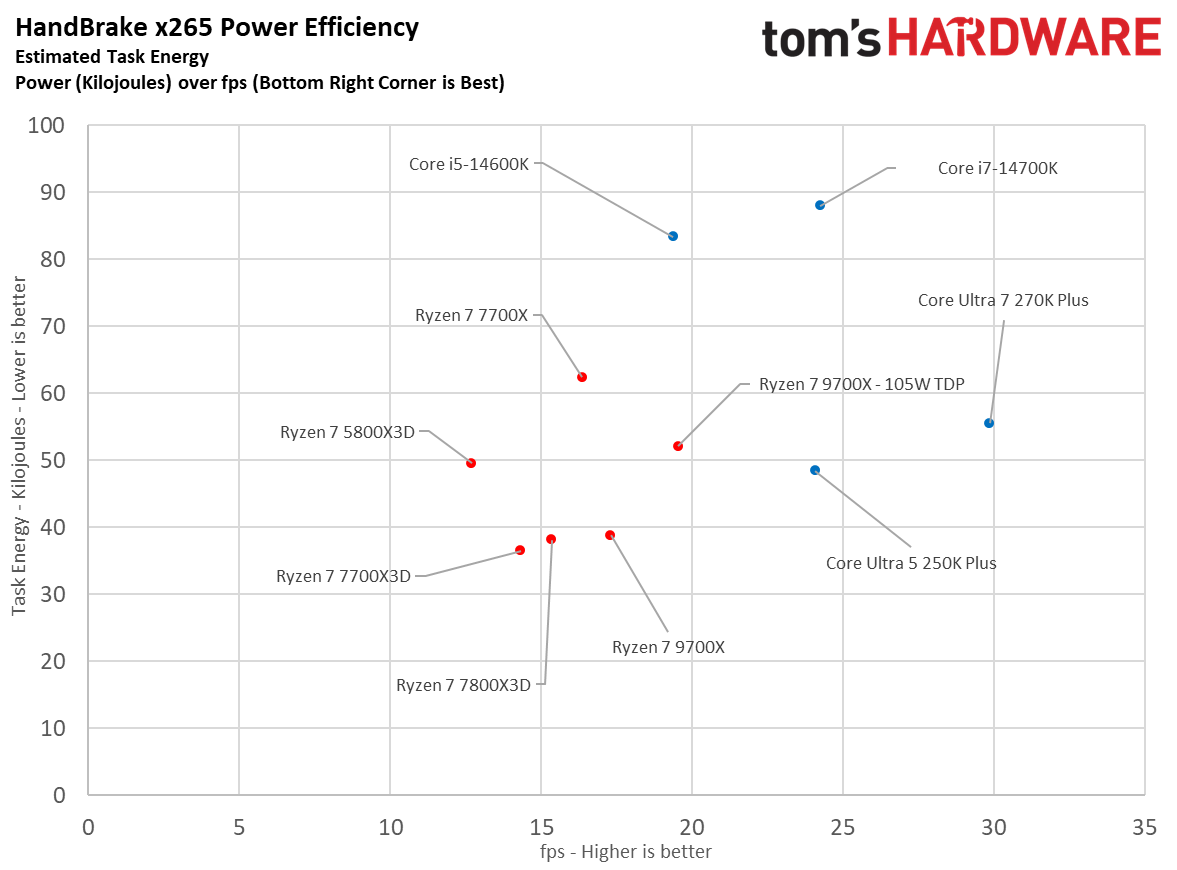
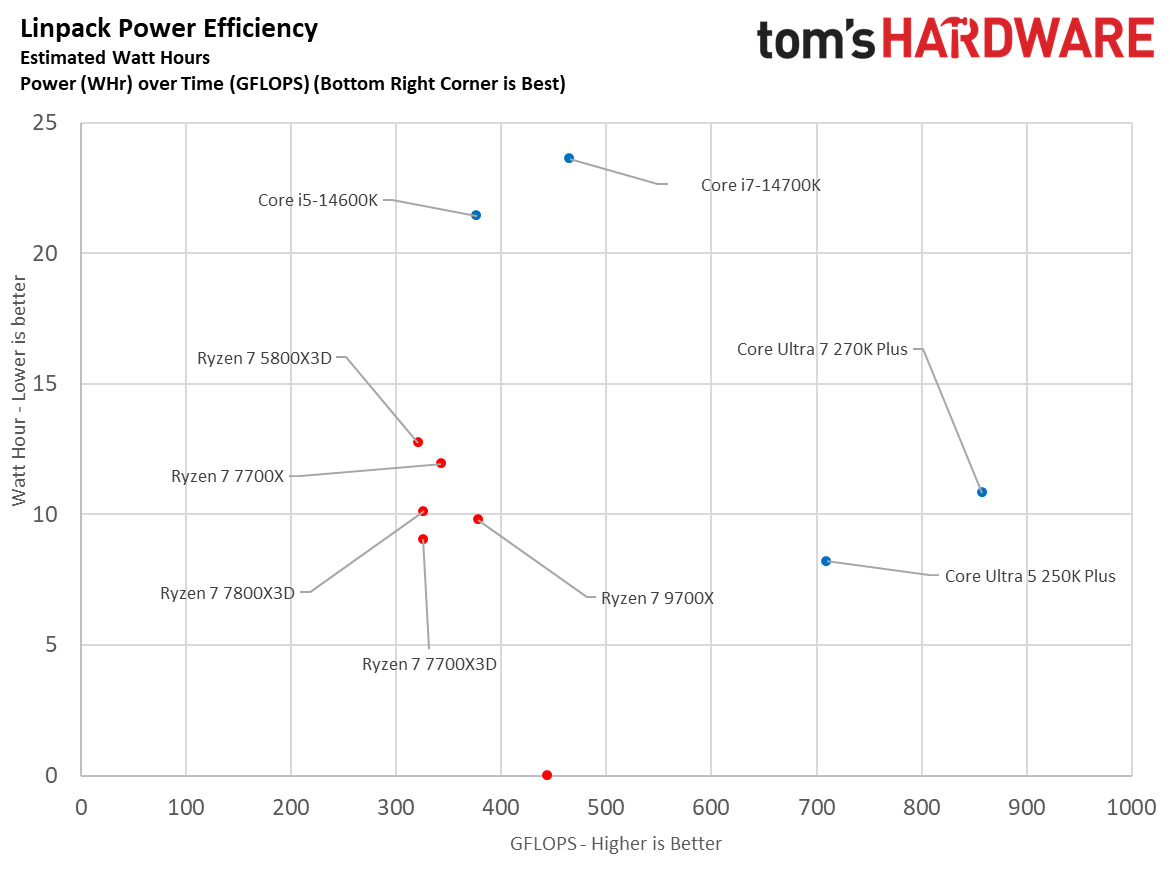
The HandBrake x265 scatterplot shows a similar trade-off where Intel reaches 30 FPS but consumes over 55 kJ, while AMD provides 14 FPS at roughly 36 kJ. Interestingly, the Linpack scatterplot shows the 270K Plus reaching over 850 GFLOPS with roughly 11WHr of energy, making it slightly more efficient in terms of performance-per-energy than the 7700X3D, which delivers roughly 340 GFLOPS for 10Whr.
From a cooling perspective, the 250W MTP on the 270K Plus means that it requires a robust cooling solution, like a 360mm AIO, to avoid thermal throttling during extended all-core loads. The 7700X3D is far easier to manage, remaining remarkably efficient and manageable with a mid-range air cooler. While the 270K Plus delivers class leading performance, it does so by significantly compromising efficiency in heavy workloads compared to AMD.
⭐Winner: AMD Ryzen 7 7700X3D
Pricing: Intel Core Ultra 7 270K Plus vs AMD Ryzen 7 7700X3D
The Intel Core Ultra 7 270K Plus was initially introduced with a justified $300 price tag, but you'll now find it between $300 and $320. The AMD Ryzen 7 7700X3D made its debut just last month and carries a $330 MSRP, placing it right under the 7800X3D. Essentially, there is not a major difference when it comes to the chips themselves, however, the true financial divide becomes apparent when we look at the total platform cost.
The Core Ultra 7 270K Plus demands a more substantial investment to reach its full potential. While one can opt for a B860 motherboard, a compatible Z890 motherboard is necessary in order to access premium overclocking and tuning features. These typically start around $150-$200, and can go as high as $600 packed with premium features. To handle the processor′s 250W Maximum Turbo Power(MTP) during heavy productivity tasks, a high−end 360mm AIO liquid cooler ($100-$150) or a dual-tower air-cooler ($50-$100) is recommended.
In contrast, the AMD Ryzen 7 7700X3D offers a much more budget-friendly entry point. A solid B650 motherboard can be found for around $120-$150 and the chip can be effectively cooled with a modest $50 air cooler.
Unfortunately, both platforms are held back by the ongoing global shortage of memory, which has caused prices to shoot up significantly. Since both CPUs require DDR5 RAM, builders are stuck in a RAMpocalypse where a basic 32GB kit costs over $400. This extra cost is bad news for both sides as it cancels out any price advantage.
Overall, the lower upfront platform cost makes the 7700X3D a slightly more attractive option for users prioritizing their budget. Furthermore, the AM5 socket offers a clear upgrade path through at least 2029, ensuring that your motherboard investment remains viable for future CPU generations. That is not the case with Intel, as the LGA 1851 socket is expected to be replaced once the next-generation of Nova Lake CPUs arrive.
⭐ Winner: AMD Ryzen 7 7700X3D
Ultimately, while both the chips are available at a very similar price range, the AMD Ryzen 7 7700X3D is the smarter financial play for a majority of users. Its significantly lower platform costs, superior gaming efficiency, and guaranteed platform longevity provide a level of value that the more power-hungry Intel refresh cannot quite match.
Bottom Line: Intel Core Ultra 7 270K Plus vs AMD Ryzen 7 7700X3D
Intel Core Ultra 7 270K Plus
AMD Ryzen 7 7700X3D
Features and Specifications
❌
Gaming
❌
Productivity Applications
❌
Overclocking
❌
Power Consumption, Efficiency, and Cooling
❌
Pricing
❌
Total
3
3
The Ryzen 7 7700X3D and Core Ultra 7 270K Plus are designed for very different users, even though they sit in roughly the same price range. Like previous X3D chips, AMD's latest processor is built with gaming in mind, using its large 3D V-Cache to deliver excellent frame rates while keeping power consumption impressively low. Intel, on the other hand, combines a 24-core design with higher clock speeds and platform improvements to create one of the strongest productivity processors in its class without giving up much gaming performance.
The final score is tied at three rounds apiece. AMD comfortably wins gaming performance, power efficiency, and platform value, three factors that matter a lot for buyers shopping in this price segment. The AM5 platform also provides a significantly longer upgrade path, allowing users to drop in future processors without replacing their motherboard.
Intel, however, deserves recognition for what it has accomplished with the 270K Plus. It delivers outstanding single- and multi-threaded performance, offers a fully unlocked overclocking experience, and narrows the gaming gap to just a few percentage points in many modern titles. If your workload includes video editing, software development, 3D rendering, or other heavily threaded applications, the 270K Plus is the obvious choice and justifies its higher power draw.
For everyone else, the Ryzen 7 7700X3D is the more compelling CPU. It offers faster gaming performance, exceptional efficiency, lower platform costs, and a future-proof AM5 ecosystem. Unless your workload regularly extends beyond gaming into demanding productivity applications, AMD's latest X3D chip is the easier processor to recommend.
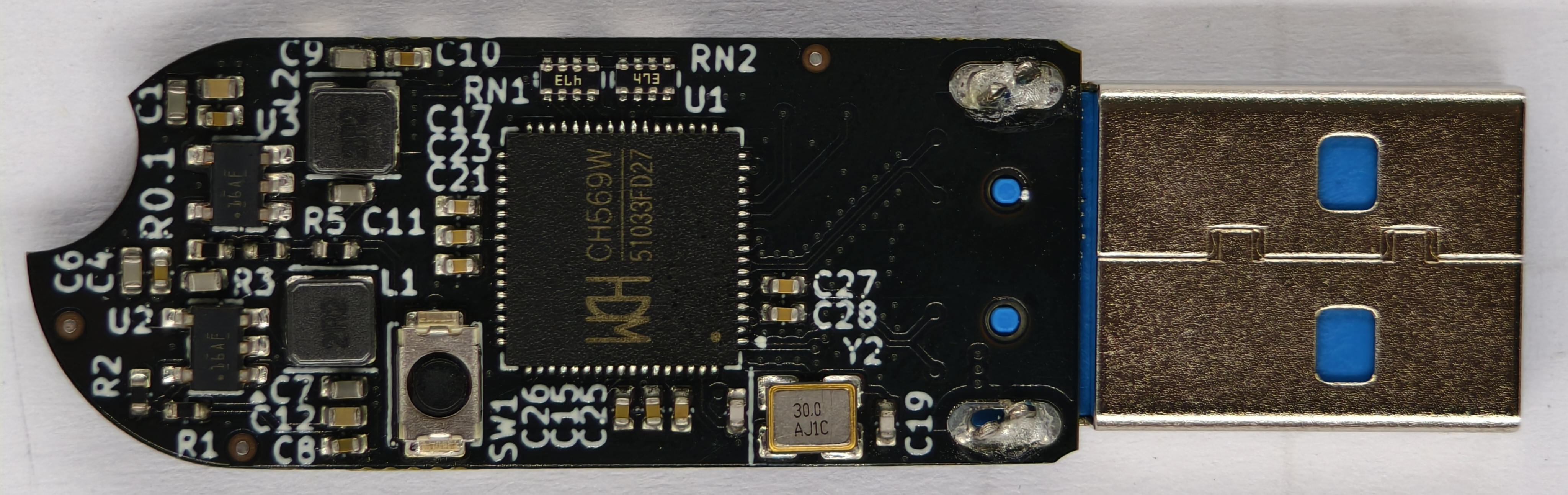
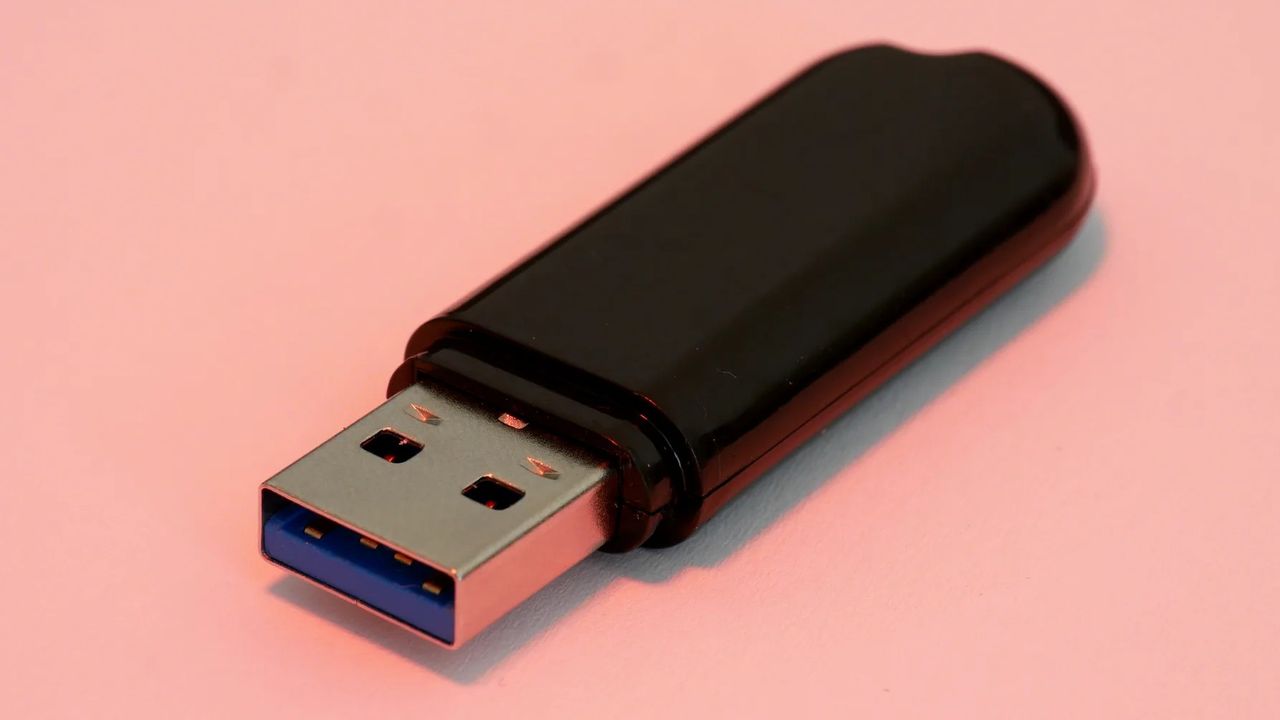
From the outside, the Phantom Drive, created by Rootkit Labs, appears like a boring old USB. It has that classic, cheap plastic-feeling look to it that would never make you second-guess its intention; when you plug it in, it shows up as just an 8GB drive. However, under the hood, the Phantomdrive is powered by a microSD card that only unlocks itself when you specifically create a new text file, after which it mounts the secret partition, which comes with AES-256 encryption. It's made for situations and places where you might be forced to reveal the contents of a storage device.
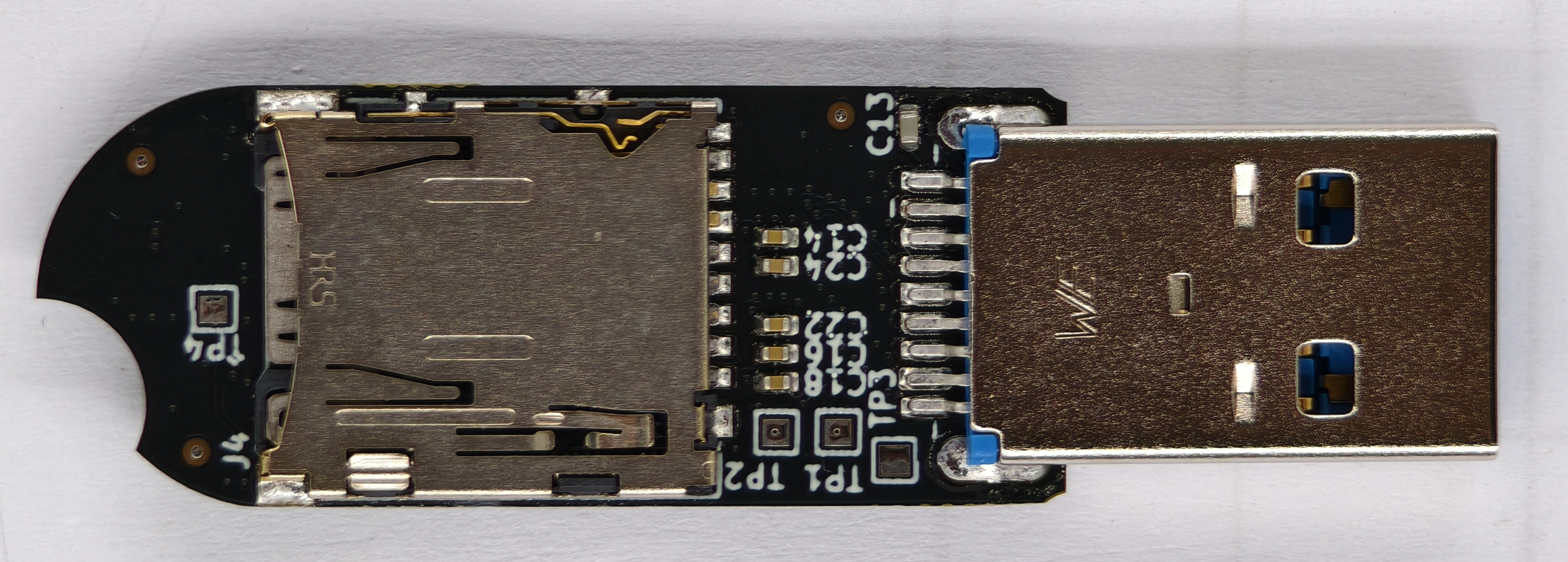
The Phantomdrive is built using the CH569 microcontroller that has a bunch of different hardware blocks — this project uses the USB3, SD/eMMC, and the AES block. There are no NAND chips directly onboard the custom PCB because of the ongoing component crisis. Instead, the Phantomdrive relies on a simple microSD card (that you provide; it doesn't come with one) for both its 8GB decoy partition and the hidden partition. The creator does say they'll make a version with eMMC modules once prices come down.
Of course, if someone were to open up the drive, they'd be able to physically rip the SD card out. However, it still wouldn't be a dead giveaway since many cheap USBs are powered by microSD cards, and SD card adapters are also a thing. Anyhow, the finished drive looks pretty simple from the inside; it comprises a USB port, two buck supplies, a button for firmware update, the microSD card, UART test points, and some support components. The custom firmware now comes into play.
Rootkit LabsRootkit Labs
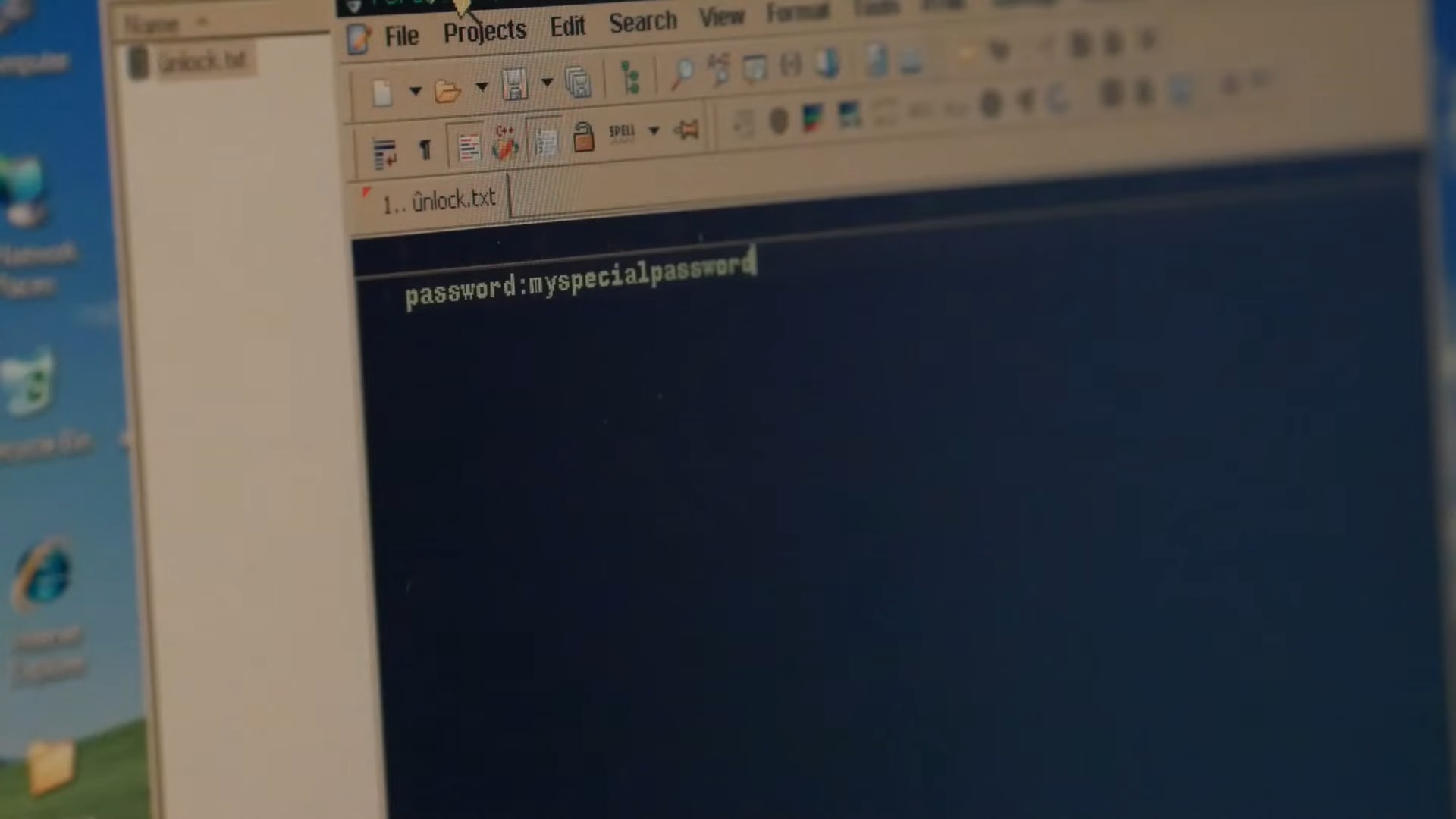
The name of the game is interception. The firmware doesn't know it's being used to handle file transfers; it just reads raw packets of data being sent over the USB bus as is. It's coded to always look for a "password" string, so as soon as you create the unlock.txt file with "password:xyz" inside, it detects the "xyz" bit and copies it over to SRAM, while overwriting the raw data with a bunch of zeroes before it's written to the SD card. The operating system thinks it's created the new file, but the firmware intercepted it midway and sent essentially nothing to the physical storage cells.
The firmware uses the unique internal hardware ID of the microcontroller as the salt, combines it with the password you just typed, and runs the pair through PBKDF2-HMAC-SHA-256 hashes 100,000 times (you can also select 600,000 times) to create a key. Each run induces an intentional 2-3 second delay to deter brute-force attacks that would try to crack the password. The key is used to unlock and lock the hidden partition, and since it's tied to the silicon itself, putting the SD card into another Phantom Drive will not unlock it.
(Image credit: Rootkit Labs)
Even if you try to access it directly through a microSD card slot, it will stay hidden, and the 8GB decoy will actually appear like a broken partition. The creator has also provided the option to recompile the firmware on your own to spoof specific vendor IDs, so that the USB appears like it's from different brands. You can make the Phantomdrive pretend to be a cheap 16GB Kingston Datatraveler at the hardware protocol level, at which point no scanning software will flag it as anything more than a cheap USB.
There are Linux-based C tools you can use in case of emergency, however, to recover your data, such as physical damage to the board. The transfer speeds are also very limited because the project is built over USB 2 — 20 MB/s reads and 9 MB/s writes in AES-CTR mode. The speeds fall to 10 MB/s reads and 6 MB/s writes in AES-XTS, but at least you have the freedom to choose between the two according to your needs.
You can buy the Phantomdrive from Rootkit Labs for $50, but you can also build your own, since this is an open-source project. The prebuilt device comes with two extra shells because the pins wear off and break quickly. Otherwise, the GitHub repo provides all the resources, including the PCB layout files and schematics, the BOM for every part, and the custom firmware, alongside its related tools.
The creator of Phantomdrive, Ryan Walker, explains the goal behind the project as both utilitarian and political. It's built using entirely open-source software and with inexpensive, easily accessible components. They wanted to create something that could "slip past authoritarian government representatives, corrupt police, and anyone else that doesn't respect basis encryption rights."
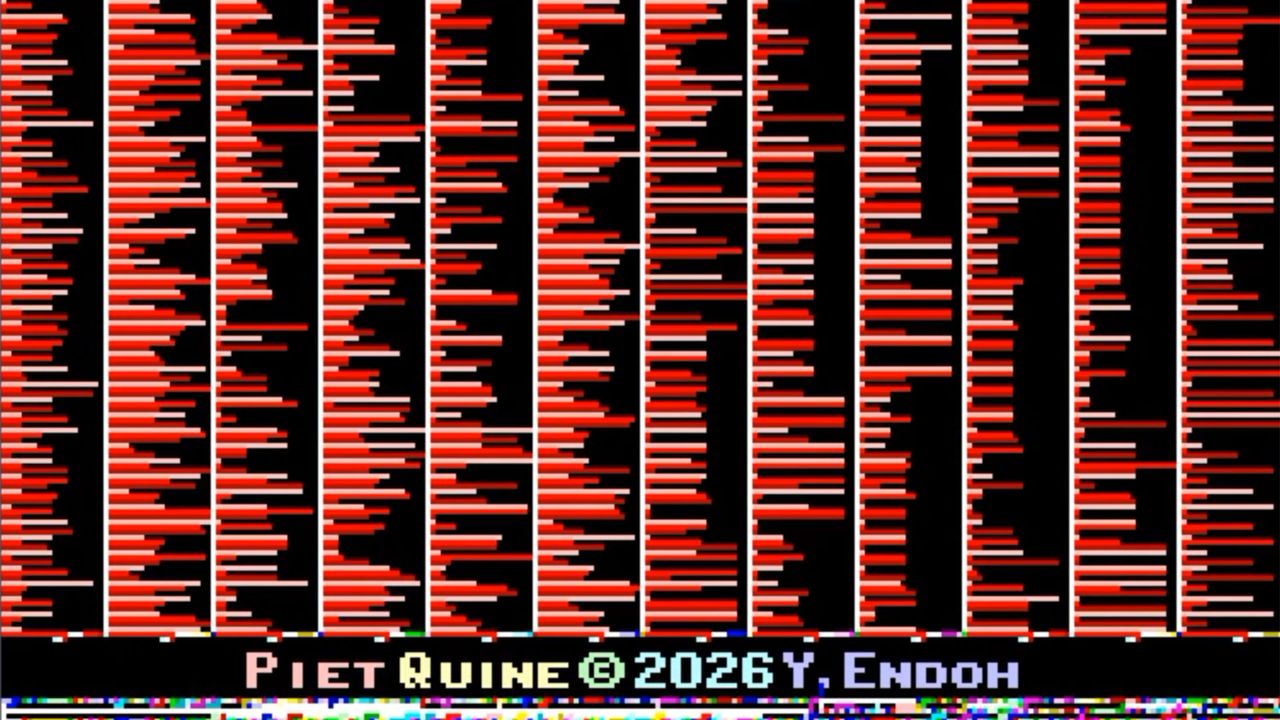
Champion coder Yusuke Endoh has been flexing their esoteric programming muscles on social media. Their latest confection is a Piet Quine – a GIF image that prints itself. In other words, the GIF is both the code and the precise result after running the code.
If you haven’t quite grasped the enormity of this feat from the title, it is worth breaking down the respective definitions of both Piet and Quine in a computer programming context. Piet is an esoteric programming language in which programs look like complex, colorful, tiled artwork. Inventor David Morgan-Mar named it after Piet Mondrian, the famous founder of the neoplasticism artistic movement. Such artwork is immediately recognizable with its bold squares and rectangles bordered by heavy black lines. Smaller Piet GIFs look a bit more Mondrian-y to me, but also look more like colorful QR codes than paintings.
Endoh has created a Quine, graphically. In computer coding, a Quine is a program that produces a copy of its own source code without any external input. This can be quite a tricky feat, even when confined to the world of ASCII text. A requirement of this coding art is that the output is a character-for-character identical representation of the input. It must not simply read its own file to do the duplication task.
When merging the two ideas above, together, things get a whole lot more complicated. However, the top-linked blog and the embedded video shine a light on the task at hand and how Endoh succeeded. Specifically, the video shows Piet Quine running. The Piet interpreter scans the source GIF image in a ‘load data’ phase, followed by a read of the GIF file header and palette info. The challenge here, raising the task above text Quines, is that the GIF folds in binary data, compression, and an awkward flow – they must all be handled deliberately to end up with the desired result.
A key thing to understand about the source image is that it includes a separately interpreted data part, compressed with an adaptive run-length encoding, and a code part. Endoh says that they managed to actually first achieve this way back in 2009, but the GIF was very tall, so not ideal for visual appreciation. The developer decided to ask Claude Code to analyze and reconstruct the original script and build a ‘landscape’ Piet Quine. Even with AI's help, it wasn’t easy to refine the design to the compact finished GIF seen in this article and video. Only after much work on shrinking the visuals and coaching Claude was the GIF shoehorned into the finished 4:3 landscape image (252 x 189 pixels).
Finally, Endoh reveals that a driving force behind their Piet Quine development efforts was the wish to raise awareness of the 2026 Obfuscated Programming Language Design Contest, which is running right now. If you can, please design an esoteric programming language and submit it! Endoh is one of the judges, and you have until October 1 to make your submission(s).
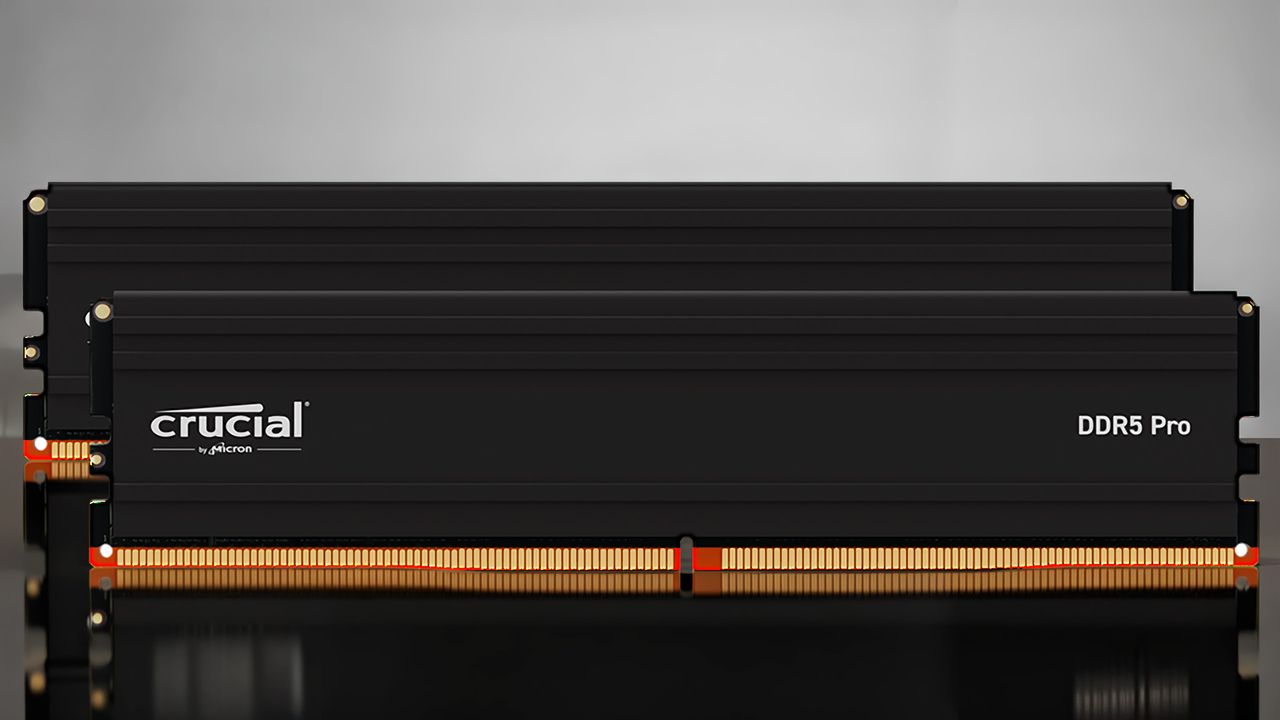
Micron used to produce some of the best RAM available to mainstream users through its Crucial brand. Despite the company's exit from the consumer market through its now-defunct Crucial brand, Micron had pledged to continue honoring warranties on existing Crucial products. A recent case on Reddit, however, highlights ongoing challenges with Micron's warranty process, where it reportedly offered a customer a ludicrouspayout for an RMA. Only after further communication did Micron provide an improved offer. Another user also chimed in with a similar story about an SSD return with Micron. We have reached out to Micron for comment.
Redditor Key_Tailor6948, who shared the email exchange with Tom's Hardware, recently shared their RMA experience with Micron's warranty process after encountering a failing memory module from a 48GB (2x24GB) DDR5 memory kit. While the Redditor did not specify the exact model of the memory kit, Crucial used to sell two such kits in this capacity: the Crucial Pro DDR5-6000 C48 and the Crucial Pro DDR5-5600 C46. The last known pricing for the memory kits was $489.99 and $459.99, respectively, during the memory shortage.
According to the Redditor, Micron allegedly said in an email that the company is no longer offering replacement products for warranty claims. Instead, Micron purportedly stated it would provide a refund based on the original purchase price, including taxes where applicable. However, the proposed refund amount was $241.86.
The major issue at hand is that the reimbursement Micron offered was based on the cost of the 48GB memory kit purchased before the recent memory shortage and the resulting price hikes. Nowadays, the most affordable 48GB DDR5 memory kit available on the market, such as a DDR5-6400 C32 one, which is faster than Micron’s discontinued offerings, starts at a staggering $649.99. The refund Micron proposed amounts to just 37% of the current market value for a somewhat comparable product. The Redditor's math about being 17% of market value and estimating similar-capacity memory kits going for “roughly $1,400" is a bit off based on verifiable pricing, but the proposed payment was still well short of current market value.
Beyond the disappointment over the low reimbursement, the Redditor expressed frustration that they had to send back the entire 48GB memory kit, even though only one of the two modules was faulty. This meant parting with a memory module that was still fully functional. Unfortunately, this is a common industry practice. Most manufacturers require the return of the full memory kit for warranty claims. It is exceedingly rare for companies to allow returns or replacements of only a single memory module from a multi-module kit, regardless of whether the other module is working perfectly. (EDIT 8/11/2026 : Micron's warranty states that it will either replace a product under warranty or refund the current market value of the product or the amount of the original purchase cost, whichever is lower. Therefore, Micron's offer is within the bounds of its warranty.)
The Redditor was also not happy about covering the shipping costs to return the defective memory module. This is another policy that varies widely among brands: some manufacturers cover all shipping fees, others split the cost, so you cannot really single out Micron in that aspect.
It would seem that Micron subsequently offered a more favorable resolution. The company agreed to send the user three Crucial Pro DDR5-6400 C32 16GB (CP16G64C32U5B) memory modules as a replacement. This solution matches the original capacity of 48GB and also delivers better performance than the user's original memory kit. The user accepted the offer.
Meanwhile, Crucial SSD owners are seemingly experiencing similar RMA practices from Micron. A Reddit user named LeanaIsTheBest highlighted in the same thread that Micron is allegedly refusing to provide direct replacements for a failing 4TB SSD. Instead, the company ostensibly offered a gift card equivalent to the original purchase price of the 4TB SSD as compensation. However, the company provided an alternate option to receive the same amount in cash through PayPal or Venmo, with the condition that the user pays the 6% transaction fee.
Micron wound down its consumer business back in December 2025. It is reasonable to think the chipmaker has reshaped its manufacturing factories to cater to more profitable markets, such as data centers and the AI sector. Micron probably is not maintaining inventory or production lines for consumer products, so direct replacements are unlikely. For a company that reported revenue of $41.46 billion in its last earnings call, it isn't a great look for Micron to not reimburse the replacement cost for loyal customers who have purchased its Crucial products.
The owner of what is claimed to be “the original engineering copy of the Intel 8080 rubylith mask” has shared a social media shout-out, looking for a skilled restorer. From the shared photograph, this important artifact from the history of computing looks like it would benefit from remounting and reframing. Hopefully, the hand‑crafted, large‑scale sheet of red film (Rubylith) has remained in good condition under glass, though. The framed artifact is likely genuine and original, as its current owner is thought to be related to Internet Hall of Fame inductee Dan Lynch, a pivotal figure in the early Internet’s success.
Hey uhh long shotBut i own the original engineering copy of the intel 8080 rubylith maskI need to get it restoredAnyone know the right guy? pic.twitter.com/ckqcSylvV6August 3, 2026
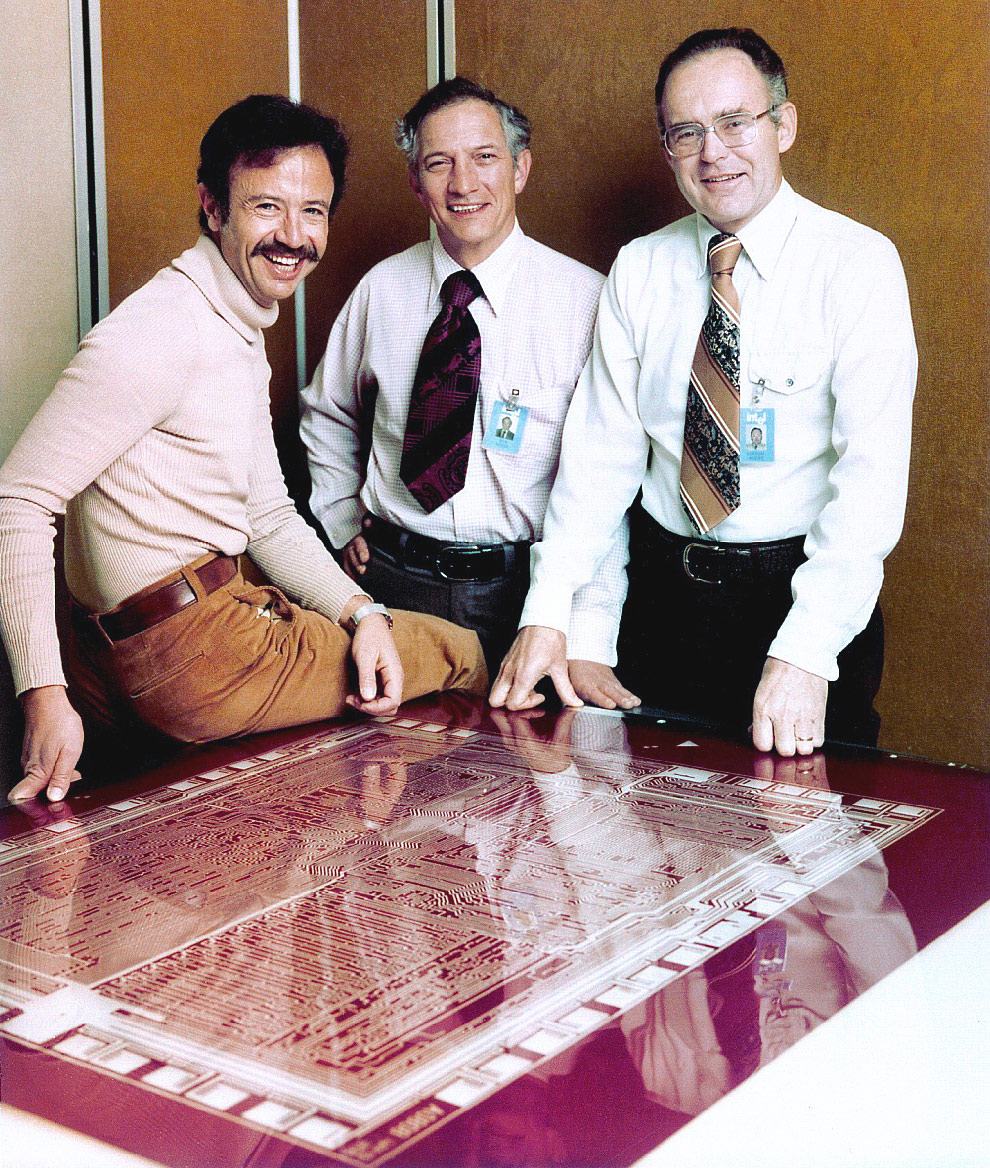
In you unfurl the tweet above, you can see Tom Lynch, a self-described arborist and the owner of an AI infrastructure startup, standing behind the framed chip artwork. Folks comment on the Rubylith looking just like the one that the Intel Trinity: Andy Grove, Robert Noyce, and Gordon Moore, were photographed beside in 1978.
Andy Grove, Robert Noyce, and Gordon Moore stand next to an Intel 8080 rubylith in 1978 (Image credit: Intel Free Press)
Rubylith is simply an adhesive, peelable red film that found favor in graphic arts and chip design before designers went digital. Engineers could cut away parts of the film to define where light would be exposed during photolithography processes. Rubyliths would often be marked with pens, tape, and overlays, especially as designs were iterated and refined ahead of tape-out.
The Intel 8080’s primary architect was Federico Faggin, and it was manually drafted in the age before modern CAD. This human-scale draft is likely 100x magnification compared to the finished processor die. Even scaled this large, it would still be quite an intricate drawing as it had to map around 5,000 transistors, traces, etc., into an approximate 20- x 16-inch sheet. The commercial Intel 8080 release ended up being manufactured on a 6 μm silicon gate process. It originally ran at 2.0 MHz clocks, but later revisions would boast clock speeds up to 3.125 MHz.
Intel’s 8080 was an important 8-bit microprocessor for both the company and the advancement of personal computing. This 8-bit CPU was the one chosen for the Altair 8800, was the original target architecture for the CP/M operating system, and would be a big influence on the later x86 architecture. We also recently wrote how the 8080 bottlenecked the Space Invaders arcade design, unintentionally resulting in the space shoot-em-up’s thrilling increase in pacing as aliens were zapped from the sky.
Some announcements arrive with fireworks, while others show up as a single easily missed tweet during a flurry of QuakeCon announcements to quietly close one of the longest-running oddities in PC gaming. After roughly 25 years, Return to Castle Wolfenstein (RTCW) is finally available in Germany in its original, uncut form. Bethesda Deutschland dropped the news amidst its QuakeCon announcements, bringing an end to a censorship saga regarding Nazi symbolism that stretches all the way back to the game's original 2001 release.
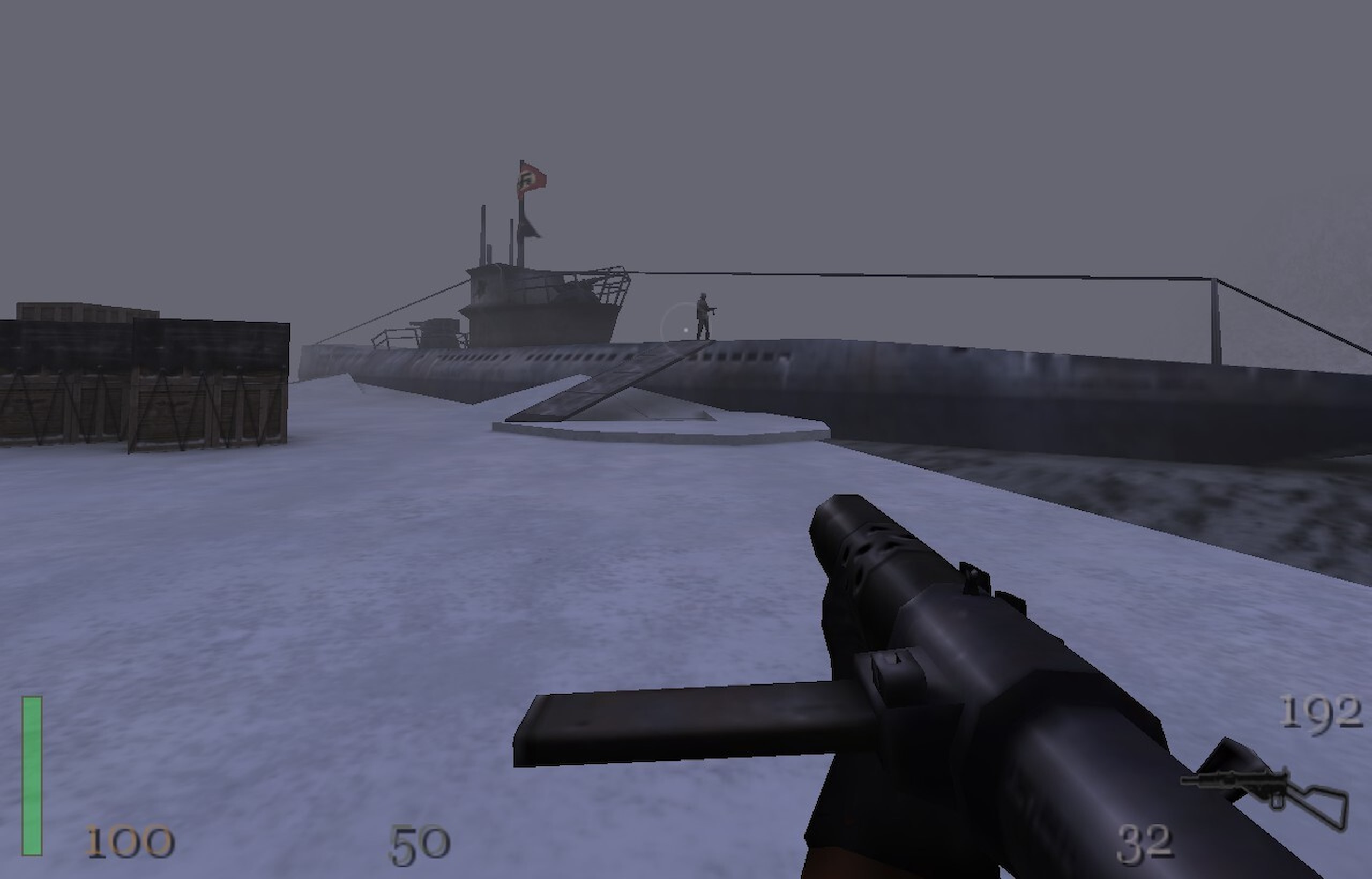
The game's environments are surprisingly varied despite the relatively primitive technology in use. This level is set in Norway. (Image credit: Bethesda Softworks)
If you weren't around for PC gaming in 2001, it's hard to overstate how different the landscape looked.NVIDIA's GeForce 3 had only recently introduced programmable shaders to consumer graphics cards, theATI Radeon 8500 was fresh competition, Windows XP was brand new, and legendary pioneers 3dfx had just disappearedafter being acquired by NVIDIA. Broadband internet was becoming more common, but plenty of multiplayer sessions still happened over LANs, and a Pentium III or Athlon paired with 256 MB of RAM was enough to run one of the latest engine technology showcases.
Built on id Tech 3, perhaps better known as the tech that powered the incredible Quake III Arena, Grey Matter's Return to Castle Wolfensteinlooked fantastic for its day, and it also inherited the series' unmistakable identity. See, ever since Castle Wolfenstein in 1981, and even more so after Wolfenstein 3D essentially invented the first-person shooter as we know it a decade later, the games have been about one thing above all else: shooting Nazis.
That identity created a problem in Germany. For decades, games depicting Nazi symbolism faced legal and regulatory hurdles that films did not, resulting in a heavily modified German version. In RTCW, swastikas disappeared, Nazi organizations were renamed, Heinrich Himmler became the fictional "Heinrich Höller," and references to the Third Reich gave way to the equally fictional "Wolf Clan."
At first glance, that sounds like the sort of censorship that simply strips away context, yet RTCW was already a strange game. The opening hours suggest a relatively grounded World War II action title. You wake up in a prison with a knife, you fight Nazis in a castle, and things seem normal for about a whole hour before rapidly veering into supernatural pulp. Within a few missions, you're fighting zombies, exploring haunted crypts, and watching the SS dabble in increasinglyimplausible occult experiments.
The final boss Heinrich is barely mentioned before the end of the game, making him quite a surprise if you aren't paying close attention to the story. (Image credit: Alan Chan/MobyGames)
By the end, the final boss isn't Hitler (mech suit or no) or a secret superweapon, but Heinrich I, historically known as Henry the Fowler. He was a real 10th-century German king, supposedly resurrected in the game through dark ritual. He's also somewhat infamously a surprisingly manageable final boss, making for a finish both absurd and anticlimactic after the game's escalating parade of undead knights and bizarre experiments.
Seen through that lens, the censored version accidentally became a different story. Instead of Nazis attempting to exploit medieval occult power, it played more like an ancient secret society preserving itself across the centuries before trying to resurrect its long-dead founder. It's arguably a cleaner fantasy premise. The "Wolf Clan" makes more narrative sense once the game fully commits to gothic horror. However, it does make the opening chapters, where an OSS Ranger is somehow investigating a shadowy organization seemingly unrelated to the wider war, a bit awkward.
The catch, of course, is that it stops feeling much like Wolfenstein. The series' DNA isinseparable from infiltrating Nazi strongholds and sabotaging increasingly desperate attempts to turn the tide of World War II. Remove that element, and the title itself starts to feel like an artifact from another game series altogether.
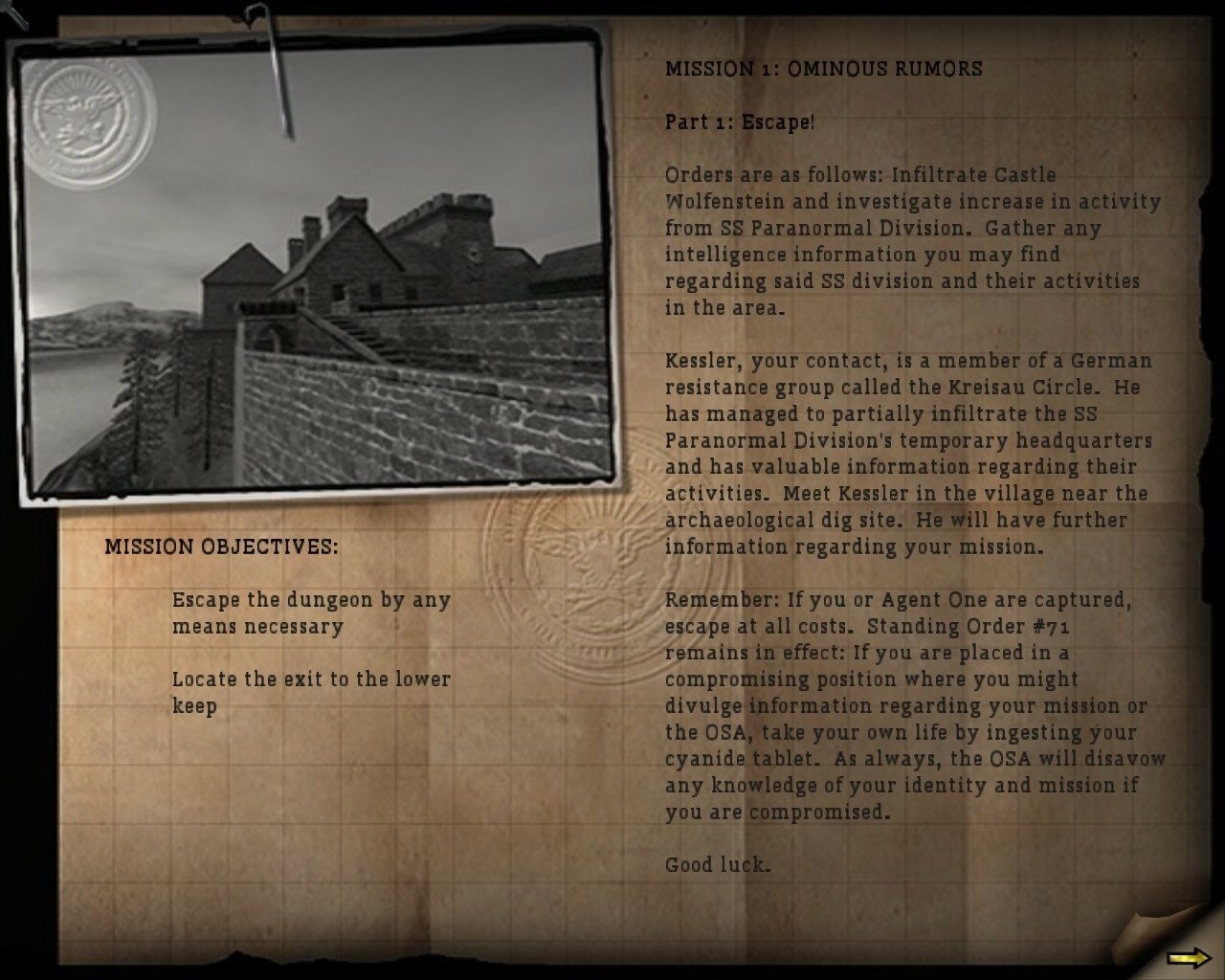
These surprisingly detailed mission briefings had to be fully reworked for the German version of the game. (Image credit: Bethesda Softworks)
It's a curious example of something that occasionally happens with censorship across entertainment. More often than not, edits simply leave a work feeling diminished. Every so often, though, these constraints produce something unexpectedly memorable. The Texas Chain Saw Massacre owes much of its enduring reputation to how much horror it leaves to implication rather than explicit gore, and that decision was made due to the ratings board. Similarly, action film edits for TV often cut gory death scenes, which can ironically improve the pacing of the film.
Return to Castle Wolfenstein belongs in that same conversation, albeit for different reasons. The German version wasn't a better version of the game in any objective sense, but it accidentally shifted the genre. Instead of occult Nazis, it became a story about an ancient cult whose descendants had survived into the modern era. That's a premise that I personally find more appealing and even internally consistent, even if it comes at the expense of the series' defining theme.
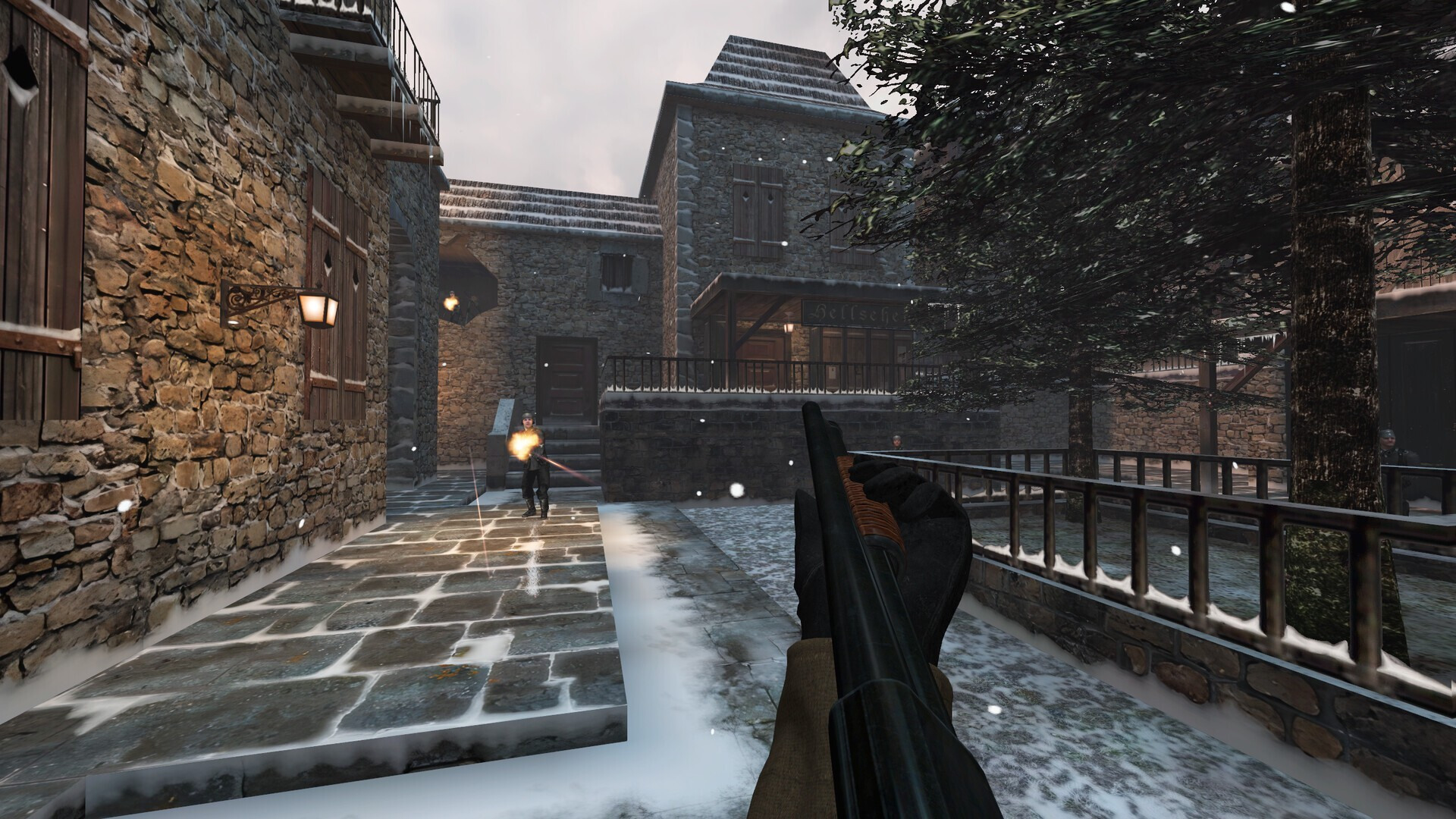
The RealRTCW mod offers widescreen support and improved texturing and lighting over the base game. (Image credit: RealRTCW Team)
So, after a quarter of a century, German players can finally buy the same uncensored game that much of the rest of the world has had since 2001. It's ironic, and it's about time, too. While Germany relaxed its gaming rules in 2018, allowing modern entries like The New Order to go uncut in 2019, Grey Matter's 2001 classic remained stuck in censorship limbo until now.For game preservation, historical authenticity, and simple consumer choice, that's unquestionably the right outcome. Yet it also marks the quiet retirement of one of gaming's strangest alternate versions; a release that, through a combination of legal necessity and narrative coincidence, accidentally stumbled into telling a very different and potentially more compelling story.
Folks in Germany should now be able to pick up the uncensored version of the classic game on sale for just two dollarsat Steamand GOG, or you can get a bundle that includes the original Wolfenstein 3D for just a dollar more. If you grab it, make sure to check out theRealRTCW overhaul mod that radically improves the game with modern features like proper widescreen support and cleaner OpenAL audio.
The AI-driven memory apocalypse has made computer parts so expensive that the average buyer has stopped building PCs. Multiple research firms have already said that, but we’re now seeing it in action in the market. Uniko’s Hardware shared on X four crazy combos of RTX 5090 GPUs being sold on the Taiwanese e-commerce platform PChome24h.
Some of the GPUs that come with a lot of "freebies" include the Asus ROG Astral GeForce RTX 5090, Gigabyte Aorus RTX 5090 Master, MSI GeForce RTX 5090 Gaming Trio OC, and a Gigabyte Aorus RTX 5090 AI Box external graphics card. These items are priced in NTD, but we’ll list them below, including their retail prices in dollars (NTD 32.25 = USD $1 exchange rate) and the included items.
As we can see, even though GPU prices are quite inflated, many of them come with enough freebies that you can start building one high-end system and three to five entry-level gaming rigs. They’re still priced relatively high compared to Amazon or Newegg in the U.S., though, but we have to keep in mind that Taiwan is a different market, so there will likely be variations in prices plus VAT.
buy one 5090, get seven free mobos?lets take a look at the msi 5090 gaming trio bundle priced at 274090ntd (~8500usd).it contains:- the 5090- three msi x870e carbon (42606ntd)- two msi b650m gaming plus wifi (8580ntd)- one amd 9950x3d (24150ntd)so the mobos + the cpu =… https://t.co/zTZupvfh2S pic.twitter.com/WeNuiGhYE5August 7, 2026
That’s because sellers often put slow-moving products in a combo to help get their inventory moving. Given the number of motherboards, entry-to-mid-range GPUs, and other components included in these combos, it’s safe to say that these items aren’t selling and retailers are doing all these crazy deals just to free up capital.
As the AI-driven memory crisis has pushed up the prices of memory and graphics cards, many have already paused or delayed their purchases and upgrades. Only those with deep pockets who can afford to spend thousands of dollars on parts and combos like these are still buying PC parts.
A powerful processor is at the heart of every exceptional gaming PC, and nothing rivals the performance of AMD's Ryzen 7 9800X3D. If you are building a new system or updating an existing one, this Ryzen 7 9800X3D bundle, which includes an MSI B850 Gaming Plus WiFi motherboard and an MSI MAG Coreliquid A13 240 AIO liquid cooler, is for you. This curated package is available for $458.99, a massive $160 off the regular price of purchasing the components separately.
The Ryzen 7 9800X3D is the best gaming processor that money can buy right now. With an octa-core, 16-thread design and a massive 96MB of L3 cache, the Ryzen 7 9800X3D not only delivers top-notch gaming performance, but it also excels in productivity tasks. Whether you are assembling a system for gaming or serious work, the Ryzen 7 9800X3D provides a rock-solid platform for your build.
While the exclusive bundle does not include any DDR5 memory, it is not a big drawback. Thanks to its design, the Ryzen 7 9800X3D maintains stellar gaming performance regardless of whether you pair it with slow memory or even a single memory module. Therefore, you do not need to spend a fortune on premium memory, which is a big plus in this ongoing memory shortage.
This unbeatable Ryzen 7 9800X3D bundle has all the right hardware to build your next high-end gaming PC.View Deal
On the motherboard side, Newegg's premium bundle includes a feature-rich MSI B860 Gaming Plus WiFi motherboard. It boasts a 12+2+1-phase power delivery subsystem that maximizes the Ryzen 7 9800X3D's performance while also offering ample headroom for overclocking for those who want to extract extra performance.
The B860 Gaming Plus WiFi comes equipped with four DDR5 memory slots that can accommodate up to 256GB of memory with blazing data rates up to DDR5-8200. Meanwhile, storage options arrive in the shape of three high-speed M.2 slots (one at PCIe 5.0 and two at PCIe 4.0) and four standard SATA III ports. The motherboard also has a PCIe 5.0 x16 expansion slot for pairing the Ryzen 7 9800X3D with one of the best graphics cards.
While the Ryzen 7 9800X3D is not a processor that runs very hot, you can never have too much cooling. The MSI MAG Coreliquid A13 240, a solid 240mm AIO liquid cooler, uses a high-performance pump, a thick radiator with wider water channels for a higher flow rate, and two pre-installed 120mm PWM fans that are quiet and performant.
The Ryzen 7 9800X3D bundle will be available on Newegg for the entire month. The massive 26% discount translates to real, tangible savings, bringing the bundle down to just $458.99. It is a rare opportunity to secure the best gaming processor with a very decent motherboard and 240mm AIO liquid cooler at a price that you probably will not find elsewhere. Given the popularity of the Ryzen 7 9800X3D, the bundle will likely sell out very fast, so do not think too much before swiping your credit card.
The community of Gilroy, California, about 30 miles southwest of San Jose, was surprised when an Amazon data center started construction in their town last month. But as many projects like these have been suffering from opposition and delays across the country, the Wall Street Journalreports that this specific site avoided scrutiny by adhering to local zoning rules set 45 years ago.
Amazon’s Gilroy project sits on a 56-acre piece of farmland between a Walmart Supercenter and the Gilroy Premium Outlets. The company and the city didn’t exactly keep the project secret when it started its application in 2020. In fact, there were disagreements between the tech giant and the city government during the process. The publication noted that some Amazon officials were frustrated by slow permitting progress, which was delayed by at least one year. At the same time, the city pushed back on some of the company’s requests, especially if they were no longer up for discussion.
Roger Wehner, Amazon Web Services vice president of economic development, told WSJ that the site had gone through a long approval process, which required public notices and public-comment periods. However, when Gilroy resident Rosa Rodriguez wanted to state her concern about the damage a data center can do to a region suffering from drought, she was told that the comment period had already lapsed in 2024, long before data centers became a hot topic across the country.
Gilroy City Mayor Greg Bozzo said that other industrial projects that had a similar scale to the Amazon data center have previously been approved without resistance.
“It didn’t bother them that a food-distribution center came to Gilroy without their engagement, but now it bothers them that a data center is coming to Gilroy without them having the possibility of engagement,” Bozzo said.
Still, he conceded the people are now more aware about data center developments and added, “We…have an opportunity to change the way that we do business in Gilroy. We’re adapting to the times.”
The tech giant also said that it’s engaging more with the community, with Amazon officials claiming that they met residents directly and even hosted an open house where people can ask questions and leave comments. It also addressed fears that the development would cause a water shortage, which other data centers have already caused, saying the company is constructing a wastewater recovery system to supply its water needs and will even build a pipeline to bring wastewater from the source to its plant.
Bozzo also highlighted the benefits that Amazon will bring to the city, especially increased tax revenue, construction jobs, and a million-dollar donation towards a new fire truck. He also pointed out that the tech giant has been giving grants to non-profit organizations in the city, as well as sponsoring the annual Gilroy Garlic Festival.
But at this point, it’s not the Amazon data center the people of Gilroy are having an issue with. Instead, it’s the fact that a major project that has the potential to have a major impact on the community has been approved without the knowledge of many residents.
There are plenty of ultra-lightweight gaming mice in our best gaming mice picks — but there aren't any that have a built-in hand cooler.
Pulsar recently released a collaboration with infamous air-cooling advocate Noctua — a beige and brown mouse full of top-tier hardware and holes and a built-in 40mm NF-A4x10 fan. For cooling your hand, not the hardware. This eSports-oriented gaming mouse features Pulsar's XS-2 sensor, which has a maximum resolution of 42,000 DPI and a maximum speed of 800 IPS, and can handle up to 70 G's of force. It also features up to an 8,000 Hz polling rate, and, of course, the built-in fan. It retails for the same price as the original Feinmann F01 gaming mouse, which is to say, it's pretty pricey at $179.99.
Design and Comfort of the F01 Noctua Edition
The F01 Noctua Edition is a lightweight wireless eSports gaming mouse with an ergonomic right-handed shape and a hole-filled chassis with a built-in fan. It comes in Noctua's signature beige-and-brown color scheme: The top part of the chassis is light beige, while the bottom and accents (side buttons, scroll wheel, Noctua's logo plate, and some interior elements) are brown.
(Image credit: Tom's Hardware)
The F01 Noctua Edition has a right-handed, ergonomic shape with contoured primary mouse buttons and an off-center hump. It's a little smaller than most mainstream gaming mice, measuring 4.79 inches (121.7mm) long by 2.62 inches (66.5mm) wide and 1.7 inches (43.3mm) high at its thickest point. It weighs 2.57 ounces (73g), which is on the heavier side for what is supposed to be an ultra-lightweight eSports mouse. It's about an ounce heavier than the regular Pulsar Feinmann F01, which weighs 1.62 ounces (46g), thanks to the built-in fan.
The mouse features a matte chassis made of a carbon composite material for durability. The chassis is full of holes, but at least they serve a purpose (sort of) other than reducing weight and triggering your trypophobia: they're also there to keep your hand cool. In the center of the mouse you'll see a mini Noctua fan that directs air upward — toward your palm. You can activate this fan by holding down both side buttons and scrolling up. There are four different fan speeds, indicated by the small LED indicator light on the left side of the mouse, which you can cycle through by scrolling up or down with both. Holding down both buttons and scrolling down turns the fan off.
Tom's HardwareTom's Hardware
Button-wise, it's pretty standard: primary mouse buttons, two side buttons, a power button / DPI switch on the bottom, and a ridged, notched scroll wheel made of aluminum alloy. The mouse feels sturdy and the metal scroll wheel makes it seem a little fancier — it definitely looks and feels pretty premium. I did think the side buttons felt like they were placed a little too far back, but after comparing the F01 Noctua Edition with other mice, the actual issue is that the side buttons are larger than average — and this results in the back button sitting further back on the chassis. It wasn't a dealbreaker, but I found it mildly uncomfortable.
The bottom of the mouse features two large PTFE mouse feet at the top and bottom, as well as a strip of PTFE around the sensor. There are five geometric cutouts surrounding the sensor, as well as the power button / DPI switch.
(Image credit: Tom's Hardware)
The mouse comes with a separate 8K polling dongle, which has two buttons (a programmable profile switch button and a DPI switch), and a 6-foot (1.8m) detachable, braided USB-C to USB-A cable. Both the dongle and the cable come in Noctua's signature colors (the dongle is brown and the cable has a beige fabric covering with brown accents).
Specs
Sensor Model
Pulsar XS-2
Max Sensitivity
42,000 DPI
Max Speed (IPS)
800 IPS
Max Acceleration
70G
Polling Rates
8,000 Hz
Programmable Buttons
5
LED Zones
0
Cable
USB-C to USB-A, braided,
Connectivity
2.4GHz wireless, wired (USB-C)
Measurements (L x W x H)
4.79 x 2.62 x 1.7 inches / 121.7 x 66.5 x 43.3 mm
Weight (excluding cable)
2.73oz / 73g
MSRP / Price at Time of Review
$179.95
Release Date
July 2026
Performance of the F01 Noctua Edition
The F01 Noctua Edition mouse features Pulsar's XS-2 optical sensor, which has a maximum resolution of 42,000 DPI and a maximum speed of 800 IPS, and can handle up to 70 G's of force. The mouse also features Pulsar's optical switches in its primary buttons (rated for up to 100 million clicks), and can get up to an 8,000 Hz polling rate. The sensor doesn't disappoint — its tracking was accurate and speedy in my tests, and it worked perfectly across a variety of surfaces (including glass). The only thing I can see affecting performance in this mouse is its weight — it's not heavy, but it's heavier than most of its competition.
As I mentioned earlier, at 73g the mouse is on the heavy side for an ultra-lightweight eSports mouse — and it's an entire ounce heavier than the fan-less version. I guess that makes sense considering... there's a fan inside it, but still. If you're looking for an ultra-lightweight gaming mouse and you're not particularly intrigued by the fan, there are lighter, cheaper mice out there, such as my favorite Razer DeathAdder V4 Pro, which weighs 56g and costs $169.99.
Tom's HardwareTom's Hardware
I'll admit I was a bit skeptical about the fan — I'm not really a person who suffers from sweaty palms while I'm gaming, however, so I'm aware I'm not the target audience. But as someone who is not the target audience, I have to say that the fan is actually pretty cool (pun intended). It's small, yes, but you can definitely feel it — and even though I don't sweat much, it still felt pretty good. The fan has four speeds, and the first two are practically silent. You can hear the two fastest speeds, but it's not particularly loud — you'll notice it, but those around you probably won't.
Activating the fan using the two side buttons and scroll wheel was easy enough, though the side buttons will activate when you press them, so it's not perfect. You can also turn on and adjust the fan speed in the software and/or you can program one of the buttons on the dongle to cycle through speeds.
If you do get sweaty palms while gaming, or you just happen to live and game in a hot environment, the fan in this mouse definitely works. It takes a toll on battery life, of course, but you can always plug it in. That said, that part of the mouse is practically non-existent, the holes are so big (it's even more full of holes than the Corsair Sabre v2 Pro Wireless MG). The structure of the mouse honestly keeps your hand — or at least your palm — pretty cool, even without a fan.
Features and Software of the F01 Noctua Edition
The F01 Noctua Edition is largely controllable via the hardware, which is nice. The fan can be activated and adjusted by holding down the two side buttons and scrolling, and DPI can be cycled through using the DPI switch button on the bottom of the mouse or the DPI switch button on the wireless dongle. The dongle also has a function button that cycles through onboard profiles by default — so you will need to connect to Pulsar's web-based peripheral software, Bibimbap, if you want to take advantage of this.
With Bibimbap — which you can connect to wirelessly — lets you remap keys (there are five programmable buttons, including the scroll wheel click) and has a built-in macro recorder. You can also adjust various settings, including DPI steps (up to 6), polling rate (ships with 1,000 Hz and goes up to 8,000 Hz), LOD or liftoff distance, and debounce time. You can also turn on the fan from this app, if you want. You can save up to five profiles directly on the mouse and cycle through them with the function button, or you can remap the function button to cycle through polling rate, LOD, debounce time, motion sync, turbo mode, and fan mode. That last one just does the same thing that holding down both mouse buttons and scrolling does, but it doesn't accidentally activate the side button functions.
Wireless Experience and Battery Life of the F01 Noctua Edition
The F01 Noctua Edition features two forms of connectivity: 2.4GHz wireless and wired (via USB-C). It doesn't have any RGB lighting, but it does have a built-in 40mm 5V PWM NF-A4x10 fan with four different speed settings. Oh, and an 8,000 Hz polling rate. Needless to say, its battery life varies quite a bit, depending on how you have it set up. Its built-in battery is 500mAh, which is... well, don't expect much when it comes to battery life. Based on my observations as I tested the mouse, I think you'll still be able to eke out a full day's worth of usage if you have the fan running at top speed, which is not a lot compared to most wireless mice, but not bad, considering.
Bottom Line
The F01 Noctua Edition is a very well-built lightweight gaming mouse, but its main selling point is definitely the built-in fan. And the built-in fan works pretty well — I was definitely impressed, even if I don't see myself using it very often (or at all, really). But if you don't need a mouse with a built-in fan, it's hard to recommend the F01 Noctua Edition over just about any other lighter, more affordable mouse, including Pulsar's own fan-free Feinmann F01. The Corsair Sabre v2 Pro Wireless, for example, weighs just 56g and has a shell full of holes, gets up to an 8,000 Hz polling rate and retails for $149.99.

 Login
Login