El CONICET probó un antígeno que hizo que bovinos generaran anticuerpos capaces de reducir la supervivencia del Aedes aegypti. La meta futura: una vacuna que actúe también contra el mosquito.
Il ritorno della cassa in ceramica su Apple Watch Series 12 porta con sé anche costi di riparazione particolarmente elevati. Per qualsiasi danno diverso dalla sostituzione della batteria, se il dispositivo non è coperto da AppleCare+, Apple indica infatti un prezzo di - preparatevi - 739 euro.
La cifra è superiore persino a quella prevista per Apple Watch Ultra 4, la cui riparazione costa 679 euro senza copertura. Per confronto, un Apple Watch Series 12 Cellular (quindi con eSIM) in alluminio nelle stesse dimensioni richiede 429 euro. Il dato diventa ancora più significativo considerando il prezzo di partenza dei modelli in ceramica. Le versioni Bianco perla e Blu notturno partono da 1.059 euro, mentre Apple Watch Ultra 4 parte da 909 euro. All'atto pratico, riparare un Series 12 in ceramica fuori garanzia costa oltre due terzi (0,7 volte) del prezzo del dispositivo nuovo. La sostituzione della batteria invece, magra consolazione, resta molto più accessibile: 109 euro.
Con AppleCare+, il contributo richiesto per un danno accidentale scende a 65 euro per Apple Watch Series 12 in ceramica e a 75 euro per Ultra 4. La sostituzione della batteria è inclusa senza costi aggiuntivi quando la capacità massima scende sotto l’80%. AppleCare+ costa 4,49 euro al mese per Series 12 (o 89 euro per il piano di copertura biennale, con pagamento anticipato in unica soluzione) e 5,49 euro al mese per Ultra 4 (biennale a 109 euro). Negli USA, Apple propone anche AppleCare One a 19,99 dollari al mese per coprire fino a tre dispositivi. Sempre oltreoceano, dal 14 settembre arriverà inoltre AppleCare One Family, da 49,99 dollari mensili per un massimo di sei membri della famiglia. In Europa AppleCare One ha messo il “naso” da poco, ma in Italia non è ancora disponibile.
I saw the Luna Pro briefly at the IFA trade show, and it looks and feels a lot like the Ultra. | Photo: Dominic Preston / The Verge
Insta360's first compact steadicam, the Luna Ultra, made a splash this year by beating DJI to launch with two lenses. Now it's followed the Ultra with a slightly stripped back Pro model, which drops to one lens but has a unique advantage: it can shoot vertical video in 4K. Plus, unlike DJI's Osmo Pocket 4, you can buy it in the US.
At its heart, the Luna Pro is mostly an Ultra with the telephoto lens stripped out. It uses the same 1-inch-type 8K sensor as the Ultra's main camera, has a similar design including the detachable 2-inch touchscreen that doubles as a remote, and the same four-hour battery life and NFC tag for quicker file transfe …
El Samsung Galaxy Watch8 de 40 mm cae hasta los 269 euros en Amazon. Son 110 euros menos para uno de los relojes más completos de Samsung, con pantalla AMOLED, GPS, Wear OS y seguimiento avanzado de salud.
Thermalright is a CPU cooling company that happens to sell power supplies. Established in Taipei in 2001, it spent its first two decades building a reputation on air coolers - the Ultra-120 eXtreme and the HR series were enthusiast reference points long before the current wave of tower coolers - then drifted out of the conversation for years before the Peerless Assassin 120 dragged it back to the top of every budget build list in 2021. Its catalog has expanded aggressively since: case fans, all-in-one liquid coolers, thermal compounds, chassis, and, since 2022, power supplies. That last category deserves a different kind of scrutiny than the rest. Much like most brand names, Thermalright does not build power supplies; it commissions them, and a heatsink company's engineering credibility transfers to a PSU exactly as far as the OEM behind it allows. Every Thermalright power supply has to be judged on its platform rather than its badge.
The KG series occupies the value end of Thermalright's power supply range, and the TR-KG750 reviewed here is its 750W entry. How does it hold up against the best power supplies on the market? On paper, the specification is current, with ATX 3.1 and PCIe 5.1 compliance, a native 12V-2x6 connector, full modularity, 80 PLUS Gold certification at 115 VAC, a 120 mm fan inside a 140 mm-deep chassis, and a five-year warranty. The label on the PSU itself answers the platform question without much digging. The manufacturer of record is Somore Tech Co., Ltd., the production is credited to Jiushouyangguang Power Supply (Shenzhen), and the internal designation printed beside the 80 PLUS badge is HKCMAX-750 - this is an HKC platform, and the silkscreen on the main board dates the design to April 2023. There is no Cybenetics entry for the model at the time of writing, so the 80 PLUS report is the only third-party data available on it. At a retail price of $91, it undercuts essentially every name-brand 750W Gold unit on the US market, which is the whole of its pitch.
Specifications and Design
Thermalright TR-KG750 Power specifications ( Rated @ 40 °C )
RAIL
+3.3V
+5V
+12V
+5Vsb
-12V
MAX OUTPUT
20A
20A
62.5A
3A
0.3A
100W
100W
750W
15W
3.6W
TOTAL
750W
AC INPUT
100 - 240 VAC, 50 - 60 Hz
MSRP
$91
In the Box
The TR-KG750 arrives in a compact cardboard box wrapped in a black-to-bronze gradient sleeve, with a three-quarter render of the unit dominating the front and the wattage set in large gold type beside it. The badge strip along the bottom edge is short: 80 PLUS Gold, ATX 3.1, PCIe 5.1, and the model number.
(Image credit: Tom's Hardware)
The bundle is as thin as they come. Under the protective packaging the supply is accompanied by a multilingual user’s guide, the AC power cord, a small bag of mounting screws, and four zip ties. That is the entire accessory list: no Velcro straps, no cable combs, no storage pouch. Four zip ties for an eight-cable modular supply is a token rather than a provision, and it is one of the few places where the price makes itself felt before you take the lid off.
(Image credit: Tom's Hardware)
The cables are all-black flat ribbon types throughout, with no sleeving anywhere in the set. They are all uniform, adding points to the aesthetics of the unit. The 12V-2x6 cable is native - a single run from the modular panel to the graphics card, with no adapter or splitter involved - but its plug does not use the dual-color keying the ATX 3.1 specification encourages, which makes an incompletely seated connector easy to spot at a glance.
(Image credit: Tom's Hardware)
Thermalright TR-KG750
Connector type
Hardwired
Modular
ATX 24 Pin
-
1
EPS 4+4 Pin
-
2
PCI-E 5.1
-
1
PCI-E 8 Pin
-
2
SATA
-
6
Molex
-
3
Floppy
-
-
External Appearance
At 150 x 86 x 140 mm, the TR-KG750 is a standard-width ATX unit with a short 140 mm body, which is about as compact as a 750W supply practically gets and leaves useful slack for cable management even in a mid-tower. The chassis is finished in a matte black with a fine texture, and the top panel carries a stamped fan grille in a diamond-and-chevron pattern - four angled spokes radiating from a central square, framed by long slotted vents - with the Thermalright wordmark pressed into a raised panel at the edge. Four exposed screws sit at the corners, one of them beneath the warranty-void sticker.
(Image credit: Tom's Hardware)
The rear face is a large square perforated exhaust panel with the AC receptacle and a rocker. The front face hosts the modular connector bay, cleanly silkscreened into four labeled groups: MOTHERBOARD for the split 24-pin, SATA/PATA for the peripheral cables, CPU/PCIe for the four eight-pin sockets, and a dedicated 12V 2x6 socket in the bottom corner. A scratch-off authenticity tag with a QR code sits alongside the panel.
Tom's HardwareTom's Hardware
The specification label occupies the top face rather than a side panel, which is the more useful placement for a bottom-mounted supply sitting under a windowed case, and both side panels are given over to a large bronze-gradient decal carrying the wattage, model number, and 80 PLUS Gold badge. That decal is the only decoration, and the finish underneath it is unremarkable but honest - evenly applied, no orange peel, no sharp edges. The label repeats the rail ratings, the CCC certificate number, and the internal model designation, and it is where the platform gives itself away. Build quality overall is what the price suggests: the steel gauge is adequate, the panels line up, nothing rattles, but there is none of the extra finishing that separates a $90 unit from a $150 one.
Tom's HardwareTom's Hardware
Internal Design
Cooling is handled by a 120 mm Yate Loon D12SH-12 rated for 12V at 0.30A. Yate Loon is a long-established Chinese fan maker, and the D-series is its bread-and-butter sleeve-bearing line, which makes this the single most consequential cost-saving in the unit. Sleeve bearings are quiet, like fluid-dynamic alternatives at equivalent speed, but wear faster and are more sensitive to heat and mounting orientation - all three of which matter in a supply that, as the test results show, runs its fan constantly and pushes it hard as soon as ambient temperature rises. The five-year warranty covers the fan, but it is not a part most owners will enjoy chasing a replacement for.
(Image credit: Tom's Hardware)
The platform is HKC’s, supplied to Thermalright under the internal designation HKCMAX-750, and the main board is silkscreened as ATX32 Main BD Rev1.2. A row of wattage selection pads along the board edge runs from 500W to 850W, with the 750W position populated, confirming this is a single design scaled across a whole product family rather than a layout drawn for 750W specifically. Component density is fair, the soldering is tidy, and some black silicone anchors the larger parts. Only two heatsinks are fitted - a small one carrying the input bridges and a taller, simple finned unit shared by the APFC and primary switching stages - and everything on the secondary side relies on the PCB and a tiny sheet heatsink soldered to it.
Tom's HardwareTom's Hardware
The transient filtering stage starts at the back of the AC receptacle and continues on the main PCB. In total, there are four Y capacitors, two X capacitors, and two filtering inductors, with an MOV and an NTC thermistor also present - a complete filter with nothing omitted, if not a generous one. Two input rectifying bridges follow on their own small dedicated heatsink. The APFC stage uses two MOSFETs and a boost diode sharing the tall heatsink, paired with a large open-frame filtering coil, and the bulk capacitor is a Nichicon 450V/560 uF part from the 105C-rated GN(M) series. That capacitor is comfortably the best component in the unit and practically the only one sourced from a manufacturer with a genuine reliability record. The primary inversion stage is a half-bridge arrangement built from two 65R160FR MOSFETs on the shared heatsink, feeding the main transformer.
(Image credit: Tom's Hardware)
The secondary side is where the cost engineering becomes plain. The 12V rail is rectified by six Perfertway PWC012N04ES MOSFETs mounted directly on the main PCB with no heatsink of their own, and the 3.3V and 5V rails are derived from DC-to-DC converters that also live on the main board rather than a vertical daughterboard. As a layout, this is conventional and modern. The problem is provenance: essentially every active device in the conversion path - the bridges, the APFC and primary MOSFETs, the six synchronous rectifiers - comes from manufacturers with no established track record in this application. Secondary filtering is a mix of Teapo parts and capacitors branded NICON that, despite carrying a series designation borrowed from Nippon Chemi-Con’s catalog, do not appear to be a genuine Nippon Chemi-Con nor a Nichicon product, and polymer capacitors handle high-frequency filtering on the modular board. None of this is unusual at the price. It is worth stating plainly, though, that the "all Japanese" capacitor language attached to some retail listings for this model describes the bulk capacitor and nothing else.
Tom's HardwareTom's Hardware
Cold Test Results (25°C Ambient)
Cold Test Results (25°C Ambient)
For the testing of PSUs, we are using high-precision electronic loads with a maximum power draw of 2700 Watts, a Rigol DS5042M 40 MHz oscilloscope, an Extech 380803 power analyzer, two high-precision UNI-T UT-325 digital thermometers, an Extech HD600 SPL meter, a self-designed hotbox, and various other bits and parts.
At 25°C ambient, the TR-KG750 averaged 89.5% at 230 VAC and 88.5% at 115 VAC across the nominal load range, peaking at 91.2% and 90.3%, respectively, at 50% load and settling to 89.2% and 87.9% at a sustained 750W. The curve is well shaped, with the usual broad plateau between 40% and 70% load and no collapse at the top end. What it does not have is margin. Against the 80 PLUS Gold thresholds at 115 VAC - 87% at 20% load, 90% at 50%, and 87% at 100% - our measured 87.2%, 90.3%, and 87.9% clear the bar by 0.2, 0.3, and 0.9 percentage points. The unit’s own 80 PLUS report reads slightly kinder at 90.2%, 91.4% and 88.3%, but the conclusion does not change: this is a Gold unit by a narrow margin.
Acoustically, there is no great news. The Yate Loon spins whenever the supply is powered but remains quiet across the first half of the load range. The ramp through the middle of the range is gentle enough, but it steepens past 70% load, reaching 42 dB(A) at 600W and almost 51 dB(A) at a sustained 750W. That is loud for an efficient 750W unit at room temperature. Thermally, the platform is comfortable at 25°C. The primary and secondary heatsinks stabilized at around 60°C. Those are unremarkable numbers, with the small heatsinks and mediocre efficiency being the obvious culprits.
Hot Test Results (~45°C Ambient)
Hot Test Results (~45°C Ambient)
Inside the hotbox at roughly 45°C ambient - five degrees beyond the unit’s own 40°C rating - efficiency averaged 87.6% at 230 VAC and 86.6% at 115 VAC, an almost uniform 1.9-point loss against the cold run. Full load is where the degradation concentrates: 85.8% at 230 VAC and 84.5% at 115 VAC, both 3.4 points down on the 25°C figures. A drop of that size is larger than we like to see, and it puts the unit well outside Gold territory under heat, although it is being measured beyond its rated envelope and the shape of the curve essentially holds throughout. The supply completed every load step without shutting down.
Heat turns the fan from merely constant into genuinely intrusive. The floor rises to 37 dB(A), which is audible but not dramatic. It maintains reasonable noise figures up to 525W and then the curve breaks: between 525W and 600W the fan jumps almost ten decibels to 56 dB(A), settling at 58 dB(A) at a sustained 750W. A step that abrupt points to a coarse thermal control scheme rather than a tuned curve, and at 58 dB(A) the power supply is likely to be the loudest component in almost any system. The internal readings explain the urgency: the primary heatsink reached well over 100°C at full load. Those are very high figures for parts of uncertain pedigree and for a 750W PSU, and while the unit held together for the duration, sustained full load at 45°C is not an environment we would ask this platform to live in.
PSU Quality and Bottom Line
Power Supply Quality
Voltage regulation is adequate rather than tight. Between 20% and 100% load, the 3.3V rail moved 1.2%, the 5V rail 1.4%, and the 12V rail 1.8%. The 12V figure is the one that matters, and it is the loosest of the three, sliding from 12.11V at 151.5W to 11.89V at 744.5W. That sits comfortably inside the ±5% ATX window and will not trouble any component, but it is roughly double what a well-tuned modern LLC platform delivers, and most of the drop arrives between 50% and 75% load rather than being spread evenly across the range.
Ripple suppression follows the same pattern of simple adequacy. On the 12V rail we measured 24 mV at 20% load rising to 62 mV at full load, against the 120 mV ATX limit - a comfortable pass with roughly 48% headroom, though the jump from 38 mV at 75% load to 62 mV at 100% is steeper than the rest of the curve. The minor rails run closer to their ceilings: 34 mV on 3.3V and 38 mV on 5V against a 50 mV limit, leaving 32% and 24% headroom respectively. Cross-load behavior was unremarkable, with 60 mV on 12V under the 12V-heavy test and 34 mV on 5V under the minor-rail test. None of this is a problem for the hardware a 750W supply will realistically feed, but the minor rails have less room than we would expect from a DC-to-DC design.
During our thorough assessment, we evaluate the essential protection features of every power supply unit we review, including Over Current Protection (OCP), Over Voltage Protection (OVP), Over Power Protection (OPP), and Short Circuit Protection (SCP).
All protection mechanisms were verified and triggered correctly during testing. With the unit hot, OCP tripped at 140% on the 3.3V rail (28A), 142% on the 5V rail (28.4A), and 136% on the 12V rail (85A), with OPP shutting the supply down at 134% of rated output, or approximately 1005W. Those are generous thresholds, more generous than most mainstream 750W units carry, and they mean the platform will ride out the transient excursions a modern graphics card throws at it without any complaint - which is precisely what ATX 3.1 compliance is meant to guarantee.
Main Output
Load (Watts)
151.52 W
377.76 W
558.95 W
744.47 W
Load (Percent)
20.2%
50.37%
74.53%
99.26%
Amperes
Volts
Amperes
Volts
Amperes
Volts
Amperes
Volts
3.3 V
1.8
3.38
4.5
3.37
6.75
3.36
9
3.34
5 V
1.8
5.11
4.5
5.10
6.75
5.05
9
5.04
12 V
11.25
12.11
28.14
12.07
42.2
11.90
56.27
11.89
Line
Regulation
Voltage Ripple (mV)
(20% to 100% load)
20% Load
50% Load
75% Load
100% Load
CL1 12V
CL2 3.3V + 5V
3.3V
1.2%
22
26
30
34
24
30
5V
1.4%
20
26
32
38
24
34
12V
1.8%
24
30
38
62
60
32
Bottom Line
What the TR-KG750 is, stated plainly, is an HKC platform wearing a Thermalright badge at a $91 price, and most of what follows from that is predictable. The specification sheet is current - ATX 3.1, PCIe 5.1, a native 12V-2x6 connector, full modularity, a compact 140 mm chassis - and the engineering is competent in the sense that nothing is missing or obviously wrong. The transient filter is complete, the topology is a modern half-bridge LLC with DC-to-DC minor rails, and the Nichicon bulk capacitor is a real Japanese part. Measured performance is broadly consistent with the class: regulation within 2% on every rail, ripple with meaningful headroom on 12V, and protection thresholds more generous than most.
(Image credit: Tom's Hardware)
The problems concentrate in two places. The first is efficiency, where the unit clears its 80 PLUS Gold thresholds at 115 VAC by a small margin. Certification is a floor, and this unit sits on it. Under heat, the margin vanishes entirely - 84.5% at 115 VAC and full load - and with no Cybenetics listing, there is no other independent data to weigh against ours. The second is acoustics, and the fault there is part control, part hardware. The Yate Loon is quiet enough through the first half of the load range, but the curve steepens past 70%, and the supply reaches almost 51 dB(A) at a sustained 750W at room temperature. In a warm case, it is worse: a ten-decibel step between 525W and 600W, and 58 dB(A) from there to full load. That is a coarse fan profile rather than a tuned one, and there is no fanless mode to fall back on at idle. It was little choice, as the heatsinks are too small to combat such thermal needs. Builders who care about a perfectly quiet machine can stop reading here.
Underneath those sit the component choices. The Nichicon bulk capacitor aside, the secondary filtering is Teapo and NICON, and every active device in the conversion path - bridges, APFC and primary MOSFETs, the six synchronous rectifiers - comes from manufacturers with no track record to point at. That is not automatically a defect; plenty of anonymous silicon runs happily for a decade. But it is unverifiable, and heatsink temperatures well over 100°C at 45°C ambient leave less comfort than we would like, as does a sleeve-bearing fan if asked to run continuously in that heat. The five-year warranty is doing real work in the value case here, and it is the correct length for this class rather than a generous one.
(Image credit: Tom's Hardware)
At $91, the TR-KG750 is around $30 cheaper than the Cooler Master MWE Gold 750 V4, and that comparison is the instructive one. The Cooler Master is quieter by a wide margin, holds tighter regulation, runs a cooler secondary side under heat, and carries a ten-year warranty; the Thermalright answers with a lower price, and concedes almost everything else. Set against the Thermaltake Toughpower GX3 850W or the MSI MAG A850GLS, the picture is similar - more wattage and better-documented platforms, for more money. The TR-KG750 earns its place on price alone. If the budget is fixed near $90 and the machine lives under a desk rather than on it, this is a defensible purchase with a current feature set and adequate measured performance behind it. If there is $30 of headroom, or if noise matters substantially, have a look at higher price tags.
With its built-in USB / HDMI hub and a small fan to keep temperatures in check, Sharge's Disk Pro SSD is one of the more interesting (and generally useful) external storage drives in recent memory, easily earning a spot on our Best External SSD list. And the company is following that success up with a more DIY-focused Disk Pro 2, which lets you install your own M.2 drive (supporting 2230, 2242, and 2280 sizes and capacities up to 8TB), while adding greater fan flexibility, media card slots, and an HDMI port that's capable of more bandwidth – depending on the model you choose.
Sharge is offering the Disk Pro 2 in two varieties. There's the Lite model, with HDMI 2.0 (4K@60 Hz) and a 5W minimum operating power, and the Disk Pro Ultra (which we have in for testing) with HDMI 2.1 (4K@144 Hz or 8K@30 Hz), a lower 1.5W minimum power draw, and a faster card reader. Below is the full list of differences, according to the product page. The company even lists the internal chips, some of which you can see through its transparent top.
Disk Pro Ultra
Disk Pro Lite
HDMI
HDMI 2.1, 4K@144 Hz, 8K@30 Hz
HDMI 2.0, 4K@60 Hz
Minimum Operating power
1.5W
5W
Chips
VL822, VL605, RTL9210, SM2705
GVS2201S, VL822, GL3231, RTL9201
SD speed
Read 180 MB/s, Write 120 MB/s
Read 100 MB/s, Write 90 MB/s
(Image credit: Tom's Hardware)
The Ultra model is likely to appeal more to professionals and gamers, offering faster card transfers and higher monitor refresh rates. But the main limitation here is the overall bandwidth, as both models are capped at a 10 Gbps interface, just like the original Disk Pro. That makes either model better as kind of a travel-friendly Swiss Army hub than something you'd want to use as your primary hub / dock all the time. Because any modern M.2 drive can saturate all available throughput by itself, before you connect any video or USB devices. But there's no denying the utility of carrying around a pocket-friendly SSD that also lets you connect to a monitor or TV, plug in a couple extra peripherals, and empty your SD cards without an extra hub, adapters, or cables.
(Image credit: Tom's Hardware)
At 3.65 x 2.33 x 0.531 inches (92.6 × 59.2 × 13.5 mm) without the cable, the Disk Pro 2 is slightly thicker and longer than the original Disk Pro, but still smaller than some standalone drives. Again, with its size and transparent top, it reminds me of an old-school cassette tape.
(Image credit: Tom's Hardware)
One thing that has definitely improved over the original Disk Pro is that Sharge has made the USB-C cable removable. This is good in part because you don't have to worry about the cable breaking over years of use. But also, particularly if you're going to use the drive's hub capabilities, you might want something longer than the included cable's sub-nine-inch length. And when necessary, you might want to plug the drive into a USB-A port. So having the option of using different cables is a big plus.
The cable is also designed to function as a lanyard, which can be handy. But it's held in place solely by the USB-C connection, so I wouldn't trust it for much more than hanging the hub up somewhere at home, so you know where it is when you need it.
(Image credit: Tom's Hardware)
In terms of ports, starting from the bottom edge, you get the main USB-C port, capable of passing through up to 80W of power, a full-size HDMI port (2.1 on the Ultra model we're testing or 2.0 on the lite model), a USB 3.0 Type-A port, and a 10 Gbps USB-C port that can handle up to 100W of power input (and pass through up to 80W for charging a laptop or other device). The previous Disk Pro included a second USB-A 2.0 port here as well, but it's been ditched in favor of the removable USB-C cable, which I think is well worth the sacrifice.
(Image credit: Tom's Hardware)
On the opposite (top) edge, Sharge has added an SD card slot and a microSD card slot. These are capabilities the original Disk Pro didn't have, which make the newer model a lot more versatile for content creators. Just remember the Ultra model offers up faster read and write speeds for the card slots.
(Image credit: Tom's Hardware)
Around back, there's not a lot to see save for the fan intake, but the back is also magnetic, letting you snap the drive onto smartphones that support MagSafe devices or Qi2 magnetic peripherals — it's just a physical mount, though, not receiving power. I've also found this feature handy for sticking the drive to a refrigerator or other iron surface so I always know where it is when I need it.
(Image credit: Tom's Hardware)
It's also worth pointing out that the fan in the Disk Pro 2 is smaller than on the Disk Pro. But there are larger cutouts for air intake on the sides for when the hub is lying on a table or desk, and the Pro offers a three-mode switch (off, on, and turbo), whereas the original's switch had two settings (auto and on). I appreciate the active cooling, and it will certainly be helpful if you're using most of the hub's ports and the SSD at the same time. But if you're mostly using the Disk Pro 2 solely for basic, bursty storage tasks, the 10 Gbps interface and an efficient SSD aren't likely to get warm enough to require active cooling. Of course, that will heavily depend on which drive you install in the enclosure, as well.
Testing with Lexar's 710 SSD
Sharge sent along its Disk Pro 2 Ultra with a Lexar 710 M.2 SSD (a PCIe 4.0 drive that's capable of about 5x the bandwidth of the hub itself), and installing it is about as straightforward as you'd expect. Use the small included screwdriver to remove a tiny screw on the side, and the SSD cover lifts off. Loosen the drive anchor post, install the SSD, tighten the post, put the cover back on, and reinstall the cover anchor screw on the side.
You can, of course, install your SSD of choice, and below the 10 Gbps interface cap, your performance will vary by drive. Still, since the company sent along the Lexar drive, we ran a couple of our external storage benchmarks, and the Disk Pro 2 Ultra performed well for an SSD in this class, just like the original Disk Pro.
Trace Testing - PCMark 10 Storage Benchmark
PCMark 10 is a trace-based benchmark that uses a wide-ranging set of real-world traces from popular applications and everyday tasks to measure the performance of storage devices.
(Image credit: Tom's Hardware)
The Sharge Disk Pro 2 Ultra does exceptionally well here, beating everything save for Corsair's USB4-based EX400U. Impressively, the 10 Gbps drive even beat the 10 Gbps X10 Pro on this test, proving available bandwidth isn't everything when it comes to drive responsiveness.
(Image credit: Tom's Hardware)
In this real-world bulk transfer test, Sharge's Disk Pro 2 Ultra lands in a comfortable fourth place, behind 40 Gbps and 20 Gbps drives, and one spot behind the 10 Gbps Crucial X9 Pro drive on reads. But on writes, Sharge's enclosure, running the Lexar SSD, again beats everything in this chart save for Corsair's USB4 drive.
Synthetic Testing CrystalDiskMark
CrystalDiskMark (CDM) is a free and easy-to-run storage benchmarking tool that SSD companies commonly use to assign product performance specifications. It gives us insight into how each device handles different file sizes. We run this test at its default settings
(Image credit: Tom's Hardware)
Lastly, in this best-case-scenario synthetic test, the Disk Pro 2 lands in fifth place when it comes to reads, but fourth place on writes.
Again, the Disk Pro 2's performance on benchmarks will depend largely on what drive you put inside it. But it's clear that the SSD enclosure is capable of performing well, despite its 10 Gbps bandwidth limitations.
Pricing and Bottom Line
(Image credit: Tom's Hardware)
If all you really care about is dropping in a drive and moving some files around, there are plenty of cheap 10 Gbps enclosures, often on sale for $20 or less. But if you travel a lot with tech and like the idea of a drive enclosure that includes a data and video hub with PD power passthrough, the Disk Pro 2 offers a lot to like, with the Ultra version we tested capable of handling video output bandwidth as high as 8K at 30 Hz (or 4K at 144 Hz). And the inclusion of card reader slots makes the enclosure even more useful for creators on the go.
It's far from cheap, at $109 for the Ultra version we tested or $79 for the Lite version, which is still capable of 4K video at 60 Hz, but won't play as well with phones, due to a higher minimum power draw. But Sharge's devices often go on sale, and when this was written, the Late model was selling for $66.51 and $80.91, directly from the company. This is technically a pre-order price, as the enclosures are expected to start shipping on October 15th.
There are also enclosure / hub combos on Amazon and Newegg that promise similar functionality for less. But the ones I saw have generally poor reviews, are larger than the Disk Pro 2, and none of them look as pleasing or are as feature-packed as Sharge's design, with its transparent cover, active cooling, and MagSafe-compatible back. For those looking for portable connectivity and up to 8TB of storage in one device on the go, the Sharge Disk Pro 2 is in a class of its own, and easily earns a spot on our best SSD and hard drive enclosure list.
Se ne parlava da mesi, e continuano ad esserci prove sempre più concrete. Gli ultimi muletti intercettati durante i test su strada in India tolgono ogni dubbio. <strong>Triumph</strong> sta per allargare la famiglia delle sue <strong>400 cc</strong> con la tanto chiacchierata <strong>Bonneville 400</strong>. La novità andrà ad affiancarsi alle varie <a href="https://www.hdmotori.it/triumph-articoli-n571296-triumph-speed-400-scrambler-400-x-caratteristiche/"><strong>Speed 400</strong></a>,<strong> Scrambler 400 X</strong>, XC, Thruxton e Tracker, puntando dritta al ruolo di punta di diamante tra le entry-level del marchio inglese.Gli scatti rubati più recenti mostrano che la fase di sviluppo viaggia a ritmi serrati. Salvo sorprese dell'ultimo minuto, la Bonnie 400 in veste definitiva dovrebbe mostrarsi al pubblico a <strong>EICMA 2026</strong>, o magari con un po' di anticipo.<h2>Linee classiche da "vera" Bonnie: il richiamo alle T100 e T120</h2><img class="alignnone size-full wp-image-285353" src="https://www.hdmotori.it/app/uploads/2026/09/Triumph-Bonneville-400-Spied.jpg" alt="" width="719" height="379" />Esteticamente, le immagini confermano una ricetta fedele alla tradizione. Il design ruba a mani basse dalle sorelle maggiori <strong>T100</strong> e <strong>T120</strong>, riproponendo tutti i capisaldi delle <strong>modern-classic</strong> di Hinckley: proiettore tondo davanti, serbatoio a goccia, sella lunga e piatta, parafanghi abbondanti e lo scarico laterale che corre ben orizzontale lungo il fianco della moto.<h2>Stesso monocilindrico, ma con la cavalleria aggiornata</h2>Nessuna sorpresa nemmeno per la parte meccanica. Il motore resta il collaudato <strong>monocilindrico </strong>da <strong>398 cm³ con distribuzione bialbero</strong>, quattro valvole e raffreddamento a liquido, che conserva le alette sul cilindro per non rovinare il colpo d'occhio vintage.Resta da capire se gli uomini Triumph abbiano preparato un'erogazione ad hoc per questo modello, ma è molto probabile che sotto il serbatoio ci finiscano le ultime migliorie già viste sulla Tracker. Questo significa una scheda tecnica da <strong>42 CV a 9.000 giri/min</strong> (due in più di Speed e Scrambler) e una coppia massima di 37,5 Nm a 7.500 giri.<h2>Doppio allestimento in arrivo?</h2><img class="alignnone size-full wp-image-285355" src="https://www.hdmotori.it/app/uploads/2026/09/triumph_bonneville_400_foto.jpg" alt="" width="679" height="451" />E qui invece c'è la sorpresa. I prototipi pizzicati finora non erano tutti uguali. Le differenze riscontrate nei componenti <strong>fanno pensare a una doppia offerta sul mercato</strong>. Da una parte un modello base più spoglio ed economico, dall'altra una versione rifinita di tutto punto e più vicina allo spirito della <strong>T100</strong>. Per saperne di più bisognerà pazientare ancora un po', in attesa di una nota ufficiale da Hinckley o dei prossimi scatti spia.
Earlier this week, researcher Jacob Coxon quit Anthropic, saying the firm and its competitors are "gambling with our lives." "We really do earnestly believe AI could kill all humans," added current Anthropic researcher Evan Hubinger in a post on X.
Discrete graphics card shipments for desktop PCs in Q2 2026 totaled 12.5 million units, the highest number since Q1 2022 despite record-high prices and cratering shipments of desktop CPUs, according to findings from Jon Peddie Research. The result highlights a broader trend that shows that unit sales of standalone GPUs for gaming have so far remained immune to rising prices, perhaps because gamers are expecting even higher prices in the coming quarters.
The industry shipped 12.5 million standalone graphics cards for desktop PCs in the second quarter of 2026, up around 5.9% sequentially and 7.8% year-over-year. 12.5 million add-in boards (AIBs) is the highest number of graphics cards sold in one quarter since the first quarter of 2022, when the industry shipped 13.38 million AIBs.
It is particularly noteworthy that 2026 is shaping up to be better for unit sales of desktop graphics boards than 2025 despite raising prices. For the first half of 2026, 24.3 million desktop AIBs were shipped, up significantly from 20.8 million graphics cards supplied in the first half of 2026. JPR analysts also note that only around 14 million desktop PCs were sold during the quarter, which — given an unusually high 89% attach rate — largely means that the majority of AIBs shipped during the quarter were aimed at gamers buying in retail and not at PC makers.
"Defying common wisdom, high-end AIB sales spiked as prices increased," said Jon Peddie, president of JPR. "Our theory is consumers rushed to buy AIBs before the prices went any higher, as the war in Iran is driving prices up in all segments."
(Image credit: Data by Jon Peddie Research, compiled by Tom's Hardware)
Having shipped about 11.25 million discrete GPUs for desktop computers in Q2 2026, Nvidia remained the undisputed leader of the market with around 90% market share. AMD controlled roughly 8% of the market, shipping about one million discrete desktop GPUs, while Intel's share increased to 2% on shipments of several hundred thousand units. Meanwhile, Jon Peddie Research notes that market share changes were negligible during the quarter: AMD’s overall AIB market share decreased by -0.16% from the previous quarter, Intel's market share increased by 0.3%, and Nvidia's market share decreased by -0.1%.
(Image credit: Data by Jon Peddie Research, compiled by Tom's Hardware)
For Nvidia, the quarter was particularly good as it sold the highest quantity of discrete GPUs for desktop PCs in a single quarter since Q3 2017, when it sold approximately 11.72 million units. By contrast, sales of AMD's standalone graphics cards have been floating below or around one million units per quarter for nearly four years now, with only three quarters being exceptions (Q3 2023, Q4 2023, Q4 2024). Still, one million is higher than the around 700 thousand discrete desktop GPUs the company sold in Q2 2025.
(Image credit: Data by Jon Peddie Research, compiled by Tom's Hardware)
In total, Nvidia shipped approximately 17.365 million discrete graphics processors in the second quarter: roughly 11.25 million units went to desktops, and around 6.115 million units were installed into notebook and compact PCs. Since both AMD and Intel have quietly quit the market for standalone GPUs for mobile PCs, their shipments to this market segment were essentially zero.
Data by Jon Peddie Research, compiled by Tom's HardwareData by Jon Peddie Research, compiled by Tom's Hardware
When going abroad, the right plugs are essential to keep your gadgets charged. These are my favorite travel adapters and chargers that I’ve tested myself.
Trey Parker y Matt Stone han convertido la temporada 29 en otra provocación contra Trump: rebautizaron la serie como “South America” después de que “America” comenzara a aparecer en mapas y decretos oficiales.
One thing iPhone users will enjoy is that Liquid Glass has been improved. They will be able to choose between a more tinted or very translucent experience.
Apple upgrades its 18 Pro line with improved camera aperture and AI capabilities. CNET's Patrick Holland unpacks the main things you need to know about the latest iPhone 18 Pro handsets.
Video credits Host: Patrick Holland Scripted by: Patrick Holland Producer: Celso Bulgatti Camera: Celso Bulgatti Video editor: JD Christison Thumbnail designer: Zooey Liao
La nuova applicazione è disponibile a livello globale su PC x64 e ARM64. Si richiama con Alt + Spazio, integra Gemini Spark e può collegarsi a Gmail, Drive, Docs e Calendar... Leggi tutto
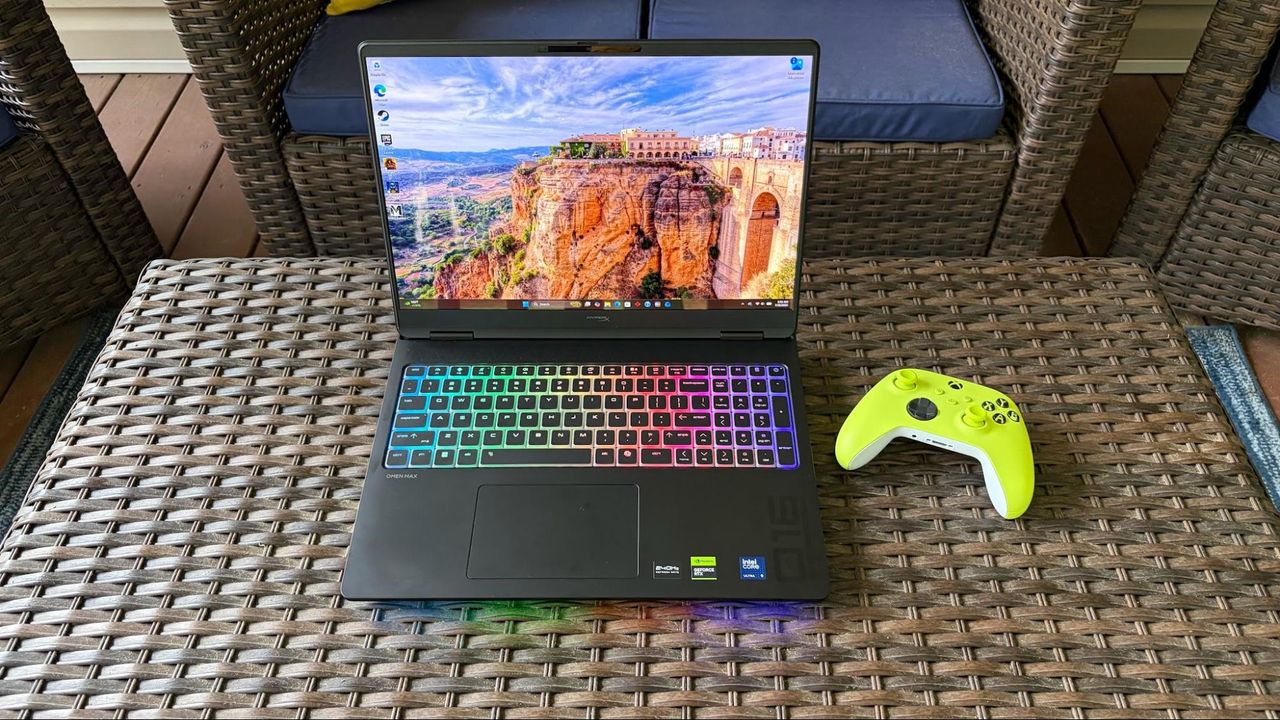
Want a powerful new OLED gaming laptop with a $1,000 discount on top? This HyperX Omen Max 16 gaming laptop from HP is down to $3,699.99 right now and features, among other top specs, an Nvidia GeForce RTX 5090 mobile GPU. You'll struggle to find a better spec'd laptop at this price point, and it's much cheaper than buying or building a top spec desktop gaming PC, too.
The mobile version of the RTX 5090 isn't quite as beefy as its desktop counterpart, but it's still the best GPU for a laptop that you can buy. Specs wise, it has 10,496 CUDA cores as its disposal, with 24GB of GDDR7 VRAM, operating on a 256-bit memory bus. A peak 175W TDP is much less than the desktop's 575W rating, but laptops are designed to be portable.
What's interesting is the pricing here. This laptop costs $3,699.99, and that's for an entire working system. If you wanted to buy the desktop version of the RTX 5090 alone from a retailer that has it in stock, it'd set you back at least $5,899. You could argue that they're totally different beasts, but PC gaming is getting really expensive. Buying a new desktop PC will set cost you thousands of dollars more than it would have last year. A top-spec laptop this like HyperX Omen Max 16 is the better of the two options from a financial point of view right now, especially as it'll still be able to handle modern games with the best settings for years to come.
An OLED gaming laptop with a huge $1,000 discount. This HP-made, 16-inch HyperX Omen Max 16 laptop features a 16-inch OLED panel with a 240Hz refresh rate, capable of outputting at 1600p.
It ships with the mobile version of the Nvidia GeForce RTX 5090, along with the 24-core Intel Core Ultra 9 290HX Plus, 32GB of DDR5-6400 RAM, and a 2TB SSD for storage. View Deal
As for this laptop, our HyperX Omen Max 16 review made clear that its original launch pricing didn't quite work, with better performance from rival laptops. The $1,000 drop makes it a much more attractive system, with a gorgeous build quality that's "solid as a rock." It's built with aluminum, with no flashy styling gimmicks, just a matte black finish and RGB lighting for the keyboard. It's weighty, too, measuring 14.04 x 10.59 x 1.03 inches and weighing 6.56 pounds.
This HyperX laptop has a 16-inch OLED display, will give you perfect blacks and infinite contrast compared to a cheaper LCD, with an ultra-fast 240Hz refresh rate for smooth, blur-free motion. The top resolution on this laptop's display is 2,500 x 1,600, and coupled with the RTX 5090, you won't struggle to hit the highest frame rates with Ultra graphics presets applied at 1600p, with the option to hook up to an external display using the supplied HDMI port if you prefer.
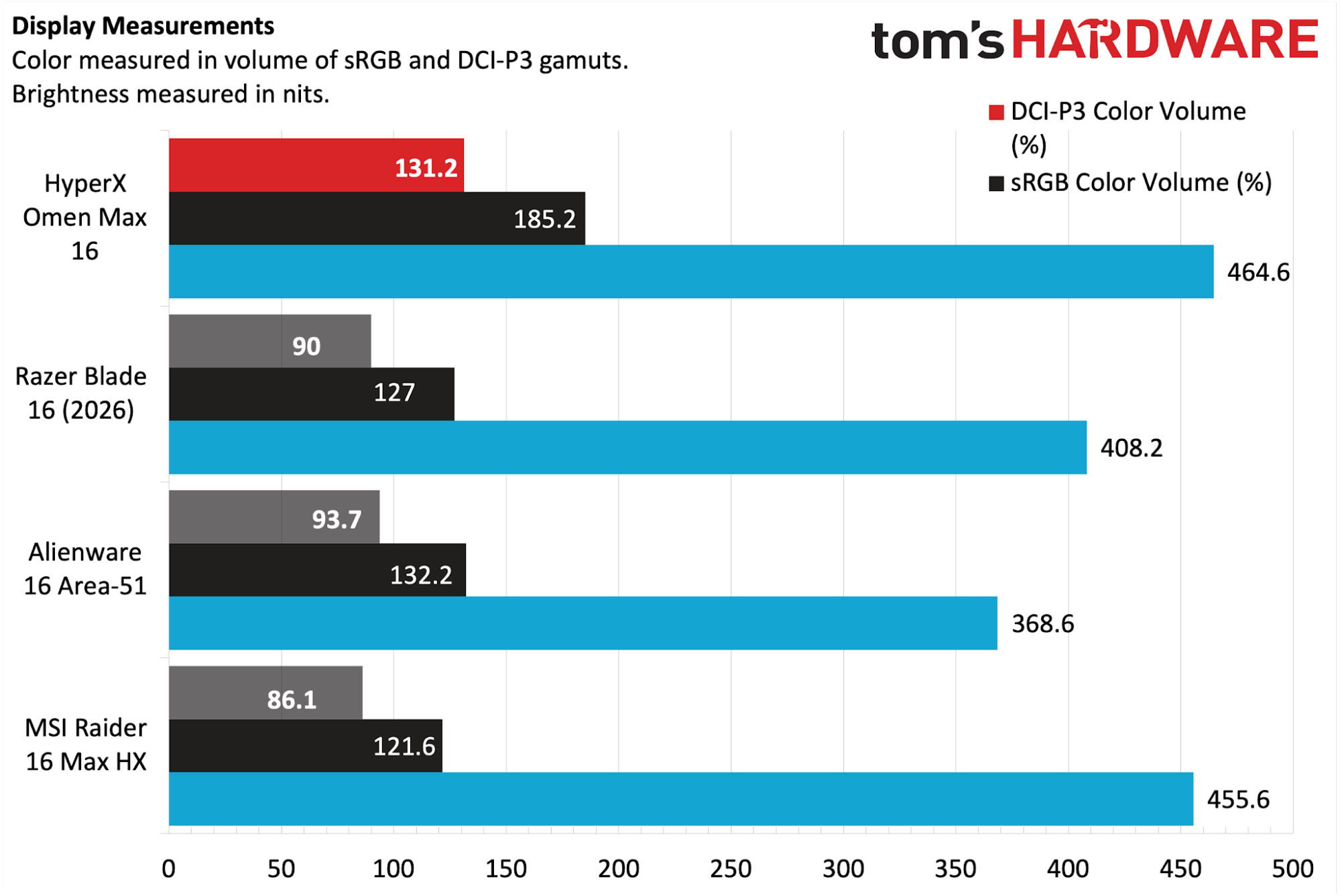
Games, movies and more are going to look incredible on this OLED panel, as it'll produce rich colors with plenty of depth, with 500-nit rated brightness, along with a max 1,100 for HDR content, to keep things vivid on-screen. Our review found it performed extremely well against the competition, with 131.2 percent of the DCI-P3 color space and 185.2 percent of sRGB. It also beat the MSI Raider 16 Max HX for panel brightness in our tests, with 464.6 nits vs 455.6.
(Image credit: Tom's Hardware)
The RTX 5090 is the centerpiece of this laptop, but you're also the Intel Core Ultra 9 290HX Plus as your CPU. It ships with 24 cores, eight of which are performance cores, which are good for gaming, along with 16 efficient cores for multi-threaded work. You're getting 32GB of DDR5-6400 RAM included, so no need to worry about the RAMpocalypse with this rig, along with a 2TB SSD offering Gen 5 speeds.
Wi-Fi 7 and Bluetooth 5.4 support ensures the fastest wireless connectivity, and you've got plenty of I/O too, including 2.5Gb Ethernet, the already-mentioned HDMI, a headphone jack, and two Type-C ports.
The $3,699.99 sale price for this HyperX Omen Max 16 OLED gaming laptop makes it a much more appealing option for buyers. In a market where an equivalent high spec desktop PC can set you back over $6,000, this price for a high spec laptop with an RTX 5090 is a good one in the current market. Grab it while you can, because HP aren't likely to keep it this cheap for long.
Buderus amplia la gamma di pompe di calore con Logatherm WLW166i MBB AR, un nuovo modello aria-acqua pensato per gli appartamenti, sia di nuova costruzione che in ristrutturazione.
Uno degli aspetti più interessanti della novità presentata dal brand - che fa parte della famiglia Bosch - è la temperatura di mandata fino a 75 °C, che permette di utilizzare la pompa di calore sia con impianti radianti a pavimento che con i radiatori tradizionali. La classe energetica dichiarata è A+++. La gamma comprende cinque taglie: 4, 6 e 7 kW monofase, oltre a 10 e 13 kW disponibili sia in versione monofase sia trifase. L’unità esterna misura 80 o 130 cm in altezza a seconda della potenza e può essere installata su balconi, terrazzi o sotto una finestra.
Per l’interno sono previste due configurazioni. La versione murale pesa 20 kg e utilizza tubazioni di collegamento più lunghe di 30 cm rispetto alle precedenti soluzioni, mentre quella a basamento integra un bollitore da 180 litri per l’acqua calda sanitaria e resta contenuta in 162 cm di altezza. La nuova Logatherm utilizza R290, cioè propano, refrigerante naturale con un GWP (potenziale di riscaldamento globale) di 0,02.

 Login
Login




 La nuova applicazione è disponibile a livello globale su PC x64 e ARM64. Si richiama con Alt + Spazio, integra Gemini Spark e può collegarsi a Gmail, Drive, Docs e Calendar