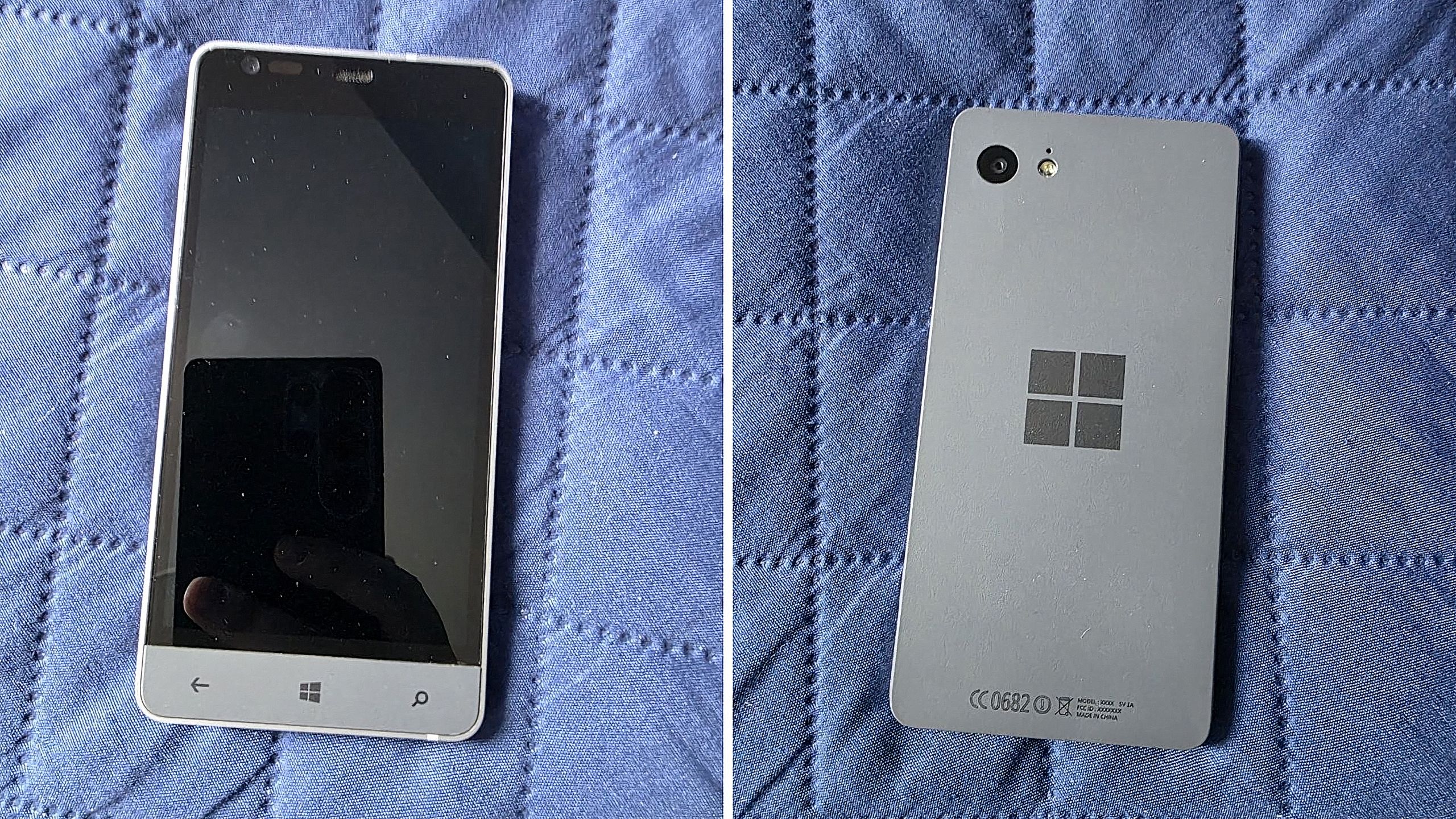
Before Microsoft acquired Nokia, the company was heavily rumoured to be working on its own in-house Windows Phone device that was expected to ship in 2014 under the Surface moniker alongside its Surface Pro device. Unfortunately for Windows Phone fans, such a device never saw the light of day, but newly published images of a mysterious prototype might have just given us our first and only look at what Microsoft was exploring internally.
Possibly codenamed Raven, there isn't much information available about this prototype, other than the fact that it’s from the 2013-2014 time frame and is running an early pre-release build of Windows Phone 8.1. It’s powered by an unknown Qualcomm chip, has a 720p screen, features a Microsoft logo on the back, and a silver metal frame that matches the colour of the Surface 2 that released that same year.
We can see in the photos that it has dedicated hardware keys for navigation, which are also coated in the same silver color as the chassis. The build of Windows Phone that it’s running appears to be from September 2013, and is from an internal development branch building towards what eventually became Windows Phone 8.1.
Real images of this mysterious Windows Phone prototype. (Image credit: Telegram/Discord)
While not viewable in the images, I understand the device features individual up and down volume buttons and a camera button on the right-hand side of the device, and a power button on the top of the device. It also features a micro-USB port and headphone jack on the bottom side, and a SIM card slot on the left side.
This is likely one of dozens of prototype designs that Microsoft’s hardware teams cooked up during this era, but it’s certainly a fascinating look at what could have been, and it does look so clean. Development on this device was likely paused once Microsoft moved to acquire Nokia in 2014.
Back in 2013, I remember hearing from sources that Microsoft was experimenting with the concept of a "Skype Phone," a Windows Phone device with mobile data that utilized Skype for calls and messaging instead of traditional carrier networks. Perhaps this device was going to be that? Who knows.
The Surface Phone we eventually got arrived as the Surface Duo, which started development in 2016 and launched to the public in 2020. In that time, Microsoft shipped Nokia designs in the form of the Lumia 640, 650, 950, and 550 running Windows Phone, before abandoning the platform in 2017.
Join us on Reddit at r/WindowsCentral to share your insights and discuss our latest news, reviews, and more.
According to a new report from Taiwanese publication United Daily News (UDC,) Microsoft is raising the cost of Windows license fees for hardware makers by a much higher amount than normal. According to the report, certain OEMs are seeing licensing price hikes of between 7% and 10%.
Usually, Microsoft raises Windows license fees for OEMs by a low digit percentage, making this 7% to 10% increase much more significant than normal. "A PC brand executive stated that Microsoft increases licensing fees for Windows OEMs (device manufacturers) every year. In the past, licensing fees mostly increased by single digits each year, but starting in July this year, the average increase has reached 7% to 10%, which is a significant increase compared to previous years," UDC says.
Of course, the cost of the Windows license fee is usually (at least partially) passed onto the consumer buying a computer, and UDC claims that their source says laptop pricing is already being impacted by these recent license fee increases. Microsoft charges different OEMs their own fees for Windows, so the exact increase in cost will differ for each hardware maker.
Regardless, with the ongoing memory component shortage, PCs have already seen astronomical price increases over the last year, with experts claiming that we haven't yet seen the worst of it. With Microsoft raising prices higher than usual on Windows licenses, it feels like the Redmond giant is adding extra fuel to the fire.
Windows Central reached out to Microsoft for comment regarding this story, but the company declined to provide one.
To be clear, the Windows license fee price hikes only apply to OEMs building hardware that ships with Windows. The cost of buying a license for Windows 11 as a consumer remains unchanged, being $99 for Windows 11 Home and $199 for Windows 11 Pro.
The ongoing component crisis has made computing unaffordable for many people. PCs that used to target the $600-$800 price bracket now cost close to $1,000. And flagship Windows laptops that used to cost $1,200-1,500 are now closer to $2,000. Even Apple has been hit by the shortage, being forced to raise prices by hundreds of dollars across its Mac lineup. Microsoft's own Surface line was hit especially hard, with the flagship Surface Pro and Surface Laptop being $400-$500 more expensive than the last-gen models.
Last week, users began noticing a new app appearing in their Start menu on Windows 11, titled "OneDrive Photos" which was being forcibly installed by the OS. Naturally, this caused outrage among users who aren't interested in using OneDrive for photo storage, resulting in pushback online.
Now, Microsoft's EVP of Apps and Agents, Jeff Teper, has taken to X to explain what happened. He confirms that the OneDrive Photos app is an incubation project, which wasn't supposed to rollout as widely as it did. "We are incubating a new photos experience in OneDrive that went more broadly than it should have in Windows. We’re fixing that. Windows Photos will always give you the option of local and cloud photos and the choice to use OneDrive or not."
It's unclear why Microsoft thinks it needs to build a dedicated OneDrive Photos app, especially when Windows comes preinstalled with an already competent photo viewer that does a good job of handling photos stored in OneDrive. The new OneDrive Photos app is a web app, which is heavy on RAM usage and not very responsive.
Although Microsoft has confirmed that the rollout of OneDrive Photos was an error, the company does say that it's still looking forward to delivering this new experience soon. "We're very excited for you to try out OneDrive's photos features on desktop, web, and mobile and hear your feedback."
It's unclear if Microsoft intends to re-hide the OneDrive Photos app from appear on PCs where it shouldn't. On my PC, I can still see the new Photos (Preview) appearing in Windows Search, which opens the OneDrive Photos experience. This isn't the first time Microsoft has been caught automatically installing new apps on Windows 11. The OS has frequently been accused of automatically installing apps like Microsoft 365 Copilot, much to the dismay of users who don't want it.
The good news is it appears Microsoft is listening to the feedback, and publicly acknowledging that it made an error with the rollout of the OneDrive Photos app is confirmation that it saw the backlash and understands that a lot of users don't want this new experience. Hopefully that means the company won't forcibly install it next time.
Join us on Reddit at r/WindowsCentral to share your insights and discuss our latest news, reviews, and more.
In a new tweet, Partner Director of Design at Microsoft, March Rogers, has confirmed that there are no plans to introduce a customizable UI transparency slider on Windows 11, after users asked for a feature similar to the Liquid Glass slider that was recently added to the next version of iOS.
For a long time, Windows has featured transparency and blur effects. However, Windows has never natively supported adjusting how strong those effects are. Users have the option to turn transparency on and off, but there's no fine-tuning options for those effects to be found in the OS.
Third-party apps such as Windhawk do allow for customizing these effects, but this customization is not natively supported by the OS on its own. As such, it's natural to find that there are users out there who wish they could adjust these settings without being forced to download a third-party app first.
Rogers confirms that there are no plans to introduce a transparency slider on Windows 11 at current. "We think hard about who will benefit from the investment, usability and accessibility considerations. We also look at our community of developers (like the amazing Windhawk project) who may already be providing what users need. We won't be making immediate changes to the transparency options already in Windows, but we love getting your feedback."
It sounds like Microsoft has looked at this option, and has found that it's not a priority at the moment, which is understandable. Windows 11 has much bigger issues that needs fixing right now, and the company is focused entirely on delivering those improvements first.
The beauty of Windows is that it's an open-platform, meaning third-party developers can easily builds tools and apps that modify the Windows experience. Windhawk is a powerful suite of customization enhancements for Windows that lets users customize everything from the Start menu design to blur effects across the OS.
It's very refreshing to see Microsoft be so open about the design process for Windows 11 these days. I'm frequently checking the X accounts of many Microsoft employees these days, as they are always responding to Windows Insiders with explanations about new features and feedback from users.
While a transparency slider isn't on the cards for Windows 11 right now, Microsoft is working on a number of new customization options for the OS. There's a new customizable Start menu coming very soon, along with a redesigned context menu that will also be user customizable.
For the longest time, Windows has suffered from an inconsistent user interface design. It started with Windows 8, but got worse over the lifespan of Windows 10, with various levels of UI design, frameworks, context menus, iconography, and more getting thrown into the mix across the many different versions of Windows 10.
In fact, Windows 10's inconsistent UI design became so bad that it began contributing to people's dislike of Windows, citing its perceived lack of polish and craft as a reason to avoid it over competitors like Apple's macOS, a platform that takes pride in how it looks and feels to use.
So with Windows 11, Microsoft began addressing this problem. The debut of Windows 11 in 2021 was a huge step in the right direction, attempting to modernize a number of Windows UI surfaces with a consistent design language using the company's WinUI framework.
Slowly but surely, older and inconsistent UI surfaces were updated with modernized alternatives that match the design of Windows 11. Things like the volume and brightness control, file share dialog, context menus, and more were updated with a more consistent design that look great.
This was introduced in 2022, replacing the Windows 8 one. (Image credit: Microsoft)
More recently, Microsoft has improved dark mode across the Windows 11 interface, making it more consistent in apps like File Explorer where much of it was missing dark mode support and contributed to the "Windows never feels finished" allegations that have haunted the platform for years.
It's been a few months since Microsoft announced its plans to bring WinUI to more areas of the OS, and work has been slowly progressing. The company has already confirmed that it's rewriting the Start menu with WinUI, which should make it faster and more responsive. But there's more interfaces that the company is yet to announce that we know is also in the works.
Modernized File Properties
The modernized File Properties dialog coming soon. (Image credit: Windows Central)
First up, recent Windows 11 preview builds have confirmed that Microsoft is rebuilding the File Properties dialog in File Explorer with WinUI. This is one area of the File Explorer that hasn't been touched in well over a decade, meaning it still doesn't even support dark mode.
This legacy interface is being rewritten with WinUI, and the first sightings of this work were spotted in a recent preview build, albeit only when viewing the properties of a file in the Recycle Bin.
With that said, we know Microsoft is planning to bring this modernized experience to the entire File Properties experience, meaning right-clicking and selecting properties on a file in File Explorer will soon present you with a consistent design that matches the Windows 11 aesthetic.
Modernized Autoplay Menu
Not yet updated, this interface is from Windows 8 (Image credit: Windows Central)
This interface hasn't been touched since Windows 8, and is one of few areas of the OS that still utilize Microsoft's old Metro design language. The menu that appears when you plug in a USB drive or insert a disc is being modernized with WinUI, which will bring a consistent Windows 11 design to the aged interface.
Microsoft has confirmed this work is underway, but is yet to give us a look at the new interface, though we know it will support both light and dark mode unlike the current version. For now, we'll just have to imagine what such a modernized menu might possibly look like. Still, it's good to know the work is happening.
Modernized Print Management
A WinUI powered Print Management app replaces the old MMC-based one. (Image credit: Windows Central)
It's not the sexiest feature in the world, but it looks like Microsoft is building a modern version of the Print Management experience with WinUI, replacing a decades old interface with something that looks like it was designed for Windows 11. And yes, it supports dark mode now.
This is the first MMC-based interface we're seeing get the WinUI treatement, which bodes well for future modernizations of apps like Disk Management, Computer Management, and more. These 90s era interfaces have plagued the Windows experience for years, so it's very reassuring to see Microsoft is finally working on WinUI versions of these apps.
Modernized Run Dialog
The new Run dialog is better in basically every way. (Image credit: Windows Central)
Microsoft has already announced and shipped preview builds with this redesigned interface, but the company is rebuilding the classic Windows Run dialog with WinUI, now with support for both light and dark mode, and features from PowerToys.
The company says the new UI is both better looking, more functional, and faster than the legacy Run box it replaces. With that said, it appears the modern Run interface will be shipping as an option that users will have to manually enable first if they want to see it.
The new Run interface also includes the ability to type ~\ for quick access to your home directory, and it will also show app icons when applicable in your recent search list, which is a nice touch.
Rewritten Start Menu
It may not look different, but the Start menu is being rewritten with WinUI too. (Image credit: Windows Central)
As mentioned up top, Microsoft has already confirmed that it's rebuilding the Start menu with WinUI, but we're yet to hear more about what that's going to entail for the end user.
So far, we know the goal of the WinUI rewrite is to make the Start menu faster and take up less system resources. This should mean (very) slightly less memory usage for the Start menu, as many WinUI interfaces will share a System Compositor, which is how Microsoft intends to make WinUI faster.
It's unclear if Microsoft is planning to redesign the Start menu alongside the WinUI rewrite. Last I checked, this was not in the plan. While there may be some minor UI differences and adjustments between the current Start menu and WinUI Start menu, I understand that the company intends to keep the experiences mostly the same.
This makes sense given Microsoft just launched new customization options for the existing Start menu, which would be odd to change so soon.
Compact Context Menus
While technically not old, context menus are getting an overhaul. (Image credit: Zac Bowden / Windows Central)
While not technically a legacy interface, context menus on Windows 11 are a mess, and Microsoft is working to redesign them so that they are faster, more responsive, and most importantly, more customizable.
Coming this year, Windows 11's context menus will be updated with a new compact design that's smaller and lighter, meaning they won't lag or take as long to open, especially when there's lots of actions and items within the menu.
Microsoft is also planning to let users customize which items appear within the context menu, as well as configure the order in which those items appear. This means users will be able to hide certain actions and apps from the context menu if they don't use them.
With that work ongoing, it's likely that we're going to see even more older and outdated parts of the Windows experience updated with modern WinUI designs. While certain legacy interfaces will likely continue to exist for years to come, it looks like Microsoft is exploring where it can best implement new UIs as fast as possible without breaking compatibility.
Moving more parts of the Windows UI under a consistent UI framework should result in better performance and reduced memory usage, which should make the OS feel faster and less bloated, thanks to that new System Compositor that's in the works that is designed to manage all WinUI interfaces across the Windows Shell. Though features like an optional transparency slider appear to not be in the works.
It's good to see Microsoft once again focused on polish and craft. It helps make Windows feel more unified and cared about, something that has not been so obvious in recent years and in my opinion has eroded confidence in the platform. Hopefully Microsoft will continue to focus on craft for years to come.
Join us on Reddit at r/WindowsCentral to share your insights and discuss our latest news, reviews, and more.
Halo: Campaign Evolved launched just days ago, and it appears Microsoft is moving quickly to make cuts at Halo Studios now that the game is out. A number of developers who were previously employed at Halo Studios have posted on LinkedIn today confirming that some roles have been laid off. (via Insider Gaming)
Halo Studios producer Nick Treitman confirmed that he was impacted by the layoffs, stating that "after 6.5 years working on Halo and dodging just as many rounds of layoffs - it has finally caught up to me. I have nothing but love for Halo and the folks at the studio, this is just a tough reality in the gaming industry right now."
Paul Morris, listed as Scrum Master at Halo Studios, also confirmed that his role had been impacted by layoffs this week. "Today, I learned my time at Halo Studios will be coming to an end following the successful launch of our latest game, Halo: Campaign Evolved. I know this is one of the most challenging job markets our industry has seen, and I know the road ahead won’t be easy."
A number of other Halo Studio employees have updated their LinkedIn pages confirming that they are now available for work. The layoffs come as new reports claim Halo: Campaign Evolved's development was troubled throughout, taking up more resources than originally planned and causing other projects such as a Halo multiplayer game to be canceled.
Unfortunately for the studio, this led to development being more complex, with third-party studio Abstraction struggling to meet deadlines imposed by Halo Studios and being ultimately kicked off the project, forcing Halo Studios to scrap much of the work done by Abstraction and rebuild assets in the Blam engine instead.
If this story sounds familiar, that's because it closely mirrors the development of Halo: Infinite. That game also suffered from a troubled development cycle, with contractors struggling to meet deadlines and work in the Slipspace Engine (which was just the Blam engine with a new name.)
Now, with layoffs impacting Halo Studios, it's clear that Microsoft is moving forward with its confirmed 3,200 layoffs, 1,600 of which were already made back in July.
Join us on Reddit at r/WindowsCentral to share your insights and discuss our latest news, reviews, and more.
Earlier this year, Microsoft announced that it was moving to address Windows 11's biggest issues and criticisms from users in an effort to win back trust from customers and reposition Windows once more as a viable alternative to macOS and Linux, something people actually want to use over the competition.
It was nice to see Microsoft outline its roadmap and plan for Windows 11, but I wasn't prepared for just how fast the company would start delivering on the promises it was making. Since March, Microsoft has previewed and even shipped many improvements to Windows 11 that are the direct result of its Windows K2 initiative, all designed to fix Windows 11.
I've been testing these new Windows 11 builds over the last few months, and there are 5 big changes and improvements that stand out as super exciting. Some of these improvements are already shipping, whereas others are still in preview.
A new and improved Windows Update
Windows Update is now much smarter and doesn't get in the way anymore (Image credit: Zac Bowden / Windows Central)
Updates on Windows have always been frustrating, so much so Microsoft made it a point of focus for its Windows K2 effort. In the last few months, Microsoft has shipped multiple changes and improvements to Windows Update which are designed to make it more reliable, and more importantly, less annoying.
The first big change is ensuring driver, framework, and security updates are now all timed to install at the same time. Previously, any update could require the user to restart at any time. Now, Windows Update will only ask you to restart once a month, as the update system now installs those driver and framework updates alongside security patches.
That's in addition to being able to pause updates indefinitely now, so even when the one time a month that Windows asks you to restart finally rolls around, users have the option to say no and postpone the restart for as long as they need. Even when an update is pending restart, the option to shut down or restart without installing said update is now present.
Microsoft has even made it so users can skip installing updates when setting up a PC for the first time, meaning it now takes just a few minutes to get right into using your new PC instead of the 20+ minutes it used to take when installing the latest update was a requirement before reaching the desktop.
All of these Windows Update improvements are already shipping to all Windows 11 users, which is a crazy quick turn around.
Less ads and AI across the OS
Widgets no longer includes MSN ads and sponsored content. (Image credit: Zac Bowden / Windows Central)
Microsoft is also removing Bing and MSN ads from Windows Search, in preview now. The search pane itself is now a long list or recent search queries and items, with nonsense like the Bing wallpaper of the day and other sponsored content no longer appearing at all. Even search results that reach out to the web no longer include sponsored content.
The Start menu now also has more granular controls over the kind of content that appears in there. The "Recommended" feed has been renamed to the "Recents" feed and no longer shows recommended apps and websites that came across as more advertising. Users even have the option to remove the Recents feed entirely now, which is great.
Copilot used to plague every inbox app and UI surface you could think of on Windows 11, but today it only appears in a few very specific areas. It still exists as a standalone app on Windows 11, but the Copilot button no longer exists in apps like Photos and Notepad. Microsoft has even removed the "Ask Copilot" option in File Explorer.
Better performance and reliability
Windows 11 is now faster and more reliable, with a focus on reducing memory usage. (Image credit: Zac Bowden / Windows Central)
One big area of focus for Microsoft is the overall performance and reliability of Windows 11, which many agree has slipped over the last few years. The good news is Microsoft has already delivered several improvements on this front, with more to come in the following weeks.
The first big change is the new "Low Latency Profile" feature that shipped just a few weeks ago. It's an invisible change that makes opening apps, context menus, and flyouts from the Taskbar much more responsive by silently increasing CPU frequency when these common actions take place.
This is something other OS platforms do which allows them to remain feeling snappy, even under heavy load, and now Windows 11 has the same behavior. This has outright fixed the issue users sometimes have where things like the Start menu don't always appear immediately when clicked. That's a thing of the past now.
Microsoft is also improving the performance of WinUI interfaces across the system via a new System Compositor which reduces latency and memory overhead across the OS so that these modern interfaces are consistently responsive. There's even a new Run dialog built with WinUI that is faster than the old Win32 version.
Opening and navigating through file trees in File Explorer is faster too, and searching for files and apps on Windows 11 is now more consistent. Two character search is already shipping, which makes finding content a little bit easier.
Customizable Taskbar and Start menu
There are many new customization options coming to Start (Image credit: Zac Bowden / Windows Central)
One of the biggest issues people have with Windows 11 is how it took away customizable options for areas of the system like the Start menu or Taskbar. Microsoft has heard that feedback, and is already publicly testing a new Taskbar and Start menu that can be user customized.
The Taskbar can now be repositioned just like on Windows 10, allowing the user to move it to the left, right and top of the display if that's where they want it. There's also a new resize option letting users make it smaller like the Windows 10 one could.
The Start menu is also getting more customization options. Users can hide entire segments of Start, such as the Recents feed, Pinned apps, or All Apps area. They can toggle on or off the Phone Link companion, and disable Start entirely if they don't ever use it.
And there's more to come
Context menus are getting a redesign and better customizability. (Image credit: Zac Bowden / Windows Central)
Above are all the new improvements that I've tested and are either shipping or in public testing via the Windows Insider Program. These are the real changes and features that can be tried and tested as we speak, not just empty promises or ideas. It's all available to download and try out right now.
There's still more to come too, stuff that isn't yet in public preview testing. Microsoft has confirmed it's working to move more parts of the OS to WinUI for faster performance, such as the Start menu and areas of File Explorer. There's an effort to reduce the footprint of the OS in the works too, which should make the OS less resource intensive at idle.
For the features that are yet to ship outside of preview, I understand that Microsoft is aiming to get the bulk of these improvements out of the door before the end of 2026, with some expected in 2027.
SI'm so very impressed with how quickly Microsoft has turned Windows 11 around so far. I haven't felt this positive about the features and changes being actively made to Windows in a really long time, to the point where it feels weird to not have anything to really complain about. All of my biggest issues with Windows 11 have either already been addressed, or are in the process of being addressed.
It's a great time to be a Windows user again.
Join us on Reddit at r/WindowsCentral to share your insights and discuss our latest news, reviews, and more.
In this episode of the Windows Central Podcast, Daniel Rubino and Zac Bowden sit down with Marcus Ash, Corporate Vice President of Design and Research for Windows at Microsoft. The discussion centers on the user experience vision for Windows 11, balancing modernization with legacy app compatibility, and optimizing system efficiency across diverse hardware configurations.
This episode of the Windows Central Podcast is sponsored by Surfshark VPN. Unlimited devices, access your content from anywhere, and auto-block malware on Windows, Edge, and other platforms from $2.50/mo, with 4 months extra FREE. Sign up today!
Design Philosophy in Windows 11: Marcus Ash discusses how design decisions are shaped by user feedback, telemetry, and modern workflow requirements.
Optimizing Performance for Low-RAM Devices (8GB): A deep dive into full-stack optimizations—ranging from kernel memory scheduling to UI process management—to ensure smooth performance on 8GB RAM hardware.
Modernizing Legacy Tools vs. Backward Compatibility: Discussion on how Microsoft approaches updating older OS utilities (e.g., Control Panel, Registry Editor) while protecting enterprise compatibility and muscle memory.
Web Tech, WebView2, and Modern UI: Exploring the role of web-based interface components in Windows 11, including trade-offs between agility, feature delivery, and resource utilization.

 Login
Login