NVIDIA's RTX Spark has arrived, and tons of laptops are quickly equipping themselves with this superchip to take advantage of its NVIDIA AI, RTX graphics, and unified memory to improve their productivity and gaming performance.
Antonline is getting in on the launch-day action by offering Microsoft Surface and Lenovo laptops packed with the RTX Spark, and we've rounded up Antonline's available RTX Spark offers for your perusal.
Do note that some of Antonline's RTX Spark laptop offers are only up for pre-order, while others are not in stock yet, so check back on its website frequently for stock updates.
This 15-inch PixelSense Touchscreen laptop comes with an NVIDIA RTX Spark N1X with a 5120-core GPU and 18-core CPU, an NVIDIA Blackwell RTX 5120-core Graphics card, 32GB of Unified Memory, and 1TB Storage.View Deal
This advanced Lenovo Pro 9n Notebook features a 15.3 WQXGA Touchscreen, 64GB RAM, 2TB Storage, and an NVIDIA RTX Spark N1X with a 6144-core GPU and 20-core CPU for improved productivity and gaming.View Deal
This configuration of the Lenovo Pro 9n laptop features its display with an OLED Touchscreen, 32GB RAM, 1TB Storage, and an NVIDIA RTX Spark with a 5120-core CPU and 18-Core CPU to help you master its Copilot+ features when conducting research, meetings, or content creation.View Deal
What is the RTX Spark?
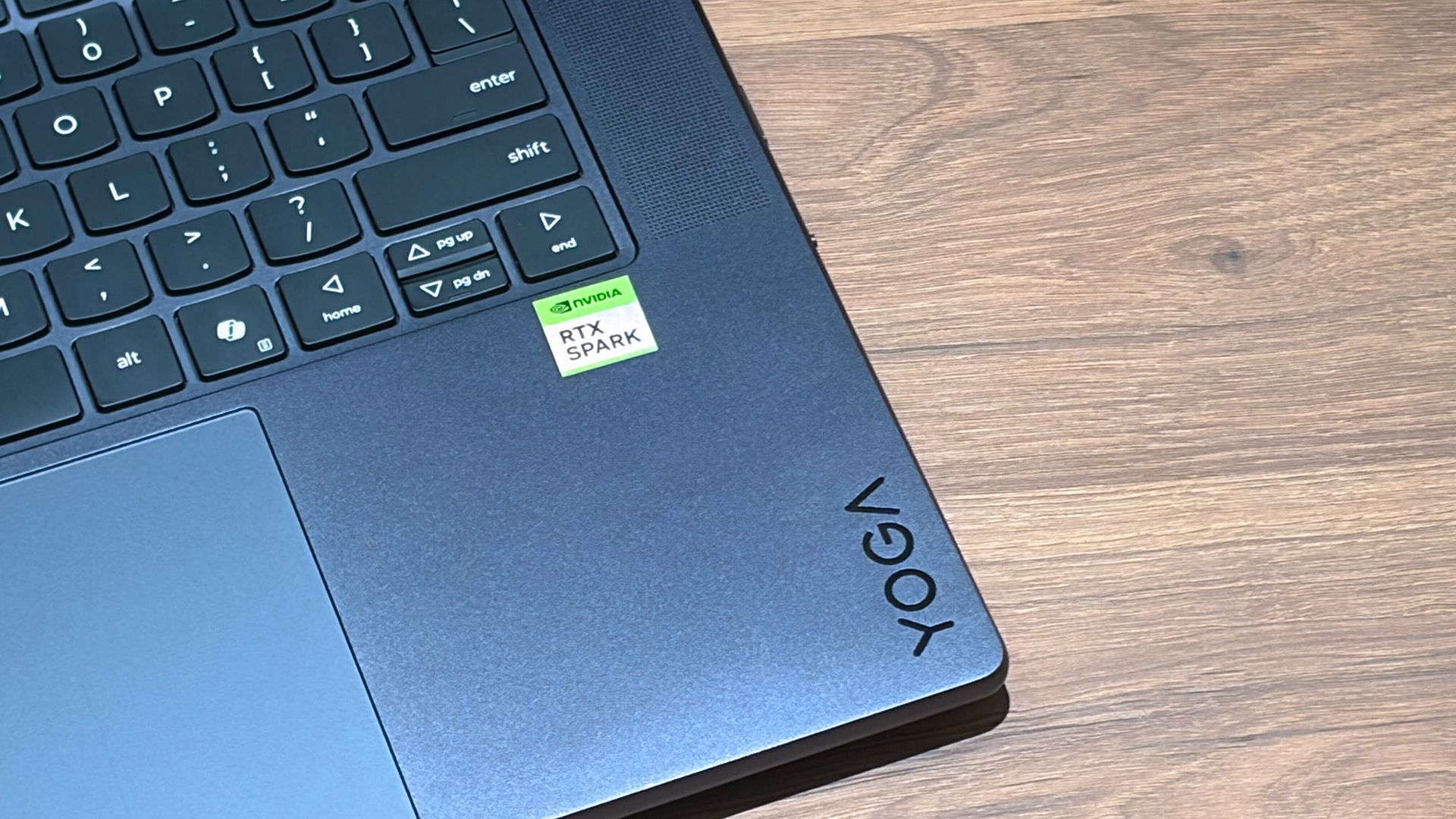
A Lenovo Yoga laptop equipped with the RTX Spark chip. (Image credit: Cale Hunt | Windows Central)
The RTX Spark is a brand-new ARM-based superchip platform designed by NVIDIA to make a PC more efficient when running high-end PC games and local AI-workflow tasks securely without compromising its performance.
The RTX Spark has an NVIDIA Grace CPU that can support up to 20 cores for boosted performance efficiency, and its Blackwell-generation RTX GPU has gaming performance rates on par with the RTX 5070 graphics card,
Additionally, the RTX Spark can support up to 128GB of unified RAM between its CPU and GPU, and it can generate up to 1,000 TOPS to boost its power when running local AI workflows.
RTX Spark selling points. (Image credit: NVIDIA)
One of our tech experts, Zac Bowden, recently benchmark-tested the RTX Spark and concluded that, and I quote, "RTX Spark is a super interesting chipset. It's forward leaning in a lot of ways, built on the Arm64 architecture that delivers serious performance and great efficiency. While its N1X CPU is just okay, its Blackwell RTX GPU really shines.
This is the first time we've seen RTX 4070-5070 level performance in an SoC that is this small and efficient. It's optimized for AI workloads, which is its strongest workflow by far. Quantized AI models run great, and with up to 128GB of unified memory, most mainstream models will fit entirely on the GPU without a hitch."
Zac also mentions that while it's great for content creators and gamers, the RTX Spark is best recommended for workers who run AI models locally all day, develop software, crunch complex data, and manage source code using thin laptops.
So, If you're one of those hard-working data crunchers in need of a powerful productivity laptop, then laptops built with the RTX Spark are for you.
Join us on Reddit at r/WindowsCentral to share your insights and discuss our latest news, reviews, and more.
According to Elorian's evaluations, Glimpse outperforms even GPT-6 Astra on scientific chart reasoning and short-form video captioning, with competitive results on other visual reasoning tasks.
Tressfecta builds products for textured hair. Its first project is a tool called Plait Pilot that helps braiders with the initial process of separating hair from packs before braiding begins.
Counterfeiters are getting better at replicating brands' marks and passing off dupes, known as "superfakes," as genuine items. A startup called Veritas wants to tackle the problem with its own chip that verifies goods.
Microsoft is finally ready to take on the MacBook Pro with the new Surface Laptop Ultra. From pricing to specs and design, Surface Laptop Ultra was inspired by MacBook Pro, and that's not necessarily a bad thing.
Unlike most Surface PCs we see ship these days, the Surface Laptop Ultra is a lot of firsts for Microsoft. It's the first ultra-class Surface Laptop, designed from the ground up to compete squarely with high-end professional creator or developer mobile workstations.
What I find fascinating about Surface Laptop Ultra however is that it exists because Microsoft's own developers and engineers wanted it. They built this laptop for themselves. It feels like the company got tired of looking over the fence at the MacBook Pro, and decided "why don't we just make our own version of that?"
It really is Microsoft's most powerful and most capable Surface PC ever, and a great stage for Windows. But that doesn't necessarily mean it's the best Surface PC for everyone. I've been testing the laptop over the last 8 days, and here are my thoughts on Microsoft's new flagship computer.
This review was made possible thanks to a review unit supplied by NVIDIA & Microsoft. Neither company had editorial input and did not see the contents of this review prior to publication.
Price & Availability
Microsoft
Surface Laptop Ultra
Surface Laptop Ultra is Microsoft's flagship and most powerful Windows PC. It can be configured with up to 128GB RAM, and ships with NVIDIA's new RTX Spark SoC. It's great for creative workflows and software development, and those who want to run local AI and LLMs directly on their device.
Surface Laptop Ultra is Microsoft's most expensive Surface Laptop to date. It starts at an eyewatering $2,599 for the entry-level configuration with 24GB of RAM, 512GB SSD storage, and an 18-core RTX Spark with 5,120 GPU cores. That's an expensive laptop, and it only gets worse the higher you climb up the specs ladder.
The model I've reviewed is the very top end configuration, with a crazy 128GB RAM, 1TB SSD, and a 20-core RTX Spark with 6,144 GPU cores. That model will set you back $5,899, which at these prices basically makes this a $6,000 laptop. That's an insane amount of money to spend on a laptop, but this configuration only really exists for professionals who need the extra power to run local agents and data crunching.
For video creators, gamers, and prosumers, you'll be more than well served with the lower tier models with 24-32GB RAM. All models come with the same mini LED screen, speaker setup, ports, keyboard, and trackpad. It's also available in Platinum or Nightfall colorways (aka, silver and black.)
Brightness: SDR up to 1,000 nits (typical), HDR up to 2,000 nits peak luminance
Optimised for touch interaction
Operating System
Windows 11 Home (24 GB unified memory models)
Windows 11 Pro (32 GB, 64 GB, and 128 GB models)
Ports & Connectivity
2 × USB-C® / USB4®
1 × USB-C® / USB4® with Magnetic Connect
1 × HDMI 2.1b
1 × USB-A 3.1
1 × Full-size SD card reader
1 × 3.5 mm headphone jack
Wireless
Wi-Fi 7, Bluetooth 5.4
Camera & Audio
1080p Full HD front-facing camera
Battery Life
Up to 15 hours of local video playback
Up to 12 hours of active web usage
Power Supply
Requires USB PD 115W–140W charging
Weight & Dimensions
Weight: 2.0 kg (4.41 lbs)
Chassis: Sub-18 mm thickness
Colours
Platinum, Nightfall
Base Price
Starting at $2,599
Design & Ports
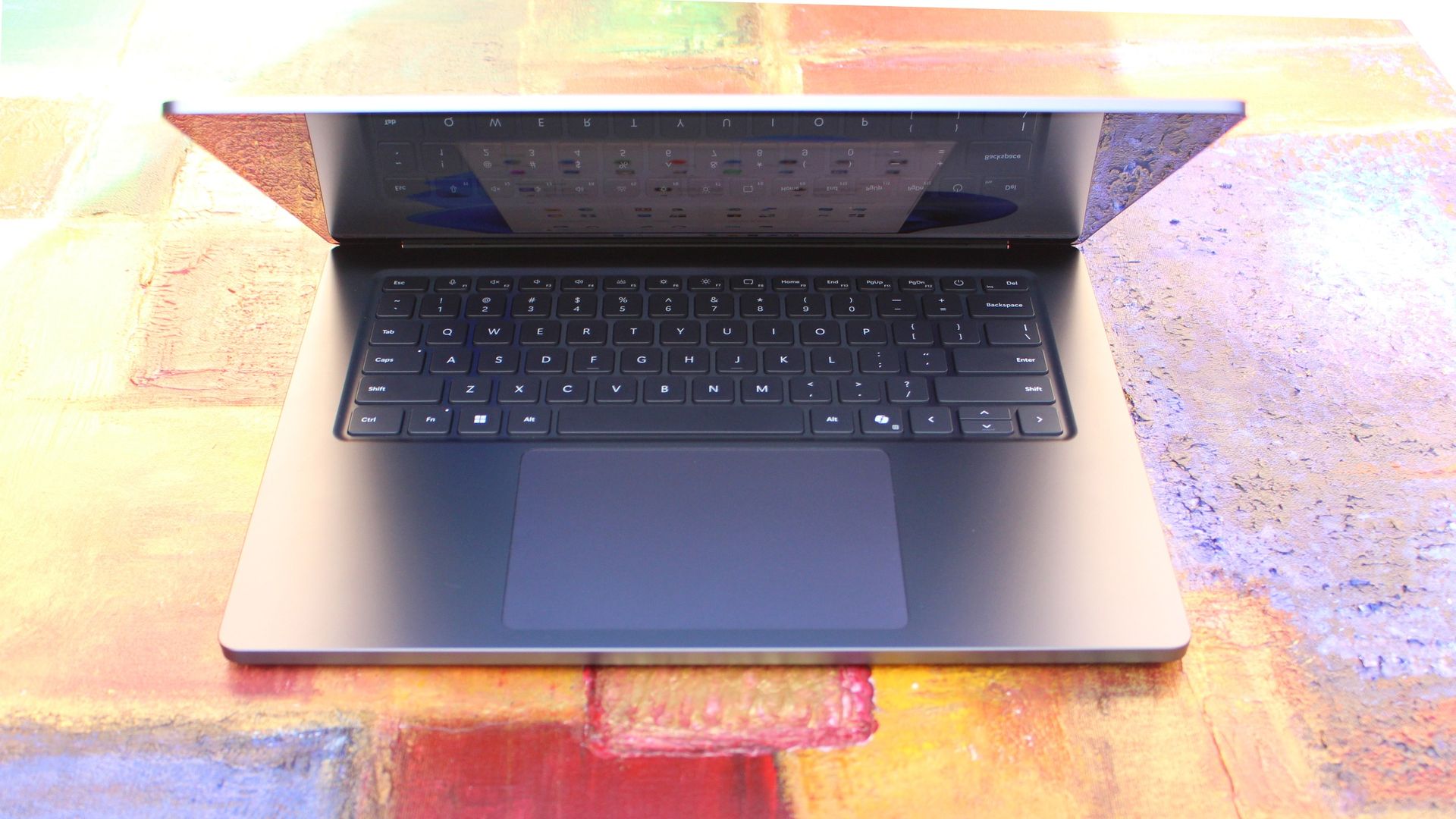
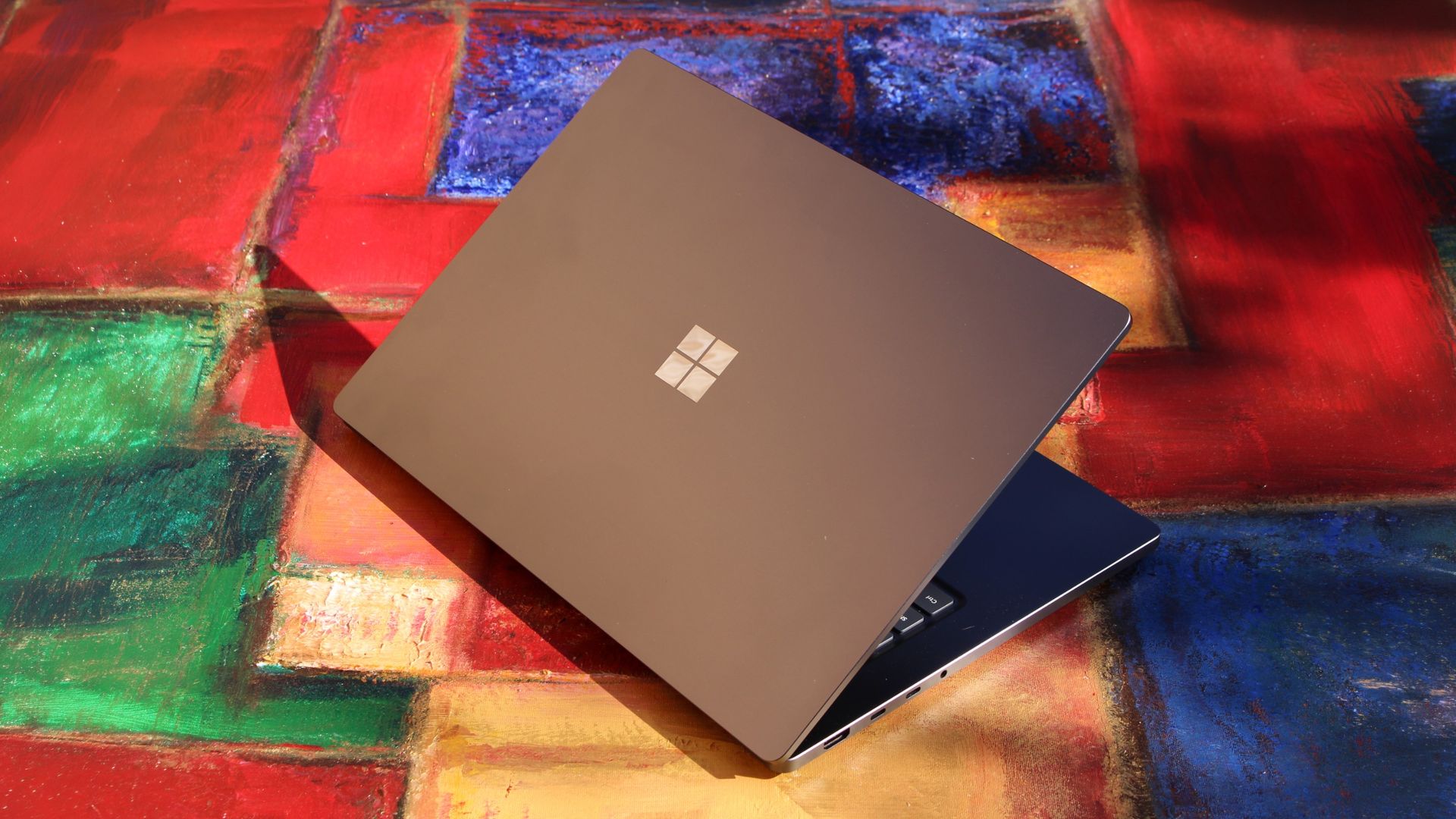
MacBook Pro? (Image credit: Zac Bowden / Windows Central)
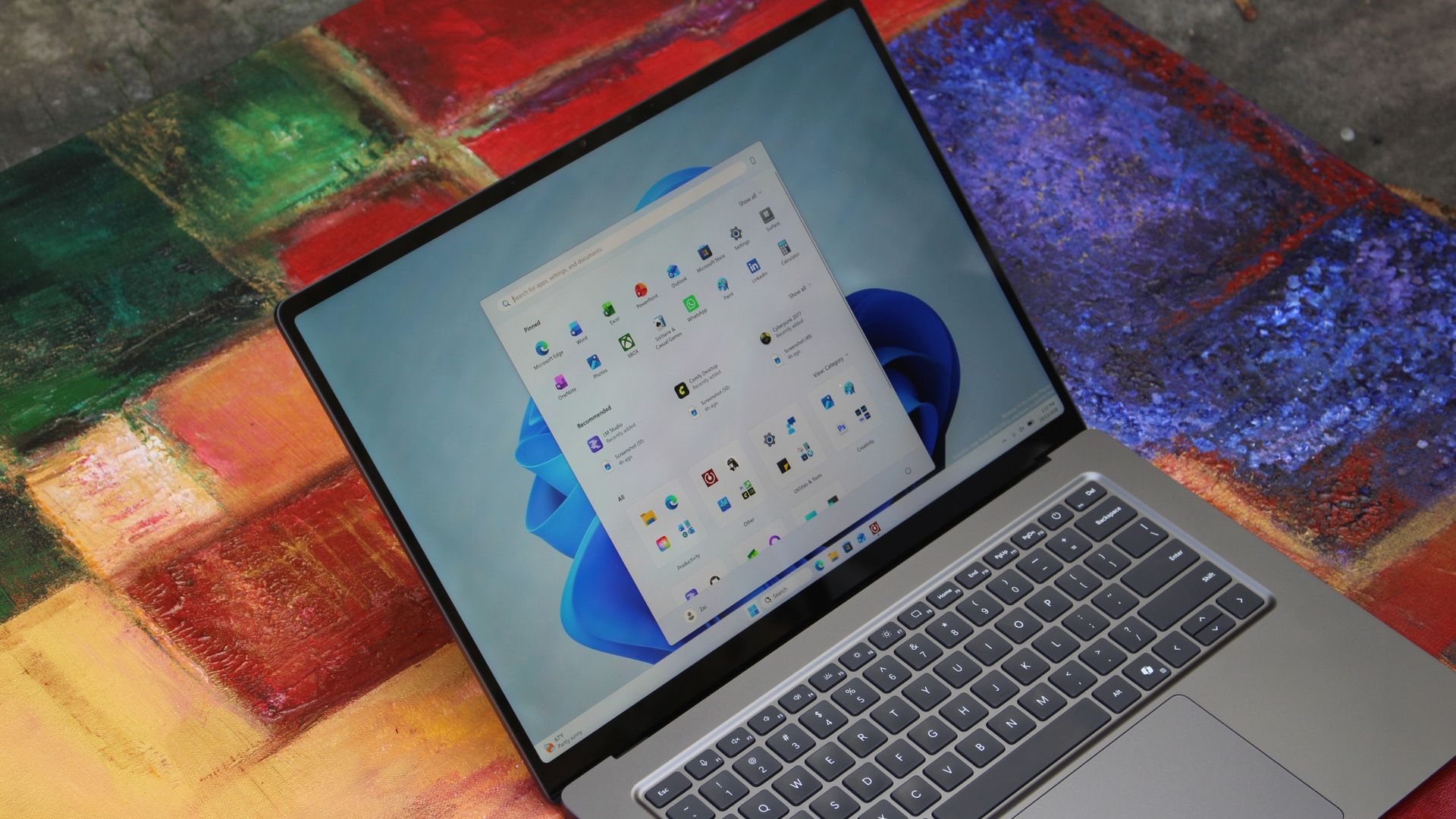
We have to start with how this thing looks, and we do need to address the fruit-shaped elephant in the room. Yes, Surface Laptop Ultra looks an awful lot like a MacBook Pro. I wouldn't blame the layman for even thinking it was a MacBook Pro from a distance. The square edges, large trackpad, and minimalist design echo the MacBook Pro from pretty much every angle.
But I'm not here to tell you that's a bad thing. The MacBook Pro is a beautiful device, which is to say Surface Laptop Ultra is also very beautiful. In fact, I think it even improves upon the MacBook Pro's design in subtle ways. The keyboard deck isn't surrounded by a plastic bezel like on MacBook Pro, instead it's softly indented into the metal keyboard deck which looks lush and seamless.
The corners on Surface Laptop Ultra are also a little rounder than the MacBook Pro, a design choice that trickles down from the corners of the chassis to the keys on the keyboard, and corners on the trackpad. It's an entirely consistent and well thought out design, which I highly appreciate.
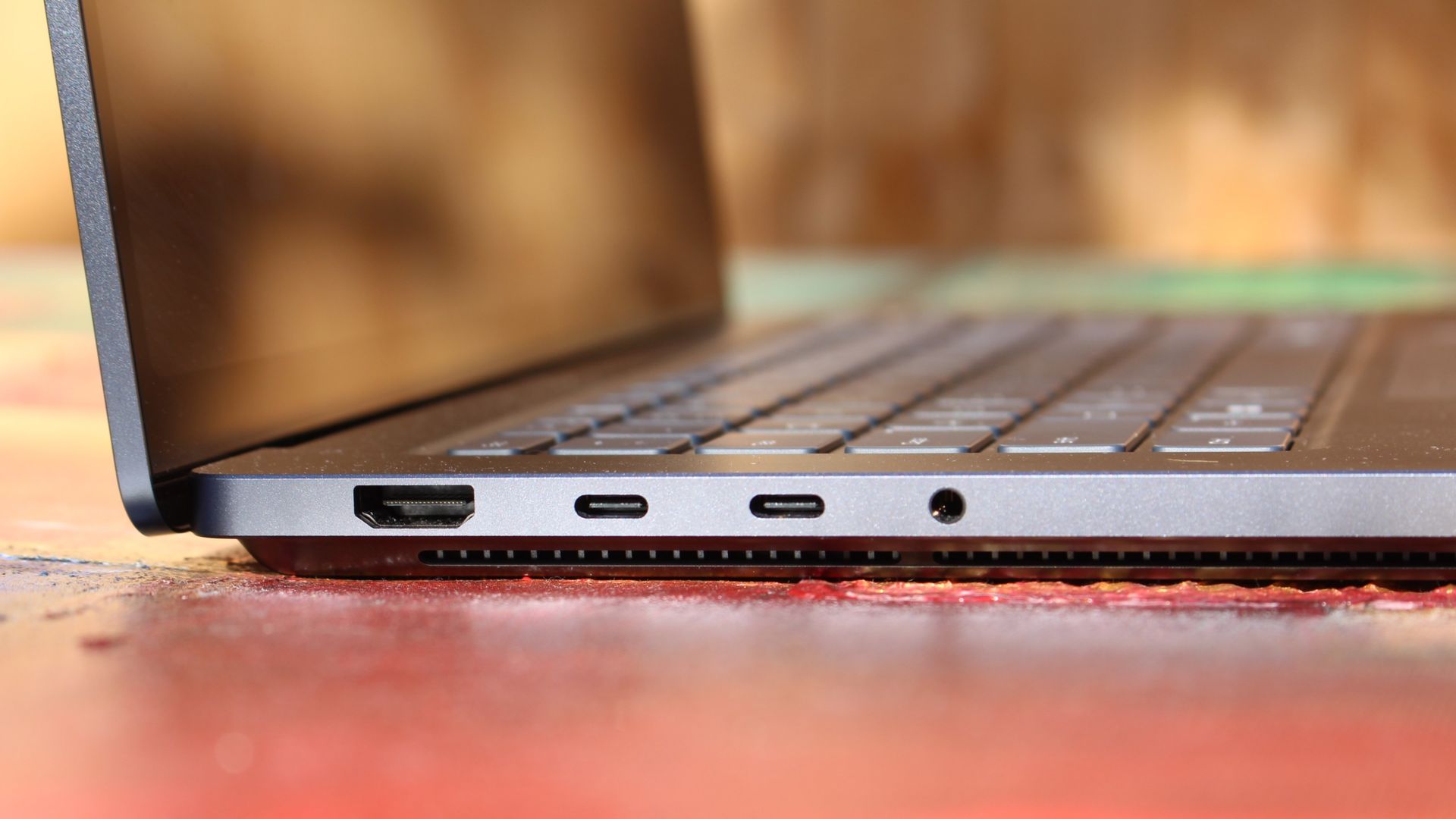
The left-side ports are good enough. (Image credit: Zac Bowden / Windows Central)
Microsoft also doesn't suffer from the godawful notch that you'll find on a MacBook Pro. Surface Laptop Ultra's display bezels are uniform along the left and right, and slightly thicker on the top to accommodate the Windows Hello IR face unlock sensors, which are much better than a fingerprint reader.
I should also mention that the display hinge on this laptop is perfectly tuned. It opens with one finger, and is perfectly balanced to provide a satisfying level of friction as you open and close it. It's also rock solid when typing, meaning it doesn't wobble around at all when on a desk.
The port selection is good enough. It features three USB-C ports, a USB-A port, a 3.5mm audio jack, HDMI 2.1, and a full-sized SD card reader. Of course, the star of the show in the ports department is Microsoft's clever magnetic USB-C port, which replaces the proprietary Surface Connect charge port found on older Surface Laptops.
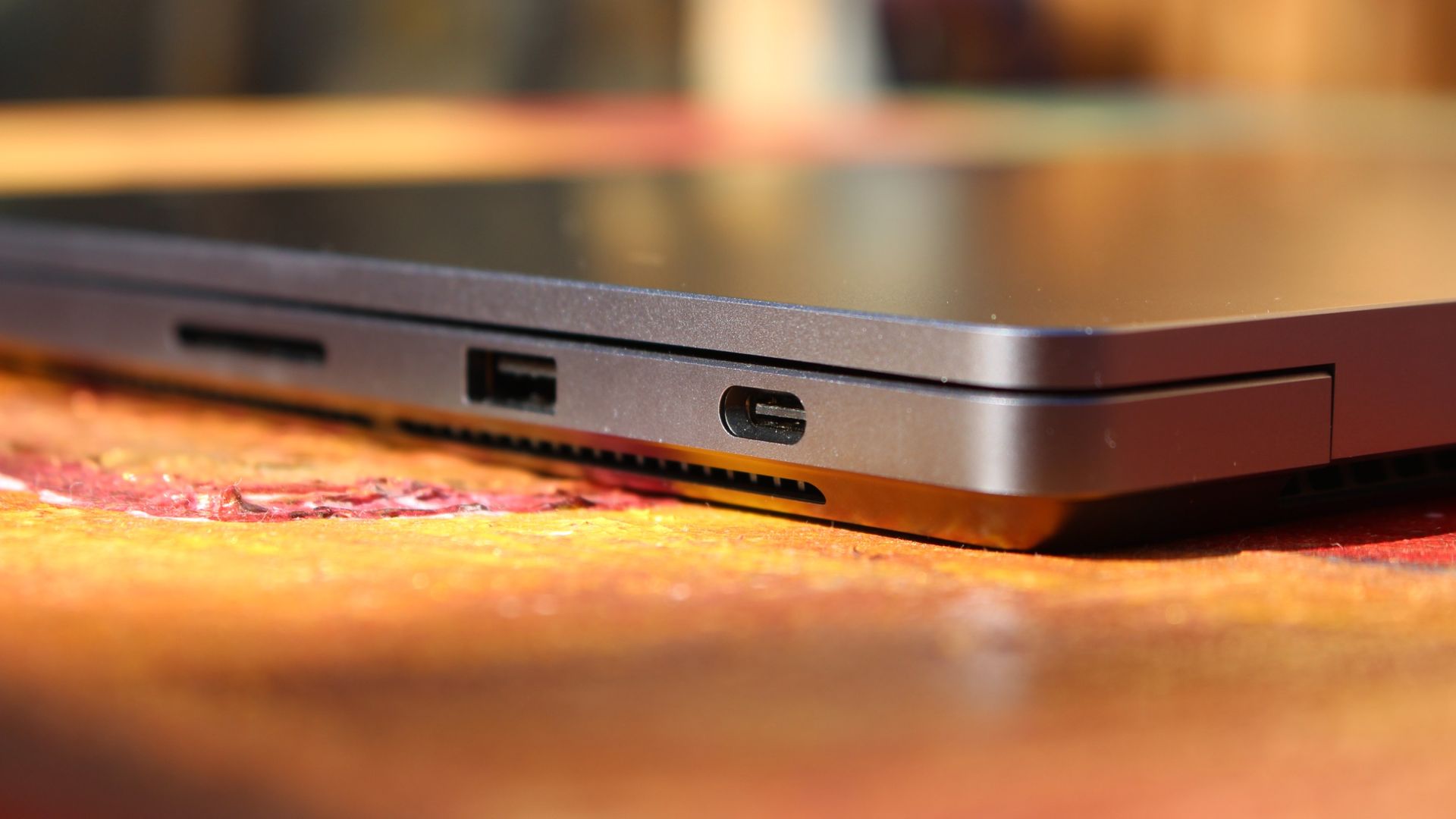
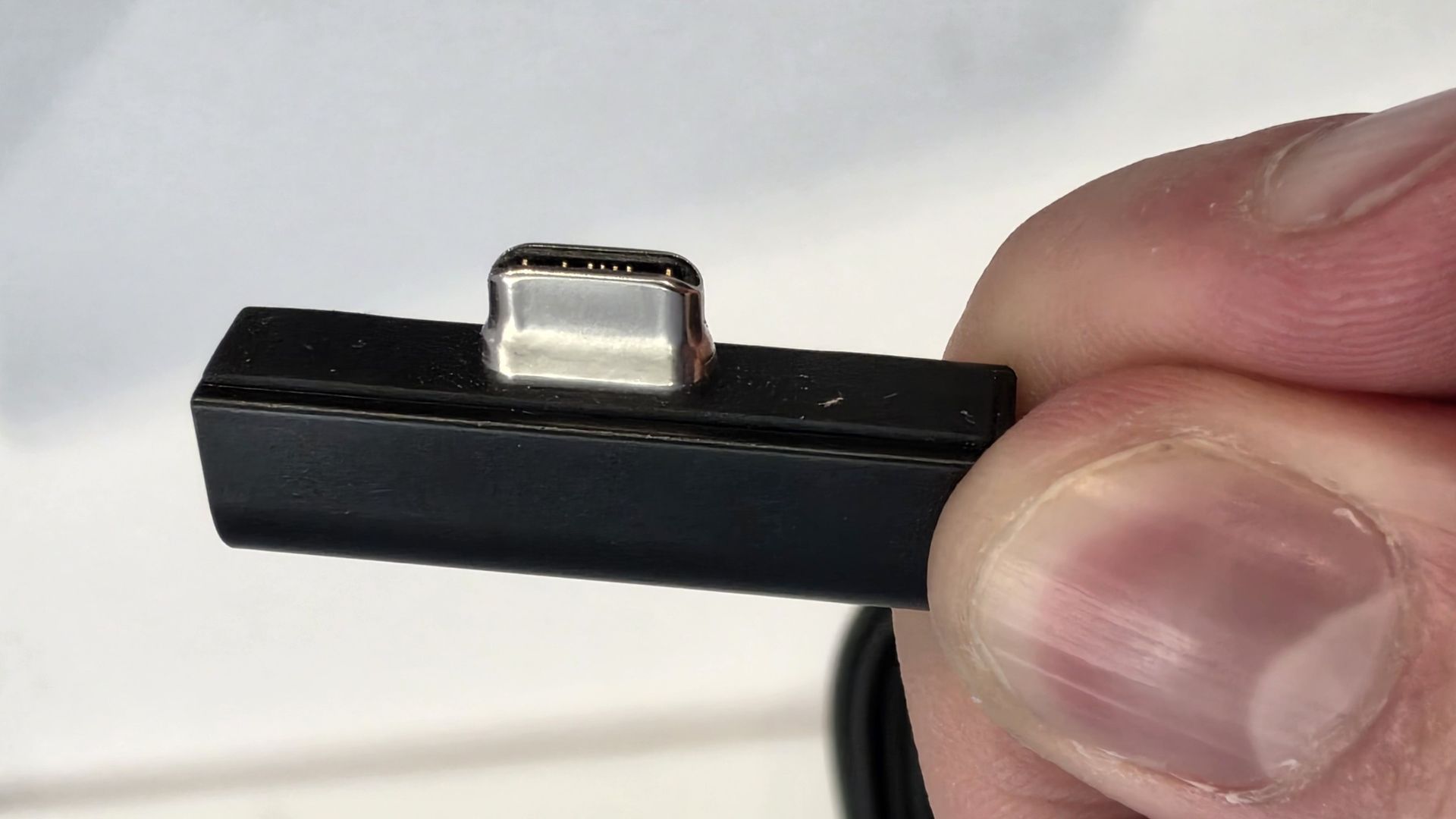
The special USB-C port is truly great. (Image credit: Zac Bowden / Windows Central)
It's great to see a laptop manufacturer attempting to innovate and improve on the universal USB-C standard. Here, we have a USB-C port that is compatible with all your USB-C peripherals, but it's also magnetized, and with the included charging cable, magnetically snaps to the device just like Apple MagSafe, while using the same universal USB-C port.
How did Microsoft do this? Well, most of the innovation is actually on the cable side. On the laptop itself, the only real change is that the USB-C port is slightly wider at its opening, but the rest of the USB-C port itself is typical in its design. Microsoft placed magnets on either side of the port, and redesigned the USB-C connector that's attached to the cable to allow for the magnetic connection to be seamless.
The cable's male USB-C end is shallower than a normal USB-C connection. This allows for it to connect to the USB-C port without clicking in, which is what locks a cable to a USB-C port normally. Instead, the magnets hold it in place, which enables the breakaway design that differentiates this USB-C port from the rest.
The USB-C connector is unique. (Image credit: Zac Bowden / Windows Central)
That does mean the USB-C cable that comes included only works with Surface Laptop Ultra, and only in this particular port. Microsoft realized this would be a problem, and designed the power brick that comes with Surface Laptop Ultra in a way that allows the magnetic cable to attach to the brick instead. The other end of the charging cable is a normal male USB-C end, which connects to any USB-C port you want.
So you can still use the Surface Laptop Ultra's power brick and cable on any device or any port you like, you just have to plug the magnetic end into the power brick first. It's a genius design, and proves that Microsoft really thought of everything when it comes to this unique magnetic USB-C experience. I love it, and I hope to see it on more laptops in the future.
Surface Laptop Ultra is available in just two colorways: Platinum and Nightfall. To me, I think the Platinum version looks the nicest, but the Nightfall version looks clean too. The good news is the dark color does a relatively good job at fending off fingerprints thanks to an anti-fingerprint coating that has been applied to the chassis.
Display & Features
The Mini LED display in all its glory. (Image credit: Zac Bowden / Windows Central)
Surface Laptop Ultra ships with Microsoft's first ever mini-LED display, which delivers better contrast and brighter peak brightness over your standard LCD that has been found in all other Surface Laptops to date. Unlike an LCD, the Surface Laptop Ultra's mini-LED screen packs 1,344 local dimming zones, which allows the laptop to dim darker areas of the screen that don't need as much light.
This number is not as high as the mini-LED screen on the MacBook Pro, and this results in a bit of blooming around bright elements on a dark background. If you use Windows in light mode, this will almost never bother you. But in dark mode, in a dimly lit environment, it becomes quite a bit more apparent.
The backlight also takes a fraction of a second to keep up with what's going on on your screen. If you move a bright window around on a dark background, you'll notice the backlight brightening and dimming around the edges of the window. This gives off a slight ghosting effect which degrades the 120Hz refresh rate somewhat. It isn't noticeable at all in light mode, however.
This all leads me to say I wish Microsoft had opted for an OLED panel on the Surface Laptop Ultra. I've been daily driving OLED displays for the better part of a year now, and a mini-LED panel just isn't a vibrant or contrasty as an OLED display can be. The mini LED display is good, but not the best on the market, and it's certainly no OLED.
Microsoft tells me it opted for mini LED over OLED primarily for the brightness and efficiency gains. At 2,000 nits peak brightness, it is the brightest screen ever put on a Surface. But Tandem OLED displays are also very capable of reaching similar peak brightness levels these days, and so I feel the benefits of a mini LED screen don't carry much weight here.
If you're coming from a standard LCD, the mini LED screen will be nothing but an upgrade to you. It's color accurate, very bright, and its high resolution and 120Hz make reading text and scrolling webpages look and feel great. But if you're coming from a MacBook Pro mini LED screen, or an OLED display, you will notice the downgrade in contrast and more noticeable blooming.
The display is also a touch screen, which is the case on pretty much all Surface PCs since the line began in 2012. Microsoft truly believes that touch has a place on the laptop form factor, and I agree with it. Being able to reach out to tap on a notification or hit OK on a window prompt is really nice, even if I don't use it all the time.
For pen lovers, sadly the Surface Laptop Ultra does not support pen input. Microsoft dropped pen input from the Surface Laptop with Surface Laptop 7, and the Surface Laptop Ultra has not restored it. This makes sense however, as the screen does not lay flat so drawing on it would be uncomfortable.
I also want to mention the fact that Surface Laptop Ultra features a user upgradeable SSD drive. That means you don't have to splash out on the most storage at the checkout screen. You can opt for a lower amount, and when you finally fill it, upgrade the SSD to something larger later down the line. You can't say that about the MacBook Pro.
That large trackpad is something else... (Image credit: Zac Bowden / Windows Central)
Unfortunately, Surface Laptop Ultra is missing a key quality of life feature that I have come to enjoy on other flagship Windows laptops over the last year: presence sensing capabilities. My daily driver is able to wake up and go to sleep whenever I approach it or walk away, and Surface Laptop Ultra is missing this functionality entirely. A crying shame.
It's also missing all Copilot+ PC features currently. Microsoft tells me that RTX Spark is a Copilot+ PC capable chip, but that the suite of Copilot+ PC features aren't yet ready for the platform, and to expect them to show up in the coming months. The RTX Spark has a 50 TOPS NPU that will power these experiences when they finally do arrive.
Keyboard & Trackpad
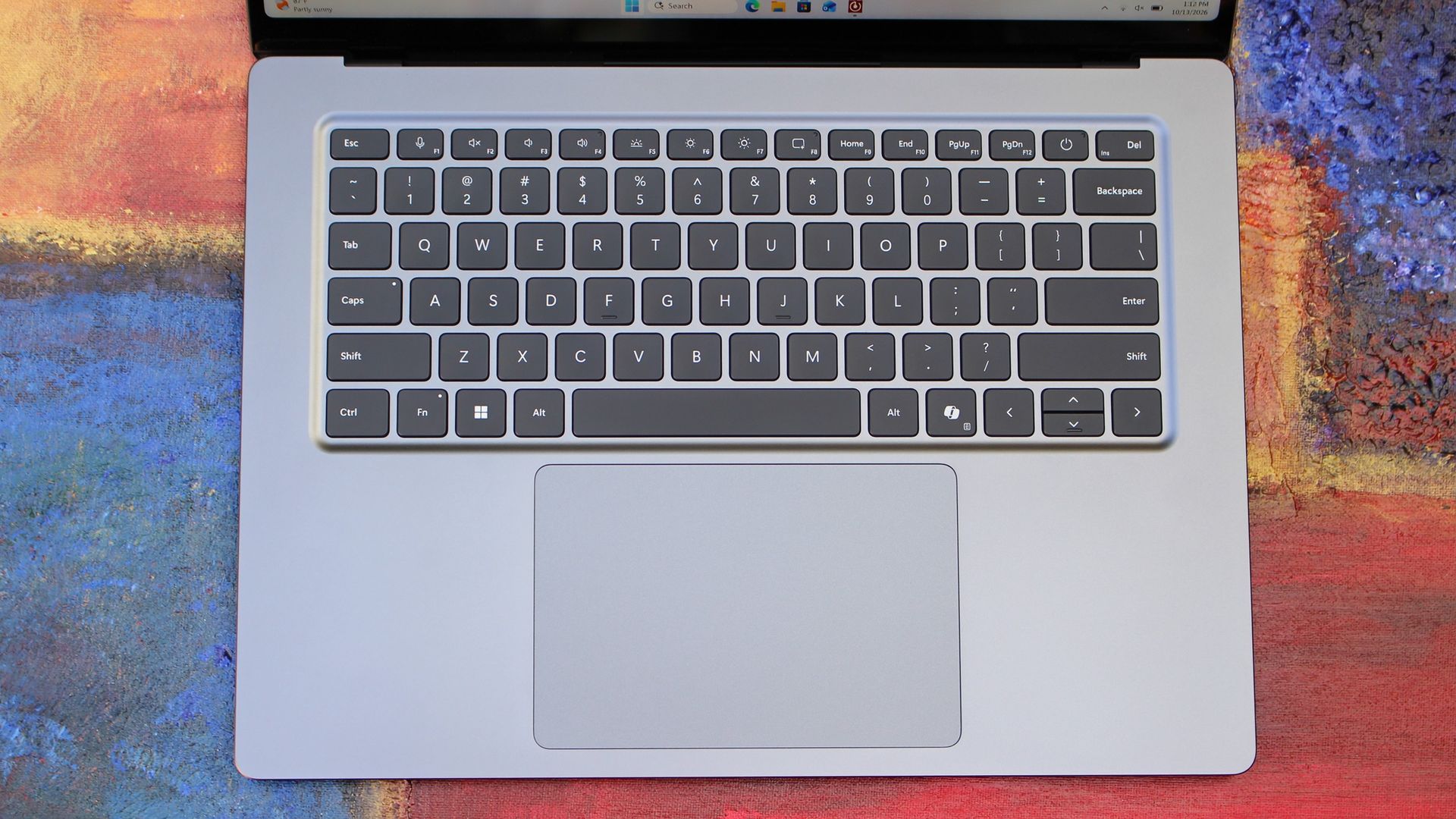
The best keyboard and trackpad I've ever used. (Image credit: Zac Bowden / Windows Central)
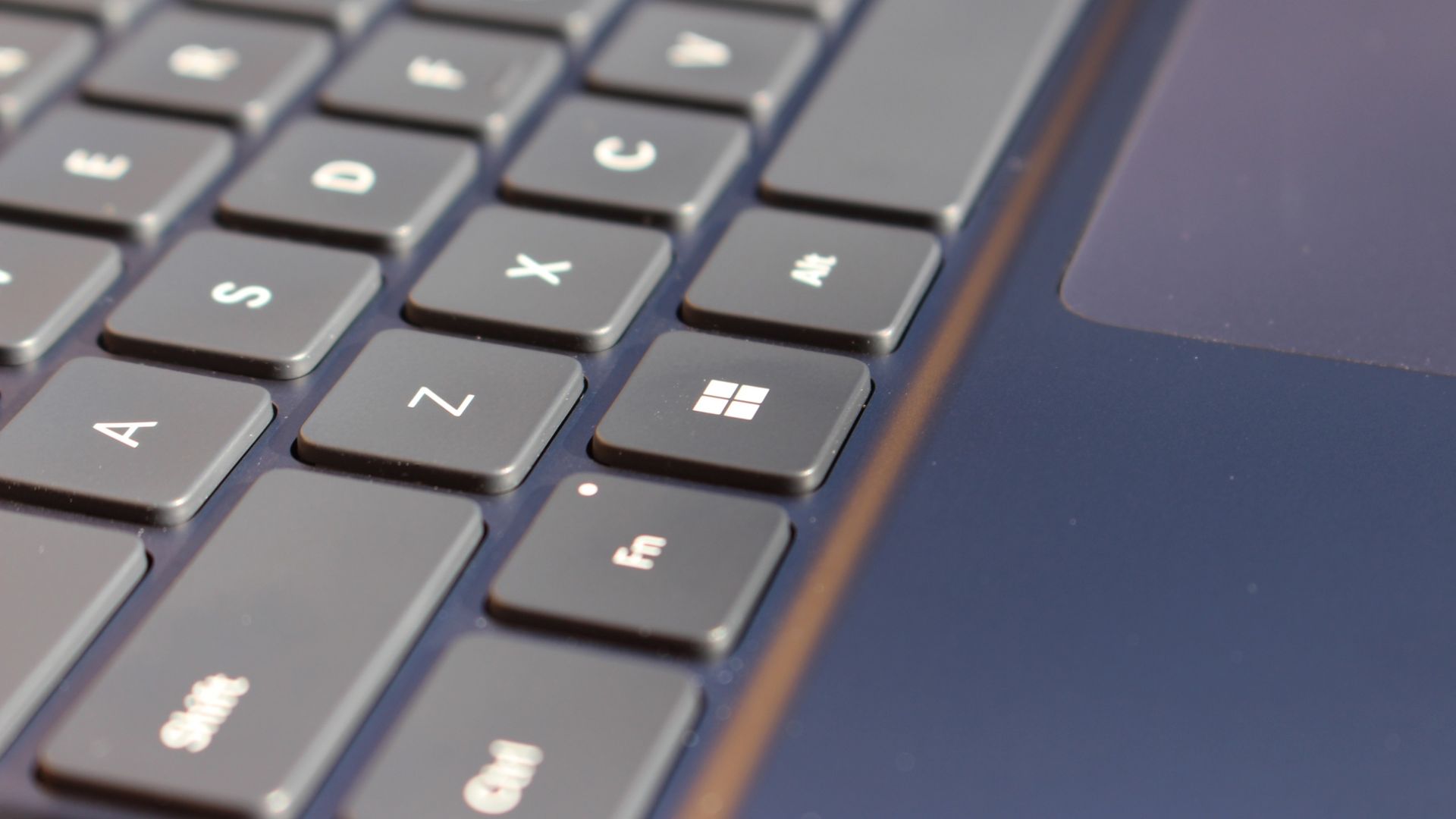
Surface has always delivered excellent keyboard and trackpad experiences, but Surface Laptop Ultra might be on a whole other level. This is probably the best keyboard and trackpad experience I've ever had on a Windows laptop to date. The keyboard is comfortable, tactile, and quiet, with 1.4mm key travel which is incredibly satisfying and not at all fatiguing.
The keys themselves are slightly rounder than the keys found on Surface Laptop 8, which I think is more comfortable and looks nicer as a result. It features a three-stage backlight, a Copilot key (which can be changed,) and a dedicated microphone mute key. It's pretty much perfect in every way.
But what I really want to talk about is the trackpad. It's the largest trackpad ever fitted to a Surface, and that makes a huge difference in how easy it is to use. There's so much room for activities, and you'll never find yourself at the edge of the trackpad because you needed to drag a file and ran out of room.
The keys are so nice to type on. (Image credit: Zac Bowden / Windows Central)
Palm rejection is also very good. I never once had an issue with the trackpad being in the way when typing, which means Microsoft has done a good job at ensuring the trackpad's side isn't impeding the typing experience. The trackpad itself is haptic, and feels great to click on, with strength adjustability in Windows Settings so you can really dial in just how strong that haptic feedback is.
But the new trackpad also supports Windows 11's new haptic system, which introduces subtle haptic feedback when interacting with different UI elements across Windows. When you snap an app window, or drag files across folders, you'll feel haptic bumps under your finger in the trackpad that are different from the usual click down sensation it provides. It's genuinely great.
Camera & Audio
It's a Surface, so you can and should expect great cameras and microphones on Surface Laptop Ultra. The webcam is a 1080p shooter that looks more than fine for video calls, Teams meetings, and recorded presentations. In low light, the image does get a little noisy, but not any more than any other high-end webcams on the market.
The shining star in this department are the built-in studio mics, which are very very good. They sound studio quality, with rich bass and far-field mics that do a very good job at tuning out background noise to ensure the things that you are saying are captured clearly and well.
I also need to take a moment to talk about the built-in speakers on this laptop. They are superb. Again, probably the best I've tried in a Windows laptop to date, and give the MacBook Pro 14-inch a run for its money. There's a clear sound stage, highs are crisp and bass is rich.
Performance & Battery
It's a looker for sure. (Image credit: Zac Bowden / Windows Central)
I've already published an in-depth look at the performance of RTX Spark on Surface Laptop Ultra, which you can read here if you're interested, so there won't be raw performance benchmark numbers in this review.
The TL:DR for that however is that the RTX Spark is a powerful chip, with okay CPU performance but great GPU performance. It's capable of playing most games at 1440p high settings above 60fps, and top end configs can fit large AI models directly onto the GPU for faster processing. But it trails behind the latest high-end Apple Silicon, and is more in-line with current-gen Snapdragon X2 Elite or last-gen Apple M4 Pro in overall performance.
By default, the 128GB Surface Laptop Ultra ships with its unified memory in a 50/50 split configuration. Users are free to adjust this in the NVIDIA app, which is good for when you need to give either the system or your GPU more RAM for whatever task it is you're completing. It requires a restart to apply, which frustratingly takes a long time on the Surface Laptop Ultra.
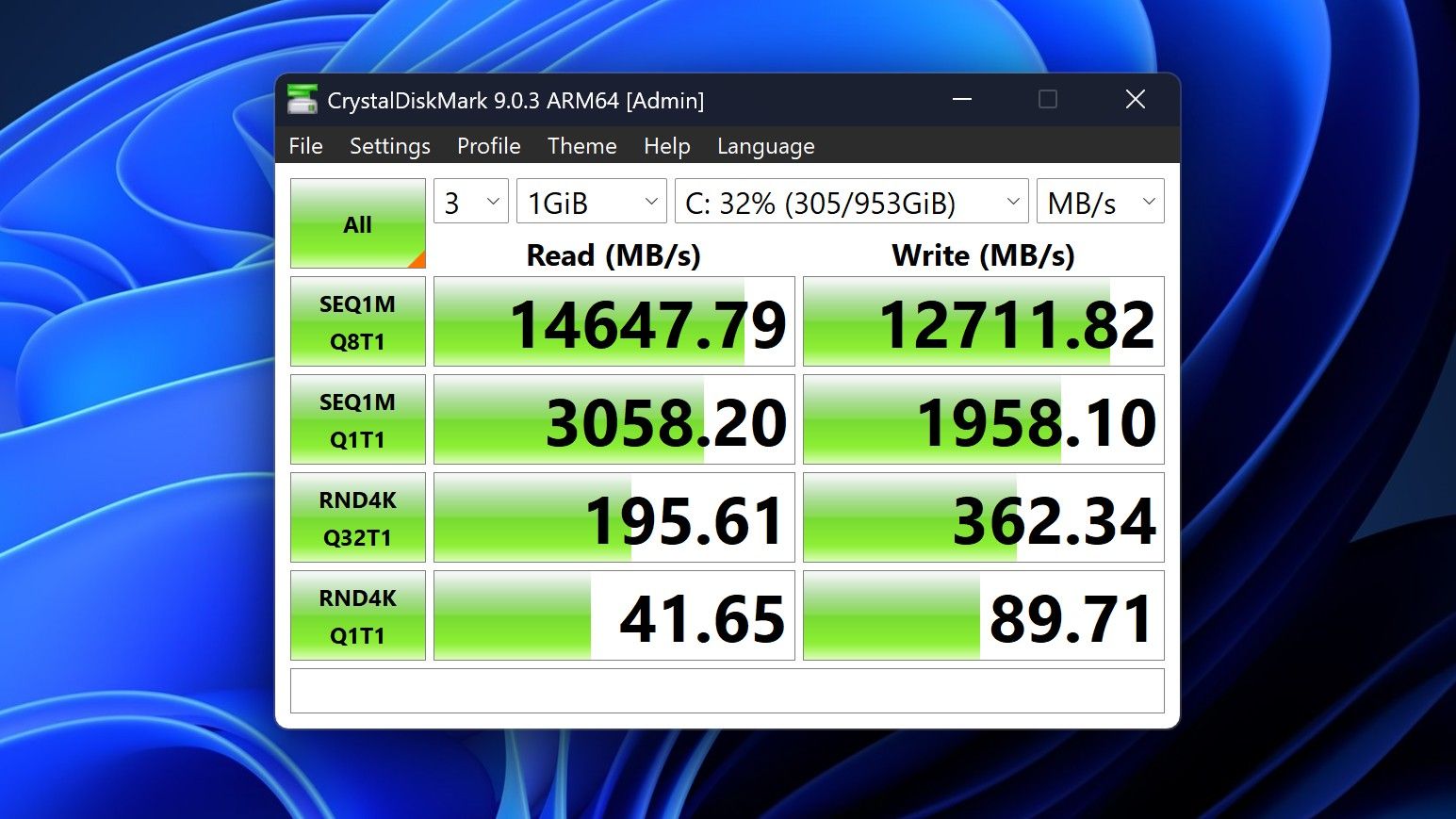
You can expect very fast read and write speeds on 1TB models. (Image credit: Zac Bowden / Windows Central)
Performance is great for the most part. In day to day usage, it's blazing fast and is able to crunch through pretty much any workload I'd want to throw at a mobile workstation such as this. With that said, there are a couple of oddities related to performance that I feel I should mention.
Compared to other devices I have on hand, the Surface Laptop Ultra sometimes takes twice as long to restart. I'm talking over 2 minutes from hitting restart to being back on the lock screen, which is about double the amount of time it takes all the other laptops in my possession. Microsoft says they are investigating.
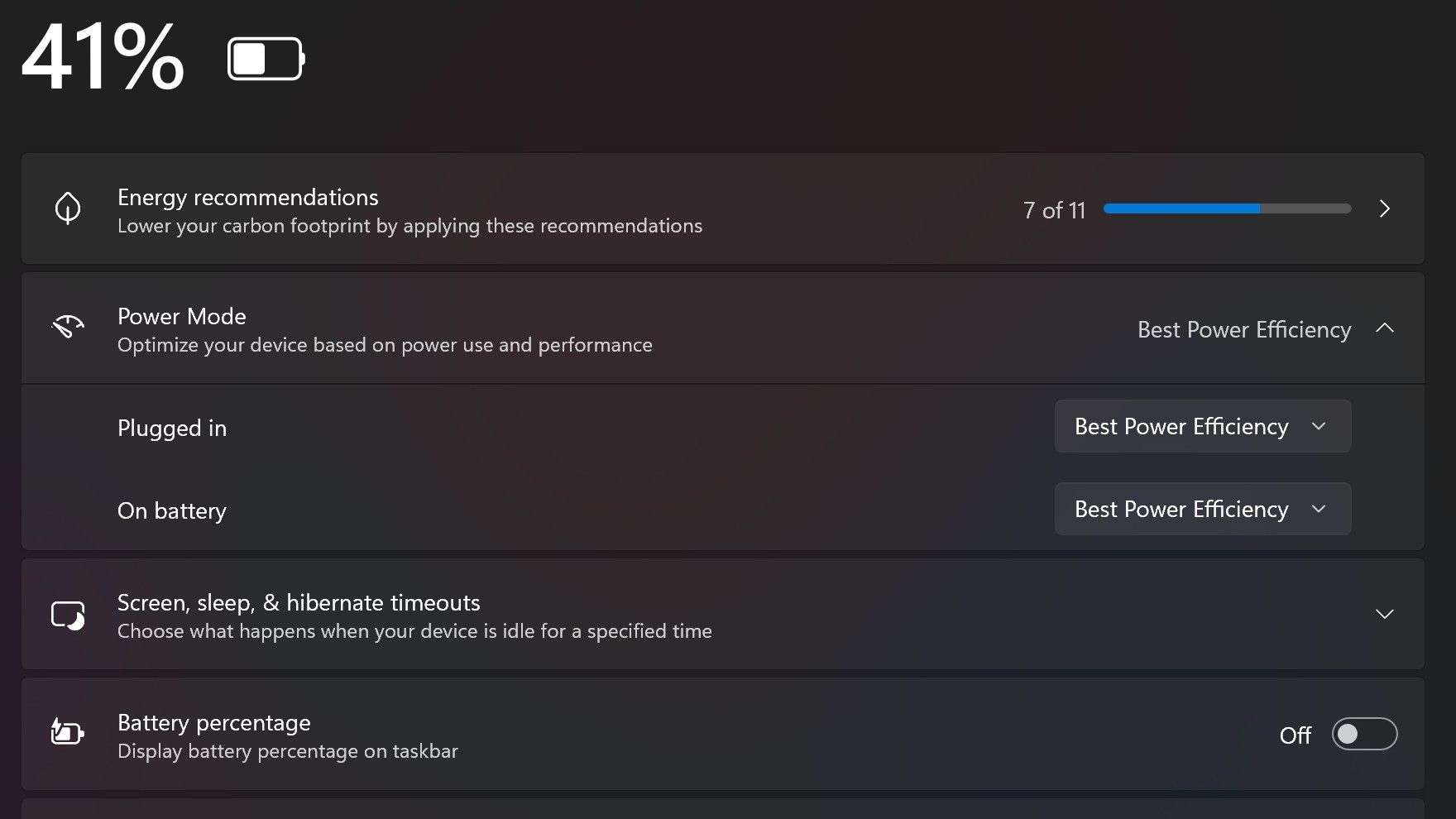
Surface Laptop Ultra also ships with the "Best Power Efficiency" profile set by default. This is unusual, as most Surface PCs ship with their power profile set to balanced. Microsoft says it does this to maximize battery life, but that does come at the cost of performance.
Make sure you change these to Best Performance for plugged in, and Balanced for battery life. (Image credit: Zac Bowden / Windows Central)
I've found that overall performance can be slashed by up to a quarter or even half when in this default mode. So if you want to make the most of your RTX Spark PC, be sure to change the power mode in Windows Settings to either Balanced or Best Performance. I usually set the on-battery mode to Balanced, and the plugged in state to Best Performance.
On the subject of battery life, the Surface Laptop Ultra's endurance is just fine. It's not class leading by any stretch, but I can definitely get through the work day without much fuss, though this will depend on your workload. Our Procyon battery life benchmark test lasted around 14 hours, and in real world use I was getting close to about 10.
But if your workload heavily leans on the GPU, you can expect to halve that number. The GPU is quite efficient for the power it outputs, but it's still a GPU and it's still hungry. So if you know you'll be using the GPU a lot throughout the day, you'll want to bring the charger with you.
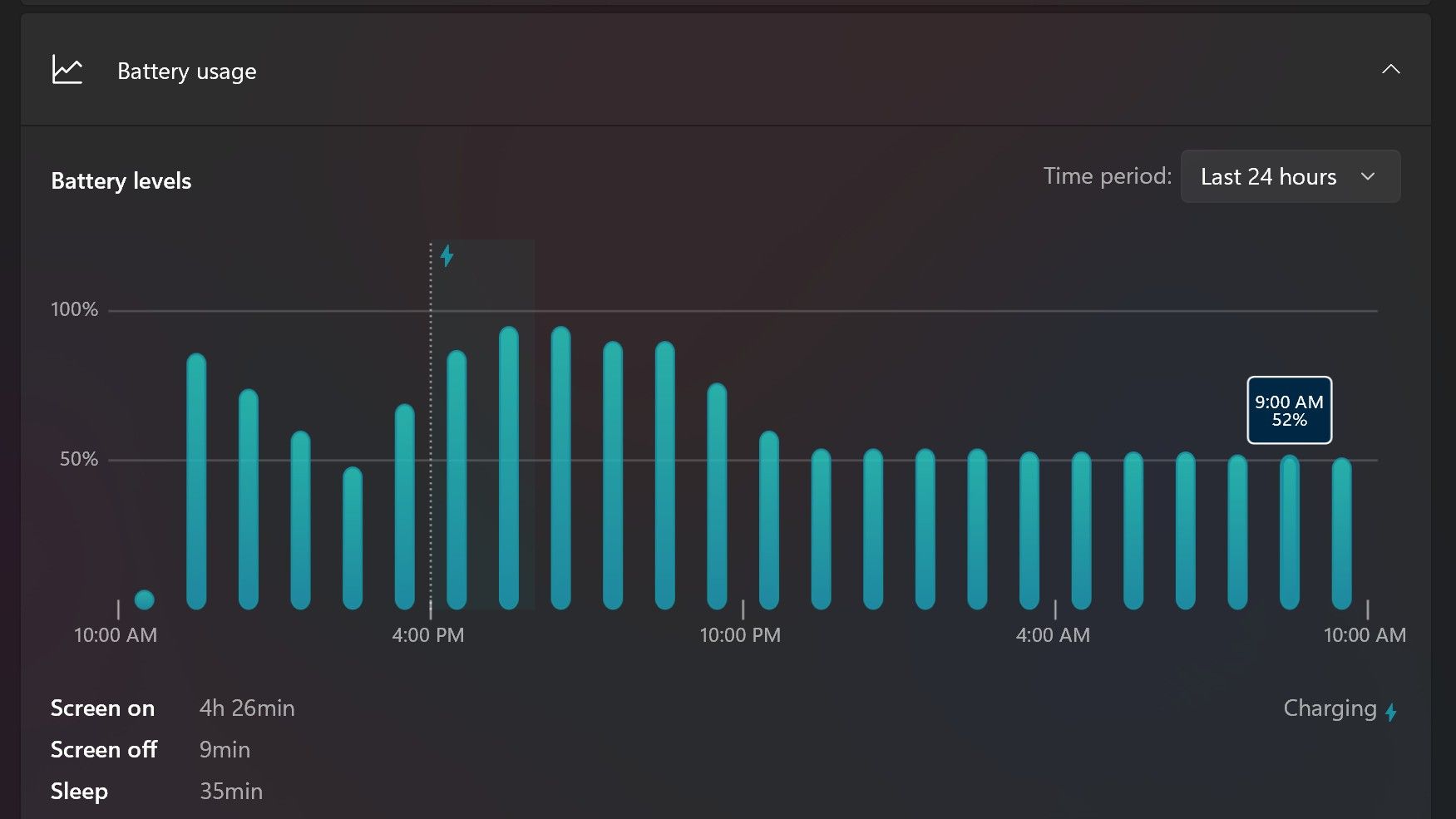
Surface Laptop Ultra only sipped power during sleep between midnight and 9AM. (Image credit: Zac Bowden / Windows Central)
With that said, sleep endurance is very good for the level of power this laptop outputs. I put the laptop to sleep at about midnight, and open the lid 10 hours later, and it's only drained one, maybe two percent from the battery. Very good on that front!
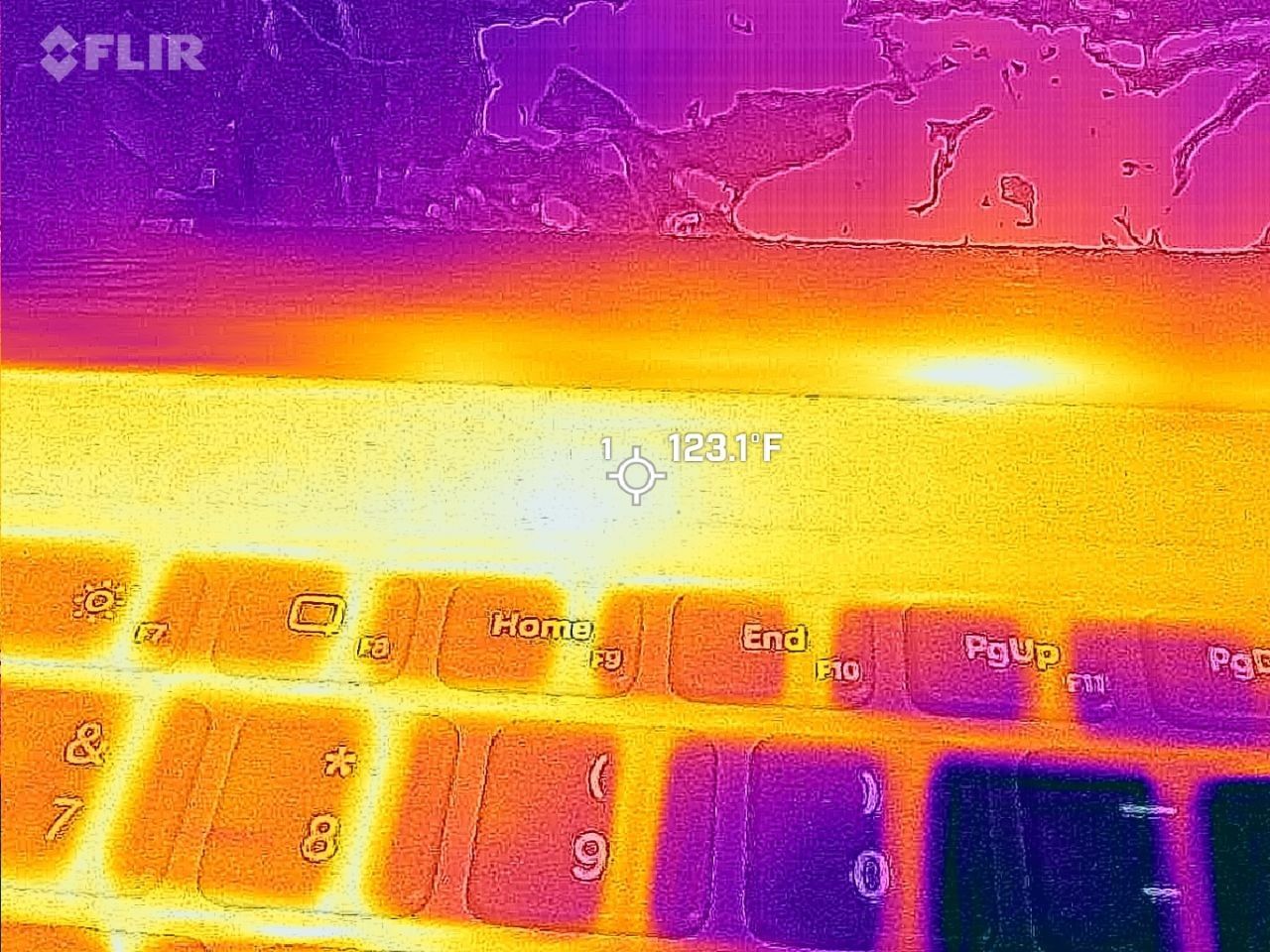
Under max load, the Surface Laptop Ultra gets quite warm. While the keys themselves remain at an okay temperature, the top part of the keyboard deck gets very toasty. I measured 123 F at its hottest under max load, which is approaching "oh that's hot" territory.
Surface Laptop Ultra gets toasty, but doesn't seem to thermal throttle. (Image credit: Zac Bowden / Windows Central)
I also noticed quite audible coil whine when under max load on my Surface Laptop Ultra. This isn't a problem in day to day use, but whenever the GPU is being used, I can hear buzzing coming from inside the keyboard chassis. If you're sensitive to that kind of thing, it will annoy you.
Fan noise is acceptable even at max load. I measure around 42 decibels at its loudest, and that was after running a benchmark for 10 minutes. In normal use, the fans rarely come on, though it does run slightly warm on your lap as a result.
Conclusion
Surface Laptop Ultra is ultra-premium. (Image credit: Zac Bowden / Windows Central)
✅ You should buy this if ...
You are a software developer utilizing on-device AI
You live and breathe large language models and agentic workflows
You need a beefy GPU in a portable and efficient package
You need lots of RAM
❎ You should not buy this if ...
You aren't interested in AI or agentic workflows
You only need a PC for standard productivity tasks
You occasionally game or edit video (get something cheaper)
You want something thin and light
Surface Laptop Ultra is great, but it's not something I can comfortably recommend everyone go out and buy, especially at these high prices. At the base level, it doesn't offer enough to justify the added cost over a Surface Laptop 8 with 24GB RAM. You do get the more beefy GPU and "better" display, but that comes at the cost of portability and battery life.
The Mini LED screen isn't the upgrade I was hoping it would be. For those who have only ever used a standard LCD their whole life, I'm sure you will appreciate the added brightness. But the ghosting issue is annoying and I think most people will notice it. I would have much preferred an OLED on a laptop this expensive.
Battery life is also just okay, which, again, for a laptop of this size and weight, leaves something to be desired. You can get longer day to day use out of a thinner and lighter Surface Laptop 8, which I think most people would prefer over the raw power that Surface Laptop Ultra offers.
And that brings me back to my original point. This isn't a laptop for everyone. It's a laptop for those who know they need it, and it's mainly for AI developers and high-end content creators. If you find yourself leaning on local agents to complete tasks for you, or enjoy generating images and videos using AI models, this is the laptop for you.
If you're someone who just needs a laptop for productivity tasks that includes a little bit of photo and video editing, and sometimes some gaming, there are cheaper laptops out there that will do that job very well.
Is this the MacBook Pro for Windows? I think it is. But it's not the perfect MacBook Pro alternative just yet. RTX Spark isn't at the same level as high-end MacBook Pro silicon, the Mini LED screen isn't best in class, and battery life could use some improvement.
Microsoft
Surface Laptop Ultra
Surface Laptop Ultra is Microsoft's flagship and most powerful Windows PC. It can be configured with up to 128GB RAM, and ships with NVIDIA's new RTX Spark SoC. It's great for creative workflows and software development, and those who want to run local AI and LLMs directly on their device.
NVIDIA's RTX Spark is almost here. Laptops powered by the chip launch on October 16, 2026, but reviews of the chip are already out.
Reviews of the first wave of RTX Spark laptops work a bit differently than some other product launches. Today, those who were given access to RTX Spark laptops can share their experience with the chip itself, but thoughts on specific RTX Spark laptops cannot be shared until October 16, 2026.
While that is different than what we normally see, it's not that surprising. RTX Spark is not just a new chip akin to a new processor from AMD, Intel, or Qualcomm. It is a new platform for NVIDIA, a major addition to Windows on Arm computing, and the mark of a new silicon partner for Windows.
Note that reviewers of the RTX Spark were limited to sharing details about the performance and benchmarks of the processor. Dedicated GPU performance varies based on the laptop it's paired with, so some reviewer experiences may differ depending on the hardware used to test RTX Spark.
RTX Spark: Reviews
Windows Central: "The RTX Spark GPU is very performant and is capable of pretty much handling anything you'd want to throw at it on a mobile workstation. Where it really shines, however, is running local AI models directly on it. It's the reason NVIDIA built this platform to begin with, and it does this very well."
Tom's Hardware:"Still, for a first-generation mobile platform that joins complex silicon IP from multiple design teams onto one chip and relies on several OEM partners to bring it to life in highly integrated notebook form factors, the maturity of the RTX Spark platform is an impressive achievement. (Take it from someone who has seen a couple of rough product launches from the inside.)"
Tom's Guide:"Judging RTX Spark purely by its single-core CPU speeds is like judging a Ferrari by its cup holders. And after a week of stress-testing the Microsoft Surface Laptop Ultra with Spark — running every synthetic and real-world test we can throw at it — it's clear that this is so much more."
HotHardware:"In its most potent form, which is what we’ve tested here, the RTX Spark N1X is a powerful SoC that offers competitive multi-threaded CPU performance versus today’s top mobile platforms, with class-leading GPU performance. The RTX Spark N1X’s AI performance and capabilities are also unmatched, not only because of the powerful hardware on tap and unified memory architecture, but because NVIDIA’s AI software stack is so pervasive and mature."
Lowyat:"For NVIDIA? They basically took multiple pages out of Qualcomm’s book of trial and errors, added their gaming DNA, made damn sure that the majority of compatibility issues between the x86 and ARM architectures were resolved, and what you have is something I’d never thought I’d see: playing AAA titles on an SoC, along with all the accoutrements that comes with an NVIDIA chipset."
NVIDIA RTX Spark shows promise, but you have to understand who it is for
Early impressions of RTX Spark are largely positive. Across multiple reviews, experts praised the processor's strong GPU performance, AI capabilities, and surprisingly polished first-generation experience.
At the same time, several reviewers cautioned against viewing RTX Spark through the lens of traditional gaming benchmarks, reminding readers that the platform is designed for AI workloads, creators, and developers.
The RTX Spark is not meant to power gaming laptops. It is aimed at developers and high-end creators. The processor is especially focused on local AI performance, an area many expect to be the next major shift in personal computing.
That being said, the RTX Spark is capable of gaming. It may show the future of Windows on Arm gaming, but that's yet to be seen. Over the coming weeks I am sure we will see countless reviewers test games on RTX Spark laptops. I think they'll be surprised by how well the processor does, but gaming-focused reviews still won't be the best way to judge those PCs.
The first wave of RTX Spark laptops are already available for preorder and hit shelves tomorrow. Our Cale Hunt rounded up all the RTX Spark laptops you can buy, which you can also find below.
Built around the NVIDIA RTX Spark platform with an N1X CPU, RTX GPU, and up to 128GB of unified memory, the Surface Laptop Ultra hits new performance heights for power users. It's all contained in a gorgeous chassis with a mini-LED display and tons of ports. Prices start at $2,599.99, and units will begin shipping on October 16, 2026.
The new ASUS ProArt P14 and P16 duo gives users more size options while retaining the same great RTX Spark performance. The P14 is the lightest ProArt laptop ever, while the P16 is the way to go for a larger OLED display. Prices start at $2,599.99 for the P14 and $2,799.99 for the P16. They're expected to begin shipping on October 16, 2026.
Dell's new XPS 16 with RTX Spark features a 3.2K OLED display, lattice-free keyboard, and the usual premium XPS styling. Prices start at $3,799.99 and units are expected to begin shipping on October 16, 2026.
The OmniBook X 14 is the smaller of the two new PCs, but it features the same RTX Spark options for maximum performance. Models start at $2,999.99 and are expected to ship beginning November 4, 2026.
The larger of the two new HP RTX Spark laptops delivers a gorgeous 16-inch OLED display with 3K resolution and, of course, your choice of RTX Spark chips. Prices start at $3,199.99, and shipments are expected to begin on November 4, 2026.
Lenovo's Yoga 9n should be the right choice for those who value a versatile convertible design and premium build quality. Prices start at $3,099.99, and models are expected to begin shipping on October 16, 2026.
MSI's Prestige N16 Flip AI+ is another versatile convertible featuring the RTX Spark platform and a Tandem OLED display. It appears that preorders might kick off on October 8 for this laptop, with prices starting at $3,299.99.
Speaking at TechCrunch Disrupt, Amazon devices chief Panos Panay described a future where ambient AI devices work in the background, anticipating users' needs instead of waiting for commands.
Microsoft Edge may not have a Favorites bar after a future update. The browser may instead feature a collection of bookmarks instead. The change would bring Edge more in line with Chrome, which could help people transitioning from Google's browser to Microsoft's.
The change appears now in the Canary version of Microsoft Edge, which suggests it will make its way to the stable version of the browser at some point in the future. Leo Varela, who tracks changes to Edge and Chrome, spotted the change and highlighted it on X.
Varela also noted that the switch could be made to make Edge appear more like Chrome.
Microsoft might rename "Favorites" to "Bookmarks" in Edge. I suppose this aims to make the browser feel more familiar to users switching from Chrome to Edge. This change is already being tested in Canary: https://t.co/DmBSVj4IQPOctober 15, 2026
I'm curious if people are even aware that Edge has Favorites rather than bookmarks. Even if you click the star icon in Edge to add a site as a favorite and then place that site in the Favorites bar, the user interface looks almost identical to bookmarks in Chrome or other Chromium browsers.
Edge still has a poor reputation
Many people assume Microsoft Edge is a worse browser than Chrome and do not try Edge themselves. (Image credit: Getty Images | SOPA)
This week I was speaking with a friend about Microsoft Edge and was somewhat surprised to hear them say it was a bad browser. I was actually more surprised that they had an opinion of the browser at all.
If you hop into our comment section or into subreddits full of tech enthusiasts, you'll often see people say something to the effect of "Edge is a fine browser; it's basically Chrome with a Microsoft paintjob."
But in my experience, that opinion is not held by non-techy users. In the rare instances that browser preferences come up in my everyday conversations, most people I speak with still connect Edge to Internet Explorer or just assume Edge is worse than Chrome.
I know Chrome gets a lot of hate around these parts, but the reality is that it's the world's most-used browser. Statcounter shows Chrome at a 66.36% market share right now. That tramples second-place Safari, which sits at 18.27%. Edge is in third place with a 6.04% market share.
That picture changes when exclusively looking at mobile devices. Chrome is even more dominant and Edge has essentially no mobile market share.
With Chrome being the de-facto standard for browsing, it's wise to make Edge look similar to Chrome. Microsoft needs to differentiate Edge in some ways, but Favorites versus Bookmarks is not one of them.
Join us on Reddit at r/WindowsCentral to share your insights and discuss our latest news, reviews, and more.
RTX Spark is finally here. After years of rumors, NVIDIA has re-entered the Windows silicon game with the MediaTek N1X, a tailor-made 18/20-core SoC with 5,120 or 6,144 GPU cores, up to 128GB of unified memory, and a heck of a lot of power for apps, games, and AI experiences under the hood.
It's not every day that Windows gains a new silicon partner, which is why everyone seems to be involved with ensuring this launch goes as smoothly as possible. Microsoft has worked closely with NVIDIA on optimizing the Windows platform, especially for RTX Spark, and third-party app vendors like Adobe, Blender, anti-cheat software, and more have mobilized to optimize their products and frameworks for the new chipset.
But the big play with RTX Spark is on-device AI. LLMs and agentic workflows have become all the craze over the last year, and NVIDIA believes the RTX Spark is the first chipset for Windows that has been designed from the ground up for running local AI experiences locally and securely, without sacrificing performance.
NVIDIA has 6 hardware partners lined up to ship RTX Spark hardware starting this week, and all of them are aimed at the high-end content creator or developer crowd. NVIDIA has set its sights on competing head-to-head with the MacBook Pro, and is eager to win over AI developers who flocked to that platform thanks to Apple Silicon.
I've been testing out the top configuration of RTX Spark over the last week on a Surface Laptop Ultra, and here's what I discovered it's good at, and what it's not so good at. FYI, today's embargo only allows us to detail the RTX Spark's performance and benchmarks, not the Surface Laptop Ultra itself. So battery life, thermal performance, and laptop-specific variables are not included in this piece. That information will be shared in the full laptop review, coming soon.
NVIDIA RTX Spark Overview
(Image credit: NVIDIA)
If you're looking for a quick rundown of what RTX Spark is and how it compares, here's what you need to know:
RTX Spark is a powerful SoC with good CPU performance and great GPU performance. Its CPU is comparable to the Apple M4 Pro and Qualcomm's Snapdragon X2 Elite, with multi-thread performance being its stronger asset in the CPU department, though it trails behind the Apple M4 Max and Snapdragon X2 Elite Extreme.
The GPU is the star of the show, with great performance thanks to its 6,144 GPU cores that deliver smooth framerates (with help from DLSS and framegen), faster rendering times, and very capable AI performance. Its quantized INT8 tensor execution, unified memory sharing, and computer vision acceleration easily leapfrog mobile discrete GPUs in its power class for AI workflows, which it excels at.
I don't believe RTX Spark is for everyone. It's very good at key things, and shines primarily for those who are knee-deep in local AI workflows and experiences. If you're not a mobile content creator, software developer, or utilize local LLMs often, RTX Spark probably isn't for you.
Mobile efficiency varies depending on power profile. The GPU is hungry and will drain power fast when at full pelt, but in day-to-day usage that only occasionally leans on the GPU, it should last the workday. The good news is, you should see the same performance regardless of plugged-in state.
Compared with most integrated Snapdragon, Intel, and AMD systems, RTX Spark is substantially faster in AI image generation and local inference, while matching or approaching dedicated RTX 4070/5060/5070 class GPU performance in most workloads outside of AI.
The latest generation of high-end Apple Silicon retains an advantage in peak single-thread CPU performance, but RTX Spark’s strength is its GPU, with TensorRT execution and high-speed memory providing advantages in diffusion, quantized models, and sequential data access.
RTX Spark configurations
Specification
RTX Spark N1X (5120-core GPU)
RTX Spark N1X (6144-core GPU)
CPU Configuration
18 cores (9x Cortex-X925 + 9x Cortex-A725)
20 cores (10x Cortex-X925 + 10x Cortex-A725)
Max Performance Core Clock
3.9 GHz
4.0–4.1 GHz
Max Efficiency Core Clock
2.8 GHz
2.8 GHz
GPU Architecture
Blackwell RTX
Blackwell RTX
CUDA Cores
5,120
6,144
Streaming Multiprocessors (SMs)
40
48
RT Cores
4th Generation
4th Generation
Tensor Cores
5th Generation
5th Generation
Unified Memory Type
LPDDR5X
LPDDR5X
Memory Interface
256-bit / 16-channel
256-bit / 16-channel
Memory Speed
Up to 9,400 Mbps
Up to 9,400 Mbps
Peak Memory Bandwidth
Up to 300 GB/s
Up to 300 GB/s
NVLink-C2C Bandwidth
600 GB/s bidirectional
600 GB/s bidirectional
Display Support
HDMI 2.1a, DisplayPort 2.0 over USB4
HDMI 2.1a, DisplayPort 2.0 over USB4
Process Technology
TSMC 3nm (CPU & GPU dies)
TSMC 3nm (CPU & GPU dies)
Configurable SoC TDP
45–80W
45–140W
NVIDIA RTX Spark CPU Performance
(Image credit: NVIDIA)
The RTX Spark CPU was co-designed by NVIDIA and MediaTek. The N1X, as it's known, comes in either 18- or 20-core configurations and is relatively efficient while delivering good performance. With that said, it's not leading in its class, leaving something to be desired when it comes to raw benchmarks.
In Cinebench 2026, the 20-core N1X achieved a single-core score of 558 and a multi-core score of 6,885. To put that into perspective, its single-core score beats the first-gen Snapdragon X Elite X1E-80-100 at 519, but falls short compared to Qualcomm's Snapdragon X2 Elite Extreme, which achieves a score of 662 for single-core. Multi-core fares better, with a score of 6,885, which is only just behind the X2 Elite Extreme and Apple M4 Max.
Cinebench Scores (Best Performance)
Cinebench 2026 Test
Plugged In Result
Unplugged Result
CPU (Multi Core)
6,885 pts
6,844 pts
CPU (Single Core)
558 pts
554 pts
MP Ratio
12.33 x
12.35 x
These scores do place it ahead of Intel's and AMD's latest flagship mobile workstation chips, but the chipset simply doesn't compete with Apple's latest Max chips, consistently trailing behind the Apple M4 Max and the M3 Ultra. This is a little disappointing given that the RTX Spark is directly targeting Apple Silicon.
It's a similar story with our Geekbench 7 results, achieving a single-core score of 2,718 and a multi-core score of 23,571. It's clear that multi-core performance is the N1X's stronger asset, competing with the likes of the Apple M4 Pro or Intel Core Ultra 9 285K, and is well ahead of the last-gen Snapdragon X Elite and Intel Lunar Lake, as it should be.
Geekbench Scores (Best Performance)
Geekbench 7.1
Plugged In Result
Unplugged Result
CPU (Multi Core)
23,571
23,879
CPU (Single Core)
2,710
2024
Outside of benchmarks, in day-to-day use the N1X feels fine. This isn't a slow CPU by any means, and will chew through even complex workflows with no sweat. Most day-to -day apps are Arm native these days, but for the few that do require Microsoft's Prism emulation layer, you won't even notice it. RTX Spark makes it so emulated apps feel just like native ones.
All our benchmarks were run with the Best Performance setting enabled, and in our tests we ran them a number of times in both plugged-in and unplugged states to see if there's any performance drop when away from a wall outlet. The good news is the RTX Spark delivers pretty much the same power regardless of plugged-in state, which mimics Apple Silicon.
NVIDIA RTX Spark GPU Performance
Gears of War E-Day running on RTX Spark (Image credit: Zac Bowden / Windows Central)
The star of the show with RTX Spark is the Blackwell RTX GPU with either 5,120 or 6,144 cores. We benchmarked the top-end, 6,144-core configuration for these benchmarks, and it does impress, outputting performance in workflows like video editing, model rendering, and gaming similar to an RTX 4070 or 5060, but in an efficient package with all-day battery life.
For what is essentially an integrated GPU, it outputs dedicated GPU performance in pretty much all workflows. But it really excels at AI workflows, especially when optimized for tensor and CUDA.
The 128GB configuration is set to split that memory evenly between system RAM and the GPU, meaning in our default configuration and for how we ran most of our benchmarks, the GPU had 64GB of video RAM to make use of. In this configuration, it's more than capable for most tasks, with the only exception being running AI models that surpass this size. In that situation, you can allocate more memory to the GPU so that it will fit.
In our 3DMark tests, we found that the RTX Spark performs similarly to an RTX 4070. It's very capable at 1440p gaming with high settings in most titles, though more demanding games will need to lean on DLSS and frame generation for smooth 60+ FPS gaming. In most titles we benchmarked, games ran without a hitch and looked great.
Benchmark
Target Resolution & API
Overall Score
Graphics Score
CPU Score
Test Framerates
3DMark Time Spy
1440p (DirectX 12)
12,771
12,368
15,669
GT1: 81.68 FPS, GT2: 70.11 FPS, CPU: 52.64 FPS
3DMark Time Spy Extreme
4K UHD (DirectX 12)
5,857
5,972
5,281
GT1: 37.77 FPS, GT2: 35.19 FPS, CPU: 66.30 FPS
3DMark Steel Nomad
4K UHD (DirectX 12 Heavy)
3,064
3,064
N/A
Graphics Test: 30.65 FPS
3DMark Speed Way (Run 1)
1440p (DirectX 12 Ultimate / DXR)
3,011
3,011
N/A
Graphics Test: 30.12 FPS
3DMark Speed Way (Run 2)
1440p (DirectX 12 Ultimate / DXR)
2,985
2,985
N/A
Graphics Test: 29.85 FPS
Gaming is not the main reason to buy an RTX Spark laptop, but it is an additional benefit. It's the first Windows on Arm platform that does gaming relatively well, supporting the usual breadth of gaming technologies and frameworks such as:
Ray tracing
DLSS 5
Multi Frame Generation
Neural Rendering
Reflex
G-SYNC
RTX Remix
Most games run under emulation on RTX Spark, as the platform is Arm64, and most games are compiled for x86. However, in most titles, this isn't a problem. Most mainstream anti-cheat software is now compatible with Windows on Arm, and the Prism emulation layer has been tuned specifically for RTX Spark to ensure most games run without a hitch, though there are exceptions.
Some games, such as Red Dead Redemption 2, will require you to change settings to get them to run successfully. For example, by default Red Dead Redemption 2 was set to run with Vulkan, which caused it to crash at launch. Switching it to DirectX12 fixed this for me. Most games run without needing to change any settings first, however.
Zac Bowden / Windows CentralZac Bowden / Windows CentralZac Bowden / Windows CentralZac Bowden / Windows Central
I tried Cyberpunk 2077, which runs pretty well right out of the box. The game analyzed my system and decided that Ray Traced Ultra settings were a perfect fit for the RTX Spark. Running at 1440p with frame gen enabled, the game was easily able to maintain 60fps while looking good doing it with these graphics settings enabled.
Shadow of the Tomb Raider also works great, but it takes quite a while to actually load up. But once the game is running and you're in-game, it looks great and runs well above 60fps at high settings at 1440p. Marvel's Spider-Man 2 and The Witcher 3 Remastered ran without a hitch, reaching close to 90fps in high settings at 1440p.
For content creators, RTX Spark is a great choice. Whether you are editing photos or rendering videos using apps like Adobe Photoshop and Premiere Pro, or rendering 3D environments in Blender, the RTX Spark is well suited for those tasks.
Photoshop supports on-device AI models on RTX Spark (Image credit: Zac Bowden / Windows Central)
Adobe and NVIDIA say the Adobe Creative Cloud Suite has been optimized specifically for RTX Spark. These optimizations include:
Photoshop on-device AI object removal
Premiere Pro TensorRT acceleration
Blender support for DLSS 4.5 Ray Reconstruction
When it comes to video rendering times, the RTX Spark trails the current-gen RTX 50 series GPUs. We benchmarked it against three other laptops with an RTX 5060, 5070 Ti, and 5080, in which it trailed the RTX 5060 in video rendering performance, finishing a few seconds later in most instances. In this benchmark, we ran Premiere Pro Beta, as that version includes necessary optimizations for RTX Spark.
Premiere Pro Export Times
Export Profile (Seconds ↓)
Surface Laptop Ultra (RTX Spark)
Lenovo Yoga Pro 9 (RTX 5060 8GB)
ASUS Zephyrus G14 (RTX 5070 Ti 12GB)
Lenovo LEGION 9 (RTX 5080 16GB)
H.264 Export (1 GPU)
42.002 s
32.111 s
39.403 s
20.218 s
H.264 Export (Pass 2)
34.415 s
26.003 s
33.532 s
18.401 s
H.264 UHD Export (1 GPU)
81.419 s
64.140 s
71.918 s
40.235 s
H.264 UHD Export (Pass 2)
66.496 s
52.301 s
59.536 s
34.253 s
Dedicated GPU performance can vary depending on laptop chassis size, cooling solution, and thermal envelope, which is why the 5070 Ti frequently trailed the 5060 in our testing.
The RTX Spark GPU is very performant and is capable of pretty much handling anything you'd want to throw at it on a mobile workstation. Where it really shines, however, is running local AI models directly on it. It's the reason NVIDIA built this platform to begin with, and it does this very well.
We ran several Procyon AI benchmarks to see how well the GPU performs when running on-device AI workflows. Text generation LLMs ran very fast, with Spark delivering responsive time-to-first-token results, including 0.27 seconds on Phi and 0.39 seconds on LLaMA3, but its sustained decoding rates trail higher-wattage discrete GPUs.
On-device text generation benchmarks
Model
Overall Score
Tokens / Second
Time to First Token (s)
Model Load Time (s)
Phi-3.5-mini
2,615
72.21
0.27
0.66
Mistral 7B
2,276
53.07]
0.47
0.96
Llama 3.1 8B
2,251
49.44
0.40
1.50
Llama 2 13B
2,108
27.44
0.84
1.69
But quantized AI performance is where RTX Spark truly leads. In Stable Diffusion 1.5 INT8, the RTX Spark scored 11,294 and generated images in 2.77 seconds, substantially outperforming the tested RTX 5080, RTX 5070 Ti, and RTX 5060, on which we ran the same tests.
Stable Diffusion Benchmarks
Model Profile & Metric
Surface Laptop Ultra (RTX Spark)
Lenovo Yoga Pro 9 (RTX 5060 8GB)
ASUS Zephyrus G14 (RTX 5070 Ti 12GB)
Lenovo LEGION 9 (RTX 5080 16GB)
SD 1.5 FP16 - Total Duration
67.55 s
69.70 s
107.73 s
44.59 s
SD 1.5 FP16 - Speed
4.222 img/s
4.356 img/s
6.733 img/s
2.787 img/s
SD 1.5 FP16 - Average UNet
23.986 it/s
23.265 it/s
15.070 it/s
36.426 it/s
SD 1.5 INT8 - Total Duration
22.14 s
138.74 s
101.83 s
440.19 s
SD 1.5 INT8 - Speed
2.767 img/s
17.342 s/img
12.729 img/s
55.024 s/img
SD 1.5 INT8 - Average UNet
19.158 it/s
2.949 it/s
4.043 it/s
0.927 it/s
SDXL FP16 - Total Duration
400.82 s
499.37 s
735.47 s
303.68 s
SDXL FP16 - Speed
25.051 s/img
31.211 s/img
45.967 s/img
18.980 s/img
SDXL FP16 - Average UNet
4.028 it/s
3.331 it/s
2.196 it/s
5.321 it/s
AI Workflows
The GPU is best suited for running large on-device AI models such as Qwen 3.8 27B, Gemma 4 31B, or even 120B-parameter models such as Nemotron or GPT-OSS.
NVIDIA is touting local agentic capabilities with this GPU, leaning on apps like Hermes Agent and OpenClaw to achieve this. We tested Hermes Agent, as OpenClaw failed to connect to the gateway once setup was complete.
The selling point of running LLMs and agents locally is that you are no longer constrained by usage limits or the amount of tokens you have available. When the AI runs locally, it's yours. You can run it for as long and as hard as you like.
120B parameter models can fit entirely on the RTX Spark's GPU, significantly speeding up LLM performance. (Image credit: Zac Bowden / Windows Central)
It's also good for security and privacy reasons. You may have confidential documents, audio recordings, intellectual property that you need summarized or explained to you, and feeding that data to a cloud-based LLM or agent is giving that data away to the host.
With RTX Spark, you can feed whatever data or task you want to your local AI running off the GPU, and that data will never leave the device. You can build up your own personal agent that is capable of managing your local files, creating documents, making edits, and in some cases even controlling your PC.
Hermes Agent is a great tool for beginners, as it offers local AI compute experiences and makes setting it up a breeze. You open the app, choose to run AI locally, and it recommends the best model for the specs you have. Once downloaded, you're good to start chatting with your own AI locally.
Instead of using up tokens in the cloud, local AI leans on the GPU for processing. Unlimited power! (Image credit: Zac Bowden / Windows Central)
Hermes Agent is particularly good at automating tasks. The first thing I did was tell it to clean up and organize my large, cluttered downloads folder. It moved images to my photos library, deleting any old executables, and organizing and categorizing PDFs and Word documents appropriately. It did all this without sending any of my data to the cloud, all processed by the GPU.
I also asked it to build me a basic website that included all my benchmark results so that I could refer back to them more easily. It ran that process entirely off my GPU, and came up with a pretty nice looking webpage design in the process. Zero cloud-based tokens used:
The webpage that the Qwen 3.8 27B parameter model created using Hermes Agent. (Image credit: Zac Bowden / Windows Central)
NVIDIA has even built MCP support into NVIDIA Broadcast and NVIDIA Control Panel, allowing you to hook it up to your local LLM and issue commands that allow it to configure your NVIDIA PC's settings.
Windows and RTX Spark
The Get Started app on RTX Spark includes a step to automate installing agent apps. (Image credit: Microsoft)
In addition to raw CPU and GPU performance, Microsoft has worked closely with NVIDIA to optimize RTX Spark for Windows 11. This partnership runs deep, and there are a lot of things going on behind the scenes that will aid the performance of Windows and support for apps on RTX Spark over the coming months and years.
For those unboxing a new RTX Spark laptop this fall, the Get Started app on Windows 11 will present a step that makes downloading and installing apps that can handle AI agents super easy. Hermes Agent will even go a step further and recommend a suitable model to download once up and running, meaning the user has to do zero research to get started.
With that said, I still find these recommended apps quite complex and convoluted. Many beginners will feel overwhelmed by these apps, especially OpenClaw, which I could not get working properly after it failed to open a gateway to allow the AI model to communicate with the OpenClaw chat interface.
Hermes Agent does automate setting up your first local agent. (Image credit: Zac Bowden / Windows Central)
Microsoft has optimized the system scheduler specifically for RTX Spark to squeeze out as much performance across Windows, menu flyouts, app launches, and more as possible. It has also made changes and enhancements to how Windows handles unified memory so that it's faster and more reliable at feeding that memory to where you need it.
TensorRT is now supported by Windows ML, and DirectX 12 has neural rendering support. The Prism emulation layer has also been tuned for RTX Spark, which results in emulated apps that simply do not feel like they are being emulated.
Microsoft is also keen to position Windows as the platform for local AI and agentic workflows. It has built safeguards and security into the Windows platform to ensure the local agents you run on Windows aren't capable of making severe changes or causing damage to your files, apps, and more.
This is a direct attempt at combating the sudden rise in local AI developers flocking to the Mac. Apple has made little optimizations to macOS to adopt and safeguard local AI and agentic workflows on that platform, whereas Microsoft is moving to make agents a native extension of the Windows platform.
RTX Spark is a Copilot+ PC certified chip, but you won't find any Copilot+ PC features at launch. Microsoft says it's working with NVIDIA to bring features like Windows Recall, Click To Do, and on-device Semantic Search to the RTX Spark platform in the coming months, which will run off the RTX Spark's 50 TOPS NPU.
Conclusion
(Image credit: NVIDIA)
RTX Spark is a super interesting chipset. It's forward leaning in a lot of ways, built on the Arm64 architecture that delivers serious performance and great efficiency. While its N1X CPU is just okay, its Blackwell RTX GPU really shines.
This is the first time we've seen RTX 4070-5070 level performance in an SoC that is this small and efficient. It's optimized for AI workloads, which is its strongest workflow by far. Quantized AI models run great, and with up to 128GB of unified memory, most mainstream models will fit entirely on the GPU without a hitch.
It's also great for content creators, and is very capable at gaming also. But at the prices that these devices are launching at, I think most people would be better served getting an Intel or AMD laptop with a dedicated NVIDIA GPU instead, as these often cost less than the cheapest RTX Spark laptops right now.
But if your workflow involves running AI models locally all day, software development, or complex data crunching and source code management, the RTX Spark is one of the better choices in the Windows space right now, especially for laptops that are thin-ish and (relatively) lightweight.
These RTX Spark laptops are more efficient and portable than typical laptops with a dedicated NVIDIA GPU, which is one of the key benefits of an SoC like this. The power this GPU outputs, for what is essentially integrated graphics, should not be understated.
Of course, just how efficient RTX Spark is will depend entirely on the hardware you choose to buy, as OEMs are free to feed the GPU more or less power depending on the chassis and thermal envelope. Keep that in mind.
Benchmarks
All benchmarks ran on RTX Spark 20-core CPU configuration with 128GB RAM and 6,144 GPU cores. All tests ran connected to power with Best Performance profile enabled, unless stated otherwise. We are still running benchmarks and new tests, and will update accordingly.
Those tablets aren't really direct competition to the Surface Pro, but they do have a feature I'm envious of. The nanomatte screen on one of those Amazon Alexa tablets would be perfect on a Surface Pro.
Matte displays reduce glare by diffusing light. Because the screens bounce light in different directions, the image can appear grainy. An extreme example of this is if you get a cheap matte screen protector for your phone, but even a premium PC with a matte finish can look a bit grainy.
The nanomatte display Amazon uses in its new tablets etches the screen in a way that aligns with the pixels of the display. Amazon praises the displays for providing "a first-of-its-kind cinematic viewing experience, with incredible contrast retention in bright conditions and text that feels like it’s sitting on top of the glass."
I'm not sure I agree with the claim that it's a world first. Apple's nano-texture technology is similar to what Amazon unveiled. But even if Amazon is not a pioneer in the space, it has a device with a screen I'm envious of.
Many Surface devices, including the Surface Pro 8, are glossy, making them hard to use in well-lit environments. (Image credit: Future)
Microsoft has been oddly resistant to anti-glare displays. Surface was late to the party on adding them to any device and has been selective with where it offers the screens.
Microsoft has yet to fully embrace anti-glare screens and it holds back Surface hardware.
The anti-glare display of the Amazon Alexa Tablet 12 Pro also has a texture that makes pen usage feel more natural. The screen is meant to make it feel like you're writing on paper, not a perfectly smooth piece of glass.
It's not surprising that a device made by Panay has features that would fit perfectly on a Surface. He shaped the Surface brand as much as anyone, and he took his expertise over to Amazon.
But as I mentioned earlier, the Alexa tablets are not competitors to the Surface Pro, so they can't serve as replacements either. The Alexa tablets run on Android and have access to the Google Play Store. That's a welcome change to the locked-down Fire Tablets of the past, but it's a far cry from a Windows-powered 2-in-1.
I'd love to see Microsoft replicate the nanomatte finish of the Amazon Alexa Tablet 12 Pro on a Surface Pro in the future. The finish would help those using the Surface Pro in bright settings and also improve the feel of using a stylus.
The Amazon Alexa Tablet 12 Pro features a Nanomatte anti-glare display designed to reduce reflections while maintaining detail and color accuracy. It runs Android and can access the Google Play Store.View Deal
Join us on Reddit at r/WindowsCentral to share your insights and discuss our latest news, reviews, and more.
Microsoft Edge appears to have an AI tool on the way that will fix common issues within the browser. A page within the browser's settings app was spotted recently, though only for those using Edge Canary (a preview version of the app).
The feature was first spotted by Leo Varela, who keeps track of changes to Edge and Chrome. Varela noted that the icon for "Fix an issue" is a magic wand, which suggests it could be an AI tool. Microsoft often uses a similar icon to denote AI features.
Early hints of the feature appeared back in May. The latest version of Edge Canary shows a basic interface for the tool, but the feature is not functional yet.
The interface has a text box for describing an issue and also shows a list of four suggestions, such as "Fix videos that won't play" and "Help me sign in."
Edge's new "Fix an issue" settings page now displays a prompt box where you can type what you need help with. There are also four suggestion chips at the top that automatically fill the text field with prewritten prompts. Currently, clicking "Get help" throws an error: https://t.co/DUunhc4FZpSeptember 12, 2026
Earlier this year, Varela discovered the same feature in a different section of Edge's settings. That listing noted that the feature would use AI to analyze relevant diagnostic data to identify an issue and suggest a solution.
It's normal to see features like this bump along through various preview channels, but it's a bit odd that "Fix an issue" does not appear in the AI at Work Roadmap (previously known as the Microsoft 365 Roadmap).
For example, watermarking protection is on the way to Edge and is not expected to ship to the browser for months, but it is already on the AI at Work Roadmap.
Microsoft has a new competitor, and it's not a big name like Google or Apple. A developer named Brandon Thomas has created open-source replications of Microsoft Word, Excel, and PowerPoint using AI. Thomas made headlines recently for using AI to replicate the Adobe suite, and he has now pointed his AI agents at Microsoft 365.
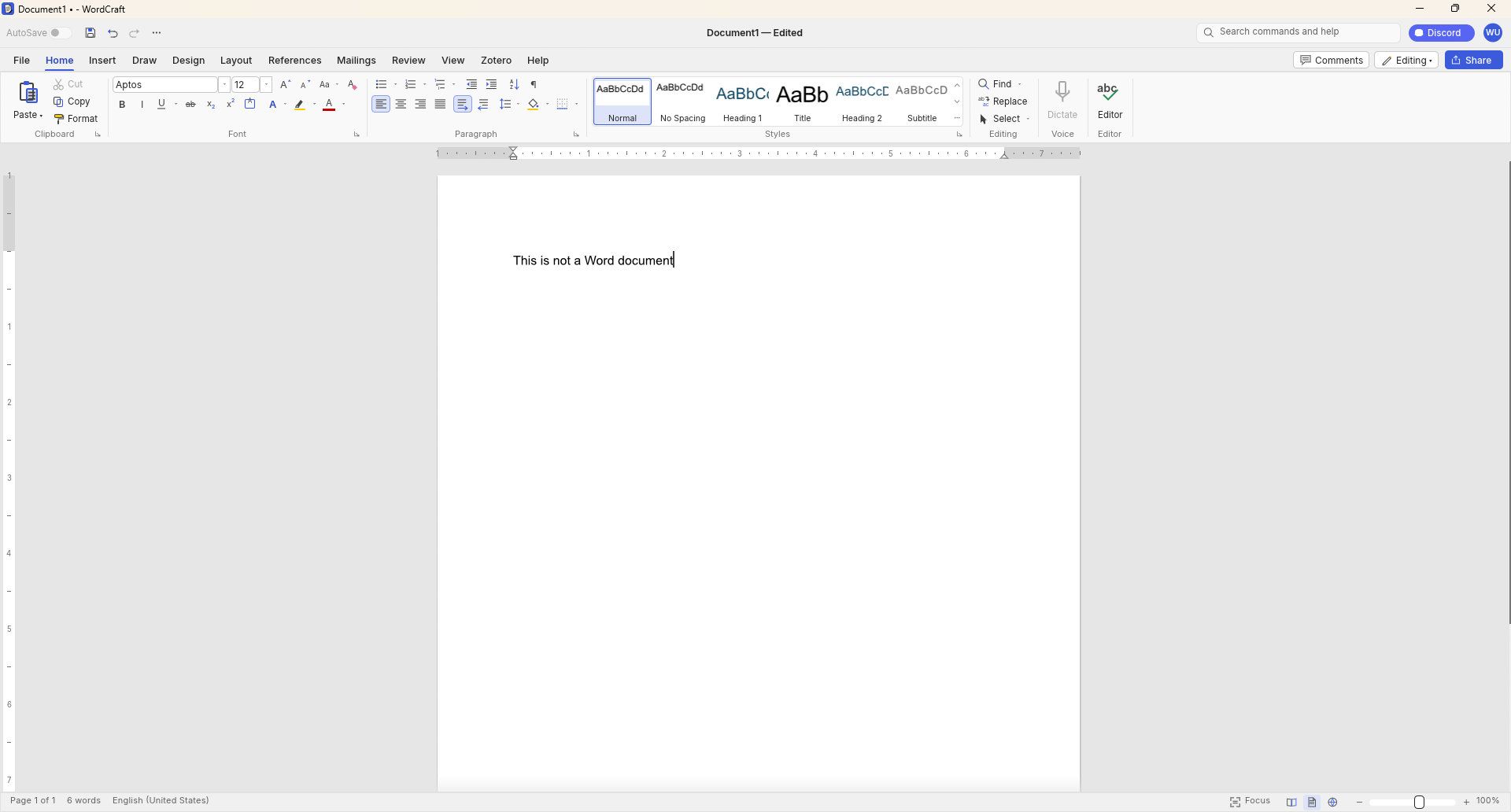
GridCraft (Excel clone), DeckCraft (PowerPoint clone), and WordCraft (Word clone) are made using Claude. They're free to download and you can read more about their development through the ArtCraft GitHub page.
WordCraft uses a familiar ribbon interface and document layout that closely resembles Microsoft Word. (Image credit: Future)
Thomas now has a growing suite of app clones that aim to replicate the functionality and design of the popular suites from Adobe and Microsoft. The situation was summed up brilliantly by Reddit user "EngFL92" who said, "Begun, the clone wars have."
Windows Central take: Proving a point
The concept of replicating apps is nothing new. LibreOffice has been available for years and there are a plethora of apps similar to Word, PowerPoint, Excel, and other Microsoft 365 applications.
WordCraft and other applications made by Thomas are important because they ask the question, "Can AI be used to replace paid industry-leading software suites."
At the moment, I'd say the answer to that question is "no." But the replica Office apps are in the alpha stage of development. We could see the feature gap close and bugs get squashed before general release, assuming Thomas decides to continue the project.
Shut your yap.Open Office / Libre Office sucks.It ate my 40 page essay during finals week.I'm paying back a grudge that has been years in the making.Stop dragging along shitty OSS software and venerating it like it's some holy relic. Let it die.October 13, 2026
Projects like this often gain notoriety quickly as they get shared online. Microsoft and Adobe are tech giants that charge a lot of money to access software. They're easy targets and I believe some of the passion against the companies is justified.
Thomas said on X that they're "paying back a grudge that has been years in the making," so there seems to be some history there.
Quite the media frenzy has formed around these apps. I suppose I'm a part of that, but I think some outlets have gone too far and argued that the AI-coded clones of the Adobe and Microsoft 365 suites are further along than they really are.
I appreciate the dedication to create apps that compete with some of the best-known software around. Projects like this can demonstrate that some people don't need to pay monthly subscriptions for their entire lives to get work done. But I'd suggest pumping the brakes on narratives along the lines of "vibe coding takes down tech giants in a month."
Join us on Reddit at r/WindowsCentral to share your insights and discuss our latest news, reviews, and more.
Microsoft's blueprint for making Windows 11 apps has received an update that allows developers to try more experimental features. WinUI Gallery just received a bump to version 3.0, and with that update comes a new approach to experimental features.
WinUI Gallery is Microsoft's sample app for developers, showing how Windows UI components work and helping app makers build software that looks and behaves like a native Windows 11 application. It's available through the Microsoft Store.
WinUI Gallery used to receive new controls after those controls had reached a stable Windows App SDK release. Because of that, Microsoft was limited in how much it could change those controls based on feedback. WinUI Gallery now includes the experimental Windows App SDK so developers can play with new controls earlier and provide feedback to Microsoft in time to drive changes.
🚀 WinUI Gallery 3.0 is here!Starting with this release, we're embracing Experimental versions of the Windows App SDK, giving you earlier access to new control/API samples so you can try them out more easily, share feedback, and help shape what's next!And this release is packed with new controls! 🚀✒️ Inking in WinUI!!📑 TableView📊 Charts🔢 Pagination control🪟 Simpler windowing APIs🎁 WrapPanel and StackLayout✨ And much more!Learn more👇:https://t.co/srgiSPUI29October 13, 2026
WinUI Gallery 3.0 also adds some quality of life changes that are outlined by Niels Laute, a Senior Product Manager at Microsoft:
Mouse back and forward buttons now navigate through the Gallery, just like in your browser (#2195), thanks @hoshiizumiya!
Search finds more. Every control page now has search tags, so searching for terms like “context menu”, “carousel”, or “WCAG” finds the right page even when the query doesn’t match the control’s name (#2185).
No more dead ends. When a search has no results, you now see your query, a few search tips, and a button to view all samples (#2255), thanks @Zakariathr22!
Since experimental controls are now in WinUI Gallery 3.0, there are several new samples available in the app, including TableView, Charts, and Wrap Panel and LayoutPanel. Those controls allow apps to present data in a way that's easier to digest.
WinUI Gallery is an app that everyday PC users will likely never download or even see. But it's an important tool for developers who want to create modern applications. The latest update should lead to more quality apps being available on Windows 11.
What is WinUI Gallery?
WinUI Gallery is a developer tool that acts as a digital showroom for Windows app development. Developers can see what UI elements look like on a PC by using the app and see relevant code samples to help create applications that align with Microsoft's design framework and guidelines.
Microsoft has had some form of a digital showroom since 2018, but the app has gone through a few name changes. Its current name is a bit confusing because of similar terms being used in different settings.
The latest update to WinUI Gallery brings that app to version 3.0, so it's referred to as WinUI Gallery 3.0. But despite the similar name, that is different than WinUI 3, which is the framework developers currently use.
Regardless of its slightly confusing name, WinUI Gallery is a useful tool for app development and helps push developers toward making apps that perform well and appear natural on Windows 11 PCs.
Join us on Reddit at r/WindowsCentral to share your insights and discuss our latest news, reviews, and more.
Google says certain Googlebooks won't feature full Android app support.
In a statement, the company warns Googlebooks with Intel processors (Acer, ASUS, and Lenovo) may struggle to support certain apps from the Play Store, but Qualcomm processors (HP and Dell) are fine.
Googlebook pre-orders opened September 21 and fully launched October 4 (U.S.) and 5 (U.K., etc.)
The Googlebook is available for consumers to start the week, but the company behind it revealed something important — they won't run all Android apps.
Earlier this morning (Oct. 5), the folks at Android Authority reached out to Google concerning the Googlebooks' app support capabilities. The company revealed something crucial: Not every Googlebook is made equal. According to the company, Googlebooks with Intel processors might struggle to support all Android apps that are available via the Play Store, because the majority of Android apps were made to suit ARM chips in phones.
"A small handful of complex apps or games need some developer tuning to run their best on Intel-based platforms," Google told the publication. While the company says it is working with devs, Intel, and Qualcomm to rectify this issue, consumers might not have to worry. "The vast majority of Android apps run smoothly," no matter if you're using an Intel Googlebook or one from Qualcomm, the company advised.
Poor support could mean a myriad of things in today's age. Would these apps not work completely, or would users encounter glitches and frequent error codes? Moreover, are we certain that Intel's chips are capable of running major apps (we'd assume so)?
For the record, the Acer, ASUS, and Lenovo Googlebooks all utilize the Intel Core Ultra 5 processor. Everything else (HP and Dell) relies on Qualcomm's Snapdragon X Elite.
Googlebooks are here
(Image credit: Derrek Lee / Android Central)
Android Central's Take
I've seen a couple of publications' takes on this, and I have to agree: This should've been stated from the jump. Imagine buying a Googlebook nad running home excited, only to find that, oh, this app's not working. Weird. Google said the full Play Store would be available, and yet ... The good thing is the company knows and is working with the right people to fix it. The bad thing is ... we didn't know until now.
Googlebook pre-orders officially opened on September 21. It was a momentous occasion following Google's earlier laptop reveal during The Android Show. This first wave includes laptops from companies previously mentioned, with prices starting at $899. A few major features include touchscreens, haptic glass trackpads, backlit keyboards, and strong Android phone pairing.
In particular, Magic Pointer is a standout feature for the Googlebook. It brings Gemini directly to your mouse pointer, so you can call on the AI for help whenever you need it. If you don't feel like putting money down for a Googlebook, don't worry. Google started rolling Magic Pointer out in Chrome for Windows and Mac computers.
Consumers can find the Googlebook at the Google Store, Best Buy, and other retailers. There is a motley of included goodies—free trials and the like.
Neutral mesons, the fleeting particles that endlessly oscillate between matter and antimatter forms, have just acquired a strikingly new mathematical lens. In a theoretical study published in The European Physical Journal C, physicist Swarup Sangiri of the Indian Institute of Technology Kharagpur has constructed a fresh class of geometric objects, called connected sequential Bargmann invariants, that encode how two different decay channels of an entangled meson pair relate to one another inside the projective geometry of quantum states. The work extends an earlier framework and shows that when decay-projected states are wired directly into a cyclic chain of quantum overlaps, the resulting quantities behave in a fundamentally different way near the boundary where CP violation switches off.
To appreciate why this matters, it helps to recall what makes neutral meson systems so special. Particles such as the neutral kaon, the D meson, and the two neutral B mesons are produced as flavor eigenstates but propagate as mixtures of heavy and light eigenstates, conventionally written as combinations of the meson and its antiparticle with coefficients p and q. When the magnitudes of p and q differ, the two propagation eigenstates are no longer orthogonal, and this nonorthogonality is the hallmark of indirect CP violation, the subtle asymmetry between matter and antimatter that was famously discovered in kaons in 1964. Because any physical observable must be independent of arbitrary phase conventions attached to quantum states, the natural language for describing interference in these systems is one of rephasing-invariant quantities.
Bargmann invariants provide exactly that language. For a closed sequence of quantum states, the nth-order Bargmann invariant is the product of overlaps taken around the cycle, and it remains unchanged under independent phase redefinitions of each state. Its phase is a geometric phase, the kind of holonomy familiar from the Berry phase, accumulated along a closed loop in the space of rays. Earlier work had applied this machinery to correlated neutral meson decays, constructing third-order invariants that probe single-channel interference and fourth-order invariants that correlate two decay channels through the heavy and light propagation eigenstates. Those constructions linked the geometric picture to conventional flavor observables, including Jarlskog-type structures, without introducing any new phenomenological parameters.
The new study asks a deceptively simple question: what happens if the two decay-projected states themselves are connected directly inside the cyclic overlap chain? When one meson of an entangled pair, produced for example in the decay of a phi or Upsilon resonance, decays into a channel f, its partner is projected into a conditional state determined by the decay amplitudes. A second channel g prepares a different conditional state. The connected sequential fourth-order Bargmann invariant follows the loop from the heavy eigenstate to the f-conditioned state, then directly to the g-conditioned state through their mutual overlap, then to the light eigenstate, and finally back to the heavy one. The crucial new ingredient is the overlap between the two conditional states, a quantity built purely from the decay amplitudes that measures how similar the two post-selected meson states are in projective Hilbert space.
This change in connectivity has dramatic consequences for how the geometric quantities scale as CP violation becomes small. The previously studied disconnected fourth-order invariant, when normalized by the product of two third-order invariants, produced a ratio that blows up quadratically, scaling as the inverse square of the mixing asymmetry, the difference between the squared magnitudes of p and q. The connected sequential ratio, by contrast, carries only a single factor of that asymmetry in its denominator, so its enhancement near the CP-conserving limit is merely linear. Physically, replacing one propagation-mediated link with a direct overlap between the projected states removes one power of the heavy-light suppression, placing the two classes of geometric correlation in distinct scaling classes.
A second new ratio compares the sequential invariant directly with the disconnected one. This comparison ratio behaves in the opposite manner: it is proportional to the mixing asymmetry itself, vanishing in the exact CP-symmetric limit. Its behavior is governed by a competition between two effects, the shrinking of the heavy-light overlap on one side and the possible alignment of interference phases between the two decay channels on the other. When the conditional states prepared by the two channels become geometrically aligned, the suppression can be weakened, revealing that the connected structure is sensitive not only to mixing asymmetry but also to the relative coherence of the decay projections.
To make these statements precise, the analysis is carried out in terms of the standard rephasing-invariant interference parameters lambda, the products of the mixing ratio q over p and the ratios of decay amplitudes to their CP-conjugates. A systematic small-asymmetry expansion, with the squared magnitudes of p and q written as one half plus or minus a small parameter, shows that the sequential ratio depends explicitly on the phase difference between the two channels through the numerator structure. This dependence has no analogue in the disconnected construction, where the channels communicate only through the propagation eigenstates. It means the connected sequential geometry probes the relative orientation of the decay-conditioned rays themselves, a piece of interference information that conventional observables do not isolate on their own.
The geometric interpretation is perhaps the most elegant part of the story. Both the disconnected and the sequential fourth-order invariants involve the same four rays, the heavy and light propagation eigenstates and the two decay-projected states, yet they define different closed paths through projective Hilbert space. A Bargmann invariant depends not just on which states participate but on how they are stitched together, so rewiring the cycle produces a genuinely different geometric correlation. In the CP-conserving limit the heavy and light eigenstates become orthogonal, one link of every cycle collapses, and the entire cyclic structure degenerates, which is why the invariants vanish there. The formalism thus ties the very existence of these CP-sensitive geometric objects to the nonorthogonality of the propagation eigenstates.
Crucially for experiment, none of this requires new physics inputs. The sequential invariant and both ratios can be written entirely in terms of the mixing parameters and decay amplitudes already extracted from time-dependent flavor analyses at flavor factories such as the KLOE experiment with entangled kaons and the BABAR and Belle measurements with entangled B mesons. The framework simply reorganizes the same accessible information into cyclic geometric quantities. The neutral kaon system, with its small indirect CP violation and long-lived interference phenomena, is flagged as a particularly natural arena where the linear enhancement of the sequential ratio could be pronounced, with candidate channels including two-pion, semileptonic, and multi-pion final states. The B meson systems, including channels like B decays to J/psi kaons and to pion pairs, offer rich phase-dependent interference structures, while the D system, where both mixing and CP violation remain tiny in the Standard Model, could serve as a sensitive testing ground for small deviations from exact symmetry.
The study stops short of claiming a new dynamical observable. The author is careful to note that the sequential construction does not add an extra propagation stage in the manner of conventional cascade CP analyses; it is a reorganization of overlap geometry within a single meson system. Even so, the result establishes a hierarchy of Bargmann invariant structures, from single-channel triangles through disconnected quadrilaterals to directly connected sequential cycles, each capturing a different layer of CP-sensitive interference. As precision flavor physics continues to squeeze ever tighter constraints on the origins of matter-antimatter asymmetry, geometric tools of this kind may reveal correlation patterns hiding in plain sight within data that experiments already collect.
Subject of Research: Geometric Bargmann invariant structures and CP-sensitive interference in correlated neutral meson systems
Article Title: Connected sequential Bargmann invariants and (\mathcal CP~)-sensitive geometric correlation structures in neutral meson systems
Article References: Sangiri, S. (2026). Connected sequential Bargmann invariants and $$\mathcal CP~$$-sensitive geometric correlation structures in neutral meson systems. The European Physical Journal C, 86(9), Article 1056. https://doi.org/10.1140/epjc/s10052-026-16308-5
Every time a power grid operator decides how much electricity each generator should produce, a quiet balancing act takes place. Burning less fuel saves money, but it often means allowing more pollution, and cutting emissions usually drives costs up. Engineers have long searched for a way to satisfy both goals at once, a challenge known as combined economic emission dispatch, or CEED. Now, a team of researchers has turned to one of the ocean’s most graceful feeders, the manta ray, for inspiration, and the result is an optimization algorithm that outperforms a crowded field of competitors on both cost and cleanliness.
The study, published in the journal Results in Engineering by Yu-Feng Sun, Jie-Sheng Wang and colleagues, describes an enhanced version of the Manta Ray Foraging Optimization algorithm, or MRFO. The original algorithm, first introduced a few years ago, mimics the cooperative hunting strategies that manta rays use to harvest plankton. Because plankton drifts unpredictably with seasons and weather, manta rays have evolved three distinct foraging behaviors: chain foraging, in which animals line up in arcs so that each one catches food missed by the one ahead; spiral foraging, where the group coils around a dense patch of food; and somersaulting, in which individuals flip back and forth around a promising spot. Translated into mathematics, these behaviors become rules that move a population of candidate solutions around a search space, gradually converging on the best answer.
What makes the CEED problem so stubborn is its mathematical character. The relationship between a generator’s output and its fuel consumption follows a cubic curve, and the emissions of carbon dioxide, nitrogen oxides and sulfur dioxide each follow their own cubic functions. The combined objective is nonlinear, nonconvex and discontinuous, riddled with local minima that can trap classical techniques such as lambda iteration or gradient-based methods. To make matters harder, the problem is genuinely multi-objective, so the researchers converted it into a single objective by applying price penalty factors that fold the cost of each pollutant into one total figure in dollars per hour.
Constraint handling is where many algorithms stumble. Traditional approaches add a fixed penalty whenever a solution violates the power balance requirement, the equation demanding that total generation minus transmission losses equals demand. But a fixed penalty is a blunt instrument. Set it too low and the algorithm happily returns infeasible schedules; set it too high and the search becomes so restricted that it cannot explore properly. Finding the right value through trial and simulation is time-consuming and inefficient. The team’s answer was to make the penalty itself dynamic, drawing on five different mathematical functions: sinusoidal, hyperbolic tangent, arctangent, linear and hyperbolic secant. Each function is raised to an order that changes during the run, so the penalty strength adapts to both the size of the violation and the stage of the optimization. Early on, mild penalties preserve exploration; later, penalties tighten to push solutions toward feasibility.
The second major innovation targets the heart of the MRFO algorithm. In the original design, a parameter called C governs the switch between exploration, casting the net wide across the search space, and exploitation, homing in on the best solution found so far. This parameter rises monotonically from zero to one, a predictable march that can leave the algorithm poorly balanced at certain stages. The researchers replaced it with a chaotic switching factor, drawn from nine well-known chaotic maps including Chebyshev, logistic, tent, sine, Gauss and singer maps, combined with an exponential adjustment function. The result is a parameter that still trends upward but oscillates along the way, periodically reopening the search space and preventing the population from settling prematurely into a local optimum.
To find out which chaotic map worked best, the team ran all nine enhanced variants, named C1MRFO through C9MRFO, through the CEC-2022 benchmark suite of twelve test functions, using a population of thirty and five hundred iterations averaged over thirty independent runs. The Chebyshev-based variant, C1MRFO, emerged as the overall winner, ranking first among the nine and beating the original MRFO, which finished last. Wilcoxon rank-sum tests confirmed that most of the improvements were statistically significant, with p-values below the conventional 0.05 threshold. When C1MRFO was pitted against a roster of state-of-the-art metaheuristics, including the dhole optimization algorithm, evolutionary mating algorithm, dung beetle optimizer, snow geese algorithm, particle swarm optimization, grey wolf optimizer, sparrow search algorithm and marine predators algorithm, it achieved the best final rank, taking first place on many of the test functions while keeping computational times competitive.
The real test, however, came when the algorithm was applied to actual dispatch problems. The researchers simulated a six-unit power system under four load demands of 150, 175, 200 and 225 megawatts. Across all four scenarios, C1MRFO produced the lowest comprehensive total cost, which combines fuel cost with the weighted penalties for carbon dioxide, nitrogen oxide and sulfur dioxide emissions. At 150 megawatts, for example, it reached a total cost of about 10,137 dollars per hour, edging out the grey wolf optimizer and clearly beating algorithms such as the arithmetic optimization algorithm, Harris hawks optimization, whale optimization algorithm, sine cosine algorithm, particle swarm optimization and the lambda iteration method. The pattern held at every load level, with the margin over the weakest classical method growing to thousands of dollars per hour at 225 megawatts.
The dynamic penalty functions delivered a further, striking gain. When the sinusoidal penalty function was applied with the parameter order set to dy5, the total cost at 150 megawatts dropped from roughly 10,137 to 9,065.71 dollars per hour, and similar reductions appeared at the higher loads, reaching 14,621.45 dollars per hour at 225 megawatts. Comparing the five penalty shapes, the sinusoidal function consistently produced the lowest minimum costs, beating the hyperbolic tangent, arctangent, linear and hyperbolic secant alternatives by margins ranging from hundreds to nearly two thousand dollars per hour depending on the load. Notably, when the penalty order was fixed rather than dynamic, performance was worst across the board, confirming that the adaptivity of the penalty, not merely its presence, is what matters.
To verify that each improvement contributes on its own, the team conducted an ablation study on a much larger twenty-unit system with a total demand of 2,500 megawatts. The results formed a clear hierarchy: the original MRFO achieved 61,835.16 dollars per hour, the chaos-enhanced C1MRFO reached 61,826.11, and the fully improved version combining chaos with the optimal sinusoidal dynamic penalty, sin(dy5)MRFO, achieved the best figure of 61,807.36 dollars per hour. All three outperformed the phasor particle swarm optimization benchmark, which came in at 61,895.57 dollars per hour. The stepwise improvement demonstrates that the two enhancements are not redundant but superimpose their benefits, and that the framework scales to systems far larger than the six-unit case.
The authors are careful to note where the work goes next. The current approach converts the multi-objective problem into a single objective through price penalty factors, but future versions could adopt Pareto-based multi-objective optimization to generate full sets of non-dominated trade-off solutions. The test cases also assume deterministic demand, so extending the algorithm to stochastic dispatch with wind and solar integration is another goal, as is combining the dynamic penalty with feasibility-first constraint-handling strategies. For now, the study offers a compelling demonstration that borrowing the foraging logic of a filter-feeding fish, perturbing it with chaos, and teaching it to calibrate its own punishments can squeeze meaningful savings and emission reductions out of one of power engineering’s hardest scheduling problems.
Subject of Research: An improved manta ray foraging optimization algorithm with chaotic switching factors and dynamic penalty functions for solving the combined economic emission dispatch problem in power systems.
Article Title: Manta ray foraging optimization algorithm with dynamic penalty function and chaos switching factor to solve combined economic emission dispatch problem
Article References: Sun, Y.-F., Wang, J.-S., Zhang, X.-Y., Li, Y.-X., Guan, X.-Y., & Liu, X. (2026). Manta ray foraging optimization algorithm with dynamic penalty function and chaos switching factor to solve combined economic emission dispatch problem. Results in Engineering, 32, Article 113383. https://doi.org/10.1016/j.rineng.2026.113383
Image Credits: AI Generated
DOI: Not provided
Keywords: manta ray foraging optimization, combined economic emission dispatch, metaheuristic algorithms, chaotic maps, dynamic penalty function, power system optimization, emission reduction, fuel cost minimization, CEC-2022 benchmarks, swarm intelligence, constraint handling, Results in Engineering
Frost is one of the most punishing adversaries of tea cultivation. A single cold snap can scorch tender leaves, derail an entire season’s harvest, and degrade the delicate chemistry that gives tea its value. For growers and breeders, however, judging how badly a field has been damaged has long been a stubbornly subjective exercise: visual ratings lump continuous injury into crude categories, and laboratory assays destroy the very tissue they measure. A new study published in Plant Methods by Zhengtong He of Shihezi University, Zhiwei Chen of the Tea Research Institute of Shandong Academy of Agricultural Sciences, and colleagues offers a way out, pairing hyperspectral imaging with a purpose-built deep learning model to read frost damage directly from the way leaves reflect light.
The core problem the team confronted is that frost injury is not a binary event but a continuum. Leaves exposed to sub-zero temperatures suffer a cascade of overlapping stresses: photosynthetic pigments degrade, the machinery of photosynthesis falters, and cell membranes and walls break down. Any single measurement captures only a sliver of that cascade. To capture the whole picture, the researchers collected hyperspectral data together with eight key physicochemical indicators from tea plants growing across natural frost damage gradients in the field, rather than in the artificial conditions of a growth chamber. From these multidimensional physiological responses they constructed a composite measure, the tea cold stress response index, or TCSRI, which expresses frost damage severity as a continuous value instead of a coarse visual class.
Building TCSRI is a meaningful advance in itself. Traditional frost assessment often relies on ordinal scales, where an observer assigns a score of mild, moderate, or severe. Such scales throw away information and make it difficult to track recovery or compare cultivars with fine precision. By integrating several physiological dimensions into one index, the team created a target variable that reflects the plant’s actual internal state. The challenge then became predicting that index, and the individual chemical indicators behind it, from spectral data alone, without touching or destroying a single leaf.
Hyperspectral sensing is well suited to this task in principle. Across hundreds of narrow wavelength bands, plant leaves encode a wealth of information: chlorophyll absorption in the visible range, water and structural features in the near infrared. But the data are high-dimensional, with far more spectral channels than samples, a regime that invites overfitting, especially in field studies where collecting ground-truth measurements is laborious. Conventional chemometric approaches, from partial least squares regression to standard machine learning pipelines, often struggle to separate genuine physiological signals from noise, sensor drift, and the confounding effects of leaf surface properties and illumination variation.
The researchers’ answer is a model they call STAMPformer, short for spectral-prior-guided multi-view attention pooling. Its architecture reflects a deliberate design philosophy: rather than letting a neural network rediscover everything from scratch, the model is steered by what spectroscopists already know about how plants respond to stress. At its front end, a parameter-free attention convolution extraction module jointly models both the raw reflectance spectra and their first-order derivatives. Derivative spectra are a classic spectral prior: they accentuate subtle local features such as absorption peaks and shoulders that are easily drowned out in raw reflectance, while suppressing broad baseline drift and noise. By processing both views together, the module sharpens the local spectral signatures that carry physiological meaning.
On top of this extraction stage sits the second innovation, a multi-view attention pooling module. Deep networks processing spectral sequences produce long streams of features, but not all wavelengths matter equally for a given prediction. The pooling module adaptively aggregates sequence features drawn from different feature subspaces, learning to amplify the responses that are most diagnostic of cold stress and to down-weight the rest. This attention mechanism acts like a learned spotlight, and because it operates across multiple subspaces, it can capture complementary patterns that a single attention head might miss. The result is a compact representation tailored to the prediction task at hand, whether that is estimating a specific chemical indicator or the composite TCSRI.
The performance numbers are striking. Across all nine prediction tasks, spanning the eight physicochemical indicators and the TCSRI itself, STAMPformer achieved coefficients of determination above 0.87 and ratios of performance to deviation above 2.80, thresholds generally regarded as indicating reliable quantitative prediction. In other words, from a leaf’s reflectance fingerprint alone, the model could reconstruct the plant’s internal frost-stress state with an accuracy that approaches laboratory measurement, while remaining entirely non-destructive. The team did not stop at headline metrics. Ablation experiments systematically removed each proposed module to confirm that both the attention convolution extraction and the multi-view pooling contributed measurably to the gains, and paired statistical tests across multiple random seeds ensured the improvements were not artifacts of a lucky initialization.
Interpretability was a further priority, and here the study delivers something rarer than raw accuracy. Applying SHAP analysis, a technique that attributes each prediction to the contributions of individual input features, the researchers identified the wavelengths the model relied on most heavily. These key spectral regions correspond to physiologically meaningful processes: pigment degradation, photosynthetic impairment, and the disruption of cellular structure. That alignment between machine attention and plant biology matters on two fronts. It gives spectroscopists confidence that the model has learned genuine stress signatures rather than spurious correlations, and it hands plant physiologists a data-driven map of which parts of the spectrum track which facets of cold injury, potentially guiding future sensor design and breeding assays.
Crucially, the model also proved itself on data it had never seen. Independent external validation, using samples not involved in training, demonstrated that STAMPformer’s predictive ability generalizes beyond its original dataset, addressing one of the most common failure modes of machine learning in agricultural sensing. For a field where models are often tuned and tested on the same plots, this external check is an important credibility marker, suggesting the framework could be deployed across different farms, seasons, and frost events rather than remaining a laboratory curiosity.
The practical implications reach well beyond tea. An accurate, non-destructive, continuous measure of cold damage opens the door to rapid post-frost field surveys, letting growers quantify losses within hours instead of waiting for symptoms to develop or sending samples to a lab. For breeders screening for cold-tolerant germplasm, a spectral readout of TCSRI could accelerate the evaluation of hundreds of candidate lines without destructive sampling. And in the emerging vision of the smart tea garden, where drones and handheld spectrometers roam the rows, a model like STAMPformer could feed real-time frost maps into irrigation, shading, and recovery-management decisions. The authors frame their work as supporting frost monitoring, cold-tolerant germplasm evaluation, and intelligent garden management, and the architecture’s reliance on general spectral priors rather than tea-specific tricks suggests the approach could be adapted to other crops facing abiotic stress. As climate variability makes late-season frosts increasingly erratic, tools that turn light reflected from a leaf into a precise physiological diagnosis may become as essential to the tea garden as the thermometer.
Subject of Research: Hyperspectral deep learning prediction of continuous frost damage severity in tea plants
Article Title: STAMPformer: spectral-prior-guided multi-view attention learning for hyperspectral prediction of continuous frost damage severity in field-grown tea plants
Article References: He, Z., Chen, Z., Ding, Z., Wang, Z., Zhang, F., Zhao, Y., & Dong, C. (2026). STAMPformer: spectral-prior-guided multi-view attention learning for hyperspectral prediction of continuous frost damage severity in field-grown tea plants. Plant Methods. https://doi.org/10.1186/s13007-026-01597-4
It happens every time: Just before major OS releases, the tech web is flooded with how-to and tips articles. The MacVoices Live! panel looks at why and how you can benefit, including how that flood can offer guidance when new operating systems arrive. The discussion then turns to the Mac App Store allowing developers to […]

 Login
Login