The Company posted quarterly revenue of $109.4 billion, up 16 percent year over year.
[…]
“Today, Apple is proud to report our strongest June quarter ever, with double-digit revenue growth across iPhone, Mac and Services, and in every geographic segment,” said Tim Cook, Apple’s CEO.
You can’t argue with the strong iPhone and Mac sales figures, and Apple specifically called out the MacBook Pro and the MacBook Neo, which Cook said “has been especially popular” and suggested that the company is still struggling to make them fast enough.
It’s admirable (and sensible) that Cook isn’t pointing fingers at anyone but customers who want Apple products, but the key phrase in his statement is “the supply chain just has less flexibility in it than normal.” This is an acknowledgement that while in the past, Apple might have been able to boost chip production from its partners, today the chip industry is maxed out thanks to the wild building of chips for AI applications.
[…]
As an aside, Cook also alluded to reports that Apple has tried to get the U.S. government to authorize purchase of RAM from some forbidden Chinese chipmakers, which has aroused political ire.
Apple today announced Apple Upgrade, a new product leasing program provided by Klarna for iPhone, Apple Watch, Mac, and iPad available on the Apple Store online, in the Apple Store app, and at Apple Store locations in the United States.
[…]
Apple Upgrade offers 12- and 24-month leasing options for iPhone and Apple Watch, and 24- and 36-month leasing options for Mac and iPad. Leasing prices start as low as $17.99 per month for iPhone, $11.99 for Apple Watch, $24.99 for Mac, and $11.99 for iPad.
The $17.99/month gets you a base model iPhone 17e for 24 months. This is a total of $431.76 vs. $599 for buying a new one today, but then you have to make a decision:
At the end of the lease term, customers can upgrade their device to the latest generation, purchase it with a one-time payment, or simply return it and exit the program.
I used to get a new phone every other year, but I kept my iPhone 12 mini for three years and will likely keep my 15 Pro for four years. In addition to making it easier to buy phones without the up-front payment, Apple is probably hoping this will encourage more customers to get back on the two-year cycle. Given the choice between continuing a small monthly payment and getting a new phone or making a larger payment to keep their old phone, many may opt to upgrade.
The payoff amount is the difference between what was paid during the leasing period and the retail price of the device, minus any remaining trade-in credits. Klarna is not charging a fee for the leasing program, so an iPhone that’s $1,099 can be leased and then purchased for $1,099 with no extra cost beyond taxes.
I guess this means that, for a bit of hassle, you can essentially buy the device for the list price at 0% interest.
Lease participants can opt to end a lease early and return a device, but Apple says there may be “substantial fees” for terminating a lease before the end of the term.
[…]
Customers must upgrade, end the lease, or purchase the device at the end of the lease term. If that doesn’t happen, the lease converts to a month-to-month lease for up to six months.
[…]
Damage to an iPhone, losing an iPhone, or having an iPhone stolen could incur fees.
The rollout of the program comes as Apple has been struggling with supply chain issues related to “RAMageddon,” which refers to the industry-wide shortage of memory chips that is driving up the price of hardware. As a result, Apple recently announced price hikes for its Mac and iPad lineups, sparing the iPhone for now. The new Upgrade program seems to be Apple’s answer to making those higher prices more manageable for consumers.
Customers can manage their lease directly in the Klarna app, where they can view their billing schedule and track remaining payments.
With the launch of the new Upgrade program, Apple is discontinuing its existing in-house financing and installment programs in the U.S., which include the iPhone Upgrade Program and iPhone Payments.
For iPhones, you have to have a carrier and can’t use a prepaid plan.
[…]
For iPads, the starting prices range from $12.99/month to $24.99/month, Macs range from starting prices of $24.99/month to $48.99/month, and the Apple Watch ranges from starting prices of $11.99/month to $47.03/month. But again, these are just starting prices. You can configure a fully loaded 16-inch MacBook Pro that is just under $230/month, and it won’t include AppleCare.
As a point of comparison, under the current program that is being discontinued, I pay $69.50/month for an iPhone 17 Pro Max, but I have a 512GB model, so my lease price for the same phone would be $40.83/month, significantly lower, but keep in mind that doesn’t include AppleCare+, which would add $13.99/month or $139/year for that iPhone. On a monthly basis, that puts a new iPhone 17 Pro Max with 512GB of storage and AppleCare+ at just under $55/month. Still a superior deal, but not nearly as good as the landing page might initially lead you to believe.
[…]
If you lease accessories for your device, those don’t have to be returned. Why? Presumably because they have no value to Apple or Klarna.
9to5Mac can now confirm that code found in the iOS 27 beta appears to reveal a broader system for managing a financed iPhone, including the ability to restrict apps and services when payments are missed.
The code describes a system called App Managed Features, which allows an authorized financing or provider app to enroll an iPhone and perform ongoing status checks.
If the contract is no longer in good standing, Apple’s system services can place the iPhone in “Restricted Mode,” which blocks access to most apps until the payment or contract issue is resolved, while keeping a small set of apps available.
I bet there are some governments that would love to commandeer that for their own purposes.
Finally, the new framework also introduces a new type of activation lock called “Partner Finance Lock,” which is meant to prevent users from erasing, reselling, or stripping a restricted device for parts.
Apple says it won’t limit the capabilities of devices leased through its new Upgrade program if you miss a payment. In an emailed statement to The Verge, Apple spokesperson Brian Bumbery says, “There will be no restricted mode and/or there will be no limitations put on device functionality due to missed payments or default with the Apple Upgrade program.”
One possibility is that it was developed for financing programs offered by carriers, retailers, or other partners outside Apple Upgrade, potentially including markets where device restrictions are already used to enforce installment agreements.
Here’s a breakdown of how much you’d pay for the devices included in the Apple Upgrade program, as well as how much more you’d pay to purchase the devices outright at the end of your lease[…]
[…]
Klarna doesn’t say what will happen if you don’t pay the outstanding balance.
[…]
During the lease, Klarna owns your device. You’re responsible for any damage, and will get charged a fee if you don’t return the device in “good condition.” That’s why Apple is encouraging customers to sign up for an AppleCare subscription that could drive up the cost of your lease even more.
[…]
Apple also notes that you’ll have to pay an early termination fee if you want to return the device before your lease ends or if you want to upgrade early.
The Apple Card Monthly Installments aren’t going away, so I’ll keep using that.
[…]
When you finance using the Apple Card Monthly Installments, you pay a fixed amount to own your device. There are no savings here — aside from the 3% cashback — the monthly payment is the purchase price divided by either 12 or 24 months.
When you lease an iPhone through Apple Upgrade, you need a cellular account on one of the big three U.S. carriers: AT&T, T-Mobile, or Verizon. That kind of stinks, and I’m not quite sure I understand why.
The iPhone upgrade program always required it. For a time you could do Apple Card installments without a carrier if you bought it online but never in store. I assume there is carrier pressure to tie the phones to the carriers. Activating iPhones on carriers was a key metric at the Apple Store.
Credit-risk assessment is seemingly part of it. There’s a lot of fraud in iPhone purchases specifically and cell phone service generally. The big three carriers do a significant amount of risk assessment before letting you open a new postpaid account; that you have an active account with one of them is a signal that you’re not trying to lease an iPhone using phony credentials in order to sell it.
But the bigger reason is the complex nature of the contracts between Apple and each of the big three carriers.
There are some very good and obvious reasons why a VPN should be part of your summer holiday plans.
Anyone who's ever had to rely on crawling hotel Wi-Fi speeds or faced blocks on their regular home streaming services while abroad will understand the frustration, and a VPN is a great solution for both of those.
A VPN will mask your online activities to make sure you can access whatever you like on public Wi-Fi without the network restricting your bandwidth or recording the sites and services you go to.
You can also use a VPN to supply you with an IP address of any country in the world, of course. That means that your device can appear to be connecting from back home and you won't get blocked from accessing iPlayer, Sling or any of your other regular streamers.
All good VPNs offer these things, and for a few dollars a month, it's well worth downloading one for this year's summer vacation.
If you are going to give that a try, then you should have a think about IPVanish. It's a very good VPN – not the best VPN, but a very good one – but the reason it's a good choice for your travels this time is that an IPVanish subscription currently comes with a free eSIM to use for 30 days too.
Get a 3GB eSIM with IPVanish: $2.19 per month IPVanish is only one of two recommended VPNs that come with a free eSIM. ExpressVPN is the other one. But the deal is far better with IPV's. For $2.19 per month, the Essential plan includes use of a 3GB eSIM for 30 days. With ExpressVPN, it's around twice the price, and you only get 3 days of usage. Try IPV's Advanced plan if you want to up the data to 5GB. Try out IPVanish with a 30-day money-back guarantee.View Deal
Compare that to ExpressVPN – the only other recommended VPN company that offers a free eSIM right now. First, ExpressVPN's plans are twice as expensive ($2.19 per month vs $4.49 per month) but, secondly, you only get access to your eSIM for 3 days with ExpressVPN!
Sign up to the IPVanish Essential plan ($2.19 per month) and you'll get 3GB for 30 days. If you go for the Advanced plan ($3.29 per month), then it's 5GB for 30 days.
The other good reason to try Advanced is that it comes with access to a cloud based browser called Secure Browser. This means that you'll do all your browsing and service accessing from IPVanish's cloud servers, instead of your own device, while on shared Wi-Fi networks. There's no way that any restricting network will have any idea of what you're doing and that should mean you're scot-free to access whatever you need with minimal disruptions.
You can read more about IPVanish and Secure Browser here. Have a great vacation and happy travels!
Emergency SOS via satellite is now available in Andorra and Iceland, allowing supported iPhone and Apple Watch users to contact emergency services when cellular and Wi-Fi coverage are unavailable.
Apple added both countries to an updated support document, expanding the feature to 20 supported markets. Users in Andorra and Iceland can call or text 112 before choosing the satellite option when an ordinary emergency connection cannot be completed.
The expansion covers every iPhone 14 or later model running iOS 26.4 or newer. Apple Watch access requires Apple Watch Ultra 3 with watchOS 26.4 or later.
Emergency SOS does not turn the devices into conventional satellite phones. The system is designed for short emergency exchanges in locations where normal communication networks cannot be reached. Users must remain outdoors with a sufficiently clear view of the sky and follow onscreen directions while the device establishes and maintains a connection.
Emergency SOS via Satellite Reaches 20 Markets
Emergency SOS via satellite first launched in the United States and Canada in November 2022 with the iPhone 14 lineup. Apple gradually added European countries, Australia, New Zealand, Japan and Mexico as regulatory approval and emergency-service support became available.
Andorra and Iceland now join Australia, Austria, Belgium, Canada, France, Germany, Ireland, Italy, Japan, Luxembourg, Mexico, the Netherlands, New Zealand, Portugal, Spain, Switzerland, the United Kingdom and the United States.
The addition is particularly relevant for travelers and residents exploring mountainous or remote terrain.
Andorra contains extensive hiking, cycling and skiing areas across the Pyrenees, where cellular coverage can become unreliable beyond populated valleys and resorts. Iceland presents a different but equally demanding environment, with large rural areas, volcanic landscapes, glaciers and routes far from conventional infrastructure.
Satellite availability does not guarantee a connection everywhere. Mountains, deep valleys, dense tree cover and tall structures can obstruct the line between the device and a passing satellite. Apple also warns that satellite connectivity may not function in locations above 62 degrees latitude, which can affect some northern regions.
Most of Iceland lies below that threshold, although environmental conditions and the position of surrounding terrain can still influence performance.
International travelers can generally use Emergency SOS while visiting a supported country, even when the feature is not offered in their home market. Exceptions apply to devices purchased in certain countries or regions where Apple satellite connectivity is restricted.
iPhone 14 and Newer Models Gain the Expansion
Every version of iPhone 14 and later contains the hardware required for Apple satellite features. Users in Andorra and Iceland must install iOS 26.4 or a newer release before relying on Emergency SOS.
The system appears only when the iPhone cannot reach cellular service or Wi-Fi. Apple recommends trying the local emergency number first because another carrier network may still be able to complete the call even when the user own provider shows no coverage.
When the call fails, the iPhone offers Emergency Text via Satellite. The user answers a short series of questions describing the emergency, including the type of assistance needed and whether anyone is injured.
The compressed questionnaire reduces the amount of information that must be transmitted through the limited-bandwidth satellite connection. Once connected, the iPhone sends the responses and location to an emergency dispatcher or an Apple-supported relay center capable of contacting local responders.
In Andorra and Iceland, the applicable emergency number is 112.
Users can also choose to notify emergency contacts. When Medical ID and emergency contacts have been configured in the Health app, selected details can be shared during the incident.
The conversation does not operate at the speed of an ordinary text exchange. Under ideal conditions, a message may require approximately 30 seconds to send. Light or moderate foliage can extend that delay beyond one minute, while heavier obstructions may prevent a connection entirely.
The iPhone displays guidance showing which direction to turn or move as satellites pass overhead. The phone can remain connected while the screen is locked, but it should not be placed inside a pocket or backpack during the exchange.
Apple Watch Ultra 3 Works Without an iPhone Nearby
Apple Watch Ultra 3 brings similar protection directly to the wrist, allowing users to contact emergency services even when an iPhone is not available.
Emergency SOS via satellite on Apple Watch Ultra 3 does not require an active carrier plan. Apple includes the service at no additional charge for two years following activation of the watch.
When cellular and Wi-Fi connections are unavailable, users can attempt an emergency call or open Messages and text 112. If the message cannot be delivered through an ordinary network, the watch presents the satellite emergency option.
Apple Watch Ultra 3 also guides the wearer toward the satellite connection. The device can remain in its normal position on the wrist rather than being held above the head, although the user may be instructed to turn or move away from an obstruction.
A wet watch may have more difficulty maintaining satellite communication, an important limitation for swimmers, boaters and users caught in severe weather.
The watch can send the emergency questionnaire, location, elevation, Medical ID information and battery level. Emergency contacts can also receive information about the incident when the user has enabled that option beforehand.
Crash Detection and Fall Detection add another layer. If iPhone 14 or later or Apple Watch Ultra 3 detects a severe crash or hard fall and the user remains unresponsive, the emergency notification may be transmitted over satellite when cellular and Wi-Fi networks are unavailable.
Image Credit: Apple Inc.
Preparation Matters Before Going Off-Grid
Apple provides a connection demonstration that allows users to practice finding a satellite without contacting emergency services.
On iPhone, the demonstration can be opened through the Satellite controls or the Emergency SOS section in Settings. Apple Watch Ultra 3 users can add the Satellite control to Control Center or place a satellite complication on the watch face.
Testing the process before a remote trip helps users understand how quickly conditions can affect the connection. A clear field may establish contact rapidly, while a canyon or heavily wooded trail may require movement toward more open terrain.
Medical ID and emergency contacts should also be completed before leaving network coverage:
Health > Profile > Medical ID
A Medical ID can provide responders with information such as allergies, medical conditions, medications and emergency contacts. Users remain responsible for deciding which personal details they want stored and shared.
Emergency SOS via satellite is included free for two years after activating an iPhone 14 or newer model. Apple provides the same two-year period with Apple Watch Ultra 3, although the company has not established the long-term price that may apply after promotional access ends.
The arrival in Andorra and Iceland gives hikers, drivers, skiers and other travelers another route to help, but the safest preparation still includes checking weather conditions, sharing an itinerary and carrying adequate power before moving beyond ordinary network coverage.
This to me is proof that Apple leadership is suffering from cognitive dissonance over their slide into advertising. They’re conflating cause and effect. The Apple brand stands for high-quality superior user experiences because the devices and software Apple makes traditionally deliver high-quality superior user experiences. The work Apple ships is what makes the brand what it is. But now they’re stricken with the mindset that it’s the Apple brand that makes something a high-quality superior experience.
[…]
If you refuse to admit that the ads make these services worse, you also can’t admit that there’s a reason to offer an ad-free experience. So the thinking is something like “Apple always focuses on the user experience, and never deliberately makes the user experience worse. Therefore, if an Apple service shows ads, those ads are high quality and don’t detract from the quality of the product or the experience of using it. Therefore, there’s no reason to offer users a paid ad-free tier, because there’s no reason to want to avoid Apple’s ads.”
What a brand stands for can change over time. It’s eventually determined by the products, not the mantras.
“It just works.”
“A thousand no’s for every yes.”
“What happens on your iPhone, stays on your iPhone.”
I feel bad admitting it, because some of my friends are betting on iAd revenue to feed their family, but I’m just not on board with Apple running an advertising network. I don’t want to see ads in my apps, and I don’t want Apple to ever lose even a little of what it means to be a product-driven company.
The whole thing is funny because at a fundamental level we all just know in our bones that Apple never even considered putting “Intel Inside” stickers on Macs.
[…]
Apple still treats its hardware with that level of respect. With reverence. iPhones don’t even say “iPhone” on the hardware. No model or serial numbers. No small print. Just an Apple logo on the back.
[…]
Putting themselves in customers’ shoes today, how many ads do Apple’s executives want stuck in the results when they search for an app in the App Store? We know the honest answer. But the answer evidenced by the actual App Store is “Two really big ones, including one in the first spot.”
While Apple can spin adding ads to Apple Maps as a revolutionary new way for businesses to be discovered, it’s telling that its initial announcement was hidden inside a press release about an entirely different product, and introduced as “Enhanced Discoverability in Apple Maps.” Those choices show that this isn’t something Apple is actually proud of—and that the people in charge of communicating and explaining Apple’s decisions to the world are at odds with those who are making the decisions about expanding revenue.
[…]
To this day, you’re confronted with an ad for Creator Studio every time you create a new document in those apps, and their default toolbars contain buttons that won’t work unless you subscribe to the bundle. As a result, Apple has essentially turned its free productivity suite—software that was designed to enhance the inherent value of Apple’s products—into a freemium package with upsell to a creative professional subscription bundle that’s irrelevant (and a terrible value!) for most of its existing users.
[…]
There are many more examples. Using notifications to promote subscriptions and badging the Settings app to push AppleCare plans are among the ways Apple has chosen to intervene in the user experience to drive revenue. I’m actually not opposed to the idea that Apple should communicate opportunities for its customers to get more out of their devices—but it should be careful not to cross the line into actively annoying those customers. If someone doesn’t want to see what you offer, you need to accept that and go away—not keep needling them. Apple often falls on the wrong side of that line.
[…]
It makes me wonder if the people making these decisions at Apple have lost track of the Apple brand and what it stands for.
What Snell’s column makes clear is that the incremental revenue Apple is gaining from putting shitty ads in its software comes at a price. They’re withdrawals from Apple’s brand equity. And I would argue that the value they’re detracting from the brand far out-values the dollar amount they’d padding to Apple’s bottom line.
[…]
If your competitors’ stores all smell like dogshit, don’t aim to have the store that smells the least like shit. Aim to have a store that smells pristine. “Our stores only carry a vague whiff of dogshit” is not insanely great.
The people haven’t changed, but Apple has. Strong leaders inevitably shape the personality — the spirit — of organizations over time. Apple in 2011 was peak Steve Jobs Apple. Apple in 2026 is peak Tim Cook Apple. But it was Cook who popularized the “you’re not the customer, you’re the product” argument against “free with ads” online services. But that was in 2014.
“Slippery slope” is a perfect term. But I wanted to add something here. In my experience, in the realm of UI, there is no middle notch. I’ve seen it time and time again… the moment you open the door to One, Infinity starts exerting its pull[…]
I HATE, HATE, HATE having ads pop up when I’m trying to do something else. It’s bad enough on Web sites where at least they have the excuse of having to make money some how but it rises to intolerable when they put them up on a device I’ve already paid for.
The annoyance is reason enough to dislike Apple’s ads but for me the worst thing is that they’re corrupting and inevitably lead to the user being replaced by the advertiser as the customer.
A report by security developers Talal Haj Bakry and Tommy Mysk explains a new bug found in macOS that sounds scary. In a post titled “Silent Replacement of Trusted macOS App Executables,” the researchers describe a security vulnerability that allows an attacker to “secretly replace trusted apps you already have installed from the web with malicious versions.” However, it requires the attacker to jump through so many hoops it’s almost impossible to see any Mac ever being infected.
In simple terms, the bug allows an attacker to bypass macOS’s ability to protect apps from being tampered with. The attack itself involves deleting the app, then copying an altered version of the app to the Mac that has been archived as a tar file. When the app is unarchived, macOS does not detect that the app is a tampered version. Eventually, the user sees the app, thinking it’s a proper version, launches it, and activates the malware.
However, for an attacker to copy the tar file to the Mac, they need access to the machine to delete the authentic app that’s already installed. The attacker needs to physically access the Mac and be able to log in, or they’d have to perform some involved social engineering to persuade the user to perform the necessary tasks.
Bakry and Mysk said they “accidentally” discovered the bug and reported it to Apple. “Apple concluded that the reported behaviour does not constitute a security issue,” said Bakry and Mysk, who also created a video explaining their findings.
How to protect yourself from malware
The easiest way to protect yourself from malware is to avoid downloading software from unfamiliar download sites. Never open links in emails or texts you receive from unknown and unexpected sources. If you get a message that looks like it is from an entity that you do business with, check the sender’s email address and inspect the URL carefully. If you see a link or button, you can Control-click it, select Copy Link Address, and then paste it into a text editor to see the actual URL to check it there.
Apple has vetted software in the Mac App Store, and it is the safest way to get apps. If you prefer not to patronize the Mac App Store, then buy software directly from the developer and their website. If you insist on using cracked software, you will always risk malware exposure.
Here are the best delivery services and meal kits in 2026, including the Martha Stewart meal service, a GLP-1–supportive plan, and a budget-friendly option.
A client called me last week with a problem I have been hearing about more often lately. They had made significant reserved instance commitments with a major cloud provider, overbuying for what they thought would be heavy AI training workloads. Now they were sitting on thousands of dollars in idle capacity every month. Their plan was simple: resell it to someone else. Except they couldn’t.
I have been doing cloud consulting for a long time, and this situation once had a straightforward solution. You went to the marketplace, listed your unused reservations, and found a buyer. The process was a bit clunky, but it worked. These days, the answer is far more complicated, and my client learned this the hard way.
AI has made this problem increasingly common. Companies initially committed to compute capacity based on ambitious training plans. Prototype projects were expected to scale, and inference workloads were projected to grow substantially. Then reality hit. Some projects did not materialize. Some models trained faster than expected. Some inference patterns were lighter than anticipated.
Many organizations now hold reserved capacity they can’t use, discard, or share without a complex, increasingly restricted process. This reality is something every company with significant cloud spend needs to clearly understand.
The history of cloud resale
There was once a functioning resale market for cloud reserved instances. AWS, for example, maintained a Reserved Instances Marketplace where companies that had purchased reserved capacity could sell those reservations to other AWS customers. This was a legitimate, AWS-sanctioned process. Companies would register as sellers, list their unused reservations with pricing and terms, and if a buyer appeared, the marketplace would facilitate the transaction.
The resale market was useful for companies that had overestimated their needs or whose business changes reduced their cloud consumption. Instead of simply absorbing the cost of unused commitments, they could recoup some of that investment by selling to other organizations with unmet demand. It created a secondary market that added liquidity to what was otherwise a rigid financial arrangement.
My client had some experience with this resale market a few years ago and assumed they could use it again. They were unpleasantly surprised to learn that the rules had changed.
AWS changes the rules
In January 2024, AWS implemented a significant policy change that effectively shut down the resale of EC2 Reserved Instances on its platform. AWS stopped allowing companies to resell their unused reserved capacity through the Reserved Instance Marketplace or any other official channel. If you have a reserved instance commitment with AWS, you are essentially stuck with it unless you can use it yourself or modify your reservation.
This change had a real impact on companies that had relied on resale as part of their cloud financial management strategy. It reduced flexibility and increased the risk of long-term reserved commitments. When I explained this AWS policy change to my client’s representatives, I could hear the frustration in their voices. They had made their commitment in good faith, carefully modeled their expected AI workloads, and now faced the reality that there was no easy exit.
The reasoning behind this change is not entirely clear, but AWS likely viewed capacity resales as something that complicated their billing and commitment models without providing enough benefit to the overall ecosystem. Regardless of the company’s reasons, the primary resale path for the largest cloud provider has been effectively closed.
What options still exist?
What can companies do now when they find themselves with reserved capacity they no longer need? The first possibility is to work directly with the cloud provider to modify or exchange the reservation if it is convertible. Some reservation types allow modifications, such as changing the instance type, region, or tenancy. This will not eliminate the commitment, but it may help companies better align their reservations with actual workload needs.
The second option is to use third-party brokers and marketplaces that operate independently of the cloud providers. Although AWS has shut down its official resale channel, brokers and marketplaces still facilitate resale arrangements for other cloud providers and for some AWS scenarios. These arrangements can be more complex and carry more risk, but they remain a possibility for companies determined to move unused capacity.
The third alternative is to optimize usage. Companies can invest in better utilization monitoring, workload placement, and automation to ensure that reserved capacity is used as efficiently as possible. This does not recover the money already spent, but it reduces future waste.
My client explored all three alternatives and found that each had significant limitations. Modifications were possible, but only within a narrow range. Third-party brokers were interested, but the process was opaque and uncertain. Optimization helped, but it could not eliminate the fundamental overcommitment they had already made.
The broader implications
Cloud commitments are more rigid than many enterprises initially realize because they lack a liquid market and because providers control modifications, transfers, or cancellations. Right now, I see this pattern most often in the AI space. Companies commit to massive amounts of compute for training and inference based on projections that rarely reflect the actual workloads. Then they are surprised to find themselves locked into payments. The AI boom has led to significant overcommitment because enterprises remain unaware that the resale mechanisms that once existed have been largely shut down.
This is why cloud financial management has become such an important discipline. Companies need to be far more thoughtful about how they commit to cloud resources, how they model their future consumption, and how they build flexibility into their cloud strategies. The days of assuming you can always resell your way out of an overcommitment are effectively over, at least with AWS.
For Azure and Google Cloud, the resale landscape is slightly different, but the same general principles apply. These providers have their own capacity transfer policies and, like AWS, those policies can change at any time. Companies should understand their options before making large, committed purchases and build contingency plans in case their actual usage diverges from their projections—or if resale policies change.
The bottom line is that reselling unused reserved cloud instances is far more complicated than it sounds. The market is not as open as it once was, the options are limited, and the providers themselves hold most of the cards. My client got burned, and I doubt they will be the only one. Companies that want to optimize their cloud spending should focus on accurate forecasting, thoughtful commitment sizing, and ongoing optimization rather than relying on resale as a safety valve. That approach worked at one point, but those days are largely gone.
The price increases for Apple Music come after Spotify announced its own round of price hikes earlier this year, which Apple poked fun at on social media. Even with today’s price hikes, though, Apple Music remains cheaper than Spotify.
Apple Music no longer makes sense when I’m already paying for YouTube Premium. Apple Music goes up to £11.99, YouTube Premium is £12.99 and on top of a good music service you get no ads on YouTube.
Distilling my longtime argument down to its simplest bit, I’d ask “do you want to pay $10 a month for music for the rest of your life?”
But truly, it was never going to just be $10 per month. The price was going to go up over time. It was going to get more expensive to have access to the same music.
If you purchase your music, though, I think most people would reach a point in their life where they stop buying new music entirely or they’re only buying a few albums per year. The cost of music would go down for you over time.
That was my thinking, too, but then I found that music I’ve purchased from Apple won’t work on my HomePod. I refuse to condone that behavior, so now I have two solid reasons not to subscribe to Apple Music.
While the monthly and annual prices of AppleCare+ plans for Macs and iPads received a slight increase this week, AppleCare One continues to start at $19.99 per month in the U.S., making the multi-device plan even more valuable.
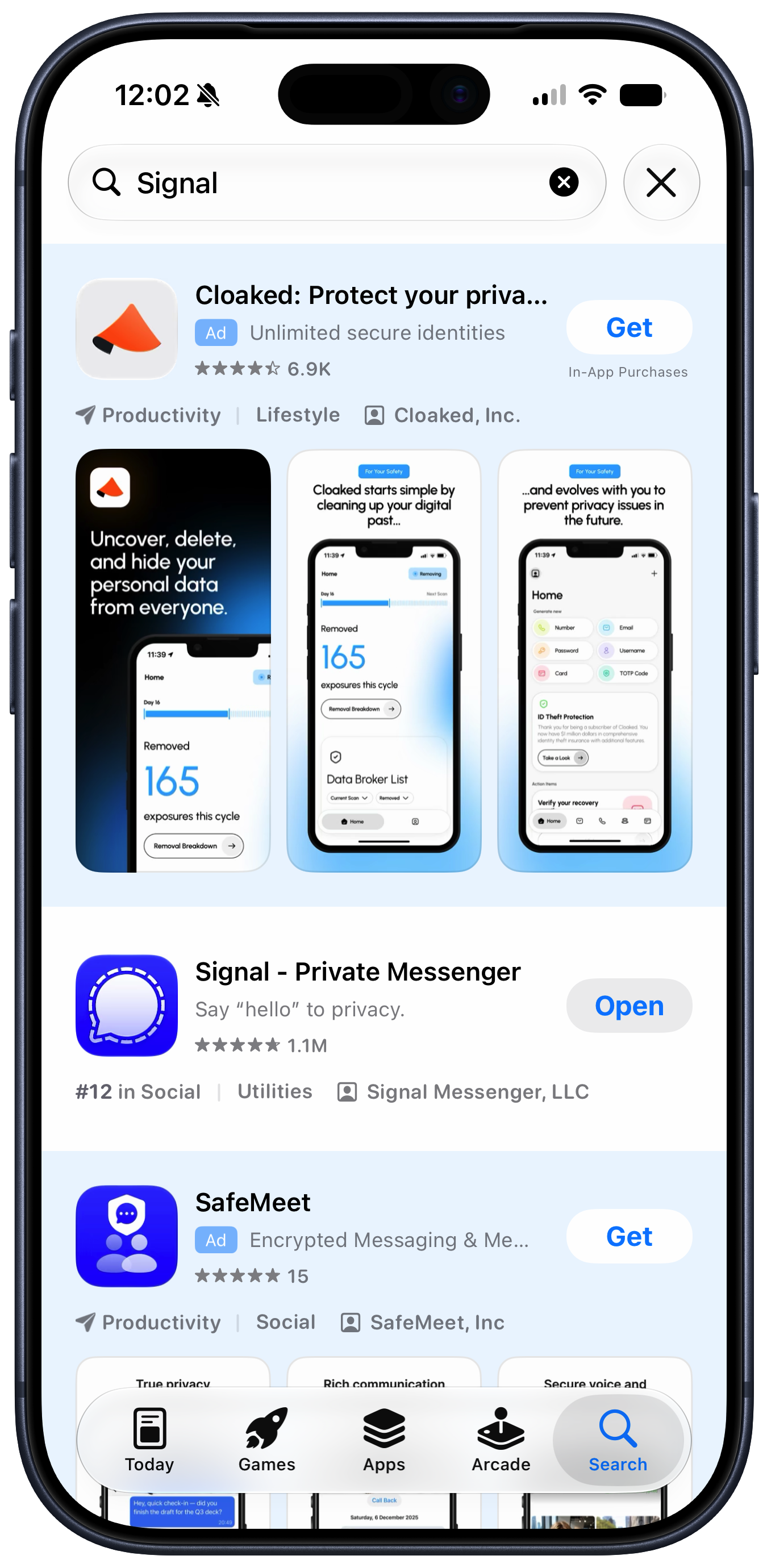
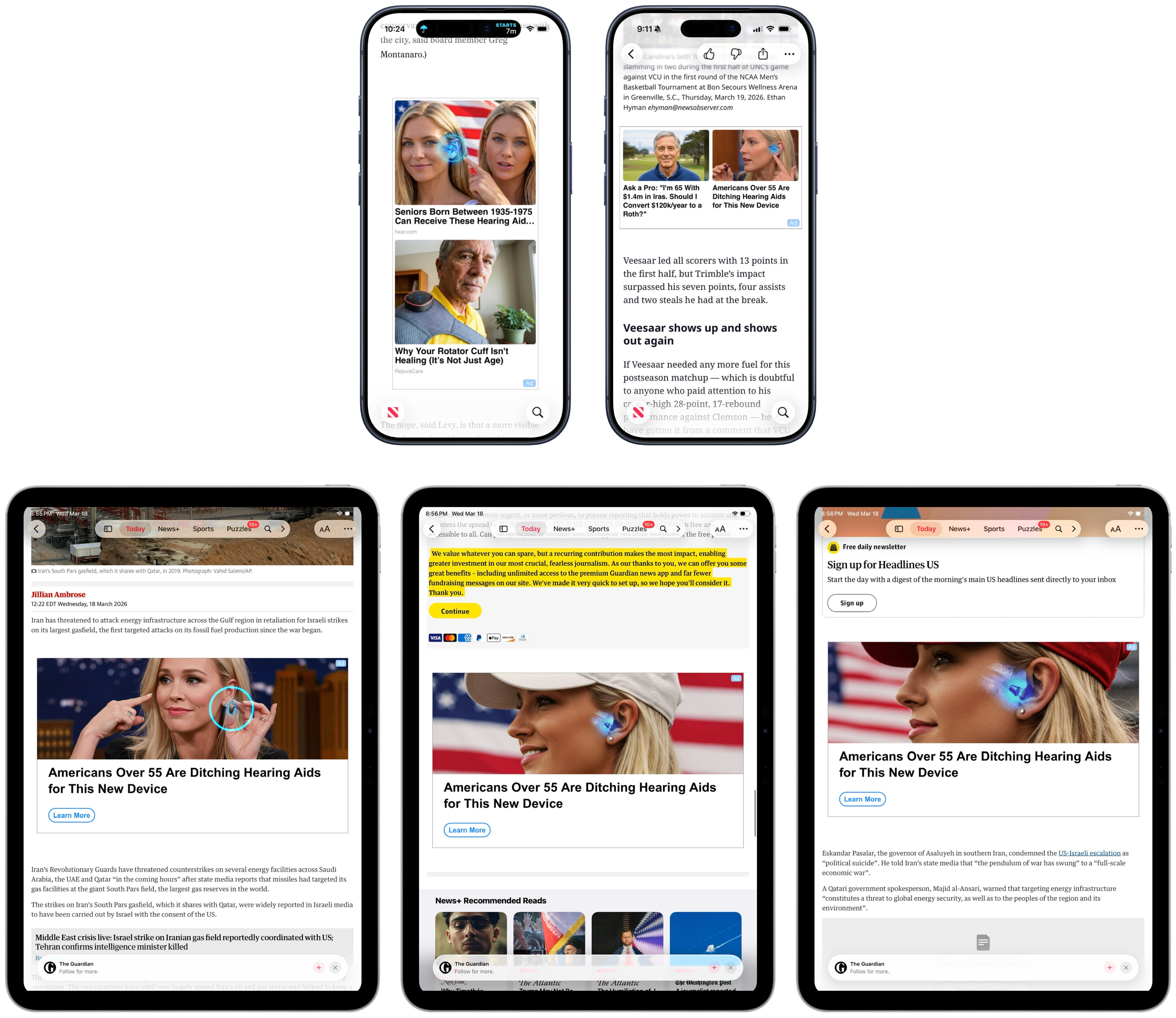
Some of [Cook’s letter] remains true, but has lost some truthiness — and truthiness matters. But some of it is no longer true, period. It’s no longer just “one small part” of Apple’s business that serves advertisers. Here in 2026, search results in the App Store not only show paid ads — frequently for casinos — but the search results are visually dominated by paid ads now that Apple has added a second ad to results. Apple News+ is a paid subscription that offers a genuinely great value for the number of paywalled publishers whose content it includes, but articles on the News app tend to include the weirdest AI-generated ads on the Internet. (How many young blond women am I supposed to believe need hearing aids?) And — at this writing, still “coming soon” — Apple is launching ads on Apple Maps. Apple Maps remains free of charge to use, so according to Tim Cook, we’re not the customer. We’re the product. Or, if you prefer, our frustration is the product.
[…]
The ratio of ads to organic results in App Store search — especially when measured in screen area — is clearly not aligned with Cook’s 2014 statement that “Our software and services are designed to make our devices better. Plain and simple.” Obviously not. App Store search today is designed primarily to generate more revenue for Apple. That’s not criminal, but it’s a change.
[…]
What gave Tim Cook’s privacy letter heft in 2014 wasn’t just the clarity of its plain language, but the fact that you didn’t have to take his word for it that the ads Apple showed you respected your privacy, because Apple didn’t show you ads in 2014. Apple today can’t say that.
[…]
John Ternus should return Apple’s privacy policy to its 2014 clarity. The trust Apple would earn from such a move would far out-value whatever revenue these ads pad to their already hefty and ever-increasing quarterly Services numbers.
I wish that were the case, but I fear this is kind of a Hotelling’s Law situation, where Apple can get most of the benefit by being just slightly better on this axis. Where else do its customers have to go?
In the second fiscal quarter of 2018, services generated $9 billion in revenue (net sales), whereas in Q2 2026, that amount had grown to $31 billion! In this blog post, I want to focus on understanding the relative financial importance of products and services for Apple.
[…]
In 2025, services were 42% of Apple gross margin. How does 26% of net sales become 42% of gross margin? The explanation is that services have a much lower cost of sales. The products gross margin was 37% of products net sales, while the services gross margin was an astonishing 75% of services net sales. In other words, Apple services are almost pure profit!
Does this 75% account for TV and movie production costs?
With persistent general inflation, consumers do not have unlimited money to spend on Apple products. At least in the near future, it’s reasonable to question how much further room is available for growth in profits from Apple products. To satisfy the demands of investors, Apple executives including CEO-elect John Ternus may be forced to rely even more than before on growth in services, which do not face as much pressure on cost of sales as hardware products.
Das Sicherheitsforschungsunternehmen Group-IB hat eine neue Mac-Malware entdeckt, die es „ClickLock Stealer“ getauft hat. Im Rahmen der Installation von ClickLock Stealer sperrt das Installationsprogramm Ihren Mac im Wesentlichen so lange, bis ein Anmeldekennwort in einem dauerhaft angezeigten Fenster eingegeben wird.
Sobald ein Passwort eingegeben wurde, wird die Malware installiert und erfasst heimlich Daten: Browser-Anmeldedaten, Krypto-Wallet-Erweiterungen, Desktop-Wallet-Dateien, Daten aus Passwortmanagern und vieles mehr.
Die Nutzer werden von Angreifern über ein gefälschtes Cloudflare-CAPTCHA ins Visier genommen, das sie dazu verleitet, einen Befehl in das Terminal von macOS zu kopieren und einzufügen. Sobald die Installation ausgelöst wird, werden Malware-Komponenten auf dem Mac installiert, während ein gefälschtes Cloudflare-Fortschrittsfenster angezeigt wird.
Versucht ein Nutzer jedoch, die laufende Installation abzubrechen, beendet die Malware laut Group-IB „alle sichtbaren Anwendungen alle 210 Millisekunden und lässt nur einen Passwortdialog auf dem Bildschirm stehen, bis der Nutzer gezwungen ist, den Anweisungen zu folgen“.
Dem Bericht zufolge befinden sich die meisten betroffenen Nutzer in Italien, den USA, Jordanien und Großbritannien. „Die geografische Verteilung passt zu einer finanziell motivierten Kampagne, die auf Nutzer in Regionen mit hohem Einkommen abzielt, in denen sowohl die Verbreitung von Kryptowährungen als auch der Marktanteil von macOS hoch sind“, so Group-IB.
So schützen Sie sich vor Malware
Der einfachste Weg, sich vor Malware zu schützen, besteht darin, das Herunterladen von Software von unbekannten Download-Seiten zu vermeiden. Öffnen Sie niemals Links in E-Mails oder SMS, die Sie von unbekannten und unerwarteten Absendern erhalten.
Wenn Sie eine Nachricht erhalten, die so aussieht, als stamme sie von einem Unternehmen, mit dem Sie geschäftlich zu tun haben, überprüfen Sie die E-Mail-Adresse des Absenders und sehen Sie sich die URL genau an. Wenn Sie einen Link oder eine Schaltfläche sehen, können Sie mit der Ctrl-Taste darauf klicken, „Link-Adresse kopieren“ auswählen und diese dann in einen Texteditor einfügen, um die tatsächliche URL dort zu überprüfen.
Apple hat die Software im Mac App Store geprüft, und dies ist der sicherste Weg, um Apps zu beziehen. Wenn Sie den Mac App Store nicht nutzen möchten, kaufen Sie Software direkt beim Entwickler über dessen Website. Wenn Sie darauf bestehen, geknackte Software zu verwenden, gehen Sie stets das Risiko ein, sich mit Malware zu infizieren.
AppleCare+ pricing has gone up for new Mac and iPad customers, adding another small cost increase to the Apple ownership equation. According to Bloomberg, Apple has raised monthly and annual AppleCare+ rates for new Mac and iPad plans, with the change applying to new coverage rather than existing plans already active on customer devices.
The increase is modest on paper. Reports indicate Apple has raised monthly AppleCare+ rates by 50 cents and annual plans by $5 for affected Mac and iPad products. For example, AppleCare+ for the 13-inch MacBook Air is now listed at $7.99 per month or $79.99 per year, up from $7.49 per month and $74.99 per year. The Mac mini now starts at $4.49 per month or $44.99 per year, while the 16-inch MacBook Pro costs $15.99 per month or $159.99 per year.
The numbers are not dramatic alone. The context is harder for buyers. Mac and iPad prices have already been under pressure from component costs, financing changes and longer upgrade cycles. AppleCare+ is optional, but for many customers buying expensive laptops and tablets, it is part of the real purchase price.
AppleCare+ Pricing Adds to the Ownership Cost
AppleCare+ pricing is one of those costs many buyers do not fully consider until checkout. The device price gets attention first. Then come storage upgrades, cellular connectivity, keyboard accessories, Apple Pencil, taxes, financing, software subscriptions and protection coverage.
For a MacBook Air, an extra 50 cents per month may not change the decision. For a MacBook Pro, iPad Pro or a family buying multiple devices, the increases add up over time. Annual plans rising by $5 also signal that Apple is comfortable nudging protection costs higher even when the change is small enough to avoid a major backlash.
AppleCare+ remains valuable for users who carry devices daily or depend on them for work. Macs and iPads are portable, expensive and often used in places where accidents happen: classrooms, coffee shops, airports, offices, studios, kitchens and family rooms. A cracked iPad screen or damaged MacBook display can be expensive without coverage.
Apple’s pitch is convenience as much as insurance. AppleCare+ includes priority support, battery service when capacity drops below Apple’s threshold, and reduced service fees for accidental damage. For iPad, AppleCare+ can also cover Apple-branded keyboard accessories and Apple Pencil damage under service-fee terms.
That makes the plan attractive. It also makes the higher price easier for Apple to defend.
Image Credit: Apple Inc.
New Customers Feel the Change First
The latest increase applies to new Mac and iPad AppleCare+ customers. Existing customers with active plans are not the immediate target of the reported change. That distinction helps Apple avoid angering subscribers who already signed up at previous rates, while still lifting revenue from new device buyers.
This approach fits Apple’s broader shift toward recurring coverage. Apple has been moving AppleCare+ further into monthly and annual subscription-style plans, with AppleCare One offering a bundled option for multiple products. The protection plan is no longer only a one-time add-on at purchase. It is increasingly part of Apple’s services layer.
That matters because Apple’s services business depends on recurring payments. AppleCare+ may not get the same attention as iCloud, Apple Music or Apple TV, but it is another way Apple extends the customer relationship beyond the hardware sale. A Mac or iPad purchase becomes not only a device transaction, but also a support and repair subscription.
The price increase strengthens that pattern. A small rise across a large base of new buyers can support services revenue without changing the product lineup.
Mac Buyers Should Compare Plans
Mac buyers now have more reason to compare AppleCare+ options before adding coverage. Apple’s Mac plans vary by model because repair risk and device cost vary. A Mac mini plan starts lower because the device is stationary and less likely to face drops or screen damage. A 16-inch MacBook Pro costs more because it is a high-value portable machine with expensive components.
For a buyer choosing a MacBook Air, AppleCare+ may be easier to justify if the laptop travels daily. Students, journalists, consultants, photographers, editors and business travelers are more exposed to accidental damage than someone who leaves a Mac mini on a desk.
For MacBook Pro buyers, the decision often depends on work dependency. If the Mac is the primary income tool, AppleCare+ can be less about repair math and more about reducing downtime. Access to Apple support and lower repair costs can be worth the subscription if the device is central to daily work.
Still, users should compare the plan cost with their own risk. A careful desktop Mac user may not need the same coverage as a frequent traveler. AppleCare+ is useful, but it should not be automatic for every buyer.
iPad Buyers Face a Different Calculation
iPad AppleCare+ has its own logic because iPads are more physically exposed than Macs in many homes. They are passed between family members, used by children, carried around the house, taken to school, placed in bags and paired with accessories that raise the total cost of ownership.
For iPad Pro and iPad Air buyers, AppleCare+ can make sense because screen repairs and accessory damage can be costly. Apple’s current AppleCare+ terms for iPad include service fees for screen damage, other accidental damage and covered accessories. That can make the plan appealing for users who buy Magic Keyboard, Apple Pencil Pro or a high-end iPad Pro.
The decision becomes more complicated for entry-level iPad buyers. A lower-cost iPad may not justify years of coverage for every user, especially if it stays mostly at home. Families, however, may see the protection differently. An iPad used by children faces more risk than a laptop used carefully by one adult.
The new pricing does not change the core question. It makes the answer slightly more expensive.
AppleCare Products | Warranty Check
AppleCare One Becomes More Relevant
AppleCare One gives Apple another way to soften individual plan increases. The bundle starts at $19.99 per month for up to three eligible products, with additional devices available for $5.99 per month each. It includes AppleCare+ benefits and adds theft and loss coverage for eligible iPhone, iPad and Apple Watch products.
For users with only one Mac or one iPad, AppleCare One may not be the best fit. For users with multiple devices, it can become more attractive as individual plans rise. A person with an iPhone, iPad and Mac may compare three separate AppleCare+ plans against the bundle and find the monthly difference easier to justify.
That is likely part of the strategy. Apple can raise individual plan prices modestly while giving heavier ecosystem users a bundled option. The company has used similar logic across services with Apple One, where the value increases as users subscribe to more Apple products.
The same principle now applies to protection. The deeper a customer is inside Apple’s hardware ecosystem, the easier it becomes to turn support coverage into a monthly bundle.
Small Increase, Larger Signal
AppleCare+ pricing increases may be small, but they arrive during a period when Apple is asking customers to absorb more costs across the ecosystem. Device prices, component pressure, cellular financing, AI hardware demands and service subscriptions all affect the total ownership picture.
The AppleCare+ change fits that pattern. Apple is not dramatically changing the service. It is raising the price slightly while keeping the value proposition intact: lower repair costs, battery service, accidental damage coverage and Apple support.
For buyers, the best response is not panic. It is math. Compare the plan price with the device cost, repair risk, usage pattern and whether multiple Apple products would make AppleCare One more efficient. Someone buying a MacBook Pro for travel may want the protection. Someone buying a Mac mini for a desk may not. A family iPad may be a stronger candidate than a carefully handled personal tablet.
AppleCare+ remains a useful safety net. It is just a slightly more expensive one for new Mac and iPad buyers, and that makes the real cost of the device a little higher than the number on the product page.
Security researcher Group-IB has discovered new Mac malware that it has dubbed ClickLock Stealer. As part of the installation of ClickLock Stealer, the installer will essentially lock your Mac until a login password is entered in a persistent window. Once a password is entered, the malware is installed and covertly captures data: browser credentials, crypto wallet extensions, desktop wallet files, password manager data, and more.
Users are targeted by threat agents using a fake Cloudflare CAPTCHA that persuades users to copy and paste a command in the Terminal of macOS. Once the installation is triggered, malware components are installed on the Mac while a fake Cloudflare progress window is displayed.
However, if a user trying to cancel the installation in progress, the malware then kills “every visible application every 210 milliseconds, leaving only a password dialog on screen until the user is forced to comply,” according to Group-IB.
The report also states that the highest number of users targeted are located in Italy, the U.S., Jordan, and the U.K. “The geographic distribution is consistent with a financially-motivated campaign targeting users in high-income regions where cryptocurrency adoption and macOS market share are both elevated,” said Group-IB.
How to protect yourself from malware
The easiest way to protect yourself from malware is to avoid downloading software from unfamiliar download sites. Never open links in emails or texts you receive from unknown and unexpected sources. If you get a message that looks like it is from an entity that you do business with, check the sender’s email address and inspect the URL carefully. If you see a link or button, you can Control-click it, select Copy Link Address, and then paste it into a text editor to see the actual URL to check it there.
Apple has vetted software in the Mac App Store, and it is the safest way to get apps. If you prefer not to patronize the Mac App Store, then buy software directly from the developer and their website. If you insist on using cracked software, you will always risk malware exposure.
TL;DR: Use code LEARN to get a Babbel lifetime subscription for $159 through 11:59 p.m. Pacific on July 31 — 14 languages, thousands of lessons, and no monthly fees. Valid for new users in the U.S. only.
Most language apps have leaned hard into AI-generated exercises and gamified drills. Babbel has stayed on a different path: its courses are built by a team of more than 150 linguists and language educators, with a focus on real conversations and cultural context rather than algorithm-written content, which is a big part of why it’s held onto a loyal following on Mac, iPhone, and iPad alike.
Unlimited lifetime access across all 14 languages, including Spanish, French, German, Italian, and more, for new U.S. users
Lessons built by expert linguists to help you build real-world conversation skills quickly, not just memorize word lists
Speech recognition technology to help pronunciation sound natural instead of textbook
Learn on desktop or mobile with synced progress and downloadable lessons for offline practice
Personalized review sessions using spaced repetition so new vocabulary actually sticks
Courses built around practical, everyday topics like dining, directions, shopping, and meeting new people
Multiple skill levels, so you can start from the basics or jump in at intermediate or advanced
One-time payment — no renewals, no subscriptions, no surprise charges later
Backed by more than 400 verified reviews and a 4.8/5 average, plus 4.5/5 on the Google Play Store and 4.6/5 on the App Store
A study conducted with researchers at Yale University found that after roughly 15 hours of Babbel lessons, 100% of participants improved their oral proficiency within three months, a notable result for a program built around short daily sessions rather than classroom study. Real users back that up too.
One verified buyer wrote: “Far better software for language learning than the others I’ve tried. Babbel makes an effort to explain why a language is set up the way it is rather than just throwing gamified exercises at you.”
For comparison, paying for Babbel’s standard monthly plan over three years would run $646.20, so the lifetime option is worth weighing if you’re planning to stick with it.
ExpressVPN has kept its 30-day money-back guarantee on pause after launching a new promotion to follow its previous World Cup promotion.
The ExpressVPN Summer Tech Competition / Sweepstakes will see the company give away 30 new iPhone 17 Pros, with the caveat that users are not covered by ExpressVPN’s usual 30-day money-back guarantee.
The promotion runs from 11 July 2026 to 11:59 pm BST on 9 August 2026, directly following the ExpressVPN FIFA World Cup 2026 Ticket Giveaway event, which ran from 10 June 2026 to 11 July 2026.
During the promotion, each new sign-up gains 10 entries into the iPhone 17 Pro raffle, with the caveat that all sales are final during this period.
This means that ExpressVPN will not have offered its usual 30-day money-back guarantee for 60 days by the time the Summer Tech Sweepstakes promotion concludes.
Mixed reactions
As one of the best VPNs, ExpressVPN is available on a variety of platforms (Image credit: ExpressVPN)
On the surface, it might seem like ExpressVPN’s decision to remove the money-back guarantee during these promotional periods is logical.
After all, if the option for a refund were still available after entering a raffle for World Cup tickets or a new iPhone, users might attempt to game the system by entering the contest and then cancelling their ExpressVPN plan if they win.
However, ExpressVPN electing to deny users a money-back guarantee for two consecutive months has worried some users, representing a break from industry-standard practice.
Feedback to the decision has been mixed at best, with multiple commenters in the r/Express_VPN speaking out. User QueenBe12 warned others to “be careful” while user rockyyguy called the move “predatory business”, asking "who came up with this idea?"
In a statement given to TechRadar, ExpressVPN said: "ExpressVPN sometimes runs optional, limited-time promotions — such as the current prize draw — which customers can choose to join.
These promotional plans are clearly identified and disclosed at the point of purchase, including that they offer additional benefits, such as prize-draw entry, in place of the 30-day money-back guarantee. This allows customers to make an informed choice about which option best suits them before they subscribe.
Whether a money-back guarantee is offered or not, customers' statutory rights are unaffected. Anyone on a promotional plan can also contact ExpressVPN Support to request a refund, and each request is considered on its merits."
Why are money-back guarantees important for VPNs?
A money-back guarantee gives you the chance to test out a VPN before committing to it long-term. (Image credit: ExpressVPN )
Like most software services, VPNs can be paid for as monthly subscriptions – but almost all VPNs offer huge discounts for signing up to one- or two-year-long plans.
In the case of ExpressVPN, a two-year plan offers an 84 per cent discount versus renewing monthly, and you get four extra months free of charge.
As such, when we talk about VPN pricing here at TechRadar, we’re usually referring to the price of one of these extended plans. It’s typically the most economical choice for most users.
However, our price-based recommendations are usually made in the context of money-back guarantees, which protect users from long payment plans if they sign up to the wrong option or realize that a certain VPN isn’t for them.
These guarantees are offered by many of the best VPNs, and many smaller and mid-tier brands will provide them as well. NordVPN and Surfshark VPN both offer 30 days; CyberGhost bumps this up to 45 days, and Norton VPN gives users a full 60 days.
This is all to say that ExpressVPN removing its money-back guarantee, even for a promotion, is a pretty big deal and a genuine reason to consider avoiding a longer plan until the promotional period concludes.
So, if you’re still keen on picking up ExpressVPN, consider picking up a monthly plan or waiting until 10 August for a longer plan, and be sure to check out our ExpressVPN review for an in-depth breakdown of its features and performance.
In the past year I've spent tens of hours streaming with VPNs, and one thing is consistently problematic for even the best VPNs — live events.
So, if you're traveling and keen to catch BBC's coverage of England vs Argentina later this evening instead, you might think you're stuck. Thankfully, NordVPN proved to be the one streaming VPN I tested that consistently performed well in these scenarios.
Over the past year, I've used NordVPN with Peacock, BBC iPlayer, TNT Sports, ITVX, and 7Plus. And compared to any other VPN, it's proved the most effective.
I experienced the least delayed streams, the least buffering, and, most importantly, the fewest complete connection dropouts when using NordVPN. So, while cheaper alternatives such as Norton VPN and Surfshark exist, if you want the most reliable performance, this is where I'd put my money.
If you don't want a long term commitment, you could always choose to pick a monthly plan. For $15, you can watch the rest of the tournament and gain all the additional security benefits that come with a VPN.
NordVPN: from $3.49/month or $15 for one month It might not be the cheapest but NordVPN's price is more than worth it considering its performance. It's the most reliable VPN I've streamed with and it's packed with added security features to keep you secure once you've watched the big game. Unsure? Either pick up a monthly plan for only $15 or make use of NordVPN's 30-day money-back guarantee.View Deal
You don't need NordVPN's most advanced features to watch England with a VPN. That's a good thing, as right now its premium plans are considerably more expensive than many other providers.
With long term plans, Surfshark plans start at $2.49/month, a full dollar cheaper per month; the same goes for Norton VPN. If you're really budget-focused, both PIA and Cyberghost are less than $1.60 per month right now, too.
But, should you choose a NordVPN Plus plan or above, you do get some great perks. NordPass, the best password manager we've tested, cloud storage, dark web monitoring, and more are on offer.
It's worth mentioning that buying the more premium plans monthly will set you back at least $20, so I'd recommend signing up for a longer duration if you prefer these extra features.

 Login
Login