❌

Normal view

Apple Notes iOS 27 Upgrade Adds Smarter Organization

1 August 2026 at 15:43

Apple Notes in iOS 27 receives a focused collection of upgrades designed to make long documents easier to navigate and information simpler to move between apps.

Section links allow users to jump directly to headings inside a note. Divider lines create clearer visual boundaries, while expanded Markdown support improves workflows involving websites, writing tools and plain-text editors.

Siri AI introduces the most ambitious addition by creating notes, adding information to existing documents and transferring answers from a Siri conversation without requiring manual copying.

Image Playground also becomes more capable inside Notes, gaining additional visual styles and photorealistic image generation through Apple’s new cloud-based model.

Not every feature requires Apple Intelligence. Divider lines, section links, Markdown tools and the updated interface work on every iPhone compatible with iOS 27. Siri AI and advanced Image Playground capabilities need newer hardware and may have additional language or regional restrictions.

A smartphone displays a checklist titled "Annual hiking trip with Dad," listing essentials like sun protection, snacks, and compass—showcasing Teamwork Across Apple Devices for seamless apple notes collaboration.
Image Credit: Apple Inc.

Apple Notes iOS 27 Adds Section Links

Section links solve one of the largest problems affecting long notes: reaching information located several screens below the beginning.

A user can now select text, choose Add Link and connect it to any heading or subheading inside the current note. Tapping that linked text immediately moves the reader to the selected section.

The feature can turn the opening of a document into a manual table of contents. A project note might contain links to its schedule, budget, participants, research and outstanding tasks without requiring separate documents.

To create a section link:

Select text > Add Link > Link to Section > Choose a heading

Notes displays the headings and subheadings already present in the document. Regular body paragraphs do not appear as destinations, so the note must use Apple’s title or heading formats before links can be created.

To format a destination:

Select the section title > Formatting > Heading or Subheading

The visible link text does not need to match the destination heading. A phrase such as “View the current budget” can link to a section titled “Financial Information.”

Section links differ from the existing ability to connect separate notes. Apple Notes already allows users to create internal links leading from one document to another. The new control moves within the same document instead.

That distinction is useful for meeting records, research files, travel plans and study material that become too long for ordinary scrolling but do not need to be divided into several notes.

Links should continue working when the document is shared through iCloud because they point to structural elements inside the note rather than fixed screen positions.

Renaming or deleting a destination heading may affect its link. Users maintaining complex documents should test their navigation after reorganizing major sections.

Divider Lines Improve Visual Structure

Apple Notes in iOS 27 adds horizontal divider lines as a native formatting element.

The line creates a visible separation across the document without requiring users to type repeated hyphens, underscores or other characters.

To add one:

Place the cursor > Open the edit menu > Insert Divider Line

The divider is inserted at the cursor position and moves with the surrounding content as the note changes.

A horizontal line can separate meeting notes by date, distinguish reference material from personal comments or divide a recipe into ingredients, preparation and serving information.

It also provides structure without making every section a heading. Headings define the hierarchy used by section links, while dividers create a visual break that does not become another navigation destination.

Typing a row of hyphens previously produced an inconsistent substitute. The characters could wrap on a narrow screen, change length after editing or become difficult to select. The native element maintains its appearance as the document moves among iPhone, iPad and Mac.

Divider lines should be used selectively. Adding one between every short paragraph can make the note look more fragmented rather than organized.

The strongest layout combines headings for major subjects, subheadings for smaller divisions and divider lines where one type of content clearly ends before another begins.

Markdown Moves More Easily Into Apple Notes

Apple Notes gained the ability to import and export Markdown files with iOS 26. The iOS 27 upgrade removes additional steps from copying content between Notes and Markdown-based tools.

Markdown uses plain-text characters to represent formatting. A hash symbol can identify a heading, pairs of asterisks can create bold text and square brackets can define a link.

The format is widely used by writers, developers, documentation systems and publishing platforms because it remains readable without requiring a proprietary editor.

When Markdown-formatted text is pasted into Apple Notes in iOS 27, the app automatically converts the syntax into rich text. Headings become formatted headings, links become clickable and emphasis appears as bold or italic text.

A pasted line such as Project Schedule appears as a formatted heading rather than displaying the two hash symbols.

Moving content in the opposite direction is also easier. Apple has added a Copy as Markdown command that converts selected rich text into Markdown syntax before placing it on the clipboard.

To use it:

Select the text > Open the edit menu > Copy as Markdown

The result can be pasted into a content-management system, code editor, Markdown document or another writing application while preserving supported formatting.

Copy as Markdown does not transform Apple Notes into a complete Markdown editor. Users continue writing through the familiar rich-text interface rather than viewing raw syntax throughout the document.

Complex attachments may not translate perfectly. Scanned documents, drawings, audio recordings, embedded files and some tables do not have universal Markdown equivalents.

Basic elements such as headings, links, emphasis and lists provide the most dependable transfer. Users preparing an important publication should review the pasted result before assuming every element survived the conversion.

Two iPad screens side by side: the left highlights a video call with a woman and presentation notes, while the right displays a digital report cover titled "#CORECORE: A Trend Research Report," showcasing handwritten notes—demonstrating iPad Air specs in action.
Image Credit: AppleMagazine

Siri AI Can Create and Update Notes

Siri AI gives Apple Notes in iOS 27 a more direct connection with information generated or located through the assistant.

A user can ask Siri a question, refine the answer through conversation and save the result into a new note. The transfer happens without selecting the response, copying it and leaving Siri to open Notes manually.

A request could take the following form:

“Create a note called Kyoto Trip and add this itinerary.”

Siri can also target an existing document when the user identifies it clearly:

“Add these restaurant suggestions to my Kyoto Trip note.”

The integration extends beyond saving complete answers. Siri AI can reorganize poorly formatted information, convert text into a clearer structure and place the revised version inside Notes.

Someone collecting an unorganized group of tasks could ask Siri to separate them by priority before saving the result. A block of research could be converted into headings and shorter paragraphs.

Siri’s personal-context capabilities can help locate an existing note when the precise title is forgotten. The assistant is designed to search information across apps and understand requests using details connected to the user.

These actions remain subject to permissions. Siri should not silently place information into a document without recognizing the requested destination and action.

Users should review AI-generated material before treating it as authoritative. Reformatting supplied text carries less factual risk than asking Siri to generate research, dates, quotations or instructions from general knowledge.

Siri AI Requires Newer iPhone Hardware

The main Apple Notes iOS 27 update runs on iPhone 11 and later, as well as the second-generation iPhone SE and newer models.

Siri AI has a narrower hardware requirement. Apple lists iPhone 15 Pro, iPhone 15 Pro Max and every iPhone 16 or later model as compatible with the new Apple Intelligence architecture.

An iPhone 15, iPhone 15 Plus, iPhone 14 or iPhone 11 can receive section links, dividers, Markdown support and the redesigned Notes interface. Those devices cannot use the Siri AI note-writing actions.

This separation means two iPhones running the same operating system can display different Notes capabilities.

Siri AI is scheduled to reach users as a beta later in 2026, beginning in English. Apple plans to expand language availability, but individual capabilities may not arrive simultaneously in every supported language.

The assistant will not initially be available on iPhone or iPad in the European Union. Apple has also said its new Apple Intelligence features will remain unavailable in China while the company works through regulatory requirements.

Ordinary Siri controls may continue to perform basic actions on unsupported devices, such as creating a simple dictated note. They should not be confused with the new ability to hold a conversation, reorganize information and add the result to a chosen document.

A glowing, multicolored wave and orb on a dark background, resembling Apple’s Siri icon, with a small Apple logo in the bottom right corner.

Image Playground Expands Inside Notes

Image Playground remains integrated with Apple Notes in iOS 27 and receives a substantially more capable generation model.

The upgraded system can produce higher-quality images in a wider range of visual styles, including photorealistic results. Earlier Image Playground versions concentrated on illustration, animation and sketch-like appearances.

Users can describe an image and insert the generated result into the current note. A travel plan might receive a destination image, while a creative project could use generated concept art beside written ideas.

Photorealistic generation runs through Private Cloud Compute rather than entirely on the iPhone. Apple says requests processed through this architecture are not stored or made accessible to the company.

Generated images automatically include a hidden SynthID watermark identifying them as AI-created. The watermark does not appear as a visible label across the picture, but it provides a technical signal that compatible systems can detect.

Image generation may have daily usage limits because it depends on powerful server models. Apple says most iCloud+ plans will provide increased access, although the exact allowance can depend on the subscription and service conditions available at release.

The complete Image Playground experience may not appear in every early iOS 27 beta. Apple can activate or adjust cloud-dependent features separately while testing the operating system.

New Icons Clarify Shared Notes and Folders

Apple Notes adopts the wider iOS 27 design changes through refreshed buttons, menus and Liquid Glass interface elements.

The Notes app icon has been updated while preserving the familiar yellow-and-white paper design. The change keeps the app recognizable without leaving it visually disconnected from the new system icons.

Shared material receives clearer identification. The shared folder displayed near the top of the folder list now uses a blue icon, separating it more clearly from private iCloud and local folders.

Individual shared notes and folders also receive revised symbols. These indicators make it easier to understand whether another person can view or edit material before sensitive information is added.

The distinction matters because a collaborative note can look almost identical to a private document once it is open. A clearer icon in the list provides another warning before the user begins editing.

Liquid Glass changes the appearance of controls and menus but does not alter the underlying note format. Existing notes, scans, checklists, attachments and locked documents remain available after the update.

People using accessibility settings such as increased contrast, reduced transparency or reduced motion may see a modified version of the visual design.

Existing Notes Features Remain Available

The iOS 27 changes build on a much larger set of capabilities introduced during earlier releases.

Apple Notes can already scan documents, attach PDFs, record audio, generate transcripts, solve mathematical expressions, create checklists and collaborate through iCloud.

Users can link one note to another, place notes inside folders, apply tags and create Smart Folders that collect documents according to selected rules.

Locked notes can use a device passcode or separate password, while Face ID provides faster access on supported iPhones.

The app can also identify handwriting, search text inside scanned documents and recognize information contained in images.

None of those existing tools has been replaced by Siri AI or Markdown. The new version concentrates on moving through large notes and transferring information with less manual work.

Section links are particularly effective when combined with audio transcripts or lengthy scanned research. A user can create headings above important material and place navigation links at the beginning of the document.

Markdown support addresses another gap by making Notes more practical as the first stage of a publishing workflow rather than a closed destination for text.

Apple Notes iOS 27 - A laptop running macOS 27 displays a colorful article on student body elections, with a sidebar of posters on the left and a chat window open on the right, where an AI assistant is generating a response.
Image Credit: Apple Inc.

What to Check Before Installing the iOS 27 Beta

Apple Notes in iOS 27 is available for testing through prerelease software, with the complete operating-system release scheduled for the fall.

Beta software can contain synchronization failures, interface problems and changes that Apple has not finished documenting. Notes is especially sensitive because its content may synchronize immediately across every device using the same Apple Account.

Before installing a beta on a primary iPhone, users should confirm that important notes have finished syncing and that another copy of critical information exists outside the beta device.

A Mac, iPad or iCloud.com can be used to verify whether recent documents have reached the server. Exporting especially important notes as PDFs or Markdown files provides an additional copy that does not depend on the Notes database.

Collaborative notes require more caution. People using older operating systems may not see every new formatting element exactly as intended, particularly while iOS 27 remains in testing.

The public release should resolve many compatibility issues, but Siri AI will follow its own beta schedule and regional limitations. Installing iOS 27 alone will not guarantee that every intelligent Notes action appears immediately.

Apple can still modify menu locations, visual elements and cloud-based features before the final version arrives. The safest time to reorganize a large Notes library around section links will be after every frequently used Apple device can install its corresponding fall update.

The post Apple Notes iOS 27 Upgrade Adds Smarter Organization appeared first on AppleMagazine.
Spying on a Split Comet

31 July 2026 at 17:00

240P

Traversing through the solar system, a comet split in two, and a recent study used six months of observations to investigate when and why.

A Split Comet

Orbit map

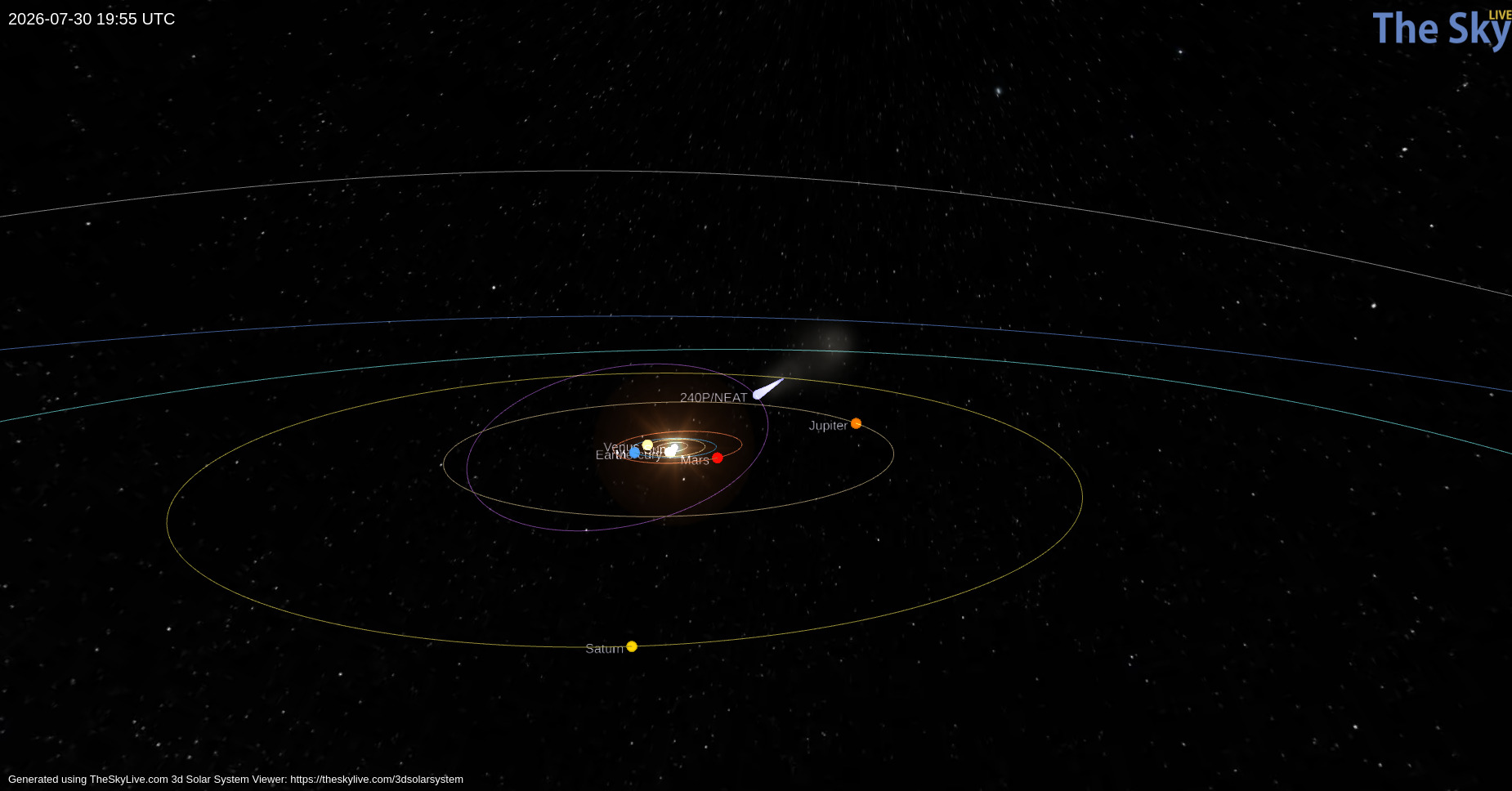
Orbital path of 240P/NEAT (purple) and the position of the comet on 30 July 2026 (light blue teardrop). Click to enlarge. [TheSkyLive]

While we often think of comets as icy remnants of the solar system’s formation that populate the Kuiper Belt and Oort Cloud, some comets make their homes closer to the Sun. One such class, known as Jupiter-family comets, traveled from the Kuiper Belt to short orbital periods (less than 20 years) whose paths through the solar system are shaped by Jupiter’s gravity. Discovered in 2002, 240P/NEAT is a Jupiter-family comet that loops between Jupiter and Mars on a 7.6-year orbit. Making close approaches to Jupiter, 240P experiences frequent, strong interactions with the gas giant that can alter the comet’s orbit and cause sudden bursts in brightness as ice and dust are heated and outgassed from the comet’s surface.

Most recently, 240P swept closest to Jupiter in July 2007, shifting the comet’s perihelion distance (closest approach to the Sun) from 2.5 to 2.1 au, and several long-lived bursts in brightness in 2018/2019 could have been spurred by this orbital shift. Excitingly, a fainter comoving object, 240P-B, was first reported in June 2025 as the comet headed toward perihelion — at some point recently, 240P had split in two!

Over the last century, numerous split comets have been recorded, but detailed physical studies of these objects are rare. With growing evidence suggesting splitting and disintegration are the primary mechanisms of comet destruction, understanding the properties and cause of 240P’s split is imperative.

Observing 240P

With 240P on the move to perihelion, David Jewitt (University of California, Los Angeles) and collaborators monitored the comet from October 2025 to April 2026 to establish the likely cause of its split. Employing the Alhambra Faint Object Spectrograph and Camera on the 2.56-meter Nordic Optical Telescope, the authors obtained detailed imaging of the comet from two months before to four months after perihelion to characterize both components.

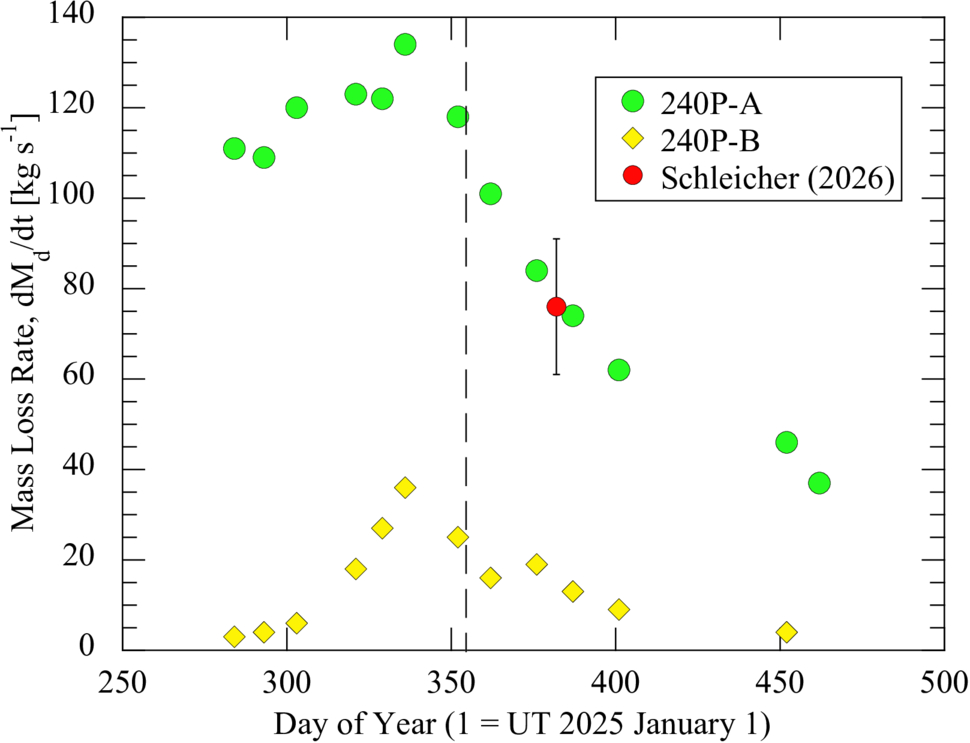
Tracking both photometric and morphological changes across their observations, the authors estimated the dust-loss rates, physical sizes, and separation speed of 240P-A and 240P-B. The brighter component, 240P-A, has an estimated radius between 400 and 600 meters and a dust-loss rate almost four times higher than 240P-B. Because 240P-B is fainter, its radius is harder to constrain observationally. From its lower dust-loss rate and lower brightness, the authors estimated a radius around 300 meters (and no smaller than 50). Based on how the separation of the two comet pieces changes over time, the authors determined that the split of 240P occurred at least three years before their observations.

dust mass-loss

Dust mass-loss rates for 240P-A (green circles) and 240P-B (yellow diamonds) over the course of the observations. Both components peak shortly before perihelion (dashed vertical line). Click to enlarge. [Jewitt et al 2026]

Source of the Split

How exactly did this fragmented comet get this way? The authors considered a number of comet-splitting mechanisms: tidal forces, asteroid impact, pressure buildup below the comet’s surface, thermal stresses, and rotational instability. Given the comet’s orbit, it has not had close enough encounters with the Sun or other planets for tidal forces to be the culprit, and it traverses well above the asteroid belt, avoiding collisions. Pressure buildup and thermal stresses can fracture comets, but both are unlikely to launch such a large fragment as seen in this system.

This leaves rotational instability as the likely source of 240P’s split. Outgassing torques lead to rotational instability, especially in subkilometer comets like 240P, and 240P has exhibited recent outgassing. In addition, the separation speed between the 240P components is comparable to the escape speed of the primary comet, which is expected for rotational breakup. To confirm this hypothesis, future observations measuring the rotation period of 240P are necessary, but this study adds to the small number of split-comet observations that aid in understanding comet destruction.

Citation

“Investigation of Split Comet 240P/NEAT,” David Jewitt et al AJ 172 113. doi:10.3847/1538-3881/ae83ac

The post Spying on a Split Comet appeared first on AAS Nova.

Monthly Roundup: The Fourth Catalog of Gravitational Wave Events from LIGO, Virgo, and KAGRA

29 July 2026 at 17:00

Illustration of gravitational waves emanating from a pair of black holes approaching a merger

A recent Focus Issue of the Astrophysical Journal Letters describes the fourth version of the catalog of gravitational wave events (GWTC-4.0) from the Laser Interferometer Gravitational Wave Observatory (LIGO), the Virgo interferometer, and the Kamioka Gravitational Wave Detector (KAGRA).

This catalog contains transient gravitational wave events recorded through January 2024, during the observatories’ fourth observing run, which concluded in November 2025. GWTC-4.0 displays the results of significant improvements to our suite of gravitational wave detectors, including higher-powered lasers and reduced quantum noise. A fifth catalog of gravitational wave events was released in Spring 2026, with the accompanying scientific articles being submitted to the Astrophysical Journal and the Astrophysical Journal Letters.

This Monthly Roundup consists of short descriptions of each of the currently published research articles in the LIGO–Virgo–KAGRA Gravitational Wave Transient Catalog (GWTC): Release 4 Focus Issue. Each snippet links to the corresponding research article, and the Focus Issue landing page is linked at the bottom of this post. Be sure to revisit the landing page to catch new articles as they’re published!

Introducing GWTC-4.0

timeline of gravitational wave observatories' observing runs

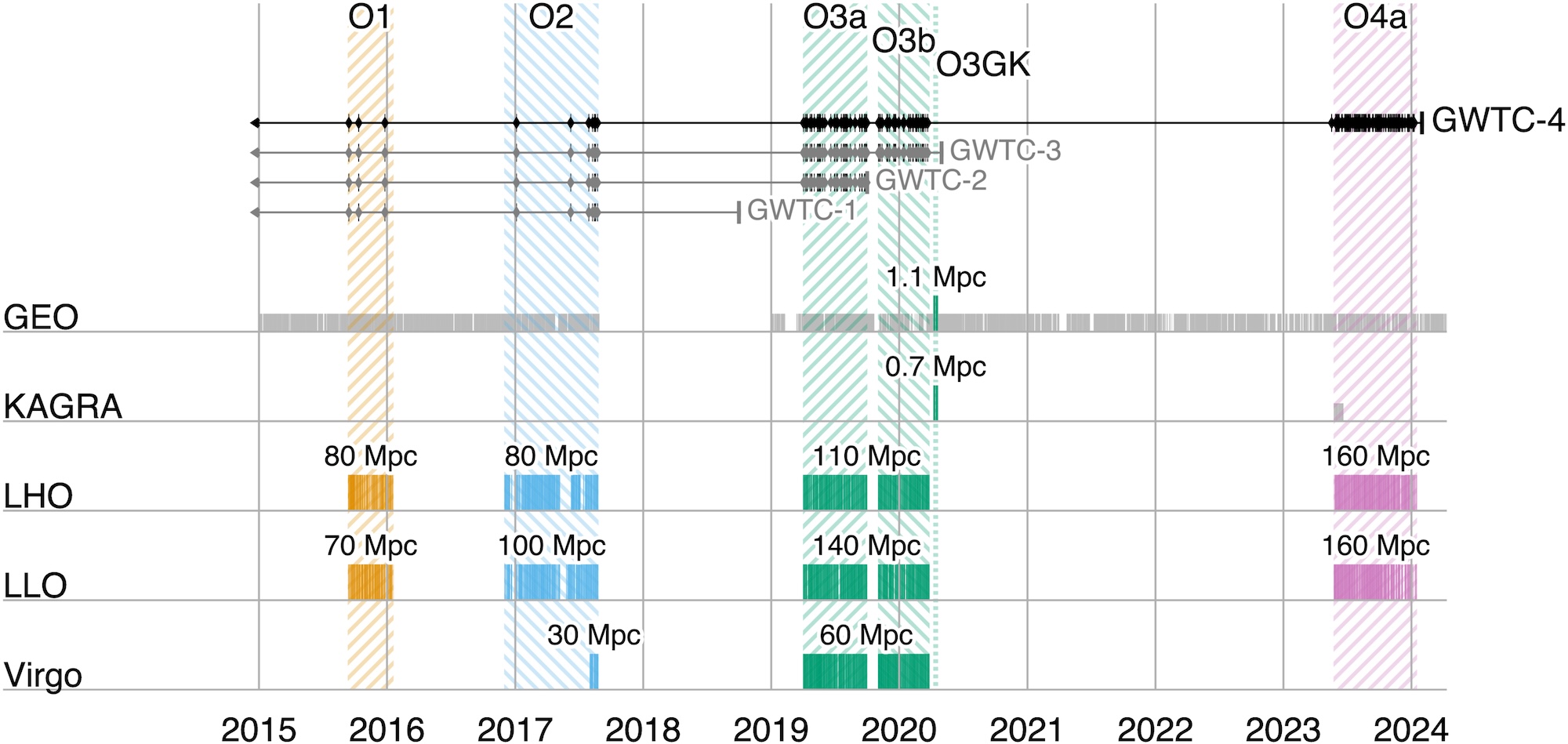
A timeline showing observing runs between 2015 and 2024. Click to enlarge. [LVK Collaboration 2025]

First up, the collaboration orients the reader to many important aspects of the catalog and the articles contained in the Focus Issue. This article describes how four detectors, each with two arms 3–4 kilometers long, monitor gravitational waves from Hanford, Washington; Livingston, Louisiana; Santo Stefano a Macerata, Italy; and Hida, Japan. These detectors work in concert, ready to receive signals from the universe during coordinated observing runs separated by periods of downtime for construction and commissioning. During these pauses, a smaller instrument, the German–British GEO600 gravitational wave detector, has kept an ear out for signals and will continue to do so until the end of 2026.

After these detectors record subtle spacetime squiggles from compact objects colliding millions to billions of light-years away, the collaboration converts the raw signals into the data contained in catalogs like GWTC-4.0. This process involves modeling the gravitational wave signals, filtering them to identify candidate transients, and pinpointing the most significant events.

After collecting and cleaning the signals, the collaboration undertakes a critical step: making their data accessible to researchers and the public. The data are available through the Gravitational Wave Open Science Center, and the Focus Issue article on open data describes how to navigate the online portal, how the datasets archived online are structured, and how the data were calibrated.

Science Results

This fourth version of the gravitational wave transient catalog greatly expands the sample of gravitational wave transients recorded by detectors across the globe. Including events from previous catalogs, GWTC-4.0 brings us to 218 events for which the probability of the source being astrophysical in nature is more than 50% and for which there is little chance of the signal being an instrumental artifact. This represents a more than 100% increase in the number of recorded gravitational wave events fulfilling this criterion, broadening our understanding of colliding compact object pairs. This release also includes some superlative signals, such as the most massive black hole binary with a low false-alarm rate and the highest signal-to-noise ratio for a gravitational wave event thus far.

Detected in November 2023 by both LIGO Hanford and LIGO Livingston, GW231123 is in many ways an exceptional gravitational wave transient. The total mass of the merging components appears to be between 190 and 265 solar masses, and the false-alarm rate for this signal is less than one per year. This makes it the most massive merger event with such a low false-alarm probability. The two components also appear to have high spins, which complicates the interpretation of the signal with existing models. A binary black hole merger in which one or more components lies within the pair-instability mass gap is the likeliest explanation for this signal, but the authors also present alternative scenarios, such as a core-collapse supernova or a gravitationally lensed gravitational wave signal.

GW230814 gravitational wave signal

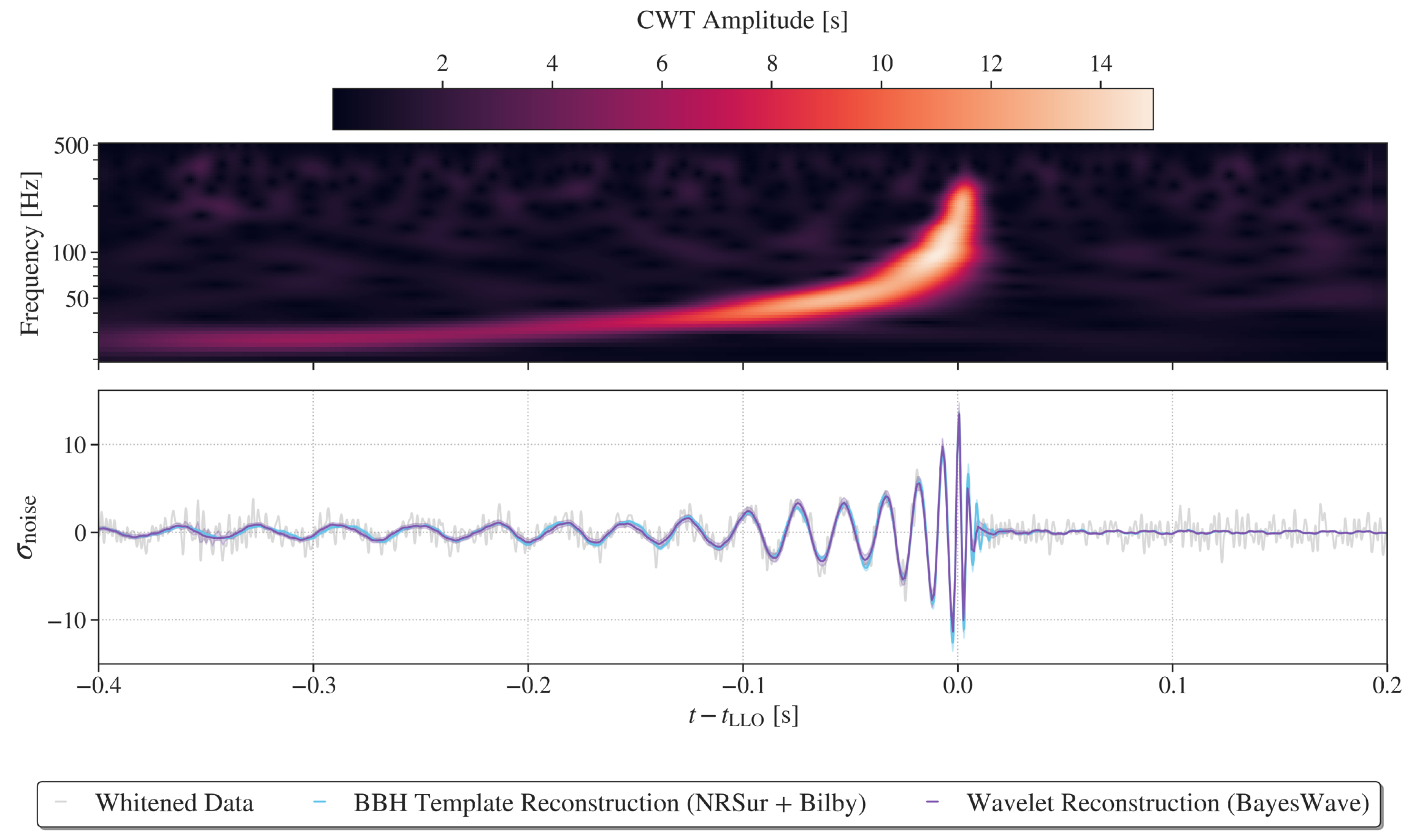
Representations of the GW230814 gravitational wave signal. Click to enlarge. [LVK Collaboration 2026]

GW230814, which was detected only by LIGO Livingston, is the loudest signal in the catalog. This signal is consistent with the collision of two black holes, each of roughly 30 solar masses. During the analysis of this signal, the team discovered potential deviations from the predictions of general relativity in the ringdown phase, when the remnant black hole settles into its final shape. Without a detection from another facility to corroborate this finding, it’s difficult to pinpoint the cause of the deviation, but the team could not rule out statistical noise fluctuations as the source.
Plot of the differential merger rate

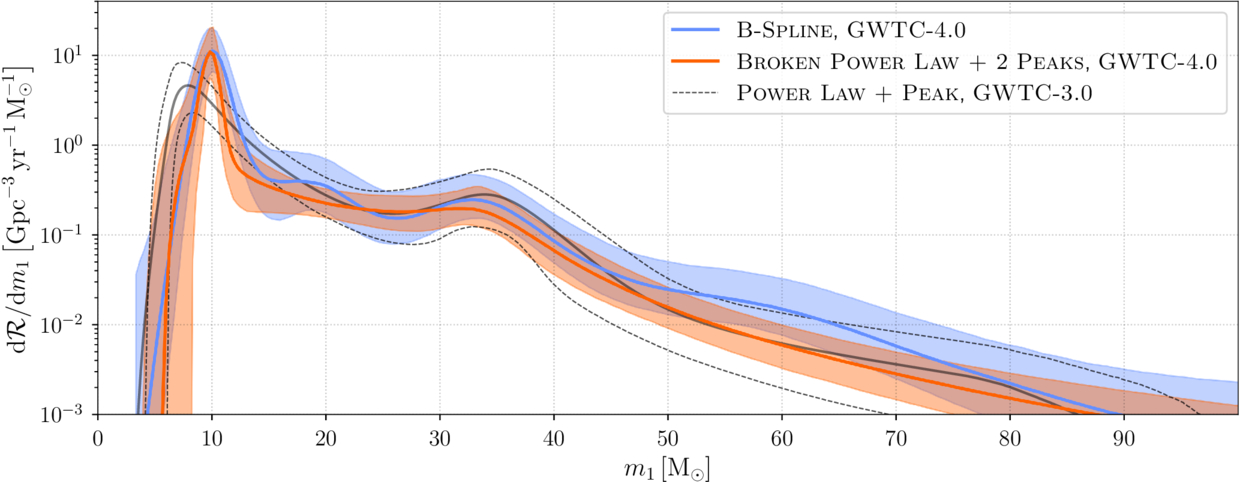
Plot of the differential merger rate as a function of the mass of the more massive of the two merger components. This shows overdensities at 10, 35, and possibly 20 solar masses. Click to enlarge. [LVK Collaboration 2026]

Surveying merging black holes and neutron stars on the population level, the team analyzed 158 gravitational wave signals from the current catalog. This analysis supported findings from previous transient catalogs, including multiple overdensities in the distribution of merging black hole masses, broadly distributed neutron star masses, and an increase in the merger rate with redshift. The new data strengthened certain previously identified trends, such as an increase in the width of the effective spin distribution with redshift, and weakened others.

The full list of articles in the GWTC-4.0 Focus Issue can be found here.

Citation

“GWTC-4.0: An Introduction to Version 4.0 of the Gravitational-Wave Transient Catalog,” A. G. Abac et al 2025 ApJL 995 L18. doi:10.3847/2041-8213/ae0c06

“GWTC-4.0: Methods for Identifying and Characterizing Gravitational-Wave Transients,” A. G. Abac et al 2026 ApJL 1004 L21. doi:10.3847/2041-8213/ae447b

“Open Data from LIGO, Virgo, and KAGRA Through the First Part of the Fourth Observing Run,” A. G. Abac et al 2026 ApJ 1004 232. doi:10.3847/1538-4357/ae211e

“GWTC-4.0: Updating the Gravitational-Wave Transient Catalog with Observations from the First Part of the Fourth LIGO–Virgo–KAGRA Observing Run,” A. G. Abac et al 2026 ApJL 1004 L22. doi:10.3847/2041-8213/ae2c74

“GW231123: A Binary Black Hole Merger with Total Mass 190–265 M⊙,” A. G. Abac et al 2025 ApJL993 L25. doi:10.3847/2041-8213/ae0c9c

“GW230814: Investigation of a Loud Gravitational-Wave Signal Observed with a Single Detector,” A. G. Abac et al 2026 ApJL 1004 L23. doi:10.3847/2041-8213/ae2ad3

“GWTC-4.0: Population Properties of Merging Compact Binaries,” A. G. Abac et al 2026 ApJL 1005 L51. doi:10.3847/2041-8213/ae771e

The post Monthly Roundup: The Fourth Catalog of Gravitational Wave Events from LIGO, Virgo, and KAGRA appeared first on AAS Nova.

No, Apple won’t turn on any ‘restricted mode’ for missed lease payments

28 July 2026 at 23:35

Apple logo

Apple will not limit the functionality of devices enrolled in its new Upgrade leasing program if customers miss payments or default on the agreement. In an emailed statement to The Verge, Apple spokesperson Brian Bumbery said: “There will be no restricted mode and/or there will be no limitations put on device functionality due to missed payments or default with the Apple Upgrade program.”

The clarification follows reporting from 9to5Mac, which identified code in an iOS 27 beta referring to a new “App Managed Features” system. According to that reporting, the system would have allowed financial partners to perform ongoing status checks on a device and enabled Apple’s system services to place it into “Restricted Mode” if the owner was not in good financial standing. Restricted Mode, as described, would have blocked access to most apps while leaving core functions such as Phone, the App Store, Clock, Settings, and Wallet available.

Apple’s statement to The Verge directly addresses those concerns, stating that no such restrictions will be applied under the Upgrade program. The program itself allows customers to lease new iPhones, Macs, iPads, and other devices with the option to upgrade periodically.

The confirmation provides reassurance that leased devices will retain full functionality even in cases of missed payments, distinguishing the Upgrade program from any potential remote management features that had been observed in early iOS 27 code.
‎
MacDailyNews Take: Apple has not explained to The Verge the intended purpose of Restricted Mode. One possibility is that the feature was built for financing programs run by carriers, retailers, or other partners outside the Apple Upgrade program—particularly in markets where device restrictions are already commonly used to enforce installment plans.


‎
Please help support MacDailyNews — and enjoy subscriber-only articles, comments, chat, and more — by subscribing to our Substack: macdailynews.substack.com. Thank you!

Support MacDailyNews at no extra cost to you by using this link to shop at Amazon.

The post No, Apple won’t turn on any ‘restricted mode’ for missed lease payments appeared first on MacDailyNews.

First-Generation Stars Provide Better Fit than a Black Hole for Early-Universe Gas Clump

27 July 2026 at 17:00

Star formation in the early universe.

An unusual clump of gas 450 million years after the Big Bang may contain stars hailing from the universe’s elusive first generation of stars. New research examines an alternative explanation involving an accreting black hole.

Meet Hebe

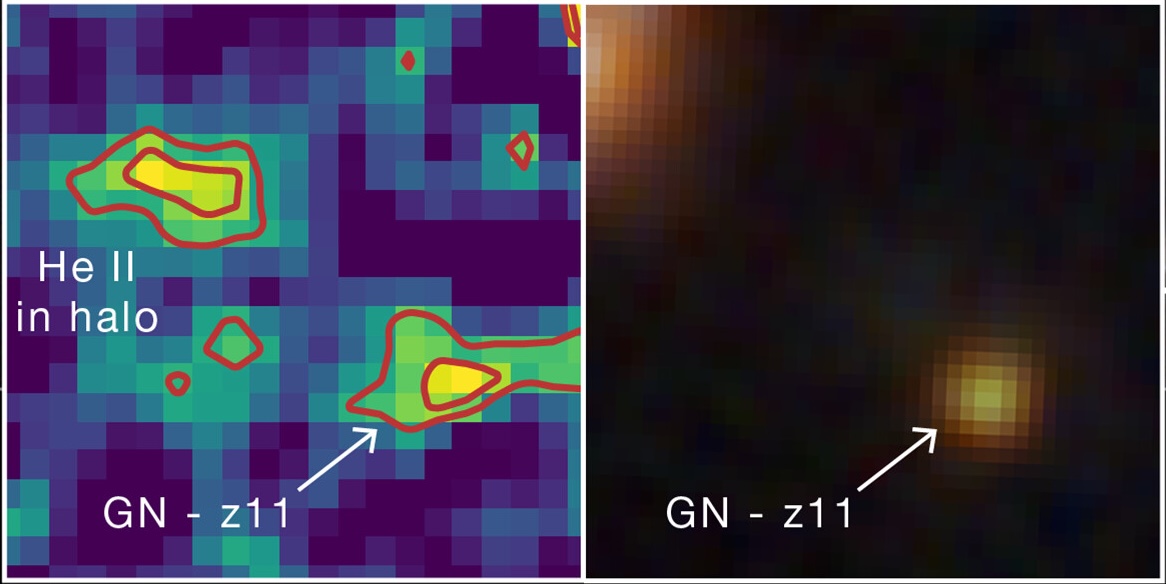
Hebe and GN-z11

Hebe is visible in the image on the left as a prominent blob of helium emission up and to the left from GN-z11, a luminous galaxy hosting an accreting supermassive black hole. On the right is an infrared image of the same region, in which Hebe is not visible. Click to enlarge. [Adapted from NASA, ESA, CSA, Ralf Crawford (STScI)]

Initially spotted in 2024, an early-universe gas clump nicknamed Hebe has now been identified as a possible hiding place of Population III (Pop III) stars — the universe’s first generation of stars. Pop III stars are thought to be massive and chemically pristine, containing only hydrogen, helium, and a whisper of lithium. This exciting hypothesis was prompted by the detection of recombination lines from helium, which could be ionized by the high-energy radiation of the first stars.

Before the community settles on this exciting explanation, however, the hypothesis must withstand all the tests astronomers can throw at it. In a recent research article, Junehyoung Jeon, Tae Bong Jeong, and Saiyang Zhang (The University of Texas at Austin) along with Volker Bromm (The University of Texas at Austin) attempted to explain Hebe’s properties in another way.

Considering Alternatives

Hebe glows with distinctive helium emission that requires a source of high-energy radiation. This radiation could be provided by a cluster of Pop III stars, but it could also, in theory, arise from an accreting supermassive black hole embedded within the gas clump.

predicted Pop III star mass in Hebe

Predicted total mass of Hebe’s Pop III stars as a function of the Lyman–Werner flux from the nearby galaxy GN-z11. Click to enlarge. [Jeon et al. 2026]

The authors used models to explore both possibilities. For the first scenario, in which the telltale helium emission is driven by a cluster of Pop III stars, the team calculated the maximum possible mass of the cluster, which sets how much high-energy radiation is produced. The cluster mass is moderated by high-energy radiation from another source: GN-z11, a starburst galaxy situated about 10,000 light-years from Hebe. For the second scenario, the team modeled the spectral energy distribution arising from a supermassive black hole — either a direct-collapse black hole or a primordial black hole — accreting pristine gas from the surrounding cloud.

Still a Leading Explanation

While the black hole scenario could, with reasonable black hole masses, gas densities, and accretion rates, reproduce individual flux measurements drawn from JWST observations, this hypothesis struggled to simultaneously match multiple measurements. The Pop III star cluster scenario, with a cluster mass of a few hundred thousand solar masses, provided the best fit to the JWST data.

modeled spectral energy distributions for Hebe based on the black hole or Pop III star hypotheses

Modeled spectral energy distributions (lines) and predicted line flux densities (open symbols) for the accreting black hole, Pop III star, and Pop II (second-generation) star hypotheses. The observed JWST line fluxes are shown as filled circles. Click to enlarge. [Jeon et al. 2026]

As a final test, the team introduced a third possibility involving a population of second-generation stars, which are more chemically enriched than Pop III stars. While this model fit well, the number of stars necessary to match the data — roughly 10 million — would produce a stellar continuum detectable (but so far not seen) by JWST.

While a cluster of Pop III stars is still the leading explanation for Hebe’s properties, the team noted that the Pop III star and black hole hypotheses aren’t mutually exclusive; Hebe could very well harbor a primordial black hole and a smattering of Pop III stars. Regardless of what powers its characteristic helium emission, Hebe offers an enticing glimpse into the early universe, and more work is needed to understand this intriguing object.

Citation

“What Is Powering the Enigmatic He II Emitter Hebe: The First Stars or Black Holes?” Junehyoung Jeon et al 2026 ApJ 1006 27. doi:10.3847/1538-4357/ae7bea

The post First-Generation Stars Provide Better Fit than a Black Hole for Early-Universe Gas Clump appeared first on AAS Nova.

Framework Laptop 13 Pro review: Much better battery, much worse price

27 July 2026 at 16:02

I've liked the Framework Laptop 13 since the first time I used it, partly because I just think the idea of a repairable and upgradeable laptop is cool and partly because it's not Yet Another Ultraportable Trying To Be A MacBook Air Clone. But the design has always had real shortcomings—the most noticeable and serious being its mediocre battery life.

Enter the Framework Laptop 13 Pro. While all previous Laptop 13 refreshes have tinkered around the edges with the original design (a tweaked lid design here, new hinges or new speakers there), the Laptop 13 Pro is as close as we've gotten to a second-generation revision for the original design.

This means that it breaks backward compatibility for some (but not all) Laptop 13 components, most notably the bottom case, the keyboard and trackpad, and the original 55 WHr and 61 WHr battery designs. But by allowing itself to make larger changes to the design, Framework has made major strides in battery life and general fit and finish.

Read full article

Comments

© Andrew Cunningham

The Wackers’ Decades-Long Harassment Was One of Unsolved Mysteries’ Strangest Cases—New Information Has Finally Come to Light

25 July 2026 at 13:01

For the last 22 years, one of the most bizarre true crime stories ever to grace the program Unsolved Mysteries has confounded amateur investigators and spawned hundreds of pages of online speculation. Who was behind the decade-long torment of Bill and Dorthy Wacker in the 80s and 90s, which included allegations of stalking, robberies, and even assaults?

While any internet true crime enthusiast knows Unsolved Mysteries frequently left out interesting details that can create a rabbit hole of alternative explanations, in this case, the show has been the sole source of information, with no other known period news coverage of the harassment.

That is, until recently, when this author acquired the original police records, spanning almost 100 pages of material, while researching for my podcast, Cease to Exist. The records reveal a wealth of new information, including potential leads on suspects, and answers to questions true crime fans have speculated about for years.

Wackers
The Wackers claimed to be victims of a long-term harassment campaign. Credit: Film Rise/Unsolved Mysteries

Unsolved Mysteries

In the Unsolved Mysteries season 6 two-hour finale, airing in the spring of 1994, the public met Bill and Dorthy Wacker, an elderly couple from Massillon, Ohio, who claimed to be victims of a bizarre string of harassment stretching back years. Since then, their story has been the subject of considerable speculation, with some believing the whole affair was so unbelievable that the Wackers must have been making it up. On the other hand, Dorothy herself did seem to bear injuries consistent with the couple’s claims. Without any further information, true crime fans dissected every available scrap of evidence, including the accuracy of the reenactments, for possible clues.

“The Wackers are quiet, unassuming people who tend to mind their own business. Hardly the type to draw the wrath of an unseen enemy,” Unsolved Mysteries host Robert Stack said at the beginning of the segment.

The scene then opens with the couple returning to find their home ransacked on January 16, 1985. This was the third claimed incident, but according to the program, the first that was reported.

“After nearly 10 years, Dorothy and Bill Wacker still wonder who and why,” Stock intoned.

The Wacker’s Story

In interview footage with the couple, Bill speculates that someone may be attempting to force the couple to move, although why that would be was unclear, and refers to the perpetrator as “a kook,” which becomes a bit of a meme in online discourse about the case.

Six months after the previous break-in, Dorothy was home alone recovering from heart surgery when she heard a knock at the door. She found a young man who claimed his car had broken down and that he needed to use her telephone. Although she didn’t see a car anywhere, she let the polite stranger in. He made a call, thanked her, and appeared to leave.

Before she knew what had happened, Dorothy awoke tied up on her kitchen floor after having been struck in the head. A neighbor heard her cries through an open window and came to her aid. Although Dorothy’s injury was not serious, there were two strange elements to the crime. First was the graffiti “cheaper, but will do,” shown in the reenactment as having been left on the kitchen wall. Second was the variety of items stolen from the home, including a gun and radio receiver, which were later returned to the Wackers’ porch. Police were baffled by the return of a stolen gun and distributed fliers featuring a sketch of the suspect, but no identification was ever made.

Harassment continued with a series of threatening phone calls that persisted even after the family changed their number, according to Dorothy and her daughter Peggy Hoover. Additionally, nocturnal banging on the outside of the house began, which led the couple to install lights. The only result was a strange note on the front porch reading “your lights are a laugh,” and subsequent notes such as “you scum I’ll get even,” with a backside reading “this time ha ha.” The police never found any fingerprints on the notes and suggested they may have been made by someone using their opposite hand to disguise their handwriting.

Unsolved Mysteries Segment Wackers
The graffiti written on the Wackers’ wall in the Unsolved Mysteries Reenactment (Credit: Filme Rise/Unsolved Mysteries)

Second Attack and Stake Out

The most dramatic events yet occurred in the fall of 1993. Dorothy was walking her dog outside of their home on October 27th when she was attacked again. The segment claimed she suffered “skull lacerations” and was taken to the hospital, but there were no witnesses to the event. 

Notably, Sheriff Bruce W Umpleby says that after interviewing neighbors, no one had any information that led them to believe there was a person there. He continued that most crimes have simple motives and there has never been one identified for the strange periodic flurries of activity around the Wackers.

Things reached a climax when the family conducted a stakeout, hoping to finally capture the stalker one November evening. Bill hid inside a trailer in the driveway, while Dorothy and their daughter Cathy stayed inside the home. Across the street, their sons-in-law Dan and Clay sat in a vehicle in a neighbor’s driveway. After almost four hours, they decided to end the stakeout around 10:30 p.m., when they heard a loud bump on the porch. Incredibly, the stalker had apparently evaded the surveillance and thrown a rock onto the Wackers’ front porch with a note reading “get the message.”

At the conclusion of the segment, Bill says he hopes whoever is responsible is caught soon because, if the Wackers were no longer the targets, he feared the individual would simply target someone else.

Unsolved Mysteries Online Speculation

Besides noting that the sheriff’s department had asked Dorothy after the second attack whether Bill could have been the attacker, the series plays the events fairly straight, without directly questioning the couple’s story. The eerie music and Stack’s gravelly voice convey a feeling of serious menace. True crime fans are more divided, with some arguing that the events were too implausible to be real, while others find it unlikely that an elderly couple would fabricate such a wild tale. Notably, another popular Unsolved Mysteries segment, involving the stalking of Cindy James, is also widely believed to have involved a hoax.

Unfortunately, Newspapers.com’s archive of the local paper, The Massillon Independent, has a large gap between the early 1970s and the 2020s. The only other known media appearance by Bill Wacker before his death was in an unrelated citizen-reaction piece about Connie Chung interviewing Newt Gingrich’s mother in the Akron Beacon Journal, although he is wearing an Unsolved Mysteries hat in the picture. The only other items recovered were obituaries stating that Bill had died in 1999 at age 79 and Dorothy in 2020 at age 83. This left armchair sleuths to rely primarily on what appeared in the episode itself, which does raise questions.

One notable detail is that, in the reenactment, Dorothy’s dog doesn’t bark to alert her to the intruder, which seemed uncharacteristic of a small dog. People debated whether this was merely a quirk of the reenactment or reflected how the event actually occurred, with some questioning whether this provided evidence that Bill was behind the assault. Additionally, some found it odd that the stakeout was called off at the relatively early hour of 10:30 p.m. and found the return of stolen items completely unbelievable. Another oddity was the wording of the letters, with phrases like “you scum” and “no junk,” which sounded to some like older adults attempting to mimic the speech of teenagers while using outdated phraseology.

Among those who believe the Wackers, suspicion has frequently fallen on the daughters, who would presumably inherit the home and were not mentioned as suspects in the episode. Particular suspicion has fallen on Peggy, who was not present for the stakeout. Some have also pointed to the phone calls continuing after the Wackers changed their number as possible evidence of an inside job.

One Redditor, sovietbabyy, claimed to be a relative of the Wackers who stumbled upon the case, although they were too young to have ever met Bill and Dorothy themselves. They claimed Bill and his siblings were all dead but asked other family members for more information and were told that the extended family believed the story and that Bill was usually secluded but would help anyone in need. Five years later, a poster using the screen name goawaycommies followed up, claiming to be the same person. In these new posts, the author claimed that Stark County was a high-crime area and that the police were known to be ineffective; therefore, it shouldn’t be surprising that no one was caught.

While it could be debated whether these two posters are actually the same person, the goawaycommies post provided one essential detail that led to a major breakthrough: the Wackers’ address.

Finding the Wackers

In late December, I wrote to the Massillon County Sheriff requesting any files they had on the Wackers. They granted my request in early January, providing 94 pages of documents. Follow-up requests to the North Lawrence Fire Department, who responded to the assaults, as well as inquiries to two of the responding officers and Ricky Lee Pegido, were fruitless. The Sheriff’s office maintains that these documents are all that were found in the file, despite some appearing to be missing, such as a cover sheet without a report and references to a “phone trap” that is not followed up on.

While the officers may not have wanted to talk about these events, what was contained inside was fascinating, providing the names of suspects, neighbors’ opinions on the Wackers, incidents that were not included in the Unsolved Mysteries segment, and another 90s-era “classic” addition: records involving consultation with a psychic about the crimes.

The Wacker Home
The Wacker home today. Credit: Google Street View

The Reports

Right from the beginning, the documents tell a slightly different story from the television segment. Instead of waiting until the third event, in January 1985, to call police, there was a report concerning the initial August 1984 break-in. This one was different from the others, with gold and diamond jewelry stolen that was not returned and police noting that a credit card may have been used to force the lock.

The police report for the January 1985 break-in contained two notable details: the method of entry and the first-named suspect. Despite having their locked home broken into previously, the Wackers had left a side door unlocked, allowing the burglar to gain entry. Additionally, the report lists a “Randy” as a possible suspect, a young man whose aunt had previously cared for Mrs. Wacker’s elderly mother in the home.

Next, the first assault report appears, which is similar to what was shown in the episode, except that “CHEAPER, BUT WILL DO” was written in a bathroom instead of the kitchen. Additionally, a basement window was cut, through which the perpetrator may have escaped. The man who came to her aid is named here as Jim Pedigo, who says he and his brother had been working in their backyard all morning without seeing or hearing a thing until Dorothy’s cries became evident. In this report, the name is given as “Pedigl,” and it switches back and forth between that and “Pedigo” in the reports (the name “Pedigo” appears in print as a family name in the area in obituaries). When Bill returned, he found items that appeared to have been staged to be taken later from the robbery around the perimeter of the house.

Following this, there is a series of minor reports of items being stolen and returned—oddly, with the Wackers still not locking their doors, despite the first report indicating that had been their former habit.

The Second Assault

The report of the second assault does closely match the program, even down to the controversial dog not barking when the assailant came after Dorothy. Although the Wackers claimed the dog normally ignored its surroundings as it relieved itself, the officer noted on a follow-up visit to the residence that the dog barked when he arrived, which he found suspicious. In the report, Dorothy claimed she had to crawl to the back door to get help from Bill after the attacker fled, which was supported by dirt and scratch marks on her forearms noted by the officer. The officer gave Bill some suggestions, such as installing a light on that side of the house and trimming some trees to remove hiding places.

A lengthy segment of the report regarding the Sheriff’s canvassing of the neighborhood provides some interesting insight into the Wackers’ relationship with their neighbors. This portion notes that:

The neighbors collectively agreed that none of them have had any type of problems. Nor, have they seen or heard any form of disturbance in the area. In fact, several of the neighbors stated that they don’t even lock their doors. Further stated by the neighboring community, most of the neighbors stay to themselves, however, ‘the Wackers bring most of their problems on themselves.’ Apparently the Wackers aren’t the most congenial of persons in the neighborhood, especially with the Shillings and Maddox’s.

The Maddox family is the same household as the Pedigo family, a notable change of relations since Jim Pedigo aided Dorothy. On the other hand, another couple in the neighborhood stated that they regularly played cards with the Wackers, providing a nuanced image of them as people who got along with some but not others.

Suspects Not Named on Unsolved Mysteries

Following this event, both of the daughters began continually contacting the Stark County Sheriff’s office, demanding more attention be paid to their parents’ harassment. One of the items introduced here, but oddly never followed up on, is a “phone trap” put on the Wackers’ phone by their telephone company, Ameritech, to monitor all incoming calls. Although the reports say this is activated, there is no information on whether any claims of harassing calls were ever compared against the phone trap.

There appears to be a missing report explaining where the tip originates from, but officers speak with the son residing at the Maddox/Pedigo residence, Ricky Lee Pedigo, about whether he is aware of an individual by the name of “Shriner” on his mother’s side of the family, which he was not. When they later return to speak with his mother, Barbara Maddox, she claims she is not related to anyone by that name and flippantly remarks that the composite of the suspect in the first attack on Dorothy looks like a young dick Van Dyke, but no one she’s ever seen before.

Next, officers follow up on a tip from daughter Peggy Hoover that a woman named Debbie Shriver’s (not Shriner) ex-husband may be the suspect. After tracing this woman through a former landlord and then her own father, Debbie, now going by Debbie Pedigo, agrees to speak with the Stark County Sheriff’s. She says the composite bears no resemblance to her ex-husband, James Shriver.

Peggy then returns with another tip that a psychic told her the suspect lives within a twelve-mile radius of the Wacker home.

Finally, Peggy provides one last suspect: Barbara Maddox’s stepson, Johnny Lee, whom she says may be because her parents didn’t pay enough attention to him as a boy. At this point, Barbara Maddox has had enough, saying that her stepson hasn’t been to visit in years, and she is going to put up a privacy fence to keep away from the Wackers.

Suspect Sketch Dorothy Wacker Assault
The suspect sketch from the Dorothy Wacker assault. Credit: Film Rise /Unsolved Mysteries

Final Events

From this point on, the banging and rocks being thrown at the home continued. At one point, the Wackers claimed someone had tried to gain entrance to their locked home, but the police report casts suspicion on this. The appraisal was that it appeared as though someone was attempting to make it look like the house was being broken into without causing too much damage, and it was inconsistent with typical burglary techniques.

The final report is from October 1997, when Dorothy heard a loud banging on the house while seated in the living room. An officer responded but could find no damage.

All the reports are bizarre. The daughters appear to be very invested in the case, yet Peggy ultimately seems to be throwing around claims that don’t add up to anything. Was she letting her imagination run away with her, using the events as a cover to harass people she had personal grievances against, or was she really on to something? The “Shriner/Shriver” discrepancy speaks to a minor issue prevalent in the police’s investigations: not confirming the spelling of names, which also occurs with “Pedigl/Pedigo.” Does this indicate the sheriff’s department is generally performing sloppy work, as the Reddit poster implied? While there is room to speculate here, the constantly changing accusations may have undermined Peggy’s credibility with law enforcement.

One possible conclusion is that the very earliest break-in was real, since the stolen items were not returned and the report is consistent with a typical forced entry. Perhaps after that, the Wackers developed a taste for the excitement and attention and hoaxed the rest of it. This would explain the incongruities of items being returned, no one ever seeing anything, their continuing to leave their doors unlocked, and the strange attempt to create the appearance of a forced entry without damaging the home.

But then again, officers reported witnessing injuries to Dorothy after both assaults. Could she have been willing to take things that far? Could the couple have truly been victims? Could one of the children be behind it? Was Bill assaulting her?

None of these questions can clearly be answered from the available evidence; and so, decades after the strange story of the Wackers first came to public attention, the case rests—and another relic of the 1990s remains an unsolved mystery.

Ryan Whalen covers science and technology for The Debrief. He holds an MA in History and a Master of Library and Information Science with a certificate in Data Science. He can be contacted at ryan@thedebrief.org, and follow him on Twitter @mdntwvlf.

With help from data, art museums are reframing the visitor experience

Giovanni Kanter goes to at least one art museum whenever he visits a new city. That’s on top of his regular exploration of galleries in New York, where the 25-year-old ICU nurse lives and studies. He typically discovers new artists and gallery openings through word of mouth, though he has recently started curating his social media feed to serve relevant content (he’s currently in what he terms a “surrealism phase”).

He was raised on visual art; he's the son of painter Marianne Gargour and nephew of mixed-media artist Heather Hutchison and painter-printmaker Mark Thomas Kanter. His “exposure-oriented education” featured childhood visits to galleries and shows in and around Dallas, where he grew up, and in France, where he spent time with his grandparents.

But Kanter is an exception. Many other young people have a less immersive artistic education, perhaps shaped by occasional school trips or family visits to museums. If they haven’t internalized an instinct for what Kanter calls “moving through the art and absorbing it,” the museum experience is central to how they learn about and understand art.

Read full article

Comments

With help from data, art museums are reframing the visitor experience

25 July 2026 at 12:00

Giovanni Kanter goes to at least one art museum whenever he visits a new city. That’s on top of his regular exploration of galleries in New York, where the 25-year-old ICU nurse lives and studies. He typically discovers new artists and gallery openings through word of mouth, though he has recently started curating his social media feed to serve relevant content (he’s currently in what he terms a “surrealism phase”).

He was raised on visual art; he's the son of painter Marianne Gargour and nephew of mixed-media artist Heather Hutchison and painter-printmaker Mark Thomas Kanter. His “exposure-oriented education” featured childhood visits to galleries and shows in and around Dallas, where he grew up, and in France, where he spent time with his grandparents.

But Kanter is an exception. Many other young people have a less immersive artistic education, perhaps shaped by occasional school trips or family visits to museums. If they haven’t internalized an instinct for what Kanter calls “moving through the art and absorbing it,” the museum experience is central to how they learn about and understand art.

Read full article

Comments

Emergency SOS via Satellite Expands to Andorra and Iceland

24 July 2026 at 19:28

Emergency SOS via satellite is now available in Andorra and Iceland, allowing supported iPhone and Apple Watch users to contact emergency services when cellular and Wi-Fi coverage are unavailable.

Apple added both countries to an updated support document, expanding the feature to 20 supported markets. Users in Andorra and Iceland can call or text 112 before choosing the satellite option when an ordinary emergency connection cannot be completed.

The expansion covers every iPhone 14 or later model running iOS 26.4 or newer. Apple Watch access requires Apple Watch Ultra 3 with watchOS 26.4 or later.

Emergency SOS does not turn the devices into conventional satellite phones. The system is designed for short emergency exchanges in locations where normal communication networks cannot be reached. Users must remain outdoors with a sufficiently clear view of the sky and follow onscreen directions while the device establishes and maintains a connection.

Emergency SOS via Satellite Reaches 20 Markets

Emergency SOS via satellite first launched in the United States and Canada in November 2022 with the iPhone 14 lineup. Apple gradually added European countries, Australia, New Zealand, Japan and Mexico as regulatory approval and emergency-service support became available.

Andorra and Iceland now join Australia, Austria, Belgium, Canada, France, Germany, Ireland, Italy, Japan, Luxembourg, Mexico, the Netherlands, New Zealand, Portugal, Spain, Switzerland, the United Kingdom and the United States.

The addition is particularly relevant for travelers and residents exploring mountainous or remote terrain.

Andorra contains extensive hiking, cycling and skiing areas across the Pyrenees, where cellular coverage can become unreliable beyond populated valleys and resorts. Iceland presents a different but equally demanding environment, with large rural areas, volcanic landscapes, glaciers and routes far from conventional infrastructure.

Satellite availability does not guarantee a connection everywhere. Mountains, deep valleys, dense tree cover and tall structures can obstruct the line between the device and a passing satellite. Apple also warns that satellite connectivity may not function in locations above 62 degrees latitude, which can affect some northern regions.

Most of Iceland lies below that threshold, although environmental conditions and the position of surrounding terrain can still influence performance.

International travelers can generally use Emergency SOS while visiting a supported country, even when the feature is not offered in their home market. Exceptions apply to devices purchased in certain countries or regions where Apple satellite connectivity is restricted.

Three smartphones display various screens: left shows a satellite connection with instructions, center shows a crash detection alert for Emergency SOS, and right displays a map with a location marked for emergency notification.

iPhone 14 and Newer Models Gain the Expansion

Every version of iPhone 14 and later contains the hardware required for Apple satellite features. Users in Andorra and Iceland must install iOS 26.4 or a newer release before relying on Emergency SOS.

The system appears only when the iPhone cannot reach cellular service or Wi-Fi. Apple recommends trying the local emergency number first because another carrier network may still be able to complete the call even when the user own provider shows no coverage.

When the call fails, the iPhone offers Emergency Text via Satellite. The user answers a short series of questions describing the emergency, including the type of assistance needed and whether anyone is injured.

The compressed questionnaire reduces the amount of information that must be transmitted through the limited-bandwidth satellite connection. Once connected, the iPhone sends the responses and location to an emergency dispatcher or an Apple-supported relay center capable of contacting local responders.

In Andorra and Iceland, the applicable emergency number is 112.

Users can also choose to notify emergency contacts. When Medical ID and emergency contacts have been configured in the Health app, selected details can be shared during the incident.

The conversation does not operate at the speed of an ordinary text exchange. Under ideal conditions, a message may require approximately 30 seconds to send. Light or moderate foliage can extend that delay beyond one minute, while heavier obstructions may prevent a connection entirely.

The iPhone displays guidance showing which direction to turn or move as satellites pass overhead. The phone can remain connected while the screen is locked, but it should not be placed inside a pocket or backpack during the exchange.

Apple Watch Ultra 3 Works Without an iPhone Nearby

Apple Watch Ultra 3 brings similar protection directly to the wrist, allowing users to contact emergency services even when an iPhone is not available.

Emergency SOS via satellite on Apple Watch Ultra 3 does not require an active carrier plan. Apple includes the service at no additional charge for two years following activation of the watch.

When cellular and Wi-Fi connections are unavailable, users can attempt an emergency call or open Messages and text 112. If the message cannot be delivered through an ordinary network, the watch presents the satellite emergency option.

Apple Watch Ultra 3 also guides the wearer toward the satellite connection. The device can remain in its normal position on the wrist rather than being held above the head, although the user may be instructed to turn or move away from an obstruction.

A wet watch may have more difficulty maintaining satellite communication, an important limitation for swimmers, boaters and users caught in severe weather.

The watch can send the emergency questionnaire, location, elevation, Medical ID information and battery level. Emergency contacts can also receive information about the incident when the user has enabled that option beforehand.

Crash Detection and Fall Detection add another layer. If iPhone 14 or later or Apple Watch Ultra 3 detects a severe crash or hard fall and the user remains unresponsive, the emergency notification may be transmitted over satellite when cellular and Wi-Fi networks are unavailable.

A smartwatch with an orange band displays an Emergency Apple Alerts screen, showing "Calling... Emergency Services 911" and a green button labeled "Emergency Text via Satellite." The time on the watch is 10:09.
Image Credit: Apple Inc.

Preparation Matters Before Going Off-Grid

Apple provides a connection demonstration that allows users to practice finding a satellite without contacting emergency services.

On iPhone, the demonstration can be opened through the Satellite controls or the Emergency SOS section in Settings. Apple Watch Ultra 3 users can add the Satellite control to Control Center or place a satellite complication on the watch face.

Testing the process before a remote trip helps users understand how quickly conditions can affect the connection. A clear field may establish contact rapidly, while a canyon or heavily wooded trail may require movement toward more open terrain.

Medical ID and emergency contacts should also be completed before leaving network coverage:

Health > Profile > Medical ID

A Medical ID can provide responders with information such as allergies, medical conditions, medications and emergency contacts. Users remain responsible for deciding which personal details they want stored and shared.

Emergency SOS via satellite is included free for two years after activating an iPhone 14 or newer model. Apple provides the same two-year period with Apple Watch Ultra 3, although the company has not established the long-term price that may apply after promotional access ends.

The arrival in Andorra and Iceland gives hikers, drivers, skiers and other travelers another route to help, but the safest preparation still includes checking weather conditions, sharing an itinerary and carrying adequate power before moving beyond ordinary network coverage.

The post Emergency SOS via Satellite Expands to Andorra and Iceland appeared first on AppleMagazine.
Noble Gases Along for the Ride

24 July 2026 at 17:00

A rendering of an orange and grey planet against a dark background.

What can some neon trapped in a chunk of rock tell us about Earth’s formation and the protosolar nebula? Quite a lot, as detailed in a recent study in The Planetary Science Journal.

Noble Mysteries

By analyzing rocks pulled from mid-ocean ridges, geologists have concluded that there are tiny amounts of noble gases in the deep interior of Earth. That’s a strange statement upon reflection: how did these gases, which are famously apathetic to essentially all other elements, end up embedded within rocks thousands of kilometers underground? Since their passivity rules out the potential of a chemical reaction that formed them in place, they must have been in the mantle since the very beginning of Earth’s history.

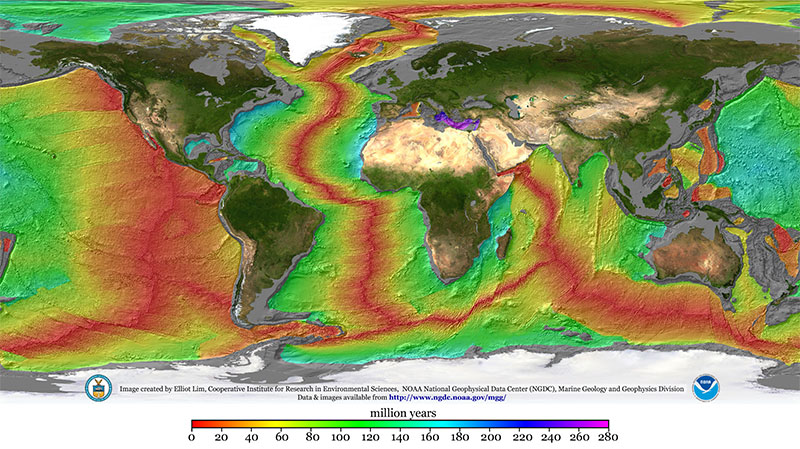
A map of Earth with the continents shown normally but the sea colored according to age.

A map illustrating the age of the seafloor. Mid-ocean ridges stand out clearly in red. By sampling material from these ridges, planetary scientists can infer the composition of Earth’s deep interior. Click to enlarge. [Mr. Elliot Lim, CIRES and NOAA/NCEI]

There are a few scenarios for how this could have happened. Though it’s possible that these inert species were delivered to the early Earth encapsulated within primitive meteorites or in solids contaminated by ions from the solar wind, at least some fraction of these elements likely came directly from the gaseous nebula that surrounded the earliest protoplanets.

That last option is especially exciting to present-day planetary scientists interested in constraining Earth’s formation history because it requires some very specific conditions. Since light noble gases like neon don’t dissolve well in seawater, they must have dissolved into a magma ocean — meaning the nebula was still around when Earth was large enough to have a molten surface. That already restricts us to a very specific time in the solar system’s history, but it doesn’t say much about the specific size of the proto-Earth other than “big,” and it doesn’t say much about the state of the nebula other than “it existed.” Recently, Vincent Savignac and Eve Lee (University of California, San Diego; McGill University) successfully refined these constraints to pin down information about both the early Earth and the nebula that surrounded it.

Infant Earths

Savignac and Lee began by growing a grid of infant Earths on their computers via models of gas accretion and atmosphere–magma interactions. Each simulation started with a different proto-Earth mass and nebular density, and each one yielded a different amount of neon in Earth’s deep interior. Excitingly, only a small handful of the scenarios tested ended up with values similar to those observed.

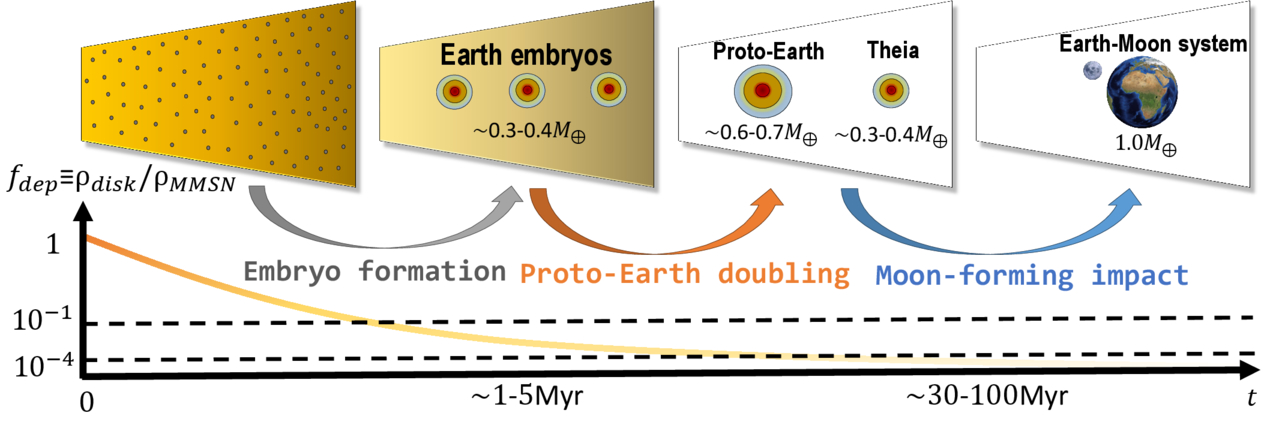
A cartoon of small cores surrounded by gaseous envelopes eventually merging into the Earth.

A schematic of Earth’s formation via embryo formation (when the noble gases enter the mantle) followed by mergers. Click to enlarge. [Savignac & Lee 2026]

On the mass axis, the team found a narrow range of acceptable conditions. If a proto-Earth was less than about 20% of Earth’s present-day mass, it couldn’t accrete much gas. This let it cool rapidly, freezing the magma ocean and shutting down neon dissolution before too much could be trapped inside. On the other hand, if a proto-Earth was more than about 40% of Earth’s present-day mass, it would accrete too much gas, stay molten for too long, and be left with too much neon. On the density axis, the researchers found that when the nebula accreted on to the proto-Earth, it must have been fairly depleted compared to its initial density. This implies that the whole process happened at the end of the nebula’s life, just before it was completely blown away by the proto-Sun.

Savignac and Lee demonstrated that these constraints are robust against the later stages of Earth’s evolution. In its later years, Earth either suffered or benefited from a giant impact, depending on your feelings about the Moon, but the researchers showed that this event doesn’t pose a problem for their models. Overall, this study builds a delightful link between rocks from our deep oceans and the particulars of Earth’s formation, demonstrating the unique power of planetary science to tie together different scientific fields.

Citation

“Constructing the Earth’s Formation History Using Deep Mantle Noble Gas Reservoirs,” Vincent Savignac and Eve J. Lee 2026 Planet Sci. J. 7 135. doi:10.3847/PSJ/ae64f7

The post Noble Gases Along for the Ride appeared first on AAS Nova.

Emergency SOS via Satellite Expands to Two More Countries

23 July 2026 at 18:50
Emergency SOS via satellite is now available in Andorra and Iceland, according to an updated Apple support document.

Available on the iPhone 14 and newer and the Apple Watch Ultra 3, Emergency SOS via satellite allows you to text emergency services when you are in a supported area without Wi-Fi or cellular connectivity. The feature requires iOS 26.4 and watchOS 26.4 or later in Andorra and Iceland.
This article, "Emergency SOS via Satellite Expands to Two More Countries" first appeared on MacRumors.com

Discuss this article in our forums

I wanted a clock that never needed setting. Things escalated.

23 July 2026 at 12:00

I wanted a clock that, annoyingly, didn't seem to exist.

Since childhood, my bedside clocks have been a series of red, seven-segment LED clock-radio specials from Walmart or Target. They are invariably cheap, simple, and long-lived—but they require manual intervention at the start and end of Daylight Saving Time and whenever the power flickers. After a recent power flicker, as I found myself standing by the sideboard holding down "TIME" and mashing the "HOUR" button, frustration boiled over, and I thought to myself, "We're a quarter of the way through the 21st century. There has to be a better way!"

My perfect clock would be self-setting. It would offer auto-DST adjustment (or not, depending on how this bill fares!). It would manage drift and always show the exact sub-second time. It would show that time on a red seven-segment display—not blue, not green, not yellow, and absolutely not white. And I shouldn't have to install any privacy-destroying garbage apps to make it work.

Read full article

Comments

© Lee Hutchinson

Researchers Spot Hydrocarbons Surprisingly Close to a Quasar Pair

22 July 2026 at 17:00

J0749+2255

Researchers have detected molecules containing rings and chains of carbon atoms in the vicinity of a rare pair of quasars. The trends in the distribution of these molecules are unexpected, suggesting that more work is needed to understand the conditions surrounding active supermassive black holes.

Infrared Eyes on Molecules in Space

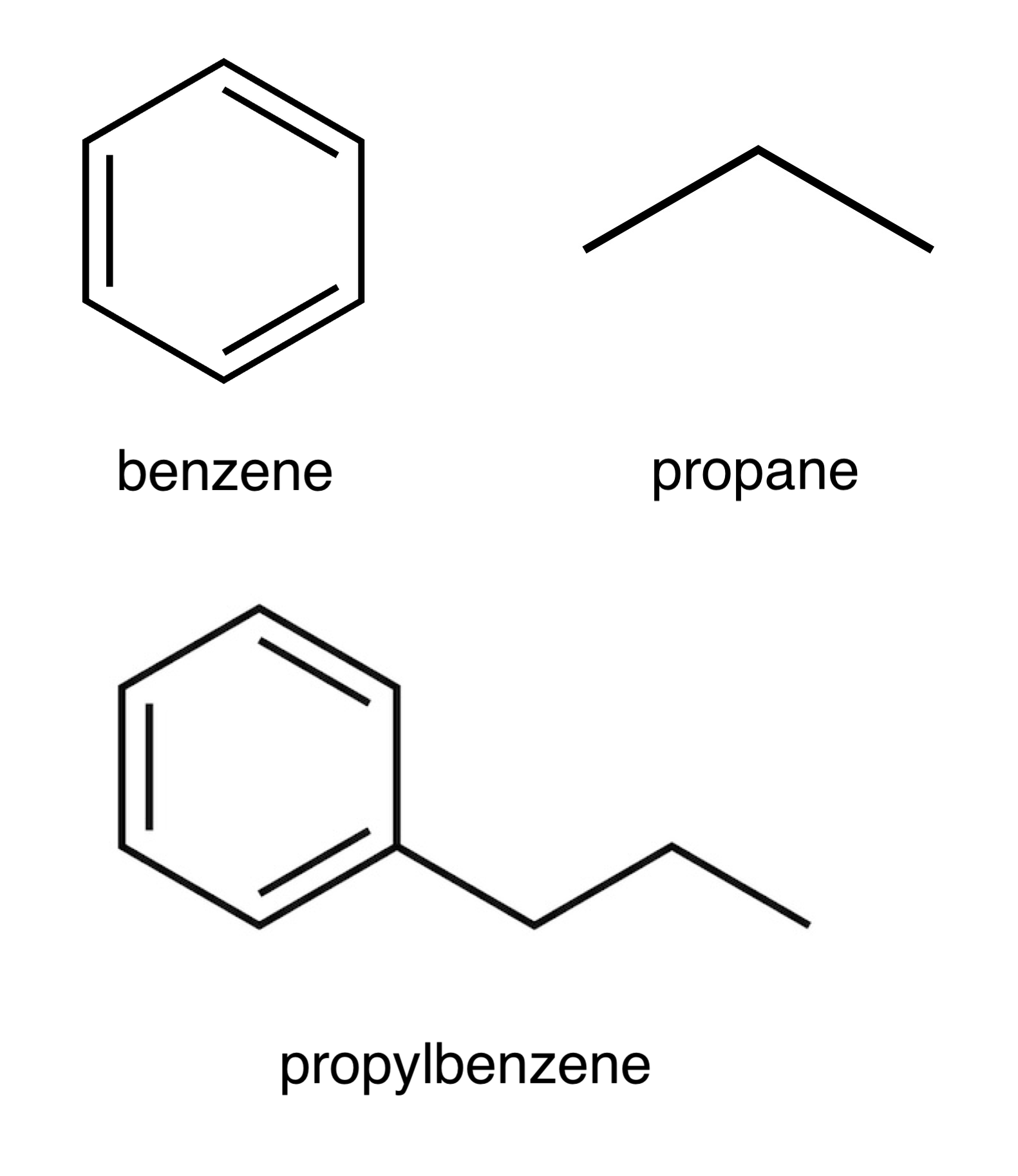
skeletal formulae of aromatic and aliphatic molecules

Examples of aromatic and aliphatic hydrocarbons. Benzene (top left) is the simplest aromatic molecule. Propane (top right) is a simple aliphatic molecule. Propylbenzene (bottom) is an aromatic molecule with an aliphatic chain branching off of it. In these “skeletal” formulae, there is a carbon atom at each vertex, and the remaining atoms (not depicted) are all hydrogens. Single lines indicate single chemical bonds, and double lines indicate double bonds. [Wikipedia; Public Domain]

Across the universe, atoms are combining to form molecules, and our ability to study molecules in distant realms has never been better. JWST is particularly attuned to emissions from molecules engaged in a kind of chemical yoga, stretching their bonds and flexing the angles between their atoms.

JWST’s sensitive infrared eyes have allowed researchers to study the distribution, creation, and destruction of both aromatic (containing one or more rings of carbon atoms in which certain electrons spread out within the ring) and aliphatic (containing chains of carbon atoms) hydrocarbons. These molecules have been spotted in a wide array of environments, and now, astronomers are finding them in more distant and more extreme environments than ever before.

Distant Discovery

SDSS J074922.96+225511.7, or J0749+2255 for short, is a quasar pair seen 3 billion years after the Big Bang. The two feasting supermassive black holes are roughly 12,000 light-years apart, giving researchers a glimpse into the late stages of a galaxy merger and a harsh environment in which to study the survival and destruction of molecules.

Researchers studying J0749+2255 with JWST have previously reported the detection of a 3.3-μm emission feature from aromatic molecules. Now, C. E. Mentzer (University of Missouri), Aigen Li (University of Missouri), and Xuejuan Yang (Xiangtan University) have analyzed JWST spectra of J0749+2255 and found not just widespread aromatic emission at a rest-frame wavelength of 3.3 μm, but also aliphatic emission at 3.4 μm, which they attribute to carbon chains branching off from the aromatic molecules. This likely makes J0749+2255 the most distant galaxy in which both aromatic and aliphatic emission has been detected.

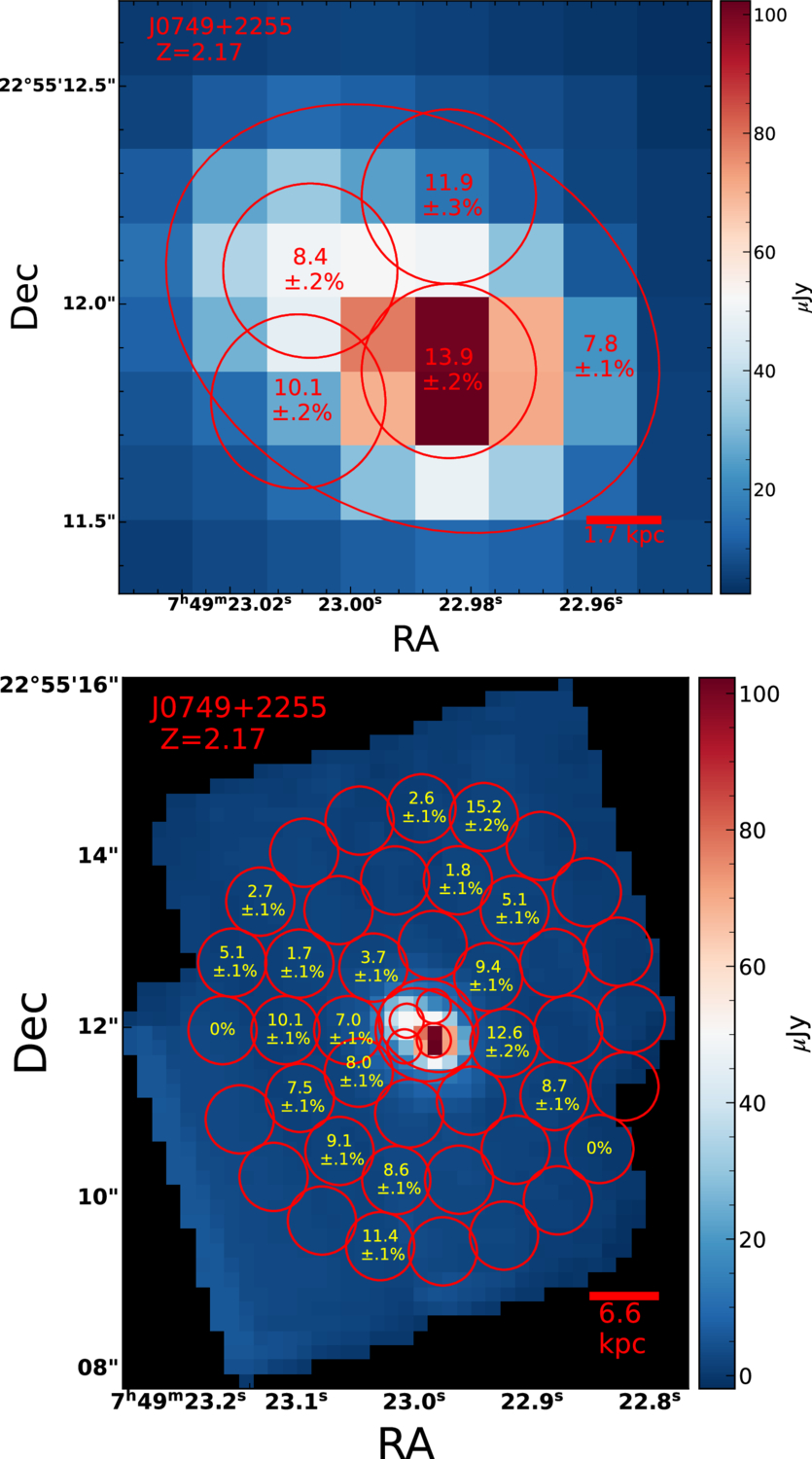
analysis results showing the aliphatic fraction across the quasars and the surrounding region

Aliphatic fractions in the bright central region surrounding the two quasars (top) and in the outer regions (bottom). [Mentzer et al. 2026]

Unexpected Trends

Mentzer, Li, and Yang subdivided the observations into 47 regions and measured the strength of the 3.3- and 3.4-μm features in each region. This analysis found strong aromatic emission nearest the quasars and showed that the fraction of carbon atoms bound up in aliphatic chains is highest close to the quasars.

Both of these findings are unexpected: the harsh radiation environment near the two active black holes is thought to break apart chains of carbon atoms attached to aromatic rings (which should decrease the 3.4-μm emission) and possibly destroy small aromatic molecules (which should decrease the 3.3-μm emission) — yet both of these features are strongest near the quasar cores where the radiation should be most capable of molecular destruction.

The authors speculated that the analysis regions centered on the quasars are large enough that they contain gas that hasn’t been pummeled by the quasars’ intense radiation and outflows, leaving molecules intact and able to produce the observed emission. However, this doesn’t explain the trend of stronger 3.3- and 3.4-μm emission closer to the quasars — necessitating further research into the emitting behavior of aromatic and aliphatic molecules under the extreme conditions of a dual quasar’s neighborhood.

Citation

“Widespread Detection of Aromatic and Aliphatic Emission in the Dual Quasar J0749+2255 at Cosmic Noon,” C. E. Mentzer et al 2026 ApJL 1005 L38. doi:10.3847/2041-8213/ae7e86

The post Researchers Spot Hydrocarbons Surprisingly Close to a Quasar Pair appeared first on AAS Nova.

“Apple Upgrade”: empresa poderá bloquear apps por pagamentos atrasados

22 July 2026 at 13:32

Ontem, falamos aqui sobre o rumor de que a Apple estaria prestes a lançar, nos Estados Unidos, um programa de assinatura de iPhones, iPads, Macs e Apple Watches, dando aos consumidores mais formas de acessar seus dispositivos.

Logo depois, o 9to5Mac encontrou, no código da beta do iOS 27, menções a um novo framework que serviria para gerenciar dispositivos alugados por meio de assinaturas como essa.

Chamado App Managed Features, ele permitirá, ao que tudo indica, que um aplicativo autorizado de financiamento ou de prestação de serviços — e não apenas o “Apple Upgrade”, como a solução proprietária está sendo chamada — registre um iPhone e realize verificações contínuas de status.

Caso haja algum problema com o registro (como pagamentos atrasados), o iPhone será colocado automaticamente em um estado intitulado “Restricted Mode” (“Modo Restrito”, em tradução livre), que bloqueia o acesso a uma série de apps do iOS, incluindo:

  • Leitor de Acessibilidade (Accessibility Reader)
  • App Store
  • Saúde (Health)
  • Lupa (Magnifier)
  • Telefone (Phone)
  • Relógio (Clock)
  • Ajustes (Settings)
  • Carteira (Wallet)
  • Senhas (Passwords)
  • A interface do “Restricted Mode” em si

Como é possível notar, alguns apps mais “críticos”, como o Mensagens (Messages) e o Casa (Home), poderão continuar disponíveis mesmo quando esse bloqueio estiver ativo. Segundo o 9to5Mac, no entanto, o provedor do aparelho será capaz de escolher quais apps ficarão (ou não) de fora dessa lista.

Embora restrinja o acesso aos apps do aparelho, o recurso não parece modificar assinaturas da App Store, o que significa que o usuário continuará sendo cobrado pelos seus apps e serviços mesmo após ter sido colocado no “Restricted Mode”.

Além disso, o código do iOS 27 não lista um número limite de pagamentos atrasados como condição para o bloqueio dos apps, o que significa que ficará a cargo dos serviços de assinatura decidir quando impor essas restrições de acordo com os seus termos e condições.

Há, no entanto, menções a um novo tipo de Bloqueio de Ativação (Activation Lock) chamado “Partner Finance Lock”, criado com o objetivo de impedir que usuários apaguem, vendam ou desmontem um aparelho alugado para revender suas peças.

Ainda segundo as informações, o App Managed Features faz parte do app Buscar (Find My), embora o provedor não tenha acesso à localização do dispositivo. Ao que tudo indica, essa integração existe apenas para garantir que o bloqueio continue de pé mesmo que o usuário apague ou redefina o aparelho.

Embora essas referências não tenham sido encontradas na versão Release Candidate (RC) do iOS 26.6, é possível que elas sejam adicionadas à versão final do sistema, já que, segundo a Bloomberg, o “Apple Upgrade” será anunciado na semana que vem.

Safari Notify Me Makes Online Shopping Easier

By: Hannah
18 July 2026 at 22:31

Safari Notify Me gives Apple’s browser a useful new role in online shopping: watching a product page after the shopper has closed it. Instead of repeatedly returning to check whether an item is available or whether its price has changed, users can ask Safari to monitor the page and send an alert when the requested update appears.

The feature arrives as online shopping becomes increasingly fragmented. Prices can change several times during a promotion, popular items disappear within minutes and retailers often require shoppers to join separate mailing lists for availability alerts. Dedicated tracking apps can help, but each adds another account, extension or subscription.

Safari Notify Me places the monitoring tool inside the browser already being used to view the product. It is simple enough for occasional purchases while potentially useful for expensive electronics, limited releases, event registrations and products that move in and out of stock.

Safari Notify Me Watches the Page for You

Safari Notify Me is designed to monitor changes on a specific webpage. The user identifies what should be watched, such as a lower price, a product returning to stock or registration becoming available. Safari then checks the page and sends a notification after detecting the relevant change.

Apple has presented price changes and product restocks as central examples, though the feature is not restricted to shopping. It may also help with reservations, ticket availability, enrollment openings or other pages where one detail changes over time.

For shopping, the advantage is immediate. A customer can leave the product page without relying on memory, leaving dozens of tabs open or refreshing the site throughout the day.

The browser becomes temporarily responsible for the follow-up.

This differs from a retailer’s own email alert. Store notifications usually depend on the business offering the feature, and they may focus only on inventory. Safari can monitor the page according to the user’s request, potentially covering price and availability without requiring another marketing subscription.

Safari Notify Me - Close-up of a Mac computer screen showing the dock with app icons. The cursor hovers over the macOS Tahoe Launchpad icon, displaying a popup label that says "Launchpad.” Other visible icons include Safari, Chrome, and Calculator.
Image Credit: Pond5

How Safari Price Alerts Help

Online prices are rarely as stable as the label suggests. Retailers adjust discounts, respond to competitors, launch short promotions and change prices according to stock levels.

A shopper interested in a Mac accessory, appliance or expensive display may not want to purchase immediately at the listed price. Checking the page every day is inefficient, while joining a store mailing list can produce far more promotional email than useful information.

Safari price alerts create a quieter alternative. The user can identify the product and wait for the browser to report a meaningful change.

The feature does not replace price history. Safari may detect that the amount has dropped, but that does not necessarily prove the new price is the lowest offered during the year. Dedicated price-tracking services may still provide charts, comparisons and retailer-specific history.

Safari Notify Me is better understood as a page-change assistant. It tells the shopper that something requested has happened. The decision to purchase remains with the user.

Restock Alerts May Be Even More Useful

Restock monitoring may become the feature’s strongest shopping use. Limited products can return without warning and sell out before a retailer’s email reaches every subscriber.

This often happens with game consoles, graphics hardware, collectibles, seasonal products, concert merchandise and popular configurations of newly released devices. Size and color variations can also return separately, making a general product alert less useful.

Safari restock alerts can focus on the page the user is already viewing. A notification provides a reason to return without requiring the tab to remain open.

The browser cannot reserve the item or guarantee that inventory will remain available. A notification may also arrive after other buyers have begun ordering. Safari removes the repeated checking, but it does not control the retailer’s inventory system.

That limitation is reasonable. Notify Me helps users notice the opportunity; it does not turn Safari into an automated purchasing bot.

Using Safari Notify Me

The feature is intended to require little setup. Users begin on the relevant product or registration page and tell Safari which change they want it to watch.

To create a Safari Notify Me alert:

Open the webpage in Safari > Select Notify Me > Describe the price, availability or page change to monitor > Allow Safari notifications when requested

The exact options shown may depend on the device, webpage and software version. Apple is introducing the feature with its new operating-system releases, and availability may vary by language or region.

A useful request should be specific. Asking Safari to report when the item returns to stock is more actionable than asking for any page change. For price monitoring, the user may request a reduction or watch for a particular target when the page supports enough information.

Once the alert is active, there is no need to keep the product page open. Safari sends a notification after detecting the requested update, allowing the user to return directly to the page.

A Better Use for Apple Intelligence

Safari Notify Me is a practical example of Apple Intelligence operating as an assistant rather than a writing tool. It interprets what the user wants, watches for a future condition and reports back when that condition appears.

The feature does not need to generate a long answer or place a chatbot beside every shopping page. Its value comes from removing a repetitive task.

That restrained approach fits Safari. The browser already manages passwords, private browsing, tab organization, Reader and tracking protections. Monitoring a page extends that utility without turning Safari into a retailer or shopping marketplace.

It may also reduce the need for third-party extensions among casual users. Someone who occasionally watches one product does not necessarily need a dedicated deal platform with wish lists, affiliate links and account registration.

Specialized services will remain useful for serious bargain hunting. Safari covers the simpler request: tell me when this exact page changes in the way I care about.

A glowing, abstract metallic shape with six curved, interconnected loops forms a symmetrical pattern against a black background, illuminated with blue and white light—evoking the futuristic vibe of WWDC26 developer betas.
Image Credit: Apple Inc.

Notifications Need Restraint

Any feature built around alerts can become noisy when used too freely. Monitoring every product considered during casual browsing could fill Notification Center with price changes and restocks that no longer feel relevant.

Safari Notify Me works better when reserved for purchases with genuine intent. A few focused alerts are easier to understand and act upon than dozens of loosely defined page watches.

Users should also remove alerts after buying the item or losing interest. A notification for a product purchased weeks earlier adds clutter without saving time.

Safari notifications can be managed through the device’s normal notification settings. Disabling all Safari alerts may also silence other useful browser notifications, so reviewing individual watches inside Safari is preferable when available.

Price Is Not the Only Shopping Decision

A lower price can encourage a quick purchase, but shoppers should still review the seller, return policy, warranty and delivery estimate. Notify Me reports a page change; it does not evaluate whether the store is reliable or whether the offer has hidden conditions.

A product may return through a third-party marketplace seller at a higher price. A discount may apply only after a membership, coupon or trade-in. Limited inventory can also create pressure to buy before reading the terms.

Safari’s privacy protections and fraud warnings remain relevant, but users should confirm that the page belongs to the intended retailer before entering payment information.

The alert is a starting signal, not an endorsement.

Safari Becomes More Useful After the Tab Closes

Browsers traditionally stop being helpful once users leave a page. Safari Notify Me changes that relationship by allowing selected pages to remain useful without remaining visible.

For shoppers, that means fewer repeated searches, fewer forgotten products and less dependence on promotional email. Price and restock alerts can operate quietly until there is a reason to return.

The feature will not replace advanced shopping trackers, and it cannot guarantee inventory. Its appeal is that most users do not need those larger systems for every purchase.

Sometimes the entire shopping problem is waiting for one price to fall or one button to change from unavailable to buy. Safari Notify Me allows the browser to handle that wait.

The post Safari Notify Me Makes Online Shopping Easier appeared first on AppleMagazine.
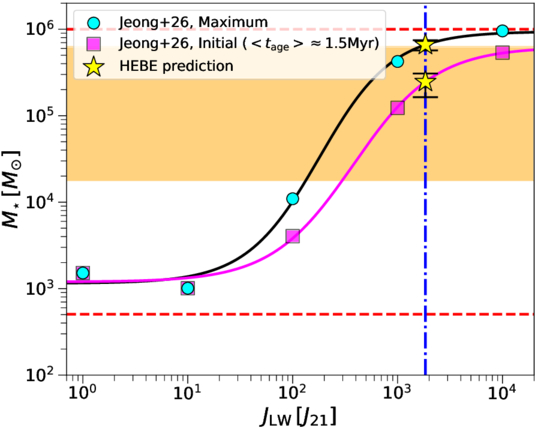
EU Tech Regulation Creates a Costly Split for Apple

18 July 2026 at 15:34

EU tech regulation, Digital Markets Act, Apple Europe sales, Apple regulation, European Union, Siri AI, iPhone features, device interoperability, App Store changes, alternative marketplaces, iPhone Mirroring, AirPods translation, Apple privacy, iPhone security, app sideloading, platform competition, DMA compliance, Apple Intelligence, European technology, government control

EU tech regulation is no longer limited to App Store payment rules or competition disputes hidden from ordinary consumers. It is beginning to determine which features reach European devices, how quickly they arrive and how deeply third-party companies can interact with the iPhone, iPad and Mac.

The Digital Markets Act was designed to reduce the control of large technology platforms over software distribution, payments, browsers, digital assistants and connected hardware. For Apple, compliance has already produced alternative app marketplaces, web distribution, third-party payment options, additional default-app controls and expanded access to iPhone technologies.

The next phase reaches much deeper into the operating system. European regulators want competing accessories, cloud services and AI assistants to receive access to capabilities traditionally reserved for Apple’s own products.

Apple argues that some of those demands could weaken privacy and security. The European Commission says the company is responsible for creating compliant systems that preserve both competition and user protection.

Between those positions sits a large and commercially significant group of customers. Europe generated $28.06 billion in Apple sales during the quarter ending March 28, 2026, up from $24.45 billion one year earlier. Six-month European sales reached $66.20 billion, compared with $58.32 billion during the same period of fiscal 2025.

Europe therefore represented more than one-quarter of Apple’s latest quarterly revenue. It is too valuable to leave behind, but increasingly difficult to serve with the same software experience available elsewhere.

EU Tech Regulation Is Splitting Feature Availability

Regional differences once centered mainly on language support, licensing agreements or local services. EU tech regulation is creating a more structural divide.

Apple has blamed Digital Markets Act requirements for delaying Siri AI across the European Union. The company says regulators expect competing AI assistants to receive extensive access to personal information, apps and device actions before Apple can reserve those capabilities for its own assistant.

The disagreement concerns more than answering questions. Siri AI is designed to read personal context, understand onscreen information and complete actions across apps. That may include finding messages, accessing files, making purchases or sending information on the user’s behalf.

Opening those capabilities to outside AI systems requires new permission structures, technical interfaces and safeguards. Apple says it cannot release its assistant first and add competing access later without risking regulatory action. The Commission says Apple had sufficient time to design an interoperable solution.

Other delayed European features have included iPhone Mirroring on Mac, Live Translation through AirPods and certain location-based Maps capabilities. Each feature touches a different part of the ecosystem, but all depend on privileged communication between Apple devices, software and services.

The consequence is becoming visible at purchase. Two customers can buy the same iPhone model at similar prices and receive different capabilities because one lives inside the European Union.

A black background with a glowing sphere in the center, featuring colorful light waves—red, orange, blue, and green—swirling horizontally inside the sphere, evoking a futuristic Siri AI interface.
Image Credit: Apple Inc.

Feature Adoption Becomes Slower and Less Predictable

Delayed availability can weaken the adoption of new hardware features even when the devices themselves continue selling well.

Siri AI is intended to become a central part of newer iPhones, iPads and Macs. Buyers who cannot access it lose part of the justification for newer chips, additional memory and on-device AI processing. Developers also face a smaller addressable audience for apps built around the new assistant.

AirPods Live Translation presents a similar problem. A feature designed to demonstrate the combination of iPhone processing, microphones and wearable audio becomes unavailable in a region built around dozens of languages and frequent cross-border travel.

iPhone Mirroring affects the relationship between iPhone and Mac. Users outside the EU can interact with the phone from macOS, while European users may receive notifications without gaining the complete experience.

These differences do not necessarily stop hardware sales. Apple’s newest results show strong European demand despite years of regulatory conflict. They can, however, reduce the speed at which customers use the ecosystem’s newest capabilities.

The effect may grow as software becomes a larger part of hardware differentiation. A faster processor has limited emotional value when the feature designed to demonstrate it is unavailable.

Apple Sales Show Why Europe Cannot Be Ignored

Apple does not report European Union revenue separately. Its Europe segment also includes countries outside the bloc, along with India, the Middle East and Africa. The official segment remains the best regularly published measure of the region’s commercial weight.

European sales rose approximately 15% year over year in Apple’s latest reported quarter. During the first six months of fiscal 2026, the segment expanded by roughly 14%.

Those figures weaken the argument that regulation is already driving customers away from Apple hardware. Demand remains strong, supported by the iPhone 17 family, Mac sales, services and the company’s installed base.

The financial risk is more gradual. Regional software fragmentation can raise engineering costs, delay launches and make European devices less competitive against products able to offer complete feature sets.

Apple must maintain separate distribution rules, payment systems, browser options and eligibility checks. Developers must decide whether alternative stores, external payments or EU-specific business terms justify additional work. Support teams must explain why features differ between countries using the same operating-system version.

A market responsible for more than $28 billion in one quarter can absorb considerable compliance expense. It can also influence Apple’s global product decisions when regulators demand interfaces that cannot be restricted to Europe easily.

A Slow Transfer of Ecosystem Control

The escalating regulatory environment also creates a more fundamental concern: control over complex technology ecosystems can gradually move away from the companies that designed them and toward government committees, regulatory bodies and administrative processes.

That transfer rarely happens through one dramatic order. It develops through repeated obligations covering app distribution, payment systems, browser engines, digital assistants, hardware access, data portability and interoperability. Each requirement may appear narrow when considered alone. Together, they can redefine who determines how the ecosystem operates.

Apple built its platform around tight integration between hardware, software, services and security. Regulators increasingly treat parts of that integration as market power that must be opened to competitors. The danger is that an ecosystem designed as one coordinated environment becomes subject to decisions made by committees that do not carry direct responsibility for product quality, reliability or long-term maintenance.

This can become a slow trap. Once a platform is required to expose one layer, regulators may use that access as the basis for demanding another. A payment exception can be followed by alternative app stores. Alternative stores can lead to broader installation rights. Device interoperability can expand into access for AI assistants, personal data and system actions.

The boundaries of the platform are then set less by engineering judgment and more by regulatory negotiation.

Government agencies have legitimate authority to address competition and consumer harm. The concern appears when regulation shifts from preventing abusive conduct to directing product architecture. At that point, public authorities begin influencing feature design, release timing, software permissions and the relationship between first-party and third-party services.

That creates consequences beyond Apple. Any company considering a tightly integrated product may decide that deep integration invites intervention. Businesses could avoid building ambitious ecosystems if successful coordination later becomes grounds for forced access.

Innovation then becomes shaped by what regulators are likely to permit rather than by what engineers believe will produce the safest or most coherent experience.

A large black Apple logo on a white background, with the shadow of a hand holding a padlock to the right side, symbolizing security or privacy in an era of AI and strict App Store rules around personal data sharing.
Image Credit: Ink Drop / Alamy Stock Photo

Competition Gains Come With Real Consumer Choices

EU policy has produced benefits that Apple rarely emphasizes. Users can install apps through alternative marketplaces or directly from authorized developers. Developers can offer external payment methods, promote different prices and avoid relying entirely on Apple’s distribution system.

Alternative browser engines can compete with WebKit, while users have more control over default apps. Contactless payment access has expanded beyond Apple Pay, allowing competing wallet providers to use the iPhone’s NFC technology under approved conditions.

Interoperability requirements could also improve third-party accessories. Smartwatches, headphones and other devices may gain better notification access, background connectivity and proximity pairing with the iPhone.

These changes can increase competition and reduce the advantage Apple gives its own services and accessories. A third-party smartwatch should not become artificially less useful simply because it was not made in Cupertino.

The difficulty is separating legitimate platform access from unlimited access. A notification interface is one thing. An autonomous AI assistant capable of reading messages, accessing files and acting across apps introduces a different level of sensitivity.

Privacy and Security Risks Are Not Theoretical

Alternative app distribution increases user choice, but it also moves some responsibility away from the App Store. Apple continues to notarize apps distributed through approved alternative channels, checking for known malware and severe fraud. That process is narrower than a complete App Store review.

Purchases made outside Apple’s payment system also fall outside its normal refund and billing support. Users may need to resolve disputes directly with the developer or payment provider.

A malicious marketplace, deceptive payment page or compromised developer account can create opportunities for fraud. Enterprise users face additional concerns when employees install software from sources their organization has not approved.

The AI question reaches further. A third-party assistant may need permission to access messages, photos, calendars, documents and app controls. Even a reputable provider can collect more information than the user expects or introduce vulnerabilities through poorly designed integrations.

Apple can build permission prompts, app isolation and revocation controls, but technical access always creates some exposure. Security depends on how narrowly permissions are defined, how visibly they are used and whether the operating system can stop unauthorized actions.

The Commission maintains that interoperability and privacy can coexist. Apple maintains that regulators are demanding access before adequate protections are ready. Both positions contain a legitimate concern: dominant platforms should not block competition, and competition should not require users to surrender control of personal data.

Elegant, historic Parisian building on a street corner at dusk, with warm lights glowing from large windows and ornate balconies—blending classic charm with Apple Store architecture. Pedestrians stroll nearby, passing a white flag with a gold emblem by the entrance.
Image Credit: Apple Inc.

Government-Controlled Architecture Creates Accountability Gaps

When regulators require a company to alter its architecture, responsibility can become blurred.

Apple remains the company customers blame when an iPhone feature fails, a third-party marketplace distributes a harmful app or an outside assistant misuses personal data. Regulators may have required the access, but they do not operate the device, provide technical support or repair the damage to the platform’s reputation.

This creates an accountability gap. Government committees can mandate openness without assuming the commercial and security consequences of that openness. Apple must comply, maintain the system and explain the outcome to users.

The same problem applies to delayed features. Regulators may argue that Apple chose not to release a service, while Apple may argue that the required conditions made the launch unsafe or technically impractical. Customers are left with less functionality and no simple way to determine who caused the delay.

Over time, the ecosystem can become a negotiated compromise rather than a product with one coherent direction. That may satisfy formal compliance while producing a weaker experience for everyone involved.

The risk is not that governments will literally operate Apple’s software. It is that committees increasingly define the conditions under which Apple can design, connect and release its own features. Control shifts through constraints.

The Industry Will Follow Europe’s Experiment

The consequences extend beyond one company. Google, Meta, Microsoft, Amazon and other platform operators face related European obligations. Hardware makers must consider whether ecosystem advantages can survive when core services are required to support rivals.

Smaller developers may gain new distribution and payment choices, but they may also inherit more compliance, customer-service and security responsibilities. Accessory companies could compete more effectively while becoming accountable for handling sensitive device data.

Other governments are watching. Rules introduced in Europe can influence legislation elsewhere, particularly when companies decide that maintaining one global technical framework is easier than operating several regional versions.

Apple is unlikely to abandon Europe or stop adapting its products. Its sales provide too much evidence of the region’s importance. The company will continue negotiating, appealing decisions and building compliance systems while withholding features it considers unsafe under current demands.

European customers may receive more app stores, payment choices and accessory compatibility. They may also wait longer for headline features included with the same hardware elsewhere.

The deeper consequence may be a technology industry that becomes more cautious about building tightly integrated products. Companies may design around anticipated regulatory demands from the beginning, limiting exclusive features, reducing private-system integration or avoiding innovations that depend on controlled access.

EU tech regulation began as an effort to constrain dominant platforms. Its long-term effect may be to transfer part of the power to shape those platforms from companies and users to regulatory institutions.

That shift deserves scrutiny equal to the market power it is intended to correct. Competition rules can restrain abuse. They can also become a slow mechanism for placing product design, security choices and ecosystem evolution under government supervision.

Shady Control and Bureaucracy

The danger grows when regulatory discretion becomes buried beneath permits, approvals, negotiations and technical committees that operate beyond meaningful public scrutiny.

The more power officials hold over which features, contracts or technologies may proceed—and when—the greater the opportunity for lobbying, favoritism and selective enforcement to influence outcomes. What begins as oversight can gradually become a system in which delay itself is leverage, while responsibility disappears inside layers of administration.

For the technology industry, that risks replacing transparent product decisions with political access, negotiated exceptions and regulatory influence exercised far from the consumers expected to live with the consequences.

The post EU Tech Regulation Creates a Costly Split for Apple appeared first on AppleMagazine.
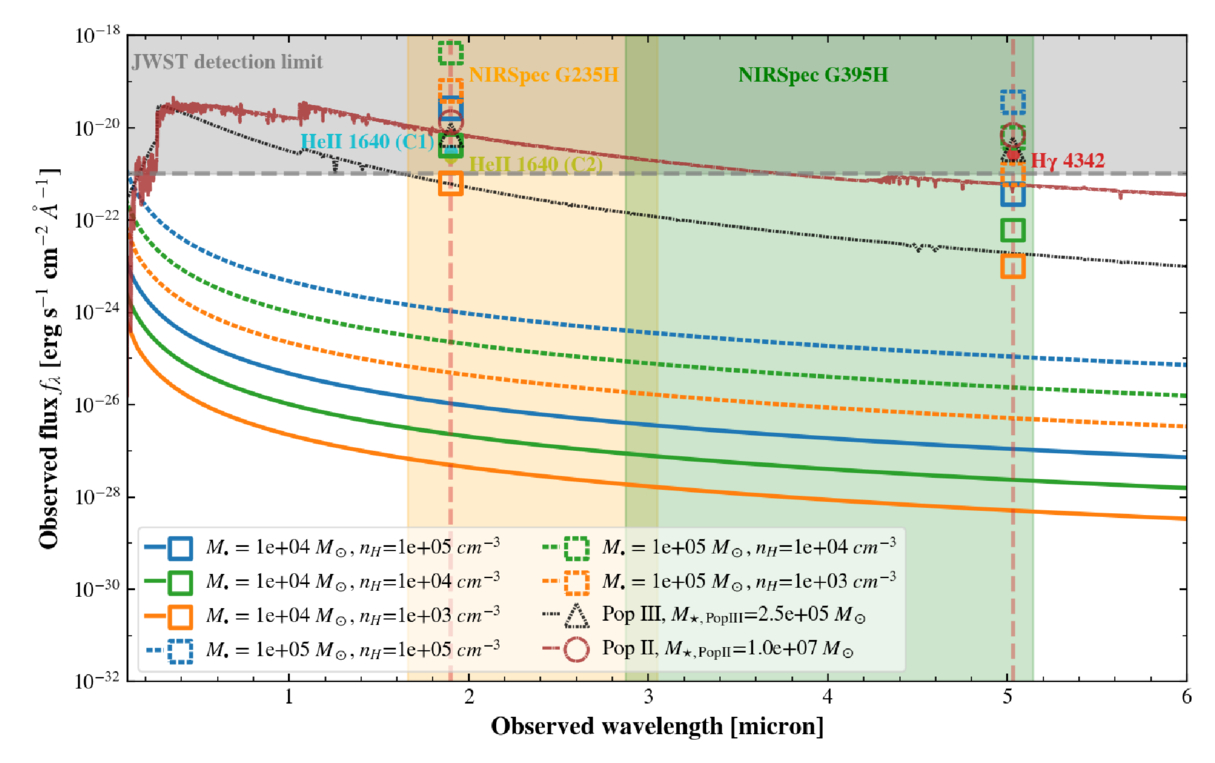
Dating the Dawn of the Milky Way Disk

17 July 2026 at 18:56

Messier 64

The iconic disks of spiral galaxies are well known across the local universe and now far beyond. A recent study looks at the Milky Way to determine when its own disk emerged.

Spinning into Spirals

The Milky Way, a grand spiral galaxy with stars and gas rotating in a disk, did not always look this way. Galaxies begin as chaotic clumps of gas and stars inside a knot of dark matter, and at some point in time, spiral galaxies must transform into the flat rotating disks we observe them as today. Recent JWST observations have uncovered disk galaxies emerging much earlier in the universe than previously thought, shifting our understanding of how quickly spiral galaxies come together and settle into disks. While we cannot study the detailed assembly history of these very distant galaxies, we can dissect galaxies in the local universe to build a better timeline of galaxy evolution.

disk galaxies

JWST images of distant edge-on galaxy disks [NASA, ESA, CSA, STScI, Takafumi Tsukui (ANU)]

Looking as close to home as possible, astronomers have used the kinematics and chemical makeup of stars in our own Milky Way to trace the moment when the galaxy started to host a rotating stellar disk. This period, known as the “spin-up,” marks when the bulk kinematic signature of the galaxy transitioned from one dominated by random motions to one dominated by a rotating disk.

Stars hold on to the kinematic and chemical information they are born with, so stars of different ages and metallicities across the galaxy should trace the development of the disk. Because stellar ages have been difficult to constrain observationally, studies of galactic spin-up have typically relied on readily available metallicity measurements as a proxy for age; however, metallicity is not a clear-cut age indicator, making it difficult to truly distinguish different stellar populations across the Milky Way’s disk. Luckily, new major surveys have recently provided stellar databases adding the stellar age measurements necessary to pin down when the Milky Way spun up.

Dawn of the Galactic Disk

Plots showing stellar age and rotational velocity versus metallicity, [Fe/H].

Plots showing stellar age and rotational velocity (Vϕ) versus metallicity, [Fe/H]. The metallicity range where the age–[Fe/H] relation stalls coincides with the point when the Vϕ–[Fe/H] relation rapidly increases, indicating the age of the spin-up in the Milky Way. Click to enlarge. [Modified from Feltzing et al 2026]

Sofia Feltzing (Lund Observatory) and collaborators used a catalog of over 300,000 subgiant stars from the Large Sky Area Multi-Object Fiber Spectroscopic Telescope with metallicities, kinematics, and crucial stellar ages to determine when the Milky Way began to host a stellar disk. After making quality cuts to ensure they included only the most robustly measured stars, the authors divided the sample into two distinct stellar populations that settled into the Milky Way’s disk differently: older stars with a high abundance of α elements (like oxygen, magnesium, and silicon) relative to iron and younger stars with low α-element abundances.

With these star samples, Feltzing and team analyzed how both stellar rotational velocity and age varied with metallicity to determine when the Milky Way spun up. They found that high-α stars clearly move from having random motions to being rotationally supported over a short range of metallicities about 12.5 billion years ago, while the low-α stars seem to begin in a rotating disk and stay there. When varying their selection criteria and looking at the full sample, the authors determined that the Milky Way spin-up happened between 12.1 to 12.5 billion years ago — the first time Milky Way spin-up has been age-dated in this way.

These results imply a rapid chemical evolution and change in kinematic properties as stars went from randomly orbiting to rotating in an ordered disk in the Milky Way. The authors suggest that future studies should focus on lower-metallicity stars to better disentangle stars in the disk from stars in the halo, which will lead to a more precise determination of the Milky Way’s spin-up. Upcoming large-scale surveys will make this possible and allow astronomers to build a better picture of galaxy formation in the early universe.

Citation

“Dawn of the Milky Way Disk: Determination of When a Rotationally Supported Disk Appears and Dating the Spin-up of the Disk,” Sofia Feltzing et al 2026 ApJL 1004 L28. doi:10.3847/2041-8213/ae6f14

The post Dating the Dawn of the Milky Way Disk appeared first on AAS Nova.

2026 Lucid Gravity Touring review: A strong act 2

17 July 2026 at 12:00

When Lucid introduced the Air electric sedan in late 2021, the first Air Dream Edition I tested packed over 1,100 hp (820 kW) and carried a $180,000-plus window sticker. It's easily the most powerful street car I've tested; the only vehicle I've driven with more power was a purebred race car with a third the mass, and it was on a proper track. Its combustion engine was also about 1,000 times louder than the Air, helping to remind us that "combustion" really does mean explosion after explosion.

For Lucid's second act, the company debuted the Gravity electric SUV last year, and I've just tested the 2026 Gravity Touring, which starts at about $82,000 in the US, including the required destination charge.

My test model carried a bevy of options, including a 22-speaker audio system, the Comfort and Convenience package, third-row seating, a Dynamic Handling package (combining rear-wheel steering and three-chamber air suspension), a luxury seating package (bundling Nappa leather and massaging and ventilated front seats), and special metallic paint.

Read full article

Comments

© Jim Resnick

Seeking Technosignatures in Polluted White Dwarfs

15 July 2026 at 17:00

white dwarf with debris disk

White dwarfs often show signs of metals in their spectra, providing evidence that these evolved stars have accreted planetary material. Could white dwarf spectra also provide evidence for technological activity in these star systems?

A Record of Planets Past

When a Sun-like star reaches the end of its hydrogen-burning lifetime, it first puffs up into a red giant before exposing its white-hot core, which evolves into a white dwarf. This dramatic transition shakes up any planets that happened to be orbiting the star, and some close-in planets may end up crumbling apart, their rubbly remains peppering the surface of the white dwarf.

So far, astronomers have found hundreds of white dwarfs that appear to be polluted with heavy elements from their destroyed planets. These observations provide a valuable look into the bulk compositions of planetary materials outside our solar system. They may also provide a way to detect patterns of chemical abundances that are not natural, resulting from technological processes like industrial refining or the creation of alloys — in other words, a technosignature that is evidence of not just life, but technologically advanced life.

Seeking Signs of Technology

abundances of meteorites compared to white dwarfs

Representation of the chemical abundances of meteorites (pink, orange, and green) and white dwarfs (gray). Most white dwarf abundances overlap with the parameter space defined by the meteorite sample. Click to enlarge. [Huang et al. 2026]

A team led by Bo-Lun Huang (黄博伦) from Beijing Normal University recently investigated whether there is evidence for chemical technosignatures in the current sample of polluted white dwarfs. Huang and collaborators began their investigation with a catalog containing 697 measurements of white dwarfs with metals in their spectra. They applied Bayesian statistical methods to weigh the hypothesis that the chemical makeup of these white dwarfs is entirely natural against the possibility that they contain a blend of natural and technologically altered material.

The team used thousands of chemical abundance measurements from meteorites as a reference for the natural bulk composition of planetary material. For the mixture of natural and processed material, they combined the meteorite reference material with a template that is metal-rich and silicate-poor, with enhanced amounts of iron, nickel, chromium, and manganese.

plot showing evidence for a natural + processed model relative to a natural model as a function of the number of elements detected

Evidence for a model including technologically processed material relative to a purely natural model, as a function of the number of elements detected in the white dwarf. ndet = 0 indicates that only upper limits were obtained on elemental abundances. Higher Bayes factors indicate stronger evidence. The left-hand plot is based on abundances measured from the white dwarfs’ photospheres, while the right-hand plot uses abundances adjusted for diffusion within the white dwarf. Click to enlarge. [Adapted from Huang et al. 2026]

No Strong Evidence, but a Path Forward

Ultimately, Huang’s team found that strong statistical support for the existence of technological processes was uncommon, though there were certain measurements in their sample of white dwarfs that were difficult to reconcile with a solely natural model.

Perhaps unsurprisingly, the team also found that the quality of the chemical abundance measurements affected the constraining power of the observation; some white dwarfs had upper limits for just a few elements, while others had definitive detections of many elements. They found that the most discerning observations recorded iron, magnesium, chromium, and titanium, plus either nickel, silicon, or sodium.

While this work didn’t dredge up firm evidence for technological activity, it provides a jumping-off point for future searches. The handful of white dwarfs in this sample that were fit poorly by a purely natural model could be compared against other technosignature models or targeted with high-resolution spectroscopy. Future measurements of iron and magnesium in polluted white dwarfs may be useful as a preliminary screening tool, helping to pick out intriguing targets for follow-up observations.

Citation

“A Calibrated Bayesian Search for Potential Chemical Technosignatures in Polluted White Dwarfs,” Bo-Lun Huang et al 2026 ApJ 1006 9. doi:10.3847/1538-4357/ae742c

The post Seeking Technosignatures in Polluted White Dwarfs appeared first on AAS Nova.

❌