Se você é um usuário assíduo do Instagram, uma boa ideia talvez seja assinar o plano de assinatura Instagram Plus, que abre um leque de recursos extras as quais melhoram a sua experiência na rede.
Dentre as funções disponibilizadas com ela, está a possibilidade de pré-visualizar o conteúdo das mensagens que tiver recebido na área de conversas privadas do mensageiro, sem que elas sejam marcadas como lidas ou a outra pessoa saiba que você já leu.
Outra possibilidade é, em uma conversa, usar fontes personalizadas exclusivas de quem assina o Instagram Plus.
Igeekphone News August 2, 2026 – A comprehensive leak has revealed the complete specifications and pricing of Google’s upcoming Pixel 11 lineup ahead of its official launch. According to information obtained by Android Headlines, the new series will consist of four models: the Google Pixel 11, Pixel 11 Pro, Pixel 11 Pro XL, and Pixel 11 Pro Fold.
The leaked details cover display technology, cameras, battery capacities, storage configurations, and expected pricing for both the U.S. and European markets.
Google Pixel 11: Compact Flagship Starting at $899
The standard Pixel 11 will feature a 6.3-inch Actua OLED display with an adaptive 60Hz–120Hz refresh rate, 2424 × 1080 resolution, and peak brightness of 3,000 nits. The panel is protected by Corning Gorilla Glass Victus 2, making it the smallest device in the Pixel 11 family.
Performance
The handset is expected to be powered by Google’s new Tensor G6 processor alongside the Titan M3 security coprocessor.
Memory and storage options include:
12GB RAM + 256GB storage
16GB RAM + 512GB storage
Expandable storage is not supported.
Battery
The Pixel 11 is equipped with a 4,985mAh typical battery (4,840mAh minimum capacity) and supports:
30W USB-C PPS wired charging
Qi2 wireless charging
Cameras
The rear camera system includes:
48MP main camera (f/1.7)
13MP ultra-wide camera (f/2.2)
Google is expected to offer up to 30x Super Res Zoom, while selfies are handled by a 10.5MP front-facing camera.
Additional Features
Other features include:
5G connectivity
Under-display fingerprint sensor
Face Unlock
Dimensions: 152.8 × 72 × 8.6mm
Weight: 197g
Expected Price
United States: Starting at $899
Europe: Starting at €999
Google Pixel 11 Pro: LTPO Display and Professional Camera System
The Pixel 11 Pro retains the compact 6.3-inch form factor but upgrades to a Super Actua OLED LTPO display.
Display specifications include:
1Hz–120Hz adaptive refresh rate
2856 × 1280 resolution
3,600 nits peak brightness
Gorilla Glass Victus 2 protection
Hardware
Like the standard model, the Pixel 11 Pro is powered by:
Google Tensor G6
Titan M3 security chip
Memory configurations include:
12GB or 16GB RAM
256GB or 512GB storage
Battery
The phone packs a 4,850mAh typical battery (4,707mAh minimum) with:
30W USB-C PPS charging
Qi2 wireless charging
Triple-Camera Upgrade
Photography receives a major boost with:
50MP main camera
48MP ultra-wide camera
48MP telephoto camera
The telephoto lens supports:
5× optical zoom
Up to 120× Pro Zoom
Google is also expected to deliver “optical-quality” zoom at:
0.5×
1×
2×
5×
10×
On the front, the Pixel 11 Pro features a 42MP selfie camera with a 103-degree field of view.
Other Specifications
5G connectivity
Under-display fingerprint scanner
Face Unlock
Dimensions: 152.7 × 71.9 × 8.4mm
Weight: 204g
Expected Price
United States:$1,099
Europe:€1,199
Google Pixel 11 Pro XL: Larger Display, Bigger Battery, Faster Charging
For users seeking a larger flagship experience, the Pixel 11 Pro XL is expected to feature a 6.8-inch Super Actua OLED LTPO display with:
1Hz–120Hz adaptive refresh rate
2992 × 1344 resolution
3,600 nits peak brightness
Gorilla Glass Victus 2 protection
The device continues Google’s flat-display design philosophy.
Performance
Powered by the Tensor G6, memory options include:
12GB RAM
16GB RAM
Storage configurations include:
256GB
512GB
1TB
The higher-capacity storage variants are expected to include 16GB of RAM.
Battery and Charging
The Pro XL carries the largest battery in the lineup:
5,115mAh typical capacity
5,000mAh minimum capacity
Charging options include:
45W wired charging
Qi2 wireless charging
Google is once again expected to omit a charger from the retail package.
Cameras
Camera hardware mirrors the Pixel 11 Pro:
50MP primary sensor
48MP ultra-wide camera with macro support
48MP 5× telephoto lens
42MP selfie camera
Additional Features
5G
Under-display fingerprint sensor
Face Unlock
Dimensions: 162.7 × 76.5 × 8.5mm
Weight: 226g
Expected Price
United States:$1,299
Europe:€1,199
Google Pixel 11 Pro Fold: Google’s Next-Generation Foldable
The premium Pixel 11 Pro Fold is expected to build upon Google’s foldable smartphone lineup with refinements rather than major design changes.
Dual OLED Displays
The foldable features:
8-inch internal OLED display
6.4-inch external OLED display
Both panels support refresh rates up to 120Hz.
While detailed display specifications remain unavailable, the overall hardware is expected to closely resemble the previous-generation Pixel foldable.
Hardware
Inside, the device includes:
Tensor G6 processor
Titan M3 security chip
Configurations include:
12GB or 16GB RAM
256GB
512GB
1TB storage
No microSD card expansion is supported.
Battery
Battery specifications include:
4,806mAh typical capacity
4,658mAh minimum capacity
Charging support includes:
30W USB-C PPS wired charging
Qi2 wireless charging
Google reportedly estimates that the device can reach 50% charge in approximately 30 minutes.
Camera System
The rear camera array consists of:
48MP primary camera
10.5MP ultra-wide camera with macro capability
10.8MP telephoto camera with 5× optical zoom
Digital zoom reaches up to 30× Super Res Zoom.
Both the inner and outer displays feature 10MP selfie cameras with 87-degree fields of view.
Fingerprint Sensor Returns to the Side
Unlike the rest of the Pixel 11 lineup, the foldable is expected to continue using a side-mounted fingerprint sensor integrated into the power button. Face Unlock will also be supported.
Dimensions are reported as:
Folded
155.2 × 76 × 10.1mm
Unfolded
155.2 × 150.4 × 5mm
Weight: 239g
Expected Price
United States:$1,899
Europe:€1,999
Google Pixel 11 Series at a Glance
Model
Display
Processor
Main Camera
Battery
Starting Price (US)
Pixel 11
6.3-inch Actua OLED, 120Hz
Tensor G6
48MP + 13MP
4,985mAh
$899
Pixel 11 Pro
6.3-inch LTPO OLED, 120Hz
Tensor G6
50MP + 48MP + 48MP
4,850mAh
$1,099
Pixel 11 Pro XL
6.8-inch LTPO OLED, 120Hz
Tensor G6
50MP + 48MP + 48MP
5,115mAh
$1,299
Pixel 11 Pro Fold
8-inch foldable OLED + 6.4-inch cover display
Tensor G6
48MP + 10.5MP + 10.8MP
4,806mAh
$1,899
Final Thoughts
If these leaked specifications prove accurate, the Google Pixel 11 series represents an incremental but meaningful evolution of Google’s flagship smartphone lineup. Across all four models, the Tensor G6 processor, Titan M3 security chip, Qi2 wireless charging, and high-brightness OLED displays form the foundation of the new generation.
The lineup also offers clear differentiation: the Pixel 11 targets users seeking a compact flagship, the Pixel 11 Pro enhances photography and display technology, the Pixel 11 Pro XL delivers Google’s largest conventional smartphone with faster charging, while the Pixel 11 Pro Fold continues the company’s push into the premium foldable segment.
Google has yet to officially confirm these specifications or prices, but the leak provides one of the most comprehensive previews of the Pixel 11 family to date ahead of its expected launch.
Igeekphone News August 8, 2026 – XR hardware company Unseen Reality has officially unveiled the URXR One, a lightweight head-mounted display designed to serve as a portable replacement for traditional monitors rather than a conventional virtual reality headset. The device is set to launch on Kickstarter on August 4, with an early-bird price of $800, while the expected retail price is $900. Shipments are scheduled to begin in mid-October 2026.
Designed as a Personal Display Instead of a VR Headset
Unlike most VR headsets that focus on immersive gaming or virtual environments, the URXR One is positioned as a wearable display for productivity, entertainment, and extended everyday use. The headset is optimized for displaying traditional 2D content, making it suitable for users who want a large virtual screen for work, media consumption, or multitasking.
According to Unseen Reality, the headset has been engineered for comfortable long-term wear and supports both 3 Degrees of Freedom (3DOF) and 6 Degrees of Freedom (6DOF) operating modes. Spatial tracking in 6DOF mode is enabled by a dual-camera SLAM (Simultaneous Localization and Mapping) system, allowing the virtual display to remain anchored in physical space as users move around.
Lightweight Design with Pancake Optics
One of the URXR One’s standout features is its remarkably lightweight construction. Weighing just 93 grams, the headset is significantly lighter than most standalone VR and mixed reality devices currently on the market.
The display system incorporates a Mini Pancake optical design, which helps reduce both size and weight while maintaining image clarity. The headset is equipped with:
Dual 1.03-inch Micro OLED displays
2448 × 2064 resolution per eye
90Hz refresh rate
These specifications are intended to deliver crisp visuals suitable for productivity applications, video streaming, and general computing.
Virtual Display Expands Up to 200 Inches
The URXR One enables users to create a virtual display that can scale from the approximate size of a laptop screen to as large as 200 inches, providing a flexible workspace without requiring a physical monitor.
This approach makes the device particularly attractive for mobile professionals, travelers, and users working in limited spaces who want a large-screen experience while maintaining portability.
External Device Required
Unlike standalone XR headsets equipped with onboard processors, the URXR One does not include an independent computing platform. Instead, it functions as an external display by connecting directly to compatible devices through a USB-C DisplayPort connection.
Users can pair the headset with laptops, PCs, tablets, or supported smartphones capable of video output over USB-C.
However, Unseen Reality notes that certain smartphones may not provide sufficient power or DisplayPort output through a single USB-C connection. For these devices, the company offers an optional URXR Power Hub, priced at $69, which supplies additional power and expands compatibility.
Pricing and Availability
The URXR One will be available through a Kickstarter crowdfunding campaign, offering:
Early-bird price:$800
Expected retail price:$900
Optional URXR Power Hub:$69
The company expects to begin shipping the headset to backers in mid-October 2026.
Final Thoughts
Rather than competing directly with immersive VR headsets, the Unseen Reality URXR One targets users looking for a lightweight, wearable personal display for productivity and media consumption. Its 93-gram design, Mini Pancake optics, dual Micro OLED displays, 90Hz refresh rate, and 6DOF spatial tracking distinguish it from traditional smart glasses while avoiding the bulk of many standalone XR devices.
If Unseen Reality delivers on its promises of comfort, display quality, and reliable spatial tracking, the URXR One could become an appealing option for professionals and enthusiasts seeking a portable large-screen experience without carrying a physical monitor.
Smart wearables continue to evolve, and DT NO.1 E08 Smart Cycling Glasses are a perfect example of how artificial intelligence, photography, and audio technology can be integrated into a lightweight pair of sports glasses. Designed for cyclists, outdoor enthusiasts, and tech lovers, the E08 combines AI recognition, hands-free photography, video recording, music playback, and voice interaction into a single wearable device.
Designed for Active Lifestyles
The DT NO.1 E08 features a sporty cycling-glasses design that prioritizes comfort and stability during outdoor activities. Whether you’re riding a bike, hiking, running, or traveling, the lightweight frame provides a secure fit while offering protection from sunlight and wind.
Its modern aerodynamic appearance makes it suitable for both athletic and casual use, allowing users to capture experiences without carrying additional devices.
AI-Powered Smart Assistance
One of the biggest highlights of the E08 is its built-in AI functionality. The glasses support OpenAI-powered recognition technology, enabling users to interact with intelligent voice features while on the move.
AI capabilities include:
Object recognition
Voice assistant functions
Smart information retrieval
Voice interaction
Real-time AI-assisted experiences
These features transform the glasses from a simple recording device into a wearable AI companion.
13MP Camera with 32MP Photo Capture
The integrated 13MP camera allows users to capture moments directly from their point of view. Unlike traditional action cameras, the E08 records exactly what the wearer sees, making it ideal for cycling adventures, scenic rides, and outdoor exploration.
Photo resolution reaches up to 32MP, delivering detailed images suitable for sharing on social media or preserving memorable experiences. The hands-free design means users can focus on the activity rather than holding a smartphone.
1080P Video Recording with EIS Stabilization
For video creators and outdoor sports enthusiasts, the E08 supports 1080P HD video recording. Electronic Image Stabilization (EIS) helps reduce vibrations and shaking, producing smoother footage during movement.
Whether cycling through city streets or mountain trails, the stabilization technology improves recording quality and makes videos more enjoyable to watch.
Fast Wi-Fi 6 Connectivity
The inclusion of Wi-Fi 6 technology enables faster wireless transfers and improved connectivity. Users can quickly synchronize photos and videos with their smartphone, reducing the need for cables and simplifying content sharing.
Wi-Fi 6 also enhances communication between the glasses and companion applications, ensuring responsive performance for AI features and media management.
Open-Ear Audio Experience
The E08 functions as more than just smart glasses. Built-in speakers provide an open-ear listening experience, allowing users to enjoy music, navigation prompts, and voice responses while remaining aware of their surroundings.
This design is especially beneficial for cyclists and runners who need to hear traffic, pedestrians, and environmental sounds for safety. The device supports up to 10 hours of music playback, making it suitable for long rides and outdoor adventures.
Smart Features for Everyday Use
Beyond photography and audio, the DT NO.1 E08 offers a range of intelligent functions:
Voice control
AI recognition
Hands-free operation
Music playback
HD video recording
Wireless file transfer
Outdoor sports support
Smart assistant integration
These features make the glasses useful not only for sports but also for travel, commuting, sightseeing, and daily activities.
For cyclists and outdoor enthusiasts, the E08 provides a practical combination of safety and convenience. Users can listen to music, receive AI assistance, capture photos, and record videos without reaching for a smartphone.
The first-person perspective recording capability makes the glasses particularly appealing for adventure content creators, while the open-ear audio design helps maintain environmental awareness during activities. Smart-glasses users often view camera, audio, AI assistance, and battery life as the most important features in everyday wearable devices.
Final Verdict
DT NO.1 E08 Smart Cycling Glasses successfully blend AI technology, hands-free photography, HD video recording, and open-ear audio into a versatile wearable device. With its 13MP camera, 32MP photo capability, Wi-Fi 6 connectivity, OpenAI recognition features, and 10-hour battery life, the E08 offers an impressive package for cyclists, travelers, and outdoor adventurers.
For users seeking a smart wearable that can capture experiences, provide AI assistance, and deliver entertainment without sacrificing comfort or awareness, the DT NO.1 E08 stands out as a compelling option in the growing smart glasses market.
Looking for an RC drone that stands out from the crowd? CZ31 Rocket-Style RC Drone combines an eye-catching rocket-inspired design with beginner-friendly flight controls, brushless motors, Wi-Fi FPV, and unique visual effects that make every takeoff feel like a space launch. Designed primarily for recreational flying, this Ready-to-Fly (RTF) quadcopter offers an entertaining experience for kids, beginners, and drone enthusiasts alike.
A Rocket-Inspired Design That Turns Heads
Unlike traditional quadcopters, the CZ31 adopts a rocket-inspired appearance complete with folding arms that resemble a futuristic launch vehicle. During takeoff, the drone enhances the illusion with LED lighting and a mist spray effect beneath the aircraft, creating a realistic rocket exhaust visual.
It’s important to note that the “rocket missile-launch” branding refers purely to the drone’s appearance and visual effects—it is designed solely as a recreational RC aircraft.
Brushless Motors for Stable Flight
Powering the CZ31 are efficient brushless motors, which provide smoother flight performance and greater durability compared to conventional brushed motors.
Advantages include:
Improved flight stability
Longer motor lifespan
Lower operating noise
Better efficiency
Enhanced reliability for regular outdoor flying
Combined with its 6-axis gyroscope, the drone delivers stable hovering and responsive controls, making it suitable for both beginners and casual pilots.
Beginner-Friendly Flight Features
The CZ31 includes several intelligent functions that simplify flying:
One-key takeoff and landing
Altitude hold
Headless mode
Multiple speed settings
Stable hover control
These features help new pilots gain confidence while allowing more experienced users to enjoy quick and hassle-free flights.
Wi-Fi FPV with Built-In Camera
The drone comes equipped with a 480P HD camera that supports 2.4GHz Wi-Fi FPV (First-Person View) transmission.
Pilots can connect the drone to a compatible smartphone to:
View live video
Capture aerial photos
Record videos
Experience FPV flying
The FPV transmission range is approximately 30 meters, while the remote-control range extends to around 50 meters under ideal conditions.
Mist Spray and LED Lighting
One of the most entertaining features of the CZ31 is its one-touch mist spray system.
Using the included water dropper, users can fill the small reservoir to produce a visible mist beneath the drone. Combined with colorful LED lighting, the effect resembles rocket exhaust during takeoff, making evening flights especially enjoyable.
The spray system is intended purely as a visual effect and can operate for approximately 8 minutes after a brief activation.
Compact and Portable
The CZ31 measures approximately:
200 × 200 × 190 mm
Takeoff weight: 175g
Its foldable arms make transportation and storage convenient, allowing users to easily pack the drone into a backpack for outdoor adventures.
Battery Performance
The drone is powered by a 3.7V 1200mAh Li-Po battery, offering:
6–9 minutes of flight time
Around 60 minutes charging time
The modular battery design also allows for quick battery swaps if additional batteries are purchased separately.
Package Contents
The Ready-to-Fly package includes:
CZ31 Rocket-Style RC Drone
2.4GHz remote controller
3.7V 1200mAh battery
USB charging cable
Spare propellers
Propeller guards
Water dropper for the mist effect
Screwdriver and mounting screws
User manual
Key Specifications
Rocket-inspired foldable design
Brushless motor system
480P HD camera
2.4GHz Wi-Fi FPV
One-key takeoff and landing
Headless mode
Altitude hold
LED lighting effects
Mist spray “rocket exhaust” effect
3.7V 1200mAh Li-Po battery
Flight time: 6–9 minutes
Control range: approximately 50 meters
FPV range: approximately 30 meters
Who Should Buy the CZ31?
The CZ31 is a great choice for:
First-time drone pilots
Kids and families
Hobbyists looking for a fun recreational drone
Users who enjoy unique drone designs
Anyone seeking an affordable FPV quadcopter with visual effects
Final Verdict
CZ31 Rocket-Style RC Drone focuses on fun rather than professional aerial photography. Its rocket-inspired styling, LED lighting, mist spray effect, brushless motors, and beginner-friendly flight controls create an engaging flying experience that stands out from conventional toy drones.
While its 480P camera and modest flight time reflect its entry-level positioning, the CZ31 offers plenty of entertainment value for recreational users. If you’re looking for a unique RC quadcopter that combines imaginative design with easy-to-fly features, the CZ31 is a compelling option for weekend flying and family fun.
Angela Nissel smiles through the pain. | Image: Angela Nissel
Angela Nissel's latest book, Good Grief, Pass the Bread, Mom Is Dead, is my kind of memoir. Sure, it's a deeply emotional tale about caring for a terminally ill parent. But it's delivered with the sort of gallows humor that I often turn to to get me through tough times.
Of course, that sort of dark humor should come as no surprise from Nissel. She first made a splash with The Broke Diaries, which grew out of a blog she kept in college detailing her daily struggles and, at times, embarrassment at being a broke student. Eventually she went on to produce and write for hit shows including Scrubs and The Boondocks.
A cada atualização anual do macOS, uma escolha da Apple em particular gera quase tanta curiosidade quanto as mudanças e os novos recursos do seu sistema operacional: o nome que acompanhará o update.
Hoje, faremos uma breve recapitulação das principais escolhas da Maçã sobre os nomes de cada versão do sistema operacional dos seus computadores, passando por décadas de codinomes felinos e, mais recentemente, paisagens californianas.
As (várias) mudanças do passado
Antes disso — no período do Mac OS Classic, que abrange os sistemas dos Macintoshes lançados entre 1984 e 2001 —, os nomes dos sistemas da Apple eram usados quase exclusivamente de forma interna. Publicamente, as versões recebiam denominações bastante protocolares, mas, nos bastidores, praticamente todas carregavam codinomes.
O System 6, por exemplo, teve versões conhecidas internamente como Antares (6.04), Big Deal (6.05), SixPack (6.06) e Terminator (6.08). Já o System 7 passou por uma verdadeira coleção de nomes, incluindo Blue, Beta Cheese, Cube-E, I Tripoli, Jirocho, Mozart, Capone, Danook, Thag e Marconi, entre outros. Também houve casos específicos, como Road Warrior, utilizado nos primeiros PowerBooks, além de Unity, Buster, Son of Buster, Harmony e Ides of Buster, empregados em versões posteriores do sistema.
A partir do Mac OS 8, os nomes foram predominantemente relacionados à teoria musical — é o caso do codinome Tempo no Mac OS 8, Allegro no Mac OS 8.5 e Sonata no Mac OS 8.7 (versão de desenvolvimento do que viria a ser o Mac OS 9). As exceções são o Mac OS 8.1 (intitulado Bride of Buster) e o Mac OS 8.6 (Veronica).
Essa só se tornou uma tradição marqueteira a partir do Mac OS X 10.2, quando Steve Jobs apresentou a nova versão do sistema operacional como Mac OS X Jaguar, levando um codinome ao público pela primeira vez — antes do Jaguar, a Apple utilizou os codinomes Kodiak para a versão beta, Cheetah para a 10.0 e Puma para a 10.1 —, inaugurando a era de nomes de grandes felinos.
Os animais ditaram os sistemas dos Macs por cerca de dez anos (de 2002 até 2012): foi o caso do Mac OS X 10.3 Panther, Mac OS X 10.4 Tiger, Mac OS X 10.5 Leopard, Mac OS X 10.6 Snow Leopard, Mac OS X 10.7 Lion e, por fim, OS X Mountain Lion 10.8 — que abandonou (temporariamente) o prefixo “Mac”.
OS X Mavericks 10.9: a alteração de rota rumo à Califórnia
A partir da décima versão do macOS (então OS X), a Apple adotou publicamente nomes com as regiões da Califórnia, tendência que segue em vigor até os dias de hoje.
A troca, aliás, andou em paralelo a uma mudança paradigmática do sistema: foi somente com o OS X Mavericks 10.9 que a Maçã deixou de cobrar pela atualização dos seus sistemas operacionais, permitindo que os seus usuários, a partir do Snow Leopard (na compilação 10.6.8), atualizassem as suas máquinas sem custos adicionais — uma realidade que permanece até os dias de hoje.
O primeiro destino geográfico escolhido pela Apple remete a uma região litorânea conhecida pelas altas ondas, propícias para a cena local do surfe. O papel de parede do OS X 10.9 dava destaque à curvatura de uma grande onda em tons de azul e turquesa, com clara inspiração na localização que deu nome ao update.
Em matéria de software, o OS X Mavericks ficou marcado pelo aprimoramento na gestão de performance, bateria e memória, aproveitando melhor o hardware dos computadores da Apple. Quanto aos recursos, o sistema trouxe os links compartilhados no Safari, respostas embutidas em notificações, abas e tags no Finder, melhor suporte ao uso de múltiplos monitores, além da introdução de novos aplicativos, como o Mapas e iBooks.
OS X Yosemite 10.10
Pouco mais de quatro horas adiante (ou 314km, para ser mais exato), encontramos o Parque Nacional de Yosemite. A área já era considerada tão importante para a preservação ambiental que Abraham Lincoln autorizou sua proteção e uso público em 1864, anos antes da criação de Yellowstone, reconhecido como o primeiro parque nacional do mundo. Outro grande entusiasta de Yosemite foi Theodore Roosevelt, que ajudou a consolidar a sua importância dentro do sistema de parques americanos.
Um dos maiores símbolos do parque — e também o destaque do wallpaper oficial do sistema — é o Half Dome, um monólito de granito com impressionantes 2.696 metros de altitude. Localizada no coração de Yosemite, a formação foi considerada inescalável por alguns geólogos do século XIX, até que George G. Anderson realizou a façanha em 1875, escalando-a descalço. Muito possivelmente, a foto usada pela Apple foi registrada com uma lente teleobjetiva nas proximidades da Ahwahnee Meadow.
O OS X Yosemite 10.10 foi um marco importante na trajetória do macOS. Muito lembrado pelas mudanças de design na interface — com elementos translúcidos e ícones de formas planas que definiriam a identidade visual do sistema por várias gerações —, ele também deixou como legado a introdução dos recursos de Continuidade (Continuity) entre o OS X e o iOS.
Inicialmente, a novidade englobava apenas o AirDrop, as chamadas telefônicas, o app Mensagens, o Handoff e o Instant Hotspot. Ainda assim, ela inaugurou um nível de interoperabilidade que ajudou a redefinir a forma como o mercado de tecnologia passou a enxergar ecossistemas compostos por diferentes produtos de uma mesma marca.
OS X El Capitan 10.11
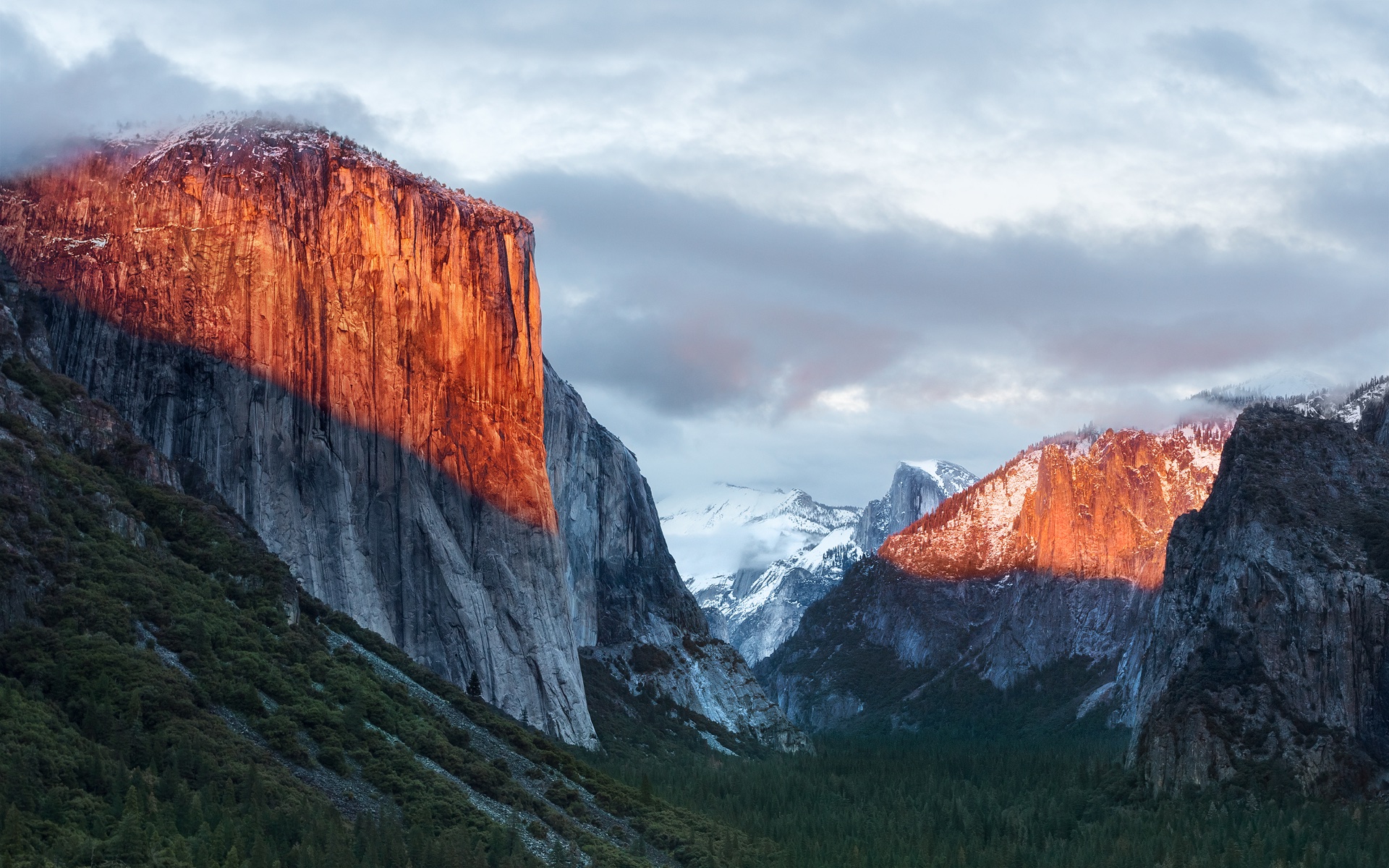
A apenas 20 minutos de distância do Ahwahnee Meadow, a próxima parada do Mac é outra atração turística presente dentro do Parque Nacional de Yosemite: o El Capitan é um monólito de granito de quase 900 metros que se ergue acima do vale do parque.
O papel de parede provavelmente foi fotografado a partir do mirante Tunnel View, de onde é possível avistar o El Capitan à esquerda do vale. Ao fundo, surge o Half Dome — um enquadramento que parece refletir o espírito da atualização. Diferentemente de Yosemite, o OS X El Capitan 10.11 deu menos ênfase à introdução de novos recursos e concentrou seus esforços em correções de bugs, otimizações de desempenho e refinamentos da experiência de uso. Entre as principais novidades, estavam um Spotlight aprimorado, a adição do Split View e diversas melhorias nos aplicativos nativos da Apple.
macOS Sierra 10.12
Cerca de 338km depois (aproximadamente quatro horas e meia) de Yosemite, passando pela cordilheira de Sierra Nevada (situada no leste da Califórnia, a oeste do Mount Whitney), temos o Lone Pine Peak, cenário da montanha que aparece no wallpaper do sistema.
Além da mudança de nomenclatura de OS X para macOS (colado e com o “m” minúsculo, como segue até os dias de hoje), a atualização é particularmente lembrada pela inclusão da Siri no Mac, o Desbloqueio Automático (Auto Unlock) com o Apple Watch e a Área de Transferência Universal (Universal Clipboard) entre Macs, iPhones e iPads.
macOS High Sierra 10.13
Uma rápida viagem de 80 minutos (129km) é capaz de nos levar ao próximo destino fotografado pela Apple: North Lake, localizada na pequena cidade de Bishop, entre as montanhas da cordilheira de Sierra Nevada. Ali, muito possivelmente em meio ao outono, o registro eternizado no papel de parede do sistema foi feito.
Quando falamos do sistema, aos moldes do próprio El Capitan e do Snow Leopard, o macOS High Sierra 10.13 focou muito mais no aprimoramento interno do macOS do que em novos recursos, mas vale mencionar a inclusão do novo sistema de arquivos da Maçã (o Apple File System, ou APFS), do suporte aos formatos audiovisuais HEVC e HEIF, bem como a chegada da segunda geração da tecnologia de desempenho gráfico Metal.
macOS Mojave 10.14
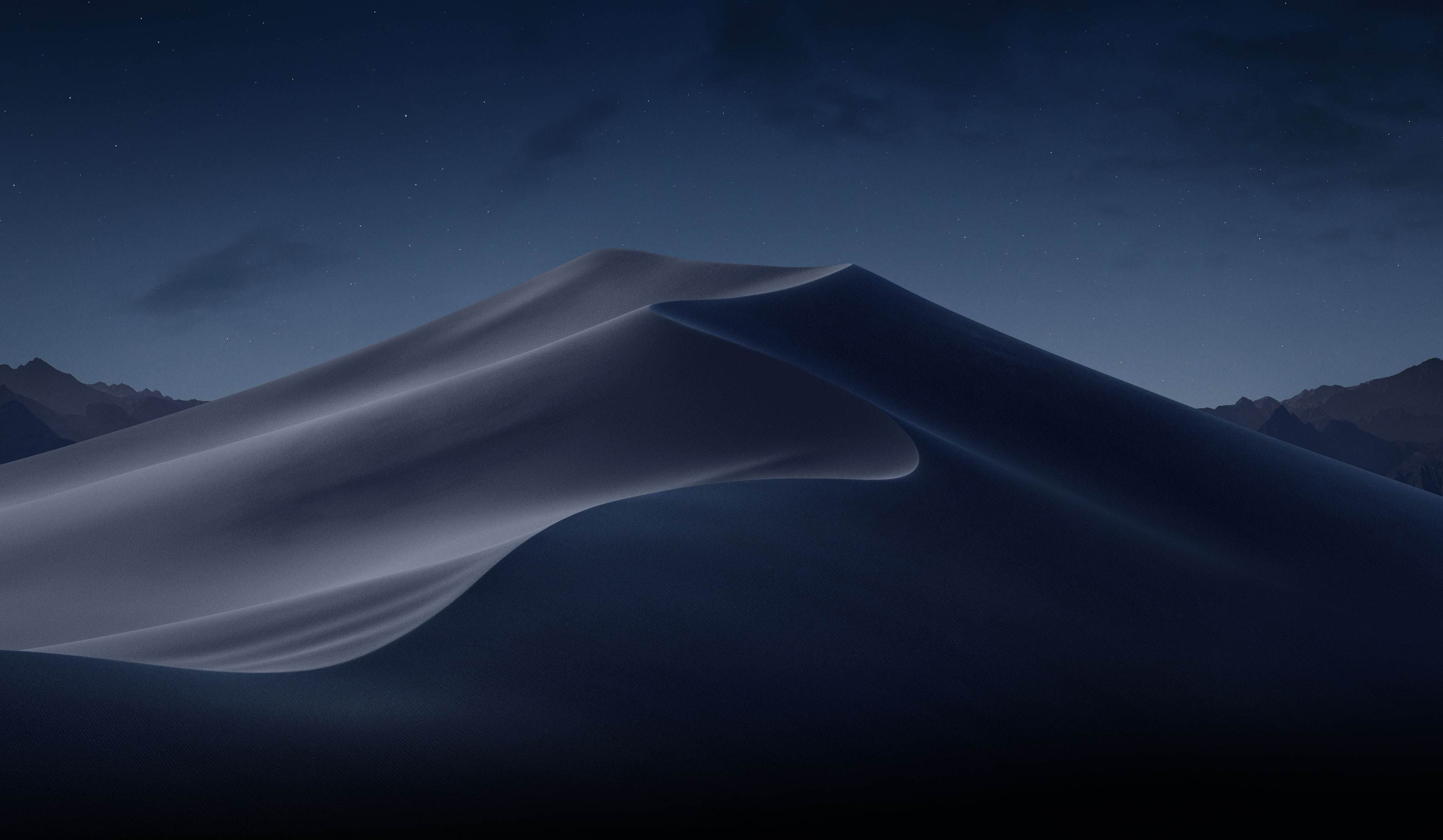
Depois das montanhas, que peculiarmente ficam na margem do wallpaper, vieram as dunas. Com uma distância de 253km (ou três horas de carro), o próximo destino é o Parque Nacional do Vale da Morte, o ponto mais quente do continente americano — onde se registrou a maior temperatura da história (56,7°C) em julho de 1913, e onde a foto do papel de parede do macOS Mojave 10.14 foi feita.
Já sobre as novidades do sistema, essa versão do macOS é particularmente conhecida pela introdução do Modo Escuro, a inclusão dos Conjuntos (Stacks) na Mesa (Desktop), além da estreia de apps já conhecidos dos usuários de iOS, como o Apple News, o Bolsa (Stocks), o Gravador de Voz (Voice Memo) e o Casa (Home).
macOS Catalina 10.15
A 428km adiante do Deserto de Mojave (cerca de cinco horas e meia de carro), nós temos a Ilha de Santa Catalina, destino paradisíaco — e remoto — da costa sul da Califórnia que deu nome à versão do macOS lançada em 2019. Pela posição da foto, o que se especula é que o registro oficial da Apple tenha sido feito com o auxílio de um drone ou helicóptero, sobrevoando as águas para capturar Catalina sob diferentes períodos e iluminações para fornecer o tema dinâmico disponível no sistema.
Essa atualização marcou o fim do iTunes, que foi segmentado em um catálogo de aplicativos separados (Apple TV, Música, Apple Podcasts), mas sua adição mais relevante muito possivelmente foi o recurso Sidecar, que possibilita o uso do iPad como um monitor externo do Mac.
macOS Big Sur 11
Com uma distância de 524km da Ilha de Catalina, a próxima parada é na Ponte Bixby Creek (inaugurada em 1932 e particularmente conhecida por suas estradas com curvas), localizada na costa central de Big Sur, que dá nome a essa versão do macOS — o papel de parede retrata também a parte litorânea do local.
Sobre o sistema, a versão marcou a transição dos processadores da Intel para o Apple Silicon com o lançamento do M1, trazendo novos ícones, materiais translúcidos, um novo Dock, Central de Controle e de Notificações.
Esta versão também foi um marco para o sistema operacional, pois, pela primeira vez em muitos anos, a Apple abandonou as sub-versões 10.x e passou para o número 11 — o que se manteve nos anos subsequentes.
macOS Monterey 12
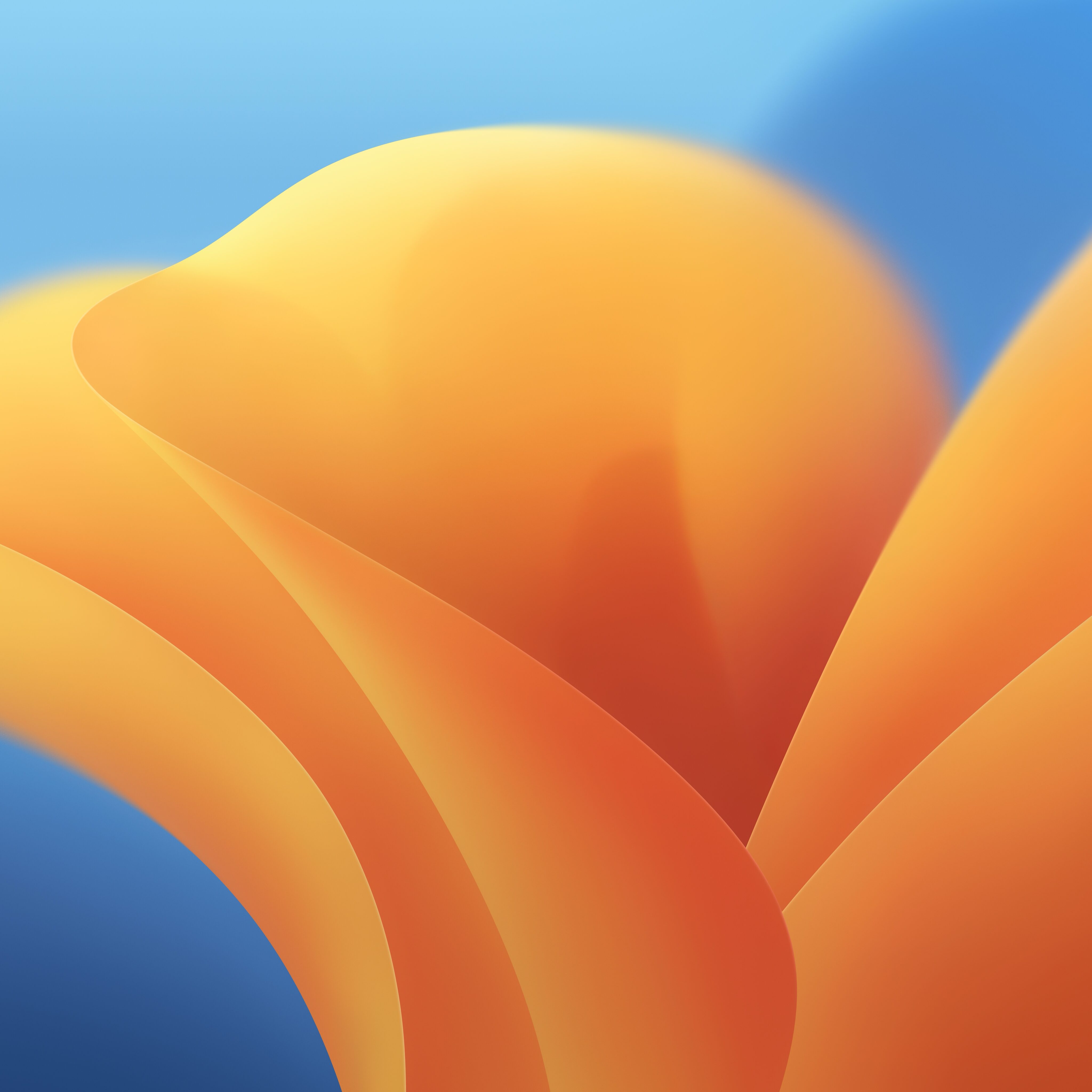
Ainda na costa de Big Sur, o macOS Monterey 12 marcou a quebra de uma tradição: pela primeira vez em anos, a Apple optou por não incluir um registro fotográfico como possível papel de parede ou tela de descanso, mantendo apenas temas dinâmicos para ilustrar o sistema dos Macs naquela ocasião.
O Condado de Monterey, que inspirou o nome do sistema, é particularmente lembrado por ter abrigado a primeira capital da Califórnia, quando a região ainda era de domínio dos governos da Espanha e do México.
Em relação ao sistema, o grande destaque foi a introdução do Controle Universal (Universal Control), permitindo que um único conjunto de periféricos (como teclados e mouses) seja utilizado simultaneamente no Mac e no iPad.
macOS Ventura 13
Por volta de 450km de distância (quatro horas e meia de trajeto) depois, temos o Condado de Ventura, que inspirou essa versão do macOS. Emancipado do Condado de Santa Bárbara em 1873, ele abriga o píer mais antigo do estado da Califórnia. Mais uma vez, a Apple optou por não incluir um papel de parede fotográfico.
Quanto aos seus recursos, o macOS Ventura 13 se destacou pela adição do recurso Organizador Visual (Stage Manager) e melhorias no Spotlight, Safari, entre outros aplicativos nativos do sistema que ganharam reformulações.
macOS Sonoma 14
Do Condado de Ventura até Sonoma, são 748km (pouco mais de sete horas de trajeto) até a região norte de San Francisco, conhecida por abrigar centenas de vinícolas. O registro da Apple foi feito na vinícola Mazzocco Sonoma, no rancho de Warm Springs.
Depois de dois anos, a Apple enfim retornou com os papéis de parede fotográficos no macOS, funcionando também como protetores de tela (screensavers) dinâmicos que lentamente se tornam um wallpaper estático após o login.
A maior novidade do sistema foi a implementação dos widgets interativos na Mesa (Desktop), além de reformulações no modo Jogo, na relação do sistema com acessos remotos e no compartilhamento de conteúdos em videochamadas, com novidades também no Safari, na Siri e nos recursos de acessibilidade.
macOS Sequoia 15
Saindo de Sonoma, nosso próximo destino está localizado a quase sete horas de distância (mais ao sul da Califórnia, a exatos 547km de distância); trata-se do Parque Nacional da Sequoia, que abriga algumas das maiores árvores do planeta em termos de volume.
O registro do papel de parede é remoto o suficiente para não termos uma dimensão exata da sua localização geográfica (até porque a Apple nunca divulgou essa informação), mas é seguro afirmar que as imagens foram capturadas em algum dos bosques de sequoias da Sierra Nevada.
Além da estreia controversa dos recursos da Apple Intelligence devido à discrepância entre o que foi apresentado e as funcionalidades entregues, o macOS Sequoia 15 introduziu o Espelhamento do iPhone (iPhone Mirroring), a organização de janelas em mosaico e o aplicativo Senhas (Passwords).
macOS Tahoe 26
Do Parque Nacional de Sequoia, partimos rumo ao norte, até a fronteira entre a Califórnia e o estado do Nevada (uma distância de 330km, ou três horas e meia de trajeto). O próximo destino é o Lago Tahoe, também presente na cordilheira de Sierra Nevada. Ele é particularmente conhecido por ser o maior lago alpino da América do Norte em termos de altitude.
Conhecido por suas águas cristalinas, o lago é um destino frequente para esqui. O papel de parede do macOS Tahoe 26 exibe um ângulo baixo sobre o lago, com as rochas em primeiro plano, enquanto os pinheiros e as montanhas de Sierra Nevada aparecem ao fundo.
Quanto ao sistema, além da unificação da numeração com todo o ecossistema (iOS, iPadOS, watchOS, tvOS e visionOS) da Apple, essa versão foi especialmente marcada pelo redesign de interface com a estreia do Liquid Glass. Outras novidades incluem a adição das Atividades Ao Vivo (Live Activities) ao recurso Continuidade, além de revisões do Spotlight, Central de Controle e os recursos da Apple Intelligence.
macOS Golden Gate 27
E, enfim, chegamos à versão mais recente do macOS! Com uma distância de 330km (trajeto com cerca de três horas e meia), nosso próximo destino é o cartão postal da cidade de San Francisco: a Ponte Golden Gate.
Ela foi, até 1964, a maior ponte suspensa do mundo — caso seus cabos de sustentação fossem esticados, teriam tamanho o suficiente para dar três voltas no planeta.
Enquanto sistema, assim como o Snow Leopard ou o High Sierra, o macOS Golden Gate 27 é marcado por sua abordagem de priorização dos refinamentos, tanto relacionados ao visual Liquid Glass quanto aos recursos da Apple Intelligence e da Siri, que agora se torna Siri AI.
E você aí, usa o macOS desde que versão? Alguma, em especial, lhe marcou? Ou você (ainda) não é usuário de Mac, mas gostou de todas essas curiosidades? 😊
After over a month of testing iOS 27, on this week's episode of The MacRumors Show we circle back to the beta and talk through our experiences with Siri AI, Liquid Glass refinements, and more.
iOS 27 is expected to launch this fall, bringing sweeping performance work across the system. Apple has cited more than 80 speed and efficiency improvements, with app launches up to 30 percent faster and AirDrop transfers up to 80 percent faster than on iOS 26. Animations, keyboard responsiveness, Home Screen page swapping, and App Library loading have all been sped up, and Apple says the improvements extend even to older iPhones like the iPhone 11.
The centerpiece of iOS 27 is Siri AI, a substantially overhauled version of the assistant positioned as a rival to chatbots like Claude and ChatGPT. Siri AI can hold back-and-forth conversations, draw on personal context from Mail, Messages, Photos, and Files, and see what's on screen to answer follow-up questions. A new standalone Siri app houses ongoing conversations, while a "Search or Ask" interface, accessed via the Dynamic Island, has effectively replaced Spotlight as the default way to search the device and launch apps.
Liquid Glass, the translucent design language introduced in iOS 26, has also been reworked. iOS 27 adds a system-wide transparency slider in place of the binary "Clear" and "Tinted" toggle from iOS 26.1, letting users dial the effect anywhere between fully opaque and completely clear. Apple also improved how the material diffuses busy content behind it, addressing readability complaints that dogged the original rollout, and refreshed first-party app icons with additional Liquid Glass layering.
Elsewhere, Apple has leaned into contextual, on-device intelligence. For example, Call Context, a new Phone app feature, automatically surfaces relevant information, such as a flight confirmation number or order code pulled from Mail, when a user calls a business they've recently corresponded with. Apple says the feature works entirely on-device and looks only at who is being called, not at call audio, and it also appears on the Apple Watch during a call.
Calendar and Reminders now support natural language entry, letting users type something like "meeting at 2pm with Eric on July 14" and have the app suggest the date, time, and attendees automatically. Apple says Siri can handle more complex natural-language scheduling requests directly, including edits to recurring events.
The Photos app gains three generative editing tools grouped under an Apple Intelligence Tools section: an upgraded Clean Up, a new Extend tool, and Spatial Reframing. Clean Up now offers Fast, High Quality, and Auto modes for object removal and can reconstruct more complex backgrounds than before. Extend uses generative AI to fill in new content when a photo's borders are expanded, and is capped at a maximum of 25% per side. Spatial Reframing, which draws on the same spatial data used for Portrait mode, lets users shift a photo's apparent camera angle after it was taken.
The Shortcuts app has been rebuilt around a "Describe a Shortcut" interface, where Apple Intelligence assembles an entire automation from a plain-language description rather than requiring users to build workflows action by action manually. Safari picks up a similar natural-language approach with a new Create an Extension option for building custom browser extensions on the fly, automatic AI-driven tab organization by topic, and a "Notify Me" tool that monitors a webpage and alerts users when it changes, which is useful, Apple says, for tracking ticket sales or restocked products.
Image Playground has also been overhauled for iOS 27, adding support for photorealistic image generation, edits to existing images via text descriptions, and additional aspect ratio options for wallpapers and Contact Posters.
iOS 27 is available now to developers and public beta testers, and Apple plans to release the software officially in September. The MacRumors Show has its own YouTube channel, so make sure you're subscribed to keep up with new episodes and clips.
The MacRumors Show is on X @MacRumorsShow, so be sure to give us a follow to keep up with the podcast. You can also email us at podcast@macrumors.com or head over to The MacRumors Show forum thread. Remember to rate and review the podcast, and let us know what subjects and guests you would like to see in the future.
Com uma aposta reforçada na criatividade, acompanhada por novidades com IA, o Oppo Reno16 Pro quer conquistar quem valoriza a fotografia e a conveniência de ter todas as ferramentas de edição reunidas num único lugar. Mas a redução da capacidade da bateria deixa a desejar e a subida no preço é difícil de ignorar.
Released less than a month ago by an unknown developer, Chrome Browser Default has somehow become a top download in the United States Mac App Store, alongside well-known developers Amazon, WhatsApp/Facebook/Meta, and Microsoft[…]
[…]
Chrome Browser Default is the top search result for “Google Chrome” in the Mac App Store. Chrome itself is distributed as a direct download from Google, outside the Mac App Store. Notice also that the Chrome Browser Default app icon resembles the Google Chrome app icon[…]
Both the name and icon violate Apple’s guidelines, and the preview images are not actually screenshots of the app. The App Store is great for distributing apps that piggyback on the names of popular apps. They’d be hard to find with a regular Web search, but in the App Store they appear at the top.
The app appears to do what the description says it does, though it’s quite primitive and likely vibe-coded. I can add rules, but I couldn’t find a way to edit or delete added rules, which is ridiculous. The developer’s privacy policy is on GitHub in a repository where most of the commits were co-authored by Claude.
[…]
At the bottom is a section that shows, allegedly, what “People are Saying” about the app. Yet none of these 5-star reviews are from the App Store. According to Google Search, the reviews are not from anywhere on the web.
This app is no longer available in the Mac App Store.
[…]
I have no idea why the Dutch name “Standaard Browser Wisselen” appears in the alert, because the App Store Purchased section says “Chrome Browser Default,” and my only Mac system language is English (US). The name of the developer in the App Store was Chinese, 立花 卢.
[…]
My suspicion is that Apple, not the developer, removed the app from the App Store, which explains why I can’t download it. Whether this removal was triggered by my blog post or by App Store user reports, I don’t know.
Doesn’t say amazing things for the Mac App Store that I find it faster to search for something in a search engine than within the MAS itself. And that’s when I already know the name of what I’m looking for.
Brazilian users browsing the App Store rankings in categories such as Navigation, Travel, and Weather have noticed a growing number of poorly made games appearing among the top results, many of them featuring AI-generated illustrations of animals as their app icons. Many carry an AL age rating, making them available to users of all ages, including children.
As it turns out, these are so-called jacket apps, which are just a front for hidden betting and gambling apps.
[…]
The repository also includes explicit instructions intended to prevent the apps from being flagged as suspicious during App Store review. These include giving each app uniquely named startup and remote-configuration codes, making it harder for reviewers to identify them as part of the same group.
Ironically, the App Store’s own recommendation system appears to have little trouble grouping the apps together, as the “You Might Also Like” section on several of these apps points users toward other suspicious apps more frequently than they point to genuine apps.
Obviously the main problem is that these apps disguise themselves Trojan Horse-style, and slip through App Store review undetected. I don’t think it’s reasonable to think App Store review could catch every attempt at this sort of thing though — if the horses are disguised well-enough, some of them are going to slip through. That’s actually fine.
I agree that it’s unreasonable to expect App Review to catch all those, but then Apple should not be pretending that it can. This was all obvious from day one. The public perception of App Review is completely at odds with what it actually can and does do.
But the first example 9to5Mac cites isn’t well disguised at all. What sense does it make that “PotatoPlot Puzzle” — a game featuring a rabbit potato farmer — is a weather app? How is that not a red flag right there?
[…]
I always mention that the point of such a squad shouldn’t be to make the App Store 100 percent scammer-free — which I believe is an impossible goal that would set the team up for failure. The point should be only to make the App Store free of successful scams. Focus on the most popular apps and the most lucrative apps.
The App Store is more than 18 years old. The idea of patrolling the top charts probably occurred to Apple before it even shipped. They just don’t want to do it.
Apple only took 24 hours to approve my iOS app update that crashed instantly on launch. Such a blessing to have that extra level of reliability and security that only a manual review process can provide 🙏
Incidentally, the crash was due to a missing dylib - something that could easily have been detected by the automated scan process, if only that scan were designed to protect users’ and developers’ interests instead of Apple’s.
There is simply no other way to maintain a modern, healthy software ecosystem without making sure that apps that have been around for 7 years and 20 major versions can’t get a build looked at within 48 hours. There’s no other way. Probably needs to be longer, honestly.
I had to file an Expedited Review Request because this update is a legitimate emergency. Four hours later, App Review rejected the build because they didn’t follow the first sentence of the testing instructions (which haven’t changed in 7 years). Back to Waiting for Review! There’s no other way.
We got rejected in the Expedited Review again, this time for not having an account deletion feature. Except we do, and it’s one button press away from the screen that the reviewer was on. And it has always existed. Is this how the expedited review works? Malicious incompetence?
If you were wondering how long one of the “you can ask us to approve this build and can fix this issue in the next release” App Review errors takes to resolve when you’re in the Expedited Review Queue… me too! So far, 18 hours. (Ignoring the fact that we have the feature the rejection was for.)
On today’s episode of Quick Charge, the audio is sketchy but the math is absolutely rock solid with 94% of current EV owners saying they’ll NEVER go back to driving an antiquated gas guzzler. CDK’s David Thomas walks us through the findings.
BMW is planning an all-electric i4 Convertible for 2028, according to a new report from BMWBLOG citing sources close to the automaker.
That would make it one of a small handful of electric convertibles anywhere in the world. Right now, you can buy exactly one new EV convertible in the US, and it starts at $206,095.

 Login
Login