Marcada para estrear em 12 de agosto (uma quarta-feira), a nova parte da produção acompanhará María (Bárbara Mori), agora promovida a tenente, enquanto se vê dividida entre as regras que jurou cumprir e uma busca implacável pela verdade, após a descoberta do corpo de uma estudante ativista.
#WomenInBlue — Apresentando-se para o serviço em 12 de agosto.
Veja o trailer também no YouTube:
Enquanto María, Valentina (Natalia Téllez), Gabina (Amorita Rasgado) e Ángeles (Ximena Sariñana) travam batalhas dentro e fora da delegacia, verdades ocultas vêm à tona e elas são forçadas a confrontar uma questão incômoda: em um sistema assolado pela corrupção, qual é o preço de lutar pelos seus ideais?
Depois da estreia, novos episódios de “Mulheres de Azul” serão lançados semanalmente, sempre às quartas-feiras, até 30 de setembro.
O Apple TV está disponível no aplicativo Apple TV em mais de 100 países e regiões, seja em iPhones, iPads, Apple TVs, Macs, dispositivos Android, smart TVs ou online — além de também estar em aparelhos como Roku, Amazon Fire TV, Chromecast com Google TV, consoles PlayStation e Xbox. O serviço custa R$29,90 por mês, com um período de teste gratuito de 7 dias. Por tempo limitado, quem comprar e ativar um novo iPhone, iPad, Apple TV ou Mac ganha 3 meses do Apple TV. Ele também faz parte do pacote de assinaturas da empresa, o Apple One.
NOTA DE TRANSPARÊNCIA: O MacMagazine recebe uma pequena comissão sobre vendas concluídas por meio de links deste post, mas você, como consumidor, não paga nada mais pelos produtos/serviços usando os nossos links de afiliado.
Nowadays, the word "weapon" may evoke modern-day technologies such as firearms, blades and missiles. Yet archaeological evidence shows that weapons have existed for hundreds of thousands of years. Of course, early humans wielded weapons that looked quite different from those used today.
So what is the oldest weapon?
Generally, weapons are defined as objects used to impart violence on other living beings, said Ben Fitzhugh, a professor of anthropology at the University of Washington in Seattle. That includes objects used in interpersonal conflict among hominins (a group that includes modern Homo sapiensand our relatives that evolved following the split from chimps and bonobos) and for hunting, Fitzhugh toldLive Science.
But archaeologists don't automatically consider just any object that could cause harm to be a weapon; context and intent matter, Rolf Warming, founding director of the Society for Combat Archaeology and a doctoral candidate in archaeology at Stockholm University, told Live Science in an email. For instance, experts excavating a site with potential weapons might look for evidence of hunting, such as butchered animal bones; or artifacts like pointed bone tools that can be used to craft weapons. They may also consider what objects were made out of and residue or wear marks on the weapons themselves, which can help determine how they were used.
According to Warming, archaeologists generally consider three finds as contenders for the oldest evidence of weaponry in the archaeological record: the Clacton spear, the Schöningen spears and throwing sticks, and the Kathu Pan 1 spear points.
Clacton spear
Scientists have estimated that the Clacton spear is over 400,000 years old. Experts think the uncovered 15-inch-long (37 centimeters) spear point was broken off from a longer shaft, perhaps by accident while the user was hunting, or deliberately as a ritual. It's made from yew wood and was worked with a tool to a sharp point on one end. The broken end was never found.
Excavated in 1911 from Clacton-on-Sea in Essex, England, the Clacton spear is now on display in London's Natural History Museum, where it is labeled as the oldest preserved wooden spear fragment in the world.
Archaeologists believe it was fashioned by either Homo heidelbergensis or Neanderthals— two hominins that predate H. sapiens. In fact, the spear appears to be older than our species, as the oldest known H. sapiens fossilsdate to around 300,000 years ago.The Clacton spear's shape, size and wood suggest that it was a thrusting weapon and that its makers engaged in cooperative hunting strategies.
Schöningen spears and throwing sticks
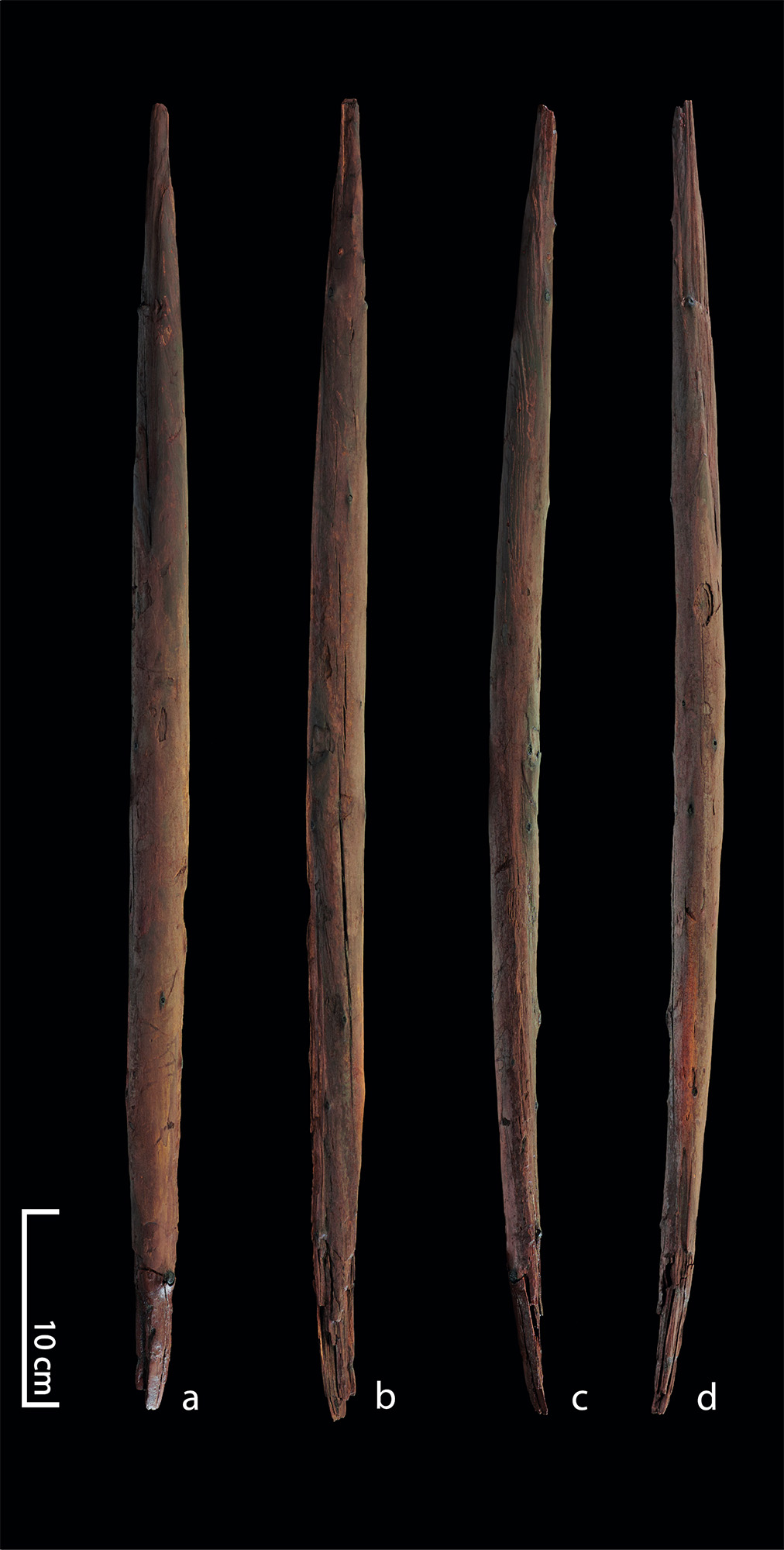
Different views of a throwing stick from Schöningen, a contender for one of the world's oldest weapons. (Image credit: Photograph by Volker Minkus)
They're considered the oldest completely preserved wooden weapons in the world, according to the Schöningen Research Museum; today, archaeologists' varying estimates place the weapons' age between 200,000 and 300,000 years old. Their creation has historically been attributed to H. heidelbergensis, an early human species that lived about 700,000 to 200,000 years ago throughout Europe, parts of Africa, and possibly in what is now China. More recent dating suggests the spears could potentially be the work ofNeanderthals, according to a 2025 study.
Scientists think these spears, which average just over 6.6 feet (2 meters) long, were used as thrusting weapons, throwing weapons or some combination of both to hunt larger game mammals, like horses, according to a 2024 study. The shorter throwing sticks are believed to be projectile weapons and average around 26 inches (65 centimeters) long.
"In fact, the [Schöningen weapons] were found in association with butchered horses," Fitzhugh noted. The spears were sharpened, hardened and blackened using fire. "These things were shaped in a dynamically sophisticated way," he said.
According to Warming, the Schöningen weapons suggest hominins had clear material knowledge and used different hunting tactics depending how far they were from their target.
Kathu Pan 1 spear points
Hafted spear tips — stone points attached to some form of handle or shaft — became more common in the archaeological record between 200,000 and 300,000 years ago across Africa and Eurasia, and were previously thought to be created by Neanderthals or H. sapiens.
However, 500,000-year-old stone points excavated from the Kathu Pan archaeological site in South Africa have signs of wear on the edges, and the shape of their base is consistent with hafted spears, suggesting they were used as weapons. Their age predates both Neanderthals and H. sapiens, and the location they were found in suggests they could have been created by H. heidelbergensis, who lived in regions of southern Africa at that time. Archeologists think they could have been used as spear ambush weapons.
But some researchers have contested this evidence, arguing that it's "indirect" or even controversial, as no wooden shafts were uncovered with the spear points to solidify them as weapons as opposed to stone tools.
These are some of the earliest examples of weapons in the archaeological record, but there may be older weapons that have not survived throughout time.
While hominins likely used organic materials like wood, sinew, fiber and adhesives to create objects and weapons, these materials break down or are destroyed over time, Warming noted.
Studying these ancient weapons gives us perspective about the present. After all, weapons are more than tools of harm: Warming said they are material clues that give us glimpses into how our early relatives combined materials, used their imaginations, shared knowledge and cooperated in groups.
Yet among these three important finds, Warming said that when inquiring about the oldest known weapon in the world, that "Clacton is the safest answer."
Female farm managers are hidden in plain sight in ancient Roman texts, mentioned in laws, literature and grave inscriptions across five centuries. Modern historians have generally assumed they were housekeepers, in charge of domestic tasks and household meals, and segregated from the productive business of the farm.
My new paper, published in the Journal of Roman Archaeology, challenges this assumption.
In fact, there is evidence to suggest that many Roman female farm managers supervised wine production and other processes vital to farming and profits.
A false lead
A farming manual written by the Roman writer Lucius Junius Moderatus Columella in the 1st century CE is a window to the roles of the female manager.
An upper class landowner himself, Columella lists the responsibilities of farm managers, who were probably enslaved. The male manager was termed the vilicus, and the female manager the vilica, terms derived from their roles at the "villa".
But many historians reading this text have been side-tracked by a false lead: Columella begins his section on the vilica with a long quote from the Greek philosopher Xenophon, who wrote in Athens more than four centuries earlier.
A quote from Greek philosophy led many to misunderstand the roles women played in ancient Roman farming. (Image credit: Mahmoud Amer/Pexels)
The "natural" role of women, according to Xenophon, was to work indoors. Therefore in his discussion, the ideal upper-class married woman is depicted staying inside her town house to supervise the domestic work of the slaves.
The Greek writer is not discussing farm workers. In fact, Columella says four times that these ideas are not his own, but those of Xenophon, writing long ago.
Columella lists a completely different set of responsibilities for the vilica on a Roman farm: most importantly, the making of wine and olive oil, which were highly valuable commodities — the backbone of landowners' profits.
In his description of the vilica's duties, Columella includes the extraction of the juice from grapes during the harvest; adding flavorings and preservatives such as salt, wormwood, fennel or boiled grape-juice; and overseeing successful fermentation into wine.
According to Columella, the vilica also managed the processing of other farm products to make them long-lasting and profitable, such as turning inedible olives into olive oil for sale.
From archaeology we know that production of wine or oil, using huge machines in substantial buildings, could reach 50,000 to 100,000 litres per year, or even more. The vilica was therefore responsible for overseeing large-scale work essential to the operation of the estate.
Calling on the gods
Correct sacrifices to the gods were seen as vital to the success of the farm. Archaeology has uncovered altars for offerings in Roman wine-making buildings.
Wine-making in the Roman world was a precarious process, due to uncontrolled temperatures, bacteria or oxygenation. Wine could easily go moldy or turn into vinegar.
A striking element of Columella's account is that he includes carrying out offerings to avert such a disaster in his instructions for the female farm manager.
Looking for more clues
Other texts contain barely more than a mention of the vilica, revealing only her presence.
But we can still put together some clues.
Legal writings on inheritance, quoting the 1st century BCE jurist Trebatius, include her in the instrumentum fundi — whatever (including enslaved personnel) is required for productive work, gathering and preserving produce of the estate.
A mosaic shows Roman farm women at the Villa Romana del Casale, Sicily. (Image credit: Joe Lynch)
Another aristocratic landowner and writer, Cato the Elder, living two centuries before Columella, lists both the female and the male farm manager as essential staff for a vineyard or olive farm.
He devotes only one small section to outlining the female farm manager's tasks, but a close look shows these are not predominantly domestic. Cato includes keeping poultry and processing of seasonal farm products. Although he does include supervision of cleaning, this could refer to maintenance of work spaces such as stables and wine making buildings, an integral part of estate management – and also listed by Columella among the vilica's duties.
Cato also gives the vilica the responsibility for making sacrifices to the gods for the success of the farm. She must regularly offer garlands at the altar "for abundance", he writes.
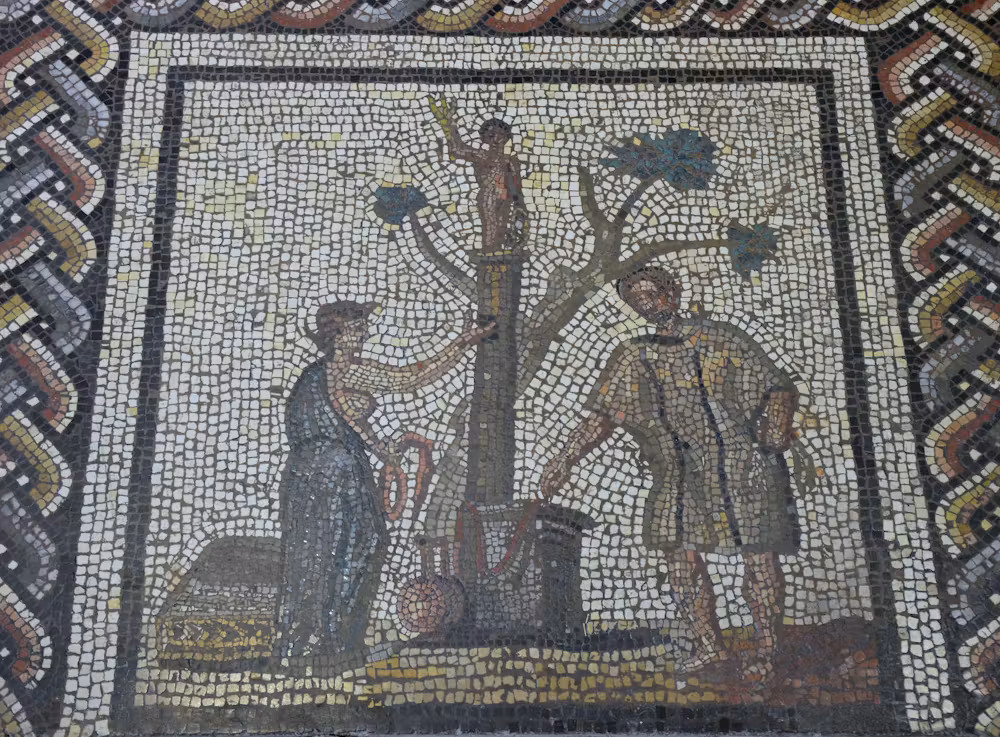
A Roman mosaic showing estate work in different seasons depicts a scene of sacrifices for abundant crops to the god Jupiter (in his Celtic form as a sky and weather god). A woman is shown holding an offering of garlands, just as Cato instructs. Beside her are a jug for wine offerings and a male figure.
Perhaps this mosaic shows the vilica and vilicus, both essential to the success of annual harvests. While such images of female figures are rare, one fragmentary wall painting from Rome shows a female overseeing wine-making workers, just as Columella describes.
This combined body of evidence suggests we should expand outdated understandings of the roles that Roman women played in farm production, the dominant sector of ancient economies.
No vilica has left us an account of her work in her own words. But by paying careful attention to the evidence, we can hear an echo of her voice.
The ancient Egyptians believed that gold was the flesh of the gods, meaning that bestowing gold tongues upon the deceased could help them speak in the afterlife. But it's not entirely certain whether all of the newly found gold objects were tongues (one may actually depict a wheat ear, a symbol of fertility), and the mystery of a possible false door inside the tomb is also stirring up debate.
Astrochemists delivered a sweet surprise this week, with news that they had detected a type of sugar called erythrulose in interstellar space, near the center of our Milky Way galaxy.
Erythrulose, consisting of four carbon atoms, is found in raspberries back on Earth. But its presence in space is a mouthwatering sign that the essential ingredients for life are highly abundant across our galaxy. That could make life much more prevalent than we thought, and could mean that aliens may also have a sweet tooth.
Animals come in all shapes and sizes, but are any a satisfyingly perfect sphere? It turns out that this deceptively simple question holds some evolutionarily profound implications.
Geoguessing emerged in the last decade as a geography game (and later a popular esport) in which players deduce locations from Google Maps imagery. But what about geoguessing something completely undocumented, and one that only trained scientists should be able to recognize?
In that circumstance, amateur astronomer Joël Lapointe should be crowned this year's champion. Using Google Maps to plan a hiking trip in Quebec's Côte-Nord region, Lapointe stumbled upon an indentation that has now been confirmed by scientists to be a 390 million-year-old scar from a gigantic asteroid collision.
"I get lots of messages from the public thinking they have found a crater and 99/100 turn out not to be the case," Gordon Osinski, a professor of planetary geology at Western University in Canada who confirmed the find, told Live Science in an email. "This is one of those rare examples that shows this is possible."
If you're looking for things to keep you busy over the weekend, here's a selection from our best opinion pieces, interviews, diagnostic dilemmas and crosswords that we published this week.
Named Colobus congoensis after the remote region of the Democratic Republic of the Congo where it was found, this striking newfound species has orange lips and makes unique roars and snorts.
The monkey's discovery is remarkable, most of all because finding new primates is extremely rare — with only five new ones being identified in Africa over the past 75 years — and also because of its relatively large size. Pinning down the species took years of careful tracking and documentation, alongside work with people from eight local villages who had knowledge of it.
Besides being a cool find in its own right, the discovery points to there being potentially many more undiscovered mammals, fish, reptiles and plants hidden inside the Congolian rainforest.
This year's El Niño will almost certainly become the strongest ever recorded, an analysis by a prominent climate researcher has warned. Though other scientists have cautioned that it's still too early to say what it will unleash.
Dynamical models now assign a 90% chance of the 2026-2027 El Niño being an all-time record event, sending temperatures in the Pacific Ocean up to around 3.6 degrees Celsius (6.5 degrees Fahrenheit)above average, according to an analysis by Zeke Hausfather, a research scientist at Berkeley Earth and an author of the Intergovernmental Panel on Climate Change's Seventh Assessment Report.
As the warm phase of a multiyear natural climate pattern, the El Niño could bring unprecedented temperature extremes to an already-warming world. The natural climate pattern is infamous for boosting global temperatures and fueling disruptive weather events such as floods and droughts.
A strong El Niño doesn't guarantee more severe weather impacts. The current El Niño models are also imperfect predictions of what's to come, and we won't know the true nature of this El Niño event until it peaks, likely later this year. However, forecasters have been warning of potentially supercharged El Niño conditions for months, and as more data emerges, there are more reasons to prepare.
According to projections by the World Meteorological Organization, the current El Niño — officially declared on June 11— is on track to rapidly develop into a "strong" event between July and September. The National Oceanic and Atmospheric Administration's (NOAA) Climate Prediction Center now predicts a more than 80% likelihood of very strong El Niño conditions taking hold by the end of the year, ranking this El Niño event among the largest in the historical record.
"These are striking forecasts," Emily Black, a professor of terrestrial processes and climate at the University of Reading and a senior scientist at the National Centre for Atmospheric Science in the U.K., told Live Science in an email. "El Niño forecasts always come with uncertainty, but the level of agreement between models at this time of year, combined with the observed warming already underway in the tropical Pacific, means this should be taken very seriously."
"The important point is that a very strong El Niño would substantially shift the odds of damaging weather in many parts of the world, particularly in the Global South — with severe impact on livelihoods," Black added.
The International Rescue Committee, a humanitarian organization, has warned that the intense El Niño conditions threaten to unleash severe flooding and drought across East Africa and Asia, hitting some of the most vulnerable communities, Al Jazeera reported Tuesday (July 14).
El Niño continues and will strengthen through the end of the year, with a 97% chance it will persist through early spring 2027. An #ElNino Advisory remains in effect. #ENSO https://t.co/5zlzaZ1aZx pic.twitter.com/ASC46wKOn4July 9, 2026
During El Niño, warmer waters gather east of the equatorial Pacific, forcing the jet stream south. In the U.S., this typically brings warmer, drier conditions to the Northeast, while the Gulf Coast and Southeast experience an increased risk of flooding. Globally, the net result of the warmer waters is more heat in the atmosphere, on top of the temperature rise from human-driven global warming.
"El Niño is a natural climate phenomenon, but it is now happening against the backdrop of a much warmer planet," Black said. "That matters because a strong El Niño releases heat and energy into an already warmed world."
"This does not mean every impact can be attributed simply to El Niño or simply to climate change," Black added. "The two interact. El Niño can load the dice towards drought in some regions, flooding in others, marine heatwaves, disrupted monsoons and unusually high global temperatures. Climate change makes many heat extremes more severe and can intensify heavy rainfall because a warmer atmosphere can hold more moisture."
The last El Niño event occurred between 2023 and 2024. Both years broke temperature records, with 2024 becoming the hottest on record and the first to breach the 1.5-degree- Celsius (2.7 degrees Fahrenheit) warming limit set by the 2016 Paris Agreement. The current El Niño is forecast to be more intense than the one in 2023 and 2024, with the projected "very strong" status putting it in a different class of severity.
Residents wade through stagnant water over a flooded road at Kohoto estate in Naivasha, Kenya on November 17, 2025 (Image credit: Tony Karumba/AFP via Getty Images)
The strongest El Niño in history?
Hausfather's analysis reports that there's around a 90% chance that the current El Niño will be the strongest ever recorded, with data from multimodel forecasts suggesting that it may obliterate the previous record.
"With the July runs now in from 667 ensemble members across 14 different seasonal forecast models, it looks like this year's El Niño is not only very likely to be the strongest event since reliable records began — it may end up the strongest by a truly mind-blowing margin," Hausfather wrote in The Climate Brink Substack post published Monday (July 13).
NOAA recognizes El Niño conditions when the eastern tropical Pacific Ocean is at least 0.5 C (0.9 F) warmer than the historical average, while wind, surface pressure and rainfall in the region are also consistent with El Niño conditions. The El Niño is then categorized as weak, moderate, strong or very strong. A very strong El Niño (above 2 C, or 3.6 F, warmer than the historical average) is often nicknamed a "super" El Niño, though it's not a scientific term.
The July models suggest that temperatures will likely sail past 2 C above average in the coming months and could potentially even exceed 3.5 C (6.3 F) above average by the end of the year. This is based on newly introduced sea surface temperature forecasts that account for rising background temperatures that can inflate El Niño warming figures. In the traditional and most widely used indices, the temperature-anomaly forecasts cluster closer to 4 C (7.2 F), with some even exceeding 4 C.
This Sentinel-6 Michael Freilich satellite image captures the massive wave of warm water and higher-than-usual sea surfaces (red) that stretched across the Pacific on June 8, just a few days before El Niño was declared. (Image credit: Data for the map were acquired by the Sentinel-6 Michael Freilich satellite and processed by scientists at NASA’s Jet Propulsion Laboratory (JPL).NASA Earth Observatory/Lauren Dauphin)
In The Climate Brink Substack, Hausfather noted that the multimodel median for the event's peak is currently forecast at 3.6 C (6.5 F), or around 0.8 C (1.4 F) hotter than the prior record holder (2.75 C, set in the 2015-2016 El Niño event). Hausfather wrote that around 91% of ensemble members (individual computer models) have this El Niño exceeding the 2015-2016 record at their peak — around 77% likelihood in the newly introduced indices.
However, Black stressed that the models are still estimates, and not guarantees.
"It is certainly plausible that this could become a record-breaking El Niño, and the latest forecasts make that a real possibility rather than a remote one," Black said. "However, I would still be cautious about treating any probability estimate as a certainty."
"There are two reasons for caution," she added. "First, this event has not peaked yet, and El Niño events usually reach their maximum strength later in the year. Second, 'strongest ever recorded' depends on the index, dataset and baseline used."
"Impacts are what matter"
The most severe El Niño events have left a trail of devastation in their wake. For example, the 2015-2016 El Niño saw a record-breaking hurricane season in the central North Pacific, severe drought in the Caribbean and Ethiopia, and, of course, abnormally hot global temperatures, according to NOAA's Climate.gov. If the forecasts pan out, the current El Niño will match or exceed the 2015-2016 event, as well as an even more infamous super El Niño that occurred between 1877 and 1878, long before modern recordkeeping of El Niño began in 1950.
The 1877-1878 event likely fueled an extreme drought that fed into the 1876-1878 global famine, which ultimately killed more than 50 million people — making it among the worst humanitarian crises in history. However, the disaster was far from just an environmental one, with extractive colonial agricultural policies helping to create conditions for a massive humanitarian crisis. Nonetheless, the famine highlights what can happen when environmental and socioeconomic factors converge.
The El Niño-Southern Oscillation cycle triggers a warm El Niño and then a cold La Niña roughly every two to seven years, with each phase typically lasting around nine to 12 months. Carbon Brief has predicted that 2026 is likely to be the second-warmest year on record, with the intensifying El Niño increasing the likelihood that 2027 will be the warmest year ever recorded.
The strength of an El Niño event does not necessarily correspond to the size of its influence or impact, according to the Climate Prediction Center. More severe events typically, but not always, increase the certainty of expected impacts. Black believes the impact of an El Niño event is more important than where it ranks in the observational record.
"Records are compelling, but impacts are what matter," Black said. "Even if it falls just short of a record, a very strong El Niño can still have serious consequences. Finally, these forecasts are concerning, but they are also useful: they give societies time to anticipate possible impacts and act before the worst effects are felt."
Up to 90% of Earth's population may be able to see the enormous "God of Chaos" asteroid Apophis zoom past our planet in less than three years, scientists say. The skyscraper-size space rock will come closer to us than some satellites, making it clearly visible to the naked eye during the "once-in-a-millennium" skywatching event.
This will be the first time humans have ever been able to predict a flyby of an asteroid visible to the naked eye, and it could be a once-in-a-lifetime experience for the up to 7.6 billion people who manage to see it, scientists said at the Apophis T-3 Years workshop, held June 18-19 at the University of Padua in Italy.
"Sighting Apophis as it passes by is a way of feeling a shared cosmic experience, realizing the smallness of Earth in the vastness of space," Richard Binzel, a planetary scientist and asteroid expert at MIT who helped organize the recent workshop and create new maps of the flyby, told Live Science in an email.
The asteroid, dubbed 99942 Apophis (or simply Apophis), is a peanut-shaped object that spans about 1,500 feet (450 meters) across at its widest point, or around as wide as the Empire State Building is tall, making it large enough to wipe out a city if it ever impacted our planet. Apophis likely originated from the solar system's main asteroid belt between Mars and Jupiter, but it now resides between the orbits of Venus and Earth, circling our home star roughly every 10.5 months. The name Apophis comes from Apep, the Egyptian serpent god of darkness and disorder, which has earned the space rock the nickname "God of Chaos."
On April 13, 2029, Apophis will make a superclose flyby of Earth, reaching a minimum distance of around 19,000 miles (30,600 kilometers) from our planet, according to The Planetary Society. That's much farther away than the International Space Station and the thousands of other spacecraft in low Earth orbit, but it's closer than several hundred satellites stationed in an elevated geosynchronous orbit. (Apophis poses no threat to these high-altitude satellites because they can easily be maneuvered away from its projected path.)
At the recent Apophis T-3 Years workshop, scientists shared new maps showing how many people will be within viewing range of the asteroid at each point of its seven-hour flyby of Earth. (Image credit: eclipseatlas.com)
Therefore, scientists are keen to monitor the flyby in great detail and will coordinate observations from telescopes around the world to understand the potentially hazardous asteroid better. Several spacecraft, including NASA's OSIRIS-APEX, will also attempt to fly past Apophis to study its structure and trajectory. The event is so significant that the United Nations has declared 2029 the International Year of Asteroid Awareness and Planetary Defence.
Researchers also hope the flyby will provide a unique opportunity to inspire the next generation of space scientists. "I hope people will find the Apophis flyby intriguing, as it is not anything fearful or frightening at all," Binzel said. "Who knows how many young people might find a spark of curiosity that leads them on a path to a career in space studies."
Who will see Apophis?
The new maps help break down who might be able to see Apophis throughout the roughly seven-hour period it passes by our planet. The asteroid will be visible only to people who are positioned within its path at twilight or night amid clear skies and limited light pollution.
Apophis will slowly move across the night sky through a set of well-known constellations, although its exact position will depend on where in the world you are. (Image credit: eclipseatlas.com)
At the start of the flyby, when Apophis is farthest from Earth, the asteroid could be visible to around 4.5 billion people across Australia and most of Asia. By the end of the flyby, when the space rock reaches its closest point to us, it might be visible to around 1.9 billion people in eastern South America, northern Africa and parts of Europe, according to the new maps.
Peak visibility will occur around halfway through the flyby, when Apophis might be seen by as many as 5.7 billion people across eastern Africa, Southern Europe, Australia, and all of Asia and the Middle East. At this point, astronomical observatories situated on Spain's Canary Islands will likely snap the best photos of the asteroid's flyby, according to Live Science's sister site Space.com.
North America is the only continent that will not get a clear view of Apophis.
For those who are lucky enough to see the passing space rock, the asteroid will appear as a "modest star passing slowly across the sky, much like a slow-moving satellite," Binzel said, and it will shine as brightly as the stars in the Big Dipper.
When you're in an unfamiliar neighborhood, rely on the locals.
#HammerheadSharksUpClose with @bertiegregory is now streaming on @DisneyPlus and @hulu, part of #Sharkfest on National Geographic.
Explore the World with National Geographic subscriptions: https://natgeo.com/ytngmagazine
➡ Subscribe: https://on.natgeo.com/4p5A0D6
➡ Get more Nat Geo Full Episodes: https://on.natgeo.com/3V5ZfHI
➡ Get wild with Nat Geo Animals Full Episodes: https://on.natgeo.com/3V2EOLO
And check out more National Geographic series and specials here:
➡ Disney Plus: https://on.natgeo.com/3q6on5p
➡ Hulu: https://on.natgeo.com/3Qor0Ko
➡ NGTV: https://natgeo.com/tv
➡ ABC: https://abc.com
About National Geographic:
National Geographic is the world's premium destination for critically acclaimed storytelling around science and exploration. Discover amazing wildlife, ancient civilizations, hidden worlds, and the incredible wonders of our Earth. Through world-class scientists, photographers, journalists, and filmmakers, Nat Geo inspires fans of all ages to connect with, explore, and care about the world.
Get More National Geographic:
Official Site: https://nationalgeographic.com
Instagram: https://instagram.com/natgeo
Facebook: https://facebook.com/natgeo
Threads: https://threads.com/@natgeo
X: https://x.com/NatGeo
LinkedIn: https://linkedin.com/company/national-geographic
TikTok: https://tiktok.com/@natgeo
Reddit: https://reddit.com/user/nationalgeographic
Pinterest: https://pinterest.com/natgeo
Preparations for Next Moonwalk Simulations Underway (and Underwater)
A modified Saab 340B aircraft in flight powered in part by a hybrid electric system built by GE Aerospace, along with NASA, BETA Technologies, and Boeing.
GE Aerospace
An aircraft powered by a megawatt-class hybrid-electric engine developed in collaboration with NASA and built by GE Aerospace, demonstrated flight of an innovation that can inform new generations of fuel-saving aircraft power systems.
Mounted to a Saab 340B aircraft, the engine flew at Farnborough International Air Show in the United Kingdom. It was the public debut of a system that has in recent months made historic test flights, becoming the first hybrid electric-powered aircraft to fly above 30,000 feet.
“This achievement reflects what NASA does best in aeronautics: we explore bold possibilities, validate them through rigorous research and testing, and work with industry to turn breakthrough ideas into technologies that bring real value for the American people,” said Laurie Grindle, director of the Aeronautics Division within the agency’s Research and Technology Mission Directorate at NASA Headquarters in Washington.
The testing leveraged work done through NASA’s former Electrified Powertrain Flight Demonstration project and the agency’s ongoing Subsonic Vehicle Technologies and Tools project – years of collaborative research that included key testing at NASA test facilities.
The engine integrates electric motors, a gas turbine, and energy storage capabilities. It was designed to demonstrate the capacity to power an aircraft around the size of a regional-class jet, reducing fuel burn and costs without sacrificing performance. The unit’s technology and designs are expected to be used to help develop future hybrid systems that could lower airline operating costs.
The demonstration flight came after years of rapid development for the technology. For NASA, it also validates work that stretches back to a time when hybrid aviation propulsion seemed almost beyond the horizon of possibility.
This achievement reflects what NASA does best in aeronautics: we explore bold possibilities, validate them through rigorous research and testing, and work with industry to turn breakthrough ideas into technologies that bring real value for the American people.
LAURIE A. GRINDLE
Director of the Aeronautics Division within the agency's Research and Technology Mission Directorate
“This is the culmination of more than 15 years of work, and we did that because it’s going to have an impact for aircraft that will help reduce energy use and help U.S. companies and the public,” said Ralph Jansen, aerospace engineer at NASA’s Glenn Research Center in Cleveland. “It’s about having a vision that no one believes can happen and then doing the work to define and execute the research and development needed to make it happen.”
This accomplishment was possible because of the collaborative effort of hundreds of people working on Electrified Powertrain Flight Demonstration and Subsonic Vehicle Technologies and Tools projects across NASA centers, in conjunction with GE Aerospace and its partner companies.
Hybird-Electric Evolves
In recent years, aviation has seen a boom in small aircraft and drones powered by electrical systems drawing from batteries. But large passenger and cargo planes require complex engines capable of supplying massive amounts of power. So more than a decade ago when NASA began contemplating hybrid systems, just the possibility of using electric motors to supplement some energy was a daunting engineering challenge.
NASA spent about seven years performing preliminary research, working with small businesses and other partners to consider technological obstacles and the potential commercial viability of hybrid systems. During that time, the agency addressed several barriers to implementation including the power, thermal, and battery technology, and the integration of the power system, engine, and aircraft.
Through the agency’s Electrified Powertrain Flight Demonstration award, GE Aerospace and NASA worked with researchers to develop lighter and more efficient power systems and shrink key components – sometimes dramatically.
NASA and GE Aerospace also leveraged agency facilities and resources to further their research. In 2022, GE Aerospace tested an integrated version of its propulsion system at NASA’s Electric Aircraft Testbed at the agency’s Neil A. Armstrong Test Facility in Sandusky, Ohio. Testing allowed the system to operate in conditions simulating 45,000 feet in altitude, the range in which commercial single-aisle aircraft fly.
The team added components, including electric motors, power converters, propellers, and a GE Aerospace commercial engine, followed by more ground tests and eventual flight tests. For the researchers who’d spent years on the concept, seeing the engine powering an aircraft in flight was a major step in a long journey.
“I’ve got to say, I was pretty touched seeing it fly. It was just awesome,” Jansen said. “It’s just like a regular plane, which is probably the best thing of all.”
NASA’s current support for this research is through the Aeronautics Division of its Research and Technology Mission Directorate.
Seattle, Washington—sometimes known as the “Emerald City”—was glimmering in the morning sunlight when an astronaut aboard the International Space Station took this photo on June 16, 2026. The city’s parks and tree-filled neighborhoods lend a lush, green look to the metropolis, while tall buildings downtown cast long shadows and ships navigate surrounding waterways.
The broad contours of the city’s landscape and the water around it owe their shape to the advance and retreat of glaciers during the last ice age. Between roughly 18,000 and 16,000 years ago, the Puget lobe of the Cordilleran ice sheet covered the area in a mass of ice up to 3,300 feet (1,000 meters) thick. The glacier scoured the basins now occupied by Puget Sound and the region’s lakes.
The glacier left its mark above water, too. Several of Seattle’s notorious hills (of which there are seven or more, depending on who’s counting) are drumlins. These elongated mounds of glacial debris run north-south, parallel to the direction of the ice’s movement. East-west travelers in the city, facing challenging ups and downs, may attest to this topographic trend.
The ice also transported large boulders called glacial erratics from more northerly locations and deposited them around the region. A particularly large erratic, the Wedgwood Rock, stands about 20 feet (6 meters) tall and draws its name from the North Seattle neighborhood in which it rests.
June 16, 2026
In more recent times, humans have undertaken projects to rework the topography. Notable alterations include leveling Denny Hill north of downtown and filling in tideflats at the mouth of the Duwamish River south of downtown, which created around 1,300 acres of new land. Seattle’s professional sports stadiums sit atop this fill.
This photo was acquired after several development projects to update waterfront infrastructure downtown, initiated in 2010, were completed. These include a new ferry dock and terminal, a rebuilt seawall, and a tunnel to replace an above-ground highway and create more inviting public access to the waterfront.
Some replumbing of the region’s waterways is apparent from the astronaut’s perspective, as well. In the 1910s, the Army Corps of Engineers built canals on either side of Lake Union to connect Puget Sound (an inlet of the Pacific Ocean) with Lake Washington. Starting in 1916, the Montlake Cut connected Lake Washington to Lake Union, and the Ballard Locks, northwest of Lake Union, began raising and lowering watercraft between the freshwater lakes and tidal Puget Sound. As a result of this project, Lake Washington’s water level dropped about 9 feet (3 meters) and ceased draining from its natural outlet at its southern end.
Today, the waters in and around Seattle support many uses: container ships, cruise ships, car and passenger ferries, floatplanes, and recreational craft ply the sound and lakes. And as for Seattle’s emerald nickname, pockets of old-growth forest still exist within city limits, containing centuries-old trees such as Douglas fir, Western red cedar, and Western hemlock. Seattleites often spot wildlife such as bald eagles, coyotes, and sea lions in the city’s various habitats.
Astronaut photograph ISS074-E-723719 was acquired on June 16, 2026, with a Nikon Z9 digital camera using a focal length of 560 millimeters. It is provided by the ISS Crew Earth Observations Facility and the Earth Science and Remote Sensing Unit at NASA Johnson Space Center. The image was taken by a member of the Expedition 74 crew. The image has been cropped and enhanced to improve contrast, and lens artifacts have been removed. The International Space Station Program supports the laboratory as part of the ISS National Lab to help astronauts take pictures of Earth that will be of the greatest value to scientists and the public, and to make those images freely available on the Internet. Additional images taken by astronauts and cosmonauts can be viewed at the NASA/JSC Gateway to Astronaut Photography of Earth. Story by Lindsey Doermann.
A história acompanha um romance sucedido por um assassinato envolvendo “dois amantes jovens, adultos, mas tementes a Deus” e uma investigação que tentará desvendar o custo emocional de se viver como assassinos por 18 anos.
Essa fascinante narrativa de crimes reais, ambientada em um pano de fundo de sexo e assassinato no Panhandle da Flórida, promete se tornar um clássico instantâneo.
De acordo com a Apple, “Guilty Creatures” será produzida pelo Tomorrow Studios (parceira do ITV Studios) como fruto de um acordo com a Alma Margo e a Fortunate Jack Productions.
O Apple TV está disponível no aplicativo Apple TV em mais de 100 países e regiões, seja em iPhones, iPads, Apple TVs, Macs, dispositivos Android, smart TVs ou online — além de também estar em aparelhos como Roku, Amazon Fire TV, Chromecast com Google TV, consoles PlayStation e Xbox. O serviço custa R$29,90 por mês, com um período de teste gratuito de 7 dias. Por tempo limitado, quem comprar e ativar um novo iPhone, iPad, Apple TV ou Mac ganha 3 meses do Apple TV. Ele também faz parte do pacote de assinaturas da empresa, o Apple One.
NOTA DE TRANSPARÊNCIA: O MacMagazine recebe uma pequena comissão sobre vendas concluídas por meio de links deste post, mas você, como consumidor, não paga nada mais pelos produtos/serviços usando os nossos links de afiliado.
Übers Wochenende hat Apple die Preise für seinen Abo-Dienst Apple Music in weiteren Ländern angehoben, unter anderem in Deutschland. Das Einzelabo pro Monat steigt von 10,99 Euro auf 11,99 Euro. Das Familienabo für sechs Personen steigt auf 19,99 Euro von bisher 16,99 Euro. Auch das Studierendenabo wird etwas teurer: 6,99 Euro statt 5,99 Euro.
Den Preis für das Jahresabo für Einzelpersonen hat Apple ebenfalls angehoben: von 109 Euro auf 119 Euro pro Jahr. Allerdings ist selbst nach der Preiserhöhung ein Jahresabo ein hervorragendes Angebot. Geteilt durch zwölf Monate zahlt man auch nach der Preiserhöhung effektiv rund 9,99 Euro pro Monat für ein Apple-Music-Abonnement. Der Zugang zum klassischen Katalog über Apple Music Classical ist in der aktuellen Preiserhöhung inbegriffen.
Die Preiserhöhungen im Euroraum sind vergleichbar mit den Änderungen in den USA vor wenigen Tagen. Auch dort hat Apple die Preise für ein Individualabo von 10,99 auf 11,99 US-Dollar erhöht. Gegenüber der Presse rechtfertigt Apple diese Preissteigerungen mit gestiegenen Lizenzkosten. An dieser Stelle wäre interessant zu beobachten, ob Apple in der nahen Zukunft auch die Preise für seinen Streaming-Dienst Apple TV anhebt. Die Lizenzkosten dürften hier kaum eine Rolle spielen, denn die Inhalte auf Apple TV sind allesamt von Apple eingekauft, die Nutzungslizenzen liegen direkt in Cupertino.
Angesichts dieser Preissteigerungen wird Apple One immer attraktiver: Aktuell kostet das Paket für eine Einzelperson 19,95 Euro pro Monat und beinhaltet das Abo für iCloud+, allerdings nur für 50 GB, Apple Music, Apple TV und Apple Arcade. Allein für Apple Music, Apple TV und iCloud+ müsste man separat 22,97 Euro pro Monat ausgeben, wenn man sie einzeln abonniert: 11,99 Euro für Apple Music, 9,99 Euro für Apple TV und 0,99 Euro für iCloud+.
Just one day after its global premiere on July 15, 2026, Anya Taylor-Joy’s high-stakes limited series “Lucky” has stormed to the top of Apple TV’s streaming charts in the United States, dethroning established hits like “Silo” and claiming the platform’s overall top spot.
The seven-episode crime thriller, which dropped its first two episodes on premiere day with weekly releases to follow, has generated massive buzz thanks to Taylor-Joy’s magnetic lead performance and a stacked ensemble cast. Early viewership data from FlixPatrol confirms the explosive debut, signaling strong audience appetite for glossy, twist-filled thrillers this summer.
A High-Octane Return to the Small Screen
In Lucky, Taylor-Joy stars as Luciana “Lucky” Armstrong, a reformed con artist whose carefully rebuilt life unravels after a multimillion-dollar heist goes disastrously wrong. Forced back into the criminal underworld she escaped years earlier, she finds herself pursued by both the FBI and a ruthless mob boss (played with icy menace by Annette Bening). The series blends pulse-pounding chases, family betrayals, and moral dilemmas, all set against glamorous backdrops like Las Vegas penthouses and sun-baked desert highways.
Taylor-Joy, who also executive produces through her Ladykiller banner alongside Reese Witherspoon’s Hello Sunshine, delivers a layered, physically demanding turn that echoes the breakout intensity of “The Queen’s Gambit” while showcasing the action prowess she honed in films like Furiosa. Supporting players Timothy Olyphant (as Lucky’s complicated father), Aunjanue Ellis-Taylor (as a determined FBI agent), Drew Starkey, Clifton Collins Jr., and William Fichtner round out a cast that critics are already praising for elevating the material.
Created by Jonathan Tropper and co-showrun with Cassie Pappas, “Lucky” adapts Marissa Stapley’s bestselling 2021 novel (a Reese’s Book Club pick). The production shot in Las Vegas and Los Angeles, wrapping principal photography in 2025 before arriving with sleek marketing and an adrenalized trailer that teased its mix of glamour, deception, and survival.
Why the Instant Success?
Apple TV has seen sustained hits from Taylor-Joy before — her 2025 sci-fi thriller “The Gorge” lingered on charts for hundreds of days — but “Lucky” marks her triumphant return to limited series television. The timing couldn’t be better: summer viewing habits favor bingeable, escapist fare, and the show’s weekly episode drops build anticipation without overwhelming audiences.
Early reviews highlight Taylor-Joy’s star power and the series’ slick production values, even as some note familiar genre tropes. Its rapid climb to #1 underscores Apple’s strategy of leveraging A-list talent and book adaptations to drive subscriptions.
With new episodes dropping every Wednesday through August 19th, Lucky is poised to maintain momentum. Whether it sustains its chart dominance like Apple’s other long-runners remains to be seen, but its opening salvo has already proven one thing: audiences are feeling very lucky indeed.
MacDailyNews Note: Apple TV is available on the Apple TV app in over 100 countries and regions, on over 1 billion screens, including iPhone, iPad, Apple TV 4K, Apple Vision Pro, Mac, popular smart TVs from Samsung, LG, Sony, VIZIO, TCL and others, Roku and Amazon Fire TV devices, Chromecast with Google TV, PlayStation and Xbox gaming consoles, and at tv.apple.com, for $12.99 per month with a seven-day free trial for new subscribers. For a limited time, customers who purchase and activate a new iPhone, iPad, Apple TV 4K or Mac can enjoy three months of Apple TV for free.
Please help support MacDailyNews — and enjoy subscriber-only articles, comments, chat, and more — by subscribing to our Substack: macdailynews.substack.com. Thank you!
macOS Tahoe 26.5.2 (25F84) is now Available For All Users!
UPDATED: 06/29/26
This article will be continually updated as new information comes in.
Apple just released the 5th minor update for macOS Tahoe to the public! Let’s jump in and find out what’s new.
This update is a very small point release that shows the following notes:
The 26.5.2 Update includes the following:
“This update provides security fixes for your Mac.”
If you look at the security update page, it does not have just one or two security fixes. The Tahoe 26.5.2 update includes fixes for 38 individual CVE vulnerabilities. Normally smaller point releases will have fixes for a few bugs and a few security items but this is a lot
macOS Tahoe Patch Notes Summary
1. New Features – 0
2. Developer Documented Fixes – 0
3. Security Fixes – 11
4. Enterprise Fixes – 0
5. Safari Security (Webkit) – 17
6. Safari – 26.5.2 for macOS Sequoia and Sonoma
7. Full installer & IPSW – Both Released
8. OpenCore Legacy Patcher Users – NOT COMPATIBLE!
NOTE: I hate website ads, but this one small google ad below helps me with the cost of running Mr. Macintosh.com. Thank you
OpenCore Legacy Patcher for Unsupported Macs
OCLP 2.4.1 & macOS Tahoe 26.5.2 : DO NOT INSTALL! NOT COMPATIBLE YET. This release is in full testing and it is not recommended that you attempt to install it yet.!
The delta update will automatically change in size for exactly what your macOS version needs.
Full update & OCLP Users = NOT SUPPORTED YET
Apple Silicon Updates
Delta from macOS Tahoe 26.5.1 with size = 2.77GB
Upgrade from macOS Sequoia 15.7.7 with size =
Intel Updates
Delta Update from macOS Tahoe 26.5.1 with size = 1.13GB
6. Apple Silicon System Firmware Version
This update has a new firmware update. The version number is reported in System Information under “System Firmware Version“. Also known as mBoot.
Apple Silicon Firmware = UPDATED!
21. macOS Tahoe 26.5.2 = 18000.121.3
20. macOS Tahoe 26.5.1 = 18000.120.36
19. macOS Tahoe 26.5 = 18000.120.36
18. macOS Tahoe 26.4.1 = 18000.101.7
17. macOS Tahoe 26.4 = 18000.101.7
16. macOS Tahoe 26.3.1 = 13822.81.10
15. macOS Tahoe 26.3 = 13822.81.10
14. macOS Tahoe 26.2 = 13822.61.10
13. macOS Tahoe 26.1 = 13822.41.1
12. macOS Tahoe 26.0.1 = 13822.1.2
11. macOS Tahoe 26.0 = 13822.1.2
10. macOS Tahoe RC = 13822.1.2
9. macOS Tahoe Beta 9 = 13822.1.2
8. macOS Tahoe Beta 8 = 13822.1.2
7. macOS Tahoe Beta 7 = 13822.1.2
6. macOS Tahoe Beta 6 = 13822.1.2
5. macOS Tahoe Beta 5 = 13822.0.277.0.3
4. macOS Tahoe Beta 4 = 13822.0.233
3. macOS Tahoe Beta 3 = 13822.0.194.0.3
2. macOS Tahoe Beta 2 = 13822.0.166.0.1
1. macOS Tahoe Beta 1 = 13822.0.88.511.1
7. Apple Silicon OS loader Version (iBoot)
OS Loader Version (iBoot) also referred to as “iBoot second-stage loader”, is Apple’s stage 2 bootloader. The OS loader version will be the same as the “System Firmware Version” on the latest OS. On previous versions of macOS Monterey and Big Sur, the OS loader version will be a version behind. Example = Monterey = 7459.121.3 & Big Sur = 6723.140.2
OS Loader version = UPDATED!
21. macOS Tahoe 26.5.2 = 18000.121.3
20. macOS Tahoe 26.5.1 = 18000.120.36
19. macOS Tahoe 26.5 = 18000.120.36
18. macOS Tahoe 26.4.1 = 18000.101.7
17. macOS Tahoe 26.4 = 18000.101.7
16. macOS Tahoe 26.3.1 = 13822.81.10
15. macOS Tahoe 26.3 = 13822.81.10
14. macOS Tahoe 26.2 = 13822.61.10
13. macOS Tahoe 26.1 = 13822.41.1
12. macOS Tahoe 26.0.1 = 13822.1.2
11. macOS Tahoe 26.0 = 13822.1.2
10. macOS Tahoe RC = 13822.1.2
9. macOS Tahoe Beta 9 = 13822.1.2
8. macOS Tahoe Beta 8 = 13822.1.2
7. macOS Tahoe Beta 7 = 13822.1.2
6. macOS Tahoe Beta 6 = 13822.1.2
5. macOS Tahoe Beta 5 = 13822.0.277.0.3
4. macOS Tahoe Beta 4 = 13822.0.233
3. macOS Tahoe Beta 3 = 13822.0.194.0.3
2. macOS Tahoe Beta 2 = 13822.0.166.0.1
1. macOS Tahoe Beta 1 = 13822.0.88.511.1
8. Intel T2 BridgeOS Update
The Version of BridgeOS for your T2 Security Chip (2018-2020 Intel Macs) was updated.
BridgeOS version = NOT Updated
21. macOS Tahoe 26.5.2 = 23.16.15067.0.0
20. macOS Tahoe 26.5.1 = 23.16.15067.0.0
19. macOS Tahoe 26.5 = 23.16.15067.0.0
18. macOS Tahoe 26.4.1 = 23.16.14242.0.0
17. macOS Tahoe 26.4 = 23.16.14242.0.0
16. macOS Tahoe 26.3.1 = 23.16.13120.0.0
15. macOS Tahoe 26.3 = 23.16.13120.0.0
14. macOS Tahoe 26.2 = 23.16.12048.0.0
13. macOS Tahoe 26.1 = 23.16.11072.0.0
12. macOS Tahoe 26.0.1 = 23.16.10350.0.0
11. macOS Tahoe 26.0 = 23.16.10350.0.0
10. macOS Tahoe RC = 23.16.10350.0.0
9. macOS Tahoe Beta 9 = 23.16.10350.0.0
8. macOS Tahoe Beta 8 = 23.16.10348.5.1
7. macOS Tahoe Beta 7 = 23.16.5342.0.1
6. macOS Tahoe Beta 6 = 23.16.5342.0.1
5. macOS Tahoe Beta 5 = 23.16.5331.0.4
4. macOS Tahoe Beta 4 = 23.16.5320.0.2
3. macOS Tahoe Beta 3 = N/A
2. macOS Tahoe Beta 2 = N/A
1. macOS Tahoe Beta 1 = 23.16.5283.0.7
9. Intel T2 Firmware Update
The System Firmware Version for your Mac (2019-2020)
This update also includes the following Developer enhancements and bug fixes:
The macOS 26.5 SDK provides support to develop apps for Mac computers running Tahoe 26.5. The SDK comes bundled with Xcode 26.5, available from the Mac App Store. For information on the compatibility requirements for Xcode 26.5, see Xcode 26.5 Release Notes.
You can read pricing information for subscriptions that have a monthly with 12-month commitment billing plan configuration in App Store Connect or StoreKit Testing in Xcode through the new PricingTerms model on SubscriptionInfo.pricingTerms. (150388310)
You can specify the billing plan type to use for subscriptions that have a monthly with 12-month commitment billing plan configuration using the new billingPlanTypePurchaseOption. (150388542)
Read customer entitlement metadata for subscriptions purchased with a monthly billing plan type through the new CommitmentInfo data model on Transaction and SubscriptionRenewalInfo. (150388746)
When you import both StoreKit and SwiftUI, you can merchandise the monthly billing plan configuration for subscriptions that have a monthly with 12-month commitment billing plan using built-in styles through the new preferredSubscriptionPricingTerms(_:) API. (150389069)
Fixed: The App Version field in the ASN.1 app receipt might contain the string “null” instead of the expected version number. (171614522) (FB22114908)
Fixed: Transaction.currentEntitlements might be empty if a customer has an active subscription when the device’s system calendar is set to a non-Gregorian format. (173415174)
macOS Tahoe 26.5.1 (25F80) is now Available For All Users!
UPDATED: 06/02/26
This article will be continually updated as new information comes in.
Apple just released the 3rd minor update for macOS Tahoe to the public! Let’s jump in and find out what’s new.
This update is a very small point release that shows the following notes:
The 26.5.1 Update includes the following:
This update addresses an issue for enterprise users where Macs with an M5 chip could unexpectedly shut down when using certain content filtering network extensions.
This update appears to only fix one issue with M5 Macs. The update is available for ALL macOS Tahoe supported Macs. The update also does not have any published CVE Security fixes listed on Apple’s Security Update page.
macOS Tahoe Patch Notes Summary
1. New Features – 0
2. Developer Documented Fixes – 0
3. Security Fixes – 0
4. Enterprise Fixes – 1
5. Safari Security (Webkit) – 0
6. Safari – No update
7. Full installer & IPSW – Both Released
8. OpenCore Legacy Patcher Users – NOT COMPATIBLE!
OpenCore Legacy Patcher for Unsupported Macs
OCLP 2.4.1 & macOS Tahoe 26.5.1 : DO NOT INSTALL! NOT COMPATIBLE YET. This release is in full testing and it is not recommended that you attempt to install it yet.!
The delta update will automatically change in size for exactly what your macOS version needs.
Full update & OCLP Users = NOT SUPPORTED YET
Apple Silicon Updates
Delta from macOS Tahoe 26.5 with size = 2.14GB
Upgrade from macOS Sequoia 15.7.7 with size =
Intel Updates
Delta Update from macOS Tahoe 26.5 with size = 929MB
6. Apple Silicon System Firmware Version
This update has a new firmware update. The version number is reported in System Information under “System Firmware Version“. Also known as mBoot.
Apple Silicon Firmware = NOT Updated
20. macOS Tahoe 26.5.1 = 18000.120.36
19. macOS Tahoe 26.5 = 18000.120.36
18. macOS Tahoe 26.4.1 = 18000.101.7
17. macOS Tahoe 26.4 = 18000.101.7
16. macOS Tahoe 26.3.1 = 13822.81.10
15. macOS Tahoe 26.3 = 13822.81.10
14. macOS Tahoe 26.2 = 13822.61.10
13. macOS Tahoe 26.1 = 13822.41.1
12. macOS Tahoe 26.0.1 = 13822.1.2
11. macOS Tahoe 26.0 = 13822.1.2
10. macOS Tahoe RC = 13822.1.2
9. macOS Tahoe Beta 9 = 13822.1.2
8. macOS Tahoe Beta 8 = 13822.1.2
7. macOS Tahoe Beta 7 = 13822.1.2
6. macOS Tahoe Beta 6 = 13822.1.2
5. macOS Tahoe Beta 5 = 13822.0.277.0.3
4. macOS Tahoe Beta 4 = 13822.0.233
3. macOS Tahoe Beta 3 = 13822.0.194.0.3
2. macOS Tahoe Beta 2 = 13822.0.166.0.1
1. macOS Tahoe Beta 1 = 13822.0.88.511.1
7. Apple Silicon OS loader Version (iBoot)
OS Loader Version (iBoot) also referred to as “iBoot second-stage loader”, is Apple’s stage 2 bootloader. The OS loader version will be the same as the “System Firmware Version” on the latest OS. On previous versions of macOS Monterey and Big Sur, the OS loader version will be a version behind. Example = Monterey = 7459.121.3 & Big Sur = 6723.140.2
OS Loader version = NOT Updated
20. macOS Tahoe 26.5.1 = 18000.120.36
19. macOS Tahoe 26.5 = 18000.120.36
18. macOS Tahoe 26.4.1 = 18000.101.7
17. macOS Tahoe 26.4 = 18000.101.7
16. macOS Tahoe 26.3.1 = 13822.81.10
15. macOS Tahoe 26.3 = 13822.81.10
14. macOS Tahoe 26.2 = 13822.61.10
13. macOS Tahoe 26.1 = 13822.41.1
12. macOS Tahoe 26.0.1 = 13822.1.2
11. macOS Tahoe 26.0 = 13822.1.2
10. macOS Tahoe RC = 13822.1.2
9. macOS Tahoe Beta 9 = 13822.1.2
8. macOS Tahoe Beta 8 = 13822.1.2
7. macOS Tahoe Beta 7 = 13822.1.2
6. macOS Tahoe Beta 6 = 13822.1.2
5. macOS Tahoe Beta 5 = 13822.0.277.0.3
4. macOS Tahoe Beta 4 = 13822.0.233
3. macOS Tahoe Beta 3 = 13822.0.194.0.3
2. macOS Tahoe Beta 2 = 13822.0.166.0.1
1. macOS Tahoe Beta 1 = 13822.0.88.511.1
8. Intel T2 BridgeOS Update
The Version of BridgeOS for your T2 Security Chip (2018-2020 Intel Macs) was updated.
BridgeOS version = NOT Updated
20. macOS Tahoe 26.5.1 = 23.16.15067.0.0
19. macOS Tahoe 26.5 = 23.16.15067.0.0
18. macOS Tahoe 26.4.1 = 23.16.14242.0.0
17. macOS Tahoe 26.4 = 23.16.14242.0.0
16. macOS Tahoe 26.3.1 = 23.16.13120.0.0
15. macOS Tahoe 26.3 = 23.16.13120.0.0
14. macOS Tahoe 26.2 = 23.16.12048.0.0
13. macOS Tahoe 26.1 = 23.16.11072.0.0
12. macOS Tahoe 26.0.1 = 23.16.10350.0.0
11. macOS Tahoe 26.0 = 23.16.10350.0.0
10. macOS Tahoe RC = 23.16.10350.0.0
9. macOS Tahoe Beta 9 = 23.16.10350.0.0
8. macOS Tahoe Beta 8 = 23.16.10348.5.1
7. macOS Tahoe Beta 7 = 23.16.5342.0.1
6. macOS Tahoe Beta 6 = 23.16.5342.0.1
5. macOS Tahoe Beta 5 = 23.16.5331.0.4
4. macOS Tahoe Beta 4 = 23.16.5320.0.2
3. macOS Tahoe Beta 3 = N/A
2. macOS Tahoe Beta 2 = N/A
1. macOS Tahoe Beta 1 = 23.16.5283.0.7
9. Intel T2 Firmware Update
The System Firmware Version for your Mac (2019-2020)
This update addresses an issue for enterprise users where Macs with an M5 chip could unexpectedly shut down when using certain content filtering network extensions.
developer.apple/com/forum/thread/822390
14 macOS Tahoe Developer Release Notes
This update also includes the following Developer enhancements and bug fixes:
The macOS 26.5 SDK provides support to develop apps for Mac computers running Tahoe 26.5. The SDK comes bundled with Xcode 26.5, available from the Mac App Store. For information on the compatibility requirements for Xcode 26.5, see Xcode 26.5 Release Notes.
You can read pricing information for subscriptions that have a monthly with 12-month commitment billing plan configuration in App Store Connect or StoreKit Testing in Xcode through the new PricingTerms model on SubscriptionInfo.pricingTerms. (150388310)
You can specify the billing plan type to use for subscriptions that have a monthly with 12-month commitment billing plan configuration using the new billingPlanTypePurchaseOption. (150388542)
Read customer entitlement metadata for subscriptions purchased with a monthly billing plan type through the new CommitmentInfo data model on Transaction and SubscriptionRenewalInfo. (150388746)
When you import both StoreKit and SwiftUI, you can merchandise the monthly billing plan configuration for subscriptions that have a monthly with 12-month commitment billing plan using built-in styles through the new preferredSubscriptionPricingTerms(_:) API. (150389069)
Fixed: The App Version field in the ASN.1 app receipt might contain the string “null” instead of the expected version number. (171614522) (FB22114908)
Fixed: Transaction.currentEntitlements might be empty if a customer has an active subscription when the device’s system calendar is set to a non-Gregorian format. (173415174)
macOS Tahoe 26.5 (25F71) is now Available For All Users!
UPDATED: 05/12/26
This article will be continually updated as new information comes in.
Apple just released the 5th major update for macOS Tahoe to the public! Let’s jump in and find out what’s new.
This update is a large point release update that shows the following notes:
The 26.5 Update includes the following:
“This update includes enhancements, bug fixes and security updates for your Mac”
NOTE: Apple did not list the below two updates. Thank you to @Dhinak for grabbing the info. The MagSafe info was provided in the Apple Developer Forum.
Suggested Places in Maps displays recommendations based on what’s trending nearby and your recent searches
Power control setting in Energy for Mac mini, Mac Studio, and iMac enables you to power off or restart your Mac using assistive accessories like switches
MagSafe Power adapter color will now show green if the battery charge limit is set and the Mac is fully charged =
The light should now turn green when the device reaches the charging limit.
The light should now turn back to amber if/when power drain causes charging to resume.
developer.apple/com/forum/thread/822390
macOS Tahoe Patch Notes Summary
1. New Features – 3*
2. Developer Documented Fixes – 8
3. Security Fixes – 79
4. Enterprise Fixes – 8
5. Safari Security (Webkit) –
6. Safari – Updated – 26.5
7. Full installer & IPSW – Both Released
8. OpenCore Legacy Patcher Users – NOT COMPATIBLE!
OpenCore Legacy Patcher for Unsupported Macs
OCLP 2.4.1 & macOS Tahoe 26.5 : DO NOT INSTALL! NOT COMPATIBLE YET. This release is in full testing and it is not recommended that you attempt to install it yet.!
The delta update will automatically change in size for exactly what your macOS version needs.
Full update & OCLP Users = NOT SUPPORTED YET
Apple Silicon Updates
Delta from macOS Tahoe 26.4.1 with size = 3.78
Upgrade from macOS Sequoia 15.7.4 with size = 10.05GB
Intel Updates
Delta Update from macOS Tahoe 26.4.1 with size = 2.83GB
6. Apple Silicon System Firmware Version
This update has a new firmware update. The version number is reported in System Information under “System Firmware Version“. Also known as mBoot.
Apple Silicon Firmware = Updated!
19. macOS Tahoe 26.5 = 18000.120.36
18. macOS Tahoe 26.4.1 = 18000.101.7
17. macOS Tahoe 26.4 = 18000.101.7
16. macOS Tahoe 26.3.1 = 13822.81.10
15. macOS Tahoe 26.3 = 13822.81.10
14. macOS Tahoe 26.2 = 13822.61.10
13. macOS Tahoe 26.1 = 13822.41.1
12. macOS Tahoe 26.0.1 = 13822.1.2
11. macOS Tahoe 26.0 = 13822.1.2
10. macOS Tahoe RC = 13822.1.2
9. macOS Tahoe Beta 9 = 13822.1.2
8. macOS Tahoe Beta 8 = 13822.1.2
7. macOS Tahoe Beta 7 = 13822.1.2
6. macOS Tahoe Beta 6 = 13822.1.2
5. macOS Tahoe Beta 5 = 13822.0.277.0.3
4. macOS Tahoe Beta 4 = 13822.0.233
3. macOS Tahoe Beta 3 = 13822.0.194.0.3
2. macOS Tahoe Beta 2 = 13822.0.166.0.1
1. macOS Tahoe Beta 1 = 13822.0.88.511.1
7. Apple Silicon OS loader Version (iBoot)
OS Loader Version (iBoot) also referred to as “iBoot second-stage loader”, is Apple’s stage 2 bootloader. The OS loader version will be the same as the “System Firmware Version” on the latest OS. On previous versions of macOS Monterey and Big Sur, the OS loader version will be a version behind. Example = Monterey = 7459.121.3 & Big Sur = 6723.140.2
OS Loader version = Updated!
19. macOS Tahoe 26.5 = 18000.120.36
18. macOS Tahoe 26.4.1 = 18000.101.7
17. macOS Tahoe 26.4 = 18000.101.7
16. macOS Tahoe 26.3.1 = 13822.81.10
15. macOS Tahoe 26.3 = 13822.81.10
14. macOS Tahoe 26.2 = 13822.61.10
13. macOS Tahoe 26.1 = 13822.41.1
12. macOS Tahoe 26.0.1 = 13822.1.2
11. macOS Tahoe 26.0 = 13822.1.2
10. macOS Tahoe RC = 13822.1.2
9. macOS Tahoe Beta 9 = 13822.1.2
8. macOS Tahoe Beta 8 = 13822.1.2
7. macOS Tahoe Beta 7 = 13822.1.2
6. macOS Tahoe Beta 6 = 13822.1.2
5. macOS Tahoe Beta 5 = 13822.0.277.0.3
4. macOS Tahoe Beta 4 = 13822.0.233
3. macOS Tahoe Beta 3 = 13822.0.194.0.3
2. macOS Tahoe Beta 2 = 13822.0.166.0.1
1. macOS Tahoe Beta 1 = 13822.0.88.511.1
8. Intel T2 BridgeOS Update
The Version of BridgeOS for your T2 Security Chip (2018-2020 Intel Macs) was updated.
BridgeOS version = Updated!
19. macOS Tahoe 26.5 = 23.16.15067.0.0
18. macOS Tahoe 26.4.1 = 23.16.14242.0.0
17. macOS Tahoe 26.4 = 23.16.14242.0.0
16. macOS Tahoe 26.3.1 = 23.16.13120.0.0
15. macOS Tahoe 26.3 = 23.16.13120.0.0
14. macOS Tahoe 26.2 = 23.16.12048.0.0
13. macOS Tahoe 26.1 = 23.16.11072.0.0
12. macOS Tahoe 26.0.1 = 23.16.10350.0.0
11. macOS Tahoe 26.0 = 23.16.10350.0.0
10. macOS Tahoe RC = 23.16.10350.0.0
9. macOS Tahoe Beta 9 = 23.16.10350.0.0
8. macOS Tahoe Beta 8 = 23.16.10348.5.1
7. macOS Tahoe Beta 7 = 23.16.5342.0.1
6. macOS Tahoe Beta 6 = 23.16.5342.0.1
5. macOS Tahoe Beta 5 = 23.16.5331.0.4
4. macOS Tahoe Beta 4 = 23.16.5320.0.2
3. macOS Tahoe Beta 3 = N/A
2. macOS Tahoe Beta 2 = N/A
1. macOS Tahoe Beta 1 = 23.16.5283.0.7
9. Intel T2 Firmware Update
The System Firmware Version for your Mac (2019-2020)
Resolved an issue where some Mac computers may start up to a black screen after a software update.
Root and intermediate certificates are correctly updated when renewing enrollment in a device management service.
Resolved an issue where Mac computers restarted unexpectedly while mounting SMB shares.
Resolved an issue where MacBook Air with M5 and MacBook Pro with M5 Pro or M5 Max restarted unexpectedly when using some content filter extensions.
Resolved an issue where successful smart card logins triggered incorrect password attempts.
When autofill is disabled for Safari using device management, Autofill Passwords and Passkeys can still be enabled for other apps in System Settings.
X11 apps using XQuartz now display correctly after the app window is resized.
When the Mac is not bound to Active Directory, the SMB client now performs DNS SRV lookups for ldap.tcp.<serverName> and gc.tcp.<serverName> configured in nsmb.conf to discover domain controllers. If domain controllers are found, the client attempts to connect to each one in order. If all domain controller connections fail, the client falls back to the original server name.
Suggested Places in Maps displays recommendations based on what’s trending nearby and your recent searches
Power control setting in Energy for Mac mini, Mac Studio, and iMac enables you to power off or restart your Mac using assistive accessories like switches
MagSafe Power adapter color will now show green if the battery charge limit is set and the Mac is fully charged =
The light should now turn green when the device reaches the charging limit.
The light should now turn back to amber if/when power drain causes charging to resume.
developer.apple/com/forum/thread/822390
14 macOS Tahoe Developer Release Notes
This update also includes the following Developer enhancements and bug fixes:
The macOS 26.5 SDK provides support to develop apps for Mac computers running Tahoe 26.5. The SDK comes bundled with Xcode 26.5, available from the Mac App Store. For information on the compatibility requirements for Xcode 26.5, see Xcode 26.5 Release Notes.
You can read pricing information for subscriptions that have a monthly with 12-month commitment billing plan configuration in App Store Connect or StoreKit Testing in Xcode through the new PricingTerms model on SubscriptionInfo.pricingTerms. (150388310)
You can specify the billing plan type to use for subscriptions that have a monthly with 12-month commitment billing plan configuration using the new billingPlanTypePurchaseOption. (150388542)
Read customer entitlement metadata for subscriptions purchased with a monthly billing plan type through the new CommitmentInfo data model on Transaction and SubscriptionRenewalInfo. (150388746)
When you import both StoreKit and SwiftUI, you can merchandise the monthly billing plan configuration for subscriptions that have a monthly with 12-month commitment billing plan using built-in styles through the new preferredSubscriptionPricingTerms(_:) API. (150389069)
Fixed: The App Version field in the ASN.1 app receipt might contain the string “null” instead of the expected version number. (171614522) (FB22114908)
Fixed: Transaction.currentEntitlements might be empty if a customer has an active subscription when the device’s system calendar is set to a non-Gregorian format. (173415174)
Doze títulos não acontecem por acaso. Conheça por dentro um dos programas mais prestigiados do basquete universitário. A Dinastia: #UConnHuskies — 21 de agosto na Apple TV.
“The Dynasty: UConn Huskies” narra a ascensão do programa mais dominante na história do basquete universitário nos Estados Unidos. Com entrevistas exclusivas com a equipe campeã nacional de 2025 e participações de figuras do basquete da UConn, a série explora a busca pela excelência, as expectativas que acompanham o sucesso duradouro e as pessoas que mantiveram esse padrão ao longo das gerações.
A série reflete sobre o legado que construiu o programa e oferece um olhar raro de bastidores sobre as jogadoras que dão continuidade a essa história, por meio de conversas aprofundadas com técnicos, atletas, ex-jogadoras, rivais e jornalistas de várias gerações do basquete da UConn, incluindo KK Arnold, Auriemma, Sue Bird, Paige Bueckers, Jim Calhoun, Swin Cash, Chris Dailey, Mickie DeMoss, Jana El Alfy, Jamelle Elliott, Azzi Fudd, Jeff Goldberg, Sally Jenkins, Steve Kerr, Rebecca Lobo, Jackie MacMullan, Maya Moore, Alexa Philippou, Shea Ralph, Semeka Randall, Jennifer Rizzotti, Breanna Stewart, Sarah Strong, Diana Taurasi e Tamika Williams-Jeter.
O Apple TV está disponível no aplicativo Apple TV em mais de 100 países e regiões, seja em iPhones, iPads, Apple TVs, Macs, dispositivos Android, smart TVs ou online — além de também estar em aparelhos como Roku, Amazon Fire TV, Chromecast com Google TV, consoles PlayStation e Xbox. O serviço custa R$29,90 por mês, com um período de teste gratuito de 7 dias. Por tempo limitado, quem comprar e ativar um novo iPhone, iPad, Apple TV ou Mac ganha 3 meses do Apple TV. Ele também faz parte do pacote de assinaturas da empresa, o Apple One.
NOTA DE TRANSPARÊNCIA: O MacMagazine recebe uma pequena comissão sobre vendas concluídas por meio de links deste post, mas você, como consumidor, não paga nada mais pelos produtos/serviços usando os nossos links de afiliado.
After helping thousands of organizations to migrate from other solutions to Mosyle, we've gained a unique perspective of all the concerns companies face when evaluating the migration of their Apple Management & Security solution. Based on this extensive knowledge, we've created the most comprehensive Migration Program in the Apple’s Management & Security market, addressing the most critical technical, financial, and strategic considerations involved in this pivotal decision.
Summer has arrived with force with a massive heatwave in western Europe. But you can also tell that summer is here by a general “slowing down” of news. To compensate—and to give me a bit of a break—MacAdmins.news will switch to “Summer Camp” issues every two weeks (or fortnightly).
Next issue will be July 10. MacAdmins.news will resume the normal, weekly schedule on September 4, just in time for the big 27 platform upgrades.
Hope you get some break of the summer, too!
Sidenote: there are a few sponsor slots open for the rest of the year. Let me know if you or your org are interested!
Nice table showing the price comparisons from Stephen Hackett, 512 Pixels.
I understand that the overall component price increases kinda forced Apple into this. If anyone could afford lower profit margins, it would be Apple, but… well…
Still, the MacBook Neo price increase feels like a betrayal, as it was only introduced a few months ago and its price point was kind of its most relevant “feature.” The new price point is still competitive, since everyone else in the industry is also dealing with the shortages. Nevertheless, You would have thought Apple could have avoided this pricing see-saw.
I guess that Apple believed until just recently that they would be able to weather out the shortages and price increases, but now felt pressure to act quickly to maintain their profit margin.
Some time pressure probably stems from Apple’s standard yearly schedule. They may not want price increases to overshadow the new iPhone and iOS 27 releases with Siri AI in September. Price increases now, will make higher prices later this year “expected.”
Now the second developer beta-release of Golden Gate is available, Apple’s release notes are giving further details of features that are being deprecated or removed.
The attack exploits a fundamental flaw in how macOS XPC services establish trust boundaries by chaining CDHash kernel cache exploitation with NIB payload injection to impersonate trusted application components. Consequently, any non-root user can invoke arbitrary privileged XPC methods with zero authentication.
Not really a fundamental flaw, as macOS provides APIs to verify the app for these kinds of injections, but still important that developer actually use the verifications.
a Rust macOS implant that embeds a 3.5 KB prompt-injection payload of 38 fabricated “system” messages, built to steer an LLM-assisted triage pipeline into aborting or refusing its analysis.
With much of Europe wilting in the heat this week, it’s time to remind ourselves of the warning signs that our Macs are getting too hot. As Macs don’t sweat in the heat as we do, it’s also vital to understand what we can do to help cool them down.
The hosts discuss Jerry installing iOS 27 beta on an iPhone 15 Pro Max and watch, reporting strong stability, snappy performance, and minor reported edge-case crashes, while noting Siri AI requires newer hardware due to RAM constraints and that others find the new Siri improved.
When end users are requesting new tools that will lead them to the promised lands, how can we as IT teams ensure that the tools are actually what they say they are, and how can we measure their risk in our environments?
After helping thousands of organizations to migrate from other solutions to Mosyle, we've gained a unique perspective of all the concerns companies face when evaluating the migration of their Apple Management & Security solution. Based on this extensive knowledge, we've created the most comprehensive Migration Program in the Apple’s Management & Security market, addressing the most critical technical, financial, and strategic considerations involved in this pivotal decision. Check our website for more details!
WWDC previews Apple next major platform updates
In the Keynote, Apple, somewhat surprisingly, backtracked quite a few unpopular user interface choices. They also promised a year of general improvements, big and small. Then they introduced (again) the new Siri AI.
Overall, the keynote felt a less exuberant than keynotes past, which I consider a good thing. Apple's platforms and services have generally reached a level of maturity and sophistication that announcing new superlatives each year seemed quite unserious. I prefer Apple refining and improving existing features. Even so, there are lot of new things in the announcements that will easily take users and admins the next few months to learn and explore.
Apple also released the "What's new in managing Apple devices" session, the most important sessions for Mac Admins. If you haven't seen it yet, go on, watch it now. The rest will make more sense after you have seen it.
(Sidenote: Cyrus Daboo does a great job and I want to hear more device management news narrated by him.)
The session re-iterates that Declarative Device Management (DDM) is now the standard for Apple device management, a strong signal for device management service developers. If your solution is not yet all on board for DDM, it is high time to start looking for alternatives.
Apple announced that organizations will be able to purchase and deploy volume subscriptions for apps! DDM mechanisms to manage and deploy apps are coming from iOS to macOS. Platform SSO is getting improvements.
Not only do these improvement fix some real pain points, some of which have been around for a long time, but they also show Apple's commitment to device management and that the Enterprise team is receptive to feedback.
This year's beta phase and roll-out should be very interesting. Test early, provide lots of feedback.
This year's announcements at WWDC26 carry more operational weight than most. OS 27 offers a structural shift in how Apple devices are configured, secured and managed.
However, as now happens regularly, building a Golden Gate VM isn’t so easy in Tahoe, and is likely to fail without some magic components that we’re not provided with.
There's been some talk about building macOS 27 virtual machines on a macOS 26 host. The solutions so far include creating a macOS 26.5.1 vm and upgrading it or creating the VM image on a macOS 27 host and then moving it to a 26 host. I guess this will be sorted out in future beta releases.
Apple is trying to give the impression that it did all this extra work to meet the DMA’s requirements, and yet the EC rejected its proposals, so it’s their fault Siri AI isn’t shipping in the EU.
It will obviously take some time for vendors to implement all of the new features, but it’s exciting to see Apple “raise the floor“ of what’s possible across the platform.
Apple has carried through on this and announced publicly that legacy software update management no longer functions in all Apple 27.0 operating systems.
iOS 27 introduces a new device recovery mode. This is a Mac-like recovery feature where the iPhone is able to boot into an alternative UI that doesn’t involve loading the entirety of the main operating system.
The MacAdmins community holds a vast amount of information and resources, however, due to the sheer volume and the fact that there is so much spread around the web, it can become quite intimidating, especially for newbies.
One of the customization options called out in the release notes for Self Service+ 2.23.0 is whether or not the Self Service+ menubar icon is visible in the menubar.
Notifications for Jamf's Self Service+ application were only managed for devices enrolled after Jamf Pro 11.18, or via a custom profile. Jamf Pro 11.28.x version fixes this across your fleet
I thought the animated sequence was pretty delightful, so I captured four of my favourite frames, upscaled them, and posted them here for everyone to enjoy.
This email should have gone out last week Friday, but the service I had been using for the last 100 (exactly) issues chose to not cooperate. There had been issues with their backend for weeks, and their support has not really been responsive, so I moved services. I haven't yet been able to salvage the back issues and don't know if I will be able to import them here if I do.
I understand the "tell me when you don't get this" doesn't work. I hope you receive this and it doesn't just end up in everybody's spam folders...
Let's hope this one lasts for more than 100 issues!
Apple celebrates 50 and all we get is 26.5 betas 😉
After helping thousands of organizations to migrate from other solutions to Mosyle, we've gained a unique perspective of all the concerns companies face when evaluating the migration of their Apple Management & Security solution. Based on this extensive knowledge, we've created the most comprehensive Migration Program in the Apple’s Management & Security market, addressing the most critical technical, financial, and strategic considerations involved in this pivotal decision. Check our website for more details!
50!
This week Apple marks their 50th anniverssary. Congratulations!
Last week also saw the discontinuation of the Mac Pro. The Mac Pro can trace its lineage all the way to the Macintosh Quadra 700. In the late 90s and early 2000s the PowerMac G3 and G4 sold into print and publishing and provided the "bread and butter" business that kept Apple afloat while the PowerBook, iPod and Music business were picking up steam. With the PowerMac G5 Apple could briefly claim supercomputing power. Its iconic aluminum alloy enclosure would last for ten years, used for the Intel-transistion Developer Kit and the Mac Pro until the "paint yourself into a thermal corner" black cylindrical Mac Pro in 2013. Apple revived the tower design with lots of expansion slots in 2019 which lasted into the Apple silicon age.
Along the way, Apple has attempted to "improve" on the tower design mutliple times. The PowerMac G4 Cube had many of the same design choices that would later hamper the 2013 cylinder Mac Pro. Only with the Mac Studio, introduced in 2022 did Apple finally seem to figure out the balance of a compact desktop super computer. Apple silicon chips do not support additional graphic cards, which made the PCIe slots in the tower form factor far less useful. The remaining use cases for slot expansion can (mostly) be covered by external Thunderbolt devices. Apple hadn't bothered to update the single generation of Apple silicon Mac Pro with the M2 Ultra chip when they updated the Mac Studio with M3 Max/Ultra and later M4 Max chips. The writing has been on the wall.
There are probably some people still holding on to their 2019 Intel Mac Pros for some expansion card that is essential to their workflow who are disappointed. I don't want to invalidate their plight, but I assume Apple has run the numbers and decided they don't justify keeping the product line.
It is ironic that the news of the discontinuation of the Mac Pro hit the week of the 25th anniversary of Mac OS X, since back in 2001, you basically needed a PowerMac G4 to adequately run Mac OS X. It could run on a G3 chip, but only as the G4 chips moved into the PowerBook, and then iMac and iBook, lines did those become performant enough for the new operating system. I have written before on how much Mac OS X was a turning point in Apple's trajectory. The introduction of the iMac, PowerBook G3, iBook proved Apple could still design excellent and beautiful hardware. Mac OS X, which allowed to run productivity software like Microsoft Word, Adobe Photoshop and Final Cut, side by side with Unix tools and software, made it very useful for (web) developers, scientists and other professionals who had so far needed two separate computers. And you could do all this on a PowerBook (or later MacBook Pro) and get about three to four hours of battery life!
Nothing was perfect, obviously, but back then Apple continually confirmed its reputation as being the only tech company who would and could build good software and good hardware. With the iPod and the iTunes Music Store, they also showed that they could combine that hard-/software combination with online services. Apple struggled for while with iTools/.Mac/Mobile Me/iCloud but eventually figured that out, too. Then the iPhone dropped and... well... the rest is, as they say, history.
Not everything was perfect, of course, (see the PowerMac G4 Cube, PowerPC falling behind, the rough path of iTools/.Mac/Mobile Me) but from the acquisition of NextStep to the early/mid 2010s, Apple did have an attention to detail which often put a lot delight into the use of their products. Even when Apple zeroed in on aluminum and glass as their main materials, they rounded the edges and corners to make them feel good and friendly.
Apple used to be good at bulding software that makes simple things easy to do, and complex things possible. The iLife suite did a great job of providing the basic functionality for workflows that you used to have to get expensive professional software for, and making it accessible. With AppleScript (and scripting support in the apps), Automator, and Terminal, as well as pre-installed scripting languages, like Python, Ruby and Perl, Mac OS X/macOS provided a platform suitable for basic, as well as professional users. Since even the most professional in a field will also be a beginner in a different field, this combination works really well.
Now the user interface is hiding everything but the most basic functionality to "put the content front and center" and everything else is hidden and often needs to be revealed by inscrutable gestures. Workflow and automation tools are restricted and neglected.
When Apple introduced the iPad in 2010, Steve Jobs showing versions of Keynote, Pages and Numbers, optimized for the touch screen, proving that this was device for creation not just consumption. However, while current iPads have the same powerful chips as the MacBook Air, the creative software is still lacking. All that is available on iPad are reduced versions of the software. Shortcuts is the only automation solution. Apps can only come from the App Store.
The iPhone transformed Apple from a beleagured boutique tech company to a Tera-corp. Today, they are continually among the top companies globally. It has been an amazing success story.
The iPhone also unlocked the mobile internet, and with that came social media. While most of us enjoyed and initially embraced social media, now it should be clear that the companies are willing to poison our minds and societies for the sake of "engagement," merely to improve their profits. Despite their claim that the curated App Store is a requirement to protect users from harm, apps which allow generation of CSAM and other harmful and explicit content, remain on the App Store. Apps and social media that are used to spread hateful and dangerous speech remain, too. Tim Cook may claim he is "not a political," but tolerating the status quo supports the status quo, and is a political stance, too.
With several billions of profit and bash reserves, and their history and reputation of quality products and attention to detail, one would expect them to resist the "enshittification" prevalent to the tech industry. Despite astoundingly high profit margins, Apple still finds it necessary to sell and place ads in their App Stores and, soon, for Apple Maps. While they restrict what third party apps can track about their users, they track and use a lot of data for themselves. Their app guidelines forbid using notifications for advertising, but that is enforced only inconsistently and Apple regulary send notifications for their own promotions. They try upsell their subscriptions all over. All of this cheapens the platform.
Apple is defending their share of App Store revenues tooth and nail, against regulation efforts world wide. Scammy apps are so common, that there are regular reports, while you also see similarly regular reports of legit independent developers getting inconsistent rejections from App Store reviews, often threatening their livelihood. If Apple wants to be the curator of what software we can run on the devices we purchase from them, they must get much better at it.
For a large part of the last five decades, Apple has been on a wild roller coaster ride between amazing success and beleagured to the brink of extinction. Next year the iPhone will celebrate its twentieth anniversary. While nothing was certain about the iPhone for the first few years, all but one of the major phone manufacturers of 2007 are gone or irrelevant. Remember Blackberry? Only a handful of the major computer companies from thirty years ago remain.
Despite all my criticism, I still believe the Apple is the "least worst" choice among major tech companies. But I would very much like them to do better than that. Much better. I wish they put the attention to detail and quality that is still obvious in their hardware into the operating systems and software, as well as the services. I wish they found ways to "surprise and delight" again. I wish they remembered the strengths and purpose of each of their platforms and designed the software to use and enhance those, rather than try to make everything the same.
I wish Apple put their users at the center, not their profits. I don't know if it is possible for a company of that size to return to mindset of the scrappy underdog, but I would love to see them try just a little.
400!
This week also marks the 400th issue of this news summary. To be exact, it is the 400th email. Keeping track of those is easier. There were a handful of issues on the website only, before it was an email. The first website issue was published nearly exactly nine years ago.
Many thanks to all of you who are reading this. I am grateful that you find this interesting and worth your attention. Many thanks, also to the sponsors, who ensure that my time spent pays some of my bills, which is nice and necessary. But most of all, many thanks to all of those in the community who write posts, code, and solutions and otherwise share their experience, so that we all can learn from each other!
There are countless small, practical, mostly uncontroversial ways in which Apple could improve the App Store for developers, yet the App Store has changed relatively little in the 18 years since it was hastily cloned from the iTunes Music Store.
Good list for developers. For admins, Apple could finally provide a way to deploy and manage in-App Purchases and subscriptions for App Store apps at scale.
Apple widened its latest iOS 18 security update to cover far more iPhones and iPads, specifically to stop real‑world DarkSword attacks that can compromise a device from a single website visit.
The good news: As of Wednesday April 1, Apple is pushing out iOS 18.7.7 to all devices running iOS 18. This update, released last month for devices that were not capable of running iOS 26, is now available even for compatible devices.
In macOS 26.4, Apple added ClickFix protections. In this post, we reverse macOS to uncover exactly how these protections are implemented, and whether we can replicate the same approach in our own tools.
the IT professionals at the organizations in the above examples were not stupid, quite the contrary. We’ll be so much better off if we accept that everyone makes mistakes
Last week I encountered a macOS stealer sample (probably related to AMOS Stealer). A computer was delivered to me to analyze the impact, the source, and, in general aspects, where did this little sample come from.
Mole is a lightweight, command-line utility built specifically for macOS that gives you clear visibility and control over what’s consuming space—and what can be safely removed.
Instead of building everything from scratch, you’re working with a structured, JAMF-native workflow that lets you deploy a polished enrollment experience using just a package and a configuration profile.
It is rare that I see a dialog that has been around for a long time in macOS that I have never seen. It happened to me yesterday. And the dialog itself was confusing.
In this post, we’ll walk through how to integrate JAMF Pro with SendGrid to automatically send targeted email notifications based on Smart Group membership.
Joe and Jerry discuss Apple’s redesigned online store, noting that Mac configuration choices are now embedded in the URL, making it easier to share exact specs with clients.

 Login
Login