❌

Normal view

Apollo astronauts trying to sleep on the way to the Moon kept seeing flashes and streaks in the dark, and the cause turned out to be cosmic rays from deep space passing straight through their eyes.

14 June 2026 at 15:55

Apollo astronauts trying to rest on the way to the Moon kept noticing the same thing in the dark. With the cabin lights down and their eyes adjusted, they saw brief flashes and streaks of light, dots and lines that no one else could see and that were not there in any ordinary sense. The cause, worked out over the missions that followed, was cosmic rays from deep space passing through the visual system. The broad cause is now well supported, even if the exact biophysics of how a passing particle turns into a flash of light is still not fully pinned down.

The flashes are an example of a phosphene, a sensation of light produced by something other than light entering the eye.

In this case, the something was radiation.

What the astronauts saw

The reports began on Apollo 11. After a period of dark adaptation, with eyes open or closed, crew members saw flashes they described as pinpoints, thin streaks, or small clouds of light. They were almost always colourless. They came at a rate of roughly one-half to two a minute, often enough to be a distraction when someone was trying to sleep.

This was not confined to one crew or one flight. Flashes were reported across the Apollo missions, and later by astronauts on Skylab, on Mir, and on the International Space Station. The phenomenon even had a kind of forecast. As early as 1952, the biophysicist Cornelius Tobias had suggested that people exposed to cosmic radiation in space might see exactly this sort of thing, and the team that investigated the Apollo reports traced them back to that idea.

How they tied it to cosmic rays

Suspecting a cause and demonstrating it are different tasks. To test whether the flashes really were caused by particles passing through the head, the Apollo 16 and 17 crews carried a device called the Apollo Light Flash Moving Emulsion Detector, worn on the head during the coast to and from the Moon. It used stacked photographic emulsion to record the tracks of charged particles, so that the path of a particle could be matched against the moment an astronaut reported a flash.

The numbers were small but telling. The detector was worn for about an hour on each of the last two Apollo missions. On Apollo 17, seventeen flashes were reported during the session, and two of them were matched to heavy cosmic-ray nuclei passing through an eye. Combined with the geometry of the eye and statistical modelling, that was enough for the investigators to attribute the flashes to cosmic rays. Ground experiments pointed the same way: when volunteers had their dark-adapted eyes exposed to beams of heavy ions, they saw comparable flashes.

What is still uncertain

The confirmed part is that cosmic rays cause the flashes. The unconfirmed part is the step in between, the biophysics of how a single fast particle produces a perceived point of light. Several mechanisms have been proposed, and more than one may contribute.

The leading idea is that the particle ionises tissue directly in the retina, stimulating the light-sensing cells or the neurons behind them as it passes through. This fits the ground experiments, where heavy ions produced flashes at intensities too low for any light to have been generated. A second idea is Cherenkov radiation: a particle moving through the clear jelly of the eye faster than light moves through that medium emits a faint glow, real photons generated inside the eye itself. The trouble is that Cherenkov light should look bluish and diffuse, and most astronauts described sharp white dots and streaks, which do not match. A third possibility is that some flashes come from particles striking the optic nerve or the visual centres of the brain, bypassing the eye altogether.

Decades on, reviews of the phenomenon still describe the specific mechanism as undefined, and note that the effects on the different parts of the visual system have not been fully separated.

The cause is well established; the wiring is not.

Why it still matters

On Earth’s surface, we are mostly shielded from this by the atmosphere and the magnetic field. In low Earth orbit the shielding is reduced but not gone, which is why astronauts on stations such as Mir and the ISS have also reported the effect. The Apollo crews saw the flashes more strongly still because they left that protection behind, travelling beyond the magnetosphere. The flashes were, in effect, the radiation environment of deep space made briefly visible inside a human head.

That is why they are treated as more than a curiosity. They are a perceptible sign that high-energy particles are passing through the body, the brain included, and the same radiation is a serious concern for long missions beyond Earth. On the International Space Station, experiments have used the visual system as a way to study how cosmic radiation affects the central nervous system. For a crew bound for Mars, who would spend months outside the magnetosphere, the dose to the brain over that time is one of the open problems of the trip.

What to watch

The people who travel back to lunar distance under Artemis and later missions will almost certainly see the flashes again. They will also carry better instruments and a sharper reason to use them. Pinning down how the flashes are produced would be a small result. Understanding what months of that radiation does to the brain behind the eye is the one that matters.

The post Apollo astronauts trying to sleep on the way to the Moon kept seeing flashes and streaks in the dark, and the cause turned out to be cosmic rays from deep space passing straight through their eyes. appeared first on Space Daily.

The Apollo astronauts who carried lunar dust back into the cabin kept making the same strange report — fresh Moon dust smelled like spent gunpowder — yet the smell never survived the trip home, and more than fifty years later no one has fully explained what they were breathing in up there.

14 June 2026 at 09:30

The Apollo astronauts who tracked Moon dust back into their cabin kept filing the same odd report. Fresh lunar dust, they said, smelled like spent gunpowder. The impression was immediate, and it was reported by multiple crews. Yet the smell never survived the trip home. By the time the samples were opened in laboratories on Earth, they no longer smelled like gunpowder, and more than fifty years later there is still no settled account of what the astronauts were smelling up there.

The puzzle is real, but it is narrower than it sounds. A good deal is known about why lunar dust is chemically strange. What is missing is the specific link between that chemistry and the smell.

What the astronauts actually reported

The descriptions are unusually consistent, and unusually specific. Harrison Schmitt, the geologist on Apollo 17 and the only trained scientist to walk on the Moon, said the instant impression was of spent gunpowder, not something metallic or acrid. He even noted the timing: about seven minutes passed between the start of repressurising the lander and his first remark about the smell.

Gene Cernan, his crewmate, reached for the same comparison. Buzz Aldrin, on Apollo 11, described it a little differently, closer to burnt charcoal, or wet ashes from a fireplace. John Young, on Apollo 16, went further than smelling it and reported that it did not taste half bad.

One detail matters for what follows. The astronauts were careful to say burnt gunpowder, the smell after firing, not the smell of the powder itself. The two are not the same.

Why it vanished before Earth

The most useful clue is the disappearance. There are hundreds of kilograms of lunar material in the curation lab at NASA’s Johnson Space Center in Houston, and it does not smell of gunpowder. Gary Lofgren, a NASA geologist who has handled the dusty rocks directly, sniffed them and reported plainly that they do not smell like gunpowder.

The astronauts were not imagining it. The accepted reading is that the dust was, in the word researchers use, pacified. Whatever produced the smell was a reaction that happened once, when the dust first met the air inside the cabin, and was finished long before the samples reached Earth. A smell that depends on a one-time reaction cannot be bottled and shipped.

The leading explanation, and where it stops

The reason fresh lunar dust reacts at all comes down to where it has been. The surface of the Moon has no air and no weather. For billions of years its dust has been broken down by micrometeorite impacts and bombarded by the solar wind, producing extremely fine grains with fresh, raw surfaces and, in many of them, tiny specks of metallic iron embedded in glassy coatings. Surfaces like that are chemically hungry. They carry what chemists call dangling bonds, unsatisfied bonds left exposed because the dust has never had air to react with.

Bring that dust into a cabin filled with oxygen and a little moisture, and those surfaces oxidise quickly. The reaction is a slow form of burning, too gradual for smoke or flame, and it is the most popular candidate for the smell. Schmitt himself guessed as much at the time, suspecting his nose was responding to unsatisfied bonds of the kind found in both fresh dust and just-fired gunpowder.

This is a hypothesis with broad support, not a proven result. No instrument sampled the cabin air, so the actual molecules responsible were never identified. The gunpowder comparison is an association in the human nose, not a statement about shared chemistry. Other ideas have been raised over the years, including sulphur-bearing minerals in the dust and volatiles implanted by the solar wind. None has been confirmed, because the evidence that would settle it evaporated, in effect, during the flight home.

Why this is more than a curiosity

The smell is a footnote.

The reactivity behind it is not.

The same properties that may have produced the odour, the abrasive shape of the grains and their reactive surfaces, make lunar dust a serious problem for people and equipment. It clings to everything, works its way through seals, and is fine enough to be inhaled deep into the lungs. Dust that got into the Apollo cabins left crews with eye, nose and throat irritation, an effect NASA came to call lunar hay fever, with Schmitt’s reaction the best documented. Reviews of lunar dust as a hazard link its reactive surfaces and iron content to the way it interacts with human tissue.

That has turned an Apollo-era anecdote into a present-day engineering requirement. For NASA’s Artemis programme, and for the commercial missions intending to operate on the surface for more than a few days, dust handling is now a standing line item: cabin filtration, suit design, airlock procedures, and medical monitoring all have to account for a material whose chemistry was barely understood when the first samples came home.

What to watch

The next people to bring Moon dust into a sealed cabin will arrive with instruments the Apollo crews did not have, and with reason to use them. Whether anyone finally captures the cabin chemistry, and identifies what the astronauts were smelling, is one of the smaller questions Artemis could answer. The larger one, how to live and work in the stuff without it harming lungs and hardware, is the reason the answer would be worth having.

The post The Apollo astronauts who carried lunar dust back into the cabin kept making the same strange report — fresh Moon dust smelled like spent gunpowder — yet the smell never survived the trip home, and more than fifty years later no one has fully explained what they were breathing in up there. appeared first on Space Daily.

China’s Coal Surge Threatens Historic Emissions Drop, Hoover Dam Faces Massive Power Cut as Lake Mead Hits Critical Low — Today’s Environmental Briefing for Sat, Jun 13 2026

13 June 2026 at 14:01
Hoover Dam hydroelectric facility with dramatically lowered water levels visible at Lake Mead

**

Across the stories today, a common thread emerges: the tension between revelation and rescue—moments when new understanding drives urgent action, even as time runs short.

Beneath our feet, scientists have mapped fungal networks stretching nearly a billion times the distance to the sun, revealing an underground web of connection that dwarfs anything visible above ground. It’s a reminder that the natural world operates on scales both microscopic and cosmic, with systems we’re only beginning to understand. This same spirit of discovery appears in unexpected places—from the ghostly earthshine illuminating the moon’s dark side to the arrival of a tropical western reef heron in Wales, likely pushed northward by changing climate patterns.

The day’s coverage points to growing momentum around what happens when scientific insight meets conservation urgency. In Mozambique, nine female white rhinos completed their journey to establish the country’s first viable breeding population in generations—a decade-long effort finally bearing fruit. Meanwhile, Australian researchers at PlantBank work like modern-day ark builders, preserving seeds before species disappear forever. On Palau’s Ulong Island, the simple act of removing invasive rats triggered rapid ecological recovery across both land and marine environments, challenging assumptions about how long nature needs to heal.

Yet revelations don’t always bring good news. China’s power sector emissions fell for the first time in a decade, a historic milestone, but a coal surge threatens to reverse that progress. Trees may store less carbon than scientists hoped, according to new research examining growth patterns across 137 forest sites. And Antarctica is missing sea ice equivalent to France’s size, with winter temperatures soaring 20°C above normal—numbers that feel abstract until you consider their global implications.

It’s a reminder that progress and pressure often arrive together. Lake Mead approaches the critical threshold that will slash Hoover Dam’s electricity production, while thousands of marine animals die in fishing nets annually through bycatch. For the 58-year-old Kenyan fisherman Mohamed Mwazigona, returning to shore with just 2 kilograms of fish, these aren’t statistics—they’re the reality of dwindling catches that threaten coastal livelihoods.

Behind the numbers are real communities adapting in real time. Eight volunteers used ropes and pulleys to rescue a 172-pound loggerhead turtle named Bowser from a Florida pier—the kind of hands-on conservation that makes the difference between survival and loss. In Albania, protesters dubbed the “Flamingo Revolution” emerged after bulldozers illegally destroyed protected wetlands for a luxury resort, showing how environmental destruction can galvanize public resistance.

The stories also reveal how legal frameworks struggle to keep pace with environmental challenges. A federal judge ruled the Trump administration’s cancellation of environmental justice grants illegal, while Australia’s climate chief outlined plans to transform the country from fossil fuel exporter to renewable energy leader. Meanwhile, environmental laws were waived to enable border wall construction through Big Bend National Park, illustrating how political priorities can override conservation concerns.

What emerges is a picture of a planet under pressure, but also of human ingenuity rising to meet unprecedented challenges. As commercial satellites threaten the night sky that has guided humanity for millennia, conservationists celebrate osprey chicks hatching in Wales and sengi pups born in captivity. Progress isn’t linear, and solutions often come from unexpected directions—underground fungal networks, community rescue efforts, and the patient work of seed preservation.

As the week unfolds, all eyes will be on how these parallel stories of discovery and rescue continue to intersect, shaping our understanding of what’s possible when knowledge meets action.

The post China’s Coal Surge Threatens Historic Emissions Drop, Hoover Dam Faces Massive Power Cut as Lake Mead Hits Critical Low — Today’s Environmental Briefing for Sat, Jun 13 2026 first appeared on EnviroLink Network.

"Le futur c’est quoi " : questionner notre rapport au temps

12 June 2026 at 09:01
Du 7 mai au 10 janvier 2027, le Musée d’ethnographie de Genève propose une enquête sur un thème insaisissable : le futur. Comment définir et matérialiser ce concept ? Le parcours revient sur les multiples manières d'imaginer l'avenir à travers les époques et les cultures.

World Cup Fever in Guadalajara

12 June 2026 at 05:01
April 13, 1986
April 27, 2026
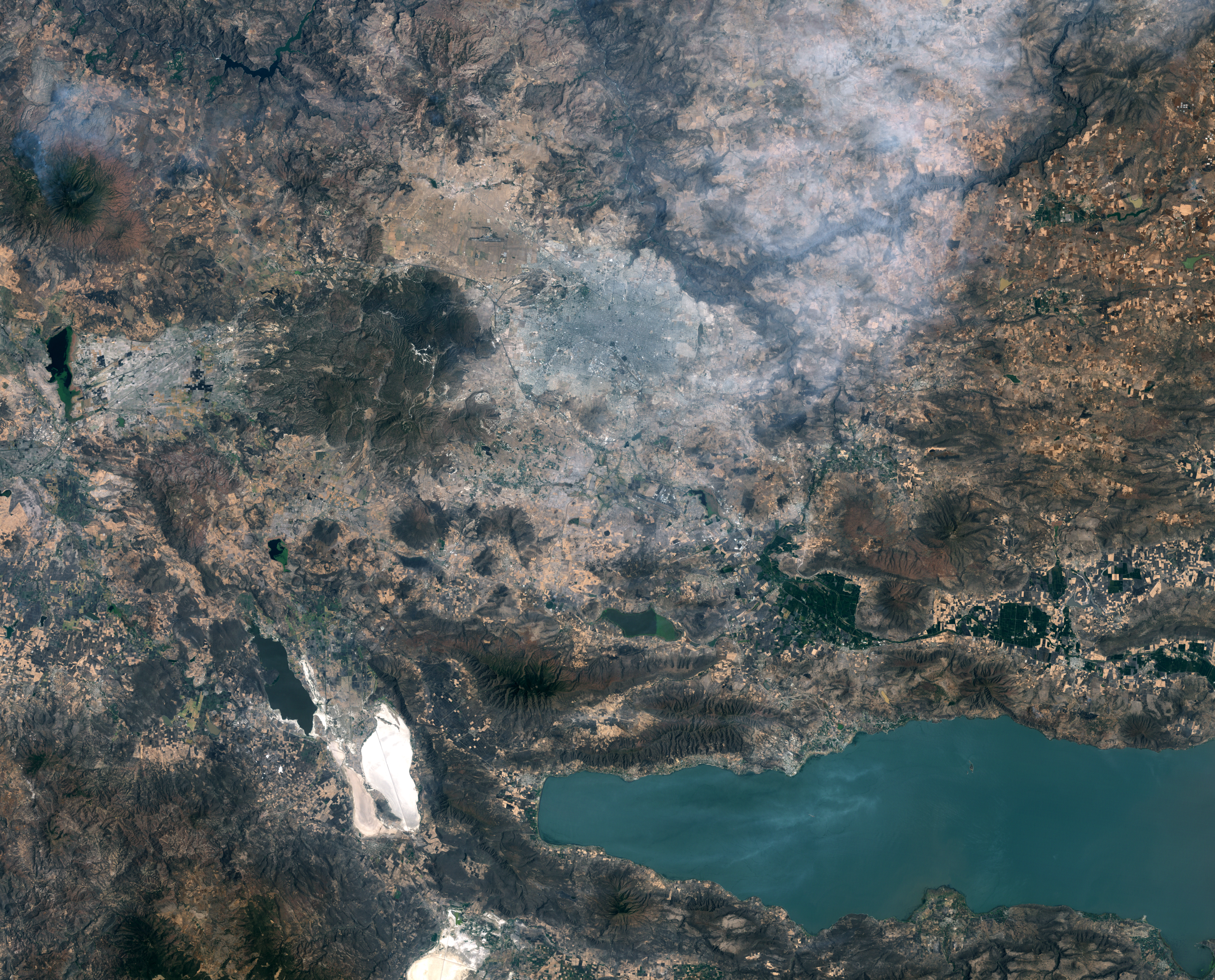
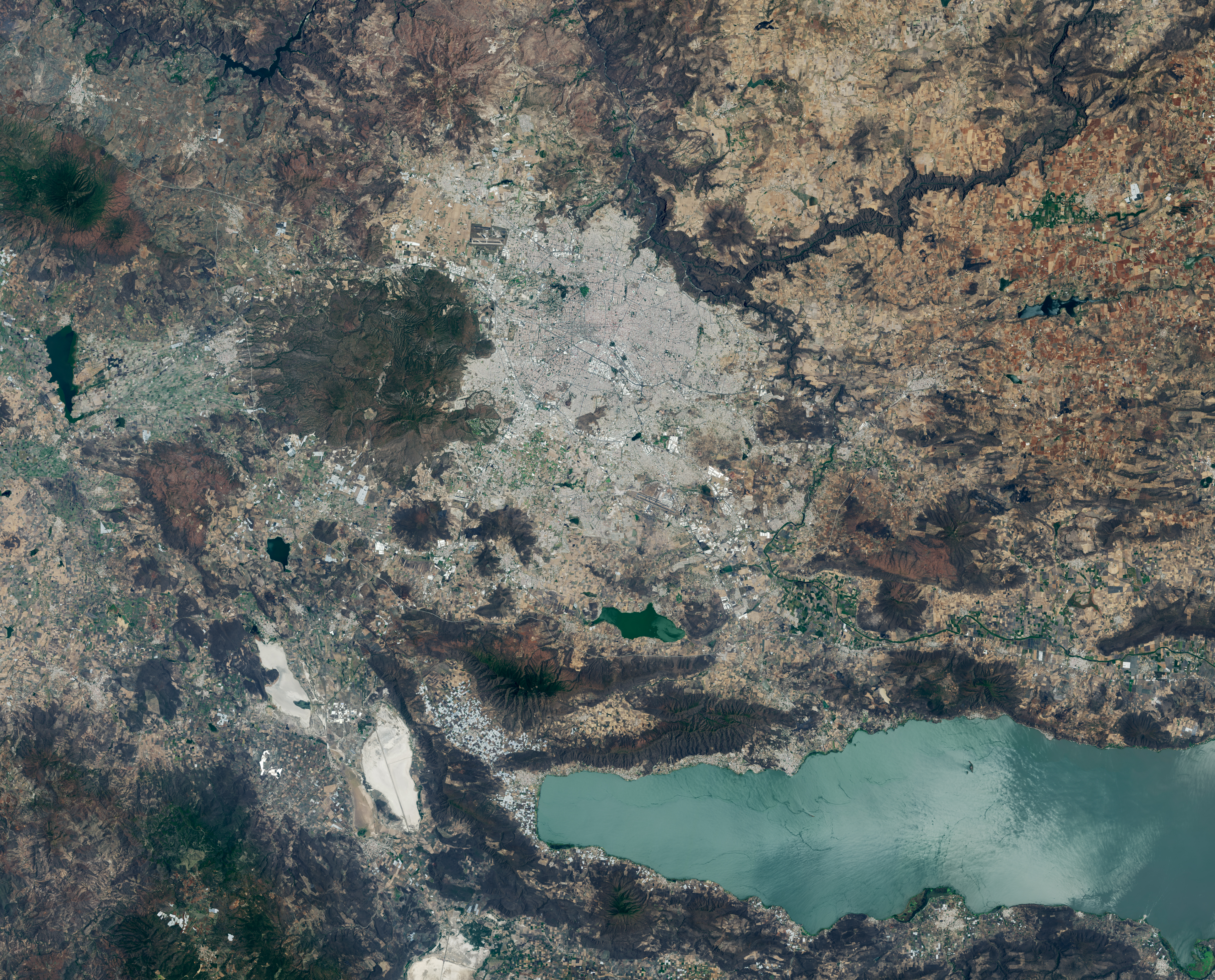
: Images of Guadalajara in 1986 (left) and 2026 (right) shows the city expanding westward into an area that had been mostly farmland. Guadalajara Stadium appears as a small circular feature on the left side of the 2026 image.
A pair of Landsat images shows 40 years of westward urban expansion from Guadalajara, Mexico. The Thematic Mapper on Landsat 5 captured the left image in 1986; the Operational Land Imager on Landsat 8 captured the right image in 2026.
Images of Guadalajara in 1986 (left) and 2026 (right) shows the city expanding westward into an area that had been mostly farmland. Guadalajara Stadium appears as a small circular feature on the left side of the 2026 image.
A pair of Landsat images shows 40 years of westward urban expansion from Guadalajara, Mexico. The Thematic Mapper on Landsat 5 captured the left image in 1986; the Operational Land Imager on Landsat 8 captured the right image in 2026.
NASA Earth Observatory / Lauren Dauphin
: Images of Guadalajara in 1986 (left) and 2026 (right) shows the city expanding westward into an area that had been mostly farmland. Guadalajara Stadium appears as a small circular feature on the left side of the 2026 image.
A pair of Landsat images shows 40 years of westward urban expansion from Guadalajara, Mexico. The Thematic Mapper on Landsat 5 captured the left image in 1986; the Operational Land Imager on Landsat 8 captured the right image in 2026.
Images of Guadalajara in 1986 (left) and 2026 (right) shows the city expanding westward into an area that had been mostly farmland. Guadalajara Stadium appears as a small circular feature on the left side of the 2026 image.
A pair of Landsat images shows 40 years of westward urban expansion from Guadalajara, Mexico. The Thematic Mapper on Landsat 5 captured the left image in 1986; the Operational Land Imager on Landsat 8 captured the right image in 2026.
NASA Earth Observatory / Lauren Dauphin
April 13, 1986
April 27, 2026

April 13, 1986 – April 27, 2026

A pair of Landsat images shows 40 years of westward urban expansion from Guadalajara, Mexico. The TM (Thematic Mapper) on Landsat 5 captured the left image in 1986; the OLI (Operational Land Imager) on Landsat 8 captured the right image in 2026.

Guadalajara, Mexico, was quite a different place when it last hosted World Cup games 40 years ago. The city welcomed matches in June 1986 and did so again in 2026, when South Korea faced Czechia at Guadalajara Stadium in the opening round of the 2026 FIFA World Cup.

In 1986, Guadalajara Stadium had not yet been built in Zapopan, the fast-growing municipality just northwest of Guadalajara. Many of that year’s World Cup matches were held instead at Jalisco Stadium in northeastern Guadalajara. It was in that stadium that France defeated Brazil in a penalty shootout in the 1986 quarterfinals, in what is widely regarded as one of the most memorable World Cup games of all time.

As seen in the Landsat images above, the land where Guadalajara Stadium (also called Estadio Akron) now sits was farmland in 1986. The new stadium, built in 2010 to host Mexico’s Club Deportivo Guadalajara, or Chivas, lies near the Sierra la Primavera volcanic complex, a rugged landscape full of lava flows, volcanic domes, steam vents, and hot springs. The architects who designed the stadium took inspiration from the nearby volcanic terrain, creating a structure that rises from a grassy earthen berm meant to resemble the flanks of a volcano, topped with a white roof reminiscent of a volcanic cloud.   

About 95,000 years ago, the volcanic system underneath Sierra la Primavera produced a massive eruption that caused a caldera 11 kilometers (7 miles) in diameter to slump downward. Water filled the depression for tens of thousands of years, but tectonic uplift and the accumulation of sediment eventually led to the demise of the lake. Erosion wore away the softer surrounding rock over time, leaving harder, erosion-resistant volcanic rocks within the circular feature that now stand high above the surrounding terrain.

Starting about 60,000 years ago, several lava domes erupted along the southern edge of the caldera. The youngest of them, Cerro del Colli, formed about 30,000 years ago, leaving the dome-shaped feature just south of the stadium and contributing to a broader landscape dotted with other volcanic domes and cinder cones.

Today, much of the original caldera has been preserved as a forested area known as La Primavera Biosphere Reserve, even as development has partially encircled it during the past 40 years. The population of the Guadalajara metro area has grown from about 2.7 million in 1986 to more than 5.5 million now, with particularly rapid growth in Zapopan, a burgeoning tech hub sometimes billed as “Mexico’s Silicon Valley.” A prominent development visible in Landsat images is Guadalajara Technology Park, one of several new industrial parks in Zapopan. New greenhouses have also come to the area en masse, including south of the reserve, where they are mostly used to grow fruits and vegetables.

World Cup fever runs particularly high in Guadalajara, which is hosting World Cup matches for the third time. During Brazil’s legendary title run in 1970, when Pelé led the team, Jalisco Stadium was the venue for Brazil’s first-round, quarterfinal, and semifinal matches. To commemorate him, the city in May 2026 erected a 9.5-meter (31-foot) bronze statue of the iconic football (soccer) player.

Even the animals at Guadalajara Zoo are taking part in the festivities, with elephants, gorillas, giraffes, capybaras, pumas, and macaws “predicting” match winners by choosing between food, shirts, boxes, soccer balls, and other items. A puma named Muluk predicted South Korea would beat Czechia by sniffing and moving a ball, one newspaper reported.

Guadalajara will host four first-round matches: South Korea vs. Czechia on June 12, Mexico vs. South Korea on June 18, Colombia vs. Democratic Republic of the Congo on June 23, and Uruguay vs. Spain on June 26.

NASA Earth Observatory images by Lauren Dauphin, using Landsat data from the U.S. Geological Survey. Story by Adam Voiland.

Downloads

Images of Guadalajara in 1986 (left) and 2026 (right) shows the city expanding westward into an area that had been mostly farmland. Guadalajara Stadium appears as a small circular feature on the left side of the 2026 image.

April 13, 1986

JPEG (13.09 MB)

Images of Guadalajara in 1986 (left) and 2026 (right) shows the city expanding westward into an area that had been mostly farmland. Guadalajara Stadium appears as a small circular feature on the left side of the 2026 image.

April 27, 2026

JPEG (13.71 MB)

References & Resources

You may also be interested in:

Stay up-to-date with the latest content from NASA as we explore the universe and discover more about our home planet.

A Volcanic Medley Near Mammoth Lakes 
4 min read

A massive, old caldera and more recently formed craters shape the landscape in the eastern Sierra Nevada.

Article
Scoria Cones on Earth and Mars
7 min read

The hill-shaped features are a sign of explosive volcanic activity—a rarity on the Red Planet.

Article
Restless Kīlauea Launches Lava and Ash
3 min read

Episode 43 of the Hawaiian volcano’s current eruption was marked by high lava fountains and widespread ash dispersal.

Article

The post World Cup Fever in Guadalajara appeared first on NASA Science.

World Cup Fever in Guadalajara

12 June 2026 at 05:01


April 13, 1986
April 27, 2026

: Images of Guadalajara in 1986 (left) and 2026 (right) shows the city expanding westward into an area that had been mostly farmland. Guadalajara Stadium appears as a small circular feature on the left side of the 2026 image.
A pair of Landsat images shows 40 years of westward urban expansion from Guadalajara, Mexico. The Thematic Mapper on Landsat 5 captured the left image in 1986; the Operational Land Imager on Landsat 8 captured the right image in 2026.

Images of Guadalajara in 1986 (left) and 2026 (right) shows the city expanding westward into an area that had been mostly farmland. Guadalajara Stadium appears as a small circular feature on the left side of the 2026 image.
A pair of Landsat images shows 40 years of westward urban expansion from Guadalajara, Mexico. The Thematic Mapper on Landsat 5 captured the left image in 1986; the Operational Land Imager on Landsat 8 captured the right image in 2026.
NASA Earth Observatory / Lauren Dauphin

: Images of Guadalajara in 1986 (left) and 2026 (right) shows the city expanding westward into an area that had been mostly farmland. Guadalajara Stadium appears as a small circular feature on the left side of the 2026 image.
A pair of Landsat images shows 40 years of westward urban expansion from Guadalajara, Mexico. The Thematic Mapper on Landsat 5 captured the left image in 1986; the Operational Land Imager on Landsat 8 captured the right image in 2026.
Images of Guadalajara in 1986 (left) and 2026 (right) shows the city expanding westward into an area that had been mostly farmland. Guadalajara Stadium appears as a small circular feature on the left side of the 2026 image.
A pair of Landsat images shows 40 years of westward urban expansion from Guadalajara, Mexico. The Thematic Mapper on Landsat 5 captured the left image in 1986; the Operational Land Imager on Landsat 8 captured the right image in 2026.
NASA Earth Observatory / Lauren Dauphin

April 13, 1986

April 27, 2026

April 13, 1986 – April 27, 2026


A pair of Landsat images shows 40 years of westward urban expansion from Guadalajara, Mexico. The TM (Thematic Mapper) on Landsat 5 captured the left image in 1986; the OLI (Operational Land Imager) on Landsat 8 captured the right image in 2026.

Guadalajara, Mexico, was quite a different place when it last hosted World Cup games 40 years ago. The city welcomed matches in June 1986 and did so again in 2026, when South Korea faced Czechia at Guadalajara Stadium in the opening round of the 2026 FIFA World Cup.

In 1986, Guadalajara Stadium had not yet been built in Zapopan, the fast-growing municipality just northwest of Guadalajara. Many of that year’s World Cup matches were held instead at Jalisco Stadium in northeastern Guadalajara. It was in that stadium that France defeated Brazil in a penalty shootout in the 1986 quarterfinals, in what is widely regarded as one of the most memorable World Cup games of all time.

As seen in the Landsat images above, the land where Guadalajara Stadium (also called Estadio Akron) now sits was farmland in 1986. The new stadium, built in 2010 to host Mexico’s Club Deportivo Guadalajara, or Chivas, lies near the Sierra la Primavera volcanic complex, a rugged landscape full of lava flows, volcanic domes, steam vents, and hot springs. The architects who designed the stadium took inspiration from the nearby volcanic terrain, creating a structure that rises from a grassy earthen berm meant to resemble the flanks of a volcano, topped with a white roof reminiscent of a volcanic cloud.   

About 95,000 years ago, the volcanic system underneath Sierra la Primavera produced a massive eruption that caused a caldera 11 kilometers (7 miles) in diameter to slump downward. Water filled the depression for tens of thousands of years, but tectonic uplift and the accumulation of sediment eventually led to the demise of the lake. Erosion wore away the softer surrounding rock over time, leaving harder, erosion-resistant volcanic rocks within the circular feature that now stand high above the surrounding terrain.

Starting about 60,000 years ago, several lava domes erupted along the southern edge of the caldera. The youngest of them, Cerro del Colli, formed about 30,000 years ago, leaving the dome-shaped feature just south of the stadium and contributing to a broader landscape dotted with other volcanic domes and cinder cones.

Today, much of the original caldera has been preserved as a forested area known as La Primavera Biosphere Reserve, even as development has partially encircled it during the past 40 years. The population of the Guadalajara metro area has grown from about 2.7 million in 1986 to more than 5.5 million now, with particularly rapid growth in Zapopan, a burgeoning tech hub sometimes billed as “Mexico’s Silicon Valley.” A prominent development visible in Landsat images is Guadalajara Technology Park, one of several new industrial parks in Zapopan. New greenhouses have also come to the area en masse, including south of the reserve, where they are mostly used to grow fruits and vegetables.

World Cup fever runs particularly high in Guadalajara, which is hosting World Cup matches for the third time. During Brazil’s legendary title run in 1970, when Pelé led the team, Jalisco Stadium was the venue for Brazil’s first-round, quarterfinal, and semifinal matches. To commemorate him, the city in May 2026 erected a 9.5-meter (31-foot) bronze statue of the iconic football (soccer) player.

Even the animals at Guadalajara Zoo are taking part in the festivities, with elephants, gorillas, giraffes, capybaras, pumas, and macaws “predicting” match winners by choosing between food, shirts, boxes, soccer balls, and other items. A puma named Muluk predicted South Korea would beat Czechia by sniffing and moving a ball, one newspaper reported.

Guadalajara will host four first-round matches: South Korea vs. Czechia on June 12, Mexico vs. South Korea on June 18, Colombia vs. Democratic Republic of the Congo on June 23, and Uruguay vs. Spain on June 26.

NASA Earth Observatory images by Lauren Dauphin, using Landsat data from the U.S. Geological Survey. Story by Adam Voiland.

Downloads

Images of Guadalajara in 1986 (left) and 2026 (right) shows the city expanding westward into an area that had been mostly farmland. Guadalajara Stadium appears as a small circular feature on the left side of the 2026 image.

April 13, 1986

JPEG (13.09 MB)

Images of Guadalajara in 1986 (left) and 2026 (right) shows the city expanding westward into an area that had been mostly farmland. Guadalajara Stadium appears as a small circular feature on the left side of the 2026 image.

April 27, 2026

JPEG (13.71 MB)

References & Resources

You may also be interested in:

Stay up-to-date with the latest content from NASA as we explore the universe and discover more about our home planet.

A Volcanic Medley Near Mammoth Lakes 

4 min read

A massive, old caldera and more recently formed craters shape the landscape in the eastern Sierra Nevada.

Article

Scoria Cones on Earth and Mars

7 min read

The hill-shaped features are a sign of explosive volcanic activity—a rarity on the Red Planet.

Article

Restless Kīlauea Launches Lava and Ash

3 min read

Episode 43 of the Hawaiian volcano’s current eruption was marked by high lava fountains and widespread ash dispersal.

Article

Google is held liable for false information from its AI

11 June 2026 at 23:33

A German court has sparked a legal controversy by ruling that Google is responsible for defamatory comments generated by its own AI system. The search giant had argued that it couldn’t be blamed for the false results, but a Munich court has deemed that not to be the case and has ruled in favor of the two unnamed plaintiffs, both publishing companies, who the Google AI Overview inaccurately said engaged in shady business practices.

Google is required to remove the comments and ensure that they are not repeated. The case is certainly going to raise some questions globally. Will this mean that other courts are going to rule against AI vendors?

Bernhard Buchner, a partner at Lausen Rechtsanwälte, the legal firm that acted for the plaintiffs, said, “I believe it shows that online providers such as Google cannot hide behind the fact that a statement was generated by AI, but rather that they can be held liable for its output. It is an important step towards ensuring that providers of AI systems have to take responsibility for their outputs.”

So, does this mean that the decision could be replicated in the US or elsewhere? Alex Shahrestani, managing partner at Austin-based Promise Legal, said, “the short answer is ‘yes’:  the Munich ruling travels, because US courts are already making the same move.”

He explained that Section 230 of the US Communications Decency Act, which has been applied to protect online service providers like social media companies from lawsuits based on their decisions to transmit or take down user-generated content, was built for computer bulletin boards, “not for a model that writes its own answers. Once the AI is the author, the company is the publisher.”

This means, he said, “businesses now need named humans at accountability nodes, verification gates before AI output ships, and audit trails that survive discovery, because ‘the model recommended it’ is a legally empty sentence.”

Does the decision mean that other AI providers could find themselves in the same position? Buchner believes it’s possible, although, he said, the situation in this case is unusual; it does not involve a classic chatbot scenario, but one where the AI-generated statements are published as an ‘AI overview’ of a search query.

“Google’s liability here is based not so much on the fact that it operates the underlying AI, but rather on the publication of its output. However, it seems entirely conceivable to me that this could also be applied generally to inaccurate or defamatory AI,” he pointed out.

Nonetheless, said Carolyn Shelby, head of SEO at Yoast, the German ruling should ensure that companies will be more circumspect in how they handle AI in the future, to protect themselves from any legal action. The first thing they should do  is to separate low-risk use of AI from major decision-making.

“Using AI to summarize meeting notes, brainstorm campaign ideas, or create a first draft of something is very different from using it to make decisions about customers, employees, finance, compliance, health, legal claims, competitive positioning, or public communications,” she noted.

She pointed out that the effects of AI use could be devastating for companies. “The consequences could include customer complaints, reputational damage, regulatory attention, legal claims, correction costs, loss of trust, and internal disruption,” she said. “Even when a mistake does not become a lawsuit, the operational cost of correcting bad information can be significant.”

However, she noted, things may not change immediately.  “Many companies will wait until there is a high-profile court case, regulatory action, or major corporate embarrassment before they take this seriously. That is usually how governance catches up with technology. But the better-run organizations will start treating AI governance as part of normal business risk management now.”

And, said Shahrestani, after the Google decision, everything has changed. It will become more important to ensure that employees remain part of the process.

Google's New AI Translator Lets Conversations Flow Across 70+ Languages

11 June 2026 at 18:06
Google’s Gemini Live Translate brings real-time speech translation to developers, but accuracy, latency, and technical vocabulary remain key tests.

Microsoft 365: A guide to the updates

11 June 2026 at 03:20

Microsoft 365 (and Office 365) subscribers get more frequent software updates than those who have purchased Office without a subscription, which means subscribers have access to the latest features, security patches, and bug fixes. But it can be hard to keep track of the changes in each update and know when they’re available. We’re doing this for you, so you don’t have to.

Following are summaries of the updates to Microsoft 365/Office 365 for Windows over the past year, with the latest releases shown first. We’ll add info about new updates as they’re rolled out.

Note: This story covers updates released to the Current Channel for Microsoft 365/Office 365 subscriptions. If you’re a member of Microsoft’s Office Insider preview program or want to get a sneak peek at upcoming features, see the Microsoft 365 Insider blog.

Version 2605 (Build 20026.20168)

Release date: June 9, 2026

This build offers “various fixes to functionality and performance,” according to Microsoft.

Get more info about Version 2605 (Build 20026.20168).

Version 2605 (Build 20026.20140)

Release date: June 3, 2026

This build fixes a single bug, in which images didn’t display when using top and bottom text wrapping in classic Outlook.

Get more info about Version 2605 (Build 20026.20140).

Version 2605 (Build 20026.20112)

Release date: May 26, 2026

This build offers “various fixes to functionality and performance,” according to Microsoft.

Get more info about Version 2605 (Build 20026.20112).

Version 2605 (Build 20026.20076)

Release date: May 20, 2026

This build fixes several bugs, including one in which Excel or PowerPoint closed unexpectedly in rare cases while the user was actively co-authoring, particularly when opening a document for the first time.

Get more info about Version 2605 (Build 20026.20076).

Version 2604 (Build 19929.20172)

Release date: May 14, 2026

This build fixes a bug in Outlook in which sending mail failed when multiple Exchange accounts were configured.

Get more info about Version 2604 (Build 19929.20172).

Version 2604 (Build 19929.20164)

Release date: May 12, 2026

The build plugs a number of security holes. For details, see Release notes for Microsoft Office security updates.

What IT needs to know: Because this is a security update, it should be applied relatively soon. Over the next few weeks, check for reports about problematic issues, and if all seems well, apply the update.

Get more info about Version 2604 (Build 19929.20164).

Version 2604 (Build 19929.20136)

Release date: May 5, 2026

This build fixes a bug in which Outlook closed unexpectedly after replying to a mail item with labels.

Get more info about  Version 2604 (Build 19929.20136).

Version 2604 (Build 19929.20106)

Release date: April 29, 2026

This build includes “various fixes to functionality and performance,” according to Microsoft.

Get more info about Version 2604 (Build 19929.20106).

Version 2604 (Build 19929.20090)

Release date: April 21, 2026

This build includes “various fixes to functionality and performance,” according to Microsoft.

Get more info about Version 2604 (Build 19929.20090).

Version 2603 (Build 19822.20182)

Release date: April 14, 2026

In this build, Copilot can now edit your PowerPoint documents. Copilot can start a new presentation or build on an existing one, generate slides, update content, improve layouts, and polish design, while preserving formatting, structure, and branding. 

The build also plugs a number of security holes. For details, see Release notes for Microsoft Office security updates.

What IT needs to know: Because this is a security update, it should be applied relatively soon. Over the next few weeks, check for reports about problematic issues, and if all seems well, apply the update.

Get more info about Version 2603 (Build 19822.20182).

Version 2603 (Build 19822.20168)

Release date: April 9, 2026

This build fixes several bugs, including one in Outlook in which users could not close the Copilot chat pane using a keyboard. Users can now close the pane by navigating to the Close button using a keyboard or by using the assigned keyboard shortcut.

Get more info about Version 2603 (Build 19822.20168).

Version 2603 (Build 19822.20142)

Release date: March 31, 2026

This build includes “various fixes to functionality and performance,” according to Microsoft.

Get more info about Version 2603 (Build 19822.20142).

Version 2603 (Build 19822.20114)

Release date: March 24, 2026

This build fixes a single bug in which PowerPoint sometimes closed unexpectedly when opening a newly created empty file from the OneDrive folder.

Get more info about Version 2603 (Build 19822.20114).

Version 2602 (Build 19725.20190)

Release date: March 18, 2026

This build fixes an Outlook bug in which updating a single instance of a recurring meeting in a Microsoft 365 group calendar updated the entire series.

Get more info about Version 2602 (Build 19725.20190).

Version 2602 (Build 19725.20172)

Release date: March 10, 2026

This build introduces agent mode in Word, which adds a conversational chat experience that helps create, edit, and refine document content as you work. In addition, the build fixes a bug that impacted the rendering of extended characters in calendar items, causing certain characters to appear as question marks.

The build also plugs a number of security holes. For details, see Release notes for Microsoft Office security updates.

What IT needs to know: Because this is a security update, it should be applied relatively soon. Over the next few weeks, check for reports about problematic issues, and if all seems well, apply the update.

Get more info about Version 2602 (Build 19725.20172).

Version 2602 (Build 19725.20152)

Release date: March 3, 2026

This build fixes a bug in which closing a document sometimes remained in progress indefinitely after the Office app resumed from sleep or hibernation.

Get more info about Version 2602 (Build 19725.20152).

Version 2602 (Build 19725.20126)

Release date: February 24, 2025

This build fixes several bugs, including one that caused OneNote to close unexpectedly upon startup.

Get more info about Version 2602 (Build 19725.20126).

Version 2601 (Build 19628.20214)

Release date: February 17, 2025

This build includes, in Microsoft’s words, “various fixes to functionality and performance.”

Get more info about Version 2601 (Build 19628.20214).

Version 2601 (Build 19628.20204)

Release date: February 10, 2026

This build fixes a bug that sometimes prevented users from opening emails with the Encrypt Only label in Outlook.

It also plugs a number of security holes. For details, see Release notes for Microsoft Office security updates.

What IT needs to know: Because this is a security update, it should be applied relatively soon. Over the next few weeks, check for reports about problematic issues, and if all seems well, apply the update.

Get more info about Version 2601 (Build 19628.20204).

Version 2601 (Build 19628.20166)

Release date: February 3, 2026

This build includes, in Microsoft’s words, “various fixes to functionality and performance.”

Get more info about Version 2601 (Build 19628.20166).

Version 2601 (Build 19628.20150)

Release date: January 27, 2025

In this build, OneNote applies your chosen proofing language more consistently, so you don’t have to reset it for every paragraph when writing in multiple languages. In addition, the build fixes several bugs, including one that caused Office applications to become unresponsive when profile card-related activities were performed.

Get more info about Version 2601 (Build 19628.20150).

Version 2512 (Build 19530.20184)

Release date: January 21, 2025

This build includes, in Microsoft’s words, “Various fixes to functionality and performance.”

Get more info about Version 2512 (Build 19530.20184).

Version 2512 (Build 19530.20144)

Release date: January 13, 2026

This build fixes a number of bugs, including one that caused Excel, PowerPoint, and Word to become unresponsive when profile card-related activities were performed.

It also plugs a number of security holes. For details, see Release notes for Microsoft Office security updates.

What IT needs to know: Because this is a security update, it should be applied relatively soon. Over the next few weeks, check for reports about problematic issues, and if all seems well, apply the update.

Get more info about Version 2512 (Build 19530.20144).

Version 2512 (Build 19530.20138)

Release date: January 8, 2025

This build offers, in Microsoft’s words, “Various fixes to functionality and performance.”

Get more info about Version 2512 (Build 19530.20138).

Version 2511 (Build 19426.20218)

Release date: December 16, 2025

This build offers, in Microsoft’s words, “Various fixes to functionality and performance.”

Get more info about Version 2511 (Build 19426.20218).

Version 2511 (Build 19426.20186)

Release date: December 9, 2025

This Patch Tuesday build offers, in Microsoft’s words, “Various fixes to functionality and performance.” The build also has a variety of security updates (see details).

What IT needs to know: Because this is a security update, it should be applied relatively soon. Over the next few weeks, check for reports about problematic issues, and if all seems well, apply the update.

Get more info about Version 2511 (Build 19426.20186).

Version 2511 (Build 19426.20170)

Release date: December 3, 2025

This build includes, in Microsoft’s words, “Various fixes to functionality and performance.”

Get more info about Version 2511 (Build 19426.20170).

Version 2510 (Build 19328.20244)

Release date: November 20, 2025

This build fixes a bug in Outlook that caused users to see “Contacting the server for information” repeatedly when loading some emails.

Get more info about Version 2510 (Build 19328.20244).

Version 2510 (Build 19328.20232)

Release date: November 18, 2025

This build includes, in the words of Microsoft, “various fixes to functionality and performance.”

Get more info about Version 2510 (Build 19328.20232).

Version 2510 (Build 19328.20190)

Release date: November 11, 2025

This Patch Tuesday build fixes a bug in Outlook that caused some recipients to be unable to access OneDrive links shared with them via email. The build also has a variety of security updates (see details).

What IT needs to know: Because this is a security update, it should be applied relatively soon. Over the next few weeks, check for reports about problematic issues, and if all seems well, apply the update.

Get more info about Version 2510 (Build 19328.20190).

Version 2510 (Build 19328.20178)

Release date: November 4, 2025

This build fixes a single bug, in which @mention searches produced no results in Office apps.

Get more info about Version 2510 (Build 19328.20178).

Version 2510 (Build 19328.20158)

Release date: October 30, 2025

This build introduces a new Get Data dialog in Windows that simplifies finding and using external data, and adds Analyze Data to the Data tab.

The build also fixed an bug in Outlook that prevented users from downloading web add-ins in some virtualized environments.

Get more info about Version 2510 (Build 19328.20158).

Version 2509 (Build 19231.20216)

Release date: October 21, 2025

This build has, in Microsoft’s words, “various fixes to functionality and performance.”

Get more info about Version 2509 (Build 19231.20216).

Version 2509 (Build 19231.20194)

Release date: October 14, 2025

This build has a variety of security updates (see details), along with various fixes to functionality and performance.

What IT needs to know: Because this is a security update, it should be applied relatively soon. Over the next few weeks, check for reports about problematic issues, and if all seems well, apply the update.

Get more info about Version 2509 (Build 19231.20194).

Version 2509 (Build 19231.20172)

Release date: October 7, 2025

This build has, in Microsoft’s words, “various fixes to functionality and performance.”

Get more info about Version 2509 (Build 19231.20172).

Version 2509 (Build 19231.20156)

Release date: October 1, 2025

This build fixes two bugs, one in Excel in which ribbon controls were not rendered when rejoining Office sessions in a virtual machine, Azure Virtual Desktop, or remote desktop environment, and another that caused Outlook to terminate unexpectedly when starting.

Get more info about Version 2509 (Build 19231.20156).

Version 2508 (Build 19127.20264)

Release date: September 23, 2025

This build has, in Microsoft’s words, “various fixes to functionality and performance.”

Get more info about Version 2508 (Build 19127.20264).

Version 2508 (Build 19127.20240)

Release date: September 16, 2025

This build has, in Microsoft’s words, “various fixes to functionality and performance.”

Get more info about Version 2508 (Build 19127.20240).

Version 2508 (Build 19127.20222)

Release date: September 9, 2025

This build has multiple security updates (see details), along with various fixes to functionality and performance.

What IT needs to know: Because this is a security update, it should be applied relatively soon. Over the next few weeks, check for reports about problematic issues, and if all seems well, apply the update.

Get more info about Version 2508 (Build 19127.20222).

Version 2508 (Build 19127.20192)

Release date: September 3, 2025

This build fixes a bug in which some Outlook add-ins were getting “Office.auth.getAccessToken is not a function” errors.

Get more info about Version 2508 (Build 19127.20192).

Version 2508 (Build 19127.20154)

Release date: August 26, 2025

This build fixes a bug that caused Outlook to terminate unexpectedly when sending a meeting invite with an encryption label. It also adds support for pixelated rendering of embedded images in SVG assets for the entire Office suite.

Get more info about Version 2508 (Build 19127.20154).

Version 2507 (Build 19029.20208)

Release date: August 19, 2025

This build fixes a variety of bugs.

Get more info about Version 2507 (Build 19029.20208).

Version 2507 (Build 19029.20184)

Release date: August 12, 2025

This build fixes a bug which required users to restart Outlook to open a .msg file after initially accessing it once. The build also includes a variety of security updates (see details).

What IT needs to know: Because this is a security update, it should be applied relatively soon. Over the next few weeks, check for reports about problematic issues, and if all seems well, apply the update.

Get more info about Version 2507 (Build 19029.20184).

Version 2507 (Build 19029.20156)

Release date: August 5, 2025

This build fixes a single bug, in which users had to restart Outlook to open a .msg file after initially accessing it once.

Get more info about Version 2507 (Build 19029.20156).

Version 2507 (Build 19029.20136)

Release date: July 30, 2025

This build fixes a wide variety of bugs, including in which Outlook closed unexpectedly shortly after launch, and another in Word in which the word count sometimes displayed incorrectly.

Get more info about Version 2507 (Build 19029.20136).

Version 2506 (Build 18925.20184)

Release date: July 22, 2025

This build fixes two bugs, one that caused the Copilot Command Center to continue to be visible after disabling the Copilot user interface, and another in which when creating handouts in PowerPoint, certain characters (full-width numbers) couldn’t be properly transferred to the handout.

Get more info about Version 2506 (Build 18925.20184).

Version 2506 (Build 18925.20168)

Release date: July 15, 2025

This build fixes two bugs, one that caused Visio 32-bit to close unexpectedly when using the Drawing control, particularly in setups involving COM components or .NET integrations, and another in Word in which copying and pasting content between documents sometimes changed the applied style unexpectedly.

Get more info about Version 2506 (Build 18925.20168).

Version 2506 (Build 18925.20158)

Release date: July 8, 2025

This Patch Tuesday build fixes several bugs in Outlook, PowerPoint, Word, and the whole Office suite, including one that caused the Copilot icon to unexpectedly display in Outlook when Copilot had been disabled by the admin in government cloud.

The release also includes a variety of security updates (see details).

What IT needs to know: Because this is a security update, it should be applied relatively soon. Over the next few weeks, check for reports about problematic issues, and if all seems well, apply the update.

Get more info about Version 2506 (Build 18925.20158).

Version 2506 (Build 18827.20176)

Release date: July 1, 2025

This build fixes a wide variety of bugs, including one in Word in which print preview sometimes stopped working when printing long emails.

Get more info about Version 2506 (Build 18827.20176).

Version 2505 (Build 18827.20176)

Release date: June 26, 2025

This build introduces several new features, including one in Excel in which the PivotTables dialog box interface has been replaced by a redesigned panel, making it easier to view all of your options and simpler to change your data selection before inserting a recommended PivotTable.

Get more info about Version 2505 (Build 18827.20176).

Version 2505 (Build 18827.20164)

Release date: June 17, 2025

This build fixes a bug that caused the “Try the new Outlook” toggle to be enabled when working in Classic Outlook side by side with the new Outlook.

Get more info about Version 2505 (Build 18827.20164).

Version 2505 (Build 18827.20150)

Release date: June 10, 2025

This build fixes several bugs, including one for the entire Office suite in which a Save As attempt on an existing file didn’t complete successfully, and subsequent attempts continued to encounter issues when trying to save to a file that no longer existed.

This Patch Tuesday release also includes a variety of security updates: see details.

What IT needs to know: Because this is a security update, it should be applied relatively soon. Over the next few weeks, check for reports about problematic issues, and if all seems well, apply the update.

Get more info about  Version 2505 (Build 18827.20150).

Version 2505 (Build 18827.20140)

Release date: June 3, 2025

This build offers a variety of bug and performance fixes.

Read about Version 2505 (Build 18827.20140).

Version 2504 (Build 18730.20186)

Release date: May 20, 2025

This build introduces a new PowerPoint feature: Notification emails for mentions, tasks, comments, and replies will now contain context previews even when the source document is encrypted, and the email will inherit the document’s security policies.

Get more info about Version 2504 (Build 18730.20186).

Version 2504 (Build 18730.20168)

Release date: May 13, 2025

This build fixes a bug in which users were seeing high CPU usage when typing in Outlook. It also includes a variety of security updates: see details.

What IT needs to know: Because this is a security update, it should be applied relatively soon. Over the next few weeks, check for reports about problematic issues, and if all seems well, apply the update.

Get more info about Version 2504 (Build 18730.20168).

Version 2504 (Build 18730.20142)

Release date: May 6, 2025

This build includes various bug and performance fixes.

Get more info about Version 2504 (Build 18730.20142).

Version 2504 (Build 18730.20122)

Release date: April 29, 2025

This build fixes a wide variety of bugs, including one in which PowerPoint was unable to open a file from a network mapped drive from File Explore, another in which Word closed unexpectedly when opening .doc files, and another for the entire Office suite in which large 3D files couldn’t be inserted.

Get more info about Version 2504 (Build 18730.20122).

Version 2503 (Build 18623.20208)

Release date: April 17, 2025

This build fixes a bug that could cause Excel to stop responding.

Get more info about Version 2503 (Build 18623.20208).

Version 2503 (Build 18623.20178)

Release date: April 8, 2025

This build fixes a single bug in Word in which users may have encountered an issue with saving, seeing the message “saving…” in the title bar. It  also includes a variety of security updates. Go here for details.

What IT needs to know: Because this is a security update, it should be applied relatively soon. Over the next few weeks, check for reports about problematic issues, and if all seems well, apply the update.

Get more info about Version 2503 (Build 18623.20178).

Version 2503 (Build 18623.20156)

Release date: April 2, 2025

This build lets you use Dark Mode in Excel, which darkens your entire sheet, including cells, and may reduce eye strain. It also fixes several bugs, including one in Word in which opening specific files that contain many tracked changes and comments resulted in poor performance, and one in PowerPoint in which the app was not displaying the icon for an inserted PDF object.

Get more info about Version 2503 (Build 18623.20156).

Version 2502 (Build 18526.20168)

Release date: March 11, 2025

This build fixes several bugs, including one in which some Word files with numerous tracked changes and comments were slow. It also includes a variety of security updates: see details.

What IT needs to know: Because this is a security update, it should be applied relatively soon. Over the next few weeks, check for reports about problematic issues, and if all seems well, apply the update.

Get more info about Version 2502 (Build 18526.20168).

Version 2502 (Build 18526.20144)

Release date: March 5, 2025

This build fixes a wide variety of bugs, including one in Word in which the default font size may not be 12pt as expected, and another in which PowerPoint automatically closed when the system went into hibernate or sleep mode.

Get more info about Version 2502 (Build 18526.20144).

Version 2501 (Build 18429.20158)

Release date: February 11, 2025

This build removes the option to display Track Changes balloons in left margin in Word. It also includes a variety of security updates. See “Release notes for Microsoft Office security updates” for details.

What IT needs to know: Because this is a security update, it should be applied relatively soon. Over the next few weeks, check for reports about problematic issues, and if all seems well, apply the update.

Get more info about Version 2501 (Build 18429.20158).

❌