❌

Normal view

This studio made all the killer games that sold me on almost every XBOX console

I grew up a SEGA and Sony kid, at least until XBOX started tempting me with exclusives. I didn't make any of my own money until the XBOX 360 era, but when I did, one studio had the killer apps in my eyes: Remedy Entertainment.

Xbox 25 year anniversary celebration badge for Windows Central

During the OG XBOX era, I split my gaming between a PlayStation 2 and the family PC, which was chiefly used to play Max Payne.

Its slow-motion, John Woo-esque gunfighting gameplay landed at the perfect time; I was already obsessed with The Matrix, after all.

Obsessively playing Remedy's noir shooter while dipping my toes into the PC modding scene convinced me that Remedy were icons.

Indeed, I held them in the same regard as Rockstar Games and Valve, as gaming stalwarts that could seemingly do no wrong, especially after Max Payne 2 delivered everything I had hoped. For their next adventure, I'd need Microsoft's new console, so I started saving my money.

XBOX 360 β€” Alan Wake

Alan Wake gameplay screenshot with protagonist firing a shotgun into the darkness

Alan Wake is all about light and dark, with a fair amount of guns. (Image credit: Remedy Entertainment)

Mechanically, Alan Wake isn't much different from Max Payne. It's a third-person shooter with a strong narrative focus, pushing me toward cutscenes and literal story scraps as I unravel a mystery of light vs. darkness. Enemies creep out of the shadows, totally invulnerable until I burn away their armor with a flashlight, flare, or whatever other luminous weapons I have on hand.

It started as a more open-world game, but the clever twist on the otherwise familiar run-and-gun mechanics drew me in. I didn't even mind giving up the slow-motion 'Bullet Time' feature that defined Max Payne, because it still lingered in Alan Wake's gameplay loop, showing up in well-timed dodges. This time, Remedy's writing was less clichΓ©d and more sincere β€” I wanted more.

This time, Remedy's writing was less clichΓ©d and more sincere β€” I wanted more.

Of course, I had plenty of other games on the XBOX 360 to tide me over, including Grand Theft Auto IV and Gears of War, so I wasn't bereft of choice after buying into this iconic console. Besides, Alan Wake's American Nightmare arrived soon after as the game's largest DLC expansion, but we wouldn't see a true sequel for another couple of generations.

Alan Wake Remastered: $29.99 at XBOX.com

"In this award-winning cinematic action-thriller, troubled author Alan Wake embarks on a desperate search for his missing wife, Alice."View Deal

XBOX One β€” Quantum Break

Quantum Break gameplay screenshot with protagonist firing a pistol into a bright explosion

Quantum Break goes off the wall with time-stopping abilities, but keeps the guns. (Image credit: Remedy Entertainment)

Would another time-bending action shooter convince me to buy into Microsoft's latest console? It did, and I went all in on its unified platform with the XBOX One, a Nokia Lumia 735 running Windows 10 Mobile, and, of course, a Windows 10 PC. I even bought the console's official digital TV tuner, fully adopting the all-in-one media pitch, though I'd never get my hands on the promised DVR feature.

And what better game to start with than Quantum Break with its live-action cinematics, cut like a TV mini-series? It certainly had some interesting combat mechanics that let me completely freeze time in isolated bubbles, but it felt more like a treat for the eyes. Visually, the game was (and still is) incredible.

If Alan Wake were a Stephen King novel blended with David Lynch's Twin Peaks sensibilities, then Quantum Break is more like Tenet's time-twisting motif wrapped around the gratuitous slow-motion bullet barrages of The Matrix. It's still easy to recommend, with Remedy's refined storytelling DNA on full display, and it can be beaten in a single weekend if you have the time.

Quantum Break: $39.99 at XBOX.com

"In the aftermath of a split-second of destruction that fractures time itself, two people find they have changed and gained extraordinary abilities."View Deal

XBOX Series X β€” Alan Wake 2

Alan Wake 2 screenshot with protagonist wielding a revolver in a smoky night street scene

Alan Wake 2 is an even more warped adventure than the first, but yes, there are guns. (Image credit: Remedy Entertainment)

Thirteen years after the first game, I finally had the Alan Wake sequel within reach, and I wanted to savor every moment. This is the game that not only convinced me to pick up the XBOX Series X console, but also a 4K OLED TV with HDR and all the other trimmings. It annihilated my savings, but it was worth it in the long run, since my wife and I play on this console almost daily.

Alan Wake 2 had some launch bugs, but they were soon cleaned up, and it didn't tarnish my view of this brilliant sequel. It's Remedy in top gear, running at maximum speed with a twisting story, gorgeous visuals, and layers upon layers of references and outright fan service. I loved almost every minute.

It's Remedy in top gear, running at maximum speed with a twisting story, gorgeous visuals, and layers upon layers of references.

There are some sudden stops, like a playable representation of the co-protagonist's "Mind Place" that had me connecting yarns to various photographs and clue scraps. It betters the story, but ultimately, I always wish I could speed past some of this part when I replay the game. Nevertheless, it's one of the best games I've ever played, and I easily forgave its missteps. Don't miss out.

Alan Wake 2: $59.99 at XBOX.com

"A string of ritualistic murders threatens Bright Falls, a small-town community surrounded by Pacific Northwest wilderness."View Deal

Project Helix β€” Will there be another killer app?

Max Payne game logo

Max Payne couldn't be any more focused on guns if it tried, and to great effect. (Image credit: Remedy Entertainment | Rockstar Games)

Microsoft's plans for a follow-up console fall under the 'Project Helix' codename as an "XBOX-PC hybrid", with no set release date. Game studios might expect to receive developer-centric hardware sometime in 2027, but for now, the company is simply encouraging those devs to keep "developing for Xbox on PC". You know, I'd be more excited if it weren't for the ongoing memory shortage crisis.

Remedy announced a 'Max Payne 1 & 2 Remake' in 2022, and I haven't heard much about it since then. It's a partner project with Rockstar Games, and Take-Two still owns the series IP, making it the most mysterious project that I've ever felt this excited for. If this silence continues, it might just launch on Project Helix, but will it be unique (or exclusive) enough to keep me from playing it on PC?

It's almost impossible to predict, but I'd rather be an optimist when I can. With any luck, RAM and storage production costs will gradually return to more reasonable levels over the next year, which could kick-start an exciting lead-up to the reveal of whatever Project Helix calls itself. What kinds of games do you hope to see in the next generation of XBOX?

Click to join us on r/WindowsCentral

Join us on Reddit at r/WindowsCentral to share your insights and discuss our latest news, reviews, and more.


Thrustmaster's new flight stick is a heavy and authentic A-10C HOTAS replica for PC simulator fans who crave digital dogfights

Already synonymous with flight simulation hardware, Thrustmaster is expanding its sim gaming range again with the HOTAS Warthog Mk. II, an "enhanced" variant of its popular, military-themed stick and throttle bundle for PC. Previously announced at Flight Sim Expo, it's releasing today, September 16, 2026, at an MSRP of $599.99, it's available from the official eStore and Amazon.

Indeed, the Warthog Mk. II features the same official U.S. Air Force licensing as its predecessor, with a design that seems almost indistinguishable from the Mk. I at a glance. In reality, Thrustmaster has focused mostly on the internals, redesigning its "H.E.A.R.T." Hall-Effect sensor mechanism "to offer enhanced smoothness and durability".

On the outside, it's still a 1:1-scale recreation of a Viper stick grip and the Warthog A-10C throttle with separate controls for both simulated engines (plus a locking system). Despite a few visual tweaks, the Mk. II supports full compatibility "with all Thrustmaster grips", which is great news for any sim enthusiasts who already adopted the brand's ecosystem on Windows PCs.

Thrustmaster HOTAS WARTHOG MK II flight stick promotional renders with a dusty desert background scene
Thrustmaster's VIPER flight stick.Thrustmaster
Thrustmaster HOTAS WARTHOG MK II flight stick promotional renders with a dusty desert background scene
And its companion, the WARTHOG throttle unit.Thrustmaster
Thrustmaster HOTAS WARTHOG MK II flight stick promotional renders with a dusty desert background scene
The refined MK II flight stick base.Thrustmaster
Thrustmaster HOTAS WARTHOG MK II flight stick promotional renders with a dusty desert background scene
And Thrustmaster's Hall-Effect sensors visualized.Thrustmaster

I've tested a huge number of flight sticks for games like Microsoft Flight Simulator, but I haven't strayed too far into military sims, or even further out to space-faring dogfights in titles like Elite Dangerous. However, I've always seen the Thrustmaster Warthog Mk. I appearing among some of the top-rated HOTAS sets in my adventures, so I definitely knew about it.

This release came with a chance to test the Warthog Mk. II for myself, so of course I said yes to a sample. Imagine my surprise when Thrustmaster's shipping confirmation included the 6.56 kg heft of this dense, 100% metal monster listed in its specs, with some extra weight on top for packaging. My word, what am I getting myself into?

The Viper flight stick grip provides a flight experience that's as close as possible to a real fighter pilot's.

Thrustmaster

Don't get me wrong, it's not like I've never, ever tried a flight stick in a combat game, but a HOTAS set of this intensity needs to be paired with something that fits better than a Cessna in Microsoft Flight Simulator. I'm looking forward to seeing how the first Warthog version built such a reputation, and whether its accolades carry over to the "sturdier" Mk. II.

That, and I need to figure out bindings for the stick's 19 buttons and the 8-way hat switch, even if the latter is usually quite obvious, before moving on to the Warthog control panel and its wealth of chunky levers, switches, and dials. That's up to 128 total buttons β€” should be fun! Stay tuned for my HOTAS Warthog Mk. II review going live before the end of the month.

Click to join us on r/WindowsCentral

Join us on Reddit at r/WindowsCentral to share your insights and discuss our latest news, reviews, and more.

Steam Deck 2 handheld plans haven't been affected by the RAM crisis, even if Valve's Steam Machine PC and Steam Frame VR were more expensive than planned.

Valve's popular Steam Deck handheld pushed handheld gaming PCs into the mainstream with its affordable, Linux-based console, and its potential successor seemingly aims to make the same impact. Speaking to IGN's Jacqueline Thomas, Valve software developer Pierre-Loup Griffais touched on the fabled 'Steam Deck 2' and whether the ongoing RAM crisis could affect its development.

We want to make sure there's a very delineated performance improvement for something like a future Steam Deck.

Pierre-Loup Griffais, Valve

When asked whether ongoing hardware shortages β€” which have already affected pricing for its Steam Machine PC and Steam Frame VR headset β€” have changed how Valve thinks about a Steam Deck successor, Griffais answered, "Not really." For now, it sounds like any potential 'Steam Deck 2' will target the same balance of performance and affordability as before, but is that realistic?

Steam Deck performance was crushed years ago

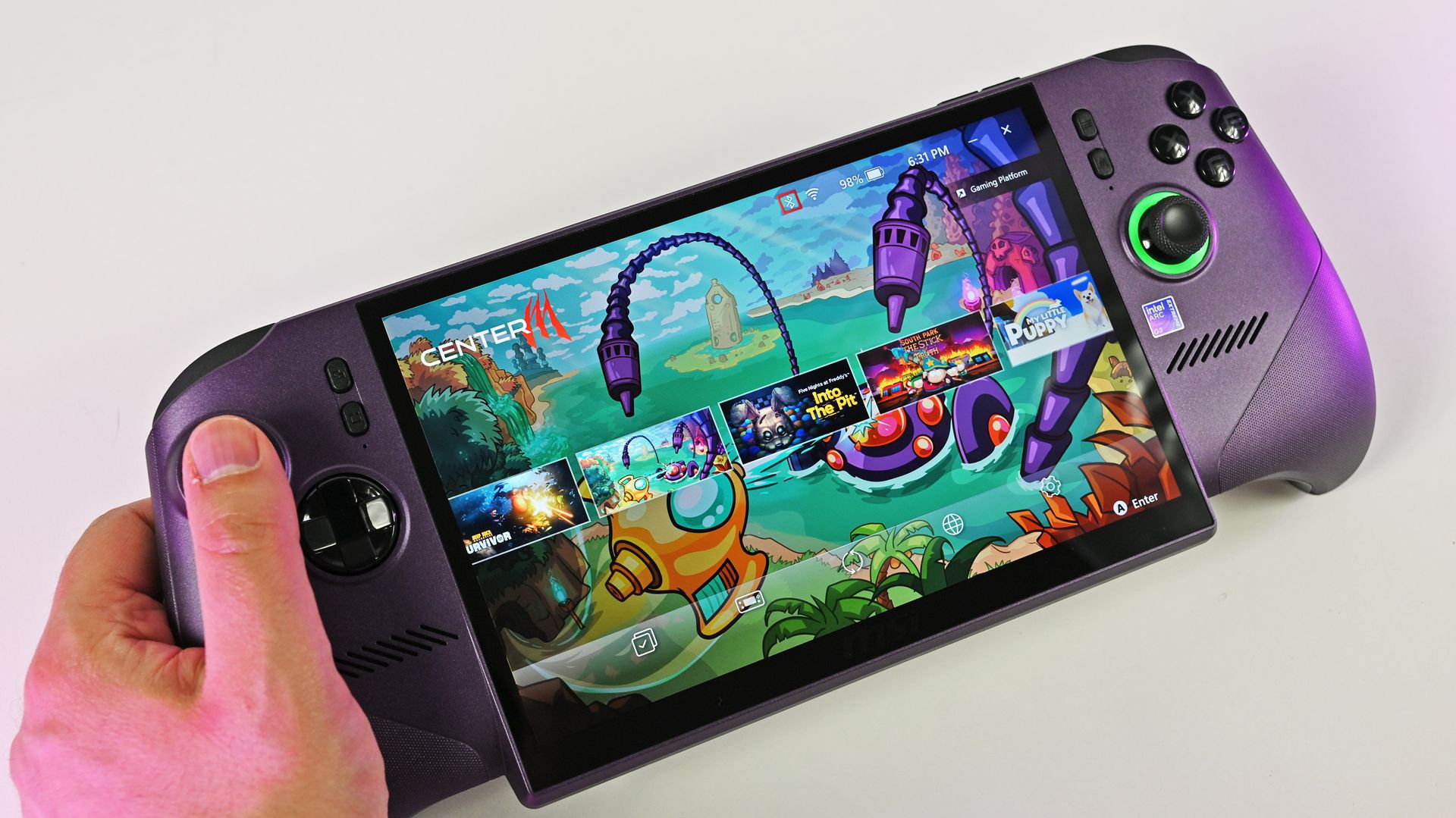
A person holds the metallic purple MSI Claw 8 EX AI+ handheld gaming PC, showcasing its large screen running the MSI Center M game launcher.

MSI Claw 8 EX AI+ stands as one of the best Windows-based handhelds today. (Image credit: Daniel Rubino)

For clarity, I use my Steam Deck almost every day, and it still powers through my library of built-for-Windows PC games with relative success. However, there's no denying its age, and the custom-made Zen 2/RDNA 2 APU doesn't stand a chance in many of the AAA games released in the past few years. For those demanding titles, plenty of Windows-based handhelds are far better suited.

Of course, higher-end options like ASUS ROG's "next-gen" Xbox Ally X and the all-out powerhouse MSI Claw 8 EX AI+ don't offer higher performance without asking for more cash. On the contrary, the Ally X starts at $999.99, while the Claw 8 EX AI+ moves closer to $1,800, which is a far cry from the $399 to $649 window that the Steam Deck originally targeted.

Unfortunately, much like the Claw [8 EX AI+], the Steam Machine is a premium engineering marvel suffering from historically terrible macroeconomic timing.

Daniel Rubino, Windows Central

In that, I'm trying to stay grounded when I hear that Valve's plans haven't changed for the Steam Deck 2 (or whatever it might be called), because that never necessarily meant it would target the same price point as its first handheld. After all, the company just launched its new Steam Frame VR headset for $1,059, which is higher than it originally planned (via PC Gamer).

So, Valve is stuck between a rock and a hard place: sourcing a follow-up (presumably also custom-made) processor and the corresponding components for a mass-produced handheld without pricing it so high that it loses mainstream appeal. It won't be easy, and I wouldn't be surprised if we don't hear anything concrete about the Steam Deck 2 for a few years.

Click to join us on r/WindowsCentral

Join us on Reddit at r/WindowsCentral to share your insights and discuss our latest news, reviews, and more.

Ubisoft is removing its launcher from Prince of Persia on Steam, pledging to cut 'Ubisoft Connect' from more games "in the future"

Ubisoft is starting to test a change to how its PC games work on Steam, removing its own game launcher from games bought in Valve's storefront app, according to a patch note shared on Reddit. Previously, launching a Ubisoft-made game would require gamers to first install the Ubisoft Connect PC launcher to support cross-progression and other stat tracking.

[The new tool] keeps Ubisoft game features (..) without requiring the Ubisoft Connect PC launcher to be installed or launched.

Ubisoft

The change will first apply to 2024's 2D platformer Prince of Persia: The Lost Crown and, presuming this test proves to be successful, will "progressively evolve and roll out to more Ubisoft games on Steam in the future". Crucially, there's no definite confirmation that this will retroactively apply to even older Ubisoft games on Steam, but it's a reasonable assumption.

The impossible is less of a barrier

Finally another launcher out of steam
Β fromΒ r/Steam

This is fantastic news for PC gamers, if it works as expected. Connecting my Steam and Ubisoft accounts should, in theory, be as much effort as I need to play these games from my library, skipping the frustrating process of navigating (and quickly closing) Ubisoft's launcher. I'm crossing all my fingers that this soon applies to my entire catalog, so I can stop neglecting Watch_Dogs 2.

Having to re-enter my password every time I boot up Assassin's Creed unity or whatever is painful. Hopefully this will help

u/mango__moose, Reddit

Sentiments are fairly unanimous across the r/Steam thread on Reddit, with most agreeing that the Ubisoft Connect launcher has never been a positive feature in games they've bought on Steam. Ditto for other companies, as launching Grand Theft Auto IV or Red Dead Redemption 2 on my Steam Deck still tediously forces me through Rockstar Games' own launcher variant.

Curiously, this announcement is currently restricted to the Steam-hosted patch note, which can't be viewed outside a library that already owns the relevant game, so Ubisoft is seemingly keeping this test on the downlow for now. Maybe they're trying to save face after pushing Ubisoft Connect for so long, but frankly, this is a step in the right direction to celebrate β€” if it passes testing.

Click to join us on r/WindowsCentral

Join us on Reddit at r/WindowsCentral to share your insights and discuss our latest news, reviews, and more.
I rebuilt my classic Xbox 360 avatar in this clever web-based generator, with outfits from "every collection Microsoft released"

This web-based recreation of the iconic Xbox 360 avatar creator features tens of thousands of clothing and prop items from the original marketplace, and it's even more impressive when you learn that '360sona' was the project of a single person, Ezra Kruger. Shared across Reddit and YouTube, it also carefully denies any direct affiliation with Microsoft.

21,425 items across every collection Microsoft released – 2,644 props and every one of them plays its animation.

Ezra Kruger

Built primarily with JavaScript and WebGL, 360sona.com is a "pixel-for-pixel" representation that lets you accurately rebuild your old-school Xbox avatar and even embed it into your personal website via an iframe. The whole project includes "every animation, every camera the console had, drawn the way the console drew them", and each part looks exactly how you remember.

"Well, bam, there it is"

I was enamored with the idea before I even opened it, as the first images took me on an instant nostalgia trip, and I love nostalgia trips. 360sona has everything I remembered, and I rebuilt my original avatar in minutes, including the Max Payne outfit I never removed back in the day. Armor from Halo, Gears of War, and Mass Effect is also here, all authentically rendered.

If I wanted to, I could even export my finished avatar as a .glb model, rigged and ready for inspection in free 3D software like Blender, with baked textures included. It's all built around a basic account system and, importantly, 360sona never asks for your email address. You only need a simple username and password (and you're given a one-time-use recovery code).

Every item, texture, animation and piece of artwork in the catalogue was created by Microsoft Corporation and its partners and licensors. They are the rights holders.

360sona Terms

The branded elephant in the room is the absolutely gigantic collection of licensed content, including logos of major sports franchises, movies, and real-world clothing icons. Again, Kruger explains in 360sona's terms that you shouldn't expect to reuse absolutely anything exported from the project, stressing the intention of personal, non-commercial use.

Still, I can't shake the feeling that a potential DMCA takedown request could be looming, even though 360sona doesn't feature any on-page ads or other money-making schemes. At face value, this is a purely fan-driven hobby project that exists only to let long-serving Xbox fans spend some time reminiscing about the Xbox 360's heyday. That hasn't stopped mega-corpos in the past, though.

Click to join us on r/WindowsCentral

Join us on Reddit at r/WindowsCentral to share your insights and discuss our latest news, reviews, and more.
Grand Theft Auto 6 will launch earliest in New Zealand, so I'm reminding you that changing your Xbox's region is really easy

Grand Theft Auto 6 will finally launch on November 19, 2026, at midnight in your region. Technically, that means New Zealand gets it earliest, as 00:00 NZDT (New Zealand Daylight Time) aligns with 06:00 EST (Eastern Standard Time) on November 18, while the rest of us wait for our own clocks to tick over. Dedicated fans at GTAVice.net spotted the regional launch plans, but there's a catch.

The timestamps come from Sony's PlayStation Store listings, which is actually better news for Xbox fans. PS5 users can't change their console's region so easily to trick the system, while Xbox Series X|S gamers can still head to their Settings menu and change their Language & location settings to match New Zealand's kickoff of the rolling midnight launch.

PlayStation 5 owners can put extra effort into making a new account, but that also means finding a way to buy the game in the local NZ$ currency. If you already pre-ordered on Xbox in your own country, switching to a region on the furthest edge of the time zones should be a relatively simple trick for eager Xbox gamers looking to play GTA 6 early.

How to change your region on Xbox Series X|S

Xbox Series X dashboard screenshot showing steps through Settings to change region
Find the Settings cogwheel at the top of your dashboard.Windows Central
Xbox Series X dashboard screenshot showing steps through Settings to change region
Next, navigate to Language & location.Windows Central
Xbox Series X dashboard screenshot showing steps through Settings to change region
Finally, change your location and restart.Windows Central
  1. From your Xbox dashboard, enter Settings (the cogwheel)
  2. On the left menu, scroll to System
  3. Move to the right side and select Language & location
  4. Choose your new region, e.g., New Zealand
  5. Select Restart now to apply the changes

Is this trick guaranteed to work for GTA6?

Grand Theft Auto 6 Lucia in prison

Lucia is the the other playable half, waiting for a November release. (Image credit: Rockstar Games)

In theory, I can't think of any compelling reasons this shouldn't work on an Xbox Series X|S, as it has in the past for digital games with rolling midnight launches. However, that doesn't mean Rockstar Games and its publisher, Take-Two, don't have a trick up their sleeve to prevent GTA 6 from being playable a day earlier with the same region tweak we used on titles like Call of Duty.

Even though Grand Theft Auto VI doesn't have any multiplayer components planned for its launch, that doesn't mean it's a strictly offline experience. It's reasonable to assume that stat tracking will apply during the single-player campaign, presumably shared among players when their console is connected to the internet.

Otherwise, if the game verifies your previous purchase and confirms your new region is a valid location (and the game doesn't require a day-one patch to launch), we might be able to play the story of GTA 6 entirely offline. Personally, I'm not feeling the same level of excitement as many others, so I'm willing to wait, but I don't see why this wouldn't work for anyone who already pre-ordered in their local currency.

In XBOX's official messaging, the brand warns of regional caveats. For example, any local currency tied to your account will not transfer over, and Microsoft can't help with that. If you were planning to buy any GTA 6 "Ultimate Edition" add-ons, you'll need to do it before changing your region. Still, it's easy to revert your Xbox console to its original region, so it's certainly tempting.

Click to join us on r/WindowsCentral

Join us on Reddit at r/WindowsCentral to share your insights and discuss our latest news, reviews, and more.
Switzerland begins testing alternatives to Microsoft 365 to protect its "most sensitive data" and strengthen digital sovereignty

Switzerland's federal government wants to move away from any reliance on Microsoft 365, as it begins testing alternatives to replace the American-made software suite. It's a recurring theme of European countries pursuing digital sovereignty, as we saw earlier this year when the French government began dropping Windows 10/11 in favor of Linux-based operating system 'distros'.

Alternatives to Microsoft's long-standing 'Office' mainstays already exist, with 'Euro-Office', for example, advertising itself as a "sovereign solution for collaborative document editing", so finding potential picks presumably wouldn't be too difficult. However, choosing which app replacement to trust with the Swiss government's "most sensitive data" will be the hard part (via It's FOSS).

3,000 Swiss workstations will drop Microsoft 365

Rows of Swiss national flags hang across faΓ§ades and narrow streets in Geneva’s Old Town.

Rising license costs are also attributed to the Swiss switch, but that isn't much of a new trend. (Image credit: Getty Images | Sunphol Sorakul)

For my money, the most interesting part is the data protection reasoning, as Professor Matthias StΓΌrmer at Bern University of Applied Sciences described his concerns about the implied risk of leaks from a system controlled by foreign governments. StΓΌrmer predictably lists rising license costs as a secondary problem, but it's frontloaded by the move away from America's Microsoft.

We know that foreign governments can access this data β€” this is available at any time.

Professor Matthias StΓΌrmer, BFH (via RTS)

For now, it's just a trial that could yield unsatisfactory results, ultimately leading the Swiss government to stick with Microsoft 365. Either way, the pilot is apparently expected to move 7% of federal admin staff and their 3,000 workstations to whichever alternative suites are selected, taking private government data with them.

On the other hand, Microsoft's own Sovereign Cloud already focuses on data sovereignty, so it's not as if the company isn't aware of these kinds of concerns. The platform "ensures customer data stays in Europe, under European Law β€” and encryption is under full control of customers," but that hasn't been enough to convince the governments of Germany, France, and now Switzerland.

Click to join us on r/WindowsCentral

Join us on Reddit at r/WindowsCentral to share your insights and discuss our latest news, reviews, and more.
Valve's shipping partner leaks shipping data in a cyberattack β€” including the names, addresses, and phone numbers of Steam Machine and Steam Controller buyers

If you ordered any of Valve's products within Europe, such as its Steam Machine gaming PC or the modern Steam Controller, there's a chance your private information may have been compromised. This morning, an email detailed "a note about a security incident at our shipping partner in Europe" involving a cyberattack on Valve's EU shipping partner, CEVA Logistics, on August 7.

Expect fake messages - email, SMS or phone - that mention your hardware order and appear to come from Steam, Valve or a delivery company.

Valve

I bought the Steam Controller in May, though I skipped the Steam Machine pre-order queue, and still received the notice as a customer in the United Kingdom. Crucially, Valve clarifies that this attack on CEVA and its subsequent data breach does not affect "your payment information, passwords, Steam Guard codes or other information."

Your Steam account should remain safe, and right now, there's no reason to change your password or change any account settings. However, Valve warns that customers could "expect fake messages" from bad actors asking for money or other information. Personal details that "may have been compromised" include:

  • Your name
  • Your street address, postal code and city
  • Your country
  • Your phone number
  • Your email address β€” the same one your Steam account uses
  • The type and price of the ordered product

How did the CEVA Logistics breach happen?

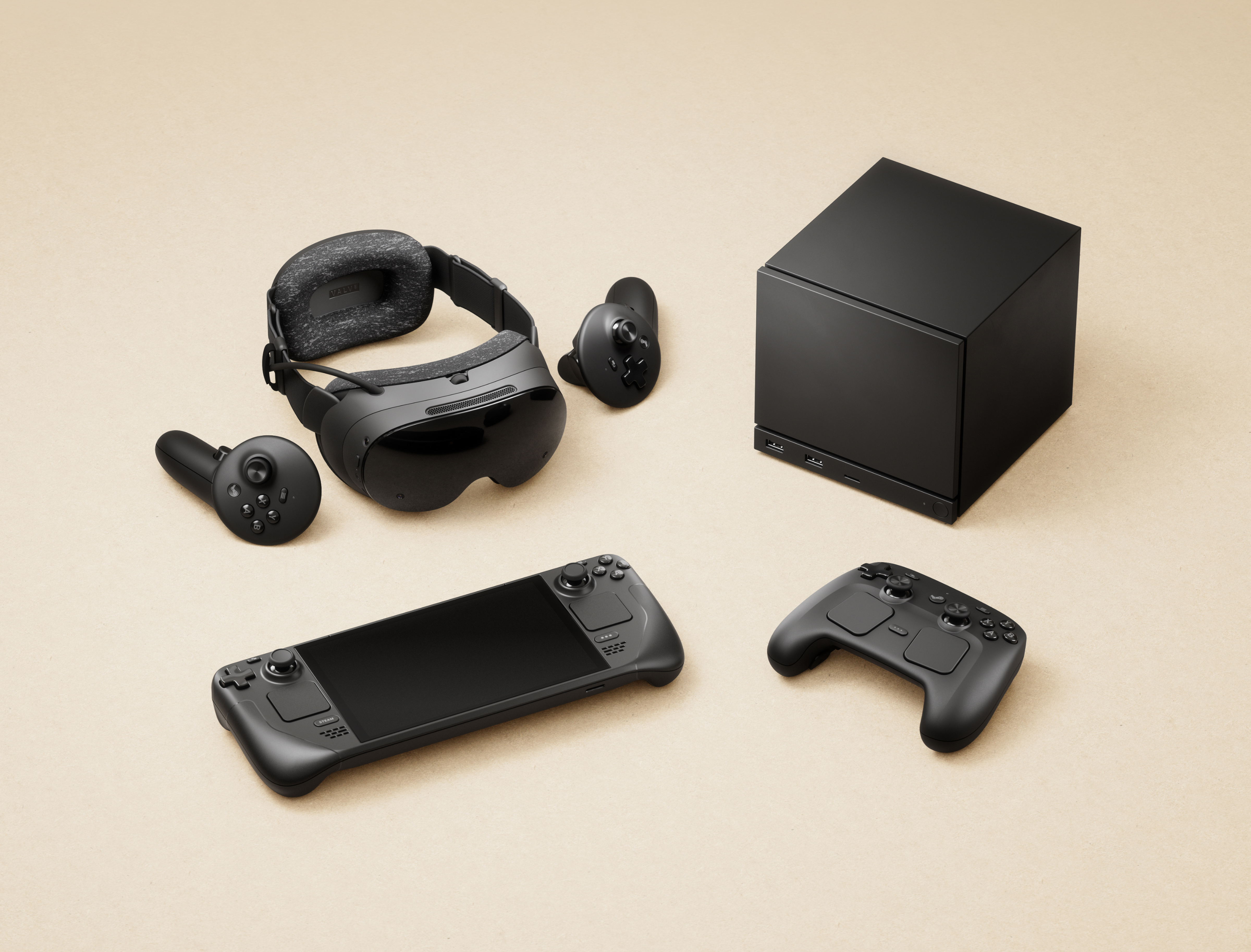
Steam Machine for 2026

Steam Machine buyers report receiving the same email, presumably affecting all European hardware shipments. (Image credit: Valve)

Valve says that it is "pressing CEVA for the full scope of what was taken and how, and we are in the process of notifying the data protection authorities in the countries affected", and clarifies that the affected system has been taken offline and isolated from further leaks, but there is currently no confirmation on which customers have been affected or exactly how this happened.

For now, Valve invites anyone with concerns or questions to reach out to its support team at help.steampowered.com or to write to its contact point at Artana Digital GmbH, Alstertwiete 3, 20099 Hamburg, Germany.

Fake messages from convincing impersonators are unfortunately common, and bad actors will go through extreme lengths to make their text messages, emails, and phone calls appear genuine. If you're new to Steam, remain vigilant but remember that Valve only handles account issues via its dedicated support site, and "never by email, Steam Chat, or Discord β€” Anyone who contacts you elsewhere claiming to be Steam Support is not."

Comment
Β fromΒ r/steammachine

I'd also caution anyone who might be at risk that, while Valve implies that your credit card information is safe, bad actors can use other personal information to attempt various identity fraud and access accounts elsewhere. It's important to stay vigilant as data breaches like this happen, and scrutinize every message you receive from delivery companies asking for money: "Treat all of them as fake", Valve says.

Customers based in the United States and, in turn, anywhere outside CEVA Logistics' operating area in Europe shouldn't be affected by this breach. Nevertheless, it should come as an important lesson in customer privacy and data security. Keep using strong passwords that are unique to each platform, and protect yourself as much as possible.

Click to join us on r/WindowsCentral

Join us on Reddit at r/WindowsCentral to share your insights and discuss our latest news, reviews, and more.
I went hands-on with this portable and compact gaming PC case β€” and now I'm planning my first mini ITX build

Desktop gaming PCs have a reputation for being huge, and, to be honest, a lot of them are. However, if you're confident enough to dive into the twisted world of cable management, then a compact build could be a fantastic challenge that pays off as a space-saving monster rig. When the Cooler Master Qube 340 case appeared at Computex earlier this year, I was immediately intrigued, even if I can't afford the full gamut of parts to build inside of it just yet.

Cooler Master provided a sample but did not see the contents of my article before publishing. I'm also refraining from assigning a traditional review score to this case until I can complete a build with a full set of components.

How much does the Qube 340 cost?

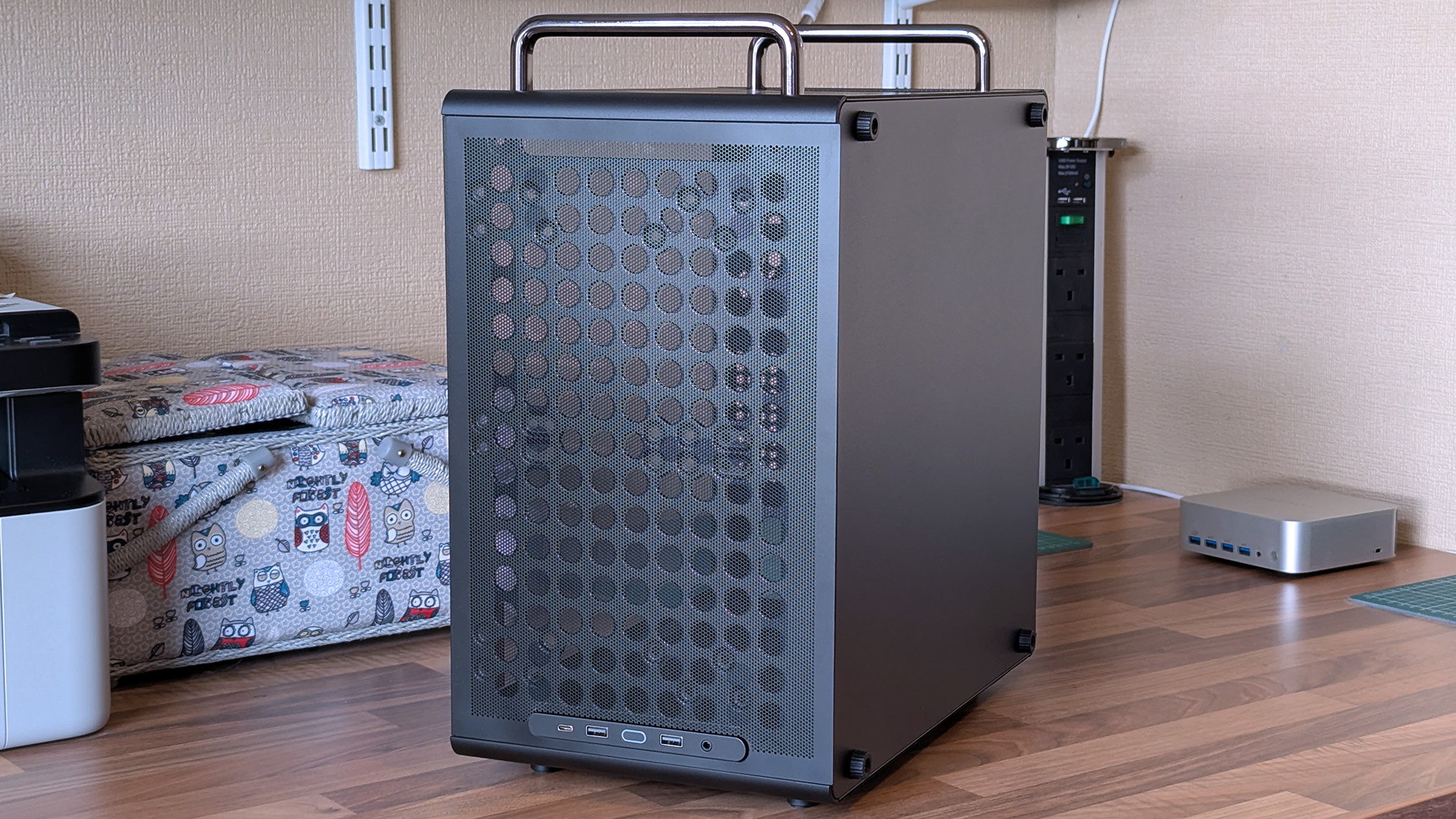
The front of a Cooler Master Qube 340 case features a large mesh panel, visible internal components, and top handles, with front I/O ports along the upper edge.

I wouldn't say it looks exactly like that infamous Apple Mac Pro, but there's definitely a resemblance. (Image credit: Ben Wilson | Windows Central)

For now, the best place to buy the Cooler Master Qube 340 is Newegg at $54.99. It's currently listed by Newegg itself, rather than any third-party sellers, and is in stock at the time of writing. A listing for the Qube 340 in black on Amazon US lists "Newegg Business" as a reseller at $59.49, which isn't worth the extra money. At the time of writing, the white variant of this case is "currently unavailable" on Amazon and is outright missing from Newegg.

Qube 340 sample specifications

Component

Spec

Motherboard support

Mini-ITX
Micro-ATX

Power supply support

ATX

Fan support

2x 120mm / 2x 140mm (top/front)
1x 120mm / 1x 140mm (rear/bottom)

Radiator support

240mm/120mm (top/front)
120mm (rear)
N/A (bottom/side)

I/O

2x USB-A 3.2 Gen1
1x USB-C 3.2 Gen2x2
1x 3.5mm combo audio

Clearances

CPU cooler: 178mm
GPU: 365mm (without front fan)
PSU: 200mm/100mm (with/without bottom fan)

Dimensions

386.1 x 230 x 429.4 mm (including handles, feet)


The exact model I tested is available on Newegg at its intended price, with good availability and options for free shipping, depending on your location.View Deal

What I like about the Qube 340

A Cooler Master Qube 340 case rests on a desk with its tempered glass side panel attached, revealing the empty interior and rear cooling fan behind the transparent panel.
Compact and portable, the Qube 340 instantly had me planning a build.Ben Wilson | Windows Central
The rear of a Cooler Master Qube 340 case shows ventilation holes, expansion slots, and top carry handles, with a tempered glass side panel.
Micro ATX or Mini ITX, you have enough expansion slots to choose from.Ben Wilson | Windows Central
A compact Cooler Master Qube 340 case sits on a desk with a mesh bottom and tempered glass side, showing the rear expansion slots and ventilation layout.
Dust shields cover the whole case, but they can all be removed easily.Ben Wilson | Windows Central

Ever since the RAM crisis ruined any prospect of affording Valve's Steam Machine gaming PC, I've thought about how I could repurpose some of the spare components I have in storage β€” and even then, it isn't a huge pile. Still, I knew I'd never manage anything quite as purposefully tiny, but I could come close with a mini ITX build, and the Qube 340 looked perfect on paper.

The removable handles (are) ideal for what I've planned: A desktop that I can set up and take away at a moment's notice.

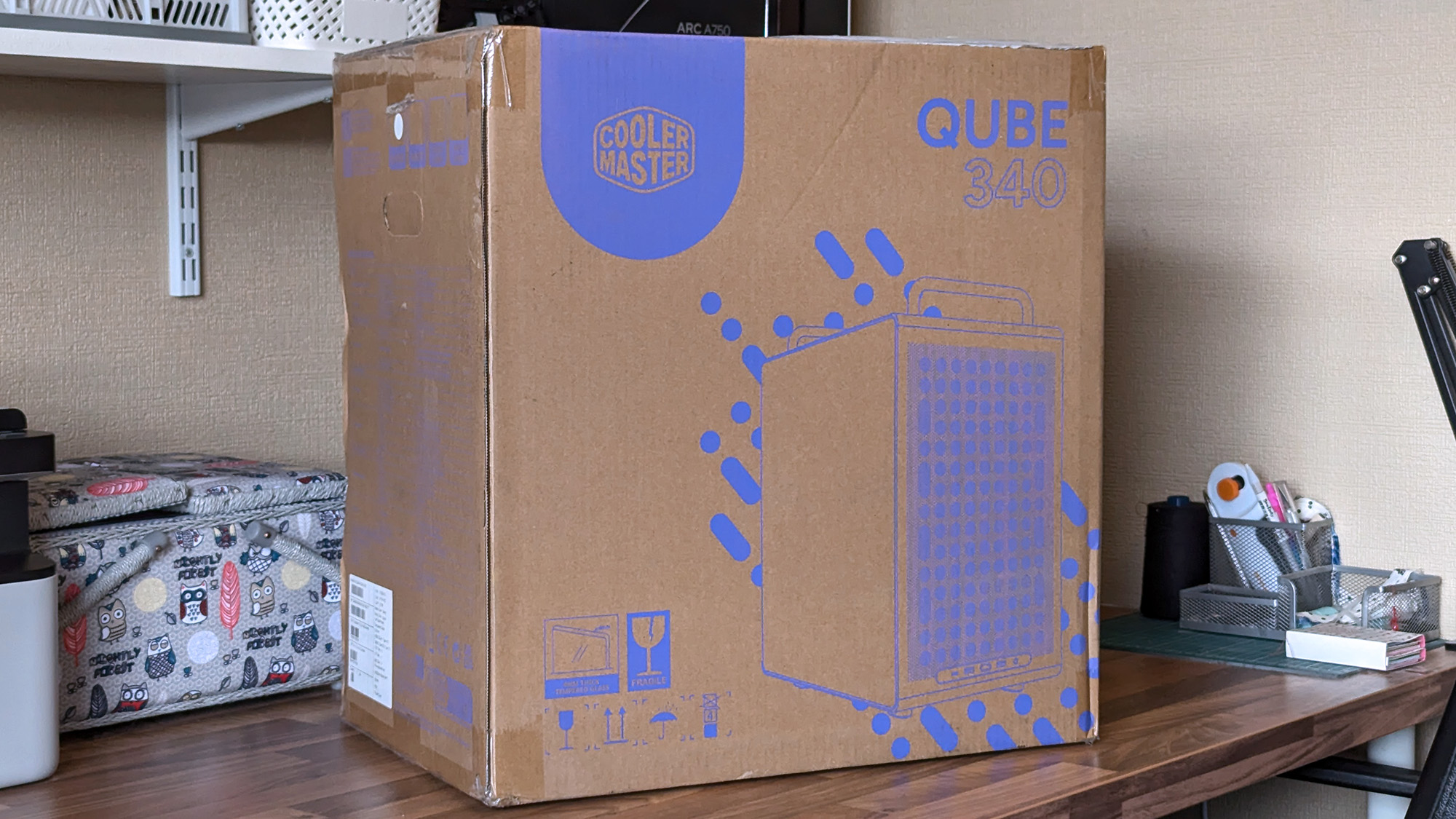
It came in a huge box, but it feels as compact in person as I'd hoped. The removable handles are also ideal for what I've planned: A desktop that I can set up and take away at a moment's notice, rather than leaving something permanently underneath our TV. Sure, I'll need to buy some more niche parts, like a compatible motherboard, but Cooler Master impressed me out of the box.

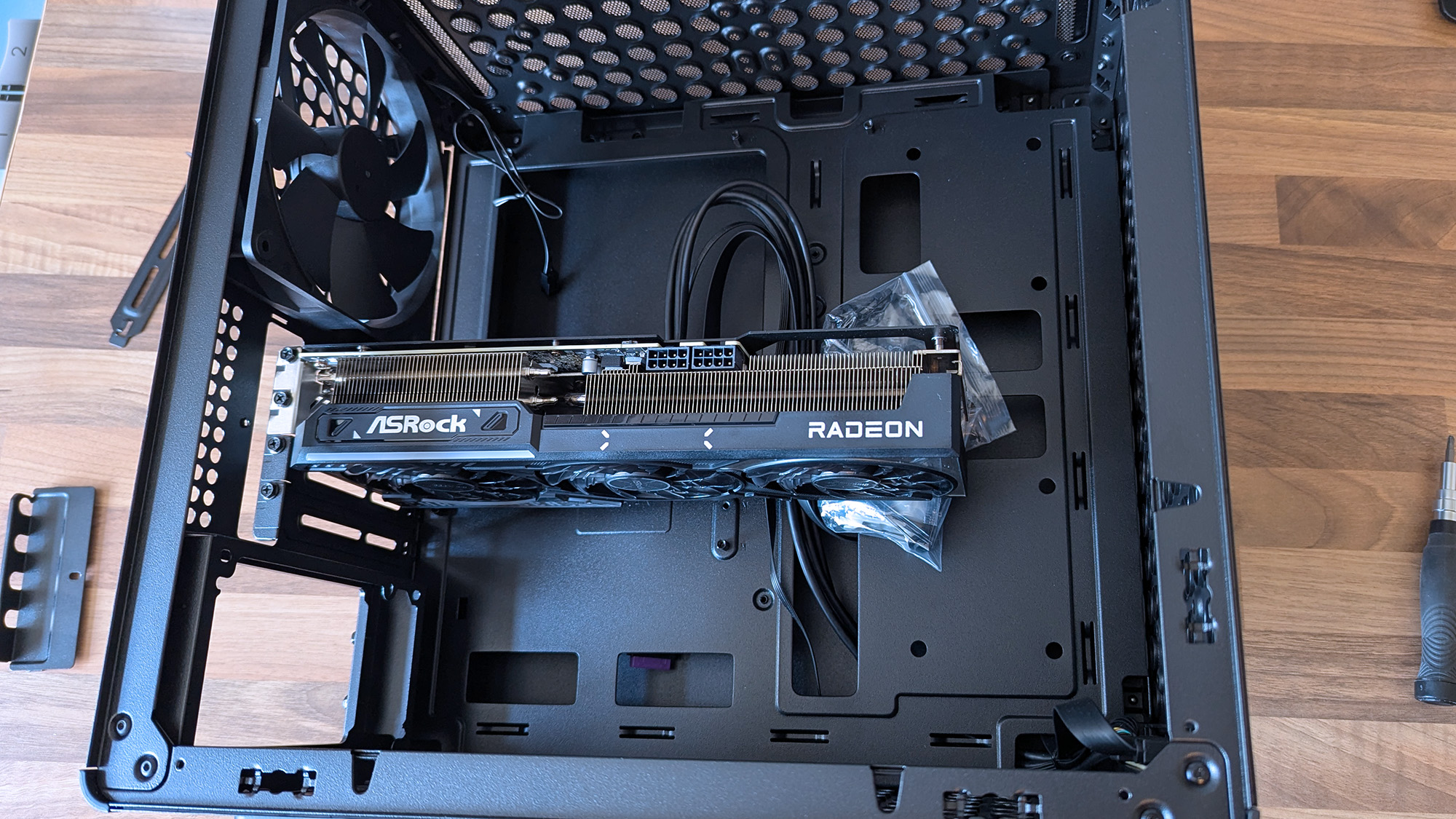
Cooler Master Qube 340 PC case with an ASRock Radeon graphics card inserted without other components

A 290mm ASRock Challenger Radeon RX 9070 XT GPU fits with room to spare for front-mounted fans. (Image credit: Ben Wilson | Windows Central)

My most important consideration was whether the ASRock Challenger Radeon RX 9070 XT graphics card I have would fit, depending on my front-fan decisions. I could also use an AIO radiator, but the cheesegrater-esque design of the Qube 340 feels better suited to a traditional air cooler β€” even if only in aesthetics β€” plus there's a 140mm 'DF1402512RFLN' fan pre-installed at the rear.

At a glance, there's nothing to worry about, as the 290mm GPU fits with around 78mm to spare. My immediate idea is to have a single 140mm intake fan mounted at the top, pulling cool air into the case and pushing it through a CPU air cooler before exhausting it out the back. Still, I have options, including adding an even longer card, as long as everything is measured correctly.

A Cooler Master Qube 340 case sits on a desk with its side panels removed, showing the empty interior, rear fan, and a small bag of screws inside the chassis.
Undoubtedly geared towards airflow, the Qube 340 is absolutely covered in holes.Ben Wilson | Windows Central
Cooler Master Qube 340 PC case front I/O panel showing USB-C, USB-A, and headphone port with power button
The front I/O panel can be moved, which is ideal because I prefer a top-mounted power button.Ben Wilson | Windows Central

Next up are cable management and routing options. Like most hobbyists, I prefer to take my time with my own builds and get everything as clean as possible, which is more of a mandatory requirement in a compact case than a preference. While there aren't any dedicated trunking channels, there are a few mounting points for zip ties, so I just need to plan everything carefully.

The front-mounted I/O plate is also removable, so I can move it to the top of the case for easier access and re-route the attached cables from the start. It all depends on my motherboard of choice and how it determines the shortest route for each component, but it's fantastic to have the option. I'll always prefer my power button and front ports to be at the top of the case.

What I don't like about the Qube 340

Cooler Master Qube 340 PC case internals showing motherboard tray with standoffs and a detached SSD mounting tray
Internally, some of the metal is thin and somewhat flexible.Ben Wilson | Windows Central
Cooler Master Qube 340 PC case glass side panel tab photographed close up with a triple-fan graphics card in the background
The glass side panel is held in place by a protruding tab, which could pose an issue during transit if it were accidentally released.Ben Wilson | Windows Central

The build quality is generally great on the outside, with those sturdy carry handles and rubberized feet keeping it steady in a vertical position and similarly when laid flat for construction and upgrades. However, the metal on the inside β€” particularly around the motherboard tray β€” is quite thin with some flex, but I doubt I'd ever accidentally bend it in any permanent way.

Being mostly toolless also raises some concern about the glass side panel, which holds well but is secured only by a single protruding tab.

I found the removable 2.5/3.5-inch drive tray similarly skinny and flexible, but it hardly has to do anything beyond holding my storage in place, and it at least removes with a single thumbscrew. It would likely take a heavy dent from an accidental drop to twist this case out of shape, and though it's well padded in its box, it's still worth checking everything over as soon as you buy one.

Concerns about missing rubber grommets are tempered by the fact that this is a $55 PC case. Not to excuse any internal mishaps that might happen, but again, it feels unlikely given how solid the outer shell is overall. Otherwise, being mostly toolless also raises some concern about the glass side panel, which holds well but is secured only by a single protruding tab.

Should you buy the Qube 340?

Cooler Master Qube 340 PC case in cardboard shipping box on a wooden desk

Thankfully, the shipping box for the Qube 340 is so huge, it helps protects it against concerns of bent metal. (Image credit: Ben Wilson | Windows Central)

You should buy this if ...

βœ… You want to build a portable mini ITX gaming PC

βœ… You're prioritizing airflow with dust protection

You should not buy this if ...

❌ This is your first-ever rig; compact builds are tricky

You can go smaller, but for my first planned adventure into a mini-ITX build, the Qube 340 is exactly what I wanted it to be. If, like me, you're toying with the idea of a compact gaming PC that's easier to move around than a full-sized desktop, I think you'll be quite happy with this incredibly affordable case. Some of my opinions might change once I have enough parts to build inside it, but that won't affect the overall praise I have for Cooler Master on this occasion.

Cooler Master Qube 340 render

Cooler Master
Qube 340

Compact and cool with a design built entirely around airflow, this portable case is a bargain.

I've avoided OLED screens for a while, but this ASUS ROG Strix gaming monitor is convincing me to finally switch

The ROG Strix OLED XG32UQWMS gaming monitor is planned for release in September 2026. ASUS provided a sample, but the company had no input on the article nor saw its contents before publishing.

OLED gaming monitors have been around for a while, but concerns about text clarity and burn-in left me less excited to buy something like the ASUS ROG Strix OLED XG32UQWMS. Given the chance to test an upcoming model from its range shown at Computex earlier this year, I couldn't resist, and my review could be the moment that helps me overcome my apprehension. Here's what I learned.

How much does the 32-inch Strix OLED cost?

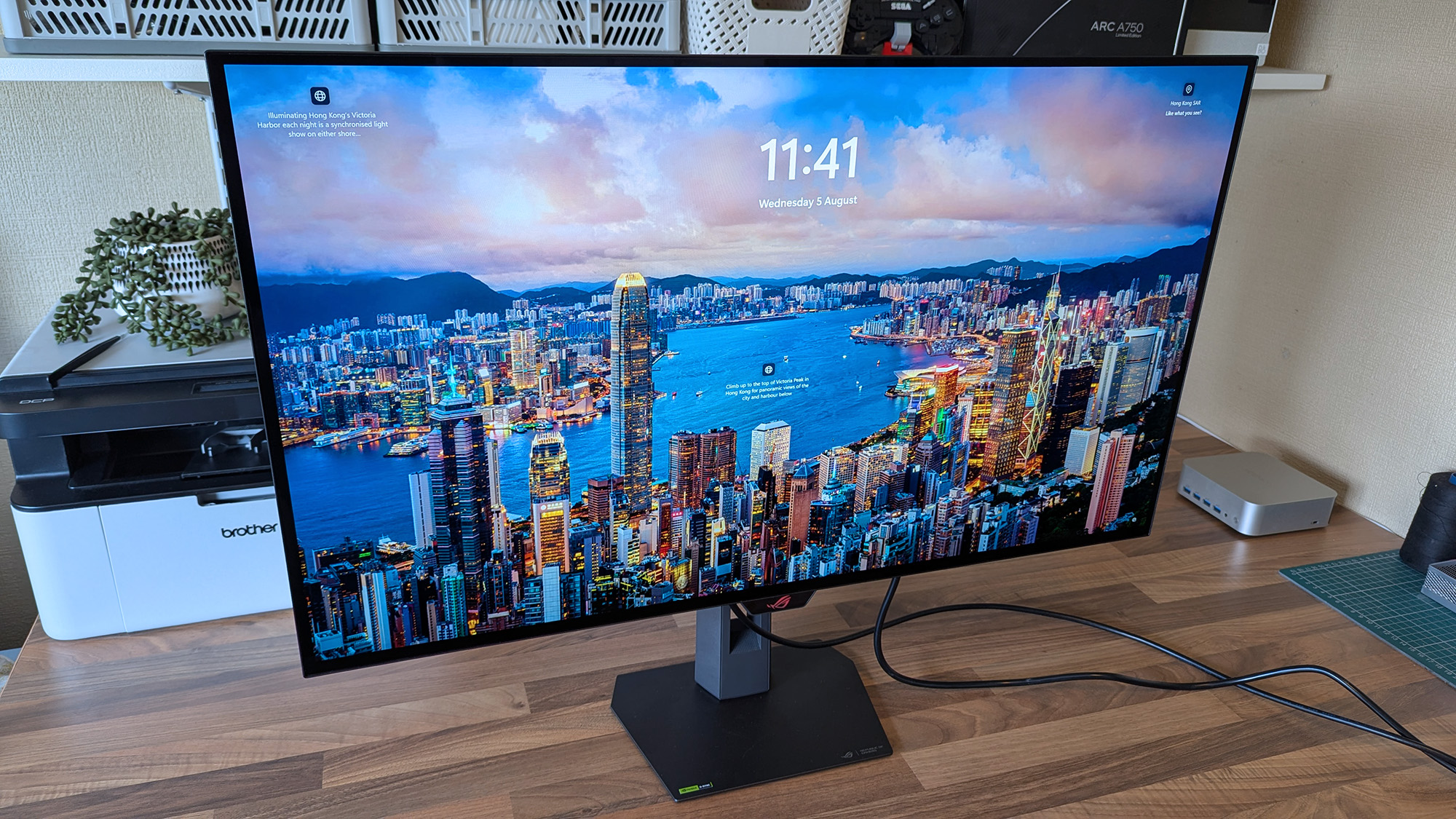
ASUS ROG Strix OLED XG32UQWMS monitor displays a vivid Hong Kong Victoria Harbor lock screen with the time, date, and descriptive text, surrounded by a desk setup.

4K looks fantastic in Windows 11, and UHD is perhaps better suited to gaming if you don't want to stress your PC. (Image credit: Ben Wilson | Windows Central)

The ROG Strix XG32UQWMS is targeting a September launch for $899, with specific US retailers to be confirmed. In the United Kingdom, that converts to Β£819, with planned third-party resellers including Amazon UK, Currys, and Very. In the meantime, you can sign up for availability notifications on the monitor's official ASUS listing for your region.

ROG Strix XG32UQWMS sample specifications

Component

Spec

Display type

WOLED

Resolution

UHD (3840 x 2160)
FHD (1920 x 1080)

Refresh rate

240 Hz (UHD)
480 Hz (FHD)

Brightness

330 cd/mΒ² (typical)
Up to 1,500 cd/mΒ² (peak)

Viewing angle

178Β°/ 178Β° (vertical/horizontal)

Response

0.03 ms (Gray-to-Gray)

Dimensions

28.27" x 22.13" x 7.40" (71.8 x 56.2 x 18.8 cm)

Weight

10.64 – 14.46 lbs
(4.83 – 6.56 kg)


Originally announced at Computex 2026, ASUS targets a September launch in the United States at $899, with sign-ups offered for availability notifications.View Deal

Is the 32-inch Strix OLED easy to set up?

Back of the ASUS ROG Strix OLED monitor showing the ROG logo, mounting area, and labeled HDMI, DP, USB, and power ports.
The chunky middle section makes it much easier to move this monitor around.Ben Wilson | Windows Central
Underside of the ASUS ROG monitor stand mount displaying certification labels and product markings.
This push-button release system is inspired and makes the stand easy to attach.Ben Wilson | Windows Central
ASUS ROG Strix OLED stand mounting arm with the ROG logo and push-release button in view.
The height-adjustable table stand is heavy, but it's definitely sturdy.Ben Wilson | Windows Central
ASUS ROG Strix OLED rear mounting bracket with the central ROG logo and four‑point screw mount.
If you prefer a VESA mount, you'll have to provide your own screws.Ben Wilson | Windows Central
Hand tightening the ASUS ROG monitor stand screw, with the cable‑management section visible.
The footplate fixes tight with a simple thumbscrew and feels secure.Ben Wilson | Windows Central

I'm a big fan of toolless setups wherever they appear, and ASUS ROG wins points for delivering a straightforward process here. Everything hinged on a push-button release mechanism that either gripped the stand or the VESA mount; I used the former and attached the footplate with a simple thumbscrew.

I'm a big fan of toolless setups wherever they appear, and ASUS ROG wins points for delivering a straightforward process here.

The display alone weighs 9.92 lbs (4.5 kg), and adding the VESA mount brings the total to 10.64 lbs (4.83 kg) in a mounted setup. Otherwise, the foot plate and strut together weigh 4.54 lbs (2.06 kg), controlling height with a sturdy but not overly stiff response. On my desk, the monitor is 14.46 lbs (6.56 kg) overall.

Close-up of the ASUS ROG Strix OLED monitor’s I/O panel featuring power, HDMI, DisplayPort, USB upstream/downstream, and headphone jack.
Ports aplenty, but you only get a DisplayPort cable and AC power in the box.Ben Wilson | Windows Central
Close‑up of the ASUS ROG Strix OLED monitor’s front sensor module attached beneath the display.
The proximity sensor helps the monitor automatically dim when I move away, preventing burn-in.Ben Wilson | Windows Central
ASUS ROG Strix OLED monitor accessories arranged on a desk, including stand parts, cables, a carrying case, and setup materials.
ASUS throws in a cute pouch for spare parts I won't use.Ben Wilson | Windows Central
ASUS ROG Strix OLED monitor on a workspace desk, powered off, with crafting tools, organizers, and a second display visible in the background.
A big, satisfying peel of a protective plastic film under the advertisements is all that remains.Ben Wilson | Windows Central

Attaching the stand gave me a clear view of the ports and navigation via the multi-function button (MFB) located behind the bottom-mounted ASUS ROG logo and its accompanying "Neo" proximity sensor. It's a pretty standard affair that matches rival brands, and its controls should feel familiar to most people.

While there are two HDMI 2.1 ports, a pair of USB-A 3.2 Gen 1 with a hub port, and a headphone jack, there's only a single DisplayPort cable in the box for its matching DP 1.4 port, along with the AC cord. Bundling a free USB-B cable shouldn't be too expensive, and I'm disappointed to see it missing here.

Does the 32-inch Strix OLED look good?

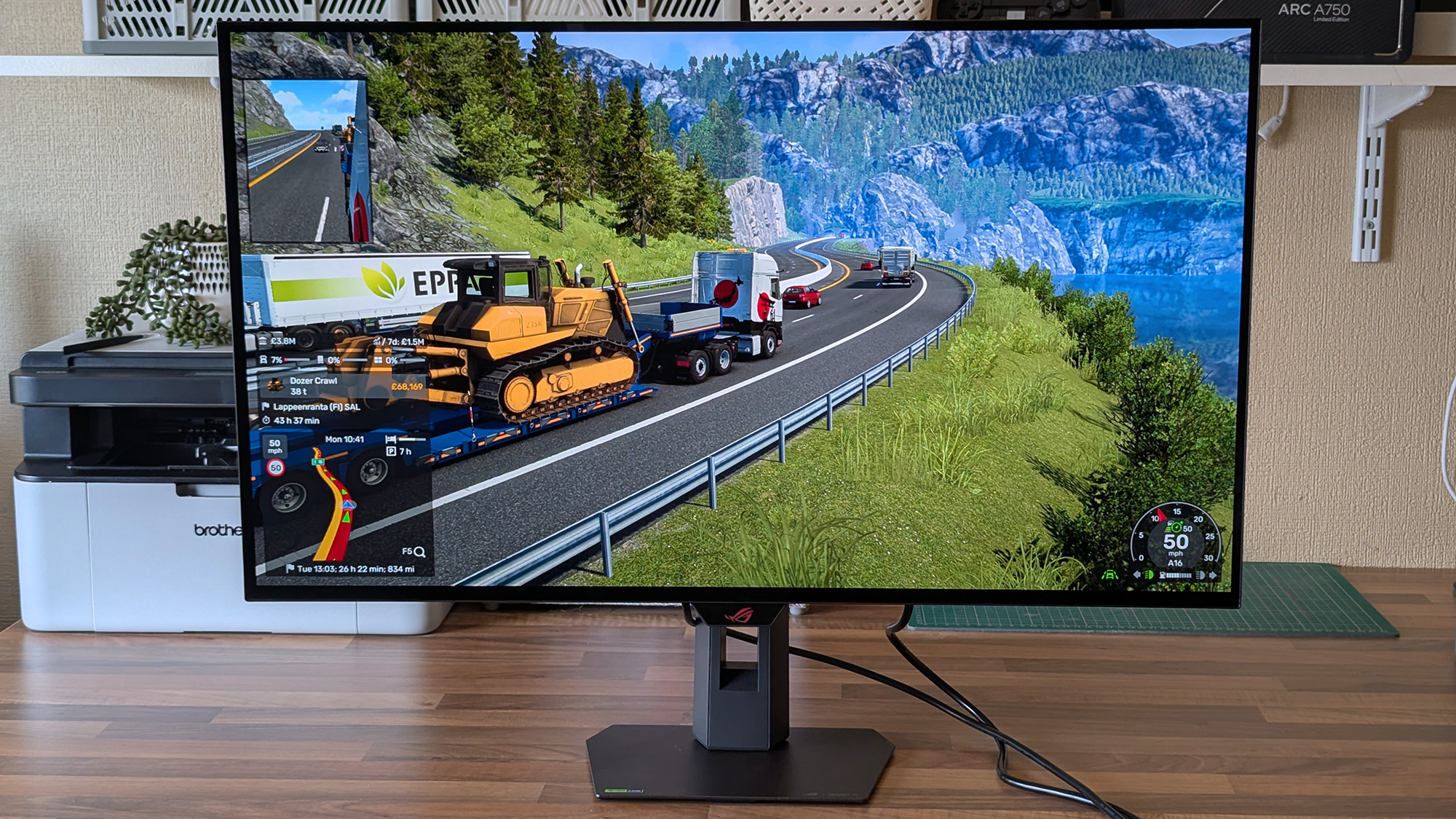
ASUS ROG Strix OLED XG32UQWMS monitor shows Euro Truck Simulator 2 hauling a yellow bulldozer along a mountain road, with delivery details and route information visible on‑screen.

Now that I've played on an OLED monitor, it'll be hard to go back to my IPS screen. (Image credit: Ben Wilson | Windows Central)

Moving from a 27-inch IPS Alienware monitor to an OLED panel made its benefits immediately obvious, with an experience similar to the one I get from my LG C2 TV in the living room. High contrast, deep blacks, and crisp visuals come with its 4K resolution and that smooth 240Hz refresh rate. Windows 11 adjusted my settings accordingly, and the monitor looks great out of the box.

The UHD @ 240Hz mode looks fantastic, and I'm left wondering who would ever want to switch to 1080p for the sake of 480Hz on a 32-inch display.

In motion, the UHD @ 240Hz mode looks fantastic, and I'm left wondering who would ever want to switch to 1080p for the sake of 480Hz on a 32-inch display. I know it has its place in ultra-competitive shooters like Counter-Strike 2 and its many rivals, but 240Hz still feels like plenty to me. If you're the target audience, I think you'll be happy, because FHD gameplay still looks quite good.

The ASUS ROG Strix OLED XG32UQWMS monitor shows its on‑screen display open to gaming settings, highlighting Variable Refresh Rate and AdaptiveSync options.
There are plenty of visual tweaks to make in the OSD, primarily balancing brightness, if you need them.Ben Wilson | Windows Central
A close‑up of the ASUS ROG Strix OLED XG32UQWMS monitor showing a Windows desktop with Recycle Bin, Microsoft Edge, and Discord icons against a light blue background.
Text looks fine, aided mostly by the sheer clarity offered by 4K in the first place.Ben Wilson | Windows Central

Up close, the clarity of on-screen text looks fine; nothing particularly groundbreaking, but nothing looks noticeably fringed when I sit at a comfortable distance in UHD mode. Adjusting ClearType in Windows 11 might give results that better suit you, but I didn't feel like anything looked out of place during my usual daily work and gaming.

The OSD is at least easy to navigate, and I could install the DisplayWidget Center if I really wanted to use a mouse to tweak several settings at once. Otherwise, the "TrueBlack Glossy" panel looks significantly darker at a glance than the other screens in my office, which certainly helps with the deep blacks OLED is famous for, and I found the visible room reflections were tolerable.

Testing the display

ASUS ROG Strix OLED XG32UQWMS gaming monitor test results with SpyderX colorimeter

Out of the box, the XG32UQWMS defaults to "Racing mode", hitting 99% of the DCI-P3 color gamut as advertised, and sRGB accuracy earns a perfect score, while Adobe RGB maxes out at 93%. Without changing settings, a 100% brightness level reached around 306 to 311 nits, so getting it to 330 nits will require a bit of tweaking. On the whole, I'm satisfied with its stock settings.

Should you buy the 32-inch Strix OLED?

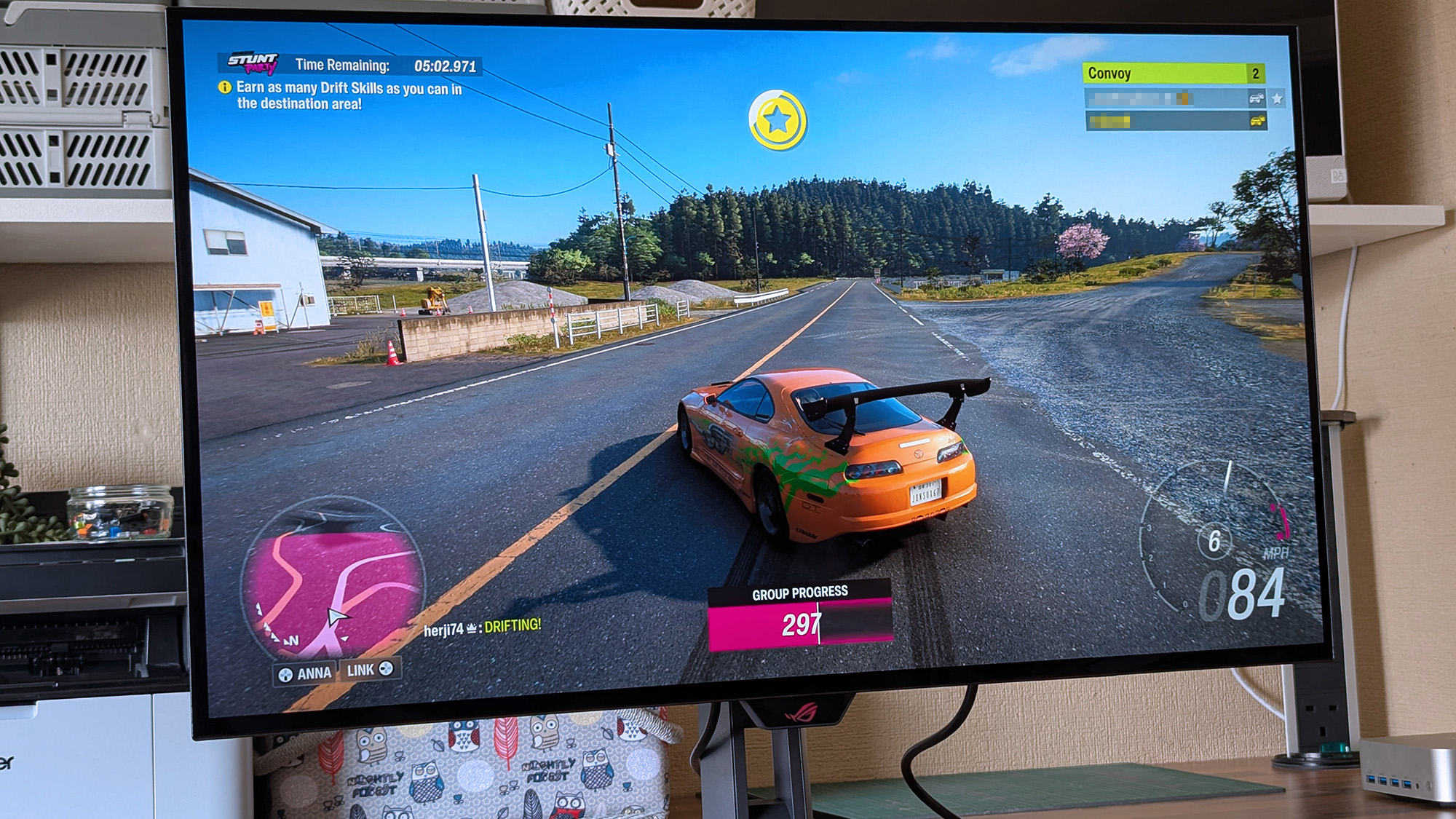
ASUS ROG Strix OLED XG32UQWMS monitor displays Forza Horizon 6 racing with an orange sports car drifting on a rural road, showing timers, drift objectives, convoy players, and speed indicators.

At this price, it's certainly considered an investment, but burn-in prevention tools make it much easier to recommend. (Image credit: Ben Wilson | Windows Central)

You should buy this if ...

βœ… You want an OLED monitor built for preventing burn-in

βœ… You're a competitive gamer who thrives on high refresh rates

You should not buy this if ...

❌ You want an out-of-the-box USB hub monitor

A built-in presence sensor probably sets off alarm bells for some gamers, but the proximity detection is literally there to help protect this OLED panel by switching off when you walk away. That, along with adjustments to uniform brightness and pixel-cleaning settings, helps prevent burn-in, which was my biggest concern with monitors like these. ASUS definitely could have thrown in a free upstream USB cable for its hub, but the display itself is solid, so it still wins praise.

ASUS ROG Strix OLED XG32UQWMS gaming monitor render

ASUS ROG
Strix OLED XG32UQWMS

Due for release in September 2026, this OLED gaming monitor should be at the top of your considerations if you're shopping around.

I never thought I'd call a Razer gaming keyboard a bargain, but the wired Huntsman V3 Pro is a steal right now

Razer's gaming keyboards have consistently ranked as some of the best you could buy, and, of course, they double up as generally excellent options for work and studies. Because let's be honest, if a keyboard doesn't feel good for actual typing, then is it even doing its job?

β€’ Crush the new semester with Razer keyboards

We already praised the Huntsman V3 Pro as "the world's most advanced gaming keyboard", and for now, the downside of its high price has been solved as the tenkeyless (TKL) model drops to $124.99 at Best Buy. Compared to its original MSRP of $219.99, it's instantly a much more tempting pick.

That $95 price drop stands alongside a discount on the full-size variant that we tested, bringing that to $180.74 with a much more specific $69.25 discount. Either way, you'll gain access to Snap Tap, Razer's solution for perfect counter-strafing in FPS games that prioritizes the most recently pressed button.

Personally, I prefer to ditch the numberpad for more desk space, so the TKL is perfect for me. It's also enjoying a bigger discount right now, making it even better value.View Deal

No compromises for larger desks; this gives you everything.
"The Huntsman V3 Pro is one of the best keyboards I've ever used." β€” Zachary Boddy, Former Staff Writer
β€” Windows Central review: ⭐⭐⭐⭐View Deal

What makes the Huntsman V3 Pro so good?

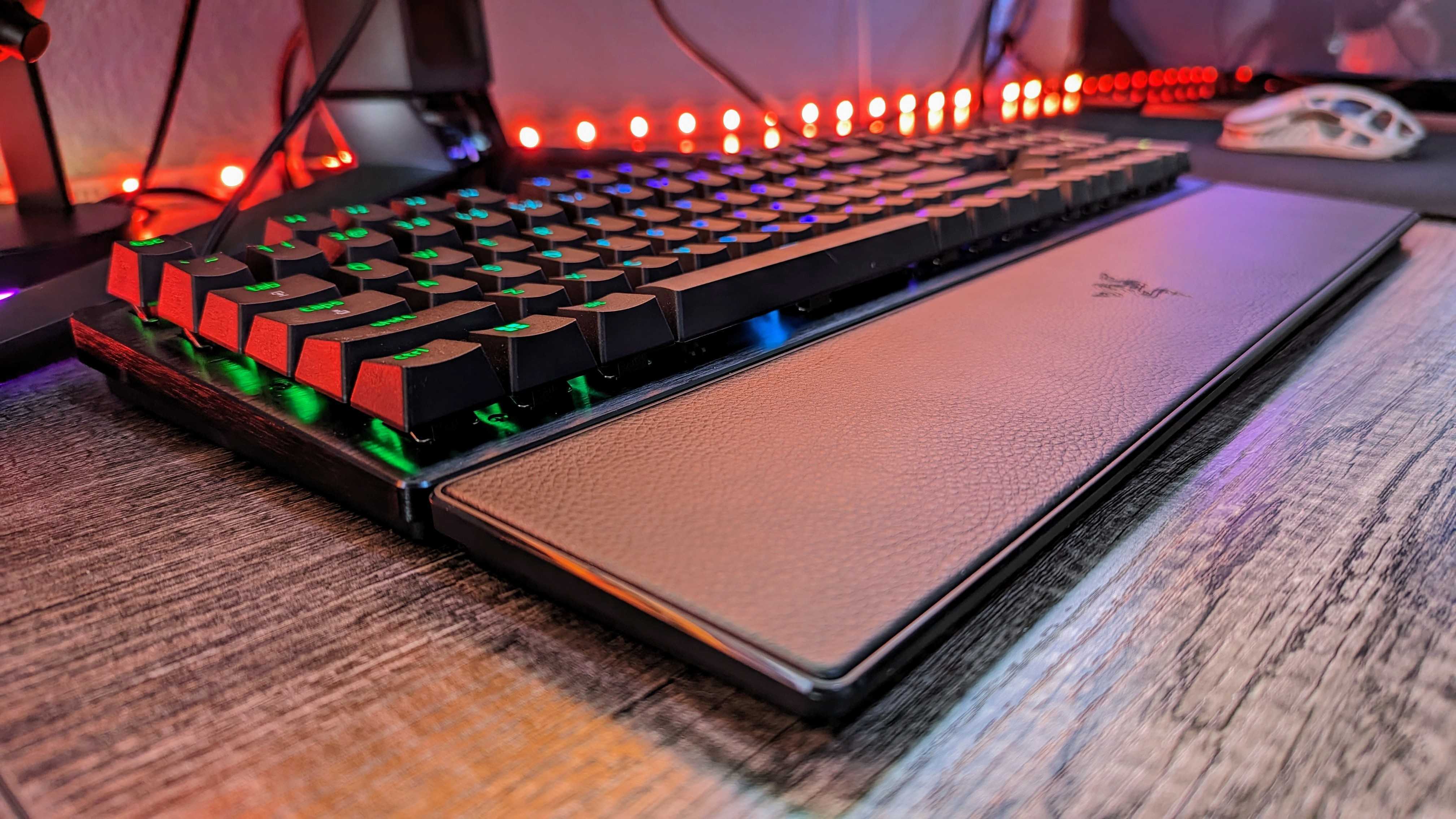
Image of the Razer Huntsman V3 Pro gaming keyboard.

Razer throws in a wrist rest alongside its wealth of extra keys. (Image credit: Windows Central | Zachary Boddy)

Adjustable actuation is one of those phrases that crops up around keyboards, and it's a feature that shines when you have the time to dig into it. Essentially, you can change the depth at which the optical switches underneath the keys detect a valid press, usually opting for shallow pushes during gaming and more deliberate, deeper pushes for typing.

If you're into tweaking and personalization, you'll get a lot out of it by fine-tuning the actuation and saving it to one of the on-board memory profile slots. That, paired with its brushed aluminum chassis and double-shot PBT textured keys for more durable lettering, makes for a comfortable typing experience.

On the flip side, we noted in our (full-size) Razer Huntsman V3 Pro review that the leatherette wrist rest isn't perfect, but it is magnetic, so if you'd rather use it only for typing and remove it for a night of gaming, it's easy to detach. I'd recommend giving it a fair try, as it's generally better to use something to support your wrists than nothing at all, but your mileage may vary.

Overall, this discount makes the Huntsman V3 Pro, whether TKL or full-size, an absolute bargain. Even if you don't make use of all the extra dials at first, diving into customization would help you assign them to your most-used features soon after. It's a quality wired keyboard that works just as hard for daily typing, so you could probably argue it's a back-to-school expense if you tried.

Frequently Asked Questions

Is the Huntsman V3 Pro wired or wireless?

This is a wired gaming keyboard with a braided USB Type-C to USB Type-A cable. It can be detached and replaced with a longer variant, but the keyboard will not operate wirelessly.

What's the difference between full-size and TKL?

A full-size keyboard includes a number pad and is what you might think of as a "standard" model. TKL stands for tenkeyless, and it drops the numeric keypad to save space while retaining the arrow keys and the home/end keys.

Is this a mechanical keyboard?

The Huntsman V3 Pro does not use mechanical switches; instead, it features optical key switches that operate like magnetic Hall-Effect sensors found in popular joypads to support its adjustable actuation.

Click to join us on r/WindowsCentral

Join us on Reddit at r/WindowsCentral to share your insights and discuss our latest news, reviews, and more.
❌