Microsoft Edge may soon let you sign in with an Apple account. The latest Canary build of Edge includes flags that, if enabled, let you sign into the browser with your Apple account.
Using your Apple account within Edge will make it easier to keep your bookmarks, history, and other content synced across your phone and your PC. Many people, including myself, use a computer running Windows 11 and an iPhone.
The change was spotted by Leo Varela, who often leaks or highlights features in Edge and other browsers.
In Edge Canary for desktop there are a couple of new flags to enable support for signing in with an Apple account. Microsoft added support for Google accounts some time ago and has now added support for Apple accounts: https://t.co/34BBm0b3Wi pic.twitter.com/BNMrpB8pkOAugust 10, 2026
Microsoft did not initially plan to support non-Microsoft accounts within Edge. Google account support rolled out recently and now support for Apple accounts appears to be on the way.
Of course, you could use Edge without any account at all. The browser works without requiring signing in. But syncing data and some other features require using some sort of account to sign in.
Windows Central take
Microsoft once pushed its apps aggressively on iOS and Android. Since 2015, the company has shut down several apps and left others in maintenance mode. (Image credit: Windows Central)
It's interesting to see how Microsoft's cross-platform app strategy has shifted over the years. Some apps have been available on other platforms for over a decade, but Microsoft increased its efforts to have a presence on iOS and Android after shutting down Windows Phone.
With no phone operating system of its own, Microsoft aimed to provide a premier experience for its services on Android and iOS to meet people where they are. Microsoft bought up popular apps like Wunderlist and SwiftKey to make a Microsoft experience on mobile platforms made by Google and Apple.
These days, several Microsoft apps feel like abandonware and others lag behind the competition. The glory days of the "iPhone Pro" are over.
I do appreciate flexibility when it comes to signing in to Edge, but I can't help but wonder if adding support for Google and Apple accounts is an admission that Microsoft can't even get people to use a Microsoft account in Microsoft Edge.
Rather than trying to force users into the Microsoft umbrella, the company seems to be accepting its mobile reality. It is finally conceding that to keep PC users on Edge, it has to let them live inside Google and Apple's account ecosystems instead.
Join us on Reddit at r/WindowsCentral to share your insights and discuss our latest news, reviews, and more.
It seems like every time I turn around, there's another round of layoffs affecting video game studios.
In July, Xbox announced its biggest downsizing ever, cutting 3,200 jobs throughout 2026 and 2027. At the same time, Xbox made deals with four major studios to go independent or take on new management.
It's all starting to feel like white noise with the same language. Streamlining. Restructuring. Focusing resources. Adapting to changing markets.
After reading an excellent report from Rest of World about the plight of small game developers in Turkey, I realized that the entire video game industry is likely in more trouble than most people realize.
While Microsoft and other big companies at the apex of the industry have been cutting thousands of jobs at the top, there's something just as disruptive going on at the bottom.
Solo developers are shipping full games with a tiny team, empowered by tools like Claude Code and Cowork, OpenAI Codex, and Copilot. This shift in how games are developed is eating up the entry-level jobs that used to serve as a way to break into the game dev industry. The candle is burning at both ends, as they say.
Turkey's AI game development example doesn't bode well
The game development scene in Turkey should be a warning for the rest of the world. (Image credit: Getty | Sergio Amiti)
Over the last decade, Turkey has become a mobile gaming hotspot with more than 800 studios at its peak. It served as a pipeline for young developers who finished school, applied, got hired, worked in junior roles, and eventually made their way up the ladder.
This pipeline is no longer functioning as it should, and it's largely due to AI. One developer interviewed by Rest of World went from a huge studio pumping out a game per week to founding his own studio.
With Claude Code in his back pocket, the developer realized he needed just two employees to achieve similar productivity.
I’m the only developer in my team. When we started, I had to write all the code myself. I also have to manage game design, social media, investment meetings, and the like. With Claude Code, I can do all that easily. It really sped things up and helped me a lot.
Emirhan Gül, speaking to Rest of World
This shift in Turkey's game development scene is having dire effects. Entry-level jobs are understandably disappearing at smaller studios, and the larger studios are reticent to hire inexperienced developers.
The AI stack designed to make us more productive is killing key jobs
AI tools are making us more productive, but at what cost? (Image credit: Getty Images, Robert Way)
The AI stack negatively affecting one of the largest game development booms in European history is the same AI stack that Microsoft is racing to put in front of every developer, on every platform, including the ones building for Xbox and Windows.
Microsoft has famously spent years telling Windows users that Copilot will make us all more productive. But Turkey's example is likely a preview of what that means when followed to its logical end.
Not a team of developers shipping games faster (OK, maybe a bit faster). One developer doing the job that used to require a team. Set this dilemma on top of a video game industry that just saw Xbox cut thousands of jobs, and the math really starts to hurt.
It's worth noting that Microsoft stated that AI is not being used to replace the most recent batch of laid-off employees at Xbox, but the company's overall massive spending on AI infrastructure and data centers has undoubtedly played a role in cuts to underperforming sectors like Xbox.
With layoffs at the top and an ever-shrinking front door at the bottom, the entire industry is being squeezed for all its juice.
Windows Central's take
Junior video game developers are being hit hard by the rise of AI. (Image credit: Getty Images | Microsoft)
The part that stuck with me the most is the plight of junior developers. A university director in Turkey is warning students not to follow the traditional path of getting hired on in an introductory position and working their way up. Instead, they should be building their own games while in school in order to land a job.
Right now is the worst time to enter the game industry to find a stable job, but it’s the best time to start your own venture, to realize your own idea.
Güven Çatak, Founder and Director of Game Lab, Bahçeşehir University (speaking with Rest of World)
So, yes, AI tools definitely lower the barrier to creating a game. At the same time, however, AI tools do nothing to ensure that a game actually finds an audience.
Key steps in the nurturing and maturing of a video game developer are being skipped, and artists, writers, and programmers aren't necessarily getting the experience needed to compete at the upper levels of the industry.
Turkey's degrading video game development scene seems like a preview of what's to come for the rest of the industry, and I'm not sure I like it.
Are you a developer who uses Copilot, Claude, or any other AI tools in your workflow? Has it made you more ambitious? More productive? Are you more nervous now about who you're competing with? Let me know in the comments section below!
Join us on Reddit at r/WindowsCentral to share your insights and discuss our latest news, reviews, and more.
Microsoft PowerToys will soon add on-device support for Phi Silica. Microsoft called that small language model (SLM) "small but mighty" when announcing it in 2024. Now, that model is available for Advanced Paste in the latest PowerToys preview.
Advanced Paste is a utility in PowerToys that formats content from your clipboard. It supports several formats, including plain text, markdown, and JSON. You can also use it to extract text from images using OCR and transcode audio and video files.
When first launched, Advanced Paste required an OpenAI API key, but PowerToys later added support for other models. Azure OpenAI, OpenAI, Gemini, and Mistral are cloud services that work with Advanced Paste. Foundry Local and Ollama both work with the feature locally.
Phi Silica is now available as an option for local AI processing in the latest preview.
While you may not have heard of Phi Silica, you've likely heard of tools it powers if you have a Copilot+ PC. Click to Do and on-device rewriting in Word and Outlook are powered by Phi Silica.
Phi Silica uses the NPU of a device, which helps with efficiency.
The GitHub page for PowerToys lists all the changes in the latest preview. Here are the highlights from the same page:
View the changelog ↴
PowerToys v0.101.2211.0 Highlights
Advanced Paste: Added an on-device Phi Silica provider and more per-action AI customization options.
Command Palette: Improved dialog handling, icon loading, memory cleanup, theme behavior, and dock performance monitoring.
Window management: Improved shutdown behavior across FancyZones, Grab And Move, and Always On Top, and made Always On Top borders render solidly at full opacity.
Keyboard Manager: Fixed the elevated Run Program browse flow in the new editor.
Mouse Jump: Moved Mouse Jump to the newer WinUI app architecture and packaged its new binaries into signed release builds.
Settings: Added an update channel selector and a guided Bug Report flow with progress and a GitHub shortcut.
Quick Accent: Made press-and-hold activation cancel cleanly so the picker appears only when intended.
Preview releases: Added dedicated preview-release versioning and update-channel support so preview builds can be published and tested independently from stable releases.
PowerToys has a growing library of utilities, so there's a lot to look at in the latest preview even if you do not care about AI. Command Palette will perform better and Window management has been improved across FancyZones, Grab And Move, and Always On Top.
This collection of utilities includes a large library of features to enhance the Windows experience. PowerToys is designed with power users in mind, but it has handy features for people who just use their PC for everyday computing too.
Join us on Reddit at r/WindowsCentral to share your insights and discuss our latest news, reviews, and more.
I've been using Razer mice for decades, and have tested dozens upon dozens of iterations of the firm's products. I'm also a dedicated MMORPG and MOBA player on PC, flipping between games like World of Warcraft and Heroes of the Storm as seasons wax and wane.
For the Warcraft-faithful, I play a Demonology Warlock, which has been simplified over the years, but in previous expansions I had anywhere up to 30+ keybinds for playing the class effectively in PvE and PvP. It was a bit like learning a musical instrument back in the day, particularly when you throw in battle potions, trinkets and other additional buttons.
As such, I've tended towards Razer mice with extra inputs to make my gaming life easier. I had no idea how much easier it was going to get until I went palm-on with the new Razer Naga V3 Pro — which is quite easily one of the best mice of 2026.
Razer Naga V3 Pro: Specs and price
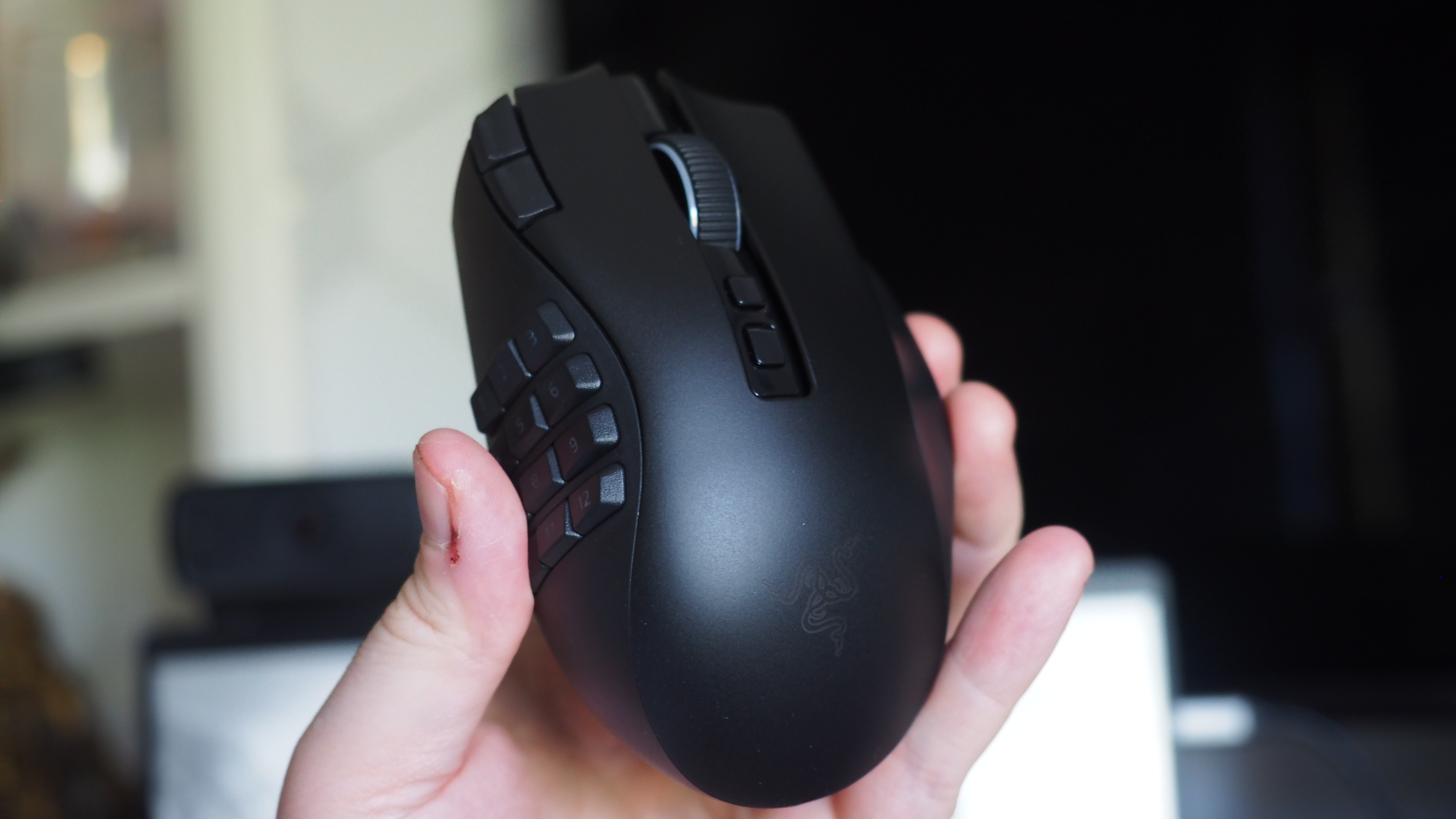
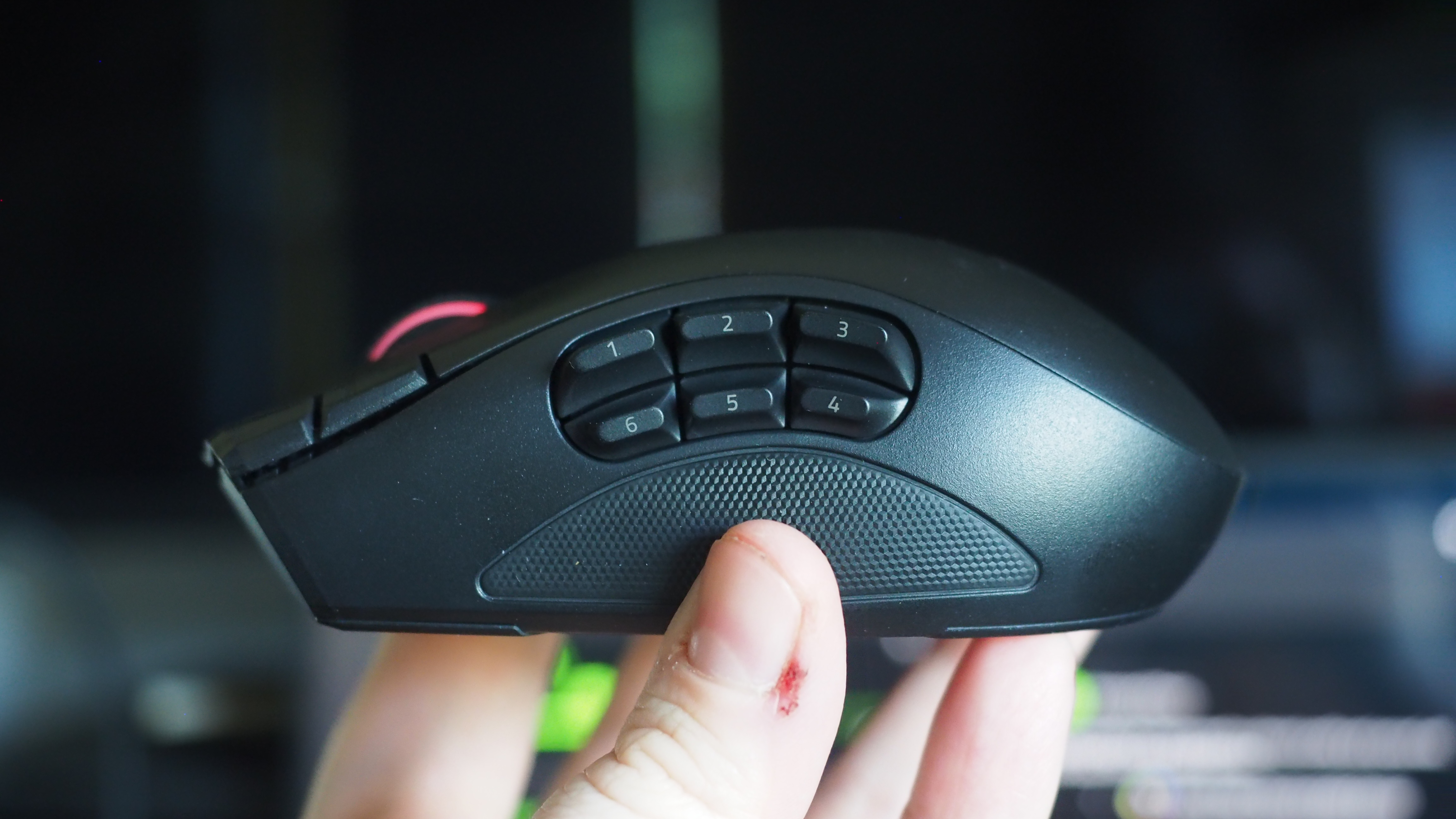
MMO player's best friend. (Image credit: Windows Central | Jez Corden)
The Razer Naga V3 Pro builds on its predecessor in a variety of ways, but chief among those is the inclusion of a further three configurable inputs, bringing the maximum total to 23 (and many, many more if you use HyperShift and other modifier keys).
1000 Hz native; upgradeable to true 8000 Hz (Mouse Dock Pro / HyperPolling Dongle); HyperSpeed Wireless (2.4 GHz), Bluetooth LE, USB-C wired
Battery & Lighting
Up to 155 hours (HyperSpeed); 3-zone RGB (logo, wheel, 12-button plate); 5 onboard profiles
Materials & Accessories
100% PTFE feet; USB-A to USB-C cable; HyperSpeed dongle; compatible with Mouse Dock Pro & HyperFlux V2
Dimensions & Weight
119.5 × 75.5 × 43.5 mm; 117 g base weight; Side plates: 12-button (20 g), 6-button (17 g), 2-button (15 g)
Price & Availability
$179.99 USD / £179.99 GBP / €199.99 EUR — Available worldwide Aug 11, 2026
Razer also doubled down on durability with reinforced molding processes for the switches, which the firm says will now last up to and potentially beyond 100 million actuations.
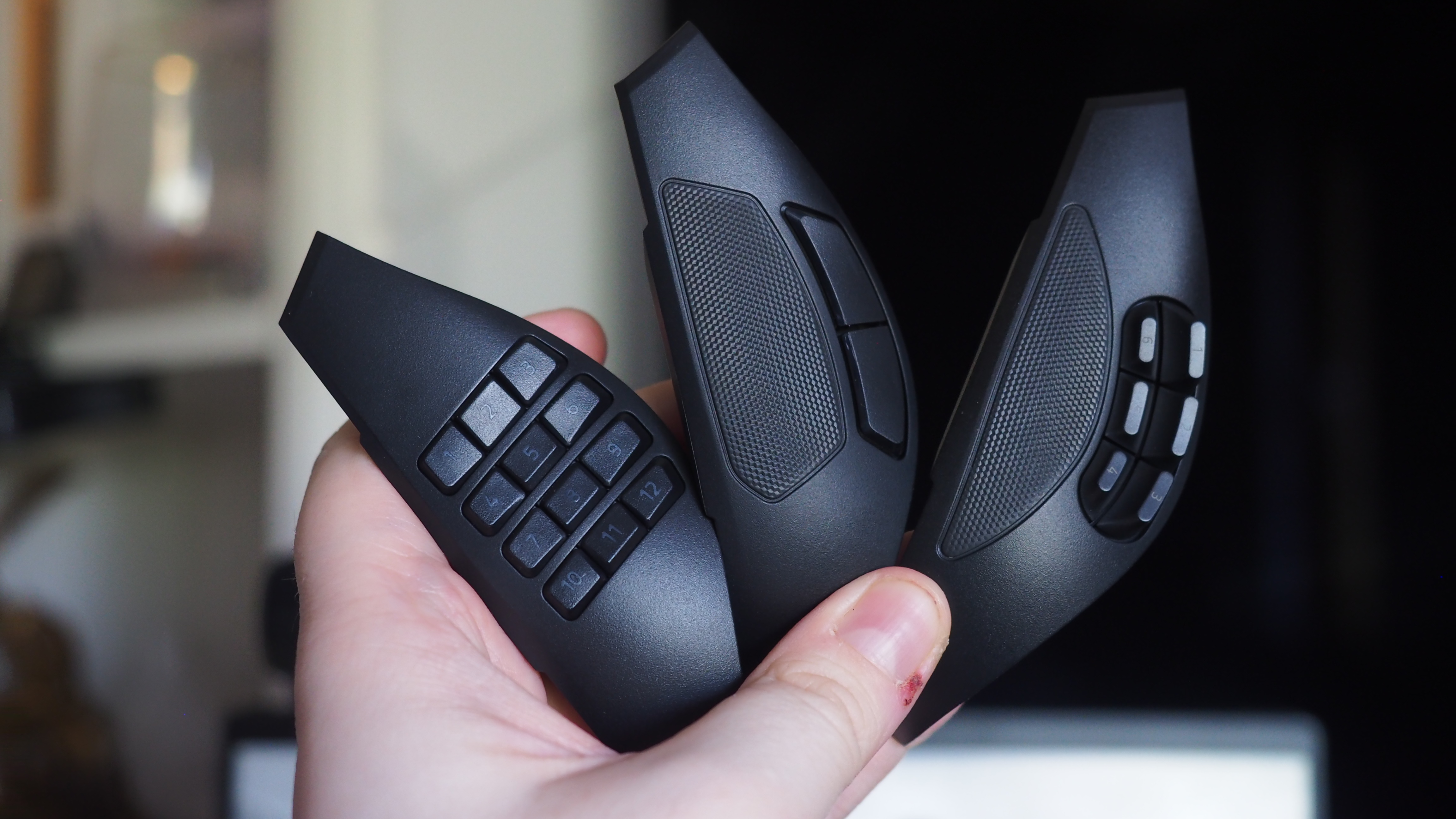
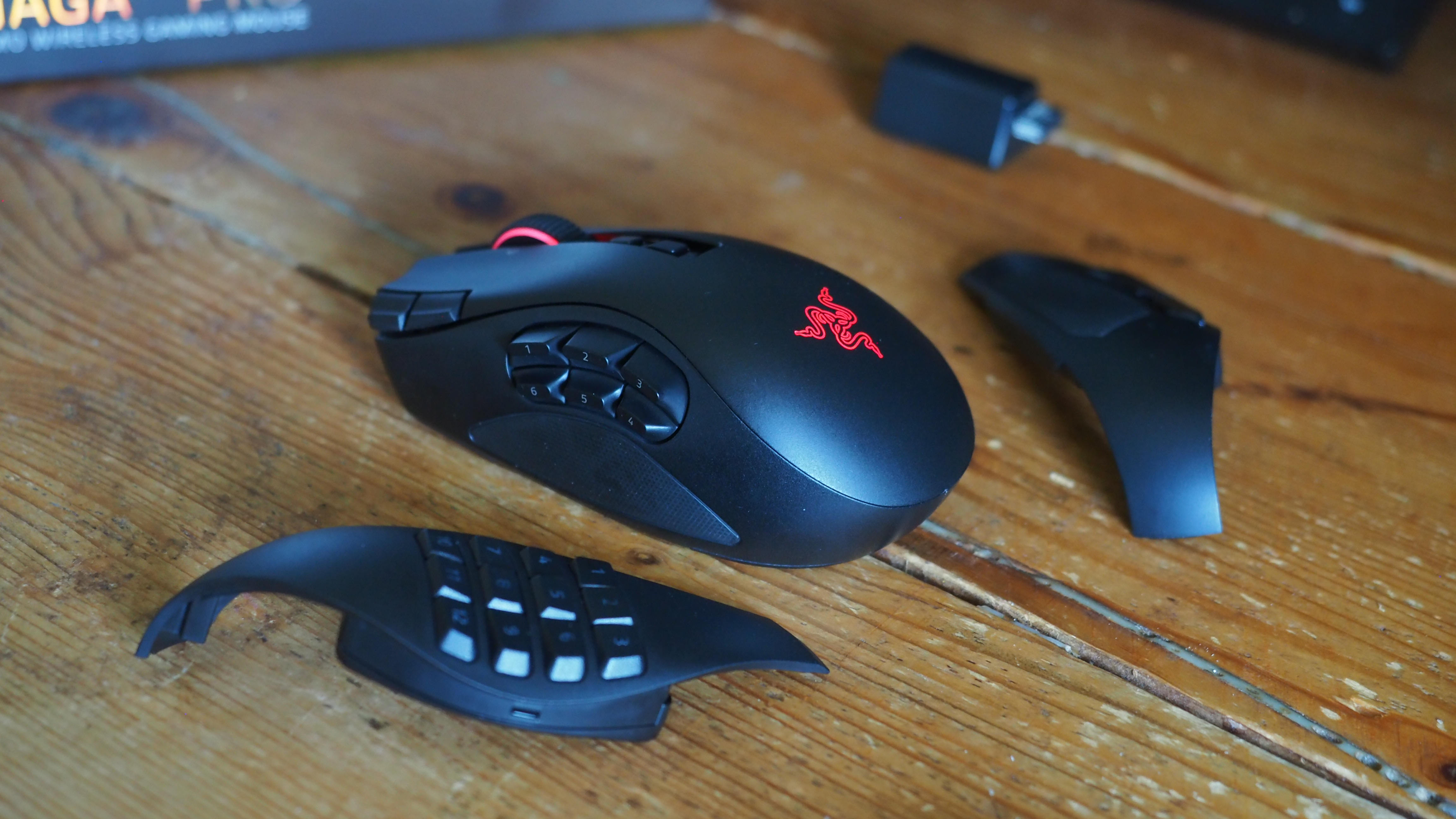
The obvious headline feature is the magnetic button plates that can be customized at will, adding between two, six, and twelve additional buttons. Razer has also included a uniquely configurable scroll wheel that comes with haptic feedback capabilities.
The mouse goes into general availability on August 11, 2026, and will set you back $179.99 from Best Buy in the United States.
Razer Naga V3 Pro: Features
Three's a crowd they say. Not here. (Image credit: Windows Central | Jez Corden)
The Razer Naga range has long been designed with MMO and MOBA gameplay in mind, adding a huge amount of additional inputs via a unique magnetic side plate feature.
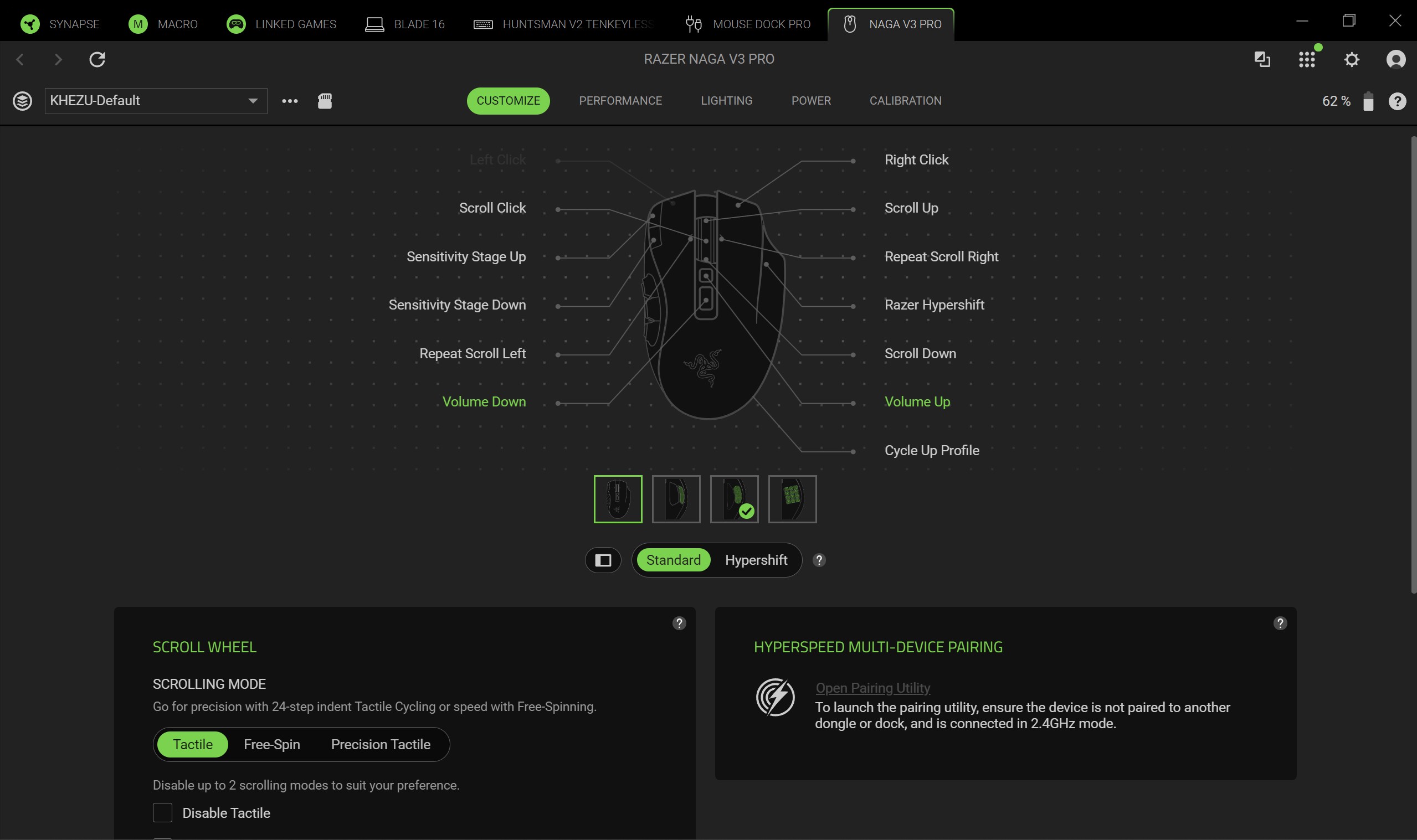
Razer has enhanced the force of the magnets to ensure it feels well and truly part of the mouse when connected, and I can say without doubt that it well and truly does. The buttons can be programmed at will using Synapse, and modified further with a ring-finger button that defaults to Razer's dedicated "Hyper Shift" modifier key. Of course, all of these can be reconfigured too.
What struck me immediately when going palm-on was the new scroll wheel. Razer has included some unique functionality here that I've not experienced previously in other mice. You can set it to free-wheeling mode, which allows it to quite literally spin indefinitely under its own weight. There's also a standard step-stop function that most users will be familiar with, but also a precision-stop feature that adds some haptic feedback and shortens the actuation for rapid hot bar or weapon switching with more forceful control.
There is a parade of other buttons and functions too. The DPI rates have been placed in the top right corner of the mouse out of the way, requiring a little more intent to reach to prevent accidents, I suppose. There are two buttons below the scroll wheel, and the scroll wheel itself can be tilted and clicked for additional inputs too.
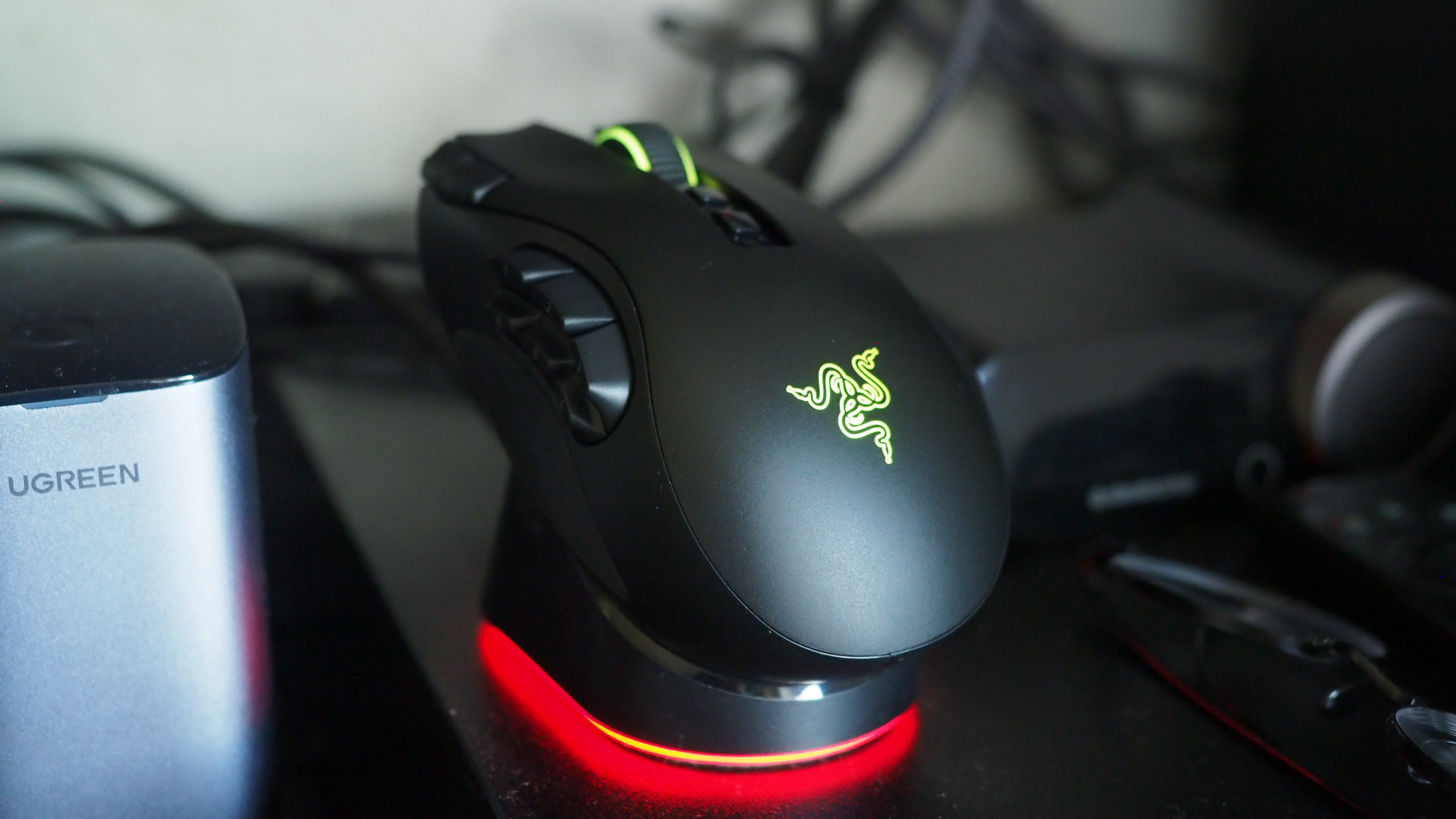
It sports 155 hours of battery life out of the box, and supports Razer's new Mouse Dock as well as its wireless Hyper Flux charging mouse mat. Either plugged in or connected to a compatible Hyper Speed dongle, this bad boy can go all the way up to 8,000 Hz. You will not be left wanting for speed.
Razer Naga V3 Pro: Comfort and usage
All the buttons. Windows Central | Jez CordenLight weight, maximum function. Windows Central | Jez CordenIt feels good in the hand, although some users may find it a little too high. Windows Central | Jez CordenRazer magnetic charge dock capable, but not included. Windows Central | Jez Corden
How does it feel to actually use, though? I dropped into a couple of World of Warcraft raids and played a few games of Heroes of the Storm to get a feel for it, but it was in games like Age of Empires where it truly felt transformative.
As noted, you can add up to 12 extra buttons with the side plate feature. It does take some getting used to, and I think Razer could've perhaps done a bit more to help differentiate the keys, particularly on the 12-button plate. The six button plate felt like the sweet spot for me, given that the profile of the buttons made them easier to memorize, but also I didn't find it as hard to squeeze my thumb backwards to hit the keys closest to my palm.
Indeed, you might struggle with this mouse if you don't have the most flexible hands. I found its palm hump to be a bit tall for my tastes (small ass hands maybe, or perhaps poor desk ergonomics on my end), but overall it was incredibly comfortable. I suspect most people won't have any issues with it. I also suspect that it was designed quite intentionally to be "palm grippy" to facilitate the fact users will be reaching for buttons on the side more often than on other mice.
Six buttons felt like the sweet spot for me. (Image credit: Windows Central | Jez Corden)
There are probably neuroscientific reasons for this, but it does feel genuinely more intuitive to actuate inputs on the same hand as your movement intentions. Perhaps it stems from my console-oriented history in some ways, but I found it a lot easier to drop Guldan's ult with a mouse swipe and mouse click, as opposed to lining up my mouse with a keyboard press.
For Age of Empires, it was particularly fun binding various quick keys directly to the mouse. Assigning regiments, bypassing certain menus, and being able to select specific units instantly from anywhere won't make up for my lack of skill with RTS, but it did boost the fun factor.
Razer Synapse is a fantastic piece of software that ties everything together. It's still better than solutions from other companies by a country mile. Configure RGB lighting, set up profiles for specific games, configure literally all the things — quick and easy.
Sync all the Razer things. (Image credit: Windows Central)
Some of the less useful features include Razer's macro functionality, which will sadly get you banned in a lot of online games for "automation."
The Naga V3 Pro also comes with an AI assistant key by default, which lets you bind certain Copilot prompts to mouse inputs for some reason. You can turn it off, but it's 2026 so everything has to have some kind of "AI" feature in it apparently, even if it's effectively useless. Perhaps this might become more useful if Microsoft ever ships agents to consumers, but as for right now it feels like boardroom fluff. Thankfully, that's the only "feature" here I could describe as such. Practically everything else is genuinely useful and represents a demonstrable upgrade.
There is a lot of functionality in the Razer Naga V3 Pro, and you won't need all of it all of the time. It is designed primarily for people who want maximum control over their games, and indeed, it is priced as such.
Razer Naga V3 Pro: Conclusion
It ain't cheap! (Image credit: Windows Central | Jez Corden)
The Razer Naga V3 Pro is a tour de force of functionality, with unmatched versatility for practically every genre of game you can throw at it. FPS, RTS, MOBA, MMORPG, and beyond — even the most control-complex games fall before the Naga and its capacity to inject intuitiveness into the least intuitive games and control schemes possible.
But yes, it will require configuring to get there. That's ultimately who it's designed for, though; people who play more complex games to a hardcore level, and want their peripherals to reflect their desire to configure and control their experience.
You should buy this if ...
✅ You play complex input-heavy games like MMORPGs and RTS.
✅ You like to configure your controls to the nth degree.
✅ You prefer your inputs on your mouse, rather than your keyboard.
You should not buy this if ...
❌ You find configuring keybinds exhaustive and annoying.
❌ You have particularly small hands (you might find its height uncomfy).
❌ Price might be a concern.
This will become my default mouse moving forward. Being able to effectively keybind number keys 5, 6, 7, 8, 9, 0, etc. without needing to physically reach away from WASD is a big boost in some games I play.
However, I am cognizant of the fact that I got the review unit here. Almost $200 for a mouse is tough to justify unless you're particularly passionate about the functionality the Razer Naga V3 Pro is going to provide for you. For configuration enthusiasts, there's well and truly nothing better than the Razer Naga V3 Pro right now.
Razer
Naga V3 Pro
"Stay one step ahead—no matter how the game changes."
Join us on Reddit at r/WindowsCentral to share your insights and discuss our latest news, reviews, and more.
Razer, one of my favorite manufacturers that has produced some of the best PC gaming accessories I've ever used, has released a new mouse built to conquer any game you throw at it — the Razer Naga V3 Pro.
This gadget is the long-awaited evolution of the Razer Naga V2 Pro, which takes everything we loved about its predecessor (which we gave a near-perfect review score) and refines it to create the ultimate PC gamer mouse.
Here's what you need to know about the Razer Naga V3 Pro and where you can buy it.
The side plates of the Razer Naga V3 Pro gamer mouseWindows Central | Jez CordenSide view of the Razer Naga V3 Pro MouseWindows Central | Jez CordenTop view of the Razer Naga V3 Pro MouseWindows Central | Jez Corden
The Razer Naga V3 Pro mouse is equipped with cutting-edge tech to improve input detection speeds and swappable button plate configurations so that it can handle a wide variety of game genres.
Its biggest selling points include:
23 programmable buttons and three interchangeable side button plates (a 12-button MMORPG plate, a 6-button MOBA plate, and a 2-button FPS plate).
A Razer HyperScroll Tilt Wheel Gen-2 with new dual tactile, free-spin, and smart-reel modes to adjust its scrolling speeds to a user's preference.
A Razer Optical Mouse Switches Gen-4 to give its buttons an upgraded lifecycle up to 100-million clicks, cleaner and faster input detection, tactile feedback, and a zero-bounce optical design to prevent accidental misclicks.
A Razr Focus Pro 50K Optical Sensor Gen-3 with precise mouse-movement detection and adjustable sensitivity that can go as high as 50,000 DPI.
Polling rates from 1000Hz to 8000Hz to help improve the mouse's input accuracy and detection speed.
A lightweight build of 117g (with the 12-button MMORPG plate attached) so it's not so heavy to move for the wrist while allowing it to be moved more quickly when making sharp turns in first-person action games.
A battery life of 155 hours on HyperSpeed connectivity (2.4GHz).
This mouse is Razer's next amazing premium outing for MMORPGs, MOBAs, FPS titles, and more
The Razer Naga V3 Pro gamer mouse on a base charger (Image credit: Windows Central | Jez Corden)
Our resident PC gaming accessory expert, Jez Corden, reviewed the Razer Naga V3 Pro and found it to be one of the best PC mice he's used so far this year. Jez praised it for possessing dozens of programmable buttons, the best-in-class software solution, and a premium feel that emphasizes tactility.
So, if you generally play input-heavy PC games and you want to get your hands on the Razer Naga V3 Pro, it will cost $179.99/£179.99/€199.99 at select digital retailers including Best Buy, directly from Razer.com, and at physical RazerStores.
Dominate any PC game imaginable with the Razer Naga V3 Pro Wireless mouse, complete with three swappable button plates, a Focus Pro 50K Optical Sensor Gen‑3 with 50,000 max DPI, 23 programmable inputs, and many more rich features.View Deal
Join us on Reddit at r/WindowsCentral to share your insights and discuss our latest news, reviews, and more.
Like millions of other people, I have a Windows 11 PC and an iPhone. I'm envious of some of the ways Macs and iPhones connect, but I still rely on Windows 11 for everyday work and my hobbies.
AirDrop is one of the features I want the most when looking over the digital fence at my friends who are fully in the Apple ecosystem. While you cannot use AirDrop on a PC, there are some great alternatives.
"Does anyone actually have a good way to transfer files between an iPhone and a Windows PC?" asked Reddit user Palunath in the r/Windows11 subreddit. Users responded with several options, but two stood out: Blip and LocalSend.
Reddit delivered with both those recommendations. I downloaded both and have used them over the last week. I'm hardly the first person to highlight these apps, but if people are asking for AirDrop alternatives on Windows 11, they likely haven't heard of Blip and LocalSend.
Top pick: Blip
Transferring files is quicker and easier if both of your devices are on the same network, but Blip works when on different networks as well.
Blip is my top pick. It's easy to use, has an interface that feels familiar, and it's extremely fast. It's similar to AirDrop but without the Apple exclusivity.
Blip supports sending files and folders without any size limits (Blip's website says "99TB? Game on").
Not having to zip folders is a big plus, as is being able to send large photo files.
Blip is free for non-commercial use. If you're a business user or want priority speed, you can subscribe for $25 per user per month.
Signing up for Blip is easy and just requires entering your email and confirming the code you're sent.
Connecting an iPhone and a PC can be awkward unless you have the right apps. (Image credit: Future)
LocalSend works very well, but its structure has some pros and cons. Because it works through your network, it works without the internet. It's also incredibly fast, assuming your Wi-Fi network has quick speeds.
LocalSend doesn't require an account or logging in. Your devices from the network just appear within the app. You can mark devices as favorites to streamline sharing as well.
You can send files to a single recipient or multiple recipients as well, which makes LocalSend feel a bit more like AirDrop.
LocalSend is open-source, fully offline, and peer-to-peer, so it's a great choice for people who value privacy.
The obvious drawback is that LocalSend is for sending files locally. If you just need to send files at home or work when devices are on the same network, LocalSend provides a seamless experience.
OneDrive and iCloud
Blip and LocalSend are made for sharing files on demand. If you want to sync entire folders or all of your files, you can use apps like OneDrive or iCloud.
In my experience, these apps are much slower at syncing and sending files, but they're a great way to back up content.
Join us on Reddit at r/WindowsCentral to share your insights and discuss our latest news, reviews, and more.
I've long been a fan of XCOM, which is why when I heard two of my favorite franchises were about to collide on Xbox and PC, my interest was immediately piqued.
This is Star Wars: Zero Company, an upcoming turn-based tactics game set in the legendary sci-fi universe that needs little introduction.
Developed by Bit Reactor, who themselves are comprised heavily of XCOM and Firaxis vets, I recently was lucky enough to talk to the team behind the game, as well as go hands-on for the first time.
Bit Reactor's Greg Foertsch, art director of XCOM fame, was candid on the game's origin story. It was actually the late great Vince Zampella of Titanfall and Call of Duty fame who offered it up first, and the rest is history: "Star Wars was not on my bingo card, to be quite honest, till Vince brought it up, and frankly, I was a little terrified at first, but I had to say yes."
Terrified they might've been. But from what I've seen, I think they've absolutely nailed it and have nothing to fear whatsoever. Star Wars Zero Company is now a personal game-of-the-year contender, if indeed the full game continues to be as infectious and intriguing as the demo slice I played.
Bit Reactor noted that they felt the turn-based tactics genre still had a big story to tell, even as Take Two essentially wound down the XCOM franchise in favor of focusing on Civilization. What better way to introduce the genre to a new audience than via one of the biggest franchises in the world?
But Bit Reactor has also been keen to modernize every aspect of it for modern sensibilities: photorealistic art, a third-person camera, high-quality story writing and cinematic treatment, and a Mass Effect-like character bonding system that has enormous potential.
Star Wars: Zero Company launches on Xbox and PC on August 27, 2026.
A heaping of XCOM, a dash of Mass Effect?
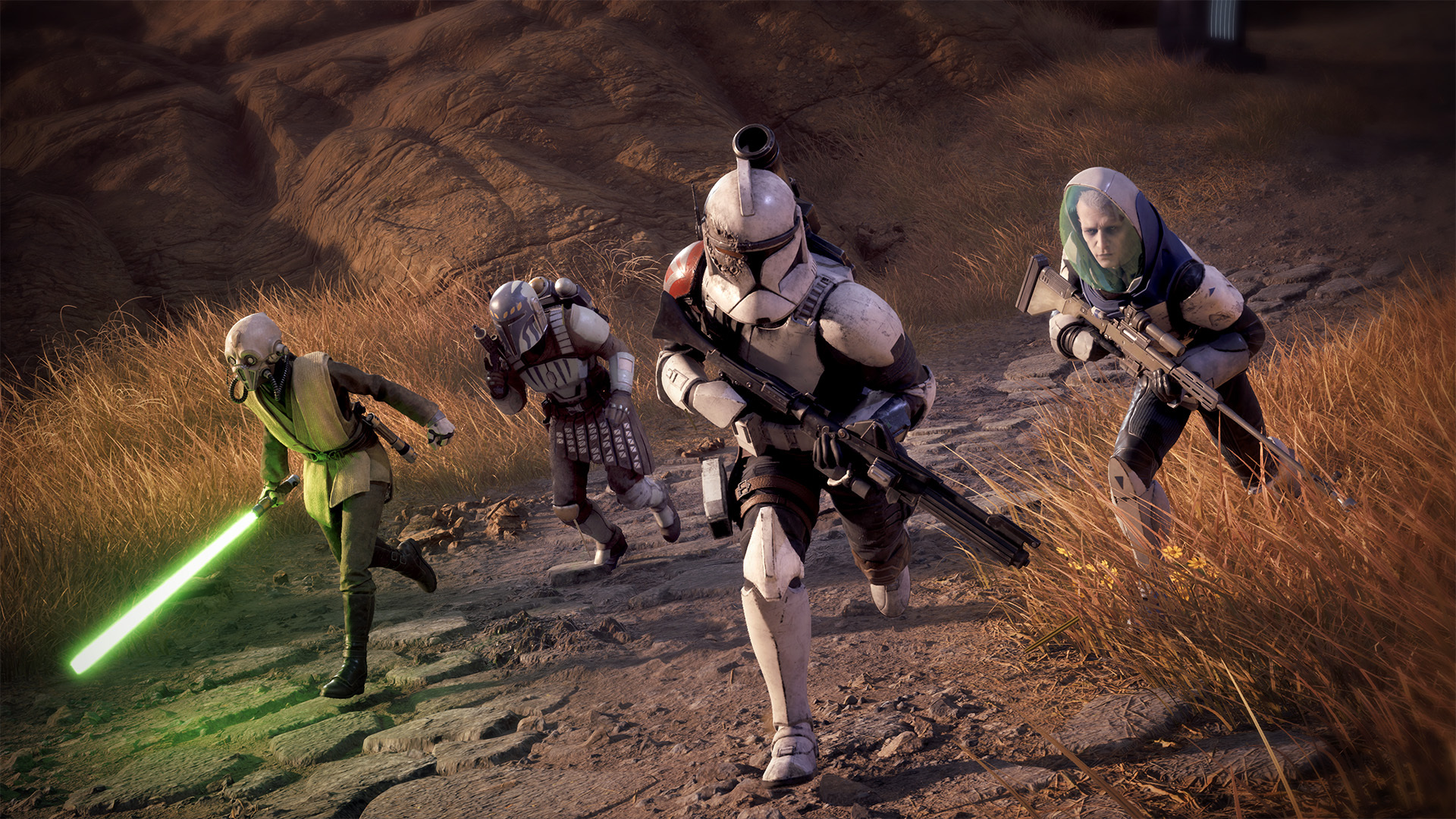
Lead a rag tag group of survivors on a quest for fame and fortune, and unravel a potentially darker plot along the way. (Image credit: EA | Bit Reactor)
In Star Wars Zero Company, you take command of a "dirty dozen" style mercenary outfit, which immediately gave me Mass Effect 2 vibes.
This ragtag group of rejects, bounty hunters, and warriors of fortune come together under a variety of difficult circumstances. The Clone Wars are in full swing, and the Republic needs mercs willing to undertake missions that are perhaps beyond their remit (and missions that skirt the law ... and perhaps even basic morality.)
As such, you play as Captain Hawks, a fully customizable humanoid and former Republic officer who has gone into business for himself. You can fully tailor Hawks' identity and pick from a variety of iconic Star Wars species to lead your crew.
As you get further in, you'll meet other heroes who join your squad for a variety of their own reasons. There's Tel-Rea, who is a former Jedi Padawan, Trick, a "forcibly retired" clone trooper, and Cly, a Mandalorian driven by vengeance.
The eclectic cast led Bit Reactor to create its "Bond system," which gave me a ton of Mass Effect 2 vibes. As your crew collaborates both in missions and during trips to The Den (your base of operations), they build relationships and synergies that benefit your tactical options and also develop their characters.
Kabbney "Kabb" Uppercut is a Felshi, a completely new species created for Zero Company. (Image credit: EA | Bit Reactor)
"I wanted that to have a long arc of play over the course of the whole campaign… you’re not just learning to power your characters up, but you’re also having them develop relationships that’s evolving in your head," game directorJames Brawley explained to us. "Characters grow stronger as a result… that’s why they’re able to beat these overwhelming threats, because they know how to work together."
"This is your Star Wars game… how you get there, what you experience, the characters you build, the relationships and bonds you make — they’re all unique to your playthrough."
The team explained that the events of Zero Company take place adjacent to The Clone Wars, in the shadows, using an entire cast of new characters. And indeed, like any good XCOM-like, permadeath is a feature here. If you have two characters that synergize well and unlock powerful abilities as a result, having one of them die not only severs that bond but also deprives you of access to those powerful abilities. The stakes remain incredibly high as a result, in true XCOM-fashion. You'll also lose the resolution of their stories and experiences too, making every playthrough potentially unique (unless you save scum, that is ... but there are auto-saves-only Ironman modes for those who don't want to be enticed into such heretical gameplay styles.)
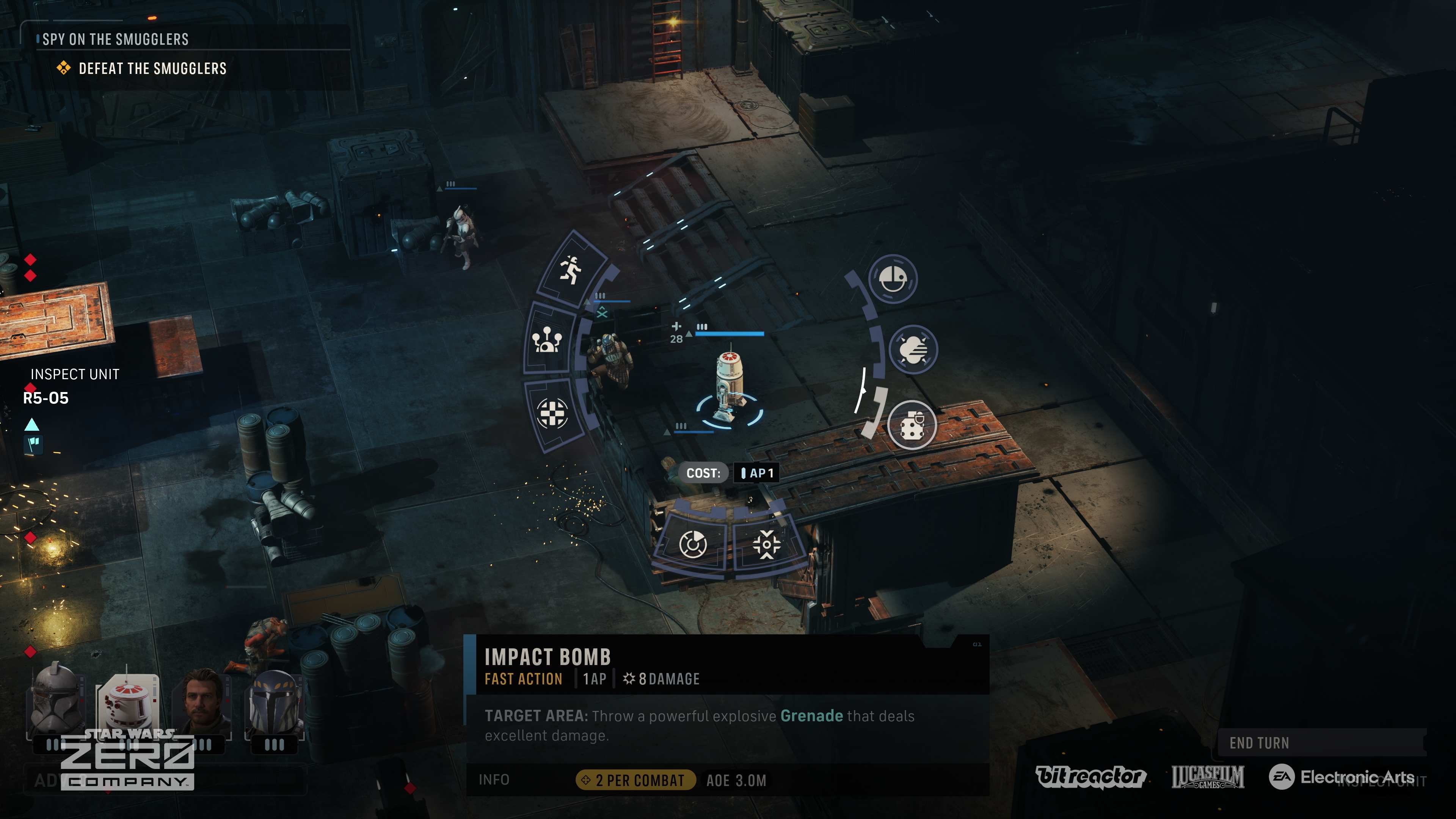
Set up powerful killzones with overwatch commands, and leverage unique Star Wars-inspired abilities to decimate your enemies. (Image credit: EA | Bit Reactor)
I didn't get to experience too much of the combat gameplay, but from what I played, it felt every bit as satisfying and fun as previous official XCOM-style games I've played from the team here. Bit Reactor is comprised of XCOM and Firaxis vets, as noted, and you can feel that pedigree in every aspect of play. The team said Disney was on hand too to verify the Star Wars authenticity but was also incredibly open to Bit Reactor's own agency therein. The team said they "couldn't praise Disney enough," in what sounds like a very productive working relationship.
Disney hasn't always handled the Star Wars IP as well as I would've liked ... but it's hard to deny that they've had some absolute bangers on their hands. Rogue One has been a particular highlight for me, but also the games. Cinematic delivery I'd argue is more important in a Star Wars-adjacent title, which obviously comes with certain expectations. You can expect great characters, a grand adventure across the galaxy, and big cinematic moments sprinkled throughout Zero Company, the developers tell me. But crucially, also dark villains.
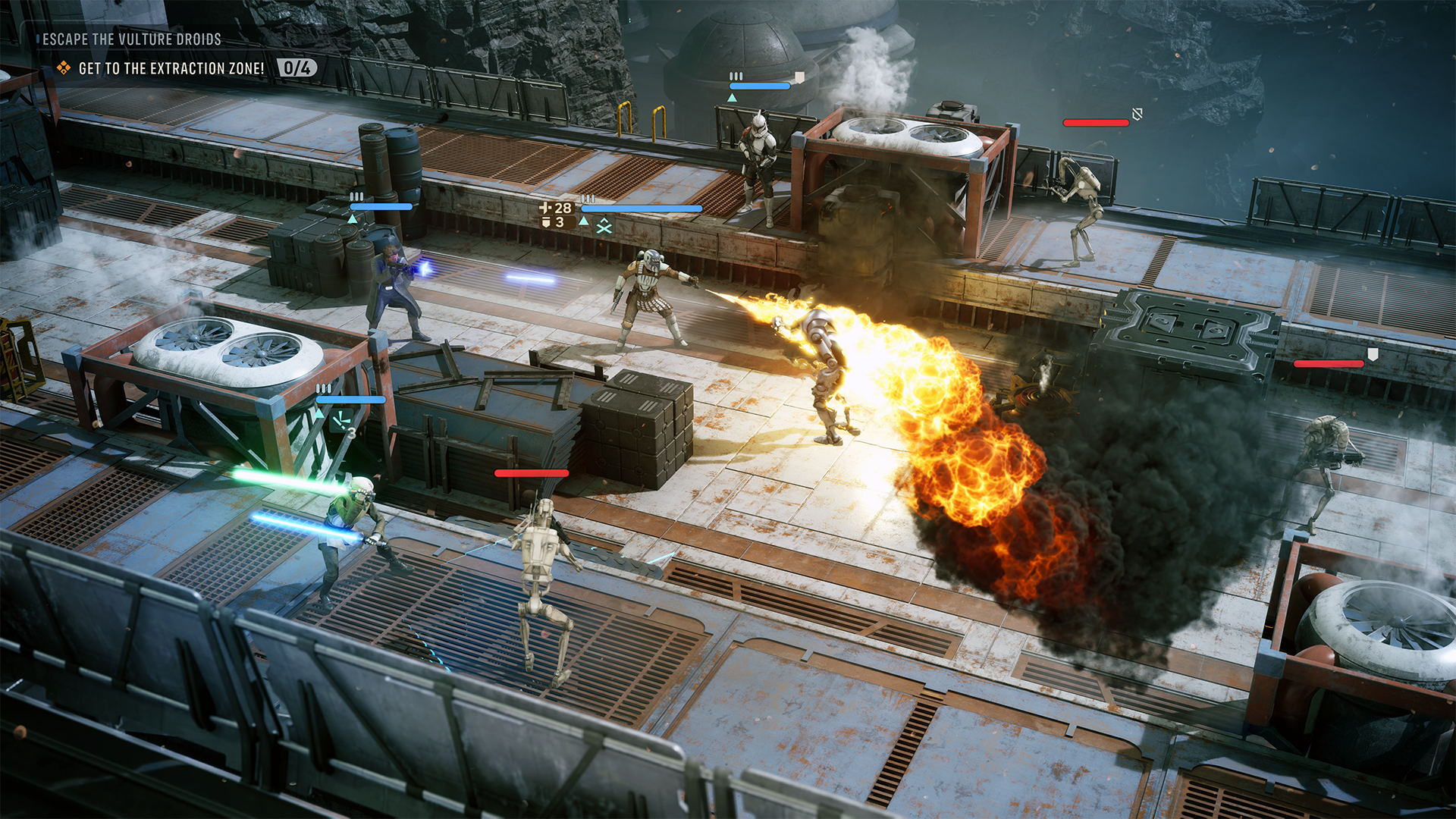
The Clone Wars are in full swing in corners of the galaxy, but while bounty hunting, Hawks and his crew get caught up in a uniquely dangerous situation. The separatist-aligned cult known as the Infinite Coil rears its head early on. Its members seem infected with a mysterious space plague that, if I were a betting man, potentially has dark side origins.
"The Clone Wars offered us a place to tell a Star Wars story that touched on canon, but didn’t interfere… it allows people to attach to new characters in a way that hasn’t been done before."
The Jedi Fallen Order franchise has been well-received, and before Vince Zampella's passing, it seemed like EA was on an upward swing with its Star Wars license stewardship. Zero Company looks set to continue that legacy and also maintain the quality bar Jedi Fallen Order established.
In Zero Company, you'll fight separatist forces of all stripes, but the central antagonistic force is a shadowy cult known as the Infinite Coil. (Image credit: EA | Bit Reactor)
Indeed, I was surprised to discover how far Zero Company diverges from the typical XCOM formula from a story perspective, where most of the characters are throwaway soldiers designed to ultimately be expendable. The detailed characterization of the heroes in Zero Company are every bit as cinematic and interesting as any story-heavy action game or big-screen Star Wars experience you might expect.
Zero Company makes heavy use of a traditional third-person over-the-shoulder camera for some of these sequences too, making the game feel almost more like a CRPG in the vein of Baldur's Gate 3 or Wasteland 3, as opposed to a pure tactics game. Tactics games with fixed isometric cameras often come with stylized art given that the camera is zoomed out a lot of the time. Zero Company went deeper on visuals to accommodate its more cinematic delivery, and the results speak for themselves. Zero Company feels painstakingly authentic.
"We should be better looking, not worse. We should be better frame rates, not worse. We should have more stories, more immersion," Bit Reactor explained. "We’re just making a great game — it just happens to be turn‑based.”
If you've never played an XCOM-like before, its RPG systems might be what entices you most
More XCOM-style games please. (Image credit: EA | Bit Reactor)
I was incredibly encouraged by Star Wars: Zero Company's preview cycle. I was immediately drawn to the characters and intrigued by the potential of the game's Bond system. What events and storytelling opportunities would I be able to unlock? What consequences would befall me for mismanaging those bonds and potentially getting some of my heroes killed? What exactly is the Infinite Coil, and what do they want?
Star Wars: Zero Company is a bit of a rarity in 2026, as big publishers chase service games, infinite experience, and microtransaction hellscapes. Take Two itself no longer seems to want to service the XCOM franchise sadly, and other companies that have attempted it have often struggled to broaden their appeal. Truly "AAA"-grade tactics games have become vanishingly rare.
Star Wars is the perfect universe to offer a take on this genre in my view, particularly in the Clone Wars era. But Bit Reactor's clear efforts on the cinematic and story-delivery side give Zero Company broad potential that similar attempts at the turn-based tactics genre have missed in recent years. Baldur's Gate 3-style cinematics and character delivery, atop modern high-quality visuals and focused XCOM-style tactical play? Zero Company has everything I didn't know I needed from this quarter's very busy slate of games.
Star Wars: Zero Company is something every Star Wars and turn-based afficionado should put on their wishlist.
If you have any questions about the game, drop them in the comments and I'll get them answered!
Star Wars Zero Company is a turn-based tactics experience with heavy cinematic leanings. Set in the Clone Wars Star Wars era, lead a merc group across the galaxy seeking fame and fortune, but perhaps finding something darker along the way.
I've spent a lot of time this summer gaming on my Steam Deck. It's hot outside, it's hot inside, and my desktop gaming PC simply creates too much heat.
The only major problem I have with my Steam Deck is that it doesn't play nicely with PC Game Pass, to which I'm a subscriber. Yeah, I could stream games to my handheld, but there's now a better solution in the works.
I'm talking about Xodus, an open-source project that's attempting to build a bridge between PC Game Pass and Linux systems, including the Steam Deck. The project is also attempting to iron out similar issues on macOS. No Windows install needed.
Xodus comes from the developers behind the Heroic Games Launcher, a separate open-source app that brings Epic, GOG, and Amazon Prime titles to Steam Deck (it also works on Windows, macOS, and other Linux systems).
The developers are undoubtedly up against a grind with this project. Xbox PC games that come from the Xbox app rely primarily on a Microsoft Game Development Kit (GDK) runtime, which is a far cry from DirectX and Win32 layers that Valve's Proton already handles quite well.
This Microsoft GDK is really what has kept PC Game Pass from running directly on the Steam Deck (and macOS) for so long.
Is Xodus ready for public release?
Xodus could finally bridge the gap between PC Game Pass and Steam Deck. (Image credit: Rebecca Spear / Windows Centarl)
According to updates shared on the Xodus GitHub page, the developers have cracked Xbox authorization, license checks, and MSIXVC package (the containers that PC games come in) download and decryption.
In a Reddit post, a Xodus developer noted that the team's main focus is now getting the Software Development Kit (SDK) for each title to run through Wine. It appears that Xodus has its own Wine and Proton forks for this purpose, as well as an open-source version of the xgameruntime.dll file that Game Pass games depend on.
Xodus likely won't support all Game Pass games when it launches, either. Older games that eschew GDK and MSIXVC for UWP will likely come later, if at all.
Why I'm so excited to try out Xodus on my Steam Deck
PC Game Pass on Steam would open up a whole lot of new options for gaming on the go. (Image credit: Future)
As mentioned, the biggest drawback to my Steam Deck, aside from its growing age, is its lack of native PC Game Pass support.
Sure, I could upgrade to a newer handheld that natively runs Windows, but it looks like I might not need to quite yet. That's especially exciting considering just how expensive gaming handhelds have become of late.
Then there's the Steam Machine, another Valve device running the Linux-based SteamOS. A whole bunch of gamers recently got their hands on the Steam Machine when it launched in June, and making PC Game Pass an option can only benefit Microsoft.
Here's the rub: Xodus has no affiliation with Microsoft. It's an unofficial community project created by independent developers. Does that mean Microsoft will have a problem with it? Not likely, but you never can tell.
Xodus still doesn't have an official release date, but it's something I'll be keeping my eyes on as it progresses. If you're a Linux gamer who wishes they could use PC Game Pass natively, you'll definitely want to keep watch as well.
What do you think about Xodus as a bridge between Steam Deck/Machine and PC Game Pass? Is it something you'd use regularly? Do you already have an alternative method that works better for you? Let me know in the comments section below!
Razer's gaming keyboards rank among the best on the market, whether you're looking to crush the competition in games or type up school reports. However, if you've ever shopped around, you've probably noticed how many are on the higher end of the affordability scale.
Fortunately, one of Razer's top-rated wired gaming keyboards, the Huntsman V3 Pro 60%, has managed to evade lofty pricing for a limited time, thanks to a 28% discount bringing it to $129.99 at Best Buy, giving you a chance to get a leg up on multiplayer and get a head start on your studies for less.
"Your hands are certainly going to fall in love with the textured keycaps, robust switch feel, and fantastic analog features." — Tabitha Baker, Managing Editor (Hardware) at our sister site, GamesRadar+
A top view of the Razer Huntsman V3 Pro 60% keyboard. (Image credit: GamesRadar (Tabitha Baker) | Razer)
For starters, this keyboard features Razer'sAnalog Optical Gen-2 switches, which grant it extremely precise and responsive input detection speeds, which can be enhanced further with a Rapid Trigger mode and adjustable actuation that ranges between 0.1 mm and 4.0 mm.
The Huntsman V3 Pro 60% also features textured double-shot PBT keycaps with a keystroke lifespan of 100-million clicks to help it endure many years of intense button mashing.
Other notable features include a sleek and compact 60% form factor that makes it very portable-friendly while saving tons of vital desk space, buttons that double as arrow keys, and a Razer Snap Tap feature, which prioritizes the latest input between two selected keys without letting go of the previous one for near-instant directional movements in action games.
The only noticeable drawbacks of this keyboard are the somewhat noisy switches with no sound dampening (as noted in GamesRadar's review), the lack of wireless connectivity, and its usually steep listing price of $179.99.
So, it's a blessing to see its high price taken down to somewhat more affordable levels thanks to Best Buy's 28% discount, especially during this general RAM crisis where almost everything else in tech has become so insanely expensive.
If you're looking for a high-quality wired gaming keyboard that doubles as a high-speed workhorse keyboard for helping you ace exams or assignments, you can't go wrong with the Razer Huntsman V3 Pro 60%.
Frequently Asked Questions
Is it wireless?
No, this keyboard connects to devices purely through wired connections via a detachable USB-C to USB-A cable.
Is compatible with consoles?
While it can connect other devices via USB connections, the Razer Huntsman V3 Pro Mini 60% keyboard's configuration software is only operable on Windows PCs.
What is it a 60% keyboard?
60% keyboards are 60 percent the size of a standard, full-sized keyboard that removes the numpad, top row function keys (F1-F12), arrow keys (although the Razer Huntsman V3 Pro 60% keys that double as arrow keys), and the navigation cluster, leaving only the main typing key area intact to save desk space and make it more portable-friendly.
Join us on Reddit at r/WindowsCentral to share your insights and discuss our latest news, reviews, and more.
Xbox is legally required in some territories, such as the UK and, more recently, Australia, to verify the age of its users in order to access certain features.
Whether we like it or not, there's no way around it. Governments will always government. But what most of us objected to more was the use of faceless third-parties that were being used to verify some of our most personal information. In Xbox's case, it was Yoti, a company that's found itself in hot water before over its handling of data.
Fortunately, at long, long last, if you've held out on completing Xbox age verification, it looks like you won't have to. A message is hitting the inboxes of those accounts that haven't yet verified their age through other means but have been determined as having an "adult account" through their activity.
Our own Ben Wilson was one such holdout and got the message himself last night. Here's what it says in full:
Due to longstanding account activity, we've estimated your Xbox profile to be an adult account and updated its age verification status to "Verified." You are no longer required to complete full age verification for uninterrupted access to social features on Xbox. While no further action is required, you can update your privacy and safety settings on Xbox at any time. For more information, click "Learn more" below.
Reddit is likewise lighting up with folks who've had the same message and have been released from the requirements to verify their age for full access.
This seems to be taking place predominantly in the UK, with Australian age verification recently hitting the news as frustrated users see what us Brits were faced with at first.
But since Xbox can clearly identify your age effectively using your account data, why isn't it applied automatically to everyone immediately?
I don't personally care whether I have to be verified as an adult or not, but I do care about being asked to hand over biometric data to companies I have no usual business with. I remember many years ago, being told by a local shop they wouldn't photocopy my passport for me because they wouldn't handle personal information such as this.
Now we're being asked to funnel all that into a computer somewhere, trusting that they're going to behave responsibly with it.
But a win's a win. Even if it's a win that took a little long to get here. Hopefully it can roll out quickly in any subsequent markets that require age verification.
Join us on Reddit at r/WindowsCentral to share your insights and discuss our latest news, reviews, and more.
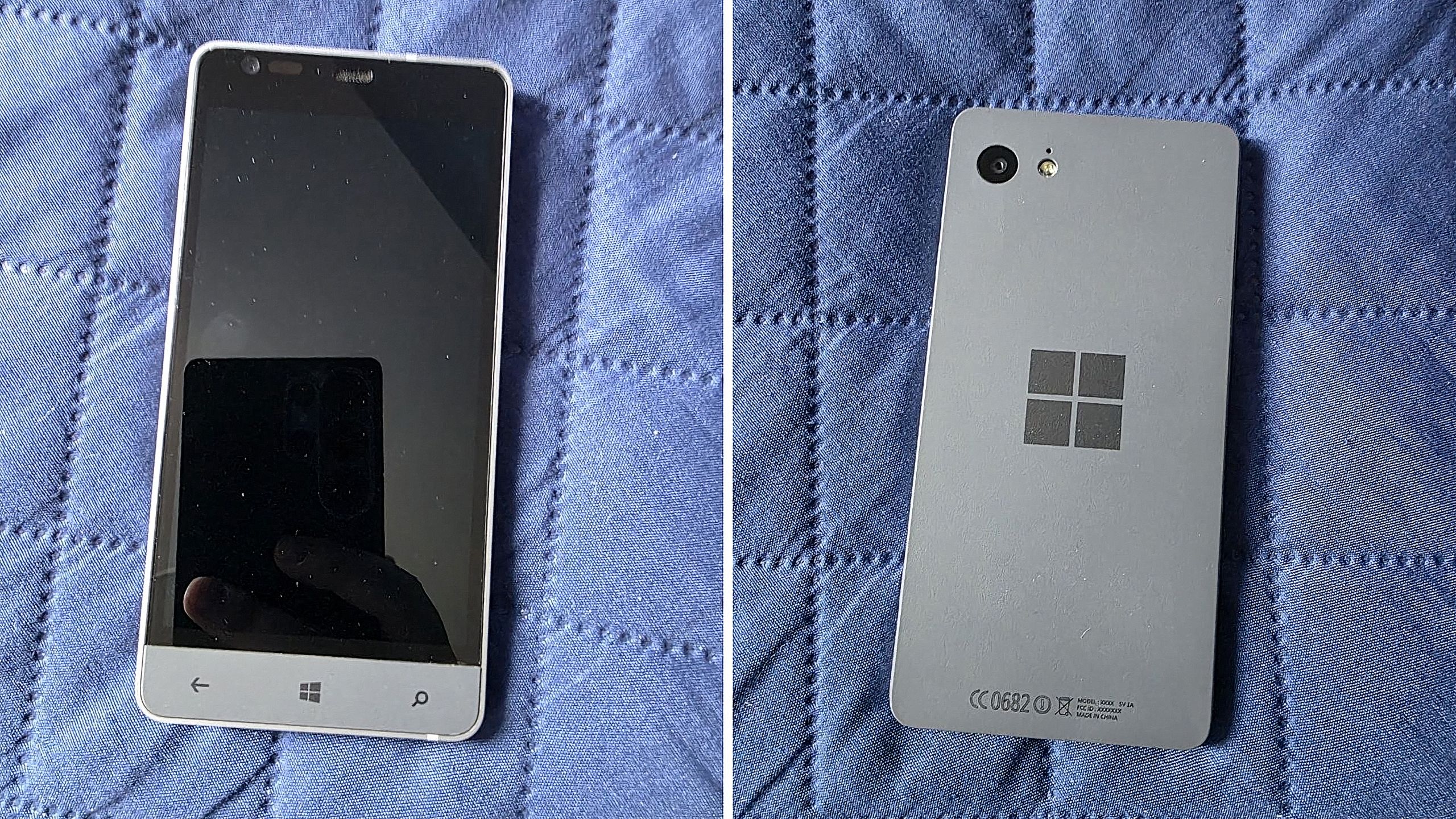
Before Microsoft acquired Nokia, the company was heavily rumoured to be working on its own in-house Windows Phone device that was expected to ship in 2014 under the Surface moniker alongside its Surface Pro device. Unfortunately for Windows Phone fans, such a device never saw the light of day, but newly published images of a mysterious prototype might have just given us our first and only look at what Microsoft was exploring internally.
Possibly codenamed Raven, there isn't much information available about this prototype, other than the fact that it’s from the 2013-2014 time frame and is running an early pre-release build of Windows Phone 8.1. It’s powered by an unknown Qualcomm chip, has a 720p screen, features a Microsoft logo on the back, and a silver metal frame that matches the colour of the Surface 2 that released that same year.
We can see in the photos that it has dedicated hardware keys for navigation, which are also coated in the same silver color as the chassis. The build of Windows Phone that it’s running appears to be from September 2013, and is from an internal development branch building towards what eventually became Windows Phone 8.1.
Real images of this mysterious Windows Phone prototype. (Image credit: Telegram/Discord)
While not viewable in the images, I understand the device features individual up and down volume buttons and a camera button on the right-hand side of the device, and a power button on the top of the device. It also features a micro-USB port and headphone jack on the bottom side, and a SIM card slot on the left side.
This is likely one of dozens of prototype designs that Microsoft’s hardware teams cooked up during this era, but it’s certainly a fascinating look at what could have been, and it does look so clean. Development on this device was likely paused once Microsoft moved to acquire Nokia in 2014.
Back in 2013, I remember hearing from sources that Microsoft was experimenting with the concept of a "Skype Phone," a Windows Phone device with mobile data that utilized Skype for calls and messaging instead of traditional carrier networks. Perhaps this device was going to be that? Who knows.
The Surface Phone we eventually got arrived as the Surface Duo, which started development in 2016 and launched to the public in 2020. In that time, Microsoft shipped Nokia designs in the form of the Lumia 640, 650, 950, and 550 running Windows Phone, before abandoning the platform in 2017.
Join us on Reddit at r/WindowsCentral to share your insights and discuss our latest news, reviews, and more.
According to a new report from Taiwanese publication United Daily News (UDC,) Microsoft is raising the cost of Windows license fees for hardware makers by a much higher amount than normal. According to the report, certain OEMs are seeing licensing price hikes of between 7% and 10%.
Usually, Microsoft raises Windows license fees for OEMs by a low digit percentage, making this 7% to 10% increase much more significant than normal. "A PC brand executive stated that Microsoft increases licensing fees for Windows OEMs (device manufacturers) every year. In the past, licensing fees mostly increased by single digits each year, but starting in July this year, the average increase has reached 7% to 10%, which is a significant increase compared to previous years," UDC says.
Of course, the cost of the Windows license fee is usually (at least partially) passed onto the consumer buying a computer, and UDC claims that their source says laptop pricing is already being impacted by these recent license fee increases. Microsoft charges different OEMs their own fees for Windows, so the exact increase in cost will differ for each hardware maker.
Regardless, with the ongoing memory component shortage, PCs have already seen astronomical price increases over the last year, with experts claiming that we haven't yet seen the worst of it. With Microsoft raising prices higher than usual on Windows licenses, it feels like the Redmond giant is adding extra fuel to the fire.
Windows Central reached out to Microsoft for comment regarding this story, but the company declined to provide one.
To be clear, the Windows license fee price hikes only apply to OEMs building hardware that ships with Windows. The cost of buying a license for Windows 11 as a consumer remains unchanged, being $99 for Windows 11 Home and $199 for Windows 11 Pro.
The ongoing component crisis has made computing unaffordable for many people. PCs that used to target the $600-$800 price bracket now cost close to $1,000. And flagship Windows laptops that used to cost $1,200-1,500 are now closer to $2,000. Even Apple has been hit by the shortage, being forced to raise prices by hundreds of dollars across its Mac lineup. Microsoft's own Surface line was hit especially hard, with the flagship Surface Pro and Surface Laptop being $400-$500 more expensive than the last-gen models.
Fast forward to today, and the CTO of Xbox, Scott Van Vliet, took to social media to provide Xbox fans with a detailed explanation of how this disaster occurred, what Xbox's engineers did to fix it, and what their plans are to ensure this never happens again.
I wanted to provide an update on the incident affecting some players trying to launch games and access other game library features last week.What was the root cause?As I previously wrote, an underlying service required for XBOX Home Console sharing and Game Pass purchased… https://t.co/hqC8ebV4oyAugust 10, 2026
Scott reiterates from his interview with The Verge that this outage was caused by an update made to an underlying service within the Xbox's digital ecosystem that was required for Xbox Home Console sharing, Xbox Game Pass purchased content, and PC scenarios to function, putting them in an unresponsive state.
While this update was happening and causing these systems to shut down, a bug within the Xbox client software stack caused other digital game licence checks to fail. These multiple issues combined created a domino effect where the accumulating failure scenarios blocked some players from launching games while causing issues with library enumeration.
To combat this, Scott says Microsoft is transferring ownership of the underlying licensing service to the Xbox team while Microsoft's engineers work on improving the stability of Xbox Live's services and infrastructure for future updates.
As for the client bug, it will be fixed in an update to the Xbox that rolls out today and will become mandatory to download on August 17, 2026.
In addition, Scott says Microsoft has plans to roll out new features for players along with quality-of-life improvements for system updates as it looks for more ways to improve the stability of its products and services.
Windows Central's take
I'm sticking with physical game discs from now on. (Image credit: Windows Central)
On the one hand, it's nice to see Xbox be a little transparent for once regarding its mistakes and its attempts to fix them, as it shows there are people higher in the company who do care about the quality of their product.
To me, getting DRM-free games (like the ones you see at GOG for example) with their own dedicated launchers and storing them in external SSDs is currently the best way to preserve your modern games library and play them without being shackled to licence entitlements or online services (unless you're playing multiplayer-only games like Overwatch or World of Warcraft, in which case, you're out of luck).
Either way, time will tell if this new update to the Xbox client will prevent any future fiascos for Xbox Live's services.
Join us on Reddit at r/WindowsCentral to share your insights and discuss our latest news, reviews, and more.
Microsoft accidentally shipped the new OneDrive Photos app to millions of PCs recently. Microsoft EVP of Apps and Agents Jeff Teper explained that the app was shipped earlier than intended.
We now have more details about the OneDrive Photos app, courtesy of the Microsoft 365 Roadmap. While the app was rolled out to PCs accidentally, Microsoft plans to release it in the future. When the app does ship (on purpose), there will be options to manage it or uninstall it.
"OneDrive is adding administrative controls for the Photos experience on Windows. Organizations can manage whether users sign in with personal Microsoft accounts. These controls help IT teams align OneDrive Photos with their access, data governance, and device-management requirements."
That feature should start rolling out this month. Considering that the OneDrive Photos app was accidentally installed on some managed PCs that were unable to use the app, these administrative controls should be a welcome addition.
"OneDrive is giving people more control over their Windows experience by allowing them to uninstall the OneDrive Photos experience independently. Removing the Photos experience does not uninstall the OneDrive app, interrupt file sync, or delete photos and files. This provides a clear removal option for people who prefer to manage their photos with another app."
That feature is expected to roll out next month. As always, roadmap dates are estimates and subject to shift.
Those entries, which were first spotted by Neowin, were only added to the Microsoft 365 Roadmap after the accidental rollout and following backlash. We may see more details on the roadmap about OneDrive Photos soon.
The main question surrounding the OneDrive Photos app is why it needs to exist at all. Microsoft's Photos app for Windows already integrates with OneDrive. The OneDrive Photos app is a web-based experience that is less native and seemingly against the current goals Microsoft has set to improve its first-party apps.
Join us on Reddit at r/WindowsCentral to share your insights and discuss our latest news, reviews, and more.
I’ll be honest: I’ve never liked Apple’s notch design. I find it intrusive, and the whole “Dynamic Island” thing always felt like a marketing trick to justify a hardware compromise.
So when I saw Notchify pop up on Reddit, my first thought was, why would anyone want that on Windows?
That said, if you're a bit horrified at the idea, I mean, I totally get it. But hear me out.
What Notchify does
At its core, Notchify is pretty simple. The app creates a “fake” notch or “island” at the top of your screen. And yes, its functionality is what actually saves it. You can use it to display notifications, media playback controls, weather, battery, timers, microphone indicators, and more.
There's even a built-in clipboard for copied content and quick access.
You can see some of it in action in the above embedded video.
The settings are straightforward. You can toggle between Island (disconnected) and Notch (connected) modes, pick which monitor it appears on, and decide if it should launch at startup.
The Appearance tab lets you adjust the theme, blur, and popup behavior for volume or brightness changes. The Widgets section is where the fun begins, as you can mix and match small widgets like battery display, time, and microphone indicators, or go big with calendar, weather, and media playback.
The notch lives on your PC as "always on top," and when you mouse over it, it expands with whatever info you chose it to display. The animations are a bit janky, but it works.
It’s clean, modern, and surprisingly polished for an indie project. The dark theme looks great.
Why I ended up liking it (mostly)
Some of the settings and options for Notchify. (Image credit: Daniel Rubino)
I use a massive 52-inch Dell Ultrasharp monitor, and one of the downsides of that much screen real estate is that my eyes are constantly darting around for notifications, time, or playback controls.
Notchify fixes that by putting everything in one place.
I still don’t love the idea of a notch (it’s not my aesthetic), but I can’t deny how practical it is. Having a small, centralized hub for quick info saves me from scanning the corners of my display. It’s one of those things that quietly improves workflow without demanding attention.
And if you've listened to me on our podcast, you know my big beef with Windows 11 is how I can't adjust where notifications appear from, which seems dumb in 2026.
For anyone switching from macOS to Windows 11, Notchify might even make the transition easier. It brings a familiar visual cue while adding more flexibility than Apple’s version ever offered, and that's kinda cool.
Probably the most obvious issue is that Windows 11 doesn't "wrap" around the app, so when running apps full screen (like your web browser), you may end up blocking access to some features. And no, you can't move it around, which was a bit surprising.
The best part of this story isn’t just the app; it’s the community that helped shape it. On Reddit, user GuppyFarmer posted a detailed breakdown of Notchify’s CPU usage, pointing out that it was higher than expected. Instead of brushing it off, the developer responded, thanked them, and used the data to fix the issue.
That kind of interaction is what makes indie development fun. Constructive feedback, not just complaints, helps these projects grow. GuppyFarmer’s analysis gave the dev exactly what they needed to optimize performance, and the result is a smoother, more efficient app for everyone.
Too often, feedback online turns into negativity. Here, it turned into progress.
My takeaway
More options for theme and design in Notchify. (Image credit: Daniel Rubino)
The app costs $1.99 after the free trial, which feels completely fair for what it offers. It’s not bloated, it’s not subscription-based, and it’s updated based on real user input. That’s the kind of indie pricing model I’ll always support.
I still don’t want a notch on my laptop or desktop, but Notchify convinced me that the idea can be useful when done right. It’s a small, clever utility that adds genuine functionality to Windows, and maybe it'll inspire some other creations to solve some problems.
And hey, it proves what many of us already know: good ideas don’t have to come from big companies. Sometimes, a single developer with a Reddit post can create something that feels fresh and helpful.
If you’re curious, give the free trial a spin. You might find yourself liking it more than you expect.
Join us on Reddit at r/WindowsCentral to share your insights and discuss our latest news, reviews, and more.
Dell's XPS 13, starting at $599 for students and $699 for everyone else, kicked off a new market sector of affordable-but-premium Windows 11 PCs. It's not likely to be usurped by the new Acer Swift Air 14 unless you need more ports, a larger display, or more expressive color options.
Pros
Beautiful aluminum design that's more compact
2.5K display with plenty of brightness; 30Hz-120Hz variable refresh rate
IR camera for Windows Hello
Starts at $599 for students
Cons
No USB-A or 3.5mm audio
Thunderbolt 4 is only available with more expensive models
Acer's Swift Air 14 arrives to challenge the $699 affordable-but-premium PC market, and it should be the right choice for those who want a larger 14-inch display, more color options, and a more generous selection of ports.
Pros
Thunderbolt 4 ports come standard, includes USB-A and 3.5mm audio
Four color options, beautiful aluminum design
Larger 14-inch display hits 120Hz
Could have slightly better battery life compared to XPS 13
IR camera for Windows Hello
Cons
Slightly larger and heavier (though you get a larger display)
No Dolby Vision, lower-res display
No Panther Lake option for power users
Dell's latest XPS 13 (DX13260) was unveiled at Computex 2026 and launched in June, starting at $599 for students and $699 for everyone else.
Not to be outdone, Acer also unveiled a new budget $699 Windows 11 laptop at Computex; the Acer Swift Air 14 is expected to launch in North America in August ... basically any day now.
Considering how closely matched these two PCs are in price, I thought it was best to put together a comparison to help you make the right decision.
Dell XPS 13 vs. Acer Swift Air 14: Specifications
Here's a breakdown of the specs that go into each of these laptops to give you a better idea of what you're buying.
TL;DR? Acer's Swift Air 14 is a larger laptop with a much larger battery capacity, and both PCs run on the same Intel Wildcat Lake chips. I break down the differences in some detail below this table.
These budget laptops feel like they should cost a lot more than $699
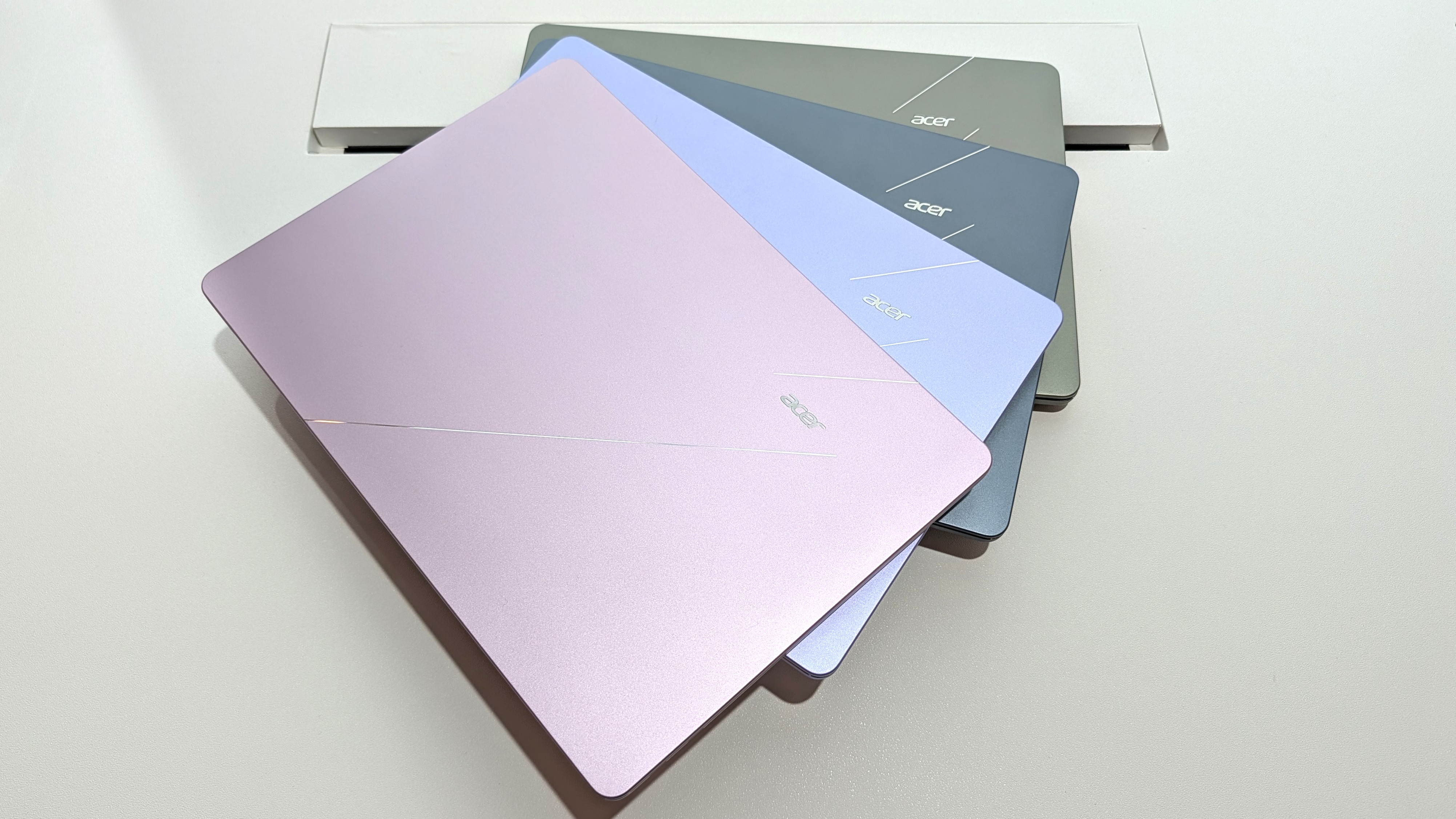
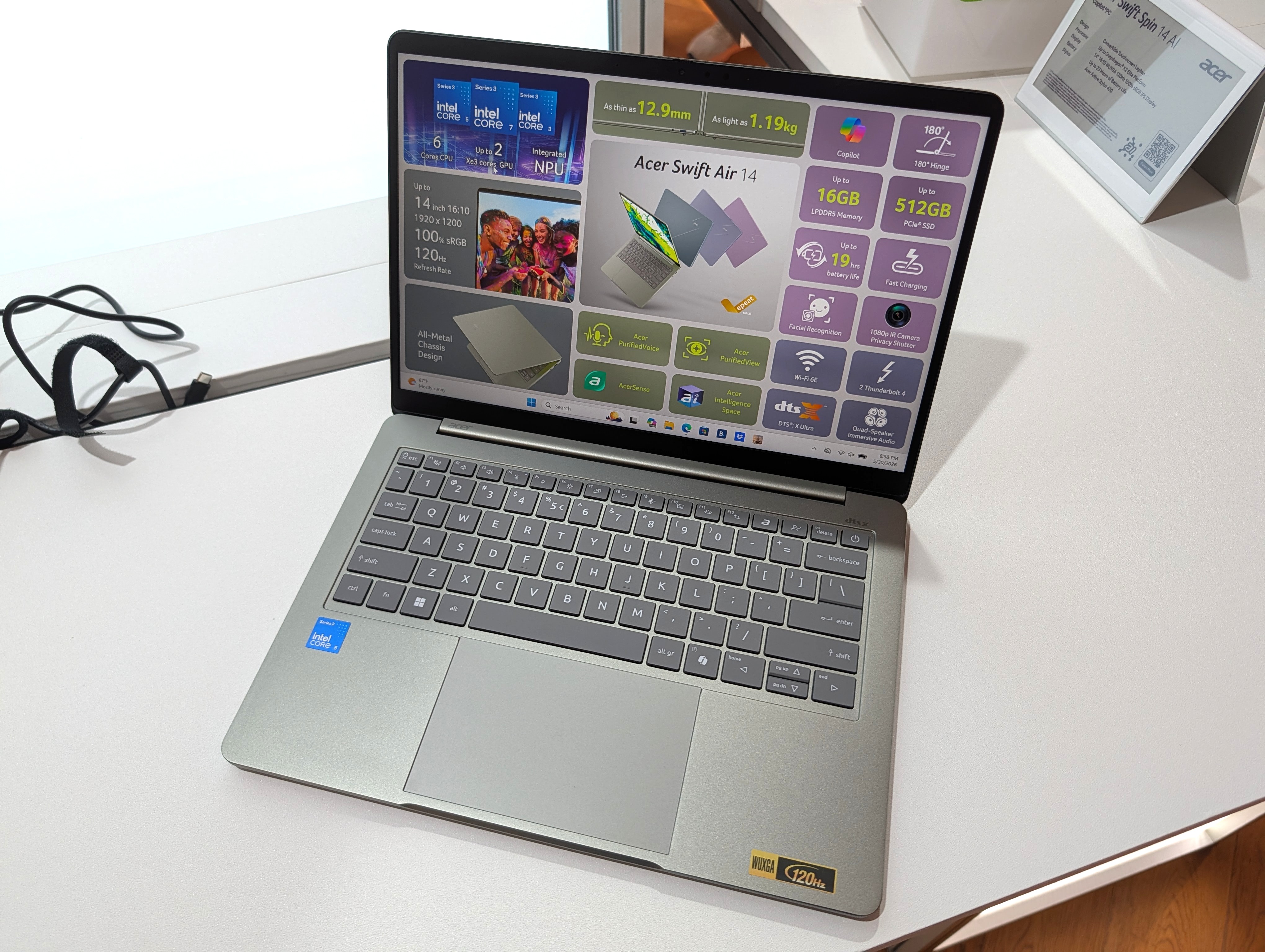
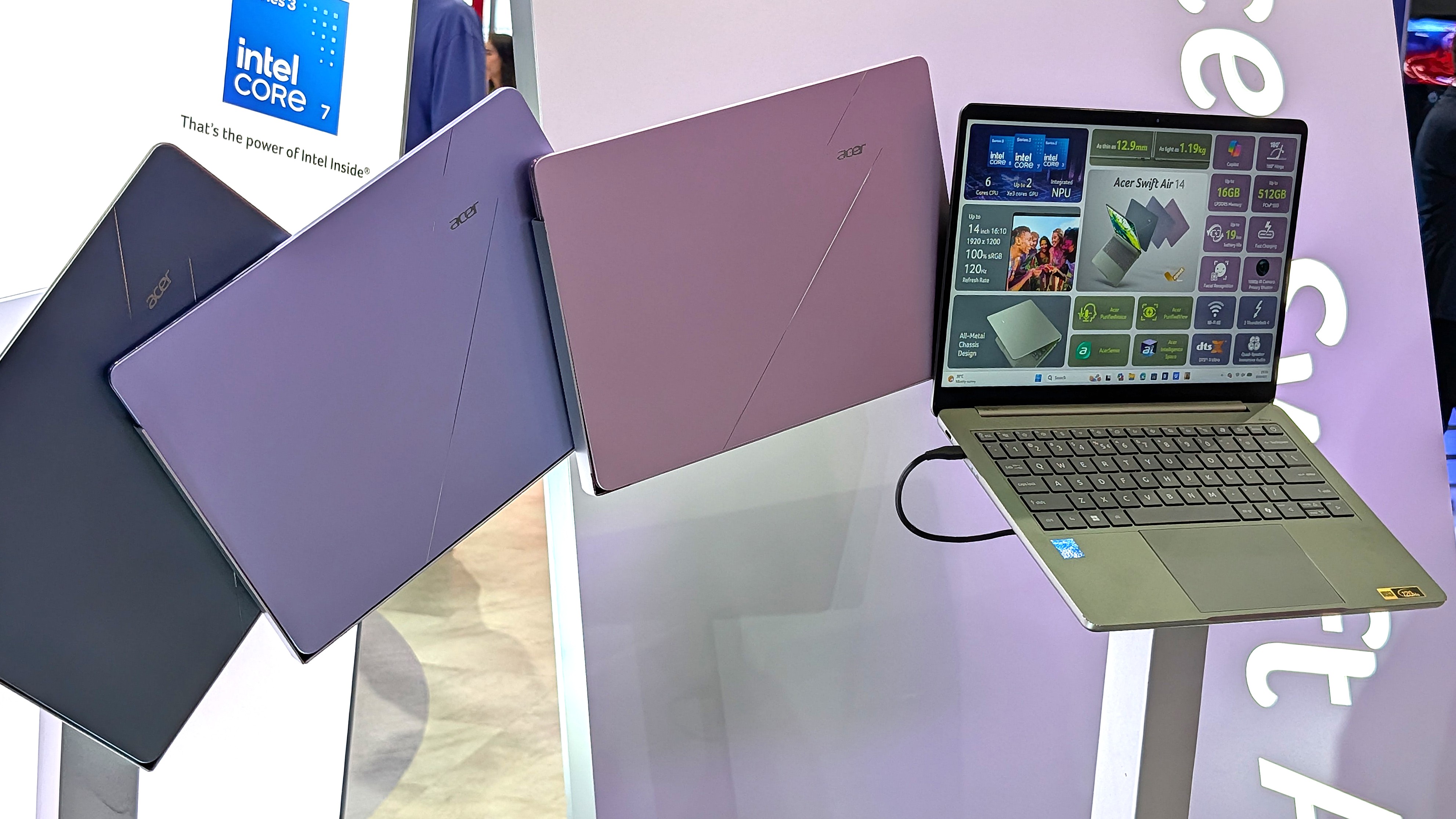
Showing off the Acer Swift Air 14's color options. (Image credit: Windows Central / Zac Bowden)
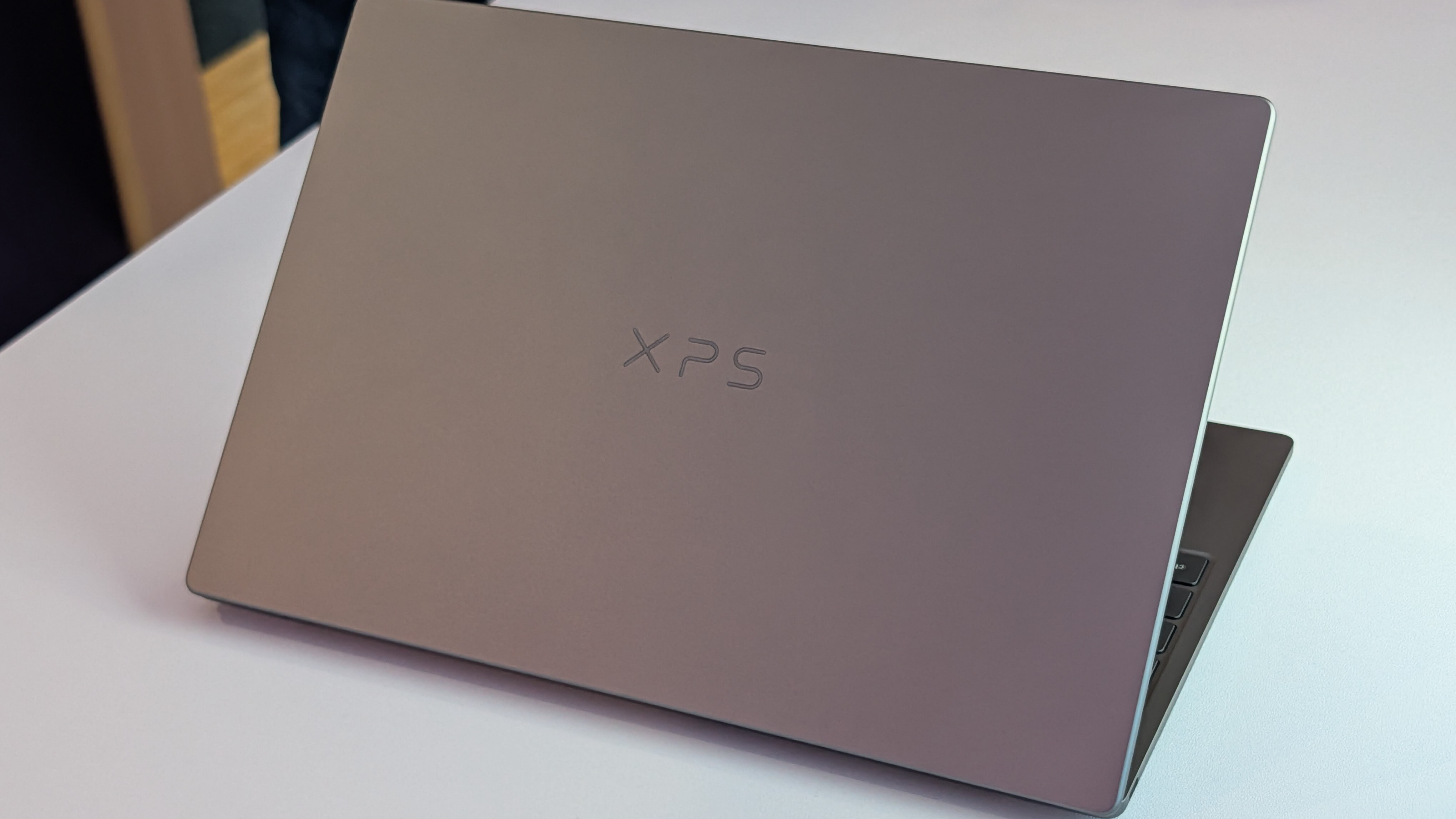
One major feature that sets these budget laptops apart from other PCs in the same price range is their aluminum frames. These are laptops with a truly premium feel despite their budget pricing.
It's a beautiful laptop, complete with a metal enclosure that feels premium to touch, and a large trackpad and excellent keyboard that make using the device feel great.
Zac Bowden
Dell offers two colors — Storm or Sky — for its XPS 13, while Acer offers Sage Green, Frost Blue, Blossom Pink, and Lilac Purple colors for a bit of extra expression.
The Swift Air 14 is the larger of the two laptops due to its 14-inch screen. It's still only about 12.36 inches wide (basically the size that 13-inch laptops used to be), and it weighs in at just 2.75 pounds (1.25kg).
The XPS 13 has a width of 11.69 inches and weighs in at 2.2 pounds (1kg), which is considerably lighter. I'd say that both of these laptops are extremely portable, and there's a difference of just 0.1 inches when it comes to thickness.
The laptops feel premium, and that's really what matters with such affordable devices. Bowden, too, went hands-on with the new XPS 13, stating:
The new XPS 13 doesn't cut any obvious corners to reach its new $699 price point. It still feels every bit as premium and nice to use as the $1,000 XPS 13 before it. This would be like if Apple made the MacBook Air a $699 laptop, instead of building a cheaper MacBook Neo.
Zac Bowden
TL;DR: Both laptops have a premium design and build quality, and they're both relatively thin and light. Stick with the XPS 13 if you want to be as mobile as possible, though the Swift Air 14 isn't far behind.
Touchpads and keyboards don't suffer from budget pricing
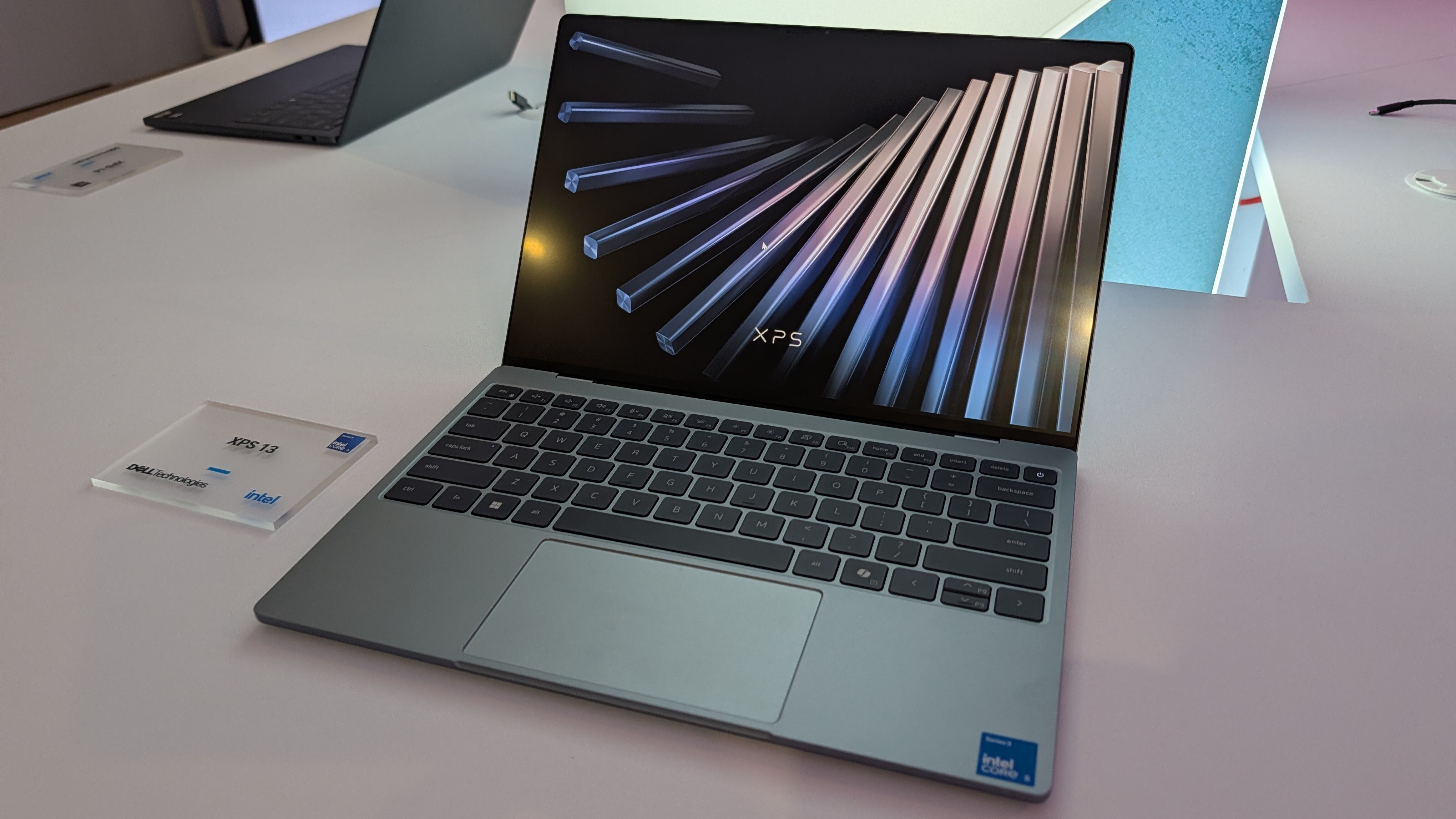
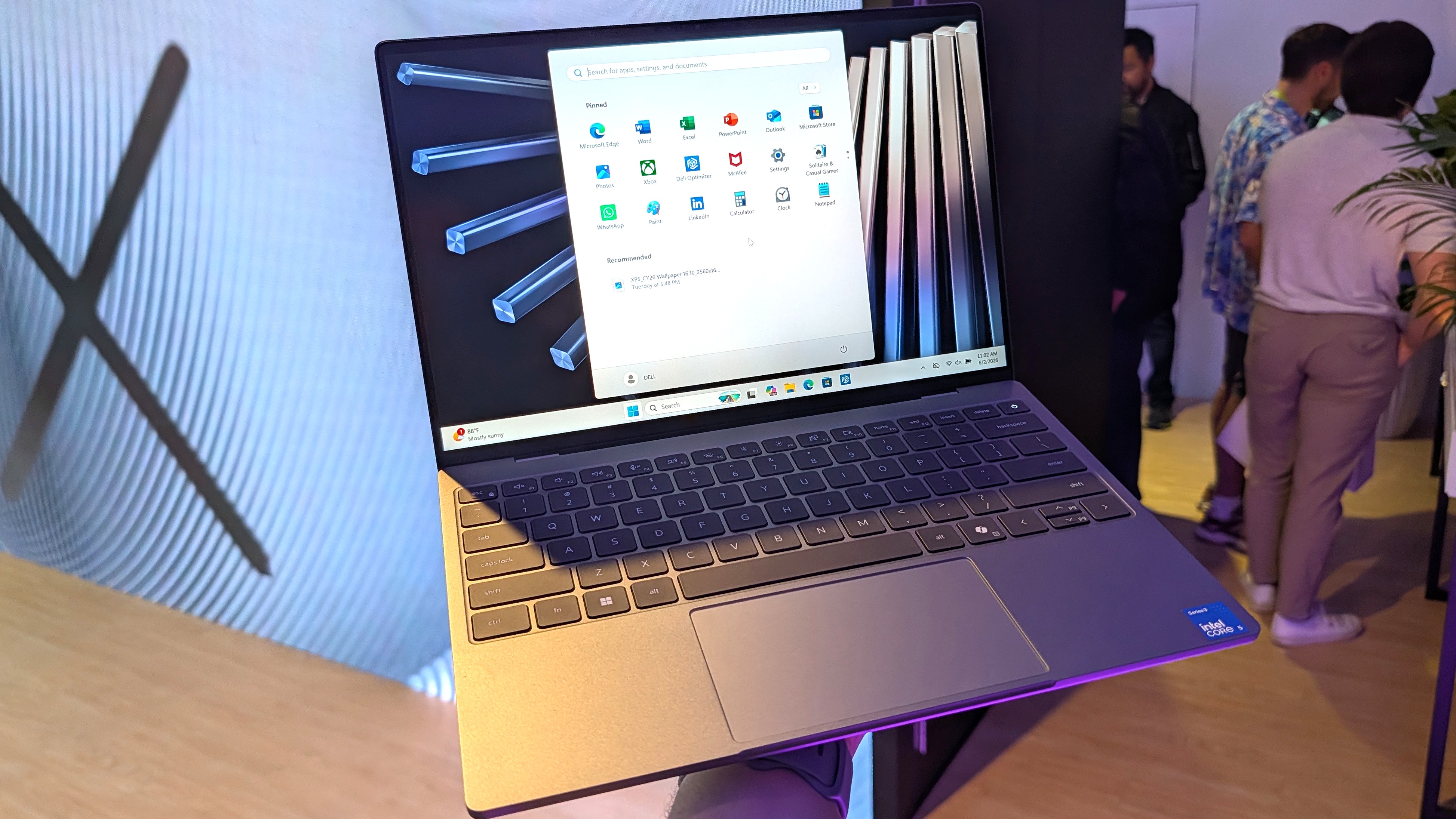
A closer look at the XPS 13's backlit keyboard and mechanical touchpad. (Image credit: Future)
As I mentioned, these laptops don't feel like they cost $699. Zac Bowden and I tested them both while we were at Computex, and it's clear that both brands put a lot of work into their keyboards and touchpads.
Dell skipped its lattice-free keyboard design on the new XPS 13 for a more traditional feel, and its mechanical touchpad (no haptics, unfortunately) is large and has a satisfying click.
In the same vein, the Swift Air 14's keyboard has decent travel and a comfy feel. The touchpad, again without haptics, is large and tracks well. You'll ultimately have to decide for yourself which setup you like more, but I can say that neither laptop skimps on the backlit keyboard and mechanical touchpad.
TL;DR: Your final decision will likely come down to personal preference, but I can say after testing both laptops that neither is likely to disappoint in terms of touchpad and keyboard.
Port selection might be the weak spot for some users
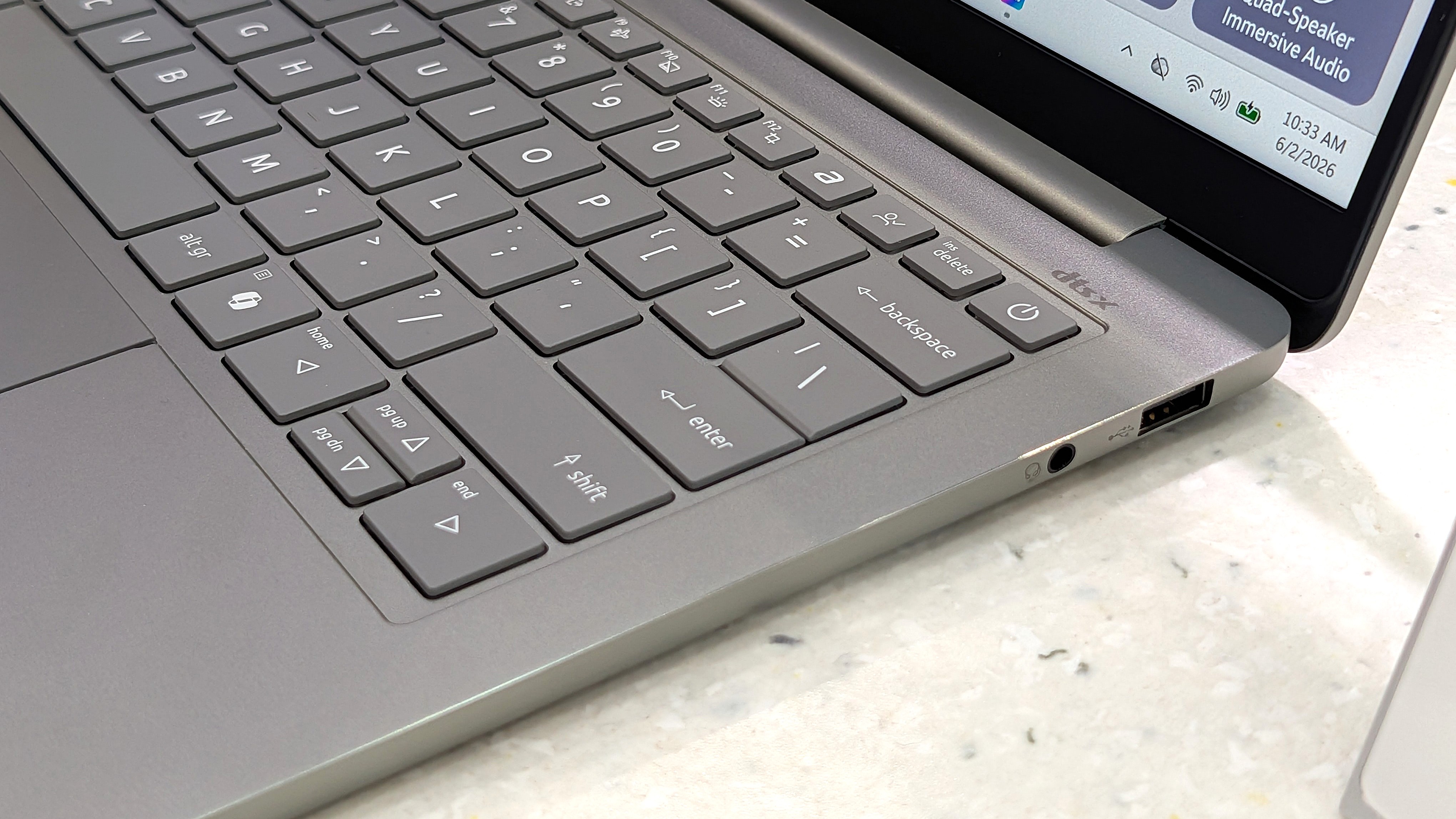
A look at the Swift Air 14's USB-A port and 3.5mm audio jack. (Image credit: Zac Bowden / Windows Central)
The XPS 13 with Intel's Wildcat Lake chips features dual USB-C 3.2 (Gen 2) ports. If you spend more on a model with an Intel Panther Lake CPU, you'll get two Thunderbolt 4 ports instead.
The Swift Air 14 is a lot better on ports, with dual Thunderbolt 4, one USB-A 3.2, and a 3.5mm audio jack.
As for wireless connectivity, the XPS 13 has more modern Wi-Fi 7 connectivity paired with Bluetooth 6.0. The Acer Swift Air 14 falls back to Wi-Fi 6E and Bluetooth 5.3. Is this a difference an average user will notice in day-to-day computing? Absolutely not.
TL;DR: Dell's most affordable XPS 13 models don't come with Thunderbolt 4, and there's no 3.5mm audio jack. Acer's Swift Air 14 comes with dual Thunderbolt 4 by default, plus it adds USB-A and an audio jack.
Both PCs have IR cameras for Windows Hello
The bezel above the Swift Air 14's display houses a 1080p webcam with IR capabilities for Windows Hello. (Image credit: Windows Central / Zac Bowden)
Something you don't see very often in budget laptops is an IR camera for Windows Hello. This additional hardware built into the above-display cameras unlocks facial recognition for Windows 11, adding an invaluable layer of security for any type of user.
Both laptops have a regular 1080p camera for video conferencing and stills. We had limited time to test cameras during our hands-on, but each seemed to do a good job of handling varying lighting conditions.
TL;DR: There's not much difference here between the 1080p webcams with IR sensors for Windows Hello facial recognition.
Dell's XPS 13 has a superior display compared to the Swift Air 14
A bright display with a 2.5K resolution comes standard in the XPS 13.
Measuring 13.4 inches with a 2560x1600 (2.5K) resolution, the XPS 13's display doesn't fail to impress. It's crisp, it has plenty of brightness at a 500-nit maximum, and an anti-glare finish makes it easier to see in bright conditions.
It features Dolby Vision certification for HDR content, it has a 30Hz to 120Hz variable refresh rate, and Dell clocks it at 100% DCI-P3 color gamut coverage.
The only aspect I can see Acer winning with the Swift Air 14's display is sizing. It measures 14 inches, giving some users a much-needed boost for multitasking. It also hits 100% sRGB color.
Another shot of the XPS 13's 2.5K display. (Image credit: Zac Bowden / Windows Central)
It does, however, have a lower 1920x1200 resolution and less brightness at 350 nits. It's unclear if the Swift Air 14's display has a variable refresh rate: it's listed as 120Hz only. That's a nice smooth picture, though the variable aspect can help conserve battery life.
TL;DR: The XPS 13's higher resolution, variable refresh rate, and Dolby Vision certification make it an attractive option, though some users will prefer a full 14 inches from the Swift Air 14 for easier multitasking.
Intel Wildcat Lake CPUs help keep prices down
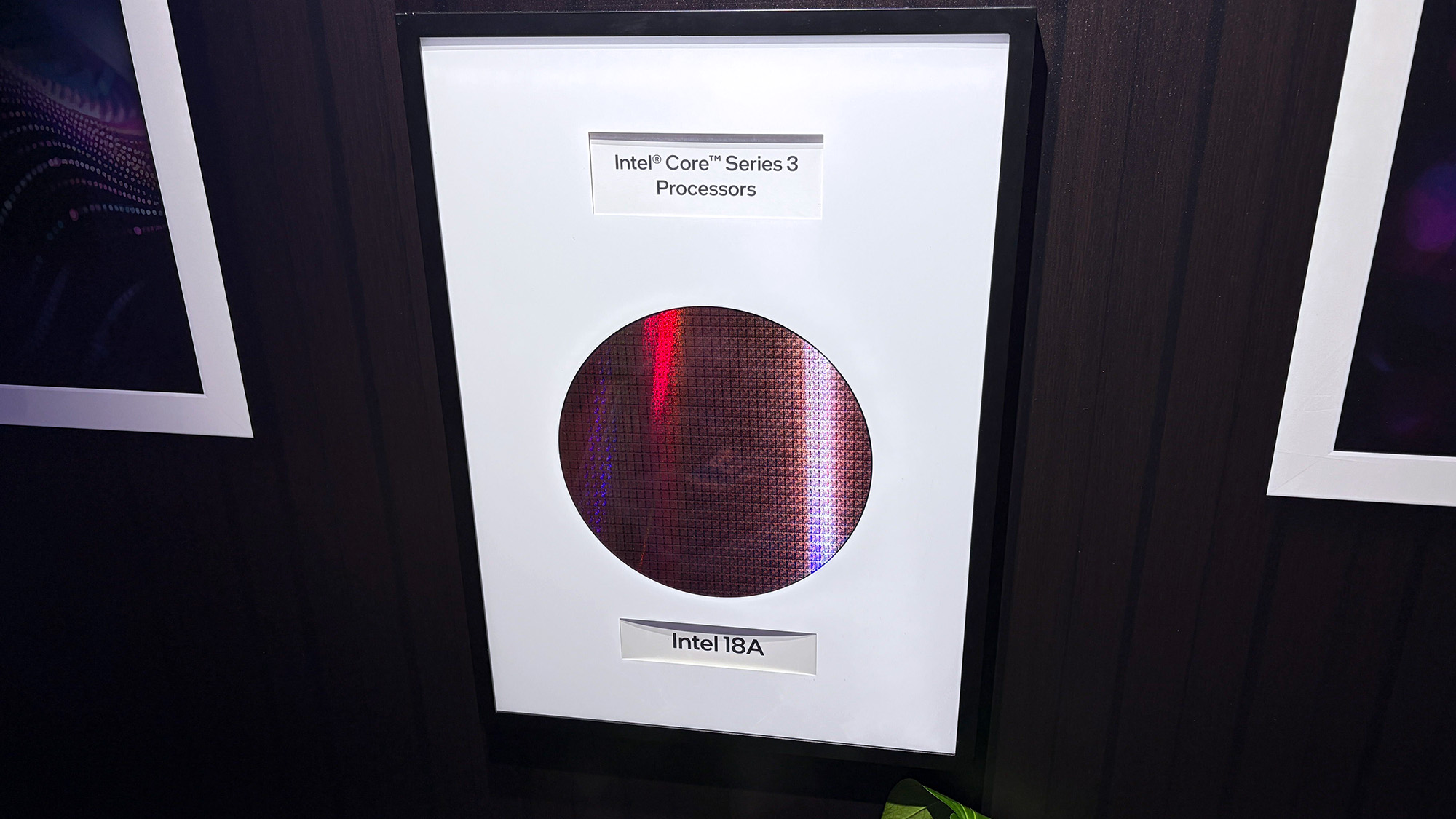
The Intel Core Series 3 wafer used to make the Wildcat Lake chips in the XPS 13 and Swift Air 14. (Image credit: Cale Hunt | Windows Central)
Dell's Wildcat Lake Core Series 3 processors are driving both of these $699 laptops, so I don't expect there to be much difference in performance. However, there is some nuance.
The XPS 13 is currently only available with a Core 5 320 chip; a Core Ultra 7 355 chip from the more powerful Panther Lake series is expected to arrive at some point in the future. If you want the most power possible and don't mind spending more, this is the configuration I'd hold out for.
I'm expecting the Swift Air 14 to launch with the same Core 5 320 CPU in its $699 model, but Acer also lists a Core 7 350 for those with a bit more to spend. Both laptops come with 8GB or 16GB of LPDDR5 RAM, and only Dell plans to release a 32GB config for its upcoming Intel Core Ultra model.
TL;DR: The use of Intel Wildcat Lake CPUs in both laptops means performance should be close. If you want more power, only the XPS 13 is expected to offer an Intel Panther Lake alternative.
Acer's Swift Air 14 has a much larger battery capacity, but Dell has a secret weapon
The Swift Air 14 hides a sizable 70Wh battery in its slim chassis. (Image credit: Zac Bowden / Windows Central)
The Intel Wildcat Lake chips used in these laptops are geared to offer exceptional battery life.
Dell says its XPS 13 with a 52Wh battery can go for up to 17 hours when streaming video, and that's boosted by the use of 800ED battery cells that hold more power while taking up less physical space.
Acer's Swift Air 14 has a larger 70Wh battery, though it doesn't have Dell's extra-dense cells. This results in an estimated 19 hours of video playback, or 16 hours of web browsing, according to Acer.
We'll have to perform our own tests on these laptops to discover the true battery life, but I can say that both PCs should be able to get through a day of work or study without needing a charge.
TL;DR: The Swift Air 14's larger battery capacity is offset by Dell's use of denser battery cells. Both PCs should be able to go for most of a day without needing a charge.
Dell XPS 13 vs. Acer Swift Air 14: Which should you buy?
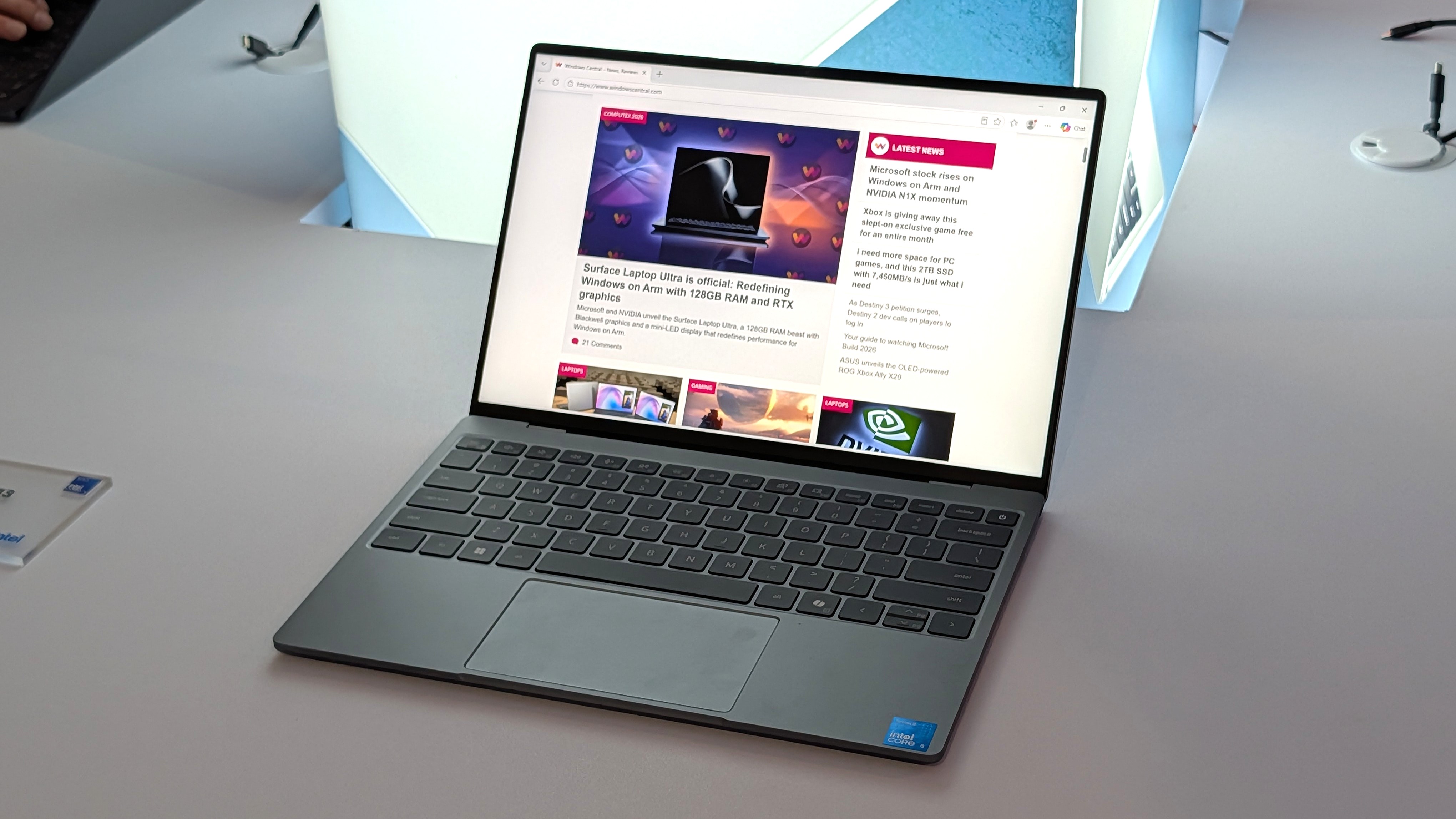
Dell's new XPS 13 is available starting at $599 for students, $699 for everyone else. (Image credit: Future)
Which laptop you ultimately choose should come down to several personal preferences. Want a larger display even with a lower resolution? Acer's laptop is the way to go. Want a larger battery capacity? The same goes.
But Dell's XPS 13 drops its price to $599 if you're a student, which makes it a particularly spectacular deal. Combine that with a higher-res 2.5K display, snappy performance, and long battery life, and you have a PC that's tough to beat.
The incumbent
Dell
XPS 13 (DX13260)
Dell's XPS 13, starting at $599 for students and $699 for everyone else, kicked off a new market sector of affordable-but-premium Windows 11 PCs. It's not likely to be usurped by the new Acer Swift Air 14 unless you need more ports, a larger display, or more expressive color options.
The Challenger
Acer
Swift Air 14 (SFA14)
Acer's Swift Air 14 arrives to challenge the $699 affordable-but-premium PC market, and it should be the right choice for those who want a larger 14-inch display, more color options, and a more generous selection of ports.
Join us on Reddit at r/WindowsCentral to share your insights and discuss our latest news, reviews, and more.
Windows 11 will soon lose a way to log in to a PC. A recent update removes the option to set up a new picture password. If you already have a picture password on your PC, you can continue to use it, but the feature is being phased out.
Microsoft is on a mission to push the world beyond passwords. The tech giant generally recommends a PIN, facial recognition, or a fingerprint to log in to Windows 11. Passkeys are often the top recommendation for authentication, though you cannot log in to a Windows 11 PC with a passkey. But back in the days of Windows 8, Microsoft introduced the option to unlock your PC using a picture.
That feature, which has remained available across Windows 10 and Windows 11, allows you to unlock your PC with a series of touches or gestures, like tapping the eyes of a smiley face then swiping across the face's mouth.
You could use a combination of three types of gestures as part of a picture password: circles, straight lines, or taps.
Picture passwords were a fun way to show off the touch-centric nature of Windows 8, but they aren't as secure as a passkey or even a strong password.
Since people often pick gestures or taps around key objects, hackers can sometimes guess the gestures needed to unlock a PC. People can look at the smudges on your screen to guess where you touch frequently.
If you have a picture password set up now and want to continue to use it, you need to make sure to leave it set up. Once you remove it or disable it, you will not be able to set up a picture password.
"To help enhance security, picture password is no longer available for new enrollment. Users who have already configured a picture password can continue to use it to sign in to Windows. If a picture password is removed, disabled, or not previously configured, it cannot be set up again. We recommend using Windows Hello PIN, facial recognition, or fingerprint recognition where available."
That change arrives alongside the July 2026 security update, which is now rolling out to Windows 11.
Join us on Reddit at r/WindowsCentral to share your insights and discuss our latest news, reviews, and more.
I highlighted Dell's discount on the XPS 14 recently, and the deal has since gotten even better. I didn't think I'd see a laptop with these specs at this price in 2026. 32GB of RAM, 1TB of storage, and 3.2K OLED touch display for $1,549.99 is, quite frankly, ludicrous.
My only concern is that the laptop dropping in price quickly suggests Dell is almost out of stock and wants to clear out 2025 models to push the newer XPS 14 laptops from this year.
This premium laptop has a 3.2K OLED touch display, 32GB of RAM, and a gorgeous design that takes advantage of every millimeter available. It's one year old, but it's still an excellent laptop in 2026.
Note that the review of this laptop was from before the Dell 14 Premium was rebranded to the Dell XPS 14.
The XPS 14 is a pretty laptop built for productivity. At one time, there were a bunch of variations for this PC, but the options have been trimmed down as stock dips. The 3.2K OLED touch display in this model stands out, especially at this price.
The XPS 14 has a zero-lattice keyboard that packs large keys into a relatively small laptop body. The haptic touchpad of the XPS 14 is invisible, creating a clean look when the laptop is open.
That touchpad can take some time to get used to, but it was praised by Tom's Guide in their review:
"The keys have good travel distance and just the right amount of resistance when pressed. Once you get used to how tightly packed they are, typing is a breeze. And now that I’m used to it, the invisible touchpad doesn’t bother me. As before, I like the haptic feedback the touchpad produces, which also helps me know its location."
While I love the design of the XPS 14, it has battery life that's just OK. Our colleagues at Tom's Guide got 8 hours and 16 minutes in their testing. For context, 10 hours of battery life is considered "pretty good" in that same test.
The discounted XPS 14 model I highlighted retails for $2,899.99, but it is from last year. Many laptops from this year with 32GB of RAM and 1TB of storage cost well over $2,000. The new XPS 14 with those specs is $2,119.99 right now, and that's after a $630 discount. That version also has a 2K non-touch screen rather than the 3.2K OLED touch screen seen in the XPS 14 (2025) highlighted here.
FAQ
Is the Dell XPS 14 (2025) still worth buying in 2026?
Yes. While it is a year old, the XPS 14 featuring 32GB of RAM, a 1TB SSD, and a 3.2K OLED display is more than capable of handling heavy multitasking, content creation, and everyday workloads. At $1,549.99, it outperforms similarly priced 2026 mid-range laptops in both build quality and display specs.
What is the difference between the XPS 14 and the Dell 14 Premium?
They are the exact same laptop! Dell briefly adopted the "Dell 14 Premium" naming convention for its 2025 lineup before reverting to the "XPS" branding and retroactively updating model names.
Can I upgrade the RAM or storage later on?
The 32GB of RAM is soldered to the motherboard and cannot be upgraded after purchase, which makes the current deal a great way to future proof your laptop.
Join us on Reddit at r/WindowsCentral to share your insights and discuss our latest news, reviews, and more.
This was done because, according to Microsoft's email notice sent to Australian players, and I quote, "As part of our compliance program in Australia, beginning late August 2026, adult XBOX accounts must verify their age to be able to access apps and games rated 18+ on the Microsoft and XBOX Store. Access to such content may be restricted unless you verify your age. Apps and games you already own won’t be affected. Select below to verify now. Please ignore if you’ve already verified.”
Players consigned to this must verify their age either through Email-based age verification, facial age estimation by taking a self-portrait using their camera, providing credit card details, or providing government-issued ID like a driver's license, passport, national ID, or residence permit.
Despite every effort on our part, the Australian Classifications Board has denied “Halloween: The Game” a rating. The denial was not based on the presence of the iconic slasher, Michael Myers, or the outstanding kills that can be performed in the game, but rather the presence of…August 9, 2026
Around the same time this happened, Australia had banned "The Halloween: The Game", an upcoming Xbox horror game based on the iconic Halloween movie franchise because of the presence of a controlled substance, rather than the violent murders that occur in the game.
A bleak glimpse at the digital future?
Sigh...I long for the simple days of the OG Xbox when we didn't have to worry about any of this madness. (Image credit: Windows Central | Jez Corden)
Now, Australia banning a horror game is nothing new, as the country has a long history of censoring games or outright banning them in the past, such as the Grand Theft Auto series and South Park: Stick of Truth.
Although some games do manage to get released under the "Adults Only" rating, such as Hotline Miami, Outlast 2, and We Happy Few, to name a few.
However, what is concerning is the age verification enforcement, as we're seeing more Western countries like Australia, the UK, and several states in the US implementing it across many websites, online services, and video games, bottlenecking what we can or cannot access.
Either way, between this and the ongoing memory crisishiking the price of Xbox Series X|S and other related tech, the gaming industry is in a volatile and chaotic state right now that I pray we recover from soon somehow because, if things keep going the way they are...I think it may be time to invest in a new hobby we actually have ownership and freedom over.
Join us on Reddit at r/WindowsCentral to share your insights and discuss our latest news, reviews, and more.
If you use uBlock Origin on Microsoft Edge, it's time to start looking at alternatives. Microsoft has shared a timeline for the transition away from Manifest Version 2 (MV2) extensions. That transition will end support for uBlock Origin on Edge, alongside a small group of other extensions.
Microsoft aims to fully transition consumers away from MV2 extensions by the end of 2026. Some users will start seeing notices about the change this month (August 2026). Microsoft will then gradually turn off MV2 extensions by default over the coming months.
Enterprise users will be transitioned away from MV2 extensions in 2027.
It's not a surprise that MV2 support is being discontinued. In fact, the surprise is that we finally have a confirmed date for the end of support. Microsoft has had MV2 support on the chopping block for ages but had not committed to a firm cutoff date.
MV2 and its replacement Manifest Version 3 (MV3) are extension platforms that developers can build upon. There are technical differences between the two, the most notable is that MV3 limits the WebRequest API, which allows ad blockers to dynamically intercept and block network requests before they load.
Since Edge is built on Chromium, which is Google's open-source engine, Google pushing MV3 affects Microsoft Edge.
This shift to MV3 is not arbitrary; there are practical benefits to the switch. MV3 is more secure and provides better performance than MV2. Some believe the transition to MV3 is being pushed to give Google more control over ads on the web, though that is up for debate.
The end of MV2 support will affect several extensions, but the biggest one is uBlock Origin. I suspect few would care about the end of MV2 support if uBlock Origin were unaffected.
Microsoft states that 95% of the top MV2 extensions in the Edge Add-ons store have been moved to MV3. There are only 58 MV2-based extensions in the Edge Add-on Store at all. Only three of those MV2-based extensions do not have MV3-based equivalents available.
There is a version of uBlock Origin that works with MV3, though it's uBlock Origin Lite. That extension lacks some of the granular controls of the full version. It also works differently in the background, hiding most content rather than preventing items from loading.
Many people could replace uBlock Origin with uBlock Origin Lite without issue, but power users could struggle with the change. Some people plan to switch browsers before changing ad blockers.

 Login
Login