Reading view

Open source Euro-Office productivity suite to launch June 9

The Euro-Office open source productivity app suite will be available with the first stable release of the software on June 9. 

Euro-Office was unveiled in March with the aim of providing a modern, open source alternative to Microsoft and Google software for European organizations increasingly wary of a dependence on US-based suppliers. 

Euro-Office consists of four browser-based applications: a document editor, spreadsheet program, presentation tool, and a PDF editor, with each application enabling collaborative document editing. It supports Microsoft Office file formats DOCX, PPTX and XLSX, as well as Open Document Format (ODF) files such as ODS, ODT and ODP.

The software is intended to be integrated into collaboration solutions such as file-sharing platforms, online wikis or project management tools, according to Nextcloud, one of several European organizations involved in the Euro-Office project.

Nextcloud will add Euro-Office to its Nextcloud Office next month, where it will be available as an “equal option” alongside an existing open-source productivity suite based on Collabora’s software, Nextcloud CEO Frank Karlitschek said in a briefing. Pricing will depend on factors such as use case and deployment scale, but will sit in a similar range to the Collabora version.

Nextcloud plans to add desktop and mobile apps “later this summer,” said Karlitschek; these will save documents locally and sync to cloud storage tools that customers choose.

German cloud hosting provider Ionos will also integrate Euro-Office into its Nextcloud Workspace subscription at no extra cost, and as an optional paid add-on to its HiDrive and Managed Nextcloud subscriptions. (Pricing information was not immediately available.)

Nextcloud and Ionos are currently hiring a “dedicated development team” to work on Euro-Office, Nextcloud said in a blog post Thursday. Other software vendors, including Xwiki and Office.eu, are expected to incorporate Euro-Office into their products in the coming months, too.

Euro-Office is built on the open-source code base of OnlyOffice and distributed under the GNU Affero General Public License v3 (AGPL v3). 

Following the launch announcement, OnlyOffice — which is owned by Ascensio System SIA — alleged in March that Euro-Office violated its licensing terms and infringed its copyright, due to a lack of attribution to OnlyOffice.

Karlitschek said this week that the conflict with OnlyOffice is “now resolved,” following an agreement to provide attribution to OnlyOffice in Euro-Office. “We came to an agreement that the OnlyOffice people required only attribution, that you basically mention that the code is partly based on top of OnlyOffice, and we are happy to do it.”

But an OnlyOffice spokesperson denied a specific agreement had yet been reached. “OnlyOffice has not entered into any agreement with the Euro-Office project,” said Galina Goduhina, commercial director at OnlyOffice. 

“Our licensing framework is clearly defined, and compliance with its terms is not optional,” Goduhina said. “We will continue to assess the situation based on actual use of our technology.

 “This situation goes beyond attribution— it concerns transparency of technology origin, respect for the original developer — and does not meet the standards of responsible partnership we expect,” Goduhina said. “OnlyOffice remains focused on supporting its users, customers and partners and continuing to develop reliable, enterprise-grade document solutions.”

OnlyOffice recently published a blog post outlining its license and trademark policy in more detail. 

A Nextcloud spokesperson said the blog post indicated a change in the OnlyOffice license to “bring it in line” with AGPLv3. 

“We applaud the removal of the conflicting requirements around the trademark, aligning with our opinion and that of the licensing experts in the open source community,” the spokesperson said. “We will adopt their changes as they are being made to the code, of course ensuring the license compliance is preserved. With these changes we consider the matter resolved.”

  •  

Why AI can’t match human creative work

It’s hard for people to tell the difference between AI-generated advertising and writing. So why do they respond better to the human-made stuff?

AI vs. Mad Men

Ipsos, along with faculty members from Syracuse University’s S.I. Newhouse School of Public Communications, just published a unique advertising study. They took 20 real ads from major brands, including Cheerios, Chewy, Febreze, Fiat, H&M, Old Navy, Herbal Essences, Ray-Ban Meta, TurboTax and Visa. They fed the same creative briefs used by the human ad creatives into Google Gemini, then used OpenAI’s Sora to generate fully AI-produced counterparts with no human intervention. 

They showed the ads to 3,000 consumers. Only 25% of AI ad viewers were at least somewhat confident the spot was AI-made, and 40% of all viewers were uncertain either way — suggesting the public isn’t great at spotting ads that are AI generated. 

But here’s the interesting part: While most people didn’t register that ads were AI-generated, they also didn’t respond to them like they did with human-generated ads. They consistently rated human-made work as more eye-catching and more imaginative. 

In other words, people assumed AI ads were made by people, but didn’t particularly like them compared to human-generated ads. And that means human-generated ads performed much better. 

Ads made by people without AI were 14% stronger on short-term sales impact and 17% stronger on long-term brand health.

To me, the data here suggests that while people can’t easily discern the difference between AI- and human-generated content, the AI stuff hits wrong on a subconscious level. And I think that’s happening with AI social posts, AI blog posts and AI slop in general. 

In fact, I’ve noticed it strongly in my own response to AI-generated content. It often looks perfect but bothers me for reasons that aren’t immediately obvious. 

The researchers explained AI’s inability to match human ad creativity by pointing out that AI draws from what already exists, while great advertising breaks new ground. AI can replicate the conventions of advertising, but it can’t transcend them, make a creative leap or engender emotion like people can. 

A broad range of research beyond the Ipsos study suggests that skillful people working with AI tools will always outperform AI alone, and often outperform people not using AI tools. Ipsos’ advice? Ad agencies should keep people at the center of brand storytelling and emotive assets. 

Can AI write right?

Another recent study looked at written web content and compared how human-written articles “performed” on search engines compared to AI-generated content. Semrush analyzed 42,000 blog pages across 20,000 keywords, ran every single one through GPTZero’s AI detector, and cross-referenced the results with actual Google Search results. It also surveyed 224 search-engine optimization (SEO) professionals about their AI habits and beliefs.

They found a disconcerting disconnect between what SEO people believe and what is actually true. Some 72% of SEO professionals who use AI content say it performs just as well or better than human-written content in search rankings. But it turns out that human-generated posts strongly outperform AI-generated. 

Content classified as purely AI-generated appeared in the top spot in search result just 9% of the time. Content classified as human-written was there 80% of the time.” That’s a roughly 8-to-1 advantage. (Note that the coveted top link in search results typically gets around one-third of the clicks.)

For lower page-one positions — from the fifth position down (which get relatively few clicks) — AI- and human-generated posts perform more similarly. (The researchers also found that when people write posts with a little help from AI, their posts rank better much than AI-only content.)

Those Semrush results are consistent with previous research. 

  • NP Digital conducted an oft-cited study two years ago that found that human-written content ranked higher 94.12% of the time on Google than AI content. 
  • A Graphite/Common Crawl analysis found that 86% of articles ranking high on Google Search are human-written (only 14% AI-generated), and ChatGPT and Perplexity cite human-written articles 82% of the time (only 18% AI). 
  • On LinkedIn, more than half of site’s long-form content in 2025 was classified as “Likely AI” by Originality.ai. Engagement on verified human content was 61% higher than the AI-marked posts. 

Note that engagement performance varied by industry; that 61% result is an aggregate average across all industries. Ironically, in the category of “Leadership & Inspiration,” AI posts outperformed human posts by 75%

The absurd lesson here: If you want to be a thought leader on LinkedIn, don’t lead with your own thoughts. 

Quantity vs. quality

What all this research boils down to is that human-generated content (with or without help from AI) attracts far more traffic and higher engagement than AI-generated content. AI content is essentially invisible in high-value channels and while it might be high in quantity, it’s low in quality where it really matters — with reach and influence. 

As with the ad creative study by Ipsos, the conclusion of all this research is the same: People (and search engines) respond much better to creative content produced by people compared with AI-generated content. 

In short, AI is great at “flooding the zone” at high speed and low cost — and there’s a ton of AI-generated content out there. A quick check reveals that: 

  • More than half of all written content on websites is now AI-written.
  • Almost half of all music uploaded is now AI-generated.
  • Nearly one-quarter of all videos uploaded are AI-generated or manipulated.
  • Around 40% of all podcast episode uploads are AI-generated.
  • More than 70% of all images uploaded to social media may be AI-generated or manipulated.
  • And wll over half of all social posts are AI-generated

The specific numbers are my best estimates, and they’re changing fast each month. The takeaway is that AI-generated content is exploding in volume. 

But it isn’t reaching people the way human-generated content does. Take podcasts, for example. While roughly 40% of new podcast episode uploads are AI-generated, that 40% captures less than 1% of the listening hours. Of the top 100 podcasts, zero are AI-generated.

A clear picture is emerging about the use of AI for content generation. AI is great for churning out a lot of content at low cost. It can be good for some kinds of content — if a skillful person directs it. And AI can be a helpful tool for content creators. 

But when it comes to direct comparisons between people and AI, it’s clear that the winning content — the stuff with the best “performance” on search, best reception by people and the most engaging — is always human-generated. 

  •  

Q&A: Box CEO embraces shift to ‘headless’ software in the agentic AI era

The rise of generative AI (genAI) technology has prompted a growing debate about the future of software-as-a-service (SaaS) business models. 

Some of the fears are overblown: enterprises are unlikely to vibe-code their own applications to replace their SaaS suppliers anytime soon, while software vendors have yet to see per-seat sales fall off due to mass automation of white-collar jobs. (In fact, some now predict the opposite will happen.)

At the same time, AI has the potential to change the way work is carried out, with AI agents empowered to interact with software applications on behalf of users. For software vendors, that could mean a future where applications are accessed less through traditional user interfaces as AI agents connect via APIs. 

It’s an inevitable shift, says Box CEO Aaron Levie, and one that requires software vendors to adapt their existing products and business models to prepare for agent workflows. 

Computerworld recently spoke with Levie about how Box — and other SaaS vendors — can adapt as agentic AI threatens to upend existing business models. (This interview has been edited for clarity.)

Discussion about a “SaaS-pocalypse” has died down recently, and software stocks have rebounded. At the same time, it seems clear the adoption of AI agents could change how workers interact with software. How can companies like Box adapt to this new environment? If AI increasingly becomes the interface users interact with, where does the long-term value lie? “People are realizing that you’re not going to rebuild a lot of the systems that people were kind of claiming you would [with vibe-coding]; it just doesn’t make sense. So, that part is sort of dissipating. However, headless software and the ability to use your systems via AI is obviously going to happen, there’s no question. 

“So, I think the conversation is shifting from ‘AI disrupts software’ to ‘AI is going to be the biggest consumer and user of software going forward.’ And for that, the main thing is: can you have a business model that allows you to actually monetize the consumption of those agents using your underlying tools? We’re fortunately built for that; we’ve had an API business model basically forever, so we’re well prepared.

“There’ll be some companies that have to pivot a little bit more significantly over time — there’s no question that will happen in a bunch of organizations. We’re big believers that AI will be the biggest user and interface for the future of software.”

How important is it for Box to retain that interaction with human workers, rather than becoming more of the underlying layer AI agents interact with? “I would say that we’re totally comfortable with that shift. When you have AI agents, you still need a place to be able to secure the data — you need to protect it, you need to govern it, you need to make sure you know who’s accessing it. None of that changes in the world of AI. In fact, if anything, it actually increases. 

“We don’t really care if it’s an agent using the data, an application using the data, a person using the data — we want to be the best content management system that connects your information to all of those applications.”

How does that perspective feed into your product development and roadmap “It basically means that we need to be a headless platform. That means customers need to be able to access their data via MCP inside of ChatGPT, inside of Claude, inside of all these systems. It means that we care as much about our APIs and access to those APIs as we now do our user experience. We have to make sure that both of those environments are as simple and clean as possible, and as usable as possible.

“It’s basically as if there’s another constituent now in our ecosystem that we have to go and pay attention to.

“We need to be the best place to manage your content, and then wherever you want to work with it from, we’re totally fine. So, if you want to work with your files from your desktop, from Claude Cowork, from ChatGPT Codex — we just want to make sure we are universally accessible across every single place that people want to work with their data.”

Could that mean changes around how you price access to your software? Do you expect a shift to usage-based pricing? “Not as much as is probably being talked about online, because seats still make sense for the employee and the end user. Even when an agent is doing work on your data, it’s still you invoking that agent. It sort of makes sense that the seat is still attached to the underlying end user employee, even though an agent is going to be doing work on your data.

“We think the seat model will be quite durable over time. What this does is just add another business model, where you have agent-only interactions; those will be primarily coming through the API, and then that will be a consumption model.”

What are your thoughts on outcome-based pricing? Is that something you look at? “We do one thing that’s close to that — we have the Box Agent that does things like data extraction. It extracts your data and we charge based on the number of pages that you want to extract data from. So there are some things that approximate outcomes, but not at the level of resolving a customer service ticket or something like that, that maybe has been talked about. We’re probably going to be more aligned to…the amount of compute that that is used.”

What are your conversations with customers around moving to a usage-based model? A lot of organizations are used to fixed monthly subscriptions — can metered AI agents become problematic? “I think it definitely can be. This is sort of a common tension in general.… We saw this with cloud computing, for instance. The difference with cloud computing is that cloud was relatively centralized, versus the use of AI and tokens are much more diffuse. That’s a big difference that companies have to think about.

There’s always this tension: you can pre-buy and have a subscription, but then you might be overpaying for periods where you’re not using it as much. Or you can only pay for what you use, in which case you might have some volatility in the pricing of what happens.”

How are customers progressing in adopting AI agents — particularly, the move from pilot projects to production. What are some of the biggest barriers to wider deployment of agents? “We’re very much moving from coding agents to the rest of knowledge work: this is the jump that’s starting to occur. In that, one of the big questions and challenges is how companies get agents the right context and information to work with — how do they enable agents with the right level of constraints in their organization from a security and compliance standpoint? This is our kind of reason to exist, and what we’re helping our customers on.

“Overall, it’s just a transformational moment in the enterprise. Every customer that I talk to, every dinner that we have with customers, every CIO meeting I’m in, every CEO meeting I’m in, it’s all about agents.

“Agents have thrown the whole world into this kind of dynamic period of, ‘What does the shape of your organization look like? What’s the future of a manager versus an individual contributor? What are the workflows that you can go and execute on?’ There are so many different ways that this is starting to change.”

You were part of another major industry transition with the adoption of cloud computing. Are there similarities you see or major differences that customers can learn from? “The big difference between [them] is that, with cloud, you could centralize the deployment of and management of.Cloud really only affected 3% of your organization that was moving from the data center to the cloud, and then every employee got better products and experience as a result of that. The change was really kind of fairly concentrated. AI affects every single employee in the company. It’s a radically different type of transformation of what work looks like.

There are only so many analogies you can make to cloud before quickly you realize, no, this is actually a different transformation. Maybe it’s even closer to the PC, in the sense of every single worker has to change what they’re doing to be productive. It’s not a technology delivery shift, it’s a fundamental reworking of every workflow in the enterprise. And so that’s I think what most companies are going through right now.”

  •  

Total Android recall: Never lose an important notification again

Google’s shiny new Android 17 update may be on the brink of making its way out into world, but one of the most consequential Android notification upgrades I’ve seen in ages is actually available for anyone, on any device, this instant.

It’s one of those things you don’t even realize is missing — and awkwardly has been, all this time — until you have it in front of you and see just how helpful and at times even invaluable it is.

And that’s the ability to have any or all of your notifications saved and restored whenever you restart whatever Android device you’re using — so that nothing important gets awkwardly tossed aside, lost, and forgotten, likely without your ever even noticing or being aware of what you’ve missed.

How many potentially important pending alerts have you lost as a result of that reboot trash chute? I couldn’t even begin to count, myself, and am slightly terrified to think of the answer. But with this easy new improvement in place, it’ll never happen again.

And best of all? It’ll take you roughly two minutes, once, to set up and then forget about and just know it’s working on your behalf from that moment forward.

Lemme show ya how.

[Keep the off-the-beaten-path knowledge coming with my free Android Intelligence newsletter — three new things to try every Friday and my Android Notification Power-Pack as a special welcome bonus!]   

Your new Android notification safety net

The secret sauce that makes this sorcery possible comes not from Google itself but from a crafty independent developer who’s been expanding our Android notification smarts for many a moon now.

His app is called BuzzKill. You’ve probably heard me rave about it before, with other noteworthy features and additions it’s introduced over time.

Whether you already have BuzzKill on your device or this is your first time encountering it, though, it’s well worth your while to take note of this new capability that snuck into the app not long ago.

First, a quick primer/refresher on what BuzzKill is, in case you aren’t already familiar: BuzzKill is essentially a way to create Gmail-like filters for your Android notifications. You use it to create simple custom rules for what happens when different types of notifications arrive — in an intuitive “if this, then that”-style form — with all kinds of interesting and advanced options for making your alerts more effective.

The latest addition to the app is an experimental option called, appropriately enough, “Restore after reboot.” And it does exactly what you’d expect: Anytime your device restarts, it automatically swoops in to save any active notifications that fit the parameters you select and then instantly restores ’em back into active status once your phone is back up and running.

Without such a system in place, any notifications that you either hadn’t yet looked at or maybe had glanced at and left pending as a reminder to deal with later would more often than not just vanish entirely — and you’d have no easily visible record of their presence or any real indication that they’d been there at all. That’s a dangerous recipe for forgetting something important, whether it’s an email you intended to engage with, a Slack message you needed to acknowledge, or even a task of some sort that had popped up for you to ponder.

The beauty of the BuzzKill approach to fixing this is that it really is a “set it and forget it” sort of system: You just create whatever rule you want now, get it up and running, and then rest easy knowing it’ll always find and restore any active notifications anytime your device restarts — as Android itself should but for whatever reason does not.

2 minutes to auto-restored Android notifications

All right — here are the specific steps to getting your new notification safety net in place:

  • First, go download BuzzKill from the Play Store, if you don’t already have it.
    • The app costs four bucks as a one-time purchase, which — believe me — is nothing compared to the ongoing value it’ll give you with this and its many other notification-enhancing possibilities.
    • It doesn’t require any unusual permissions, doesn’t collect any form of data from your phone, and doesn’t have any manner of access to the internet — meaning it’d have no way of sharing your information even if it wanted to. 
  • Once you’ve gone through the app’s initial setup and made your way to its main screen, tap on the circular button in the lower-right corner of the screen to create a new rule.
  • On the screen that comes up next, consider which specific sorts of notifications you want to have restored whenever your device restarts.
    • You could always start with any and all notifications and then go back in to refine and limit the rule more once you see how it works. You might eventually want to ask it to avoid restoring alerts from certain low-priority apps — like, say, Google Photos — so that it doesn’t bother bringing back stuff that you don’t actually need.
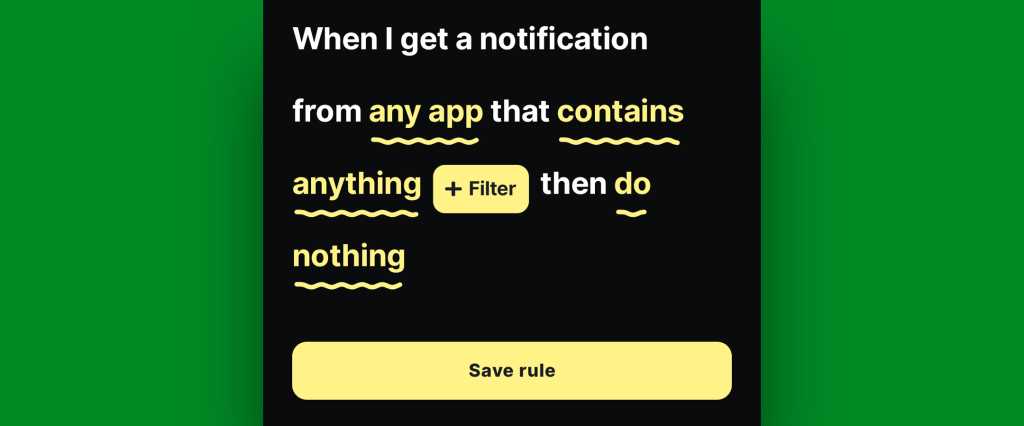
    • If/when you want to create any such restrictions, tap the text that says “any app” to change which apps will be included and/or tap the text that says “contains anything” if you want to restrict based on what specific text a notification does or doesn’t include.
    • If you don’t want to create any limitations and just want all of your active notifications to be restored, at least to start, leave those lines alone and mosey on down to our next step.
Android notification restore: BuzzKill rule
BuzzKill’s simple “if this, then that” formatting gives you lots of flexibility with how and when your rule works.

JR Raphael, Foundry

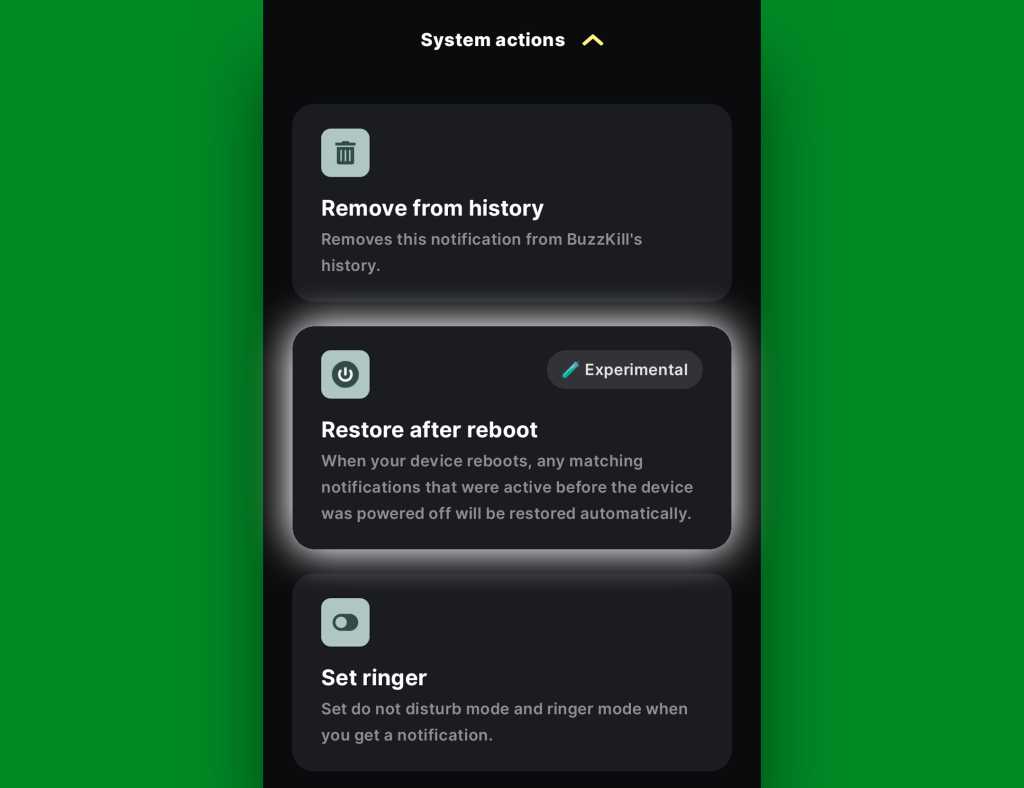
  • Tap the line that says “do nothing” and scroll down to find the “Restore after reboot” option. It’ll be toward the bottom of the list, within the “System actions” section.
Android notification restore: BuzzKill rule active
The “Restore after reboot” action is described as experimental, but it seems to work quite well in my experience so far.

JR Raphael, Foundry

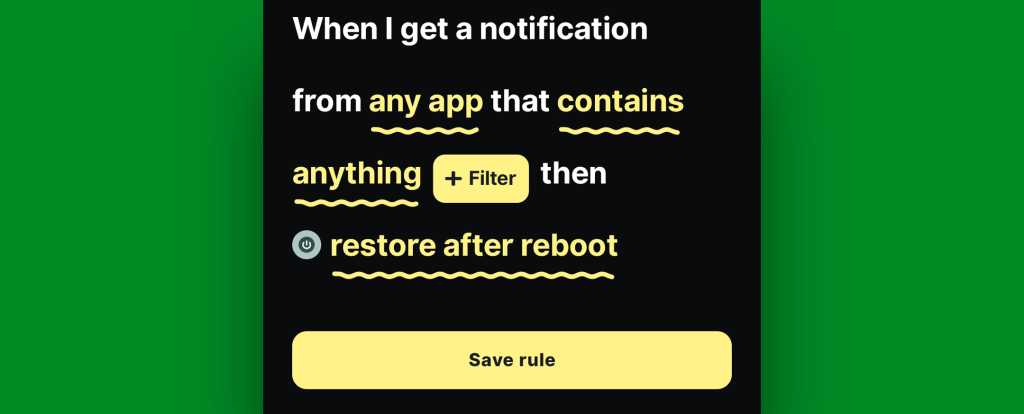
  • Tap that, then tap “Pick action” to confirm.
  • And last but not least, tap “Save rule” to, y’know, save your rule and set it into action.
Android notification restore: BuzzKill rule complete
The BuzzKill notification restoration equation, in its simplest possible form.

JR Raphael, Foundry

You should then see the rule showing up as active and running on the main BuzzKill screen.

Android notification restore: BuzzKill action
Notification restoration — active and ready to spring into action whenever your phone restarts.

JR Raphael, Foundry

And that really is all there is to it: Whenever your phone next restarts, any notifications that were visible and active at the time of the restart should just show back up via BuzzKill as soon as things boot back up. If you want to get fancy, you could even make certain especially important notifications “sticky” in general, so that if you inadvertently swipe ’em away while your phone is running normally, they’ll automatically come right back even in that scenario.

It’s not the flashiest feature you’ll see this year, and it doesn’t have any whizbang AI shenanigans to make it seem headline-worthy by current-day standards. But it will work and quite possibly be one of the most practical, actually helpful additions you make to your phone all year — even if and arguably especially if you only think about it once in a great while, when you notice it working its magic and saving you from losing something significant.

Discover even more life-enhancing Android treasures with my free Android Intelligence newsletter — three new things to try every Friday and my free Android Notification Power-Pack today.

  •  

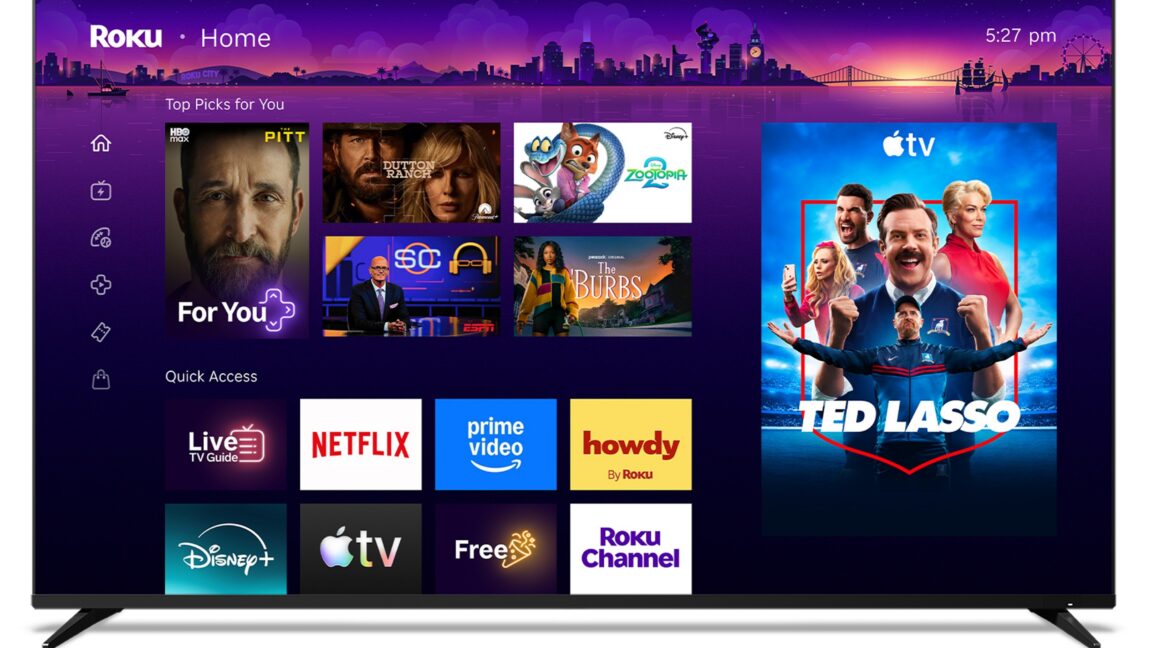
Roku OS’s home screen now features a large, permanent ad

Roku just unveiled the biggest overhaul to its smart TV operating system (OS) in 10 years. One of the most noticeable differences is that ad space now takes up a large chunk of the screen’s landing page.

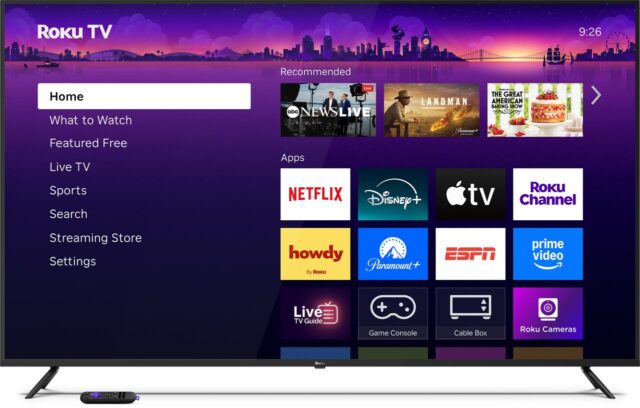
Before the update, loading up a Roku OS-powered smart TV or streaming device would yield a menu on the left side with sections including “What to Watch,” “Live,” and “Search.” The right side had a row of tiles for “Recommended” content above several rows of tiles representing downloaded apps. Once a user started started navigating the home screen, the menu would collapse, and they'd see a large ad on the right side of the screen.

The old Roku OS landing page before the ad is visible.  Credit: Roku
 

Read full article

Comments

  •  

IoT gadget maker AcuRite shares reasoning for killing customers’ favorite app

AcuRite must kill its customers’ favorite companion app due to “obsolete technology," VP of product development Jeff Bovee tells Ars Technica.

AcuRite, which makes smart weather-monitoring devices, announced this month that the My AcuRite iOS and Android app that has been around since 2016 won’t be available after May 30. After that date, device owners must use AcuRite NOW, which AcuRite released in June 2025, to control their gadgets.

The announcement has frustrated long-time AcuRite users, largely because the new app lacks some of its predecessors' capabilities. For example, AcuRite NOW doesn’t allow renaming multiple temperature sensors, organizing on-screen sensors, or reporting temperatures as anything other than whole numbers (AcuRite says it's working on adding some of these features).

Read full article

Comments

© AcuRite

  •  
❌