Reading view

Oubliez le barbecue classique : ce braséro plancha cartonne chez Cdiscount

Oubliez les repas expédiés en dix minutes. Avec ses flammes chaleureuses et sa grande surface de cuisson, ce braséro plancha en promotion chez Cdiscount transforme votre terrasse en quartier général des longues soirées d'été.

  •  

A retro-geeky Android home screen remix

One of the best parts about using Android is the good old-fashioned geeky fun that comes with finding new ways to improve your digital environment — and improve your day-to-day efficiency.

That capability manifests itself in all sorts of interesting freedoms that (cough, cough) other mobile platforms don’t trust their users enough to allow — from added on-screen elements to custom air gestures, advanced multitasking additions, and all sorts of other shape-shifting enhancements that can completely change the way you interact with your device.

Perhaps the most classic example of advanced Android customization, though, is a splendid little somethin’ called the home screen launcher — a fancy way of saying the system that controls how your home screen and app drawer look and work. Your phone has a built-in process that handles that by default, but here in the land o’ Googley matters, you can always replace that with something completely different and make your device adapt to the way you like to work instead of the other way around.

We’ve got no shortage of interesting Android launcher options, too, ranging from versatile blank slates for complete customization to carefully crafted frameworks for ergonomic efficiency and even throwbacks to mobile operating systems past.

The real beauty of this ecosystem, though, is how much power it gives to Android developers — and subsequently to us, as Android-appreciating animals who embrace these creations! — to experiment and try out all sorts of new concepts. Sometimes, an Android launcher approach speaks to you for its practicality. Other times, it’s just a refreshingly interesting take on how you can get around your phone and get stuff done.

Today, I’ve got a perfect example to share with you. It’s a whole new approach to the Android home screen that’s both unlike anything else I’ve ever seen in this arena and delightfully familiar, in a retro-tech sense.

Lemme show ya what it’s all about.

[Get fresh Googley goodness in your inbox with my free Android Intelligence newsletter — three new things to try every Friday.]

The T9 Android launcher — with a modern twist

My friend and fellow enlightened Android phone owner, allow me to introduce you to a creative little concoction called Key Launcher.

Key Launcher has only been out and available on the Play Store for a matter of weeks now, but it’s impressively polished — and, even more important, impressively original while also having some fantastic geek-tech throwback vibes.

To that end, the core distinctive element of Key Launcher is the T9-style dialpad that sits front and center on the lower third of its primary panel. It is quite literally the same set of letter-packin’ numbers and characters you’d see on an old-school phone — or in the dialer of your favorite Android phone app.

width="1024" height="1022" sizes="auto, (max-width: 1024px) 100vw, 1024px">
The T9 keypad is the centerpiece of the Key Launcher Android home screen experience.

JR Raphael, Foundry

And in this context, it serves some pretty interesting purposes:

  • In true T9 style, you can find and access any app or contact on your phone simply by tapping the letter that corresponds with its name — and if you want to narrow down the list even further, you can keep typing letters to refine the results.
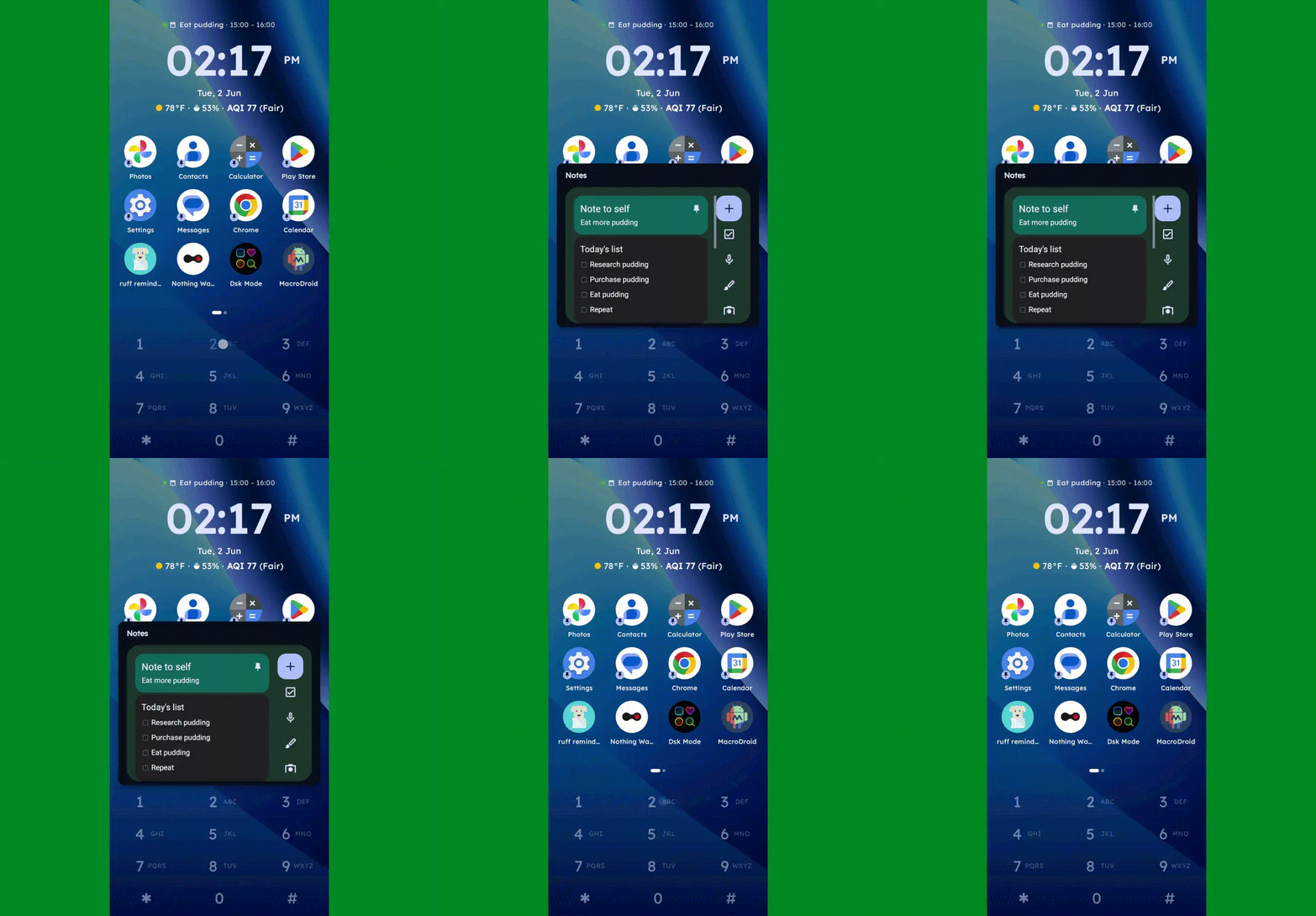
  • You can long-press any number to create and then access a custom “super shortcut” — anything from a single specific action (opening a particular app or calling or texting a certain contact) to launching a group or category of apps or contacts, launching an on-demand pop-up widget or swipeable stack of widgets, or even launching a pre-filled search query.
Key Launcher Android home screen widget pop-up
One press, and poof: Any widget you want — or series of swipeable widgets, even — is right there and ready.

JR Raphael, Foundry

  • If you tap the # key (known as “pound” in this context — not “hashtag” — for any non-olds among us), you can set up and then access a special “vault” area, where apps are hidden and only visible and accessible with authentication.
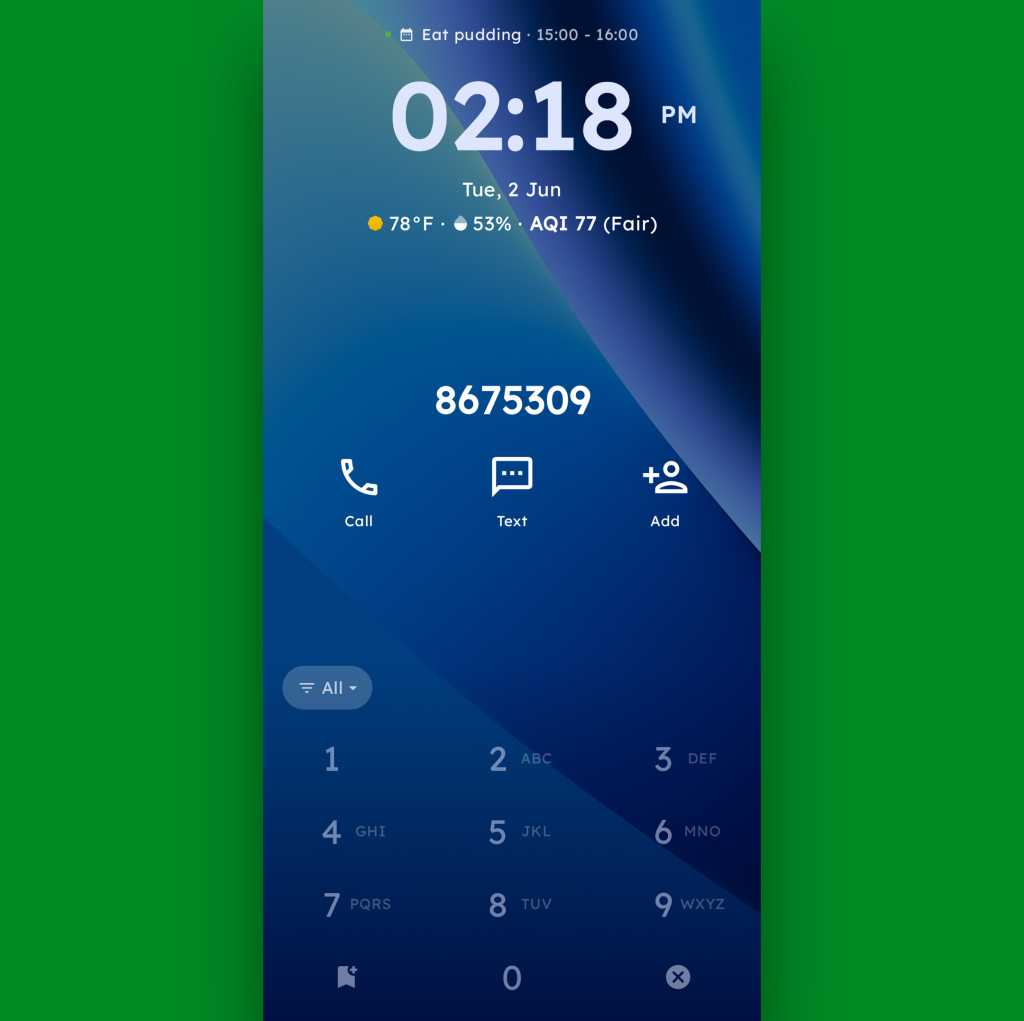
  • And, in an especially nifty touch, you can also just use the dialpad as an actual dialpad — to punch in any number you want to text or call, even if it isn’t already in your contacts.
Key Launcher Android home screen dialpad
Your phone dialer is always right in front of you with Key Launcher as your home screen.

JR Raphael, Foundry

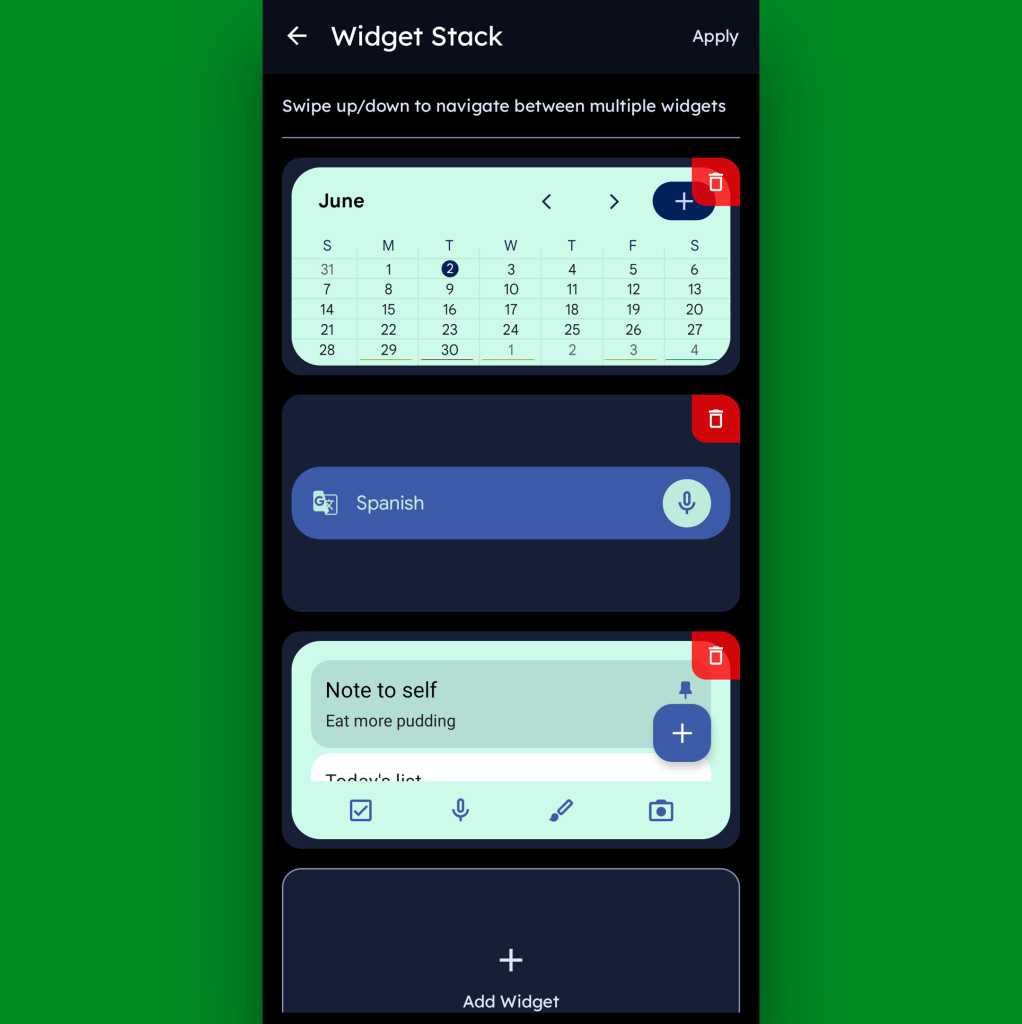
Function-packed as all of that may be, that dialpad is still just one piece of the Key Launcher puzzle. Above it sits a grid of app shortcuts that includes both your own pinned favorites and a dynamic selection of recently opened items. And above that is a handy built-in widget that shows a rotating array of upcoming calendar events from your agenda along with the local time and weather — and, in an especially neat twist, can also be customized to act as an interactive stack that lets you flip through your own set of standard Android widgets right then and there as well.

Key Launcher Android home screen widget stack
Key Launcher’s primary widget spot can be configured to hold numerous widgets in a swipeable stack.

JR Raphael, Foundry

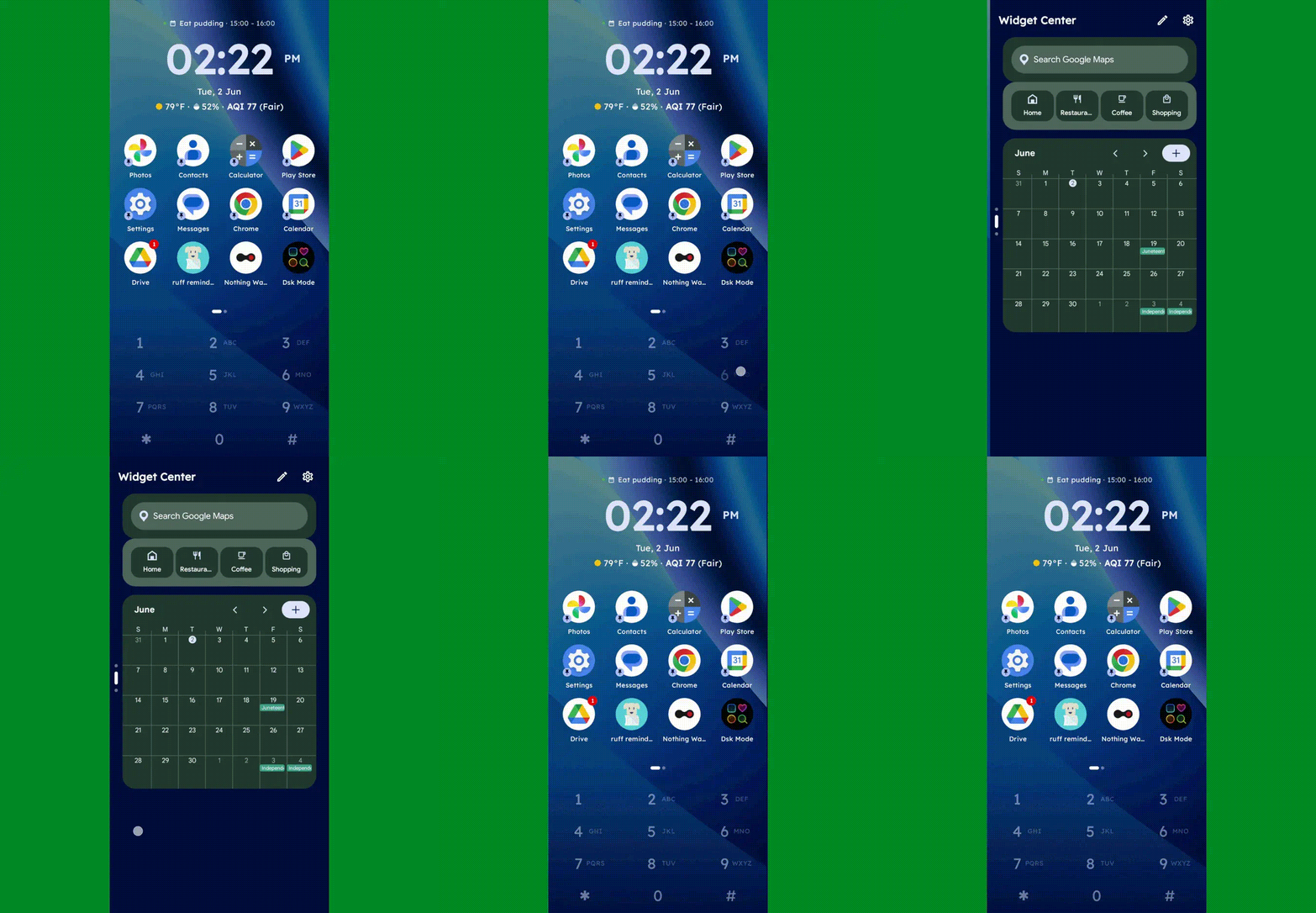
Speaking of widgets, if you swipe toward the left on Key Launcher’s dialpad, you’ll reveal the launcher’s built-in “Widget Center” panel — which is an entire screen dedicated to holding however many widgets you want, in any configuration you like, for easy ongoing access.

Key Launcher Android home screen widget center
The Widget Center is another interesting way to access widgets within Key Launcher.

JR Raphael, Foundry

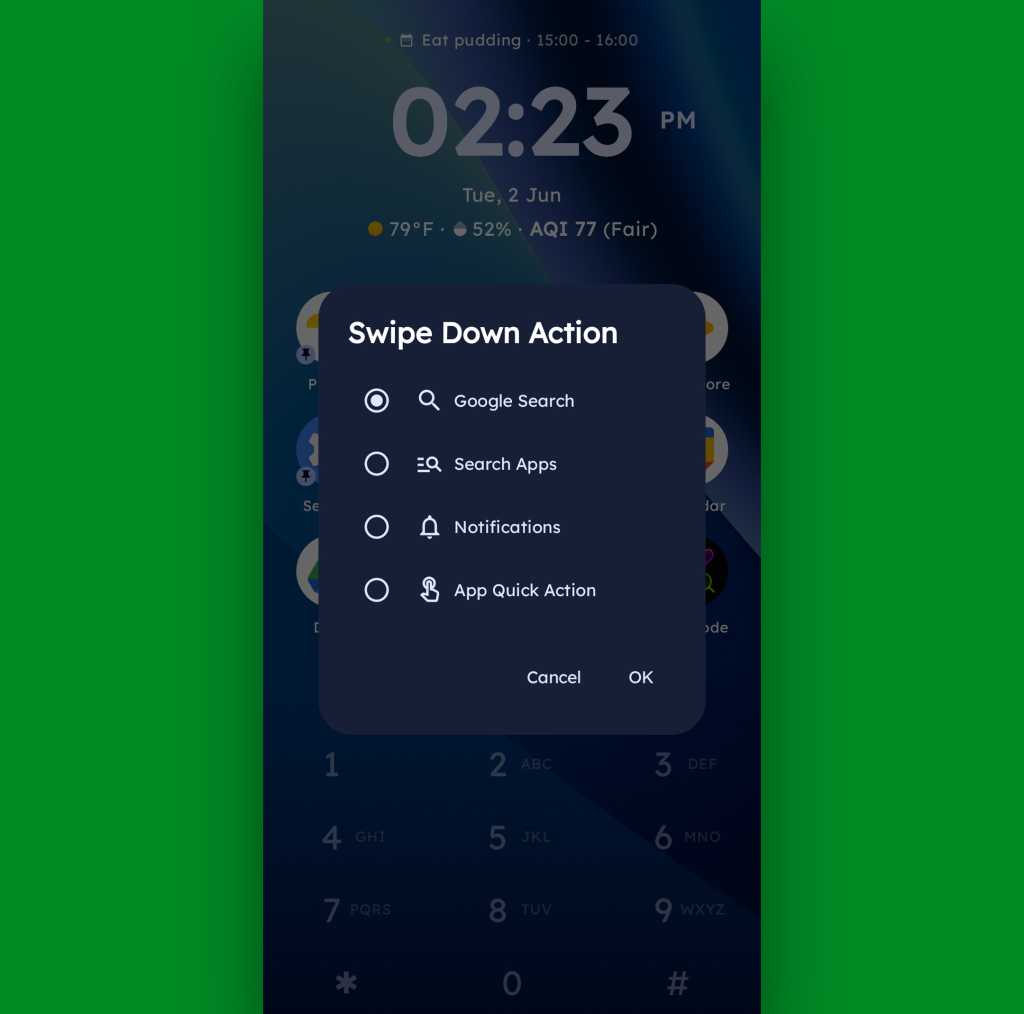
A swipe in the other direction will take you to an enlarged view of your active notifications, meanwhile, while a swipe downward can be set to launch either a quick search (of Google or whatever provider you prefer), a search of your apps, or a direct Android app shortcut within any app on your device.

Key Launcher Android home screen swipe action
Swiping down on your home screen can trigger a shortcut of your choice.

JR Raphael, Foundry

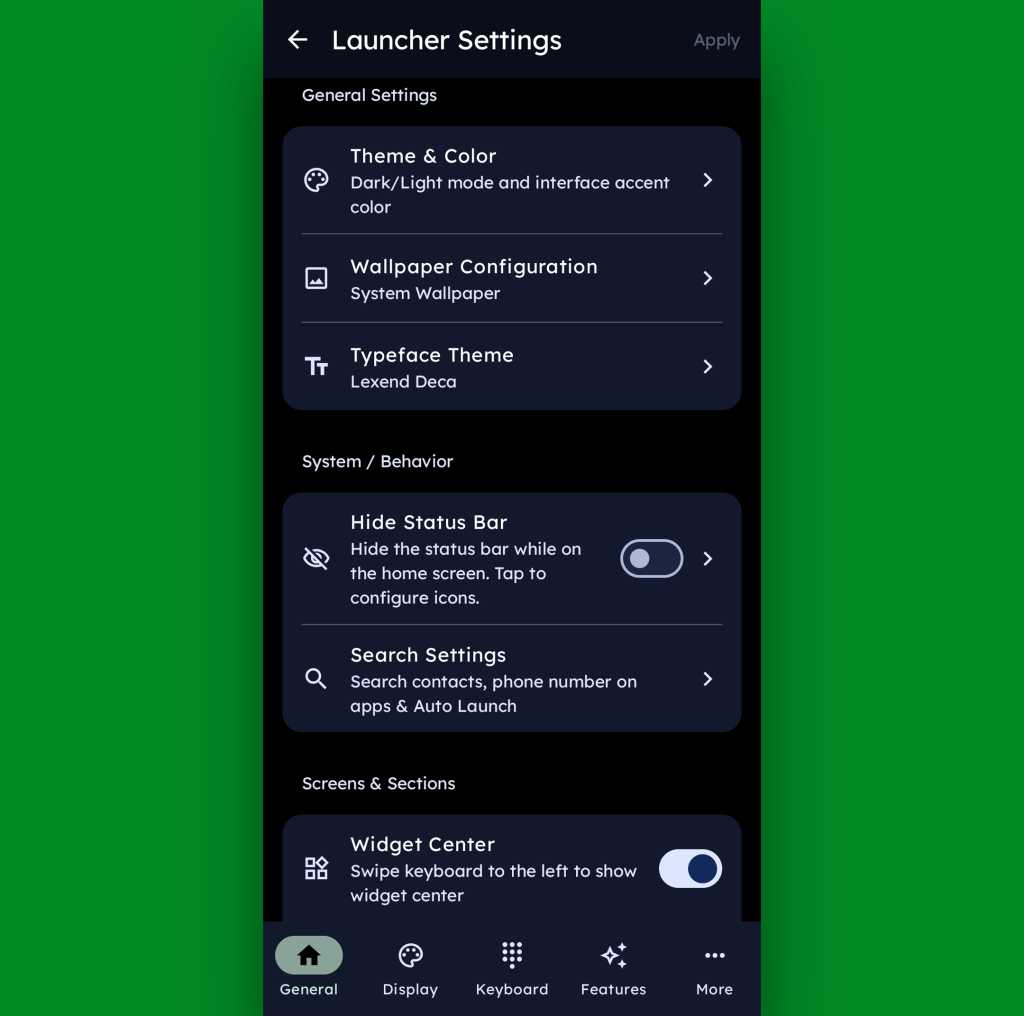
And if all of that seems like a lot of productivity-boosting possibilities, just wait ’til you get into this thing’s settings. Key Launcher is overflowing with options to customize and control practically every facet of its operation, ranging from basic visuals to the specifics of how the dialpad works and even a toggle for optimizing the interface for left- or right-handed use.

Key Launcher Android home screen settings
Key Launcher is no slouch when it comes to settings.

JR Raphael, Foundry

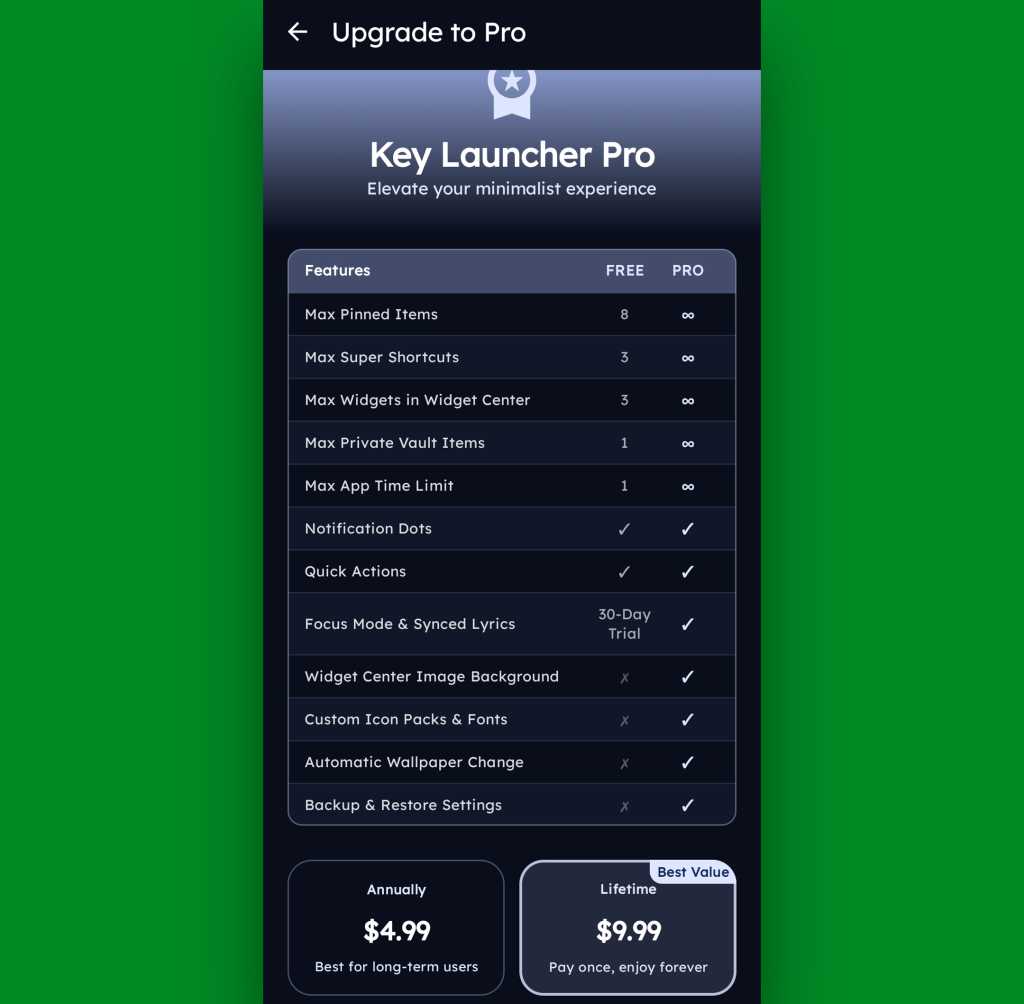
Key Launcher is free on its base level with an optional Pro upgrade that unlocks certain limitations and more advanced features. That path is available for five bucks a year or $10 as a single lifetime purchase, and you get a month-long trial the first time you install the app so you can check it out in its full form.

Key Launcher Pro Upgrade
The Pro path adds in lots of extras, but even Key Launcher’s free version is quite pleasant and functional.

JR Raphael, Foundry

Even if you just stick to the free version, though, this thing has an awful lot to offer — and it really is unlike anything else out there, with so many clever and potentially useful touches.

It’s that kind of creativity and constant discovery that keeps Android so interesting and advantageous, even after all this time — and that’s true whether you end up sticking with Key Launcher for the long haul or just giving it a go for a few hours and appreciating the deliciously original thinking it offers.

Keep the geeky goodies coming with my free Android Intelligence newsletter — three new things to try every Friday, straight from me to you.

  •  

Plus besoin de subir la chaleur avec ce climatiseur mobile 4 en 1 en promo

Pourquoi attendre la prochaine vague de chaleur pour agir ? Ce climatiseur mobile sans évacuation permet de rafraîchir votre pièce sans installation complexe. Une solution pratique pour mieux vivre les fortes températures, d’autant plus qu’il bénéficie actuellement d’une remise chez Cdiscount.

  •  

Long séjour à l’étranger : Holafly mise sur l’internet illimité sans dépendre du Wi-Fi

Streaming, télétravail, réseaux sociaux… Holafly permet de profiter de vos usages internet habituels à l’étranger grâce à ses eSIM à internet illimité. Le fournisseur couvre plus de 200 destinations à travers le monde et propose ses offres à partir de seulement 3,79 €.

  •  

RedMagic 11S Pro+ lidera top dos smartphones mais poderosos de maio com domínio do Snapdragon 8 Elite Gen 5

O ranking da AnTuTu para os smartphones mais poderosos de maio tem um novo líder, o novo RedMagic 11S Pro+, com destaque ao chip Snapdragon 8 Elite Gen 5 que equipa nove dos equipamentos.

The post RedMagic 11S Pro+ lidera top dos smartphones mais poderosos de maio com domínio do Snapdragon 8 Elite Gen 5 appeared first on Tek Notícias.

  •  

Ponchorado mistura ação e aventuras no faroeste num universo inspirado nos desenhos animados dos anos 30

No papel de um duplo de cinema que passou despercebido durante toda a sua carreira, em Ponchorado os jogadores terão de sobreviver dentro de um filme western inacabado e enfrentar uma série de inimigos.

The post Ponchorado mistura ação e aventuras no faroeste num universo inspirado nos desenhos animados dos anos 30 appeared first on Tek Notícias.

  •  

Democratizing AI adoption with Tether’s Bitnet LLM fine-tuning framework

“The future of AI should be accessible, available, and open to people and builders everywhere, and it should not require an absurd amount of resources only available to a handful of cloud providers,” Paolo Ardoino, CEO, Tether.

About 700 million people use generative AIs like Gemini and ChatGPT weekly, but adoption is far from uniform. McKinsey’s 2025 State of AI survey found that nearly half of respondents from companies with more than $5 billion in revenue have reached the AI scaling phase, compared with just 29 percent of those from companies with less than $100 million in revenue, a gap that only widens further down the chain, locking out smaller businesses, developers, and everyday users.

Retail and small businesses are limited to basic AI utilities that their facilities can power, such as text-based inference and multimedia generation, using base models. That is billions of end users, and developers locked out of full utilization and development of intelligent software due to high infrastructure demands.

Tether’s edge-first LoRA fine-tuning framework for Microsoft’s Bitnet LLM is an important step towards developing an infrastructure system that supports billions of AI agents and intelligent machines. By reducing the computational overhead of machine learning and enabling consumer-grade devices to perform advanced operations, Tether’s edge-first approach ensures greater leverage for the larger population.

Imagine a 13-billion-parameter model being fine-tuned on everyday handheld devices like Samsung S25 and iPhone 16, as well as on regular personal computers. The breakthrough combines resource-efficiency and platform-agnostic techniques to develop a fine-tuning framework for the ternary-quantized LLM.

Behind Tether’s Bitnet fine-tuning framework

Bitnet LLM was born out of the vision of an intelligent AI model that doesn’t consume outrageous computing resources even at full precision. Earlier attempts at resource-efficient AI relied on trade-offs, such as running small-parameter models at higher precision or larger-parameter models at lower precision, but neither approach fully solved the problem.

Bitnet takes a more fundamental approach. The result is a model that achieves linear efficiency while consuming only a fraction of the computing resources traditionally required.

The challenge, however, is that contemporary GPUs are optimized for the very floating-point operations Bitnet eliminates, creating a hardware compatibility gap. Compounding this, Bitnet was originally confined to its own Bitnet.cpp inference engine, limiting its broader utility. Tether’s breakthrough addresses both constraints at once by integrating a Vulkan and Metal GPU backend that unlocks true cross-platform capabilities for BitNet inference and LoRA fine-tuning on heterogeneous consumer GPUs, including mobile GPUs. Bitnet can now run on more mature, widely supported inference engines without sacrificing its efficiency advantages.

Vulkan’s cross-platform nature is key here. Unlike CUDA, which ties developers to NVIDIA hardware, Vulkan runs across a broad range of GPUs and operating systems, opening Bitnet to genuinely multi-platform deployment. Tether’s Bitnet fine-tuning framework implements a dynamic tiling technique to mitigate limitations in Vulkan driver buffer allocation on mobile GPUs.

The dynamic tiling algorithm technique was first applied in the fine-tuning framework for QVAC Fabric LLM, the AI model that powers Tether’s QVAC Workbench application.

This implementation demonstrates the efficiency of this approach: fine-tuning a 13-billion-parameter model across a range of consumer devices with varying GPU configurations.

The Bitnet LLM Fine-tuning framework is Tether’s latest achievement and part of a broader expansion into open-source AI and communication technologies that challenge current, slow, fragile, and controlled systems. These developments are open-sourced and packaged as modules in the QVAC SDK for easy deployment and to help developers build edge-first AI applications without needing anyone’s permission.

Tether envisions superintelligence as a foundational element possessed by its owner and is enforcing this through:

Local-first AI

Synonymous with decentralized AI, “Local-first” AI aims to create sovereign AI solutions that do not rely on centralized infrastructure, such as data centers, to operate. They are considered cost-effective, relatively more sustainable, and unarguably more private than centralized AI. Tether is building AI applications that rely entirely on the device’s resources. These applications store data in device memory and use its processors for advanced operations, such as fine-tuning and inference.

P2P computing network for AI inference

Tether’s AI applications are built on the Pear runtime. Pear is a tooling platform for fully P2P applications that can operate without servers. Pear leverages the Holepunch tech stack. Holepunch is purpose-built for stable, direct communication between devices. Pear enables delegated inference for AI applications such as QVAC Workbench. Delegated inference enables a unified, dynamic workstation architecture where compute tasks are fluidly distributed between mobile and desktop environments, allowing either device to offload high-intensity processing to the most capable system. That is, you can start a task on your mobile device and delegate it to your desktop or laptop for completion.

AI for everyone

The only way to scale intelligence to the needs of a ten-billion-strong society is to push it to the edge. This, in turn, depends on the progress made by experiments aimed at cost-effectively localizing AI computation.

Billions of AI agents and countless AI applications deployed by developers in every region of the world, running effectively on user-owned resources, is the only way we can democratize superintelligence and avoid creating another ‘luxury’ cutting-edge technology controlled by unicorns and fully accessible only to elites.

Tether is pioneering limitless superintelligence for an ever-growing society and applications. Follow the journey to truly local and edge-first AI solutions

  •  

$11 billion reasons Apple’s App Store tax is worth paying

Apple publishes its App Store fraud prevention report every year,. And when it does, the company presses the point that its curated system brings much value to developers and customers, including highly effective protection against fraud. It says it prevented more than $2.2 billion in potentially fraudulent transactions in 2025 alone.

A tax worth paying

The company said it has prevented $11.2 billion in such fraud in the last six years. That’s a lot of value for the 15% or lower commission that all but the biggest-selling developers are required to pay on their store sales.

Don’t believe the hype, as most developers are not generating the $1 million a year required before the 30% payment kicks in.

You might reflect that if there is an Apple Tax, it’s a progressive tax in which those with the broadest shoulders help support the wider developer community, which is probably why some tech billionaires don’t like it. 

But I’m not here to write about taxation; I’m here to highlight the value the App Store brings. Apple diligently works to protect customers and developers against the ever-growing threat of cybercrime at a scale few other companies could hope to match. That matters in an environment dominated by ever more sophisticated attacks, including scenarios in which a developer submits a benign app for review and then modifies it once the app is online to commit financial fraud.

More than fraud prevention

It’s not just fraud Apple protects App Store customers from. It also attempts to protect privacy. Look, we know that tech firms now exist for whom privacy is a roadblock to profit; they want to take all your information for free to sell it for money, or worse. Apple stands against this and has done so for years, which is why it is under steady attack by entities that want privacy destroyed to boost their bottom line. Nation states and nation-state-adjacent attacks don’t help in the battle for your private digital life, throwing huge resources at undermining personal protections.

Apple’s report gives you a solid glimpse at the anti-privacy environment. App Store rejected 443,000 app submissions for privacy violations; it also rejected 22,000 apps for holding undocumented anti-privacy features. 

The upshot is that while Apple’s protections aren’t 100% perfect, they’re still industry leading. Where incidents do take place, they are resolved swiftly, and the bait-and-switch approach (in which an app pretends to be benign but carries malware) remains the biggest threat. That’s why customers should always verify they trust a developer before downloading apps.

The threats coming over the hill

The thing is, all of these threats are evolving, and Apple is equipped to evolve in parallel with them. In part, that’s because it has scale, in part because it has that huge 2.2-billion-device ecosystem, in part because the company entered the app store race with deep understanding of how online transactions were evolving in the first place. It didn’t run iTunes for years only to learn nothing.

Coming up over the hill we can see new-breed quantum-based threats. Along with artificial intelligence, that combination will likely spawn a mass attack of AI-generated, malware-infested apps being built and submitted at a record pace. 

We will also likely see increased attacks made against developers in order to extract their Developer ID to help in the submission of such apps. And we will see increasingly sophisticated algorithmic hacks to attack security, identity, and even app ownership. Protecting against those consequential evolutions will be neither easy nor cheap. Doing so will require near state-level protection, a degree of security no small entity can meet. We have no idea if smaller app stores can even visualize such protection — and the EU doesn’t know, either.

In time, hopefully, new businesses will emerge offering quantum-safe security to protect online purchases. But for now, we’ll mostly need to look to large entities such as Apple, or payment services providers, to make the grade. 

Near state-level protection

Will Apple put protection at scale in place to protect against these incoming threats against its App Store? It seems likely, given it is already investing in OS-level mitigations to protect encryption on its services, including around encrypted communications. 

It is also in Apple’s interest to future-proof protection around payment services, ergo also the App Store. At the same time, as Apple’s latest fraud report confirms, the threat landscape remains highly volatile. Time will show that the store’s degree of protection is well worth the cost of Apple’s progressive App Store tax. 

You can follow me on social media! Join me on BlueSky,  LinkedIn, and Mastodon.

  •  

Stop buying Motorola Android phones

Over the past decade, there’s something I’ve hinted at, mentioned in passing as a part of broader discussions, and told more people than I can count privately via email and other one-on-one conversations.

And now, as the writer of the internet’s longest-standing Android column and newsletter — a fancy way of saying someone who is apparently now old as molasses — I feel like I’d be doing a disservice if I didn’t just come out and say it as prominently and plainly as possible:

There is no valid reason anyone should be buying Motorola Android devices in 2026. None.

It’s a shame, too, ’cause Motorola has a heck of a history within Android and the mobile realm in general. And, to its credit, the company does still make some impressive-looking and at times quite interesting hardware.

But the compromises that come with that package are just too serious and consequential to be forgiven. That’s been the case for some time now, truth be told — but with yet another facepalm-inducing infraction being added onto the list now, it’s time to say it loud and clear:

Please stop buying Motorola Android phones. And please join me in telling everyone you know the same thing. 

Trust me: You’ll be doing them a major favor. And here, with no punches pulled and absolutely no sugarcoating, is exactly why.

[Get level-headed knowledge in your inbox with my free Android Intelligence newsletter — three new things to try every Friday and tons of other tasty treats.]

The Motorola Android compromise: Part I

I won’t beat around the bush: The most pressing reason Motorola Android phones are completely inadvisable to buy is the reason that’s been present for the longest — and that’s the company’s complete and utter disregard for even minimally acceptable post-sales software support.

It’s something I’ve noted in my data-based Android Upgrade Report Cards for more years than I can even remember at this point, and it’s almost comically consistent: Year after year, upgrade cycle after upgrade cycle, Motorola simply does not give a damn about investing the time or the money to bring current Android versions to its existing customers in anything close to a timely manner. Once you’ve forked over your phone and put away your wallet, good luck: You’ll be lucky if you get a single software update from Motorola after that, half a year to a year after the fact — and you almost certainly won’t hear a single peep from the company about the progress (or lack thereof) at any point along the way.

Motorola has managed to score an almost impressive number of back-to-back “F” scores on my annual analyses; no other Android device maker even comes close to that record. And lest you think this is purely about pokiness in providing polish and surface-level progress, remember that practically every Android software update is packed with critically important changes around privacy, security, and performance — and the way apps are able to interact with both your data and your hardware.

Running outdated software isn’t just dangerous — it’s downright irresponsible, especially if you’re a professional using your phone for business purposes but even if you’re just a regular ol’ schmoe focused purely on personal stuff. No one who understands a thing about security would ever recommend that, and that’s exactly what you’re signing up for anytime you buy a Motorola-made device.

So that’s part one, and that’s the biggest problem with Motorola’s Android products. But it isn’t the end of this tale nor the reason I was finally moved to write this missive, with the hopes that it’d eventually reach any Android-interested phone-buyers with Motorola on their minds.

Motorola’s more recent Android offenses

All update-related issues aside, the problem with Motorola’s Android products is that they make all sorts of compromises that are all about lining Motorola’s pockets at the expense of your experience.

The most recent example and the straw that broke the Android columnist’s (increasingly creaky) back is the new discovery that Motorola had seemingly been indirectly hijacking the Amazon app on its devices and sneakily injecting an affiliate code into links. The end result of such actions, according to observations published this week, is generating unearned revenue from your day-to-day purchases.

That’s an underhanded and shady-seeming practice, to say the very least. It just feels icky and ethically reckless. And clearly, what was demonstrated was intended to go unnoticed, which is always a pretty apparent sign in my mind that someone’s doing something shifty.

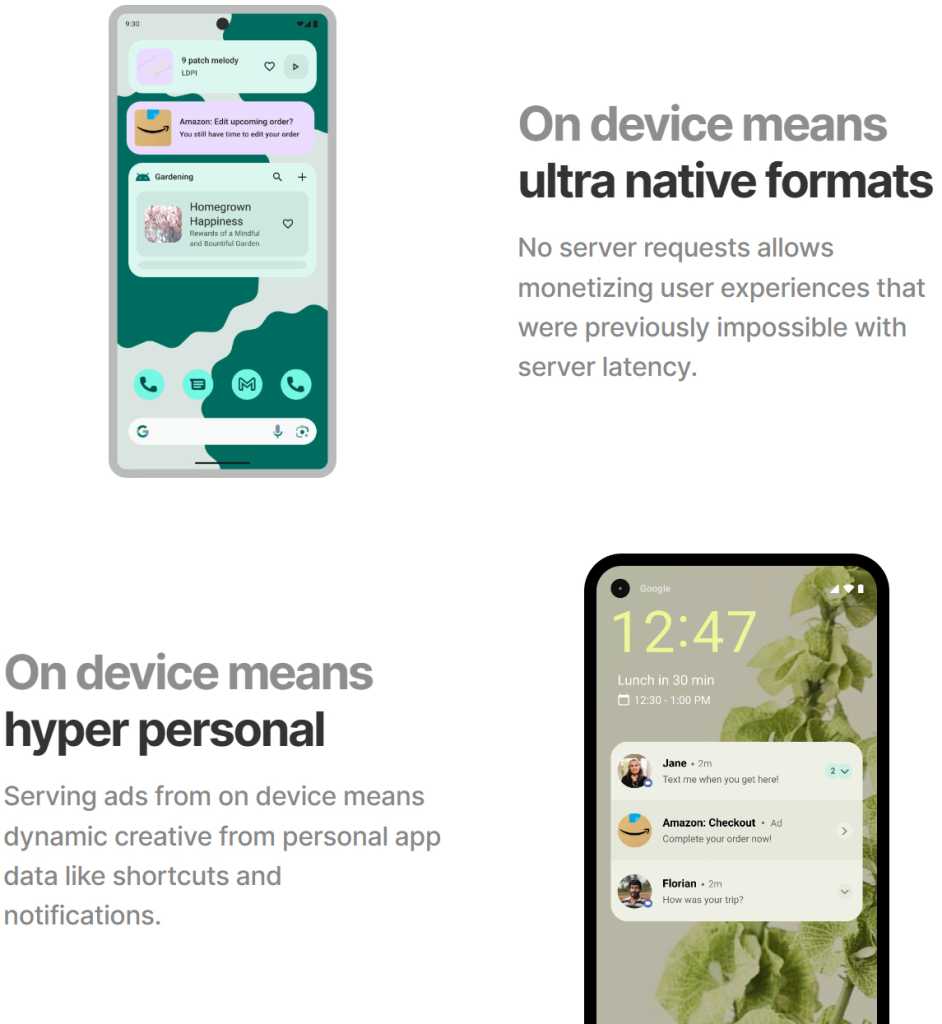
Following the discovery and subsequent outcry, Moto released a statement saying that the behavior was “unintended” and the result of its partnership with a company called Device Native. According to Moto, it had teamed up with that organization to develop “an app search and suggestion experience for the Moto App Launcher.” You can choose to interpret that how you will, but the reality is that Device Native is a company that exists to inject personalized, native-seeming ads directly into the core Android software experience, as its website plainly establishes — with “no user opt-in required,” allowing for easier “scale” of “monetization globally.”

Motorola Android - Device Native
A screenshot from the Device Native website.
Device Native / JR Raphael, Foundry

On some level, at least, Motorola evidently decided to work with this company and integrate its ad technology into the Android experience on its phones. Regardless of whether the Amazon code injection was truly deliberate, which organization caused it to happen, and who was or wasn’t aware of the actions, Motorola opted to place this ad-serving system into the phones it was selling and to allow the company behind it to exert this kind of control over its customers’ experiences — as well as, one would imagine, likely leaning on it for other forms of invasive system-level ad integration.

And sure, maybe Moto will back down from this practice and perhaps even distance itself from the partnership entirely if the outrage grows loud enough. But does someone stopping a shady-seeming practice simply because they got caught and people complained make for the kind of company you want to trust in general?

It’s similar to the way Moto lards up its devices with so much preinstalled bloatware that you actually have to fight to get through it or — Goog forbid — remove it and reclaim the product you paid hundreds of dollars to purchase. Heck, even the company’s top-of-the-line, nearly $2,000 folding Razr Fold phone is guilty of this sin, and that’s just embarrassing for a device of that price and caliber.

Even with Motorola’s lower-level phones, though, we’re talking about devices that often cost $500 or close to that. These aren’t bottom-of-the-barrel, heavily subsidized garbage gadgets. You could get one of Google’s Pixel 10a phones for that same price or often even less — without any of the bloatware, the link-hijacking and potential ad-injecting shenanigans, or the unforgivable software support failures. You’d get a full seven years of guaranteed timely and reliable software updates, from major Android versions to monthly security patches and the quarterly feature drops that accompany those. And that’s to say nothing of the superior camera experience and other assorted advantages.

You could go with one of Samsung’s midrange models, too, imperfect as those are in their own ways, and it’d still be a massive step up from the Motorola madness.

We’ve reached a point where there really is just no comparison — and, again, no reason why anyone should be buying a Motorola phone anymore. The issue, unfortunately, is that most of the people who are buying Moto devices are the same people who aren’t reading columns like these. They’re the people who waltz into a carrier store, see whatever model is featured on the shelf or pushed by a commission-earning, partnership-promoting salesperson, and walk out with whatever caught their eye or had the best promotional pricing on that particular day.

Make no mistake about it: These types of devices give Android a bad name and propagate the myth of the entire platform being a second-rate dumping ground for “folks who can’t afford iPhones.” Android is so much more and so much better than that. You deserve so much better than that.

Plain and simple, this isn’t the Motorola of yesterday. At this point, there’s no excuse — and no reason to keep setting yourself up for failure when so many better options exist.

Say goodbye, Moto. And make sure everyone you know who won’t be reading this column knows why they should do the same.

Get unmatched Android insight in your inbox with my free Android Intelligence newsletter — three new things to try and zero punches pulled every Friday.

  •  

Apple’s iPhone satellite ambition goes beyond rescuing hikers

Apple has spent billions of dollars to develop satellite connectivity for iPhone; I very much doubt it did so solely to rescue stranded hikers. The company will most certainly have had a bigger prize in its sights when it first began working with GlobalStar (now owned by Amazon).

The most logical reason to invest in satellite coverage for its devices is the most obvious — to provide network infrastructure for new breeds of device and new service models. You don’t acquire access to massive amounts of bandwidth for nothing. And Apple’s steady introduction of new satellite-supported services shows it is interested in introducing these services, even though the offer isn’t extensive enough yet to require iPhone users to pay for access, yet.

The decision not to charge for those satellite services suggests they’re just the thin end of the company’s plans for satellite deployment.

It’s possible the company’s ambitions were limited by GlobalStar’s ability to put satellite constellations in orbit. That work was ongoing last time I looked, and I fully expect existing Apple satellite services will be extended to new nations, even under Amazon’s watch.

Amazon enters the room

Amazon’s recent $11.6 billion acquisition of GlobalStar is interesting. You can see that Apple is now forced to work with its old frenemy, even as both partners already profit from strong, steady Apple hardware sales via the online retailer. So they know they can make money together.

“Apple and Amazon have a long and proven track record of working together through Amazon’s core infrastructure services, and we look forward to building on that collaboration with Amazon Leo,” Greg Joswiak, Apple’s senior vice president of worldwide product marketing, said when the deal was announced. (The transaction isn’t expected to close until next year.)

Making money together is often seen as a strength in business relationships and Amazon has agreed to continue supporting Apple products and to collaborate with Apple on future satellite services.

When it comes to mobile telecoms, Amazon isn’t the only game in town, and neither is Starlink. Cellular operators are inking deals with satellite providers all over the world, all with the intention of bringing network access to those who otherwise can’t get a decent connection.

Just today in the UK, Virgin Media O2 announced plans to switch on the O2 Satellite service for iPhone users tomorrow, enabling customers — particularly in rural areas — to get a satellite connection where traditional cellular coverage is unavailable. It could simply identify new ways to enhance the Find My service.

Orange last year offered its own satellite comms to French customers, while Deutsche Telekom partners with others to provide SMS via satellite in Europe and the US. You’ll find similar alliances in most key territories, including Australia and Japan. The direction of travel exposes an industry embracing satellite as a way to widen existing cellular infrastructure, which makes sense given the relative cost of installing conventional masts in some regions. 

Many ways to crack it

There’s speculation Apple could become a satellite carrier, a move that would put it in competition with carrier partners. But Apple doesn’t need to do to provide satellite communication services to iPhone users, nor would it want to relinquish the symbiotically profitable relationships it’s developed with carriers.

It could, for example provide satellite calling as a hardware feature available with every iPhone across all supported carriers, possibly as an additional service that guarantees customers can get a connection, even in the countryside. It could evangelize the service as being “Private by Design,” and supplement this with data over satellite to support apps, particularly agentic AI apps. 

Combined with the next wave of AI enhancements Apple is expected to deliver for its systems, the combination of an always-on, resilient, private data connection and AI could prove invaluable to many customers. That’s particularly true for enterprise customers seeking global solutions that respect sovereign data, privacy, data retention policy and managed AI services – especially as terrestrial infrastructure becomes an attack target. Such scenarios will only become more widely understood as 6G emerges, with its built-in support for satellite infrastructure.

What will Apple do?

Will Apple move in that direction, or maintain its focus on the consumer markets? Will it decide that rather than deploying its own part-owned satellite constellations as it was with GlobalStar, it is better to work with carrier partners? Will it wait for 6G with its enhanced, standards-based support for satellite communications? 

Those are answers we don’t yet have. But it is quite clear that as satellite communications truly enter the mass market, Apple has put together many of the technical, hardware, software and infrastructure pieces it will need to ensure the iPhone is a peer player in whatever use cases emerge. 

You can follow me on social media! Join me on BlueSky,  LinkedIn, and Mastodon.

  •  

Total Android recall: Never lose an important notification again

Google’s shiny new Android 17 update may be on the brink of making its way out into world, but one of the most consequential Android notification upgrades I’ve seen in ages is actually available for anyone, on any device, this instant.

It’s one of those things you don’t even realize is missing — and awkwardly has been, all this time — until you have it in front of you and see just how helpful and at times even invaluable it is.

And that’s the ability to have any or all of your notifications saved and restored whenever you restart whatever Android device you’re using — so that nothing important gets awkwardly tossed aside, lost, and forgotten, likely without your ever even noticing or being aware of what you’ve missed.

How many potentially important pending alerts have you lost as a result of that reboot trash chute? I couldn’t even begin to count, myself, and am slightly terrified to think of the answer. But with this easy new improvement in place, it’ll never happen again.

And best of all? It’ll take you roughly two minutes, once, to set up and then forget about and just know it’s working on your behalf from that moment forward.

Lemme show ya how.

[Keep the off-the-beaten-path knowledge coming with my free Android Intelligence newsletter — three new things to try every Friday and my Android Notification Power-Pack as a special welcome bonus!]   

Your new Android notification safety net

The secret sauce that makes this sorcery possible comes not from Google itself but from a crafty independent developer who’s been expanding our Android notification smarts for many a moon now.

His app is called BuzzKill. You’ve probably heard me rave about it before, with other noteworthy features and additions it’s introduced over time.

Whether you already have BuzzKill on your device or this is your first time encountering it, though, it’s well worth your while to take note of this new capability that snuck into the app not long ago.

First, a quick primer/refresher on what BuzzKill is, in case you aren’t already familiar: BuzzKill is essentially a way to create Gmail-like filters for your Android notifications. You use it to create simple custom rules for what happens when different types of notifications arrive — in an intuitive “if this, then that”-style form — with all kinds of interesting and advanced options for making your alerts more effective.

The latest addition to the app is an experimental option called, appropriately enough, “Restore after reboot.” And it does exactly what you’d expect: Anytime your device restarts, it automatically swoops in to save any active notifications that fit the parameters you select and then instantly restores ’em back into active status once your phone is back up and running.

Without such a system in place, any notifications that you either hadn’t yet looked at or maybe had glanced at and left pending as a reminder to deal with later would more often than not just vanish entirely — and you’d have no easily visible record of their presence or any real indication that they’d been there at all. That’s a dangerous recipe for forgetting something important, whether it’s an email you intended to engage with, a Slack message you needed to acknowledge, or even a task of some sort that had popped up for you to ponder.

The beauty of the BuzzKill approach to fixing this is that it really is a “set it and forget it” sort of system: You just create whatever rule you want now, get it up and running, and then rest easy knowing it’ll always find and restore any active notifications anytime your device restarts — as Android itself should but for whatever reason does not.

2 minutes to auto-restored Android notifications

All right — here are the specific steps to getting your new notification safety net in place:

  • First, go download BuzzKill from the Play Store, if you don’t already have it.
    • The app costs four bucks as a one-time purchase, which — believe me — is nothing compared to the ongoing value it’ll give you with this and its many other notification-enhancing possibilities.
    • It doesn’t require any unusual permissions, doesn’t collect any form of data from your phone, and doesn’t have any manner of access to the internet — meaning it’d have no way of sharing your information even if it wanted to. 
  • Once you’ve gone through the app’s initial setup and made your way to its main screen, tap on the circular button in the lower-right corner of the screen to create a new rule.
  • On the screen that comes up next, consider which specific sorts of notifications you want to have restored whenever your device restarts.
    • You could always start with any and all notifications and then go back in to refine and limit the rule more once you see how it works. You might eventually want to ask it to avoid restoring alerts from certain low-priority apps — like, say, Google Photos — so that it doesn’t bother bringing back stuff that you don’t actually need.
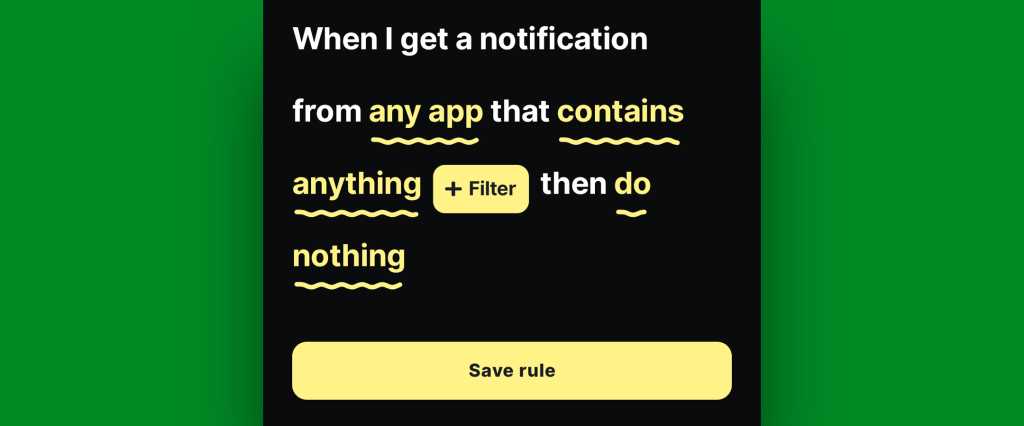
    • If/when you want to create any such restrictions, tap the text that says “any app” to change which apps will be included and/or tap the text that says “contains anything” if you want to restrict based on what specific text a notification does or doesn’t include.
    • If you don’t want to create any limitations and just want all of your active notifications to be restored, at least to start, leave those lines alone and mosey on down to our next step.
Android notification restore: BuzzKill rule
BuzzKill’s simple “if this, then that” formatting gives you lots of flexibility with how and when your rule works.

JR Raphael, Foundry

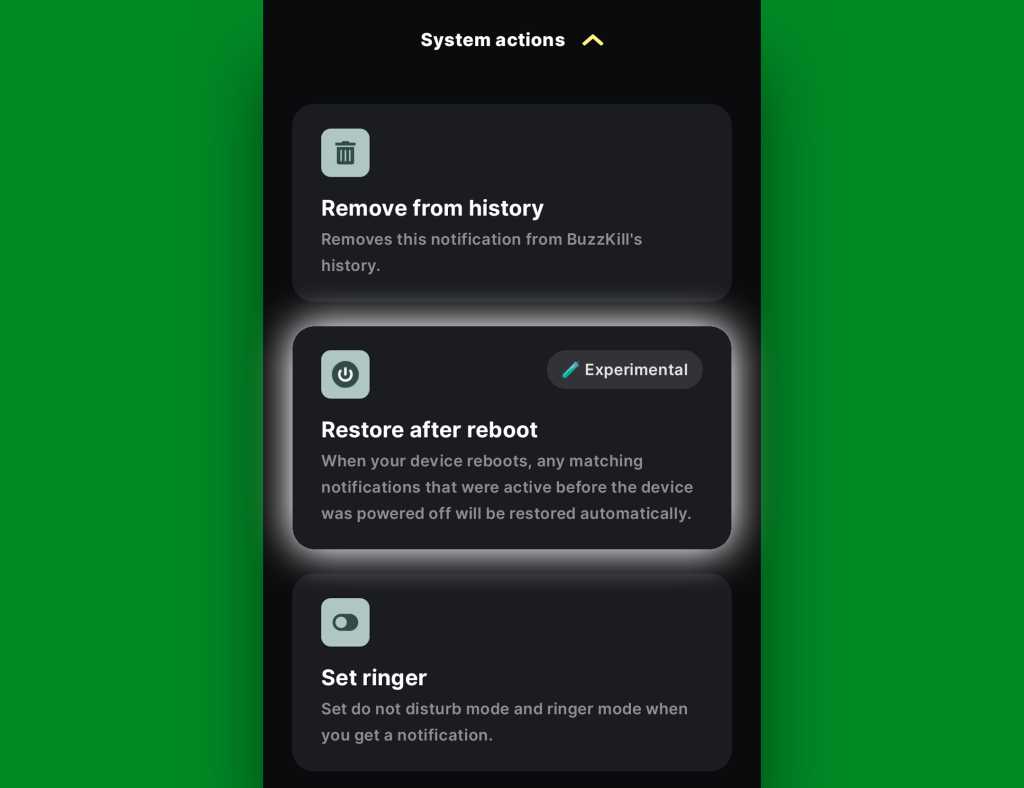
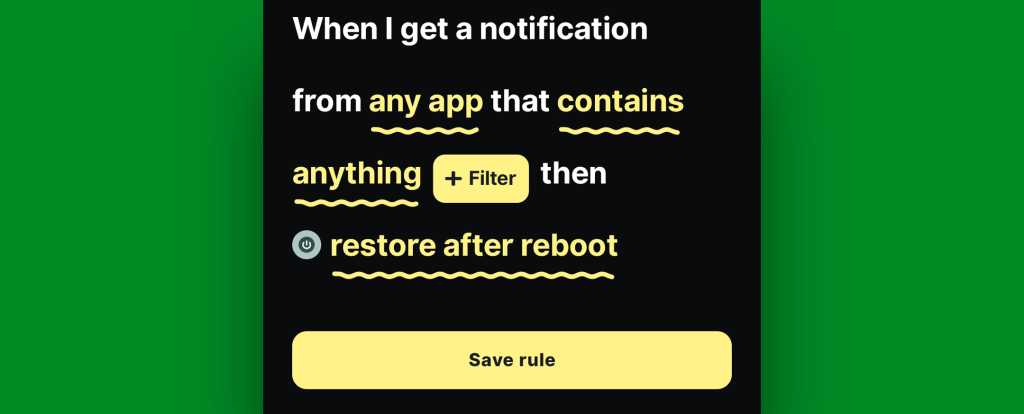
  • Tap the line that says “do nothing” and scroll down to find the “Restore after reboot” option. It’ll be toward the bottom of the list, within the “System actions” section.
Android notification restore: BuzzKill rule active
The “Restore after reboot” action is described as experimental, but it seems to work quite well in my experience so far.

JR Raphael, Foundry

  • Tap that, then tap “Pick action” to confirm.
  • And last but not least, tap “Save rule” to, y’know, save your rule and set it into action.
Android notification restore: BuzzKill rule complete
The BuzzKill notification restoration equation, in its simplest possible form.

JR Raphael, Foundry

You should then see the rule showing up as active and running on the main BuzzKill screen.

Android notification restore: BuzzKill action
Notification restoration — active and ready to spring into action whenever your phone restarts.

JR Raphael, Foundry

And that really is all there is to it: Whenever your phone next restarts, any notifications that were visible and active at the time of the restart should just show back up via BuzzKill as soon as things boot back up. If you want to get fancy, you could even make certain especially important notifications “sticky” in general, so that if you inadvertently swipe ’em away while your phone is running normally, they’ll automatically come right back even in that scenario.

It’s not the flashiest feature you’ll see this year, and it doesn’t have any whizbang AI shenanigans to make it seem headline-worthy by current-day standards. But it will work and quite possibly be one of the most practical, actually helpful additions you make to your phone all year — even if and arguably especially if you only think about it once in a great while, when you notice it working its magic and saving you from losing something significant.

Discover even more life-enhancing Android treasures with my free Android Intelligence newsletter — three new things to try every Friday and my free Android Notification Power-Pack today.

  •  

AST SpaceMobile Blue Origin bet hits turbulence

A Blue Origin New Glenn rocket exploded during a test, a potential blow to AST SpaceMobile and its launch schedule.

The New Glenn explosion yesterday (28 May) at Cape Canaveral in the US state of Florida will likely lead to lengthy investigations by the US Federal Aviation Administration (FAA) and NASA, which will sideline future launches.

In late 2024, AST SpaceMobile signed a multi-launch agreement with Jeff Bezos’ Blue Origin. It previously relied on SpaceX’s Falcon 9 rockets to launch its birds into orbit before attempting to branch out to the larger New Glenn models.

AST SpaceMobile has predicted an orbital launch cadence of roughly every one to two months this year through deals with multiple launch providers as it continues to target having approximately 45 birds in orbit by the end of 2026.

New Glenn’s seven meter-wide payload fairing is one of the few in the industry capable of accommodating the 2,400 square-foot phased arrays of AST SpaceMobile’s Block 2 BlueBird satellites, with the potential to carry up to eight per flight.

Fallout
“The New Glenn failure is a tough blow to AST which, due to the size of its satellites, has limited options for launch and New Glenn was by far the best option,” Chris Quilty, founder and CEO of research company Quilty Space told Mobile World Live (MWL), adding the company would now struggle to achieve its launch target for the year.

Tim Farrar, president at consulting company TMF Associates, told MWL the explosion has a “huge impact since this was the primary launch vehicle and it will take a year or more to rebuild the [launch] pad”.

“I think this pushes [AST’s] continuous commercial service back to 2028,” he added.

A representative for AST SpaceMobile stated the company’s near-term launches are unaffected.

“None of the missions planned for the next few months are scheduled with Blue Origin. Our satellites are designed to be launcher-agnostic, and we have agreements in place with multiple launch providers, giving us flexibility across our launch programme.”

BlueBirds 8, 9, and 10 are already at Cape Canaveral undergoing final processing ahead of a planned launch on a SpaceX Falcon 9 rocket next month.

A launch of AST SpaceMobile’s next-generation BlueBird 7 satellite from a Blue Origin New Glenn rocket last month fell short of the required orbit, resulting in its loss.

The post AST SpaceMobile Blue Origin bet hits turbulence appeared first on Mobile World Live.

  •  
❌