Scientists have developed “living plastics” that can be programmed to break themselves down when triggered. Many plastic items are made for one-time use, but the materials can remain in the environment for years. Researchers are exploring a different approach: living plastics, materials built with microbes that can be activated to break down the polymer when [...]
Workers who learn to use AI effectively may gain a significant advantage as workplaces become increasingly AI-focused, according to new research. Generative AI is rapidly changing the way people work, raising concerns about job security and whether machines could eventually replace human employees. However, new research from the University of Vaasa in Finland suggests that [...]
The average American spends nearly an hour a day behind the wheel, according to the US Department of Transportation. Some people love driving. Others tolerate it in order to get around. But either way, on average we all spend a lot of time doing it.
So it’s understandable if, over time, we all come to believe a few things about our cars that aren’t true. There’s nothing more human than believing myths, but some of these false beliefs have people wasting money or getting upset at people who are actually doing the right thing. With that in mind, here are a few widely believed driving myths—and why research suggests they’re false.
Premium fuel is pointless (unless your car is made for it).
Diesel aside, there are three kinds of fuel at most gas pumps—regular, plus, and premium. The overwhelming majority of personal vehicles are built with regular fuel in mind; it’s basically just sports cars and a few luxury vehicles that require the higher octane.
Some people believe using premium fuel offers benefits, such as higher fuel economy, increased performance, or reduced tailpipe emissions. But there’s no evidence to support this idea. Engines are designed with a specific octane in mind. Using a higher octane won’t hurt anything, but it doesn’t benefit the vehicle in any way.
Save yourself the money. Image: Shutterstock Joel A Johnson
A 2016 study by the American Automobile Association (AAA) tested different fuels in identical cars. The study found no consistent increase in horsepower or fuel economy, and there was also no change in tailpipe emissions. The only real difference was the price of the fuel.
A 2003 publication from the US Federal Trade Commission put it plainly: “In most cases, using a higher octane gasoline than your owner’s manual recommends offers absolutely no benefit.”
Generally, if your car requires a higher octane fuel, there will be a sticker saying so when you flip open the fuel door. If not, check your car’s manual—it will state which kind of gas your car needs. But basically, if you don’t own a sports car or luxury vehicle, you should just use regular fuel.
Waiting to merge is good, actually.
There’s a widespread belief that, if there’s a lane closure up ahead, people should merge into the open lane as soon as possible. The problem is that doing this slows down traffic. “When most drivers see the first ‘lane closed ahead’ sign in a work zone, they slow too quickly and move to the lane that will continue through the construction area,” reported the Minnesota Department of Transportation. “This behavior can lead to unexpected and dangerous lane switching, serious crashes, and road rage.”
There’s research backing this up. A 1999 study by researchers from the University of Nebraska showed that traffic moves faster if people stay in their lanes until the merge point, then take turns merging. A 2018 study from North Carolina State University shows that there’s a real safety benefit to this system, which is referred to as a zipper merge. According to the study, “drivers merged at much safer distances after installation of the zipper merge at these sites than before the zipper merge was in place.” The study also found that the zipper merge was safer for construction workers. A 2024 paper by researchers from Iowa State University analyzed construction sites in Michigan and Missouri, where portable lit signs instructed drivers to stay in the closing lane until the merge point. They found increased traffic throughput at those sites.
The problem is that not many people know about the benefits of the zipper merge. Some drivers get angry at drivers who don’t merge early, and in some cases will even cut them off. But research suggests everyone would get home faster if we all stayed in our lanes until the merge point.
Manual transmissions aren’t more efficient than automatic ones.
This myth was true, at some point, and still might be true for particular cars with particularly skilled drivers. Overall, though, there’s no real fuel economy advantage to driving a modern manual car. That’s according to the US Department of Energy (DoE), which stated that “advances in automatic transmissions have improved their efficiency to the point that the automatic version of a vehicle often gets the same or better fuel economy than the version with a manual transmission.”
Anyone who is interested can head to FuelEconomy.gov, a website run by the US Environmental Protection Agency (EPA) and the DoE. On this site you can see the miles per gallon (MPG) for any make and model, allowing you to directly compare the manual and automatic versions of any car. You can dig into the numbers yourself, comparing the automatic and manual version of the same car—assuming, that is, that the car is available as a manual. Such vehicles are a relative rarity in the United States, possibly making this myth largely academic (and that’s before we factor in the shift toward electric cars).
Google Maps has been helping us get from A to B since 2005. In that time, it’s amassed a huge amount of data about the world—from business opening times to national boundaries. And alongside the map itself, there’s satellite imagery and imagery at ground level, courtesy of Street View.
You may well have used Street View before, dropping a little pegman onto a road in Google Maps to see what it looks like if you’re actually stood on the sidewalk. What you might not be aware of is that you can go back in time in Street View—back to 2007 in the first places that were mapped with this technology.
It means you can check out your neighborhood (or someone else’s neighborhood) as far back as twenty years ago. You can see what’s changed and what hasn’t. It works for the most iconic streets and locations in the world too, from Times Square to the Arc de Triomphe. Here’s how to use the feature.
How to find Street View time travel
See how iconic spots have changed over time. Screenshot: Google
The feature is a little easier to use through Google Maps on the web, not least because there’s more screen real estate to work with. Scroll and pan to the part of the world that you want to take a look at, or use the search box up in the top left corner to jump to somewhere specific.
You can find the little Street View pegman icon down in the bottom left corner (yes, pegman is his official name). Click and drag the pegman over to the map, and you’ll see all the roads, paths, lanes, and freeways that support Street View highlighted in blue. Drop the pegman on the spot you want to take a look at.
You’ll go straight into the immersive Street View mode, with ground-level imagery. Use the mouse or the arrow keys on your keyboard to take a look around. You can also start moving up and down the street using the up and down arrow keys, or by clicking the arrow icons overlaid on the ground.
Here’s the time travel bit: Click the See more dates link up in the top left corner, and along the bottom of the screen you’ll see thumbnails of older imagery, together with dates—scroll to the right to see the oldest available pictures.
Bear in mind that the total number of different date options, and the years they cover, are going to vary depending on how long Google’s Street View cars have been covering a particular area, and how regularly they’ve been back. You’ll find there’s quite a substantial difference in how far you can go back, depending on where you are in the world.
Exploring neighborhoods of the past
Historical imagery can be accessed through the Google Maps mobile apps too. Screenshot: Google
As soon as you select one of the image thumbnails representing an earlier year, you’ll be taken back in time in Street View. You can still look around and explore as before—the views you see will be from the same year you’ve selected, until you choose a different month and date from the carousel at the bottom.
It lets you check out how businesses and houses have changed over time, and in some locations you’ll even be able to see roads or buildings being built (or being leveled) as the years go by. For busy areas, you get an interesting peek into the changing fashions for both people and vehicles.
It’s possible to check out famous landmarks in this way too, though if they’re iconic then they don’t tend to be modified much over time. When you’re ready to return to the present day, click the See latest date link in the top left corner.
You can time travel through Street View through the Google Maps apps for Android and iOS as well. To get to Street View, long-press on a road on the map, then tap the Street View thumbnail that pops up in the lower left corner. You can then tap the date label (top left) to find other dates.
It’s also worth noting that historical imagery is available in Google Earth too, for both Street View images and satellite maps. Either drag the pegman in from the bottom right corner and then choose See more dates, or click the historical imagery button in the top toolbar (it looks like a globe with an arrow around it).
It seems like every week there’s another example of a new robot modeled after a real creature in the animal kingdom. From dogs and bats, to roaches and desert lizards, the natural world is a constant source of inspiration for engineers. But while most robotics researchers use animals as a base for their machine’s movement, an ambitious team of Duke University engineers set out to make something entirely new: a robot whose form factor and movement aren’t derived from biology, but from the universe’s underlying physics.
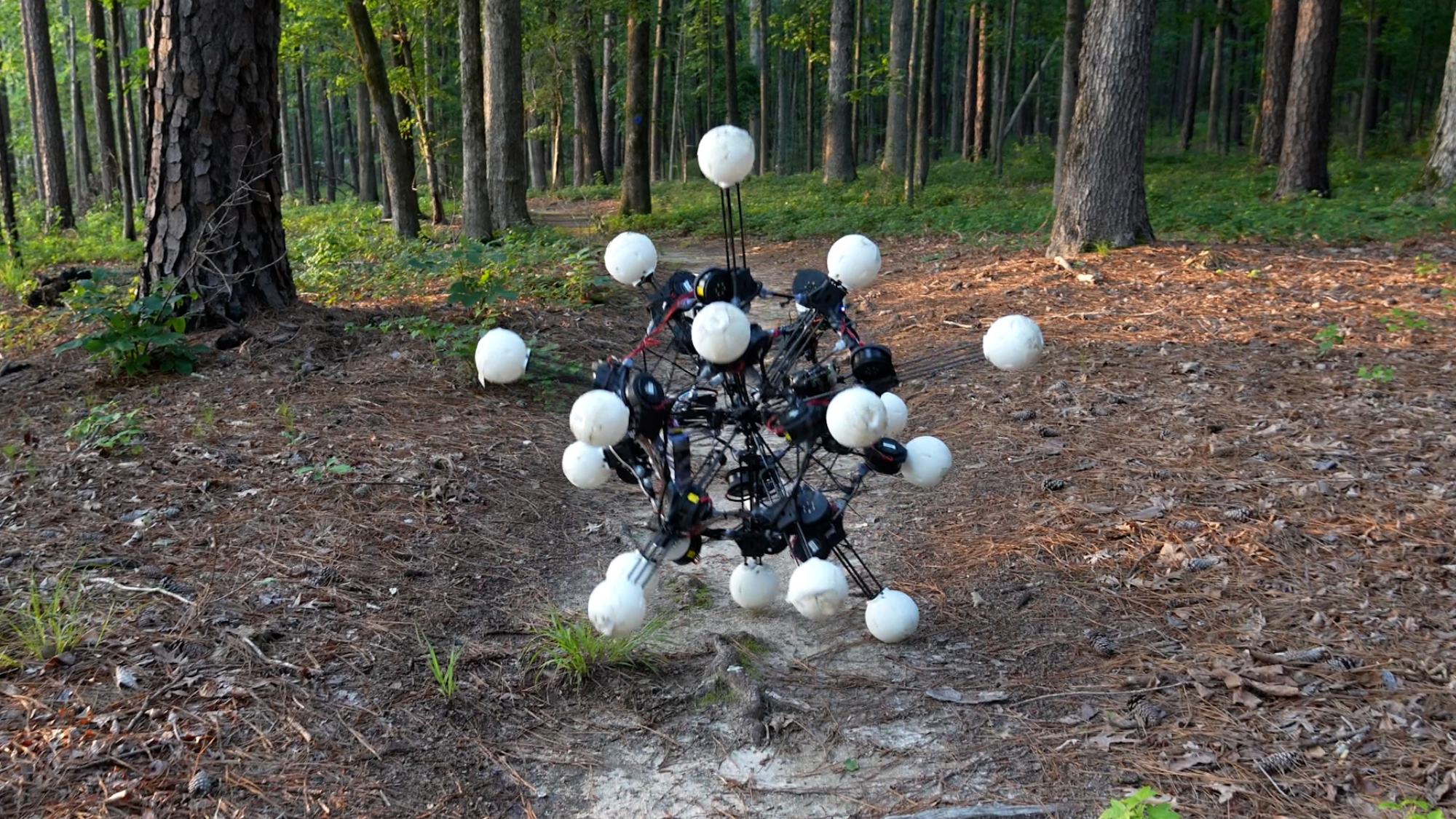
Say hello to Argus, a 20-legged, blob-looking robot capable of seeing in all directions at the same time and able to move almost instantly in any direction. The amorphous-looking sphere has no top or bottom, no left or right, and will keep trekking through sand, dirt, and gravel even when some of its legs are destroyed. It can also use its many legs to shimmy up narrow walls, a move similar to a wall jump in “Super Mario.”
The engineers behind Argus say their intriguing, if not slightly terrifying, creation isn’t just another incremental step forward in robotics. It’s the first member of a totally new category of “dynamically symmetric machines.” The findings were published this week in the journal Science Robotics.
“Watching Argus move is unlike watching any other robot we’ve worked with,” study co-author and Duke PhD student Jiaxun Liu said in a statement . “The first time we saw it navigate among trees and rough terrain, even under heavy collisions, we knew this was something different.”
Biological tradeoffs
Though somewhat human-looking, upright bipedal robots from companies like Figure and Tesla are all the rage these days, engineers have long looked to other animals to inspire their machines, because animals are simply better than Homo sapiens at certain tasks. Dogs and other quadrupeds are more agile, bats can fly, and bugs can scurry into hard-to-reach places.
However, at least in terms of movement, each of the pluses of these specific animals has also come with some minuses. Dogs and other quadrupeds are remarkably fast and nimble when moving forwards, but ask them to replicate that movement when moving backwards and you’re in for a problem.
With those inherent biological tradeoffs in mind, the team at Duke’s General Robotics Lab set out to make something completely different. Taking inspiration from underlying physics, they wanted to see if they could make a robot based around “dynamic symmetry,” which they define as the ability to generate forces and acceleration with uniform magnitude in all directions.
In other words, such a robot would take the idea of left or right and up and down and throw them out the window. Instead, it would be capable of moving in any direction, at any time, without any privilege given to one particular direction. The goal was essentially to build possibly the world’s first “omnidirectional” robot.
Argus keeps on coming—even when you break its legs
The design team eventually settled on a spherical core, or base, with a bunch of legs sticking out of it. They made multiple versions in a simulation, one with as few as eight legs and another with as many as 40. Eventually they settled on an even 20 legs for the physical build. Each of those legs is tipped with a camera that serves as one of Argus’ many eyes. Fitting, then, that it’s named after a many-eyed giant in Greek mythology. The researchers describe Argus as visually similar to a sea urchin, but even that’s selling it short. It doesn’t really look like anything in nature, which makes its uncanny movement in real-world testing all the more unsettling.
In testing, Argus could move in any direction just as quickly and comfortably as any other. The upside of that is that the blob is actually quite adaptable to different terrain despite its unusual appearance. It can easily traverse forest, wet surfaces, and sand, and could climb over certain obstacles. Argus’ ability to rapidly redistribute its weight also meant that it excelled at recovering when researchers tried to shove it off course. While Argus isn’t the first robot to right itself after getting pummeled by a researcher, what makes it unique is that it can redistribute its weight even if some of its legs get damaged or fail altogether.
In other words, you can chop off Argus’ legs and it will just keep coming.
Argus joins a family of DARPA-backed robots
The Duke researchers frame their interest in building this new category of machine as primarily motivated by pushing the boundaries of what’s possible in mechanical science. Still, it’s hard not to ignore the researchers’ most notable funder: the Pentagon’s Defense Advanced Research Projects Agency. Known for incubating some of the military’s most notorious research and development projects, DARPA is responsible for everything from Boston Dynamics’ beef Atlas humanoid to a massive, experimental manta ray inspired uncrewed underwater vehicle.
So, while it’s still not clear what exactly Argus will ever be used for, paper coauthor and postdoctoral researcher at Duke’s General Robotics Lab Boxi Xia says the experimentation and exploration was success in itself.
“Argus is an existence proof,” Xia said in a statement. “It shows that designing for dynamic symmetry isn’t just a theoretical curiosity. It produces a robot you can deploy in the wild, on uneven ground and in clutter, even in low-gravity settings. It changes what’s possible.”
A team of engineers at the University of California San Diego (UCSD) have developed a humidity-based image encoder that looks straight out of James Bond’s Q-Lab. The postage stamp-sized chip can store a hidden message that is only revealed when exterior humidity levels surpass 60 percent. The image can then be concealed again by bringing humidity back down. In practice, that means someone handed an object with the chip on it could simply breathe on it to unveil its secret message.
While it’s a potentially nifty tool for an undercover spy, the researchers say the encoder could also be used to reveal a security code on a credit card, or even serve as a visual indicator of climate changes in a particular area. In all of these cases, humidity essentially acts as a key. The findings were recently published in the journal Light: Science & Applications.
“You can imagine using this as a built-in security feature with the environment acting like a key that unlocks different pieces of information,” study co-author and UC San Diego electrical and computer engineering postdoctoral researcher Asad Nauman said in a statement.
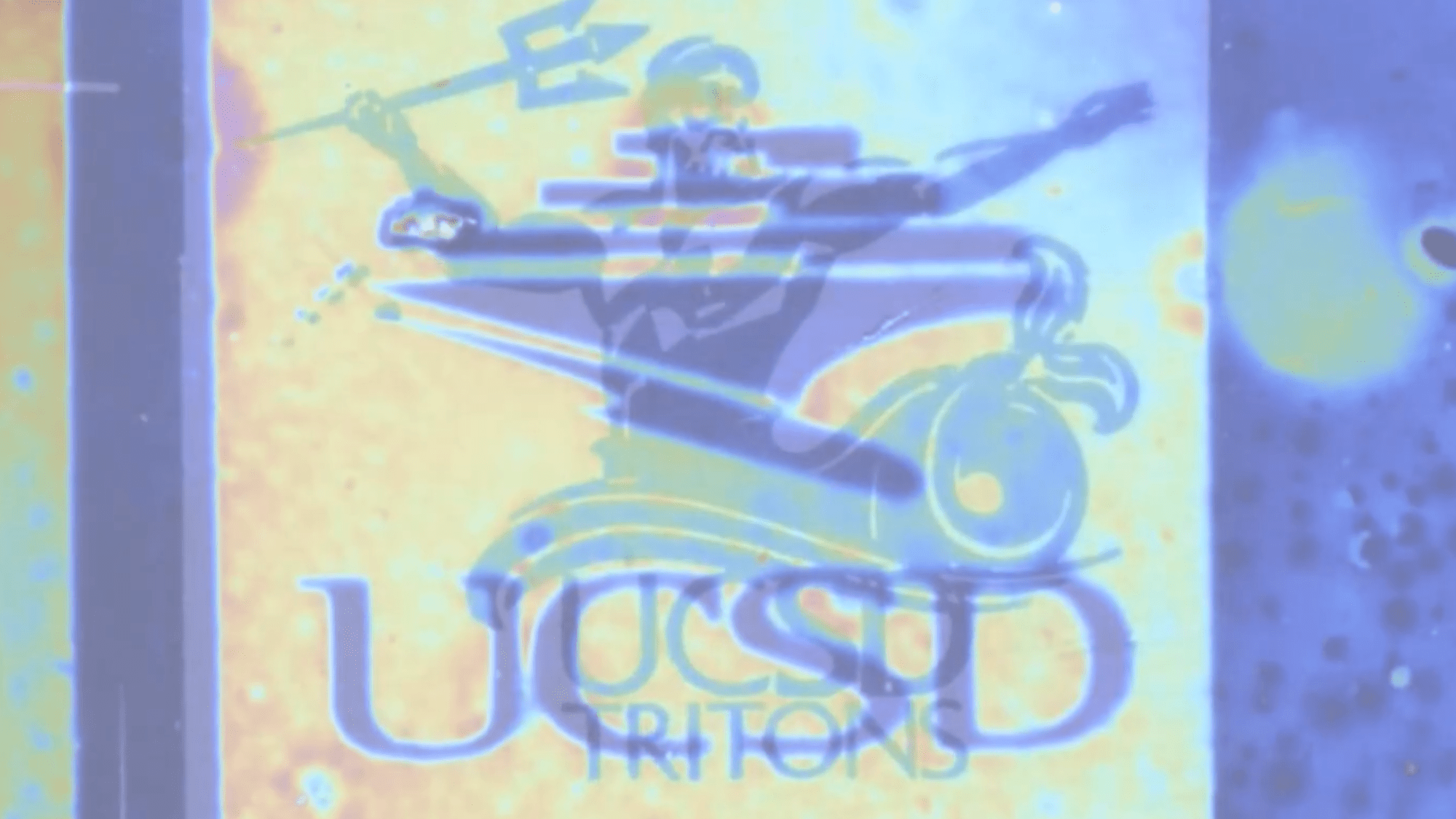
In a video demonstration, a clear blue image of a UCSD trident logo appears and then quickly begins to fade as the area around it brightens. After only a few seconds in, the UCSD library logo emerges. The image then fades back to the man with the trident before switching back once more to the library logo.
Hiding a message in plain sight
The chip consists of two separate hydrogel layers. The bottom layer, made of a phase-changing material called antimony trisulfide, essentially acts as a canvas onto which lasers can etch messages. These can be text or, as in the example above, full images. The top layer is made of a softer hydrogel material called azido-grafted carboxymethyl cellulose. This layer swells in humid conditions and shrinks in dry ones, which is why the hidden message becomes visible.
The transformation of the UCSD Triton logo to the UCSD library logo. Left to right: The UCSD Triton logo is visible at a 40% humidity level; the UCSD library logo begins to appear and overlap the Triton logo at a 60 percent humidity level; the UCSD library logo is solely visible at an 85% humidity level; and both images are overlapped at a 95 percent humidity level. Image: NDAO Lab
The first, low-humidity image or message is visible when humidity levels are at or below 40 percent. As humidity levels approach 60 percent, the hidden message starts taking shape. It is then fully visible at 80 percent humidity. The image reveal is also accompanied by a color shift due to small gaps between the two hydrogel layers. When the top layer swells and expands, the increased space between the layers alters the way light reflects off them, resulting in a shift from blue to red.
Of course, for any of this to work, a spy or other user would need to operate in an area with a predictable climate. Blowing on a message in a tropical environment where the air is already thick with moisture probably won’t do the trick. Still, in a pinch, it might beat having to write out long, intricate messages on finicky invisible ink.
Popular YouTuber and aircraft enthusiast Ramy RC built and flew what he’s calling the world’s largest remote-controlled (RC) version of a Boeing 777-9X jet. It’s not just big for an RC toy, it’s big, period.
With a wingspan of 33 feet and weighing 630 pounds, it’s roughly the same size as a human-piloted Cessna 150. The RC Boeing 777-9X may look identical to the real aircraft on the outside, but the plane is made mostly out of CNC-milled foam and carbon fiber. It has five actuators controlling the flaps, working landing gear, and is fully electric. In testing, the behemoth was able to taxi around a tarmac, lift off, and land several times.
Ramy has made a bit of a name for himself in the over-the-top RC plane-building world. He started off building models on his kitchen floor with limited time and resources, and videos of those early builds took off online. His audience has helped him scale up and pursue increasingly ambitious RC plane designs full-time. To date, he has over 200 videos showcasing massive RC versions of a ViperJet, a Boeing 787-9, and a C-17 Globemaster. Ramy’s most recent build prior to the new Boeing was the world’s largest RC Airbus A380, which came in at a staggering 800 pounds with a 32-foot wingspan.
The entire plane was built out of sections and 3D molded foam and attached together. Image: Ramy RC.
The Boeing 777-9X build started, like others, with a digital 3D model scaled down to 1/7 the size of the actual jet. With the proportions locked in, Ramy and his team then used a CNC mill to cut out separate foam parts for the plane’s fuselage, nose, and wings. Each section was reinforced with carbon fiber sheeting and sprayed with a thin layer of plastic for protection. Long runs of wiring were threaded through the plane to power systems like the wing flaps and landing gear doors. The whole aircraft is propelled by a pair of large electric ducted fans mounted where the real jet’s engines would sit.
Ramy decided to take a ride on top of his plane, Flintstones style. Image: Ramy RC .
Once assembled, Ramy used a remote control to taxi the plane around his outdoor tarmac. To drive home just how absurdly large the thing is, Ramy himself climbed on top and straddled his creation as it rolled around the facility. Once the team felt confident it was airworthy, they painted it white and blue with bold Boeing lettering along its side.
Ramy entrusted the plane’s maiden flight to a surprise guest: filmmaker Tyler Perry. The director is also an avid RC enthusiast and has credited these jumbo models like Ramy’s for helping him conquer his fear of flying. With the controller in his hands, the RC Boeing slowly powered up and its ground wheel started churning. It drove toward the end of the tarmac, then pitched up and went airborne, the buzz of its electric fans heard from the ground. Perry flew the plane for a few passes before bringing it down for a smooth landing worthy of a movie.
Around the mid-20th century, trains were in trouble. After the first rail lines were laid in 1804 England, the locomotive’s steamy forward chug seemed unstoppable. For over a century, trains were the unmatched champion for anyone looking to get somewhere further than a short horse ride away.
But by the late 1950s, that all started to change. The automobile’s rapid technological ascent meant more commuters were opting to get behind the wheel than on commuter trains. Air travel, propped up by significant government backing in the U.S. and Europe, shed rail’s ridership further by making long-distance travel faster. On top of all that, vast stretches of rail infrastructure across France, Belgium, and the Netherlands lay in rubble, casualties of World War II German bombing runs.
With rail’s future in limbo, ambitious engineers came to the rescue…or at least tried to. The post-war period produced some radical design gambles, but none were quite as conceptually ambitious as France’s short-lived Aérotrain.
It looked like a striking, comic-book-evoking silver tube, featuring a curved nose, reminiscent of a jetliner cockpit. The shiny steel body looked like a glistening cross between a train car and an Airstream camper, with bold red lettering streaked along its side.
Maybe most eye-catching of all though was its tail, which featured another giant rotating propeller or a jet engine, depending on the model. The Aérotrain hovered above the ground without wheels and propelled itself forward using an aircraft engine capable of churning out up to 12,000 pounds of thrust, roughly equivalent to the roar of a small jet engine at takeoff. That powerful engine meant the Aérotrain could reach speeds approaching 270 miles per hour, fast enough to leave conventional rail in the dust. In December 1969, Popular Sciencecalled the train-plane hybrid “the first guided vehicle to ride on air instead of wheels.”
An unfinished section of the Aérotrain rail sits in a rural French field. Image: Shutterstock PHILIPPE MONTIGNY
The first hovertrain: fast, floating, and loud
The Aérotrain was the brainchild of French inventor Jean Bertin, who founded the firm Bertin & Cie after studying aeronautics. His concept (initially called the Terraplane) adapted hovercraft technology recently developed in Britain and applied it to a fixed-track train. The vehicle rode atop a cushion of pressurized air pumped downward between it and a concrete track shaped like an inverted T, lifting it so it never made physical contact with the surface.
That absence of friction from the ground meant it could reach top speeds faster than a typical rail car. It also meant less wear and tear from contact with the Earth which, in theory at least, meant less need to constantly repair degrading parts.
Bertin essentially borrowed this “ground effect” principle, where compressed air between a low-flying wing and the ground surface builds up pressure leading to upward lift, from the aviation industry. And that wasn’t its only similarity to planes. Instead of using a traditional motor to push itself forward, it used aircraft propellers powered by powerful turboshaft engines mounted on top of the cabin.
One of the later Aérotrain prototypes, which set a record for train speed at the time, used the same engine found on early Boeing 727 commercial airliners. That meant it was shockingly fast, but also head-rattlingly loud. The result was something like a ground level airplane that moved along a track.
Cohen says that resemblance to an airplane wasn’t accidental. Bertin had a background as an aeronautical engineer. On a broader level, academics and scientists at the time were fascinated with recent advances in airplane and jet propulsion showcased during WWII and wanted to apply it anywhere they could.
“There was this sense that airplane technology could be applied on the ground or overwater and underwater and you could get kind of frictionless or semi-frictionless transportation at high speeds, very high speeds and it was not seen as pie in the sky,” Cohen says. “It was seen as a viable form of technology that could transform ground transportation.”
Several prototypes were developed, but the most successful of the bunch carried 80 passengers in two rows of two seats. The design intrigued members of the French government who viewed it as a quick way to connect the city center to airports. Though Bertin had proposed versions meant for suburban travel, the train’s noisiness and need for purpose-built concrete guide paths made it a hard sell for more urban areas.
But after years of trial and error, Bertin did eventually receive a contract to build out a line connecting Paris’s La Défense business district with the town of Cergy-Pontoise. Despite multiple prototypes, the Aérotrain would never transport passengers along the route, or any route for that matter.
The Aérotrain was bred from a culture of science and tech optimism
The Aérotrain, and a handful of international copycats that would follow it, were a product of their environment. Kennesaw State College Professor and train historian Albert J. Churella tells Popular Science the fact that hovertrain concepts gained traction was in large part a byproduct of postwar optimism. There was a sense that recent advances in science and technology could reliably reshape the world around us, and quickly. Journalists and newscasters drawn to the sleek, sci-fi looking designs were also more than willing to amplify that optimism further.
The July 2000 issue of Popular Science describes how researchers at Tohoku University Institute of Fluid Science in Sendai, Japan, were designing a modern Aerotrain that could go 310 mph. Image: Popular Science, July 2000 issue
“Interest in hovertrains must be seen in the context of the technological enthusiasm of the post-World War II period—a time when many Americans believed that science and technology could work miracles,” Churella said. That same optimism also applied to European countries across the Atlantic.
“After all, they had grown up alongside impressive new developments, including Nylon, Rayon, penicillin, jet aircraft, and nuclear power that promised to generate electricity that was ‘too cheap to meter.’”
Cohen echoes that point.
“Both in France and in the US at this time, there’s tremendous optimism about the power of technology to transform lives,” he says.
But the Aérotrain’s single contracted route never actually came to pass. Ballooning costs and development delays dampened public support. A global recession and oil crisis in the 1970s left the French government, whose funding was essential, with increasingly little appetite for large, time-consuming infrastructure gambles.
Shifting attitudes away from flashy, high tech bets and towards more practical utilitarian solutions also reportedly played a role, as did a perception of these projects that they catered particularly to the wealthy. With daily expenses climbing, the average French citizen simply stopped seeing the value in cool but unproven technology they may never personally experience, a feeling captured by city planner Pierre Merlin, quoted by researcher Vincent Guigueno in the journal Technology and Culture:
“It will not be the average Jean-Claude Z who takes the Aérotrain, but his CEO who will travel either to Orly Airport or his factory in the new town of Trappes from the company’s head office located in the Tour Main-Montparnasse,” Merlin wrote.
John Volpe, President Nixon’s Secretary of Transportation, detailed some of those prototypes in a 1969 issue of Popular Science. Rohr’s Aerotrain showed promise, and even received a Department of Transportation contract to test an experimental version in Pueblo, Colorado, but like its French forefather, it died under the weight of mounting costs.
And while a $90 million investment (especially in the 1960s) might sound like a decent chunk of change, Churella says the funding was never sufficient to make a radically new rail technology viable. Worse, spreading the investment across multiple competing approaches doomed any single one from gaining real momentum. Plus, aside from eye-grabbing news reports, Churella says everyday commuters simply weren’t all that interested in the hovertrain’s success, one way or the other.
“Hovertrains were an idea without an application, and a concept without a viable market,” Churella says. “It was something that very few people wanted, and no one needed.”
A prototype of French inventor Jean Bertin’s Aérotrain was exhibited in 2013 in Paris. Image: Siren-Com / CC BY-SA 3.0
“The story of the hovertrains shows the dangers of technological exuberance,” Churella says. “It is all well and good to propose innovative new technologies, but they must serve a purpose.”
In the end, the upfront cost of building entirely new concrete or electromagnetic guideways made the economics of hovertrains nearly impossible to justify. Prior assumptions about the limitations of traditional rail also proved premature.
Incremental advances in conventional wheel-on-rail technology produced today’s high-speed trains—not quite as fast as the Aérotrain, but close enough, and crucially compatible with over a century of existing infrastructure. Today, France’s TGV (Train à Grande Vitesse) high speed rail system is essentially a lightweight, highly refined version of the classic locomotive designs from the early 1800s.
Still, Cohen notes that viewing Bertin’s Aérotrainand the subsequent exploration of hovertrains as a total failure misses a broad point. Refinements of that underlying technology did eventually seed the development of maglev trains, which hover using powerful electromagnets rather than compressed air.
Today, a handful of maglev lines operate in China, Japan, and South Korea at incredible speeds. The most famous of them, Shanghai’s Transrapid, covers roughly 19 miles between Pudong International Airport and Longyang Road station in eight minutes, and is capable of 268 miles per hour—though its cruising speed is capped at around 186 mph.
And maglev tech, initially pitched as a commuter rail solution, has arguably had an even larger impact in other, unexpected applications, from airport luggage transportation and wind turbine parts to numerous military uses. If you peel back the onion far enough, all of those can be traced back to Bertin and his whack train-plane hybrid.
“That’s my lesson,” Cohen said. “to say [new technologies] are wacko is missing the point.” Despite where an individual invention ends up, new tech is “going to have all sorts of other applications”—applications we might not be able to see for decades to come.
In That Time When, Popular Science tells the weirdest, surprising, and little-known stories that shaped science, engineering, and innovation.
As NASA looks ahead towards Artemis III in mid-2027, the agency is sharing new details on several projects, including a future permanent moon base and a drone mission called MoonFall. The mission will send four drones to survey the surface of the moon’s South Pole to spot potential landing sites for future Artemis astronauts.
According to the update, the Jet Propulsion Laboratory (JPL) in Southern California has been developing the drone design and testing prototype hardware ahead of the scheduled 2028 launch. Each drone will land on the moon’s surface and gather high-resolution imagery of the terrain over the course of a single lunar day (up to 14 Earth days). After each drone’s last flight, its survive-the-night payload will continue to work for several months. Payloads that are designed to survive-the-night can endure the sub-zero temperatures of the lunar night, which can get as cold as -208 degrees Fahrenheit.
Each of the four drones should weigh about 550 pounds, and stand at four-feet tall and seven feet in diameter. They will use a Lunar Dashcam imaging system to create maps of the terrain. The drones will also be equipped with a laser retroflector array so that mission control can precisely locate the drones, a neutron spectrometer system to help determine how much (if any) subsurface water is present, and a spectrometer to measure radiation.
Texas-based Firefly Aerospace was selected to build the spacecraft that will transport the drones. Firefly’s Elytra spacecraft will carry the drones for a 45-day transit from the Earth to the moon. After entering lunar orbit, it will deorbit and perform a braking maneuver to send out the drones roughly 31 miles above the lunar South Pole.
No stranger to lunar exploration, Firefly Aerospace’s Blue Ghost lander became the first commercially built lander to reach the lunar surface in March 2025. While on the moon, Blue Ghost delivered 10 NASA instruments designed to gather lunar subsurface data and also snapped some beautiful images of a solar eclipse.
As of now, NASA and 66 other nations have signed the Artemis Accords. While not an international treaty, the Artemis Accords is an agreement for high-level principles of space exploration and provides a basic legal framework for exploring and developing the lunar surface during this century. However, the NASA-led Artemis group is in direct competition with an initiative led by China to explore the lunar South Pole and potentially extract its resources.
For a few select evenings in the late spring and early summer, sunlight aligns with Manhattan’s grid. The city’s bustling streets are washed with golden light as the sun sets, while tourists and locals alike flood the streets to snap that perfect picture. This event is nicknamed Manhattanhenge and it will begin on May 28 and continue through July 12.
However, you don’t need to live in the Big Apple to see a “henge” like Manhattanhenge. They actually pop up in a few places and a website called Hengefinder can help you find the closest henge.
Meet Hedgefinder
Data scientist and engineer Victoria Ritvo created the website, while software engineer John Pribyl built the accompanying app. Ritvo wrote about creating Hedgefinder in her blog, and details the three basic steps that scientists can use to find a henge. First, find the angle of the road, or its bearing relative to true north. Second, find the angle of the sun at sunset, or its azimuth. Third, find the dates when those two angles match.
While you don’t have to do any of that high-level math, you can read about how Rivoto and Pribyl made their calculations. You simply put in an address or city and can get a calculation for the closet henge near you.
“Having Hengefinder active means henges are now explorable outside of Manhattan, and I’ve been searching for them using the app,” Ritvo writes. “My favorite one so far, I haven’t actually seen. I’m intrigued by the Haarlemmertrekvaart, a canal which traces the southern edge of Westerpark in Amsterdam.”
Interestingly, much of Europe is left out of henge mania due to medieval street design. Amsterdam’s famed canals do offer an option, where sunlight can reflect off of the water. Henges may have been occurring twice a year for the past 400 years on the Haarlemmertrekvaart.
How henges work
The sun does not set in the same place every day. Its position changes along the horizon with the seasons. While the angle does not usually match the directions of a street, it will on a few days each year if the street is angled correctly.
In 1997, the term Manhattanhenge was first coined by Neil deGrasse Tyson, an astrophysicist and director of the Hayden Planetarium at New York’s American Museum of Natural History. Tyson noted that the setting sun framed by Manhattan’s building was comparable to how the sun’s rays strike the center of England’s Stonehenge on the solstice. The Neolithic humans who built the stone circle in stages between 3100 BCE and 1600 BCE intended for the light to shine that way on the solstice. But the builders of Manhattan? Not so much.
Chicagohenge in Illinois and Baltimorehenge in Maryland both occur when the sunset lines up with the grid systems in those cities around the spring and fall equinoxes in March and September. In Canada, Torontohenge occurs in February and October.
When Sachita Shah sent her cardiologist brother an ultrasound of her patient’s heart, he was very confused. The heart was huge, and the left ventricle incredibly muscular. His confusion was warranted, as the ultrasound was not of a human heart. It belonged to another primate—a gorilla. Shah, emergency physician and VP of Global Health at medical equipment manufacturer Butterfly Network, tells Popular Science that if she had shown an ultrasound of a gorilla fetus to a radiologist, they would have assumed it was a human baby.
Shah is on the gorilla care team currently looking after Jamani and Olympia, two western lowland gorillas (Gorilla gorilla gorilla) mothers at Woodland Park Zoo in Seattle, Washington. Jamani gave birth on Monday May 18, and Olympia is expected to deliver her new baby imminently. Shah and her colleagues’s work involves conducting ultrasounds of Jamani and Olympia’s baby bump—though now probably just Olympia’s—to keep an eye on the baby’s growth and position.
“We got a really pretty baby face,” Shah says, speaking of the ultrasounds. “We could see nose and lips and fetal breathing movements and heartbeat and drinking fluid, opening mouth and swallowing. For all intents and purposes, it was very much the same [as a human baby].”
The endangered gorilla mothers were trained to take part in the exams and procedures conducted by the gorilla care team, and they could choose whether to participate or not. The gorillas put their bellies against the edge of the enclosure for the scan (and received snacks), where there is a small opening through which the care team can reach through with the ultrasound probe.
As such, the zoo needed a small and portable imaging device. That’s where Butterfly Network and their all-in-one ultrasound probe came in.
“When you think of an ultrasound, you might think of a big cart with lots of different probes—a different probe if you wanted to do a pregnancy scan, or a heart scan, or a pediatric scan might have a tiny probe,” Shah says.
Instead, the Butterfly probe they use at Woodland Park Zoo is a handheld ultrasound that plugs into a smart phone. It is around as big as an electric shaver, and it functions with a number of different softwares for either veterinarian or human health use. Notably, an app allows the team to use it for different types of scans—from a pregnant gorilla to a child’s lungs—that would traditionally require distinct probes and machines.
Jamani’s baby was born on May 18 at 5:50 a.m. Image: Jeremy Dwyer-Lindgren / Woodland Park Zoo.
Shah and her colleagues also used the Butterfly ultrasound device to scan the heart of Nadaya, the silverback gorilla father of both babies. In fact, the heart ultrasound Shah sent to her brother belonged to Nadaya. They used human software for that scan, even though their vet software is optimized for fur. Fortunately, Nadaya’s chest isn’t very furry.
Shah, who has gone through a pregnancy herself, was most moved by working with the gorilla mothers.
“We could tell the baby’s head had dropped and we thought, ‘oh man, she must be so uncomfortable.’ And she was waddling and walking a little differently. I was like, ‘oh, I remember that, girl.’ It was just amazing to remember that we’re all connected in that way,” she says.
Western lowland gorillas are critically endangered, so babies are always excellent news.
UPDATE May 27 8:19 a.m EDT
On Sunday, May 24, at 1:44 p.m. PDT, Olympia’s baby was delivered by an emergency C-section performed by a medical team who typically works on humans. This 5.4-pund boy is the western lowland gorilla’s second baby.
While a holiday weekend has come and gone, May 26 is not without a cause for celebration. It’s National Paper Airplane Day!
The annual day commemorates the homemade aeronautical toy that has fascinated (and frustrated the less crafty) children and adults for generations. According to National Day, the practice of constructing paper planes is sometimes called aerogami, after origami, the Japanese art of folding paper. Building paper planes that can soar through the air like a bird is believed to have originated in ancient China, where paper was invented around 105 CE. However, the art of folding it into an airplane may have been perfected in Japan, as it is similar to origami.
Here in the United States, instructions for folding the Basic Dart were included in a children’s book published in 1859, so it is safe to say kids and adults alike have been making them for over 167 years. The term paper airplane was then coined in 1907 and replaced paper dart as the dominant term by the 1950s. In 2022, Kim Kyu Tae nabbed the Guinness World Record for the Longest Paper Airplane Throw Ever with a flight of 252.6 feet. According to Guiness World Records, the longest time flying a paper aircraft is 31.2 seconds and was achieved by Rao Chongyi and a team in China in February.
If you’re inspired to create the world’s best paper airplane, we have you covered. You can also look to the great minds at NASA for inspiration. After all, the first letter “A” in NASA stands for aeronautics. Their step-by-step NASA Space Crafts tutorial will not only help you make a colorful paper airplane, but also NASA’s X-57 Maxwell and the X-59 Quiet SuperSonic Technology.
May your National Paper Airplane Day be free of paper cuts.
The word ‘hacker’ comes loaded with a cliched image: A hoodie-clad loner hunched over a keyboard in a room lined with monitors. The stereotype stuck for a reason. And for decades hacking really did come down to how well a hacker could operate a computer.
That trend might change. The next generation of attacker may have more in common with a cat burglar than a code monkey. They slip physically close to a target instead of typing their way in. Some of the sharpest new attacks skip the login screen entirely. They reach straight into the hardware, sometimes from the other side of a wall.
The researchers behind the discovery are led by Prof. Han Jun of KAIST, working with researchers from the National University of Singapore and Zhejiang University in China. At NDSS (Network and Distributed System Security) 2026, they demonstrated that an antenna trained on a running computer can capture the faint electromagnetic leakage from its GPU. This new technique was enough to reconstruct the layer structure of the AI model inside, with up to 97.6 percent accuracy. They call the technique ModelSpy, and it works even through a wall.
If this technique fell into the wrong hands, stealing a company’s AI would hardly look like an attack. Someone could walk down the hallway with a 20-liter backpack of antenna and receiver tucked inside and walk back out with the blueprint of the AI model running on that floor. No malware, no breached server, no exposed source code, not a single line of planted code. Just the AI’s design, leaking out as electromagnetic noise. The research won the Distinguished Paper Award at NDSS 2026.
Stealing AI without touching the computer
AI has gotten valuable enough that plenty of people are now trying to figure out how to steal it. None of the usual paths are easy. You can break into the company’s network and plant malicious code. But planting anything on a hardened corporate server is hard, and getting caught is easy. What about going after the hardware directly, skipping the software entirely?
The most promising example is the side-channel attack. Instead of breaking in, an attacker just listens. Any running computer leaks signals like small flickers in the current it draws, the heat coming off the chips, the hum of its fans, the faint vibrations of its components. Read those signals carefully enough, and they can tell you what the machine is doing inside. Researchers have been chasing that idea for decades.
Some of this work has been done. Researchers have clipped sensors onto the power lines feeding a GPU, and they’ve stripped chips bare to probe their internals directly. The catch is always the same: you have to be standing next to the machine, hands on the hardware.
The KAIST researchers wanted to know if they could pull off a side-channel attack from a distance by listening to it. The idea was to reassemble the signals that leak from a computer as it runs, and work backward through them to uncover the architecture of the AI inside. But how do you reconstruct a model from a few stray waves of static? The answer comes down to what GPUs unwittingly emit while they compute.
A running GPU is electricity in constant motion, current racing through millions of circuits as they pass signals back and forth. Nothing in a GPU ever rests. The memory clocks keep the rhythm of data access, voltage regulators hold the power steady, refresh circuits rewrite the memory before it forgets itself. Each of these subsystems gives off its own electromagnetic signature as it works. Engineers call them carrier waves.
Those carrier waves are not steady. The moment a GPU starts running an AI model, its electromagnetic emissions begin to shimmer. They rise and fall as the current through the chip shifts to match whatever the model is computing and however often it needs to reach into memory. The GPU’s memory-access patterns are imprinted like traces onto the waves it gives off.
So those memory patterns ride on the carrier waves like a signature of the AI itself. A modern model is a stack of layers, each one feeding its output into the next. The final answer falls out of the top of the stack. The key is that different kinds of layers hit memory in very different ways. Some pull in huge chunks of data at once for heavy processing. Others make short repeated trips to grab a little at a time. Read the carrier waves carefully enough and in principle you can trace those memory patterns backward to reconstruct which layers ran in what order. Pulling this off in practice is another matter.
But working backward from those traces to the actual AI behind them is the hard part. The space of candidates is enormous. Models vary wildly in how many layers they have and what kinds. Each layer brings its own hyperparameters, with the possibilities multiplying until they grow unmanageably large. The researchers estimated that even under a simplified setup of just five layer types across a 100-layer network, the number of possible combinations runs to about 10 to the power of 70. For reference, the observable universe holds roughly 10 to the 24th power stars. Testing every candidate one by one is obviously off the table.
So they set out to fight AI with AI. The researchers built a separate analytical model, trained to take in electromagnetic patterns and guess at the architecture they came from. The trick was to keep the model from trying to read the whole signal in one bite. Instead it works in layers, moving from the broad shape of the waveform down to the fine grain. First the model reads the overall flow of the signal along with its surrounding context, since a single instant of waveform tells you almost nothing on its own. Then it slices the signal into thin time windows and classifies each slice by layer type. Lastly, it estimates the hyperparameters that go with each layer. All three stages were trained together as one piece rather than being bolted on top of each other.
What pushed the technique past the bar was the training data. The analytical AI needed clean and abundant examples to learn from, but real electromagnetic recordings were noisy and patchy — the kind of data it would face in an actual attack. So the researchers turned to something else. DRAM traces are time-stamped records of how a GPU’s memory is accessed while it runs an AI model. Since the GPU’s electromagnetic emissions are nothing more than DRAM activity riding on signal strength and leaking outward, the two are essentially mirror images of each other.
The catch is where they come from. DRAM traces are captured directly inside the GPU, which makes them far cleaner than anything an antenna can pick up from outside. The researchers trained the model on both sources in stages. The AI first built its foundation on clean and plentiful DRAM data, then sharpened its real-world instincts on electromagnetic signals. The electromagnetic data was harder to collect but closer to actual attack conditions.
To test the attack, the researchers ran it against five everyday Nvidia GPUs (RTX 3060, 3060 Ti, 3070, 4060, 4060 Ti). All of it is gear you can buy off the shelf. Their attack kit was equally ordinary. A 5GHz antenna and an electromagnetic receiver were the only equipment, both small enough to fit inside a 20-liter backpack. The goal was to mimic what an actual attacker would do. They had to capture the emissions from across the room with no way of touching the machine.
The DRAM trick paid off. Pretraining on DRAM traces before fine-tuning on electromagnetic recordings beat training on electromagnetic data alone by a wide margin. Layer segmentation accuracy climbed from 92.5 percent to 97.6 percent. The task is to identify which layer each point in the signal belongs to. Accuracy at estimating each layer’s hyperparameters rose from 86.2 percent to 94.2 percent. And the gains held across all five GPUs.
Distance did not kill the attack. Using an RTX 3060 Ti as the test target, the researchers backed the antenna farther and farther away and watched what happened to the numbers. At five meters, layer segmentation accuracy held at 86.7 percent. Hyperparameter estimation remained at 81.7 percent. The researchers estimate the technique stays usable out to about six meters. The signal weakens as you back away, but enough of its traces survive to keep the analysis going.
An antenna hidden inside a backpack can extract the architecture of an AI model from the other side of a wall.
The same held when they put a wall between the GPU and the antenna. The researchers ran the test through glass, then wood, then concrete. Layer segmentation accuracy stayed at roughly 96 percent in every case. The electromagnetic waves leaking from the GPU weren’t fully blocked by the walls. They passed partway through, holding on to enough signal for the model to read.
ModelSpy has clear limits though. It cannot reach an AI model’s weights, the numerical values learned during training. It cannot pull out the training data or the source code either. What it captures is the architecture, and only the architecture. That does not mean there is no cause for concern. A stolen blueprint alone can be enough for a hacker to design a dangerous attack.
Once an attacker has the layer structure and hyperparameters, they can build a model that behaves like the target. The technique is known as a surrogate model. Instead of going at the real system blind, the attacker can run any number of attacks against the surrogate first. The effective ones then get turned on the actual AI. A model that closely mimics the target’s inner workings turns any attack into something much closer to a precision strike.
Take the adversarial example attack. Imagine someone going after the traffic-sign recognition system in a self-driving car. To the human eye it looks like an ordinary stop sign. Stick a small piece of tape on its face or paint a subtle pattern across it and the AI can be tricked into reading it as a speed limit sign or a straight-ahead sign. A car that misreads its signs can accelerate through an intersection where it should stop, or turn into the wrong lane.
The researchers used ModelSpy itself to put the surrogate-model idea to the test. They built a surrogate from the architecture ModelSpy had estimated, then used it to test adversarial attacks. These are attacks designed to make an AI misjudge what it sees. Attacks built on ModelSpy’s estimate performed almost as well as attacks designed with full knowledge of the real model. The gap averaged just four percentage points.
Copying the AI itself may be on the table too. In a so-called model extraction attack the attacker hammers the target with queries to capture its outputs and trains a replica on what comes back. It is imitation learning in effect with a stolen AI as the teacher. The catch is knowing what kind of model to imitate. Without the architecture, building something that performs as well as the original takes far more data and far more compute. The result is usually off anyway. With the architecture in hand, a close replica is fast and cheap.
A copyable AI is also a leakier AI when it comes to privacy. A surrogate model also sharpens what is called a membership inference attack. This is a way of working backward from a model’s behavior to figure out who and what was in its training data. The attack rests on a simple quirk. An AI responds in subtly different ways to data it was trained on than to data it has never seen. The distribution of its outputs shifts just a little when it encounters something it has seen before. An attacker who can spot that shift can infer whether a specific piece of data was part of the training set.
Once ModelSpy hands them a surrogate that closely matches the target’s architecture, they can do that inference with far greater precision. Sensitive training data makes the threat far worse. Medical AI is the obvious example. A membership inference attack against such a model can be devastating. Imagine a hospital running a diagnostic AI that was trained on its own patients’ records. Once an attacker confirms that a specific person’s record was part of that training set, they learn more than the fact that the person was treated at that hospital. They also learn by implication that the person may have the particular condition that AI was built to diagnose.
The researchers have proposed two countermeasures. The first is electromagnetic jamming: deliberately blanket the GPU’s signal with artificial noise so the real emissions can’t be picked out. The second is an obfuscation technique that runs decoy computations alongside the real ones to mask the traces of actual AI inference. Neither is a perfect solution. Careless jamming can spill over into the Wi-Fi band and knock out office communications. Decoy computations slow the GPU down and drive up operating costs. Still, the two approaches give GPU manufacturers and AI companies a place to start.
ModelSpy suggests that safeguarding AI may have to extend well beyond the computer itself.
“This research demonstrates that AI systems can be exposed to new forms of attack even in the physical environment,” said Prof. Han. “To protect critical AI infrastructure such as autonomous driving and national facilities, it is essential to build a cyber-physical security framework that encompasses both hardware and software.”
What are those orange balls on some power lines? – Maggie, age 8, West Chester, Pennsylvania
Have you ever looked up while driving on a highway and spotted those big orange balls hanging on power lines? They look a bit like giant toy beads strung along the electric wires.
What in the world are those overgrown basketballs doing up there?
Those big orange balls don’t help with electricity flow or improve the efficiency of the power lines, but they do have a very important job. Officially called aviation marker balls or spherical markers, they’re there to help pilots see power lines so airplanes and helicopters don’t crash into them. They’re like bright warning signs in the sky, protecting pilots, passengers and people on the ground below.
Big round warning signs in the sky
Power lines can be very hard to see from an airplane or helicopter, especially when pilots are flying low. Thin metal wires can visually blend into the background of nature.
The orange balls help the lines stand out. You can think of them as being like reflective tape on a bike – just a little something simple that helps people notice a danger before it’s too late.
Orange isn’t a random choice. This vibrant color is very visible to the human eye and especially stands out against the more muted colors of nature – blue sky, green trees or gray clouds. Sometimes the balls are red or white, or even striped, but orange is the most common because it works well in most lighting conditions.
Aviation safety rules in many countries explain which colors should be used so pilots can quickly recognize hazards. Organizations like the U.S. Federal Aviation Administration publish guidelines you can check out about marking obstacles near flight paths.
These balls may look like slightly oversized ping-pong balls from your perspective on the ground. But most are actually much bigger, about the size of a large beach ball, roughly 2 to 3 feet (0.6 to 1 meter) across. Each one can weigh 10 to 25 pounds (4.5 to 11 kilograms), about as heavy as a large backpack full of books.
They’re usually made from strong plastic or fiberglass, similar to materials used in boats or playground equipment. That way, they can survive years of sun, rain, snow, wind – and even the occasional bird landing on them.
Even though they sit on wires that carry huge amounts of electricity, the balls themselves are not energized. They’re made of insulating materials, so electricity does not flow through them.
The wires are strung between sturdy metal towers or wooden poles that are very tall to keep dangerous high-voltage electric wires high up in the sky, far away from people on the ground. This design makes it safe to walk, play and drive underneath them. Some transmission towers, especially for very high-voltage lines, can be as tall as a 15-story building.
If you look closely at big transmission lines, you’ll often see three thick wires, sometimes with an additional thinner one on top that’s called a shield wire. Because the shield wire sits higher, lightning is more likely to hit it first, protecting the other wires from a strong blast of electricity that can damage equipment or cause power outages. The shield wire is connected to the ground, so a lightning strike’s electricity can flow safely down the tower and into the earth.
The three main wires work together to carry electricity in a steady rhythm. By sharing the job among three wires instead of one, the system can move more energy with less waste, making it more efficient.
Installing the aviation marker balls is a job for specially trained crews, often working from helicopters. The power line usually stays turned on while the work is being done, so safety rules and careful planning are critical. The ball comes in two halves that clamp around the wire and bolt together tightly.
Once installed, these balls can last 10 to 15 years, depending on weather and conditions. They don’t need much maintenance, but utilities inspect them from time to time to make sure they haven’t cracked or faded too much.
Not every transmission line needs the markers. Usually only places where aircraft are more likely to fly low – such as near rivers, valleys, airports or helicopter routes – will use these brightly colored balls. Most neighborhood power lines are too low to need markers.
Next time you spot those bright orange dots in the sky, you’ll know: They’re not electrical equipment, and their color isn’t random. They’re simple, clever tools helping keep our busy world a little safer.
Hello, curious kids! Do you have a question you’d like an expert to answer? Ask an adult to send your question to CuriousKidsUS@theconversation.com. Please tell us your name, age and the city where you live.
And since curiosity has no age limit – adults, let us know what you’re wondering, too. We won’t be able to answer every question, but we will do our best.
In March, we reported on a wild bobcat that had been hit and dragged by a car, who also got her head stuck in the car’s grill. As if things could get any worse, the wild feline arrived at Raven Ridge Wildlife Center in Pennsylvania on a Sunday, and the nearby veterinary practice was closed. But thanks to two lucky acquaintances, a mobile x-ray machine was brought in, revealing that the bobcat had broken two legs.
Thanks in part to the fact that her bone fractures were clean breaks, her team decided to risk a surgery. The next morning, two surgeons operated on the bobcat contemporaneously. After the operation, Tracie Young, director of the Raven Ridge Wildlife Center, told Popular Science that she was doing “fantastic” and “starting to act like a bobcat.”
The female feline has been healing atRaven Ridge Wildlife Center for two months. Image: Dawn Rise Ekdahl / Raven Ridge Wildlife Center.
In her great misfortune, the cat has been rather lucky—and it seems like the luck is holding. Two striking coincidences have now come together to get her a custom-made cage for her rehabilitation.
“After two months of recovery, the bobcat now needs to be moved outside for exercise and to begin building muscle tone,” the wildlife center wrote on social media. “We had to devise a safe and creative way to get her outdoors, necessitating the construction of special caging. We determined that a custom dog kennel would be the only viable option.”
However, the problems were twofold: time and money. The dog kennel builders the wildlife center contacted needed at least eight months to build the rehab cage, and the project would cost thousands of dollars. But then Raven Ridge’s photographer Dawn called her neighbor Glen for suggestions, who turned out to be the owner of a kennel-building business and could build the kennel in two weeks.
The custom-built kennel was made for the bobcat in only two weeks. Image: Dawn Rise Ekdahl / Raven Ridge Wildlife Center.
And if you think that’s enough of a coincidence, it gets even better. The very day construction commenced, Raven Ridge Wildlife Center received a letter with a generous donation. A woman named Raven Minervino has passed away, and her husband wrote that she had consistently supported the wildlife center. After she died, her husband had asked that rather than getting flowers, people make donations in her memory. The letter had a donation in her memory large enough to pay for the custom bobcat cage.
“Thanks to all this support, we successfully moved the bobcat to the new enclosure, where she is now exploring, exercising, and much happier,” reads the social media post. Raven Ridge plans to (or perhaps already has) put a plaque in Minervino’s memory on the cage.
Both of the bobcat’s broken legs have healed, and since having the custom cage, she has put on ten pounds, bringing her to the much healthier total of 19 pounds. Adult female bobcats weigh approximately 15 to 20 pounds on average
To effectively travel on Mars, rovers need to deal with a lot of sand. German engineers have created a new kind of ground rover that uses swimming motions to push through sand that may otherwise cause the wheels to get stuck. Its inspiration: the African sandfish (Scincus scincus), a lizard known for burrowing into the Sahara Desert and literally swimming through its sand like a fish. It’s one of the animal kingdom’s strangest methods of propulsion, but it may help shape the future of Mars exploration.
A video of the rover, released this week by the University of Würzburg, shows a mini-fridge-sized, silver rover making its way through a sandy, Martian-mimicking test floor. Rather than rolling forward, each of its four wheels cuts through the sand in what looks like a figure-eight motion. The rover pushes on several yards and then cuts a corner and returns to where it started.
“The wheels mimic the animal’s [sandfish’s]characteristic interaction with the ground, generating both longitudinal and lateral forces,” University of Würzburg researcher Amenosis Lopez said in a statement. “The rover leaves sinusoidal tracks in the sand.”
The sandfish: nature’s cute solution to slippery sand
Though most people likely associate space rovers with round wheels or tracks reminiscent of those on WALL-E, neither design is ideal for dealing with Mars’s uniquely harsh and sandy environment. Sand is unique because it’s a material with both solid and liquid-like qualities. On top of sand’s mixed texture, rovers roaming on the Red Planet have to deal with steep slopes and uneven terrain, where varying levels of slipperiness can cause imbalance. Patches of softer sand are also a nightmare for wheels, making the prospect of a rover getting stuck never far from mind
But nature figured out a solution to this issue millions of years ago, and it’s called the sandfish. Contrary to its name, the Sahara Desert native is a lizard in the skink family. Above ground, the sandfish uses its tiny legs to scrabble around much the same as any lizard. Things get more interesting when it burrows down into the sand. X-ray imaging shows the sandfish propelling itself forward under the sand, using a powerful waving motion to generate thrust and overcome drag. The result looks like an animal swimming through the sand, remarkably similarly to how a fish would oscillate its body to move through water
Engineers at Georgia Tech took those observations and used them to create their own sandfish robot in 2011. Testing with their robots showed that the little lizard’s oddly wedged shaped head may also help it generate lift forces and more easily swim through sand.
Sink or swim: new rover did both
Researchers working on the sandfish-inspired robot said it outperformed a wheeled version when navigating through a sandy test track. Where the round wheels would wobble and weave, the oscillating wheels stayed relatively stable. That’s not to say the new approach worked right out of the gate. Early models of the design were reportedly so heavy that the rover literally sank into the sand. The team went back to the drawing board and made a second version, this time increasing each wheel’s width and reducing overall mass
It’s unlikely these oddball new wheels will become the main chassis system for NASA rovers, at least not in the immediate future. More work still needs to be done to increase their overall controllability and account for slippage that can occur in complicated, real-world environments. There are also the added variables of accounting for scientific instruments and other cargo a rover might have to carry.
More than anything, the wheel design is a testament to the sandfish’s innate ingenuity and evolutionary gifts. Many scientists only recently began to truly appreciate these traits and what other technology they could inspire.
When you search Google for something topical, you might see a cluster of headlines from news outlets, reporting breaking stories related to your search query. If you want to focus on those results, you can click to see More news, or navigate to the News tab at the top of the screen.
How these news sources are chosen depends on a variety of signals and factors—just the same as any other Google results—but you now have the ability to set “preferred” sources that will always show up first.
Maybe you want more New York Times and less CNN, or vice versa—Google will let you pick your favorites (which hopefully include Popular Science). This can also help you surface content from news sources you wouldn’t otherwise see in Google, like a local website covering your area.
How to set preferred sources
Setting preferred sources on Google. Screenshot: Google
If you run a Google search on the web for something in the news, topical enough that the Top stories box comes up in your results, you can then click the small icon next to the Top Stories heading to pick your sources. The icon looks like a couple of rectangles with a plus symbol on top.
This brings up a new dialog, where you can pick specific sources. Just start typing the name of the website you want to read more often, and select it when it appears. You can’t add any website on the internet though, only those that are regularly updated (and therefore qualify as news sites).
While there’s no specific set of rules about how often preferred sources show up, Google says you’ll see them “more often” than other outlets. As you add more sources, you’ll see the option to Reload results based on your last search. This should now include your selected sources, as long as they’ve published something related to your search recently.
You can head back to this dialog via the Top stories box whenever you want, and add new preferred sources or remove existing ones—there’s actually no limit to the number of sources you can add, so you’re able to cover a full gamut of perspectives and topics. You can also head to google.com/preferences/source directly in your web browser.
Many news websites have now started adding Add as a preferred source on Google badges on their articles, which you can click directly to jump to the preferred sources dialog. In our articles, you’ll find it’s labeled Add Popular Science, just under the headline and sub-heading—click the link to add us.
Preferred sources and Google News
Google News also lets you select your favorite topics. Screenshot: Google
Google hasn’t officially said anything about how preferred sources in Google search relates to the dedicated Google News website and apps for Android and iOS, but there is some overlap here.
If you head to Google News on the web and then open the Following tab, you’ll see that the preferred sources you’ve selected via search are also listed under Sources. However, there’s no way (at the moment) to add new sources from Google News—you need to go through Google search.
On the dedicated Google News portal, if you click the three dots next to any story, you can opt to see more stories or fewer stories like it—but you can’t specifically request to see more of a particular publisher. You can block an outlet though, by choosing Hide all stories from… on the same menu.
There are other factors that affect your Google News selection as well, and if you scroll down the front page of Google News to the Your topics section, there’s a Customize button to the right. Click on this, and you can tell Google News which topics you want to see more of (like sports, entertainment, and business, for example).
We may well see a closer connection between preferred sources and Google News in the future, but for now there are a variety of ways to customize the stories you get served up inside Google’s portals. If you’re spending a lot of time reading news, it’s worth making sure your favorite publishers appear first.
Have you ever pressed a crosswalk button and wondered if it actually does anything? You might be onto something.
Called placebo buttons, controls that don’t do anything exist everywhere. Sometimes it’s because of accidents of history; sometimes they’re installed specifically to trick people into feeling an illusion of control. Either way, they’re hard to notice. Here are a few buttons you press every day that might not actually work.
Pedestrian buttons may or may not do anything
In New York City, an official told CNN that only around 100 of the 1,000 crosswalk buttons in that city actually do anything. The Boston Globe has reported that the buttons in and around downtown areas of that city aren’t functional. And in the UK, the BBC has reported that the buttons in downtown London are completely superfluous during the day when pedestrian traffic is high—the lights trigger on the same timed routine, regardless of any button presses. The buttons do, however, work in the evening, when pedestrian traffic slows down.
Why is this? Timing. Modern traffic lights are designed to allow the flow of traffic to be consistent. The general idea is that cars driving at the speed limit should more-or-less hit green lights as they go. Regularly timed pedestrian crossings make this math a lot simpler in places with a lot of pedestrian traffic, so most cities opt for them in downtown areas.
Pushing the crosswalk button may or may not change the light, depending on the time of day. Image: Shutterstock MFajarH
The situation is different if you live in a small town, suburb, or anywhere else with infrequent pedestrian traffic. In such areas, pressing the button may be necessary to trigger the walk light.
The problem: It’s not always clear whether the button you see triggers the walk light or not. If you press the button and the light changes, you’ll naturally assume pressing the button worked even if it’s the timer that triggers it. But if pressing the button is necessary, well, then the only way to find out involves waiting longer than necessary at a cross walk (which might be interesting, scientifically, but only if you’re not in a rush).
My personal solution: I just press the button. If it works, great, and if not I’ll never know.
Elevator “close door” buttons don’t work immediately
Have you ever pressed the “close door” button on an elevator and noticed the door didn’t immediately close? There’s a reason for that, at least in the United States: the Americans with Disabilities Act (ADA).
This law, passed in 1990, set specific rules for elevators, including how long the door needs to stay open. The regulations state that elevator doors “shall remain fully open in response to a car call for 3 seconds minimum.” There’s another rule that adds more time based on how far the call button in the hallway is from the elevator entrance, assuming a walking speed of 1.5 feet per second. For example: If the button is 10 feet from the door, that means the door needs to stay open for 6.67 seconds.
Sure, feel like you’re in control. Image: Shutterstock sommthink
What’s this have to do with the close door button? Well, in theory someone could press the button to close the door earlier than the code dictates is legally required. Some elevators are designed so that the close door button does nothing until enough time has passed, but in some cases the button is just disabled entirely for the sake of simplicity (generally because the door automatically closes after the required wait time).
That’s why, in many situations, pressing the close door button on an elevator doesn’t do anything. That doesn’t stop a certain kind of guy from repeatedly mashing it, though.
Your office thermostat might be a lie
A 2003 article published by the Wall Street Journal revealed something many office workers already suspected: some office thermostats don’t actually do anything. The article includes a widely cited claim— from a single HVAC installer—that up to 90 percent of office thermostats are fake. That’s almost certainly not true, and the article itself notes that other experts say the number is below two percent.
But what is certain is that at least some fake thermostats exist. Why? To reduce complaints. A 2022 article published by Propmodo, a real estate trade publication, quotes an HVAC installer who claims to have installed a fake thermostat after a number of complaints from office workers. “Our service calls disappeared, and to my knowledge, the system is still set up and working as it has since 1987,” said Vaughn Langless, an electrical inspector from Rochester, New York.
It’s a good story, and points to a psychological reality: Being able to make choices about our environment is psychologically beneficial. A 1976 study by psychologists Judith Rodin and Ellen Langer gave some nursing home residents control over small things in their environment—which plants they want to care for, for example, or when to watch a movie. Another floor was told staff would make those choices. The residents able to make choices were more alert, active, and even died at a lower rate. There is decades of similar research, showing that control over your environment leads to real benefits.
Placebo buttons are what happens when designers notice this psychological reality and try to get the benefit on the cheap. A working office thermostat would require either letting employees actually change the temperature (which costs money) or running a more responsive HVAC system. But a button that looks like it works costs basically nothing. That may be brilliant, or evil, or both—it’s all a matter of perspective. Regardless, placebo buttons lurk all around us.
Google launched its own email service all the way back in 2004 (remember the hype around a free 1GB of email storage space?). In the years since, it’s become the default email service for many of us—in part because of its close ties to so other Google apps, like Google Drive, Google Maps, and Google Photos.
We’ve also seen plenty of competing products launch over the last two decades, so if you’re thinking about leaving Gmail, you have plenty of other options. Apple and Microsoft are two of the big names that will gladly take over the responsibility of managing your inbox.
Then there’s Proton Mail, part of the Proton suite of products that prioritizes privacy and security. We’ve previously compared Proton Docs and Google Docs, and here we’re going to take a look at how Proton Mail stacks up against Gmail. It may be worth your while to switch, especially if you’re unsure about Google’s privacy policies.
Gmail vs Proton Mail: The basics
Both services are available on the web, and have dedicated apps for Android and iOS. Both have free options, with premium plans also available: Proton Mail gives you 1GB of storage for free, while Gmail gives you 15GB (though bear in mind this is also shared with Google Drive and Google Photos).
Paid plans start at $1.99 a month for Gmail and $4.99 a month for Proton Mail, but it’s hard to do a straight comparison, as a lot of other upgrades are included. Google gives you more AI features as well as more storage room, for example, while Proton gives you more usage across its VPN, Calendar, and Drive tools in addition to the extra cloud storage.
If you prefer to use a third-party email client like Apple Mail or Outlook, this is easily done on Gmail and only takes a few steps. With Proton Mail, it’s more involved: You need to sign up for a premium subscription, and use the Proton Mail Bridge app. This ensures end-to-end encryption, so not even Proton itself can read your emails (this isn’t something Gmail offers by default).
Proton Mail focuses on security and privacy. Image: Proton
Gmail vs Proton Mail: Key features
When it comes to key features, both Gmail and Proton Mail have plenty to offer, though with Proton Mail your use of labels and filters is restricted on the free plan. It supports folders though, which Gmail doesn’t. And if you pay for Proton Mail, you can set up multiple email addresses to work through one inbox, which again Gmail doesn’t support.
It’s similar with the email scheduling and snoozing features, and automatic email forwarding to another inbox. This is all free in Gmail, and requires a subscription in Proton Mail. There is also an undo send feature on both platforms, free of charge, that you can use to quickly bring back messages you’ve sent in error.
Ideally, you need to be paying for Proton Mail: Otherwise you run into restrictions on filters, folders, and labels, and the number of messages you can send (150 per day). With Gmail, all of this is supported by advertising and data collection This is the distinction Proton focuses on: You’ll never see a single advert inside Proton’s products.
Gmail vs Proton Mail: Interface
Both Gmail and Proton Mail offer a clean, modern-looking app interface that’s easy to navigate around and intuitive in the way it works. Both platforms let you customize the interface too—so you can tailor the look and feel to suit yourself (Gmail does offer more in the way of tweaks, however).
Both email platforms support keyboard shortcuts on the desktop, which can be very helpful for powering through emails and clearing out your inbox. There’s also well-done integration with the other apps offered by these companies—including Google Drive and Proton Drive, and Google Calendar and Proton Calendar.
You could argue that the Gmail app is a little bit more polished, especially on mobile, but there’s not much in it. Both platforms support conversation grouping, where emails from the same thread are bunched together for easy reference (but both also let you turn this off, if you prefer the traditional approach).
Gmail vs Proton Mail: Privacy
While Gmail may be ahead on the scorecard up to this point, it’s here that Proton Mail strikes back. The Proton offering is way ahead here, and offers full end-to-end encryption for your emails, plus password-protected emails, and expiration dates for emails.
Gmail provides some of these features in a more limited way, but they’re not enabled by default, and aren’t as comprehensive as the Proton Mail equivalent. While Google’s email servers are encrypted, Google holds the decryption keys—so messages can be accessed by Google or agencies approved by Google. The full, end-to-end encryption that Proton Mail provides means no one but you can read your emails.
Both these platforms do well in terms of anti-spam and anti-virus protection for your inbox. But on other privacy and security features, Proton Mail wins: The VPN bundled with all plans (even the free one), for instance, and the complete absence of ads.
Gmail is packed with features and functions. Image: Google
Gmail vs Proton Mail: Verdict
As you can see, the primary reason to switch to Proton Mail from Gmail is privacy and security. And if that’s what’s most important to you, then you’ll probably be okay with paying a few dollars more a month to get those features, and to make sure you’re not being tracked or advertised to in your inbox.
There’s still a lot to be said for Gmail though. It’s ubiquitous and compatible with a host of third-party apps and tools, it’s got loads of customization options and other features to play around with, and if you can stick under the 15GB storage limit then you get unlimited use of everything for free, too.
You also need to think of the inconvenience cost, of course, and it may take a while before all your contacts are right up to date with your new email address. Of course, if there are some contacts you’d rather not hear from again in the future, then switch away.
There are over 283 million cars cruising the United States, and over 90 percent of them are still guzzling gas. Apart from the obvious environmental problems, fuel prices also continue to skyrocket thanks to the ongoing war in Iran. The average price for gas is currently around 33 percent higher than it was before the crisis, and there is little sign that those numbers are going down anytime soon.
The strain is forcing many drives to reconsider how they get around—and they’re getting creative with it. In Georgia, a 30-year-old handyman is showing everyone how to properly adapt to uncertain times. According to a recent Reuters profile, Mali Hightower has retrofitted a discarded, bright pink Power Wheels Barbie Dream Camper with a two-gallon, one-piston engine for his shorter commuting needs.
“I drive this when I can,” Hightower said on May 19.
To get it going, a driver simply pulls the rip cord that’s attached to the former power washer engine. At less than four-feet-tall, the Dream Camper may not be the most comfortable ride for a full-grown adult,but it’s definitely cheaper. Hightower likely still prefers driving his 1996 Mercedes-Benz convertible, but with a full tank costing him around $90 right now, he’s more than willing to use his Power Wheels alternative for errands like grocery runs.
While somewhat surreal to see at a gas pump, the DIY solution underscores a more important issue: the need for more people to divest from fossil fuel rides in favor of public transportation and electric vehicles (EVs). Unfortunately, that’s easier said than done for many people. The U.S. is dramatically underfunded when it comes to options like commuter bus routes and trains, while EVs are still out of many people’s price ranges. The Dream Barbie Camper may be one-of-a-kind right now, but there’s a good chance that similar, intentionally constructed alternatives are on the way. At least those will be able to comfortably fit the driver.

 Login
Login

 Scientists have developed “living plastics” that can be programmed to break themselves down when triggered. Many plastic items are made for one-time use, but the materials can remain in the environment for years. Researchers are exploring a different approach: living plastics, materials built with microbes that can be activated to break down the polymer when [...]