❌

Normal view

Password Required After Time Only If Plugged It

19 October 2026 at 00:32
Hi All,
I have a MacBook Air M4 using Sequoia 15.8.1. Recently, if the charger is plugged in, after the set amount of time in System Settings - Lock Screen the computer will require a password to enable Touch ID. That's fine.

But, if on Battery (charger not plugged in), I can leave the computer alone for hours or days- lid open or closed. It never requires a password to enable Touch ID. Sometimes it wants Touch ID & that works. Other times, even after a day, it won't ask for anything. The...

Read more

Message popups....

16 October 2026 at 17:03
Hello everyone, long time no see...

My current MacBook Pro has a M3 chip, 8GB memory, 512GB drive and Tahoe V. 26.7.1. There's a popup message every times when the system starts and during running the system periodically. The message along the line of, loosely quoted:
This Mac cannot connect to to iCloud, because of a problem with "cr00zng@personal-email.com". Open Apple Account setting to fix this problem...
There's no problem with the system, this is a self-inflicted...

Read more

Upgrading to Golden Gate

Before you decide to upgrade to Golden Gate on your Mac, you should know that many folks have reported that their printers have stopped working and that their printer's manufactuers isn't yet offering updated drivers.

It seems as if all menu bar managers don't work under GG.

There are still a number of bugs in GG.

I always recommend waiting to upgrade until the point-two version of a major upgrade in the OS, so that Apple can work...

Read more

Wife got a macbook air

15 October 2026 at 23:33
Wife needed a new laptop so was finally able to convince her to move on from her 6yr old windows/dell pc. Purchased a MacBook Air 13-inch laptop with M5 chip: Built for AI, 13.6-inch Liquid Display, 16GB Unified Memory, 512GB SSD, 10 CORE, 12MP Center Stage Camera, Touch ID, WiFi 7 ; in MIDNIGHT.
So, now what is the best way to try to migrate her info from the Dell to the new macbook air.

macOS 27 (Golden Gate) first impressions

16 September 2026 at 13:40
Well, it's different in a number of ways, I've hardly scratched the surface especially in regard to display options, mostly because my display was fine before and it still is.
What I can say is it seems "snappier" on my M1 14" MBP. I'm sure windows and desktops are opening and closing quicker than before.
My menu bar has changed, I have had to turn off Bartender 6 which used to show hidden menu bar items when "clicked" it no longer works as it did and seems to conflict with something new...

Read more

iPhone doesn't appear in Finder when plugged in -

16 September 2026 at 06:13
Good Morning Everyone:

It's been awhile since I posted here - such an incredibly helpful and knowledgeable group!

Some background on today's issue:

I have two laptops, one at work and one at home. I keep them synced so I can work from anywhere. Mac OSTahoe running 26.6.2 on both.

Here's my current delimma. On my work laptop when I plug in my iPhone 16 Prom Max (software up to date) the Iphone appears in the finder and I can do what I need to do.

However, on my home laptap I cannot...

Read more

Golden Gate is coming...

11 September 2026 at 02:05
Apple said Golden Gate (macOS 27) will be released on Sept 14th (Next Monday). Howard Oakley wrote a nice explainer for what a user should do to get ready for it.

eclecticlight.co

Prepare to update or upgrade macOS

Golden Gate, Tahoe 26.7 and Sequoia 15.8 are due to be released on Monday. What preparations should you make to update or upgrade your Mac?
eclecticlight.co eclecticlight.co

Permissions issues

9 September 2026 at 14:51
Tahoe 26.5.1 iMac. Been having an issue with images lately both from downloads and today some of my own that I airdropped from an older iMac to this one. If I try and open the image I get a prompt saying I do not have permission. Even if I try and unlock it the thing goes back to locked again. The way I have been getting around this is to do a restart and all is well for awhile till it pops up again. I probably went about 6 months or better before it first popped up about a week ago.
Any ideas?

Slow operation

5 September 2026 at 23:37
Since updating to Tahoe my MBP has been running slower and slower with every update. I have a 2020 Intel machine, so clearly I'm running out of updates but to put in perspective just how slow is is running, I'm currently backing up using Super Duper. It's been running about 10 hours (it used to take 20 minutes before updating). It's copying between 50 and 100 MB/s.

When I open the applications folder, it takes about 2 minutes to fully populate the icons. I still have around 30% free...

Read more

Mac OS 27 Beta 2

Today was a cloudy and rainy day In my part of Florida and I was bored, so I decided to try Tahoe 27 Beta 2. I did a thorough cleaning of my Mac mini, made two SupeDuper clones and Time Machine backup. I'm happy to report the download and installation went as smooth as maple slurple! I'm still working my way through it but so far all seems well. I'm sure some minor glitches may occur along the way, but overall it seems solid.

Focus: How To Turn It Off Completely

8 August 2026 at 20:43
Hi!
I apologize if this is easy to solve. I've read every article Apple has on the subject and still can't figure it out. In the Menu Bar, there is a crescent moon icon. Today it is filled in with white. When I click it, a box pops up telling me that Focus is on. Somehow Do Not Disturb is involved, as it is "On".

I cannot figure out how to turn off all Focus and turn off all Do Not Disturb. I've clicked each section and box to no avail. I also can't figure out how I turned this stuff on (by...

Read more

Como descobrir qual versão do tvOS a sua Apple TV está rodando

8 August 2026 at 19:00

A Apple TV 4K é a melhor opção de set-top box para quem quer aproveitar ao máximo todos os serviços e recursos disponibilizados pela empresa.

O que torna essa experiência tão mágica é o sistema operacional tvOS, feito especialmente para esse produto. Para garantir todos os recursos mais recentes e também as correções de erros, é imprescindível manter o OS sempre atualizado.

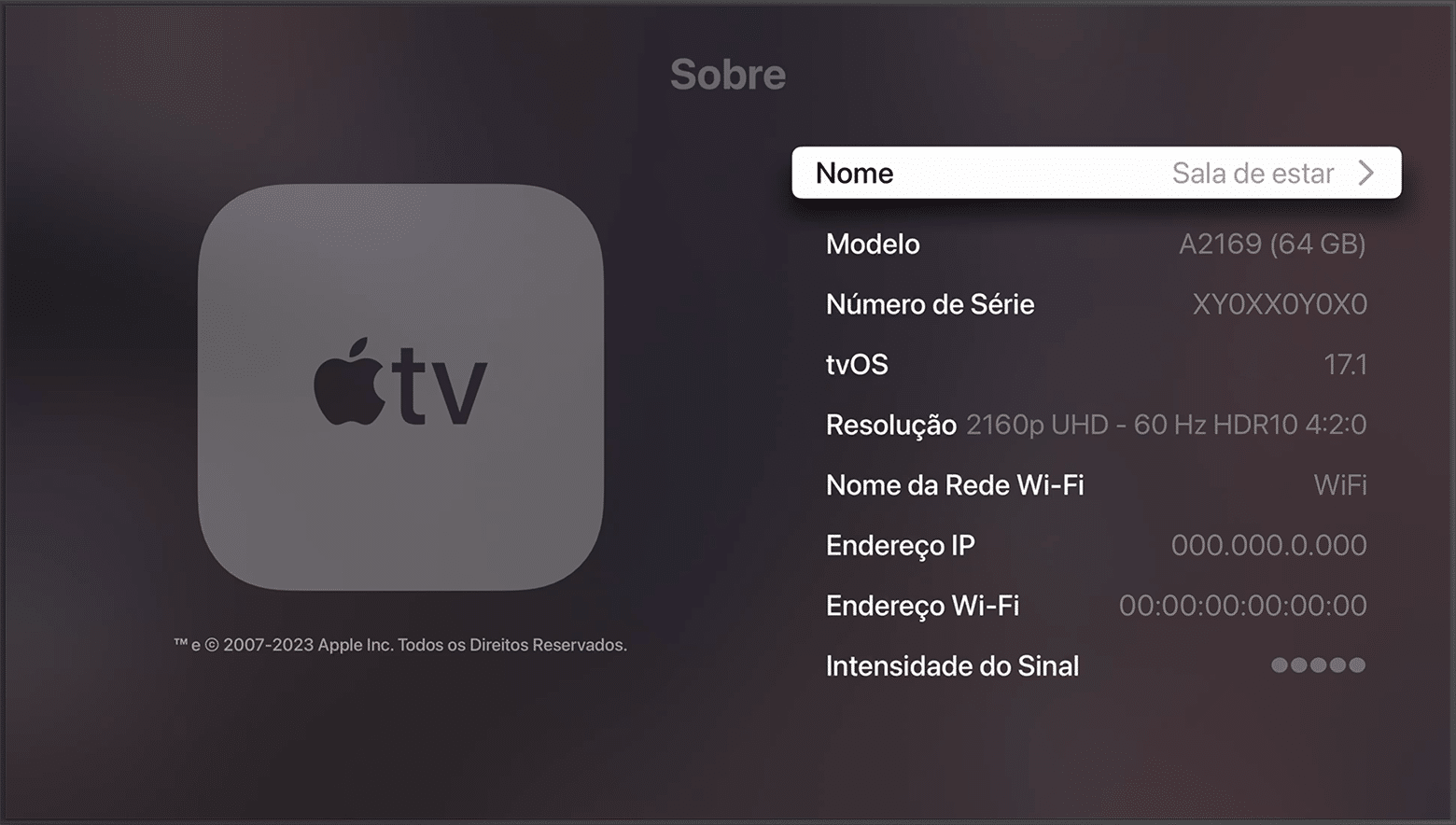
Veja como conferir qual versão do tvOS sua Apple TV está rodando!

Na tela inicial, abra os Ajustes (Settings) e clique em “Sistema”.

Depois, vá até “Sobre” para conferir a versão do tvOS instalada no momento.

Apple TV 4K (3ª geração)

Armazenamento: 64GB ou 128GB
Conectividade: Wi-Fi ou Wi-Fi + Ethernet
R$ 2.299,00

NOTA DE TRANSPARÊNCIA: O MacMagazine recebe uma pequena comissão sobre vendas concluídas por meio de links deste post, mas você, como consumidor, não paga nada mais pelos produtos/serviços usando os nossos links de afiliado.

Como descobrir qual versão do watchOS seu Apple Watch está rodando

8 August 2026 at 18:00

Como ocorre com os outros sistemas operacionais da Apple, o watchOS é frequentemente atualizado. Com isso, o seu Apple Watch recebe não só novos recursos, como também correções de segurança importantes.

Neste artigo, mostraremos como é possível conferir qual versão do sistema o seu smartwatch está rodando no momento, veja só! ⌚️

Isso pode ser feito tanto pelo iPhone quanto pelo próprio relógio.

Pelo iPhone

Abra o app Watch, toque em “Geral” e vá em “Sobre” para conferir a versão.

Versão do watchOS

Pelo Apple Watch

No relógio, abra os Ajustes, toque em “Geral” e vá em “Sobre”.

Versão do watchOS

Simples, não? 😉

Apple Watch Ultra 3

Cores: natural ou preto
Pulseiras: loop Alpina, loop Trail, Oceano ou estilo milanês de titânio
R$ 7.850,50
R$ 10.499,00

Apple Watch Series 11

Material: alumínio ou titânio
Cores: cinza-espacial, prateado, ouro rosa, preto brilhante, natural, dourado ou ardósia
Tamanho: 42mm ou 46mm
Conectividade: GPS ou GPS + Cellular
Pulseiras: esportiva ou estilo milanês
R$ 4.198,00
R$ 5.499,00

Apple Watch SE 3

Cores: meia-noite ou estelar
Tamanhos: 40mm ou 44mm
Conectividade: GPS ou GPS + Cellular
Pulseira: esportiva
R$ 2.466,78
R$ 3.299,00

NOTA DE TRANSPARÊNCIA: O MacMagazine recebe uma pequena comissão sobre vendas concluídas por meio de links deste post, mas você, como consumidor, não paga nada mais pelos produtos/serviços usando os nossos links de afiliado.

❌