Conforme informamos ontem, a Apple liberou as Release Candidates das versões 27.2 dos seus sistemas operacionais, incluindo algumas reformulações visuais e novidades.
Vamos conferir o que chegou para os sistemas da Maçã?
iOS/iPadOS 27.2
No caso da RC do iOS 27.2, há uma série de pistas sobre implementações de recursos futuros, além de integrações com outros sistemas: é o caso da adição do código de configuração do som surround com quatro HomePods e a nova Apple TV 4K (quarta geração):
iOS 27.2 RC adds setup code for surround sound with 4 HomePods and Apple TV 4K (4th gen).
A RC do iOS 27.2 adiciona o código de configuração para o som surround com quatro HomePods e a Apple TV 4K (quarta geração).
O código já estava incluído no runtime do simulador do iPhone Duo 27.2.
Um indício deixado no sistema para um recurso futuro é a não contabilização de conversas silenciadas na contagem das notificações de mensagens não lidas no app Mensagens (Messages):
iOS 27.2 RC indicates that Apple is working on a feature to exclude muted chats from the unread count in the Messages app
Às vésperas da chegada do HomePod mini 2, o software dos alto-falantes inteligentes da Apple ganhou algumas novidades que se aplicam aos demais modelos compatíveis com a atualização (para ser mais exato, o HomePod mini de primeira geração e o HomePod de segunda geração), como o Sound Glow (que exibe luzes ambientes no topo do alto-falante de acordo com o som que está sendo reproduzido) e o bloqueio dos controles de toque:
Sound Glow will work on HomePod mini 1, HomePod mini 2 and HomePod (2nd generation)!
In HomePod Software 27.2 RC, the LightShowCapability check is “productType > 1,” so only the original HomePod is unsupported. https://t.co/KwMrrAx7rf
Todos os modelos de HomePod suportarão a configuração de Controles de Bloqueio, de acordo com o RC do software do HomePod 27.2.
Você deve ver a configuração no app Casa após atualizar tanto o HomePod quanto o iPhone.
O leaker pdfu [@itspdfu] confirmou ainda que o Party Mode (“Modo Festa” em tradução direta) é um modo de renderização “difuso” secundário para som surround, o que significa que, para aproveitá-lo, será necessário ter uma Apple TV 4K de quarta geração:
audioOS 27.2 confirms that Whole Room Audio (Party Mode) is a secondary “diffuse” rendering mode for surround sound, so you’ll need the new Apple TV 4K.
The feature has an interesting implementation: it gives diagonally opposite HomePods the same L/R stereo role.
O audioOS 27.2 confirma que o Whole Room Audio (Party Mode) é um modo de renderização “difuso” secundário para som surround, então você precisará da nova Apple TV 4K.
O recurso tem uma implementação interessante: ele atribui o mesmo papel estéreo L/R aos HomePods diagonalmente opostos.
Esquerdo frontal → Estéreo da esquerda Direita frontal → Estéreo da direita Esquerda traseira → Estéreo da direita Direita traseira → Estéreo da esquerda
Então, se você virar as costas para a TV, ainda terá o posicionamento correto de L/R. Você também recebe ambos os canais L/R se estiver de lado.
tvOS 27.2
Ainda sobre o som surround com HomePods na Apple TV, será possível ajustar o modo dos alto-falantes, o ganho de surround e o funcionamento do som estéreo:
You’ll get new audio controls when you set up four HomePods with the new Apple TV.
Speaker Mode: Surround Sound or Whole Room Audio.
Specifically for Surround Sound: • Spatialize Stereo: Control whether to play a spatially processed mix for video and music. As reported in… pic.twitter.com/KDzUeu3VpU
Você terá novos controles de áudio quando configurar quatro HomePods com o novo Apple TV.
Modo Alto-falante: Som Surround ou Whole Room Audio.
Especificamente para Som Surround: • Spatialize Stereo: Controle se deve reproduzir uma mixagem processada espacialmente para vídeo e música. Como relatado em setembro, quando desativado, o estéreo normal é reproduzido nos alto-falantes frontais, enquanto os alto-falantes traseiros recebem uma mixagem vazia. Padrão: Ativado para Vídeo e Música. • Nível Surround: Ajuste o par traseiro em relação aos frontais. Suporta de −8 dB a +8 dB, em etapas de 0,5 dB. Padrão: Normal (0 dB).
Não há opções de áudio para o Whole Room Audio, pois ele usa canais estéreo para ambos os pares de alto-falantes. Os canais são atribuídos diagonalmente: esquerda traseira e frontal compartilham o canal esquerdo, enquanto direita traseira e frontal compartilham o canal direito.
A nova versão do sistema também permite a exibição aleatória de protetores de tela personalizados com Memórias, Apresentações de Slides ou Retratos:
tvOS 27.2 allows you to shuffle through available Screen Savers throughout the day.
You can also set up Memories & Slideshows or Portraits screen savers on iPhone or iPad without sharing your whole library.
O tvOS 27.2 permite que você embaralhe os Protetores de Tela disponíveis ao longo do dia. Você também pode configurar Memórias e Apresentações de Slides ou protetores de tela de Retratos no iPhone ou iPad sem compartilhar toda a sua biblioteca. Os recursos foram anunciados no comunicado de imprensa da Apple TV 4K.
Bastante coisa, né?
iPhone 18 Pro Max
Cores: bordô, glacial, prateado e preto Armazenamento: 256GB, 512GB, 1TB ou 2TB
NOTA DE TRANSPARÊNCIA: O MacMagazine recebe uma pequena comissão sobre vendas concluídas por meio de links deste post, mas você, como consumidor, não paga nada a mais pelos produtos/serviços ao usar os nossos links de afiliado.
Small RC cars often have to make a compromise between portability and driving performance. The ZLL SG616 PRO/MAX takes a different approach, packing four-wheel drive, proportional controls and a relatively aggressive power system into a 1:24-scale chassis.
1:24 scale also changes where the car makes the most sense. Rather than requiring a large dedicated driving area, its compact dimensions make it easier to use on driveways, compact outdoor spaces and other locations where a larger 4WD RC car would be inconvenient.
What makes this model particularly interesting is that buyers can choose between a brushed version and a brushless version. The brushed model is rated for up to 30 km/h, while the brushless configuration raises the claimed top speed to 38 km/h.
A Compact RC Car With Serious Speed
At 208 × 113 × 80 mm, the SG616 is small enough to transport easily, but its specifications are closer to what enthusiasts expect from a performance-oriented RC vehicle than a basic toy-grade car.
The 1:24 scale also changes where the car makes the most sense. Rather than requiring a large dedicated driving area, its compact dimensions make it easier to use on driveways, compact outdoor spaces and other locations where a larger RC truck would be inconvenient.
The 12 mm ground clearance is modest, so the SG616 is not designed to behave like a full-size crawler. Its appeal is instead centered on quick acceleration, directional control and short off-road runs.
Brushed or Brushless: The Important Buying Decision
The biggest difference between the SG616 PRO and MAX configurations is the power system.
The brushed version uses an RC180 motor and has a claimed maximum speed of 30 km/h. The brushless version moves to a 2030 4500KV motor and is rated for up to 38 km/h. Both configurations use an integrated 35A ESC.
That distinction matters because the brushless model is not simply a cosmetic upgrade. Its higher claimed speed makes it more suitable for users who want a faster RC driving experience, while the brushed version may make more sense for someone who values a simpler setup.
The brushless configuration also gets an all-metal driveshaft, giving it a mechanical upgrade beyond the motor itself.
Four-Wheel Drive and Independent Suspension
The SG616 uses a 4WD drivetrain with planetary differential gearing and independent suspension. Combined with a 45-degree steering angle, these features are intended to give the small chassis more flexibility when changing direction or dealing with uneven surfaces.
The car also uses ball bearings throughout, while an aluminum motor heatsink helps manage heat around the power system.
This combination is more important than the headline speed. A fast RC car is only enjoyable when the chassis can translate that power into controllable movement. The SG616’s proportional throttle and four-wheel-drive layout are therefore two of its more meaningful features.
Full-Proportional Control Makes a Difference
The included 2.4GHz transmitter provides four control channels and a claimed control distance of around 80 to 100 meters, depending on the configuration or listing specification.
More importantly, the car supports full-proportional control. Instead of limiting the vehicle to simple forward, reverse and steering commands, proportional control allows the driver to vary throttle input more precisely.
That is useful when moving through tighter spaces. It also gives the SG616 a more controllable feel when approaching corners or transitioning between slower technical driving and high-speed runs.
Battery Life Is Designed Around Short Sessions
The SG616 uses a 7.4V Li-ion battery, with the brushed and brushless versions using 500mAh and 800mAh capacities respectively according to the current listing. Charging takes approximately 1.5 hours, while the advertised running time is around 30 to 40 minutes.
These numbers suggest that the car is better suited to several relatively short driving sessions than continuous long-distance running.
The included USB charging cable also keeps the package straightforward. Buyers receive the car, battery, transmitter, charging cable, manual, spare R-clips and screwdriver, so there is no need to assemble a separate basic control system before getting started.
Designed for Outdoor Driving
The SG616 has several details aimed at reducing the limitations of a compact RC chassis.
Its circuit board and steering servo are listed as waterproof, while the front bumper integrates LED lights for a more distinctive appearance during low-light driving. The 47 mm tires and independent suspension also help the car deal with surfaces that are less predictable than a smooth indoor floor.
However, waterproof electronics should not automatically be interpreted as a license for deep-water driving. The practical advantage is better resistance to splashes and wet conditions rather than treating the car as a fully submersible vehicle.
What Kind of RC Driver Is It For?
The ZLL SG616 PRO/MAX occupies an interesting middle ground.
It is substantially more performance-focused than a basic toy RC car, yet its 1:24 scale keeps it much easier to carry and deploy than a larger hobby-grade truck. The brushless version is particularly notable for its claimed 38 km/h maximum speed, while the proportional controls and 4WD system give the driver more control than a simple entry-level model.
For buyers deciding between the two versions, the choice largely comes down to driving priorities. The brushed model provides a lower-speed configuration, while the brushless model targets users who specifically want more speed and the additional mechanical hardware that comes with that configuration.
Final Takeaway
ZLL SG616 PRO/MAX is interesting because it does not rely on one headline specification. Its appeal comes from how several features work together: a compact 1:24 chassis, 4WD, independent suspension, proportional throttle, 2.4GHz control and two different motor configurations.
The brushless version’s 38 km/h claim is certainly the attention-grabbing number, but the proportional controls, drivetrain design and compact dimensions may ultimately have a greater impact on everyday usability.
For shoppers comparing small off-road RC cars, the SG616 is therefore worth looking at as a performance-focused compact model rather than simply another inexpensive remote-control toy.
Os corajosos que instalaram as versões beta do iOS 27, do iPadOS 27 e do macOS Golden Gate 27 certamente devem ter notado um aviso no topo do aplicativo Ajustes (Settings) sobre uma indexação do Spotlight em andamento.
Isso ocorre porque o Spotlight indexa o conteúdo do seu dispositivo para que seja possível pesquisar tudo o que está nele.
No caso de uma atualização de software (como as betas), o índice do Spotlight é atualizado quando você instala novos aplicativos ou recebe novos emails e mensagens de texto, por exemplo.
Usando truques simples — nem sempre bem-vindos, é verdade —, é possível acelerar o processo de indexação (que pode levar horas ou dias, dependendo da quantidade de conteúdos). Veja como! 😉
Deixe o seu dispositivo sem uso, ou seja, de forma que você fique um tempo sem mexê-lo;
Conecte o iPhone, iPad ou Mac à energia;
Conecte o aparelho à internet usando uma rede Wi-Fi ou Ethernet, caso os emails ou outros dados precisem ser baixados para a indexação.
A Apple afirma que é possível que sejam vistos, durante esse processo de indexação, alertas como:
Um indicador de progresso na parte superior da janela do Spotlight ou da Siri no Mac, que é aberto quando você pressiona a combinação ⌘ commandbarra de espaço;
Uma notificação abaixo do seu nome nos Ajustes do iPhone ou iPad;
Um alerta do Mail de que a indexação está incompleta.
LDRC 1297 PRO takes a different approach to the typical toy-style RC car. Instead of focusing only on speed or aggressive styling, it combines a detailed 1/14-scale Mitsubishi Pajero V24WG replica with a more serious mechanical setup aimed at drivers who want both scale realism and usable off-road performance.
The model is officially licensed as a reproduction of the 1992 Mitsubishi Pajero V24WG, giving it a stronger appeal to collectors and enthusiasts who care about the vehicle being represented. At the same time, its 4WD drivetrain, brushless motor, dual-speed gearbox and upgraded suspension components make it more than a display model.
A Classic Pajero Body With a More Capable Chassis
The most obvious feature of the LDRC 1297 PRO is its classic Pajero-inspired body. At 1/14 scale, the RC car measures approximately 33 × 15 × 15 cm, with a 19.5cm wheelbase and 12.5cm track width.
That size gives the model a useful middle ground. It is large enough to show off the proportions and exterior details of the original Pajero, while remaining compact enough for backyard trails, parks and other outdoor driving areas.
The body uses ABS construction, while the chassis combines ABS, nylon and electronic components. This combination keeps the model practical for regular driving without turning it into an excessively heavy crawler.
The official licensing is also important for collectors. The 1297 PRO is designed to reproduce the appearance of the 1992 Mitsubishi Pajero V24WG rather than simply borrowing the general shape of an off-road SUV.
Brushless Power Meets Four-Wheel Drive
Underneath the scale body, the LDRC 1297 PRO has a 2319 3000KV brushless motor and a 4WD drivetrain.
A brushless motor is a significant step above the basic brushed systems commonly found in entry-level RC vehicles. The main advantage here is not simply a higher top speed. The combination of brushless power and four-wheel drive can give the car a more responsive feel when accelerating over loose or uneven surfaces.
The model is rated for a top speed of around 15 km/h, so the 1297 PRO is not positioned as an all-out racing machine. Instead, its setup makes more sense for controlled trail driving and climbing, where traction, throttle response and drivetrain consistency are often more useful than maximum speed.
This positioning is one of the more interesting aspects of the vehicle: LDRC appears to be targeting drivers who want a scale off-road experience rather than a pure speed run.
Two-Speed Transmission Adds More Control
The dual-speed gearbox is another feature that separates the 1297 PRO from simpler RC cars.
Having two speed ranges allows the drivetrain to be better suited to different driving conditions. A lower-speed setting can be useful when negotiating obstacles or climbing, where smooth throttle control matters more than outright speed. The higher range is better suited to open sections where the car can stretch its legs.
This approach also complements the four-wheel-drive system. Instead of treating the Pajero as a fast RC car with an off-road body, the 1297 PRO is built around the idea of adapting its power delivery to the terrain.
Metal Drivetrain Components and Oil-Filled Shocks
The PRO designation is particularly relevant to the chassis hardware.
LDRC lists metal drive shafts, CNC-machined components, front CVD axles and ball bearings, along with genuine oil-filled shock absorbers. These upgrades are aimed at improving mechanical durability and keeping the suspension more controlled when the vehicle is driven across uneven ground.
Oil-filled shocks are especially useful on an off-road RC platform because the suspension has to deal with repeated changes in terrain. Instead of simply absorbing impacts, properly tuned dampers can help keep the wheels in contact with the ground and reduce excessive bouncing.
The upgraded drivetrain hardware should also be useful for drivers who intend to run the car regularly rather than treating it purely as a collectible.
Proportional Control Makes the Car Easier to Drive Smoothly
The LDRC 1297 PRO uses a 2.4GHz three-channel radio system with a claimed control distance of about 20 meters. It also uses proportional steering and throttle control.
That matters more than it may initially appear. Proportional control allows the driver to make smaller steering and throttle adjustments instead of relying on simple full-left, full-right or full-throttle commands.
For a scale off-road vehicle, this is particularly valuable. Slow climbs, narrow trails and uneven surfaces generally reward precise inputs rather than sudden movements.
The PRO version also uses a dedicated one-to-one pairing system between the transmitter and receiver, according to the product specifications.
Battery Life Is Designed Around Trail Sessions
Power comes from an included 7.4V 1200mAh battery, while the transmitter requires two AA batteries separately.
Banggood lists approximately 20 to 30 minutes of driving time, with a charging time of around three hours.
That runtime is reasonable for a compact brushless RC car, although actual results will depend on driving style, terrain and how frequently the motor is operating under load.
For buyers planning longer outdoor sessions, carrying a second compatible battery would make more sense than expecting one charge to cover an entire afternoon.
LED Headlights Add More Than Just Styling
The controllable headlights help reinforce the Pajero’s scale appearance while also making the vehicle easier to see in lower-light conditions.
This is a relatively small feature compared with the drivetrain, but it contributes to the overall character of the model. The LDRC 1297 PRO is clearly designed to work as both a functional RC vehicle and a scale-inspired model that looks convincing when parked.
That dual-purpose approach is arguably one of its strongest selling points.
Who Is the LDRC 1297 PRO For?
The LDRC 1297 PRO makes the most sense for adult RC enthusiasts, Pajero fans and collectors who want a model that can actually be driven.
It is not the obvious choice for someone whose only priority is maximum speed. Its 15 km/h top speed puts the emphasis on controlled off-road driving rather than racing.
Instead, the combination of a licensed classic SUV body, 4WD, brushless power, two-speed gearing, metal drivetrain components and oil-filled shocks gives it a more balanced personality.
For collectors, the 1992 Pajero styling provides the visual appeal. For hobbyists, the upgraded mechanical package provides a reason to take the model outside and use it.
LDRC 1297 PRO Specifications
Feature
Details
Model
LDRC 1297 PRO / LD1297Pro
Scale
1:14
Vehicle
Mitsubishi Pajero V24WG (1992)
Drive
4WD
Motor
2319 3000KV brushless
ESC
20A two-in-one ESC
Transmission
Dual-speed gearbox
Steering Servo
17g
Radio
2.4GHz, 3-channel
Claimed Range
About 20m
Max Speed
About 15 km/h
Battery
7.4V 1200mAh
Claimed Runtime
About 20–30 minutes
Charging Time
About 3 hours
Body Material
ABS
Dimensions
About 33 × 15 × 15cm
Wheelbase
19.5cm
Track Width
12.5cm
The specifications above are based on the current Banggood product listing.
Final Thoughts
LDRC 1297 PRO rc truck is interesting because it does not try to win attention with a huge speed number. Instead, it combines the appeal of a classic Mitsubishi Pajero model with hardware that is better suited to actual off-road driving.
The brushless 4WD system provides the power, the two-speed gearbox adds flexibility, while the metal drivetrain components, CVD axles and oil-filled shocks address the mechanical demands of uneven terrain. Meanwhile, proportional controls and the scale-focused body keep the driving experience closer to a hobby-grade model than a basic RC toy.
For anyone looking for a 1/14 Mitsubishi Pajero RC car that balances scale detail with practical off-road hardware, the LDRC 1297 PRO is a model worth considering.
Not every remote-control vehicle is designed to be fast. Some are more interesting when the terrain becomes difficult.
MNRC MN300S rc truck takes that approach. Rather than focusing on high top speed, this 1:12 4WD RC crawler combines four-wheel drive, proportional rc controls, a two-speed transmission and a relatively large body to create a platform aimed at climbing, trail driving and technical off-road play.
Its specifications suggest a vehicle intended for users who enjoy controlling an RC crawler through uneven ground rather than simply racing it across a flat surface. The manufacturer lists a maximum speed of 8 km/h, a climbing capability of up to 45 degrees, a control distance of around 50 meters and approximately 45 minutes of driving time from its included 7.4V 1200mAh lithium-ion battery.
The MN300S Is More About Control Than Speed
The first thing to understand about the MN300S is its character.
With a claimed top speed of 8 km/h, this is not positioned as a speed-focused RC truck. Instead, the combination of 4WD and proportional control gives the vehicle a more deliberate operating style.
Proportional control matters when navigating obstacles. Instead of treating steering and throttle as simple on/off commands, the controller allows the driver to make smaller adjustments. That is particularly useful when the vehicle is approaching a rock, climbing a slope or trying to keep its wheels positioned on a narrow section of trail.
For casual driving, this can make the MN300S feel more predictable. For hobbyists, it also creates more room to develop driving technique.
1:12 Scale Gives It a Substantial Trail Presence
The MN300S measures approximately 38.78 × 16.84 × 18.5 cm, putting it firmly into the larger end of casual RC toys while remaining manageable for outdoor use.
Its 1:12 scale is also important from a visual perspective. The body is designed around an officially licensed, high-simulation appearance, so the vehicle is intended to work in two different ways: as something to drive and as a model that can be displayed when it is not being used.
That combination should appeal to hobbyists who care about the appearance of their RC vehicles as much as the driving experience.
4WD Is the Key to Its Off-Road Personality
The MN300S uses a four-wheel-drive system designed for uneven outdoor terrain.
On a smooth floor, the difference between 2WD and 4WD may not be especially important. On loose soil, grass, stones and other irregular surfaces, however, maintaining traction across multiple wheels becomes much more relevant. It comes with 4WD RC cars for off-road driving.
The listing gives the vehicle a maximum climbing angle of 45 degrees. This figure should be viewed as a manufacturer specification rather than a guarantee that the vehicle will climb every 45-degree surface, because actual performance depends on terrain, tire grip, battery condition, surface material and driving technique.
Still, the specification clearly shows where MNRC expects the MN300S to be used: on terrain where traction and controlled wheel movement matter more than outright speed.
Two-Speed Transmission Adds Another Layer of Control
Another interesting feature is the two-speed transmission.
A crawler benefits from having different driving characteristics for different situations. A lower-speed setting can be useful when negotiating obstacles that require careful throttle control, while a faster setting makes ordinary trail movement less tedious.
This is one of the details that separates the MN300S from very basic RC cars. The vehicle is not simply designed around maximum acceleration. Its controls are intended to give the driver more influence over how the truck responds to the terrain.
A 7.4V Battery Provides Around 45 Minutes of Claimed Runtime
Power comes from a 7.4V 1200mAh lithium-ion battery, which is included with the vehicle. Banggood lists approximately 45 minutes of playtime and around 210 minutes of charging time.
The real runtime will naturally vary according to driving conditions. Continuous climbing and frequent throttle changes can consume more energy than relaxed driving on relatively flat ground.
The roughly three-and-a-half-hour charging time also means owners should plan charging before an outdoor session rather than expecting a quick top-up between short drives.
The transmitter itself requires two AA batteries, which are not included.
LED Lighting Makes the Vehicle More Than a Daytime Toy
The MN300S includes a remotely controllable lighting system with front lights, turn signals and rear lights.
That is more than a cosmetic detail. Lighting gives the vehicle a more realistic appearance and makes it easier to distinguish the front and rear of the model when driving at a distance.
For hobbyists who enjoy filming RC rock crawler or creating miniature trail scenes, the lighting system can also add visual interest without requiring additional accessories.
Built for Hobbyists Who Like to Modify Their Vehicles
One of the more interesting aspects of the MN300S is its stated support for customization and upgrades.
That makes the platform potentially more attractive to hobbyists than a completely closed RC toy. Owners who enjoy changing components, experimenting with setup or gradually improving a vehicle have more reason to keep working with the same chassis.
The product listing also describes the vehicle as using a combination of PA, alloy and electronic components, while the body is described separately as a sturdy ABS structure.
This suggests a design that tries to balance visual detail with the demands of outdoor driving.
50-Meter Control Range Is Enough for Trail Driving
The included 2.4GHz transmitter operates across four channels and has a listed control distance of approximately 50 meters.
For a crawler, that is a sensible range. Unlike a fast RC racer, the MN300S does not need to travel huge distances before reaching its intended driving environment.
A 50-meter range gives the driver enough room to send the vehicle along a garden path, park trail or open outdoor area while maintaining a practical distance for observing obstacles.
What the MNRC MN300S Is Actually Good At
The specifications point toward a particular type of RC experience.
The MN300S makes the most sense for:
Technical off-road driving
Rock and trail crawling
Outdoor RC sessions
Hobbyists who enjoy proportional controls
Drivers interested in customization
Collectors who want a realistic 1:12 model
Users who prefer controlled driving over high speed
It is less compelling if the main goal is racing. An 8 km/h maximum speed places it firmly in the crawler-oriented category rather than the high-speed RC category.
MNRC MN300S Specifications
Feature
Details
Model
MN300S
Brand
MNRC / MNR/C
Scale
1:12
Drive
4WD
Frequency
2.4GHz
Channels
4CH
Motor
280 brushed motor
Steering servo
17g
Maximum speed
Up to 8 km/h
Control distance
About 50m
Car battery
7.4V 1200mAh Li-ion
Claimed runtime
Approx. 45 minutes
Charging time
Approx. 210 minutes
Climbing angle
Up to 45°
Steering angle
Up to 28°
Load weight
Up to 3kg
Traction weight
Up to 5kg
Vehicle size
38.78 × 16.84 × 18.5cm
Transmission
Two-speed
Lighting
Front lights, turn signals and rear lights
Control
Proportional
Recommended age
15+
Specifications are based on the current product listing and should be treated as manufacturer/retailer claims rather than independent performance measurements.
Final Take
MNRC MN300S is interesting because it does not try to compete with RC vehicles by chasing an impressive top-speed number. Its appeal comes from a different combination: 1:12 scale, four-wheel drive, proportional control, two-speed gearing and a design intended for climbing and outdoor terrain.
The included battery and transmitter also mean the package is relatively straightforward for someone who wants to start driving without assembling a complete RC system from individual components. The addition of controllable lighting and upgrade potential gives the platform more personality than a basic entry-level RC car.
For someone looking for a realistic RC crawler to take onto trails, grass, dirt and moderate obstacles, the MN300S has a specification sheet that makes sense as a hobby-oriented off-road platform. Its relatively modest speed is not necessarily a weakness—it is part of the reason the vehicle is better understood as a technical crawler rather than a racing truck.
A cada atualização anual do macOS, uma escolha da Apple em particular gera quase tanta curiosidade quanto as mudanças e os novos recursos do seu sistema operacional: o nome que acompanhará o update.
Hoje, faremos uma breve recapitulação das principais escolhas da Maçã sobre os nomes de cada versão do sistema operacional dos seus computadores, passando por décadas de codinomes felinos e, mais recentemente, paisagens californianas.
As (várias) mudanças do passado
Antes disso — no período do Mac OS Classic, que abrange os sistemas dos Macintoshes lançados entre 1984 e 2001 —, os nomes dos sistemas da Apple eram usados quase exclusivamente de forma interna. Publicamente, as versões recebiam denominações bastante protocolares, mas, nos bastidores, praticamente todas carregavam codinomes.
O System 6, por exemplo, teve versões conhecidas internamente como Antares (6.04), Big Deal (6.05), SixPack (6.06) e Terminator (6.08). Já o System 7 passou por uma verdadeira coleção de nomes, incluindo Blue, Beta Cheese, Cube-E, I Tripoli, Jirocho, Mozart, Capone, Danook, Thag e Marconi, entre outros. Também houve casos específicos, como Road Warrior, utilizado nos primeiros PowerBooks, além de Unity, Buster, Son of Buster, Harmony e Ides of Buster, empregados em versões posteriores do sistema.
A partir do Mac OS 8, os nomes foram predominantemente relacionados à teoria musical — é o caso do codinome Tempo no Mac OS 8, Allegro no Mac OS 8.5 e Sonata no Mac OS 8.7 (versão de desenvolvimento do que viria a ser o Mac OS 9). As exceções são o Mac OS 8.1 (intitulado Bride of Buster) e o Mac OS 8.6 (Veronica).
Essa só se tornou uma tradição marqueteira a partir do Mac OS X 10.2, quando Steve Jobs apresentou a nova versão do sistema operacional como Mac OS X Jaguar, levando um codinome ao público pela primeira vez — antes do Jaguar, a Apple utilizou os codinomes Kodiak para a versão beta, Cheetah para a 10.0 e Puma para a 10.1 —, inaugurando a era de nomes de grandes felinos.
Os animais ditaram os sistemas dos Macs por cerca de dez anos (de 2002 até 2012): foi o caso do Mac OS X 10.3 Panther, Mac OS X 10.4 Tiger, Mac OS X 10.5 Leopard, Mac OS X 10.6 Snow Leopard, Mac OS X 10.7 Lion e, por fim, OS X Mountain Lion 10.8 — que abandonou (temporariamente) o prefixo “Mac”.
OS X Mavericks 10.9: a alteração de rota rumo à Califórnia
A partir da décima versão do macOS (então OS X), a Apple adotou publicamente nomes com as regiões da Califórnia, tendência que segue em vigor até os dias de hoje.
A troca, aliás, andou em paralelo a uma mudança paradigmática do sistema: foi somente com o OS X Mavericks 10.9 que a Maçã deixou de cobrar pela atualização dos seus sistemas operacionais, permitindo que os seus usuários, a partir do Snow Leopard (na compilação 10.6.8), atualizassem as suas máquinas sem custos adicionais — uma realidade que permanece até os dias de hoje.
O primeiro destino geográfico escolhido pela Apple remete a uma região litorânea conhecida pelas altas ondas, propícias para a cena local do surfe. O papel de parede do OS X 10.9 dava destaque à curvatura de uma grande onda em tons de azul e turquesa, com clara inspiração na localização que deu nome ao update.
Em matéria de software, o OS X Mavericks ficou marcado pelo aprimoramento na gestão de performance, bateria e memória, aproveitando melhor o hardware dos computadores da Apple. Quanto aos recursos, o sistema trouxe os links compartilhados no Safari, respostas embutidas em notificações, abas e tags no Finder, melhor suporte ao uso de múltiplos monitores, além da introdução de novos aplicativos, como o Mapas e iBooks.
OS X Yosemite 10.10
Pouco mais de quatro horas adiante (ou 314km, para ser mais exato), encontramos o Parque Nacional de Yosemite. A área já era considerada tão importante para a preservação ambiental que Abraham Lincoln autorizou sua proteção e uso público em 1864, anos antes da criação de Yellowstone, reconhecido como o primeiro parque nacional do mundo. Outro grande entusiasta de Yosemite foi Theodore Roosevelt, que ajudou a consolidar a sua importância dentro do sistema de parques americanos.
Um dos maiores símbolos do parque — e também o destaque do wallpaper oficial do sistema — é o Half Dome, um monólito de granito com impressionantes 2.696 metros de altitude. Localizada no coração de Yosemite, a formação foi considerada inescalável por alguns geólogos do século XIX, até que George G. Anderson realizou a façanha em 1875, escalando-a descalço. Muito possivelmente, a foto usada pela Apple foi registrada com uma lente teleobjetiva nas proximidades da Ahwahnee Meadow.
O OS X Yosemite 10.10 foi um marco importante na trajetória do macOS. Muito lembrado pelas mudanças de design na interface — com elementos translúcidos e ícones de formas planas que definiriam a identidade visual do sistema por várias gerações —, ele também deixou como legado a introdução dos recursos de Continuidade (Continuity) entre o OS X e o iOS.
Inicialmente, a novidade englobava apenas o AirDrop, as chamadas telefônicas, o app Mensagens, o Handoff e o Instant Hotspot. Ainda assim, ela inaugurou um nível de interoperabilidade que ajudou a redefinir a forma como o mercado de tecnologia passou a enxergar ecossistemas compostos por diferentes produtos de uma mesma marca.
OS X El Capitan 10.11
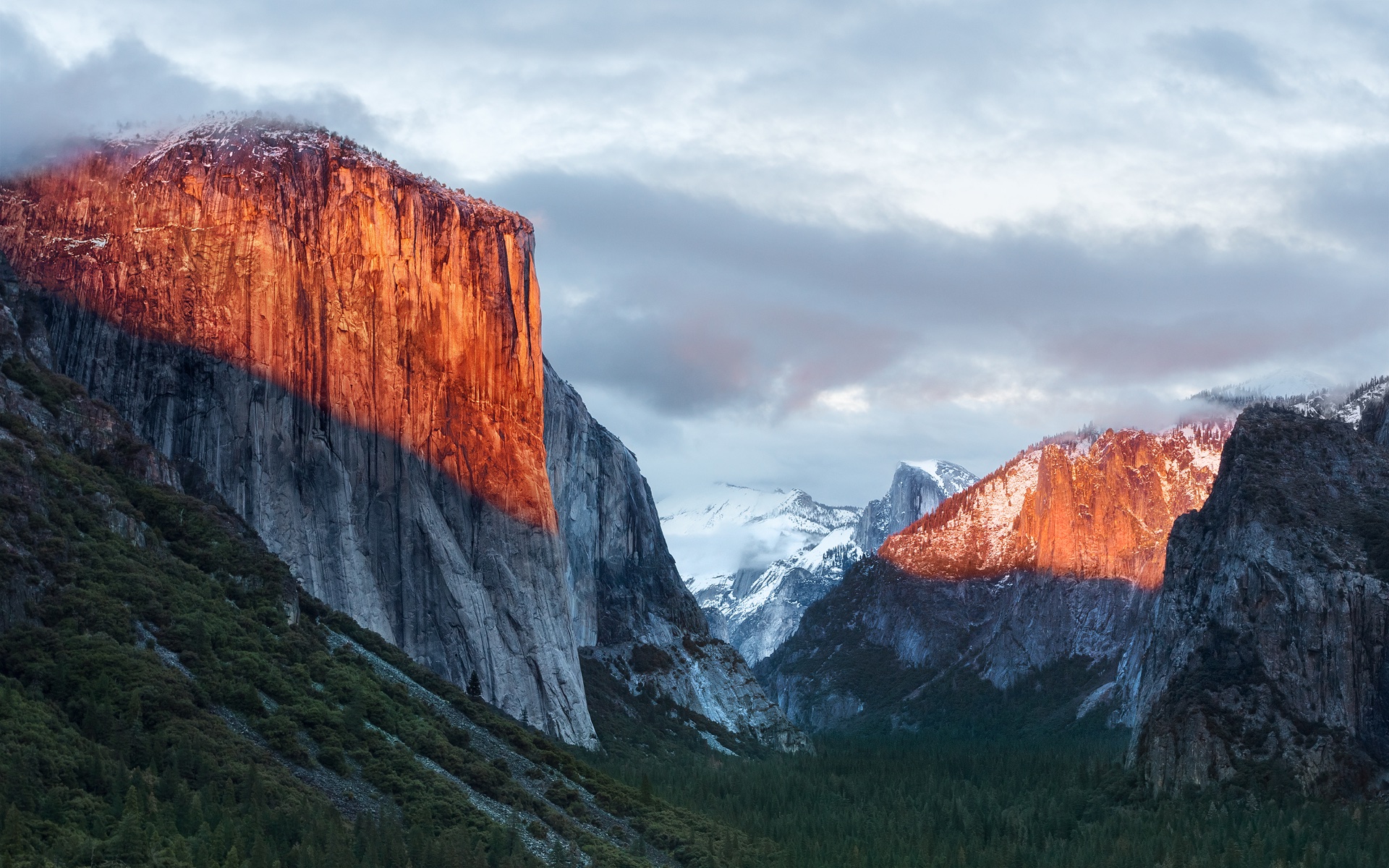
A apenas 20 minutos de distância do Ahwahnee Meadow, a próxima parada do Mac é outra atração turística presente dentro do Parque Nacional de Yosemite: o El Capitan é um monólito de granito de quase 900 metros que se ergue acima do vale do parque.
O papel de parede provavelmente foi fotografado a partir do mirante Tunnel View, de onde é possível avistar o El Capitan à esquerda do vale. Ao fundo, surge o Half Dome — um enquadramento que parece refletir o espírito da atualização. Diferentemente de Yosemite, o OS X El Capitan 10.11 deu menos ênfase à introdução de novos recursos e concentrou seus esforços em correções de bugs, otimizações de desempenho e refinamentos da experiência de uso. Entre as principais novidades, estavam um Spotlight aprimorado, a adição do Split View e diversas melhorias nos aplicativos nativos da Apple.
macOS Sierra 10.12
Cerca de 338km depois (aproximadamente quatro horas e meia) de Yosemite, passando pela cordilheira de Sierra Nevada (situada no leste da Califórnia, a oeste do Mount Whitney), temos o Lone Pine Peak, cenário da montanha que aparece no wallpaper do sistema.
Além da mudança de nomenclatura de OS X para macOS (colado e com o “m” minúsculo, como segue até os dias de hoje), a atualização é particularmente lembrada pela inclusão da Siri no Mac, o Desbloqueio Automático (Auto Unlock) com o Apple Watch e a Área de Transferência Universal (Universal Clipboard) entre Macs, iPhones e iPads.
macOS High Sierra 10.13
Uma rápida viagem de 80 minutos (129km) é capaz de nos levar ao próximo destino fotografado pela Apple: North Lake, localizada na pequena cidade de Bishop, entre as montanhas da cordilheira de Sierra Nevada. Ali, muito possivelmente em meio ao outono, o registro eternizado no papel de parede do sistema foi feito.
Quando falamos do sistema, aos moldes do próprio El Capitan e do Snow Leopard, o macOS High Sierra 10.13 focou muito mais no aprimoramento interno do macOS do que em novos recursos, mas vale mencionar a inclusão do novo sistema de arquivos da Maçã (o Apple File System, ou APFS), do suporte aos formatos audiovisuais HEVC e HEIF, bem como a chegada da segunda geração da tecnologia de desempenho gráfico Metal.
macOS Mojave 10.14
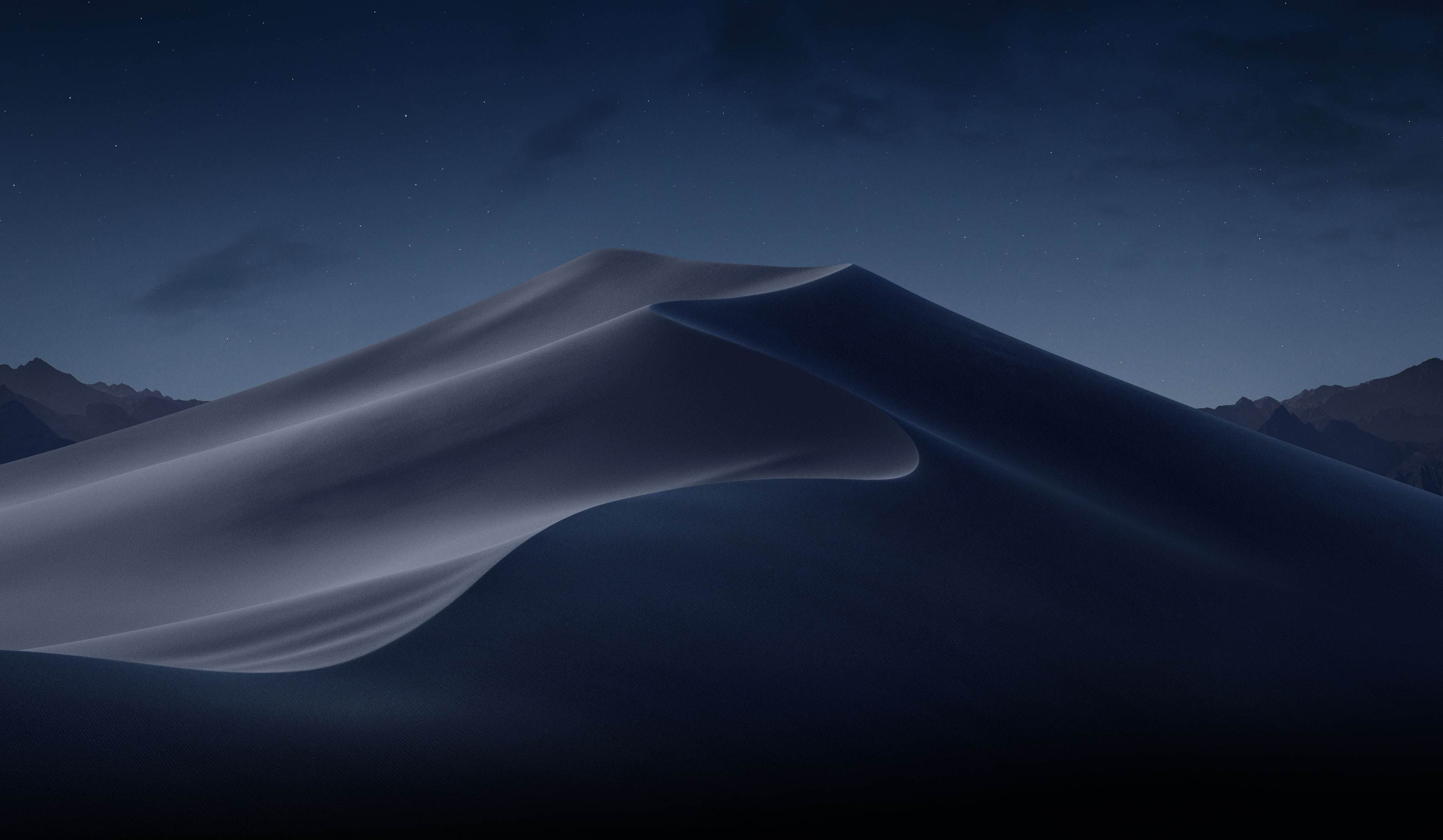
Depois das montanhas, que peculiarmente ficam na margem do wallpaper, vieram as dunas. Com uma distância de 253km (ou três horas de carro), o próximo destino é o Parque Nacional do Vale da Morte, o ponto mais quente do continente americano — onde se registrou a maior temperatura da história (56,7°C) em julho de 1913, e onde a foto do papel de parede do macOS Mojave 10.14 foi feita.
Já sobre as novidades do sistema, essa versão do macOS é particularmente conhecida pela introdução do Modo Escuro, a inclusão dos Conjuntos (Stacks) na Mesa (Desktop), além da estreia de apps já conhecidos dos usuários de iOS, como o Apple News, o Bolsa (Stocks), o Gravador de Voz (Voice Memo) e o Casa (Home).
macOS Catalina 10.15
A 428km adiante do Deserto de Mojave (cerca de cinco horas e meia de carro), nós temos a Ilha de Santa Catalina, destino paradisíaco — e remoto — da costa sul da Califórnia que deu nome à versão do macOS lançada em 2019. Pela posição da foto, o que se especula é que o registro oficial da Apple tenha sido feito com o auxílio de um drone ou helicóptero, sobrevoando as águas para capturar Catalina sob diferentes períodos e iluminações para fornecer o tema dinâmico disponível no sistema.
Essa atualização marcou o fim do iTunes, que foi segmentado em um catálogo de aplicativos separados (Apple TV, Música, Apple Podcasts), mas sua adição mais relevante muito possivelmente foi o recurso Sidecar, que possibilita o uso do iPad como um monitor externo do Mac.
macOS Big Sur 11
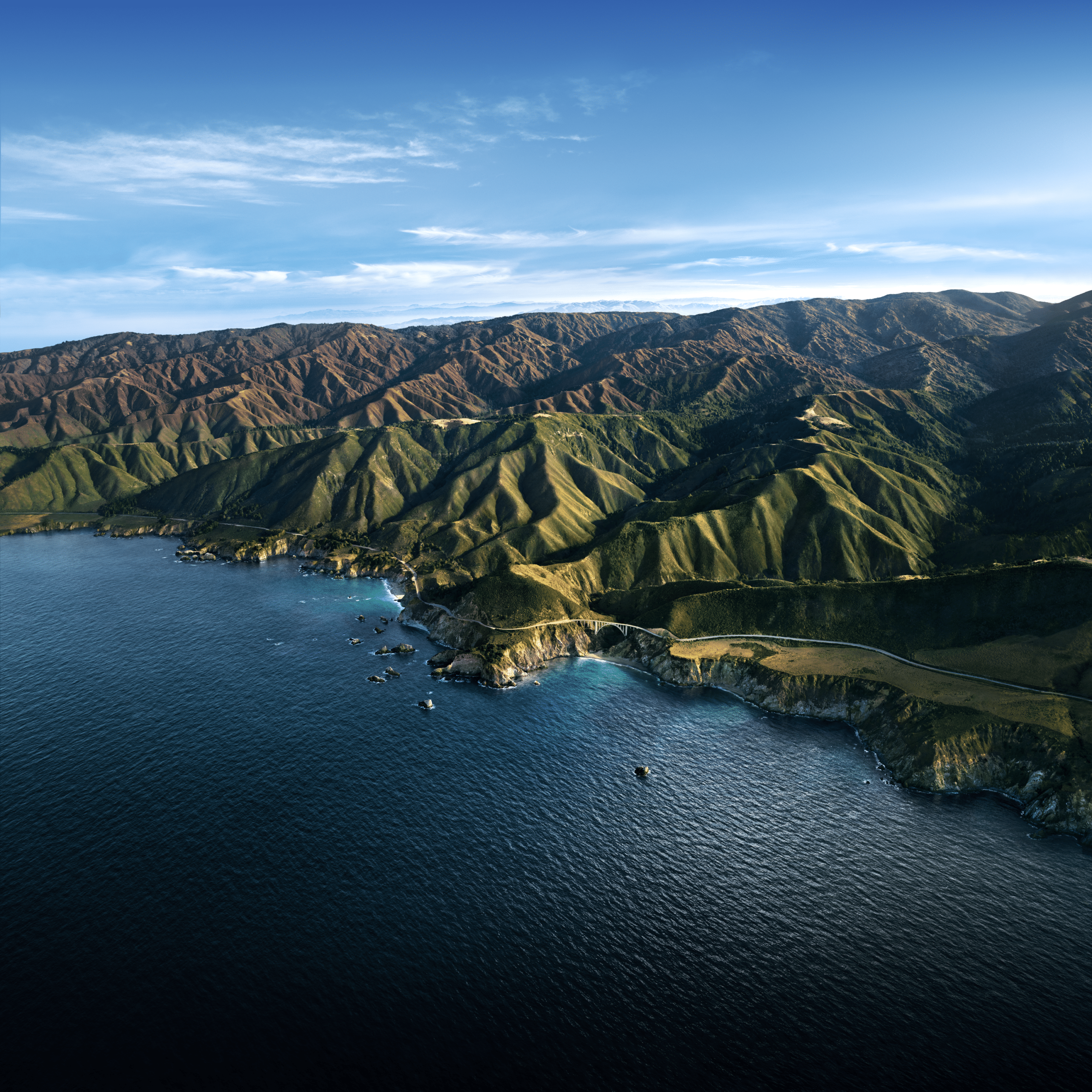
Com uma distância de 524km da Ilha de Catalina, a próxima parada é na Ponte Bixby Creek (inaugurada em 1932 e particularmente conhecida por suas estradas com curvas), localizada na costa central de Big Sur, que dá nome a essa versão do macOS — o papel de parede retrata também a parte litorânea do local.
Sobre o sistema, a versão marcou a transição dos processadores da Intel para o Apple Silicon com o lançamento do M1, trazendo novos ícones, materiais translúcidos, um novo Dock, Central de Controle e de Notificações.
Esta versão também foi um marco para o sistema operacional, pois, pela primeira vez em muitos anos, a Apple abandonou as sub-versões 10.x e passou para o número 11 — o que se manteve nos anos subsequentes.
macOS Monterey 12
Ainda na costa de Big Sur, o macOS Monterey 12 marcou a quebra de uma tradição: pela primeira vez em anos, a Apple optou por não incluir um registro fotográfico como possível papel de parede ou tela de descanso, mantendo apenas temas dinâmicos para ilustrar o sistema dos Macs naquela ocasião.
O Condado de Monterey, que inspirou o nome do sistema, é particularmente lembrado por ter abrigado a primeira capital da Califórnia, quando a região ainda era de domínio dos governos da Espanha e do México.
Em relação ao sistema, o grande destaque foi a introdução do Controle Universal (Universal Control), permitindo que um único conjunto de periféricos (como teclados e mouses) seja utilizado simultaneamente no Mac e no iPad.
macOS Ventura 13
Por volta de 450km de distância (quatro horas e meia de trajeto) depois, temos o Condado de Ventura, que inspirou essa versão do macOS. Emancipado do Condado de Santa Bárbara em 1873, ele abriga o píer mais antigo do estado da Califórnia. Mais uma vez, a Apple optou por não incluir um papel de parede fotográfico.
Quanto aos seus recursos, o macOS Ventura 13 se destacou pela adição do recurso Organizador Visual (Stage Manager) e melhorias no Spotlight, Safari, entre outros aplicativos nativos do sistema que ganharam reformulações.
macOS Sonoma 14
Do Condado de Ventura até Sonoma, são 748km (pouco mais de sete horas de trajeto) até a região norte de San Francisco, conhecida por abrigar centenas de vinícolas. O registro da Apple foi feito na vinícola Mazzocco Sonoma, no rancho de Warm Springs.
Depois de dois anos, a Apple enfim retornou com os papéis de parede fotográficos no macOS, funcionando também como protetores de tela (screensavers) dinâmicos que lentamente se tornam um wallpaper estático após o login.
A maior novidade do sistema foi a implementação dos widgets interativos na Mesa (Desktop), além de reformulações no modo Jogo, na relação do sistema com acessos remotos e no compartilhamento de conteúdos em videochamadas, com novidades também no Safari, na Siri e nos recursos de acessibilidade.
macOS Sequoia 15
Saindo de Sonoma, nosso próximo destino está localizado a quase sete horas de distância (mais ao sul da Califórnia, a exatos 547km de distância); trata-se do Parque Nacional da Sequoia, que abriga algumas das maiores árvores do planeta em termos de volume.
O registro do papel de parede é remoto o suficiente para não termos uma dimensão exata da sua localização geográfica (até porque a Apple nunca divulgou essa informação), mas é seguro afirmar que as imagens foram capturadas em algum dos bosques de sequoias da Sierra Nevada.
Além da estreia controversa dos recursos da Apple Intelligence devido à discrepância entre o que foi apresentado e as funcionalidades entregues, o macOS Sequoia 15 introduziu o Espelhamento do iPhone (iPhone Mirroring), a organização de janelas em mosaico e o aplicativo Senhas (Passwords).
macOS Tahoe 26
Do Parque Nacional de Sequoia, partimos rumo ao norte, até a fronteira entre a Califórnia e o estado do Nevada (uma distância de 330km, ou três horas e meia de trajeto). O próximo destino é o Lago Tahoe, também presente na cordilheira de Sierra Nevada. Ele é particularmente conhecido por ser o maior lago alpino da América do Norte em termos de altitude.
Conhecido por suas águas cristalinas, o lago é um destino frequente para esqui. O papel de parede do macOS Tahoe 26 exibe um ângulo baixo sobre o lago, com as rochas em primeiro plano, enquanto os pinheiros e as montanhas de Sierra Nevada aparecem ao fundo.
Quanto ao sistema, além da unificação da numeração com todo o ecossistema (iOS, iPadOS, watchOS, tvOS e visionOS) da Apple, essa versão foi especialmente marcada pelo redesign de interface com a estreia do Liquid Glass. Outras novidades incluem a adição das Atividades Ao Vivo (Live Activities) ao recurso Continuidade, além de revisões do Spotlight, Central de Controle e os recursos da Apple Intelligence.
macOS Golden Gate 27
E, enfim, chegamos à versão mais recente do macOS! Com uma distância de 330km (trajeto com cerca de três horas e meia), nosso próximo destino é o cartão postal da cidade de San Francisco: a Ponte Golden Gate.
Ela foi, até 1964, a maior ponte suspensa do mundo — caso seus cabos de sustentação fossem esticados, teriam tamanho o suficiente para dar três voltas no planeta.
Enquanto sistema, assim como o Snow Leopard ou o High Sierra, o macOS Golden Gate 27 é marcado por sua abordagem de priorização dos refinamentos, tanto relacionados ao visual Liquid Glass quanto aos recursos da Apple Intelligence e da Siri, que agora se torna Siri AI.
E você aí, usa o macOS desde que versão? Alguma, em especial, lhe marcou? Ou você (ainda) não é usuário de Mac, mas gostou de todas essas curiosidades? 😊
De todos os possíveis testes de resistência em que o iPhone 17 Pro já se saiu bem, esse foi muito possivelmente um dos mais inusitados: o aparelho foi recuperado sem danos aparentes após cair de um pequeno avião a aproximadamente 1,1km de altitude (cerca de 3,6 mil pés).
O feito foi da artista canadense Heather Cline, que reside na província de Saskatchewan e costuma fazer voos em um avião monomotor junto com seu marido para capturar fotos e vídeos que servem de referência para suas pinturas aéreas.
Durante um desses voos, 30 minutos após realizar a decolagem, uma corrente de ar derrubou o seu iPhone do suporte, enquanto a pequena aeronave voava a mais de 100km/h.
À CBC, Cline declarou que havia adquirido o aparelho no mês anterior:
Foi um grande investimento. […] Eu literalmente não acreditei de início, que eu tinha feito aquilo, e então ele só me olhou e disse: “Eu te disse para não deixar o telefone cair.” […] Eu estava simplesmente arrasada. Pensava, “Será que existe seguro para quem deixa o seu celular cair de um avião?”, tipo, o que você escreveria no pedido de indenização? “Eu sou uma idiota?”
Embora o casal considerasse o aparelho perdido, eles perceberam que ele ainda era localizável pelo app Buscar (Find My), e então decidiram procurá-lo, encontrando-o em meio a uma plantação de canola com a tela virada para cima, sem danos aparentes!
iPhone 17 Pro Max
Cores: prateado, laranja-cósmico ou azul-intenso Armazenamento: 256GB, 512GB, 1TB ou 2TB
NOTA DE TRANSPARÊNCIA: O MacMagazine recebe uma pequena comissão sobre vendas concluídas por meio de links deste post, mas você, como consumidor, não paga nada mais pelos produtos/serviços usando os nossos links de afiliado.
A Amazon solicitou à Comissão Federal de Comunicações (Federal Communications Commission, ou FCC) dos Estados Unidos uma licença para operar uma nova rede de 5.105 satélites destinada a fornecer serviços para dispositivos celulares, com planos de iniciar os lançamentos em 2028.
À época da notícia, inclusive, a Apple e a Amazon firmaram um acordo pelo qual a Globalstar operará em conjunto com a rede de satélites Leo 1Low Earth orbit, ou órbita terrestre baixa. da Amazon; de modo que ambas as redes sustentarão futuros serviços via satélite para a Maçã.
A Amazon Leo já anunciou um acordo com a Apple para viabilizar serviços via satélite para modelos compatíveis de iPhone e Apple Watch — incluindo SOS de Emergência via satélite, Mensagens, Buscar e Assistência Rodoviária via satélite — e para colaborar com a Apple em futuros serviços via satélite utilizando a rede expandida.
A Amazon planeja implantar cinco camadas orbitais projetadas para cobrir diferentes regiões do planeta. Três delas atenderão áreas densamente povoadas, enquanto as outras estenderão o serviço às regiões polares.
YH Toys YH18001 PRO is a compact yet powerful 1/18-scale brushless RC monster truck designed for enthusiasts who want high-speed performance without stepping up to a larger and more expensive platform. Featuring a 4300KV brushless motor, 4WD drivetrain, metal drivetrain components, and a claimed top speed of 70km/h, the YH18001 PRO promises an exciting driving experience on a wide variety of terrains.
Whether you’re new to the RC hobby or looking for a portable off-road basher, the YH18001 PRO packs impressive specifications into a rugged pickup-style body.
Compact Size, Serious Performance
Despite its 1/18 scale, the YH18001 PRO is engineered for performance rather than being a simple toy.
The truck measures 277 × 202 × 120mm and weighs approximately 758g, making it easy to transport while remaining stable at higher speeds. Its aggressive pickup truck body is complemented by LED headlights, realistic wheel arches, and a durable PVC shell that gives it an authentic off-road appearance.
4300KV Brushless Power System
The biggest highlight is its 2435 4300KV brushless motor, paired with a 35A integrated brushless ESC and receiver.
This setup enables the truck to reach speeds of up to 70km/h under ideal conditions, providing rapid acceleration and smooth throttle response. Compared to brushed RC vehicles, the brushless system delivers:
Higher efficiency
Greater reliability
Lower maintenance
Stronger acceleration
Longer motor lifespan
The truck supports proportional throttle and steering control, allowing drivers to precisely manage speed instead of operating at only full throttle or full brake.
Full-Time 4WD for All Terrains
The YH18001 PRO uses a shaft-driven four-wheel-drive system designed to maintain traction across challenging surfaces.
It performs well on:
Dirt trails
Gravel roads
Sand
Grass
Hard-packed surfaces
The drivetrain also includes numerous upgraded metal components such as:
Metal differentials
Metal center driveshaft
Metal CVD front driveshafts
Metal steering knuckles
Metal suspension mounts
Metal wheel cups
These upgrades improve durability during aggressive driving and repeated jumps.
Independent Suspension
Handling is enhanced by a double wishbone independent suspension system with front and rear spring shock absorbers.
This setup helps the truck absorb bumps while maintaining tire contact over uneven terrain, improving both stability and cornering performance.
Large off-road tires with deep tread patterns provide strong grip on loose surfaces, making the truck suitable for recreational bashing as well as casual racing.
Ready-to-Run Convenience
The YH18001 PRO arrives in RTR (Ready-to-Run) configuration.
Inside the box you’ll find:
YH18001 PRO RC truck
2.4GHz transmitter
7.4V Li-ion battery
USB charging cable
Wheelie bar
Screwdriver
Metal body clips
User manual
Only three AA batteries for the transmitter need to be purchased separately.
Battery Life
Power comes from a 7.4V 1600mAh 20C Li-ion battery.
Expected performance includes:
Approximately 18 minutes of driving time
Charging time of around 3–3.5 hours
While runtime is typical for a high-speed brushless RC vehicle, enthusiasts planning extended sessions may wish to purchase an additional battery pack.
2.4GHz Radio System
The included 4-channel 2.4GHz transmitter provides:
Full proportional steering
Proportional throttle
Stable signal
Approximately 80 meters of operating range
The 2.4GHz system also minimizes interference when multiple RC vehicles are operated nearby.
YH Toys YH18001 PRO delivers an impressive balance of speed, durability, and value in the increasingly competitive 1/18-scale RC market. Its 70km/h brushless powertrain, metal drivetrain upgrades, independent suspension, and full-time 4WD make it a capable off-road performer that is equally enjoyable for beginners looking to step into the hobby and experienced drivers wanting a compact high-speed basher.
For RC enthusiasts seeking a portable monster truck with genuine hobby-grade performance, the YH18001 PRO stands out as an exciting option that offers far more capability than its compact dimensions might suggest.
Second only in speculation to the folding iPhone might be the reported MacBook Pro that will be Apple’s first Mac with a touchscreen.
[…]
A preponderance of drawing related features are specifically making their way to the Mac, including both in Notes and in Freeform. Those features have existed on Apple’s touch-first platforms for some time, but this is their first jump to the Mac. While nominally this will work with your trackpad or even using an iPad as input, it’s not hard to imagine a future where you might be able to draw right on your Mac’s screen.
“MacBook Ultra” is the rumored name for a new high-end model above the MacBook Pro. The laptop is rumored to feature an OLED display, touch-screen capabilities, a Dynamic Island, a thinner design, and M6 Pro and M6 Max chips.
macOS 27 includes a trio of hints about touch-screen support and a Dynamic Island in particular.
Apple has added direct touch input to Sidecar with macOS 27 Golden Gate and iPadOS 27, allowing users to tap and interact with macOS interface elements using a finger on their iPad for the first time.
Unsurprisingly, UIKit-based iOS and Catalyst apps seem to handle touchscreen macOS better than AppKit apps, with all the little touches like swipe-to-go-back that you might expect.
In a post to Weibo on Thursday, the leaker known as Instant Digital made a characteristically terse comment on the upcoming product. “It’s 100% confirmed that the MacBook screen will be touch-enabled,” they wrote (translated from the original Chinese using Google Translate).
A touchscreen MacBook Ultra would face a similar challenge [as the Touch Bar]. It would launch as a niche, expensive device in a sea of non-touchscreen Macs. Developers would need to bet Apple was committed to rapidly rolling touchscreens out across its entire laptop line to justify their investment.
I don’t expect a touch screen to need as much developer buy-in as the Touch Bar.
The only way a MacBook Ultra makes sense to me is if it zips past that period of compromise. Which means a screen that detaches and effectively becomes an iPad, so you get a great laptop and a great touchscreen device. That sounds a lot like an iPad running macOS or, for that matter, a Microsoft Surface or any number of Windows hybrid laptops.
AppKit adds NSRefreshController, providing pull-to-refresh functionality for NSScrollView.
[…]
NSToolbarItemGroup adds the role property and the NSToolbarItemGroupRole enum, allowing toolbar item groups to be tagged with a semantic role. NSSegmentedControl similarly adds a role property and the NSSegmentedControlRole enum, including a tabs role for controls that represent tab-based navigation and content selection.
[…]
NSTextSelectionManager provides common text selection interactions (click, drag, shift-click, double/triple-click word/line/paragraph selection) to a NSView with a set of NSGestureRecognizers rather than overriding NSEvent mouse methods. NSTextView now uses NSTextSelectionManager and provides its own set of NSGestureRecognizers to provide additional features in addition to text selection.
[…]
By default, NSMenu hides all menu item symbol images — non-symbol images remain visible. […] Use the new preferredImageVisibility property on NSMenuItem to customize the image visibility for your menu items. As in macOS 26.0, NSMenu automatically provides default visible menu item images for certain common system-wide menu items, such as Settings, Share, and Print.
Bring your AppKit app up to date with modern macOS conventions. Dive into handling input with control events and gesture recognizers, moving beyond traditional tracking loops. Enhance keyboard navigation in your app, implement graceful state restoration after restarts, and take advantage of new corner concentricity APIs that let your interface blend seamlessly with the macOS aesthetic.
To summarize the singular AppKit session this year: hey remember all these APIs and design patterns from UIKit? Well they’re now in AppKit and you should use them! Also make your glass use interactive bounce effects.
In macOS 27, AppKit continues to standardize on gesture recognizers as the primary mechanism for input handling. This change directly affects Sidecar because gesture recognizers are the only way to respond to touch input from a Sidecar-connected iPad running iPadOS 27. If your app relies on tracking loops for mouse event handling, migrate to gesture recognizers to support Sidecar touch input.
This article explains how the gesture recognizer model works, how to implement gesture recognizers correctly for Sidecar touch input, how to update your existing event-handling code, and which APIs macOS 27 adds. Codebases that implement nextEvent(matching:) or mouseDown(with:), mouseDragged(with:), and mouseUp(with:) events are most affected by the updates discussed.
Discover how to combine the convenience of built-in text views with the control of TextKit. We’ll show you how new APIs make it easy to extend UITextView and NSTextView with custom behaviors like line numbers and collapsible sections. We’ll also explore the TextKit architecture and walk through new caching and reuse policies for text attachments.
New research spanning five continents and vastly different cultures -- from the steppes of Mongolia to the rainforests of the Pacific -- shows that hunting dogs and their owners cooperate, communicate and rely on each other in nearly identical ways, suggesting the relationship was forged in deep evolutionary time, perhaps 30,000 years ago.
Apresentado na Côte d’Azur à sombra do Grande Prémio do Mónaco de Fórmula 1, o Nuvolari é o automóvel mais rápido e mais potente alguma vez produzido pela Audi. Limitado a 499 unidades e com entrega prevista para 2027, é também uma declaração sobre o futuro da marca.
In December, the Trump administration abruptly announced it would shut down the National Center for Atmospheric Research (NCAR), a Boulder, Colorado-based facility that helps researchers perform studies of weather, climate, atmospheric chemistry, and more. The news came as a shock, given that the government had never identified serious deficiencies in the management of NCAR and its associated supercomputing center in Wyoming.
Nevertheless, the government ordered the University Consortium for Atmospheric Research (UCAR), which manages NCAR on behalf of the National Science Foundation, to help it prepare to transfer the Wyoming facility to a different operator. UCAR sued the government and, on Monday, won a preliminary injunction that places the transfer of the facility on hold.
Is that your final decision?
NCAR is what is termed a "Federally-Funded Research and Development Center" meant to support researchers in the academic community. Rather than having its own research agenda, it provides facilities, equipment, and expertise to support projects that are too large or complex for researchers to pursue on their own. NCAR has been around since the early 1960s and has become a critical resource for the global atmospheric science community.

 Login
Login