❌

Reading view

App Store Chief Details Future Of Apple Arcade And Mobile Games

Apple recently promoted Carson Oliver to head of the App Store worldwide, and he is already sharing details about the future of gaming on its devices. During a recent interview with Polygon, Oliver explained how the company plans to attract more premium games to mobile devices and where its subscription service fits in. The focus […]

The post App Store Chief Details Future Of Apple Arcade And Mobile Games appeared first on The Mac Observer.

  •  

Carson Oliver and Apple’s Gaming Push

Giovanni Colantonio:

Seven years later, Apple Arcade hasn’t gone anywhere, and Apple itself hasn’t slowed its broader gaming efforts either. Between courting major publishers like Capcom to release their games on Mac to launching a proper gaming app, it’s clear that Apple still has its sights set on being a major player.

The latest example of that came this week as Apple launched an App Store event dubbed Indie Games Week. The week-long initiative saw Apple welcoming games like Vampire Crawlers to iOS and announcing an ambitious mobile version of No Man’s Sky. At the center of that push was Carson Oliver, the new head of App Store Worldwide following Phil Schiller’s sudden departure from the role this past August. The fact that one of his first acts in the role was spearheading an indie gaming showcase hints at where Oliver’s priorities might lie.

[…]

While Oliver sells the narrative with carefully worded precision, questions still linger around Apple’s wider gaming efforts. Continued investment in mixed reality gaming is uncertain given that Apple has reportedly cut down production of its Vision Pro headset due to underwhelming sales. And though Apple continues to court publishers and get games on iOS, we haven’t seen the full-throated support from major players like Capcom and Ubisoft in 2026 that was crucial to raising Apple’s gaming profile in 2023.

Previously:

  •  

DropDMG 3.7.2

DropDMG 3.7.2 is a maintenance update of my app for disk images and archives.

  • It still works back to macOS 10.13, but this will probably be the last such release. There’s no reason the code can’t continue to run there, but soon I will be switching to Xcode 27, which deploys back to macOS 12.

  • From some reason, this build was hard to submit to the Mac App Store. altool kept retrying, or something, right at the end of the upload. There’s usually a delay before a build shows up in App Store Connect, but this time I saw it there before altool had finished running.

  • I also ran into trouble submitting the app for review. It kept showing a spinner or reporting errors when I tried to save the build, and also when adding it for review.

  • The actual review was pretty quick by modern standards—three days including a weekend. It warned me ahead of time that review “can take up to 48 hours.”

  • When I was approving the build for release, it asked if I was “enjoying” App Store Connect and wanted me to rate the app.

Previously:

  •  

Apple Kicks Off Indie Games Week with Six New iPhone and iPad Games, Plus No Man’s Sky Preorders

Source: Apple.

Source: Apple.

Today, Apple announced Indie Games Week, a celebration of some of the best games from independent game studios. To kick things off, the company announced seven big titles that are making their iPhone and iPad debut today or are coming soon.

Apple’s Carson Oliver, the head of App Store Worldwide, had this to say in the company’s press release:

Indie games are constantly pushing the boundaries of creativity to deliver unique gameplay experiences to Apple users, and we wanted to take a moment to celebrate these games and the teams that take creative risks to push gaming forward.

Sifu.

Sifu.

The games available today include:

  • Sifu ($7.99), a stylish martial arts fighting game where you play as a kung fu student out for revenge.
  • Vampire Crawlers ($9.99), a deck-building spin-off of Vampire Survivors where the dungeon battles are playable at your own pace.
  • Little Kitty, Big City (Free with $9.99 full-game unlock), an open world game where you explore a cityscape as a cat.
  • Dome Keeper ($9.99), a mining and defense game where you must mine for resources while keeping an eye out for enemy attacks on the surface.
  • Yes, Your Grace 2: Snowfall (Free with $4.99 full-game unlock), a kingdom-management game that poses moral dilemmas as you are forced to make choices to save your empire.
  • 9 Kings (Free with $8.99 full-game unlock), a card-based strategy game where you assemble your army for battle with rivals, managing troops and resources.

Coming Oct. 28: No Man's Sky.

Coming Oct. 28: No Man’s Sky.

Also announced today is that No Man’s Sky is making its debut on the iPhone and iPad on October 28th with preorders available today. Originally announced as a 2022 release for the Mac and iPad, the game has clearly taken longer than expected to adapt to Apple’s platforms.

For those who have been patiently waiting, though, the news is very good. The iPhone and iPad versions support all of the past updates to No Man’s Sky and will work on every iPhone from the iPhone 11 forward and the iPad Air (3rd generation) and later. The game will also feature touch controls, and both mouse and keyboard and controller support. However, similar to the game’s Switch debut, it will not include multiplayer, Settlements, cross-save, or cross-play at launch. No Man’s Sky will be free to download and try with a full-game unlock offered as a $19.99 In-App Purchase.

Dome Keeper.

Dome Keeper.

I’ve had a chance to play each of the games available today on my iPhone and iPad and it’s a great collection. What sets them apart from previous releases on other platforms is the attention each has paid to the unique features of Apple’s platforms. Many, including Dome Keeper, Sifu, and Vampire Crawlers, support Game Center and Family Sharing. By and large, the touch controls are well done, too, but I appreciate the games that offer controller support the most since that’s my preferred way to play.

I’ve had a lot of fun trying the betas of each of these games and am looking forward to No Man’s Sky later this month. There’s something great here for anyone who loves iPhone and iPad gaming, but be sure to check out the other gems Apple is highlighting in this App Store editorial feature, too.

  •  

Alexa Tablets

Hartley Charlton:

The flagship Alexa Tablet 12 Pro starts at $499.99 with 8GB of RAM and 128GB of storage, aiming to rival the iPad Pro at a significantly lower price point. It features a MediaTek Dimensity 8400 chip, a 12-inch display with an adaptive refresh rate of up to 120Hz and a 3:2 aspect ratio, a 6.5mm-thick aluminum body, Wi-Fi 6E, and quad Dolby Atmos speakers. Amazon claims that the device has up to 16 hours of video playback.

A $549.99 version adds a “Nanomatte” display, using precision-etched glass developed with Corning to reduce glare. Higher configurations offer up to 16GB of RAM. Unlike Apple’s nano-texture display option, which requires a 1TB or 2TB iPad Pro, Amazon’s matte finish is available with 128GB of storage.

[…]

The Alexa Tablet 11 starts at $329.99 with 8GB of RAM and 64GB of storage, offering an 11-inch 2.5K display with a 90Hz refresh rate. A 128GB version costs $379.99. The smaller Alexa Tablet 8 starts at $229.99 with an 8.7-inch display, 4GB of RAM, and 64GB of storage.

Ryan Whitwam:

Amazon has dropped the Fire branding in favor of Alexa, and the new Alexa Tablets are now Google-certified Android devices.

Throughout the history of Fire Tablets, Amazon downplayed its use of Android. They ran Android apps from the company’s Appstore platform, but there was no Google integration with “Fire OS.” However, Amazon shut down its app store last year. The new Alexa Tablets run full-fledged Google-y versions of Android with the Play Store and all the apps you’d expect.

M.G. Siegler:

So the question is if these new Amazon Alexa Tablets can do what the previous Android tablets never could in tailoring software for the form-factor. I remain skeptical of that but perhaps stock Android plus some good Amazon + Alexa+ (as well as Prime Video) integration will be good enough?

[…]

The screen – namely the fact that it's a matte texture – sounds interesting[…]

Previously:

  •  

App Store Scam: “Update My Phone”

John Gruber:

“Update My Phone & Apps: Guide” is an iOS app from developer Tair Olzhasev. By default, the only thing it does for free is give you a “Check for Updates” button that launches the system Settings app. It doesn’t even take you to the General → Software Update screen. It just takes you to the root level of Settings.

Everything else it purports to do requires a $15/week subscription. That’s $780 per year.

Jeff Johnson:

You can tell it's a scam without even downloading the app, because it has no website and hosts the privacy policy on sites.google.com, a dead giveaway.

The 3-day trial with auto-renewing subscription is also a huge red flag. By no coincidence, 3 days is the minimum subscription trial length allowed by Apple. All the scams use it.

Christian Tietze:

Being part of a team with a successful App Store app opens my eyes for how weird the app store is.

This is not the Bear Notes the Shiny Frog team is working on :)

This one seems to not be a scam—and there’s only a one-time $3.99 IAP—but it sure is confusing.

Previously:

  •  

The App Store Review Process Needs Fixing

Lex Friedman (Mastodon):

Though allegedly focused on benefiting users (through better safety and compliance), App Store review in its current form mostly frustrates the people it claims to protect.

[…]

Those are all scammy apps that got through. Apple’s review capacity isn’t infinite. Every hour a reviewer spends poring over a bug-fix update to an app that’s been in the store for years is an hour not spent catching the fake LastPass app.

[…]

And the review process is fundamentally flawed anyway: It works best with developers who are trying to do the right thing. Plenty of apps pull their content, features, and behavior from servers their developers control. Feature flags, remote configuration, and web views mean an app can behave differently the day after approval than it did the day of vetting. A determined bad actor can get past App Review. An honest developer just waits in a slow, nebulous line.

[…]

At WWDC 2020, the company announced that bug fixes for apps already in the App Store would no longer be held up over guideline violations (except for legal issues); developers could address those problems in a subsequent update instead. That’s a good policy! Based on developer complaints I’ve seen, Apple hasn’t honored that agreement.

He suggests a Trusted Developer Program.

Previously:

  •  

Not Muse in the App Store

Jeff Johnson:

The Muse from Meta app description says at the beginning, “Muse is your personal AI agent that gets things done, always working on what matters to you.” The Muse AI app description says at the beginning, “Muse is your professional AI agent that gets work done, always helping move important tasks forward.” Near the end, the Muse from Meta app description has the heading “SMART, BUT STILL LEARNING.” Near the end, the Muse AI app description has the heading “POWERFUL, BUT STILL LEARNING.”

In other words, Muse AI is a blatant copy of Muse from Meta, the latter of which is currently the #1 iOS App Store download in the United States. I don’t know where Muse AI ranks in the iOS App Store, but I do know that it’s currently the #20 Mac App Store download in the US.

And the real Muse app isn’t in the Mac App Store, so it has no competition.

By the way, I’d also like to draw your attention to the #11 Mac App Store download, as shown in my screenshot above: App for Instagram º. Yes, the app name includes the º character, a phenomenon I’ve written about before.

[…]

The top search result for “VLC” in the Mac App Store is Video Player for VLC, developed by muhammad faisal jabbar, not by VideoLAN. VLC for Mac is distributed outside the Mac App Store. You may notice a similarity between the icon of the official VLC app in the iOS App Store and the icon of Video Player for VLC.

Previously:

Update (2026-09-29): John Gruber:

“Muse AI” is now gone, but “App for Instagram °” and “Video Player for VLC” are both still there.

Jeff Johnson:

The Reddit commenter claims that the scams receiving public attention are “the tip of the iceberg from a limited, outsider perspective,” which is an accurate metaphor, yet the commenter and I have dramatically different interpretations of that metaphor. For the commenter, the iceberg represents the vast number of scams allegedly caught by Apple app review but not seen by the public; for me, the iceberg represents the vast number of scams not caught by Apple app review and not seen by the public either. To put the argument another way, the commenter appears to assume that the majority of scams in the App Store receive widespread public attention, in blog posts such as mine or in the news media, so the relatively small number of stories we hear is indicative of a relatively small number of scams in the App Store, whereas my own impression is that the vast majority of scams in the App Store do not receive widespread public attention. Scam hunting is not my job, merely an occasional hobby. It’s so easy for me to find scams, they practically fall into my lap whenever I look. I could spend all day every day finding and listing App Store scams, if I were sufficiently motivated (I’m not). You would think that someone working for Apple would be sufficiently motivated, by a paycheck, to spend all day every day finding and listing and most importantly removing App Store scams, but I’ve seen no evidence of it.

I think Johnson is right about the iceberg. Most of the scams that get publicity are at the top of the charts. One view is that all the scam apps that Apple misses end up being popular. What are the odds? The other is that we notice them because they’re popular and that there’s also a vast number of deceitful or dangerous apps lurking.

Dan Moren:

Speaking of App Store shortcomings, I really hate when I want to see how much an app costs and I get this impenetrable list of IAP options. It’s impossible to know without installing and opening the app what the payments options are. Be great if Apple helped make this clearer—which options are actually available? What are their various plans (monthly, weekly, etc.)?

  •  

Meta AI for Mac and Muse

Zac Hall:

The new Meta AI desktop app is version 1.0 beta at launch and weighs just 16MB once installed.

Based on initial inspection, it runs natively on Apple silicon Macs with macOS 15 or later, using an AppKit and SwiftUI shell with WebKit for richer chat content. In other words, this is not an Electron app or a repackaged iPad release.

It includes Mac-specific hooks, making the desktop experience more robust than the Meta AI mobile app.

Karissa Bell:

The Mac app brings a few new capabilities compared with Meta AI’s existing website and mobile app. For example, it enables users to share part of their screen so the assistant can “see” what they’re working on and provide more specific answers.

Juli Clover:

The app is primarily meant for businesses and content creators, and it integrates with Facebook and Instagram. It incorporates analytics tools so it can answer questions about performance, and connects with Google Workspace for document access. Google Workspace access requires a professional Facebook or Instagram account.

John Gruber:

Passes the Settings window sniff test too — it actually has a Settings window.

[…]

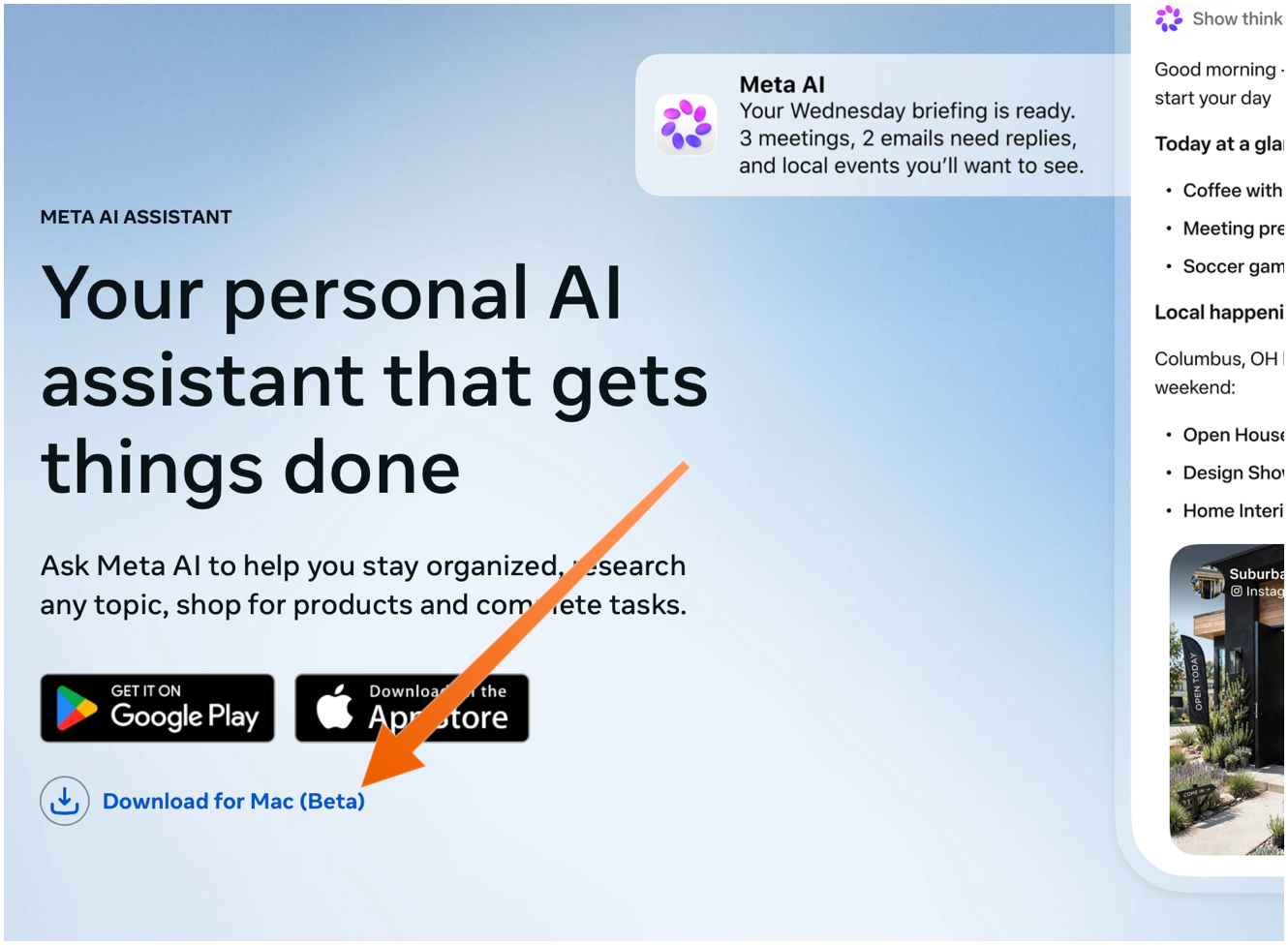
The Mac app is not available in the App Store. You need to download it directly from Meta’s web page, using the “Download for Mac (Beta)” link. The ChatGPT and Claude Mac apps aren’t in the Mac App Store either — they do too many things outside the App Store’s mandatory sandbox (and probably use APIs require that special entitlements in the App Store too).

Sarah Perez:

Meta’s new AI assistant app, Muse, is now available on Mac.

On the Mac, Muse can interact with your files, messages, calendar, notes, and mail, all within their native applications.

Terrence O’Brien:

Jason Aten, a contributing editor at Inc Magazine, posted on Threads screenshots of an interaction he had with Muse in which the assistant asks him some questions about a conversation he was having in Messages.

The problem is that Aten says he didn’t give Muse access to his messages. When asked how it knew about the contents of his messages, Muse replied, “I saw the notification previews, not your message history. I haven’t been reading your texts.” Aten continued to push, asking how Muse was receiving message previews, it didn’t have a good answer.

M.G. Siegler:

The number one response I’ve gotten to my thoughts on Meta’s Muse personal assistant agent is some variation of “I will never trust Meta with my data.” But the number two response is arguably more interesting (and related): “Why didn’t Google build this?”

Pieter Arntz:

Mac security researcher Patrick Wardle says it’s trivial to turn Muse into “the ultimate backdoor.”

[…]

According to Ars Technica, Wardle found that a locally running application or terminal command could alter an undocumented Muse configuration setting that controls the server used for dictation transcription. By redirecting dictation traffic to an attacker-controlled server, an attacker could capture voice prompts and obtain the authentication token for the victim’s Muse account.

John Gruber:

Four days later and Muse still holds the #1 spot in the U.S. iOS App Store.

See also: Joanna Stern.

Alexandr Wang (Watts Martin, John Gruber):

Here’s the best part: we have no idea what people will want. The world until now has been shaped by the small number of fanatics who have somehow found a way to make their wants real. But we’ve never seen humanity with every single person’s agency fully switched on. Eight billion people who just need to write their dream down in order to get started making it happen.

So we built Muse to help people build the world they want.

Damien P. Williams:

So uhhhhhh… Apparently meta’s muse “AI” is just straight up doxxing people to strangers on FB marketplace???

Via Mike Masnick:

Almost all of Meta’s PR about Muse was about how careful they had been to set it up not to do things like this, how they delayed the launch by months to carefully design it so it could be trusted. And then…

Previously:

  •  

OmniFocus 4.9

Ken Case:

OmniFocus 4.9 adds support for Siri AI, optional new date parsing assistance via Apple Intelligence, and a range of new and updated App Intents exposed as Shortcuts actions.

[…]

In our testing we’ve found that the new Siri AI hasn’t yet learned how to work with app capabilities that it hasn’t specifically been trained on, even for App Intents that are available in Shortcuts and Spotlight. For example, its understanding of how to work with OmniFocus is based on how it’s been trained to work with the Reminders app. Our work in OmniFocus 4.9 means that Siri now knows about “reminders” in OmniFocus (i.e. actions and Inbox items), “lists” (i.e. projects) which contain reminders, and any “groups” (i.e. folders) that lists have been organized into. Siri can assign and edit reminder due dates, flags, repeat schedules, and notes and image attachments in OmniFocus. This is another great leap forward! But as soon as you try to go beyond what Reminders can do, you find its limits: for example, it doesn’t understand the distinction between due dates, planned dates, and defer dates.

Siri also doesn’t really understand much about how our document-based apps work, because Apple hasn’t trained it on our specific apps or anything equivalent. So, Siri doesn’t know how to make an outline, or a diagram, or a Gantt chart. We expect this to improve over time—after all, we’ve worked with other language models that do understand how to make those things—but it’s important to understand Siri’s current limits.

[…]

With Siri AI, Spotlight becomes even more important as a source for personal context. You can ask Siri about content in your OmniFocus database, so Siri can summarize the actions you’ve completed this week, or tell you what items you might consider working on soon.

My favorite change in OmniFocus 4.9 seems less exiting, but I’m irrationally happy about it. Last year, as part of the Liquid Glass update, they redesigned the Perspectives Bar on iOS to automatically collapse and expand as you scroll. I found the animations distracting, it messed up my muscle memory, and it required lots of extra taps. In 4.9, there’s a new Show Perspective Bar option, which you can set to Automatically (the 4.8 behavior), Manually (stay collapsed but expand when you tap), or Always (show the expanded state all the time, nothing moves). This is, of course, what I chose.

I’m still seeing the previously mentioned glitches in the Mac app with tabbing, spontaneous tag collapsing, and the window moving itself between spaces. The iOS app sometimes still shows an out-of-date list of flagged actions.

Previously:

  •  

App ToText gera transcrições e resumos com IA, além de fornecer respostas sobre elas

Não é novidade que a inteligência artificial generativa mudou a forma como criamos atas de reunião ou fazemos transcrições — coisas que eram essencialmente manuais na maioria dos casos. Apps como o Notion e o Google Meet já permitem usar o microfone do dispositivo para capturar, transcrever e gerar resumos detalhados, com insights sobre o que foi dito.

Mas eles são aplicativos projetados com outros focos (como reuniões ou anotações/tarefas) e acabam não sendo muito práticos para quem quer um app específico para transcrições . Dessa ideia nasceu o ToText, que permite gravar aulas, entrevistas, reuniões ou ideias e gerar uma transcrição com resumos detalhados do que foi dito.

Um dos grandes destaques do app é a possibilidade de fazer perguntas sobre a gravação como você faria a um amigo que participou da reunião ou da entrevista. A IA do ToText se baseia na transcrição para responder ao que foi perguntado e, caso haja dados de tempo disponíveis, também marca o trecho no áudio, para que o usuário o ouça no ponto exato.

O ToText também tem outros recursos interessantes, como exportar um PDF com o resumo e a transcrição, salvar o resumo como texto simples ou copiá-lo. Também é possível pesquisar por uma palavra ou expressão entre as transcrições salvas e organizá-las com facilidade por meio de tags e favoritos.

Com mais de 60 idiomas de transcrição disponíveis (inclusive o português), o ToText pode ser baixado gratuitamente e oferece até uma hora de transcrição por mês. Caso queira mais, você pode assinar o plano Basic (1.000 minutos) ou Pro (2.000 minutos), por valores que partem de R$20/mês e podem chegar a até R$350/ano.

  •  

Playport permite jogar localmente títulos da Steam, GOG ou Epic no iPhone

Existem alternativas para quem deseja jogar títulos adquiridos para PC no iPhone, mas poucas focam na execução local desses games.

Para quem quer rodar localmente a própria biblioteca da Steam, da GOG ou da Epic Games Store, o Playport é um aplicativo de código aberto que traduz e renderiza jogos x86 no iPhone sem a necessidade de jailbreak.

O software utiliza o Wine, o tradutor de x86 para ARM FEX e o DXMT, que converte o Direct3D 10 e 11 para o Metal, tendo sido testado com 47 jogos até o momento — dos quais 34 são jogáveis e 13 não rodam ou são injogáveis. A lista completa pode ser conferida no site oficial do projeto.

Os desenvolvedores destacaram a compatibilidade com Portal 2 (capaz de rodar em até 60 quadros por segundo), The Witcher 3: The Wild Hunt (com cerca de 36qps) e Hollow Knight (até 120qps). Os testes foram realizados em um iPhone com o chip A19 Pro.

Divulgação/Playport

O aplicativo é instalado por meio de um IPA via sideloading, com auxílio da técnica JIT para a tradução em tempo real, e exige que o Modo Desenvolvedor esteja ativado.

O Playport está disponível gratuitamente e pode ser baixado pelo GitHub.

via TudoCelular.com

  •  

Promoções na App Store: Black Border 2, VENARI – Escape Room Adventure, Nível de bolha + Medições e mais!

Nesta terça-feira, confira e aproveite a nossa seleção de promoções na App Store!

Black Border 2, criado pelo pessoal da Monte Cervino, é um jogo de simulação de proteção de fronteira.

Como oficial, caberá a você analisar documentos e possíveis itens proibidos, para impedir a entrada de bandidos, terroristas e outros passageiros com documentação roubada ou falsificada.

Confira um vídeo:

Aproveite a oferta e boa diversão! Ah, o terceiro jogo da franquia também está em oferta:


Abaixo outros jogos/apps que, juntos, somam mais de R$50 em descontos:

Jogos

Jogo de aventura.

Jogo de ação.

Aplicativos

Nivelador.

Lista de compras.


Aproveite as ofertas e até amanhã! Lembrando que elas são sempre por tempo limitado, então é bom correr. 🏃

  •  

App monolog usa IA para organizar pensamentos enviados em uma conversa

Já se pegou recorrendo ao chat com você mesmo no WhatsApp ou Telegram para salvar, de forma rápida e prática, aquela ideia que acabou de pintar? Às vezes, esse é um caminho bem mais curto e natural do que usar apps como Notas (Notes) ou Notion, que costumam requerer um conteúdo mais organizado e trabalhado.

Acontece que guardar tudo em uma conversa do seu mensageiro tradicional pode fazer sentido na hora, mas geralmente acaba resultando em uma verdadeira bagunça bem difícil de gerenciar — principalmente quando você quer revisitar alguma ideia e não sabe exatamente por qual data ou termo deve procurar.

O monolog é um app que tenta resolver esse problema. Da parte do usuário, tudo continua igual: o app funciona como uma interface semelhante a um mensageiro e basta ir jogando lá textos, fotos, links e mensagens por voz sem interromper o fluxo do pensamento. Mas o diferencial é o que o app faz com isso tudo depois.

Com a ajuda da inteligência artificial (que roda prioritariamente no dispositivo), o monolog interpreta o conteúdo das anotações e adiciona rótulos a elas automaticamente — o que ajuda os usuários a encontrar registros antigos por meio de palavras-chave e a recuperar aqueles pensamentos que ficaram inacabados.

A ideia é que você possa recuperar com facilidade anotações ou tarefas anteriores apenas perguntando por algum contexto — ou até mesmo que o próprio aplicativo o lembre gentilmente (como um amigo em uma conversa tradicional) de determinada anotação feita no passado (como alguma que envolva uma data).

O monolog pode ser baixado gratuitamente, mas para usar todos os recursos de inteligência artificial é necessária uma assinatura PLUS, que sai por R$20/mês ou R$200/ano. Para mais armazenamento, você pode investir também em uma assinatura PRO (R$30/mês ou R$300/ano) ou PRIME (R$60/mês ou R$600/ano).

  •  
❌