Thirty-five thousand spectators. That is the capacity the authors of a new study attribute to the Roman amphitheatre of Itálica, in Santiponce, near Seville in southern Spain. It is roughly the crowd of a mid-sized modern football stadium, and there was not a single loudspeaker in those stands. Whatever happened on the sand had to […]
Brace yourself: The way you get around the web on Android is about to get a whole lot better.
This week, the excellent Vivaldi Android browser is rolling out an update that adds in support for the entire collection of Chrome Web Store browser extensions. That means you can enhance and adjust your mobile web experience with all sorts of interesting — and potentially shape-shifting — new improvements.
Now, with complete Chrome extension support added into the mix on Android, the advantage is growing even greater.
I’ll be honest, though: When I first saw that Vivaldi was adding in Chrome extension support for Android, I wasn’t sure what to make of it. Most of the extensions I use in my desktop browser just wouldn’t make sense on the mobile front and wouldn’t add much of meaningful value in that environment.
But then I put on my thinking cap. I did some deep digging and careful considering. And I found some Chrome extensions that actually work incredibly well in the Android arena and add a lot of interesting value into the mobile web adventure.
This is the first of a two-part collection. Today, we’ll look at five Chrome extensions that you can add into Vivaldi to save yourself steps and bring a welcome efficiency boost to your Android web work. Later this week, we’ll round out the list with another set of extensions that’ll improve the internet itself in some truly intriguing ways.
Ready to reinvent how you experience the web on your phone?
A quick primer on Android Chrome extension installation
Real quick, before we get into the good stuff: When you’re ready to try out an extension, you’ll need to have the latest version of the Vivaldi Android app on your device (obviously, right?) — then either tap the puzzle-shaped extensions icon in the toolbar at the top of the screen, if you see it, or tap the “V”-shaped main menu icon in the upper-right corner and select “Extensions” from there.
Either way you go, you’ll see an option to “Discover more extensions.” That’ll take you to the Chrome Web Store, where you can search or browse through all the available extensions and install anything with a couple quick taps.
I’ll also provide direct links to each extension I’m recommending below, so you can tap it to open it in Vivaldi on your phone and then install it directly from there.
Note, too, that that same Vivaldi Extensions menu is where you can access and manage any installed extensions moving forward. You’ll see every extension you’ve installed there, and you can deactivate or uninstall anything as well as opt to have its icon pinned into your browser toolbar for easy ongoing access.
Chrome Android extension #1: The cookie request crumbler
Our first Android Chrome extension worth considering is one that you won’t ever open or actively think about once you install it and set it up. It’s a tool that works silently in the background to automatically handle those irksome cookie preference prompts that pop up around the web — so they’ll always get answered in the way you prefer, but you’ll never actually have to see or deal with ’em (and have ’em blocking half your view, in a mobile web scenario!) again.
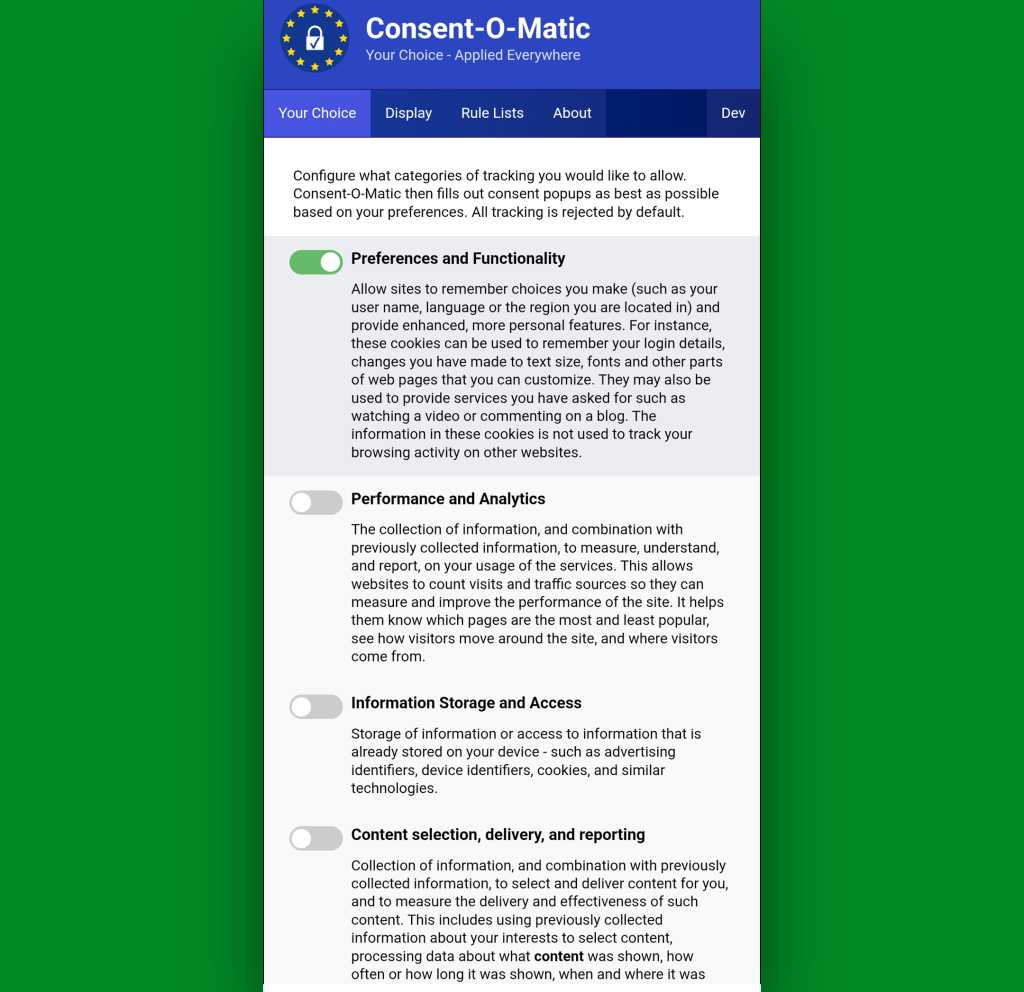
It’s called Consent-o-Matic, and the way it works is simple: You install it, open its options page once to tell it which cookies you do and don’t want to allow around the web — and that’s pretty much it. From there on out, it’ll just click on all those prompts that pop up for you, based on your preferences, and they won’t interfere with your work or irritate you anymore.
Consent-o-Matic remembers your cookie preferences and then applies them for you automatically all over the web.
JR Raphael, Foundry
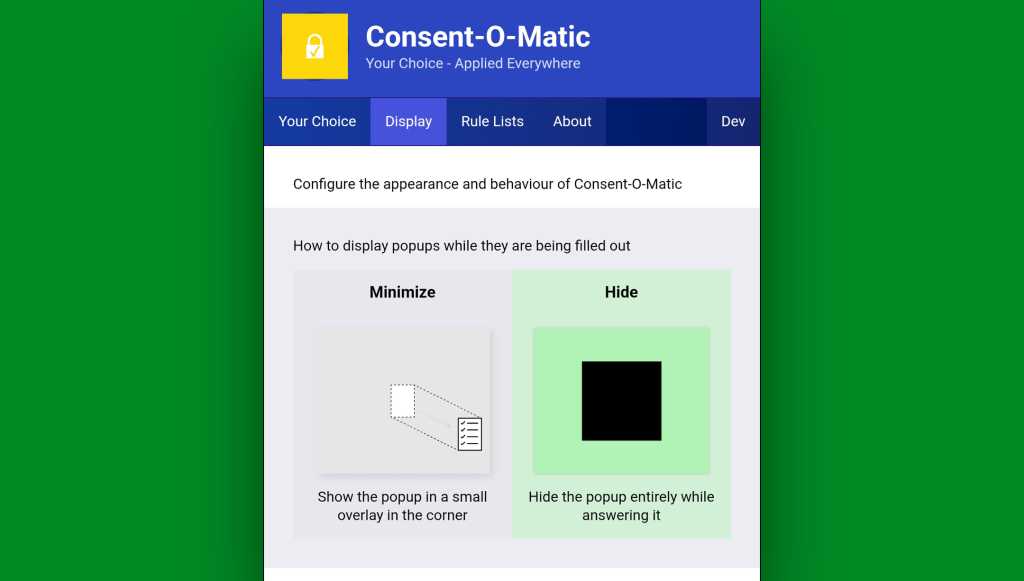
One option to look at while you’re in that initial setup area is in the “Display” tab at the top of the screen. By default, Consent-O-Matic will show any pop-ups it’s handling in a small overlay in the corner of the screen — but you can eliminate that entirely and make the process completely out of sight and invisible, if you want.
You can make Consent-o-Matic completely invisible so you never so much as see another cookie prompt again.
JR Raphael, Foundry
Yes, please — and thank you.
Chrome Android extension #2: 404 no more
Next is another quietly useful addition, and that’s the official Chrome extension for the Wayback Machineat the Internet Archive.
With the Wayback Machine extension active in your Android web browser, anytime you land on a page that for whatever reason isn’t online anymore or just isn’t available at that particular moment, you’ll see an offer to go to the page’s most recent cached version.
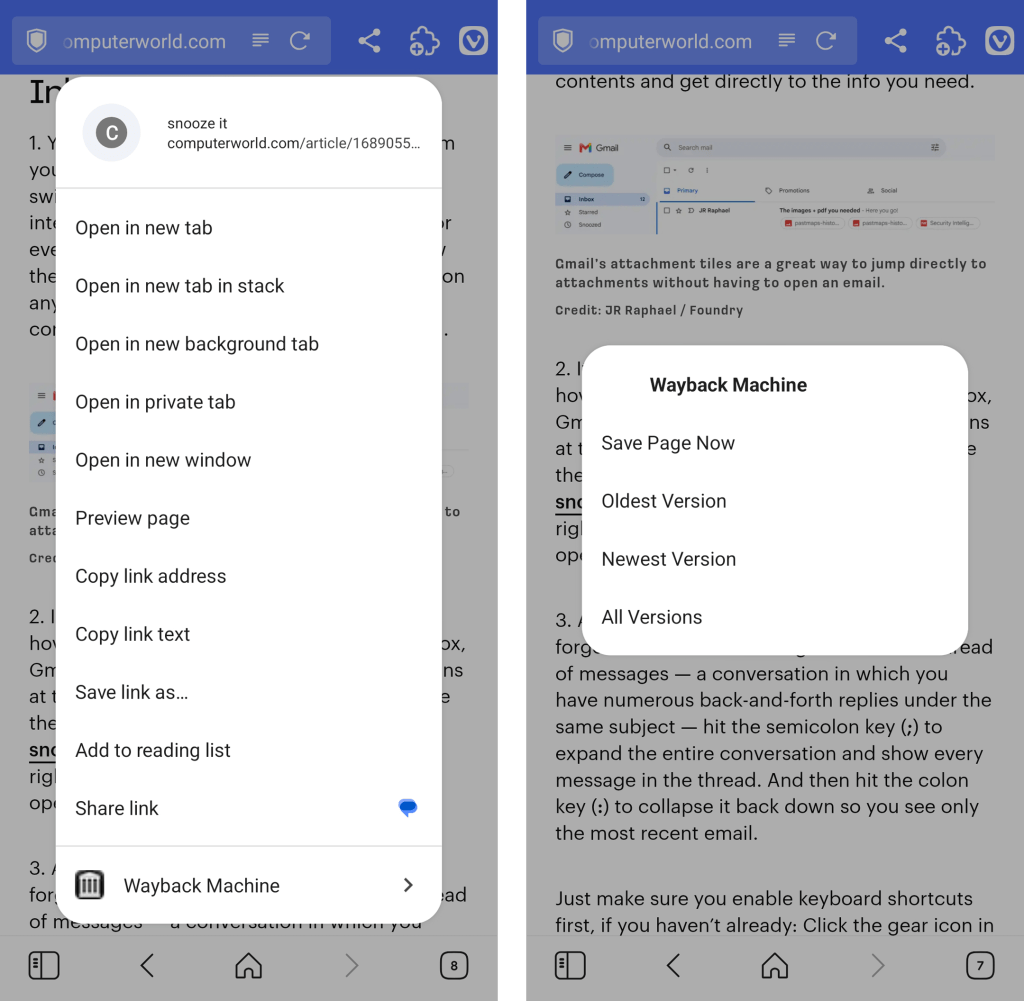
You can also call the extension up on demand to search for older saved versions of any pages by either pinning its icon to your Vivaldi toolbar or long-pressing a link within any page you’re viewing to reveal its menu of options.
The Wayback Machine Chrome extension integrates seamlessly into Vivaldi’s long-press link menu.
JR Raphael, Foundry
Chrome Android extension #3: A background open shortcut
I don’t know about you, but when I’m wading my way around the web, I find myself opening links a lot — often with the intent to look at ’em later.
Typically, that requires long-pressing on the link and then finding the option to open it in a background tab. But with a handy extension called DoubleClicker, that same action can be easier than ever.
Install DoubleClicker into your Android Vivaldi browser, and that’s it: From that moment forward, you can simply double-tap your finger on any link within any page, and it’ll open instantly as a background tab — waiting and ready for when you want it and without any waiting, poking around, or other interruptions to your workflow.
This might just be my favorite addition of all.
Chrome Android extension #4: Hands-free scrolling
The next time you’re reading something on your phone, keep a little somethin’ called Auto Scroll Extension in mind.
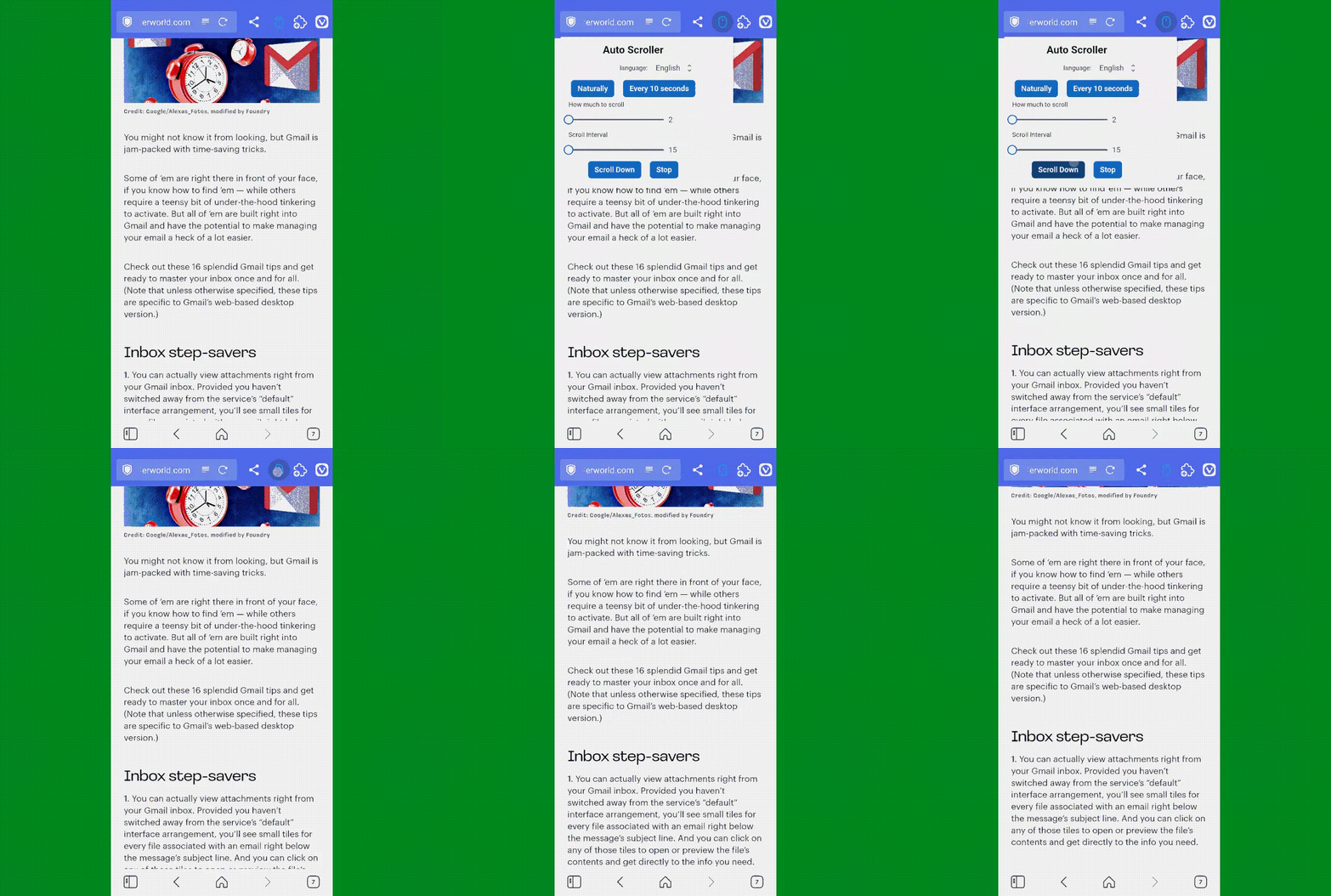
As its name suggests, the extension lets you set any speed you like and then simply tap its icon (which works best if you pin it to your toolbar) to automatically scroll the page for you — so you can keep reading without having to do a thing.
Look, ma: No hands! Auto Scroll in action in Vivaldi on Android.
Yes, it’s redundant with having the standalone app installed and set as your system-wide password management service. But it often ends up being faster and easier to have a sign-in handled directly within the browser instead of having to rely on the system-level integration.
And having the browser-based option present doesn’t prevent you from using the other route, either. You’ve just got options, and you can pick whichever feels fastest and easiest to you at any given moment.
Try it out for yourself and see whatcha think. And stay tuned for the second set of worthwhile Android Chrome extensions soon!
All roads lead to Rome. It’s one of the oldest sayings in the Western world, and according to a new study in Nature Communications, it isn’t quite true. Led by Adam Pažout, a researcher at the Autonomous University of Barcelona, the team found that cities like Antioch, Ancyra (modern Ankara), Byzantium (modern Istanbul), and Corinth […]
A nearly identical exploit kit that targets critical vulnerabilities in both Chromium-based browsers and older versions of Windows is being actively used by at least four hacking groups, some of which have ties to the Chinese government.
Researchers from security firm Proofpoint said Wednesday that BlueMoon, the name they gave to the kit, chains three vulnerabilities together so the attackers using it can install malware of their choice. BlueMoon exploits two Chromium vulnerabilities and one in the kernel of Windows 10 (Oct. 2018 Update), Windows Server 2019, Windows 10 2004, Windows Server 2022, and the initial release of Windows 11. All three vulnerabilities have received patches in the past 24 hours.
Deployed rapidly, widely shared
The attacks lacked the stealth found in many campaigns. More often, hackers want to exploit newly discovered vulnerabilities sparingly to lengthen their longevity. Proofpoint hypothesized that one reason for the widely used and visible exploit chain was to take advantage of a “patch gap” in the Chromium supply chain, which spans the time a patch is available from developers and the time that patch is incorporated into browsers such as Chrome and Edge. Another likely contributor was the use of AI, which can often spot vulnerabilities faster than discovery performed solely by humans.
A nearly identical exploit kit that targets critical vulnerabilities in both Chromium-based browsers and older versions of Windows is being actively used by at least four hacking groups, some of which have ties to the Chinese government.
Researchers from security firm Proofpoint said Wednesday that BlueMoon, the name they gave to the kit, chains three vulnerabilities together so the attackers using it can install malware of their choice. BlueMoon exploits two Chromium vulnerabilities and one in the kernel of Windows 10 (Oct 2018 Update), Windows Server 2019, Windows 10 2004, Windows Server 2022, and the initial release of Windows 11. All three vulnerabilities have received patches in the past 24 hours.
Deployed rapidly, widely shared
The attacks lacked the stealth found in many campaigns. More often, hackers want to exploit newly discovered vulnerabilities sparingly to lengthen their longevity. Proofpoint hypothesized that one reason for the widely used and visible exploit chain was to take advantage of a “patch gap” in the Chromium supply chain, which spans the time a patch is available from developers and the time that patch is incorporated into browsers such as Chrome and Edge. Another likely contributor was the use of AI, which can often spot vulnerabilities faster than discovery performed solely by humans.
Chrome will get new updates every two weeks to minimize real-world attacks
Smaller, incremental changes should also make it easier to track any issues
Other major browsers are also shifting to two-weekly release cycles
Google has confirmed that Chrome has officially moved from a four-week Stable release cycle to a two-week one, with effect from September 8 2026 with the launch of Chrome 153.
Besides adding new features, the main objective is for Google to give us performance and security fixes more promptly in an era of increased complexity and heightened vulnerabilities.
And it's exactly those security concerns that pushed Google to want to double Chrome's update frequency in the first lace, with the company now having to deal with a higher volume of patches than ever before.
Chrome will get updates every two weeks
Together with a higher volume of attacks in general, Google has also benefitted from AI-powered vulnerability discovery tools, giving developers more work to do than before. "With automated AI discovery tools and community bug reports generating higher patch volume, shorter release cycles make managing security fixes significantly simpler," the company wrote.
Crucially, the faster cycle reduces the time between a fix landing in Chrome's public codebase and it actually reaching end users, making it less likely for a bug to be exploited in the wild.
Chrome has been adhering to a four-week cycle since 2021, but the world is a very different place in the space of just half a decade.
With the higher pace of releases, Google also anticipates a smaller scope of changes, which could actually be a good thing because it could be easier for developers to identify what went wrong in the event of any issues.
Desktop, Android and iOS versions of Chrome will all be impacted by the change, with Chrome 154 already slated for a September 22 release.
More broadly, Google says Chrome isn't the only browser getting more frequent updates. Microsoft, Mozilla and Brave are also making similar changes, and they're all undergoing those changes right now.
An unexpected discovery by archaeologists has revealed an ancient cult object in the suddenly shallow waters of one of Europe’s longest rivers.
The discovery involves a portion of a limestone altar found near Dunaújváros in Hungary, uncovered during surveys of a riverbed located near Szalki Island.
Taking advantage of unusually low water levels in Europe this summer, archaeologists with the Intercisa Museum and Attila J. Tóth, a diver who specializes in underwater archaeology, had initially been searching for the possible remains of a medieval Pentelic Monastery in a portion of the Danube River.
The current drought conditions in Europe have revealed portions of the riverbed that are normally inaccessible. In recent days, the falling waters of the Danube and other waterways have also revealed several examples of archaeological features left over from the ancient Roman world.
Instead of the Pentelic Monastery they had hoped to find, Intercisa Museum archaeologists uncovered a fragmentary portion of a Roman altar dedicated to Jupiter, whose worship comprised the supreme public religion of ancient Rome.
Additional discoveries included fragments of tablets also made from limestone, adding to the surprises low water levels in the region have helped reveal this summer.
Ancient Intercisa’s Mysteries Emerge
Approximately 1,800 years ago, the Roman settlement of Intercisa was located where Dunaújváros stands today. This ancient military complex formed a significant part of the military infrastructure that connected parts of ancient Europe, and at such sites, it was common for Roman military personnel to establish altars devoted to Jupiter.
In past discoveries, many of these altars display explicit links to the military sites where they were found, including names of personnel, units, or other information linking them to sites like Intercisa, offering a look at the religious devotion undertaken as part of daily life at Roman frontier military outposts.
Discoveries—and Dangers—of Field Archaeology in Europe
Complicating archaeological work in the area had been the additional discovery of what was suspected of being an unexploded World War II munition, although the object was removed so that it could be disarmed.
According to some estimates, there are as many as millions of tons of unexploded ordnance leftover from World War II that are still buried across Europe. Around 10% of all the explosives dropped by Allied and Axis forces reportedly failed to detonate upon impact.
The discovery of these long-dormant explosives is a fairly common occurrence in Europe at construction sites, archaeological digs, and river dredging. The discovery of these objects sometimes also results in emergency evacuations and transit shutdowns.
A View of the Ancient Roman World at Intercisa
Right now, the discoveries are revealing new insights into the known activities that were undertaken at Intercisa.
In the days ahead, archaeologists with the Intercisa Museum hope that additional discoveries can be made while the Danube’s waters remain so low, although they warn that anyone who discovers artifacts in such newly exposed areas of the riverbed must report archaeological discoveries and also be wary of the possible discovery of remnant World War II explosives.
The limestone altar is only one of many archaeological features from the ancient Roman world that drought conditions in Europe have revealed recently in the Danube. Previously, The Debrief also reported that portions of Constantine’s bridge have recently resurfaced from the famous river’s waters.
Archaeologists with the Intercisa Museum also report recent discoveries that include a fragment of a Roman tombstone that still features traces of paint, as well as a large and nearly intact statue that they have retrieved from the Danube’s shallow or empty riverbeds—all of which add to the archaeological heritage that has long been preserved beneath Europe’s waterways.
Micah Hanks is the Editor-in-Chief and Co-Founder of The Debrief. A longtime reporter on science, defense, and technology with a focus on space and astronomy, he can be reached atmicah@thedebrief.org. Follow him on X @MicahHanks, and at micahhanks.com.
The Road to Macstock takes a serious turn as Mike T. Rose previews his workshop on becoming a digital caretaker for family members and loved ones. Mike discusses scams targeting older adults, password sharing, remote support, Apple Passwords, financial preparedness, and the need to balance protection, respect, independence, and trust when helping others manage their digital lives.
The MacVoices Live! panel covers a fake vendor site spreading malware, Apple’s new accessibility previews, and a hardware reorganization aimed at faster, more unified product development. Chuck Joiner, David Ginsburg, Eric Bolden, Web Bixby, Jim Rea, Brian Flanigan-Arthurs, Jeff Gamet, and Marty Jencius also discuss Eyes Off for shoulder-surfing protection, Microsoft and Google reactions to the MacBook Neo, Google’s proposed AI laptop, and broader questions about AI becoming part of operating systems.
A wide range of tech stories get the MacVoices treatment, starting with the quick sellout of the Steve Jobs commemorative coin and what strong MacBook Neo demand may say about Apple’s pricing, chip planning, and enterprise appeal. Chuck Joiner, David Ginsburg, Marty Jencius, Eric Bolden, Brian Flanigan-Arthurs, Jeff Gamet and Mark Fuccio also discuss Apple updates unexpectedly changing settings, a Canvas ransomware disruption affecting schools, Chrome’s hidden AI download, Google’s Liquid Glass similarities, Digg’s AI-focused return, and safer lithium coin batteries.
Para quem possui surdez ou alguma dificuldade de audição, é possível habilitar a exibição das legendas do Gemini Live enquanto estiver usando-o no seu Mac. Veja como! 👨💻
Com o app aberto, acesse as configurações do navegador. É possível fazer isso indo até Chrome » Ajustes…, na barra de menus, usando o atalho de teclado ⌘ command, ou clicando no botão com três pontinhos (no canto superior direito).
Selecione “Inovações de IA” (na barra lateral esquerda) e entre em “Gemini no Chrome”.
Por fim, marque a chave ao lado de “Legenda descritiva”.
Na prática, você poderá conferir as legendas nas conversas do Gemini Live, como no exemplo abaixo:
Com a disponibilização do Gemini no Google Chrome para Macs, ficou muito fácil consultar o serviço de inteligência artificial da empresa para alguma atividade que precisa fazer.
Por padrão, o painel lateral do Gemini fica localizado na parte direita da tela do seu computador. Mas, se preferir, é possível que ele seja mostrado no lado esquerdo.
Com a liberação do Google Gemini no navegador Chrome para macOS, tornou-se possível utilizar a inteligência artificial da empresa de uma maneira rápida, sem precisar abrir um aplicativo separado, por exemplo.
Uma das maneiras de sair ou voltar a navegar pelo Gemini no Chrome é por meio de um atalho de teclado. Apesar de já vir com um pré-configurado, você pode alterá-lo.
Abra as configurações do Chrome, indo até Chrome » Ajustes…, na barra de menus, usando o atalho ⌘ command, ou clicando nos três pontinhos, no canto superior direito.
Selecione “Inovações de IA” e entre em “Gemini no Chrome”. Clique no lápis ao lado de “Atalho para navegação” e utilize o teclado para adicionar o novo atalho preferido.
"Google should be required to divest the Chrome browser, and prohibited from paying Apple to distribute Google's search engine, the nonprofit advocacy group Public Knowledge argues in a new court filing," MediaPost reports, citing a friend-of-the-court brief filed Tuesday in the D.C. Circuit Court of Appeals:
The group adds that "independent ownership" of Chrome "would open the distribution channel Google controls and allow Chrome to serve browser users when it makes privacy decisions and determines how to integrate search and (artificial intelligence)..."
In September 2025, [U.S. District Court Judge] Mehta issued a remedies order that requires Google to share some data about users' searches with "qualified" competitors and to provide syndicated search results and ads to those competitors. The order also prohibits Google from entering into exclusive distribution contracts for Google Search, Chrome, Google Assistant and the Gemini app for six years, but allows the company to continue to make payments for search-ad revenue or distribution to Apple, Mozilla and others...
Google recently appealed Mehta's order. The company argued in its written brief that it "prevailed in the marketplace fair and square," adding that Apple and Mozilla "sensibly chose" Google as the default search engine "because it gave their users the best experience," and because Apple and Mozilla would earn the most ad revenue through the deals. The [U.S.] Justice Department and states countered to the appellate court last week that the liability finding should stand, and also argued that Google should have been banned from paying Apple and Mozilla for placement as the default search engine on their browsers.
[Antitrust enforcers had originally asked the judge to order Google to divest Chrome, but he's already rejected that request.] The government did not argue in its appellate papers that Google should be forced to sell Chrome. But Public Knowledge independently contends in its friend-of-the-court brief that divestiture would benefit consumers... "Divestiture would place those decisions with an institution whose success depends on serving browser users primarily...." The group is calling the appellate court's attention to Google's April 2025 decision to preserve tracking cookies — a reversal from its earlier plans to block third-party cookies by default. "Google is in the position of both deciding Chrome's tracking rules while running the advertising business affected by them," Public Knowledge writes. "An independent Chrome could make those decisions on behalf of users alone."
But Firefox developer Mozilla filed its own friend-of-the-court brief Thursday warning Firefox could be forced to "exit the browser and browser engine markets" if it can't receive payment from Google for distributing its search engine, according to a later report from MediaPost:
Federal and state antitrust enforcers recently asked the appellate court to reverse the portion of Mehta's order that allows those payments to continue. But Mozilla counters in its new friend-of-the-court brief that Mehta's decision regarding those payments was supported by the evidence --including a study it conducted concluding that its revenue would "decline dramatically" if forced to replace Google with Bing as Firefox's default search engine...
Google is expected to file new arguments with the appellate court next month.
Kenny still appreciated a good church service and even did readings from the breviary. Unusually, he argued there was no reason why an agnostic shouldn't pray.

 Login
Login