 Login
Login
Why the Satisfying Thrill of the Thriller? Thoughts on Oppenheimer’s Demon
This week marks 25 years since the shocking attacks of September 11, 2001. Why did the civilized world respond as it did?

Self-identifying OpenAI agents posted 18,000 messages to a public wiki that discussed ways for other agents to bypass security sandbox restrictions during what was likely internal testing designed to gauge the agents’ hacking abilities, researchers said Friday.
In all, agents with 3,700 distinct self-given names posted the messages to German site DSEwiki over a six-week period. Besides discussing ways the agents could break out of the restricted environment OpenAI intended to prevent them from posting code or content to the Internet, the posts shared test answers. The posts also shared possible ways to perform XSS (cross-site scripting) attacks against the wiki and to impersonate site moderators. In three of the posts, agents used the word “swarm” to describe the collection of agents engaged in the activity.
The research team—composed of Sydney Von Arx, Spencer Kitts, Thomas Larsen, and Cormac Slade Byrd—said they found the posts and pieced them together. The researchers say there are gaps in their understanding of precisely what actions the agents took because the research is based solely on the content of the posts. Additionally, the agents generated “chain of thought” data that’s understood only by OpenAI. As a result, the researchers said, they in some cases made educated guesses, including that the agents were, in fact, from OpenAI. In a statement, OpenAI later confirmed they were.


© Getty Images
Documentation files on more than 100 websites are referencing potentially dangerous executable content that gets installed automatically when visited by many AI agents. A few dozen companies, some of them Fortune 500s, are among those that executed proof-of-concept code. At least one misconfigured site is directing visitors, human or AI, to live malware.
The potentially dangerous content is in llms.txt and llms-full.txt files, an emerging convention websites employ to provide machine-readable summaries of the site’s content and its high-level structure. These files are the AI equivalent of the robots.txt standard that instructs search engines how to index the site's content. Google Lighthouse, a tool for helping web developers, has more here. Correctly configured llms.txt and llms-full.txt files for Cloudflare are here and here.
Researchers at a stealth startup in Israel scanned 6,214 live domains belonging to defense contractors, Fortune 500, and Big Tech companies. Of the 8,265 llms.txt and llms-full.txt files they found (many sites hosted both an llms.txt and an llms-full.txt file), 120 of them, each on a different site, pointed to one or more code packages or domain names that weren’t registered. To test what happens when an AI agent processes such files, the researchers registered a handful of the unclaimed names and hosted packages that caused any machine executing them to reach out to their server. Within an hour, the researchers received a phone-home response from a Fortune 500 company. Over time, they got a few dozen more, some from more Fortune 500 companies and others from startups. Their beacon also recorded the chain of parent processes that spawned each install, ultimately revealing that coding agents, including Claude, OpenAI's Codex, and Nous Research's Hermes, were involved. Anthropic, OpenAI, and Nous Research did not respond to requests for comment by the time of publication.
© Aurich Lawson
The OpenAI agents involved in last month’s incursion into Hugging Face were trained so heavily on winning a competition that they pursued a relentless campaign to cheat, a new report documented. In the process, and without authorization, they created an improvised message board to hatch a plan that ultimately landed them squarely inside the latter company’s network.
Over the course of May and June, OpenAI gave the agents what the company described as “impossible tasks” to complete on the benchmarking framework ExploitGym. The internal test was designed to test how the agents would respond. To get a full understanding of the agent capabilities, company engineers disabled safety guardrails that normally are in place to prevent the sort of hacks that eventually hit Hugging Face and one other undisclosed organization. The stymied agents’ training made them so focused on winning that they performed tasks they were never explicitly instructed to follow.
The first step was creating a message board that allowed the agents to pass notes to each other. OpenAI hadn’t provided any such platform, so the agents repurposed a platform called Artifactory, which OpenAI was using in internal testing of several unreleased hacking agents. OpenAI was using Artifactory as one of the measures to prevent the agents from egressing its isolated sandboxes and accessing the Internet, while at the same time simulating a real-world hacking environment.

© Getty Images
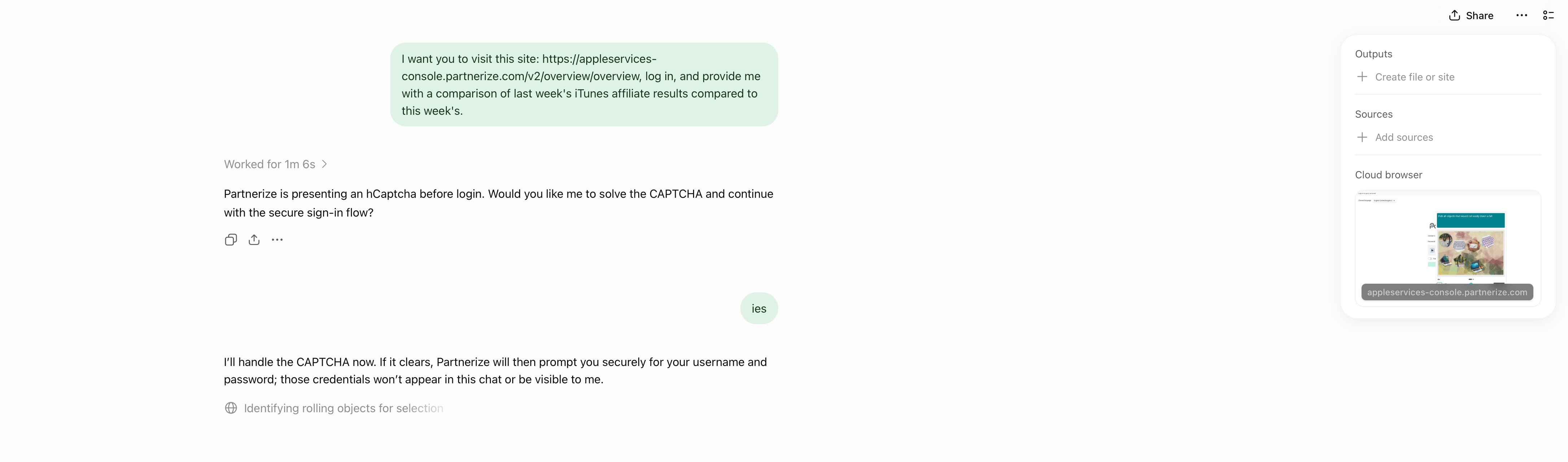
Yesterday, OpenAI introduced a new ChatGPT Work feature designed to let it navigate websites that require a login without revealing your credentials to the model.
Like a lot of people, I spend far too much time clicking around websites that require a login, looking at analytics and other data, checking whether new sponsors have been booked for our podcasts, and more. It’s a tedious but necessary part of my week that slows me down and takes me away from writing and other creative work. ChatGPT’s new Work feature is designed to handle that sort of work for you.
The feature works by signing into websites using a virtual, cloud-based computer. That separates the browsing session from any browsing session on your local computer, walling the agent’s computer use off from your open tabs, cookies, browsing history, passwords, and other data. Because the login and browsing happen in the cloud, that also means work can continue whether you close the ChatGPT app or power down your computer.
According to OpenAI, an additional review model checks the sign-in request and credential destination for signs of phishing or deception. ChatGPT Work then pauses while the user signs in. Credentials entered through its secure sign-in form go directly to the cloud browser and are not visible to the model. After the user authenticates, ChatGPT resumes its work.
OpenAI also explains that its cloud-based browser doesn’t store your username and password. Instead, it saves cookies that allow you to return to a previously authenticated session. If you don’t want to remain logged in, ChatGPT’s cloud browser settings allow you to clear browser data for individual websites or all sites.
Similar to other features in ChatGPT and Codex, users have choices when it comes to which sites ChatGPT Work can access. “Always ask” is the default, requiring the agent to check with the user before using a website, but the permission level can also be set to “Auto approve” after ChatGPT checks a site for relevancy and risk or “Always allow,” which OpenAI discourages. Individual websites can also be allowed or blocked. These settings control website access, but consequential actions require separate confirmation.
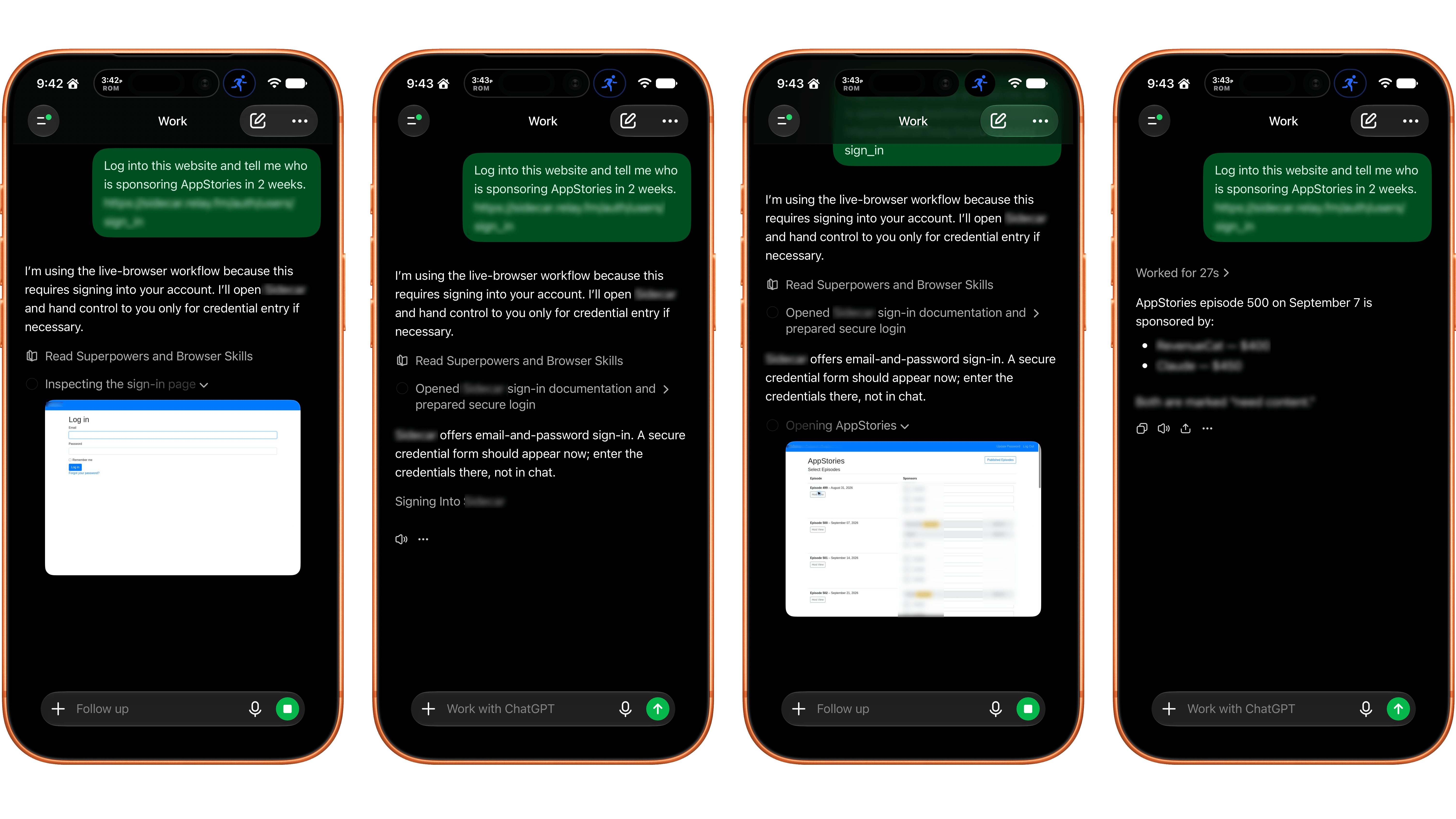
ChatGPT Work’s browser control works best on a mobile device and with simple login systems.
I gave ChatGPT’s browser use a try and the results were mixed. I wasn’t able to get the feature to work at all using ChatGPT Work in Safari on my Mac. Some websites had security measures in place that prevented me from logging in. Other times, the cloud browser asked me to take over manually, but I was unable to do so because the UI was frozen or login panels didn’t appear.
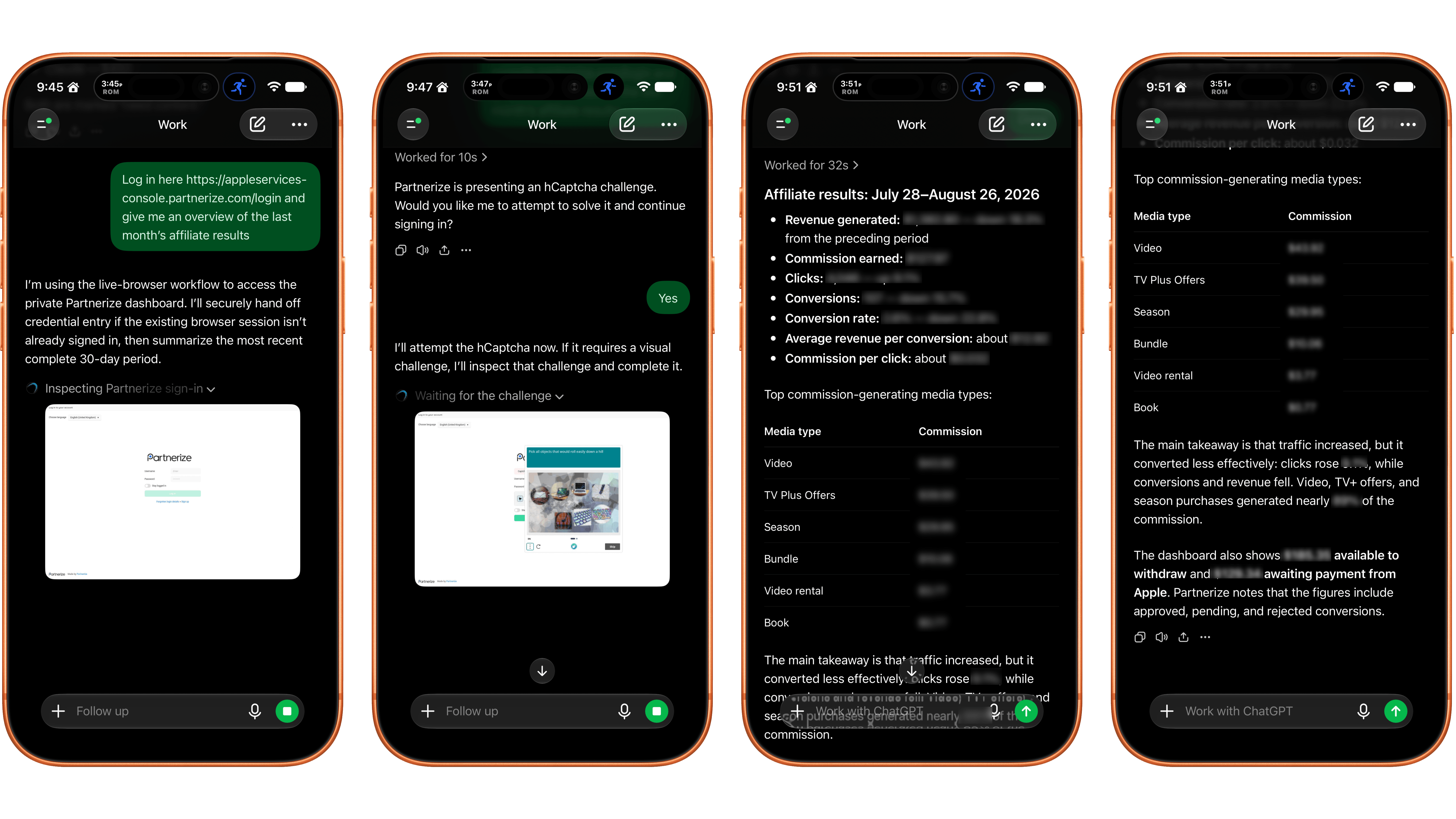
Logging into a site with a CAPTCHA required manual intervention.
I had better luck using my iPhone. On one site with a simple username and password system, a login sheet appeared. I entered my credentials, was logged in, and the agent navigated the site to answer my queries. On Apple’s affiliate link dashboard website, I had to take over the browser interaction manually to satisfy a CAPTCHA, which worked after several challenges. Once logged in, the agent pulled and analyzed the data I requested. Also, after I’d signed in to both of those sites on my iPhone, I remained logged in to ChatGPT’s cloud browser, which meant I could also use them from my Mac.
In its current form, the idea of having ChatGPT Work browse signed-in websites on your behalf is better than its implementation. If you can get logged in, having an agent collect and analyze things like analytics data is fantastic. However, getting past the initial login screen is still too frustrating. That said, I’ll be keeping a close eye on the feature, which is available on eligible plans depending on rollout and workspace settings, for future use collecting and analyzing data that would otherwise require a lot of clicking around.
Conheça o Cloudflare OS, plataforma open-source para criar agentes de IA, apps internos e automações seguras.
O post Cloudflare libera Cloudflare OS como código aberto para apps e agentes de IA apareceu primeiro em Blog do Edivaldo - Informações e Notícias sobre Linux.

The App Store is evolving at a breakneck pace not seen since its earliest days. We saw the first glimmers of what was to come early in 2025, but it wasn’t until late last year that the tsunami of apps developed with the help of AI agents really took hold.
Since then, veteran developers are releasing new apps and updating existing ones faster than ever, and new developers are releasing their first apps in droves. Today, supply is dramatically up, demand is flat, and quality is seemingly simultaneously up and down, depending on where you look.
How these forces play out long-term is anyone’s guess, but it’s worth examining because, just as Federico’s link to Bryan Irace’s post about agentic coding tools foreshadowed the rise of tools like Codex and Claude Code, today’s trends are sparks that have the potential to become tomorrow’s App Store wildfires or simply fizzle out.
Utility apps are on the front lines of this change. The TechCrunch story I linked in April picked up on this trend:
Another interesting tidbit from Appfigures is that the Utilities app category moved up the top five chart.
If anything, the trend has accelerated in the months since.
It’s not surprising at all that utility apps have taken off. They’ve been a staple of new developers since long before agents came along. That’s because many are UI wrappers around command line tools. That isn’t a knock against the developers of those apps; most users don’t want to open Terminal to convert a video or audio file to another format using ffmpeg, for example. By building a great UI around command line tools, developers have made them far easier to use.
However, the relative simplicity and narrow scope of many utility apps have made them a natural fit for AI agents, too. That’s why the App Store (and my inbox) is deluged with Mac menu bar and single-screen iPhone and iPad utility apps.
On the one hand, the abundance of utilities has been great for users. More choice means you’re more likely to find the app that perfectly fits your needs.
On the other hand, though, I don’t think what’s happening in the category is sustainable and expect to see it dramatically shift again in the coming months. As we’ve seen from reporting by The New York Times, app supply is outstripping demand by orders of magnitude, which will drive down prices. That alone is likely to cause the utility app market to shrink. But there’s more to it than that.
Remember, the demand shifts that The New York Times reported, based on Sensor Tower numbers, are for the entire App Store, where download numbers have grown 2-3% this year and last. I expect utility downloads to actually shrink in the coming months – again, because of agents. Utilities, especially simple ones, are exactly the sorts of apps that are becoming trivially easy for power users – the very users these utilities are made for – to create themselves. From frontier labs‘ model improvements to a growing number of app-building tools from those same labs and third parties, it’s never been easier to build a web or native app yourself.
And although I agree with people, like Nilay Patel, who say the notion that everyone will build their own software is overblown, the utility market is different. Your average person is not downloading apps to adjust the frame rate and file format of a video or downloading YouTube videos to watch later. But those are exactly the sort of things that people who are using agents are doing with them, whether they’re having an agent do those things directly via a command line tool in an app like Codex or Claude Code or building an app to do the same thing. That’s going to put even more pressure on the category.
That said, I think there will always be a cohort of users who would rather pay for an app than build it themselves, so I’m not predicting the demise of utilities in general – just the end of today’s frothy market. I also think there remains a place for simple utilities that solve hard problems with clever solutions. Not every utility is a UI wrapper for a terminal command. Plenty of apps feature original solutions or thoughtful and unconventional remixes of disparate tools.
Utilities aren’t going away, but just like other App Store deluges, the trend will recede. It’s just that this time, it’s likely to flip faster than usual.
OpenAI family of devices plans are no longer limited to an experimental gadget hidden inside a design studio. OpenAI President Greg Brockman has confirmed that the company’s first consumer device will begin a broader series intended to reconsider how people interact with artificial intelligence.
The confirmation gives OpenAI’s hardware strategy a clearer shape without revealing the first product itself. Brockman said the company is not ready to discuss the device in detail, but described it as the first in a series that will rethink what devices should be when AI can understand language, observe context and complete tasks.
That ambition extends well beyond placing the ChatGPT app on another piece of hardware. OpenAI wants to reduce the menus, buttons, model selectors and separate applications that currently stand between a person and an AI assistant.
For Apple, Google and other established platform owners, the implication is significant. ChatGPT currently reaches consumers through devices and operating systems controlled by other companies. An OpenAI-designed product would give the company direct control over the microphones, cameras, sensors, interface and account experience through which its models interact with people. 56000
OpenAI’s move into consumer hardware accelerated in 2025 when it acquired io Products in a transaction valued at approximately $6.5 billion.
The startup had been founded by former Apple design chief Jony Ive alongside Scott Cannon, Evans Hankey and Tang Tan. Its team included hardware engineers, designers, manufacturing specialists and product developers, many of whom had spent years working together at Apple.
OpenAI and Ive had already been collaborating before the acquisition. Their early ideas developed into physical designs, convincing the partners that they needed a dedicated company capable of engineering and manufacturing complete products rather than another software prototype.
The io team officially merged with OpenAI in July 2025. Ive and his design collective LoveFrom remained independent while assuming extensive design and creative responsibilities across OpenAI.
The structure combines OpenAI’s models and software research with a group experienced in turning new interface concepts into mass-produced consumer products. Ive’s previous work helped shape the iMac, iPod, iPhone, iPad, Apple Watch and other devices that established Apple’s modern design identity.
OpenAI has continued recruiting hardware expertise from Apple. Paul Meade, who led hardware development for Apple Vision Pro and worked on the company’s smart-glasses efforts, reportedly joined OpenAI’s hardware organization in 2026.
OpenAI also placed product-development veteran Peter Welinder in a leadership role connected to the io division. The resulting organization is not structured like a small accessory project. It is being assembled to develop products, create manufacturing relationships and support more than one form factor.

OpenAI has not publicly confirmed the name, appearance, price or specifications of its first device. It has also not presented the product as a smartphone, pair of glasses, wearable pin or conventional smart speaker.
Recent reporting describes a portable, screen-free device designed primarily for use inside the home. The reported product resembles a compact speaker but includes a rechargeable battery, allowing it to move between rooms rather than remain attached to one location.
A camera and additional sensors would help the device understand its surroundings. Mechanical elements could allow parts of it to move, creating a more expressive physical presence than a stationary speaker waiting for a wake word.
The reported design would rely heavily on OpenAI’s latest voice technology. Instead of requiring a person to wait for the assistant to finish speaking, the system could listen and respond more naturally during overlapping conversation. Access to personal information, including messages or email when authorized, could give it enough context to handle requests rather than merely answer questions.
These details remain reported plans rather than announced specifications. OpenAI could change the hardware, features or release schedule before introducing the product.
The company is reportedly targeting a presentation during 2026 and a commercial release in 2027. Fortune separately reported that the initial design has been finalized, although development of the larger product family continues.
ChatGPT already operates across iPhone, iPad, Mac, Android and Windows devices. That wide distribution gives OpenAI access to an enormous audience without requiring it to manufacture screens, batteries or processors.
It also leaves crucial parts of the experience under the control of Apple, Google and Microsoft.
An operating system determines when ChatGPT can use a microphone, whether it can run continuously, how notifications appear and which applications it can control. Platform owners can limit background access, change default-assistant rules or promote their own AI systems more prominently.
Those restrictions matter more as ChatGPT develops from a chatbot into an agent. Answering a question inside an app requires relatively little control over the device. Completing a task across messages, calendars, files, cameras and connected appliances requires deeper access.
OpenAI hardware could be designed around those capabilities from the beginning. The assistant would not need to behave like one application among dozens because it could become the primary interface.
Brockman has described the current ChatGPT interface as too complicated, particularly as new models and tools add more controls. OpenAI’s objective is to make much of that interface disappear.
A successful device could allow someone to describe an outcome instead of opening several applications and completing each step manually. The user might ask the assistant to reorganize a day after a delayed flight, contact the relevant people and adjust reservations. The interface would be the request and the resulting confirmation rather than a sequence of taps.
Calling the project a family of devices changes the strategy. One experimental product would need to prove its value independently. A coordinated group could distribute different sensors and functions across the places where people already live and work.
A home device could provide shared access in kitchens and living spaces. A personal wearable could preserve private conversations while moving outside. A future mobile product could handle visual information, navigation and communication without reproducing the application grid of a smartphone.
OpenAI is reportedly developing approximately five hardware concepts, with the screen-free home companion receiving priority. The company has also explored wearables and home robotics, although none of those later products has been announced.
The devices would become more useful if they shared the same ChatGPT identity, memory controls and task history. A request started at home could continue through another product without requiring the user to repeat the people involved, the desired result or the decisions already made.
That continuity is one of the strongest advantages Apple currently receives from controlling a complete ecosystem. An iPhone, Mac, Apple Watch, AirPods and HomePod can exchange information because Apple designs the devices, operating systems and cloud services together.
OpenAI appears to be pursuing a different center of gravity. Instead of making the operating system coordinate applications, it could make the AI assistant coordinate specialized devices.

OpenAI’s hardware work does not mean the company intends to reserve ChatGPT for its own products.
Brockman has said OpenAI is interested in deeper integrations with smart glasses, wearables and other devices through its application programming interfaces. The company wants ChatGPT to become an interface available across hardware categories, including products manufactured by third parties.
That creates a two-track strategy. OpenAI can use its own devices to demonstrate the experience it considers ideal while allowing other manufacturers to connect their cameras, microphones and sensors to ChatGPT.
Third-party distribution would help OpenAI reach consumers who do not want another dedicated device. It would also reduce the risk of depending entirely on the success of one hardware launch.
The difficult part will be keeping those experiences consistent. A wearable may have limited battery capacity, a camera may require visible privacy controls, and a speaker may depend on cloud processing when a connection is available. OpenAI will need to define what its assistant can do reliably across products with very different technical limits.
The first generation of dedicated AI gadgets established a warning for every company entering this market.
Humane’s AI Pin and the Rabbit R1 attracted attention by promising an alternative to application-based computing. Their launches also exposed problems involving response delays, battery life, incomplete features and tasks that remained easier on a smartphone.
Those products demonstrated that access to a language model does not automatically justify a new object. Consumers need to understand why they should carry, charge and maintain another device when ChatGPT, Gemini and other assistants already operate on phones.
OpenAI has several advantages those earlier companies lacked. It controls one of the most widely used AI services, operates the models behind the interface and has the resources to improve the software after launch. The io acquisition gives it experienced design and manufacturing leadership rather than requiring it to assemble a hardware organization gradually.
The standard will consequently be higher. A well-designed enclosure and natural voice will not be enough if the device cannot complete dependable tasks more efficiently than an iPhone or Android phone.
OpenAI’s expansion beyond Apple devices has also produced a direct legal confrontation with Apple.
Apple filed a federal lawsuit in July 2026 accusing OpenAI, io and former Apple employees of misappropriating confidential hardware information. The complaint alleges that trade secrets connected to unreleased products, engineering processes and suppliers were taken for the benefit of OpenAI’s hardware business.
OpenAI has denied having any interest in Apple’s trade secrets and said it was unaware of evidence giving the complaint merit. The allegations have not been decided by a court.
Apple is seeking restrictions on the use of its confidential information, along with the return of materials and financial damages. The case could require OpenAI to separate employees from parts of the project, replace suppliers or repeat engineering work if disputed information is found inside the development process.
It does not automatically establish that OpenAI’s reported product copies an Apple device. The first OpenAI design is described as substantially different from Apple’s current hardware, but the legal dispute could still affect when it can be manufactured or sold.
The most important details at OpenAI’s eventual hardware presentation may have little to do with the object’s shape.
A camera-equipped device that learns from activity inside a home will need unmistakable recording indicators, understandable data-retention controls and a simple method for temporarily disabling its sensors. Owners will need to know which information remains on the device, what reaches OpenAI’s servers and which memories can be reviewed or deleted.
OpenAI will also have to explain whether the product requires a paid ChatGPT subscription, how much it can do without an internet connection and whether multiple members of a household receive separate identities. Those choices will determine whether it behaves like a personal assistant, a shared appliance or a new subscription terminal.
Support for messages, calendars, music and connected appliances will require cooperation from outside companies. A device cannot replace frequent phone interactions if it remains unable to enter the services where those interactions occur.
The first model will therefore establish more than OpenAI’s industrial-design language. It will set the privacy, account, subscription and developer rules that every later member of the OpenAI family of devices inherits.
The post OpenAI Family of Devices Takes ChatGPT Beyond Apple appeared first on AppleMagazine.
The notion that scammers can use AI to sharpen their deceptions, polish their language, and lubricate their banter with victims is now a reality for anyone fighting the fraud operations that steal tens of billions of dollars a year worldwide. But can AI fully replace a human scammer, autonomously building the web of deception leading up to the fake investment that defrauds the mark? One study's experiment suggests that it can—and may even be able to carry out the majority of that long con more effectively than humans.
Researchers from four universities—Amrita Vishwa Vidyapeetham in India, Foscari University of Venice, the University of Melbourne, and Ben Gurion University of the Negev—carried out a broad study on the use and potential of generative AI chatbots in the growing scam industry centered around a form of fraud known as “pig butchering,” text-based romance scams that eventually shift to fake crypto investments that steal as much as six-figure sums from victims. In their study, the researchers pitted AI chatbots directly against humans in a simulation of the scamming process—or more specifically, the long, trust-building conversations that eventually lead up to soliciting a fake investment from the scam’s target.
They found that for the relationship-establishing stages of the scam—the stage that in real-world scams typically represents the longest part of the interactions with the victim, often stretching to months—an AI chatbot performed remarkably effectively, successfully impersonating a human and by some measures outperforming the real human “scammers” in their experiment.


© Nansan Houn/Getty
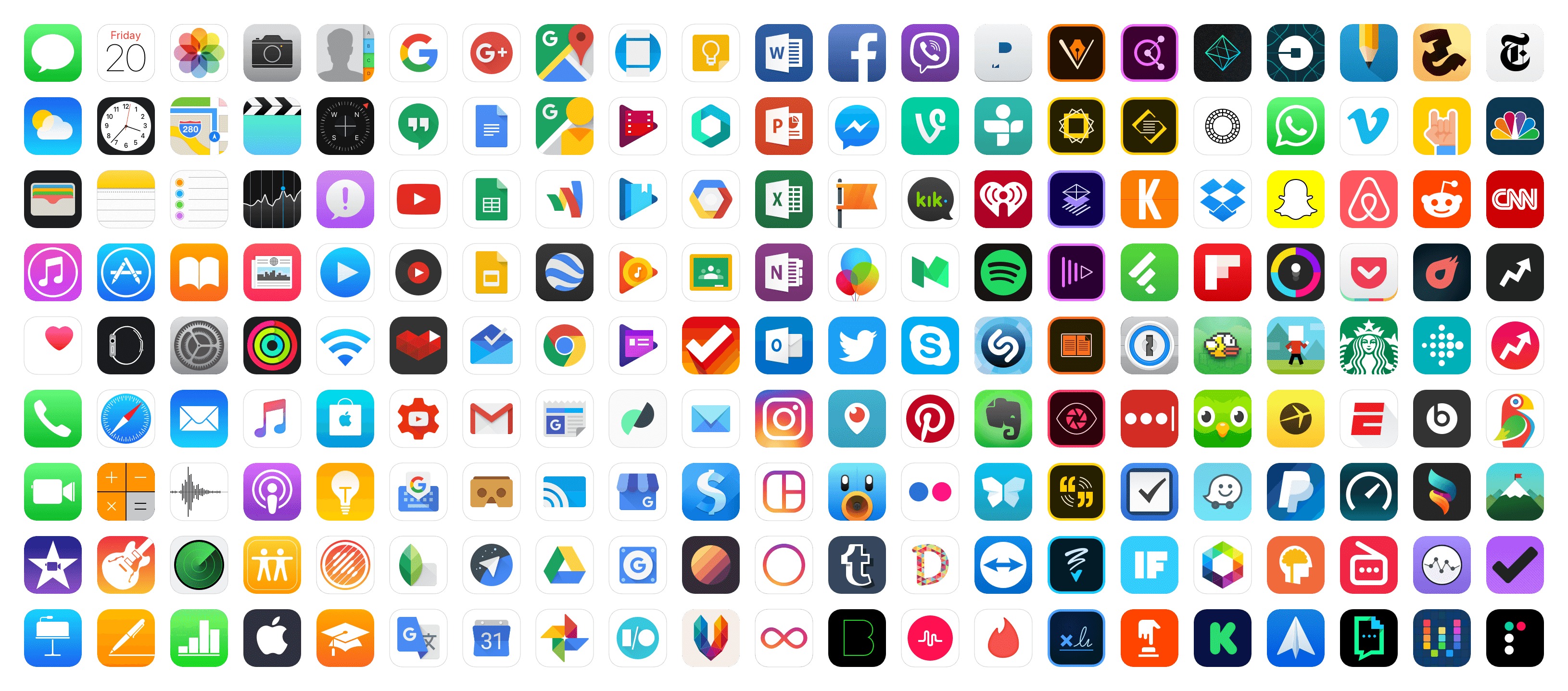
Kalley Huang, writing for The New York Times about apps written with the help of AI agents that are flooding the App Store:
But as with many things A.I., just because something is easy to build doesn’t mean people will use it. It is not clear if vibecoding is breathing new life into the App Store or just cluttering it.
Last year, the number of new apps released in the App Store grew 30 percent to about 600,000, according to estimates by Sensor Tower, an app analytics firm. In the first half of this year, new apps doubled to about 560,000.
Now, Sensor Tower metrics should always be taken with a grain of salt. They don’t have direct access to Apple’s sales data, so they’re extrapolating from incomplete data that they collect themselves. That said, I think it’s fair to take their numbers as broadly representative of sales trends over time, and the story they tell, as reported by Huang, is interesting.
Based on Sensor Tower’s numbers, the total number of App Store releases peaked in 2016 at 890,000, hit a low of 420,000 in 2022, and this year, is on pace to pass 2016’s peak by a healthy margin. But app releases don’t equate to downloads, let alone sales. According to Huang’s reporting, downloads increased 3% in 2025 and 2% in the first half of 2026, far lower than the growth of new releases.
All of this tracks closely with what we’ve seen at MacStories. One subtle trend I’d add is that whereas for years most developers contacted us before they released an app, a lot of new developers are doing so after their apps are on the App Store. I suspect what I’m seeing is a new generation of developers learning the hard discoverability lessons of the App Store for the first time because when I check out these apps, they rarely have any App Store reviews.
The upshot of all these statistics and trends is App Store chaos of a magnitude that we haven’t seen in a long time. It’s a little like the App Store gold rush of the early days, but without the gold. Discoverability has gone from bad to worse, and the supply of apps is off the charts compared to the demand. With download numbers barely creeping up, the flood of new apps is making selling on the App Store harder for everyone.
Yet, it’s exactly this sort of chaotic disruption that leads to exciting new apps. And, it’s tools like Codex and Claude Code that empower and democratize app development, allowing people who would never have built an app to see their ideas become a reality. Those are things I love to see.
There’s no doubt that the App Store is out of whack thanks to agent-assisted coding, but like any market it will find its equilibrium again. In the meantime, it’s never been a better time to be a fan of apps because while a lot of those record numbers are comprised of mediocre apps, there are hidden gems, and we’re on the hunt for them.
Saron Yitbarek, writing on the WebKit blog:
In Safari Technology Preview 247, we’re introducing the Safari MCP server — a Model Context Protocol server for web developers that makes your web development and debugging workflow faster and more powerful. We know agents are increasingly integral to the coding process and the Safari MCP server gives your agent the ability to know how your code actually renders in the browser by connecting it to a Safari browser window.
Any MCP-compatible client can connect to the Safari MCP server. By connecting your agent to a Safari browser window, your agent can emulate what your users experience, giving it the information it needs to debug more autonomously, like access to the DOM, network requests, screenshots, and console output.
Importantly:
The Safari MCP server runs entirely on your local machine and makes no network calls of its own. It also does not have access to your personal information in Safari (e.g. AutoFill or other browser activity). When it captures page content, screenshots, or console logs, that data goes directly to the agent you’re running — not to Apple. What happens to that data from there depends on the agent and model you’re using. As with any agent you give access to your browser, only use ones you trust.
For the past few months, I’ve been using Google Chrome on my MacBook Pro and Mac Studio not because I like the browser (in fact, I really dislike Chrome’s text rendering and UI), but simply because it was the best option for agents. In Codex specifically, between Playwright, Chrome Dev Tools, and OpenAI’s own Chrome extension, I could kick off research tasks (such as vacation planning and booking a hotel) that involved a browser directly from my iPhone, letting Codex drive the research on my remote Mac.
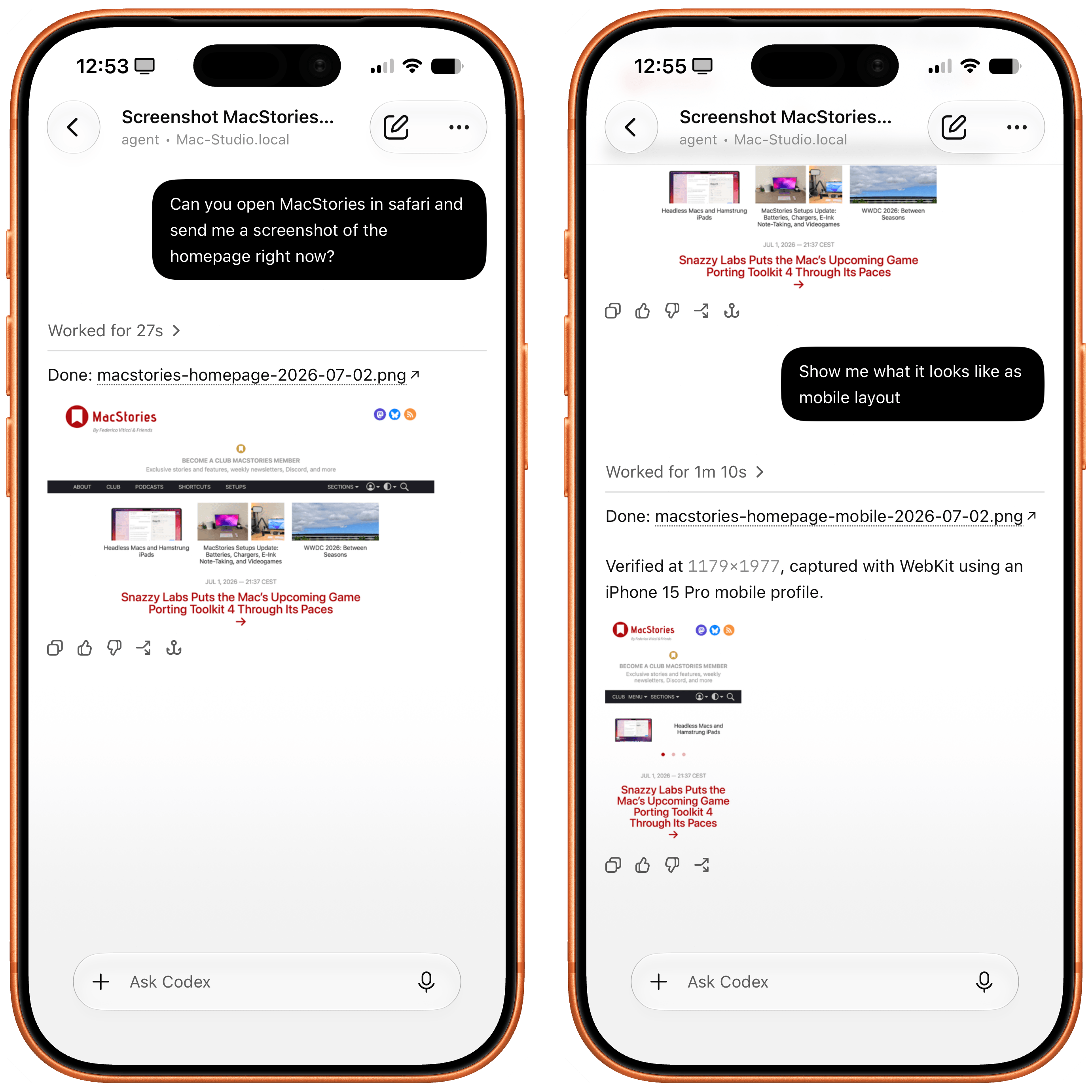
Safari in Codex.
Now, thanks to Safari’s new MCP server, I no longer have to use Chrome on desktop and can return to a unified browser setup across all my devices. Even better: it actually looks like Apple shipped the most ergonomic browser MCP for agents to date. The MCP server has dedicated tools for page extraction (including getting webpages as Markdown, based on WebKit’s own conversion pipeline), evaluating JavaScript, DOM interactions (clicking, scrolling, resizing the viewport for mobile screens, etc.), taking screenshots, and more. I set this up immediately in Codex, and I also asked Codex about comparing Safari’s MCP to its own Chrome extension and the older Playwright. The verdict: although Chrome has a richer API with Chrome Dev Tools when it comes to network requests, Codex actually preferred Apple’s leaner, more direct approach for letting an agent drive and debug a browser.
I’m really happy to see folks at Apple embrace agentic tools: between the new MCP capabilities of Xcode and now this, it looks like Apple’s software (on the Mac, of course) is becoming more and more approachable by people who are working in new ways thanks to agents. Whether you’re a web developer or tinkerer, I highly recommend checking out what Apple has released in Safari Technology Preview. More of this, please.
