Login
Login
Tips to customize the new iOS 27 Siri app on iPhone or Mac


A Apple anunciou o watchOS 27 com uma quantidade razoável de novidades, e neste vídeo lhes trago um resumo das principais mudanças que chegarão ao Apple Watch nesta atualização.
Entre os destaques, está a Siri AI (que requer um iPhone compatível), com um novo app dedicado a conversas mais naturais e contextuais. A interface também recebeu refinamentos visuais com o Liquid Glass, incluindo ícones redesenhados como o do Maps, além de um novo grid dinâmico de sugestões de apps ao pressionar a Digital Crown.
Outras novidades incluem novos botões para fechar ou silenciar notificações, um gesto de tocar e segurar para abrir itens do Conjunto Inteligente, e a chegada de um novo app Buscar (Find My), unificando a localização de pessoas, dispositivos e itens. Há ainda o recurso Call Context, que exibe informações relevantes durante chamadas.
No quesito desempenho, a reprodução de música ficou mais rápida, e a Apple promete melhor eficiência de bateria e conectividade Wi-Fi aprimorada. Para quem treina, o watchOS 27 traz maior precisão de distância em corridas e caminhadas na esteira, contagem de passos mais precisa e um Workout Buddy menos intrusivo, mais independente e agora com suporte a espanhol. O Acompanhamento de Ciclo (Cycle Tracking) também passa a contar com alertas de perimenopausa e menopausa.
Uma ausência notável é a do app Walkie-Talkie, que curiosamente não está presente nesta versão.
Por fim, vale lembrar que nem todos os Apple Watches vão receber o watchOS 27 — explicamos aqui por que tantos modelos ficaram de fora e trouxemos aqui a lista completa de compatíveis.

Este vídeo contou com o apoio do IvyCraft, um workspace de criação com IA que transforma documentos, vídeos e páginas da web em conteúdo pronto — slides, infográficos, vídeos explicativos, podcasts e muito mais, tudo direto do navegador, sem precisar instalar nada. Experimente gratuitamente!


Todas as empresas de capital aberto (que possuem ações à venda na bolsa de valores) são obrigadas, por lei — na maioria dos países (inclusive Brasil) —, a disponibilizar publicamente suas demonstrações financeiras periodicamente. Esse costuma ser um momento bastante esperado por acionistas (analisando se a empresa na qual estão investindo está sendo bem administrada e gerando lucros), investidores (para captar novas oportunidades de alocar seus recursos), além da imprensa e de curiosos em geral. Na última quinta-feira (30/7), foi a vez da Apple de divulgar seus resultados financeiros referentes ao trimestre abril-junho de 2026.
Para alegria de todos, o CEO 1Chief executive officer, ou diretor executivo. Tim Cook se despede da sua posição com o melhor terceiro trimestre fiscal que a empresa já registrou — um recorde absoluto! Como já informado aqui no MacMagazine, no período de abril a junho (encerrado no dia 27/6), a companhia relatou uma receita de US$109,4 bilhões (alta de 16,4%) em relação ao mesmo trimestre do ano anterior, e lucro líquido de US$29,8 bilhões (um avanço de 27%). A margem bruta chegou a incríveis 50,1%, a maior já apurada em períodos semelhantes da história da empresa!
Hoje, a Apple tem orgulho de relatar o nosso melhor trimestre de abril-junho de todos os tempos, com crescimento de receita de dois dígitos em iPhone, Mac e Serviços, e em todos os segmentos geográficos.
A fala acima é de Cook. Ele deixará o cargo em 1º de setembro, quando John Ternus assumirá, e passará a presidir o conselho de administração.
Uma das grandes surpresas do relatório foi o crescimento no faturamento de Macs. Pela primeira vez, a categoria ultrapassou a casa dos US$10 bilhões em um trimestre abril-junho, e o crescimento de 29% superou o do iPhone.
A explicação está em parte na procura alucinada por Macs mini para rodar agentes de inteligência artificial e na leva de lançamentos de março: MacBook Air com M5, MacBook Pro com M5 Pro e M5 Max, e principalmente o MacBook Neo, o modelo de entrada que estreou a US$600 — preço que subiu para US$700 em junho, no reajuste geral motivado pelo custo de memória. A Apple parece ter encontrado um mercado relevante abaixo do Air, e vale acompanhar o que isso faz com a margem da linha nos próximos trimestres.
O iPad foi a única categoria no vermelho, com queda anual de 6%. Não é surpresa: a própria Apple havia avisado que a comparação seria difícil, pois no ano anterior houve o lançamento do iPad com chip A16. O iPad Air com M4, que chegou em março, não foi suficiente para compensar. Cabe ainda analisar se o bem-sucedido MacBook Neo não acabou levando um pouco do mercado dos tablets, também.
A margem bruta de 50,1% e o lucro por ação de US$2,02 não são resultado apenas da operação, e esse detalhe se perde facilmente na comemoração dos recordes.
À primeira vista, no press release — e nos comentários que fizemos no último podcast —, esse ponto não ficou bem claro, mas merece atenção. A Apple informou, no comunicado, que a margem incluiu cerca de dois pontos percentuais e o lucro por ação incluiu US$0,11 vindos de reembolso de tarifas, dinheiro que a empresa havia pago ao governo americano e recebeu de volta depois que a Suprema Corte derrubou, em fevereiro, as tarifas impostas sob a IEEPA (a lei de poderes econômicos internacionais de emergência). A empresa não detalhou a origem exata dos valores devolvidos, mas a decisão da Corte é o evento que abriu caminho para os reembolsos.
É dinheiro real, entra legitimamente no resultado, mas não é recorrente e não diz nada sobre a capacidade da Apple de vender aparelhos. Descontando o efeito, a fotografia muda um pouco: a margem bruta cai para aproximadamente 48%, exatamente o que o consenso projetava, e o lucro por ação vai para cerca de US$1,91, contra os US$1,89 esperados. De uma superação de 6,9% no lucro, sobra uma de pouco mais de 1%.
Ou seja: o trimestre continua bom em receita e em volume, que são genuinamente fortes. Mas o brilho extraordinário no lucro é, em boa parte, contábil, e não se repete.
A Apple abre a margem bruta em dois blocos apenas: produtos e serviços. Ela nunca divulga margem por categoria individual (não existe margem oficial de iPhone, Mac ou iPad em documento nenhum da empresa, e todo número desse tipo que circula é estimativa de analista), mas os dois blocos que ela abre já contam a história.
| Linha de negócio | Margem do FQ3 2026 | Margem do FQ3 2025 | Variação |
|---|---|---|---|
| Produtos | 40,07% | 34,52% | +5,55pp |
| Serviços | 75,62% | 75,58% | +0,04pp |
| Consolidado | 50,06% | 46,49% | +3,57pp |
A margem de hardware subiu 5,55 pontos percentuais em 12 meses. A margem de hardware não sobe 5 pontos por ganho de eficiência: é ali que o reembolso de tarifas desembarcou, porque tarifa incide sobre produto físico. A prova está na linha seguinte: serviços, que não pagam tarifa nenhuma, ficou praticamente parado. A melhora não foi operacional.
Vale registrar um desequilíbrio que explica boa parte do valuation da Apple. Serviços representam 28,1% da receita, mas respondem por 42,4% do lucro bruto do trimestre. Produtos são 71,9% da receita e apenas 57,6% do lucro. Cada dólar de serviço vale quase o dobro de um dólar de hardware, e é por isso que o mercado aceita pagar perto de 40x o lucro por uma empresa que, no fim das contas, vende telefone.
Os relatórios revelaram um problema silencioso do trimestre. Serviços cresceram 12,1%, um bom número isolado, mas bem abaixo dos 16,2% do trimestre encerrado em março e, mais grave, abaixo do que a própria Apple havia sinalizado. Na teleconferência de abril, o diretor financeiro Kevan Parekh disse que os serviços cresceriam em ritmo “similar ao reportado em março” (ou seja, algo perto de 16%, ressalvando o efeito cambial). Ficaram cerca de 4 pontos percentuais aquém.
A linha chegou a recuar 0,8% em relação ao trimestre imediatamente anterior. Foi o único item da projeção que a Apple não cumpriu, e não é um item qualquer: é o que sustenta o múltiplo da ação. Parte da imprensa de mercado atribuiu a reação negativa à combinação de serviços com a Grande China, embora as estimativas para a região divergissem bastante entre as casas: havia projeções de US$18,8 bilhões, que o resultado cumpriu, e de US$19,5 bilhões, que não.
Some-se a isso um risco que não tem data marcada. Boa parte da receita dos serviços vem do acordo pelo qual o Google paga à Apple para ser o buscador padrão do Safari — cerca de 36% da receita de anúncios de busca, algo próximo de US$20 bilhões por ano. Existe um processo em andamento que questiona a legitimidade desta taxa. A sentença de setembro de 2025 permitiu que o acordo continuasse, mas o Departamento de Justiça dos Estados Unidos recorreu em fevereiro de 2026 e o Google entrou com recurso próprio em maio. Se a decisão cair, o buraco nessa linha é de dois dígitos de bilhão!
Fora das manchetes do balanço, três indicadores das demonstrações merecem atenção, e nenhum deles apareceu no material de divulgação.
Há ainda um detalhe na linha de outras receitas, que agrupa o que a Apple ganha fora da operação: juros do caixa aplicado, juros pagos sobre dívida, variação cambial e valorização de participações minoritárias. O resultado foi de US$572 milhões positivos, contra US$171 milhões negativos há um ano — um giro de US$743 milhões. A carteira de caixa e aplicações subiu para US$146,5 bilhões, enquanto a dívida caiu para US$82,3 bilhões. Mais dinheiro rendendo, menos juros a pagar. É lucro financeiro, não operacional.
O trimestre relatado é recorde. A projeção que o acompanha, não. E como o mercado precifica futuro e não passado, foi ela que dominou a reação. A ação, que havia fechado o pregão a US$333,43, caiu cerca de 6,5% na negociação estendida ao longo da teleconferência, o que equivale a aproximadamente US$317 bilhões de valor de mercado. No dia seguinte, a queda se confirmou: -7,35%. A projeção da Apple para o trimestre de setembro, o último do ano fiscal, veio com dois números desconfortáveis.
| Indicador | FQ3 2026 (real) | FQ4 2026 (projetado) |
|---|---|---|
| Crescimento de receita | 16,4% | de 9% a 11% |
| Margem bruta | 50,1% | de 47% a 48% |
| Margem bruta sem reembolso de tarifas | 48,1% | de 47% a 48% |
| Receita implícita | US$109,4 bilhões | de US$111,7 a US$113,7 bilhões |
A desaceleração de 16,4% para algo entre 9% e 11% já seria suficiente para incomodar. O que agravou foi a justificativa: Parekh afirmou que o impacto das restrições de oferta deve “aumentar significativamente” em relação ao trimestre anterior — citando explicitamente iPhone, Mac e iPad —, e mencionou ainda ventos contrários de câmbio sobre a receita de iPhone.
A margem projetada de 47% a 48% é o número mais revelador de todo o balanço. Ela fica abaixo do resultado limpo deste trimestre sem o reembolso de tarifas. Ou seja: a Apple está dizendo que a margem vai cair de verdade, em bases comparáveis. O colchão de estoque de memória comprado a preço favorável, que segurou os custos nos últimos trimestres, está acabando, e o trimestre de setembro é justamente o que carrega o lançamento dos “iPhones 18 Pro/18 Pro Max” — e provavelmente do “iPhone Ultra”, o primeiro dobrável da empresa.
Ternus assumirá como diretor executivo em 1º de setembro, com Cook passando a presidente executivo do conselho. A julgar pelo balanço, ele recebe uma casa em ordem: receita recorde, base instalada de aparelhos ativos em máxima histórica em todas as categorias principais, patrimônio líquido de US$107,5 bilhões e — possivelmente — a companhia mais valiosa do mundo.
Recebe também três problemas bem definidos. O primeiro é o custo de memória, que já forçou aumentos de preço no MacBook Air, no Mac mini e no Mac Studio, e que agora vai comprimir margem sem o amortecedor do estoque barato.
O segundo é a desaceleração dos serviços, com os recursos judiciais contra o acordo de busca com o Google ainda pendentes.
O terceiro é entregar a Siri reformulada, anunciada na WWDC26, movida pelo Gemini do Google, prevista para o ciclo do iOS 27 e adiada por tempo indeterminado na União Europeia — decisão que a Apple atribui às exigências da Lei dos Mercados Digitais (Digital Markets Act, ou DMA).
A leitura mais honesta deste balanço talvez seja esta: Cook encerra sua gestão entregando o melhor trimestre abril-junho da história da Apple, a maior capitalização de mercado do mundo e uma operação que cresce dois dígitos em todos os continentes em que atua. O que ele não entrega pronto é a próxima curva: provar que a aposta de rodar inteligência artificial dentro do aparelho, e não na nuvem, vale o múltiplo de 40x que a ação vinha cobrando. Essa parte, agora, é com Ternus.
Metodologia
Os números do trimestre e do comparativo anual foram extraídos das demonstrações consolidadas condensadas não auditadas da Apple referentes ao terceiro trimestre fiscal de 2026 e ao terceiro trimestre fiscal de 2025, conferidas linha a linha. As margens por linha de negócio, os indicadores de balanço patrimonial e de fluxo de caixa e todos os percentuais foram calculados a partir desses documentos.
As estimativas de consenso de Wall Street citadas foram compiladas antes da divulgação junto a Yahoo Finance, TipRanks, Zacks, Visible Alpha, Hudson Labs e Goldman Sachs.
A projeção para o trimestre de setembro e as declarações do diretor financeiro vêm da teleconferência de 30 de julho de 2026, com apuração de 9to5Mac, CNBC e AppleInsider.
Os dados de mercado chinês são da IDC e da CAICT. A série de fechamentos mensais da ação tem origem em StatMuse, StockAnalysis.com, FinancialContent e Macrotrends, via S&P Global Market Intelligence.
O ajuste identificado como “sem reembolso de tarifas” não é uma linha contábil: é cálculo próprio a partir do efeito que a Apple declarou no comunicado de resultados.
Observação
Este texto não constitui recomendação de investimento.


A cada atualização anual do macOS, uma escolha da Apple em particular gera quase tanta curiosidade quanto as mudanças e os novos recursos do seu sistema operacional: o nome que acompanhará o update.
Hoje, faremos uma breve recapitulação das principais escolhas da Maçã sobre os nomes de cada versão do sistema operacional dos seus computadores, passando por décadas de codinomes felinos e, mais recentemente, paisagens californianas.
Antes disso — no período do Mac OS Classic, que abrange os sistemas dos Macintoshes lançados entre 1984 e 2001 —, os nomes dos sistemas da Apple eram usados quase exclusivamente de forma interna. Publicamente, as versões recebiam denominações bastante protocolares, mas, nos bastidores, praticamente todas carregavam codinomes.

O System 6, por exemplo, teve versões conhecidas internamente como Antares (6.04), Big Deal (6.05), SixPack (6.06) e Terminator (6.08). Já o System 7 passou por uma verdadeira coleção de nomes, incluindo Blue, Beta Cheese, Cube-E, I Tripoli, Jirocho, Mozart, Capone, Danook, Thag e Marconi, entre outros. Também houve casos específicos, como Road Warrior, utilizado nos primeiros PowerBooks, além de Unity, Buster, Son of Buster, Harmony e Ides of Buster, empregados em versões posteriores do sistema.
A partir do Mac OS 8, os nomes foram predominantemente relacionados à teoria musical — é o caso do codinome Tempo no Mac OS 8, Allegro no Mac OS 8.5 e Sonata no Mac OS 8.7 (versão de desenvolvimento do que viria a ser o Mac OS 9). As exceções são o Mac OS 8.1 (intitulado Bride of Buster) e o Mac OS 8.6 (Veronica).
Essa só se tornou uma tradição marqueteira a partir do Mac OS X 10.2, quando Steve Jobs apresentou a nova versão do sistema operacional como Mac OS X Jaguar, levando um codinome ao público pela primeira vez — antes do Jaguar, a Apple utilizou os codinomes Kodiak para a versão beta, Cheetah para a 10.0 e Puma para a 10.1 —, inaugurando a era de nomes de grandes felinos.
Os animais ditaram os sistemas dos Macs por cerca de dez anos (de 2002 até 2012): foi o caso do Mac OS X 10.3 Panther, Mac OS X 10.4 Tiger, Mac OS X 10.5 Leopard, Mac OS X 10.6 Snow Leopard, Mac OS X 10.7 Lion e, por fim, OS X Mountain Lion 10.8 — que abandonou (temporariamente) o prefixo “Mac”.
A partir da décima versão do macOS (então OS X), a Apple adotou publicamente nomes com as regiões da Califórnia, tendência que segue em vigor até os dias de hoje.
A troca, aliás, andou em paralelo a uma mudança paradigmática do sistema: foi somente com o OS X Mavericks 10.9 que a Maçã deixou de cobrar pela atualização dos seus sistemas operacionais, permitindo que os seus usuários, a partir do Snow Leopard (na compilação 10.6.8), atualizassem as suas máquinas sem custos adicionais — uma realidade que permanece até os dias de hoje.
O primeiro destino geográfico escolhido pela Apple remete a uma região litorânea conhecida pelas altas ondas, propícias para a cena local do surfe. O papel de parede do OS X 10.9 dava destaque à curvatura de uma grande onda em tons de azul e turquesa, com clara inspiração na localização que deu nome ao update.

Em matéria de software, o OS X Mavericks ficou marcado pelo aprimoramento na gestão de performance, bateria e memória, aproveitando melhor o hardware dos computadores da Apple. Quanto aos recursos, o sistema trouxe os links compartilhados no Safari, respostas embutidas em notificações, abas e tags no Finder, melhor suporte ao uso de múltiplos monitores, além da introdução de novos aplicativos, como o Mapas e iBooks.
Pouco mais de quatro horas adiante (ou 314km, para ser mais exato), encontramos o Parque Nacional de Yosemite. A área já era considerada tão importante para a preservação ambiental que Abraham Lincoln autorizou sua proteção e uso público em 1864, anos antes da criação de Yellowstone, reconhecido como o primeiro parque nacional do mundo. Outro grande entusiasta de Yosemite foi Theodore Roosevelt, que ajudou a consolidar a sua importância dentro do sistema de parques americanos.
Um dos maiores símbolos do parque — e também o destaque do wallpaper oficial do sistema — é o Half Dome, um monólito de granito com impressionantes 2.696 metros de altitude. Localizada no coração de Yosemite, a formação foi considerada inescalável por alguns geólogos do século XIX, até que George G. Anderson realizou a façanha em 1875, escalando-a descalço. Muito possivelmente, a foto usada pela Apple foi registrada com uma lente teleobjetiva nas proximidades da Ahwahnee Meadow.

O OS X Yosemite 10.10 foi um marco importante na trajetória do macOS. Muito lembrado pelas mudanças de design na interface — com elementos translúcidos e ícones de formas planas que definiriam a identidade visual do sistema por várias gerações —, ele também deixou como legado a introdução dos recursos de Continuidade (Continuity) entre o OS X e o iOS.
Inicialmente, a novidade englobava apenas o AirDrop, as chamadas telefônicas, o app Mensagens, o Handoff e o Instant Hotspot. Ainda assim, ela inaugurou um nível de interoperabilidade que ajudou a redefinir a forma como o mercado de tecnologia passou a enxergar ecossistemas compostos por diferentes produtos de uma mesma marca.
A apenas 20 minutos de distância do Ahwahnee Meadow, a próxima parada do Mac é outra atração turística presente dentro do Parque Nacional de Yosemite: o El Capitan é um monólito de granito de quase 900 metros que se ergue acima do vale do parque.

O papel de parede provavelmente foi fotografado a partir do mirante Tunnel View, de onde é possível avistar o El Capitan à esquerda do vale. Ao fundo, surge o Half Dome — um enquadramento que parece refletir o espírito da atualização. Diferentemente de Yosemite, o OS X El Capitan 10.11 deu menos ênfase à introdução de novos recursos e concentrou seus esforços em correções de bugs, otimizações de desempenho e refinamentos da experiência de uso. Entre as principais novidades, estavam um Spotlight aprimorado, a adição do Split View e diversas melhorias nos aplicativos nativos da Apple.
Cerca de 338km depois (aproximadamente quatro horas e meia) de Yosemite, passando pela cordilheira de Sierra Nevada (situada no leste da Califórnia, a oeste do Mount Whitney), temos o Lone Pine Peak, cenário da montanha que aparece no wallpaper do sistema.

Além da mudança de nomenclatura de OS X para macOS (colado e com o “m” minúsculo, como segue até os dias de hoje), a atualização é particularmente lembrada pela inclusão da Siri no Mac, o Desbloqueio Automático (Auto Unlock) com o Apple Watch e a Área de Transferência Universal (Universal Clipboard) entre Macs, iPhones e iPads.
Uma rápida viagem de 80 minutos (129km) é capaz de nos levar ao próximo destino fotografado pela Apple: North Lake, localizada na pequena cidade de Bishop, entre as montanhas da cordilheira de Sierra Nevada. Ali, muito possivelmente em meio ao outono, o registro eternizado no papel de parede do sistema foi feito.

Quando falamos do sistema, aos moldes do próprio El Capitan e do Snow Leopard, o macOS High Sierra 10.13 focou muito mais no aprimoramento interno do macOS do que em novos recursos, mas vale mencionar a inclusão do novo sistema de arquivos da Maçã (o Apple File System, ou APFS), do suporte aos formatos audiovisuais HEVC e HEIF, bem como a chegada da segunda geração da tecnologia de desempenho gráfico Metal.
Depois das montanhas, que peculiarmente ficam na margem do wallpaper, vieram as dunas. Com uma distância de 253km (ou três horas de carro), o próximo destino é o Parque Nacional do Vale da Morte, o ponto mais quente do continente americano — onde se registrou a maior temperatura da história (56,7°C) em julho de 1913, e onde a foto do papel de parede do macOS Mojave 10.14 foi feita.

Já sobre as novidades do sistema, essa versão do macOS é particularmente conhecida pela introdução do Modo Escuro, a inclusão dos Conjuntos (Stacks) na Mesa (Desktop), além da estreia de apps já conhecidos dos usuários de iOS, como o Apple News, o Bolsa (Stocks), o Gravador de Voz (Voice Memo) e o Casa (Home).
A 428km adiante do Deserto de Mojave (cerca de cinco horas e meia de carro), nós temos a Ilha de Santa Catalina, destino paradisíaco — e remoto — da costa sul da Califórnia que deu nome à versão do macOS lançada em 2019. Pela posição da foto, o que se especula é que o registro oficial da Apple tenha sido feito com o auxílio de um drone ou helicóptero, sobrevoando as águas para capturar Catalina sob diferentes períodos e iluminações para fornecer o tema dinâmico disponível no sistema.

Essa atualização marcou o fim do iTunes, que foi segmentado em um catálogo de aplicativos separados (Apple TV, Música, Apple Podcasts), mas sua adição mais relevante muito possivelmente foi o recurso Sidecar, que possibilita o uso do iPad como um monitor externo do Mac.
Com uma distância de 524km da Ilha de Catalina, a próxima parada é na Ponte Bixby Creek (inaugurada em 1932 e particularmente conhecida por suas estradas com curvas), localizada na costa central de Big Sur, que dá nome a essa versão do macOS — o papel de parede retrata também a parte litorânea do local.

Sobre o sistema, a versão marcou a transição dos processadores da Intel para o Apple Silicon com o lançamento do M1, trazendo novos ícones, materiais translúcidos, um novo Dock, Central de Controle e de Notificações.
Esta versão também foi um marco para o sistema operacional, pois, pela primeira vez em muitos anos, a Apple abandonou as sub-versões 10.x e passou para o número 11 — o que se manteve nos anos subsequentes.
Ainda na costa de Big Sur, o macOS Monterey 12 marcou a quebra de uma tradição: pela primeira vez em anos, a Apple optou por não incluir um registro fotográfico como possível papel de parede ou tela de descanso, mantendo apenas temas dinâmicos para ilustrar o sistema dos Macs naquela ocasião.

O Condado de Monterey, que inspirou o nome do sistema, é particularmente lembrado por ter abrigado a primeira capital da Califórnia, quando a região ainda era de domínio dos governos da Espanha e do México.
Em relação ao sistema, o grande destaque foi a introdução do Controle Universal (Universal Control), permitindo que um único conjunto de periféricos (como teclados e mouses) seja utilizado simultaneamente no Mac e no iPad.
Por volta de 450km de distância (quatro horas e meia de trajeto) depois, temos o Condado de Ventura, que inspirou essa versão do macOS. Emancipado do Condado de Santa Bárbara em 1873, ele abriga o píer mais antigo do estado da Califórnia. Mais uma vez, a Apple optou por não incluir um papel de parede fotográfico.

Quanto aos seus recursos, o macOS Ventura 13 se destacou pela adição do recurso Organizador Visual (Stage Manager) e melhorias no Spotlight, Safari, entre outros aplicativos nativos do sistema que ganharam reformulações.
Do Condado de Ventura até Sonoma, são 748km (pouco mais de sete horas de trajeto) até a região norte de San Francisco, conhecida por abrigar centenas de vinícolas. O registro da Apple foi feito na vinícola Mazzocco Sonoma, no rancho de Warm Springs.

Depois de dois anos, a Apple enfim retornou com os papéis de parede fotográficos no macOS, funcionando também como protetores de tela (screensavers) dinâmicos que lentamente se tornam um wallpaper estático após o login.
A maior novidade do sistema foi a implementação dos widgets interativos na Mesa (Desktop), além de reformulações no modo Jogo, na relação do sistema com acessos remotos e no compartilhamento de conteúdos em videochamadas, com novidades também no Safari, na Siri e nos recursos de acessibilidade.
Saindo de Sonoma, nosso próximo destino está localizado a quase sete horas de distância (mais ao sul da Califórnia, a exatos 547km de distância); trata-se do Parque Nacional da Sequoia, que abriga algumas das maiores árvores do planeta em termos de volume.

O registro do papel de parede é remoto o suficiente para não termos uma dimensão exata da sua localização geográfica (até porque a Apple nunca divulgou essa informação), mas é seguro afirmar que as imagens foram capturadas em algum dos bosques de sequoias da Sierra Nevada.
Além da estreia controversa dos recursos da Apple Intelligence devido à discrepância entre o que foi apresentado e as funcionalidades entregues, o macOS Sequoia 15 introduziu o Espelhamento do iPhone (iPhone Mirroring), a organização de janelas em mosaico e o aplicativo Senhas (Passwords).
Do Parque Nacional de Sequoia, partimos rumo ao norte, até a fronteira entre a Califórnia e o estado do Nevada (uma distância de 330km, ou três horas e meia de trajeto). O próximo destino é o Lago Tahoe, também presente na cordilheira de Sierra Nevada. Ele é particularmente conhecido por ser o maior lago alpino da América do Norte em termos de altitude.

Conhecido por suas águas cristalinas, o lago é um destino frequente para esqui. O papel de parede do macOS Tahoe 26 exibe um ângulo baixo sobre o lago, com as rochas em primeiro plano, enquanto os pinheiros e as montanhas de Sierra Nevada aparecem ao fundo.
Quanto ao sistema, além da unificação da numeração com todo o ecossistema (iOS, iPadOS, watchOS, tvOS e visionOS) da Apple, essa versão foi especialmente marcada pelo redesign de interface com a estreia do Liquid Glass. Outras novidades incluem a adição das Atividades Ao Vivo (Live Activities) ao recurso Continuidade, além de revisões do Spotlight, Central de Controle e os recursos da Apple Intelligence.
E, enfim, chegamos à versão mais recente do macOS! Com uma distância de 330km (trajeto com cerca de três horas e meia), nosso próximo destino é o cartão postal da cidade de San Francisco: a Ponte Golden Gate.

Ela foi, até 1964, a maior ponte suspensa do mundo — caso seus cabos de sustentação fossem esticados, teriam tamanho o suficiente para dar três voltas no planeta.
Enquanto sistema, assim como o Snow Leopard ou o High Sierra, o macOS Golden Gate 27 é marcado por sua abordagem de priorização dos refinamentos, tanto relacionados ao visual Liquid Glass quanto aos recursos da Apple Intelligence e da Siri, que agora se torna Siri AI.
E você aí, usa o macOS desde que versão? Alguma, em especial, lhe marcou? Ou você (ainda) não é usuário de Mac, mas gostou de todas essas curiosidades? 😊
via Basic Apple Guy

Apple is looking closely at how much its upcoming artificial intelligence tools will cost to run. During his final earnings call before stepping down, CEO Tim Cook addressed investor concerns about the massive expenses tied to the new Siri AI features. While the basic digital assistant will be available to everyone at no charge, it […]
The post Apple Might Charge For Heavy Siri AI Usage appeared first on The Mac Observer.

When Siri AI launches in the fall, Apple's artificial intelligence chatbot will be free. But for how long?
(via Cult of Mac - Your source for the latest Apple news, rumors, analysis, reviews, how-tos and deals.)


According to Gene Munster, an X poll indicated that only about 17% of U.S. iPhone users engage with Siri on a daily basis, a notably low figure given that the average iPhone is interacted with more than 100 times per day. At present, Siri is primarily used for low-stakes tasks and is not widely trusted as a full assistant.
Munster anticipates that this will begin to change over the next year. A new version — Siri AI — will become available in the U.S. late this year through an iOS 27 update. In beta testing conducted over the past 20 days, the feature was observed to be slow; however, this drawback was more than offset by an AI assistant that simply works effectively.
Ultimately, Munster believes that increased use of Siri (which is central to Apple’s personalized AI) will form the foundation of the value proposition for Apple devices.
Gene Munster via GeneMunster.com:
We ran a simple one-question poll on X asking, “How often do you use Siri?” The poll drew 1,750 votes. The raw results showed daily Siri use at a low 17%, with 39% reporting they never use it. As a daily Siri user, these numbers caught my attention, underscoring the degree of brand damage the feature has endured over the past decade.
• Daily: 17%
• Weekly: 7%
• Rarely: 37%
• Never: 39%The comments were more telling than the poll. Across 64 replies, the message was clear and expected: Siri survives as a basic utility or shortcut, not an assistant…
My takeaway: Siri today is, on average, not trusted. It works for a narrow set of commands where the cost of failure is low.
The question is, once Siri gets overhauled, will the 83% of users who question its utility give it another try? I believe the answer is yes.
MacDailyNews Take: We fully agree with Gene.
Siri AI no longer just marketing. The rebuilt architecture works in real life — helping with souvenirs for the kids, prepping for your day, or analyzing your breakfast — while staying firmly within responsible boundaries.
The old Siri is gone. The new Siri AI has arrived in a very promising way – and it’s still just in beta. Our little birdies — who’ve been telling for months that the new Siri not only works, but is actually pretty great — knew what they were talking about! – MacDailyNews, June 20, 2026
Please help support MacDailyNews — and enjoy subscriber-only articles, comments, chat, and more — by subscribing to our Substack: macdailynews.substack.com. Thank you!
Support MacDailyNews at no extra cost to you by using this link to shop at Amazon.
The post Daily usage of Siri among iPhone owners is currently 17%; that will change – Gene Munster appeared first on MacDailyNews.
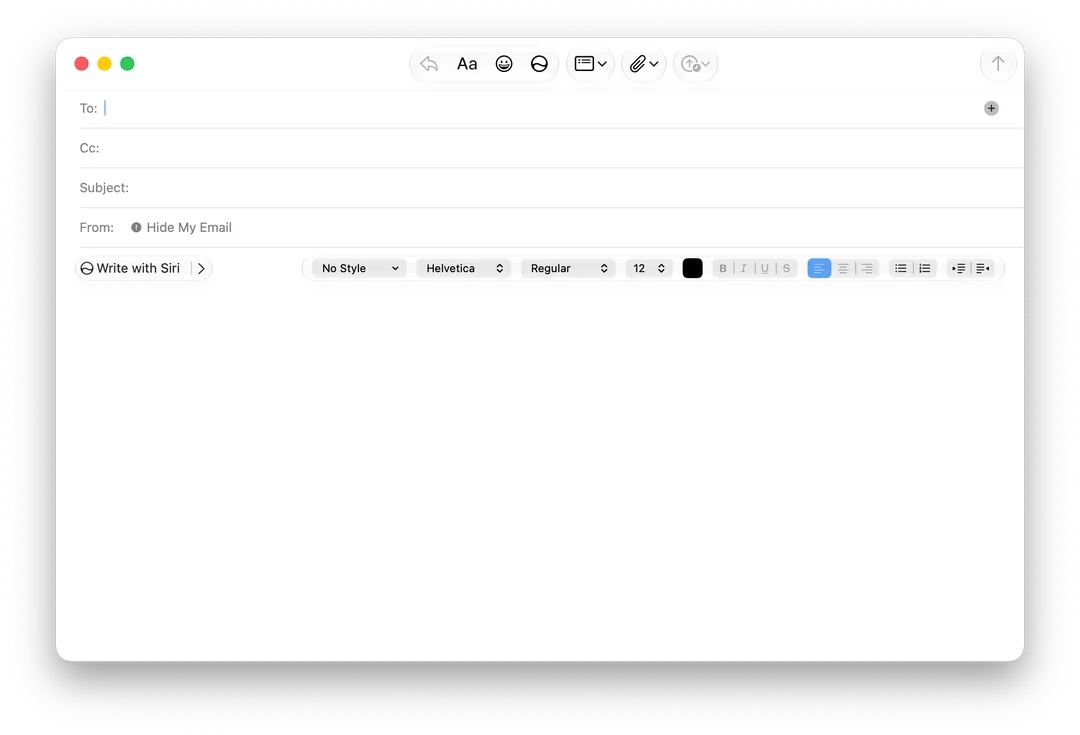
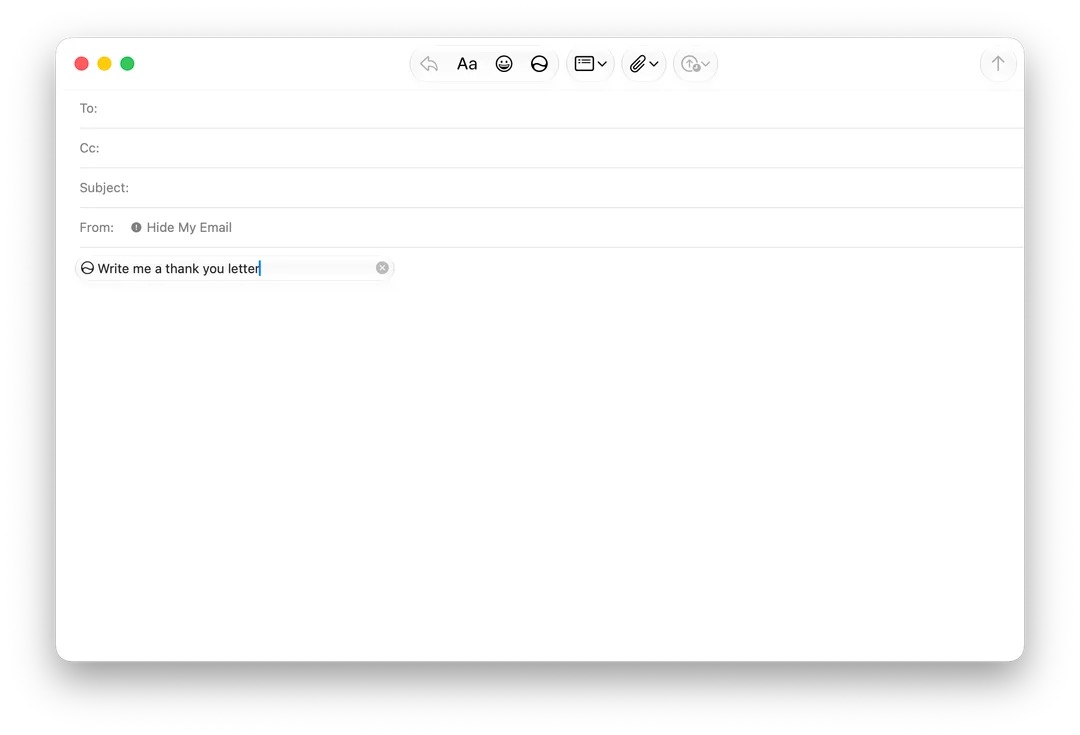
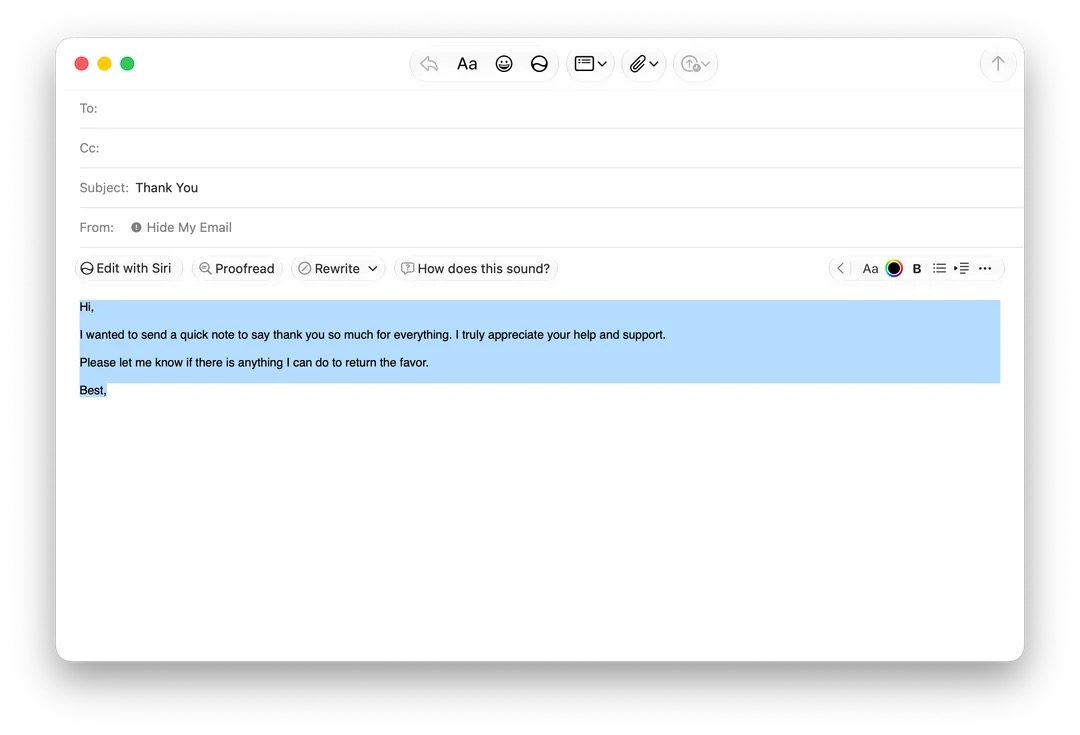
A Apple está testando uma nova barra de formatação para a seção de texto do Mail no macOS Golden Gate 27, dando maior destaque às Ferramentas de Escrita (Writing Tools) da Apple Intelligence.
A nova versão foi compartilhada pelo usuário mactracker na versão beta do macOS 27 e, como apontado por ele, permite exibir sugestões contextuais de respostas inteligentes geradas pela Siri sem a necessidade de inserir automaticamente no rascunho, semelhante ao funcionamento de outras inteligências artificiais (IA) em apps de email.
As opções da nova barra incluem alternativas de edição, reescrita, correções gramaticais e/ou de escrita e uma opção intitulada “How does this sound?”, além das ferramentas tradicionais de formatação, escanteadas na lateral direita do novo layout.
Na versão atual, essas opções de formatação de texto também estão recolhidas na lateral direita da janela do aplicativo, desaparecendo por completo assim que se seleciona a opção de escrever com a Siri.
O novo layout está oculto por trás de uma feature flag interna, de forma que a maioria dos usuários da versão beta não consegue habilitá-lo. A beta 4 apresenta ainda algumas inconsistências no funcionamento do recurso, como a ausência da barra na escrita de novas mensagens, restringindo o seu funcionamento às réplicas de email.
Não se sabe ao certo se o recurso chegará à versão final do macOS 27 (prevista para aterrissar em setembro), mas ele parece acompanhar as reformulações propostas sobre a integração das ferramentas de IA no cotidiano do ecossistema da Apple nos sistemas 27.
via MacRumors



On July 23, 2012, an Apple ad showed legendary filmmaker Martin Scorsese giving Siri a go. It was fun, but not entirely realistic.
(via Cult of Mac - Your source for the latest Apple news, rumors, analysis, reviews, how-tos and deals.)


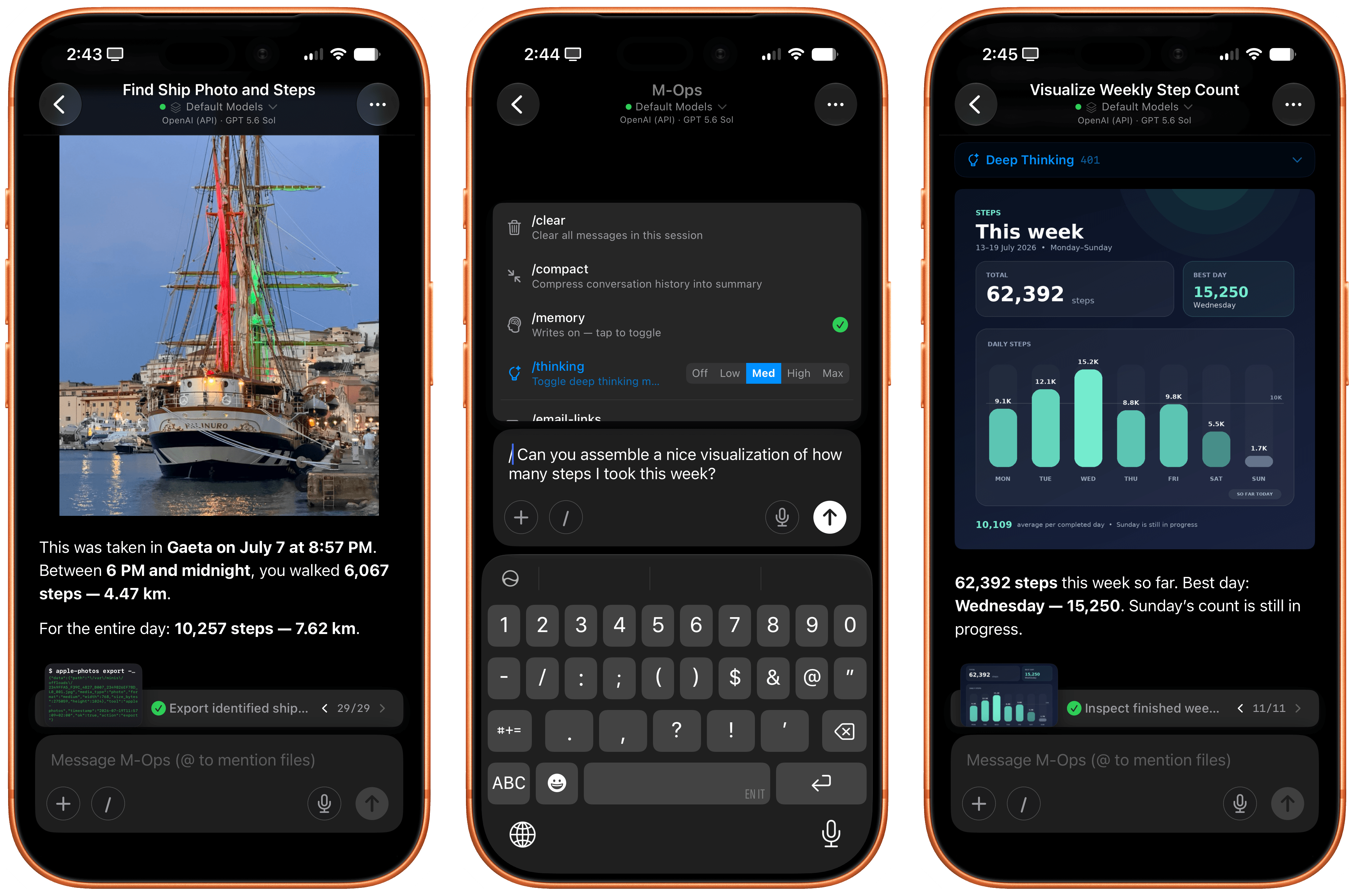
Open Minis for iOS.
Every once in a while, I come across a third-party app that either resets my expectations for a particular niche of software on iOS or creates an entirely new category altogether. I’ve had quite a few of these moments in the 17 years I’ve been writing app reviews at MacStories: Editorial, Workflow, Obsidian, Sky, and, most recently, OpenClaw come to mind. Over the past few weeks, I’ve had another such moment with Open Minis, a new chatbot app for iPhone and iPad that I can best describe as getting a preview of Siri AI’s agentic future, today.
Open Minis is an on-device agent that lets you use any frontier model for conversations, with a twist: unlike other AI wrappers, this app deeply integrates with all sorts of native Apple system frameworks using official APIs available to third-party developers. Open Minis can control Reminders and Music, which we have seen before, but also Calendar, Maps, HomeKit, HealthKit, and Files; it can even work with frameworks such as Vision for OCR, Apple NLP for natural language processing, the iOS clipboard, speech recognition and dictation, NFC, and Bluetooth. Furthermore, Open Minis comes with its own configurable workspace in the Files app, has an on-device memory system, and features browser-use capabilities via a (once again, native for iOS developers) built-in WebKit web view.
Effectively, Open Minis is what would happen if you rolled Claude Code and OpenClaw into one intuitive agentic experience designed for Apple users, with a powerful tool-calling harness that can improve and tweak itself, and with integrations specifically designed for the Apple ecosystem. It is the most impressive indie app I’ve seen in a while. If you were disappointed by the lack of power-user capabilities in Siri AI, this is a real, currently shipping example of what Siri AI could be if only it were powered by a frontier model with truly agentic functionalities.
The trick hidden up Open Minis’ sleeve is as ingenious as it is obvious: all the Apple framework integrations it supports are powered by command-line interfaces (CLIs) that bridge native Apple APIs (EventKit, MusicKit, HomeKit, etc.) to a code environment that modern LLMs can understand and operate with. To make all of this work behind the scenes, the developer of Open Minis had to create dedicated CLIs for each of these frameworks, which – and here comes the other trick – are driven by a model harness that has access to a built-in Linux terminal and is sandboxed to the app’s workspace.
Specifically, Open Minis runs a version of iSH, a popular Alpine Linux shell that operates a persistent, emulated Linux environment for ARM64 architecture in a sandboxed fashion. The shell inside Open Minis can download external packages from the web using Alpine’s apk package manager (which means that you can access popular tools such as ffmpeg and yt-dlp directly from the app), has its own Linux filesystem (exposed in the Files app as a native file provider location), and is able to call bridged Apple CLIs, as well as any kind of MCP server (via MCP code execution, another trend in the AI industry these days). Think about it this way: if Claude Code or Codex on the Mac can do anything across the entire filesystem by virtue of running in the Terminal app, Open Minis can do (almost) anything within its app sandbox thanks to a built-in terminal emulator – including running Python, using Git and SSH, and accessing standard Unix text utilities.
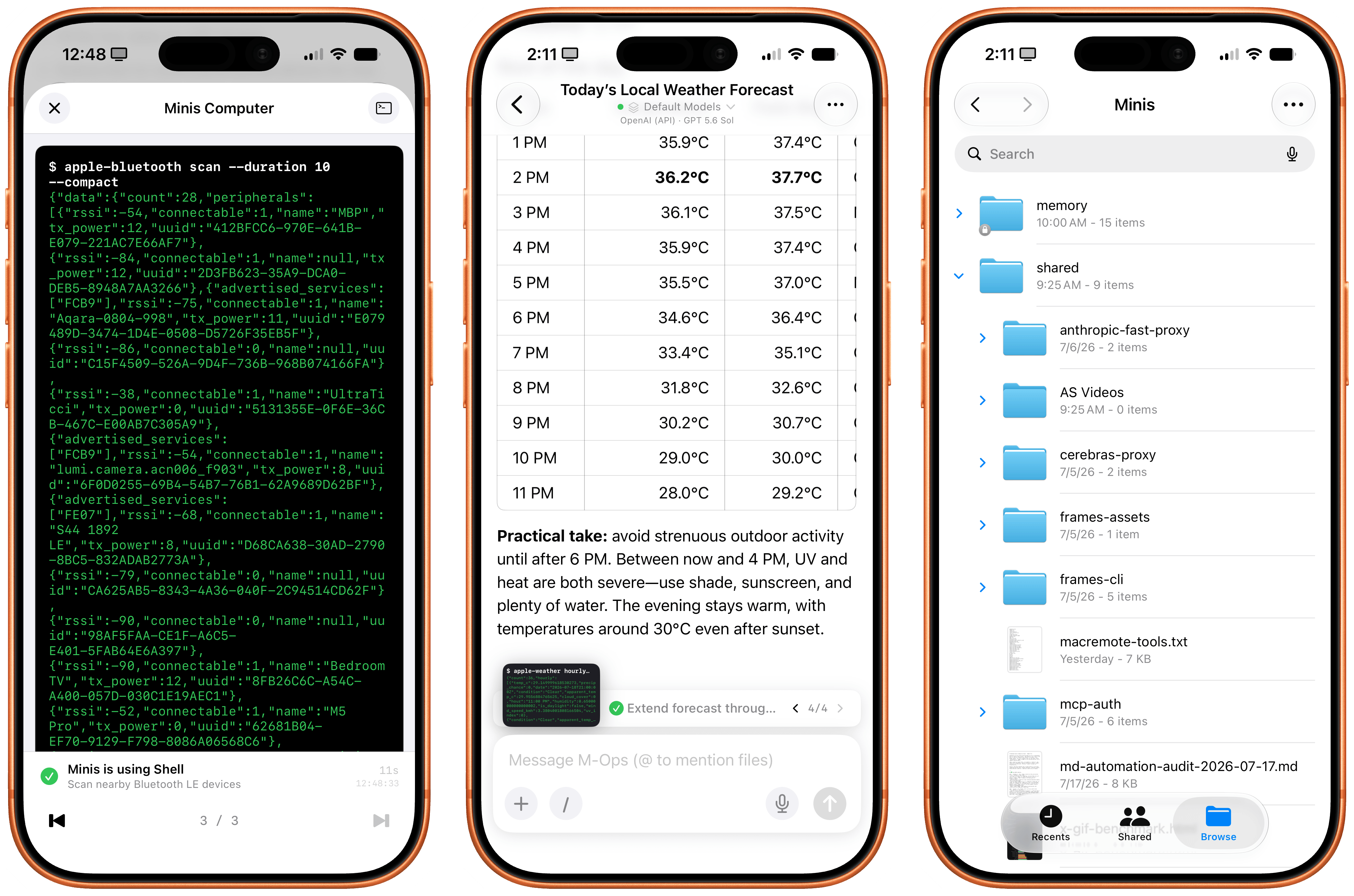
Minis’ built-in shell (left) and dedicated workspace in the Files app (right).
However, this doesn’t mean that, when using Open Minis, you’ll be looking at a terminal UI all the time: the underlying shell is simply what makes all of this possible behind the scenes. The app can display a picture-in-picture terminal preview that you can open to preview what it’s doing, but you don’t have to. The app’s main interface is your classic, chatbot-style UI that, depending on the model you’re using, will display interleaved thinking blocks, tool calls, and messages in a conversation transcript.
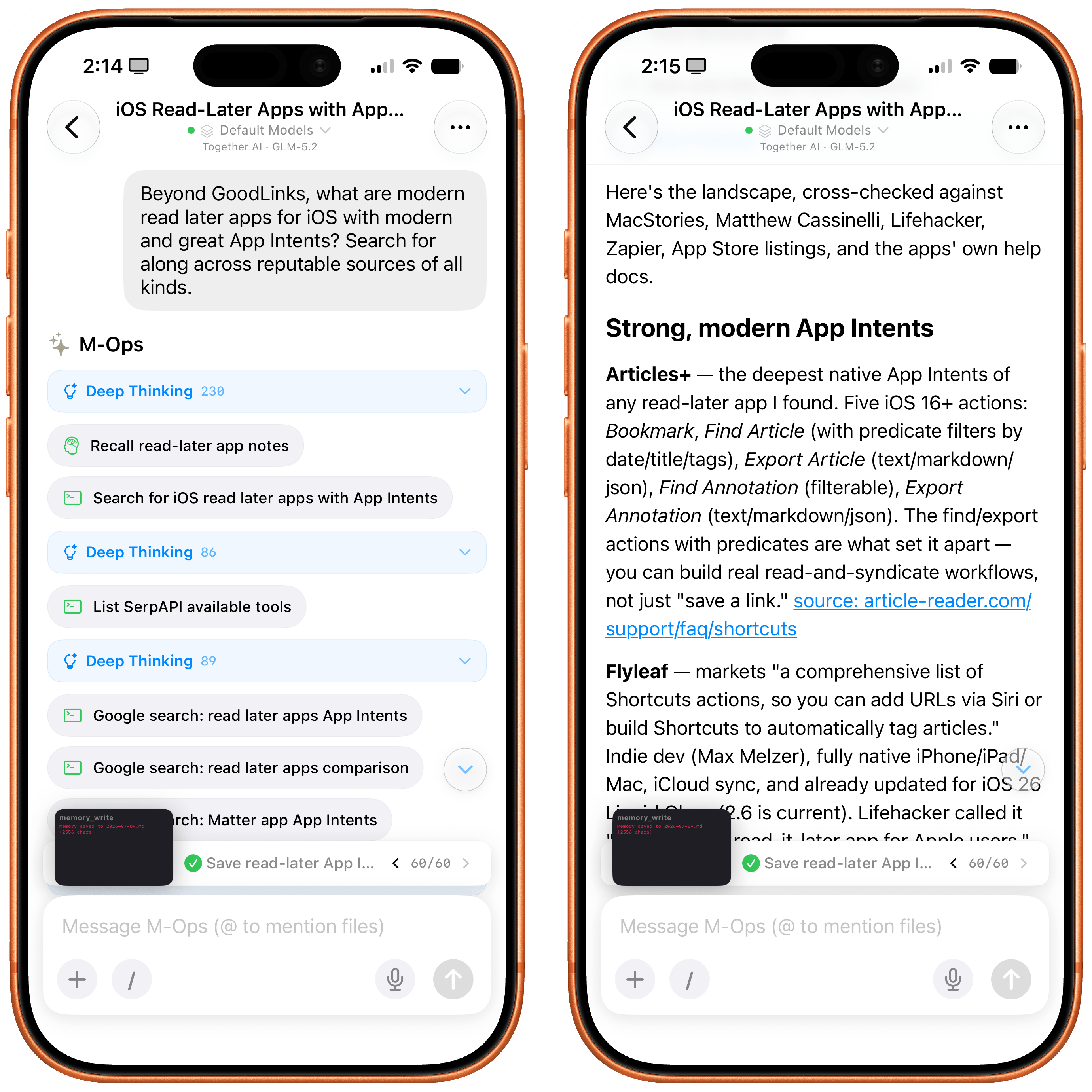
The regular chatbot UI of the Minis app.
The other hidden power of Open Minis (which is reminiscent of OpenClaw, or, perhaps more aptly, a self-improving system such as Hermes Agent) is that it can inspect and modify its own workspace via dedicated Minis CLIs. For example, you can ask Minis – in natural language, of course – to add a new model or MCP server, and the app will bring up a native settings screen and ask for permissions to do so. If you want to store a password or API token, the app won’t do it in plain text: it’ll display a native, Keychain-based page where you can securely store your credentials. And more importantly, Minis’ own CLIs are used to recall previous conversations via the app’s memory system (based on Markdown files), create skills, and answer questions about the app itself. For instance, when I asked Minis to describe what Apple CLIs it has for iOS users, it happily provided a full guide:
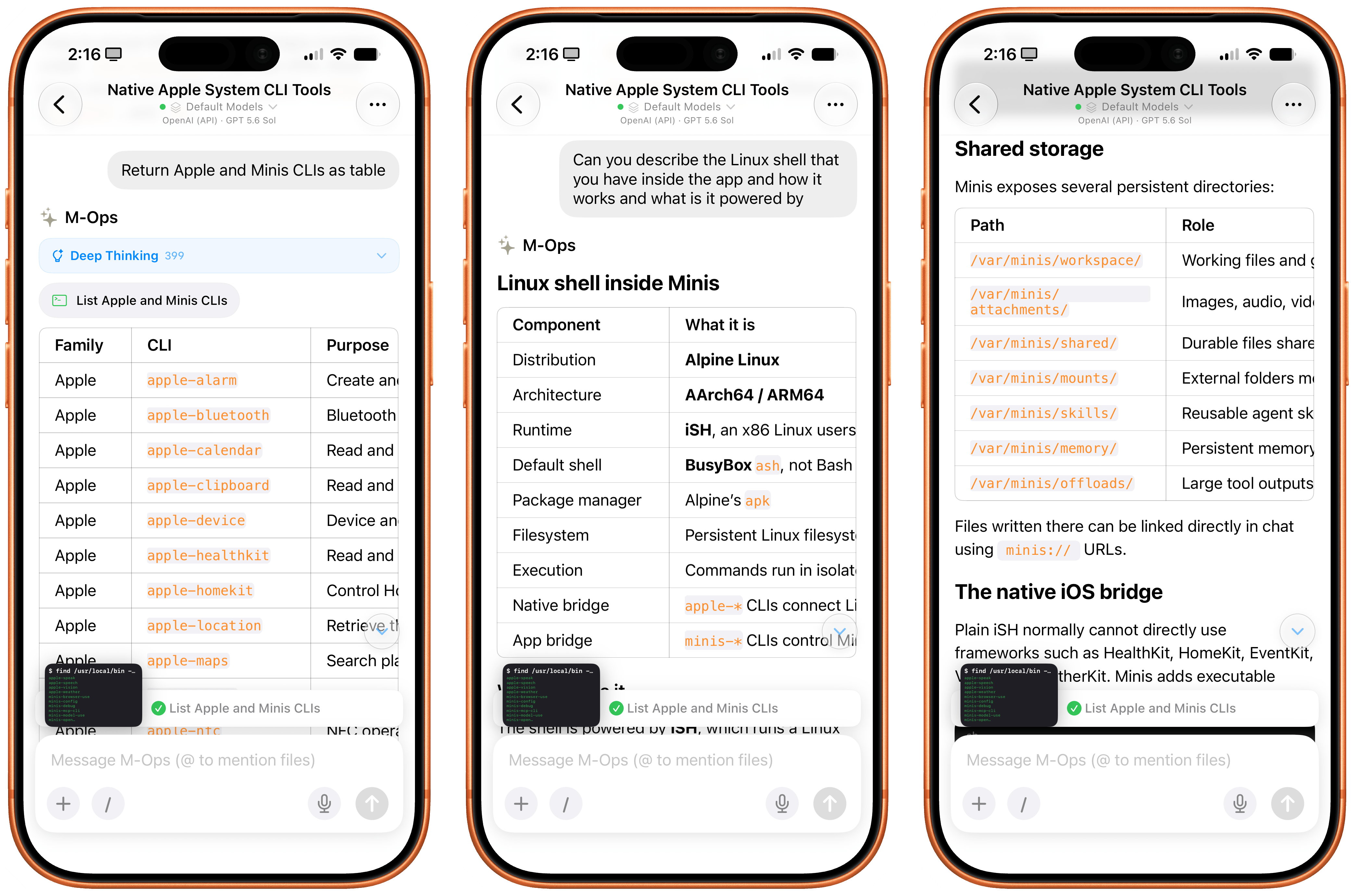
Asking Minis about itself and the CLIs it has.
Or when I asked to recall all the things we worked on during the day, Minis used one of its CLIs to read transcripts of previous chats (which, again, are simply stored in the Files app), recall memories, and present me with a useful summary of all the tasks we completed.
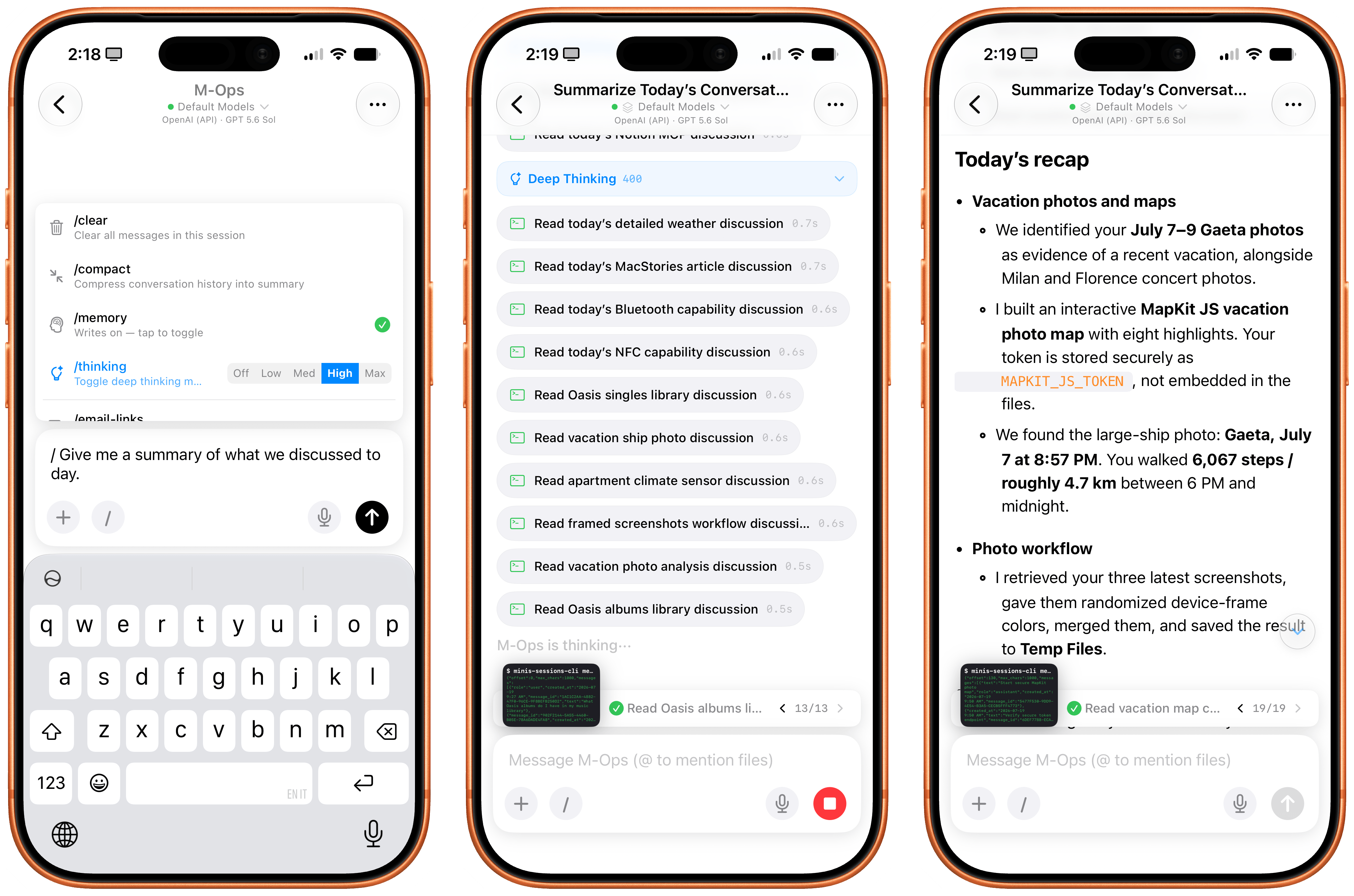
Minis can inspect its own sessions as well as user memories to recall previous conversations.
The same is true for adding new functionalities to Minis. Since it’s running a Linux shell with access to Python and can store assets in a persistent Files workspace, I figured I could ask Minis to install my own Apple Frames CLI for itself by giving it a link to my GitHub repo. GPT-5.6 Sol (my model of choice in the app) didn’t hesitate: it found all the dependencies for the Frames CLI, installed them, pulled the CLI’s official skill, and was good to go a minute later. And since Minis also comes with a native Photos integration, I was able to ask:
Grab my three most recent screenshots, randomize their frame colors, merge them, and save the image to my Temp Files folder.
A few seconds and Apple CLI calls later, Minis saved the resulting framed image to a folder of my choosing. The ability to work in any folder in the Files app outside of Minis’ sandbox is another official iOS API that the app is leveraging; we first saw the ability to “mount” specific folders from the Files app in Working Copy years ago, and the feature was later adopted by the likes of Ulysses, iA Writer, MWeb, and other document-based apps. In Open Minis, you can bookmark any folder from any file provider location in the Files app and tell your agent to save files to or read them from there.
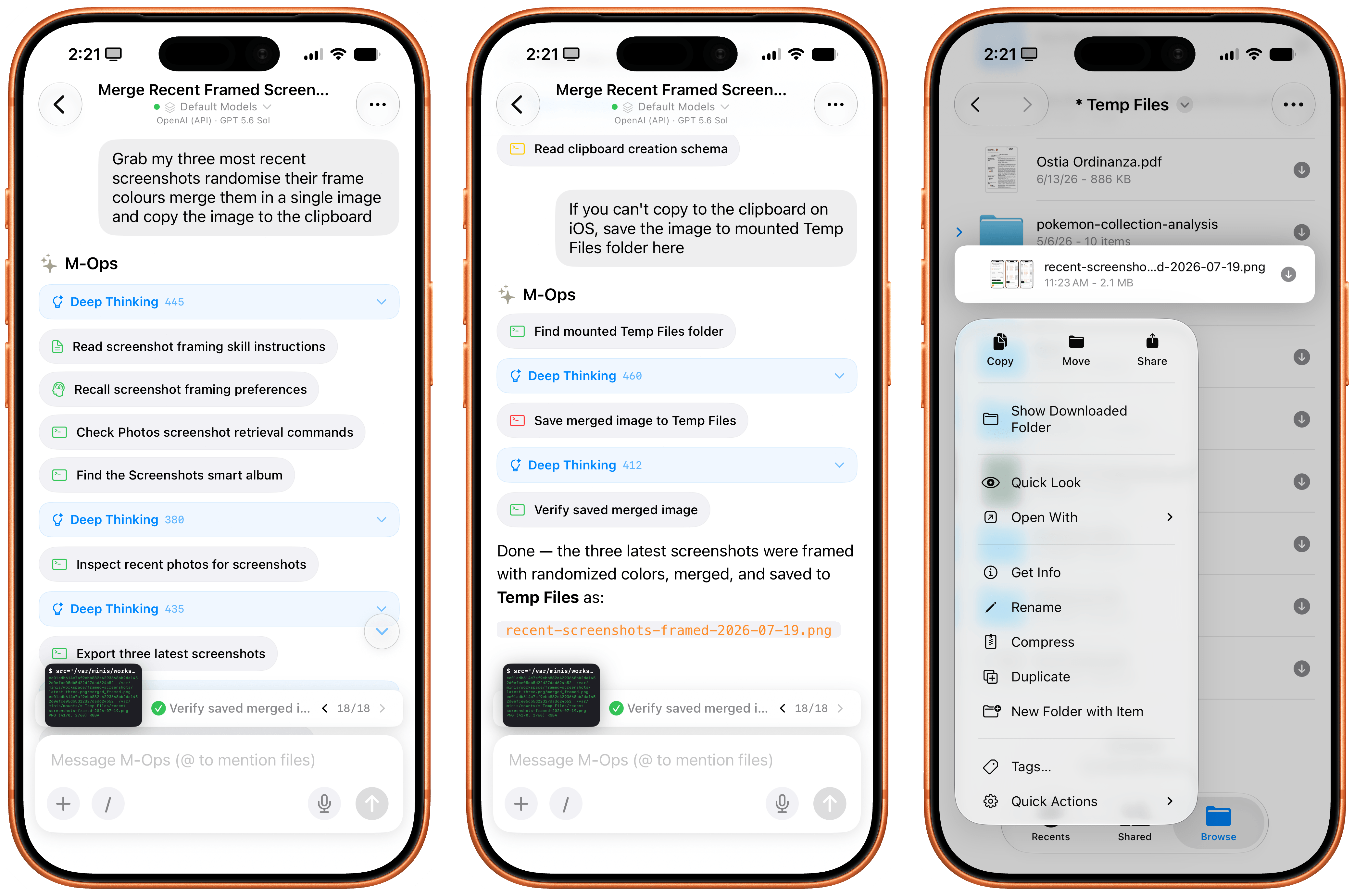
Minis can’t write images to the iOS clipboard, but it can save files in any (previously bookmarked) location of the Files app.
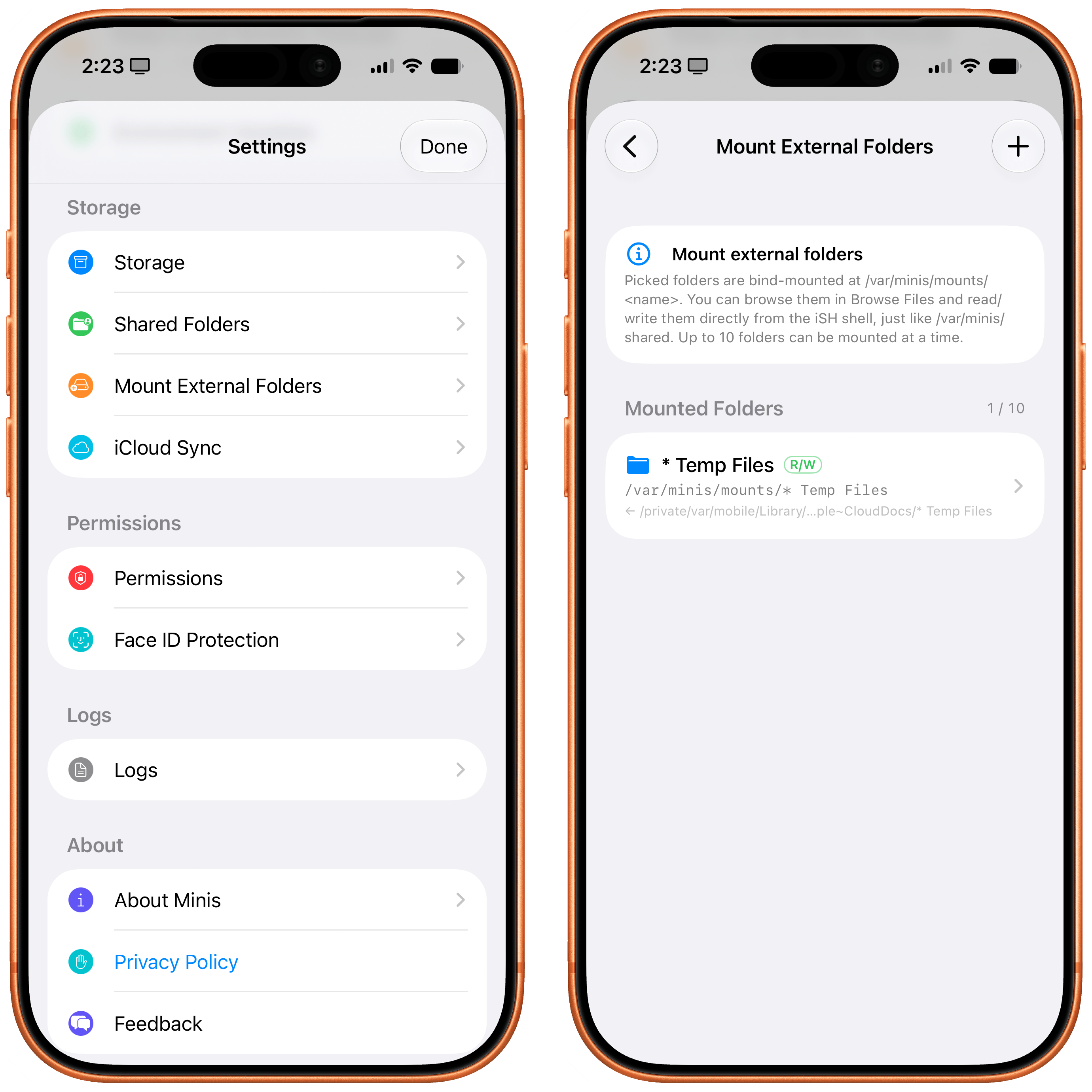
Minis’ settings for managing mounted folders.
This feels magical to me, but it’s merely one of the many examples of what is possible when you combine large, powerful models with the more-open-than-you-think, secure nature of iOS and iPadOS.
All of this a lot to wrap your head around at first, and there’s no denying that Open Minis is a power-user tool designed for people who, like me, enjoy using frontier models and living at the bleeding edge of AI. What’s different in this case, though, is the fact that Open Minis – unlike other apps – embraces its Apple-first nature by fully supporting technologies that are made by Apple, released to third-party developers, and not being used by Siri AI at all at the moment.
It’s impossible to “review” an AI chatbot app since everyone’s use cases are so different, but I’m going to nevertheless describe a few scenarios that should give you an idea – and hopefully reset your expectations, too – of what can be accomplished with an AI that has deep hooks into iOS.
For starters, you can use any model you want in Open Minis, including the latest GPT-5.6 models, Claude Fable, anything from OpenRouter, and more. (I even asked Open Minis to create our own proxy for the OpenAI API, running on my Mac Studio, so I could use Sol in Fast mode; it works!) You can press the / button above the keyboard to trigger reasoning levels, compaction, memories, and skills; you can also create model groups, model defaults, and subagents from the app’s settings, then ask the model to use a specific set of subagents for a particular task, and it’ll do it.
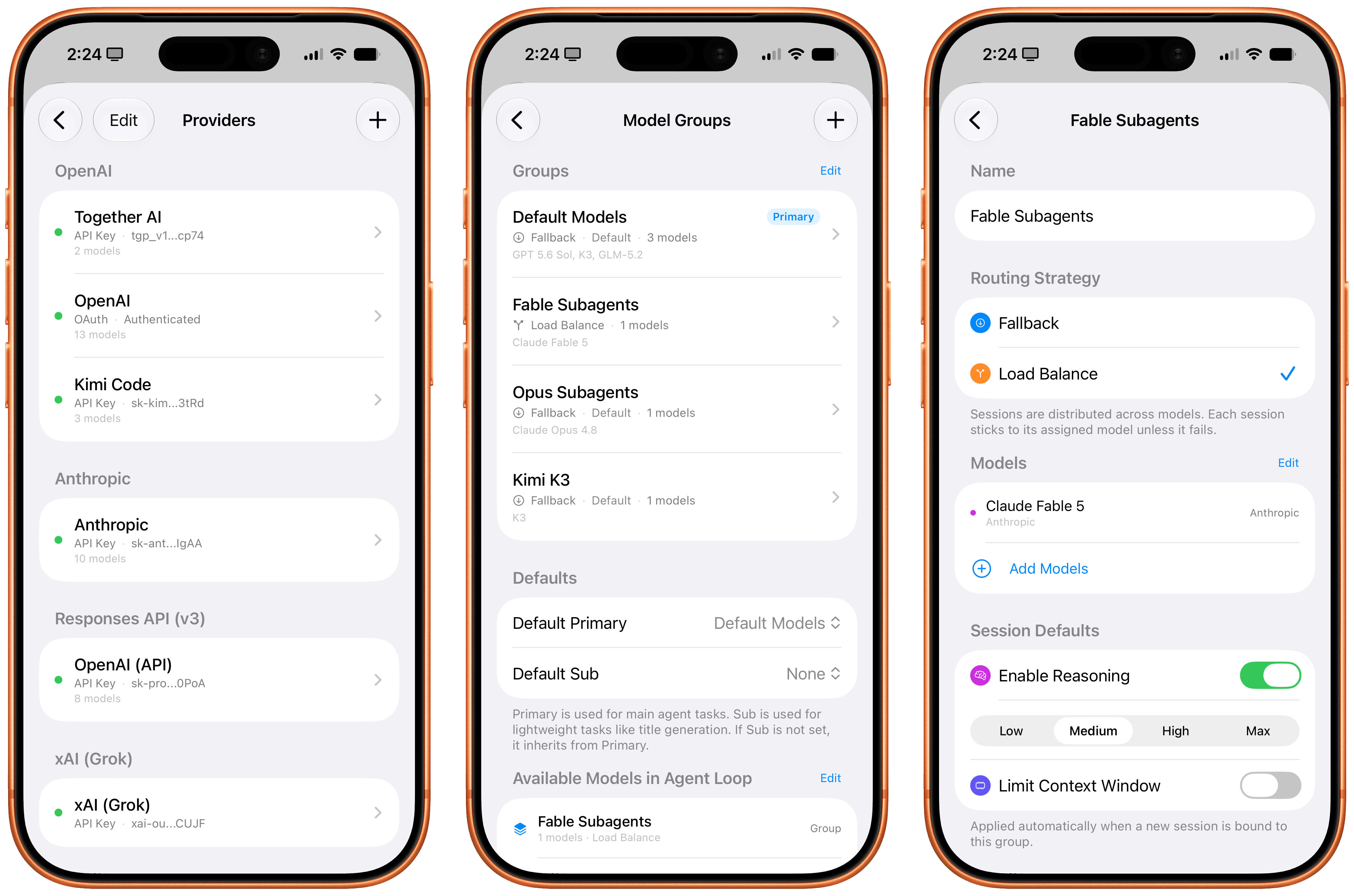
Managing model providers, groups, and subagents in Minis.
Approach this app with this concept in mind: nearly everything about it is open and configurable by just talking to it. Short of rewriting the app’s code itself, you can ask Open Minis to tweak all sorts of things about itself and its own settings, and the agent will do it. Personally, I find this to be a more effective, elegant, and stable harness than OpenClaw for these kinds of things. Even though the app’s UI could use some polish (I don’t like the reasoning picker, and I wish I could collapse thinking steps by default), it is incredibly fun to tune Minis’ workspace to your liking by talking to a model. You can, in fact, just do things.
A few days ago, I was curious about the state of the temperature and humidity in our apartment. So I asked Minis:
Get me a concise report of the state of the temperature and humidity in my house, present it as a nice table.
A native HomeKit permission prompt and a couple minutes later, Sol in Minis parsed a raw dump of temperature and humidity readings from each sensor, reviewed each room configured in HomeKit, and presented the results. Siri AI, for comparison, presented…something:
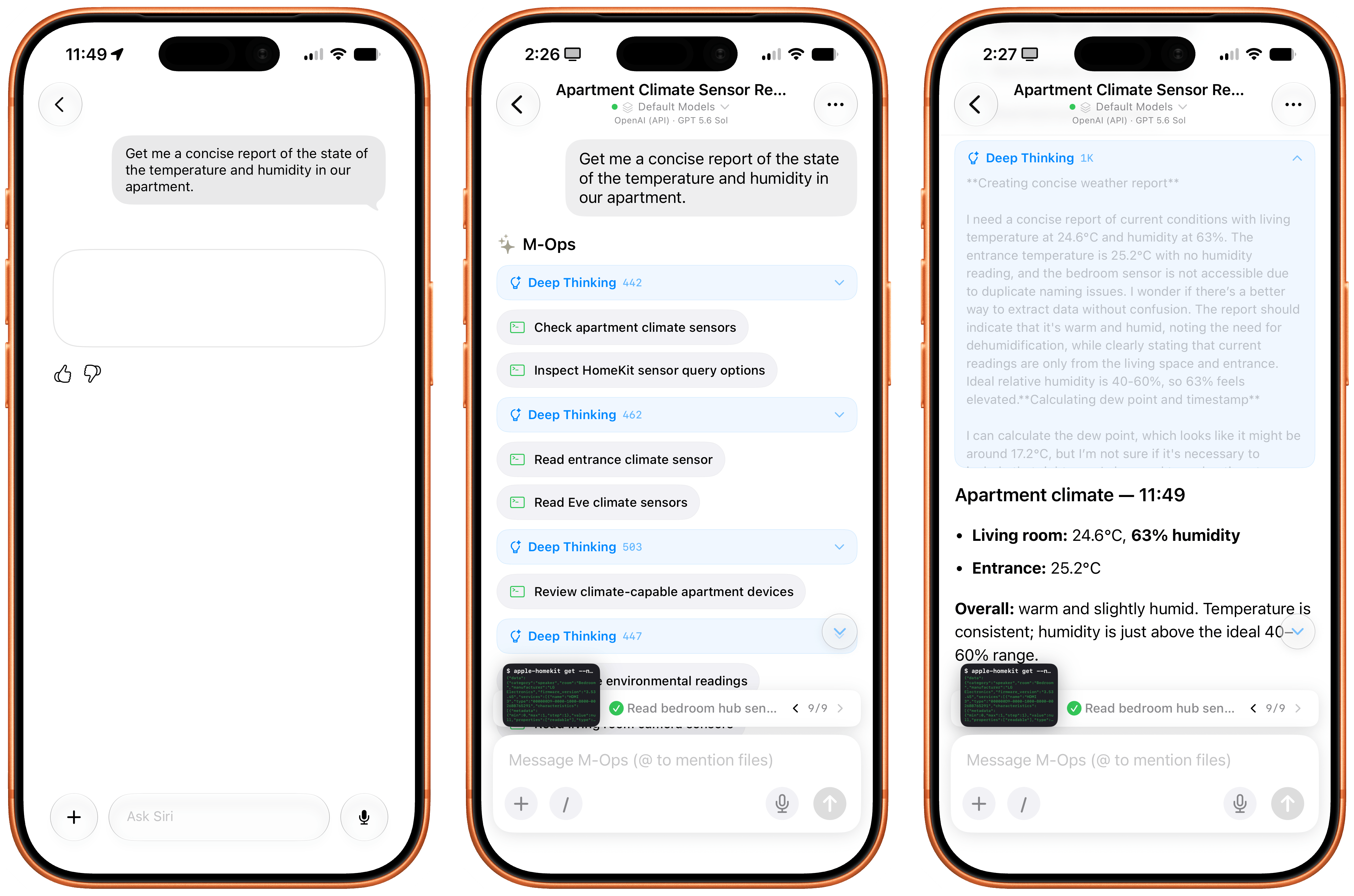
I also figured it’d be cool to compare the Photos integration in Open Minis to Siri AI’s photo library access. In theory, they’re both using the same framework, with the same metadata for each photo, but Siri AI also has access to “personal context”, right? So, I asked:
Based on my Photos, would you say I was recently on vacation?
I will let the results speak for themselves:
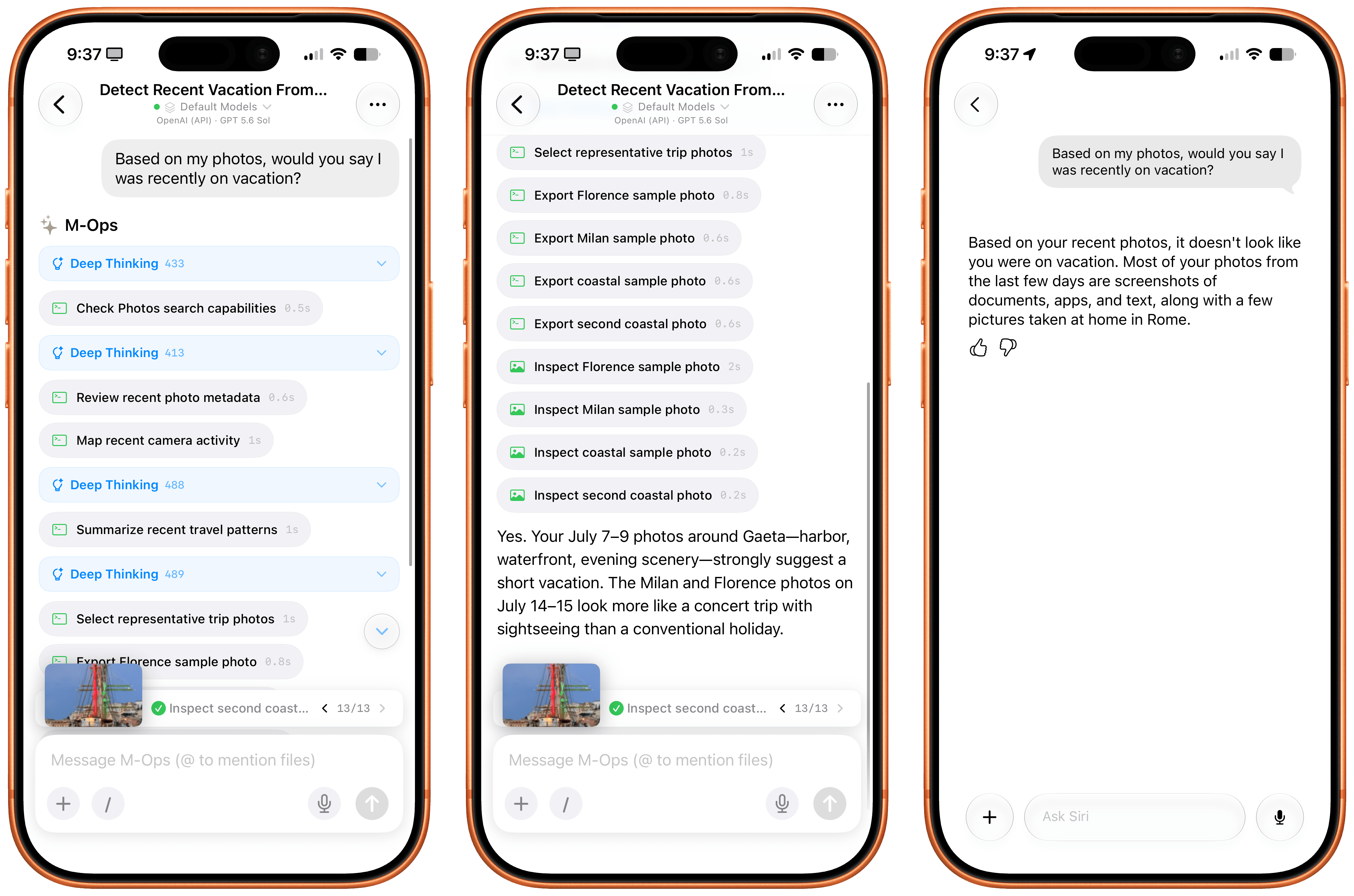
How about HealthKit? Again, keep in mind that Open Minis isn’t employing any “hacks” or workarounds here; it’s simply accessing the same native Apple APIs and frameworks that all developers can use. I asked:
Find the photo of when I was on vacation recently and took a picture of a large ship. How much did I walk that night?
Minis started thinking about this request in a different way: it checked its memory first, and it realized that we recently discussed my recent vacations, so it could immediately short-circuit the process of finding out about those dates. Then, it started filtering my photos by those dates, found the original photo of the Palinuro vessel, and…yeah:
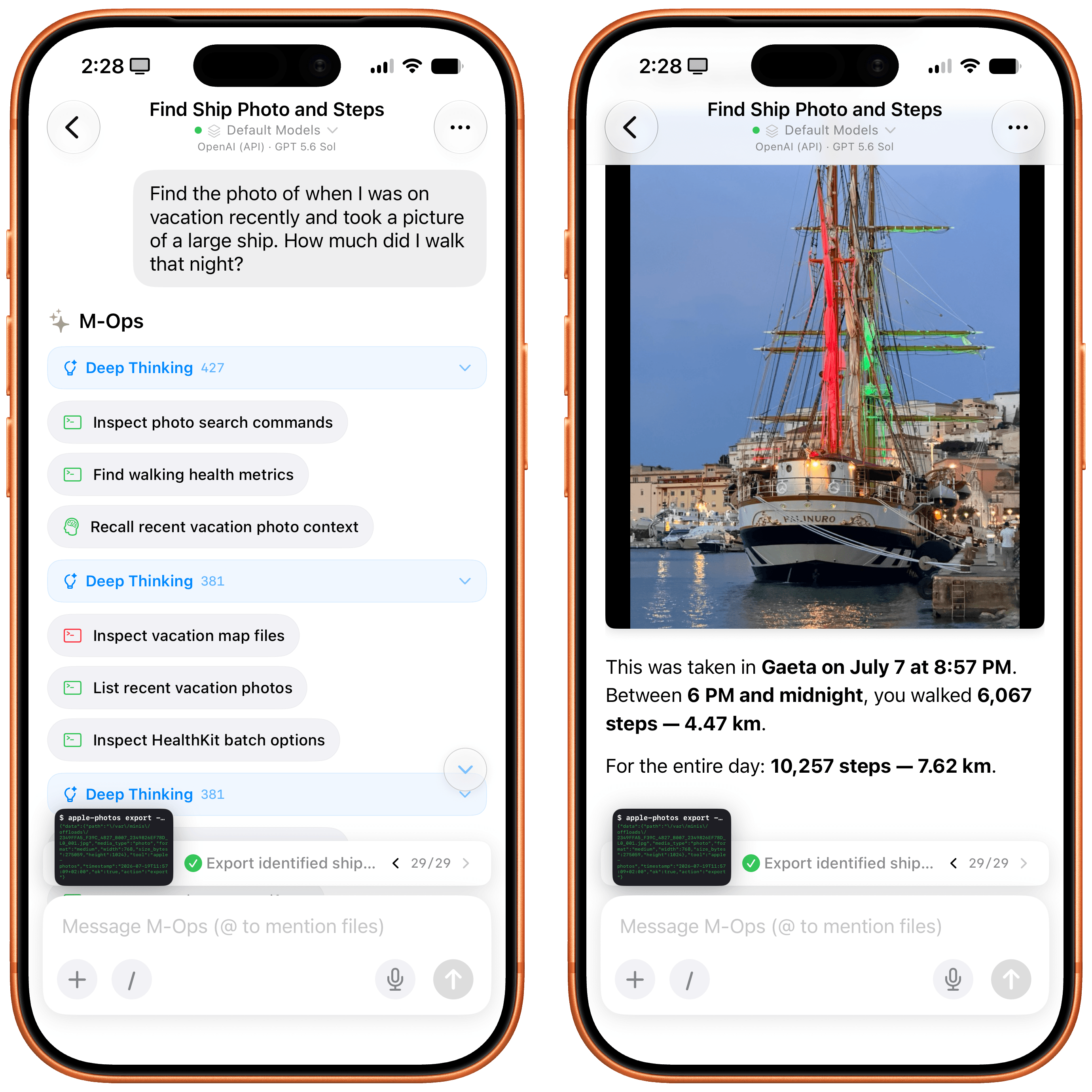
Inspecting the thinking steps in the request is also a fun exercise in seeing how a frontier model driven by an exceptional iOS harness can reason through a problem like this. The model – using the ‘Minis Computer’ (i.e., the aforementioned Linux shell) – fetched memories as Markdown files from the Files app, called the Apple Photos CLI, assembled a contact sheet with a grid of photos, picked two candidates, selected the best photo, isolated the date, called HealthKit for that date, and only then built an answer. And since all of this is based on deterministic code that was executed on-device, the response was fast and did not contain any hallucinations.
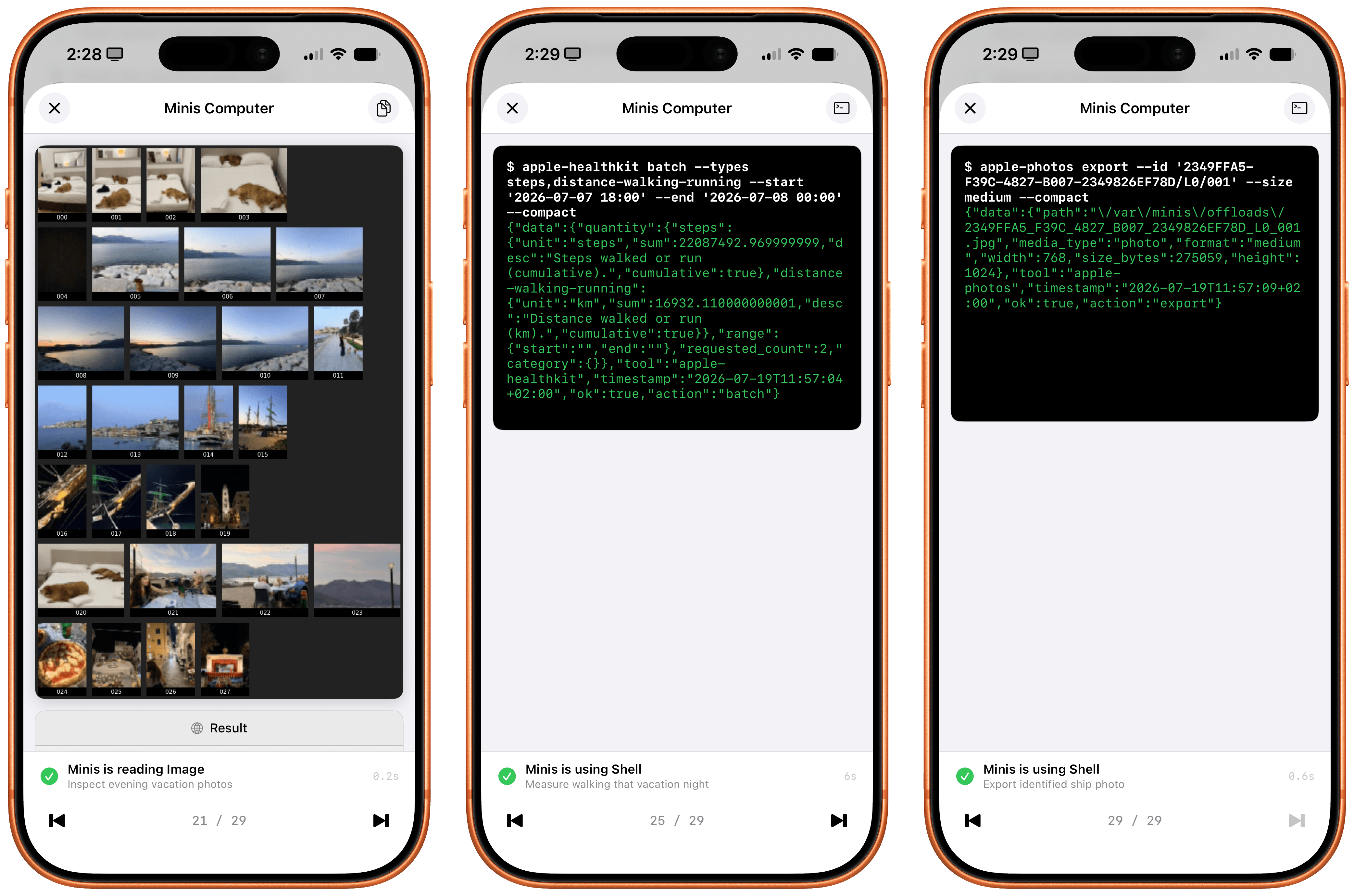
How the agent reasoned through my question and data returned by iOS.
I then decided to go a step further: I asked Minis to take photo highlights from my recent vacations, put them on a map powered by Apple’s MapKit JS, and create a nice, interactive HTML artifact with photos on a map. I used Kimi K3 for this. Minis first asked me to securely store my MapKit developer token, then got to work. It collected photos and parsed metadata returned by the Photos app, and a couple of minutes later, there it was:
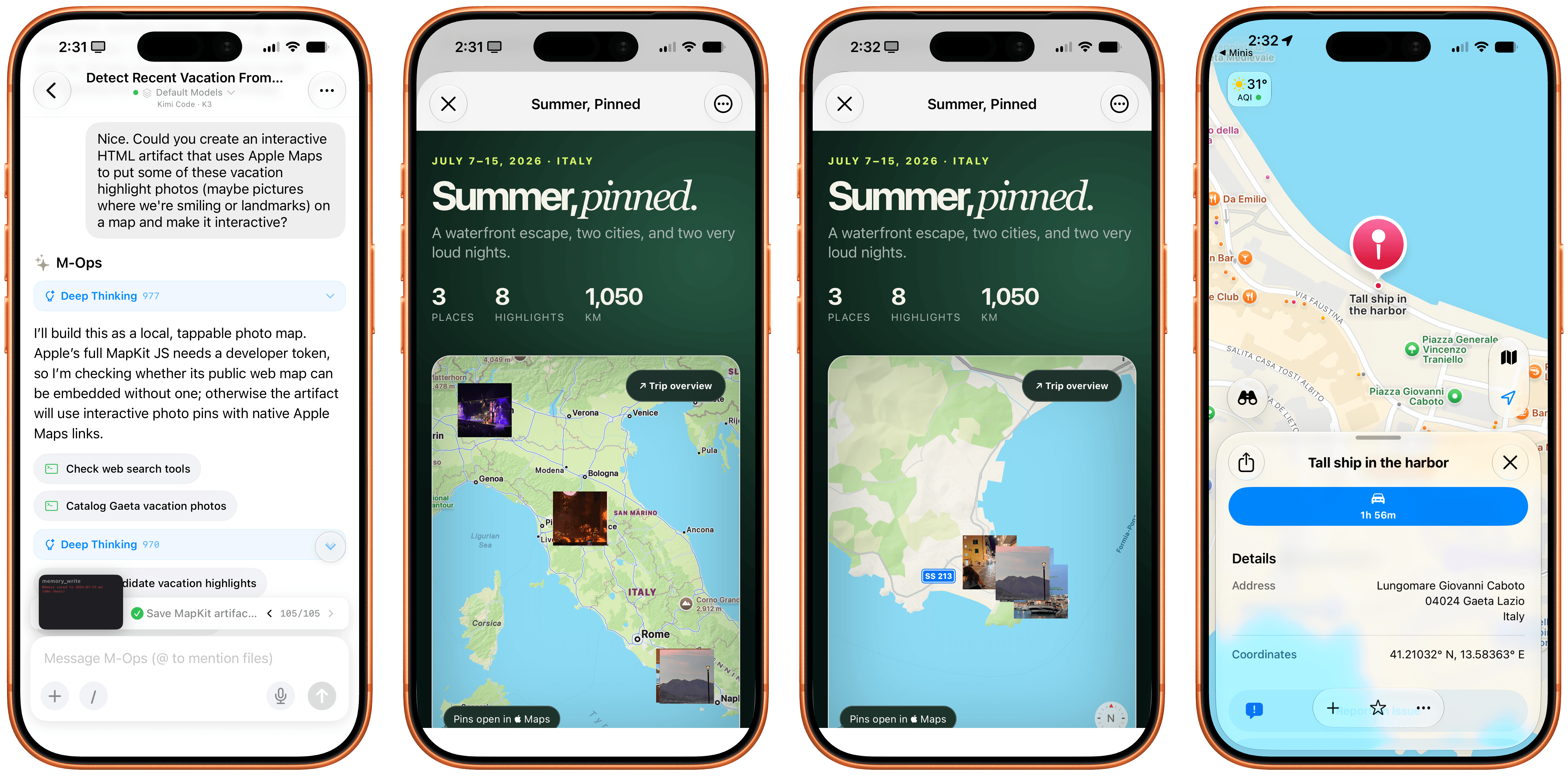
The Maps artifact built in HTML by Minis with a combination of Photos and MapKit.
Notice how the HTML artifact itself is presented with WKWebView – another native Apple framework that lets Minis’ agent display webpages with the same WebKit rendering engine used by other web apps on iOS. I also combined web views with Apple NLP, the Natural Language Processing framework that’s available to Minis as another CLI. I asked the app to fetch my most recent iPad article from MacStories, scrape it as Markdown via Firecrawl, tag its different parts of speech with Apple NLP, and present it nicely. Not a problem:
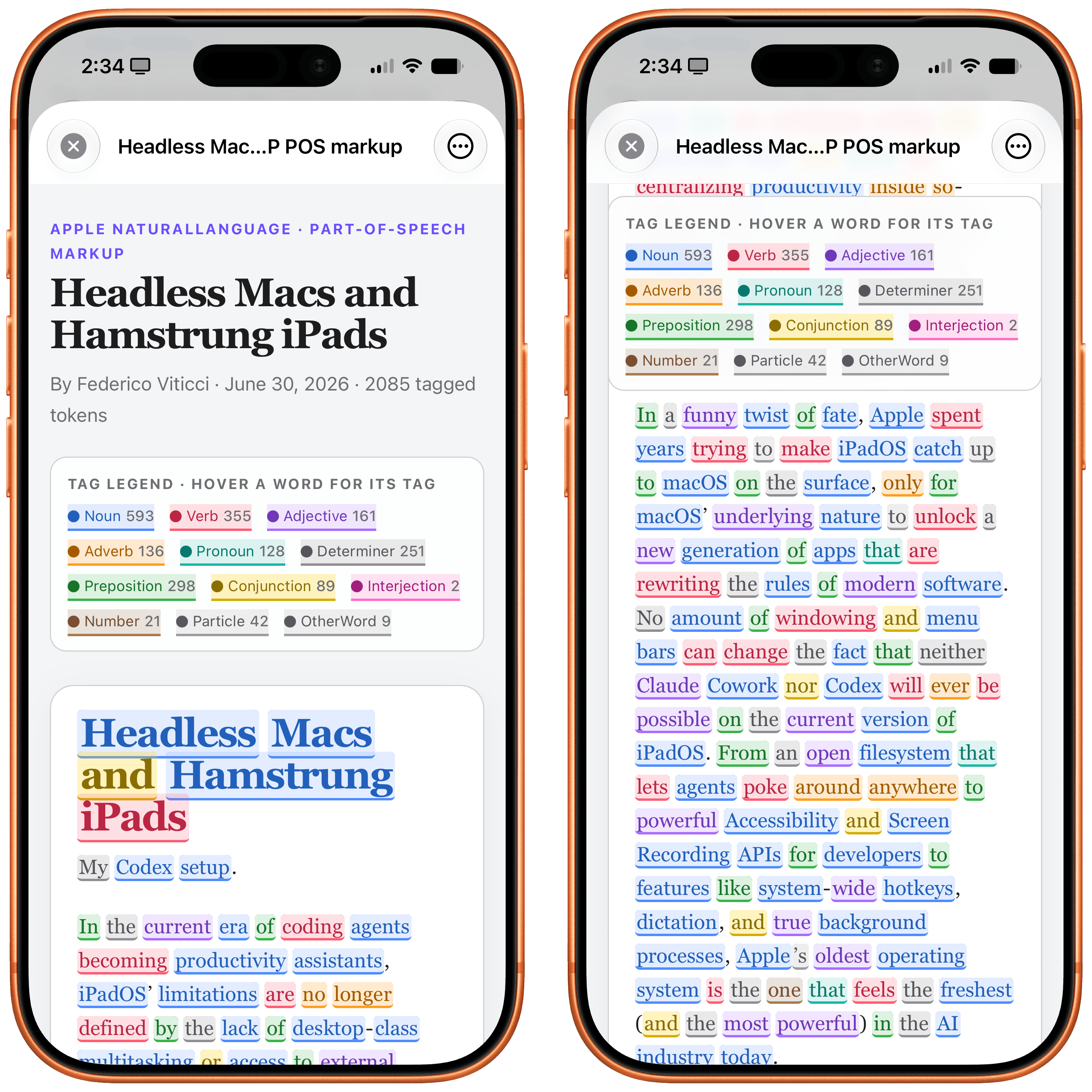
Parts of speech tagged with Apple’s native NLP framework.
Music is also a first-class citizen in Open Minis: by integrating with the Apple Media framework, agents can see what’s in your music library and find information about the albums, songs, and artists you’ve saved. Which means that if I ask Minis…
What Oasis singles and b-sides do I have in my library?
…Minis can inspect my library, cross-reference results with the web, de-duplicate matches, and present results in a way that Siri AI just can’t do right now since its capabilities are limited and the model can’t reason for longer on any specific query:
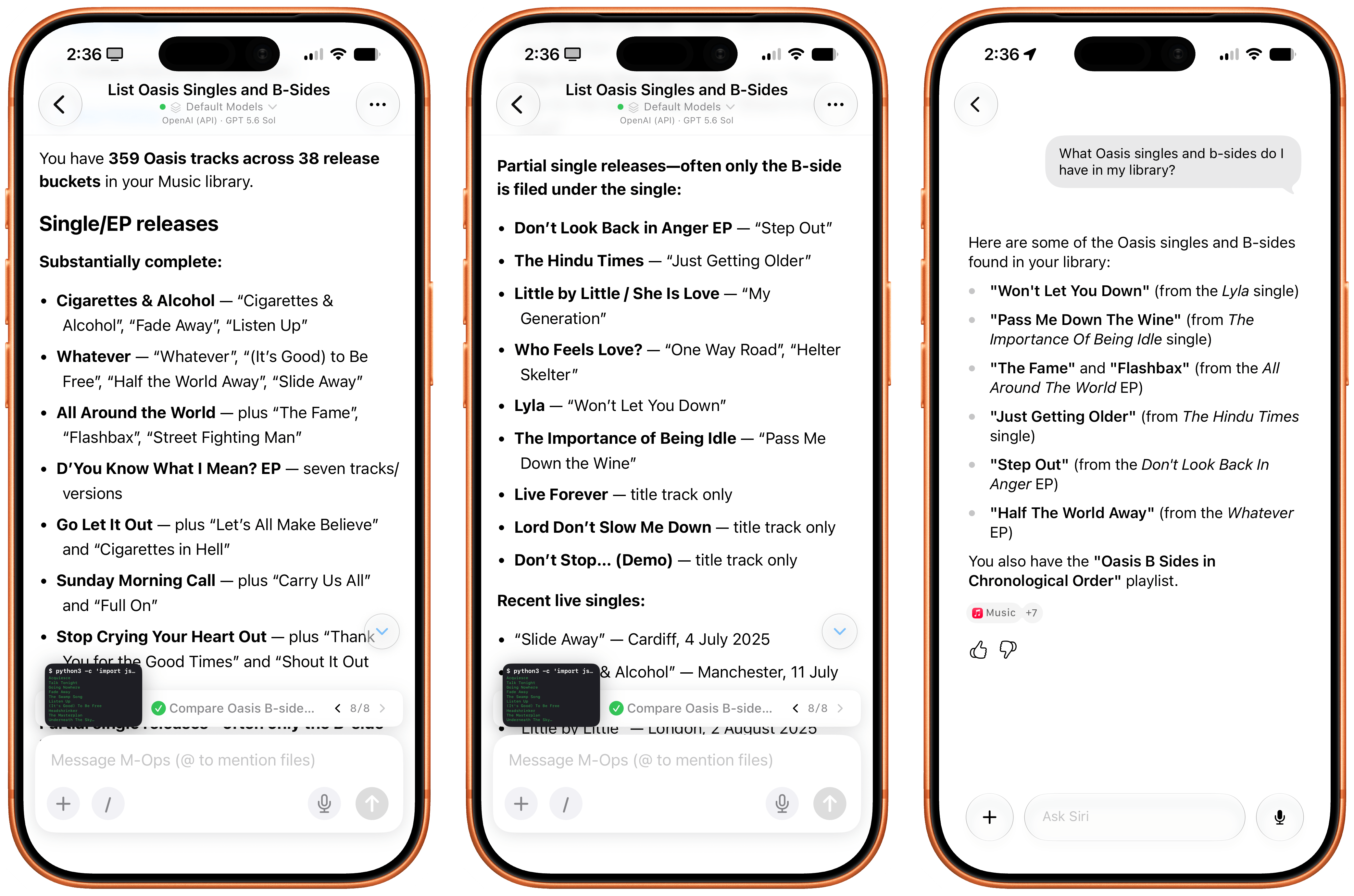
I can go on. Open Minis can access the native Bluetooth framework, scan nearby Bluetooth LE devices, and find out details about them:
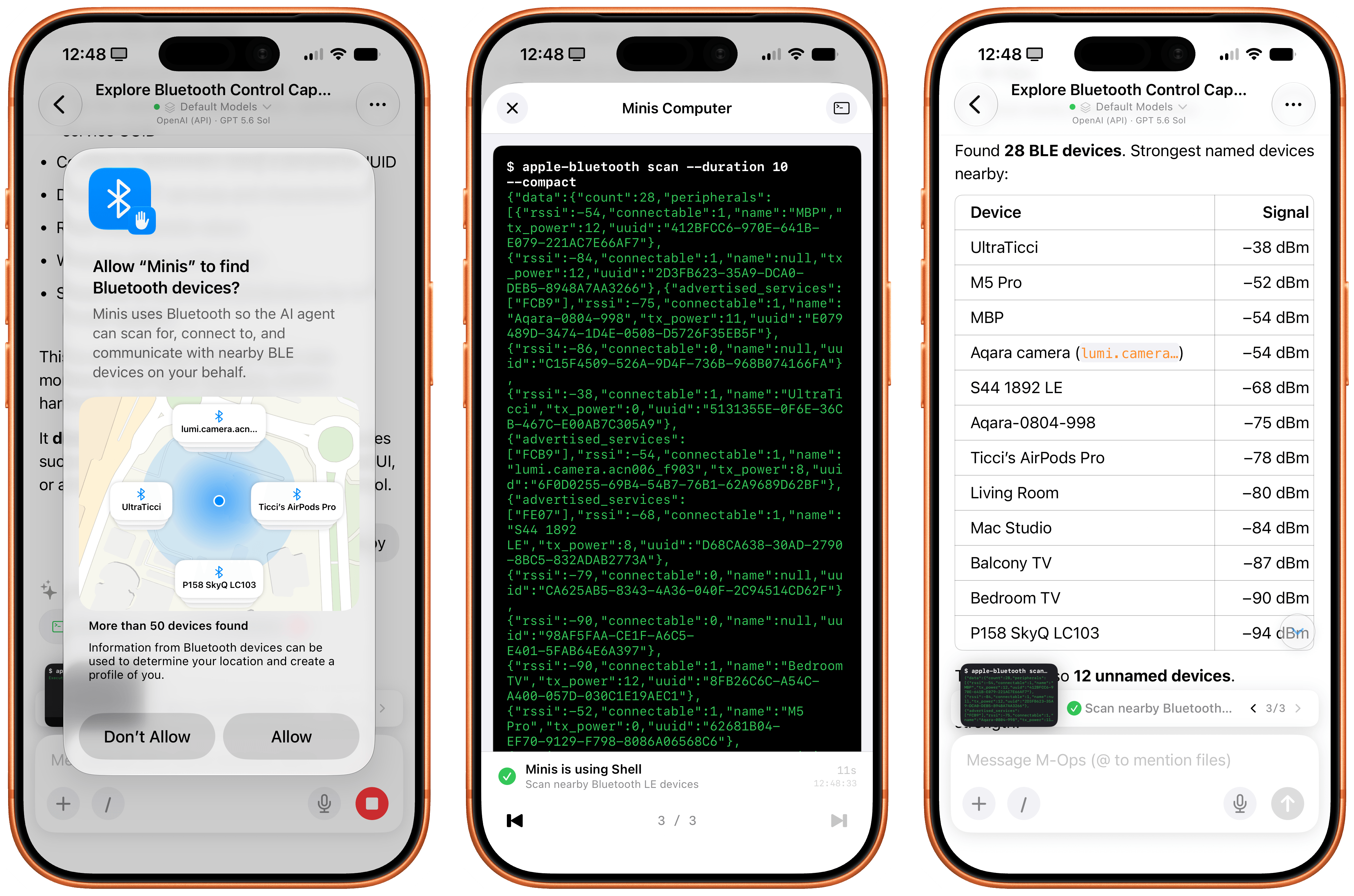
Working with the Bluetooth CLI in Minis.
It can send you real notifications when it’s done with a task, and you can even program those notifications to have a custom title and body text:
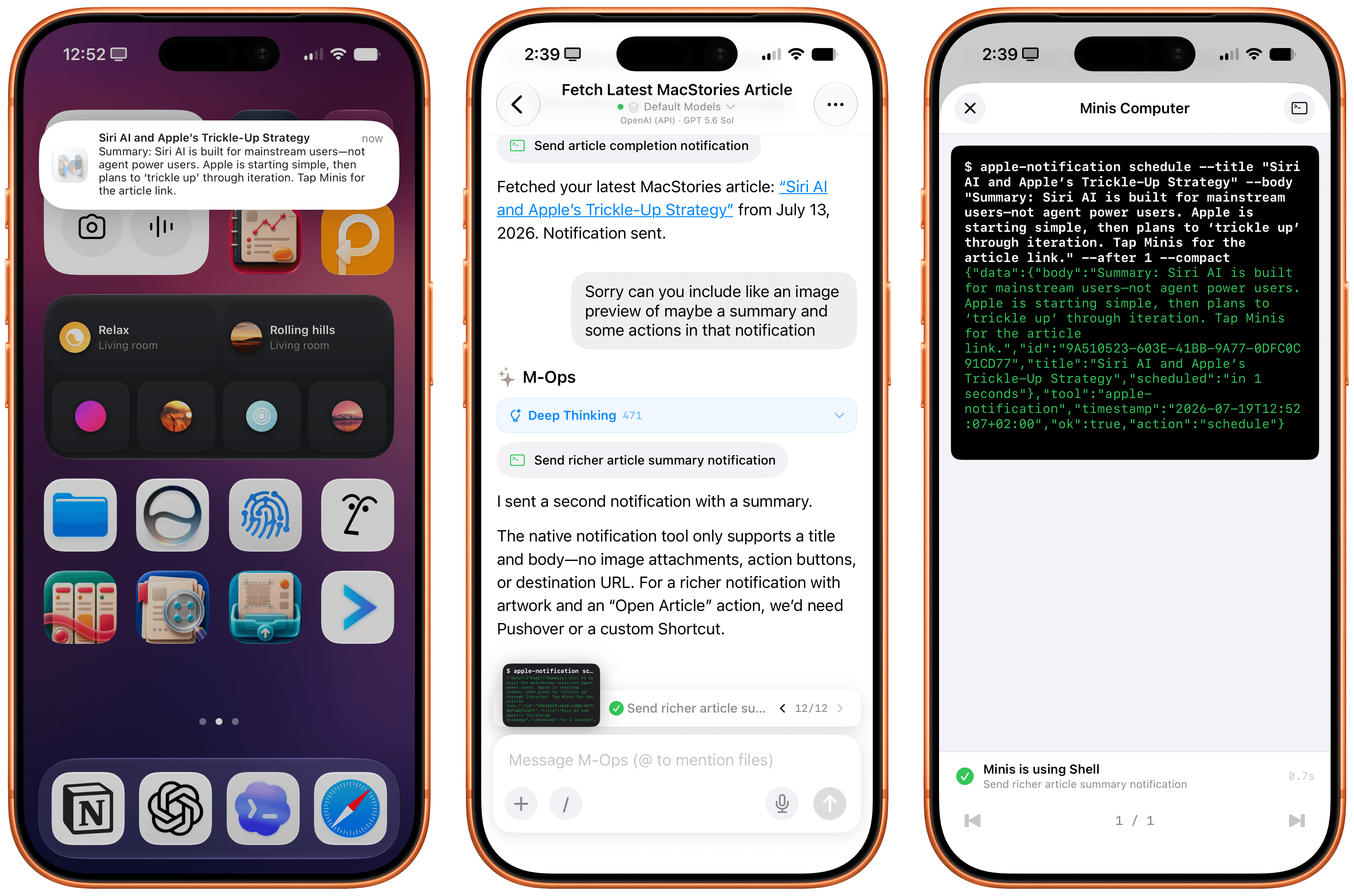
The app can also access your current location, extract locations from calendar events, and use the native Apple Weather APIs to give you detailed weather forecasts:
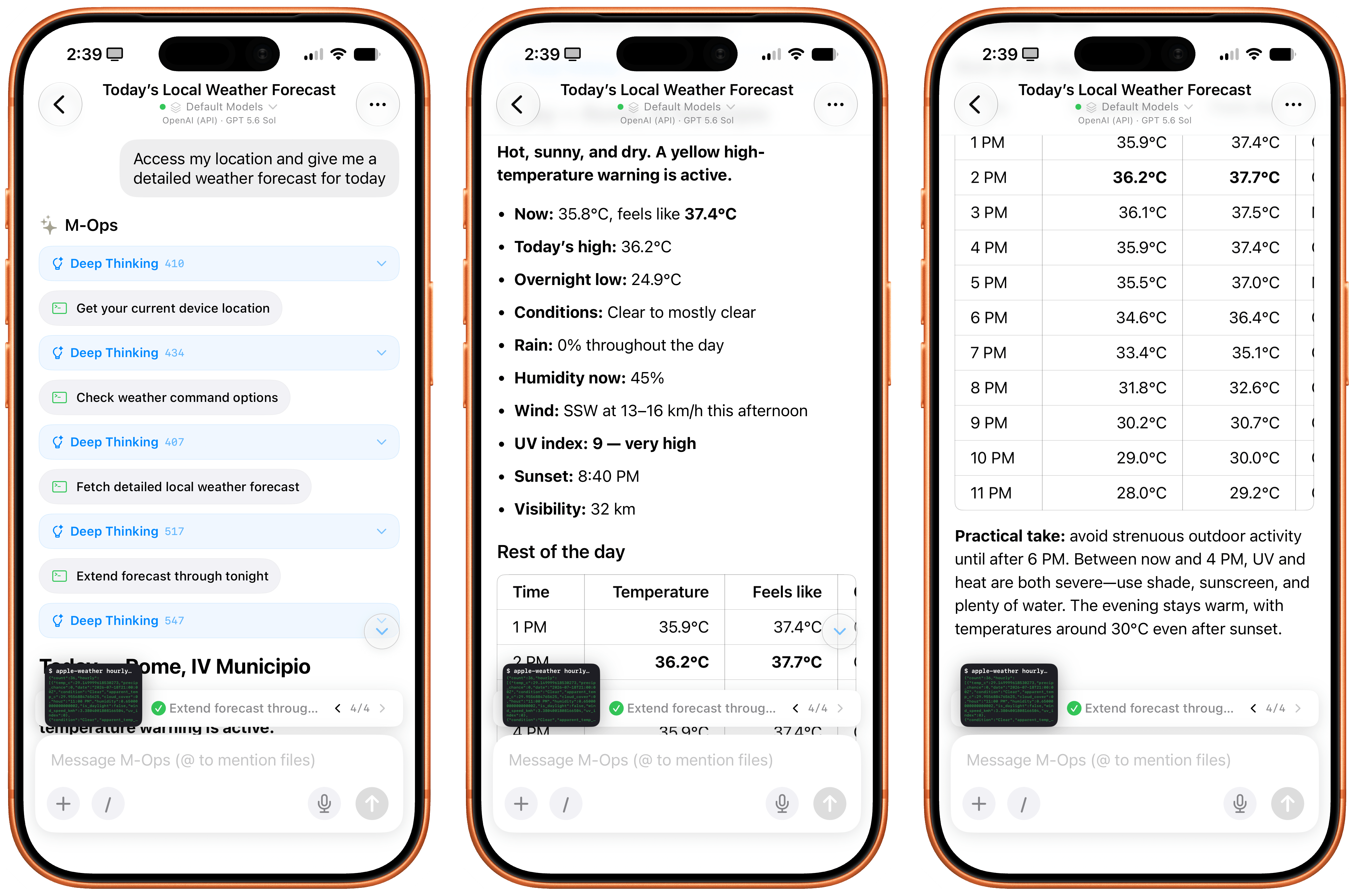
I think you get the idea.
By combining intelligent reasoning models with extensive integration on Apple platforms, Open Minis can deliver an agentic experience with no equal on iOS right now, which also serves as a fascinating preview of Siri AI’s potential future for power users. As a result of all this, while I still enjoy Siri AI as a basic voice assistant more capable than it was before, I’ve completely replaced its text-based chatbot functionalities with Open Minis powered by either GPT-5.6 Sol or Kimi K3.
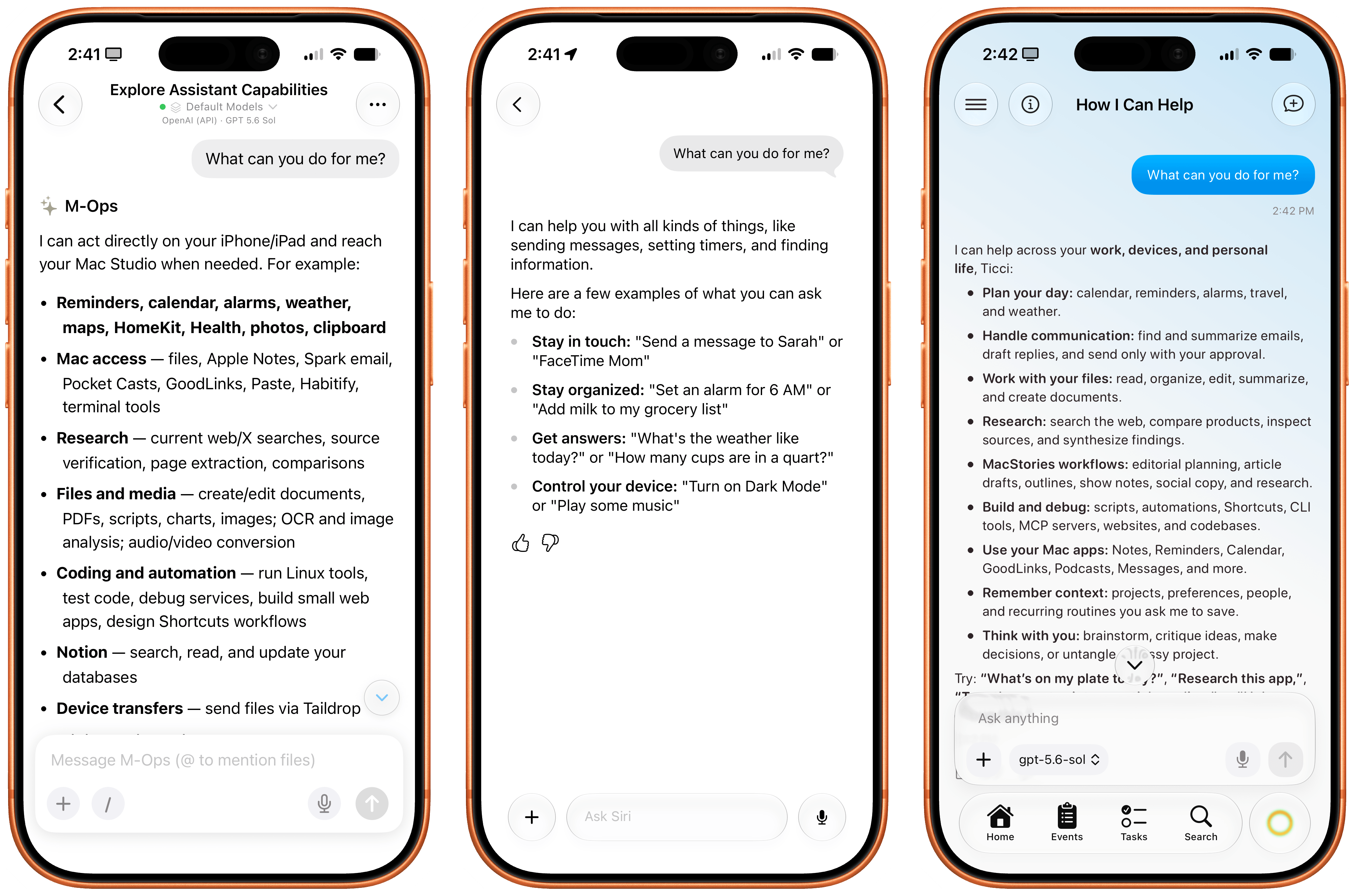
Minis, Siri AI, and the upcoming Halo agent for iOS.
It is ironic that, on the cusp of Siri AI launching to millions of users in English only in a few months, here we have a single indie developer who is shipping an app that puts Siri AI to shame when it comes to getting work done with LLMs on iPhone and iPad today – with any model you want, in any language or region.
Over the next few months, I expect more developers to ship products comparable to (and perhaps even exceeding) Open Minis, based on the same idea of an on-device agentic harness that combines LLMs with iOS-specific integrations. One worth keeping an eye on is Halo, an upcoming iOS agent from Tanmay Sonawane that aims to combine LLMs, iOS integrations, memory, and proactive features based on Andrew Karpathy’s pioneering work on AutoResearch in an elegant, iPhone-native experience. I’m in the early testing group for Halo, and it’s a very promising product that, unlike Minis, runs in a loop on-device (displayed via Live Activities) to gather insights about your conversations, upcoming tasks and events, and more.
As I wrote months ago, I’m surprised that none of the big AI labs are exploring this space more in depth. As Open Minis proves, now that models have grown incredibly capable at long-running tasks and tool calling, there’s a real case to be made for agents that can tap into the iOS filesystem, apps such as Photos and Calendar, and technologies like Vision OCR, location, and speech-to-text at virtually no cost. Can you imagine what a “real” Codex or ChatGPT Work for iPhone and iPad could be with a similar system to Open Minis’ and the agentic loop and harness that drive OpenAI’s models? What could Anthropic do with a Claude Cowork powered by Fable that could access the Files app, run CLIs, and sync your workspace files across devices?
With Siri AI, Apple is finally shipping a pretty good chatbot with world knowledge and personal context. Open Minis feels like the beginning of a whole new category of agentic apps for iPhone, which power users like myself can start relying on and fitting into their workflows today.
Um membro do fórum do MacRumors identificado como mactracker descobriu, na quarta beta do macOS Golden Gate 27, uma nova interface a qual permitirá que usuários personalizem a voz da Siri.
Desativada por padrão, ela lembra, de certa forma, a interface de ajuste dos estilos fotográficos do iOS, com o usuário tendo que segurar e arrastar o dedo — ou, no caso do Siri no macOS 27, o cursor do mouse — por uma malha de pontos brancos.
Como explicado por mactracker, conforme o cursor do mouse navega por essa malha, a voz da Siri é modulada para reproduzir certas características. Quanto mais o cursor do mouse se aproxima de um ponto, mais clara a voz da Siri fica.
Esse “voice pad”, como a interface está sendo popularmente chamada, também conta com animações elaboradas e bastante coloridas, além de vir acompanhado de um áudio de referência — com direito a Áudio Espacial (Spatial Audio) — que fica tocando sem parar no fundo.
Ainda segundo as informações, essa malha comporta 13 pontos diferentes, sugerindo que o novo sistema operacional do Mac ganhará novas opções de vozes para a assistente virtual. Como a quarta beta do macOS 27 não conta com todos os modelos de voz necessários, no entanto, apenas 2 opções personalizadas podem ser definidas pelo usuário por enquanto.
A nova versão do sistema também inclui um arquivo com descrições (algumas mais completas do que outras) para todas essas 13 vozes:
| Gênero | Idade | Características | Estilo |
|---|---|---|---|
| Feminino | Jovem | Fala mansa | — |
| Feminino | Jovem | Sussurrante, brilhante, suave | — |
| Feminino | Adulto na faixa dos 20 anos | — | — |
| Feminino | Adulto na faixa dos 30 anos | — | Amigável |
| Feminino | Adulto na faixa dos 30 anos | — | Entusiasmada, relaxada, aconchegante |
| Feminino | Adulto na faixa dos 40 anos | — | — |
| Feminino | Velho | — | — |
| Masculino | Jovem | — | — |
| Masculino | Adulto na faixa dos 30 anos | Profunda | — |
| Masculino | Adulto na faixa dos 30 anos | Suave | — |
| Masculino | Adulto na faixa dos 30 anos | Rica | Amigável |
| Masculino | Velho | — | — |
| Masculino | Desconhecido | — | — |
Ativar essa interface, porém, não é exatamente fácil, com usuários tendo que desativar o recurso System Integrity Protection (SIP) e sobrepor o código interno usando um depurador. Caso contrário, o sistema continuará exibindo o menu tradicional da voz da Siri no app Ajustes do Sistema (System Settings).
Por fim, embora essa interface tenha sido encontrada apenas no macOS 27, ela utiliza o mesmo framework de configuração da Siri que o iOS 27 e o iPadOS 27, o que sugere que ela também poderá dar as caras em iPhones e iPads. Ademais, também foi confirmado que ela será localizada para 44 outros idiomas.
via MacRumors


The AI frontier from the two big labs (and – we have to be honest with the numbers here – probably SpaceXAI and Meta now, too) is in a completely different league at the moment. I spent my first couple of weeks with Siri AI trying to convince myself that I could replace Codex with Siri AI, and that was the wrong approach. There is a potential future in which Siri AI can become a more proactive and capable agent, but that’s not what Apple is shipping this year.
[…]
Siri AI is a dramatically better Siri for typical Siri stuff. The new Siri understands your commands and nuanced requests better because of the LLMs behind it; it can often perform multiple requests in one go (such as setting multiple timers with one command); the new expressive (and customizable!) voices sound great, and they’re terrific at reading and summarizing notifications. Apple’s first advantage compared to other chatbots is right here: only Siri can integrate with the iPhone and iPad to this extent, so even if the Foundation models aren’t as smart as the competition, Siri can do a lot more for most people on their devices because neither OpenAI nor Anthropic have OSes they can control.
[…]
The biggest issue I’ve encountered is the inconsistency of it all. Very often, the new Siri AI still replies with a generic “Uh oh, something went wrong“ error that doesn’t explain what the error was or why it happened. Sometimes, I ask a question via voice, and it errors out, but then a few seconds later, I type the same question in the app, and it’s fine.
[…]
My problem is that, right now with Apple’s own apps, both the index and Siri’s ability to perform actions are very inconsistent. The assistant hallucinates abilities it doesn’t have, and it frequently just doesn’t work.
The good news is that Siri AI is capable: impressively so, at times. In the lowest of low bars, it certainly beats the pants off the previous incarnation of Siri, but its access to your own personal data and all of the app on your phone also unlocks a host of new possibilities.
But it’s also not without the pitfalls that underlie all LLM-powered chatbots: errors in understanding, hallucinations, and so on.
[…]
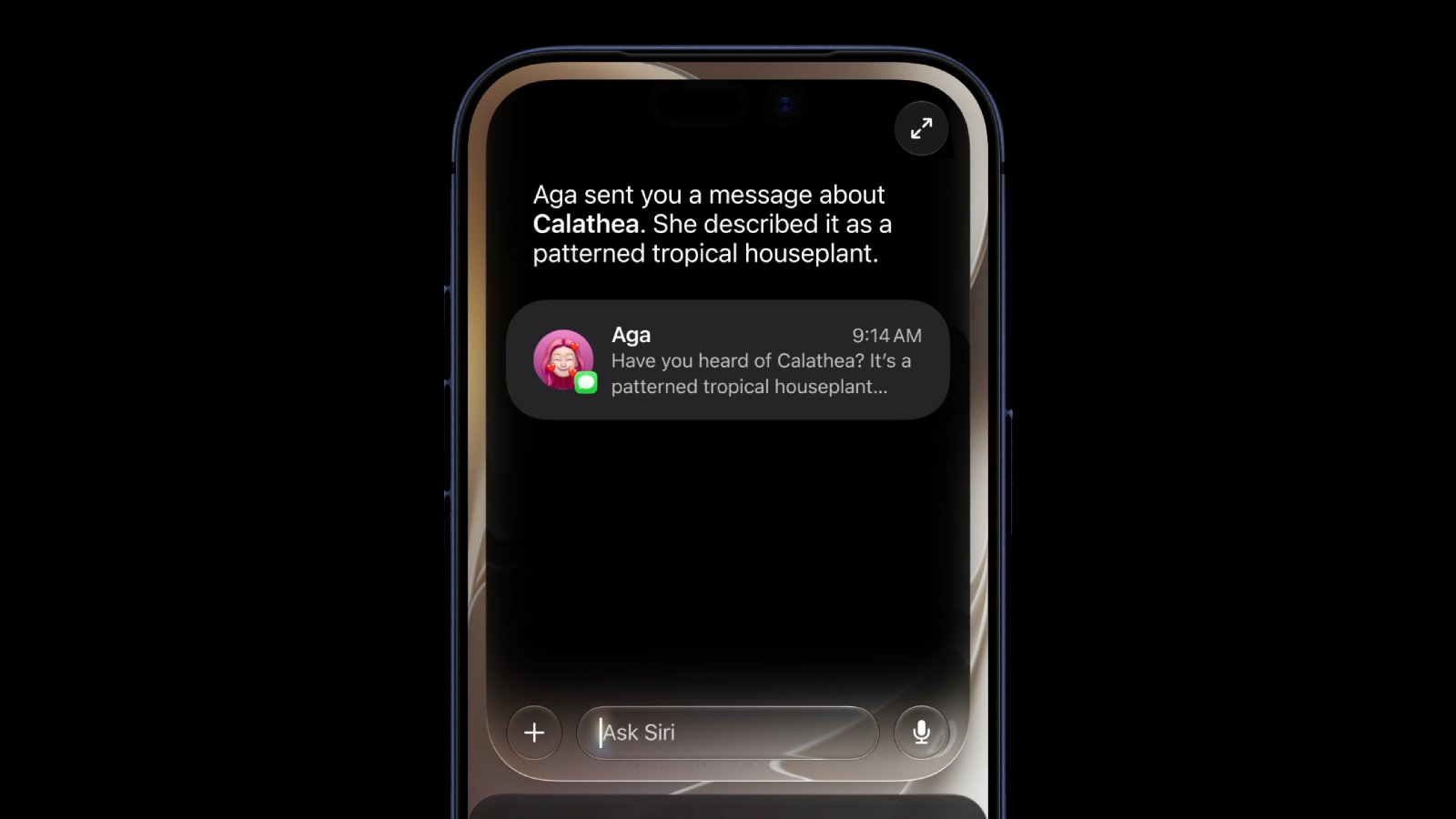
The app itself is pretty barebones, letting you view those conversations in List or Grid layouts, select multiple conversations to delete them, and pin or rename any single conversation. In Settings : Siri, you can choose to either open to the overview or to a new conversation and decide whether old conversations are kept for 30 days, 1 year, or forever. It’s a little strange that one-off queries (“What’s the average height of the Norwegian World Cup team?”) are stored alongside more involved conversations (“Can you help me build a specific RSS feed for this site?”); I also ended up with a few orphan blank “New conversations” which I deleted, but it’d be nice if you could filter to find those. Conversations are fully searchable and sync between devices via iCloud.
Despite the current limitations, if you use chatbots as a replacement for Google Search, you’ll probably have a good experience with the new Siri app. That’s because even in these early betas, if you ask Siri something like, “Give me a day trip itinerary for a trip to Chicago this Saturday,” you’re likely to get good but pretty middle-of-the-road recommendations. From there, though, you can drill down with follow-up queries to get something more in line with your tastes. The results include source links you can follow, too. Given the ad-strewn mess that web search has become, using Siri for this sort of thing is a meaningfully better experience.
The one caveat on Siri’s world knowledge is that it’s roughly 2-3 weeks stale in some places.
[…]
A good example is Music. You can prompt Siri to play a song, but most of the rich metadata in the app isn’t exposed to Siri, which is a shame because it is exposed elsewhere, for example to AppleScript.
Previously:
Update (2026-08-04): Benjamin Mayo:
Thanks to the top-to-bottom revamp that is Siri AI, Siri is reliably intelligent. Finally. We are still in the midst of beta season, and Apple is yet to confirm whether Siri AI will formally launch with iOS 27 in September or sometime later in the year, but the feature is up to scratch. There are bugs and glitches and edge-case quirks, but on the whole, it wipes the floor with old Siri and is competent enough to supplant my everyday usage of other chatbots too.
[…]
Siri AI can get a snapshot of what’s on screen, but it cannot control the UI for you autonomously. As such, if you ask it to do something outside of its library of available app actions, it will say it can’t do that. Often, it can quote the relevant steps for you to do it yourself, but obviously that falls short of the ideal experience. This feels a bit lacklustre to people already embracing AI agents en masse. Claude and Codex on Mac do not hit these walls; they are all too keen to move your mouse for you and run terminal commands until the job is done.
Previously:
That show of respect for its customers may change with iOS/macOS 27. Reports suggest that, at least in the first beta, Apple Intelligence is mandatory[…]
[…]
“So what’s the problem?”, you might ask. Apple’s AI takes up several gigabytes of storage and leaves less headroom for RAM.
Those are small inconveniences, however, compared to my biggest gripe with Siri AI: It’s completely ruined Spotlight.
[…]
The new Siri-first interface that presumes that if you’re searching for anything but an app or file, you must want Siri to feed you a few links of Apple Intelligence’s choosing.
Getting to a web search from a Spotlight query now requires multiple taps: Type your query, tap “Show Results” (careful: hitting enter will trigger Siri to craft a response, eliminating the possibility of seeing any actual Spotlight content), tap on “Show More” next to the list of Siri-surfaced web results, scroll down until you see Search Google (or whatever engine you have set as your default), then tap that.
Apple Intelligence used to be opt-in, but now it seems that you can’t even opt out. I had previously mentioned the removal of the switch in the context of hypocrisy, but it seems there are enough issues here for it to warrant its own post. Also, I had previously written that the switch was combined with Siri, meaning that you could turn off Apple Intelligence if you turned off Siri, too. I now doubt that’s the case.
I’m thinking that asking for a switch to turn of “Apple Intelligence” systemwide is like asking for a switch to turn off Spotlight.
Indeed, we can turn off Spotlight, both the indexing (except, alas, for APFS Time Machine volumes) and the UI, and I think that’s a good thing.
Previously:
Apple today introduced the next generation of Apple Intelligence, powered by a bold new architecture that integrates the latest Apple Foundation Models deep into Apple’s platforms and is uniquely designed to protect users’ privacy.
[…]
The next generation of Apple Intelligence also helps power Siri AI, an entirely new version of Siri.
[…]
Image Playground offers new powerful ways for users to bring their imagination to life. They can create high-quality images in virtually any style, now including photorealistic, thanks to a new generative model that runs on Private Cloud Compute. This is a major transformation for image generation across platforms. And generated images will automatically include a hidden SynthID watermark to identify them as AI-generated.
[…]
Now Messages offers one-tap suggestions based on the context of users’ conversations, making it easier than ever to get things done, such as creating a reminder or a note.
[…]
Apple Intelligence powers even more enhancements across operating systems. With automatic proofreading, users receive improved suggestions for spelling and grammar as they type across the system.
Apple WWDC26 “big features”: selling a rebranded gemini.
What’s confusing about this Apple-Google partnership is that Google pretty much calls all things AI “Gemini”. The models are “Gemini”, the assistant is “Gemini”, and the feature integrations are “Gemini”. So Apple is taking pains to emphasize that they’re building atop the Gemini models, not the Gemini assistant.
Google creating the model, Apple figuring out how to integrate it and make it easy to use. Are we back to Apple and Google each focusing on what they do best?
This is my favorite Apple event in a long time.
Instead of bombarding you with a million new features that mostly feel half-assed, this feels like it’s actually catered to the user experience instead of to marketing checklists.
All of these AI additions to MacOS/iOS look like nice improvements, but somehow it all feels unambitious given the current state of AI.
But I suppose it’s better for them to underpromise given what happened with Siri last year…
As I expected, Apple is going to punt the “on-device” story for Apple Intelligence and push towards the “private cloud compute” story for the models that you’ll actually want to use. I’m glad on-device isn’t going away, but it’s clear a hybrid approach is absolutely necessary
Apple’s most advanced on-device AI model in iOS 27 requires a minimum of 12GB of unified memory, meaning the standard iPhone 17 is excluded.
The 16 Pro was explicitly sold as having Apple Intelligence-capable hardware.
Apple today said it is expanding Private Cloud Compute (PCC) beyond its data centers, partnering with Google and NVIDIA to run Apple Intelligence workloads on Google Cloud.
[…]
All server components and software are part of a trusted computing base subject to verifiable transparency and no-privileged-access guarantees, plus Apple has a cryptographically verifiable ledger of all Google Cloud hardware that is part of the PCC fleet to mitigate the risk of supply chain attacks. PCC on Google Cloud also uses many of the same architectural security patterns as PCC on Apple silicon.
PSA: Remember that Apple Intelligence is disabled in macOS if you boot from an external drive.
See also: Mac Power Users Talk.
Previously:
Update (2026-06-19): Apple:
As we continue to refine our approach to image generation, the ImageCreator class is being discontinued and will no longer work in iOS 27, iPadOS 27, macOS 27, and visionOS 27 or later.
[…]
Transition to presenting the Image Playground sheet, which provides a consistent, system-managed image generation experience. Alternatively, you can integrate another image generation service of your choice.
Unfortunately, due to the Digital Markets Act (DMA), Apple will not be able to ship Siri AI in the European Union with the release of iOS 27 and iPadOS 27. Over the past several months, EU regulators did not accept any of Apple’s proposed solutions to bring Siri AI to the EU while safely supporting other virtual assistants.
[…]
EU users will be able to access Siri AI on macOS 27 and visionOS 27. Developers located in the EU will not be able to test or use the new Siri AI features for their apps on iOS 27, iPadOS 27, and watchOS 27.
[…]
According to EU regulators, the DMA requires Apple to give any AI system nearly unlimited access to a user’s device, as well as the ability to act on that access autonomously without a user’s ongoing visibility and control.
[…]
Apple designed a solution called Trusted System Agent — an intermediary that would allow virtual assistants to safely access the same features and capabilities as Siri AI for devices in the EU. Apple also shared a plan to launch Siri AI in the EU while gradually rolling out this new solution over an 18-month period. The European Commission said no. In fact, the European Commission did not agree to any of Apple’s proposals.
This phrasing is not very clear, perhaps intentionally so. Apple is trying to give the impression that it did all this extra work to meet the DMA’s requirements, and yet the EC rejected its proposals, so it’s their fault Siri AI isn’t shipping in the EU. But it looks like the crux is that the Trusted System Agent is currently vaporware. What the EC rejected is that Apple wanted to be able to ship Siri AI now on the promise of future openness. The TSA would actually be built during this 18-month window of exclusivity. It’s not surprising that the EU would reject that proposal. The App Store doesn’t approve apps that flout the guidelines but promise to comply later. It doesn’t even entertain proposals of the form, “If I built this would it be approved?”
European Commission (via Steve Troughton-Smith, Update: John Gruber, Mastodon):
So first, the decision not to roll out Siri AI in the EU is Apple’s and Apple’s only.
Because absolutely nothing in the DMA prohibits Apple from introducing new products in the EU.
What Apple is however not allowed to do, just like any other gatekeeper, is to close the market.
[…]
Apple simply made a request to the European Commission to be exempted from their interoperability obligations under the DA.
And this for at least 18 months on top of it. Guess what? That’s not an option.
Apple said it detailed its plans for Siri AI to EU regulators six months ago, along with a technical proposal to allow secure third-party access to that data.
“In essence, a commission that’s asking us to conduct a very risky experiment on many, many, many tens of millions of users,” Greg Joswiak, Apple’s marketing chief, told reporters, “and we only want to ship these capabilities when we can do so safely.”
The EU said not to ship it without the TSA, yet Joswiak spins this as the EU asking Apple to be reckless? And if Apple wanted to ship them safely, why did it stop working on them?
Apple spoke of having spent hundreds of thousands of engineering hours on changes to comply with the EU. In the new report, though, Apple now says that it no longer knows what to work on.
So currently none of its engineers are working on adapting Siri AI to meet the EU’s demands.
It seems like Apple isn’t taking this very seriously. They’re more interested in trying to score PR points by blaming the delay on the EC rather than on building something compliant. So I guess the EC was prescient not to grant an exemption based on the promise that they’d follow through with the TSA.
However, do I think Apple should be made to open up that level of system access?
Honestly yes. They are worried about protecting my data. But it’s MINE. Me, the user.
Stick a big privacy prompt, maybe a system settings screen and reboot, but I want access to my data!
We can look to BrowserEngineKit to see how well it works out to introduce a trusted intermediate layer that Apple doesn’t itself rely on. And this seems like a much harder problem.
Yeah, that privacy layer is a stupid [non] starter. “Find the place my friend said we should go swimming and give me directions”
The only way that query can work with an intermediary layer is if the AI asks that layer to do the searching for them and only gets the response back.
Except that basically kills the advantage of LLM agents & instead delegate all the ‘smart’ parts to some dumb on device model Apple makes.
Previously:
Update (2026-06-11): Amy Worrall:
I keep seeing people (usually Americans) confused by where the EU is coming from with Apple and the DMA, eg “how can they care about privacy but also demand AI companies can access your data?”
My read is, the EU’s starting point is that a gatekeeper cannot treat itself as inherently more trustworthy than any other company. So if anyone’s AI can access your data, including Apple’s, it’s not up to the gatekeeper to say “we trust ourselves but don’t trust other companies” and force that on users.
The users should get to choose who they trust. And I think Apple is trying to draw a different line than it says. It worries that AI could be hijacked to steal your passwords and photos. But you can already install apps that manage and access that data. You can also install apps that access your calendar and mail data, and these apps can incorporate AI. Such apps actually get more access than what the EC wants because they must communicate with your servers directly. I would rather let an AI search my downloaded e-mails than read/write to my IMAP server, but Apple is blocking that option. The actual line it’s drawing isn’t that AI can’t access your data but that (aside from iMessage) it can only access it via additional engineering work and additional hoops for users to enter credentials. It seems like what Apple really wants is to make it hard for anyone to compete with Siri.
Update (2026-06-12): Cory Birdsong:
I’m skeptical that Siri AI is even capable of being meaningfully private or secure. As far as I know there is no mitigation for prompt injection, as Matthew Green describes here.
If it has access to private information, is exposed to external input and can access the Internet then how can they meaningfully claim it’s private or secure?
There’s a lot to unpack here, including more background information — and on-the-record statements — from a briefing Apple held Tuesday that I was invited to at Apple Park.
It’s frustrating that Apple has said so little on the record. They want to communicate that their “offers for compromise have been rejected,” but what exactly did they offer? Personally, I don’t think the TSA would be a very good solution because it would lock in both the limitations of Apple’s technology and their role as a gatekeeper. But Apple did not even say that the EC rejected the idea of the TSA, only that it rejected their proposal to violate the law for 18 months while building it.
But the bottom line is that Apple’s public statements regarding the DMA and the European Commission have never been this strident before.
[…]
Now, they’re a bit more on war footing. There’s a massive gulf between what Apple is willing to do with Siri AI in the EU and what the Commission is demanding from Apple for DMA compliance.
The European Commission isn’t demanding anything, the law is demanding it. The laws have been in place for several years now, Apple is currently in default of the law on several fronts, and is fighting its existing fines.
When the Chinese government wanted access to user data, Apple complied, but when the EU parliament voted for their citizens to be able to choose how to share their own data, that put Apple on a “war footing.”
There is some kind of irony in how Apple isn’t allowing Europe access to the new AI stuff; and meanwhile for the US, Apple is removing the setting for us to opt-out of it, effectively forcing it on us.
That’s how it is these days, huh? Either a government or a giant corporation makes our technology choices for us. We don’t get to choose for ourselves.
Previously:
Update (2026-06-17): John Gruber:
What exactly is the motivation for Apple and Google to engineer entirely separate systems for the EU to bring new features into compliance with the Commission’s broad interpretation of the DMA? Because if Apple doesn’t engineer a DMA-compliant version of Siri AI, iOS users in the EU will ... switch to Android, whose system-level AI was deemed noncompliant by the Commission a few months ago?
I briefly hoped that the DMA would lead to a sort of California effect for software, where products are designed for the stricter (more open, in this case) jurisdiction, and everyone else reaps the benefits, too, because that’s easier for companies than making separate versions of their products. But it turns out that Apple finds it well worth it to feature flag away the EU features it doesn’t want us to have, as well as the ones it doesn’t want to adapt for the DMA.
This doesn’t directly hurt Apple. It doesn’t force Apple to design, engineer, and ship a compliant EU-exclusive version of Siri AI that supports plug-and-play LLM back ends. It only hurts iPhone users who live in the EU, who are stuck with the old dumb version of Siri for the foreseeable future.
This demonstrates a market failure or legislative failure, depending on how you look at it. Both halves of the duopoly are in conflict with the law of the second largest economy in the word. Users will get a worse Siri, but this doesn’t bother Apple enough to do anything about it. Maybe the customers in the EU can be used as a bargaining chip. Neither Apple nor Google is worried that a competitor will come along with a compliant phone to challenge their dominance.
Here we are two years later and I think the answer is more clear than ever which side of the continental divide is more fun.
Gotta admit that as an EU citizen, I feel handicapped when it comes to brainstorming ideas to utilize Foundation Models.
Like, if I were to build a new app around them, it’s difficult to gauge if this is something Siri AI does out of the box when it isn’t available to me.
And unlike Apple, I intend to build software for the entire world.
Apple is acting out of greed and spite (see their hairbrained fee structures for alternative marketplaces as an example), but also yes, the DMA and enforcement thereof seems like a particularly difficult and capricious regulatory dynamic.
[…]
Those arguing that Apple is acting purely out of spite seem to suggest there is some obvious solution for iPhone Mirroring that would satisfy the interoperability mandate, but they never go into what that obvious solution is because they don’t know. They don’t know because I would guess no one does, not even Apple and certainly not the European Commission.
As far as I can tell, the European Commission doesn’t see it as their responsibility to help gatekeepers design features ahead of time in a way that should be compliant with the DMA. What they want instead is to decide whether or not a given feature runs afoul of the DMA after its released in the EU and presumably after they’ve gotten feedback from third parties.
If a developer emails Apple and asks if an app idea they have will be approved, they will get told to build it, submit it to the App Store, and see. The EU is the App Store here, and Siri AI is the app. I guess Apple don’t like their own policies.
I sympathize, even though Apple is in a better position than the developer, because it has more resources, because it would only potentially be blocked from shipping in one market, and because it can still sell its product in the EU, just with certain features disabled. Building something that might not be accepted is risky, but if you don’t submit anything that you think would be complaint with the rules, you don’t seem very serious. It’s still unclear to me exactly what Apple’s plan is. Its press release says it “will continue working” on bringing the features to the EU, but its SVP of marketing said in an interview that “none of its engineers are currently working on solutions.” Perhaps this implies that it’s banking on a legal or political solution rather than a technical one.
Update (2026-06-25): Jack Wellborn:
While the relationship between the European Commission and Google tells us nothing about playing ball, it tells us exactly how inconsequential support for alternative marketplaces is when it comes to regulatory scrutiny of integrated features. Apple hasn’t played ball with alternative marketplaces and now its new AI-based features are being withheld from the EU lest they get scrutinized for fines by the European Commission. Google hasn’t had to play ball with alternative marketplaces and now its new AI-based features are either being scrutinized for fines by the European Commission or being withheld lest they also get scrutinized. The European Commission is, rightly so in my opinion, regulating both operating systems equally and regardless of their support for alternative marketplaces.
It struck me today what a contrast this is with the rest of the AI world, increasingly connected via MCP. Imagine if Gmail was only accessible to AI on Android phones. If Teams was only accessible from a Windows Surface laptop. That is the kind of environment Apple’s policies create, with data locked into silos and monopolies free to leverage their existing strengths into dominance of new technologies too.
No thanks. Just as I should be able to sideload an app onto my own phone, I should be able to choose whether ChatGPT can access my iMessage history. The world is not going to come crashing down by giving users control of their own data.
Update (2026-07-02): Tim Hardwick:
Apple CEO Tim Cook held “constructive” talks with EU tech chief Henna Virkkunen on Tuesday about releasing Siri AI in the bloc while complying with the bloc’s digital rules, reports the Financial Times ($).
[…]
As for Apple’s proposed Trusted System Agent, a Commission official told the publication its contact with Apple on the idea was limited, and that it lacked a concrete proposal or details on how such an agent would work beyond the general concept. The official claimed Apple “focused on obtaining a green light to delay compliance.”
Update (2026-07-03): Nick Heer:
The DMA has been in effect for nearly four years and there is no reason why either party should be having so much difficulty with this proposal stage. Either the Commission is mischaracterizing Apple’s engagement, or Apple’s representatives need to be far better prepared.
It seems like Apple’s strategy is to encourage its customers to pressure the EU into changing the rules.
Previously:
Apple (Hacker News):
Siri AI is an entirely new version of Siri deeply integrated into iPhone, iPad, Mac, Apple Watch, and Apple Vision Pro. It can draw on personal context understanding to search across messages, emails, photos, and more, and get things done across apps with even more systemwide app actions. Additionally, Siri AI can answer questions related to the content on a user’s screen or go out to the web to get up-to-date information using broad world knowledge and generate a helpful answer. A dedicated Siri app allows users to revisit a past conversation or kick off a new one — all in one place — and uses iCloud to privately sync conversational history across a user’s products.
Apple (MacRumors, MacStories):
Powered by the next generation of Apple Intelligence, Siri AI is a completely reimagined version of Siri that is more helpful, more capable, and more intelligent. With detailed, engaging responses and natural back-and-forth conversation, Siri AI helps users get more done than ever.
[…]
Siri has been rebuilt from the ground up with powerful AI at its core. It takes full advantage of the bold new architecture for Apple Intelligence, including the next generation of Apple Foundation Models that run on device and on servers using Private Cloud Compute. When Private Cloud Compute is handling users’ requests, their personal data is not stored nor made accessible to Apple or anyone else. Outside experts can continue to verify this privacy promise at any time. Additionally, Siri AI uses the system orchestrator to tap into core capabilities like the Spotlight index and App Toolbox, which work entirely on device to keep users in control of their data.
[…]
For products that support Apple’s most advanced on-device model ever, Siri AI offers even more expressive voices, as well as a major boost in accuracy with systemwide dictation. Users have the ability to customize the expressiveness and pace of Siri’s voice so it’s just right for them. Dictation now captures what users say as polished text with greater precision, automatically handling capitalization, punctuation, and formatting as they speak. With improved speech understanding, users can speak naturally and trust that their words will appear clearly, accurately, and as intended.
I remain uninterested in these more advanced Siri features. They matter in that Apple needs to show that they’re not “behind” and that they can actually deliver on what they announce and advertise. But I don’t find the use cases compelling and wouldn’t trust the results.
If you really care about a particular concert, would you believe Siri about how the tickets work and that it will auto-create a reminder at the right time? Why should I believe that it can figure out whether a particular irregularly shaped object can fit inside an irregularly shaped container when said shapes are probably not even published on the Web? Can it really dig into my e-mail to find the right flight info? An answer without being able to see the sources is not useful. And I certainly don’t want it to pick for itself which vacation photos to send out.
I just want the basic features—from a decade or so ago, like music controls, reminders, and access to my purchases—to work quickly, reliably, and offline to the extent possible. I did not hear anything to suggest that this was a focus. Instead, everyone is celebrating how slow the demos were because that proves they weren’t fake.
It’s actually super important that the Siri demo was kind of slow, because it emphasized it was real. Would be even better if it were live, though.
The other interesting thing to note from the keynote: watching the demos, there is ZERO doubt these are real, recorded demonstrations on live devices. There will be no confusion about what is real or fake like there was at WWDC 2024 and the initial attempt at the new Siri.
In fact, I think most of them were single takes of multiple demos back-to-back. That’s the way it should be, even when they feel a little slow.
Who the fuck wears a $4000 VR headset to find out if their boots will fit in their fucking backpack?
THATS the best example they could come up for that feature?
also I wouldn’t trust the answer anyway
These Siri demo’s feel like OpenAI demo’s from a view years ago. However, this is built in to the operating system.
Much like Dropbox vs iCloud, I feel like long term, once it’s good enough Apple will succeed in making AI a “feature” rather than a product.
Apple needed to show that they could make a version of Siri that wasn’t three years behind. They didn’t succeed.
And, if your standards are the state of the art in AI circa June 2024, when Apple took their first crack at answering the question, they did quite well.
[…]
What’s fascinating about this specific demo is that it also showed just how far behind Apple is.
[…]
Still, the bubble was strong enough to convince OpenAI to make the exact same mistake Dropbox did: the company somehow convinced itself that it could make enough money selling subscriptions to consumers; Anthropic, meanwhile, realized that it was enterprises who were willing to pay for AI’s massive productivity benefits, even as OpenAI failed to capitalize on their consumer market penetration by refusing to build an advertising product.
This is a long-winded way of saying that I don’t think that Apple’s agentic shortcomings are a big deal, at least for now. Agents help you do work and be more productive, and consumers don’t want to work or care about being productive. What they do want to do is watch short-form video, and an iPhone is simply much better at that than any other device ever will be; in that context, Siri being good enough is enough, and it appears that Apple crossed that bar.
They need to execute, they need to prove this can scale, and most of all, they need to get third-party apps on board with App Intents and App Schemas. But it seems like they’re doing all of that. This is not a done deal but it is very realistic.
Siri doesn’t have access to the filesystem or tool-calling, so it’s completely unable to do the kinds of tasks you might easily do with Codex or Claude. It’s a good start, but the state of the art has already dramatically shifted over the past year. The question is will Siri move in this direction, or stick to providing answers from the web?
Will Apple introduce its own distinct Codex-style agentic programming model that can do all this, and work with Xcode? You would hope so…
Have new Siri now. Siri still can’t do “turn lamp off and turn plug on” in one command.
The revamped version of Siri that is officially named “Siri AI” will be available to test in the iOS 27, iPadOS 27, macOS 27, and visionOS 27 developer betas starting today, and it is coming to the Apple Watch in a future watchOS 27 beta. “Siri AI” will also be included in the public betas of each platform that are launching in July.
“Siri AI” requires a device that is compatible with Apple Intelligence.
Apple senior vice president of software engineering Craig Federighi has explained why the company launched a standalone Siri app in iOS 27, after previously characterizing a dedicated chatbot as contrary to its Apple Intelligence strategy.
[…]
“We see Siri not as a separate chatbot, just an unintegrated place you go and chit-chat, but rather as an integral, conversational tool that you use in the moment, deeply integrated into your experience.”
Clear as mud.
ldt:
How to bypass the new Siri waitlist (Mac only)
See also: New Siri Waitlist.
Previously:
Update (2026-06-11): famebot:
…And playlists, contacts, settings and preferences. Peel off the agentic slop bandwagon and focus on core performance, smarter caching, and resilience under adverse network conditions.
Love the new Siri, sick.
Update (2026-06-12): Juli Clover has a hands-on video.
Though this is a test conducted on the very first version of Siri A.I. from a fixed point in Calgary, it seems to work quite well. So far, it is better than any version of Siri Apple has released yet and, as you can see above, it is almost as good as the original 2010 demo, before Apple acquired the company.
Update (2026-06-16): Riccardo Mori:
On the one hand, if Siri has indeed become this reliable at understanding queries like those demoed so far, it’s indeed impressive. On the other hand, I can’t help but ask myself, once again, whether people at Apple even know how regular people actually use their phones and devices.
Apple executives downplay and obfuscate the role of Google in Siri AI. The Siri AI announcement didn’t even mention Google or Gemini once! Does anyone actually believe Apple’s BS? The argument seems to be that since Google made a bespoke implementation for Apple, Google is not really involved, and it’s all Apple. Ridiculous.
It’s really odd to me that Apple is getting so much credit for Google’s work. Siri now “works” to the extent it does because Siri is to a very large extent Gemini, and Apple has wrapped that in a bow.
Apple didn’t “nail” anything. Apple failed at its own internal efforts and was forced to outsource.
This is the advantage of being a platform: you can fail and still win.
Chance Miller (via John Gruber):
Apple’s Siri team, led by Craig Federighi, held a post-WWDC keynote tech talk with members of the press this afternoon to talk through iOS 27 and the new Siri AI.
During the talk, Federighi shared more details about Apple’s collaboration with Google.
Apple looks like it will use some combination of Google Gemini models, combined with Google’s Confidential Inference and Apple’s own Private Cloud Compute for private hosting. These systems will process both your queries and evaluate private data from your devices.
[…]
Apple has since “expanded” PCC to encompass Google’s hardware as well. I will confess that I find the details of the new “expanded” PCC just a bit vague. It sounds a lot like Apple is primarily going to rely on Google’s existing confidential compute (running in Google datacenters) to process this data, but they’re bolting on a new layer of technical security to control which models are actually running. In any case: security experts can argue about whether this is good enough to keep Cozy Bear away from your data. What I will grant is that it’s probably good enough to keep Google and Apple from accessing your stuff, which is what most people are worried about in the first place.
So why am I so nervous?
[…]
So far we’ve discussed two adversaries: the misaligned designers of private agents (such as search operators), and the possibility of remote prompt injection attacks. But of course, in any discussion of technical privacy systems we need to talk about the last elephant in the room: your government.
Previously:
Ainda que não seja perfeita, a Siri pode ajudá-lo em diversas coisas — como ativar alarmes, conferir a previsão do tempo ou abrir um aplicativo.
Em se tratando do Apple Watch, a assistente pessoal da Apple pode ser ainda mais útil, já que está no seu pulso o dia todo.
Caso você utilize a assistente no seu smartwatch, saiba que é possível habilitar o Ajuste Automático do Volume, que regula o volume de fala da Siri com base nos ruídos de fundo do ambiente onde você estiver no momento.
Veja como habilitar! ⌚️
Posts relacionados
Abra o app Watch, toque em “Siri” e em “Respostas da Siri”. Depois, habilite a opção “Ajuste Automático do Volume”.

Para escolher o nível, vá até “Nível” para selecionar “Mais Alto”, “Padrão” ou “Mais Baixo”.
Abra os Ajustes (Settings), toque em “Siri” e vá em “Respostas da Siri”.

Controle a função na seção “Volume da Voz – Alto-falante”.


NOTA DE TRANSPARÊNCIA: O MacMagazine recebe uma pequena comissão sobre vendas concluídas por meio de links deste post, mas você, como consumidor, não paga nada mais pelos produtos/serviços usando os nossos links de afiliado.