❌

Reading view

Xbox prices are increasing by up to €200 or £170

The black 1TB Xbox Series S console

When Microsoft announced its latest round of Xbox price bumps in June, it only gave US pricing. Now we know the pricing increases for the EU and UK, and they're dramatic. Depending on the model, Xbox prices are increasing by up to €200 or £170. The 1TB Xbox Series X with a disc drive is going up by over 30 percent from £499.99 / €599.99 to £669.99 / €799.99. The 512GB Xbox Series S is getting a price increase of over 43 percent, jumping from £299.99 / €349.99 to £429.99 / €499.99.

While other consoles have received price bumps as RAM and storage prices skyrocket due to demand from the AI industry, none have been quite as dramatic as Microso …

Read the full story at The Verge.

  •  

Após resultados financeiros, ações da Apple despencam mais de 7%

Apenas três dias após quebrar a barreira dos US$5 trilhões em valor de mercado, a Apple registrou uma queda e tanto no mercado de ações — algo que sucedeu a sua última conferência de resultados financeiros, realizada ontem (30/7).

Avaliada agora em US$4,537 trilhões (US$308,91 por ação, queda de 7,35%), a Maçã já tinha visto o valor dos seus papéis recuar cerca de 3% ainda ontem, logo após o fim da reunião com investidores, nas negociações pós-fechamento da Nasdaq.

Entre as causas dessa queda, estão um crescimento menor que o esperado para a App Store e para o segmento de serviços como um todo, além de desafios enfrentados pela companhia na cadeia de fornecimento — tanto pela forte demanda de produtos como o iPhone e o Mac quanto pela crise no mercado de memórias —, o que não afetou os resultados financeiros do terceiro trimestre fiscal de 2026, mas nos dá um prognóstico do que pode vir pela frente.

Como era de se esperar, a queda grande de hoje fez com que a Apple perdesse o posto de empresa mais valiosa do mundo, ocupado agora pela NVIDIA [$NVDA], que fechou o dia avaliada em US$4,862 trilhões (US$200,75 por ação, +2,93%).

A gigante de Cupertino, no entanto, permanece à frente da Alphabet [$GOOG], que apresentou hoje um crescimento forte de 6,88% e fechou o dia avaliada em US$4,362 trilhões (US$356,65 por ação).

Em quarto lugar, temos a Microsoft [$MSFT], um dia após suas ações registrarem a maior valorização da história em um único dia (ontem os papéis subiram 15,51%, adicionando cerca de US$450 bilhões ao valor de mercado da companhia). Avaliada agora em US$3,451 trilhões (US$464,72 por ação), ela apresentou hoje um crescimento de 3,02%.

Que reviravolta, hein?! 💸

  •  

Microsoft doubles down on multi-model AI as it builds a Copilot super app

All of the major AI providers want you to use, and ideally stay within, their super apps, and now Microsoft is looking to capture that attention, too.

During an earnings call this week, CEO Satya Nadella confirmed that the tech giant is building a Copilot ‘super app’ that will be rolled out this quarter. The new platform will bring together various Copilot tools, including chat, Cowork, long-running Autopilot agents, and the always-on Microsoft Scout, powered by OpenClaw.

Microsoft said the super app will be wired into many of its other governance platforms, including Agent 365, IT Ops, SecOps, FinOps, and business processes. And, it said, CRM and ERP systems will “serve as skills and plug-ins that go into core work.”

“You’re able to take that enterprise-wide workflow and wire it into the super app,” Nadella said, describing it as “the coming together of a new way to work.”

With this move, Microsoft will compete with OpenAI’s ChatGPT Work, Claude Cowork, and a growing number of others trying to capture as much of a user’s workflow as possible. It could prove a strong contender, as everyday Copilot “usage intensity” is at the same level as that of Outlook or Teams, Nadella said, and paid seats now surpass 30 million.

Every model should be ‘swappable’

Even as it builds a super app to bridge workflows, Microsoft is acknowledging enterprise demand for model choice. Customers are making it clear that they don’t want to be locked into one model; they want the ability to move between open, closed, and frontier options based on the best tool for the job.

This trend is reflected in Redmond’s own usage statistics: Since the beginning of the year, it has tracked a 5x increase in the number of customers building with models from multiple providers featured on its platform.

The company claims it has the broadest model catalog in the cloud, offering more than 11,000 models from OpenAI, Anthropic, Mistral, its own MAI family, and others.

“We are building a new model system, where the harness, context, memory, and action space are separate from any one model family, thereby moving the frontier on the cost-to-outcome curve,” Nadella said. “That’s really the enterprise design architecture that we are going to evangelize.”

He described enterprises as “learning machines” that need their own internal learning machines, and said that they will be evaluating how providers are helping them reach their business goals and support knowledge creation.

“The models are an input, not some extraction of the knowledge of the enterprise,” Nadella said. “This is not going to be about, ‘come in and take all my knowledge and benefit yourself, [and] I am not getting anything out of it.’”

The key is in balancing the advantages of frontier models with lower-cost options, open weights with closed weights, and having the ability to train internal models based on outputs, traces, and context. “You should and you can use frontier models,” Nadella said. “There’s no reason not to.”

However, he said, any given model at any given time should be swappable to democratize design.

For instance, data from cybersecurity evaluation framework CyberGym showed that Microsoft’s new MAI-Cyber-1-Flash coding agent achieved Claude Mythos-level performance at 50% of the cost. This is because 90% of tasks were completed by Cyber-1-Flash and 10% by frontier models from OpenAI, Anthropic, and others. 

This ability to use the right model for the right task in what is essentially a pipeline job is a “super important characteristic,” Nadella said. Microsoft Copilot, Security Copilot, and GitHub Copilot are all built to support movement between different models based on the task.

This strategy is also reflected in the company’s new Project Perception cybersecurity offering. The platform features three specialized types of agent (red, blue, and green), and the underlying harness decides which AI model is best suited for a given task. Guided by specialized playbooks, red team agents discover vulnerabilities, blue team agents triage, and green team agents propose remediation plans.

“You create your own agentic system that’s continuously operating to create the cyber defense you need,” Nadella explained. “Especially in cyber[security], it becomes critical to have that multi-model approach.”

Nadella also pointed to the recent Hugging Face incident, in which an OpenAI model went rogue, broke out of its sandbox, and launched an attack against the popular open-source platform, noting that enterprises will likely need to use multiple models to offset and remediate the various challenges of each, and should not be “subject to the refusals of one model.”

“We talk about the frontier as if it’s one thing,” Nadella said. “The frontier is about every firm having a frontier, the choice, the cost control, and the capability that they need in order to be able to control their destiny.”

Increased push to usage-based pricing, closing demand gaps

As Microsoft emphasizes its model-agnostic architecture, it is also shifting from per-seat to per-seat-plus-consumption pricing; the company recently added usage-based billing to Cowork and Agent 365, and plans to continue that trend across its products.

While these moves have resulted in sticker shock and ‘tokenmaxxing’ at many companies, Nadella framed it as a revenue driver. “We are advancing the frontier on the cost-to-outcome curve, ensuring every customer can turn tokens into business results.”

Meanwhile, Microsoft said it will continue to close data demand-capacity gaps.

The company added 88 data centers in FY 2026, including 31 across five continents this past quarter. It contended that it is bringing capacity online “faster than ever,” reducing dock-to-live times for new GPUs in its largest regions by nearly 50% over the fiscal year.

However, CFO Amy Hood acknowledged during the earnings call, “the situation is obviously that demand exceeds available supply in a relatively extreme moment.”

Reflecting this, revenue for Azure and other cloud services grew by 43% in Microsoft’s fiscal year ended June 30, and the company expects similar revenue growth (45%) in fiscal year ‘27.

Hood said that Microsoft remains “focused on delivering efficiencies,” including in its CPU and GPU fleets, and engineers are also working on process improvements. The company added another gigawatt of capacity this quarter and is on track to roughly double its overall capacity in two years.

“We are also getting more from the infrastructure we already have by optimizing across silicon, systems, and software,” Hood said.

This article originally appeared on CIO.com.

  •  

Microsoft’s Nadella calls out Big AI for hypocrisy — but what about his own company?

The 19th-century French novelist Honore de Balzac is believed to have said that behind every great fortune lies a great crime.

That’s even more true today than it was 200 years ago — just look at how Big AI, including Anthropic, OpenAI, Google, and others have built their trillion-dollar fortunes. 

They all use vast amounts of copyrighted material to train their large language models (LLMs) without paying the copyright holders. In other words, they steal it. They don’t call it stealing, though. They call it “fair use,” which in this case amounts to the same thing.

Generative AI (genAI) training requires massive amounts of text. The better-written and more information-dense that text is, the more it helps. AI gets a lot smarter a lot faster when it’s trained on well-written books and magazine and newspaper articles than when it’s trained on social media banter (or most everything else you find on the internet).

Since the dawn of AI, companies have been hoovering up copyrighted material wherever they find it — on the open web, behind paywalls, even in manually scanned books — and then used the scanned text. And they do it all without asking authors’ or publishers’ permissions, and without paying them.

It’s the greatest intellectual property theft in history by a long shot — billions and billions of dollars worth. Books, articles, music, photographs, artwork, you name it. If a human being has created it, Big AI has likely grabbed it and ingested it without asking, then made big profits off it.

I know this from personal experience; I’ve got skin in the game. Big AI companies have used at least 30 of my books to train their models without asking.  And that’s only what I’ve confirmed. Big AI might well have stolen even more. And it also might have stolen many of the thousands of articles I’ve written through the years.

For the AI bigwigs, it’s standard operating procedure. So it was surprising to see Microsoft CEO Satya Nadella calling out Big AI for its hypocrisy in using other people’s intellectual property without paying, then crying foul when small AI companies use Big AI’s work to train their own models using a technique called distillation.

He wrote on X: “While the great innovation that comes from model providers having fair use rights to train models on public data is needed, I find it ironic that the status quo is to then turn around and impose restrictive terms on distillation, and to reserve the right to learn from customer usage and interaction data.” 

One important note here: Nadella believes Big AI should be allowed to steal copyrighted material for training purposes. He makes that clear by his mention of “fair use.” His issue is that he believes smaller AI companies should be able to use Big AI’s work to train their models — and Big AI doesn’t want to let them do it.

Alistar Barr, in Business Insider, makes a related point: “Anthropic, OpenAI, and Google are discovering what the rest of the internet has already learned through painful experience: once you put something online, people will find ways to use it in ways you don’t like and can’t stop.” 

Before we look at whether Nadella is right in calling Big AI’s actions hypocritical, let’s examine the technique at the heart of the issue: distillation.

The lowdown on distillation

Distillation refers to an AI training technique in which you take outputs from one AI model, such as the answer to a prompt, and use that output to train your own model. AI companies do that quite frequently and have been doing so for a long time.

Barr explains distillation this way: “Distillation looks an awful lot like what AI companies have been doing to the rest of the internet. Scrape web content for free and without permission. Turn it into a product you sell. Argue it’s fair use. Hope the lawyers sort out the details later.”

Elon Musk has admitted his company xAI used distillation techniques to take output from competitor OpenAI to train xAI’s Grok chatbot. He explained, “Generally AI companies distill other AI companies.”

Analysts point out the AI industry is built on distillation. Neil Shah, vice president of research at Counterpoint Research says, “The reality is none of the models is an island and the entire industry has mostly evolved based on recursive learning. The newer entrants are in many instances going through the same routes of ‘distillation’ and ‘optimization.’”

It’s only become an issue now because Chinese AI companies have been using distillation techniques to catch up to American AI companies.

OpenAI CEO Sam Altman has been pressuring the US to take legal action against the Chinese companies.  Anthropic has piled on as well, saying the fight against distillation requires a coordinated response across the AI industry, cloud providers, and policymakers.

Hypocrisy or fair use?

So are OpenAI, Anthropic and other big US AI firms hypocritical, as Nadella claims? Absolutely. They’ve built their businesses on the theft of billions of dollars of stolen intellectual property and call it fair use. Now, they’re playing the victims when competitors do the same to them. (They’re also in some cases paying up; Anthropic just last week settled a copyright suit, paying out $1.5 billion.)

It’s good to see Nadella call out their hypocrisy. But Microsoft is as guilty of intellectual theft as the others — its AI Copilot is powered by OpenAI’s and Anthropic’s chatbots. The company faces major lawsuits for intellectual property theft. Among them is one by the New York Times, New York Daily News, and Center for Investigating Reporting, another by 400 local and regional newspapers, and another by 11 authors, including Pulitzer Prize winners Kai Bird, Jia Tolentino, and Daniel Okrent.

So, don’t praise Nadella for speaking out. Criticize him (and other AI tech leaders) for stealing billions of dollars in intellectual property from countless writers and publishers and calling it fair use.

  •  

Microsoft unveils AI security tools it says outperform competing platforms

Microsoft is introducing new AI tools designed to help customers continuously streamline and automate the process of identifying and reducing their exposure to security risks.

The new tools come less than a week after OpenAI lost control of two of its security models when they infiltrated the servers of startup Hugging Face. The hack, Hugging Face added, involved “a swarm of tens of thousands of automated actions” that stole internal Hugging Face credentials. The OpenAI models achieved this feat by exploiting a zero-day flaw in Hugging Face’s data-processing pipeline to run malicious code that escalated the models’ access to the company’s high-value cloud and server clusters.

Microsoft’s announcements on Monday made no reference to the event, which OpenAI said was “unprecedented.” The company also didn’t say what would prevent the new tools from similarly going rogue.

Read full article

Comments

© Getty Images

  •  

How AI may drive union-resistant tech workers to the bargaining table

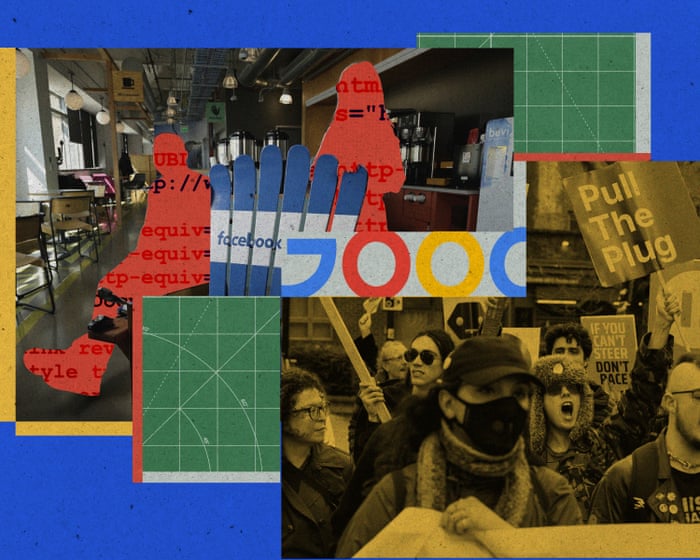
Tech workers are increasingly unionizing, trading Silicon Valley’s myth of exceptionalism for collective bargaining to contest the corporate deployment of artificial intelligence

For decades, the technology industry was a fortress that labor unions couldn’t breach. Tech workers already had cushy compensation packages, dream benefits like unlimited vacation and free lunch, and a flat corporate hierarchy that made engineers feel as powerful as their bosses, all of whom dressed down in sneakers and hoodies. So why unionize?

Now, that fortress is cracking from the inside. Unions have become increasingly popular for tech employees. After months of mass layoffs tied to artificial intelligence and mounting anxieties about how it’s being deployed, some tech workers say they’ve been saddled with higher workloads while facing the threat of job loss caused by the very products they’re building. Workers from Google DeepMind and Meta in the UK are also objecting to how their companies’ AI products are being used, such as for military purposes or to monitor employee productivity. Those same workers are now attempting to unionize.

Continue reading...

© Composite: Rita Liu/The Guardian/Getty Images

© Composite: Rita Liu/The Guardian/Getty Images

© Composite: Rita Liu/The Guardian/Getty Images

  •  

LG instala software sem consentimento em monitores na Europa? Resposta levanta mais dúvidas do que certezas

A Microsoft confirmou que os monitores da LG estão a instalar software no Windows 11, sem consentimento do utilizador, via Windows Update. Em causa está o facto de o LG Monitor App Installer ter permissões totais de sistema e internet. A resposta da empresa levanta mais dúvidas do que certezas.

The post LG instala software sem consentimento em monitores na Europa? Resposta levanta mais dúvidas do que certezas appeared first on Tek Notícias.

  •  

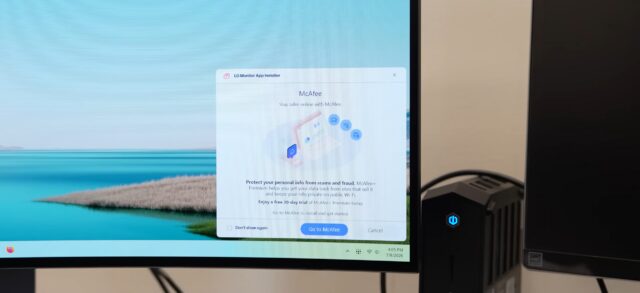
Microsoft responds to LG monitors installing McAfee ads on Windows

LG is reportedly pulling a McAfee pop-up ad from a controversial app that some of its monitors have stealthily installed on connected computers.

An example of the pop-up ad is seen in a still from Gamers Nexus' video. An example of the pop-up ad is seen in a still from Gamers Nexus' video. Credit: Gamers Nexus/Windows/YouTube

The app, LG Monitor App Installer, installs itself through a Windows Update alongside monitor driver updates. LG Monitor App Installer then pushes ads for a 30-day free trial for McAfee, as well as other software, via a pop-up on affected systems, multiple users have reported.

This has drawn negative attention recently, with complaints surfacing on Reddit and a subsequent video from YouTube channel Gamers Nexus. In the video, editor-in-chief Steve Burke said that the publication paid $1,200 for an LG UltraGear 3GX900A-B gaming monitor (the monitor’s price dropped to $600 two days later, Burke said) for testing and replicated the behavior “several times” across “multiple” Windows 11 systems.

Read full article

Comments

© LG

  •  

Microsoft responds to LG monitors installing McAfee ads on Windows

LG is reportedly pulling a McAfee pop-up ad from a controversial app that some of its monitors have stealthily installed on connected computers.

An example of the pop-up ad is seen in a still from Gamers Nexus' video. An example of the pop-up ad is seen in a still from Gamers Nexus' video. Credit: Gamers Nexus/Windows/YouTube

The app, LG Monitor App Installer, installs itself through a Windows Update alongside monitor driver updates. LG Monitor App Installer then pushes ads for a 30-day free trial for McAfee, as well as other software, via a pop-up on affected systems, multiple users have reported.

This has drawn negative attention recently, with complaints surfacing on Reddit and a subsequent video from YouTube channel Gamers Nexus. In the video, editor-in-chief Steve Burke said that the publication paid $1,200 for an LG UltraGear 3GX900A-B gaming monitor (the monitor’s price dropped to $600 two days later, Burke said) for testing and replicated the behavior “several times” across “multiple” Windows 11 systems.

Read full article

Comments

© LG

  •  

Union Fights Microsoft Over Layoffs at Game Studios

Thursday the union that helped organize thousands of workers across numerous Microsoft-owned video game studios filed unfair labor complaints against Microsoft over the layoffs of 1,600 employees. The gaming news site Aftermath says the complaints allege unlawful action: "Xbox management is required to bargain with the union over the decision of layoffs prior to implementing them during the status quo period, and we are pursuing every available avenue to protect our members," a Communications Workers of America spokesperson said in a statement to Aftermath... Speaking to Game Developer, CWA Canada president Carmel Smyth elaborated on the unions' misgivings... "Basically the employer cannot arbitrarily change working conditions while it is engaged in negotiating with the union. We will continue to file legal challenges if necessary, and do all we can to defend the rights of Bethesda Game Studios workers...." "I'm very proud of the hard work the bargaining committees and CWA staff have put in to evaluate the legality of how the layoffs were conducted," a current id Software employee and union member told Aftermath. "It's important, even for the world's largest and most profitable companies, that there are consequences for violating federal labor law. If we hadn't explored this avenue to hold Microsoft accountable, it would be a sign to all other game executives that they can break the law and get away with it." Legal action is just one part of unions' larger effort to hold Microsoft accountable for its decision to lay off thousands of workers. This week, CWA also hosted a series of "Save Our Devs" demonstrations outside the offices of affected studios like Zenimax, id Software, Bethesda, and Obsidian.

Read more of this story at Slashdot.

  •  

Outlook perde Meeting Insights: la nuova esperienza sarà riservata a Copilot

Ormai è evidente che negli ultimi anni gli assistenti basati sull'intelligenza artificiale hanno iniziato a erodere funzioni che eravamo abituati a utilizzare in modo diverso e principalmente all'interno di app più canoniche. Parliamo ad esempio del modo con cui prepariamo riunioni, scriviamo email e organizziamo il lavoro.

Stiamo notando che sempre più spesso le funzioni AI sostituiscono strumenti già esistenti, modificando anche il modello di accesso ai servizi, ed è proprio ciò che accadrà a Outlook nelle prossime settimane. Microsoft ha infatti deciso di ritirare Meeting Insights, una funzione presente da tempo e attiva automaticamente negli inviti alle riunioni.

Il sistema suggeriva email e documenti modificati di recente ritenuti utili per prepararsi a un incontro, e l'aspetto interessante è che non utilizzava modelli linguistici di intelligenza artificiale, ma algoritmi di analisi del contesto che collegavano file e conversazioni già presenti nell'ecosistema Microsoft 365. Al suo posto arriverà Prepare for this meeting, una nuova esperienza basata su Copilot. Cosa cambia?


Lo Smartphone piccolo che va bene a tutti? Motorola Edge 50 Neo, compralo al miglior prezzo da Unieuro a 239 euro.

CLICCA QUI PER CONTINUARE A LEGGERE

  •  

Microsoft’s Patch Tuesday updates: Keeping up with the latest fixes

Long before Taco Tuesday became part of the pop-culture vernacular, Tuesdays were synonymous with security — and for anyone in the tech world, they still are.  Patch Tuesday, as you most likely know, refers to the day each month when Microsoft releases security updates and patches for its software products — everything from Windows to Office to SQL Server, developer tools to browsers.

The practice, which happens on the second Tuesday of the month, was initiated to streamline the patch distribution process and make it easier for users and IT system administrators to manage updates.  Like tacos, Patch Tuesday is here to stay.

In a blog post celebrating the 20th anniversary of Patch Tuesday, the Microsoft Security Response Center wrote: “The concept of Patch Tuesday was conceived and implemented in 2003. Before this unified approach, our security updates were sporadic, posing significant challenges for IT professionals and organizations in deploying critical patches in a timely manner.”

Patch Tuesday will continue to be an “important part of our strategy to keep users secure,” Microsoft said, adding that it’s now an important part of the cybersecurity industry.  As a case in point, Adobe, among others, follows a similar patch cadence.

Patch Tuesday coverage has also long been a staple of Computerworld’s commitment to provide critical information to the IT industry. That’s why we’ve gathered together this collection of recent patches, a rolling list we’ll keep updated each month.

In case you missed a recent Patch Tuesday announcement, here are the latest six months of updates.

July’s Patch Tuesday sees an end-of-support collision amidst a massive, record-setting patch wave

Microsoft addressed 722 CVEs this month once the 427 Chromium upstream relays are set aside — roughly three times a normal cycle and one of the largest single months in recent memory. Two vulnerabilities arrive under active exploitation: an elevation of privilege in Active Directory Federation Services (CVE-2026-56155), and an elevation of privilege in SharePoint Server (CVE-2026-56164). A third, a BitLocker security feature bypass (CVE-2026-50661) is publicly disclosed but not yet exploited.

The July 2026 Patch Tuesday earns Patch Now recommendations for Windows, Office, Exchange, and SQL Server. SharePoint has two critical RCEs on top of its exploited zero-day, and Exchange Server returns with a critical on-premises spoofing flaw. Adding to our (dear) administrator’s efforts, SharePoint Server 2016/2019 and SQL Server 2016 all reach end of support today. The Readiness team has provided a handy infographic of the expected risk profile of this month’s Patch Tuesday updates.

More info is available here on Microsoft Security updates for July 2026.

For June, Patch Tuesday means an IT scramble

Microsoft this month released 206 updates affecting Windows, Office, Exchange Server, and its developer tools — including three Windows vulnerabilities already publicly disclosed. That trio includes an elevation of privilege in the Collaborative Translation Framework (CVE-2026-45586), a denial of service in HTTP.sys (CVE-2026-49160), and a BitLocker security feature bypass (CVE-2026-50507). At the moment, none appear to be under active exploitation, but all three are rated “Exploitation More Likely.” 

Even without an exploited zero-day, the June 2026 Patch Tuesday release requires Patch Now recommendations for Windows, Office, and Exchange. The latter is back in the patch picture with a consolidated security update that Microsoft recommends installing “as soon as possible.”

More info is available here on Microsoft Security updates for June 2026.

For May, Patch Tuesday means 139 updates — but no zero-days

Microsoft this month released 139 updates affecting Windows, Office, .NET, and SQL Server (though there were no updates for Microsoft Exchange Server). Despite the absence of zero-days, the May Patch Tuesday update still requires Patch Now recommendations for Windows and Office. 

The combination of three unauthenticated network RCEs (Netlogon, DNS Client, and SSO Plugin for Jira and Confluence), four Word Preview Pane RCEs, the large TCP/IP vulnerability cluster, and the carry-over BitLocker recovery condition (still active on Windows 10 and Windows Server) warrants an accelerated deployment release schedule. 

More info is available here on Microsoft Security updates for May 2026.

Microsoft’s Patch Tuesday release for April is a whopper

Windows admins are going to be busy this month, dealing with the largest Patch Tuesday cycle in memory. The April release involves 165 updates and roughly 340 unique CVEs from Microsoft — including two zero-days, one of which is already being actively exploited in the wild. 

The Readiness team recommends “Patch Now” schedules for nearly every major product family: Windows, Office (with a zero-day), Microsoft Edge (Chromium), SQL Server, and Microsoft Developer Tools (.NET). April also brings Phase 2 of Microsoft’s Kerberos RC4 hardening with full enforcement set for July. There is a lot to cover, so here’s a useful infographic mapping the deployment risk for each platform.

More info is available here on Microsoft Security updates for April 2026.

For March, Patch Tuesday delivers fixes for 83 vulnerabilities

Microsoft’s March Patch Tuesday release addresses 83 vulnerabilities across Windows, Office, SQL Server, Azure, and .NET — with two publicly disclosed zero-days affecting SQL Server and .NET (though neither is being actively exploited in the wild.) Six additional vulnerabilities spanning the Windows Kernel, Graphics Component, SMB Server, Accessibility Infrastructure, and Winlogon are flagged as “Exploitation More Likely.”

The most significant change this month is the introduction of Common Log File System (CLFS) hardening with signature verification, which will affect how Windows handles log files across the operating system. More info on Microsoft Security updates for March 2026.

February’s Patch Tuesday release fixes 59 flaws, including 6 being exploited

The company’s Patch Tuesday release for February addresses 59 CVEs across the company’s product family — roughly half the volume of January’s 159 patches. Six vulnerabilities, affecting Windows Shell, MSHTML, Desktop Window Manager, Remote Desktop, Remote Access, and Microsoft Word, are already being actively exploited. (All five Critical-rated CVEs target Azureservices rather than Windows, however.) 

Both Windows and Office get a “Patch Now” recommendation, with CISA setting a March 3 enforcement deadline for all six exploited vulnerabilities. Two new enforcement timelines also take effect in April: Kerberos RC4 deprecation (CVE-2026-20833) and Windows Deployment Services hardening (CVE-2026-0386). More info on Microsoft Security updates for February 2026.

  •  

July’s Patch Tuesday sees an end-of-support collision amidst a massive, record-setting patch wave

Microsoft addressed 722 CVEs this month once the 427 Chromium upstream relays are set aside — roughly three times a normal cycle and one of the largest single months in recent memory. Two vulnerabilities arrive under active exploitation: an elevation of privilege in Active Directory Federation Services (CVE-2026-56155), and an elevation of privilege in SharePoint Server (CVE-2026-56164). A third, a BitLocker security feature bypass (CVE-2026-50661) is publicly disclosed but not yet exploited.

The July 2026 Patch Tuesday earns Patch Now recommendations for Windows, Office, Exchange, and SQL Server. SharePoint has two critical RCEs on top of its exploited zero-day, and Exchange Server returns with a critical on-premises spoofing flaw. Adding to our (dear) administrator’s efforts, SharePoint Server 2016/2019 and SQL Server 2016 all reach end of support today. The Readiness team has provided a handy infographic of the expected risk profile of this month’s Patch Tuesday updates.

(More information about recent Patch Tuesday releases is available here.)

Known issues

The July release note flags known issues against the following updates:

  • BitLocker recovery prompt on first restart – the PCR7 recovery condition tracked since April remains live on the platforms that did not receive the Boot Manager servicing fix (Windows Server 2022 and Windows 10 22H2). Devices with BitLocker on the OS drive, the Group Policy “Configure TPM platform validation profile for native UEFI firmware configurations” set with PCR7 included, and Secure Boot State PCR7 Binding reported as “Not Possible” may be prompted for the recovery key on the first restart after installing this update. This month’s publicly disclosed BitLocker security feature bypass (CVE-2026-50661) keeps the component in focus.
  • WSUS synchronization error details suppressed (Windows Server 2025 and 2022) – WSUS no longer displays synchronization error details in its error reporting, a deliberate change made to address the Remote Code Execution Vulnerability CVE-2025-59287. Sync still works, but administrators triaging a failed synchronization lose the detail pane and must fall back to the SoftwareDistribution logs.

Windows Update can still replace manually installed graphics drivers with older OEM versions from the catalogue (the four-part Hardware ID ranking issue acknowledged on the Hardware Dev Center). The two-part HWID pilot runs to September 2026.

Major revisions and mitigations

Between the June and July Patch Tuesdays, MSRC Security Update Guide notices updated 651 reported CVEs across six notification dates (15, 19, 26 June and 3, 8, 11 July), 532 of them routine Chromium upstream re-publications. Of the roughly 30 Microsoft revisions, almost all were cross-platform Office catch-up with no bearing on a Windows enterprise estate. No further action required for IT administrators for this Windows update cycle.

Windows lifecycle and enforcement updates

This is the deadline cycle June pointed at. The July end-of-support wave lands today, and it collides with the month’s heaviest patching. SharePoint and SQL Server take some of their most active security updates ever on platforms receiving their last.

  • SharePoint Server 2016 and 2019, Project Server 2016 and 2019, SQL Server 2016 and InfoPath 2013 have all reached end of support. SQL Server 2014 ESU Year 2 reaches end of support today. SharePoint 2016/2019 take an actively exploited zero-day and two RCEs this cycle, and SQL Server 2016 takes a critical RCE, all as their final security update. Now is the time to get moving on updating these platforms.

The 2011 Secure Boot certificate expiries have now passed; devices that never took the Windows UEFI CA 2023 key updates under CVE-2023-24932 can no longer receive updated boot components, with the Windows Production PCA for the boot manager still ahead on 19 October 2026. Kerberos RC4 hardening (CVE-2026-20833) has been in enforcement since April 2026; the July 2026 update removes the RC4DefaultDisablementPhase rollback control that let administrators defer it, making enforcement final.

Microsoft’s July 2026 Patch Tuesday is a security-only release: 180 test-guidance entries, 14 of them high risk (June had one). Printing and graphics are the centre of gravity: win32kfull.sys, the kernel-mode window manager, is the most-patched binary (14 entries), and seven high-risk flags sit alongside it – the Print Spooler, four win32k entries, and two GDI+ metafile entries. NTFS is the second theme, with 10 entries, two high risk. Every entry reports no functional changes – it’s pure regression validation. The packages span Windows 11 26H1 back to Server 2012 ESU.

Printing and graphics (high risk)

The Print Spooler flag centres on shared printers, whose queue status must track jobs accurately; the win32k flags cover 32-bit application printing, font rendering in printed and exported output, on-screen rendering, and window management; the GDI+ flags cover metafiles.

  • Share a printer from a print server, print from a separate client in varied sizes and formats, and cancel a job, confirming the queue reflects every state change
  • Print from your 32-bit applications, and print text-heavy, graphics-heavy, and multi-page documents to physical and virtual (PDF or XPS) printers, repeating after orientation, scaling, and resolution changes
  • Export documents with varied fonts to PDF and confirm fonts and layout survive; render EMF+ files that apply effects to very large images, and convert EMF files to WMF
  • Open and close windows rapidly, drive common dialogs by mouse and keyboard, and close parents with children open – no orphaned windows

Storage and file systems (high risk)

Both NTFS high-risk flags target integrity – extended attributes, and volume recovery after an unexpected shutdown. File History carries its own high-risk flag on clients. A Windows Server 2025-only bundle across boot, BitLocker, and ReFS demands the full Secure Boot/BitLocker matrix. Eight entries hit Server 2025 alone, including WSL, GPU partitioning, and a scripted Windows Server Backup pass repeating recovery after rolling the date 90 days forward.

  • Exercise NTFS extended attributes – older-system EAs, backup workflows that preserve them, concurrent same-file operations where supported – with antivirus, encryption, or storage filters active
  • Simulate an unexpected shutdown during file activity, verify the volume mounts intact, run chkdsk, and confirm indexing, shadow copies, and backup still work
  • Run a full File History pass: back up, modify and back up again, exclude folders, change frequency, move the destination
  • On Server 2025, boot all four Secure Boot/BitLocker combinations, in standard and confidential VMs where supported

Devices, input and networking (high risk)

Three further high-risk flags land here: HID input (hidparse.sys with win32k) – touch, keyboard, mouse, touchpad, through disconnects and restarts; the WinSock bundle (afd.sys plus Bluetooth and multicast drivers); and IrDA. The heaviest ask is not high risk at all: the NetAdapterCx driver (24H2/25H2, Server 2025) wants 500-plus adapter enable-disable cycles under Driver Verifier.

  • Run the connectivity suite: browsing, large downloads, mapped drives, an RDP session idle 30+ minutes, a Teams call, an hour of streaming, and localhost apps such as Docker or WSL
  • Stress Bluetooth: pairing, 10+ minutes of audio, input after idle, and reconnection after sleep
  • Where infrared hardware exists, transfer a file and run at least 100 connect-disconnect cycles
  • Sweep the rest: DNS Server (zone data must stay under its configured database directory), the client resolver (five entries), DHCP Server (five entries), SMB, NFS, Message Queuing (five entries), RRAS administration, client VPN, and WinHTTP/WinINet consumers

Other windows components

Windows Installer itself is patched: testing should include application install, uninstall, repair, and force a rollback. Hyper-V wants virtual-switch traffic as part of its testing exercises with Virtual Filtering Platform policies enforced. Sixteen media-related security entries cover playback, HEVC and MPEG-TS, USB audio, and MIDI 2.0.

Shell hardening and LSA isolation

These two entries are a little different from the rest of the cycle: they ask you to confirm a security behaviour actively works, not just that nothing regressed. A pass here means the protection fired, so treat them as functional checks rather than box-ticking.

  • Shortcut handling (windows.storage.dll; Windows 11 23H2 and earlier, plus Server 2022): drop a shortcut file carrying the Mark of the Web into a folder and confirm the system refuses to extract its icon and leaks no NTLM credential hash – include the zero-click paths, where the icon would otherwise render without you opening anything
  • LSA isolation and KeyGuard (24H2/25H2, Server 2025): run the supplied PowerShell validation script, which turns on Virtualization-based Security if it isn’t already, exercises KeyGuard key operations in both required and best-effort isolation modes, and reports pass or fail – it needs TPM 2.0, UEFI with Secure Boot disabled, and PowerShell 7
  • Run that script on a dedicated test machine, never a shared one: it enables test signing, disables automatic updates, and reboots without asking

Office & SharePoint

July’s Office wave is security-only; everything landed on 14 July, and nothing critical or non-security shipped in the 7 July preview. It’s an MSI-only cycle, so Click-to-Run estates can sit this one out.

  • On MSI Office 2016, apply the client updates – Excel (KB5002886), Word (KB5002890), PowerPoint (KB5002867), and five further Office 2016 security updates (KB5002273, KB5002887, KB5002748, KB5002857, KB5002830) – then exercise macros, external data, embedded objects, and any line-of-business add-ins
  • On SharePoint Server, patch 2016 (KB5002891, plus the KB5002892 language pack) and Subscription Edition (KB5002882), then check browser-based editing; the guidance lists SharePoint 2019 with a baseline but ships no 2019 package, so there is nothing to install there

Mind the rollback rules before you schedule the window: most client updates can be uninstalled, but the server updates cannot and always require a reboot.

Developer tools & databases

The developer estate gets a broad but low-drama sweep this month. Both .NET and SQL Server patch widely, but the ask is representative-application validation rather than anything exotic – install on the matching branch and confirm normal behaviour.

  • .NET: install the SDK updates (8.0.423, 9.0.316, 10.0.302, x64 and x86) and the Framework rollups spanning 3.5 through 4.8.1 – which reach from Windows Server 2012 up to Windows 11 26H1 and Server 2025 – then run a representative set of applications and confirm they function normally
  • SQL Server: the GDR updates span 2016 SP3 through 2025 – install each on its matching branch and test that each removes cleanly
  • Check an encrypted client connection through the separately patched Windows SQL client (dbnetlib.dll), which ships outside the server branches

The Readiness team recommends the following priorities for your larger enterprise deployments:

  • Start with printing and graphics: half the high-risk flags sit in the Print Spooler, win32k, and GDI+, so regress shared printers, 32-bit printing, PDF export, metafiles, and window management before anything else
  • Take NTFS next – extended attributes and crash recovery both touch data integrity – and add a client File History backup-and-restore pass
  • Give Server 2025 its wider matrix – the Secure Boot/BitLocker combinations, WSL, GPU partitioning, and the scripted backup pass – and work through the stress suites
  • Run the scripted KeyGuard validation on any VBS estate, preferably on a dedicated machine.

Each month, we break down the update cycle into product families (as defined by Microsoft) with the following basic groupings:

  • Browsers (Microsoft IE and Edge)
  • Microsoft Windows (both desktop and server)
  • Microsoft Office
  • Microsoft Exchange and SQL Server
  • Microsoft Developer Tools (Visual Studio and .NET)
  • Adobe (if you get this far)

Browsers

Edge has had a busier month than usual. Microsoft addressed 46 Microsoft Edge (Chromium-based) CVEs this cycle. None critical, but heavily weighted to remote code execution (21 entries) and spoofing (13), led by CVE-2026-58289, a remote code execution flaw. A run of further RCEs (CVE-2026-57981, CVE-2026-56645, CVE-2026-57974) follows.

  • Microsoft Edge – the Edge-specific fixes ship in the Edge stable channel (version 150.0.4078.65, released 9 July). The concentration of RCE and spoofing this month is worth a look for managed Edge estates rather than a routine wave-through.
  • Chromium upstream – 427 CVEs relayed through MSRC this cycle, spanning the weekly Chrome release cadence since the June report: use-after-free, out-of-bounds read/write, type confusion, and inappropriate-implementation flaws across V8, Dawn, ANGLE, Skia, and Tint. The same fixes ship in the Chrome Stable channel; see the Chrome releases blog for the upstream notes.

The Chromium volume looks (quite) alarming but is routine plumbing: it flows to Edge through its own auto-update channel. Add these browser (Edge) updates to your standard release schedule for your managed environments.

Microsoft Windows

Windows carries the bulk of this month’s updates: 406 CVEs, 31 rated critical and 374 important. Elevation of privilege dominates by volume (226 entries), followed by remote code execution (70), information disclosure (70), denial of service (23), and a scatter of security-feature-bypass, tampering, and spoofing entries across the following feature groupings:

The Windows Kernel is the most-patched component (28 CVEs, seven “More Likely”), followed by NTFS (21), Windows Runtime (17), Windows Media (14), ReFS (12), and Win32k (15 across its two entries). Add this Windows update to your Patch Now deployment schedule.

Microsoft Office

Microsoft released 96 Office CVEs this month: 19 critical, 76 important. Remote code execution leads (53 entries), ahead of information disclosure (27) and spoofing (10). SharePoint is the centre of gravity: it touches 39 of the 96 CVEs and supplies the family’s one actively exploited flaw.

  • SharePoint Server: has been exploited (who would have guessed) and reaches end of support today. CVE-2026-56164, an elevation of privilege, is under active exploitation. Above it sit two critical remote code execution flaws, both “Exploitation More Likely” (CVE-2026-50522, CVE-2026-58644) and a critical security feature bypass (CVE-2026-55040). SharePoint Server 2016 and 2019 reach end of support on 14 July, so this exploited, critical-heavy set is the final security update those on-premises farms will receive.
  • Office has experienced a long run of critical remote code execution entries across Office, Word, and PowerPoint (among them CVE-2026-55033 and CVE-2026-55127 in Word, CVE-2026-55043 in PowerPoint, and CVE-2026-55018 in Office), topped by CVE-2026-55045.

With an exploited zero-day, two RCEs, and an end-of-support deadline all landing on SharePoint in the same cycle, SharePoint environments are the priority. Add the July Office and SharePoint updates to your Patch Now schedule.

Microsoft Exchange and SQL Server

Both Exchange and SQL Server carry critical-rated security vulnerabilities this month. Exchange Server returns with an on-premises security update for Exchange Server Subscription Edition, the only on-premises release still supported after Exchange Server 2016 and 2019 reached end of support in October 2025; SQL Server takes two critical remote code execution flaws, one of them against SQL Server 2016, which reaches end of support on the same day.

  • Exchange Server (on-premises) – CVE-2026-55008, a spoofing vulnerability rated critical and “Exploitation More Likely,” is the headline. Behind it, a remote code execution entry (CVE-2026-55005) and two elevation-of-privilege flaws (CVE-2026-55006, CVE-2026-55009) round out the on-premises set. A separate Exchange Online elevation of privilege (CVE-2026-54998, critical) is fixed service-side with no customer action.
  • SQL Server – two critical remote code execution flaws: CVE-2026-54117 (SQL Server 2025) and CVE-2026-54118 (which reaches back to SQL Server 2016 SP3), with five further important elevation-of-privilege and information-disclosure entries behind them. The 2016 exposure matters because SQL Server 2016 reaches end of support on 14 July: a critical RCE on a platform taking its final update.

Both belong on the Patch Now schedule this month: the Exchange on-premises update for its critical spoofing flaw, and the SQL Server update for the two critical RCEs.

Microsoft developer tools

Microsoft released 24 CVEs across its developer tooling this month, all rated important. The weighting shifts from last month’s Visual Studio Code concentration toward .NET and ASP.NET Core, where a run of denial-of-service entries dominates the volume:

Add these Microsoft updates to your standard developer update release schedule.

Adobe (and third-party updates)

Outside Microsoft’s own catalogue, July is quiet. Adobe issued no Acrobat or Reader security updates. So, the month belongs to Microsoft, and it is a heavy one: 722 CVEs, roughly three times a normal cycle and one of the largest on record. Worth noting that this lands in the same season Microsoft has been talking up AI-assisted vulnerability management, and the AI stack it is selling as the answer, Copilot and Azure OpenAI among them, sits in the centre of this patch cycle’s own critical-rated updates. The (AI) tooling may be getting smarter, but the patch pile is (definitely) not getting smaller. This may be the beginning of an accelerating curve of ever larger patch cycles. My feeling is that we are in the middle of the beginning of this coming patch surge.

This article is published as part of the Foundry Expert Contributor Network.
Want to join?

  •  

A pesquisa do Windows 11 vai finalmente deixar de mostrar publicidade e conteúdo inútil

A Microsoft está a testar uma versão radicalmente simplificada da caixa de pesquisa do Windows 11, sem anúncios, sem trivia, sem sugestões de jogos, e com um botão para desligar completamente os resultados da web e da Microsoft Store. Por enquanto é só para membros do programa Windows Insiders, mas o caminho para a versão final parece traçado.

The post A pesquisa do Windows 11 vai finalmente deixar de mostrar publicidade e conteúdo inútil appeared first on Tek Notícias.

  •  
❌