❌

Reading view

Promoções na App Store: ClipCourt, FAR: Lone Sails, Wait Menu e mais!

Para esta madrugada de quinta para sexta-feira, aproveite a nossa seleção de promoções na App Store!

O nosso destaque do dia é ClipCourt. Desenvolvido por Kostas Papadopoulos, ele é um editor de vídeos voltado para criadores que buscam rapidez e simplicidade.

O app oferece ferramentas essenciais como corte, divisão, ajuste de velocidade e adição de música, além de filtros e efeitos que ajudam a dar um acabamento mais profissional aos seus vídeos. A interface é limpa e direta, permitindo que usuários iniciantes editem sem dificuldade e que os mais experientes façam ajustes rápidos, seja em um iPhone, iPad ou Mac.

Um dos pontos fortes do aplicativo é a fluidez do processo de edição: importar, ajustar e exportar vídeos acontece de forma intuitiva, sem menus complexos ou excesso de opções.

Um aplicativo útil para quem produz conteúdo para redes sociais ou que precisa editar vídeos curtos com agilidade. Aproveite a oferta! 📹


Abaixo outros jogos/apps que, juntos, somam mais de R$60 em descontos:

Jogos

Jogo de aventura.

Jogo de ação.

Puzzles.

Aplicativos

Contagem regressiva para eventos.

Utilitário para texto.


Aproveite as ofertas e até amanhã! Vale lembrar que as ofertas são sempre por tempo limitado, então é bom correr. 🚂

  •  

ChatGPT Voice está agora disponível no app reformulado para desktop

Pouco mais de sete meses após descontinuar o modo de voz no então aplicativo do ChatGPT para desktop (atualmente, chamado de ChatGPT Classic), a OpenAI anunciou hoje que a mais nova versão do app do chatbot agora suporta o ChatGPT Voice, alimentado pelo novíssimo e versátil modelo GPT-Live.

Graças a essa versatilidade, o novo modo de voz pode fazer bem mais que apenas conversar. Além de poder ser usado em chats, ele também está integrado ao Work e ao Codex — o que significa que você pode usá-lo para coordenar e acompanhar tarefas, sem usar texto.

ChatGPT Voice is now in the desktop app.

Control your computer and direct multiple agents running in ChatGPT Work or Codex, using just your voice.

It's powered by GPT-Live, so it can speak, listen, and coordinate work in the app at the same time.

Rolling out globally today… pic.twitter.com/ODZWKqecCf

— OpenAI (@OpenAI) July 23, 2026

Para usar a novidade, é necessário abrir um novo chat ou uma nova tarefa vazia no app e selecionar a opção “Iniciar nova conversa por voz”. As conversas ou tarefas precisam necessariamente ser iniciadas nesse modo — caso contrário, apenas o ditado por voz estará disponível.

O ChatGPT Voice oferece suporte a uma alternância natural entre as falas. Você pode interromper o ChatGPT durante uma resposta, fazer uma pergunta complementar ou mudar de direção. Se o ChatGPT começar a executar uma tarefa, continue falando para verificar o progresso ou orientar o trabalho.

Além disso, a OpenAI destaca que é possível iniciar conversas separadas para conversas mais longas, enviar ao app uma screenshot para apresentar o contexto do que está na tela, bem como usar o recurso pelo Remote do iOS com o iPhone emparelhado ao computador.

O ChatGPT Voice no desktop está sendo disponibilizado gradualmente para os planos Plus, Pro, Business, Edu e Enterprise. Nos dois últimos, há um período inicial de duas semanas com acesso antecipado antes de o recurso ser ativado por padrão.

É possível baixar o novo app do ChatGPT para macOS nessa página.

  •  

Modo de voz do Claude ganha suporte aos modelos Opus e Sonnet

A Anthropic anunciou uma atualização para o modo de voz do Claude, que agora passa a ser compatível com os modelos Opus e Sonnet, ampliando as suas capacidades de funcionamento.

Até então, o modo era compatível somente com o modelo Haiku, voltado a respostas rápidas e com menor tempo de raciocínio. Agora, aqueles que possuem acesso aos outros modelos de inteligência artificial (IA) da Anthropic poderão utilizá-los durante conversas por voz, aproximando a experiência da entrega feita durante as interações por texto.

Segundo a empresa, a novidade permite o uso para fornecer feedbacks sobre a comunicação do usuário, simular apresentações ou até mesmo auxiliar em sessões de pesquisa mercadológica e brainstorming. O modo de voz do Claude também se tornou compatível com a integração de aplicativos como Gmail, Google Agenda, Slack, Canva e Notion, permitindo que a IA altere os horários de reuniões, redija emails ou crie documentos diretamente por comandos de voz.

O recurso também passa a dar continuidade a partir de uma conversa iniciada em texto, utilizando automaticamente o modelo previamente solicitado para manter a fluidez das interações, sem a necessidade de recomeçar uma conversa para iniciar o modo de voz. A cota de uso é a mesma em ambas as formas de uso.

Quanto aos idiomas compatíveis, além do português (do Brasil) e do inglês, temos francês, alemão, hindi, indonésio, italiano, japonês, coreano e espanhol (da Espanha e América Latina). A Anthropic pontua que o idioma deverá ser selecionado manualmente, já que o Claude não é capaz de reconhecer essa informação automaticamente.

No momento, a repaginada do recurso está em versão beta tanto para os usuários do Claude no app mobile quanto nas versões web e desktop — a Anthropic, porém, recomenda o uso principalmente no celular. Até agora, apenas os planos pagos possuem acesso aos modelos Sonnet e Opus, enquanto usuários da versão gratuita permanecem com o Claude Haiku.

  •  

Geekbench 7 chega com benchmark de GPU e testes multi-core reformulados

A Primate Labs anunciou hoje o Geekbench 7, a geração mais recente de sua popular ferramenta de benchmark, que traz conjuntos de dados maiores e mais exigentes para o processamento de GPUs 1Graphics processing units, ou unidade de processamento gráfico., testes multi-core reformulados, entre outras novidades.

A Primate Labs afirma que o benchmark de GPU reformulado concentra-se em aprendizado de máquina e criação de conteúdo para refletir a forma como as GPUs são utilizadas atualmente. Ele inclui agora testes que rastreiam rostos e aplicam efeitos de filtro em tempo real a vídeos, realizam upscaling de imagens com aprendizado de máquina e desfocam fundos em transmissões de videoconferência.

Já os benchmarks multi-core foram projetados para refletir melhor o comportamento real dos softwares, visto que as novas cargas de trabalho só utilizam múltiplas threads quando as tarefas simuladas exigem.

Geekbench 7
Divulgação/Primate Labs

A Primate Labs adicionou ainda um teste expandido de edição de fotos, com um conjunto mais abrangente de edições. Ademais, a carga de trabalho de biblioteca de fotos oferece suporte à importação e ao processamento de formatos de imagem como JPEG XL e DNG. Além disso, os novos testes de áudio e vídeo agora incluem suporte a AV1 e Opus, além de simular cargas de trabalho de streaming e consumo de conteúdo.

No mais, ele tem a mesma aparência do Geekbench 6 — e a licença Pro continua custando US$100 (com desconto para US$80 até 6 de agosto). A versão Pro permite realizar benchmarks offline — sem envio de dados para o Geekbench Browser — e abrange todas as plataformas desktop compatíveis (macOS, Windows e Linux).

É possível baixar gratuitamente o Geekbench 7 para macOS e outros sistemas operacionais nessa página. A versão para iOS/iPadOS ainda não foi atualizada na App Store.

Notas de rodapé

  • 1
    Graphics processing units, ou unidade de processamento gráfico.

  •  

Desenvolvedor cria app para medir arremessos de frisbee com os AirPods

De todos os usos excêntricos dos AirPods, este é um forte candidato aos mais inusitados: um desenvolvedor utilizou os fones de ouvido da Apple como um monitor de estatísticas para discos de frisbee.

A façanha partiu de Paul Tracer, que compartilhou a descoberta no Reddit e apresentou o seu aplicativo, o Kinapod Disc, para detectar as características de cada arremesso.

Para que a mensuração funcione corretamente, é necessário instalar um AirPod no disco, fixando-o a um pequeno furo centralizado; já no iPhone, é preciso ativar a Detecção Automática de Ouvido dos AirPods. O AirPod instalado no disco também precisa ser definido como microfone, e só depois a sessão de arremessos deverá ser iniciada no Kinapod Disc.

O aplicativo é capaz de medir a taxa de rotações por segundo, a quantidade de giros completos realizados durante o voo, a velocidade estimada de lançamento, o tempo de voo, além de uma avaliação da quantidade e da consistência dos arremessos.

Tudo isso é possível graças aos sensores incluídos nos AirPods, como o giroscópio, além de recursos como o rastreamento da cabeça e outros elementos que auxiliam no funcionamento de recursos como o Áudio Espacial (Spatial Audio).

Segundo Tracer, o app é compatível com todos os AirPods (exceto os AirPods Max, obviamente) lançados a partir de 2019.

A beta do Kinapod Disc já pode ser instalada via TestFlight.

AirPods Pro 3

R$ 2.333,32
R$ 2.699,00

AirPods Pro 2

R$ 1.312,87

AirPods 4 com Cancelamento Ativo de Ruído

R$ 1.699,00
R$ 1.999,00

AirPods 4

R$ 1.333,32
R$ 1.499,00

NOTA DE TRANSPARÊNCIA: O MacMagazine recebe uma pequena comissão sobre vendas concluídas por meio de links deste post, mas você, como consumidor, não paga nada mais pelos produtos/serviços usando os nossos links de afiliado.

via TechRadar

  •  

Nova interface para personalizar voz da Siri é encontrada no macOS 27 beta

Um membro do fórum do MacRumors identificado como mactracker descobriu, na quarta beta do macOS Golden Gate 27, uma nova interface a qual permitirá que usuários personalizem a voz da Siri.

Desativada por padrão, ela lembra, de certa forma, a interface de ajuste dos estilos fotográficos do iOS, com o usuário tendo que segurar e arrastar o dedo — ou, no caso do Siri no macOS 27, o cursor do mouse — por uma malha de pontos brancos.

Como explicado por mactracker, conforme o cursor do mouse navega por essa malha, a voz da Siri é modulada para reproduzir certas características. Quanto mais o cursor do mouse se aproxima de um ponto, mais clara a voz da Siri fica.

Esse “voice pad”, como a interface está sendo popularmente chamada, também conta com animações elaboradas e bastante coloridas, além de vir acompanhado de um áudio de referência — com direito a Áudio Espacial (Spatial Audio) — que fica tocando sem parar no fundo.

Ainda segundo as informações, essa malha comporta 13 pontos diferentes, sugerindo que o novo sistema operacional do Mac ganhará novas opções de vozes para a assistente virtual. Como a quarta beta do macOS 27 não conta com todos os modelos de voz necessários, no entanto, apenas 2 opções personalizadas podem ser definidas pelo usuário por enquanto.

A nova versão do sistema também inclui um arquivo com descrições (algumas mais completas do que outras) para todas essas 13 vozes:

GêneroIdadeCaracterísticasEstilo
FemininoJovemFala mansa—
FemininoJovemSussurrante, brilhante, suave—
FemininoAdulto na faixa dos 20 anos——
FemininoAdulto na faixa dos 30 anos—Amigável
FemininoAdulto na faixa dos 30 anos—Entusiasmada, relaxada, aconchegante
FemininoAdulto na faixa dos 40 anos——
FemininoVelho——
MasculinoJovem——
MasculinoAdulto na faixa dos 30 anosProfunda—
MasculinoAdulto na faixa dos 30 anosSuave—
MasculinoAdulto na faixa dos 30 anosRicaAmigável
MasculinoVelho——
MasculinoDesconhecido——

Ativar essa interface, porém, não é exatamente fácil, com usuários tendo que desativar o recurso System Integrity Protection (SIP) e sobrepor o código interno usando um depurador. Caso contrário, o sistema continuará exibindo o menu tradicional da voz da Siri no app Ajustes do Sistema (System Settings).

Por fim, embora essa interface tenha sido encontrada apenas no macOS 27, ela utiliza o mesmo framework de configuração da Siri que o iOS 27 e o iPadOS 27, o que sugere que ela também poderá dar as caras em iPhones e iPads. Ademais, também foi confirmado que ela será localizada para 44 outros idiomas.

via MacRumors

  •  

Leilão da Receita em Curitiba tem iPhones, iPads, Macs, Apple Watches e acessórios diversos

A Receita Federal disponibilizou mais um edital (0900100/000009/2026) para leilão com produtos apreendidos, nesta ocasião em Curitiba (PR). De um total de 178 lotes disponíveis, pelo menos 13 deles contam com produtos da Apple, como iPhones, MacBooks, iPads e acessórios.

As propostas poderão ser enviadas a partir do dia 17 de agosto, às 8h, com o encerramento previsto para o dia 24/8, às 21h. Aquelas que forem selecionadas serão convidadas a participar do pregão online previsto para o dia 25/8, às 10h.

Relembramos que esses produtos podem vir acompanhados de itens de outras empresas, além de possivelmente não contarem com garantia ou acessórios e de apresentarem estados de conservação dos mais variados.

Vamos aos lotes?

LoteProduto(s) da AppleLance mínimo
212x iPad (9ª geração)
8x iPad mini (6ª geração)
3x iPad (11ª geração)
3x iPad (10ª geração)
1x iPad Air (M3)
1x iPad Air (M2)
5x iPad Air (5ª geração)
2x Magic Trackpad (USB-C)
2x Apple Pencil Pro
4x Apple Watch SE (2ª geração) de 40mm
1x Apple Watch Ultra (1ª geração) de 49mm
2x Apple Watch Series 9 de 41mm
1x MacBook Air (modelo não informado)
1x MacBook Air (M2)
1x MacBook (modelo não informado)
R$150.000
31x iPad (modelo não especificado)
2x Mac mini (M4)
1x iPad mini (11ª geração)
2x Magic Mouse
R$152.000
513x Apple Pencil ProR$126.000
61x MacBook Air (M3)R$112.000
1648x iPhone 17 Pro Max
2x iPhone 17
1x iPhone 16 Pro Max
16x iPhone 16
5x iPhone 15
R$745.000
1784x iPhone 17 Pro Max
25x iPhone 17 Pro
66x iPhone 17
87x iPhone 16
40x iPhone 15
R$485.000
2016x iPhone 17 Pro Max
8x iPhone 17 Pro
17x iPhone 17
16x iPhone 16
R$230.000
2146x iPad (A16)
10x iPad Air (M3)
5x iPad mini (A17 Pro)
30x Apple Watch Series 11 de 42mm
7x Apple Watch Series 11 de 46mm
2x Apple Watch Series 10 de 46mm
2x Apple Watch SE (3ª geração) de 40mm
2x Apple Watch SE (2ª geração) de 44mm
3x Apple Watch SE de 44mm
2x Apple Watch SE de 40mm
4x iPad (modelo não especificado)
1x iPad Air (M3)
R$75.000
243x Mac mini (M4)
3x Mac mini (modelo não especificado)
1x Mac mini (M2)
R$27.000
1392x iPad (A16)
17x iPad (10ª geração)
1x iPad Air (5ª geração)
6x MacBook Air (M1)
4x MacBook Air (M2)
2x MacBook Air (M3)
1x MacBook Air (M4)
6x MacBook Air (modelo não especificado)
1x Apple Watch (modelo não especificado)
1x AirPods Max
1x MacBook de 13” (modelo não especificado)
1x MacBook Pro 14” (modelo não especificado)
1x MacBook Pro 16” (modelo não especificado)
1x MacBook Pro (M4 Pro)
1x AirPods Pro (2ª geração)
17x Apple Watch Series 9 de 45mm
8x iPad (9ª geração)
1x Apple Watch Series 10 de 46mm
1x Apple Watch SE (2ª geração) de 44mm
2x Apple Watch SE (2ª geração, GPS) de 40mm
2x Apple Watch SE (2ª geração, GPS) de 44mm
4x Apple Watch Series 8 de 41mm
5x Apple Watch Series 8 de 45mm
2x Apple Watch SE de 44mm
1x Apple Watch Ultra 2 (GPS + Cellular) de 49mm
1x Apple Watch Ultra 2 de 49mm
1x Apple Watch Ultra de 49mm
2x Magic Mouse
2x MacBook Pro (M3) de 14”
1x MacBook Pro (modelo não especificado)
1x iPad Pro (6ª geração)
1x iPad Air (modelo não especificado)
2x iPad Pro de 11” (modelo não especificado)
1x iPad (modelo não especificado)
2x Apple Pencil (modelo não especificado)
1x Apple Watch Ultra (GPS + Cellular) de 49 mm
2x Mac mini (modelo não especificado)
1x Magic Keyboard para o iPad Pro de 13”
R$80.000
1452x tela LCD para o MacBook Air (M1)R$55.000
1484x AirTags (pacote de 4 unidades)
3x Apple Pencil (USB-C)
R$48.000
1751x cabo USBR$135.000

Como participar do leilão?

Se algum desses lotes lhe interessou, para participar é necessário possuir um CPF válido e um certificado digital válido obtido pelo acesso ao Centro Virtual de Atendimento ao Contribuinte (e-CAC).

Os lotes estão disponíveis para lances tanto de pessoas físicas quanto de pessoas jurídicas.

  •  

SmartTracker é um app para rastrear preços de produtos em qualquer site

Certamente não há uma pessoa que não goste de pagar mais barato, ainda mais ao realizar compras online, já que é possível comparar o valor de um mesmo produto em diferentes lojas. No entanto, acompanhar a variação de preços em tantos lugares pode ser uma tarefa complicada, mas o aplicativo SmartTracker promete facilitar isso!

Desenvolvido pelo brasileiro Hugo Prione, o app (disponível para iPhone, iPad e Mac) permite acompanhar preços em qualquer site, definir alertas inteligentes e visualizar gráficos de histórico de preços para comprar sempre no momento certo.

O SmartTracker é nativo, roda localmente e funciona em qualquer site que você possa abrir no navegador. Para começar a rastrear um produto, basta tocar no ícone de mais (+) e colar a URL dele. Em seguida, o aplicativo gera o seletor e detecta o formato automaticamente.

É possível escolher o período para que o app atualize as informações: a cada 10, 15 ou 30 minutos — ou então a cada hora, dia, semana ou mês. No Mac, um pequeno processo auxiliar continua em execução em segundo plano, esteja o SmartTracker aberto ou fechado — mesmo ao encerrar o aplicativo, o rastreamento prossegue.

No iPhone/iPad, o iOS/iPadOS decide quando ativar o aplicativo; portanto, o momento da atualização depende do sistema. Além disso, quando o Mac detecta uma alteração, a sincronização via iCloud encaminha o alerta para o iPhone e o iPad — ou seja, o Mac pode manter seus outros dispositivos atualizados de forma silenciosa.

Outros recursos do SmartTracker incluem:

  • Monitore qualquer texto em uma página: status de estoque, prazo de envio, números de versão — e seja avisado no momento em que mudar.
  • Defina preços-alvo e receba notificações quando as ofertas ficarem abaixo do seu orçamento.
  • Veja seus preços mais recentes direto na Tela de Início e na Tela Bloqueada com widgets.
  • Use o app sem as mãos com a Siri e o app Atalhos (Shortcuts): adicione itens, atualize preços e abra ofertas com um toque ou com a voz.
  • Organize listas de desejos e coleções por lojas, produtos ou projetos.

Segundo o desenvolvedor, o SmartTracker foi feito com privacidade em mente, de modo que seus dados ficam nos seus dispositivos e na sua conta do iCloud. Ele também não exige uma conta.

Disponível gratuitamente na App Store, o SmartTracker oferece até cinco itens monitorados e três coleções na versão grátis. Para desbloquear itens/coleções ilimitados e atualização em segundo plano, é necessário assinar a versão Premium por R$24/ano ou realizar uma única compra de R$80.

  •  

Promoções na App Store: Space Menace, Dungeon Merge!, Química Tabela Periódica 2026 e mais!

Nesta quarta-feira, economize com a nossa seleção de promoções na App Store!

Space Menace, desenvolvido por Md Umar, é um jogo de estratégia direto e surpreendentemente divertido, escolhido como nosso destaque do dia.

Como jogador, você controla uma pequena nave, coletando sucata, desenvolvendo seus módulos e construindo gradualmente uma frota capaz de enfrentar facções hostis em batalhas táticas. Cada melhoria realmente muda o seu desempenho em combate.

De acordo com o seu avanço na campanha, o jogo revela tanto seus méritos quanto suas limitações. A dificuldade é crescente e passa a exigir cada vez mais decisões estratégicas reais e complexas, evitando que o jogador se torne indestrutível. Mas nem tudo são flores — algumas facções inimigas retomam territórios rápido demais, o balanceamento favorece excessivamente os mísseis no início e o sistema de energia pode parecer irregular mesmo com evoluções conquistadas.

Confira um vídeo:

Divertido. Aproveite a oferta e baixe agora! 🛸


Abaixo outros jogos/apps que, juntos, somam cerca de R$110 em descontos:

Jogos

Jogo de estratégia.

Jogo de ação.

Puzzles.

Aplicativos

Tabela periódica.

Sons de teclado.


Aproveite as ofertas e até amanhã! Vale lembrar que as ofertas são sempre por tempo limitado, então é bom correr. 🏎️

  •  

Whisper and SpeechAnalyzer

Om Malik (2023):

One of the key advantages of MacWhisper, as it utilizes the Whisper technology, is its superior accuracy in transcriptions compared to other services I have used. I was an early adopter of Rev.com and eventually switched to Otter.ai, for which I paid approximately $100/year. However, I have since canceled my subscription.

[…]

After comparing the audio transcripts from MacWhisper and Otter, I found that while Otter’s formatting is superior, there is hardly any difference in the transcriptions. I started with the free model, which was sufficient for my needs, and eventually upgraded to the large models. Nowadays, I primarily use MacWhisper to transcribe my voice memos, which I then import into Lex.Page.

Bon Adamson:

Whisper, which is made by OpenAI, has the distinct advantage of allowing you to transcribe audio in almost any language you may ever need to. For the time being, Otter can only transcribe English. The benefits of better accuracy and accurate punctuation that the service already holds over Siri hold up across other languages as well. If you’re looking to transcribe non-English audio accurately, Whisper is definitely the best option available on Mac.

Dan Moren:

By taking advantage of OpenAI’s Whisper framework, Audio Hijack can now take any audio it’s recording and generate a text transcript. While this process was possible before—see Jason’s lengthy post about his workflow—it required a lot of fiddling and several different tools to accomplish; it’s certainly a lot easier to simply drop Audio Hijack’s block into your existing session. If you record multiple sources, it can even appropriately label each one—though if you record multiple people via one input, say the other end of a Zoom call, it can’t distinguish between the various participants.

Inscribe (2026, Hacker News):

Apple’s new SpeechAnalyzer is the most accurate on-device speech engine we tested. It beat every Whisper model we ship, including Whisper Small, on both the clean and the noisy half of LibriSpeech, while running roughly three times faster than Small. And the API it replaces, SFSpeechRecognizer, came last on clean speech: behind even Whisper Tiny, a 40MB model.

[…]

The new API cuts word error rate by 3.5 to 4x on the same audio: from 9.02% to 2.12% on clean speech, and from 16.25% to 4.56% on noisy speech. There is no accuracy trade-off to weigh; the new API wins everywhere we measured, and it produces punctuated, cased text where the legacy engine’s output is rougher.

[…]

All five engines ran comfortably faster than real time: between roughly 12x and 40x on the M2 Pro, meaning an hour of audio transcribes in about 1.5 to 5 minutes on-device. SpeechAnalyzer was about 3x faster than Whisper Small per second of audio while beating it on accuracy.

Yuki:

SpeechAnalyzer’s ReportingOption.fastResults reads like a knob you’d reach for when you want to trade power for latency. That framing is what cost me the afternoon.

[…]

If a recording matters — and in a notes app, a lost meeting is the worst thing that can happen to a user — then the container you write while recording has to be PCM in CAF. Not m4a, and not AAC-in-CAF either.

[…]

AVAudioEngine’s inputNode silently ignores your device selection

[…]

I wanted summarization to run on-device. Everything else in Nib’s transcription path does, the audio never leaves the machine, and it would have been a much cleaner story to tell.

But 4,096 tokens for the Foundation Models isn’t enough.

Previously:

  •  

CrashStealer

Thijs Xhaflaire (via Ric Ford):

Jamf Threat Labs discovers and investigates CrashStealer, a C++ macOS infostealer that impersonates Apple's crash-reporting framework to harvest browser credentials, cryptocurrency wallets and keychain data, encrypting stolen files with AES-GCM before exfiltrating them to a remote command-and-control server.

[…]

Unlike the payload it eventually installs, the dropper is properly code signed and notarized: it is a universal (arm64 and x86_64) binary signed with the Developer ID Emil Grigorov (WWB7JA7AQV), has hardened runtime enabled, and carries a stapled notarization ticket. Notably, the disk image itself is signed as well, not just the application inside it, which is uncommon in malicious DMG delivery where the container is typically left unsigned.

[…]

That file supplies the curl command the dropper runs next. Staging the first hop on a trusted developer domain keeps the initial network activity inconspicuous.

[…]

[The script] clears extended attributes on the staged bundle with xattr -cr, makes the inner binary executable, strips the payload's existing signature and re-signs it ad-hoc (codesign --remove-signature followed by codesign -s - --force --deep --no-strict), registers it with Launch Services via lsregister -f, and finally launches it in the background with open -g -n.

Previously:

  •  

Sunsetting Google Earth for Mac

The Google Earth Team:

We’re continuing to make Google Earth on web and mobile (Android | iOS) the best place for people to get helpful geospatial insights. While you can continue using the legacy Google Earth Pro desktop app, it will no longer be available for new downloads beginning on June 25, 2027. We encourage using web and mobile for the best Google Earth experience.

Via Nick Heer:

This is a two-factor loss: the MacOS app is Intel-based and, thus, will no longer be supported by the system come next year.

[…]

On the Google Earth community thread, you will find comments from people with all sorts of interesting use cases for the desktop app.

Rui Carmo:

This is going to be the end of an era for me. One of the first things I did with the early versions of Google Earth was wire it up to Vodafone’s mobile network data, producing some genuinely unique–for the time, at least–visualisations of network usage over time.

Previously:

  •  

The EnshAIttification of Day One

Aleem Shaun:

I’ve used Day One for more than a decade. It was an excellent journalling app. Private, minimal, easy to use, with excellent features such as geolocation, weather, ‘On this Day’, and book printing. Features that got out of the way and either worked quietly in the background or appeared only when you summoned them. That’s changed.

Now there are new subscription tiers. Previously, the tiers were Free and Premium. Simple. Premium included sync and a few other things that I can’t remember, but it was compelling enough that I’ve been a Premium subscriber from the beginning. Now, without consultation, I’m Silver (not Premium), and there’s a new, more expensive AI-driven tier, Gold. I don’t object solely on that basis. You would think I could just choose to remain on ‘Silver’ and all would be well. But no. Even with these features turned off in settings, I’m visually prompted in the app to upgrade to Gold and use the Daily Chat (with AI), which I’ve turned off and can only use if I upgrade. And yet, there it is, taunting me.

Via Eric Schwarz:

Even Apple is guilty of doing this in the Settings app and the former iWork apps.

Previously:

  •  

Apple Services Price Hikes 2026

Chance Miller:

Here are the new monthly prices for Apple Music and Apple One as of today:

Apple Music

Apple One

The price increases for Apple Music come after Spotify announced its own round of price hikes earlier this year, which Apple poked fun at on social media. Even with today’s price hikes, though, Apple Music remains cheaper than Spotify.

Lee Peterson:

Apple Music no longer makes sense when I’m already paying for YouTube Premium. Apple Music goes up to £11.99, YouTube Premium is £12.99 and on top of a good music service you get no ads on YouTube.

Mike Rockwell:

Distilling my longtime argument down to its simplest bit, I’d ask “do you want to pay $10 a month for music for the rest of your life?”

But truly, it was never going to just be $10 per month. The price was going to go up over time. It was going to get more expensive to have access to the same music.

If you purchase your music, though, I think most people would reach a point in their life where they stop buying new music entirely or they’re only buying a few albums per year. The cost of music would go down for you over time.

That was my thinking, too, but then I found that music I’ve purchased from Apple won’t work on my HomePod. I refuse to condone that behavior, so now I have two solid reasons not to subscribe to Apple Music.

Joe Rossignol:

While the monthly and annual prices of AppleCare+ plans for Macs and iPads received a slight increase this week, AppleCare One continues to start at $19.99 per month in the U.S., making the multi-device plan even more valuable.

Previously:

  •  

Apple Financial Statements: Products vs. Services

John Gruber (Mastodon, 2):

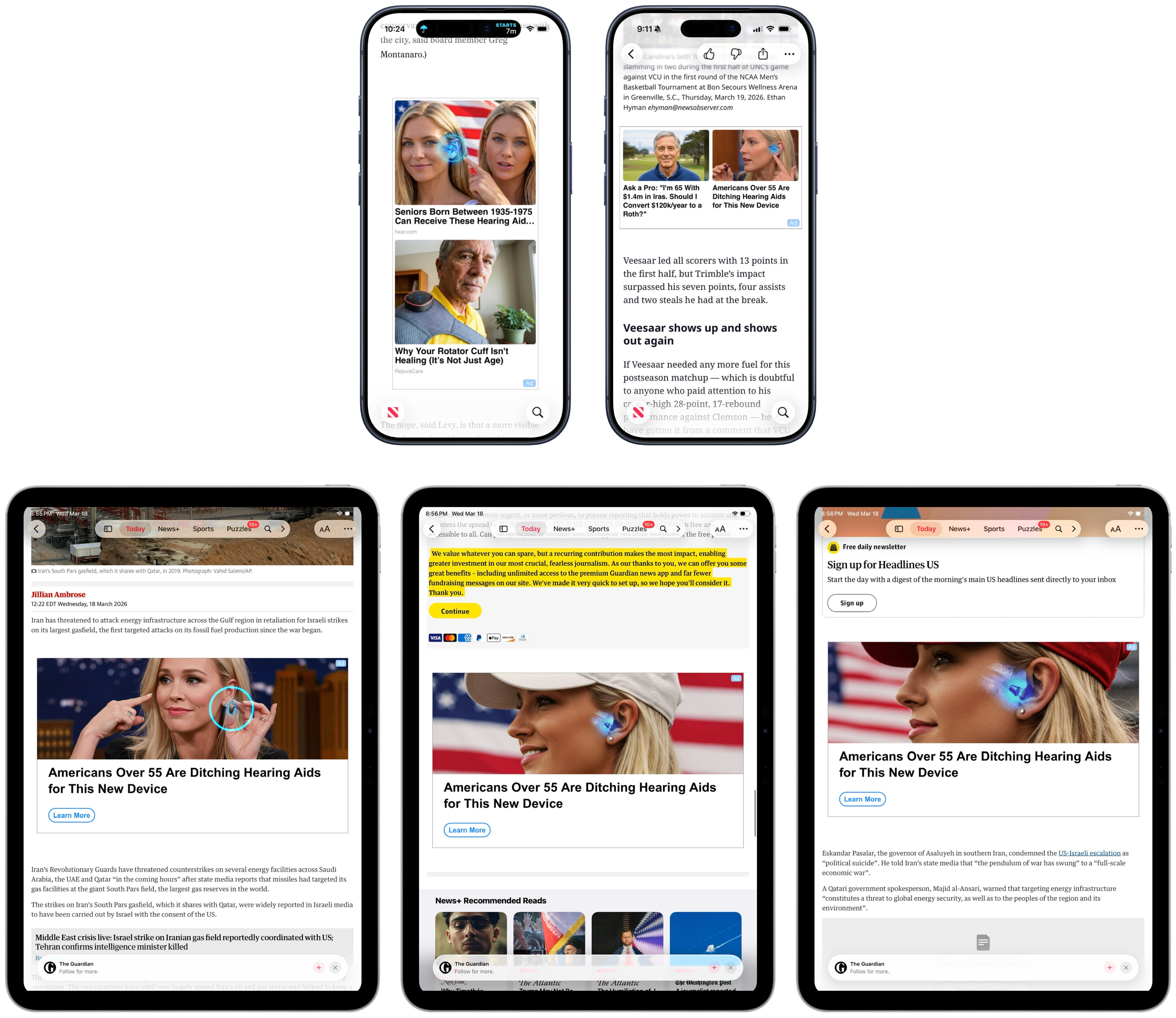
Some of [Cook’s letter] remains true, but has lost some truthiness — and truthiness matters. But some of it is no longer true, period. It’s no longer just “one small part” of Apple’s business that serves advertisers. Here in 2026, search results in the App Store not only show paid ads — frequently for casinos — but the search results are visually dominated by paid ads now that Apple has added a second ad to results. Apple News+ is a paid subscription that offers a genuinely great value for the number of paywalled publishers whose content it includes, but articles on the News app tend to include the weirdest AI-generated ads on the Internet. (How many young blond women am I supposed to believe need hearing aids?) And — at this writing, still “coming soon” — Apple is launching ads on Apple Maps. Apple Maps remains free of charge to use, so according to Tim Cook, we’re not the customer. We’re the product. Or, if you prefer, our frustration is the product.

[…]

The ratio of ads to organic results in App Store search — especially when measured in screen area — is clearly not aligned with Cook’s 2014 statement that “Our software and services are designed to make our devices better. Plain and simple.” Obviously not. App Store search today is designed primarily to generate more revenue for Apple. That’s not criminal, but it’s a change.

[…]

What gave Tim Cook’s privacy letter heft in 2014 wasn’t just the clarity of its plain language, but the fact that you didn’t have to take his word for it that the ads Apple showed you respected your privacy, because Apple didn’t show you ads in 2014. Apple today can’t say that.

[…]

John Ternus should return Apple’s privacy policy to its 2014 clarity. The trust Apple would earn from such a move would far out-value whatever revenue these ads pad to their already hefty and ever-increasing quarterly Services numbers.

I wish that were the case, but I fear this is kind of a Hotelling’s Law situation, where Apple can get most of the benefit by being just slightly better on this axis. Where else do its customers have to go?

Jeff Johnson (Mastodon):

In the second fiscal quarter of 2018, services generated $9 billion in revenue (net sales), whereas in Q2 2026, that amount had grown to $31 billion! In this blog post, I want to focus on understanding the relative financial importance of products and services for Apple.

[…]

In 2025, services were 42% of Apple gross margin. How does 26% of net sales become 42% of gross margin? The explanation is that services have a much lower cost of sales. The products gross margin was 37% of products net sales, while the services gross margin was an astonishing 75% of services net sales. In other words, Apple services are almost pure profit!

Does this 75% account for TV and movie production costs?

With persistent general inflation, consumers do not have unlimited money to spend on Apple products. At least in the near future, it’s reasonable to question how much further room is available for growth in profits from Apple products. To satisfy the demands of investors, Apple executives including CEO-elect John Ternus may be forced to rely even more than before on growth in services, which do not face as much pressure on cost of sales as hardware products.

Previously:

  •  

Licensing a Mac App With RevenueCat

Jared Sorge:

I know there are options out there like Paddle, FastSpring, and Lemon Squeezy that have worked for many apps like mine over the years. But I also wanted something simple for my users. Not to mention Apple Pay was a must-have.

I believe all the services he mentions do support Apple Pay.

  • RevenueCat serves as the source of truth for whether or not a customer is licensed.

  • I create RevenueCat customer IDs from local iCloud identifiers (more specifically, calling userRecordID() on my CKContainer in CloudKit).

  • When the user makes a purchase, they earn an entitlement that I look for in Arborist to grant them a license.

He doesn’t need to run his own server, and the purchases are automatically tied to the user’s iCloud account, so there are no e-mails or serial numbers to deal with. On the other hand, well, it’s all dependent on the Apple Account.

The app, which helps manage Git worktrees, is shipping now.

Previously:

  •  

Git Tower 17

Bruno Brito (release notes):

In Tower 15, we introduced the “Fully Merged” badge and Automatic Branch Management to help you keep your repository tidy. With Tower 17, we’re taking the detection behind that badge to a whole new level. […] Tower now matches your local branches against merged pull requests from your hosting service, such as GitHub or GitLab.

[…]

Trust is everything when deleting branches — so we redesigned the “Fully Merged” hint view to show you exactly which checks matched.

[…]

One that is particularly noteworthy is that updating submodules is now significantly faster! Tower gathers each submodule's Git data concurrently instead of one at a time—something you will especially notice in repositories with many submodules.

I’m sad that they got rid of the yellow icon.

Previously:

  •  

Siri AI Beta

Federico Viticci (Mastodon):

The AI frontier from the two big labs (and – we have to be honest with the numbers here – probably SpaceXAI and Meta now, too) is in a completely different league at the moment. I spent my first couple of weeks with Siri AI trying to convince myself that I could replace Codex with Siri AI, and that was the wrong approach. There is a potential future in which Siri AI can become a more proactive and capable agent, but that’s not what Apple is shipping this year.

[…]

Siri AI is a dramatically better Siri for typical Siri stuff. The new Siri understands your commands and nuanced requests better because of the LLMs behind it; it can often perform multiple requests in one go (such as setting multiple timers with one command); the new expressive (and customizable!) voices sound great, and they’re terrific at reading and summarizing notifications. Apple’s first advantage compared to other chatbots is right here: only Siri can integrate with the iPhone and iPad to this extent, so even if the Foundation models aren’t as smart as the competition, Siri can do a lot more for most people on their devices because neither OpenAI nor Anthropic have OSes they can control.

[…]

The biggest issue I’ve encountered is the inconsistency of it all. Very often, the new Siri AI still replies with a generic “Uh oh, something went wrong“ error that doesn’t explain what the error was or why it happened. Sometimes, I ask a question via voice, and it errors out, but then a few seconds later, I type the same question in the app, and it’s fine.

[…]

My problem is that, right now with Apple’s own apps, both the index and Siri’s ability to perform actions are very inconsistent. The assistant hallucinates abilities it doesn’t have, and it frequently just doesn’t work.

Dan Moren:

The good news is that Siri AI is capable: impressively so, at times. In the lowest of low bars, it certainly beats the pants off the previous incarnation of Siri, but its access to your own personal data and all of the app on your phone also unlocks a host of new possibilities.

But it’s also not without the pitfalls that underlie all LLM-powered chatbots: errors in understanding, hallucinations, and so on.

[…]

The app itself is pretty barebones, letting you view those conversations in List or Grid layouts, select multiple conversations to delete them, and pin or rename any single conversation. In Settings : Siri, you can choose to either open to the overview or to a new conversation and decide whether old conversations are kept for 30 days, 1 year, or forever. It’s a little strange that one-off queries (“What’s the average height of the Norwegian World Cup team?”) are stored alongside more involved conversations (“Can you help me build a specific RSS feed for this site?”); I also ended up with a few orphan blank “New conversations” which I deleted, but it’d be nice if you could filter to find those. Conversations are fully searchable and sync between devices via iCloud.

John Voorhees:

Despite the current limitations, if you use chatbots as a replacement for Google Search, you’ll probably have a good experience with the new Siri app. That’s because even in these early betas, if you ask Siri something like, “Give me a day trip itinerary for a trip to Chicago this Saturday,” you’re likely to get good but pretty middle-of-the-road recommendations. From there, though, you can drill down with follow-up queries to get something more in line with your tastes. The results include source links you can follow, too. Given the ad-strewn mess that web search has become, using Siri for this sort of thing is a meaningfully better experience.

The one caveat on Siri’s world knowledge is that it’s roughly 2-3 weeks stale in some places.

[…]

A good example is Music. You can prompt Siri to play a song, but most of the rich metadata in the app isn’t exposed to Siri, which is a shame because it is exposed elsewhere, for example to AppleScript.

Previously:

Update (2026-08-04): Benjamin Mayo:

Thanks to the top-to-bottom revamp that is Siri AI, Siri is reliably intelligent. Finally. We are still in the midst of beta season, and Apple is yet to confirm whether Siri AI will formally launch with iOS 27 in September or sometime later in the year, but the feature is up to scratch. There are bugs and glitches and edge-case quirks, but on the whole, it wipes the floor with old Siri and is competent enough to supplant my everyday usage of other chatbots too.

[…]

Siri AI can get a snapshot of what’s on screen, but it cannot control the UI for you autonomously. As such, if you ask it to do something outside of its library of available app actions, it will say it can’t do that. Often, it can quote the relevant steps for you to do it yourself, but obviously that falls short of the ideal experience. This feels a bit lacklustre to people already embracing AI agents en masse. Claude and Codex on Mac do not hit these walls; they are all too keen to move your mouse for you and run terminal commands until the job is done.

Previously:

  •  

notarytool Can’t Handle Zip64 Files

Wade Tregaskis:

In short: if you have any file in your app (or whatever it is you’re trying to get Apple to sign) that is over 4 GiB, you must use a disk image (DMG) to package it for notarytool, not a zip file.

This is because support for files larger than 4 GiB requires using the “Zip64” zip file format, which would be fine except Apple’s notary servers can’t handle them.

Previously:

Update (2026-07-22): Rosyna Keller:

It’s recommended to notarized exactly what you’re going to ship to users and shipping zips is extremely risky because you never know what tool the user will use to decompress the file.

Multiple unzipping tools will strip necessary extended attributes that could cause the code signature to fail to validate. This is especially true if you put non-code files in “code places” and they have to be signed with an extended attribute.

  •  

Apple Intelligence to Launch in China

Hartley Charlton:

Reuters reports that China’s Cyberspace Administration registered Apple’s on-device generative AI service this week, putting it on a list of newly cleared providers that also includes homegrown systems from Chinese phone makers.

An unnamed source told the outlet that Apple’s AI features in the country will draw on models from both Baidu and Alibaba.

William Gallagher:

China has complex requirements for regulatory approval, and sufficiently so that US firms typically need to involve a local partner.

John Gruber:

This isn’t about Siri AI, announced last month at WWDC for iOS 27 — this is the initial approval for Apple Intelligence, which was announced two years ago and rolled out in iOS 18.

Previously:

  •  
❌