❌

Reading view

L'ultimo aggiornamento di Windows risolve il bug dei file con nomi errati nel Cestino

Microsoft mette fine ad un piccolo problema di Windows che ha causato qualche grattacapo agli utenti, e che nello specifico riguardava il Cestino ed i file in esso contenuti.

Provando ad eliminare definitivamente un file, la finestra di conferma su Windows non mostrava il nome reale dell'elemento selezionato. Al suo posto compariva una sigla poco comprensibile composta da lettere e numeri, qualcosa che ricordava un codice interno del sistema piuttosto che il documento scelto dall'utente.

Il file però risultava identificato correttamente in tutte le altre schermate di Windows. Aprendo il Cestino, il nome era quello giusto. Anche nel caso di un ripristino non c'erano anomalie. L'errore compariva soltanto in quel passaggio preciso, subito prima della cancellazione. I dubbi e le segnalazioni, ovviamente, non hanno tardato a palesarsi.


Il miglior iPhone di sempre? Apple iPhone 17 Pro, compralo al miglior prezzo da Digitalparadise.it a 1,073 euro.

CLICCA QUI PER CONTINUARE A LEGGERE

  •  

Já pode adiar as atualizações do Windows 11 por mais tempo. Microsoft aumenta limite para 35 dias

A actualização de julho do Windows 11 chega com uma das funcionalidades mais pedidas pelos utilizadores: a possibilidade de "pausar" as actualizações por períodos de 35 dias, sem limite de vezes. O pacote inclui ainda a restauração do sistema a um ponto anterior, melhorias nos Widgets e correções de segurança.

The post Já pode adiar as atualizações do Windows 11 por mais tempo. Microsoft aumenta limite para 35 dias appeared first on Tek Notícias.

  •  

Hundreds rally at Bethesda HQ to protest Xbox layoffs, and Ars was there

ROCKVILLE, Maryland—Hundreds of Bethesda Game Studios and Zenimax Online Studios employees and their supporters braved nearly 100°F temperatures to protest sweeping layoffs across Xbox during a lunchtime rally in front of parent company Zenimax's headquarters today. The rally was one of five organized today by Zenimax Workers United and its parent union, the Communication Workers of America, at offices across Texas, California, and Montreal.

Attendees held up signs with messages like "Layoffs... layoffs never change" and "Our players deserve better" as union organizers and employees rallied the crowd with speeches and songs. The overwhelming message was one of solidarity and a willingness to push back against job cuts they say have decimated their development and quality assurance teams.

"It's about us building our movement and making sure that we get seen and we're visible," Bethesda technical producer and union volunteer organizer Nathan Hahn told Ars. "Because we want to make sure that we're not okay with these layoffs and that Xbox knows."

Read full article

Comments

  •  

Windows 0-day drops the same day Microsoft releases record number of patches

Right on the heels of Microsoft releasing a record number of security patches, a researcher has published exploit code that can enable low-privilege Windows accounts to make sensitive changes to administrator accounts.

The exploit, which multiple researchers say works, is sending Microsoft scrambling, yet again, to patch a zero-day released by an anonymous researcher who has complained about the software maker’s handling of their bug reports. To date, the pseudonymous NightmareEclypse has published nine such exploits, including Tuesday’s HiveLegacy. The researcher said the proof-of-concept code included in the report was stripped down to prevent attackers from using it maliciously.

A “pretty powerful primitive”

HiveLegacy is an elevation-of-privilege exploit that targets a vulnerability residing in the Windows User Profile Service. It allows users (and with more work likely processes) with limited system rights to compromise an admin user's account by modifying its classes registry hive, a resource that ensures the correct application opens when certain types of files are clicked on in Windows Explorer.

Read full article

Comments

© Getty Images

  •  

Windows 0-day drops the same day Microsoft releases record number of patches

Right on the heels of Microsoft releasing a record number of security patches, a researcher has published exploit code that can enable low-privilege Windows accounts to make sensitive changes to administrator accounts.

The exploit, which multiple researchers say works, is sending Microsoft scrambling, yet again, to patch a zero-day released by an anonymous researcher who has complained about the software maker’s handling of their bug reports. To date, the pseudonymous NightmareEclypse has published nine such exploits, including Tuesday’s HiveLegacy. The researcher said the proof-of-concept code included in the report was stripped down to prevent attackers from using it maliciously.

A “pretty powerful primitive”

HiveLegacy is an elevation-of-privilege exploit that targets a vulnerability residing in the Windows User Profile Service. It allows users (and with more work likely processes) with limited system rights to compromise an admin user's account by modifying its classes registry hive, a resource that ensures the correct application opens when certain types of files are clicked on in Windows Explorer.

Read full article

Comments

© Getty Images

  •  

Microsoft is forcing an enterprise transition to passkeys

Passkeys have been around for some time, but enterprise-wide adoption to this point has been slow for a number of reasons. But soon, many Microsoft customers won’t have a choice.

Starting September 1, Microsoft will roll out passkeys as the default authentication method in its cloud-based identity and access management (IAM) service Entra ID. And following a transition period, Microsoft-provided SMS and voice authentication will officially end on February 1, 2027.

With this move, Microsoft seems to be underlining the urgent need for a more secure authentication standard, as attackers up their game with AI.

This is an “important milestone,” because it moves passwordless authentication from an optional security enhancement to the expected standard, noted Ensar Seker, CISO at SOCRadar. “That shift is significant as attackers increasingly rely on AI to automate phishing campaigns, generate convincing login pages, and conduct large-scale credential theft.”

Microsoft’s six-month passkey roll-out

Passkeys require users to authenticate via a fingerprint, facial scan, or lock screen mechanism, rather than a password. They can be stored on physical USB keys (like YubiKey), or as digital credentials on computers, phones, or in cloud accounts.

This method, Microsoft contended, reduces reliance on phishable authentication tools like SMS and voice, and hardens protection against credential theft.

Passkeys “work better for users and worse for cyberattackers,” Nadim Abdo, Microsoft corporate VP for identity and network access engineering, wrote in a blog post.

Microsoft’s announced timeline for rolling out passkeys is relatively aggressive:

  • September 1, 2026: All SMS or voice-enabled users will be “auto-enabled and nudged” to register a passkey upon multifactor authentication (MFA) sign-in.
  • September 18, 2026: Pricing, commercial terms, and a list of supported telecom providers will be shared for scenarios that still require SMS or voice authentication due to regulation or technical or operational challenges.
  • October 30, 2026: Enterprises still using SMS and voice must select and configure a supported telecom provider through the Microsoft Security Store. From then on, they will be responsible for any telecom-related costs.
  • February 1, 2027: Microsoft-provided telecom delivery for SMS and voice authentication ends as a native Microsoft Entra capability.

After February 1, enterprises that require SMS or voice for MFA must register a passkey before sign-in. There will be no opt-out option.

It’s important to note that these dates apply to public cloud-hosted Entra ID. Support for other cloud environments will follow a separate timeline; additional guidance and dates are to come.

While SMS and voice have served their purpose well, Abdo said, bringing MFA to billions of users who otherwise would have had none, the threat environment has changed in “speed, scale, and sophistication,” necessitating this move to passkeys.

The benefits of passkeys

SOCRadar’s Seker pointed out that passkeys fundamentally change the attack surface because, unlike with passwords, there is no transmission of shared secrets that can be stolen by threat actors. Authentication requires possession of the user’s device, along with biometric verification or a PIN.

“Even highly convincing AI-generated phishing pages cannot simply trick users into handing over a passkey the way they can with passwords or one-time codes,” he said.

So why haven’t we seen widespread enterprise adoption? Identity ecosystems are “fragmented,” Seker noted, and many enterprises still rely on legacy applications that only support passwords. They also struggle with cross-platform compatibility, lifecycle management, recovery processes, shared accounts, and employee onboarding and offboarding.

Further, “until recently, many organizations viewed passkeys as a consumer technology rather than an enterprise identity strategy,” he said.

Microsoft’s move changes that equation, because Entra sits at the center of many organizations’ identity infrastructure, Seker noted. Default settings are typically the strongest drivers of security adoption, so when passwordless authentication becomes required rather than optional, organizations are far more likely to deploy it at scale.

Its biggest benefit would be a “dramatic reduction” in credential-based attacks, Seker said. He pointed out that most successful compromises still begin with stolen credentials obtained through phishing, infostealer malware, password reuse, or adversary-in-the-middle attacks. Passkeys “eliminate or significantly reduce” many of those attack paths, while reducing password fatigue and the help desk costs related to password resets.

In addition, rather than trying to continuously improve users’ ability to detect increasingly sophisticated phishing attempts, passkeys remove the credential from the equation altogether, Seker noted. “That represents a more sustainable long-term security strategy than relying solely on user awareness training.”

Still, passkeys are not a silver bullet, as they do not stop endpoint compromise, session token theft, malicious insiders, or attackers who already have control of a trusted device. Enterprises must complement passkeys with endpoint protection, continuous monitoring, conditional access policies, and identity threat detection, Seker advised.

How enterprises can prepare

To prepare for the shift to passkeys, Microsoft advised enterprises to review their authentication policy and identify the groups still using SMS or voice authentication. They should then select the best authentication method for user devices and workflows, and ensure all employees are given passkeys and security keys.

Entra ID supports both synced passkeys (those stored in platform credential managers like iCloud Keychain and Google Password Manager), and device-bound passkeys such as Microsoft Authenticator passkeys, Entra passkey on Windows, or FIDO2 security keys.

Seker advised enterprises to evaluate support for FIDO2 and passkeys across their identity infrastructure, and to develop clear enrollment and recovery procedures. They should also educate users on what’s changing, how passkeys work, and how they can complete registration. Further, Seker said, it’s important to establish secure device management practices and to continue enforcing least privilege, conditional access, and risk-based authentication policies throughout the transition.

Ultimately, he pointed out, the move is crucial. “Over the next several years, organizations that continue relying primarily on passwords will likely face higher operational risk as AI continues to lower the cost and increase the effectiveness of credential-based attacks,” he said.

  •  

Microsoft’s Secure Boot has been broken for a decade and no one noticed until now

An industry-wide standard Microsoft invented to protect Windows, and later Linux, devices from firmware infections has been trivial to bypass for 13 of its 14 years of existence. The discovery was made by researchers at security firm ESET after identifying 11 firmware images, at least one from 2013, that were known to be defective but remained signed by the software company anyway.

The images are known as shims, which were invented to extend Secure Boot to Linux devices and utility software. Using a technique simple enough to be performed by novice hackers, these old, forgotten shims can be used to completely circumvent the protection, which is embedded into the UEFI (Unified Extensible Firmware Interface) of the device's motherboard. The gaffe is the result of the failure by Microsoft, which oversees the signing of shims, to revoke the publicly available images once vulnerabilities were found in them.

Threat extends to Windows and Linux users

The threat extends to Windows and Linux users alike, since the shim can be installed on devices running both operating systems. From there, an attacker can subvert the mandated chain of digitally signed firmware to install malicious firmware that loads early in the boot process and persists after either the OS is reinstalled or a hard drive is replaced.

Read full article

Comments

© Getty Images

  •  

Microsoft’s Secure Boot has been broken for a decade and no one noticed until now

An industry-wide standard Microsoft invented to protect Windows, and later Linux, devices from firmware infections has been trivial to bypass for 13 of its 14 years of existence. The discovery was made by researchers at security firm ESET after identifying 11 firmware images, at least one from 2013, that were known to be defective but remained signed by the software company anyway.

The images are known as shims, which were invented to extend Secure Boot to Linux devices and utility software. Using a technique simple enough to be performed by novice hackers, these old, forgotten shims can be used to completely circumvent the protection, which is embedded into the UEFI (Unified Extensible Firmware Interface) of the device's motherboard. The gaffe is the result of the failure by Microsoft, which oversees the signing of shims, to revoke the publicly available images once vulnerabilities were found in them.

Threat extends to Windows and Linux users

The threat extends to Windows and Linux users alike, since the shim can be installed on devices running both operating systems. From there, an attacker can subvert the mandated chain of digitally signed firmware to install malicious firmware that loads early in the boot process and persists after either the OS is reinstalled or a hard drive is replaced.

Read full article

Comments

© Getty Images

  •  

With its latest layoffs, Microsoft goes all in on AI

Microsoft’s big lead over AI competitors like Google and others has vanished, and the company is now playing catch-up. As a result, Microsoft’s stock has tanked in the last year — down roughly 23% compared to a year ago, due mainly to its massive AI spending and an inability to monetize Copilot. 

The company clearly needs to do something. And last week it did, though not what you might expect. It laid off 4,800 people, a little more than 2% of its worldwide workforce, with its Xbox division hit hardest. And it’s not reducing its massive spending on AI data centers or other AI-related costs.

The New York Times explained the cuts this way: “It is Microsoft’s latest employee culling as it plows tens of billions of dollars into the infrastructure for building artificial intelligence.”

Was cutting back on gaming (while still going all-in on AI) the right move for Microsoft? To answer that, let’s take a look at the details of the company’s July layoffs.

A year of layoffs

The recent cuts come in the wake of larger Microsoft workforce reductions over the last year or so. In May 2025, the company laid off 6,000 employees, about 3% of its workforce. Then a few months later, it laid off 9,000 more, about 4% of its workers. In both rounds of cuts, the company’s gaming division was hit — though it wasn’t the primary target.

This year, in April and May, the company rolled out its first voluntary retirement program for US employees. Approximately 3,000 people took the money and ran.

Then came last week, when Microsoft primarily targeted gaming. When the cuts take full effect over the next year, 2,850 gaming employees will be let go. In addition, Microsoft is cutting loose several of its gaming studio brands, which will become independent companies or be sold to buyers.

The layoffs hit the two remaining gaming studios, Activision Blizzard, which makes the big-selling games Call of Duty and Candy Crush, and ZeniMax Media, which publishes series including Fallout and The Elder Scrolls. Three years ago, in 2023, Microsoft bought Activision Blizzard for $69 billion. That followed its purchase of ZeniMax Media in 2020 for $7.5 billion. Both seemed like sizable acquisitions at the time. 

Compared to Microsoft’s AI spending now, they’re chump change.

Follow the money

A memo sent to employees about the July layoffs by Amy Coleman, Microsoft executive vice president and chief people officer, made clear the layoffs were more about AI than they were about gaming. 

Of the cuts, she wrote: “The “why” is this: our business is changing because the world around it is changing. The way technology is built, deployed, and used is transforming faster than at any point in my time here. Our customers’ needs are shifting, the business models that serve them are shifting, and that means the work itself — what we do, where we focus, and how we’re organized — has to transform, too.

“Our customers are navigating this same shift, and they’re counting on us to help them through it.”

That last sentence is an oblique reference to the early July launch of the Microsoft Frontier Company, which will embed 6,000 engineers inside customers’ businesses to help them more effectively deploy AI. The cost: $2.5 billion.

That sounds like a substantial amount of money. But it’s only a drop in the bucket of how much money the company plans to spend on AI. In April, Microsoft told investors it would spend $190 billion on data centers and other AI infrastructure this year, a 60% increase over what it spent last year. At the same time, Microsoft said it would shrink its workforce.

Its latest layoffs are clear-cut evidence of that. It’s also evidence that the company recognizes how badly Xbox has performed, and that it needed to do something about it. 

In early June, Microsoft sent a memo to everyone in its Xbox division entitled “Next 100 Days: XBOX Reset.” The memo laid out the problems with its ailing game business and pulled no punches. It noted that beyond the $69 billion the company spent three years ago to buy Activision, “Over the past five years, we have spent over $20 billion on ongoing investments in our content, platform, and hardware subsidy, but our annual revenue has declined nearly half a billion during that time. Going forward, this cannot continue.” 

The layoffs and spinoffs were the first steps. They won’t be the last.

There’s no doubt this is just the beginning of Microsoft’s disinvestment in gaming. The issue isn’t just that the company’s investments haven’t paid off. It’s that Microsoft’s AI ambitions are so large and expensive that it can no longer afford to seriously fund gaming.

Ultimately, it was the right thing to do, at least from a business perspective. The future is AI. It’s not in gaming.

So, for the foreseeable future at Microsoft, when it comes to AI — the sky’s the limit. But when it comes to gaming, things look much less rosy.

  •  

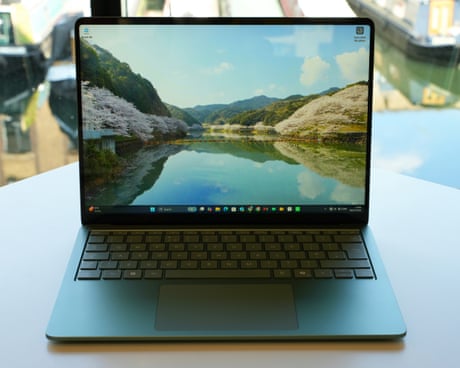
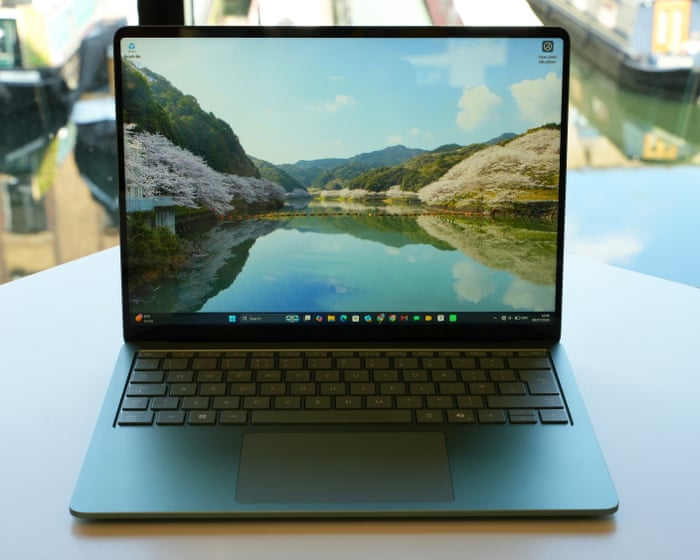
Microsoft Surface Laptop 8 review: a quality PC whose trackpad taps you back

Snappy performance, long battery life, great keyboard and excellent new haptic touchpad make the best of Windows 11

Microsoft’s Surface laptop for consumers is back, faster and with longer battery life and a hefty price increase because of the high cost of memory and chips.

The Surface Laptop 8 is a straight replacement for the seventh edition from 2024, which was the first of Microsoft’s new generation of ARM-based, Qualcomm-powered PCs designed to better rival Apple’s MacBook Air and other thin and light machines.

Continue reading...

© Photograph: Samuel Gibbs/The Guardian

© Photograph: Samuel Gibbs/The Guardian

© Photograph: Samuel Gibbs/The Guardian

  •  

Datacentres drive up big tech’s carbon emissions to a third of those of France

Microsoft, Amazon and Google say they still aim to achieve net zero output despite construction boom

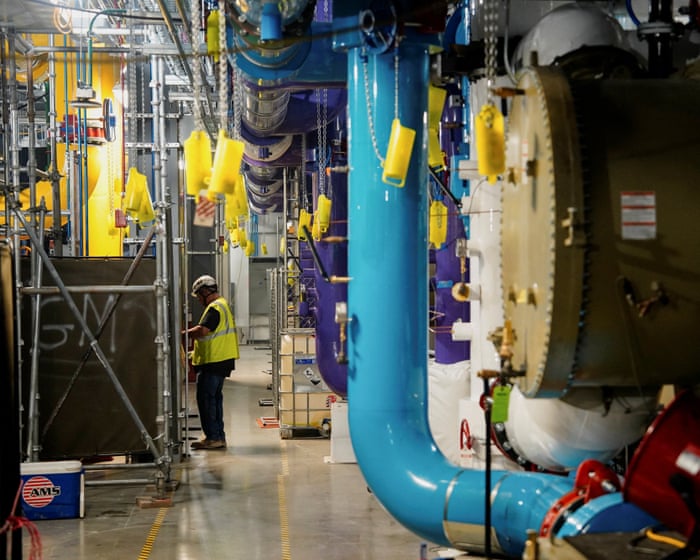
Microsoft, Amazon and Google’s collective carbon emissions have increased by nearly a fifth in the past year, driven largely by datacentre construction.

In the financial year ending March 2026, the three tech companies emitted 119m mTCO₂e (metric tonnes of carbon dioxide equivalent), or about a third of those of France.

Continue reading...

© Photograph: Audrey Richardson/Reuters

© Photograph: Audrey Richardson/Reuters

© Photograph: Audrey Richardson/Reuters

  •  

Patch for Windows Defender 0-day could allow attackers to fill hard disk

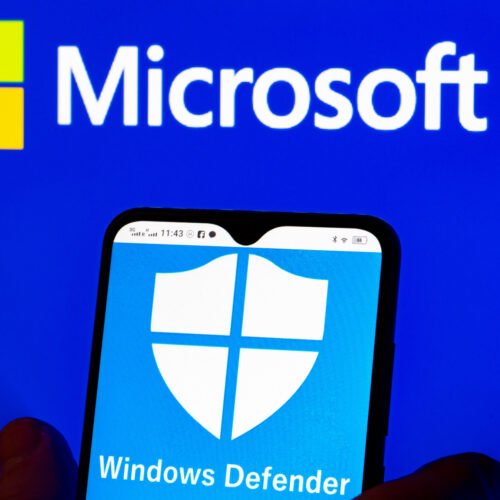
A patch Microsoft released on Wednesday to fix a zero-day vulnerability in its Defender security engine may cause Windows machines to write files large enough to completely consume available disk space, the researcher who discovered the flaw said.

RoguePlanet, tracked as CVE-2026-50656, came to public notice in June when NightmareEclipse, the pseudonymous name used by a researcher, disclosed it along with code for exploiting it. The vulnerability allows remote attackers to gain administrative control of Windows 10 and Windows 11 machines, even when real-time protection has been disabled. Over the past few months, the anonymous researcher has published a handful of other zero-days that have sent Microsoft scrambling to develop patches.

Writing files of unlimited size

Microsoft said Wednesday that it patched RoguePlanet with an update to the Microsoft Malware Protection Engine, which is used by the Defender antivirus app. The fix will automatically be downloaded and installed without users having to take any action. Wednesday’s update also includes “defense-in-depth updates to help improve security-related features.”

Read full article

Comments

© Photo Illustration by Igor Golovniov/SOPA Images/LightRocket via Getty Images

  •  

Windows 11 introduce i punti di ripristino automatici che salvano anche i file locali

Ripristinare Windows è sempre un bel problema, ma sembra che finalmente le procedure dei PCr basati su Windows 11 stiano diventando più semplici e accessibili. Nel corso di questa settimana, infatti, Microsoft ha avviato la distribuzione globale della funzionalità "Point-in-time restore”, tramite la quale è possibile generare in modalità completamente automatica dei punti di ripristino del sistema, ai quali l'utente può fare ritorno nell'eventualità in cui si riscontrino anomalie o malfunzionamenti nel corretto funzionamento del computer.

Disponibile per le varianti Enterprise, Pro e Home di Windows 11, la funzione Point-in-time restore è in grado di completare il ripristino operativo di un computer nel giro di pochissimi minuti, riducendo drasticamente i tempi rispetto alle ore necessarie con i metodi tradizionali. Quando la funzionalità è attiva, il sistema acquisisce in autonomia un'istantanea dello stato complessivo del PC, lasciando che l'ambiente includa i file core di Windows, le applicazioni installate, le configurazioni di sistema e dei programmi, le impostazioni personalizzate e la totalità dei file locali memorizzati dall'utente.

COME FUNZIONA

La configurazione predefinita prevede l'acquisizione di un punto di ripristino ogni 24 ore; tuttavia, la facoltà di modificare questo parametro è disponibile solo gli utenti che utilizzano la versione Enterprise, con la possibilità di impostare una cadenza temporale differente a seconda delle proprie esigenze specifiche. L'opzione risulta abilitata di default su tutti i dispositivi dotati di Windows Home e Windows Pro, a patto che questi PC non si trovino sotto la gestione diretta di un'infrastruttura aziendale. Al contrario, per i sistemi aziendali, il Point-in-time restore rimane disattivato per impostazione predefinita e la sua attivazione automatica avverrà soltanto in seguito all'installazione dell'aggiornamento a Windows 11 versione 26H2.


Top gamma a prezzo da medio gamma? Poco F8 Ultra, compralo al miglior prezzo da Aliexpress.com a 594 euro.

CLICCA QUI PER CONTINUARE A LEGGERE

  •  

Laptop prices suck these days, but here are 25 Prime Day deals that help a little

A rear-view of the 15-inch MacBook Air M5.

The RAM, storage, and component crunch has come for new laptop prices. Plenty of models have gone up in price after being on the market for months, and so have those that’ve been on shelves for over a year. Plus, many new models are releasing at higher prices than the previous generation. So, it really isn’t the best time to buy a new laptop. But what if you need one or really want one now, and you prefer to shop new?

Well, I’m not here to tell you that Amazon’s Prime Day makes everything better. But the discounts certainly don’t hurt.

As usual, we’re doing our best to surface the best Prime Day tech deals. And here, we’ve pulled together the biggest discounts happening not just on laptops, but also on keyboards, mice, webcams, or other worthwhile PC accessories. And since Prime Day has counter-deals running at other retailers like Best Buy (and its Tech Fest Sale), there are also laptop deals for non-Amazon shoppers alike.

The best deals on MacBooks

  • The days of multi-hundred-dollar discounts on MacBooks are behind us for now, but the base 14-inch MacBook Pro with an M5 chip for $1,549 ($150 off) at Amazon and Best Buy is still a solid deal. It’s powerful enough for the average content creator, comes with 16GB of RAM and 1TB of storage, and has lots of ports. Read our review.

Apple MacBook Air (M5)

Apple’s 2026 MacBook Air has an M5 chip and starts with 512GB of storage that’s significantly faster than previous generations. It’s still as excellent as ever despite a higher base price. Read our review.

Where to Buy:

  • The 14-inch MacBook Pro with an M5 Pro chip (15-core CPU / 16-core GPU), 24GB of memory, and 1TB of storage is $2,034 (around $165 off) at Amazon and $2,049 at Best Buy. It’s a pretty nice step-up model from the standard M5 MacBook Pro, with a bit more RAM, a more powerful chip, and faster Thunderbolt 5 ports.

The best deals on Windows laptops

Microsoft Surface Laptop, 13-inch

Microsoft’s slightly smaller, entry-level Surface Laptop trims some of the size and a few features from its bigger 13.8-inch counterpart, but it maintains excellent battery life and solid performance. It’s just a shame it’s price went up. Read our review.

Where to Buy:

Microsoft Surface Pro 12-inch

Microsoft’s latest Surface Pro is smaller, with a new design and updated keyboard. It’s powered by Qualcomm’s Arm64 Snapdragon X Plus chip. Read our review.

Where to Buy:

  • The Lenovo IdeaPad Slim 3x was one of the laptops I tested against the MacBook Neo and… it got smoked. But a 512GB config for $449 ($251 off) at Walmart? Not bad. The speakers are an assault on your ears and the trackpad ain’t great, but if you can live with those shortcomings, you get a decent laptop with a competent Snapdragon X processor and marathon battery life. Just read our review and be aware of its shortcomings.
  • Like the Lenovo above, the Acer Aspire 14 AI is another MacBook Neo contender I tested that’s on sale. It’s $589.99 (about $288 off) at Amazon, exclusively for Prime members. Best Buy has it for anyone, sold via Acer, for $599.99. Let me set your expectations: The screen on this laptop is pretty washed out, the speakers are tinny, and the build quality feels cheap. But what you’re getting a deal on is a great Intel Core Ultra 7 256V “Lunar Lake” processor that’s a solid performer while also being quite power efficient. It also has plenty of ports (including Thunderbolt 4) and can even do some light gaming.
  • For a higher-end Acer offering, the Swift X 14 AI is selling for a new low of $1,559.99 ($140 off) at Amazon for Prime members. The 14-inch laptop has a 2880 x 1800 / 120Hz OLED, AMD Ryzen AI 7 350 CPU, RTX 5060 discreet graphics, 32GB of RAM and 1TB SSD. It even has a haptic trackpad that should be a nice upgrade over Acer’s mechanical ones that can be a bit basic.

Asus Zenbook A14

Asus’s Zenbook A14 is a bit of a MacBook Air wannabe, but it’s a compelling alternative if you value a superlight Windows laptop with long battery life. The last-gen 2025 model sports an Arm-based Qualcomm Snapdragon X Plus chip, a nice 14-inch OLED display, and a sleek textured beige finish.

Where to Buy:

The best deals on gaming laptops

2025 Asus ROG Zephyrus G14

Asus’ ROG Zephyrus G14 is the go-to choice for a portable gaming machine that’s great at regular laptop duties. It’s got a lovely OLED display, great keyboard and trackpad, and solid battery life. There’s a new Intel model that’s much pricier, but the 2025 version with AMD chips is still a great choice.

Where to Buy:

  • The 2025 Asus ROG Zephyrus G16 is $1,574.99 ($575 off) at Best Buy. The larger version of the Zephyrus twins sports a 240Hz OLED display and a thin profile to make it travel friendly. This configuration includes an Intel Core Ultra 9 285H CPU, RTX 5070 GPU, 16GB of RAM, and 1TB SSD.
  • HP’s Omen 16 gaming laptop from last year is $1,619.99 ($600 off) at Best Buy through a third-party seller. The 16-inch laptop is configured with an AMD Ryzen 9 8940HX processor, RTX 5060 graphics, 32GB of RAM, and 1TB SSD. Not bad for around $1,500, but while its screen’s 144Hz refresh is nice, the resolution is only 1920 x 1200.
  • For a little more money, you can get a Lenovo Legion 5i at Walmart for $1,589 ($261 off). This 15-inch Legion has an Intel Core i9 14900HX CPU, RTX 5070 GPU (the 8GB VRAM version), 16GB of RAM, and 1TB SSD. You’re getting less RAM than the HP Omen deal, but in exchange it’s got a better GPU and 2560 x 1600 OLED display with 165Hz refresh rate.

Acer Predator Helios Neo 16 AI (2025)

An affordable mid-ranger from Acer running RTX 5070 or 5070 Ti graphics, a 16-inch 240Hz display, and lots of ports.

Where to Buy:

  • Acer’s Nitro V 16S AI gaming laptop is selling for $1,099.99 ($300 off) at Amazon, exclusively for Prime members. It’s got an AMD Ryzen 7 260 CPU, RTX 5060 GPU, 32GB of RAM, and 1TB SSD. The specs are close to the Asus ROG Zephyrus G14 deal above, but it’s much chunkier, has more RAM, and its display is larger but a lower-res LCD.

The best deals on keyboards, mice, and other PC peripherals

  • Moft has a variety of deals on its origami-style cases and stands. You can get its folding 2-in-1 Laptop Carry Sleeve, a sleek laptop case that doubles as a portable stand, for $51.96 ($13 off) at Amazon in four sizes and up to 11 different colors. Or, if you don’t mind some adhesive, the Moft Laptop Stand in select colors is $19.99 ($5 off) at Amazon. The super thin attachment sticks to the bottom of your laptop to give you a fold-out stand anywhere you go.

Logitech MX Master 3S

The MX Master 3S is a favorite among many Verge staff members because of its comfort and customization. It can connect via Bluetooth, via its included 2.4GHz receiver, or wired with its USB-C cable.

Where to Buy:

  • The fairly new Keychron V5 Ultra mechanical keyboard with Silk POM red linear switches is $107.99 ($12 off) at Amazon. The near-full-size 96-percent layout board has an incredibly long battery life thanks to its ZMK-based firmware, and it supports a fast 8,000Hz polling rate via its 2.4GHz wireless connection. Its plastic case isn’t as nice as ones with a metal chassis, but it’s a great no-nonsense keyboard for the money. Read our review.
  • Ugreen’s Dock and Stand for the Mac Mini M4 / M4 Pro is $49.99 ($40 off) at Amazon, exclusively for Prime members. The dock sits below your Mac Mini and plugs in to a rear USB-C port, dramatically expanding the port offerings of your tiny desktop and making your power button more accessible with a tiny lever. It has SD / microSD card slots and two USB-A ports on the front, and three USB-C and three USB-A ports on the rear. Plus, inside is an M.2 SSD slot for extra built-in storage. (You’ll have to BYO SSD.)
  • LG’s 32-inch UltraGear 32GX850A-B OLED gaming monitor is $684.50 ($600 off MSRP) at Amazon, exclusively for Prime members. LG also has it for anyone for a slightly higher $699.99. The dual mode 4K OLED supports a fairly high 165Hz refresh rate but can dip down to 1920 x 1080 resolution to output a super fast 330Hz for specialized uses like competitive gaming.
  • For a much more affordable and down to Earth OLED, check out the 27-inch Acer Predator Gaming Monitor X27U, selling for $314.99 ($235 off) at Amazon, exclusively for Prime members. It’s a sweet spot of 2560 x 1440 resolution that isn’t as demanding on games while supporting a high 240Hz refresh.

Elgato Stream Deck MK. 2

The MK.2 version of the standard Stream Deck comes with 15 programmable buttons, a swappable faceplate, and a detachable stand.

Where to Buy:

Asus ROG Falcata

A unique Hall effect gaming keyboard that actually takes ergonomics into account. Read our review.

Where to Buy:

8BitDo Retro 87 Mechanical Keyboard (Xbox Edition)

This mechanical keyboard is inspired by the original Xbox, with a translucent green color scheme and two large customizable buttons. Along with Bluetooth support, it offers a standard tenkeyless layout with clicky hot-swappable Kailh Jellyfish X switches.
8BitDo’s green Xbox-themed Retro 87 Mechanical Keyboard in front of a matching green Xbox console.

Where to Buy:

Update, June 24th: Updated current deals and added new ones for the Microsoft Surface Pro 12-inch and Moft accessories.

  •  
❌