Microsoft Office users may find that some of their applications are failing to open when called on by third-party applications. It’s an issue that has emerged after the latest round of Microsoft updates.
The problem affects Word, Excel, and other Office applications opened from third-party offerings including CCH Engagement, Workpaper Manager, Zotero, or dental office software such as Dentrix or Softdent.
The update issued on June 9 appears to have triggered problems with the OLE automation that these third-party applications use to interact with Office. Users have reported that files are failing to open, with no error message indicating what has gone wrong,
According to one Windows user forum, the issue is particularly frustrating because of this lack of error message. As one user put it, “‘Word won’t open from our workpaper system’ is functionally the same as ‘Word is broken.’ To an administrator, the difference determines whether the next hour is spent repairing Office, rolling back Windows, calling a line-of-business vendor, or opening a Microsoft support case.”
Microsoft has said that it is aware of the issue and is working towards a resolution.
Deleting mystery file
The company is also looking to fix a minor issue that has emerged from this latest round of updates: Users are finding that when items are deleted, the confirmation dialog box displays the internal Recycle Bin file name (for example, $Rxxxxx.ext) instead of the original file name. However, Microsoft stressed that in the Recycle Bin, the item still appears with its original name.
One of the most commonly used Microsoft programs, Excel is highly useful for data collecting, processing, and analysis. To fully harness Excel’s powers, though, you need to make use of formulas.
Excel formulas allow you to perform calculations, analyze data, and return results quickly and accurately. The usefulness of formulas is even greater once you start dealing with large data sets. With the correct formula, Excel can process vast amounts of information in a matter of seconds.
In this article we’ll look at five useful types of formulas and functions that will get you started performing data analysis in Excel. Along the way, you’ll learn several different ways to enter formulas and functions in Excel.
We’ll demonstrate using Excel for Windows under a Microsoft 365 subscription. If you’re using a different version of Excel, you might not have exactly the same interface and options, but the formulas and functions work the same.
If you have the right kind of M365 subscription, you can have Microsoft’s generative AI assistant, Copilot, create formulas for you. This requires an M365 Personal, Family, or Premium plan for individuals or an M365 business or enterprise plan with a paid Copilot add-on subscription — which means not everybody has access to Copilot in Excel. Even if you do, it’s helpful to know what formulas can do and how to work with them so you can write better prompts for Copilot. We’ll cover using Copilot to create Excel formulas later in this story, but first we’ll give you a solid understanding of how to work with formulas and functions.
A formula is an expression that operates on values in a range of cells in Excel. Using formulas, you can perform calculations and data analysis on the contents of the cells. Formulas can be as simple as adding a column of numbers together or as complex as returning the kurtosis of a data set. They can be incredibly useful when you want to turn spreadsheet data into meaningful information for driving business decisions.
What is a function in Excel?
A function is a built-in formula in Excel — basically, a shortcut for performing a calculation or other operation on cell data. There are around 500 Excel functions, and the list continues to grow every year. Fortunately, most of the actions that a typical business user would want to perform can be done with just a handful of functions.
1. Basic mathematical formulas and functions
We’re going to group these formulas together since they are very simple and have similar syntax. All formulas in Excel start with the equal sign (=) and build from there.
Adding, subtracting, multiplying, and dividing
To add the numbers in two cells together, first click the on the target cell where you want the total to appear. Then type = in the cell to start the formula.
loading="lazy" width="400px">
Starting a formula in Excel.
Shimon Brathwaite / Foundry
Next, click on the cell that contains the first number you want to add, and its cell reference (such as A2) will appear next to the equal sign in the formula.
loading="lazy" width="400px">
When you select a cell when building a formula, its cell reference appears in the formula.
Shimon Brathwaite / Foundry
Type + next to the first cell reference. Then click the cell that contains the second number you want to add, and its cell reference (such as A3) will appear next to the + sign. The full syntax for the formula to add the values in cells A2 and A3 is:
=A2+A3
loading="lazy" width="400px">
The complete addition formula appears in both the target cell and the formula bar above.
Shimon Brathwaite / Foundry
Note that in addition to appearing in the target cell, the formula also appears in the formula bar directly above the worksheet. Once you’ve inserted the initial = sign in the target cell, you can type your formula in the formula bar. It’s sometimes easier to see the whole formula and work with it in the formula bar than down in the worksheet page.
If you wanted to add additional numbers to your total, you’d type another + sign, select another cell, and so on. Once your formula is complete, press Enter, and the result appears in the target cell.
loading="lazy" width="400px">
Press Enter, and the result appears in the target cell.
Shimon Brathwaite / Foundry
Subtraction, multiplication, and division calculations work the same way. You simply change the operator — the symbol that tells Excel what math operation you want to perform — from the + sign to the – sign for subtraction, the * sign for multiplication, or the / sign for division.
loading="lazy" width="400px">
Subtraction, multiplication, and division actions. The formula for each is shown in the formulas bar and the result in the target cell.
Shimon Brathwaite / Foundry
Adding numbers with the SUM function
There’s a quicker way to add together a group of numbers. This is where Excel’s built-in SUM function comes in.
First click on the target cell where you want the total to appear. Then type =SUM to start the function. A list of options will come up. Click the first option, SUM. You’ll now see =SUM( in the target cell.
loading="lazy" width="400px">
Starting a SUM function.
Shimon Brathwaite / Foundry
Just underneath the cell with the SUM function is a tooltip showing the SUM syntax:
=SUM(number 1, [number2],…)
To add individual cells together, select a cell, type a comma, select another cell, and so on. (Alternatively, you can type a cell reference, type a comma, type another cell reference, and so on.)
If you want to add consecutive cells (such as in a row or column), select the first cell, then hold down the Shift key and select the final cell in the group. (Or you can type in the cell references for the first and last cells separated by a colon — for instance, A2:A7 selects A2, A7, and all the cells in between.)
loading="lazy" width="400px">
Select the range of cells you want to add together.
Shimon Brathwaite / Foundry
Once all the cells you want to add together are selected, hit Enter.
Now you should see the final result, which is the sum of the numbers you highlighted. If you highlight that target cell again, you’ll see the full formula in the formula bar — in our example, it’s:
=SUM(A2:A7)
loading="lazy" width="400px">
The SUM function is shown in the formulas bar; the result appears in the target cell.
Shimon Brathwaite / Foundry
One important thing to note for all Excel formulas is that they produce relative values. This simply means that if any of the values in the selected cells changes, then the final number will change to reflect that.
loading="lazy" width="400px">
If the value of a cell used in a formula changes, the result also changes.
Shimon Brathwaite / Foundry
If you want to make it an absolute value, a number that will not change even if the cells that were used to calculate it change, then you need to right-click the cell and select Copy from the pop-up menu. Then right-click the cell again and, under Paste Options, select the Values button (the icon of a clipboard with 123).
loading="lazy" width="400px">
Copy and paste the value into the cell to prevent the value from changing if one of the source cell’s values changes.
Shimon Brathwaite / Foundry
Now when you select that cell you’ll just see the plain number, not a formula, in the formula bar.
loading="lazy" width="400px">
The cell now contains an absolute value, not a formula.
Shimon Brathwaite / Foundry
Tip: Excel provides a SUM shortcut in certain circumstances. If you have a series of numbers in a row or a column, Excel assumes you want to add them together. So if you place your cursor in the cell to the right of a row of numbers and click the AutoSum (Σ) button toward the right end of the Ribbon’s Home tab, Excel automatically selects the numbers in the row, then adds them together when you press Enter. Likewise, if you place your cursor in the cell below a column of numbers, click AutoSum, and hit Enter, Excel totals up the numbers in the column.
loading="lazy" width="400px">
AutoSum is a shortcut for adding a row or column of numbers.
Shimon Brathwaite / Foundry
Calculating the average with the AVERAGE function
To calculate the average of a group of numbers, repeat the same steps but using the syntax =AVERAGE and highlighting the cells containing the numbers that you want to use in the calculation.
loading="lazy" width="400px">
To quickly calculate the average of a group of numbers, use the AVERAGE function.
Shimon Brathwaite / Foundry
Tip: As with SUM, there’s a shortcut for using the AVERAGE function if you have a series of numbers in a row or a column. Place your cursor in the cell to the right of a row of numbers or in the cell below a column of numbers. Click the tiny down arrow at the right side of the AutoSum button, select Average from the menu that appears, and hit Enter. Excel calculates the average of the values in that row or column.
loading="lazy" width="400px">
There’s an AutoSum shortcut for the AVERAGE function as well.
Shimon Brathwaite / Foundry
Find more details, examples, and best practices for these functions at Microsoft’s SUM function and AVERAGE function support pages.
2. The IF function
This function helps you automate the decision-making process by applying if-then logic to your data. Using this function, you can have Excel perform a calculation or display a certain value depending on the outcome of a logical test. For example, you can create a test that checks if the value of a cell is greater than or equal to the value of 18 and enter “Yes” or “No” accordingly.
While we’re learning this function, we’ll cover another way to enter functions in Excel: by using the Formulas tab on the Ribbon. Here you’ll find buttons that provide quick access to functions by category: AutoSum, Financial, Logical, Text, Date & Time, and so on. Being able to browse through functions by category can be helpful if you can’t remember the exact name of a function or aren’t sure how to spell it.
To enter the IF function, select the target cell, and on the Formulas tab, click the Logical button, then select IF from the list of functions that appears.
Alternatively, you can click the Insert Function button all the way to the left of the Formulas tab. An “Insert Function” pane appears, showing a list of commonly used functions.
loading="lazy" width="400px">
Instead of typing = to start a function, you can go to the Formulas tab and select Insert Function.
Shimon Brathwaite / Foundry
Select IF from the list and click OK. (If the function you want isn’t in the “Commonly Used” list, select a different category or All to see all available functions.)
The Function Arguments pane appears, and you’ll see =IF() in the target cell.
loading="lazy" width="400px">
You can use the Function Arguments dialog box to build a function.
You’ll notice that the Function Arguments pane for the IF function has fields for Logical_test, Value_if_true, and Value_if_false. In our “greater than or equal to 18” example, the logical test is whether the number in the selected cell is greater than or equal to 18, the value if true is “Yes,” and the value if false is “No.” So we’d enter the following items in the pane’s fields like so:
Logical_test: B2>=18
Value_if_true: “Yes”
Value_if_false: “No”
or just type the full formula into the target cell:
=IF(B2>=18,”Yes”,”No”)
This tells Excel that if the value of cell B2 is greater than or equal to 18, it should enter “Yes” in the target cell. If the value of cell B2 is less than 18, it should enter “No.”
loading="lazy" width="400px">
The IF function in action.
Shimon Brathwaite / Foundry
Tip: When using functions like this, rather than entering the function repeatedly for each row, you can simply click and drag the tiny square on the bottom right of the cell that contains the function. Doing so will autofill each of the rows with the formula, and Excel will change your cell references to match. For example, when the formula we used in cell C2 that references cell B2 is autofilled into cell C3, it changes to reference cell B3 automatically.
loading="lazy" width="400px">
Autofilling a formula to subsequent rows in the column.
Shimon Brathwaite / Foundry
Find more details at Microsoft’s IF function support page.
3. The SUMIF and COUNTIF functions
SUMIF is a more advanced SUM function that allows you to add up only the values in a range that meet the criteria you specify. To use this function, you must specify the range of cells to apply the criteria to, the criteria for inclusion, and, optionally, the sum range, which is the range of cells to total if that’s different from the initial range. The syntax is as follows:
=SUMIF(range,criteria,[sum_range])
Note that any criteria with text or mathematical or logical symbols must be enclosed in double quotes.
In the sales spreadsheet shown below, for example, suppose you want to total up only the sales that are more than $100. The criteria range is C2 to C9, and the criteria is “greater than 100.” Since you’re adding up the values in that same cell range (C2 to C9), you don’t need to supply a separate sum range. So your formula is:
=SUMIF(C2:C9,”>100″)
loading="lazy" width="400px">
Using the SUMIF function.
Shimon Brathwaite / Foundry
What if instead you want to find the total for all sales in the East region only? To do that you’ll have to specify both the criteria range (cells B2 to B9) and the sum range (cells C2 to C9). This is the formula:
=SUMIF(B2:B9,B2,C2:C9)
Note that you don’t have to type out “East” for the criteria. You can simply type B2 or click the cell B2 to have Excel search for the text it contains.
loading="lazy" width="400px">
Using SUMIF with both a criteria range and a sum range.
Shimon Brathwaite / Foundry
There is a similar function called COUNTIF that lets you create a count of values that meet specified criteria. The syntax is as follows:
=COUNTIF(range,criteria)
So to count the total number of sales in the West region, for instance, you supply the range of cells to apply the criteria to (B2 to B9), followed by the criteria (“West” or cell B3). The formula is:
=COUNTIF(B2:B9,B3)
loading="lazy" width="400px">
The COUNTIF function can instantly count up items that meet your criteria.
Shimon Brathwaite / Foundry
What if you want to apply multiple criteria to your data, such as calculating total sales for books in the East region, or counting the number of sales over $100 in the West region? Excel can do that too, via functions called SUMIFS and COUNTIFS. These functions use more complex syntax than SUMIF and COUNTIF. For more details, use cases, and best practices for all four of these functions, see Microsoft’s SUMIF, SUMIFS, COUNTIF, and COUNTIFS support pages.
4. The CONCAT function
This function is useful for piecing together text from different cells into one complete string. For instance, maybe you have a worksheet with different columns for people’s first and last names, but you want to put first and last names together. Other common use cases are completing an address, reference number, file path, or URL. The syntax is as follows:
=CONCAT(text1,text2,text3,…)
In this example we will use CONCAT to combine a list of first names and last names into a full name with a space in between. To do so we simply place the cursor in cell C2, type =CON and select CONCAT from the list of options that appears. Next, select the cell that contains the first name (A2) and add a comma, a blank space surrounded by quotation marks, and another comma. Then add the last name by selecting the adjacent cell (B2) and hit Enter. Here’s the full formula:
=CONCAT(A2,” “,B2)
Next, click and drag the bottom right of cell C2 to autofill the formula in all the other rows.
loading="lazy" width="400px">
The CONCAT function combined the values from column A with those from column B.
Shimon Brathwaite / Foundry
For more details and examples, see Microsoft’s CONCAT function support page.
5. The VLOOKUP function
This is one of the most commonly used functions in Excel and a valuable data analysis tool. VLOOKUP lets you look up a value in a table and return information from other columns related to that value. It’s very useful for combining data from different lists or comparing two lists to find matching items. To use this function, you need to provide three to four pieces of information:
The value you want to look for. This is known as the lookup value.
The range of cells to look in. This is known as the table array.
The column that contains the information you want to return, called the column index number.
Optionally, the type of lookup you want to perform: TRUE or FALSE. This is known as the range lookup. FALSE means you want an exact match for the lookup value, while picking TRUE returns the best approximate match. If you don’t specify a range lookup, VLOOKUP defaults to TRUE.
The lookup value must be in the first column of cells you specify in the table array. The leftmost column in the table array has a column index number of 1, with subsequent columns numbered 2, 3, and so on.
In this example, we’ll look up what region our employees work in. To do so, we first need to specify the value that we are going to search for: the employee name Mike (cell A2). Next, we need to highlight the entire cell range (table array) that we want to look in: cells F2:G8.
Then we specify which column holds the information that we want. Rather than picking the column itself, we count from left to right within the table array. Since the column that contains the region is the second from the left, type in 2.
Lastly, we enter the TRUE (best approximate match) or FALSE (exact match) option. TRUE is typically only used with numbers or when you aren’t sure if the value you want is in the table. Since we know the value we want is in the table, we will pick FALSE. Generally, FALSE is the better option, as it returns more accurate results.
This is the full formula:
=VLOOKUP(A2,F2:G8,2,FALSE)
loading="lazy" width="400px">
Use VLOOKUP to find values linked to other values in large data sets.
Shimon Brathwaite / Foundry
This is an oversimplified example using a small data set, but when you need to search through a spreadsheet with thousands (or tens of thousands) of cells, VLOOKUP is a huge time-saver and reduces the possibility of errors. For more details and examples, see Microsoft’s VLOOKUP function support page.
Using Copilot to create Excel formulas
Remembering all these different formulas and functions can be difficult, so another good approach for those who have access to Copilot in Excel (see details at the top of this story) is to use the AI tool to dynamically create formulas that meet your needs. Using Copilot, you can describe what you want the formula to do and have the AI generate the syntax for you. In this section we’ll demonstrate with two sample data sets.
To access Copilot, click the Copilot icon on your ribbon toolbar or at the bottom right of your screen.
To invoke Copilot, click its icon, which you might find in the ribbon toolbar up top or floating at the bottom right of your Excel window.
Shimon Brathwaite / Foundry
The Copilot sidebar opens along the right side of your spreadsheet. Type in a prompt describing the formula you want created — in this example, a simple formula that adds up all the sales values in the data set. Be sure to instruct Copilot where to place the formula:
Create a formula in B7 that sums all of the sales
Describe the formula you want Copilot to create.
Shimon Brathwaite / Foundry
Click the submit arrow in the chat window, and Copilot will create and insert the formula to give you the result you want.
Copilot has inserted the correct Excel formula for the sum operation, with the result appearing in cell B7.
Shimon Brathwaite / Foundry
That was a simple one. Now try a more advanced example working from a more complex data set, as shown in the screenshot below.
A more complex data set for our second example.
Shimon Brathwaite / Foundry
Try the following prompt:
Create a formula in G2 that calculates total revenue per unit while accounting for the discount on each purchase. Then fill the formula down for all rows and create a summary table showing total revenue by Region.
Click the submit arrow, and it should create something like this:
Copilot creates the requested formula and fills in the results.
Tip: It’s not required, but it can be helpful to format your spreadsheet as a table when working with Copilot. This helps define more clearly the exact cells for Copilot to use when it creates formulas or takes other actions on your data.
You’re just getting started
In this story you’ve seen how powerful formulas and functions can be in Excel — and we’ve only the scratched the surface of what they can do. Once you get comfortable using them, you can explore some of the myriad prebuilt functions Excel offers and learn how to build more complex formulas (including nesting functions). That’s all beyond the scope of this article, but a great place to start is Microsoft’s “Overview of formulas in Excel” support page, which includes links to several helpful tutorials.
For those who have access to it in Excel, experimenting with Copilot is another great way to learn. You can review the steps it took and the formulas it created to get a better understanding of how formulas work and what they’re capable of.
This story was originally published in May 2023 and updated in June 2026.
Tesla sales are rebounding in Europe even though many people have negative feelings about Elon Musk, the company’s chief executive. We want to know why.
Tesla sales are rebounding in Europe even though many people have negative feelings about Elon Musk, the company’s chief executive. We want to know why.
Tesla’s car sales took a big hit in Europe last year, in part because many people were turned off by the political views of the company’s chief executive, Elon Musk.
Researchers at Oregon State University have developed a new light-sensitive electronic device that works more like the human brain. The innovation could lead to artificial intelligence systems that process information faster while using much less electricity. The new device, described in the journal Advanced Functional Materials, combines three important functions into a single component: it […]
A research team from Wessex Archaeology, led by Phil Harding, has announced the discovery of a Stonehenge ‘prototype’ structure, similarly aligned with the solstices, that may have served as an early proof of concept for the more famous structure built 500 years later.
The team behind the historic discovery said that the ancient date represents the earliest known alignment with the solstices and offers potential insights into the religion, belief systems, scientific knowledge, and worship practices of the ancient monument builders.
Location of Stonehenge Prototype Excavated a Decade Earlier
According to a statement announcing the discovery of the Stonehenge prototype, the structure is located 5 kilometers from the better-known stone circle. They also note that Stonehenge’s earliest earthworks were beginning construction around this same time.
Previous expeditions to the site conducted between 2015 and 2017 unearthed 48 pits, which those researchers dated to more than 2,000 years before the new find, or roughly 2,950 BCE. Still, the team notes that earlier efforts uncovered samples of pottery, animal bones, flints, and charcoal, suggesting that “large numbers of people gathered here over a relatively short period of time” to celebrate the longest day of the year.
Notably, one of the pits unearthed in the earlier excavations included what the team described as a possible “viewing station.” The pit also contained a disc-shaped knife, which the team notes “was deliberately placed here possibly as a symbolic reference to the sun disc.”
Still, the original effort left several tantalizing clues, leading to the new excavations.
Stonehenge (Image by Regina Wolfs from Pixabay)
Wooden Poles Align With the Solstices to Within One Degree
Instead of exploring the previously discovered pits, the team focused on the rest of the site. This effort led to the discovery of a pair of wooden pole pits placed 120 meters apart. According to the Wessex Archaeology team’s statement, the site’s ancient builders positioned the poles in the pits “to form a line pointing directly at the rising sun during the summer solstice and at the setting sun during (the) winter solstice.”
Although little of the structure remains, except for the pits where the poles once stood, the team was able to extract enough organic material to date the likely construction period of the structure. A radiocarbon analysis showed that the summer solstice poles were likely set around 5,000 years ago, more than 2,000 years earlier than the other pits at the same site. Perhaps even more surprisingly, the date placed the construction of the wooden poles roughly 500 years before ancient engineers built the world-famous site of Stonehenge.
Image Credit: Wessex Archaeology.
To confirm the astronomical alignment, the team reached out to archaeologist Fabio Silva. According to the team’s statement, Dr. Silva, a Skyscape Archaeologist at Stone x Sky and the Skyscape Academy, used ancient reconstructions of the sky and the landscape to show that the structure would have aligned with the summer solstice “within an accuracy of one degree.”
When discussing the site’s potential uses, the researchers note that it would have served as a temporary gathering place for ancient celebrations of the summer and winter solstices until a more permanent structure could take its place. They even suggest that a similar structure may have been used in Stonehenge’s earliest phases, while conceding that traces of any similar alignment would have been erased by later construction.
Harding, who led the excavations, said the discovery of a possible Stonehenge prototype “is probably one of the greatest finds of my career,” while adding that the early date is what makes it so exceptional.
“Up till now, our knowledge of this ancient feat of astronomy was based on Stonehenge and other monuments of a similar period, but what we’ve discovered at Bulford is 500 years earlier than the famous stones we know so well,” Harding explained. “It makes me incredibly proud to be an archaeologist.”
“Part of a Much Longer Conversation Between People, the Land, and the Sky”
Although the ancient structure revealed a scientific knowledge predating Stonehenge by several centuries, Dr Matt Leivers, Senior Research Manager at Wessex Archaeology, said the discovery of a clearly religious site is “fundamental” because it is the earliest example of people building structures at this historically significant location “that aim directly at the solstice.”
“When we talk about the solstice, we’re talking about religion,” Dr. Leivers said. “About how prehistoric peoples understood the cosmos, the world, and their place in it.”
“It’s likely their way of saying to their deities, please keep us in mind, keep us warm and safe,” he added.
Dr Silva noted the historical significance in relation to Stonehenge, since the site shows that ancient communities “were already engaging with both the summer and winter solstices” in the same general area hundreds of years before the larger, more famous stones were put in place. The researcher also said the findings allow historians to see Stonehenge as more than a singular creation, but “as part of a much longer conversation between people, the land, and the sky.”
“Rather than marking the beginning of a story, Stonehenge now more clearly appears to have emerged from traditions and practices with much deeper roots in this landscape,” Dr. Silva concluded.
Christopher Plain is a Science Fiction and Fantasy novelist and Head Science Writer at The Debrief. Follow and connect with him on X, learn about his books at plainfiction.com, or email him directly at christopher@thedebrief.org.
Ce mercredi, nous sommes officiellement entrés dans la première vague de chaleur nationale de l’année, a annoncé Météo France. Des dizaines de départements viennent d'être placés en vigilance orange et le pire est encore à venir.
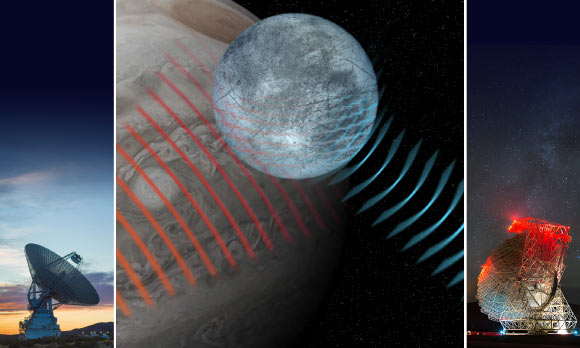
Using NASA’s Goldstone Solar System Radar and NSF’s Green Bank Telescope, astronomers from the University of California, Los Angeles, confirmed that the icy surface of Jupiter’s moon Europa scatters radio energy in an unusually strong and complex way not seen on rocky worlds.
A groundbreaking study published in the open access journal PLOS One on June 17, 2026, reveals a compelling link between varying degrees of contact with the U.S. criminal legal system and the mental health outcomes of adolescents and young adults. Conducted by Raquel V. Oliveira and Elizabeth Culatta at Augusta University, this research dissects the complex and often overlooked mental health ramifications for youth entangled within the legal framework, a subject of critical importance given the high prevalence of mental health conditions in this demographic.
The study draws on data from the Pathways to Desistance project, an extensive longitudinal observational study following 1,354 youths from Phoenix, Arizona, and Philadelphia, Pennsylvania. These participants were initially assessed between 2000 and 2003 during late adolescence, spanning ages 14 to 18, and then tracked with follow-up interviews over seven years. Such an extended study period provides a rare and valuable opportunity to analyze mental health trajectories in relation to different interactions with the criminal justice system, including arrests, court appearances, and institutionalization.
Previous research has consistently demonstrated a disproportionate representation of mental health conditions among incarcerated youth, estimating that while only 15 to 22 percent of all youths in the U.S. have diagnosable mental health disorders, an alarming 40 to 80 percent of incarcerated youths fall into this category. However, Oliveira and Culatta’s work delves deeper, examining the nuanced effects of various legal system encounters on mental health symptoms such as anxiety, depression, hostility, and psychoticism, moving beyond prevalence to explore causative complexities.
The findings illustrate that the experience of arrest acts as a significant short-term stressor, exacerbating symptoms related to anxiety, depression, and psychoticism in adolescents and young adults. These acute psychological impacts can be attributed to the trauma, stigma, and uncertainty commonly associated with arrest, which can introduce substantial emotional upheaval during a developmental stage already sensitive to stress.
Institutionalization—a potential consequence of judicial decisions—was similarly linked to increased short-term symptoms of depression, hostility, and psychoticism. The constrained and often isolating environment of juvenile detention facilities can compound existing mental health issues or catalyze new psychological distress, highlighting the critical need for targeted mental health support within these settings.
Interestingly, court appearances painted a more complex picture. While the act of appearing in court was initially associated with a short-term decrease in anxiety—perhaps reflecting relief after the end of anticipatory stress—this was counterbalanced by significant long-term increases in anxiety, depression, and psychoticism symptoms. Such findings suggest that while resolutions of legal events momentarily alleviate some distress, the enduring implications and future uncertainty following these events continue to burden affected youths.
Equally noteworthy is the discovery that youth experiencing two or more concurrent legal system contacts endure more consistent and lasting mental health symptoms over time. This cumulative effect underpins the critical intersectionality of criminal justice interactions and mental health, indicating an urgent need to re-evaluate how multiple touchpoints with the system may perpetuate or intensify psychological harm.
The study also acknowledges the influence of other adverse factors commonly entangled with justice-involved youth such as substance use, engagement in criminal behavior, and the use of prescribed psychiatric medication. These intersecting variables complicate the mental health landscape, emphasizing the multifactorial nature of psychological distress in this vulnerable group.
It is important to contextualize these findings within the limitations outlined by the authors. The Pathways to Desistance study deliberately limited the inclusion of male drug offenses, potentially skewing the representativeness of offense types nationwide. Moreover, the observational nature of the research restricts conclusions to associations rather than direct causative relationships, leaving gaps for future explorations into the causal mechanisms linking legal system contact and mental health outcomes.
Despite these constraints, the authors robustly argue that contact with the criminal legal system serves as a significant psychosocial stressor for youth, triggering mental health symptoms that not only emerge in the short term but may persist years beyond initial contact. This highlights a considerable gap in both the criminal justice system’s and public health domain’s capacity to adequately address the mental wellbeing of adjudicated youth.
Oliveira and Culatta’s work resonates powerfully with existing literature emphasizing the necessity for diversion programs and comprehensive mental health services tailored to youths in contact with the justice system. Their findings reinforce the call for systemic reforms focused on ameliorating the psychological burdens imposed by mechanisms of legal adjudication.
From a policy and intervention perspective, this study sends a clear message: psychiatric assessment and therapeutic interventions must become foundational components of juvenile justice procedures. Without these, the cycle of mental health deterioration intertwined with legal entanglements is likely to continue unabated, hindered by insufficient support structures and reactive rather than proactive care models.
Ultimately, this investigation fosters a crucial dialogue around the broader societal implications of youth incarceration and court involvement, advocating for multidisciplinary approaches that incorporate mental health expertise in legal contexts. Such integration promises not only to mitigate harmful mental health outcomes but also to facilitate more humane and effective justice practices for adolescents on the cusp of adulthood.
By shedding light on the intrinsic link between criminal legal system encounters and mental health trajectories, Oliveira and Culatta’s research paves the way for future inquiries and innovations aimed at reducing psychological distress and promoting resilience among justice-involved youth cohorts, a population too often marginalized in both research and policy.
Subject of Research: People
Article Title: Effects of differential contacts with the criminal legal system on mental health outcomes of adolescents and young adults: A fixed-effects model
News Publication Date: 17-Jun-2026
Web References:
http://dx.doi.org/10.1371/journal.pone.0344895
References:
Oliveira RV, Culatta E (2026) Effects of differential contacts with the criminal legal system on mental health outcomes of adolescents and young adults: A fixed-effects model. PLoS One 21(6): e0344895.
Keywords: mental health, criminal legal system, adolescents, young adults, anxiety, depression, psychoticism, institutionalization, arrest, juvenile justice, Pathways to Desistance, longitudinal study, observational study
Google is betting generative AI can breathe new life into the smart speaker. The company's new $99.99 Google Home Speaker replaces the rigid commands of the Google Assistant era with more conversational Gemini interactions.
In a groundbreaking advancement that bridges the gap between biological intelligence and artificial systems, researchers at Oregon State University have engineered a light-sensitive device that not only detects visual stimuli but also bio-mimics the brain’s ability to store and modulate memories dynamically. Drawing direct inspiration from the complex workings of human neural processes, this pioneering approach integrates sensing, memory, and signal processing into a single phototransistor, a feat poised to revolutionize the future of neuromorphic computing.
Traditional artificial intelligence hardware architectures typically bifurcate these essential functions—detection, memory retention, and processing—forcing data to shuttle between distinct components. This separation not only introduces latency but significantly amplifies energy consumption. The novel phototransistor developed by the OSU team disrupts this paradigm by embedding memory capabilities precisely where sensory inputs occur, vastly improving computational efficiency and speed.
Central to this device’s innovation is its ability to mimic the neurochemical processes governing memory strength and decay in the human brain. Rather than storing information with fixed permanence, the phototransistor utilizes trapped electrical charges generated by incident light to represent memories, which can then be pharmacologically tuned—via electrical gate voltages—to either reinforce or weaken these stored traces over time. This dynamic modulation reproduces the adaptive nature of biological synapses and opens unprecedented avenues for creating AI systems that can ‘forget’ as well as ‘remember,’ essential for real-time learning and adaptation.
Structurally, the device marries an oxide semiconductor acting as the electronic transistor channel with an organic photosensitive layer responsible for absorbing photons and generating charge carriers. The organic layer traps a subset of these carriers, creating a persistent local electric field even after illumination ceases. This trapped charge influences electron flow through the semiconductor channel, effectively encoding a memory of prior light exposure.
A key technical breakthrough lies in the device’s gate-tunable interface: by adjusting the voltage applied to the transistor’s gate terminal, researchers can manipulate the spatial positioning of trapped charges relative to the conduction channel at a nanoscopic level. This precise control modulates the strength of electrical interaction, allowing for programmable decay times of the optoelectronic memory—ranging from seconds to considerably longer durations. Such flexibility is vital for neuromorphic systems requiring adjustable time constants for processing temporal patterns.
The implications of this technology extend beyond simple visual sensing. By localizing both sensing and adaptive memory functions, the phototransistor can serve as a foundational building block for advanced vision systems capable of real-time data processing with exceptional energy efficiency. This novel hardware approach offers substantial improvements over conventional sensors, which often offload processing to centralized units, incurring latency and energy penalties.
Neuromorphic computing, a field striving to emulate the architecture and operational principles of the brain, stands to gain significantly from this development. The device’s capacity to embody synapse-like plasticity within a phototransistor embodies a leap toward systems that do not merely compute but adapt, learn, and optimize autonomously. Furthermore, the integration of these functionalities at the hardware level paves the way for compact, scalable AI platforms potentially transformative for robotics, autonomous vehicles, and sensory-rich IoT devices.
The research team acknowledges that the trapped charges’ mobility within the device’s photosensitive layer marks a fundamental departure from fixed-charge memory devices. By enabling charge repositioning in response to externally applied voltages, the phototransistor achieves an unprecedented degree of control over memory retention timescales—a property rarely realized in optoelectronic components designed for AI applications.
From an energy perspective, co-localizing sensing and computation reduces data transfer bottlenecks traditionally plaguing AI processors. This attribute directly addresses pressing challenges in AI hardware, where escalating computational demands often collide with limitations in battery life and thermal management. As a result, the novel phototransistor aligns with broader efforts to develop sustainable, high-performance AI technologies.
Conceived through a multidisciplinary collaboration spanning electrical engineering and physical sciences at Oregon State University, the device’s development also underscores the growing convergence of materials science with computational intelligence. By synergizing metal oxide semiconductors with organic tetracene compounds, the team harnessed complementary material properties—robust electron transport with efficient light absorption—to realize the device’s multifunctional capabilities.
The National Science Foundation’s support, alongside the efforts of researchers including Larry Cheng, Ahasan Ullah, Tasnim Sarker, Xueqiao Zhang, Andrew Ensinger, Lizhong Chen, Roshell Lamug, and Oksana Ostroverkhova, culminated in the publication of their findings in the esteemed journal Advanced Functional Materials. The study not only charts new territory in optoelectronics but also sets the stage for transformative innovation in neuromorphic computing hardware.
As artificial intelligence increasingly demands systems capable of real-world adaptability and resource efficiency, innovations like this gate-tunable neuro-phototransistor epitomize the direction forward. By drawing directly from the brain’s principles of memory modulation and energy-efficient computation, the OSU team’s technology heralds a new era where AI devices can perceive, process, and remember in ways that approximate human cognition more closely than ever before.
Subject of Research: Not applicable
Article Title: Neuromodulator-Inspired Gate-Tunable Tetracene–Metal Oxide Phototransistor for Adaptive Optoelectronic Memory and Neuromorphic Computing
In a groundbreaking advancement that could reshape the landscape of bioelectronic medicine, researchers have developed a wirelessly powered, bioresorbable electrical stimulation system with unprecedented programmable control over stimulation waveforms. This innovation integrates tissue-penetrating near-infrared (NIR) light to modulate electrical currents with precision, harnessing a novel bioresorbable silicon phototransistor as the cornerstone of its operation. Pioneering beyond earlier monophasic pulse devices, this technology allows for the delivery of monophasic, biphasic, and polyphasic stimulation patterns, significantly enhancing the versatility and therapeutic potential of implantable electrical stimulators designed to dissolve harmlessly after use.
Traditional electrical stimulators implanted in biological tissues have largely relied on wired connections or bulky batteries, impeding patient mobility and often necessitating additional surgeries for device removal. Bioresorbable devices emerged as a solution to these challenges by safely degrading in the body over time, eliminating the risks associated with permanent implants. However, these earlier systems primarily delivered monophasic pulses, limiting therapeutic precision and adaptability in complex treatments. The innovation reported by Kim, Seo, Wang, and colleagues introduces a new paradigm by integrating wireless power transfer via NIR light and programmable waveform control within a fully bioresorbable platform, thus extending the functional range and easing the clinical management of bioelectronic therapies.
Central to this system is the incorporation of bioresorbable silicon phototransistors engineered to serve as optoelectronic modulators within the electrical circuitry. When illuminated by externally applied near-infrared light that penetrates deep into biological tissues, these phototransistors effectively adjust current flows at critical circuit nodes. This optical modulation capability replaces conventional electronic control elements, which often rely on persistent power sources or invasive wiring, thereby enabling the device to operate autonomously while still allowing fine-tuning of stimulation parameters through non-contact optical inputs.
The adoption of near-infrared light as the wireless power and control mechanism is particularly significant. NIR light possesses the ability to penetrate through several centimeters of tissue without causing damage, providing a safe and efficient transmission channel between the external controller and the implanted device. This feature supports programmability in situ, empowering clinicians to tailor electrical stimulation waveforms dynamically after device implantation. Precisely controlling the shape, amplitude, and timing of the electrical pulses is crucial for optimizing therapeutic outcomes in applications such as neuroregeneration and cardiac pacing.
The research team demonstrated the remarkable versatility of their bioresorbable system by successfully delivering a variety of stimulation waveforms. Monophasic pulses, which are unidirectional current flows, serve as a baseline therapy. More complex biphasic and polyphasic waveforms, which alternate current direction and comprise multiple phases respectively, have been shown to minimize tissue damage and improve efficacy in various biosignaling contexts. The ability to generate these sophisticated patterns expands the therapeutic range of the device, potentially enabling treatments that were previously inaccessible using bioresorbable technologies.
In demonstrating practical utility, the device was tested in both small and large animal models, validating its capacity for clinically relevant electrical stimulation regimes. The system was effectively employed in single- and dual-chamber cardiac pacing, a critical intervention for managing arrhythmias and heart block. Through controlled electrical stimulation, the device could synchronize cardiac contractions, a feat crucial for restoring efficient cardiac output. These trials highlight the translational potential of the technology for future human applications, situating it as a promising alternative to current electronic pacemakers that require permanent implantation and battery replacements.
Further extending the functional scope, the researchers utilized the bioresorbable stimulator to activate phrenic neuromuscular pathways to either induce or block diaphragmatic movements. The phrenic nerve controls diaphragmatic excursion, essential for respiration, and its modulation has significant implications for respiratory therapies, such as in patients with spinal cord injuries or central hypoventilation syndromes. By enabling wireless, programmable neurostimulation of the phrenic nerve, the technology offers a minimally invasive approach to manage life-sustaining respiratory functions, with the added benefit of device degradation after the therapeutic window.
The bioresorbable nature of the silicon phototransistors and associated electronics assures that after fulfilling their therapeutic role, the devices gradually dissolve into biocompatible byproducts. This process circumvents the complications related to device explantation surgeries, reducing patient risk and healthcare costs. Moreover, the materials chosen minimize inflammatory responses and tissue irritation, facilitating seamless integration with host biology during the operational phase.
The engineering behind this system represents an intersection of materials science, optoelectronics, and biomedical engineering. The architecture leverages the semiconducting properties of silicon in thin-film, bioresorbable form, combined with circuit design optimized for minimal power consumption and maximal efficiency during NIR irradiation. These multidisciplinary innovations collectively overcome longstanding barriers in the fabrication of transient electronic implants capable of sophisticated programmable functionality.
Controlling the stimulation waveforms via light permits remote adjustment without physical connections, paving the way for real-time therapeutic modulation responsive to patient status or physiological signals. Future iterations could incorporate feedback mechanisms by integrating bioresorbable sensors that monitor tissue response, creating closed-loop systems for personalized medicine. This dynamic adaptability could be transformative in managing chronic conditions requiring variable and responsive electrical stimulation protocols.
This research also addresses one of the fundamental challenges of implantable devices: power delivery. The optical wireless power transfer circumvents the need for bulky batteries or explant procedures, offering renewed device miniaturization potential. Coupled with programmable phototransistors, these innovations enable multifunctional implants that conform to soft tissues and degrade harmlessly, a trifecta crucial for implantation in sensitive organs like the heart and nervous system.
The ability to deliver polyphasic waveforms through a single bioresorbable receiver unit is particularly noteworthy. Conventionally, generating these complex waveforms requires sophisticated circuitry and stable power sources, neither of which are trivial to implement in resorbable devices. The research showcases how optical control unlocks this capability without sacrificing bioresorbability or wireless operation, representing a paradigm shift in transient biomedical electronics.
The successful application of this device in large animal cardiac models bridges a critical gap toward clinical translation. Such models replicate human physiological scales and complexities far more closely than small animals, validating both the efficacy and safety of the system under conditions analogous to human therapies. This demonstration is an essential milestone on the path toward human clinical trials and eventual regulatory approval.
Moreover, the phrenic nerve stimulation experiments illustrate the broader applicability beyond cardiac pacing. Neuromuscular control via electrical stimulation has vast clinical relevance, from restoring motor function to modulating organ systems. The biodegradable, wireless nature of this system makes it especially suited for temporary therapeutic interventions, such as post-surgical recovery or transient disease states, where permanent implants would be unnecessary or undesirable.
While this work represents a major leap forward, ongoing challenges remain, including further optimization of device longevity relative to treatment durations, refinement of light delivery systems to maximize tissue penetration and minimize off-target effects, and integration with advanced biocompatible materials to tailor resorption timelines. Addressing these will be key to broadening the range of clinical applications and ensuring patient safety across diverse scenarios.
Overall, this wirelessly powered, light-controlled, bioresorbable stimulation system emerges as a versatile platform poised to transform bioelectronic therapies. Its elegant combination of programmable polyphasic waveform delivery, wireless operation via near-infrared light, and full bioresorbability addresses critical limitations of current implantable stimulators. By enabling sophisticated, minimally invasive, and transient electrical stimulation paradigms, this technology advances the frontiers of regenerative medicine, cardiac therapy, and neuromodulation, marking a significant milestone in the evolution of biomedical devices.
Subject of Research: Wireless bioresorbable electrical stimulation device with programmable waveform control using near-infrared light
Article Title: A wirelessly powered, light-controlled, bioresorbable stimulation system with programmable polyphasic waveforms
Article References:
Kim, J.U., Seo, S.G., Wang, H. et al. A wirelessly powered, light-controlled, bioresorbable stimulation system with programmable polyphasic waveforms. Nat Electron (2026). https://doi.org/10.1038/s41928-026-01655-8

 Login
Login