Reading view
After cooperation on SMILE mission, ESA and China chart parallel but separate paths

ESA and China recently launched the joint SMILE magnetosphere mission after a decade of cooperation, but despite similar goals, another collaboration appears distant.
The post After cooperation on SMILE mission, ESA and China chart parallel but separate paths appeared first on SpaceNews.
Les LLM préfèrent les contre-vérités à leurs démentis

Google adds Android protection against AI deepfake scam calls
Google fixes one actively exploited Android zero-day, 124 flaws
After a quick 1.1M sales, MacBook Neo set to reshape the PC industry
Apple’s MacBook Neo appears to be a triumph of strategic disruption that has already cast shock waves across the industry — and that energy is still playing out.
Approximately 55,000 MacBook Neo computers have been sold every day since it was introduced in March, according to IDC data (as first noted by TechCrunch). In fact, it looks as if Apple sold 1.1 million of these Macs in the first 20 days of sale, the analysts said.
There’s no real reason to imagine that level of demand has declined very much.
MacBook Neo: Millions sold
After all, not only do these Macs continue to dominate Amazon’s US laptop charts, but supply chain rumors claim Apple has doubled its manufacturing orders. “MacBook Neo shipments have come in better than expected, with the 2026 shipment forecast raised from 5 million to 10 million units,” Apple analyst Ming-Chi Kuo said recently.
IDC’s March data may not capture the larger extent of the demand, as IDC analyst Navkendar Singh pointed out that MacBook Neo shipments “began to spike from early April”, which suggests demand has accelerated since then.
MacBook Neo demand exceeded expectations across multiple nations, including in India, where the company shifted 18,000 of them in the opening weeks.
Doing the business
Apple has also instructed processor maker TSMC to manufacture additional A18 processors specifically for its affordable laptop, while earlier speculation has claimed the company has been using ongoing memory price increases as a strategic competitive tool. (The Neo starts at $599, with a pricier model set at $699.)
By expanding the potential customer base for Macs with a lower cost Neo, Apple is aiming a claim at the biggest-selling part of the PC market. And it is doing so even as rapidly increasing component prices force others to choose between higher product prices and profitability, or much-reduced margins in to compete at the same price. levels
That’s a losing battle; competitors for the most part can’t hope to match Apple’s bargaining position when it comes to the cost of components like memory because they don’t have the same scale. That means that even when component costs increase for everybody, Apple pays less, because it orders more.
That scale means that for many component suppliers, it’s Apple’s business that keeps the meat on the table while other customers merely contribute the gravy. So, suppliers are happy to make deals with Apple to secure that main course — to continue the analogy — but are less likely to match those deals for dessert. As such, Apple is expected to be the only laptop vendor to see growth this year.
Apple’s great game
IDC’s figures confirm Apple’s strategy is working, with strong demand for the Neo, and, indeed, all Apple’s new laptops. At the same time, the researcher predicts overall global PC shipments will decline 11.3% this year, with a painful 20% sales drop envisioned for Q4.
“We’re not seeing any relief to the memory shortage situation before the end of 2027, which means prices will continue to rise and PC manufacturers will struggle to maintain full product portfolios for the foreseeable future,” Jean Philippe Bouchard, vice president of devices and consumers at IDC said in a statement.
“The introduction of the MacBook Neo is putting real pressure on the entire PC ecosystem,” added Jitesh Ubrani, research manager for IDC’s Consumer Devices Trackers.
Competitors are already responding with new devices equipped with ARM-based processors and aggressive promotional pricing. But none truly match what Apple has with MacBook Neo, and all must reach profitable scale to compete long-term.
None have yet done so.
The strategy makes sense
“The MacBook Neo launch stands out as one of Apple’s most strategically important recent Mac releases,” Counterpoint analyst David Naranjo said.
Apple is directly targeting customers that previously saw its products as too expensive. That allows it is also to aggressively build business in parts of the market such as education that tend to be more resilient to economic headwinds. MacBook Neo is also enjoying strong demand across the enterprise.
Both these parts of the market give Apple’s competitors their lunch. “The competitive pressure from the Neo is providing a partial offset to broader price increases, keeping some low-cost notebook options alive,” Ubrani said. “But the overall trajectory for average selling prices (ASPs) is firmly upward. IDC forecasts ASP growth of 17% in 2026, and even as memory capacity expands over the next two years, pricing is unlikely to return to 2025 levels.”
Apple’s control over its processors, along with its strategic approach to component purchasing, means it should be able to maintain its existing Mac price points for a while. “Apple’s vertical integration (own silicon, own OS) gives it more levers than competitors reliant on third-party chips and Microsoft licensing,” Hexnode CEO Apu Pavithran told me recently.
So, while PC makers either exit the market or raise prices in pursuit of profits, MacBook Neo will continue racing off the shelves, particularly to large enterprise and education customers.
The endgame?
The Neo is more than a lower-cost Apple notebook. It’s a hugely disruptive product that is already driving noteworthy change across the PC industry; it’s forcing competitors to make difficult choices between cost and price — even as they grapple with the existential challenges of memory shortages, component price hikes, and raw materials costs.
That’s not bad for a product that costs your local school just $499.
Just a reminder: the original $399 iPod cost only slightly less when it was first introduced, before subsequently disrupting the music industry.
You can follow me on social media! Join me on BlueSky, LinkedIn, Mastodon, and follow The Core.

La qualité de l'eau en Bretagne, un sujet à dimension nationale

Astronomers Detect a Close Pair of Supermassive Black Holes for the First Time
Researchers discovered a closely orbiting pair of supermassive black holes in Markarian 501 by tracking two jets of particles. The binary system could merge within 100 years and may produce detectable gravitational waves. Current evidence indicates that nearly every large galaxy contains a supermassive black hole at its center, with a mass ranging from millions [...] A retro-geeky Android home screen remix
One of the best parts about using Android is the good old-fashioned geeky fun that comes with finding new ways to improve your digital environment — and improve your day-to-day efficiency.
That capability manifests itself in all sorts of interesting freedoms that (cough, cough) other mobile platforms don’t trust their users enough to allow — from added on-screen elements to custom air gestures, advanced multitasking additions, and all sorts of other shape-shifting enhancements that can completely change the way you interact with your device.
Perhaps the most classic example of advanced Android customization, though, is a splendid little somethin’ called the home screen launcher — a fancy way of saying the system that controls how your home screen and app drawer look and work. Your phone has a built-in process that handles that by default, but here in the land o’ Googley matters, you can always replace that with something completely different and make your device adapt to the way you like to work instead of the other way around.
We’ve got no shortage of interesting Android launcher options, too, ranging from versatile blank slates for complete customization to carefully crafted frameworks for ergonomic efficiency and even throwbacks to mobile operating systems past.
The real beauty of this ecosystem, though, is how much power it gives to Android developers — and subsequently to us, as Android-appreciating animals who embrace these creations! — to experiment and try out all sorts of new concepts. Sometimes, an Android launcher approach speaks to you for its practicality. Other times, it’s just a refreshingly interesting take on how you can get around your phone and get stuff done.
Today, I’ve got a perfect example to share with you. It’s a whole new approach to the Android home screen that’s both unlike anything else I’ve ever seen in this arena and delightfully familiar, in a retro-tech sense.
Lemme show ya what it’s all about.
[Get fresh Googley goodness in your inbox with my free Android Intelligence newsletter — three new things to try every Friday.]
The T9 Android launcher — with a modern twist
My friend and fellow enlightened Android phone owner, allow me to introduce you to a creative little concoction called Key Launcher.
Key Launcher has only been out and available on the Play Store for a matter of weeks now, but it’s impressively polished — and, even more important, impressively original while also having some fantastic geek-tech throwback vibes.
To that end, the core distinctive element of Key Launcher is the T9-style dialpad that sits front and center on the lower third of its primary panel. It is quite literally the same set of letter-packin’ numbers and characters you’d see on an old-school phone — or in the dialer of your favorite Android phone app.
JR Raphael, Foundry
And in this context, it serves some pretty interesting purposes:
- In true T9 style, you can find and access any app or contact on your phone simply by tapping the letter that corresponds with its name — and if you want to narrow down the list even further, you can keep typing letters to refine the results.
- You can long-press any number to create and then access a custom “super shortcut” — anything from a single specific action (opening a particular app or calling or texting a certain contact) to launching a group or category of apps or contacts, launching an on-demand pop-up widget or swipeable stack of widgets, or even launching a pre-filled search query.

JR Raphael, Foundry
- If you tap the # key (known as “pound” in this context — not “hashtag” — for any non-olds among us), you can set up and then access a special “vault” area, where apps are hidden and only visible and accessible with authentication.
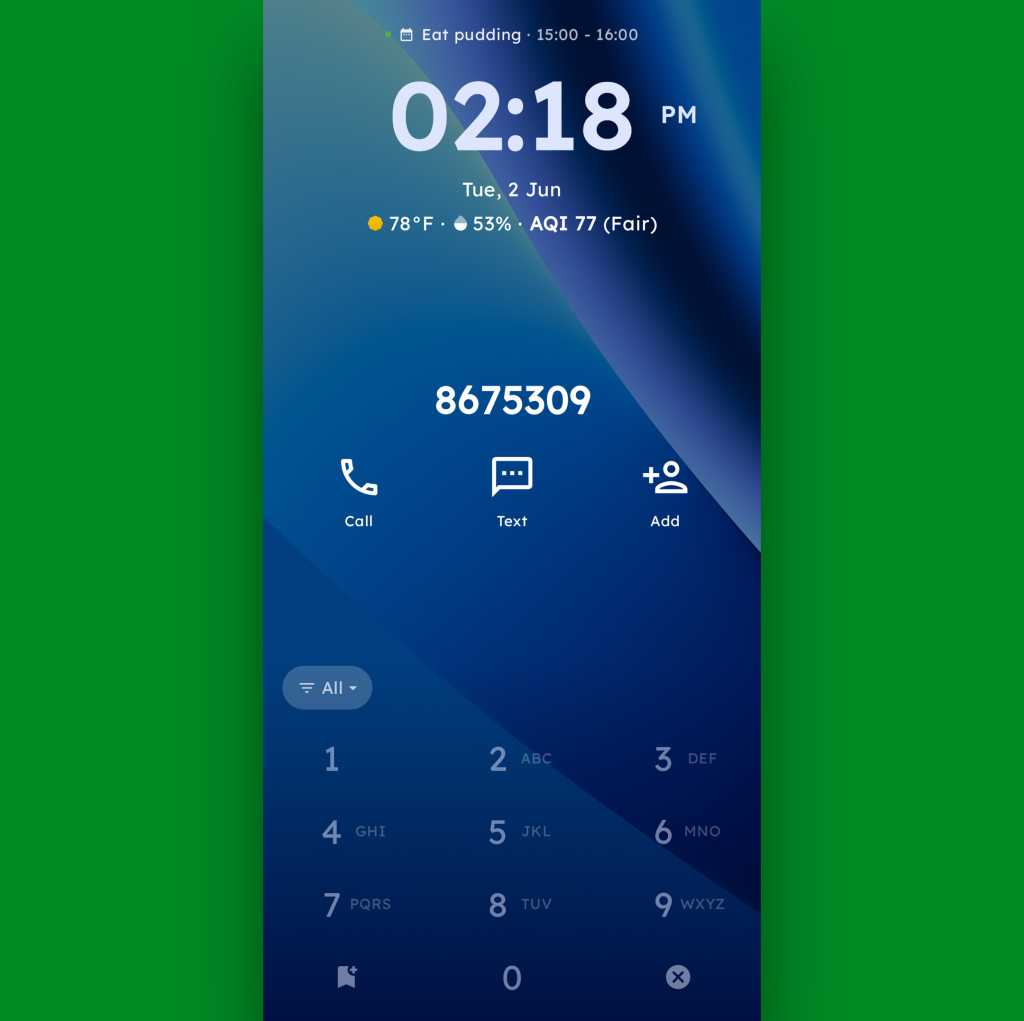
- And, in an especially nifty touch, you can also just use the dialpad as an actual dialpad — to punch in any number you want to text or call, even if it isn’t already in your contacts.

JR Raphael, Foundry
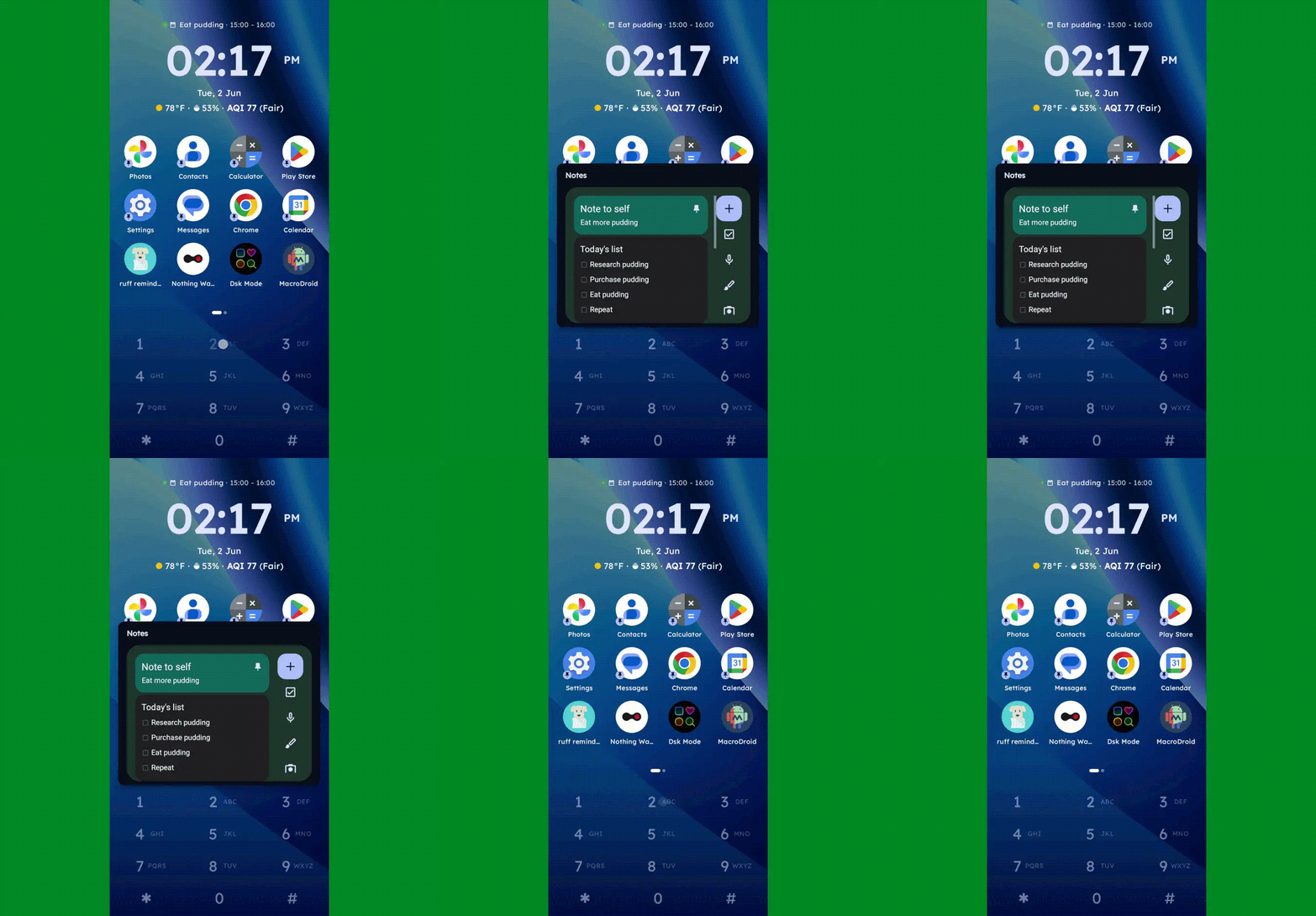
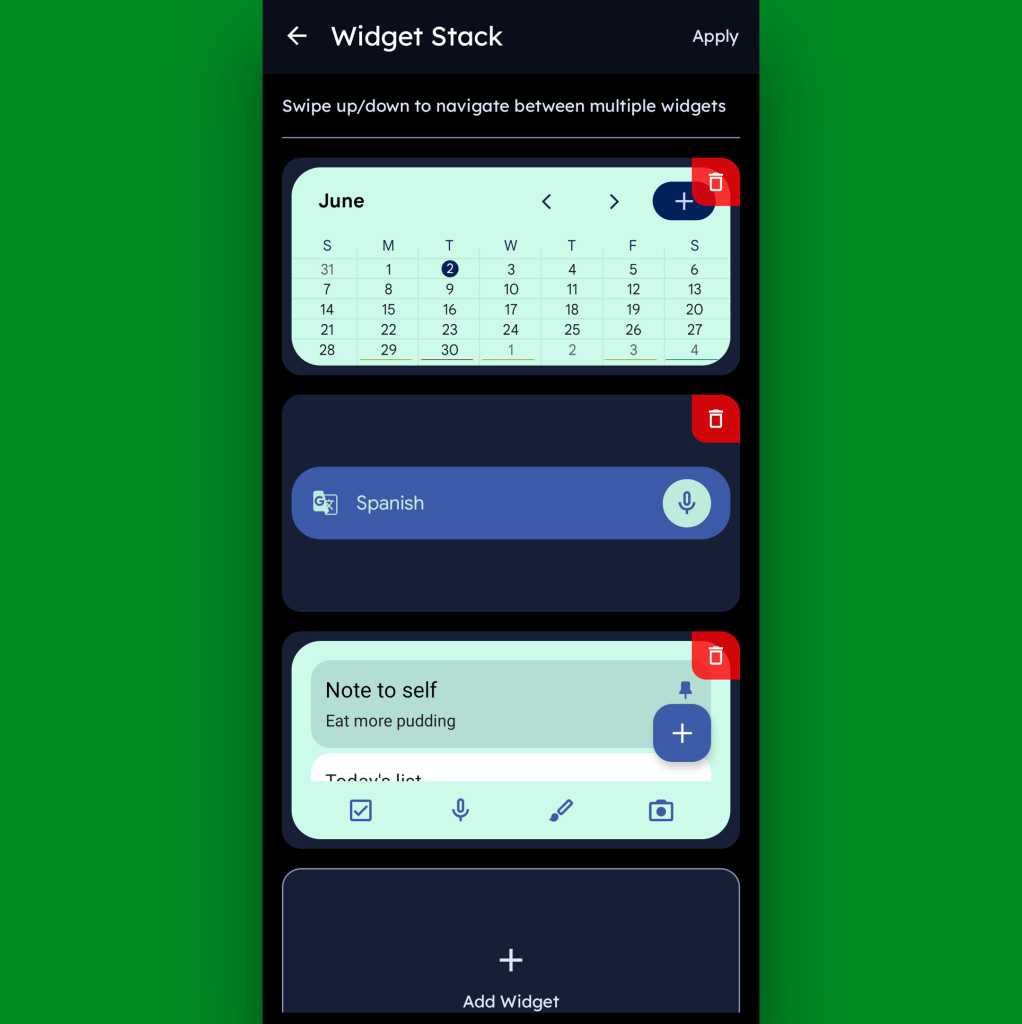
Function-packed as all of that may be, that dialpad is still just one piece of the Key Launcher puzzle. Above it sits a grid of app shortcuts that includes both your own pinned favorites and a dynamic selection of recently opened items. And above that is a handy built-in widget that shows a rotating array of upcoming calendar events from your agenda along with the local time and weather — and, in an especially neat twist, can also be customized to act as an interactive stack that lets you flip through your own set of standard Android widgets right then and there as well.

JR Raphael, Foundry
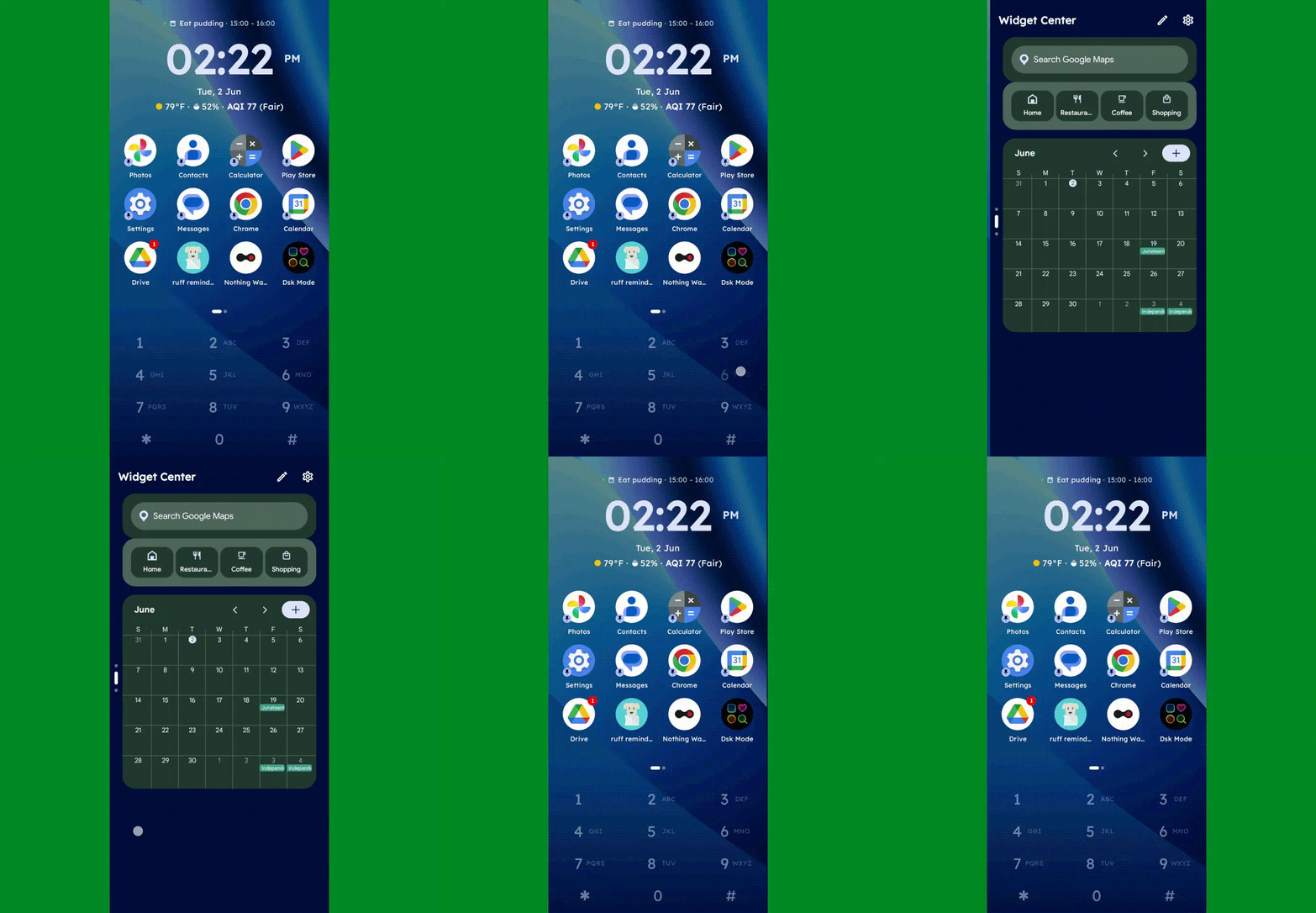
Speaking of widgets, if you swipe toward the left on Key Launcher’s dialpad, you’ll reveal the launcher’s built-in “Widget Center” panel — which is an entire screen dedicated to holding however many widgets you want, in any configuration you like, for easy ongoing access.

JR Raphael, Foundry
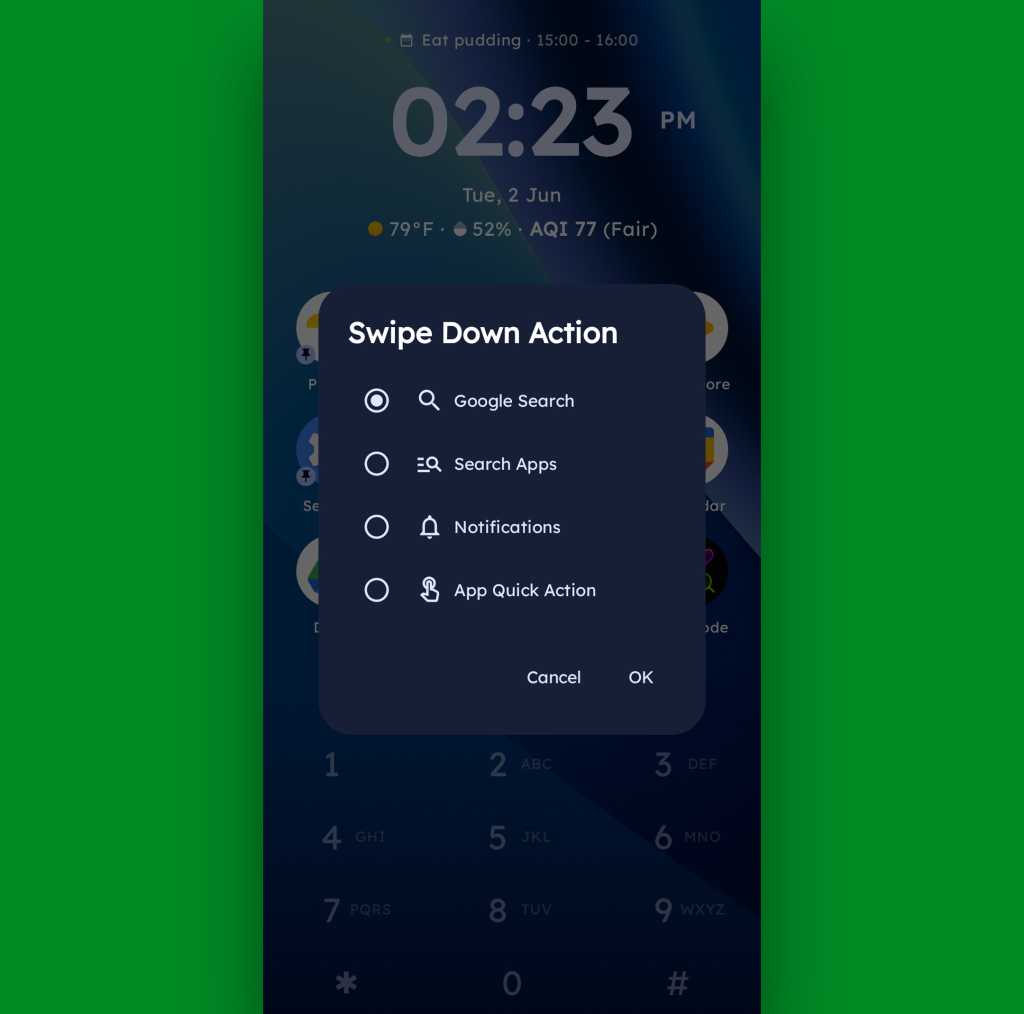
A swipe in the other direction will take you to an enlarged view of your active notifications, meanwhile, while a swipe downward can be set to launch either a quick search (of Google or whatever provider you prefer), a search of your apps, or a direct Android app shortcut within any app on your device.

JR Raphael, Foundry
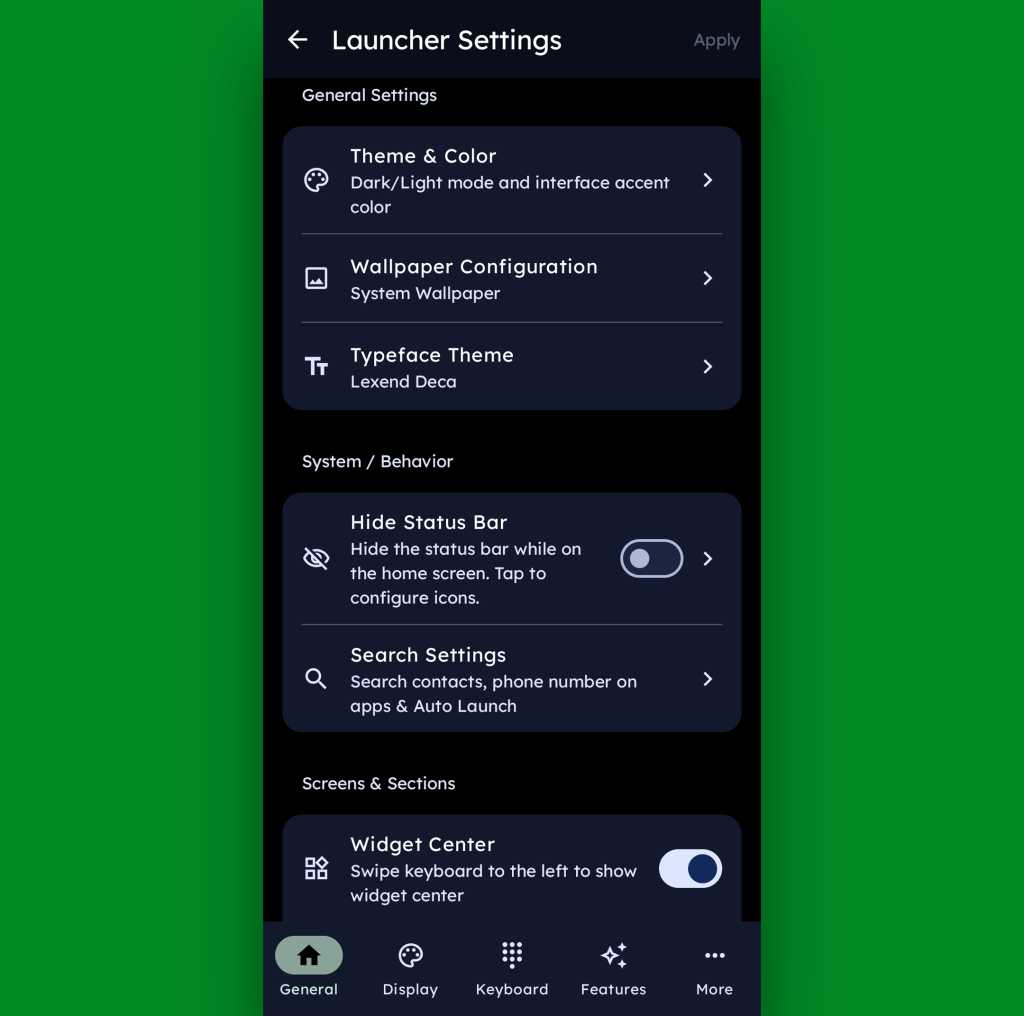
And if all of that seems like a lot of productivity-boosting possibilities, just wait ’til you get into this thing’s settings. Key Launcher is overflowing with options to customize and control practically every facet of its operation, ranging from basic visuals to the specifics of how the dialpad works and even a toggle for optimizing the interface for left- or right-handed use.

JR Raphael, Foundry
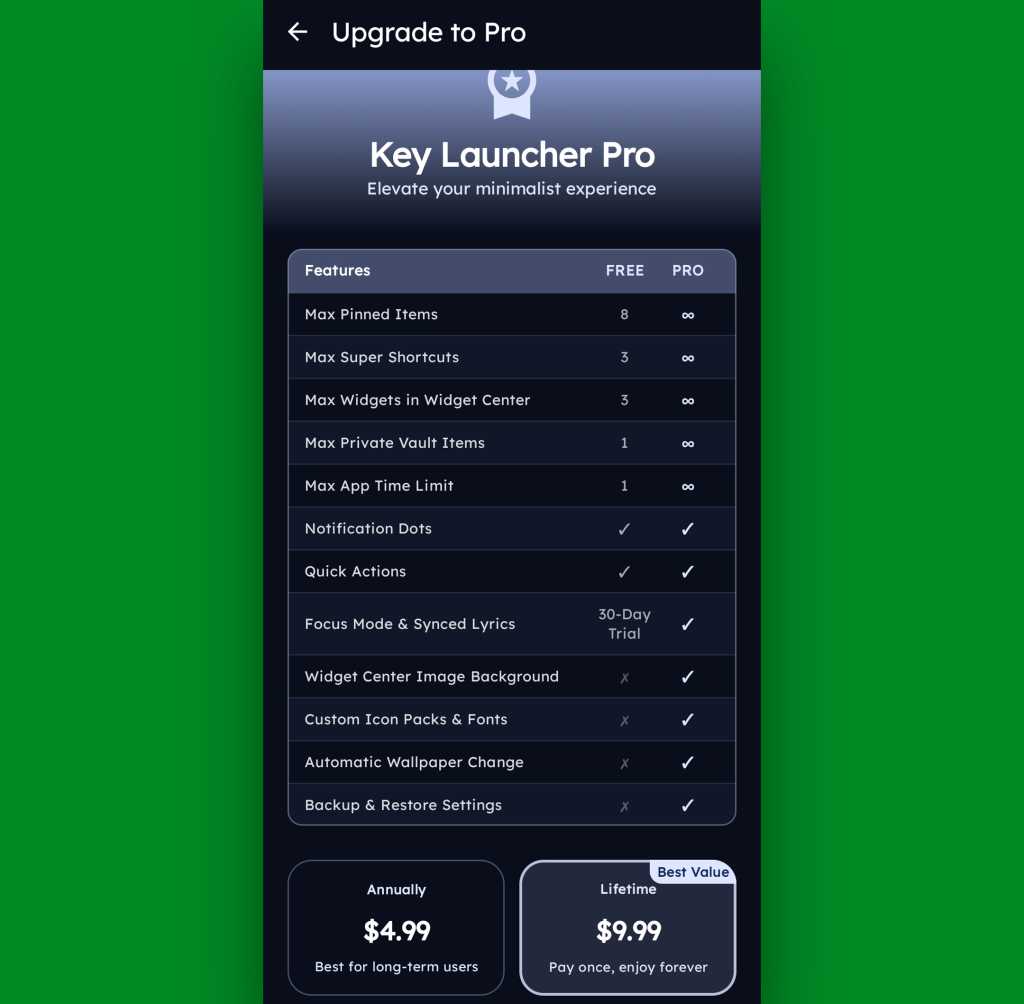
Key Launcher is free on its base level with an optional Pro upgrade that unlocks certain limitations and more advanced features. That path is available for five bucks a year or $10 as a single lifetime purchase, and you get a month-long trial the first time you install the app so you can check it out in its full form.

JR Raphael, Foundry
Even if you just stick to the free version, though, this thing has an awful lot to offer — and it really is unlike anything else out there, with so many clever and potentially useful touches.
It’s that kind of creativity and constant discovery that keeps Android so interesting and advantageous, even after all this time — and that’s true whether you end up sticking with Key Launcher for the long haul or just giving it a go for a few hours and appreciating the deliciously original thinking it offers.
Keep the geeky goodies coming with my free Android Intelligence newsletter — three new things to try every Friday, straight from me to you.

🔍 Scoperto su Reddit: I Farmaci GLP-1 Nascondono Effetti Collaterali Inaspettati? 🩺💊 Scopri cosa dicono i pazienti e perché è fondamentale ascoltarli! Commenta la tua esperienza! 👇
Uno studio ecologico dimostra come le piante di fagiolo (Phaseolus vulgaris…
Rare 1960s Photos Offer a Fascinating Look at Swimsuit Fashion of the Era
Android phones will soon be able to detect spoofed calls and impersonation scams
We're expecting Android 17 to begin rolling out later this month, but first, Google has a batch of updates for the wider Android device ecosystem. As usual, some of the new features are limited to specific devices, and others require using Google's apps. But if you don't mind the latter, you can get automated protection from the growing threat of deepfake phone scams.
According to Google, "impersonation fraud" is one of the most common types of financial scams. The FTC tracked almost $3 billion in losses from such scams during 2024, and the improvements in AI voice cloning tools more recently are making the schemes easier to pull off. The voice models are becoming so capable that it can be difficult to identify a fake caller even when an AI is imitating someone you talk to every day.
Google's solution is an expansion of the system it debuted last month for verified financial calls. Now, a similar feature will work with anyone in your contacts. Many of the most effective deepfake scams involve spoofing a contact's number, which makes the call look more legitimate when your phone lights up. Victims of these scams are then greeted by an accurate re-creation of the person's voice spinning a yarn that involves an urgent need for cash.


© Ryan Whitwam
Only One Chosen Race In Christ

Daniel 9:24-27 | How the Septuagint Differs from the Masoretic Text on Prophecies About Christ

Introducing “Stola Scriptura: How the Enemies of Christ Schemed to Steal the Scriptures”

Covenant Theology Has Historically Taught That There is Only One People of God United in Christ

The End-Times Are Here, Again!