PieceMakers, a Nanya-backed DRAM designer, began trading on Taiwan’s Emerging Stock Board on September 16 at a NT$740 reference price, Cnyes reported ahead of the debut. PieceMakers is not an HBM company. Instead, it bets that inference memory diverges from training memory, President Lee Hsiao-wen told Cnyes, and that DRAM stacked directly on the processor with hybrid bonding can sit between Nvidia’s SRAM-only Groq LPU and HBM. As it stands, design fees, not chips, carry the company's profit, with AI custom-design work accounting for around 40% of the company's revenue in the first half of 2026. Piecemakers Chairman Joseph Ting told TechNews that its first volume customer program will not contribute to the company's financials until 2027 at the earliest.
At roughly 60.4 million shares outstanding, that price values the company at around NT$44.7 billion (around $1.4 billion). Taiwan's Emerging Board is the Taipei Exchange's pre-listing market, not a main-board IPO, so shares trade through market makers ahead of any formal listing application. The stock ended its first session at NT$915, 23.6% above the NT$740 reference price, after opening at NT$1,035 and trading as high as NT$1,205.
Nanya Technology is the largest holder of Piecemakers, at 33.96%, after selling 715,000 shares at NT$740 to seed the float, a disposal it disclosed in a Sept. 9 exchange filing reported by Knews.
What PieceMakers sells
PieceMakers was founded in January 2006 in Hsinchu, Taiwan, led by chairman Joseph Ting and president Lee Hsiao-wen. Historically, the company has designed standard SDR/DDR DRAM and known-good-die (KGD) parts through representatives in China, Japan, France, Turkey, and Israel. Now, the company seeks to shift from direct product sales to custom design services, paid as non-recurring engineering (NRE) fees, and then to IP licensing, royalties, and turnkey production from 2027, the company said at its Sept. 7 briefing, UDN reported.
Revenue from the AI custom design unit has risen from around 4% in 2024 to almost 40% in the first half of 2026. The products behind that increase are HBLL (High Bandwidth, Low Latency RAM), a 2D die rated at 144 GB/s that was taped out in 2016 for Intel’s HPC line and published at ISSCC in 2017, and HiBaLL, the 3D-stacked version rated at more than 1 TB/s, the company claims.
The company described its customers to Cnyes as developers of cloud AI inference accelerators, international semiconductor players, and North American customers, with some programs in design and verification, and none named. Qualcomm CEO Cristiano Amon’s Computex keynote backdrop in June listed PieceMakers among Taiwan ecosystem partners, although neither company has defined the relationship. The takeaway is that the profit is in design fees and not chips. The margin curve matches a pre-royalty Non-Recurring Engineering (NRE) business, rather than a traditional memory vendor.
Why Nanya is chasing this instead of HBM
Nanya’s AI-memory strategy is custom and edge rather than HBM3E. PieceMakers is the first half of a strategy laid out in 2024. On Aug. 7, 2025, Nanya announced a joint venture with Etron Technology, a Hsinchu-based chip designer, capitalized at NT$500 million, with 80/20 ownership. The venture was envisioned to design custom high-bandwidth memory for edge AI devices rather than for data center accelerators. Nanya president Pei-Ing Lee said earlier in 2025 that the company would not compete in HBM3 or HBM3E, TrendForce reported.
Both halves of the strategy rely on Formosa Advanced Technologies, the Formosa Plastics Group’s test and assembly affiliate, for packaging. It is building the through-silicon-via (TSV) and die-stacking processes that both need. The surge in DRAM pricing has made commodity memory Nanya’s real business, which leaves PieceMakers a cheap side bet that has become a windfall. Nanya took advantage of this by selling around 3% of its stake in a move that suggests it is acting more as an investor than a parent building a memory stack.
The inference gap
Groq is an AI inference startup that Nvidia struck a $20 billion licensing-and-talent deal for on Dec. 24, 2025. Nvidia announced its first chip built from that, the Groq 3 LPU (language processing unit), Nvidia’s SRAM-based inference chip, at GTC, its annual developer conference, in San Jose earlier this year.
There is no HBM or DRAM on the Groq 3 LPU. Instead, it uses 512MB of SRAM on the die to deliver 150 TB/s of bandwidth against 22 TB/s from the 288GB of HBM4 on each Rubin GPU. It’s a decode-only co-processor with Rubin handling the prompt prefill, displacing Nvidia’s Rubin CPX from the roadmap.
At Hot Chips 2026, Nvidia’s Igor Arsovski, Groq’s former chief architect, said the rack is in production and published the first third-party benchmark: 3,431 tokens per second on a 100K-context, 31B-parameter model, at about four times the next-fastest public endpoint, in a single-request test that wenoted isn’t directly comparable to the shared endpoints it was measured against. The cost is capacity: at 512MB per chip, a 256-LPU rack holds 128GB, with the model needing 62 chips at FP8 just to hold the benchmark weights. Nvidia accepted that trade for decode speed, which supports Lee’s point that the market leader’s newest inference product contains no HBM.
At Hot Chips, Samsung’s Sangwook Han laid out a three-phase HBM roadmap that ends in zHBM, which is DRAM stacked directly on top of the processor rather than beside it on an interposer. Samsung projects about 70% less I/O power usage than HBM5 with roughly 2.3x the bandwidth of a four-stack HBM4E system, with zHBM’s stacks limited to about four-high due to heat, at around 100W less. This would require wafer-on-wafer hybrid copper bonding and tight co-design between DRAM and SoC teams. SK hynix’s Jaesik Lee, VP of package engineering, said on Aug. 23 that hybrid bonding won’t be ready for HBM4E, leaving HBM5 as the earliest point. Counterpoint Research expects full-scale HBM production with the technique around 2029–2030.
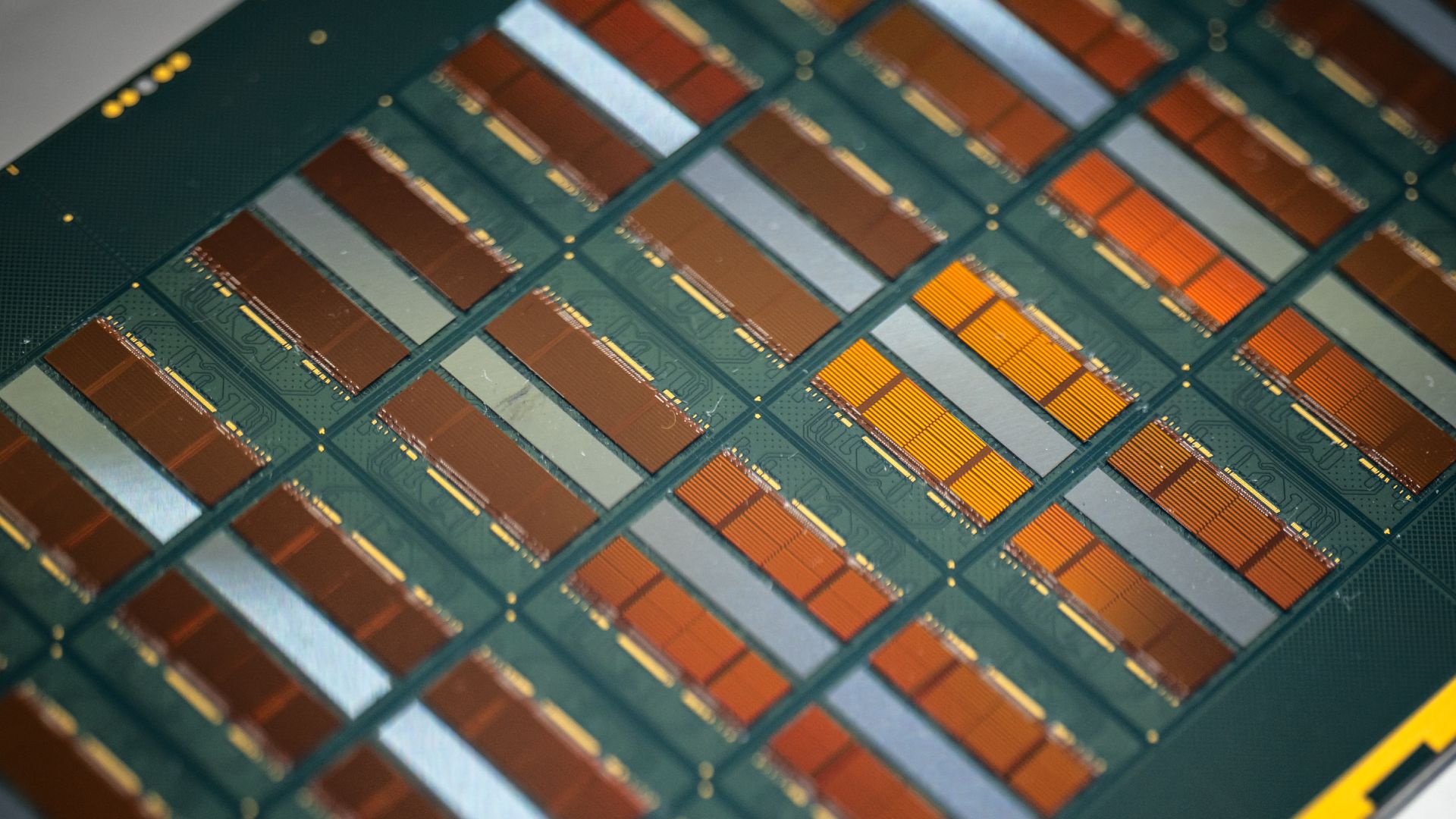
PieceMakers offers a different version. Instead of the GPU-plus-HBM 2.5D layout, it bonds the DRAM stack directly onto the processor, wafer-on-wafer, with hybrid bonding instead of microbumps. This fits far more connections with the finer pitch, improving bandwidth, and the shorter path reduces both latency and power consumption. The company puts its wafer-on-wafer product at more than 2 TB/s per layer with latency under 20ns, the company figures, but the target is more capacity than SRAM at a lower cost and power than HBM. PieceMakers is not doing the TSV or hybrid bonding itself, as this is handled by the customer’s logic wafer foundry, Ting added. This custom service promises a 2027 date against Samsung's undated roadmap end and SK hynix's HBM5-at-the-earliest timing. Nvidia and Samsung have each, in their own way, settled the architecture question, with the open question being the customer.
Yield is the product
Lee also said that yield is the biggest hurdle to wafer-on-wafer mass production. The repair architecture has to be designed in, with testing before bonding, after bonding, and then after logic integration. Lee’s own example was 80% yield per layer, at which four layers come out at about 41% and eight at 17%. Our recently-published hybrid bonding state of play covers the process side in more detail.
This better puts into perspective why the company sells repair and known-good-die IP as much as it does bandwidth. It’s also why an IP-and-royalty model fits the strategy — yield IP is portable across customers while a bandwidth number is not.
What to watch
For PieceMakers, AI revenue remains primarily NRE until there is a first named customer, with the first volume program expected in 2027 at the earliest. Ting said that Nanya’s Q3 2026 results, which come in late October, will gauge the PieceMakers gain and reveal further financial information. SK hynix’s hybrid-bonding timing, which targets HBM5 at the earliest, is the current benchmark, although its 16- and 20-layer memory stacks are a separate problem from a few DRAM layers on a logic wafer. Qualcomm may also describe its relationship with PieceMakers more formally.
PieceMakers is likely to end up as an IP licensor with a small number of accelerator customers and turnkey volume through Nanya and Formosa Advanced Technologies. The technology risk is the foundry’s and the customer’s, which is why PieceMakers’ design-fee model works. PieceMakers is expected to benefit from a 2027–2028 ramp, later than Ting’s 2027. If the largest HBM maker won’t bond its own memory this way before HBM5, PieceMakers’ own 2027 date is the one it must meet.
Mozilla has published version 1.1 of its State of Open Source AI report on Sept. 15 using data current to Sept. 1, revealing that many of the best Chinese open-weight AI models are closing the gap with U.S. frontier offerings. The best open model trailed the closed leader on the Artificial Analysis Intelligence Index by three points at 60% of the price and two points behind Claude Fable 5 at 30%. Mozilla’s fit on METR task-horizon data puts the open-closed gap at around 4.4 months, in line with Epoch AI’s four-month estimate.
Mozilla is the nonprofit behind the Firefox web browser, and its report is a recurring assessment first published on July 14 on the Mozilla blog. It’s built on a Mozilla/SlashData survey of roughly 1,400 developers along with OpenRouter traffic data and third-party benchmark indices. Mozilla is an advocate for open models, and TIME reported on July 14 that Raffi Krikorian, Mozilla’s chief technology officer, described the report as partly advocacy. “Open weights” in this context means downloadable weights rather than training data or code. The report counts 16 notable open releases, but none delivers the data recipe required by the Open Source Initiative’s definition.
The four-month figure rests on METR, which is a research nonprofit that scores models by the length of task, in human working time, they complete half the time. By Mozilla’s fitted estimate, closed models handle tasks that take human experts 8 to 12 hours. Open models reach that about four months later, with open capability doubling every 3.9 months versus 5.5 for closed, by Mozilla’s computation. Mozilla also charted vals.ai’s Terminal-Bench 2.1 results, which run every model through the same harness, or software layer that offers a model its tools. On that board, Z.ai’s GLM-5.2 scored within a point of Claude Opus 4.7 and about four points behind Opus 4.8, at less than one-fifth the cost per test. On OpenRouter, a marketplace that routes developer traffic to hundreds of models, Mozilla counted eight of the top ten models by August token volume as open weights, seven of them Chinese-built. Nevertheless, closed providers took 96% of model-layer revenue on OpenRouter from May–September 2025, the Linux Foundation reported. “We see the decision to pay for closed [models] as workload-specific rather than organization-specific,” Krikorian told Ars Technica in an email.
(Image credit: Mozilla)
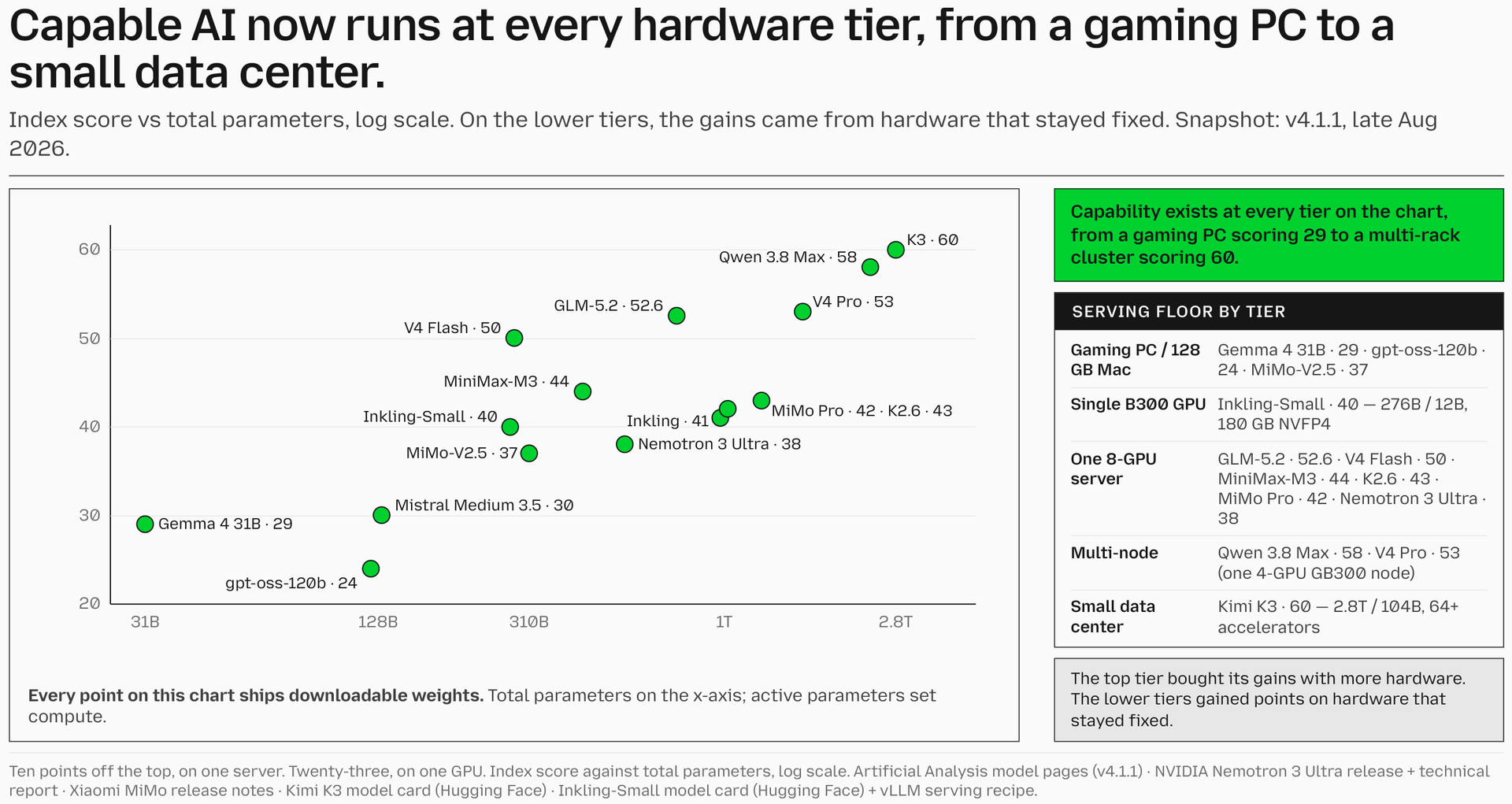
One caveat is that the four-month gap and the 30% token price figure are measured API to API on hosted endpoints and at list price. The report’s own hardware chart puts the best open model that fits one server at 52.6 and the best on one GPU at 40. The drop from the top is 10 and 23 points, respectively, a larger gap than the reported four months. Kimi K3’s native MXFP4 checkpoint runs about 1.56TB across 96 shards, and Mozilla’s serving configuration lists 64 or more accelerators, while vLLM calls for at least eight GB300 GPUs, with multiple nodes for production traffic. The report describes this as open but not runnable by most who hold it, and Tom’s Hardware put the memory need near 1.5TB in July. One example exception is Thinking Machines’ Inkling-Small model, under the Apache 2.0 license, whose NVFP4 version fits one B300 at a 180GB floor.
The report’s data stops at Sept. 1. Since then, Artificial Analysis has moved its index to v4.3 with a different evaluation set. The live board has Claude Fable 5.1 at 53 on its highest effort setting with Kimi K3 at 44, not comparable to the v4.1.1 numbers Mozilla plotted. vals.ai’s Terminal-Bench 2.1 board, updated Sept. 11, is now led by GPT-6 Astra at 87.27% with Fable 5.1 at 85.02%. Mozilla’s own chart caption reads: “the gap resets every release cycle.” K3 also carries an allegation detailed in the Sept. 8 NSA/CISA/FBI joint advisory (AA26-251A). The claim, which Mozilla’s report states as “asserted, and unshown,” is that Moonshot extracted Claude Fable 5 data to train K3 through distillation, the practice of training one model on another model’s outputs. On July 17, Artificial Analysis had K3 at 57 versus Fable 5’s 60, while on Sept. 1, Mozilla had it two points back.
A father says his 9-year-old son spent $118,000 on YouTube ad campaigns for his Minecraft and Roblox gameplay videos over about three weeks, all charged to a company credit card the father had saved to his own Google account, which his son also used. The father, who identifies himself only as Dave, described the incident in a video titled “Message from Dad…Mighty Mike Plays is Over.” posted to the boy’s channel on Sept. 15. Dave said he was called into a meeting with his manager, corporate staff, and finance and shown the advertising charges.
Mighty Mike Plays (@MightyMikePlays67) is a 9-year-old’s Minecraft and Roblox gameplay channel with about 24,000 subscribers and 182 uploads as of early Sept. 16. Dave said it started when the boy was around 8, streaming straight from a PS5 with a cheap headset and no editing. Early videos got 5 to 11 views, he said. Dave said he entered the company card himself to buy Robux for his son, and it then sat saved on the Google account that also carries his work email, calendar, and files. Dave did not say why he used the company card for that purchase.
Dave said that after the boy complained about views, he set up a roughly $20 promotion and talked through the steps aloud: set a budget, select who sees the ads, hit run. The boy then created his own campaigns, and Dave said his son did not understand the $20 as a limit. “The credit card, it just says approved every single time,” Dave said in the video. Finance showed him three weeks of ad spend totaling $118,000 on campaigns titled “Mighty Mike,” “Epic Roblox,” and Minecraft gameplay.
Three of the promoted videos reached around 200,000 views. As of a check at 12:26 a.m. ET on Sept. 16, the channel’s three most-viewed gameplay videos stood at 260,000, 224,000, and 178,000 views, with a run of uploads above 1,000 views and most of the rest under 100. Four days before Dave’s video, the boy had posted a video titled “NeverMyFault made a Short about my Ad?” about another creator noticing one of his promotions; it had about 70,000 views.
(Image credit: YouTube / Mighty Mike Plays)
Dave said the matter has been escalated and he does not yet know whether he will get to keep his job or have to repay the costs.
Google’s own help pages say a payment method entered for any Google purchase is stored in a payments profile tied to the Google Account and is offered again for the next purchase. The profile is also shared across Google Ads and other Google products. YouTube’s Promote tool, which Google describes as a simplified version of Google Ads, walks a creator through a goal, an audience, a budget, and an end date. Dave did not say which interface his son used, but the steps he described match Promote’s. Google Ads does not allow users under 18, but the account was the father’s.
In a separate case, the FTC announced on Sept. 4, 2014, that Google would refund at least $19 million to parents billed for children’s unauthorized in-app purchases on Google Play, and required it to get express consent before billing. That covered Google Play, not Google Ads. Dave said the family will remove saved payment details, add spending caps, and set up parental controls, and that the channel is paused until “real guard rails” are in place.
Perplexity has released Portable Computer for Windows, in partnership with Nvidia, via the existing Perplexity app for Windows. Previously, this functionality was only available on Linux-based operating systems. The hardware requirements remain, meaning the host system must have at least 24GB of VRAM with a GeForce RTX or RTX PRO GPU. Likewise, a Pro or Max Perplexity subscription is required. Portable Computer was originally launched on the DGX Spark as a fully local AI agent platform.
Portable Computer, launched originally for Linux on Aug. 25, is a local version of Perplexity Computer, which is the company’s agent for multistep tasks. Perplexity Computer can plan, run subtasks through connectors and tools, and produce a result other than a simple chat response. This runs in Perplexity’s cloud and consumes Computer credits. Portable Computer is the same agent but with features running on your local PC instead of in the cloud. Local work does not consume credits, but the agent can send tasks to cloud models with explicit permission if necessary, the company said. Nvidia said on Sept. 3 that Windows support was coming soon.
(Image credit: Perplexity)
Portable Computer for Windows comes with some new features. These include scheduled recurring tasks and local MCP servers for desktop apps, according to Perplexity. Nvidia listed connectors for Microsoft Word, Google Drive, Gmail, Slack, and GitHub. The app also includes a dropdown for downloading a local model with one click. Nvidia named Qwen 3.8 27B as an example local model. DGX Station support is expected soon, Nvidia said.
Aravind Srinivas, CEO of Perplexity, wrote on X on Sept. 14 that with this release comes “unmetered local intelligence on every Windows PC running on Nvidia hardware and Perplexity harness.” The 24GB requirement is a VRAM gate more than a generation gate, cutting across Nvidia’s consumer lineup. Cards that meet the stated 24GB+ VRAM requirement include the RTX 3090 and 3090 Ti (24GB), the RTX 4090 (24GB), and the 5090 (32GB). The RTX 5090 Laptop GPU at 24GB has not explicitly been mentioned by either company. RTX PRO Blackwell cards that qualify are the 4000 (24GB), 4500 (32GB), 5000 (48GB or 72GB), and 6000 (96GB).
We're expanding our work with @nvidia to bring fully local AI to Microsoft Windows PCs with RTX GPUs. Unmetered local intelligence on every Windows PC running on NVIDIA hardware and Perplexity harness. Enjoy!September 14, 2026
In a Sept. 3 post ahead of IFA, the consumer electronics trade show in Berlin, Nvidia indicated more plans along these lines. The post stated that RTX Spark Windows PCs from Lenovo and Acer are expected in October and that two local agents, Hermes Agent and OpenClaw, are getting the same simplified local setup. For users who already own a qualifying RTX PC, the Windows release removes the need to buy a separate system. Upgrading a compatible desktop with a used qualifying card could also cost less than buying the DGX Spark Founders Edition at its $4,699 price.
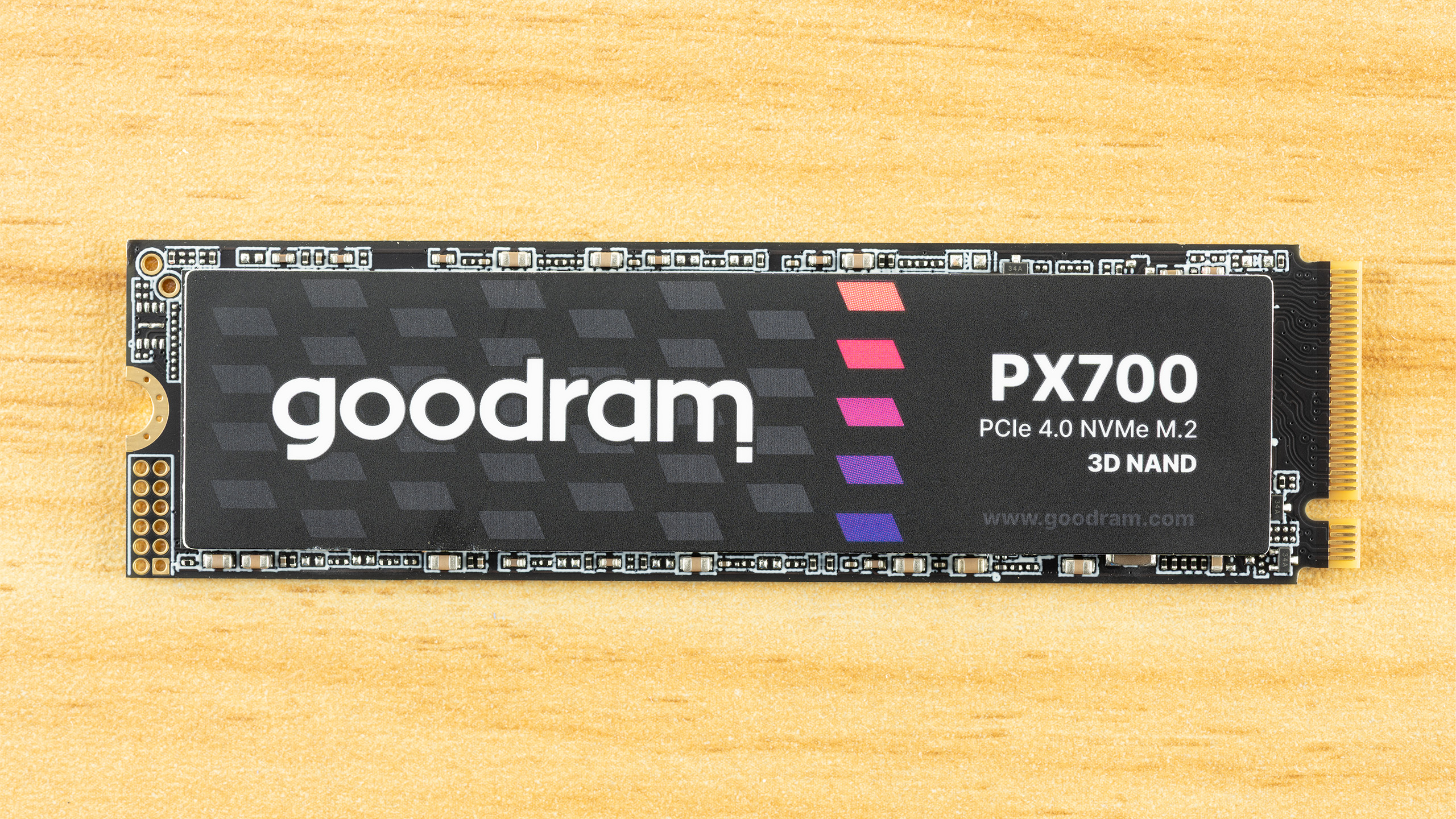
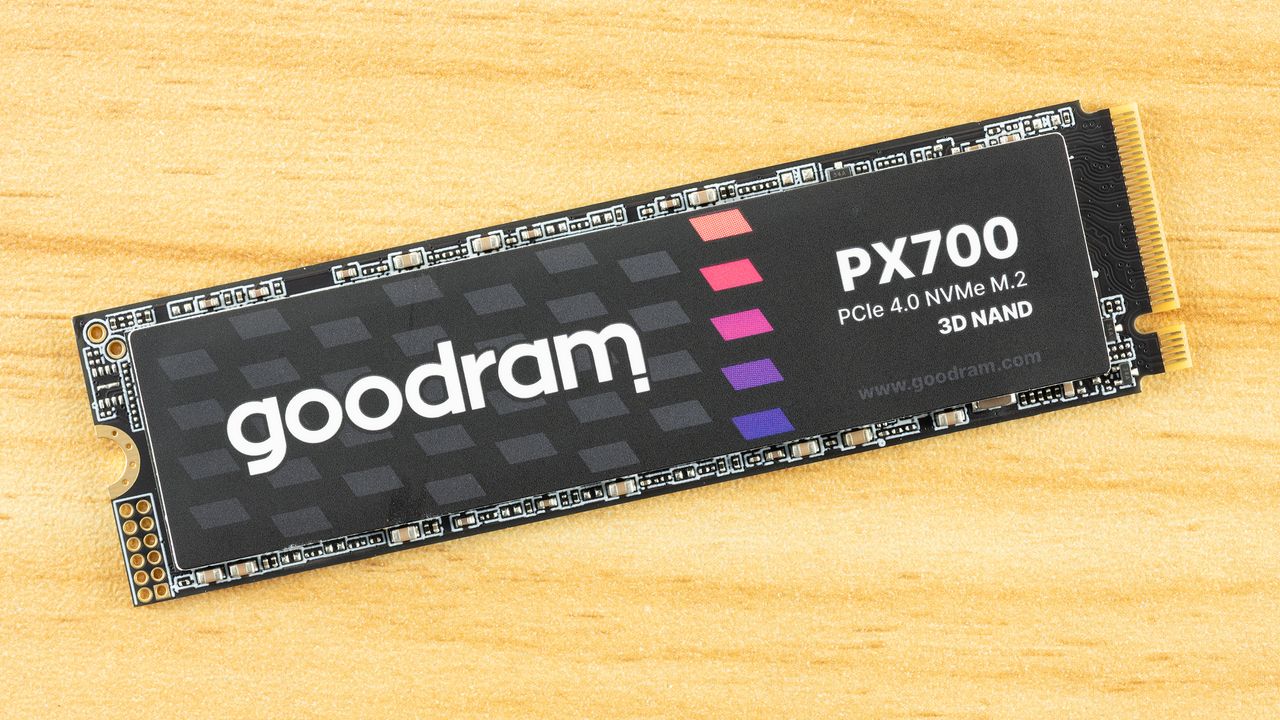
The Goodram PX700 is a budget PCIe 4.0 drive that delivers everything you need: good performance, great power efficiency, and all in a single-sided package that runs cool. Sometimes it really is as simple as picking one drive to meet whatever your storage needs are at the moment. It’s not the first model that comes to mind for this segment, but in our testing it performed better than expected as a good drive that may otherwise run under the radar.
Goodram is not a new or no-name company, even if the “good RAM” moniker seems a little too on the nose. Instead, it’s a memory assembler in the EU with quite some history. This, in fact, makes it more approachable in comparison to a lot of the new names we have seen on AliExpress and increasingly on Amazon. We expect reliability or at least good support from the company, and the TBW on this one seems to reflect that this isn’t an ultra-budget drive.
On the contrary, performance was not just what we expected – considering we’ve reviewed many drives in this segment, many with the same or comparable hardware – but above. Sometimes only by a small amount, but the gaps are real. Anywhere performance mattered, it delivered. One expects trade-offs for that, but in fact the PX700 is very power-efficient, and the drive provides an excellent storage experience. The only downsides are sustained write performance – which is of little importance in most cases – and, unfortunately, the price. At the right price point, this would be a great pick for any device.
The Goodram PX700 covers the most popular capacities of 1TB, 2TB, and 4TB. Smaller drives can be popular for upgrades and basic boot usage, especially with how prices are now, but modern flash scales best at 1TB and up. 8TB drives are great as a larger storage solution but require a significant investment. The PX700 sticks to what will sell, predominantly 1TB and 2TB. At the time of review, these are priced at $346 and $418, respectively. These prices are high and probably point to a lack of stock more than anything else. While the 1TB price is double what it should be, at 2TB a drive of this type should be closer to $300. Naturally, one has to take into account the pricing volatility in an SSD market besieged by a NAND shortage, but we recommend looking in that range for this drive or one comparable to it with similar or the same hardware.
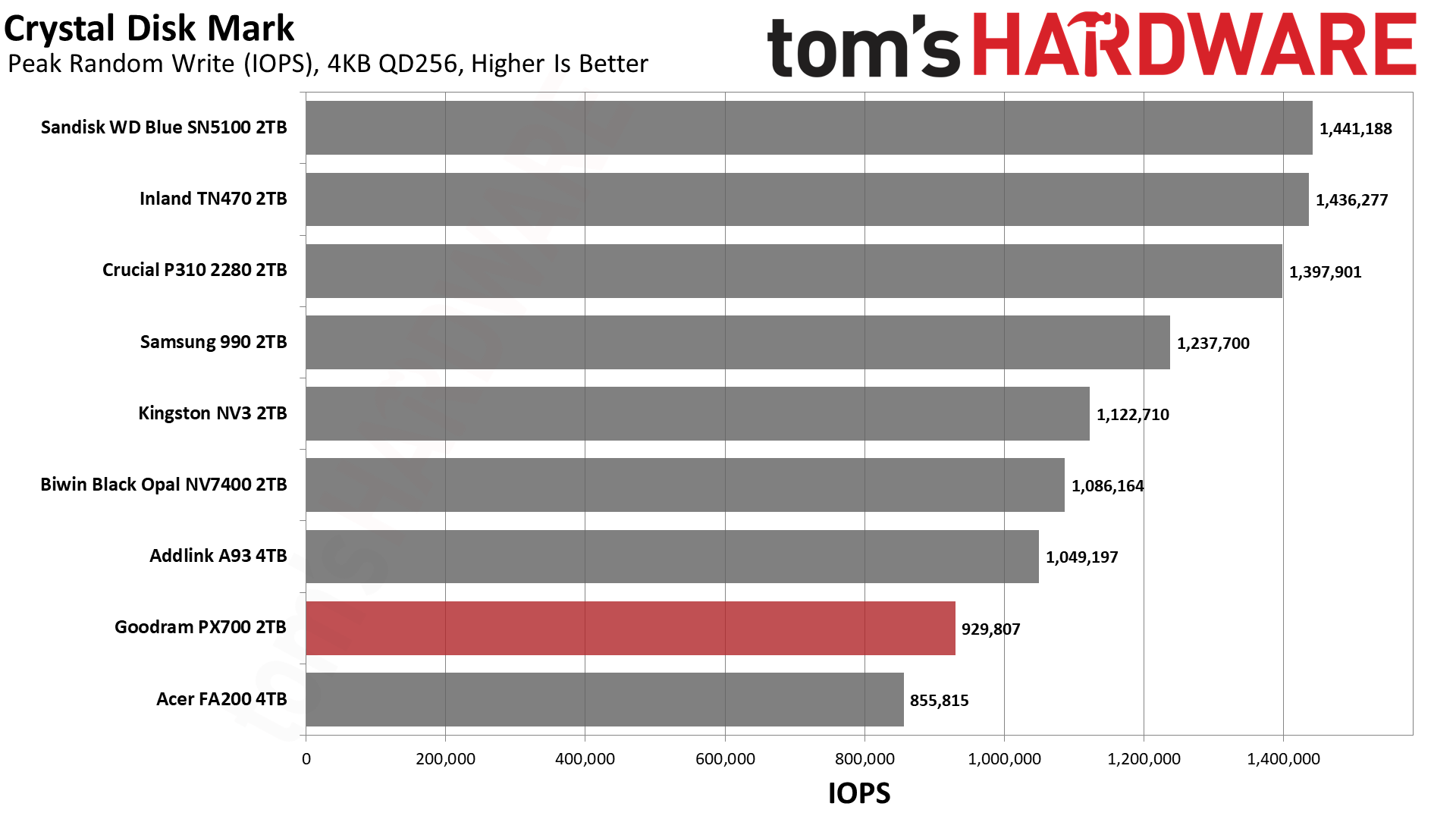
The drive is full-fledged Gen 4 with performance up to 7,400 / 6,500 MB/s for sequential reads and writes and up to 1 million random read and write IOPS at 4TB with only 820K write at 1TB/2TB. This is standard for the class and is more than enough performance for everyday tasks, gaming, productivity workflows, and more. The drive has the standard five-year warranty with up to 600TB of writes for every TB. The last part of that is worth a second glance because it indicates this drive can come with TLC rather than QLC flash, since TLC, aside from being faster, has better endurance than QLC. However, we have reasons to believe our sample has QLC, which we will point out where the evidence supports that reasoning. We want to emphasize that you should not assume what flash a drive uses based on TBW alone.
Goodram PX700 Software and Accessories
Goodram does not offer any specialized or custom software for its SSDs. You will have to rely on third-party solutions. Software for SSDs essentially falls into three categories: health management, performance, and data backup. SSD toolbox applications from manufacturers will usually cover the first two, with, typically, an OEM version of Acronis True Image for the last. For free alternatives, we recommend CrystalDiskInfo for health information, CrystalDiskMark for basic benchmarking, and MultiDrive for data backup and imaging. MultiDrive is made for Windows and has a bootable WinPE image, so for other operating systems you can opt to use Clonezilla instead.
Goodram PX700: A Closer Look
Tom's HardwareTom's Hardware
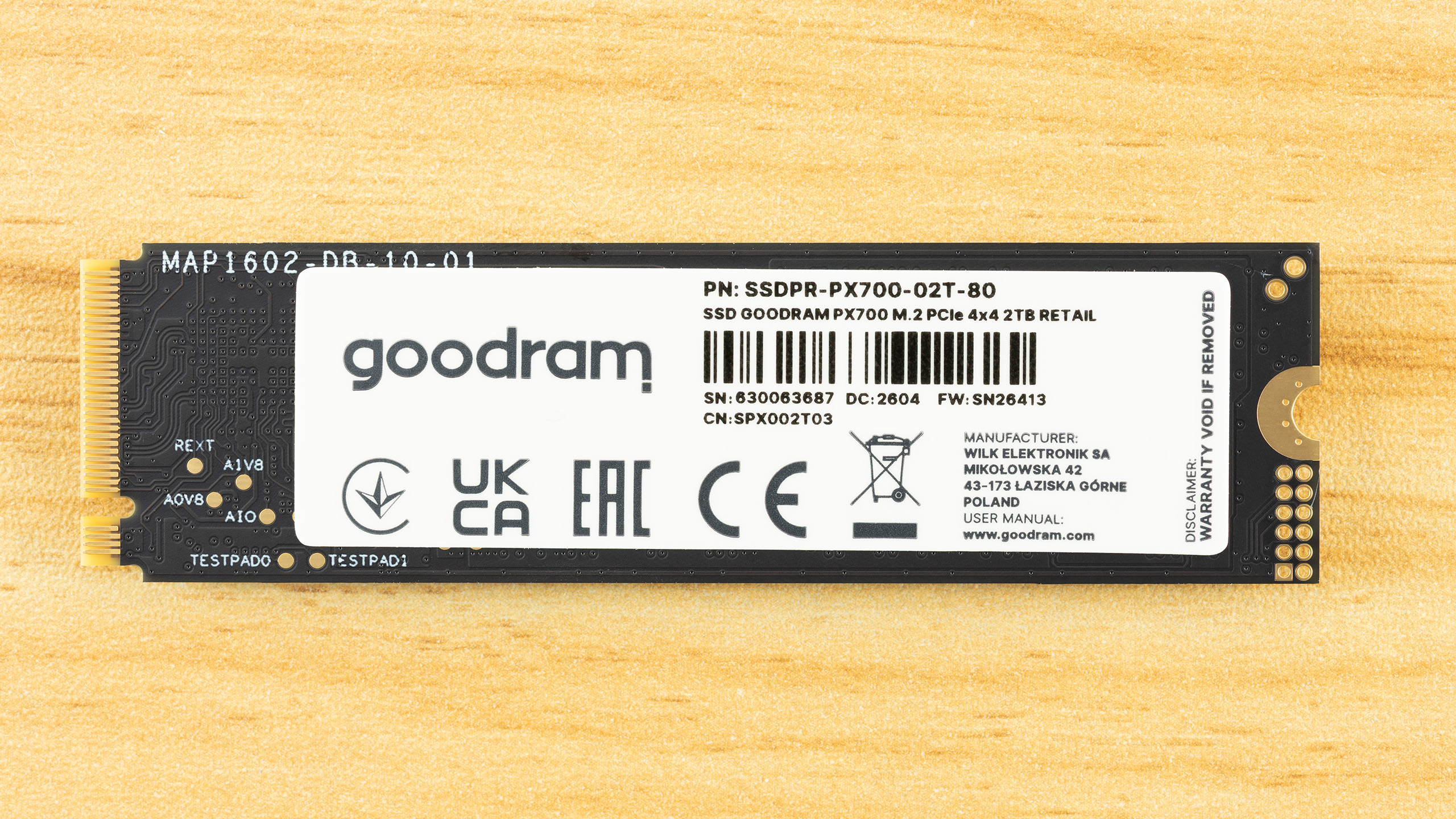
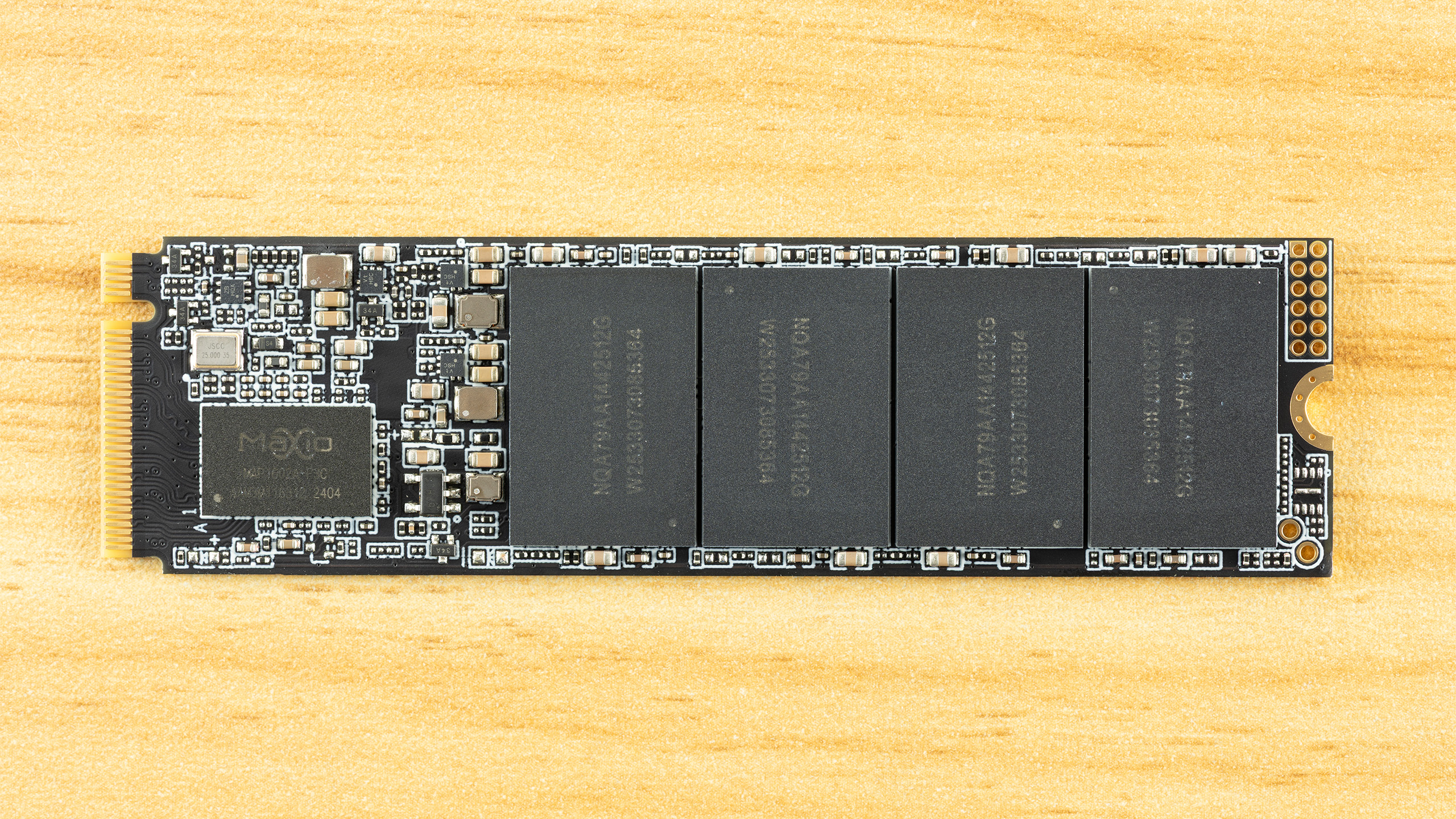
The PX700 is a single-sided drive at all capacity points. This makes it compatible with a wider range of systems and, if you need to cool the drive, it’s easier to tackle just one side of components. As it turns out, the drive runs cool enough that you probably don’t have to worry about this – check the Power Consumption and Temperature section below – but it’s still worth pointing out. The data on the rear label is standard, but we do want to say a little bit more about the listed manufacturer.
Wilk Elektronik is a Poland-based memory company, which makes this interesting, as that means the PX700 is a European-assembled SSD. Goodram covers the mainstream parts and IRDM enthusiast, although this is the first SSD from them that we’ve reviewed. As we are going to dig into the hardware in this section, we will say that the drive's silicon is sourced from Asia, as with virtually every SSD. If we say a drive is made in Poland, this means the drive is assembled, tested, and covered by warranty in Poland with an EU anchor. For some, that might be a positive factor in any purchasing decision.
Tom's HardwareTom's HardwareTom's Hardware
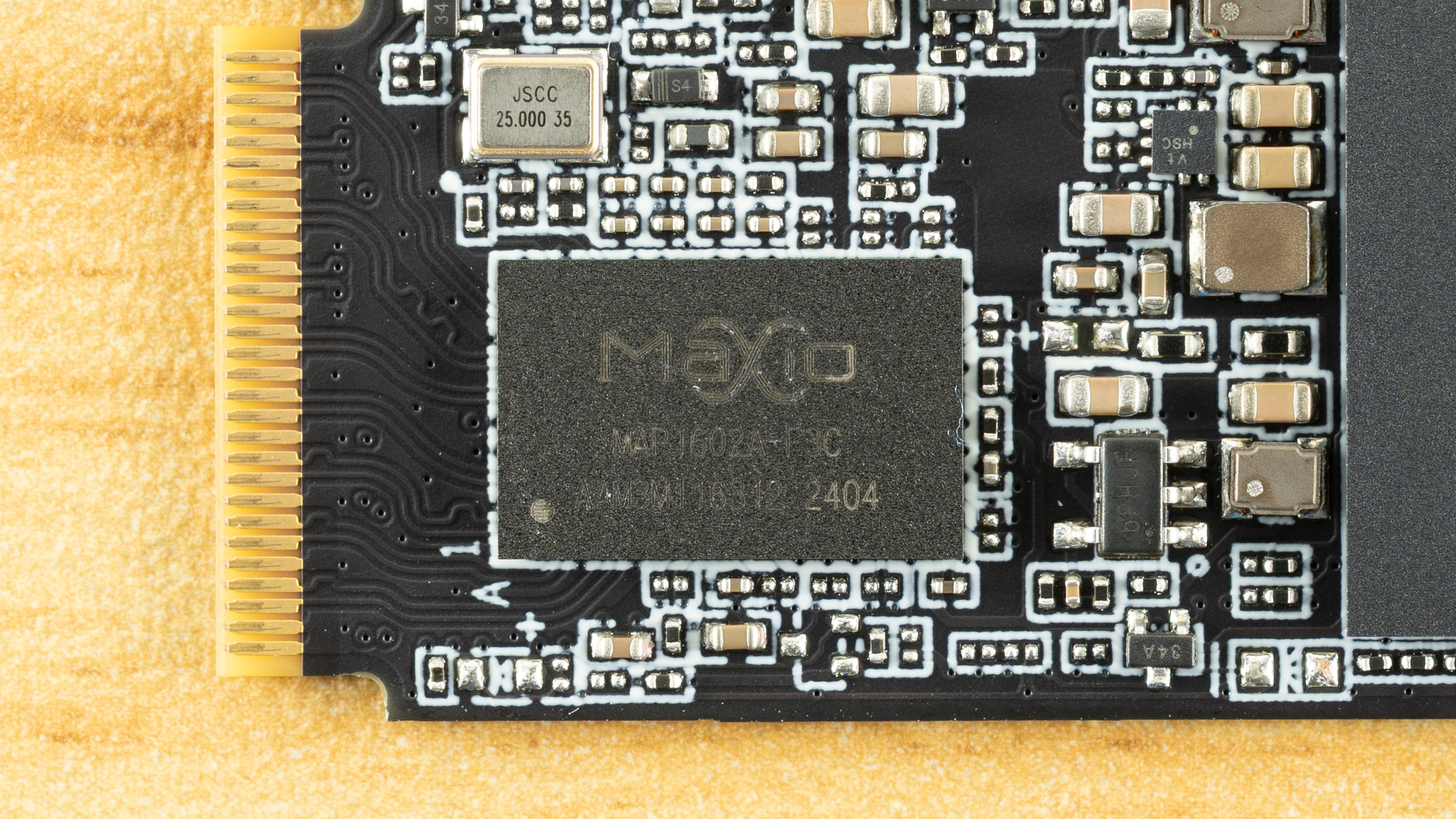
Identifying the hardware here is half simple and half challenging. The controller is clearly the Maxio MAP1602, a four-channel, DRAM-less part that’s been a budget champion for quite some time. There is not much mystery there aside from maybe this being a later revision, typically used for higher capacities.
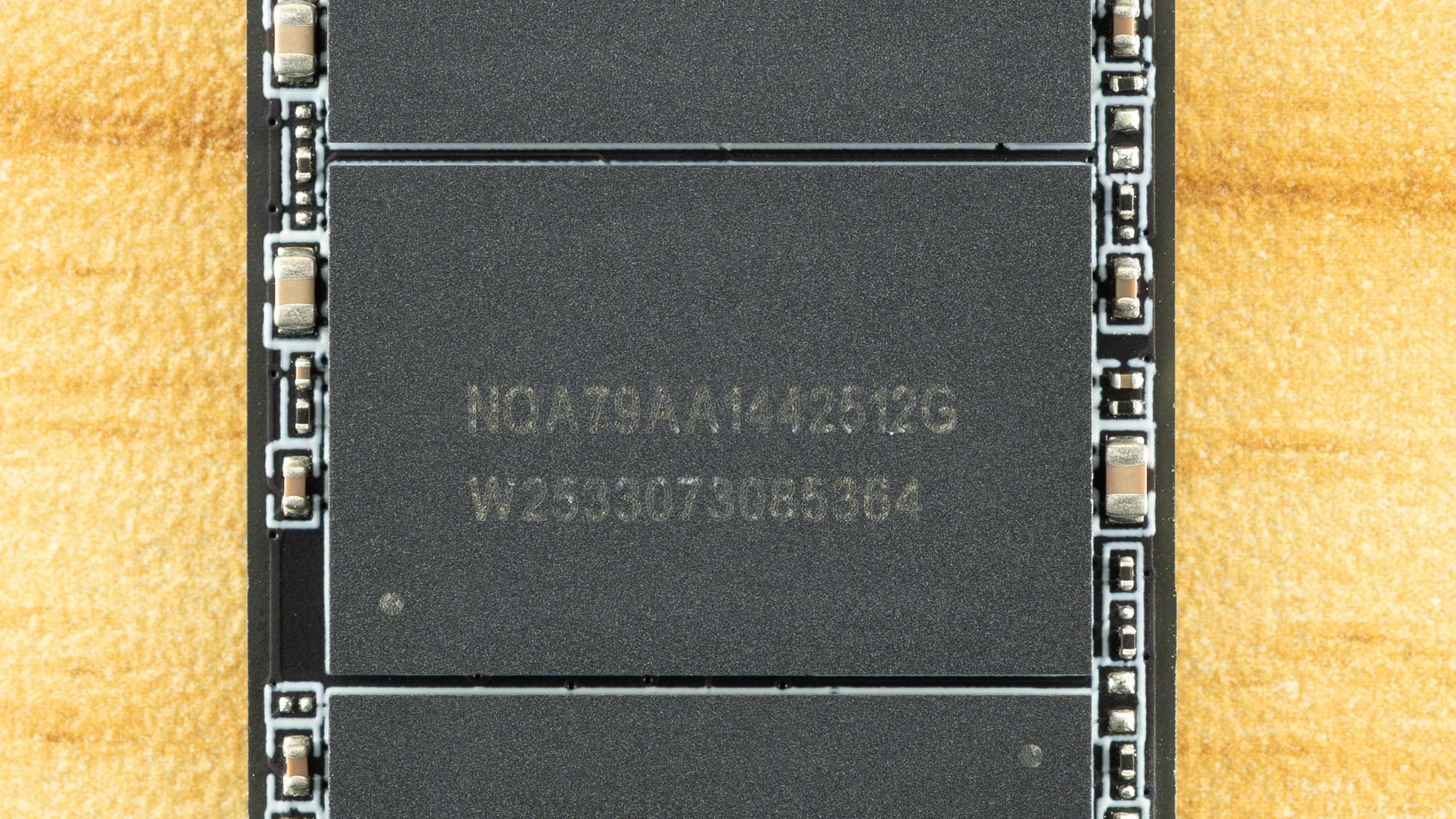
The flash is more difficult. We can ascertain that these are 512GB NAND flash packages from the “512G” – given modern flash is 1Tb or 128GB, four dies per package for a total of sixteen dies. That’s perfect for maximizing performance out of this controller. The “W2533” is likely the manufacture date of week 33, year 2025. All this indicates is that this is, at least, not older flash, although we already know it has to be 2,400 MT/s at a minimum to hit the specified performance.
It makes a lot of sense for the PX700 to use TLC flash, though, given the TBW and the fact that we’ve been seeing this controller with 232-Layer Micron TLC more frequently lately. The Biwin Black Opal NV7400 comes to mind. However, Goodram has access to YMTC flash, and that includes QLC. YMTC rather than Micron QLC is more likely, given the latter is in high demand in enterprise. Normally, you could use certain utilities to identify the flash, but firmware for this controller is often encrypted to avoid revealing the flash ID. It’s still possible to get around this with leaked MP tools, but otherwise the best way to identify it is simply to look at the performance. We’ll be doing that in this review with comparison drives to help back up the investigation.
The Goodram PX700 is in a tight spot with ample competition in today’s market. This has been true for some years now, but some more recent releases have turned up the heat. These would include the Sandisk WD Blue SN5100 with its fantastic random read latency, the Crucial P310 with surprisingly good all-around performance, and even the Samsung 990, which was a very late arrival. Existing drives with comparable hardware to the PX700 include the Acer FA200 with QLC flash plus the Biwin Black Opal NV7400, Addlink A93, and Inland TN470 with TLC. The last of these also uses a Phison controller rather than the more common Maxio MAP1602. Lastly, we have the budget-minded Kingston NV3, which is always looming in the background.
Trace Testing — 3DMark Storage Benchmark
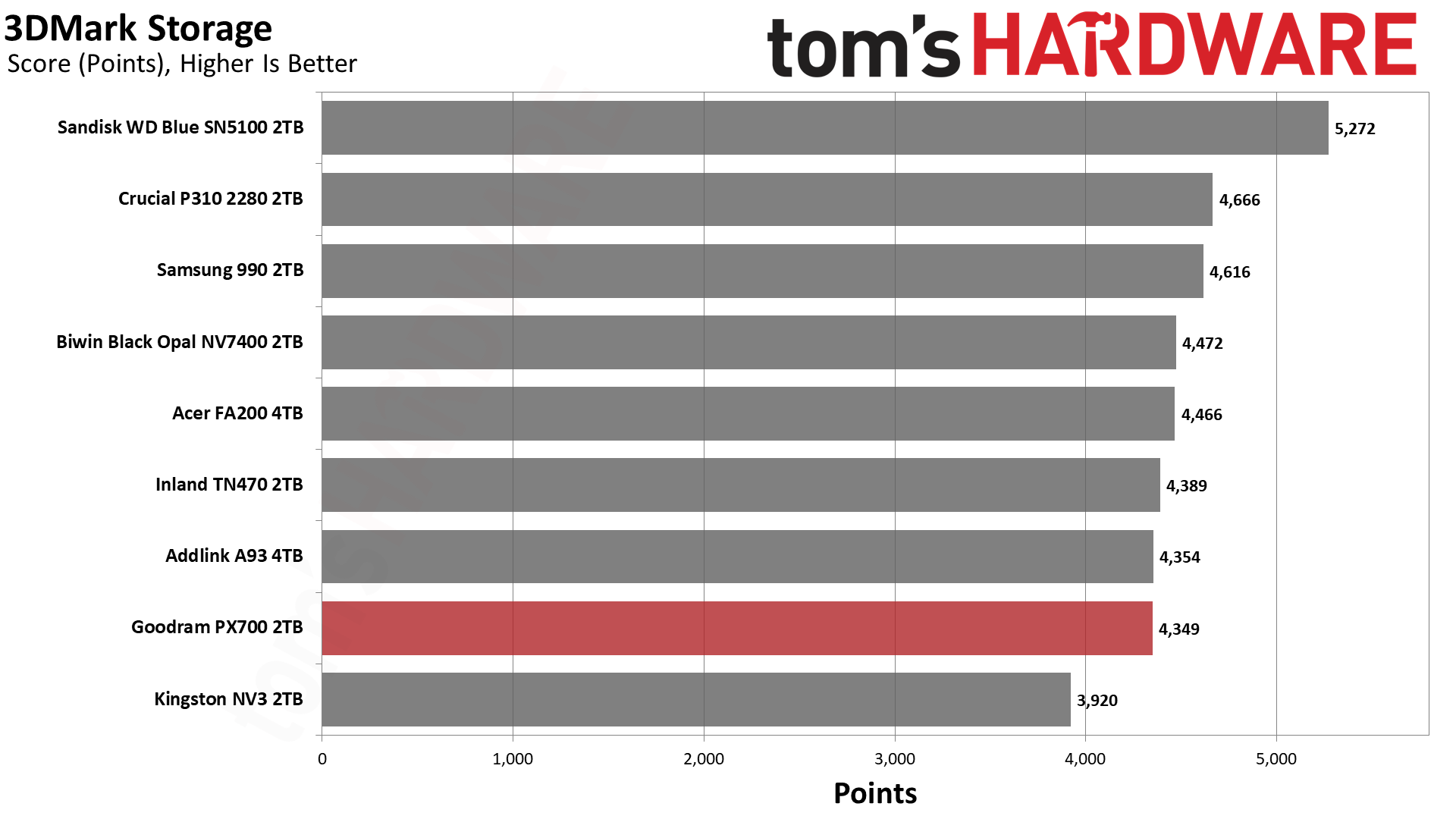
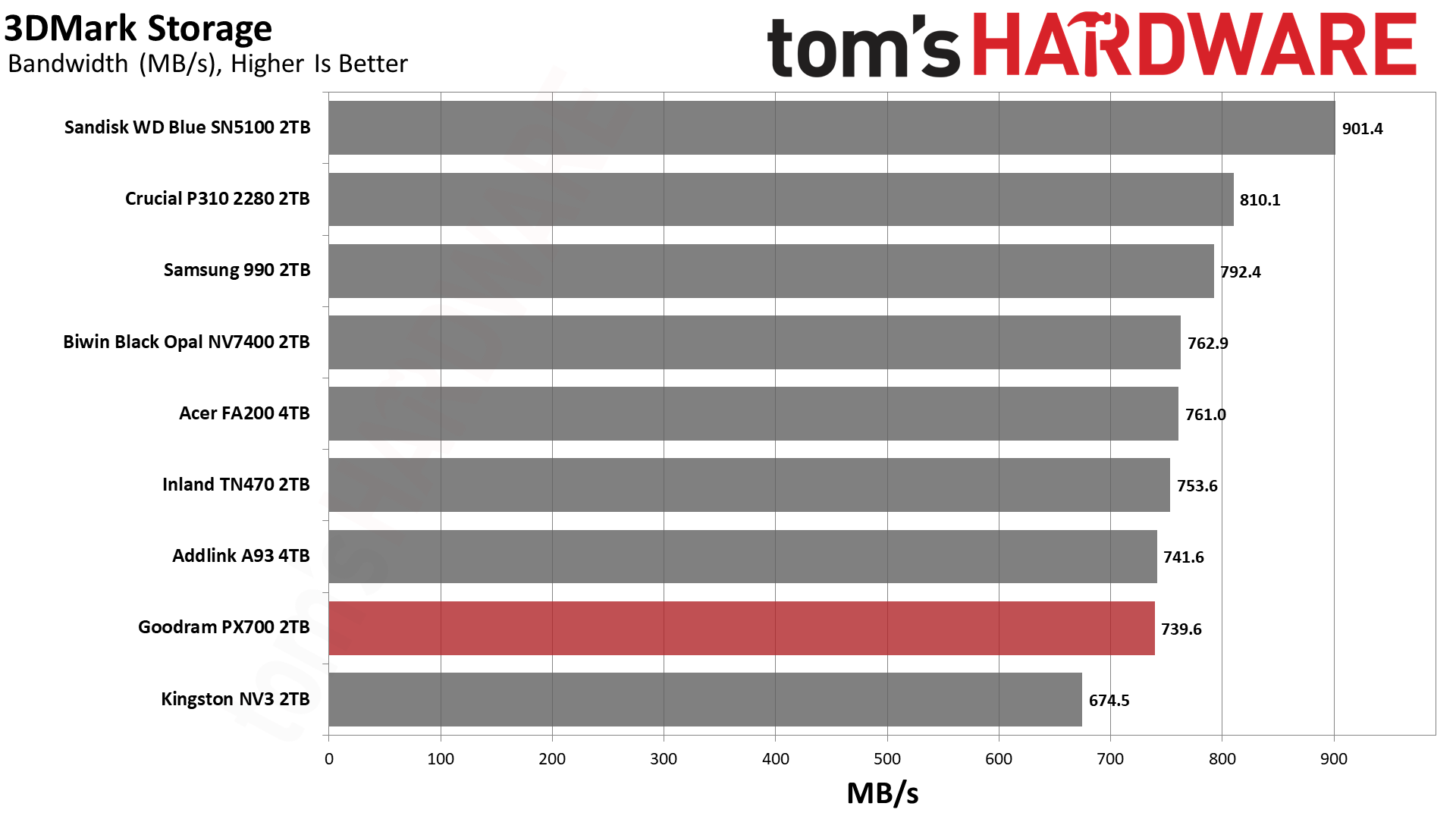
Built for gamers, 3DMark’s Storage Benchmark focuses on real-world gaming performance. Each round in this benchmark stresses storage based on gaming activities including loading games, saving progress, installing game files, and recording gameplay video streams. Future gaming benchmarks will be DirectStorage-inclusive and an evaluation for future-proofing is included where applicable.
Tom's HardwareTom's HardwareTom's Hardware
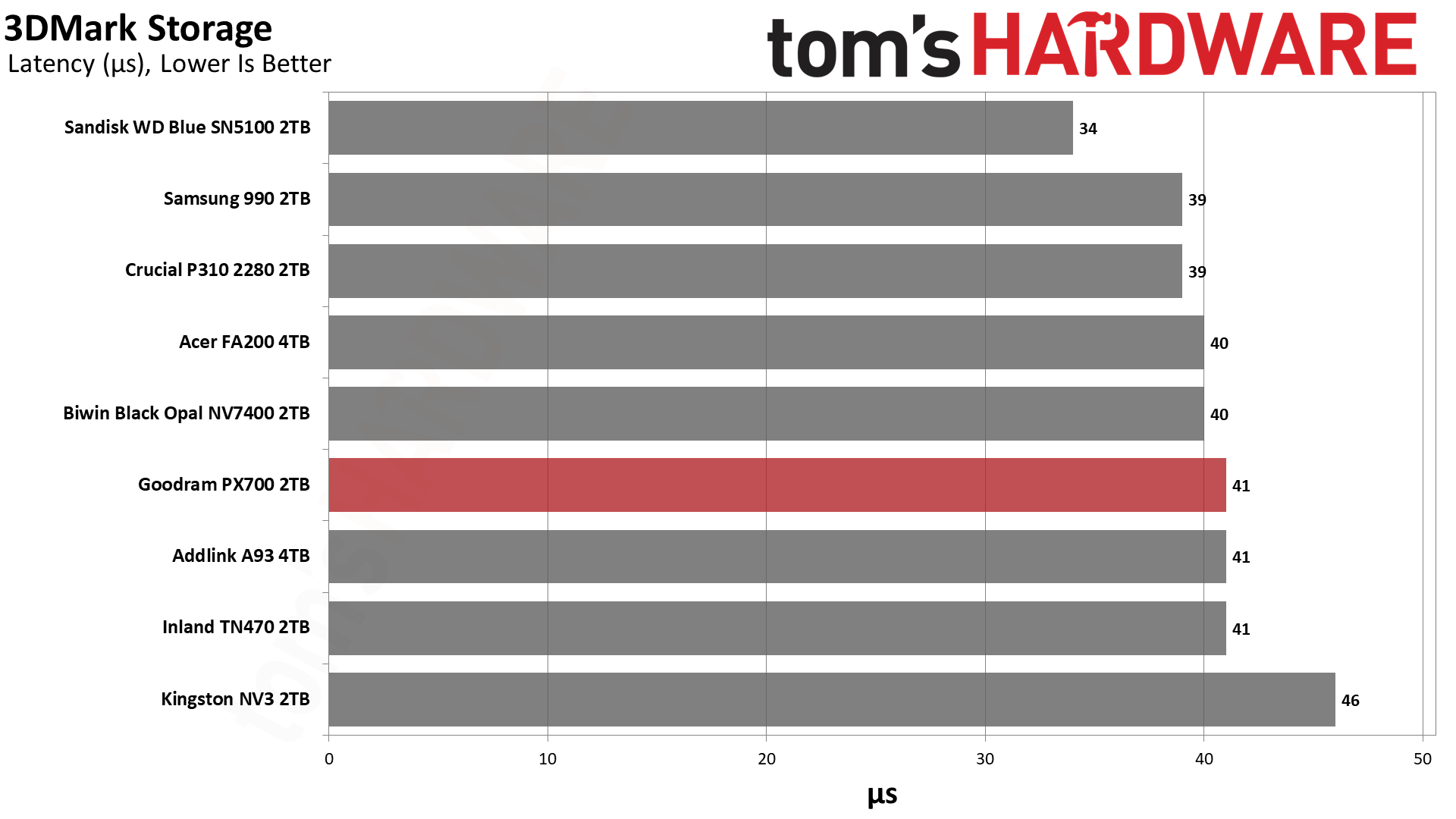
The PX700’s 3DMark results are spot-on for a drive of this caliber, hanging out at around 40µs for latency with bandwidth over 700 MB/s. This level of performance is excellent for gaming, and the only drive that wouldn’t fall into that category is the NV3. The NV3 is still fast enough for a games drive and remains a good budget choice, but there are faster options like the PX700. We want to emphasize that the PX700 is better than it looks in this lineup because it’s effectively within range of all drives but one, the WD Blue SN5100.
Among the QLC-based drives, the WD Blue SN5100, 990, and P310 all notably score near the top. The BiCS flash in the first drive is known for its responsiveness and, yes, it will give you a small edge with game load times. However, the 990 is right up there with the P310, which means there is no shortage of viable options. Most slower drives, from a gamer’s perspective, will be last-generation or slower PCIe 4.0, which means it’s not hard to find drives that are very fast for games. This means that the deciding factor might lie outside of 3DMark performance, such as drive reliability.
Trace Testing — PCMark 10 Storage Benchmark
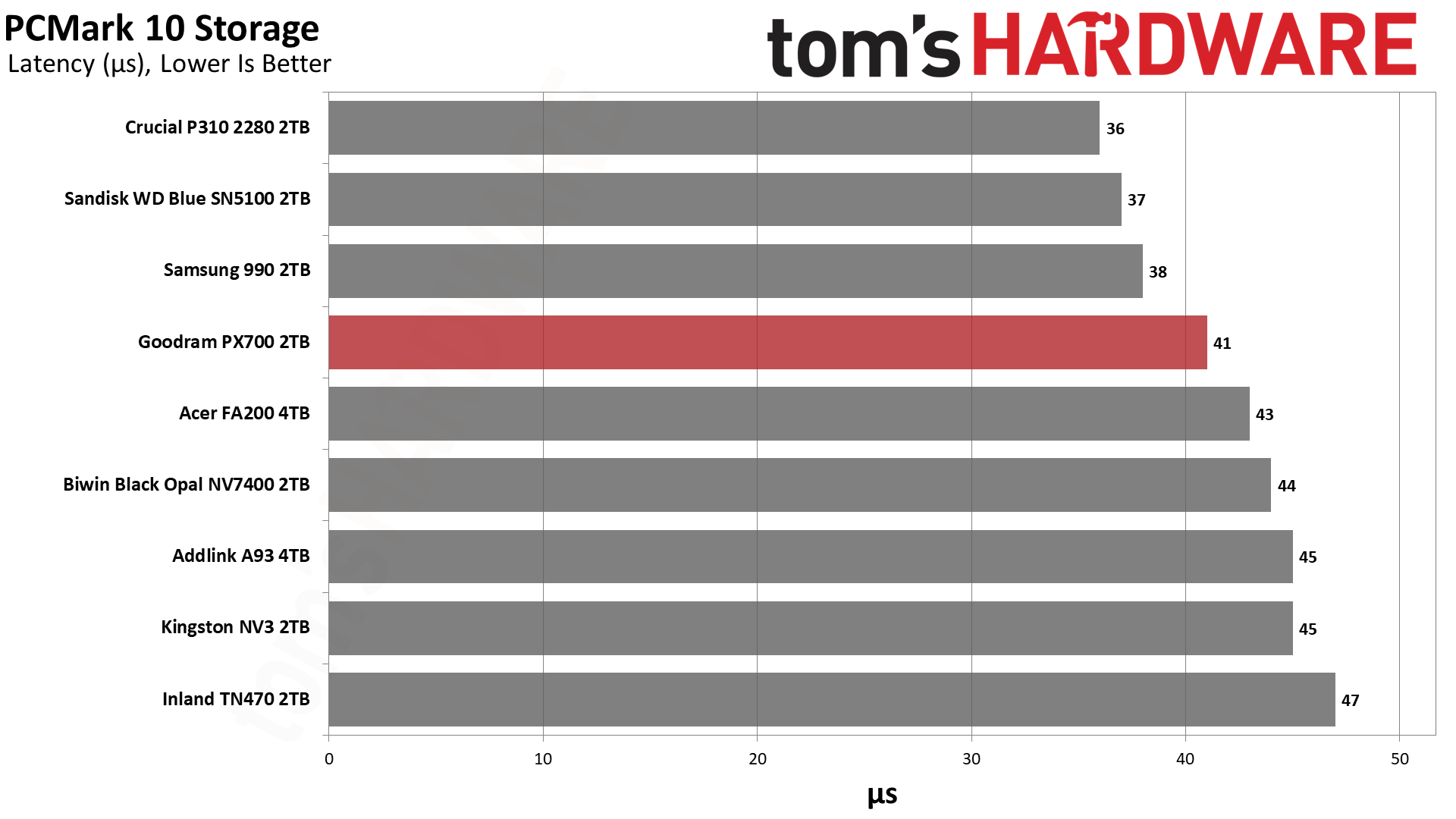
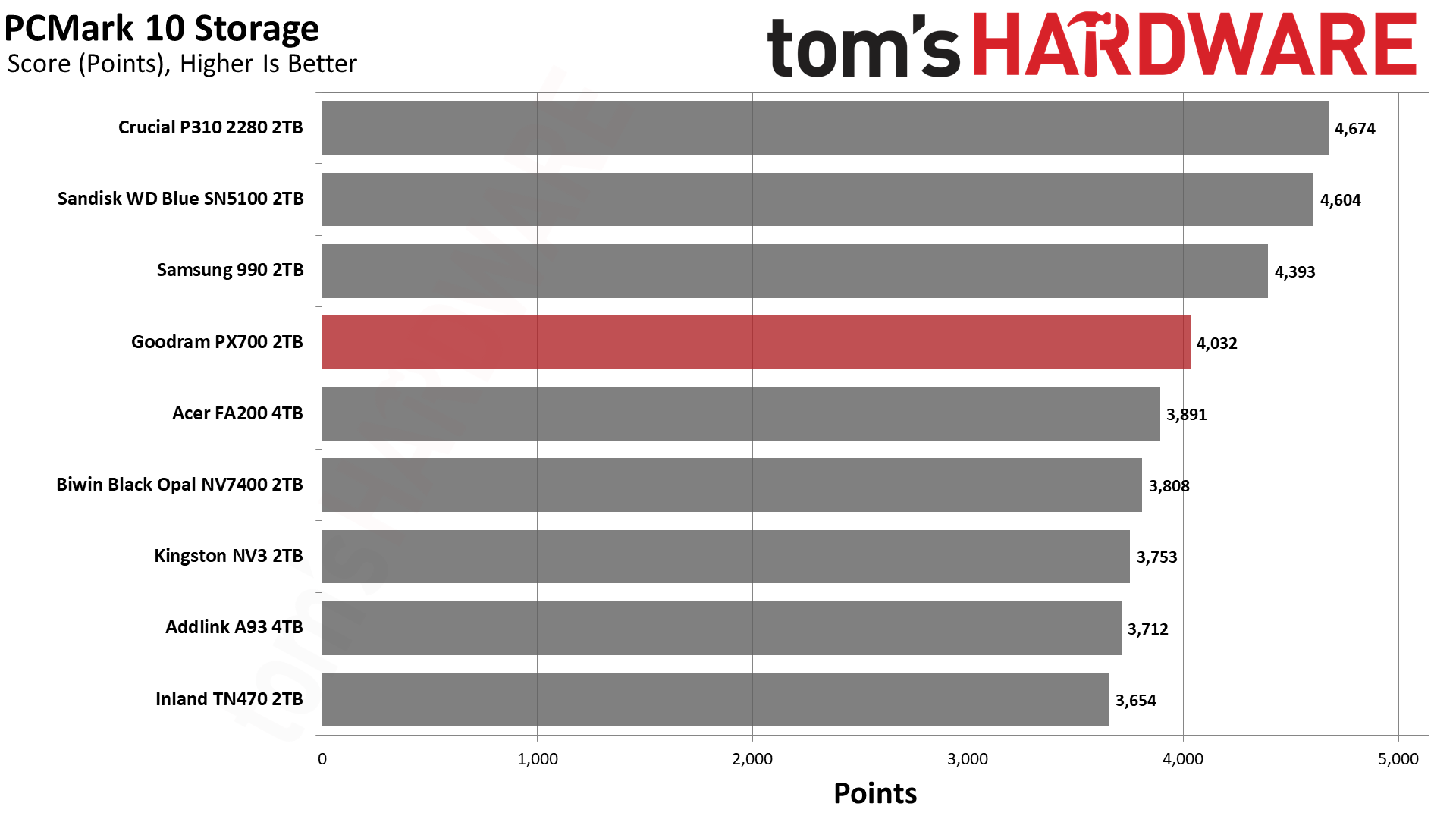
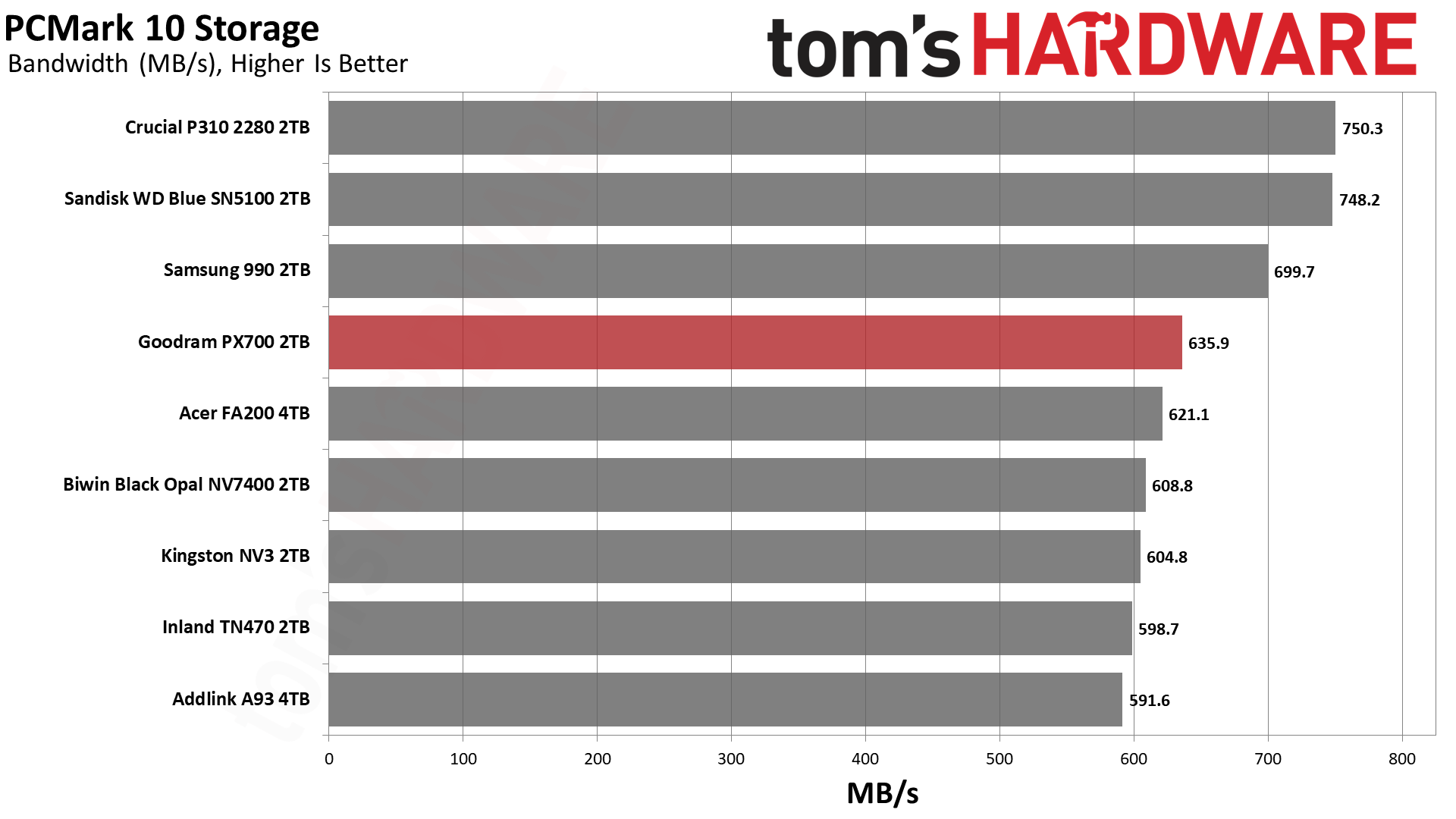
PCMark 10 is an industry standard trace-based benchmark that uses a wide-ranging set of real-world traces from popular applications and everyday tasks to measure the performance of storage devices. The results are particularly useful when analyzing drives for their use as primary/boot storage devices and in work environments.
Tom's HardwareTom's HardwareTom's Hardware
While the PX700 is merely mediocre against the competition in 3DMark – its absolute performance is quite good, though – its showing in PCMark 10 is better. This is again a scenario where the drives with TLC flash, including the TN470 with Phison’s controller, are underwhelming. This can be confusing to buyers who have relied on the mantra that TLC is better than QLC. There are reasons for the surprise here, although the general idea that benchmarking is often looking at ideal scenarios is perhaps the easiest answer.
These drives, whether TLC or QLC, rely on pSLC cache as much as possible to give you the best performance. This pSLC mode is not equivalent to native pSLC and is generally the same speed regardless of the flash type. QLC, however, tends to lead TLC in some ways and follow it in others. For example, QLC gets larger benefits from optimizations, so it may see advanced techniques first. This includes improvements to 4K latency. On the other hand, QLC has four planes when TLC has advanced to six. As we’ve seen with BiCS flash, which is four-plane against six-plane TLC from Micron and YMTC, fewer planes can lead to lower effective latency. The advantage of a higher plane count is in bandwidth but does not come without costs and drawbacks.
The PX700 is also faster than a QLC-based drive with the same controller, like the FA200. In that case, the FA200 uses twice as many dies – thirty-two – which puts more load on the controller. This can increase latency. In general, the idea has been that bigger drives are faster, which is certainly true in many cases. Larger drives will have more bandwidth and can reach higher IOPS due to improved parallelization. However, past four dies for each channel – this is where the PX700 falls, and the FA200 exceeds – you are increasing power consumption and overhead. So, the PX700 is in a sweet spot for how this benchmark tests.
We would go on to say that the P310, WD Blue SN5100, and 990 all beat the PX700. These are all QLC-based drives with a range of controllers. We’ve already explained the BiCS factor. Samsung’s newer QLC is also very good. The P310 has always been a bit of an outlier, as on paper its hardware shouldn’t perform as well as it does. Considering Crucial used to rely at least partially on proprietary controllers, we think this is a situation where they did a lot of optimization. WD and Sandisk also did this with the Black SN8100/Optimus Pro GX 8100 so there’s some “special sauce” at play. The PX700 being the best of the rest is a point in its favor, as those are the drives it’s competing with in the real market.
Console Testing — PlayStation 5 Transfers
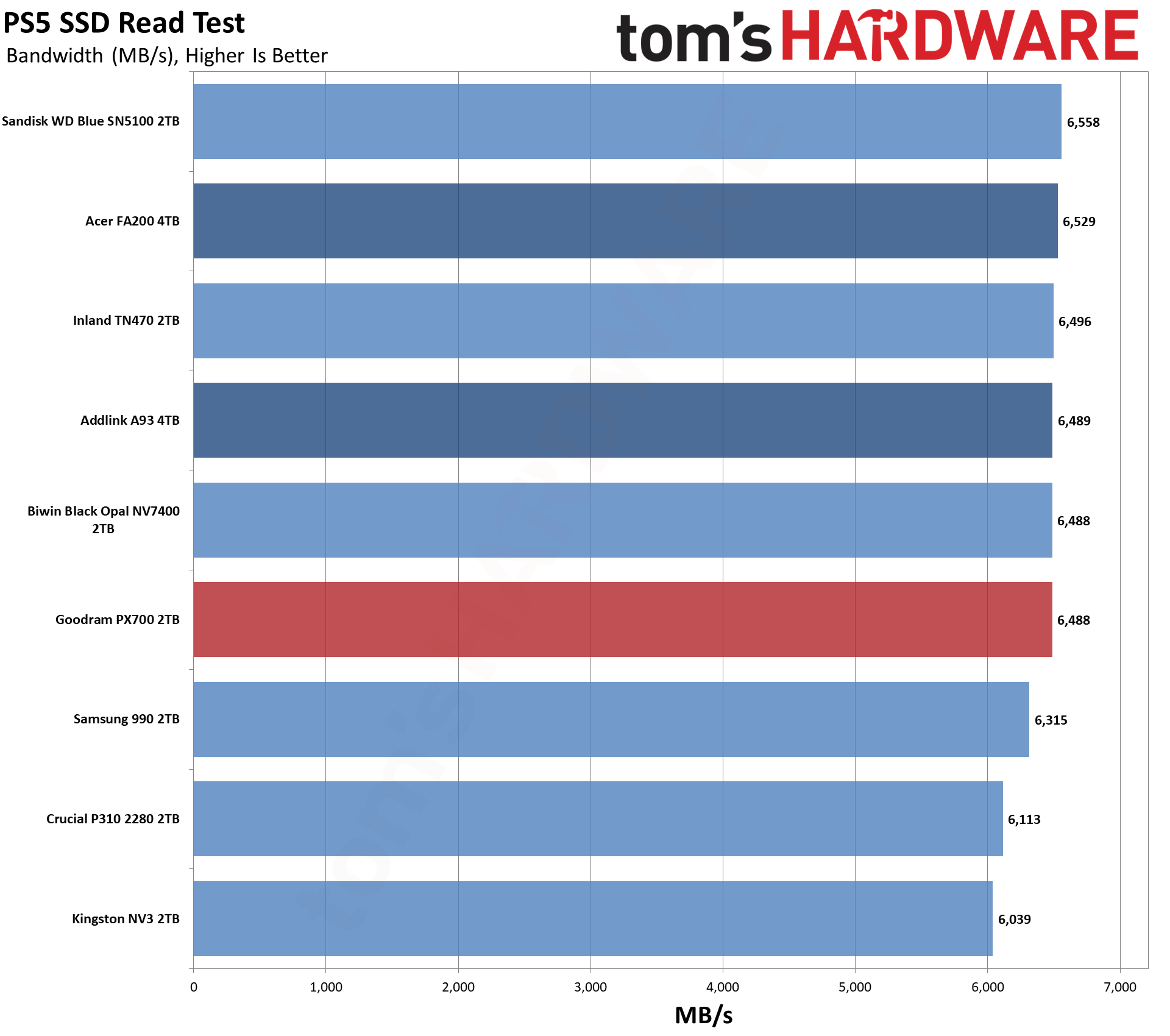
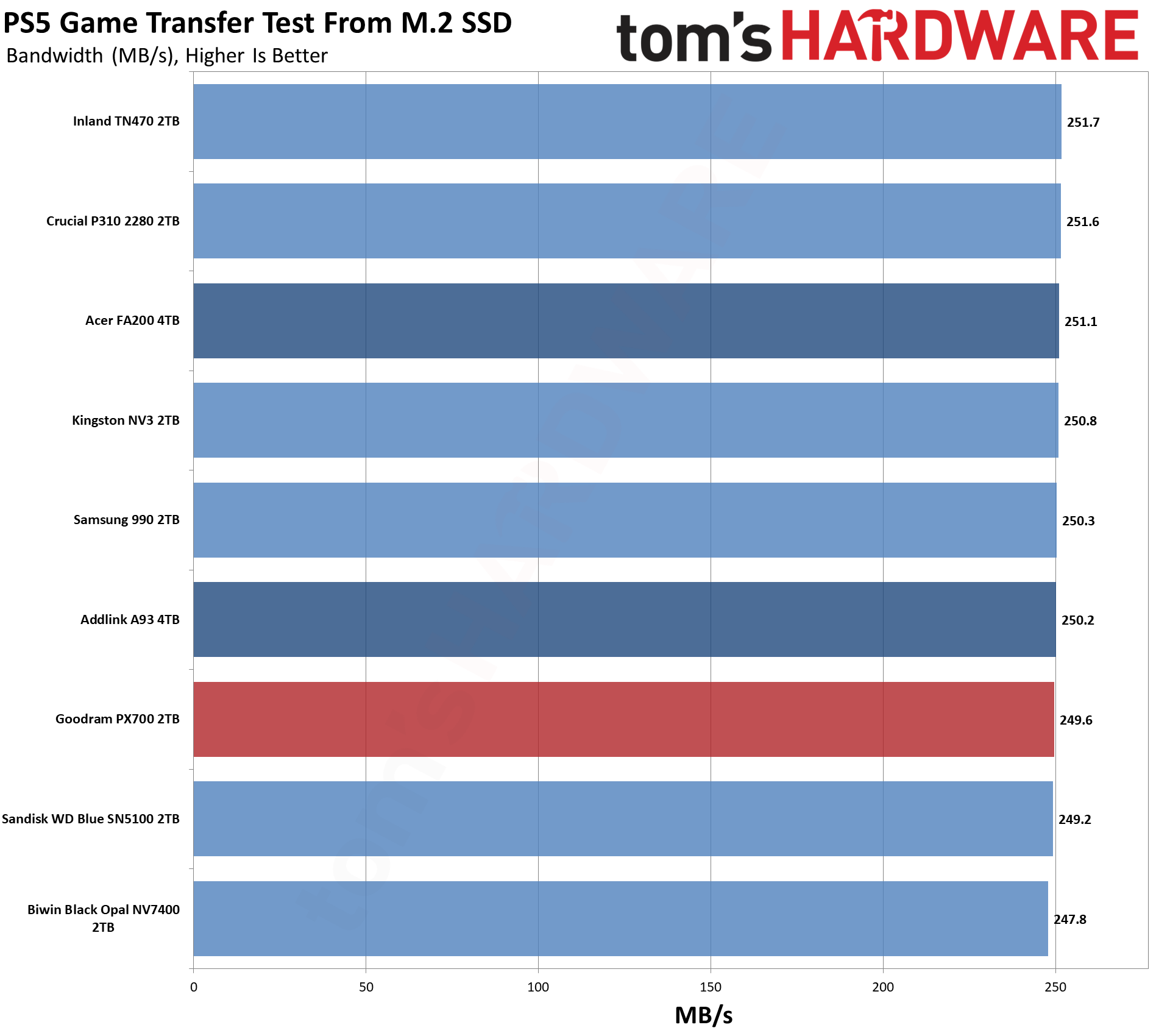
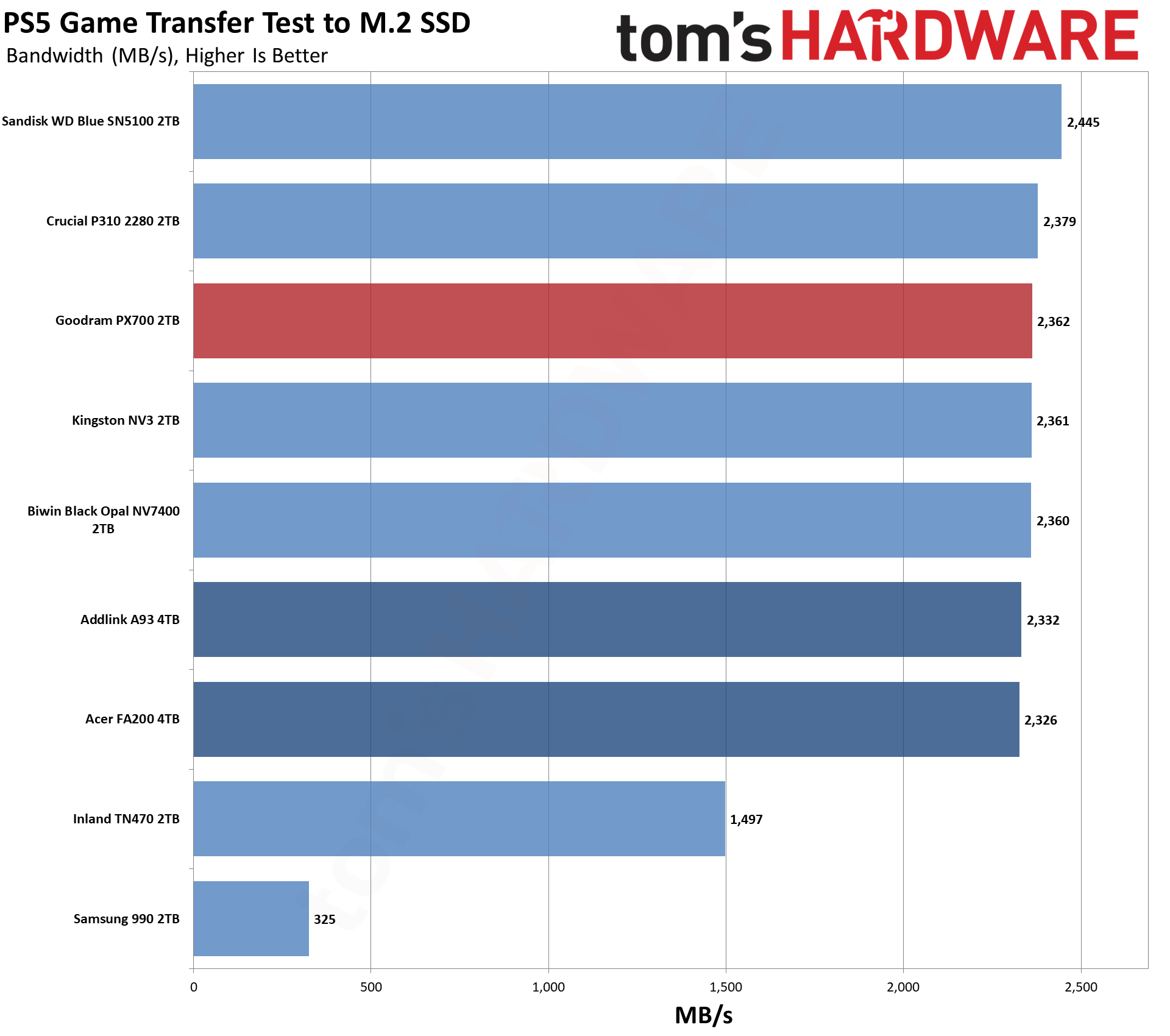
The PlayStation 5 is capable of taking one additional PCIe 4.0 or faster SSD for extra game storage. While any 4.0 drive will technically work, Sony recommends drives that can deliver at least 5,500 MB/s of sequential read bandwidth for optimal performance. Based on our extensive testing, PCIe 5.0 SSDs don’t bring much to the table and generally shouldn’t be used in the PS5, especially as they may require additional cooling. Check our Best PS5 SSDs article for more information.
Our testing utilizes the PS5’s internal storage test and manual read/write tests with over 192GB of data both from and to the internal storage. Throttling is prevented where possible to see how each drive operates under ideal conditions. While game load times should not deviate much from drive to drive, our results can indicate which drives may be more responsive in long-term use.
Tom's HardwareTom's HardwareTom's Hardware
For the PS5, we can recommend almost any drive if it meets the PS5’s minimum requirements in any real way. The PX700 significantly exceeds that, so the question is more about value. What does this drive offer that others don’t? For this category, this often means leaning towards drives with heatsinks and/or higher reliability. Reliability is a difficult quality to measure, although a warranty gives some peace of mind. As for heatsinks, you can always add your own. So drawing lines here becomes more difficult.
We would point to our Power Consumption and Temperature section below for some additional support. The PX700, as we will see, runs coolly, which is a big positive for the PS5. Performance-wise, it’s right up there with the other drives and only really behind the Blue SN5100. You don’t have to go with a big brand to get good results here, and the PX700 will serve you well.
Transfer Rates — DiskBench
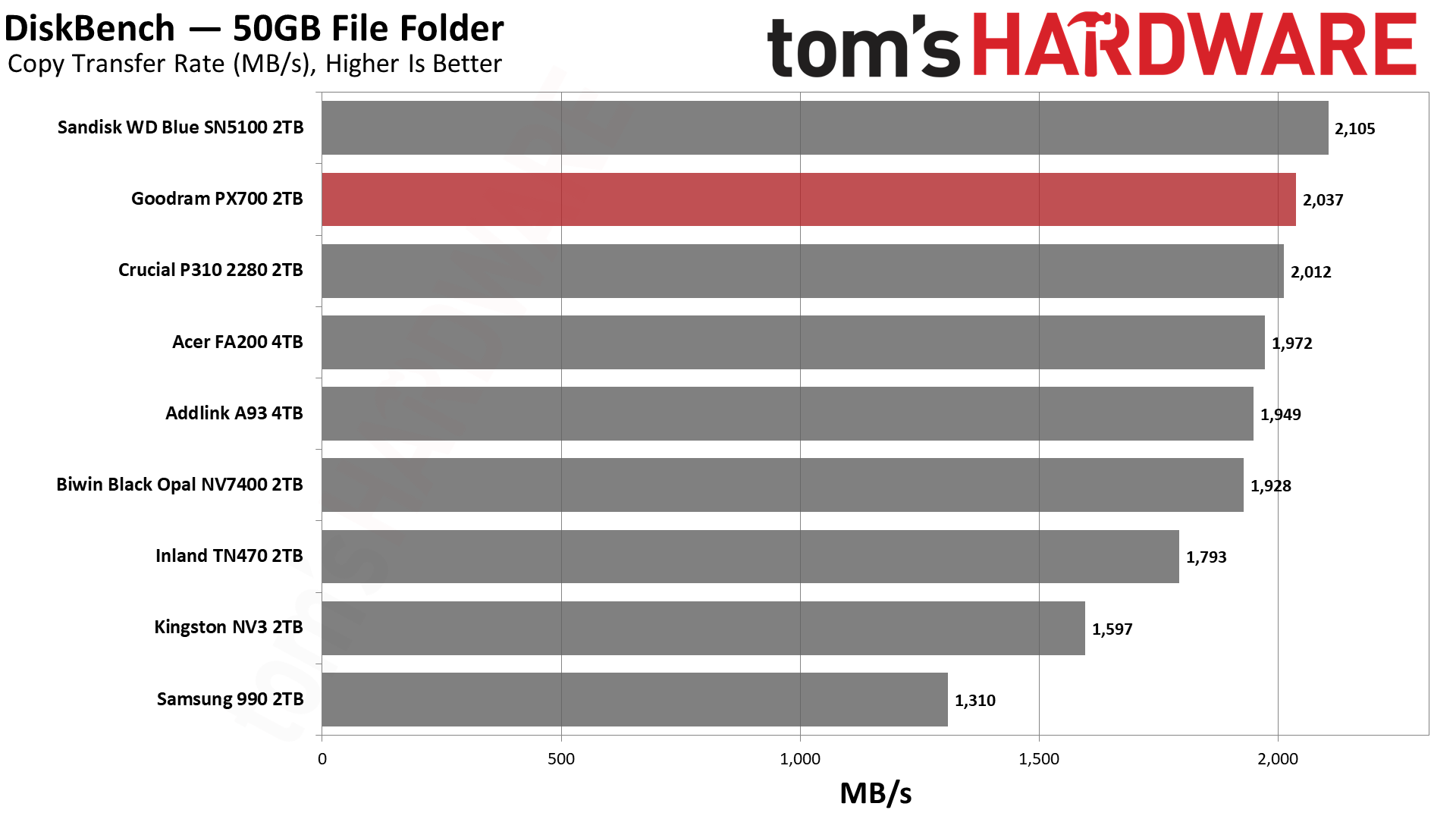
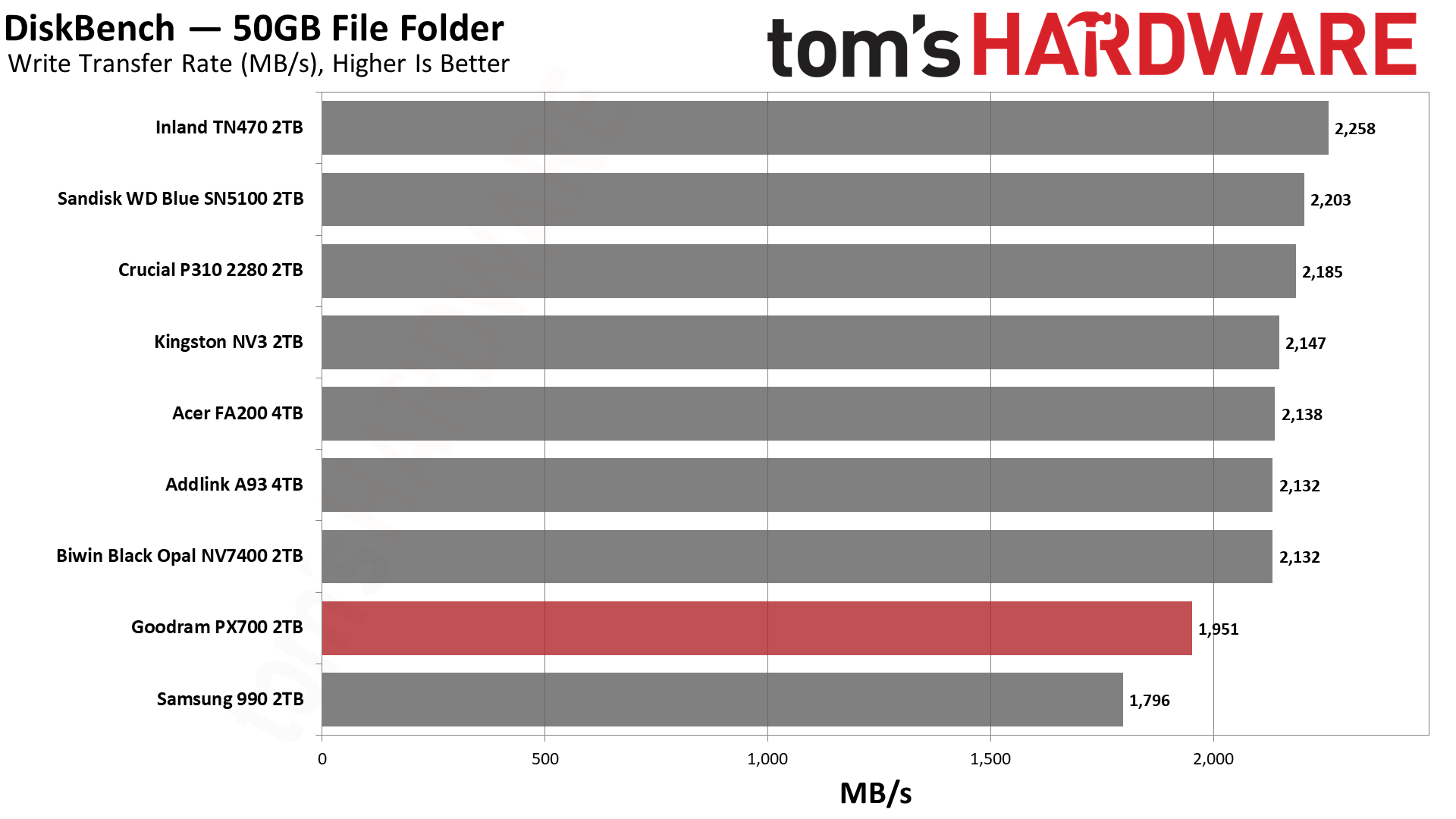
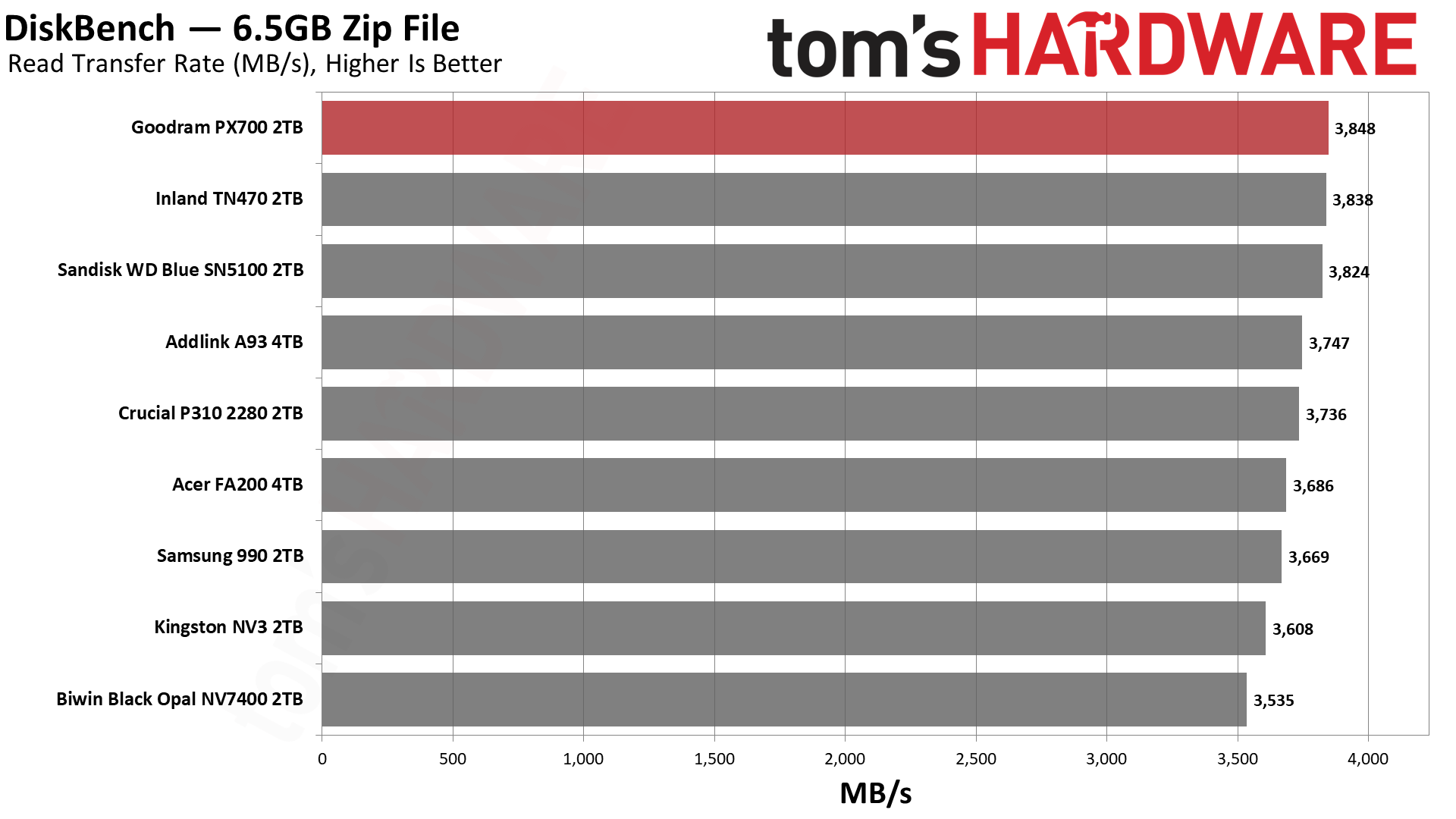
We use the DiskBench storage benchmarking tool to test file transfer performance with a custom 50GB dataset. We write 31,227 files of various types, such as pictures, PDFs, and videos to the test drive, then make a copy of that data to a new folder, and follow up with a reading test of a newly written 6.5GB zip file. This is a real-world type workload that fits into the cache of most drives.
Tom's HardwareTom's HardwareTom's Hardware
The PX700 does very well here, and we wanted to give some background on this test and what it means to put that into perspective. Whether you’re copying between drives or copying to and from the same drive, there are some universal principles. One is that there will be a bottleneck, and usually this will be on the write side of things, as drives write slower than they read. Flash memory, in particular, has to erase cells before they can be written again, which leads to some curious behavior under certain workloads. More generally, though, a write has higher latency – with flash again, this is due to the technology and how multi-bit cells usually need multiple write passes – and writes must be acknowledged, while reads just come from usually static media.
If you have drives that are of different classes – NVMe and SATA, or PCIe 4.0 and PCIe 3.0 – then you would expect the slower class of drive to be the bottleneck even if it’s on the read side. This is also universal, going back to the days when HDDs got faster as they got bigger. SSDs also generally get faster with capacity, but flash is so fast that these rules are no longer absolute. This is complicated by other facets of the technology like pSLC caching and TLC versus QLC flash, where with sustained writes you can have dramatic changes in performance. This is a problem because many people buy drives thinking mostly about transfer performance, and when they hit a low that’s nowhere near the box-rated speed, they panic.
Our DiskBench testing takes all of this into account as it’s closer to a real-world workload, including using different file sizes. Transferring a bunch of large files is fast. Copying lots of small files – and any veteran of hard drives will know this from backing up Windows or documents manually – can be very slow, even on SSDs. So we do a mix. Moreover, we’re doing an on-drive copy, which helps rule out external factors. Much of what you do on your system can be cached in system memory, which can give misleading metrics depending on what you’re doing.
What we’re leading up to here is that the PX700 is the fastest drive on the list for reads and not far off first place for copying. Considering it’s up against some of the best budget drives out there, that’s no mean feat. This is, again, a real-world workload and probably more meaningful than something like 3DMark is for game load times.
Yes, the difference between the best and the worst drive for reads is under 10%, but nobody wants to buy a drive and feel bad about how fast it feels. The PX700 feels like a premium drive – the weaker write performance here is real, but most of what you’re doing will be read-heavy – and if you’re building a PC for someone with it over, say, the Samsung 990, they won’t know the difference. That is a common refrain regardless, but it helps underline the value of reliability. People buy Samsung and WD/Sandisk for a reason. Given Goodram’s European basis, there is some reason to celebrate the performance here while also acknowledging it’s not a no-name brand from AliExpress.
Synthetic Testing — ATTO / CrystalDiskMark
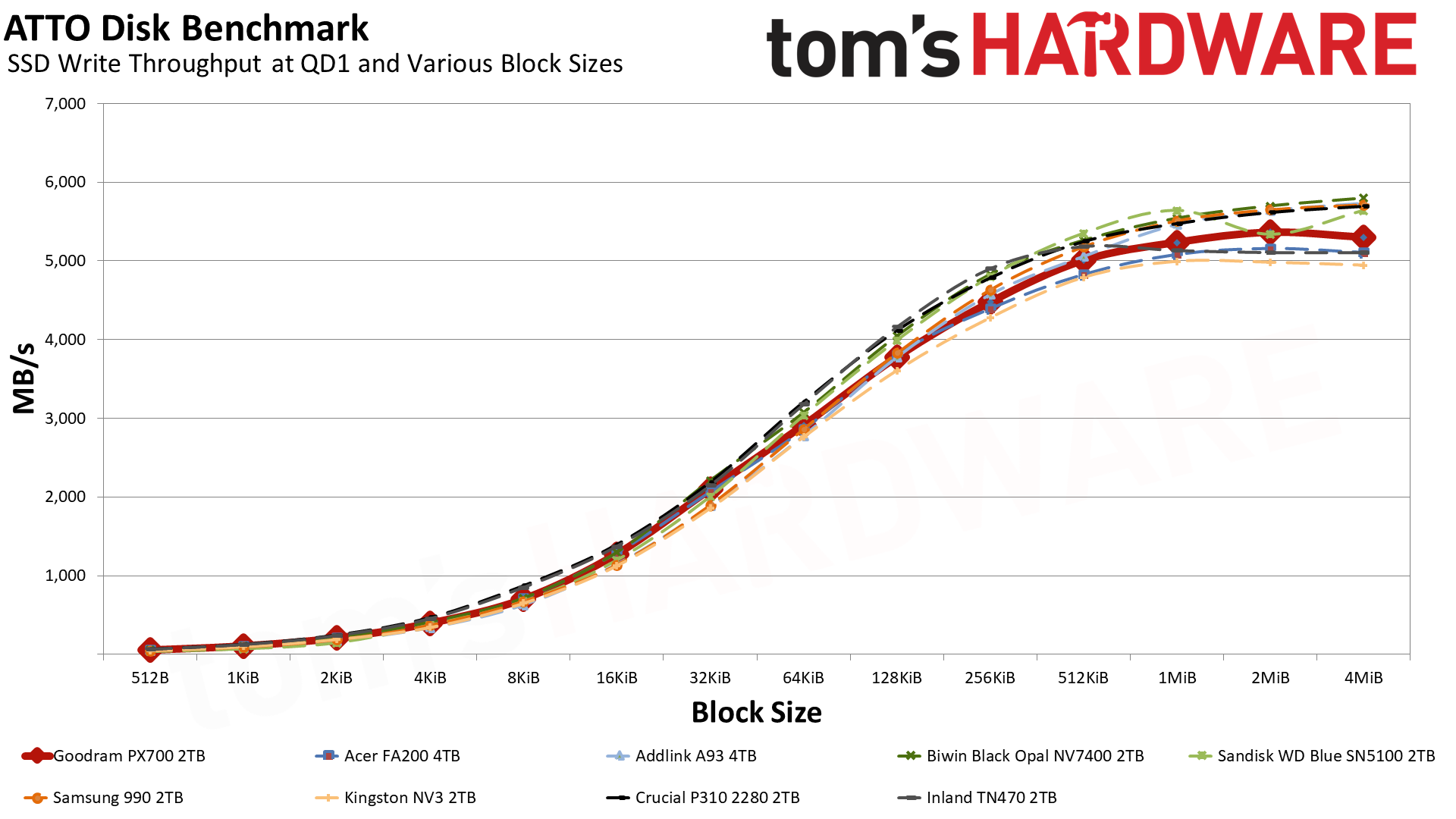
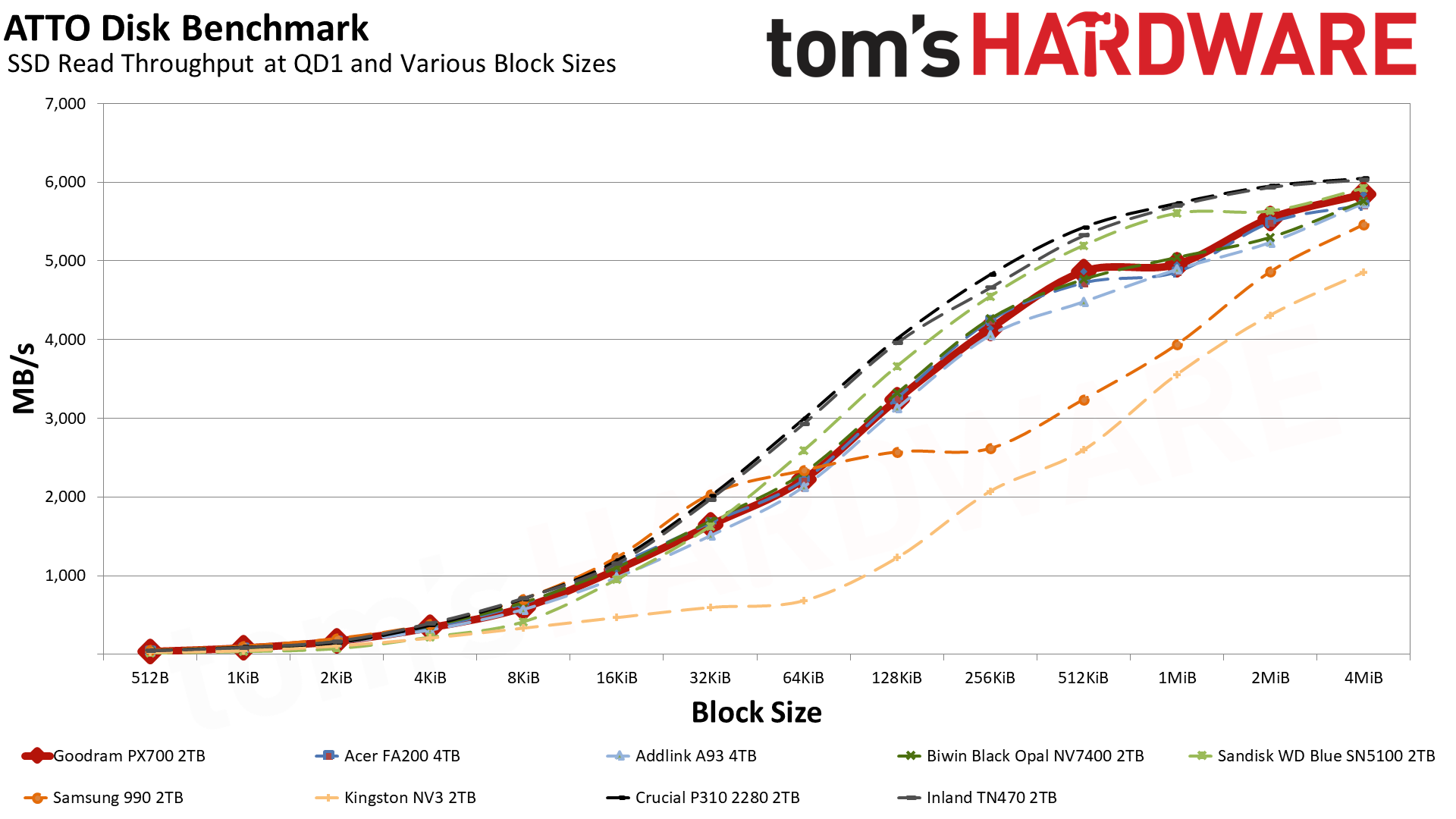
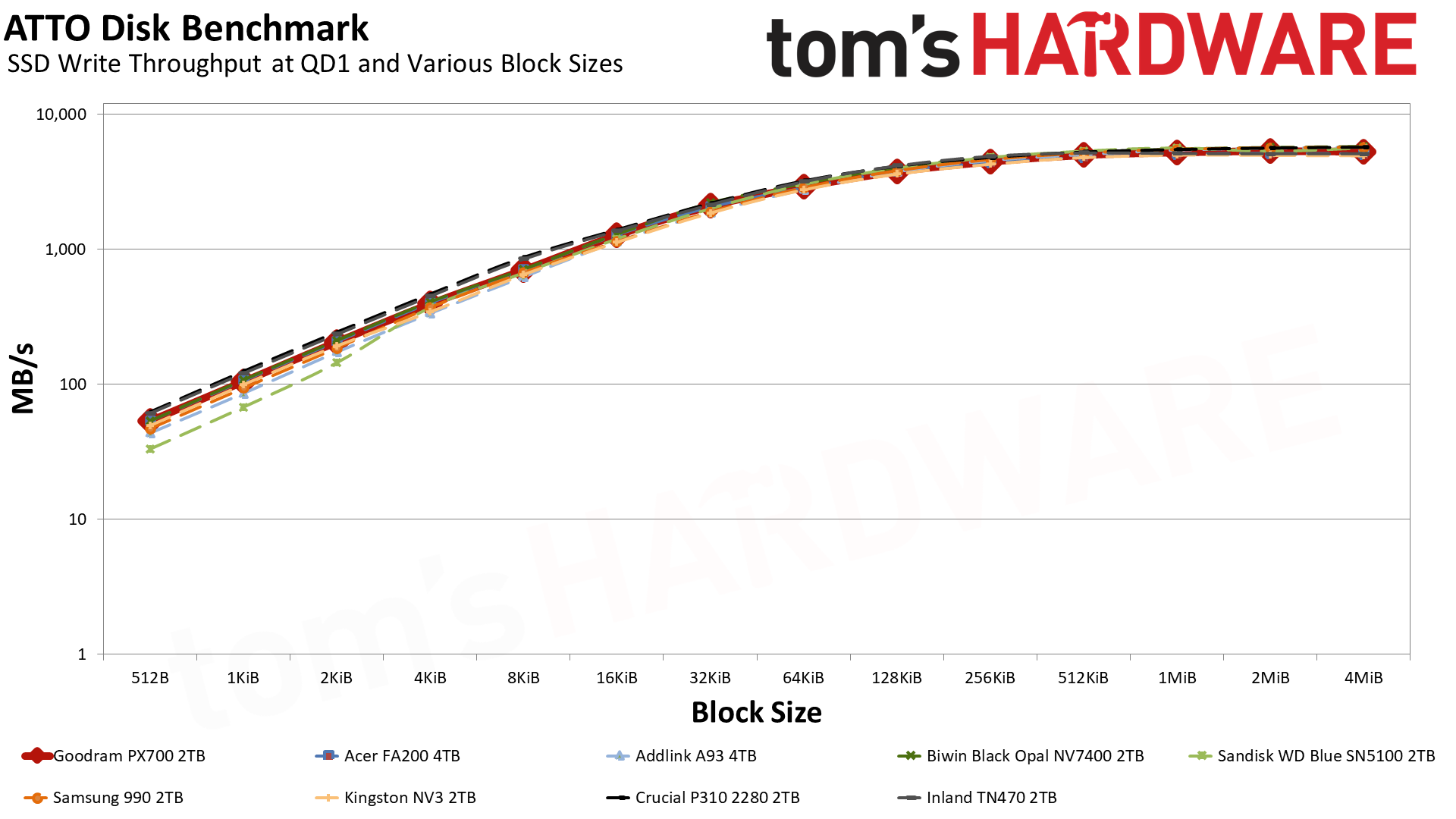
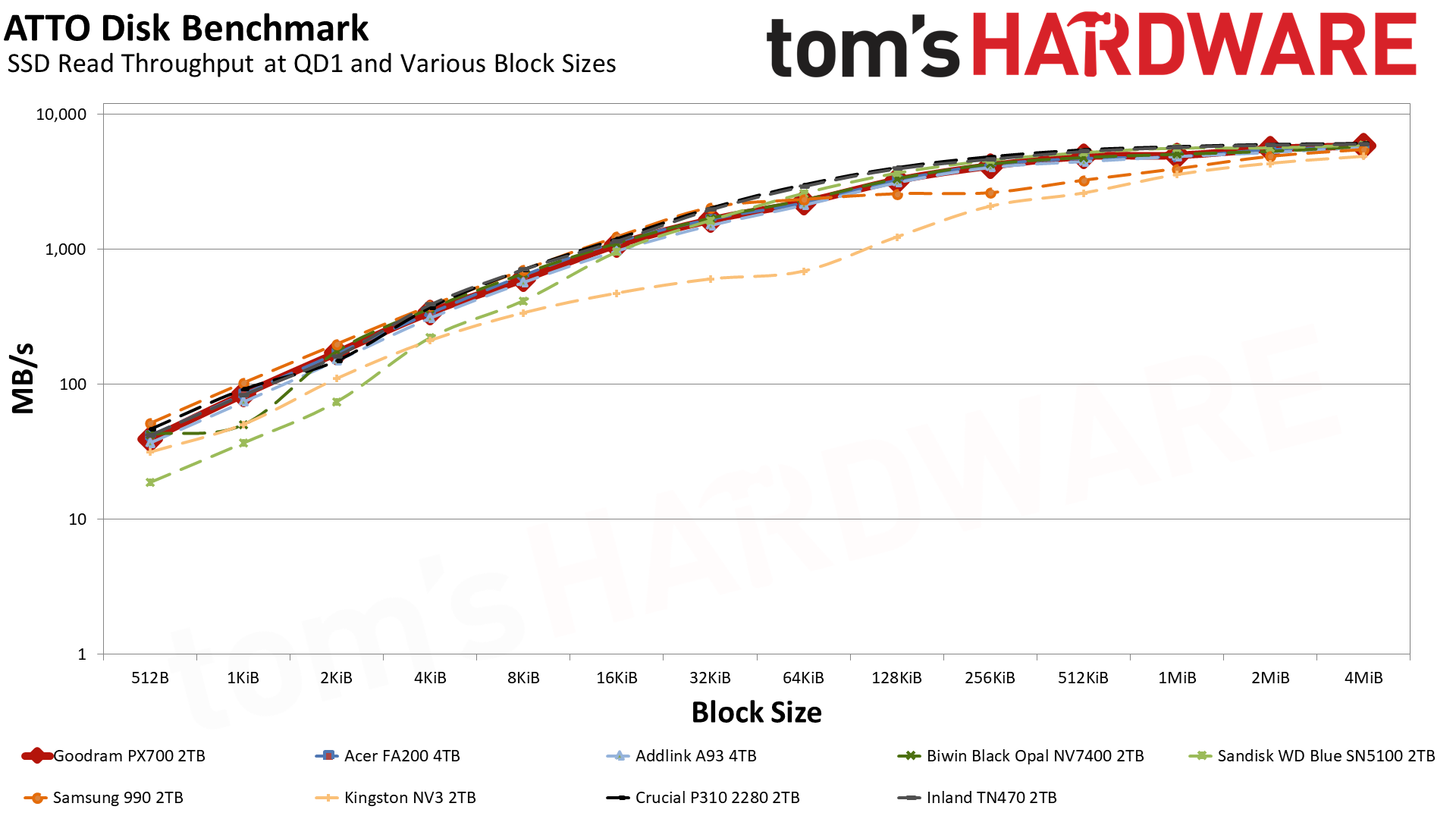
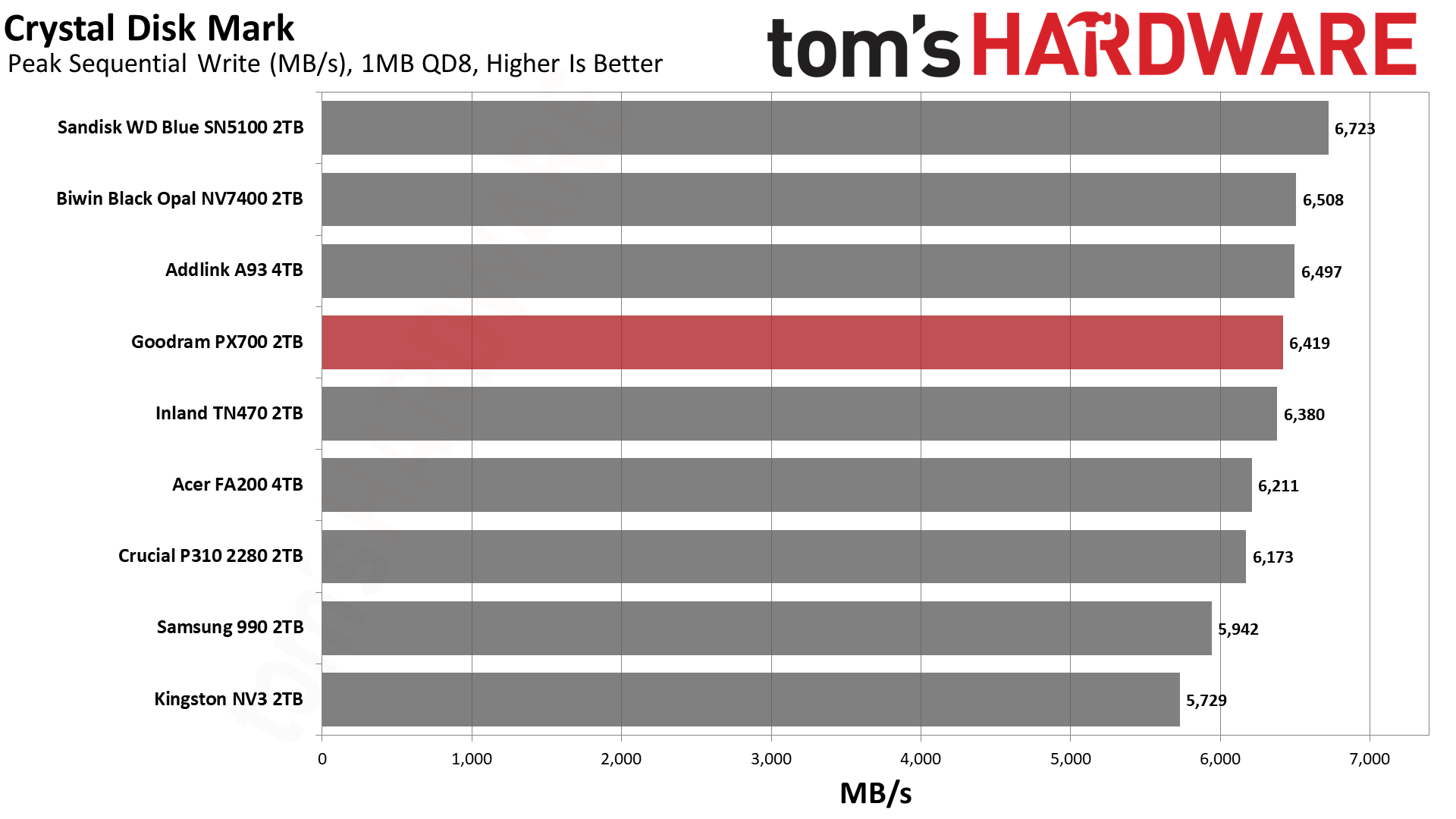
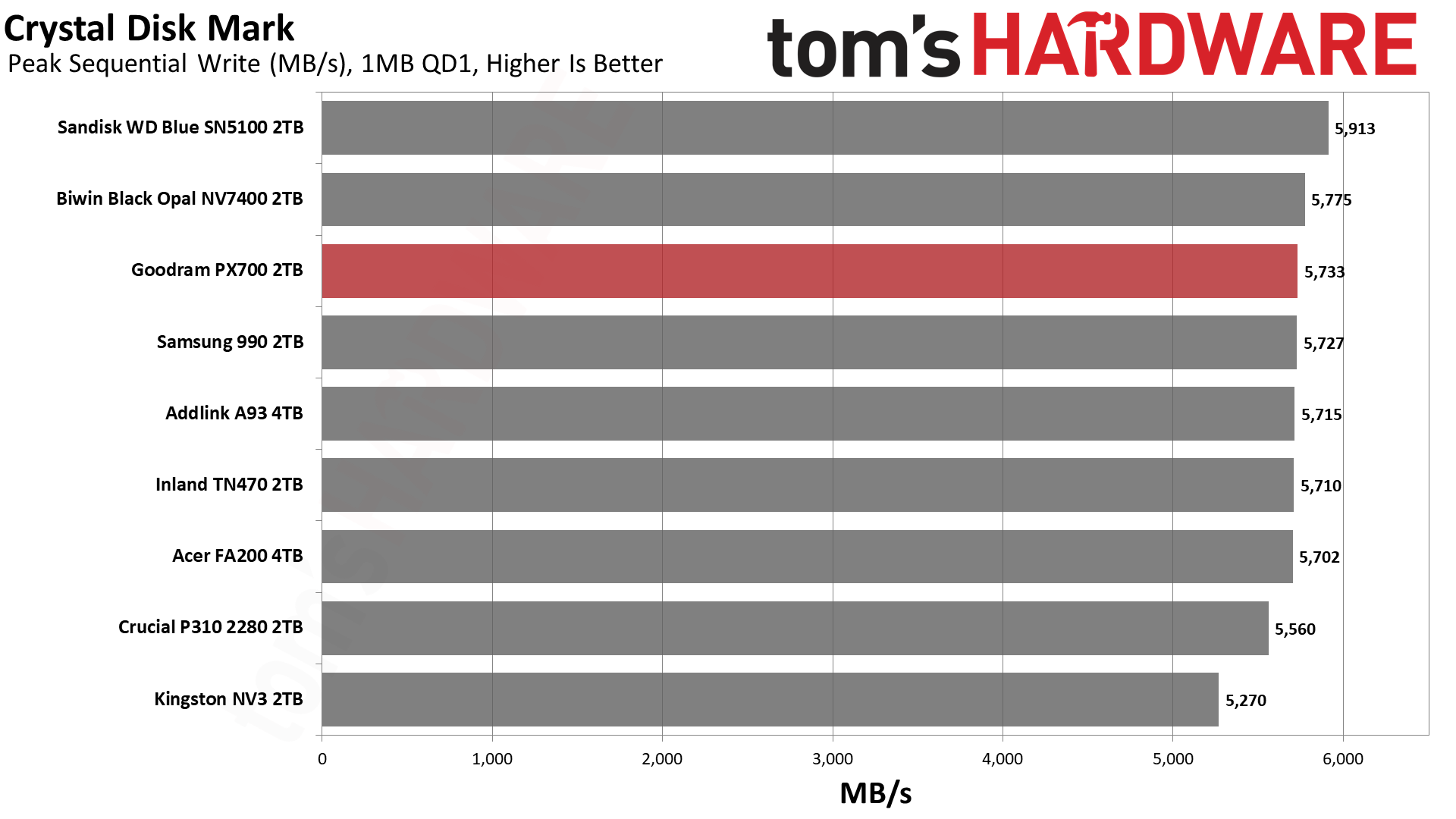
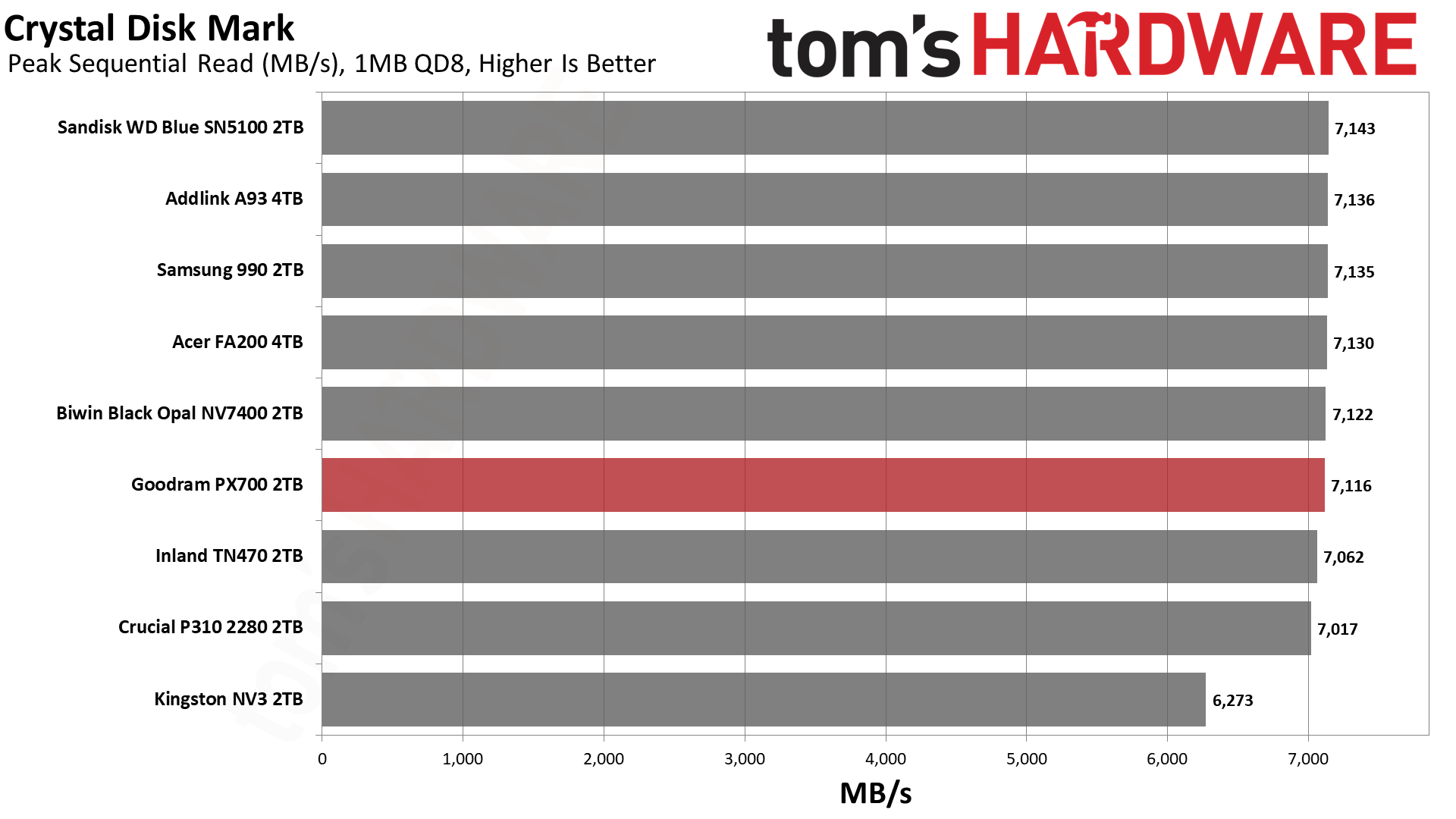
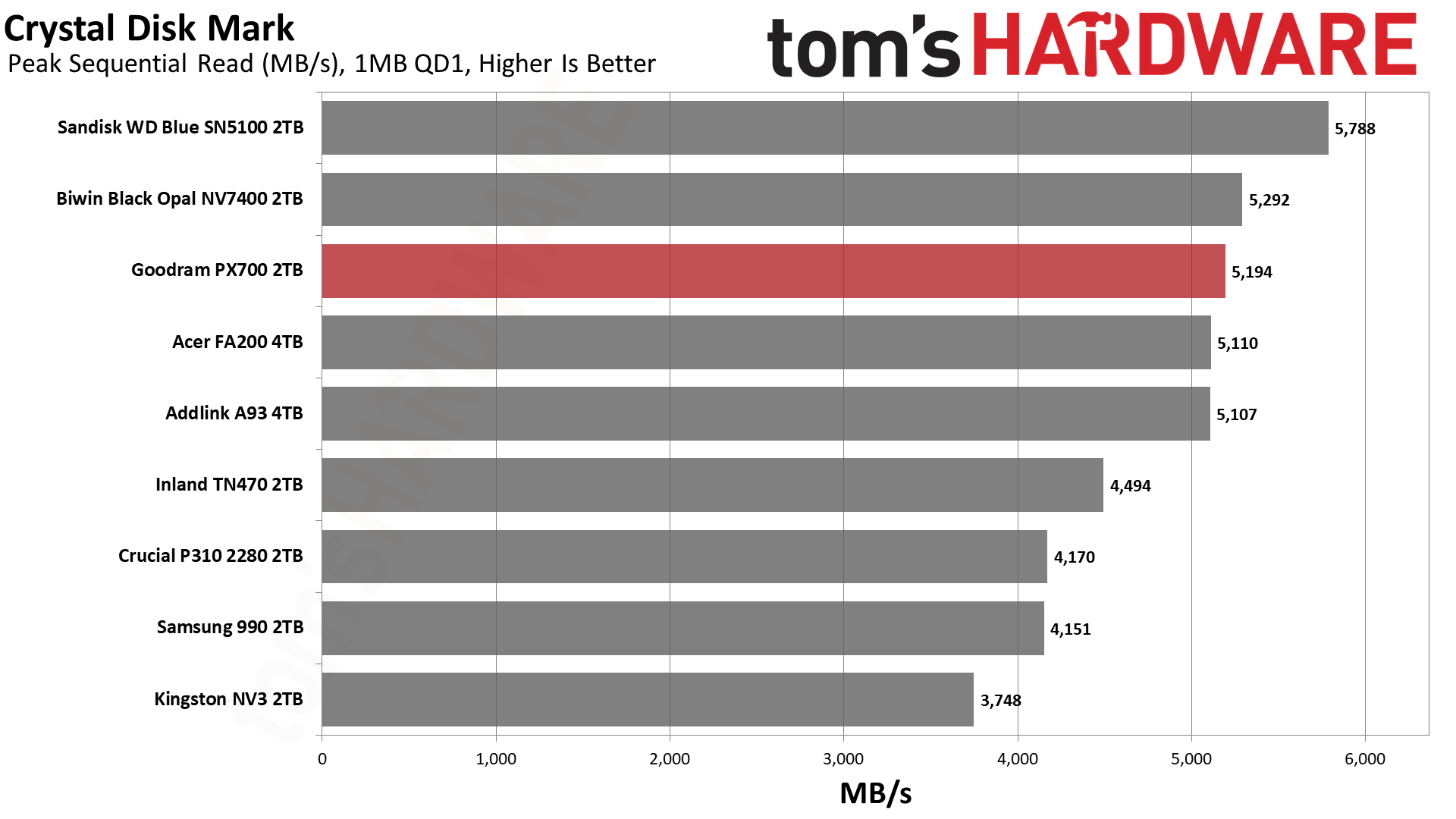
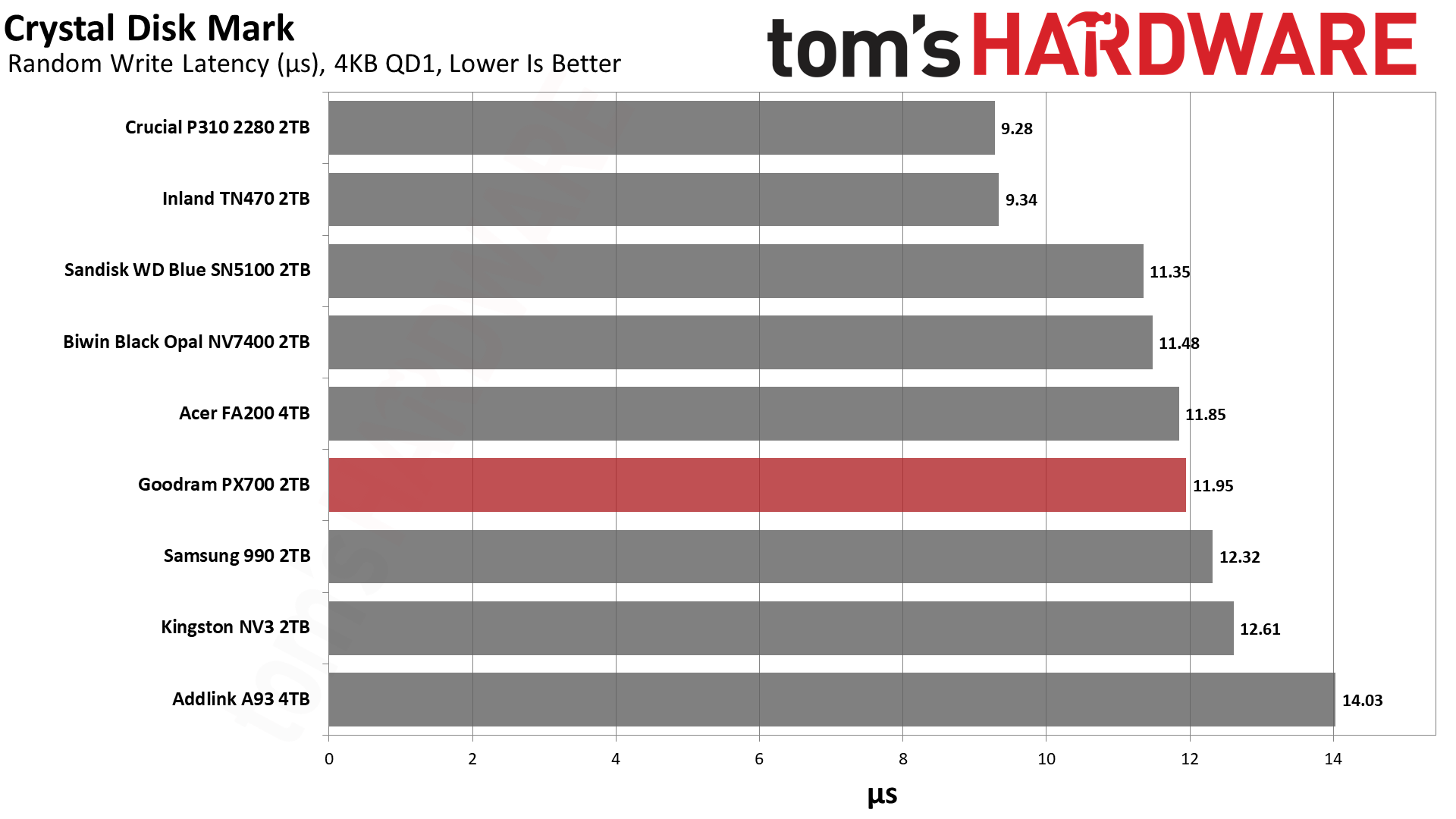
ATTO and CrystalDiskMark (CDM) are free and easy-to-use storage benchmarking tools that SSD vendors commonly use to assign performance specifications to their products. Both of these tools give us insight into how each device handles different file sizes and at different queue depths for both sequential and random workloads.
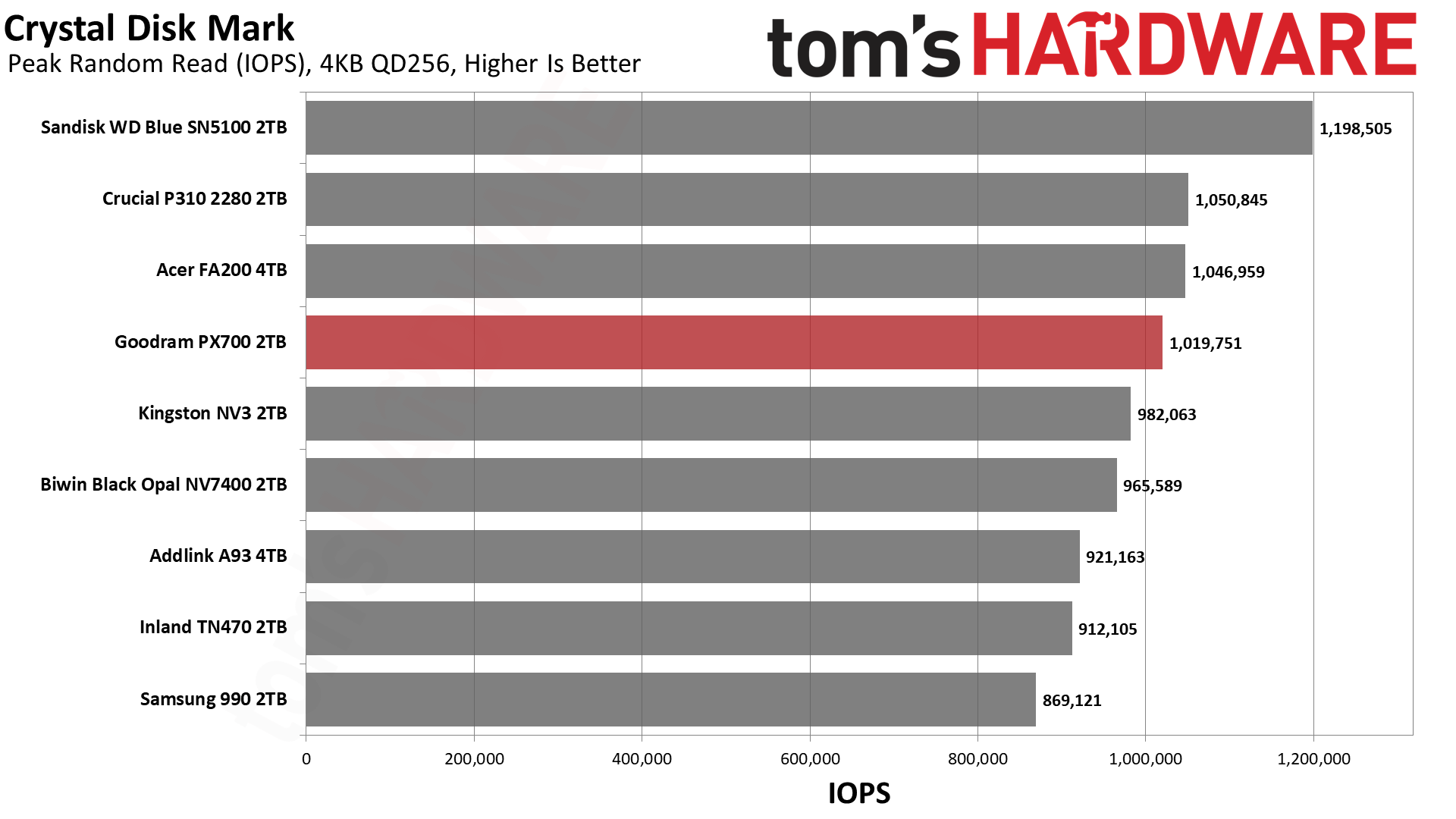
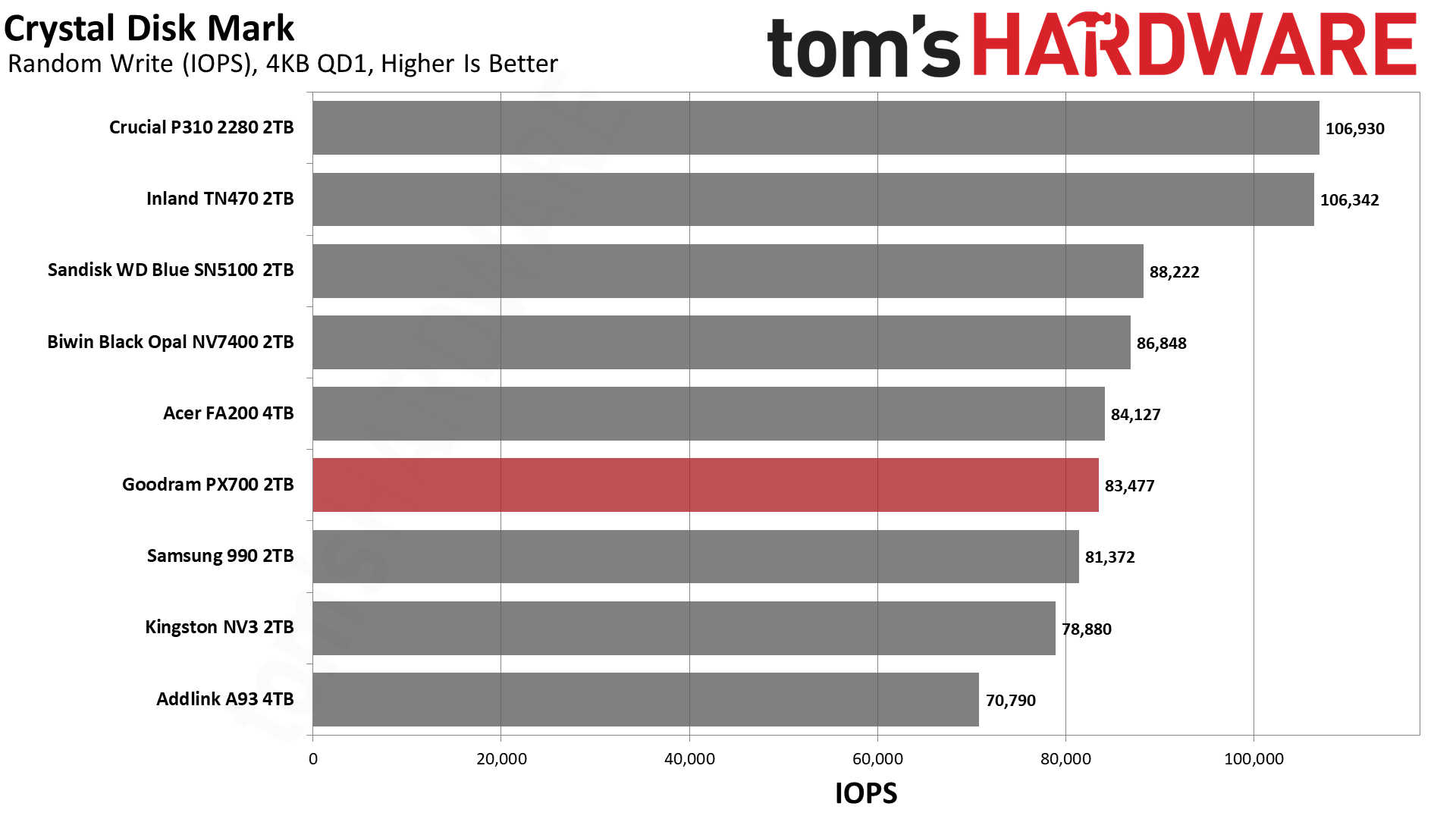
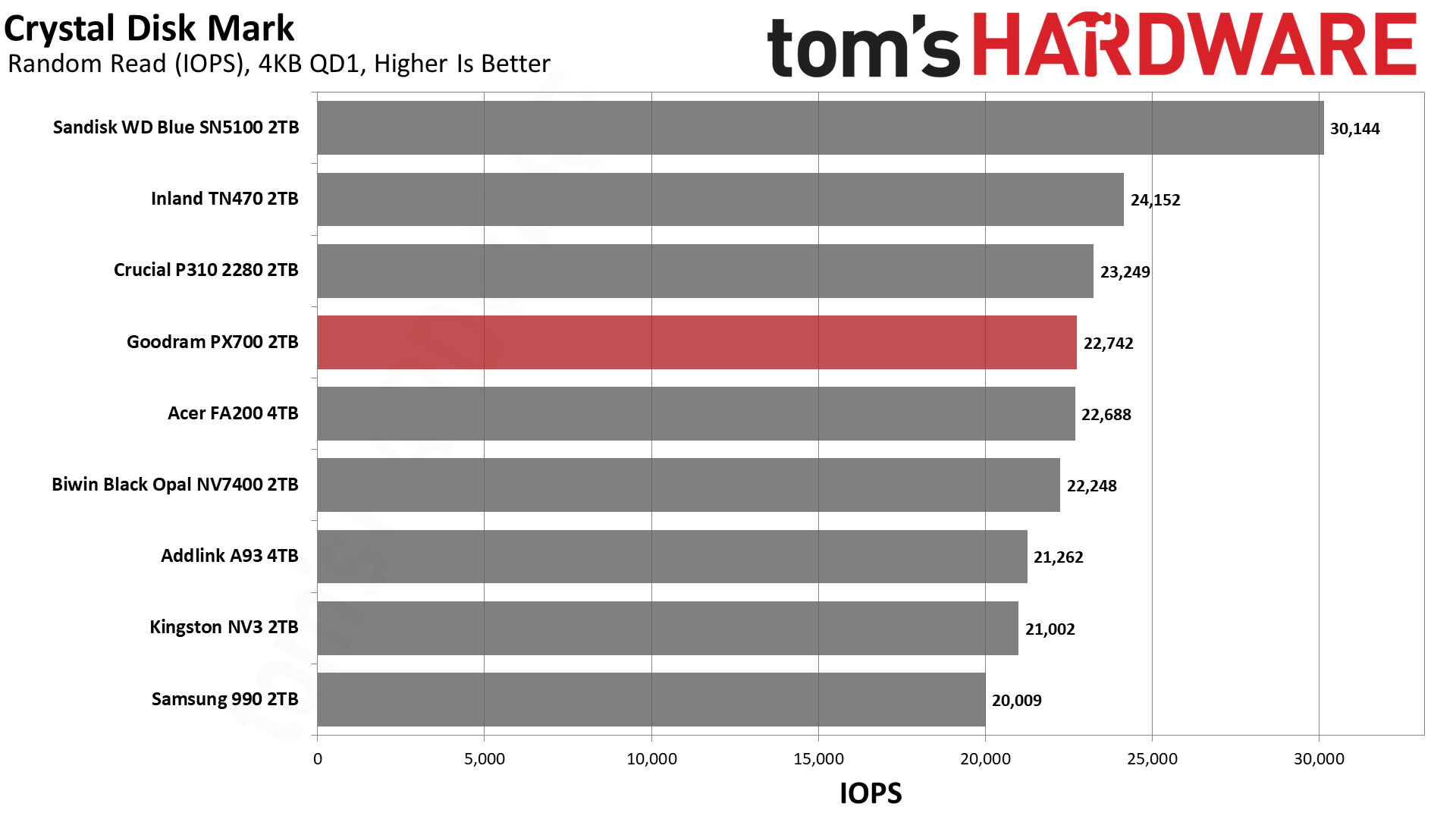
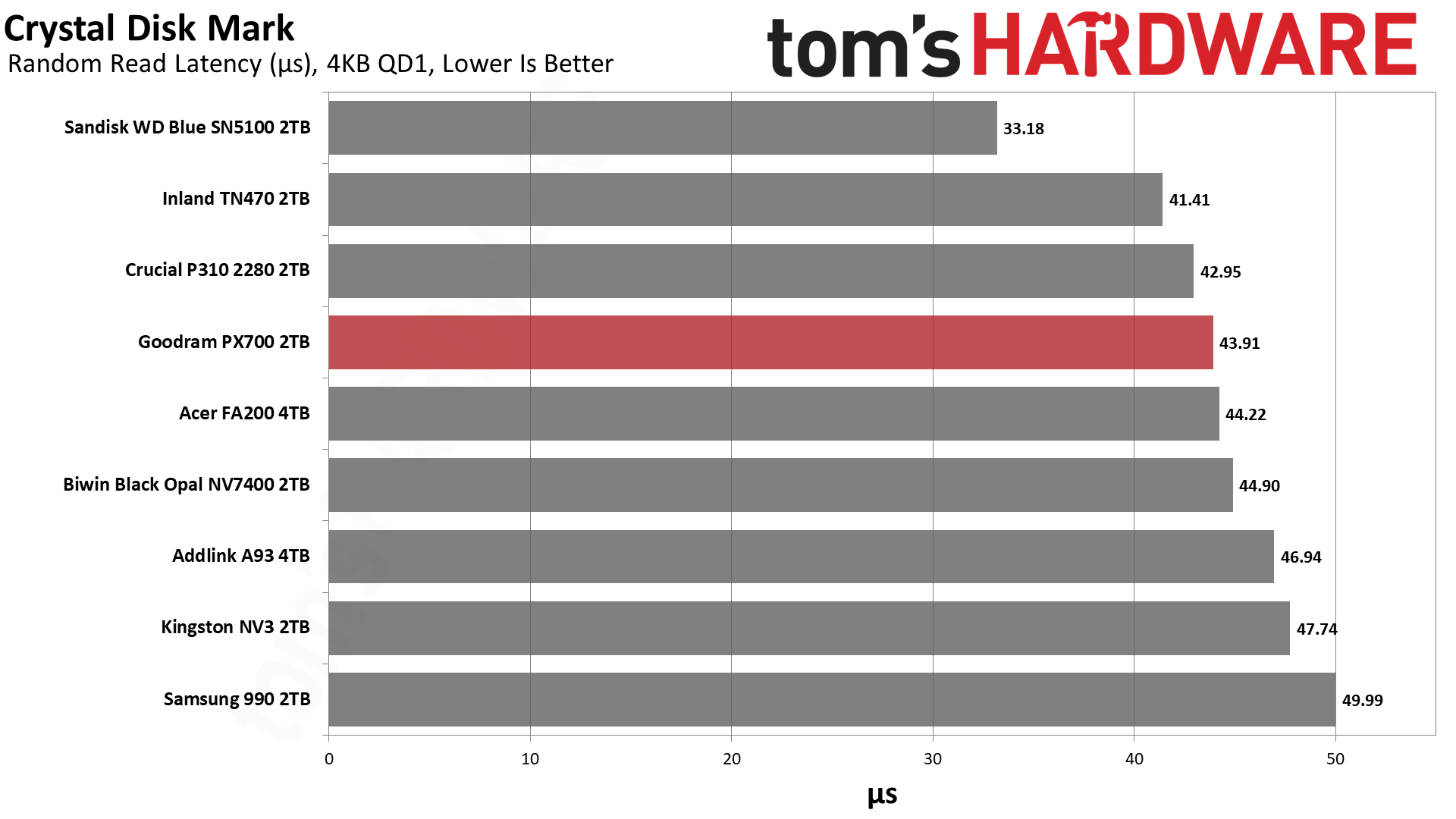
The PX700 has very steady performance in ATTO. We have no real complaints there. If we turn to sequential performance in CDM, we see more of the same. We would mostly look at QD1 reads for that, being a real-world metric, and it’s roughly on par with the NV7400 there. If we turn to random 4KB read performance at QD1, it’s a little bit further down the list but still hangs with excellent drives like the P310. Anything below about 45µs here is solid in our book. This drive should be quite responsive. If we were forced to be critical, we would point out that high QD 4KB write performance is low. Luckily, this is not a real-world workload for a drive of this type.
Sustained Write Performance and Cache Recovery
Official write specifications are only part of the performance picture. Most SSDs implement a write cache, which is a fast area of pseudo-SLC (single-bit) programmed flash that absorbs incoming data. Sustained write speeds can suffer tremendously once the workload spills outside of the cache and into the "native" TLC (three-bit) or QLC (four-bit) flash. Performance can suffer even more if the drive is forced to fold, the process of migrating data out of the cache in order to free up space for further incoming data.
We use Iometer to hammer the SSD with sequential writes for 15 minutes to measure both the size of the write cache and performance after the cache is saturated. We also monitor cache recovery via multiple idle rounds. This process shows the performance of the drive in various states, including the steady-state write performance.
Tom's HardwareTom's HardwareTom's Hardware
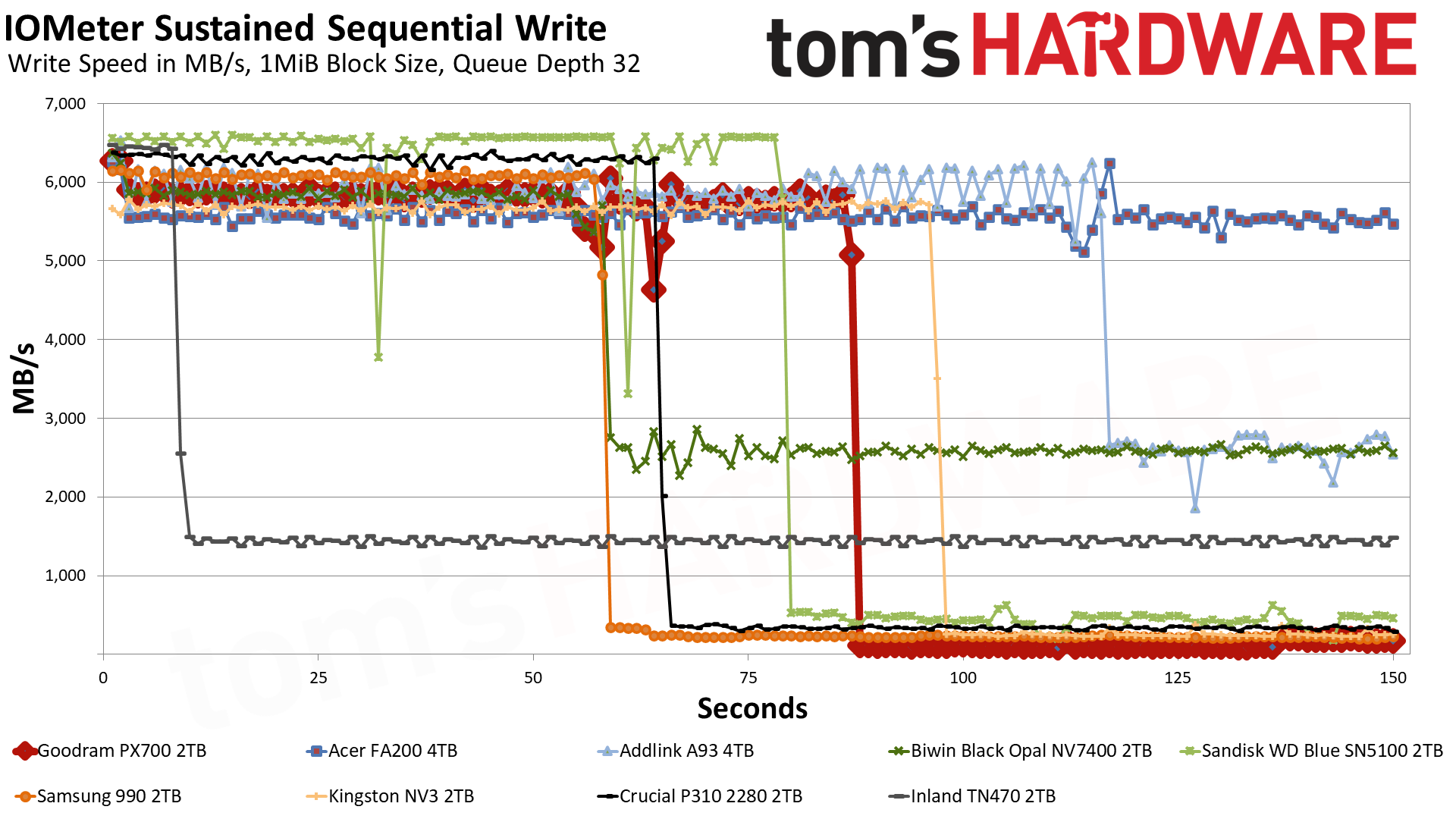
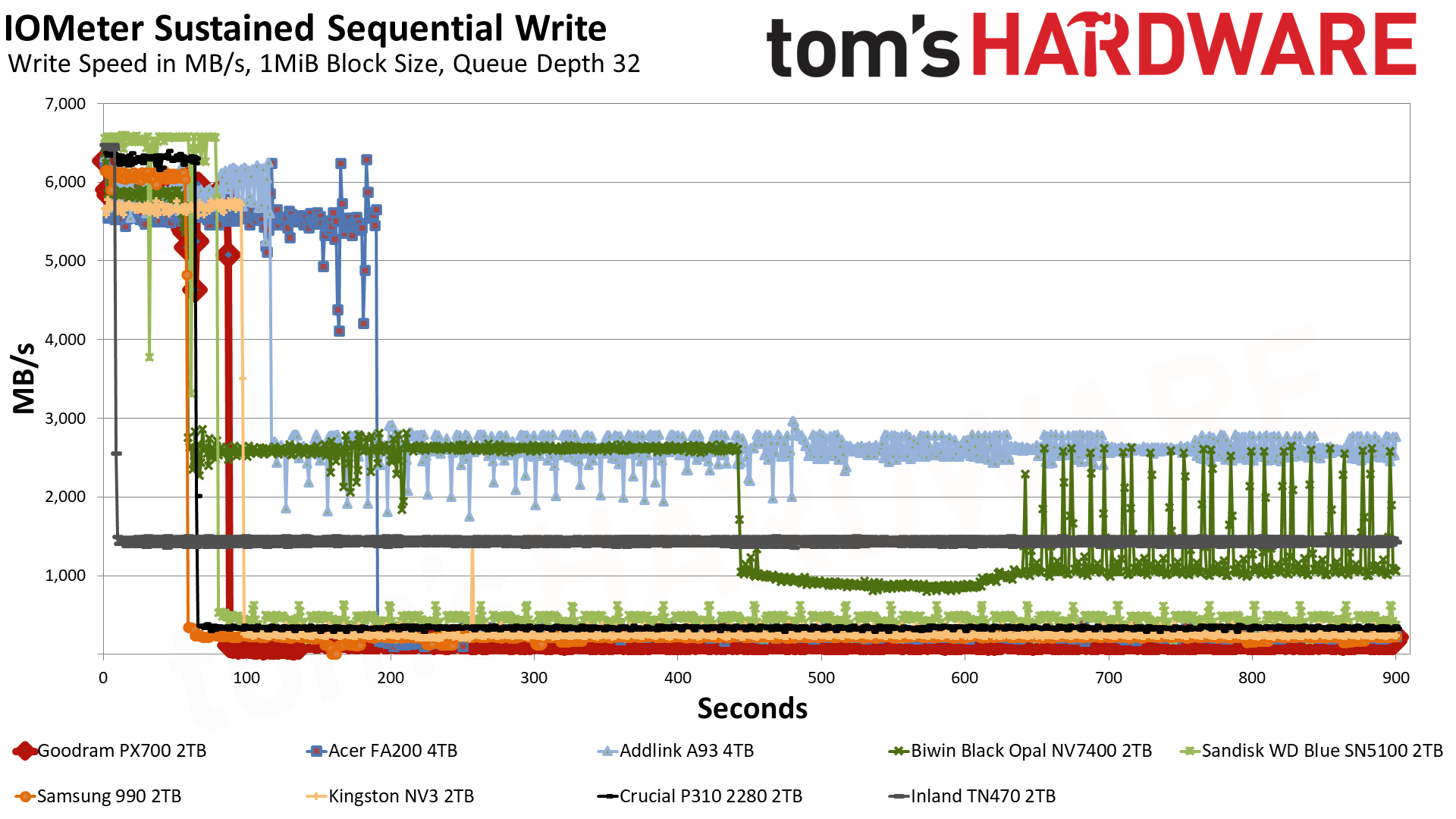
The PX700 starts off in the pSLC cache mode, writing at 5.8 GB/s for over 86 seconds. Speeds are slightly higher for the first two seconds, something we have seen before with this controller, but ultimately we’re looking at a 500GB cache. This is Exhibit A of why we would identify the flash as QLC. 4-bit QLC flash operating in a 1-bit pSLC mode is trading four times the capacity for performance, which means a 2TB drive will generally have a 500GB cache at most. A 3-bit TLC drive could have a larger cache, although there is nothing precluding it from having 500GB, even if this seems hard to be coincidental.
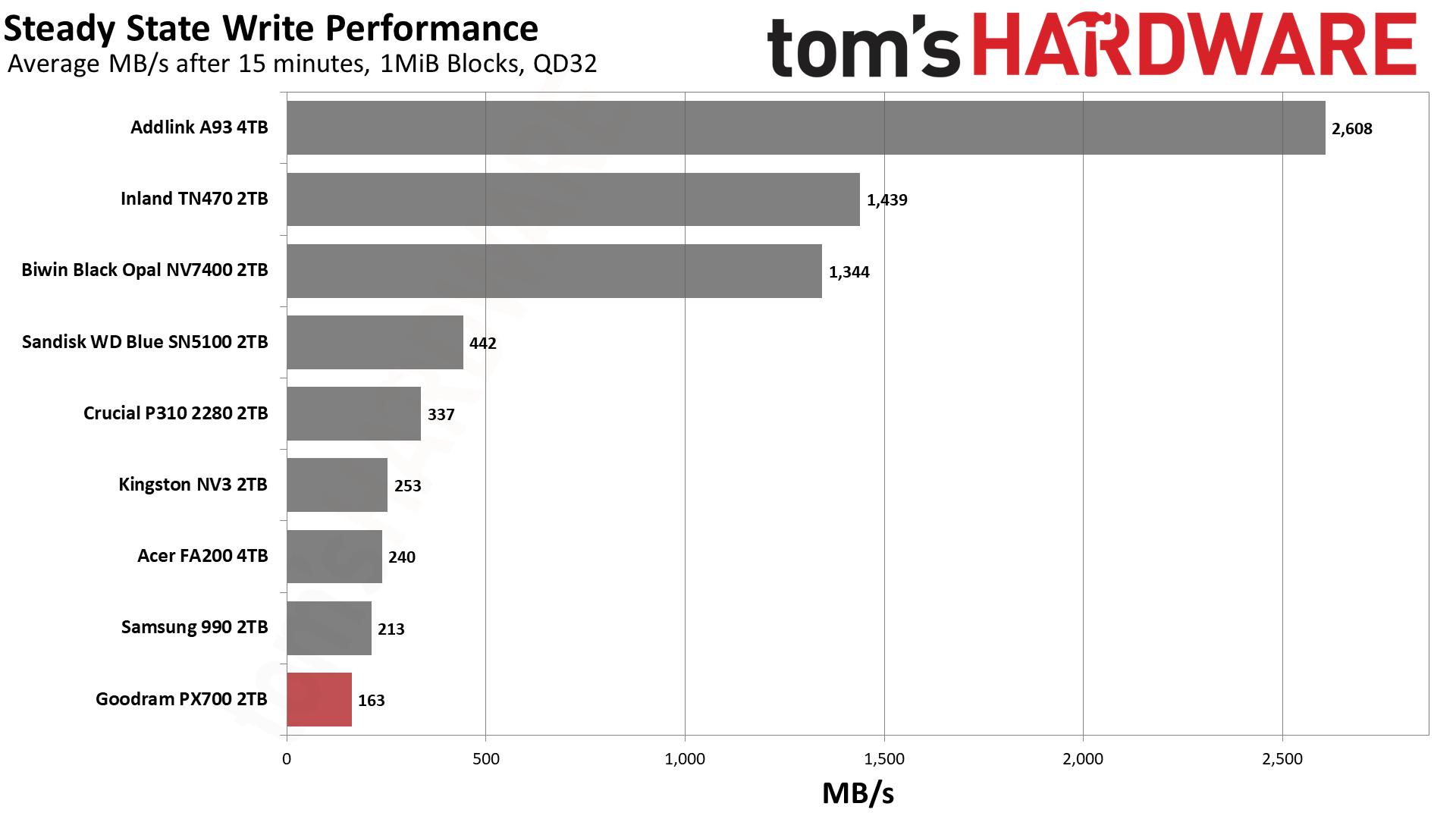
A TLC drive with a smaller-than-maximum-sized cache would probably be able to maintain some speed, though. The PX700 immediately falls into a folding mode – it’s waiting for data to be moved from pSLC to the native flash – with an average speed of 163 MB/s. TLC flash can at times be this slow, but it’s less likely, and especially less likely if it has space to spare. Even the FA200, with the same hardware, is faster. The FA200 does have twice the flash, of course, but the controller is essentially saturated. Rather, the FA200’s cache speed of 5.54 GB/s is slower than the PX700’s – and this could be from having more flash – which means the post-cache speed will be higher. This reinforces the position that the drive is using QLC. Of course, we could have thrown the 2TB HP FX700 into the mix to further prove this point, but we think comparing a 4TB drive is a more valuable approach.
It goes without saying that this is the first real failing of the PX700 in our review. However, it’s expected of a QLC SSD with a massive cache. We don’t consider it disqualifying. You are not buying a budget SSD to hammer it with writes. On the other hand, the 600TBW per TB warranty makes you assume you could do that to some extent. Also, the lower performance here could creep up in a fuller-drive experience. We also can’t exclude the fact that some PX700s come with TLC flash. Which means, taken as a whole, you should assume QLC will perform like the TLC competition 99% of the time.
Power Consumption and Temperature
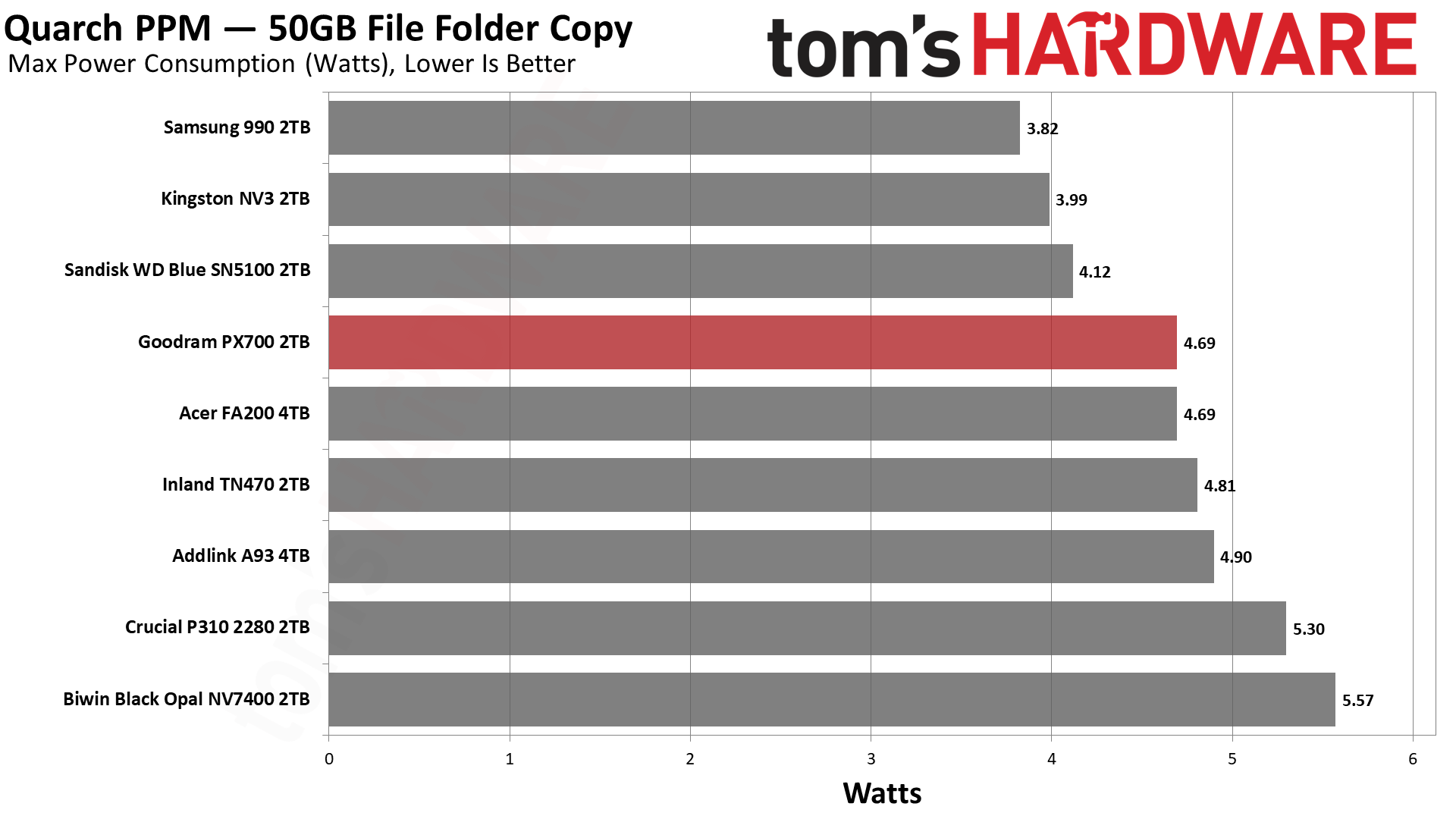
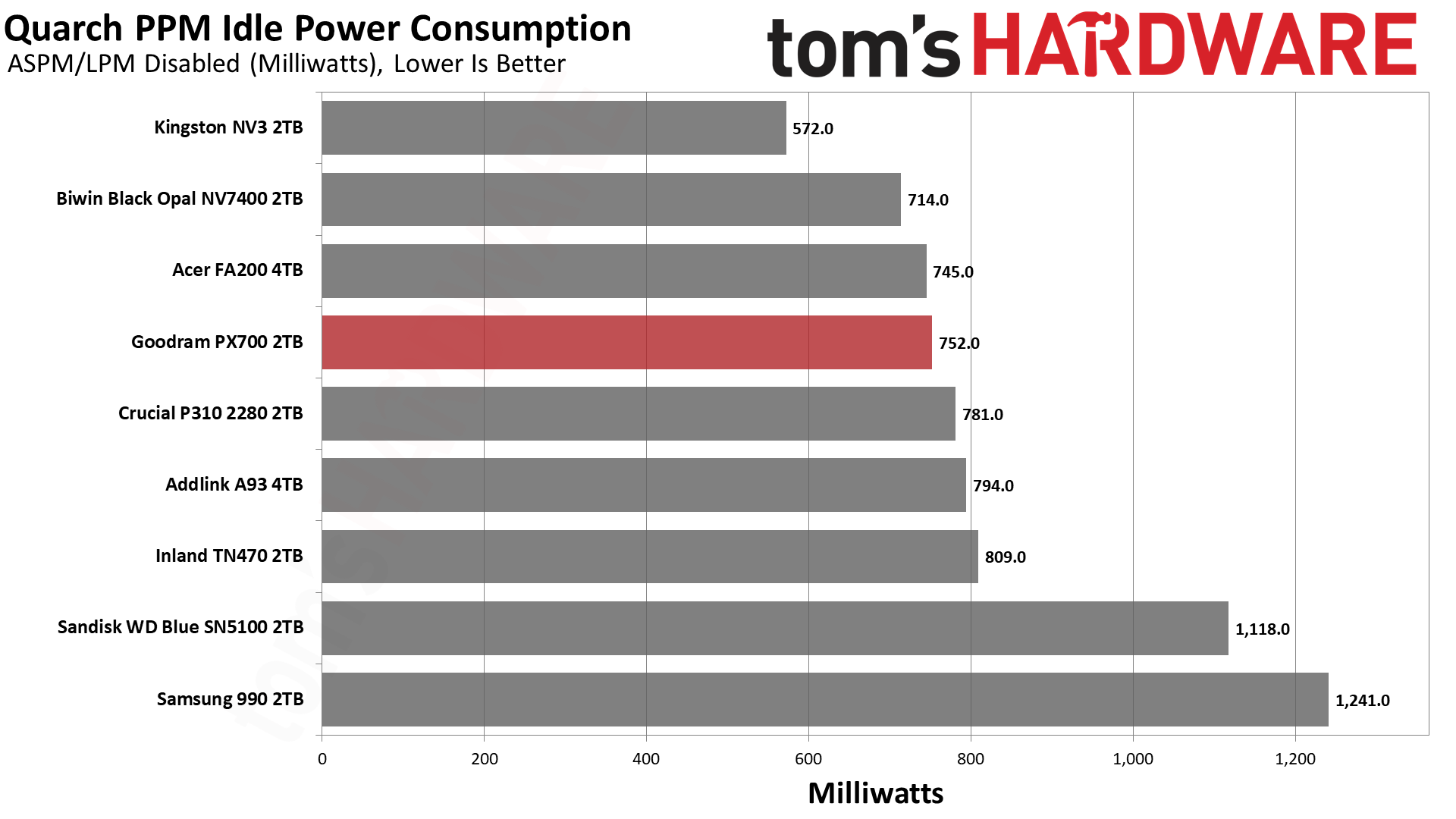
We use the Quarch HD Programmable Power Module to gain a deeper understanding of power characteristics. Idle power consumption is an important aspect to consider, especially if you're looking for a laptop upgrade as even the best ultrabooks can have mediocre stock storage in terms of capacity and performance. Desktops are often more performance-oriented with less support for power-saving features so we show the worst-case for idle.
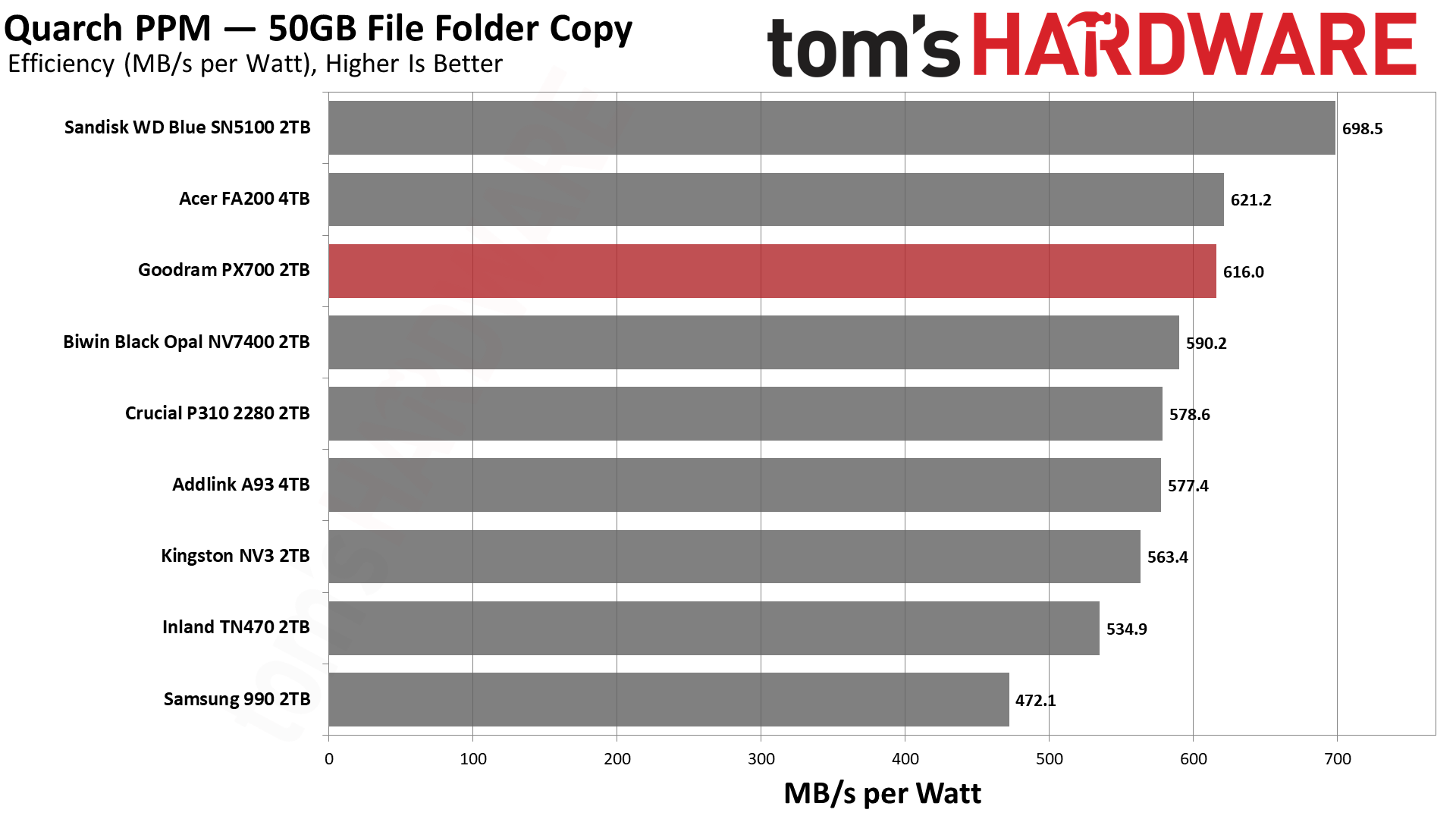
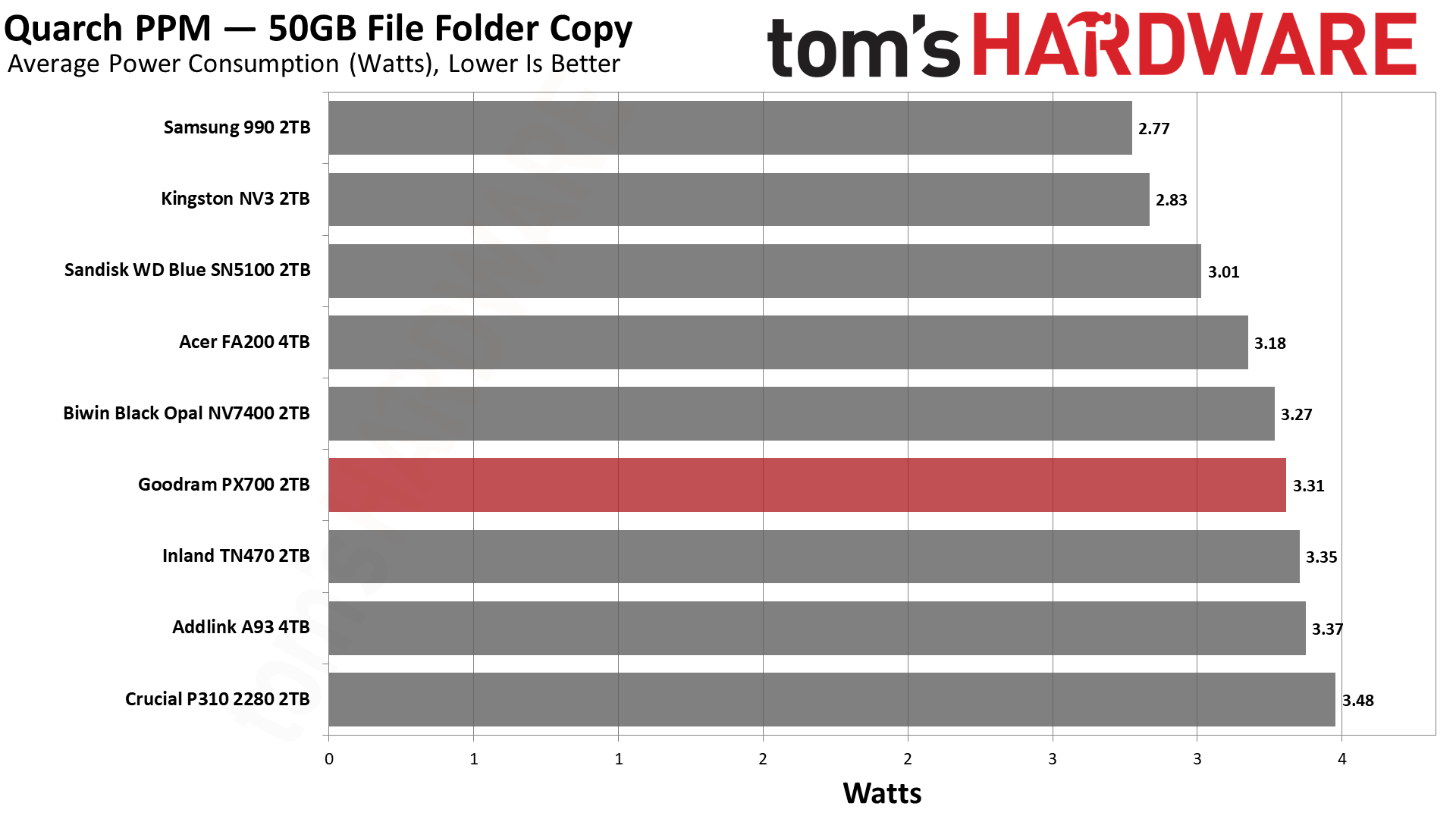
Some SSDs can consume watts of power at idle while better-suited ones sip just milliwatts. Average workload power consumption and max consumption are two other aspects of power consumption but performance-per-watt, or efficiency, is more important. A drive might consume more power during any given workload but accomplishing a task faster allows the drive to drop into an idle state more quickly, ultimately saving energy.
For temperature recording we currently poll the drive’s primary composite sensor during testing with a ~22°C ambient. Our testing is rigorous enough to heat the drive to a realistic ceiling temperature but real-world temperatures will vary due to the environment and workload factors.
The PX700 comes back into our good graces with very good results in our power testing. It’s essentially tied for second with the FA200, which is hardly surprising given the hardware similarity. Only the BiCS8-based WD Blue SN5100 pulls away from the pack. We would consider every drive on this list to be sufficiently power-efficient for laptop use, although the 990 is closer to the lower end of that range. Certainly 550 MB/s per watt or higher is an excellent result and indicates a drive that can be run without a heatsink most comfortably. As for idle pull – we test under desktop conditions, which can also match poorly-optimized power settings – the PX700 is not unusually power-hungry and, in fact, better than the WD Blue SN5100. That’s a bonus.
Temperature-wise, we have good news. Goodram touts the graphene label on this drive, which, in our experience, does actually help with cooling, especially on a drive with four flash packages. The PX700 in our testing peaked at 61°C, nearly 30°C below the initial throttling point, well beyond the 20°C of headroom we like to see. The MAP1602 does tend to be a hotspot more than alternatives like the Phison E27T on the P310 and TN470, but a heat-spreading label does help. In our estimation, this is a cool-running drive that would be great anywhere.
We use an Alder Lake platform with most background applications such as indexing, Windows updates, and antivirus disabled in the OS to reduce run-to-run variability. Each SSD is prefilled to 50% capacity and tested as a secondary device. Unless noted, we use active cooling for all SSDs.
Goodram PX700 Bottom Line
The Goodram PX700 is a model budget PCIe 4.0 SSD. It matches or exceeds all of the expected performance points; it's power-efficient, and it uses a simple single-sided design without a heatsink. The only problem is that a “budget” drive has to be affordable. Current prices in the U.S. for this drive leave something to be desired. However, if it can match or beat the prices of other drives in this class, it’s probably one of the better choices available. In part, this is because we’d be liable to trust Goodram over non-names – the TBW alone shows it means business – and, on the other hand, the drive actually outperformed our expectations. Aside from the sustained write performance, this drive really feels premium. You don’t need a Samsung, WD, Sandisk, or even Crucial drive to feel like you have next-gen storage.
(Image credit: Tom's Hardware)
Let’s look at what we mean by that for your use. Game and app loading times are heavily reliant on random and sequential reads at low QD. The PX700 does well there. You also may be transferring files a lot, and the DiskBench results are mighty. For your laptop or HTPC, you might want something that’s power-efficient and, if space is a concern, something that stays cool without a heatsink, and this applies to PS5 use as well. The PX700 ran cool in our test with just the graphene label and was very efficient. You’re not getting a shorter warranty with lower TBW, as with Samsung’s 990 or some QLC-based drives, and we know where this drive is assembled. It’s hard to look at this combination and not feel like it’s a stellar drive if you can find it at a normal price.
Aside from price, our only complaint would be sustained write performance. It’s pretty dissapointing, although we should point out that it’s also expected. The drive also has trade-offs here. Namely, its standard pSLC write performance is better than the 4TB FA200, and in the 2TB HP FX700’s ballpark, so you’re not getting nothing for that later drop. The PX700, in fact, is faster folding than the FX700, too. In the grand scheme of things, this isn’t a big deal, as you should never hit that state – this drive should effectively be fast enough for a 1GbE network, if that’s a bottleneck – and having a bit faster peak performance does translate to better marks on some of our benchmarks. The drive could take a hit in some cases, such as when it's very full, in which case getting a drive with DRAM and guaranteed TLC flash could assuage your fears.
For most use cases, though, the PX700 is more than good enough and, in fact, punches above its weight in our opinion. It would be a good option for just about any type of machine. PS5, laptop, HTPC, desktop, you name it. Primary or secondary drive, just fine. You don’t even need a heatsink. The capacity range is solid – you’re not going to find 8TB on a drive like this – and you can bring your own software. Performance is good enough to overlook any QLC flash use, so our main problem remains the price. Get it down to the same ballpark as the other drives in our list, and you have a contender. We hesitate to put an exact dollar amount for that because SSD prices are volatile, to say the least, so compare it to comparable drives such as the ones we matched it against today.

 Login
Login