❌

Reading view

App Store uploads must now target iOS 13 or later, and iOS 15 from April 2027

Apple now requires iOS and iPadOS apps uploaded to App Store Connect to target iOS 13 or later, a rule in effect since September 9, 2026. Apple’s submission page adds that starting April 2027, iOS and iPadOS apps must be built with the iOS & iPadOS 27 SDK or later and target iOS 15 or […]

The post App Store uploads must now target iOS 13 or later, and iOS 15 from April 2027 appeared first on The Mac Observer.

  •  

Apple’s App Replacement Entitlement lets you move data to a developer’s new app

Apple has added an App Replacement Entitlement to its Apple Developer Program License Agreement, giving developers a system-level way to move users from an old app to a new one. According to Apple’s agreement, the entitlement shows a system sheet on the first launch of the replacement app that lets you move data and settings […]

The post Apple’s App Replacement Entitlement lets you move data to a developer’s new app appeared first on The Mac Observer.

  •  

MacVoices #26262: Live! – How-To Articles Flood and Intel Mac App Support

It happens every time: Just before major OS releases, the tech web is flooded with how-to and tips articles. The MacVoices Live! panel looks at why and how you can benefit, including how that flood can offer guidance when new operating systems arrive. The discussion then turns to the Mac App Store allowing developers to […]

💾

  •  

Apple reportedly building server packed with M-series Ultra chips for AI

Apple is working on an AI server that would use Apple’s high-performance M-series Ultra chips found in Mac desktops. The potential product’s expected release in 2029 would mark the first Apple server to hit the market in nearly two decades—and could capitalize on the surging popularity of Apple hardware among AI developers.

The enterprise server would come in two configurations that include either two or four of Apple’s future M8 Ultra chips, according to The Information. The project reportedly received support from new Apple CEO John Ternus when it began a year ago, back when Ternus led Apple’s hardware engineering efforts.

This revelation coincides with booming sales for Apple’s Mac mini and Mac Studio as AI developers and companies snap up the Mac computers to run AI workloads. The popularity of such computing devices that rely on Apple’s M-series Ultra chips has undoubtedly encouraged Apple’s pursuit of an enterprise server using the same chips.

Read full article

Comments

© Benjamin Fanjoy/Getty Images

  •  

Our Favorite Indie Apps for iOS 27, Vol. 1

With our annual OS reviews out of the way, Federico and I will be covering our favorite indie apps that take advantage of Apple’s latest OS features. We have hundreds to draw from and instead of one big sweeping roundup, we’re going to do a bunch of smaller ones as we work our way through our lists.

To start with, we have six excellent apps that make use of Siri AI, Apple Intelligence, extra-large widgets, and more. There’s a lot of innovation packed into this group, so let’s dive into the details, and check back soon for more roundups.

Things

Cultured Code’s beautiful task manager is no stranger to supporting major Apple OS releases: while the company is keeping quiet on their plans for a possible Things 4 (Things 3 was released in May 2017), for the past nine years Things has regularly received support for new versions of iOS, iPadOS, and macOS on day one. The app’s iOS 27 update is no exception, and it makes for a great demo of some of the new features of Siri AI as well as XL widgets for iPhone. It also serves as an example of the limitations of Siri AI – and not because of Cultured Code.

The updated Things app integrates with Siri AI and Spotlight, allowing you to retrieve and open tasks from anywhere on iOS and iPadOS, as well as manage tasks with the assistant using its several input methods. In my tests, Cultured Code’s integration worked well, but Apple’s slow on-device indexing was the problem. Soon after installing the app, I was able to ask Siri to create a reminder, and it prompted me to pick a destination app again because I’d installed a few more task managers since I last confirmed my previous choice. After picking Things, I was able to create a task, which landed in the inbox, and then follow-up with Siri AI by saying “make it due at 3 PM”, and it worked.
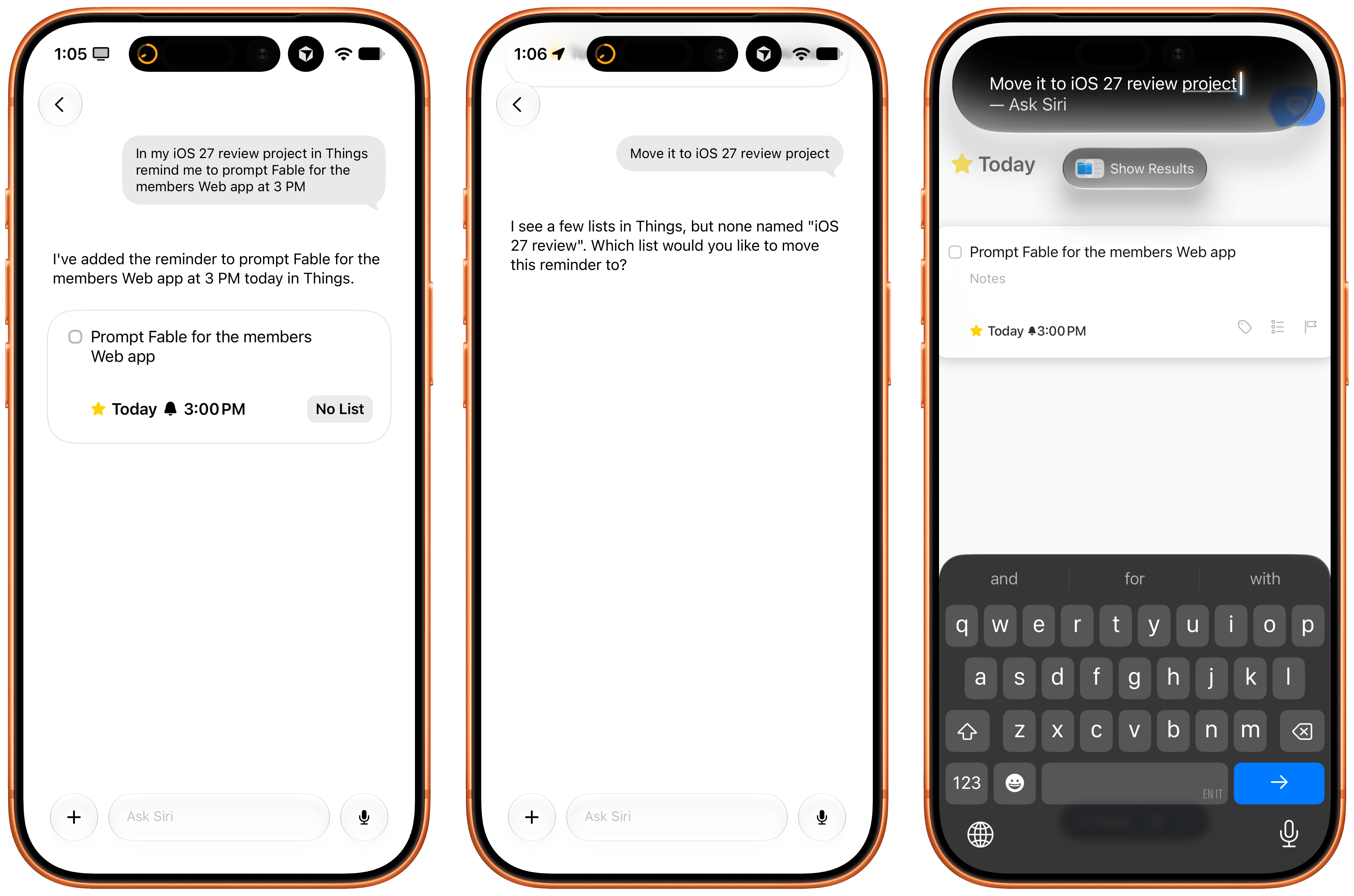
The issues I ran into, which are outside of Cultured Code’s control, are due to how long it takes iOS 27 and Siri AI to build an index of the app’s capabilities and data structure. For instance, I created an ‘iOS 27 Review’ list in Things, but, after three hours, Siri AI still can’t find it. As I noted in my review, I believe this is going to be a major challenge for most third-party apps in the short term as users download them, expect them to work with Siri, but the indexing isn’t going quickly enough.

Regardless of Apple’s technical problems, Things’ integration with Siri AI shows the path forward for third-party task managers on iOS. I also recommend reading the developers’ guide on how to prompt Siri AI for the app.

Locally AI

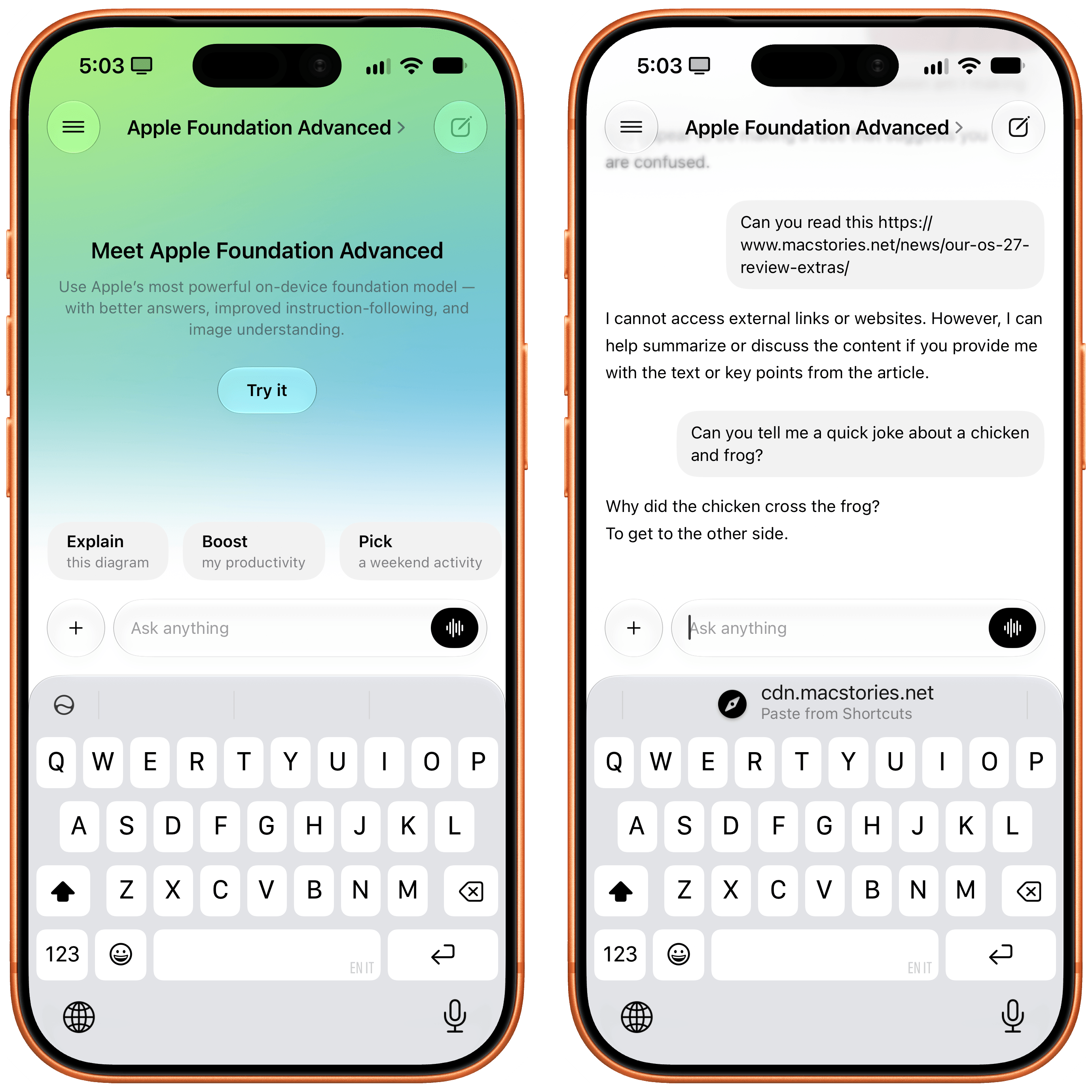
I covered the differences between Apple’s two flavors of local Foundation models (AFM 3 Core and 3 Core Advanced) in yesterday’s review, but there’s no better way to actually take the model for a spin than Locally AI.

The app, which is now part of the LM Studio family of products and can connect to a remote Mac using LM Link, now offers an ‘Apple Foundation Advanced’ model that, assuming you have a compatible device, lets you prompt Apple’s new on-device model.

A good way to prompt this model is to give it an image: for the first time, a local Foundation model comes with vision capabilities, and I’ve found Core Advanced to be surprisingly strong at describing things like iPhone screenshots, selfies with different facial expressions, and more. Obviously, it comes with limits: Locally AI’s harness doesn’t expose tools to the model, which means it can’t fetch web content and, say, summarize articles for you in the app. Its knowledge and creativity are also quite limited, as you can see from the non-joke it created in the screenshot above.

Still, despite the limitations of the model itself, Locally AI is an excellent utility for running local models on iPhone and iPad, and if you’re curious to see what Apple’s bigger models feels like outside of Siri AI with your own prompts, I recommend checking it out.

Dark Noise

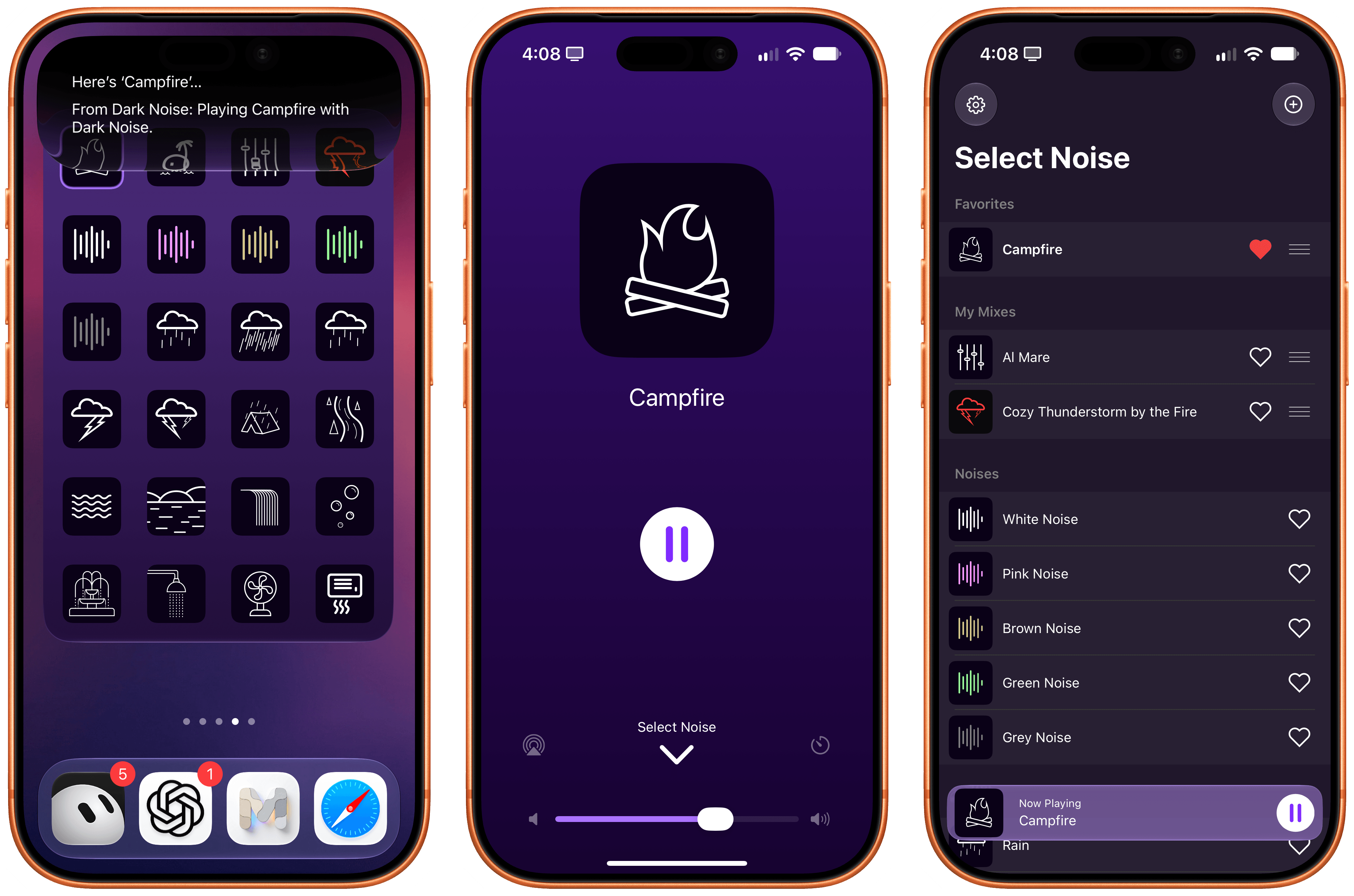
Charlie Chapman’s Dark Noise has long been my favorite utility to play white noise and other sound effects to relax or focus, and the app has received a substantial update for iOS 27 worth checking out.

First, there’s a good-looking new Liquid Glass player that fluidly morphs on-screen from a mini-player docked at the bottom of the app into a full-screen view that lets you control playback, volume, and set a sleep timer. On the Home Screen, there’s a (customizable) XL portrait widget for iPhone that lets you configure any combination of up to 24 distinct sounds and mixes that you can play with a single tap without opening the app.

As you can imagine, the app also integrates with Siri AI now. Using Apple’s assistant, you can ask to play specific sounds from the app (make sure to add “…from Dark Noise” to your request) and you can also leverage on-screen awareness inside the app itself. While looking at your list of favorites and mixes, for instance, you can say something like “play the second mix”, and since Chapman has properly annotated the app’s views, Siri AI and Dark Noise will know what you mean.

If you, like me, struggle to get work done with music in the background but also do not appreciate complete silence, I recommend installing Dark Noise and creating a few mixes of your own.

AskPlay

I first covered Francisco Cantu’s AskPlay when it debuted on the Mac earlier this year in the App Radar for Club members, where I wrote:

Created by indie developer Francisco Cantu (a name that should be familiar to longtime MacStories readers!), AskPlay is one of the best new Mac apps I’ve tried in a long time, and we will properly review it on MacStories in the near future. The idea is simple: AskPlay gives you natural language control over Apple Music to play or queue songs. The app, which lives in the menu bar but can also be invoked with a system-wide hotkey, brings up a Spotlight-like floating search box where you can type or say things like, “Queue some ‘90s hip-hop,” or, “Play something like Oasis,” and have an AI carry out the request.

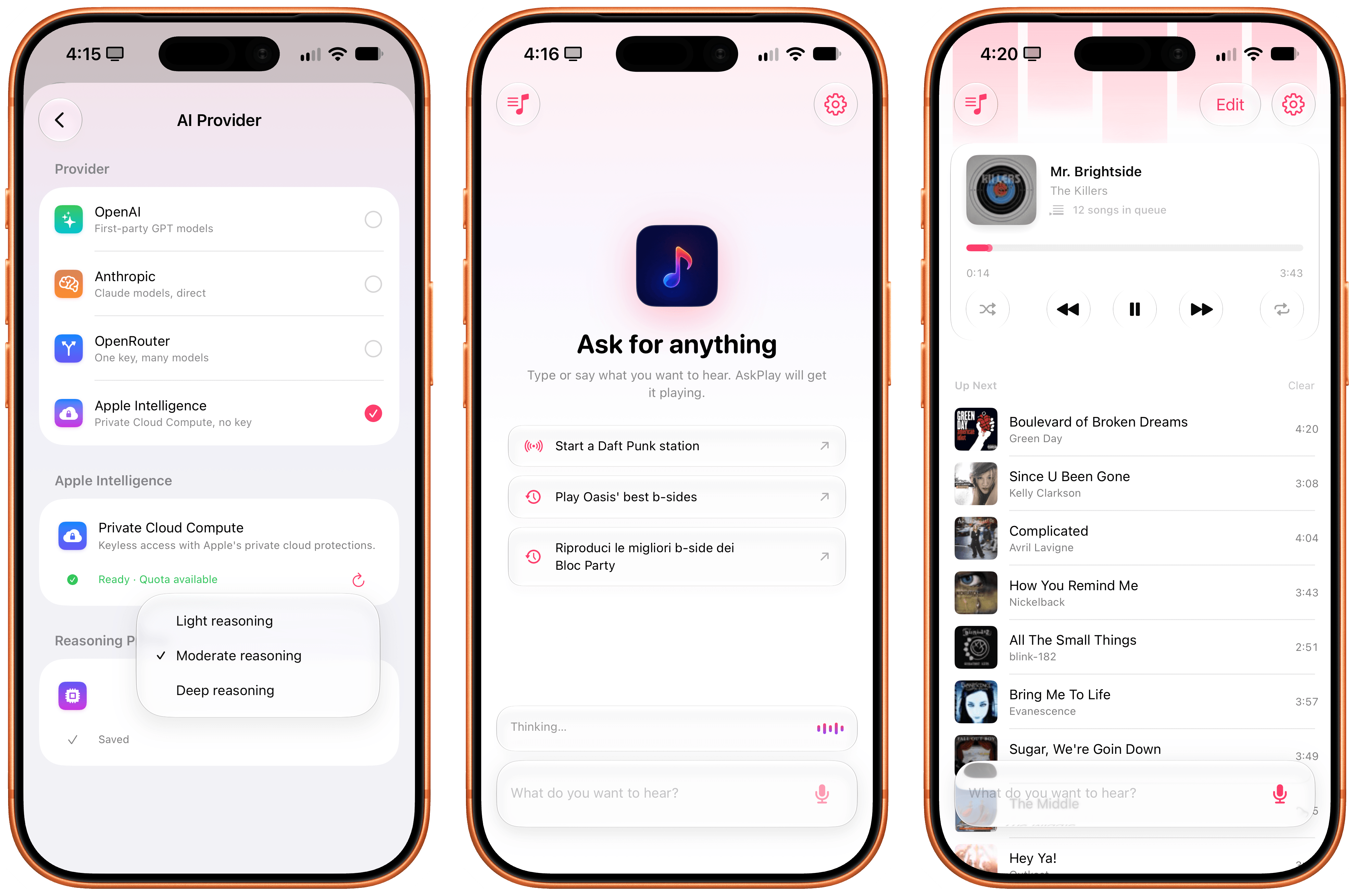
The app can build mixes for a mood or era, start stations, manage the queue (you can ask to move songs up or down), control playback, and add songs to your library or playlists, and it also answers questions such as, “Who sings this?” You can either type your requests or set a voice hotkey that summons the app already listening, pausing your music while you speak. AskPlay is a bring-your-own-key app, so you’ll need an API key from OpenAI, Anthropic, or OpenRouter in addition to an Apple Music subscription (and a subscription to the app itself).

AskPlay is now on iPhone too, and thanks to iOS 27, it’s become one of my favorite showcases of Apple’s Cloud Pro Foundation model running in Private Cloud Compute. Unlike the original version, AskPlay now lets you hand off prompt processing to a reasoning model in the cloud at no cost thanks to Apple’s PCC framework for third-party developers. And not only that, but AskPlay is also the first app I’ve seen that lets you choose between the three reasoning modes supported on PCC: light, moderate, and deep.

In my experience, I’ve had the best results with the PCC model set to “moderate” reasoning. What this means in practice is that with AskPlay for iOS 27, we now have a way to generate Apple Music-based mixes using natural language with a quality that I find superior to Apple Music’s own playlist generation feature.

AskPlay remains one of the best app debuts of the year, and if you want to demo the capabilities of Private Cloud Compute for third-party apps, you should start here.

LookUp 13

LookUp 13 from Vidit Bhargava has been released with a wide variety of features that make use of iOS and iPadOS 27. The app, which is available on the iPhone, iPad, Mac, Apple Watch, and Vision Pro, makes great use of Siri AI, allowing you to quickly ask Siri things like “Search the word plethora in LookUp,” which opens the app right to that word. Siri can also be used to find LookUp’s word of the day or a random word.
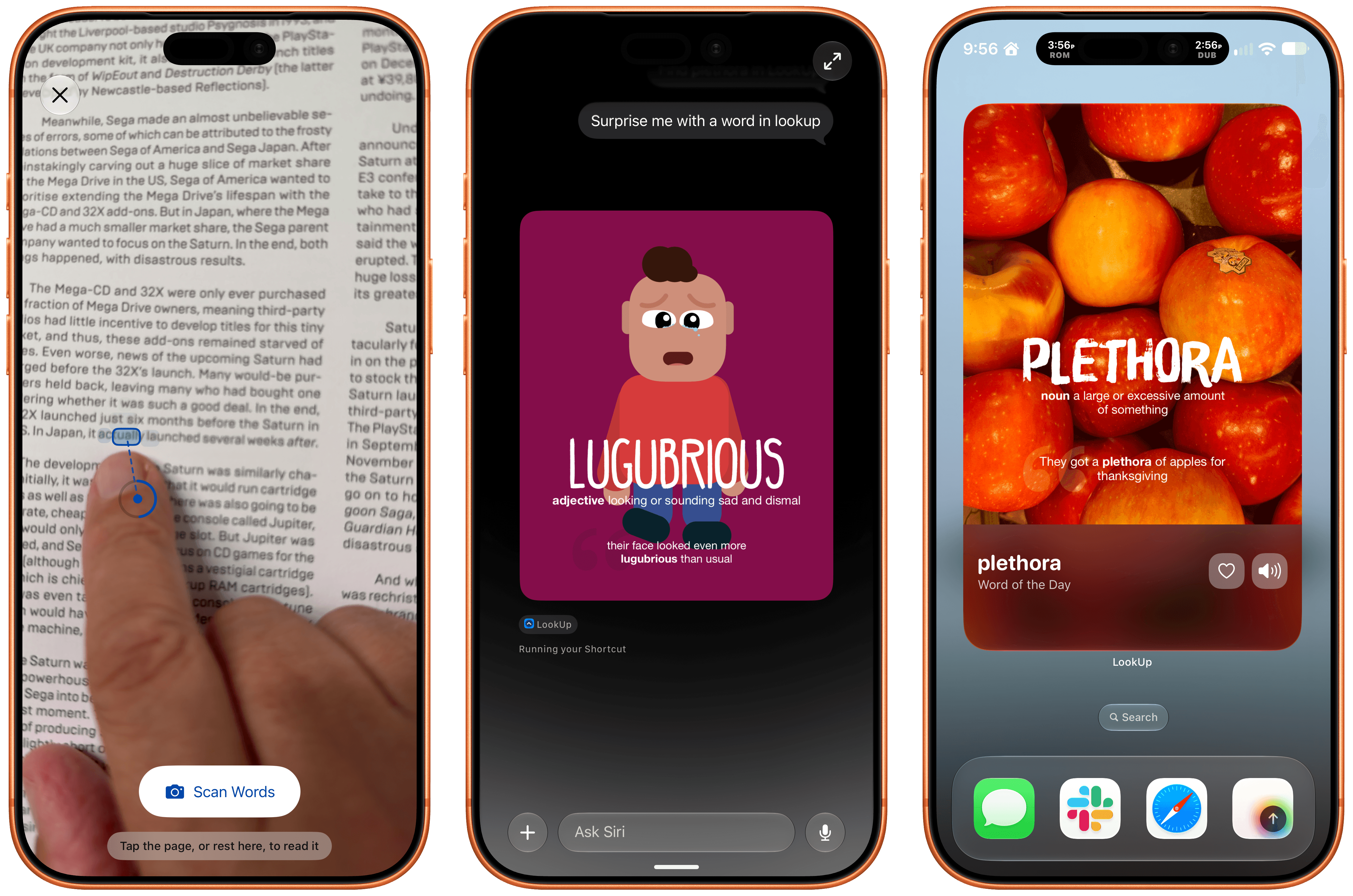
LookUp 13.

LookUp 13.

Beyond Siri, Vidit has added support for Apple Intelligence in the notes that can be tied to a word and combined Apple’s Foundation Models with the Vision framework and hand-pose tracking to let you scan a printed page for a word. Point at a word and the app’s scan mode uses your device’s camera to see which word you’re pointing at. It took a little practice to figure out the right distance from the camera to the page, but once I got that down, it felt like magic. The same feature can pick out other nearby words that might be difficult for the reader, too.

LookUp 13 also offers a Reading Mode that looks up words you speak as you read. The feature uses a Live Activity that listens to you speak, and returns a definition. Initially I ran into some trouble with Reading Mode, but when I tried again later, it worked every time. Also included in the latest release are interactive flash cards that ask for word definitions that are graded by Private Cloud Compute and new extra-large widgets for the word of the day and a shuffled word of the day.

LookUp is an excellent app. I love how Vidit continues to push the boundaries of Apple’s technologies every year, and while I hit a few rough spots in testing, which struck me as issues with Siri AI, not LookUp, I’m impressed by how much depth LookUp’s new Apple Intelligence features add to the app.

Play

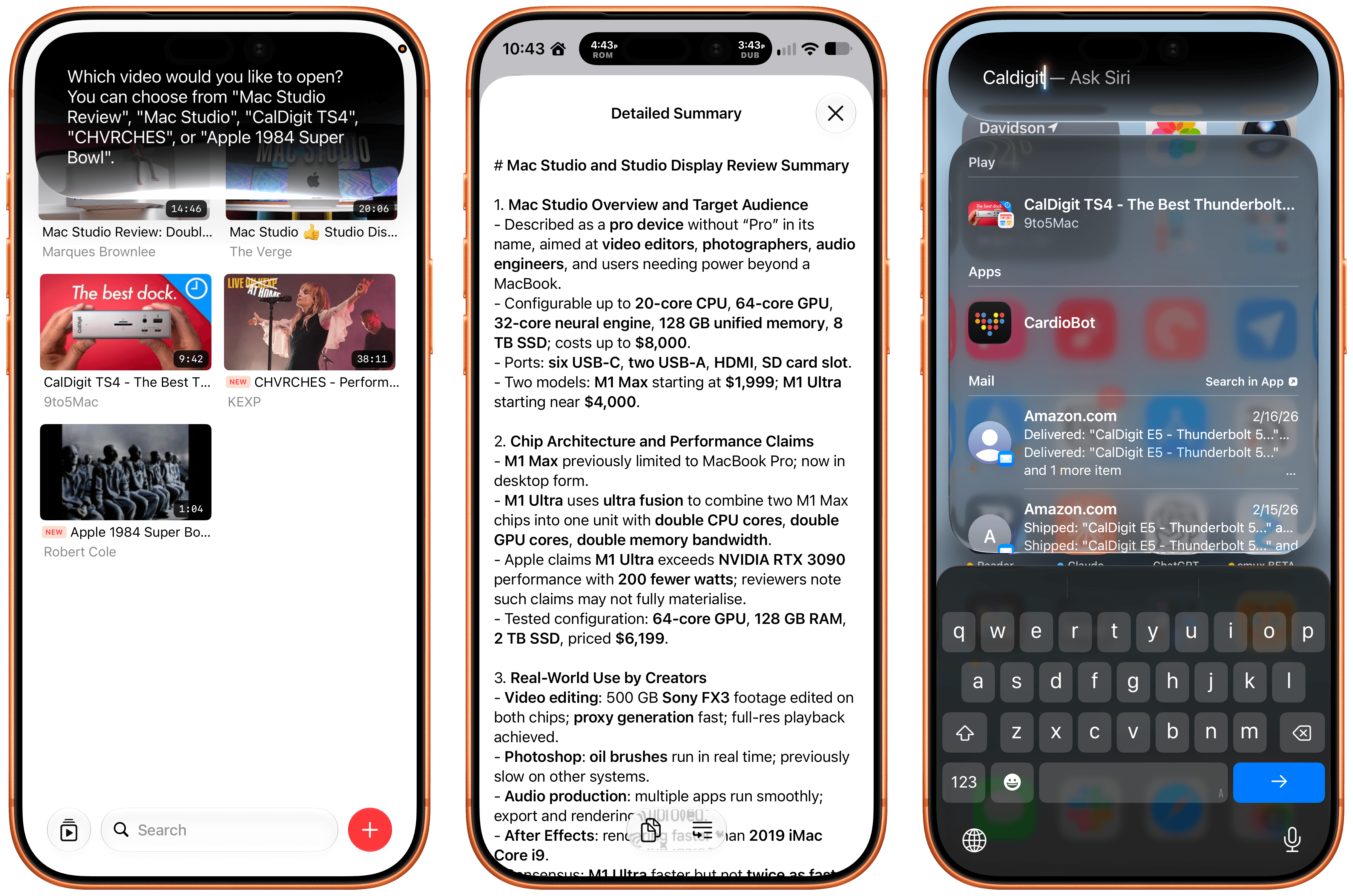
The latest update to Play, the watch-it-later app from Marcos Tanaka that works on the iPhone, iPad, Mac, Vision Pro, and Apple TV, includes a bunch of great touches. There’s a new Channels Inbox for navigating saved videos by source. Play has also added Siri AI support allowing you to search for and open videos. Onscreen content is made available to Siri, so you can do things like ask it to remind you to finish a video later, and it knows what you mean. In my testing, all three features work well.

Also, on an individual video’s detail view, you can use Apple Intelligence to create a summary of a video. There are options ranging from a concise summary to a simple explanation. I ran into a roadblock when I tried to create a summary of a fifteen-year-old YouTube video, but more recent videos all worked well. Apple Intelligence can also suggest tags and icons for videos and lets you ask questions, with the answers drawn from the video’s transcript.

Beyond Siri AI and Apple Intelligence, Play adds an extra large widget, a refreshed Liquid Glass design that I love, and Spotlight search. It’s a fantastic update to my favorite way to save videos for later.

  •  

MacVoices #26252: Live! – Tim Cook, John Ternus, and Apple’s Changing of the Guard

The MacVoices Live!  examines Apple’s transition from Tim Cook to John Ternus, weighing Cook’s legacy, Apple’s dramatic financial growth, Vision Pro, and criticism of his tenure. They consider what Ternus’ engineering background could mean for hardware and software, while discussing Phil Schiller, Eddie Cue, other executive changes, succession planning, and the importance of preserving institutional […]

💾

  •  

App Tracking Transparency: Apple Faces $2.7 Billion UK Lawsuit

App Tracking Transparency is at the center of a new UK lawsuit seeking approximately $2.7 billion (£2 billion), putting one of the most recognizable iPhone privacy features under fresh legal pressure. The claim follows earlier challenges to the tracking system in France, but this action seeks compensation for developers who say Apple imposed unfair restrictions on their businesses while favoring its own advertising services.

Filed on September 3 at London’s Competition Appeal Tribunal, the case represents another dispute over the rules behind the familiar permission prompt. Apple rejects the allegations and maintains that it follows the same App Tracking Transparency requirements as other developers.

The amount being sought is not a fine or an awarded payment. It is the claimants’ estimate of losses, which Apple disputes.

What the App Tracking Transparency Lawsuit Alleges

The action was brought by ATT Collective Action Limited, whose director, Ann Pope, previously led antitrust enforcement at the UK Competition and Markets Authority. Law firm Hausfeld is representing the proposed class.

According to Hausfeld’s announcement of the claim, developers argue that Apple introduced the framework unfairly, without adequate consultation, and applied more burdensome requirements to outside businesses than to its own services.

The complaint focuses partly on consent. It alleges that third-party developers must obtain permission under data-protection law and then secure an additional approval through the iOS tracking prompt. Apple’s advertising services, the claimants argue, operate under a less demanding process.

Developers also contend that the introduction left them insufficient time to adapt business models dependent on advertising.

These are allegations about how the system was designed and introduced—not established findings in this UK case. The claimants’ stated position is that privacy protections should remain compatible with fair treatment of businesses.

App Tracking Transparency | Two iPhones display Apple’s “Find My” app settings in dark mode, showing options like “Notify When Left Behind,” separation alerts, device locations, and contact sharing. The interface offers users easy access to Find My alerts and seamless integration with AirTag tracking.
Image Credit: AppleMagazine

What the Tracking Prompt Actually Protects

For someone using an iPhone, App Tracking Transparency offers a direct choice about a practice that previously could be difficult to see.

An app may want to connect information about your activity with information gathered through other companies’ apps or websites. That connection can help advertisers build a profile, target advertisements, or measure whether an advertising campaign led to a purchase.

Under Apple’s explanation of the tracking rules, apps must request permission before carrying out the tracking covered by the framework. Choosing “Ask App Not to Track” blocks access to the system advertising identifier and prohibits using other identifying information to perform that tracking instead.

The feature arrived with iOS 14.5 in 2021. It does not remove advertisements, make an app anonymous, or serve as a universal switch for every kind of data collection.

That boundary matters. A retailer remembering purchases made within its own service is not automatically doing the same thing as an advertising company linking activity across unrelated businesses.

The disagreement concerns whether those distinctions, and the consent processes built around them, give Apple an unfair commercial advantage.

App Tracking Transparency | iOS 16 | iPhone 14

Apple Says the Same Rules Apply to Everyone

Apple has responded directly to the lawsuit, defending the feature as a way to give people control over tracking across other companies’ services.

In a statement reported by AFP, a spokesperson said: “Apple is bound by the exact same requirements as all developers under ATT.”

The company also pointed to support for the feature from customers and privacy advocates.

That response challenges the foundation of the developers’ case. Apple presents App Tracking Transparency as a rule based on the type of data activity involved. The claimants argue that its practical operation places competing advertising businesses at a disadvantage.

Resolving that disagreement requires more than comparing the appearance of two permission screens. The underlying data uses, consent requirements, and commercial effects all matter.

Why Free Apps Are Part of the Dispute

Advertising can support both sides of an app business. A developer may sell advertising space inside a free app while also buying advertisements elsewhere to attract new users.

A change to tracking can therefore affect how much an app earns and how confidently its developer can measure spending on promotion.

Consider a small game studio. It needs to know whether an advertising campaign brings in players who keep using the game. If measurement becomes less precise, deciding where to spend the next marketing dollar becomes harder. Separately, advertisers may value the game’s available ad space differently when less information is available for targeting.

That explains the commercial concern without proving the legal claim. Losing revenue after a privacy change does not, by itself, establish that the change was unlawful.

There is also a consumer interest that cannot be reduced to advertising performance. Someone choosing not to be tracked is expressing a preference about personal information, not making a promise to preserve a developer’s previous income.

The difficult question is whether that preference can be protected through a system that treats competing businesses fairly.

France Has Already Examined the Consent Process

The UK action arrives after a separate French competition investigation found problems with the implementation of App Tracking Transparency.

In its March 2025 decision, France’s Autorité de la concurrence distinguished between the legitimate objective of protecting privacy and the way Apple pursued it.

The authority criticized multiple consent requests and differences in treatment between Apple and outside publishers. It also highlighted the position of smaller businesses that lack the extensive first-party data available to large platforms.

Importantly, the French authority did not argue that people should lose the ability to refuse tracking. It said adjustments to the framework could address competition concerns while retaining privacy protections.

That distinction leaves room for changes to wording, consent flows, or implementation without automatically requiring the removal of the feature. The French decision, however, does not determine liability or compensation in the separate UK proceedings.

The Claim Is for Developers, Not iPhone Owners

The official claim website describes a proposed action for UK-based app developers affected since April 2021. It estimates losses across the group rather than offering a fixed payment to everyone who owns an iPhone.

The proposed scope includes developers earning advertising revenue from third-party iOS apps and developers spending money to attract users to those apps. Whether compensation becomes available depends on the proceedings and their outcome.

For U.S. readers, the filing does not announce a change to domestic iPhone settings or create a consumer refund program. There is no reason to grant an app tracking permission simply because its developer objects to the framework.

Businesses following the case should also distinguish registering interest from receiving compensation. The claim website currently invites affected organizations to provide their details; it is not distributing a settlement.

A smartphone screen displays the "Privacy & Security" settings, highlighting iPhone App Permissions for Location Services and Tracking, with the Apple logo in the bottom right corner.

The post App Tracking Transparency: Apple Faces $2.7 Billion UK Lawsuit appeared first on AppleMagazine.

  •  

MacVoices #26248: AI Development: Start Small, Learn Safely, Then Build Bigger with Adam Engst (3)

Adam Engst explains why AI software development should be approached as an evolution, starting with safe, verifiable data analysis, advancing to simple scripts, and eventually building applications. He distinguishes programming from development, arguing that non-programmers can act as product managers who direct AI, demand security checks, define requirements, and create software tailored to problems existing apps do not solve. (3) 

💾

💾

  •  

Raising the Gates Is Not the Way to Improve the App Store

Jeff Johnson has a knack for finding spam on the App Store. Yesterday it was review spam, and today it’s app submission spam. In a post where he called out an individual for releasing 41 apps, and presumably contributing to slow app review times, Johnson proposed a solution:

…bring back Apple Developer Program tiers and review app updates post-release for proven developers. Why should Marco Arment go into the same App Store review queue as AI slop? Does that make any sense for developers, for Apple users, or for Apple? Is there no way for developers to earn Apple’s trust, no matter how long they’ve been in the App Store, no matter how famous or beloved? Should professional software developers whose livelihood depends on the App Store go into the same review queue as hobbyists? Speaking for myself, I would be willing to pay a much higher developer program fee for improved service, including a separate review queue. I suspect that a much higher developer program fee might also deter scams and AI slop, typically looking for a fast, easy buck.

I’ve heard versions of this argument since before the App Store first opened its doors, and it’s never sat well with me. Maybe that’s because when I first heard someone argue that established developers or the ones who could afford it should get preferential treatment, I was an unknown hobbyist learning Objective-C and trying to build an app myself. It struck me as gatekeeping then, and it still does today.

There’s no doubt that there is spam on the App Store, but the way to remove it is to target the spammers, not new developers, students, and hobbyists looking to build their ideas. I know that being an indie developer isn’t an easy way to make a living, but erecting barriers to submitting apps is the surest way to starve Apple platforms of fresh, innovative ideas. That hurts everyone from users who would have fewer choices to the established developers who would find themselves writing apps for a stagnant platform.

  •  

MacVoices #26223: Live! – Apple Maps Ads, Apple Sports, and 600,000 New Apps

Apple’s plans for advertising in Apple Maps spark a lively discussion about whether limiting certain categories of ads creates a better user experience or puts Apple at a disadvantage against Google Maps. The MacVoices Live! panel examines the balance between relevance, discoverability, and business incentives before shifting to Apple’s expanding Sports app and the company’s […]

💾

  •  

MacVoices #26215: Catching Up with Adam Christianson at Macstock 2026

In a conversation at Macstock 2026, Adam Christianson reflects on retiring the MacCast, joining Mac Geek Gab, and starting the Debut Film Podcast with his daughter. He also explains how his views on AI have evolved, how ChatGPT and Claude support his programming work, why human oversight remains essential, and what AI may mean for […]

💾

  •  

MacVoices #26188: Live – App Store Guidelines, AI Password Changing, and Snap’s Specs

The MacVoices Live! panel discusses Apple’s updated App Store review guidelines, the challenge of filtering low-quality or AI-generated apps, and whether trusted developers should receive faster review. Chuck Joiner, David Ginsburg, Jim Rea, Marty Jencius, Web Bixby, Jeff Gamet, and Eric Bolden also debate Apple’s Passwords app gaining automatic password-changing abilities, weighing convenience against account-lockout risk. They also provide reactions to Snap’s new Specs and the uncertain future of smart glasses. 

💾

  •  

MacVoices #26183: Live! – WWDC 2026 Experiences and Keynote Analysis

The MacVoices Live! panel reviews WWDC week from both developer and user perspectives, including on-site activities, and the Flip the Script event. Chuck Joiner, David Ginsburg, Jim Rea, Marty Jencius, Web Bixby, Jeff Gamet, and Eric Bolden  react to Apple’s keynote versus the State of the Union, AI and Siri expectations, Vision Pro’s apparent future, developer access to Apple Intelligence, and private cloud compute limits. 

💾

  •  

MacVoices #26182: Road to Macstock – Mike Schmitz

Mike Schmitz previews his Road to Macstock session on starting a YouTube channel in 90 minutes, emphasizing creativity, repetition, audience connection, and practical tools over perfection. Mike discusses handling harsh comments, finding personal value in publishing, and using AI thoughtfully as a creative partner. His goal is to help get anyone on YouTube that wants to be there. 

💾

  •  

MacVoices #26181: Flip The Script – MacPaw’s Post-Keynote Perspective and AI-First App Development Strategy

Only a few hours after Apple’s WWDC keynote, members of the   MacPaw leadership team sat down for a conversation about Apple Intelligence, and Siri’s renewed promise. Topics touched on included privacy, developer access to user context, hybrid AI processing, Setapp’s role, and how AI is reshaping app creation, customer support, and software strategy. Participants included Oleksandr Kosovan, Founder and CEO?, Sergii Kryvoblotskyi, Director of AI and Research, Dmytro Melnyk, Chief Product Officer and Grant Belaire, Chief Marketing Officer.

💾

  •  

MacVoices #26180: Flip The Script – Inside MacPaw’s Event at AGI House

A video tour of  the AGI House in San Francisco as  MacPaw’s Flip the Script event at WWDC 2026 highlights the venue’s AI-focused mission  and MacPaw’s emphasis on connecting with developers around its AI initiatives. 

💾

  •  

MacVoices #26177: Flip The Script – Vladyslav Hamolia On MacPaw’s AI Assistant, Eney

At Flip The Script in San Francisco at WWDC, Vladyslav Hamolia, AI Staff Engineer for MacPaw.discusses the company’s push to become AI-first by rethinking existing products, building internal tools, and supporting third-party vendors. He profiles Eney, the MacPaw AI assistant (available in Setapp) designed to perform tasks, optimize workflows, and improve daily routines. It addresses security while balancing local-first privacy goals with hybrid cloud models. 

💾

  •  

MacVoices #26176: Flip The Script – Grant Belaire On Why MacPaw Is Taking A Practical Approach To AI

At Flip The Script, Grant Belaire, Chief Marketing Officer for MacPaw, discusses how the company approaches AI, app discovery, and developer support through their trusted products like CleanMyMac, Setapp, Moonlock, and Clear. He explains why AI should be useful rather than forced, how Setapp balances customers and developers, and why long-term commitment matters in building successful app marketplaces. 

💾

  •  

MacVoices #26175: Flip The Script – Arina Shapran of MacPaw on Social Media’s Continued Importance

At the Flip the Script event during WWDC 2026, Arina Shapran, Head of of Social Media and Community for MacPaw, talks about the role of social platforms in modern marketing, intentional online engagement, and building meaningful communities. Arina’s perspective highlights their efforts for developers, vendors, and partnerships behind Setapp, while considering how AI and vibe coding are changing product creation.

💾

  •  

“Apple’s next move: AI, Siri, privacy, and software | WWDC 2026” Discussion with MacPaw

At MacPaw’s Flip the Script event following Apple’s WWDC 2026 keynote, MacPaw executives discuss Apple Intelligence, Siri AI, privacy, local-first AI, developer access to user context, and the company’s shift toward AI platforms. The conversation also explores hybrid AI models, European limitations, parental controls, Google’s role, Setapp opportunities, and MacPaw’s credibility with users and developers. […]
  •  
❌