In the summer of 15 BC, Emperor Augustus’ two stepsons, Tiberius and Drusus, brought the Central Alps and the Swiss Plateau under Roman control. That campaign concluded decades of efforts to link the Gallic provinces with Illyricum and secure the routes between northern Italy and the Danube. However, while the western and eastern routes of […]
It takes a lot to get your typical white-bread American riled up enough that they’re willing to go to jail. Getting arrested is a massive pain, bringing court dates, fines, and a record that can shadow your job and housing prospects for the rest of your life.
For most folks, just the threat of jail time is enough to keep them on their best behavior. Yet in 2026, data centers have become one of the rare issues pushing more and more of Americans to risk it anyway.
So far in the US, Futurism has counted at least 37 arrests stemming from protests related to data centers this year. There were an additional 12 cases where police intervened to prevent protestors or speakers from confronting civic leaders, though in reality that number is likely much higher, as these cases aren’t as likely to make the news.
Unlike in othermoments of political unrest in recent memory, it’s hard to pigeonhole these anti-data center activists demographically. They range from landowning farmers to physics teachers, zoomers to boomers, rural townspeople to suburban parents.
Despite their differences, the arrestees all have one thing in common: they each felt the actions of democratically elected officials are failing to reflect the wishes of their constituents, instead deferring to massive tech corporations.
Take the case of 42-year old Pablo Payan, a maintenance manager from Indiana. During a public meeting in May held to discuss plans to erect a massive Amazon data center in the city of Hobart, Payan refused to identify himself for the record before speaking, resulting in an attempted removal by police.
As officers were escorting him out, Payan says he asked why he was being removed, which prompted officers to place him under arrest for criminal trespass and disorderly conduct.
“In my opinion, I was kicked out to prove a point that the law is on their side and if people continue to try and express themselves and speak, they will also be intimidated or arrested by law enforcement,” Payan told Fox32 after the fact. “So I think it was a flex of power.”
Far from the “anti-tech extremism” that law enforcement agencies and the Trump administration have warned about, these demonstrations are overwhelmingly peaceful, escalating into physical confrontations only when police lay hands on a person to remove them. Many of the charges come when anti-data center activists break petty clerical rules, like going slightly over the allotted time for a public comment.
Lux Claridge, a physics teacher from Emporia, Kansas, is an exemplar of the absurd ways civic leaders can weaponize police to stifle dissent. At a public meeting earlier this month, Claridge was arrested after clapping in support of another community member speaking out against a proposed 1,000 acre data center campus — running afoul of a commissioner’s rule against “snapping” and “clapping.”
“I am fully of the notion that clapping is a First Amendment right that I have,” Claridge said in an interview with 404 Media after the fact. “I can exercise that as long as I’m not disrupting, and I still argue that I was not disrupting at all.”
“I have a right to clap,” Claridge continued, “and if you want me out, you’re going to have to drag me out.”
En el verano del año 15 antes de Cristo, los dos hijastros del emperador Augusto, Tiberio y Druso, sometieron los Alpes centrales y la meseta suiza al control de Roma. Aquella campaña cerró décadas de esfuerzos por unir las provincias galas con Iliria y asegurar las rutas entre el norte de Italia y el Danubio. […]
Autistic children showed earlier and less age-related refinement in the brain signals involved in processing faces. A child looks at a face, and within milliseconds the brain begins sorting its features, expression, and identity. Researchers have now traced that process across the entire scalp in one of the most comprehensive studies of face perception in [...]
A new Google Earth tool allowed the creation of A.I. deepfake maps. The tech giant quickly pulled it back after a backlash and concerns about disinformation risks.
Quem busca por um monitor com a resolução 2560x1440, também conhecida como QuadHD, quer maior fidelidade gráfica em relação ao Full HD. Essa quantidade de pixels na tela tem sido a configuração intermediária para os PC gamers, proporcionando ótima qualidade gráfica, especialmente em uma tela de 27 polegadas, pela densidade de pixels, como também altas taxas de FPS, algo que não é tão simples em 4K.
Enquanto o 1080p costuma sobrecarregar a CPU, em QHD a placa de vídeo passa a ser o componente mais exigido, embora ainda exista um certo equilíbrio com o processador.
Para ajudar você a estressar o seu hardware e verificar a estabilidade do sistema, selecionamos os 5 melhores jogos para testar o seu PC gamer em QHD.
1. Cyberpunk 2077
Mesmo anos após o seu lançamento original, Cyberpunk 2077 ainda é um dos principais benchmarks para qualquer nível de PC. Na resolução QHD, a densidade visual de Night City ganha mais nitidez comparada com 1080p, mas cobra o seu preço.
O jogo é amplamente reconhecido por levar as tecnologias de Ray Tracing e Path Tracing ao limite, exigindo que a placa de vídeo processe reflexos em superfícies molhadas, iluminação global e sombras de alto nível em tempo real, empurrando o uso da GPU frequentemente para os 100%.
No entanto, engana-se quem pensa que o título da CD Projekt Red castiga apenas o chip gráfico. Devido à sua natureza de mundo aberto massivo, com inteligência artificial complexa para pedestres, tráfego intenso de veículos e transições dinâmicas de cenários, Cyberpunk 2077 também exige um processamento massivo por parte da CPU.
Testar sua máquina em 1440p permite avaliar perfeitamente o equilíbrio do desempenho do conjunto, garantindo que o processador consiga empurrar a GPU de forma fluida sem causar engasgos ou gargalos em áreas de aglomeração urbana.
2. Crimson Desert
Crimson Desert é exigente, mas bem otimizado. O game estabeleceu um novo patamar para os visuais de mundos abertos na atualidade, principalmente quando falamos de natureza. Rodar este título na resolução QHD revela a riqueza de detalhes do continente de Pywel, destacando uma física avançada de deformação do terreno, tecidos realistas e uma vegetação extremamente densa que reage dinamicamente ao vento e às ações dos personagens, como The Witcher 3 já fazia há uma década.
A imensidão dos cenários cria um ambiente de estresse constante sobre a largura de banda da memória RAM e a velocidade de leitura do SSD NVMe, eliminando qualquer margem para travamentos. Além disso, as transições fluidas entre a exploração de planícies e as cutscenes exigem que a placa de vídeo processe efeitos climáticos pesados em tempo real.
3. Forza Horizon 6
Forza Horizon 6 eleva a barra visual ao integrar o Ray Tracing diretamente durante a jogabilidade em mundo aberto, e não apenas no modo de visualização de garagem. Em 1440p, a combinação de alta velocidade com reflexos gerados por traçado de raios nas carrocerias dos carros e poças d'água cria uma experiência que impressiona. O hardware é desafiado a processar cenários vastos e detalhados que passam pela tela a mais de 300 km/h, exigindo renderização veloz sem margem para atrasos.
Esse dinamismo faz o jogo de corrida da Playground Games um excelente termômetro para verificar a estabilidade de quadros por segundo e o tempo de resposta (frametime) do seu sistema. Como as corridas envolvem múltiplos competidores e efeitos de iluminação em constante mudança sob diferentes condições climáticas, o jogo coloca à prova a eficiência da arquitetura da sua placa de vídeo em lidar com Ray Tracing em alta resolução sem depender exclusivamente de técnicas de upscaling. Uma performance fluida aqui indica um sistema perfeitamente calibrado para jogos de alta taxa de atualização em 1440p.
4. Pragmata
O grande destaque técnico de Pragmata está no uso intensivo de Path Tracing, principalmente em reflexos nas inúmeras superfícies reflexivas dos ambientes da estação espacial do game. Em QHD, isso resulta em ambientes ainda mais detalhados, mas com um preço altíssimo.
A aplicação do Path Tracing torna Pragmata um verdadeiro triturador de placas de vídeo em 1440p, sendo o teste pesadíssimo para os núcleos de aceleração de Ray Tracing da sua GPU, seja uma GeForce ou Radeon. O nível de estresse gráfico gerado por essa tecnologia obriga o uso de reconstrução de raios e exige bastante da memória de vídeo.
5. Spider-Man 2
A chegada de Spider-Man 2 aos PCs trouxe uma Nova York virtual com um nível de complexidade e fidelidade geométrica sem precedentes. Rodando em 1440p, os reflexos por Ray Tracing nas janelas de vidro dos arranha-céus e a iluminação global que interage com o balanço do "Miranha" transformam o visual do jogo em um espetáculo à parte. O título exige muito poder de processamento bruto da placa de vídeo para calcular a oclusão de ambiente e as sombras detalhadas de uma metrópole densamente povoada, algo que também pesa bastante na CPU.
Além do poder gráfico, a locomoção em alta velocidade pelos cenários através das teias ou das asas de teia impõe um desafio considerável ao armazenamento da máquina. O jogo usa ao máximo as tecnologias de streaming de assets direto do SSD, exigindo que o processador trabalhe em perfeita harmonia para descompactar dados em tempo real e evitar quedas brutas de performance.
Manter a estabilidade em Spider-Man 2 em 1440p com Ray Tracing ativado comprova que o seu PC possui um ótimo equilíbrio entre largura de banda, armazenamento e processamento gráfico.
Essa lista poderia ser ainda maior com jogos como Horizon Forbidden West, Resident Evil Requiem, Alan Wake 2, Red Dead Redemption 2, entre outros, mas são estes os melhores jogos para testar o PC gamer em QHD que o Canaltech escolheu:
Arts Council England is facing a backlash for splurging millions of taxpayers' pounds on projects like queer cabaret, gender-diverse kids' shows and identity workshops while traditional museums are closing their doors.
O retorno da mídia física e da tecnologia analógica trouxe uma grande dúvida para quem deseja entrar no mundo dos LPs: a famosa "vitrola" de maleta é uma boa opção ou pode estragar o disco de vinil? Essa discussão ganha ainda mais espaço porque muitas pessoas já adquiriram equipamentos de áudio desse tipo.
Esses toca-discos geralmente são vendidos em diferentes cores e formatos, quase sempre com design retrô, e dominaram as redes sociais nos últimos anos. Boa parte desse sucesso se deve aos preços atrativos, que normalmente variam entre R$ 500 e R$ 600.
Ou seja, muitas pessoas enxergam nesses dispositivos uma porta de entrada acessível para começar a ouvir discos de vinil sem gastar muito. Mas, por trás do charme vintage, existe uma mecânica mais modesta que levanta debates técnicos sobre esse tipo de equipamento.
O problema está na mecânica dos equipamentos
Quando analisamos os toca-discos instalados nessas maletas, a principal questão gira em torno da qualidade das peças que compõem o sistema de reprodução. Esses equipamentos costumam vir equipados com alto-falantes embutidos de pouca definição, além de cápsulas de cerâmica e agulhas de baixa qualidade.
Outro ponto é que a estrutura do braço não possui um contrapeso ajustável na base, o que impede o controle preciso da força aplicada pela agulha sobre o disco. João Augusto, consultor da Polysom, a maior fábrica de discos de vinil da América Latina, explica que a principal limitação dessas "vitrolas" está justamente na simplicidade do conjunto mecânico.
"Esses toca-discos não estragam o vinil, mas não conseguem reproduzi-lo da forma ideal por faltar a robustez necessária. Eles foram desenvolvidos originalmente para tocar compactos de 7 polegadas, que são mais leves e exigem menos do motor. Com os LPs, a história é outra, porque são mais pesados e precisam de um motor mais potente para manter a rotação saudável", destaca o especialista.
Por que discos novos "pulam" na maleta?
Uma das maiores frustrações de quem compra uma vitrola portátil é colocar um disco novo, especialmente modelos de 180 gramas, e perceber que a agulha começa a "pular" durante a reprodução das músicas. A primeira reação do usuário pode ser achar que o disco veio com defeito, mas o problema costuma estar no próprio aparelho.
João explica que isso acontece porque o conjunto mecânico desses toca-discos é bastante simples e não foi projetado para reproduzir LPs mais pesados.
Em comparação com toca-discos mais robustos, os modelos instalados nas maletas costumam ter um braço mais curto, não contam com contrapeso ajustável nem com recursos como o anti-skating, sistema que ajuda a manter a agulha corretamente posicionada no sulco do disco durante a reprodução.
Na prática, todas essas limitações dificultam uma leitura estável do sulco e favorecem pulos e distorções, principalmente nas últimas músicas de cada lado do disco, quando a agulha já está mais próxima do centro do LP.
Agulha desgastada e "gambiarra da moeda": os verdadeiros riscos
João Augusto afirma que um disco de vinil não será arruinado por ser reproduzido em uma vitrola de maleta. Ainda assim, o especialista destaca que existem riscos associados a algumas práticas dos usuários.
Uma delas é continuar utilizando o toca-discos quando a agulha já está desgastada ou esgarçada. Outro alerta é em relação à famosa "gambiarra da moeda", em que muitos usuários colocam uma moeda sobre a cápsula para aumentar o peso do braço e evitar que o disco pule.
Essa adição de peso para compensar a fragilidade do equipamento é justamente o que pode maltratar e desgastar o PVC do disco.
Diante disso, o consultor da Polysom afirma que a recomendação para quem pretende investir no hobby e aproveitar todo o potencial da mídia física é priorizar aparelhos mais robustos, e não escolher um modelo apenas pela aparência.
“A orientação é optar por toca-discos mais completos. Não só pela saúde do disco, que sobreviverá, mas pela qualidade do que o usuário vai ouvir com um equipamento mais avançado”, destaca João.
Na prática, a avaliação do especialista mostra que, antes de comprometer a coleção de LPs, as vitrolas de maleta costumam limitar justamente aquilo que tornou o vinil tão popular novamente: o prazer de ouvir música com clareza, riqueza de detalhes e sem distorções.
En 1845, deux navires taillés pour affronter la banquise quittent l’Angleterre pour forcer le mythique passage du Nord-Ouest. À leur bord, 129 hommes commandés par Sir John Franklin. Aucun ne reviendra.
The Samsung Galaxy Z Fold 8 is smaller, cheaper, and has fewer cameras than the Galaxy Z Fold 8 Ultra, but it may end up being the most popular Galaxy foldable to date.
Why? Because its 7.6-inch inner screen has a 4:3 aspect ratio, which is supposedly “the new standard for viewing content,” as Samsung told us in an interview — and if there’s one thing most of us can’t get enough of in 2026, it’s content.
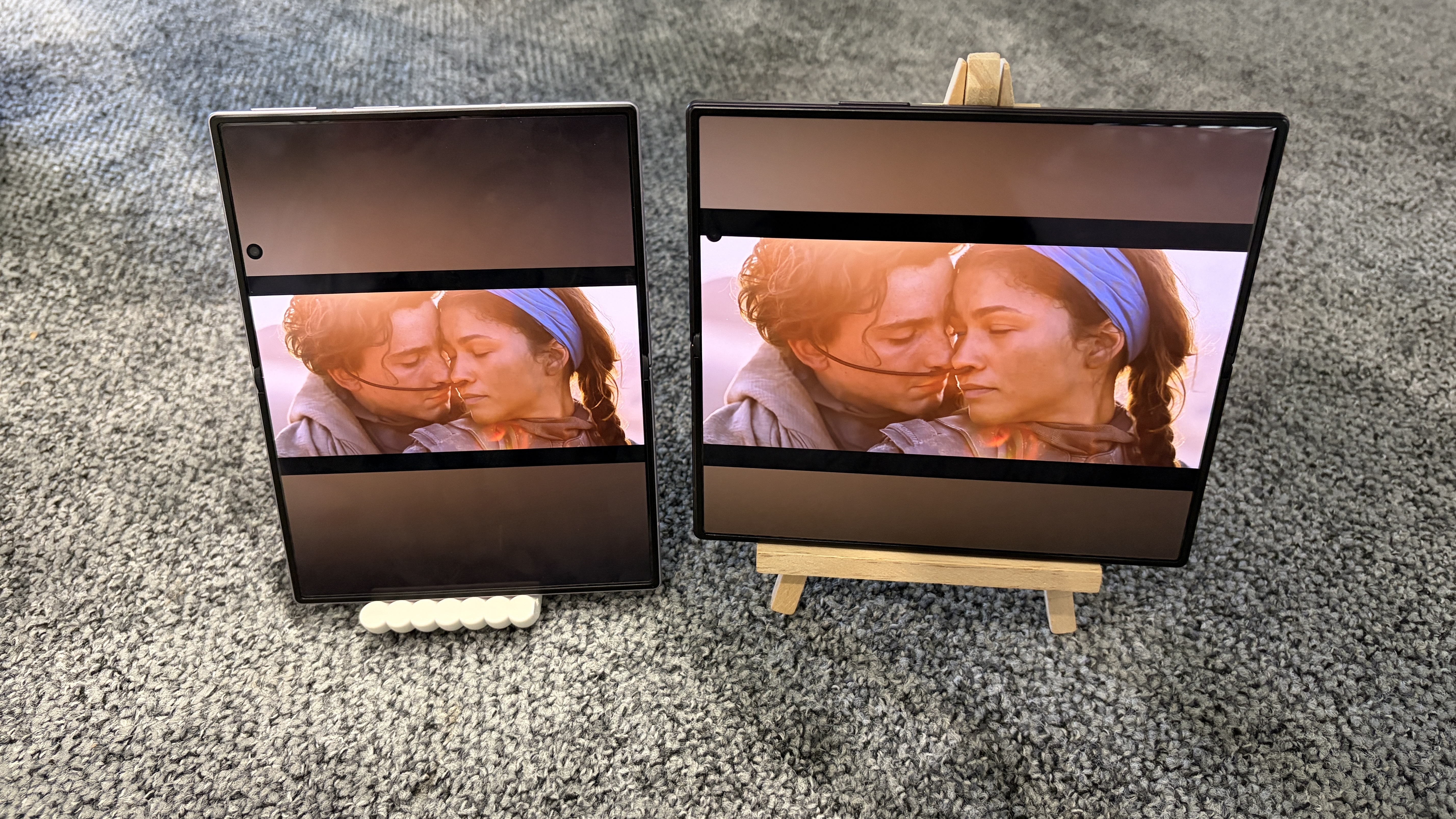
The Galaxy Z Fold 8 Ultra, meanwhile, has an eight-inch inner screen with a 10:9 aspect ratio, which is great for spreadsheets and multitasking, but less brilliant for movies and YouTube videos.
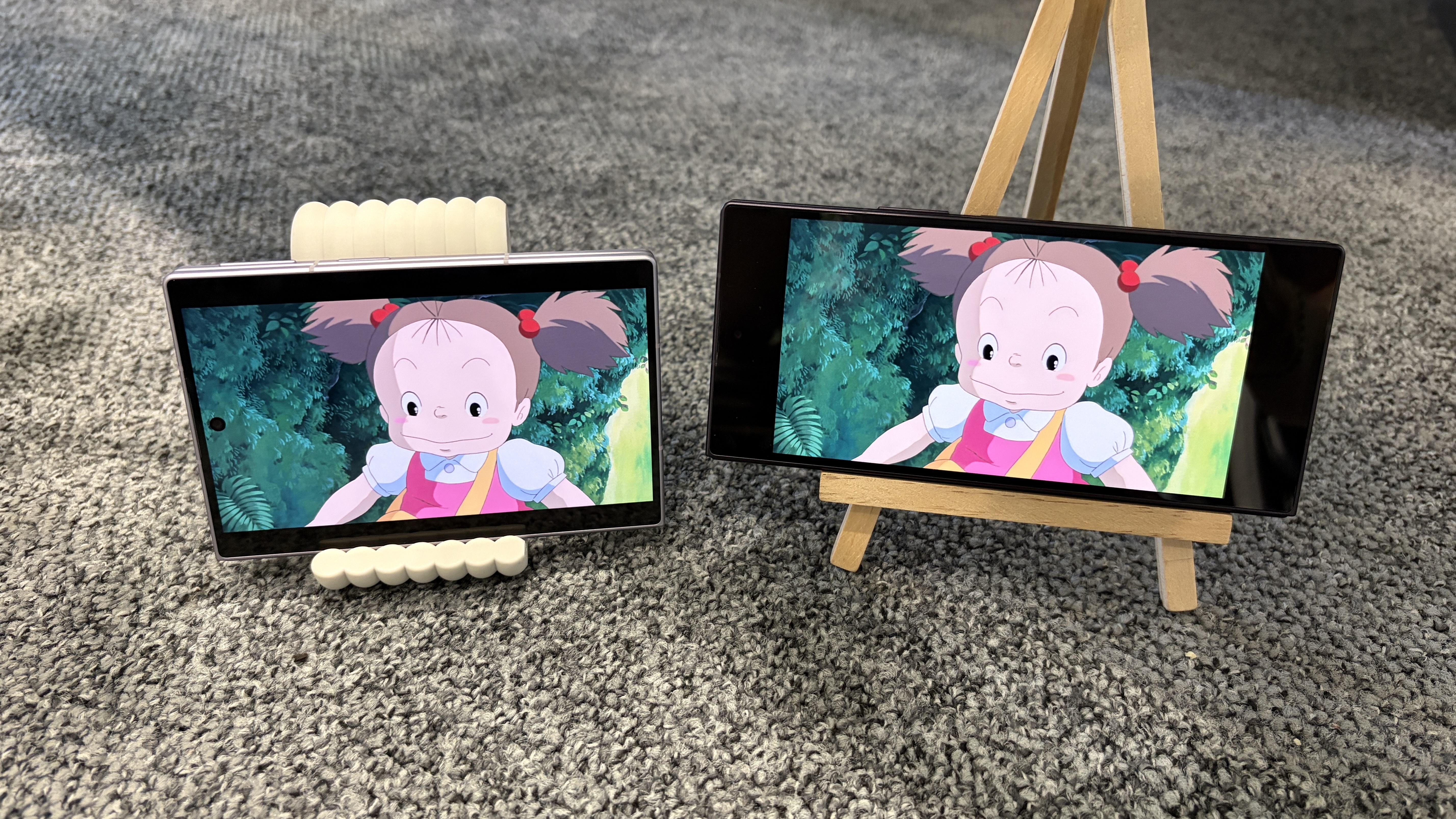
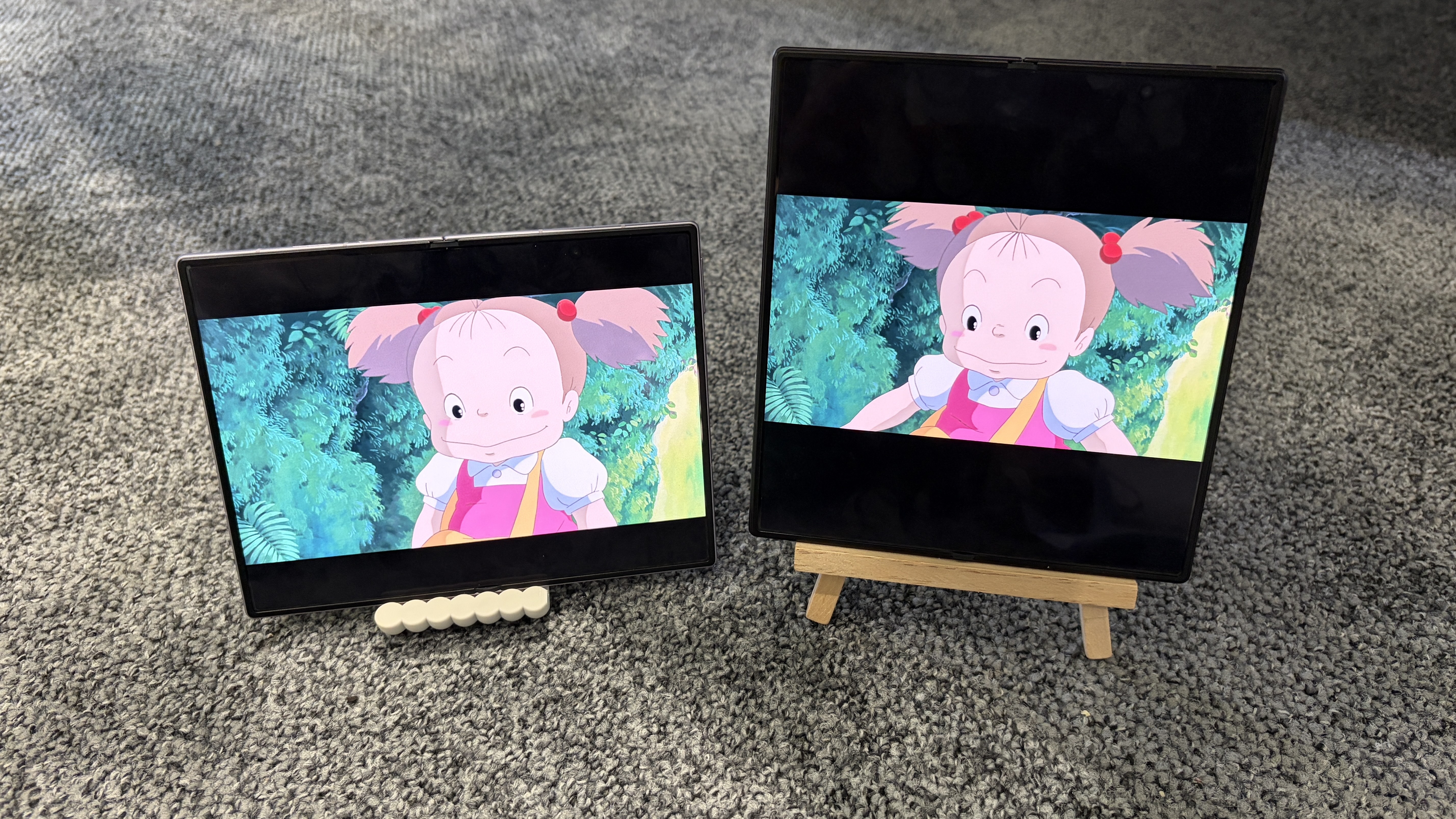
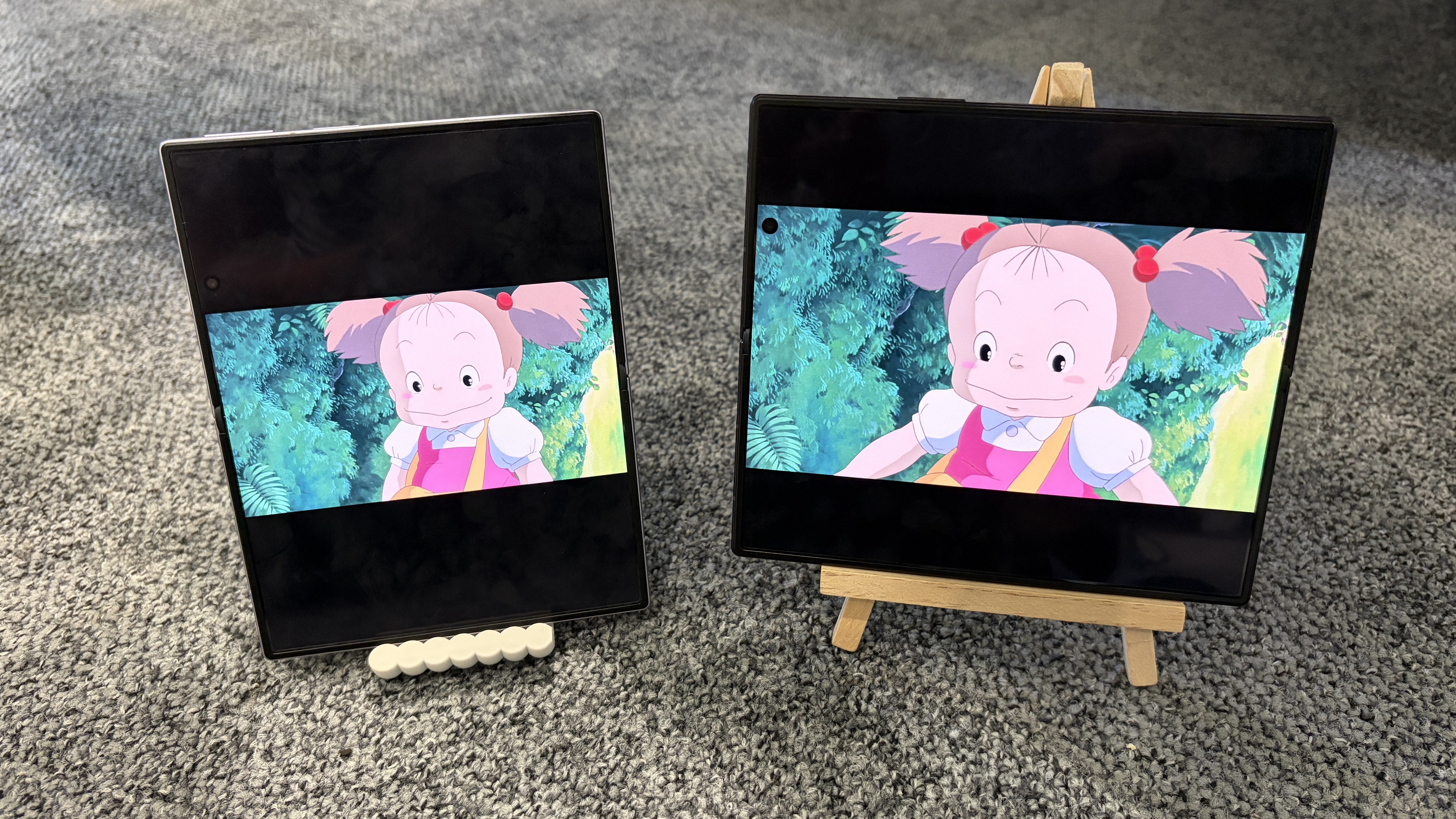
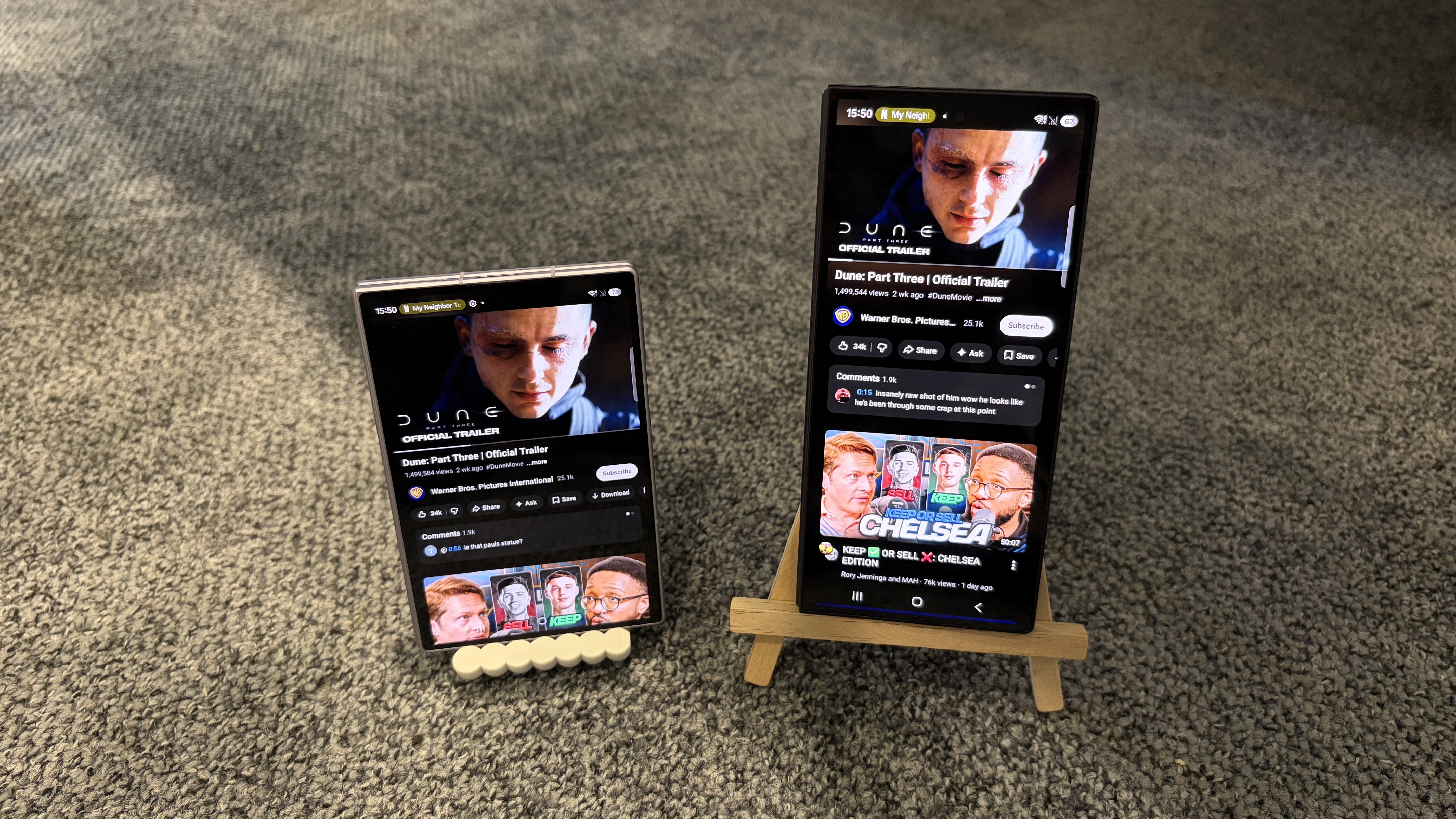
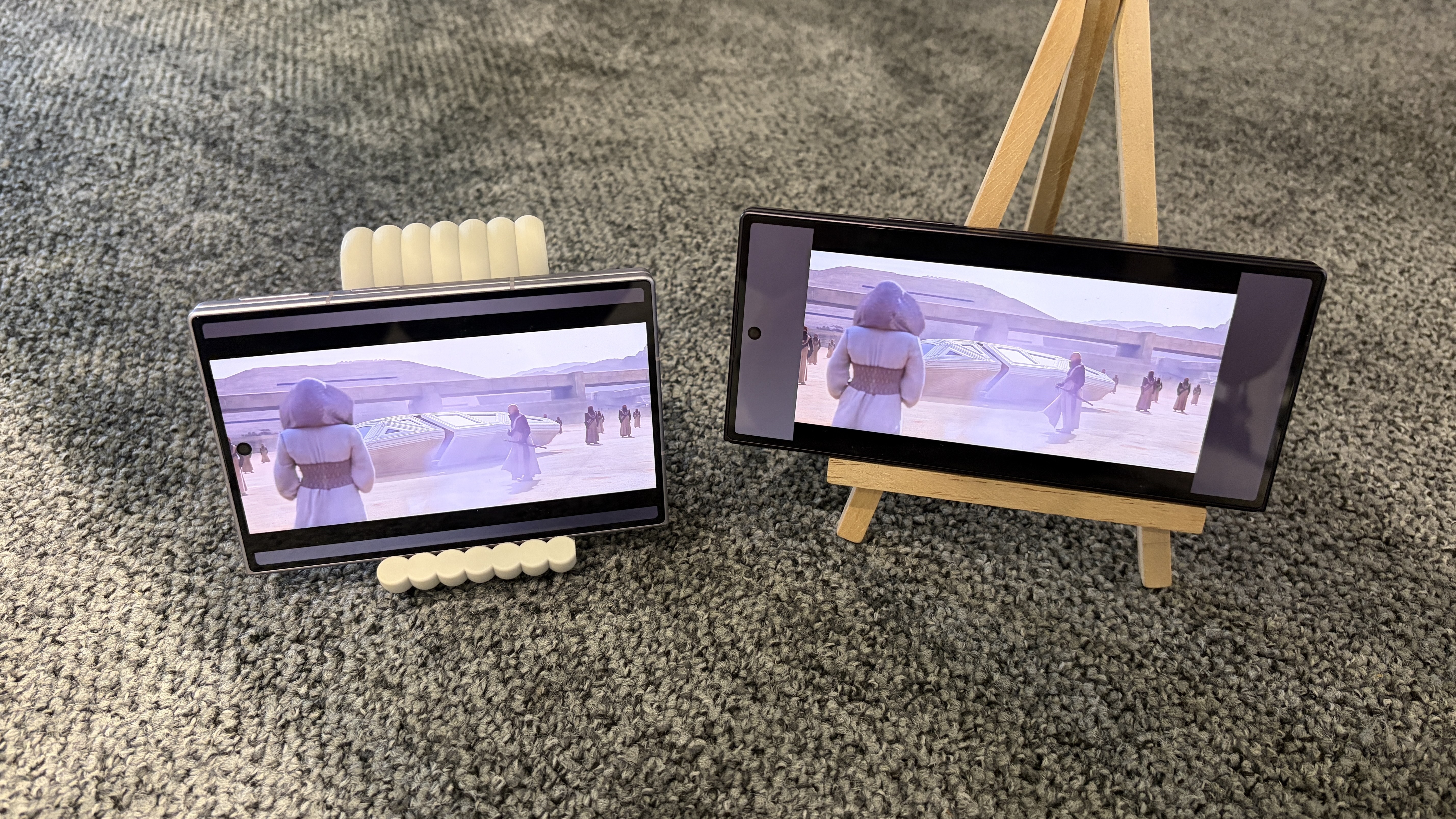
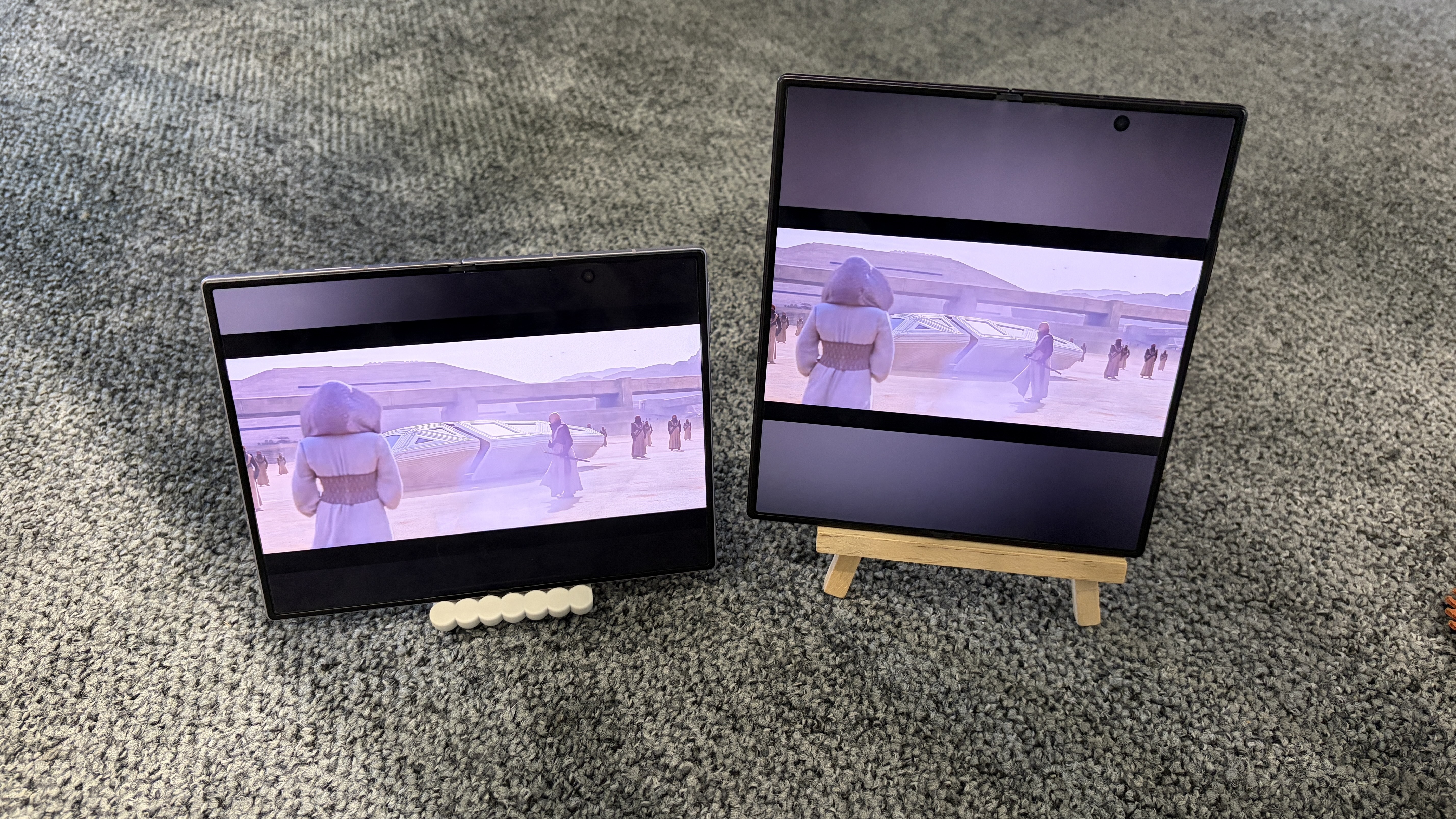
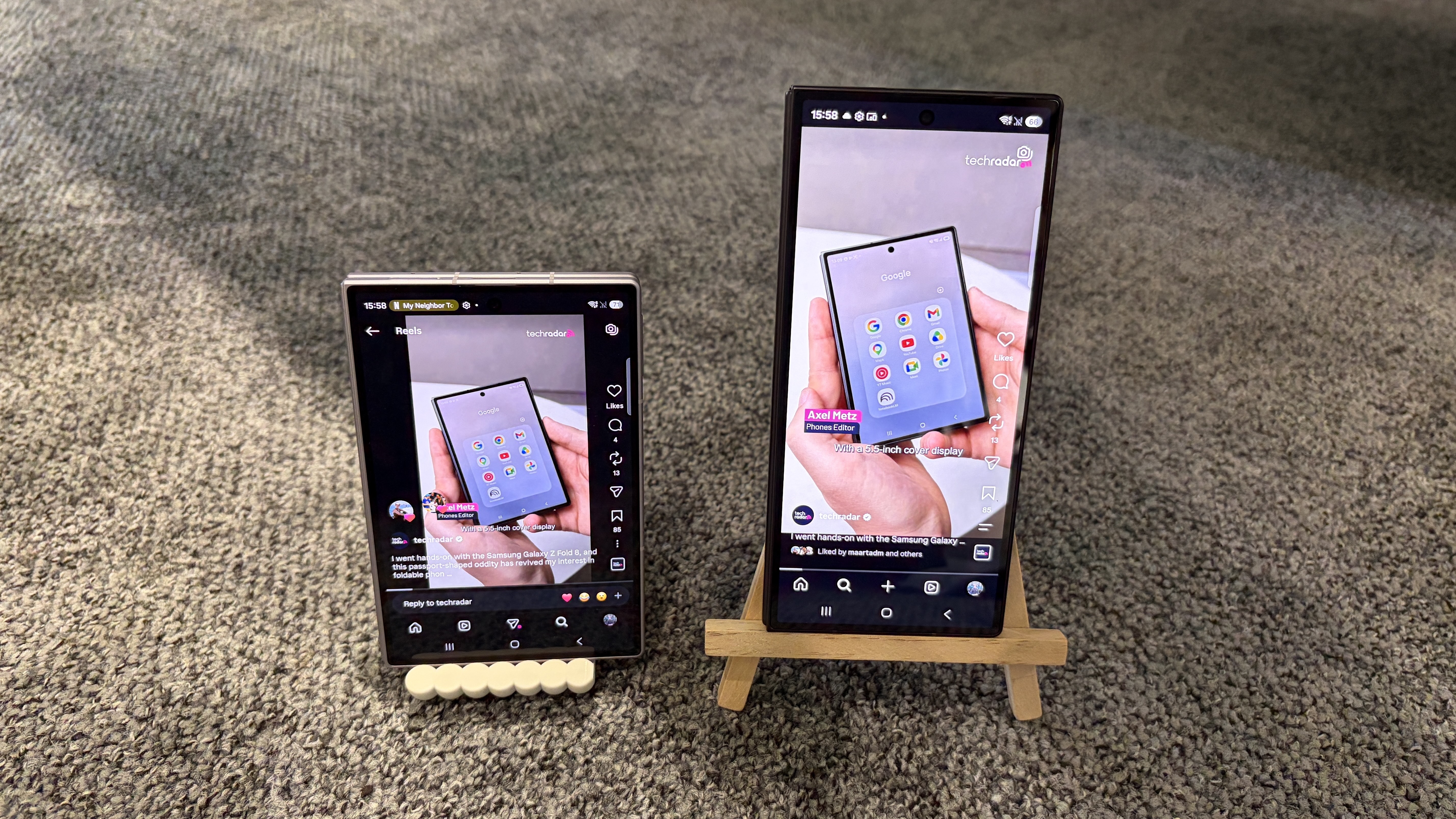
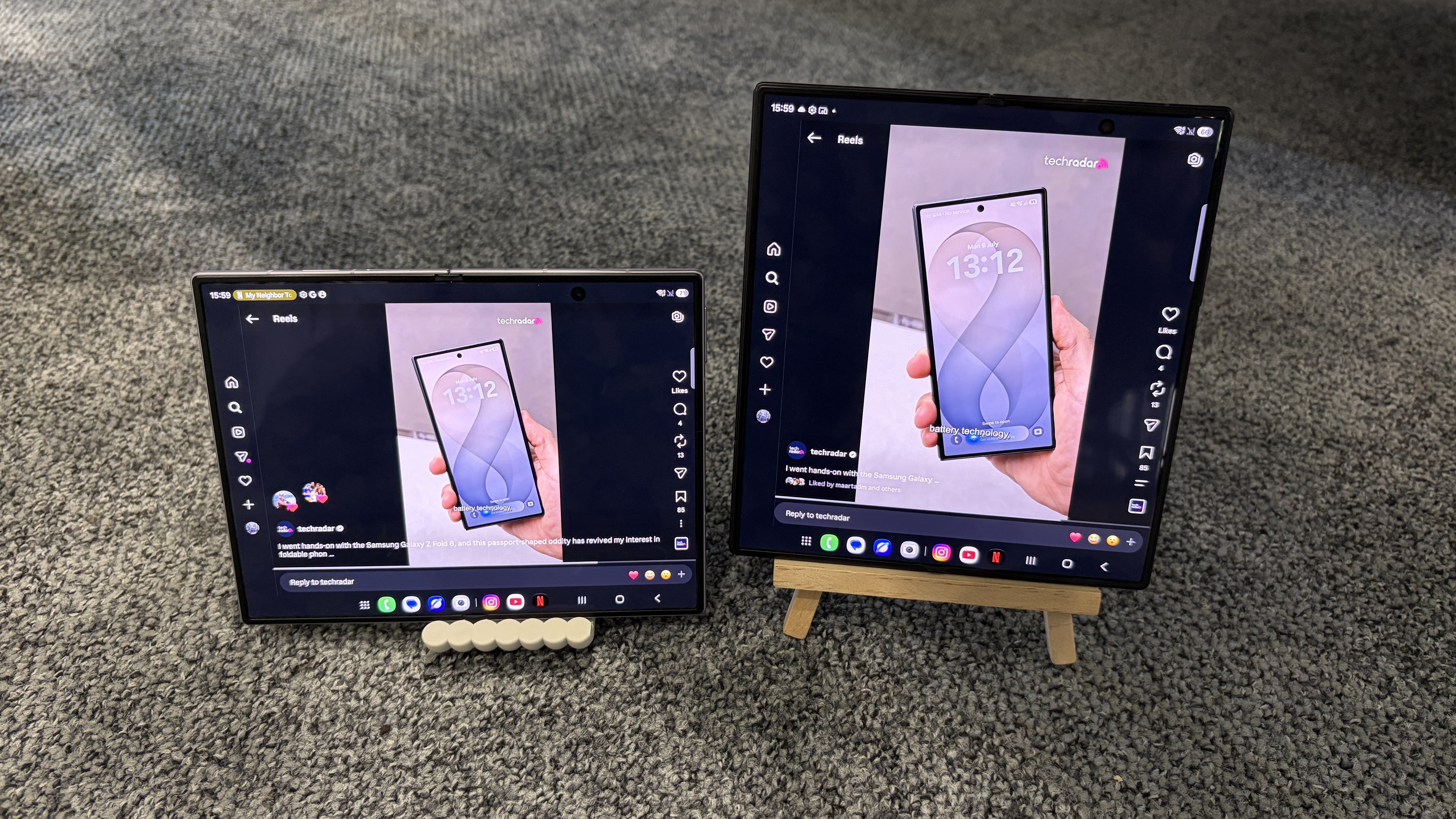
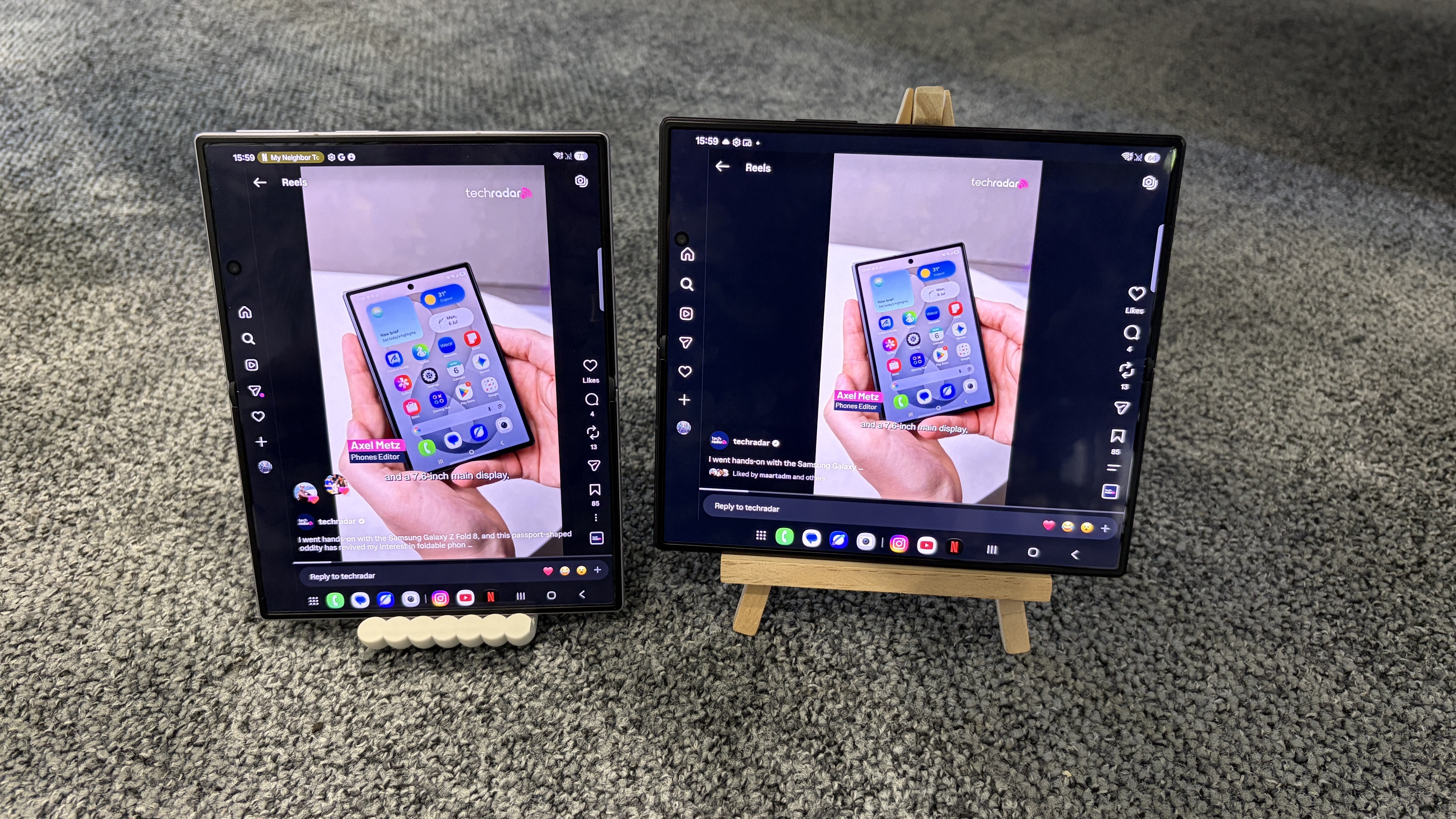
Don’t believe me (or Samsung)? I compared the experience of streaming Netflix, watching YouTube, and scrolling through Instagram Reels on the Galaxy Z Fold 8 and Galaxy Z Fold 8 Ultra — in both portrait and landscape orientations, where possible — to help you visualize the aspect ratio differences between these two devices.
Check out the side-by-side comparisons for each platform below, and let me know in the comments section which phone you’d prefer to use for watching videos. I've also included a roundup of each model's respective size specs for added context.
Samsung Galaxy Z Fold 8 Ultra
Samsung Galaxy Z Fold 8
Dimensions (unfolded):
158.4 x 143.2 x 4.1mm
161.4 x 123.9 x 4.5mm
Dimensions (folded):
158.4 x 72.8 x 8.9mm
81.9 x 123.9 x 9.7mm
Display (unfolded):
8 inches, 10:9
7.6 inches, 4:3
Display (folded):
6.5 inches, 21:9
5.5 inches. 16:10
Netflix
Z Fold 8 (10:16) / Z Fold 8 Ultra (9:21)
(Image credit: Future)
Z Fold 8 (4:3) / Z Fold 8 Ultra (10:9)
(Image credit: Future)
Z Fold 8 (3:4) / Z Fold 8 Ultra (9:10)
(Image credit: Future)
YouTube
Z Fold 8 (16:10) / Z Fold 8 Ultra (21:9)
With either phone in this orientation, expanding the YouTube video automatically switches the orientation to landscape (see the next photo) (Image credit: Future)
Z Fold 8 (10:16) / Z Fold 8 Ultra (9:21)
(Image credit: Future)
Z Fold 8 (4:3) / Z Fold 8 Ultra (10:9)
(Image credit: Future)
Z Fold 8 (3:4) / Z Fold 8 Ultra (9:10)
(Image credit: Future)
Instagram Reels
Z Fold 8 (16:10) / Z Fold 8 Ultra (21:9)
(Image credit: Future)
Z Fold 8 (4:3) / Z Fold 8 Ultra (10:9)
(Image credit: Future)
Z Fold 8 (3:4) / Z Fold 8 Ultra (9:10)
(Image credit: Future)
Verdict
For Netflix and YouTube, the Galaxy Z Fold 8 provides a cleaner viewing experience than the Galaxy Z Fold 8 Ultra in every orientation except 3:4. The black bars above and below the video are noticeably narrower than those on the Galaxy Z Fold 8 Ultra, and there's no awkward pillarboxing (i.e., bars on either side of the video) when using the Galaxy Z Fold 8 in 10:16 (you'll notice that content wraps around the phone's punch-hole camera, which doesn't happen on the Galaxy Z Fold 8 Ultra).
Of course, if you use the Galaxy Z Fold 8 in 3:4, the black bars are much bigger than those on the Galaxy Z Fold 8 Ultra, but Samsung itself admits that this orientation is “more natural for reading e-books or browsing the web,” which gives the smaller device another nice win over the pricier model.
The Instagram Reels-watching experience is pretty similar across both phones, but given the Galaxy Z Fold 8's lighter weight (201g vs 215g), I'd give it the edge here, too.
So there you have it: if watching videos and scrolling through social media is your priority, the Galaxy Z Fold 8 is a better buy than the Galaxy Z Fold 8 Ultra.
Of course, there is much more to both phones than their respective displays — the Galaxy Z Fold 8 Ultra has better cameras, for instance — so I wouldn't jump headfirst into buying one over the other until you've read our full Samsung Galaxy Z Fold 8 Ultra vs Galaxy Z Fold 8 comparison.
Side note: You're not able to watch videos in 16:10 (Z Fold 8) or 21:9 (Z Fold 8 Ultra) on Netflix, nor videos in 10:16 (Z Fold 8) or 9:21 (Z Fold 8 Ultra) on Instagram, hence why these options don't appear in the above comparison.
Por muito tempo houve discussões sobre como a NVIDIA "capava" as placas de vídeo mais antigas via driver. Independentemente da veracidade dessa discussão, vários anos se passaram e a maioria dessas GPUs já não rendem bem atualmente, seja pela falta de força, ou mesmo pela limitação de VRAM, mas algumas ainda resistem ao teste do tempo e têm bala na agulha hoje.
Vamos dar uma olhada em 5placas de vídeo da NVIDIAque envelheceram bem, não se restringindo somente às antigas, já que nossa lista conta com GPUs relativamente modernas também.
5. GTX 1080 Ti
Quando foi lançada em 2017, a GTX 1080 Ti já era um colosso em termos de desempenho. Anos depois, o modelo topo de linha da arquitetura Pascal continua surpreendendo. Embora em força bruta de processamento gráfico ela se aproxime de modelos de entrada atuais, como a RTX 3060 de 12 GB, seu grande trunfo continua sendo a memória: 11 GB GDDR5X.
Essa margem generosa de VRAM permite que a 1080 Ti continue rodando títulos modernos em 1080p e até 1440p sem sofrer com gargalos de textura ou stuttering que afetam até placas de 8 GB que vieram depois. Mesmo sem núcleos dedicados a Ray Tracing ou suporte nativo ao DLSS, a lendária GTX 1080 Ti se recusa a morrer.
4. RTX 3050 (8 GB)
A RTX 3050 enfrentou desconfiança em seu lançamento por ser uma GPU focada no segmento de entrada de sua geração. Contudo, o tempo provou o valor da versão de 8 GB de VRAM (diferente da variante posterior de 6 GB, que cortou especificações cruciais).
Para quem busca estabilidade de desempenho em 1080p, os 8 GB de memória de vídeo oferecem o buffer necessário para segurar texturas no alto sem estourar o limite da placa. Somado a isso, a presença dos Tensor Cores dá acesso ao DLSS, garantindo uma sobrevida muito superior à de suas antecessoras diretas.
3. RTX 3080 (12 GB)
Lançada originalmente com 10 GB de VRAM, uma escolha bastante criticada para o segmento high-end, a RTX 3080 ganhou uma revisão posterior que foi bem recebida: a versão com 12 GB de VRAM e barramento levemente expandido (384-bit).
Essa versão corrigiu o único ponto fraco do modelo original. Com poder bruto de sobra para encarar jogos pesados em 1440p com taxa de quadros alta (e até arriscar o 4K em títulos mais leves), os 2 GB extras de VRAM deram à placa margem para durar por mais um tempo.
2. RTX 4090
Pode parecer cedo para falar sobre o envelhecimento de uma placa da série RTX 40, mas a RTX 4090 já se consolidou como um marco divisor de águas. O salto de desempenho entregue pela arquitetura Ada Lovelace nesse topo de linha foi tão grande que a placa continua no topo da lista de performance por um longo período.
Com 24 GB de VRAM GDDR6X, poder computacional enorme e suporte completo às tecnologias de renderização neural da marca (incluindo avanços como DLSS 4 e o Frame Generation de última geração), a RTX 4090 é o tipo de GPU que continuará entregando desempenho de ponta em 4K por anos, ignorando os requisitos crescentes da indústria.
1. RTX 3060 (12 GB)
No topo da nossa lista está a placa que herdou o espírito da lendária GTX 1060, mas com uma vantagem crucial: a NVIDIA decidiu equipá-la com 12 GB de VRAM para responder ao mercado na época. Essa decisão aparentemente despretensiosa garantiu à RTX 3060 12 GB uma longevidade espetacular.
Enquanto modelos mais fortes da mesma geração (como a RTX 3060 Ti ou a RTX 3070) começaram a esbarrar em limites de memória em lançamentos recentes pesados, a RTX 3060 segue firme e forte (obviamente com menos poder de fogo). A combinação de um chip equilibrado, suporte ao DLSS e um buffer de memória de respeito faz dela a GPU intermediária que melhor envelheceu nos últimos anos. Esse pode até ser um dos motivos do retorno da RTX 3060 de 12 GB.
Assim como na matéria sobre as GPUs da NVIDIA que envelheceram mal, o ponto aqui é o mesmo: VRAM é importantíssimo e pode ditar como uma placa envelhece. As placas de vídeo listadas aqui têm poder de fogo e memória suficientes para ir além do seu prazo de validade, sendo boas até hoje, anos depois de seus lançamentos.
Nel 2005 alcuni ricercatori annunciarono la scoperta di una nuova specie di roditore, il ratto delle rocce del Laos (Laonastes aenigmamus). Quella che sembrava inizialmente una semplice scoperta zoologica si trasformò in uno dei casi più sorprendenti della biologia moderna: l’animale apparteneva infatti a una famiglia di roditori che gli scienziati ritenevano estinta da circa […]
L’esplosione atomica di Hiroshima del 1945 ha creato condizioni estreme di calore e pressione che hanno portato alla formazione di materiali mai osservati in natura. Analizzando frammenti vetrosi trovati nella sabbia delle spiagge della baia di Hiroshima, chiamati hiroshimaiti, i ricercatori hanno scoperto una nuova lega metallica composta da ferro, cromo, nichel, manganese, molibdeno, silicio e alluminio. La lega si sarebbe formata dal raffreddamento rapidissimo dei vapori metallici prodotti dall’esplosione. Lo studio di questi materiali potrebbe contribuire alla progettazione di nuove leghe e alla ricostruzione delle condizioni fisiche delle esplosioni nucleari.
Certaines des caractéristiques du Système solaire, à commencer par l'origine de la Lune, s'expliquent par des événements et des scénarios violents. Que faut-il en penser dans le cas de certaines des lunes de Neptune depuis que le télescope James-Webb a pris le relais de Hubble ?
American heiress Jamey Carney was found dead in her Killarney home in July, after her teenage daughter discovered her body. Her Jordanian asylum seeker boyfriend is now the prime suspect.
A native Australian millet may carry the genetic fingerprints of thousands of years of Aboriginal harvesting, storage, and plant management. Seen from the air, Channel Country resembles a vibrant and vast tapestry, with a network of waterways crisscrossing the land. Spread across more than 280,000 square kilometers in outback Australia, it is one of the [...]
Confirmada para o mercado brasileiro, conforme antecipou o CT Auto em outubro de 2024, a Lepas, marca chinesa ligada ao grupo Chery, anunciou que chegará ao país com foco em carros de entrada e preços acessíveis.
A operação será conduzida pela Omoda & Jaecoo, já presente no Brasil, e tem como objetivo principal disputar diretamente com gigantes do mercado, como Fiat e Volkswagen, líderes tradicionais do segmento de carros de entrada, como o Mobi e o Polo.
Em entrevista para os amigos do Autoesporte, Shane Wang, uma das principais executivas da marca, revelou que o plano é lançar 11 modelos globais nos próximos dois anos, embora nem todos estejam confirmados para o Brasil. A prioridade será desenvolver carros compactos e adaptados às necessidades locais.
Quais os segredos da Lepas?
Todos os modelos da Lepas vendidos no Brasil terãomotor flex, reforçando a adequação ao mercado nacional. Há também a possibilidade de versões híbridas flex, seguindo a estratégia da Omoda & Jaecoo para 2027.
Em outros países, a Lepas já utiliza o motor 1.5 turbo Acteco, conhecido por equipar modelos da Caoa Chery como Tiggo 5X e Tiggo 7. Isso mostra que a marca tem tecnologia pronta para ser aplicada em seus futuros compactos e SUVs.
Marca chinesa quer produção local
A Lepas pretende enfrentar diretamente SUVs como Volkswagen T-Cross e Hyundai Creta, além de hatches como Chevrolet Onix, VW Polo e o futuro Fiat Argo X. Também deve competir com rivais elétricos e híbridos, como BYD Dolphin e GWM Ora 5.
Para garantir preços competitivos, a marca avalia a possibilidade de produção local. Uma das alternativas é utilizar a fábrica da Jaguar Land Rover em Itatiaia (RJ), que pode ser assumida pela Omoda & Jaecoo. Isso reduziria custos e aumentaria a escala de produção, tornando os modelos mais acessíveis ao consumidor brasileiro.
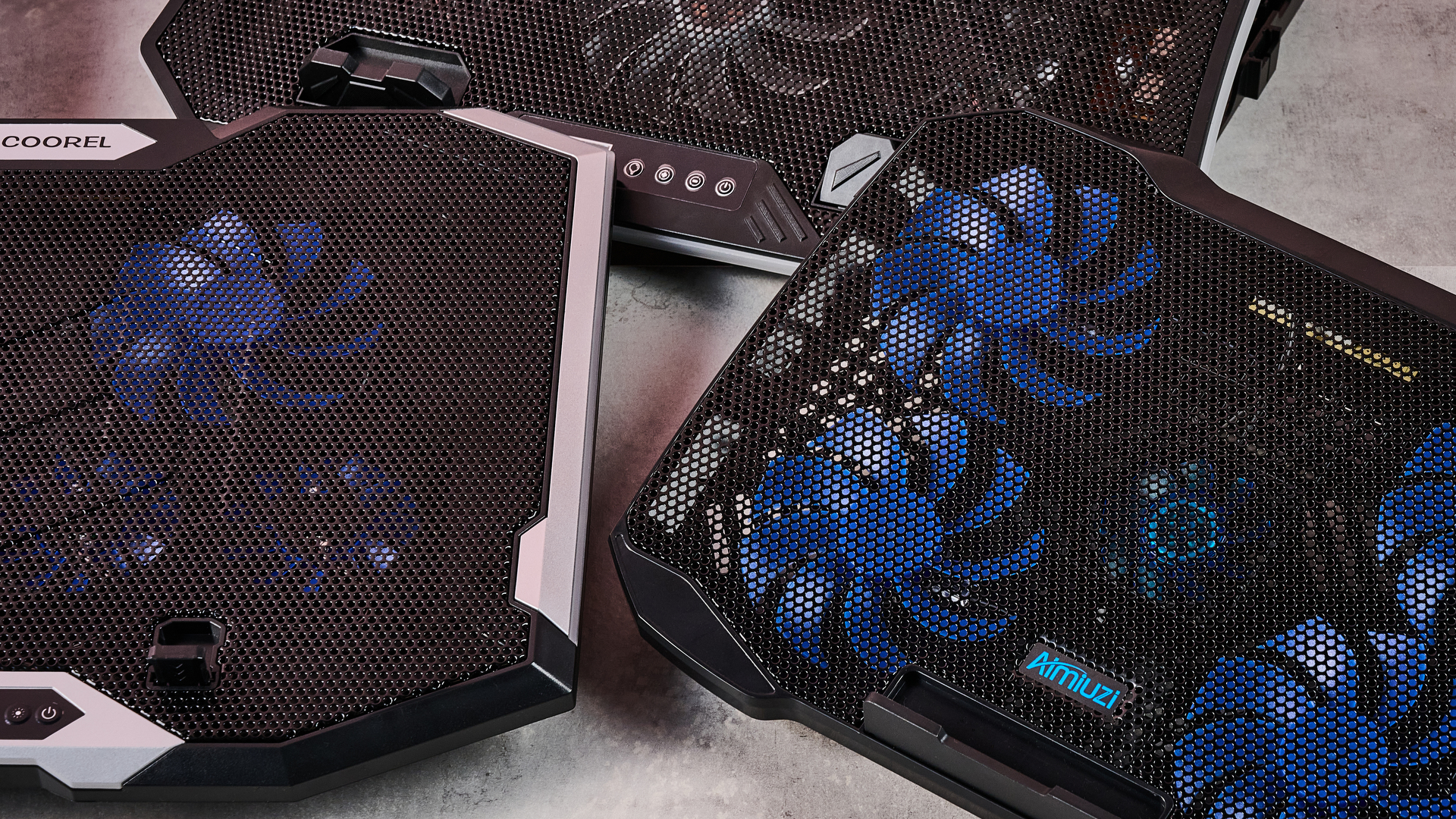
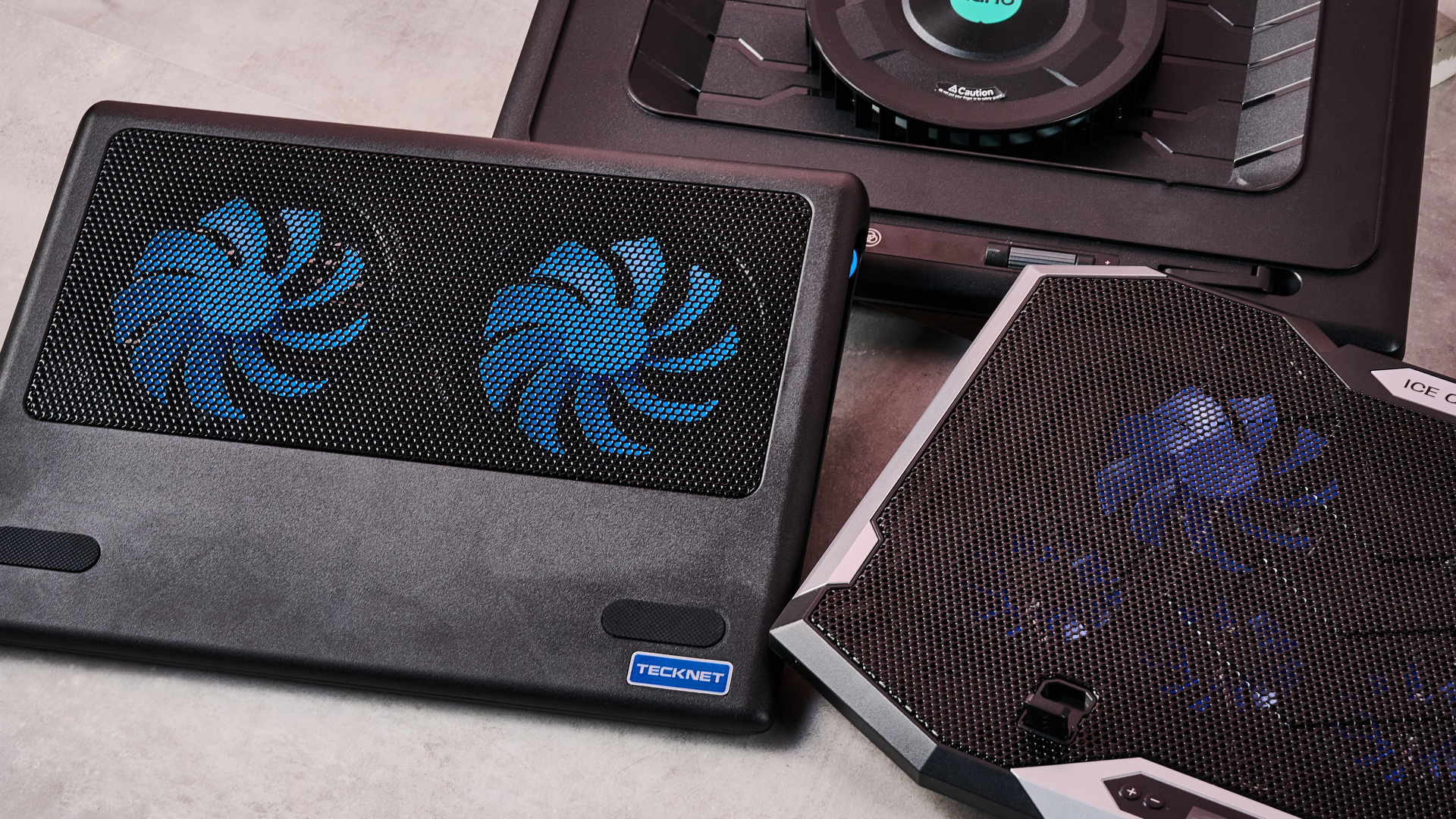
Boy, sure is a hot one today, huh? Okay, I get the irony: that's a take so cold you could use it to replace your freezing Wim Hof showers. But when the metaphorical mercury creeps this high, you've got to keep your cool. The same goes for your laptop, which is why you might want to grab a laptop cooling pad this summer.
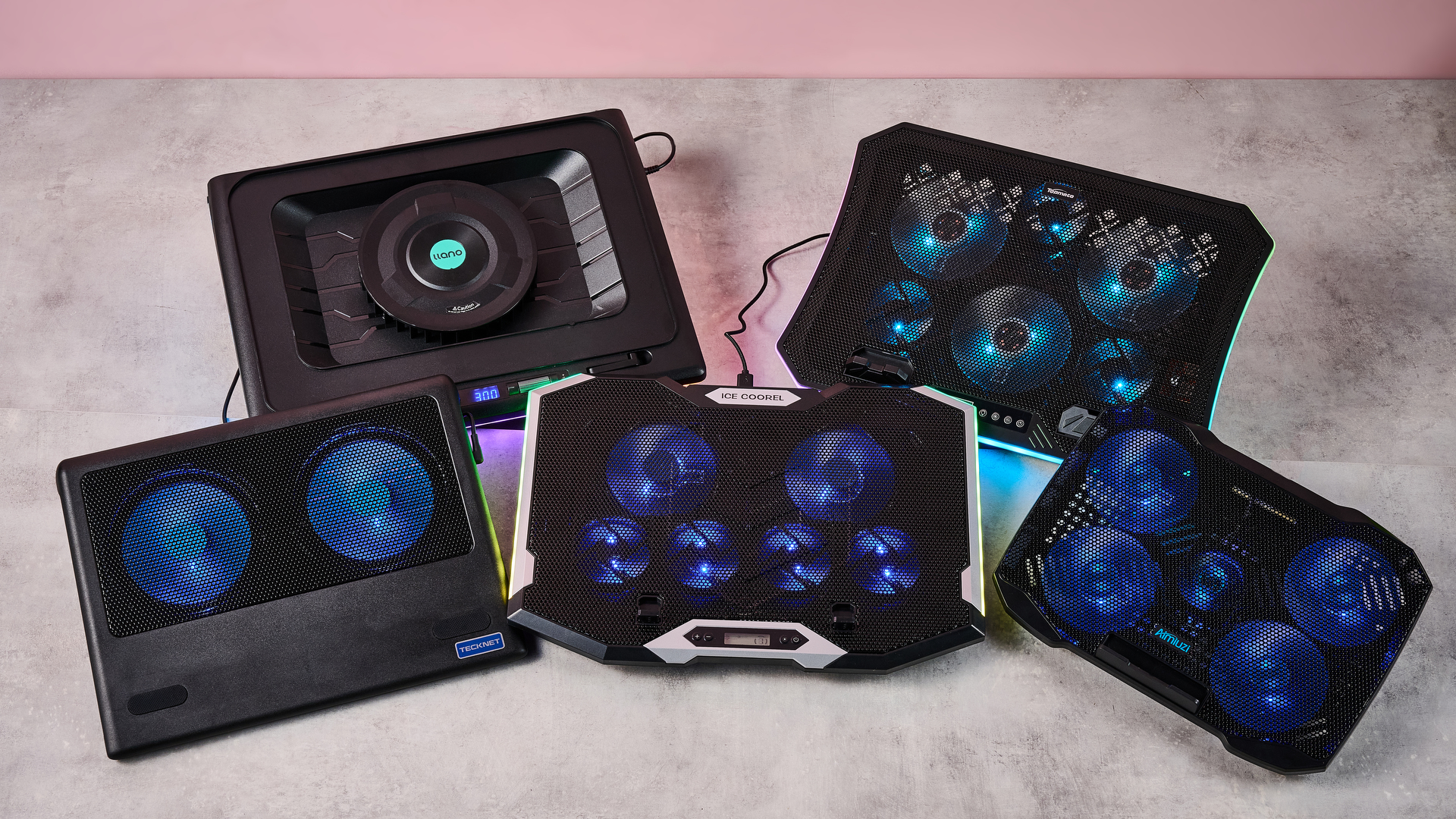
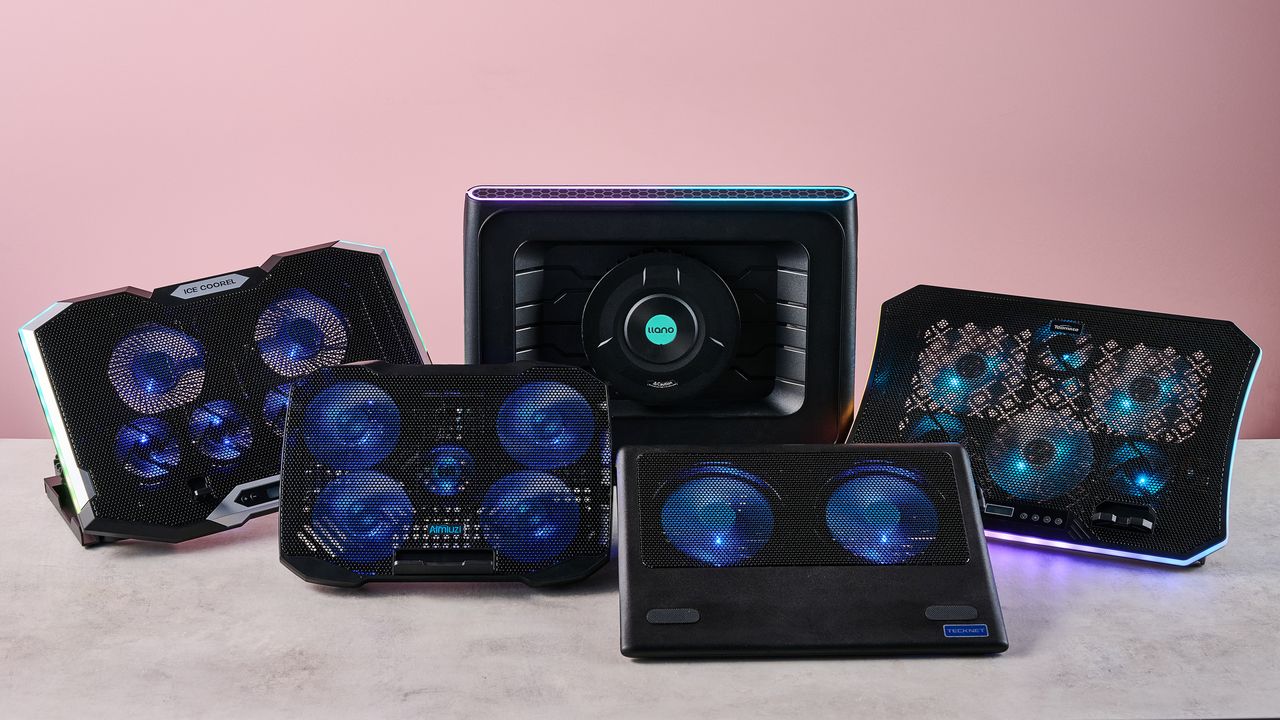
Fortunately for you, I've spent this week testing every laptop cooling pad I can get my hands on to see which offers the superior AC for your computer. Not only that, but I've brought receipts — this piece has more graphics and graphs than election night coverage. So if you want objective numbers about which pad is genuinely gusty and which is all bluster, I've got the data you need.
I get that it can be tempting to overlook cooling your laptop during warm weather — I've been more worried this summer about tracking down a fan to keep myself cool than my laptops. But you overlook the best laptop cooling pads at your peril.
I still have vivid memories of the summer I redlined my laptop during a heatwave. While the video skittering should have been a hint, it was only when it stopped booting up and started bleeping SOS in Morse code that I began questioning my life choices. Turns out I'd burnt out the memory — quite literally: there were scorch marks on the inside of the case.
So at this time of year, it's worth considering whether a laptop cooling pad can help you out. And I can definitely help out there.
Laptop cooling pads: cooling
Temperature Rise Using Laptop Cooling Pad
The temperature rise during a stress test while using the laptop cooling pad on max settings
Baseline
31.9
TopMate C12 Laptop Cooling Pad
22.8
Klim Mistral
20.4
Klim Wind
19.5
Almiuzi F2 Plus Laptop Cooling Pad
18.4
TECKNET Laptop Cooling Pad
17.9
Klim Ultimate
15.5
Liangstar Laptop Cooling Pad
15.3
Llano V10 Gaming Laptop Cooling Pad
12
Llano RGB Laptop Cooling Pad
8
010203040
Temperature difference (°C) Data
Product
Value
Baseline
31.9
TopMate C12 Laptop Cooling Pad
22.8
Klim Mistral
20.4
Klim Wind
19.5
Almiuzi F2 Plus Laptop Cooling Pad
18.4
TECKNET Laptop Cooling Pad
17.9
Klim Ultimate
15.5
Liangstar Laptop Cooling Pad
15.3
Llano V10 Gaming Laptop Cooling Pad
12
Llano RGB Laptop Cooling Pad
8
Baseline
57.4
TopMate C12 Laptop Cooling Pad
41
Klim Mistral
36.7
Klim Wind
35.1
Almiuzi F2 Plus Laptop Cooling Pad
33.1
TECKNET Laptop Cooling Pad
32.2
Klim Ultimate
27.9
Liangstar Laptop Cooling Pad
27.5
Llano V10 Gaming Laptop Cooling Pad
21.6
Llano RGB Laptop Cooling Pad
14.4
015304560
Temperature difference (°F) Data
Product
Value
Baseline
57.4
TopMate C12 Laptop Cooling Pad
41
Klim Mistral
36.7
Klim Wind
35.1
Almiuzi F2 Plus Laptop Cooling Pad
33.1
TECKNET Laptop Cooling Pad
32.2
Klim Ultimate
27.9
Liangstar Laptop Cooling Pad
27.5
Llano V10 Gaming Laptop Cooling Pad
21.6
Llano RGB Laptop Cooling Pad
14.4
Lower values indicate better cooling.
How I tested
To test each laptop cooling pad's performance, I ran a 3DMark Steel Nomad stress test on an Acer Predator Helios 300 gaming laptop with an Nvidia GeForce RTX 3080 GPU. The test ran for 15 minutes, with each cooling pad set to maximum. Using a thermal camera, I clocked the hottest point before and after the test, then calculated the temperature differential between the two to determine how much warming each cooling pad allowed.
Assessing which laptop cooling pad is a breezy wonder and which is a wheezy blunder ultimately comes down to how frosty each model's cooling is. That's why I went through every pad I could get my hands on to see how much each one prevented our gaming laptop from heating up during a 3DMark stress test.
As you can see, by far the weakest cooling offered by any laptop cooling pad I tested was from the TopMate C12 Laptop Cooling Pad. Compared to the 57.4°F / 31.9°C baseline rise of our gaming laptop alone, the C12 was only able to limit it to a 41°F / 22.8°C rise — that might be better than frantically waving a dish towel in its general direction, but only barely.
Probably the biggest disappointment of these tests was how the Klim Mistral performed. Not only did it seem to perform worse than the more affordable Klim Wind — resulting in 36.7°F / 20.4°C warming compared to the Wind's 35.1°F / 19.5°C — but it was pretty inconsistent to boot, achieving even worse results on a retest.
Skipping ahead a little, the laptop cooling pad I was most surprised by was the TECKNET. Although it's cheaper than quite a few of the pads I tested here, setting me back just $21.59 / £21.99, the 32.2°F / 17.6°C warming it presided over put it firmly in the top half of the pack. It's the little laptop cooling pad that could.
(Image credit: Future)
Given that the Liangstar Laptop Cooling Pad and Klim Ultimate both achieved an almost photo finish, it would be easy to assume there's not much daylight between them. However, like a bottle of wine, you really need to weigh up what you're spending here to calculate its true value. And as the Liangstar costs $20.99 / £23.59 versus the Klim Ultimate's $44.97 / £44.97 price tag, that definitely takes the edge here.
But, frankly, there's a reason Llano is the absolute GOAT in my eyes. As you can see, it took both first and second place on my cooling pad podium. While the Llano V10 Gaming Laptop Cooling Pad stopped our gaming laptop from warming up more than 21.6°F / 12°C, the Llano RGB Laptop Cooling Pad kept it down to just 14.4°F / 8°C of warming. This boi makes liquid nitrogen look positively toasty.
Laptop cooling pads: noise levels
1 / 2
Noise Level — cooling pad alone
Noise level of the cooling pad or laptop alone taken at head height and from 3 inches away
Llano RGB Laptop Cooling Pad
71
Llano V10 Gaming Laptop Cooling Pad
64.5
Klim Mistral
52.6
Liangstar Laptop Cooling Pad
45
TopMate C12 Laptop Cooling Pad
43.5
Laptop alone
42
Almiuzi F2 Plus Laptop Cooling Pad
37.4
Klim Wind
36.2
TECKNET Laptop Cooling Pad
36
Klim Ultimate
36
020406080
dB
Head height Data
Product
Value
Llano RGB Laptop Cooling Pad
71
Llano V10 Gaming Laptop Cooling Pad
64.5
Klim Mistral
52.6
Liangstar Laptop Cooling Pad
45
TopMate C12 Laptop Cooling Pad
43.5
Laptop alone
42
Almiuzi F2 Plus Laptop Cooling Pad
37.4
Klim Wind
36.2
TECKNET Laptop Cooling Pad
36
Klim Ultimate
36
Llano RGB Laptop Cooling Pad
85
Llano V10 Gaming Laptop Cooling Pad
77
Klim Mistral
62.6
Liangstar Laptop Cooling Pad
59
TopMate C12 Laptop Cooling Pad
58
Laptop alone
60
Almiuzi F2 Plus Laptop Cooling Pad
50.2
Klim Wind
48.8
TECKNET Laptop Cooling Pad
60
Klim Ultimate
46
0255075100
dB
Near Data
Product
Value
Llano RGB Laptop Cooling Pad
85
Llano V10 Gaming Laptop Cooling Pad
77
Klim Mistral
62.6
Liangstar Laptop Cooling Pad
59
TopMate C12 Laptop Cooling Pad
58
Laptop alone
60
Almiuzi F2 Plus Laptop Cooling Pad
50.2
Klim Wind
48.8
TECKNET Laptop Cooling Pad
60
Klim Ultimate
46
Noise Level — cooling pad & laptop
Combined noise level of the cooling pad and laptop taken at head height and from 3 inches away
Llano RGB Laptop Cooling Pad
64
Llano V10 Gaming Laptop Cooling Pad
57.5
Klim Mistral
51.5
TopMate C12 Laptop Cooling Pad
45
TECKNET Laptop Cooling Pad
45
Liangstar Laptop Cooling Pad
45
Klim Ultimate
44.4
Klim Wind
44
Almiuzi F2 Plus Laptop Cooling Pad
44
020406080
dB Head height Data
Product
Value
Llano RGB Laptop Cooling Pad
64
Llano V10 Gaming Laptop Cooling Pad
57.5
Klim Mistral
51.5
TopMate C12 Laptop Cooling Pad
45
TECKNET Laptop Cooling Pad
45
Liangstar Laptop Cooling Pad
45
Klim Ultimate
44.4
Klim Wind
44
Almiuzi F2 Plus Laptop Cooling Pad
44
Llano RGB Laptop Cooling Pad
79
Llano V10 Gaming Laptop Cooling Pad
69
Klim Mistral
61.5
TopMate C12 Laptop Cooling Pad
58.5
TECKNET Laptop Cooling Pad
58
Liangstar Laptop Cooling Pad
59
Klim Ultimate
55.2
Klim Wind
58.5
Almiuzi F2 Plus Laptop Cooling Pad
61
020406080
dB Near Data
Product
Value
Llano RGB Laptop Cooling Pad
79
Llano V10 Gaming Laptop Cooling Pad
69
Klim Mistral
61.5
TopMate C12 Laptop Cooling Pad
58.5
TECKNET Laptop Cooling Pad
58
Liangstar Laptop Cooling Pad
59
Klim Ultimate
55.2
Klim Wind
58.5
Almiuzi F2 Plus Laptop Cooling Pad
61
How I tested
When it came to noise levels, I measured the noise of each cooling pad from 3 inches away and from my head height when sitting in front of it. I also recorded the combined noise of each cooling pad and the testing laptop's fans 10 minutes into each stress test from the same distances.
You may think that your gaming laptop makes a lot of noise. But believe me: that's scarcely more than a murmur compared to some cooling pads. Given they're essentially just an LED-adorned box with a whopping great fan inside, they can get pretty shouty. That's why I grabbed the sound level meter from my utility belt and started measuring like the world's nerdiest superhero.
Perhaps predictably, the pad that blows coolest blows loudest. While I love the Llano RGB Laptop Cooling Pad's glacial chilling, I can't get away from the fact that it's pretty noisy. I'm 5 foot 11 inches tall, and from my head height, I clocked it at 71dB — according to the Center for Hearing and Communication, that's roughly as loud as a coffee grinder or freeway traffic. In my book, that's a worthy price to pay for keeping your laptop cool, but it might not be ideal if you're planning to use it in the office.
In fact, you might assume there's an inverse relationship between cooling and fan noise. And while that does hold true for the most part, there are some interesting exceptions. For example, while I found the Liangstar Laptop Cooling Pad offered the third best cooling in my tests overall, it was substantially quieter than either of the Llanos, clocking in at a much less brash 45dB.
Conversely, the Klim Mistral manages to buck the trend in the other direction, running surprisingly loud compared to some of the other competitors here. At 52dB, it kicks out a similar level of noise as a fridge — which is pretty ironic given it offered some of the worst cooling in my testing.
(Image credit: Future)
And there are some surprising candidates for the winner's podium when it comes to sound levels. The TECKNET offers far from the worst cooling, and yet it ties for first place as the quietest pad on test here at 36dB — again, not at all bad given its super affordable price tag.
Honestly, though, if you want whisper-quiet running without sacrificing performance, my pro tip would be to check out the Klim Ultimate. Unlike Klim's two cheaper cooling pads, it offers very credible chilling while also measuring noise levels of 36dB from head height — that's apparently quieter than a library, which isn't known for being a raucous place.
Fundamentally, noise levels probably shouldn't be the deciding factor when picking your perfect laptop cooling pad. Both cooling power and budget come higher up the pecking order in terms of my personal preferences. But that doesn't mean you should ignore it completely — depending on where and how you use your laptop, you could find strapping a jet engine to the bottom of it to be a bit of a deal breaker.
Do I even need a laptop cooling pad?
1 / 2
MacBook Air M5 encode test
Performance after an hour during a standard encode test both with and without cooling
Versus Comparison Data
Attribute
Benchmark — MacBook Air M5
Klim Ultimate — MacBook Air M5
Average FPS
2.52
2.77
Estimated encode time
122
114
VS
Average FPS (fps)
2.52
2.77+10%
Estimated encode time (minutes)
+7%122
114
Re-encoding a 4K stereo .mov file at highest quality, the MacBook Air M5 showed a modest reduction in throttling in terms of average FPS and encode time when using the Klim Ultimate laptop cooling pad.
Acer Predator Helios 300 encode test
Performance after an hour during a standard encode test both with and without cooling
Versus Comparison Data
Attribute
Benchmark — Acer Predator Helios 300
Klim Ultimate — Acer Predator Helios 300
Average FPS
2.8
2.8
Estimated encode time
115
113
VS
Average FPS (fps)
2.8
2.8
Estimated encode time (minutes)
+2%115
113
Re-encoding a 4K stereo .mov file at highest quality, the Acer Predator Helios 300 showed essentially no reduction in either average FPS or estimated encode time, suggesting limited heat-related throttling took place.
How I tested
Here I used a standard encoding test. I re-encoded the 4K stereo version of the Creative Commons animated movie Big Buck Bunny at 4K 120fps at the slowest encode speed, then ran it for an hour to allow throttling to take place and recorded the total estimated encode time and average encode rate. I ran this on both my MacBook Air M5 and our testing Acer Predator Helios 300, uncooled and cooled with the Klim Ultimate, to see the impact it had on performance.
So it's pretty clear which cooling pads offer ice-cold AC and which sound like a tumble dryer breaking the sound barrier. But I've left the biggest question until last — do you actually need one at all?
Aiming to prove my theorem that 'cold CPU = good', I whipped up a quick encode test designed to stress out the CPU of several laptops over a longer period. In theory, after an hour, their core temperature should have risen, their CPUs throttled, and the length of the encode spiked and the encode rate dropped. Running the same test with one of our top cooling pads, the Klim Ultimate, would then show how much it could reduce this throttling.
On my MacBook Air M5, after an hour of using its passive cooling alone, the total estimated encode time had crept up to 122 minutes, and the average encode rate was sitting at 2.52 FPS. When I reran the test with the Klim Ultimate running on max cooling, that total encode time was trimmed to 114 minutes, and the encode rate had increased to 2.77 FPS. That's not a huge difference, but it shows the Klim Ultimate was able to trim back some of that temperature-related throttling.
Running the same test on our Acer Predator Helios 300 was a much more ambiguous experience. During my first run, the encode crashed within minutes, and during the second it crashed moments after the test concluded. So it was honestly far from stable.
I was able to eventually get some results, however, and they showed... nothing. Whether I was using the Klim Ultimate or not, the test results were essentially identical, with Handbrake clocking an estimated encode time of 115 minutes uncooled and 113 with the Klim's help. Meanwhile, the encode rate remained steady, sitting at a reasonable 2.8 FPS.
(Image credit: Future)
What does that mean? That I've wasted several hours of my life? Not quite. There are a couple of key conclusions to take away from this. One is that a performance laptop with whacking great fans built in is already pretty good at keeping itself cool. Shocking revelation, I know.
But probably the more critical takeaway is that the mileage you get out of a laptop cooling pad is going to vary depending on how well optimized it is for handling heat, as well as the kind of tasks you're doing. Had I tried to run Cyberpunk 2077 on max graphics settings with ray-tracing switched on, the Predator Helios 300 would likely have caused it to melt into the earth's core.
There's also another caveat. While it's definitely been warm the last week or so in the TechRadar testing lab, it hasn't reached the kind of desiccating highs that have hit both the US and UK in recent months. Past a certain point, any laptop will struggle in the heat. Forget CPU throttling — in that heat, I'd be more worried about your components liquefying like a chocolate bunny on the launch pad at Cape Canaveral.
In light of that, I'd say a laptop cooling pad is still worth exploring, especially if you tend to do a lot of resource-intensive tasks like 3D work, Photoshopping or gaming.
Any thoughts or personal experiences you'd like to share? Please feel free to chime in down in the comments!
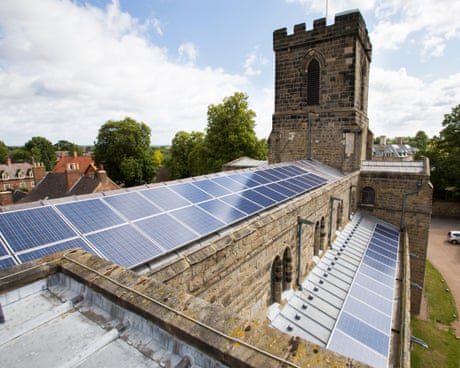
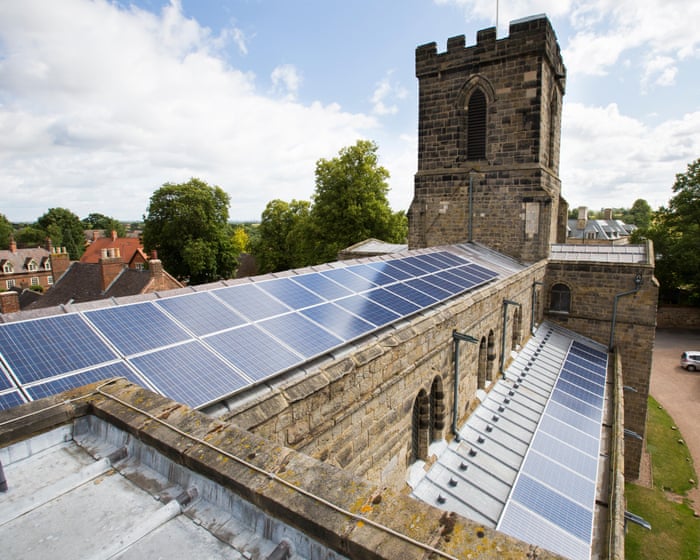
Farms and rooftop panels contribute 14.4% to the grid – and figures reveal a surge in new installations
Solar energy supplied more power to Great Britain’s grid in July than in any previous month as households turned to rooftop panels to cut their energy bills.
Solar farms and rooftop panels provided 14.4% of the country’s electricity after some parts of the UK recorded almost twice the average sunshine hours for the time of year.

 Login
Login




:quality(85)/aaf0dfdb-0dd7-4877-bfc0-e344fb60a728.jpg "Editar informações da imagem")
:quality(85)/88aad57a-656a-4345-b302-1481c772f2f4.jpg "Editar informações da imagem")
:quality(85)/8810e11e-b6d4-419d-9390-a9de89918887.jpg "Editar informações da imagem")


:quality(85)/5ee72e36-d6c3-4012-ad13-d2a4527c51fa.jpg "Editar informações da imagem")
:quality(85)/f611454e-c1eb-4edc-acf7-384804d3c340.png "Editar informações da imagem")


:quality(85)/d5b22c68-3d4a-4f1e-8011-d18a2ae63c80.jpg "Editar informações da imagem")
:quality(85)/222f0049-687c-4c74-8a94-834dee8a2d40.jpg "Editar informações da imagem")