A week or so ago, the Bloomberg leaker Mark Gurman made a bold claim: Apple had, “with zero doubt,” been testing and prototyping a new, stubbier version of the Apple Pencil for its upcoming foldable iPhone. Considering that the company has sold phones for 19 years and styluses for 11 years but has never brought the two things together, this seemed surprising. Some might even say a colossal mistake. But at least the idea was just that: an idea, tested for a while and probably discarded.
But hang on for a minute, because today, at the very last minute, Gurman has posted another article about Apple’s Surprise and Shine press event. And he now insists that the folding iPhone (or iPhone Duo, as he’s now calling it) will indeed be compatible with the Apple Pencil.
It’s important to note that Gurman’s latest prediction, in his own words, is merely that the iPhone Duo will have “support for the Apple Pencil stylus.” If Apple still plans to launch a special edition of the stylus, he doesn’t mention this. From the sound of this the inclusion of Apple Pencil support would be very much optional; a nice-to-have rather than an integral feature. Which sounds like something nobody could be against, right?
Except the screen, which is already a source of concern because of the dangers of a visible crease, will need the additional tech to support stylus input, and as Gurman himself has pointed out, that could result in visible marks. And the iPhone Ultra/Duo won’t be the right size for a standard-issue Apple Pencil to attach magnetically along one side, which creates all sorts of storage and charging headaches. All this to support an accessory most people won’t use.
To be fair, the foldable iPhone, when unfolded, will be more akin to a tablet than a smartphone. (Its expected screen size is virtually identical to the original iPad mini.) So there may be some demand for stylus support. It’s just hard to feel positive about what seems like a half-hearted approach to the matter. Either you do Apple Pencil support properly, with a dedicated version of the stylus that actually fits, or you don’t bother.
Then again, the Pencil gets the briefest of snippets in Gurman’s report, so perhaps there’s more to the story than he’s letting on. You can follow all the latest breaking news as we lead up to today’s announcement with our Apple event live blog.
SteelSeries, one of the world's leading brands for making the best Xbox accessories, has recently unveiled its latest creation – the SteelSeries Aeon Pro Controller.
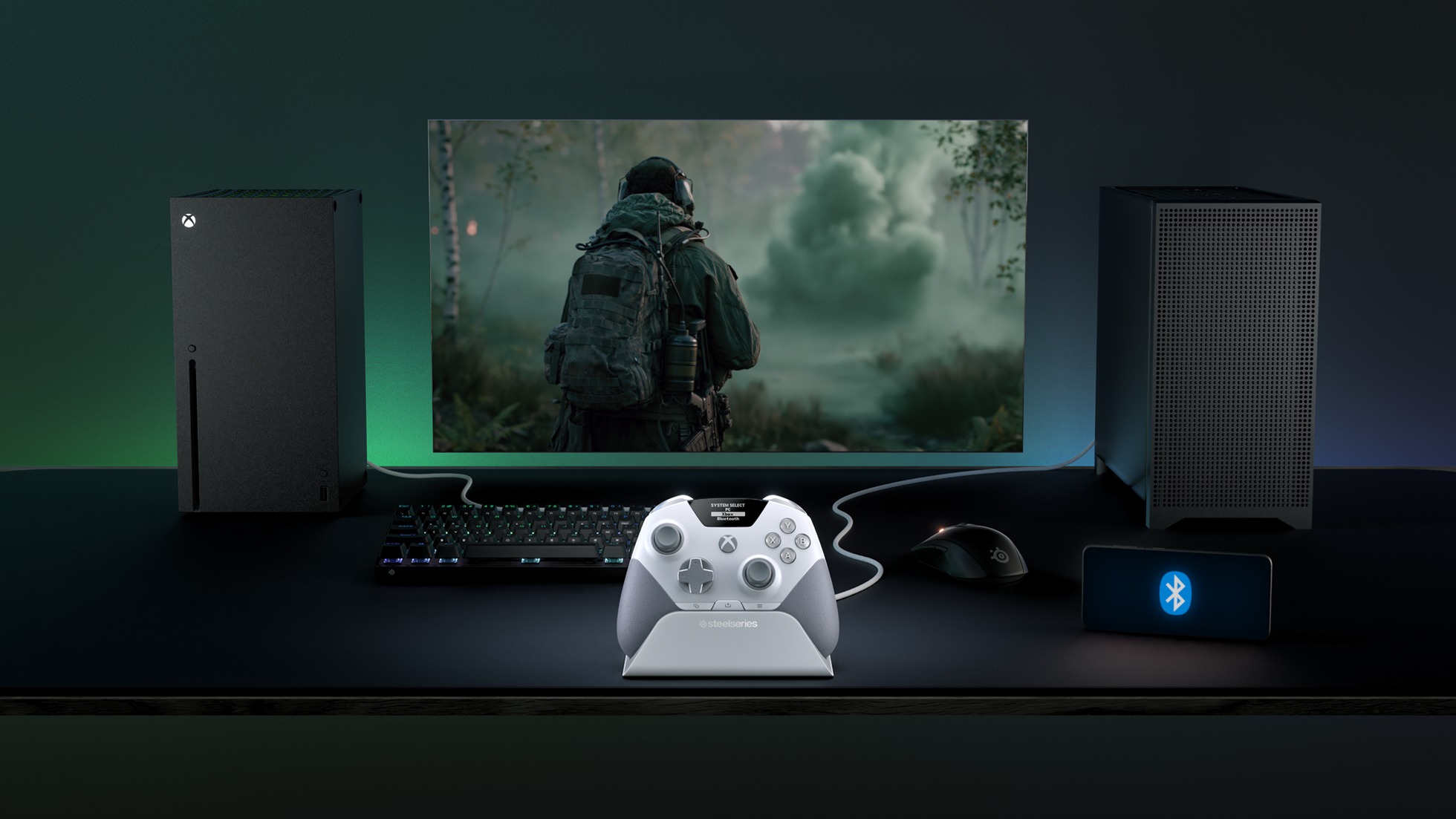
This device features the world's first QuickSwitch Dock System for Xbox, PC, and Mobile devices(Patent Pending), which allows you to switch the controller's connection between platforms without the need for cables or re-pairing wireless connections.
The SteelSeries Aeon Pro Controller also includes an Infinite Power System with dual hot-swappable batteries, so you never have to worry about losing power while gaming.
On top of that, the SteelSeries Aeon Pro Controller has fast and precise controls thanks to its first-rate triggers, mechanical switch buttons, and Hall Effect Thumbsticks, all of which can be customized, and their changes saved on user-made profiles using the controller's Onboard OLED Screen.
The SteelSeries Aeon Pro controller can swap connections between Xbox and PC without any fussing about disconnecting and reconnection cables or wireless pairings. (Image credit: SteelSeries)
Its features don't stop there, as the SteelSeries Aeon Pro has a Modular Stick Systemthat lets you swap out thumbsticks (with standard concave, tall concave, and short convex options), extra remappable Contoured Back Buttons, and a Wrap-Around Textured Grip to make it easier to hold.
Finally, this controller is compatible with the SteelSeries GG Software Suite app so you can customize every aspect of it, including its button and trigger inputs, rumble sensitivity, custom GG and Sonar integrations, and power settings on PC.
The SteelSeries Aeon Pro is now available (in black or white) at SteelSeries.com and select retailers worldwide for $259.99 | £229.99 | €259.99.
It's a very sleek Xbox controller rife with features to make your gaming life easier, but does its quality match up to its high listing price? Stay tuned to find out, as we're hoping to review it soon and let you know if the StreelSeries Aeon Pro is actually good and worth your money.
Stay connected with your Xbox and PC games at all times without re-pairing or reconnecting cables with the new SteelSeries Aeon Pro controller.
This controller will meet your gaming needs with its unlimited battery life, OLED Smart Display, Hall Effect Thumbsticks, and vast customization options through the SteelSeries GG software app.View Deal
Join us on Reddit at r/WindowsCentral to share your insights and discuss our latest news, reviews, and more.
Labor Day has come to an end, but there are still a surprising number of leftover tech deals if you know where to look. Case in point: even though its holiday sale has has ended, Amazon is still slashing 50% off the Sony WH-1000XM5, a pair of flagship cans that once topped our list of the best wireless headphones that money can buy.
Sure, these noise-cancelling headphones have since been supplanted by the newer Sony WH-1000XM6, but if you want to enjoy a premium listening experience for cheap, going with the last-gen XM5 is one of the best ways to do so, particularly when you slap on a record-smashing discount. You can thank me later.
The Labor Day sale may be over, but Amazon is still carving a straight 50% off the price of the Sony WH-1000XM5, knocking these legendary headphones down to just shy of 200 bucks. The deal can't last much longer, however, so don't wait too long to make your move. View Deal
Despite their last-gen status, the Sony WH-1000XM5 continue to impress as some of the best noise-cancelling headphones that money can buy. You get powerful active noise cancellation (ANC) straight out of the box along with the excellent sound quality that Sony is famous for, plus the cans boast a comfortable fit, a ton of customizable EQ settings (with 10 presets), and up to 30 hours of battery life on a single charge.
The headphones also come with four built-in microphones for voice calls, while multipoint connection means that you can connect your Sony XM5 to two Bluetooth devices simultaneously. Your purchase will even come with a free carrying case, which, considering the rigid construction of the XM5, is a nice bonus.
Sure, the Sony WH-1000XM6 technically offer a better experience, with longer battery life, a new QN3 processor, and a flexible build, but I'm not sure these upgrades are worth the steep price tag.
Indeed, if you want the flagship Sony audio experience for less than $200, this discount is one of the best headphone deals on the web. This Labor Day deal could end at any moment, however, so I'd either buy now or prepare to wait until Black Friday season rolls around in a few months. The choice is yours.
This MacVoices Briefing compares the Insta360 Snap Selfie Screen with Light and SmallRig Phone Vlog Selfie Monitor, two solutions for framing shots while using an iPhone’s best camera. Factors in choosing include MagSafe mounting, wired versus Wi-Fi connections, screen size, touch controls, lighting, battery life, compatibility, portability, pricing, and flexibility. Chuck talks about how to determine help which monitor is best for your different shooting needs, and how he solved the choice question.
Baseus knows how to make great charging and audio accessories, and the brand is going all-out ahead of the iPhone 18 Pro launch. The Dark Cherry collection includes five products that are debuting in a bold new cherry red colorway designed to match the Dark Cherry variant of the upcoming iPhone 18 Pro.
The highlight of the new collection is the PicoGo Pro AH22, the smallest 100W GaN charger with three USB-C ports. It comes with a built-in panel that shows real-time charging details, and it is now available for $59 on Amazon.
There's also the PicoGo AM52, a 25W Qi 2.2 power bank with 10,000mAh battery that's available for $79, and the ultra-thin PicoGo Air AM71 5,000mAh power bank that costs $69. The Bose-tuned Inspire XC1 earbuds get the Dark Cherry makeover as well, and they're $149. Rounding out the list is the 100W USB-C to USB-C cable, and it costs $12.
Baseus has an exclusive deal for AC readers that is live now and runs until October 31, 2026:
I used the PicoGo Pro AH22 as my go-to charger for the last month, and there's a lot to like. It is noticeably smaller than other 100W chargers I have on hand, and it still has three USB-C ports. The smaller size and the vibrant color makes it a great choice for travel (it's going straight into my tech bag), and I like that it has a built-in screen that shows real-time charging details, time left to charge, and what protocol a connected device is using.
It has three charging modes — Smart, Gentle, and Turbo — and the Smart mode is useful while charging several devices at once. The Gentle mode is what you need for overnight charging, and Turbo prioritizes the C1 port to 100W.
There's intelligent device recognition, and I like this feature a lot. Baseus also added a set of fun effects that show up while charging. The individual USB-C ports go up to 100W, and with all three in use, you get a 95W power budget. I used it with my Pixel 11 Pro XL, Find X9 Ultra, Galaxy Z Fold 8 Ultra, iPad Pro M4, and a few dozen accessories, and the charger did a great job.
Baseus PicoGo AM52 25W Qi2.2 10,000mAh Power Bank: Charge anything with ease
The PicoGo AM52 isn't a new product, and I've been using the power bank for the better part of a year. The Qi 2.2 tech allows it to charge phones at 25W, and it's great to use with the iPhone 17 Pro and Pixel 11 Pro XL.
Apoorva Bhardwaj / Android CentralApoorva Bhardwaj / Android Central
There's no doubt that the cherry color looks much better than the standard grey model I've been using all this time. The 10,000mAh battery is able to charge the iPhone 17 Pro and Pixel 11 Pro XL to full, and it has a built-in USB-C cable if you need to plug in other devices, going up to 45W.
Baseus PicoGo Air AM71 5,000mAh Power Bank: The thinnest power bank
The PicoGo Air AM71 is a 5,000mAh magnetic power bank, and it is one of the thinnest I've used yet. It doesn't have 25W charging, instead using the standard Qi standard to deliver a 7.5W charge. There is a USB-C port that gets you 22.5W, and the power bank recharges at 20W.
While I'm not a huge fan of ultra-thin power banks, I will admit that the AM71 has unmatched portability. It's just 0.3 inches and weighs 105g, and is easy to slot into a bag or trousers — I have one in my tech EDC bag. The 5,000mAh battery isn't enough to charge a phone to full, but it will get your iPhone 17 Pro Max to the halfway point. This is down to energy conversion, and is true of all power banks.
I like the Inspire XC1 because of the open ear design, and they're a good choice if you have issues getting a good fit with regular buds. The cherry color makes these buds stand out a lot from the regular model, and they definitely get a lot of attention while outdoors.
The Bose-tuned sound quality is terrific, and the buds have meaningful bass along with a clean mid-range and good treble. They're pretty great with calls as well, and have LDAC and IP66 ingress protection. I get over seven hours of battery life between charges, and that's more than adequate in daily use. The only point of contention is that the cherry variant is $149, which is a sizeable increase over the $99 that the regular model costs these days.
I have a lot of these cables in the house, and they're reliable in everyday use. The cherry color is the only difference here, and other than that, it's the same cable: it can deliver a 100W charge over USB PD, is 6.6ft in length, and the braided design is built to last.
Baseus is going all-in on Dark Cherry, and I like that the brand has an entire range of accessories available in the new colorway. While there's a little bit of a wait before we know all about the iPhone 18 Pro, you can get a head-start by grabbing the accessories you need.
I like portable SSDs a lot, and I have one always on hand in my EDC tech bag. I look for two things in a portable drive: fast transfers, and long-term durability. I don't really think about the size or weight, as SSDs tend to be smaller and lighter than mechanical drives anyway.
But Lexar clearly felt like this was an area to focus on for its next SSD, the Muse. Dubbed the world's thinnest SSD, the Muse is 3.8mm at its thickest point, going down to just 1mm at the edges. Lexar says it used an "ultra-thin PCB architecture, high-density NAND stacking, and an integrated internal structure" to maximize the internal space.
LexarLexar
The Muse has 1,050MB/s read and 1,000MB/s writes and can handle ProRes content at 4K120, which is in line with most portable SSDs. What isn't usual is the connector; instead of a regular USB-C port like every other SSD, the Muse uses a proprietary PogoPin magnetic connection, and you'll need to use the bundled cable in the box to connect the drive to your phone.
Oh, and it doesn't have the requisite magnets built-in (obviously), so you'll need to put it in a magnetic carry sleeve to attach it to a phone. Lexar notes portable SSDs can add "bulk and cable clutter," so it created the Muse to deliver a more "considered approach." It doesn't quite feel that way when you consider that you have three things to manage when using the Muse: the SSD itself, the magnetic sleeve, and the proprietary cable, which will inevitably get left behind when you're out and about.
(Image credit: Lexar)
I just don't get the need to tech industry's obsession to make products thinner. A regular-sized portable SSD doesn't have these limitations, and if anything, I like using drives like the LaCie Rugged SSD4, which are chunky but can take an absolute beating. The Muse adds a layer of complexity you don't need in a storage device, and that's before you factor in overheating. With such a small size and a sealed chassis, where does the heat go? There doesn't seem to be any room to manage the heat that builds up in a drive, so it will likely get quite hot when moving data.
Anyway, the Muse is coming out in Q4 2026, and it will be sold in 512GB and 1TB variants. Lexar didn't share pricing details, but it is bound to be on the higher side. Don't want to wait that long to get a magnetic SSD? This is the one I use.
Baseus’ IFA 2026 lineup includes color-matched iPhone charging accessories, noise-canceling open-ear earbuds and an outdoor security camera with a motorized spotlight.
UGREEN announced its all-new cool, MagFlow wireless charging lineup.
The lineup consists of the MagFlow Pro Magnetic Power Bank with a 10,000mAh cell, supporting Qi2 25W capabilities.
Joining these charging capabilities in the 2-in-1 Foldable Magnetic charger and the 3-in-1 wireless charging stand.
UGREEN states its MagFlow lineup is available today (Sept 3) on its website and Amazon.
If you were at Gillette Stadium this evening (Sept 3), you would've caught UGREEN's major reveal: the new MagFlow lineup.
UGREEN says it wants to solve a few problems consumers face daily. The MagFlow lineup aims to deliver a "high-power" wireless charging solution that's fast "without becoming uncomfortably hot." UGREEN's series is taking advantage of the latest technology, delivering Qi2 25W wireless charging, and the biggest stunner is the MagFlow Pro Magnetic Power Bank.
(Image credit: UGREEN)
UGREEN's power bank features a hefty 10,000mAh cell. Charging quickly builds up heat, but to keep it cool, the power bank utilizes UGREEN's CryoPulse. Internally, there's a micro-pump that constantly whisks away heat, keeping the temperature comfortably under 18 degrees Fahrenheit. The Magnetic Power Bank also features a digital screen, which shows its charging power, battery level, cycle count, and cooling status.
UGREEN states the MagFlow Pro Magnetic Power Bank is available today for $149 on the company's official store and Amazon.
On-the-go or at home?
UGREEN
While consumers can attach the MagFlow power bank to their phone for quick charges, UGREEN continues the on-the-go idea with a pocket-sized charger.
The MagFlow 2-in-1 Foldable Magnetic wireless charger also features Qi2 25W charging capability. UGREEN says this product can double as a magnetic phone stand. Users can prop it up on a table, desk, or bedside. What's more, when it's folded, the 2-in-1 wireless charger fits in your pocket or travel bag.
Since 2-in-1 isn't enough, UGREEN took things further at Gillette Stadium this evening with its MagFlow Pro 3-in-1 Magnetic Qi2 25W wireless charging stand. Similar to the Magnetic Power Bank, this magnetic charging stand features the company's CryoPulse TEC Active Cooling with an "ultra-quiet" 15dB fan. All of this cooling potential is because consumers can charge multiple devices at once. Temperatures are kept low, and keep reportedly charge an iPhone 17 Pro Max to 50% in under thirty minutes.
Consumers will find a display on the charging stand to keep them informed.
UGREEN states the 2-in-1 Foldable Magnetic charger is available today (Sept 3) for $59. The 3-in-1 charging stand starts at $159. Both devices join the 10,000mAh power bank on UGREEN's official website and Amazon.
UGREEN just announced its first line of smart home products, including a trio of cameras (two outdoor, one indoor), a smart speaker, an ePaper smart frame, and an AI-powered NAS to keep everything safe and local.
If there's one thing you need to know from all this, it's that UGREEN has put a lot of thought into this product. From the incredibly easy-to-use hardware design to the cables themselves, the app's features, and the entire UGREEN HomeAgent family is a marvel of planning and execution.
I received the UGREEN HomeAgent HA100 NAS, SynCare PoE Cam OD600 Pro, and SynCare Indoor Cam ID500 Pro ahead of UGREEN's Boston-based event and got to spend some time with these products for this hands-on report. UGREEN is launching the HomeAgent HA100 crowdfunding program on September 4, including a 50% discount for early backers until October 27.
You've never used a NAS like this
(Image credit: Nicholas Sutrich / Android Central)
As someone with 15 years of professional IT experience, I've spent plenty of time with big ol' NAS boxes in server racks. Usually, they're a pain in the butt to set up, and while they're mostly a set-it-and-forget-it affair, they're rarely designed to be user-friendly. A home NAS has to be very different from this approach, and it's clear UGREEN went back to the drawing board for the HomeAgent HA100.
Everything here is as self-explanatory and user-friendly as you can imagine. I specifically did not read the manual just to see if I could figure it out, and I was able to get the entire package set up in less than 5 minutes once I unboxed everything. A bevy of ports lines the back of the unit, located right underneath the cooling fan with a nifty magnetic filter that's dead easy to remove and clean.
Underneath the simple magnetic lid is a storage bay for three HDDs of your choice. Standard 3.5" models pop in with no screwdriver needed, while a 2.5" drive will need one of the small brackets included in the box. The drives pop in with a satisfying click and are removed with a simple button on top. They can even be locked into place with an included "key," which can be swapped out with a butter knife if you happen to lose it.
My unit shipped with an AI Accelerator unit already installed, but UGREEN sells models without this compute module for a lower cost. Adding an M.2 SSD is a little trickier since you'll have to flip the unit over and install it below, then add some thermal tape to keep things cool, but I imagine most people won't need M.2 performance anyway.
The front of the unit sports a touchscreen that only requires you to select a language to move forward. The unit is paired with the UGREEN NAS app and just requires you to select it from the list of LAN models found on your network. Since this NAS is hardwired to my router, it was as simple as opening the app on my phone and tapping the HA100 in the list.
Nicholas Sutrich / Android CentralNicholas Sutrich / Android CentralNicholas Sutrich / Android CentralNicholas Sutrich / Android Central
UGREEN's HomeAgent line supports all Matter-compatible smart home devices, with Zigbee compatibility coming soon. It's also got full voice command support via UGREEN's Uliya agent, which is built into the NAS and can be used immediately since the NAS has microphones and speakers on the unit.
My NAS is located behind my couch, so it's easy to ask Uliya to toggle my lights and switches without having to worry about adding the dedicated speaker to my house, although I may end up getting a secondary speaker for the bedrooms.
Nicholas Sutrich / Android CentralNicholas Sutrich / Android Central
Central to this unit's purpose is the all-local-all-the-time philosophy. That AI Accelerator unit is a mini computer that acts similarly to something like Gemini, albeit much more focused than a normal LLM. This one is made specifically for smart home control and to intelligently manage your media.
On the smart home side, it can keep track of familiar faces, understand the difference between a dog and a package, alert you if your chickens get in the front yard (yes, that's a problem for me), or even wake you if your baby starts crying in the middle of the night. I'll need time to assess how well each of these works, but it certainly sounds a lot like the smart home I've long dreamed of.
And with the pictures and video you can store on the NAS (both from smart home cameras and your smartphones), the AI Accelerator will group events, places, people, and other categories similarly to Google Photos, all without requiring you to pay a monthly fee to store data or for processing.
To say I'm extremely excited about these products is an understatement. From the looks of things so far, this does everything I've wanted a smart home to do and then some. Local control and storage are particularly attractive to me, especially since I stopped using Eufy years ago after all those old scandals.
Nicholas Sutrich / Android CentralNicholas Sutrich / Android CentralNicholas Sutrich / Android CentralNicholas Sutrich / Android Central
Now, I've got a proper replacement solution that includes all that awesome local processing, plus the ability to control all my other smart home products using just my voice (thank you, Matter), all without requiring an internet connection. Pinch me, because this feels too good to be true, yet here it is in my living room.
Ugreen has a full roadmap for additional upgrades, including Zigbee device compatibility, a suite of additional voice commands the company is building, and more, which it'll be building out as the crowdfunding project continues through the end of the year.
I have an iPhone 11, IOS 26.6.1, and want to turn off my passcode or set to stay on longer that coming up every time I go to use my phone! Recently, granddaughter persuaded me to use Face ID and passcode. I deleted Face ID a few days ago, then wanted to change passcode ID time before came up again, and can't find where/how to do it.
In Face ID and Passcode no option to turn passcode off; grayed out. Under Require Passcode, only says immediately. Previously I believe there were several...
If you’re a MacBook Air or MacBook Neo owner, there’s one accessory that I consider an absolute must-have; a USB-C hub. Why? Because it considerably expands the port options available to you, it’s not cumbersome, and the good news is that they’re also pretty cheap at around $25. What’s not to like? A good USB-C ... Read More
The Magic Keyboard isn’t the only accessory Apple updated today. As Juli Clover reports for MacRumors, the 40W Dynamic Power Adapter that can charge up to 60W was also updated for users in Europe and Vietnam:
The updated variant of the power adapter has a retractable two-prong design. The prongs pop back into the power adapter’s enclosure, making it easier to tuck into a bag or a pocket. Apple previously debuted a standard U.S. variant in September 2025 alongside the iPhone 17 models, and a type G plug version in November 2025.
At this price, why not buy two?
Plus, as Chance Miller covered for 9to5Mac, there’s a new Apple Polishing Cloth. It’s not clear whether the new cloth is different from the one that came before it, but in one respect it’s a big improvement. The updated Polishing Cloth has dropped in price to $9 from $19. In a world of high-priced memory and storage, I’ll take the pricing wins where I can get them.
Earlier this year, Apple swapped the text on some of its laptop keyboard keys for glyphs. MacRumors reports that the trend has now spread to four of the company’s Magic Keyboard models:
On the new keyboards, the tab, caps lock, shift, return, and delete keycaps are labeled with glyphs rather than edge text.
The keyboards with numeric pads get even more glyphs than the more compact models.
It’s a small change, but I like it. I burn through keyboards pretty fast with the amount of typing I do, and these come just in time to replace the Magic Keyboard on I use with my Mac Studio that has a slowly disappearing “A” key.

 Login
Login