Alors que l’Europe travaille dans une logique de décarbonation à faire émerger une économie de l’hydrogène à l’échelle continentale, son développement reposera autant sur sa production que sur les infrastructures nécessaires pour relier les bassins de production aux bassins de consommation.
Scientists have discovered a crater on the moon that's bigger than the Roman Colosseum and is the result of a powerful impact two years ago that initially went undetected.
Scientists have discovered a crater on the moon that's bigger than the Roman Colosseum and is the result of a powerful impact two years ago that initially went undetected.
Un purificateur d'air domestique pour faire baisser la tension artérielle : l'idée peut sembler surprenante. Pourtant, une étude publiée en août 2025 dans le Journal of the American College of Cardiology apporte des preuves sérieuses : 3 mmHg de moins sur la pression systolique. C'est modeste,...
Artificial intelligence is rapidly becoming part of how people learn, solve problems and construct knowledge. Yet whether AI strengthens human intelligence or encourages excessive dependence remains an open question.
Encore trop peu connue, la choline est un nutriment essentiel au bon fonctionnement de l’organisme, et ce, dès la vie in utero. Indispensable au développement du cerveau, elle joue aussi un rôle clé dans la mémoire, l’humeur ou encore la santé du foie. Pourtant, la majorité de la population n’en...
C'est vrai que les solstices et équinoxes tombent forcément le 21 du mois ?On sait qu'ils ont lieu aux alentours de cette date, alors pour aller plus vite on parle toujours du 21 comme référence. Mais est-ce ces évènements saisonniers sont vraiment toujours placés ce jour-là dans notre...
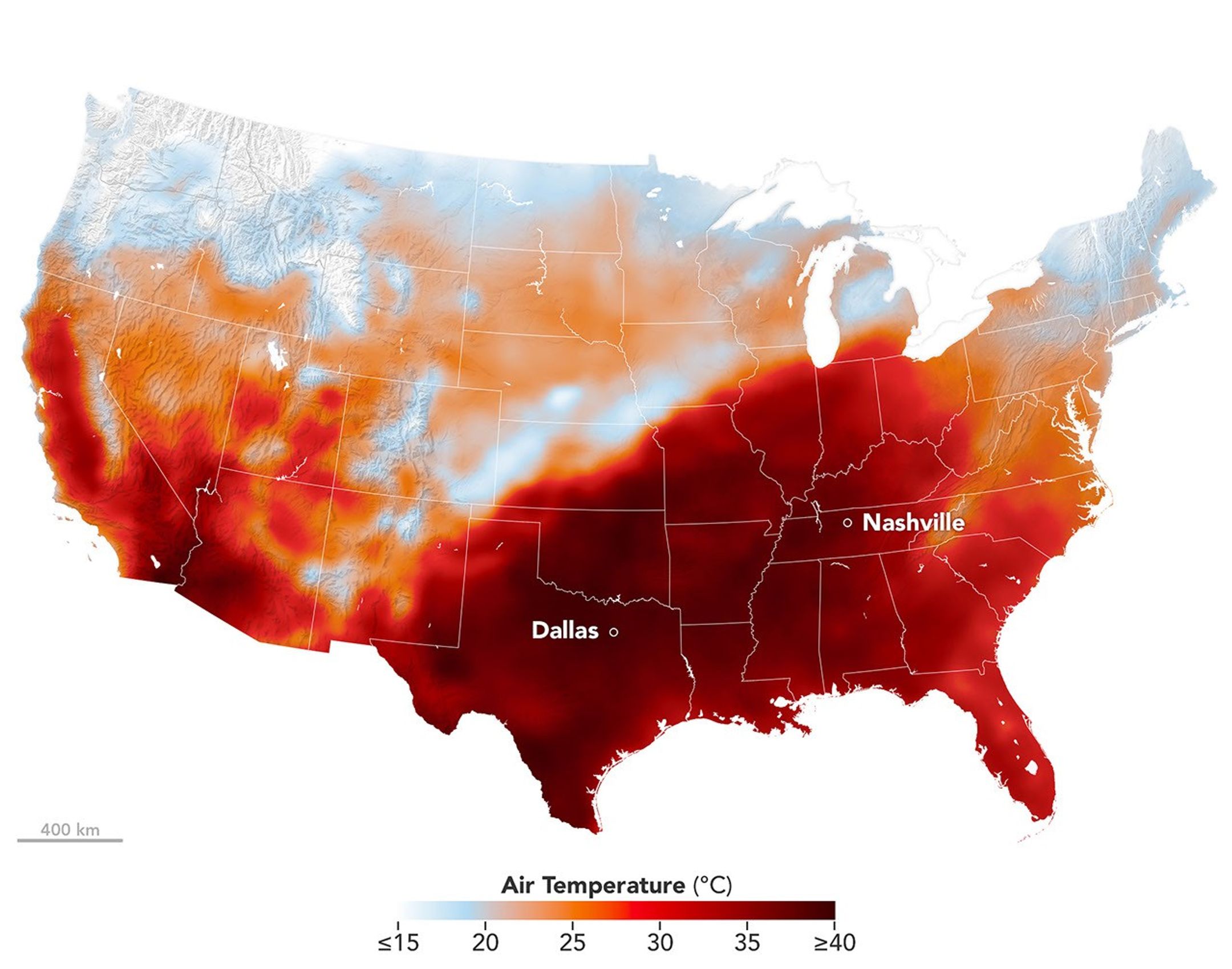
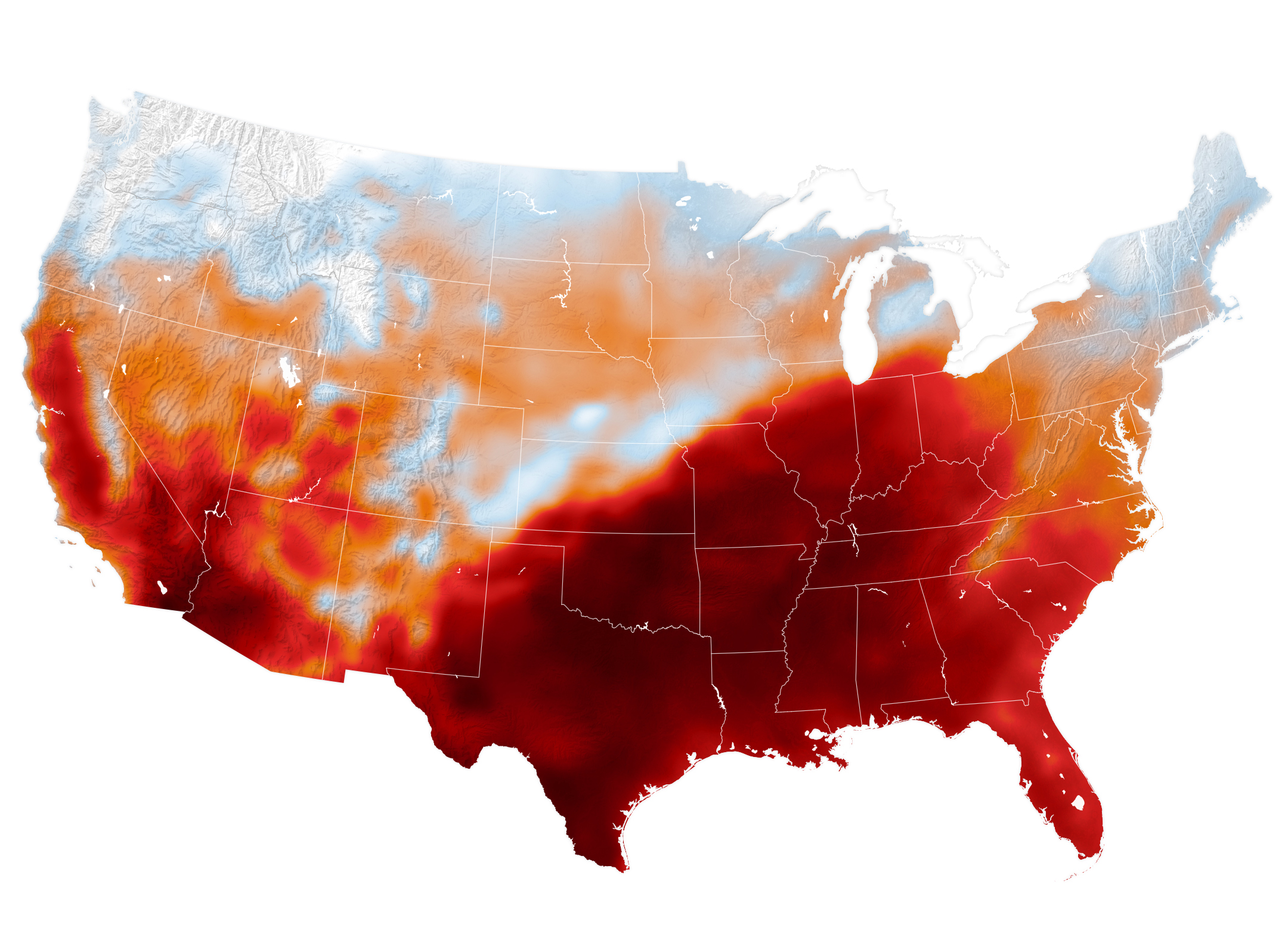
An area of high pressure over the south-central U.S. produced unseasonable and, in some places, record-breaking warmth on September 15, 2026, as shown in this map of modeled air temperatures from GEOS (Goddard Earth Observing System).
NASA Earth Observatory/Michala Garrison
While the calendar indicated that astronomical summer was winding down, a swath of the south-central United States was sweltering under a heat dome in mid-September 2026.
This map shows air temperatures in the contiguous U.S. on September 15, 2026, at 4 p.m. Central Time (21:00 Universal Time), modeled at 2 meters (6.5 feet) above the ground. It was produced by combining satellite observations with temperatures predicted by a version of the GEOS (Goddard Earth Observing System) model, which uses mathematical equations to represent physical processes in the atmosphere. The darkest reds indicate areas where temperatures approached or exceeded 40 degrees Celsius (104 degrees Fahrenheit).
More than 41 million people in the U.S.—about 12 percent of the population—were under a National Weather Service extreme heat advisory, extreme heat watch, or extreme heat warning on September 15. The high temperatures spanned large portions of several states, such as Texas, Oklahoma, Arkansas, Missouri, and Tennessee. Meteorologists warned that high humidity, limited cloud cover, and light winds could make temperatures feel higher than thermometer readings and increase the risk of heat-related illnesses.
Several locations set new daily high temperature records on September 15. These included Dallas, Texas, at 101ºF (38ºC), Memphis, Tennessee, at 99ºF (37ºC), and Nashville, Tennessee, at 100ºF (38ºC). The cities were all at least 12ºF warmer than normal that day, with Nashville breaking its daily-high record from 1927. The day before, Nashville also set a record-high minimum temperature of 75ºF (24ºC).
A weather phenomenon meteorologists call a heat dome was responsible for driving temperatures up across the region. A heat dome develops when an area of high pressure in the upper atmosphere pushes hot air toward the surface and traps it there. Heat domes put the brakes on convection and suppress clouds and precipitation. This allows sunlight to reach Earth’s surface relatively unhindered and further elevate air temperatures.
The stretch of unseasonable temperatures follows the warmest June through August in the contiguous United States in a 132-year record, according to NOAA. The three-month period in 2026 was 0.4ºF warmer than the previous records, set in 1936 and 2021.
An area of high pressure over the south-central U.S. produced unseasonable and, in some places, record-breaking warmth on September 15, 2026, as shown in this map of modeled air temperatures from GEOS (Goddard Earth Observing System).
NASA Earth Observatory/Michala Garrison
While the calendar indicated that astronomical summer was winding down, a swath of the south-central United States was sweltering under a heat dome in mid-September 2026.
This map shows air temperatures in the contiguous U.S. on September 15, 2026, at 4 p.m. Central Time (21:00 Universal Time), modeled at 2 meters (6.5 feet) above the ground. It was produced by combining satellite observations with temperatures predicted by a version of the GEOS (Goddard Earth Observing System) model, which uses mathematical equations to represent physical processes in the atmosphere. The darkest reds indicate areas where temperatures approached or exceeded 40 degrees Celsius (104 degrees Fahrenheit).
More than 41 million people in the U.S.—about 12 percent of the population—were under a National Weather Service extreme heat advisory, extreme heat watch, or extreme heat warning on September 15. The high temperatures spanned large portions of several states, such as Texas, Oklahoma, Arkansas, Missouri, and Tennessee. Meteorologists warned that high humidity, limited cloud cover, and light winds could make temperatures feel higher than thermometer readings and increase the risk of heat-related illnesses.
Several locations set new daily high temperature records on September 15. These included Dallas, Texas, at 101ºF (38ºC), Memphis, Tennessee, at 99ºF (37ºC), and Nashville, Tennessee, at 100ºF (38ºC). The cities were all at least 12ºF warmer than normal that day, with Nashville breaking its daily-high record from 1927. The day before, Nashville also set a record-high minimum temperature of 75ºF (24ºC).
A weather phenomenon meteorologists call a heat dome was responsible for driving temperatures up across the region. A heat dome develops when an area of high pressure in the upper atmosphere pushes hot air toward the surface and traps it there. Heat domes put the brakes on convection and suppress clouds and precipitation. This allows sunlight to reach Earth’s surface relatively unhindered and further elevate air temperatures.
The stretch of unseasonable temperatures follows the warmest June through August in the contiguous United States in a 132-year record, according to NOAA. The three-month period in 2026 was 0.4ºF warmer than the previous records, set in 1936 and 2021.
New research led by University of the Witwatersrand and University of Southern California paleoanthropologists sheds more light on one of the most debated transitions in human evolution: when our ancestors stopped regularly climbing trees and committed fully to walking on two legs.
Tenzing shifts one of mountaineering’s most famous stories toward the Himalayan climber whose name has long shared a place in history with Edmund Hillary. Apple Original Films has released the trailer for the upcoming adventure drama, with Genden Phuntsok playing Tenzing Norgay and Tom Hiddleston portraying Hillary during the 1953 expedition that reached the summit of Mount Everest.
Directed by Jennifer Peedom, the film reaches select theaters on October 9 before streaming globally on Apple TV on October 16. The cast also includes Willem Dafoe, Caitríona Balfe, Thinley Lhamo, and Tenzin Dalha.
Rather than presenting the expedition simply as a survival story about reaching the world’s highest point, the film approaches the ascent through Tenzing’s position within the British-led team, his relationship with the mountain, and the social divisions surrounding the expedition.
That perspective gives the familiar Everest story a different dramatic center.
Tenzing puts the Himalayan climber at the front of the story
Tenzing Norgay and Edmund Hillary reached the summit of Everest on May 29, 1953, during an expedition led by Colonel John Hunt. Their ascent became one of the defining achievements in mountaineering history, but the new film is explicitly structured around Tenzing rather than treating the two climbers as interchangeable figures.
Phuntsok plays Tenzing as an experienced Himalayan climber who has already spent years pursuing the possibility of reaching the summit. The story follows his attempt to secure a meaningful place on the climbing team instead of being viewed primarily as someone there to support Western expedition members.
Hiddleston’s Hillary enters that story as another outsider within the expedition hierarchy. Apple describes the relationship between the two men as one built gradually through mutual respect and trust as the dangers and pressures of the ascent increase.
Dafoe plays Hunt, the expedition leader, while Balfe portrays expedition secretary Jill Henderson, who becomes an ally to Tenzing. Thinley Lhamo plays Dawa, Tenzing’s wife, whose support forms another part of the film’s emotional foundation.
The Apple TV listing also identifies Johnny Flynn as George Mallory and Tenzin Dalha as a younger Tenzing.
The 125-minute film therefore has room to explore more than the final climb itself. Its central conflict begins before Tenzing and Hillary ever approach the summit.
Image Credit: Apple Inc.
The Everest story looks beyond conquest
One of the distinctions emphasized in Apple’s description of Tenzing is the different meaning the mountain holds for its characters.
The film contrasts the Western climbers’ view of Everest as something to be conquered with Tenzing’s reverence for Chomolungma as the sacred mother goddess.
That contrast gives director Jennifer Peedom a way to examine the expedition through competing cultural perspectives rather than framing the mountain solely as an obstacle.
The trailer also points toward tensions involving class, hierarchy, nationality, and the legacy of empire. Tenzing must establish that he belongs among the expedition’s climbers instead of accepting a supporting position defined by others.
Historical accounts from the Royal Geographical Society record that Hillary and Tenzing left their final camp on the morning of May 29, 1953, using supplemental oxygen. They reached the summit at approximately 11:30 a.m. after negotiating the steep section of rock and ice that became known as the Hillary Step.
The achievement has been recounted in books, documentaries, photographs, and films for decades. Tenzing approaches the material by asking how the same expedition looks when the Himalayan climber occupies the center of the frame.
Peedom shares story credit with Luke Davies, who wrote the screenplay.
The project is a natural fit for Peedom, whose filmmaking career has repeatedly engaged with mountains, extreme environments, and the people drawn to them. Here, however, the physical scale of Everest serves a character story built as much around identity and recognition as technical climbing.
Genden Phuntsok leads an established ensemble
Casting Tenzing Norgay was particularly consequential because the film surrounds its lead with several internationally recognizable performers.
Hiddleston arrives as Hillary with a career spanning major franchise work and dramatic television. Dafoe brings a more imposing presence to Hunt, while Balfe plays Henderson as one of the figures willing to challenge the assumptions surrounding Tenzing’s role.
Phuntsok nevertheless remains the narrative anchor.
Apple’s synopsis describes the climber’s journey as both a lifelong ambition and a spiritual calling. That gives the performance two demands: convincing audiences of Tenzing’s physical capability at extreme altitude while conveying why reaching Chomolungma carries meaning beyond becoming part of the first confirmed ascent of Everest.
Lhamo’s Dawa is also positioned as more than background to the expedition. Apple specifically identifies her encouragement as part of what drives Tenzing toward the opportunity, adding a personal relationship to a story otherwise dominated by expedition politics and physical risk.
Behind the camera, Davies joins Peedom as a producer. Desray Armstrong also produces, alongside Liz Watts, Iain Canning, and Emile Sherman of See-Saw Films.
See-Saw has an established relationship with Davies, whose previous screenwriting credits for the company include Lion. Norbu Tenzing, Simon Gillis, and David Michôd serve as executive producers.
Image Credit: Apple Inc.
Tenzing gets a theatrical window before Apple TV
Apple is giving Tenzing a short theatrical run before bringing the film to its streaming service.
Select theaters will begin showing the movie on October 9, with the global Apple TV premiere following one week later on October 16. The Apple TV listing categorizes the film as a drama and adventure title and gives it a PG rating in the U.S. for thematic elements, language, smoking, and some peril.
The release continues Apple Original Films’ practice of using theatrical distribution selectively before making features available to subscribers.
For Tenzing, the cinema component has an obvious creative advantage. A film built around Everest, dangerous climbing conditions, and the physical scale of the Himalayas has material suited to a large screen, even as its narrative emphasis remains on the people inside that landscape.
The trailer arrives with less than a month remaining before the theatrical debut, giving Apple a relatively concentrated promotional window.
It also introduces Phuntsok to a much wider international audience alongside performers including Hiddleston, Dafoe, and Balfe without letting the better-known names displace the person identified in the title.
Tenzing will begin its theatrical run on October 9, followed by its Apple TV release on October 16. Its 1953 destination is already known; the new question is how the film reconstructs the journey by placing Tenzing Norgay’s perspective, relationships, and understanding of Chomolungma at the center of the ascent.
What factors influence students' decisions about whether they will continue to use ChatGPT for learning in the future? This was the question addressed by a new study from ELTE's Faculty of Informatics, which used an interpretable machine learning framework to identify the factors that most strongly influence the use of generative artificial intelligence in higher education.
AirPods 5 bring Active Noise Cancellation to Apple’s most affordable current AirPods while pushing the open-ear design closer to capabilities previously associated with more expensive models. The new generation starts at $129 and uses redesigned acoustics and computational audio to remove up to 50% more external noise than AirPods 4 with Active Noise Cancellation.
Apple is also splitting the range into two versions. The standard $129 AirPods 5 include ANC and USB-C charging, while a $149 model adds a Wireless Charging Case, longer battery life, a case speaker for Find My, and volume adjustment directly from the stems.
Both models are available for preorder ahead of their September 18 release in the U.S. and more than 65 other countries and regions.
The changes make the distinction between Apple’s entry-level AirPods and its more advanced headphones less dependent on headline software features. Adaptive Audio, Transparency, Conversation Awareness, Personalized Spatial Audio, Live Translation, and Siri AI are all part of the AirPods 5 experience.
Image Credit: Apple Inc.
AirPods 5 push open-ear ANC further
Active Noise Cancellation is particularly difficult to implement in an open-ear earbud because there is no silicone tip forming a physical seal inside the ear canal.
Apple has approached that limitation with a new multiport acoustic architecture, revised computational audio algorithms, and the H2 headphone chip. The company says AirPods 5 can cancel up to 50% more noise than AirPods 4 with ANC.
That improvement does not turn the design into an AirPods Pro-style sealed earbud. AirPods 5 remain open-ear headphones, retaining the fit preferred by people who dislike the pressure or isolation associated with in-ear tips.
The acoustic system has also been redesigned around a wider variety of ear shapes. Next-generation Adaptive EQ continuously adjusts sound based on how each earbud sits, while Apple says the revised architecture produces richer and more detailed playback.
Transparency mode has been updated to reproduce voices and environmental sounds more naturally. Adaptive Audio can move between Transparency and noise cancellation according to surrounding conditions, while Conversation Awareness automatically reduces media volume when the wearer begins speaking to someone nearby.
Personalized Spatial Audio with dynamic head tracking remains supported for compatible music, movies, and other content.
AirPods 5 are rated IP57 for dust, sweat, and water resistance, making them better suited to workouts and changing weather conditions, although they are not waterproof.
Two AirPods 5 models create a meaningful $20 decision
Apple’s pricing makes the $149 Wireless Charging Case version more than a different charging option.
Standard AirPods 5 provide up to four hours of listening on one charge with ANC enabled and up to 20 hours when the USB-C case is included.
AirPods 5 with Wireless Charging Case increase those figures to five hours from the earbuds and up to 22 hours with the case while ANC is active.
The upgraded case can charge through USB-C, an Apple Watch charger, or a Qi-certified wireless charger. It also contains a speaker that can assist with locating the case through Find My.
The more expensive model introduces another difference directly on the earbuds. Users can swipe up or down on a stem to adjust volume, bringing a control familiar from AirPods Pro to Apple’s open-ear form factor.
That leaves buyers with a relatively straightforward tradeoff. The $129 version provides the central audio experience, including ANC, without requiring a step up for the main listening features. Spending another $20 adds more convenient charging, slightly longer battery life, Find My assistance from the case speaker, and physical volume adjustment.
Placing either AirPods 5 model in its charging case for five minutes provides about one additional hour of listening.
Image Credit: Apple Inc.
Siri AI and Live Translation extend the earbuds beyond music
AirPods 5 arrive as Apple makes voice interaction a larger part of the AirPods experience.
When paired with a compatible iPhone, Siri AI can be accessed hands-free. The assistant can work with personal context from information such as messages, emails, and photos, respond to open-ended questions, and perform supported actions in apps.
Head gestures remain part of the experience. Users can nod to accept certain Siri prompts or shake their head to decline them, allowing calls and notifications to be handled without speaking or touching the earbuds.
Live Translation provides another use for the microphones and ANC system.
After compatible languages are downloaded and the feature is configured through Apple’s Translate app, a user can hear another person’s speech translated through AirPods. Translation can be started through Siri, the iPhone Action button, the Translate app, or by pressing and holding both AirPods stems simultaneously.
When two people are each using compatible AirPods and supported iPhones, both participants can hear translated versions of the conversation in their chosen languages.
Live Translation requires an Apple Intelligence-enabled iPhone 15 Pro or later, compatible AirPods, current software, and the latest AirPods firmware, with availability varying by language and region. Apple also notes that generated translations can contain errors, making verification appropriate when accuracy is especially significant.
AirPods 5 narrow the gap within the lineup
The fifth-generation model represents a different kind of upgrade from simply adding another listening mode.
ANC is now standard across both AirPods 5 configurations, instead of requiring buyers to choose a separate ANC version as they did with AirPods 4. Apple has then moved the pricing distinction toward charging, battery endurance, Find My hardware, and physical controls.
The earbuds continue to use Bluetooth 5.3 and the H2 chip, with dual beamforming microphones, an inward-facing microphone, optical in-ear detection, motion and speech accelerometers, and force sensors built into the stems.
Each earbud weighs 4.3 grams, preserving the lightweight character of the open-ear line despite the additional capabilities.
The new acoustic architecture may be the more consequential change over time. Open-ear earbuds cannot rely on a tight seal to block surrounding sound, so gains in ANC depend heavily on microphone placement, acoustic design, fit, and real-time processing. Apple’s claim of up to 50% more noise removal over the previous generation represents a substantial step for that format rather than simply matching the behavior of sealed earbuds.
AirPods 5 start at $129, while AirPods 5 with Wireless Charging Case cost $149. Both reach stores on September 18, giving the open-ear AirPods line a standard feature set that now includes noise cancellation without pushing buyers to a higher-priced model to get it.
The iPhone Duo status icon introduces a new approach to information that has occupied the top edge of the iPhone display for nearly two decades. Instead of treating Wi-Fi, cellular signal, battery status, and other indicators as a conventional horizontal row, Apple has created a flexible circular system that sits in the corner of the foldable iPhone’s display.
Apple officially describes the feature as a “circular, flexible system” within the status bar rather than one fixed icon containing every piece of information at all times. The distinction is useful: the area can adapt according to context while consolidating status information into a smaller visual region.
It is part of a much larger rethink of iOS 27 specifically for iPhone Duo. The foldable device changes the proportions available to software, particularly when its 7.6-inch inner display is open, forcing Apple to reconsider interface elements that have traditionally stretched horizontally across an iPhone screen.
The status system is one of the smallest changes visually, but it illustrates how extensively Apple has adapted iOS around the new hardware.
Image Credit: Apple Inc.
iPhone Duo status icon replaces the traditional horizontal approach
Conventional iPhones distribute system information across the upper portion of the display. Cellular strength, network type, Wi-Fi connectivity, and battery status typically occupy space around the camera hardware and Dynamic Island.
iPhone Duo approaches that area differently.
Apple says its circular status system nestles into the corner of the screen and presents relevant information including Wi-Fi, cellular strength, battery status, and more. Rather than requiring a long horizontal strip, those indicators can occupy a compact area that works with the device’s unusual screen geometry.
The change is closely connected to the way iPhone Duo handles controls throughout iOS 27.
Apple has moved several interface elements to the side of the display. App navigation, toolbars, the Home Screen Dock, and some Lock Screen controls can use vertical space instead of occupying the familiar horizontal regions found on other iPhones.
The status system therefore becomes part of a vertical interface column rather than an isolated redesign.
This arrangement lets content use more of the display’s height while keeping frequently referenced system information visible. It also creates a consistent location for status details as users change how they hold or fold the device.
A flexible status system suits a foldable iPhone
A foldable phone presents an interface problem that a traditional slab-shaped iPhone does not have.
iPhone Duo can operate through its 5.4-inch outer display or its substantially larger 7.6-inch inner screen. The device can be opened completely, partially folded, rotated, or positioned like a small book.
A static status bar designed around one screen size and orientation would be less effective across those configurations.
Apple instead built iOS 27 so that interface elements can move as the physical device changes. Content reacts to folding, controls relocate, and layouts adjust around the hinge and available screen area.
Apple’s developer guidance provides additional detail about this philosophy. On iPhone Duo, navigation and toolbar controls share vertical space with system elements such as the status bar and Live Activities. When available room becomes limited, application controls can collapse into an overflow menu.
That makes the circular status area part of an adaptive system rather than a cosmetic flourish.
Developers do not need to manually reproduce the status treatment inside their apps. Apple’s standard interface frameworks handle much of the adaptation, especially when applications use native navigation, toolbar, and tab-bar components.
Image Credit: Apple Inc.
Dynamic Island also moves to the side
The status area is not the only familiar piece of iPhone interface that changes position on iPhone Duo.
Apple has redesigned Dynamic Island so that it can sit vertically along the side of both the outer and inner displays. It can expand from that position to present alerts and Live Activities.
The relationship between Dynamic Island and the new circular status system is particularly interesting because Apple now has two dynamic interface areas operating along the same side of the screen.
One communicates persistent device information such as network and battery status. The other handles temporary activity, alerts, and live information.
Apple’s developer documentation refers to this section as shared vertical space. Application controls may also occupy it, meaning iOS has to continuously decide how much room is available and which elements deserve priority.
That is a major departure from the long-standing assumption that the upper corners of an iPhone screen simply contain a predictable row of small status symbols.
On Duo, those regions have become active parts of the interface layout.
Wi-Fi, cellular, and battery remain immediately recognizable
Consolidating status information creates a design challenge: efficiency cannot come at the expense of readability.
Users have spent years learning the meanings of Apple’s individual status symbols. Cellular bars indicate signal strength, the Wi-Fi symbol communicates wireless connectivity, and the battery icon provides an immediate indication of remaining power.
Apple has not discarded those familiar concepts.
Instead, the circular system changes how and where information is presented. The familiar status categories remain present while the container around them becomes more adaptable.
This is particularly useful on a device with two displays. Users should not need to relearn the meaning of basic connectivity information when moving from the outer screen to the inner display.
The same reasoning applies when iPhone Duo changes orientation. Apple can reorganize the status area without changing the fundamental visual vocabulary behind Wi-Fi, cellular, or battery information.
Image Credit: Apple Inc.
iPhone Duo pushes the status bar beyond a fixed strip
The new design suggests a different direction for one of the oldest pieces of smartphone interface.
Status bars traditionally behave like reserved strips of screen space. Applications work around them, and their icons occupy predictable positions regardless of what is happening elsewhere.
iPhone Duo turns that space into something more fluid.
The circular system can coexist with a vertical Dynamic Island, changing application controls, Live Activities, and layouts that respond to the physical position of the foldable display. It becomes another component that iOS can arrange rather than a fixed row placed permanently along an edge.
There is no indication that Apple plans to bring the same circular status treatment unchanged to conventional iPhones. Its current implementation is specifically tied to iPhone Duo and the interface requirements created by the foldable hardware.
Still, the design provides a glimpse at how Apple can rethink even deeply established iPhone conventions when the shape of the device changes. When iPhone Duo reaches customers on October 23, the small circular area in the corner will be one of the most immediately visible examples: cellular strength, Wi-Fi, battery information, and other system details occupying a shared adaptive space instead of stretching across the display.
Screen Time has received one of its most substantial parental-control updates with iOS 27, iPadOS 27, and macOS 27, adding new ways for parents to manage how long children use categories of apps, which websites they can visit, and what content reaches them through Messages and FaceTime.
The features were previewed at WWDC in June and are now available as part of Apple’s latest operating-system releases. Rather than relying only on fixed app limits, the redesigned Screen Time gives parents a more flexible set of controls that can change throughout the day and adapt as a child gains access to more apps and services.
Among the additions are Time Allowances, Ask to Browse, a simpler child-device setup process, expanded Communication Safety protections, and faster controls for temporarily pausing or extending access.
Apple is also working with the American Academy of Pediatrics to adapt the organization’s Family Media Plan into guidance parents can reference when setting up devices and Screen Time.
Screen Time introduces Time Allowances by app category
Time Allowances give parents a daily amount of time that can apply across categories including Entertainment, Games, and Social Media.
That differs from managing each application individually. Parents can set time allowances for categories such as Entertainment, Games, and Social Media, then adjust those settings based on the needs of their household.
Apple provides suggested starting points based on a child’s age and guidance informed by clinical and child-development research. Those recommendations are optional, with parents able to change them based on their own household and the individual child.
The updated Screen Time also supports schedules that control which apps remain available at different periods of the day. Parents can therefore create separate access patterns around school, homework, evenings, and weekends rather than relying on one universal daily restriction.
Temporary adjustments have been made easier as well. Parents can quickly limit access to apps and the web during periods such as meals, then restore access without rebuilding their existing restrictions. When a child reaches a limit, they can request additional time from a parent to complete an activity or finish a conversation.
The redesigned interface puts device usage and the most frequently used applications closer to the front, reducing the amount of navigation required to understand how a child is spending time on a device.
Image Credit: Apple Inc.
Ask to Browse extends parental approval into Safari
Ask to Browse brings a permission model already familiar from app downloads to the web.
When the feature is active, a child who attempts to visit a new website in Safari can be required to request permission first. The parent receives the request through Messages and can review it before allowing access.
The feature is available across iPhone, iPad, and Mac and works alongside existing web-content restrictions.
It complements Ask to Buy, which requires children to obtain permission before downloading or purchasing an app or making an in-app purchase. Apple has also expanded the initial setup process so a parent configuring a personal device for a child can choose which apps are available from the beginning.
Setup Assistant offers the option to provide only essential apps, use a recommended group, or manually choose which ones are permitted. More applications can then be introduced later as the parent decides the child is ready for them.
The approach gives parents a way to begin with a comparatively limited device instead of configuring a full standard account and removing unwanted access afterward.
Communication Safety expands beyond detected nudity
Communication Safety now intervenes when it detects gore or violent imagery in shared photos and videos, expanding protections that previously centered on nudity.
Apple says the feature works with content shared through areas including Messages and FaceTime, with the new protection also extending to live FaceTime calls.
Communication Safety is designed to intervene before a child views or shares detected sensitive material. Apple has previously built these protections around on-device analysis, allowing the system to identify content without requiring Apple to receive the underlying images.
Parents can also continue controlling who children communicate with. Contact-management settings can require approval before a child adds someone new and then communicates through Phone, Messages, or FaceTime.
Child Accounts remain the foundation for these controls. Apple generally requires Child Accounts for children under 13, although the applicable age can vary by state, country, or region. Child Accounts remain available for family members up to age 18.
The accounts automatically activate age-based safeguards and connect parental controls through Family Sharing.
Image Credit: Apple Inc.
iOS 27 requires the family’s devices to stay in sync
The new Screen Time controls arrive with one practical requirement: devices participating in the same Family Sharing setup need current software.
Apple says all devices in the Family Sharing group must be updated to the corresponding 27-generation releases — iOS 27, iPadOS 27, macOS 27, watchOS 27, and visionOS 27 — before the updated Screen Time controls can be used consistently across the family.
The family organizer, parent, or guardian must also update the parental-control configuration after the software upgrades.
That requirement is worth checking before troubleshooting a missing setting on one child’s device. If every device in the group cannot be updated, Apple says the family can continue using the previous version of Screen Time and its parental controls, but the new controls will not be available consistently across the group.
The features themselves also vary by platform. Ask to Browse and Time Allowances are available on iPhone, iPad, and Mac, while some Family Sharing and communication features extend to other devices.
Apple has launched a dedicated Child Safety site alongside the software release, collecting setup instructions, explanations of Child Accounts, Screen Time controls, communication protections, App Store age tools, Find My, and Apple Watch options for families.
The updated Screen Time controls are available now with iOS 27, iPadOS 27, and macOS 27, although individual features can vary by region, language, and hardware. For families upgrading several devices at once, checking every device in the Family Sharing group for its corresponding version 27 update is the most useful place to start.
Passion Meets Precision at NASA’s Flight Research Lab
Derek Abramson, Dale Reed Subscale Flight Research Laboratory chief engineer, left, communicates with the Edwards Air Force Base air traffic control tower for approval to fly the Alta-X drone near NASA’s Armstrong Flight Research Center in Edwards, California, on Thursday, Aug. 27, 2026. Justin Link, small uncrewed aircraft pilot, second from left, and laboratory chief pilot Justin Hall await flight clearance. Researchers at NASA’s Johnson Space Center in Houston developed the advanced guidance and navigation system known as the Safe and Precise Landing – Integrated Capabilities Evolution (SPLICE) experiment, which is installed on the Alta-X. SPLICE will help spacecraft land precisely and detect and avoid potential hazards, which is critical for NASA missions to the Moon and to Mars.
NASA/Ryan Kline
Long before they helped shape NASA’s future aerospace breakthroughs, Derek Abramson, Justin Hall, and Justin Link were in their garages and homes building radio‑controlled aircraft, testing new ideas, and flying their creations at hobby events. That early passion now fuels the work of NASA’s Dale Reed Subscale Flight Research Laboratory at the agency’s Armstrong Flight Research Center in Edwards, California.
At NASA Armstrong’s subscale flight lab, the team turns that lifelong enthusiasm into mission-focused innovation. The laboratory supports research that ranges from advanced navigation systems for future landings on the Moon and Mars to emerging aeronautics concepts that need quick, low-cost evaluation. NASA’s small, remotely piloted and autonomous aircraft allow engineers to explore ideas that could be difficult, risky or expensive to test at full scale.
Skilled team
Abramson, Hall, and Link play key roles in that work. Abramson serves as the laboratory’s chief engineer. Hall is the chief pilot. Link is a drone pilot. Together, they integrate emerging aerospace technologies with the lab’s subscale aircraft fleet and, when needed, design and build aircraft or flight experiments to evaluate new concepts.
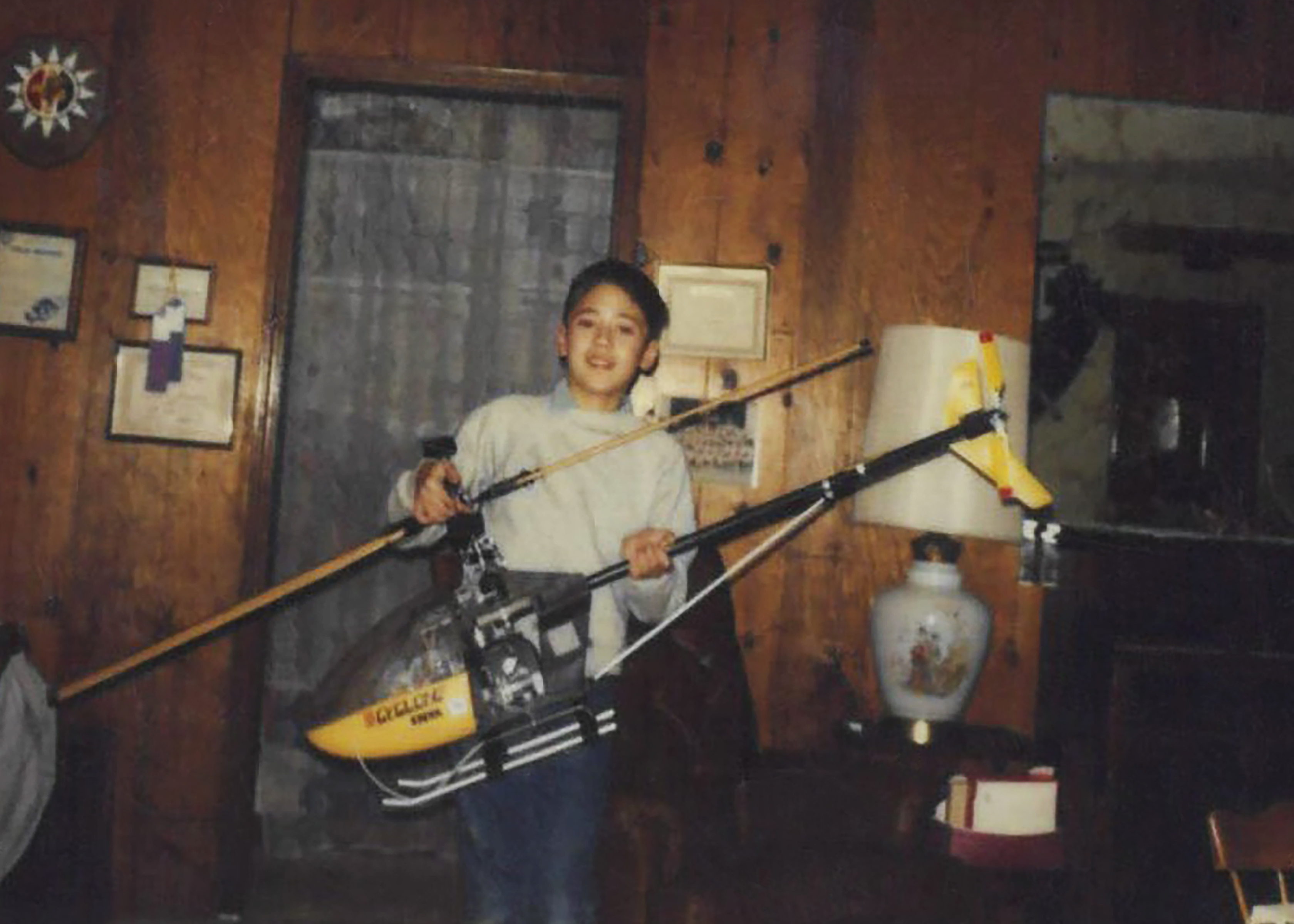
Derek Abramson, chief engineer at the Dale Reed Subscale Flight Research Laboratory at NASA’s Armstrong Flight Research Center in Edwards, California, is shown with his Kalt Cyclone radio-controlled helicopter in the mid-1980s. Abramson loved flying this aircraft as a child, and he has been an aviation enthusiast for as long as he can remember.
Derek Abramson
Abramson’s expertise, built through service in the U.S. Navy and the aerospace industry, centers on technical oversight, management, and system design. Hall is known for creative approaches to problem solving and uses practical methods to address technical challenges and maintain flight safety. Link specializes in designing and fabricating research vehicles and draws on extensive hands-on experience to understand what works, and what does not, in flight.
On weekends, the team often tinkers in their garages or hangars building radio-control aircraft, researching hobby trends, or exploring new technologies. You might see them flying their creations at hobby events or attending trade shows. Their passion for flight brought Abramson, Hall, and Link together years before they one-by-one joined NASA more than a decade ago, though each discovered that spark in a different way.
Early influences
Abramson’s interest began as a child with rubber-band powered stick and tissue aircraft and radio-controlled models. His early aviation pursuits led to his first solo flight while in high school and a pilot’s license. In the Navy, he worked on multiple aircraft, including EA-6B and the F-18, as an avionics technician. As an engineer, he supported the B-1 and CV-22 Osprey aircraft flight tests. As an intern at NASA Armstrong, he used his operational and engineering experience on remotely piloted and autonomous aircraft.
Hall’s interest grew after seeing historic aircraft including the Mach 3 SR-71 fly over his elementary school playground and watching Space Shuttle Challenger land from above his dad’s shoulders. He has built and flown model and remotely piloted aircraft for as long as he can remember. His reputation flying radio-controlled hobby aircraft at fly-ins and trade events led to an offer to fly subscale aircraft at NASA.
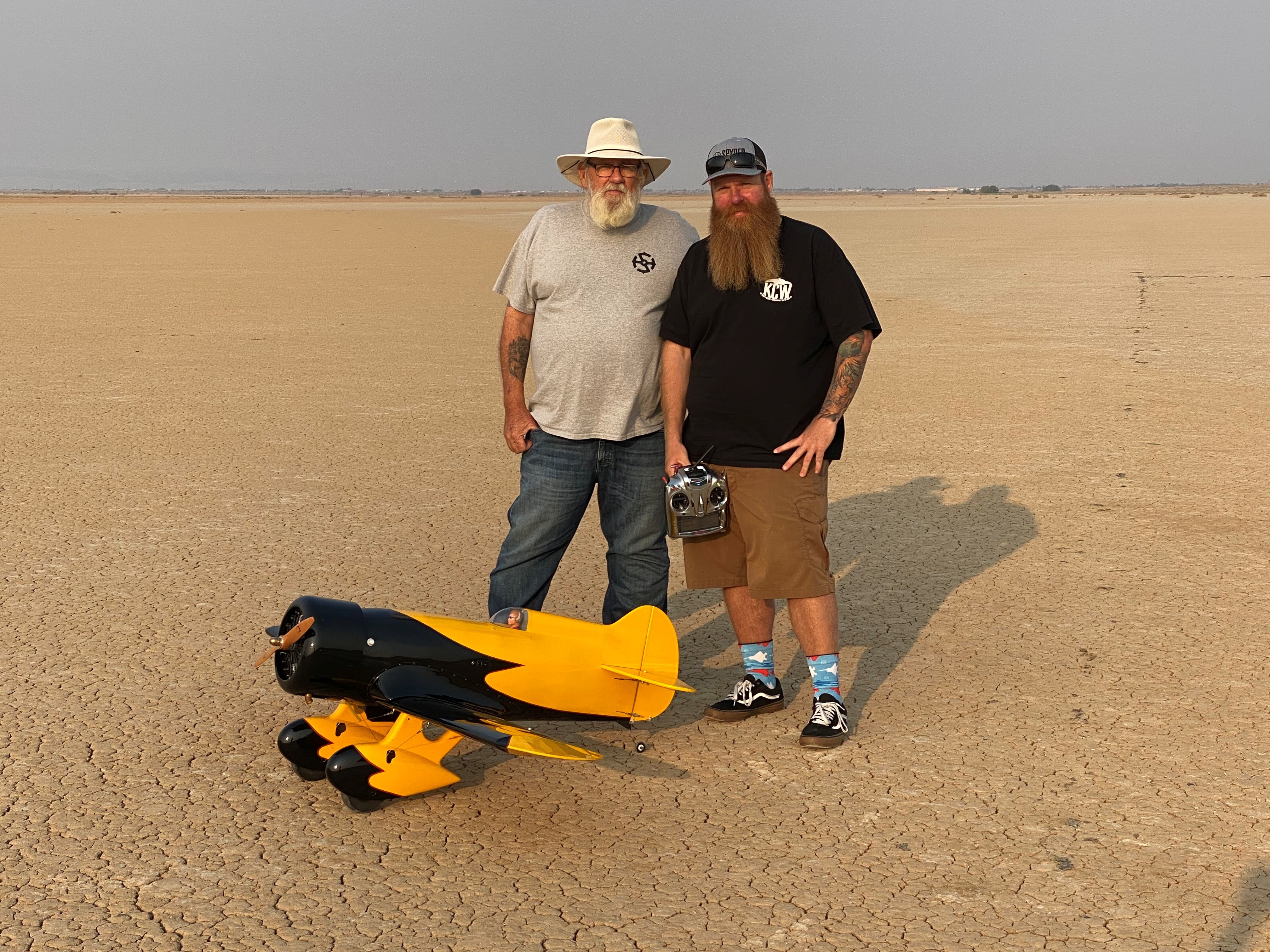
Justin Hall, chief pilot at the Dale Reed Subscale Flight Research Laboratory at NASA’s Armstrong Flight Research Center in Edwards, California, stands in front of a radio-controlled aircraft with his dad, David Hall, in August 2020. David Hall built the Gee Bee aircraft years earlier but was unable to fly it due to his health. He asked his son to fly the aircraft so he could see it in the air, which Justin did the day of this photo. Shortly afterward, David Hall passed away.
Justin Hall
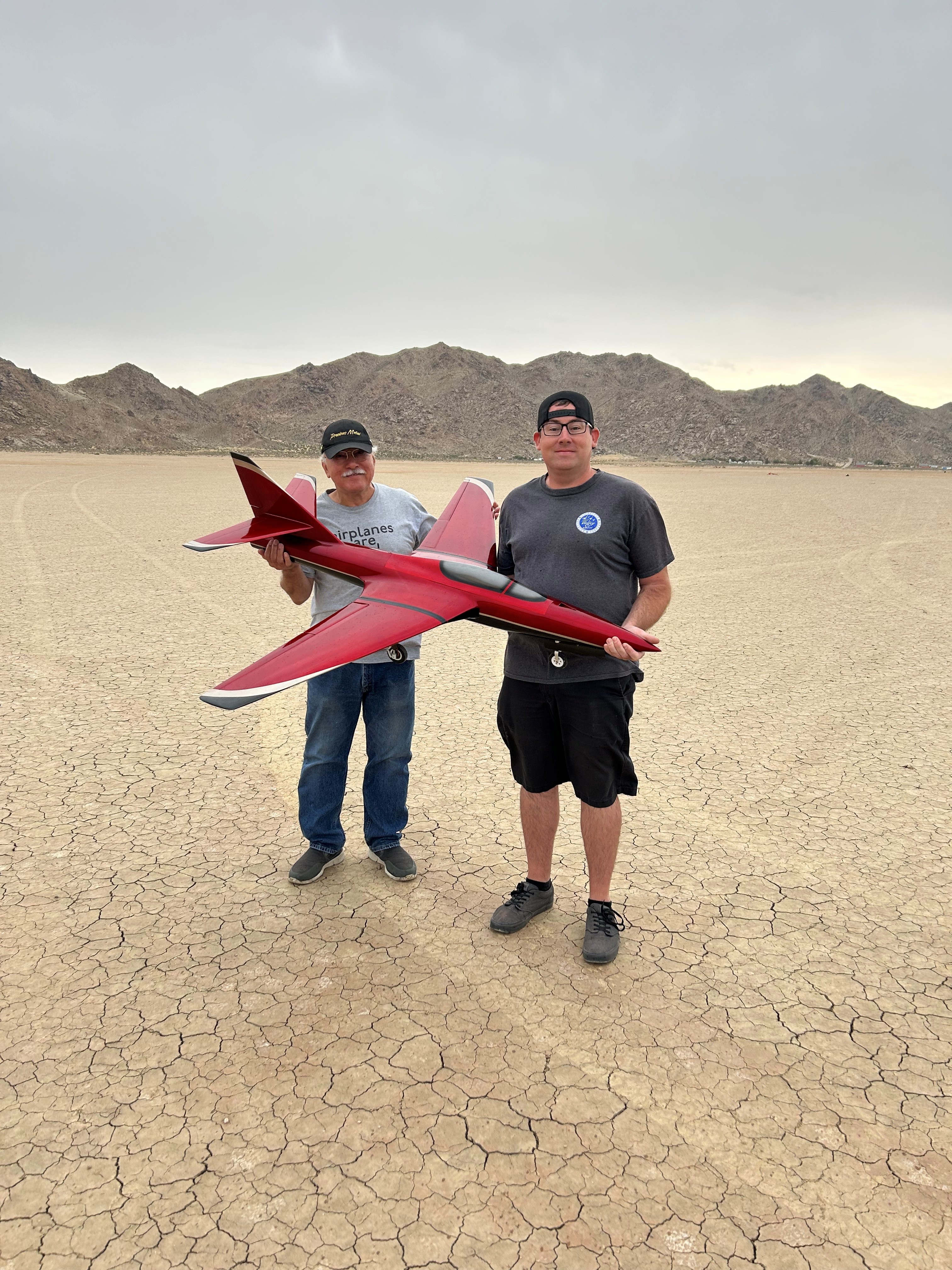
Justin link, drone pilot at the Dale Reed Subscale Flight Research Laboratory at NASA’s Armstrong Flight Research Center in Edwards, California, and his dad, Don Link, hold a Firebird radio-controlled aircraft on the day of its first flight in September 2023. It was a project they worked on together. Don Link reduced the dimensions of the original larger-scale model aircraft and drew the plans, while Justin Link manufactured composite molds and built the aircraft from scratch.
Justin Link
Link was five years old when he built balsa-wood aircraft with his dad and flew them in a field near their home. As he grew older, his hobby expanded to include radio-controlled cars, boats, helicopters, and aircraft. Aviation runs deep in Link’s family. His great grandfather served in the U.S. Army Air Corps, his grandfathers served in the U.S. Air Force, and his dad was an Air Force avionics technician. Link raced sailplanes, competed with scaled warbird aircraft, and was encouraged by family and friends to pursue an aviation profession. He has worked with large drones for more than 11 years, focusing on research and development, composite materials, and specialized fabrication methods.
Together, the team applies its experience and knowledge in rapid design, fabrication, integration and flight testing to bring new ideas to flight. Their work continues to support NASA’s missions across aeronautics, science, and exploration.
Preparations for Next Moonwalk Simulations Underway (and Underwater)
Derek Abramson, Dale Reed Subscale Flight Research Laboratory chief engineer, left, communicates with the Edwards Air Force Base air traffic control tower for approval to fly the Alta-X drone near NASA’s Armstrong Flight Research Center in Edwards, California, on Thursday, Aug. 27, 2026. Justin Link, small uncrewed aircraft pilot, second from left, and laboratory chief pilot Justin Hall await flight clearance. Researchers at NASA’s Johnson Space Center in Houston developed the advanced guidance and navigation system known as the Safe and Precise Landing – Integrated Capabilities Evolution (SPLICE) experiment, which is installed on the Alta-X. SPLICE will help spacecraft land precisely and detect and avoid potential hazards, which is critical for NASA missions to the Moon and to Mars.
NASA/Ryan Kline
Long before they helped shape NASA’s future aerospace breakthroughs, Derek Abramson, Justin Hall, and Justin Link were in their garages and homes building radio‑controlled aircraft, testing new ideas, and flying their creations at hobby events. That early passion now fuels the work of NASA’s Dale Reed Subscale Flight Research Laboratory at the agency’s Armstrong Flight Research Center in Edwards, California.
At NASA Armstrong’s subscale flight lab, the team turns that lifelong enthusiasm into mission-focused innovation. The laboratory supports research that ranges from advanced navigation systems for future landings on the Moon and Mars to emerging aeronautics concepts that need quick, low-cost evaluation. NASA’s small, remotely piloted and autonomous aircraft allow engineers to explore ideas that could be difficult, risky or expensive to test at full scale.
Skilled team
Abramson, Hall, and Link play key roles in that work. Abramson serves as the laboratory’s chief engineer. Hall is the chief pilot. Link is a drone pilot. Together, they integrate emerging aerospace technologies with the lab’s subscale aircraft fleet and, when needed, design and build aircraft or flight experiments to evaluate new concepts.
Derek Abramson, chief engineer at the Dale Reed Subscale Flight Research Laboratory at NASA’s Armstrong Flight Research Center in Edwards, California, is shown with his Kalt Cyclone radio-controlled helicopter in the mid-1980s. Abramson loved flying this aircraft as a child, and he has been an aviation enthusiast for as long as he can remember.
Derek Abramson
Abramson’s expertise, built through service in the U.S. Navy and the aerospace industry, centers on technical oversight, management, and system design. Hall is known for creative approaches to problem solving and uses practical methods to address technical challenges and maintain flight safety. Link specializes in designing and fabricating research vehicles and draws on extensive hands-on experience to understand what works, and what does not, in flight.
On weekends, the team often tinkers in their garages or hangars building radio-control aircraft, researching hobby trends, or exploring new technologies. You might see them flying their creations at hobby events or attending trade shows. Their passion for flight brought Abramson, Hall, and Link together years before they one-by-one joined NASA more than a decade ago, though each discovered that spark in a different way.
Early influences
Abramson’s interest began as a child with rubber-band powered stick and tissue aircraft and radio-controlled models. His early aviation pursuits led to his first solo flight while in high school and a pilot’s license. In the Navy, he worked on multiple aircraft, including EA-6B and the F-18, as an avionics technician. As an engineer, he supported the B-1 and CV-22 Osprey aircraft flight tests. As an intern at NASA Armstrong, he used his operational and engineering experience on remotely piloted and autonomous aircraft.
Hall’s interest grew after seeing historic aircraft including the Mach 3 SR-71 fly over his elementary school playground and watching Space Shuttle Challenger land from above his dad’s shoulders. He has built and flown model and remotely piloted aircraft for as long as he can remember. His reputation flying radio-controlled hobby aircraft at fly-ins and trade events led to an offer to fly subscale aircraft at NASA.
Justin Hall, chief pilot at the Dale Reed Subscale Flight Research Laboratory at NASA’s Armstrong Flight Research Center in Edwards, California, stands in front of a radio-controlled aircraft with his dad, David Hall, in August 2020. David Hall built the Gee Bee aircraft years earlier but was unable to fly it due to his health. He asked his son to fly the aircraft so he could see it in the air, which Justin did the day of this photo. Shortly afterward, David Hall passed away.
Justin Hall
Justin link, drone pilot at the Dale Reed Subscale Flight Research Laboratory at NASA’s Armstrong Flight Research Center in Edwards, California, and his dad, Don Link, hold a Firebird radio-controlled aircraft on the day of its first flight in September 2023. It was a project they worked on together. Don Link reduced the dimensions of the original larger-scale model aircraft and drew the plans, while Justin Link manufactured composite molds and built the aircraft from scratch.
Justin Link
Link was five years old when he built balsa-wood aircraft with his dad and flew them in a field near their home. As he grew older, his hobby expanded to include radio-controlled cars, boats, helicopters, and aircraft. Aviation runs deep in Link’s family. His great grandfather served in the U.S. Army Air Corps, his grandfathers served in the U.S. Air Force, and his dad was an Air Force avionics technician. Link raced sailplanes, competed with scaled warbird aircraft, and was encouraged by family and friends to pursue an aviation profession. He has worked with large drones for more than 11 years, focusing on research and development, composite materials, and specialized fabrication methods.
Together, the team applies its experience and knowledge in rapid design, fabrication, integration and flight testing to bring new ideas to flight. Their work continues to support NASA’s missions across aeronautics, science, and exploration.

 Login
Login