Portable travel monitors can transform productivity on the road by adding valuable screen space without much cost or bulk. Chuck’s Briefing compares 1080p and 4K options, discusses USB-C and HDMI connections, and power and battery considerations. Built-in audio, protective covers and stands, and why these minimalist monitors might not be just for travel are all part of why an inexpensive second display can make working with multiple apps far easier.
A resource for checking Mac external-display support, Comcast’s move away from NBCUniversal, Peacock’s streaming and sports strategy, and whether broadband offers a stronger business model than media all started off this MacVoices Live! conversation. Chuck Joiner, David Ginsburg, Brian Flanigan-Arthurs, Ben Roethig, Eric Bolden, Marty Jencius, Jeff Gamet, Norbert Frassa, Jim Rea, and Web Bixby examine Apple Invites and question why so many Apple features launch with fanfare but receive little sustained development.
The ROG Strix OLED XG32UQWMS gaming monitor is planned for release in September 2026. ASUS provided a sample, but the company had no input on the article nor saw its contents before publishing.
OLED gaming monitors have been around for a while, but concerns about text clarity and burn-in left me less excited to buy something like the ASUS ROG Strix OLED XG32UQWMS. Given the chance to test an upcoming model from its range shown at Computex earlier this year, I couldn't resist, and my review could be the moment that helps me overcome my apprehension. Here's what I learned.
How much does the 32-inch Strix OLED cost?
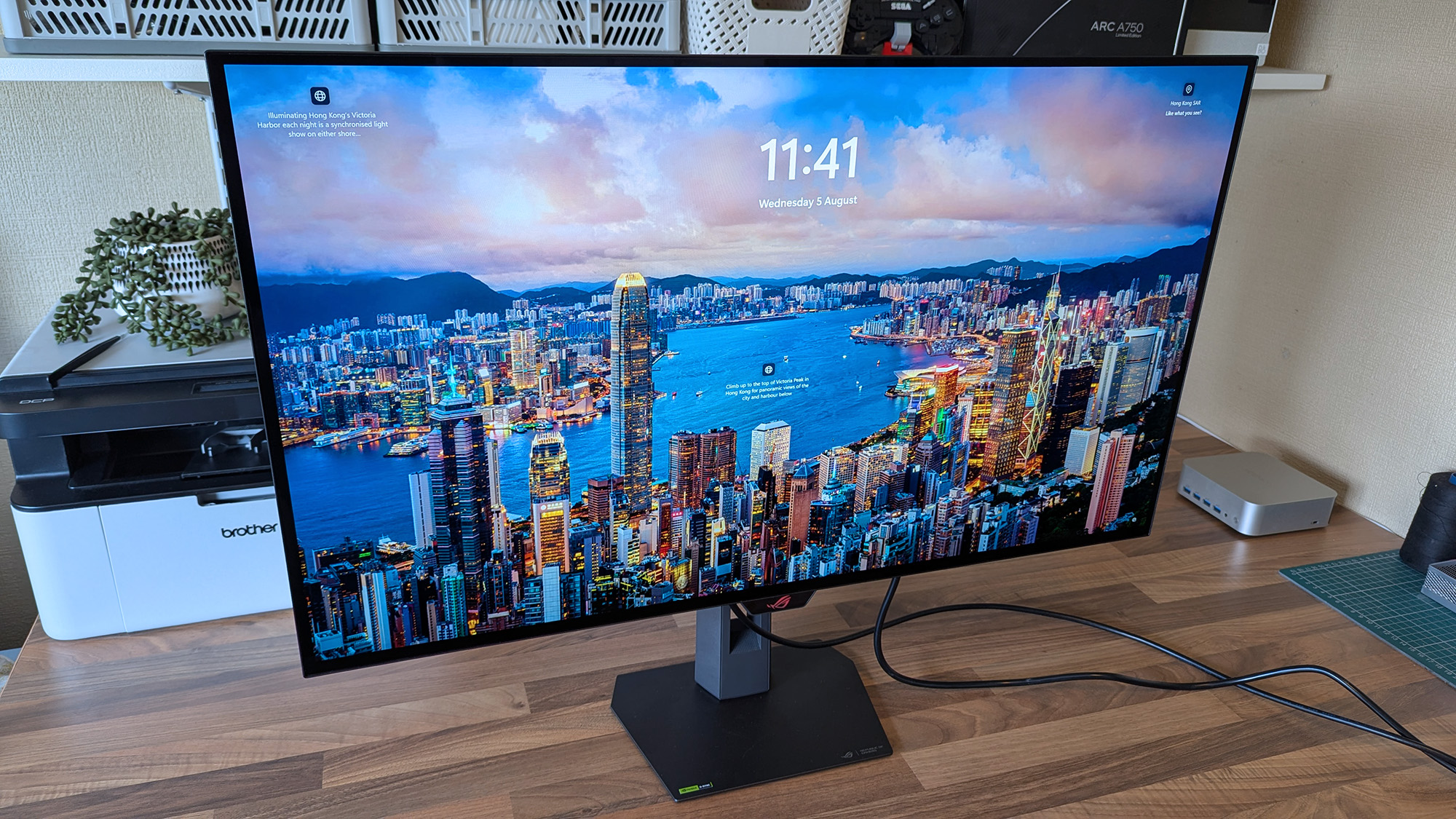
4K looks fantastic in Windows 11, and UHD is perhaps better suited to gaming if you don't want to stress your PC. (Image credit: Ben Wilson | Windows Central)
The ROG Strix XG32UQWMS is targeting a September launch for $899, with specific US retailers to be confirmed. In the United Kingdom, that converts to £819, with planned third-party resellers including Amazon UK, Currys, and Very. In the meantime, you can sign up for availability notifications on the monitor's official ASUS listing for your region.
ROG Strix XG32UQWMS sample specifications
Component
Spec
Display type
WOLED
Resolution
UHD (3840 x 2160) FHD (1920 x 1080)
Refresh rate
240 Hz (UHD) 480 Hz (FHD)
Brightness
330 cd/m² (typical) Up to 1,500 cd/m² (peak)
Viewing angle
178°/ 178° (vertical/horizontal)
Response
0.03 ms (Gray-to-Gray)
Dimensions
28.27" x 22.13" x 7.40" (71.8 x 56.2 x 18.8 cm)
Weight
10.64 – 14.46 lbs (4.83 – 6.56 kg)
Originally announced at Computex 2026, ASUS targets a September launch in the United States at $899, with sign-ups offered for availability notifications.View Deal
Is the 32-inch Strix OLED easy to set up?
The chunky middle section makes it much easier to move this monitor around.Ben Wilson | Windows CentralThis push-button release system is inspired and makes the stand easy to attach.Ben Wilson | Windows CentralThe height-adjustable table stand is heavy, but it's definitely sturdy.Ben Wilson | Windows CentralIf you prefer a VESA mount, you'll have to provide your own screws.Ben Wilson | Windows CentralThe footplate fixes tight with a simple thumbscrew and feels secure.Ben Wilson | Windows Central
I'm a big fan of toolless setups wherever they appear, and ASUS ROG wins points for delivering a straightforward process here. Everything hinged on a push-button release mechanism that either gripped the stand or the VESA mount; I used the former and attached the footplate with a simple thumbscrew.
I'm a big fan of toolless setups wherever they appear, and ASUS ROG wins points for delivering a straightforward process here.
The display alone weighs 9.92 lbs (4.5 kg), and adding the VESA mount brings the total to 10.64 lbs (4.83 kg) in a mounted setup. Otherwise, the foot plate and strut together weigh 4.54 lbs (2.06 kg), controlling height with a sturdy but not overly stiff response. On my desk, the monitor is 14.46 lbs (6.56 kg) overall.
Ports aplenty, but you only get a DisplayPort cable and AC power in the box.Ben Wilson | Windows CentralThe proximity sensor helps the monitor automatically dim when I move away, preventing burn-in.Ben Wilson | Windows CentralASUS throws in a cute pouch for spare parts I won't use.Ben Wilson | Windows CentralA big, satisfying peel of a protective plastic film under the advertisements is all that remains.Ben Wilson | Windows Central
Attaching the stand gave me a clear view of the ports and navigation via the multi-function button (MFB) located behind the bottom-mounted ASUS ROG logo and its accompanying "Neo" proximity sensor. It's a pretty standard affair that matches rival brands, and its controls should feel familiar to most people.
While there are two HDMI 2.1 ports, a pair of USB-A 3.2 Gen 1 with a hub port, and a headphone jack, there's only a single DisplayPort cable in the box for its matching DP 1.4 port, along with the AC cord. Bundling a free USB-B cable shouldn't be too expensive, and I'm disappointed to see it missing here.
Does the 32-inch Strix OLED look good?
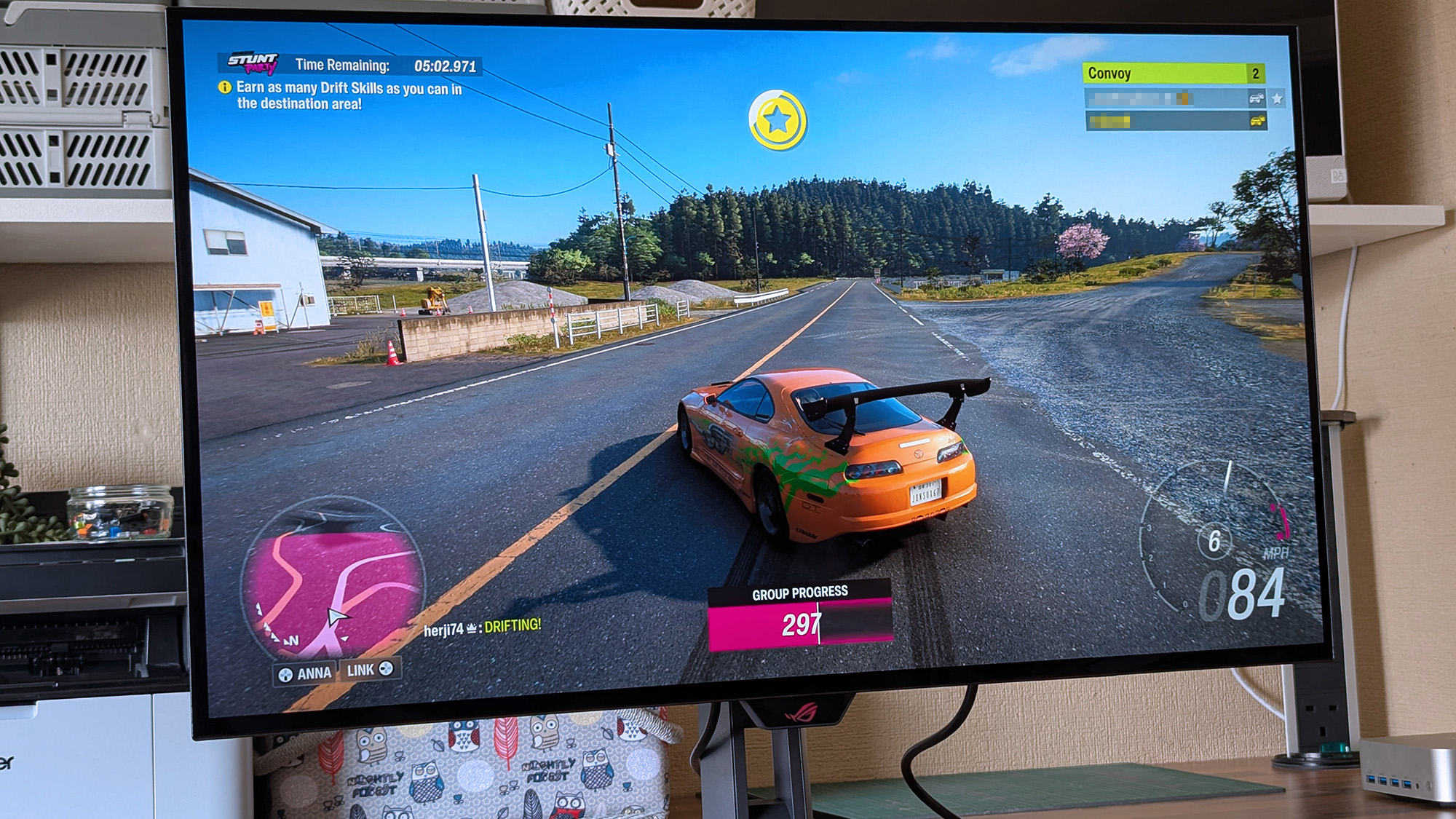
Now that I've played on an OLED monitor, it'll be hard to go back to my IPS screen. (Image credit: Ben Wilson | Windows Central)
Moving from a 27-inch IPS Alienware monitor to an OLED panel made its benefits immediately obvious, with an experience similar to the one I get from my LG C2 TV in the living room. High contrast, deep blacks, and crisp visuals come with its 4K resolution and that smooth 240Hz refresh rate. Windows 11 adjusted my settings accordingly, and the monitor looks great out of the box.
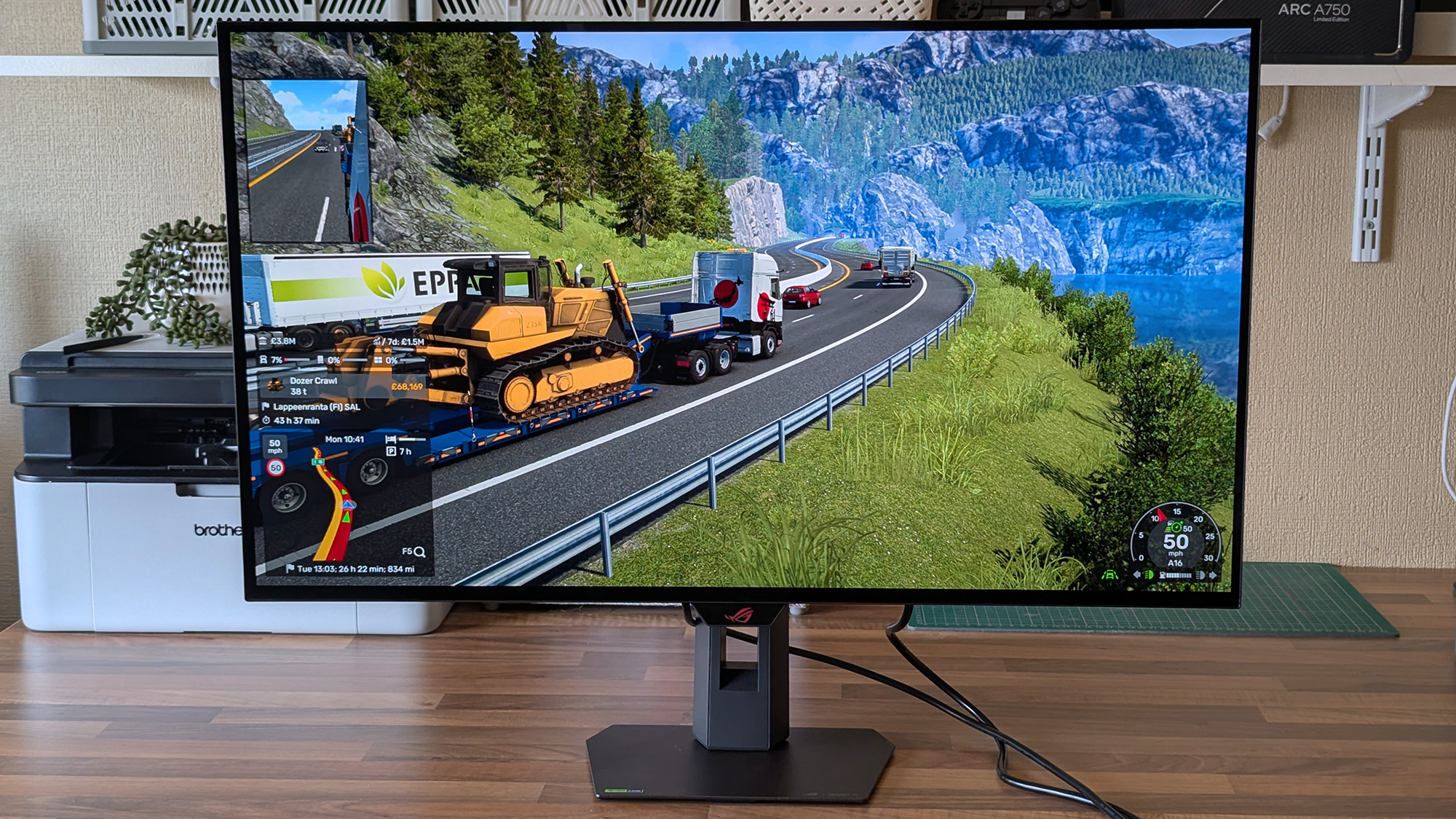
The UHD @ 240Hz mode looks fantastic, and I'm left wondering who would ever want to switch to 1080p for the sake of 480Hz on a 32-inch display.
In motion, the UHD @ 240Hz mode looks fantastic, and I'm left wondering who would ever want to switch to 1080p for the sake of 480Hz on a 32-inch display. I know it has its place in ultra-competitive shooters like Counter-Strike 2 and its many rivals, but 240Hz still feels like plenty to me. If you're the target audience, I think you'll be happy, because FHD gameplay still looks quite good.
There are plenty of visual tweaks to make in the OSD, primarily balancing brightness, if you need them.Ben Wilson | Windows CentralText looks fine, aided mostly by the sheer clarity offered by 4K in the first place.Ben Wilson | Windows Central
Up close, the clarity of on-screen text looks fine; nothing particularly groundbreaking, but nothing looks noticeably fringed when I sit at a comfortable distance in UHD mode. Adjusting ClearType in Windows 11 might give results that better suit you, but I didn't feel like anything looked out of place during my usual daily work and gaming.
The OSD is at least easy to navigate, and I could install the DisplayWidget Center if I really wanted to use a mouse to tweak several settings at once. Otherwise, the "TrueBlack Glossy" panel looks significantly darker at a glance than the other screens in my office, which certainly helps with the deep blacks OLED is famous for, and I found the visible room reflections were tolerable.
Testing the display
Out of the box, the XG32UQWMS defaults to "Racing mode", hitting 99% of the DCI-P3 color gamut as advertised, and sRGB accuracy earns a perfect score, while Adobe RGB maxes out at 93%. Without changing settings, a 100% brightness level reached around 306 to 311 nits, so getting it to 330 nits will require a bit of tweaking. On the whole, I'm satisfied with its stock settings.
Should you buy the 32-inch Strix OLED?
At this price, it's certainly considered an investment, but burn-in prevention tools make it much easier to recommend. (Image credit: Ben Wilson | Windows Central)
You should buy this if ...
✅ You want an OLED monitor built for preventing burn-in
✅ You're a competitive gamer who thrives on high refresh rates
You should not buy this if ...
❌ You want an out-of-the-box USB hub monitor
A built-in presence sensor probably sets off alarm bells for some gamers, but the proximity detection is literally there to help protect this OLED panel by switching off when you walk away. That, along with adjustments to uniform brightness and pixel-cleaning settings, helps prevent burn-in, which was my biggest concern with monitors like these. ASUS definitely could have thrown in a free upstream USB cable for its hub, but the display itself is solid, so it still wins praise.
ASUS ROG
Strix OLED XG32UQWMS
Due for release in September 2026, this OLED gaming monitor should be at the top of your considerations if you're shopping around.
If you don't have the cash reserves to fund a new GPU, RAM, or SSD, then consider upgrading the visuals on your PC with a new monitor. Upgrading the size or the panel from IPS/VA to OLED can give your games a vivid visual boost. At Best Buy, you can currently grab the magnificent MSI MAG 321UPXB gaming monitor, returning to its lowest-ever price of $599.99. That's a saving of $130 from the original $729.99 list price on the Best Buy store page.
The MSI MAG 321UPXB is a premium gaming monitor with all the bells and whistles for producing stunning images. The monitor is a flat-panel with a 32-inch viewable area and a high-detail 4K (3,820 x 2,160) UHD resolution. The QD-OLED panel has a fast refresh rate up to 240Hz and a blisteringly fast 0.03ms gray-to-gray response time thanks to the OLED panel tech. The combination of fast refresh and response times produces very smooth motion in games and eliminates ghosting artifacts.
The display also has an anti-reflective treatment to avoid light sources disrupting your viewing experience, plus it is compatible with Nvidia's G-Sync technology to help eliminate screen tearing by matching the monitor's refresh rate to the output of the game you're playing. To hit the high refresh rates of this monitor, you will require a powerful graphics card or use frame-generation techniques to boost frame rates. So you don't need to worry about the refresh rate of this gaming monitor bottlenecking your gaming PC.
MSI's MAG 321UPXB is a great 32-inch QD-OLED 4K gaming display. Get up to a 240Hz refresh rate, 0.03ms response time, and support for HDR 400. Connectivity includes USB-C and HDMI. View Deal
The MSI's panel is DisplayHDR True Black 400-certified and supports VRR (variable refresh rate) for gaming consoles like the PlayStation 5 and Xbox Series X. Ports are also plentiful, with two HDMI 2.1, one DisplayPort 1.4a, and one USB-C (DisplayPort Alt Mode) to choose from. For peace of mind, there's also a 3-year manufacturer's warranty that includes coverage for the dreaded OLED burn-in.
The MAG 321UPXB has a list price of $729.99 at Best Buy, but is currently $599.99 for a limited time only.
The ongoing global memory crisis has made upgrading an existing PC or building a new one a lot more expensive, with RAM, SSD, and graphics card prices all climbing in recent months. However, gaming monitors have become far more affordable than they were just a couple of years ago, especially when it comes to OLED. If you are looking for a new display for your setup, you could consider the Gigabyte GO27Q24A, a 27-inch QHD 240Hz QD-OLED monitor which is currently down to just $299.99 from its usual listed price of $449.99 on Newegg.
The monitor offers pretty decent specs for the asking price including a third-gen 27-inch QD-OLED panel with a 2560x1440 resolution, which is considered the sweet spot for most gaming setups. It also offers a fast refresh rate of 240 Hz and a response time of just 0.03ms GTG, which makes it perfect for fast-paced games without compromising on the visual fidelity. For esports lovers, the monitor comes with a feature to quickly switch display resolutions or swap to a specific aspect ratio (such as a 4:3 ratio or a dedicated 24-inch custom format size) with a single click using a dedicated physical button.
Gigabyte's 27-inch gaming monitor packs a third-gen QD-OLED panel with a 1440p resolution and support for up to 240 Hz refresh rate, 10-bit color, 99% DCI-P3 coverage, and fast response time of 0.03ms GTG. View Deal
In terms of color, Gigabyte claims up to 99% coverage of the DCI-P3 gamut with support for up to 10-bit color and a factory calibrated Delta E<2 rating. With a peak brightness of 400 nits in HDR, expect lower brightness levels at SDR, though it should be enough for most indoor use cases. Gigabyte has also added Black Equalizer 2.0 which essentially improves visibility in dark scenes by enhancing shadow detail without over-exposing the rest of the image.
As for connectivity, you get two HDMI 2.1 ports and a Displayport 1.4, meaning you can hook this up to your console alongside your PC or laptop. There’s even a standard 3.5mm earphone jack to plug in your headphones or speakers.
For $299.99, the Gigabyte GO27Q24A is one of the most affordable ways to step into OLED gaming without sacrificing key features like a high refresh rate, HDMI 2.1 connectivity, and a 1440p resolution. It may not be the brightest QD-OLED gaming monitor on the market, but at this price, it's hard to complain.
Große 4K-Monitore bieten ausreichend Arbeitsfläche für Bildbearbeitung, Videoschnitt, umfangreiche Tabellen oder mehrere gleichzeitig geöffnete Fenster. Besonders praktisch sind Modelle, die etwa ein Macbook über ein einzelnes Kabel mit Bild, Daten und Strom versorgen können.
Der BenQ PD3225U kostet bei Amazon aktuell nur 849 Euro statt der üblichen 912,99 Euro. Das entspricht einer Ersparnis von 7 Prozent. Zuletzt wurden mindestens 869 Euro verlangt, im Durchschnitt liegt der Preis ungefähr auf Höhe des Statt-Preises. Das aktuelle Angebot ist daher besonders attraktiv. Der Händler führt den Monitor zudem als “Amazons Tipp”.
Was der BenQ PD3225U zu bieten hat
Der 32 Zoll große LCD-Monitor löst mit 3.840 x 2.160 Pixeln im Seitenverhältnis 16:9 auf. Die Bildwiederholrate beträgt 60 Hertz, die Reaktionszeit 6 Millisekunden. Damit richtet sich das Modell vor allem an Foto- und Videobearbeiter sowie produktive Mac-Nutzer und weniger an Spieler, die eine besonders hohe Bildrate erwarten. Freesync wird dennoch unterstützt.
BenQ setzt auf IPS-Black-Technologie mit einem Kontrastverhältnis von 2.000:1. Der Betrachtungswinkel liegt bei 178 Grad. AQColor-Technologie, HDR sowie die Unterstützung von Display P3, DCI-P3, sRGB und Rec.709 sollen eine präzise Farbdarstellung ermöglichen. Der Monitor ist bereits ab Werk kalibriert und deckt laut Produktangaben 99 Prozent des angegebenen Farbraums ab.
Über Thunderbolt 3 können Sie Bild, Video, Daten und bis zu 85 Watt Ladeleistung über ein einziges Kabel übertragen. Die Bandbreite liegt bei bis zu 40 Gbit/s. Per Daisy-Chain können bis zu zwei 4K-UHD-Monitore miteinander verbunden werden.
Zur weiteren Ausstattung gehören zwei HDMI-Anschlüsse, ein Displayport, ein Thunderbolt-3-Anschluss sowie ein USB-Hub mit drei USB-3.0-Anschlüssen. Amazon nennt insgesamt vier USB-Ausgänge. Unterstützt werden außerdem USB-C, USB-B, USB 3.2 Gen 2, Kopfhörer, der mitgelieferte Hotkey Puck G2 und eine KVM-Funktion. Letztere erlaubt es, mehrere angeschlossene Computer mit derselben Tastatur und Maus zu bedienen.
Das Modell misst 27,3 x 71,5 x 47,8 Zentimeter und wiegt 14,2 Kilogramm. Der Standfuß lässt sich hoch positionieren, sodass der Bildschirm oberhalb eines aufgeklappten Notebooks stehen kann.
Kompatibel ist der Monitor mit Macs sowie Geräten, die Thunderbolt 3, Displayport, HDMI oder USB-C unterstützen.
Warum sich das Angebot lohnt
Mit durchschnittlich 4,3 von 5 Sternen aus knapp über 60 Bewertungen wird der BenQ PD3225U überwiegend positiv beurteilt. Nutzer loben vor allem die Bildqualität, die große Arbeitsfläche und die Zusammenarbeit mit Macbook Pro und Mac Mini. Besonders häufig wird das Modell für Videoschnitt, Farbkorrektur, Präsentationen, Designarbeiten und Programmierung empfohlen.
Kritik gibt es an den integrierten Lautsprechern, deren Klang ein Käufer als deutlich schlechter als bei einem 27-Zoll-iMac beschreibt. Ein anderer Kunde berichtet von einer ungewöhnlich langsamen Ladegeschwindigkeit seines Macs, vermutet jedoch einen Defekt.
Wer einen schnellen Gaming-Monitor, besonders gute Lautsprecher oder ein kompakteres Modell sucht, sollte Alternativen prüfen. Für Mac-Nutzer sowie Foto- und Videobearbeiter, die viel Arbeitsfläche, eine präzise Farbdarstellung und eine Ein-Kabel-Verbindung benötigen, ist der BenQ PD3225U zum aktuellen Preis von 849 Euro dagegen interessant.
A new option for the Copilot key has been spotted in testing
Windows 11 users are getting the ability to remap it to 'Do nothing'
This comes on top of work already underway to redefine the key to Right Ctrl or the context menu
Microsoft's latest revolutionary idea for Windows 11 is to have a key on your keyboard which can be remapped to do absolutely nothing.
Windows Latest noticed the latest twist in the tale of the Copilot key, as highlighted by regular leaker PhantomOfEarth on X, who spotted the development hidden in a recent Windows 11 preview build.
In the choices to customize the Copilot key – which, by default, summons Windows 11's Copilot AI (of course) – there's a new option to simply 'Do nothing'.
Yes, that's correct – you can change the key to simply be a pointless piece of plastic that does precisely zip. (Or at least you'll be able to in testing, when this ability comes into play, that is, although some Windows 11 testers have reportedly seen it live in preview already).
As you may have seen earlier this year, Microsoft is working on bringing fresh options to the Copilot key that include customizing it to invoke the context (right-click) menu, and to turn it back into Right Ctrl (which was the key that the Copilot button replaced on Copilot+ laptops and some keyboards).
Analysis: do nothing, be happy
(Image credit: rui vale sousa / Shutterstock)
What's the point of a key that does nothing? Good question. Maybe it's the keyboard equivalent of a stress ball – you can hammer on that key as much as you want when you're really annoyed, and it won't splurge a load of characters into the document you're working on as you exorcise your frustrated demons.
Okay, so maybe not, but perhaps the idea is that this is aimed at people who really hate the Copilot key, but haven't decided what they might want to remap it to. So, they can go ahead and elect for the key to do nothing if it's accidentally hit, while they figure out what they might want to redefine in its place. That's stretching things, admittedly, but it's the best guess I have.
At any rate, it's a harmless enough option, although it feels inescapably odd to have a 'blank' key on your keyboard. How far we've fallen since the Copilot key was first revealed and trumpeted by Microsoft as the biggest thing to happen to keyboards in 30 years since the Windows key was introduced. And indeed more recently, Microsoft promoted the Copilot key as the "button you can press to fix everything", so there's some irony that it could soon (optionally) become the button you can press to fix 'nothing' in a very literal sense.
Don't forget that you don't have to wait for Microsoft's Copilot key remapping functions to arrive in the release version of Windows 11. You can use the Keyboard Manager in PowerToys to do this instead, although it'll be far neater to have these options in Windows 11's settings, of course.
The app, LG Monitor App Installer, installs itself through a Windows Update alongside monitor driver updates. LG Monitor App Installer then pushes ads for a 30-day free trial for McAfee, as well as other software, via a pop-up on affected systems, multiple users have reported.
This has drawn negative attention recently, with complaints surfacing on Reddit and a subsequent video from YouTube channel Gamers Nexus. In the video, editor-in-chief Steve Burke said that the publication paid $1,200 for an LG UltraGear 3GX900A-B gaming monitor (the monitor’s price dropped to $600 two days later, Burke said) for testing and replicated the behavior “several times” across “multiple” Windows 11 systems.
The app, LG Monitor App Installer, installs itself through a Windows Update alongside monitor driver updates. LG Monitor App Installer then pushes ads for a 30-day free trial for McAfee, as well as other software, via a pop-up on affected systems, multiple users have reported.
This has drawn negative attention recently, with complaints surfacing on Reddit and a subsequent video from YouTube channel Gamers Nexus. In the video, editor-in-chief Steve Burke said that the publication paid $1,200 for an LG UltraGear 3GX900A-B gaming monitor (the monitor’s price dropped to $600 two days later, Burke said) for testing and replicated the behavior “several times” across “multiple” Windows 11 systems.
Users says they've observed LG gaming monitors automatically installing unwanted software on PCs
LG's terms of service warn that conversations may be "captured and processed" on TV with the latest version of webOS
The terms say you must now warn guests they may be recorded "in compliance with applicable wiretapping… laws"
How smart should a smart TV be? According to LG's latest TV terms and conditions, the answer is "not quite smart enough to comply with wiretapping laws", because that's now your responsibility if LG captures the voice of a guest in your house through its AI voice services. Though the situation with LG monitors appears to be even more dramatic.
As Gamers Nexus reports, some LG monitors appear to be installing adware on Windows PCs without asking for permission: in addition to the LG Monitor App Installer, they also install McAfee Scam Detector.
LG's own app requires full access to all system resources, which potentially includes all your online activity, logins, hardware, location and more — while McAfee has a long history of being installed on devices as 'bloatware', and people are not reacting positively to suddenly finding it on their PC.
There may be a perfectly innocent explanation for all of this, but when big tech firms keep getting caught doing bad things because they thought they could get away with it, it's no wonder people are assuming the worst.
The bit that's causing consternation regarding smart TVs is part 6(d) of the new LG Electronics terms of service, headed Voice Recognition and Privacy Compliance.
As Notebookcheck's Hannes Brecher notes, the section states that it's your responsibility "to obtain all necessary consents from any third parties whose voices may be captured by the Product and to notify household members and guests that their voices may be captured and processed, in compliance with applicable wiretapping, eavesdropping, and privacy laws."
There are three ways around that. One, you can turn off all microphone-based features. Some people won't mind that, but they can be useful — especially asking it for settings you don't know how to find.
Two, you can avoid installing the latest software — but that means you won't get any security updates, which are important (to protect your privacy, ironically, among other things).
Or you can disable your TV's connection to the internet so it can't send information back, but that obviously makes it less useful, and will also disable the voice controls anyway.
I think the terms and conditions are an attempt at corporate ass-covering rather than something sinister: the preceding paragraph talks specifically about when "a product with voice recognition functionality is used" and it's possible that "family members, guests, children, and bystanders" might be overheard; if you're choosing to activate AI-based voice features then of course voices are going to be captured and processed in order for those features to work.
At the same time, it does seem broad enough to let LG use people's voices as AI inputs, rather than just accidental capture. And in the context of what LG's doing with PC monitors (not to mention AI training's very, ahem, casual relationship with consent and copyright), that's a worry — and people online increasingly have no tolerance for anything like this, as the responses on Reddit and Gamers Nexus' original YouTube video have shown.
We've approached LG for comment on these claims, and will update the story when we hear back.
The gaming monitor market is filled with high-quality displays that offer enough features to provide the most immersive gaming experience. OLED monitors are right at the forefront of monitors in achieving the latter, with exceptional deep black levels thanks to their high contrast ratio.
It's not all just about the panel type, though. The display resolution, refresh rate, response times, and brightness levels all play a significant part in allowing monitors to blossom, and all of those aspects also determine pricing (outside of potential market condition changes).
That's exactly where the LG UltraGear 45GX950A-B comes into play. It's a 5K2K ultrawide OLED monitor, which means its display resolution is 5120x2160, with even sharper image quality than a 4K display. It's easily one of the best gaming monitors in 2026, and is the kind of monitor that would define an 'ultimate endgame' gaming experience in terms of visuals.
Despite the obvious and eventual GPU upgrade I'll have to make when using a 5K monitor, it hasn't stopped me from keeping my eyes peeled for it, particularly whenever it receives a significant price drop.
The LG UltraGear 45GX950A-B is one of the most immersive gaming monitors on the market, and arguably the best OLED ultrawide money can buy, with an immersive 800R curvature and 5K2K resolution,View Deal
Expand your gaming immersion with the LG UltraGear 45GX950A-B 5K2K OLED ultrawide, ready to completely enhance gaming experiences across the board, thanks to its 800R curvature and 5K display resolution.View Deal
Having used the LG UltraGear 45GS95QE OLED ultrawide — which is very similar to the GX9, with the only difference being its 3440x1440 resolution — I can say that the step up in resolution would make LG's 5K2K display worth every cent, despite its high price.
(Image credit: Dell / Alienware)
With the new Alienware AW3926QW 5K2K OLED ultrawide slated for launch by the end of June, LG's top-of-the-line monitor might have its money's worth. Thanks to the AW3926QW's 39-inch display size, there's a higher pixel density at 5K2K, meaning image quality will be much sharper than what the LG GX9 has to offer.
It is an RGB stripe tandem OLED panel, which reduces text fringing and provides significantly higher and more consistent brightness compared to other OLED monitors.
Most importantly, the big takeaway is that the AW3926QW's price is rumored to be at $1,100 (around £824 / AU$1,572). That's a very generous and affordable price tag, since other monitors with the same specifications are far more expensive.
The great thing is that more details on pricing should be coming very soon, so there's a good reason to weigh the options between the two monstrous displays.

 Login
Login