Today was a cloudy and rainy day In my part of Florida and I was bored, so I decided to try Tahoe 27 Beta 2. I did a thorough cleaning of my Mac mini, made two SupeDuper clones and Time Machine backup. I'm happy to report the download and installation went as smooth as maple slurple! I'm still working my way through it but so far all seems well. I'm sure some minor glitches may occur along the way, but overall it seems solid.
Hi!
I apologize if this is easy to solve. I've read every article Apple has on the subject and still can't figure it out. In the Menu Bar, there is a crescent moon icon. Today it is filled in with white. When I click it, a box pops up telling me that Focus is on. Somehow Do Not Disturb is involved, as it is "On".
I cannot figure out how to turn off all Focus and turn off all Do Not Disturb. I've clicked each section and box to no avail. I also can't figure out how I turned this stuff on (by...
A Apple TV 4K é a melhor opção de set-top box para quem quer aproveitar ao máximo todos os serviços e recursos disponibilizados pela empresa.
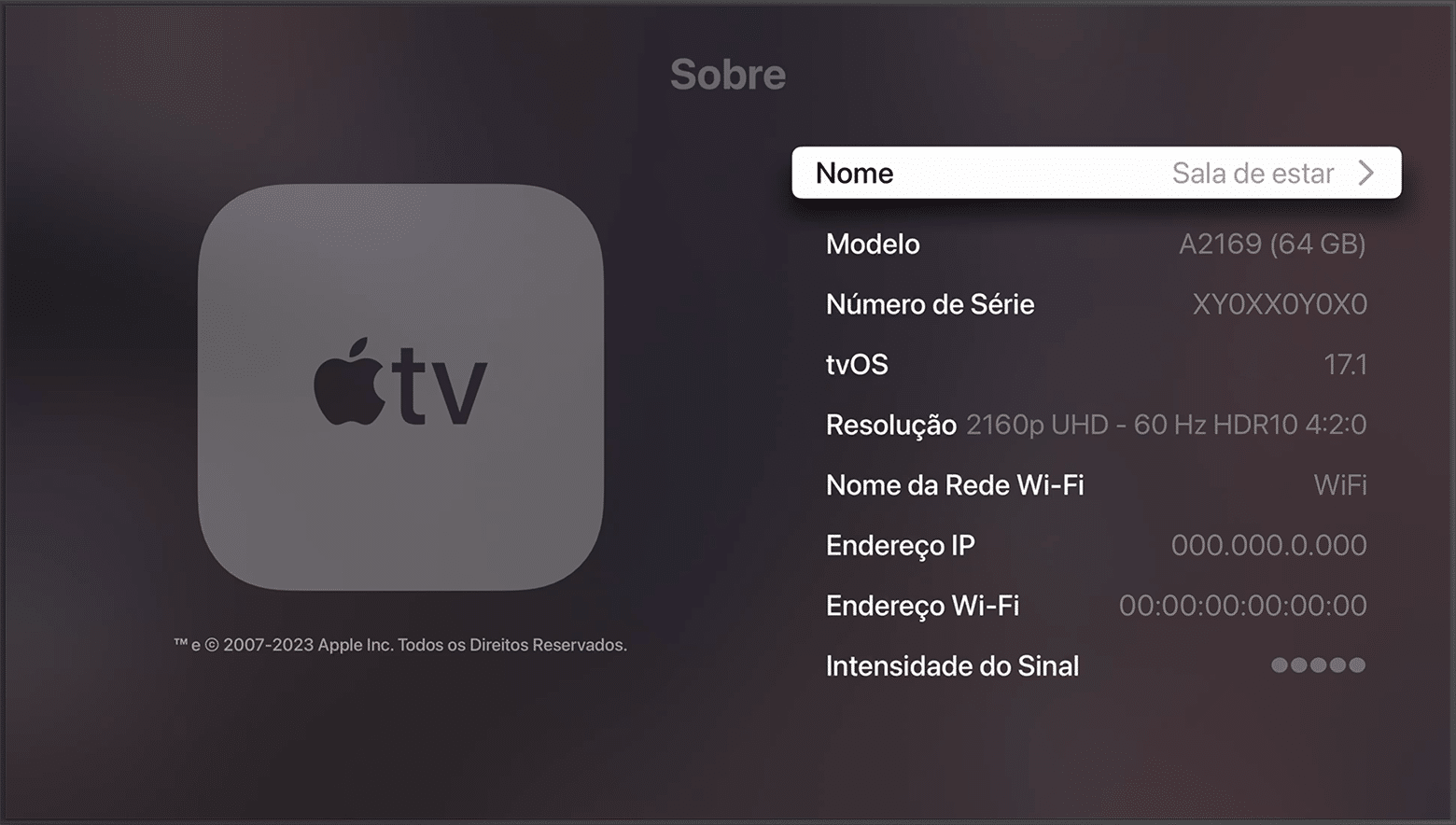
O que torna essa experiência tão mágica é o sistema operacional tvOS, feito especialmente para esse produto. Para garantir todos os recursos mais recentes e também as correções de erros, é imprescindível manter o OS sempre atualizado.
Veja como conferir qual versão do tvOS sua Apple TV está rodando!
NOTA DE TRANSPARÊNCIA: O MacMagazine recebe uma pequena comissão sobre vendas concluídas por meio de links deste post, mas você, como consumidor, não paga nada mais pelos produtos/serviços usando os nossos links de afiliado.
Como ocorre com os outros sistemas operacionais da Apple, o watchOS é frequentemente atualizado. Com isso, o seu Apple Watch recebe não só novos recursos, como também correções de segurança importantes.
Neste artigo, mostraremos como é possível conferir qual versão do sistema o seu smartwatch está rodando no momento, veja só! ⌚️
Material: alumínio ou titânio Cores: cinza-espacial, prateado, ouro rosa, preto brilhante, natural, dourado ou ardósia Tamanho: 42mm ou 46mm Conectividade: GPS ou GPS + Cellular Pulseiras: esportiva ou estilo milanês
NOTA DE TRANSPARÊNCIA: O MacMagazine recebe uma pequena comissão sobre vendas concluídas por meio de links deste post, mas você, como consumidor, não paga nada mais pelos produtos/serviços usando os nossos links de afiliado.
O macOS é o sistema operacional que equipa os computadores da Apple, os Macs.
Para receber os novos recursos e estar sempre protegido contra ataques ou brechas de segurança, é recomendável manter o seu dispositivo atualizado para a última versão disponível.
Veja como conferir qual versão do sistema seu Mac está usando! 👨💻
Cores: preto-espacial ou prateado Tela: padrão ou nano-texture Chips: M5 Pro ou M5 Max Memória: 24GB, 36GB, 48GB, 64GB ou 128GB Armazenamento: 1TB, 2TB, 4TB ou 8TB
Cores: preto-espacial ou prateado Tela: padrão ou nano-texture Chips: M5, M5 Pro ou M5 Max Memória: 24GB, 36GB, 48GB, 64GB ou 128GB Armazenamento: 1TB, 2TB, 4TB ou 8TB Adaptador de energia: USB-C de 70W ou 96W
Cores: azul-céu, prateado, estelar ou meia-noite Chip: M5 Memória: 16GB, 24GB ou 32GB Armazenamento: 512GB, 1TB, 2TB ou 4TB Adaptador de energia: USB‑C de 30W, 35W com duas portas ou 70W
Cores: azul-céu, prateado, estelar ou meia-noite Chip: M5 Memória: 16GB, 24GB ou 32GB Armazenamento: 512GB, 1TB, 2TB ou 4TB Adaptador de energia: USB‑C de 30W, 35W com duas portas ou 70W
NOTA DE TRANSPARÊNCIA: O MacMagazine recebe uma pequena comissão sobre vendas concluídas por meio de links deste post, mas você, como consumidor, não paga nada mais pelos produtos/serviços usando os nossos links de afiliado.
Saber a versão do sistema operacional que o seu dispositivo da Apple está rodando atualmente é muito importante — seja para buscar alguma ajuda com o suporte ou para saber se é a mais recente disponibilizada pela empresa.
Esse processo pode ser feito de um jeito supersimples no seu iPhone ou iPad, como mostraremos em detalhes nos parágrafos a seguir. Veja só! 🙂
NOTA DE TRANSPARÊNCIA: O MacMagazine recebe uma pequena comissão sobre vendas concluídas por meio de links deste post, mas você, como consumidor, não paga nada mais pelos produtos/serviços usando os nossos links de afiliado.
As the title says, along with iOS 26.6 and Apple Watch 26.6 all of which I've completed successfully. Probably the rest of the Apple devices as well if not now then soon.
My husband and I have iMacs, iPhones, iPads. We've never subscribed to an iCloud plan. We use DropBox for storing many files (I have a large amount because I tested for them in the beginning.
I routinely delete emails when they are not needed, delete sent mails after a few days, etc. I empty the trash almost every day. We store photos in Google Photos and Amazon photos,
My husband doesn't do this.
Recently he somehow lost many emails relating to an upcoming trip. (It occurred...
Just got a warning from Apple that OS27 and up will no longer support Intel-based apps. I've used Open Office for 15 years, and have several gigs of documents. Can't use Pages to open them - I just tried. I contacted Open Office support, and they've gone radio silent. Am I doomed to Microsoft Office or is there a work around? TIA
I greatly appreciate all these suggestions for other free programs, but they all run on Intel. Apple is updating to Rosetta, and none of these programs are going...
I have recently encountered a problem where I cant login to building society accounts. Its seems I need the current OS to do this but my Mac is 2017 and wont update.
Is there any solution apart from a new Mac?
I have an external SSD with several partitions, one of which doesn't show in Path Finder's sidebar (though it does in Finder). I've narrowed it down to a permissions problem: in Disk Utility the other partitions show 'Ownership: Disabled', but this partition it says 'Enabled'.
So I tried to change permissions. The other partitions show: (Me) Read & write
staff Read & write
everyone Read only
but this partition shows: System Read & write
wheel Read only
everyone Read only
so I...
I downloaded all my photos from Google photos so I can move them to the Apple Photos app.. So now I have a bunch of folders that have 100 or more photos in them but they also have 100 or more text files that end in json.
Deleting the text files from each folder manually in the Finder is gonna take forever. Is there an easy way to get rid of these text files out of each folder while keeping the photos? Thanks.
The display on my 2024 M3 MacBook Air is no longer working properly (see attachment). I can still work using an external monitor but the interior display is completely on the fritz.
I want to take the machine into the Apple Store to see what a new video card or screen would cost, but I would want to format the main ssd first because I do online banking on this machine and have other relatively sensitive information and I did not have the drive encrypted. Because the drivers for the...
Recently Time Machine takes forever to back to my 1TB external. There's still about 320GB of space, so I am not sure why this is happening.
I went ahead and deleted old backups that I can see in the TM folders. These are from ten years ago and not needed anymore. Even now, however, it seem to be taking too much time to backup.
The last backup said it needs 5 hours or more to complete, so I cancelled it when it was at 16 percent.
Do I need a new disk (this one seems fine but it is 8...
Ever since I updated to Tahoe 26.5.2 a few days ago, I've had an inordinate number of pages that "reloaded because a problem occurred". Prior to that, there were a couple of websites that were prone to this, but now it's almost every website I go to.
Jurassic Park, while beloved as a film, has been the subject of snarky memes for the infamous line in which one of the characters declares, "This is a Unix system, I know this!" while using a computer with an unusual 3D file manager interface.
Despite the memes, the film's production team was meticulous in accurately sourcing the right PCs (and adjacent details) for the sets—not too much of a surprise, given writer Michael Crichton's background with computing and his obsessive attention to detail in the book the film is based on.
Jurassic Park, while beloved as a film, has been the subject of snarky memes for the infamous line in which one of the characters declares, "This is a Unix system, I know this!" while using a computer with an unusual 3D file manager interface.
Despite the memes, the film's production team was meticulous in accurately sourcing the right PCs (and adjacent details) for the sets—not too much of a surprise, given writer Michael Crichton's background with computing and his obsessive attention to detail in the book the film is based on.

 Login
Login