A Copa do Mundo pode até ter acabado, mas o app Apple Sports segue ganhando novos recursos focados no esporte mais popular do planeta. A sua mais recente atualização (4.2), por exemplo, adiciona suporte a uma série de novas ligas de futebol, incluindo a tradicional Eredivisie, da Holanda.
Liberado hoje pela Maçã, o update torna possível acompanhar a temporada de equipes clássicas como AFC Ajax, PSV Eindhoven e Feyenoord Rotterdam, incluindo suas formações iniciais — algo que, de acordo com a companhia, também vale para “a maioria das ligas de futebol” presentes na ferramenta.
Além do “holandesão”, também chegaram ao Apple Sports a Primeira Liga da Bélgica, a Superliga da Dinamarca, a J1 League (do Japão), a Ekstraklasa (da Polônia), a Premiership (da Escócia) e a Superliga da Suíça.
Disponível no Brasil desde o início do ano, o Apple Sports é gratuito e pode ser instalado em iPhones com o iOS 18.0 ou mais recente. Além das principais ligas do futebol internacional (bem como outros esportes), ele também suporta a Série A do Campeonato Brasileiro.
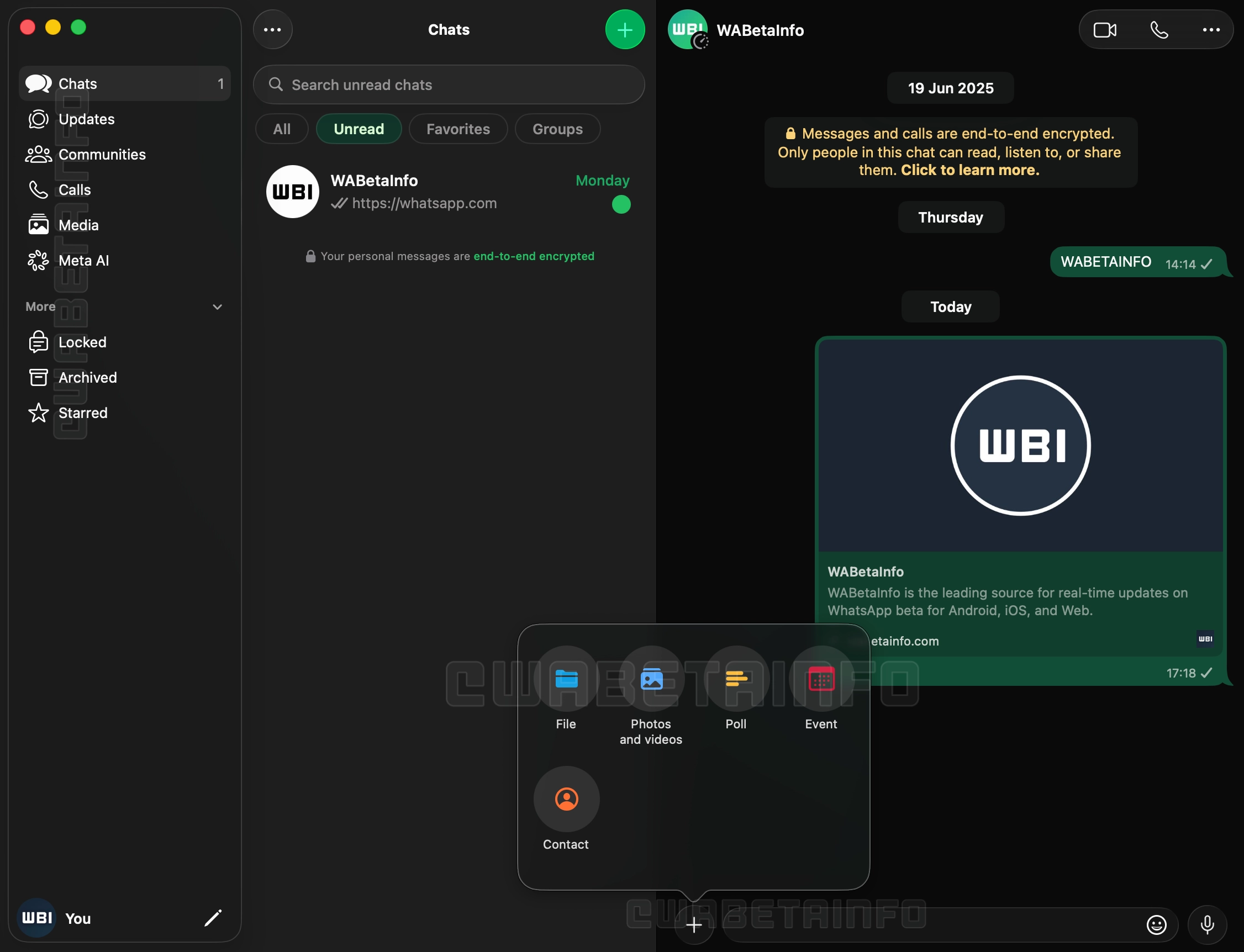
A nova versão, 26.27.73, além de contar com Liquid Glass, inclui uma nova barra lateral com textos que descrevem os ícones, abandonando a abordagem minimalista encontrada até então na versão de computador do mensageiro da Meta, e uma seção dedicada às Comunidades, que antes ficavam espalhadas pelo histórico de conversas do aplicativo.
Outra novidade é a adição do suporte às conversas trancadas, atualmente restritas aos iPhones e iPads. O acesso ao recurso no macOS, aos moldes da exigência do Face ID nos dispositivos móveis, também solicitará algum meio de autenticação para garantir a camada adicional de proteção, carro-chefe da funcionalidade.
Com essa atualização chegando para os usuários finais de maneira gradual nas próximas semanas, a disponibilização ampla da versão de Mac do WhatsApp (incluindo a versão da Mac App Store) conclui um trabalho de quase um ano unificando a linguagem visual do app no iOS, iPadOS e macOS.
Segundo o Gurman, a Apple desenvolveu pelo menos dois modelos do Mac Pro que nunca viram a luz do dia: um com processador da Intel — mesmo depois do lançamento da linha M1, curiosamente —, de codinome J170, para atender casos específicos; e outro equipado com o M3 Ultra, chamado internamente de J190 e previsto para ser lançado junto da última leva do Mac Studio, que chegou ao mercado no começo do ano passado.
Um caminho possível para a linha seria um suposto chip superior aos do sufixo Ultra; citado pelo jornalista como a variante “Extreme”, ele teria como objetivo oferecer o dobro de núcleos de CPU 1Central processing unit, ou unidade central de processamento. e GPU 2Graphics processing unit, ou unidade de processamento gráfico. em relação aos do Ultra, e o desenvolvimento do projeto chegou até o M3 antes de ser encerrado devido à preocupação com custos e demanda.
Genius Bar com IA?
Na mesma edição, o jornalista comentou que a Apple passou a testar a implementação de um sistema que utiliza IA para registrar conversas entre clientes e funcionários do Genius Bar.
Divulgação/Apple
Intitulado Live Notes, o recurso opcional testado em algumas Apple Stores permitiria que os funcionários do Genius Bar registrassem transcrições dos seus atendimentos com uma ferramenta capaz ainda de resumir as interações com os clientes. Ambas as partes deverão consentir com a gravação e o resultado final é passível de ajustes, sendo adicionado ao iPad do funcionário como parte do registro do atendimento ou reparo.
Ainda assim, o teste gerou preocupações entre os empregados, os quais temem que esses registros poderão ser usados para metrificar avaliações de desempenho e o trabalho dos colegas. A Apple teria descartado essa possibilidade, afirmando que as gravações não serão armazenadas e que nem mesmo os gerentes possuirão acesso às transcrições.
Notas de rodapé
1
Central processing unit, ou unidade central de processamento.
2
Graphics processing unit, ou unidade de processamento gráfico.
Nosso aplicativo — disponível para iPhone, iPad, Apple Watch e Mac — acaba de receber uma atualização significativa para a versão 5.0.2, repleta de melhorias e correções pedidas por muitos de vocês. 😉
Atendendo a muitos pedidos, implementamos de volta o gesto de deslizar a partir do canto da tela para sair de um post e retornar à tela inicial do app.
Também corrigimos um comportamento que incomodava bastante: ao tocar em links externos dentro de um post e depois voltar para o app, agora você retorna exatamente para a mesma posição de leitura em que estava — sem perder o lugar.
Os favoritos também passaram por uma revisão importante e agora são devidamente sincronizados entre iPhone, iPad e Mac.
Melhorias na marcação de posts como lidos/não lidos, incluindo o retorno de uma seção “Posts” nos ajustes do app;
A possibilidade de adicionar tíquetes ao Carteira (Wallet) diretamente pelo app;
Aprimoramentos gerais em acessibilidade.
Agradecimentos
Fica aqui um agradecimento especial ao Cassio Rossi e ao Mozzer pelas colaborações feitas em nosso projeto no GitHub para esta versão.
A atualização já está disponível na App Store — e, como sempre, vale a pena atualizar o quanto antes para aproveitar todas as novidades. Em breve, é claro, voltamos com mais! 😉
Ou seja, eles se comportam exatamente como mostrado nas capturas de tela da App Store quando acessados de praticamente qualquer lugar do mundo, exceto em terras tupiniquins.
A maioria dos aplicativos é publicada por contas de desenvolvedores com apenas um registro na loja da Maçã. Esses aplicativos também tendem a usar políticas de privacidade semelhantes — ou possuem até mesmo políticas idênticas.
Ao aprofundar sua investigação, a reportagem encontrou um repositório público no GitHub contendo instruções para um agente de IA criar aplicativos simples, com código criado por meio de vibe coding, que servem como fachada para as plataformas de apostas.
As instruções exigem que cada aplicativo inclua de três a cinco interfaces visíveis, use um nome comercial e um ícone com tema animal (um dragão, boi, coelho, rato ou tigre) e suporte roteamento controlado remotamente para o aplicativo local, uma página da web dentro do aplicativo ou um site externo.
Elas também afirmam que os aplicativos devem ser construídos em torno de conceitos simples e imediatamente compreensíveis, com uma marca clara e várias áreas de recursos proeminentes, mas suficientemente diferentes entre si para parecerem produtos separados.
O repositório também inclui instruções explícitas destinadas a impedir que os aplicativos sejam sinalizados como suspeitos durante a revisão da App Store. Isso inclui atribuir a cada aplicativo códigos de inicialização e configuração remota com nomes exclusivos, dificultando a identificação deles como parte do mesmo grupo pelos revisores.
O método para burlar as diretrizes de revisão de apps da Apple tem funcionado, já que o próprio sistema de recomendação da App Store direciona os usuários para outros aplicativos suspeitos com mais frequência do que para aplicativos genuínos.
Procurada, a Apple ainda não comentou as descobertas da reportagem.
Fechando a semana com a nossa tradicional seleção de promoções na App Store para esta sexta-feira!
Canon: Chord Composer, desenvolvido por Dylan Shade, destaca-se como uma ferramenta de composição extremamente intuitiva e inspiradora — e, por isso, é o nosso destaque do dia.
O app combina três modos de criação (Instant Inspiration, Intelligent Discovery e Total Control), permitindo desde progressões totalmente aleatórias até construções manuais detalhadas.
A interface, limpa e direta, facilita a experimentação dos acordes de diferentes estilos (jazz, guitarra, piano, ukulele) e a audição de tudo com reprodução realista, seja você um músico profissional ou apenas um entusiasta no assunto.
Desbloqueie sua criatividade musical! Aproveite a oferta!
Abaixo outros jogos/apps que, juntos, somam quase R$60 em descontos:
A Apple e o Google foram intimados por um procurador de San Francisco a remover aplicativos que gerem imagens de nudez não consensuais.
As notificações extrajudiciais foram enviadas pelo procurador David Chiu, que exigiu a remoção de 13 aplicativos de troca de rostos (face swap) os quais permitem que usuários criem imagens de nudez sem o consentimento das pessoas envolvidas, com o auxílio da inteligência artificial (IA). Ele solicitou ainda o rompimento das relações comerciais com os desenvolvedores desses apps.
Chiu comentou o conflito com esse segmento de apps e a problemática da relação desses aplicativos com grandes empresas de tecnologia:
Gerar imagens íntimas não consensuais é ilegal, prejudicial e completamente inaceitável. […] Essas empresas têm a responsabilidade de garantir que os aplicativos em suas plataformas não facilitem abuso sexual. […] O fato de algumas das maiores e mais consolidadas empresas de tecnologia do mundo estarem facilitando isso precisa acabar.
Pesquisadores das universidades de Cornell e Georgetown descobriram que, de 155 apps de criação de deepfakes, 70% deles permitiam gerar conteúdos com nudez sem quaisquer restrições — demonstrando que mesmo os apps que não são promovidos como tal não impedem práticas criminosas. Uma investigação da Tech Transparency Project (TTP) revelou números parecidos.
A Apple possui um histórico delicado com o tema: embora esses estudos apontem leniência com a existência desse tipo de ferramenta na App Store, a Maçã possui um rastro de combate a esse tipo de prática — ainda que sob pressão governamental —, a exemplo da ameaça de remoção do X em meio à polêmica com a geração de imagens de nudez com o auxílio do Grok.
Representando o Google, Dan Jackson afirmou que centenas desses aplicativos foram excluídos da loja do Android:
O Google Play não permite aplicativos que contenham conteúdo sexual, e tomamos continuamente medidas proativas para detectar e remover apps com conteúdo prejudicial. […] Quando recebemos denúncias, investigamos e agimos rapidamente, o que, nesses casos, incluiu suspender centenas de aplicativos que violavam nossas políticas e restringir termos de busca relacionados, como “nudify”, em nossa loja.
A Apple, por sua vez, optou por não comentar o caso.
Doze títulos não acontecem por acaso. Conheça por dentro um dos programas mais prestigiados do basquete universitário. A Dinastia: #UConnHuskies — 21 de agosto na Apple TV.
“The Dynasty: UConn Huskies” narra a ascensão do programa mais dominante na história do basquete universitário nos Estados Unidos. Com entrevistas exclusivas com a equipe campeã nacional de 2025 e participações de figuras do basquete da UConn, a série explora a busca pela excelência, as expectativas que acompanham o sucesso duradouro e as pessoas que mantiveram esse padrão ao longo das gerações.
A série reflete sobre o legado que construiu o programa e oferece um olhar raro de bastidores sobre as jogadoras que dão continuidade a essa história, por meio de conversas aprofundadas com técnicos, atletas, ex-jogadoras, rivais e jornalistas de várias gerações do basquete da UConn, incluindo KK Arnold, Auriemma, Sue Bird, Paige Bueckers, Jim Calhoun, Swin Cash, Chris Dailey, Mickie DeMoss, Jana El Alfy, Jamelle Elliott, Azzi Fudd, Jeff Goldberg, Sally Jenkins, Steve Kerr, Rebecca Lobo, Jackie MacMullan, Maya Moore, Alexa Philippou, Shea Ralph, Semeka Randall, Jennifer Rizzotti, Breanna Stewart, Sarah Strong, Diana Taurasi e Tamika Williams-Jeter.
O Apple TV está disponível no aplicativo Apple TV em mais de 100 países e regiões, seja em iPhones, iPads, Apple TVs, Macs, dispositivos Android, smart TVs ou online — além de também estar em aparelhos como Roku, Amazon Fire TV, Chromecast com Google TV, consoles PlayStation e Xbox. O serviço custa R$29,90 por mês, com um período de teste gratuito de 7 dias. Por tempo limitado, quem comprar e ativar um novo iPhone, iPad, Apple TV ou Mac ganha 3 meses do Apple TV. Ele também faz parte do pacote de assinaturas da empresa, o Apple One.
NOTA DE TRANSPARÊNCIA: O MacMagazine recebe uma pequena comissão sobre vendas concluídas por meio de links deste post, mas você, como consumidor, não paga nada mais pelos produtos/serviços usando os nossos links de afiliado.
Sleep tracking on Apple Watch can make an invisible part of daily health easier to understand. Each morning, the watch may show sleep duration, stages, interruptions, overnight vitals and a score intended to summarize the night.
That information can be useful. It can also create a new habit of judging the entire day before getting out of bed.
One low score may make a person feel tired before noticing how they actually feel. A few minutes less deep sleep can become a source of concern. Going to bed can even start to feel like a test that must be passed rather than a normal biological process.
Apple Watch sleep data works better as a long-term observation tool than as a nightly verdict. The goal is not to collect perfect scores. It is to notice repeatable patterns and make small changes when those patterns match real-life problems.
What Apple Watch Measures During Sleep
Apple Watch estimates sleep using movement and signals collected while it is worn overnight. Depending on the model and available features, the Health and Sleep apps can show total sleep time, awake periods and estimates for core, deep and REM sleep.
The watch may also collect sleeping heart rate, respiratory rate, wrist temperature and other overnight metrics. The Vitals app compares several of these measurements with the user’s established typical range.
A sleep score compresses parts of the night into one number or category. Apple’s score considers factors including sleep duration, consistency and time spent awake. That makes it convenient, but convenience should not be confused with a complete medical interpretation.
The watch cannot know whether a stressful conversation kept someone awake, whether a child interrupted the night or whether the wearer woke feeling unexpectedly refreshed after fewer hours. It estimates physiological and behavioral signals. The person still supplies the context.
Sleep Tracking Apple Watch Data Works Best as a Trend
One night can be distorted by almost anything: travel, alcohol, illness, noise, a late meal, room temperature or a loose watch band. Even the position of the arm can affect sensor collection.
A weekly or monthly view is more useful because it reduces the influence of isolated nights. Patterns begin to emerge around bedtime consistency, total duration and changes in overnight vitals.
To review longer sleep trends on iPhone:
Health > Search > Sleep > select the weekly, monthly or six-month view
Look first at sleep duration and timing. These measurements are generally easier to interpret than small changes in individual sleep stages.
A person who repeatedly sleeps less on work nights may have a scheduling issue. Someone whose sleep becomes more fragmented after late caffeine may have found a useful connection. A consistently irregular bedtime may explain more than whether deep sleep moved by 12 minutes on Tuesday.
The data becomes valuable when it supports an observation that can lead to a realistic adjustment.
Image Credit: Apple Inc.
Do Not Treat Sleep Stages as Exact Measurements
Core, deep and REM sleep are presented as distinct colored sections, which can make them appear more precise than they are. Apple Watch estimates these stages from signals available at the wrist. A clinical sleep study uses additional equipment and is designed for medical evaluation.
That does not make the stage information worthless. It means small nightly differences should not be overinterpreted.
A person does not need to increase deep sleep manually or achieve a perfect proportion of REM sleep. Sleep architecture changes naturally across age, stress levels, exercise, illness and different parts of the night.
Use stage data to notice substantial or persistent changes, not to compete with yesterday’s chart. Spending 15 minutes less in one estimated stage is not automatically a health problem.
Start With How You Feel
Before opening the Sleep app, notice how the morning feels.
Was waking difficult? Is concentration normal? Is there unusual daytime sleepiness? Does the body feel recovered after exercise? Was the night interrupted for an obvious reason?
This brief self-check prevents the score from defining the experience. Someone may feel fine after a lower-rated night, while another person may feel exhausted despite receiving a favorable score.
The most useful interpretation combines both sources: subjective experience and device data. When they repeatedly agree, the pattern deserves attention. When they conflict for one night, there may be no reason to react.
Use Vitals as Context, Not a Diagnosis
The Vitals app can show whether overnight measurements such as heart rate, respiratory rate, wrist temperature and sleep duration fall within a typical range. It becomes more useful after the watch has collected enough nights to establish a personal baseline.
An outlier may reflect alcohol, medication, elevation, intense training or the beginning of an illness. It may also be an ordinary variation or imperfect reading.
Several unusual metrics appearing together may provide more context than one isolated number. Even then, Apple Watch data should not be used to diagnose a condition independently.
Persistent symptoms, breathing concerns, extreme daytime sleepiness or major changes in sleep should be discussed with a qualified healthcare professional. Bring the trend data if it helps describe what has been happening, but do not let the watch replace an evaluation.
Build a Routine Around Behavior, Not Scores
The healthiest use of sleep tracking is to connect the data with actions a person can actually control.
A consistent bedtime may improve the pattern. Charging the watch before the evening makes tracking more reliable. Reducing late caffeine, adjusting the bedroom temperature or moving an intense workout earlier may also produce noticeable changes.
To set a sleep schedule:
Health > Search > Sleep > Full Schedule & Options > Add Schedule
A schedule can provide Wind Down reminders and help keep bedtime more regular. It should remain a helpful structure rather than a rigid obligation. Life will occasionally interrupt it.
Choose one adjustment and observe it for a week or two. Changing five habits after one poor night makes it difficult to identify what helped.
Image Credit: Apple Inc.
When Sleep Tracking Creates More Stress
Some people become preoccupied with improving sleep data, repeatedly checking results or worrying that a low score guarantees a bad day. The anxiety can itself make falling asleep more difficult.
That is a sign to reduce exposure to the numbers.
Sleep tracking can be turned off temporarily, or the data can be reviewed only once per week. Another option is to avoid checking the score in the morning and examine trends at a neutral time later.
To change sleep tracking settings:
Watch app on iPhone > My Watch > Sleep
A break does not erase the knowledge already gained. A person who has learned that regular timing and less late caffeine improve sleep may no longer need a daily chart to confirm it.
The device should support rest, not supervise it.
A Better Way to Read the Morning Report
A practical morning review can remain simple. Check whether the watch recorded the full night. Notice total duration. Consider whether the bedtime was typical. Look for any major change in overnight vitals, then move on.
There is rarely a need to analyze every stage, compare several apps or search for explanations after one ordinary variation.
Sleep tracking on Apple Watch is most useful when it reveals something that was difficult to see without data: a repeated shortfall in duration, an inconsistent schedule or a pattern linked to habits and recovery.
The score can summarize one night, but it cannot grade the person who slept through it. A healthier measure is whether the information helps create calmer nights, better days and fewer reasons to think about the watch after waking.
This week, San Francisco’s attorney general, David Chiu, sent cease-and-desist letters, demanding that Apple and Google remove 13 so-called nudification apps from their app stores, Wired reported.
Nudification apps can make it trivially easy to transform ordinary photos of real people into explicit images. The harmful AI tools allow bad actors to remove clothing, change a person’s features, place them in sexualized positions, and swap victims’ faces onto other people’s naked bodies.
Chiu's letter warned that app stores were violating "California’s laws that prohibitsupporting servicesthat create deepfake pornography," Wired reported.
I can’t recall the last time I was truly excited about a mouse. I primarily use a trackpad whether I’m at my desk or using a laptop. The trouble with a trackpad-only setup, though, is that I sometimes wind up with wrist and elbow pain. That’s why I keep a Logitech MX Master 4 mouse on my desk to balance out the stress on my arms.
But that only works if I’m at my desk. More and more, I’ve been turning to a MacBook Pro for working away from my desk at home or elsewhere. Those locations are always less ergonomic than sitting at my desk, causing wrist and elbow pain more quickly. Still, I’ve never made it a habit to bring a mouse with me, especially when I’m away from home, because it’s more than I want to carry – that is, until Logitech’s latest mouse, the Mobi Fold, came along.
The Logitech Mobi Fold is an impossibly small mouse that folds completely in half, reducing its footprint to about ⅓ the size of my iPhone 17 Pro Max and about twice its thickness. Unfolded, it’s close to the length of the MX Master 4 but narrower. The Mobi Fold is impressively full-featured, too, making it an excellent all-around travel mouse worth taking a closer look at.
Folded, the Mobi Fold doesn’t look much like a mouse.
I’ve been testing the Mobi Fold for about a month, and my favorite thing to do with it is fold it up, show it to someone, and ask them to guess what it is. No one has guessed correctly because a folding mouse just isn’t a thing most people have encountered before. Instead, the most common guess is that the Mobi Fold is a small battery for charging an iPhone, until I unfold it and the shape becomes more familiar.
The Mobi Fold is tiny.
Really tiny.
The Mobi Fold is powered by a rechargeable battery that Logitech says lasts for up to 33 days (and up to 22 hours on a one-minute quick charge). The device also turns itself on and off automatically when unfolded and folded, which I love. Plus, the Mobi Fold can connect to up to three devices, and it supports both Bluetooth connections and Logitech’s Bolt dongle (sold separately).
The Mobi Fold’s surface is a soft-touch plastic that feels comfortable in your hand, and it has three buttons arrayed across the front. The middle button doubles as a trackpad, allowing you to drag a finger across its surface to scroll and perform gestures like a double tap for zooming in and out of a webpage.
The Mobi Fold pairs with up to three devices.
By default, tapping the front of the middle button navigates forward, while tapping the back navigates back in a browser. However, as with other Logitech mice, you can program the Mobi Fold’s buttons and gestures to:
perform different actions depending on the app you’re using,
control system settings like brightness and volume,
perform macro-like smart actions, and
display the Logitech Actions Ring, a customizable set of actions that are overlayed on your work environment.
That’s a lot of customization for a diminutive mouse, which I appreciate. However, because the Mobi Fold is typically my “long work sessions at the coffee shop” mouse, I’ve found that all I really need is its traditional point-and-click functionality.
The Mobi Fold makes a good companion to an iPad.
Ultimately, the Mobi Fold isn’t going to replace the MX Master 4 sitting on my desk, but it’s not meant to. I’ve fallen for the Mobi Fold just the same because its compact size and light weight make it a no-brainer to carry with me. I’ve also been pleasantly surprised at just how comfortable the Mobi Fold is to use, unfolding into a sturdy, angular shape that feels good in hand, unlike, say, Apple’s shallower Magic Mouse.
As a result, I really can’t recommend the Mobi Fold enough for on-the-go use with a Mac laptop or iPad. The combination of features in such a small, portable package sets it apart from every other mouse I’ve used and makes it well worth its $79.99 price tag.
The Mobi Fold is available in Graphite, Lilac, Off White, and Sand colors, both directly from Logitech and from Amazon.
Apple raised the prices of Macs and other products across the board today. For entry-level Macs, the increases are mostly $100–$200. However, if you want a MacBook Pro or Mac Studio with lots of memory and storage, it’s going to cost you dearly. Prices were also raised on the iPad, Vision Pro, Apple TV, HomePods, and many items sold through Apple’s refurbished store.
This should come as no surprise to anyone, but it’s painful just the same. Last week, Tim Cook told The Wall Street Journal that price increases were coming without getting into specifics. Apple was able to hold the line on prices for several months, even while smaller gadget and computer makers raised their prices or canceled products altogether.
What’s happening is simple macroeconomics. Demand for memory and storage is vastly outstripping supply, largely due to the insatiable appetite of data centers that power AI services. That demand shows no signs of waning, and supply isn’t as simple as turning a knob to 11. There just aren’t that many makers of memory chips and SSDs, and bringing new plants online to manufacture takes years and billions of dollars.
For now, the price of iPhones has been left alone. Some may see that as a silver lining, but I suspect all it means is that Apple has enough prebuilt inventory to get to September, when new iPhones are announced. Apple Watch and AirPods prices remain the same, too.
Could Apple have avoided this? I doubt it. The magnitude and speed of the price increases and the projected duration are beyond what any reasonable company could or would plan for.
That said, I do think the situation will get better with time, again because of macroeconomics. The increases may preserve Apple’s margins, but it’s going to reduce the number of customers who can afford its products. Margins only equate to profits if you have customers willing to pay for your product. So with time, if the data center demand slackens or new chip capacity comes online, prices will improve. Just don’t expect that anytime before 2027 or 2028 if current projections are to be believed.
A Google e a Epic Games retiraram esta semana o acordo que tinham alcançado para alterar uma decisão judicial nos Estados Unidos. A gigante tecnológica terá agora de abrir a Play Store a lojas de aplicações de terceiros a partir de 22 de julho.
With the arrival of America’s 250th birthday this Independence Day weekend, NASA is marking the occasion with a patriotic-themed perspective on the cosmos.
While a patient is fully anesthetized and unresponsive, neurons in the hippocampus continue to process language, distinguish different types of words, and generate neural activity consistent with predicting upcoming words.
As America celebrates its 250th birthday, we look at technological revolutions that have shaped the country—and the AI revolution now poised to redefine its future.
Researchers have discovered a potentially habitable exoplanet just 25 light-years from Earth—but is its precarious location on the cosmic shore too dangerous for extraterrestrial life?
The molten iron core deep within our planet could be much more dynamic and complicated than previously known, as revealed in new studies that point to a current of liquid metal under the Pacific Ocean that reversed directions unexpectedly more than a decade ago.
The new findings provide additional insights into a sort of hidden “engine” driving the planet’s protective magnetic field, as detailed in new reporting featured in the Journal of Studies of Earth’s Deep Interior.
According to the research, long-held assumptions about large-scale flows occurring in Earth’s outer core are now being challenged, pushing back on previous notions that they evolve only gradually over time. Now, researchers say a broad region of molten iron beneath the equatorial Pacific abruptly shifted from a weak westward flow to a strong eastward current sometime around 2010.
Earth’s Magnetic Field
Since our planet’s magnetic field is produced by the movement of superheated, electrically conductive liquid iron that is close to 2,200 kilometers (1,370 miles) below the surface, sometimes even the most nuanced changes within these deep currents can fundamentally alter the magnetic field that shields the planet from harmful charged particles emitted by the Sun.
Discovering this unexpected reversal required scientists to combine close to three decades of ground-based magnetic observations with satellite data collected from 1997 until 2025. The European Space Agency’s (ESA) Swarm Mission provided measurements, which, combined with previous observations made possible through German CHAMP and Danish Ørsted satellites, helped researchers behind the new work to construct a precise model of the changing flow patterns occurring at the boundary between Earth’s core and mantle.
“The large-scale flow reversal beneath the Pacific raises new questions about the behavior of Earth’s deep interior,” said lead author Frederik Dahl Madsen of the University of Edinburgh’s School of Geosciences.
“Scientists now want to understand whether the reversal represents a short-lived fluctuation, part of a repeating oscillation, or a new stable equilibrium for core circulation,” Madsen said.
A Weakening Current
Among their findings, the team also said they uncovered evidence that the strong eastward current appears to have weakened since 2020, raising the possibility that the reversal could represent part of a longer natural cycle.
According to Madsen, the shift coincided with changes inferred within Earth’s solid inner core, which suggests previously unrecognized links between the planet’s deepest layers.
“The rise of the strong eastward flow in the Pacific is contemporary with a change in behaviour in the inner core, as inferred from geodesy and seismology, and we hypothesize that these changes in the deep interior are associated with the changes in flow beneath the Pacific,” Madsen said.
While such processes occur thousands of kilometers beneath our planet’s surface and pose no direct dangers, they nonetheless have a vital part in sustaining Earth’s magnetic field.
Although invisible, the magnetic shielding capability it provides protects our atmosphere from solar radiation, while supporting the technologies many of us rely on daily for navigation, space weather monitoring and forecasting, and a range of other things.
ESA scientists say that in the long term, satellite missions like its Swarm mission provide a detailed picture of what’s happening in Earth’s hidden interior. That data is also revealing how the planet’s molten core may be considerably more variable and complex than once thought.
Going forward, Madsen says he and his colleagues will continue to look at how the molten flow deep within the earth is changing over time.
“Continued monitoring will be essential to determine how the flow evolves over the coming years,” Madsen said of the team’s ongoing work.
The team’s recent study, “Principal component analysis of the 2010 reversal of core-surface flow beneath the Pacific Ocean,” was published in the Journal of Studies of Earth’s Deep Interior.
Micah Hanks is the Editor-in-Chief and Co-Founder of The Debrief. A longtime reporter on science, defense, and technology with a focus on space and astronomy, he can be reached atmicah@thedebrief.org. Follow him on X @MicahHanks, and at micahhanks.com.

 Login
Login